
Module No. 4359
E-1
Getting Acquainted
Congratulations upon your selection of this CASIO watch. To get the most out of your
purchase, be sure to read this manual carefully.
• Be sure to keep all user documentation handy for future reference.
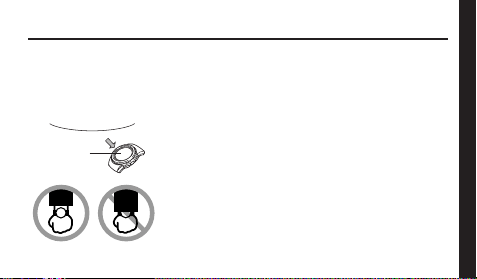
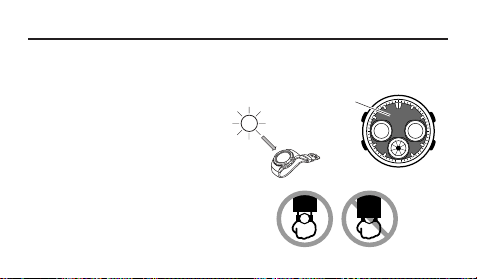
Keep the watch exposed to bright light
The electricity generated by the solar cell of the watch is
stored by a built-in battery. Leaving or using the watch where
it is not exposed to light causes the battery to run down.
Make sure the watch is exposed to light as much as possible.
•
When you are not wearing the watch on your wrist,
position the face so it is pointed at a source of bright light.
• You should try to keep the watch outside of your sleeve
as much as possible. Charging is reduced significantly if
the face is even only partially covered.
l
l
l
l
l
l
l
l
l
l
l
Bright Light
Solar cell

E-2
Battery charges in the light. Battery discharges in the dark.
All
functions
enabled
LEVEL 1
LEVEL 2
LEVEL 3
LEVEL 4
Charge
Rechargeable battery
Bright Light
Electrical
energy
Solar cell
(Converts light to
electrical power.)
LEVEL 1
LEVEL 2
LEVEL 3
LEVEL 4
Some or all
functions
disabled
Dis-
charge
• The watch continues to operate, even when it is not exposed to light. Leaving the
watch in the dark can cause the battery to run down, which will result in some watch
functions to be disabled. If the battery goes dead, you will have to re-configure watch
settings after recharging. To ensure normal watch operation, be sure to keep it
exposed to light as much as possible.
E-3
• The actual level at which some functions are disabled depends on the watch model.
• Frequent display illumination can run down the battery quickly and require charging.
The following guidelines give an idea of the charging time required to recover from a
single illumination operation.
Approximately 5 minutes exposure to bright sunlight coming in through a window
Approximately 50 minutes exposure to indoor fluorescent lighting
• Be sure to read “Power Supply” (page E-48) for important information you
need to know when exposing the watch to bright light.
If the display of the watch is blank...
If the display of the watch is blank, it means that the Power Saving has turned off the
display to conserve power.
• See “Power Saving” (page E-55) for more information.
Note that CASIO COMPUTER CO., LTD. assumes no responsibility for any damage
or loss suffered by you or any third party arising through the use of this product or
its malfunction.

E-4
About This Manual
• Depending on the model of your watch, display text
appears either as dark figures on a light background, or
light figures on a dark background. All sample displays
in this manual are shown using dark figures on a light
background.
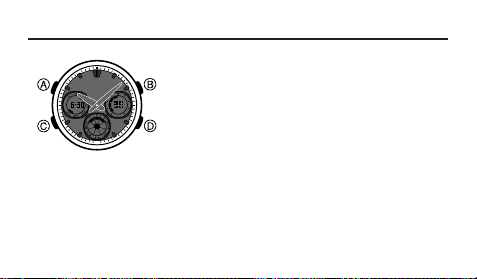
• Button operations are indicated using the letters shown
in the illustration.
• Most of the display examples in this manual show only
the digital display, without the analog hands.
• Each section of this manual provides you with the
information you need to perform operations in each
mode. Further details and technical information can be
found in the “Reference” section.
• To ensure that this watch provides you with the years of
service for which it is designed, be sure to carefully read
and follow the instructions under “Operating
Precautions” and “User Maintenance”.
E-5
Contents
General Guide ......................................................................................................... E-8
Radio-controlled Timekeeping ............................................................................. E-10
World Time ............................................................................................................. E-28
Countdown Timer .................................................................................................. E-31
Stopwatch .............................................................................................................. E-33
Alarm ...................................................................................................................... E-35
Illumination ............................................................................................................ E-38
Timekeeping .......................................................................................................... E-39
Power Supply ........................................................................................................ E-48
Reference .............................................................................................................. E-55
Specifications ....................................................................................................... E-64
Operating Precautions ......................................................................................... E-66
User Maintenance ................................................................................................. E-75

E-6
Procedure Lookup
The following is a handy reference list of all the operational procedures contained in
this manual.
To specify your Home City ................................................................................... E-12
To display the digital time .................................................................................... E-13
To display the last signal screen ......................................................................... E-14
To perform manual receive .................................................................................. E-23
To toggle auto receive on or off .......................................................................... E-24
To view the time in another city ........................................................................... E-29
To select standard time or Daylight Saving Time for a World Time City .......... E-29
To set the countdown start time .......................................................................... E-32
To use the countdown timer ................................................................................ E-32

E-7
To measure times with the stopwatch ................................................................ E-34
To set the alarm time ............................................................................................ E-36
To test the alarm ................................................................................................... E-36
To turn the Daily alarm and the Hourly Time Signal on and off ........................ E-37
To turn on illumination ......................................................................................... E-38
To set the current digital time and date manually ............................................. E-40
To change the Daylight Saving Time (summer time) setting ............................ E-44
To adjust the analog time ..................................................................................... E-46
To recover from the sleep state ........................................................................... E-56
To turn Power Saving on and off ......................................................................... E-57
E-8
Timekeeping Mode
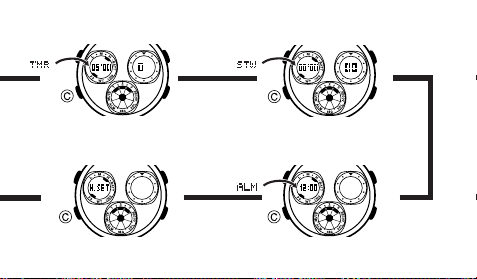
Press C.
▲
▲
World Time Mode
General Guide
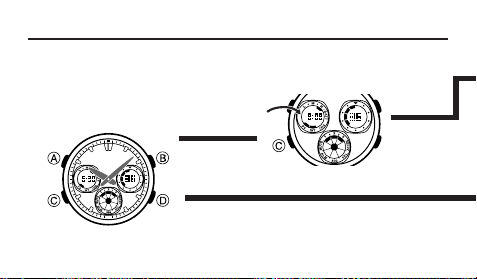
• Press C to change from mode to mode.
• In any mode (except a setting mode), press B to illuminate the face of the watch.
NYCNYC
NYCNYC
NYC
E-9
▲
▲
▲
Stopwatch ModeCountdown Timer Mode
Alarm Mode
▲
Hand Setting Mode
E-10
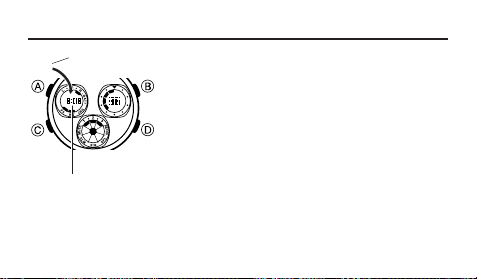
Radio-controlled Timekeeping
This watch receives a time calibration signal and updates
its time setting accordingly. The time calibration signal
includes both Standard Time and Daylight Saving Time
(summer time) data.
• This watch is designed to pick up the time calibration
transmitted in Japan (Fukuoka/Saga and Fukushima)
and the United States (Fort Collins, Colorado).
• See the information under “Signal Receive
Troubleshooting” (page E-26) if you experience problems
with time calibration signal reception.
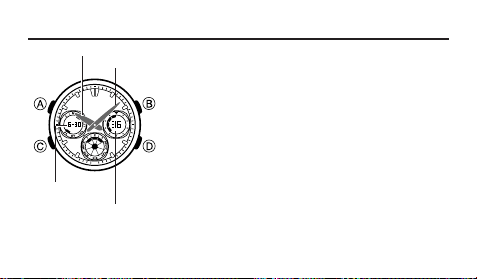
Seconds
Minute hand
Hour hand
Month – Day

E-11
Current Time Setting
This watch adjusts its time setting automatically in accordance with a time calibration
signal. You also can perform a manual procedure to set the time and date, when
necessary.
• The first thing you should do after purchasing this watch is to specify your
Home City (the city where you normally will use the watch). For more
information, see “To specify your Home City” on page E-12.
• When using the watch outside the areas covered by the time signal transmitters, you
will have to adjust the current time setting manually as required. See
“To set the
current digital time and date manually” (page E-40) for more information about manual
time settings.
• The U.S. time calibration signal can be picked up by the watch while in North
America. The term “North America” in this manual refers to the area that consists of
Canada, the continental United States, and Mexico.
E-12
l
l
l
l
l
l
l
l
l
l
l
l
l
l
To specify your Home City
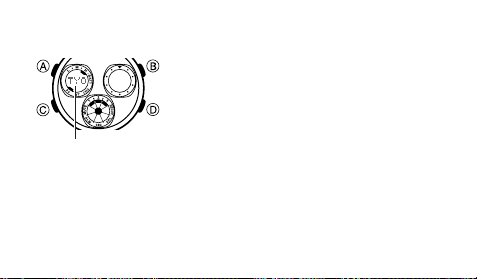
1. In the Timekeeping Mode, hold down A until the
currently set city code starts to flash in the upper left
display. This is the Home City setting mode.
2. Use D (eastward) and B (westward) to scroll through
the city codes until the one you want is displayed.
SEL, TYO : Seoul, Tokyo
YVR, LAX : Vancouver, Los Angeles
YEA, DEN : Edmonton, Denver
MEX, YWG, CHI : Mexico City, Winnipeg, Chicago
MIA, YTO, NYC : Miami, Toronto, New York
YHZ : Halifax
YYT : St. Johns
3. Press A to exit the setting mode.
City code
E-13
• Normally, your watch should show the correct time as soon as you select your Home
City Code. If it does not, it should adjust automatically after the next auto receive (in
the middle of the night). You also can perform manual receive (page E-23) or you
can set the time manually (page E-40).
• If you are in an area that does not use Daylight Saving Time (summer time), turn off
the DST setting (page E-44).
To display the digital time
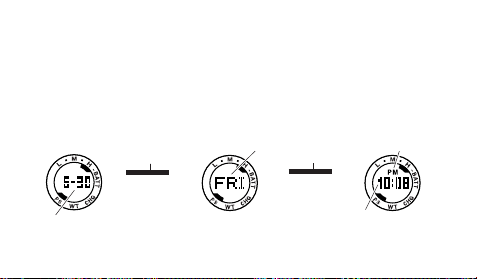
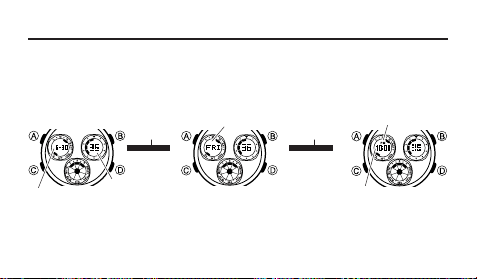
• In the Timekeeping Mode, press A to cycle the contents of the upper left display as
shown below.
▲
Press A.
Hour : Minutes
Day of week
PM indicator
▲
Press A.
Month – Day
E-14
To display the last signal screen
• In the Timekeeping Mode, press D to toggle the upper left display between the last
signal information shown below. These screens show the time and date of the last
successful time calibration signal reception.
Last Signal
Screen
Reception date
Reception time

E-15
Time Calibration Signal Reception
There are two different methods you can use to receive the time calibration signal:
auto receive and manual receive.
• Auto Receive
With auto receive, the watch receives the time calibration signal automatically six
times a day. When any auto receive is successful, remaining auto receive
operations are not performed. For more information, see “About Auto Receive”
(page E-20).
• Manual Receive
Manual receive lets you start a time calibration signal reception with the press of a
button. For more information, see “To perform manual receive” on page E-23.
E-16
Important!
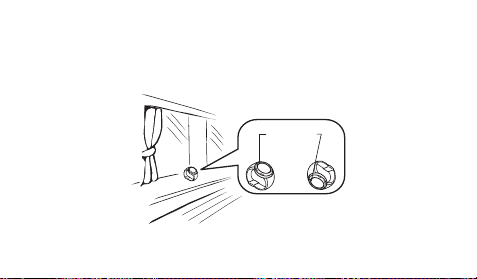
• When getting ready to receive the time calibration signal, position the watch as
shown in the nearby illustration, with its 12 o’clock side pointing towards a window.
This watch is designed to receive a time calibration signal late at night. Because of
this, you should place the watch near a window as shown in the illustration when you
take it off at night. Make sure there are no metal objects nearby.
12 o’clock
or
• Make sure the watch is facing the right way.
E-17
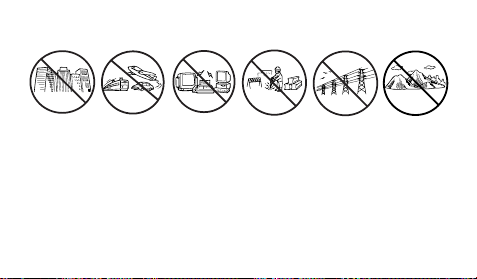
• Proper signal reception can be difficult or even impossible under the conditions listed
below.
• Signal reception normally is better at night than during the day.
• Time calibration signal reception takes from two to seven minutes, but in some
cases it can take as long as 14 minutes. Take care that you do not perform any
button operations or move the watch during this time.
Inside or
among
buildings
Inside a
vehicle
Near
household
appliances,
office
equipment,
or a mobile
phone
Near a
construction
site, airport, or
other sources
of electrical
noise
Near high-
tension
power lines
Among or
behind
mountains
E-18
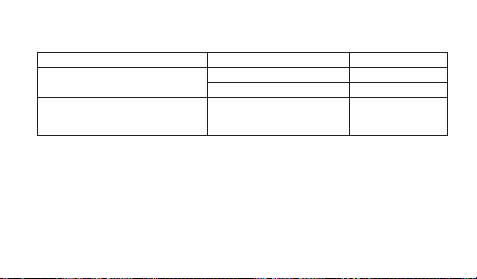
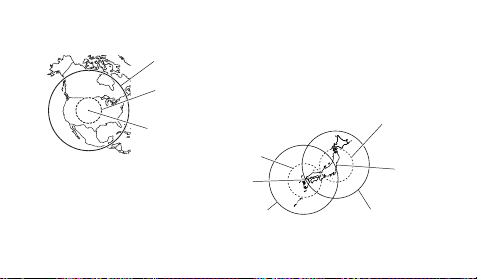
• The time calibration signal the watch will attempt to pick up depends on its current
Home City code setting as shown below.
Home City Code
SEL, TYO
YVR, LAX, YEA, DEN,
MEX, YWG, CHI, MIA,
YTO, NYC, YHZ, YYT
Frequency
40.0 kHz
60.0 kHz
60.0 kHz
Transmitter
Fukushima (Japan)
Fukuoka/Saga (Japan)
Fort Collins, Colorado
(the United States)
• Calibration signal reception is disabled while a countdown timer operation is in
progress.
E-19
Approximate Reception Ranges
2,000 miles
(3,000 kilometers)
U.S. Signal
Fort Collins
600 miles
(1,000 kilometers)
Japan Signals
1,000 kilometers
1,000 kilometers
Fukuoka/Saga
500 kilometers
500 kilometers
Fukushima

E-20
• Signal reception may not be possible at the distances that are further than those
noted below during certain times of the year or day. Radio interference also may
cause problems with reception.
Fort Collins (United States) transmitter: 600 miles (1,000 kilometers)
Fukushima or Fukuoka/Saga (Japan) transmitters: 500 kilometers (310 miles)
• Even when the watch is within the reception range of the transmitter, signal
reception will be impossible if the signal is blocked by mountains or other geological
formations between the watch and signal source.
• Signal reception is affected by weather, atmospheric conditions, and seasonal
changes.
About Auto Receive
With Auto Receive, the watch performs the receive operation each day automatically
up to six times between the hours of midnight and 5 a.m. (according to the
Timekeeping Mode time). When any receive operation is successful, none of the other
receive operations for that day are performed.

E-21
Note
• When a calibration time is reached, the watch will receive the calibration signal only
if it is in either the Timekeeping Mode or World Time Mode. Reception is not
performed if a calibration time is reached while you are configuring settings.
• Auto receive of the calibration signal is designed to be performed early in the
morning, while you sleep (provided that the Timekeeping Mode time is set correctly).
Before going to bed for the night, remove the watch from your wrist, and put it in a
location where it can receive the signal easily.
• Remember that reception of the calibration signal depends on the current time in
your Home City, as kept in the Timekeeping Mode.

E-22
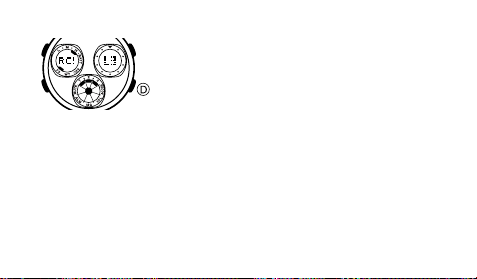
About the Receiving Indicator
The receiving indicator shows the strength of the calibration signal being received. For
best reception, be sure to keep the watch in a location where signal strength is
strongest.
• Even in an area where signal strength is strong, it takes about 10 seconds for signal
reception to stabilize enough for the receiving indicator to indicate signal strength.
• Use the receiving indicator as a guide for checking signal strength and for finding the
best location for the watch during signal reception.
Receiving indicator
Weak
Strong
(Level 0)
(Level 3)
E-23
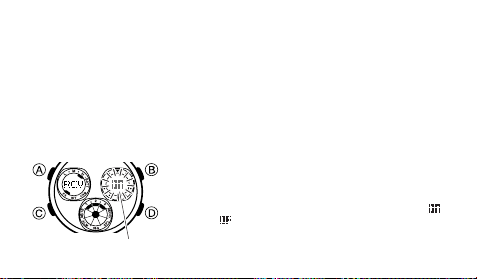
To perform manual receive
1. Place the watch on a flat surface so its top (12 o’clock)
is pointed toward an outside window (page E-16).
2. In the Timekeeping Mode, hold down D for about two
seconds until the watch beeps.
3. Release D when the watch beeps. The upper left
display will shows
RC! to indicate that signal reception
is in progress.
• To interrupt a reception and return to the Timekeeping Mode, press D.
About the manual receive result indicator
• When signal reception is successful,
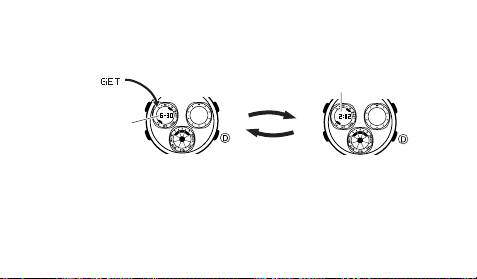
GET appears in the upper left display and the
watch adjusts its time setting accordingly. After that, the last signal screen will
appear in the upper left display (page E-14).
• After signal reception is successful, the Level 3 indicator (page E-22) will be
displayed in the bottom display in all modes. The Level 3 indicator will remain
displayed until the first signal receive operation of the following day.
E-24
• ERR will appear momentarily in the upper left display if the signal receive operation
fails. The watch will not adjust its time setting in this case. After that, the upper left
display will change to the last signal screen, which shows the time and date of the
last successful signal receive operation (page E-14).
• To return to the Timekeeping Mode while the last signal screen is displayed in the
upper left display, press D. The watch will return to the Timekeeping Mode
automatically if you do not press any button for two or three minutes.
• Signal reception is disabled while a countdown timer operation is in progress.
To toggle auto receive on or off
1. In the Timekeeping Mode, press D to display the last
signal screen in the upper left display (page E-14).
•
The upper left display will return to normal timekeeping
if you press
D
or if you do not perform any button
operation for two or three minutes.
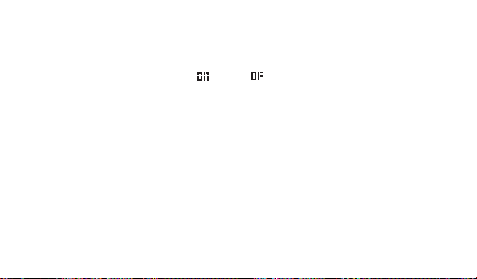
2. Hold down A until the current auto receive setting (
for on or for off) flashes in the upper right display.
This is the setting mode.
On/Off status
E-25
• If the auto receive setting does not appear when you hold down A, it means that
the city code currently selected for the Home City is for an area that does not
support calibration signal reception. You cannot turn auto receive on or off in this
case.
3. Use D to turn auto receive on (
) or off ( ).
4. Press A to exit the setting mode.
• To return to the Timekeeping Mode from the last signal screen, press D.
• For information about city codes that support signal reception, see “To specify your
Home City” on page E-12.
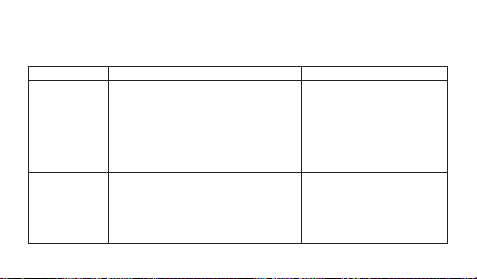
E-26
Problem
Cannot perform
manual receive.
Auto receive is
turned on, but
the Level 3
indicator does
not appear on
the display.
Probable Cause
• The watch is not in the Timekeeping
Mode.
• Your Home City is a city code that does
not support signal reception.
• You changed the time setting manually.
• The watch was not in the Timekeeping
or World Time Mode, or you performed
some button operation during auto
receive.
What you should do
• Enter the Timekeeping Mode
and try again (page E-23).
• Select one of the following city
codes as your Home City
(page E-12): SEL, TYO, YVR,
LAX, YEA, DEN, MEX, YWG,
CHI, MIA, YTO, NYC, YHZ,
YYT.
• Perform manual signal receive
or wait until the next auto
receive is performed.
Signal Receive Troubleshooting
Check the following points whenever you experience problems with calibration signal
reception.
E-27
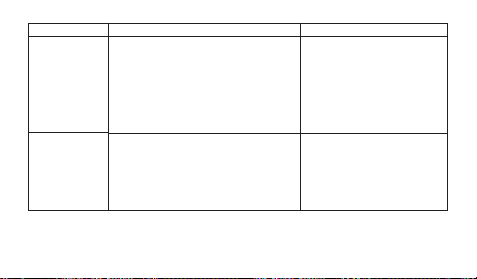
• For further information, see page E-16 (“Important!”) and “Radio-controlled
Timekeeping Precautions” (page E-59).
Problem
Auto receive is
turned on, but
the Level 3
indicator does
not appear on
the display.
The time setting
is incorrect
following signal
reception.
Probable Cause
• Even if receive is successful, the Level
3 indicator disappears from the display
each day when the first auto receive of
the day is performed.
• Time data (hour, minutes, seconds) only
was received during the last receive
operation. The Level 3 indicator appears
only when time data and date data
(year, month, day) are both received.
• If the time is one hour off, the DST
setting may be incorrect.
• The Home City code setting is not
correct for the area where you are using
the watch.
• The home positions of the hands are off.
What you should do
• Perform manual signal
receive or wait until the next
auto receive is performed.
• Check to make sure the
watch is in a location where it
can receive the signal (page
E-16).
• Change the DST setting to
Auto DST (page E-44).
• Select the correct Home City
code (page E-12).
• Enter the Hand Setting Mode
and adjust the home positions
(page E-46).
E-28
World Time
The World Time Mode digitally displays the current time in
48 cities (29 time zones) around the world.
• If the current time shown for a city is wrong, check your
Home City time settings and make the necessary
changes (page E-40).
• The watch will perform signal reception even if it is in the
World Time Mode when a calibration time is reached. If
this happens, the World Time Mode time settings will be
adjusted in accordance with the Timekeeping Mode’s
Home City time.
• All of the operations in this section are performed in the
World Time Mode, which you enter by pressing C
(page E-8).
City code
Current time in
selected city
NYCNYC
NYCNYC
NYC
E-29
To view the time in another city
While in the World Time Mode, press D to scroll eastwards through the city codes
(time zones).
• For full information on city codes, see the “City Code Table” at the back of this
manual.
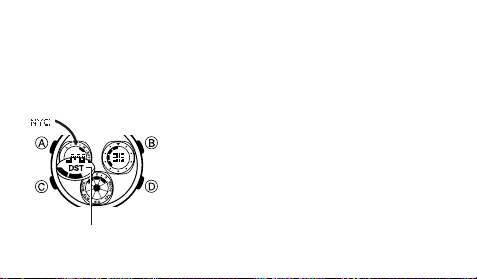
To select standard time or Daylight Saving Time for a World Time City
1. In the World Time Mode, use D to display the city code
you want in the upper left display.
2. Hold down A to toggle the displayed city code between
Daylight Saving Time (DST indicator displayed at the
bottom of the upper left display) and standard time
(DST indicator not displayed).
DST indicator

E-30
• Note that you cannot use the World Time Mode to change the DST setting of the
Home City code you currently have selected in the Timekeeping Mode. See page
E-44 for information about turning the Home City code DST setting on and off.
• The DST indicator will appear on the display whenever you display a city code for
which Daylight Saving Time is turned on.
• Note that the DST/Standard Time setting affects only the currently displayed city
code. Other city codes are not affected.

E-31
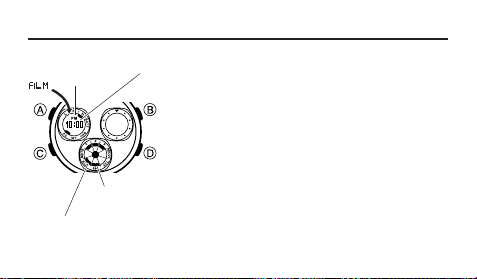
Countdown Timer
You can set the countdown timer start time within a range
of one to 60 minutes. An alarm sounds when the
countdown reaches zero.
• Calibration signal reception (both auto and manual) is
disabled while a countdown timer operation is in
progress.
• All of the operations in this section are performed in the
Countdown Timer Mode, which you enter by pressing
C (page E-9).
Minutes
Seconds
1/10 Seconds

E-32
To set the countdown start time
1. While the countdown start time (1 to 60) is shown in the upper left display in the
Countdown Timer Mode, hold down A until the start time value starts to flash. This
is the setting mode.
• If the countdown start time is not displayed, use the procedure under “To use the
countdown timer” to display it.
2. While a setting is flashing, use D (+) and B (–) to change it.
3. Press A to exit the setting mode.
To use the countdown timer
Press D while in the Countdown Timer Mode to start the countdown timer.
• When the end of the countdown is reached, the alarm will sound for 10 seconds or
until you stop it by pressing any button. The countdown time is reset to its starting
value automatically after the alarm stops.
• Press D while a countdown operation is in progress to pause it. Press D again to
resume the countdown.
• To stop a countdown operation completely, first pause it (by pressing D), and then
press A. This returns the countdown time to its starting value.
E-33
Stopwatch
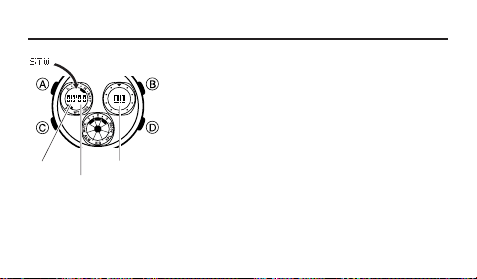
The stopwatch lets you measure elapsed time, split times,
and two finishes.
• The display range of the stopwatch is 59 minutes, 59.99
seconds.
• The stopwatch continues to run, restarting from zero
after it reaches its limit, until you stop it.
• Exiting the Stopwatch Mode while a split time is frozen
on the upper left and upper right displays will clear the
split time and return the stopwatch to elapsed time
measurement.
• The stopwatch measurement operation continues even
if you exit the Stopwatch Mode.
• All of the operations in this section are performed in the
Stopwatch Mode, which you enter by pressing C
(page E-9).
1/100 second
Minutes
Seconds
E-34
D
Start Stop
Elapsed Time
➤
Re-start Clear
D
➤
Stop
D
➤
D
➤
A
Split Time
D
Start Split
➤
Split release
Clear
A
➤
Stop
A
➤
D
➤
A
Two Finishes
D
Start Split
➤
Stop
Clear
A
➤
Split release
D
➤
A
➤
A
First runner
finishes.
Display time of
first runner.
Second runner
finishes.
Display time of
second runner.
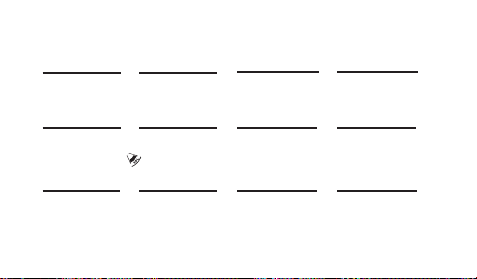
To measure times with the stopwatch
( displayed)
E-35
Alarm
When the alarm is turned on, the alarm will sound when
its alarm time is reached. You also can turn on an Hourly
Time Signal, which will cause the watch to beep twice
every hour on the hour.
• All of the operations in this section are performed in the
Alarm Mode, which you enter by pressing C (page
E-9).
Alarm time
(Hour : Minutes)
PM indicator
Hourly time signal
on indicator
Alarm on indicator

E-36
To set the alarm time
1. In the Alarm Mode, hold down A until the hour setting of the alarm time start to
flash in the upper left display. This is the setting mode.
• This operation turns on the alarm automatically.
2. Press C to move the flashing between the hour and minute settings.
3. Use D (+) and B (–) to change the flashing setting.
• When setting the alarm time using the 12-hour format, take care to set the time
correctly as a.m. (no indicator) or p.m. (PM indicator).
4. Press A to exit the setting mode.
Alarm Operation
The alarm sounds at the preset time for about 10 seconds, regardless of the mode the
watch is in.
• To stop the alarm tone after it starts to sound, press any button.
To test the alarm
In the Alarm Mode, hold down D to sound the alarm.
E-37
To turn the Daily alarm and the Hourly Time Signal on and off
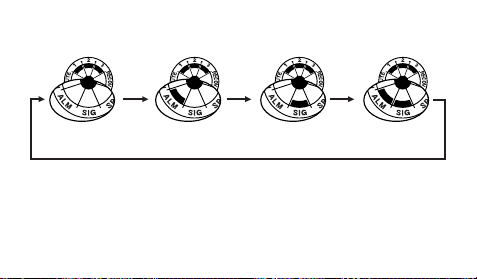
In the Alarm Mode, press D to cycle through the settings shown below.
• The alarm on indicator (when the alarm is on) and the hourly time signal on indicator
(when the hourly time signal is on) are displayed in the lower display in all modes.
Alarm Off
Signal Off
Alarm On
Signal Off
Alarm Off
Signal On
Alarm On
Signal On
E-38
Illumination
An LED (light-emitting diode) and light guide panel
illuminate the digital display for easy reading in the dark.
• See “Illumination Precautions” on page E-63 for other
important information.
To turn on illumination
In any mode (except a setting mode), press B to
illuminate the face of the watch.
l
l
l
l
l
l
l
l
l
l
l
l
l
l
l
l
l
l
l
l
l
l
l
l
l
l
l
l
l
l
l
l
l
l
l
E-39
Timekeeping
Use the Timekeeping Mode to set and view the current time and date. This section
also explains how to set the current date and time manually.
• When setting the time, you also can configure settings for the illumination duration
and the 12/24-hour format.
• All of the operations in this section are performed in the Timekeeping Mode, which
you can enter by pressing C (page E-8).
▲
Press A.
Hour : Minutes
▲
Press A.
Seconds
Day of week
PM indicator
Month – Day
E-40
l
l
l
l
l
l
l
l
l
l
l
l
l
l
Setting the Digital Time and Date Manually
Make sure you select your Home City code before you change the current time and
date settings. World Time Mode times are all displayed in accordance with the
Timekeeping Mode settings. Because of this, World Time Mode times will not be
correct if you do not select the proper Home City code before setting the time and
date in the Timekeeping Mode.
To set the current digital time and date manually
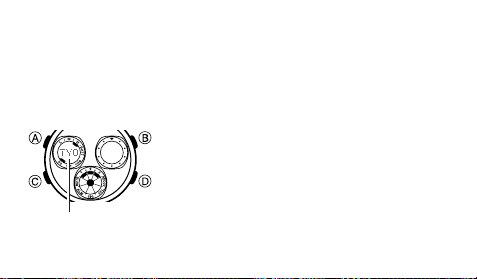
1. In the Timekeeping Mode, hold down A until the city
code of the currently selected Home City flashes in the
upper left display. This is the setting mode.
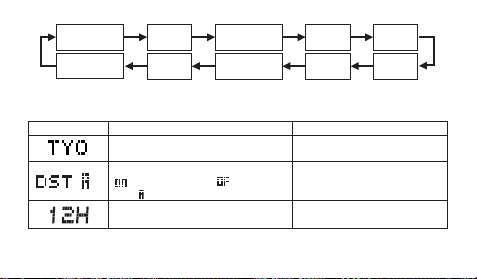
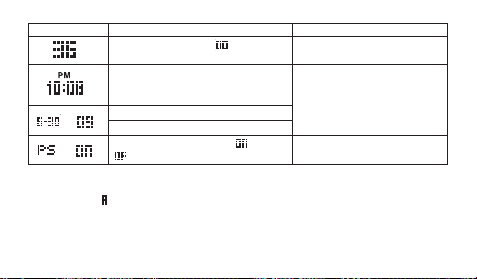
2. Press C to change the flashing screen in the
sequence shown below to select other settings.
City code
E-41
3. When the setting you want to change is flashing, use B and/or D to change it as
described below.
Screen: To do this:
Change the city code
Cycle between Daylight Saving Time
(
), Standard Time ( ), and Auto
DST ( )
Toggle between 12-hour (
12H) and
24-hour (
24H) timekeeping
Do this:
Use D (east) and B (west).
Press D.
Press D.
Seconds
Hour
12/24-Hour
Format
Minutes
Year
DST
Day
Month
City Code
Power
Saving
E-42
To do this:
Reset the seconds to
Change the hour or minutes
Change the year
Change the month or day
Toggle Power Saving on (
) and off
(
)
Screen: Do this:
Press D.
Use D (+) and B (–).
Press D.
• See “City Code Table” at the back of this manual for a complete list of available
city codes.
• Auto DST (
) can be selected only while SEL, TYO, YVR, LAX, YEA, DEN,
MEX, YWG, CHI, MIA, YTO, NYC, YHZ or YYT is selected as the Home
City code. For more information, see “Daylight Saving Time (DST)” below.

E-43
• For information about settings other than the time and date, see “Power Saving”
(page E-55)
4. Press A to exit the setting mode.
Daylight Saving Time (DST)
Daylight Saving Time (summer time) advances the time setting by one hour from
Standard Time. Remember that not all countries or even local areas use Daylight
Saving Time.
The time calibration signal transmitted from Fort Collins (the United States) includes
both Standard Time and DST data. When the Auto DST setting is turned on, the watch
switches between Standard Time and DST (summer time) automatically in
accordance with the signal.
• Though the time calibration signals transmitted by the Fukushima and Fukuoka/
Saga, Japan transmitters include summer time data, summer time currently is not
implemented in Japan (as of 2008).
• The default DST setting is Auto DST (
) whenever you select
TYO, YVR, LAX,
YEA, DEN,
M
EX, YW
G
, CHI,
M
IA, YTO, NYC, YHZ or YYT
as your
Home City code.
E-44
• If you experience problems receiving the time calibration signal in your area, it
probably is best to switch between Standard Time and Daylight Saving Time
(summer time) manually.
To change the Daylight Saving Time (summer time) setting
1. In the Timekeeping Mode, hold down A until the city code of the currently selected
Home City flashes in the upper left display. This is the setting mode.
2. Press C once. This will display the DST setting screen.
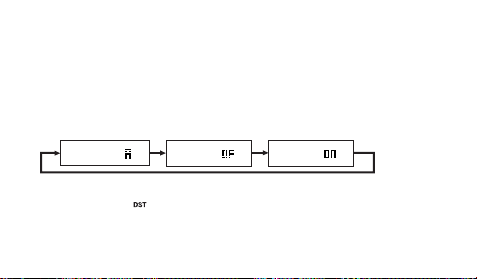
3. Use D to cycle through the DST settings in the sequence shown below.
4. When the setting you want is selected, press A to exit the setting mode.
• The DST indicator (
) is shown at the bottom of the upper left display when
Daylight Saving Time is on.
Auto DST ( ) DST off ( ) DST on ( )

E-45
Analog Timekeeping
The analog time of this watch is synchronized with the digital time. The analog time
setting is adjusted automatically whenever you change the digital time.
Note
• The analog hands move to a new setting whenever any of the following occurs.
When you change the digital time setting manually
When the digital time setting is changed by time calibration signal reception
When you change the Home City code and/or DST setting
• If the analog time does not match the digital time for any reason, use the procedure
described under “To adjust the analog time” to match the analog setting to the digital
setting.
• Whenever you need to adjust both the digital and the analog time settings manually,
make sure you adjust the digital setting first.
• Depending on how much the hands have to move in order to adjust to the digital
time, it may take some time before they stop moving.
E-46
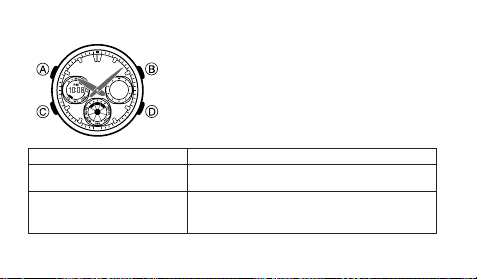
To adjust the analog time
1. In the Timekeeping Mode, press C five times to enter
the Hand Setting Mode (page E-9).
2. Hold down A until the current digital time starts to
flash. This is the setting mode.
3. Use D and B to adjust the analog setting as
described below.
When you want to do this:
Move the hand setting
forward 20 seconds
Move the hand setting a short
way forward at high speed
Perform this button operation:
• Press D.
• Hold down D.
• Release D when the hands reach the setting
you want.
l
l
l
l
l
l
l
l
l
l
l
l
l
l
E-47
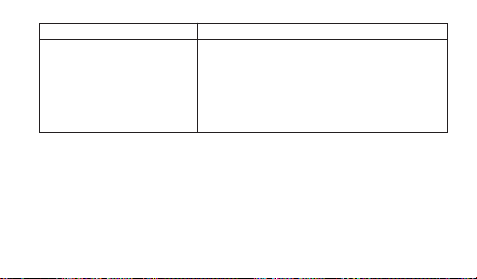
When you want to do this:
Move the hand setting a
long way forward at high
speed
Perform this button operation:
• While holding down D to move the hands at
high speed, press B to lock the high-speed
hand movement.
• To stop the hand movement, press any
button.
• Hand movement stops automatically if the hour
hand makes one full (12-hour) revolution.
4. Press A to exit the setting mode.
• The minute hand will be adjusted slightly to match the seconds when you exit the
setting mode.
• To return to the Timekeeping Mode, press C.
E-48
Power Supply
This watch is equipped with a solar cell and a special rechargeable battery (secondary
battery) that is charged by the electrical power produced by the solar cell. The
illustration shown below shows how you should position the watch for charging.
Example: Orient the watch so its face
is pointing at a light source.
• The illustration shows how to position
a watch with a resin band.
• Note that charging efficiency drops
when any part of the solar cell is
blocked by clothing, etc.
• You should try to keep the watch
outside of your sleeve as much as
possible. Charging is reduced
significantly if the face is even only
partially covered.
Solar cell

E-49
Important!
• Storing the watch for long periods in an area where there is no light or wearing it in
such a way that it is blocked from exposure to light can cause rechargeable battery
power to run down. Make sure that the watch normally is exposed to bright light
whenever possible.
• This watch uses a special rechargeable battery to store power produced by the solar
cell, so regular battery replacement is not required. However, after very long use, the
rechargeable battery may lose its ability to achieve a full charge. If you experience
problems getting the special rechargeable battery to charge fully, contact your dealer
or CASIO distributor about having it replaced.
• Never try to remove or replace the watch’s special battery yourself. Use of the wrong
type of battery can damage the watch.
• The current time and all other settings return to their initial factory defaults whenever
battery power drops to Level 5 (page E-50) and when you have the battery replaced.
• Turn on the watch’s Power Saving function (page E-55) and keep it in an area
normally exposed to bright light when storing it for long periods. This helps to keep
the rechargeable battery from going dead.
E-50
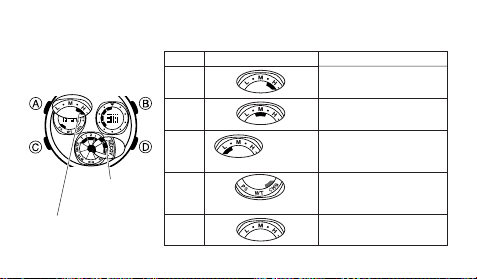
Battery Power Indicator and Recover Indicator
The battery power indicator shows you the current power level of the rechargeable
battery.
Battery power indicator
Recover
indicator
Function Status
All functions enabled.
All functions enabled.
Auto and manual receive,
illumination, and beeper
disabled.
All functions disabled.
Display disabled and all
functions initialized.
Level
1 (H)
2 (M)
3 (L)
4
(CHG)
5
(Charge Soon Alert)
l
l
l
l
l
l
l
l
l
l
l
l
l
(Charge Soon Alert)
LOW
l
l
l
l
l
l
l
l
l
l
l
l
l
l
l
l
l
Battery Power Indicator

E-51
• The LOW indicator at Level 3 (L) and the flashing charge indicator (CHG) at Level 4
tell you that battery power is very low, and that exposure to bright light for charging is
required as soon as possible.
• At Level 5, all functions are disabled and settings return to their initial factory
defaults. Functions are enabled once again after the rechargeable battery is
charged, but you need to set the time and date, after the battery reaches Level 4
(CHG) (indicated by the flashing charge indicator) from Level 5. You will not be able
to configure any of the other settings until the battery reaches Level 3 (L) (no charge
indicator) after dropping to Level 5.
• Leaving the watch in direct sunlight or some other very strong light source can
cause the battery power indicator to show a reading that is momentarily higher than
the actual battery level. The correct battery power indicator should appear after a
few minutes.
• Frequent use of illumination or the alarm over a short period will cause the recover
indicator (
) to appear in the lower display, indicating that the following operations
are disabled until battery power recovers.
Illumination
Beeper tone
Time calibration signal reception

E-52
Normal operation will resume after the battery recovers and the recover indicator
disappears.
Charging Precautions
Certain charging conditions can cause the watch to become very hot. Avoid leaving
the watch in the areas described below whenever charging its rechargeable battery.
Also note that allowing the watch to become very hot can cause its liquid crystal
display to black out. The appearance of the LCD should become normal again when
the watch returns to a lower temperature.
Warning!
Leaving the watch in bright light to charge its rechargeable battery can cause it
to become quite hot. Take care when handling the watch to avoid burn injury.
The watch can become particularly hot when exposed to the following
conditions for long periods.
• On the dashboard of a car parked in direct sunlight
• Too close to an incandescent lamp
• Under direct sunlight
E-53
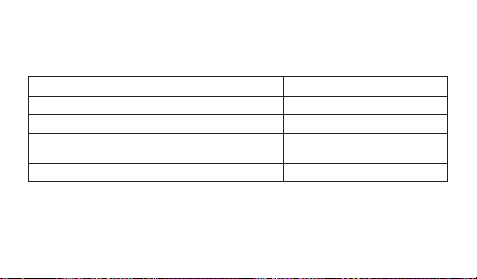
Charging Guide
After a full charge, timekeeping remains enabled for up to about 6 months.
• The following table shows the amount of time the watch needs to be exposed to light
each day in order to generate enough power for normal daily operations.
• For details about the battery operating time and daily operating conditions, see the
“Power Supply” section of the Specifications (page E-65).
• Stable operation is promoted by frequent exposure to light.
Exposure Level (Brightness)
Outdoor Sunlight (50,000 lux)
Sunlight Through a Window (10,000 lux)
Daylight Through a Window on a Cloudy Day
(5,000 lux)
Indoor Fluorescent Lighting (500 lux)
Approximate Exposure Time
8 minutes
30 minutes
48 minutes
8 hours
E-54
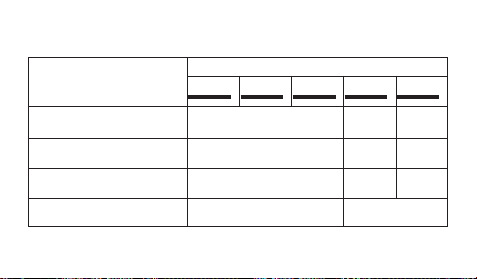
Recovery Times
The table below shows the amount exposure that is required to take the battery from
one level to the next.
• The above exposure time values are all for reference only. Actual required exposure
times depend on lighting conditions.
– – –
5 hours
18 hours
30 hours
Exposure Level
(Brightness)
Outdoor Sunlight (50,000 lux)
Sunlight Through a Window
(10,000 lux)
Daylight Through a Window
on a Cloudy Day (5,000 lux)
Indoor Fluorescent Lighting
(500 lux)
Approximate Exposure Time
Level 5
Level 4 (CHG)
Level 3 (L)
Level 2 (M)
Level 1 (H)
2 hours
6 hours
9 hours
99 hours
21 hours
80 hours
129 hours
▲
▲
▲
▲
▲
E-55
Reference
This section contains more detailed and technical information about watch operation.
It also contains important precautions and notes about the various features and
functions of this watch.
Power Saving
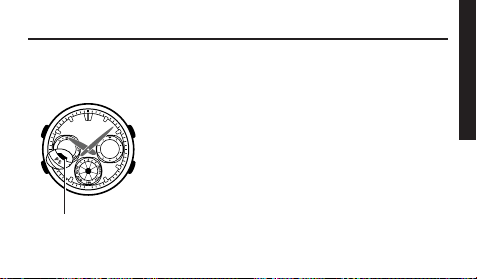
When turned on, the Power Saving function enters a sleep
state automatically whenever the watch is left in an area
where it is dark for a certain period. The table below
shows how watch functions are affected by the Power
Saving function.
Power saving
indicator
E-56
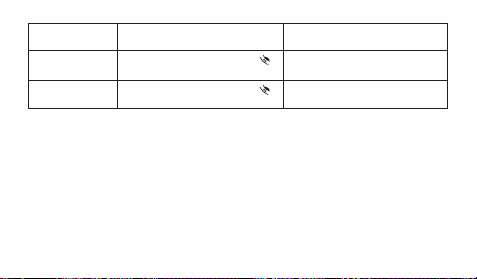
Elapsed Time
in Dark
60 to 70 minutes
6 or 7 days
Display
Blank, with Sleep indicator ( )
flashing
Blank, with Sleep indicator (
)
not flashing
Operation
All functions enabled, except
for the display
Beeper tone, illumination, and
display are disabled.
• Wearing the watch inside the sleeve of clothing can cause it to enter the sleep state.
• The watch will not enter the sleep state between 6:00 AM and 9:59 PM. If the watch
is already in the sleep state when 6:00 AM arrives, however, it will remain in the
sleep state.
To recover from the sleep state
Perform any one of the following operations.
• Move the watch to a well-lit area.
• Press any button.
E-57
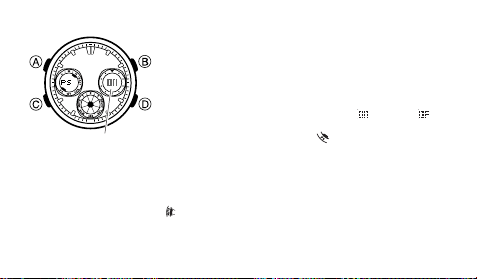
To turn Power Saving on and off
1. In the Timekeeping Mode, hold down A until the city
code of the currently selected Home City flashes in the
upper left display. This is the setting mode.
2. Press C nine times until PS appears in the left display
and on or off flashes in the right display. This is the
Power Saving on/off screen.
3. Press D to toggle Power Saving on (
) and off ( ).
4. Press A to exit the setting mode.
• The Power Saving indicator (
) is displayed in the
upper left display in all modes while Power Saving is
turned on.
Button Operation Tone
Holding down C in any mode will toggle the button operation tone on or off. A button
operation tone off indicator (
) is shown in the lower display while button operation
tone is off.
• The alarm and hourly time signal continue to sound normally even while the button
operation tone is off.
l
l
l
l
l
l
l
l
l
l
l
l
l
ON/Off status

E-58
Auto Return Features
• If you leave the watch in the Alarm or Hand Setting Mode for two or three minutes
without performing any operation, it will return to the Timekeeping Mode automatically.
• If you leave the watch with a flashing setting on the display for two or three minutes
without performing any operation, it will exit the setting mode automatically.
Scrolling
The B and D buttons are used in various modes to scroll through data on the
display. In most cases, holding down these buttons during a scroll operation scrolls
through the data at high speed.
Initial Screens
When you enter the World Time Mode, the data you were viewing when you last exited
the mode will appear first.

E-59
Radio-controlled Timekeeping Precautions
• Strong electrostatic charge can cause the time setting to be thrown off.
• Even when the watch is within the reception range of the transmitter, signal
reception will be impossible if the signal is blocked by mountains or other geological
formations between the watch and signal source.
• Signal reception is affected by weather, atmospheric conditions, and seasonal
changes.
• The time calibration signal bounces off the ionosphere. Because of this, such factors
as changes in the reflectivity of the ionosphere, as well as movement of the
ionosphere to higher altitudes due to seasonal atmospheric changes or the time of
day may change the reception range of the signal and make reception temporarily
impossible.
• Even if the time calibration signal is received properly, certain conditions can cause
the time setting to be off by up to one second.
• The current time setting in accordance with the time calibration signal takes priority
over any time settings you make manually.

E-60
• The watch is designed to update the date and day of the week automatically for the
period January 1, 2000 to December 31, 2099. Setting of the date by the time
calibration signal cannot be performed starting from January 1, 2100.
• This watch can receive signals that differentiate between leap years and non-leap
years.
• Though this watch is designed to receive both time data (hour, minutes, seconds)
and date data (year, month, day), certain signal conditions can limit reception to time
data only.
• Normally, the signal reception date shown by the Last Signal screen is the date data
included in the received time calibration signal. When only time data is received,
however, the Last Signal screen shows the date as kept in the Timekeeping Mode at
the time of signal reception.
• If you are in an area where proper time calibration signal reception is impossible, the
watch keeps time with the precision noted in “Specifications”.
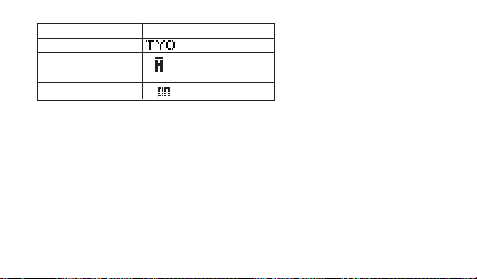
• If you have problems with proper time calibration signal reception or if the time
setting is wrong after signal reception, check your current city code, DST (summer
time) (page E-44), and auto receive settings (page E-24). The following are the initial
factory defaults for these settings.
E-61
Setting
City code
DST (summer time)
Auto receive
Initial Factory Default
(Tokyo)
(Auto switching)
(Auto receive)
Transmitters
The time calibration signal received by this watch depends on the currently
selected Home City code (page E-12).
• When a U.S. time zone is selected, the watch receives the time calibration signal
transmitted from the United States (Fort Collins).
• When a Japanese time zone is selected, the watch receives the time calibration
signals transmitted from Japan (Fukushima and Fukuoka/Saga).

E-62
Timekeeping
• Resetting the seconds to 00
while the current count is in the range of 30 to 59
causes the minutes to be increased by 1. In the range of 00 to 29, the seconds are
reset to 00
without changing the minutes.
• The day of the week is displayed automatically in accordance with the date (year,
month, and day) settings.
• The year can be set in the range of 2000 to 2099.
• The watch’s built-in full automatic calendar makes allowances for different month
lengths and leap years. Once you set the date, there should be no reason to change
it except after you have the watch’s battery replaced or when battery power drops to
Level 5.
• The times for the Timekeeping Mode and all the city codes of the World Time Mode
are calculated in accordance with each city’s UTC offset.
• The UTC offset is a value that indicates the time difference between a reference
point in Greenwich, England and the time zone where a city is located.

E-63
• The letters “UTC” is the abbreviation for “Universal Time Coordinated”, which is the
world-wide scientific standard of timekeeping. It is based upon carefully maintained
atomic (cesium) clocks that keep time accurately to within microseconds. Leap
seconds are added or subtracted as necessary to keep UTC in sync with the Earth’s
rotation.
12-hour/24-hour Timekeeping Formats
The 12-hour/24-hour timekeeping format you select in the Timekeeping Mode also is
applied in all other modes.
• When you are using 12-hour timekeeping, a PM indicator (PM) appears in the upper
left display between noon and 11:59 p.m. No indicator is displayed between midnight
and 11:59 a.m.
• With the 24-hour format, times are displayed in the range of 0:00 to 23:59, without
any indicator.
Illumination Precautions
• Illumination may be hard to see when viewed under direct sunlight.
• Illumination turns off automatically whenever an alarm sounds.
• Frequent use of illumination runs down the battery.
E-64
Specifications
Accuracy at normal temperature: ± 15 seconds a month (with no signal calibration)
Digital Timekeeping: Hour, minutes, seconds, p.m., month, day, day of the week
Time system: Switchable between 12-hour and 24-hour formats
Calendar system: Full Auto-calendar pre-programmed from the year
2000 to 2099
Other: Home city code (can be assigned one of 48 city codes); Daylight
Saving Time (summer time)/Standard Time
Time Calibration Signal Reception: Auto receive up to six times a day (Remaining
auto receives cancelled as soon as one is successful); Manual receive
Receivable Time Calibration Signals: Fort Collins, Colorado, the United States
(Call Sign: WWVB, Frequency: 60.0 kHz); Fukushima, Japan (Call Sign:
JJY, Frequency: 40.0 kHz); Fukuoka/Saga, Japan (Call Sign: JJY,
Frequency: 60.0 kHz)
Analog Timekeeping: Hour, minutes (hand moves every 20 seconds)
World Time: 48 cities (29 time zones)
Other: Standard Time/Daylight Saving Time (summer time)
Alarms: Daily alarms; Hourly Time Signal

E-65
Countdown Timer:
Measuring unit: 1/10 second
Input range: 1 to 60 minutes (1-minute increments)
Stopwatch:
Measuring unit: 1/100 second
Measuring capacity: 59' 59.99''
Measuring modes: Elapsed time, split time, two finishes
Illumination: LED (light-emitting diode)
Other: Battery power indicator; Power Saving; Button operation tone on/off
Power Supply: Solar cell and a rechargeable battery
Approximate Battery Operating Time
6 months (from full charge to Level 4 (CHG) when the watch is not exposed to
light) under the following conditions:
• Display on 18 hours per day, sleep state 6 hours per day
• 1 illumination operation (1.5 seconds) per day
• 10 seconds of alarm operation per day
• 10 minutes of signal reception per day
Frequent use of illumination can shorten battery operating time.

E-66
Operating Precautions
Water Resistance
• The following applies to watches with WATER RESIST or WATER RESISTANT
marked on the back cover.
• Do not use this watch for scuba diving or other types of diving that requires air tanks.
On watch front or No
5BAR 10BAR 20BAR
on back cover BAR mark
Hand washing, rain Yes Yes Yes Yes
Water-related work, swimming
N o Ye s Ye s Ye s
Windsurfing No No Yes Yes
Skin diving No No Yes Yes
5
Atmospheres
10
Atmospheres
20
Atmospheres
Marking
Example of
Daily Use
Water
Resistance
Under Daily
Use
Enhanced Water Resistance Under
Daily Use

E-67
• Watches that do not have WATER RESIST or WATER RESISTANT marked on the
back cover are not protected against the effects of sweat. Avoid using such a watch
under conditions where it will be exposed to large amounts of sweat or moisture, or
to direct splashing with water.
• Even if a watch is water-resistant, do not operate its buttons or crown while it is
submersed in water or wet.
• Even if a watch is water-resistant, avoid wearing it in the bath or in areas where
detergents (soap, shampoo, etc.) are being used. Such conditions can reduce water
resistance.
• After submersion in seawater, use plain water to rinse all salt and dirt from the
watch.
• In order to maintain water resistance, have the gaskets of your watch replace
periodically (about once every two or three years).
• A trained technician will know how to check your watch for proper water resistance
whenever you have its battery replaced. Battery replacement requires the use of
special tools. Always request battery replacement from your original retailer or from
an authorized CASIO Service Center.

E-68
• Some water-resistant watches come with fashionable leather bands. Avoid
swimming, washing, or any other activity that causes direct exposure of a leather
band to water.
• The inside surface of the watch glass may fog when the watch is exposed to a
sudden drop in temperature. No problem is indicated if the fogging clears up
relatively quickly. If the fogging does not clear or if water has gotten into the watch,
take the watch in for repair immediately.
• Continued use of the watch with water inside can result in damage to electronic and
mechanical components, the face of the watch, etc.
• Your water-resistant watch has been tested in accordance with the International
Organization for Standardization regulations ISO2281 and FTC (USA) “GUIDE FOR
THE WATCH INDUSTRY.” Guide 5.
Band
• Tightening the band too tightly can cause you to sweat and make it hard for air to
pass under the band, which can lead to skin irritation. Do not fasten the band too
tightly. There should be enough room between the band and your wrist so you can
insert your finger.

E-69
• Deterioration, rust, or corrosion of the band can cause it to break, which may result
in the watch falling off your wrist and becoming lost. Be sure to take good care of the
band and keep it clean. Should you notice any breakage, discoloration, looseness or
other problem with the band, immediately contact your original retailer or an
authorized CASIO Service Center to have it checked, repaired, or replaced. Note
that you will be charged for any repair or replacement of the band.
Temperature
• Never leave the watch on the dashboard of a car, near a heater, or in any other
location that is subject to very high temperatures. Do not leave the watch where it
will be exposed to very low temperatures, either. Temperature extremes can cause
the watch to lose or gain time, to stop, or otherwise malfunction.
• Leaving the watch in an area hotter than +60°C (140°F) for long periods can lead to
problems with its LCD. The LCD may become difficult to read at temperatures lower
than 0°C (32°F) and greater than +40°C (104°F).

E-70
Impact
• Your watch is designed to withstand impact incurred during normal daily use and
light activity such as playing catch, tennis, etc. Dropping the watch or otherwise
subjecting it to strong impact, however, can lead to malfunction.
Note that watches with shock-resistant designs (G-SHOCK, Baby-G, G-ms) can be
worn while operating a chain saw or engaging in other activities that generate strong
vibration, or while engage in strenuous sports activities (motocross, etc.).
Magnetism
• The hands of analog and combination (analog-digital) watches are moved by a
motor that uses magnetic force. When such a watch is close to a device (audio
speakers, magnetic necklace, cell phone, etc.) that emits strong magnetism, the
magnetism can cause timekeeping to slow down, speed up, or stop, resulting in the
incorrect time being displayed.

E-71
Electrostatic Charge
• Exposure to very strong electrostatic charge can cause the watch to display the
wrong time. Very strong electrostatic charge even can damage electronic
components.
• Electrostatic charge can cause the display to go blank momentarily or cause a
rainbow effect on the display.
Chemicals
• Do not allow the watch to come into contact with thinner, gasoline, solvents, oils, or
fats, or with any cleaners, adhesives, paints, medicines, or cosmetics that contain
such ingredients. Doing so can cause discoloration of or damage to the case, resin
band, leather band, and other parts.
Storage
• If you do not plan to use the watch for a long time, wipe it thoroughly free of all dirt,
sweat, and moisture, and store it in a cool, dry place.

E-72
Resin Components
• Allowing the watch to remain in contact with other items or storing it together with
other items for long periods while it is wet can cause the color of the other items to
transfer to the resin components of the watch. Be sure to dry off the watch
thoroughly before storing it and make sure it is not in contact with other items.
• Leaving the watch where it is exposed to direct sunlight (ultraviolet rays) for long
periods or failure to clean dirt from the watch for long periods can cause it to
become discolored.
• Friction caused by certain conditions (frequent external force, sustained rubbing,
impact, etc.) can cause discoloration of painted components.
• If there are printed figures on the band, strong rubbing of the printed area can cause
discoloration.
• Failure to clean dirt from the watch for long periods can cause fluorescent color to
fade. Wash dirt off with water as soon as possible and then dry the watch.
• Semi-transparent resin parts can become discolored due to sweat and dirt, and if
exposed to high temperatures for long periods.
• Contact an authorized CASIO Service Center to have resin components replaced.
Note that you will be charged for replacement costs.

E-73
Natural Leather and Imitation Leather Bands
• Allowing the watch to remain in contact with other items or storing it together with
other items while it is wet for long periods can cause the color of the other items to
transfer to the natural leather or imitation leather band of the watch. Be sure to dry
off the watch thoroughly before storing it and make sure it is not in contact with other
items.
• Leaving a leather band where it is exposed to direct sunlight (ultraviolet rays) for
long periods or failure to clean dirt from a leather band for long periods can cause it
to become discolored.
Important!
• Subjecting a natural leather or imitation leather band to rubbing or dirt can cause
color transfer and discoloration.
Metal Components
• Failure to clean dirt from a metal band can lead to formation of rust, even if the band
is stainless steel or plated. If the watch is exposed to sweat or water, wipe it
thoroughly with a soft, absorbent cloth and then store it in a well-ventilated location
to dry.

E-74
• To clean the band, use a soft toothbrush or similar tool to scrub it with a weak
solution of water and a mild neutral detergent. Take care to avoid getting solution on
the watch case.
Bacteria and Odor Resistant Band
• The bacteria and odor resistant band protects against odor generated by the
formation of bacteria from sweat, which ensures good comfort and hygiene. In order
to ensure maximum bacteria and odor resistance, keep the band clean. Use an
absorbent soft cloth to wipe the band clean of dirt, sweat, and moisture. The bacteria
and odor resistant band suppresses the formation of organisms and bacteria. It does
not protect against rash due to allergic reaction, etc.
Display
• Display figures may be difficult to read when viewed from an angle.
E-75
User Maintenance
Caring for Your Watch
• A dirty or rusty case or band can soil the sleeve of your clothing, cause skin
irritation, and even interfere with watch performance. Be sure to keep the case and
band clean at all times. Rust tends to form easily after the watch is exposed to
seawater and then left without cleaning.
• Sometimes a smudge like pattern may appear on the surface of a resin band. This
will not have any affect on your skin or clothing. Wipe the band with a cloth to clean
it.
• Keep a leather band clean by wiping it with a dry cloth. Both resin bands and leather
band can become worn and cracked over time when subjected to normal daily use.
• Should your band become badly cracked or worn, be sure to have it replaced with a
new one. Request band replacement from your original retailer or an authorized
CASIO Service Center. Note that you will be charged for band replacement costs,
even if your watch is still covered by its warranty.

E-76
• Remember that you wear your watch next to your skin, just like a piece of clothing.
Because of this, you should always keep your watch clean. Use a soft, absorbent
cloth to wipe off any dirt, sweat, water, or other foreign matter from the case and
band.
Dangers of Poor Watch Care
Rust
• Though the stainless steel used for the watch is highly rust-resistant, rust can form if
the watch is not cleaned after it becomes dirty. Failure of oxygen to come into
contact with the metal because it is dirty causes breakdown of the oxidization layer
on the metal surface, which leads to the formation of rust.
• Even if the surface of the metal appears clean, sweat and rust in crevasses can soil
the sleeves of clothing, cause skin irritation, and even interfere with watch
performance.
Premature Wear
• Leaving sweat or water on a resin band or storing it an area subject to high moisture
can lead to premature wear, cuts, and breaks.

E-77
Skin Irritation
• Individuals with sensitive skin or in poor physical condition may experience skin
irritation when wearing a watch. Such individuals should keep their leather band or
resin band particularly clean, or switch to a metal band. Should you ever experience
a rash or other skin irritation, immediately remove the watch and contact a skin care
professional.
Battery
• The special rechargeable (secondary) battery used by your watch is not intended to
be removed or replaced by you. Use of a rechargeable battery other than the special
one specified for this watch can damage the watch.
• The rechargeable battery is charged when the solar cell is exposed to light, and so
regular periodic replacement is not required. However, charging and discharging of
the battery over the years leads naturally to a loss in its ability to sustain a charge
and shortens its operating time. If this happens, contact your original retailer or
authorized CASIO Service Center.

L-1
City Code Table
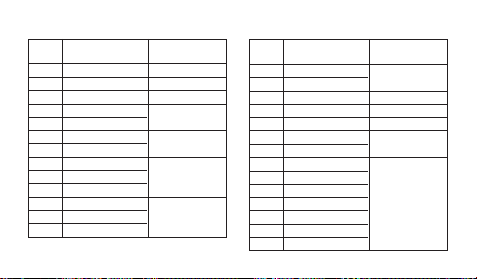
Pago Pago
Honolulu
Anchorage
Vancouver
Los Angeles
Edmonton
Denver
Mexico City
Winnipeg
Chicago
Miami
Toronto
New York
PPG
HNL
ANC
YVR
LAX
YEA
DEN
MEX
YWG
CHI
MIA
YTO
NYC
City
City
UTC Offset/
Code
GMT Differential
Carcas
Halifax
St. Johns
Rio De Janeiro
Praia
Lisbon
London
Barcelona
Madrid
Paris
Milan
Rome
Berlin
Stockholm
City
City
UTC Offset/
Code
GMT Differential
L-2
City Code Table
–11
–10
–9
–8
–7
–6
–5
–4
–3.5
–3
–1
0
+1
CCS*
YHZ
YYT
RIO
RAI
LIS
LON
BCN
MAD
PA R
MIL
ROM
BER
STO
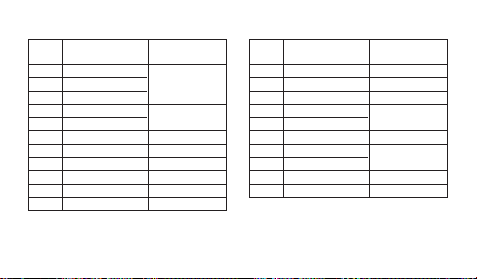
Yangon
Bangkok
Hong Kong
Seoul
Tokyo
Adelaide
Guam
Sydney
Noumea
Wellington
City
City
UTC Offset/
Code
GMT Differential
L-3
Athens
Cairo
Jerusalem
Moscow
Jeddah
Tehran
Dubai
Kabul
Karachi
Delhi
Dhaka
+2
+3
+3.5
+4
+4.5
+5
+5.5
+6
AT H
CAI
JRS
MOW
JED
THR
DXB
KBL
KHI
DEL
DAC
City
City
UTC Offset/
Code
GMT Differential
RGN
BKK
HKG
SEL
TYO
ADL
GUM
SYD
NOU
WLG
+6.5
+7
+8
+9
+9.5
+10
+11
+12

• Based on data as of June 2008.
• The rules governing global times (GMT differential and UTC offset) and summer
time are determined by each individual country.
* In December 2007, Venezuela changed its offset from –4 to –4.5. Note however, that
this watch displays an offset of –4 (the old offset) for the CCS (Carcas, Venezuela)
city code.
L-4
MO0811-EA

