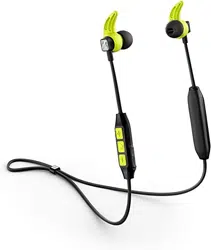
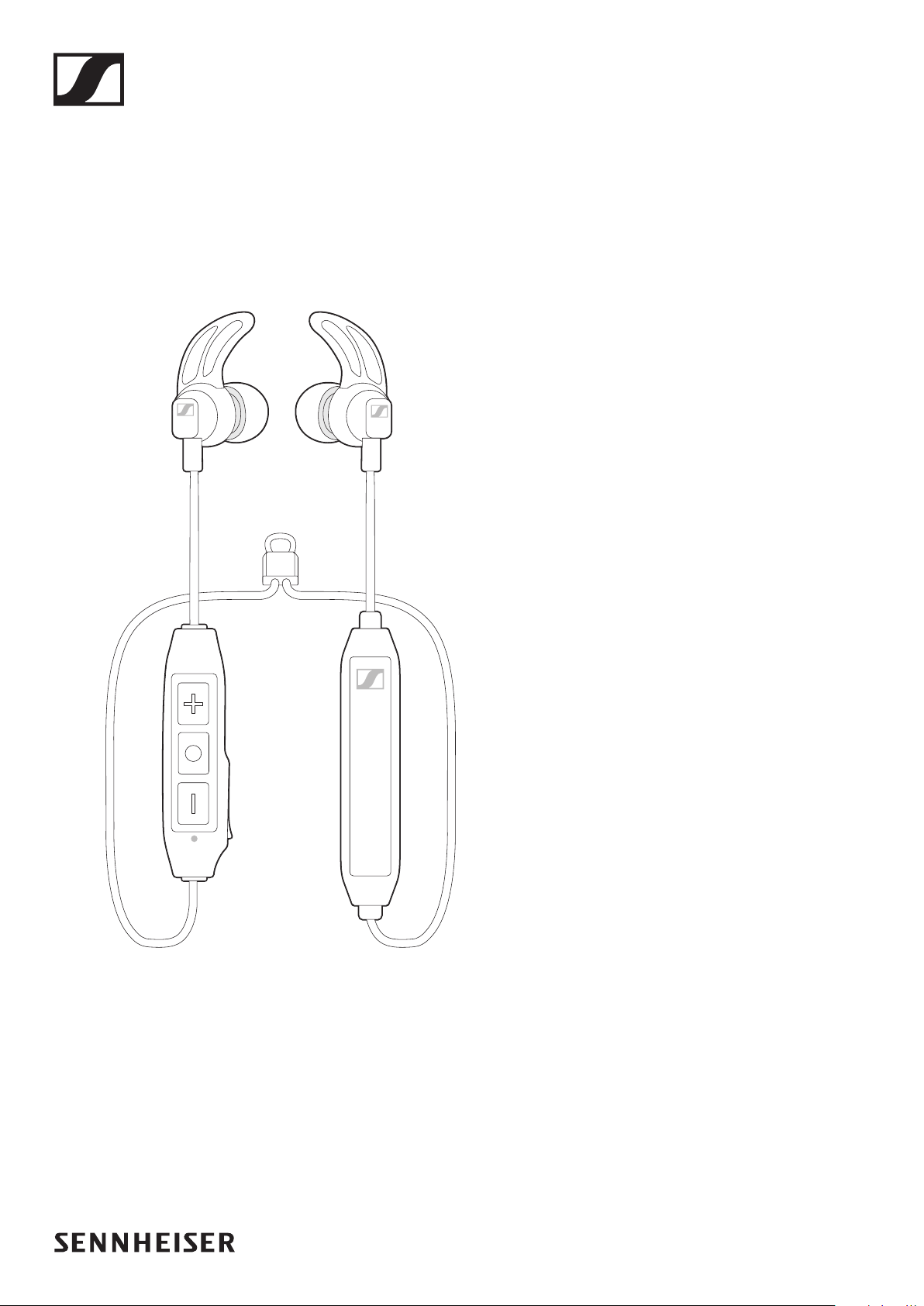
CX SPORT
Instruction Manual
In-Ear Wireless

2 | CX SPORT

CX SPORT | 1
Contents
Contents
Important safety instructions ..................................................................... 2
The CX SPORT In-Ear Wireless headphones .............................................. 4
Package includes .......................................................................................... 6
Product overview ...........................................................................................7
Overview of the headphones ...................................................................... 7
Overview of pictograms ............................................................................... 8
Overview of the LED indications .............................................................. 10
Overview of buttons ....................................................................................11
Getting started ............................................................................................12
Charging basics .......................................................................................... 12
Pairing the headphones ............................................................................. 14
Using the in-ear headphones ..................................................................... 17
Wearing the headphones............................................................................17
Switching the headphones on .................................................................. 18
Switching the headphones off .................................................................. 18
Adjusting the volume ................................................................................. 19
Checking the battery life of the headphones ..........................................20
Playing music/videos ..................................................................................21
Controlling music playback ....................................................................... 22
Making calls on the headphones .............................................................. 23
Voice control function ................................................................................25
Care and maintenance ............................................................................... 26
Changing ear adapters and ear fins .........................................................26
Cleaning the in-ear headphones ..............................................................26
Storage and handling ................................................................................. 27
Information about the rechargeable battery ...........................................28
Troubleshooting .......................................................................................... 29
Clearing previously paired devices ......................................................... 30
Specifications ..............................................................................................31
Trademarks ................................................................................................. 32
2 | CX SPORT
Important safety instructions
Important safety instructions
X Read this instruction manual carefully and completely before using the
product.
X Do not use an obviously defective product.
X Only use the product in environments where Bluetooth® wireless
transmission is permitted.
Preventing damage to health and accidents
X Protect your hearing from high volume levels. Permanent
hearing damage may occur when headphones are used at high
volume levels for long periods of time. Sennheiser headphones sound
exceptionally good at low and medium volume levels.
X Do not insert the ear canal phones too deep into your ears and never
insert them without ear adapters. Always extract the ear canal phones
from your ears very slowly and carefully.
X The product generates stronger permanent magnetic fields
that could cause interference to cardiac pacemakers,
implanted defibrillators (ICDs) and other implants. Always
maintain a distance of at least 3.94” (10 cm) between the product
component containing the magnet and the cardiac pacemaker,
implanted defibrillator or other implant.
X Keep the product, accessories and packaging parts out of reach of
children and pets to prevent accidents and choking hazards.
X Do not use the product in situations which require special attention
(e.g. in traffic or when performing skilled jobs).
Preventing damage to the product and malfunctions
X Always keep the product dry and do not expose it to extreme
temperatures to avoid corrosion or deformation.
X Only use attachments/accessories/spare parts supplied or
recommended by Sennheiser.
X Use the product with care and store it in a clean, dust-free environment.
CX SPORT | 3
Important safety instructions
Intended use/Liability
These in-ear wireless headphones are designed for use with mobile
devices (e.g. mobile music players, mobile phones, tablets) that support
wireless communication via Bluetooth. Compatible Bluetooth devices
include those that support the following profiles: Hands Free Profile (HFP),
Advanced Audio Distribution Profile (A2DP), and Audio/Video Remote
Control Profile (AVRCP).
It is considered improper use when this product is used for any application
not named in the associated instruction manuals and product guides.
Sennheiser does not accept liability for damage arising from abuse or
misuse of this product and its attachments/accessories.
Before putting the product into operation please observe the respective
country-specific regulations!
Safety instructions for the Lithium-Polymer battery pack
WARNING
In extreme cases, abuse or misuse of the Lithium-Polymer battery pack
can lead to:
• explosion
• fire development
• heat generation
• smoke or gas development
Dispose of products with built-in rechargeable batteries at
special collection points or return them to your specialist
dealer.
Only use rechargeable batteries and chargers recommended
by Sennheiser.
Charge products with built-in rechargeable batteries at
ambient temperatures between 10 and 40°C/50 and 104°F.
Switch battery-powered products off after use.
When not using the product for extended periods of time,
charge its built-in rechargeable batteries regularly (about
every 3 months).
Do not heat above 70°C/158°F, e.g. do not expose to sunlight
or throw into fire.
Do not charge a product with built-in rechargeable batteries if
the product is obviously defective.

4 | CX SPORT
The CX SPORT In-Ear Wireless headphones
The CX SPORT In-Ear Wireless
headphones
The CX SPORT In-Ear Wireless headphones deliver detailed sound and
enhanced bass with Bluetooth 4.2 and Qualcomm® aptX™ for true Hi-Fi
sound.
The CX SPORT features reliable ear fins and a cable organizer to provide
extra support and convenience for people with very active lifestyle.
Features
• Sweat and splash water resistance
• High quality sports in-ear wireless headphones tuned for clarity and
superior bass
• Ergonomic and robust sport in-ear wireless headphones for active
lifestyle
• Supports Qualcomm® aptX™ for true Hi-Fi sound
• 6 hour battery life with 1.5 hour charging
CX SPORT | 5
The CX SPORT In-Ear Wireless headphones
Bluetooth
The CX SPORT In-Ear Wireless headphones comply with the Bluetooth
4.2 standard and are compatible with all Bluetooth 1.1, 1.2, 2.0, 2.1, 3.0,
4.0 and 4.1 devices with the following profiles: Hands Free Profile (HFP),
Advanced Audio Distribution Profile (A2DP), and Audio/Video Remote
Control Profile (AVRCP).
aptX
TM
With aptX
TM
audio coding, you can be assured of crisp, pure and full stereo
sound. It allows you to not only hear, but experience and feel the audio
as it was intended. Utilizing aptX
TM
, Bluetooth technology can now offer
wireless audio quality that is indistinguishable from the highest quality
wired connection.
aptX
TM
LL
Qualcomm® aptX™ LL (Low Latency) audio ensures your Bluetooth®
wireless enabled device can deliver sound in sync with visual media. It
reduces delay and improves end-to-end speed of the audio transmission,
resulting in a high quality, synchronized user experience. With aptX Low
Latency you can enjoy the freedom of wireless for applications such as
gaming and watching videos.
6 | CX SPORT
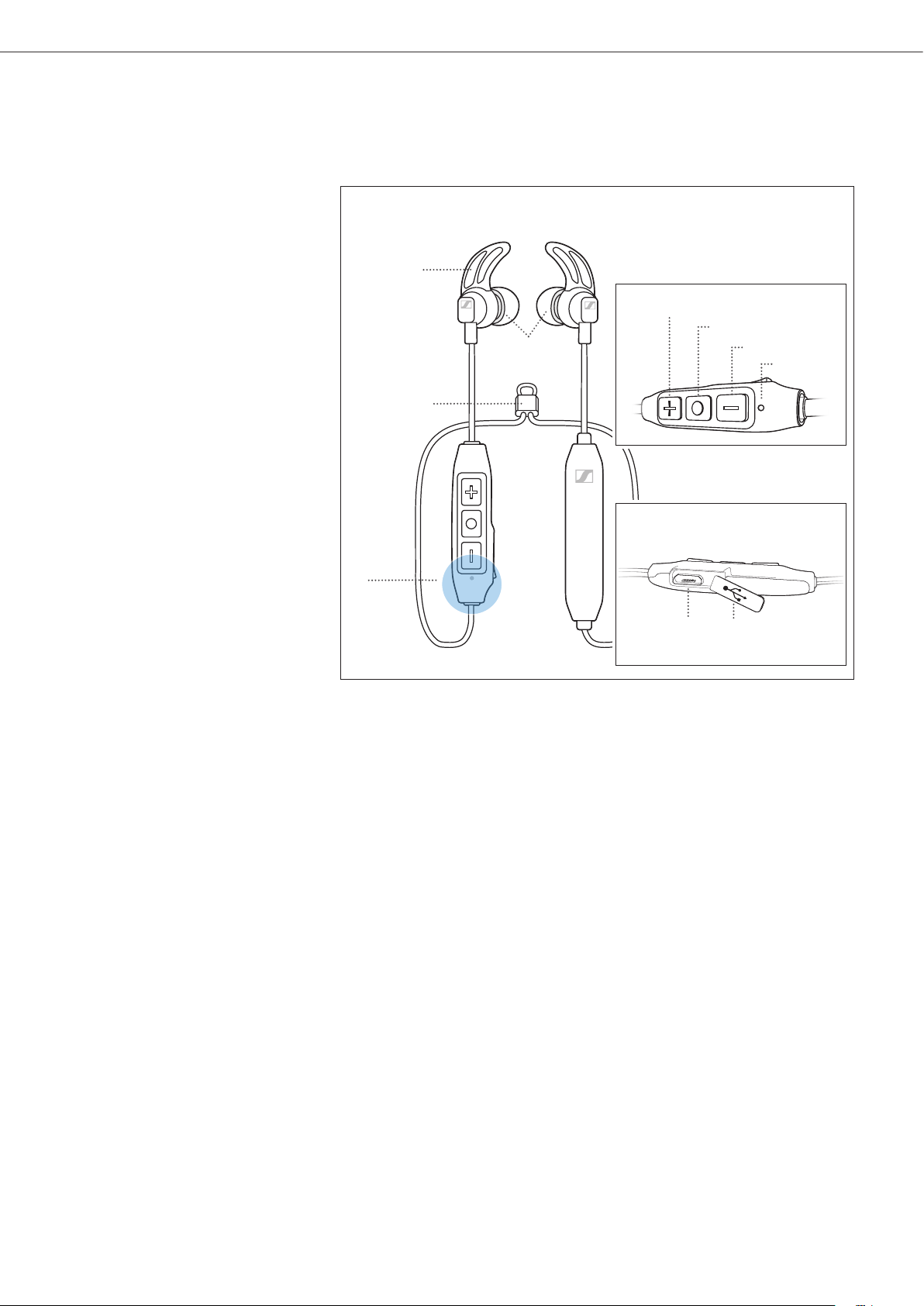
Package includes
Package includes
Headphones
Storage pouch
L R
L R
L R
S LM
Ear fins
XS
S LM
Ear adapters
USB cable for charging
Cable Clip
Quick
Guide
Quick guide
Safety
Guide
Safety guide
A list of accessories can be found at www.sennheiser.com. For
information on suppliers, contact your local Sennheiser partner:
www.sennheiser.com > “Sales Partner“.
CX SPORT | 7
Product overview
Package includes
Headphones
Storage pouch
L R
L R
L R
S LM
Ear fins
XS
S LM
Ear adapters
USB cable for charging
Cable Clip
Quick
Guide
Quick guide
Safety
Guide
Safety guide
A list of accessories can be found at www.sennheiser.com. For
information on suppliers, contact your local Sennheiser partner:
www.sennheiser.com > “Sales Partner“.
Product overview
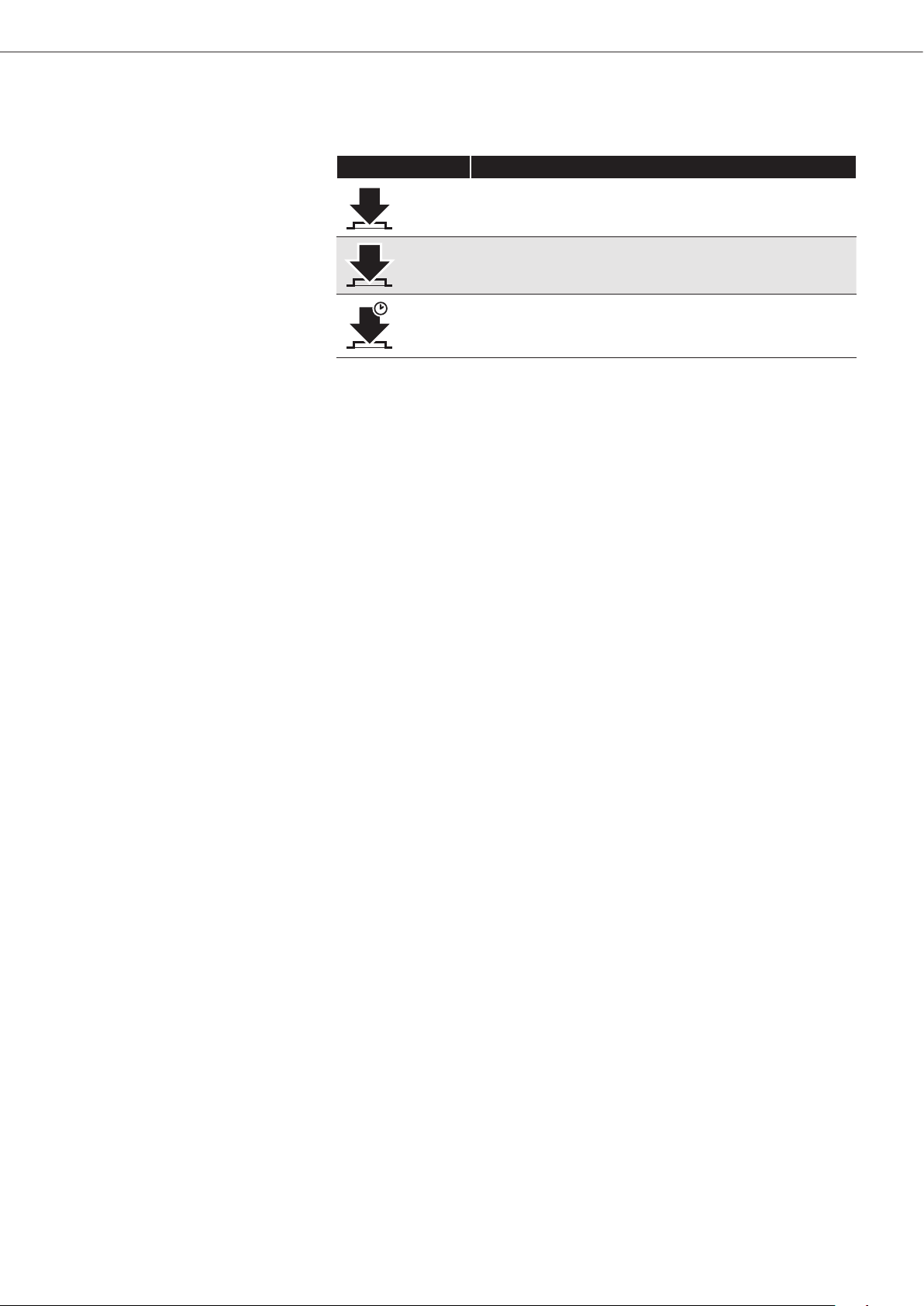
Overview of the headphones
1 Ear adapters 6 Volume/track - button
2 Bluetooth antenna (not visible) 7 LED
3 Cable organizer 8 Micro-USB input
4 Volume/track + button 9 Micro-USB cover
5 Multifunction button 0 Ear fins
3
1
@
2
9
8
4
6
7
5
8 | CX SPORT
Product overview
Overview of pictograms
Pictograms for pressing a button
Pictogram Meaning
1x
Press and immediately release the button
2x
Press the button twice
2s
Press the button and hold for 2 seconds
CX SPORT | 9
Product overview
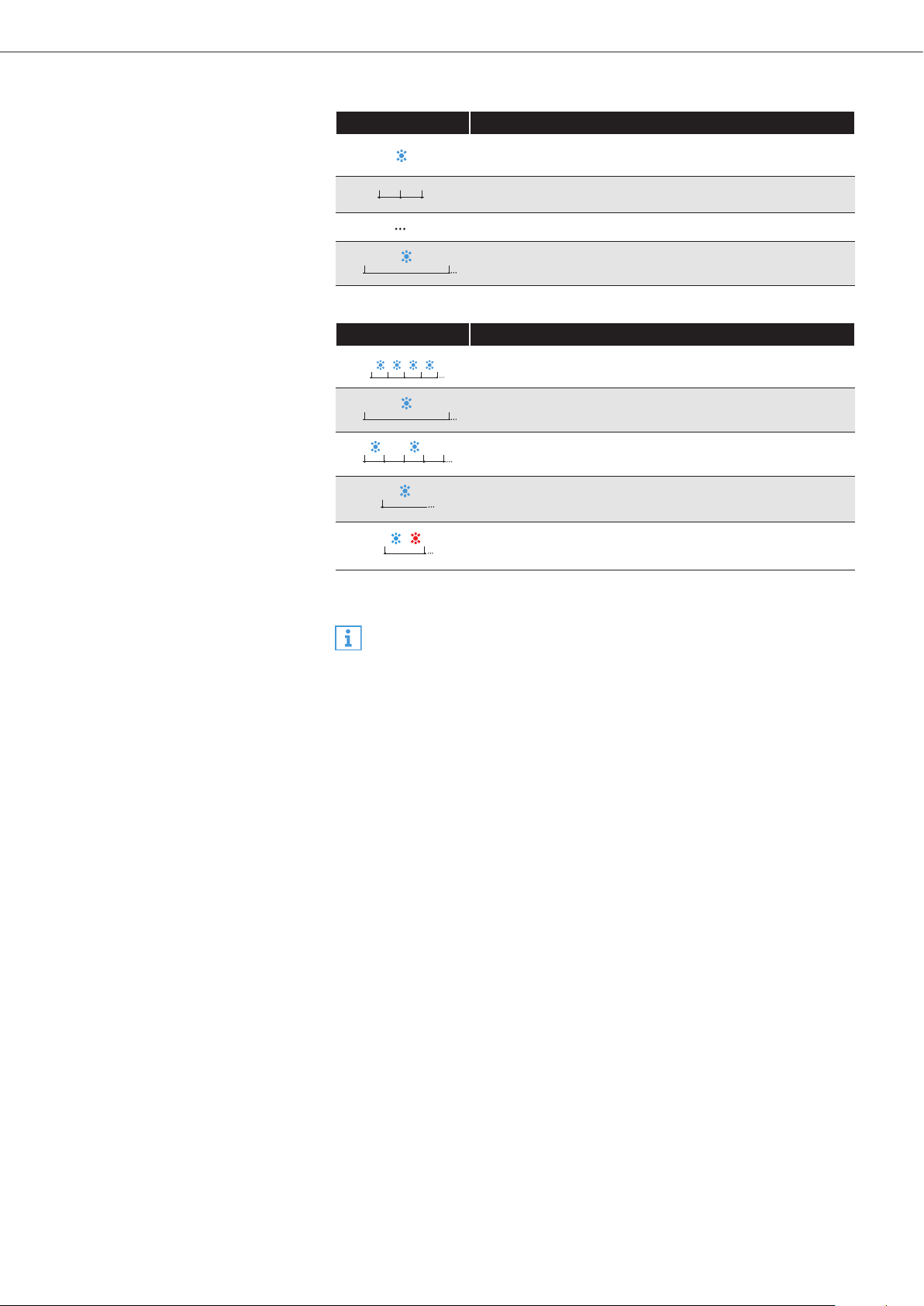
Pictograms for the LED
Pictogram Meaning
The LED lights up
The intervals signify flashing
The LED lights up/flashes continuously
3s
The time the LED lights up before blinking
Examples of pictograms that may be used in this manual:
Pictogram Meaning
5m
The LED flashes continuously
3s
The LED lights up for 3 seconds, then off, and repeat
2s 2s
The LED lights up, then off for 2 seconds, and repeat
The LED lights up continuously
1s
The LED continuously flashes blue and red per
second
The pictogram “i”
Notes marked with the pictogram “i” provide useful information on
the use of the headphones.
10 | CX SPORT
Product overview
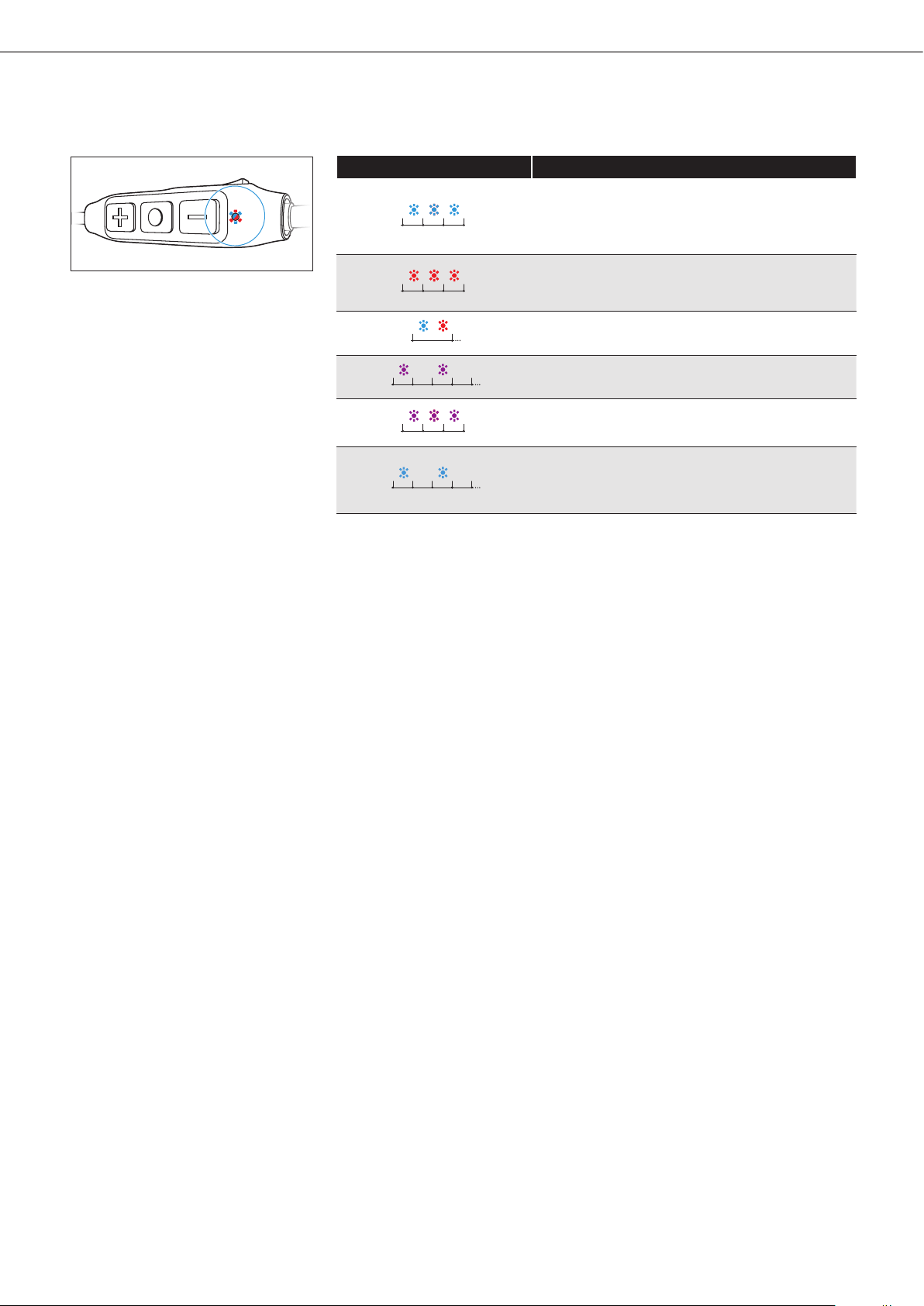
Overview of the LED indications
LED indications during operation
LED Meaning
The headphones switch on
Pairing/connecting with a device is
successful
The headphones switch off
Pairing with a device is unsuccessful
1s
The headphones are in pairing mode
1.5s
1s 1s
1.5s
Incoming call
The device is/devices are successfully
cleared from the headphones
2s 2s
The headphones are in idle mode (e.g.
headphones are paired but not connected
to the device)
CX SPORT | 11
Product overview
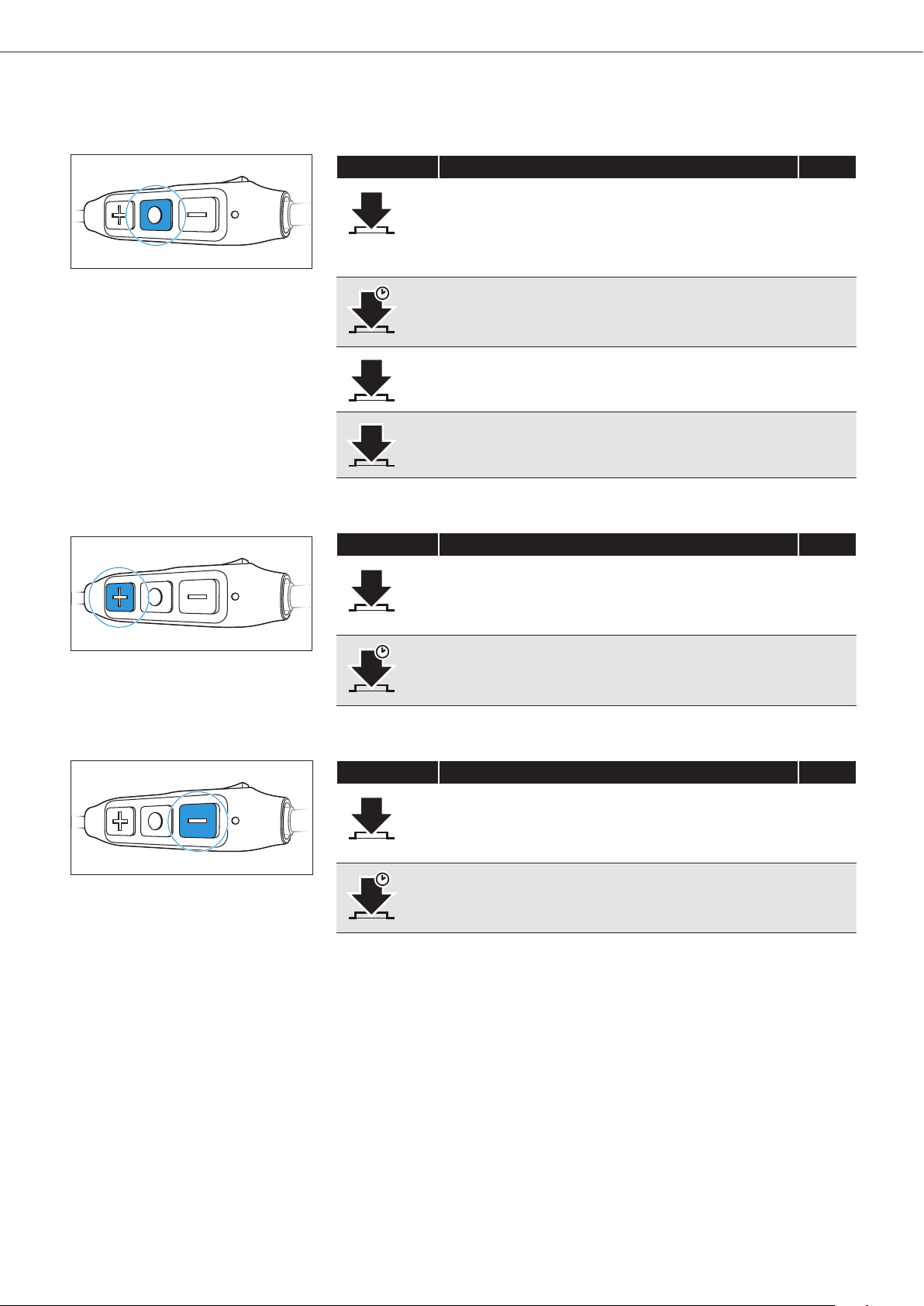
Overview of buttons
Multifunction button
Press Function Page
1x
Accepts/ends a call
Accepts an incoming call and ends the active
call
Plays/pauses a track
23
23
22
1s
Rejects a call
Transfers a call between the headphones and
the smartphone
23
24
2x
Accepts an incoming call and holds the active
call/Toggles between 2 calls
23
3x
Activates the voice control 25
Volume/track + button
Press Function Page
1x
Increases the volume 19
1s
Plays the next track 22
Volume/track - button
Press Function Page
1x
Decreases the volume 19
1s
Plays the previous track 22
12 | CX SPORT
Getting started
Getting started
Charging basics
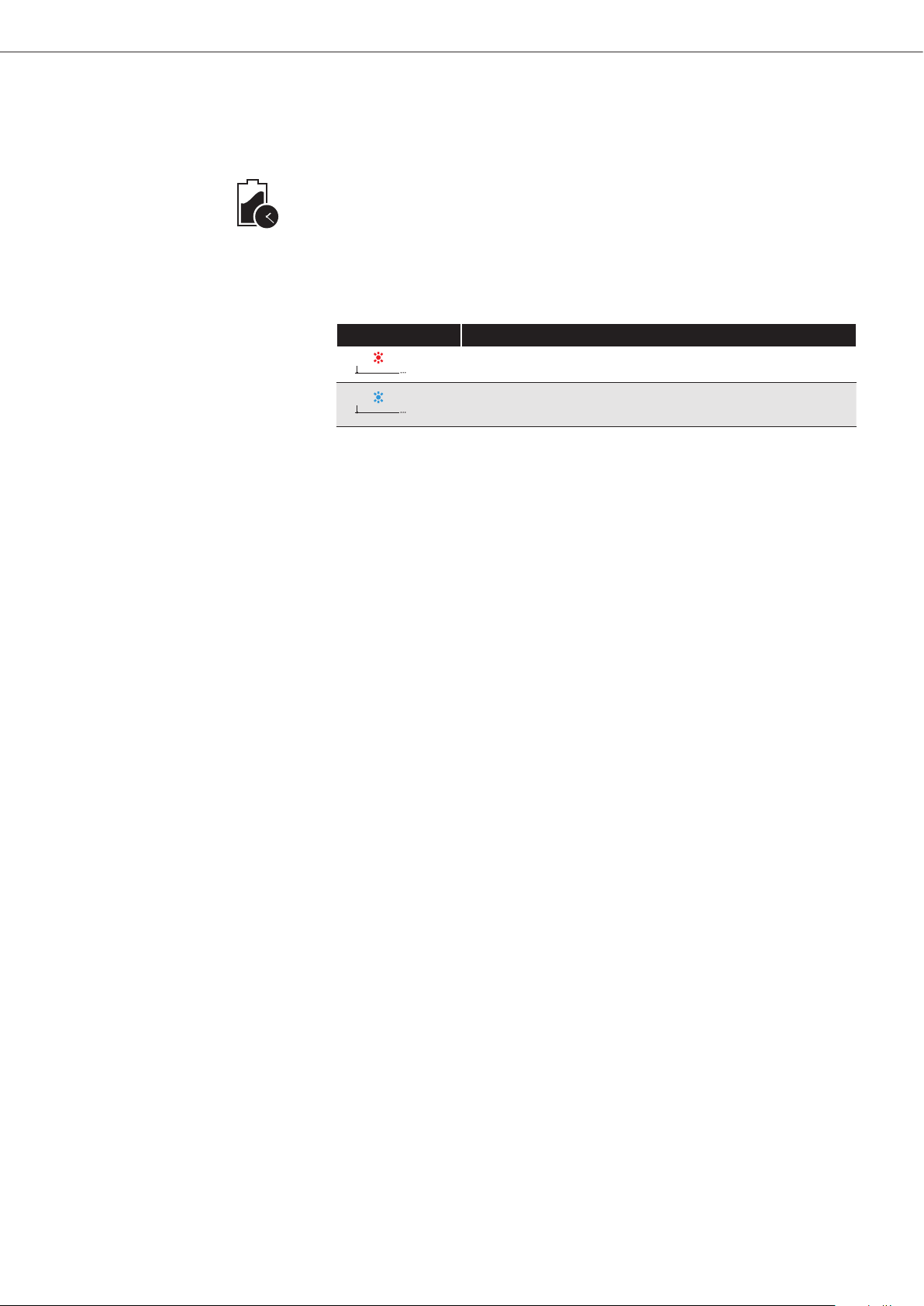
A complete charging cycle takes about 1.5 hours. Before using the
headphones for the first time, charge their rechargeable battery for a
complete charging cycle without interruption.
It is recommended to charge the headphones using only the supplied
USB cable. If you are charging using an external USB-power adapter, it
is recommended to use an adapter with an output rating of 500 mA or
higher.
LED Meaning
Charging
Fully charged
1.5 h
CX SPORT | 13
Getting started
Charging the headphones
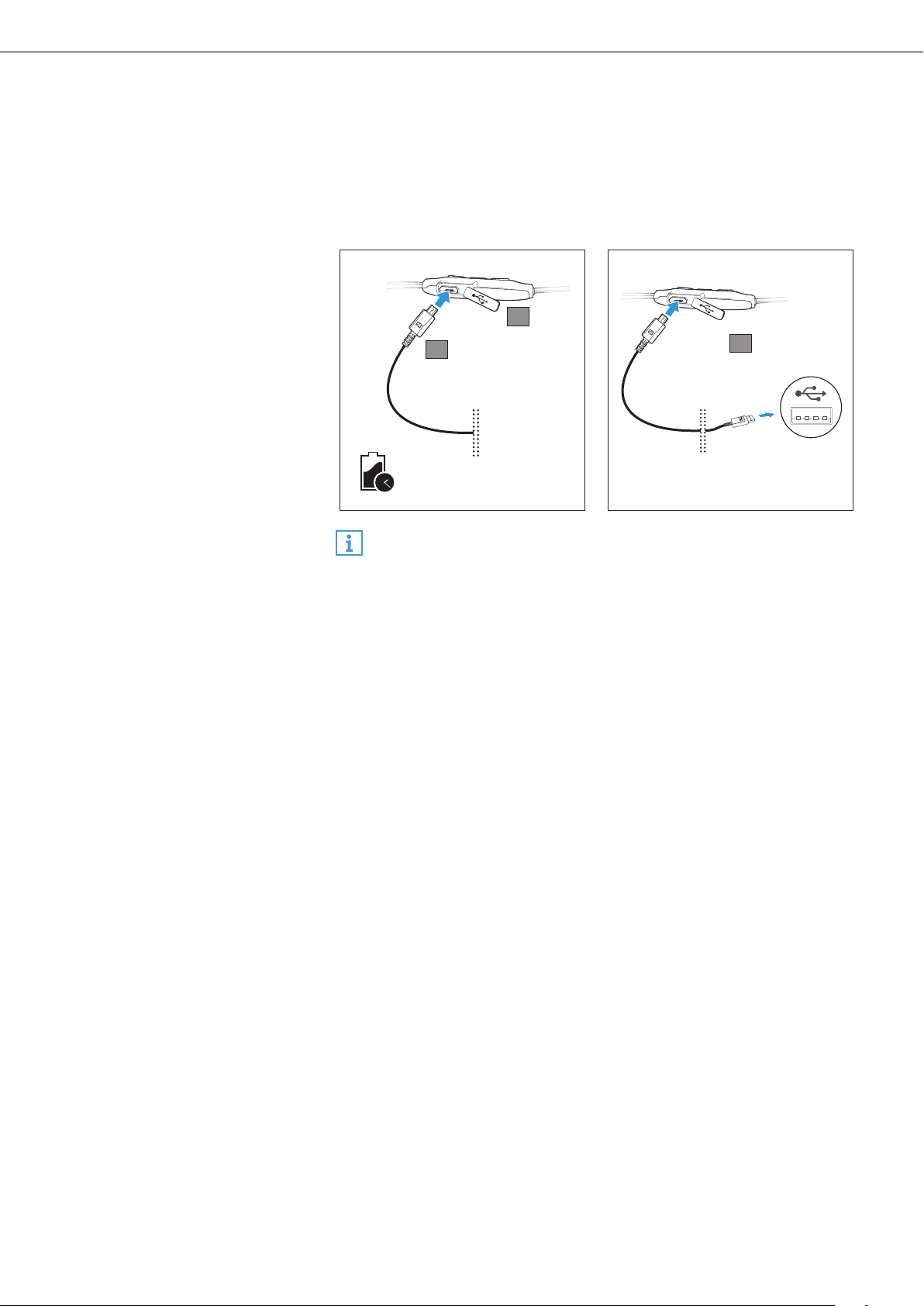
1. Open the micro-USB cover to access the micro-USB input.
2. Connect the micro-USB plug of the charging cable to the micro-USB
input of the headphones.
3. Connect the USB plug to the USB charging port.
The LED flashes/lights up depending on the battery life of the
headphones. The headphones utilize an intelligent battery charging
technology that prevents overcharging.
1.5 h
CHARGING TIME
3
1
2
Charging time may take longer at ambient temperatures below 15°C/
59°F.
14 | CX SPORT
Getting started
Pairing the headphones
CAUTION
Danger of malfunction!
The transmitted radio waves of mobile phones can impair the
operation of sensitive and unprotected devices.
X Only make calls with the headphones in locations where
Bluetooth wireless transmission is permitted.
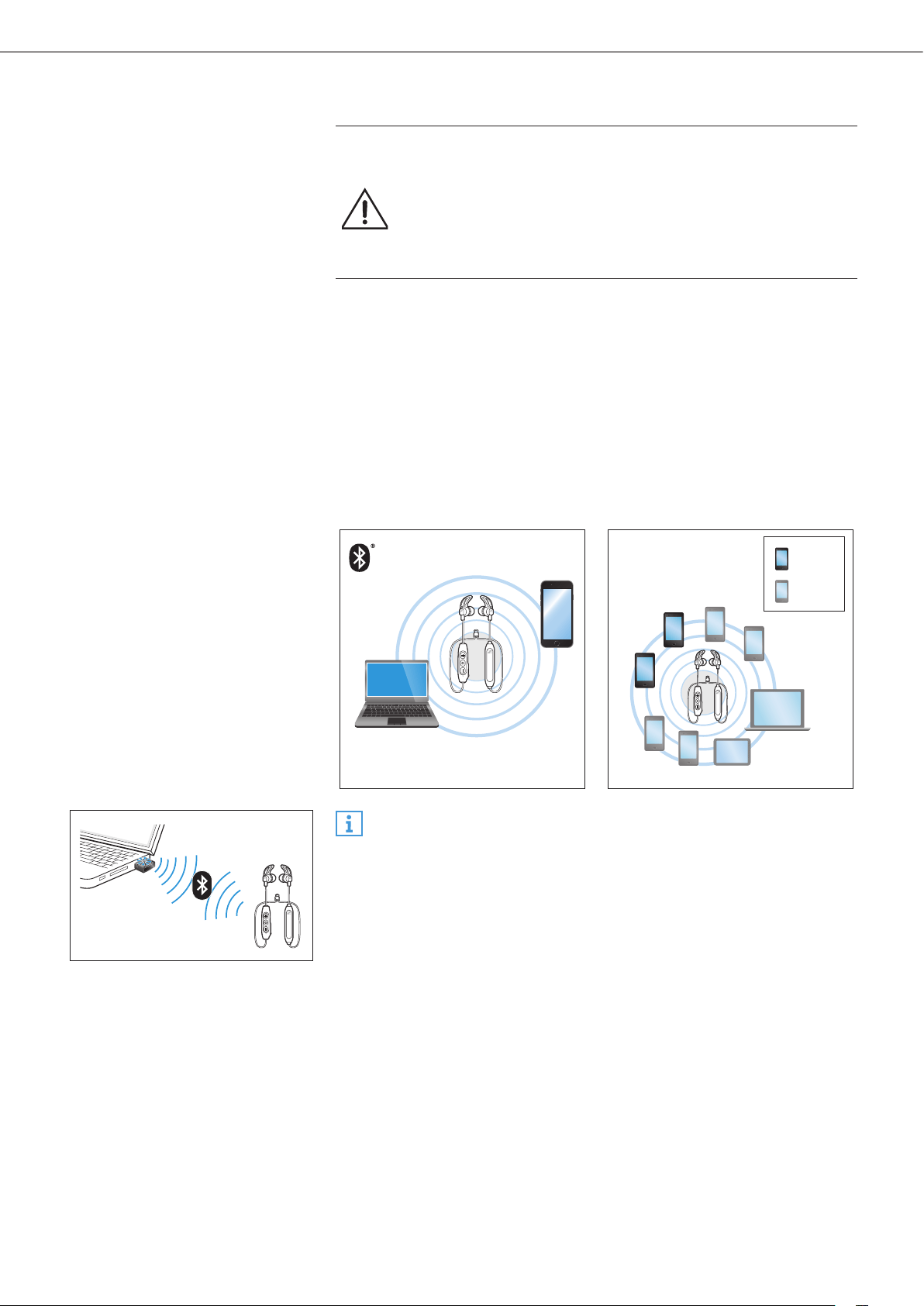
The CX SPORT In-Ear Wireless headphones comply with the Bluetooth 4.2
standard.
When you switch the headphones on for the first time, they automatically
go to pairing mode. If the headphones have already been paired with a
few devices, they automatically try to connect to the two most-recently
connected Bluetooth devices. The headphones can save the connection
profiles of up to eight Bluetooth devices or smartphones.
If you pair the headphones with a ninth Bluetooth device, the saved
connection profile of the least used Bluetooth device will be overwritten.
If you want to re-establish a connection with the overwritten Bluetooth
device, you have to pair the headphones again.
paired
paired +
connected
To pair and connect the headphones to a PC or Mac, it is recommended
to use a Sennheiser Bluetooth USB dongle, such as the BTD 800 USB.
CX SPORT | 15
Getting started
Pairing the headphones with a Bluetooth device
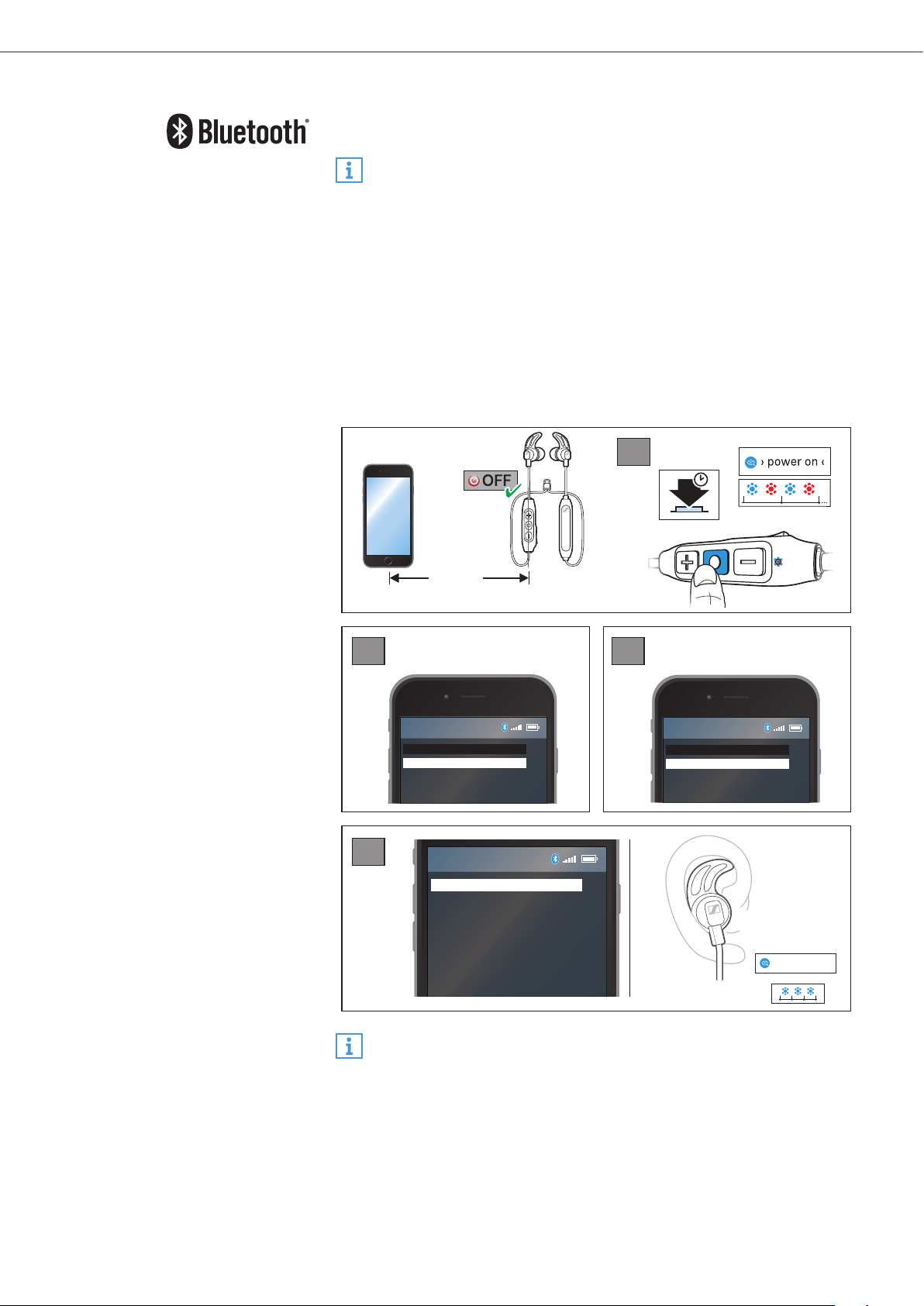
Ensure that the headphones are off and within the 20 cm range of your
smartphone when performing this procedure.
The headphones automatically go to pairing mode when switched on
for the first time.
1. Press the multifunction button for 4 seconds.
You hear the voice prompt “power on”, followed by a beep sound. The
LED flashes blue and red. The headphones are in pairing mode.
2. Activate Bluetooth on your smartphone.
3. On your smartphone, start a search for Bluetooth devices.
All active Bluetooth devices in the proximity of your smartphone are
displayed.
4. From the list of Bluetooth devices found, select “CX SPORT”. If necessary,
enter the default PIN code “0000”.
If pairing was successful, you hear the voice prompt “connected”. The
LED flashes blue 3 times.
Menu
Add Device
Menu
Bluetooth on
Bluetooth off
CX SPORT
CX SPORT
Keyword: 0000
3
4
1
2
1s 1s
› connected ‹
4s
< 20 cm
If no connection is established within 5 minutes, pairing mode is
terminated and the headphones switch off. If necessary, repeat the
pairing procedure.
16 | CX SPORT
Getting started
Disconnecting the headphones from your Bluetooth device
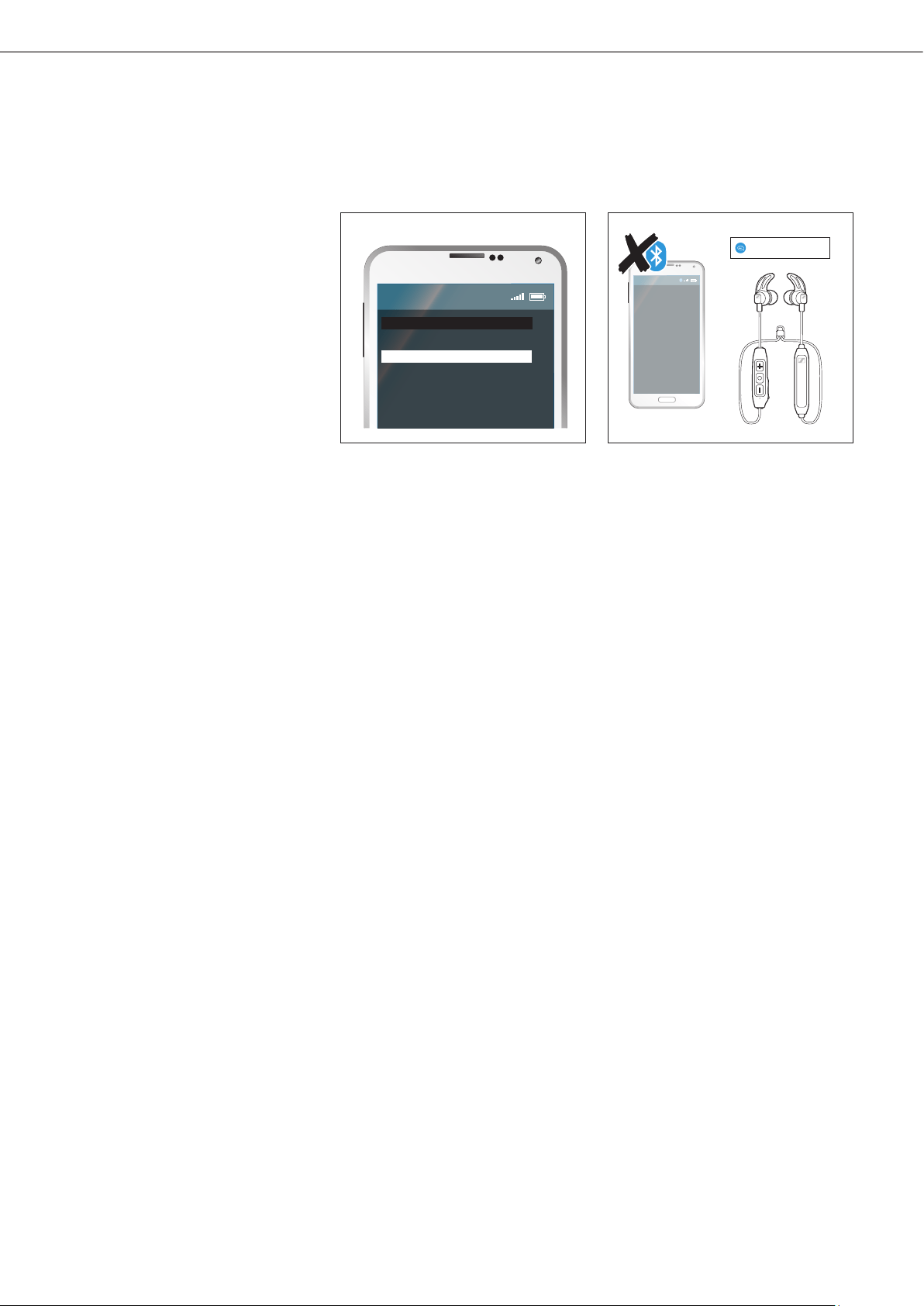
X Deactivate Bluetooth on your smartphone.
The headphones are disconnected from the smartphone. The
headphones then search for other paired devices. If no device is found,
you hear the voice prompt “lost connection”. The headphones go to idle
mode.
Menu
Bluetooth on
Bluetooth off
› lost connection ‹
CX SPORT | 17
Using the in-ear headphones
Using the in-ear headphones
Wearing the headphones
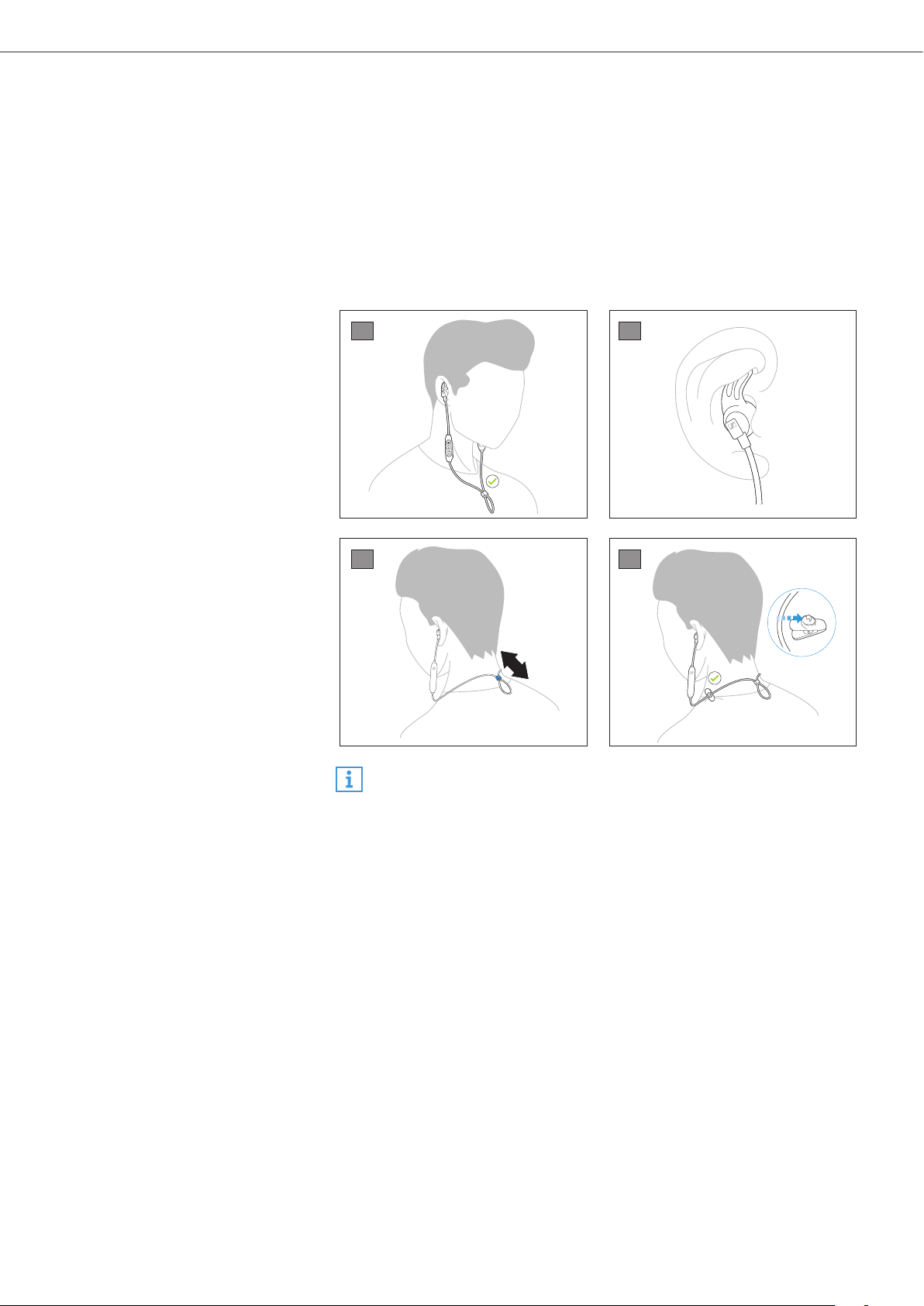
1. You can wear the in-ear headphones with the cables either behind your
head or in front.
2. Ensure that the ear adapters fit your ears perfectly and that the ear fins
are secured at the top of the ear bowl.
3. Adjust the cable organizer to get a perfect fit.
4. When running or working out, use the clip to ensure that the in-ear
headphones stay attached to your neck or shirt.
1
2
3
4
By default, medium-sized ear adapters and ear fins are provided with
the headphones. If necessary, replace the ear adapters and ear fins
with the size that perfectly fits your ears.
18 | CX SPORT
Using the in-ear headphones
Switching the headphones on
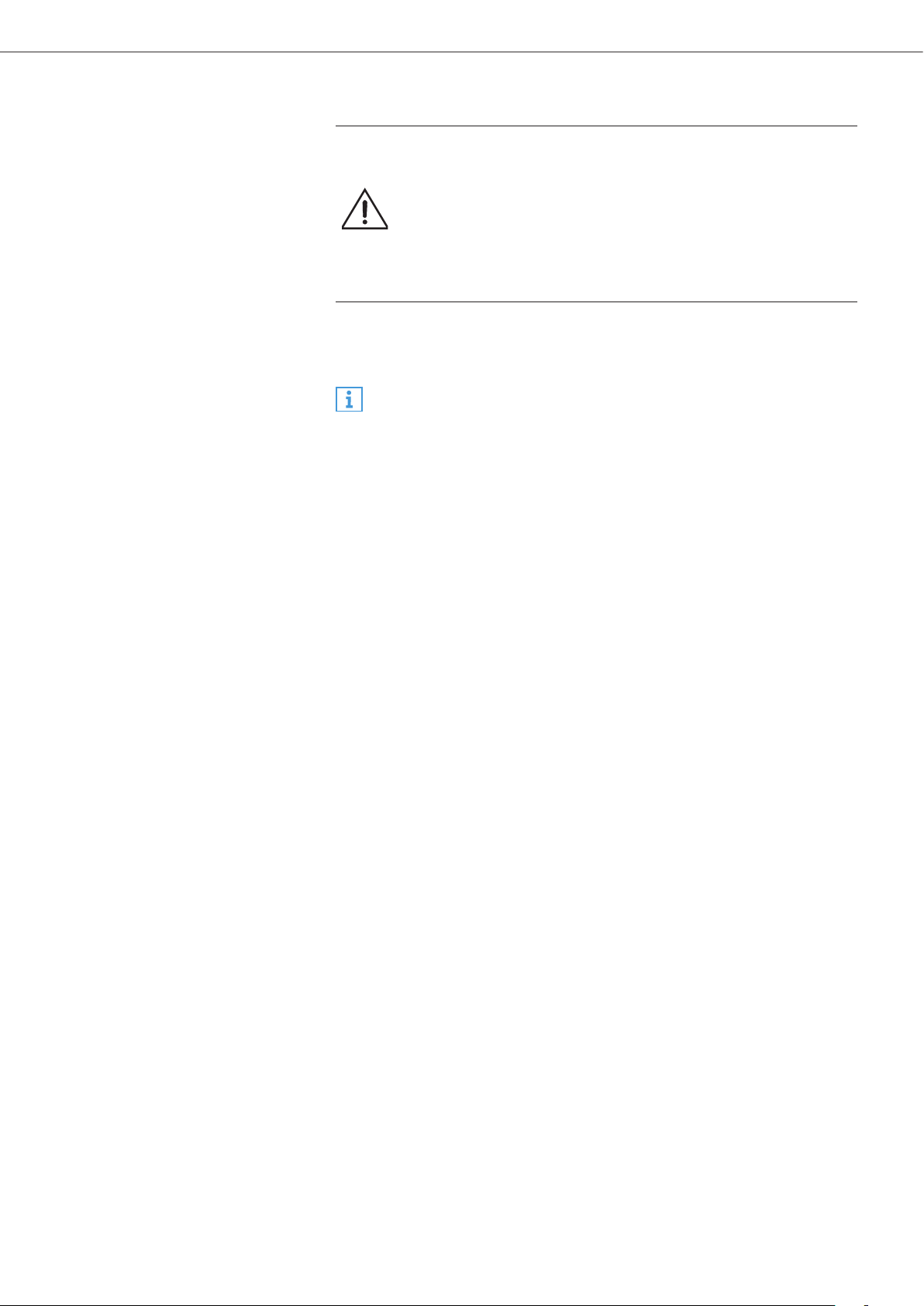
WARNING
Danger due to high volume levels!
Listening at high volume levels for long periods of time can
lead to permanent hearing defects.
X Before putting the headphones on, set the volume to a low
level.
X Do not continuously expose yourself to high volume levels.
X Press the multifunction button for 2 seconds.
You hear the voice prompts “power on” and “connected”. The LED
flashes blue 3 times.
Ensure that Bluetooth is active on your smartphone when switching
the headphones on.
Switching the headphones off
X Press the multifunction button for 4 seconds.
You hear the voice prompt “power off”. The LED flashes red 3 times.
CX SPORT | 19
Using the in-ear headphones
Adjusting the volume
WARNING
Danger due to high volume levels!
Listening at high volume levels for long periods of time can
lead to permanent hearing defects. Switching between
audio sources may cause enormous volume jumps that can
permanently damage your hearing.
X Before putting the headphones on and before switching
between audio sources, adjust the volume to a low level.
X Do not continuously expose yourself to high volume levels.
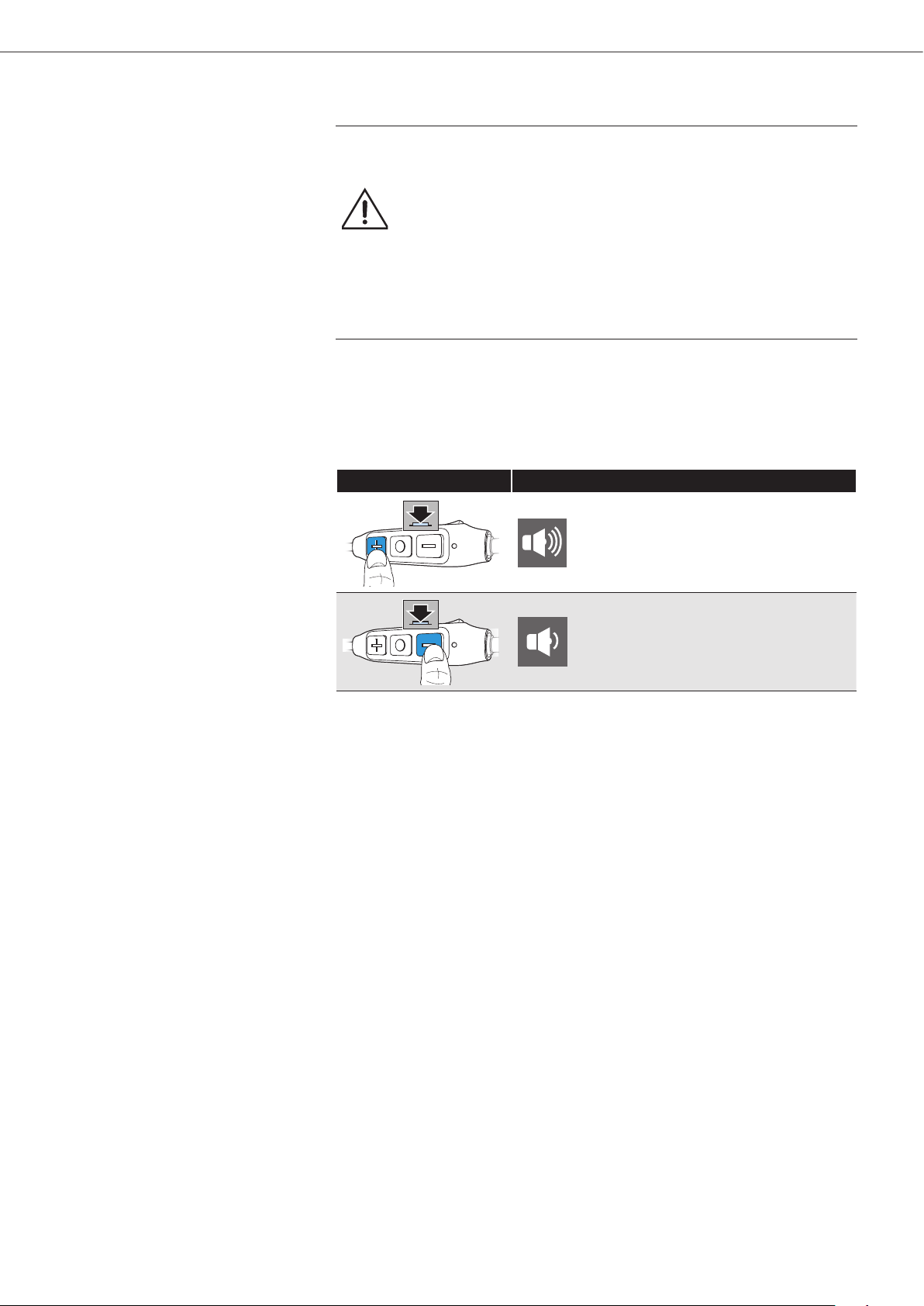
You can adjust the volume for music and phone calls, depending on your
preferred sound level.
X Press the volume/track + or - button once to increase or decrease the
volume.
When the minimum or maximum volume is reached, you hear an alert.
Press Function
1x
Increases the volume
1x
Decreases the volume
20 | CX SPORT
Using the in-ear headphones
Checking the battery life of the headphones
You can check the remaining play and talk time when the headphones are
in idle mode, are not actively playing music, or are not used for making
calls.
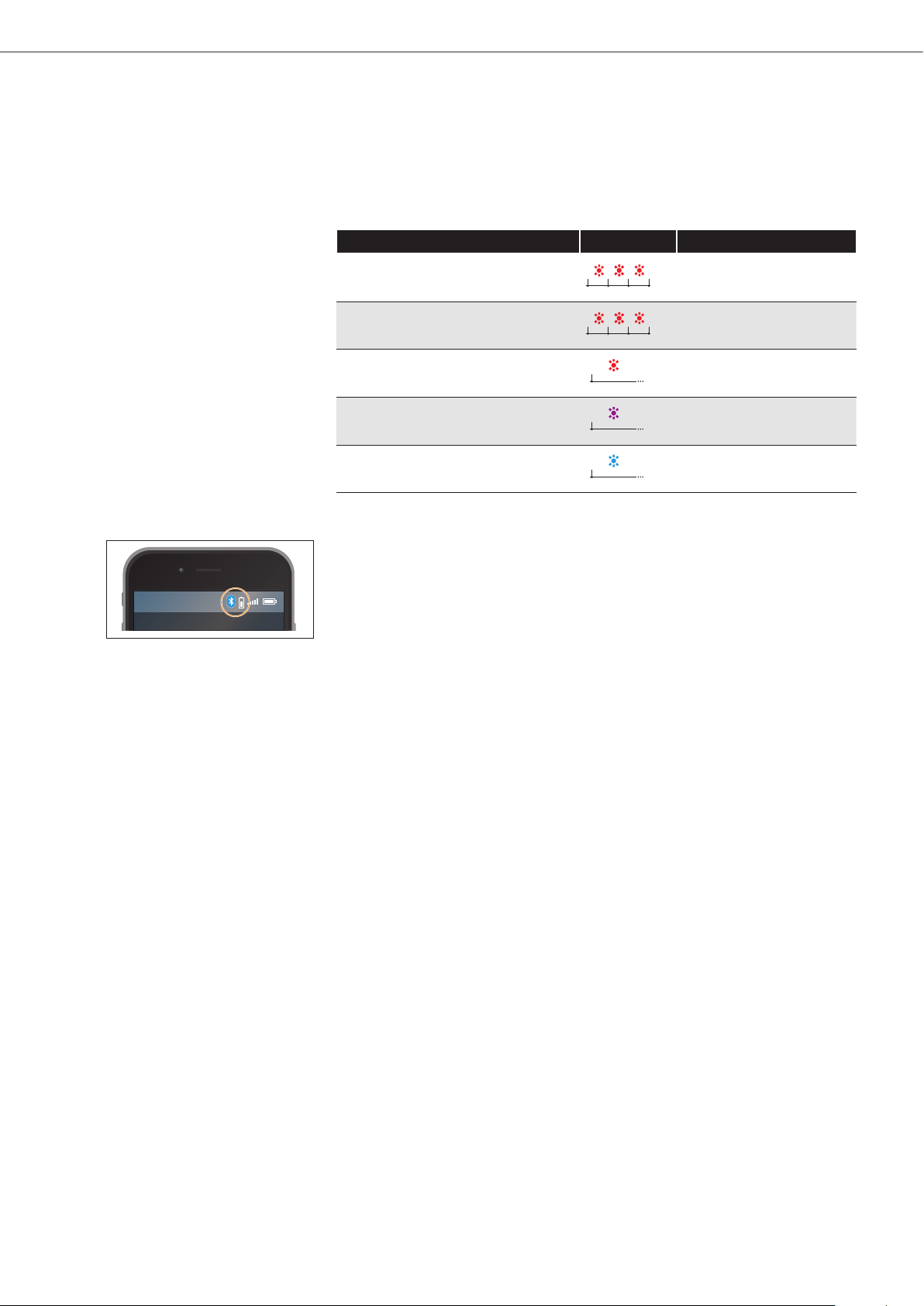
X Quickly press the Volume/track - button.
You hear the voice prompt announcing the remaining play time.
Voice prompt LED Meaning
“recharge headset”
Battery is almost empty
(less than 2% charged)
“below 1 hour play time”
Battery is less than 10%
charged
“between 1 and 2 hours play time”
1s
Battery is less than 20%
charged
“between 2 and 4 hours play time”
1s
Battery is less than 50%
charged
“between 4 and 6 hours play time”
1s
Battery is more than 50%
charged
Battery life indicator on your device
The battery life of your headphones may also be displayed on the screen
of your smartphone or device.

CX SPORT | 21
Playing music/videos
Playing music/videos
If your audio source supports the aptX or aptX LL codec, the CX SPORT
In-Ear Wireless automatically plays your music wirelessly in stunning
high-resolution audio quality. If the audio source does not support any
of these audio codecs, the CX SPORT In-Ear Wireless plays music in
standard audio quality.
If you are using the headphones to watch videos on a device that supports
the aptX LL codec, the synchronization of sound to the visual media is
automatically optimized, thus giving you a highly accurate audio-visual
experience.
X Pair and connect the headphones with your smartphone, see page 14.
X Play music/videos on your smartphone or device.
The audio plays through the CX SPORT In-Ear Wireless headphones.
22 | CX SPORT
Playing music/videos
Controlling music playback
The following music functions are available when the headphones and
device are connected using Bluetooth. Some smartphones or music
players may not support all functions.
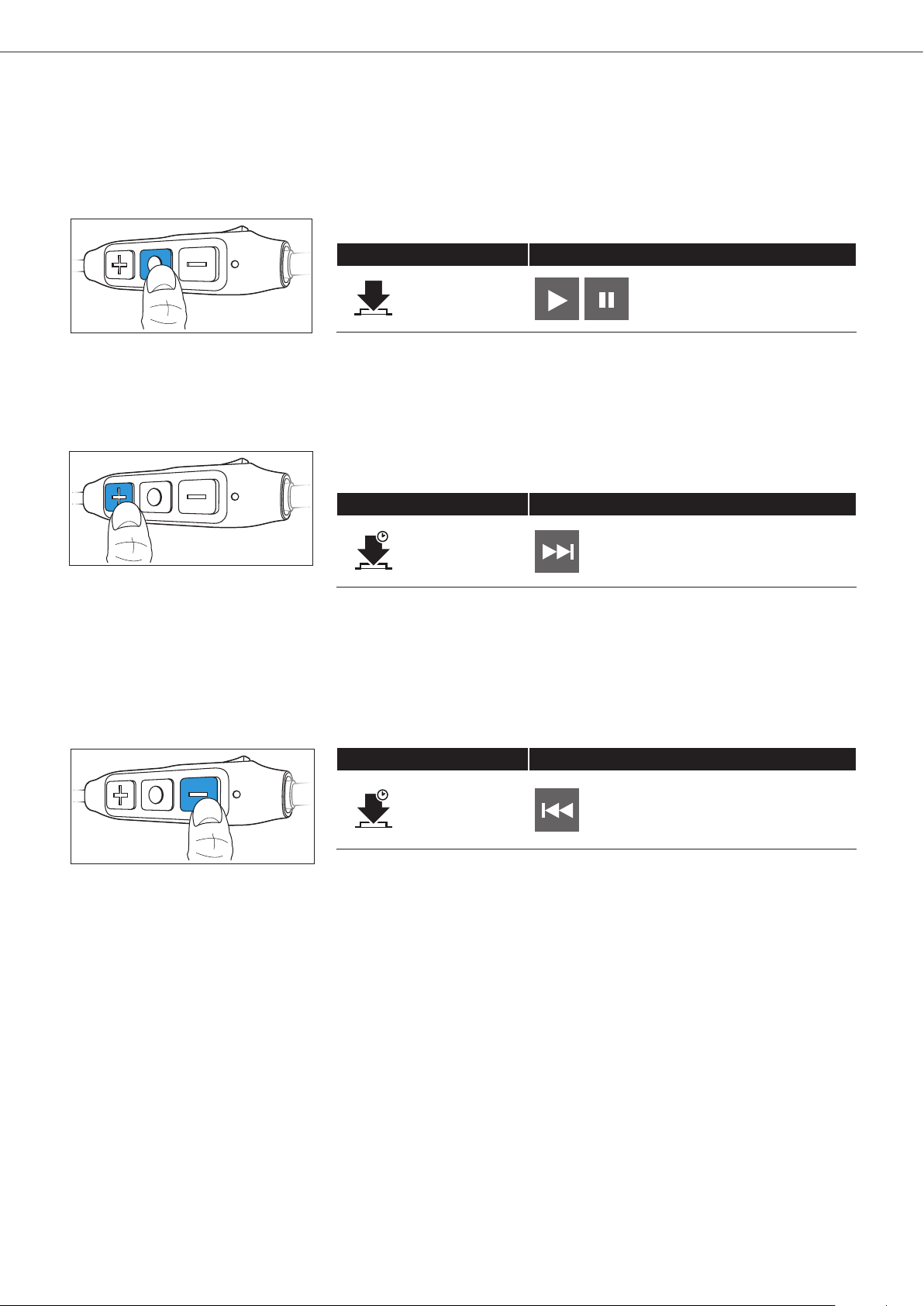
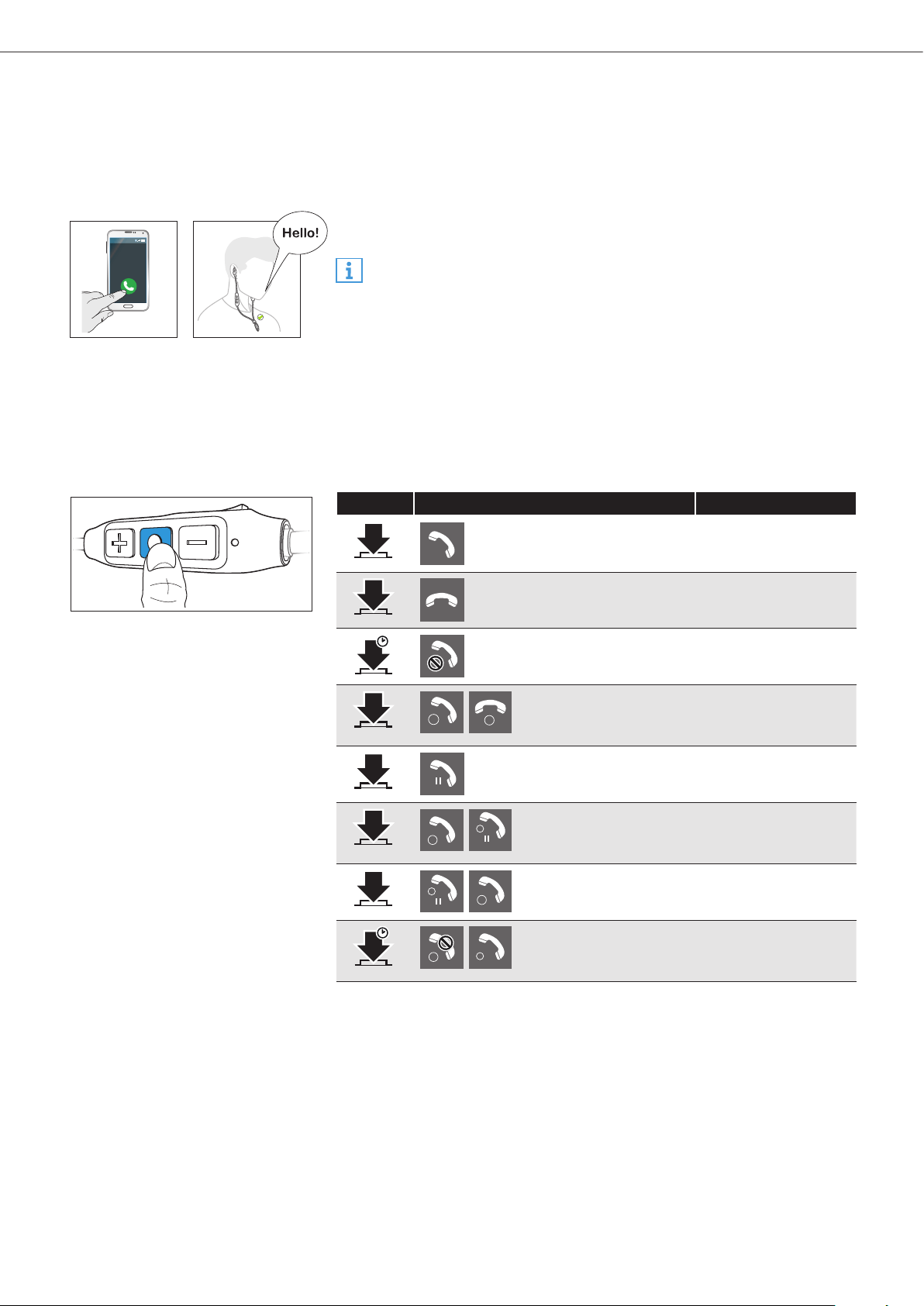
Playing/pausing music
X Quickly press the multifunction button.
Press Function
1x
Plays or pauses music
Playing the next track
X Press and hold the volume/track + button for a second to play the next
track.
Press Function
1s
Plays the next track in the playlist
Playing the previous track
X Press and hold the volume/track - button for a second to play the
previous track.
Press Function
1s
Plays the previous track in the
playlist
CX SPORT | 23
Making calls on the headphones
Making calls on the headphones
The following call functions are available when the headphones and the
smartphone are connected using Bluetooth. Some smartphones may not
support all functions.
Making a call
X Dial the desired number on your smartphone.
If your smartphone does not automatically transfer the call to the
headphones, select CX SPORT In-Ear Wireless as the audio source
on your smartphone (see the instruction manual of your smartphone
if necessary).
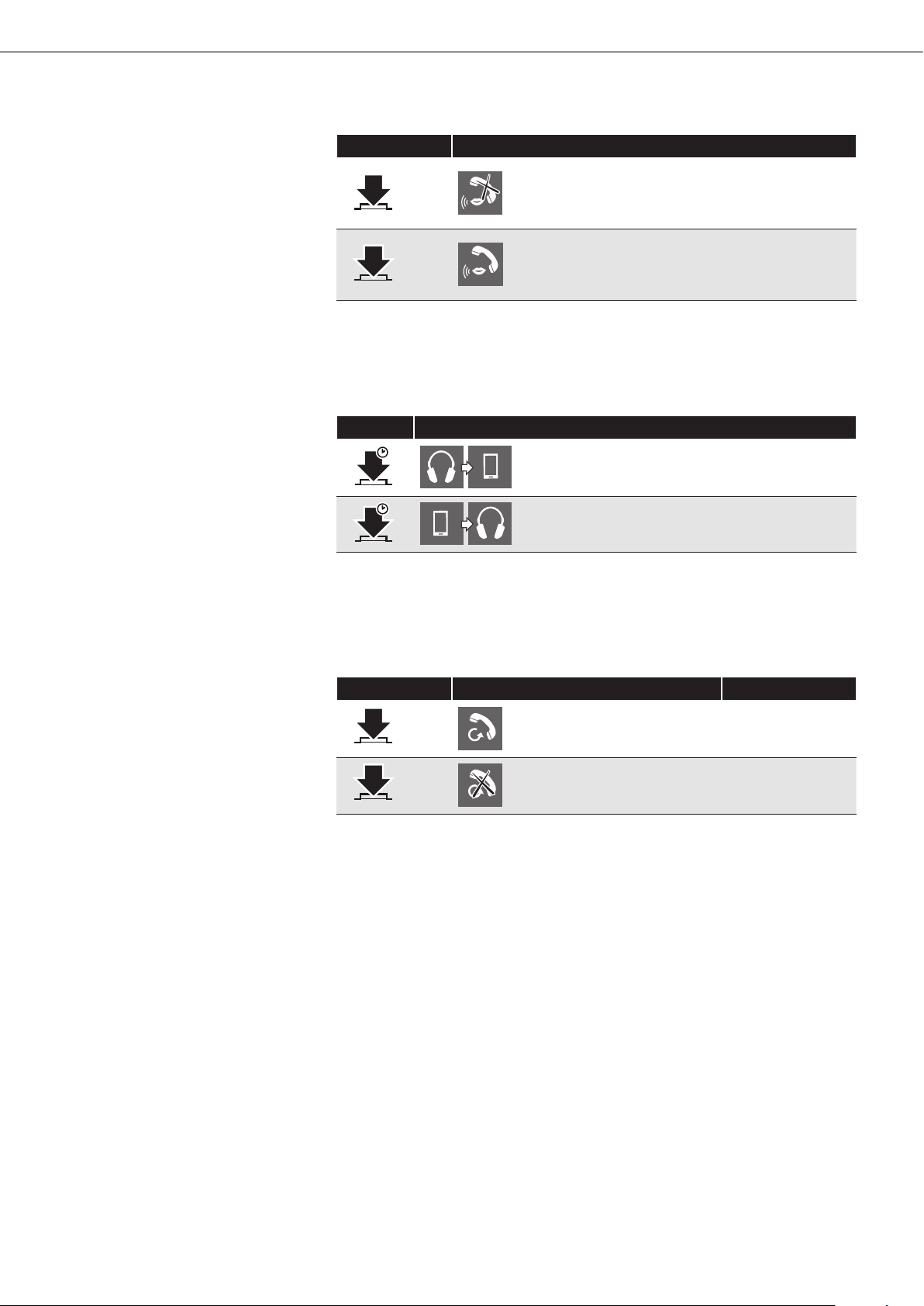
Accepting/rejecting/ending a call
If your headphones are connected to a smartphone and you receive a call,
the ring tone plays in the headphones and the LED flashes purple.
If you are playing music when you receive a call, the music pauses until
you end the call.
X Press the multifunction button accordingly:
Press Function Voice prompt
1x
Accepts a call
1x
Ends a call “call ended”
1s
Rejects a call “call rejected”
1x
1
2
Accepts an incoming
call and ends the
active call
2x
HOLD
Puts the call on hold
2x
2
HOLD
1
Accepts an incoming
call and puts an
active call on hold
2x
HOLD
2
1
Toggles between 2
active calls
1s
1
2
Rejects an incoming
call and continues
the active call
24 | CX SPORT
Making calls on the headphones
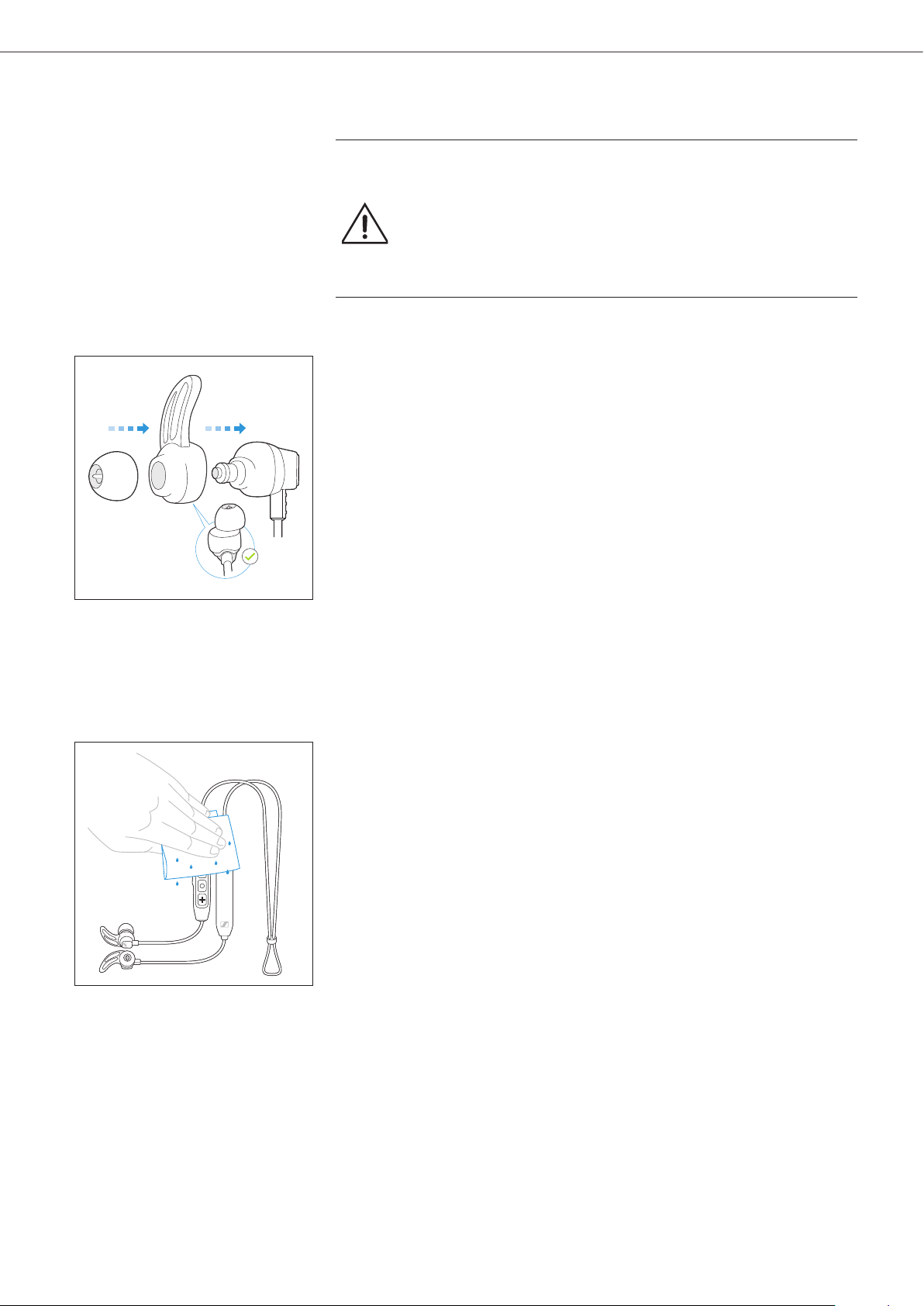
Muting/unmuting a call
X Quickly press the multifunction button twice while on a call.
Press Function
2x
Mutes the call
2x
Unmutes the call
Transferring a call to/from the headphones
When a call has been established, you can transfer the call between the
headphones and the smartphone.
X Press and hold the multifunction for a second.
Press Function
1s
Transfers a call from the headphones to
the smartphone
1s
Transfers a call from the smartphone to
the headphones
Redialing
You can use this function when the headphones are not actively playing
music or are used for making calls.
X Press the multifunction button twice.
Press Function Voice prompt
2x
Redials the last number
called
“redialing”
1x
Cancels redialing “call ended”

CX SPORT | 25
Making calls on the headphones
Voice control function
You can use this function when the headphones are not used for making
calls.
1. Press the multifunction button three times.
Press Function Voice prompt
3x
Starts voice control “voice dialing“
2. Say your voice command, such as “Call Jane”.
The Bluetooth smartphone calls Jane.
26 | CX SPORT
Care and maintenance
Care and maintenance
CAUTION
Liquids can damage the electronics of the product!
Liquids entering the housing of the product can cause a short-circuit
and damage the electronics.
X Keep all liquids away from this product.
X Do not use any solvents or cleaning agents.
Changing ear adapters and ear fins
You can change ear adapters and ear fins to ensure that your CX SPORT
stays in place even during intense workouts. Different sizes of ear adapters
and ear fins are included in the package. Try each size and select the size
that perfectly fits your ears.
1. Lightly pull the ear adapter away from the in-ear sound tunnel until it is
completely detached.
2. Pull off the ear fin away from the earphones.
3. Secure the new ear fin. Ensure that the L ear fin is placed into the left
earphone and the R into the right.
4. Insert the ear adapter by pushing it back onto the in-ear sound tunnel.
Ensure that it completely locks into place.
Cleaning the in-ear headphones
Primarily, clean the in-ear headphones with a soft, dry cloth. If they have
been used during work outs, clean them with a soft cloth dampened in
water.

CX SPORT | 27
Care and maintenance
Storage and handling
To keep the headphones in good condition and to avoid nicks and
scratches, always store the headphones in the carry case when not in use
or when carrying them around.

28 | CX SPORT
Care and maintenance
Information about the rechargeable battery
Sennheiser ensures and guarantees that the battery performs at the
optimum upon purchase of the headphones. Upon purchase or within the
warranty period, if you suspect that the battery is obviously defective,
please immediately return the headphones to any Sennheiser service
partner.
CX SPORT | 29
Troubleshooting
Troubleshooting
Problem Possible cause Possible solution Page
Headphones
cannot be
switched on
Battery is empty Charge the
headphones.
13
No audio
signal
Headphones are
not paired with your
device
Check if the
headphones are paired.
If necessary, pair the
headphones with your
device again.
14
Volume too low Increase the volume. 19
Headphones are
switched off
Switch the headphones
on.
17
Headphones
cannot
connect
Smartphone is
switched off
Switch your
smartphone on.
Bluetooth is
deactivated on your
smartphone
Activate Bluetooth on
your smartphone.
Headphones
do not
respond to
any button
press
Function of the
headphones is faulty
Clear the pairing
settings from the
headphones, and pair
again.
30
If you encounter a problem that is not listed in the table, or if the solutions
provided do not work, please contact an authorized Sennheiser service
partner for assistance.
To find a Sennheiser service partner in your country,
visit www.sennheiser.com.
30 | CX SPORT
Troubleshooting
Leaving the Bluetooth transmission range
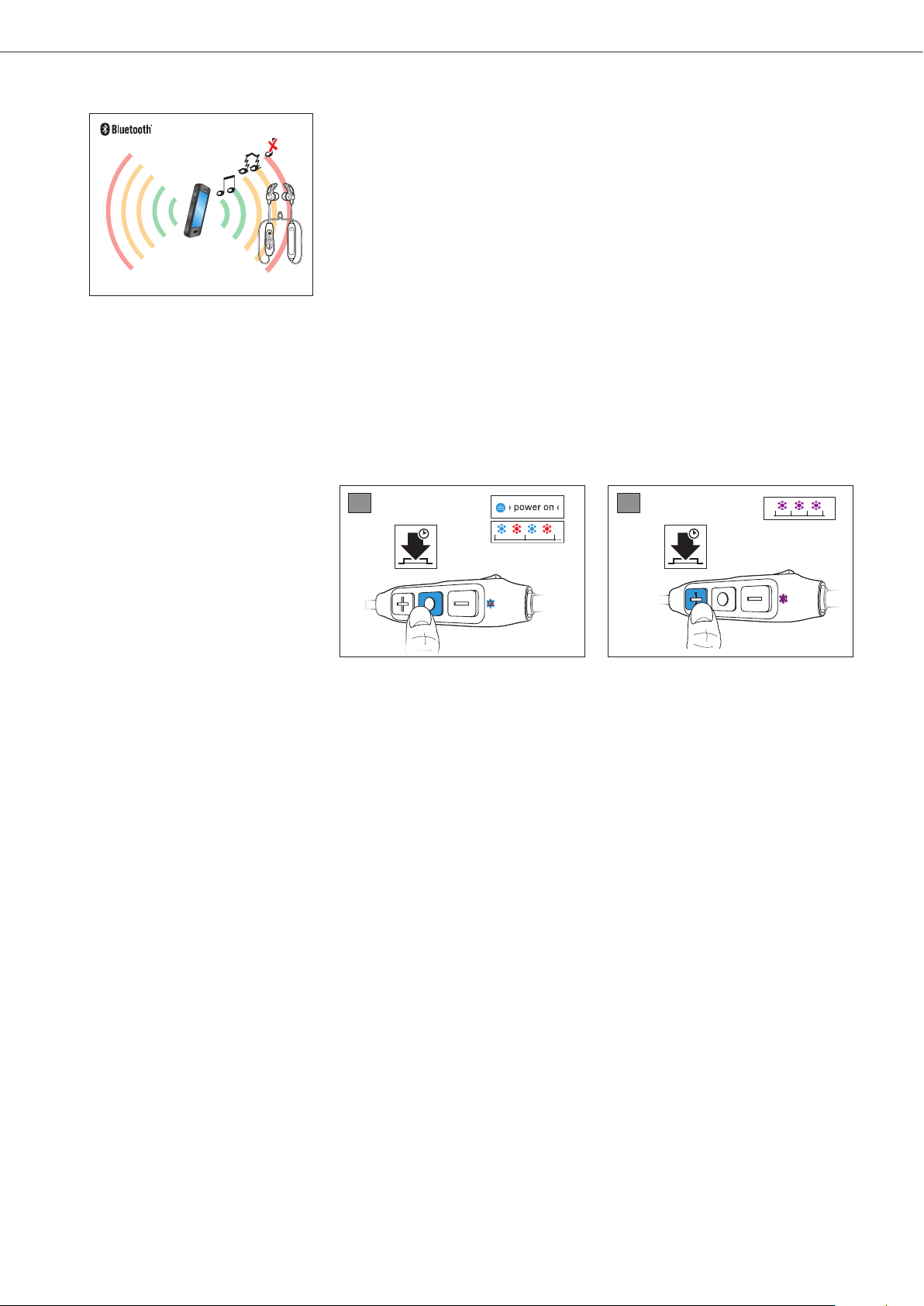
Wireless calling and streaming are only possible in the Bluetooth
transmission range of your smartphone. The transmission range largely
depends on environmental conditions such as wall thickness, wall
composition etc. With a free line of sight, the transmission range of most
smartphones and Bluetooth devices is up to 10 meters.
If the headphones leave the Bluetooth transmission range of the
smartphone, the sound quality deteriorates and you hear the voice prompt
“lost connection”. At this point, the connection breaks down completely.
You can re-establish the connection if you re-enter the Bluetooth
transmission range and you hear the voice prompt ”connected”.
X To re-establish the connection, press the multifunction button.
Clearing previously paired devices
1. Set the headphones to pairing mode, see page 14.
The LED flashes blue and red. The headphones are in pairing mode.
2. Press the Volume/track + button for 2 seconds.
The LED flashes purple 3 times. The headphones are permanently
disconnected from all devices and immediately go into pairing mode.
1 2
1s 1s
4s 2s
CX SPORT | 31
Specifications
Specifications
CX SPORT In-Ear Wireless headphones
Ear coupling ear canal
Frequency response 17 - 21,000 Hz
Transducer principle dynamic
Sound pressure level (SPL) 112 dB (passive: 1 kHz/ 0 dBFS)
THD (1 kHz, 100 dB) < 0.5 %
Pick-up pattern (speech audio) omni-directional
Input power 3.7 V⎓, 100 mAh: built-in rechargeable
lithium-polymer battery
5 V⎓, 500 mA: USB charging
Operating time Up to 6 hours (A2DP)/ 8.5 hours (HFP)
Temperature range operation: 0 to 40°C/32 to 104°F
storage: -25 to 70°C/-13 to 158°F
Maximal value of static magnetic
field at the surface
3.6 mT
Charging time 1.5 hours
Weight approx. 15 g
Bluetooth
Version 4.2, class 1
Transmission frequency 2402 – 2480 MHz
Modulation type GFSK, π/4 DQPSK
Profiles HFP, AVRCP, A2DP
RF output power 10 mW (max)
Supported codec SBC, AAC, aptX, aptX LL

Sennheiser electronic GmbH & Co. KG
Am Labor 1, 30900 Wedemark, Germany
www.sennheiser.com
Publ. 04/18, A01
32 | CX SPORT
Trademarks
Trademarks
The Bluetooth® word mark and logos are registered trademarks owned by
Bluetooth SIG, Inc. and any use of such marks by Sennheiser electronic
GmbH & Co. KG is under license.
Qualcomm aptX is a product of Qualcomm Technologies International,
Ltd. Qualcomm is a trademark of Qualcomm Incorporated, registered in
the United States and other countries, used with permission. aptX is a
trademark of Qualcomm Technologies International, Ltd., registered in the
United States and other countries, used with permission.
Other company and product names mentioned herein are trademarks of
their respective owners.

Sennheiser electronic GmbH & Co. KG
Am Labor 1, 30900 Wedemark, Germany
www.sennheiser.com
Publ. 04/18, A01