GEAppliances.com
¢13
Safety Information .......... 2-6
Operating ImlrucCions
Adjust the Oven
Thermostat ................... 91
(;lock and Timer . .......... 15, 16
()yen ..................... 12-14
Oven Controls ............. 10, 11
Sabbath Feature ............ 19, 20
Selecting Types of Cookware ..... 9
Self-Cleaning .............. 24, 25
Special Feaunes ............... 18
Surface Units ................ 7, 8
Timed Baking and Roasting ..... 17
_4'anning Drawer ........... 22, 23
Care and Cleaning ........ 94-33
(;lass Cooktop ............. 39, 33
Self-Cleaning O_en ......... 94, 95
In_lallation Instructions
Anti-Tip Device ............ 34, 40
Before You Beg-in ............. 34
Electrical Connections ....... 36-39
Lex>ling .................. 40, 41
Troubleshooting Tips ...... 49-46
Accessories .................. 47
Consumer Support
Consumer Support ..... Back Coxer
Product Registration ........ 49, 50
V\'anantv .................... 51
Coil 7@ and
Radiant 7@ Modds
Standard &If-Clean
Clean Modds Modds
JgSO 7 JBP2 l
j s15 j P6o
jBs2 7 RB 74 0
RB525 RB 75 7
RB526 RB 78 7
RB5 36 RB 790
RB540 RB800
Write the model and serial
numbers here:
Model #
Serial #
You can find them on a label,
behind the open oven door or
(lrawe_; on the ti'ont tace.
183D6379P025 49-88018 !0-04 JR
IMPORTANTSAFETYINFORMAtiON.
READALLINSTRUCTIONSBEFOREUSING.
A WARNING!
For your safe_ the information in this manual must be followed to minimize the risk of fire or explosion,
electric shock, or to prevent property damage, personal injury, or loss of life.
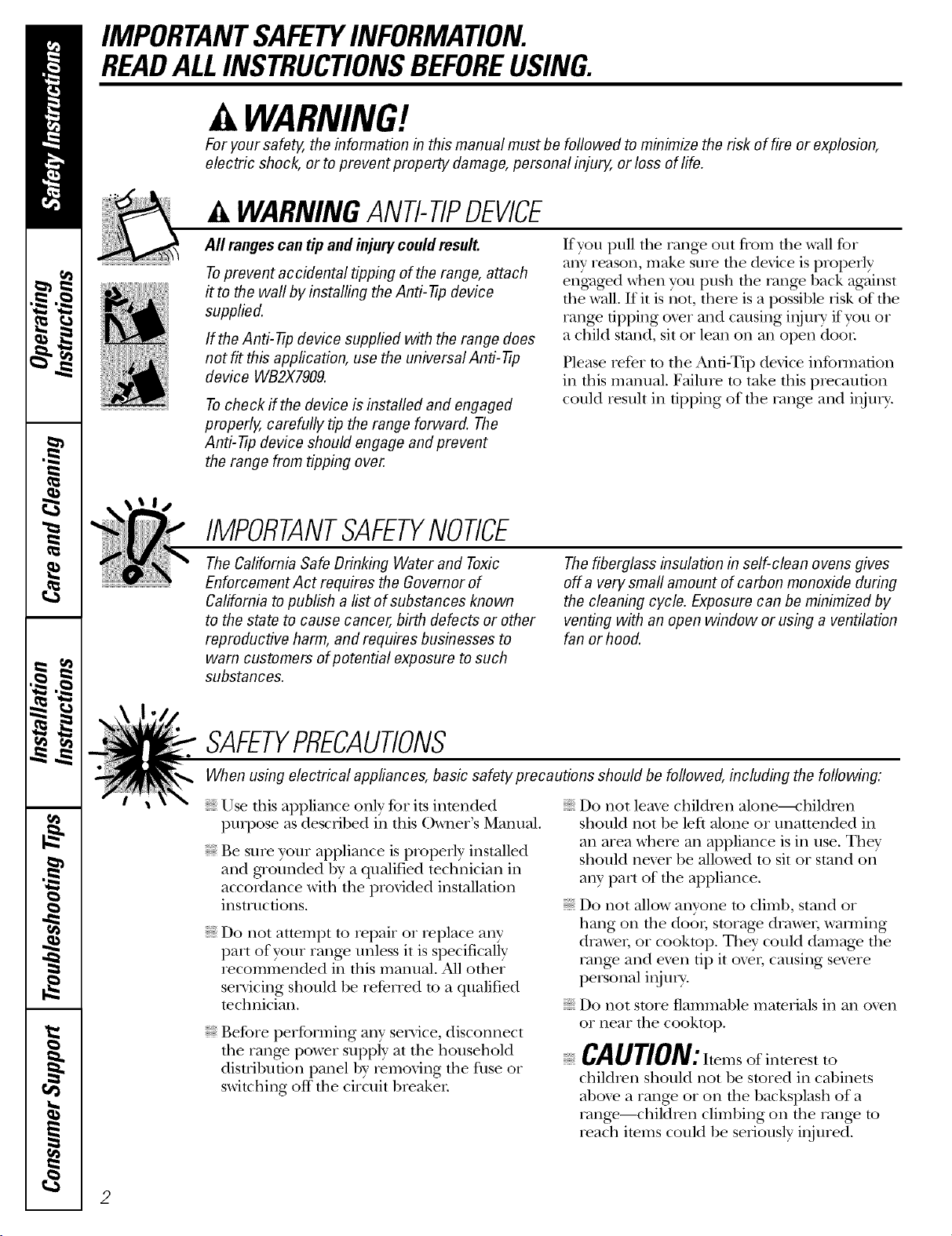
A WARNINGANTI-TIPDEVICE
All rangescan tip and injury could result.
Toprevent accidental tipping of the range, attach
it to the wafl by installing the Anti--tip device
supplied.
If the Anti--tip device supplied with the range does
not fit this application, use the universal Anti--tip
device WB2X7909.
Tocheck if the device is installed and engaged
properly, carefully tip the range forward. The
Anti--tip device should engage and pravent
the range from tipping over.
If you pull file rang_ out from file wall for
any reason, make sure the device is properly
eng¢_ged when you push the range back against
the wall• If it is not, there is a possible risk of the
range tipping over and causing inju U if yon or
a child stand, sit or lean on an open door
Please refer to the Anti-Tip device information
in this manual. Failure to take this precaution
could result in tipping of the range and i,lju U.
IMPORTANTSAFETYNOtiCE
The California Safe Drinking Water and Toxic
Enforcement Act requires the Governor of
California to publish a list of substances known
to the state to cause cancer, birth defects or other
reproductive harm, and requires businesses to
warn customers of potential exposure to such
substances.
The fiberglass insulation in self-clean ovens gives
off a very smafl amount of carbon monoxide during
the cleaning cycle. Exposure can be minimized by
venting with an open window or using a ventilation
fan or hood.
SAFETYPRECAUtiONS
When using electrical appliances, basic safety pracautions should be followed, including the following:
iiiiiiiiiiii_iii
iiiiiiiiiiii_iii
Use this appliance only %r its intended
• (
puq)ose as desclJbed in tins )_me_ s Manual.
Be sure your appliance is properly installed
and gaounded by a qualified technician in
accordance with the provided installation
instructions.
Do not attempt to repair or replace any
part of your range unless it is specifically
recommended in this manual. All other
servicing should be refened to a qualified
technician.
Be%re per%truing any service, disconnect
the range power supply at the household
distdbnfion panel by _emoving the fllse or
switching off the circuit breaker
iiiiiiiiiiii_iii
iiiiiiiiiiii_iii
iiiiiiiiiiii_iii
Do not leme children alone----_'hildren
should not be left alone or unattended in
an area where an appliance is in use. They
should nexer be allowed to sit or stand on
any part of the appliance.
Do not allow anyone to climb, stand or
hang on file doo,; storage drawel, wamfing
drawel; or cooktop. They could damage the
rang> and even tip it ovel. causing sex>re
personal i_ljtnT.
Do not store flammable materials in an oxen
or near the cooktop.
CAUtiON: Itemsof interestto
children should not be stored in cabinets
aboxe a range or on the backsplash of a
range--children climbing on the range to
reach items could be selqously i,ljured.
2
GEAppliances.com
COOKMEATANDPOULTRYTHOROUGHLY...
Cookmeat andpoultry thoreughly--meat to atleastan INTERNALtemperatureof 160°Fandpoultry toat least an
iNTERNALtemperatureof 180°ECookingto thesetemperaturesusua//yprotectsagainst foodbomeillness.
WARNING!
SAFETYPRECAUTIONS
Nexer wear loose-fitting or hanging gam_ents
while using the appliance. Be careflfl when
reaching for imms stored oxer the range.
Flammable mamrial could be ignimd if
brought in contact wifl_ hot surface units
or heating elements and m W cause sexere
gilT/IS.
Use only dU pot holders--moist or damp
pot holders on hot surfaces may result in
burns from steam. Do not let pot holders
touch hot surfi_ce units or heating elements.
Do not use a towel or other bulky cloth.
For your safety, nexer use your appliance
for wanning or heating the room.
Do not let cooking grease or oflmr flammable
mamfials accumulam in or near the range.
Do not use wamr on grease fires. Nexer pick
up a flaming pan. Turn the controls off.
Smother a flaming pan on a surface unit by
covering the pan completely with a well-
fitfing lid, cookie sheet or fiat u W. Use a
nmlfi-purpose di T chemical or foam-type
rite extinguisher
Flaming grease outside a pan can be put
out by coxering it with baking soda o_,
if available, 1)y using a multi-purpose dly
chemical or foam-type fire exfinguishen
Flame in the oxen or wanning drawer
can be smothered complemly by closing the
door and mining the oven off or by using a
multi-purpose d U chemical or foam-type fire
extinguisher
Do not touch fl_e snrthce units, the heating
elements or rite interior surface of the oven.
These surfaces may be hot enougtl to bum
exen thougil they are dark in color During
and after use, do not touch, or let cloflling
or other flammable materials contact, tim
surfi_ce units, areas nearby the surface units
or any inmrior a_ea of the oxen; allow
sufficient time for cooling first.
Potenually hot surfaces include the cooktop,
areas fhcing the cooktop, oxen xent opening,
surfaces near the opening, crevices around
rim oxen door and metal trim parts aboxe
the door
REMEMBER:The inside smihce of the oven
may be hot when file door is opened.
Do not store or use combustible mamrials,
gv_soline or other flammable vapors and
liquids in the vicinity of this or any other
appliance.
Kee I) fl_e hood and grease filmrs clean
to maintain g_od xenfing and to ax_id
gTease fires.
Nexer block tim xents (air openings) of fl_e
range. They provide the air inlet and outlet
flint are necessa W for file range to operam
properly with conect combustion. Air
openings are located at file rear of the
cooktop, at tim top and bottom of fl_e oven
door, and at rite bottom of the range under
the warming drawer or storage drawee
3
IMPORTANTSAFETYINFORMATION.
READALLINSTRUCTIONSBEFOREUSING.
OVEN
Stand away from the range when opening
the oxen door Hot air or steam which
escapes can cause bnnls to hands, face
and/or eyes.
Do ,lot heat unopened food containers.
i:
Pulling out the shelf to tile stoi>lock is a
comenience in lifting heaxy' foods. It is also
a precaution against bums flom touching
hot surt_tces of the door or oxen walls.
When using cooking or roasting bags in tile
Pressure could build up and die container
could burst, causing an injury.
Kee I) file oxen x_nt unobstructed.
Kee I) the ox>n free flom gxease buildup.
Place the ox>n shelf in the desired posinon
while die oven is cool. If shelves mnst be
handled when hot, do ,lot let pot holder
contact the heanng elements.
oxen, follow the manufacturer's directions.
Do ,lot use the oxen to dU newspapers.
If overheamd, they can catch on fire.
Do *lot use the oxen for a storag_ area.
Imms stored in an oven can ignite.
Do not leave paper products, cooking
utensils or food in the ox>n when ,lot in use.
SELF-CLEANINGOVEN
Do not clean the door gasket. Tile door
gasket is essential for a good seal. Care
should be taken ,lot to rub, damag> or
mow the gasket.
Clean only parts listed in this Owner's
Manual.
Do ,lot use oven cleaners on self-clean
models. No commercial oxen cleaner or
oxen liner protective coating of any kind
should be used in or around any part of
the oxen. Residue from oxen cleaners will
damage the inside of tile oxen when the
self-clean cycle is used.
Be%re self-cleaning the oven, remoxe the
broiler pan, grid and other cookware.
Be sure to wipe up excess spillage before
starting the self-cleaning operation.
If the self-cleaning mode malflmctions,
turn the oxen off and disconnect the power
supply. Haxe it serviced by a qualified
technician.
Take tile shelxes out of tile oxen before
you begin tile self-clean cycle or they
may discolor
i
4
GEAppliances.com
WARMINGDRAWERronsomemode/s)
The i)ml)ose of die wam_ing drawer is
to hold hot cooked foods at serving
mmperature. Always start with hot fbod;
cold food cannot be heamd or cooked
in tile wanning drawer
Do not use file wamling drawer to d_T
newspapers. If oxerheated, they can catch
on f]Ie.
Do not leave paper products, cooking
umnsils or food in the warming drawer
when not in use.
Ne_er leax>jars or cans of fat dripping:s in
or near your wanning drawer
Always kee I) wooden and plastic utensils
and canned food a safe distance away flom
your wanning drawen
Do not touchthe heating element or the interior
surface ofthe warming drawer. _lese surfaces
may be hot enougtl to bnHl.
REMEMBER:Tile inside surPace of d_e
wam/ing drawer may be hot when tile
drawer is opened.
Use care when opening die drawel: Open
tile drawer a crack and let hot air or steam
escape before removing or replacing food.
Hot air or smam which escapes can cause
burns to hands, fi_ce and/or eyes.
Do not use aluminun_ fbil to line the diawe_:
Foil is an excellent heat insulator and will
nap heat beneath it. This will upset tile
perfornmnce of tile drawer and it could
damag> tile inmrior finish.
Do not warm food in tile wanning drawer
for more than two hours.
SURFACEUNITS--ALLMODELS
Use proper pan size-select cookware having flat bottoms large enough to cover the surface unit
heating element. The use of undersized cookware will expose a portion of the surface unit to direct
contact and may result in ignition of clothing. Proper relationship of cookware to surface unit will also
improve efficiency.
Never leax> tile surl_ace units unatmnded at
higil heat setfing:s. Boilo_ers cause smoking
and greasy spillox>rs that may catch on rile.
Only certain types of glass, gtassAeramic,
earthenware or other glazed containers are
suitable for cookmp service; oflmrs m W
break because of the sudden chang_ in
ten_perature.
To minimize dm possibili U of bums,
ignition of flmnmable mamfials and spillage,
tile handle of a container should be turned
toward tim center of the rang> without
exmnding ox_r nearby surface units.
Always tni'll tile surl_ace units off before
renloving cookware.
When preparing flaming %ods under tile
\_nt hood, turn tile tim on.
Kee I) an eye on foods being flied at high or
medium high heat setfing:s.
Foods for fl?ing should be as dU as possible.
Frost on fiozen foods or moisune on flesh
foods can cause hot l_atto bubble up and
oxer tile sides of tile pan.
Use little fiat for effective shallow or deep fi_t
flying. Filling tile pan too flfll of fiat can
cause spillovers when food is added.
If a combinaoon of oils or fats will be used in
flTing, stir together before heanng, or as l_ats
melt slowly.
_: Always heat l_atslowly, and watch as it heats.
Use a deep l_atfllennometer whenever
possible to prexent oxerheafing fi_tbeyond
tile smoking point.
IMPORTANTSAFETYINFORMATION.
READALLINSTRUCTIONSBEFOREUSING.
A WARNING!
RADIANTSURFACEUNITS_onsomemodefsJ
Use care when touching the cooktop. Theglass surface of the cooktop will retain heat after the controls
have been turned off.
Avoid scratching tile glass cooktop. The
cooktop carl be scratched with imms such as
sharp instruments, dngs or otherjeweh T and
rivets on clothing.
Large scratches or impacts to glass doors
or cooktops carl lead to broken or shattered
glass.
Do not operate file radiant snrthce units if
the glass is broken. Spilloxeis or cleaning
solution may penetram a broken cooktop
and cream a lisk of electrical shock. Contact
a qualified mchnician immediamly should
your glass cooktop become broken.
Clean tile cooktop Mill cauUon. If a wet
spong_ or clofll is used to Mpe spills on a
hot surface unit, be careflfl to axoid steam
1)urns. Some cleaners carl produce noxious
tirades if applied to a hot suifi_ce.
NOTE,"'We recommend that you ax_id Mping
any surface unit areas until they haw cooled
and the indicator li01t has g_ne of£ Sugar
spills ate file exception to tiffs. Please see
Cleaning the glass cooktop sect.ion.
When the cooktop is cool, use only the
recommended cleaning cream to clean
the cooktop.
Nmer use tile glass cooktop surthce as a
cutting hoard.
Do not place or store items that carl melt or
catch fire on tile glass cooktop, exen when it
is not being used.
To moid possible damage to file cooking
surface, do not apply cleaning cream to the
glass snrlZace when it is hot.
Alter cleaning, use a d U cloth or paper towel
to remoxe all cleaning cream residue.
Be careflfl when placing spoons or other
stirring utensils on the glass cooktop smthce
when it is in use. They may hecome hot and
could cause hnr_ls.
Read and follow all instructions and
warnings on the cleaning cream labels.
Do not lift the cooktop. Lifting tile cooktop
carl lead to damage and improper operation
of the range.
A WARNING!
COILSURFACEUNITS_o__om_mod_/_I
iiiiiiiiiiii_iii
iiiiiiiiiiii_iii
Clean tile cooktop with caution. If a
wet sponge is used to wipe spills on a hot
cooktop, be careflfl to moid steam hni_lS.
To avoid tile possibility of a bni_l or elecuic
shock, alwws be certain that the controls for
all surface units are at the OFFposioon and
all coils are cool before attempting to lift or
reIl/O\_ a nnit.
Do not immerse or soak tile remox able
surface units. Do not put them in a
dishwasher
iiiiiiiiiiii_iii
Be sure file drip pans and tile x_nt duct are
not coxered and are in place. Their absence
dining cooking could damag_ range parts
and wiring.
Do not use aluminum %il to line file drip
pans or anywhere in tile oven except as
described in this manual. Misuse could
result in a shock, fire hazard or damag_
to the rang_.
READANDFOLLOWTHISSAFETYINFORMATIONCAREFULLY.
SAVETHESEINSTRUCTIONS
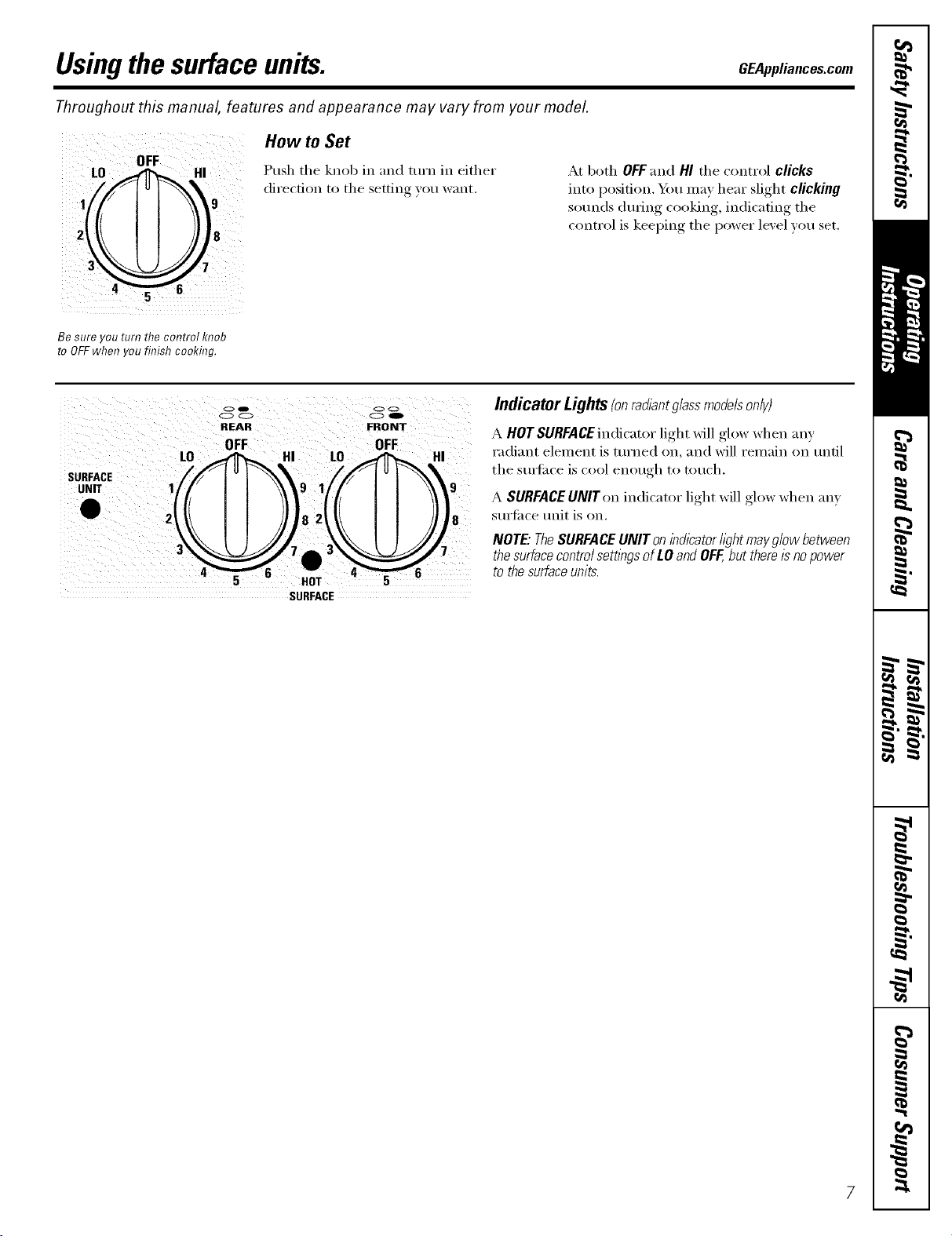
Usingthesurfaceunits. GEAppliances.com
Throughout this manual, features and appearance may vary from your model.
L0
1
J
How to Set
Push the knob in and turn in either
direction to the setting }ou want.
At both OFFand HI the control clicks
into position. Y_m may hear slight clicking
sotmds during cooking, indicating the
control is keeping the power level you set.
Be sure you turn the control knob
to OFFwhen you finish cooking.
SURFACE
UNIT
O41D
O0
RI::AFI
IFF
oc
00
FRONT
OFF
82 8
HOT
SURFACE
IndicatorLights(onradlantg/ass modeb only)
A HOTSURFACEindicator light will glow when any
radiant element is turned on, and will remain on until
the stmfi_ce is cool enough to touch.
A SURFACE UNIT on indicator light will glow when any
surti_ce unit is on.
NOTE"TheSURFACEUNITonindicatorh)htmayglowbetween
thesurfacecontrolsettlbgsofLOandOFF,butthereisnopower
tothesurfaceunits.
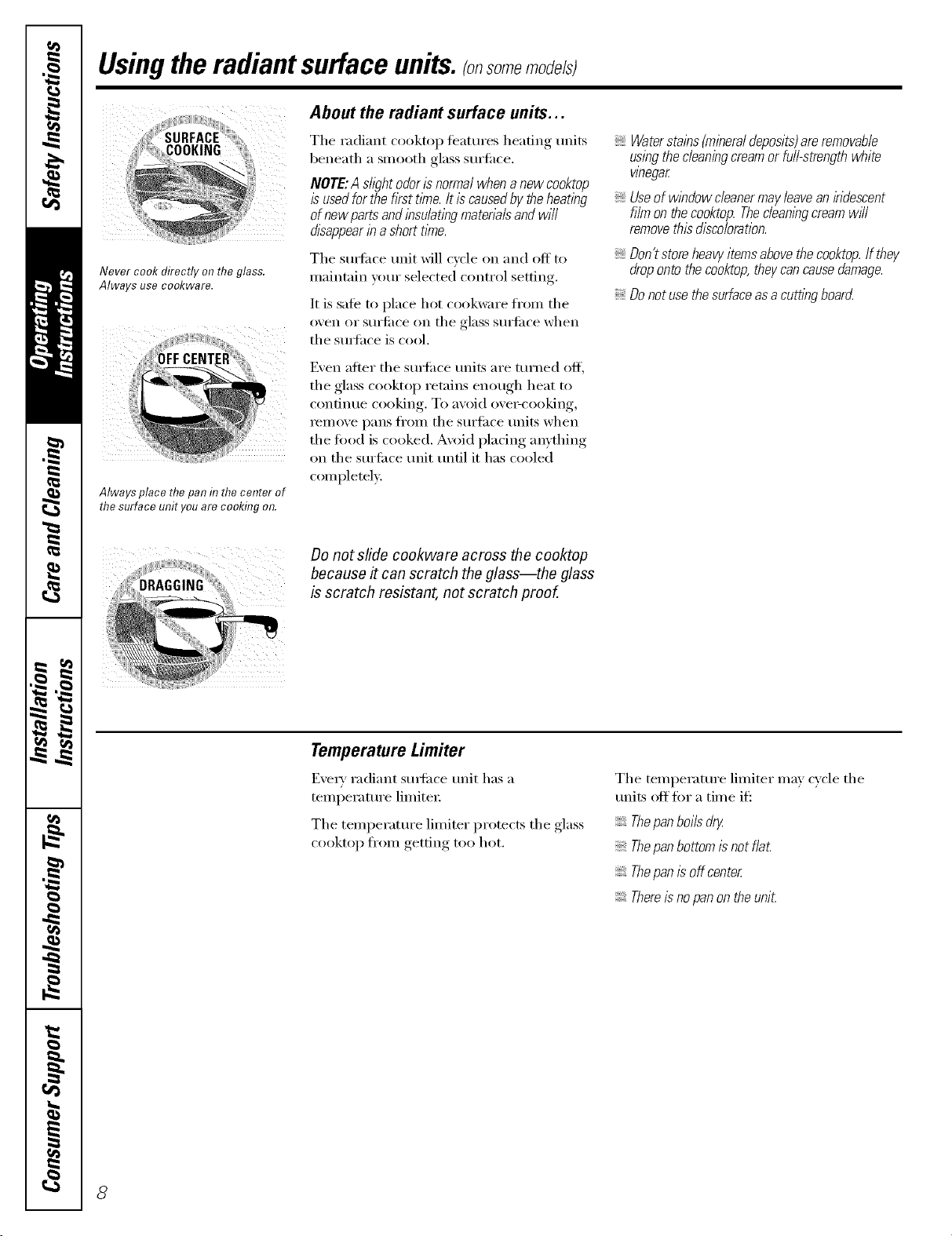
Usingtheradiantsurface units.(onsomemodefsl
Never cook directly on the glass.
Always use cookware.
Always place the pan in thecenter of
the surface unit youare cooking on.
About the radiant surface units...
The radiant cooktop teatures heating units
beneath a smooth glass surfl_ce.
NOTE:A sh)ht odorisnormalwhen anew cooktop
is usedforthe fkst t/_ne.It is causedby theheating
of new parts and insulatingmaterb/s and wi//
disappearina#err time.
The sm-fi_ce trait will cycle on and off to
maintain yore" selected control setting.
It is safe to place hot cookware fl'om the
oven or surtilce on the glass smti_ce when
the suitace is cool.
Even after the sm'fi_ce milts are turned off;
the glass cooktop retains enough heat to
contintle cooking. To avoid ove>cooking,
remove pans fl'om the surelce milts when
the tood is cooked. Avoid placing anything
on the sm'fi_ce trait tmdl it has cooled
completel>
Waterstains(mineraldeposits)areremovable
usingthecleaningcreamorfull-strengthwhite
v/begar
Useof w/bdow cleanermayleavean/kidescent
film on thecooktop. Thecleanlbgcream wff/
removethis discoloration.
Don'tstoreheavyitemsabove thecooktop. If they
droponto thecooktop, theycan causedamage.
Donotuse thesurfaceas a cutt/bgboarcL
Do not slide cookware across the cooktop
because # can scratch the glass--the glass
is scratch resistant, not scratch proof.
Temperature Limiter
Every radiant smti_ce trait has a
temperatm'e limited:
The temperatm'e limiter protects the glass
cooktop fl'om getting too hot.
The temperature limiter may cycle the
milts off fi_r a time if':
Thepanboils dry
Thepanbottom is not fla£
Thepan is off center
Thereisno panon the uniL
8
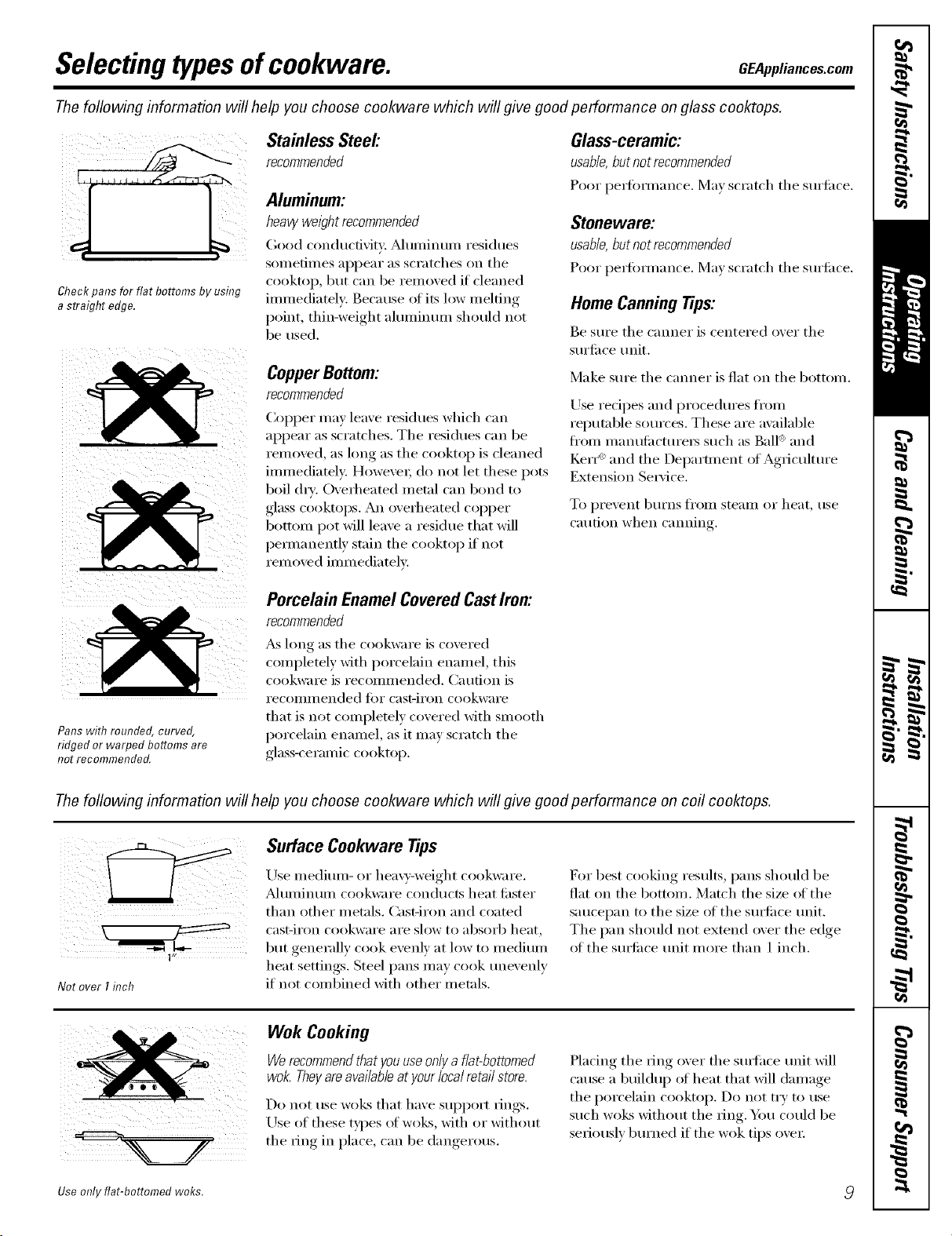
Selectingtypesof cookware. GEAppliances.com
Thefollowing information will help you choose cookware which will give good performance on glass cooktops.
iiii ii
)' ii!:
Check pans for flat bottoms by using
a straight edge.
Stainless Steel'.
recommended
Aluminum:
heavy weight recommended
Good conductivity. _Muminun/residues
sometin/es appear as scratches on tile
cooktop, but can be removed if cleaned
immediately: Beca use of its low melting
point, thin-weight almninmn should not
be used.
CopperBottom:
recommended
Col)per may leave residues which ('_ln
appear as scratches. The residues can be
removed, as long as the cooktop is cleaned
immediately. However; do not let these pots
boil (hT: Overheated metal can bond to
glass coohops. An overheated COl)per
bottom pot will leave a residue that will
pemmnentlv stain the cooktop if not
removed immediately.
Glass-ceramic:
usable, but not recommended
Poor pei_)iJ/]ance, ]¥la) scratch the Stli'iil('e.
Stoneware:
usable, but not recommended
Poor perfimnance. Ma) scratch the surii_ce.
Home CanningTips:
Be sm'e the canner is centered o_er the
sm'li_ce tmit.
Make sm'e the canner is fiat on the bottom.
Use redpes and procedm'es fl'om
reputable sources. These are available
fl'Olll illanHfilctHi'ei3 such as Ball '_and
t(erI "_ and tile Del)artment of Agriculture
Extension Se_ice.
To prexent bHI'ns J[l'Oiil steaIll or heat, tlse
caution when canning
Pans with rounded, curved,
ridged or warped bottoms are
not recommended.
Porcelain EnamelCoveredCastIron:
recommended
_ long as tile cookware is covered
completely with porcelain enamel, this
cookware is recolnn/ended. Catlfion is
i'ecoiiliilended fi)r cast-iron cookware
that is not completely covered with smooth
porcelain enamel, as it may scratch the
glass-ceranfic cooktop.
The foflowing information will help you choose cookware which will give good performance on coil cooktops.
1"
Not over I inch
Surface Cookware Tips
Use medimn- or hea\)'-weight cookware.
Muminmn cookware conducts heat fi_ster
than other metals. Cast-iron and coated
cast-ii'on cookwaI'e aI'e slow t() _lbsoI'b heat,
but generally cook exenh' at low to medimn
heat settings. Steel pans may cook tme_enlv
if not combined with other metals.
I?or best cooking results, pans should be
fiat on the bottom. Match the size (ff the
saucepan to tile size of tile surlilce unit.
Tile pan should not extend over tile edge
ot the s/mfi_ce trait more than 1 inch.
Wok Cooking
Werecommendthatyouuseonlya flat-bottomed
wok.Theyareavailableat yourlocalretailstore.
Do not rise woks that have Stll)l)ort IJngs.
Use of these types of woes, with or without
the ring in place, can be dangerous.
Placing tile ring over tile s/mfhce trait will
cause a buildu I) ot heat that will damage
the porcelain cooktop. Do not try to use
such wol<s without the ring. Y)m could be
seriously bm'ned if the wok tips over
Use only flat-bottomed woks.
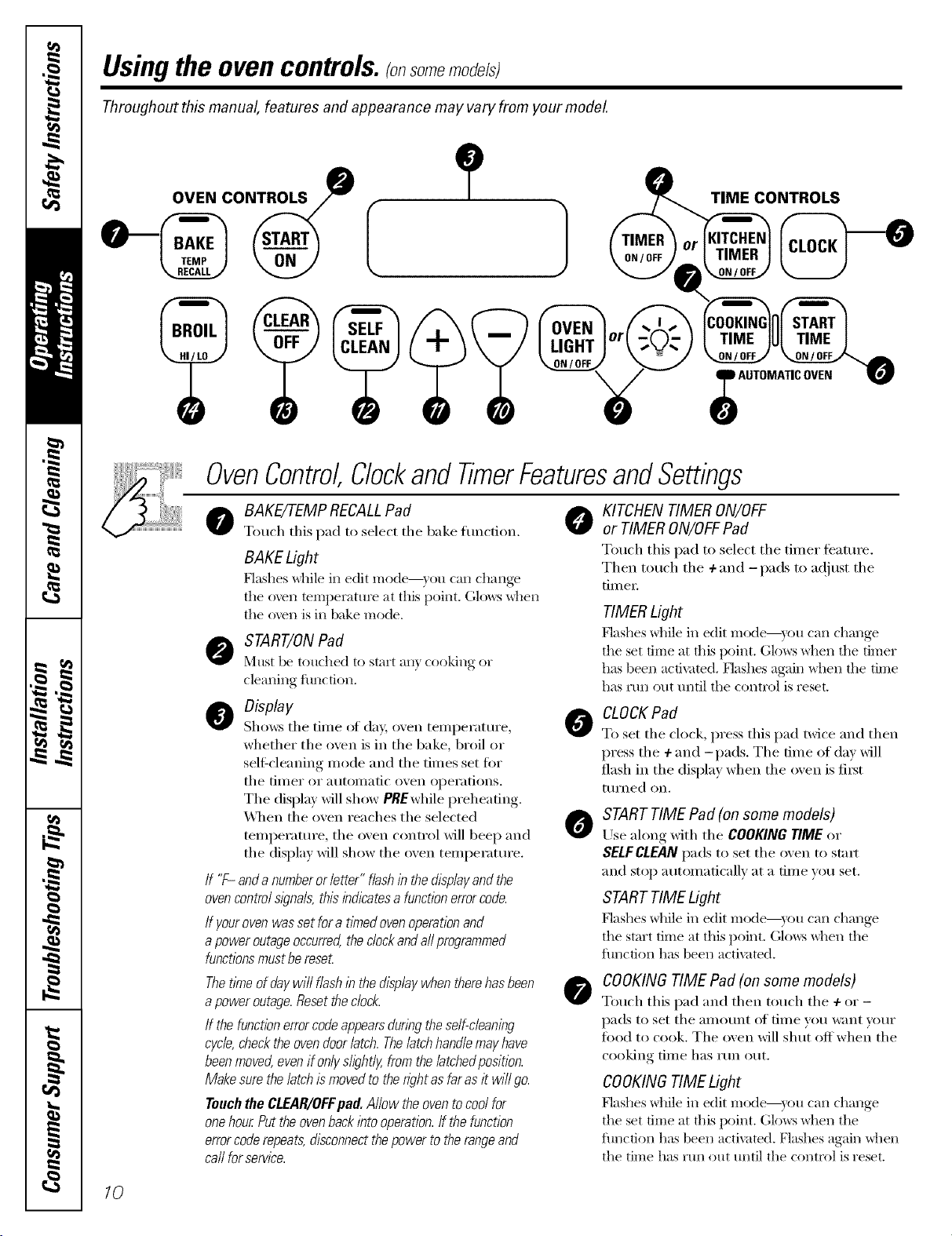
Usingthe ovencontrols,ronsomemode/sl
Throughout this manual, features and appearance may vary from your model.
OVEN CONTROLS
ONTROLS
OvenControl,Clockand TimerFeaturesandSettings
0 8AKE/TEMPRECALLPad O KITCHENTIMERON/OFF
Toucl/this pad to select tile bake timction, or TIMERON/OFFPad
BAKE Light
[qashes _tlile in edit mode--} ou can change
tile oven temperature at this point. (;lo_:s _tlen
the oven is in bake mode.
START/ON Pad
Must be touched to start an) cooking or
cleaning function.
O Display
Sl/ows the time otda}; oxen temperature,
whether the oven is in the bake, broil or
sell:cleaning mode and the times set for
tile [iiller or atltoillatic ()veil opei'ations.
The display will show PREwl/ile preheating.
_._q/en tile oxen reacl/es tile selected
temperature, the oxen control will beep and
_fJ
the display will show the oven temperature.
If "F- and a numberor letter" flash in the displayand the
ovencontrolsl)na& this indicatesa function errorcode.
/f yourovenwas set fora t/knedoven operationand
apower outageoccurred,the dock andaftprogrammed
functionsmustbereseL
Thetlkneof daywi// flash in the display when therehas been
apower outage.Reset theclock.
If the functionerrorcode appearsdunbg theself-cleaning
cycle,checkthe ovendoor latch. Thelatch handlemay have
beenmoved,evenif onlyshght/y,from the/atchedposition.
Make surethe latch is movedto the nght asfar as it wi// go.
Touch the CLEAR/OFFpad. Allow the oventocool for
onehour Putthe ovenbacklbto operation,ff the function
errorcode repeats,disconnectthe power to the rangeand
ca//for service.
Toucl/this pad to select tile timer feature.
Tl/en toucl/tile + and -pads to a(!itlst tile
[iII/er
TIMER Light
Flashes _]lile in edit mode--y()u can change
the set time at this point. Glows _tlen tile timer
has been activated. [;]ashes again _tlen tile time
has mn out until tile control is reset.
CLOCK Pad
To set tile clock, press this pad twice and then
press tile +and -pads. Tile time of day will
flasl/in tile display wl/en tile oven is fiI_t
tllrned on.
STARTTIME Pad (on some models)
Use along will/tile COOKINGTIMEor
SELFCLEANpadsto set tile oven to stm*
and stop automatically at a time you set.
STARTTIME Light
Flashes _hile in edit mode--y()u can change
the start time at this point, Glo_vs_tlen the
flmcfion has been activated,
COOKING TIME Pad (on some models)
Toucl/this pad and tl/en toucl/ tile + or -
pads to set tile alllO/lnt oil tiI/le veil %;lilt VO/lI"
toed to cook. The oven will slmt off wl/en the
cooking time l/as run out.
COOKINGTIME Light
Flashes _hile in edit mode--y()u can change
the set time at this point. Glo_:s _hen the
flmcfion has been activated. Flashes again Mien
tile time has mn out until tile control is reset.
10
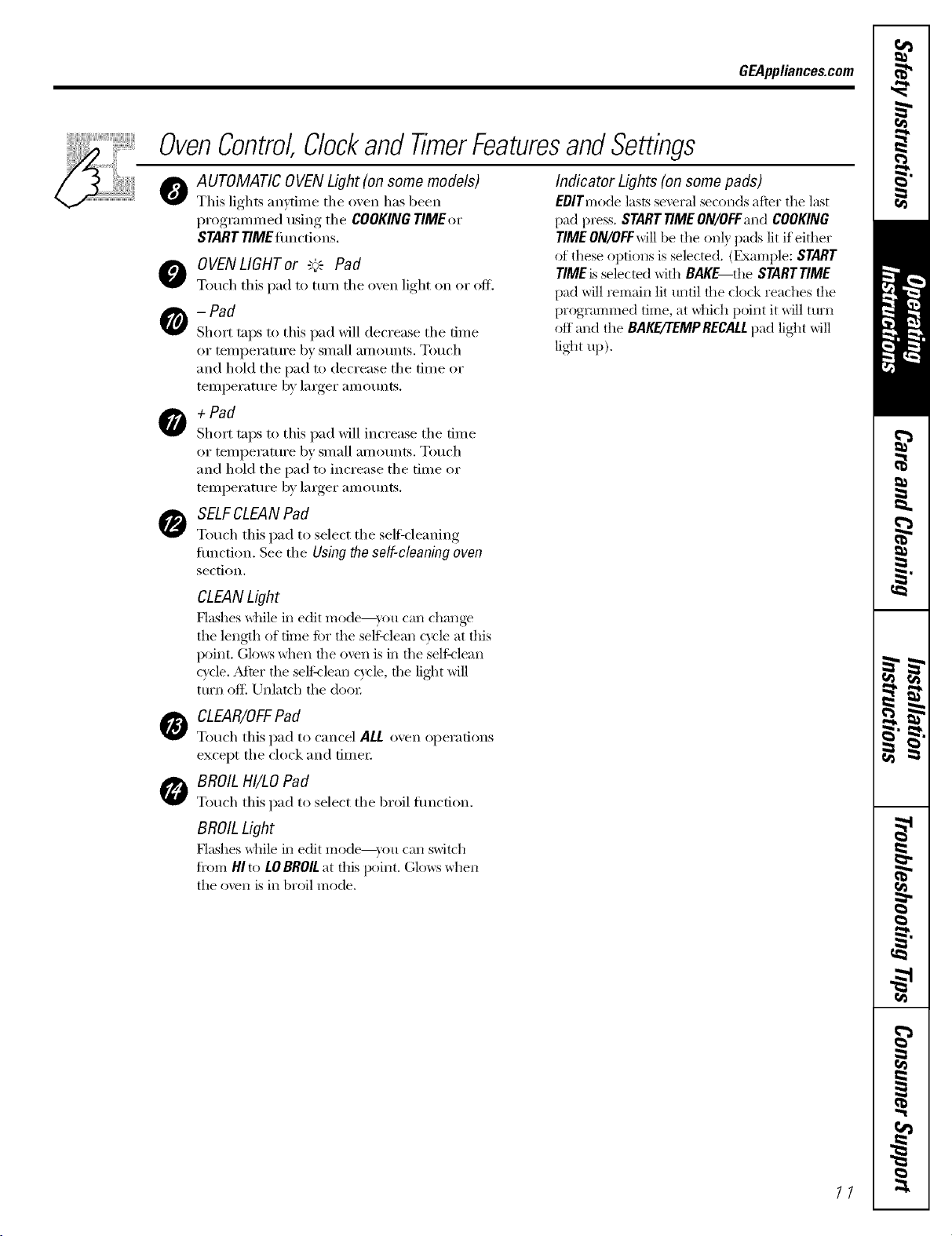
GEAppliances.com
OvenControlClockandTimerFeaturesandSettings
O
AUTOMATIC OVEN Light (on some models)
This lights anvtin_e the oven has been
programn_ed using the COOKINGTIMEor
START riME timcti,,ns.
O OVENLIGHTor "_'_ Pad
Touch this pad to turn the o',en light on or off.
-Pad
Short taps to this pad will decrease the time
or temperatm'e by small amounts. Touch
and hold the pad to decrease the time or
temperatm'e by larger amotmts.
O + Pad
Short taps to this pad will increase the time
or temperatm'e by small amotmt,s. Touch
and hold the pad to increase the time or
temperatm'e by larger amotmts.
SELFCLEAN Pad
Touch this pad to select the self=cleaning
fimction. See the Using the so/f-c/oaning ovon
section.
Indicator Lights (on some pads)
EOlTmode lasts several seconds afier the last
pad press. SNRT TIMEON/OFFand COOKING
TIMEON/OFFwill be the on b pads lit if either
of these options is selected. (Example: START
TIMEis selected with BAKE the SNRTT/ME
pad will remain lit until the clock reaches the
programmed time, at _hich point it will turn
off and the BAKE/TEMPRECALLpad lig]_t will
lig]_t up),
CLEANLight
Flashes while in edit mode--you can change
the length of time ti)r the selt_lean cycle at this
point. Glows when the oven is in the seltklean
c}cle. Mter the seltklean cycle, the lig]_t will
turn oft_ Unlatch the do(n,
CLEAR/OFFPad
Touch this pad to cancel ALL oven operations
except the clock and timer;
BROIL HI/LO Pad
Touch this pad to select the broil fimction.
BROIL Light
Flashes _dfile in edit mode--you can switch
fi'om HI to LOBROILat this point. Glows when
the oven is in broil mode.
//
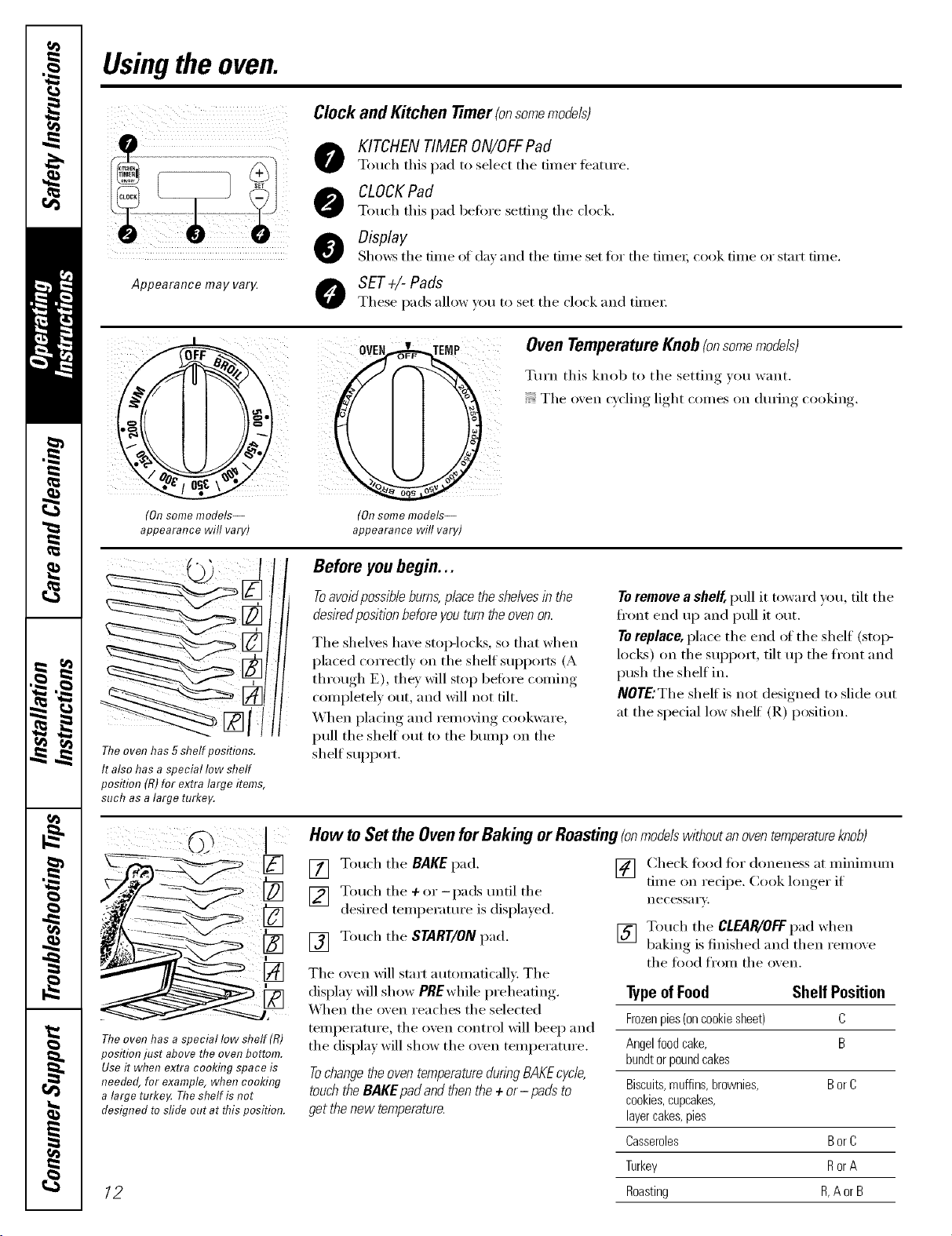
Usingthe oven.
Appearance may va04
Clockand Kitchen timer (onsomemodels)
KITCHEN TIMER ON/OFFPad
Touch this pad to select the timer featm'e.
CLOCKPad
Touch this pad befiwe setting the clock.
Display
Shows the time of dm and the time set for the fime_, cook time or stnrt time.
O SET+l-Pads
These pads allow _ou to set the clock and time_:
(Onsome models--
appearance will vary)
Oven TemperatureKnob(onsomemodels)
Turn this knob to the setting you want.
The oxen cycling light comes on dm_ing cooking.
(Onsome models--
appearance will vary)
Theoven has 5shelf positions.
It also has a special low shelf
position (tt)for extra large items,
such as a large turkey.
Before youbegin...
Toavoidpossible burns,placethe shelvesin the
desiredposition beforeyou turn theoven on.
The shelves have stop-locks, so that when
placed correctly on the shelf supports (A
through E), they will stop belm'e coming
completely out, and will not tilt.
When plating and removing cookware,
pull the shelf Otlt to the bump on the
shelf support.
To remove a shelf, pull it toward you, tilt the
ti'ont end up and pull it out.
To replace, place the end _ff the shelf (stoi>
locks) on the support, tilt up the ti'ont and
push the shelf in.
NOTE:The shelf is not designed to slide out
at the special low shelf (R) position.
[]
Theoven has a special low sheff (R)
position just above the oven bottom.
Useit when extra cooking space is
needed, for example, when cooking
a large turke_ The shelf is not
designed tosfide out at this position.
12
How to Set the Oven for Baking or Roasting (onmodelswithoutanoventemperatureknob)
[] Touch the BAKE pad.
[] Touch the ÷or-pads tmtil the
desired temperature is displa)ed.
[] Touch the START/ON pad.
The oven will stnrt automatically. The
display will show PBEwhile preheating.
_4]_en the oven reaches the selected
temperature, the oven control will beep and
the display will show the oven temperatm'e.
Tochange theoven temperatureduringBAKEcycle,
touchthe BAKE pad and thenthe + or-pads to
get thenew temperature.
[] (_heck fi)od fi)r aloneness at minim um
time on recipe. Cook hmger if
necess_l i'v.
[] Touch the CLEAR/OFFpad when
baking is finished and then remo_e
the food from the oven.
Typeof Food Shelf Position
Frozenpies(oncookiesheet) C
Angelfoodcake, B
bundtorpoundcakes
Biscuits,muffins,brownies, BorC
cookies,cupcakes,
layercakes,pies
Casseroles BorC
Turkey RorA
Roasting R,A orB
GEAppliances.com
Typeof Margarine Will Affect Baking Performance!
Most recipes for baking have been
developed using high fat products such
as butter or margarine (80% fat). If you
decrease the fat, the recipe may not
give the same results as with a higher
fat product.
Recipefailurecanresultffcakes,pies,pastries,
cookiesorcandiesaremadewithlowfatspreads.
Thelowerthefatcontentofa spreadproduct,the
morenoticeablethesedifferencesbecome.
Federal standards require products labeled
"margarine" to contain at least 80% tilt by
weight, ixmqilt spreads, on the other hand,
contain less tilt and more water. The high
moisture content of these spreads afl'ects
tile texture and flavor of baked goods. For
best results with w)ur old fiworite redpes,
rise mmgarine, butter or stick spreads
containing at least 70% vegetable oil.
Preheatingand PanPlacement
Preheat tile oven if tile redpe calls fin" it.
To preheat, set the oven at the correct
temperature. Preheating is necessm T tot
good results when baking cakes, cookies,
past_ T and breads.
Forovenswithouta preheat indicatorlight or tone,
preheat 10minutes.
Onsomemodels,the display wi// show "PRE"
while preheat/bg.When the ovenreachesthe
selected temperature,the ovencontrol wi// beep
and the displaywill show the oventemperature.
Baking results will be better if baking pans
are centered in tile oven as ill[lch _lS
possible. Pans should not touch each other
or the walls ot the oven. If you need to use
two shelves, stagger the pans so one is not
direcflv above the othe_; and leave
approximately 1½" fl'om tile fl'ont ot tile
pan to the fi'ont ot the shell
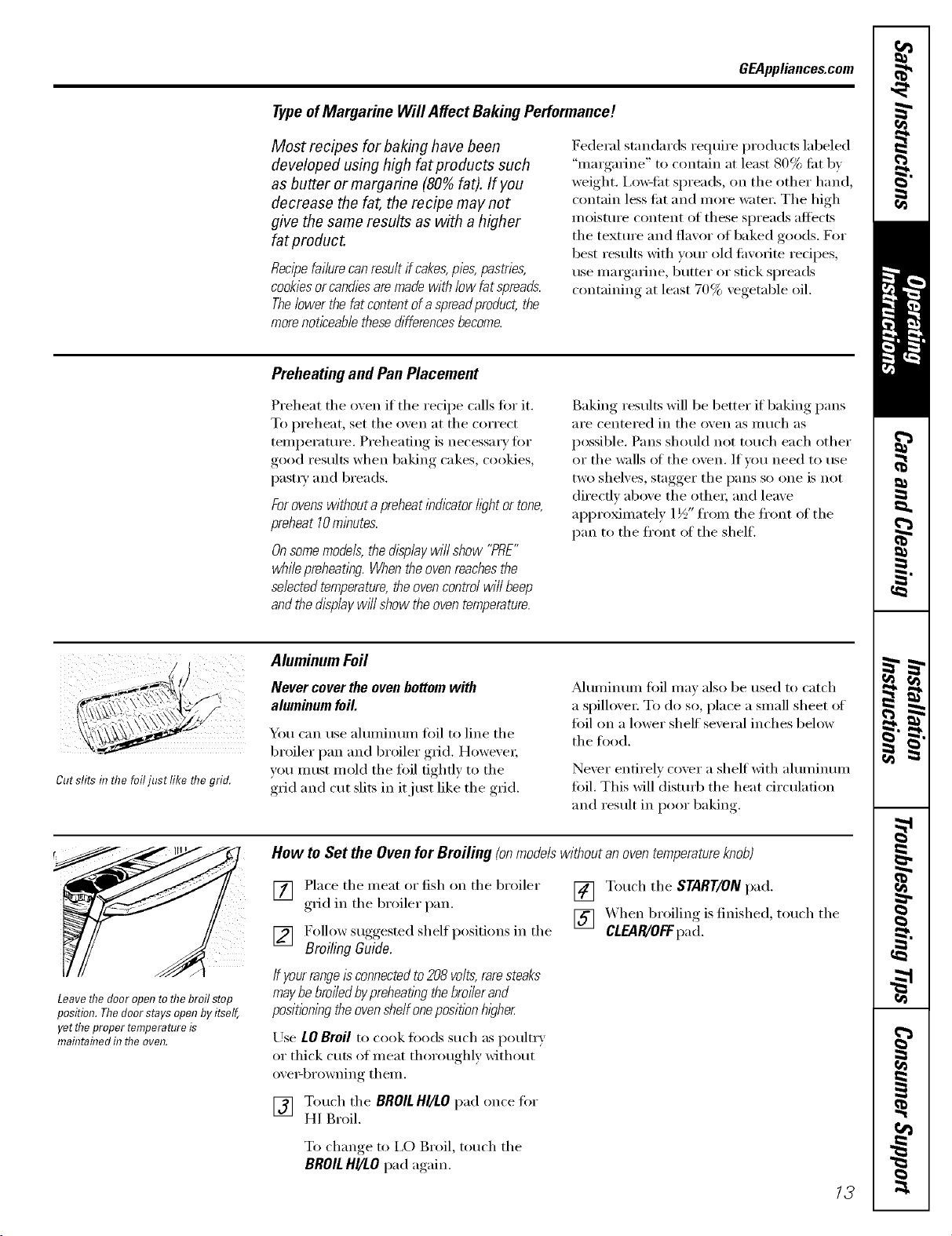
Cut slits inflTefoil usrmceme gno.
Aluminum Foil
Never cover the oven bottom with
aluminum foil.
You can use aluminum toil to line tile
broiler pan and broiler grid. However;
you must mold the toil tightly to the
grid and cut slits in it just like the grid.
Muminum fi)il may also be used m catch
a spillove_: To do so, place a small sheet of
toil on a lower shelf several inches below
tile ti)ocl.
Never entirely cover a shelf with aluminum
loll. This will disturb the heat circulation
and result in poor baking.
r
Leavethe door open tothebroil stop
position. Thedoorstays open by itself,
yet theproper temperatere is
rnaflTtaflTedin the oven.
How to Set the Oven for Broiling (onmodelswithoutanoventemperatureknob)
[] Place tile meat ,':,r fish on tile broiler
grid in tile broiler pan.
[] F°ll°w suggested shelf l)°siti°ns in the
Broiling Guide.
If yourrangeisconnectedto208volts,raresteaks
maybebroiledbypreheatlbgthebroilerand
positbningtheovenshelfonepositionhigher
Use LO Broil to cook fl)ods such as poultr}
or thick cuts of meat thoroughly without
ox e>browning them.
[] Touch tile BROILHI/LOpad once fi)I"
HI Broil.
[] Touch tile START/ONpad.
[] X,_hen broiling isfinished, touch tile
CLEAR/OFFpad.
To change, to I,O Broil, touch tile
BROILHI/tO pad again.
13
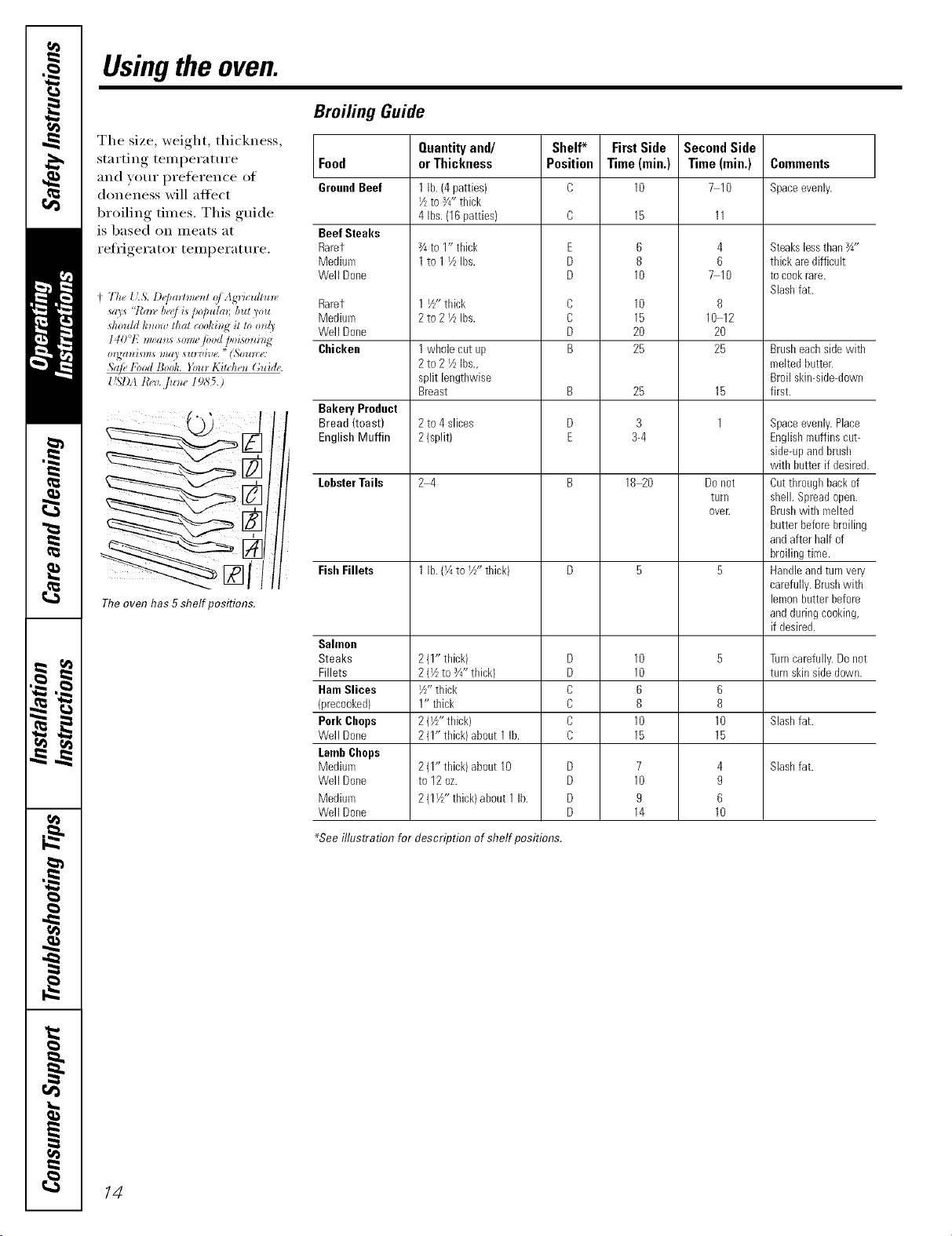
Usingthe oven.
The size, weight, thickness,
starting temperature
and VOilE l)reference of
doneness will atii_ct
broiling times. This guide
is based on meats at
refligerator temperature.
Theoven has 5shelf positions.
Broiling Guide
Food
GroundBeef
Beef Steaks
Rarer
Medium
Well Done
Rarer
Medium
Well Done
Chicken
Bakery Product
Bread (toast)
English Muffin
LobsterTails
Fish Fillets
Sahnon
Steaks
Fillets
HamSlices
{precooked)
Pork Chops
Well Done
LambChops
Medium
Well Done
Medium
Well Done
Quantityand/
or Thickness
1 lb. (4patties)
I/ztoY4"thick
4 Ibs.(16patties)
3/4to 1" thick
1to 1I/LIbs.
1 i/z-thick
2t02 YLIbs.
1whole cut up
2to 2 YzIbs.,
split lengthwise
Breast
2to 4 slices
2{split)
24
1 lb. (¼to I/z"thick)
2(1" thick)
2(Vzto _4"thick)
I/z"thick
1" thick
2(l/z"thick)
2(I" thick)about 1lb.
2(1" thick)about 10
to 12oz.
2(IVz" thick)about 1 lb.
Shelf*
Position
E
D
D
C
C
D
B
B
D
E
D
D
C
C
C
C
D
D
D
D
First Side
Time(min,)
10
6
8
10
10
15
2O
25
25
3
3-4
18_0
10
10
6
8
10
15
7
10
9
14
Second Side
Time (rain.)
7 10
4
6
7 10
8
10 12
20
25
15
1
Donot
tarll
oveE
6
8
10
15
4
9
6
10
Commeots
Spaceevenly.
Steakslessthan_4"
thick aredifficult
tocookrare.
Slashfat.
Brasheachsidewith
meltedbatter.
Broil skin-side-down
first.
Spaceevenly.Place
Englishmuffins cut-
side-upandbrash
with butter if desired.
Cutthroughbackof
shell. Spreadopen.
Brashwith malted
butter beforebroiling
andafterhalf of
broilingtime.
Handleandturnvery
carefully.Brashwith
lemonhatterbefore
andduringcooking,
if desired.
Tarncarefully.Donot
turn skinsidedown.
Slashfat.
Slashfat.
_Seeillustration for description of shelf positions.
14
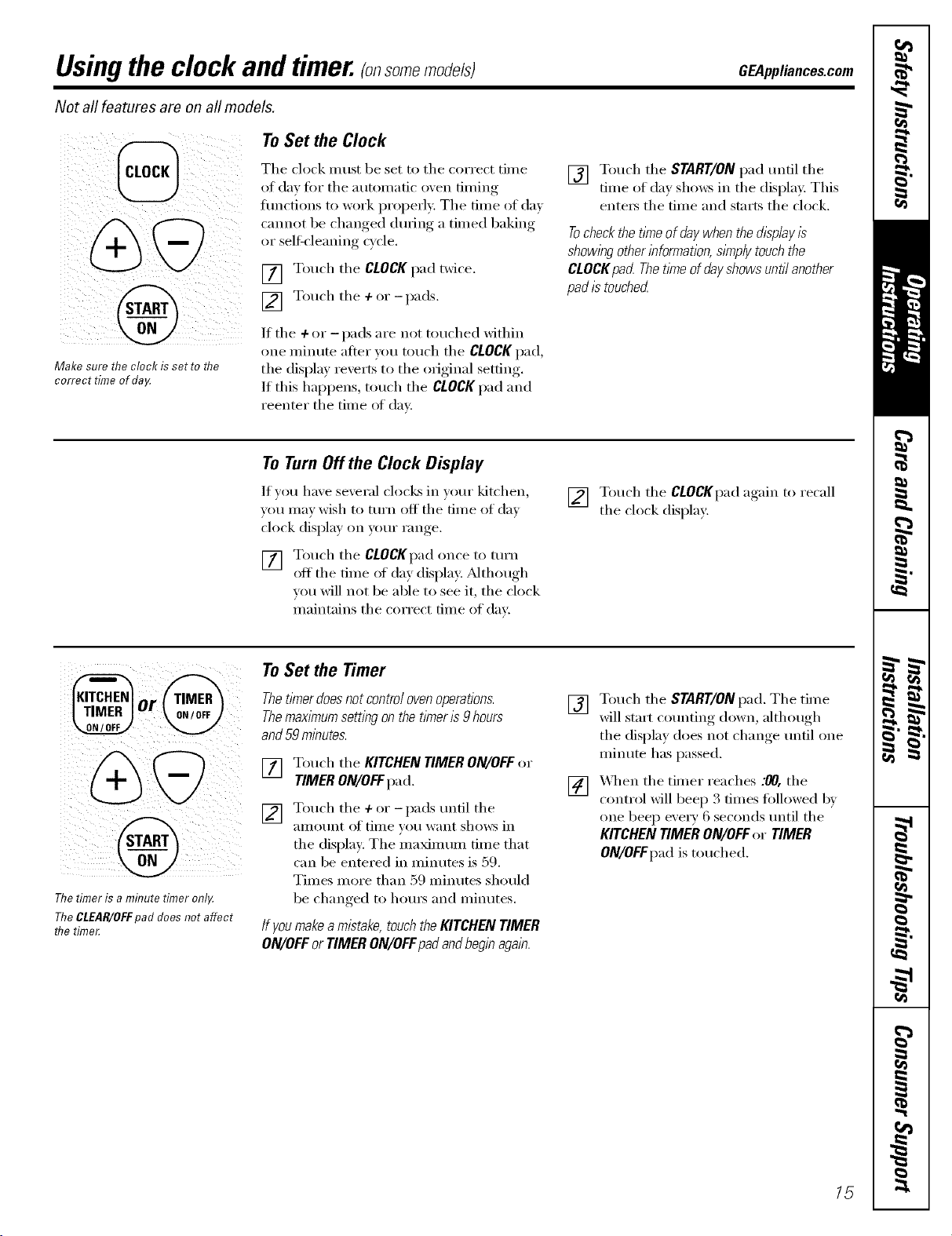
Usingthe clock and timer.(onso e odefsl CEA..lia.ces.com
Not all features are on all models.
@
Make sure the clock/s set re me
correct time of da_¢
ToSet the Clock
The clock must be set to tile correct time
at (la_ fin" tile automatic oven timing
functions to work properly: The time of day
cannot be chan_ed dtu_in_ a timed baking
or selfk'leanin_ cycle.
[] Touch the CLOCKpad twice.
] Touch the + or - pads.
/f the + (:,r - pads are not touched within
one minute atter w>u touch the CLOCK pad,
the display reverts to the original setting.
/f this hapl)ens, touch the CLOCKpad and
reenter the time of day.
[] Touch the START/ON pad until the
time of day shows in the displa); This
enters the time and starts the clock,
Tocheckthet/_neof daywhenthedisplayis
showingotherinformation,s/_nplytouchthe
CLOCKpad Thet/meofdayshowsuntilanother
pad/stouched
ToTurnOffthe Clock Display
If vet1 have several clocks in VOtlr kitchen,
you may wish to turn off the time of day
clock display on u>ur range.
[] Touch the CLOCKpadonce to turn
off the time of day display: _Mthough
you will not be able to see it, the clock
maintains the correct time of day.
[] Touch the CLOCKpad again to recall
the clock display:
Thetimer is a minute timer onl,¢
TheCLEAR/OFFpad does not affect
flTetime_
To Set the Timer
Thet/Ynerdoesnot contro/ovenoperations.
Themax/Ynumsetting on the timer/s 9hours
and59 minutes.
J_] Touch the KITCHENTIMERON/OFFor
TIMERON/OFFpad.
[] Touch the +(:,I"-pads until the
_lillOtlnt of tiIlle _Otl want shows in
the display: The maximum time that
can be entered in minutes is 59.
Times more than 59 minutes should
be changed to hours and minutes.
If you make a mistake,touch the KITCHEN TIMER
ON/OFFor TIMER ON/OFFpadandbeginagain.
[] T°uch the START/ONl)ad" The time
will start counting down, although
the display does not change until one
minute has passed.
[] "_,_q_enthe timer reaches :00, the
control will beep 3 times fi>lh>wed 1)_
one beep eve1T 6 seconds until the
KITCHEN TIMER ON/OFF oi" TIMER
ON/OFFpad is touched.
15
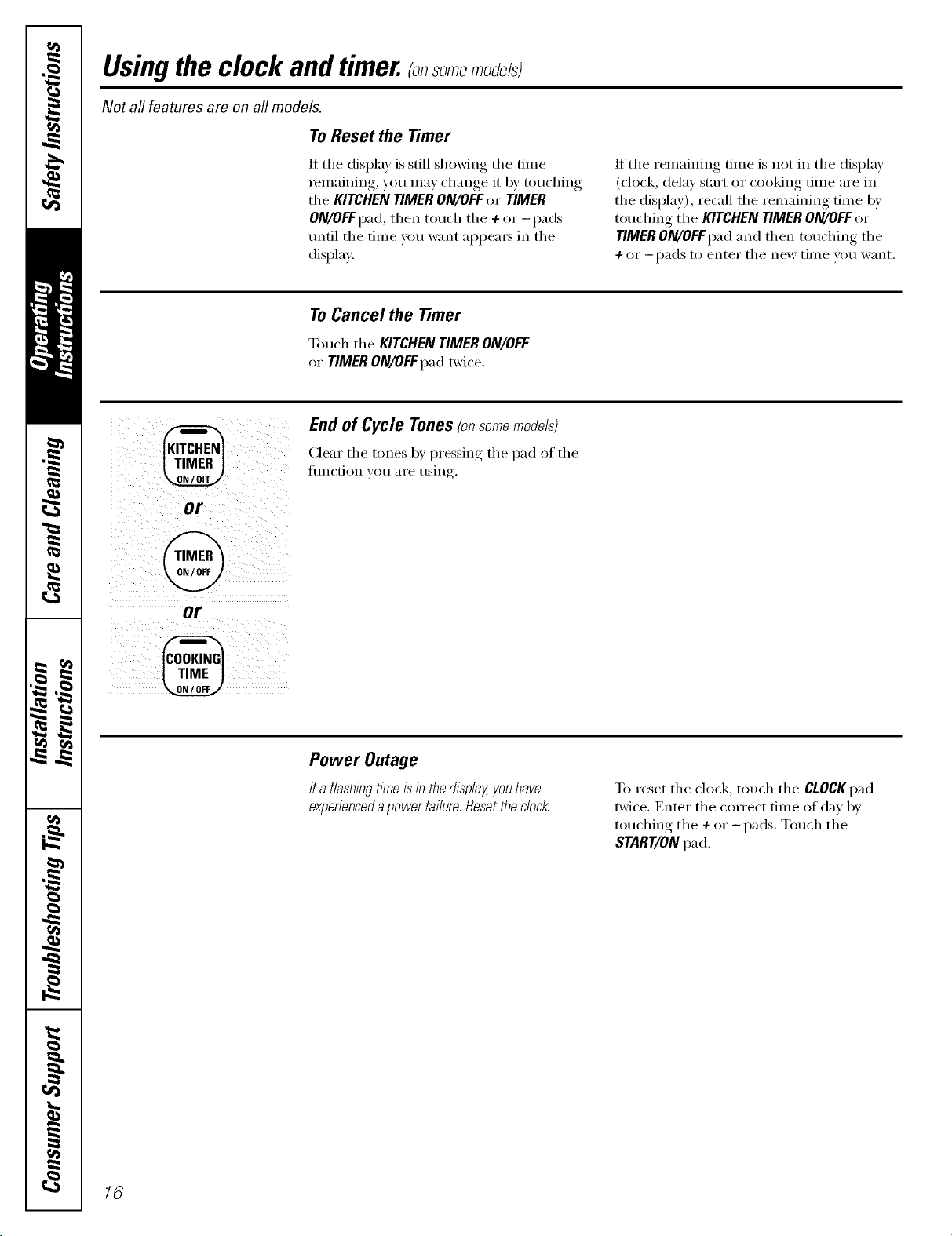
Usingthe clock andtimer, somemodefsl
Not all features are on all models.
To Reset the Timer
If tile display is still showing tile time
remaining, you may change it 1)ytouching
the KITCHEN TIMER ON/OFFor TIMER
ON/OFFpad, then touch the + or-pads
until tile time you want al)l)ea_ in tile
display.
If tile remaining time is not in tile display
(clock, delay start or cooking time are in
the display), recall the remaining time by
touching the KITCHEN TIMER ON/OFF or
TIMER ON/OFFpad and then touching tile
-/- or --pads to enter tile new tiIlle veil W}lIlt.
ToCancel the Timer
Touch tile KITCHEN TIMER ON/OFF
or TIMER ON/OFFpad twice.
@
or
@
or
@
End of Cycle Tones(onsomemodels)
(]ear tile tones by pressing tile pad of tile
J[ilnction Veil _lI'e rising.
Power Outage
If a flash/hgtitheisin thedL_play,youhave
experiencedapowerfai/ure.Resetthedock
To reset tile clock, touch tile CLOCKpad
twice. Enter tile correct time of day by
touching tile + or -pads. Touch tile
START/ON pad.
16
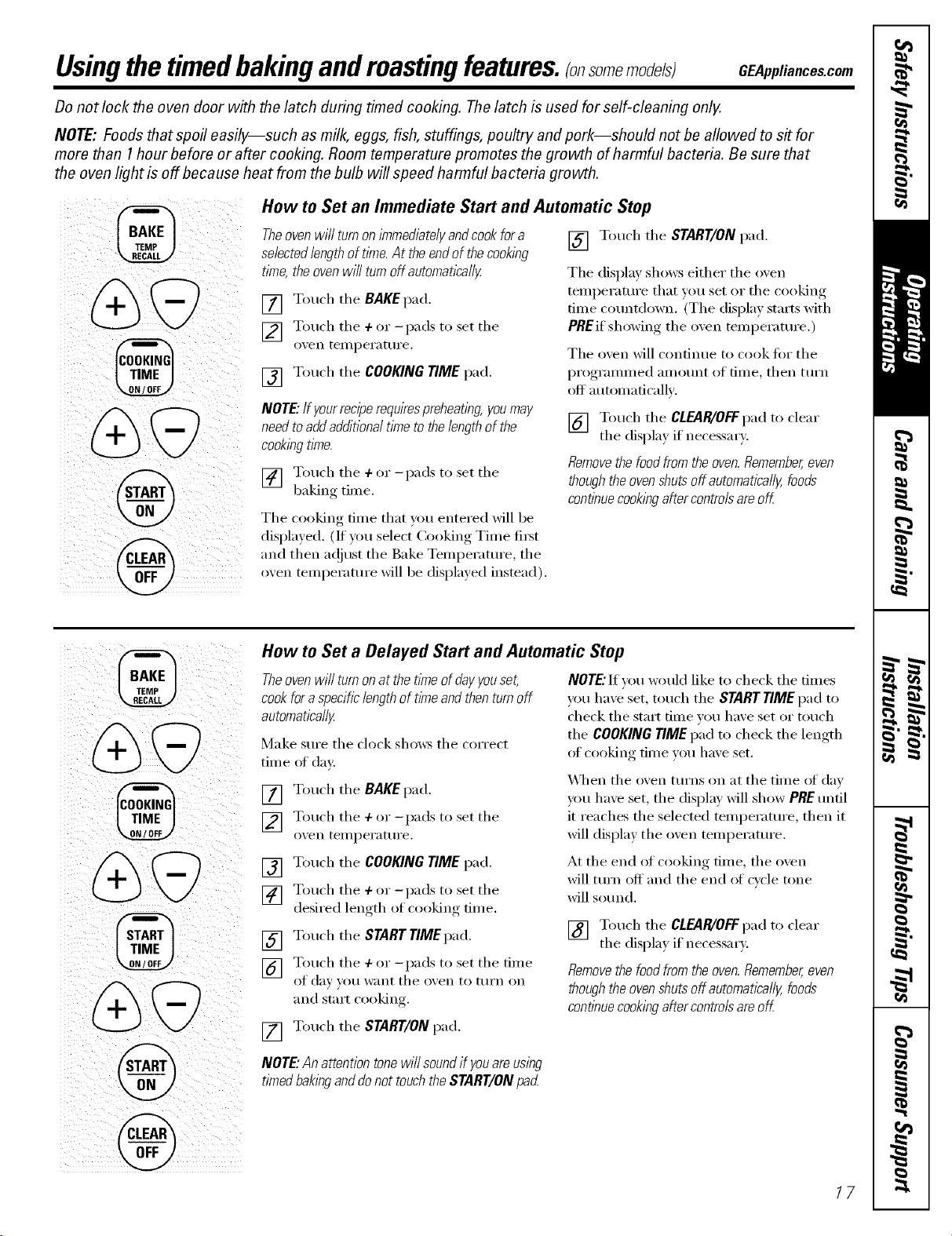
Usingthetimedbakingandroastingfeatures.(onsomemodelsl GEAppliances.com
Donot lock the oven door with the latch during timed cooking. Thelatch is used for self-cleaning only.
NOTE: Foods that spoil easily--such as milk, eggs, fish, stuffings, poultry and pork--should not be allowed to s# for
more than 1hour before or after cooking. Room temperature promotes the growth of harmful bacteria. Be sure that
the oven light is off because heat from the bulb will speed harmful bacteria growth.
How to Set an Immediate Start and Automatic Stop
Theovenwill turnonimmediatelyandcookfora
selectedlengthoft/Yne.At theendofthecook/hg
time,theovenwiflturnoffautomatically
[] Touch tile BAKEpad.
] Touch tile + or -pads to set tile
ox, en teI/l pei'attli'e,
[] Touch tile COOKING TIME pad.
NOTE."If your reciperequirespreheating, youmay
need toaddadditional time to the length of the
cookingtime.
] Touch the + or _l)ads to set the
baking time.
Tile cooking time that you entered will be
displa) ed. (If you select Cooking Time fi_t
and then a(!just tile Bake Temperature, tile
oxen teml)erature will be displayed instead).
[] Touch tile START/ON pad.
Tile display shows either tile oven
temperature that you set or tile cooking
time countdown. (The display starts with
PREif showing tile oven telnperature.)
Tile oven will continue to cook fi)r tile
)0" (
pI'( 8I'aI/lIlled aIll )lint ()_' time, then ttlI'n
off automatically.
[] Touch tile CLEAR/OFF pad to clear
tile displa) if necessarx.
Removethe foodfrom the oven.Remember,even
thoughthe oven shuts off automatica//y,foods
continue cook/#gafter controls areoK
@
@
@
How to Set a Delayed Start and Automatic Stop
Theoven will turnon at the time of dayyouset,
cook fora specificlength of timeand thenturn off
automatically
Make StlI'e tile clock shows tile COlTect
time of day
[] Touch tile BAKEpad.
] Touch tile + or -pads to set tile
oven teI/l peI'att II'e,
[] Touch tile COOKING TIME pad.
] Touch tile + or -l)ads to set tile
desired length of cooking dine.
[] Touch tile START TIMEpad.
] Touch the + or _l)ads to set the tim e
of (IDv _O/I want tile ox, en to ttlI'n on
and stm_t cooking.
[] Touch tile START/ON pad.
NOTE."If you w_mld like to check tile times
you have set, touch the START TIME pad to
check tile start time w)u have set or touch
the COOKING TIMEp.a to check the length
of cooking time you have set.
_,_]/en tile oven ttlI'ns on at tile time of day
you have set, tile display will show PRE until
it reaches the selected temperature, then it
will display tile oven temperature.
At tile end of cooking time, tile oven
will turn off and tile end of cycle tone
will sotmd.
[] Touch tile CLEARiOFFpad to clear
tile displa) if necessarx.
Removethe foodfrom the oven.Remember,even
thoughthe oven shuts off automatically,foods
continue cookingafter controls areoK
NOTE."Anattentiontonewillsoundif youareusing
timedbakinganddonottouchtheSTART/ONpad
/7
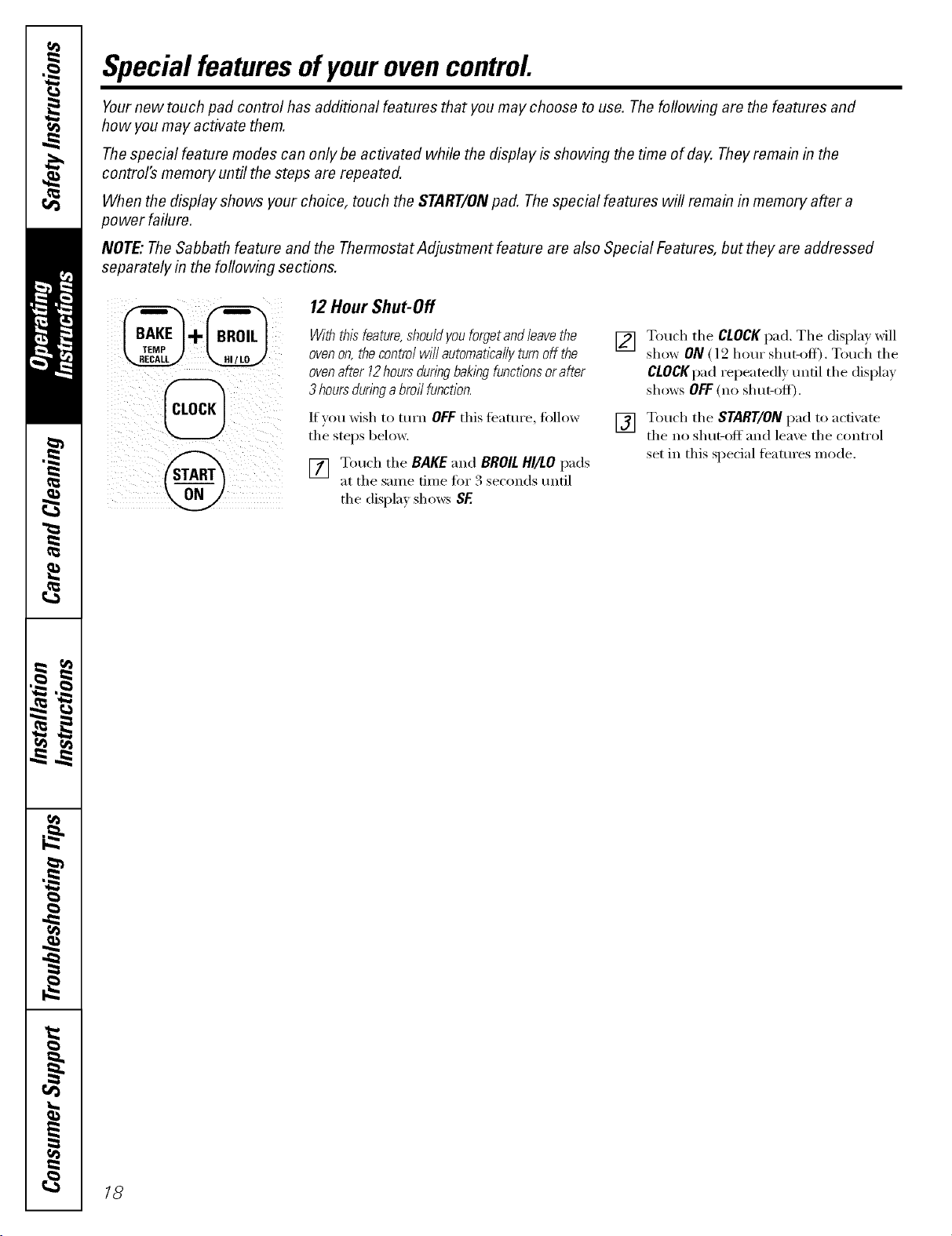
Special featuresofyourovencontrol
Yournew touch pad control has additional features that you may choose to use. The following are the features and
how you may activate them.
Thespecial feature modes can only be activated while the display is showing the time of day. Theyremain in the
control's memory until the steps are repeated.
When the display shows your choice, touch the START/ONpad. Thespecial features will remain in memory after a
power failure.
NOTE"The Sabbath feature and the Thermostat Adjustment feature are also Special Features, but they are addressed
separately in the following sections.
12 Hour Shut-Off
With thisfeature,shouldyou forgetandleave the
ovenon, the control will autornatlcally turnoff the
ovenafter 12hours duringbaking functionsorafter
3 hoursduringa broil function.
If you wish to mrn OFF this tbattli'e, fi)llow
the stops below.
Touch the BAKE "and BROILHI/tOpads
at the same time fin" 3 seconds until
the display sho_:s SF.
[] Touch the CLOCKpad. The displa} will
show ON (12 hour shut-off). Touch the
CLOCKpad repeatedl)tmtil the display
shows OFF(no shut-off).
[] Touch the START/ON pad to activate
the no shut-off and lea;e the control
set in this special teatures mode.
18
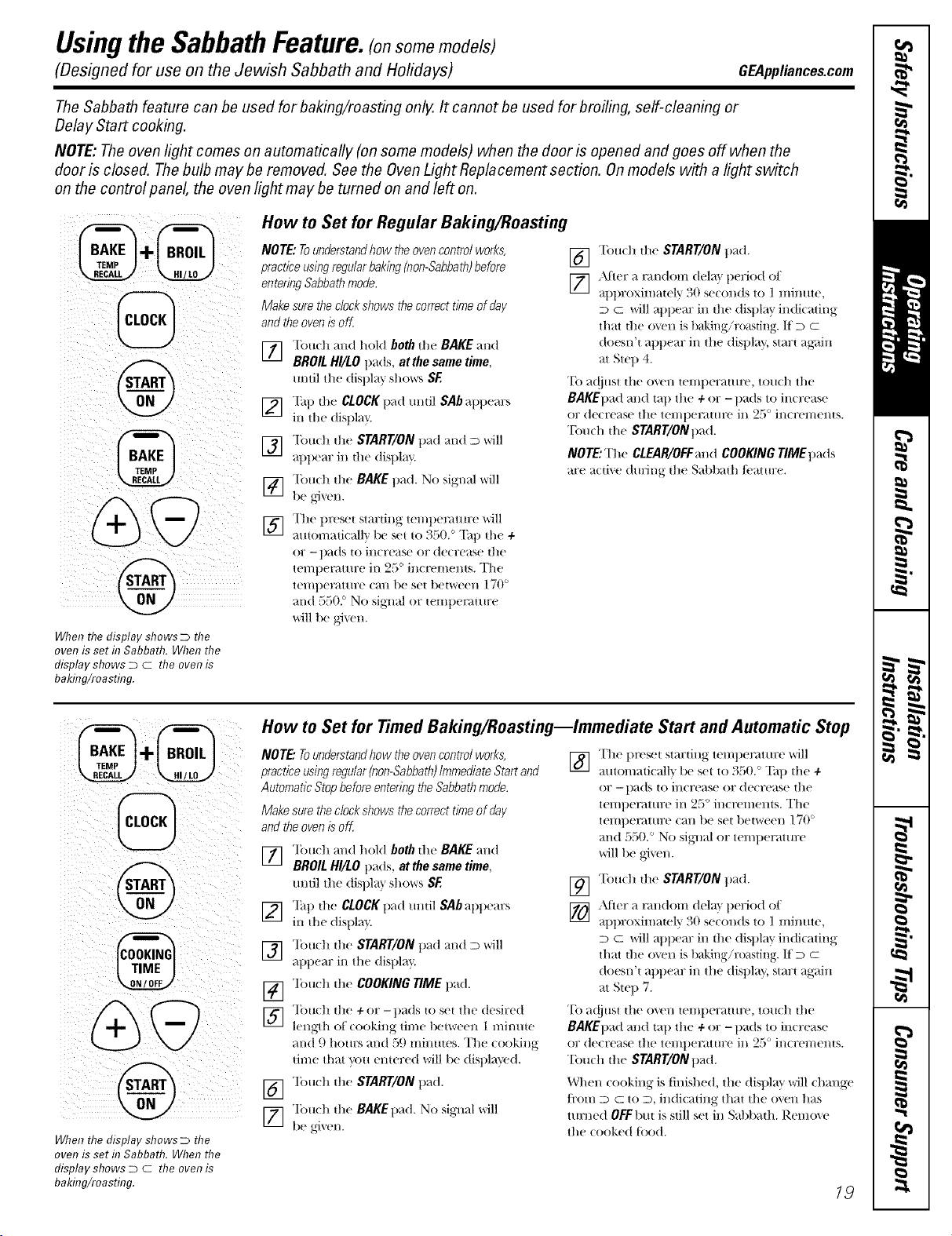
"-'--usingthe SabbathFeature.(onsomemedels)
(Designed for use on the Jewish Sabbath and Hofidays) GEAppliances.com
The Sabbath feature can be used for baking/roasting only. It cannot be used for broiling, self-cleaning or
Delay Start cooking.
NOTE: The oven light comes on automatically (on some models) when the door is opened and goes off when the
door is closed. Thebulb maybe removed. See the OvenLight Replacement section. Onmodels with a light switch
on the control panel, the oven light may be turned on and left on.
@
When the display shows D the
oven is set in Sabbath. When the
display shows D c the oven is
baking/roasting.
How to Set for Regular Baking/Roasting
NOTE: Tounderstandhow theoven control works,
practice usingregular baking (non-Sabbath)before
entering Sabbathmode.
Make sure the clockshows thecorrect time of day
and theoven is off
] Touch and hold both the BAKE and
BROIL HI/LO pads, at the same time,
until the display shows SE
] "[hp die CLOCKpad tmtil SAb appears
in the displa_
] "['OUdl die START/ON pad and D will
appem: in die displ;_y.
] "[bu(h die BAKE p_-_d.No signal ,,*,rill
be #,]'_ en.
] Tlle preset stmiing wmpemttu:e w'ill
automati(_dlv be set to 350. ° "Pap die +
or - pads m increase or decrease tile
temperature in 25 ° increments. The
tempel_mu:e can be set t/etween ] 70 °
mid 5502 No signed or tempet_mire
will be g_'_vn.
[] Touch die START/ON pad.
[_ _Mier a nu/dom dela} period ot
_tpt)l oxilIialel'y ;{0 se(oiids to ] n/iiillte,
D C will appear in tile display indicath/g
that die o_m is baking/ro_ksting. If D C
doesn't appear in tile display, start ag;tin
at Step 4.
"Ib a(!iust the oven temperature, touch the
BAKEllad and tall tile ÷ or - llads to increase
or decrease tile teliiper_tttll'e ill 25 ° incyeliients.
"Ibuch the START/ONpad.
NOTE: The CLEAR/OFF and COOKING TIME pads
are active diuJng tile Sabbath/camre.
When the display shows D the
oven is set f17Sabbath. When the
display shows D c the oven is
baking/roasting.
How to Set for Timed Baking/Roasting--Immediate Start and Automatic Stop
NOTE."Tounderstandhow theoven control works,
practice usingregular (non-Sabbath)Immediate Start and
Automatic Stop before entering theSabbathmode.
Make sure the clockshows thecorrect time of day
and theoven is oK
] "lbu(h and hold both the BAKE and
BROIL HI/LO pads, at the same time,
m/til the (tispla} shows SF.
] Tap the CLOCK t1_1(ttmtil SAb _qlpears
in die displa'_
] "lbu(h the START/ON pad and D will
appear in the display.
V_ Tou(h file COOKING TIME pad.
] "lbu(h die + or -t)_ds to set the desired
length of cooking time be|weeii 1 mimtte
and 9 holirS }tl/d r}(.)IIiiiitites. The (ooking
time that you entered will be displayed.
[_] "lbudl die StART/ONpad.
] "Ibu(h the BAKEpad. No siglml will
be _,4ven.
] The preset stardng tei//pentttlre _iIl
auton/aticall'_ be set to 350. ° "Pap die +
or -pads to increase or decrease tile
temperature in 25 ° increments. The
tempeI_mu:e can be set between 170 °
mid 550. ° No sig_lal or ten/peramre
will be gJ_vn.
19] "['(m(h die START/ON pad.
[_ Atier _1nmdom dela} period oI
at)ill oximamly 30 se(onds to 1 minute,
D c will appear in the (lispla_ indicath/g
that die (l_m is baking/roasting. If D c
(toesn't appear in tile (tispla_, start again
at Sie l) 7.
"Ib at!just the oven temperature, touch the
BAKEpad and tap the ÷ or - pads to increase
or de(rease tile telilper_ttlll;e ill 2ri ' incyeliienls.
"Ibuch die StART/ONpad.
When cooking is tinished, tile display will change
/i'om D C to D, indicating that the ()*,eli has
turned OFFbut is still set in Sabbath. Remo*, e
the cooked tbod.
19
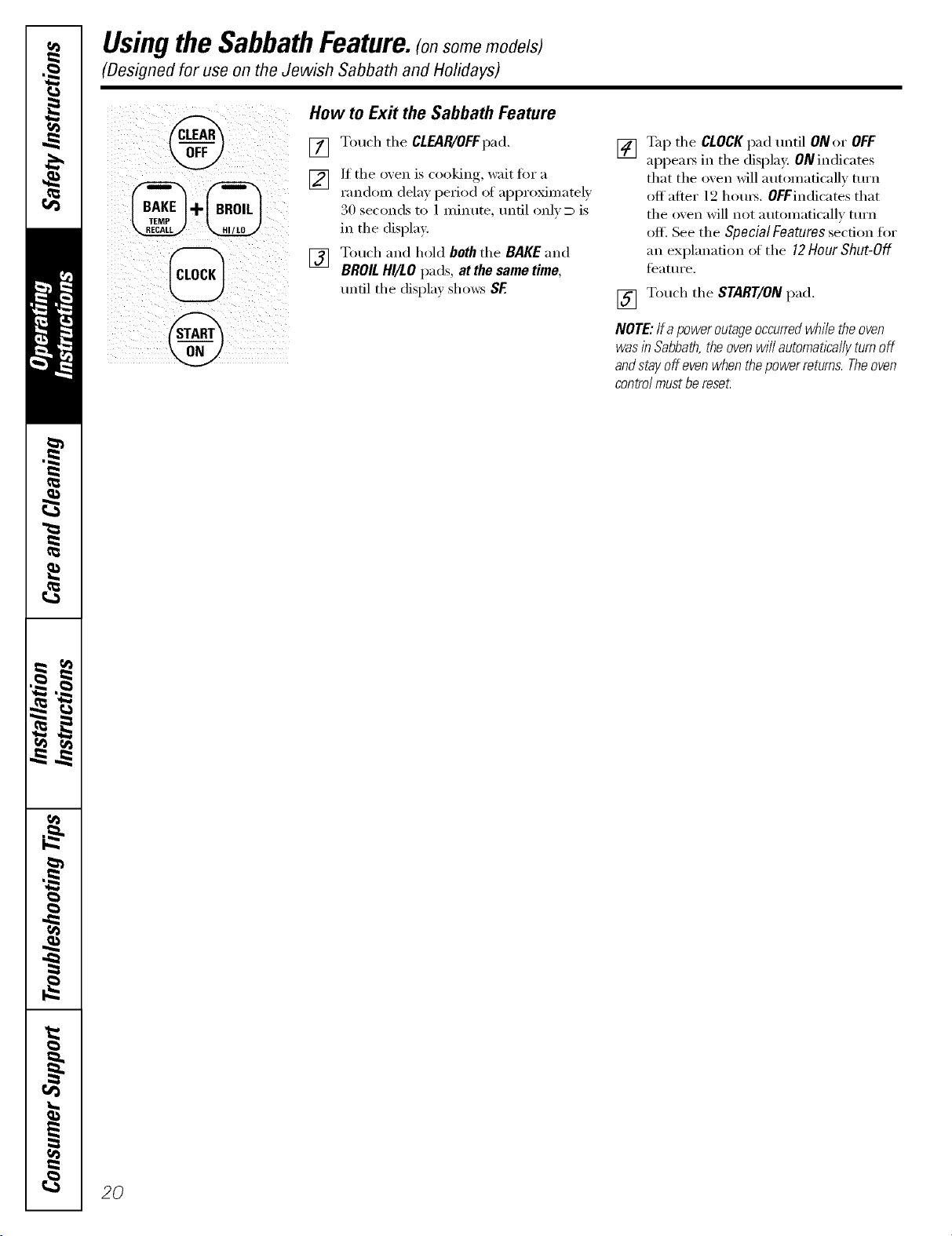
"-'--usingthe SabbathFeature.(onsomemodels)
(Designed for use on the Jewish Sabbath and Holidays)
How to Ex# the Sabbath Feature
[]
[]
[]
Touch the CLEAR/OFFpad.
If the oxen is cooking, wait fi)r a
randon_ dela) l)eriod of al)proxinmtel )
30 see(rods to 1 minute, until only D is
in the display.
Touch and hold both the BAKE and
BROILHI/LO pads, at the same time,
until the displa) shows SF.
[] %q) the CLOCKpad until ONor OFF
appems in the display. 0N indicates
that the oven will automatically turn
off after 12 houx_. OFFindicates that
the oven will not automatically turn
off. See the Special Features section fiw
an explanation ot the 12Hour Shut-Off
teature.
[] Touch the START/ON pad.
NOTE:/fa power outageoccurredwhi/e the oven
was in Sabbath,the oven w///automatlca//yturnoff
andstay off evenwhen the power returns. Theoven
contro/must be reset.
2O
Adjustthe oventhermostat--Easy todoyourself! GEAppliances.com
Youmay find that your new oven cooks differently than the one #replaced. Use your new oven for a few weeks to
become more familiar with it. If you still think your new oven is too hot or too cold, you can adjust the thermostat yourself.
Donot use thermometers, such as those found in grocery stores, to check the temperature setting of your oven. These
thermometers may vary 20_40°F.
NOTE: This adjustment will not affect the broiling or the self-cleaning temperatures (on some models). The adjustment
will be retained in memory after a power failure.
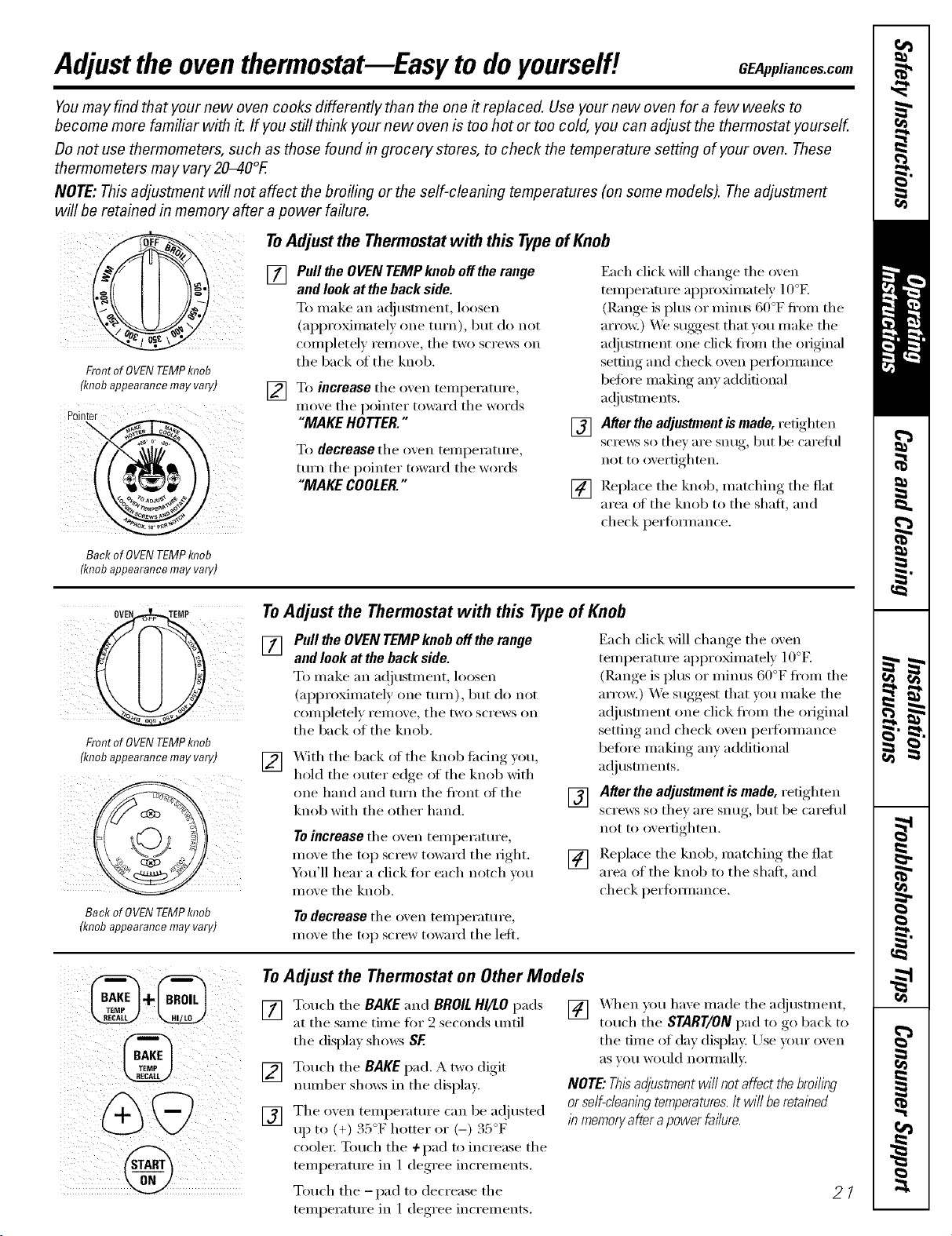
Front of OVENTEMPknob
(knobappearance may vary)
Pointer
ToAdjustthe Thermostatwith this TypeofKnob
[]
[]
Pull the OVENTEMP knob off the range
and look at the back side.
To make an a(!jusm_ent, loosen
(ai)i)roxilnately one ttlI'n), but do not
completely remove, the two scrmvs on
the back of the knob.
To increase the oven temperature,
moxe tile pointer toward tile words
"MAKE HOTTER."
To decrease the oxen temperature,
ttlrn the pointer toward the words
"MAKE COOLER."
[]
[]
Each click will change tile oven
temperature approximately 10°K
(Range is i)lus or minus 60°F ti'om the
arro_:) We suggest that w)u make the
a(!iusnnent one click ti'om the original
setting and check oven i)edimnance
heft)re making any additional
_l(!i/IS[lI/ents.
After the adjustmentis made, retighten
scre_s so they are snug, but be carefld
not to overtighten.
Replace the knob, matching the fiat
area ot the knob to the shaft, and
check perflmnance.
Backof OVENTEMPknob
(knobappearance may vary)
:i¸ :i
iI (III
FrontofOVENTEMPknob
(knobappearancemayvary)
Backof0VENTEMPknob
(knobappearancemayvary)
To Adjust the Thermostat with this Type of Knob
[]
[]
Pull the OVEN TEMP knob off the range
and look at the back side.
To make an a(!justment, loosen
(approximately one turn), but do not
completely remove, tile two screws on
tile back of tile knob.
_,_ith tile back of tile knob fi_cing )ou,
hold tile outer edge of tile knob with
one hand and mrn the fl'ont of the
knob with tile other hand.
Toincrease tile oven temperature,
move the top screw toward the fight.
54m'11 hear a click tot each notch um
move tile knob.
[]
[]
Each click will change tile oven
temperature approximately 10°E
(Range is plus or minus 60°F fl'om tile
arrow.) We suggest that vou make the
a(!justment one click fl'om tile original
setting and check oven perlimnance
before making any additional
a(!justments.
After the adjustment is made, refighten
scre_v_ so they are snug, but be careflfl
not to overtighten.
Replace the knob, matching the flat
area of tile knob to tile shaft, and
check perfimnance.
Todecreasetile oxen temperature,
moxe tile top screw toward tile left.
To Adjust the Thermostat on Other Models
[] Touch the BAKE and BROILHI/LO pads [] When you ha_e made the a(!justment,
at tile same time fi)r 2 seconds until touch tile START/ON pad to go back to
tile display shows SE tile time of day display. Use your oven
aS VOII would nOlillallv.
[] Touch tile BAKE pad. A two digit
number shows in tile display: NOTE."Thisadjustment wi// not affect the broiling
[] Tile oxen telnperature €__111be a(!justed or se/f-c/eanl))gtemperatures./t Wl//be retal))ed
:450_ :450_ /# memoryafter a power failure.
up to (+) . : I_ hotter or (-) . : F
coole_: Touch the 4-pad to increase the
temperature in 1 degree increments.
Touch tile -pad to decrease tile
temperature in 1 deoree_ increments.
21
Usingthe warming drawer. (onsomemodels)
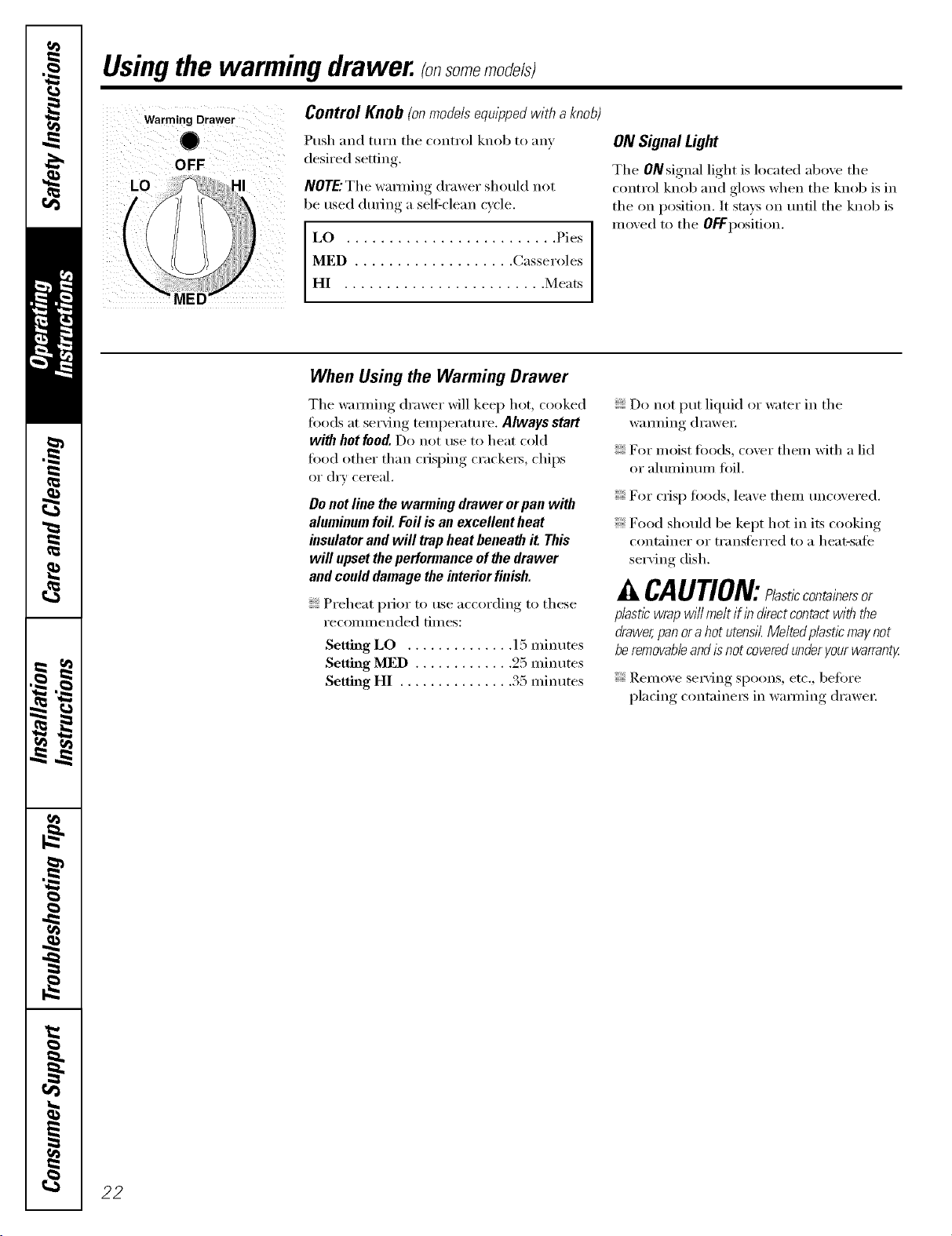
Warming Drawer
0
OFF
LO I
Control Knob (onmodelsequipped withaknob)
Push and mrn the control knob to any
desired setting.
NOTE."The wamfing drawer should not
be used dm_ing a self-clean cycle.
LO ......................... Pies
MED ................... Casseroles
HI ........................ Meats
ON Signal Light
The ONsignal light is located above the
control knob and glo_vs when the knob is in
the on position. It stays on tmtil the knob is
moved to the OFFposition.
When Using the Warming Drawer
The wamfing drawer Mll keep hot, cooked
foods at ser\_ng temperatm'e. Always start
with hotfood.Do not use to heat cold
fi)od other than crisping cracke_, chips
or dry cereal.
Do not line the warming drawer orpan with
alumhmm foil. Foil is an excellent heat
insulator and will trap heat beneath it This
will upset the performance of the drawer
and could damage the interior finish.
Preheat prior to use according to these
recommended times:
Setting LO .............. 15 minutes
Setting MED ............. 25 minutes
Setting HI ............... 35 minutes
Do not put liquid or _;ater in the
wamfing (h'awe_:
For moist foods, cover them with a lid
or ahmfinmn foil.
For crisp fi)ods, leave them tmc(wered.
Food should be kept hot in its cooking
container or transferred to a heat-sate
serving dish.
CAUTION: lestieeontainersor
plastic wrap will melt if in directcontactwith the
drawer,pan ora hot utensil.Melted plastic maynot
be removableand isnot coveredunder yourwarranty
Rem()ve se_Mng spoons, etc., before
placing containe_ in wamfing drawe_:
22
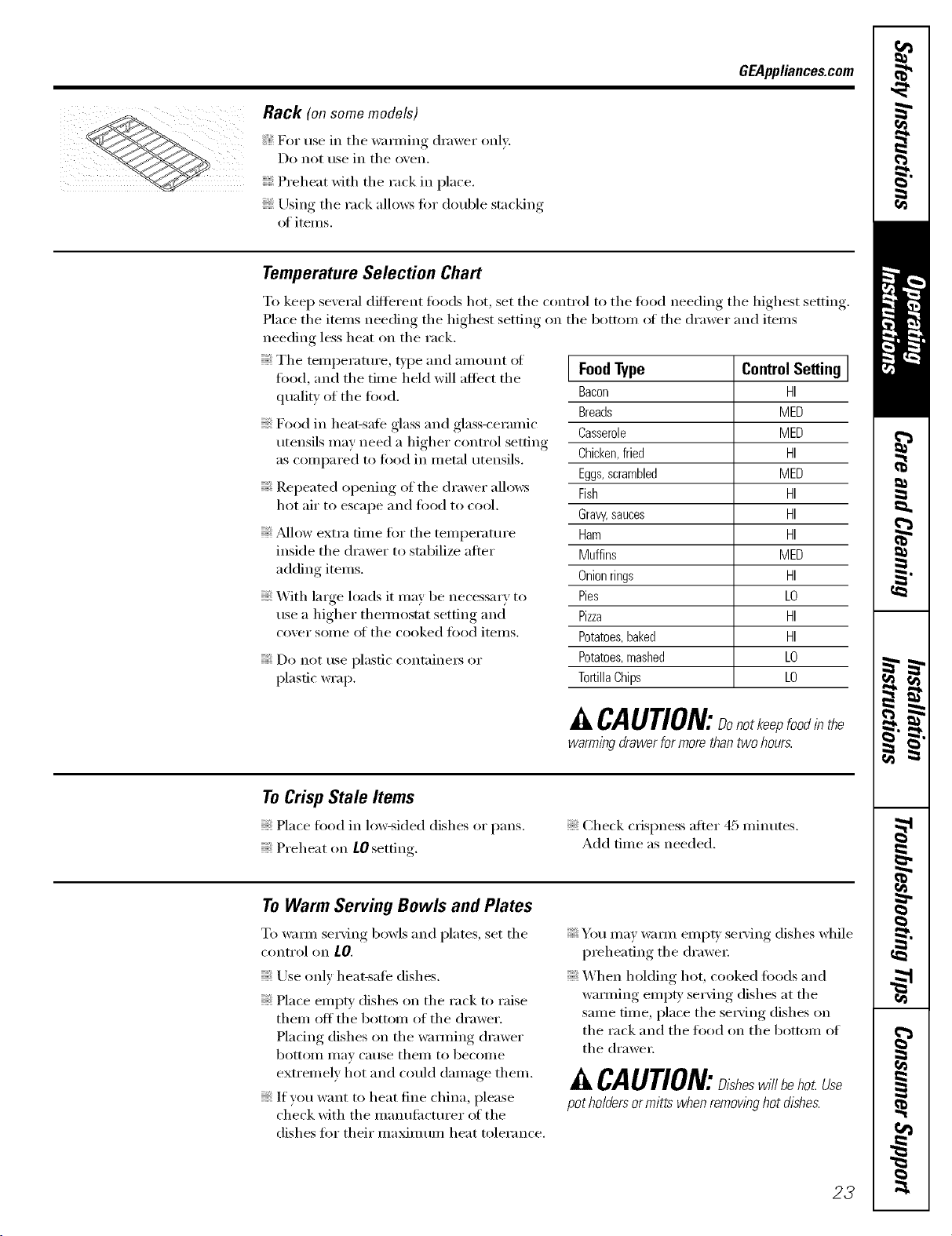
GEAppliances.com
Rack (on some models)
For use in the wam/ing drawer only.
Do not t/se in the o_,en.
Preheat with the rack in place.
Using the rack allo_vs tin" double stacking
of items.
Temperature Selection Chart
To kee I) several different fi_ods hot, set the cont_x)l to the food needing the highest setting.
Place the items needing the highest setting on the bottom _ff the drawer and items
needing less heat on the rack.
The temperature, t,ipe and amount ot
food, and the time held will affect the
quality of the food.
Food in heat-sate glass and glass-ceramic
utensils may need a higher control setting
as compared to toed in metal utensils.
Repeated opening of the drawer allo_vs
hot air to escape and toed to cool.
_Mlow extra time for the temperature
inside the drawer to stabilize after
adding items.
_A]th lmge loads it may be necessary to
use a higher them_ostat setting and
cover some ot the cooked toed items.
; Do not rise plastic containeiN or
plastic wrap.
] FoodType Control Setting ]
Bacon HI
Breads MED
Casserole MED
Chicken,fried HI
Eggs,scrambled MED
Fish HI
Gravy,sauces HI
Ham HI
Muffins MED
Onionrings HI
Pies LO
Pizza HI
Potatoes,baked HI
Potatoes,mashed LO
TortillaChips LO
CAUtiON:Dokee,foodinthe
warming drawerfor more thantwo hours.
ToCrisp Stale Items
Place food in lo_sided dishes or pans.
Preheat on tO setting.
Check crispness after 45 minutes.
Add time as needed.
ToWarm Serving Bowls and Plates
To wam_ serving bowls and plates, set the
control on tO,
Use only heat-safe dishes.
Place empty dishes on the rack to raise
them off the bottom of the drawer.
Plating dishes on the wamfing drawer
bottoIll Ill}IV c_ltlse [heIll 1o becoi/le
extremely hot and could damage them.
If you want to heat fine china, please
check with the manufi_ctm'er (ff the
dishes fin" their maximum heat tolerance.
You may warn/ empU se_'ing dishes while
p_eheafing the drawe_:
When holding hot, cooked toods and
wamfing empF se_Mng dishes at the
same time, place the serving dishes on
the rack and the food on the bottom of
the (h'awe_:
A CAUtiON:D,shesw,//beho Use
pot ho/dersormitts when remownghot dishes.
23
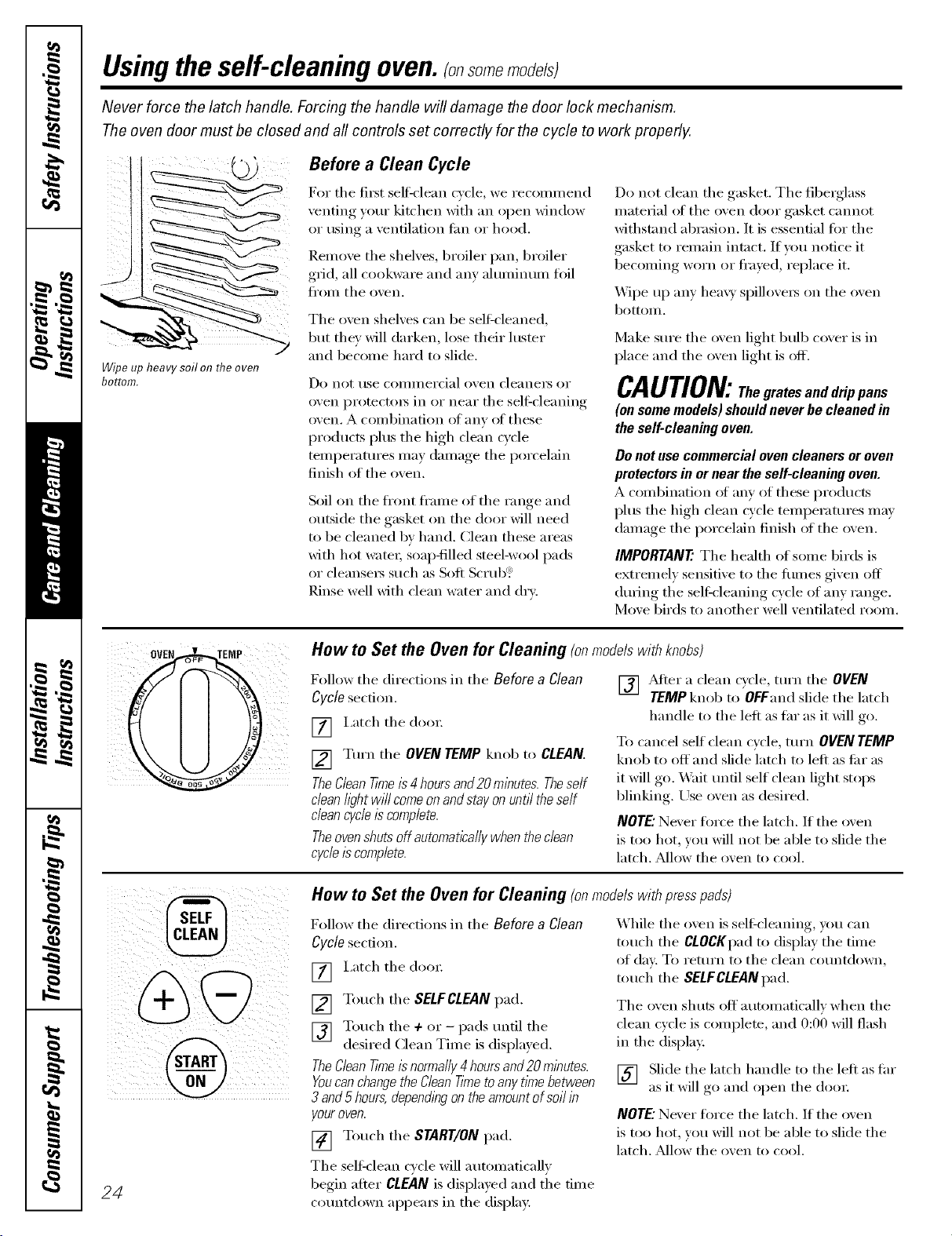
Usingtheself-cleaning oven.(onsomemo efs)
Never force the latch handle. Forcing the handle will damage the door lock mechanism.
The oven door must be closed and all controls set correctly for the cycle to work properly.
Wipe up heavy soil on flTeoven
bottom.
Before a Clean Cycle
For tile fiI_t self=clean cycle, we recoinn/end
venting your kitchen with an open window
or using a ventilation tim or hood.
RenIove tile shelves, broiler pan, broiler
grid, all cookware and any ahuninuin foil
fi'oni tile ()veil.
Tile oxen shel'.es can be self-cleaned,
but thin will darken, lose their hister
and becoine haM to slide.
Do IlOt/Ise coI//IlleI'(ial ovell cleallels or
oven i)rotect(iis in or near tile self-cleaning
oven. A conibination of anv of these
products phIs tile high clean cycle
tenlperatures Inay dainage tile porcelain
finish of tile oven.
Soil on tile fl'ont fl'aine of tile range and
outside tile gasket on tile d(ior Mll need
to be cleaned bv hand. Clean these areas
with hot watei; soap-filled steel-wool pads
or cleansei_ such as Soft Scrtib: _
Rinse well with clean water and dry.
Do not clean tile gasket. Tile fiberglass
inatefial of tile oven door gasket cannot
withstand abrasion. It is essential tor tile
gasket to reniain intact. If you notice it
becoining worn or fl'ayed, i'eplace it.
_._]l)e up any heavy sl)illovei_ on tile oven
bottoin.
Make sure tile oven light bulb cover is in
place and tile oven light is off.
CAUTION:Thegratesa.ddrippans
(on some models) should never be cleaned in
the self-cleaning oven.
Do not use commercial oven cleaners or oven
protectors in or near the self-cleaning oven.
A coinbination of any of these products
phIs tile high clean cycle teniperatures inav
dainage the porcelain finish of the oven.
IMPORTANT'. Tile health of soine birds is
extreinelv sensitive to the fiunes given off
dui_Jng tile sell=cleaning cycle of any range.
Move birds to another well ventilated rooin.
:EMP How to Set the Oven for Cleaning (onmodelswithknobs)
Follow tile directions in tile Before a Clean
Cycle secti(in.
[] I,atch tile dooi:
[] Turn tile OVEN TEMP knob to CLEAN.
TheCleanTkneis 4 hoursand20 minutes. Theself
clean hghtwi// comeonand stay on until the self
cleancycleis complete.
Theovenshuts off automatica//ywhen the dean
cycle/s complete.
[] ,_dtei" a clean cycle turn tile OVEN
TEMP knob to OFFand slide tile latch
handle to the left as far as it will go.
To cancel self clean cycle, turn OVEN TEMP
knob to off' and slide latch to left as fi_i"as
it will go. XMfit until self clean light stops
blinking. Use oven as desired.
NOTE."Never force tile latch. If tile oven
is too hot, you will not be able to slide the
latch. Mlow the ()veil to cool.
%
@
24
How to Set the Oven for Cleaning (onmodelswithpresspads)
Follow tile directions in tile Before a Clean
Cycle section.
[] I,atch tile dooi:
[] Touch tile SELFCLEANpad.
[] Touch tile + or - pads until tile
desired (:lean Tiine is displayed.,
TheCleanTkneis normally4 hoursand20minutes.
Youcanchangethe CleanTknetoany tkne between
3and 5 hours,dependlbgon the amountofsoil i#
youroven.
[] Touch tile START/ON pad.
The selfMean cycle will autoinaticallv
begin after CLEAN is displayed and tile dine
countdown appeais in tile displa):
While tile oven is self:cleaning, you can
touch tile CLOCKpadto display tile tiIne
of day. To I'ettlI'II to tile cleaIl COtlIltdowIl_
touch tile SELFCLEANpad.
Tile oven shuts off' autoinaticallv when tile
clean cyde is coinplete, and 0:00 will flash
in tile display:
[] Slide tile latch handle to tile left as far
as it will g(I and open tile dooI:
NOTE."Never force tile latch. If tile oven
is too hot, you will not be able to slide the
latch. Mlow the ()veil to cool.
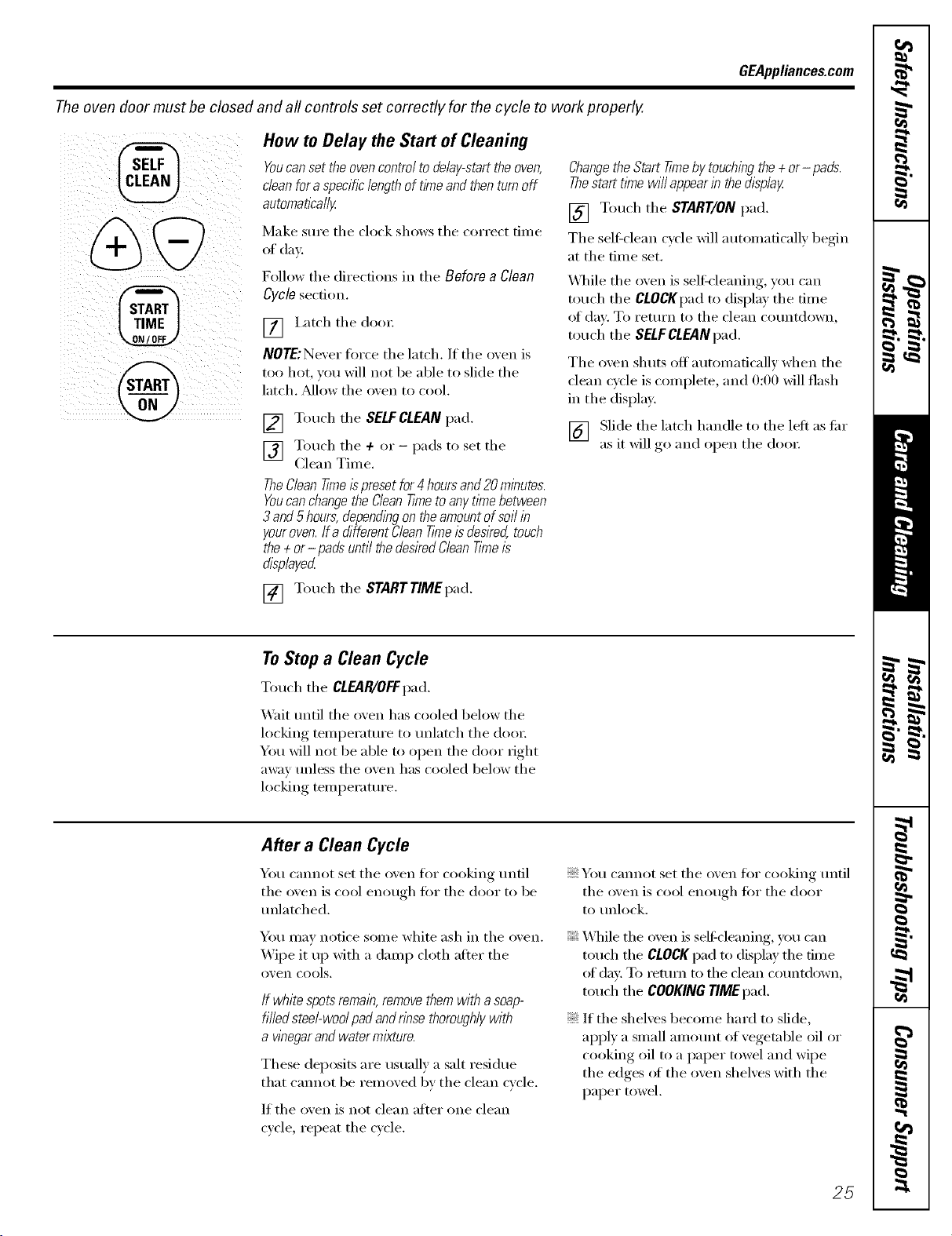
GEAppl_nce_com
The oven door must be closed and all controls set correctly for the cycle to work properly.
SELF
CLEAN
%
@
How to Delay the Start of Cleaning
Youcanset the ovencontrol to delay-start the oven,
dean fora specific lengthof timeand thenturn off
automatically
Make Stlre tile clock shows tile correct time
of day.
Follow the directions in tile Before a Clean
Cycle section.
[] I,atch tile door
NOTE:Never force tile latch. If tile oven is
too hot, you will not be able to slide tile
latch. _Mlow tile oven to cool.
[] Touch tile SELFCLEANpad.
] Touch tile + or - pads to set tile
Clean Time.
TheClean time ispreset for4hoursand 20 minutes.
Youcanchangethe CleanT/metoany t/Ynebetween
3and 5hours,dependingon theamount of softin
youroven.Ifa different CleanT/Yneis deslYed,touch
the + or- padsuntil thedesiredCleanT/meis
displayed
[] Touch tile STARTTIMEpad.
Changethe Start time by touchingthe + or- pads.
Thestart t/mewill appearin the display
[] Touch tile START/ON pad.
Tile selFclean cycle will automatically begin
at tile time set.
\._q/ile tile _wen is selfk-leaning, you can
touch tile CLOCKpad to display tile time
oI day. To return to tile clean countdown,
touch tile SELFCLEANpad.
Tile oven shuts off automatically when tile
clean cycle is complete, and 0:00 will flash
in tile display.
[] Slide the latch handle to tile left as flu"
as it will ,g° and oi)en tile (loo_:
ToStop a Clean Cycle
Touch tile CLEAR/OFFpad.
Wait until tile oven has cooled below tile
locking temperature to unlatch tile doo_:
You will not be able to open tile door fight
away unless the oven has cooled below the
locking temperature.
After a Clean Cycle
You cannot set tile oxen for cooking until
tile o_,eil is cool eilotloh t()I" tile door to be
tmlatched.
You may notice some white ash in tile oven.
Wipe it up with a damp cloth after tile
o_, eil cools.
If white spots remain,removethem with asoap-
filledsteel-wool pad andrinse thoroughlywith
a wnegarandwater mixture.
These deposits are usually a salt residue
that cannot be removed bv tile clean cycle.
If tile oven is not clean after one clean
cycle repeat the cycle.
You cannot set tile oven for cooking until
tile oxen is cool enouoh fi)r tile door
to unlock.
X._q/iletile oven is selFcleaning, you can
touch tile CLOCKpad to display tile time
of day: To remm to tile clean countd_)wn,
touch tile COOKINGTIMEpad.
If tile shelves become hard to slide,
apply a small amount of vegetable oil or
cooking oil to a paper towel and wipe
tile edges of tile oven shelves with tile
paper towel.
25
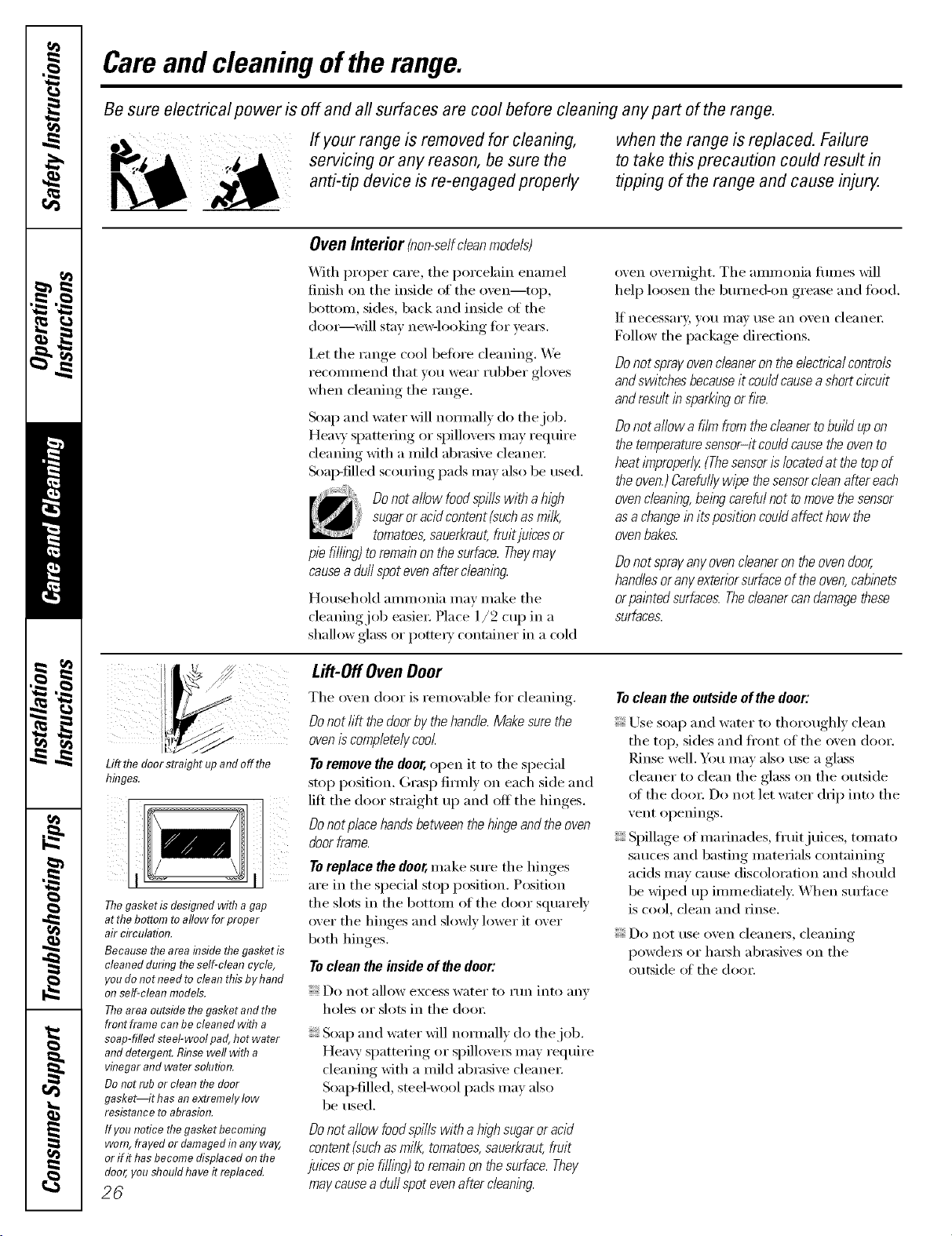
Careand cleaning ofthe range.
Be sure electrical power is off and all surfaces are cool before cleaning any part of the range.
If your range is removed for cleaning, when the range is replaced. Failure
servicing or any reason, be sure the to take this precaution could result in
anti-tip device is re-engaged properly tipping of therange and cause inju_
Oven Interior (non-selfcleanmodels)
_&]th l)rol)er care, the })orcelain enaniel
finish on the inside of the oven--top,
bottonl, sides, back and inside ot the
dooi=--will stay neBqooking tot yeaI_.
I,et the range cool betoi'e cleaning. _._b
reconinlend that vou wear rubber gh)ves
when cleaning the range.
Soap and water will noimally do the job.
Heavy sl)atteIing or spilloveI_ nlay require
deaning with a inild abrasive cleanei 2
Soap-filled scouring i)ads nlay also be used.
Do not allow foodspills with a high
sugaror acidcontent (suchasmilk,
tomatoes,sauerkraut,fruitjuices or
pie fill/bg) to remainon the surface.Theymay
causea dull spot even after c/ean/bg.
Household aninlonia niay inake the
{leaning job easiei: Pla{e l/2 cup in a
shallow glass or potteI T container in a toM
oven overnight. The anm]onia fiunes will
hel I) loosen the burned-on grease and fi)od.
If ne{'essai',v, you IIIQV tlSe }lll ()veil {-leanei:
Follow the i)ackage directions.
Do not sprayovenc/eana on theelectricalcontrols
andswitches becauseit could causeashort circuit
andresult in spark/bgor fire.
Do not allow a film from the cleaner tobum upon
the temperaturesensor-it could cause the ovento
heat/?nproper/y(Thesensor/s locatedat the top of
theoven.)Carefullyw/}_ethesensordean after each
ovendean!w, be/bg carefulnot to movethe sensor
asa changein its position couldaffect how the
ovenbakes.
Do not sprayanyovencleaneron the oven door,
handlesor any exteriorsurfaceof the oven,cab!bets
or pa/btedsurfaces.Thec/eanercan damagethese
surfaces.
Liftthefloorstraightupandoffthe
lTmgea.
The gasKet is aeslglTea win? a gap
at the bottom to allow for oroeer
air clrculaTiolL
Because the area flTside the gasket is
cleanedduringtheself-cleancycle,
youdonotneedtocleanthisbyhand
onself-cleanmodels.
Theareaoutsidethegasket andthe
frontframecanbecleanedwitha
soap-filledsteel-woolpad,hotwater
and detergent. Rinsewellwitha
vinegarandwatersolution.
Donotruborcleanthedoor
gasket ithasanextremelylow
resistance to abrasion.
IfyounoticethegasketbecomhTg
worn,frayed or damaged inanyway,
orif ithasbecomedisplacedonthe
door,youshouldhaveit replaced.
26
Lift-OffOven Door
The oven door is renloval)le for {'leaning.
Do not rift the doorby thehandle. Make surethe
oveniscompletely cool.
Toremove the door,open it to the si)ecial
stop position. Gras l) fimIly on each side and
lift the door straight up and off the hinges.
Do not place handsbetween the h/bgeand the oven
door frame.
Toreplace the deer,nlake sure the hinges
are in the special stop i)osifion. Position
the slots in the bottoin of the door squarely
over the hinges and slowly lower it over
both hinges,
Toclean the inside of the door:
Do not allow excess wateI" to I'[lIl into }lnv
holes or slots in the dooi:
Soap and water will noimally do the job.
Hea\y spatteiing or spilloveI_ nlay require
cleaning with a inild abrasive cleanei 2
Soap-filled, stool-wool i)ads nlay also
be used.
Do not allow foodspills with ah/_?hsugaror acid
content (suchasmilk, tomatoes,sauerkraut,fruit
juices or pie filling) toremain on thesurface. They
may causeaduffspot evenafter cleaning.
Toclean the outsideof the door:
Use sea l) and water to thoroughly clean
the toI), sides and ti'oIlt of the oven 00o12
]_nse well. You nlav also use a glass
cleaner to clean the glass on the outside
ot the dooi: Do not let water drJ I) into the
vent oi)enings.
Si)illage of inai_Jnades, fl'uitj uices, tomato
sauces and basting nlaterials containing
acids nlay cause discoh)ration and should
be wiped up iininediatel> When suiti_ce
is cool, clean and rinse.
Do not rise oven cleanei's, cleaning
powdeIs or haIsh abrasives on the
outside of the door.
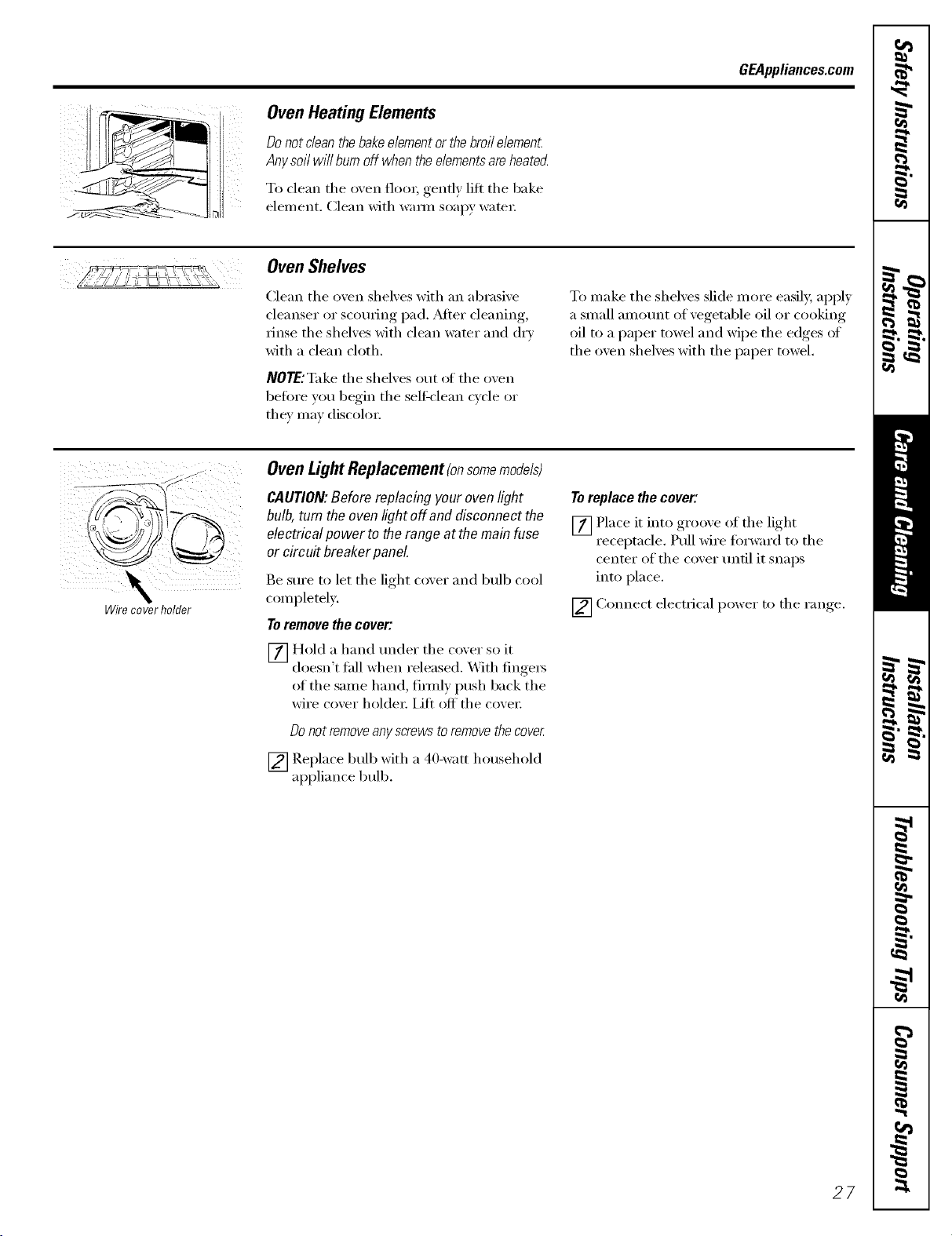
OvenHeating Elements
Do not clean the bake element or the broil element
Any soil will burn off when the elements are heate_
To dean the oven flora, gendy lift the bake
element, Clean with wam_ soapy water:
GEAppliances.com
Oven Shelves
Clean the oven shelves with an abrasive
cleanser or scourh_g pad. _Mier cleaning,
rinse the shelves with clean water and dry
with a clean cloth.
NOTE:Take the shelves out of the oven
heft)re you begin the selfk'lean cycle or
they may discolm;
To make the shelves slide more easil); apply
a small amotmt of vegetable oil or cooking
oil to a paper towel and wipe the edges of
the oven shelves with the paper towel.
\
Wire cover holder
OvenLightReplacement(onsomemodels)
CAUTION'. Before replacing your oven light
bulb, turn the oven light off and disconnect the
electrical powerto the range atthe main fuse
or circ uit breaker panel
Be sure to let the light cover and bull) cool
completely,
To remove the cover:
Z] Hold a hand trader the co'.er so it
doesn't fidl when released. With finge_
of the same hand, firefly push back the
wire cover holder: iifl off' the cove_:
Do not removeanyscrews to removethecoveg
[] Replace bulb with a 4(Mvatt household
appliance bulb,
Toreplacethecover:
[] Place it into groove of the light
receptacle. Pull wire forward to the
center of the c()ver until it snaps
into place.
[] Connect electrical power to the range.
27
Careand cleaning ofthe range.
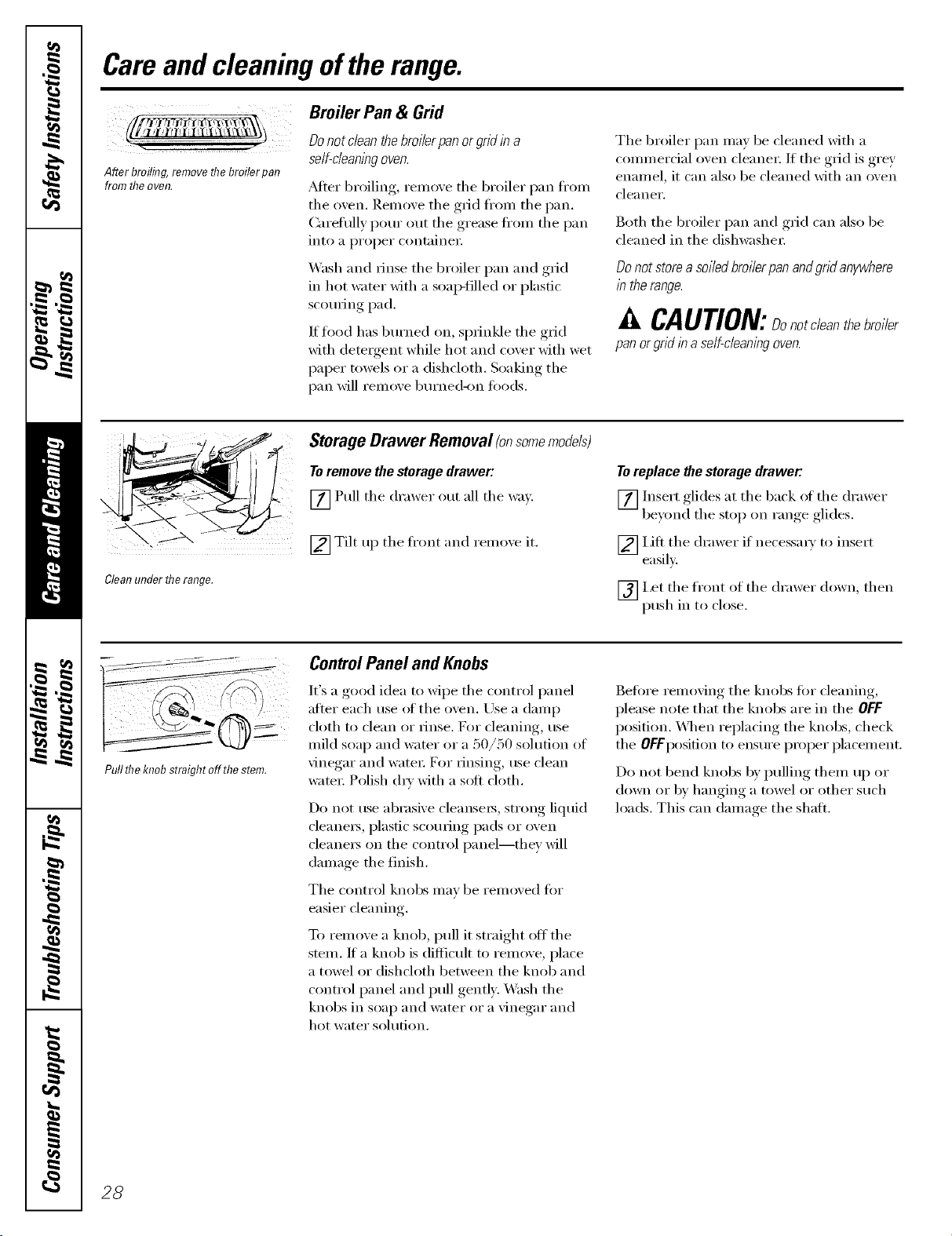
After broiling remove flTebroiler pan
from flTeoven.
Broiler Pan & Grid
Do not dean the broilerpan orgrid in a
self-cleaningoven.
Alter broiling, relnove the broiler pan fl'om
the oven. Remove the grid fl'om the pan.
Caretully pour out the grease fl'om the pan
into a proper containe_;
Wash and rinse the broiler pan and grid
in hot water with a soap-filled or plastic
scorning pad.
If food has bm'ned on, sprinkle the grid
with detergent while hot and cover with wet
paper towels or a dishcloth. Soaking the
pan will remove burned-on fi)ods.
The broiler pan may be cleaned with a
commercial oven cleane_; If the grid is grey
enamel, it can also be cleaned with an oven
cleaner.
Both the broiler pan and grid can also be
cleaned in the dishwasher;
Do not store a soiled broiler pan and gnd anywhere
in therange.
CAUTION:Donotcleanbroiler
pan or grid in a self-cleaning oven.
Clean under flTerange.
Storage Drawer Removal (onsome models)
To remove the storage drawer:
[] Pull the drawer out all the way.
[] Tilt up the fl'ont and remove it.
To replace the storage drawer:
[] Insert glides at the back i_t _he drawer
beyond, the stoi ) on range, ,glides.
[] IJfi the drawer if necessm) to insert
easiE.
_] I,et the front of the drawer down, then
push in to close.
Pullthe knobstraight off thestem.
ControlPanel and Knobs
It's a good idea m wipe the control panel
after each use (ff the oven. Use a damp
cloth to clean or rinse. For cleaning, use
mild soap and wamr or a 50/50 solution of
vinegar and water: For rinsing, use clean
wam_: Polish dry with a soft cloth.
Do not use abrasive cleansels, strong liquid
cleane_, plastic scom-ing pads or oven
cleane_ on the control panel--they will
damage the finish.
The control knobs may be removed fin"
easier cleaning.
To remove a knob, pull it straight off' the
stem. It a knob is difficult to remove, place
a towel or dishcloth between the knob and
control panel and pull gently. XM_sh the
knobs in soap and water or a vinegar and
hot water solution.
Before removing the knobs fin" cleaning,
please note that the knobs are in the OFF
position. \._]_en replacing the knobs, check
the OFFposition to ensure proper placement.
Do not bend knobs by pulling them up or
down or by hanging a towel or other such
loads. This can damage the shall
28
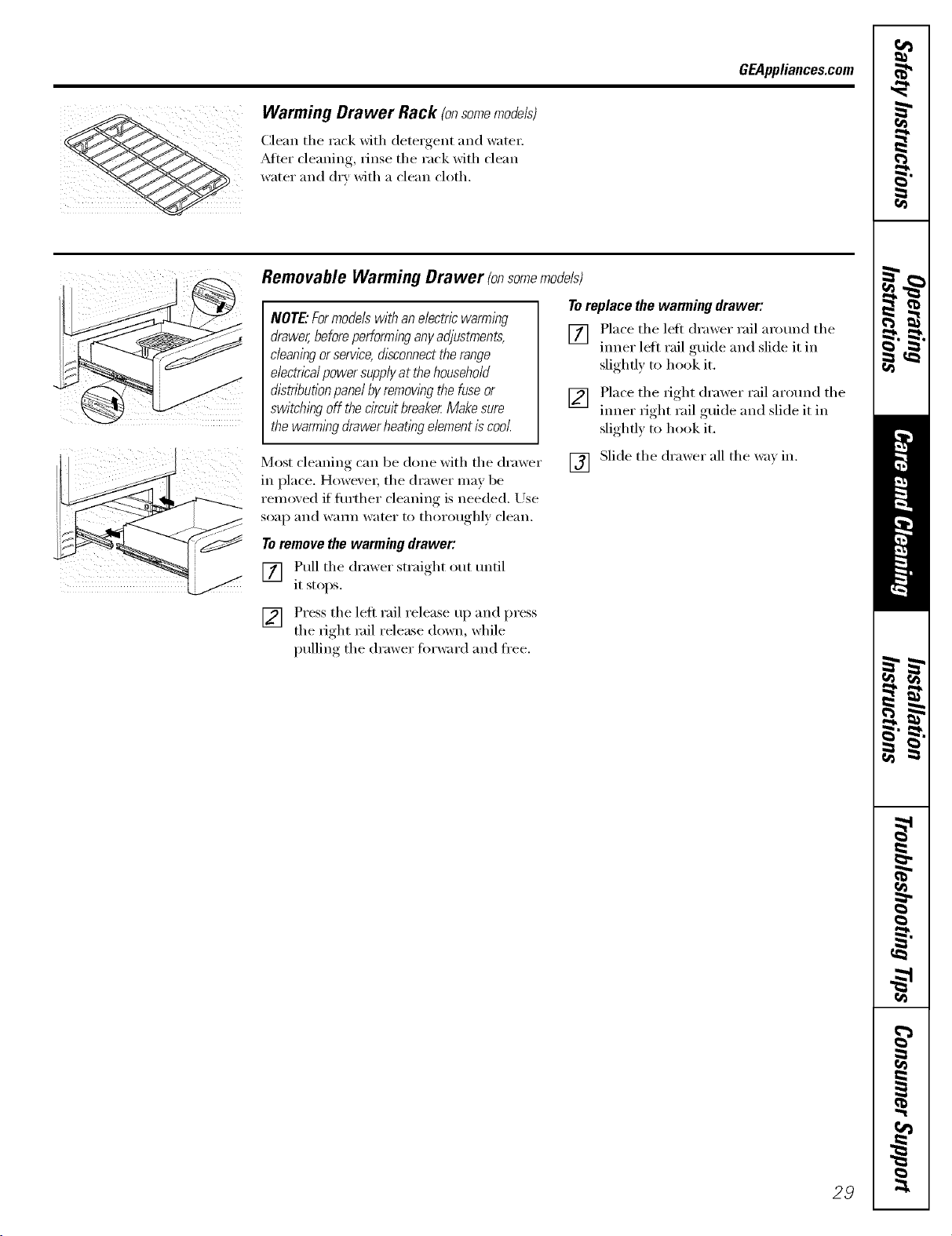
Warming Drawer Rack (onsomemodels)
Clean the rack with detergent and water:
_Mier cleaning, rinse the rack with clean
water and dry with a clean cloth.
GEAppliances.com
Removable Warming Drawer fonsomemodels)
NOTE."Formodelswithanelectricwarming
drawer,beforeperforminganyadjustments,
cleaningorservice,disconnecttherange
electricalpowersupplyat thehousehold
dlstnTaut/onpanelbyremowngthefuseor
switchingoff thecircuitbreakerMakesure
thewarmingdrawerheatingelementiscool.
To replace the warming drawer:
[] Place the left drawer rail arom_d the
ironer leii rail guide and slide it in
slightly to hook it.
[] Place the right drawer rail arotmd the
tuner right rail guide and slide it in
slighfl) to hook it.
Most cleaning can be done with the drawer
in place. However; the drawer may be
removed if flu'ther cleaning is needed. Use
soap and wam_ water to thoroughly clean.
[] Slide the drawer all the wax in.
Toremove the warming drawer:
[] Pull the drawer straight out m_til
it stops.
[] Press the left rail release up and press
the right rail release down, while
)ullin,, the drawer fi)rward and fl'ee.
29
Careand cleaningoftherange.
PorcelainEnamelCooktop(onsomemodels)
Tile porcelain enamel finish is sturdy
but breakable if misused. This finish is
aci&resistant. However; any acidic foods
spilled (such as fl'uitj uices, tomato or
vinegar) should not be pemfitted to remain
on the finish.
If acids spill on tile cooktop while it is hot,
use a d1T paper towel or cloth to wipe it up
fight awa> _._]/en the s/u_ilce has cooled,
wash with soap and watei: Rinse well.
For other spills such as tilt spatterings, wash
with soap and water or cleansing powdei_
after tile smtilce has cooled. Rinse well.
Polish with a dry cloth.
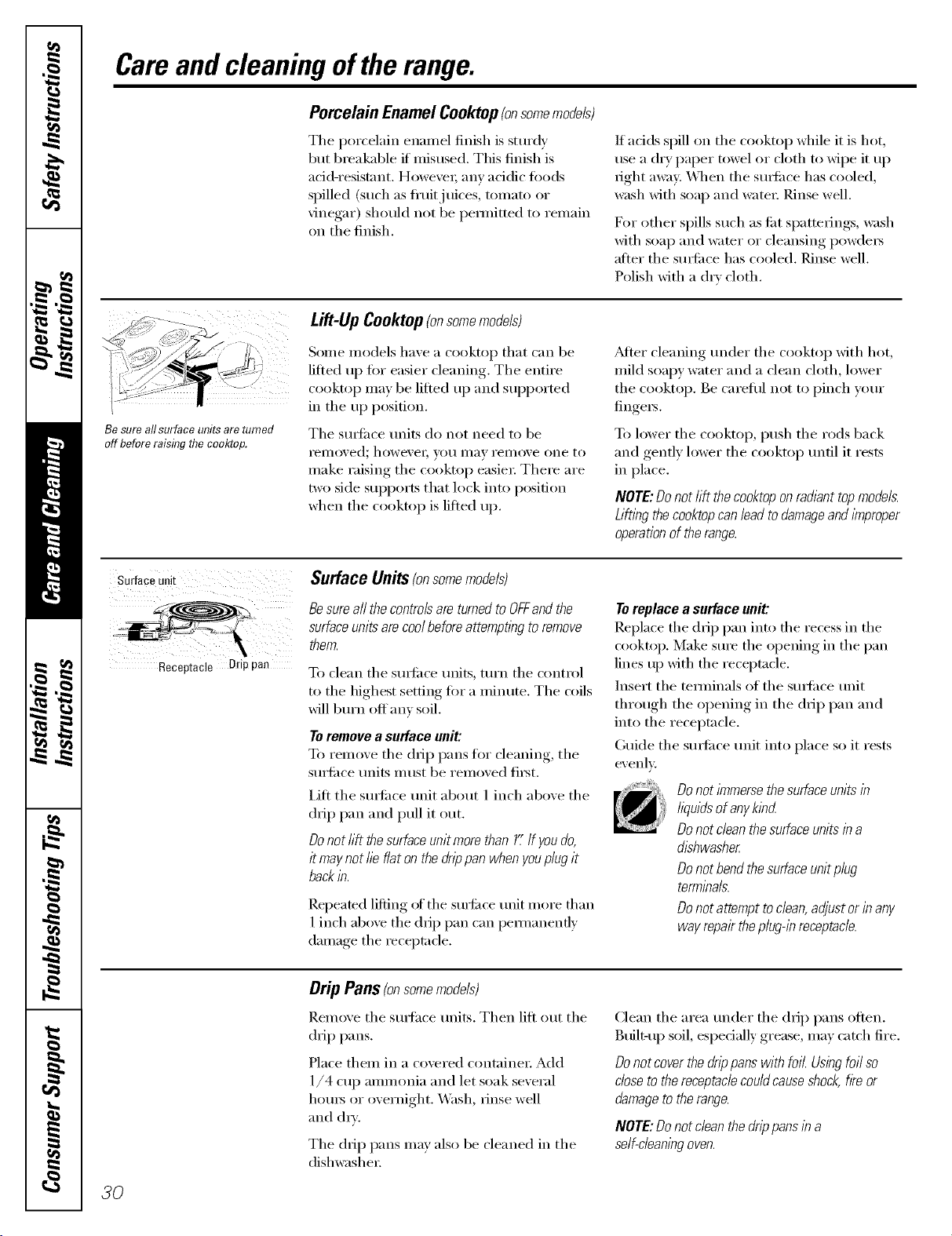
Besureallsurfaceunitsareturned
offbeforeraisflTg the cooldzop.
Lift-UpCooktop(onsomemodels)
Some models have a cooktop that can be
lifted tlI) tot easier cleaning. The entire
cooktop may be lifted 11I) and supported
in tile 11I) position.
The suitilce units do not need to be
i"eliloved; howevei; you lIlay rel/love one to
make raising the cooktop easiei: Theie are
two side supports that lock into position
when the cooktop is lifted iii).
_Mter cleaning under tile cooktop with hot,
mild soapy water and a clean cloth, lower
the cooktop. Be careflll not to pinch your
fingei_.
To lower the cooktop, push the rods back
and gently lower the cooktop until it rests
in place.
NOTE:Do not hft the cooktoponradiant top models.
Lifting the cooktopcanlead todamageand improper
operationof the range.
Surfaceunit
Receptacle Drippan
Surface Units(onsomemodels)
Besureaft thecontrolsare turnedto OFFand the
surface unitsare coolbeforeattempting to remove
them.
To clean tile surlilce units, turn tile control
to the highest setting tot a minute. The (xfils
will b11i"11off anv soil.
Toremovea surfaceunit:
To remove tile drip pans for cleaning, tile
surlilce units must be removed fii_t.
IJfl tile StlYl'ilcetlnit about 1 inch above tile
drip pan and pull it out.
Donothft thesurfaceunitmorethan11'If youdo,
it maynotfieflatonthedrippanwhenyouplugit
backin.
Repeated lifting of tile surl_Jce unit more than
1 inch above the drip pan can pem/anently
damage the receptacle,
Toreplace a surface unit:
Replace the drip pan into file recess in the
cooktop. Make sure the opening in tile pan
lines 1/1)_ith tile receptacle.
Insert tile temfinals of tile sudilce unit
through tile opening in tile (1IiI) pan and
into tile receptacle.
Guide the smtilce unit into place so it rests
evenl>
Donot/?nmersethe surfaceunits in
liquidsof anykind
Donot dean thesurface units in a
dishwasher
Donot bendthe surface unitplug
terminals.
Donot attempt to dean, adjust or in any
way repairtheplug-in receptacle.
Drip Pans(onsomemodels)
Remove tile smthce units. Then lift out tile
drip pans.
Place them in a covered containei: Add
1/4 cup ammonia and let soak several
hom_ or overnight. Wash, rinse well
mid (h_'.
Tile drip pans may also be cleaned in tile
dishwasheI:
Clean tile area under tile drip pans often.
Btfilt-up soil, espedally grease, may catch fire.
Do not coverthe drippans with foil. Using foil so
close to thereceptaclecouldcause shock,fke or
damageto the range.
NOTE:Do not clean the drip pans in a
self-cleaningoven.
3O
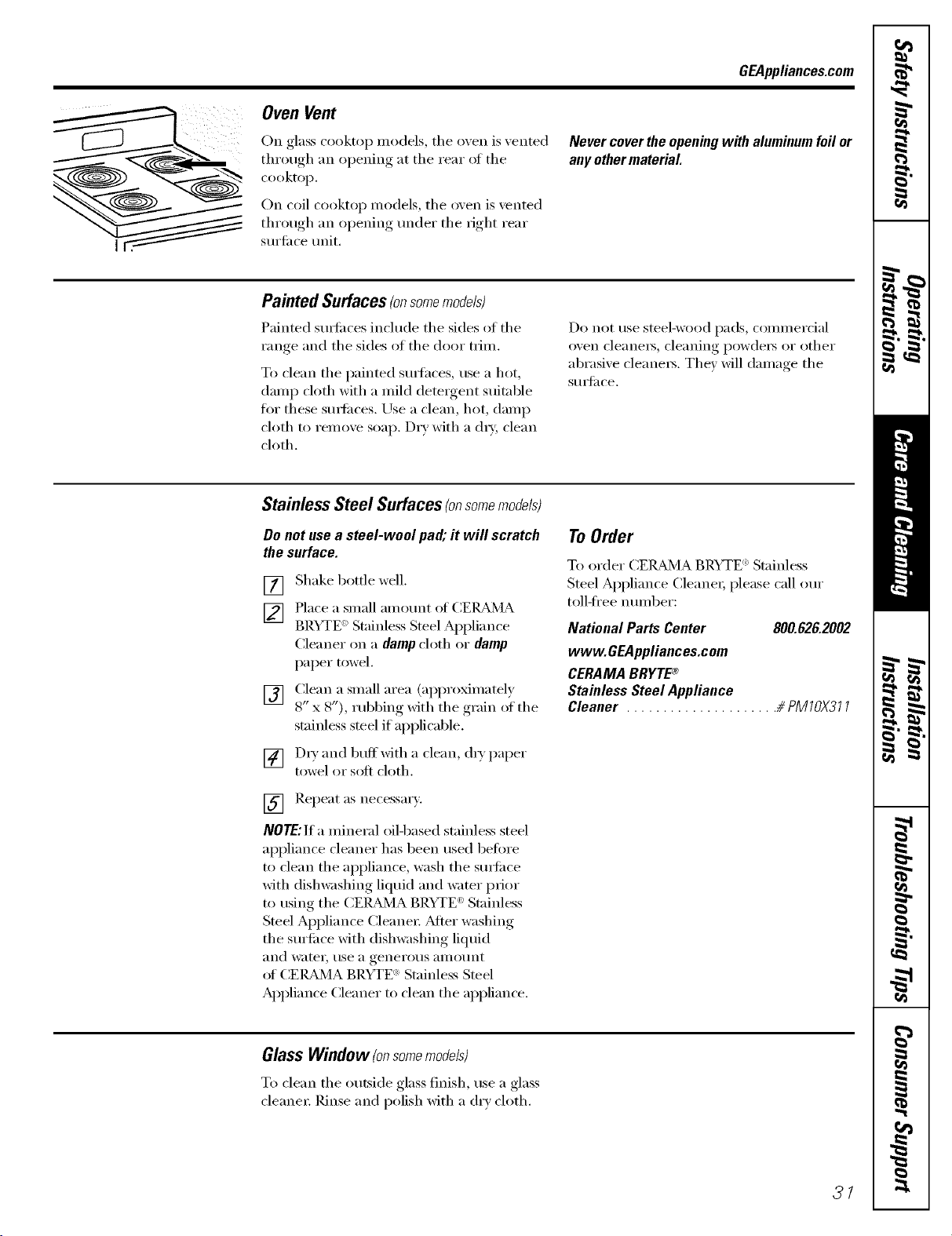
GEAppliances.com
Oven Vent
On glass cooktop models, the oven is vented
through an opening at the rear ot the
cooktop.
On coil cooktop models, the oven is vented
through an opening under the right rear
surti_ce trait.
Nevercovertheopeningwith aluminumfoilor
anyothermaterial
Painted Surfaces(onsomemodels)
Painted sm_i_ces include the sides of the
range and the sides of the door trim.
To clean the painted SUll'hces, use a hot,
damp cloth with a mild detergent suitable
for these smti_ces. Use a clean, hot, damp
cloth to remove soap. Dry with a d_T, clean
cloth.
Do not rise steel-wood pads, COlllll/eI'cial
oven cleane_, cleaning l)owde_ or other
abrasive cleane_. They will damage the
S/llS{il ce,
Stainless Steel Surfaces(onsomemodels)
Do not use a steel-wool pa& it wig scratch
the surface.
[] Shake bottle well.
[] Place a small am °trot °f (:EIL_dVIA
BP.YTE " Stainless Steel Appliance
Cleaner on a damp cloth or damp
paper t_m'el.
[] Clean a small area (approximatel)
8" x 8"), rubbing with the ,,rain of the
stainless steel if applicable.
[] D_T and buffwith a clean, (hT paper
towel or soft cloth.
[] Repeat as necessarx.
NOTE:If a mineral oilq)ased st;finless steel
appliance cleaner has been used betore
to clean the appliance, wash the smti_ce
with dishwashing liquid and water prior
to using the CEI_L_dVIABRYTE e' Stainless
Steel Appliance Cleanex: _Mter washing
the surti_ce with dishwashing liquid
and water, use a generous _llilO/lnt
_ff CEI_dMA BRYTE ': Stainless Steel
Appliance Cleaner to clean the appliance.
To Order
To order (:ER_d_4A BRYTE ':Stainless
Steel Al)plian(e Cleane_; please call our
toll-fl'ee n tlll/beI':
National Parts Center 800.826.2002
www.GEAppliances.com
CERAMA BRYTE®
Stainless Steel Appliance
Cleaner ..................... # PMTOX377
GlassWindow (onsomemodels)
To clean the outside glass finish, use a glass
cleane_: Rinse and polish with a dry cloth.
31
Cleaningtheglasscoolrtop.(onsomemodefsI
Cleanyourcooktepafter
each spill. UseCERAMA
BRYTEc_CeramicCooktep
Cleaner.
Normal Daily Use Cleaning
ONLY use CEIL_,]A BRYTE _ Ceranfic
Cookto I) Cleaner on tile glass cooktop.
Other creams ma_ not be as effective.
To maintain and protect the surfi_ce of wmr
glass cooktop, fi)llow these steps:
[] Before using the cooktop fin" the
fi_t time, clean it with CEIL_<]A
BRYTE '_Ceramic Cooktop Cleane_;
This helps protect the top and makes
cleanup easier:
[] Daily use of CEIL&MA BRYTE <_>
Ceramic Cooktop Cleaner will hel I)
kee I) the cooktop looking new.
[] Shake tile cleaning cream well. Apply
a fi_w drops of CEIL_4A BRYTE _
Ceramic (2ooktop Cleaner dire{ tlv to
the cooktop,
[] Use a i_aper towel or CEILBdMA
BRYTE _' Cleaning Pad for Ceramic
()}ogtops to clean tile entire coogtop
S/lltil{'e,
[] Use a drx cloth or paper towel
to remove all cleaning residue.
No need to rinse.
NOTE:It is veryimportantthatyouDONOTheat
thecooktopuntil it hasbeencleanedthomughl}z
Burned-On Residue
WARNING:DAMAGEtoyourglasssurfacemay
occurif youusescrubpadsotherthanthose
recommended.
Use a CERAMABRYTE'_Cleaning
Pad for Ceramic Cooktops.
[] Allow tile cookto I) to cool,
[] Spread a few drops of CEIL_MA
BRYTE _)Ceramic Cookto I) Cleaner
on the entire burned residue area.
[]
Llsing tile included CEI{_d'dA
BRYTE (_)Cleaning Pad for Ceramic
Cooktoi)s, rub the residue area,
alI,) )lving, i)YesstlYe as needed.
[]
[]
If any residue remains, repeat tile
steps listed above as needed.
For additional protection, after
all residue has been returned, polish
the entire sm'thce with CE/_dVIA
BRYTE ') Ceramic (:ooktop Cleaner
and a paper towel.
The CERAMABRYTE'*_Ceramic
Cooktop Scraper and all
recommended supplies are
available through our Parts Center.
See flTstructions under "ToOrder
Parts" section on next page.
NOTE:Do not use a dull or
nicked blade.
Heavy, Burned-On Residue
[] Alh)w tile {'ooktop to cool,
[] Lrse a ,single-edoe,_ razor blade
scraper at approximatel) a 45 ° angle
against the glass sm'tace and scrape
the soil. It will be necessary to appl)
l)resstlre to tile i'_lZ(}i" scraper in
order to reillo_e tile residt/e.
[]
After scraping with tile razor
scrape_; spread a few drops of
(;EI_Bd_4A BRYTE '_Ceramic Cooktop
Cleaner (m tile entire burned residue
area. Use tile (:EI_Bd_IABRYTE '_
Cleaning Pad to remove any
remaining residue.
[]
For additional protection,
after all residue has been removed,
polish the entire surtace with
CEIL&MA BRYTE ': Ceramic Cooktop
Cleaner and a paper towel.
32
GEAppliances.com
Metal Marks and Scratches
[]
Be careflll not to slide pots and pans
across wmr cooktop. It will leave
metal markings on the cooktop
S/lI'J[_l ce,
These marks are remowd)le using
the CEIL_d_JlA BRYTE '_Ceramic
Cooktop Cleaner with the CEI_dVIA
BRYTE ':Cleaning Pad fin" Ceramic
Cooktops.
[] If pots with a thin oxerla) of
aluminum or COl)per are allowed to
boil dry, tile overlay may leave black
discoloration on tile cooktop.
This should be removed immediately
before heating again or the
discoloration may be permanent.
WARNING: Carefully check the bottom of pans
for roughness that would scratch the cooktop.
Cooktop Seal
To clean the cooktop seal around the
edces of the glass, la_ a wet cloth on it
for a few minutes, then wipe clean with
nonabrasi_, e cleaners.
Glasssufface potential forpermanent damage.
Our testing shows that if
you are cooking high sugar
mixtures such as jelly or
fudge and have a spillover,
it can cause permanent
damage to the glass surface
unless the spillover is
immediately removed.
Damage from Sugary Spills and Melted Plastic
[] Turn off all surtace units. Remo'.e
hot pans.
[] Wearing an oven mitt:
a. Use a single-edge razor blade
scraper (CEIL__MA BRYTE :
Ceramic Cooktop Scraper) to
ii/ove the spill to a cool aI'ea on
the cooktop.
b. Remove the spill with
paper towels.
[] Any remaining spilloxer should be
left until tile surthce of tile cooktop
has cooled.
] Don't use tile surtace units again
until all of the residue has been
completely removed.
NOTE:If pitting orindentationin theglass
surfacehasalreadyoccurred,thecooktopglass
wi//havetobe replaced/n thiscase,servicewifl
benecessary
To Order Parts
To order CEI_dVIA BRYTE '_Ceramic
Cookto I) Cleaner and tile cooktop
scraper, please call our toll-fl'ee number:
National Parts Center ...... 800.626.2002
CERAMA BRYTE®Ceramic
Cooktop Cleaner .......... # WXIOX300
CERAMA BRYTE® Ceramic
Cooktop Scraper ......... # WXIOX0302
Kit ...................... # WB64X5027
(Kit includes cream and cooktop scraper)
CERAMA BRYTE® Cleaning Pads for
Ceramic Cooktops ........ # WX10X350
33
I Ilnstallation IFree-Standing
nstructlons Electric Ranges
i r-?-i Questions? Call 800.GE.CARES (800.432.2737) or Visit our Website at: GEAppliances.com I
BEFORE YOU BEGIN
Read these instructions completely
and carefully,
• IMPORTANT - Savethese
instructions for local inspector's use.
• IMPORTANT - Observeall
governing codes and ordinances.
• Note to Installer - Be sure to leave these
instructions with the Consumer.
• Note to Consumer - Keep these
instructions for future reference.
• Skill level - Installation of this appliance
requires basic mechanical skills.
• Completion time - 1 to 3 hours
• Proper installation is the responsibility of
the installer.
• Product failure due to improper installation
is not covered under the Warranty,
_WARNING - This appliance must
be properly grounded.
FOR YOUR SAFETY:
_WARNING - Before beginning the
installation, switch power off at service panel
and lock the service disconnecting means to
prevent power from being switched on
accidentally. When the service disconnecting
means cannot be locked, securely fasten a
prominent warning device, such as a tag, to
the service panel.
FOR YOUR SAFETY:
All rough-in and spacing dimensions must be
met for safe use of your range, Electricity to
the range can be disconnected at the outlet
without moving the range if the outlet is in
the preferred location (remove lower drawer).
To reduce the risk of burns or fire when
reaching over hot surface elements, cabinet
storage space above the cooktop should be
avoided. If cabinet storage space is to be
provided above the cooktop, the risk can
be reduced by installing a range hood that
sticks out at least 5" beyond the front of the
cabinets. Cabinets installed above a cooktop
must be no deeper than 13_'
Be sure your appliance is properly installed
and grounded by a qualified technician.
Make sure the cabinets and wall coverings
around the range can withstand the temperatures
(up to 200°F) generated by the range.
ANTI-TIP DEVICE
AWARNING - Toreducetherisk
of tipping, the appliance must be secured by
properly installed Anti-Tip bracket packed
with this appliance.
If the Anti-Tip device supplied with the range
does not fit this application, use the universal
Anti-Tip device WB2X7909.
AWARNING-
• All ranges can tip
• Injury to persons could result
(_ • Install Anti-Tip bracket packed
with range
• See Installation Instructions
If you pull the range out and away from the
wall for any reason, make sure the Anti-Tip
bracket is engaged when the range is pushed
back against the wall.
34
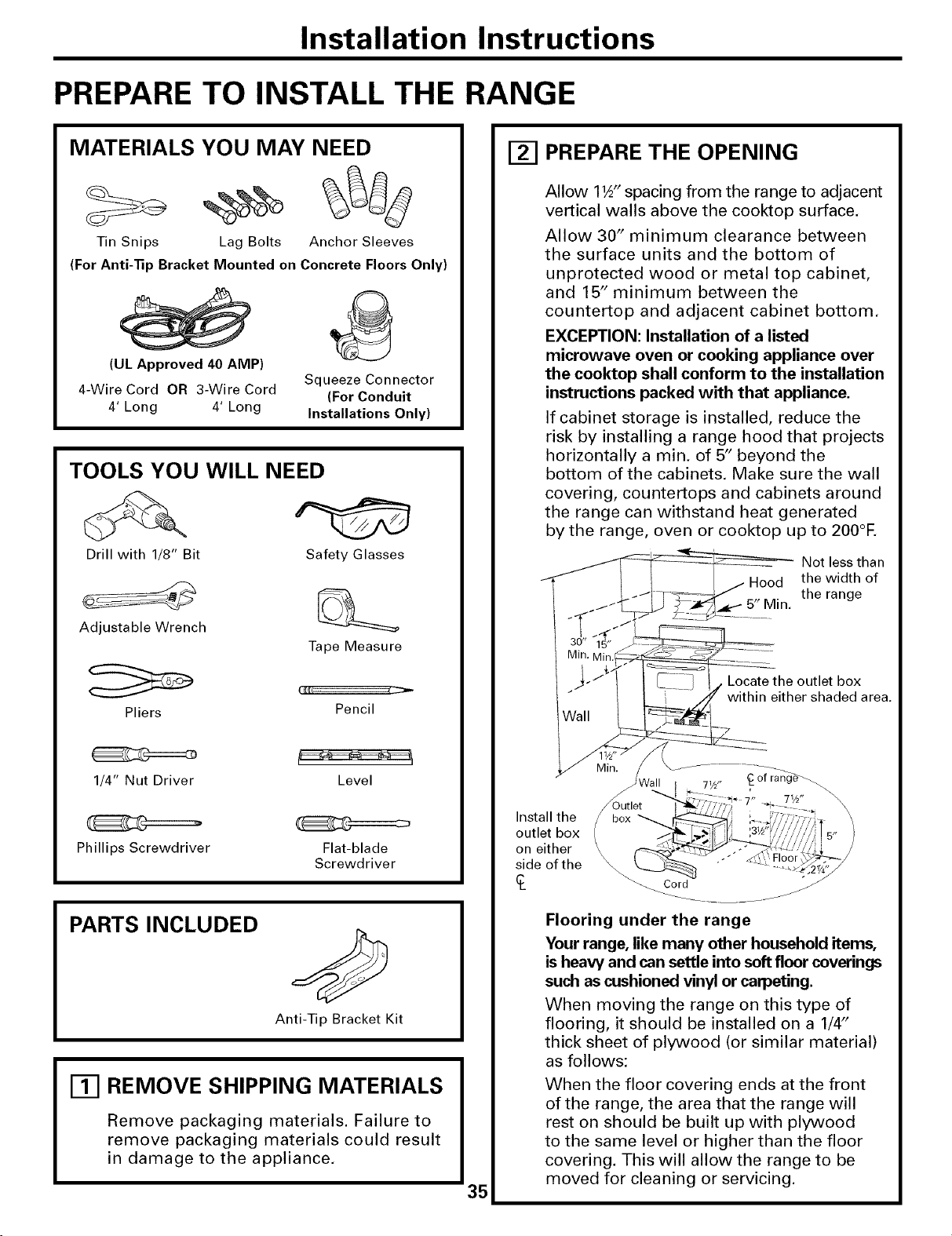
Installation Instructions
PREPARE TO INSTALL THE RANGE
MATERIALS YOU MAY NEED
Tin Snips Lag Bolts Anchor Sleeves
(For Anti-Tip Bracket Mounted on Concrete Floors Only)
(UL Approved 40 AMP)
4-Wire Cord OR 3-Wire Cord
4' Long 4' Long
Squeeze Connector
(For Conduit
Installations Only)
TOOLS YOU WILL NEED
Drill with 1/8" Bit Safety Glasses
Adjustable Wrench
Tape Measure
Pliers
Pencil
1/4" Nut Driver Level
Phillips Screwdriver
Flat-blade
Screwdriver
PARTS INCLUDED
Anti-Tip Bracket Kit
177 REMOVE SHIPPING MATERIALS
Remove packaging materials. Failure to
remove packaging materials could result
in damage to the appliance.
35
PREPARE THE OPENING
Allow 11/_" spacing from the range to adjacent
vertical walls above the cooktop surface.
Allow 30" minimum clearance between
the surface units and the bottom of
unprotected wood or metal top cabinet,
and 15" minimum between the
countertop and adjacent cabinet bottom.
EXCEPTION: Installation of a listed
microwave oven or cooking appliance over
the cooktop shall conform to the installation
instructions packed with that appliance.
If cabinet storage is installed, reduce the
risk by installing a range hood that projects
horizontally a min. of 5" beyond the
bottom of the cabinets. Make sure the wall
covering, countertops and cabinets around
the range can withstand heat generated
by the range, oven or cooktop up to 200°E
Not less than
Hood the width of
the range
5" Min.
Locate the outlet box
within either shaded area.
Install the
outlet box
on either
side of the
_of ran_
71/2"
Outlet
box
\
_O r d jjJ
J
Flooring under the range
Your range, like many other household items,
is heaw and can settle into soft floor coverings
such as cushioned vinyl or carpeting.
When moving the range on this type of
flooring, it should be installed on a 1/4"
thick sheet of plywood (or similar material)
as follows:
When the floor covering ends at the front
of the range, the area that the range will
rest on should be built up with plywood
to the same level or higher than the floor
covering. This will allow the range to be
moved for cleaning or servicing.
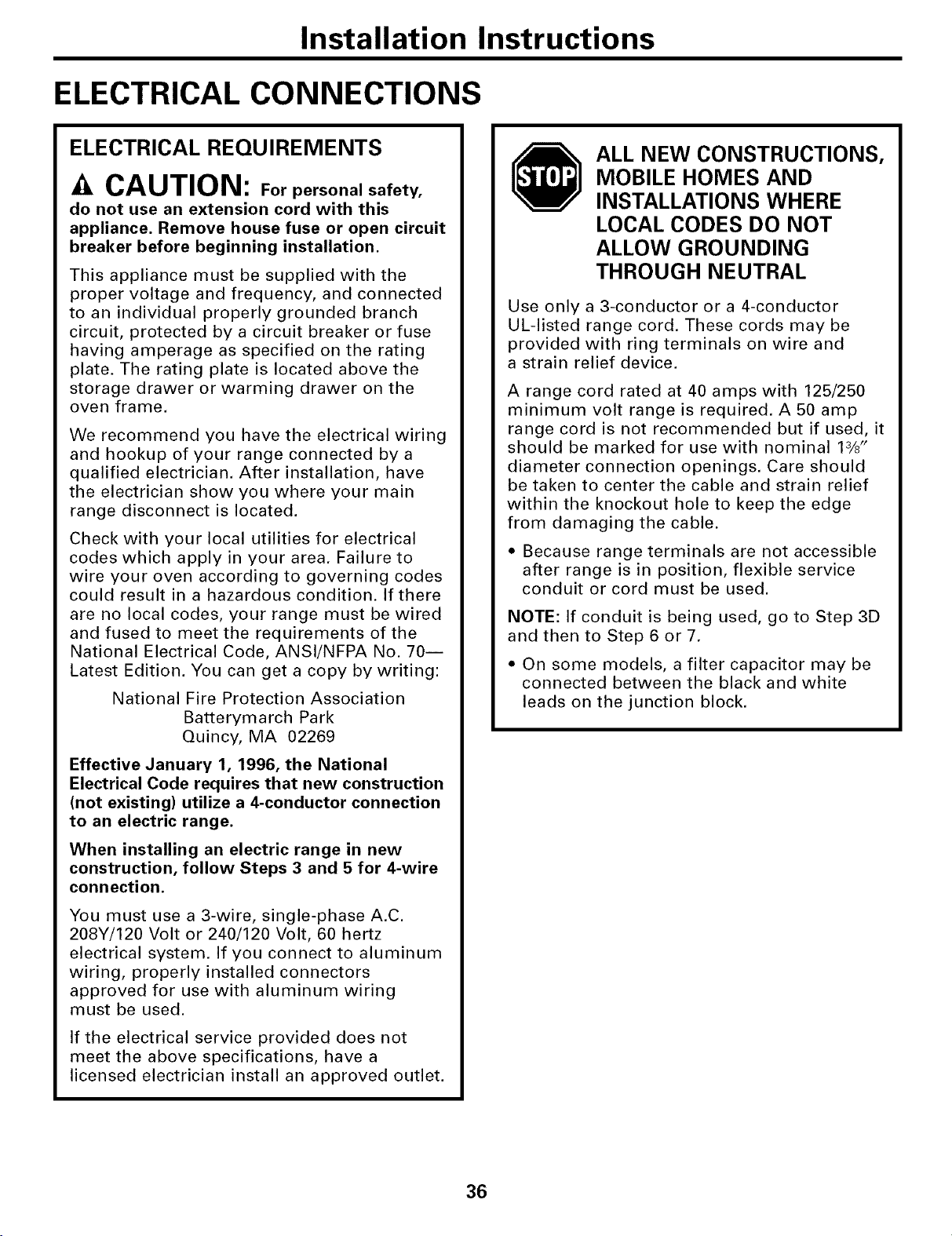
Installation Instructions
ELECTRICAL CONNECTIONS
ELECTRICAL REQUIREMENTS
CAUTION: Forpersonal safety,
do not use an extension cord with this
appliance. Remove house fuse or open circuit
breaker before beginning installation.
This appliance must be supplied with the
proper voltage and frequency, and connected
to an individual properly grounded branch
circuit, protected by a circuit breaker or fuse
having amperage as specified on the rating
plate. The rating plate is located above the
storage drawer or warming drawer on the
oven frame.
We recommend you have the electrical wiring
and hookup of your range connected by a
qualified electrician. After installation, have
the electrician show you where your main
range disconnect is located.
Check with your local utilities for electrical
codes which apply in your area. Failure to
wire your oven according to governing codes
could result in a hazardous condition. If there
are no local codes, your range must be wired
and fused to meet the requirements of the
National Electrical Code, ANSl/NFPA No. 70J
Latest Edition. You can get a copy by writing:
National Fire Protection Association
Batterymarch Park
Quincy, MA 02269
Effective January 1, 1996, the National
Electrical Code requires that new construction
(not existing) utilize a 4-conductor connection
to an electric range.
When installing an electric range in new
construction, follow Steps 3 and 5 for 4-wire
connection.
You must use a 3-wire, single-phase A.C.
208Y/120 Volt or 240/120 Volt, 60 hertz
electrical system. If you connect to aluminum
wiring, properly installed connectors
approved for use with aluminum wiring
must be used.
If the electrical service provided does not
meet the above specifications, have a
licensed electrician install an approved outlet.
ALL NEW CONSTRUCTIONS,
MOBILE HOMES AND
INSTALLATIONS WHERE
LOCAL CODES DO NOT
ALLOW GROUNDING
THROUGH NEUTRAL
Use only a 3-conductor or a 4-conductor
UL-listed range cord. These cords may be
provided with ring terminals on wire and
a strain relief device.
A range cord rated at 40 amps with 125/250
minimum volt range is required. A 50 amp
range cord is not recommended but if used, it
should be marked for use with nominal 13/8"
diameter connection openings. Care should
be taken to center the cable and strain relief
within the knockout hole to keep the edge
from damaging the cable.
• Because range terminals are not accessible
after range is in position, flexible service
conduit or cord must be used.
NOTE: If conduit is being used, go to Step 3D
and then to Step 6 or 7.
• On some models, a filter capacitor may be
connected between the black and white
leads on the junction block.
36
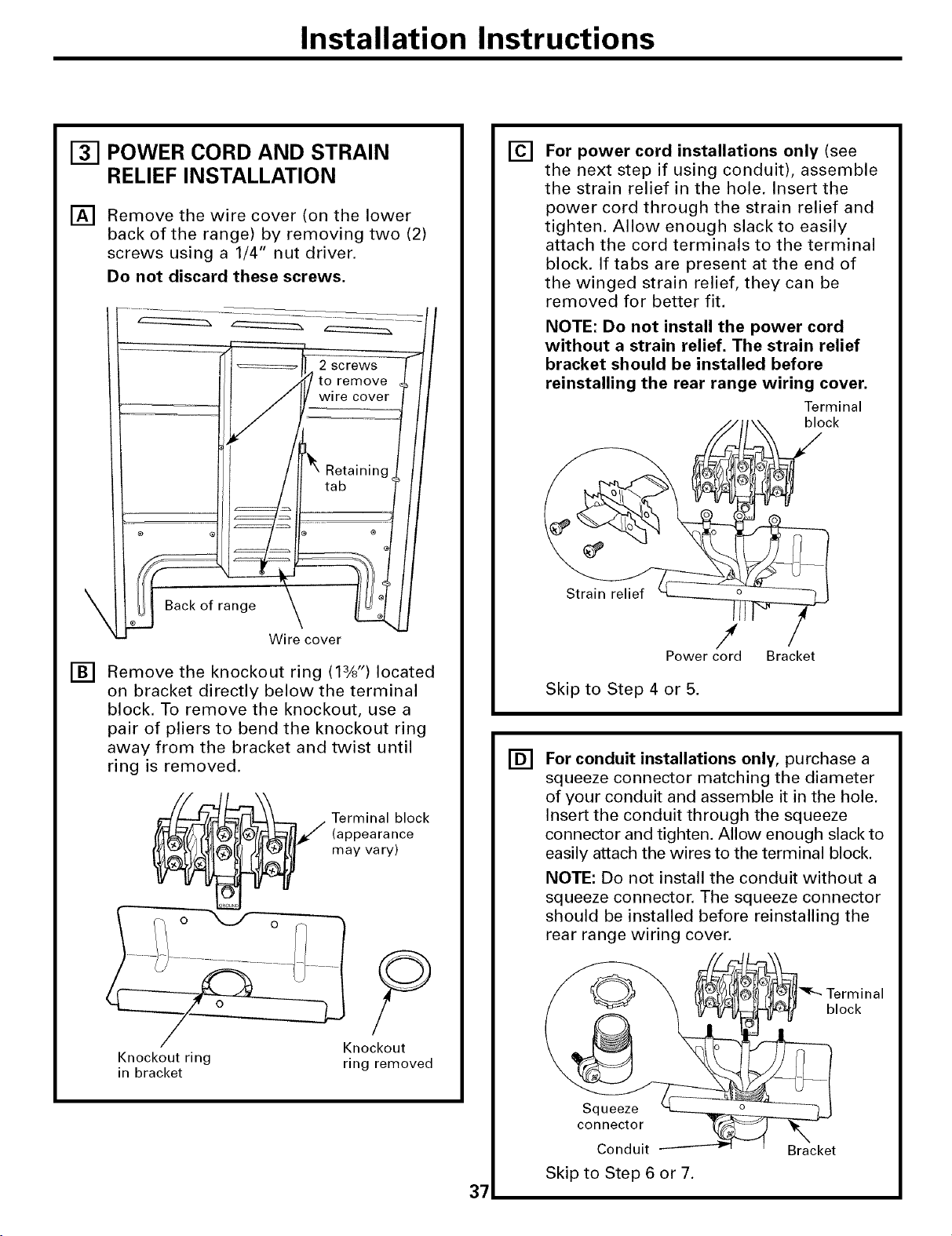
Installation Instructions
POWER CORD AND STRAIN
RELIEF INSTALLATION
[] Remove the wire cover (on the lower
back of the range) by removing two (2)
screws using a 1/4" nut driver.
Do not discard these screws.
of range
Wire cover
[] Remove the knockout ring (13/8'') located
on bracket directly below the terminal
block. To remove the knockout, use a
pair of pliers to bend the knockout ring
away from the bracket and twist until
ring is removed.
Terminal block
(appearance
may vary)
Knockout ring
in bracket
Knockout
ring removed
37
[]
[]
For power cord installations only (see
the next step if using conduit), assemble
the strain relief in the hole. Insert the
power cord through the strain relief and
tighten. Allow enough slack to easily
attach the cord terminals to the terminal
block. If tabs are present at the end of
the winged strain relief, they can be
removed for better fit.
NOTE: Do not install the power cord
without a strain relief. The strain relief
bracket should be installed before
reinstalling the rear range wiring cover.
Terminal
" _t _\ block
Strain relief _ /
Power cord Bracket
Skip to Step 4 or 5.
For conduit installations only, purchase a
squeeze connector matching the diameter
of your conduit and assemble it in the hole.
Insert the conduit through the squeeze
connector and tighten. Allow enough slack to
easily attach the wires to the terminal block.
NOTE: Do not install the conduit without a
squeeze connector. The squeeze connector
should be installed before reinstalling the
rear range wiring cover.
Terminal
block
Squeeze
connector
Conduit
Skip to Step 6 or 7.
Bracket
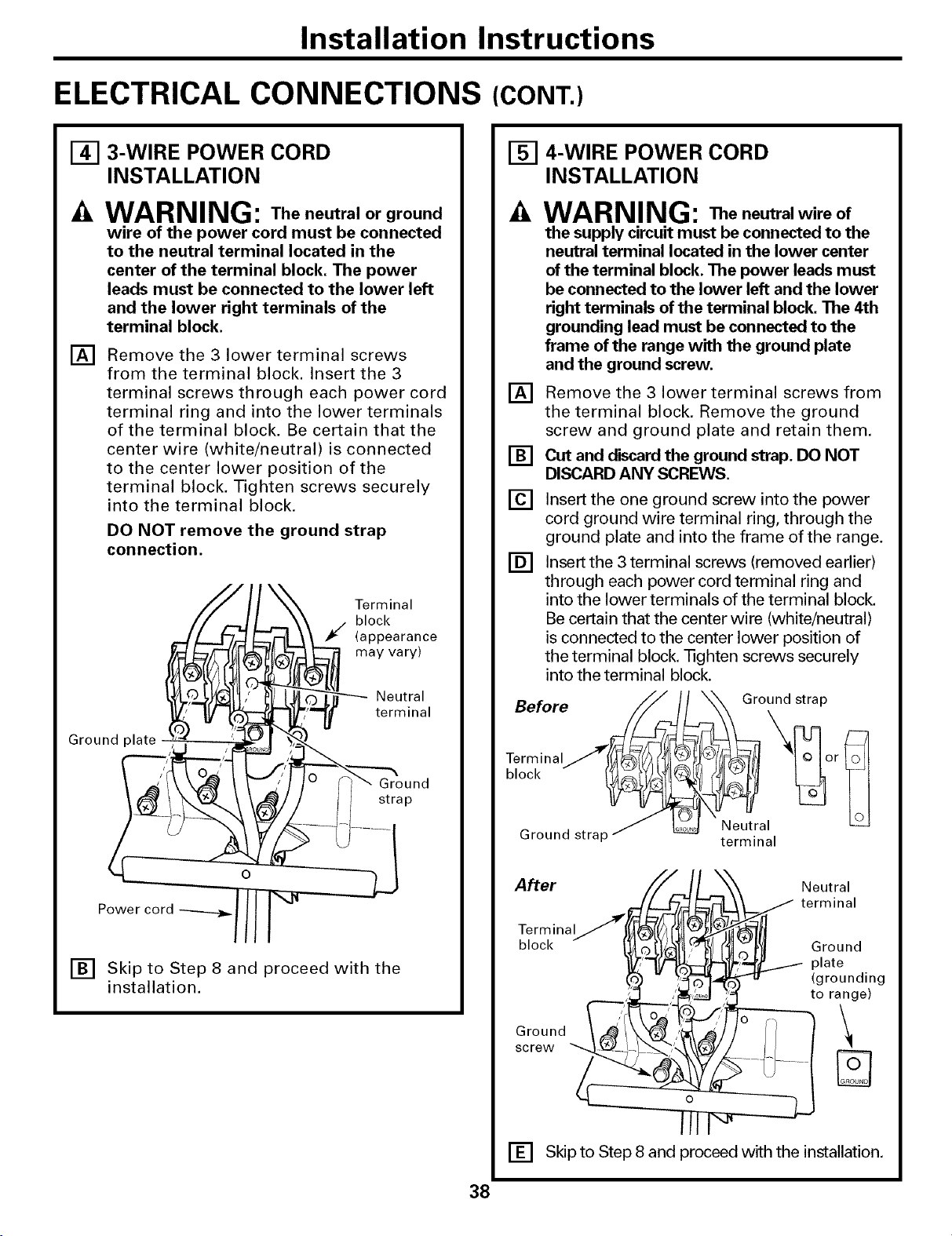
Installation Instructions
ELECTRICAL CONNECTIONS (CONT.)
[]
[]
3-WIRE POWER CORD
INSTALLATION
WARNING: The neutral or ground
wire of the power cord must be connected
to the neutral terminal located in the
center of the terminal block. The power
leads must be connected to the lower left
and the lower right terminals of the
terminal block.
Remove the 3 lower terminal screws
from the terminal block. Insert the 3
terminal screws through each power cord
terminal ring and into the lower terminals
of the terminal block. Be certain that the
center wire (white/neutral) is connected
to the center lower position of the
terminal block. Tighten screws securely
into the terminal block.
DO NOT remove the ground strap
connection.
_ Terminal
block
(appearance
/. may vary)
_ Neutral
A
Groundp,ate termina,
J /
Ground
strap
O
Power cord
[] Skip to Step 8 and proceed with the
installation.
[] 4-WIRE POWER CORD
INSTALLATION
[]
[]
[]
[]
WARNING: The neutralwire of
the supply circuit must be connected to the
neutral terminal located in the lower center
of the terminal block. The power leads must
be connected to the lower left and the lower
right terminals of the terminal block. The 4th
grounding lead must be connected to the
frame of the range with the ground plate
and the ground screw.
Remove the 3 lower terminal screws from
the terminal block. Remove the ground
screw and ground plate and retain them,
Cut and discard the ground strap. DO NOT
DISCARD ANY SCREWS.
Insert the one ground screw into the power
cord ground wire terminal ring, through the
ground plate and into the frame of the range.
Insert the 3 terminal screws (removed earlier)
through each power cord terminal ring and
into the lower terminals of the terminal block.
Be certain that the center wire (white/neutral)
is connected to the center lower position of
the terminal block. Tighten screws securely
into the terminal block.
After
Terminal
block
Ground
screw
Neutral
_ terminal
_ Ground
_,II'L......._ plate
(grounding
to range)
[] Skip to Step 8 and proceed with the installation.
38
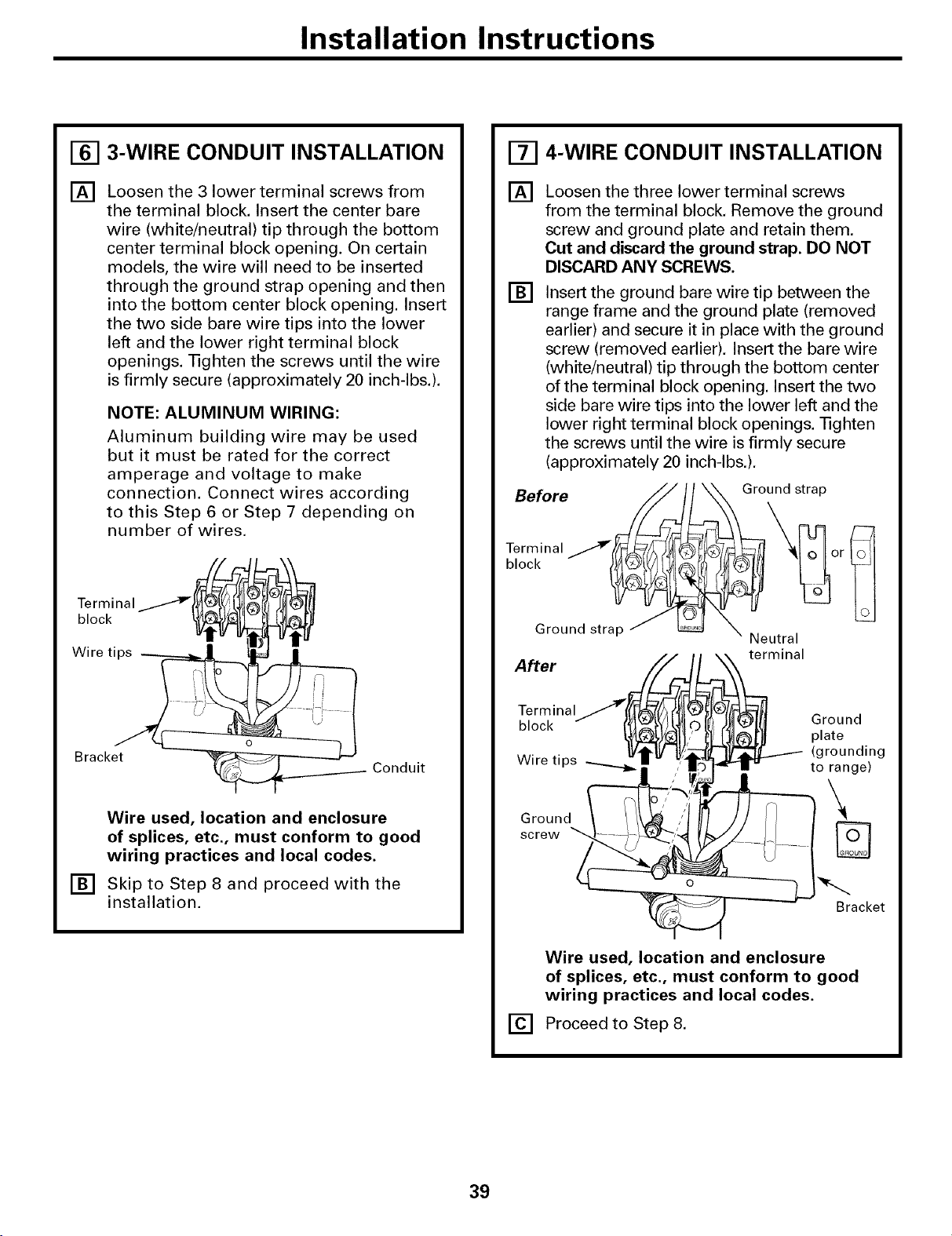
Installation Instructions
[] 3-WIRE CONDUIT INSTALLATION
[] Loosen the 3 lower terminal screws from
the terminal block. Insert the center bare
wire (white/neutral) tip through the bottom
center terminal block opening. On certain
models, the wire will need to be inserted
through the ground strap opening and then
into the bottom center block opening. Insert
the two side bare wire tips into the lower
left and the lower right terminal block
openings. Tighten the screws until the wire
is firmly secure (approximately 20 inch-lbs.).
NOTE: ALUMINUM WIRING:
Aluminum building wire may be used
but it must be rated for the correct
amperage and voltage to make
connection. Connect wires according
to this Step 6 or Step 7 depending on
number of wires.
blTe;cr_ina I/ i! D
ireti s
Bracket'/
Conduit
Wire used, location and enclosure
of splices, etc., must conform to good
wiring practices and local codes.
[] Skip to Step 8 and proceed with the
installation.
[] 4-WIRE CONDUIT INSTALLATION
[]
[]
Loosen the three lower terminal screws
from the terminal block, Remove the ground
screw and ground plate and retain them.
Cut and discard the ground strap. DO NOT
DISCARD ANY SCREWS.
Insert the ground bare wire tip between the
range frame and the ground plate (removed
earlier) and secure it in place with the ground
screw (removed earlier), Insert the bare wire
(white/neutral) tip through the bottom center
of the terminal block opening. Insert the two
side bare wire tips into the lower left and the
lower right terminal block openings. Tighten
the screws until the wire is firmly secure
(approximately 20 inch-lbs.).
Before
Ground strap
Terminal
block
[]
Wire used, location and enclosure
of splices, etc., must conform to good
wiring practices and local codes.
Proceed to Step 8.
39
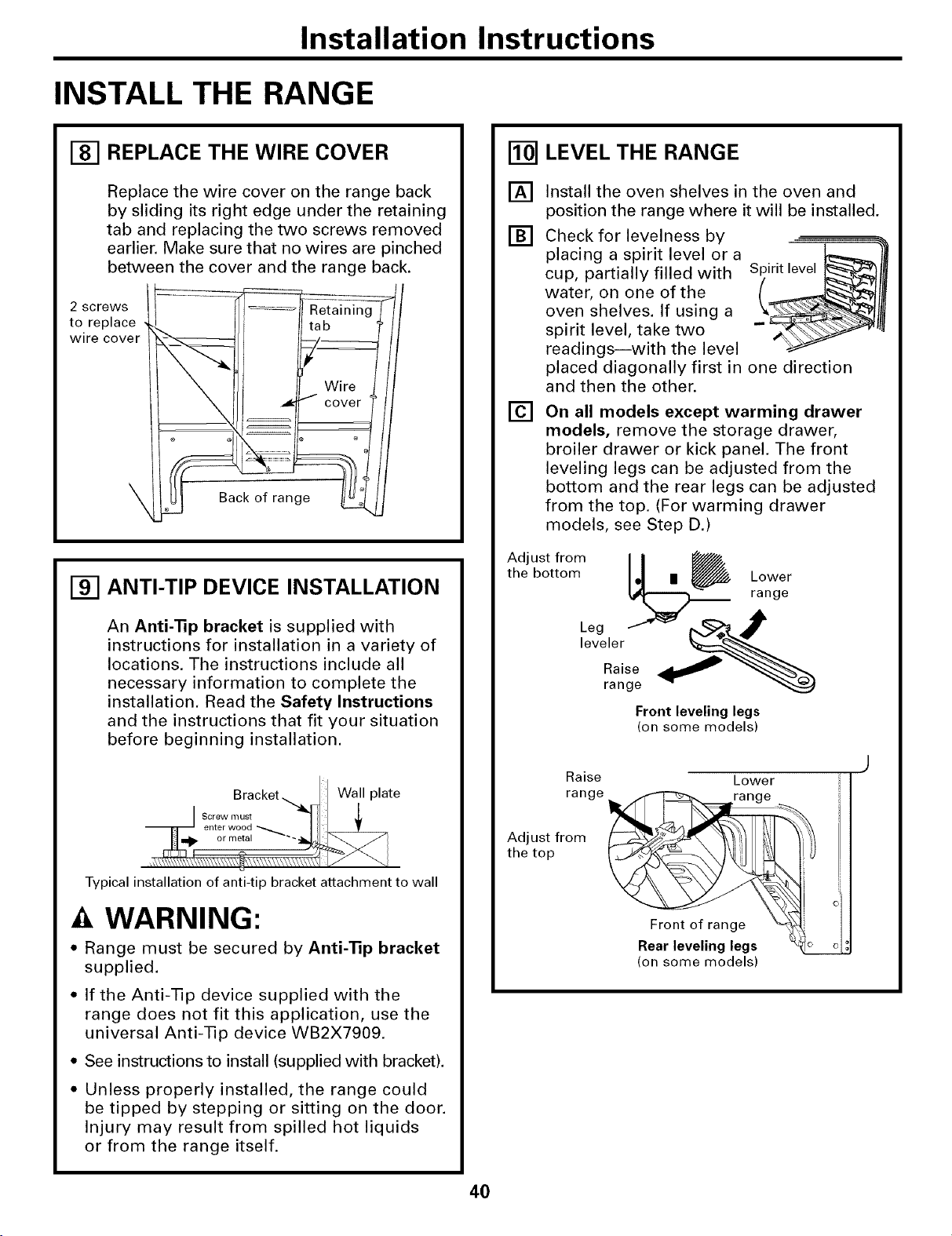
Installation Instructions
INSTALL THE RANGE
[] REPLACE THE WIRE COVER
Replace the wire cover on the range back
by sliding its right edge under the retaining
tab and replacing the two screws removed
earlier. Make sure that no wires are pinched
between the cover and the range back.
2 screws
to replace
wire cover
\
_' __ !b_lRetaining-lcoverWire
Sac_g _;_
Fgq
ANTI-TIP DEVICE INSTALLATION
An Anti-Tip bracket is supplied with
instructions for installation in a variety of
locations. The instructions include all
necessary information to complete the
installation, Read the Safety Instructions
and the instructions that fit your situation
before beginning installation.
Bracket_y_ Wall plate
Typical installation of anti-tip bracket attachment to wall
WARNING:
• Range must be secured by Anti-Tip bracket
supplied.
• If the Anti-Tip device supplied with the
range does not fit this application, use the
universal Anti-Tip device WB2X7909.
• See instructions to install (supplied with bracket).
• Unless properly installed, the range could
be tipped by stepping or sitting on the door.
Injury may result from spilled hot liquids
or from the range itself.
LEVEL THE RANGE
[]
[]
[]
Install the oven shelves in the oven and
position the range where it will be installed.
Check for levelness by
placing a spirit level or a
cup, partially filled with
water, on one of the
oven shelves. If using a
spirit level, take two
readings--with the level
Spirit level _1
placed diagonally first in one direction
and then the other.
On all models except warming drawer
models, remove the storage drawer,
broiler drawer or kick panel, The front
leveling legs can be adjusted from the
bottom and the rear legs can be adjusted
from the top. (For warming drawer
models, see Step D.)
tAdeJ_'¢tt_r°°mm _ rLa°nV_er
Front leveling legs
(on some models)
Raise Lower
range
Adjust from
the top
Front o:ra_nge _ o"
Rear leveling legs
(on some models)
40
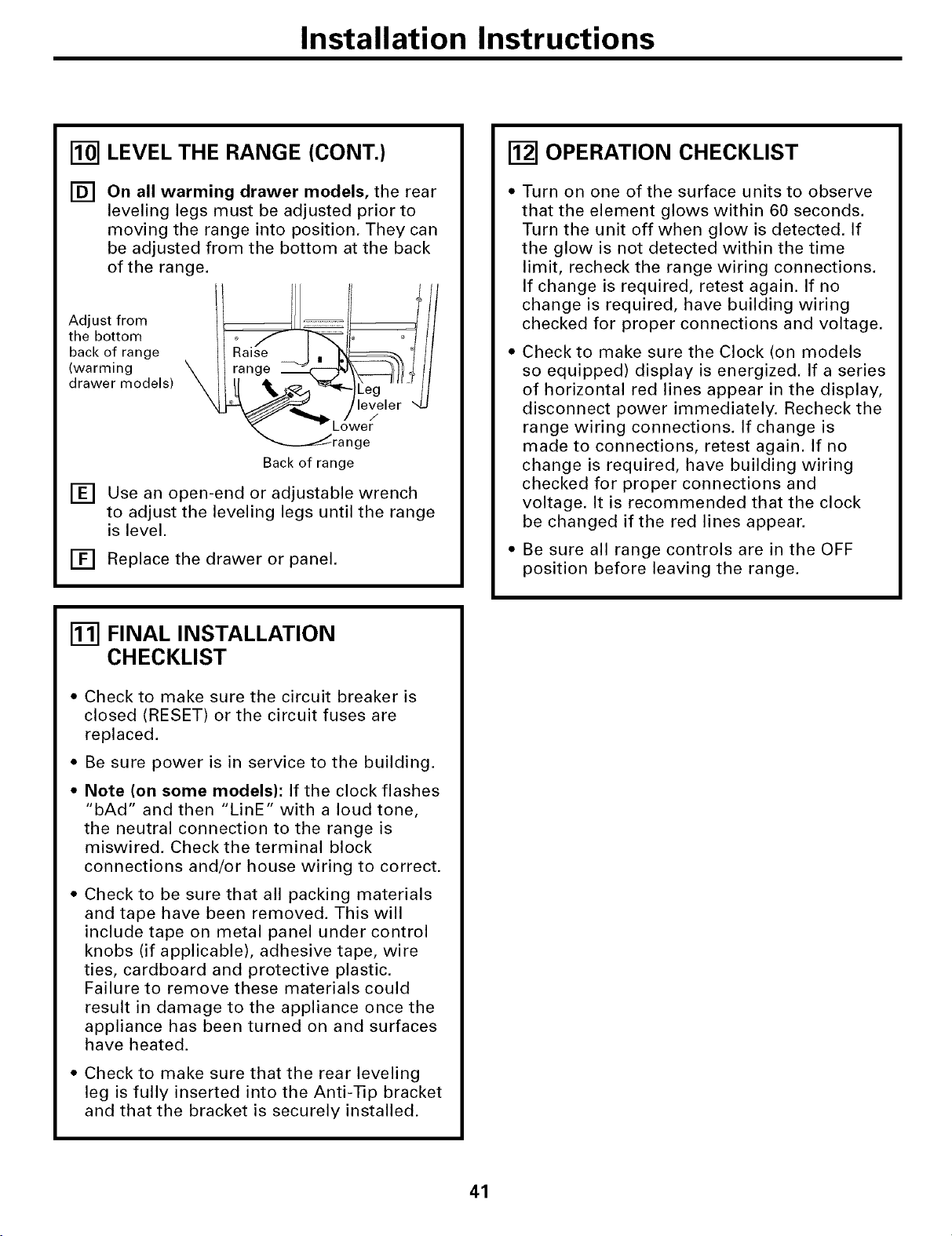
Installation Instructions
[] LEVEL THE RANGE (CONT.)
[] On all warming drawer models, the rear
leveling legs must be adjusted prior to
moving the range into position. They can
be adjusted from the bottom at the back
of the range.
Adjust from
the bottom
back of range
(warming
drawer models)
[]
Lower
ge
Back of range
Use an open-end or adjustable wrench
to adjust the leveling legs until the range
is level.
[] Replace the drawer or panel.
OPERATION CHECKLIST
Turn on one of the surface units to observe
that the element glows within 60 seconds.
Turn the unit off when glow is detected. If
the glow is not detected within the time
limit, recheck the range wiring connections.
If change is required, retest again. If no
change is required, have building wiring
checked for proper connections and voltage.
Check to make sure the Clock (on models
so equipped) display is energized. If a series
of horizontal red lines appear in the display,
disconnect power immediately. Recheck the
range wiring connections. If change is
made to connections, retest again. If no
change is required, have building wiring
checked for proper connections and
voltage. It is recommended that the clock
be changed if the red lines appear.
Be sure all range controls are in the OFF
position before leaving the range.
FINAL INSTALLATION
CHECKLIST
• Check to make sure the circuit breaker is
closed (RESET) or the circuit fuses are
replaced.
• Be sure power is in service to the building.
• Note (on some models): If the clock flashes
"bAd" and then "LinE" with a loud tone,
the neutral connection to the range is
miswired. Check the terminal block
connections and/or house wiring to correct.
• Check to be sure that all packing materials
and tape have been removed. This will
include tape on metal panel under control
knobs (if applicable), adhesive tape, wire
ties, cardboard and protective plastic.
Failure to remove these materials could
result in damage to the appliance once the
appliance has been turned on and surfaces
have heated.
• Check to make sure that the rear leveling
leg is fully inserted into the Anti-Tip bracket
and that the bracket is securely installed.
41
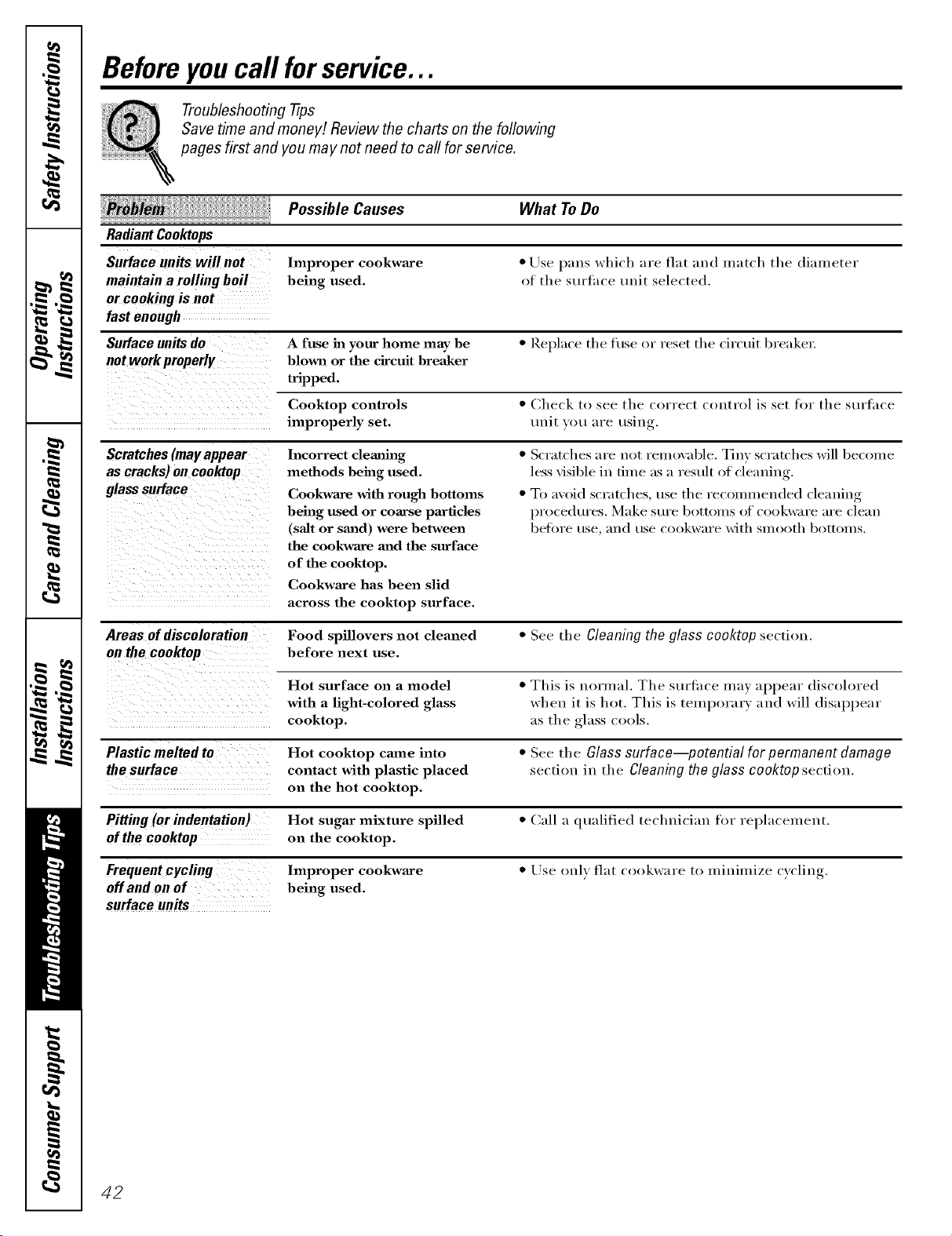
Beforeyoucall forservice...
Troubleshooting -tips
Save time and money/. Review the charts on the following
pages first and you may not need to call for service.
Possible Causes What ToDo
Radiant Cooktops
Surface units willnot Improper cookware * Use pans which are flat and match tile diameter
maintain a rolling boil being used. of the sttrthce unit selected.
or cooking is not
fast enough
Surface units do A fuse in your home may be * Rel)lace tile fuse or reset tile circuit breaker:
notworkproperly blown or the circuit breaker
tripped.
Cooktop controls * Check t(> see the correct control is set fin" the stu'th('e
improperly set. unit you are using.
Scratches (mayappear
as cracks) on cooktop
glass surface
Incorrect clemth_g
methods being used.
Cookwa_e with rough bottoms
being used or coarse particles
(salt or sm_d) were between
the cookwa_e and the surface
of the cooktop.
Cookwaxe has been slid
across the cooktop surface.
• Scratches are not removable. Tiny scratches will become
less visible in time as a restdt of cleaning.
• To avoid scratches, use the recommended cleaning
l)rocedtlres. Make StlI'e bottoIllS o1[ cookw:lre _lI'e clean
betoI'e rise, _lIl(1 use cookware with Sillooth bottoins.
Areas ofdiscoloration Food spillovers not cleaned • See the Cleaning the glass cooktop section.
on the cooktop before next use.
Hot surface on a model • This is normal. The SUl't.lce lil:l}' al)l)ear discolored
with a light-colored glass when it is hot. This is temporary and will disal)I)ear
cooktop, as the _,,lass_cools.
Plastic melted to Hot cooktop came into • See the Glass surface--potential for permanent damage
the surface contact with plastic placed section in the Cleaning the glass cooktop section.
on the hot cooktop.
Pitting (or indentation) Hot sugar mixture spilled • Call a qualified technici:m for rel)lacement.
of the ceektep on the cooktop.
Frequentcycling Improper cookware • Use only flat cookware to minimize cycling.
off and on of being used.
surface units
42
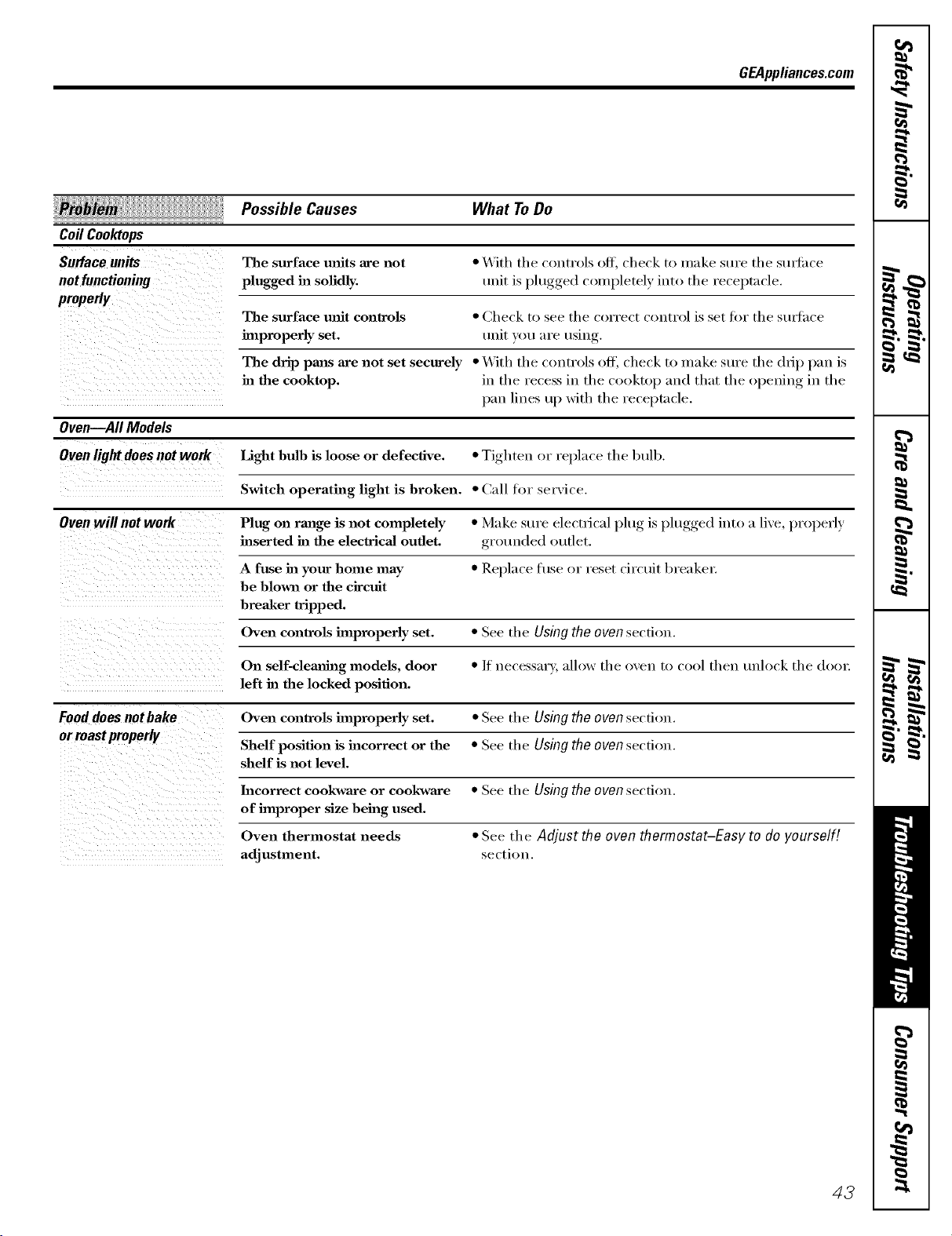
GEAppliances.com
Possible Causes What ToDo
Coil Coohtops
The surface milts are not * With the controls off, check to make sure the stmtilce
not functioning plugged in sofidly, trait is plt/gged c()m pletely iut_) the receptn cle.
properly
The surface unit controls * Check to see the correct control is set for the stu_hce
improperly set. unit you are using.
The drip pmas are not set securely • With the controls off, check to make sure the drip pan is
ha the cooktop, in the recess in the cooktop :rod that the opening in the
l);m lines up with the receptacle.
Oven--All Models
Oven light does not work Light bulb is loose or defective. • Tighten, or rel_lace the lmlb.
Switch operating light is broken. • Call for service.
Oven will not work Plug on range is not completely • Make sure electrical pltlg is plugged into a live, properly
inserted ha the electrical outlet, grotmded outlet.
A fuse in your home may • Replace fl/se or reset circtfit breakeL
be blown or the circuit
breaker wipped.
Oven controls hnproperly set. • See the Using the oven section.
On self-clemlh_g models, door • If uecessm'y, allow the oven to cool then tmlock the doo_:
left ha the locked position.
Fooddoes not bake Oven controls improperly set. • See the Using the oven secfi_)u.
or roastproperly
Shelf position is incorrect or the • See the Using the oven section.
shelf is not level.
Incorrect cookwaxe or cookwaxe
of improper size being used.
Oven thermostat needs
adjustment.
• See the Using the oven section.
• See the Adjust the oven thermostat-Easy to do yourself!
section.
43
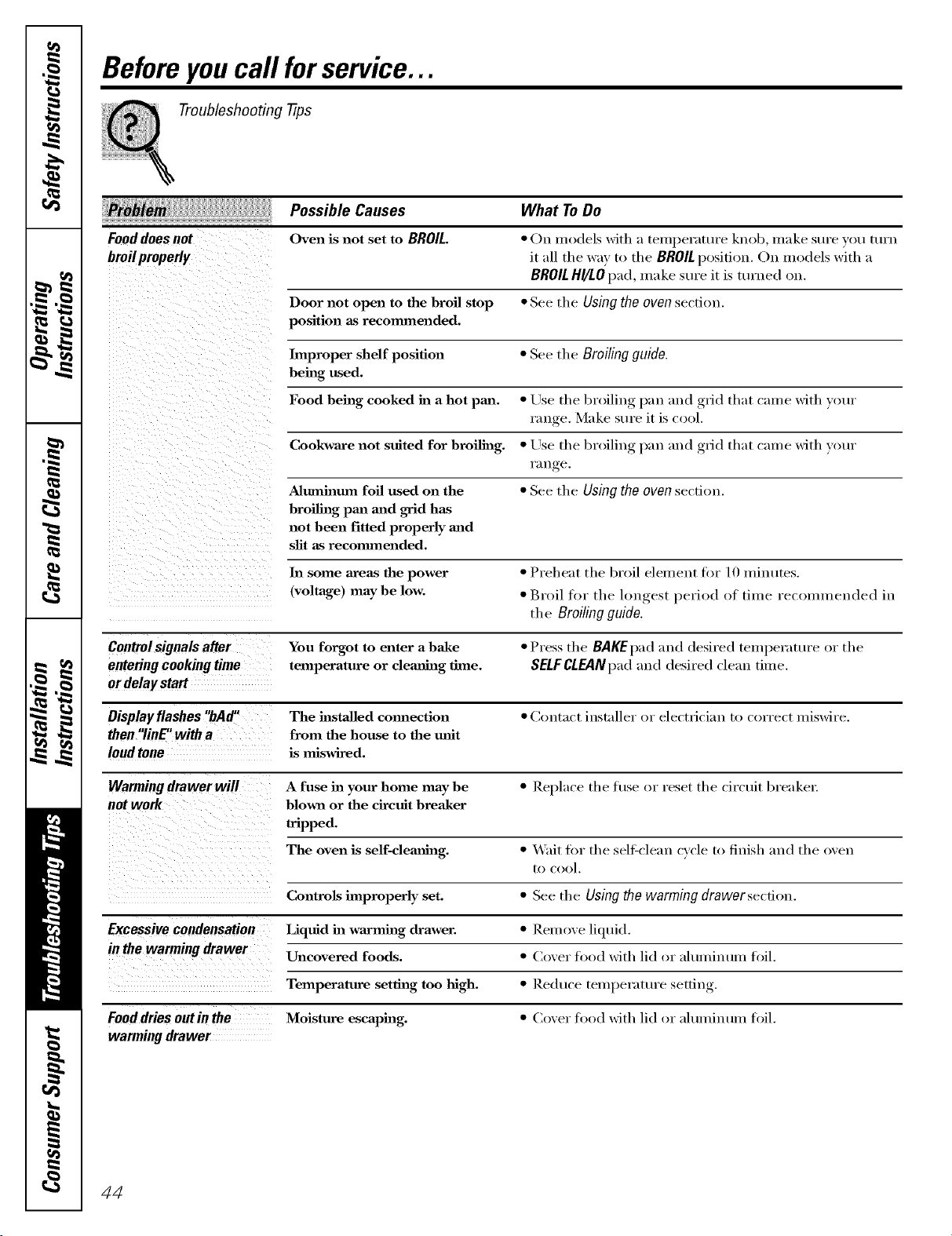
Beforeyoucall forservice...
Troubleshooting -tips
Possible Causes What ToDo
Fooddoesnot
bmilproperly
Oven is not set to BROIL.
• On models with a temperature knob make sure you turn
it all tile way to tl/e BROILposition. On models with a
BROILHgLOpad, make sm'e it is tin'ned on.
Door not open to the broil stop • See the Using the oven section.
position as recommended.
Improper shelf position • See the Broiling guide.
being used.
Food being cooked in a hot pan. • Use the broiling pan mid grid that came with your
ran re Make Stll'e it is cool.
Cookware not suited for broiling. • Use the broiling pan mid grid that came with your
1"_111 re
Almnblum foil used on the • See the Usingtheovensection.
broiling pan mad grid has
not been fitted properly and
slit as recommended.
In some areas the power • Preheat the broil element fin" 10 minutes.
(voltage) may be low. • Broil for the longest period of time recommended in
the Broiling guide.
Control signals after You forgot to enter a bake • Press the BAKEpadand desired teIl/peratt/re or the
entering cooking time temperature or clemmag time. SELFCLEANpad and desired dean time.
or delay start
Display flashes "bAd" The installed cmmection • Contact installer or electrician to correct miswire.
then"linE"witha from the house to the unit
loud tone is miswired.
Warming drawer will A fuse in your home may be • Replace the fuse or reset the cir(uit breaker:
blmm or the circuit breaker
tripped.
The oven is self-clea_mlg. • _'ait fi)r the sell=clean cycle to finish and the oven
to cool.
Controls improperly set. • See the Using the warming drawersecfion.
Excessive condensation Liquid in warming drawer. • Rein eve liquid.
in the warming drawer Uncovered foods. • (:over fi)od with lid or aluminum foil.
Temperature setting too high. • I)xedu('e teml)erature setting
Fooddries outin the Moisture escaping. • (:over fi)od with lid or aluminum foil.
warmingdrawer
44
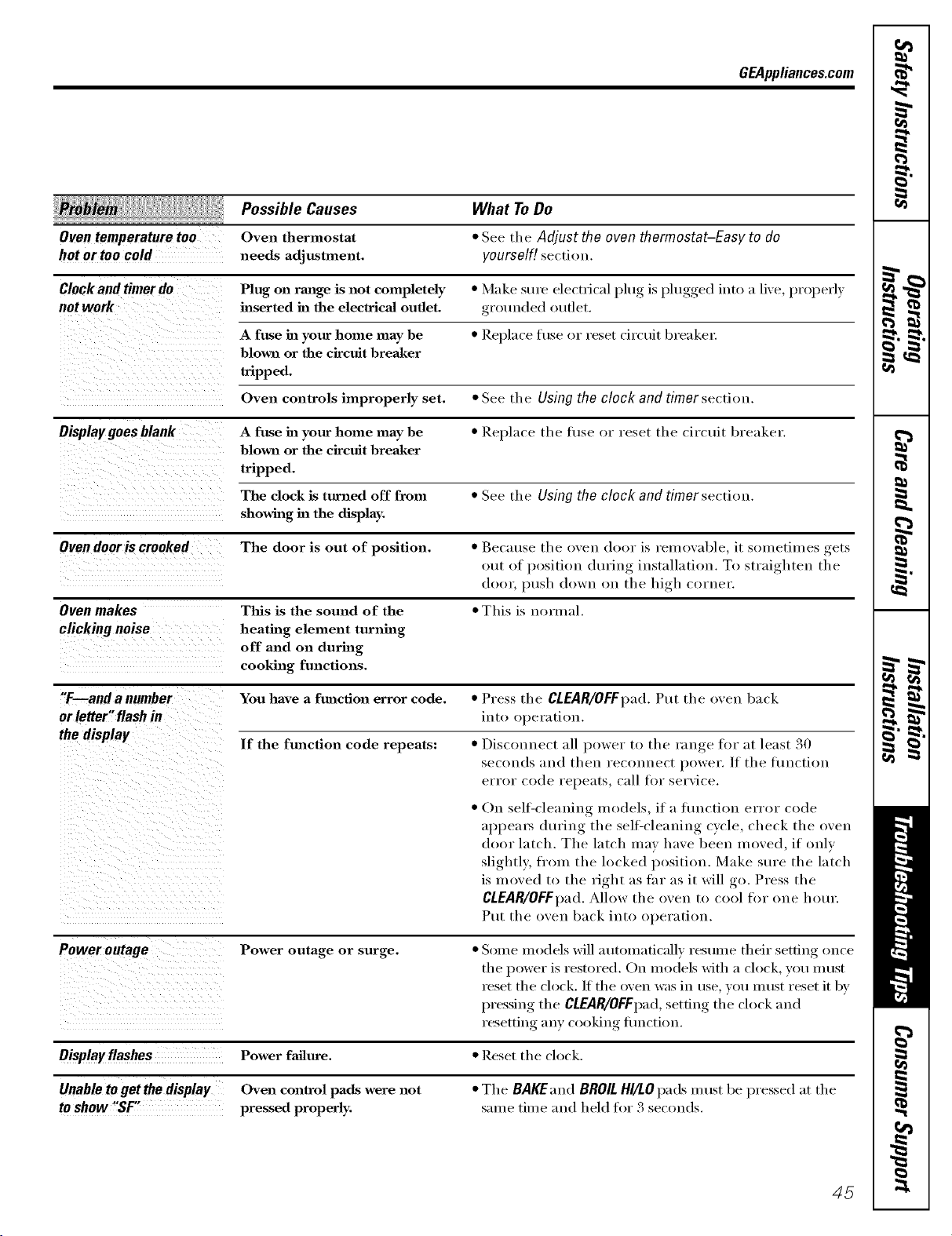
GEAppliances.com
Possible Causes What ToDo
Oven temperature too Oven thermostat * See tile Adjust the oven thermostat-Easy to do
hot or too cold needs adjustment, yourself! sectiou.
Clockand timerdo Plug on range is not completely * Make sure electrical l)lug is l)lugged iutl) a live, I)rOl)erly
not work inserted in the elecWical oudet, grounded outlet.
A fuse in your home may be * Replace fl/se or reset circuit breaker:
blown or the circuit breaker
tripped.
Oven controls improperly set. * See tile Using the clock and timer section.
Displaygoesblank A fuse in your home may be * Rel_lace tile fl/se or reset tile circtdt breaker.
blown or the circuit breaker
tripped.
The clock is turned off from * See the Using the clock and timersectiou.
showhlg in the display.
Oven dooris crooked The door is out of position. * Because tile i)veu (h)l)r is removable, it sometimes gets
out of l)ositiou dttriug installation. TI) straighten tile
door, push (h>wu i>u the high corner.
Oven makes This is the sound of the * This is normal.
clicking noise heating element turning
off and on during
cooking functions.
"T--and a number You have a function error code. * Press tile CLEAR/OFFpad.Put the oven back
or letter"flashin into Ol/eratiou.
the display If the fmaction code repeats: • Disconnect all power to the range for at least 30
secouds aud theu reconuect power. ]f tile flmctiou
error code repeats, call for service.
• Ou sell:cleauiug models, if a flmctiou error code
al)l)ea_s during the sell:cleaning cycle, check the oveu
door latch. Tile latch may have been iHo\'ed, if only
slightl); fl'om the locked position. Make sure the latch
is moved to the right as Lu" as it will go. Press the
CLEAR/OFFpad. Allow the i)veu tl) cool fin" one hotu'.
Put the oven back into ol/eratil)u.
Power outage Power outage or surge. • Some models will automatically resume their setting once
tile power is restored. On models with a clock, you inttst
_eset tile clock. If tile oven was in use, you must reset it by
I/ressin"_ _ tile CLEAR/OFFpad,_settino_ tile clock and
resetting any cl)l)kh_g flmction.
Displayflashes Power failure.
Unable to get thedisplay Oven control pads were not
to show "SF" pressed properly.
• Reset tile clock.
• Tile BAKEandBROILHI/LOpads m ust be pressed at tile
same time and held fl)r 3 seconds.
45
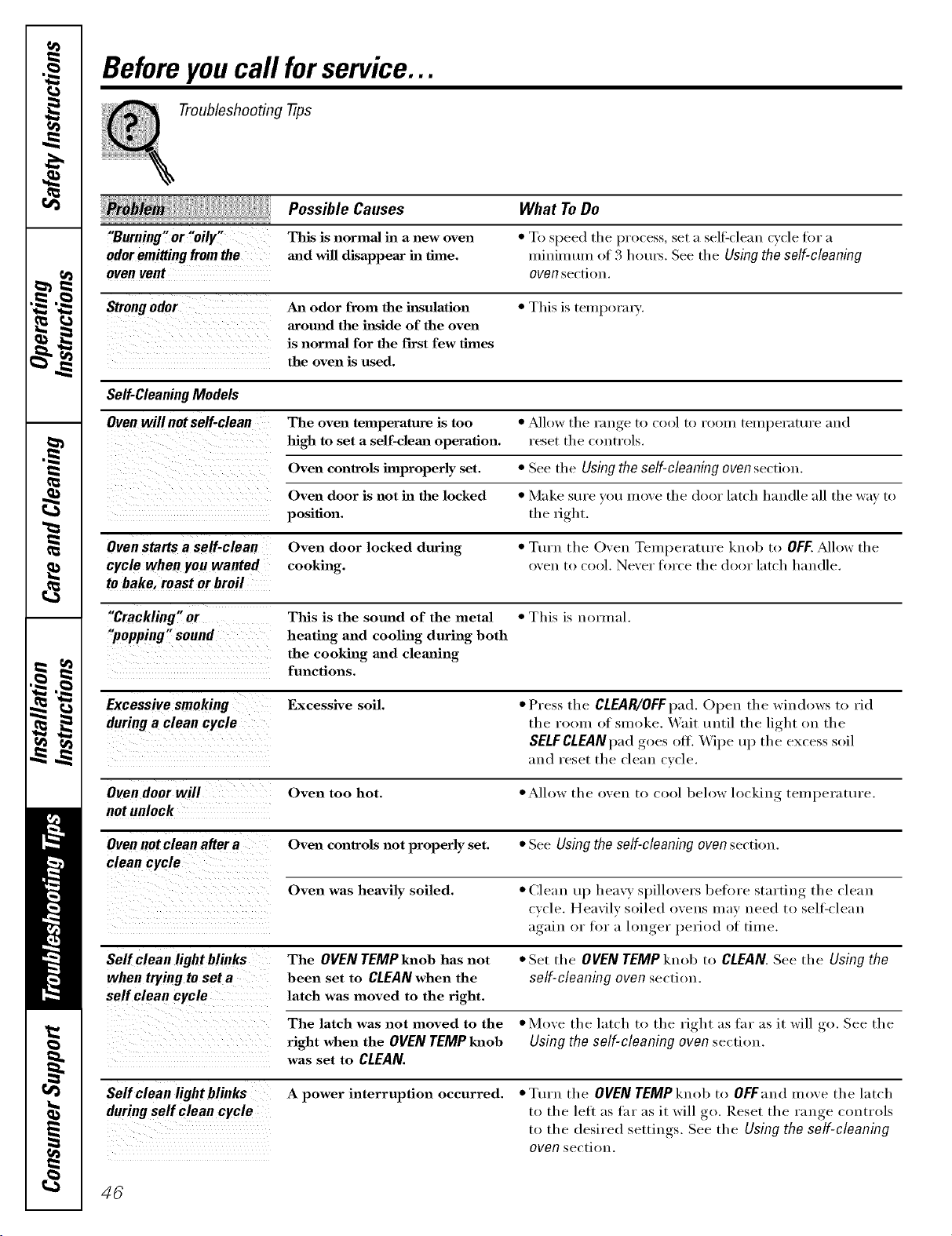
Beforeyoucall forservice...
Troubleshooting -tips
Possible Causes What ToDo
"Burning, or "oily" This is normal in a new oven
odoremittingfromthe mad will disappear ha thne.
oven vent
• To speed the process, set a sell:<lean cycle tor a
n/ininmm of 3 hems. See the Using the self-cleaning
oven section.
Strong odor An odor from the hlsulation • This is tempox'ax3'.
around the h_side of the oven
is normal for the first few thnes
the oven is used.
Self-CleaningModels
Ovenwillnotself-clean The oven temperature is too • _dlow the range to cool to r(/om temperature and
high to set a self-clema operation, reset the controls.
Oven controls hnproperly set. • See the Usingthe self-cleaningoven section.
Oven door is not ha the locked • Make sure xou inove the door latch handle all the wax to
position, the fight.
Oven starts a self-clean Oven door locked during • Turn the Oven Temperature knob to OFF. _Mlow the
cycle when you wanted cooking, o'_en to cool. Ne'_er force the door latch handle.
to bake, roast or broil
"Crackling,, ot This is the sound of the metal • This is i_ormal.
"popping" sound heating and cooling during both
the cooking aaad clemfing
functions.
Excessivesmoking Excessive soil. • Press the CLEAR/OFFpad. ()peIa the windows to rid
during a clean cycle the room of smoke. X,_ait until the light on the
SELFCLEANpadgoes off. Wipe up the excess soil
and reset the clean cxcle.
Oven door wilt Oven too hot. • Allow the o, en to cool beh,w locking temperature.
notunlock
Ovennotcleanaftera Oven conlrols not properly set. • See Usingtheself-cleaningovensection.
Oven was heavily soiled. • Clean up heax} spilloxers beti)re starting the clean
(xcle. Heavily soiled oxens may need to sell:clean
again or for a h)nger period of time.
Self clean light blinks The OVENTEMPknoh has not •Set the oggN TgMPknob t,, CLEAN.See the Using the
when trying to set a been set to CLEAN when the self-cleaning oven section.
latch was moved to the fight.
rO
The latch was not moved to the • Moxe the latch to the right as fhr as it will _ See the
fight when the OVEN TEMP lmob Using the self-cleaning oven section.
was set to CLEAN.
Self clean light blinks A power interruption occurred. • Turn the OVENTEMPknob to OFFand moxe the latch
to the left as far as it will go. Reset the range controls
to the desired settings. See the Using the self-cleaning
oven section.
46
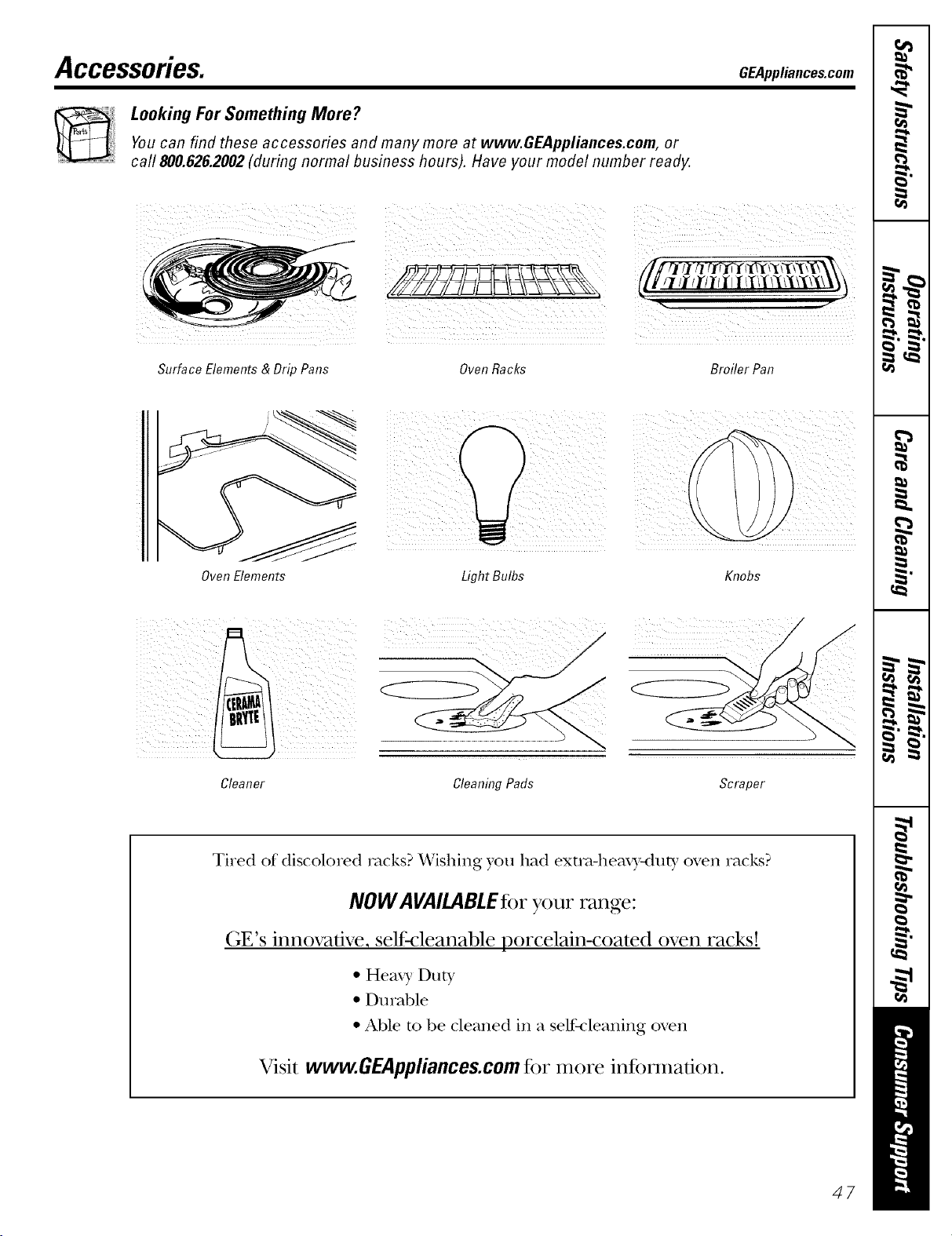
Accessories.
Looking For Something More?
Youcan find these accessories and many more at www.GEAppliances.com, or
call 800.626.2002 (during normal business hours). Have your model number ready.
Surface Elements & Drip Pans
Oven Elements
GEAppl_nce_com
i
Oven Racks Broiler Pan
i i i i
LightBulbs Knobs
Cleaner Cleaning Pads Scraper
Ti_ed of discolo_ed rocks? Wishing you had exmMleax3,-duty oven _acks?
NOW AVAILABLEfor your range:
(;E's innovative, self:cleanable porcelain-coated oven racks!
• Heax 3, Duty
• Durable
• Able m be cleaned in a self-cleaning oven
Visit www.GEAppliance$.com fi)r more infi)nnadon.
47
._ Notes.
m
wL
L
w
m
__
m
m
m
m
---
1=.
m
48
GE Service Protection Plus rM
GE, a name recognized worldwide _br quality and dependability; o_Iers y'ou
Service Protection Plus'"--comprehensive protection on all y'our appliances--
No Matter What Brand!
Benefits Include:
• Backed by GE
• All brands covered
• Unlimited service calls
• All parts and labor costs included
• No out-of-pocket expenses
• No hidden deductibles
• One 800 number to call
We71CoverAnyAppliance.
Anywhere. Anytime.*
You will be completel} satisfied with our serxice protection or you may request }our inonev back
on tile remaining xalue of _o/u" contract. No questions asked. It's that simple.
Protect vom" refligerat(m dishwasher; washer and (hTe_; range, TV, VCR and much more--any brand!
Plus there's no extra charge ti_r emergency service and low monthly financing is available. Even icemaker
coverage and tood spoilage protection is otii_red. You can rest easy, knowing that all vom" valuable
household products are protected against expensive repairs.
Place your confidence in (;E and call (Is in tile /J.S. toll-free at _UU._)Z_).ZZZ/-_
for inoi'e infoi'u/_ltion.
*.M11minds <:ov_ _ <1, up m 20 ?'_ a_ old, in II_ <onlinental U.S.
___CT2__2_............
Pleaseplacein envelopeand mail to:
General Electric Company
Warranty Registration Department
EO. Box 32150
Louisville, KY 40232-2150
49
Consumer Product Ownership Registration
Dear Customer:
Thank you for purchasing our product and thank you for placing your confidence in us.
_A/eare proud to ha_e you as a customer!
Follow these three steps to protect your new appliance investment:
Complete mid mail
your Consumer
Product Ownership
Registration today.
ttaw' the peace of
mind of knowing w(
call colltact VOl/ ill
tile tmlikely exent of a
satbly modification.
Atter mailing tile
registration below,
store this document
in a saib place. It
contains inlormation
you will need should
you require service.
Our selwice number is
800.GE.CARES
(800.432.2737).
Read your Owner's
Manual carethllv.
It will help you
operate yol/r lle',_
appliance properly.
Model Number Serial Number
, , , , , , I I , , , , ,
Important: If you did not get a registration card with your
product, detach and return the form below to
ensure that your product is registered, or register
online at GEAppliances.com.
Consumer Product Ownership Registration
Model Number Serial Number
I,,,,,, , , , , , I I , , , , , ,
MI: Ms. M*>,. Mix_,
Fir',l I I Lasll
Name I I I I I I I I I Nain(! I I I I I I I I I I I I
_1 r( (!1 I
Addr(';s I I I I I I I I I I I I I I I I I I I I I I I I
, I
I
I
Apt. # I i i
(;i,vI I I
l )ale Placed
hi Use III
Monlh
I I I I I I EqnailAddress*
I I I I I I I I s_l<,I
_,i!a r I I I Phon(
Nulnl)(!r I i I
Zip I
I ] Code I I I I
I-I,, I-I , , ,
I
I
0
GEAppliances
BE Consumer & htdustrial
Louisville, Kentucky
www, aEApplianees, eom
* Please provide your eqnail address to receive, via eqnail, discounts, special ottk,p, and other important
communications frOlll GE Appliances (GEA).
Check here if you do not want to receive communications ti-om GEA's careftflly selected l)artners.
FAII.I 5RE T() C()MPI.ETE AND RET[ RN Tt tIS CARD DOES NOT DIMINISII Y( )l JR
BL\RRAN'IY RI GI ITS.
For intormation about GEA's prixacy and data usage polic?; go to _avw.GEAppliances.com and click
on 'Prixacy Policy" or call 800.626.2224.
5O
Electric RangeWarranty.
Aft warranty service provided by our Factory Service Centers,
or an authorized Customer Care®technician. Toschedule service,
on-line, 24 hours a day, vis# us at GEAppliances.com,
or call 800.GE.CARES(800.432.2737).
Staple your receipt here.
Proofof the original purchase
date is needed to obtain service
under the warrant_
GEWill Provide:
Anypart of the range which fidls due to a defect in materials or workmanship,
Fromthe dateof the During this fullone-yearwarranty,GE will also proxide, freeofcharge,all labor
originalpurchase and in-home serxice to replace the defbcfixe [)art,
GEGLASSCOOl(TOPMODELJBP60ONLY--DOESNOTINCLUDEHOTPOINTMODELS:
Fromthedateof the
originalpurchase
(on GEg/asscooktop
modelsonly)
A rep/acementg/ass cooMop if it shotfld: crack due to them_al shock; discolor;
crack at the rtfl_l)er seal between the glass cooktop and the porcelain edge; or
if the pattern wea_ off,
A replacement radiant surface unitif it shotfld bm'n out.
During this limited additional four-year warranty,you will be responsible tbr any
labor or in-home service.
Service trips to your home to teach you how to use
the product.
hnproper hastaJlation, delivery or maintenance.
Failure of the product if it is abused, misused, or used for
other than the intended purpose or used commerciaJly.
Dmnage to the glass cooktop caused by use of clem_ers
other thm_ the recommended clemahlg cretans.
Dmnage to the glass cooktop caused by hardened spills
of sugm y materiaJs or melted plastic that are not clem_ed
accordh_g to the directions in the Owner's MmmaJ.
Replacement of house fuses or resetting of circuit
breakers.
Dmnage to the product caused by accident, fire, floods
or acts of God.
Incidental or consequential dmnage caused by possible
defects with this applimlce.
Damage caused after delivery.
This warranty is extended to the original purchaser and any succeeding owner for products purchased for home
use within the USA. In Alaska, the warranty excludes the cost of shipping or service calls to your home.
Some states do not allow the exclusion or limitation of incidental or consequential damages. This warranty gives
you specific legal rights, and you may also have other rights which vary from state to state. Toknow what your
legal rights are, consult your local or state consumer affairs office or your state's Attorney General.
Warrantor: General Electric Company.Louisville, KY40225
57
ConsumerSupport.
GEAppliancesWebsite GEAppliances.com
Have a question or need assistance with your appliance? Try the (;E Al)pliances Website 24 hom_ a (la);
any day of the year'. For greater convenience and faster se_Mce, you can now download Owner's Manuals,
order parts, cat;dogs, or even schedtfle service onqine. You can also "_&sk Ore" Team of Experts .....
your questions, and so much more...
ScheduleService
GEAppliances.com
Expert (;E repair se_Mce is onh one step away fl'om xour door Get on-line and schedule veto" service at
'_om" conxenience 24 hom_ any (la_ of the year! Or call 800.(;E.(:ARES (800.432.2737) (hwing n{mnal
business hom_.
RealLifeDesignStudio GEAppliances.com
GE SUl_ports the Universal Design concel_t--prodtu-ts, services and environments that can be used b)'
people of all ages, sizes and capabilities. We recognize the need to design fin" a wide range of ph):sical and
mental abilities and impaim/ents. For details of GE's Universal Design ai)plications, including kitchen
design ideas for people with disabilities, check out otlr Websim today. For the heating impaired, please call
800.TDD.GEAC (800.833.4322).
Extended Warranties GEAppliances.com
Pro'chase a (;E extended warrant_ and learn about special discounts that are axailable while _our warrant_
is still in effect. You can i_m'chase it on-line anytime, or call 800.626.2224 dtmng nomml business horus.
(;E (_onsumer Home Serxices will still be there after )our warranty expires.
PartsandAccessories GEAppliances.com
Individtmls qualified to se_Mce their own appliances can have parts or accessories sent directly to their
homes (VISA, MasterCard and Discover cards are accepted). Order on-line toda 5 24 hom_ e\:ei_, ' day or
by phone at 800.626.2002 dtmng nomml business hom_.
Instructionscontainedin this manualcoverprocedurestobeperformedbyanyuser.Otherservicinggenerally
should be referred to qualified service personnel Caution must be exercised, since improper servicing may cause
unsafe operation.
ContactUs GEAppliances.com
If you are not satisfied with the service you receive from GE, contact us on ore" _4'ebsite with all the details
inchtding yore" phone numbe_; or write to: General Manage_; Customer Relations
GE Appliances, Appliance Park
I,ouisville, KY 40225
RegisterYourAppliance GEAppliances.com
Register your new applim_ce on-lhae---at your convenience! Timeh', I_r°(hwt registration, will allow for
enhanced commtmication and prompt service trader the terms of veto" warrant), should the need a_ise.
You mm also mail in the pre-pfinted registration card included in the I)ackin'"_ material.
Thisbook is printed on recycled paper.
Printed in Mexico