Operation Guide 3417/3418
E-9
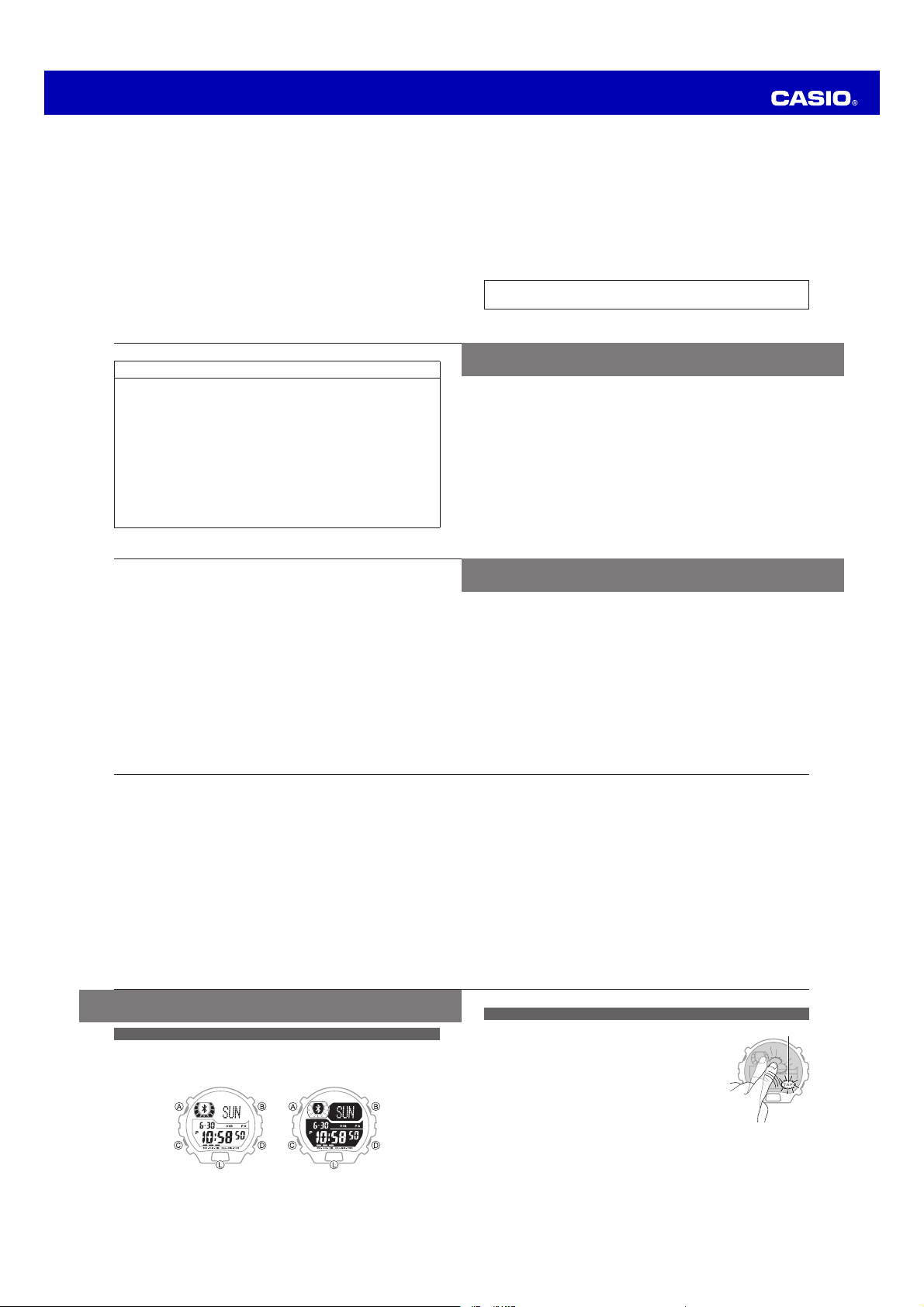
Tap Operations
Tap indicator
The word “tap” in this manual refers to striking the center of
watch display with your fi ngertip.
Example:
Tap twice to stop an ongoing tone or vibration alert for a
watch alarm.
How to tap:
Lightly strike the watch display twice with the tip of your
fi nger. (double-tap)
Important!
x The tap function is enabled only while the Tap indicator is fl ashing on the watch
display.
x The Tap indicator fl ashes automatically whenever the tap function is enabled
and can be used to stop a watch alarm or time up alert, etc.
E-8
About this User’s Guide
Display Types
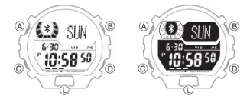
Depending on the model of your watch, display text appears either as dark fi gures
on a light background or light fi gures on a dark background. All sample displays in
this manual are shown using dark fi gures on a light background.
x Note that the display style of a watch is fi xed. You cannot switch between styles.
E-7
Illumination .......................................................................................................... E-44
To illuminate the display .................................................................................E-44
Using Auto Light ............................................................................................E-45
To specify the illumination duration .................................................................E-48
Other Settings ..................................................................................................... E-50
To turn the button operation tone on or off .....................................................E-50
To change the alarm/timer alert method .........................................................E-52
Low Battery Indication ........................................................................................ E-54
Specifi cations ..................................................................................................... E-56
Operating Precautions ....................................................................................... E-m1
User Maintenance ............................................................................................ E-m11
E-6
To confi gure the Summer Time (DST) setting ..................................................E-26
Alarms and Hourly Time Signal .......................................................................... E-28
To enter the Alarm Mode................................................................................E-28
To change an alarm setting ............................................................................E-30
To stop a tone/vibration alert operation ..........................................................E-35
To test the alarm ............................................................................................E-36
Stopwatch ........................................................................................................... E-37
To enter the Stopwatch Mode ........................................................................E-37
To measure time with the stopwatch ..............................................................E-38
Timer ................................................................................................................... E-40
To enter the Timer Mode ................................................................................E-40
To set the timer start time ..............................................................................E-41
To perform a countdown ................................................................................E-42
To stop a tone/vibration alert operation ..........................................................E-43
E-5
Contents
Features ................................................................................................................ E-3
About this User’s Guide ........................................................................................ E-8
Display Types ..................................................................................................E-8
Tap Operations ................................................................................................E-9
Button Names and Display Indications ............................................................E-10
Display Indicators ..........................................................................................E-12
Using Modes ....................................................................................................... E-14
Mode Overview ..............................................................................................E-16
Adjusting the Time Setting ................................................................................. E-18
Confi guring Current Time and Date Settings Manually .....................................E-19
World Time .......................................................................................................... E-24
To view the times in other time zones .............................................................E-24
E-4
◆ Stopwatch .................................................................................. Page E-37
The stopwatch measures elapsed time up to 1,000 hours in 1/100-second
increments.
◆ Timer .......................................................................................... Page E-40
The timer counts down from a preset start time, and the watch sounds a tone or
vibrates when the countdown reaches zero.
E-3
Features
Your watch provides you with the features and functions described below.
◆ Communication with your mobile phone ..........Visit the CASIO website
Connect with a Bluetooth enabled mobile phone and communicate with it.
For more information, visit the “User’s Guide for Mobile Link Functions” page at the
CASIO website.
◆ World Time ................................................................................ Page E-24
Instantly view the current time in 100 cities around the globe.
◆ Alarms ........................................................................................ Page E-28
The watch can be confi gured to sound a tone or vibrate when a preset alarm time
is reached.
E-2
Mobile Link Function
This product includes functions that allow it to communicate with Bluetooth
®
4.0
(referred to as “Bluetooth” in this manual) capable mobile phones and other
devices, to sound an alert tone, perform vibration alert, and display alerts when a
phone call and/or mail is received on your phone, etc. (Mobile Link Function)
x This product complies with or has received approval under radio laws in various
countries and geographic areas. Use of this product in an area where it does not
conform to or where it has not been approved under applicable radio laws may
be punishable under local laws. For details, see the separate “List of Countries
and Geographic Areas where Product Conforms to Radio Laws or Has Been
Approved”.
x Use of this product inside of an aircraft is restricted by the aviation laws of each
country. Be sure to obey instructions provided by fl ight personnel concerning
use of devices such as this product.
x For Mobile Link operational procedures and a Q&A, go to the website below.
CASIO website: http://world.g-shock.com/ble/guide/
E-1
Congratulations upon your selection of this CASIO watch.
To ensure that this watch provides you with the years of service for which it is
designed, carefully read and follow the instructions in this manual, especially the
information under “Operating Precautions” and “User Maintenance”.
Be sure to keep all user documentation handy for future reference.
Bluetooth
®
is a registered trademark or trademark of Bluetooth SIG, Inc. of the
United States.
MA1405-EB
Ú
#!3)/#/-054%2#/,4$
Operation Guide 3417/3418
E-19
Confi guring Current Time and Date Settings Manually
◆ To confi gure time and date settings
●
1
In the Timekeeping Mode, hold down
A
for about two seconds until the time
zone setting screen appears.
[SET Hold] will appear on the watch display, followed
by the time zone setting screen.
Time zone
E-18
Adjusting the Time Setting
When Mobile Link is enabled, the watch’s time and date settings are automatically
adjusted to match those of the phone. When Mobile Link is disabled, you should
adjust the time and date settings manually.
E-17
Mode Functions More Info
Setup Mode
x For confi guring duration, method, and other settings
for alerts from the phone
CASIO
website
Note
x For information about Mobile Link functions, visit the “User’s Guide for Mobile Link
Functions” page of the CASIO website.
E-16
Mode Overview
Mode Functions More Info
Timekeeping Mode
x Current time display
x Time, date, summer time settings; 12/24-hour display
switching
x Manual time adjustment
x Alarm/timer alert method settings
E-14
E-18
E-52
Control Mode
x Remote operation and information acquisition by data
communication (Control Function)
CASIO
website
World Time Mode
x Current time in 100 cities (35 time zones) around
the globe
E-24
Alarm Mode
x Alarm time and on/off settings
x Hourly time signal on/off
E-28
Stopwatch Mode x Elapsed time measurement E-37
Timer Mode x Start time settings; countdown E-40
E-15
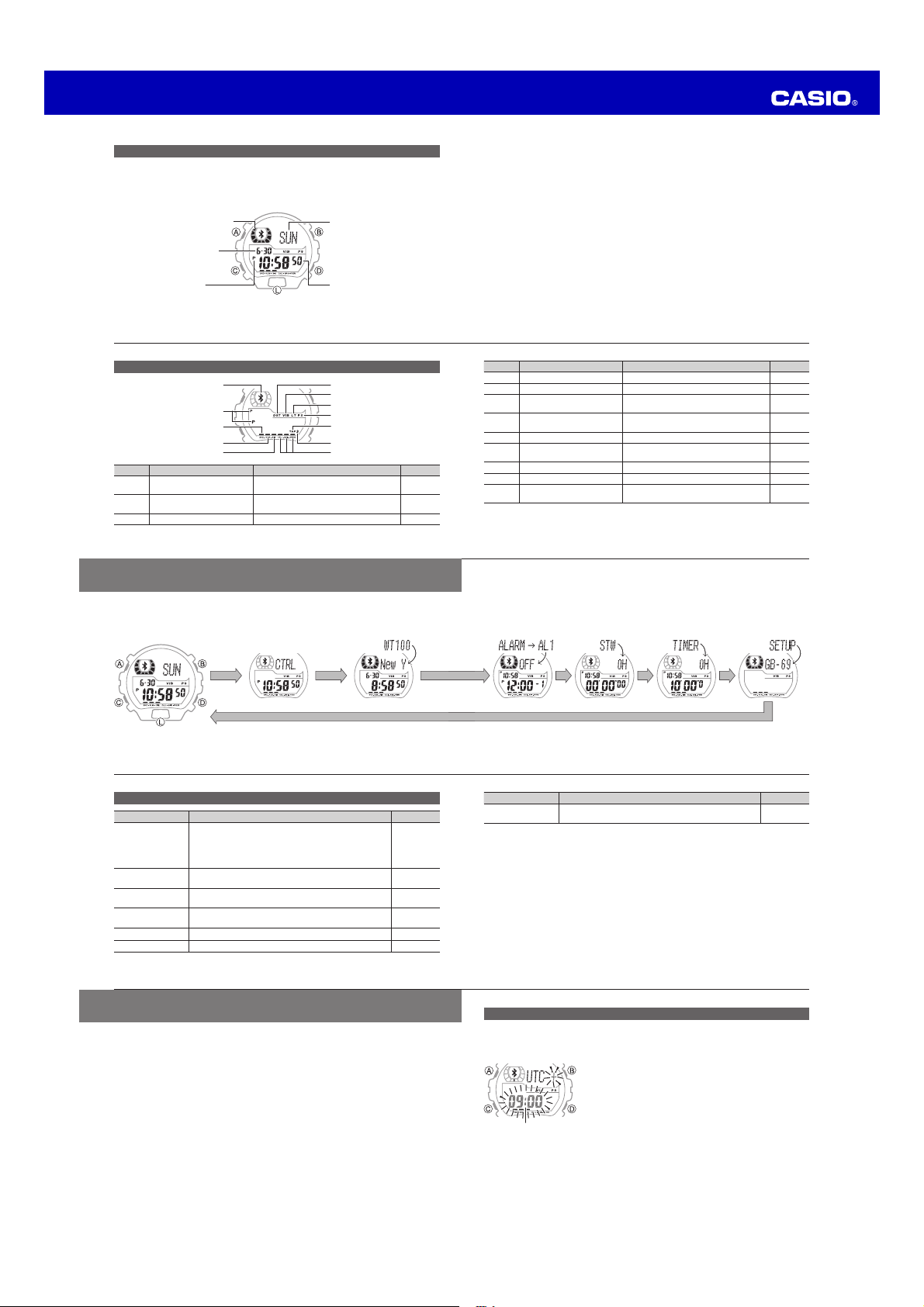
Alarm Mode Stopwatch Mode Timer Mode Setup Mode*
* For information about the Control Mode and Setup Mode, visit the CASIO website
at: http://world.g-shock.com/ble/guide/.
E-14
Using Modes
Each press of C cycles between modes as shown in the illustration below.
Timekeeping Mode Control Mode* World Time Mode
E-13
Number Name Meaning More Info
4
Alarm indicator Alarm turned on. E-33
5
Hourly time signal indicator Hourly time signal turned on. E-33
6
DST indicator
Summer time turned on (time advanced
by one hour).
E-26
7
Vibration indicator
Vibration alert turned on for alarms/
timer.
E-53
8
Auto Light indicator Auto Light enabled. E-46
9
Power Saving indicator
Mobile Link functions availability limited
to save power.
CASIO
website*
:
Tap indicator (fl ashing) Double-tap operation is enabled. E-9
A
Mute indicator Button operation tone disabled. E-51
B
Alert indicator
Alerts an incoming call, email receipt, or
some other phone event.
CASIO
website*
* Visit the “User’s Guide for Mobile Link Functions” page of the CASIO website.
E-12
Display Indicators
!
Number Name Meaning More Info
1
Bluetooth icon Mobile Link functions enabled.
CASIO
website*
2
PM indicator
Indicates p.m. times during 12-hour
timekeeping.
E-10
3
Snooze indicator Snooze turned on. E-33
E-11
Note
x The names shown above are used in the button operation explanations throughout
this User’s Guide.
x Note that the illustrations in this User’s Guide are intended for reference only. The
actual watch may appear somewhat different than depicted in the illustrations.
E-10
Button Names and Display Indications
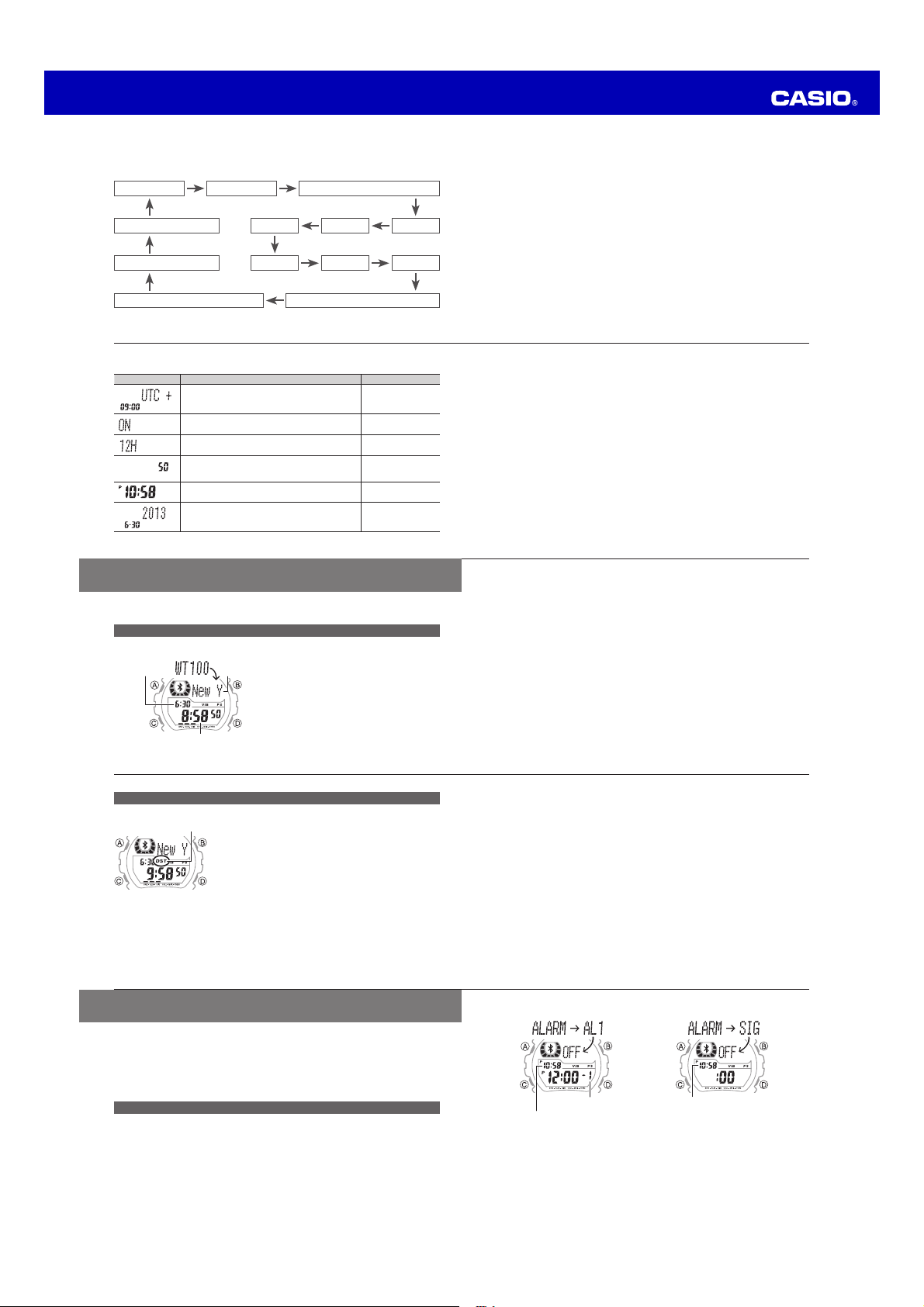
Operations on this watch are performed using buttons A through D, and the L
button. The illustration below shows the locations and the meanings of the different
buttons and display indicators.
See “Using Modes” (page E-14).
Month, day
(Illuminates display)
PM indicator
(no display for AM)
Hour, minutes, seconds
Changes with current
time seconds
Day of the week
Operation Guide 3417/3418
E-29
Alarm setting screen
Alarm number
Current time
Hourly time signal setting screen
Current time
Note
x If you do not perform any operation for about two or three minutes while in the
Alarm Mode, the watch will automatically return to the Timekeeping Mode.
E-28
Alarms and Hourly Time Signal
You can set up to fi ve different alarms. When any one of the alarm times is reached
the watch will sound an alarm tone or vibrate for about 10 seconds.
In the case of snooze, the alarm will sound up to seven times at fi ve-minute intervals.
The hourly time signal causes the watch to sound a tone or vibrate every hour on
the hour.
See “To change the alarm/timer alert method” (page E-52).
To enter the Alarm Mode
●
In the Timekeeping Mode, press
C
three times to enter the Alarm Mode.
See “Using Modes” (page E-14).
An alarm setting screen (Alarm 1 through Alarm 4, Snooze, or hourly time signal)
will appear.
E-27
Note
x Summer time, or Daylight Saving Time (DST) as it is known in some countries,
calls for setting clocks ahead one hour from standard time during the summer
season. Note that the period during which and the areas where summer time is
applied depend on each country. Some countries or geographic areas may not use
summer time.
x The DST indicator will be on the display and timekeeping will be advanced by one
hour when summer time is turned on.
x The summer time setting cannot be changed for the UTC World Time zone.
x The summer time setting is applied to the currently selected time zone only. A
setting confi
gured for one time zone does not affect any other time zone.
E-26
To confi gure the Summer Time (DST) setting
●
In the World Time Mode, hold down
A
for about two seconds.
x [DST Hold] will appear on the display. After that,
[DST Hold] will disappear and the summer time
setting will toggle to either on or off.
x DST
on the display indicates that summer time is
turned on.
Important!
x Even when Mobile Link is enabled, you need to turn the summer time (DST) on
or off manually for World Time.
DST indicator
E-25
●
2
Use
B
and
D
to scroll through the World Time Mode city names.
See “City Name List” (back of this manual).
x Scrolling to a city name displays the current time in that city.
x Holding down either button scrolls at high speed.
x To display the UTC city name (UTC offset 0), press B and D at the same
time.
x Pressing A causes the currently selected city name to scroll across the
display from the beginning of the name.
●
3
To return to the Timekeeping Mode, press
C
fi ve times.
E-24
World Time
World Time lets you display the current time in any one of 100 cities (35 time zones)
around the world.
To view the times in other time zones
●
1
In the Timekeeping Mode, press
C
twice to enter the World Time Mode.
See “Using Modes” (page E-14).
1
[WT100] will appear on the display for
about one second, and then the name
of the currently selected World Time City
will appear.
Current time in World Time city
Current date in
World Time city
City name
E-23
Note
x Refer to the “City Name List” (back of this manual) to determine the time zone of
the city where you will be using the watch.
- Summer time, or Daylight Saving Time (DST) as it is known in some countries,
calls for setting clocks ahead one hour from standard time during the summer
season. Note that the period during which and the areas where summer time is
applied depend on each country. Some countries or geographic areas may not
use summer time.
- The DST indicator will be on the display and timekeeping will be advanced by one
hour when summer time is turned on.
- The watch’s Full Auto Calendar automatically makes adjustments in the day
setting to account for different length months and leap year.
●
4
After all the settings are the way you want, press
A
to return to the
Timekeeping Mode.
E-22
●
3
Use
B
and
D
to change the currently selected setting as described below.
Screen Setting Operation
Time zone of the city where you will use the
watch
Use B and D.
Summer time on/off
Press D.
12-hour (12H)/24-hour (24H) timekeeping
switching
Press D.
Seconds 00-reset
x From 30 to 59 seconds, resetting adds 1 to the
minute setting.
Press D.
Hour and minutes settings
Use B and D.
Year, month, day settings
Use B and D.
E-21
Note
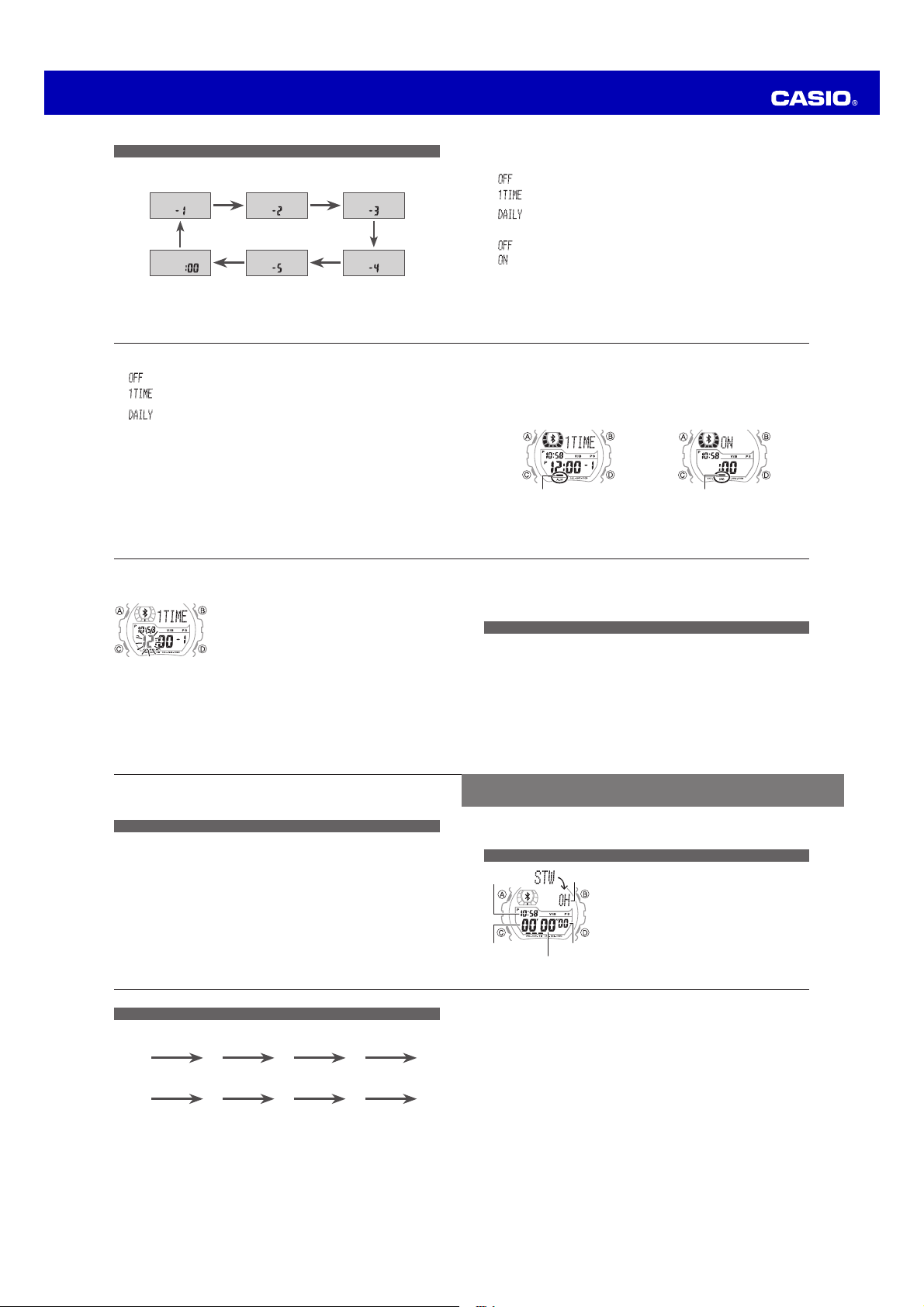
x The numbers in the above diagram indicate how many times you need to press C
to display each setting.
x Power Saving is a function that saves power by limiting the availability of Mobile
Link functions.
For more information, visit the “User’s Guide for Mobile Link Functions” page at the
CASIO website.
E-20
●
2
Use
C
to select the item whose setting you want to change.
Each press of C cycles through available settings in the sequence shown below.
Display illumination duration
10
Day
8
Alarm/Timer Alert Method
11
Time Zone
C C
Summer time
1
12/24-hour timekeeping
2
Seconds
3
Power Saving
12
Operation tone on/off
9
CC
C
C
C
Hour
4
C
Minute
5
C
C
Month
7
C
C
Year
6
C
Operation Guide 3417/3418
E-39
Note
x Once started, elapsed time measurement continues until you press D to stop
it, even if you change to a different mode and even if the stopwatch reaches
the elapsed time measurement limit.
x If you change to another mode while a split time is frozen on the display, split
time display will be canceled.
E-38
To measure time with the stopwatch
●
The following shows button operations for stopwatch operations.
x Elapsed time/cumulative time
D
D D D B
Start Stop (Restart) (Stop) Reset
x Split time (paused elapsed time reading)
D
B B D B
Start Split Split time display
cancel
Stop Reset
Pressing B while timing is being performed displays the split time (with [SPLIT]
fl ashing), but elapsed timing continues internally.
E-37
Stopwatch
The stopwatch measures elapsed time in units of 1/100 seconds up to 999 hours,
59 minutes, 59.99 seconds. Elapsed time returns to zero automatically and timing
continues from there when the maximum limit is reached.
To enter the Stopwatch Mode
●
In the Timekeeping Mode, press
C
four
times to enter the Stopwatch Mode.
See “Using Modes” (page E-14).
[STW] will appear on the display for about one
second, and then the stopwatch screen will
appear.
Seconds
Minutes
HoursCurrent time
1/100 second
E-36
- Displaying the snooze setting screen
- Displaying the Timekeeping Mode setting screen
To test the alarm
●
In the Alarm Mode, hold down
D
to perform the tone/vibration alert
operations.
E-35
●
6
After all the settings are the way you want, press
A
to exit the setting
screen.
●
7
To return to the Timekeeping Mode, press
C
four times.
To stop a tone/vibration alert operation
●
Double-tapping the center of the watch display or pressing any one of the
buttons will stop an ongoing tone/vibration alert operation.
Note
x In the case of snooze, the alarm will sound up to seven times at fi ve-minute
intervals.
x The Snooze Indicator (SNZ) will fl ash on the display during the fi ve-minute intervals
between alarms.
x Snooze will be canceled when any of the following occurs while the Snooze
Indicator (SNZ) is fl
ashing on the display.
- Disabling snooze
E-34
●
3
To change an alarm time setting, hold down
A
for about two seconds until
the hour digits of the current alarm time start to fl ash.
[SET Hold] will appear on the display. After that, [SET
Hold] will disappear and the hour digits will fl ash.
●
4
Each press of
C
causes the fl ashing to move between the hour and the
minutes digits.
The fl ashing digits are the ones that are selected.
●
5
Use
B
and
D
to change the fl ashing setting, and set the hour and minutes
you want.
x Holding down either button scrolls the setting at high speed.
x If you are using 12-hour timekeeping, the PM indicator will appear for times
between noon and 11:59 p.m.
E-33
The alarm indicator is displayed while any alarm (Alarm 1 through Alarm 4) is
turned on, while the Hourly Time Signal indicator is displayed while the hourly
time signal is turned on.
While snooze is turned on, the Alarm Indicator and Snooze Indicator are both
displayed.
Hourly time signal on
Hourly time signal indicator
Alarm on
Alarm indicator
E-32
Snooze
: Alarm does not sound.
: Alarm sounds at the preset time, and up to seven times at fi ve-minute intervals
thereafter. This operation is performed only once.
: Alarm sounds at the preset time, and up to seven times at fi ve-minute intervals
thereafter. This operation is performed at the preset time each day.
E-31
●
2
Use
B
to toggle the displayed setting between on and off.
Alarm 1 through Alarm 4
: Alarm does not sound.
: Alarm sounds only once at the preset time and does not sound again after
that.
: Alarm sounds at the preset time each day.
Hourly time signal
: Hourly time signal does not sound.
: Hourly time signal sounds every hour on the hour.
E-30
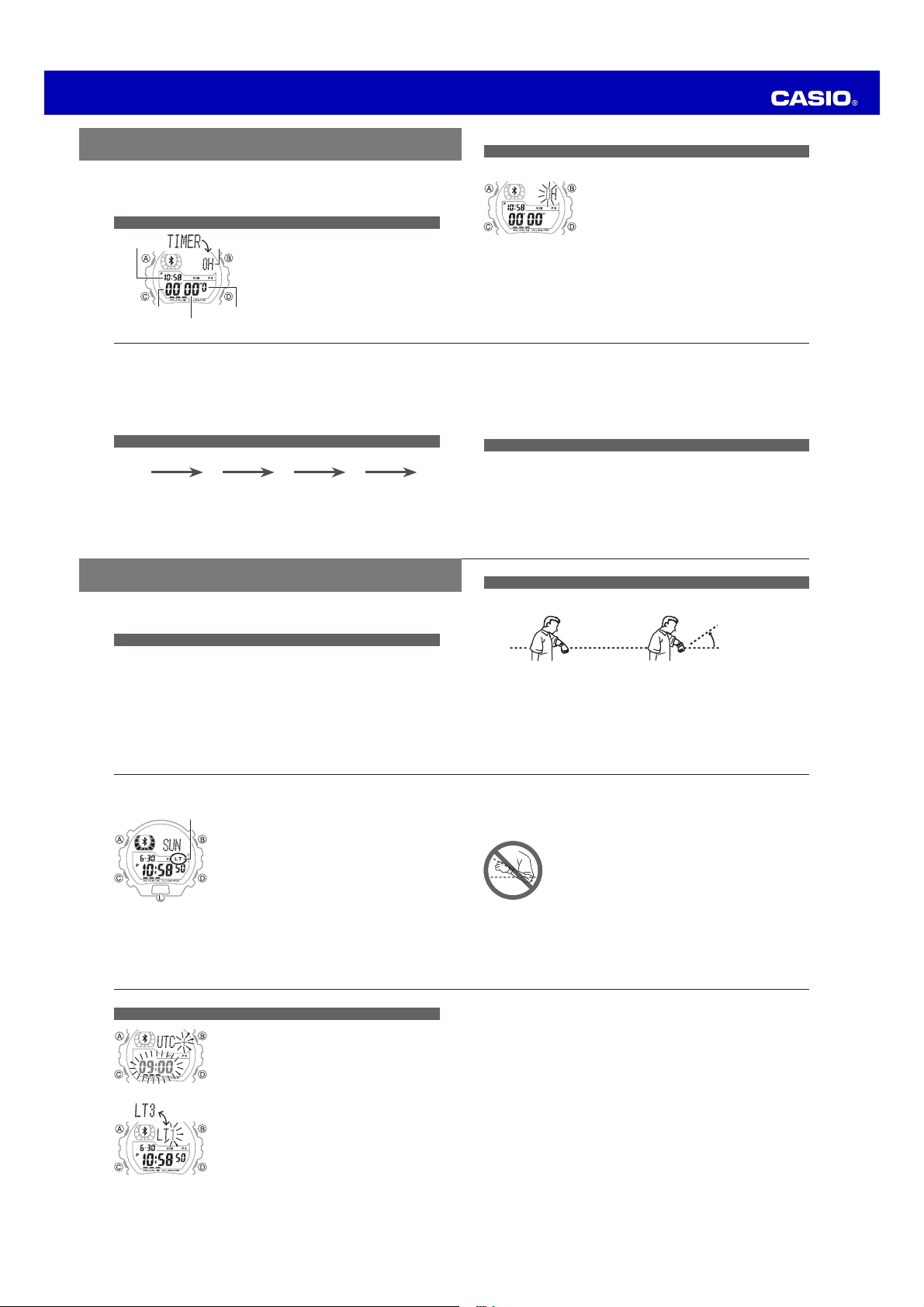
To change an alarm setting
●
1
In the Alarm Mode, use
D
to select the alarm whose setting you want to
change.
Alarm 1
( )
D D
Alarm 2
( )
Alarm 3
( )
Alarm 4
( )
Hourly Time
Signal ( )
Snooze Alarm
( )
DD
D D
Operation Guide 3417/3418
E-49
●
3
Press
D
to toggle the illumination duration setting between [LT1]
(1.5seconds) and [LT3] (3 seconds).
●
4
To return to the Timekeeping Mode, press
A
.
E-48
To specify the illumination duration
●
1
In the Timekeeping Mode, hold down
A
for about
two seconds until the time zone setting screen
appears.
●
2
Press
C
10 times to display the illumination
duration setting screen.
See “Confi guring Current Time and Date Settings
Manually” (page E-19).
The screen will show either [LT1] or [LT3].
E-47
◆ Auto Light Precautions
x The Auto Light may not operate properly when the watch is angled towards your
face from an angle greater than about 15 degrees as shown in the illustration
below.
x Leaving Auto Light enabled can run down the watch’s battery
due to frequent display illumination.
x Electro-static charge or magnetism can interfere with proper Auto
Light operation. If this happens, try lowering your arm and then
angle it towards your face again.
x When moving the watch you may note a slight rattling sound.
This is due to operation of Auto Light, which determines the
current orientation of the watch. It does not indicate malfunction.
x Auto Light will remain enabled for about 6 hours after you turn it
on. After that Auto Light will disable automatically.
E-46
◆ To enable/disable Auto Light
●
In the Timekeeping Mode, hold down
L
for at least
three seconds.
This will toggle Auto Light between enabled (LT
indicator displayed) and disabled (no indicator
displayed).
Auto Light indicator
E-45
Using Auto Light
When Auto Light is enabled, angling the watch towards your face at an angle of 40˚
or greater will illuminate the display automatically.
40˚ or greater
Note
x Auto Light is disabled automatically while an alarm is sounding.
E-44
Illumination
You can use the procedure below to illuminate the display for easy reading in the
dark. The watch also has an Auto Light function that illuminates the display whenever
the watch is angled towards your face for reading.
To illuminate the display
●
Press
L
to illuminate the display.
Note
x Illumination will turn off automatically if it is on when an alarm alert, incoming
call alert, or any alert operation starts.
◆ Light Use Precautions
Frequent use of the light can shorten battery life.
E-43
Note
x A tone/vibration alert is performed for about 10 seconds when the end of the
countdown is reached, and the display returns to the screen that was shown
before the countdown was started.
x Even if you exit the Timer Mode while a timer countdown is ongoing, the
countdown will continue and the tone/vibration alert operation will be
performed when the end of the countdown is reached.
To stop a tone/vibration alert operation
●
Double-tapping the center of the watch display or pressing any one of the
buttons will stop an ongoing tone/vibration alert operation.
E-42
●
3
Use
B
and
D
to change the currently fl ashing digits (hours, minutes, or
seconds).
x Holding down either button scrolls the setting at high speed.
x To specify a start time of 100 hours, set the timer to 0H00'00".
●
4
After all the settings are the way you want, press
A
to exit the setting
screen.
To perform a countdown
●
The following shows button operations for a countdown.
D
D D D B
Start Stop (Restart) (Stop) Reset
E-41
To set the timer start time
●
1
In the Timer Mode, hold down
A
for about two seconds.
[SET Hold] will appear on the display. After that, [SET
Hold] will disappear and the hours digits will fl ash.
Note
x If a timer countdown operation is in progress, press
D to stop it and then press B to reset the timer to
its start time before performing the above step.
x If a timer countdown operation is paused, press B
to reset the timer to its start time before performing
the above step.
●
2
Each press of
C
moves the fl ashing between the hours, minutes, and
seconds digits.
The fl ashing digits are the ones that are selected.
E-40
Timer
The timer start time can be set in one-second increments up to 100 hours. The
watch will sound a tone or vibrate for about 10 seconds when the end of the timer
countdown is reached.
See “To change the alarm/timer alert method” (page E-52).
To enter the Timer Mode
●
In the Timekeeping Mode, press
C
fi ve
times to enter the Timer Mode.
See “Using Modes” (page E-14).
Minutes
Current time
Seconds
Hours
1/10 Second

Operation Guide 3417/3418
E-59
Other : Low battery alert; Auto return to Timekeeping Mode; Power Saving;
Vibration alert; Tap function; High-brightness LED light; Auto Light;
Selectable illumination duration; Operation tone on/off
Battery : One lithium battery (Type: CR2032)
Approximate
Battery Life
: 2 years
Usage Conditions
x Mobile Link operation: 12 hours/day
x Control function: 2 hours/day
x Incoming call alert: 3 times (tone and vibration for 5 seconds)/day
x Incoming mail, other alerts: 10 times (tone only for 5 seconds)/day
x Illumination: Once (1.5 seconds)/day
x Alarm: Once (tone only for 10 seconds)/day
Approximate battery life can be shortened by more frequent
operation.
E-58
Mobile Link
Functions
: Time Correction
Auto correction/manual correction
Alert
Tone and/or vibration alert for incoming calls, incoming mail,
incoming SNS, calendar alert, etc.
Information display (last received information)
Phone fi nder
Watch operation sounds the alert sound of the mobile phone.
Data Communication Specifi cations
Bluetooth
®
v4.0 (Bluetooth
®
low energy technology compatible)
Data rate: 1 Mbps
Transmission output: 0 dBm (1 mW)
Communication range: 2 meters max. (depends on environment)
Encryption: 128 bit AES
E-57
Stopwatch : Measuring unit: 1/100 second
Measuring capacity: 999:59'59.99" (1000 hours)
Measuring accuracy:
±
0.0006%
Measurement functions: Elapsed time, cumulative time, split times
Countdown
Timer
: Countdown unit: 1/10 second
Countdown range: 100 hours
Measuring accuracy:
±
0.0006%
Setting unit: 1 second
Time up alert: 10-second tone or vibration
E-56
Specifi cations
Accuracy
at normal
temperature
:
±
15 seconds a month
Basic
Functions
: Hour, minutes, seconds; a.m./p.m. (P); 12/24-hour timekeeping
format; Month, day, day of the week; Full auto calendar (2000 to
2099); Summer time setting
World Time : Current time in 100 cities (35 time zones) + UTC (Universal
Coordinated Time) time display; Summer time setting
Alarms and
Hourly Time
Signal
: Alarms
5 daily alarms with 1 snooze alarm
Setting units: Hour, minute
Tone or vibration alert: 10 seconds
Hourly time signal
Beeps or vibrates every hour on the hour
E-55
The following describes how display of the low battery indicator affects watch
operation.
x The watch enters the Timekeeping Mode.
x Bluetooth connection turns off and Mobile Link is
disabled.
x Display illumination becomes disabled.
x Alert sound and vibration become disabled.
x Double-tap operation becomes disabled.
Note
x Repeated use of Mobile Link Functions, display illumination, tone/vibration alert,
or other functions over a short period can result in a momentary drop in battery
voltage. This can cause temporary display of the low battery indicator and limited
availability of some watch functions.
Low Battery indicator
E-54
Low Battery Indication
A low battery indicator appears on the display when battery voltage drops below
a certain level. Availability of some functions becomes limited while the low battery
indicator is displayed. If the low battery indicator remains on the display, have the
battery replaced as soon as possible.
Note
x For information about battery life guidelines and supported battery types, see the
product specifi
cations.
See “Specifi cations” (page E-56).
E-53
●
3
Press
D
to toggle the setting between [VIB] and [BEEP].
The Vibration indicator is shown on the display while [VIB] is selected.
: Alert by vibration.
: Alert by tone.
Vibration alert
Vibration indicator
Tone alert
●
4
To return to the Timekeeping Mode, press
A
.
E-52
●
4
To return to the Timekeeping Mode, press
A
.
Note
x The above procedure affects the button operation tone only. The alarm, hourly time
signal, and time up alarm are not affected.
To change the alarm/timer alert method
●
1
In the Timekeeping Mode, hold down
A
for about
two seconds until the time zone setting screen
appears.
1
●
2
Press
C
11 times to display alert setting screen.
See “Confi guring Current Time and Date Settings
Manually” (page E-19).
The screen will show either [VIB] or [BEEP].
E-51
●
2
Press
C
nine times to display the button operation
tone setting screen.
See “Confi guring Current Time and Date Settings
Manually” (page E-19).
The screen will show either [KEY
] or [MUTE].
●
3
Press
D
to toggle the setting between [KEY ] (ON)
and [MUTE] (OFF).
When [MUTE] (OFF) is selected, a Mute indicator is
displayed to indicate that the button operation tone
will not sound.
Mute indicator
E-50
Other Settings
You can use the procedures in this section to turn the tone that sounds when you
press a button on or off.
You can also select either tone or vibration as the alert method for the alarm and
timer.
To turn the button operation tone on or off
●
1
In the Timekeeping Mode, hold down
A
for about
two seconds until the time zone setting screen
appears.
Operation Guide 3417/3418
L-5
Note
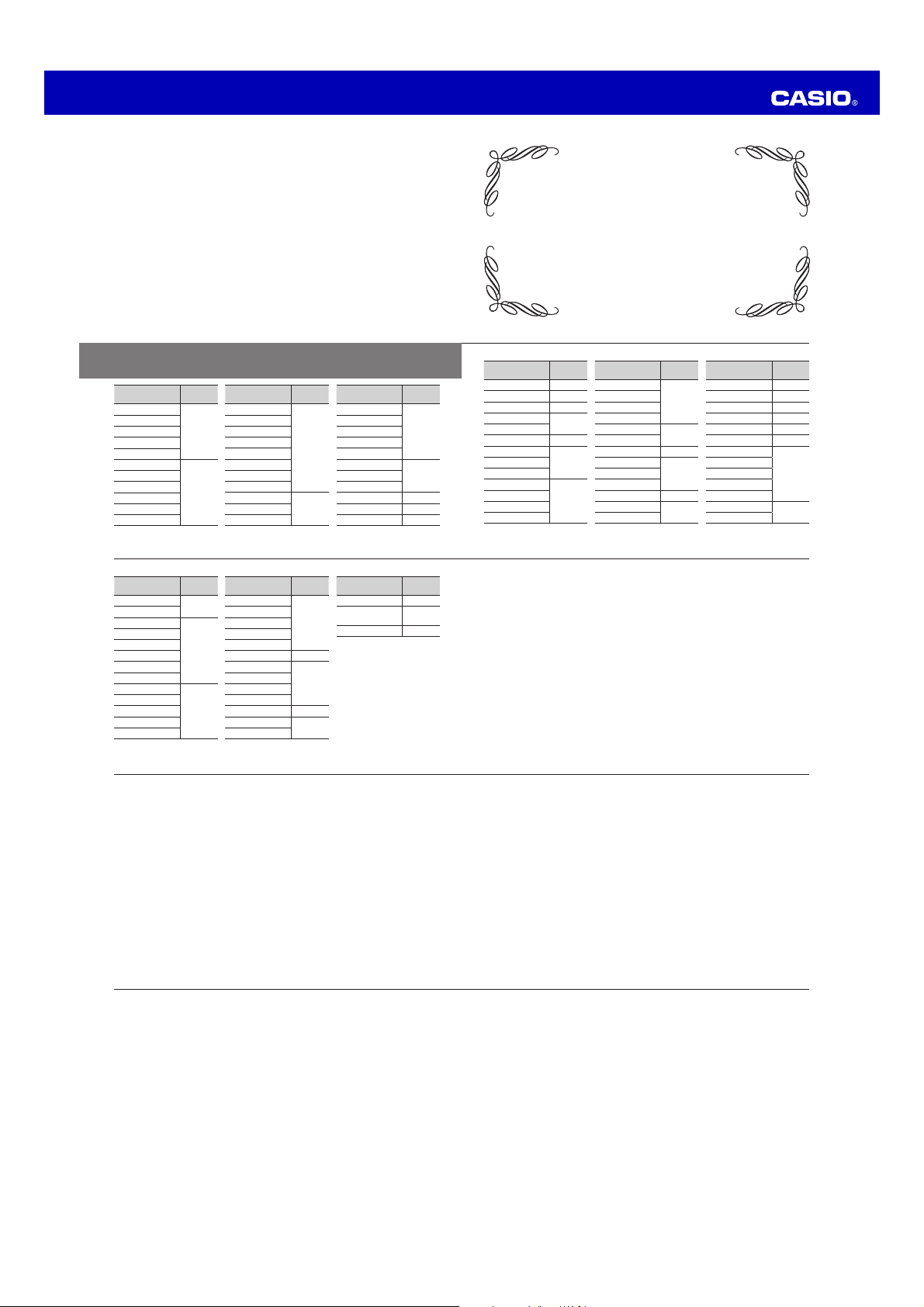
x The above list shows the city names of this watch.
x If you will use the watch in a city that is not included in the City Name List, select a
city name that is in the same time zone as your city.
x Time zones in the above list are in accordance with Coordinated Universal Time
(UTC).
* In June 2012, the time offsets of the cities listed below were changed by +1 hour.
Note that this watch does not refl
ect this change and it uses the former offsets of
these cities.
When using this watch in the cities below, always leave the summer time setting
ON in order to advance the time by one hour.
Moscow
Novosibirsk
Vladivostok
L-4
City Name
Time
Zone
Chihuahua
–7
Denver
Mexico City
–6
Winnipeg
Dallas
Houston
Guatemala City
Chicago
Atlanta
–5
Havana
Toronto
Lima
Washington DC
City Name
Time
Zone
Kingston
–5
Philadelphia
Bogota
New York
Boston
Caracas –4.5
Santiago
–4
La Paz
San Juan
Halifax
St.John’s –3.5
Buenos Aires
–3
Montevideo
City Name
Time
Zone
Rio de Janeiro –3
Fernando de
Noronha
–2
Praia –1
L-3
City Name
Time
Zone
Karachi +5
Delhi +5.5
Kathmandu +5.75
Novosibirsk*
+6
Dhaka
Yangon +6.5
Bangkok
+7Hanoi
Jakarta
Kuala Lumpur
+8
Singapore
Hong Kong
Perth
City Name
Time
Zone
Beijing
+8
Manila
Shanghai
Taipei
Seoul
+9
Tokyo
Adelaide +9.5
Vladivostok*
+10Guam
Sydney
Noumea +11
Wellington
+12
Suva
City Name
Time
Zone
Chatham Islands +12.75
Nukualofa +13
Kiritimati +14
Pago Pago –11
Honolulu –10
Anchorage –9
Vancouver
–8
San Francisco
Seattle
Los Angeles
Tijuana
Edmonton
–7
Phoenix
L-2
City Name List
City Name
Time
Zone
(UTC)
0
Reykjavik
Lisbon
Casablanca
London
Madrid
+1
Paris
Algiers
Brussels
Amsterdam
Zurich
City Name
Time
Zone
Frankfurt
+1
Oslo
Rome
Copenhagen
Berlin
Stockholm
Budapest
Warsaw
Cape Town
+2Sofi a
Athens
City Name
Time
Zone
Helsinki
+2
Istanbul
Kyiv
Cairo
Jerusalem
Moscow*
+3Addis Ababa
Jeddah
Tehran +3.5
Dubai +4
Kabul +4.5
L-1
City Name List