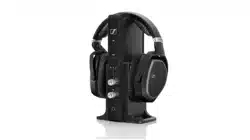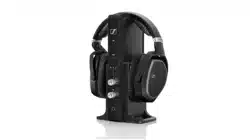
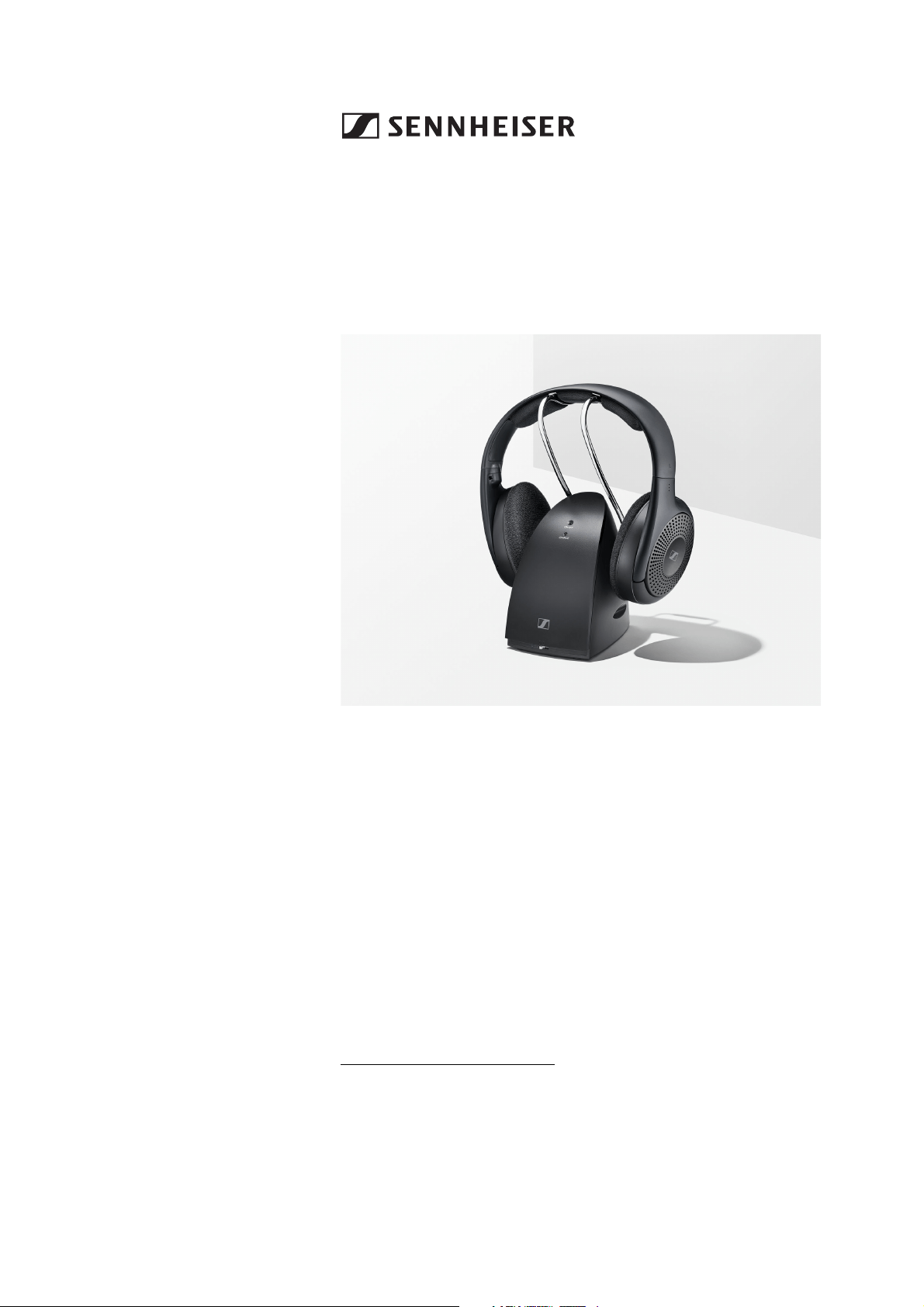
RS 120-W
Wireless TV headphone system
Model: RS 120-W, TR 120-W, HDR 120-W
Instruction manual
Use the search function, the navigation (left) or the following links:
Start
“Product overview”
“Getting started”
“Using the headphone system”
“FAQ/If a problem occurs ...”
“Specifications”
Sonova Consumer Hearing GmbH
Am Labor 1
30900 Wedemark
Germany
www.sennheiser-hearing.com
Version: 07/22

Important safety instructions
2 | RS 120-W
Important safety instructions
▷ Read this instruction manual carefully and completely before
using the product.
▷ Always include this instruction manual when passing the product
on to third parties.
▷ Do not use an obviously defective product.
▷ Only use the product in environments where Bluetooth® wireless
transmission is permitted.
Preventing damage to health and accidents
▷ Protect your hearing from high volume levels. Permanent
hearing damage may occur when headphones are used
at high volume levels for long periods of time. Head-
phones of the Sennheiser brand sound exceptionally even good at
low and medium volume levels.
▷ Do not use the product in an environment that requires your spe-
cial attention (e.g. when performing skilled jobs).
▷ Never charge standard batteries with the product. Only charge
rechargeable batteries that meet the requirements listed in the
Specifications.
▷ The product generates stronger permanent magnetic
fields that could cause interference with cardiac pace-
makers, implanted defibrillators (ICDs) and other
implants. Always maintain a distance of at least 3.94"/10 cm
between the product component containing the magnet and the
cardiac pacemaker, implanted defibrillator, or other implant.
▷ Do not use the product near water. Do not expose the product to
rain or moisture to reduce the risk of fire or electric shock.
▷ Keep the product, accessories and packaging parts out of reach
of children and pets to prevent accidents. Swallowing and chok-
ing hazard.
▷ Only use the power supply units supplied by Sonova Consumer
Hearing.
▷ If wall mounting the transmitter, make sure that the transmitter is
not mounted higher than 2 m. Otherwise, there is a risk of injury
in case the transmitter falls from greater heights.
Preventing damage to the product and malfunctions
▷ Always keep the product dry and do not expose it to extreme tem-
peratures to avoid corrosion or deformation. The normal operat-
ing temperature is from 0 °C to 40 °C/32 °F to 104 °F.
▷ Use the product with care and store it in a clean, dust-free envi-
ronment.
▷ Do not use the product if it is obviously damaged, if it has been
dropped, or if liquids or objects have entered the product. In this
case, contact a qualified specialist workshop or your Sonova Con-
sumer Hearing partner to have the product checked.
▷ Switch off the product after use to conserve battery power. When
not using the product for extended periods of time, remove the
rechargeable batteries.
Important safety instructions
RS 120-W | 3
▷ Unplug the power supply unit from the wall socket
– to completely disconnect the product from the power source,
– during lightning storms,
– when not using the product for long periods of time.
▷ Always ensure that the power supply unit is
– in a safe operating condition and easily accessible,
– properly plugged into the wall socket,
– only operated within the permissible temperature range,
– not exposed to direct sunlight for longer periods of time in order
to prevent heat accumulation.
▷ Do not place your headphones on a glass dummy head, chair arm-
rest or similar objects for long periods as this can widen the head-
band and reduce the contact pressure of the headphones.
▷ Varnish or furniture polish may degrade the feet of the transmit-
ter, which could stain your furniture. You should therefore place
the transmitter on a non-slip pad to avoid potential staining of fur-
niture.
▷ Do not operate the product near heat sources.
▷ Clean the product only with a soft, dry cloth.
▷ Use only attachments/accessories/spare parts supplied or rec-
ommended by Sonova Consumer Hearing.
Safety instructions for rechargeable batteries
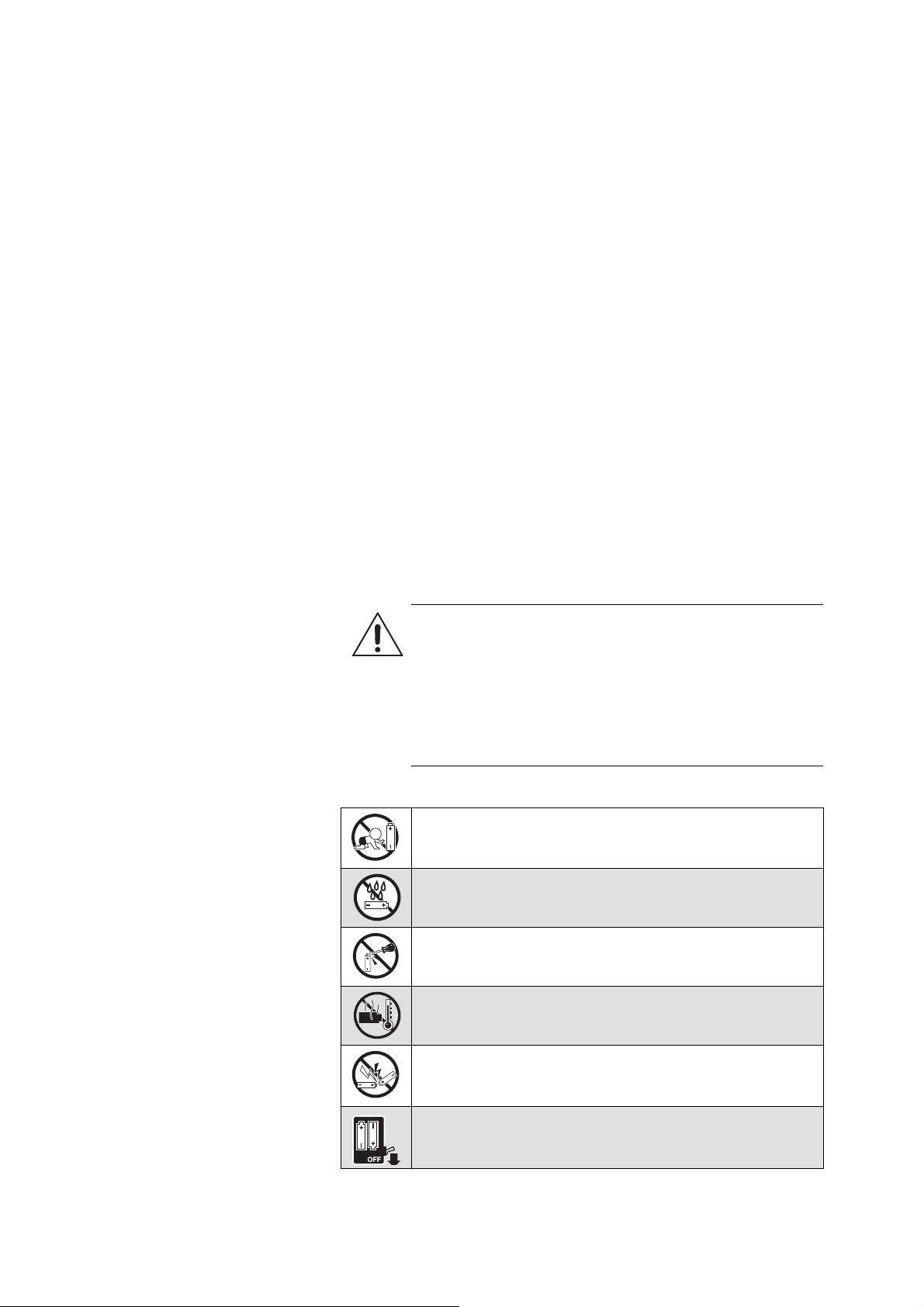
WARNING
If abused or misused, rechargeable batteries may leak. In
extreme cases, they may even present a risk of:
•explosion,
• heat and fire development
• smoke and/or gas development
• damage to health and/or the environment
Keep away from children.
Do not expose to moisture.
Do not mutilate or dismantle.
Observe correct polarity.
Pack/store charged rechargeable batteries so that the
terminals cannot contact each other – danger of short-
ing out/fire hazard.
Switch rechargeable battery-powered products off after
use.
Important safety instructions
4 | RS 120-W
Intended use/Liability
This wireless headphone system is suitable for use with TV sets, hi-
fi systems, and home cinema systems, can be connected to analog
audio sources and transmits audio to compatible headphones via
Bluetooth LE Audio wireless technology.
This product is intended for private domestic use only. It is not suit-
able for commercial use. This product is also not intended to be used
with portable audio devices. It is considered improper use when the
product is used for any application not named in the corresponding
product documentation.
Sonova Consumer Hearing GmbH does not accept liability for
damage arising from misuse or improper use of the product and its
attachments/accessories.
Sonova Consumer Hearing GmbH is not liable for damages resulting
from the loss of connection due to flat or overaged rechargeable bat-
teries or exceeding the Bluetooth transmission range.
Before putting into operation, please observe the respective coun-
try-specific regulations.
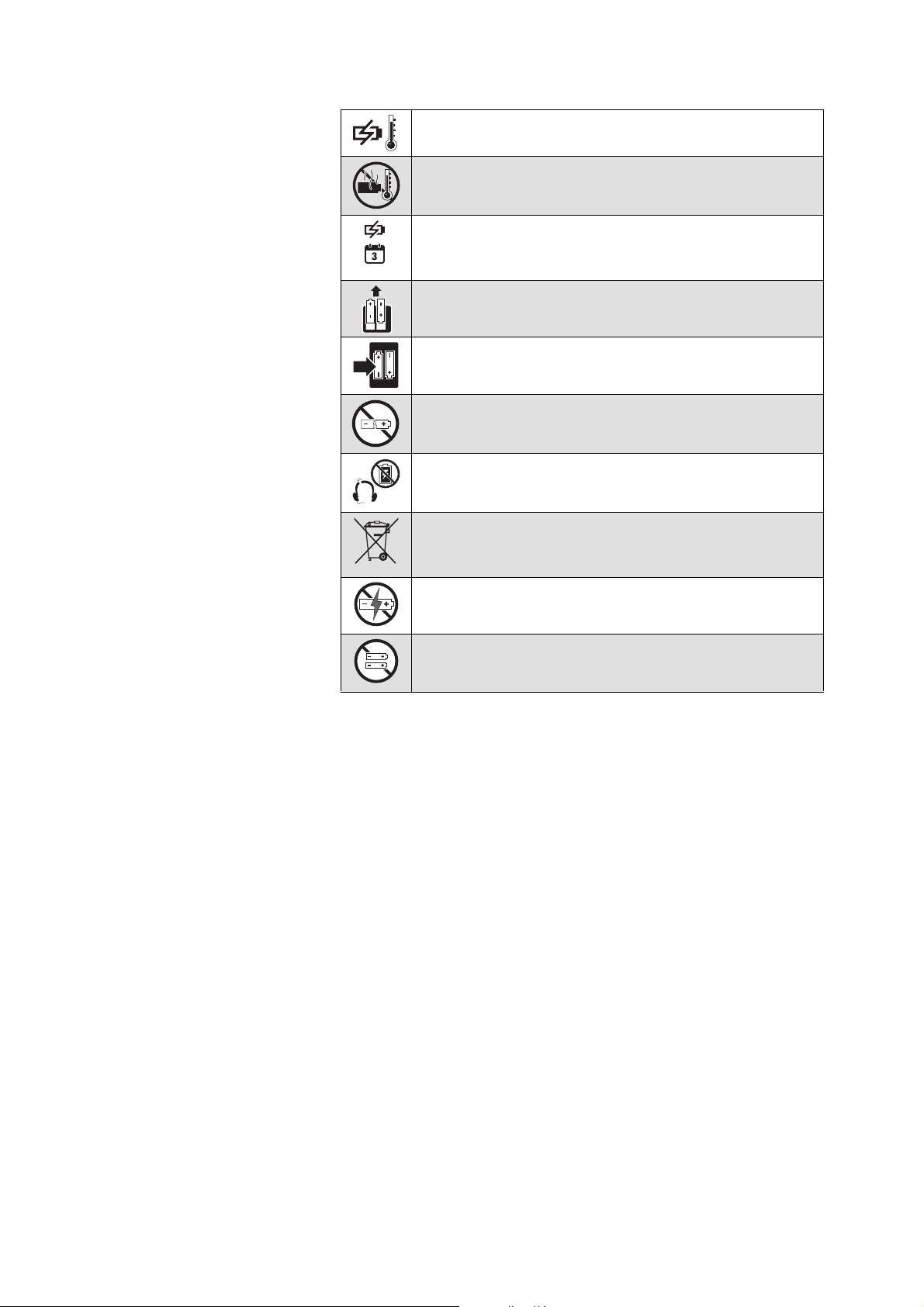
Charge rechargeable batteries at ambient temperatures
between 10 °C and 40 °C/50 °F and 104 °F.
Do not heat above 70 °C/158 °F, e.g. do not expose to
sunlight or throw into a fire.
When not using rechargeable batteries for extended
periods of time, charge them regularly (about every 3
months).
When not using the product for extended periods of
time, remove the rechargeable batteries.
Only use rechargeable batteries and chargers supplied
and/or recommended by Sonova Consumer Hearing.
Do not continue using defective rechargeable batteries
and dispose of them immediately.
Immediately remove rechargeable batteries from an
obviously defective product.
Dispose of defective products with built-in rechargeable
batteries at special collection points or return them to
your specialist dealer to facilitate recycling.
Do not charge standard batteries.
Do not mix standard and rechargeable batteries in the
battery compartments.
LR03
HR03
Package contents
RS 120-W | 5
Package contents
Online you can find:
• this detailed instruction manual and additional information
(www.sennheiser-hearing.com/download
)
• a list of accessories on the RS 120-W product page at www.senn-
heiser-hearing.com/rs-120-w (to purchase online or contact your
local Sonova Consumer Hearing partner: www.sennheiser-hear-
ing.com/service-support).
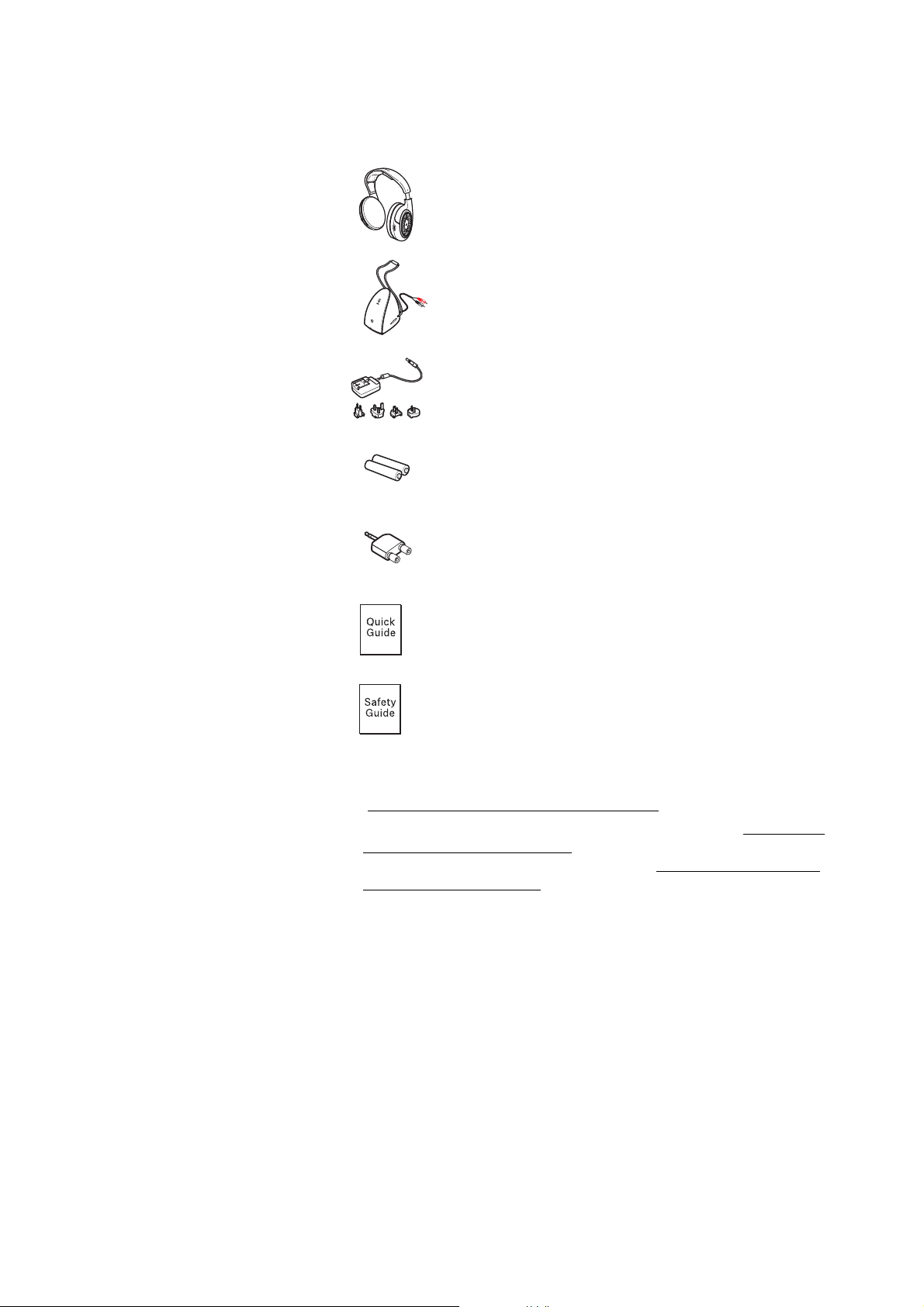
Headphones
Model: HDR 120-W
Transmitter with stereo RCA audio cable
Model: TR 120-W
Power supply unit with multi-country adapters
(EU, UK, US, AUS)
Model: NT9-3AW
Two rechargeable batteries: 1,2 V (AAA), NiMH
Adapter for 3.5 mm audio connection
Quick guide
Safety guide
EU
UK
AU
US
Product overview
6 | RS 120-W
Product overview
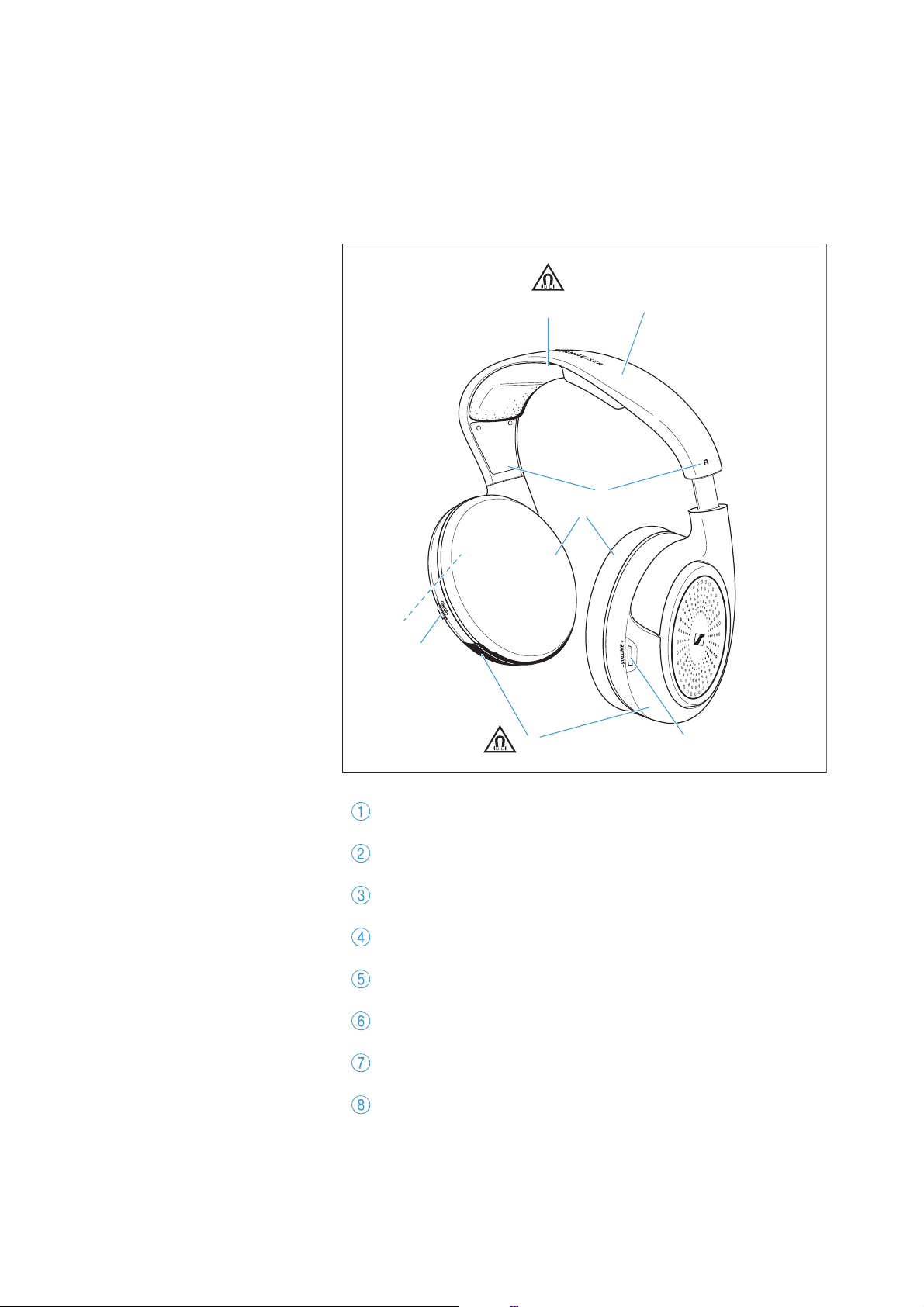
Overview of the headphones
Model: HDR 120-W
Headband with padding
Charging contacts with holding magnets
Markings for
R (right) and L (left)
Ear pads
Ear cups
Battery compartment
ON/OFF switch
VOLUME control
4
1
2
6
58
7
3
Product overview
RS 120-W | 7
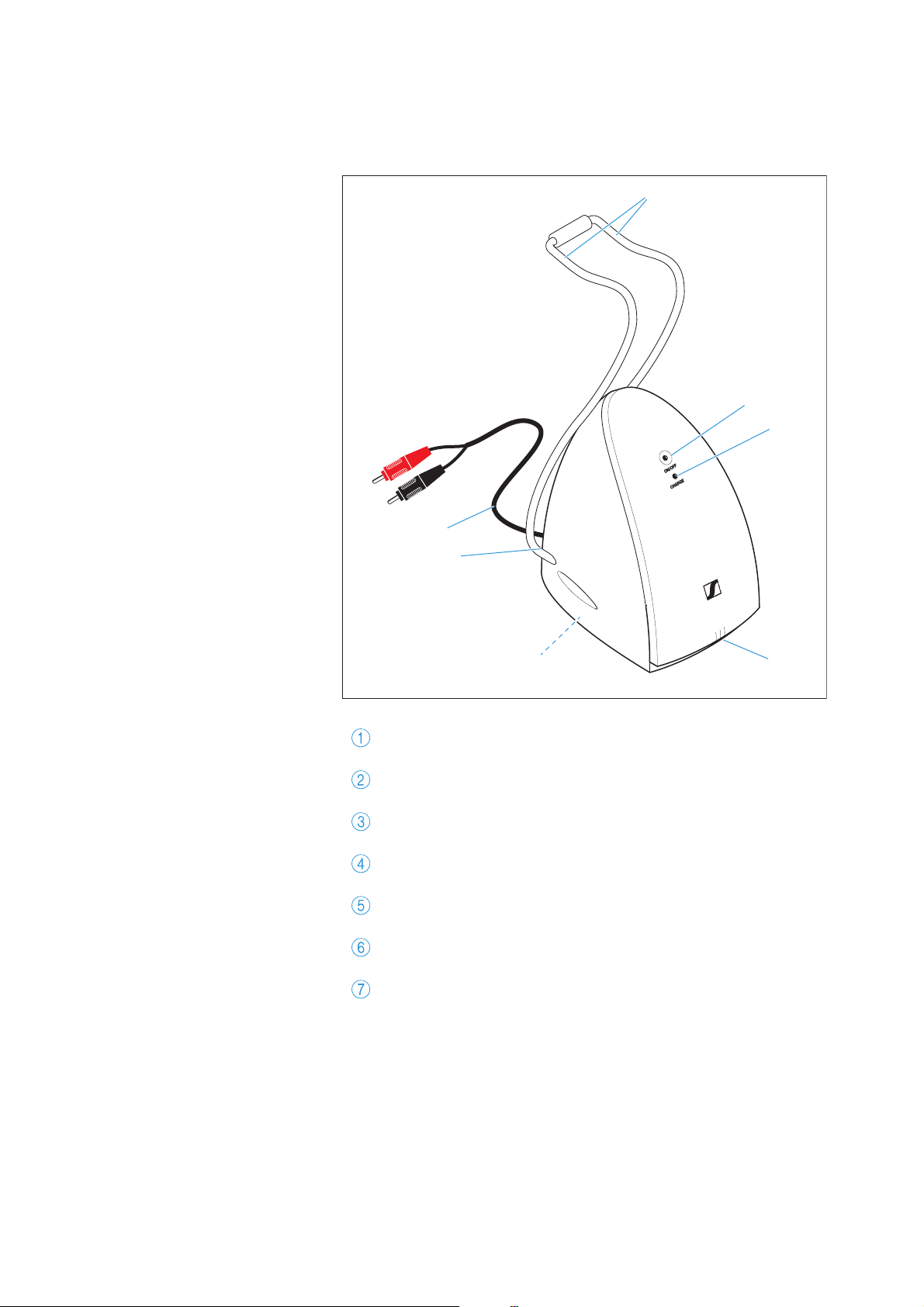
Overview of the transmitter
Model: TR 120-W
Headphone holder with charging contacts
ON/OFF LED
CHARGE LED
MODE switch for selecting the sound mode
Type plate
DC IN 9V 300mA socket for the power supply unit
AUDIO connection (stereo RCA audio cable)
2
3
1
45
6
7
Product overview
8 | RS 120-W
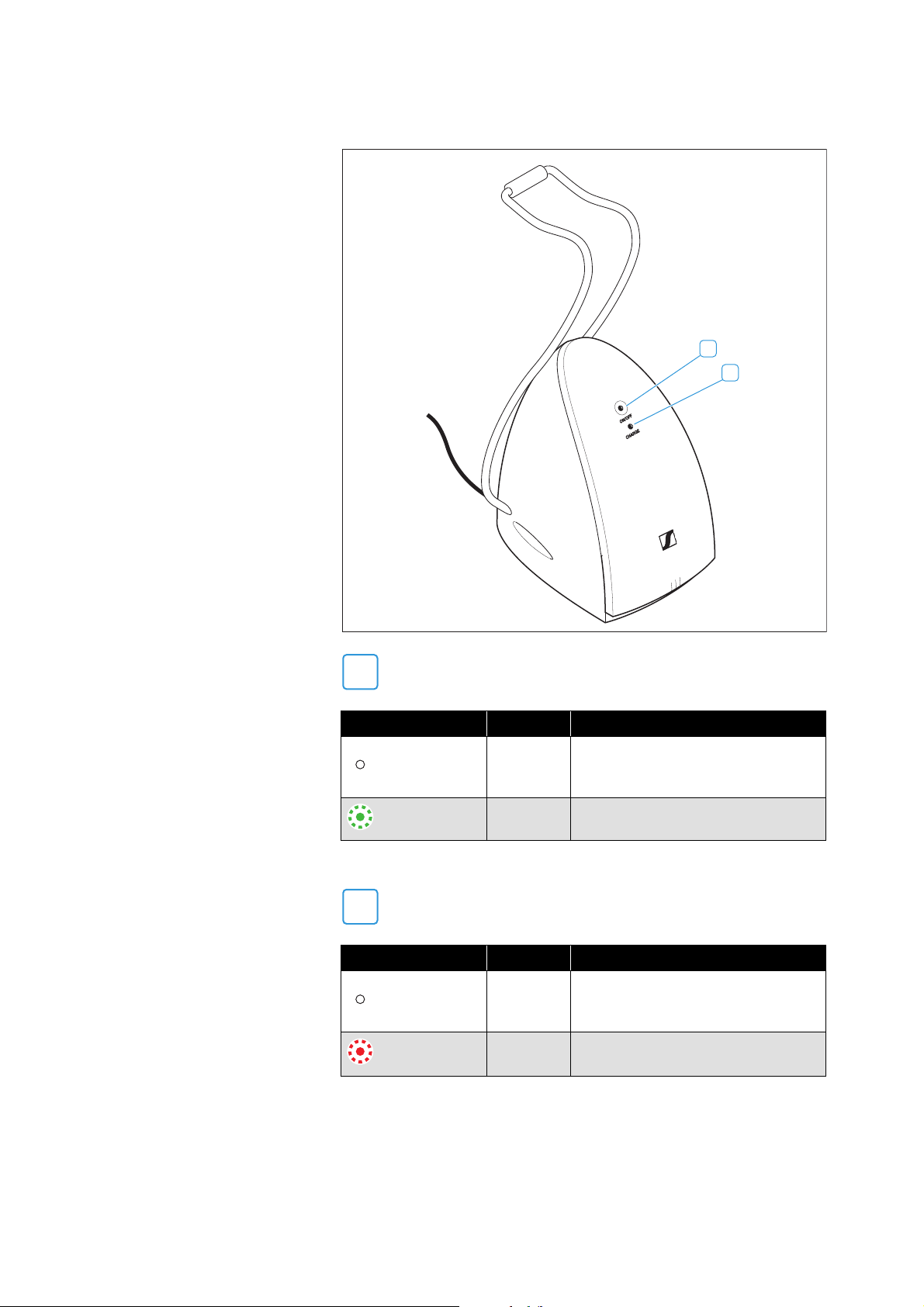
Overview of the LED indicators
Notes on sound signals
The headphones output sound signals for important events.
ON/OFF LED Color Meaning
–
The transmitter is in standby
mode or is not connected to the
power supply system.
green
The transmitter is switched on
and an audio signal is present.
CHARGE LED Color Meaning
–
The headphones are fully charged
or no headphones are placed on
the charging contacts.
red
The headphones are charged via
the transmitter.
1
2
1
2

Getting started
10 | RS 120-W
Getting started
Setting up the transmitter
▷ Set up the transmitter. When doing so, make sure that the follow-
ing conditions are met:
– The transmitter is close to the audio source to connect the
cables.
– The transmitter is at least 20"/50 cm away from other wireless
devices in the room to avoid interference.
–The transmitter is not located near metal shelves, reinforced
concrete walls or other metal structures. This can affect the
range of the transmitter.
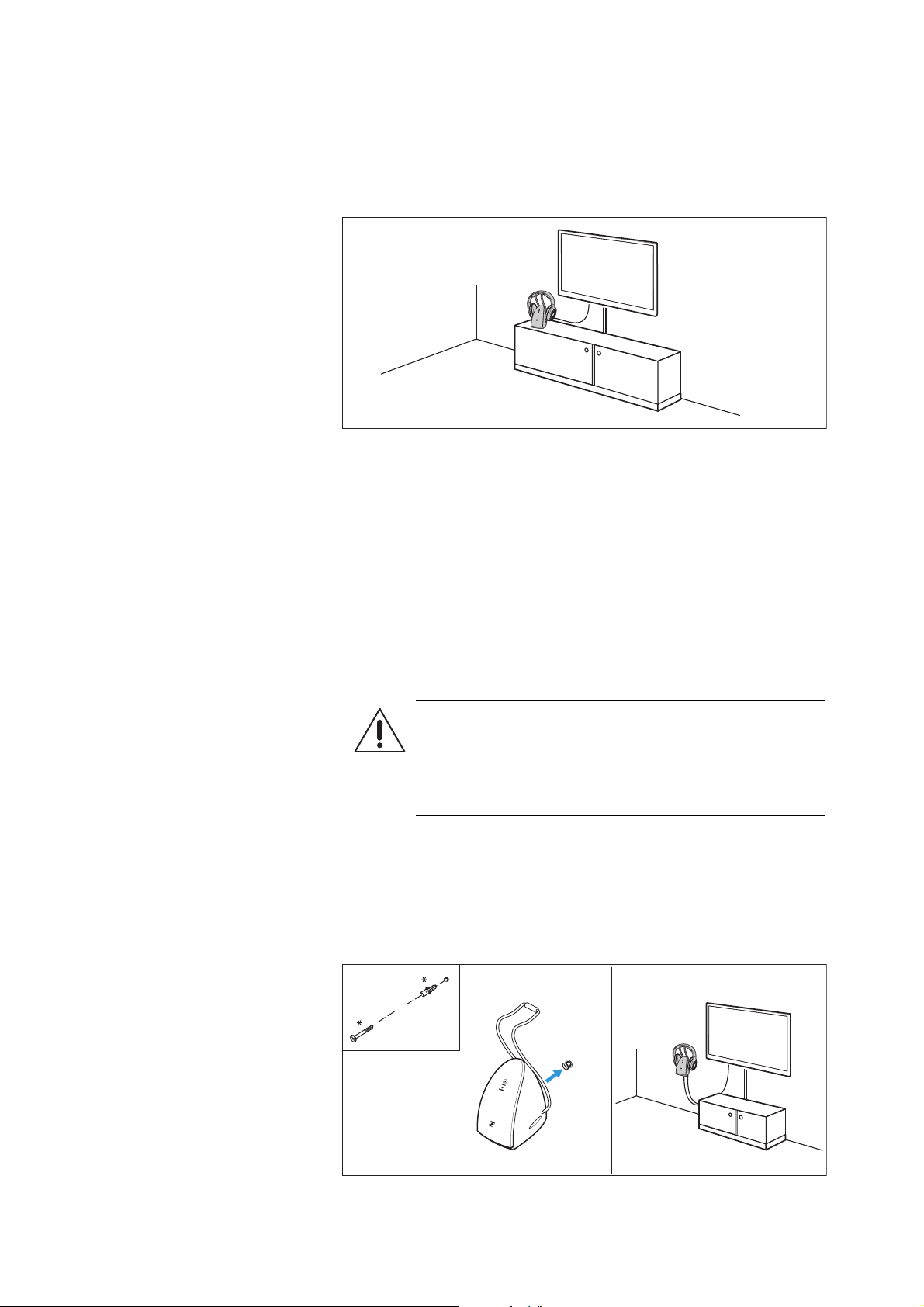
Hanging the transmitter on a wall
The transmitter can be hung on a wall. For this, you will need mount-
ing material suitable for the wall (* screw and, if necessary, a dowel,
to be ordered separately).
1. Fasten the screw to the wall.
2. Hook the screw head into the opening on the back of the transmit-
ter.
CAUTION
Injuries due to the transmitter falling down!
If the transmitter falls from great heights, this can cause
injuries.
▷ Mount the transmitter at a maximum height of 2 m.

Getting started
RS 120-W | 11
Connecting the transmitter to an audio
source
▷ Switch your audio source off before connecting the transmitter.
▷ Check the connection possibilities of your audio source (audio
output, usually marked “OUT”).
▷ Depending on the connection possibility selected, go to the
respective chapter and follow the instructions on how to connect
the transmitter to an audio source.
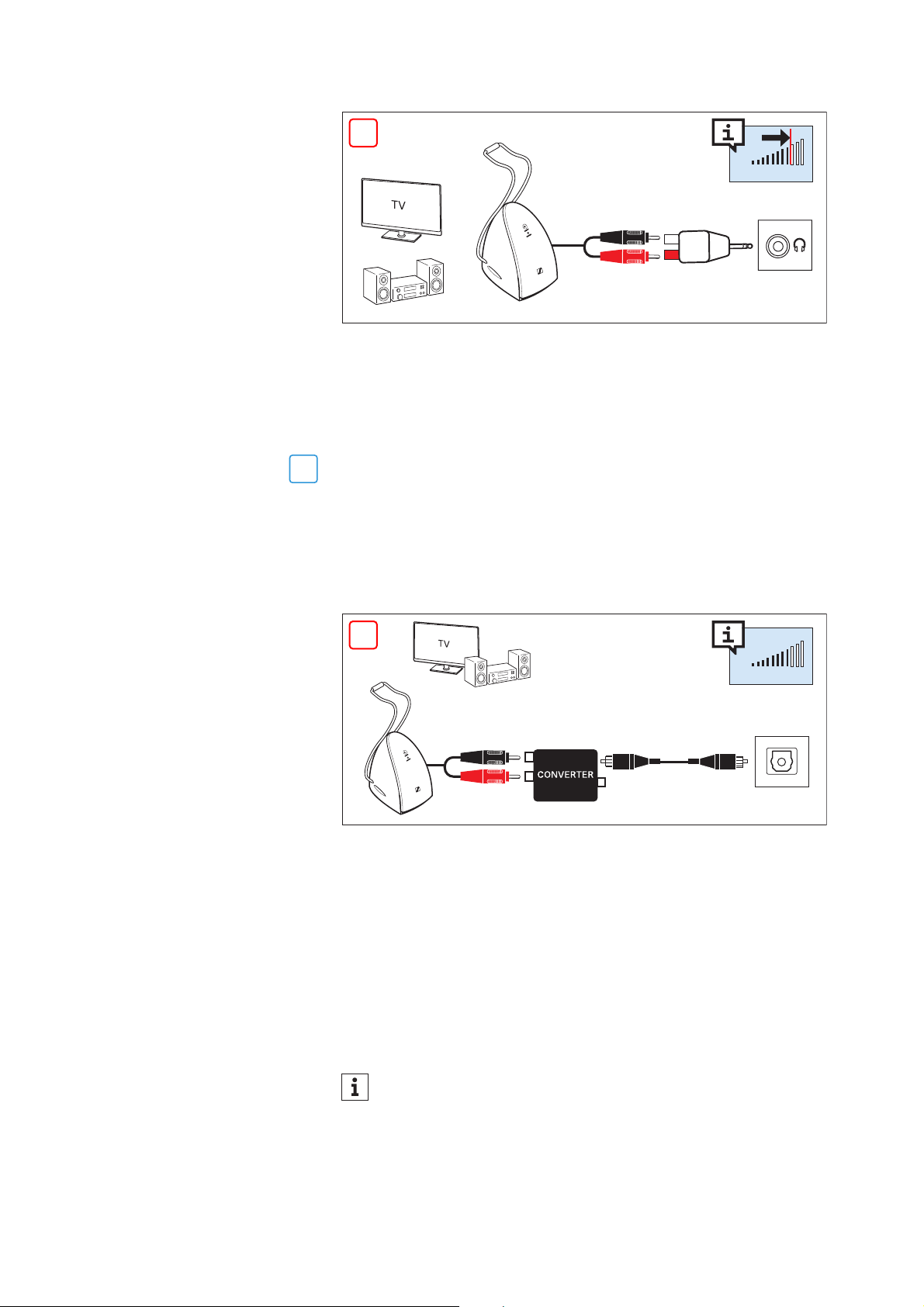
Connection possibility A: RCA sockets (analog)
▷ Connect the RCA plugs to the RCA outputs of your audio source
(usually marked “AUDIO OUT”). Connect the red plug to the red
RCA socket and the black plug to the white or black RCA socket.
Connection possibility B: 3.5 mm jack socket (analog)
1. Plug the adapter onto the stereo RCA audio cable.
2. Connect the adapter to the 3.5 mm headphone jack of your audio
source.
Connection possibilities
of the audio source
Connection cable >
RCA sockets (ana-
log)
Stereo RCA audio cable 11
3.5 mm jack socket
(analog)
Stereo RCA audio cable with
adapter for 3.5 mm audio con-
nection
11
Optical (digital)
Stereo RCA audio cable with
analog-to-digital converter (to
be ordered separately)
12
Accessories and adapters are available from your Sonova Con-
sumer Hearing partner. You can find your local Sonova Con-
sumer Hearing partner at www.sennheiser-hearing.com/ser-
vice-support.
1
A
B
C
1
A
OFF
AUDIO OUT
L
L
R
A
B
Adjust the volume of the headphone socket on your audio
source to at least a medium level. This improves the quality of
wireless audio transmission. For detailed information, please
refer to the instruction manual of your audio source.
Getting started
12 | RS 120-W
Some TV models mute the loudspeakers when you connect the
transmitter to the 3.5 mm headphone socket. Other TV models have
their own menu for adjusting the volume of the headphone socket.
Check the menu of your TV for information on how to deactivate the
muting function or adjust the volume. Alternatively, connect the TV
and the transmitter using a different connection possibility (A or C).
Connection possibility C: Optical (digital)
If your audio source has only a digital audio output, you can use an
analog-to-digital converter (to be ordered separately) to connect the
transmitter.
1. Plug the converter onto the stereo RCA audio cable.
2. Connect the converter to the digital audio output of your audio
source.
Connecting the transmitter to the power
supply system
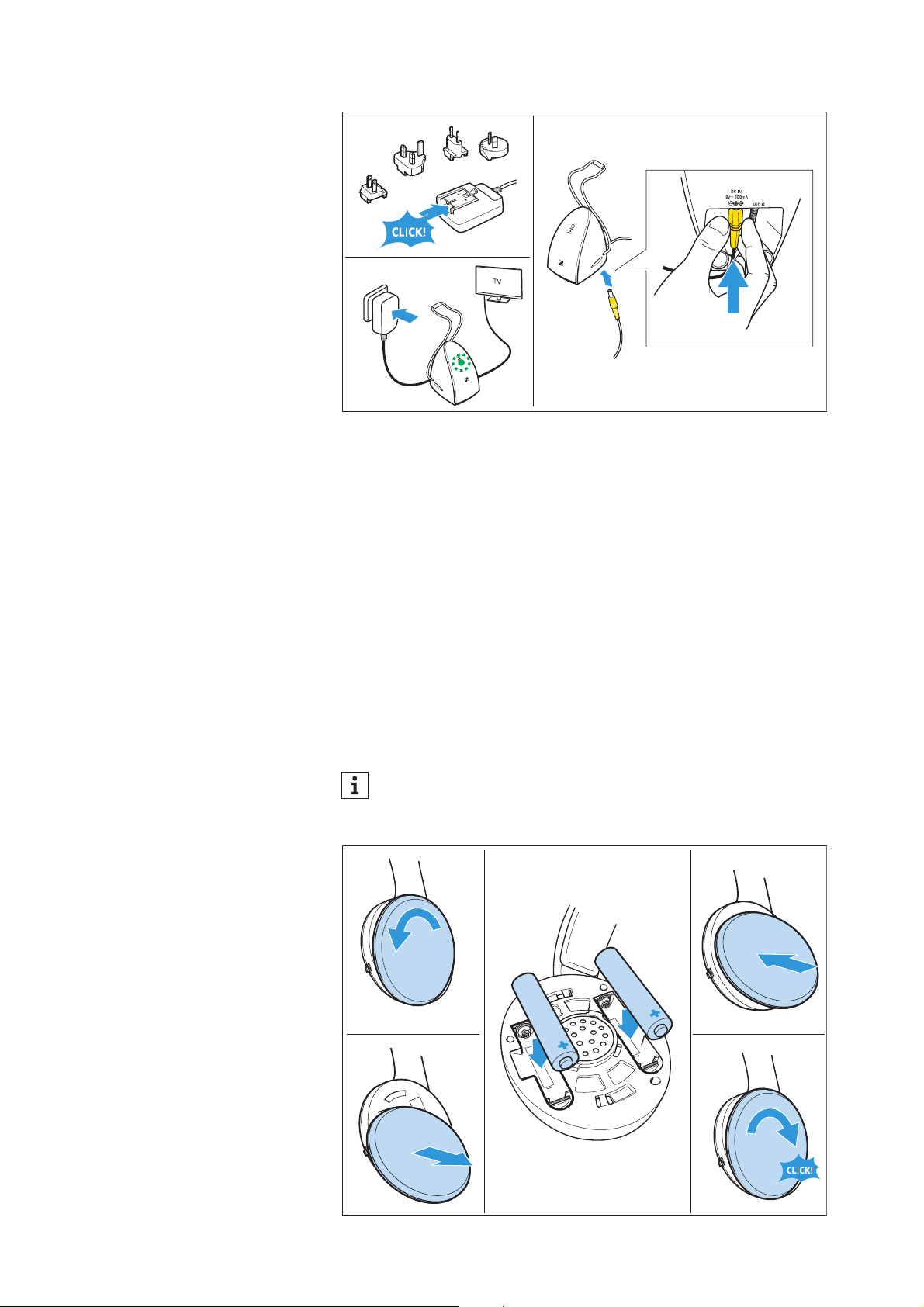
1. Select a suitable country adapter and slide it onto the power
supply unit until it clicks audibly into place.
2. Connect the connector of the power supply unit to the connection
socket of the transmitter.
3. Plug the power supply unit into the wall socket.
The
ON/OFF LED lights up green. The transmitter is switched on.
OFF
B
PHONES
TV VOLUME
C
C
OFF
OPTICAL
*
TV VOLUME
The ON/OFF LED only lights up green when an audio signal is
present. For this, the audio source must be connected to the
transmitter and switched on.
Getting started
RS 120-W | 13
Inserting or replacing the rechargeable
batteries
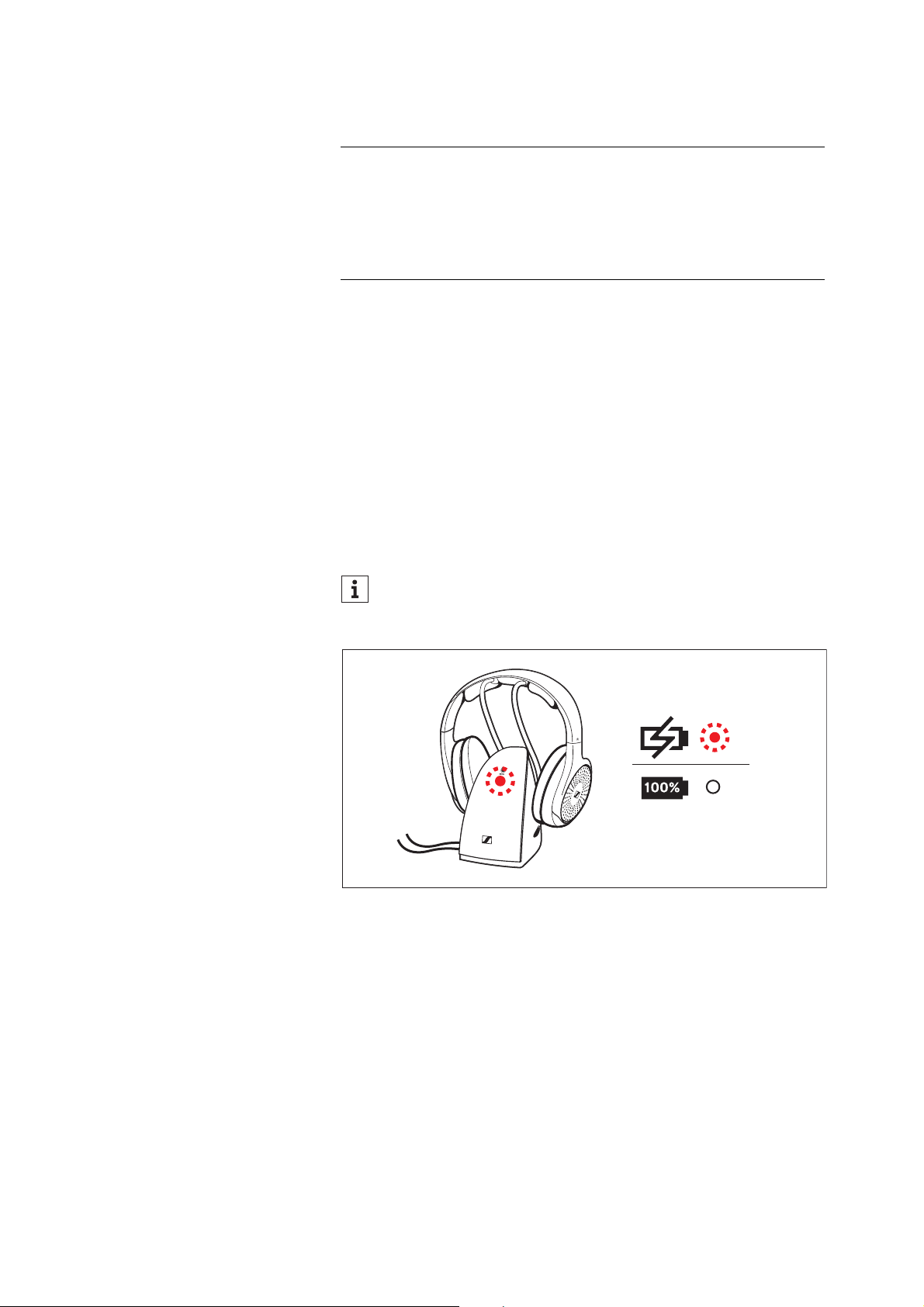
1. Lightly twist the left ear pad counterclockwise until you overcome
a slight resistance.
2. Lift the ear pad off the ear cup to reveal the battery compart-
ments.
3. If necessary, remove the empty rechargeable batteries from the
battery compartments.
4. Insert the new rechargeable batteries into the battery compart-
ments. Observe correct polarity when inserting the rechargeable
batteries.
5. Place the ear pad back onto the ear cup.
6. Twist the ear pad clockwise until you hear a click sound.
1.
US
EU
UK
AU
2.
3.
Dispose of exhausted rechargeable batteries at special collec-
tion points or return them to your specialist dealer to facilitate
recycling.
2. 6.
1. 3. + 4.
Left L
5.
Getting started
14 | RS 120-W
Charging the rechargeable batteries
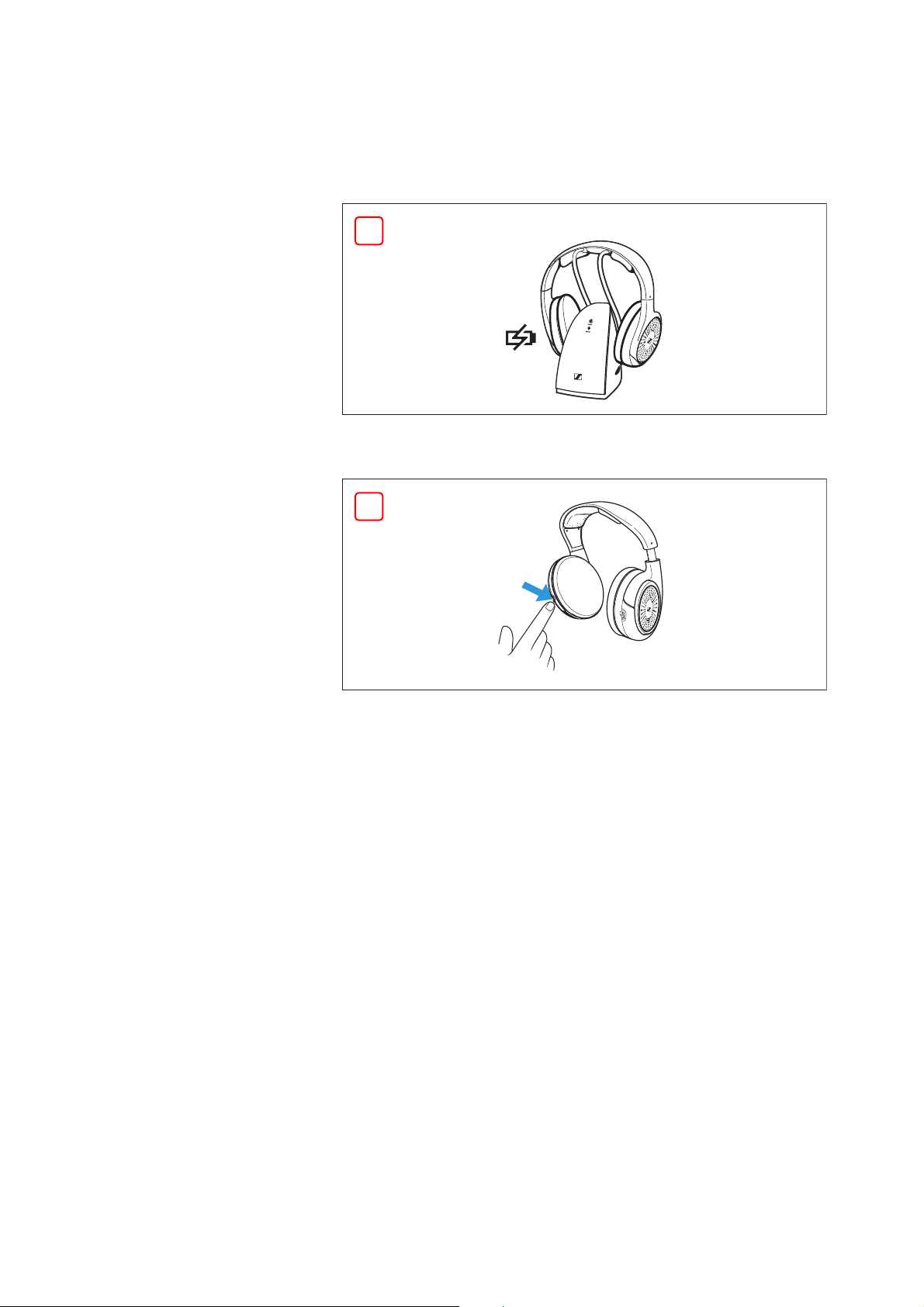
A complete charging cycle takes up to
18 hours. However, before
using the headphones for the first time, charge the rechargeable bat-
teries for at least 24 hours without interruption to optimize the per-
formance of the batteries. When the rechargeable batteries are
almost empty, you will hear 3 descending sound signals from the
headphones. When the rechargeable batteries are empty, you hear a
sound, audio playback stops, and the headphones switch off.
▷ Place the headphones on the transmitter‘s headphone holder. You
may place the headphones on either side provided that the
charging contacts of the headphones and the transmitter con-
nect.
The headphones automatically switch off and the
CHARGE
LED on the transmitter lights up red. When the rechargeable bat-
teries are fully charged, the CHARGE LED goes off.
Adjusting the headband
For good sound quality and best possible wearing comfort, the head-
band has to be adjusted to properly fit your head. The headphones
feature an adjustable headband with a snap-in locking mechanism
for easy adjustment.
1. Wear the headphones so that the headband runs over the top of
your head. Observe the
L and R markings on the outer headband
when putting the headphones on.
2. Adjust the length of the headband so that
– your ears are comfortably covered by the ear pads,
– you feel even, gentle pressure around your ears,
– a snug fit of the headband on the head is ensured.
NOTE
Damage to the headphones due to battery fluid!
If you insert non-rechargeable batteries into the battery compart-
ments, the batteries may leak during charging and can damage your
headphones.
▷ Never charge standard batteries.
When not in use, place the headphones on the headphone
holder to ensure that the rechargeable batteries are fully
charged when needed.
LED Off

Getting started
RS 120-W | 15
Right R
Left L

Using the headphone system
16 | RS 120-W
Using the headphone system
Switching on
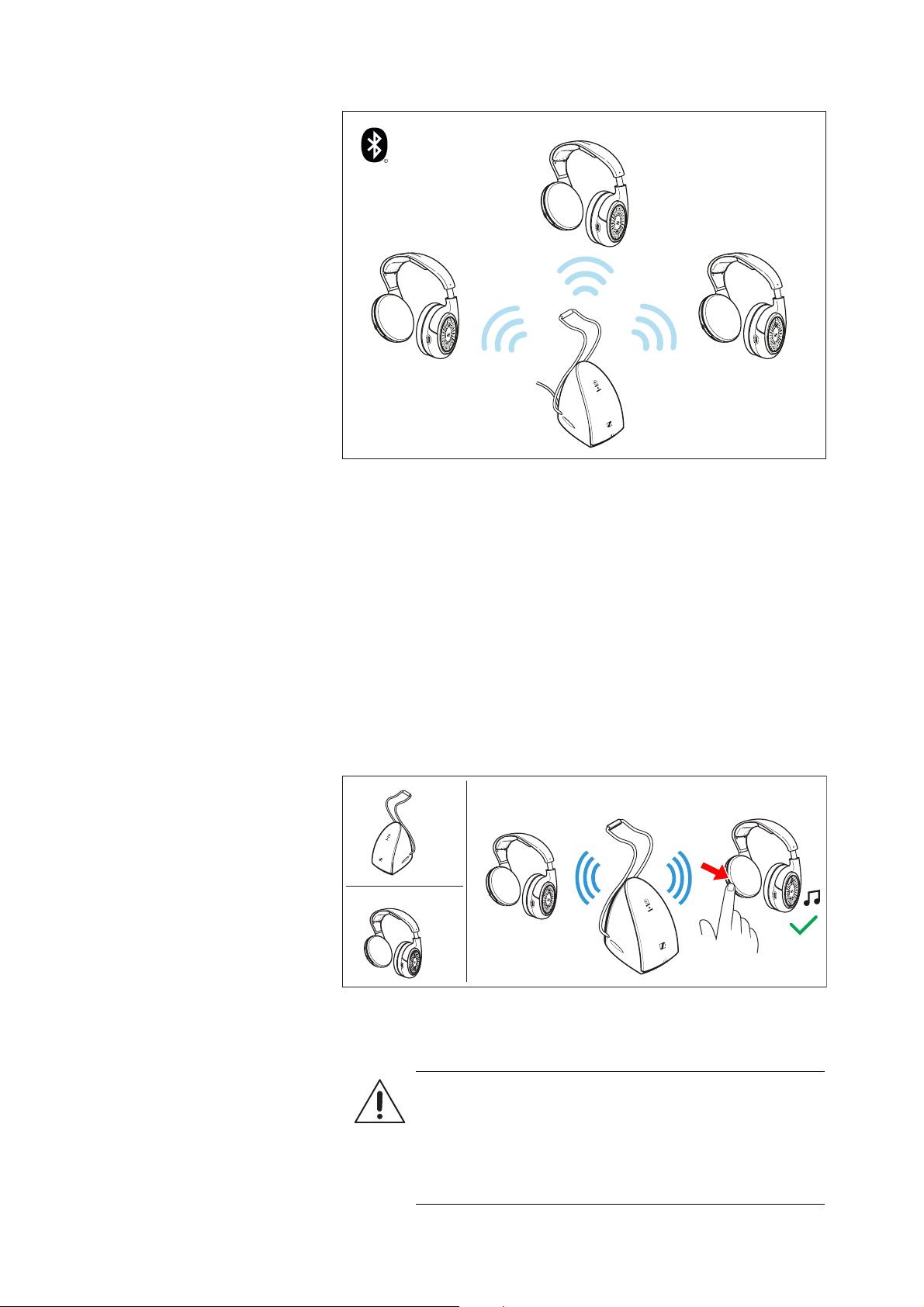
1. Connect the transmitter to the power supply system (> 12) and to
your audio source (> 11).
2. Switch your audio source on.
The
ON/OFF LED lights up green. An audio signal is present and
is being transmitted.
3. Remove the headphones from the transmitter‘s headphone
holder.
4. Set the
ON/OFF switch of the headphones to ON.
The headphones search for the paired transmitter and you hear a
melody. If the connection is successful, audio playback starts.
Switching off
If the audio source is switched off for 5 minutes, the transmitter and
the headphones switch to standby mode. To switch off the transmit-
ter completely, disconnect the power supply unit from the wall
socket.
WARNING
Danger of hearing damage due to high volume levels!
Listening at high volume levels for long periods of time
can lead to permanent hearing defects.
▷ Before putting the headphones on, adjust the volume
on the headphones to a low level (> 18).
▷ Do not continuously expose yourself to high volume
levels.
ON
ON
2. 3. 4.
If the headphones have gone into standby mode and you want
to wake them up, switch the headphones off and on again.
Using the headphone system
RS 120-W | 17
You can switch off the headphones in two ways:
▷ Place the headphones on the transmitter‘s headphone holder.
The headphones switch off automatically and the charging pro-
cess starts (> 14).
▷ Set the
ON/OFF switch of the headphones to OFF.
The headphones switch off.
Information on the wireless connection
The TR 120-W transmitter uses Bluetooth LE Audio wireless technol-
ogy for audio transmission. It is only compatible with the HDR 120-W
headphones. A Bluetooth connection with e.g. your smartphone is
not possible.
The transmitter transmits the audio signal and all headphones con-
nected to it receive the signal. Audio Broadcast allows any number
of headphones to be connected to the transmitter simultaneously.
The only limitation is the wireless range of the transmitter.
A
OFF
B
OFF
Using the headphone system
18 | RS 120-W
Pairing the headphones
The headphones and the transmitter of the wireless headphone
system are factory pre-paired. The following steps are only neces-
sary if you want to pair additional HDR 120-W headphones with the
transmitter.
1. Switch the transmitter on (> 16).
2. Switch the headphones on (> 16).
3. Hold or place the headphones near the transmitter. The distance
between the headphones and the transmitter should not exceed
30 cm.
The headphones search for the transmitter and you hear a mel-
ody. If the connection is successful, audio playback starts.
Adjusting the volume
Headphones 1
Headphones 2
ON
ON
ON
1. 3.
2.
WARNING
Danger of hearing damage due to high volume levels!
Listening at high volume levels for long periods of time
can lead to permanent hearing defects.
▷ Do not continuously expose yourself to high volume
levels.
Using the headphone system
RS 120-W | 19
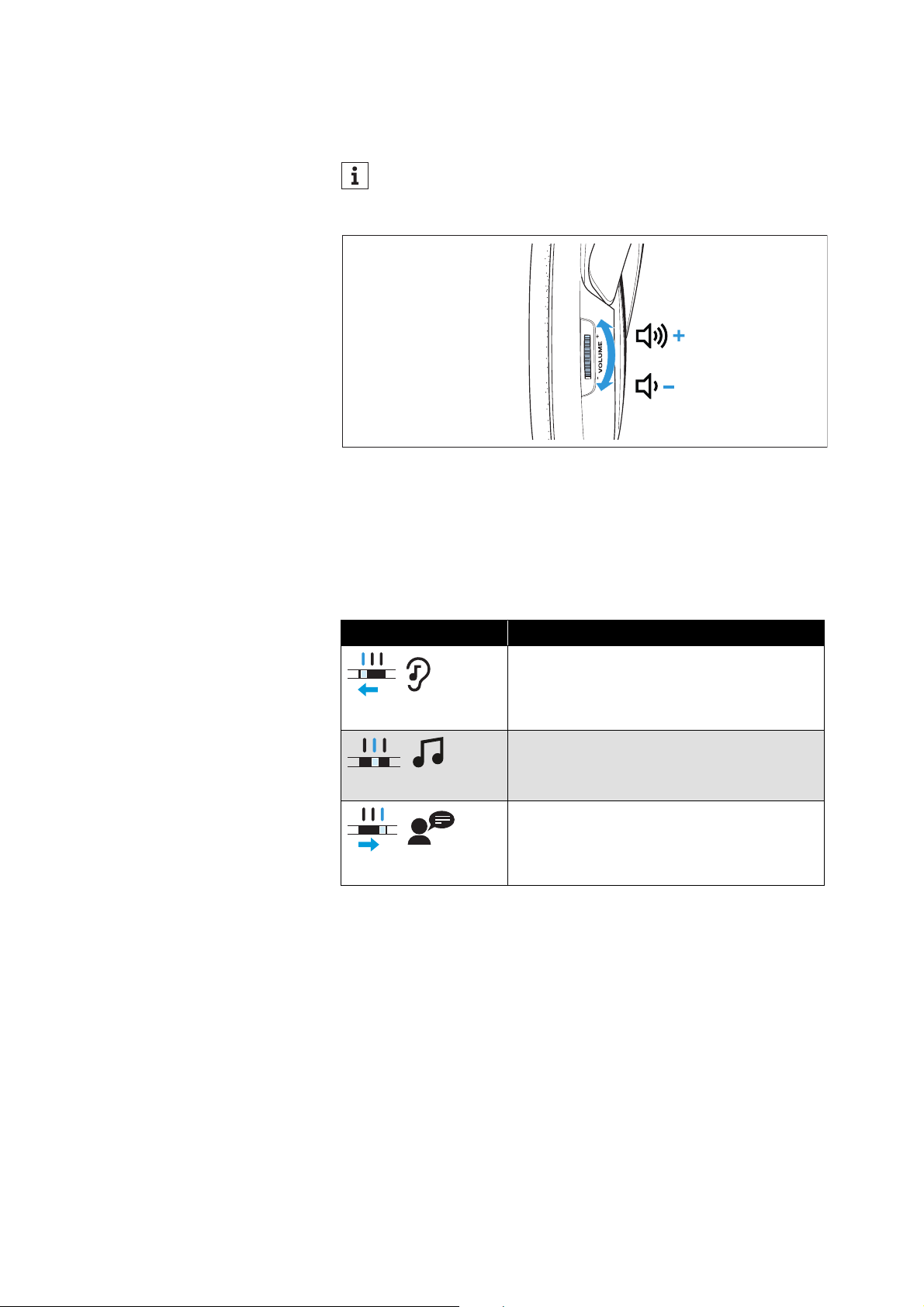
▷ Move the VOLUME control on the right ear cup up + or down -
until the volume is comfortable for you.
Selecting the sound mode
The transmitter has three sound modes. They change the sound of
the audio signal to adapt it to different situations.
▷ Set the
MODE switch on the transmitter to the desired sound
mode (see table).
To protect your hearing, the volume is slightly reduced at the
beginning of the audio transmission. It levels out in the first
1-2 minutes. This prevents a too loud signal at switch-on.
Right R
Sound mode Description
NEUTRAL mode
The sound is reproduced unchanged.
MUSIC mode
The bass is boosted for a dynamic sound.
Suitable for music playback.
SPEECH mode
The frequency range for speech is boosted.
Suitable for enhancing speech intelligibility
(for example, dialogs of movies/TV series).
Care and maintenance
20 | RS 120-W
Care and maintenance
▷ Switch off your wireless headphone system and disconnect the
transmitter from the wall socket before cleaning.
▷ Clean the headphones and the transmitter only with a soft, dry
cloth.
▷ Clean the contacts on the headphones and the transmitter from
time to time using e.g. a cotton swab.
Replacing the ear pads
For reasons of hygiene, you should replace the ear pads from time to
time. Spare ear pads are available on the RS 120-W product page at
www.sennheiser-hearing.com/rs-120-w
.
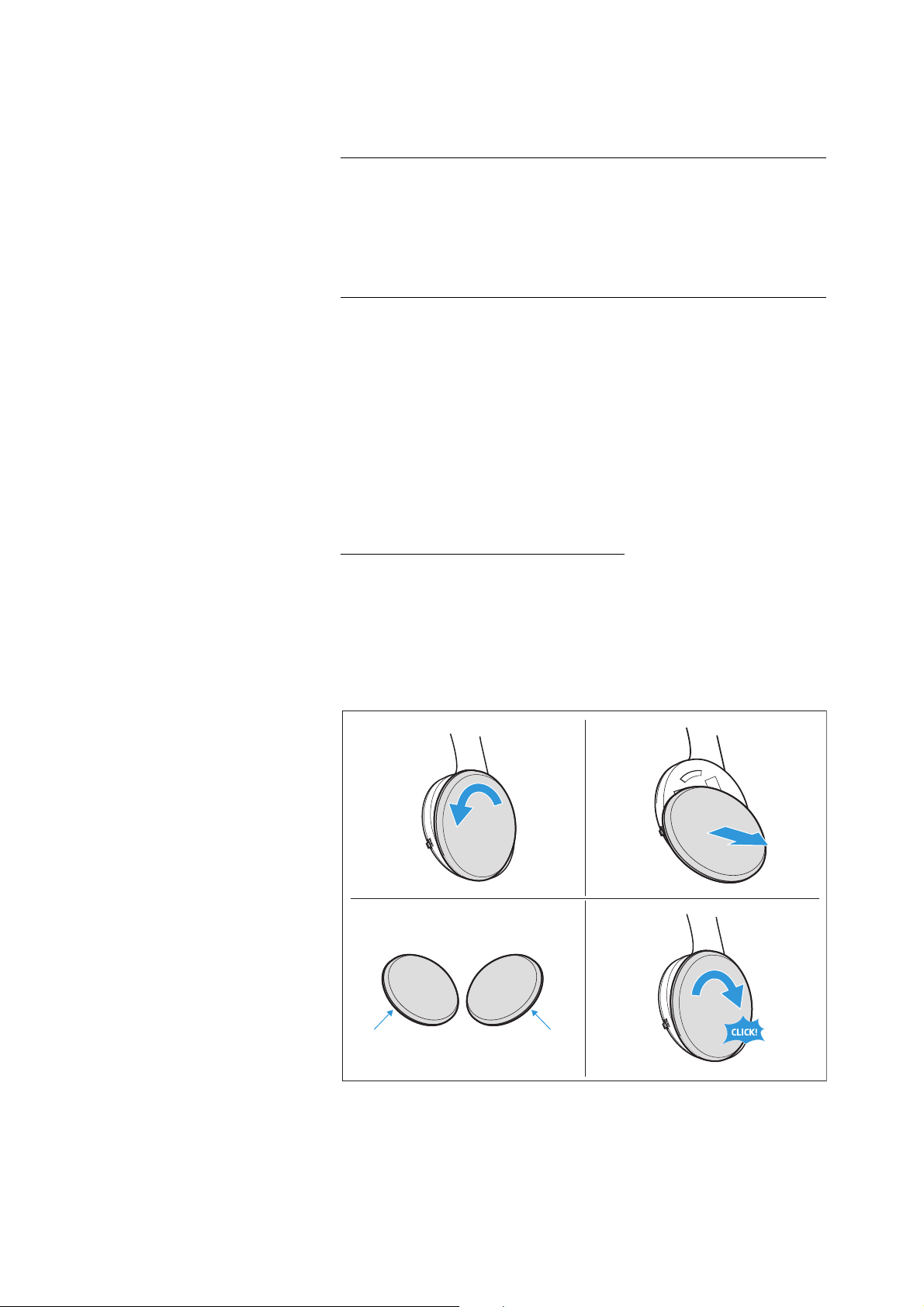
1. Lightly twist the ear pads counterclockwise until you overcome a
slight resistance.
2. Lift the ear pads off the ear cups and dispose of them properly.
3. Hook the new ear pads onto the ear cups. Observe the L (left) and
R (right) markings on the rear of the ear pads.
4. Twist the ear pads clockwise until you hear a click sound.
NOTE
Short circuit due to liquids!
Liquids entering the housing of the product can cause a short-circuit
and damage the electronics.
▷ Keep all liquids far away from the product.
▷ Do not use any solvents or cleansing agents.
2.1.
3.
4.
R
L

FAQ/If a problem occurs ...
RS 120-W | 21
FAQ/If a problem occurs ...
Current list of frequently asked questions (FAQ)
Visit the RS 120-W product page at
www.sennheiser-hearing.com/rs-120-w
There you will find a current list of frequently asked questions (FAQ)
and suggested solutions.
Your question has not been answered or the problem persists?
If a problem occurs that is not listed in the FAQ section or if the prob-
lem cannot be solved with the proposed solutions, please contact
your Sonova Consumer Hearing partner for assistance.
To find a Sennheiser partner in your country, search at
www.sennheiser-hearing.com/service-support
Leaving the wireless range of the transmitter
Wireless audio transmission is only possible in the wireless range of
the transmitter. The transmission range of the transmitter largely
depends on environmental conditions such as wall thickness, wall
composition etc. With a free line of sight, the transmission range of
the transmitter is up to 60 meters.
If you, and therefore the headphones, leave the transmission range
of the transmitter, the sound quality deteriorates increasingly until
the connection breaks down completely. If you re-enter the trans-
mission range within 3 minutes, the connection is automatically re-
established. Otherwise you have to switch the headphones off and
on manually (> 16).

Specifications
22 | RS 120-W
Specifications
System – model: RS 120-W
Headphones – model: HDR 120-W
Transmitter – model: TR 120-W
Transmission frequency 2.40 to 2.48 GHz
Wireless technology Bluetooth LE Audio
Bluetooth version Bluetooth 5.2 compliant, class 1
Modulation GFSK
Signal-to-noise ratio
typ. 85 dB(A) at 1 V
rms
RF Output power 10 mW (max.)
Range up to 60 m (free line of sight)
Number of headphones that
can be simultaneously con-
nected to the transmitter
no limitation
Temperature range
operation: 0 °C to +40 °C
storage: -20 °C to +60 °C
Relative humidity
operation: 10 to 80 %, non condensing
storage: 10 to 90 %
Type on-ear
Transducer principle open, dynamic
Frequency response 22 Hz to 19.5 kHz
Max. SPL
max. 106 dB at 1 kHz, 1 V
rms
THD < 0.7 % at 1 kHz, 100 dB SPL
Operating time up to 18 hours
Charging time of recharge-
able batteries
up to 8.5 hours
Power supply
2 NiMH rechargeable batteries,
AAA size, 1.2 V, 600 mAh
Magnetic field strength
ear cups: 7 mT
headband: > 90 mT
Weight (incl. batteries) approx. 340 g
Dimensions (W x H x D) approx. 197 mm x 212 mm x 80 mm
Audio connections stereo RCA plugs
Power supply 9 V , 300 mA
Power consumption
operation: typ. 4 W
standby: ≤ 0.3 W (without charging)
Dimensions (W x H x D) approx. 85 mm x 221 mm x 134 mm

Specifications
RS 120-W | 23
Power supply unit – model: NT 9-3AW
Nominal input voltage/cur-
rent
100–240 V~/100 mA
Power frequency 50–60 Hz
Nominal output voltage 9 V
Nominal output current 300 mA
Temperature range
operation: 0 °C to +40 °C
storage: –40 °C to +85 °C
Relative humidity
operation: 0 to 90 %, non condensing
storage: 0 to 90 %
Manufacturer declarations
24 | RS 120-W
Manufacturer declarations
Warranty
Sonova Consumer Hearing GmbH gives a warranty of 24 months on
this product.
For the current warranty conditions, please visit our website at
www.sennheiser-hearing.com/warranty or contact your
Sonova Consumer Hearing partner.
In compliance with the following requirements
EU declaration of conformity
• ErP Directive (2009/125/EC)
• RoHS Directive (2011/65/EU)
Hereby, Sonova Consumer Hearing GmbH declares that the radio
equipment type RS 120-W (TR 120-W, HDR 120-W) is in compliance
with the Radio Equipment Directive (2014/53/EU).
The full text of the EU declaration of conformity is available at the fol-
lowing Internet address: www.sennheiser-hearing.com/download.
UK declaration of conformity
• The Ecodesign for Energy-Related Products and Energy Informa-
tion (Amendment) (EU Exit) Regulations (2019)
• RoHS Regulations (2012)
•Radio Equipment Regulations (2017)
Notes on disposal
• EU: Battery Directive (2006/66/EC & 2013/56/EU)
• EU: WEEE Directive (2012/19/EU)
• UK: Battery Regulations (2015)
• UK: WEEE Regulations (2013)
The symbol of the crossed-out wheeled bin on the product, the bat-
tery/rechargeable battery (if applicable) and/or the packaging indi-
cates that these products must not be disposed of with normal
household waste, but must be disposed of separately at the end of
their operational lifetime. For packaging disposal, observe the legal
regulations on waste segregation applicable in your country.
Improper disposal of packaging materials can harm your health and
the environment.
The separate collection of waste electrical and electronic equip-
ment, batteries/rechargeable batteries (if applicable) and packag-
ings is used to promote the reuse and recycling and to prevent neg-
ative effects on your health and the environment, e.g. caused by
potentially hazardous substances contained in these products.
Recycle electrical and electronic equipment and batteries/recharge-
able batteries at the end of their operational lifetime in order to make
contained recyclable materials usable and to avoid littering the envi-
ronment.

Manufacturer declarations
RS 120-W | 25
If batteries/rechargeable batteries can be removed without damag-
ing them, you are obliged to dispose of them separately (for the safe
removal of batteries/rechargeable batteries, see the instruction
manual of the product). Handle lithium-containing batteries/
rechargeable batteries with special care, as they pose particular
risks, such as the risk of fire and/or the risk of ingestion in the case
of coin batteries. Reduce the generation of battery waste as much as
possible by using longer-life batteries or rechargeable batteries.
Further information on the recycling of theses products can be
obtained from your municipal administration, from the municipal col-
lection points, or from your Sonova Consumer Hearing partner. You
can also return electrical or electronic equipment to distributors who
have a take-back obligation. Herewith you make an important contri-
bution to the protection of the environment and public health.
Trademarks
The Bluetooth® word mark and logos are registered trademarks
owned by Bluetooth SIG, Inc. and any use of such marks by Sonova
Consumer Hearing GmbH is under license.
Other product and company names mentioned in the user documen-
tation may be the trademarks or registered trademarks of their
respective holders.