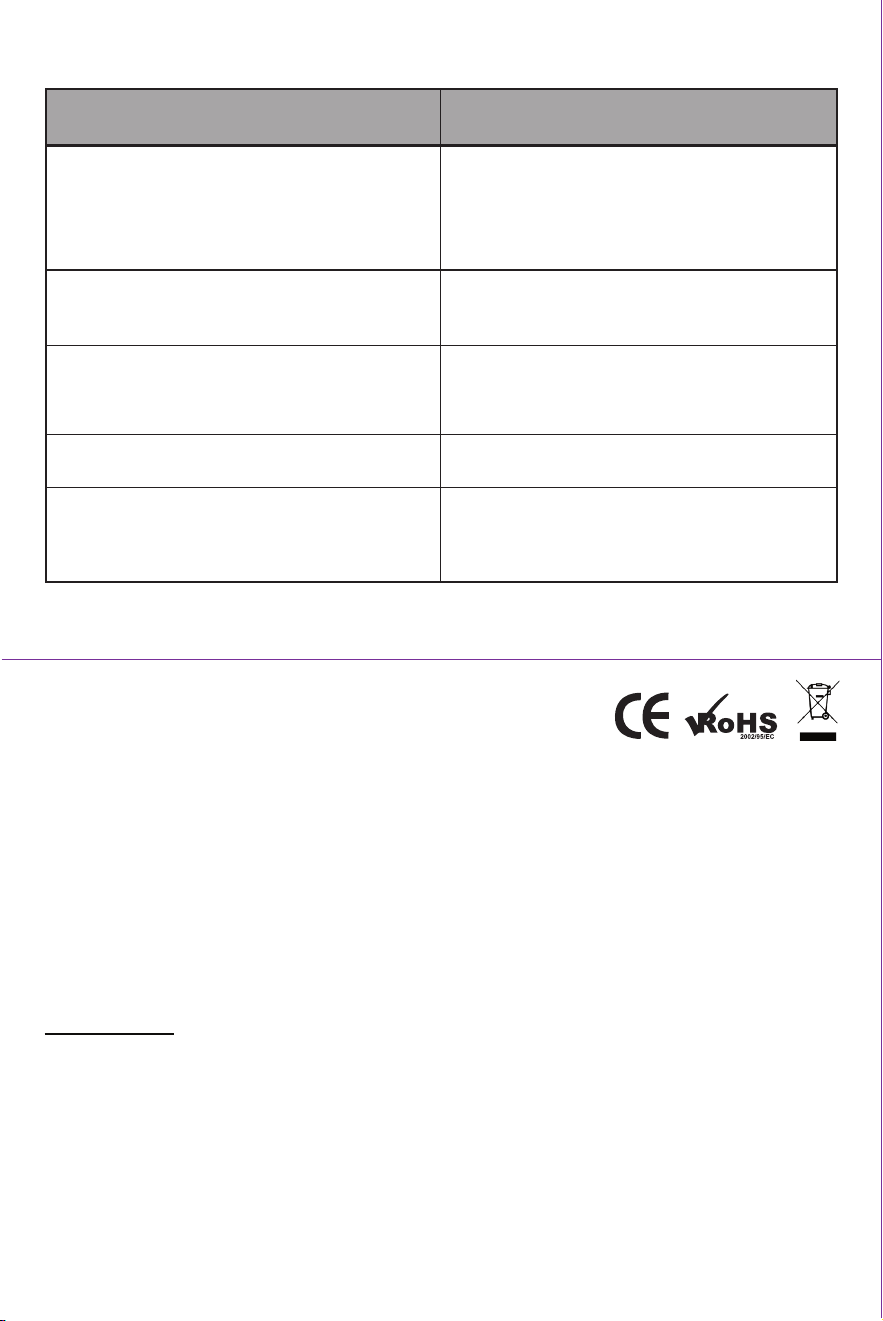
TROUBLESHOOTING:
SPECS:
Operang temp: 0C-45˚C (charging); -20˚C-60˚C (discharge)
Storage temp: -20˚C (<1 hour); -20˚C-25˚C
USB out: 5V@1A DC
USB in: 5V@1A DC
Charge me: About 5 hours
Baery capacity: 16.08 WH/4,400mAh
Lumens: 650
PROBLEM
Phone or tablet not charging
Lantern is cycling through dimming range when
power buon is pressed
Lantern flickers
Light output decreases
No light output or lantern shuts off
SOLUTION
• Unplug and reaach charging cable
• Lantern needs to be charged
• Lantern needs new alkaline baeries
• Disable “Try Me” mode
• Unplug charged phone
• Lantern needs to be recharged
• Charge lantern
• Recharge lantern
• Replace alkaline baeries
FCC STATEMENT
This device complies with Part 15 of the FCC Rules and Industry Canada license-exempt RSS standard(s). Operaon is subject to the following two condions: (1) this device may not cause
harmful interference, and (2) this device must accept any interference received, including interference that may cause undesired operaon.
FCC NOTE: The manufacturer is not responsible for any radio or TV interference caused by unauthorized modificaons to this equipment. Such modificaons could void the user’s authority
to operate the equipment.
NOTE: This equipment has been tested and found to comply with the limits for a Class B digital device, pursuant to Part 15 of the FCC Rules. These limits are designed to provide reasonable
protecon against harmful interference in a residenal installaon. This equipment generates, uses and can radiate radio frequency energy, and if not installed and used in accordance with
the instrucons, may cause harmful interference to radio communicaons. However, there is no guarantee that interference will not occur in a parcular installaon. If this equipment does
cause harmful interference to radio or television recepon, which can be determined by turning the equipment off and on, the user is encouraged to try to correct the interference by one
or more of the following measures:
• Reorient or relocate the receiving antenna.
• Increase the separaon between the equipment and receiver.
• Connect the equipment into an outlet on a circuit different from which the receiver is connected.
• Consult the dealer or an experienced radio/TV technician for help.
CAN ICES-3(B)/NMB-3(B)
MADE IN CHINA
Distributed by Jasco Products Company LLC, 10 E. Memorial Rd., Oklahoma City, OK 73114.
This Jasco product comes with a 5-year limited warranty. Visit www.byjasco.com for warranty details.
Quesons? Contact our U.S.-based Consumer Care at 1-800-654-8483 between 7AM – 8PM CST.
43934 Manual v1 03/08/19 PM
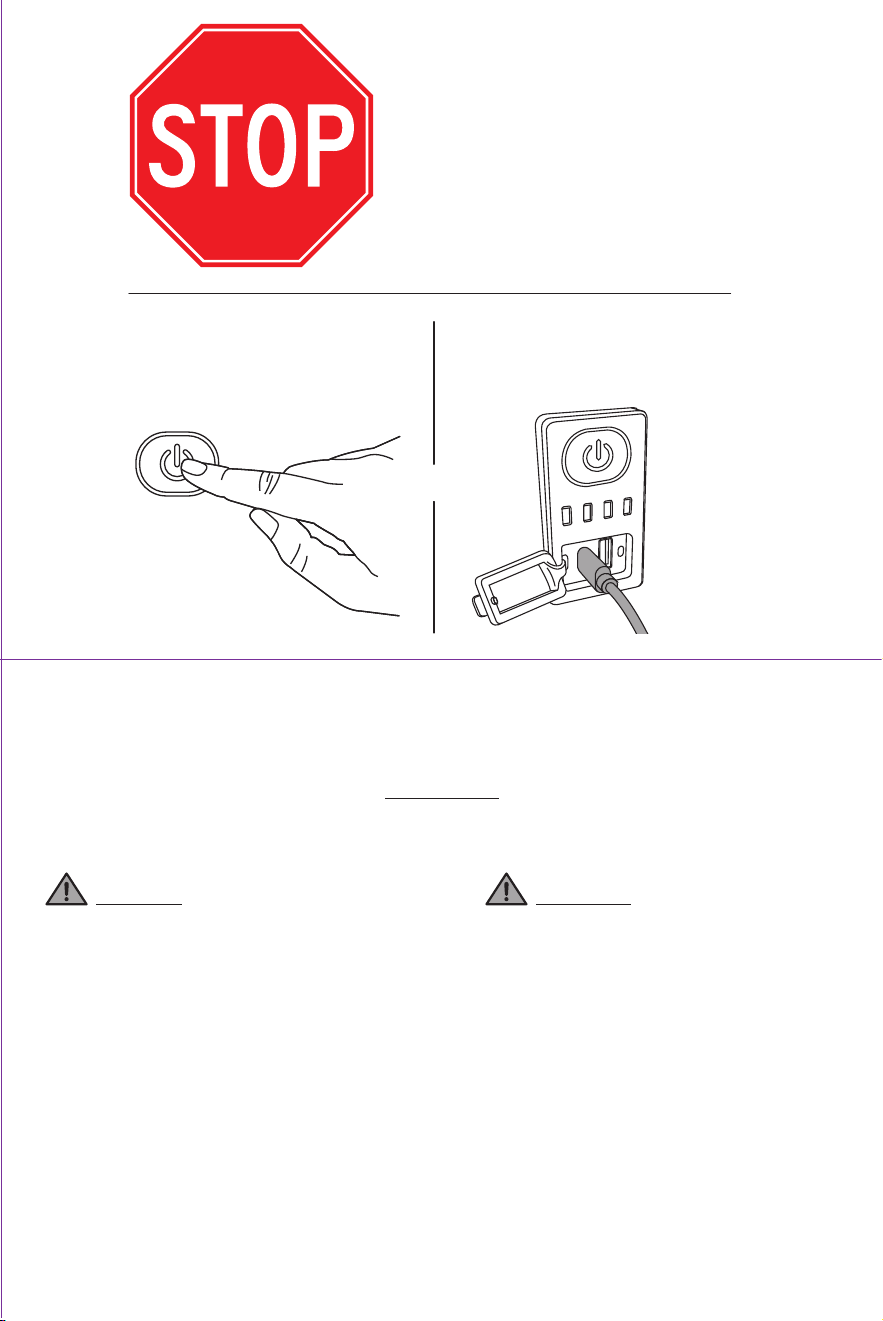
BEFORE
USING, DISABLE
“TRY ME” MODE
Press and hold power
buon for 10 seconds.
Plug Micro USB
into lantern.
OR
OR
ITM. / ART. 1327224
Enbrighten
®
Rechargeable LED Lantern
Instrucons
IMPORTANT: RETAIN FOR FUTURE REFERENCE. READ CAREFULLY.
CAUTION
• Do not mix old and new or other baery types.
• Replace all baeries at the same me.
• Replace fully discharged baeries immediately.
• Remove baeries if product is to be unused for
extended period of me.
• Always purchase the correct size and grade of
baery most suitable for the intended use.
• Clean the baery contacts and also those of the
device prior to baery installaon.
• Ensure the baeries are installed correctly with
regard to polarity (+ and -).
• Follow all applicable state and federal laws for
lithium baery disposal and recycling.
Baeries may leak harmful liquids or ignitable
materials or explode, causing injury or damage.
WARNING
• Avoid placing near a heater or other locaons
with extreme temperatures.
• DO NOT connue using or aempt to charge
product if it 1) has been punctured or damaged,
2) exhibits any abnormal characteriscs such as
excessive heang or swelling, or 3) emits an
odor.
• Use only in dry locaons. NEVER immerse in
liquids.
• DO NOT operate near flammable materials,
fumes or gases.
• To avoid explosion or exposure to toxic fumes,
DO NOT dispose of product in a fire.
• Use a mild soap and water should the baery
contents come into contact with the skin.
• Rinse eyes with clean running water and seek
medical aenon should the baery contents
come into contact with the eyes.
• Keep away from children. The Rechargeable
LED Lantern is not a toy.
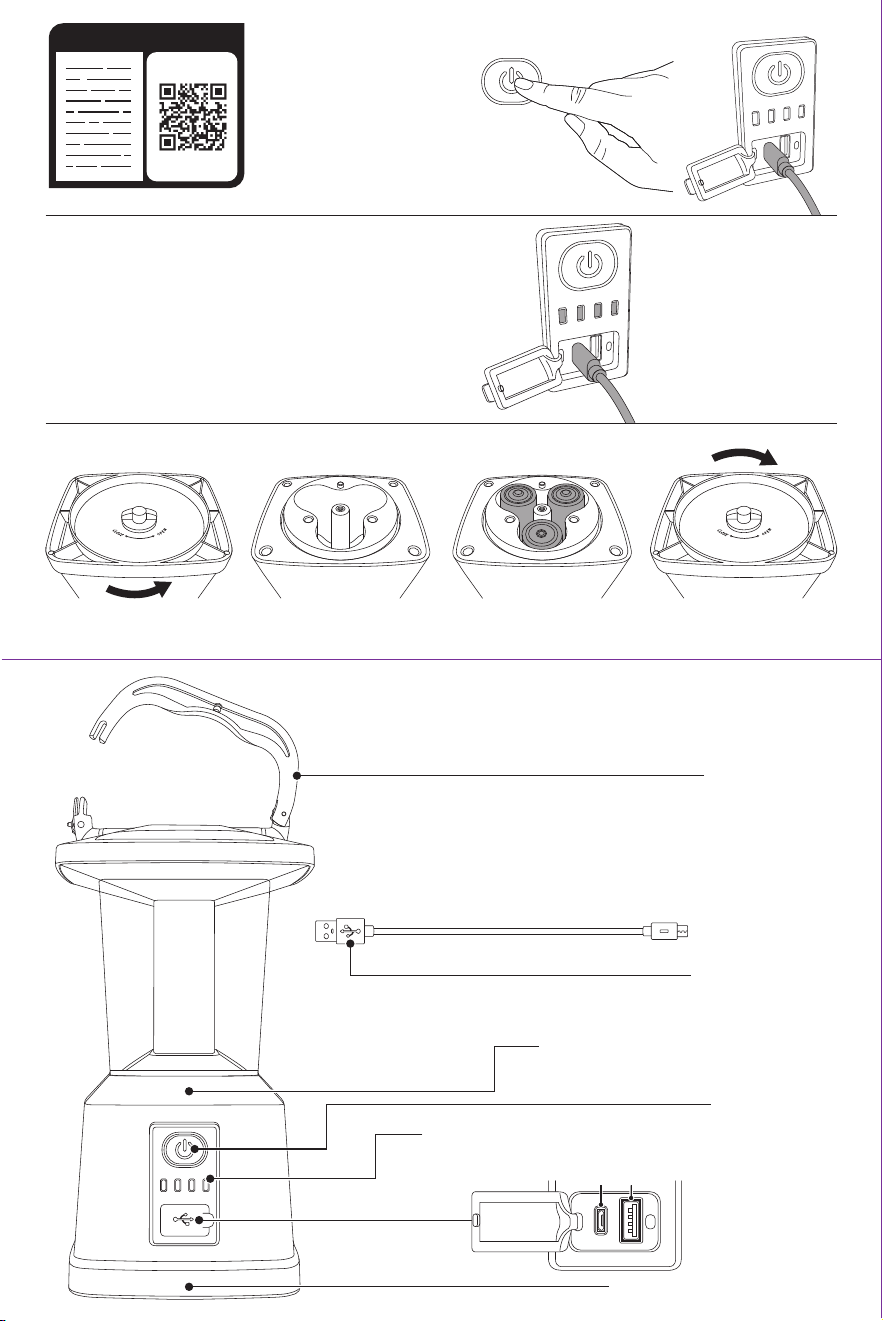
BEFORE USE:
1. Disable “Try Me” mode
by pressing and holding
the power buon for 10
seconds OR plugging the
micro USB cable into the
lantern.
OPERATION:
Power Buon
Press and release buon to turn lantern ON/OFF. Press and hold buon to cycle through the full range of lighng
output (60 – 650 Lumens over 10 seconds). Release buon at desired level of brightness. When turned OFF and
then ON again, the lantern will return to its last brightness level.
Charging and Baery Use
The rechargeable lithium-ion baery funcons as the lantern’s primary power source. Once the lithium-ion
baery is depleted, the lantern will begin using power from the alkaline baeries if installed (not required).
In order to conserve baery power, reduce light output or turn off lantern while charging devices.
Charge Out
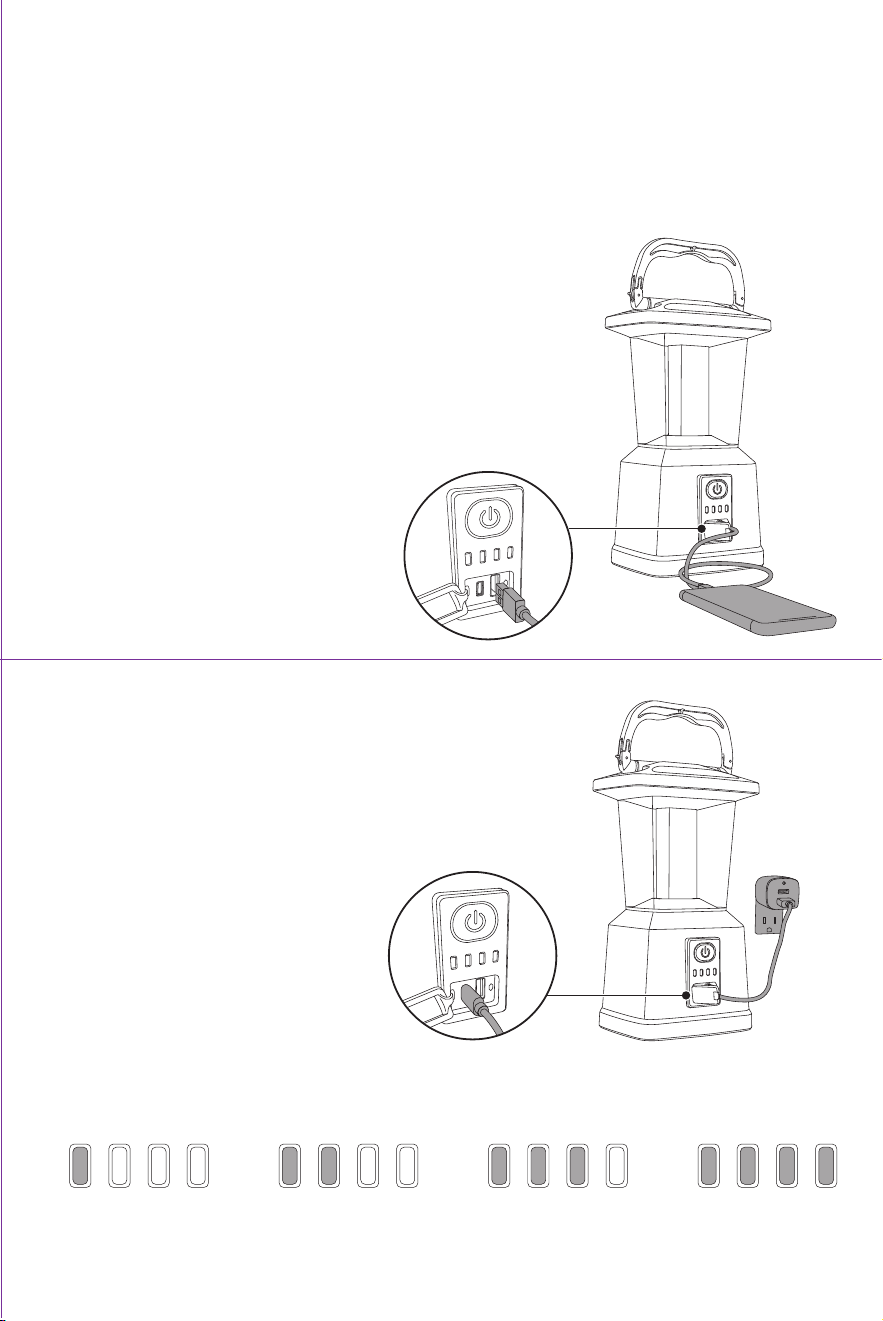
1. To charge devices, open USB cover on front of lantern, plug
USB charging cable into USB output port and connect device.
2. If running on internal lithium-ion baery, the indicator will
illuminate at current baery level. (If running on alkaline
baeries, indicator lights will NOT be illuminated.)
3. Light output may be reduced while device is charging.
4. When the lithium-ion baery reaches 25%
or less, the lantern will switch to reduced
power mode, during which me it may
operate at a reduced lumen output, and
USB out may turn off or be disabled.
Charge In
1. To charge internal lithium-ion baery, open USB cover on front
of lantern and plug micro USB cable (included) into micro USB
input port. Then connect to a USB power charger with minimum
2.4A/12W output (not included).
2. When internal lithium-ion baery is charging, indicator lights will flash from le to right. When fully charged,
all four lights will remain on. For best results, fully recharge lantern when baery indicator reaches 25%.
3. This lantern does not recharge alkaline baeries. The alkaline baeries do not recharge the internal
lithium-ion baery.
2. Make sure that the internal lithium-ion baery is fully
charged.
3. Insert baeries.
Locking handle
Power buon
Baery level & charge indicatorfor lithium-ion baery
USB input/output
Input Output
Baery compartment cover
Internal 4400mAh lithium-ion baery
Micro USB cable
(cable in baery compartment)
a. Remove the baery cover by
turning the knob counterclockwise.
c. Replace baery cover by
turning knob clockwise.
b. Insert three (3) D-baeries,
nong polarity.
OR
Mobile
device
plugged
into
charger
Wall-plug in, with
micro USB cable
connecng it to
lantern
0 - 25% 25 - 50% 50 - 75% 75 - 100%
READ IT OR WATCH IT
Read instructions or watch easy-to-follow video.
Scan QR code or visit https://goo.gl/Yuzhgc
BEFORE USE:
1. Disable “Try Me” mode
by pressing and holding
the power buon for 10
seconds OR plugging the
micro USB cable into the
lantern.
OPERATION:
Power Buon
Press and release buon to turn lantern ON/OFF. Press and hold buon to cycle through the full range of lighng
output (60 – 650 Lumens over 10 seconds). Release buon at desired level of brightness. When turned OFF and
then ON again, the lantern will return to its last brightness level.
Charging and Baery Use
The rechargeable lithium-ion baery funcons as the lantern’s primary power source. Once the lithium-ion
baery is depleted, the lantern will begin using power from the alkaline baeries if installed (not required).
In order to conserve baery power, reduce light output or turn off lantern while charging devices.
Charge Out
1. To charge devices, open USB cover on front of lantern, plug
USB charging cable into USB output port and connect device.
2. If running on internal lithium-ion baery, the indicator will
illuminate at current baery level. (If running on alkaline
baeries, indicator lights will NOT be illuminated.)
3. Light output may be reduced while device is charging.
4. When the lithium-ion baery reaches 25%
or less, the lantern will switch to reduced
power mode, during which me it may
operate at a reduced lumen output, and
USB out may turn off or be disabled.
Charge In
1. To charge internal lithium-ion baery, open USB cover on front
of lantern and plug micro USB cable (included) into micro USB
input port. Then connect to a USB power charger with minimum
2.4A/12W output (not included).
2. When internal lithium-ion baery is charging, indicator lights will flash from le to right. When fully charged,
all four lights will remain on. For best results, fully recharge lantern when baery indicator reaches 25%.
3. This lantern does not recharge alkaline baeries. The alkaline baeries do not recharge the internal
lithium-ion baery.
2. Make sure that the internal lithium-ion baery is fully
charged.
3. Insert baeries.
Locking handle
Power buon
Baery level & charge indicatorfor lithium-ion baery
USB input/output
Input Output
Baery compartment cover
Internal 4400mAh lithium-ion baery
Micro USB cable
(cable in baery compartment)
a. Remove the baery cover by
turning the knob counterclockwise.
c. Replace baery cover by
turning knob clockwise.
b. Insert three (3) D-baeries,
nong polarity.
OR
Mobile
device
plugged
into
charger
Wall-plug in, with
micro USB cable
connecng it to
lantern
0 - 25% 25 - 50% 50 - 75% 75 - 100%
READ IT OR WATCH IT
Read instructions or watch easy-to-follow video.
Scan QR code or visit https://goo.gl/Yuzhgc
TROUBLESHOOTING:
SPECS:
Operang temp: 0C-45˚C (charging); -20˚C-60˚C (discharge)
Storage temp: -20˚C (<1 hour); -20˚C-25˚C
USB out: 5V@1A DC
USB in: 5V@1A DC
Charge me: About 5 hours
Baery capacity: 16.08 WH/4,400mAh
Lumens: 650
PROBLEM
Phone or tablet not charging
Lantern is cycling through dimming range when
power buon is pressed
Lantern flickers
Light output decreases
No light output or lantern shuts off
SOLUTION
• Unplug and reaach charging cable
• Lantern needs to be charged
• Lantern needs new alkaline baeries
• Disable “Try Me” mode
• Unplug charged phone
• Lantern needs to be recharged
• Charge lantern
• Recharge lantern
• Replace alkaline baeries
FCC STATEMENT
This device complies with Part 15 of the FCC Rules and Industry Canada license-exempt RSS standard(s). Operaon is subject to the following two condions: (1) this device may not cause
harmful interference, and (2) this device must accept any interference received, including interference that may cause undesired operaon.
FCC NOTE: The manufacturer is not responsible for any radio or TV interference caused by unauthorized modificaons to this equipment. Such modificaons could void the user’s authority
to operate the equipment.
NOTE: This equipment has been tested and found to comply with the limits for a Class B digital device, pursuant to Part 15 of the FCC Rules. These limits are designed to provide reasonable
protecon against harmful interference in a residenal installaon. This equipment generates, uses and can radiate radio frequency energy, and if not installed and used in accordance with
the instrucons, may cause harmful interference to radio communicaons. However, there is no guarantee that interference will not occur in a parcular installaon. If this equipment does
cause harmful interference to radio or television recepon, which can be determined by turning the equipment off and on, the user is encouraged to try to correct the interference by one
or more of the following measures:
• Reorient or relocate the receiving antenna.
• Increase the separaon between the equipment and receiver.
• Connect the equipment into an outlet on a circuit different from which the receiver is connected.
• Consult the dealer or an experienced radio/TV technician for help.
CAN ICES-3(B)/NMB-3(B)
MADE IN CHINA
Distributed by Jasco Products Company LLC, 10 E. Memorial Rd., Oklahoma City, OK 73114.
This Jasco product comes with a 5-year limited warranty. Visit www.byjasco.com for warranty details.
Quesons? Contact our U.S.-based Consumer Care at 1-800-654-8483 between 7AM – 8PM CST.
43934 Manual v1 03/08/19 PM
BEFORE
USING, DISABLE
“TRY ME” MODE
Press and hold power
buon for 10 seconds.
Plug Micro USB
into lantern.
OR
OR
ITM. / ART. 1327224
Enbrighten
®
Rechargeable LED Lantern
Instrucons
IMPORTANT: RETAIN FOR FUTURE REFERENCE. READ CAREFULLY.
CAUTION
• Do not mix old and new or other baery types.
• Replace all baeries at the same me.
• Replace fully discharged baeries immediately.
• Remove baeries if product is to be unused for
extended period of me.
• Always purchase the correct size and grade of
baery most suitable for the intended use.
• Clean the baery contacts and also those of the
device prior to baery installaon.
• Ensure the baeries are installed correctly with
regard to polarity (+ and -).
• Follow all applicable state and federal laws for
lithium baery disposal and recycling.
Baeries may leak harmful liquids or ignitable
materials or explode, causing injury or damage.
WARNING
• Avoid placing near a heater or other locaons
with extreme temperatures.
• DO NOT connue using or aempt to charge
product if it 1) has been punctured or damaged,
2) exhibits any abnormal characteriscs such as
excessive heang or swelling, or 3) emits an
odor.
• Use only in dry locaons. NEVER immerse in
liquids.
• DO NOT operate near flammable materials,
fumes or gases.
• To avoid explosion or exposure to toxic fumes,
DO NOT dispose of product in a fire.
• Use a mild soap and water should the baery
contents come into contact with the skin.
• Rinse eyes with clean running water and seek
medical aenon should the baery contents
come into contact with the eyes.
• Keep away from children. The Rechargeable
LED Lantern is not a toy.