Installation/Operation
www.alliancelaundry.com
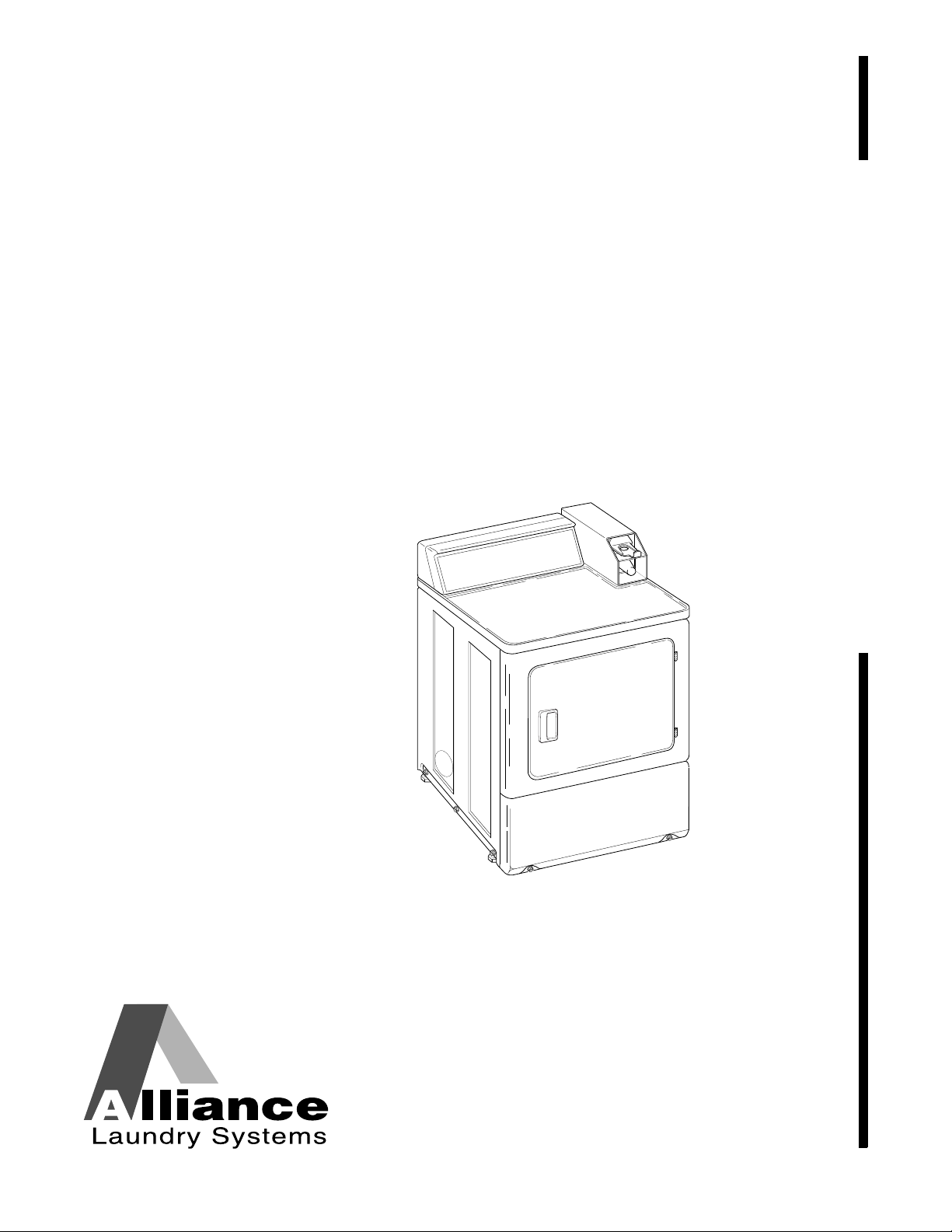
Clothes Dryer
Nonmetered and Metered
Electric and Gas Models
D677I
Part No. 512687R6
April 2014
Keep These Instructions for Future Reference.
(If this machine changes ownership, this manual must accompany machine.)

© Copyright, Alliance Laundry Systems LLC – DO NOT COPY or TRANSMIT512687R6
1
IMPORTANT: The electrical installation in the site shall comply with the Australian Electrical Standards,
AS3000, SAA wiring rules, and such local regulations that might apply. In Australia and New Zealand
,
installation must comply with the Gas Installations Standard AS/NZS 5601 Part 1: General Installations.
Read complete Installation and Operation Instructions before using dryer.
The maximum drying load (dry weight) shall not exceed 9.0 kg (20 pounds).
IMPORTANT: Purchaser must consult the local gas supplier for suggested instructions to be followed if the
dryer user smells gas. The gas utility instructions plus the SAFETY and WARNING note directly above
must be posted in a prominent location near the dryer for customer use.
• Do not store or use gasoline or other flammable vapors and liquids in the vicinity of this or
any other appliance.
• WHAT TO DO IF YOU SMELL GAS:
– Do not try to light any appliance.
– Do not touch any electrical switch; do not use any phone in your building.
– Clear the room, building or area of all occupants.
– Immediately call your gas supplier from a neighbor’s phone. Follow the gas supplier’s
instructions.
– If you cannot reach your gas supplier, call the fire department.
• Installation and service must be performed by a qualified installer, service agency or the gas
supplier.
W052
FOR YOUR SAFETY, the information in this manual must be followed to minimize
the risk of fire or explosion or to prevent property damage, personal injury or
death.
W033
WARNING
• Installation of unit must be performed by a qualified installer.
• Install clothes dryer according to manufacturer’s instructions and local codes.
• DO NOT install a clothes dryer with flexible plastic venting materials. If flexible metal (foil
type) duct is installed, it must be of a specific type identified by the appliance manufacturer
as suitable for use with clothes dryers. Refer to section on connecting exhaust system.
Flexible venting materials are known to collapse, be easily crushed, and trap lint. These
conditions will obstruct clothes dryer airflow and increase the risk of fire.
W729R1
WARNING
FOR YOUR SAFETY
Do not store or use gasoline or other flammable vapors and liquids in the vicinity of
this or any other appliance.
W053
Risk of fire. Highly flammable material.
W881
WARNING

© Copyright, Alliance Laundry Systems LLC – DO NOT COPY or TRANSMIT
© Copyright 2014, Alliance Laundry Systems LLC
All rights reserved. No part of the contents of this book may be reproduced or transmitted in any form or by any
means without the expressed written consent of the publisher.
512687R6
2
Table of
Contents
Safety Information.............................................................................. 4
Explanation of Safety Messages........................................................... 4
Important Safety Instructions ............................................................... 4
Installation........................................................................................... 6
Dimensions ........................................................................................... 6
Nonmetered Models......................................................................... 6
Metered Models ............................................................................... 7
Before You Start ................................................................................... 8
Tools ................................................................................................ 8
Card Reader Models ........................................................................ 8
Installing the Dryer ............................................................................... 9
Step 1: Position and Level the Dryer ............................................... 9
Step 2: Connect Dryer Exhaust System ........................................... 10
Exhaust Direction............................................................................. 12
Exhaust System................................................................................ 12
Multi-Dryer Installation Exhaust Requirements.............................. 13
Step 3: (Gas Dryer Only) Connect Gas Supply Pipe ....................... 15
Step 4: Reverse Door, if Desired ..................................................... 17
Step 5: Wipe Out Inside of Dryer .................................................... 18
Step 6: Plug In the Dryer ................................................................. 19
Step 7: Recheck Steps 1-6................................................................ 20
Step 8: Check Heat Source .............................................................. 21
Vending................................................................................................ 22
Meter Case ............................................................................................ 22
Coin Slide Control ................................................................................ 22
Power-Up Mode............................................................................... 22
Ready Mode ..................................................................................... 22
Start Mode........................................................................................ 22
Run Mode......................................................................................... 22
Door Open Mode ............................................................................. 22
End of Cycle Mode .......................................................................... 22
Topoffs............................................................................................. 22
Temperature Selector Switch........................................................... 22
Error Display Mode ......................................................................... 23
Setting Dry Time Dipswitches.............................................................. 23
Models Through Serial No. 0908..................................................... 23
Models Starting Serial No. 0909...................................................... 23
All Models ....................................................................................... 23
Models Starting Serial No. 0909...................................................... 23
Dipswitch Settings................................................................................ 24
Models Through Serial No 0908...................................................... 25
Models Starting Serial No 0909....................................................... 26
Test Setting ...................................................................................... 26
Slide Extension Assembly – Models Through Serial No. 1211 ........... 27
Slide Extension Assembly – Models Starting Serial No. 1211 ....... 28
Additional Dryer Security..................................................................... 30

© Copyright, Alliance Laundry Systems LLC – DO NOT COPY or TRANSMIT
512687R6
3
Operation............................................................................................. 31
Operation Instructions for Nonmetered and Coin Slide Dryers ........... 31
Step 1: Clean Lint Filter................................................................... 31
Step 2: Load Laundry....................................................................... 31
Step 3: Close Loading Door............................................................. 31
Step 4: Set Fabric Selector............................................................... 32
Step 5: Start Dryer ........................................................................... 32
Operation Instructions for MDC Dryers............................................... 33
Step 1: Clean Lint Filter................................................................... 33
Step 2: Load Laundry....................................................................... 33
Step 3: Close Loading Door............................................................. 33
Step 4: Set Fabric Selector............................................................... 34
Step 5: Insert Coin(s) or Card .......................................................... 34
Step 6: Start Dryer ........................................................................... 34
Indicator Lights................................................................................ 35
Operation Instructions for NetMaster Dryers....................................... 36
Step 1: Clean Lint Filter................................................................... 36
Step 2: Load Laundry....................................................................... 36
Step 3: Close Loading Door............................................................. 36
Step 4: Set Fabric Selector............................................................... 37
Step 5: Insert Coin(s) or Card .......................................................... 37
Step 6: Start Dryer ........................................................................... 38
Indicator Lights................................................................................ 38
Maintenance ........................................................................................ 39
Lubrication............................................................................................ 39
Care of Your Dryer............................................................................... 39
Dryer Interior ................................................................................... 39
Cabinet ............................................................................................. 39
Control Panel ................................................................................... 39
Exhaust System................................................................................ 39
Lint Filter.............................................................................................. 40
Motor Overload Protector..................................................................... 40
For Energy Conservation...................................................................... 40
Troubleshooting .................................................................................. 41
Contact Information........................................................................... 42
Installer Checklist................................................................. Back Cover
© Copyright, Alliance Laundry Systems LLC – DO NOT COPY or TRANSMIT
4
512687R6
Safety Information
Explanation of Safety Messages
Throughout this manual and on machine decals, you
will find precautionary statements (“DANGER,”
“WARNING,” and “CAUTION”) followed by specific
instructions. These precautions are intended for the
personal safety of the operator, user, servicer, and
those maintaining the machine.
Additional precautionary statements (“IMPORTANT”
and “NOTE”) are followed by specific instructions.
IMPORTANT: The word “IMPORTANT” is used
to inform the reader of specific procedures where
minor machine damage will occur if the procedure
is not followed.
NOTE: The word “NOTE” is used to communicate
installation, operation, maintenance or servicing
information that is important but not hazard
related.
Important Safety Instructions
Save These Instructions
1. Read all instructions before using the dryer.
2. Install this dryer according to the
INSTALLATION INSTRUCTIONS. Refer to the
EARTHING (GROUNDING) INSTRUCTIONS
in the INSTALLATION manual for the proper
earthing (grounding) of the dryer. All
connections for electrical power, earthing
(grounding) and gas supply must comply with
local codes and be made by licensed personnel
when required. Do not do it yourself.
3. Do not install or store the dryer where it will be
exposed to water and/or weather.
4. Do not dry articles that have been previously
cleaned in, washed in, soaked in, or spotted with
gasoline or machine oils, vegetable or cooking
oils, cleaning waxes or chemicals, dry-cleaning
solvents, thinner, anything containing chemicals
such as in mops and cleaning cloths, or other
flammable or explosive substances as they give
off vapors that could ignite, explode or cause
fabric to catch on fire by itself.
5. Items that have been soiled with substances such
as cooking oil, acetone, alcohol, petrol, kerosene,
spot removers, turpentine, waxes and wax
removers, should be washed in hot water with an
extra amount of detergent before being dried in
the tumble dryer.
6. To reduce the risk of fire, DO NOT DRY plastics
or articles containing foam or latex rubber or
similarly textured rubberlike materials, such as
shower caps, water proof textiles, rubber-backed
articles, and clothes or pillows filled with foam
rubber pads.
7. Do not tumble fiberglass curtains and draperies
unless the label says it can be done. If they are
dried, wipe out the cylinder with a damp cloth to
remove particles of fiberglass.
Indicates an imminently hazardous
situation that, if not avoided, will cause
severe personal injury or death.
DANGER
Indicates a hazardous situation that, if not
avoided, could cause severe personal
injury or death.
WARNING
Indicates a hazardous situation that, if not
avoided, may cause minor or moderate
personal injury or property damage.
CAUTION
To reduce the risk of fire, electric shock,
serious injury or death to persons when
using your dryer, follow these basic
precautions:
W130
WARNING

© Copyright, Alliance Laundry Systems LLC – DO NOT COPY or TRANSMIT
Safety Information
5
512687R6
8. Do not allow children to play on or in the dryer.
Close supervision of children is necessary when
the dryer is used near children. This appliance is
not intended for use by persons (including
children) with reduced physical, sensory or
mental capabilities, or lack of experience and
knowledge, unless they have been given
supervision or instruction concerning the use of
the appliance by a person responsible for their
safety. This is a safety rule for all appliances.
9. Do not reach into the dryer if the cylinder is
revolving.
10. Use the dryer only for its intended purpose,
drying clothes. ALWAYS follow the fabric care
instructions supplied by the garment
manufacturer and only use the dryer drum to dry
textiles that have been washed in water.
11. Always read and follow manufacturer’s
instructions on packages of laundry and cleaning
aids. Heed all warnings or precautions. To reduce
the risk of poisoning or chemical burns, keep
them out of reach of children at all times
(preferably in a locked cabinet).
12. Remove laundry immediately after the dryer
stops.
13. DO NOT operate the dryer if it is smoking,
grinding or has missing or broken parts or
removed guards and/or panels. DO NOT tamper
with the controls or bypass any safety devices.
14. DO NOT operate individual units if they have
been separated from a stack unit.
15. Dryer will not operate with the loading door
open. DO NOT bypass the door safety switch by
permitting the dryer to operate with the door
open. The dryer will stop tumbling when the door
is opened. Do not use the dryer if it does not stop
tumbling when the door is opened or starts
tumbling without pressing the START
mechanism. Remove the dryer from use and call
the service person.
16. ALWAYS clean the lint filter after every load. A
layer of lint in the filter reduces drying efficiency
and prolongs drying time. Keep area around the
exhaust opening and adjacent surrounding area
free from the accumulation of lint, dust and dirt.
The interior of the dryer and the exhaust duct
should be cleaned periodically by qualified
service personnel.
17. Do not repair or replace any part of the dryer, or
attempt any servicing unless specifically
recommended in the user-maintenance
instructions or in published user-repair
instructions that you understand and have the
skills to carry out. ALWAYS disconnect the
electrical power to the dryer before attempting
service. Disconnect the power cord by grasping
the plug, not the cord.
18. If the supply cord is damaged, it must be replaced
by the manufacturer, its special agent or similarly
qualified persons in order to avoid a hazard.
19. Before the dryer is removed from service or
discarded, remove the door to the drying
compartment.
20. Failure to install, maintain, and/or operate this
machine according to the manufacturer’s
instructions may result in conditions which can
produce bodily injury and/or property damage.
NOTE: The WARNING and IMPORTANT
SAFETY INSTRUCTIONS appearing in this
manual are not meant to cover all possible
conditions and situations that may occur. Observe
and be aware of other labels and precautions that
are located on the machine. They are intended to
provide instruction for safe use of the machine.
Common sense, caution and care must be exercised
when installing, maintaining, or operating the
dryer.
Always contact your dealer, distributor, service agent
or the manufacturer on any problems or conditions you
do not understand.
© Copyright, Alliance Laundry Systems LLC – DO NOT COPY or TRANSMIT
6
512687R6
Installation
Dimensions
Nonmetered Models
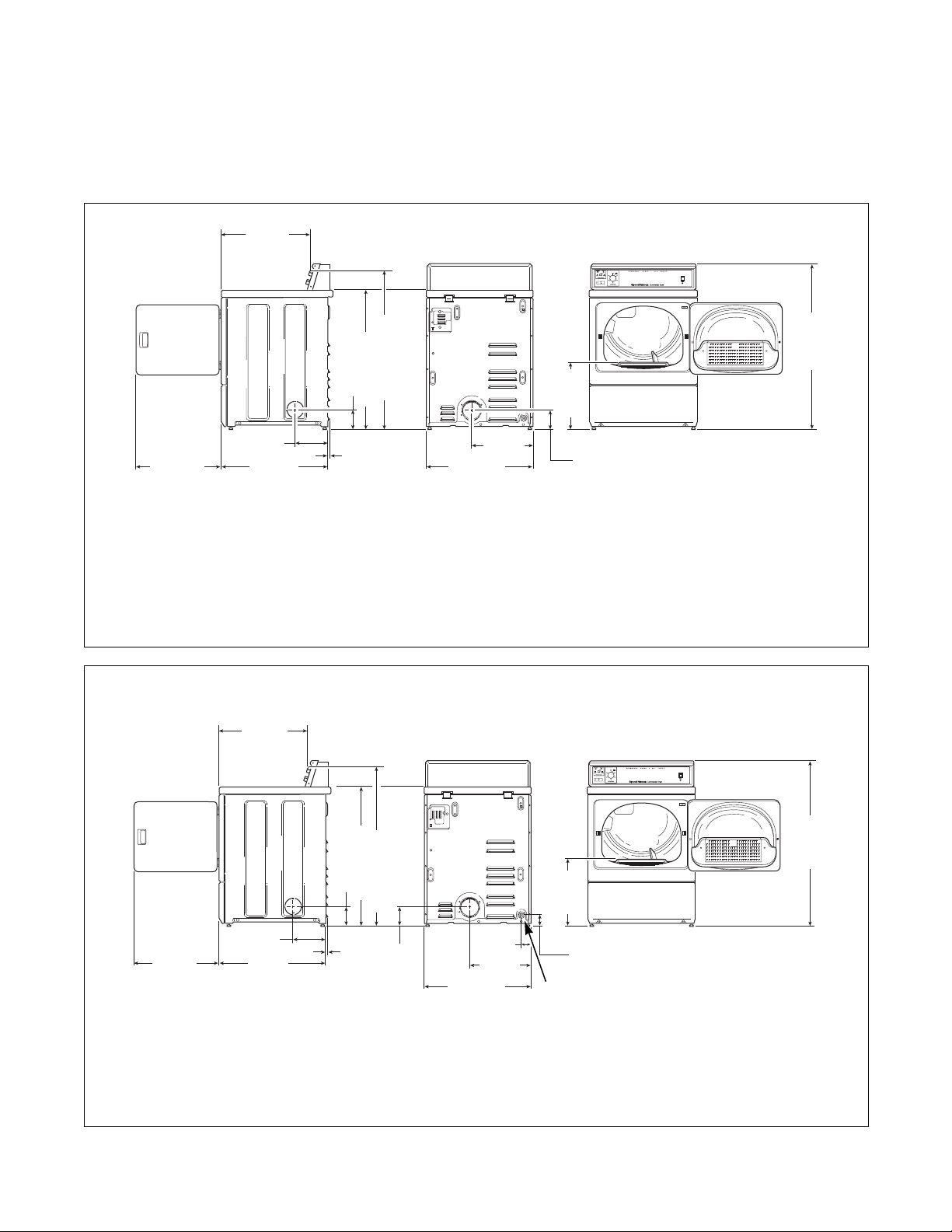
DRY2098N
* With leveling legs turned into base.
NOTE: Exhaust openings are 10.2 cm (4 inch) metal ducting.
DRY2237N
* With leveling legs turned into base.
NOTE: Exhaust openings are 10.2 cm (4 inch) metal ducting.
1 3/8 in. N.P.T. Gas Connection
DRY2098N
59.7 cm
(23.5 in.)
20.3 cm
(8.0 in.)
1.02 cm
(0.4 in.)
*11.4 cm (4.5 in.)
71.1 cm
(28 in.)
*91.4 cm (36 in.)
*39.2 cm
(15.44 in.)
39.1 cm
(15.4 in.)
ELECTRIC MODELS
*10.2 cm
(4.0 in.)
68.3 cm
(26.875 in.)
54.8 cm
(21.56 in.)
*102 cm (40.19 in.)
*109.2 cm
(43 in.)
DRY2237N
59.7 cm
(23.5 in.)
20.3 cm
(8.0 in.)
1.02 cm
(0.4 in.)
*11.4 cm (4.5 in.)
71.1 cm
(28 in.)
*91.4 cm (36 in.)
*102 cm (40.19 in.)
39.1 cm
(15.4 in.)
GAS MODELS
*7 cm
(2.8 in.)
68.3 cm
(26.875 in.)
6 cm
(2.3 in.)
*39.2 cm
(15.44 in.)
1
*10.2 cm
(4.0 in.)
54.8 cm
(21.56 in.)
*109.2 cm
(43 in.)
© Copyright, Alliance Laundry Systems LLC – DO NOT COPY or TRANSMIT
Installation
7
512687R6
Metered Models
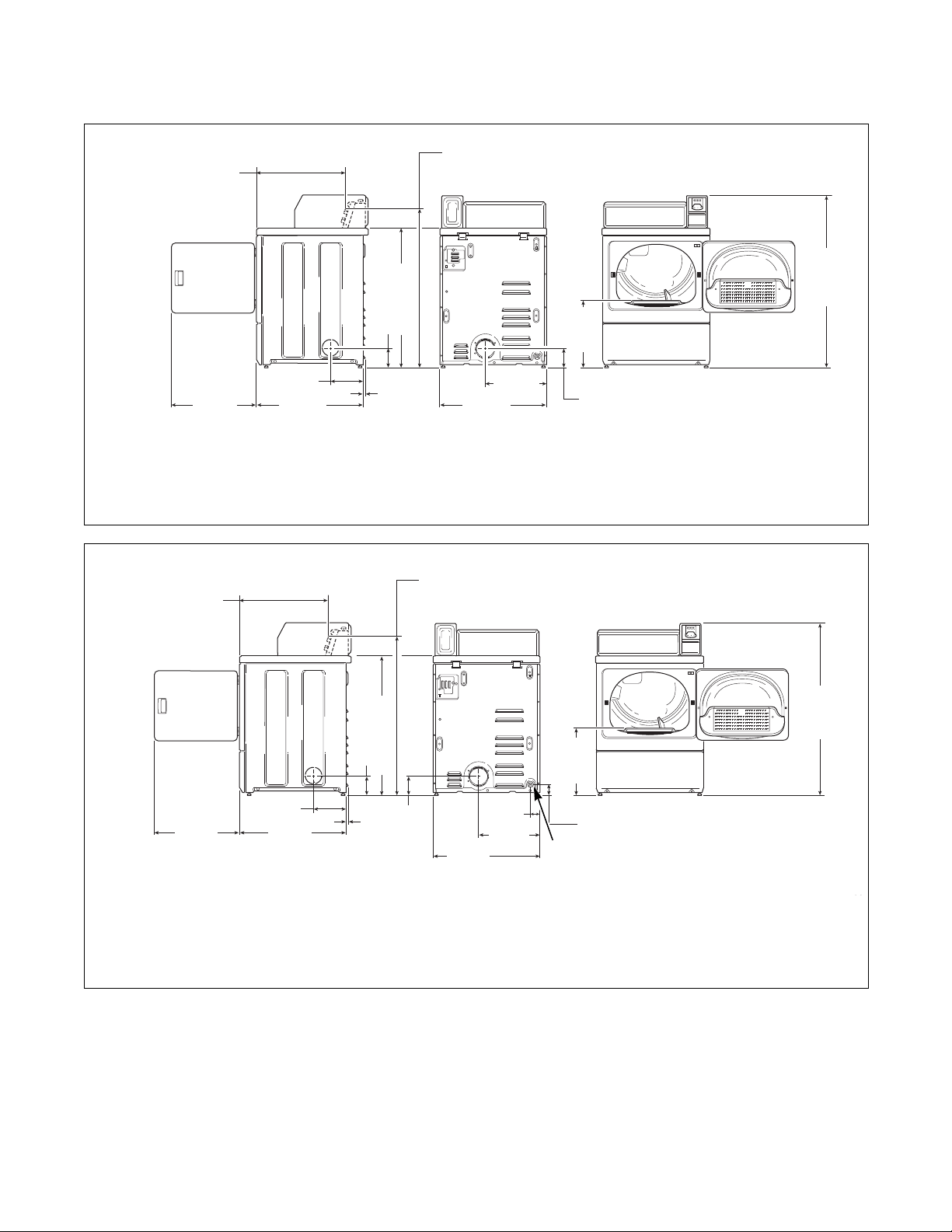
NOTE: Gas models cannot be vented out left side
of cabinet because of burner housing.
IMPORTANT: The dryer should have sufficient
clearance around it for needed ventilation and for
the ease of installation and servicing. For maximum
drying performance, we recommend that more
clearance be allowed around the dryer than the
clearances that are listed throughout this manual.
DRY2096N
* With leveling legs turned into base.
NOTE: Exhaust openings are 10.2 cm (4 inch) metal ducting.
DRY2238N
* With leveling legs turned into base.
NOTE: Exhaust openings are 10.2 cm (4 inch) metal ducting.
1 3/8 in. N.P.T. Gas Connection
59.7 cm
(23.5 in.)
20.3 cm
(8.0 in.)
1.02 cm
(0.4 in.)
71.1 cm
(28 in.)
*91.4 cm (36 in.)
39.1 cm
(15.4 in.)
ELECTRIC MODELS
*10.2 cm
(4.0 in.)
68.3 cm
(26.9 in.)
56 cm (22.06 in.)
Electronic Control Models
*102 cm (40.19 in.) Coin Slide Models
*11.4 cm (4.5 in.)
*39.2 cm
(15.44 in.)
54.8 cm (21.56 in.)
Coin Slide Models
*97 cm (38.19 in.) Electronic Control Models
*109.7 cm
(43.2 in.)
DRY2238
GAS MODELS
59.7 cm
(23.5 in.)
20.3 cm
(8.0 in.)
71.1 cm
(28 in.)
*97 cm (38.19 in.) Electronic Control Models
39.1 cm
(15.4 in.)
6 cm
(2.3 in.)
68.3 cm
(26.9 in.)
1.02 cm
(0.4 in.)
*7 cm
(2.8 in.)
1
56 cm (22.06 in.)
Electronic Control Models
*11.4 cm (4.5 in.)
*102 cm (40.19 in.) Coin Slide Models
*10.2 cm
(4.0 in.)
*39.2 cm
(15.44 in.)
*91.4 cm (36 in.)
54.8 cm (21.56 in.)
Coin Slide Models
*109.7 cm
(43.2 in.)
© Copyright, Alliance Laundry Systems LLC – DO NOT COPY or TRANSMIT
Installation
512687R6
8
Before You Start
Tools
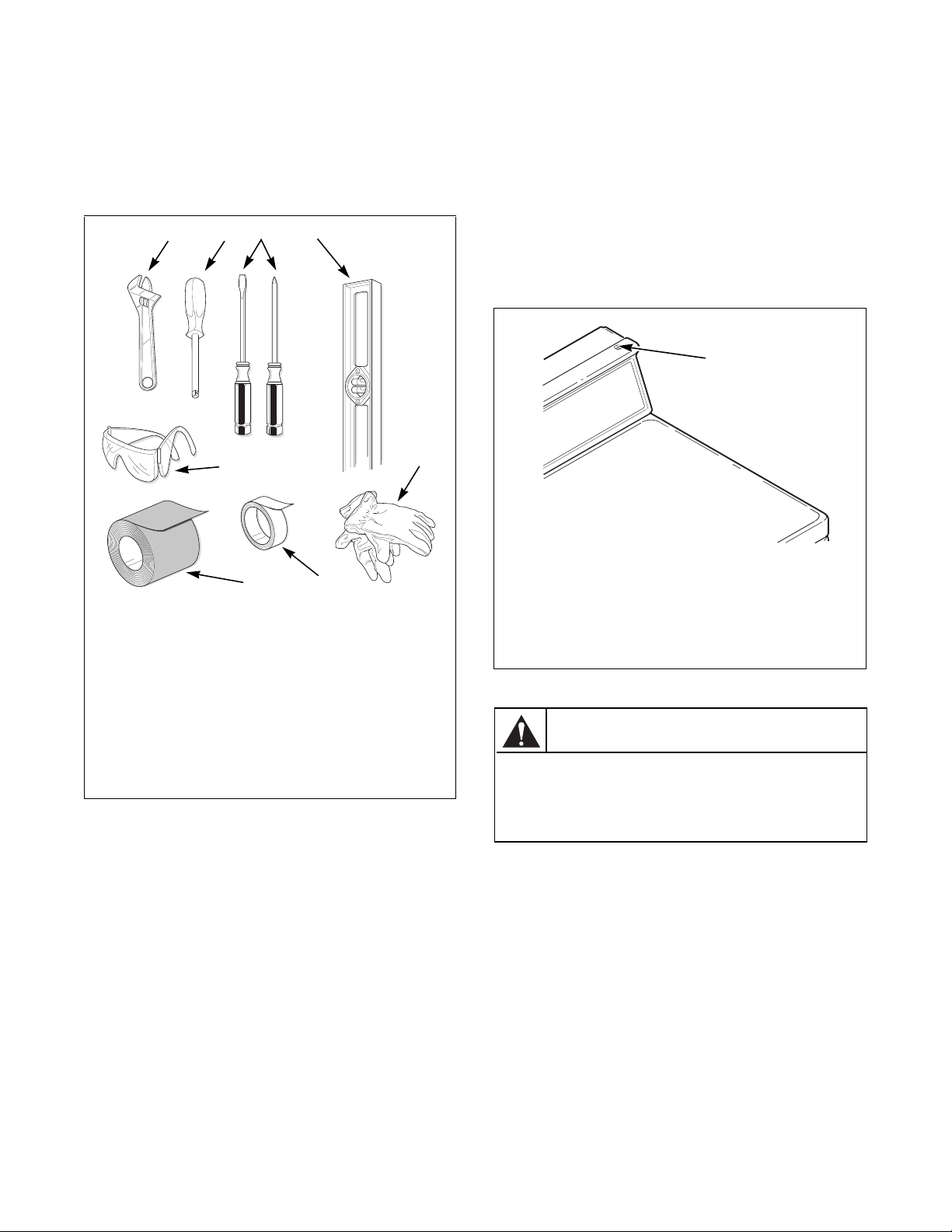
For most installations, the basic tools you will need
are:
Figure 1
NOTE: A 20.32 cm (8 in.) coin drawer is required
for coin operated MDC and NetMaster models.
Card Reader Models
The machine is shipped from the factory with the
Electronic Control Diagnostic Harness Assembly
unplugged. To avoid unauthorized manual
programming or vending perform the following steps.
1. Open service door. Refer to Figure 2.
2. Locate diagnostic harness on electronic control.
3. Plug connectors for “white/black” wire and “red/
blue” wire together.
.
DRY2586N
1 Wrench
2 1/4 inch Driver
3 Screwdrivers
4 Level
5 Gloves
6 Teflon Tape
7 Duct Tape
8 Safety Glasses
4
5
1
7
23
8
6
1 Service Door
Figure 2
FLW6R
1
Any disassembly requiring the use of
tools must be performed by a suitably
qualified service person.
W299
WARNING
© Copyright, Alliance Laundry Systems LLC – DO NOT COPY or TRANSMIT
Installation
9
512687R6
Installing the Dryer
Step 1: Position and Level the Dryer
Install dryer before washer. This allows room for
attaching exhaust duct.
Install the four rubber feet (in accessories bag).
Select a location with a solid floor. Dryers installed in
residential garages must be elevated 46 cm (18 inches)
above the floor.
No other fuel burning appliance should be installed in
the same closet with the dryer.
The dryer must not be installed or stored in an area
where it will be exposed to water and/or weather.
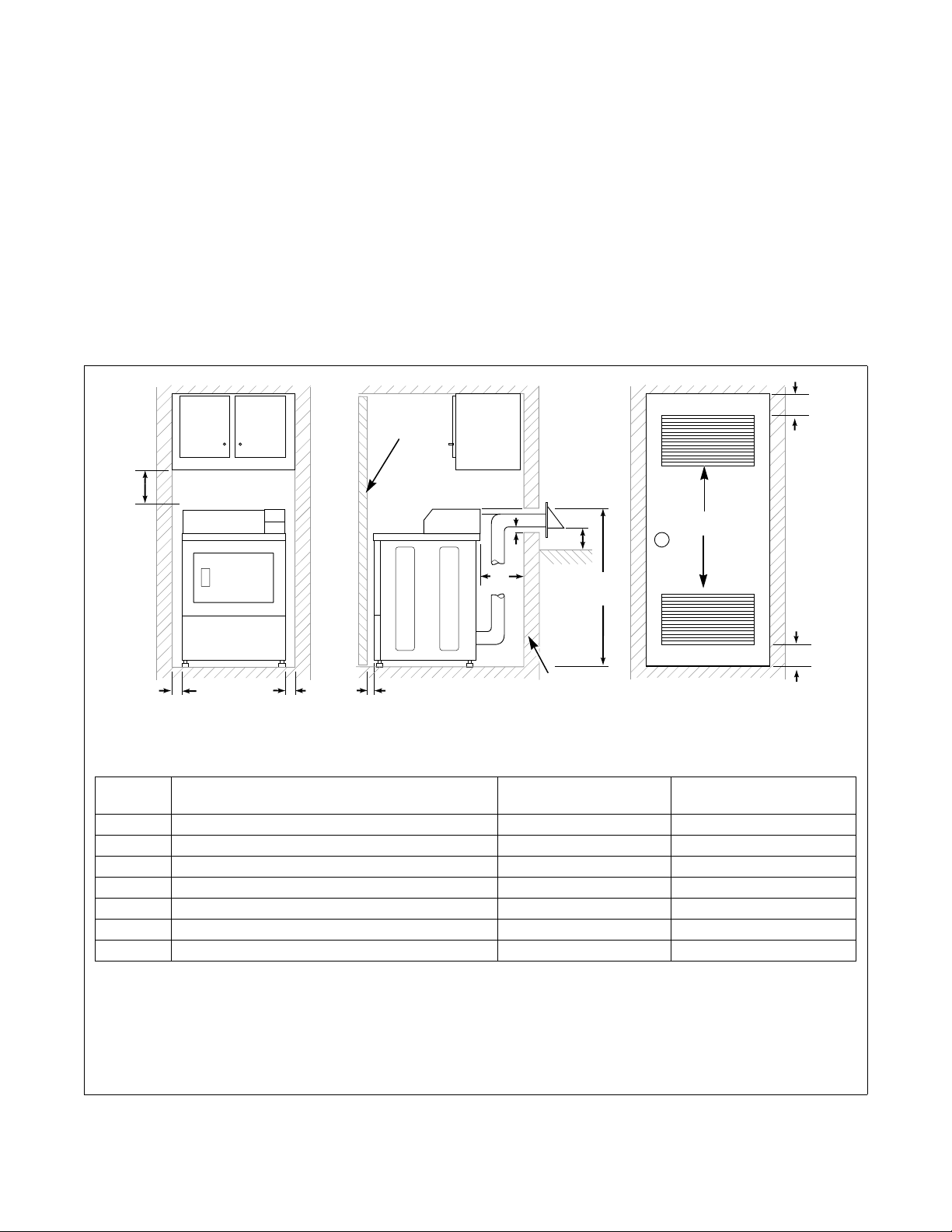
The dryer needs sufficient clearance and an adequate
air supply for proper operation and ventilation, and for
easier installation and servicing. (Minimum clearances
are shown in Figure 3.)
The dryer must not be installed behind a lockable door,
a sliding door or a door with a hinge on the opposite
side to that of the dryer, in such a way that a full
opening of the dryer door is restricted.
D337I
1 Closet Door
2 Centered Air Openings (G)
(2 Openings minimum)
3 Outer Wall of Enclosure
**NOTE: For new installations, locate top of wall vent 106.7 cm (42 inches) above floor to make venting easier to
connect.
Figure 3
D337I
1
2 (G)
3
A
E
**106.7 cm
(42 in.)
F
F
B
A
A
C
FRONT VIEW
(W/O CLOSET DOOR)
SIDE VIEW
(CLOSET DOOR)
FRONT VIEW
(CLOSET DOOR)
D
Area Description
Free Standing/Alcove
Installation
Closet Installation
A Dryer sides and rear clearance 0 cm (0 in.) 0 cm (0 in.)
B Dryer top clearance 30.5 cm (12 in.) 30.5 cm (12 in.)
C Dryer front clearance Not Applicable 5.1 cm (2 in.)
D Exhaust duct clearance to combustible material 5.1 cm (2 in.) 5.1 cm (2 in.)
E Weather hood to ground clearance 30.5 cm (12 in.) 30.5 cm (12 in.)
F Distance from floor or ceiling to air opening edge Not Applicable 7.6 cm (3 in.)
G* Area of centered air openings in closet door Not Applicable 260 sq. cm/open (40 sq. in.)
*Louvered door with equivalent air openings is acceptable. (Minimum clearances are shown.)
© Copyright, Alliance Laundry Systems LLC – DO NOT COPY or TRANSMIT
Installation
512687R6
10
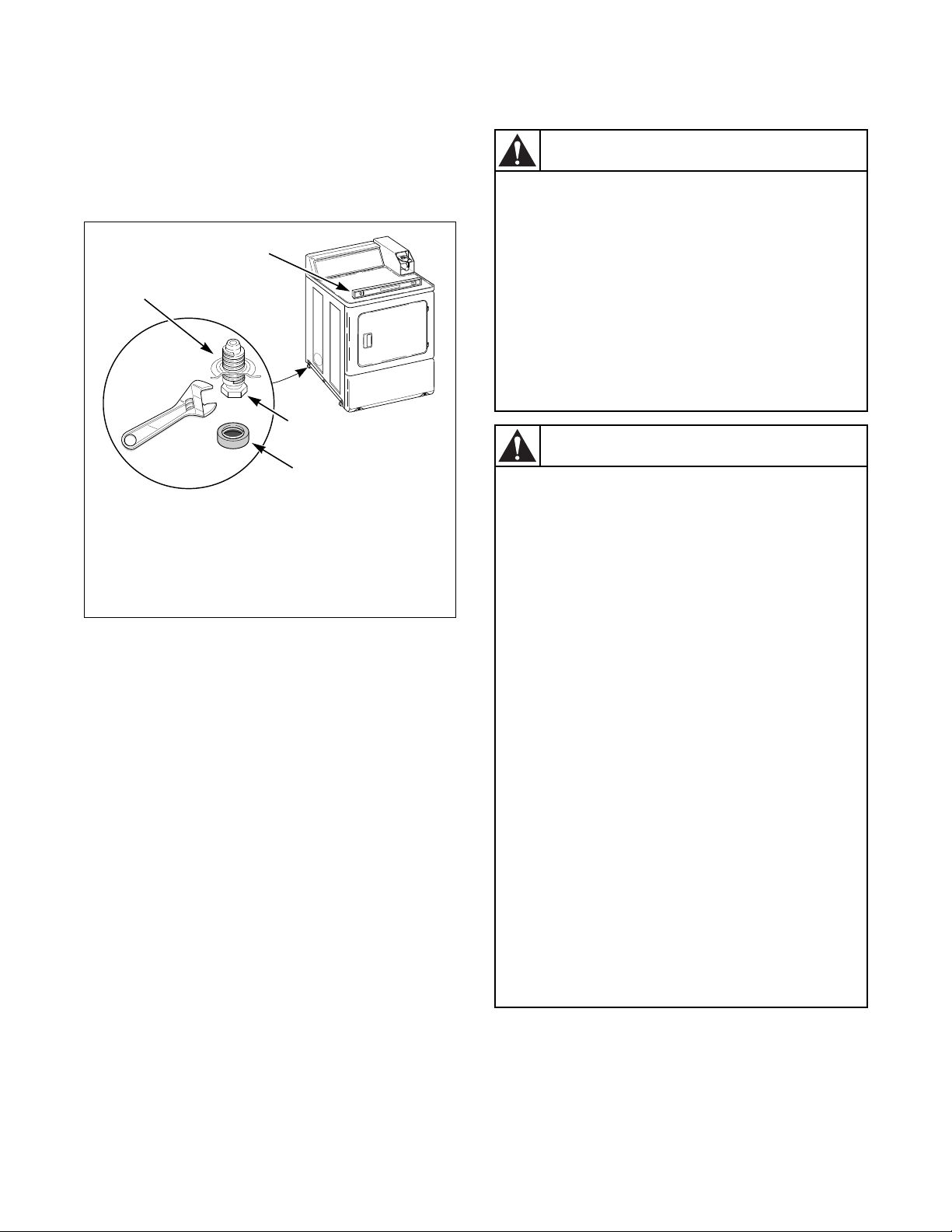
Place the dryer in position, and adjust the legs until the
dryer is level from side to side and front to back.
Leveling legs can be adjusted from inside the dryer
with a 1/4 in. driver. All four legs must rest firmly on
the floor so the weight of the dryer is evenly
distributed. The dryer must not rock.
Figure 4
Step 2: Connect Dryer Exhaust System
IMPORTANT: Installing in-line filters or lint
collectors will cause increased static pressure.
Failure to maintain the secondary lint system will
decrease dryer efficiency and may void machine
warranty.
D678I
1 Dryer Base
2 Level
3 Leveling Leg
4 Rubber Foot
D678I
1
2
3
4
To reduce the risk of fire and combustion
gas accumulation the dryer MUST be
exhausted to the outdoors.
W604
To reduce the risk of fire and the
accumulation of combustion gases, DO
NOT exhaust dryer air into a window well,
gas vent, chimney or enclosed, unventilated
area, such as an attic, wall, ceiling, crawl
space under a building or concealed space
of a building.
W045
WARNING
This gas appliance contains or produces a
chemical or chemicals which can cause
death or serious illness and which are
known to the State of California to cause
cancer, birth defects, or other reproductive
harm. To reduce the risk from substances in
the fuel or from fuel combustion, make sure
this appliance is installed, operated, and
maintained according to the instructions in
this manual.
W115
To reduce the risk of fire, DO NOT use
plastic or thin foil ducting to exhaust the
dryer.
W354
To reduce the risk of fire, the exhaust duct
and weather hood MUST be fabricated of a
material that will not support combustion.
Rigid or flexible metal pipe is recommended
for a clothes dryer.
W048
To reduce the risk of fire due to increased
static pressure, we do not recommend
installation of in-line secondary lint filters or
lint collectors. If secondary systems are
mandated, frequently clean the system to
assure safe operation.
W749
WARNING
© Copyright, Alliance Laundry Systems LLC – DO NOT COPY or TRANSMIT
Installation
11
512687R6
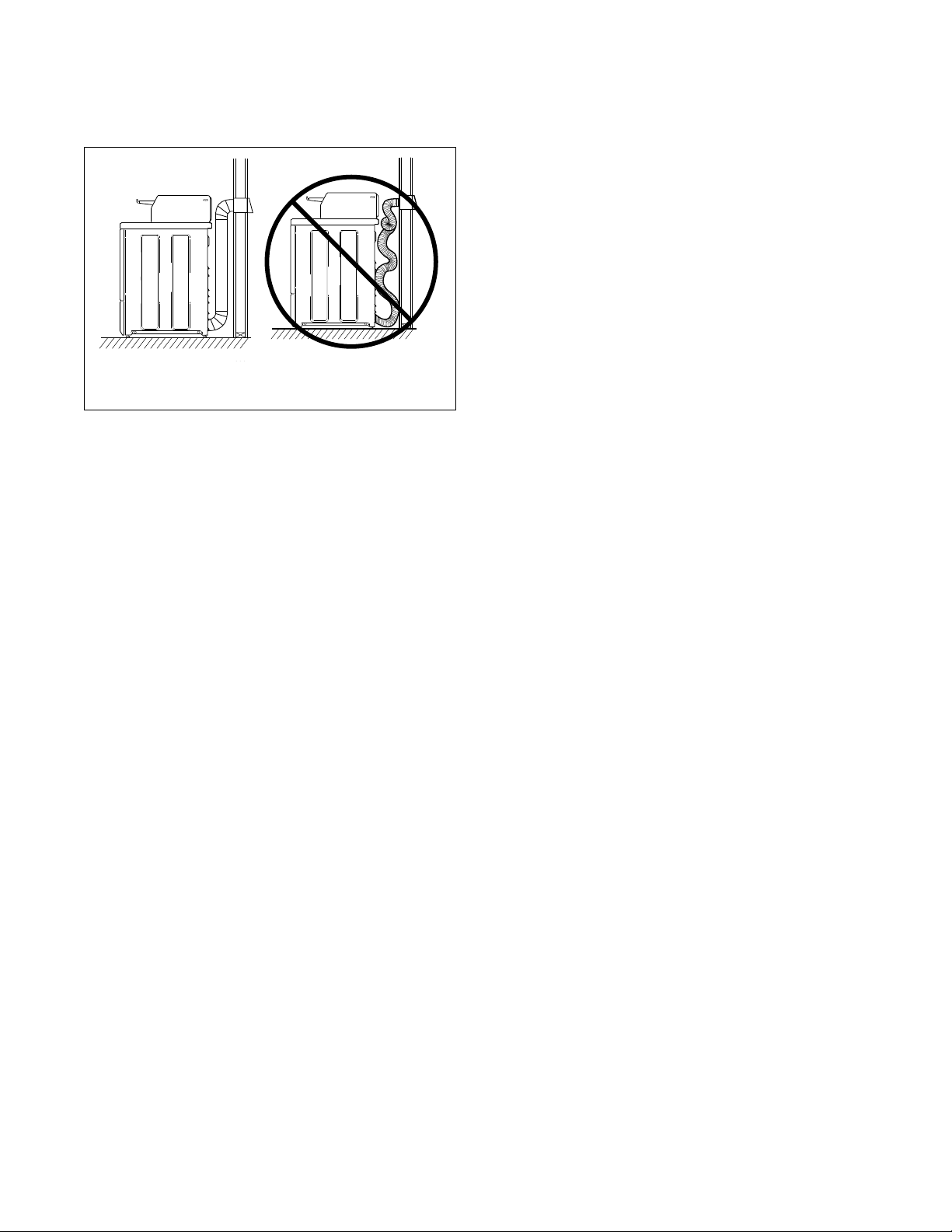
• DO NOT use plastic, thin foil or type B ducting.
Rigid metal duct is recommended.
• Locate dryer so exhaust duct is as short as
possible.
• Be certain old exhaust ducts are cleaned before
installing your new dryer.
• Use 102 mm (4 inch) diameter rigid or flexible
metal duct.
• The male end of each section of duct must point
away from the dryer.
• Use as few elbows as possible.
• Use of duct tape or pop-rivets on all seams and
joints is recommended, if allowed by local codes.
DO NOT use sheet metal screws or fasteners on
exhaust pipe joints which extend into the duct
and catch lint.
• Ductwork that runs through unheated areas must
be insulated to help reduce condensation and lint
build-up on pipe walls.
• Install backdraft dampers in multi-dryer
installations.
• In mobile home installations, dryer exhaust duct
must be secured to mobile home structure.
• Dryer exhaust duct MUST NOT terminate under
mobile home.
• Dryer exhausts 180 cfm (measured at back of
dryer).
• DO NOT install flexible duct in concealed
spaces, such as a wall or ceiling.
• Static pressure in exhaust duct should not be
greater than 1.0 cm water column (.4 inches),
measured with manometer placed on exhaust
duct 61 cm (two feet) from dryer (check with
dryer running and no load). In multi-dryer
installations, all dryers connected to the main
collector duct should be operating when pressure
is checked.
• Exhausting dryer in hard-to-reach locations can
be done by installing 521P3 Flexible Metal Vent
Kit (available as optional equipment at extra
cost).
• Sufficient make-up air must be supplied to
replace the air exhausted by the dryer. The free
area of any opening for outside air must be at
least 260 cm
2
(40 in
2
).
• Energy efficient buildings with low air
infiltration rates should be equipped with an air
exchanger that can accommodate on demand
make-up air needs in the laundry room. These
devices can be obtained through your building
contractor or building material suppliers.
• Do not draw make-up air from a room containing
a gas fired water heater, a dry cleaner or a hair
salon.
• Failure to exhaust dryer properly will void
warranty.
NOTE: Venting materials are not supplied with the
dryer (obtain locally).
IMPORTANT: DO NOT block the airflow at the
bottom of the dryer’s front panel with laundry,
rugs, etc. Blockage will decrease airflow through
the dryer, thus reducing the efficiency of the dryer.
D333I D335I
Figure 5
D333I
D335I
DON’TDO
© Copyright, Alliance Laundry Systems LLC – DO NOT COPY or TRANSMIT
Installation
512687R6
12
Exhaust Direction
The dryer can be exhausted to the outdoors through the
back, left, right or bottom of the dryer. EXCEPTION:
Gas dryers cannot be vented out the left side
because of the burner housing.
Dryer is shipped from factory ready for rear exhaust.
Exhausting the dryer through sides or bottom can be
accomplished by installing a Directional Exhaust Kit,
528P3, available as optional equipment at extra cost.
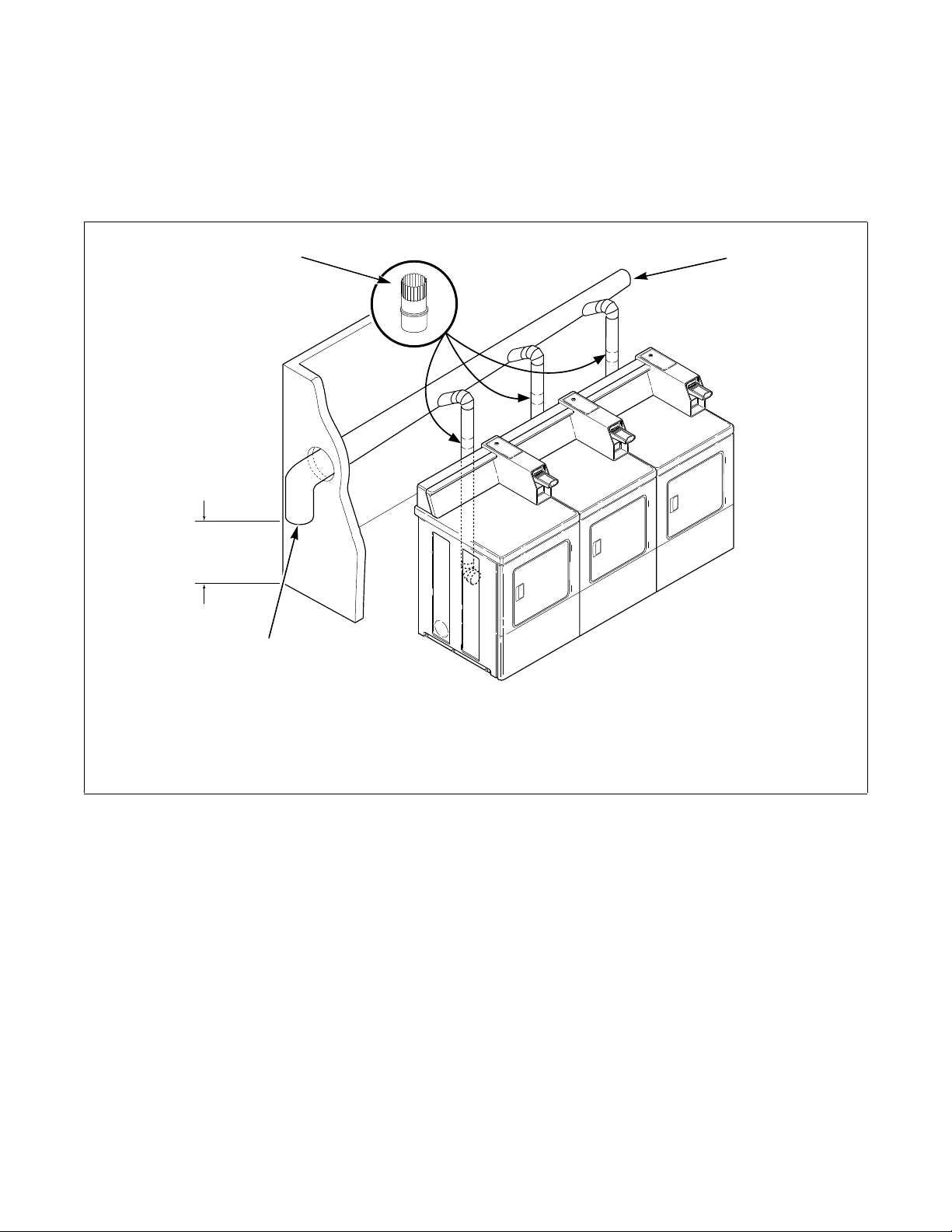
Exhaust System
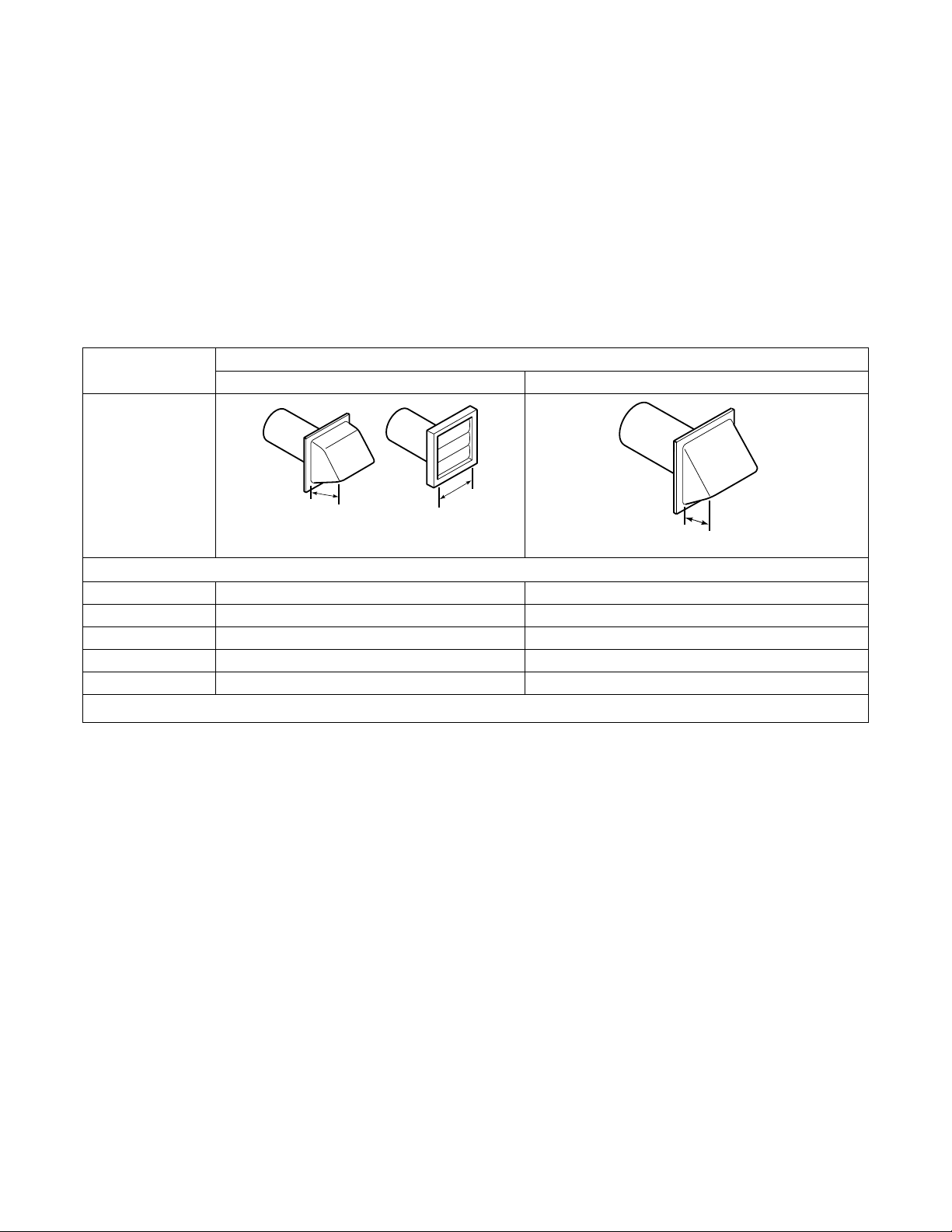
For best drying results, recommended maximum
length of exhaust system is shown in Table 1.
To prevent backdraft when dryer is not in operation,
outer end of exhaust pipe must have a weather hood
with hinged dampers (obtain locally).
NOTE: Weather hood should be installed at least
30.5 cm (12 inches) above the ground. Larger
clearances may be necessary for installations where
heavy snowfall can occur.
Tab le 1
NOTE: The maximum length of a 10.2 cm (4 in.)
diameter flexible metal duct must not exceed 2.4 m
(7.87 ft.), as required to meet UL2158, clause
7.3.2A.
Number of
90° Elbows
Weather Hood Type
Recommended Use Only for Short Run installations
Maximum length of 10.2 cm (4 in.) diameter rigid metal duct.
0 19.8 m (65 feet) 16.8 m (55 feet)
1 16.8 m (55 feet) 14.3 m (47 feet)
2 14.3 m (47 feet) 12.5 m (41 feet)
3 11.0 m (36 feet) 9.1 m (30 feet)
4 8.5 m (28 feet) 6.7 m (22 feet)
NOTE: Deduct 1.8 m (6 feet) for each additional elbow.
10.2 cm
(4 in.)
10.2 cm
(4 in.)
D673I
D802I
6.35 cm
(2-1/2 in.)
© Copyright, Alliance Laundry Systems LLC – DO NOT COPY or TRANSMIT
Installation
13
512687R6
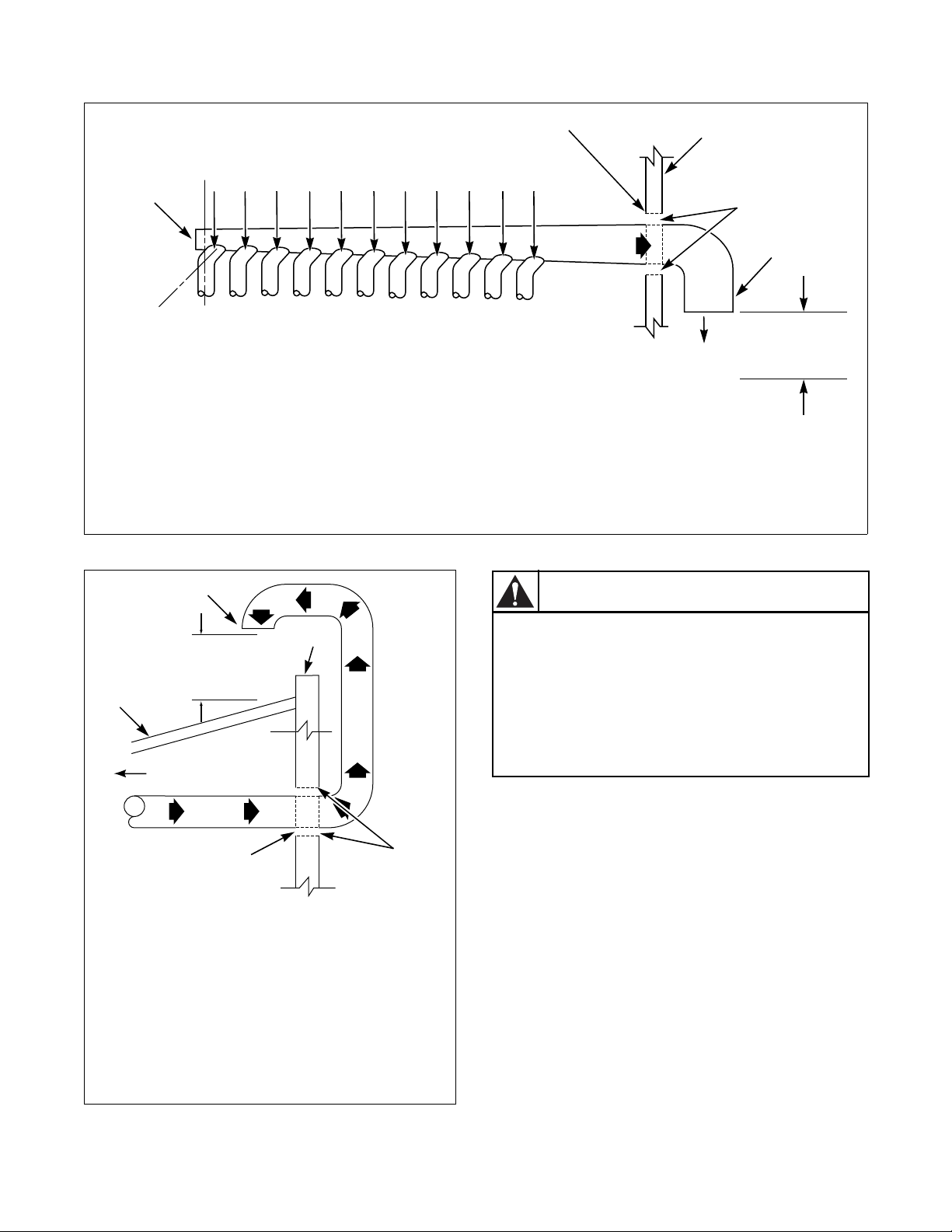
Multi-Dryer Installation Exhaust
Requirements
Figure 6 shows a typical example of a multiple dryer
installation. Note how each dryer has its own exhaust
system vented to the central exhaust duct.
Figure 6
D797I
1 58786 Backdraft Damper (Available through
your local authorized parts source)
3 Weather Hood or Sweep Elbow
(No cap or screen)
2 Clean Out Cover (Must be provided). Inspect
monthly.
2
1
3
METERED MODELS
ILLUSTRATED
61 CM (24 IN.)
MINIMUM
CLEARANCE TO
ROOF/GROUND
© Copyright, Alliance Laundry Systems LLC – DO NOT COPY or TRANSMIT
Installation
512687R6
14
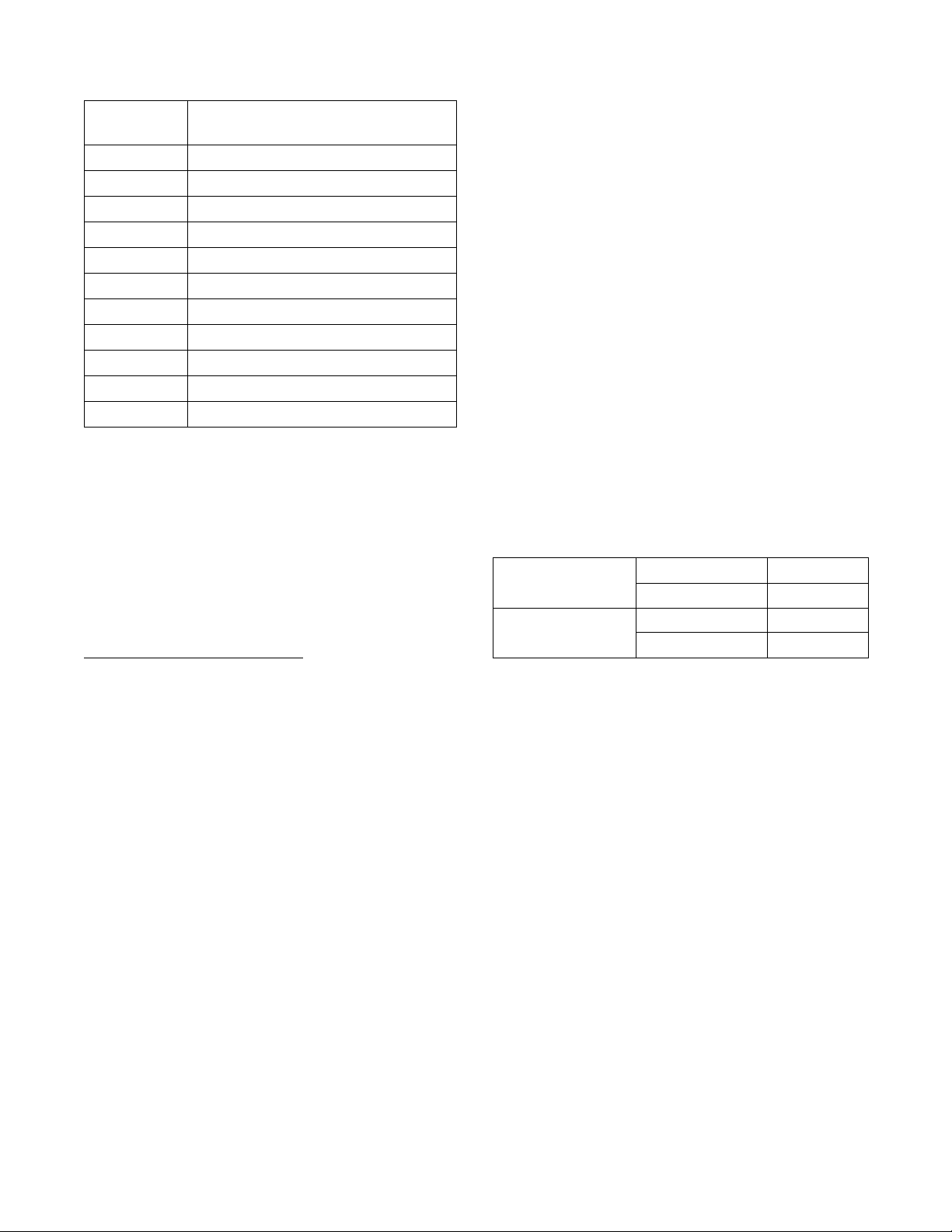
Figure 7
Figure 8
D686I
1 NOTE: Where the exhaust duct pierces a
combustible wall or ceiling, the opening
must be sized per local codes.
3 5 cm (2 in.) Minimum or Clearance per Local
Codes
4 No Screen or Cap
2 Wall 5 Clean Out Cover
– Inspect Monthly
D686I
2
3
4
EXHAUST
OUTLET
KJIHGFEDCBA
5
30°
1
61 cm (24 in.)
MINIMUM
CLEARANCE TO
ROOF/GROUND
EXHAUST AIR FLOW
MAXIMUM LENGTH OF DUCT
9.1 m (30 feet)
HORIZONTAL EXHAUST INSTALLATION
AIR
FLOW
D753I
1 Roof
2 No Screen or Cap
3 Wall
4 5 cm (2 in.) Minimum
5 NOTE: Where the exhaust duct pierces a
combustible wall or ceiling, an opening
must be sized as shown or per local
codes.
3
1
4
5
61 cm (24 in.)
MINIMUM
CLEARANCE TO
ROOF/GROUND
CONNECT TO DRYER
VERTICAL EXHAUST INSTALLATION
2
To reduce the risk of fire and the
accumulation of combustion gases, DO NOT
exhaust dryer air into a window well, gas
vent, chimney or enclosed, unventilated
area, such as an attic, wall, ceiling, crawl
space under a building or concealed space
of a building.
W045
WARNING
© Copyright, Alliance Laundry Systems LLC – DO NOT COPY or TRANSMIT
Installation
15
512687R6
A Backdraft Damper, Part No. 58786 (obtain locally),
should be installed in a 10.2 cm (4 inch) diameter
VERTICAL duct system. This will prevent a backdraft
when dryer is not in use, and will keep the exhaust air
in balance within the central exhaust system.
Step 3: (Gas Dryer Only) Connect Gas
Supply Pipe
NOTE: The gas service to a gas dryer must
conform with the local codes and ordinances and
in Australia and New Zealand
, installation must
comply with the Gas Installations Standard AS/
NZS 5601 Part 1: General Installations. In the
absence of local codes and ordinances, applicable
National codes should be followed.
Connection of Gas Supply Pipe
1. Install the dryer with sufficient clearance for
adequate air circulation, and for the ease of the
dryer installation, servicing and operation. For
maximum drying performance, we recommend
you allow more clearance than the clearances that
are listed throughout this manual.
2. Remove the shipping cap from the gas
connection at the rear of the dryer. Make sure you
do not damage the pipe threads when removing
the cap.
3. Make certain your dryer is equipped for use with
the type of gas in your laundry room.
NOTE: Natural Gas, 37.3 MJ/m
3
(1000 Btu/ft
3
),
service must be supplied at 1.13 kPa (4.54 inch
water column) pressure. Do not connect the dryer
to L.P. (Liquefied Petroleum) Gas service without
converting the gas valve. A No. 458P3 L.P. Gas
Conversion Kit must be installed by the
manufacturer’s authorized dealers, distributors, or
local service personnel.
NOTE: L.P. Gas, 93.1 MJ/m
3
(2500 Btu/ft
3
), service
must be supplied at 2.75 kPa (11.04 inch water
column) pressure, and a vent to the outdoors must
be provided.
4. If local codes allow the use of flexible gas tubing,
connect the 3/8 inch NPT (National Pipe Thread)
gas connection at the rear of the dryer to the
laundry room’s gas line with new flexible
stainless steel tubing (using design certified
Australian Gas Association connector only).
IMPORTANT: Use local codes of practice for gas
installation.
This dryer is equipped with jet for Natural Gas.
Duct Station
Minimum Diameter of
Collector Duct
A 10.2 cm (4 inches)
B 20.3 cm (8 inches)
C 22.9 cm (9 inches)
D 25.4 cm (10 inches)
E 27.9 cm (11 inches)
F 30.5 cm (12 inches)
G 32.6 cm (13 inches)
H 35.6 cm (14 inches)
I 38.1 cm (15 inches)
J 38.1 cm (15 inches)
K 40.6 cm (16 inches)
Gas Consumption Natural 27.4 MJ
L.P. 27.4 MJ
Gas Supply Pressure Natural 1.13 kPa
L.P. 2.75 kPa
© Copyright, Alliance Laundry Systems LLC – DO NOT COPY or TRANSMIT
Installation
512687R6
16
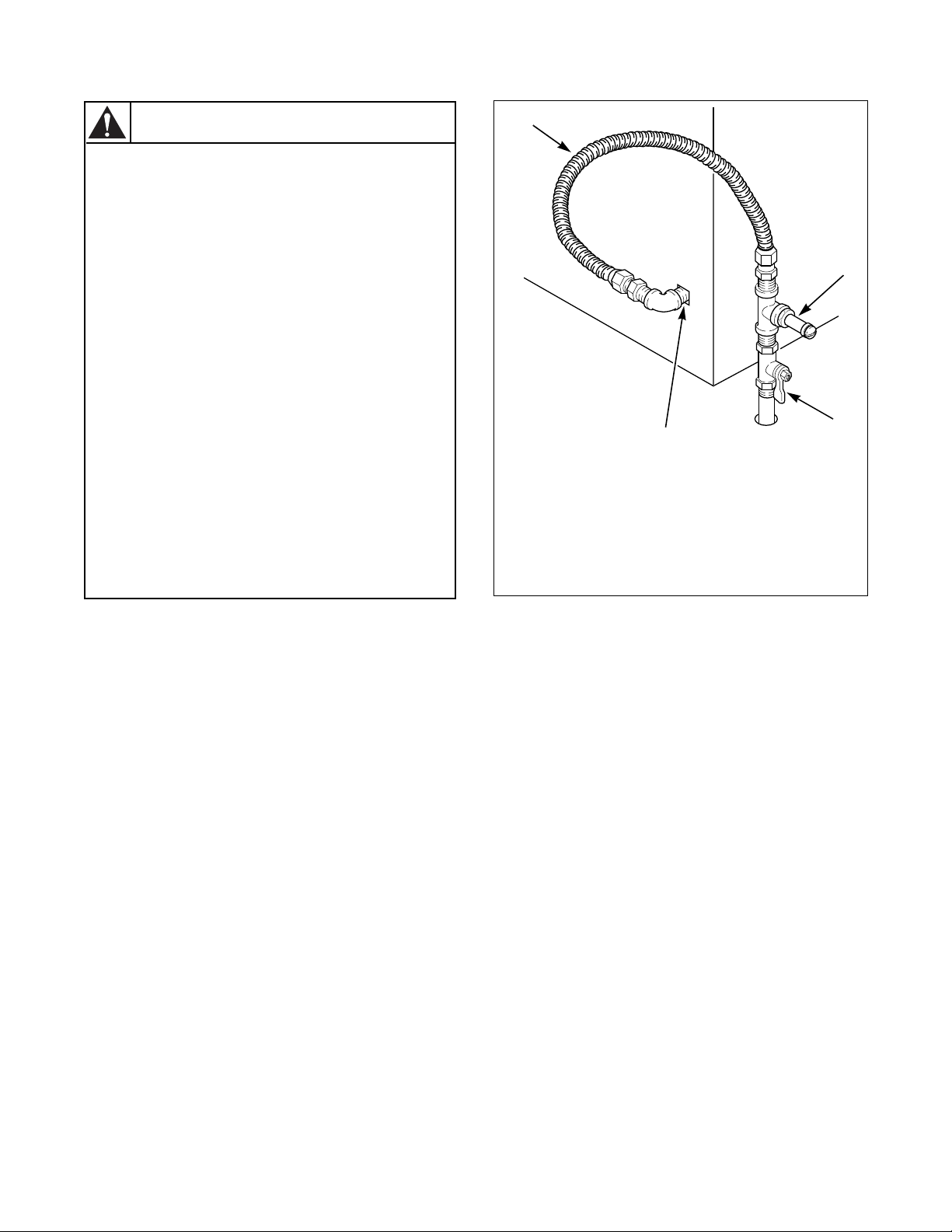
Figure 9
To reduce the risk of gas leaks, fire or
explosion:
• The dryer must be connected to the type
of gas as shown on nameplate located in
the door recess.
• Use a new flexible stainless steel
connector.
• Use pipe joint compound insoluble in L.P.
(Liquefied Petroleum) Gas, or Teflon tape,
on all pipe threads.
• Purge air and sediment from gas supply
line before connecting it to the dryer.
Before tightening the connection, purge
remaining air from gas line to dryer until
odor of gas is detected. This step is
required to prevent gas valve
contamination.
• Do not use an open flame to check for
gas leaks. Use a non-corrosive leak
detection fluid.
• Any disassembly requiring the use of
tools must be performed by a suitably
qualified service person.
W316
WARNING
1 New Stainless Steel Flexible Connector –
Use only if allowed by local codes
(Use Design AGA Certified Connector)
2 Pressure Test Point
3 Shut-Off Valve
4 3/8 in. NPT Gas Connection
1
2
3
4
D246I
© Copyright, Alliance Laundry Systems LLC – DO NOT COPY or TRANSMIT
Installation
17
512687R6
NOTE: When connecting gas supply line, a
pressure test point must be installed downstream
from the shut-off valve for checking inlet gas
pressure.
5. The gas line to your laundry room should be
made of black iron pipe. A 9.5 mm (3/8 inch)
pipe with an inside diameter of 11.7 mm
(0.46 inch) will be adequate if length of supply
line is not over 6 m (20 feet). If length exceeds
this, use 12.7 mm (1/2 inch) pipe. If copper semi-
rigid tubing is used, it must be internally tinned
or equivalently treated to resist sulfur corrosion.
NOTE: The dryer and its individual shut-off valve
must be disconnected from the gas supply piping
system during any pressure testing of that system
at test pressures in excess of 3.45 kPa (1/2 psi).
6. Check all pipe connections (internal and
external) for gas leaks with a soapy solution. Gas
connections should be checked annually for
leakage.
7. Be sure the shut-off valve in your dryer is OPEN.
Your dryer is shipped with the valve open.
8. The dryer gas valve is equipped with a pressure
test point for checking manifold pressure.
For proper operation at altitudes above 610 m
(2000 feet) the gas valve spud orifice size must be
reduced to ensure complete combustion. Refer to
Table 2 and Table 3.
Step 4: Reverse Door, if Desired
The door on this dryer is completely reversible. To
reverse door proceed as follows:
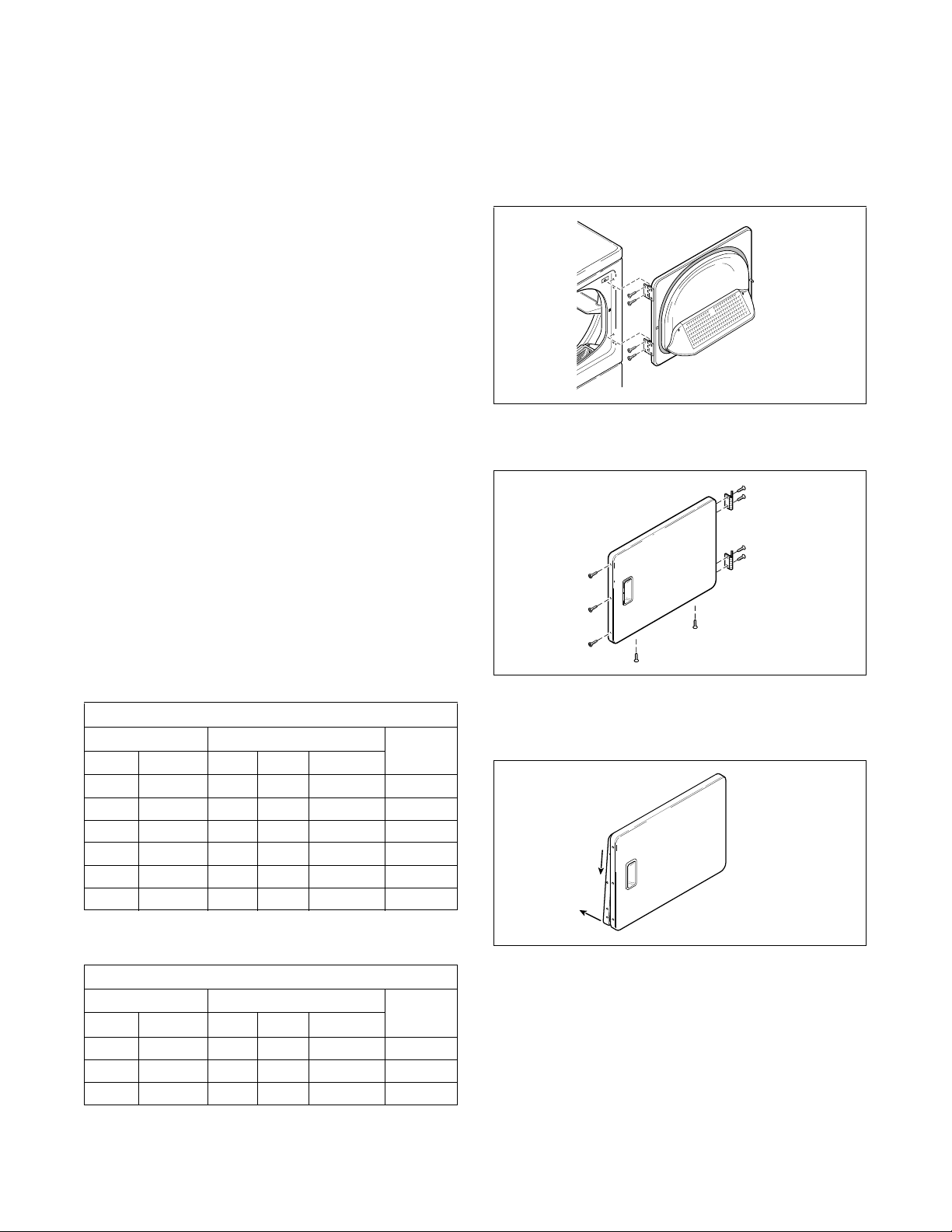
1. Remove four hinge attaching screws.
2. Remove all nine screws.
3. Pull bottom of door liner out, then pull down,
removing door liner from door panel.
Natural Gas Altitude Adjustments
Altitude Orifice Size
Part
No.
m feet No. mm inches
610 2000 41 2.44 0.0960 503776
915 3000 42 2.37 0.0935 503777
1680 5500 43 2.26 0.0890 503778
2135 7000 44 2.18 0.0860 58719
2745 9000 45 2.08 0.0820 503779
3200 10,500 46 2.06 0.0810 503780
Tab le 2
L.P. Altitude Adjustments
Altitude Orifice Size
Part
No.
m feet No. mm inches
1070 3500 54 1.40 0.0550 503785
2290 7500 55 1.32 0.0520 58755
3355 11,000 56 1.18 0.0465 503786
Tab le 3
Figure 10
Figure 11
Figure 12
D675I
D675I
D272P
DRY1916N
B
A
DRY1916N
© Copyright, Alliance Laundry Systems LLC – DO NOT COPY or TRANSMIT
Installation
512687R6
18
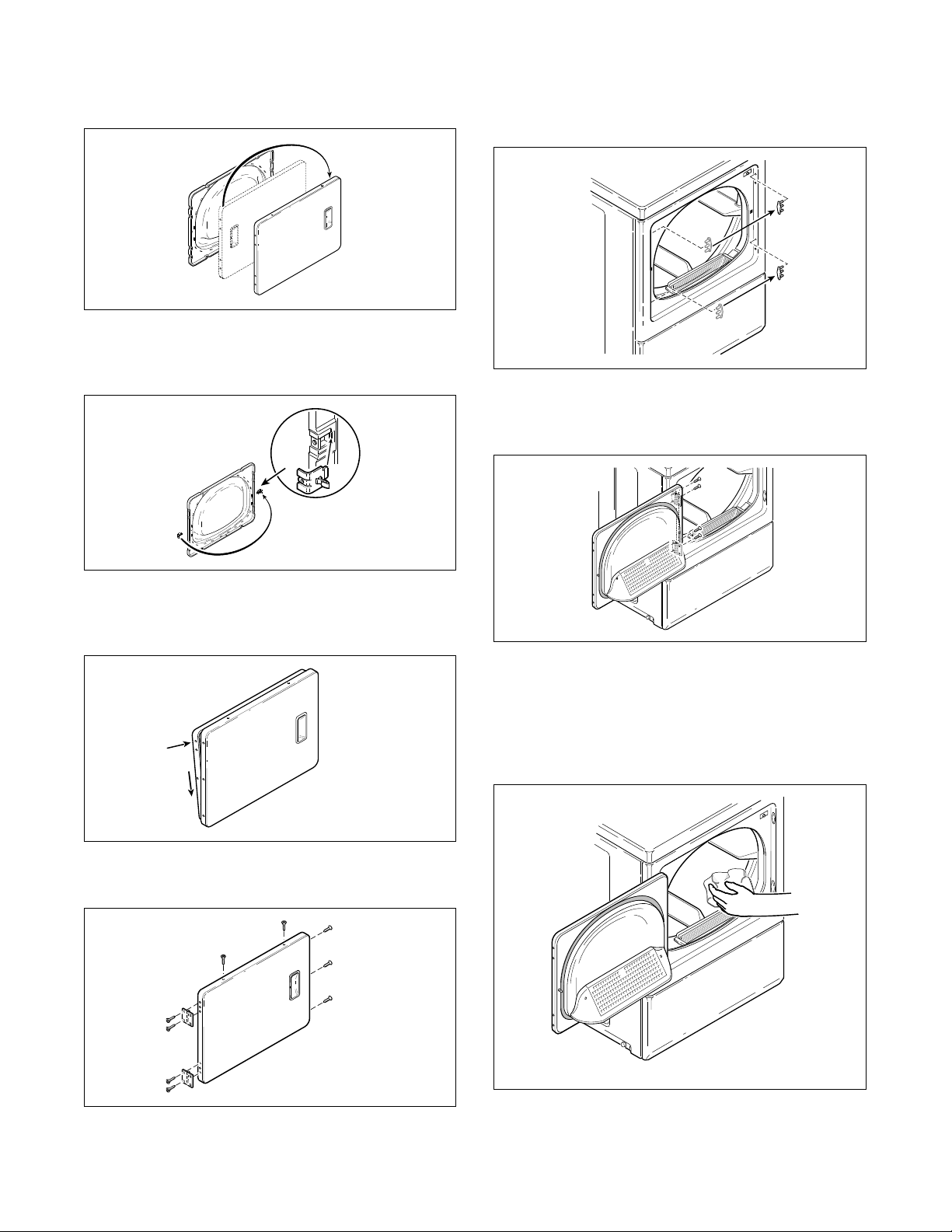
4. Rotate door panel 180 degrees as shown.
5. Remove door strike from door liner and reinstall
on opposite side.
6. Insert liner under flange on bottom of door, then
push top of door liner into place.
7. Reinstall nine screws removed in Step 2.
8. Using screwdriver, remove two door plugs, and
reinstall on opposite side of door opening.
9. Reinstall four hinge attaching screws, removed in
Step 1.
Step 5: Wipe Out Inside of Dryer
Before using dryer for the first time, use an all-purpose
cleaner, or a detergent and water solution, and a damp
cloth to remove shipping dust from inside dryer drum.
Figure 13
Figure 14
Figure 15
Figure 16
D273P
DRY1917N
DRY1917N
DRY1918N
B
A
DRY1918N
DRY1919N
DRY1919N
Figure 17
Figure 18
D604I
Figure 19
D317S
D317S
D606I
D606I
D604I
© Copyright, Alliance Laundry Systems LLC – DO NOT COPY or TRANSMIT
Installation
19
512687R6
Step 6: Plug In the Dryer
Electric Dryers
NOTE: The wiring diagram is located inside the
control hood.
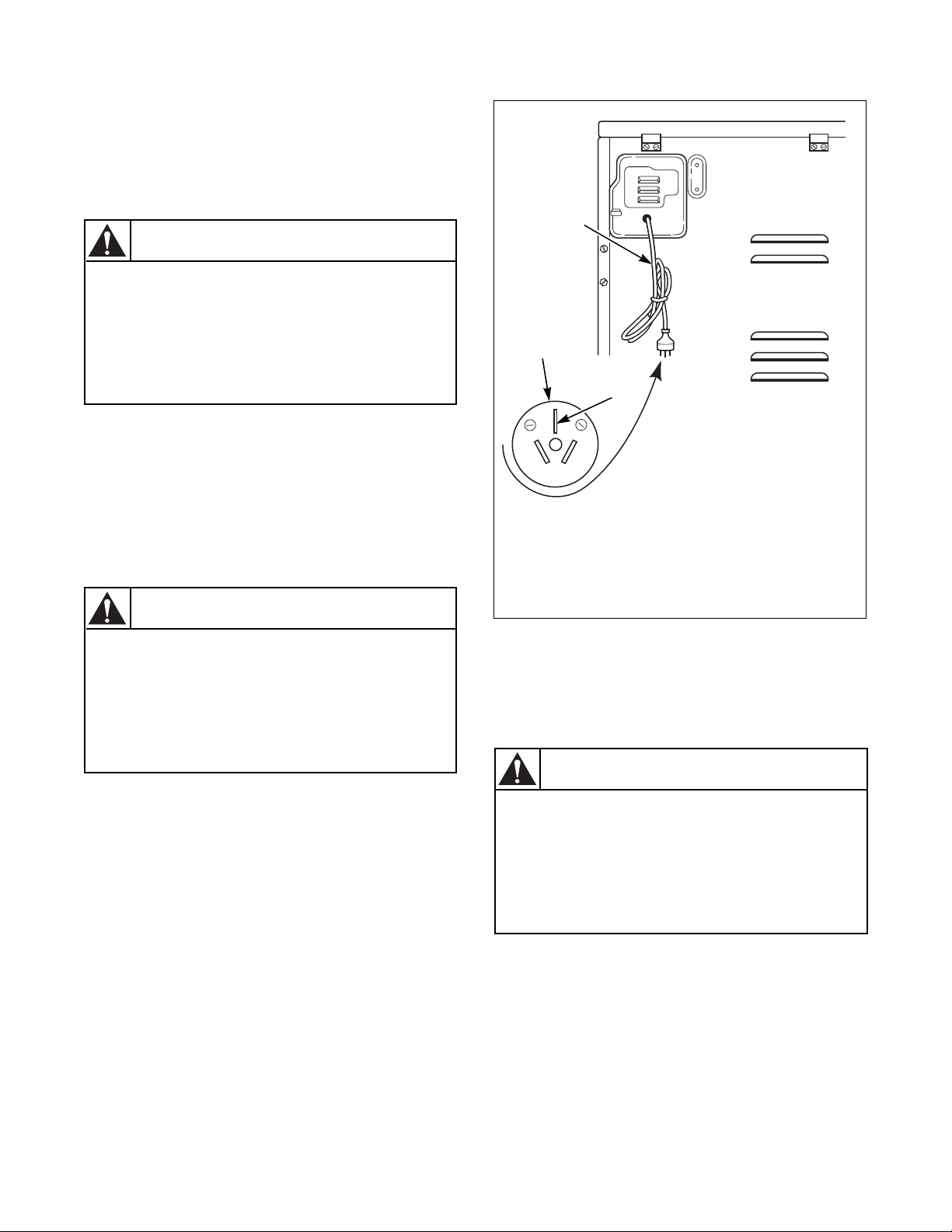
This dryer is designed to be operated on a two-wire
plus earth, 240 Volt, 50 Hertz, single-phase circuit,
fused at 20 amperes.
Insert the dryer’s lead-in cord plug into an earthing
three-slot plus earth wall receptacle on a separate
circuit. DO NOT OPERATE OTHER APPLIANCES
ON THE SAME CIRCUIT WHEN THE DRYER IS
OPERATING.
If the supply cord is damaged, it must be replaced by
the manufacturer, its special agent or similarly
qualified persons in order to avoid a hazard.
Figure 20
Gas Dryers
NOTE: The wiring diagram is located inside the
control hood.
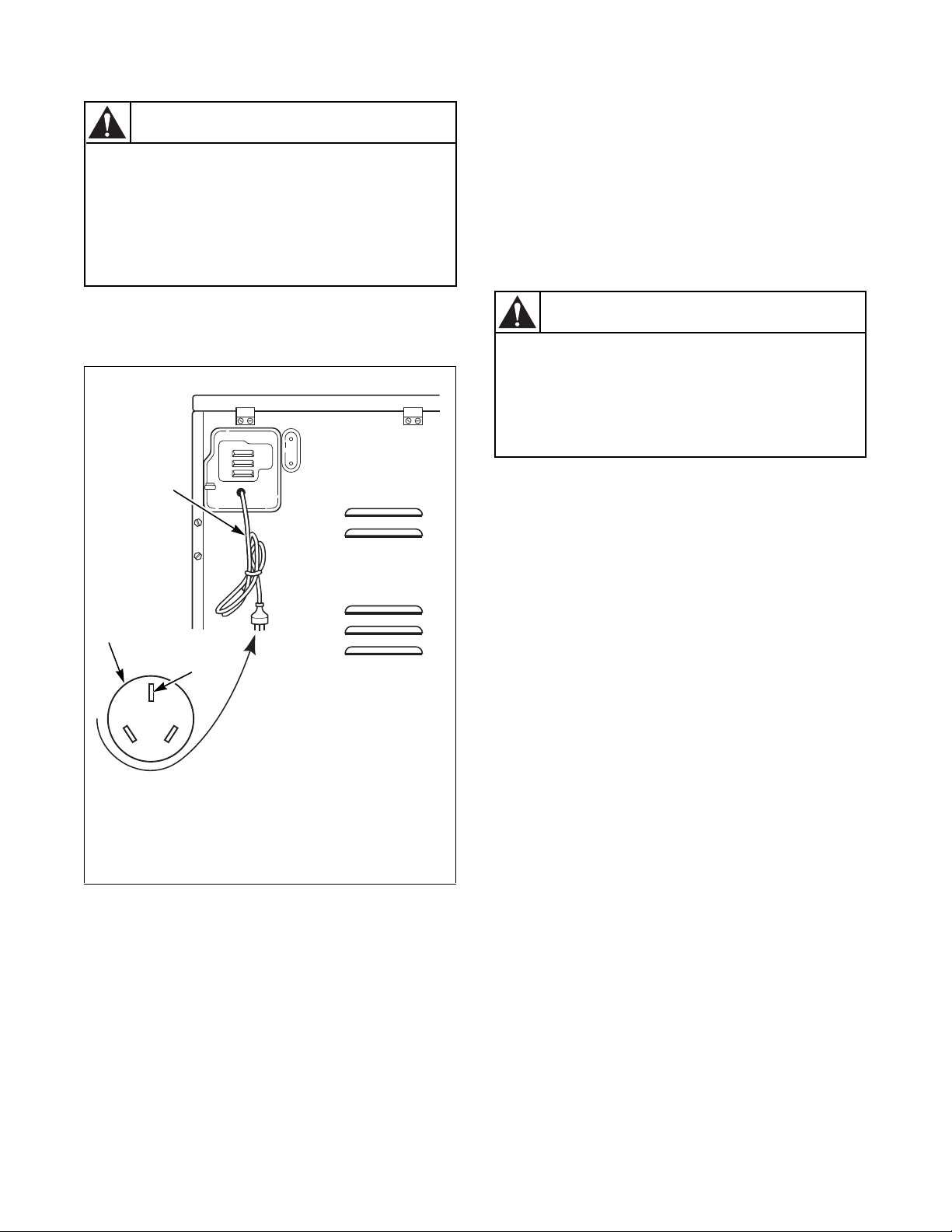
This dryer is designed to be operated on a two-wire
plus earth, 240 Volt, 50 Hertz, single-phase circuit,
fused at 10 amperes.
Insert the dryer’s lead-in cord plug into an earthing
three-slot plus earth wall receptacle on a separate
circuit. DO NOT OPERATE OTHER APPLIANCES
ON THE SAME CIRCUIT WHEN THE DRYER IS
OPERATING.
To reduce the risk of fire, electric shock or
personal injury, all wiring and earthing to
the dryer MUST conform with the latest
edition of the Australian Electrical
Standards, AS3000, SAA wiring rules, and
such local regulations that might apply.
W478
WARNING
If this appliance is supplied from a cord
extension set or an electrical portable
outlet device, the cord extension set or
electrical portable outlet device must be
positioned so that it is not subject to
splashing or ingress of moisture.
W563
CAUTION
DRY2478N
1 Lead-In Cord
2 Lead-In Cord Plug
3 Earth
20 A
250 V
DRY2478N
2
3
1
To reduce the risk of fire, electric shock or
personal injury, all wiring and earthing to
the dryer MUST conform with the latest
edition of the Australian Electrical
Standards, AS3000, SAA wiring rules, and
such local regulations that might apply.
W478
WARNING
© Copyright, Alliance Laundry Systems LLC – DO NOT COPY or TRANSMIT
Installation
512687R6
20
If the supply cord is damaged, it must be replaced by
the manufacturer, its special agent or similarly
qualified persons in order to avoid a hazard.
Figure 21
Earthing Instructions
The dryer must be earthed. In the event of malfunction
or breakdown, earthing will reduce the risk of electric
shock by providing a path of least resistance for
electric current. The dryer is equipped with a cord
having an equipment-earthing conductor and a 3 prong
earthing plug. The plug must be plugged into an
appropriate outlet that is properly installed and earthed
in accordance with local codes and ordinances.
Do not modify the plug provided with the dryer – if it
will not fit the outlet, have a proper outlet installed by
a qualified electrician.
If the electrical supply does not meet the above
specifications and/or you are not sure your building
has an effective earth, have a qualified electrician or
your local electrical utility company check it and
correct any problems.
Step 7: Recheck Steps 1-6
Refer to Installer Checklist on the back cover of this
manual and make sure that dryer is installed correctly.
DRY2479N
1 Lead-In Cord
2 Lead-In Cord Plug
3 Earth
If this appliance is supplied from a cord
extension set or an electrical portable
outlet device, the cord extension set or
electrical portable outlet device must be
positioned so that it is not subject to
splashing or ingress of moisture.
W563
CAUTION
10A
250 V
DRY2479N
2
3
1
Improper connection of the equipment-
earthing conductor can result in a risk of
electric shock. Check with a qualified
electrician or serviceman if you are in doubt
as to whether the dryer is properly earthed.
W159
WARNING
© Copyright, Alliance Laundry Systems LLC – DO NOT COPY or TRANSMIT
Installation
21
512687R6
Step 8: Check Heat Source
Electric Dryers
Close the loading door and start the dryer in a heat
setting (refer to the Operation Section). After the
dryer has operated for three minutes, the exhaust air or
exhaust pipe should be warm.
Gas Dryers
IMPORTANT: This operation is to be conducted
by qualified personnel only.
To view the burner flame, remove the lower front
panel of the dryer.
Close the loading door, start the dryer in a heat setting
(refer to the Operation Section supplied with the
dryer). The dryer will start, the igniter will glow red
and the main burner will ignite.
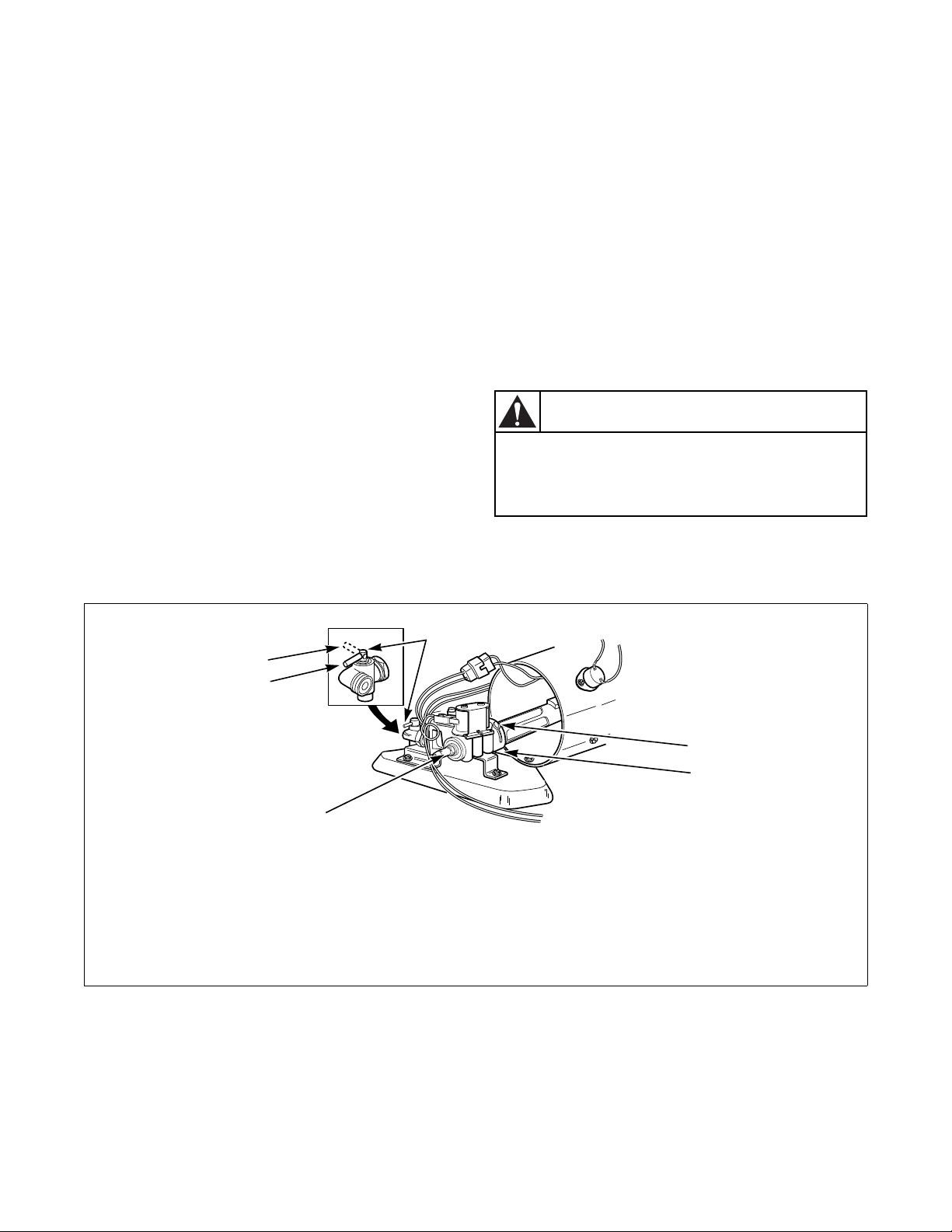
IMPORTANT: If all air is not purged out of gas
line, gas igniter may go off before gas is ignited. If
this happens, after approximately two minutes
igniter will again attempt gas ignition.
IMPORTANT: If igniter does not light, make sure
gas is turned on.
After the dryer has operated for approximately five
minutes, observe burner flame through lower front
panel. Adjust the air shutter to obtain a soft, uniform
blue flame. (A lazy, yellow-tipped flame indicates lack
of air. A harsh, roaring, very blue flame indicates too
much air.) Adjust the air shutter as follows:
1. Loosen the air shutter lockscrew.
2. Turn the air shutter to the left to get a luminous
yellow-tipped flame, then turn it back slowly to
the right to obtain a steady, soft blue flame.
3. After the air shutter is adjusted for proper flame,
tighten the air shutter lockscrew securely.
4. Reinstall the lower front panel.
After the dryer has operated for approximately three
minutes, exhaust air or exhaust pipe should be warm.
Figure 22
To reduce the risk of serious injury or death,
the lower front panel must be in place
during normal operation.
W158
WARNING
DRY212N
1 Closed Position 5 3.1 mm (1/8 in.) Pipe Plug
2 Shut-Off Valve Handle (For checking manifold pressure)
3 Air Shutter Lockscrew 6 Open Position
4 Air Shutter
DRY212N
1
4
3
6
2
5

© Copyright, Alliance Laundry Systems LLC – DO NOT COPY or TRANSMIT
22
512687R6
Vending
Meter Case
(Metered Models)
The factory mounted coin meter case does not include
the service door lock, coin drawer, coin drawer lock
and keys. These parts must be ordered (at extra cost)
according to the purchaser’s requirements direct from
the manufacturer of your choice.
NOTE: You have the option of using a screw type
lock or a 1/4 turn lock on the meter case service
door. If you choose to use a screw lock, then the
special bracket (located inside the meter case) must
be used. DO NOT use the special bracket if a
1/4 turn lock is used.
Coin Drawer Security – for additional security, drill
out the two pilot holes on each front side of the meter
case to 6.4 or 8.0 mm (1/4 or 5/16 inch) holes and
install a bicycle lock through these holes.
Coin Slide Control
(Coin Slide Models Only)
Power-Up Mode
When power is applied to the dryer, the control will
enter the Ready Mode. If the control was powered
down during a running a cycle, the IN USE LED will
flash once and the control will enter Start Mode. If the
dry time dipswitch settings have not been changed
from factory default, the IN USE LED will flash once.
Ready Mode
In Ready Mode, the control waits for the vend to be
satisfied before entering Start Mode.
Start Mode
In Start Mode, the vend has been satisfied, but the
Start button has not been pressed. The IN USE LED
will be lit. The timer will not count down until the
Start button is pressed.
Run Mode
In Run Mode, the control is running a cycle. The
IN USE LED is lit.
Door Open Mode
In Door Open Mode, the control turns off the heater
and motor when the door is opened during a run cycle.
The timer will continue to count down time and the
IN USE LED is lit.
End of Cycle Mode
In End of Cycle Mode, a cycle is complete and the
IN USE LED is off. The control remains in this mode
until the door is opened or additional vend has been
satisfied.
Topoffs
Any time the control receives a coin slide pulse during
a cycle it will add the programmed dry time to the time
currently remaining in the cycle. The IN USE LED
will flash briefly to indicate the coin input. The
maximum cycle time is 99 minutes. The control will
not add time beyond 99 minutes. The cool down time
will not change. If the control receives a coin slide
pulse during cool down it will exit cool down and start
heating with the cycle time equal to the programmed
time.
Temperature Selector Switch
For five minutes after the control is powered up, there
is a diagnostic feature that allows the temperature
selector switches to be tested. When the temperature
selector is changed, the new setting is displayed by
flashing the IN USE LED as follows:
High/Normal: 4 flashes
Medium/PP: 3 flashes
Low/Delicate: 2 flashes
No Heat: 1 flash

© Copyright, Alliance Laundry Systems LLC – DO NOT COPY or TRANSMIT
Vending
23
512687R6
Error Display Mode
The control enters Error Display Mode to display
thermistor errors. The heater is turned off, the IN USE
LED flashes to indicate the error (refer to paragraphs
below), and the timer will continue to count down
time. The control remains in Error Display Mode until
the control senses the thermistor has returned to an
acceptable heating range, the cycle ends or machine is
powered down.
Open Thermistor
If the control senses a temperature less than 0
°F when
the heat has been on for at least three minutes it will
set an open thermistor error. The control will flash the
IN USE LED twice separated by a one and a half
second pause. This sequence is repeated as long as the
Open Thermistor error is sensed.
Shorted Thermistor
If the control senses a temperature greater than 210 ±
4
°F during an active cycle it will set a Shorted
Thermistor error. The control will flash the IN USE
LED three times separated by a one and a half second
pause. This sequence is repeated as long as the Shorted
Thermistor error is sensed.
Setting Dry Time Dipswitches
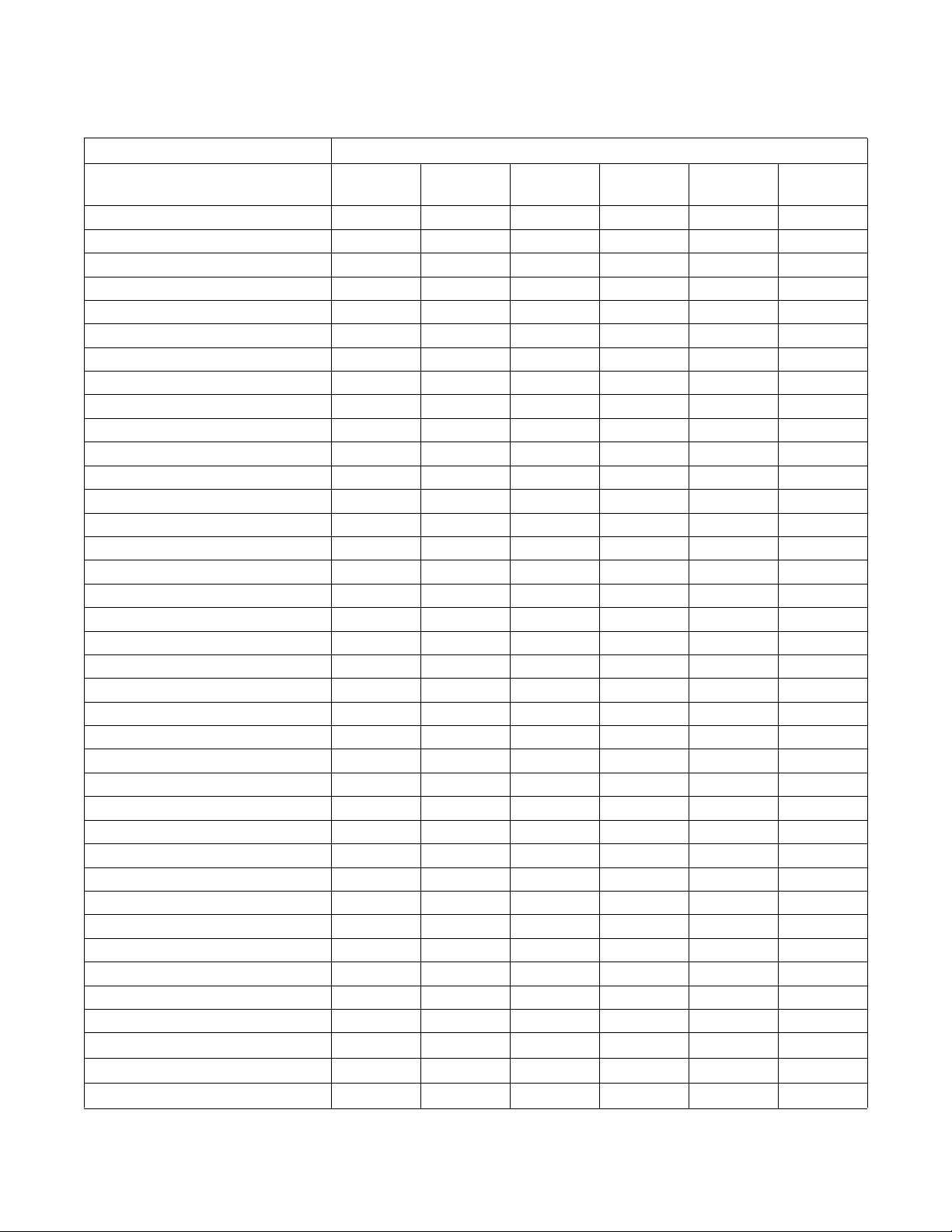
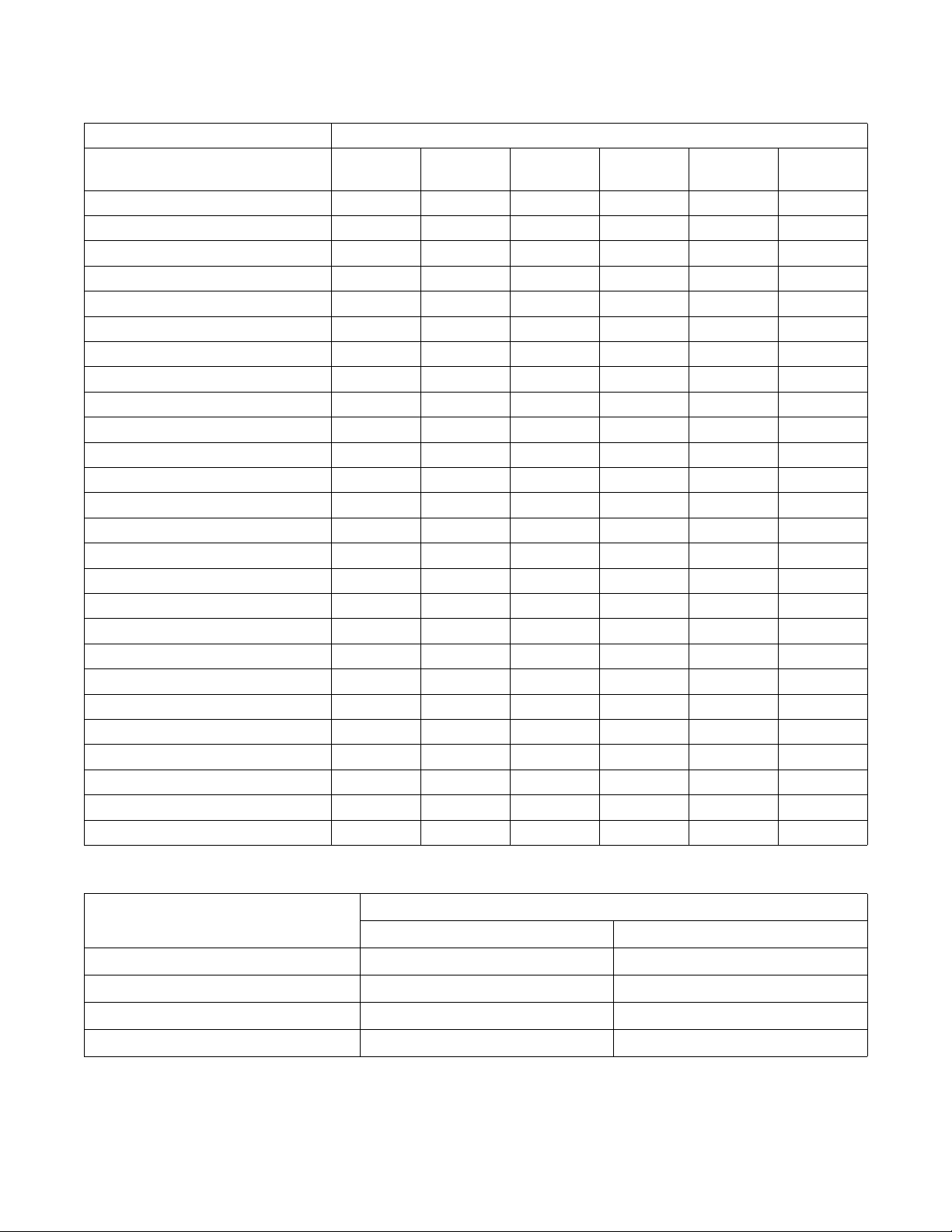
To change the dry time on the dryer, combinations of
dipswitches can be set on the control. Refer to
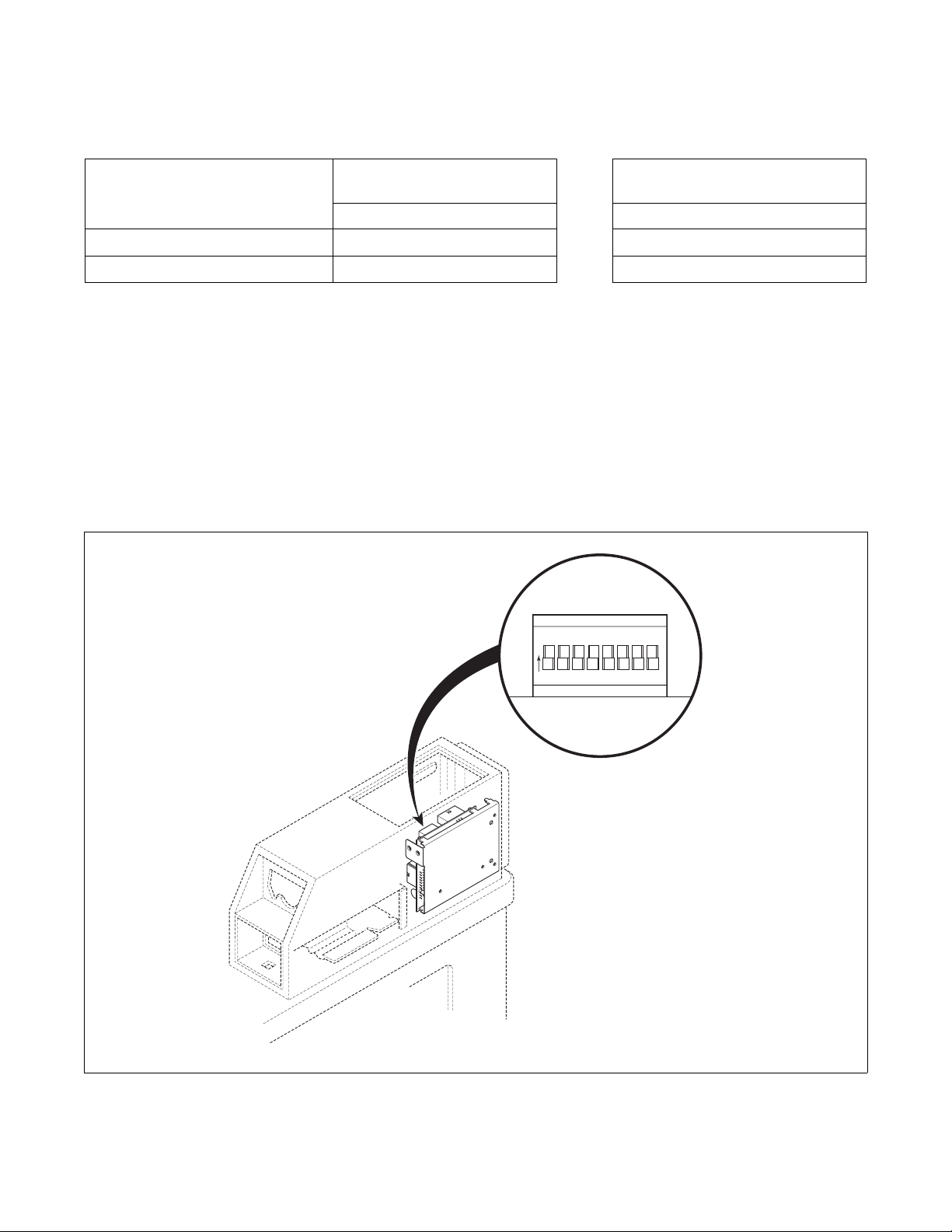
Figure 23.
There are eight dipswitches on the dryer control. The
first six switches are used to program the amount of
additional heat time given for each coin pulse. The
additional drying time is added to the factory default
minimum heat time of one minute. A value of 1 to 63
minutes of additional drying time is available for each
coin slide pulse.
Models Through Serial No. 0908
The last two switches are used to program the amount
of additional cool down time. The additional cool
down time is added to the factory default minimum
cool down time of 3 minutes. A value of 1 to 3
additional minutes is available.
Models Starting Serial No. 0909
The seventh switch is used to program the amount of
additional cool down time. The additional cool down
time is added to the factory default minimum cool
down time of 3 minutes. A value of 3 additional
minutes is available.
The eighth switch is used for the cycle reset. If the
switch is OFF (default), the control will save the time
left on a cycle in case of a power failure. If the switch
is ON, the control will clear the cycle and return to
Ready Mode if there is a power failure.
All Models
The control is shipped from the factory programmed
with 1 minute of minimum heat time, preset with 41
additional minutes of drying time (dipswitches 1, 4
and 6 in ON position) and 3 minutes of minimum cool
down time for a total time of 45 minutes for a coin
pulse. Refer to Tab le 4 for dipswitch settings.
The control reads the dipswitch settings at power-up.
The control must be powered down to change the
dipswitch settings.
To change the heat or cool down time for a coin pulse,
the desired dry time dipswitches must be set to ON
position. All other dipswitches must be in OFF
position.
NOTE: The control must be powered down for
10 seconds before the dipswitch can be changed.
Models Starting Serial No. 0909
Resetting Cycle Time to Zero
To remove any cycle time that may have accumulated
on the control during setup, the cycle time on the
control can be reset to zero.
To reset the time, unplug the dryer and set dipswitch 8
to ON position. Restore power to the dryer for 10
seconds and once again unplug dryer. Set dipswitch 8
to OFF position and restore power to the dryer.
© Copyright, Alliance Laundry Systems LLC – DO NOT COPY or TRANSMIT
Vending
512687R6
24
Dipswitch Settings
Heat Switch Number
Heat Time Per Coin Pulse
(in minutes)
123456
1 OFF OFF OFF OFF OFF OFF
2 ON OFFOFFOFFOFFOFF
3 OFF ON OFF OFF OFF OFF
4 ON ON OFF OFF OFF OFF
5 OFF OFF ON OFF OFF OFF
6 ON OFF ON OFF OFF OFF
7 OFF ON ON OFF OFF OFF
8 ON ON ON OFF OFF OFF
9 OFF OFF OFF ON OFF OFF
10 ON OFF OFF ON OFF OFF
11 OFF ON OFF ON OFF OFF
12 ON ON OFF ON OFF OFF
13 OFF OFF ON ON OFF OFF
14 ON OFF ON ON OFF OFF
15 OFF ON ON ON OFF OFF
16 ON ON ON ON OFF OFF
17 OFF OFF OFF OFF ON OFF
18 ON OFF OFF OFF ON OFF
19 OFF ON OFF OFF ON OFF
20 ON ON OFF OFF ON OFF
21 OFF OFF ON OFF ON OFF
22 ON OFF ON OFF ON OFF
23 OFF ON ON OFF ON OFF
24 ON ON ON OFF ON OFF
25 OFF OFF OFF ON ON OFF
26 ON OFF OFF ON ON OFF
27 OFF ON OFF ON ON OFF
28 ON ON OFF ON ON OFF
29 OFF OFF ON ON ON OFF
30 ON OFF ON ON ON OFF
31 OFF ON ON ON ON OFF
32 ON ON ON ON ON OFF
33 OFF OFF OFF OFF OFF ON
34 ON OFFOFFOFFOFF ON
35 OFF ON OFF OFF OFF ON
36
ON ON OFF OFF OFF ON
37
OFF OFF ON OFF OFF ON
38
ON OFF ON OFF OFF ON
Table 4 (continued)
© Copyright, Alliance Laundry Systems LLC – DO NOT COPY or TRANSMIT
Vending
25
512687R6
Models Through Serial No 0908
Table 4 (continued)
Heat Switch Number
Heat Time Per Coin Pulse
(in minutes)
123456
39
OFF ON ON OFF OFF ON
40
ON ON ON OFF OFF ON
41
OFF OFF OFF ON OFF ON
42 (preset at factory)
ON OFF OFF ON OFF ON
43
OFF ON OFF ON OFF ON
44
ON ON OFF ON OFF ON
45
OFF OFF ON ON OFF ON
46
ON OFF ON ON OFF ON
47
OFF ON ON ON OFF ON
48
ON ON ON ON OFF ON
49
OFF OFF OFF OFF ON ON
50
ON OFF OFF OFF ON ON
51
OFF ON OFF OFF ON ON
52
ON ON OFF OFF ON ON
53
OFF OFF ON OFF ON ON
54
ON OFF ON OFF ON ON
55
OFF ON ON OFF ON ON
56
ON ON ON OFF ON ON
57
OFF OFF OFF ON ON ON
58
ON OFF OFF ON ON ON
59
OFF ON OFF ON ON ON
60
ON ON OFF ON ON ON
61
OFF OFF ON ON ON ON
62
ON OFF ON ON ON ON
63
OFF ON ON ON ON ON
64
ON ON ON ON ON ON
Cool Down Per Cycle Cool Down Switch Number
(in minutes)
78
3 (preset at factory)
OFF OFF
4
ON OFF
5
OFF ON
6
ON ON
Total Cycle Time = Heat Time + Cool Down Time
Table 4 (continued)
© Copyright, Alliance Laundry Systems LLC – DO NOT COPY or TRANSMIT
Vending
512687R6
26
Table 4 (continued)
Models Starting Serial No 0909
Test Setting
When testing coin slide operation or other
troubleshooting, set dipswitch with this shorter cycle:
1. Unplug the machine power cord.
2. Record the machine control dipswitch settings.
Then set them all to the off position. Refer to
Figure 23.
3. Plug in the machine and initiate a cycle.
NOTE: With all the control dipswitches off, the
total cycle time will be four minutes long.
4. Once all the testing is complete, unplug the
machine and re-set the dipswitches to their
original settings.
5. Plug in the machine.
Figure 23
Cool Down Per Cycle
Cool Down
Switch Number
Cycle Reset
Switch Number
(in minutes)
78
3 (preset at factory)
OFF OFF
6
ON ON
Total Cycle Time = Heat Time + Cool Down Time
Table 4
DRY2225P
DRY2225P
1
2345678
O
N
© Copyright, Alliance Laundry Systems LLC – DO NOT COPY or TRANSMIT
Vending
27
512687R6
Slide Extension Assembly – Models
Through Serial No. 1211
(Coin Slide Models Only)
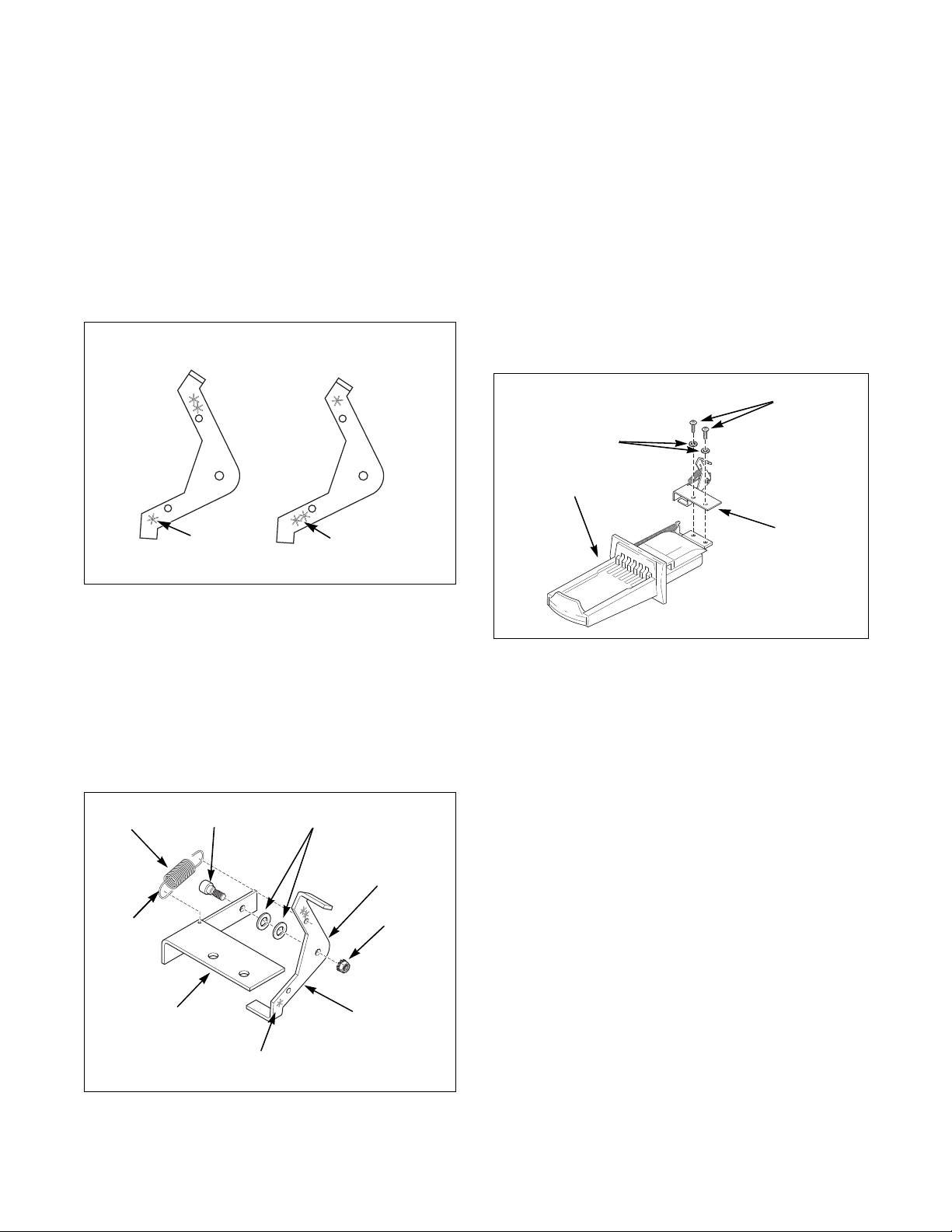
1. Remove slide extension parts from parts
accessories bag included in unit.
2. If installing a Greenwald coin slide, position
extension lever (to be installed on extension
bracket) with arm that has one star facing down.
Refer to Figure 24.
3. If installing a Monarch or ESD coin slide,
position lever with arm that has two stars facing
down. Refer to Figure 24.
4. Install extension lever with rounded corner
facing away from extension bracket using bolt,
one or two flat washers (shims) (use number of
washers included in kit) and nut. Refer to Figure
25. Make sure washers are flat against bracket.
5. Torque nut between 2 and 2.26 Nm (18 and 20
inch-pounds), or tighten nut firmly.
6. Install extension spring in bracket hole and hole
in upper arm of lever. Refer to Figure 25.
7. Bend loops closed after installation.
8. Check to make sure the lever swings freely.
Installing Extension Onto Coin Slide:
Option 1
1. Install slide extension onto top of coin slide using
two remaining screws and lockwashers. Refer to
Figure 26.
2. Insert coins and partially extend coin slide.
3. Insert coin slide on its side through meter case
opening. Then rotate 90 degrees to its proper
orientation.
4. Return coin slide and hook slide pins onto meter
case.
5. Continue coin slide installation according to
manufacturer’s instructions.
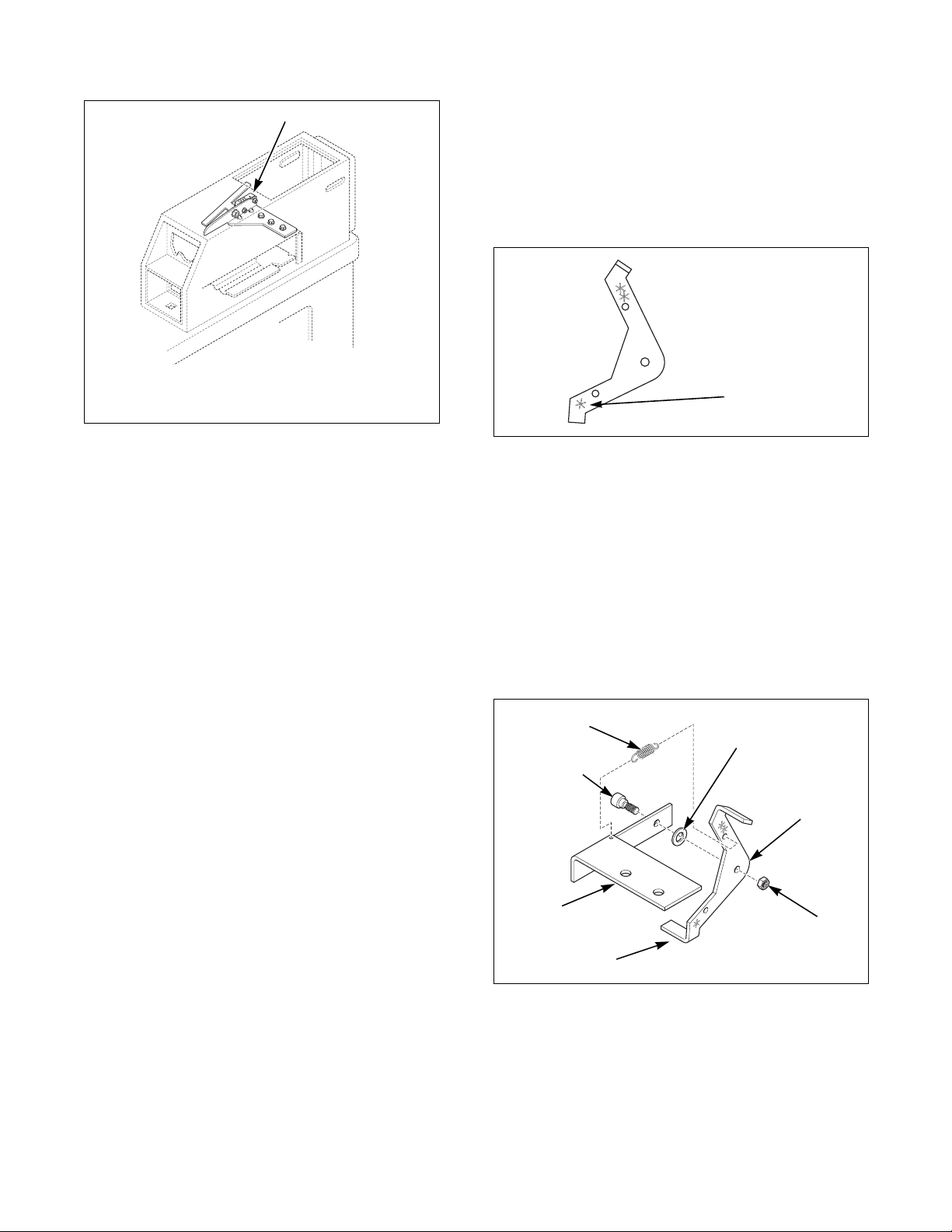
NOTE: During coin slide installation, make sure
activation lever is up and off the switch. Refer to
Figure 27.
TLW2088N
Figure 24
TLW2089N
Figure 25
Greenwald
Coin Slide
Monarch or
ESD Coin Slide
One Star
Two Stars
TLW2089N
Extension Bracket
Spring
Bolt
One or Two
Flat Washers (Shims)
Nut
Extension Lever
Star(s) Facing Down
Loops
Rounded Corner
Figure 26
Coin Slide
Slide
Extension
Attaching
Screws
Lockwashers
TLW1564K
© Copyright, Alliance Laundry Systems LLC – DO NOT COPY or TRANSMIT
Vending
512687R6
28
6. Check to make sure coin slide is operating
properly by inserting coins and starting a cycle.
The IN USE light will turn on, or flash if it is
already on, to indicate proper operation.
Installing Extension Onto Coin Slide:
Option 2
1. Install coin slide according to manufacturer’s
instructions.
2. Insert coins into coin slide and slowly push slide
in. Stop before coins fall into coin box. This will
allow installing extension through meter case
service door opening.
3. Install slide extension onto top of coin slide using
two screws and lockwashers. Refer to Figure 26.
NOTE: Make sure extension lever is above switch
activation lever.
4. Check to make sure coin slide is operating
properly by inserting coins and starting a cycle.
The IN USE light will turn on, or flash if it is
already on, to indicate proper operation.
Slide Extension Assembly – Models
Starting Serial No. 1211
1. Remove slide extension parts from parts
accessories bag included in unit.
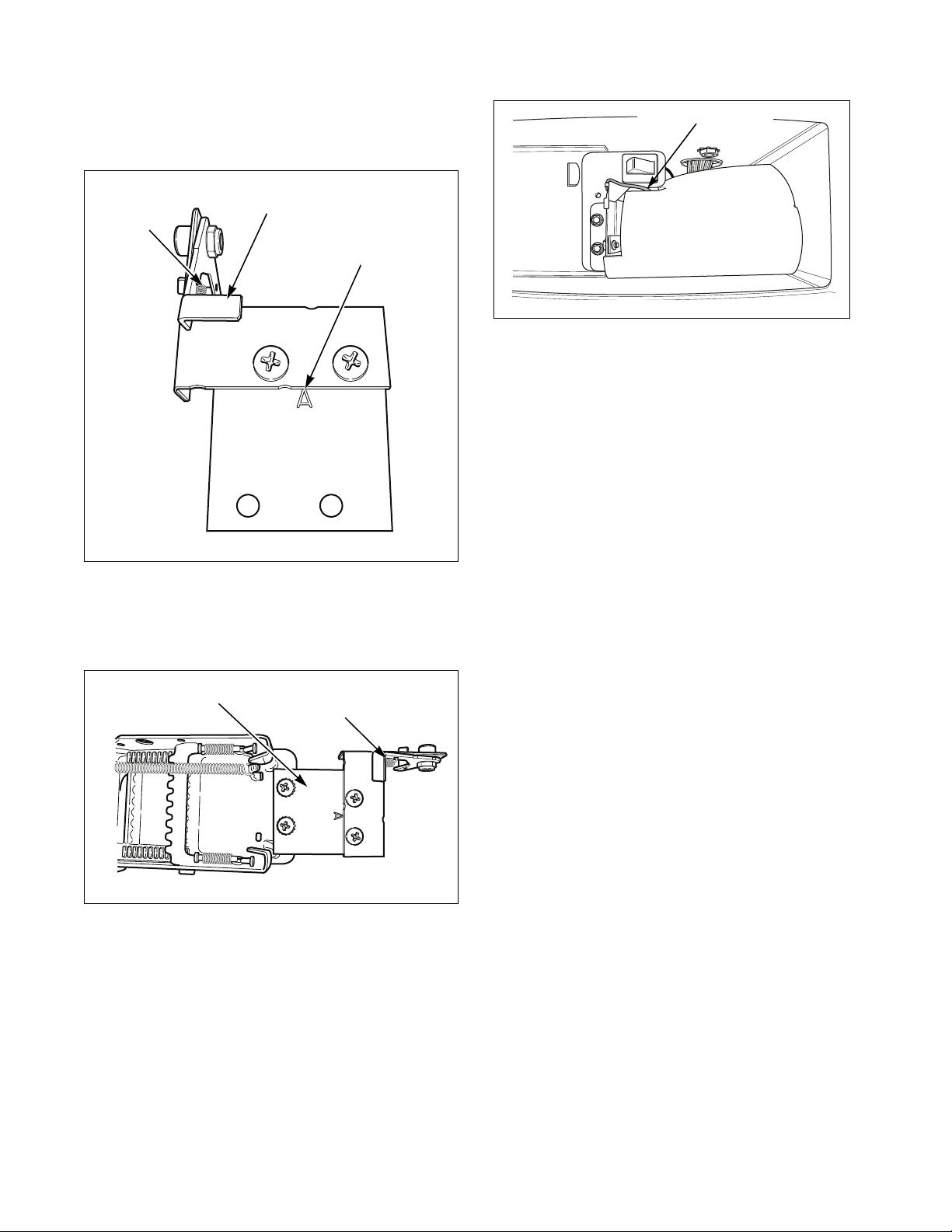
2. Install extension lever with arm that has one star
facing down. Refer to Figure 28.
NOTE: If more switch down-force is required,
install lever with arm that has two stars facing
down to provide additional switch travel.
3. Install extension lever with rounded corner
facing away from extension bracket using bolt,
washer and nut. Refer to Figure 29.
4. Install spring to extension bracket with hook
facing down. Install other end of spring to
extension lever with hook facing left while
standing in front of unit. Refer to Figure 29.
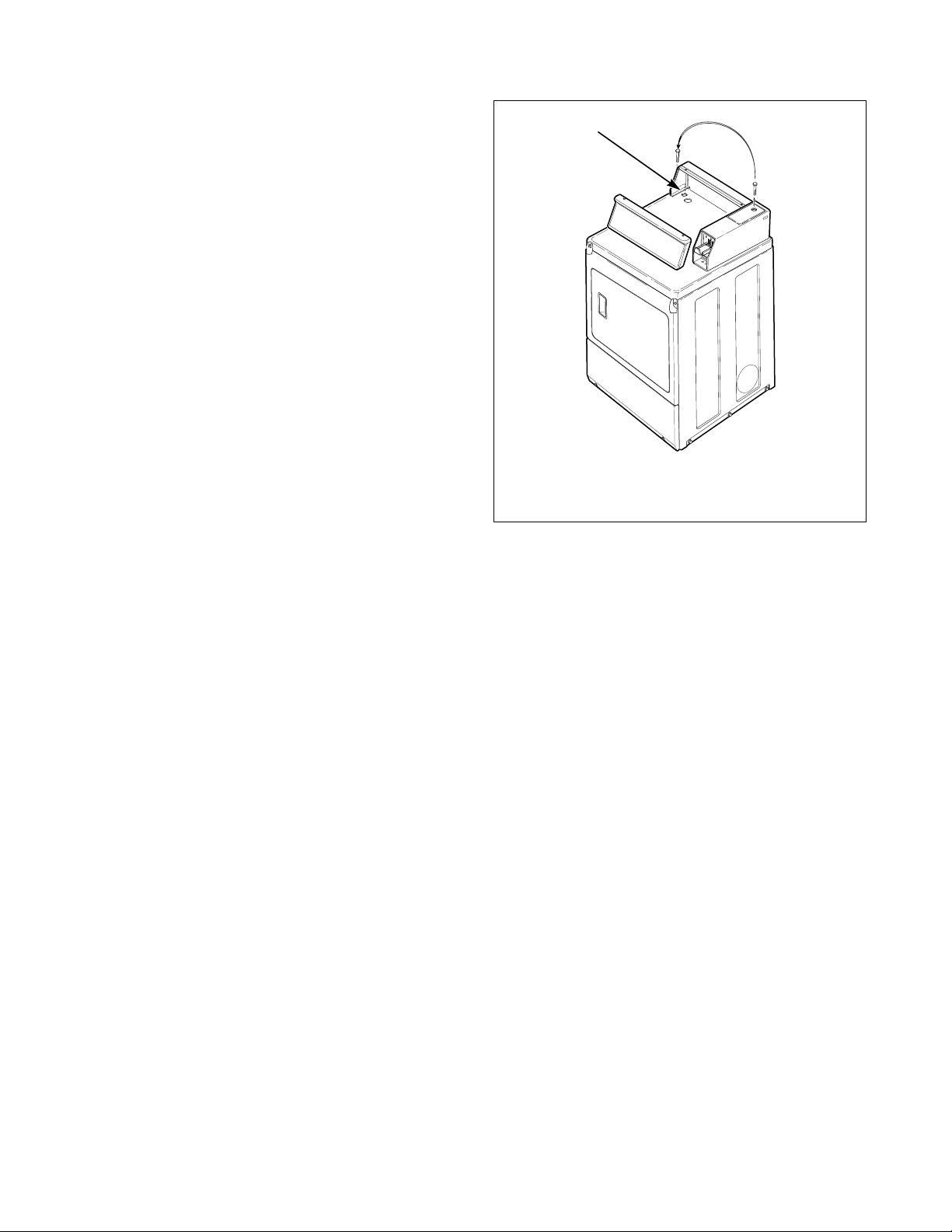
5. Install extension bracket and lever assembly onto
coin slide bracket using two screws and locknuts.
Refer to Figure 30.
TLW2090N
1 Lever Off Switch
Figure 27
TLW2090N
1
Figure 28
Figure 29
One Star
TLW2088N
TLW1610K
Extension
Bracket
Shoulder Bolt
Flat Washer
Extension
Lever
Nut
Rounded
Corner
TLW1610K
Spring
© Copyright, Alliance Laundry Systems LLC – DO NOT COPY or TRANSMIT
Vending
29
512687R6
IMPORTANT: Install coin slide bracket with side
marked “A” facing up and toward extension
bracket and lever assembly. Refer to Figure 30.
6. Install coin slide extension assembly onto top of
coin slide using two remaining screws and
lockwashers. Refer to Figure 31.
7. Before installing coin slide extension, make sure
ground wire is tucked under control shield to
provide clearance for coin slide. Refer to
Figure 32.
Installing Extension Onto Coin Slide:
Option 1
1. Insert coins and partially extend coin slide.
2. Insert coin slide on its side through meter case
opening. Then rotate 90 degrees to its proper
orientation.
3. Return coin slide and hook slide pins onto meter
case.
4. Continue coin slide installation according to
manufacturer’s instructions.
5. Check to make sure coin slide is operating
properly by inserting coins and starting a cycle.
The IN USE light will turn on, or flash if it is
already on, to indicate proper operation.
NOTE: To avoid long run-down time (45 minutes
factory default) when testing operation, refer to
Test Setting section.
Installing Extension Onto Coin Slide:
Option 2
1. Install coin slide according to manufacturer’s
instructions.
2. Insert coins into coin slide and slowly push slide
in. Stop before coins fall into coin box. This will
allow installing extension through meter case
service door opening.
3. Install slide extension onto top of coin slide using
two screws. Refer to Figure 31.
4. Check to make sure coin slide is operating
properly by inserting coins and starting a cycle.
The IN USE light will turn on, or flash if it is
already on, to indicate proper operation.
NOTE: To avoid long run-down time (45 minutes
factory default) when testing operation, refer to
Test Setting section.
Figure 30
Figure 31
Coin Slide Bracket -
Letter “A”
Extension Bracket and
Lever Assembly
TLW2163N
Spring
Installed
Coin Slide Extension
Assembly
TLW2164N
Spring Installed
TLW2157N
Figure 32
Ground Wire Placement
© Copyright, Alliance Laundry Systems LLC – DO NOT COPY or TRANSMIT
Vending
512687R6
30
Additional Dryer Security
Located on the service door of the dryer is a flat
Phillips head screw. During shipment, this screw is
used to attach the service door to the meter case. For
additional security, this screw can be reinstalled inside
the control hood of your dryer. Following is the
procedure for installing this screw:
1. Remove the Phillips head screw from service
door. (Refer to Figure 33.)
2. Remove two screws holding control panel to
control hood.
3. Tilt control panel forward and lay on a protective
pad to prevent scratching of cabinet top.
4. Insert Phillips head screw down through double
“D” hole in left rear corner of cabinet top (inside
control hood) until it engages retainer nut located
on left rear corner gusset of cabinet.
5. Finger tighten screw.
IMPORTANT: Do not use a power driver to tighten
screw. Torque of a power driver could over-tighten
screw causing damage to cabinet assembly.
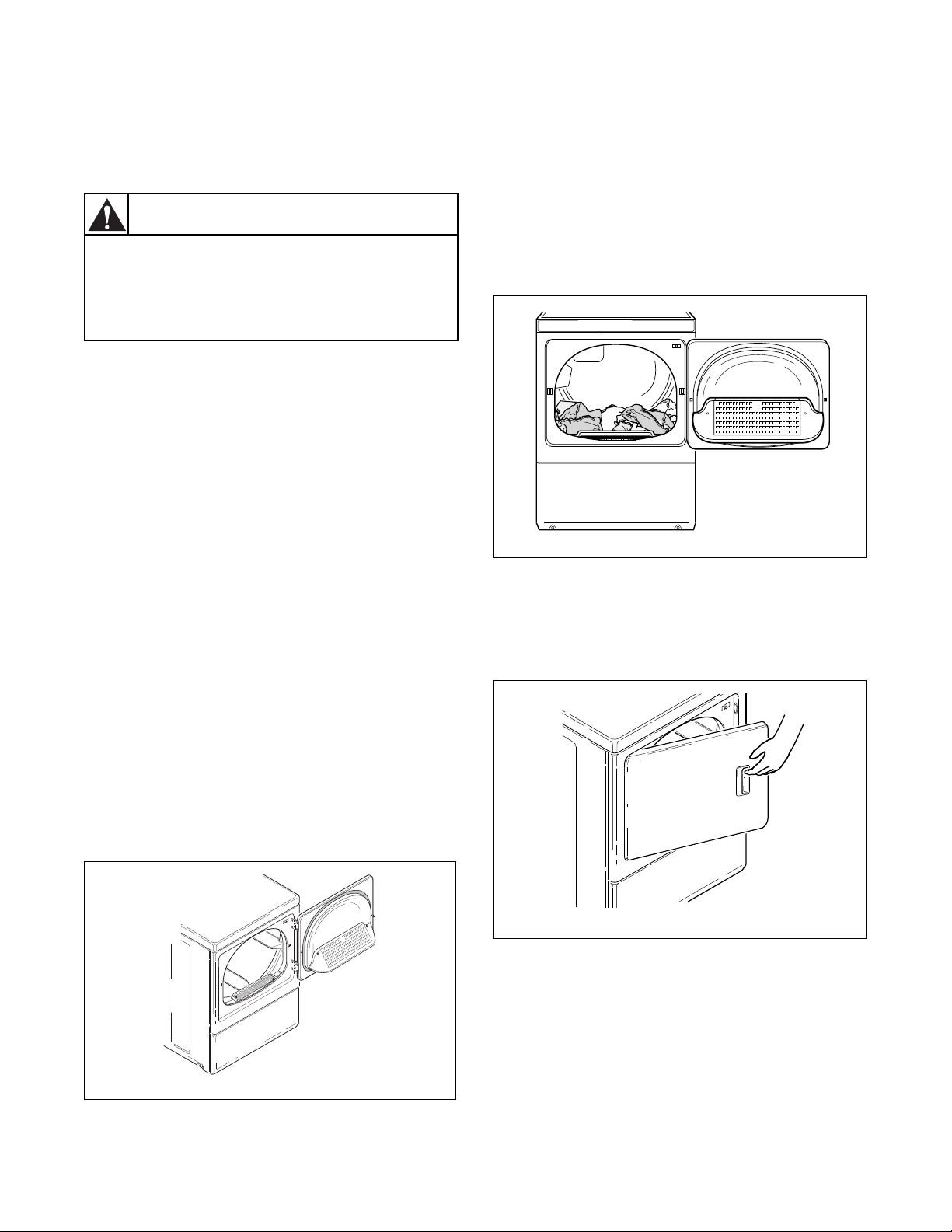
Figure 33
D687I
1 Double “D” Hole
D687I
1
© Copyright, Alliance Laundry Systems LLC – DO NOT COPY or TRANSMIT
31
512687R6
Operation
Operation Instructions for
Nonmetered and Coin Slide Dryers
IMPORTANT: Remove all objects from pockets
such as lighters and matches.
This appliance shall not be used to dry off solvents or
dry cleaning fluids.
IMPORTANT: Before using dryer for the first
time, use an all-purpose cleaner, or a detergent and
water solution, and a damp cloth to remove
shipping dust from inside of dryer drum.
IMPORTANT: Remove all sharp objects from
laundry to avoid tears and rips to items during
normal machine operation.
IMPORTANT: Oil affected items can ignite
spontaneously, especially when exposed to heat
sources such as in a tumble dryer. The items
become warm, causing an oxidation reaction in the
oil. Oxidation creates heat. If the heat cannot
escape, the items can become hot enough to catch
fire. Piling, stacking or storing oil-affected items
can prevent heat from escaping and so create a fire
hazard.
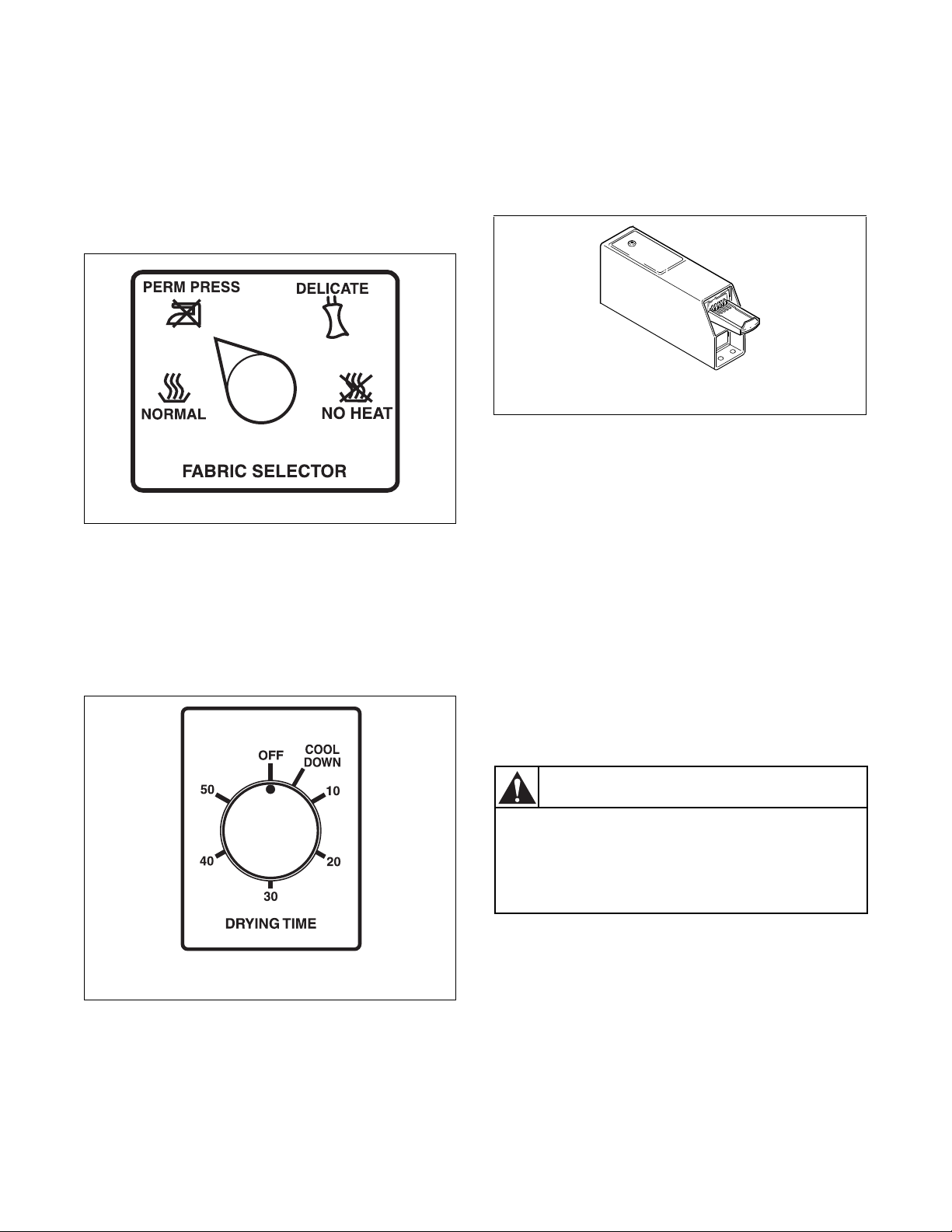
Step 1: Clean Lint Filter
Clean lint filter before each use.
Figure 34
Step 2: Load Laundry
Load clothes loosely into dryer drum (9.0 Kg
maximum dry clothes load). Add fabric softener sheet
if desired.
IMPORTANT: To avoid damage to dryer, do not
use more than one fabric softener sheet per load.
Figure 35
Step 3: Close Loading Door
Close loading door. Dryer will not operate with the
door open.
Figure 36
D608I
To reduce the risk of fire, electric shock,
or injury to persons, read the IMPORTANT
SAFETY INSTRUCTIONS before operating
this appliance.
W727
WARNING
D608I
D609I
D688I
D609I
D688I
© Copyright, Alliance Laundry Systems LLC – DO NOT COPY or TRANSMIT
Operation
512687R6
32
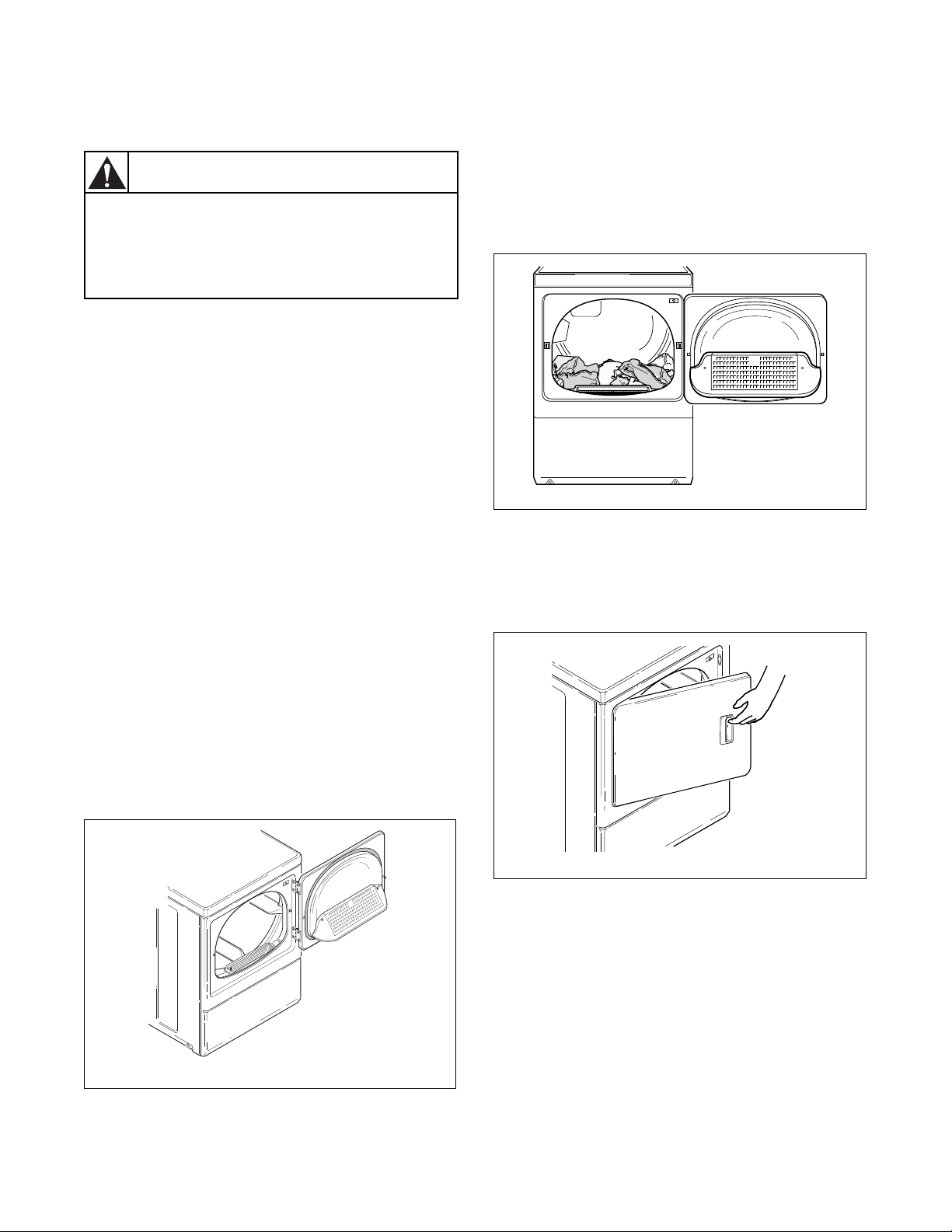
Step 4: Set Fabric Selector
Select NORMAL for cottons, PERM PRESS for
permanent press, DELICATE for sensitive items or
FLUFF (NO HEAT) for items that require no heat.
NOTE: Always follow manufacturer’s care label
instructions.
Figure 37
Step 5: Start Dryer
Nonmetered Models
Rotate timer knob to desired time setting (up to
60 minutes). Press the PUSH-TO-START button.
IN USE light will come on (indicating start of cycle).
Figure 38
Coin Slide Models
Place coin(s) in slide and carefully push in as far as
possible and then pull slide out as far as possible. After
IN USE light comes on (indicating start of cycle),
press the PUSH-TO-START button.
Remove knits when slightly damp because overdyring
may cause shrinkage. Do not tumble dry knit woolens.
Should dryer stop before cycle is completed, the motor
overload protector may have cycled. Refer to
Maintenance section.
NOTE: This machine includes an extended tumble
feature. Starting 20 minutes after a cycle ends, the
cylinder will tumble for two minutes every hour
without heat, up to 18 hours or until door is
opened.
IMPORTANT: The final part of dryer cycle occurs
without heat (cool down cycle) to ensure that items
in dryer are left at a temperature that ensures that
the items will not be damaged.
DRY2100N
DRY2101N
NONMETERED MODELS
W297I
Figure 39
W297I
METERED MODELS
To prevent the risk of fire, never stop a
dryer before the end of the drying cycle
unless all items are quickly removed and
spread out so that the heat is dissipated.
W756
WARNING
© Copyright, Alliance Laundry Systems LLC – DO NOT COPY or TRANSMIT
Operation
33
512687R6
Operation Instructions for MDC
Dryers
IMPORTANT: Remove all objects from pockets
such as lighters and matches.
This appliance shall not be used to dry off solvents or
dry cleaning fluids.
IMPORTANT: Before using dryer for the first
time, use an all-purpose cleaner, or a detergent and
water solution, and a damp cloth to remove
shipping dust from inside of dryer drum.
IMPORTANT: Remove all sharp objects from
laundry to avoid tears and rips to items during
normal machine operation.
IMPORTANT: Oil affected items can ignite
spontaneously, especially when exposed to heat
sources such as in a tumble dryer. The items
become warm, causing an oxidation reaction in the
oil. Oxidation creates heat. If the heat cannot
escape, the items can become hot enough to catch
fire. Piling, stacking or storing oil-affected items
can prevent heat from escaping and so create a fire
hazard.
Step 1: Clean Lint Filter
Clean lint filter before each use.
Figure 40
Step 2: Load Laundry
Load clothes loosely into dryer drum (9.0 Kg
maximum dry clothes load). Add fabric softener sheet
if desired.
IMPORTANT: To avoid damage to dryer, do not
use more than one fabric softener sheet per load.
Figure 41
Step 3: Close Loading Door
Close loading door. Dryer will not operate with the
door open.
Figure 42
D608I
To reduce the risk of fire, electric shock,
or injury to persons, read the IMPORTANT
SAFETY INSTRUCTIONS before operating
this appliance.
W727
WARNING
D608I
D609I
D688I
D609I
D688I
© Copyright, Alliance Laundry Systems LLC – DO NOT COPY or TRANSMIT
Operation
512687R6
34
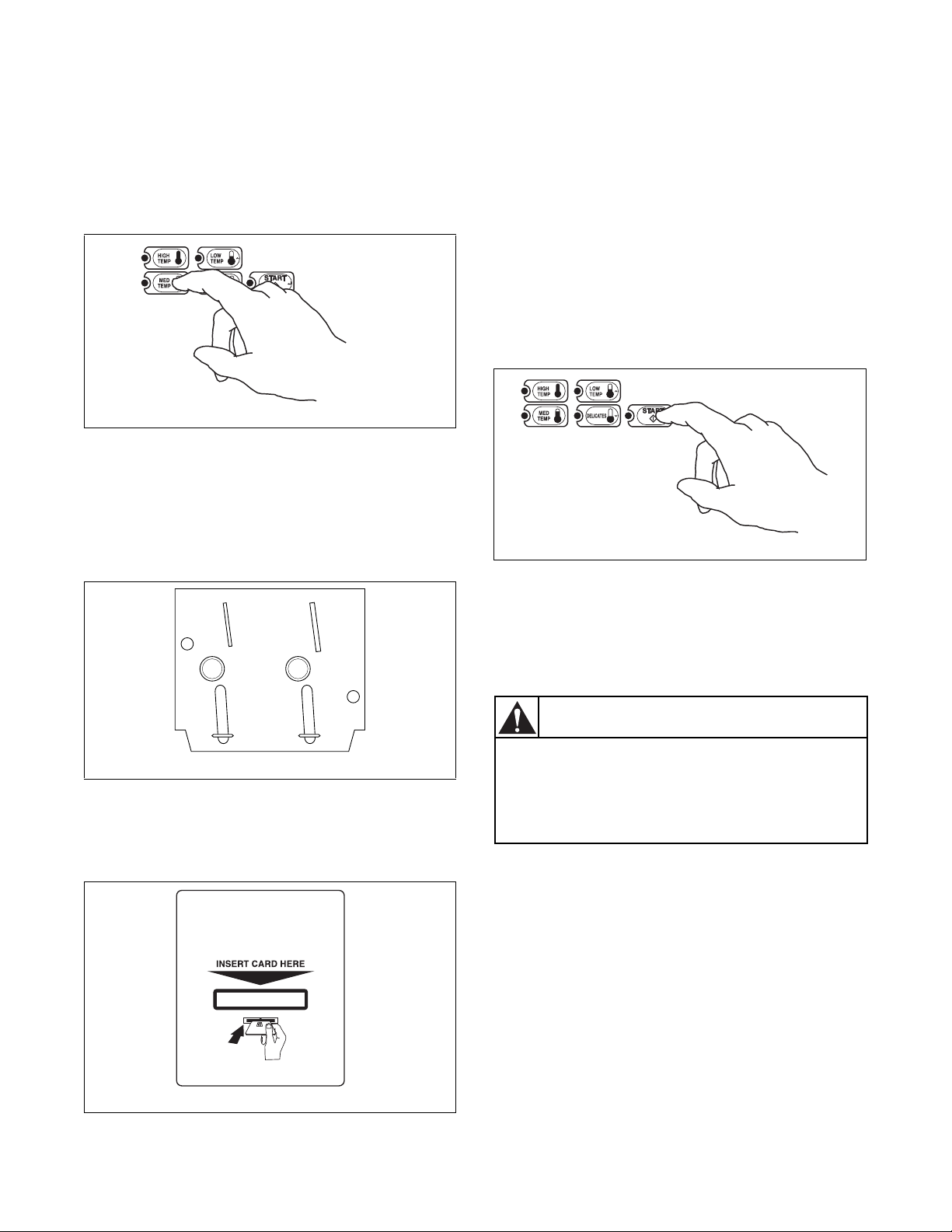
Step 4: Set Fabric Selector
Select HIGH TEMP, MED TEMP, LOW TEMP or
DELICATES by pushing touchpad.
NOTE: Always follow manufacturer’s care label
instructions.
Figure 43
Step 5: Insert Coin(s) or Card
To Insert Money
Insert coin(s) in coin slot. Check pricing as seen on
digital display.
Figure 44
To Insert Card
Insert card into opening.
Figure 45
If Additional Time Feature is turned on, additional
dryer time may be purchased at cycle start or while
dryer is running.
Remove knits when slightly damp because overdrying
may cause shrinkage. Do not tumble dry knit woolens.
Step 6: Start Dryer
To start dryer, push START pad.
To stop dryer at any time, open the door. To restart the
dryer, close door and push START pad.
Cycle is completed when time remaining reaches
00 minutes.
Figure 46
IMPORTANT: The final part of dryer cycle occurs
without heat (cool down cycle) to ensure that items
in dryer are left at a temperature that ensures that
the items will not be damaged.
DRY1926N
W388I
DRY1927N
DRY1926N
DRY1928N
DRY1928N
To prevent the risk of fire, never stop a
dryer before the end of the drying cycle
unless all items are quickly removed and
spread out so that the heat is dissipated.
W756
WARNING

© Copyright, Alliance Laundry Systems LLC – DO NOT COPY or TRANSMIT
Operation
35
512687R6
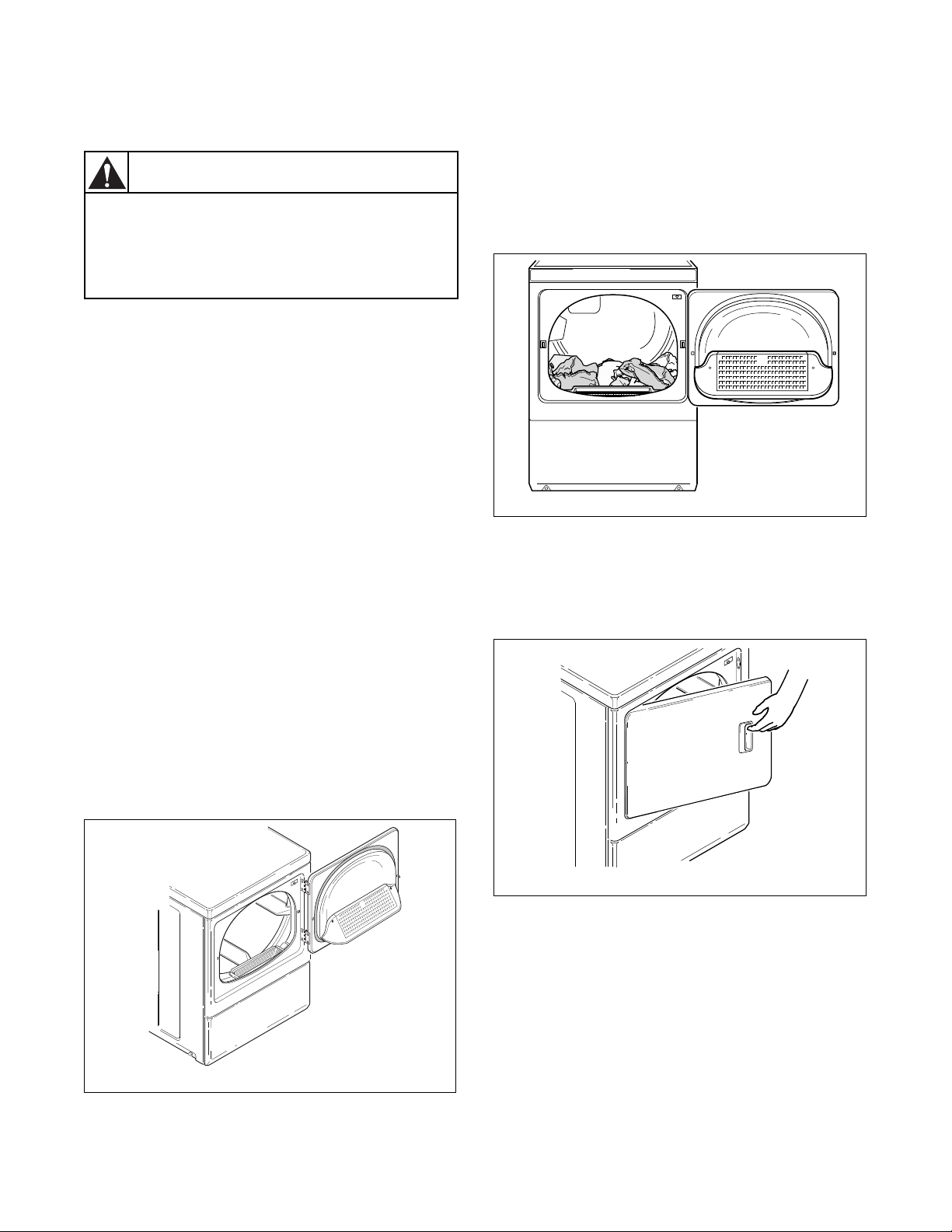
Indicator Lights
START
START is lit whenever the dryer is not in a cycle, the
full vend price has been satisfied and the dryer door is
closed. When the START pad is pressed, the cycle
will begin or resume.
DRYING
DRYING is lit to indicate that one of the heated cycles
(HIGH TEMP, MED TEMP, LOW TEMP or
DELICATES) is currently in operation. DRYING will
turn off at the end of a heated cycle or when the COOL
DOWN cycle begins.
COOL DOWN
COOL DOWN is lit whenever the COOL DOWN
portion of a heated cycle is active. It is also lit when no
heat is programmed for a cycle in operation.
© Copyright, Alliance Laundry Systems LLC – DO NOT COPY or TRANSMIT
Operation
512687R6
36
Operation Instructions for
NetMaster Dryers
IMPORTANT: Remove all objects from pockets
such as lighters and matches.
This appliance shall not be used to dry off solvents or
dry cleaning fluids.
IMPORTANT: Before using dryer for the first
time, use an all-purpose cleaner, or a detergent and
water solution, and a damp cloth to remove
shipping dust from inside of dryer drum.
IMPORTANT: Remove all sharp objects from
laundry to avoid tears and rips to items during
normal machine operation.
IMPORTANT: Oil affected items can ignite
spontaneously, especially when exposed to heat
sources such as in a tumble dryer. The items
become warm, causing an oxidation reaction in the
oil. Oxidation creates heat. If the heat cannot
escape, the items can become hot enough to catch
fire. Piling, stacking or storing oil-affected items
can prevent heat from escaping and so create a fire
hazard.
Step 1: Clean Lint Filter
Clean lint filter before each use.
Figure 47
Step 2: Load Laundry
Load clothes loosely into dryer drum (9.0 Kg
maximum dry clothes load). Add fabric softener sheet
if desired.
IMPORTANT: To avoid damage to dryer, do not
use more than one fabric softener sheet per load.
Figure 48
Step 3: Close Loading Door
Close loading door. Dryer will not operate with the
door open.
Figure 49
D608I
To reduce the risk of fire, electric shock,
or injury to persons, read the IMPORTANT
SAFETY INSTRUCTIONS before operating
this appliance.
W727
WARNING
D608I
D609I
D688I
D609I
D688I
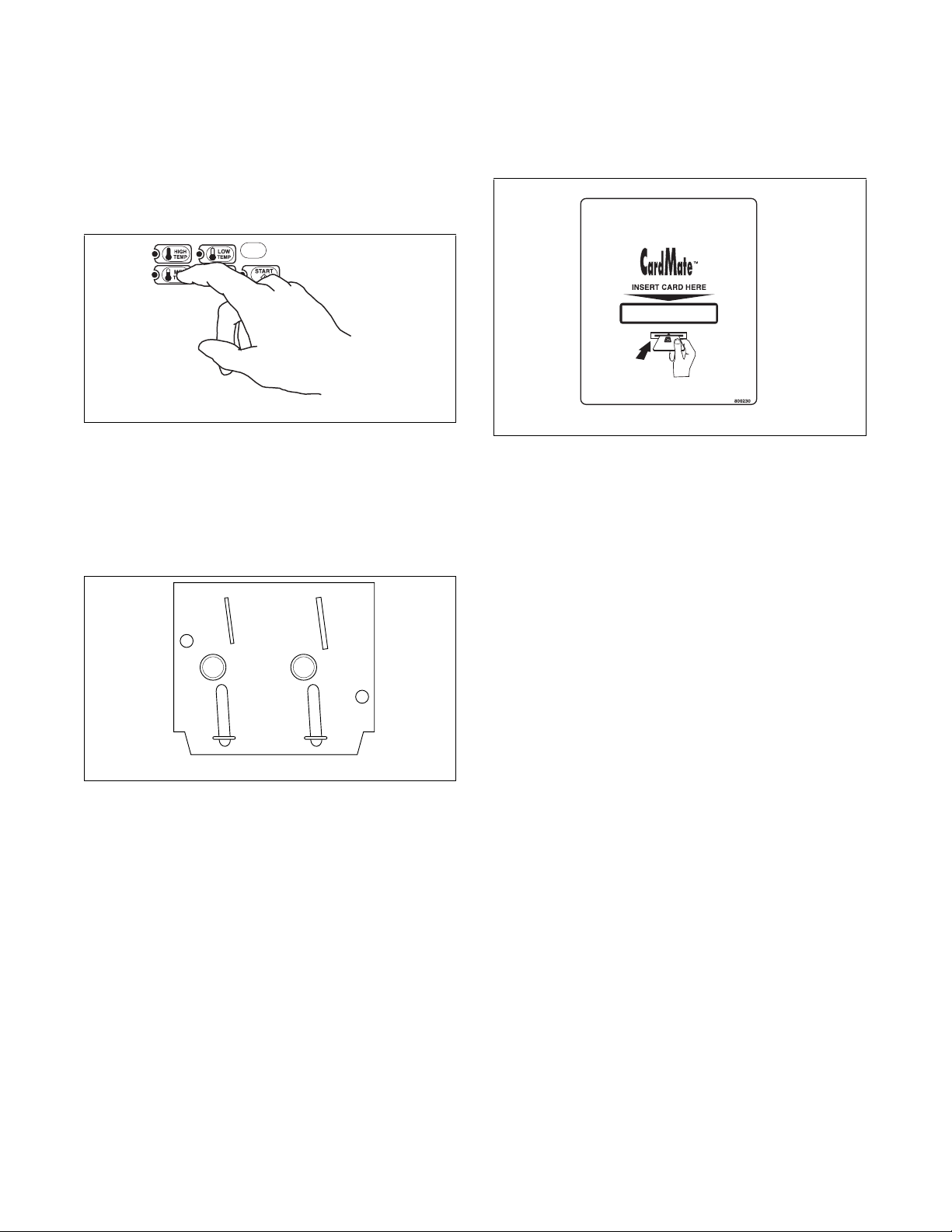
© Copyright, Alliance Laundry Systems LLC – DO NOT COPY or TRANSMIT
Operation
37
512687R6
Step 4: Set Fabric Selector
Select HIGH TEMP, MED TEMP, LOW TEMP or
NO HEAT by pushing touchpad.
NOTE: Always follow manufacturer’s care label
instructions.
Figure 50
Step 5: Insert Coin(s) or Card
To Insert Money
Insert coin(s) in coin slot. Check pricing as seen on
digital display.
Figure 51
To Insert Card
Insert card into opening. DO NOT remove the card
until the REMOVE CARD LED is lit.
Figure 52
If Additional Time Feature is turned on, additional
dryer time may be purchased at cycle start or while
dryer is running.
Remove knits when slightly damp because overdrying
may cause shrinkage. Do not tumble dry knit woolens.
D777I
W388I
D777I
M343I
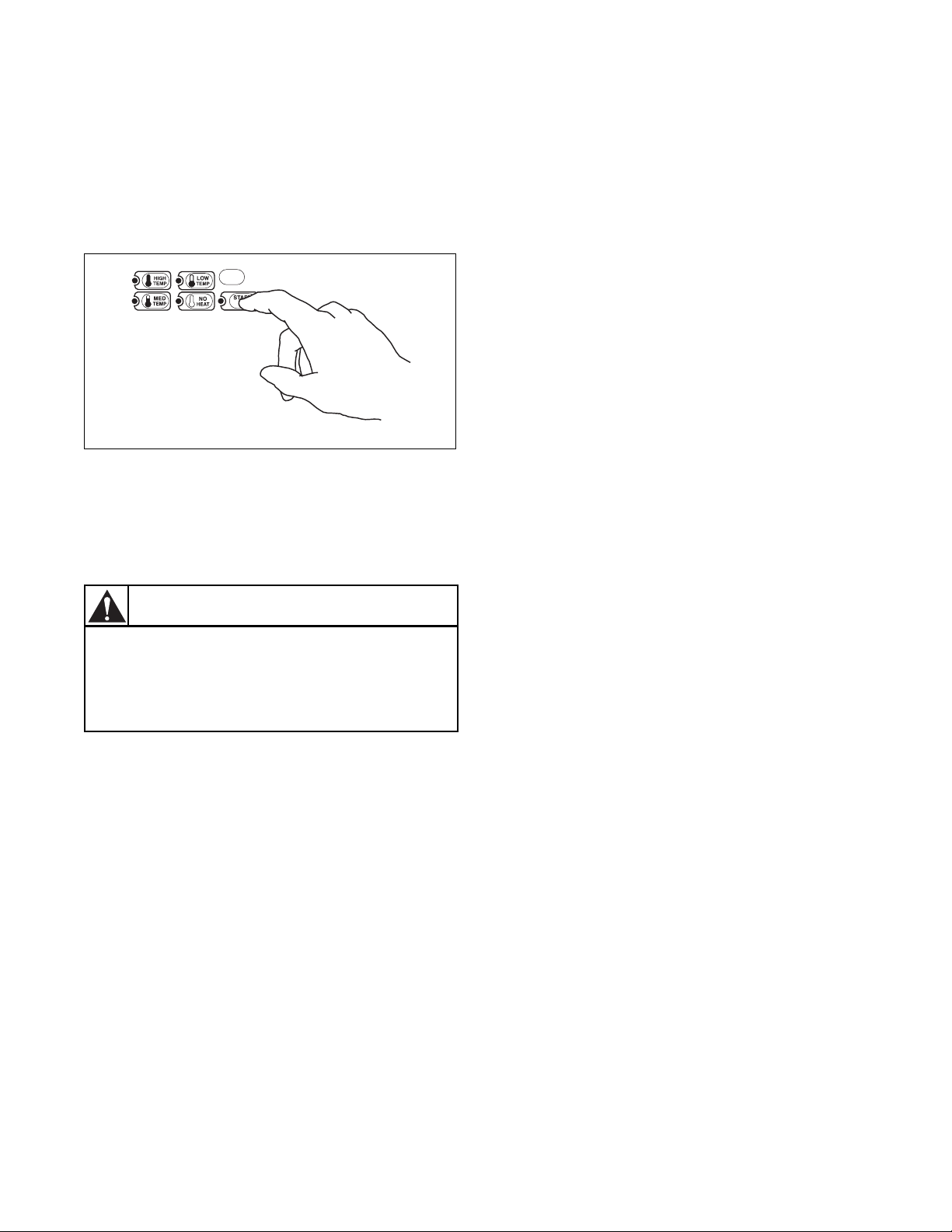
© Copyright, Alliance Laundry Systems LLC – DO NOT COPY or TRANSMIT
Operation
512687R6
38
Step 6: Start Dryer
To start dryer, push START pad.
To stop dryer at any time, open the door. To restart the
dryer, close door and push START pad.
Cycle is completed when time remaining reaches
00 minutes.
Figure 53
IMPORTANT: The final part of dryer cycle occurs
without heat (cool down cycle) to ensure that items
in dryer are left at a temperature that ensures that
the items will not be damaged.
Indicator Lights
INSERT COINS/CARD
INSERT COINS/CARD is lit to prompt the user to
insert coins or a card to satisfy the vend price. When
INSERT COINS/CARD is lit, the three digits and
decimal point will display the vend price remaining to
be satisfied.
START
START is lit whenever the dryer is not in a cycle, the
full vend price has been satisfied and the dryer door is
closed. When the START pad is pressed, the cycle
will begin or resume.
DRYING
DRYING is lit to indicate that one of the heated cycles
(HIGH TEMP, MED TEMP, or LOW TEMP) is
currently in operation. DRYING will turn off at the end
of a heated cycle or when the COOL DOWN cycle
begins.
COOL DOWN
COOL DOWN is lit whenever the COOL DOWN
portion of a heated cycle is active. It is also lit when
the NO HEAT cycle is in operation.
ADD TIME (Card Models Only)
ADD TIME flashes when a card is inserted while a
cycle is running or when a card is left in the reader for
at least five seconds after cycle has started.
REMOVE CARD (Card Models Only)
REMOVE CARD flashes when a card is inserted or left
in the reader after a transaction is complete. It will also
flash alternately with ADD TIME when a card is
inserted while a cycle is running or when a card is left
in the reader.
D778I
D778I
To prevent the risk of fire, never stop a
dryer before the end of the drying cycle
unless all items are quickly removed and
spread out so that the heat is dissipated.
W756
WARNING
© Copyright, Alliance Laundry Systems LLC – DO NOT COPY or TRANSMIT
39
512687R6
Maintenance
Lubrication
All moving parts are sealed in a permanent supply of
lubricant or are equipped with oilless bearings.
Additional lubrication will not be necessary.
Care of Your Dryer
Dryer Interior
Wipe the surfaces using a soft cloth and household
cleaner or a non-abrasive paste of powdered laundry
detergent and hot water, followed by a short heat cycle
with a load of rags.
To remove crayon or ball point ink off the dryer drum,
put the heat on high and use old rags in the dryer to
absorb the crayon or ink. If unsuccessful, contact the
appliance dealer. DO NOT use any chemicals in the
dryer.
IMPORTANT: The use of chlorine bleach for
removing any discolorations should be avoided
because bleach could damage the finish.
Cabinet
Wipe the dryer cabinet as needed. If detergent, bleach
or other washing products have been spilled on the
dryer, wipe immediately. Some products will cause
permanent damage if spilled on the cabinet.
Control Panel
Use only a damp or sudsy cloth for cleaning the
control panel. Some spray pretreat products may harm
the finish on the control panel. DO NOT use products
that contain alcohol on the control panel.
NOTE: The wiring diagram is located inside the
control panel.
Exhaust System
The exhaust duct should be inspected after one year of
use and cleaned if necessary by a qualified service
person to remove any lint build-up. Inspect and clean
exhaust duct every one to two years as required
thereafter.
NOTE: This recommended maintenance is not
covered under the terms of the warranty.
The weather hood should be checked frequently to
make sure the dampers move freely, dampers are not
pushed in and that nothing has been set against them.
Keep dryer area clear and free from combustible
materials, gasoline and other flammable vapors and
liquids.
Do not obstruct the flow of combustion and ventilation
air.
NOTE: Verify proper operation after servicing.
To reduce the risk of an electric shock,
serious injury or death, disconnect the
electrical service to the dryer before
cleaning the interior.
W132
WARNING
Label all wires prior to disconnection
when servicing controls. Wiring errors
can cause improper and dangerous
operation.
W049
WARNING
Any disassembly requiring the use of
tools must be performed by a suitably
qualified service person.
W299
WARNING
To reduce the risk of electric shock,
disconnect the electrical service to the
dryer before cleaning.
W043
WARNING
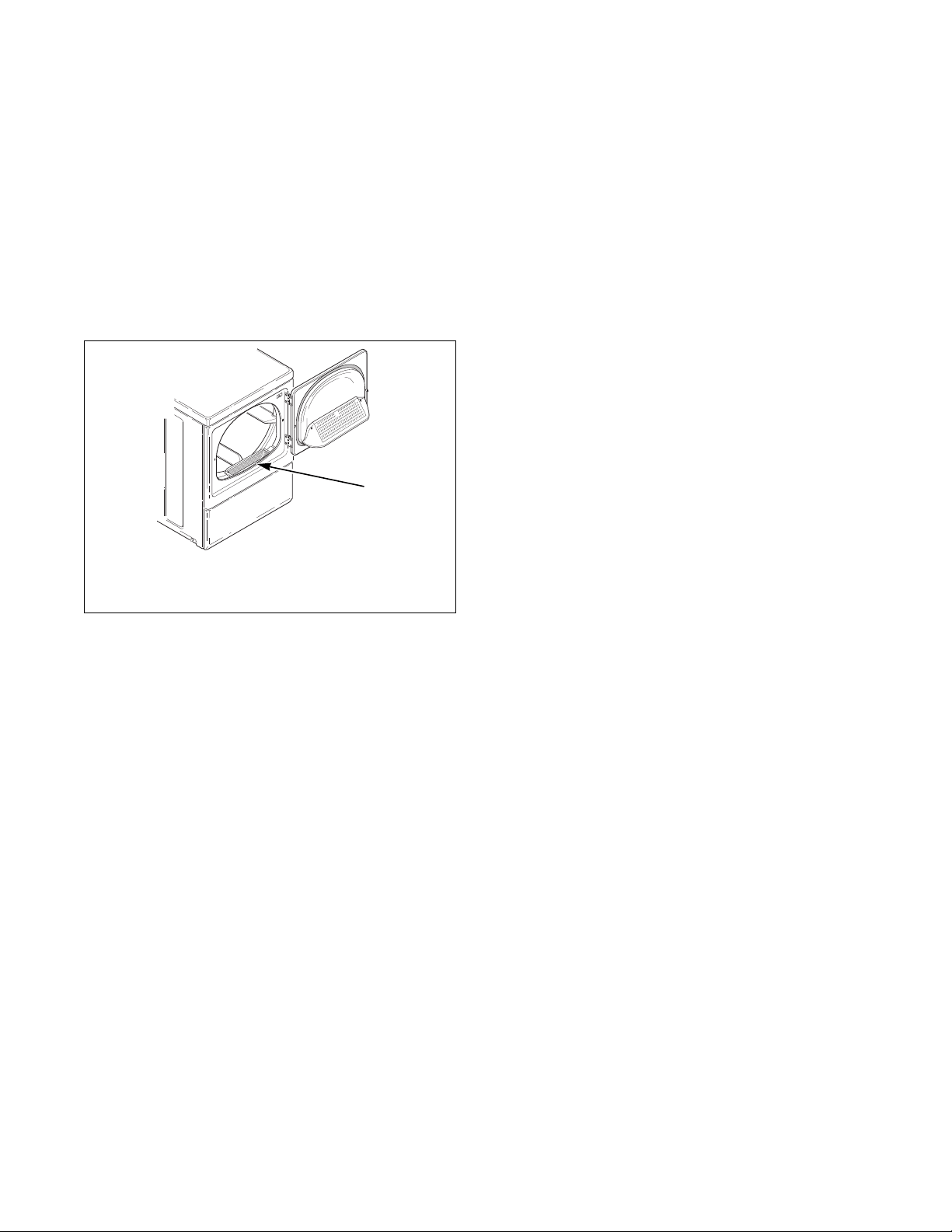
© Copyright, Alliance Laundry Systems LLC – DO NOT COPY or TRANSMIT
Maintenance
512687R6
40
Lint Filter
CLEAN THE LINT FILTER BEFORE DRYING
EACH LOAD. (Refer to Figure 54 for lint filter
location.) Cleaning the lint filter is important because
a layer or pad of lint on the filter will block the flow of
air through the dryer, thus reducing the efficiency of
the dryer. The clothes will take longer to dry and
energy will be wasted.
The lint filter may be washed if needed. Annually
remove lint filter and screw to vacuum the duct under
it.
Figure 54
Motor Overload Protector
The dryer’s motor overload protector stops the motor
automatically in the event of an overload. After
cooling, the overload protector will reset itself. Dryer
can be restarted by pressing the PUSH-TO-START
button or START pad. If overload protector cycles
again, remove the dryer from use and call the service
person to correct the problem.
For Energy Conservation
• Make sure the lint filter is always clean.
• Do not overload dryer.
• Do not overdry clothes.
• Remove items to be ironed while still damp.
• Large loads of similar fabrics dry the most
efficiently. However, dry permanent press in
smaller loads to prevent wrinkling.
• Use the correct temperature FABRIC
SELECTOR setting for the type of fabric being
dried.
• Locate your dryer so the exhaust duct is as short
and straight as possible.
• Do not open the door during the drying cycle.
• Plan to do your laundry on low humidity days;
your clothes will dry faster.
• Should you plan to dry several loads, do them
one after another, then you do not have to reheat
the dryer unit’s interior parts each time.
D608I
1 Lint Filter
D608I
1
© Copyright, Alliance Laundry Systems LLC – DO NOT COPY or TRANSMIT
41
512687R6
Troubleshooting
Try these troubleshooting tips before making a service
call – You may save time and money!
Dryer Symptom Possible Cause/Solution
Dryer won’t start
• Nonmetered models - Turn Timer knob further into cycle.
• Metered models - Insert coin(s) or card.
• Metered models - Activate timer. Push coin slide all the way in.
• For dryers equipped with a power cord, make sure the power cord is plugged all
the way into the electrical outlet.
• Make sure loading door is closed.
• Press PUSH-TO-START button or START pad.
• Make sure the laundry room fuse(s) isn’t blown or loose, or circuit breakers
aren’t open. The dryer itself does not have an electrical fuse. An electric dryer
has an electrical circuit with two fuses.
• Check if motor overload protector has cycled. Wait 10 minutes and try again.
Dryer won’t heat
• Nonmetered models - Turn Timer knob further into cycle.
• Metered models - Activate timer. Push coin slide all the way in.
• Make sure the laundry room fuse(s) isn’t blown or loose, or circuit breakers
aren’t open. The dryer itself does not have an electrical fuse. An electric dryer
has an electrical circuit with two fuses.
• Make sure controls are in a HEAT setting.
• Gas dryer only – Make sure equipment and main gas line valve is turned on.
• Check exhaust duct to outside to see if it is kinked, blocked or needs cleaning.
• Check weather hood to make sure flapper moves freely, has not been pushed in
or has not been blocked.
• Gas dryer only – Is the limit thermostat open? Reset the thermostat and restart
the dryer.
Dryer doesn’t dry clothes
satisfactorily
• Check exhaust duct to outside to see if it is kinked, blocked or needs cleaning.
• Check weather hood to make sure flapper moves freely, has not been pushed in
or has not been blocked.
• Clean the lint filter.
• Make sure the load isn’t too small. Small loads may not tumble properly or dry
evenly.
• Check load being dried. Heavy items dried with lightweight items will not dry as
quickly as the rest of the load.
Dryer is noisy
• Check dryer for foreign objects (nails, coins, bobby pins, metal, plastic toys,
etc.). Remove items from dryer.
• Make sure dryer is level. Uneven leveling can cause vibration.
• Normal operating sounds include the tick of timer advancing, heat source going
on and off, and humming of air moving through the dryer and exhaust system.
Clothes are too wrinkled
• Check heat setting. Overdrying can cause wrinkling.
• Check load size. Large loads may not tumble properly and may cause wrinkling.
Clothes have odor
• Check room for odors before drying clothes. Any odor (fried foods, paint,
varnish, cleaners, burning wood, etc.) will transfer to clothing as the dryer draws
air from the room. Ventilate room before drying clothes.
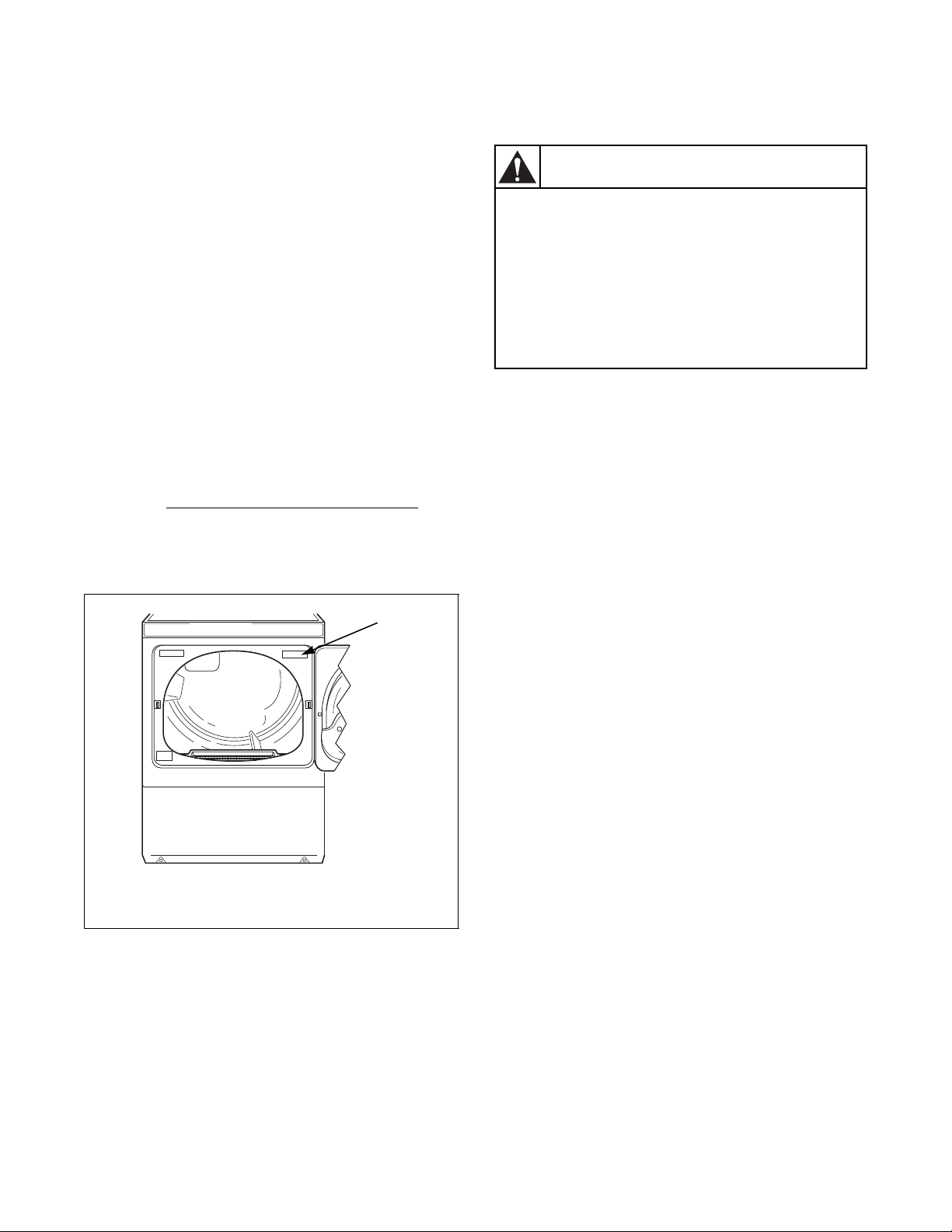
© Copyright, Alliance Laundry Systems LLC – DO NOT COPY or TRANSMIT
42
512687R6
Contact Information
If service is required, contact the nearest Factory
Authorized Service Center.
If you are unable to locate an authorized service center
or are unsatisfied with the service performed on your
dryer, contact:
Alliance Laundry Systems
Shepard Street
P. O. Box 990
Ripon, WI 54971-0990
U.S.A.
www. alliancelaundry. com
Phone: +1 (920) 748-3121
Date Purchased _____________________________
Model Numbe r_____________________________
Serial Number______________________________
When calling or writing about your dryer, PLEASE
GIVE THE MODEL AND SERIAL NUMBERS
. The
model and serial numbers are located on the
nameplate. The nameplate will be in the location
shown in the illustration below. Please include a copy
of your bill of sale and any service receipts you have.
If replacement parts are required, contact the source
from which you purchased your dryer or contact us at
+1 (920) 748-3950 for the name and address of the
nearest authorized parts distributor.
D063K
1 Nameplate
Figure 55
1
To reduce the risk of serious injury or
death, DO NOT repair or replace any part
of the dryer or attempt any servicing
unless specifically recommended in the
user-maintenance instructions or in
published user-repair instructions that
you understand and have the skills to
carry out.
W133
WARNING



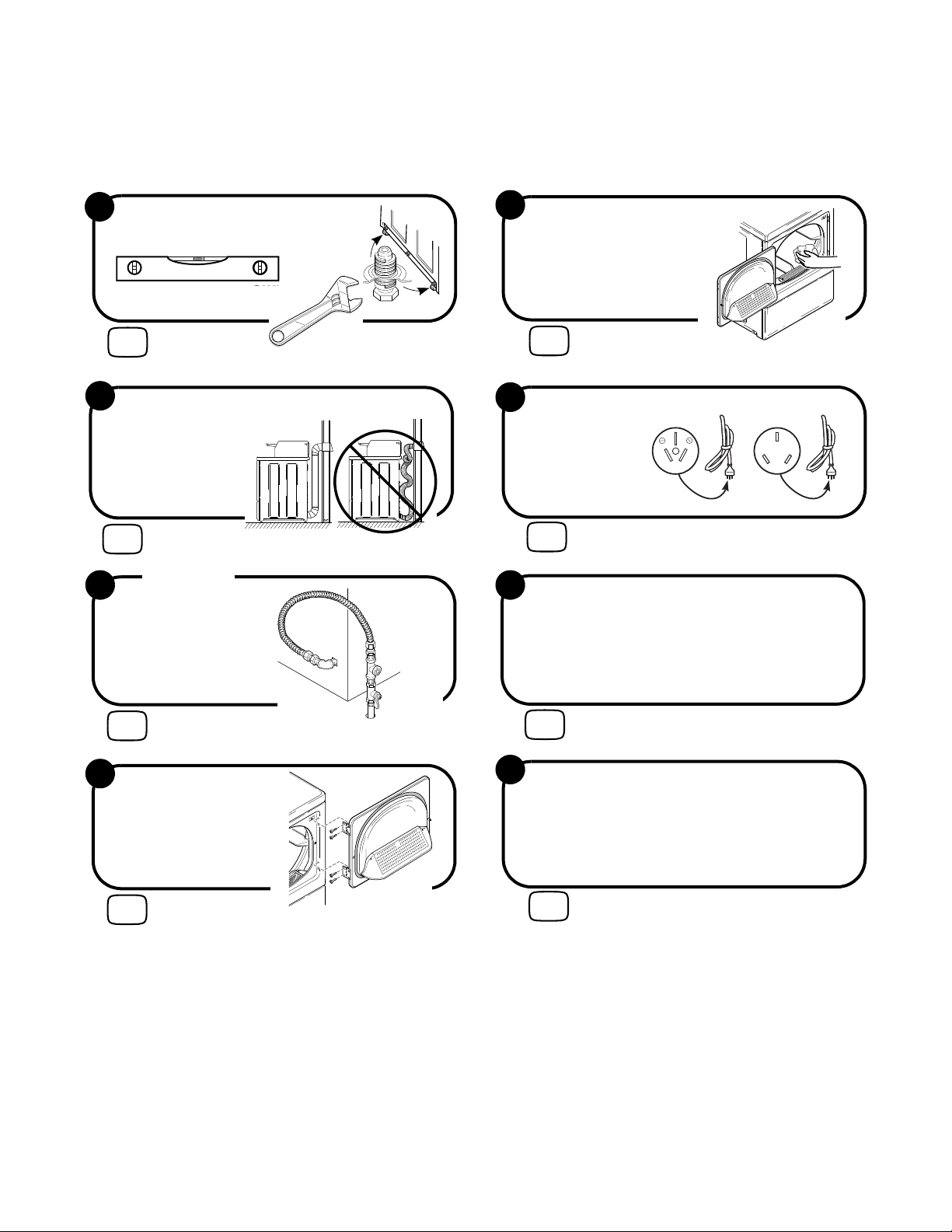
© Copyright, Alliance Laundry Systems LLC – DO NOT COPY or TRANSMIT
Installer Checklist
Fast Track for Installing the Dryer
(Refer to the manual for more detailed information)
• Position and
Level the Dryer.
1
D256I
CHECK
D259I
LEVEL
D255I
D255I
2
CHECK
• Connect Dryer Exhaust System.
D335I
D335I
D333I
D333I
3
GAS ONLY
D258I
CHECK
• Connect Gas
Supply Pipe
Hoses.
•Check for
Gas Leaks.
• Reverse Door,
if Desired.
4
CHECK
D675I
W675I
5
• Wipe Out Inside
of Dryer.
CHECK
D610I
D610I
DRY2157N
20 A
250
V
DRY2158N
10A
250
V
6
DRY2157N DRY2158N
CHECK
Electric
Gas
•Plug In the Dryer.
• Recheck Steps 1-6.
7
CHECK
8
CHECK
• Start and Run Dryer in Heat Setting to
Verify Dryer is Heating.