p/n: 614-40194
Revision 04
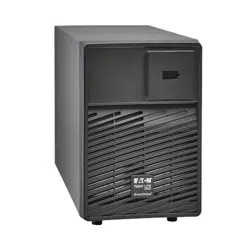
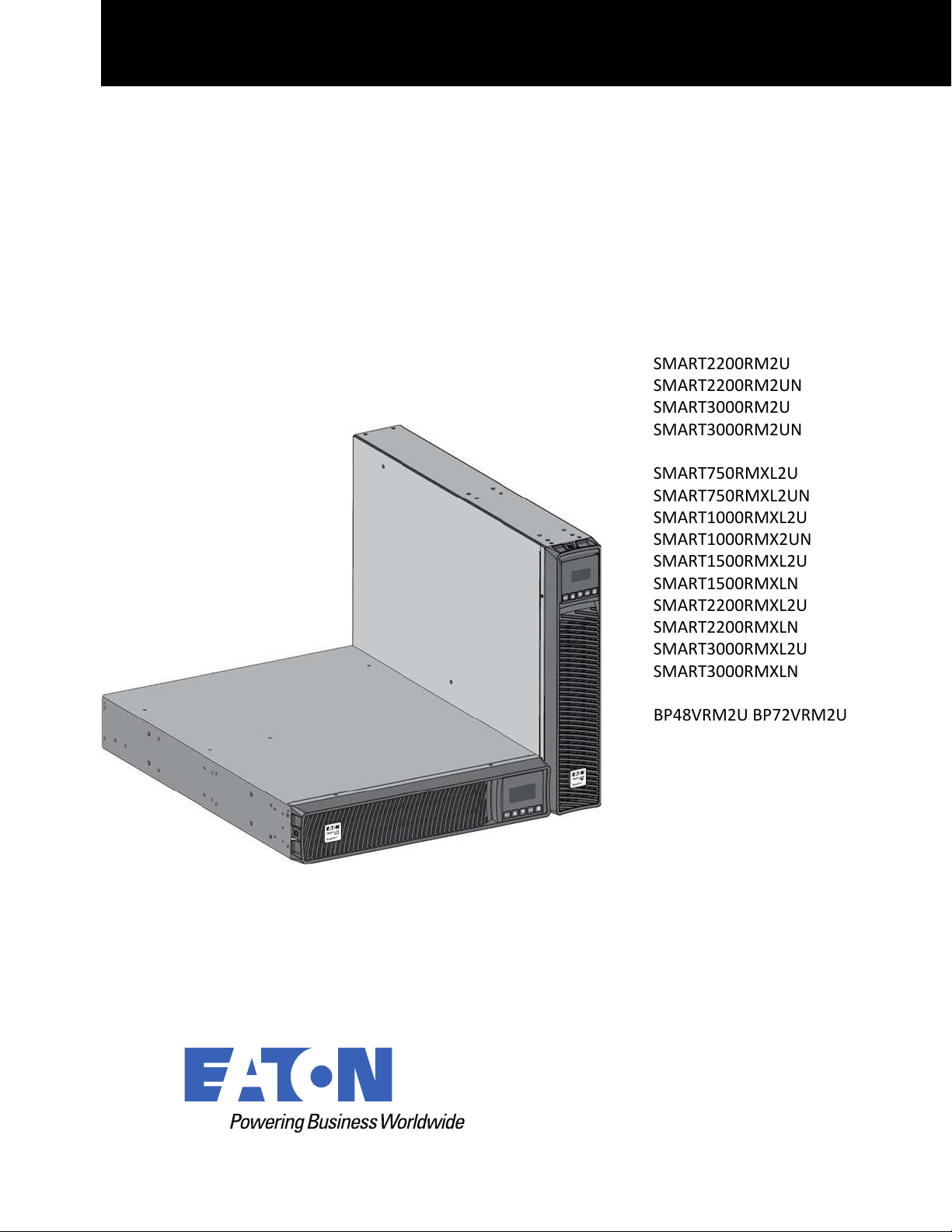
SMART2200RM2U
SMART2200RM2UN
SMART3000RM2U
SMART3000RM2UN
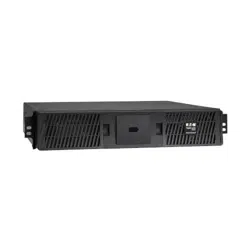
SMART750RMXL2U
SMART750RMXL2UN
SMART1000RMXL2U
SMART1000RMX2UN
SMART1500RMXL2U
SMART1500RMXLN
SMART2200RMXL2U
SMART2200RMXLN
SMART3000RMXL2U
SMART3000RMXLN
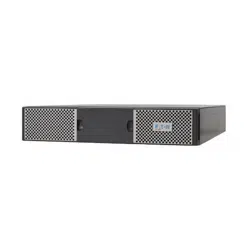
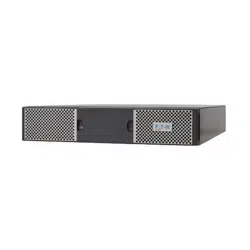
BP48VRM2U BP72VRM2U
Advanced User Guide
Eaton Tripp Lite Series SmartPro

Eaton reserves the right to change specifications without prior notice. Eaton is a registered trademark of Eaton. All other trademarks are
property of their respective companies.
©Copyright 2022 Eaton, Raleigh, NC, USA. All rights reserved. No part of this document may be reproduced in any way without the
express written approval of Eaton.
SSaaffeettyy IInnssttrruuccttiioonnss
SAVE THESE INSTRUCTIONS. This manual contains important instructions that should be
followed during installation and maintenance of the UPS and batteries.
This equipment has been tested and found to comply with the limits for a Class A digital device,
pursuant to Part 15 of the FCC Rules. These limits are designed to provide reasonable protection
against harmful interference when the equipment is operated in a commercial environment. This
equipment generates, uses, and can radiate radio frequency energy and, if not installed and used in
accordance with the instruction manual, may cause harmful interference to radio communications.
Operation of this equipment in a residential area is likely to cause harmful interference in which case
the user will be required to correct the interference at his own expense.
This is a category C2 UPS product. In a residential environment, this product may cause radio
interference, in which case the user may be required to take additional measures.
Supplier's Declaration of Conformity of Federal Communications Commission Statement
This device complies with Part 15 of the FCC Rules. Operation is subject to the following two
conditions:
1. this device may not cause harmful interference, and
2. this device must accept any interference received, including interference that may cause
undesired operation.
For questions regarding this FCC SDoC declaration, contact Eaton Corporation by telephone or
through the Internet.
Eaton Corporation 8609 Six Forks Road,
Raleigh, NC 27615, USA
Telephone: 800-356-5794
SSppeecciiaall SSyymmbboollss
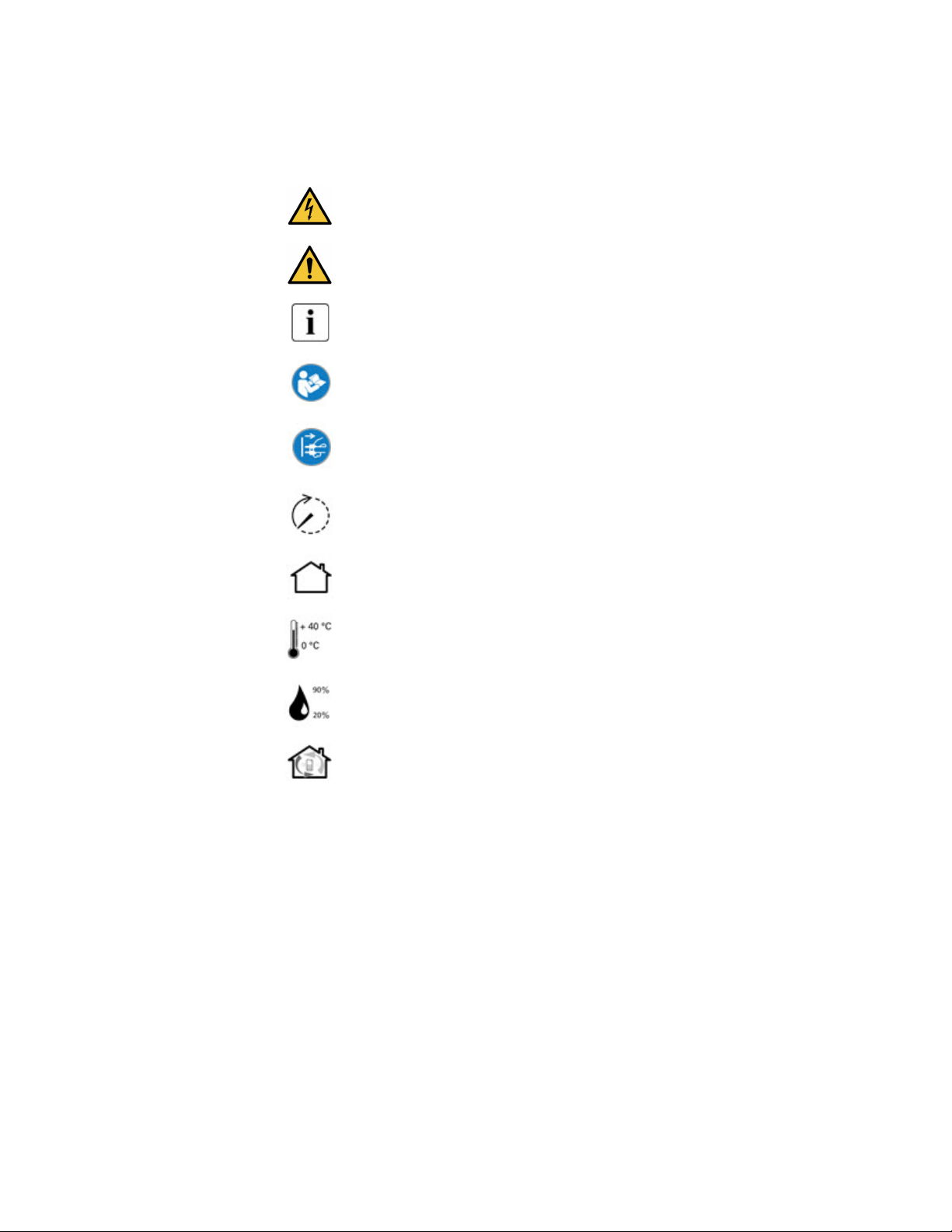
The following are examples of symbols used on the product to alert you to important information:
RISK OF ELECTRIC SHOCK - Observe the warning associated with the risk of
electric shock symbol.
CAUTION: REFER TO OPERATOR'S MANUAL - Refer to your operator's
manual for additional information, such as important operating and maintenance
instructions.
Information, advice, help.
Read the documentation provided.
Disconnect input plug.
Before maintenance, first shut down the UPS then disconnect the AC power
source, internal and external batteries then discharge capacitors by pressing the
ON button and wait 5 minutes.
This equipment should only be used in a dry indoor environment.
Operating range of temperature.
Operating range of humidity.
The UPS and their batteries must be kept in a ventilated place.
SSaaffeettyy ooff PPeerrssoonnss
• The system has its own power source (the battery). Consequently, the power outlets may be
energized ven if the systems is disconnected from the AC power source. Dangerous voltage
levels are resent within the system. It should be opened exclusively by qualified service
personnel.
• The system must be properly grounded at all times.
• The battery supplied with the system contains small amounts of toxic materials. To avoid
accidents, the directives listed below must be observed:
– Servicing of batteries should be performed or supervised by personnel knowledgeable about
batteries and the required precautions.
– When replacing batteries, replace with the same type and number of batteries or battery
packs.
– Do not dispose of batteries in a fire. The batteries may explode.

– Batteries constitute a danger (electrical shock, burns). The short-circuit current may be very
high.
• Precautions must be taken for all handling:
– Wear rubber gloves and boots.
– Do not lay tools or metal parts on top of batteries.
– Disconnect charging source prior to connecting or disconnecting battery terminals.
– Determine if battery is inadvertently grounded. If inadvertently grounded, remove source
from ground. Contact with any part of a grounded battery can result in electrical shock. The
likelihood of such shock can be reduced if such grounds are removed during installation and
maintenance (applicable to equipment and remote battery supplies not having a grounded
supply circuit).
PPrroodduucctt SSaaffeettyy
• To connect the UPS, instructions and operation described in the manual must be followed in the
indicated order.
• CAUTION - To reduce the risk of fire, the unit connects only to a circuit provided with 20 or 30
amperes maximum branch circuit overcurrent protection in accordance with the National Electric
Code, ANSI/NFPA 70 (US installations only).
• Check that the indications on the rating plate correspond to your AC powered system and to the
actual electrical consumption of all the equipment to be connected to the system.
• For PLUGGABLE EQUIPMENT, the socket-outlet shall be installed near the equipment and shall
be easily accessible
• Never install the system near liquids or in an excessively damp environment.
• Never let a foreign body penetrate inside the system.
• Never block the ventilation grates of the system.
• Never expose the system to direct sunlight or source of heat.
• If the system must be stored prior to installation, storage must be in a dry place.
• The admissible storage temperature range is -25ºC to +55ºC without batteries, 0°C to 40°C with
batteries.
• The system is not for use in a computer room AS DEFINED IN the standard for the Protection of
Information Technology Equipment, ANSI/NFPA 75 (US installations only).
SSppeecciiaall PPrreeccaauuttiioonnss
• The unit is heavy: wear safety shoes and use vacuum lifter preferentially for handling operations.
• All handling operations will require at least two people (unpacking, lifting, installation in rack
system).
• Before and after the installation, if the UPS remains de-energized for a long period, the UPS must
be energized for a period of 24 hours, at least once every 6 months (for a normal storage
temperature less than 25°C). This charges the battery, thus avoiding possible irreversible
damage.
• During the replacement of the Battery Module, it is imperative to use the same type and number
of element as the original Battery Module provided with the UPS to maintain an identical level of
performance and safety. If there are any questions, don’t hesitate to contact your local Eaton
representative.For potential safety issue on defective UPS : DISCONNECT INTERNAL BATTERY
for storage and transportation.
• All repairs and service should be performed by AUTHORIZED SERVICE PERSONNEL ONLY.
There are NO USER SERVICEABLE PARTS inside the UPS.

Eaton Tripp Lite Series SmartPro User Guide 614-40194—Rev 04 v
TTaabbllee ooff CCoonntteennttss
11 IInnttrroodduuccttiioonn....................................................................................................................................................................................................................................................................................................11
1.1 Environmental protection ............................................................................................................................. 1
1.2 Benefits.................................................................................................................................................... 1
1.3 Special Precautions..................................................................................................................................... 2
22 PPrreesseennttaattiioonn ..................................................................................................................................................................................................................................................................................................33
2.1 Standard installation .................................................................................................................................... 3
2.2 Optional accessories ...................................................................................................................................4
2.3 Rear panel................................................................................................................................................. 5
33 IInnssttaallllaattiioonn ......................................................................................................................................................................................................................................................................................................77
3.1 Inspecting the equipment............................................................................................................................. 7
3.2 Recommended Positions ............................................................................................................................. 8
3.3 Connecting the Internal Battery ................................................................................................................... 10
3.4 EBM Connection ...................................................................................................................................... 11
3.5 UPS connection ....................................................................................................................................... 12
3.6 Connection with a FlexPDU (Power Distribution Unit) optional module ................................................................. 13
3.7 Connection with a HotSwap MBP (Maintenance ByPass) optional module ............................................................ 13
3.7.1 UPS Start-Up with the HotSwap MBP Module .......................................................................................... 14
3.7.2 HotSwap MBP module test .................................................................................................................. 14
3.8 HotSwap MBP module test ........................................................................................................................ 14
44 IInntteerrffaacceess aanndd CCoommmmuunniiccaattiioonn .......................................................................................................................................................................................................................................... 1155
4.1 Control panel ........................................................................................................................................... 15
4.2 LCD Description ...................................................................................................................................... 15
4.3 Display Functions ..................................................................................................................................... 18
55 OOppeerraattiioonn........................................................................................................................................................................................................................................................................................................ 2211
5.1 Start-up and normal operation ..................................................................................................................... 21
5.2 Starting the UPS on battery......................................................................................................................... 21
5.3 UPS shutdown ........................................................................................................................................ 21
5.4 Operating modes...................................................................................................................................... 22
5.5 Return of AC input power .......................................................................................................................... 22
5.6 Configuring Battery Settings ...................................................................................................................... 22
5.7 Retrieving the event and fault log ................................................................................................................ 23
66 UUPPSS MMaaiinntteennaannccee................................................................................................................................................................................................................................................................................ 2255
6.1 Equipment Care ....................................................................................................................................... 25
6.2 Storing the Equipment ............................................................................................................................... 25
6.3 When to Replace Batteries ........................................................................................................................ 25
6.4 Replacing Batteries ................................................................................................................................... 25
6.5 Replacing the UPS Equipped with a HotSwap MBP ......................................................................................... 28

vi Eaton Tripp Lite Series SmartPro User Guide 614-40194—Rev 04
77 TTrroouubblleesshhoooottiinngg .................................................................................................................................................................................................................................................................................... 2299
7.1 Typical Alarms and Faults .......................................................................................................................... 29
7.2 Detail Alarm or Fault Code .......................................................................................................................... 30
7.3 Silencing the Alarm .................................................................................................................................. 31
7.4 Service and Support ................................................................................................................................. 31
88 SSppeecciiffiiccaattiioonnss.......................................................................................................................................................................................................................................................................................... 3333
8.1 UPS Model List ........................................................................................................................................ 33
8.2 Extended Battery Module Model List ........................................................................................................... 33
8.3 Weights and Dimensions ........................................................................................................................... 33
8.4 Electrical Input ........................................................................................................................................ 34
8.5 Electrical Input Connections ....................................................................................................................... 35
8.6 Electrical Output ...................................................................................................................................... 35
8.7 Electrical Output Connection....................................................................................................................... 36
8.8 Battery .................................................................................................................................................. 36
8.9 Environmental and Safety........................................................................................................................... 36
Table of Contents
Eaton Tripp Lite Series SmartPro User Guide 614-40194—Rev 04 1
CChhaapptteerr 11 IInnttrroodduuccttiioonn
11..11 EEnnvviirroonnmmeennttaall pprrootteeccttiioonn
Eaton Tripp Lite Series has implemented an environmental-protection policy. Products are developed according
to an eco-design approach.
SSuubbssttaanncceess
This product does not contain CFC and HCFC. This product does not contain asbestos. This product is
compliant with regulations on the restriction of the use of substances in electrical and electronic equipment.
PPaacckkaaggiinngg
To improve waste treatment and facilitate recycling, separate the various packing components.
• The cardboard we use comprises over 50% of recycled cardboard.
• Plastic bags are made of polyethylene.
• Packing materials are recyclable and bear the appropriate identification symbol.
Table 1.
Materials Abbreviations Number in the symbols
Polyethylene terephthalate PET 01
High-density polyethylene HDPE
02
Polyvinyl chloride PVC
03
Low-density polyethylene LDPE
04
Polypropylene PP 05
Polystyrene PS
06
Follow all local regulations for the disposal of packing materials.
EEnndd ooff lliiffee
Eaton Tripp Lite Series will process products at the end of their service life in compliance with local regulations.
Eaton Tripp Lite Series works with companies in charge of collecting and eliminating our products at the end of
their service life.
PPrroodduucctt
The product is made up of recyclable materials. Dismantling and destruction must take place in compliance
with all local regulations concerning waste. At the end of its service life, the product must be transported to a
processing center for electrical and electronic waste.
tripplite.com/support/recycling-program/
BBaatttteerryy
The product contains lead-acid batteries that must be processed according to applicable local regulations
concerning batteries. The battery may be removed to comply with regulations and in view of correct disposal.
11..22 BBeenneeffiittss
The Eaton Tripp Lite Series SmartPro uninterruptible power system (UPS) protects your sensitive electronic
equipment from the most common power problems, including power outages, voltage sags, impulsive

2 Eaton Tripp Lite Series SmartPro User Guide 614-40194—Rev 04
transients, line noise, and long-term under and over voltage conditions, frequency variations, switching
transients, and harmonic distortion.
Power outages can occur when you least expect it and power quality can be erratic. These power problems
have the potential to corrupt critical data, destroy unsaved work sessions, and damage hardware - causing
hours of lost productivity and expensive repairs.
With the Eaton Tripp Lite Series SmartPro, you can safely eliminate the effects of power disturbances and
guard the integrity of your equipment. Providing outstanding performance and reliability, the Eaton Tripp Lite
Series SmartPro’s unique benefits include:
• Standard communication options: one RS-232 communication port, one USB communication port, relay
output contacts.
• Optional connectivity cards with enhanced communication capabilities.
• Extended runtime with up to four Extended Battery Modules (EBMs) per UPS.
• Remote on/off (ROO) and remote power off (RPO).
• Backed by worldwide agency approvals.
11..33 SSppeecciiaall PPrreeccaauuttiioonnss
• The unit is heavy: wear safety shoes and use vacuum lifter preferentially for handling operations.
• All handling operations will require at least two people (unpacking, lifting, installation in rack system).
• Before and after the installation, if the UPS remains de-energized for a long period, the UPS must be
energized for a period of 24 hours, at least once every 6 months (for a normal storage temperature less
than 25°C). This charges the battery, thus avoiding possible irreversible damage.
• During the replacement of the Battery Module, it is imperative to use the same type and number of
element as the original Battery Module provided with the UPS to maintain an identical level of performance
and safety. If there are any questions, donʼt hesitate to contact your local EATON representative.
• All repairs and service should be performed by AUTHORIZED SERVICE PERSONNEL ONLY. There are NO
USER SERVICEABLE PARTS inside the UPS.
• For potential safety issue on defective UPS : DISCONNECT INTERNAL BATTERY for storage and
transportation.
Special Precautions
Eaton Tripp Lite Series SmartPro User Guide 614-40194—Rev 04 3
CChhaapptteerr 22 PPrreesseennttaattiioonn
22..11 SSttaannddaarrdd iinnssttaallllaattiioonn
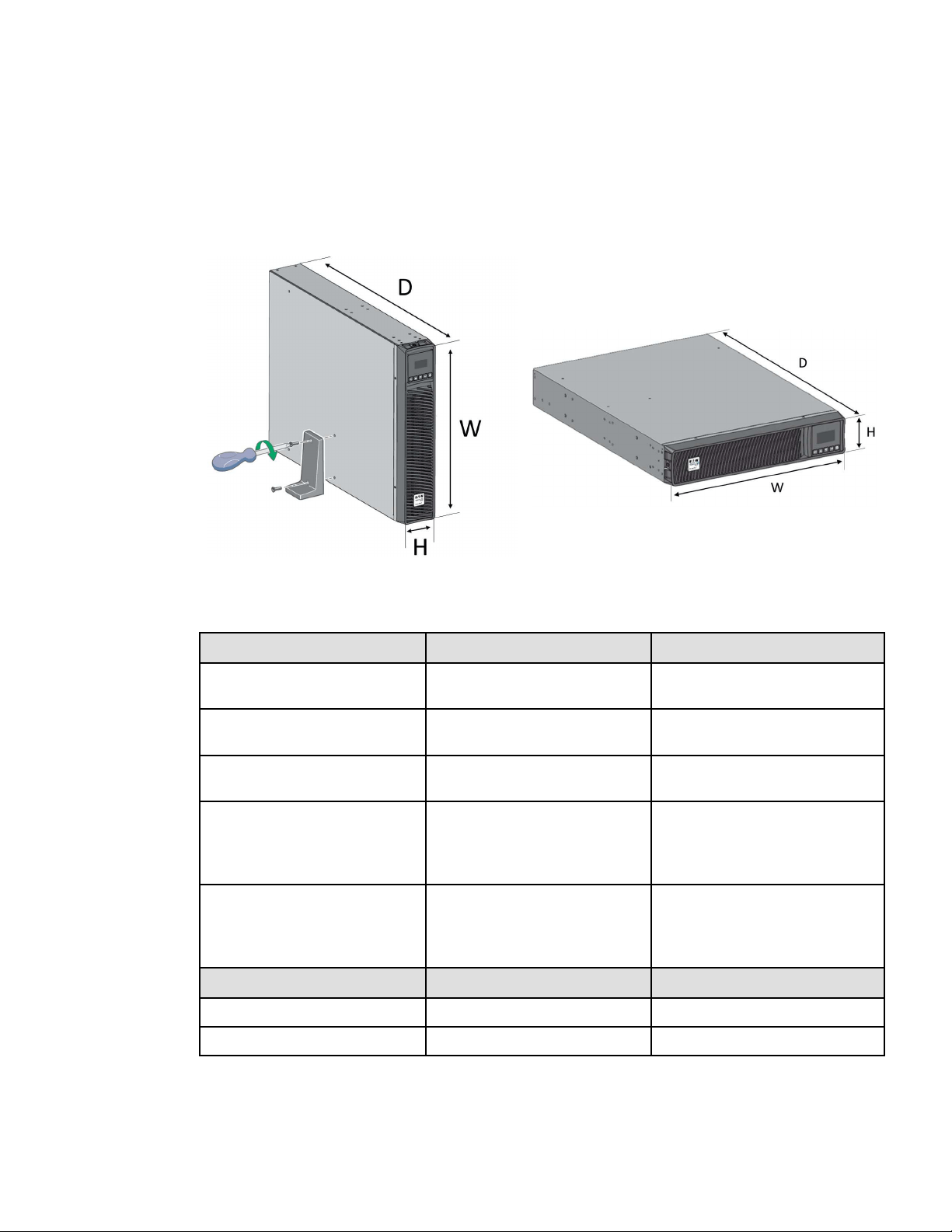
Table 2. Installation Formats
Table 3. Weights and Dimensions
Description (UPS) Weights (lb / kg) Dimensions (inch / mm) D x W x H
SMART750RMXL2U
SMART750RMXL2UN
44.5 / 20.2 17.6x17.2x3.4 / 448x438x85.5
SMART1000RMXL2U
SMART1000RMX2UN
44.5 / 20.2 17.6x17.2x3.4 / 448x438x85.5
SMART1500RMXL2U
SMART1500RMXLN
50.7 / 23.0 17.6x17.2x3.4 / 448x438x85.5
SMART2200RMXL2U
SMART2200RMXLN
SMART2200RM2U
SMART2200RM2UN
65.3 / 29.6 23.7x17.2x3.4 / 603x438x85.5
SMART3000RMXL2U
SMART3000RMXLN
SMART3000RM2U
SMART3000RM2UN
74.5 / 33.8 23.7x17.2x3.4 / 603x438x85.5
Description (EBM) Weights (lb / kg) Dimensions (inch / mm) D x W x H
BP48VRM2U 61.3 / 27.8 17.6x17.2x3.4 / 448x438x85.5
BP72VRM2U 89.1 / 40.4 23.7x17.2x3.4 / 603x438x85.5

4 Eaton Tripp Lite Series SmartPro User Guide 614-40194—Rev 04
22..22 OOppttiioonnaall aacccceessssoorriieess
Table 4. Smart Pro Optional Accessories
Part number Description
BP48VRM2U
BP72VRM2U
Extended Battery Module
WEBCARDLXE UPS Web Management Accessory Card SNMP Remote Monitoring HTML5
Optional accessories
Eaton Tripp Lite Series SmartPro User Guide 614-40194—Rev 04 5
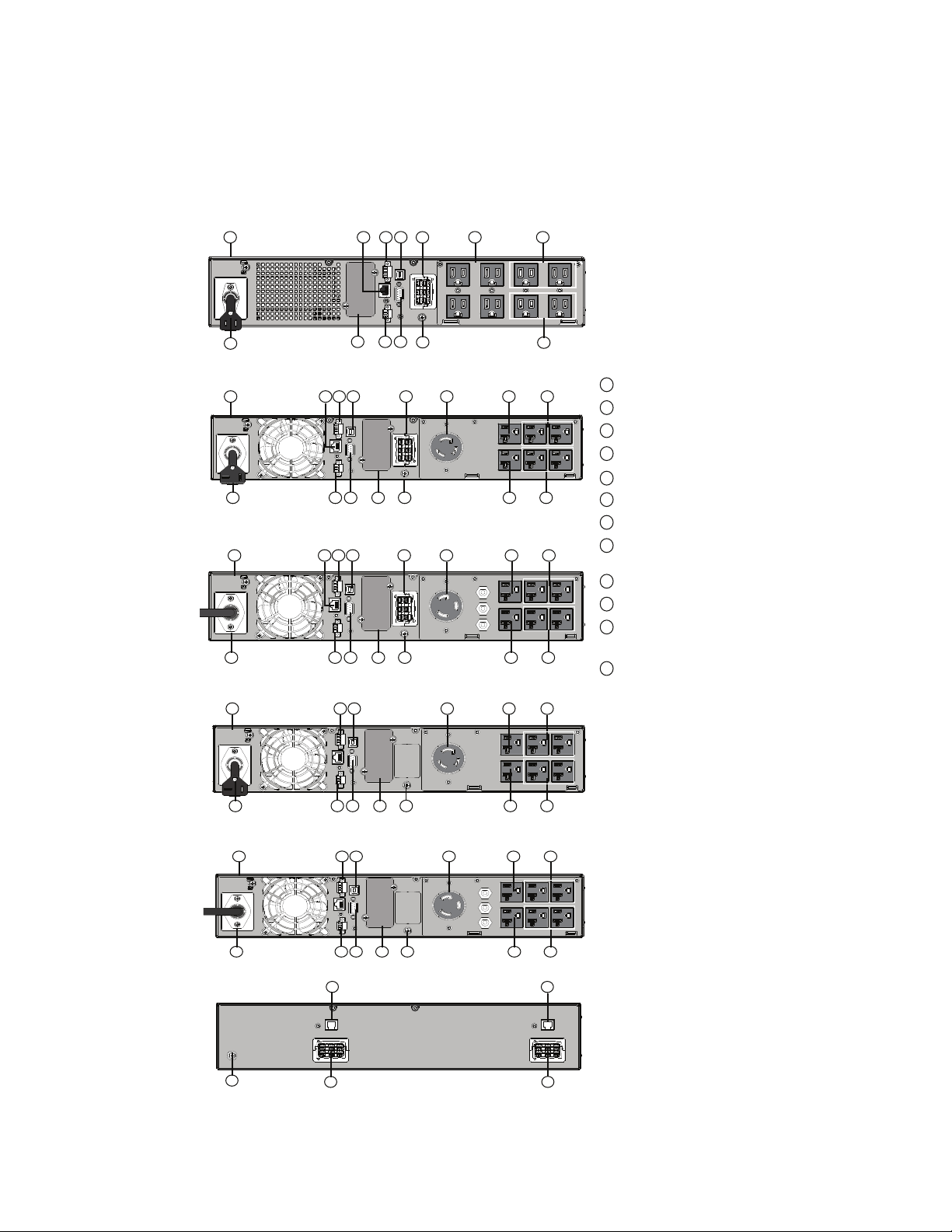
22..33 RReeaarr ppaanneell
1
2
3
4
5
67
8
9
10
11
12
4
2 4
12
1 358
1011
43
967 3
1 358
1011
43
2 4
12
967 3
2 4
12
1
358 43
967 3
1 358 43
2
4
12
967
3
10
11
12
11
10
SMART750RMXL2U / SMART750RMXL2UN / SMART1000RMXL2U /
SMART1000RMX2UN / SMART1500RMXL2U / SMART1500RMXLN
SMART2200RMXL2U / SMART2200RMXLN
SMART3000RMXL2U / SMART3000RMXLN
BP48VRM2U / BP72VRM2U
SMART2200RM2U / SMART2200RM2UN
SMART3000RM2U / SMART3000RM2UN
1
2
3
4
5
6
7
8
9
10
11
12
UPS
Input AC power source
Primary group (critical equipment)
Outlet group (programmable outlets)
USB communication ports
RS232 communication port
Relay output contact
Connector for ROO (Remote On/Off) control and
RPO ( Remote Power Off)
Slot for optional communication card
Connector for additional battery module
Connector for automatic recognition of an additional
battery module
Ground screw
Rear panel


Eaton Tripp Lite Series SmartPro User Guide 614-40194—Rev 04 7
CChhaapptteerr 33 IInnssttaallllaattiioonn
33..11 IInnssppeeccttiinngg tthhee eeqquuiippmmeenntt
If any equipment has been damaged during shipment, keep the shipping cartons and packing materials for the
carrier or place of purchase and file a claim for shipping damage. If you discover damage after acceptance, file a
claim for concealed damage. For pluggable equipment, the socket outlet shall be installed near the equipment
and shall be easily accessible.
To file a claim for shipping damage or concealed damage:
1. File with the carrier within 15 days of receipt of the equipment;
2. Send a copy of the damage claim within 15 days to your service representative.
!
IMPORTANT
Check the battery recharge date on the shipping carton label. If the date has passed and the batteries were
never recharged, do not use the UPS. Contact your service representative.
Table 5. Package content
Verify that the following additional items
are included with the UPS:
1. UPS
13. Connection cable to AC power source
15. RS232 communication cable
16. USB communication cable
17. Safety instructions
18. Quick start
20. Rack kit for 19-inch 4-post enclosures
21. Two supports for tower position (tower
feet)
WEBCARDLXE (optional)
CONFIG
STATUS
RESET
8 Eaton Tripp Lite Series SmartPro User Guide 614-40194—Rev 04
33..22 RReeccoommmmeennddeedd PPoossiittiioonnss
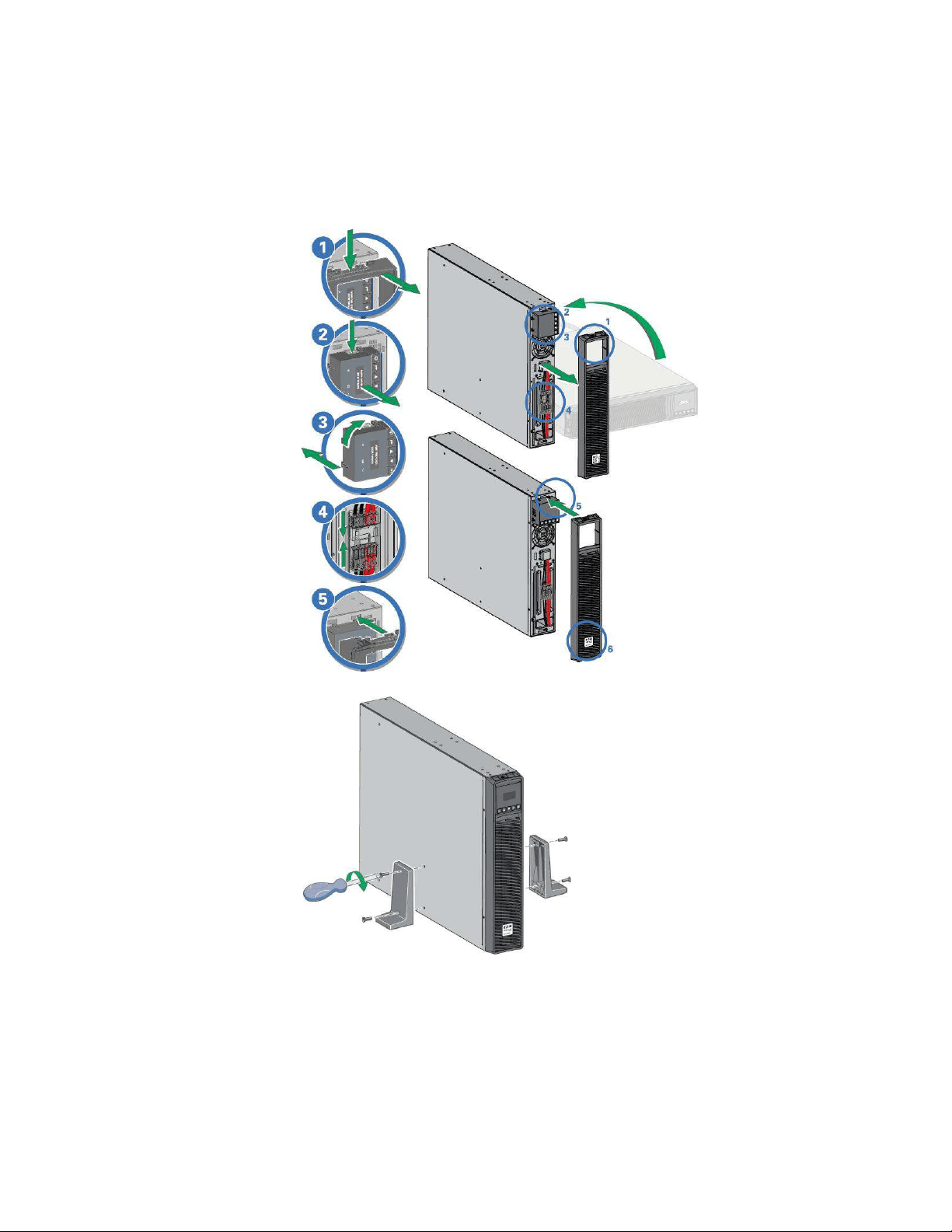
IInnssttaallllaattiioonn iinn rraacckk ppoossiittiioonn
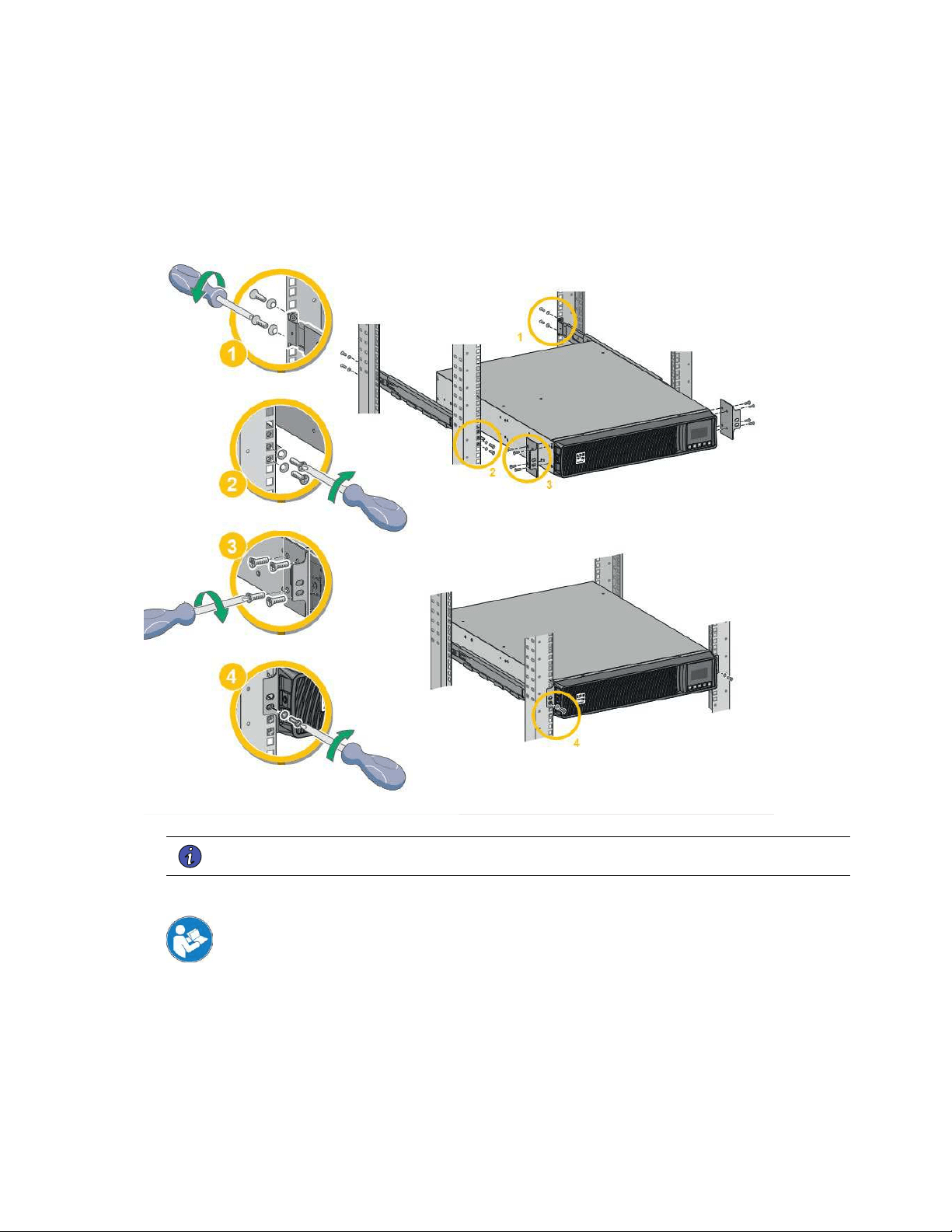
Follow steps 1 to 4 for module mounting on the rails.
Figure 1. Rack Installation Steps
NOTE The rails and necessary hardware are supplied by Eaton.
IInnssttaallllaattiioonn iinn ttoowweerr ppoossiittiioonn
If you ordered other UPS accessories, refer to specific user manuals to check the tower installation
with the UPS.
To install the UPS:
Place the UPS on a flat, stable surface in its final location. Always keep 6" or 150 mm of free space behind the
UPS rear panel for ventilation.
If installing additional EBM, place them next to the UPS in their final location.
Recommended Positions
10 Eaton Tripp Lite Series SmartPro User Guide 614-40194—Rev 04
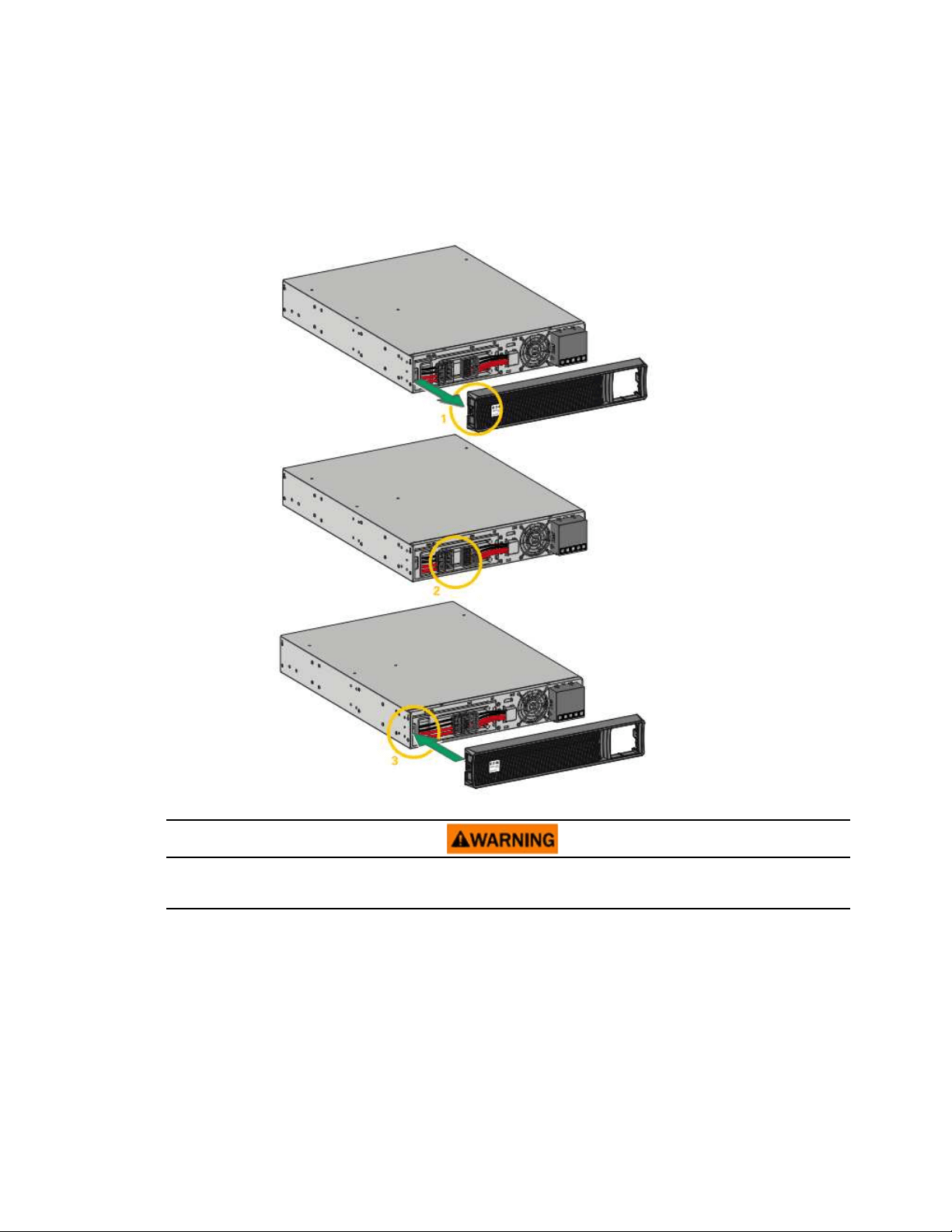
33..33 CCoonnnneeccttiinngg tthhee IInntteerrnnaall BBaatttteerryy
Figure 3. Internal Battery Connection
A small amount of arcing may occur when connecting the internal batteries. This is normal and will not harm
personnel. Connect the cables quickly and firmly.
1. Remove the front panel by pressing on both sides of the panel.
2. Connect the two battery connectors together.
3. Replace the front panel.
Connecting the Internal Battery

Eaton Tripp Lite Series SmartPro User Guide 614-40194—Rev 04 11
33..44 EEBBMM CCoonnnneeccttiioonn
The optional CBLADAPT48 or CBLADAPT72 cables are forbidden with Eaton Tripp Lite Series SmartPro models
installed in the US or Canada.
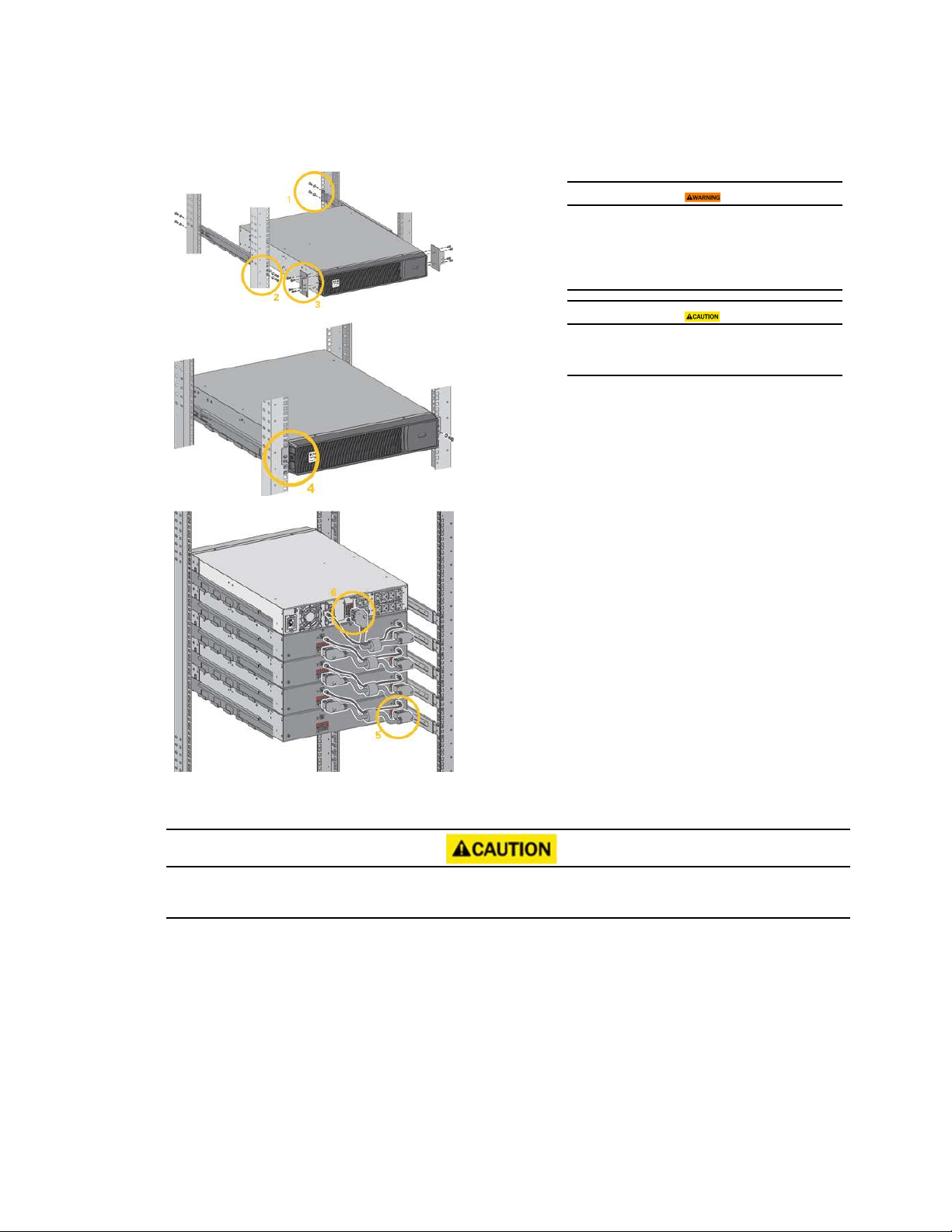
A small amount of arcing may occur when connecting an EBM to the UPS. This is normal and will not harm
personnel. Insert the EBM cable into the UPS battery connector quickly and firmly.
1. Attach the UPS and the EBMs to each other using the supplied mounting plate. Up to 4 EBMs may be
connected to the UPS.
2. Connect the EBMs power cable and the attached battery detection cable as shown in the picture.
3. Verify that the EBM connections are tight and that adequate bend radius and strain relief exist for each
cable.
EBM Connection
12 Eaton Tripp Lite Series SmartPro User Guide 614-40194—Rev 04
Table 6. Rack EBM Installation Steps
A small amount of arcing may occur when connecting
an EBM to the UPS. This is normal and will not harm
personnel. Insert the EBM cable into the UPS battery
connector quickly and firmly.
To increase stability, it is preferable to place the EBM
below the UPS.
1. Fix the rail on the back of the rack.
2. Fix the rail on the front of the rack using the two holes at the
bottom.
3. Fix the ears plate to the UPS.
4. Place the UPS on the rails and fix the ears plate to the top hole of
the rail.
5. Connect the EBM power cable as shown in the picture.
6. Connect the RJ45 battery detection cable of the first EBM between
the EBM and the UPS connector "Batt detection" (11). For any
additional EBM, connect the battery detection cable to the previous
EBM.
Verify that the EBM connections are tight and that adequate bend
radius and strain relief exist for each cable.
33..55 UUPPSS ccoonnnneeccttiioonn
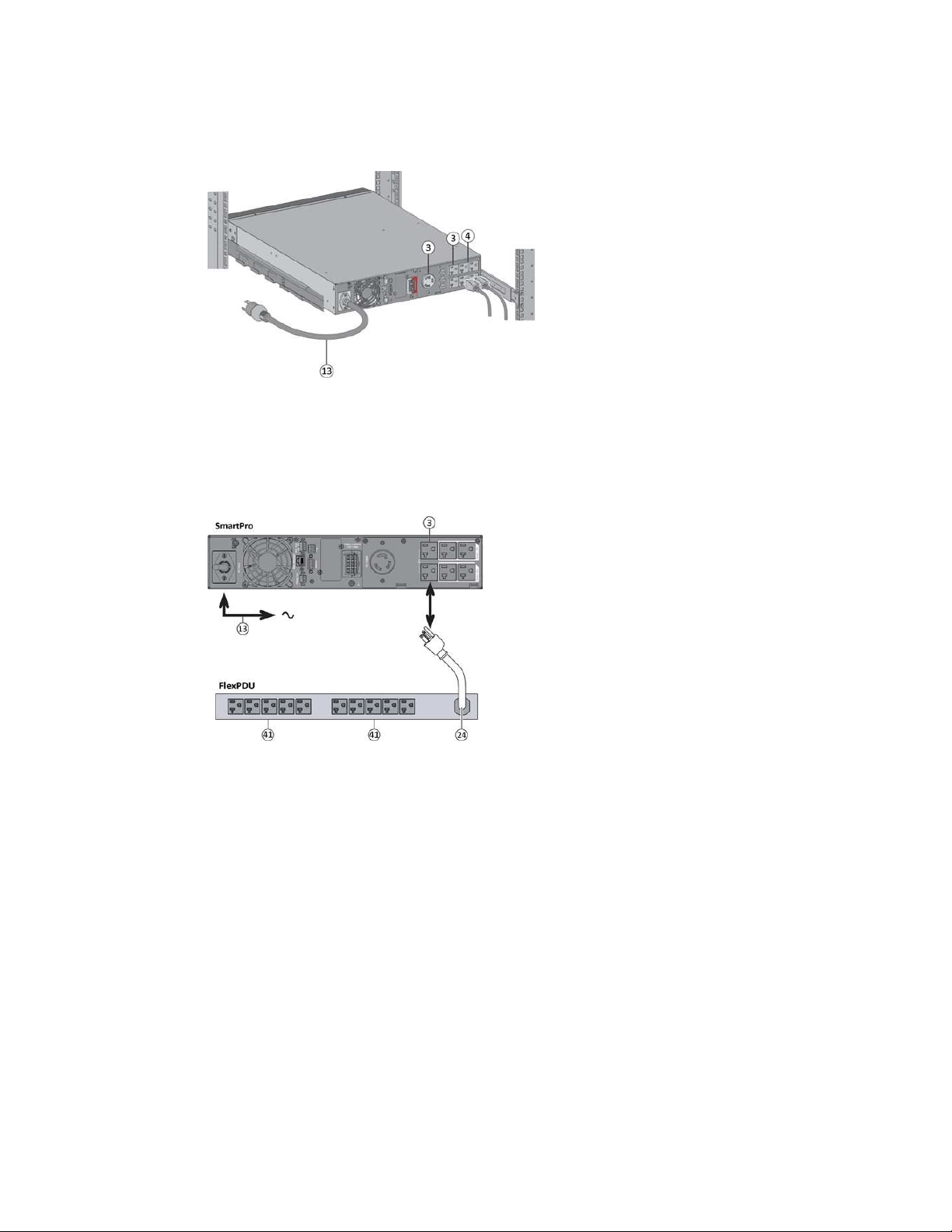
Check that the indications on the name plate located on the back of the UPS correspond to the AC-power
source and the true electrical consumption of the total load.
UPS connection
Eaton Tripp Lite Series SmartPro User Guide 614-40194—Rev 04 13
Table 7. Power Supply Connection Steps
1. Connect the UPS input cable (13) to the AC power source.
2. Connect the loads to the UPS. It is preferable to connect
the priority loads to the outlets marked (3) and the non-
priority loads to the outlets Group1, Group2 (4) that can be
programmed.programmed.
For the SmartPro2200 / 3000 models, connect any high-
power devices or matching Power Distribution Unit (PDU)
to the L5-20R or L5-30R outlet.
3. To program shutdown and startup of the Group1 and
Group2 outlets in order to extend battery runtime and
perform scheduled shutdowns, please see the XREF "In/
Out settings" section.
33..66 CCoonnnneeccttiioonn wwiitthh aa FFlleexxPPDDUU ((PPoowweerr DDiissttrriibbuuttiioonn UUnniitt)) ooppttiioonnaall mmoodduullee
Table 8. FlexPDU Connection Steps
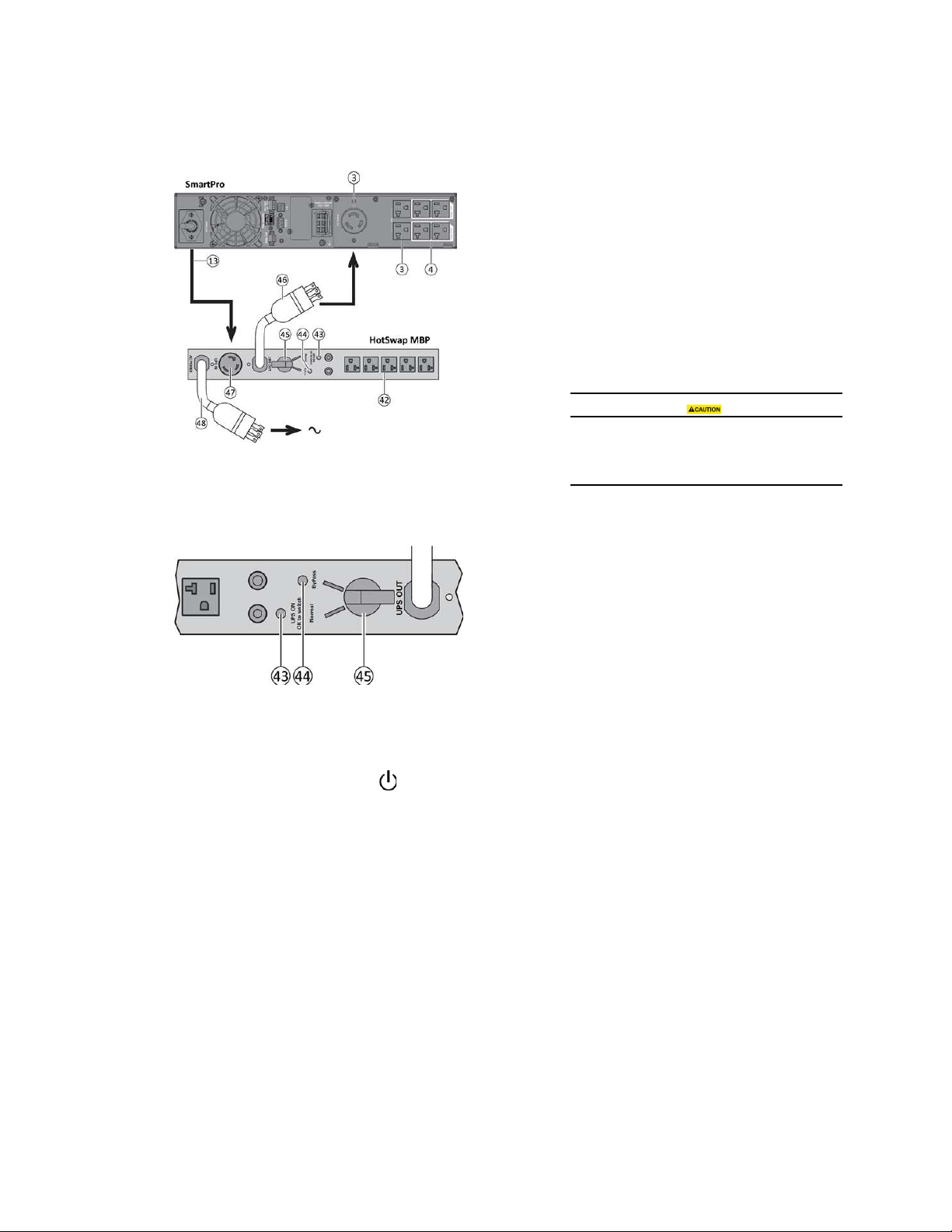
1. Connect the UPS power cord (13) to the AC power source.
2. Connect the input cord of the FlexPDU module (24) to one of the UPS
outlets (3).
3. Connect the equipment to the outlets (41) on the FlexPDU module.
These outlets differ, depending on the version of the FlexPDU
module.
33..77 CCoonnnneeccttiioonn wwiitthh aa HHoottSSwwaapp MMBBPP ((MMaaiinntteennaannccee BByyPPaassss)) ooppttiioonnaall mmoodduullee
The HotSwap MBP module makes it possible to service or even replace the UPS without affecting the
connected loads (HotSwap function).
Connection with a FlexPDU (Power Distribution Unit) optional module
14 Eaton Tripp Lite Series SmartPro User Guide 614-40194—Rev 04
Table 9. HotSwap MBP Connection Steps
1. Connect the input socket (48) on the HotSwap MBP module to the
AC power source.
2. Connect the UPS input power cord (13) to the receptacle "UPS
Input" (47) of the HotSwap MBP module.
3. Connect the "UPS Output" cable (46) of the HotSwap MBP module
to the outlet (3) of the UPS .
4. Connect the equipment to the outlets (42) on the HotSwap MBP
module.
These outlets differ, depending on the version of the HotSwap
MBP module.
Do not use UPS outlets (4) to supply equipment
because use of switch (45) on the HotSwap MBP
module would cut supply to the equipment.
Table 10. HotSwap MBP Module Operation
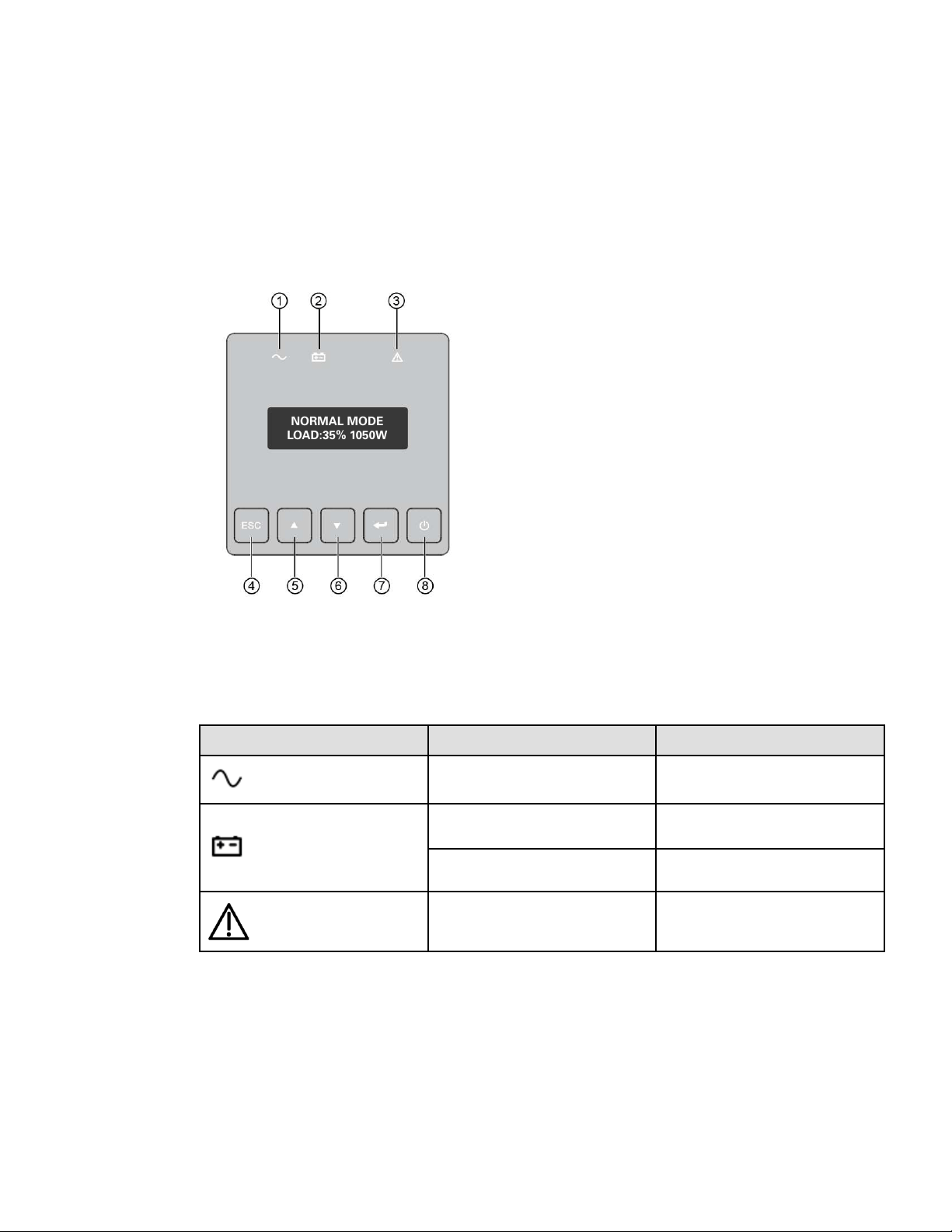
The HotSwap MBP module has a rotary switch (45) with two positions:
Normal : the load is supplied by the UPS, LED (43) is on.
Bypass : the load is supplied directly by the AC power source. LED (44)
is on. Load is not protected.
33..77..11 UUPPSS SSttaarrtt--UUpp wwiitthh tthhee HHoottSSwwaapp MMBBPP MMoodduullee
1. Check that the UPS is correctly connected to the HotSwap MBP module.
2. Start the UPS by pressing the
button on the UPS control panel. LED (43) "UPS ON - OK to switch" on
the HotSwap MBP module goes ON (otherwise, there is a connection error between the HotSwap MBP
module and the UPS).
3. Set switch (45) to Normal position. The red LED on the HotSwap MBP module goes OFF.
33..77..22 HHoottSSwwaapp MMBBPP mmoodduullee tteesstt
1. Set switch (45) to Bypass position and check that the load is still supplied.
2. Set switch (45) back to Normal position.
33..88 HHoottSSwwaapp MMBBPP mmoodduullee tteesstt
1. Set switch (45) to Bypass position and check that the load is still supplied.
2. Set switch (45) back to Normal position.
HotSwap MBP module test
Eaton Tripp Lite Series SmartPro User Guide 614-40194—Rev 04 15
CChhaapptteerr 44 IInntteerrffaacceess aanndd CCoommmmuunniiccaattiioonn
44..11 CCoonnttrrooll ppaanneell
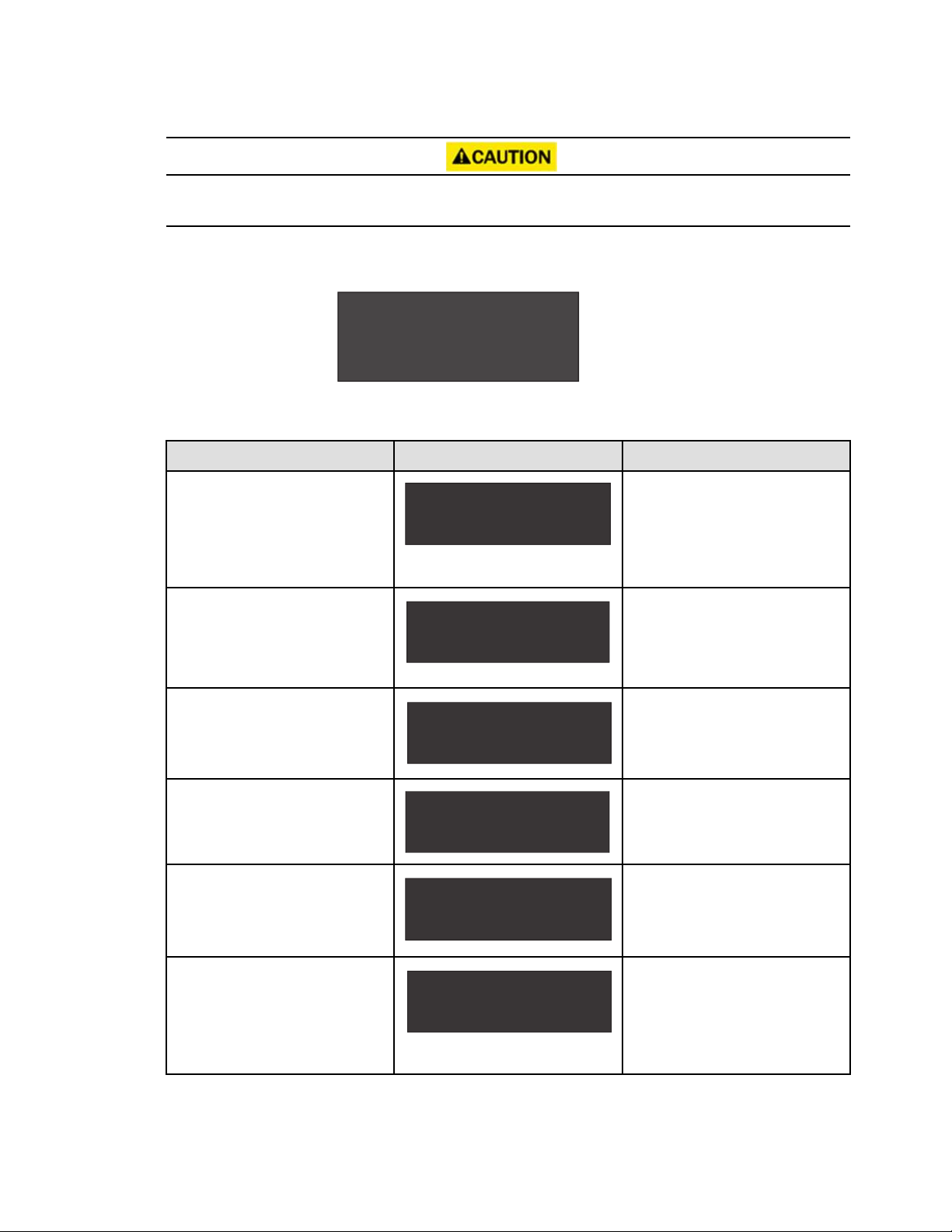
The screen provides useful information about the UPS itself, load status, events, measurements and settings.
Table 11. Control Panel Details
NORMAL MODE
LOAD:35% 1050W
1. Power ON indicator (green)
2. On battery indicator (orange)
3. Alarm Indicator (red)
4. Escape
5. Up
6. Down
7. Enter
8. On/Off button
The following table shows the indicator status and description :
Table 12. LED Indicator Details
Indicator Status
Description
Green
On
The UPS is "On" and the load is
protected.
Orange
On
The UPS is in battery mode and the load
is protected.
Flashing
The battery voltage is below the warning
level.
Red
On
The UPS has an active alarm or fault. See
troubleshooting page for additional
information.
44..22 LLCCDD DDeessccrriippttiioonn
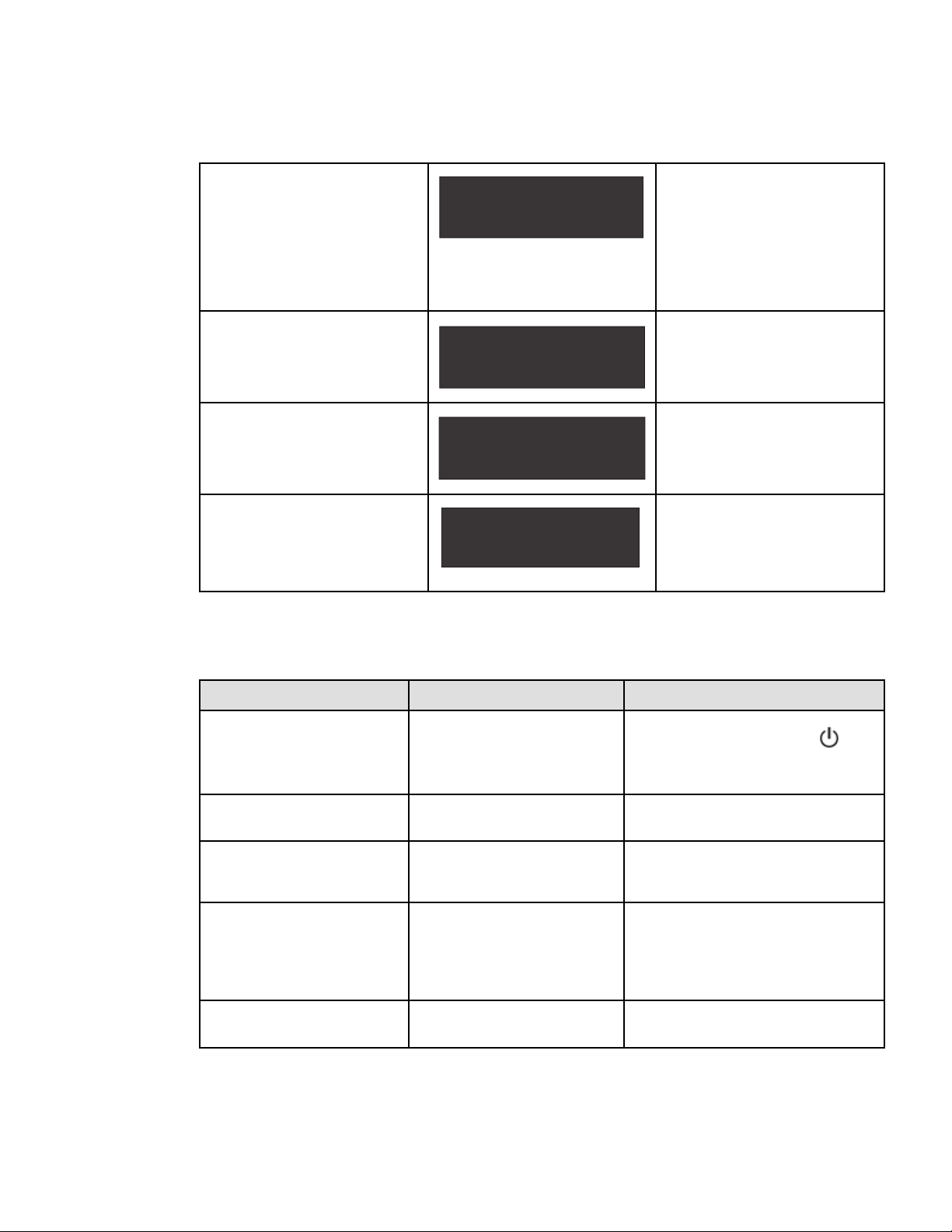
The LCD screen has 2 lines, each line may show 16 characters maximum. The first line shows UPS mode,
which may be standby mode, normal mode, battery mode, backup end mode or fault mode. The second line
shows measures. The backlight LCD automatically dims after 5 minutes of inactivity. Press any button to
restore the screen.
16 Eaton Tripp Lite Series SmartPro User Guide 614-40194—Rev 04
If fault or alarm appears, the first line of LCD will cycle between fault/alarm message and UPS mode, see for
additional information.
Figure 4. LCD Screen — Example
NORMAL MODE
LOAD:35% 1050W
Table 13. LCD Screen – Display Details
Screen Battery area display Bottom row values
1st Screen (home / default screen):
Load percentage and Watt.
LOAD: xxx% xxxxW
UPS MODE
The LOAD data screen specifies the
amount of power that connected
equipment is currently using in terms of
percentage and Watt.
Load %, 0 decimal.
Load W , 0 decimals.
2nd Screen:
Load percentage and VA.
LOAD: xxx% xxxxVA
UPS MODE
The OUTPUT LOAD LEVEL screen
indicates the load percentage and VA
output load level.
Load % , 0 decimals.
Load VA , 0 decimals.
3rd Screen:
Output load power factor
LOAD PF: x. xx
UPS MODE
The OUTPUT LOAD POWER FACTOR
screen indicates the power factor of
connected equipment.
2 decimal.
4th Screen:
Input voltage and frequency
IN: xxxV xx. xHZ
UPS MODE
The INPUT VOLTAGE & FREQUENCY
screen displays current data.
Input voltage: 0 decimal.
Input frequency HZ,1 decimal.
5th Screen:
Output voltage and frequency
OUT: xxxV xx. xHZ
UPS MODE
The OUTPUT VOLTAGE & FREQUENCY
screen displays current data.
Output voltage: 0 decimal.
Output frequency HZ,1 decimal.
6th Screen:
Battery voltage and charge percentage
BAT: xx. xV xxx%
UPS MODE
The BATTERY voltage screen tracks the
charge level of your connected battery
bank in terms of voltage and charge
percentage.
Battery voltage:1 decimal.
Charge percentage:0 decimal.
LCD Description
Eaton Tripp Lite Series SmartPro User Guide 614-40194—Rev 04 17
Table 13. LCD Screen – Display Details (Continued)
7th Screen:
Remaining battery runtime
RUNTIME: xxxMIN
UPS MODE
The RUNTIME remaining screen tracks
the approximate minutes of runtime
available under the current loading and
battery pack configuration. The runtime
value will automatically re-calculate as
connected equipment power consumption
changes.
0 decimal.
8th Screen:
External battery quantity
EBM: x
UPS MODE
The EBM screen display external battery
quantity. This screen is only for long time
model.
0 decimal.
9th Screen:
Remaining watts of UPS
REMAIN W: x. xxKW
UPS MODE
The REMAIN WATTS screen tracks the
remaining capacity of the UPS in kilowatt
2 decimals.
10th Screen:
Demand energy
DEMAND E: x. xxKWH
UPS MODE
The DEMAND ENERGY screen offers
continuous data on the KWh(kilowatt-
hour) that connected equipment has
consumed in the last one-hour period.
2 decimals.
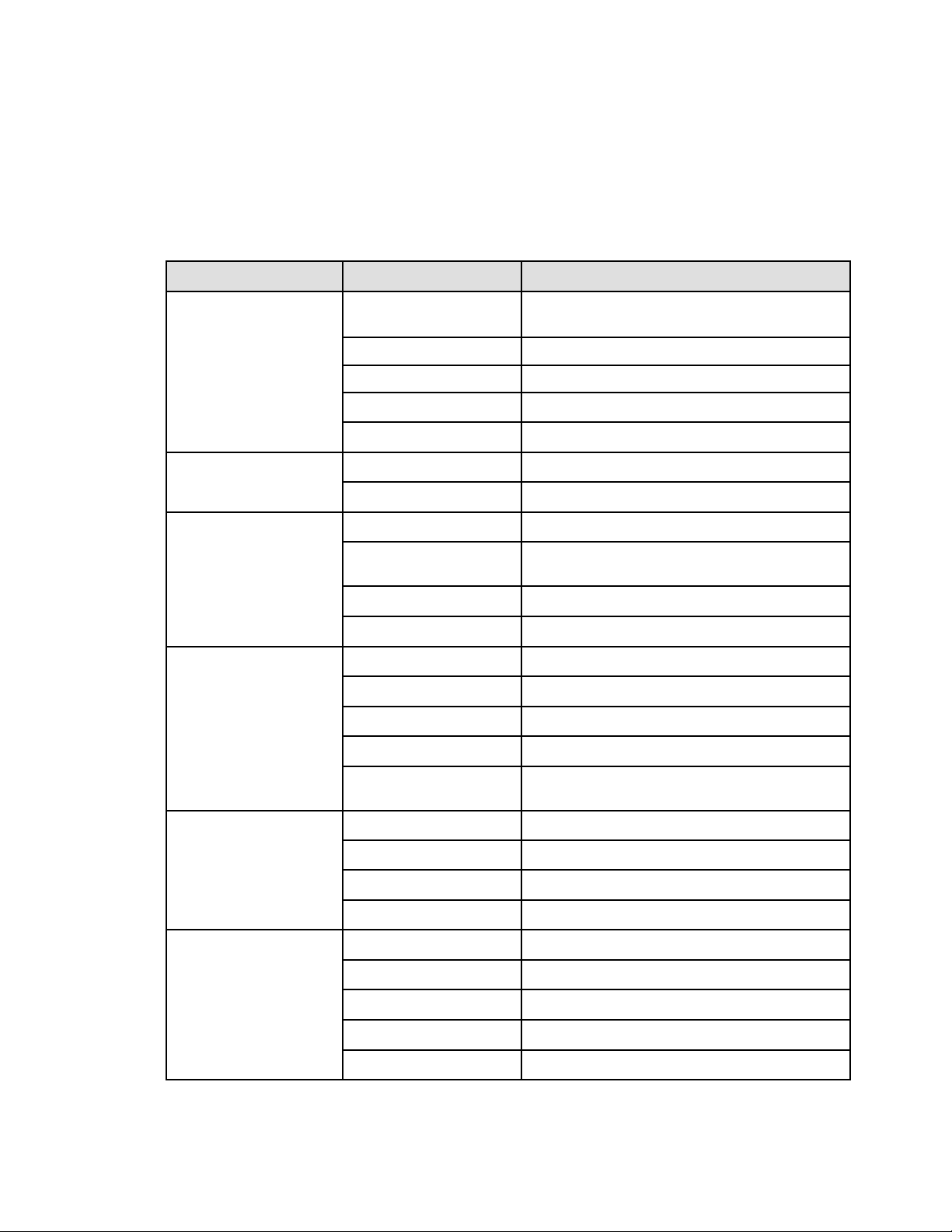
The following table describes the status information provided by the UPS :
Table 14. System Operational Status Details
Operation status Possible cause Action
Standby mode
The UPS is OFF, waiting for start-up
command from user
Equipment is not power until button
is
pressed during start up and the green "normal
mode" LED indicator is illuminated.
Normal mode
The UPS is operating normally.
The UPS is powering and protecting the
equipment.
Battery Mode
One beep every 10 seconds
A utility failure has occurred and the
UPS is in Battery mode.
The UPS is powering the equipment with
battery power. Prepare your equipment for
shutdown.
End of backup time
1 beep every 3 seconds
The UPS is in Battery mode and the
battery is running low.
This warning is approximate, and the actual
time to shutdown may vary significantly.
Depending on the UPS Load, the "Battery Low"
warning may occur before the battery reaches
20% capacity remaining.
Fault Mode
Some fault has happened to the UPS.
Action may be needed.
See for additional information.
LCD Description
18 Eaton Tripp Lite Series SmartPro User Guide 614-40194—Rev 04
44..33 DDiissppllaayy FFuunnccttiioonnss
Press the Enter ( ) button to activate the menu options. Use the two middle buttons ( and ) to scroll through
the menu structure. Press the Enter ( ) button to select an option. Press the (ESC) button to cancel or return
to the previous menu.
Table 15. Menu Map for Display Functions
Main menu Submenu Display information or Menu function
CONTROL
BATTERY TEST
Starts a manual battery test(possible if load>10% and battery
>80%).
RESET FAULT ST Reset fault state.
CLEAR EVENT LOG Clears the faults and events stored.
RESET KWH USED
Reset the power used.
FACTORY SETT
Restore factory settings.
LOCAL SETTING
LANGUAGE
Sets product general parameters, see
AUDIBLE ALARM
Sets input and output parameters, see
IN/OUT SETTING
OUTPUT VOLTAGE
Select output voltage through this submenu.
INPUT THRESHOLD
Input threshold can be set to normal or extended through this
menu.
SENSITIVITY
Sensitivity can be set to high or low through this menu.
OVRLOAD PREALARM
Overload pre-alarm can be set through this menu.
ON/OFF SETTING
COLD START
Cold start can be enabled or disabled through this menu.
AUTO RESTART
Auto restart can be enabled or disabled through this menu.
AUTO START
Auto start can be enabled or disabled through this menu.
SLEEP MODE
Sleep mode can be enabled or disabled through this menu.
SITE WIRING FLT
Site wiring fault can be enabled or disabled through this
menu.
BATTERY SETTING
AUTO BAT TEST
Auto battery test period can be set through this menu.
RESTART LEVEL
Restart battery level can be set through this menu.
BAT LOW LEVEL
Battery low percentage can be set through this menu.
BAT LOW TIME
Battery low remaining time can be set through this menu.
COM SETTING
REMOTE ON/OFF
Select input signal function for REMOTE ON/OFF.
REMOTE PWR OFF
Select input signal function for REMOTE PWR OFF.
INPUT DB9-4
Select input signal function for INPUT DB9-4.
OUTPUT RELAY
Select output signal function for OUTPUT RELAY.
OUTPUT DB9-1
Select output signal function for OUTPUT DB9-1.
Display Functions

Eaton Tripp Lite Series SmartPro User Guide 614-40194—Rev 04 19
Table 15. Menu Map for Display Functions (Continued)
Main menu Submenu Display information or Menu function
OUTPUT DB9-7
Select output signal function for OUTPUT DB9-7.
OUTPUT DB9-8
Select output signal function for OUTPUT DB9-8.
EVENT LOG
Event log has utmost 50 items to show what happened.
IDENTIFICATION This menu shows IDENTIFICATION information.
Display Functions


Eaton Tripp Lite Series SmartPro User Guide 614-40194—Rev 04 21
CChhaapptteerr 55 OOppeerraattiioonn
55..11 SSttaarrtt--uupp aanndd nnoorrmmaall ooppeerraattiioonn
Check that the indications on the name plate located on the back of the UPS meets to the AC power source
and the true electrical consumption of the total load.
BBaatttteerryy cchhaarrggee
The UPS charges the battery as soon as it is connected to the AC outlet, whether the ON/OFF button is
pressed or not. It is recommended that the UPS be permanently connected to the AC power supply to ensure
the best possible autonomy.
To start the UPS:
1. Verify that the UPS power cord is plugged in.
2. The UPS front panel display illuminates.
3. Press the
button on the UPS front panel for at least two seconds.
4. Check the UPS front panel display for active alarms or notices. Resolve any active alarms before
continuing; if the
indicator is on, do not proceed until all alarms are clear (see ). Check the UPS status
from the front panel to view the active alarms. Correct the alarms and restart if necessary.
5. Verify that the
indicator illuminates solid, indicating that the UPS is operating normally and any loads
are powered and protected. The UPS should be in Normal mode.
55..22 SSttaarrttiinngg tthhee UUPPSS oonn bbaatttteerryy
Before using this feature, the UPS must have been powered by utility power with output enabled at least once.
Battery start can be disabled. See the "Cold start" setting in .
To start the UPS on battery:
1. When the UPS is disconnected from the AC power source, press the
button on the UPS front panel.
The UPS transfers from Standby mode to Battery mode. The
indicator illuminates solid.
The UPS supplies power to your equipment.
2. Check the UPS front panel display for active alarms or notices besides the "Battery mode" and related
notifications that indicates missing utility power. Resolve any active alarms before continuing. See .
Check the UPS status from the front panel to view the active alarms. Correct the alarms and restart if
necessary.
55..33 UUPPSS sshhuuttddoowwnn
To shut down the UPS:
Press the
button on the front panel for three seconds.
The UPS starts to beep and shows a status of "SHUTTING DOWN...". The UPS then transfers to Standby mode.

22 Eaton Tripp Lite Series SmartPro User Guide 614-40194—Rev 04
55..44 OOppeerraattiinngg mmooddeess
The Eaton Tripp Lite Series SmartPro front panel indicates the UPS status through the UPS indicators located
above the LCD screen.
NNoorrmmaall mmooddee
When the green sinewave symbol is illuminated, the UPS is providing protected AC power output. The UPS
monitors and charges the batteries as needed and provides power protection to your equipment.
BBaatttteerryy mmooddee
When the UPS is operating during a power outage, the alarm beeps once every ten seconds and the indicator
illuminates solid. The necessary energy is provided by the battery.
When the utility power returns, the UPS transfers to Normal mode operation while the battery recharges. If
battery capacity becomes low while in Battery mode, the audible alarm beeps once every three seconds.
This warning is approximate, and the actual time to shutdown may vary significantly; gracefully shutdown all
applications on connected equipment due to imminent UPS shutdown.
When utility power is restored after the UPS shuts down, the UPS automatically restarts.
LLooww--bbaatttteerryy wwaarrnniinngg
• The
indicator illuminates solid.
• The audio alarm beeps every three seconds.
The remaining battery power is low. Shut down all applications on the connected equipment because
automatic UPS shutdown is imminent.
EEnndd ooff bbaatttteerryy bbaacckkuupp ttiimmee
• LCD displays "BACKUP END MODE".
• All the LEDs go OFF.
• The audible alarm stops.
55..55 RReettuurrnn ooff AACC iinnppuutt ppoowweerr
Following an outage, the UPS restarts automatically when AC input power returns (unless the restart function
has been disabled) and the load is supplied again.
55..66 CCoonnffiigguurriinngg BBaatttteerryy SSeettttiinnggss
AAuuttoommaattiicc bbaatttteerryy tteesstt
Automatic battery tests are done every month.
During the test, the UPS transfers to Battery mode and discharges the batteries for 10 seconds under load.
Battery mode is not displayed and battery low alarm does not activate during a battery test.
The battery test may be postponed due to bad conditions, or failed if battery is not ok.
LLooww bbaatttteerryy wwaarrnniinngg
During discharge, the low battery alarm is activated if the remaining runtime goes below 3 minutes or less than
the setting capacity threshold (0% by default).
This threshold can be modified.
Operating modes

Eaton Tripp Lite Series SmartPro User Guide 614-40194—Rev 04 23
EExxtteerrnnaall bbaatttteerryy sseettttiinngg
The number of Extended Battery Module is automatically detected.
DDeeeepp ddiisscchhaarrggee pprrootteeccttiioonn
This setting is recommended to avoid damaging the battery. Warranty is void if deep discharge protection is
disabled.
55..77 RReettrriieevviinngg tthhee eevveenntt aanndd ffaauulltt lloogg
To retrieve the event and fault log through the display:
1. Press any button to activate the menu options, then select event log.
2. Scroll through the listed events and faults.
Retrieving the event and fault log


Eaton Tripp Lite Series SmartPro User Guide 614-40194—Rev 04 25
CChhaapptteerr 66 UUPPSS MMaaiinntteennaannccee
66..11 EEqquuiippmmeenntt CCaarree
For the best preventive maintenance, keep the area around the equipment clean and dust free. If the
atmosphere is very dusty, clean the outside of the system with a vacuum cleaner.
For full battery life, keep the equipment at an ambient temperature of 25 °C (77 °F).
The batteries are rated for a 3-5 year service life. The length of service life varies, depending on the frequency
of usage and ambient temperature (life divided by 2 each 10 °C above 25 °C).
If the UPS requires any type of transportation, verify that the UPS is turned off.
Batteries used beyond expected service life will often have severely reduced runtimes. Replace batteries at
least every 4 years to keep units running at peak performance.
Batteries runtime will be reduced at low temperature (below 10 °C).
66..22 SSttoorriinngg tthhee EEqquuiippmmeenntt
If you store the equipment for a long period, recharge the battery every 6 months by connecting the UPS to
utility power. The internal batteries charge to 90% capacity in less than 3 hours. However, Eaton recommends
that the batteries charge for 48 hours after long-term storage.
Check the battery recharge date on the shipping carton label. If the date has passed and the batteries were
never recharged, do not use them. Contact your service representative.
66..33 WWhheenn ttoo RReeppllaaccee BBaatttteerriieess
Eaton Tripp Lite Series UPS batteries have an expected life span of 3-5 years.
After 4 years of operation you should take proactive steps to ensure you replace your batteries for optimal
operation and reliability.
Contact your service representative to order new batteries.
Battery recommended replacement reference can be accessed through the LCD.
66..44 RReeppllaacciinngg BBaatttteerriieess
DO NOT DISCONNECT the batteries while the UPS is in Battery mode.
For battery replacement, follow Eaton Tripp Lite Series instructions provided on www.eaton.com/UPSservices.
Batteries can be replaced easily without turning off the UPS or disconnecting the load.
Consider all warnings, cautions, and notes before replacing batteries.
• Servicing should be performed by qualified service personnel knowledgeable of batteries and required
precautions.
Keep unauthorized personnel away from batteries.
• Batteries can present a risk of electrical shock or burn from high short circuit current.
Observe the following precautions:
1. Remove watches, rings, or other metal objects,
2. Use tools with insulated handles,

26 Eaton Tripp Lite Series SmartPro User Guide 614-40194—Rev 04
3. Do not lay tools or metal parts on top of batteries,
4. Wear rubber gloves and boots.
• When replacing batteries, replace with the same type and number of batteries or battery packs. Contact
your service representative to order new batteries.
• Proper disposal of batteries is required. Refer to your local codes for disposal requirements.
• Never dispose of batteries in a fire. Batteries may explode when exposed to flame.
• Do not open or mutilate the battery or batteries. Released electrolyte is harmful to the skin and eyes and
may be extremely toxic.
• Determine if the battery is inadvertently grounded. If inadvertently grounded, remove source from ground.
Contact with any part of a grounded battery can result in electrical shock. The likelihood of such shock can
be reduced if such grounds are removed during installation and maintenance (applicable to equipment and
remote battery supplies not having a grounded supply circuit).
• ELECTRIC ENERGY HAZARD. Do not attempt to alter any battery wiring or connectors. Attempting to alter
wiring can cause injury.
• Disconnect charging source prior to connecting or disconnecting battery terminals.
RReeppllaacciinngg tthhee IInntteerrnnaall BBaatttteerryy
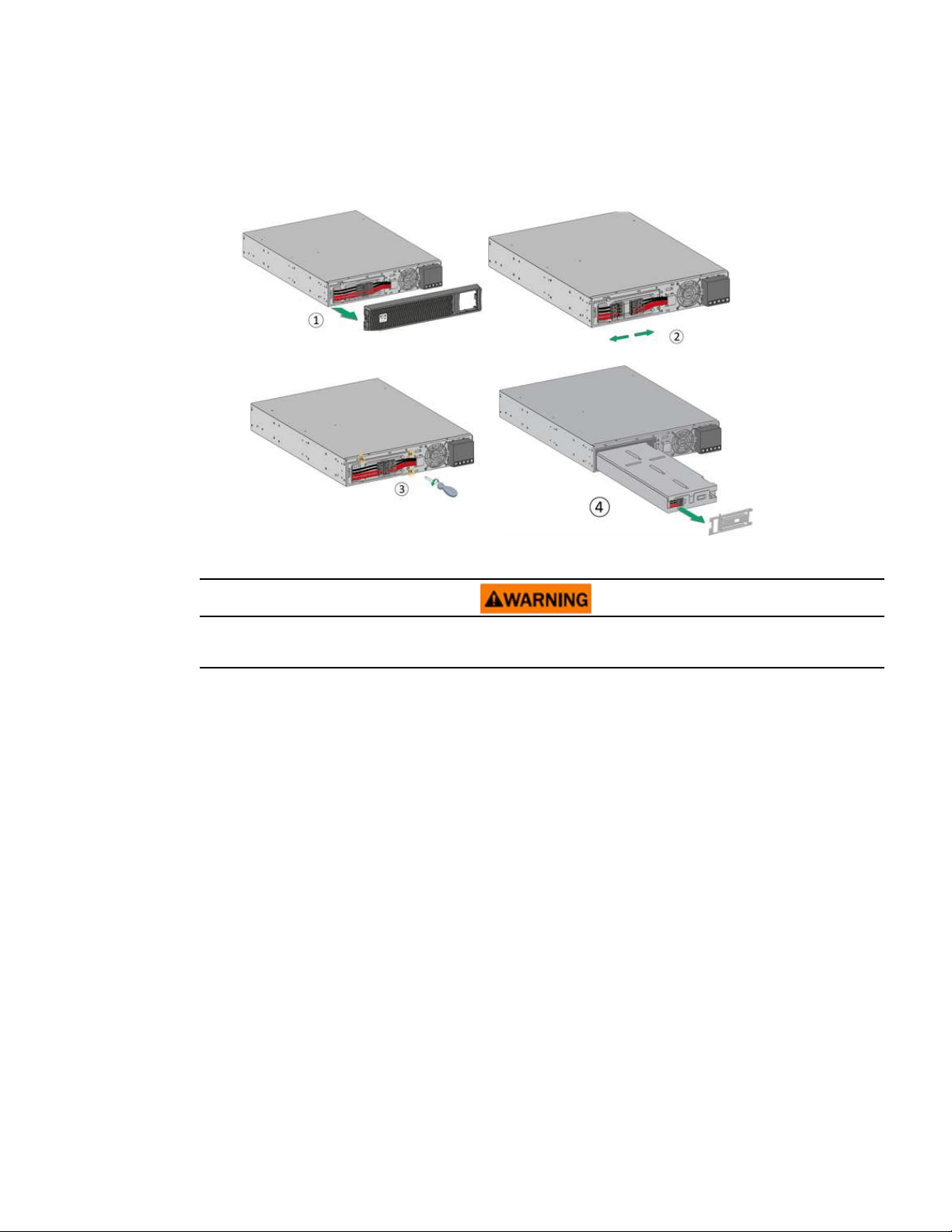
The internal battery is heavy. Use caution when handling the heavy batteries. See Figure 5 .
NOTE A Phillips head screwdriver is needed to perform this procedure.
1. Pull off the front panel by pressing the tabs on both sides.
2. Disconnect the battery pack by separating the connectors (never pull on the wires).
3. Remove the metal protection cover in front of the battery (three screws).
4. Pull the plastic tab to remove the battery pack and replace it.
Replacing Batteries
Eaton Tripp Lite Series SmartPro User Guide 614-40194—Rev 04 27
Figure 5. Battery Replacement
Take care not to reverse the polarity + (red) and - (black) when connecting the batteries as this will destroy the
device.
TTeessttiinngg NNeeww BBaatttteerriieess
To test new batteries:
1. Charge the batteries for 48 hours.
2. Press any button to activate the menu options.
3. Select "CONTROL" then Start battery test. The UPS starts a battery test if the batteries are fully charged,
the UPS is in Normal mode with no active alarms, and the bypass voltage is acceptable. During the battery
test, the UPS transfers to Battery mode and discharges the batteries for 10 seconds. The front panel
displays "BAT TESTING".
Replacing Batteries

28 Eaton Tripp Lite Series SmartPro User Guide 614-40194—Rev 04
66..55 RReeppllaacciinngg tthhee UUPPSS EEqquuiippppeedd wwiitthh aa HHoottSSwwaapp MMBBPP
The HotSwap MBP module makes it possible to service or even replace the UPS
without affecting the connected loads (HotSwap function).
Maintenance
1. Set switch (45) to Bypass position. The red LED on the HotSwap MBP module
goes ON, indicating that the load is supplied directly with AC input source
power.
2. Stop the UPS by pressing the
button on the UPS control panel. LED (43)
"UPS ON - OK to switch" goes OFF, the UPS can now be disconnected and
replaced.
Return to normal operation
1. Check that the UPS is correctly connected to the HotSwap MBP module.
2. Start the UPS by pressing the
button on the UPS control panel. LED (43)
"UPS ON - OK to switch" on the HotSwap MBP module goes ON (otherwise,
there is a connection error between the HotSwap MBP module and the UPS).
3. Set switch (45) to Normal position. The red LED on the HotSwap MBP module
goes OFF.
Replacing the UPS Equipped with a HotSwap MBP
Eaton Tripp Lite Series SmartPro User Guide 614-40194—Rev 04 29
CChhaapptteerr 77 TTrroouubblleesshhoooottiinngg
77..11 TTyyppiiccaall AAllaarrmmss aanndd FFaauullttss
To check the Event log or Fault log:
1. Press any button on the front panel display to activate the menu options.
2. Press the
▼ button to select Event log.
3. Scroll through the listed events or faults.
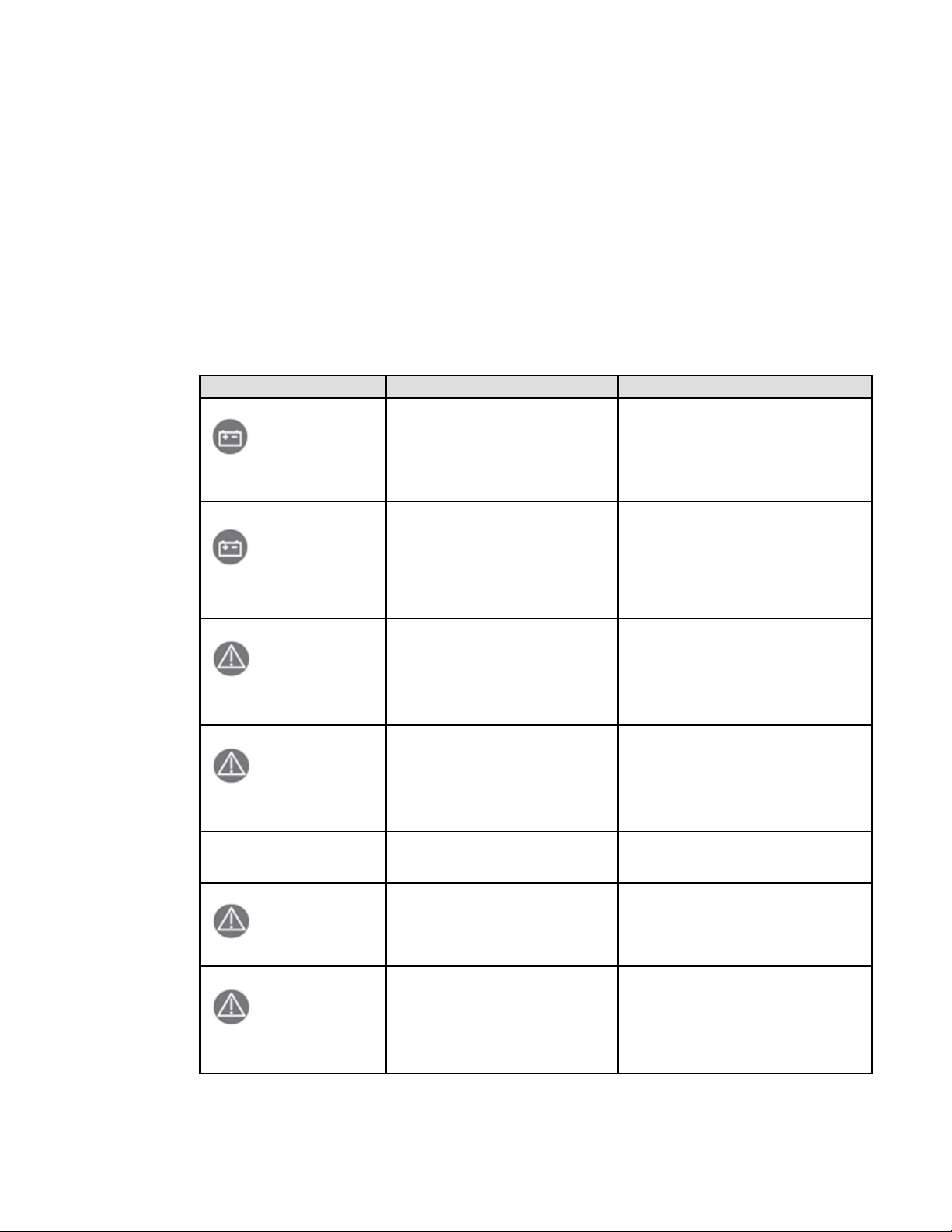
The following table describes typical conditions:
Table 16. Alarm Conditions
Conditions Possible cause Action
Battery mode
LED is On.
1 beep every 10 seconds
A utility failure has occurred and the UPS
is in battery mode.
The UPS is powering the equipment with
battery power. Prepare your equipment for
shutdown.
Battery low
LED is On.
1 beep every 3 seconds
The UPS is in Battery mode and the
battery is running low.
This warning is approximate, and the actual
time to shutdown may vary significantly.
Depending on the UPS load and number of
Extended Battery Modules (EBMs), the
"BATTERY LOW" warning may occur before
the remaining time reaches 3 minutes by
default.
No battery
LED is On
Beep continuous
The batteries are disconnected.
Verify that all batteries are properly
connected. If the condition persists, contact
your service representative.
Battery fault
LED is On.
Beep continuous
The battery test is failed due to bad or
disconnected batteries.
Verify that all batteries are properly
connected. If the condition persists, contact
your service representative.
The UPS does not provide the
expected backup time.
The batteries need charging or service.
Apply utility power for 48 hours to charge the
batteries. If the condition persists, contact
your service representative.
Power Overload
LED is On
Power requirements exceed the UPS
capacity (greater than 100% of nominal;
see "User Settings" for specific output
overload ranges).
Remove some of the equipment from the UPS.
The UPS continues to operate, but may shut
down if the load increases. The alarm resets
when the condition becomes inactive.
UPS overtemperature
LED is On
1 beep every 3 seconds
The UPS internal temperature is too high
or a fan has failed. At the warning level,
the UPS generates the alarm but remains
in the current operating state. If the
temperature rises another 10°C, the UPS
shuts down.
Clear vents and remove any heat sources.
Allow the UPS to cool. Ensure the airflow
around the UPS is not restricted. Restart the
UPS. If the condition continues to persist,
contact your service representative.

30 Eaton Tripp Lite Series SmartPro User Guide 614-40194—Rev 04
Table 16. Alarm Conditions (Continued)
Conditions Possible cause Action
The UPS does not start
The input source is not connected
correctly.
Check the input and battery connections.
The Remote Power Off (RPO) switch is
active or the RPO connector is missing.
If the UPS Status menu displays the "Remote
Power Off" notice, deactivate the RPO input.
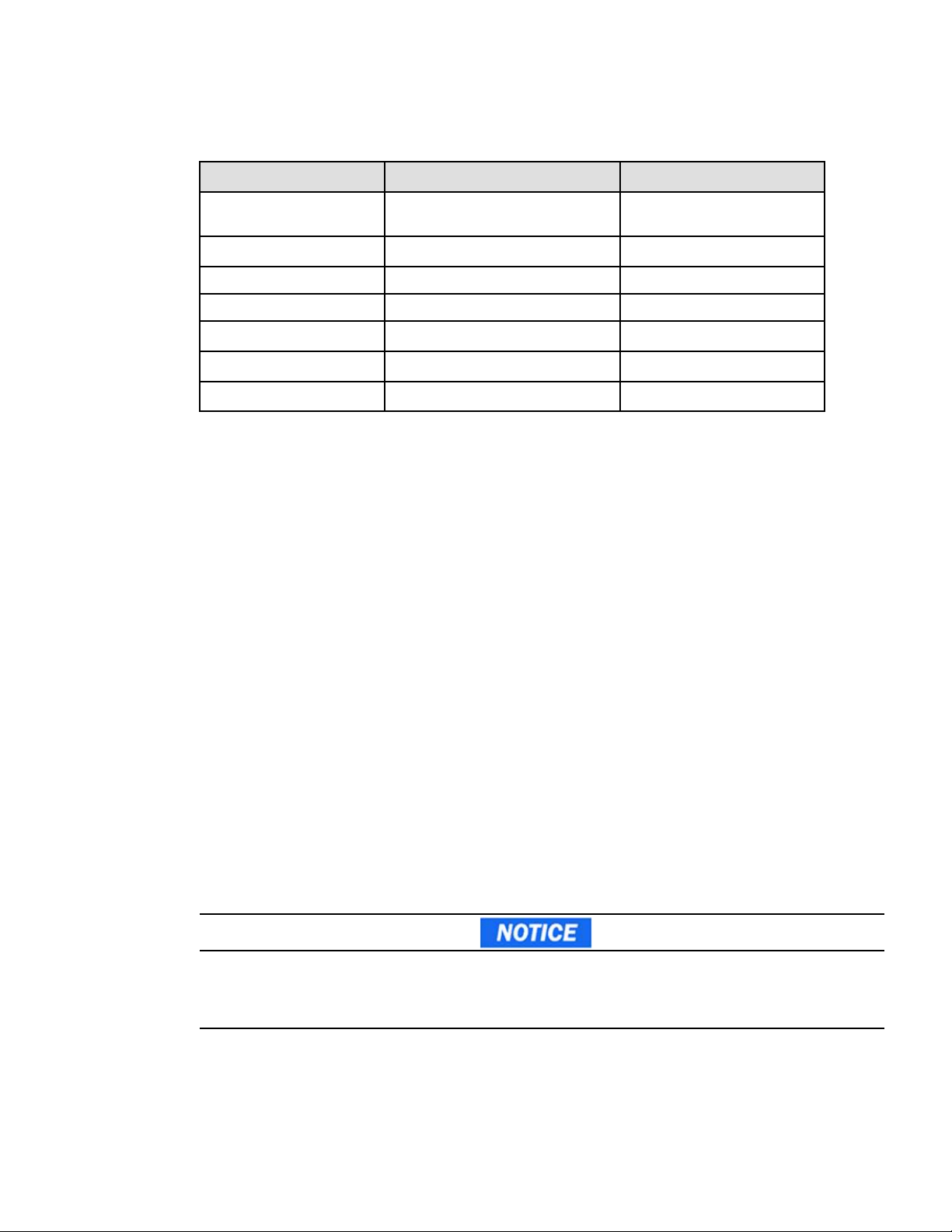
77..22 DDeettaaiill AAllaarrmm oorr FFaauulltt CCooddee
Table 17. Alarm Codes
Alarm Code Message Description
#004
UPS TEMP. ALARM Ambient or NTC temperature is high
#110
BUILDING ALARM Building alarm
#604
BATTERY LOW Battery level is below Remaining
Capacity Limit threshold or Run Time
to Empty is below Remaining Time
Limit threshold.
#802
IMMINENT SHUTOFF Shut down imminent
#806
EMERGENCY OFF Emergency stop was proceed
#808
OVLD PREALARM The load percent is > the overload
level setting(default 105%)
Table 18. Alarm Fault Codes
Fault Code Message Description
#007 FAN FAULT Ventilator fault
#60D NO BATTERY Battery not present
#607 BATTERY FAULT Battery need replacement OR is
faulty
#004
UPS TEMP. FAULT UPS internal temperature is high,
over fault point
#808
POWER OVERLOAD Overload counter time reach,
transfer to Fault mode
#805
OUTPUT SHORTED Short circuit on output
#107
INPUT BAD WIRING Site wiring fault that can come of
Phase neutral inversion on single
phase UPS
#809
INDU OVERLOAD Inductive overload occurred, transfer
to Fault mode
#80A CAPA OVERLOAD Capacitive overload occurred,
transfer to Fault mode
#804
IMBALANCE LOAD Load is unbalance
Detail Alarm or Fault Code
Eaton Tripp Lite Series SmartPro User Guide 614-40194—Rev 04 31
Table 18. Alarm Fault Codes (Continued)
Fault Code Message Description
#002 INTERNAL FAULT
UPS Internal fault:Main relay
abnormal
#002
SAFETY FAULT Safety relay is failure
#002
NTC ABNORMAL NTC abnormal
#105
AVR TOO HOT AVR is abnormal
#500
CHARGER FAULT Charger internal failure
#502
MAX CHARGER VOLT The charger voltage is>2.5VPC
#503
MIN CHARGER VOLT The charger voltage is<1.5VPC
77..33 SSiilleenncciinngg tthhee AAllaarrmm
Press the ESC (Escape) button on the front panel display to silence the alarm. Check the alarm condition and
perform the applicable action to resolve the condition. If the alarm status changes, the alarm beeps again,
overriding the previous alarm silencing.
77..44 SSeerrvviiccee aanndd SSuuppppoorrtt
If you have any question or problem with the UPS, call Eaton Tripp Lite Series or your local service
representative in your
country / region.
Please have the following information ready when you call for service:
• Model number
• Serial number
• Firmware version number
• Date of failure or problem
• Symptoms of failure or problem
• Customer return address and contact information
If repair is required, you will be given a Returned Material Authorization (RMA) number. This number must
appear on the outside of the package and on the Bill Of Lading (if applicable). Use the original packaging or
request packaging from the Help Desk or distributor. Units damaged in shipment as a result of improper
packaging are not covered under warranty. A replacement or repair unit will be shipped freight prepaid for all
warrantied units.
For critical applications, immediate replacement may be available. Call the Help Desk for the dealer or
distributor nearest you.
For US and Canada you can contact post-sales service support at: 1-(800)-356-5737.
Silencing the Alarm


Eaton Tripp Lite Series SmartPro User Guide 614-40194—Rev 04 33
CChhaapptteerr 88 SSppeecciiffiiccaattiioonnss
88..11 UUPPSS MMooddeell LLiisstt
Description Catalog Number Power rating Configuration
TRIPP LITE SMARTPRO 750 RTXL2U
TRIPP LITE SMARTPRO 750 RTXL2U
NETPACK
SMART750RMXL2U
SMART750RMXL2UN
750W/750VA
Rack / Tower
TRIPP LITE SMARTPRO 1000 RTXL2U TRIPP
LITE SMARTPRO 1000 RTXL2U
NETPACK
SMART1000RMXL2U
SMART1000RMX2UN
1000W/1000VA
Rack / Tower
TRIPP LITE SMARTPRO 1500 RTXL2U
TRIPP LITE SMARTPRO 1500 RTXL2U
NETPACK
SMART1500RMXL2U
SMART1500RMXLN
1440W/1440VA
Rack / Tower
TRIPP LITE SMARTPRO 2200 RTXL2U
TRIPP LITE SMARTPRO 2200 RTXL2U
NETPACK
SMART2200RMXL2U
SMART2200RMXLN
SMART2200RM2U
SMART2200RM2UN
1950W/1950VA
Rack / Tower
TRIPP LITE SMARTPRO 3000 RTXL2U
TRIPP LITE SMARTPRO 3000 RTXL2U
NETPACK
SMART3000RMXL2U
SMART3000RMXLN
SMART3000RM2U
SMART3000RM2UN
3000W/3000VA
Rack / Tower
88..22 EExxtteennddeedd BBaatttteerryy MMoodduullee MMooddeell LLiisstt
Model Catalog Number Configuration Battery voltage Use with
Tripp Lite SmartPro 48V BP 2U BP48VRM2U Rack / Tower 48Vdc SMART750RMXL2U,
SMART750RMXL2UN,
SMART1000RMXL2U,
SMART1000RMX2UN
SMART1500RMXL2U,
SMART1500RMXLN
Tripp Lite SmartPro 72V BP 2U BP72VRM2U Rack / Tower 72Vdc SMART2200RMXL2U,
SMART2200RMXLN,
SMART3000RMXL2U,
SMART3000RMXLN
88..33 WWeeiigghhttss aanndd DDiimmeennssiioonnss
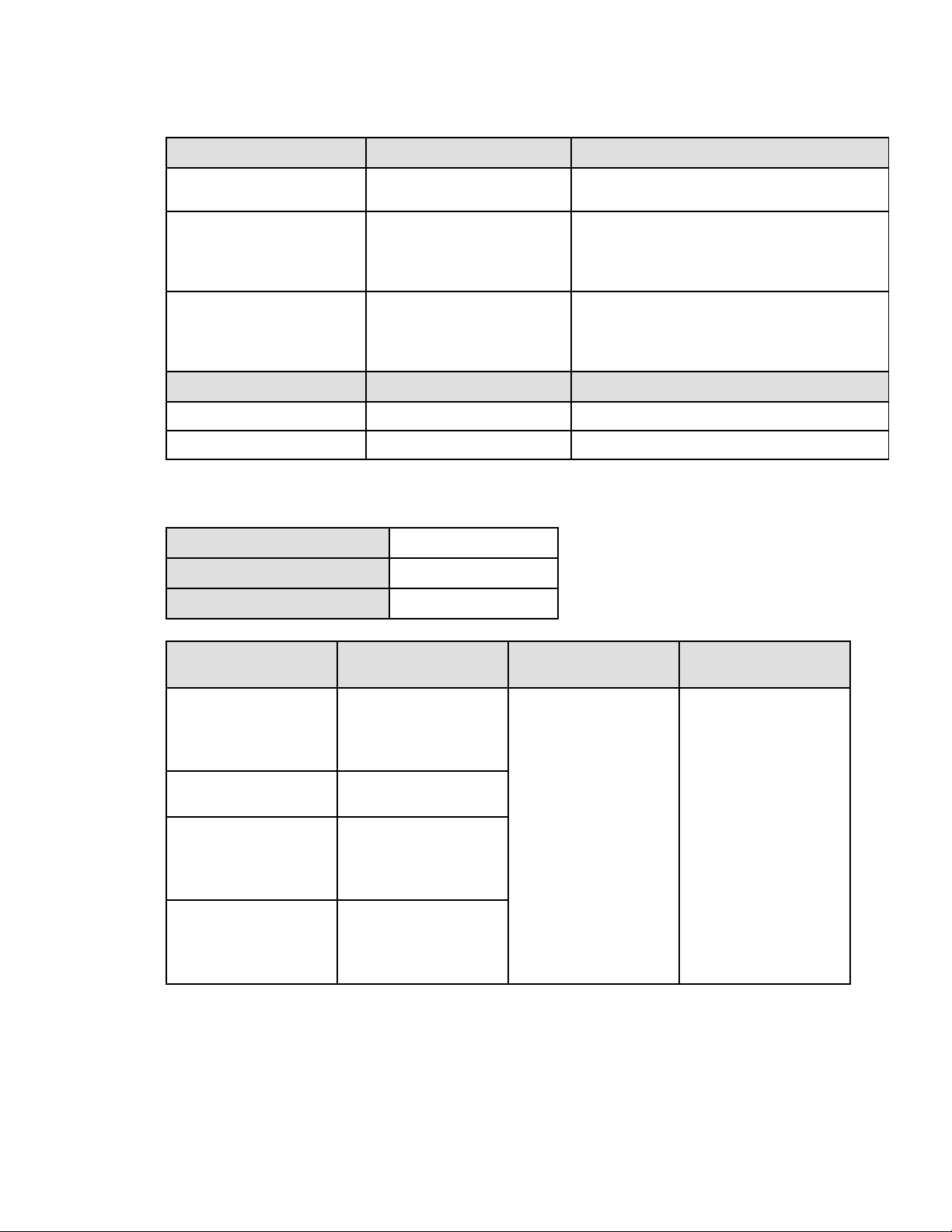
Description (UPS) Weights (lbs / kg) Dimensions (inch / mm) D x W x H
SMART750RMXL2U
SMART750RMXL2UN
44.5 / 20.2 17.6x17.2x3.4 / 448x438x85.5
SMART1000RMXL2U
SMART1000RMX2UN
44.5 / 20.2 17.6x17.2x3.4 / 448x438x85.5
34 Eaton Tripp Lite Series SmartPro User Guide 614-40194—Rev 04
Description (UPS) Weights (lbs / kg) Dimensions (inch / mm) D x W x H
SMART1500RMXL2U
SMART1500RMXLN
50.7 / 23.0 17.6x17.2x3.4 / 448x438x85.5
SMART2200RMXL2U
SMART2200RMXLN
SMART2200RM2U
SMART2200RM2UN
65.3 / 29.6 23.7x17.2x3.4 / 603x438x85.5
SMART3000RMXL2U
SMART3000RMXLN
SMART3000RM2U
SMART3000RM2UN
74.5 / 33.8 23.7x17.2x3.4 / 603x438x85.5
Description (EBM) Weights (lbs/ kg) Dimensions (inch / mm) D x W x H
BP48VRM2U 61.3 / 27.8 17.6x17.2x3.4 / 448x438x85.5
BP72VRM2U 89.1 / 40.4 23.7x17.2x3.4 / 603x438x85.5
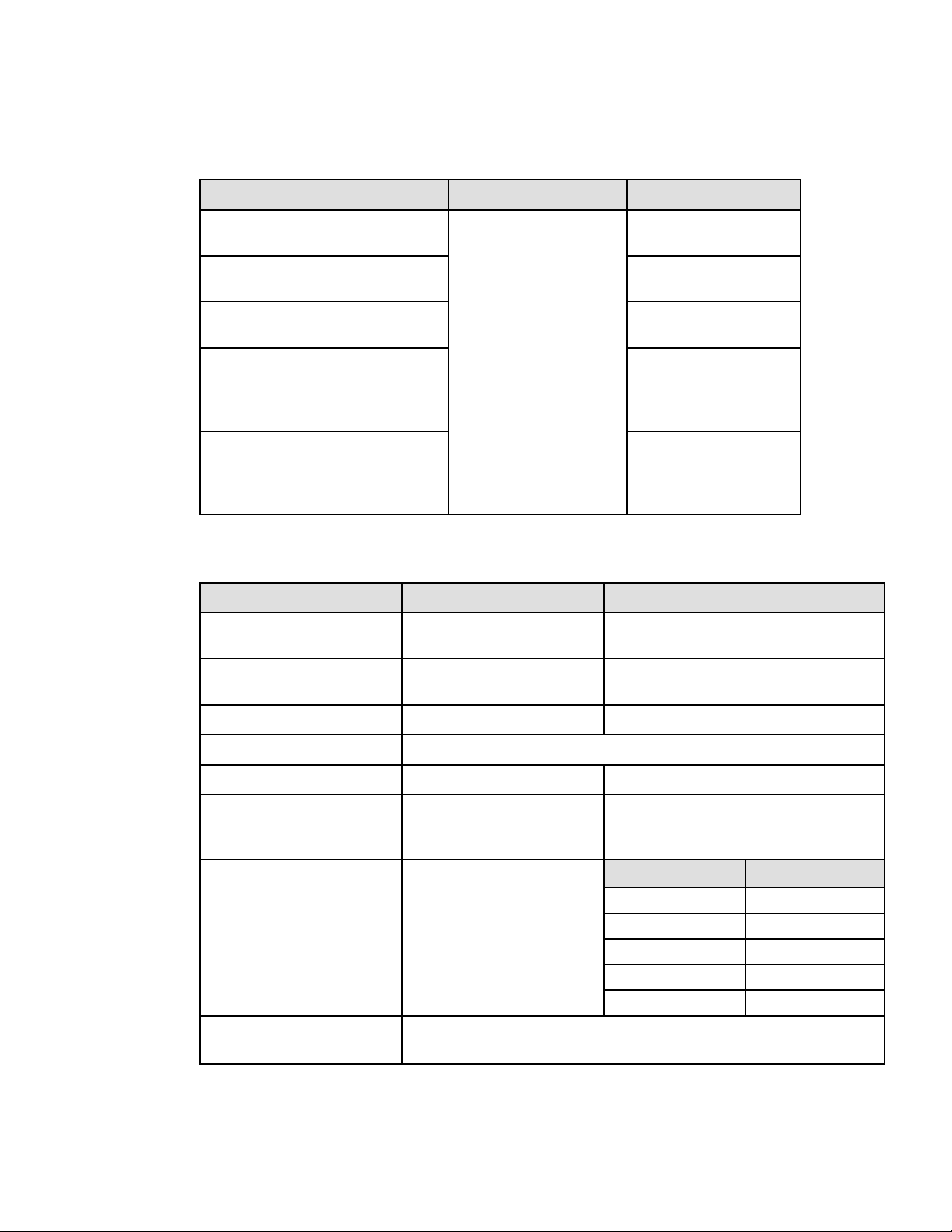
88..44 EElleeccttrriiccaall IInnppuutt
Default frequency 60Hz
Nominal frequency 50/60Hz
Frequency range 47-70Hz
Catalog Number
Default input (Voltage/
Current)
Input nominal voltages Input voltage window
SMART750RMXL2U
SMART750RMXL2UN
SMART1000RMXL2U
SMART1000RMX2UN
120V/12A
100-125V
80-151V
adjustable to 70-153V
SMART1500RMXL2U
SMART1500RMXLN
120V/12A
SMART2200RM2U
SMART2200RM2UN
SMART2200RMXL2U
SMART2200RMXLN
120V/16A
SMART3000RM2U
SMART3000RM2UN
SMART3000RMXL2U
SMART3000RMXLN
120V/24A
Electrical Input
Eaton Tripp Lite Series SmartPro User Guide 614-40194—Rev 04 35
88..55 EElleeccttrriiccaall IInnppuutt CCoonnnneeccttiioonnss
Catalog Number Input connection Input cable
SMART750RMXL2U
SMART750RMXL2UN
Fixed
NEMA 5-15P
SMART1000RMXL2U
SMART1000RMX2UN
NEMA 5-15P
SMART1500RMXL2U
SMART1500RMXLN
NEMA 5-15P
SMART2200RM2U
SMART2200RM2UN
SMART2200RMXL2U
SMART2200RMXLN
NEMA 5-20P
SMART3000RM2U
SMART3000RM2UN
SMART3000RMXL2U
SMART3000RMXLN
NEMA L5-30P
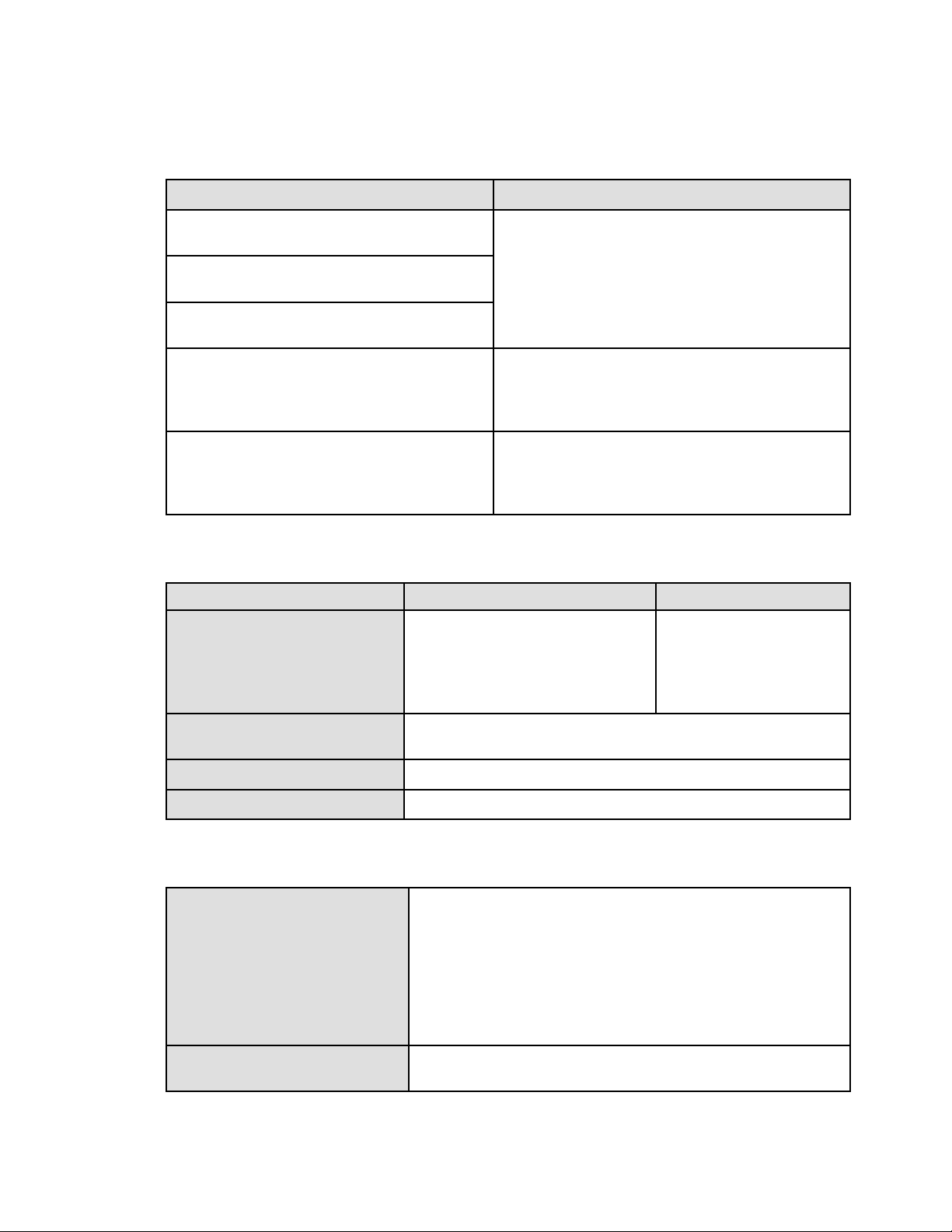
88..66 EElleeccttrriiccaall OOuuttppuutt
All models Normal mode Battery mode
Voltage regulation Boost : Vin*1.15
Buck : Vin*0.87
(-10% ,6%)
Efficiency >96% 750-2200 > 82%
3000 > 85%
Frequency regulation +/-0.1 Hz
Nominal output 100/110/120/125V
Frequency Follows input frequency 50/60Hz
Output overload [105%,120%] 30min
[120%,150%] 5min
>150% 10s
[105% ~110%] 10s
- Output short-circuit current max RMS & delay
time: 114.5A/100ms; The max peak value: 202A
Short circuit current limitation in
battery mode
Model Current limitation
750 41A
1000 41A
1500
56A
2200 66A
3000 90A
Transfer time Utility Outage: 1-4ms for normal mode, >5ms for sensitive mode
Utility abnormal: <10ms for normal mode ,<25ms for sensitive mode
Electrical Input Connections
36 Eaton Tripp Lite Series SmartPro User Guide 614-40194—Rev 04
88..77 EElleeccttrriiccaall OOuuttppuutt CCoonnnneeccttiioonn
Catalog Number Output connection
SMART750RMXL2U
SMART750RMXL2UN
(4) 5-15R Primary
(2) 5-15R Group1
(2) 5-15R Group2
SMART1000RMXL2U
SMART1000RMX2UN
SMART1500RMXL2U
SMART1500RMXLN
SMART2200RM2U
SMART2200RM2UN
SMART2200RMXL2U
SMART2200RMXLN
(2)5-20R + (1)L5-20R Primary
(2) 5-20R Group1
(2) 5-20R Group2
SMART3000RM2U
SMART3000RM2UN
SMART3000RMXL2U
SMART3000RMXLN
(2)5-20R + (1)L5-30R Primary
(2) 5-20R Group1
(2) 5-20R Group2
88..88 BBaatttteerryy
Internal batteries EBM
Specifications 750VA: 48Vdc - 4 x 12V, 7Ah (9Ah max)
1000VA: 48Vdc - 4 x 12V, 7Ah (9Ah max)
1500VA: 48Vdc - 4 x 12V, 9Ah
2200VA: 72Vdc - 6 x 12V, 7Ah (9Ah max)
3000VA: 72Vdc - 6 x 12V, 9Ah
BP48VRM2U: 48Vdc - 2 x 4 x 12V,
2 x 9Ah
BP72VRM2U: 72Vdc - 2 x 6 x 12V,
2 x 9Ah
Type Sealed, maintenance-free, valve-regulated, lead-acid, with minimum 3-5 year float
service life at 25°C (77°F).
Monitoring Advanced monitoring for earlier failure detection and warning
EBM battery cable length 2U EBM cable length:350mm/13.78in
88..99 EEnnvviirroonnmmeennttaall aanndd SSaaffeettyy
Standards
IEC/EN 62040-1:2008+A1:2013
EN IEC 62040-2: 2018
IEC 62040-2: 2016
FCC CFR Title 47, Part 15, Subpart B
IEC/EN 62040-3
IEC 62040-1:2017
UL1778 5th edition
CSA 22.2
EMC (Emissions)
EN IEC 62040-2: 2018 C2
EN 62040-2: 2006 C2
Electrical Output Connection

Eaton Tripp Lite Series SmartPro User Guide 614-40194—Rev 04 37
IEC 62040-2: 2016 C2
EN 55011:Class A
CISPR11 Class A
CISPR32 Class A
FCC part 15 Class A
Agency markings CE, cTUVus, FCC, Energy star NOM
Operating temperature 0 to 40 °C (32 to 104 °F)
Storage temperature -15 to 50°C (5 to 122 °F)
Relative humidity
20 to 90 % (without condensation)
Operating altitude
Up to 3,000 meters (9,843 ft) above sea level, no derating for 40°c (104°F) room
temperature
Transit altitude
Up to 10,000 meters (32,808 ft) above sea level
Audible noise Line mode:<40dB Buck/boost mode:<45 dB
Batt. Mode: <45dB, 50dB for 3K
Environmental and Safety

614-4019404
614-40194 04