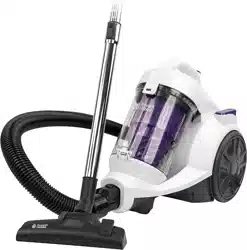
Model Number: RHCV2103
220-240V~, 50/60Hz, 800W
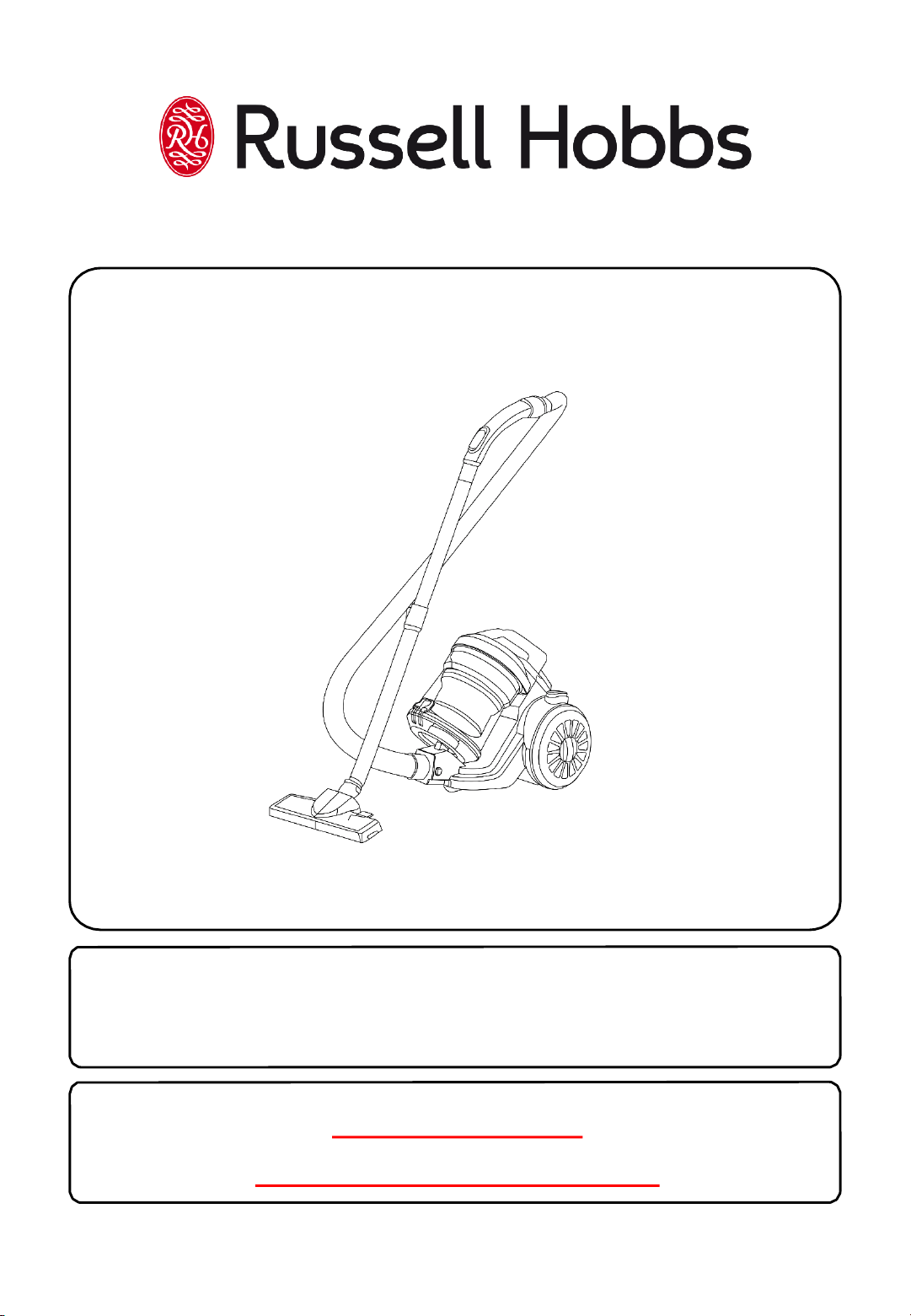
Turbo Cyclonic Plus
Bagless Cylinder Vacuum Cleaner
For Customer Services & Spare Parts please call 0345 209 7461
Opening times: Monday - Friday 8am – 8pm & Saturday 9am – 1pm
Or visit us at www.productcare.co.uk
PLEASE RETAIN
FOR FUTURE REFERENCE
Page(s)
Safety instructions
3-6
Energy
performance label
7
Technical data
8
Vacuum
feature diagram
9
Vacuum cleaner
assembly
10-11
Using your vacuum
cleaner
12-15
Cleaning and care
16-18
Problem solving
19
Guarantee and customer services
20
Spare
parts
21
Connection to the mains supply
22
Disposal information
24
CONTENTS
2
For Customer Services & Spare Parts please call 0345 209 7461
Opening times: Monday - Friday 8am – 8pm & Saturday 9am – 1pm
Or visit us at www.productcare.co.uk
Thank you for purchasing your Russell Hobbs Turbo Cyclonic Plus Bagless
Cylinder Vacuum Cleaner.
To get the best from your new cleaner, take a few moments to read these
instructions and keep them in a safe place for future reference.
Should you require any further assistance, our friendly Product Care team will
be happy to help.
3
SAFETY INSTRUCTIONS
IMPORTANT SAFETY INSTRUCTIONS
READ CAREFULLY AND KEEP FOR FUTURE REFERENCE
WARNING:
• It is hazardous for anyone other than a competent person
to carry out any service or repair operation that involves
the removal of a cover which gives protection against
exposure to electrical parts.
• If the supply cord is damaged, it must be replaced by the
manufacturer, its service agent or similarly qualified
persons in order to avoid a hazard.
• This product is intended for household use only.
Do not use outdoors.
• This appliance can be used by children aged from 8 years
and above and persons with reduced physical, sensory or
mental capabilities or lack of experience and knowledge if
they have been given supervision or instruction
concerning use of the appliance in a safe way and
understand the hazards involved. Children shall not play
with the appliance. Cleaning and user maintenance shall
not be made by children without supervision.
• Do not operate this appliance for anything other than its
intended use. This product is intended for household use
only. Do not use outdoors.
• Do not immerse in water or other liquids for cleaning.
4
SAFETY INSTRUCTIONS
IMPORTANT SAFETY INSTRUCTIONS
READ CAREFULLY AND KEEP FOR FUTURE REFERENCE
• Do not direct at people, animals, electrical outlets, or
equipment containing electrical components.
• Unplug from outlet when not in use. Do not leave the
cleaner unattended while plugged in.
• Do not use with damaged cord or plug.
• Do not use vacuum cleaner if it has been dropped,
damaged, left outdoors or dropped into water.
• Keep the vacuum cleaner away from water; do not allow
it to get wet. If unit is wet, do not plug unit into wall
socket or turn unit on.
• Do not handle the vacuum cleaner with wet hands.
• Do not pull or carry by cord, use cord as a handle, close
door on cord, pull cord around sharp corners or edges, or
expose cord to heated surfaces.
• Do not unplug by pulling on cord.
• To protect against electrical shock do not immerse cord,
plug, or appliance in water or other liquid.
• Unplug from the mains outlet when not in use, before
putting on and taking off parts, and before cleaning.
• The use of accessory attachments not recommended by
the appliance manufacturer may cause fire, electric shock
or injury. Only use the accessories supplied by the
manufacturer.
5
SAFETY INSTRUCTIONS
IMPORTANT SAFETY INSTRUCTIONS
READ CAREFULLY AND KEEP FOR FUTURE REFERENCE
WARNING:
• Do not let the cord hang over the edge of the worktop, or
touch hot surfaces.
• Do not use this vacuum to pick up water or any other
liquids, combustible substances or hot/burning objects.
• Only use the unit when fully assembled.
• Never place your fingers or other objects into any part of
the cleaner. Be aware that loose clothing or hair may
become trapped in the cleaner if improperly used.
• Before use, ensure that all of the air vents of the cleaner
are clear and there is no restriction of air flow.
• When cleaning stairs, ensure the cleaner is on a step
below you. NEVER place the cleaner above.
• Caution: Exhaust air discharged from the rear of the
cleaner may extinguish a gas fire, pilot light, or disturb
ashes in an open fire. Always avoid directing the cleaner
toward naked flames.
• Do not run the vacuum cleaner over any cables, or its
own power cable. As this will result in damaging the
cable.
6
SAFETY INSTRUCTIONS
IMPORTANT SAFETY INSTRUCTIONS
READ CAREFULLY AND KEEP FOR FUTURE REFERENCE
• Important: This cleaner has a thermal safety device which
automatically cuts off the power supply in case of over
heating. If the safety device has switched the cleaner off,
unplug from the mains, allow the cleaner to cool down
and check for any blockages. Once the cleaner has cooled
it can be plugged back in to the mains and used as
normal.
For Customer Services & Spare Parts please call 0345 209 7461
Opening times: Monday - Friday 8am – 8pm & Saturday 9am – 1pm
Or visit us at www.productcare.co.uk
7
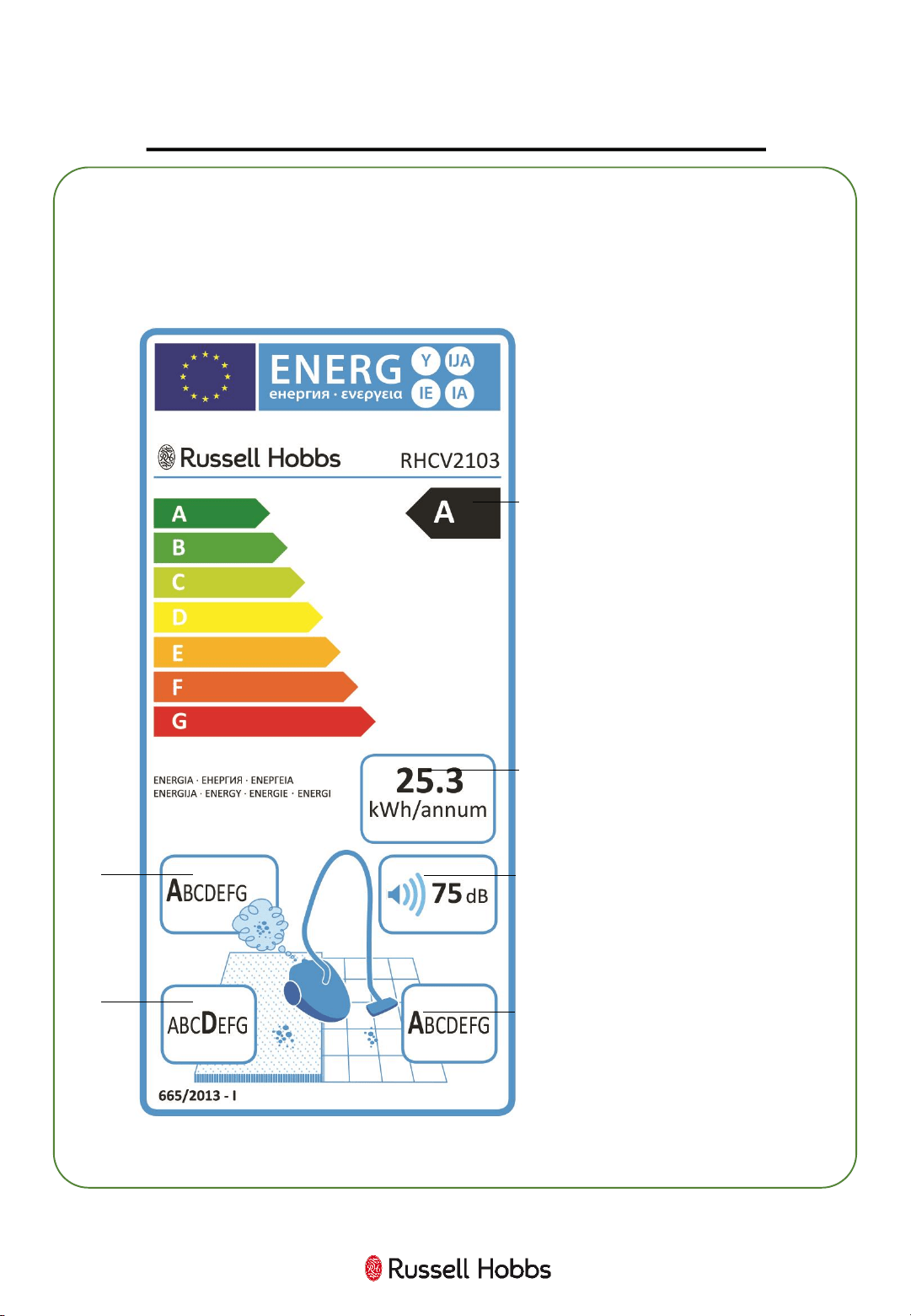
ENERGY PERFORMANCE LABEL
The purpose of the energy label is to help you understand a
vacuum cleaner’s energy efficiency performance.
1. Energy rating –
based primarily on
energy consumption
and pick-up.
2. Annual energy
usage – the amount of
energy used over a
year.
3. Emissions – the
amount of dust in the
air emitted from the
machine’s exhaust.
4. Noise – the noise
level produced by the
machine, measured in
decibels.
5. Pick up (carpets) –
the rating of how much
dust the machine picks
up from carpets.
6. Pick-up (hard
floors/crevices) – the
rating of how much
dust the machine picks
up from hard floors and
crevices.
1
3
2
4
5
6
8
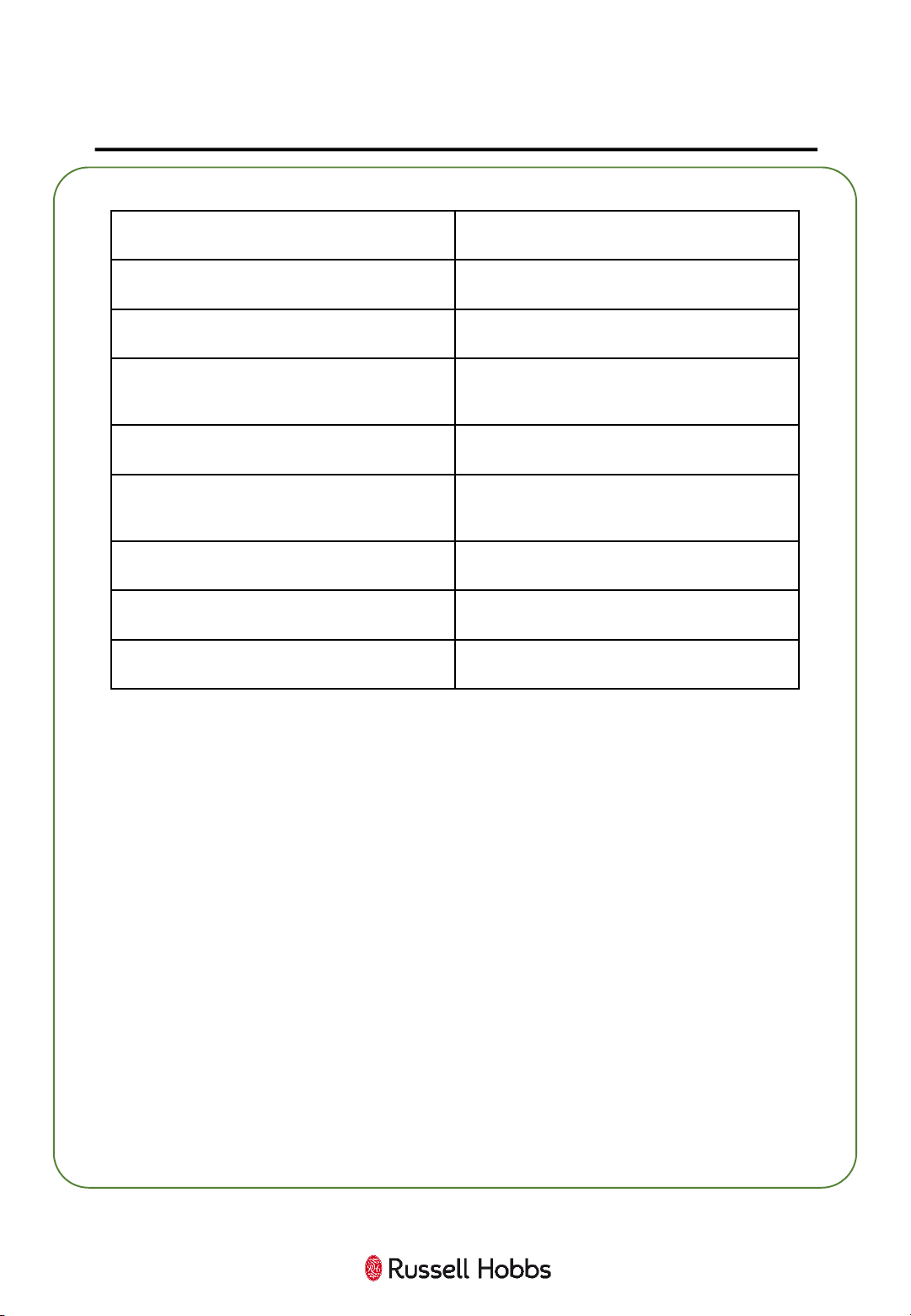
TECHNICAL DATA (PRODUCT FISCHE)
Trade mark
Russell Hobbs
Model
RHCV2103
Energy
efficiency class
A
Annual energy consumption
(kWh/year)
25.3
Carpet cleaning performance class
D
Hard floor cleaning
performance
class
A
Dust re
-emission class
A
Sound power
level
75db
Rated
input power
800
9
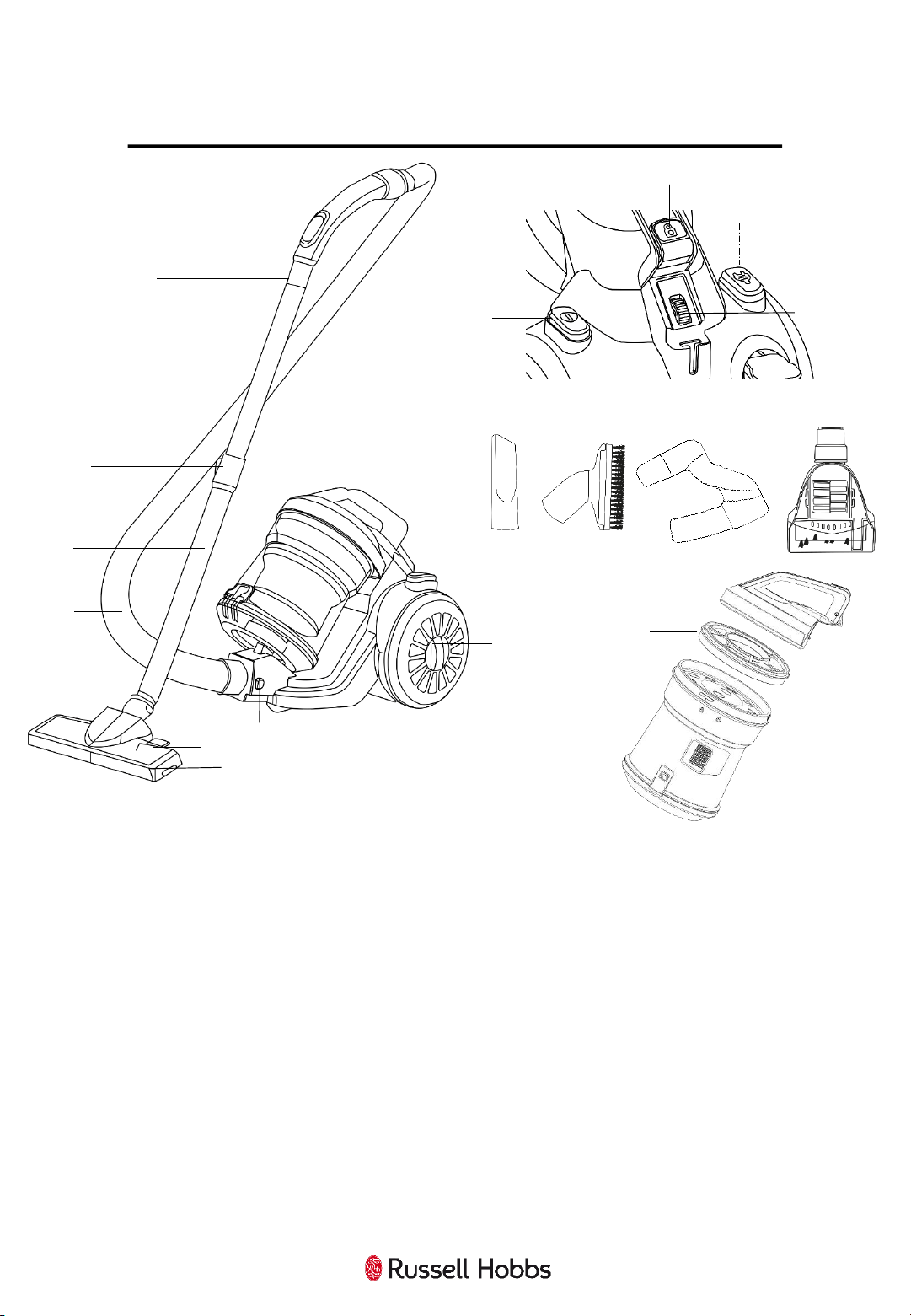
VACUUM FEATURE DIAGRAM
1 Hose suction control 7 Floor head 14 Cord rewind button
2 Hose connector 8 Hose release button(s) 15 Variable power dial
3 Extension lock 9 Dust container
16
Crevice Tool
4 Extension tube 10 Carry handle 17 Brush Tool
5 Hose 11 HEPA Filter Cover 18 On Board Tool Holder
6 Floor surface selector 12 Power button 19 Turbo Brush
13 Container release 20 Internal Filter
For Customer Services & Spare Parts please call 0345 209 7461
Opening times: Monday - Friday 8am – 8pm & Saturday 9am – 1pm
Or visit us at www.productcare.co.uk
1
2
3
4
5
6
7
8
9
14
10
13
12
11
16 17 18 19
20
15
10
VACUUM CLEANER ASSEMBLY
Before using your vacuum cleaner
Remove all packaging and lay out the separate components.
Check the unit after unpacking for any visual damage such as:
• Misaligned or damaged parts
• Damage to the main body and separate components
• Damage to the plug or cable.
If you can see any damage do not use the vacuum cleaner and
contact customer services.
For Customer Services & Spare Parts please call 0345 209 7461
Opening times: Monday - Friday 8am – 8pm & Saturday 9am – 1pm
Or visit us at www.productcare.co.uk
11
VACUUM CLEANER ASSEMBLY
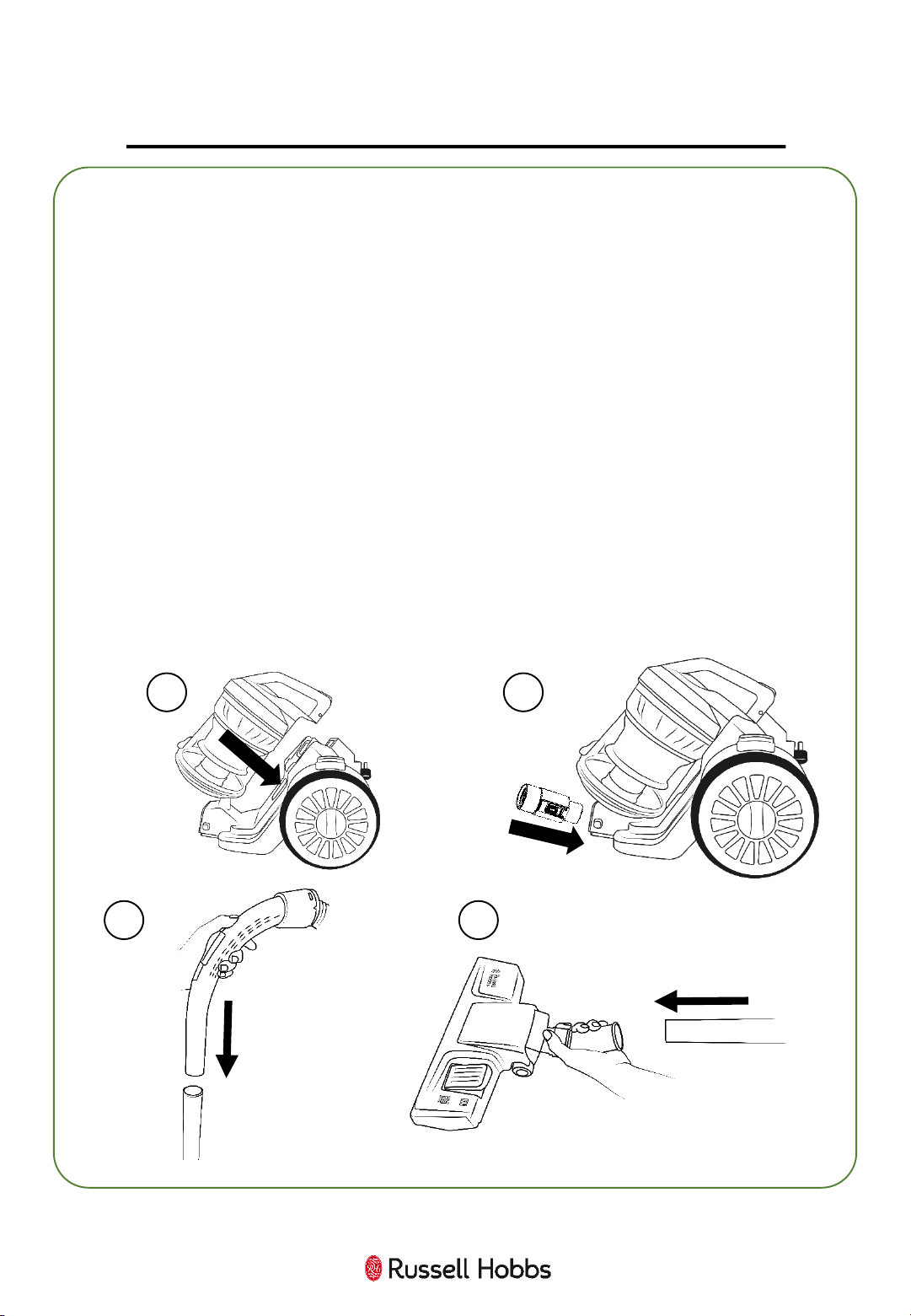
Ensure the unit is unplugged before assembling.
1. Push the dust container onto the vacuum cleaner unit base until it
‘clicks’ into place.
2. Insert the ribbed end of the hose into the hose inlet. Push in until
it ‘clicks’ to secure.
3. Insert the opposite end of the hose into the extension tube and
push together.
4. Insert the other end of the extension tube into the floor head and
rotate if necessary.
1 2
3 4
12
USING YOUR VACUUM CLEANER
1
Once assembled:
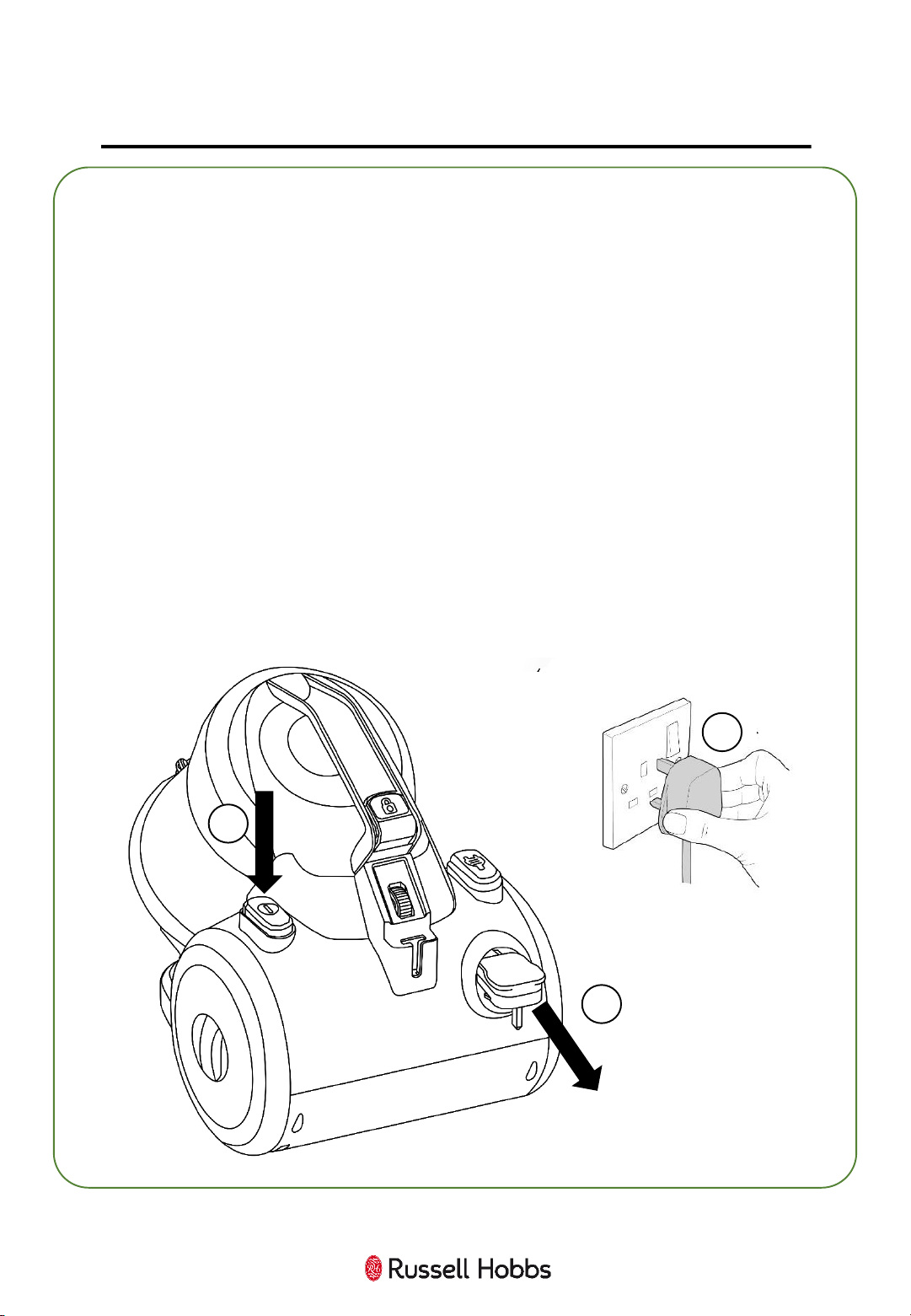
1. The cord is stored inside the unit. Pull the power cord out of the
machine to as long as you require and stop when you see the yellow
tab. Do not over-extend. If the red tab is visible, then wind the cord
back until only the yellow tab is visible.
2. Plug the cable into a wall socket and press the switch on.
3. Press the power button to start vacuuming.
4. Move the vacuum cleaner floor head in a forwards and backwards
motion over the areas you would like to clean.
Note: Large items can get trapped in the brush/floor head which
could cause the unit to overheat. Make sure you pick up larger items
that could get trapped before vacuuming.
3
2
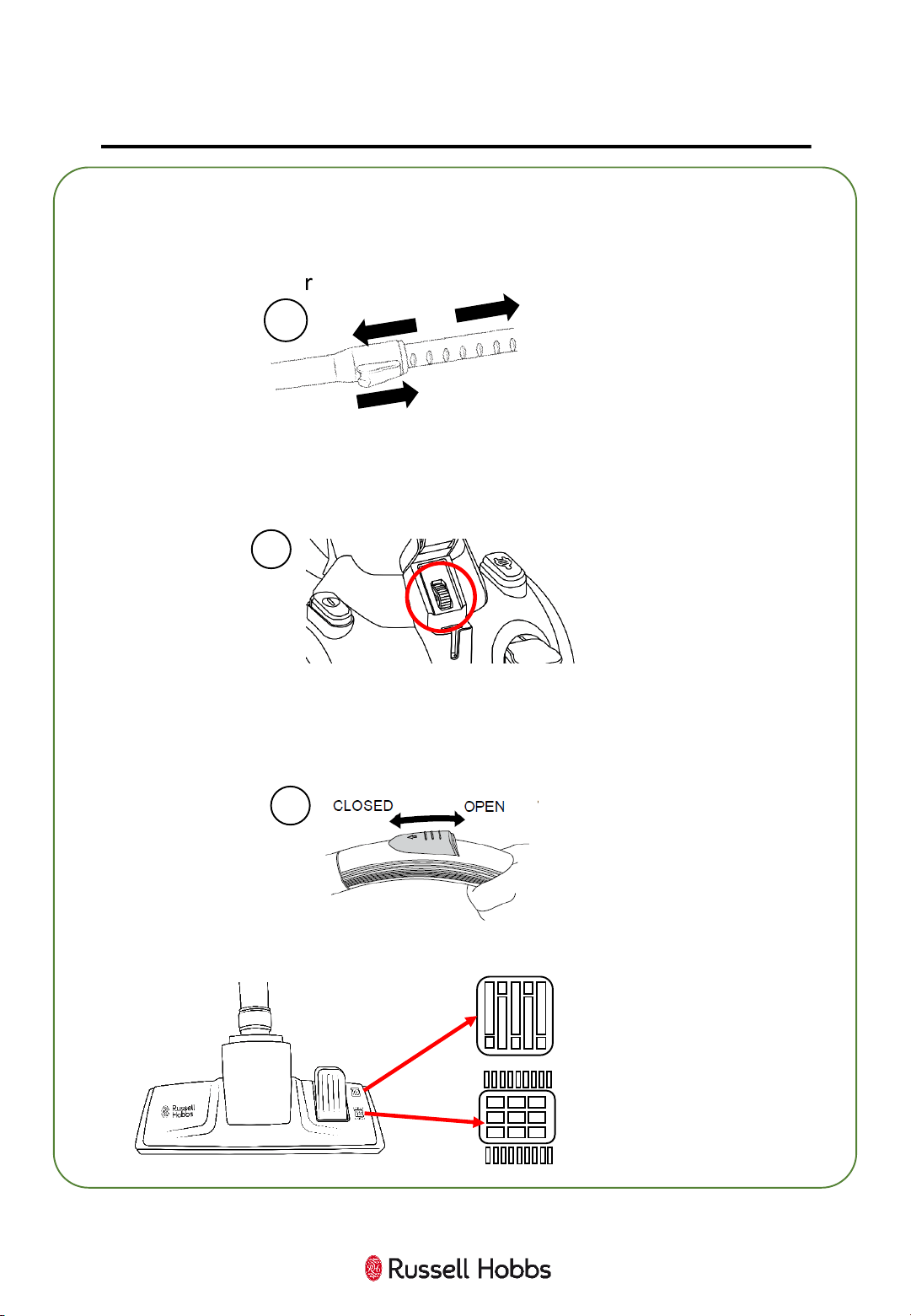
5. You can adjust the extension tube length to a comfortable cleaning
height. To alter the length of the telescopic handle,
a) Push and hold the extension lock in the direction indicated.
b) Slide the tube, up or down, to the correct length.
6. The suction of the vacuum cleaner can be adjusted by rotating the
power dial on the back of the unit. You may want to use reduced power
when cleaning furniture, upholstery or long pile rugs.
13
USING YOUR VACUUM CLEANER
a)
b)
5
6
8. When using the floor head you can adapt the brush depending on
floor type. Please refer to the diagram below:
7
7. You can also adjust the suction using the tab on the hose handle. To
use less suction power, move the suction control tab to the open
position in the direction indicated. For maximum suction power, close
the tab.
Hard Floor Icon
Carpet/Rug Icon
14
USING YOUR VACUUM CLEANER
Tool Selection
This vacuum cleaner is supplied with different tools designed for
different cleaning tasks:
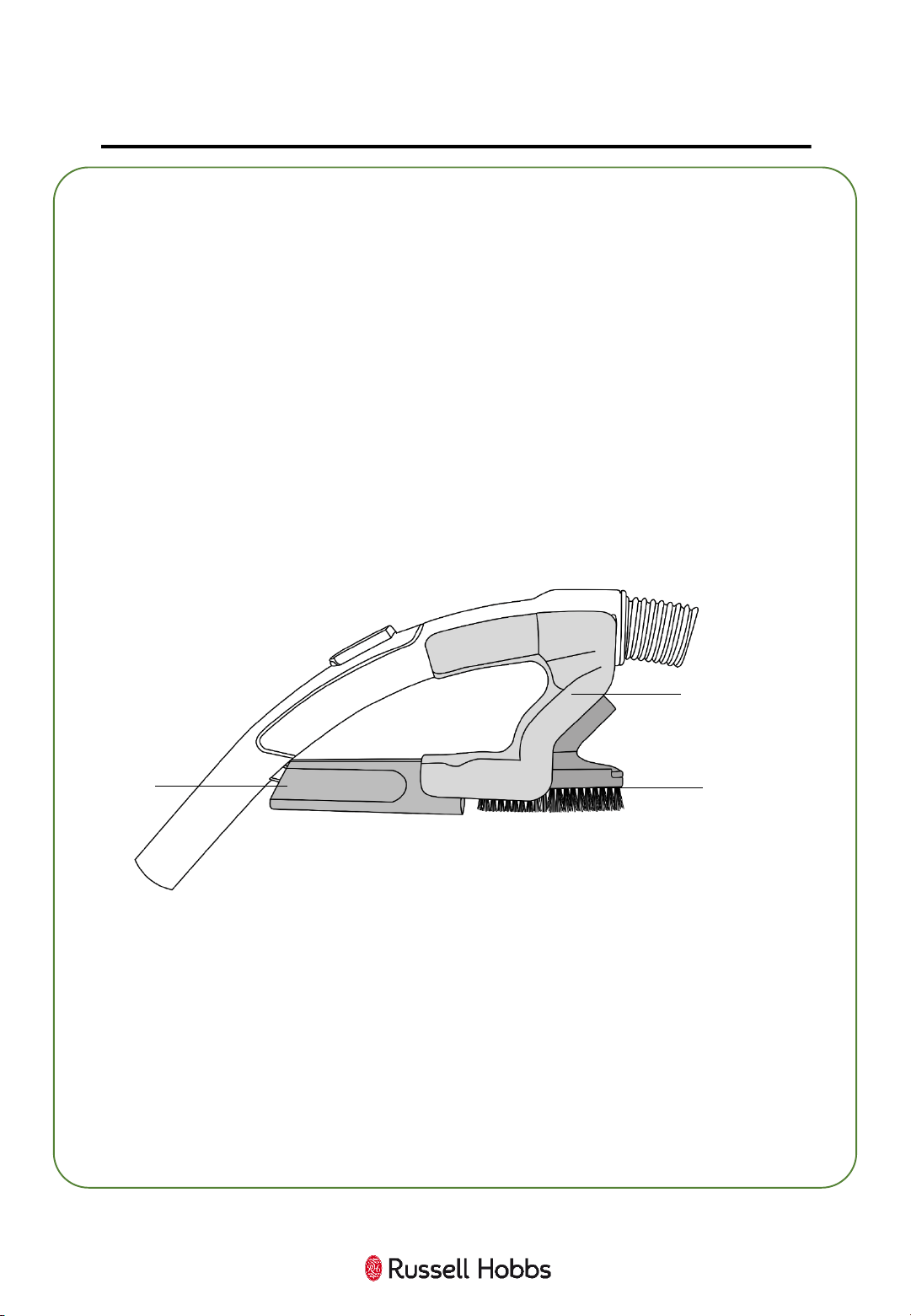
Crevice and Brush Tools:
Both attach to either the extension tube or the hose in the same manner
as the floor head.
- The crevice tool is designed for narrow gaps and hard to reach places
- The brush tool can be used on delicate surfaces or for dusting.
Both the crevice and brush tools can be attached to the handle of the
vacuum cleaner, as shown in the diagram below:
Turbo Brush Tool:
The turbo brush has an air driven rotating brush bar and is perfect for
use on stairs, carpets and upholstery – particularly for the retrieval of
pet hair.
It can be attached to either the extension tube or the hose in the same
manner as the floor head. The turbo brush cannot be stored on the
vacuum cleaner unit, so keep it safe when not in use.
Crevice
Tool
Brush
Tool
On-board
Tool Holder
15
USING YOUR VACUUM CLEANER
1
3
Emptying the dust container
When the dust container starts to fill it will need to be emptied.
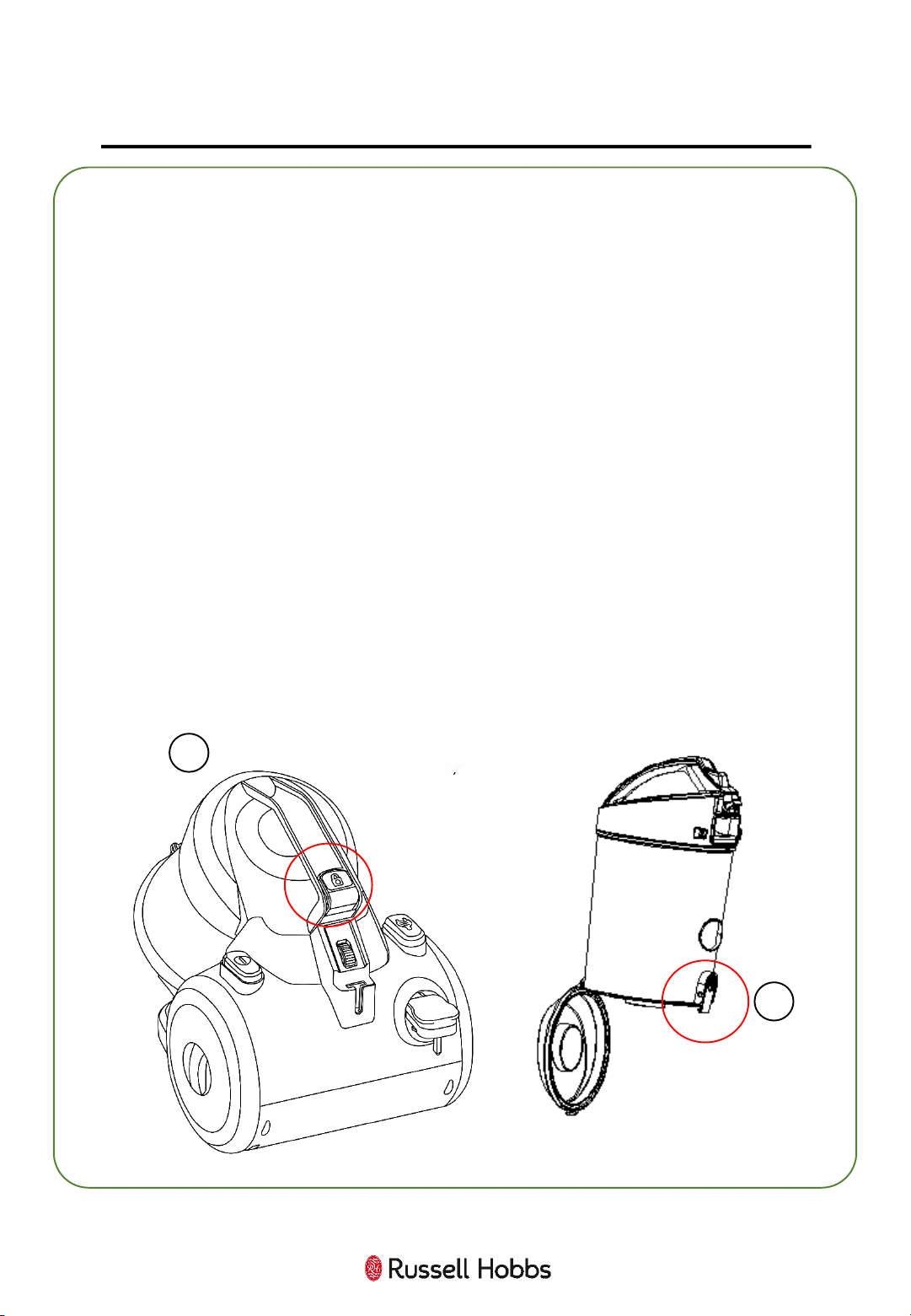
1. To remove the dust container, press the release button located at
the top of the lid handle.
2. Lift the container away from the unit base.
3. Locate the bin release clip on the cover at the back of the
container.
4. Over a bin, pull the bin release clip to open the base of the
container. You may need to tap the sides to empty all of the dirt. Close
the base to secure.
Important:
You may wish to empty the dust container outdoors as emptying may
create a dust cloud.
Place the dust container onto the unit, base first, then tilt forward to
engage the top.
16
CLEANING AND CARE:
CLEANING THE EXHAUST FILTER
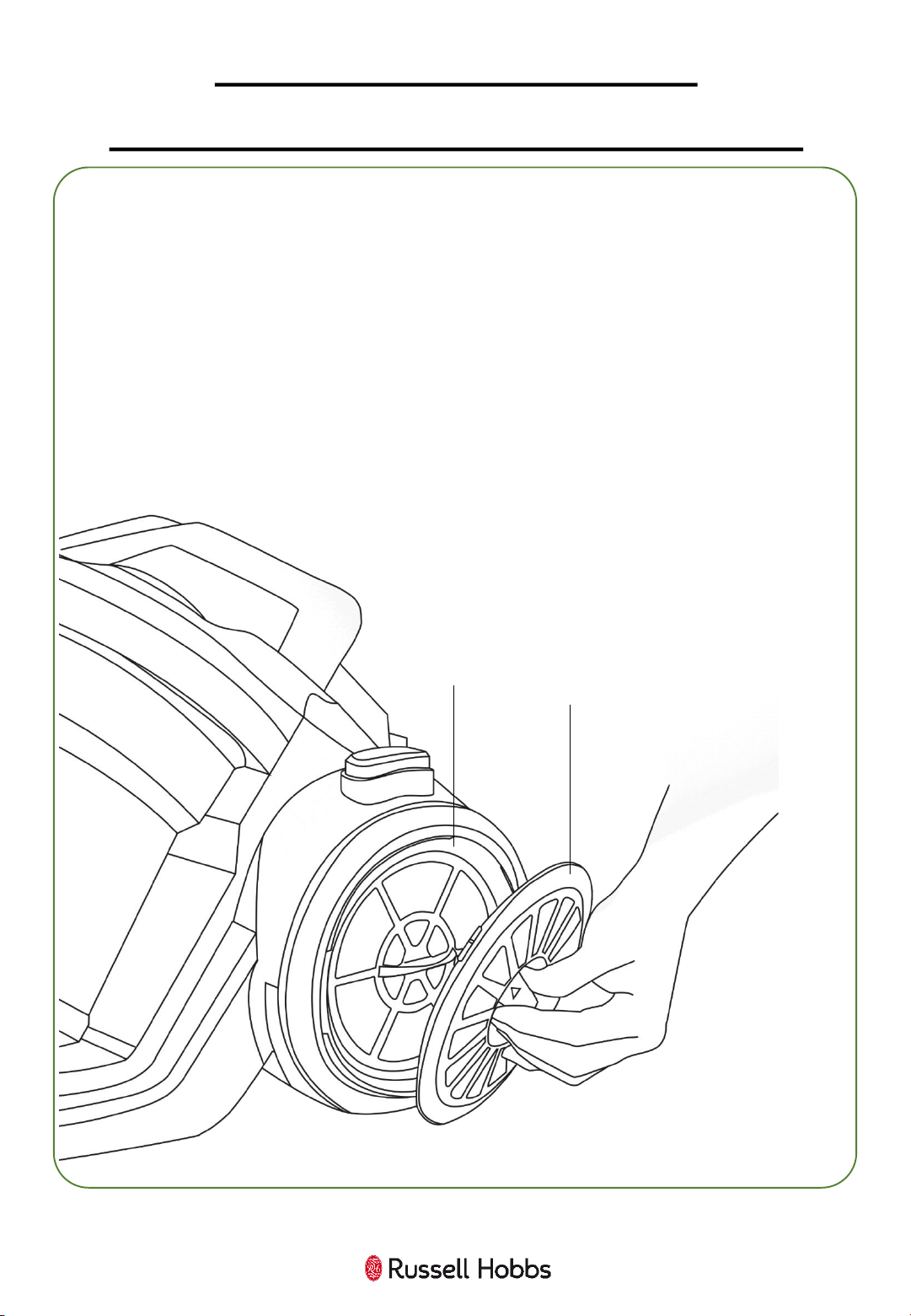
Before you clean the appliance, disconnect the mains plug from the
wall socket.
Remove the filter cover on the wheel by rotating in a clockwise
direction.
Rotate the filter in a clockwise direction, pull out and tap over a bin
to remove any excess dust. Wash in warm water and allow to dry
for 24 hours.
Once dried, put the filter back in place and refit the filter cover on
the wheel by rotating in a clockwise direction.
Filter
Cover
Filter
17
CLEANING AND CARE:
CLEANING THE INTERNAL FILTERS
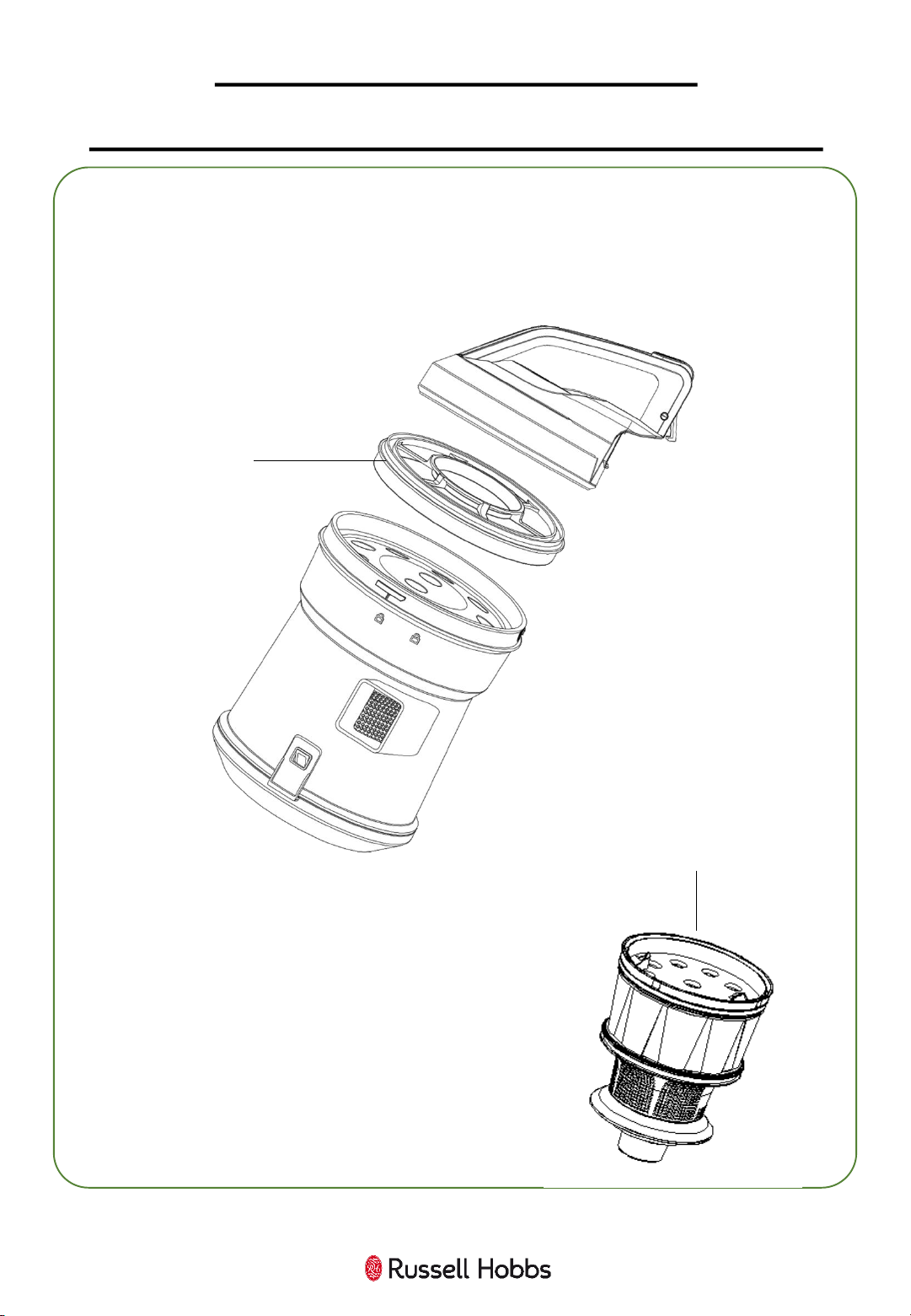
1. Remove the dust container and rotate the lid anti clockwise so that the
arrow is pointing to the unlock symbol.
2. Remove the dust container filter and get rid of excess dirt over a bin.
3. Wash in warm water. Allow to dry for 24 hours before reinserting.
4. Once the dust container lid and filter are
removed, lift out the multi cyclonic filter from
the container.
Shake the multi cyclonic filter over a bin to
remove any dust and then replace into the
dust container.
Dust
Container
Filter
Multi cyclonic
Filter
18
CLEANING AND CARE
Disassembly
To clean the exterior of the device, use a damp, soft cloth and mild detergent.
NEVER IMMERSE THE VACUUM IN WATER.
Wash non-electrical removable accessories in warm soapy water and allow to
dry thoroughly before next use.
If the vacuum is damaged, contact the customer service helpline using the
details at the bottom of this page.
Storage
Store in a clean and dry environment.
For Customer Services & Spare Parts please call 0345 209 7461
Opening times: Monday - Friday 8am – 8pm & Saturday 9am – 1pm
Or visit us at www.productcare.co.uk
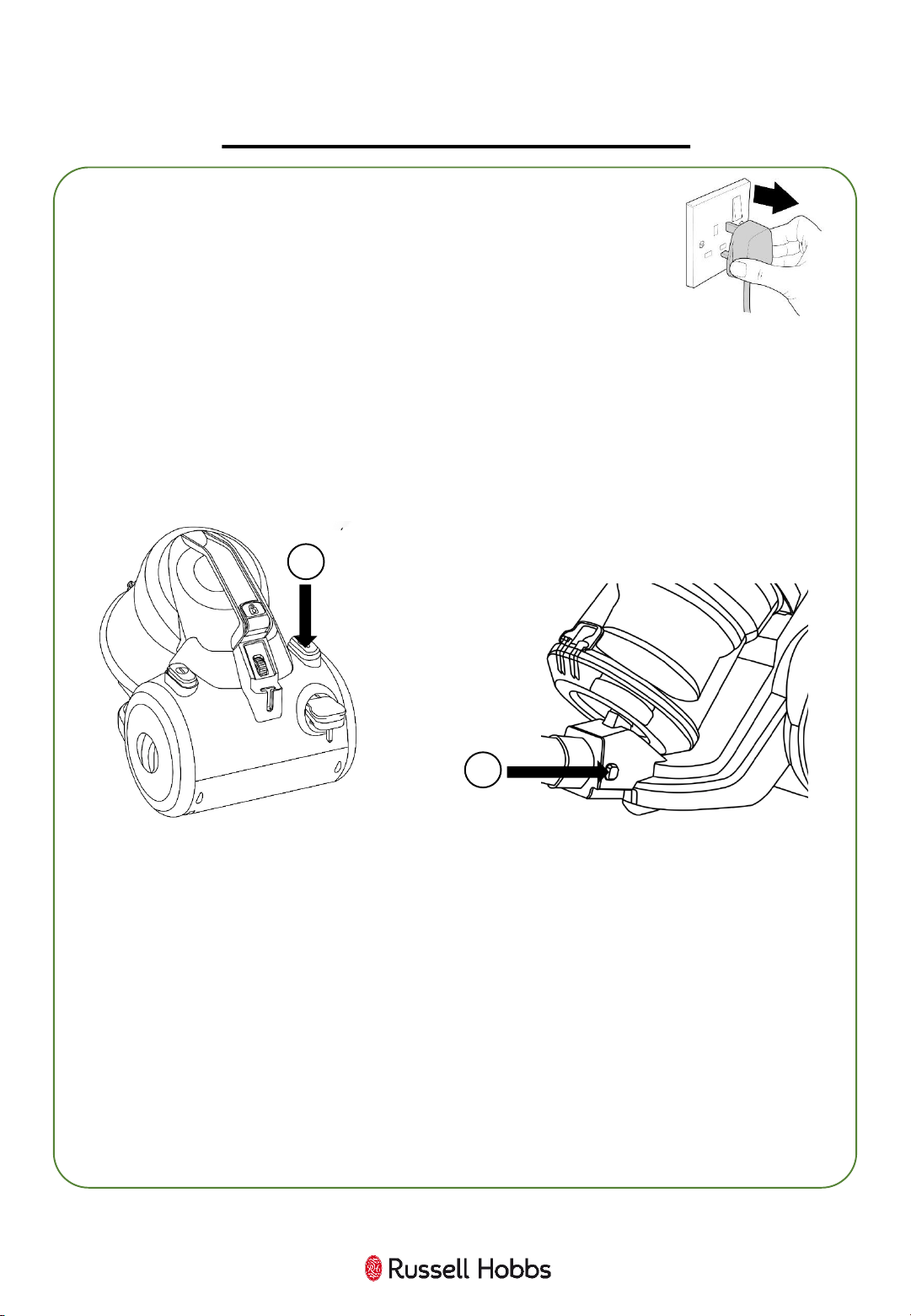
Before you clean the appliance, disconnect the mains plug
from the wall socket.
1. Press the cord rewind button to automatically bring the cord back inside
the unit for storage.
2. To remove the extension tube, pull it away from the hose.
3. To remove the floor head/accessory, pull the extension tube/hose away
from the head/accessory – you may need to ease it off.
4. To remove the hose from the vacuum cleaner unit, press both of the
release buttons and pull the hose away from the unit.
1
4
19
PROBLEM SOLVING
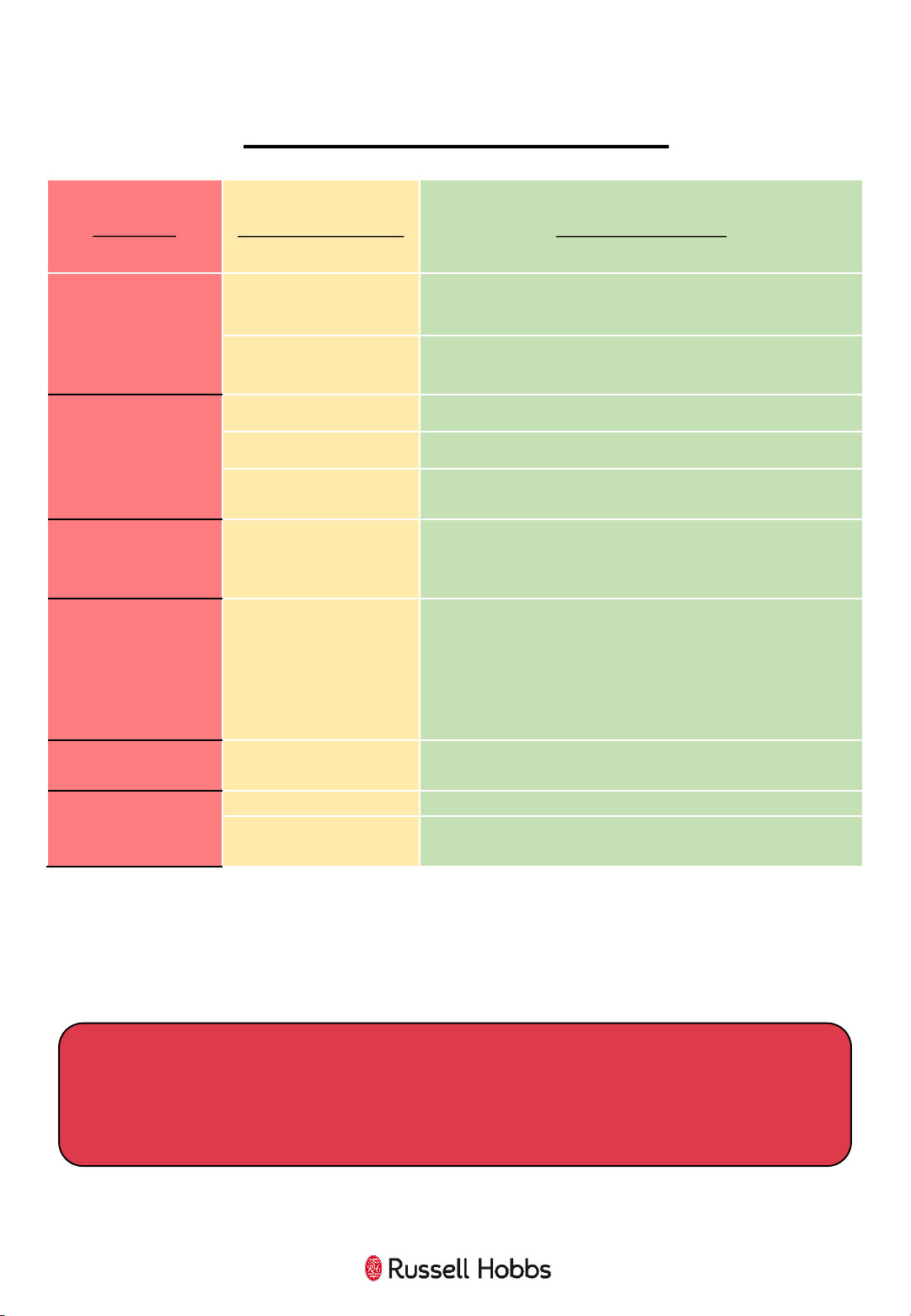
PROBLEM
POSSIBLE PROBLEM POSSIBLE SOLUTION
The vacuum cleaner is
plugged in but does
not work
Power cord/plug damage
Check the
power cord and plug for signs of damage.
Fuse is damaged
Check and replace the fuse in the plug.
The suction
is
decreasing and the
vacuum is not picking
up dirt
Dust container
Check if
the dust container is full, if so, empty it.
Filters are dirty
Clean the filters.
Hose/head blockages
Check that there are no blockages in the hose or cleaning
head.
Vacuum cleaner is
over heating
Filters are dirty
Check that the filters are not blocked,
if so, clean them
following the instructions in this booklet.
Automatic power cord
rewind does not fully
rewind the power
cord
Pull the power cord fully out and press the rewind button
again.
Dust is coming out of
the vacuum cleaner
Dust container fitting
The dust container has not been fitted correctly. Refit the
container following the instructions in this booklet.
The air coming out of
the vacuum cleaner
smells
Filters are dirty
Clean the filters. Also clean the
hose and dust container
Filters are not dry
Ensure the filters have been left to dry for 24 hours before
refitting back into the vacuum cleaner and using.
We’re here should you need us.
For Customer Services & Spare Parts please call 0345 209 7461
Opening times: Monday - Friday 8am – 8pm & Saturday 9am – 1pm
Or visit us at www.productcare.co.uk
20
GUARANTEE AND CUSTOMER SERVICES
At Russell Hobbs, we take all our customer feedback seriously.
Feel free to contact our Product Care Team, on 0345 209 7461
Monday – Friday: 8am-8pm & Saturday: 9am – 1pm,
who will be more than happy to assist you.
This product is guaranteed for 12 months from the date of the
original purchase. If any defect arises due to faulty materials or
workmanship, the faulty product must be returned to the place of
purchase.
Refund or replacement is at the discretion of the retailer.
The following conditions apply:
• The product must be returned to the retailer with the original
proof of purchase.
• The product must be installed and used in accordance with the
instructions contained in this instruction guide and any other
instructions for use which are supplied.
• It must be used for domestic purposes only and for its intended
use.
• This warranty does not cover wear and tear, damage, misuse
or consumable parts.
This does not affect your statutory rights.
For Customer Services & Spare Parts please call 0345 209 7461
Opening times: Monday - Friday 8am – 8pm & Saturday 9am – 1pm
Or visit us at www.productcare.co.uk
21
SPARE PARTS
For Customer Services & Spare Parts please call 0345 209 7461
Opening times: Monday - Friday 8am – 8pm & Saturday 9am – 1pm
Or visit us at www.productcare.co.uk
To check the availability of the following spare parts, simply contact
our friendly Customer Services team using the details provided at the
bottom of this page.
Internal Filter
Wheel Exhaust Filter
Hose
Floor Head
Extension Tube
Crevice Tool
Dusting Brush
On Board Tool Holder
Turbo Brush
22
CONNECTION TO THE MAINS SUPPLY
This appliance is designed to operate from a mains supply of
220-240V~ 50/60Hz.
Check that the voltage marked on the product corresponds
with your supply voltage.
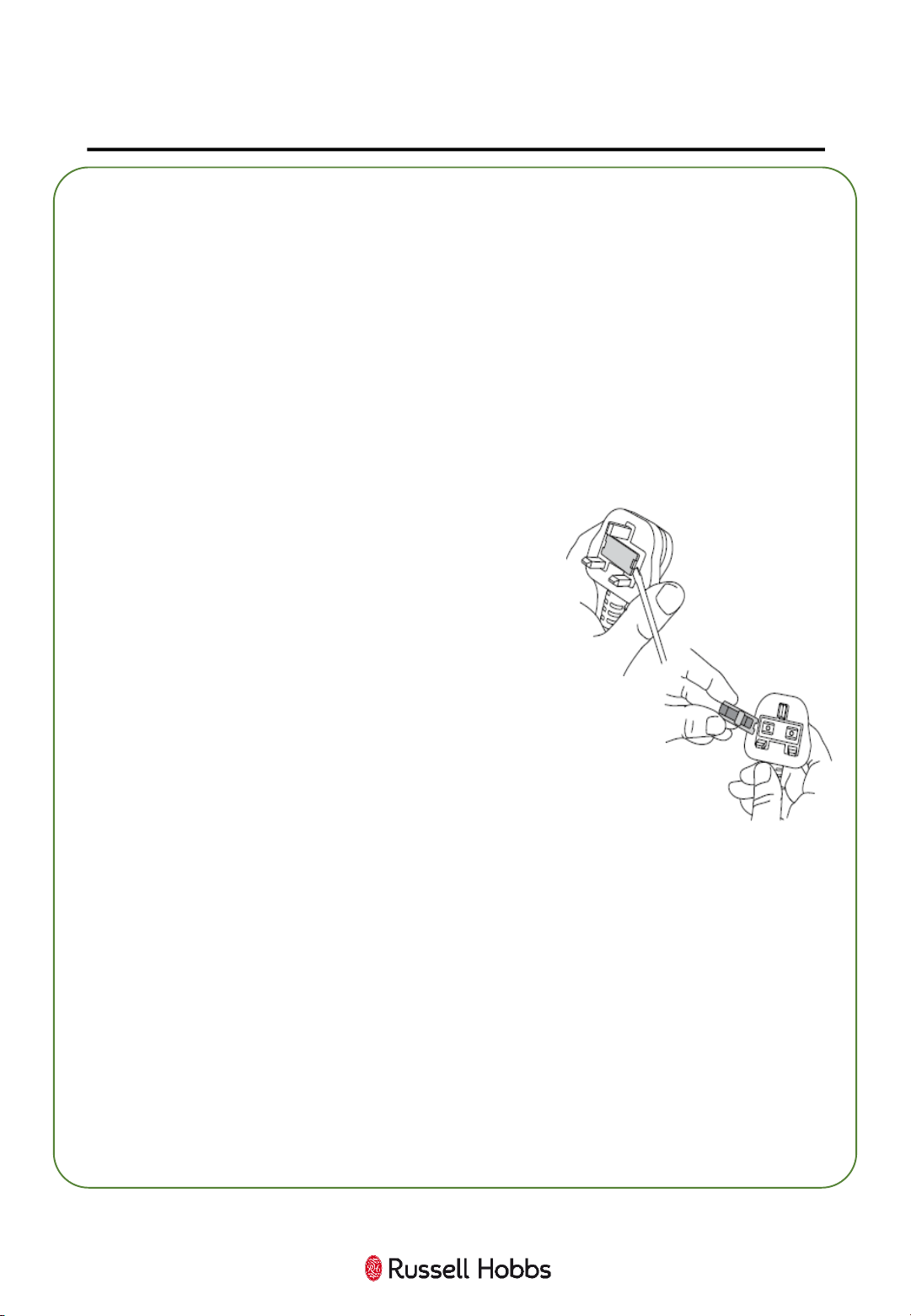
How to change the fuse
1. Slot the end of a screwdriver into the
recess in the fuse holder of the plug.
2. Pull the fuse holder upwards until free
of the plug and slide the fuse out.
3. Replace the fuse and replace fuse
holder, pushing down until locked into
place.
Important: Only ever use 13 amp fuses.
For Customer Services & Spare Parts please call 0345 209 7461
Opening times: Monday - Friday 8am – 8pm & Saturday 9am – 1pm
Or visit us at www.productcare.co.uk
23
NOTES
24
Revision 1.1
Model: RHCV2103
This symbol is known as the 'Crossed-out wheelie bin Symbol'.
When this symbol is marked on a product/batteries, it means that
the product/batteries should not be disposed of with your general
household waste. Only discard electrical/electronic/battery items
in separate collection schemes, which cater for the recovery and
recycling of materials contained within. Your co-operation is vital
to ensure the success of these schemes and for the protection of
the environment. For your nearest disposal facility, visit
www.recycle-more.co.uk or ask in store for details.
We reserve the right, due to possible changes to design, to alter
the instruction manual without prior notice.
For Customer Services & Spare
Parts please call
0345 209 7461
Opening times: Monday - Friday
8am – 8pm & Saturday 9am –1pm
Or visit us at
www.productcare.co.uk
Produced for
G2S Ltd, Wigan, WN2 4AY