i
T
G
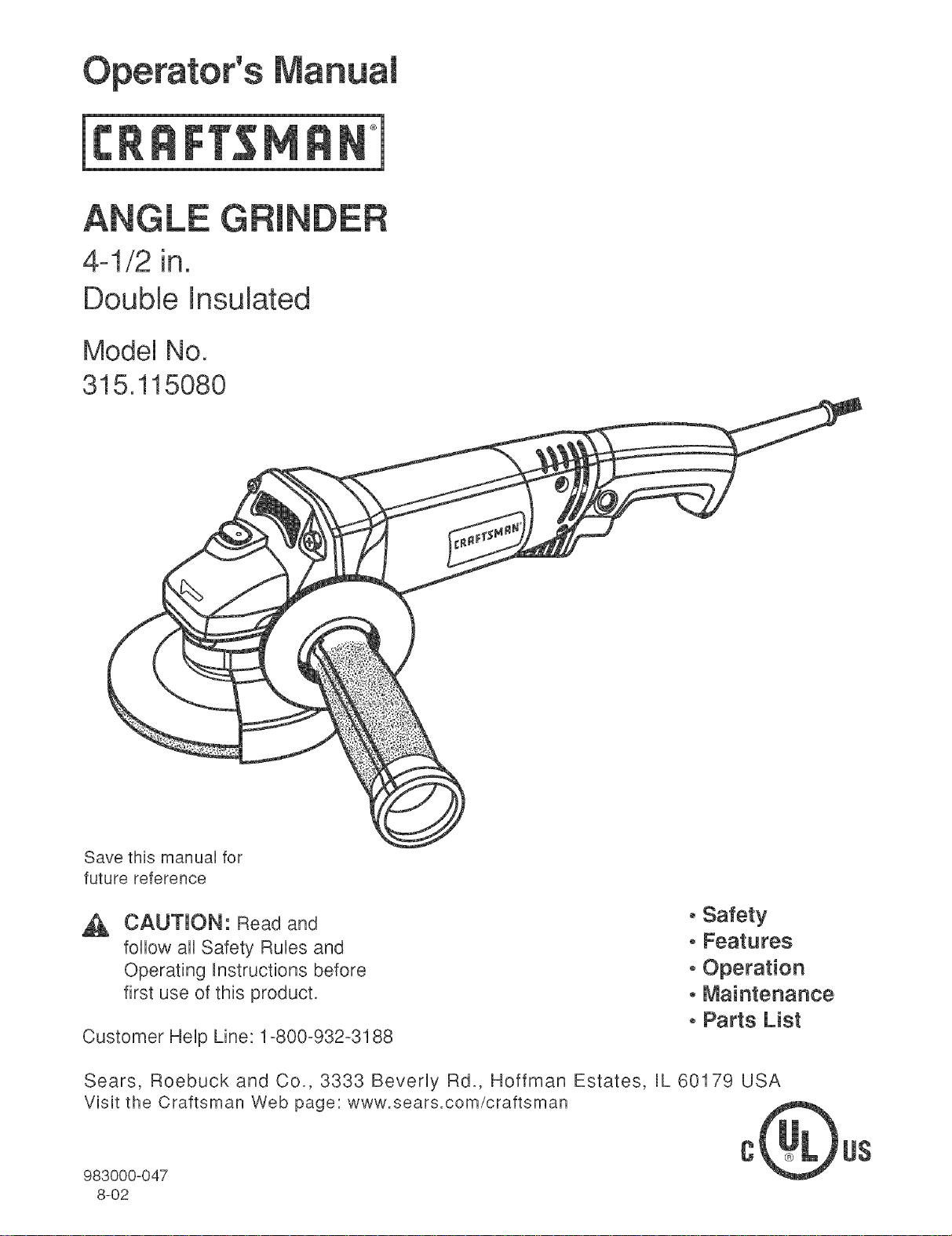
4-1/2 in.
Double Insulated
Model No.
315.115080
Save this manuaU for
future reference
CALJ'[ION: Read and
follow aH Safety RuUes and
Operating hstructions before
first use of this product.
Customer HeUp Line: 1-800-932-3188
oSafety
oFeatures
oOperation
oMaintenance
oParts List
Sears, Roebuck and Co., 3333 Bevedy Rd., Hoffman Estates, RL60179 USA
Visit the Craftsman Web page: www.sears.com/craftsman
983000-047
8-02
US
FULL ONE YEAR WARRANTY ON CRAFT=_MRN ANGLE GRINDER
Ufthis I:RRF'[$MRN Angb Grinder falls to give compbte satisfaction within one year from the date of purchase,
RETURN IT TO THE NEAREST SEARS STORE IN THE UNITED STATES, and Sears will replace it, free of
charge.
Ufthis _:RAFTSMRN Angle Grinder is used for commercial or rental purposes, this warranty applies for only 90
days from the date of purchase.
This warranty gives you specific legal rights, and you may also have other rights which vary from state to state.
Sears, Roebuck and Co., Dept. 817 WA, Hoffman Estates, IL 60179
Your angle grinder has many features for making
grinding operations more pleasant and enjoyable.
Safety, performance and dependability have been
given top priority in the design of this angle grinder
making it easy to maintain and operate.
_ CAUTmON: Carefully read through this entire
operator's manual before using your new angle
grinder. Pay close attention to the Rubs for Safe
Operation, Warnings and Cautions. If you use
your angle grinder properly and only for what it is
intended, you will enjoy years of safe, reliable
service.
Look for this symbol to point out important safety precautions, it means attention!!!
Your safety is involved.
WARNING: The operation of any angle grinder can result in foreign objects being thrown
into your eyes, which can result in severe eye damage. Before beginning power tool
operation, always wear safety goggles or safety glasses with side shields and a full face
shield when needed. We recommend Wide Vision Safety Mask for use over eyeglasses or
standard safety glasses with side shields, available at Sears Retail Stores. Always wear eye
protection which is marked to comply with ANSI Z87.1.
WARNING:ReadandunderstandaH
instructions.FailuretofollowaHinstructions
Hstedbebw,mayresuUtineUectricshock,fire
and/orseriouspersonaUinjury.
WORKAREA
[] Keepyourworkareacleanandwet1tit.CUuttered
benchesanddarkareasinviteaccidents.
[] Donotoperatepowertoolsinexplosiveatmo-
spheres,suchasinthepresenceof flammable
liquids,gases,ordust.PowertooBmaycreate
sparkswhichmayignitethedustorfumes.
[] Keepbystanders,children,andvisitorsaway
whileoperatingapowertool.Distractionscan
causeyoutolosecontrol.
ELECTRICALSAFETY
[] Doubteinsulatedtoolsareequipped with a
poJadzed plug (one blade is wider than the
other). This plug will fit in a poJarized outlet onty
one way. if the ptug does not fit fully in the
outJet, reverse the pJug. If it still does not fit,
contact a qualified electrician to install a polar-
ized outtet. Do not change the plug in any way.
Double insulation _'_ eliminates the need for the
three-wire grounded power cord and grounded
power supply system.
[] Avoid body contact with grounded surfaces, such
as pipes, radiators, ranges, and refrigerators.
There is an increased risk of electric shock if your
body is grounded.
[] Don't expose power tools to rain or wet condio
tions. Water entering a power tool will increase the
risk of electric shock.
[] Do not abuse the cord. Never use the cord to carry
the tooJs or pull the ptug from an outlet. Keep cord
away from heat, oH, sharp edges, or moving parts.
Replace damaged cords immediately. Damaged
cords increase the risk of electric shock.
[] When operating a power tooJ outside, use an out-
door extension cord marked "W-A" or "W'. These
cords are rated for outdoor use and reduce the risk of
electric shock.
PERSONAL SAFETY
[] Stay abrt, watch what you are doing and use
common sense when operating a power tool
Do not use tooJ while tired or under the influo
ence of drugs, alcohoJ, or medication. A moment
of inattention while operating power tools may
result in serious personal injury.
[] Dress properly. Do not wear Joose clothing or
jeweJry. Contain Jong hair. Keep your hair,
clothing, and gloves away from moving parts.
Loose clothes, jewelry, or long hair can be caught in
moving parts.
[] Avoid accidental starting. Be sure switch is off
before pJugging in. Carrying tools with your finger
on the switch or plugging in tools that have the
switch on, invites accidents.
[] Remove adjusting keys or wrenches before
turning the tooJ on. A wrench or a key that is left
attached to a rotating part of the tool may result in
[] Do not overreach. Keep proper footing and
baJance at aH times. Proper footing and balance
enabbs better control of the tool in unexpected
situations. Do not use on a ladder or unstabb
supporL
[] Use safety equipment. AJways wear eye protec-
tion. Dust mask, nonskid safety shoes, hard hat, or
hearing protection must be used for appropriate
conditions.
TOOL USE AND CARE
[] Use clamps or other practicaJ way to secure
and support the workpiece to a stable platform.
Holding the work by hand or against your body is
unstabb and may lead to loss of control.
[] Do not force toot. Use the correct toot for your
application. The correct tool will do the job better
and safer at the rate for which it is designed.
[] Do not use tool if switch does not turn it on or
off. Any tool that cannot be controlbd with the
switch is dangerous and must be repaired.
[] Disconnect the plug from power source before
making any adjustments, changing accesso-
ries, or storing the tool Such preventive safety
measures reduce the risk of starting the tool
accidentally.
[] Store idle tooJs out of the reach of children and
other untrained persons. Tools are dangerous in
the hands of untrained users.
[] Maintain tooJs with care. Keep cutting tools
sharp and clean. Properly maintained tools with
sharp cutting edges are less likely to bind and are
easier to control.
[] Check for misaJignment or binding of moving
parts, breakage of parts, and any other condio
tion that may affect the tooFs operation, if
damaged, have the tool serviced before using.
Many accidents are caused by poorly maintained
tools.
[] Use only accessories that are recommended by
the manufacturer for your model. Accessories
that may be suitable for one tool, may become
hazardous when used on another tool.
SERVICE
[] TooJservicemustbeperformed only by qualio
fled repair personnel. Service or maintenance
performed by unqualified personnel could result in
a risk of injury.
[] When servicing a tooJ, use only identicaJ reo
pJacement parts. Follow instructions in the
Maintenance section of this manual Use of
unauthorized parts or failure to follow Maintenance
hstrucfions may create a risk of eUectricshock or
injury.
[] AJways use proper guard with grinding wheet. A
guard protects operator from broken wheel frag-
ments.
[] Accessories must be rated for at Jeast the
speed recommended on the tool warning JabeL
Wheels and other accessories running over rated
speed carl fly apart and cause injury.
[] HoJd tool by insuJated gripping surfaces when
performing an operation where the cutting toot
may contact hidden wiring or its own cord.
Contact with a "live" wire wiii make exposed metal
parts of the tool "live" and shock the operator.
[] Grinding wheet and guard must be securely
attached as described in this operating manual
before connecting the grinder to a power source.
[] Grinding wheets must be stored in a dry pJace.
[] Before attaching the grinding wheel, inspect it
for visible defects. If cracked, chipped, or warped,
do not install it.
[] Do not overtighten the clamp nut on the grinding
wheek Excessive tightening carl cause the wheel
to crack during operation.
[] l_ake sure that the guard is in good condition
and securely installed before operating grinder.
[] Do not cJamp the grinder in a vise or use as a
fixed grinder.
[] Never turn on the grinder with the grinding wheel
or any rotating parts touching the workpiece.
[] Use only grinding wheets in compliance with
ANSI standard B7.1 and rated greater than 11,000
RPM.
[] Do not use the grinder if the disc flange or
clamp nut is missing or if the spindle is bent.
[] AJways hotd the grinder securely with two
hands while working and at all times when it is
[] Never cover the air vents in the motor housing
with your hands while operating the grinder.
[] Notd the tooJ away from your body while it is
running. Keep your hands away from the abrasive
attachments.
[] Dust and waste materials should not be
allowed to build up in the workshop. Hot metal
sparks could start a fire.
[] Do not enJarge or alter the center hote of the
grinding wheel as this could result in breaking it.
[] Use onty the normaJ grinder surface. Never use
the side or upper surfaces for cutting.
[] Keep the toot and its handte dry, cJean, and
free from oit and grease. Always use a clean
cloth when cleaning. Never use brake fluids,
gasoline, petrobum-based products, or any strong
solvents to clean your tool.
[] Knowyourpower tool Read operator's manuaJ
carefully. Learn its applications and Hmitations,
as well as the specific potential hazards retated
to this tool Following this rub wHUreduce the risk
of eUectricshock, fire, or serious injury.
[] AJways wear safety gJasses. Everyday eye°
glasses have onJy impact-resistant tenses; they
are NOT safety gJasses. Following this rule will
reduce the risk of serious personal injury.
[] Protect your tungs. Wear a face or dust mask if
the operation is dusty. Following this rule will
reduce the risk of serious personal injury.
[] Protect your hearing. Wear hearing protection
during extended periods of operation. Following
this rule will reduce the risk of serious personal
injury.
[] mnspect tool cords periodically and, if damaged,
have repaired at your nearest authorized sero
vice center. Constantly stay aware of cord
location. Following this rule will reduce the risk of
electric shock or fire.
[] Check damaged parts. Before further use of the
too!, a guard or other part that is damaged
shouJd be carefully checked to determine that it
wilt operate property and perform its intended
function. Check for alignment of moving parts,
binding of moving parts, breakage of parts,
mounting, and any other conditions that may
affect its operation. A guard or other part that is
damaged should be property repaired or reo
placed by an authorized service center. Follow-
ing this rule will reduce the risk of shock, fire, or
serious injury.
[] Do not abuse cord. Never carry the tooJ by the
cord or yank it to disconnect it from the recepo
tacJe. Keep cord away from heat, oiJ, and sharp
edges. Following this rule will reduce the risk of
electric shock or fire.
[] Make sure your extension cord is in good
condition. When using an extension cord, be
sure to use one heavy enough to carry the
current your product will draw. A wire gage size
(A.W.G.) of at Jeast 1{} is recommended for an
extension cord 100 feet or Jess in Jength. A cord
exceeding 100 feet is not recommended. If in
doubt, use the next heavier gage. The smaller
the gage number, the heavier the cord. An
undersized cord will cause a drop in line voltage
resulting in loss of power and overheating.
[] inspect for and remove aH naris from tumber
before grinding. Following this rule will reduce the
risk of serious personal injury.
[] Drugs, alcohol, medication. Do not operate tool
while under the influence of drugs, alcohol, or
any medication. Following this rule will reduce the
risk of electric shock, fire, or serious personal injury.
[] Keep hands away from grinding area. Following
this rule will reduce the risk of serious personal
injury.
[] Save these instructions. Refer to them freo
quently and use them to instruct others who
may use this tool. If you loan someone this toot,
toan them these instructions also.
WARNING: Some dust created by power
sanding, sawing, grinding, drilling, and other
construction activities contains chemicals known
to cause cancer, birth defects or other
reproductive harm. Some examples of these
chemicals are:
" lead from lead-based paints
" crystalline silica from bricks and cement and
other masonry products, and
" arsenic and chromium from chemically-
treated lumber.
Your risk from these exposures varies,
depending on how often you do this type of work.
To reduce your exposure to these chemicals:
work in a well ventilated area, and work with
approved safety equipment, such as those dust
masks that are specially designed to filter out
microscopic particles.
important: Some of the following symbols may be used on your tool. Please study them and barn their meaning.
Proper interpretation of these symbols wiii allow you to operate the tool better and safer.
SYMBOL NAME DESmGNATmON/EXPLANATmON
Voltage
Current
Frequency (cycles per second)
Power
Time
Type or a characteristic of current
Rotational speed, at no load
Designates double-insulated
construction tools
V
A
Hz
W
min
n o
Volts
Amperes
Hertz
Watt
Minutes
Alternating Current
No Load Speed
Class HConstruction
._/min Revolutions or Reciprocation Per Minute Revolutions, strokes, surface speed,
orbits etc. per minute
Safety Alert
Wet Conditions Alert
Undicates danger, warning or caution.
Utmeans attention!!! Your safety is
involved.
Do not expose to rain or use in damp
locations.
The purpose of safety symbols is to attract your attention to possible dangers. The safety symbols, and the
explanations with them, deserve your careful attention and understanding. The safety warnings do not by
themselves eliminate any danger. The instructions or warnings they give are not substitutes for proper accident
prevention measures.
SYMBOL MEANmNG
DANGER: Failure to obey a safety warning will result in serious injury to yourself or toothers. Always
follow the safety precautions to reduce the risk of fire, electric shock and personal injury.
WARNmNG: Failure to obey a safety warning can result in serious injury to yourself or to others.
Always follow the safety precautions to reduce the risk of fire, electric shock and personal injury.
CAU'NON: Failure to obey a safety warning may result in property damage or personal injury to
yourself or to others. Always follow the safety precautions to reduce the risk of fire, electric shock and
personal injury.
NOTE: Advises you of information or instructions vital to the operation or maintenance of the equipment.
SAVE THESE iNSTRUCTiONS
Grinding WheeUCapacity
Rating
No Load Speed
Amps
Net Weight
4-1/2 in,
120 VOLTS, 60 HZ, AC ONLY
11,000 RPM
6,5
4.6 Ubs.
iNSTRUCTIONS
With the exception of the side handb and accessory
wheeB, your angb grinder has been shipped
[] Carefully remove the grinder and accessories from
the box. Make sure that aHitems Hsted in the
packing Hstare included.
[] Unspect grinder carefully to make sure no breakage
or damage has occurred during shipping.
[] Do not discard the packing materiaU until you have
carefully inspected and satisfactorily operated
grinder.
PACKING LiST
Angb Grinder with Guard
Grinding Wheel (1)
Side Handle
Wrench
Operator's Manual
,_ WARNING: If any parts are missing, do not
operate this tool until the missing parts are
replaced. Failure to do so could result in possible
serious personal injury.
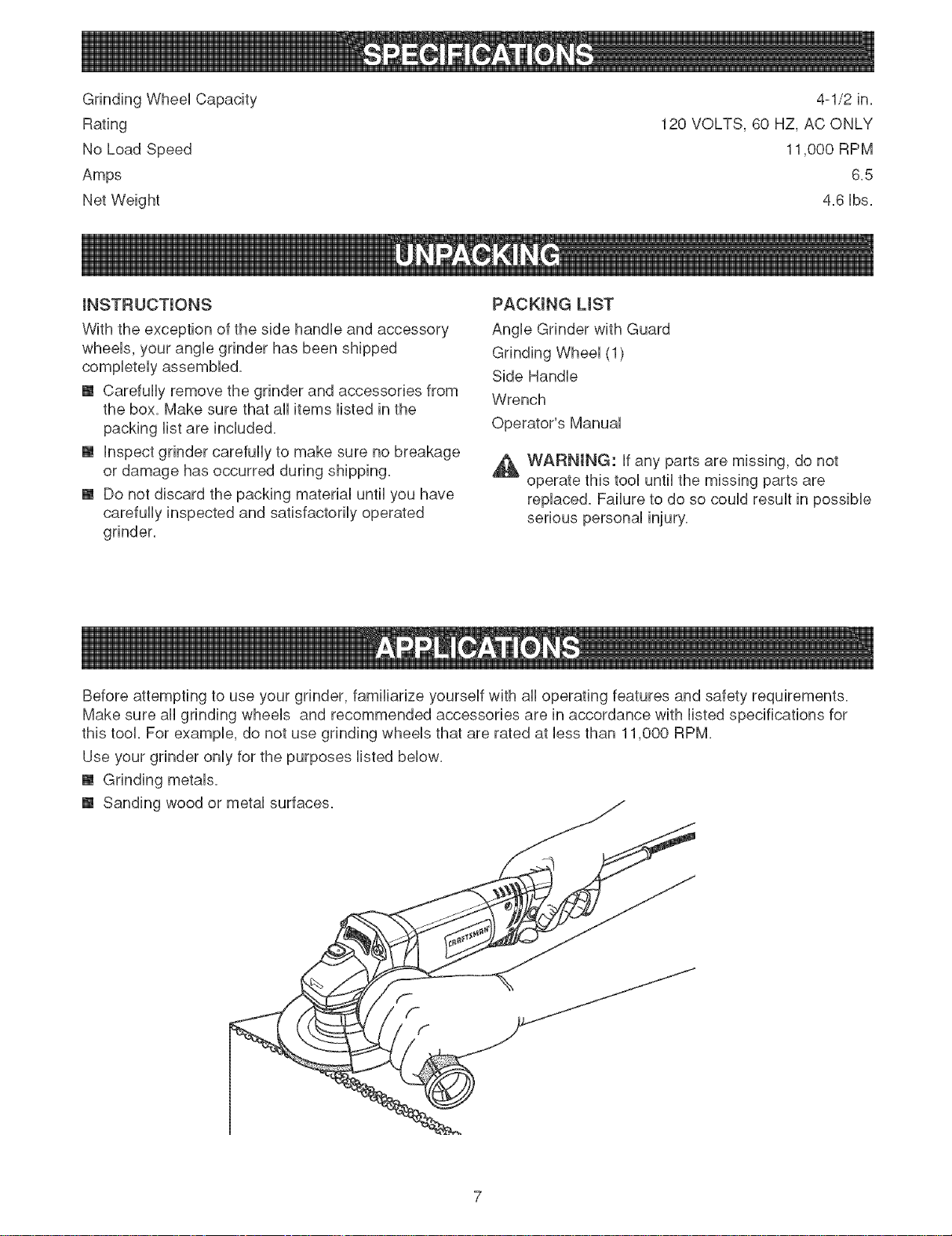
Before attempting to use your grinder, familiarize yourself with all operating features and safety requirements.
Make sure all grinding wheels and recommended accessories are in accordance with listed specifications for
this tool. For example, do not use grinding wheels that are rated at less than 11,000 RPM.
Use your grinder only for the purposes listed below.
[] Grinding metals.
[] Sanding wood or metal surfaces.
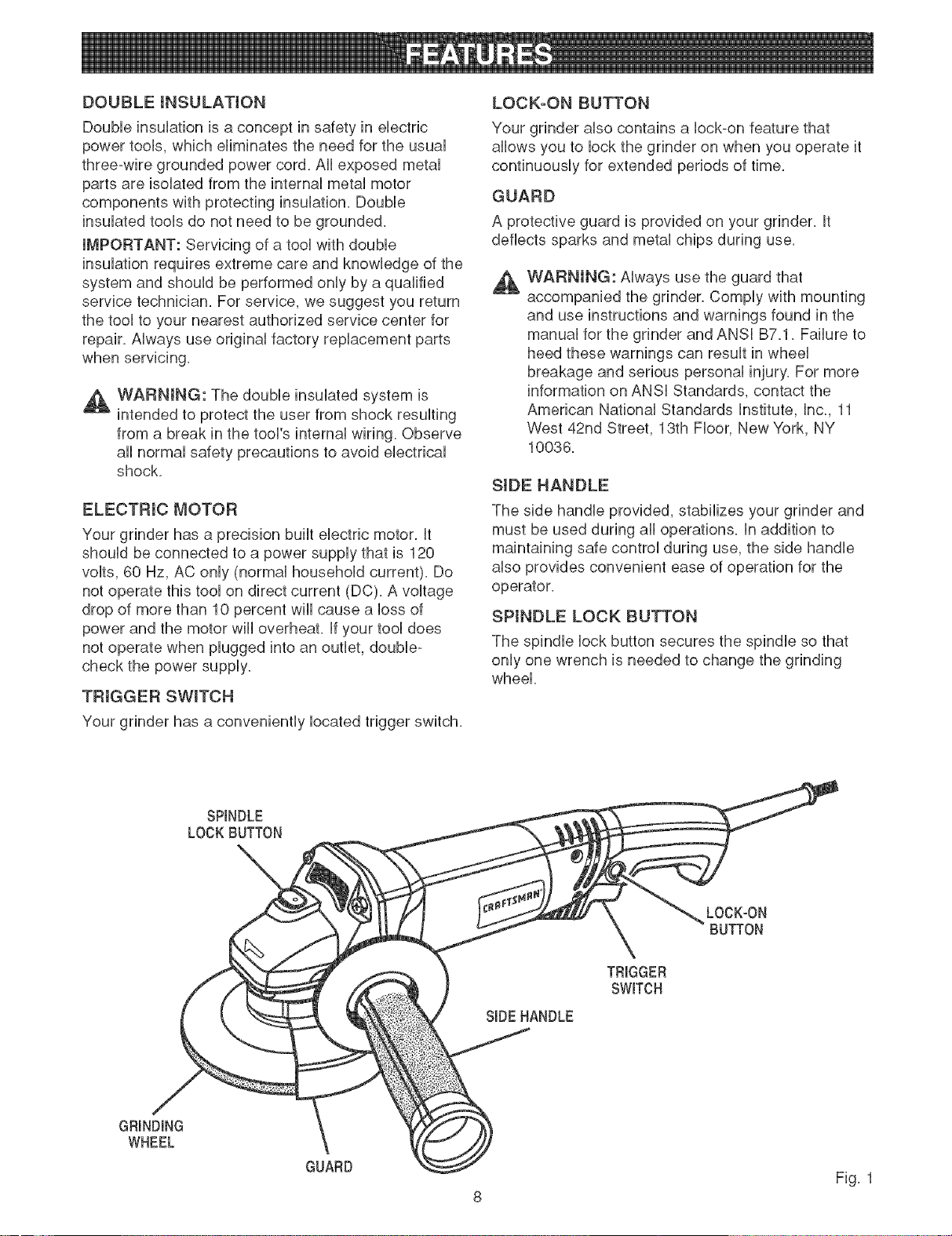
DOUBLEINSULATION
Doubleinsulationisaconceptinsafetyinelectric
powertools,whicheliminatestheneedfortheusual
three-wiregroundedpowercord.Allexposedmetal
partsareisolatedfromtheinternalmetalmotor
componentswithprotectinginsulation.Double
insulatedtoolsdonotneedtobegrounded.
IMPORTANT:Servicingofatoolwithdouble
insulationrequiresextremecareandknowledgeofthe
systemandshouldbeperformedonlybyaqualified
servicetechnician.Forservice,wesuggestyoureturn
thetooltoyournearestauthorizedservicecenterfor
repair.Alwaysuseoriginalfactoryreplacementparts
whenservicing.
,_ WARNING: The double insulated system is
intended to protect the user from shock resulting
from a break in the tool's internal wiring. Observe
all normal safety precautions to avoid electrical
shock.
ELECTRIC MOTOR
Your grinder has a precision built electric motor. It
should be connected to a power supply that is 120
volts, 60 Hz, AC only (normal household current). Do
not operate this tool on direct current (DC). A voltage
drop of more than 10 percent will cause a loss of
power and the motor will overheat. If your tool does
not operate when plugged into an outlet, double-
check the power supply.
TRIGGER SWITCH
Your grinder has a conveniently located trigger switch.
LOCK-ON BUTTON
Your grinder also contains a lock-on feature that
allows you to lock the grinder on when you operate it
continuously for extended periods of time.
GUARD
A protective guard is provided on your grinder. It
deflects sparks and metal chips during use.
,A
WARNING: Always use the guard that
accompanied the grinder. Comply with mounting
and use instructions and warnings found in the
manual for the grinder and ANSI B7.1. Failure to
heed these warnings can result in wheel
breakage and serious personal injury. For more
information on ANSI Standards, contact the
American National Standards Institute, Inc., 11
West 42nd Street, 13th Floor, New York, NY
10036.
SIDE HANDLE
The side handle provided, stabilizes your grinder and
must be used during all operations. In addition to
maintaining safe control during use, the side handle
also provides convenient ease of operation for the
operator.
SPINDLE LOCK BUTTON
The spindle lock button secures the spindle so that
only one wrench is needed to change the grinding
wheel.
SPINDLE
LOCKBUTTON
LOCK-ON
BUTTON
SIDEHANDLE
TRIGGER
SWITCH
GRINDING
WHEEL
GUARD
Fig. 1
8
WARNING:YourgrindershouUdneverbe
connectedtopowersuppUywhenyouare
assemblingparts,makingadjustments,installing
orrepUacingaccessorywheeB,cbaning,orwhen
notinuse,DisconnectingthegrinderwHUprevent
accidentaUstartingthatcouUdcauseserious
personaUinjury,
JNSTALUNGSiDEHANDLE
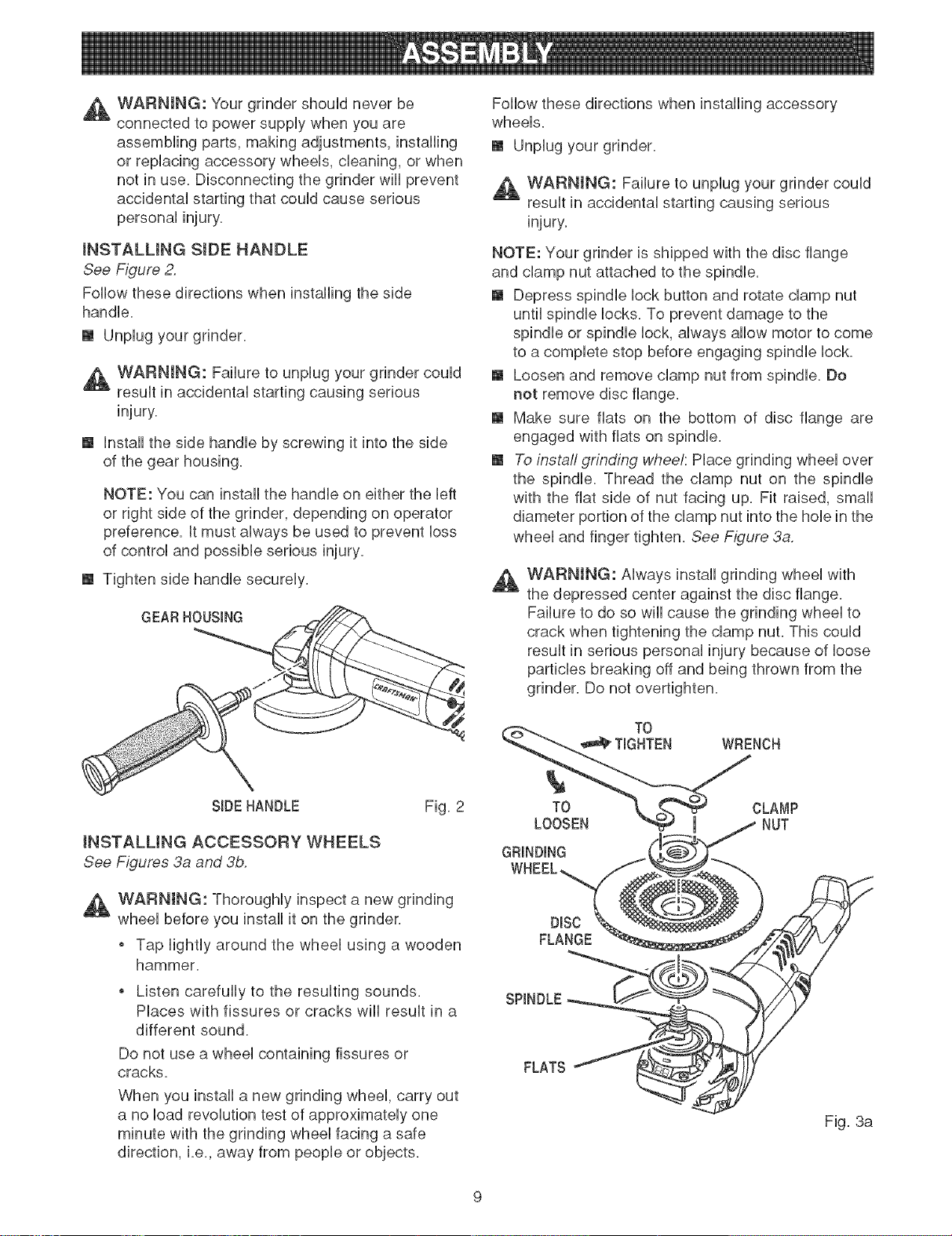
See Figure 2.
Follow these directions when installing the side
handle.
[] Unplug your grinder.
WARNING: Failure to unplug your grinder could
result in accidental starting causing serious
[] Unstallthe side handle by screwing it into the side
of the gear housing.
NOTE: You can install the handle on either the left
or right side of the grinder, depending on operator
preference. It must always be used to prevent loss
of control and possible serious injury.
[] Tighten side handle securely.
GEARHOUSING
SIDEHANDLE Fig. 2
iNSTALLiNG ACCESSORY WHEELS
See Figures 3a and 3b.
,_ WARNING: Thoroughly inspect a new grinding
wheel before you install it on the grinder.
o Tap lightly around the wheel using a wooden
hammer.
o Listen carefully to the resulting sounds.
Places with fissures or cracks will result in a
different sound.
Do not use a wheel containing fissures or
cracks.
When you install a new grinding wheel, carry out
a no load revolution test of approximately one
minute with the grinding wheel facing a safe
direction, i.e., away from people or objects.
Follow these directions when installing accessory
wheels.
[] Unplug your grinder.
WARNING: Failure to unplug your grinder could
result in accidental starting causing serious
injury.
NOTE: Your grinder is shipped with the disc flange
and clamp nut attached to the spindle.
[] Depress spindle lock button and rotate clamp nut
until spindle locks. To prevent damage to the
spindle or spindle lock, always allow motor to come
to a complete stop before engaging spindle lock.
[] Loosen and remove clamp nut from spindle. Do
not remove disc flange.
[] Make sure fiats on the bottom of disc flange are
engaged with fiats on spindle.
[] To instaii grinding whee/: Place grinding wheel over
the spindle. Thread the clamp nut on the spindle
with the fiat side of nut facing up. Fit raised, small
diameter portion of the clamp nut into the hob in the
wheel and finger tighten. See Figure 3a.
WARNING: Always install grinding wheel with
the depressed center against the disc flange.
Failure to do so will cause the grinding wheel to
crack when tightening the clamp nut. This could
result in serious personal injury because of loose
particles breaking off and being thrown from the
grinder. Do not overtighten.
TO
_a_ TIGHTEN WRENCH
TO
LOOSEN
GRINDING
WHEEL,
DBC
FLANGE
CLAMP
NUT
Fig. 3a
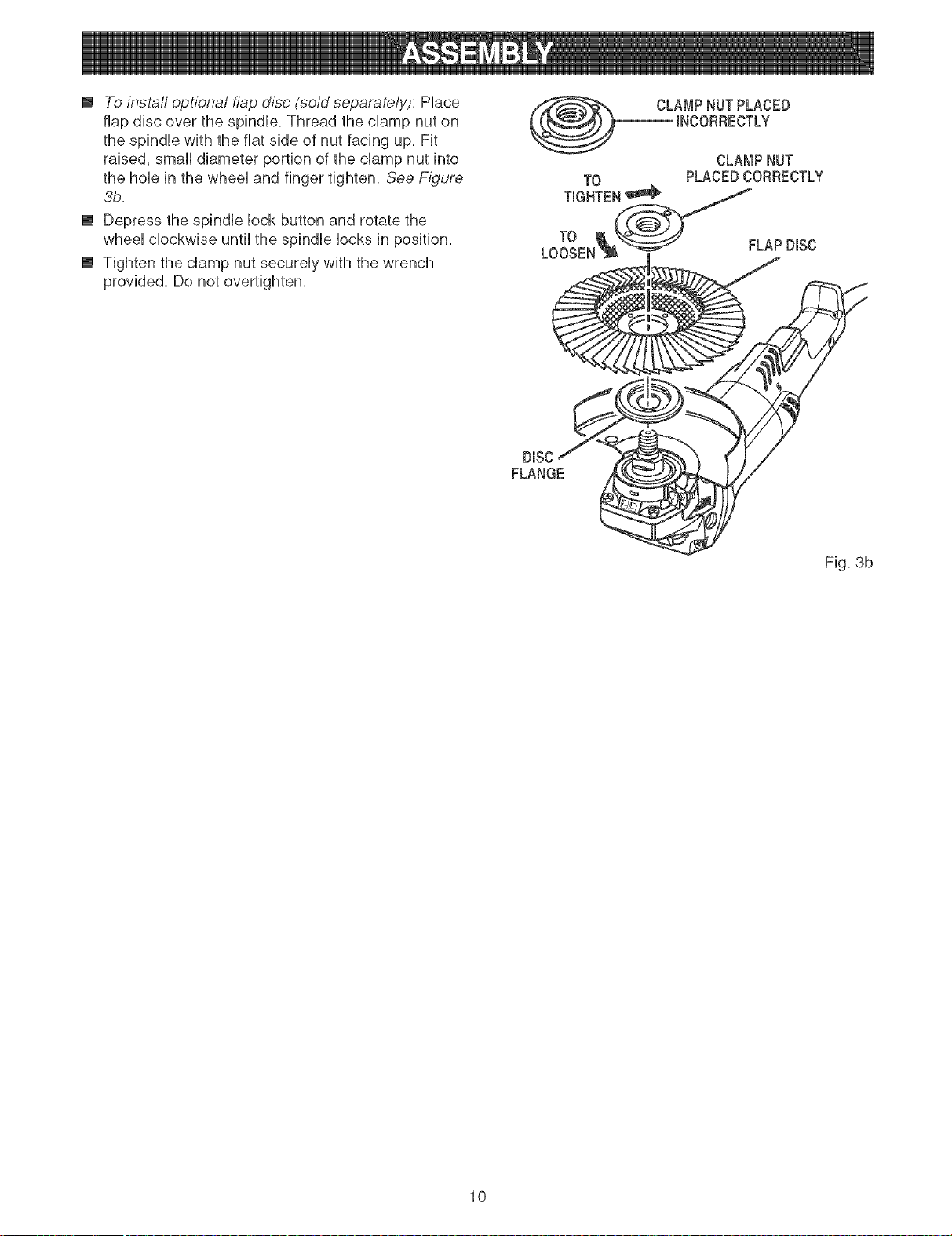
[] To install optional flap disc (sold separately): PHace
flap disc over the spindHe.Thread the champ nut on
the spindHe with the fiat side of nut facing up. Fit
raised, smaHHdiameter portion of the champ nut into
the hoHein the wheeHand finger tighten. See Figure
3b.
[] Depress the spindHe Hockbutton and rotate the
wheeH cHockwise unfiHthe spindHe Hocksin position.
[] Tighten the champ nut secureHy with the wrench
provided. Do not overfighten.
(_ CLAMPNUTPLACED
INCORRECTLY
CLAMPNUT
TO PLACEDCORRECTLY
TIGNTE_
LoToOEN__ / FLAPD,SC
DiSC
FLANGE
Fig. 3b
10
_ WARNmNG:Beforeconnectingyourgrinderto
powersupply,alwayschecktobesureswitchis
notintockoonposition.Failuretodosocould
resultinaccidentalstartingofyourgrinder
resultinginpossibleseriousinjury.
ADJUSTINGGUARD
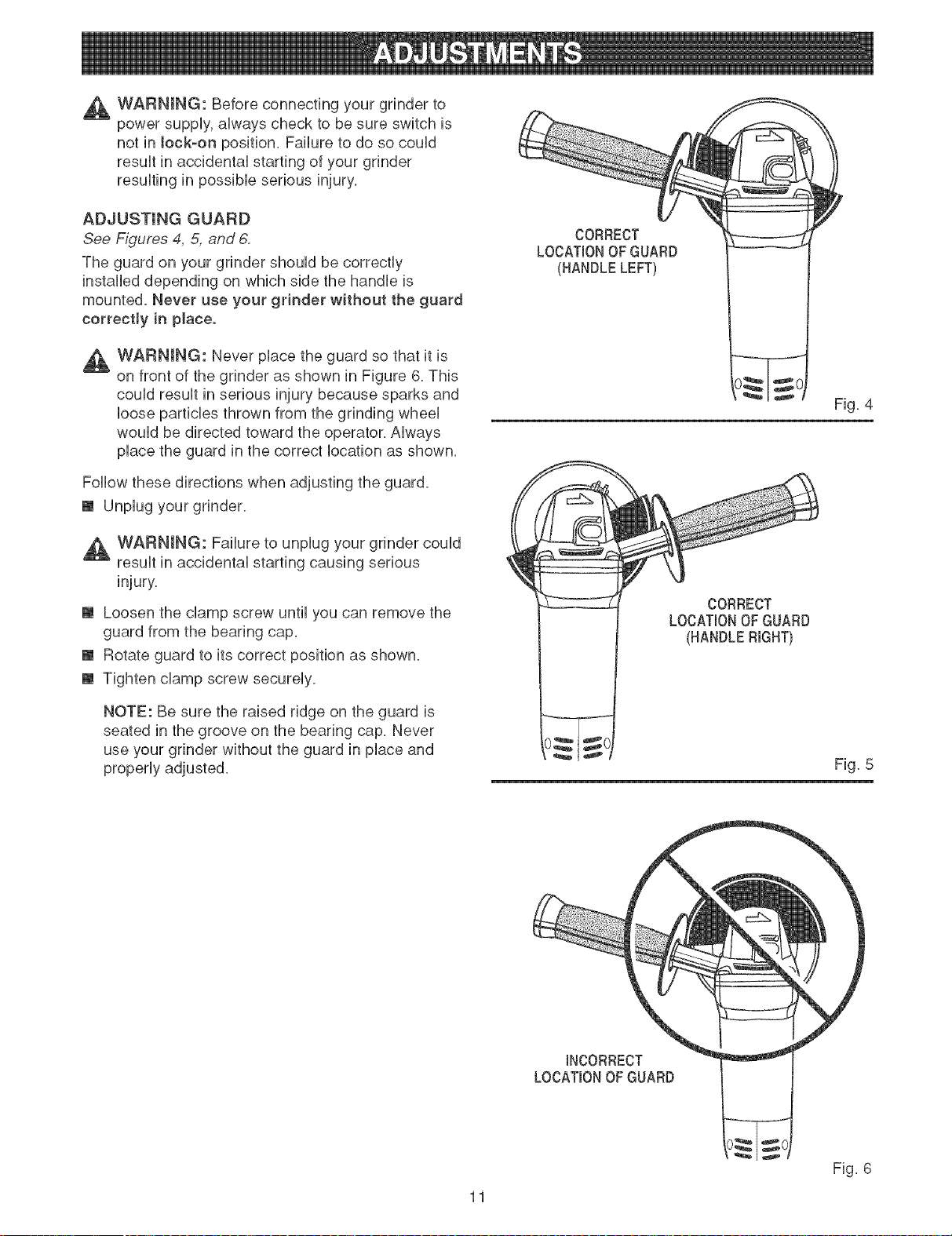
See Figures 4, 5, and 6,
The guard on your grinder should be correctly
installed depending on which side the handle is
mounted. Never use your grinder without the guard
correctly in pJace.
_ WARNING: Never place the guard so that it is
on front of the grinder as shown in Figure 6. This
could result in serious injury because sparks and
loose particles thrown from the grinding wheel
would be directed toward the operator. Always
place the guard in the correct location as shown.
Follow these directions when adjusting the guard.
[] Unplug your grinder.
,_ WARNING: Failure to unplug your grinder could
result in accidental starting causing serious
[] Loosen the clamp screw until you can remove the
guard from the bearing cap.
[] Rotate guard to its correct position as shown.
[] Tighten clamp screw securely.
NOTE: Be sure the raised ridge on the guard is
seated in the groove on the bearing cap. Never
use your grinder without the guard in place and
CORRECT
LOCATIONOFGUARD
(HANDLELEFT)
CORRECT
LOCATIONOFGUARD
(HANDLERIGHT)
Fig. 4
Fig. 5
11
INCORRECT__
LOCATIONOFGUARD 1
Fig. 6
,_ WARNING:Followtheserubswhenusingyour
grinder.
Alwayswearsafetyglassesandkeepguard
inplacewhengrinding.
o Hotmetalsparksfrommetalgrindingcan
causeafire.Avoidsparkcontactwith
flammablematerialssuchassawdustor
clothing.
o Grindingwheelsmustbefreeoffissuresand
cracks.Fissuresandcrackscancausea
grindingwheeltoshatterresultingin pos-
sibleseriousinjury.
_ DANGER:Neverattachawoodcuttingor
carvingbladeofanytypetothisanglegrinder.It
isonlydesignedforgrindingandsanding.Use
foranyotherpurposeisnotrecommendedand
createsahazard,whichwiiiresultinserious
,_ WARNING: Do not attempt to operate this tool
until you have read thoroughly and understand
completely all instructions, safety rubs, etc.
contained in this manual. Failure to comply can
result in accidents involving fire, electric shock,
or serious personal injury. Save operator's
manual and review frequently for continuing safe
operation, and instructing others who may use
this took
STARTmNG/STOPPmNG GRINDER
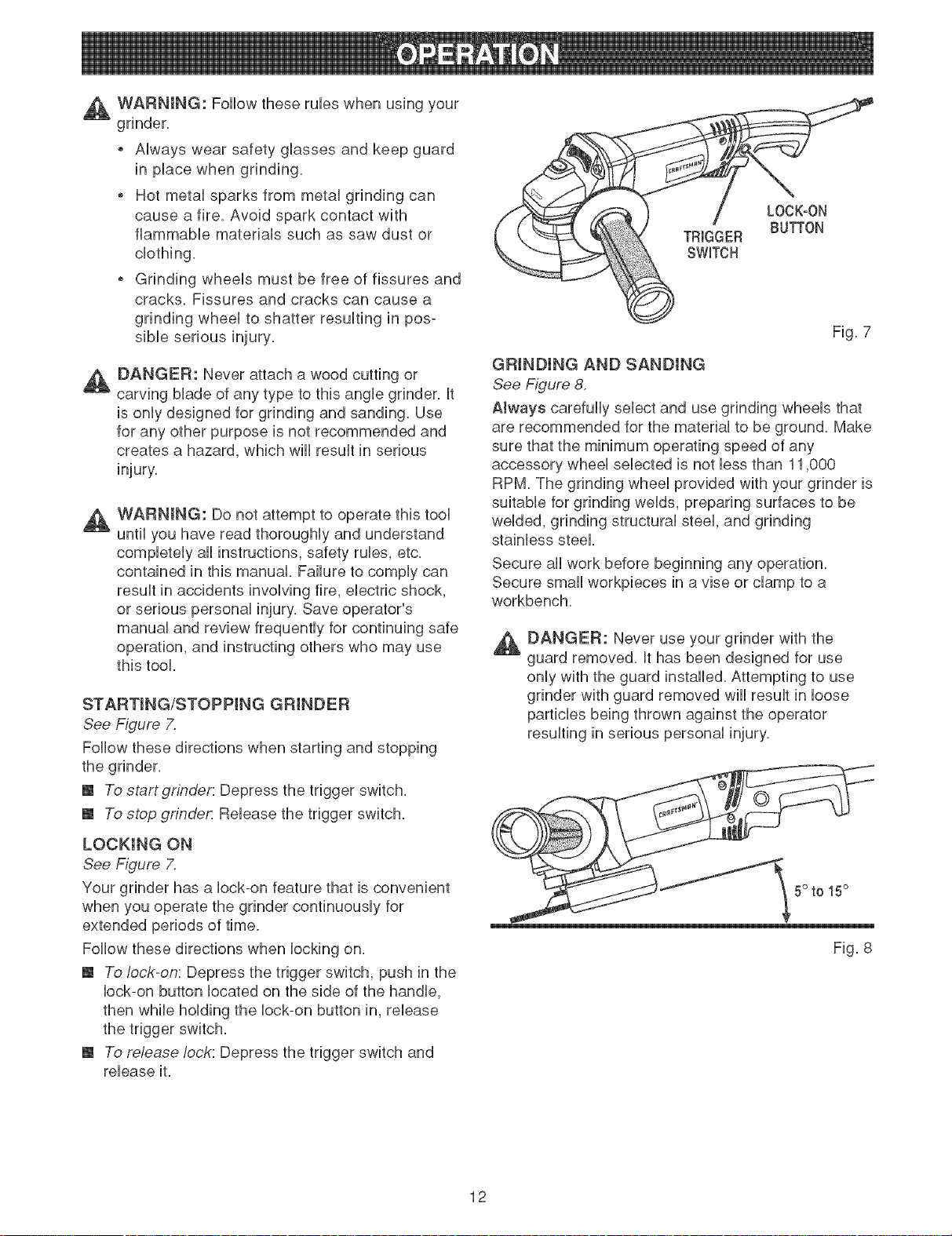
See Figure X
Follow these directions when starting and stopping
the grinder.
[] To start grinder: Depress the trigger switch.
[] To stop grindet_ Release the trigger switch.
LOCKING ON
See Figure 7.
Your grinder has a lock-on feature that is convenient
when you operate the grinder continuously for
extended periods of time.
Follow these directions when locking on.
[] To lock-on: Depress the trigger switch, push in the
lock-on button located on the side of the handle,
then while holding the lock-on button in, release
the trigger switch.
[] To release lock: Depress the trigger switch and
release it.
LOCK-ON
BUTTON
TRIGGER
SWITCH
Fig. 7
GRINDING AND SANDING
See Figure 8.
AJways carefully select and use grinding wheels that
are recommended for the material to be ground. Make
sure that the minimum operating speed of any
accessory wheel selected is not less than 11,BOO
RPM The grinding wheel provided with your grinder is
suitable for grinding welds, preparing surfaces to be
welded, grinding structural steel, and grinding
stainless steel
Secure all work before beginning any operation.
Secure small workpieces in a vise or clamp to a
workbench.
_ DANGER: Never use your grinder with the
guard removed. It has been designed for use
only with the guard installed. Attempting to use
grinder with guard removed will result in loose
particles being thrown against the operator
resulting in serious personal injury.
5° to 15°
Fig. 8
12
Thekeytoefficientoperationbeginsbycontrollingthe
pressureandsurfacecontactbetweenthegrinding
wheeUandworkpiece,FUatsurfacesaregroundatan
acuteangUe,normallybetween5to15degrees,
FormaximumcontroU,hoUdthegrinderinfrontand
awayfromyouwithbothhands,keepingthegrinding
wheeUdearoftheworkpiece,Startyourgrinderand
UetthemotorandgrindingwheeUbuilduptofullspeed,
GraduallyUowergrinderuntilthegrindingwheeU
contactstheworkpiece,
ForbestresuUtskeepthegrinderflutedatanangUe
from5to 15degreesandconfinuousUymovingata
steady,consistentpace,Movethegrinderbackand
forthorupanddownovertheworkarea,Keepthe
grindermovingsothatanexcessiveamountof
materiaUisnotremovedfromonearea,Rfthegrinder
isheldinonespottoolong,itwillgougeandcut
groovesintheworkpiece,Ifthegrinderis heldattoo
sharpanangle,itwillalsogougetheworkpiece
becauseofconcentrationofpressureona smallarea,
Usejustenoughpressuretokeepthegrinderfrom
chatteringorbouncing,Heavypressurewilldecrease
itsspeedandputastrainonthemotor,Normallythe
weightofthetoolaloneisadequateformostgrinding
jobs,Uselightpressurewhengrindingjaggededges
orlooseboltswherethereisthepotentialforthe
grindertosnagonthemetaledge,
Liftthegrinderawayfromtheworkpiecebefore
turningyourgrinderoff,
13
A WARNING:WhenservicinguseonUyidenficaU
CraftsmanrepUacementparts.Useofanyother
partsmaycreateahazardorcauseproduct
damage.
GENERAL
AvoidusingsoUventswhenchartingpUastbparts.
MostpUastbsaresuscepfiMetodamagefromvarious
typesofcommerdaUsoUventsandmaybedamaged
bytheiruse.Usedeanclothstoremovedirt,carbon
dust,etc.
,_ WARNmNG: Do not at any time Uetbrake fluids,
gasoline, petrobum-based products, penetrating
oils, etc. come in contact with pUastb parts. They
contain chemicaB that can damage, weaken, or
destroy pUasfic.
LUBRICATION
AHof the bearings in this tooUare Uubrbated with a
sufficient amount of high grade hJbricant for the life of
the unit under normal operating conditions. Therefore,
no further hJbrication is required.
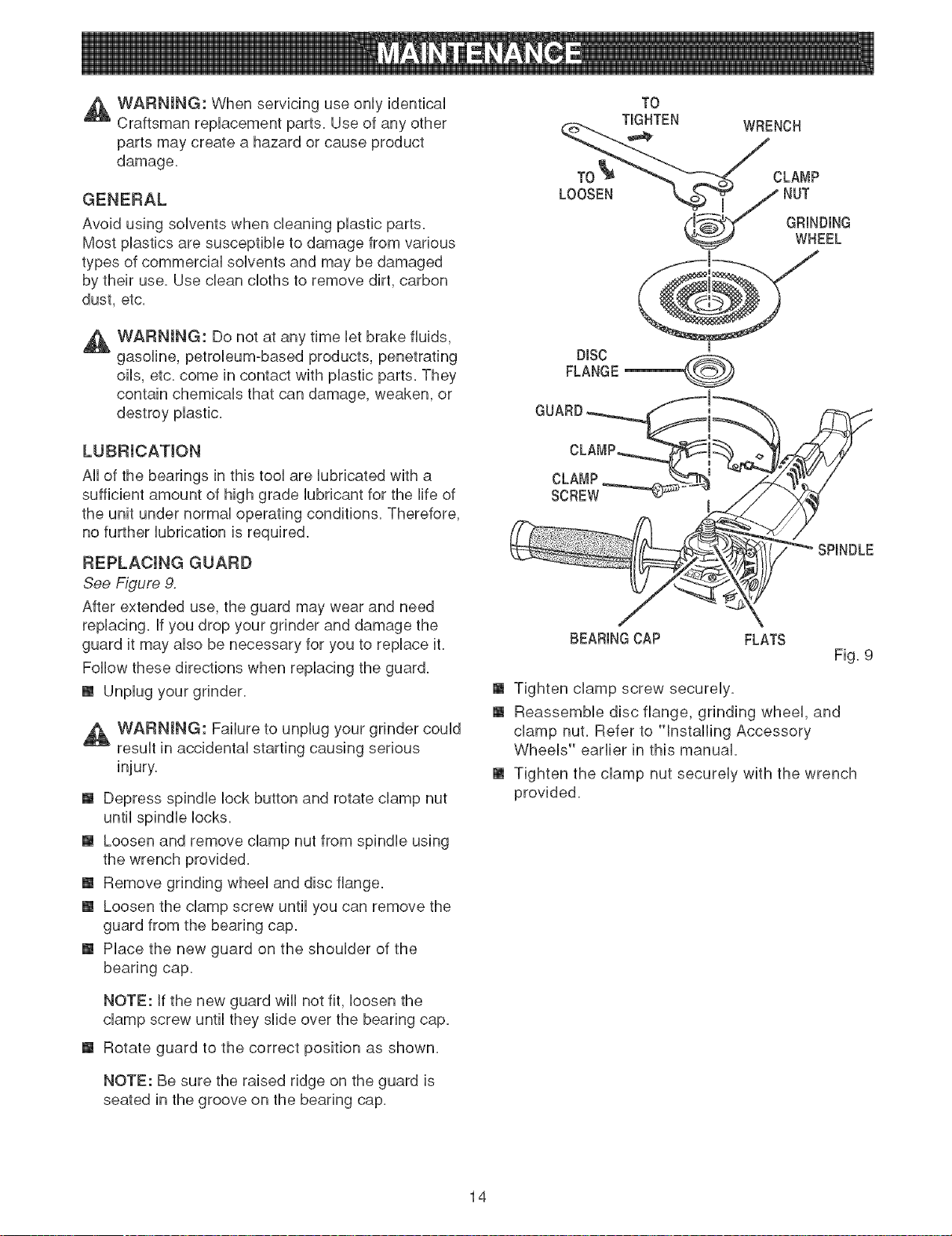
REPLACmNG GUARD
See Figure 9.
After extended use, the guard may wear and need
replacing. If you drop your grinder and damage the
guard it may also be necessary for you to replace it.
Follow these directions when replacing the guard.
[] Unplug your grinder.
,A WARNING: Failure to unplug your grinder could
result in accidental starting causing serious
[] Depress spindle lock button and rotate clamp nut
until spindle locks.
[] Loosen and remove clamp nut from spindle using
the wrench provided.
[] Remove grinding wheel and disc flange.
[] Loosen the clamp screw until you can remove the
guard from the bearing cap.
[] Place the new guard on the shoulder of the
bearing cap.
NOTE: If the new guard will not fit, loosen the
clamp screw until they slide over the bearing cap.
[] Rotate guard to the correct position as shown.
NOTE: Be sure the raised ridge on the guard is
seated in the groove on the bearing cap.
TO
TIGHTEN
WRENCH
CLA_IP
GRINDING
WHEEL
DISC
FLANGE
GUARD
CLAMP
SCREW
SPINDLE
BEARINGCAP FLATS
Fig. 9
[] Tighten clamp screw securely.
[] Reassemble disc flange, grinding wheel, and
clamp nut. Refer to °qnstalling Accessory
Wheels" earlier in this manual.
[] Tighten the clamp nut securely with the wrench
provided.
14
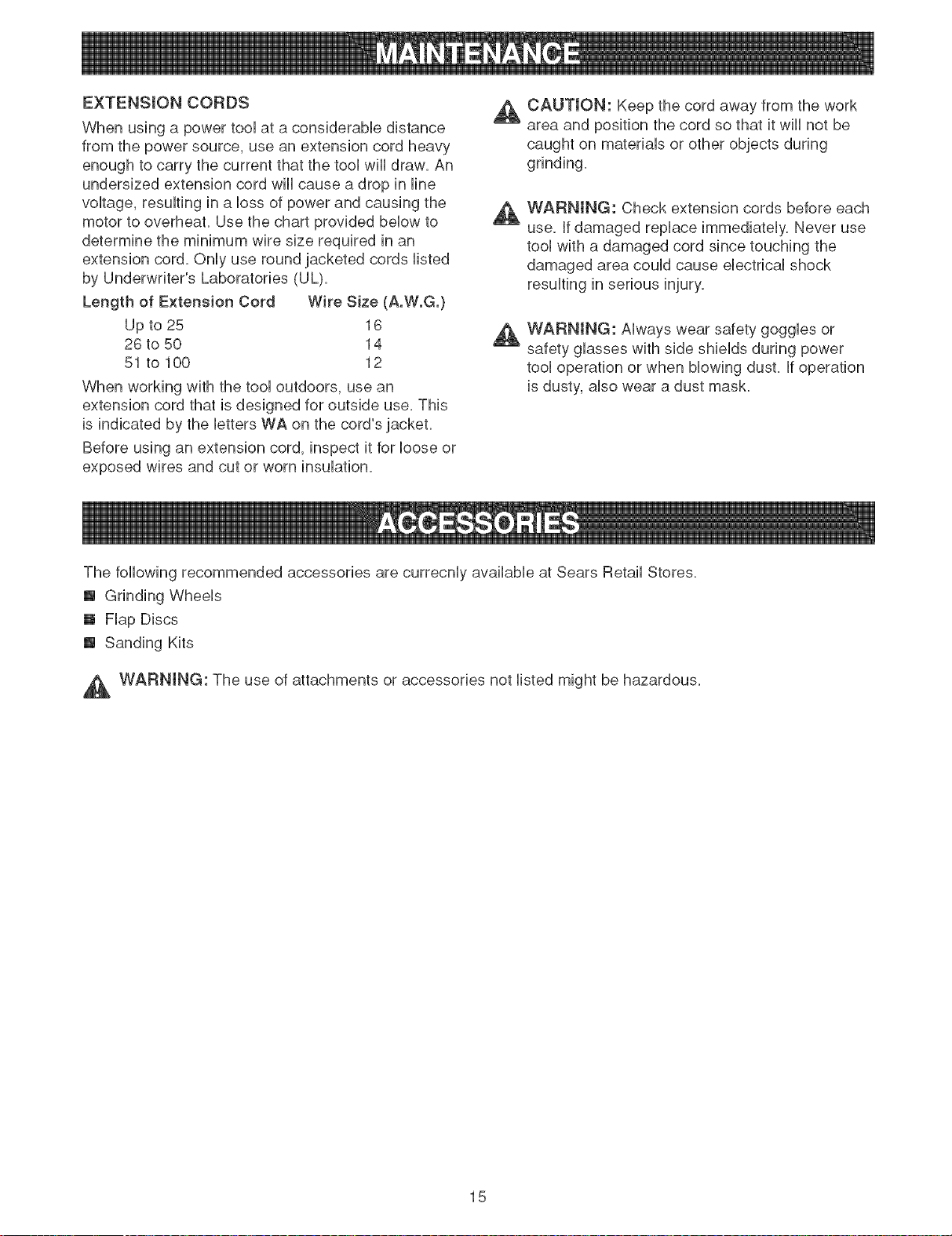
EXTENSIONCORDS _,
Whenusingapowertooiataconsiderabiedistance
fromthepowersource,useanextensioncordheavy
enoughtocarrythecurrentthatthetooiwHidraw.An
undersizedextensioncordwHicauseadropinHne
voitage,resuifinginaHessofpowerandcausingthe
A
motortooverheat.Usethechartprovidedbelowto
determinetheminimumwiresizerequiredinan
extensioncord.Onlyuseroundjacketedcordslisted
byUnderwriter'sLaboratories(UL).
Lengthof ExtensionCord WireSize(A.W.G.)
Upto25 16
A
26to50 14
51to100 12
Whenworkingwiththetooioutdoors,usean
extensioncordthatisdesignedforoutsideuse.This
isindicatedbytheiettersWAonthecord'sjacket.
Beforeusinganextensioncord,inspectitforboseor
exposedwiresandcutorworninsulafion.
CAUTmON:Keepthecordawayfromthework
areaandpositionthecordsothatitwHHnotbe
caughtonmateriaisorotherobjectsduring
grinding.
WARNING:Checkextensioncordsbeforeeach
use.Ifdamagedreplaceimmediately.Neveruse
toolwithadamagedcordsincetouchingthe
damagedareacouldcauseelectricalshock
resultinginseriousinjury.
WARNmNG:Alwayswearsafetygogglesor
safetyglasseswithsideshieldsduringpower
tooloperationorwhenblowingdust.Ifoperation
isdusty,alsowearadustmask.
ThefollowingrecommendedaccessoriesarecurrecnlyavailableatSearsRetailStores.
[] GrindingWheels
[] FlapDiscs
[] SandingKits
,_ WARNING:Theuseofattachmentsoraccessoriesnotlistedmightbehazardous.
15
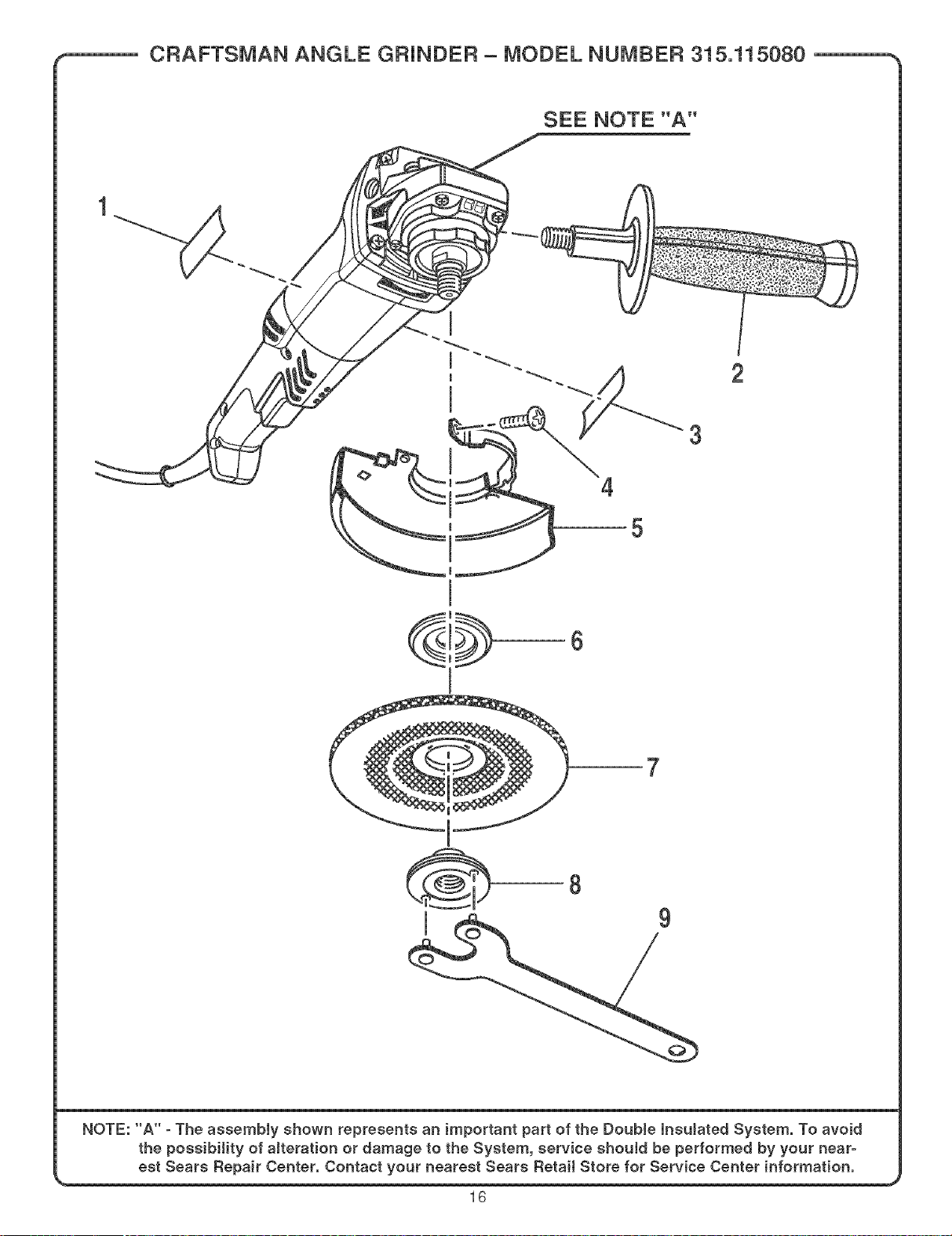
CRAFTSMAN ANGLE GFiJNDER - MODEL NUMBER 315.115080
SEE NOTE'A"
3
2
4
5
7
NOTE: "A" oThe assembJy sSown represents an important part of the Double lnsuJated System. To avoid
the possibility of alteration or damage to the System, service shouJd be performed by your near-
est Sears Repair Center. Contact your nearest Sears Retail Store for Service Center information.
16
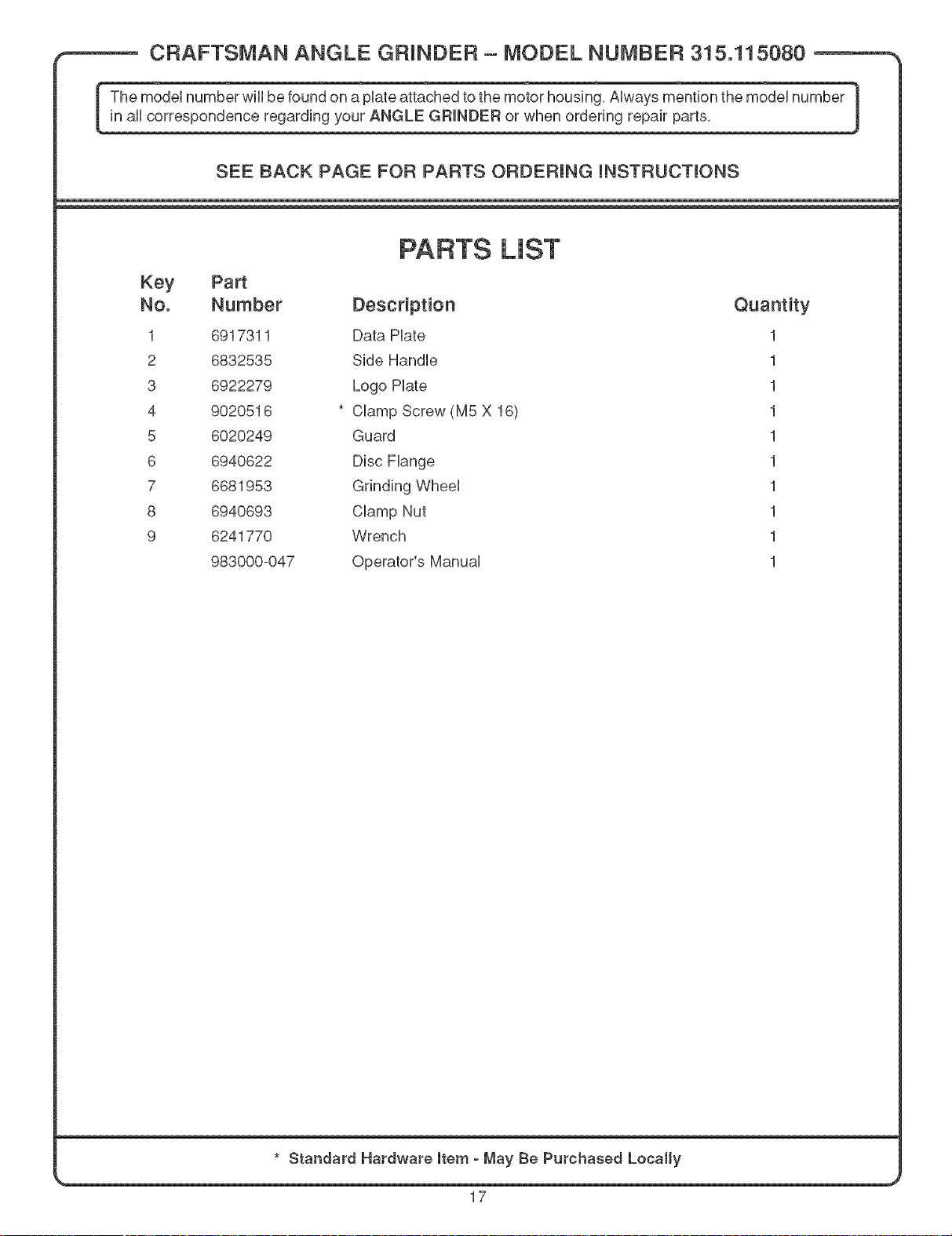
CRAFTSMAN ANGLE GRINDER- MODEL NUMBER 315.115080
The model number wiii be found on a plate attached to the motor housing. Always mention the model number 1
in aii correspondence regarding your ANGLE GRINDER or when ordering repair parts.
J
SEE BACK PAGE FOR PARTS ORDERING iNSTRUCTiONS
PARTS LiST
Key Part
No. Number Description Quantity
1 6917311 Data Plate 1
2 6832535 Side Handle 1
3 6922279 Logo Plate 1
4 9020516 * Clamp Screw (MS X 16) 1
5 6020249 Guard 1
6 6940622 Disc Flange 1
7 6681953 Grinding Wheel 1
8 6940693 Clamp Nut 1
9 6241770 Wrench 1
983000-047 Operator's Manual 1
* Standard Hardware item o May Be Purchased Locally
17

Your Home
For repair-in your home-of all major brand appliances,
lawn and garden equipment, or heating and cooling systems,
no matter who made it, no matter who sold it! ..................
For the replacement parts, accessories and
owner's manuals that you need to do-it-yourself. ....................................
For Sears professional installation of home appliances
and items like garage door openers and water heaters. ..................
1-800-4-MY-H 0 ME® (1-800-469-4663)
oa,,an t, o, o,oht sodOaoada ..................
www.sears.com www.sears.ca
OurHome
For repair of carry-in items like vacuums, lawn equipment,
and electronics, call or go on-line for the location of your nearest
Sears Parts & Repair Center.
1-800-488-1222
Call anytime, day or night (U.S.A. only)
www.sears.com
To purchase a protection agreement on a product serviced by Sears:
1-800-827-6655 (U.S.A.) 1-800-361-6665 (Canada)
Pard pedir servicio de reparacien Au Canada pour service en frangais:
a domicilio, y pard ordenar piezas. 1-800- LE- FOYER Mc
1-888-S U-HOGAR sM
.................. (1-800-533-6937)
(1-888-784-6427> www.sears.ca ...............
SEARS
SM
® Registered Trademark / TMTrademark / Service Mark of Sears, Roebuck and Co.
TM SM
® Marca Registrada / Marca de F_brica / Marca de Servicio de Sears, Roebuck and Co.
MC MD
Marque de commerce / Marque d6pos6e de Sears, Roebuck and Co. ® Sears, Roebuck and Co.

