A Special
Dear Bosch Range Owner:
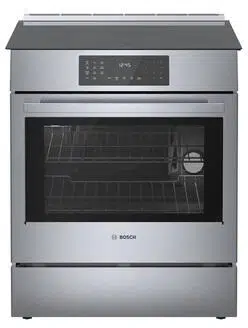
Thank you and congratulations on the purchase of your Bosch Gas Range. Whether
you are an expert chef or an aspiring cook, we know that your new range will exceed
your expectations. Decades of knowledge and experience are built into this range
making it among the highest quality, most versatile and most efficient available.
We ask that you read this manual thoroughly before using your new range. Please pay
particular attention to the safety precautions printed at the front of this book and the
numerous safety hints and cautions placed throughout. Also, be sure to familiarize
yourself with the proper operation of the range and its cleaning and maintenance
procedures. Adherence to these instructions and procedures will assure that you
realize the full potential of your new Bosch range as well as maintain it for years of
dependable use.
Thank you and good cooking,
BSH Home Appliances Corporation
Z/,
When used in accordance with its intended purposes
and properly cared for, your new Bosch range has been
designed to be a safe, reliable appliance. Read all
instructions carefully before using this range. These
)recautions will reduce the risk of burns, electric shock,
fire, and injury"to persons. Do not operate the oven or
cooktop controls if the glass isbroken. Food splatter or
cleaning solution may penetrate a broken control panel
and create a risk of electric shock. Contact a qualified
technician immediately should your glass control panel
become broken. When using kitchen appliances, basic
safety precautions must be followed, including those in
the following pages.
IMPORTANT SAFETY NOTICE
The California Safe Drinking and Toxic Enforcement
Act requires the Governor of California to publish a list
ofsubstances known to the state to cause cancer, birth
defects or other reproductive harm, and requires
businesses to warn customers of potential exposure to
such substances.
The burning ofgas cooking fuel and the elimination of
soil during self<leaning can generate small amounts
of Carbon Monoxide.
The fiberglass insulation in self-clean ovens gives off
very small amounts of formaldehyde during the first
several cleaning cycles.
California lists formaldehyde as a potential cause of
cancer. Carbon Monoxide is a potential cause of
reproductive toxicity.
Exposure to these substances can be minimized by:
!. Providing good ventilation when cooking with gas
2. Providing good ventilation during and immediately
after self cleaning the oven.
3. Operating the unit according to the instructions in
this manual.
The Bosch range referred to thoughout this manual is manufactured by BSH Home Appliance Corp.
Impo_:ant SafetyInstructions .............................................................................!
Getting Familiar with Your Range ....................................................................... 4
Setting Up Your Range
Setting and Changing the Clock ............................................................................ 6
Setting the Functions ........................................................................................... 7
Accessing and Using the Select Functions Menu .............................................. 7
Volume ........................................................................................................ 8
Change Temperature ..................................................................................... 8
Temperature Format ..................................................................................... 8
Time Format ................................................................................................. 8
Lock Keys ..................................................................................................... 8
Language Option .......................................................................................... 8
Clock Display ................................................................................................ 9
Oven Temperature Offset .............................................................................. 9
Demo Mode ..................................................................................................9
Reset Defaults .............................................................................................. 9
Sabbath Feature ........................................................................................... 9
The Cooktop
Cooktop Features ................................................................................................ 10
Cooktop Operation .............................................................................................. !!
The Oven
Oven Modes and Features .................................................................................... !2
Oven Modes and Features = Bake and Convection Bake.......................................... !3
Oven Modes and Features = Broil .......................................................................... !4
Oven Modes and Features = Convection Roast ....................................................... !5
Oven Modes and Features = Dehydrate (HDS2Zt and HDS25 models only) ................ !6
Selecting the Oven Mode ..................................................................................... !7
Using the Timer (s) ............................................................................................. !8
Using Timed Cook ............................................................................................... !9
Using the Probe (HDS25 models only) .................................................................. 20
The Warming Drawer (HDS2Zt and HDS25 models only) ............................................ 2!
Care and Cleaning
Cooktop .............................................................................................................. 23
Oven .................................................................................................................. 24
Self Help, Maintenance, Etc.
Cookware Selection Guide .................................................................................... 27
Maintenance
Removing the Oven Door .............................................................................. 28
Replacing the Oven Light .............................................................................. 28
Self Help ............................................................................................................. 29
Customer Service and Warranty ........................................................................... 32
Please read aH instructions before using this appliance.
APPLIANCE SAFETY
Thisappliance must be properly installed and grounded by
a qualified technician, Connect only to properly grounded
outlet, Referto Installation Instruetions for details, Have
the installer show you where the gas shut=off valve is.
• This isa high=tech appliance, Service should only be
performed by an authorized service technician who has
undergonetraining forthis spedfic type ofunit, Unauthorized
servicetechnicians may not be familiar with the sophisticated
workings ofthis appliance, and may therefore cause damage
tothe unitor create a hazard, Contact the nearest authorized
service center for examination, repair or adjustment,
Do not repair or replace any part of the range unless
specifically recommended by an authorized servicetechnician,
Do not operate this appliance if it isnot working properly
or if it has been damaged, until an authorized servicer has
examined it,
Use this appliance only for its intended useasdescribed in
this manual, If you haveany questions, contact the
manufacturer.
Donot cover or block any openings on this appliance.
Do not use corrosive chemicals, vapors, flammables or
nonfood products in this appliance. This type of range is
specifically designed to heat or cook food. It is notdesigned
for industrial or laboratory use. The useof corrosive
chemicals in heating or cleaning will damage the appliance
and could result in injury.
In the event that personal clothing or hair catches fire,
DROP AND ROLL IMMEDIATELY toextinguish flames.
Do not allow children to usethis appliance unless closely
supervised byan adult. Children and pets should not be left
alone or unattended in the area where the appliance isin
use. They should never be allowed to sit or stand on am/
part ofthe appliance or to play in its vicinity, whether or not
the appliance isin use.
WARNING
* ALL RANGESCANTIP.
INJURYTOPERSONSCOULD
RESULT.
INSTALLANTI=TIPDEVICE
PACKAGEDWITH RANGE.
SEEINSTALLATION INSTRUCTIONS,
CAUTION
Ttemsofinteresttochildrenshouldnotbestored
in the range, in cabinets abovethe range or on the
backsplash ofthe range. Children climbing onthe
range to reach items could be seriously injured.
U A '"° ]
I Ifthe information in this manual isnot followed I
I exactly, afire or explosion may result causing ]
[property damage, personal injury or deathl/
l
Do not store or use combustible
materials, gasoline or other flammable
vapors and liquids in the vicinity of this
or any other appliance.
l
WHAT TO DO IF YOU SMELL GAS:
• Do not try to light any appliance.
• Do not touch any electrical switch.
• Do not use any phone in your building.
• Immediately call your gas supplier
from a neighbor's phone. Follow the
gas supplier's instructions.
• If you cannot reach your gas supplier,
call the fire department.
Installation and service must be performed by
a qualified installer, authorized service agency
or the gas supplier.
J
To reduce the risk of injury to persons, in the event of a
grease fire, observe the following:
• Intheevent ofa grease fire, SMOTHERFLAMESwith a close=
fitting lid, cookiesheet,or othermetal tray, thenturn offthe
elements. BECAREFULTOPREVENTBURNS.If theflames do
notgo outimmediately, EVACUATEANDCALLTHE F£RE
DEPARTMENT.
Donotusewater,including wet dishcloths or towels, on grease
fires.A violent steamexplosion may result.
SMOTHERFLAMESfrom other typesof foodfires with baking
soda. NEVERusewater on cooking fires.
NEVERPICKUP A FLANING PAN.You may be burned.
ALWAYShavea working SMOKEDETECTORnear the kitchen.
LEAVETHE HOOD VENTILATORONwhen fiamb_ing food.
o U_ an extinguisher ONLY IF:
Youknow you have a ClassABCextinguisher, andyoualready
know howto operateit.
Thefire is small and contained in the area where itstarted.
Thefire department isbeing called.
,, _ You canfight the fire with your back to an exit. J
This range isintended for residential use only. It isnot
approved for outdoor use.
Page i
Please read all instructions before using this appliance+
COOKTOP SAFETY
•%_en usingthecod<top,DO NOTTOUCH THE HOT COOK%NG
AREA ORTHE IMMEDIATE SURROUNDING AREA. Areas
adjacent to the burners may become hot enough to cause
burns. Never let clothing, potholders, or other flammable
materials come in contact with a cooking area until it has
cooled.
Use high heat settings on the cooktop only when
necessary.Heat oil slowly on no more than a low=medium
setting, to avoid bubbling and splatter. Hot oil iscapable
of causing extreme burns and injury.
Never move a pan of hot oil, especially a deep fat fryer.
Wait until it iscool.
• Never leavethe cooktop unattended. Boilovers can
cause smoke and possibly damage the cooktop.
Hold the handle of the pan to prevent movement ofthe
utensil when stirring or turning food.
Other than the useof metal pans, only certain types of
glass,heatproof glass ceramic, ceramic, or other glazed
utensils are suitable for cooktop use. Other types of utensils
may break with sudden temperature changes. Use only on
low or medium heat settings according to the utensil
manufacturer's directions.
Take care that drafts like those from fans or forced air
vents do not blow flammable material toward the flames
or push the flames sothat they" extend beyond the edges of
the pan.
Always position handles of utensils inward sothey do not
extend over adjacent work areas, burners or the edge of
the cooktop.
Do not dean the cooktop while it isstill hot. Some
cleaners produce noxious fumes when applied to a hot
surface.
S|:LF_CLFAMING SAFETY
Confirm that the door locks and will not open once the
door lock icon appears. If the door does not lock, touch
OFF and do not run SeIFClean. Phone 800/944=2904
for service.
Note; During a normal Self Clean cycle, the door does not
lock atthe beginning ofthe cycle; However, itdoes lock prior
to reaching the high self clean temperatures. In a Delayed
Self Clean cycle, the door locks immediately.
Donot cleanthe oven gasket. It is essential for a good seal.
Care should be taken notto rub, damage, move or remove
the oven gasket.
o Donotusecommercial ovencleaners or oven liner protective
coatings of any kind in or around any part of the oven.
• Clean only oven parts listed in this manual.
• Before self=cleaning the oven, remove the broiler pan,
ovenracks,ovenprobe and other utensilsand wipe
out excess softspillage,
REGARDING PET BIRDS:
Birdshaveverysensitiverespiratorysystems.Keeppetbirds
outofthekitchenorotherrooms where kitchenfumes could
reachthem. During self clean, fumes are releasedthat may be
harmful to birds. Other kitchen fumes such asoverheating
margarines and cooking oils may also be harmful.
OVEN SAFETY
To reduce the risk of fire:
• Do not store flammable materials in. on or near the oven.
• Donot use water or a wet rag or towel on a grease fire.
Smother fire with baking soda or usea dry chemical or
foam=type (ABC) extinguisher.
o Have an appropriate fire extinguisher available, nearby,
highly visible and easily accessible near the oven.
Donot use the oven's cavity for the storage of any item,
especially anything that is combustible, toxic, or flammable.
If materials inside the oven should ignite, keep oven door
closed.Turn offoven, disconnect the circuit atthe
circuit breaker boxand turn off gassupply at shut off valve.
Donotblockanyventopenings. NEVEPcoveranyslots, holes
and passages in the oven bottom or cover an entire rack with
materials such asaluminum foil Doing so blocks air flow
through the ovenand may cause carbon monoxide poisoning.
Aluminum foil liningsmay also trap heat, causing a firehazard.
Never usethe oven to warm or heat a room. This can
damage the oven parts and may result in carbon monoxide
poisoning or overheating ofthe oven.
Never wear loose=fitting or hanging garments while usingthe
appliance. Be careful when reaching for itemsstored overthe
range. Flammable material could be ignited ifbrought in
contact with hot surface units or heating elements and may
cause severe burns.
Donot allow anyone to climb, stand, lean, or sit on am/part
ofthe oven, nor to hang on the oven door, warming drawer,
or storage drawer. This candamage the range, and the unit
may tip over, potentially causing severe injur%
Have the installer show the location of the gas shutoff valve
and the circuit breaker or fuse. Hark the circuit breaker or
fuse for easy reference.
WARMING DRAWER SAFETY
To reduce the risk of fire, electric shock, or injury to
pe_ons:
Donot usethe warming drawer for storage. Flammable or
combustible material may ignite, and toxic material could
produce toxic vapors or explode.
• Exercisecaution when opening the drawer=standing to the
side, open the door slowly and slightly to let hot air and/
or steam escape, keeping your face clear of the opening
and making surethere are no children or pets near the unit.
Only after the release of hot air and!or steam should you
proceed to access the warming drawer. Unless needed for
cooking or cleaning purposes, keep drawer shut, and do
not leave the drawer open unattended.
• Donot place food in unopened containers in the warming
drawer. Pressure could build up and cause containers to
burst,
Page 2
ADD][TONAL PRECAUTIONS FOR GAS-
POWERED APPLIANCES:
If you smell gas, your installer hasnot done a proper job
ofchecking for leaks. If the connections are not perfectly
tight, you can have a small leak and, therefore, a faint
smell. Finding a gas leak is not a "do-it-yourself"
procedure. Some leaks canonly be found with the burner
control in the ON position and this must be done by a
qualified service technician. See warning, "What to do if
you Smell Gas.", page !.
In the event that a burner goes out and gas escapes,
open a window or door. Donot attempt to use the cooktop
until the gas has had time to dissipate. Wait at least five
minutes before using the range.
Do not hang articles from any part of the appliance or
place anything against the oven. Some fabrics are quite
flammable and may catch on fire.
Ifthe range isnear a window, be certain the curtains do
not blow over or near the cooktop burners. They could
catch on fire.
When using the cooktop, do not touch the burner grates
or the immediate surrounding area. Areas adjacent to
the burners may become hot enough to cause burns.
Never leave the cooktop unattended when in use. Boilovers
cause smoking and greasy spillovers that may ignite.
Hore importantly, if the burner flames are smothered,
unburned gas will escape into the room. See warning,
"What to do if you Smell Gas", page 1.
Avoid high flame settings with a pan larger than the grate
or with one that spans more than one burner, for
prolonged periods of time. That can result in poor
combustion that results in harmful by=products.
Forproper lighting performance of the burners, keep the
ignitor ports dean. It isnecessary to dean these when
there isa boilover or when the burner does not light even
though the electronic ignitors click.
After a spill or boilover, turn off the burner and allow
cooktop to cool. Clean around the burner and burner
ports. After cleaning, check for proper operation.
Besure all cooktop controls are turned offand the cooktop
is cool before using any type of aerosol cleaner on or
around the cooktop. The sprayed chemicals could ignite
or cause hot metal parts to corrode.
Grease is flammable. Let hot grease cool before
attempting to handle it. Avoid letting grease deposits
collect. Clean after each use.
Do not allow flames to spread around or over the rim of
pan that contains grease. A grease fire could be ignited.
Always place pan on burner before turning iton. Be sure
you know which knob controls which burner. When cooking
iscomplete, turn the burner off before removing the pan.
RANGE SAFETY
In order to prevent possible burn injury while using the
appliance, tie long hair sothat it does not hang loose, and
do not wear loose fitting clothing or hanging garments,
such asties, scarves, jewelry, or dangling sleeves. Avoid
reaching or leaning over the appliance. Be aware that
certain clothing and hair sprays may contain flammable
chemicals.
The burners may be hot even though they are not on.
Interior surfaces ofan oven become hot enough to cause
burns.
Donot touch burners or interior surfaces of oven during
operation.
During and after use, do nottouch or letclothing or other
flammable materials contact the burners or the interior
surfaces ofthe oven until they have had sufficient time to
cool.
The trim on the sides of the oven door may become hot
enough to cause burns.
Exercisecaution when opening the door-standing to the
side, open the door slowly and slightly to let hotair and!or
steam escape, keeping your face dear of the oven opening
and making surethere are no children or pets near the unit.
Only after the release of hot air and/or steam should you
proceed with your cooking. Unlessneeded for cooking or
cleaning purposes, keepdoors shut, and do not leaveopen
doors unattended.
Do notheatunopened food containers. Build-up of pressure
may cause the container to burst and cause injury.
Always place oven racks in desired location while oven is
cool. Ifa rack must be moved while oven ishot, do not let
potholder contact the hot heating elements.
Use only dry potholders. Moistor damp potholders on hot
surfaces may result in burnsfrom steam. Do notlet potholder
touch hot heating elements. Donot usea towel or other
bulky cloth.
Keep the oven free from grease build up.
Donot place food directly on oven bottom.
When usingcooking or roasting bagsin the oven, follow the
manufacturer's directions.
Donot usealuminum foil to line oven bottoms. Improper
installation ofaluminum foil may result in a risk ofelectric
shock or fire.
Toavoid electric shock, do notoperate the ovenwithout the
light bulb cover in place.
Page 3
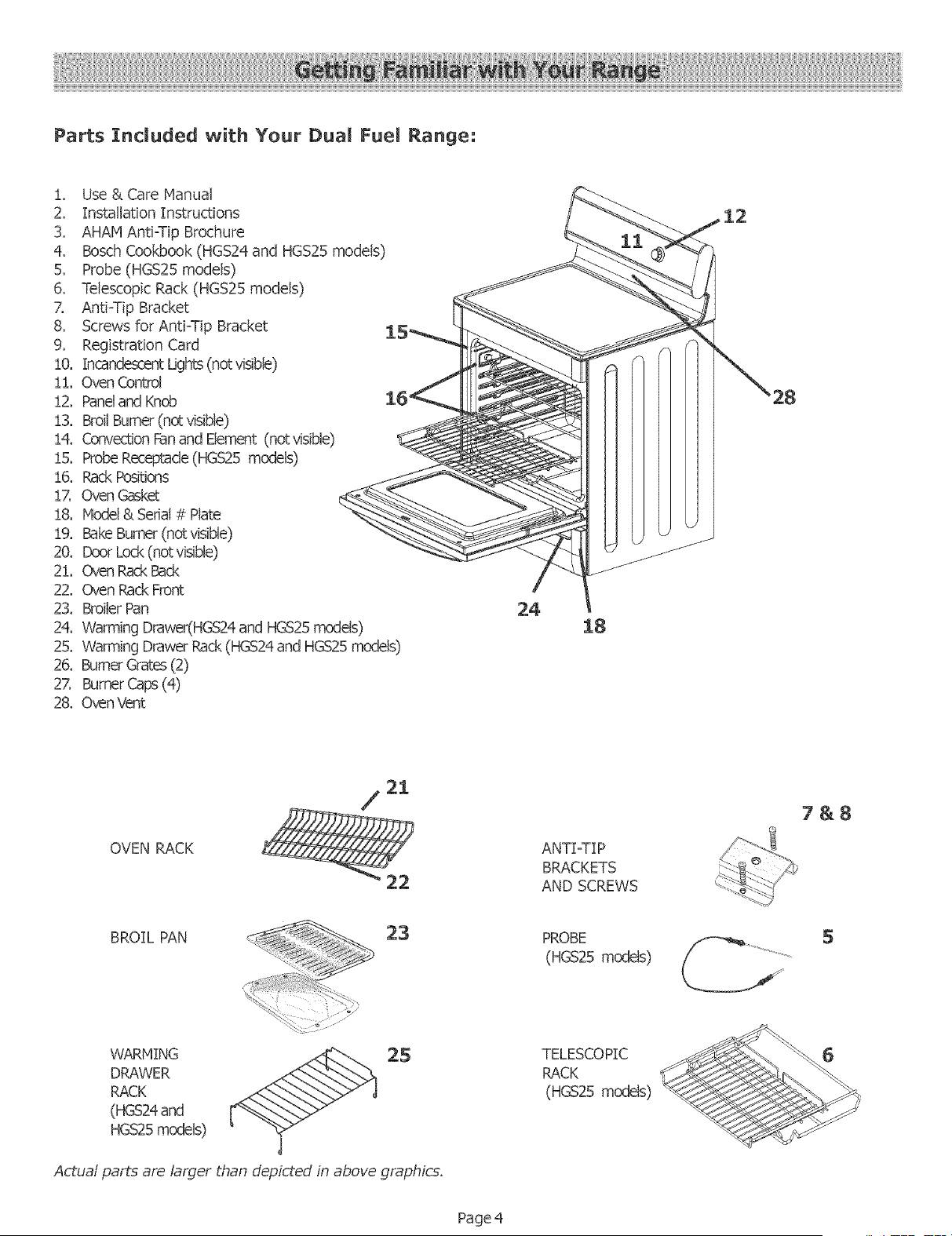
Parts Incmuded with Your Dua[ Fuel Range:
!, Use & Care Manual
2. Installation Instructions
3, AHAM Anti=Tip Brochure
4. Bosch Cookbook (HGS24and HGS25 models)
5, Probe (HGS25 models)
6. Telescopic Rack (HGS25 models)
Z Anti=Tip Bracket
8, Screws for AntFTip Bracket
9, Registration Card
!0, IncandescentLights (not visible)
!!, Oven Control
!2, Paneland Knob
13, Broil Burner(notvisible)
14. ConvectionFan and Element (notvisible)
!5. Probe Receptacle(HGS25 models)
!6. Rack Positions
!7, Oven Gasket
!8, Model & Sedal # Plate
!9. Bake Burner (notvisible)
20. DoorLock(notvisible)
21. Oven RackBack
22, Oven pack Front
23. Broiler Pan
24. Warming Drawer(HGS24and HGS25models)
25. Warming Drawer pack (HGS24and HGS25models)
26. BurnerGrates(2)
2Z Burner Cap (4)
28. OvenVent
24
18
28
OVEN RACK
21
/
ANTI_IP
BRACKETS
AND SCREWS
7&8
BROIL PAN
23
PROBE
(HGS25 models)
5
WARMING
DRAWER
RACK
(HGS24and
HGS25models)
Actual parts are larger than depicted in above graphics.
TELESCOPIC
RACK
(HGS25 models)
6
Page 4
Light
Time
The Oven Control Panel
Cooking Mode
Clock/Timer
Temperature
Light
Time
Off
oc
F
Cooking Mode/
/
Temperature
Start
Off
Temperature
Indicator
Preheat or Probe
Temperature
Probe
Indicator
(HGS25 models)
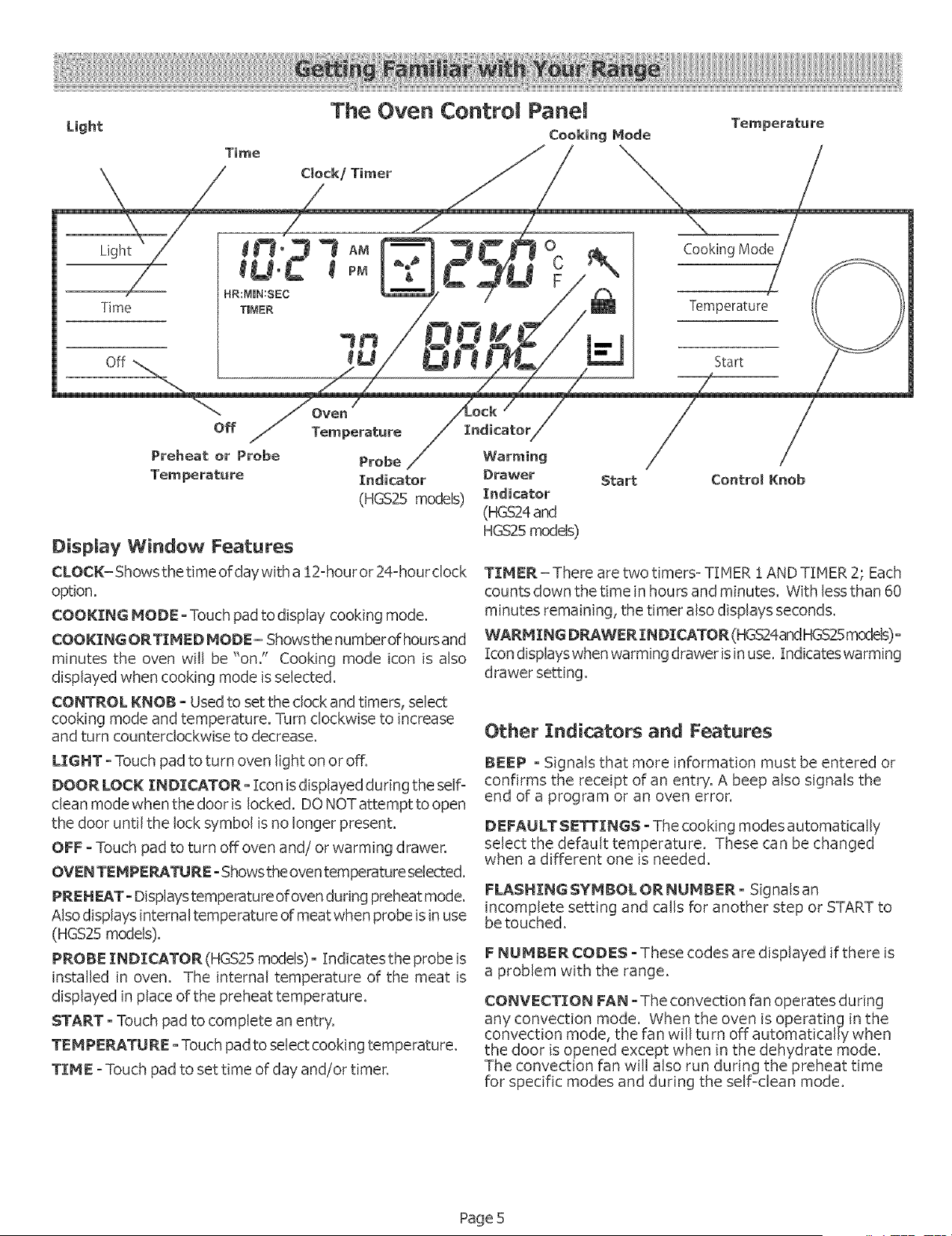
Display Window Features
CLOCK= Showsthe time ofdaywith a !2=houror 24=hourdock
option.
COOKING MODE oTouch pad todisplay cooking mode.
COOKING ORTINIED MODE - Showsthe number of hoursand
minutes the oven will be "on." Cooking mode icon is also
displayed when cooking mode isselected.
CONTROL KNOB - Used to set the dock and timers, select
cooking mode and temperature. Turn clockwise to increase
and turn counterclockwise to decrease.
Warming
Drawer
Indicator
(HGS24and
HGS25models)
Start ControlKnob
TINIER - There are two timers= TIMER ! AND TIMER 2; Each
counts down the time in hours and minutes. With less than 60
minutes remaining, the timer also displays seconds.
WARMING D_WER INDICATOR (HGS24andHGS25models)o
icon displayswhen warming drawer is in use. indicates warming
drawer setting.
Other Indicators and Features
LIGHT - Touch pad to turn oven light on or off.
DOOR LOCK INDICATOR- Icon is displayed during the self=
clean mode when the door is locked. DO NOT attempt to open
the door until the lock symbol isno longer present.
OFF oTouch pad to turn off oven and! or warming drawer.
OVENTENIPERATURE oShowstheoventemperature selected.
PREHFJ_To Displaystemperatureofoven during preheat mode.
Alsodisplays internal temperature of meat when probe isin use
(HGS25 models).
PROBE INDICATOR (HGS25models) o Indicatesthe probe is
installed in oven. The internal temperature of the meat is
displayed in place ofthe preheat temperature.
START oTouch pad to complete an entry.
TENIPEPJ_.TUREoTouch pad to select cooking temperature.
TINIE =Touch pad to set time of day and/or timer.
BEEP o Signals that more information must be entered or
confirms the receipt of an entry. A beep also signals the
end of a program or an oven error.
DEFAULT SETTINGS oThe cooking modes automatically
select the default temperature. These can be changed
when a different one is needed.
FLASHING SYNIBOL OR NUMBER- Signals an
incomplete setting and calls for another step or START to
be touched.
FNUNIBER CODES - These codes are displayed if there is
a problem with the range.
CONVECTION FAN oThe convection fan operates during
any convection mode. When the oven is operating in the
convection mode, the fan wili turn off automatically when
the door is opened except when in the dehydrate mode.
The convection fan will also run during the preheat time
for specific modes and during the self-dean mode.
Page 5
Setti ng the Clock (after powertothe rangehas been off)
Always set the clock after installation or after a power failure. Once power returns to the oven, the clock defaults to !2:00
am.
The time of day isdisplayed in hours and minutes.
The clock time will appear during all oven operations except when the timer or a timed cooking operation isrunning.
The oven is preset to a !2-hour clock and indicates AMor PN.
Note: Toswitchto a24 hr.clock, seethe "SelectFunction"section,
page 7.
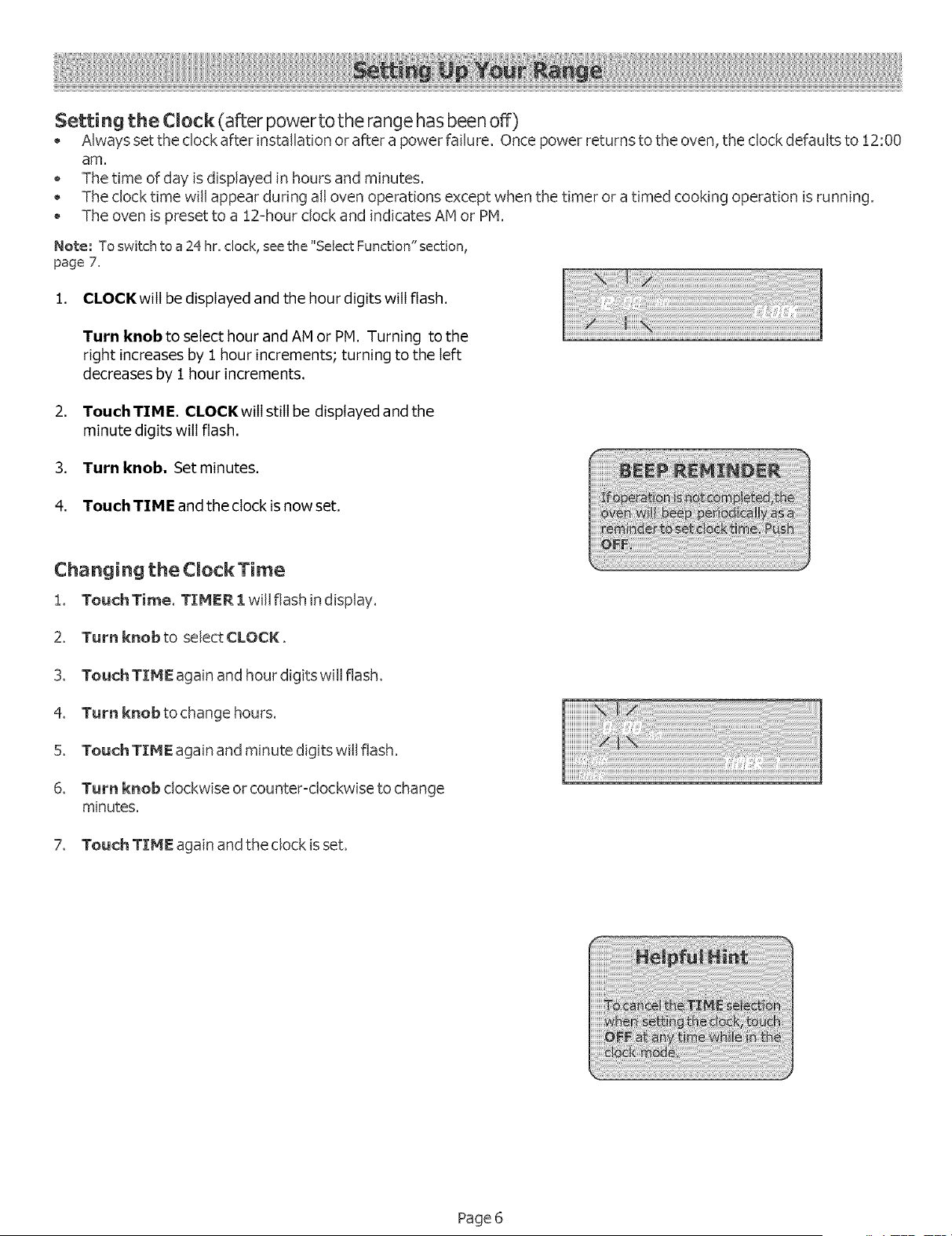
1. CLOCK will be displayed and the hour digits will flash.
Turn knob to select hour and AMor PM. Turning to the
right increases by 1 hour increments; turning to the left
decreases by 1 hour increments.
2. Touch TIME. CLOCK witIstill be displayed and the
minute digits witIflash.
3. Turn knob. Set minutes.
4. Touch TIME and the clock is now set,
Changing the Clock Time
!. TouchTime. TIMER l will flash in display.
2. Turn knob to select CLOCK.
3. Touch TIME again and hour digits will flash.
4. Turnknobtochangehours.
5. Touch TIME again and minute digits will flash.
6. Turn knob clockwise or counter-clockwise to change
minutes.
7. Touch TIME again and the clock is set.
Page 6
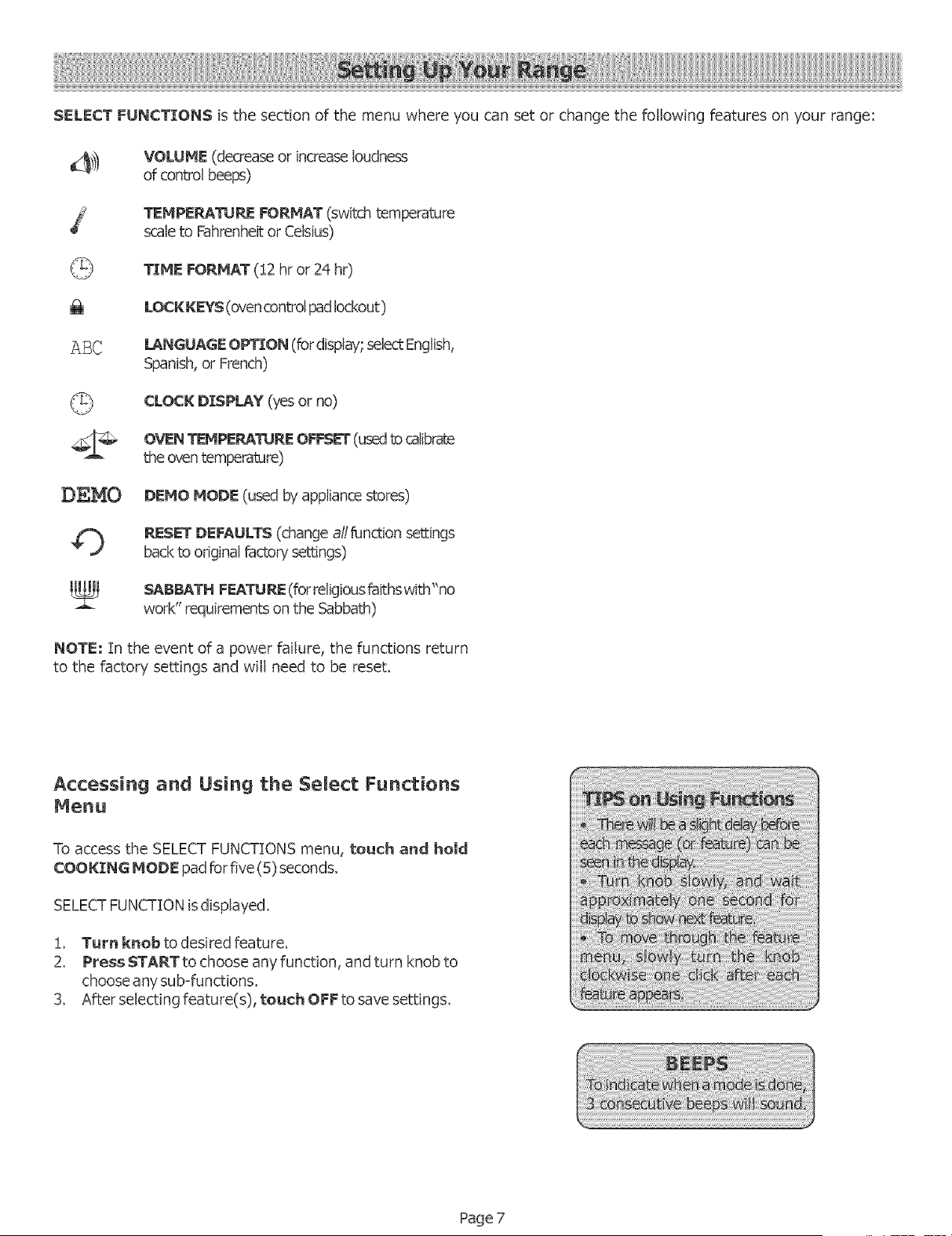
SELECT FUNCTIONS is the section of the menu where you can set or change the following features on your range:
_]_ VOLUME (decrease or increase loudness
of control beeps)
TEHPERATURE FORHAT (switch temperature
scale to Fahrenheit or Celsius)
_ TIME FORMAT (!2 hr or 24 hr)
LOCK KEYS (ovencontrol pad lockout )
A]3C LANGUAGE OPTION (fordisplay; select English,
Spanish, or French)
CLOCK DISPLAY (yes or no)
OVENTEMPE_TU_ OFFSET (usedtocalibrate
theoventemperature)
D_.MO DEMO MODE (used byappliancestores)
O PJEsEr DEFAULTS (changeall function settings
back to original factory"settings)
SABBATH F_J_TU_ (forreligiousfaithswith "no
work" requirementson the Sabbath)
NOTE; Tnthe event of a power failure, the functions return
to the factory settings and will need to be reset.
Accessing and Using the Select Functions
Menu
To access the SELECT FUNCTIONS menu, touch and hold
COOKING MODE pad forfive (5) seconds.
SELECTFUNCTIONis displayed.
!, Turn knobto desired feature.
2. Press START to choose any function, and turn knob to
choose any sub=functions.
3. After selecting feature(s), touch OFF to save settings.
Page 7
_'_) BEEP VOLUHE
ThevohJmeofthecontrolbeepcanbechanged from LOW
(sofcest) to NIGH (loudest).
The control default for beep volume is IVledium.
Changingthe beepvolume
i,Access SELECT FUNCTION Menu.
2. Turn knob clockwise slowly until VOLUME is displayed,
3. Touch START,
4. Turn knobtoselect volume level Low, Medium or High.
5. Touch START,
@% CHANGE TEHPERATURE
Theoven has been preset tothe Fahrenheit temperature
scale.
The feature allows you to switch between Fahrenheit
and Celsiustemperature,
Changing the Temperature Scale
i,AccessSELECT FUNCTION Menu,
2. Turn knob clockwise slowly until SELECTTEIvlP F-C is
displayed.
3, Touch START,
4. Turn knob to select Fahrenheit (F) or Celsius (C),
5, Touch START to accept new selection,
TIHE FORMAT
The clock can be set to a 12=hror 24=hr
format.
The default for clock format is !2ohr.
Changing the TIME FORHAT
!, AccessSELECTFUNCT[ON Menu.
2. Turn knob clockwise slowly untiITINIE FORHATis
displayed.
3, Touch START,
4. Turn knobto select !2 hr or 24 hr format,
5, Touch STARTto accept new selection,
LOCK KEYS
The keypad can be locked for safety" purposes.
This feature can be used to prevent changes to the
ovenfunction.
Locking orU nlockingthe Oven ControlPanel
i, AocessSELECTFUNCTION Menu,
2. Turn knob clockwise slowly until LOCK KEYS is
flashing,
3. Touch START, KEY PAD LOCKED is displayed. The
display will beep if a key ispressed to indicate that the
keypad islocked.
4. To unlock keypads, touch COOING MOD£ and hold for
5 seconds, Displaywill read UNLOCKING PAD,
5, When unlocked, the clockwill again appear in the display.
Note: This function DOES NOT Iockthe oven door,
Z_BC LANGUAGE DISPLAY
Language choices are English, Spanish, and French.
English is the default language,
Changing the Language Display
i, AccessSELECT FUNCTION Menu,
2. Turn knob clockwiseslowly until LANGUAGE OPTION is
displayed,
3, Touch START,
4. Turn knob clockwise to select language,
5. Touch START to accept a language change.
Page 8
%_t CLOCK DISPLAY (ON or OFF)
• Clock time display can be turned off.
• The default display is on.
Turning the Clock Display ON or OFF
1. Access SELECT FUNCTION Menu.
2. Turn knob clockwise slowly until CLOCK DISPLAY is
displayed.
3. Touch START.
4. Turn knob once and ON or OFF will appear indisplay.
5. Touch START to accept new selection.
©
o
RESET DEFAULTS
This feature is used to changeall the"Select Functions"
settings back to the original factory settings (or
defaults).
Resetting the factor/settings,
!. Access SELECT FUNCTIONS Menu.
2. Turn knob clockwise slowly until RESET DEFAULTS
is displayed.
3. TouchSTART. DisplayreadsSELECTFUHCTION.
_;_OVEN TEMPERATURE OFFSET
Allows the adustment of the oven temperature if
food isconsistently too brown or too light,
Changing the Oven Temp Offset
!, Access SELECT FUNCTION Menu,
2. Turn knob clockwise slowly untilOVEN TEMP OFFSET
is displayed,
3. Touch START, 0° Fisdisplayed,
4. Turn the knob to the right to increase temperature
÷25°F and to the left to decrease -25 ° temperature,
5. Touch START to accept a temperature change,
DEMO DEMO MODF
The demo mode isfor appliance store use only.
o
SABBATH FEATURE
The oven will bakefor 48 hoursbefore automaticallyturning
off.
Ovenor warming drawer cannot be operatingto set the
SabbathFeature.
Setting the Sabbath Feature
1. AccessSELECT FUNCTIONS Menu.
2. Turn knob clockwise until SABBATH OPTIOH
appears.
3. Teuch START. BAKE will show in display and
temperature will flash.
4. Turn knob to set oven temperature.
5. Turn oven light on if desired (touch LIGHT).
Hote: The light cannot be changed after this point. It will
stay on or off, as selected, during the entire Sabbath
mode.
6. Touch START. Ovenstarts after 5 seconds.
Hote: The probe CAHHOT be used during the Sabbath
mode.
While baking in Sabbath mode, the display willshow SABBATH
and theBAKE iconwillbe displayed.The dock willbe offand
no temperature will show' in the display.
During the Sabbath mode, only the off key will operate.
Press OFF at any time during the Sabbath mode to
end the mode and turn off the oven,
At end of 73 hours, the ovenwill turn OFF automatically and the
display willshow SABBATH EH D. Touch OFF to return totime
ofday.
Page 9
Before Using the Cooktop
* Remove all packing materials and labels from the cooktop
surface.
* While cool, wipe with a clean, damp sponge and dry.
* Optimum cooking results depend on the proper cookware
use,
* Read and understand all safety precautions and Use and
CareManual information prior to operating.
Seamed Gas Burners
Your new cooktop has sealed gas burners and removable
burner caps. There are no burner parts under the
cooktop to clean, disassemble or adjust. Your cooktop
has four (4) different burner cap sizes. Match the pan
size to the burner size.
1
WARNING: To prevent flare-ups do not use [
the cooktop without a[[ burner caps and a[[
1
burner grates properly positione&
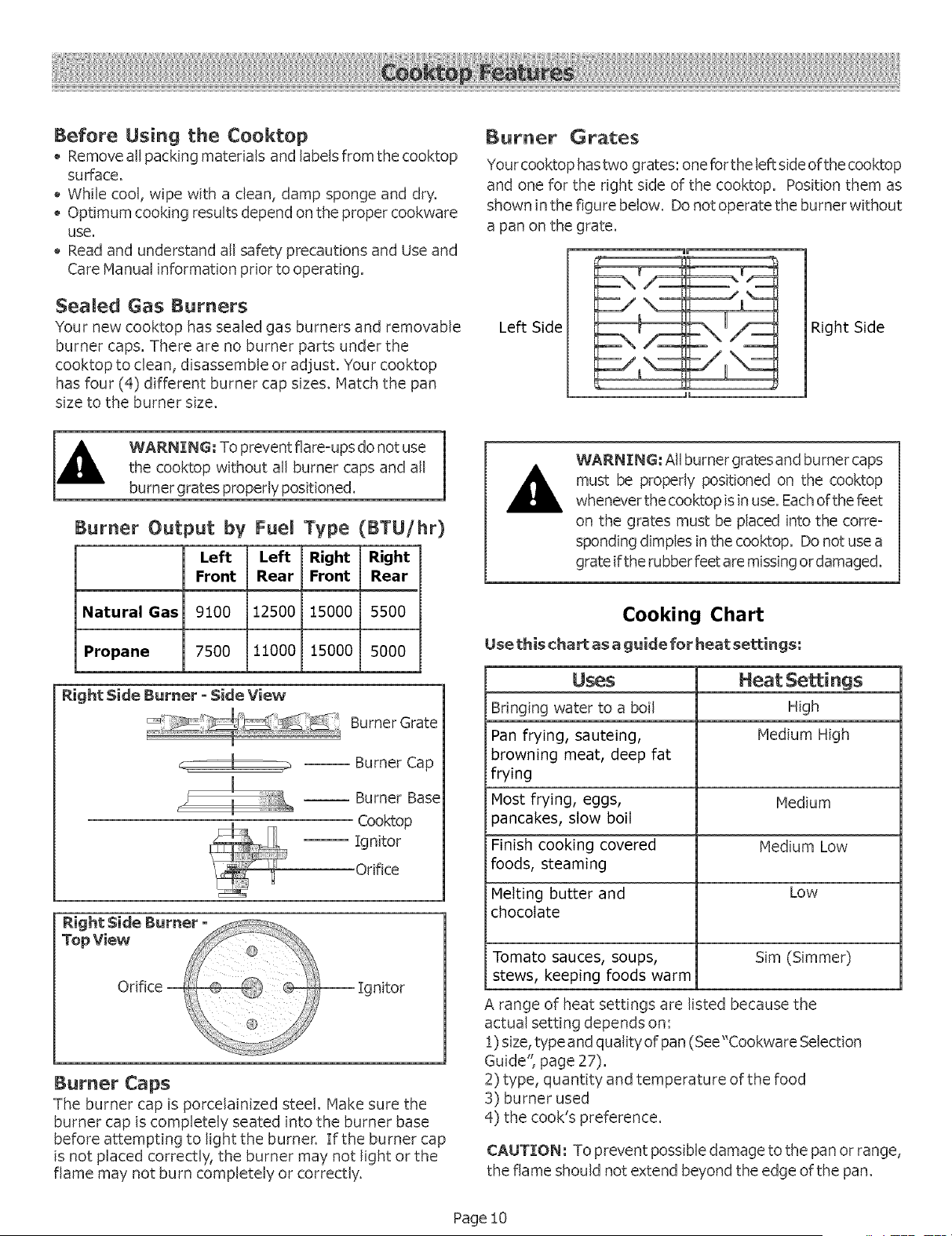
Burner Output by Fuel Type (BTU/hr)
Left Left Right Right
Front Rear Front Rear
Natural Gas 9100 12500 15000 5500
Propane 7500 11000 15000 5000
Right Side Burner - Side View
Burner Grate
-- Burner Cap
-- Burner Base
Cooktop
-- Ignitor
Orifice
-- Ignitor
Burner Caps
The burner cap is porcelainized steel. Hake sure the
burner cap iscompletely seated into the burner base
before attempting to light the burner. [f the burner cap
is not placed correctly, the burner may not light or the
flame may not burn completely or correctly.
Burner Grates
Your cooktop has two grates: one forthe left sideofthe cooktop
and one for the right side of the cooktop. Position them as
shown in the figure below. Donot operate the burner without
a pan on the grate.
_m
Left Side
L E1 2
H
Right Side
WARNING: All burner grates and burner caps
must be properly positioned on the cooktop
whenever thecooktop is in use. Each of the feet
on the grates must be placed into the corre-
sponding dimples in the cooktop. Donot use a
grate iftherubber feet are missingor damaged.
Cooking Chart
Use this chart as a guide for heat settings:
Uses Heat Settings
Bringing water to a boil High
Pan frying, sauteing, Medium High
browning meat, deep fat
frying
Most frying, eggs, Medium
pancakes, slow boil
Finish cooking covered Medium Low
foods, steaming
Melting butter and Low
chocolate
Tomato sauces, soups, Sim (Simmer)
stews, keeping foods warm
A range of heat settings are listed because the
actual setting depends on:
!) size,type and quality of pan (See"Cookware Selection
Guide", page 27).
2) type, quantity and temperature of the food
3) burner used
4) the cook's preference.
CAUTION: To prevent possible damage tothe pan or range,
the flame should not extend beyond the edge ofthe pan.
Page 10
Typical Flame Characteristics
For natural gas use, the burner flame should be bhJe in color
and stable with no yellow tips, excessive noise or fluttering. It
should burn completely around the burner cap. For Propane
(LP) use, some yellow tips are normal. See Installation Instruc-
tions for further explaination.
Foreign particles in the gas line may cause an orange flame
during initial use. This should disappear with use. Checkburner
capto make sure port holes are notobstructed. If the ports are
clogged, see Cleaning the Cooktop, page 23.
Note: An audible "pop" may be heard when the burner isturned
off manually. The"popping" may be louder with LP gas than
with natural gas. This is normal.
Refer tothe Cooking Guide (previous page) for flame settings.
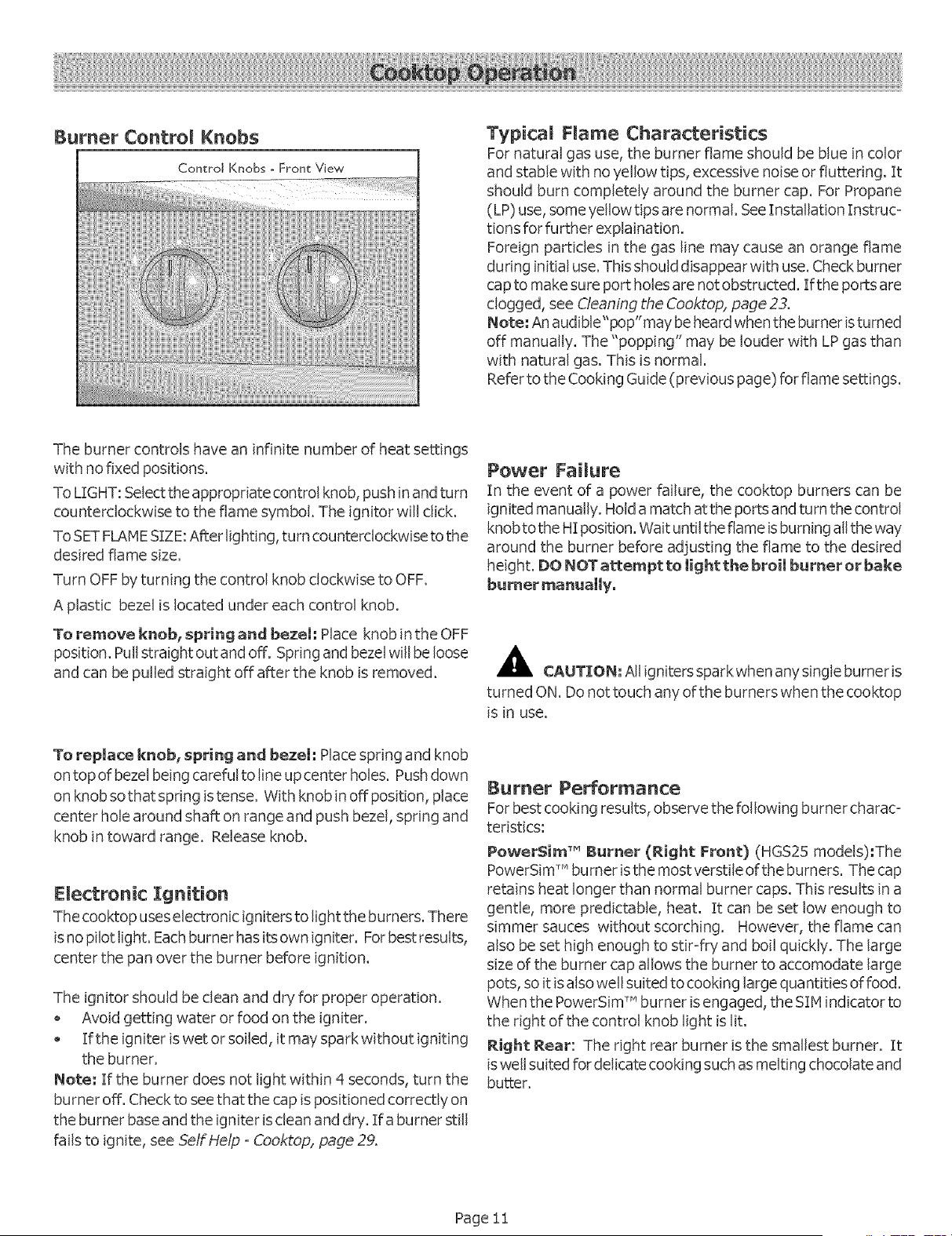
The burner controls have an infinite number of heat settings
with no fixed positions.
To LIGHT: Select the appropriate control knob, pushin and turn
counterclockwise to the flame symbol. The ignitor will click.
ToSET FLAMESIZE:After lighting, turn counterclockwise tothe
desired flame size.
Turn OFF byturning the control knob clockwise to OFF.
A plastic bezel islocated under each control knob.
To remove knebr spring and bezel: Place knob in the OFF
position. Pull straight out and off. Spring and bezelwill be loose
and can be pulled straight off after the knob isremoved.
Power FaiNure
In the event of a power failure, the cooktop burners can be
ignited manually. Holda match atthe ports and turn the control
knobtothe HI position. Wait untilthe flame isburning all theway
around the burner before adjusting the flame to the desired
height. DONOT attempt to light the broil burner or bake
burner manually,
_k CAUTION: All igniters spark when anysingle burner is
turned ON. Donot touch anyofthe burners when the cooktop
is in use.
To repmace knob, spring and bezeh Place spring and knob
on top of bezelbeing careful to line up center holes. Push down
on knobsothat spring is tense. With knob in off position, place
center hole around shaft on range and push bezel, spring and
knob in toward range. Release knob.
Electronic Ignition
The cooktop uses electronic igniters to light the burners. There
isno pilotlight. Eachburnerhasitsownigniter. For best results,
center the pan over the burner before ignition.
The ignitor should be clean and dry for proper operation.
Avoid getting water or food on the igniter.
If the igniter iswet or soiled, itmay spark without igniting
the burner.
Note: If the burner does not light within 4 seconds, turn the
burner off. Checkto see that the cap ispositioned correctly on
the burner baseand the igniter is clean and dry. If a burner still
fails to ignite, see Self Help - Cooktop, page 29.
Burner Performance
Forbest cooking results, observe the following burner charac-
teristics:
Pewer$im TM Burner (Right Front) (HGS25 models):The
PowerSim TM bumar isthe most verstile ofthe burners. The cap
retains heat longer than normal burner caps. This results in a
gentle, more predictable, heat. It can be set low enough to
simmer sauces without scorching. However, the flame can
also be set high enough to stir-fry and boil quickly. The large
size of the burner cap allows the burner to accomodate large
pots, soitis alsowell suited to cooking large qua ntities offood.
When the PowerSim TM burner is engaged, the SIIq indicator to
the right of the control knob light islit.
Right Rear: The right rear burner isthe smallest burner. It
is wellsuited for delicate cooking such as melting chocolate and
butter.
Page ii
Oven Racks
Your oven hasthree racks, HGS25 models are equipped with
2 fiatand onetelescopic. All others have 3fiat racks. The racks
are designed with a stop so they will stop before coming
completely out and not tilt.
Caution: To avoid possible burns, placeoven racksin
desired positions before turning the ovenon. Always useoven
mitts when the oven iswarm.
Removing from oven: Grasp rack firmly on both sides and
pull rack toward you. When the stop isreached, tilt rack up and
pull the rest of the way out.
Replacing in oven: Grasprack firmly on both sides. Tilt rack
up to allow stop into rack holder. Bring rack to a horizontal
position and push the rest of the way in. Rack shouldbe straight
and fiat, not crooked,
Telescopic Rack (HGS25models): Thetelescopic rack allows
for easier access to cooking food. To use, grasp entire rack
(both sections) ofrack and pull straight out untilstop is reached.
To extend rack, grasp top section and pull straight out. To
remove telescopic rack, with top section in closed position,
grasp entire rack (both sections) firmly on both sides. When
the stop isreached, tilt rack up and pull the rest ofthe way out.
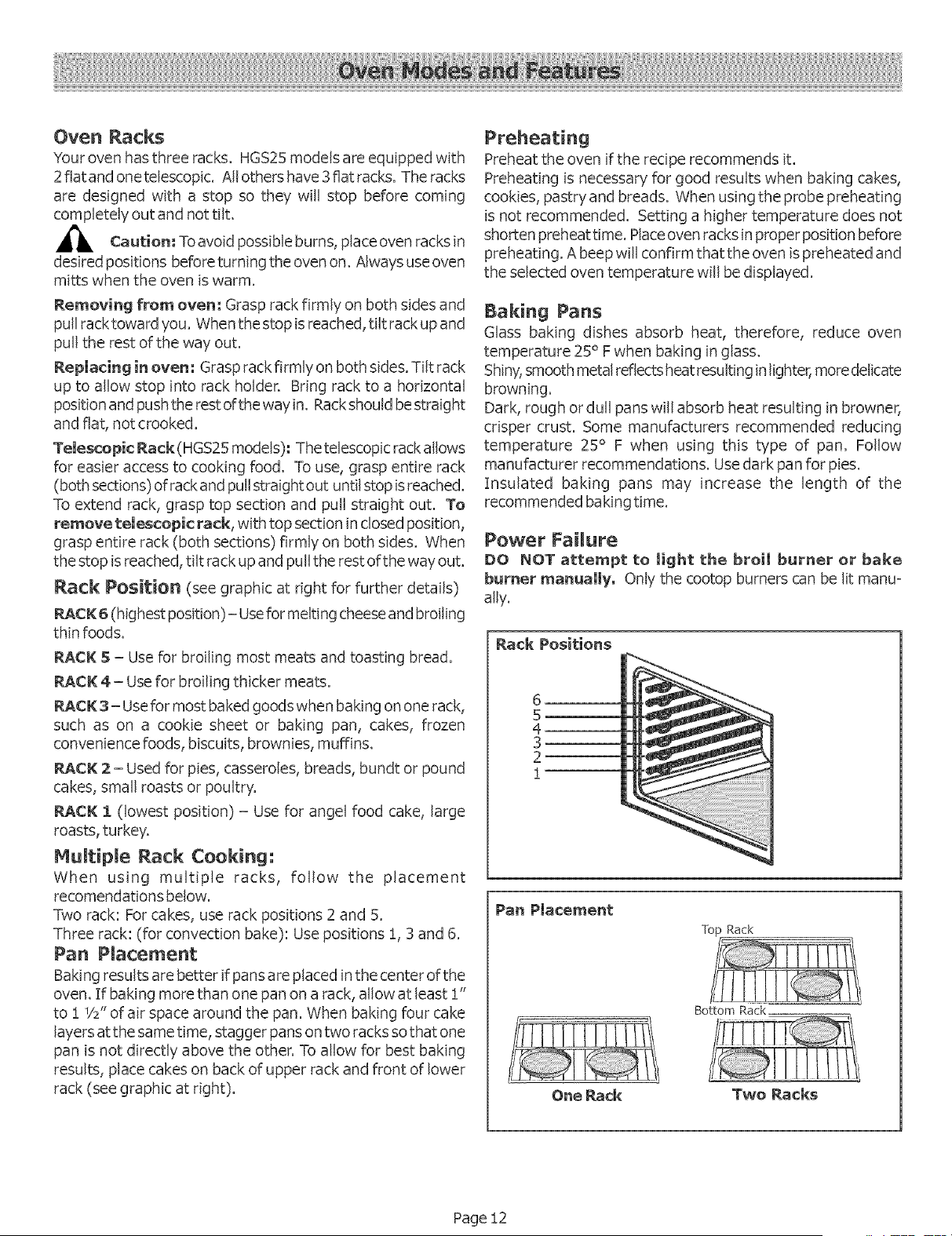
Rack Position (see graphic at right for further details)
RACK: 6 (highest position)- Use for melting cheese and broiling
thin foods.
RACK S - Use for broiling most meats and toasting bread.
_CK 4 - Use for broiling thicker meats.
_¢K 3- Usefor most bakedgoods when baking on one rack,
such as on a cookie sheet or baking pan, cakes, frozen
convenience foods, biscuits, brownies, muffins.
_CK 2 - Used for pies, casseroles, breads, bundt or pound
cakes, small roasts or poultry.
_¢K :1(lowest position) - Use for angel food cake, large
roasts, turkey.
Hultipme Rack Cooking:
When using multiple racks, follow the placement
recomendations below.
Two rack: Forcakes, use rack positions 2 and 5.
Three rack: (for convection bake): Use positions 1,3 and 6.
Pan Placement
Baking results are better ifpansare placed in the center ofthe
oven. If baking more than one pan on a rack, allow at least 1"
to 1 1/2"of air space around the pan. When baking four cake
layers atthe same time, stagger pans on two racks so that one
pan is not directly above the other. To allow for best baking
results, place cakes on back of upper rack and front of lower
rack (see graphic at right).
Preheating
Preheat the oven ifthe recipe recommends it.
Preheating isnecessary for good results when baking cakes,
cookies, pastry and breads. When using the probe preheating
is not recommended. Setting a higher temperature does not
shorten preheat time. Place ovenracks in proper position before
preheating. A beep will confirm that the oven ispreheated and
the selected oven temperature will be displayed.
Baking Pans
Glass baking dishes absorb heat, therefore, reduce oven
temperature 25° F when baking in glass.
Shiny,smooth metal reflects heatresulting in lighter, moredelicate
browning.
Dark, rough or dull pans will absorb heat resulting in browner,
crisper crust. Some manufacturers recommended reducing
temperature 25° F when using this type of pan. Follow
manufacturer recommendations. Use dark pan for pies.
Insulated baking pans may increase the length of the
recommended baking time.
Power Failure
DO NOT attempt to Jight the broil burner or bake
burner manually. Only the cootop burners can be lit manu-
ally.
Rack Positions
6
5
4
3
2
Pan Placement
One Rack
Top Rack
Two Racks
Page !2
BAKE, PROOF (HGS25 models) and
WARM
Baking is cooking with dry, heated air, Thelower burner cycles
to maintain the oven temperature:
The Bake mode can be used to prepare a variety of food
items, from pastries to casseroles. It canalso be usedto roast
meats.
In the Warming mode, the oven uses the lower element to
maintain a low temperature tokeepfood at serving temperature.
Use the Warming setting on the oven to keep foods hot
until ready to serve.
The Warming mode temperatures are !40 ° - 220° R The
default temperature is 170 ° R
Foods that need to be kept moist should be covered with
a lid or aluminum foil.
In the Proofing mode, the oven will use the lower burner to
maintain a low temperature to proof bread. Proofing isthe
rising of a yeast dough.
The Proofing mode temeratures are 85° to ! !0 ° F. The
default temperature is !00 ° E
Loosely cover the bowl or pan and use any rack that
accomodates the size of the container.
Keep the door closed and usethe oven light to check
the rising of the dough,
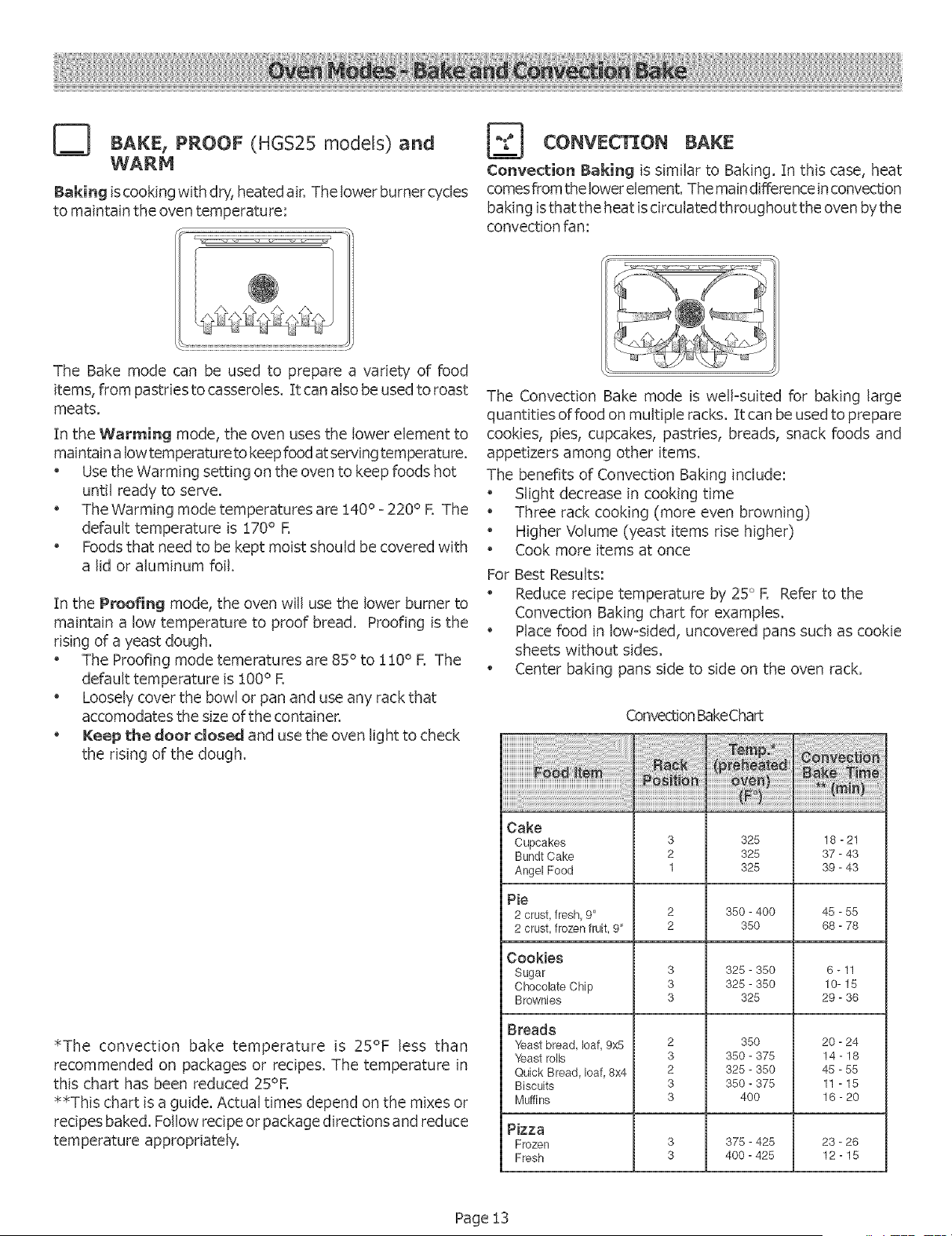
*The convection bake temperature is 25°F less than
recommended on packages or recipes, The temperature in
this chart has been reduced 25°R
**This chart isa guide, Actual times depend on the mixes or
recipes baked, Follow recipe or package directions and reduce
temperature appropriately,
BAKE
Convection Baking is similar to Baking. In this case, heat
comes fiom thelowerelement. Themaindifference in convection
baking is that the heat is drculated throughout the oven by the
convection fan:
The Convection Bake mode is well-suited for baking large
quantities of food on multiple racks. It can be used to prepare
cookies, pies, cupcakes, pastries, breads, snack foods and
appetizers among other items.
The benefits of Convection Baking include:
, Slight decrease in cooking time
" Three rack cooking (more even browning)
" Higher Volume (yeast items rise higher)
" Cook more items at once
For Best Results:
" Reduce recipe temperature by 25 ° R Refer to the
Convection Baking chart for examples.
, Place food in low-sided, uncovered pans such as cookie
sheets without sides.
" Center baking pans side to side on the oven rack.
ConvectionBakeChart
Cake
Cupcakes
BundtCake
AngelFood
Pie
2 crust,fresh 9"
2 crust,frozen fruit, 9"
Cookies
Sugar
ChocolateChip
Brownies
Breads
Yeast bread, loaf, 9x8
Yeast rolls
QuickBread loaf 8x4
Biscuits
Muffins
3
2
1
3
3
3
2
3
2
3
3
328
328
325
350-400
350
325- 350
325- 350
325
350
350- 375
325- 350
350- 375
40O
18-21
37- 43
39-43
45-85
68- 78
6 -11
10-15
29- 36
20 -24
14-18
48 -85
11 -15
16-20
Pizza
Frozen 3 378 - 425 23 -26
Fresh 3 400 - 425 12 - 15
Page 13
_] BROIL
Broiling uses intense heat radiated from the broil burner:
The Broil mode is best suited to cooking thin, tender cuts of
meat (!"or less), poultry and fish, It canalso be usedto brown
breads and casseroles,
The benefits of Broiling include:
Fast and efficient cooking
Cooking without the addition of fats or liquids
Browning as the food cooks
For Best Results:
Preheat oven 3-4 minutes
Steaks and Chops should be at least 3/4" thick
Brush fish and poultry with butter or oil to prevent sticking
Use the broil pan and grid included with your range
Do not cover the broiler grid with foil. It isdesigned to
drain fats and oils away from the cooking surface to
prevent smoking and spattering
Turn meats once halfway through the recommended
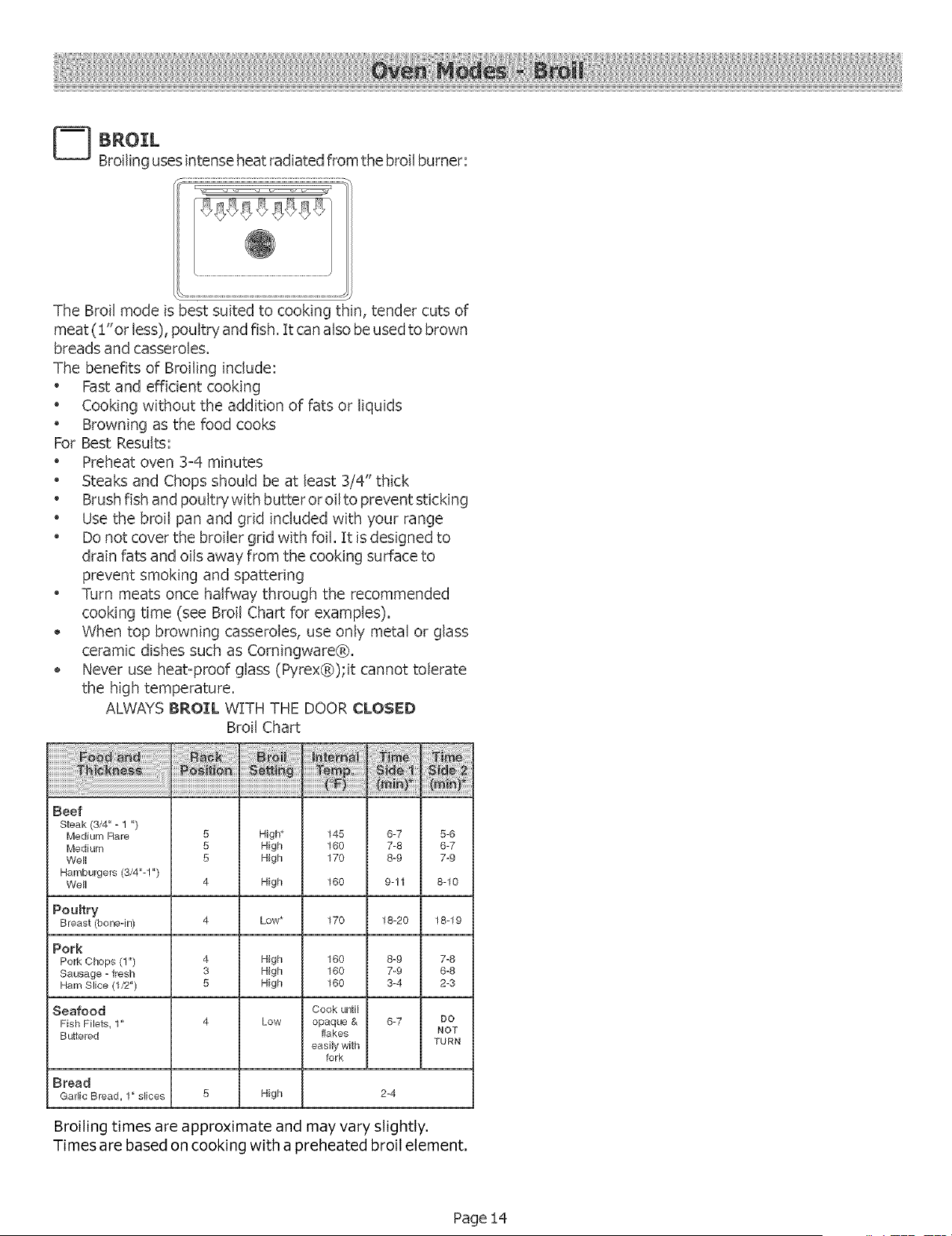
cooking time (see Broil Chart for examples).
When top browning casseroles, use only metal or glass
ceramic dishes such as Corningware®.
Never use heat-proof glass (Pyrex®);it cannot tolerate
the high temperature.
ALWAYSBROIL WITH THE DOOR CLOSED
Broil Chart
Beef
Steak (3/4" - 1")
Medium Rare 5 High_ 145 8-7 5-8
Medium 5 High 160 7-8 6-7
Well 5 High 170 8-9 7-9
Hamburgers (3/4"-1 ")
Well 4 High 160 9-!1 8-10
Poultry
Breast (bone-in)
Low* 170 18-20 18-19
Pork
Pork Chops (1") 4 High 160 8-9 7-8
Sausage - fresh 3 High 160 7-9 6-8
Ham Slice (1/2") 8 High 160 3-4 2-3
Seafood Cook until
Fish Filets_ 1" 4 Low opaque & 6-7 DO
Buttered flakes NOT
easily with TURN
fork
Bread
GarlicBread_1"s_ices 5 High
2-4
Broiling times are approximate and may vary slightly,
Times are based on cooking with a preheated broil element,
Page !4
CONVECTION ROAST
Convection Roast uses heat from the bottom burner as well
as heat circulated by the convection fan:
The Convection Roastmode is well suited to preparing tender
cuts of meat and poultry.
The benefits of Convection Roasting, include:
Asmuch as25% faster cooking than standard Roasting/
Baking
Rich, golden browning
For Best Results:
Use the same temperature as indicated in the recipe.
Check doneness early as roasting time may decrease by
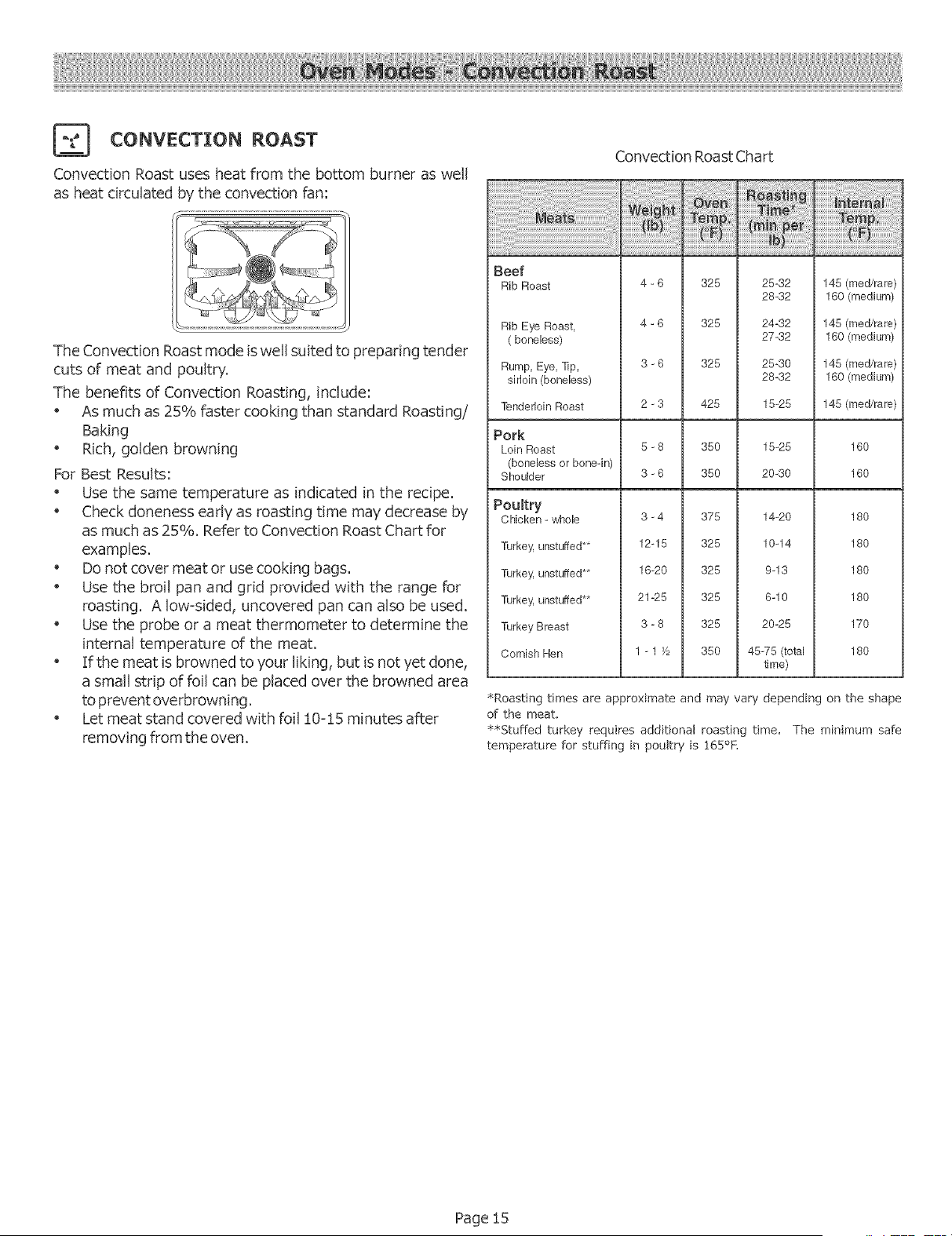
asmuch as25%. Refer to Convection Roast Chart for
examples.
Do not cover meat or usecooking bags.
Use the broil pan and grid provided with the range for
roasting. A low=sided, uncovered pan can also be used.
Use the probe or a meat thermometer to determine the
internal temperature of the meat.
If the meat isbrowned to your liking, but isnot yet done,
a small strip of foil can be placed over the browned area
toprevent overbrowning.
Let meat stand covered with foil 10=15 minutes after
removing from the oven.
Convection RoastChart
Beef
Rib Roast
Rib Eye Roast,
(boneless)
Rump, Eye,Tip,
sirloin (boneless)
TenderloinRoast
4 - 6 325 25-32 145 (reed/rare)
28-32 160 (medium)
4 - 6 325 24-32 145 (reed/rare)
27-32 160 (medium)
3 - 6 325 25-30 145 (reed/rare)
28-32 160 (medium)
2 -3 425 15-25 145 (med/rare)
Pork
Loin Roast 5 - 8 350 15-25 160
(boneless or bone-in)
Shoulder 3 - 6 350 20-30 160
Poultry
Chicken - whole 3-4 375 14-20 180
Turkey,unstuffed** 12-15 325 10-14 180
Turkey, unstuffed ** 16-20 325 9-13 180
Turkey, unstuffed** 21-25 325 6-10 180
Turkey Breast 3 - 8 325 20-25 170
CornishHen 1 - 1F_ 350 45-75 (total 180
time)
SRoasting times are approximate and may vary depending on the shape
of the meat,
$$Stuffed turkey requires additional roasting time, The minimum safe
temperature for stuffing in poultry is 165°!:,
Page 15
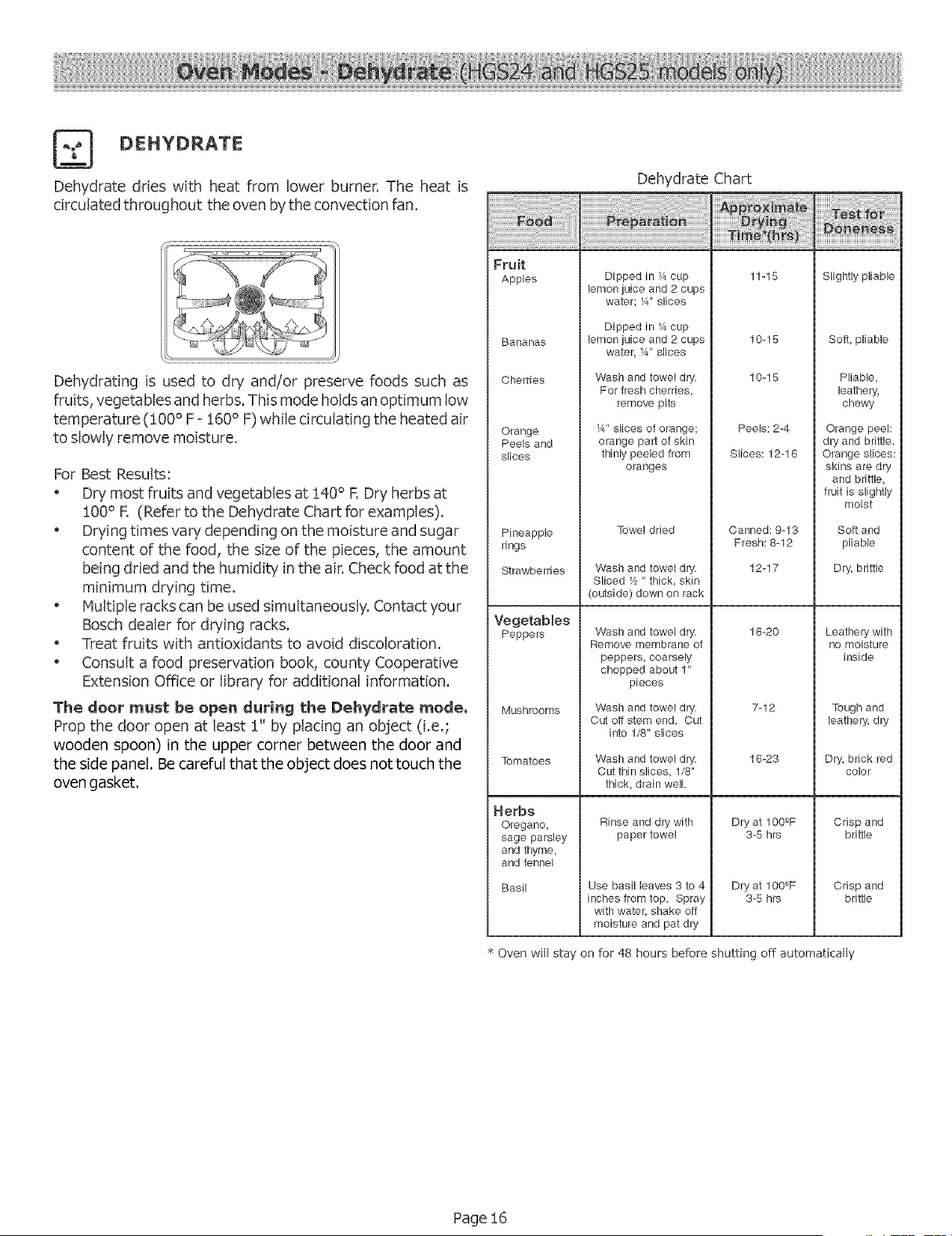
Dehydrate dries with heat from lower burner. The heat is
circulated throughout the oven bythe convection fan.
.w.i:¸iw. .w.w
Dehydrating is used to dry and/or preserve foods such as
fruits, vegetables and herbs. This mode holds an optimum low
temperature (!00 °F - 160° F) while circulating the heated air
to slowly remove moisture.
For Best Results:
Dry most fruits and vegetables at !40 ° F. Dry herbs at
100° R (Refer to the Dehydrate Chart for examples).
Drying times vary depending on the moisture and sugar
content of the food, the size of the pieces, the amount
being dried and the humidity in the air. Check food atthe
minimum drying time.
Multiple racks can be usedsimultaneously. Contact ?'our
Bosch dealer for drying racks.
Treat fruits with antioxidants to avoid discoloration.
Consult a food preservation book, county Cooperative
Extension Office or library for additional information.
The deer must be open during the Dehydrate _ede,
Prop the door open at least 1" by plating an object (i,e,;
wooden spoon) in the upper corner between the door and
the side panel. Be careful that the object does not touch the
oven gasket.
iiiiiiiiiiiiiiiiiiiiiiiiiiiiiiiiii_i_i_i;;_;;!i!_!_i!_i!_i!_i_!i!ii!i!ii!ii!ii!ii!ii!i;!_!!_i!ii!ii!ii!ii!i!!!!!_!_i_!
Fruit
Apples
Bananas
Cherries
Orange
Peels and
slices
Pineapple
rings
Strawberries
Vegetables
Peppers
Mushrooms
Tomatoes
Herbs
Oregano,
sage parsley
and thyme,
and fennel
Basil
Dehydrate Chart
Dipped in K, cup
lemon juice and 2 cups
water; W' slices
Dipped in K, cup
lemonjuice and 2 cups
water K,"slices
Wash and towel dry.
For fresh cherries,
remove pits
Y4"slices of orange;
orange pad of skin
thinly peeled from
oranges
Towel dried
Wash and towel dry.
Sliced Y2" thick, skin
(outside) down on rack
Wash and towel dry.
Remove membrane of
peppers, coarsely
chopped about 1"
pieces
Wash and towel dry.
Cut off stem end. Cut
into 1/8" slices
Wash and towel dry.
Cut thin slices, 1/8"
thick, drain well.
Rinse and dry with
paper towel
Use basil leaves 3 to 4
inches from top. Spray
with water, shake off
moisture and pat dry
11-15
10-15
10-15
Peels: 2-4
Slices: 12-16
Canned: 9-13
Fresh: 8-12
12-17
16-20
7-12
16-23
Dry at 100_F
3-5 hrs
Dry at 100_F
3-5 hrs
Slightly pliable
Soft pliable
Pliable
leathery_
chewy
Orange peel:
dry and brittle.
Orange slices:
skins are dry
and brittle,
fruit is slightly
moist
Soft and
pliable
Dry, brittle
Leathery with
no moisture
inside
Tough and
leathery, dry
Dry, brick red
Color
Crisp and
brittle
Crisp and
brittle
Oven will stay on for 48 hours before shutting off automatically
Page 16
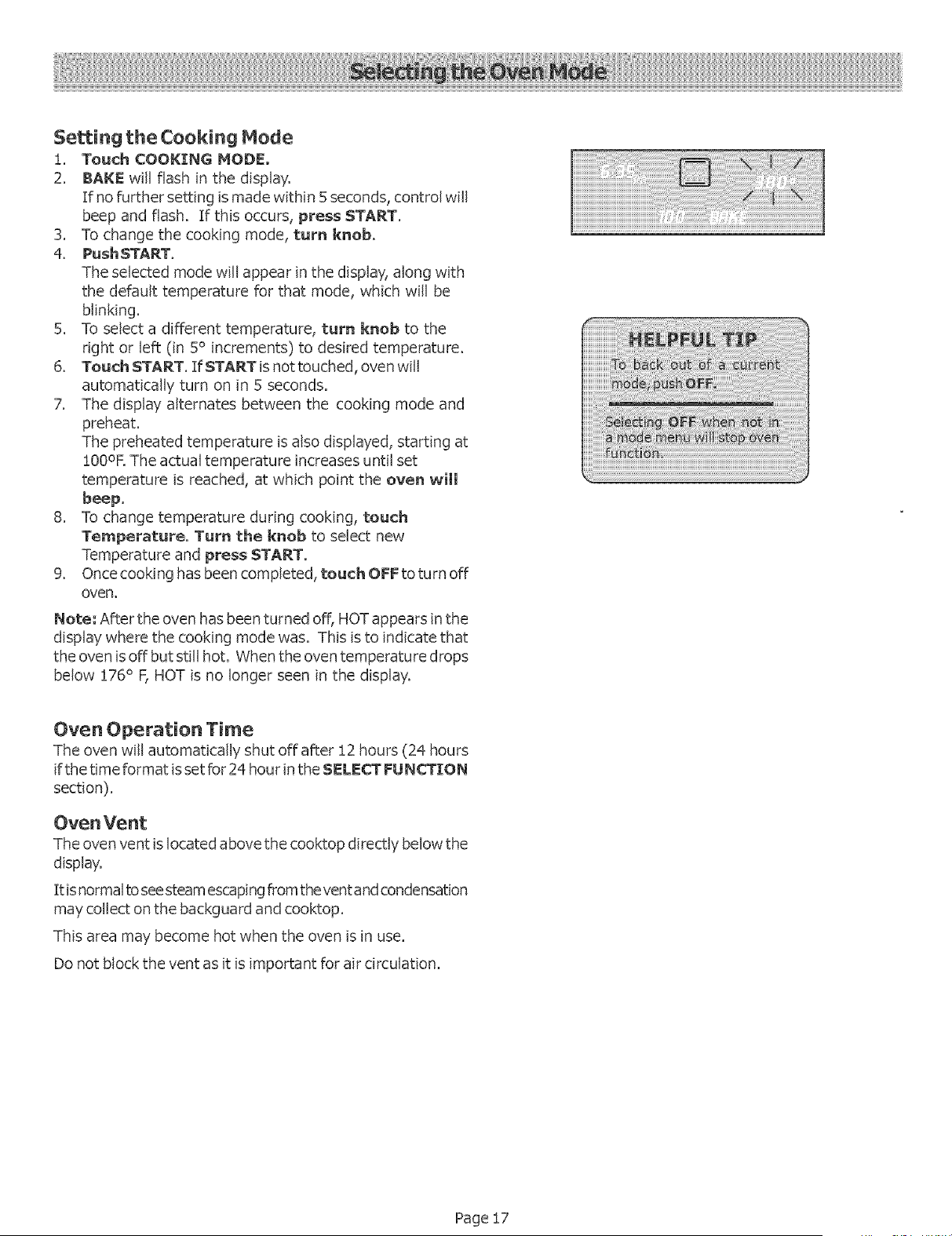
$e_ing the Cooking Mode
i. Touch COOKING MODE,
2. BAKE will flash in the display.
If no further setting is made within 5 seconds, control will
beep and flash. If this occurs, press START,
3. To change the cooking mode, turn knob,
4. Push START.
The selected mode will appear in the display, along with
the default temperature for that mode, which will be
blinking.
5. To select a different temperature, turn knob to the
right or left (in 5° increments) to desired temperature.
6. Touch START. If START is not touched,oven will
automatically turn on in 5 seconds.
7. The display alternates between the cooking mode and
preheat.
The preheated temperature is also displayed, starting at
100oE The actual temperature increases until set
temperature is reached, at which point the oven will
beep.
8. To change temperature during cooking, touch
Temperature. Turn the knob to select new
Temperature and press START.
9, Oncecooking has been completed, touch OFF to turn off
oven.
Note: After the oven hasbeen turned off, HOT appears in the
display where the cooking mode was. This isto indicate that
the oven isoff but still hot. When the oven temperature drops
below 176° F, HOT is no longer seen in the display,
Oven Operation Time
The oven will automatically shut off after 12 hours (24 hours
ifthe time format is set for 24 hour in the SELECT FUNCTION
section).
Oven Vent
The oven vent islocated above the cooktop directly below the
dBplay.
It is normalto see steamescaping from thevent and condensation
may collect on the backguard and cooktop.
This area may become hot when the oven isin use.
Do not block the vent asit isimportant for air circulation.
Page !7
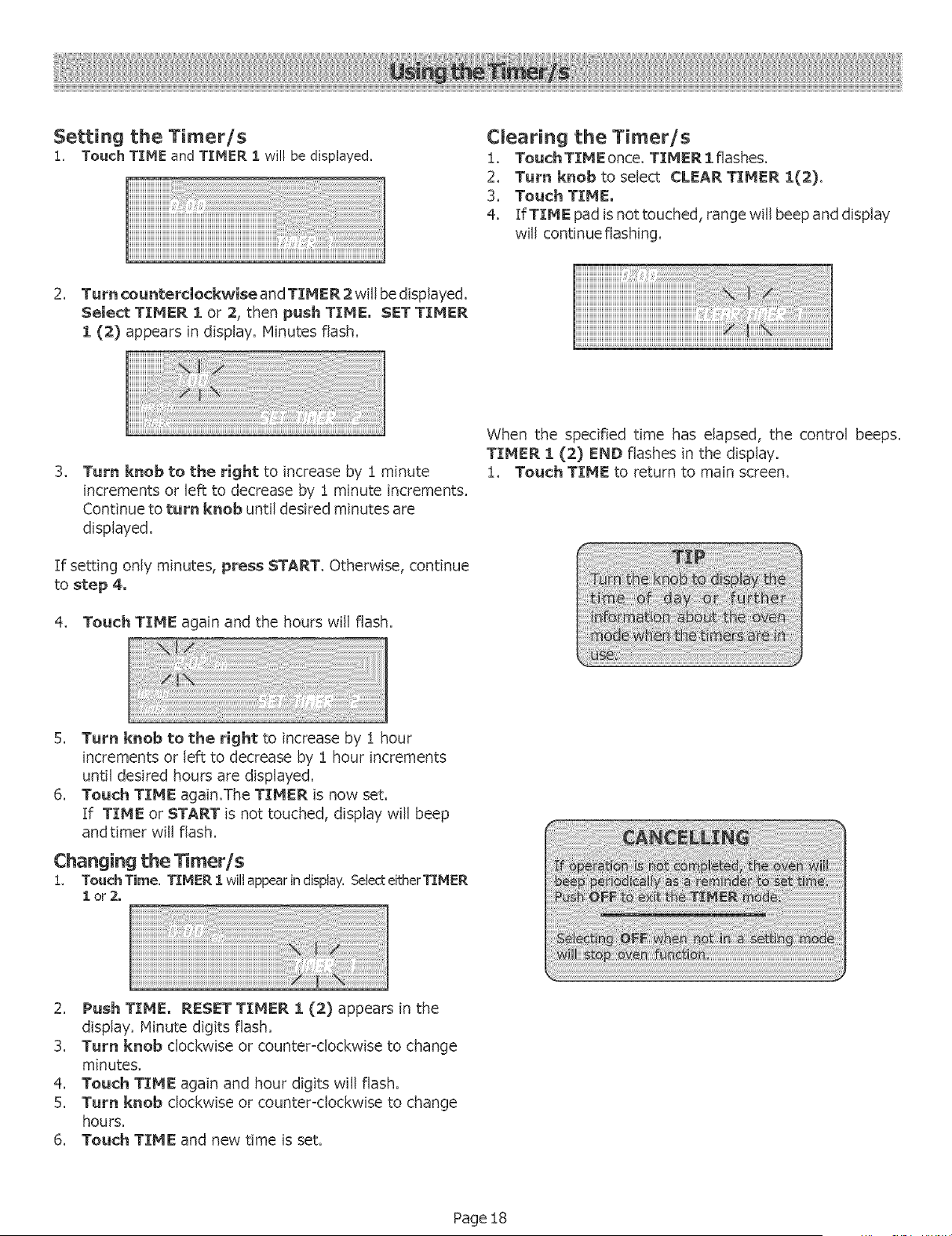
Setting the Timer/s
1. Touch TIME andTIMER I wil!be displayed.
2. Turn counterclockwise and TIMER 2 will be displayed,
Select TIMER i or 2, then push TIME. SET TIMER
I (2) appears in display'. Minutes flash.
Clearing the Timer/s
1. TouchTIMEonce, TIMER 1 flashes,
2. Turn knob to selectCLEAR TIMER 1(2),
3, Touch TIME.
4. If TIME pad is not touched, range will beep and display
will continue flashing.
iiiiiiiiiiiiiiiiiiiiiiiiiiiiiiiiiiiiiiiiiiiiiiiiiiiiiiiiiiiiiiiiiiiiiiiiiiiiiiiiii¸iii
iiiiiiiiiiiiiiiiiiiiiiiiiiiiiiiiiiiiiiiiiiiiiiiiiiiiiiiiiiiiiiiiiiiiiiiiiiiiiiiiiiiiiii¸i i] i Z
3_
Turnknob to the rightto increaseby 1 minute
incrementsor left to decreaseby 1 minute increments,
Continuetoturn knobuntildesiredminutesare
displayed.
If setting only minutes, press START, Otherwise, continue
tostep 4.
4. Touch TIME again and the hours will flash.
When the specifiedtime has elapsed,the control beeps,
TIMER i (2) END flashesin the display.
1. Touch TIME to return to main screen,
5. Turn knob to the rightto increaseby i hour
incrementsor leftto decreaseby 1 hour increments
untildesiredhoursare displayed.
6. Touch TIME again,The TIMER is now set.
If TIME or START is not touched, display will beep
andtimer will flash.
Changing thelimer/s
1, TouchTime, TIMER 1 willappearindisplay,SelecteitherT]:HER
lor2o
2. Push TIME, RESET TIMER i (2) appears in the
display. Minute digits flash.
3. Turn knob clockwise or counter-clockwise to change
minutes.
4. Touch TIME again and hour digits will flash.
5. Turn knob clockwise or counter-clockwise to change
hours.
6. Touch TIME and new time is set.
Page 18
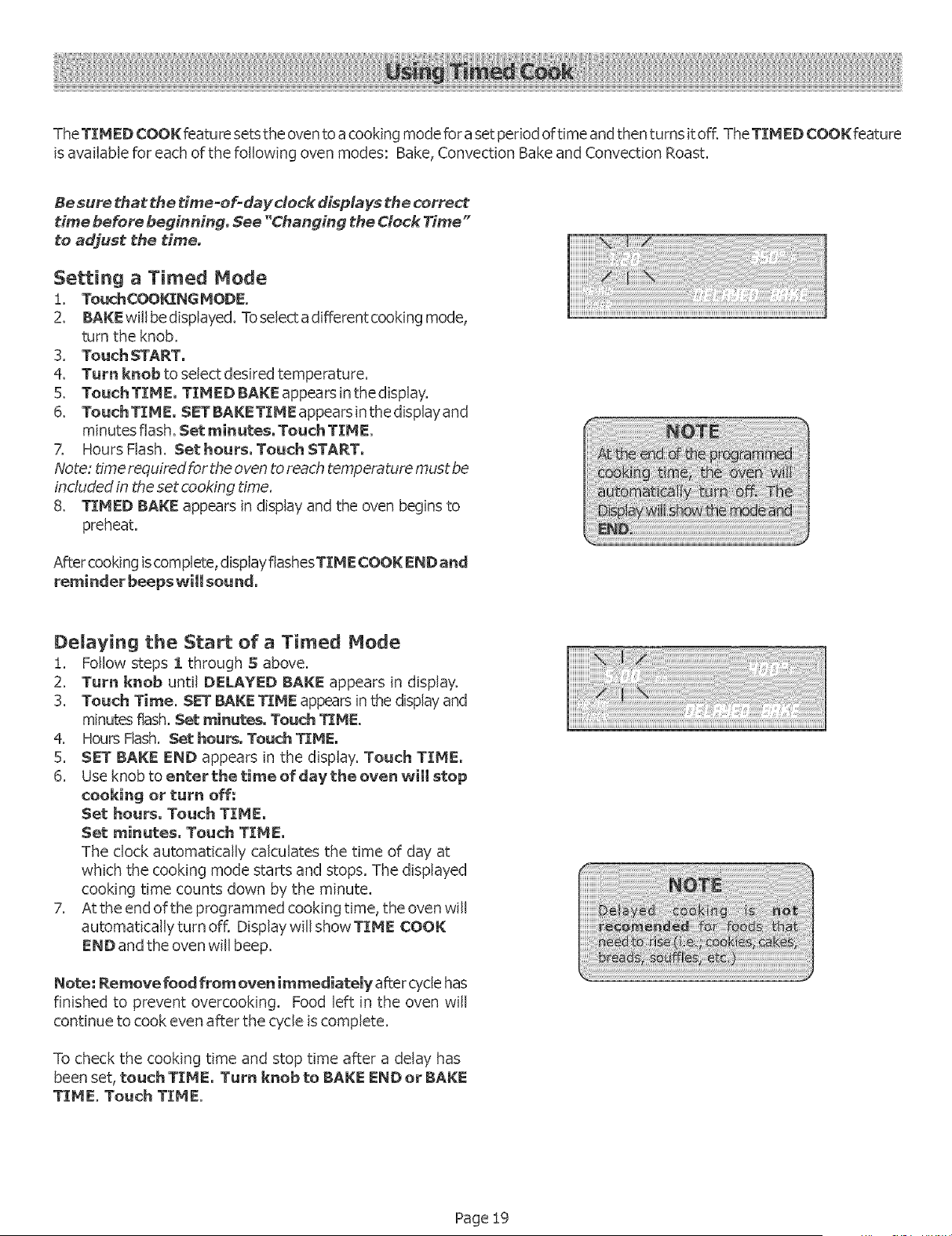
TheTINED COOK featu re setsthe oventoa cooking mode fora set period of time and then turns itoff. TheTIMED COOK feature
isavailable for each of the following oven modes: Bake, Convection Bake and Convection Roast.
Be sure that the time-of-day dock displays the _rrect
time befere beginning, See "Changing the Clock Time"
te adjust the time.
Setting a Timed Mode
!. TouchCOOKING MODE
2. BAKE willbe displayed. To selecta different cooking mode,
turn the knob.
3. Touch START.
4. Turn knob to select desired temperature.
5. Touch TIME. TIMED BAKE appears in the display.
6. TouchTIME. SETBAKETIMEappearsinthedisplayand
minutes flash. Set minutes. Touch TIME.
7. Hours Flash. Set hours. Touch START,
Note: time required for the oven toreach temperature must be
included in theset cooking time.
8. TIMED BAKE appears in display and the oven begins to
preheat.
After cooking iscomplete, display flashesTIME COOK END and
reminder beeps will sou rid.
Delaying the Start of a Timed Mode
!. Follow steps 1 through S above.
2. Turn knob until DELAYED BAKE appears in display.
3. Touch Time. SET BAKE TIME appearsin the display and
minutes flash.Set minutes, Touch TIME.
4. Hours Flash. Set hour, Touch TIME.
5. SET BAKE END appears in the display. Touch TIME.
6. Use knob to enter thetime efdavthe even will stop
cooking or turn off:
Set hours, Touch TIME,
Set minutes, Touch TIME,
The clock automatically calculates the time of day at
which the cooking mode starts and stops. The displayed
cooking time counts down by the minute.
7. Atthe end of the programmed cooking time, the oven will
automatically turn offi Display will show TIME COOK
END and the oven will beep.
Note: Remove food from oven immediately after cyclehas
finished to prevent overcooking. Food left in the oven will
continue to cook even after the cycle iscomplete.
To check the cooking time and stop time after a delay has
been set, touch TIMEo Turn knob to BAKE END or BAKE
TIME. Touch TIME.
Page 19
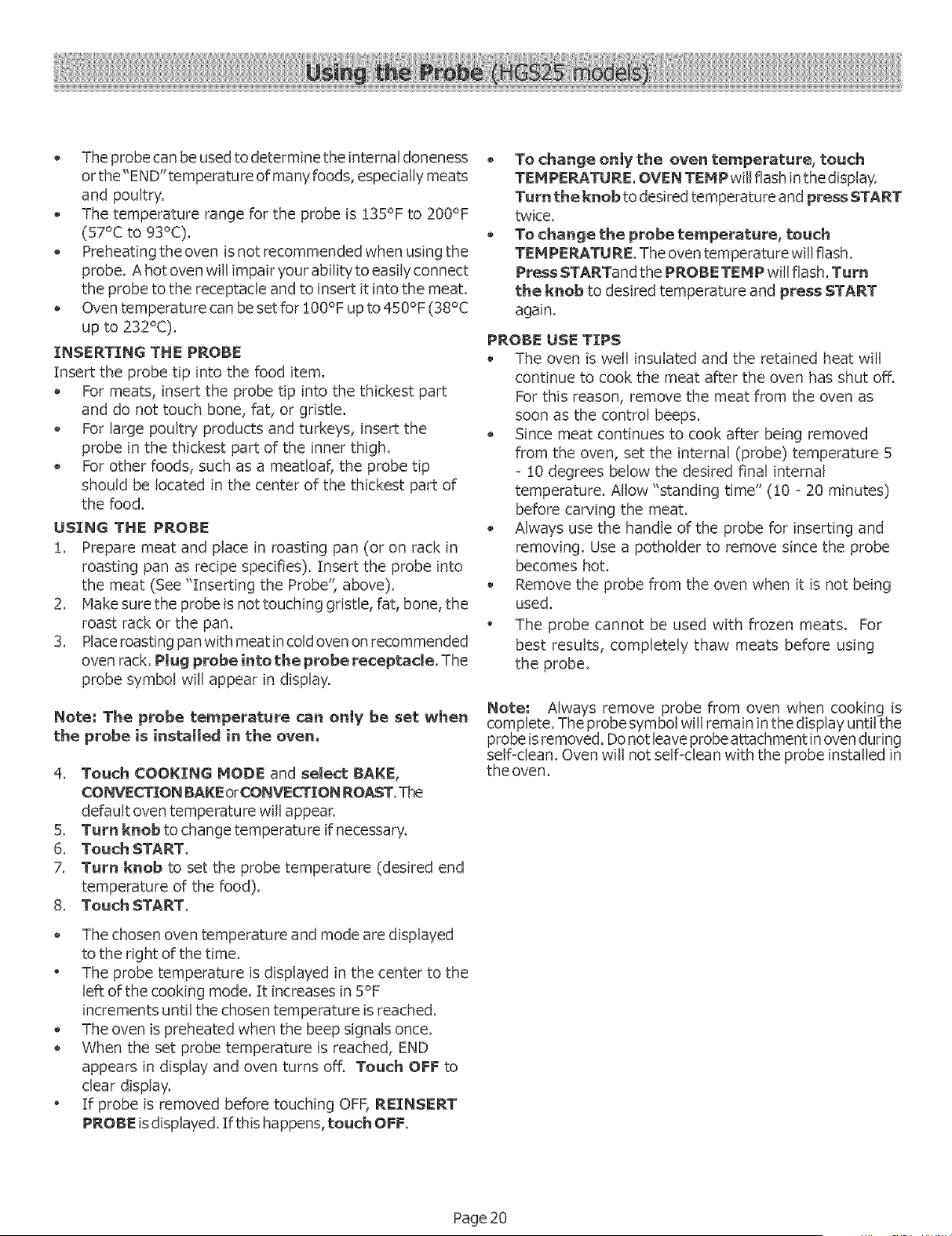
• Theprobe canbe usedtodeterminethe internal doneness
or the"END"temperature ofmany foods, especially meats
and poultry.
The temperature range for the probe is !35°F to 200°F
(57°C to 93°C).
Preheating the oven isnot recommended when using the
probe. A hot oven will impair your ability to easily connect
the probe to the receptacle and to insert it into the meat.
Oventemperature can be set for !00°F up to 450°F (38°C
up to 232°C).
INSERTING THE PROBE
Insertthe probetipintothe food item.
Formeats, insertthe probe tipintothethickestpart
and do nottouch bone,fat,orgristle.
For large poultry products and turkey's, insert the
probe in the thickest part of the inner thigh.
For other foods, such as a meatloaf, the probe tip
should be located in the center of the thickest part of
the food.
USING THE PROBE
i. Prepare meat and place in roasting pan (or on rack in
roasting pan as recipe specifies). Insert the probe into
the meat (See "Inserting the Probe", above).
2. Hake sure the probe isnot touching gristle, fat, bone, the
roast rack or the pan.
3. Place roasting pan with meat in coldoven on recommended
oven rack.Plug probe intothe probe receptacle,The
probe symbol will appear in display.
Note: The probetemperature can only beset when
the probe isinstalledin the oven°
4. Touch COOKING MODE and selectBAKE,
CONVECTION BAKE orCONVECTION ROAST. The
defaultoven temperaturewillappear.
5. Turn knobto change temperature if necessar%
6. Touch START,
7. Turn knob to set the probe temperature (desired end
temperature of the food).
Touch START.8_
o
The chosen oven temperature and mode are displayed
to the right of the time.
The probe temperature is displayed in the center to the
left of the cooking mode. It increases in 5°F
increments until the chosen temperature isreached.
The oven ispreheated when the beep signals once.
When the set probe temperature is reached, END
appears in display and oven turns off. Touch OFF to
clear display.
If probe is removed before touching OFF,REINSERT
PROBE is displayed. If this happens, touch OFF.
To change only the oventemperature, touch
TEMPERATURE. OVEN TEMP willflashinthedisplay.
Turn the knob to desired temperature and press START
twice.
To change the probe temperature, touch
TEMPERATURE. The oven temperaturewillflash.
Press STARTand the PROBE TEMP will flash. Turn
the knob to desired temperature and press START
again.
PROBE USE TIPS
The oven is well insulated and the retained heat will
continue to cook the meat after the oven has shut off.
For this reason, remove the meat from the oven as
soon as the control beeps.
Since meat continues to cook after being removed
from the oven, set the internal (probe) temperature 5
- 10 degrees below the desired final internal
temperature. Allow "standing time" (!0 - 20 minutes)
before carving the meat.
Always use the handle of the probe for inserting and
removing. Use a potholder to remove since the probe
becomes hot.
Remove the probe from the oven when it is not being
used.
The probe cannot be used with frozen meats. For
best results, completely thaw meats before using
the probe.
Note: Always remove probe from oven when cooking is
complete. Theprobe symbol will remain in the display until the
probe is removed. Do notleaveprobe attachment in ovenduring
self=clean. Oven will not self-clean with the probe installed in
the oven.
Page 20
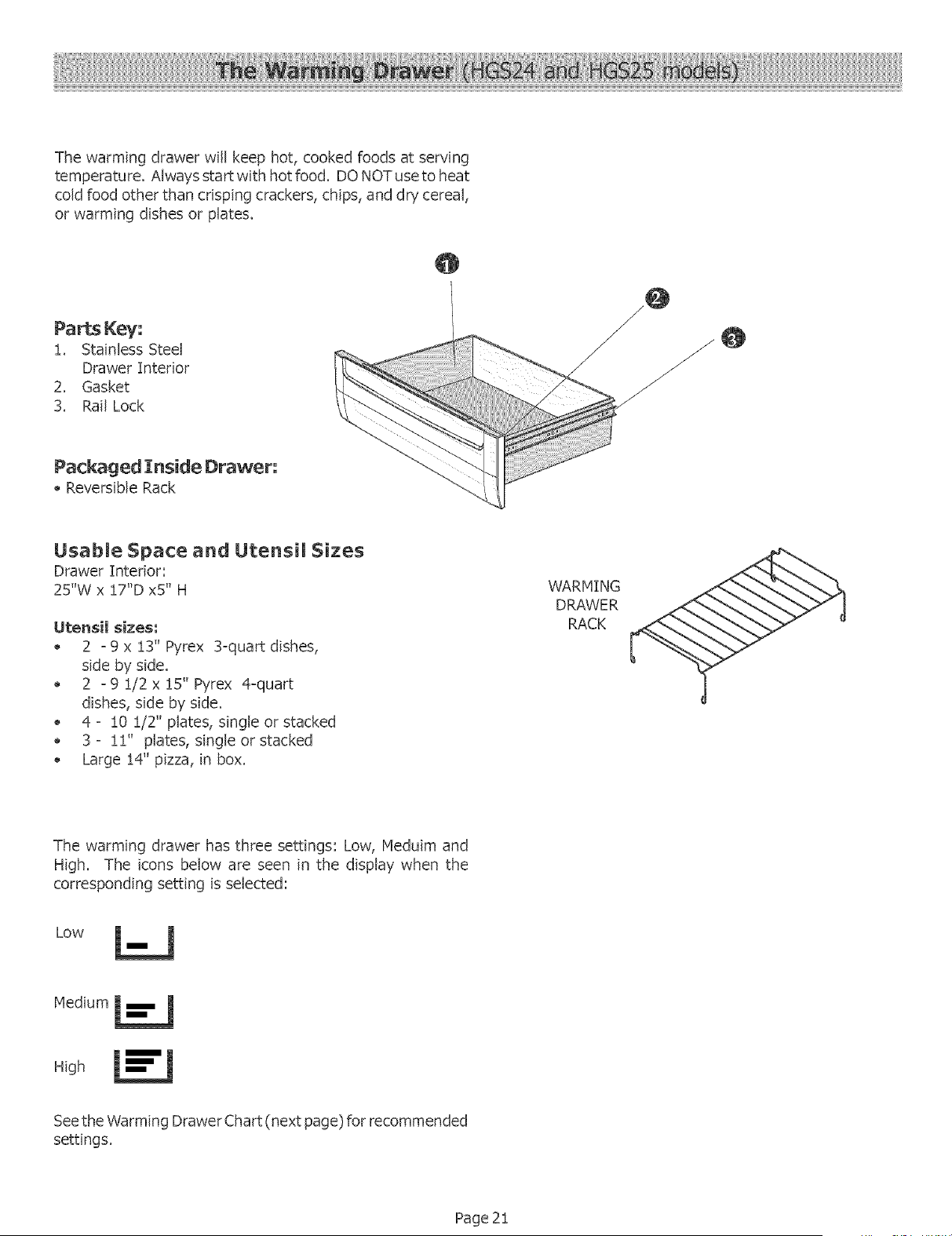
Thewarmingdrawerwillkeephot,cookedfoodsatserving
temperature.Alwaysstartwithhotfood.DONOTusetoheat
coldfoodotherthancrispingcrackers,chips,anddrycereal,
orwarmingdishesor plates.
@
Parts Key:
1. Stainless Steel
Drawer Interior
2. Gasket
3. Rail Lock
@
Packaged ]Inside Drawer:
Reversible Rack
UsabLe Space and Utensil Sizes
Drawer Interior:
25"W x 17"D x5" H
Utensil sizes;
2 - 9 x 13" Pyrex 3-quart dishes,
side by side.
2 - 9 1/2 x 15" Pyrex 4-quart
dishes, side by side.
4 - !0 !/2" plates, single or stacked
3 - 11" plates, single or stacked
Large 14" pizza, in box.
WARHING
DRAWER
RACK
The warming drawer has three settings: Low, Heduim and
High. The icons below are seen in the display when the
corresponding setting is selected:
Low
Medium
H_gh
Seethe Warming Drawer Chart (next page) for recommended
settings.
Page 21

Using Your Warming Drawer
Food should be at serving temperature (above 140 ° F)
before being placed in the warming drawer.
The warming drawer can be used with or without a rack.
Preheat with rack in place if using that arrangement. It
fits side to side.
Preheat empty serving dish while preheating drawer.
Add cooked, hot food in cooking utensil or heat-safe
serving dishes.
Foodmay be kept hot in its cooking container or transferred
to a heat-safe serving dish.
Aluminum foil may be used to cover food.
Warming drawer settings are Low, Medium, and High.
Refer to the chart at right for recommended settings.To keep
several different foods hot, set the temperature to the food
needing the highest setting. Placeitem needing the highest
setting toward the side of the drawer and item needing less
heat on the rack or in the center of the drawer bottom.
Setting the Temperature
!, Tou_CC_)K%NGMODE,
2. Turn knob toselect WARMING DPd_WER.
3. Push START.
Turning Off and/or Cancelling
!. Pre_OFF.
2. TurnknobtoCAHCELWARMINGDRAWER.
3. PressOFF,
Warming Empty Serving Bowms and Pmates
Use only heat-safe dishes.
Nay use reversible rack, in low position to raise utensil
from direct contact with bottom of drawer.
, Warm on setting appropriate for utensil.
Check dish temperature during warming period.
" Place empty plates or dishes in a cold warming drawer.
Do not preheat.
Crisping Stale Items
Place food in low sided dishes OFpans.
Preheat on Low.
Check crispness after 45 minutes. Add time as needed.
Preheating
For best results, always preheat warming drawer when
warming food.
Preheat times are as follows:
Low: 10 minutes
Hediurn: !5 mintues
High: 20 minutes
Warming Drawer Guide
iiiiiiiiiiiiiiiiiiiiiiiiiiiiiiiiiiiiiiii!;iiiiiiiiiiiiiiiiiii!iii!iiii¸i¸iiiiiiiiiiiiiiiiiiiiiiiiiiiiiiiiii!iiiiiii
Bacon
Beef, medium and well
done
Beef_ rare
Bread_ Hard Rolls
Bread_ Soft Rel_s_ Coffee
Cakes
Buscuits
Casseroles
Eggs
Fish, Seafood
Fried Foods
Gravy, Cream Sauces
Ham
Pancakes
Pies_ One Crust
Pies_ Two Crusts
Pizza
Pork
Petatees_ Baked
Petatees_ Mashed
Poultry, Roasted
Vegetabbs
P_ates
P_ate of Food
Hi Uncovered
Med Covered
Low Covered
Med Uncovered
Med Covered
Med Covered
Med Covered
Med Covered
Med Covered
Hi Uncovered
Med Covered
Med Covered
Hi Covered
Med Covered
Med Uncovered
Hi Covered
Med Covered
Hi Covered
Med Covered
Med Covered
Med Covered
Low Uncovered
Med Covered
Plasticcontainers or plastic wrap
can melt if in direct contact with
the drawer or a hot utensil. If it
melts onto the drawer, it may not
be removable.
DO NOT LENE DRAWER WETH ALUHENUH FOEL,
Page 22
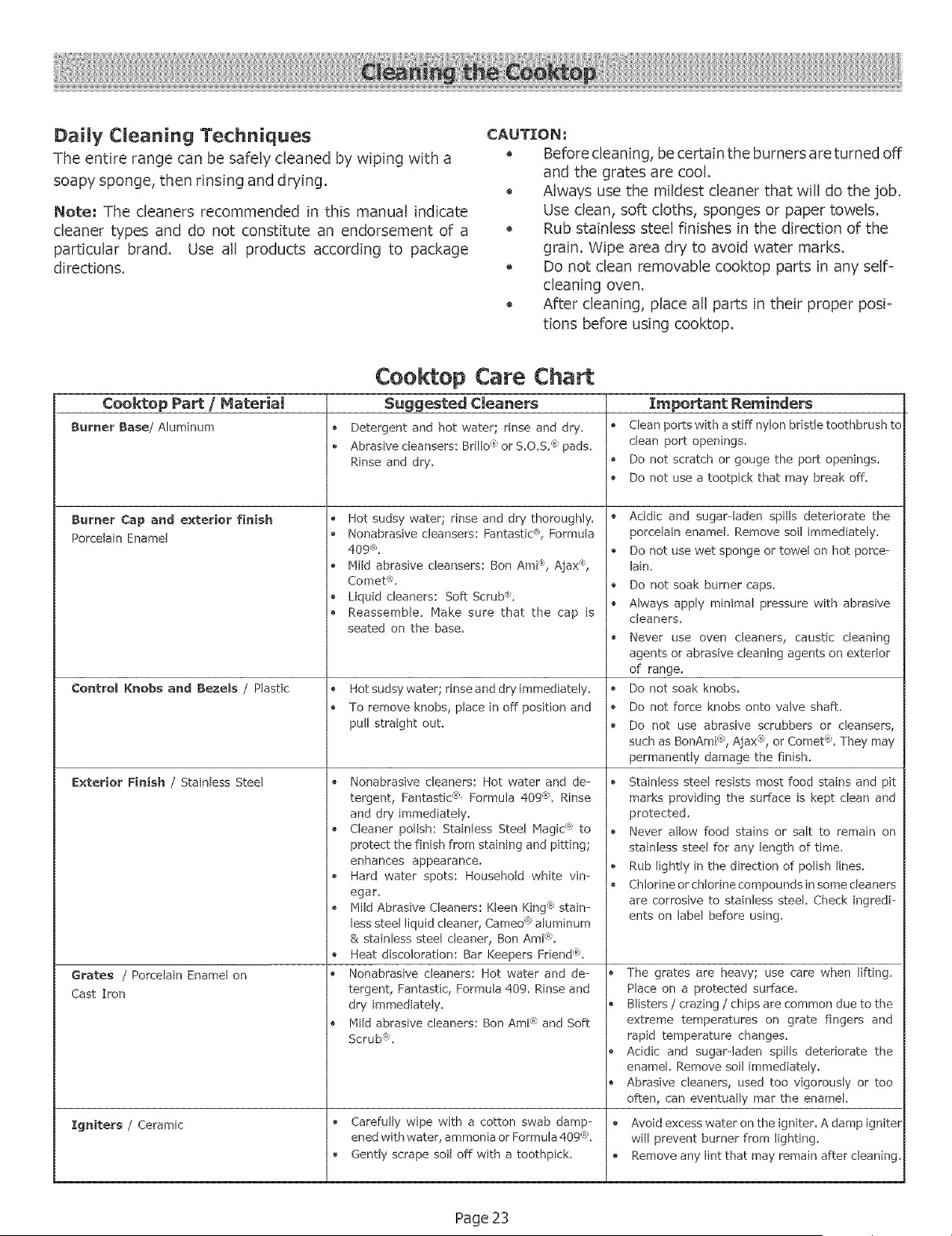
Daily Cleaning Techniques
The entire range can be safely cleaned by wiping with a
soapy sponge, then rinsing and drying.
Nete: The cleaners recommended in this manual indicate
cleaner types and do not constitute an endorsement of a
particular brand. Use all products according to package
directions.
CAUTION:
Before cleaning, be certain the burners are turned off
and the grates are cool.
Always use the mildest cleaner that will do the job.
Use dean, soft cloths, sponges or paper towels.
Rub stainless steel finishes in the direction of the
grain. Wipe area dry to avoid water marks.
Do not clean removable cooktop parts in any self=
cleaning oven.
After cleaning, place all parts in their proper posi=
tions before using cooktop.
Ceektop Care Chart
Cooktop Part / Material Suggested Cleaners Important Reminders
Burner Base/Aluminum • Detergent and hot water; rinse and dry. • Clean ports with astiff nylon bristle toothbrush to
Abrasive cleansers: Brillo _'or S.O.S. ® pads. clean port openings.
Rinse and dry. • Do not scratch or gouge the port openings.
Do not use a tootpick that may break off.
Burner Cap and exterior finish
Porcelain Enamel
Control Knobs and Bezels / Plastic
Exterior Finish / Stainless Steel
Grates / Porcelain Enamel on
Cast Iron
Igniters / Ceramic
Hot sudsy water; rinse and dry thoroughly.
Nonabrasive cleansers: Fantastic '®, Formula
409 ®,
Mild abrasive cleansers: Ben AmP, Ajax ®,
Comet ®,
Liquid cleaners: Soft Scrub ®,
Reassemble. Make sure that the cap is
seated on the base.
Hot sudsy water; rinse and dry immediately.
To remove knobs, place in off position and
pull straight out.
Nonabrasive cleaners: Hot water and de-
tergent, Fantastic (_',Formula 409 (_;.Rinse
and dry immediately.
Cleaner polish: Stainless Steel Magic _'to
protect the finish from staining and pitting;
enhances appearance.
Hard water spots: Household white vin-
egar.
Mild Abrasive Cleaners: Kleen King "_stain-
less steel liquid cleaner, Cameo <°_aluminum
& stainless steel cleaner, Ben Ami<_,
Heat discoloration: Bar Keepers Friend(%
Nonabrasive cleaners: Hot water and de-
tergent, Fantastic, Formula 409. Rinse and
dry immediately.
Mild abrasive cleaners: Ben Ami@and Soft
Scrub%
Carefully wipe with a cotton swab damp-
cR
ened with water, ammonia or Formula 409:_S
Gently scrape soil off with a toothpick.
Acidic and sugar-laden spills deteriorate the
porcelain enamel. Remove soil immediately.
Do not use wet sponge or towel on hot porce-
lain.
Do not soak burner caps.
Always apply minimal pressure with abrasive
cleaners.
Never use oven cleaners, caustic cleaning
agents or abrasive cleaning agents on exterior
of range,
Do not soak knobs.
Do not force knobs onto valve shaft.
Do not use abrasive scrubbers or cleansers,
such as BonAmi "_,Ajax @, or Comet(% They may
permanently damage the finish.
Stainless steel resists most food stains and pit
marks providing the surface is kept clean and
protected.
Never allow food stains or salt to remain on
stainless steel for any length of time.
Rub lightly in the direction of polish lines.
Chlorine or chlorine compounds in some cleaners
are corrosive to stainless steel. Check ingredi-
ents on label before using.
o
o
e
e
The grates are heavy; use care when lifting.
Place on a protected surface.
Blisters / crazing / chips are common due to the
extreme temperatures on grate fingers and
rapid temperature changes.
Acidic and sugar-laden spills deteriorate the
enamel. Remove soil immediately.
Abrasive cleaners, used too vigorously or too
often, can eventually mar the enamel.
Avoid excess water on the igniter. A damp igniter
will prevent burner from lighting,
Remove any lint that may remain after cleaning.
Page 23
SeJf Cleaning the Oven
Bosch ovens feature a self-cleaning function that eliminates
the manual labor involved with cleaning your oven. During
self-cleaning, the oven uses a very"high temperature to burn
away food soil and grease.
• It is common to see smoke and/or an occasional flame-
up during the Self-Clean cycle, depending on the content
andamount of soil remaining in the oven. If a flame
persists, turn off the oven and allow it to cool before
opening the door to wipe up the excessive food soil
In a normal Self=Cleanmode, the door does not
lock atthe beginning of the cycle; However, it does lock
prior to reaching the high self dean temperatures. The
door lock symbol wiJl appear in the display at this point.
The door will not lock at the start of the cycle.
• The oven light does not operate during this mode.
During Self-Clean, the kitchen should be well ventilated
to help eliminate odors associated with Self-Clean. Odors
will lessen with use,
• The preset length of cleaning time is4 hours. The range
can also be set to clean for 3 or 5 hours.
• The mode automatically stops at the end of the clean
hours,
When the oven heat returns to a safe temperature after
cleaning, the automatic door lock will release and the
door can be opened.
Preparing the Oven for $eJf Cmean
!. Remove all utensils and bakeware.
2. Remove oven racks. If oven racks are left in the oven
during the self-dean cycle, they will permanently losethe
shiny finish and change to a dull dark finish. See Oven
Cleaning Chart for proper care.
3. Wipe up any soft soil spills and grease with paper towels.
Excess grease will cause flames and smoke inside the
oven during self=cleaning.
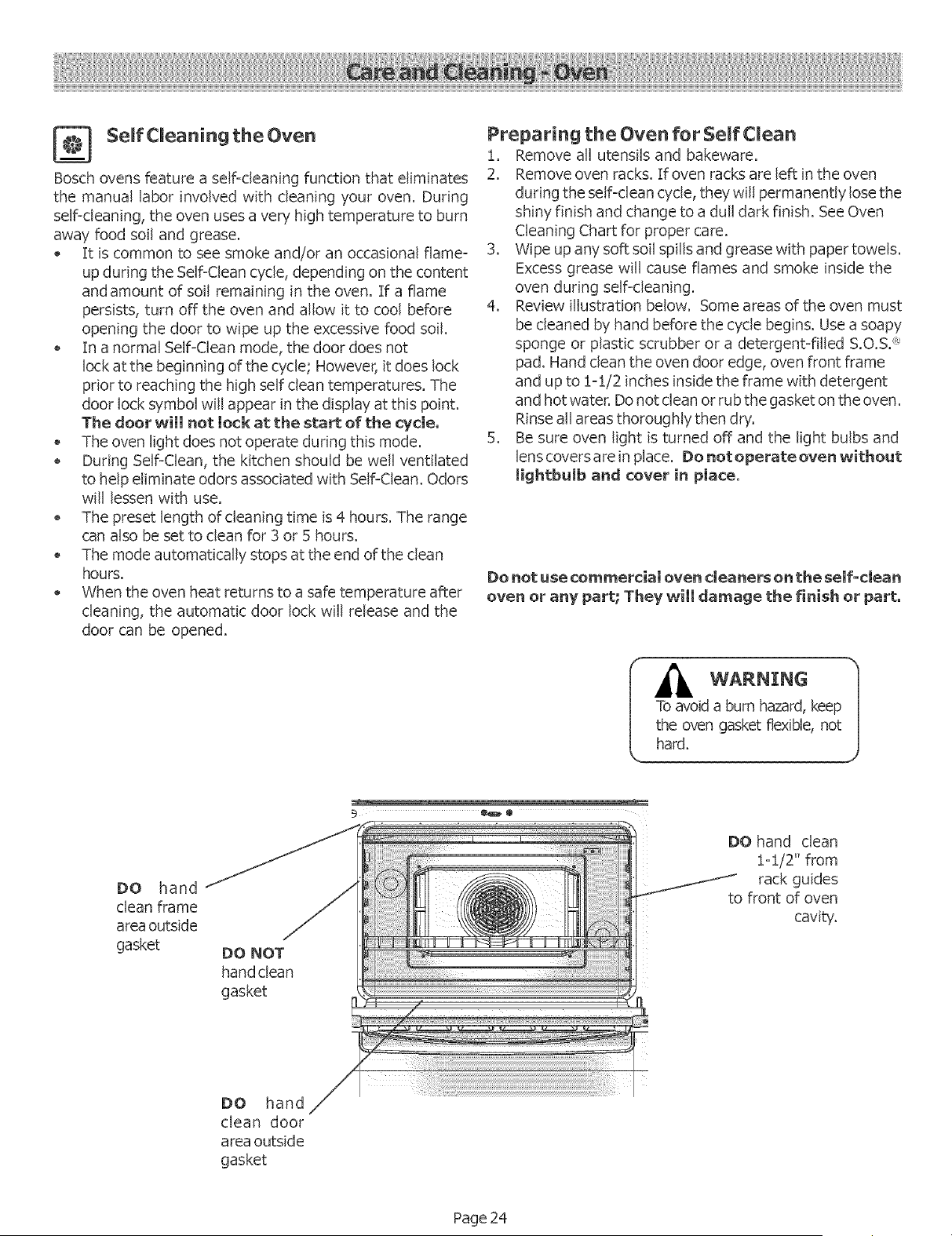
4. Review illustration below. Some areas of the oven must
be cleaned by hand before the cycle begins. Use a soapy
sponge or plastic scrubber or a detergent=filled S.O.Si'_*
pad. Hand clean the oven door edge, oven front frame
and up to !-:[/2 inches inside the frame with detergent
and hot water. Donot clean or rub the gasket on the oven.
Rinse all areas thoroughly then dry.
5. Be sure oven light isturned off and the light bulbs and
lenscovers are in place. De net operate oven without
JightbuJb and cover in place.
Do not use commercial oven cleaners on the self-clean
oven or any part; They will damage the finish or part.
hard.
DO hand
clean frame
area outside
gasket
DO NOT
hand clean
gasket
DO hand clean
:[=:[/2" from
rack guides
to front of oven
cavity.
DO hand
clean door
area outside
gasket
Page 24
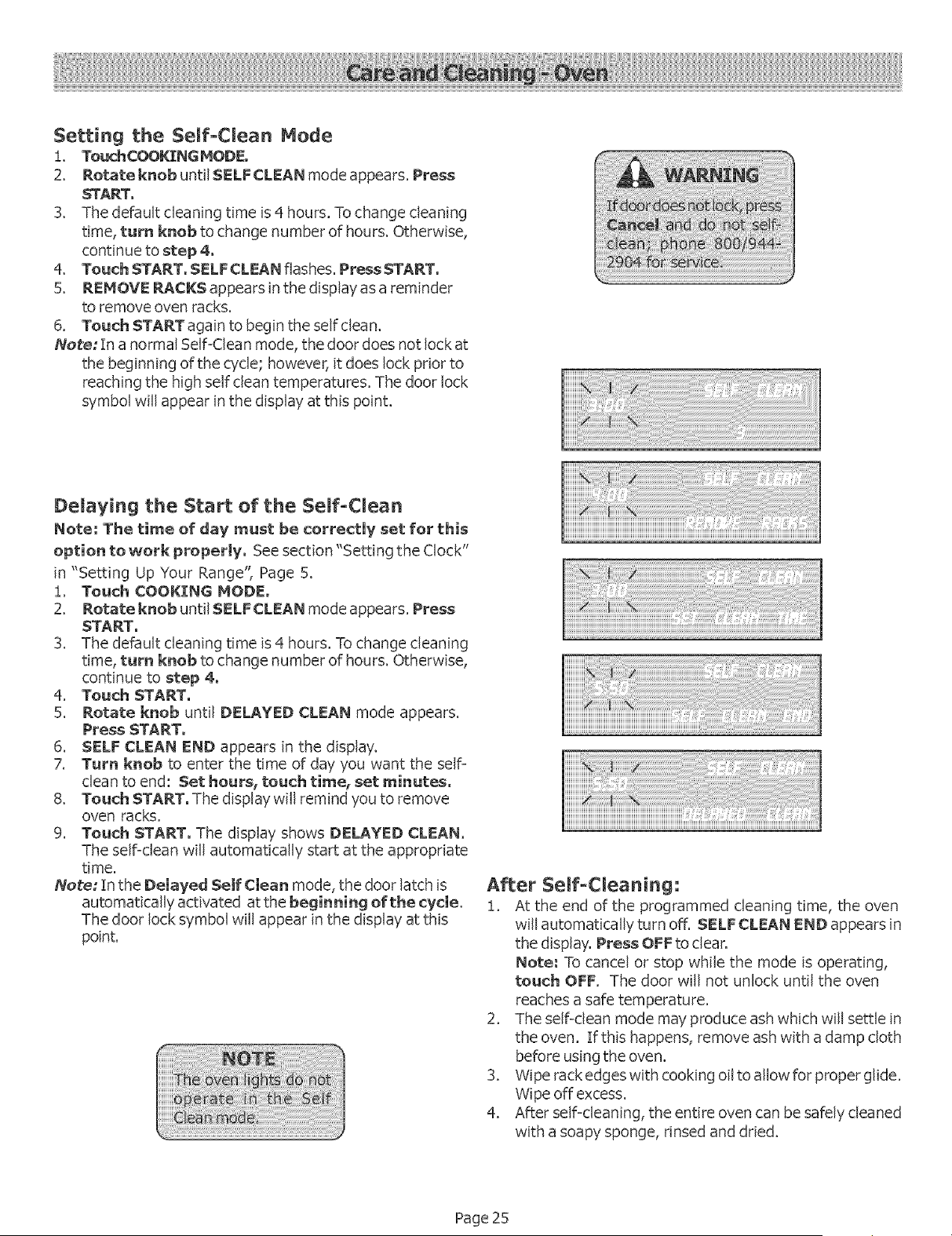
Setting the Self-Clean Mode
i, TouchCOO_NG HODE.
2. Rotate knob until SELFCLEAN mode appears. Press
START.
3. The default cleaning time is4hours. To change cleaning
time, turn knob to change number of hours. Otherwise,
continue to step 4.
4. Touch START. SELFCLEAN flashes. Press START.
5. REMOVE RACKS appears in the display asa reminder
to remove oven racks.
6. Touch START again to begin the self clean.
Note; [n a normal Self-Clean mode, the door does not lock at
the beginning of the cycle; however, it does lock prior to
reaching the high self clean temperatures. The door lock
symbol will appear in the display at this point.
Delaying the Start of the Self-Clean
Note: The time of day must be correctly set for this
option to work properly. See section "Setting the Clock"
in "Setting Up Your Range", Page 5.
!, Touch COOKING MODE.
2. Rotate knob until SELFCLEAN mode appears. Press
START.
3. The default cleaning time is4 hours. Tochange cleaning
time, turn knob to change number of hours. Otherwise,
continue to step 4.
4. Touch START.
5. Rotate knob until DELAYED CLEAN mode appears.
Press START.
6. SELF CLEAN END appears in the display.
7. Turn knob to enter the time of day you want the self
clean toend: Set hours,touch timer setminutes.
8. Touch START. The display will remind you to remove
oven racks.
9. Touch START. The display shows DELAYED CLEAN,
The self=clean will automatically start at the appropriate
time.
Note: In the Delayed Self Clean mode, the door latch is
automatically activated atthe beginning of the cycle,
The door lock symbol will appear in the display at this
point.
After Self-Cleaning:
i. At the end of the programmed cleaning time, the oven
will automatically turn off. SELF CLEAN END appears in
the display. Press OFFto clear.
Note; Tocancel or stop while the mode is operating,
touch OFF. The door will not unlock until the oven
reaches a safe temperature.
2. The seIFdean mode may produce ash which will settle in
the oven. If this happens, remove ash with a damp cloth
before usingthe oven.
3. Wipe rack edges with cooking oil to allow for proper glide.
Wipe off excess.
4. After self=cleaning, the entire oven can be safely cleaned
with a soapy sponge, rinsed and dried.
Page 25
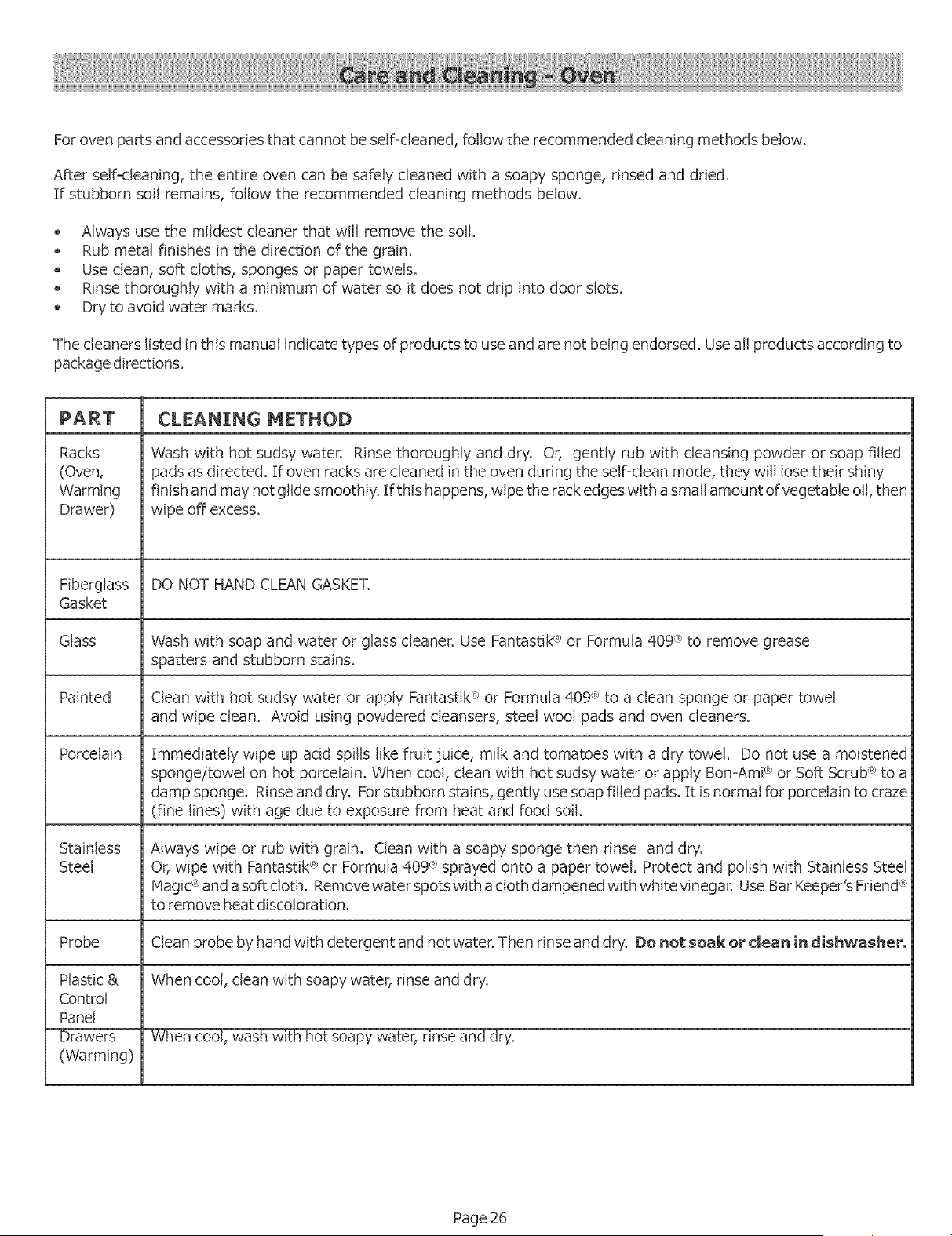
Forovenpartsandaccessoriesthatcannotbeself-cleaned,followtherecommendedcleaningmethodsbelow.
Afterself-cleaning,theentireovencanbesafelycleanedwithasoapysponge,rinsedanddried.
Ifstubbornsoilremains,followthe recommendedcleaningmethodsbelow.
• Alwaysusethe miJdestcleanerthatwill removethesoil.
Rubmetalfinishesin thedirectionofthegrain.
Useclean,softcloths,spongesor papertowels.
Rinsethoroughlywitha minimumof watersoitdoesnotdripintodoorslots.
Dryto avoidwatermarks.
Thecleanerslistedinthismanualindicatetypesofproductstouseandarenotbeingendorsed.Useallproductsaccordingto
packagedirections.
PART CLEANING METHOD
Racks
(Oven,
Warming
Drawer)
Fiberglass
Gasket
Glass
Painted
Porcelain
Stainless
Steel
Probe
Plastic &
Control
Panel
Drawers
(Warming)
Wash with hot sudsy water. Rinse thoroughly and dry. Or, gently rub with cleansing powder or soap filled
pads asdirected. If oven racks are cleaned in the oven during the self=clean mode, they will losetheir shiny
finish and may not glide smoothly. If this happens, wipe the rack edges with a small amount of vegetable oil,then
wipe off excess.
DO NOT HAND CLEAN GASKET.
Wash with soap and water or glass cleaner. Use Fantastik'_'or Formula 409 ® to remove grease
spatters and stubborn stains.
Clean with hot sudsy water or apply Fantastik_,R_or Formula 409 R_to a clean sponge or paper towel
and wipe clean. Avoid using powdered cleansers, steel wool pads and oven cleaners.
Immediately wipe up acid spills like fruit juice, milk and tomatoes with a dry towel. Do not use a moistened
sponge/towel on hot porcelain. When cool, clean with hot sudsy water or apply Bon=Ami®or Soft Scrub "_'to a
damp sponge. Rinse and dry. Forstubborn stains, gently usesoap filled pads. It isnormal for porcelain to craze
(fine lines) with age due to exposure from heat and food soil.
Always wipe or rub with grain. Clean with a soapy sponge then rinse and dry.
Or,wipe with Fantastik<_>or Formula 409 _>sprayed onto a paper towel. Protect and polish with Stainless Steel
Hagic ®and a soft cloth. Remove water spots with a cloth dampened with white vinegar. Use Bar Keeper's Friend <_'
to remove heat discoloration.
Clean probe by hand with detergent and hot water. Then rinse and dry. Do not soak or clean in dishwasher.
When cool, clean with soapy water, rinse and dry.
When cool, wash with hot soapy water, rinse and dry.
Page 26
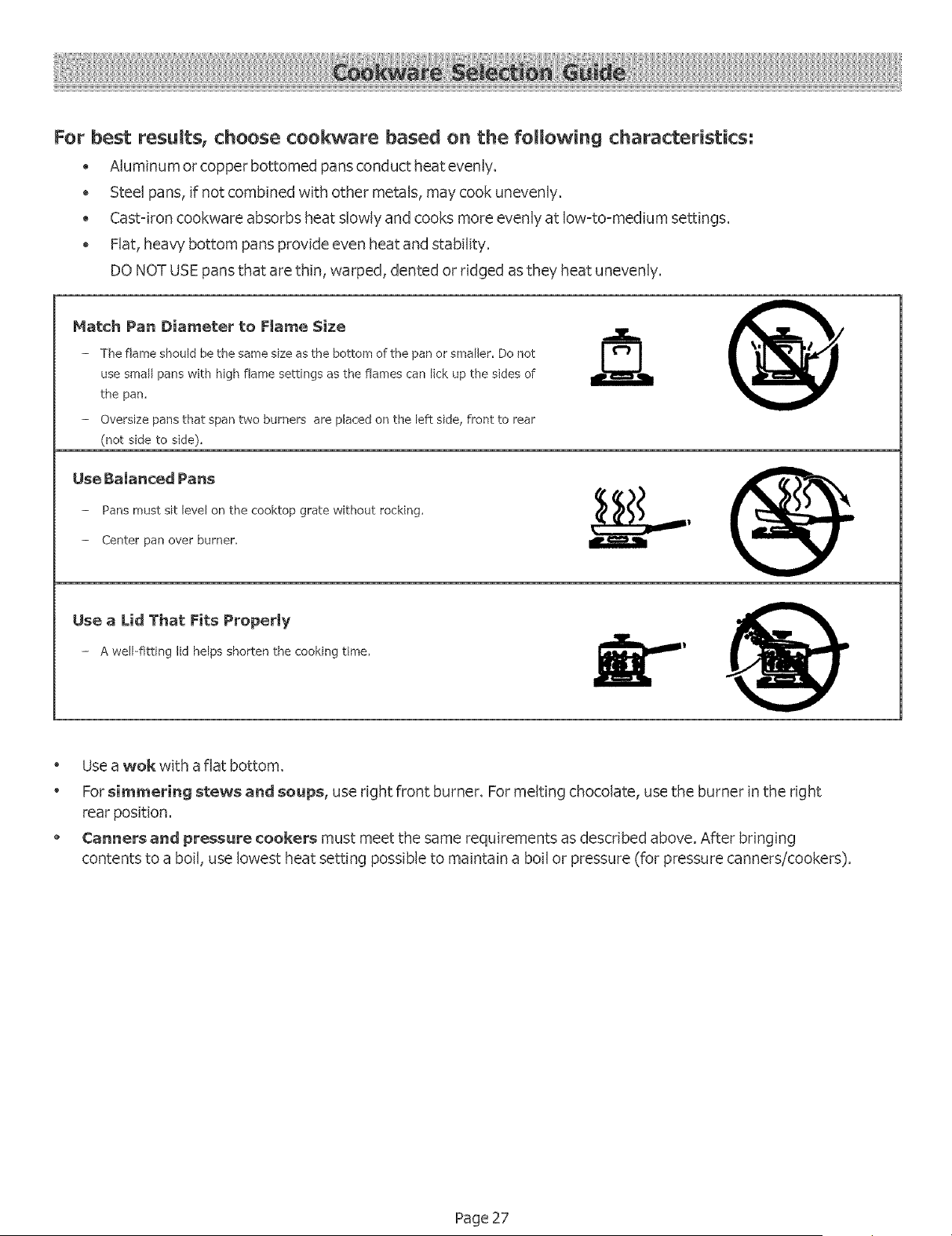
For best resumts, choose cookware based on the following characteristics:
Aluminum or copper bottomed pansconduct heat evenly.
Steel pans, if not combined with other metals, may cook unevenly.
• Cast-iron cookware absorbs heat slowly and cooks more evenly at low=to=medium settings.
Fiat, heaw bottom pans provide even heat and stability.
DONOT USE pans that are thin, warped, dented or ridged asthey heat unevenly.
Match Pan Diameter to Fmame Size
- The flame should be the same size as the bottom of the pan or smaller. De not
use small pans with high flame settings as the flames can lick up the sides of
the pan,
- Oversize pans that span two burners are placed on the left side, front to rear
(not side to side).
@
Use Balanced Pans
- Pans must sit level on the cooktop grate without rocking,
- Center pan over burner,
Use a Lid That Fits Properly
- A well-fitting lid helpsshortenthe cooking time,
@
Use a wok with a flat bottom.
Forsimmering stews and soups, use right front burner. Formelting chocolate, usethe burner in the right
rear position.
Canners and pressure cookers must meet the same requirements asdescribed above. After bringing
contents to a boil, uselowest heat setting possible to maintain a boil or pressure (for pressure canners/cookers).
Page 27
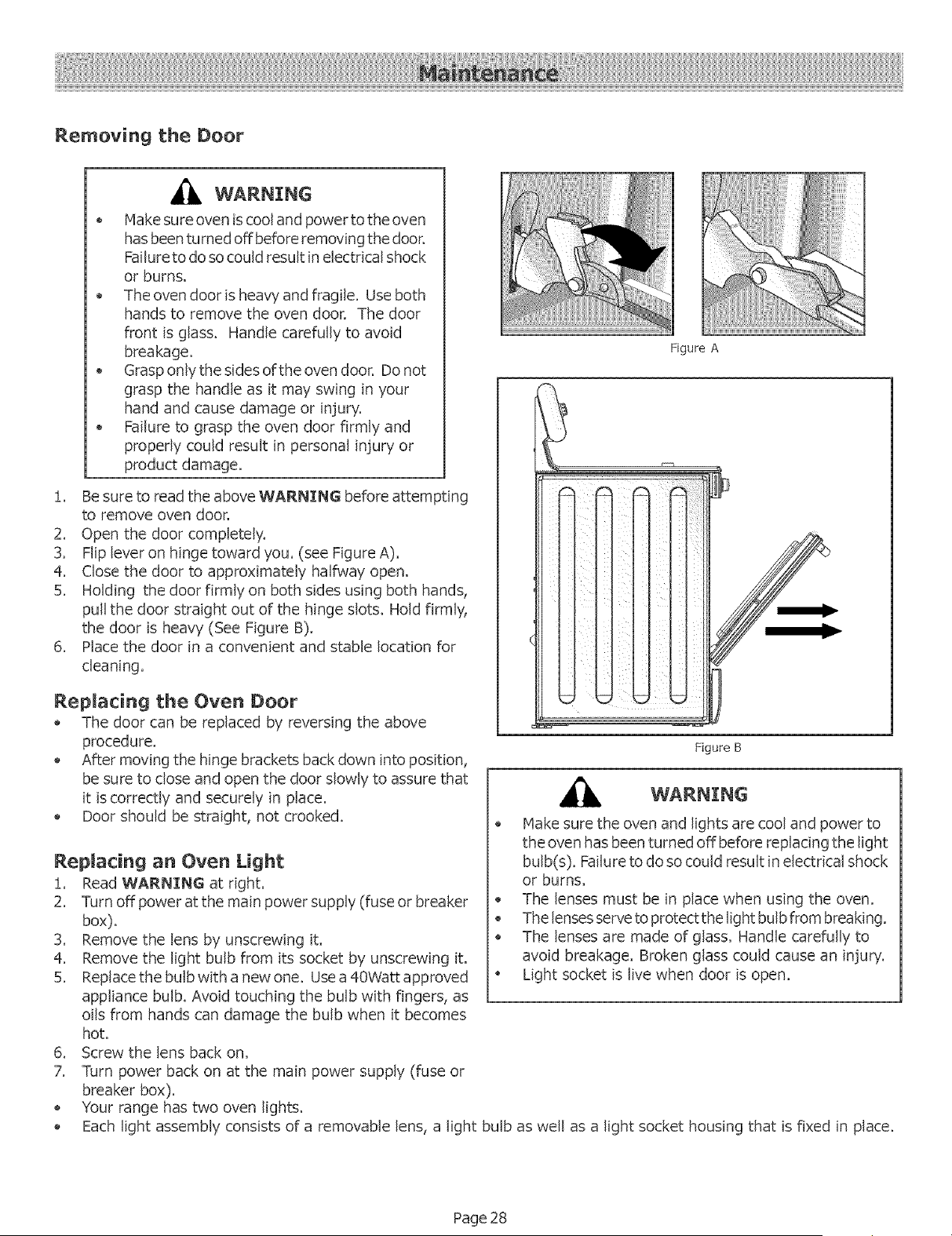
Removing the Door
WARNING
* Make sureoven iscooland power totheoven
hasbeenturnedoffbeforeremovingthedoor.
Failuretodo socouldresultinelectricalshock
OFburns,
The oven door isheavy and fragile. Use both
hands to remove the oven door. The door
front is glass. Handle carefully to avoid
breakage.
Grasponly the sides ofthe oven door. Donor
grasp the handle as it may swing in your
hand and cause damage or injury.
Failure to grasp the oven door firmly and
properly could result in personal injury or
product damage.
!. Be sure to read the above WARNING before attempting
to remove oven door.
2. Open the door completely.
3. Flip lever on hinge toward you. (see Figure A).
4. Close the door to approximately halfway open.
5. Holding the door firmly on both sides using both hands,
pull the door straight out of the hinge slots. Hold firmly,
the door is heavy (See Figure B).
6. Place the door in a convenient and stable location for
cleaning.
Replacing the Oven Door
The door can be replaced by reversing the above
procedure.
After moving the hinge brackets back down into position,
be sure to close and open the door slowly to assure that
it iscorrectly and securely in place.
Door should be straight, not crooked.
Replacing an Oven Light
!. Read WARNING at right.
2. Turn off power at the main power supply (fuse or breaker
box).
3. Remove the lens by unscrewing it.
4. Remove the light bulb from its socket by unscrewing it.
5. Replace the bulb with a new one. Usea 40Watt approved
appliance bulb. Avoid touching the bulb with fingers, as
oils from hands can damage the bulb when it becomes
hot.
6. Screw the lens back on.
7. Turn power back on at the main power supply (fuse or
breaker box).
Your range has two oven lights.
Figure A
Figure B
Make sure the oven and lights are cool and power to
the oven hasbeen turned off before replacing the light
bulb(s). Failureto do socould result in electrical shock
or burns.
The lenses must be in place when using the oven.
The lenses serve toprotect the light bulb from breaking.
The lenses are made of glass. Handle carefully to
avoid breakage. Broken glass could cause an injury.
• Light socket is live when door is open.
Each light assembly consists of a removable lens, a light bulbas well as a light socket housing that is fixed in place.
Page 28
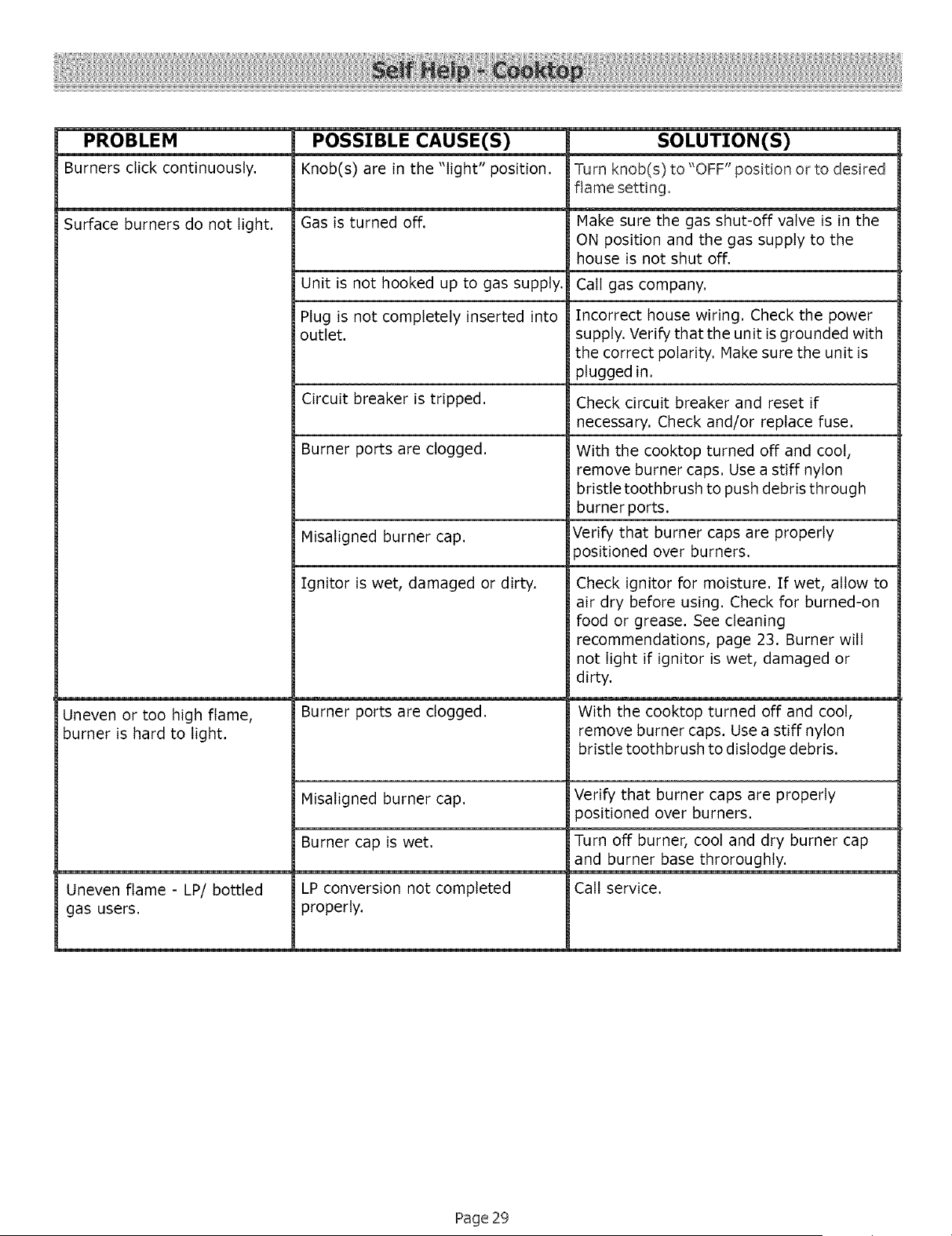
PROBLEM
Burners click continuously.
Surface burners do not light.
Uneven or too high flame,
burner is hard to light.
Uneven flame - LP/bottled
gas users.
POSSIBLE CAUSE(S)
Knob(s) are in the "light" position.
Gas is turned off.
Unit is not hooked up to gas supply.
Plug is not completely inserted into
outlet.
Circuit breaker is tripped.
Burner ports are clogged.
Misaligned burner cap.
Ignitor is wet, damaged or dirty.
Burner ports are clogged.
Misaligned burner cap.
Burner cap is wet.
LP conversion not completed
properly.
SOLUTION(S)
Turn knob(s) to "OFF" position or to desired
flame setting,
Make sure the gas shut-off valve is in the
ON position and the gas supply to the
house is not shut off.
Call gas company.
Incorrect house wiring. Check the power
supply. Verify that the unit isgrounded with
the correct polarity. Make sure the unit is
plugged in.
Check circuit breaker and reset if
necessary. Check and/or replace fuse.
With the cooktop turned off and coot,
remove burner caps. Use a stiff nylon
bristle toothbrush to push debris through
burner ports.
Verify that burner caps are properly
3ositioned over burners.
Check ignitor for moisture. If wet, allow to
air dry before using. Check for burned-on
food or grease. See cleaning
recommendations, page 23. Burner will
not light if ignitor is wet, damaged or
dirty.
With the cooktop turned off and coot,
remove burner caps. Use a stiff nylon
bristle toothbrush to dislodge debris.
Verify that burner caps are properly
positioned over burners.
Turn off burner, coot and dry burner cap
and burner base throroughty.
Call service.
Page 29
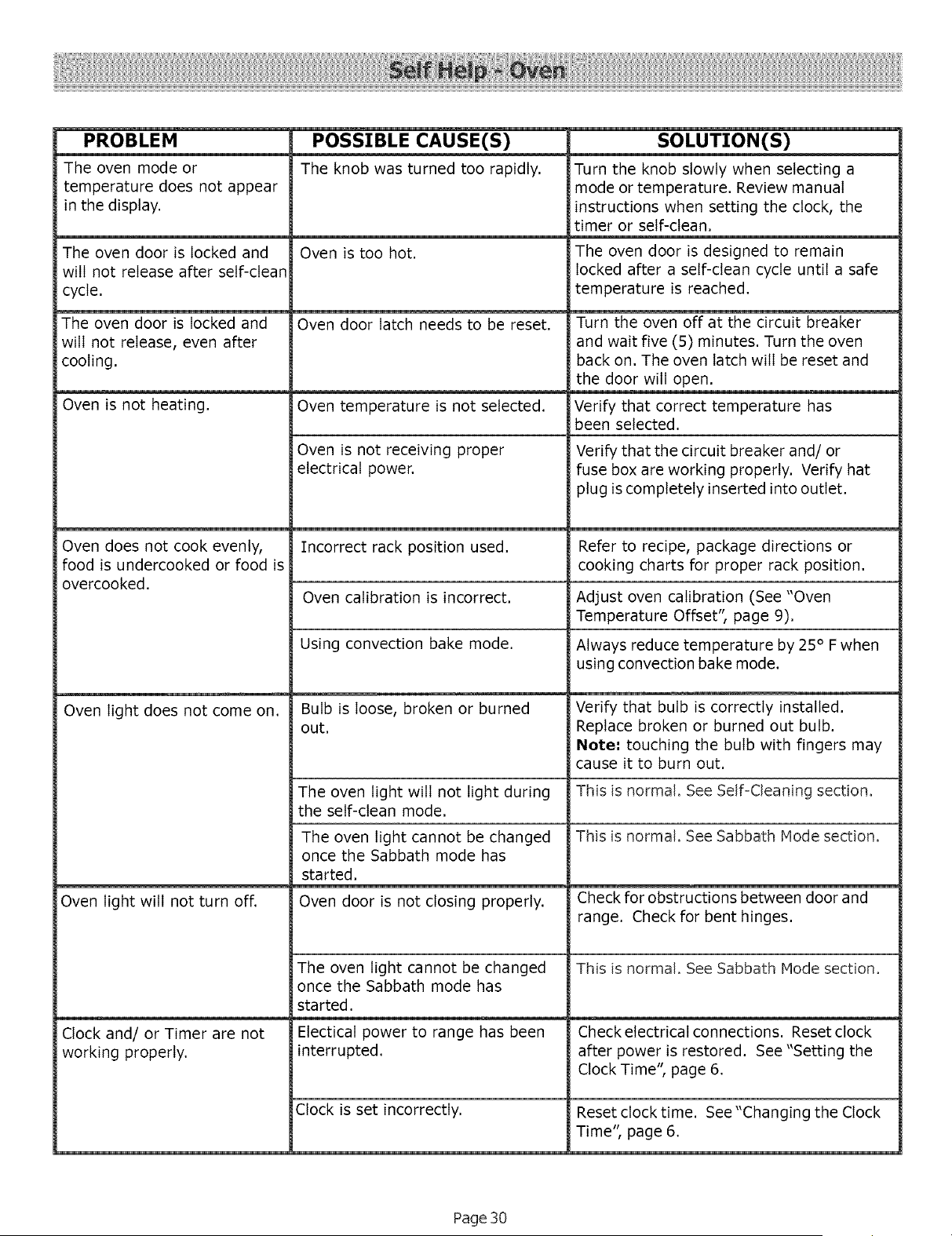
PROBLEM
The oven mode or
temperature does not appear
in the display.
The oven door is locked and
will not release after self-clean
cycle.
The oven door is locked and
will not release, even after
cooling.
Oven is not heating.
Oven does not cook evenly,
food is undercooked or food is
overcooked.
Oven light does not come on.
Oven light will not turn off.
Clock and/or Timer are not
working properly.
POSSIBLE CAUSE(S)
The knob was turned too rapidly.
Oven is too hot.
Oven door latch needs to be reset.
Oven temperature is not selected.
Oven is not receiving proper
electrical power.
Incorrect rack position used.
SOLUTION(S)
Turn the knob slowly when selecting a
mode or temperature. Review manual
instructions when setting the clock, the
timer or self-clean.
The oven door is designed to remain
locked after a self-clean cycle until a safe
temperature is reached.
Turn the oven off at the circuit breaker
and wait five (5) minutes. Turn the oven
back on. The oven latch will be reset and
the door will open.
Verify that correct temperature has
been selected.
Verify that the circuit breaker and/or
fuse box are working properly. Verify hat
plug iscompletely inserted into outlet.
Refer to recipe, package directions or
cooking charts for proper rack position.
Oven calibration is incorrect. Adjust oven calibration (See "Oven
Temperature Offset", page 9).
Using convection bake mode.
Bulb is loose, broken or burned
out.
Always reduce temperature by 25 ° F when
using convection bake mode.
Verify that bulb is correctly installed.
Replace broken or burned out bulb.
Note'- touching the bulb with fingers may
cause it to burn out.
The oven light will not light during This is normal. See Self-Cleaning section.
the self-clean mode.
This is normal. See Sabbath Node section.
The oven light cannot be changed
once the Sabbath mode has
started.
Oven door is not closing properly.
The oven light cannot be changed
once the Sabbath mode has
started.
ElecticaI power to range has been
interrupted.
Clock is set incorrectly.
Check for obstructions between door and
range. Check for bent hinges.
This is normal. See Sabbath Mode section.
Check electrical connections. Reset clock
after power is restored. See "Setting the
Clock Time", page 6.
Reset clock time. See "Changing the Clock
Time", page 6.
Page 30
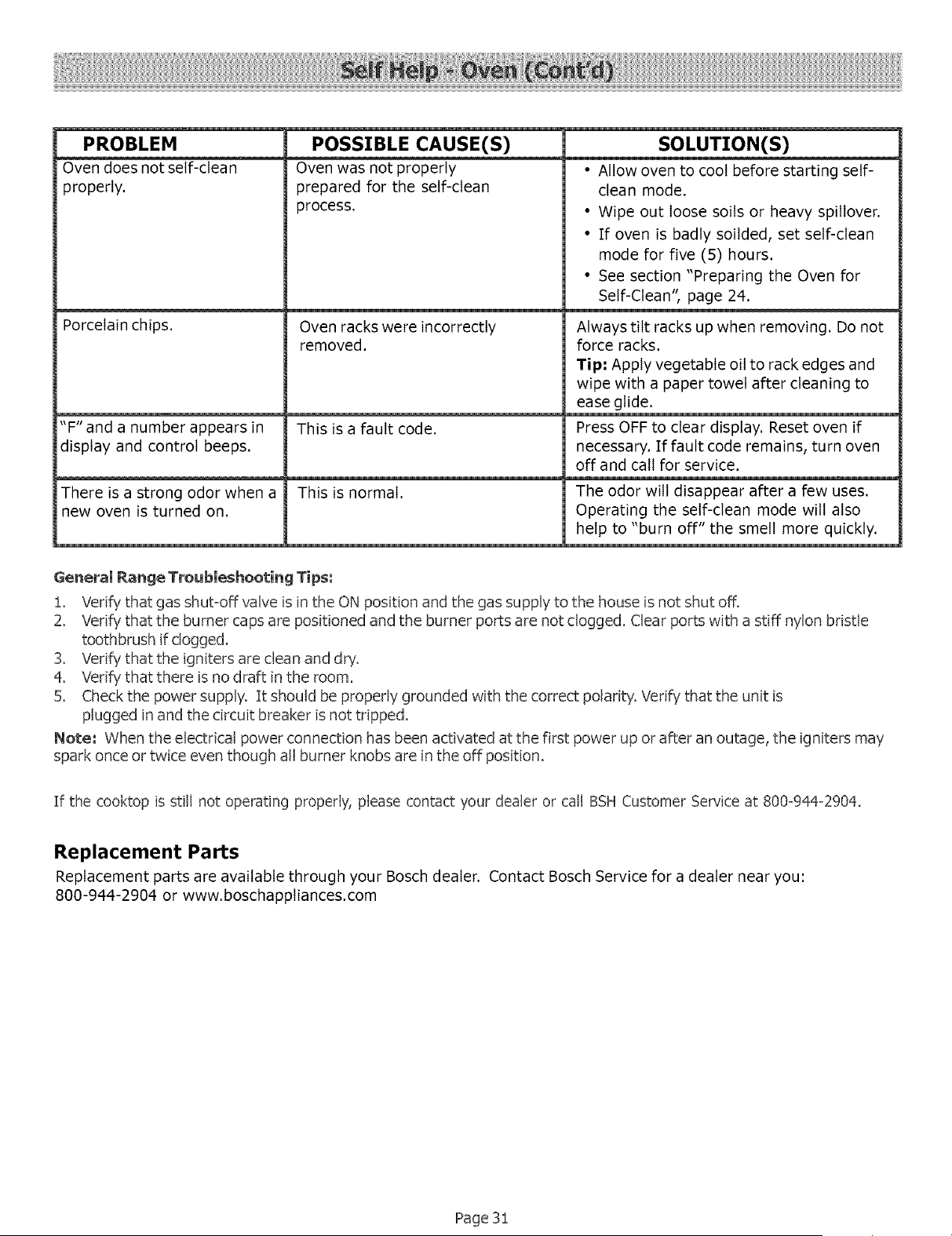
PROBLEM POSSIBLE CAUSE(S) SOLUTION(S)
Oven does not self-clean Oven was not properly • Allow oven to cool before starting self-
properly, prepared for the self-clean clean mode.
process. • Wipe out loose soils or heavy spillover.
• If oven is badly soilded, set self-clean
mode for five (5) hours.
• See section "Preparing the Oven for
Self-Clean", page 24.
Porcelain chips. Oven racks were incorrectly Always tilt racks up when removing. Do not
removed, force racks.
Tip" Apply vegetable oil to rack edges and
wipe with a paper towel after cleaning to
ease glide.
"F" and a number appears in This is a fault code. Press OFF to clear display. Reset oven if
display and control beeps, necessary. If fault code remains, turn oven
off and call for service.
There isa strong odor when a This is normal. The odor will disappear after a few uses.
new oven is turned on. Operating the self-clean mode will also
help to "burn off" the smell more quickly.
General Range Troubleshooting Tips:
i. Verify that gas shut=off valve isin the ON position and the gas supply to the house isnot shut off.
2. Verify"that the burner caps are positioned and the burner ports are not clogged. Clear ports with a stiff nylon bristle
toothbrush if clogged,
3. Verify that the igniters are clean and dry.
4. Verify that there isno draft in the room.
5. Checkthe power supply. It should be properly grounded with the correct polarity. Verify that the unit is
plugged in and the circuit breaker is not tripped.
Note: When the electrical power connection has been activated at the first power up or after an outage, the igniters may
spark once or twice even though all burner knobs are in the off position.
If the cooktop isstill not operating properly, please contact your dealer or call BSHCustomer Service at 800-944-2904,
Replacement Parts
Replacement parts are available through your Bosch dealer. Contact Bosch Service for a dealer near you:
800-944-2904 or www.boschapptiances.com
Page 3!
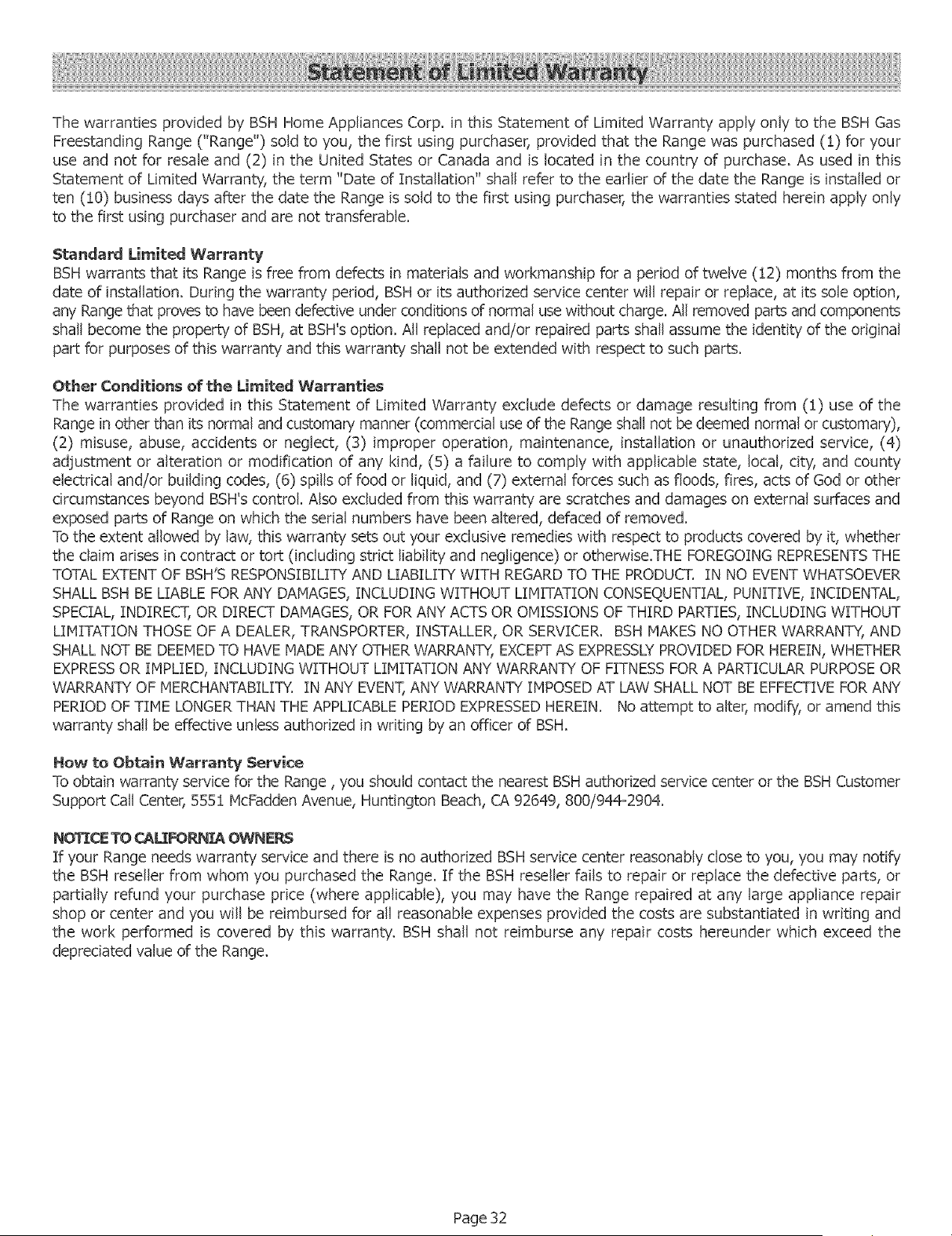
Thewarrantiesprovidedby BSHHomeAppliancesCorp.inthisStatementof LimitedWarrantyapplyonlytothe BSHGas
FreestandingRange("Range")soldto you,thefirst usingpurchaser,providedthatthe Rangewaspurchased(!) foryour
useandnotfor resaleand(2) in the UnitedStatesor Canadaandislocatedin thecountryof purchase.Asusedin this
Statementof LimitedWarranty,theterm"Dateof Installation"shallreferto theearlierofthedatethe Rangeisinstalledor
ten(!0)businessdaysafterthedatethe Rangeissoldto thefirstusingpurchaser,the warrantiesstatedhereinapplyonly
tothe firstusingpurchaserandarenottransferable.
StandardLimited Warranb/
BSH warrants that its Range isfree from defects in materials and workmanship for a period of twelve (!2) months from the
date of installation. During the warranty period, BSH or its authorized service center will repair or replace, at its sole option,
any Range that proves to have been defective under conditions of normal usewithout charge. All removed parts and components
shall become the property of BSH, at BSH'soption. All replaced and/or repaired parts shall assume the identity of the original
part for purposes of this warranty and this warranty shall not be extended with respect to such parts.
Other Conditions of the Limited Warranties
The warranties provided in this Statement of Limited Warranty exclude defects or damage resulting from (1) use of the
Rangein other than its normal and customary manner (commercial useof the Rangeshall not be deemed normal or customary),
(2) misuse, abuse, accidents or neglect, (3) improper operation, maintenance, installation or unauthorized service, (4)
adjustment or alteration or modification of any kind, (5) a failure to comply with applicable state, local, city, and count,i"
electrical and!or building codes, (6) spills of food or liquid, and (7) external forces such as floods, fires, acts of God or other
circumstances beyond BSH'scontrol. Also excluded from this warranty are scratches and damages on external surfaces and
exposed parts of Range on which the serial numbers have been altered, defaced of removed.
Tothe extent allowed by law, this warranty sets out your exclusive remedies with respect to products covered by it, whether
the claim arises in contract or tort (including strict liability and negligence) or otherwise.THE FOREGOING REPRESENTSTHE
TOTAL EXTENT OF BSH'S RESPONSIBILITY AND LIABILITY WITH REGARD TOTHE PRODUCT. IN NO EVENT WHATSOEVER
SHALL BSHBE LIABLE FORANY DAMAGES, INCLUDING WITHOUT LIMITATION CONSEQUENTIAL, PUNITIVE, INCIDENTAL,
SPECIAL,INDIRECT, ORDIRECT DAMAGES,ORFOR ANYACTS OROMISSIONS OFTHIRD PARTIES, INCLUDING WITHOUT
LIMITATION THOSE OFA DEALER,TRANSPORTER,INSTALLER, OR SERVICER. BSHMAKES NOOTHERWARRANTY, AND
SHALLNOT BE DEEMEDTO HAVEMADEANYOTHER WARRANTY,EXCEPTAS EXPRESSLYPROVIDED FOR HEREIN,WHETHER
EXPRESSORIMPLIED, INCLUDING WITHOUT LIMITATION ANY WARRANTYOFFITNESS FOR A PARTICULAR PURPOSEOR
WARRANTY OF MERCHANTABILITY. IN ANY EVENT,ANYWARRANTYIMPOSED AT LAWSHALLNOT BE EFFECTIVE FOR ANY
PERIOD OFTIME LONGERTHAN THE APPLICABLE PERIODEXPRESSEDHEREIN. Noattempt to alter, modify, or amend this
warranbi shall be effective unless authorized in writing byan officer of BSH.
Hew to Obtain Warranty Service
Toobtain warranty service for the Range, you should contact the nearest BSH authorized service center or the BSH Customer
Support CallCenter, 555:[ McFadden Avenue, Huntington Beach, CA92649, 800/944-2904.
NOTI(:E TOCAt_t=OP_I:B_OWNi_P_
If your Range needs warranty service and there is no authorized BSH service center reasonably close to you, you may notify
the BSHreseller from whom you purchased the Range. If the BSH reseller fails to repair or replace the defective parts, or
partially refund your purchase price (where applicable), you may have the Range repaired at any large appliance repair
shop or center and you will be reimbursed for all reasonable expenses provided the costs are substantiated in writing and
the work performed is covered by this warranty. BSH shall not reimburse any repair costs hereunder which exceed the
depreciated value of the Range.
Page 32