OWNER'S MANUAL
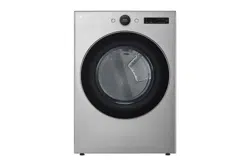
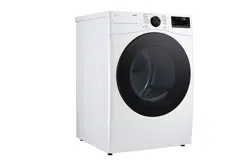
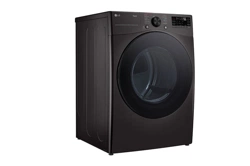
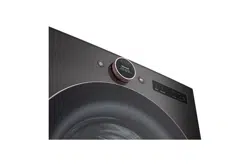
DRYER
Read this owner's manual thoroughly before operating the
appliance and keep it handy for reference at all times.
ENGLISH
DL*X670** / DL*X650** / DL*X550**
MFL67652536
Rev.02_010923
www.lg.com
Copyright © 2022-2023 LG Electronics Inc. All Rights Reserved.
Scan to see the online manual.
TABLE OF CONTENTS
2
3 IMPORTANT SAFETY
INSTRUCTIONS
3 READ ALL INSTRUCTIONS BEFORE USE
4 WARNING STATEMENTS
8 PRODUCT OVERVIEW
8 Product Features
11 INSTALLATION
11 Before Installing
12 Choosing the Proper Location
16 Leveling the Appliance
16 Reversing the Door
17 Installing the Vent Kit
18 Stacking the Appliance
19 Venting the Dryer
20 Connecting Gas Dryers
22 Connecting Electric Dryers
23 Connecting the Water Inlet Hose
24 Final Installation Check
28 OPERATION
28 Before Use
29 Loading the Dryer
31 Control Panel
33 Dry Cycles
39 Cycle Modifiers
40 Options and Extra Functions
43 SMART FUNCTIONS
43 LG ThinQ Application
45 Smart Diagnosis
TM
Function
47 MAINTENANCE
47 Regular Cleaning
49 TROUBLESHOOTING
49 FAQs
50 Before Calling for Service
55 WARRANTY
55 CANADA
3IMPORTANT SAFETY INSTRUCTIONS
ENGLISH
IMPORTANT SAFETY INSTRUCTIONS
READ ALL INSTRUCTIONS BEFORE USE
Safety for a Dryer
WARNING
Fire Hazard
Failure to follow safety warnings exactly could result in serious injury,
death or property damage.
• Do not install a booster fan in the exhaust duct.
• Install all clothes dryers in accordance with the installation instructions
of the manufacturer of the dryer.
WARNING:
FIRE OR EXPLOSION HAZARD
Failure to follow safety warnings exactly could result in serious injury,
death or property damage.
• Do not store or use gasoline or other flammable vapors and liquids in
the vicinity of this or any other appliance.
• WHAT TO DO IF YOU SMELL GAS
- Do not try to light any appliance.
- Do not touch any electrical switch; do not use any phone in your
building.
- Clear the room, building or area of all occupants.
- Immediately call your gas supplier from a neighbor’s phone. Follow
the gas supplier’s instructions.
- If you cannot reach your gas supplier, call the fire department.
• Installation and service must be performed by a qualified installer,
service agency or your gas supplier.
4 IMPORTANT SAFETY INSTRUCTIONS
Safety Messages
Your safety and the safety of others are very important.
We have provided many important safety messages in this manual and on your appliance. Always read and
follow all safety messages.
WARNING STATEMENTS
WARNING
• To reduce the risk of explosion, fire, death, electric shock, scalding or injury to persons when using this
product, follow basic precautions, including the following:
Installation
• Adhere to all industry recommended safety procedures including the use of long-sleeved gloves and
safety glasses.
• Before use, the appliance must be properly installed as described in this manual.
• Connect to a properly rated, protected, and sized power circuit to avoid electrical overload.
WARNING
Risk of Fire
Install the clothes dryer according to the manufacturer’s instructions
and local codes.
• Clothes dryer installation must be performed by a qualified installer.
• Do not install a clothes dryer with flexible plastic venting materials. If
flexible metal (foil type) duct is installed, it must be of a specific type
identified by the appliance manufacturer as suitable for use with
clothes dryers. Flexible venting materials are known to collapse, be
easily crushed, and trap lint. These conditions will obstruct clothes
dryer airflow and increase the risk of fire.
• To reduce the risk of severe injury or death, follow all installation
instructions.
This is the safety alert symbol.
This symbol alerts you to potential hazards that can kill or injure you and others. All safety messages
will follow the safety alert symbol and either the word WARNING or CAUTION.
WARNING
You may be killed or seriously injured if you do not follow instructions.
CAUTION
You may be injured or cause damage to the product if you do not follow instructions.
All safety messages will tell you what the potential hazard is, tell you how to reduce the chance of injury, and
tell you what may happen if the instructions are not followed.

5IMPORTANT SAFETY INSTRUCTIONS
ENGLISH
• The appliance must be installed and electrically grounded by qualified service personnel in accordance
with local codes.
• Disconnect the power cord, house fuse or circuit breaker before installing or servicing the appliance.
• When moving or installing the appliance in a different location, call qualified service personnel for
installation and service.
• Keep packing materials out of the reach of children. Packaging material can be dangerous for children.
There is a risk of suffocation.
• Moving or installation of the appliance requires two or more people.
• This appliance is not designed for maritime use or for mobile installations such as in RVs, trailers, or
aircraft.
• This appliance must be positioned near to an electrical power supply.
• Do not, under any circumstances, cut or remove the third (ground) prong from the power cord.
• When installing or moving the appliance, be careful not to pinch, crush, or damage the power cord.
• Do not install the appliance in humid spaces.
• Destroy the carton, plastic bag, and other packing materials after the appliance is unpacked. Children
might use them for play. Cartons covered with rugs, bedspreads, or plastic sheets can become airtight
chambers.
• Place the appliance at least 18 inches above the floor for a garage installation.
• Do not use sheet metal screws or other fasteners which extend into the duct that could catch lint and
reduce the efficiency of the exhaust system. Secure all joints with duct tape.
• Use only rigid, semi-rigid or flexible metal 4-inch diameter duct inside the dryer cabinet or for exhausting
to the outside. Use of plastic or other combustible ductwork may cause a fire. Punctured ductwork may
cause a fire if it collapses or becomes otherwise restricted in use or during installation.
• The exhaust duct must be 4 inches (10.2 cm) in diameter with no obstructions. The exhaust duct should
be kept as short as possible. Make sure to clean any old ducts before installing your new dryer.
• Rigid, semi-rigid or flexible metal ducting is recommended for use between the dryer and the wall. All
non-rigid metal transition duct must be UL-listed. Use of other materials for the transition duct could
affect the drying time.
• Ductwork is not provided with the dryer, and you should obtain the necessary ductwork locally. The end
cap should have hinged dampers to prevent backdraft when the dryer is not in use.
• Gas dryers MUST be exhausted to the outside.
• The dryer exhaust system must be exhausted to the outside of the dwelling. If the dryer is not exhausted
outdoors, some fine lint and large amounts of moisture will be expelled into the laundry area. An
accumulation of lint in any area of the home may create a health and fire hazard.
• Do not install near another heat source such as a stove, oven or heater.
• Keep the area around the exhaust opening and adjacent surrounding areas free from the accumulation
of lint, dust, and dirt.
• The appliance must not be supplied through an external switching device, such as a timer, or connected
to a circuit that is regularly switched on and off by a utility.
• Certain internal parts are intentionally not grounded and may present a risk of electronic shock only
during servicing. Service personnel - do not contact the following parts while the appliance is energized:
CONTROL BOARD
Operation
• Never attempt to operate this appliance if it is damaged, malfunctioning, partially disassembled, or has
missing or broken parts, including a damaged cord or plug.
• Repair or immediately replace all power cords that have become frayed or otherwise damaged. Do not
use a cord that shows cracks or abrasion damage along its length or at either end.

6 IMPORTANT SAFETY INSTRUCTIONS
• If you detect a strange sound, a chemical or burning smell, or smoke coming from the appliance, unplug
it immediately, and contact an LG Electronics customer information center.
• Never unplug the appliance by pulling on the power cord. Always grip the plug firmly and pull straight
out from the outlet.
• Do not use an extension cord or adapter with this appliance.
• Do not grasp the power cord or touch the appliance controls with wet hands.
• Do not modify or extend the power cord.
• If the appliance has been submerged, contact an LG Electronics customer information center for
instructions before resuming use.
• Do not store or use gasoline or other flammable vapors and liquids in the vicinity of this or any other
appliance.
• Keep the area underneath and around your appliances free of combustible materials (lint, paper, rags,
etc.), gasoline, chemicals and other flammable vapors and liquids.
• This appliance is not intended for use by persons (including children) with reduced physical, sensory or
mental capabilities, or lack of experience and knowledge, unless they have been given supervision or
instruction concerning the use of the appliance by a person responsible for their safety.
• Use this appliance only for its intended purpose.
• Do not abuse, sit on, or stand on the door of the appliance.
• Do not allow children to play on, in or with the appliance. Close supervision of children is necessary when
the appliance is used near children.
• Do not tamper with controls.
• In the event of a gas leak (propane gas, LP gas, etc.) do not operate this or any other appliance. Open a
window or door to ventilate the area immediately.
• Under certain conditions, hydrogen gas may be produced in a hot-water system that has not been used
for two weeks or more. HYDROGEN GAS IS EXPLOSIVE. If the hot-water system has not been used for
such a period, before using the appliance turn on all hot water faucets and let the water flow from each
for several minutes. This will release any accumulated hydrogen gas. As the gas is flammable, do not
smoke or use an open flame during this time.
• Fix the drain hose securely in place.
• Do not put oily or greasy clothing, candles or flammable materials on top of the appliance.
• Do not use fabric softeners or products to eliminate static unless recommended by the manufacturer of
the fabric softener or product.
• Do not reach into the appliance if the drum is moving.
• Do not dry articles that have been previously cleaned in, washed in, soaked in, soiled with or spotted
with gasoline, dry cleaning solvents, vegetable oil, cooking oil or other flammable or explosive
substances, as they give off vapors that could ignite or explode.
• Do not use heat to dry articles containing foam rubber or similarly textured rubber-like materials.
• Do not store plastic, paper, or clothing that may burn or melt on top of the dryer during operation.
• Gas appliances can cause minor exposure to four potentially hazardous substances, namely benzene,
carbon monoxide, formaldehyde, and soot, caused primarily by the incomplete combustion of natural
gas or LP fuels.
• Properly adjusted dryers will minimize incomplete combustion. Exposure to these substances can be
minimized further by properly venting the dryer to the outdoors.
• Always check the inside of the appliance for foreign objects before operating.
• Do not place items exposed to cooking oils in your appliance. Items contaminated with cooking oils may
contribute to a chemical reaction that could cause a load to catch fire. To reduce the risk of fire due to
contaminated loads, the final part of a tumble dryer cycle occurs without heat (cool down period). Avoid
stopping a tumble dryer before the end of the drying cycle unless all items are quickly removed and
spread out so that the heat is dissipated.
• Do not let children or pets climb inside the dryer drum.

7IMPORTANT SAFETY INSTRUCTIONS
ENGLISH
SAVE THESE INSTRUCTIONS
• Do not put living animals such as pets inside the appliance.
• Do not put any part of your body, such as your hands or feet, or metal objects under the appliance.
• Do not let your hand get pinched when opening or closing the dryer door.
Maintenance
• Do not repair or replace any part of the appliance. All repairs and servicing must be performed by
qualified service personnel unless specifically recommended in this Owner’s Manual. Use only
authorized factory parts
• Do not disassemble or repair the appliance by yourself.
• Remove any dust or foreign matter from the power plug pins.
• Disconnect this appliance from the power supply before cleaning and attempting any user maintenance.
Turning the controls to the OFF position does not disconnect this appliance from the power supply.
• Remove the door before the appliance is removed from service or discarded to avoid the danger of
children or small animals getting trapped inside.
• Unplug the appliance before cleaning to avoid the risk of electric shock.
• The interior of the appliance and exhaust duct should be cleaned periodically by qualified service
personnel.
• Certain internal parts are intentionally not grounded and may present a risk of electronic shock only
during servicing. Service personnel - do not contact the following parts while the appliance is energized:
CONTROL BOARD
Steam
• Do not open the dryer door during a STEAM CYCLE.
• Do not touch the steam nozzle in the drum during or after a STEAM CYCLE.
• On models with a steam feeder tank, do not fill the steam feeder with hot water (over 86 ℉ / 30 ℃),
gasoline, dry cleaning solvents, or other flammable or explosive substances.
Grounding Instructions
• Improper connection of the equipment-grounding conductor can result in a risk of electric shock. Check
with a qualified electrician or service personnel if you are in doubt whether the appliance is properly
grounded. Do not modify the plug provided with the appliance; if it will not fit the outlet, have a proper
outlet installed by a qualified electrician.
• The appliance must be grounded. In the event of a malfunction or breakdown, grounding will reduce the
risk of electric shock by providing a path of least resistance for electric current. The appliance is
equipped with a cord having an equipment-grounding conductor and a grounding plug. The plug must
be plugged into an appropriate outlet that is installed and grounded in accordance with all local codes
and ordinances.
• The appliance must be plugged into a properly grounded outlet. Electrical shock may result if the
appliance is not properly grounded. Have the wall outlet and circuit checked by a qualified electrician to
make sure the outlet is properly grounded. Failure to follow these instructions may create an electric
shock hazard and/or a fire hazard.
8 PRODUCT OVERVIEW
PRODUCT OVERVIEW
Product Features
The images in this guide may be different from the actual components and accessories, which are subject
to change by the manufacturer without prior notice for product improvement purposes.
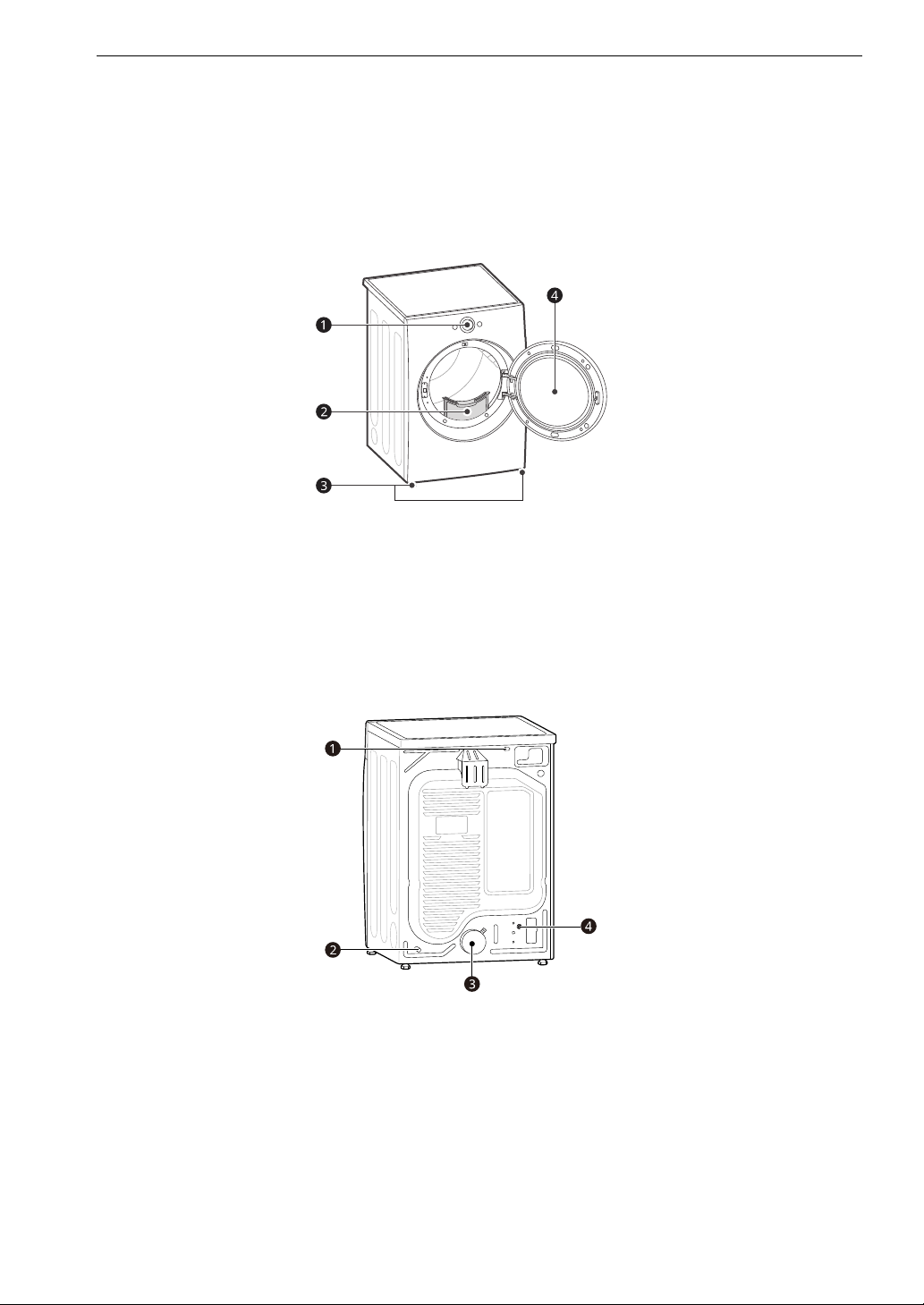
Front View
a Control Panel
b Lint filters
c Leveling feet
d Reversible door
Rear View
a Power Cord
b Gas Connection (for Gas Models)
c Exhaust Duct Oulet
d Water Inlet Hose Connection (for Steam Models)
9PRODUCT OVERVIEW
ENGLISH
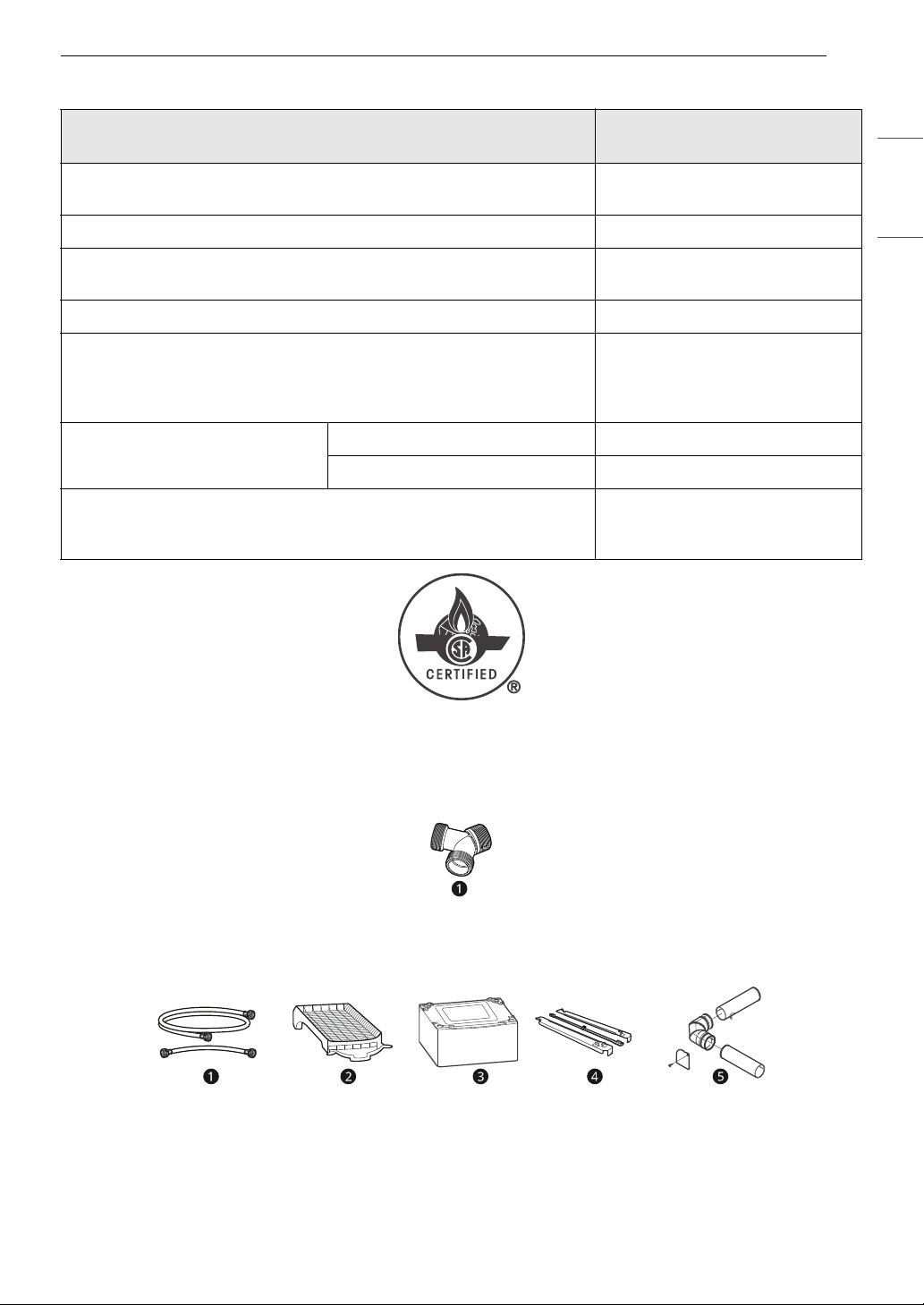
Product Specifications
Accessories
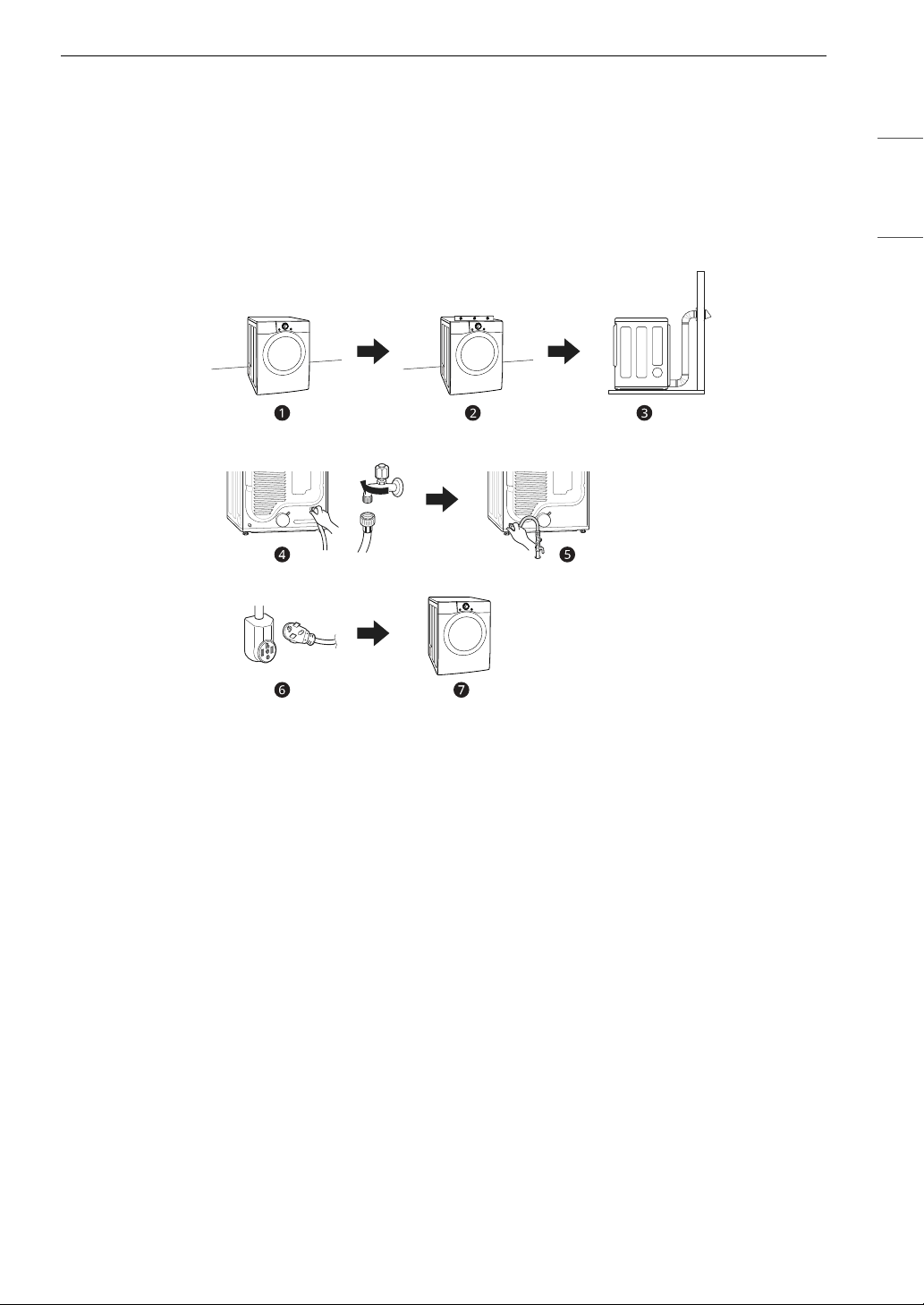
Included Accessories
a Y Connector
Optional Accessories (sold separately)
a Water Inlet Hose (for steam)
b Drying Rack
c Pedestal
d Stacking kit
Model
DL*X670** / DL*X650** /
DL*X550**
Electrical Requirements
Please refer to the rating label for
detailed information.
Min. / Max. Water Pressure 20 - 120 psi (138 - 827 kPa)
Dimensions (Width X Depth X Height)
27'' X 29 3/4'' X 39'' (68.6 cm X 75.6
cm X 98.9 cm)
Maximum Depth with Door Open 51 3/8'' (130.5 cm)
Net Weight
Gas : 136.03 lb (61.7 kg) - 139.34 lb
(63.2 kg)
Electric : 121.9 lb (55.3 kg) - 125.3
lb (56.8 kg)
Capacity
Steam Cycle 7.4 cu.ft. (8 lb / 3.6 kg)
Normal Cycle 7.4 cu.ft. (22.5 lb / 10.2 kg)
Gas Requirements
NG: 4 - 10.5-inch (10.2 - 26.7 cm)
WC
LP: 8 - 13-inch (20.4 - 33.1 cm) WC

10 PRODUCT OVERVIEW
e Side vent kit (Kit No. 383EEL9001B)
NOTE
• For your safety and extended product life, use only authorized components. The manufacturer is not
responsible for product malfunction or accidents caused by the use of unauthorized components or
parts.
11INSTALLATION
ENGLISH
INSTALLATION
Before Installing
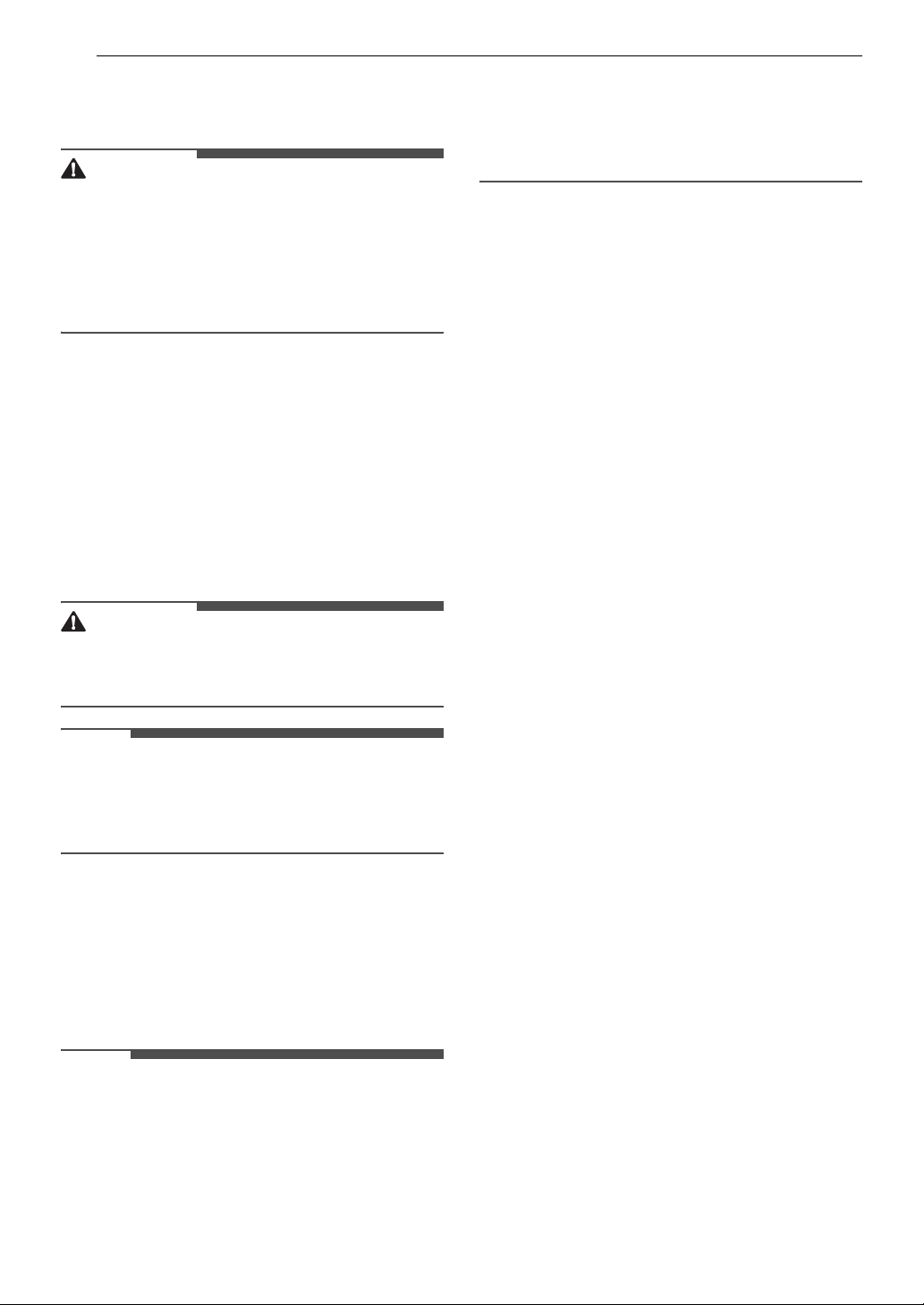
Installation Overview
Please read the following installation instructions first after purchasing this dryer or transporting it to
another location.
a Choose the proper location.
b Level the appliance.
c Vent the appliance.
d Connect the inlet hose (for steam models)
e Connect the Gas dryer.
f Plug in the power cord.
g Installation test and test run.
• Refer to the Test Exhaust System section in INSTALLATION.
12 INSTALLATION
Choosing the Proper
Location
WARNING
• Read all installation instructions completely
before installing and operating the appliance. It
is important that you review this entire manual
before installing and using the appliance.
Detailed instructions concerning electrical
connections and additional requirements are
provided on the following pages.
Exhaust
• The location must allow for proper exhaust
installation. A gas dryer must be exhausted to
the outdoors.
Electricity
Use an individual, grounded electrical outlet
located within 2 ft. (61 cm) of either side of the
appliance.
WARNING
• Do not install or store the appliance in an area
where it will be exposed to water and/or
weather.
NOTE
• Check code requirements that limit, or do not
permit, installation of the dryer in garages,
mobile homes or sleeping quarters. If you have
questions, contact your local building inspector.
Flooring
To avoid noise and vibration, the appliance must
be installed and leveled on a solidly constructed
floor with a maximum slope of 1 inch (2.5 cm). If
required, adjust the leveling legs to compensate
for the unevenness of the floor.
NOTE
• A sturdy floor is needed to support the total
appliance weight when loaded. The combined
weight of additional appliances should also be
considered.
• Clothes may not tumble properly, and automatic
sensor cycles may not operate correctly if the
appliance is not level.
• For garage installation, you will need to place the
appliance at least 18 inches (45.7 cm) above the
floor. The standard pedestal height is 15 inches
(38 cm). You will need 18 inches (45.7 cm) from
the garage floor to the bottom of the appliance.
Ambient Temperature
Install the appliance in an area where the
temperature is over 45 ℉ (7 ℃).
If the temperature around the appliance is too low,
the appliance might not shut off at the end of an
automatic cycle. This can result in longer drying
times.
13INSTALLATION
ENGLISH
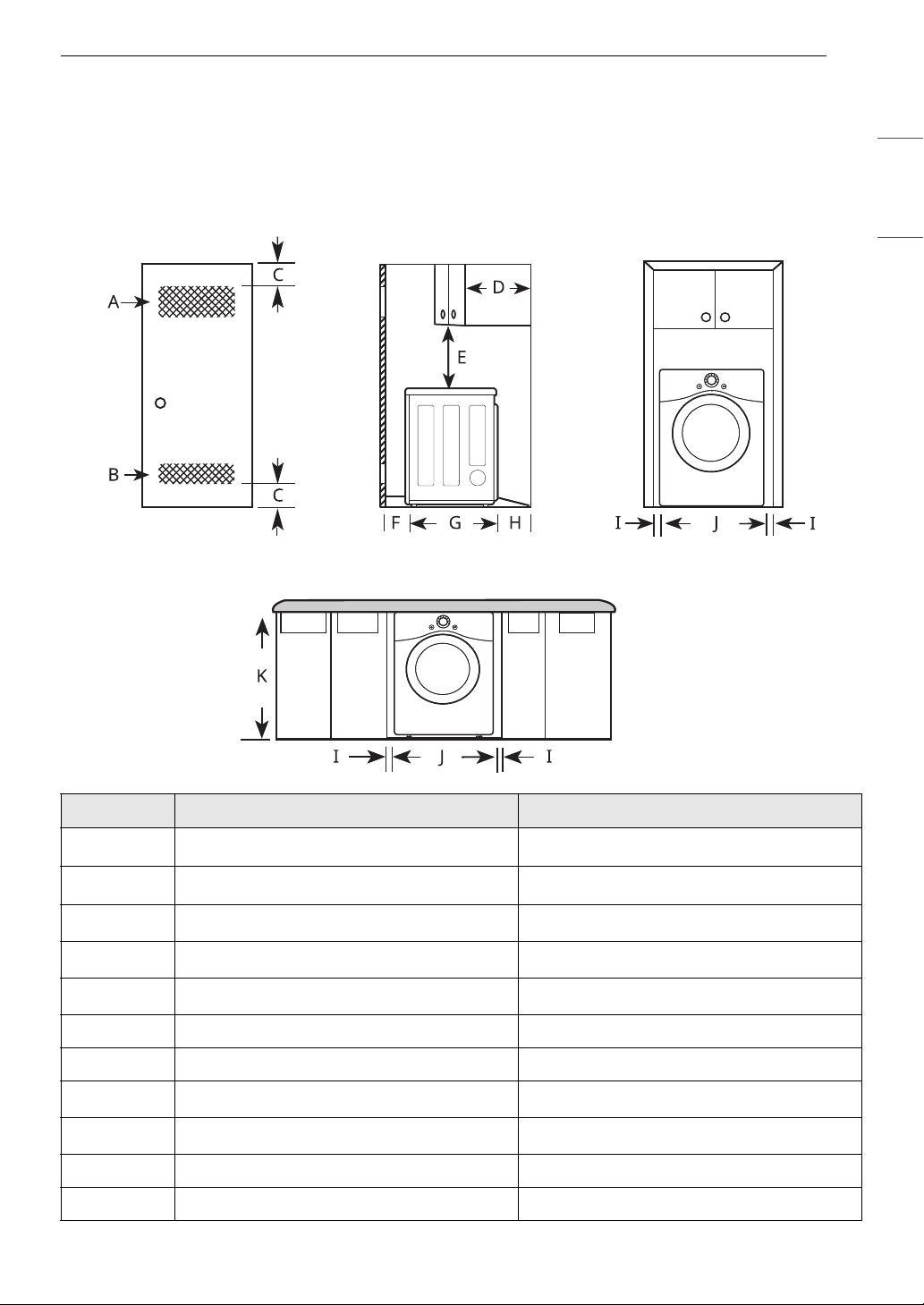
Dimensions and Clearances
The following clearances are recommended for the appliance.
• Additional clearances should be considered for ease of installation and servicing.
• Additional clearances should be considered on all sides of the dryer to reduce noise transfer.
Installation Spacing for Recessed Area or Closet Installation
- Description Dimension/Clearance
A Upper Ventilation Opening
2 48 sq. in. (310 cm
2
)
B Lower Ventilation Opening
2 24 sq. in. (155 cm
2
)
C Distance to Ventilation Opening
2 3″ (76 mm)
D Overhead Cabinet Depth
1 14″ (356 mm)
E Distance to the Overhead Cabinet/Shelf
2 18″ (457 mm)
F Front Clearance 1″ (25 mm)
G Depth 29 3/4″ (756 mm)
HBack Clearance
2 5″ (127 mm)
I Side Clearance
2 1″ (25 mm)
JWidth 27″ (686 mm)
K Height of Cabinet Opening 39″ (989 mm)
14 INSTALLATION
Closet Ventilation Requirements
Closets with doors must have both an upper and lower vent to prevent heat and moisture buildup in the
closet. One upper vent opening with a minimum opening of 48 sq. in. (310 cm
2
) must be installed no lower
than 6 feet above the floor. One lower vent opening with a minimum opening of 24 sq. in. (155 cm
2
) must
be installed no more than one foot above the floor. Install vent grilles in the door or cut down the door at
the top and bottom to form openings. Louvered doors with equivalent ventilation openings are also
acceptable.
NOTE
• There should be at least a little space around the dryer (or any other appliance) to eliminate the transfer
of vibration from one appliance to another. If there is enough vibration, it could cause appliances to
make noise or come into contact, causing paint damage and further increasing noise.
• No other fuel-burning appliance can be installed in the same closet as a dryer.
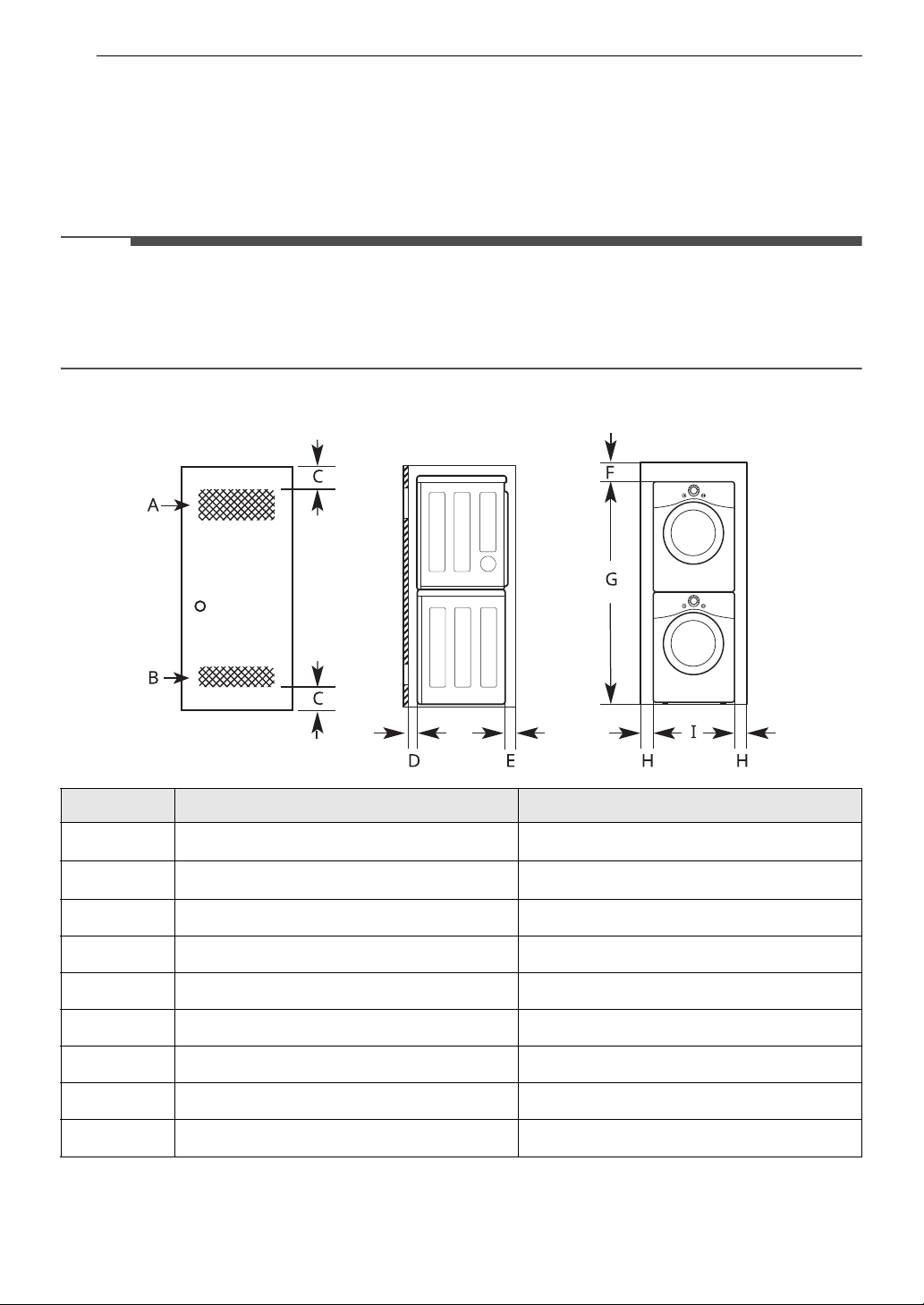
Installation Spacing for Recessed Area or Closet, with Stacked Washer and Dryer
† Differs depending on the washer dimensions.
- Description Dimension/Clearance
A Upper Ventilation Opening
2 48 sq. in. (310 cm
2
)
B Lower Ventilation Opening
2 24 sq. in. (155 cm
2
)
C Distance to Ventilation Opening
2 3″ (76 mm)
D Front Clearance
2 1″ (25 mm)
EBack Clearance
2 5 1/2″ (140 mm)
F Top Clearance to the Ceiling
2 6″ (152 mm)
G
Height to the Top of Stacked Appliances
†
78″ (1980 mm)
H Side Clearance
2 1″ (25 mm)
I
Width
†
27″ (686 mm)
15INSTALLATION
ENGLISH
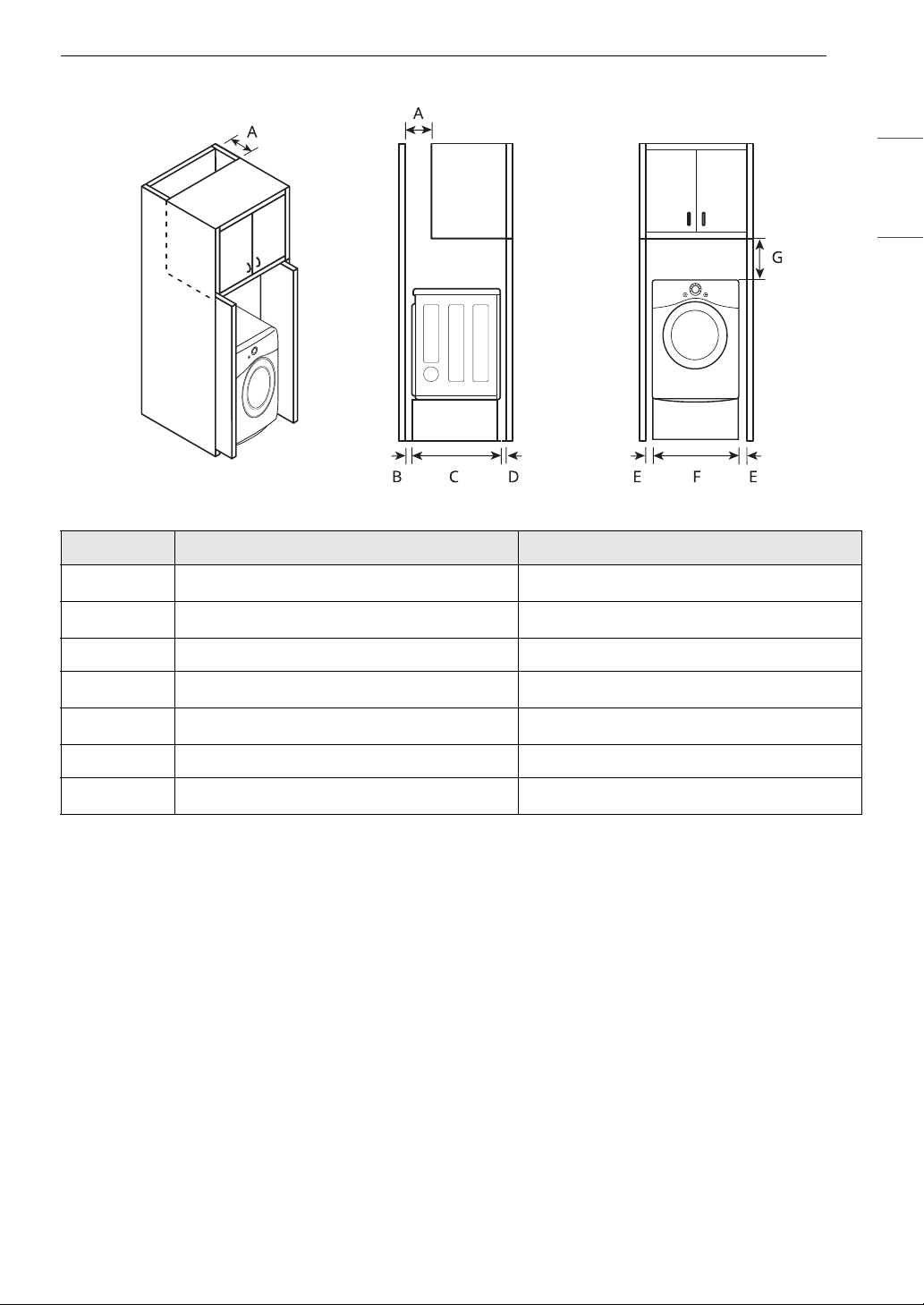
Installation Spacing for Cabinet
For cabinet installation with a door, minimum ventilation openings in the top of the cabinet are required.
- Description Dimension/Clearance
A Depth of Ventilation Opening
2 7″ (178 mm)
BBack Clearance
2 5″ (127 mm)
C Depth 29 3/4″ (756 mm)
D Front Clearance
2 1″ (25mm)
E Side Clearance
2 1″ (25 mm)
FWidth 27″ (686 mm)
G Clearance to Top of Cabinet
2 9″ (229 mm)
16 INSTALLATION
Leveling the Appliance
WARNING
• Use long-sleeved gloves and safety glasses.
• The appliance is heavy. Two or more people are
required when installing the appliance.
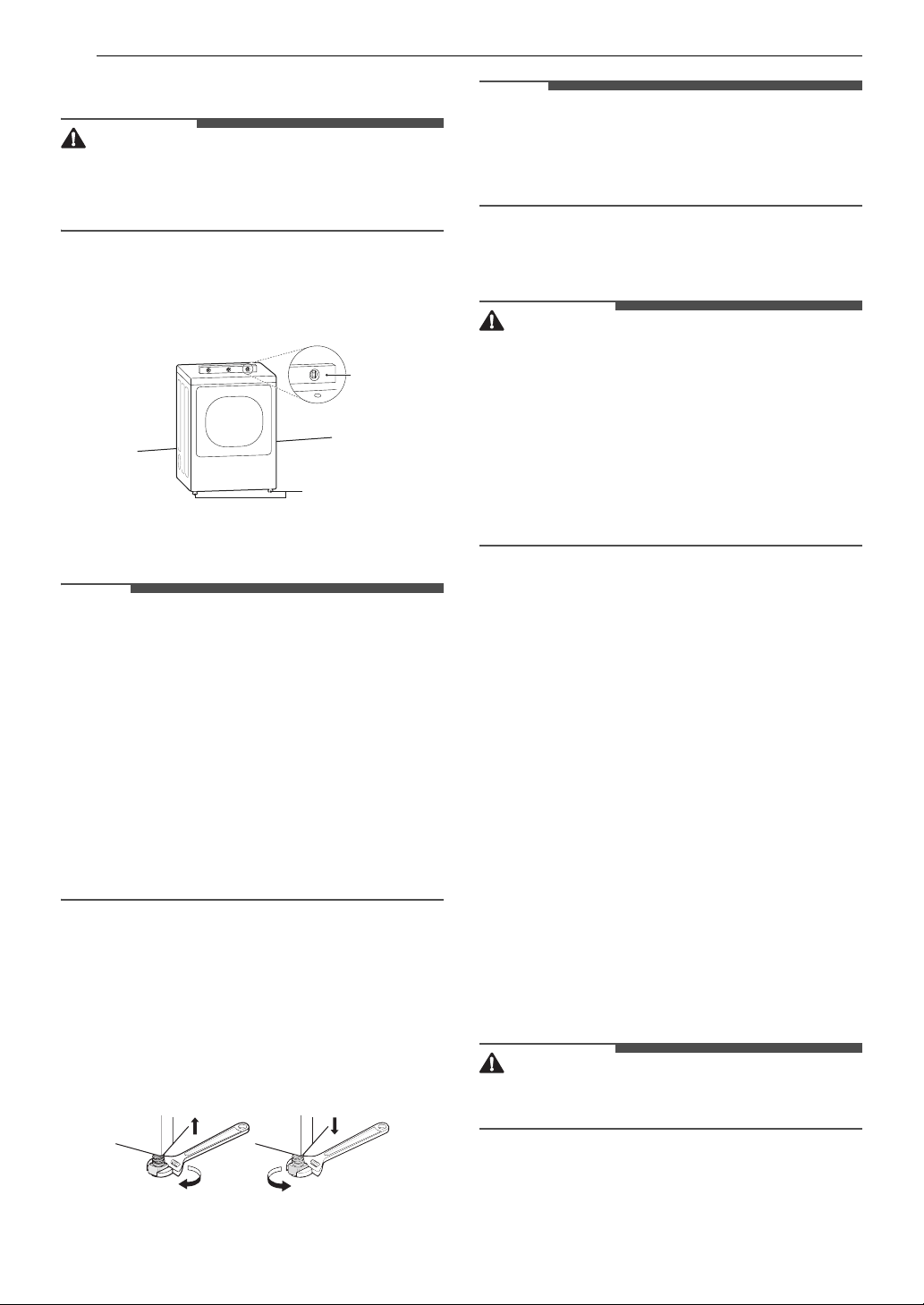
Checking the Level
Position the appliance in the final location and
place a level across the top of the appliance.
a Level
b Leveling Feet
NOTE
• All four leveling feet must rest solidly on the
floor. Gently push on the top corners of the
appliance to make sure that the appliance does
not rock from corner to corner.
• Adjust the leveling feet only as far as necessary
to level the appliance. Extending the leveling feet
more than necessary may cause the appliance to
vibrate.
• To ensure that the appliance provides optimal
drying performance, it must be level. To
minimize vibration, noise, and unwanted
movement, the floor must be a perfectly level,
solid surface.
Adjusting the Leveling Feet
Use an adjustable wrench to turn the leveling feet.
Unscrew the legs to raise the appliance or screw in
the legs to lower it. Raise or lower with the leveling
feet until the appliance is level from side to side
and front to back. Make sure that all four leveling
feet are in firm contact with the floor.
NOTE
• If you are installing the appliance on the optional
pedestal, you must use the leveling feet on the
pedestal to level the appliance. The appliance
leveling feet should be fully retracted.
Reversing the Door
WARNING
• Support the door with a stool or box that fits
under the door, or have an assistant support the
weight of the door.
• Avoid dropping the door.
• Unplug the appliance or turn off power at the
main circuit breaker before beginning door
reversal.
• Always reverse the door BEFORE stacking the
appliance on top of the washer.
Tools Required
• Phillips screwdriver
• Large flat blade screwdriver (recommended for
hinge screws if they are tight or your Phillips
screwdriver is worn)
• Small flat blade screwdriver (for lifting out parts)
Door Reversal Instructions
The instructions here are for changing the door
swing from a right to a left side hinge. If the door
has been reversed, and it is necessary to change it
back, use care when following these instructions.
Some of the illustrations and the left/right
references will be reversed, and you will need to
read the instructions carefully.
1 Open the door and remove the 2 decorative
screws, 2 latch screws, and the latch on the
catch side with a screwdriver. Save these for
step 4.
WARNING
• Be sure to support the weight of the door before
removing the hinge screws.
a
b

17INSTALLATION
ENGLISH
2 While supporting the door, remove the 2
screws on the door hinge. Remove the door.
3 Turn the door upside down and line up the
holes in the hinge with the holes on the
opposite side of the cabinet. Reinstall the
door with the screws removed in step 2.
WARNING
• Be sure to support the weight of the door before
inserting the hinge screws.
4 Install the 2 decorative screws, the latch, and
2 latch screws removed in step 1 on the
opposite side from which they were removed.
5 Check that the door closes properly.
Installing the Vent Kit
WARNING
• Use long-sleeved gloves and safety glasses.
• Use a heavy metal vent.
• Do not use plastic or thin foil ducts.
• Clean old ducts before installing the appliance.
The appliance is configured to vent to the rear. It
can also vent to the bottom or side.
NOTE
• An adapter kit, part number 383EEL9001B, may
be purchased from your LG retailer. This kit
contains duct components necessary to change
the appliance vent location.
• Right-side venting is not available on gas
models.
Side Venting
1 Remove the rear exhaust duct retaining screw
a and pull out the exhaust duct b.
2 Press the tabs on the knockout c and
carefully remove the knockout for the desired
vent opening. (Right-side venting is not
available on gas models.) Press the adapter
duct d onto the blower housing and secure
to the base of the dryer as shown.
a
b
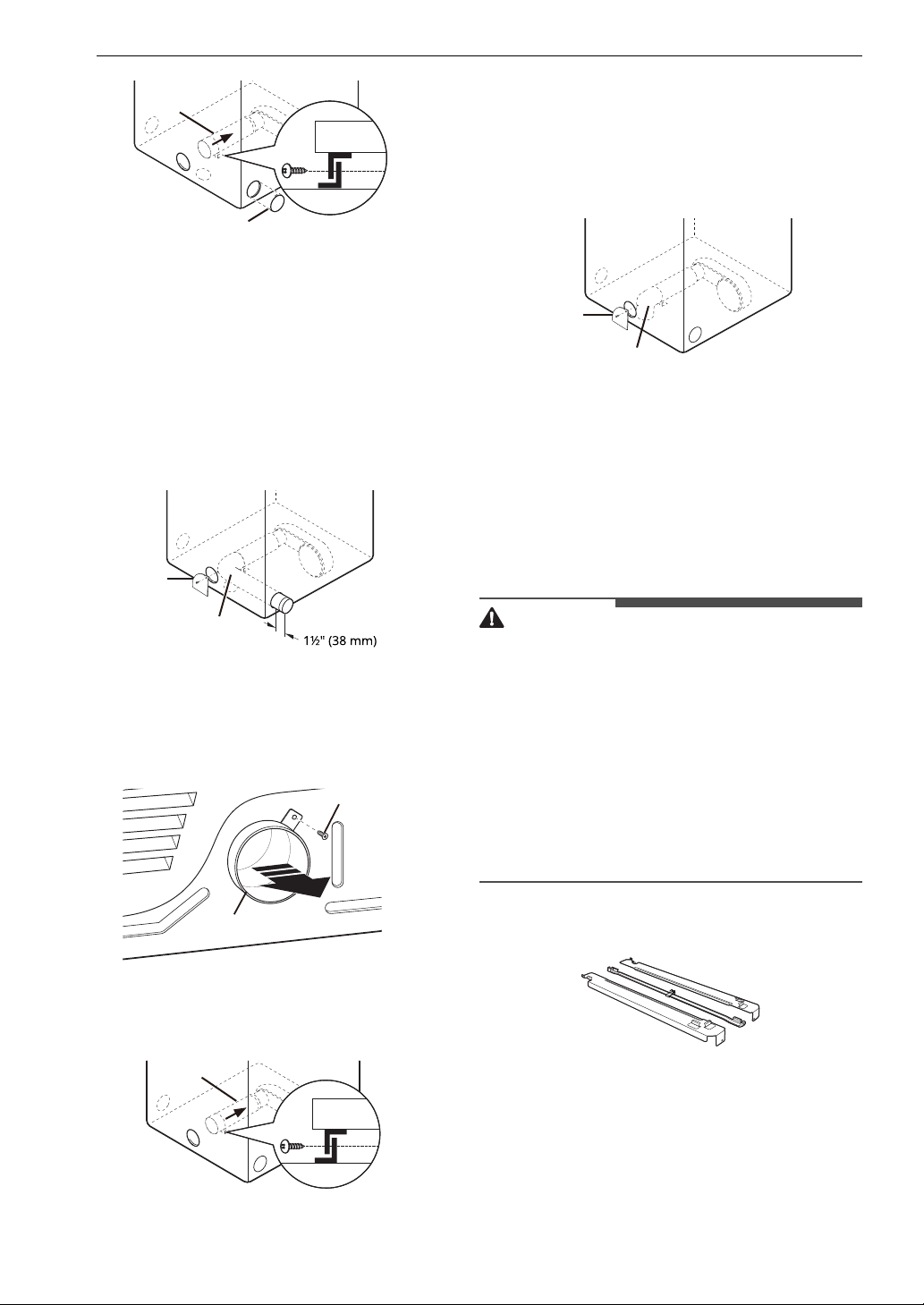
18 INSTALLATION
3 Preassemble a 4" (10.2 cm) elbow e to the
next 4" (10.2 cm) duct section, and secure all
joints with duct tape. Be sure that the male
end of the elbow faces AWAY from the dryer.
Insert the elbow/duct assembly through the
side opening and press it onto the adapter
duct. Secure it in place with duct tape. Be sure
that the male end of the duct protrudes 1.5"
(3.8 cm) to connect the remaining ductwork.
Attach the cover plate
f to the back of the
dryer with the included screw.
Bottom Venting
1 Remove the rear exhaust duct retaining screw
a. Pull out the exhaust duct b.
2 Press the adapter duct c onto the blower
housing and secure it to the base of the dryer
as shown.
3 Insert the 4" (10.2 cm) elbow d through the
rear opening and press it onto the adapter
duct. Be sure that the male end of the elbow
faces down through the hole in the bottom of
the dryer. Secure it in place with duct tape.
Attach the cover plate e to the back of the
dryer with the included screw.
Stacking the Appliance
Tools Required
• Phillips screwdriver
Stacking Kit Installation
WARNING
• The weight of the appliance and the height of
installation make this stacking procedure too
risky for one person. Two or more people are
required when installing the stacking kit.
• Place the washer on a solid, stable, level floor
capable of supporting the weight of both
appliances.
• Do not stack the washer on top of the dryer.
• If appliances are already installed, disconnect
them from all power, water and drain
connections.
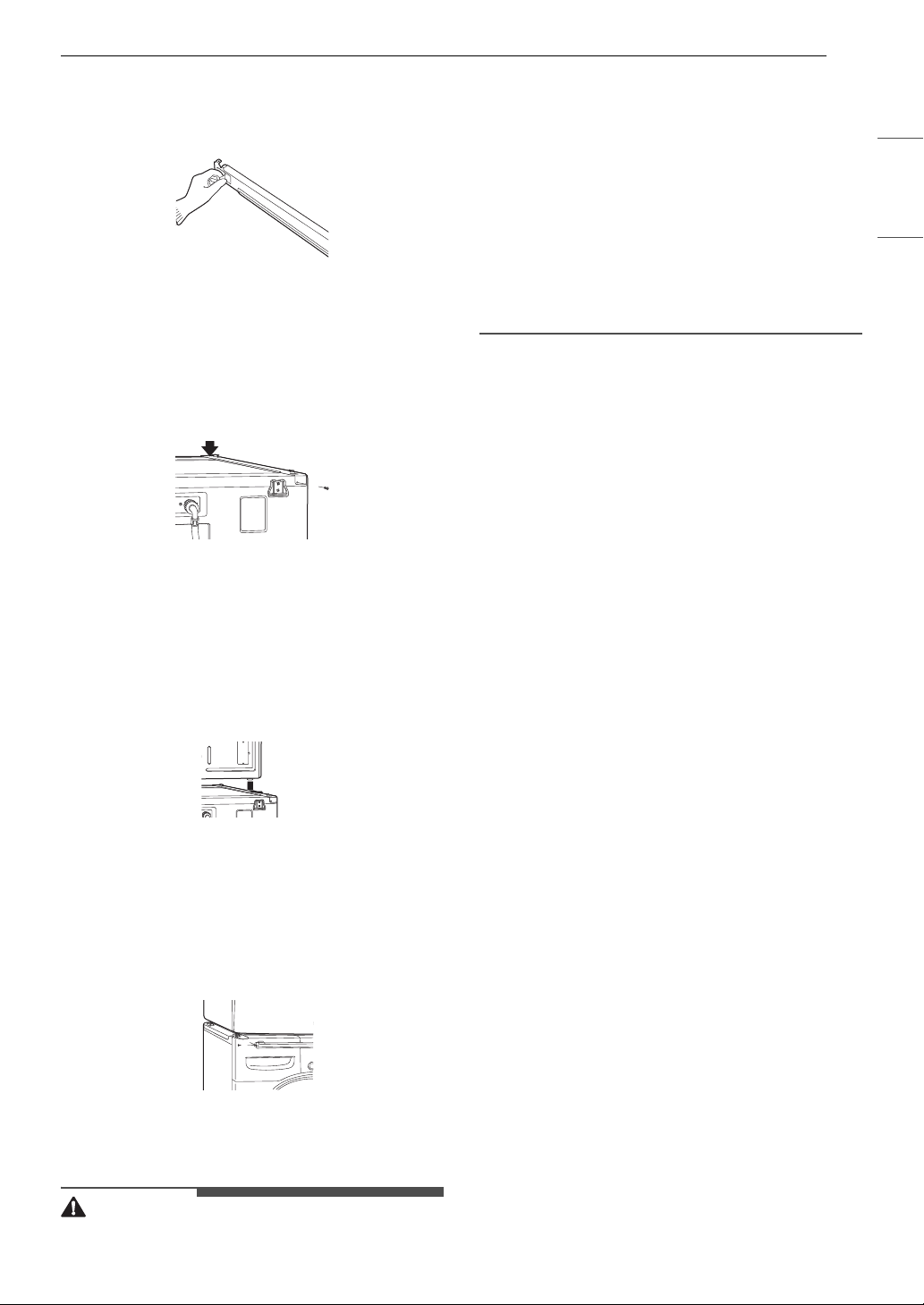
This stacking kit includes:
• Two (2) side rails
• One (1) front rail
• Four (4) screws
To ensure safe and secure installation, please
observe the following instructions.
c
d
f
e
a
b
c
d
e
19INSTALLATION
ENGLISH
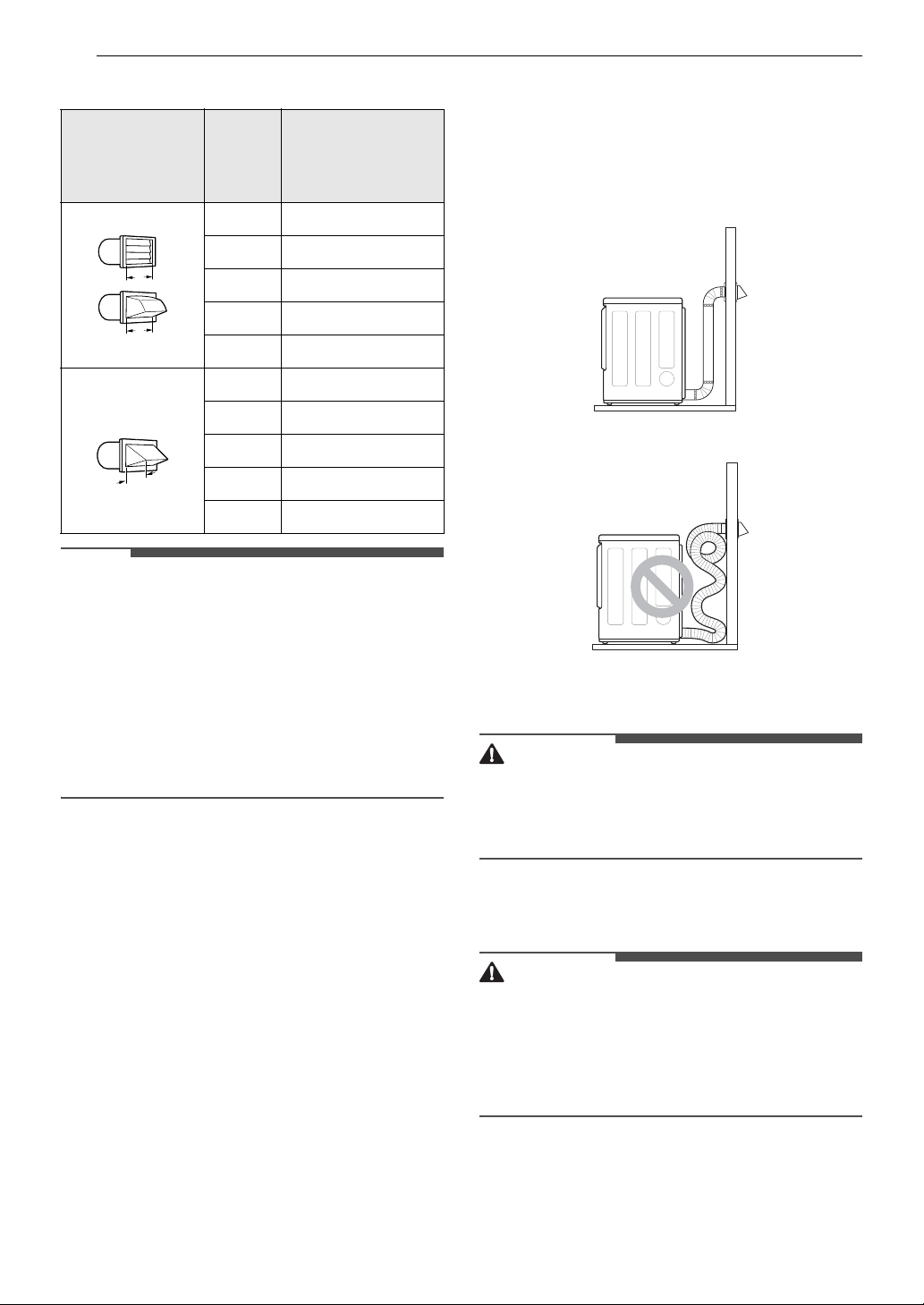
1 Make sure the surface of the washer is clean
and dry. Remove paper backing from the tape
on one of the stacking kit side brackets.
2 Fit the side bracket to the side of the washer
top as shown. Firmly press the adhesive area
of the bracket to the washer surface. Secure
the side bracket to the washer with a screw on
the back side of the bracket. Repeat steps 1
and 2 to attach the other side bracket.
3 Place the appliance on top of the washer,
fitting the dryer feet into the side brackets as
illustrated. Avoid finger injuries; do not allow
fingers to be pinched between the washer
and the appliance. Slowly slide the appliance
toward the back of the washer until the side
bracket stoppers catch the dryer feet.
4 Insert the front rail between the bottom of
the appliance and the top of the washer. Push
the front rail toward the back of the washer
until it comes in contact with the side rail
stoppers. Install the two remaining screws to
secure the front rail to the side rails.
Venting the Dryer
WARNING
• Gas dryers MUST exhaust to the outdoors.
• To reduce the risk of fire, combustion, or
accumulation of combustible gases, DO NOT
exhaust dryer air into an enclosed and
unventilated area, such as an attic, wall, ceiling,
crawl space, chimney, gas vent, or concealed
space of a building.
• To reduce the risk of fire, DO NOT exhaust the
dryer with plastic or thin foil ducting.
• Do not exceed the recommended duct length
limitations noted in the chart. Failure to follow
these instructions may result in extended drying
times, fire or death.
• Do not crush or collapse ductwork.
• Do not allow ductwork to rest on or contact
sharp objects.
• If connecting to existing ductwork, make sure it
is suitable and clean before installing the dryer.
• Venting must conform to local building codes.
• Use only 4-inch (10.2 cm) rigid, semi-rigid or
flexible metal ductwork inside the dryer cabinet
and for venting outside.
• The exhaust duct must be 4 inches (10.2 cm) in
diameter with no obstructions. The exhaust duct
should be kept as short as possible. Make sure to
clean any old ducts before installing the new
dryer.
• Rigid, semi-rigid or flexible metal ducting is
recommended for use between the dryer and
the wall. All non-rigid metal transition duct must
be UL-listed. Use of other materials for transition
duct could affect drying time.
• DO NOT use sheet metal screws or other
fasteners which extend into the duct that could
catch lint and reduce the efficiency of the
exhaust system. Secure all joints with duct tape.
• Ductwork is not provided with the dryer. You
should obtain the necessary ductwork locally.
The vent hood should have hinged dampers to
prevent backdraft when the dryer is not in use.
• The total length of flexible metal duct must not
exceed 8 ft. (2.4 m).
• When pushing the dryer into the installed
position, do not crush or collapse ductwork.
20 INSTALLATION
Ductwork
NOTE
• Deduct 6 ft. (1.8 m) for each additional elbow. Do
not use more than four 90° elbows.
• In Canada, only those foil-type flexible ducts, if
any, specifically identified for use with the
appliance by the manufacturer should be used.
In the United States, only those foil-type flexible
ducts, if any, specifically identified for use with
the appliance by the manufacturer and that
comply with the Outline for Clothes Dryer
Transition Duct, Subject 2158A, should be used.
Routing and Connecting Ductwork
Follow the guidelines below to maximize drying
performance and reduce lint buildup and
condensation in the ductwork. Ductwork and
fittings are NOT included and must be purchased
separately.
• Use 4-inch (10.2 cm) diameter rigid, semi-rigid or
flexible metal ductwork.
• The exhaust duct run should be as short as
possible.
• Use as few elbow joints as possible.
• The male end of each section of exhaust duct
must point away from the dryer.
• Use duct tape on all duct joints.
• Insulate ductwork that runs through unheated
areas in order to reduce condensation and lint
buildup on duct surfaces.
• Incorrect or inadequate exhaust systems are not
covered by the dryer warranty. Dryer failures or
service required because of such exhaust
systems will not be covered by the dryer
warranty.
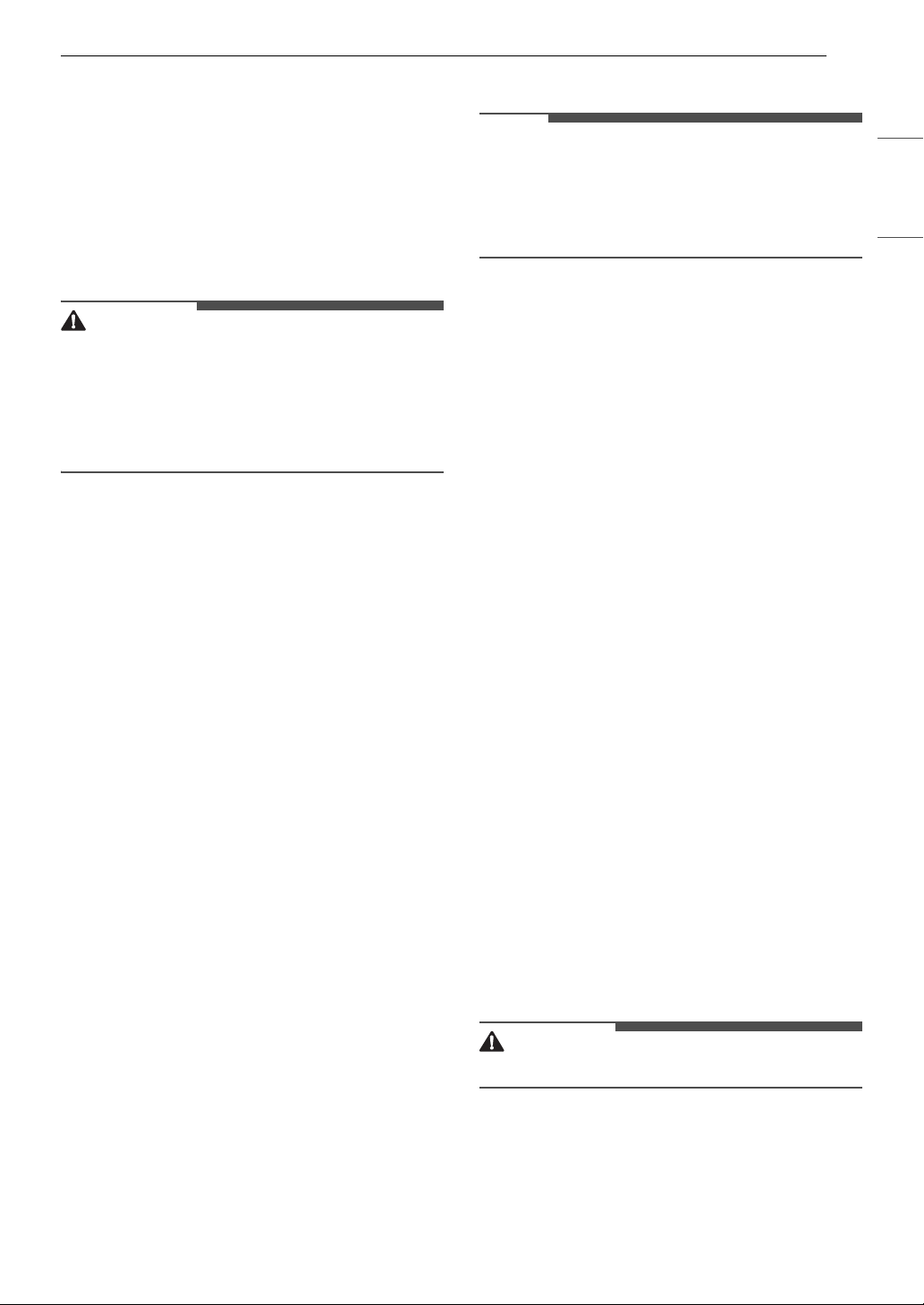
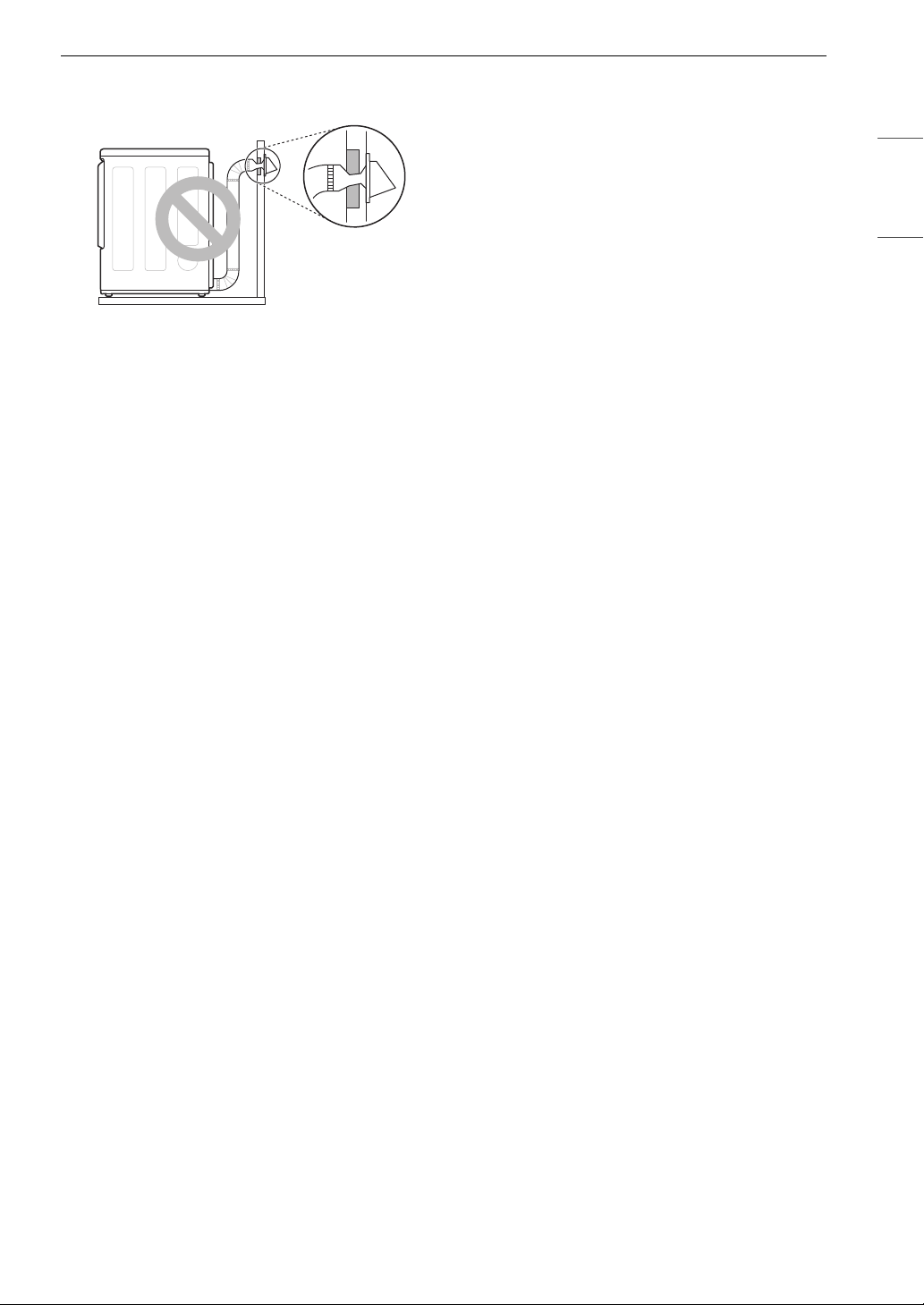
Correct Venting
Incorrect Venting
Connecting Gas Dryers
WARNING
• To reduce the risk of fire or explosion, electric
shock, property damage, injury to persons, or
death when using this appliance, follow
requirements including the following.
Electrical Requirements for Gas
Models
WARNING
• This dryer is equipped with a three-prong
grounding plug for protection against shock
hazard which should be plugged directly into a
properly grounded three-prong receptacle. Do
not cut or remove the grounding prong from
this plug.
• Do not, under any circumstances, cut or remove
the third (ground) prong from the power cord.
• For personal safety, this dryer must be properly
grounded.
Wall Cap Type
No. of
90°
Elbows
Maximum length
of 4-inch
diameter rigid
metal duct
Recommended 0 65 ft. (19.8 m)
1 55 ft. (16.8 m)
2 47 ft. (14.3 m)
3 36 ft. (11.0 m)
4 28 ft. (8.5 m)
Use for only
short run
installations
0 55 ft. (16.8 m)
1 47 ft. (14.3 m)
2 41 ft. (12.5 m)
3 30 ft. (9.1 m)
4 22 ft. (6.7 m)
a
a
a: 4 ‘’ (10.2 cm)
b: 2.5 ‘’ (6.35 cm)
b
21INSTALLATION
ENGLISH
• This dryer must be plugged into a 120-VAC, 60-
Hz. grounded outlet protected by a 15-ampere
fuse or circuit breaker.
• Where a standard 2-prong wall outlet is
encountered, it is your personal responsibility
and obligation to have it replaced with a
properly grounded 3-prong wall outlet.
Gas Supply Requirements
WARNING
• DO NOT attempt any disassembly of the dryer;
disassembly requires the attention and tools of
an authorized and qualified service technician or
company.
• DO NOT use an open flame to inspect for gas
leaks. Use a noncorrosive leak detection fluid.
• Gas pressure must not exceed 8-inch (20.4 cm)
water column for NG, or 13-inch (33.1 cm) water
column for LP.
• Isolate the dryer from the gas supply system by
closing its individual manual shutoff valve during
any pressure testing of the gas supply at
pressures greater than 3.5 kPa.
• Supply line requirements: Your laundry room
must have a rigid gas supply line to your dryer.
In the United States, an individual manual
shutoff valve MUST be installed within at least 6
ft. (1.8 m) of the dryer, in accordance with the
National Fuel Gas Code ANSI Z223.1 or Canadian
gas installation code CSA B149.1. A 1/8-inch NPT
pipe plug must be installed.
• If using a rigid pipe, the rigid pipe should be 0.5-
inch IPS. If acceptable under local codes and
ordinances and when acceptable to your gas
supplier, 3/8-inch approved tubing may be used
where lengths are less than 20 ft. (6.1 m). Larger
tubing should be used for lengths in excess of 20
ft. (6.1 m).
• To prevent contamination of the gas valve,
purge the gas supply of air and sediment before
connecting the gas supply to the dryer. Before
tightening the connection between the gas
supply and the dryer, purge remaining air until
the odor of gas is detected.
• Use only a new AGA- or CSA-certified gas supply
line (in compliance with the Standard for
Connectors for Gas Appliances, ANSI Z21.24 •
CSA 6.10) with flexible stainless steel connectors.
• Use Teflon tape or a pipe-joint compound that is
insoluble in propane (LP) gas on all pipe threads.
Connecting the Gas Supply
NOTE
• In the Commonwealth of Massachusetts: This
product must be installed by a licensed plumber
or gas fitter. When using ball-type gas shut off
valves, they must be T-handle-type. A flexible gas
connector, when used, must not exceed 3 feet.
• Installation and service must be performed by a
qualified installer, service agency, or the gas
supplier.
• The dryer is configured for natural gas when
shipped from the factory. Make sure that the
dryer is equipped with the correct burner nozzle
for the type of gas being used (natural gas or
propane gas).
• Use only a new stainless steel flexible connector
and a new AGA-certified connector.
• A gas shutoff valve must be installed within 6 ft.
(1.8 m) of the dryer.
• If necessary, the correct nozzle should be
installed by a qualified technician and the
change should be noted on the dryer. (For the LP
nozzle kit, order part number 383EEL3002D.)
•All connections must be in accordance with local
codes and regulations. Gas dryers MUST exhaust
to the outdoors.
1 Make sure that the gas supply to the laundry
room is turned OFF and the dryer is
unplugged. Confirm that the type of gas
available in your laundry room is appropriate
for the dryer.
2 Remove the shipping cap from the gas fitting
at the back of the dryer. Be careful not to
damage the threads of the gas connector
when removing the shipping cap.
3 Connect the dryer to your laundry room’s gas
supply using a new flexible stainless steel
connector with a 3/8-inch NPT fitting.
WARNING
• DO NOT use old connectors.
4 Securely tighten all connections between the
dryer and your laundry room’s gas supply.
5 Turn on your laundry room’s gas supply.
22 INSTALLATION
6 Check all pipe connections (both internal and
external) for gas leaks with a noncorrosive
leak-detection fluid.
7 Proceed to Venting the Dryer.
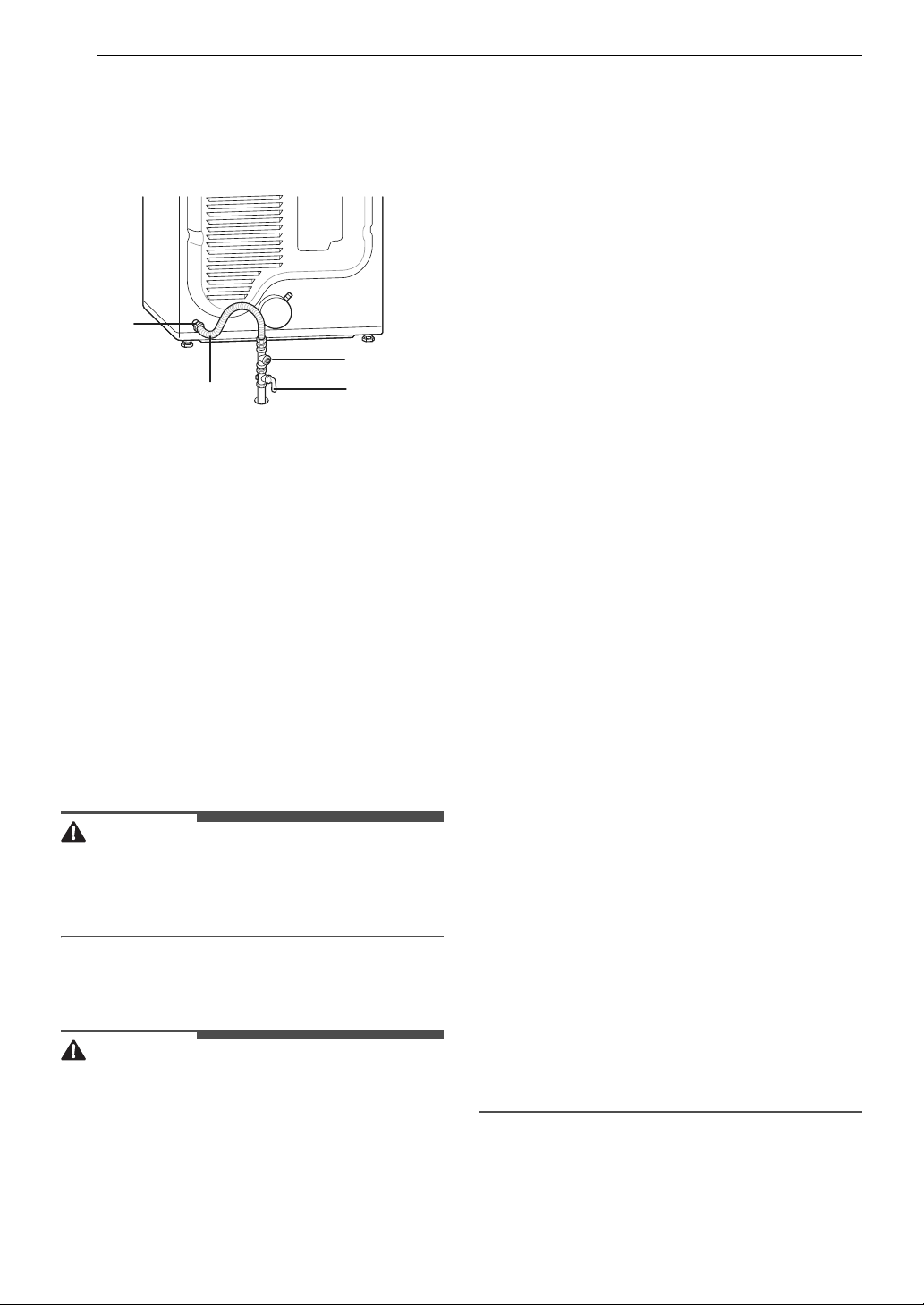
a 3/8” NPT gas Connection
b AGA/CSA-Certified Stainless Steel Flexible
Connector
c 1/8” NPT Pipe Plug
d Gas Supply Shutoff Valve
High-Altitude Installations
The BTU rating of this dryer is AGA-certified for
elevations below 10,000 feet.
If your gas dryer is being installed at an elevation
above 10,000 feet, it must be derated by a
qualified technician or gas supplier.
Connecting Electric Dryers
WARNING
• To reduce the risk of fire or explosion, electric
shock, property damage, injury to persons, or
death when using this appliance, fulfill the
following requirements.
Electrical Requirements for Electric
Models
WARNING
• The wiring and grounding must conform to the
latest edition of the National Electrical Code,
ANSI/NFPA 70 and all applicable local
regulations. Please contact a qualified electrician
to check your home’s wiring and fuses to ensure
that your home has adequate electrical power to
operate the appliance.
• This appliance must be connected to a grounded
metal, permanent wiring system, or an
equipment-grounding conductor must be run
with the circuit conductors and connected to the
equipment-grounding terminal or lead on the
appliance.
• The appliance has its own terminal block that
must be connected to a separate 230 VAC, 60-
Hertz, single-phase circuit, fused at 30 amperes.
(The circuit must be fused on both sides of the
line.) ELECTRICAL SERVICE FOR THE APPLIANCE
SHOULD BE OF THE MAXIMUM RATE VOLTAGE
LISTED ON THE NAMEPLATE. DO NOT CONNECT
THE APPLIANCE TO 110-, 115-, OR 120-VOLT
CIRCUIT.
• If the branch circuit to appliance is 15 ft. (4.5 m)
or less in length, use UL (Underwriters
Laboratories) listed No.-10 AWG wire (copper
wire only), or as required by local codes. If over
15 ft. (4.5 m), use UL-listed No.-8 AWG wire
(copper wire only), or as required by local codes.
Allow sufficient slack in wiring so the appliance
can be moved from its normal location when
necessary.
• The power cord (pigtail) connection between the
wall receptacle and the appliance terminal block
IS NOT supplied with the appliance. Type of
pigtail and gauge of wire must conform to local
codes and with instructions on the following
pages.
• Do not modify the plug and internal wire
provided with the appliance.
• The appliance should be connected to a 4-hole
outlet.
• If the plug does not fit the outlet, a proper outlet
will need to be installed by a qualified electrician.
• Connect the power cord to the terminal block.
Each colored wire should be connected to the
same color screw. Wire color indicated in manual
is connected to the same color screw in the
block.
• Grounding through the neutral conductor is
prohibited for: (1) new branch-circuit
installations and (2) areas where local codes
prohibit grounding through the neutral
conductor.
• This appliance is supplied with the neutral wire
grounded. This white ground wire MUST BE
MOVED to the neutral terminal when a 4-wire
cord is to be used, or where grounding through
the neutral conductor is prohibited.
a
b
c
d
23INSTALLATION
ENGLISH
Connecting the Water Inlet
Hose
To generate steam, the dryer must be connected
to the cold water tap using a new water supply
hose. Do not use old hoses.
WARNING
• Do not overtighten the hoses or cross-thread the
hose fittings. Overtightening or cross-threading
can damage the valves or couplings, resulting in
leaking and property damage.
• Do not reuse old hoses. Use only new hoses
when installing the appliance. Old hoses could
leak or burst causing flooding and property
damage. Contact an LG Customer Information
Center for assistance in buying hoses.
CAUTION
• Periodically check the hoses for cracks, leaks,
and wear, and replace the hoses every five years.
• Do not stretch the water hoses intentionally, and
make sure that they are not pinched, crushed or
kinked by other objects.
• Water supply pressure must be between 20 psi
and 120 psi (138 - 827 kPa). If the water supply
pressure is more than 120 psi, a pressure
reducing valve must be installed.
• Do not store or install the appliance in a location
subject to freezing temperatures. Damage to the
water inlet hoses and internal mechanisms of
the appliance can result. If the appliance was
exposed to freezing temperatures prior to
installation, allow it to stand at room
temperature for several hours before use and
check for leaks prior to operation.
• Do not use flood-preventing hoses with auto
shut off devices. The devices can be tripped
during fill and prevent the appliance from filling
properly.
How to Connect the Water Inlet
Hoses
1 Check the fittings and seals. Inspect the
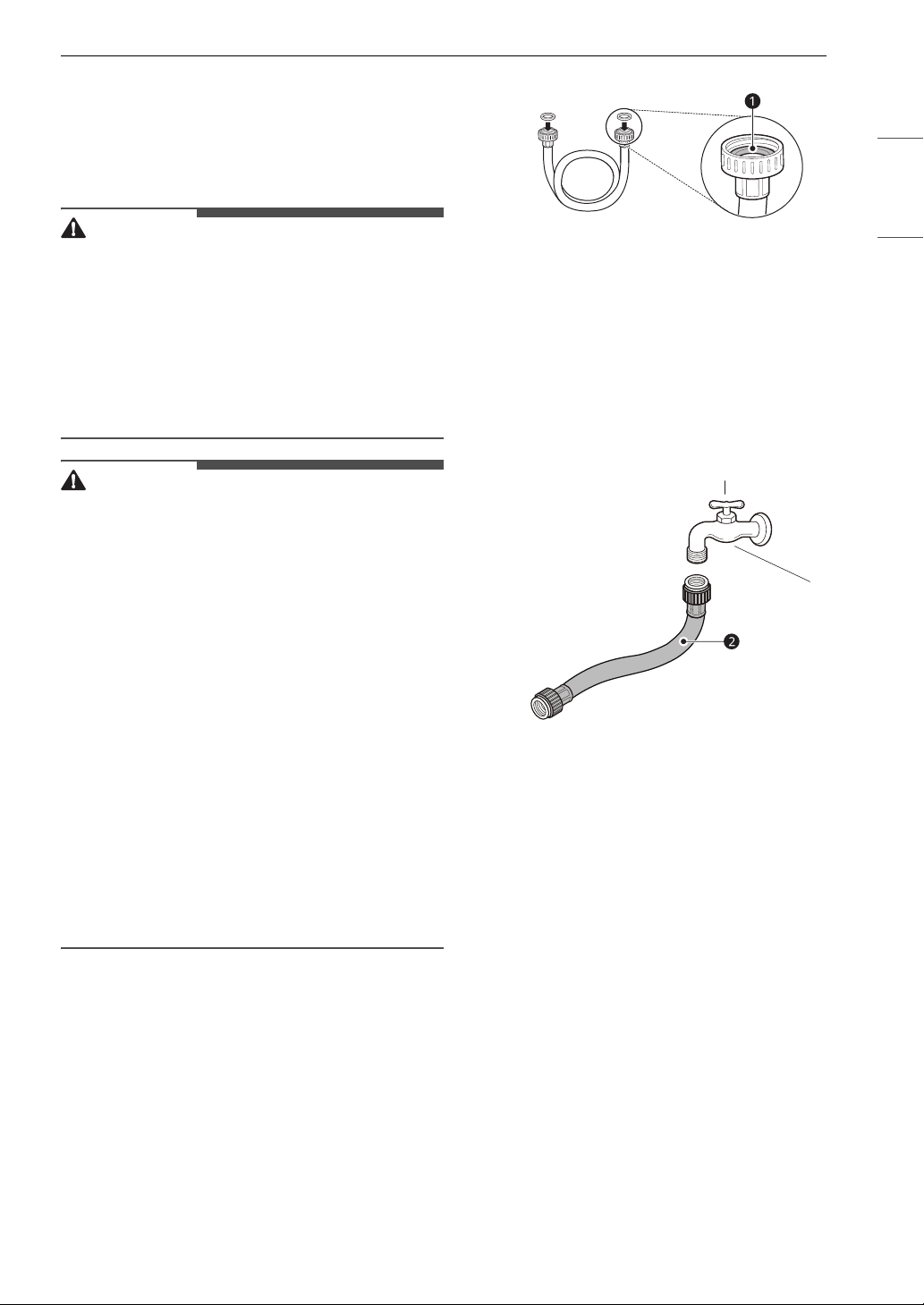
threaded fitting on each hose and make sure
there is a rubber seal a in place in both ends
of each hose to prevent leaking.
2 Check the type of installation and connect the
hose to the faucet. Connect all water supply
hoses tightly by hand and then tighten
another 2/3 turn with pliers.
• Type 1 : WITHOUT WASHER (The dryer does
not share the faucet with the washing
machine.)
1) Connect the straight end of the long
hose
b to the cold water faucet.
• Type 2 : WITH WASHER (The dryer shares
the faucet with the washing machine.)
1) Shut off the cold water tap and remove
the washer inlet hose.
2) Connect the short hose
c to the Y-
connector d using one of the rubber
seals.
3) Connect the other end of the short hose
c to the cold water faucet.
4) Connect the long dryer hose b to one
side of the Y-connector d. Connect the
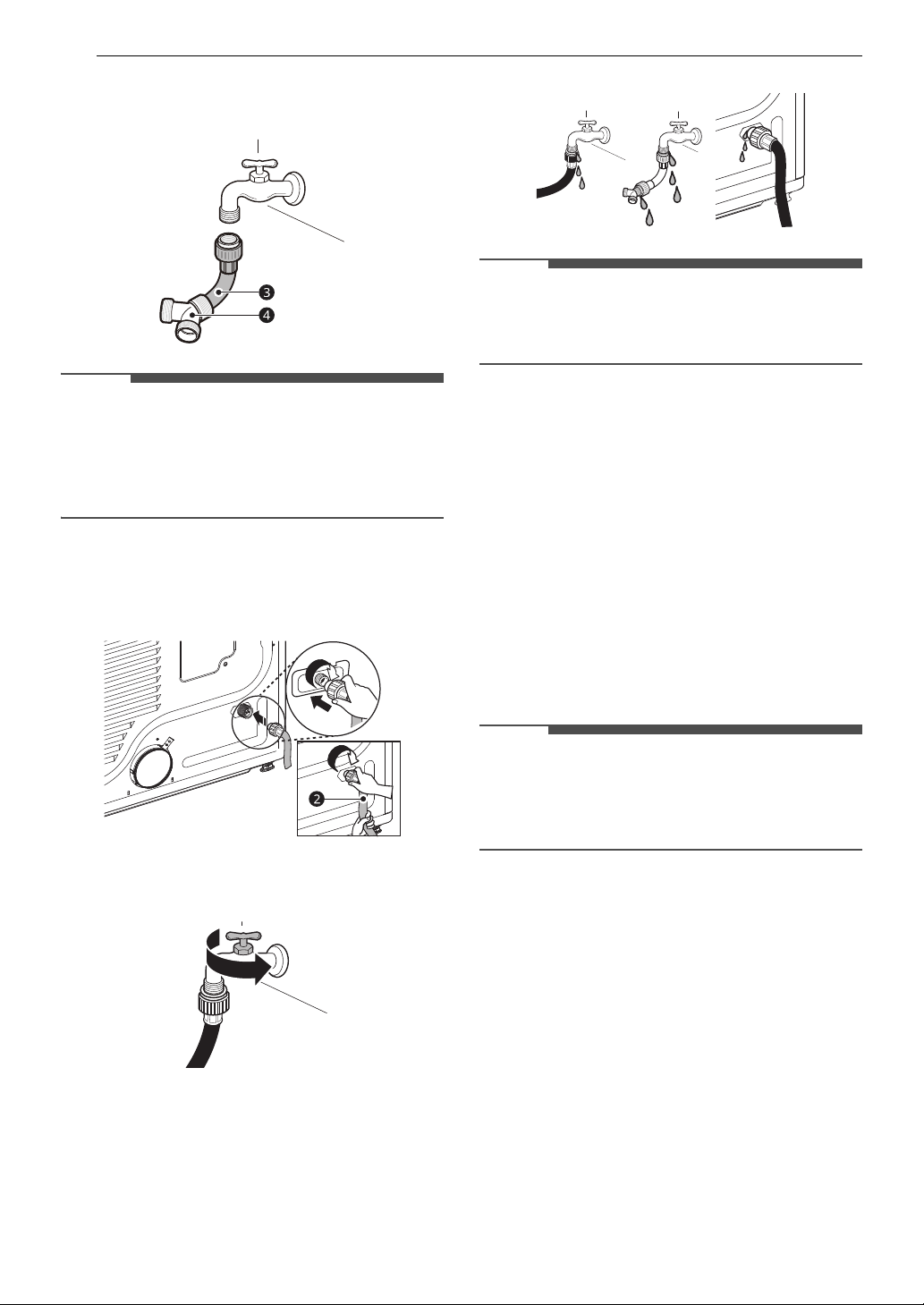
24 INSTALLATION
washer hose to the washer and the
other side of the Y-connector d.
NOTE
• Before connecting the water line to the dryer,
flush several gallons of water into a drain or
bucket. This will help prevent foreign particles
such as sand and scale from clogging the dryer
inlet valve.
3 Connect the long dryer hose b to the dryer
inlet valve tightly by hand and then tighten
another 2/3 turn with pliers.
4 Turn on the cold water faucet.
5 Check all hoses and Y-connectors (if used) for
leaks.
NOTE
• If any leaks are found, shut off the water faucet,
remove the hose and check the condition of the
rubber seal.
Final Installation Check
Once you have completed the installation of the
dryer and it is in its final location, confirm proper
operation with the following tests.
Test Dryer Heating
Gas Models
Close the dryer door and press the Power button
to turn the dryer on. Turn the knob to select Timed
Dry and press the 8(OK) button to start the test.
When the dryer starts, the igniter should ignite the
main burner.
NOTE
• If all air is not purged from the gas line, the gas
igniter may turn off before the main burner
ignites. If this happens, the igniter will reattempt
gas ignition after approximately two minutes.
Electric Models
Close the dryer door and press the Power button
to turn the dryer on. Turn the knob to select Timed
Dry and press the 8(OK) button to start the test.
The exhaust air should be warm after the dryer
has been operating for 3 minutes.
Checking Airflow
Effective dryer operation requires proper airflow.
The adequacy of the airflow can be measured by
evaluating the static pressure. Static pressure in
the exhaust duct can be measured with a
manometer, placed on the exhaust duct
approximately 2 ft. (60.9 cm) from the dryer. Static
pressure in the exhaust duct should not exceed 0.6
25INSTALLATION
ENGLISH
inch (1.5 cm). The dryer should be checked while
the dryer is running with no load.
Checking Levelness
Once the dryer is in its final location, recheck the
dryer to be sure it is level. Make sure it is level front
to back and side to side, and that all four leveling
feet are in firm contact with the floor.
Test Exhaust System
Once you have completed the installation of the
appliance, use this test to make sure the condition
of the exhaust system is adequate for proper
operation of the appliance. This test should be
performed to alert you to any serious problems in
the exhaust system of your home.
•Your appliance features Flow Sense
TM
, an
innovative sensing system that automatically
detects blockages and restrictions in dryer
ductwork. Keeping ductwork clean of lint
buildup and free of restrictions allows clothes to
dry faster and reduces energy use.
NOTE
• The appliance should be cool before starting this
test. If the appliance was warmed up during
installation, run the Air Dry cycle for a few
minutes to reduce the interior temperature.
Activating the Installation Test
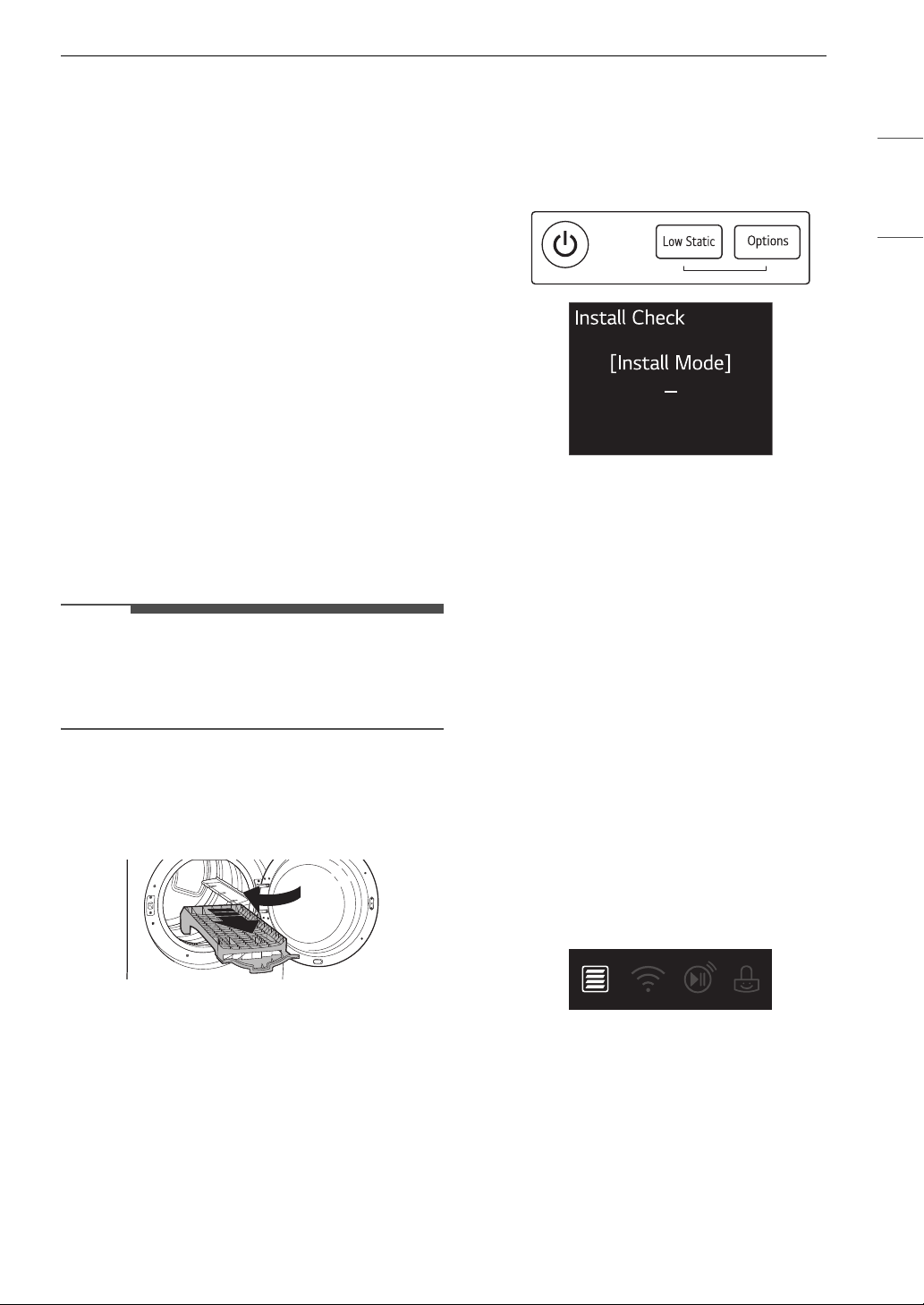
1 Remove the drying rack (on some models)
and literature, and then close the door.
• Do not load anything in the drum for this
test, as it may affect the accuracy of the
results.
2 Press the Power button then IMMEDIATELY
press and hold the Low Static and Options
buttons.
• This button sequence activates the
installation test. A message will display if
the activation is successful.
3 Press the Start/Pause button.
• The appliance will start the test, which will
last a few minutes. The heat will be turned
on and the temperatures in the drum will be
measured.
4 Check the display for results.
• During the test cycle, monitor the Flow
Sense
TM
display on the control panel. If the
Flow Sense
TM
LED has not turned on when
the cycle ends, the exhaust system is
adequate. If the exhaust system is severely
restricted, the Flow Sense
TM
LED will turn
on. Other problems may also be shown with
error codes. See the chart on the next page
for error code details and solutions.
•If the Flow Sense
TM
LED indicates that the
exhaust system is severely restricted, have
the system checked immediately, as
performance will be poor.
5 End of cycle.
• At the end of the test cycle, a message will
display. The test cycle will end and the
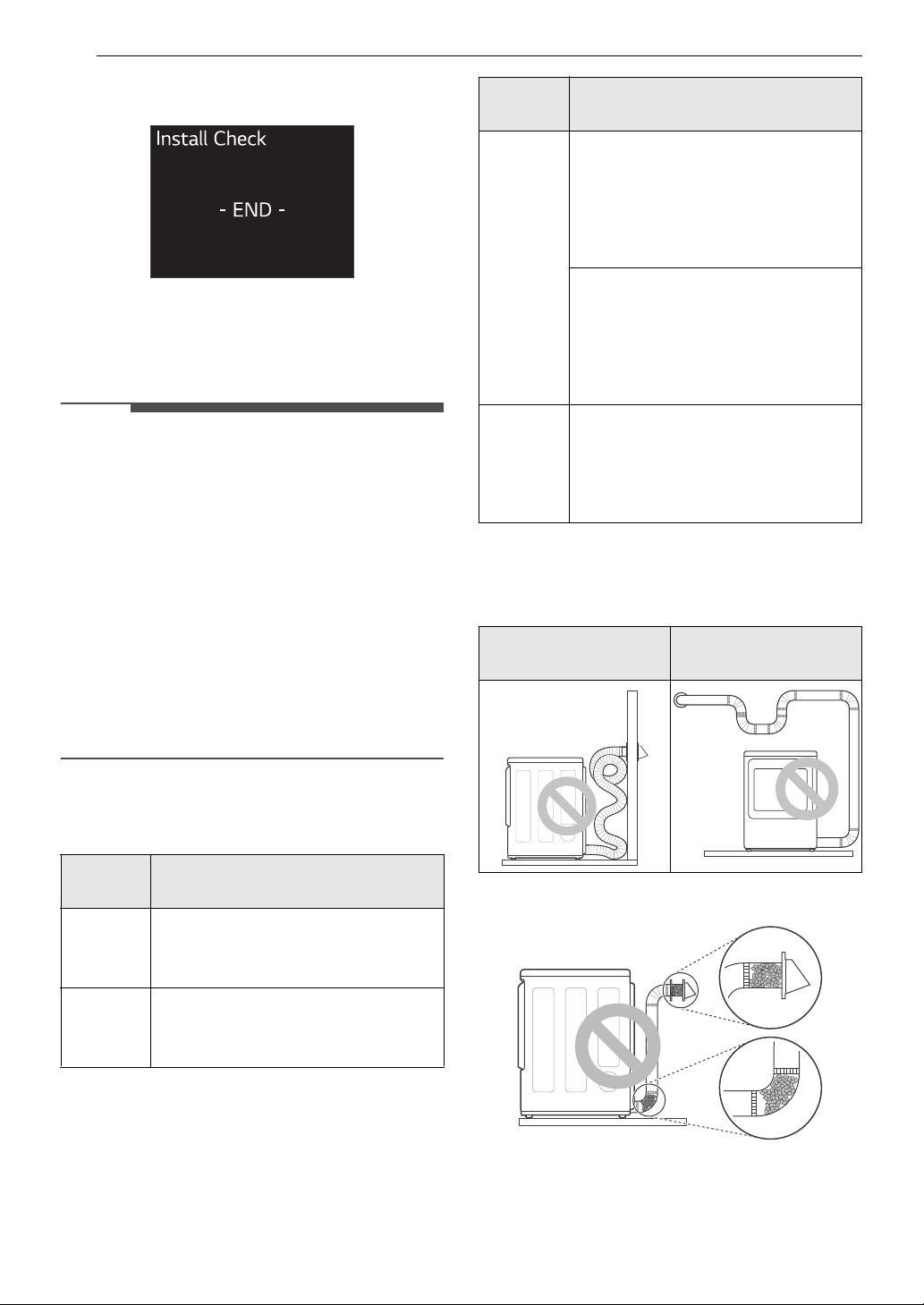
26 INSTALLATION
appliance will shut off automatically after a
short delay.
Check the Duct Condition
If the Flow Sense
TM
LED is turned on, check the
exhaust system for restrictions and damage.
Repair or replace the exhaust system as needed.
NOTE
• When the appliance is first installed, this test
should be performed to alert you to any existing
problems with the exhaust duct in your home.
However, since the test performed during
normal operation provides more accurate
information on the condition of the exhaust duct
than the installation test, the results during the
two tests may not be the same.
• Do not interrupt the test cycle, as this could
result in inaccurate results.
• Even if the LED doesn't light up during the test
cycle, some restrictions may still be present in
the exhaust system. Refer to the Venting the
Dryer section of this manual for complete
exhaust system and venting requirements.
Error Codes
Check the error code before you call for service.
Restricted or Blocked Airflow
Avoid long runs or runs with multiple elbows or
bends.
Check for blockages and lint buildup.
Error
Code
Possible Cause & Solution
Temp
sensor
error
Temperature sensor failure.
• Turn off the appliance and call for
service.
Humidity
sensor
error
Humidity sensor failure.
• Turn off the appliance and call for
service.
High
voltage
Low
voltage
Power
supply /
Power
issue
Electric dryer power cord is not
connected correctly, or house
power supply is incorrect.
• Reset circuit breaker or replace
fuse. Do not increase the fuse
capacity.
House fuse is blown, circuit breaker
has tripped, or power outage has
occurred.
• If the problem is a circuit
overload, have it corrected by a
qualified electrician.
Gas
supply
Gas supply or service turned off.
(Gas model only.)
• Confirm that house gas shutoff
and the dryer gas shutoff are both
fully open.
Excess or crushed
transition duct
Too many elbows or
exhaust too long
Error
Code
Possible Cause & Solution
27INSTALLATION
ENGLISH
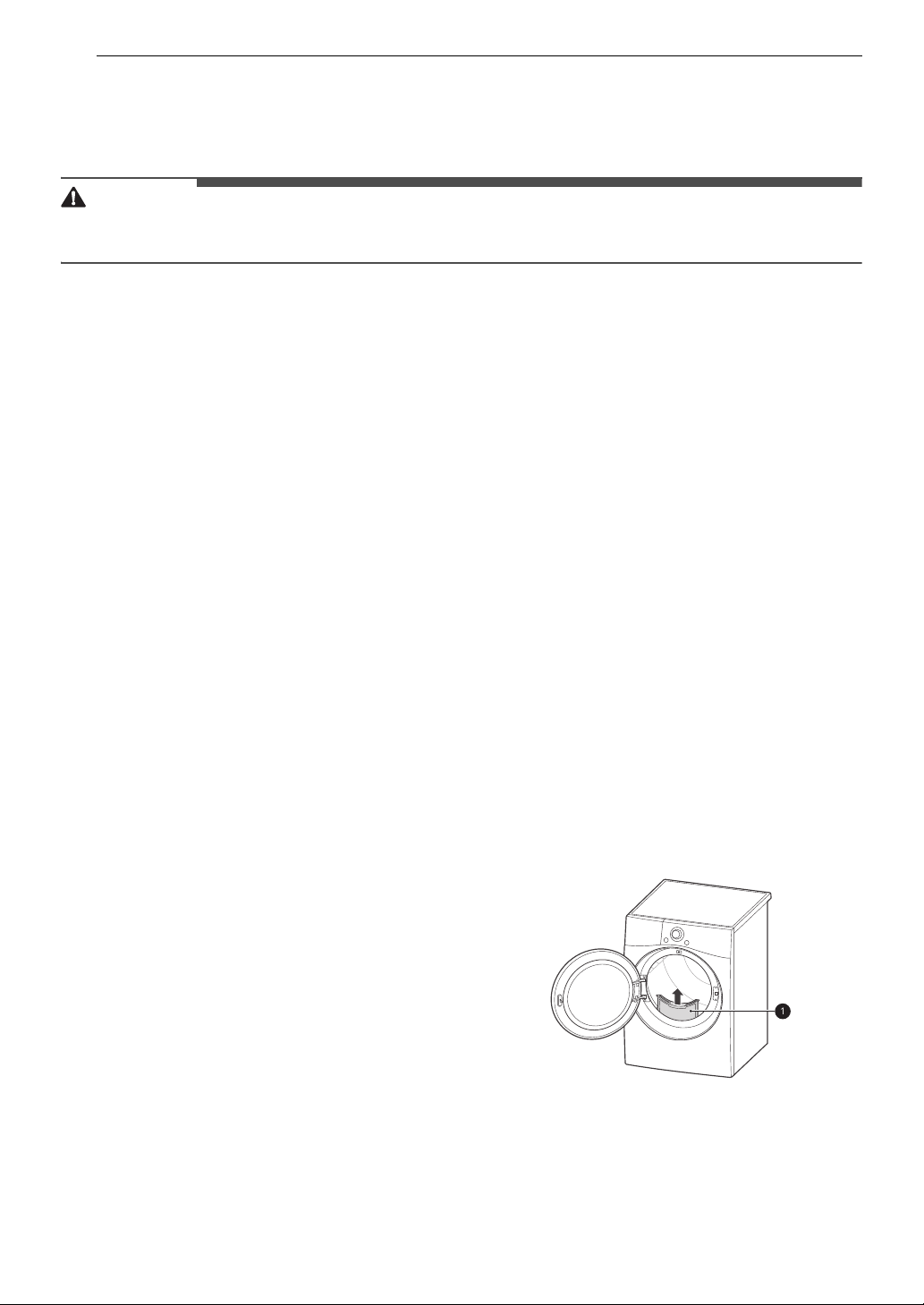
Make sure the ductwork is not crushed or
restricted.
28 OPERATION
OPERATION
Before Use
WARNING
• To reduce the risk of fire, electric shock, or injury to persons, read the IMPORTANT SAFETY
INSTRUCTIONS before operating this appliance.
Operation Overview
1 Clean the Lint Filter
• If the lint filter has not already been
cleaned, lift out the filter and remove the
lint from the last load. This will help ensure
the fastest and most efficient drying
performance. Make sure to reinstall the
filter, pressing down until it clicks firmly into
place.
2 Load the Dryer
• Make sure that clothing is pushed entirely
into the drum and away from the door seal
area. Clothing that gets stuck between the
door and seal may be damaged or damage
the seal.
• If the load is extra large, you may need to
divide it into smaller loads for proper
performance and fabric care.
• All strings and attached belts of clothes
should be well tied and secured before
being put into the drum.
3 Turn on the Dryer
• Press the Power button to turn on the
dryer. The display will turn on and a chime
will sound.
4 Select a Cycle
• Turn the cycle selector knob until the
desired cycle is selected. The preset
temperature, dry level, and option settings
for that cycle will be shown.
5 Adjust Settings
Default settings for the selected cycle can now
be changed, if desired, using the cycle
modifier and option buttons.
• Not all modifiers and options are available
on all cycles.
6 Begin Cycle
•Press the Start/Pause button to begin the
cycle. The cycle can be paused at any time
either by opening the door or by pressing
the Start/Pause button.
•If the Start/Pause button is not pressed
within a certain time, the dryer shuts off
and all settings are lost.
7 End of Cycle
• When the cycle is finished, the chime will
sound. Immediately remove your clothing
from the dryer to reduce wrinkling. If
Wrinkle Care is selected, the dryer will
tumble briefly every few minutes to help
prevent wrinkles from setting in the clothes.
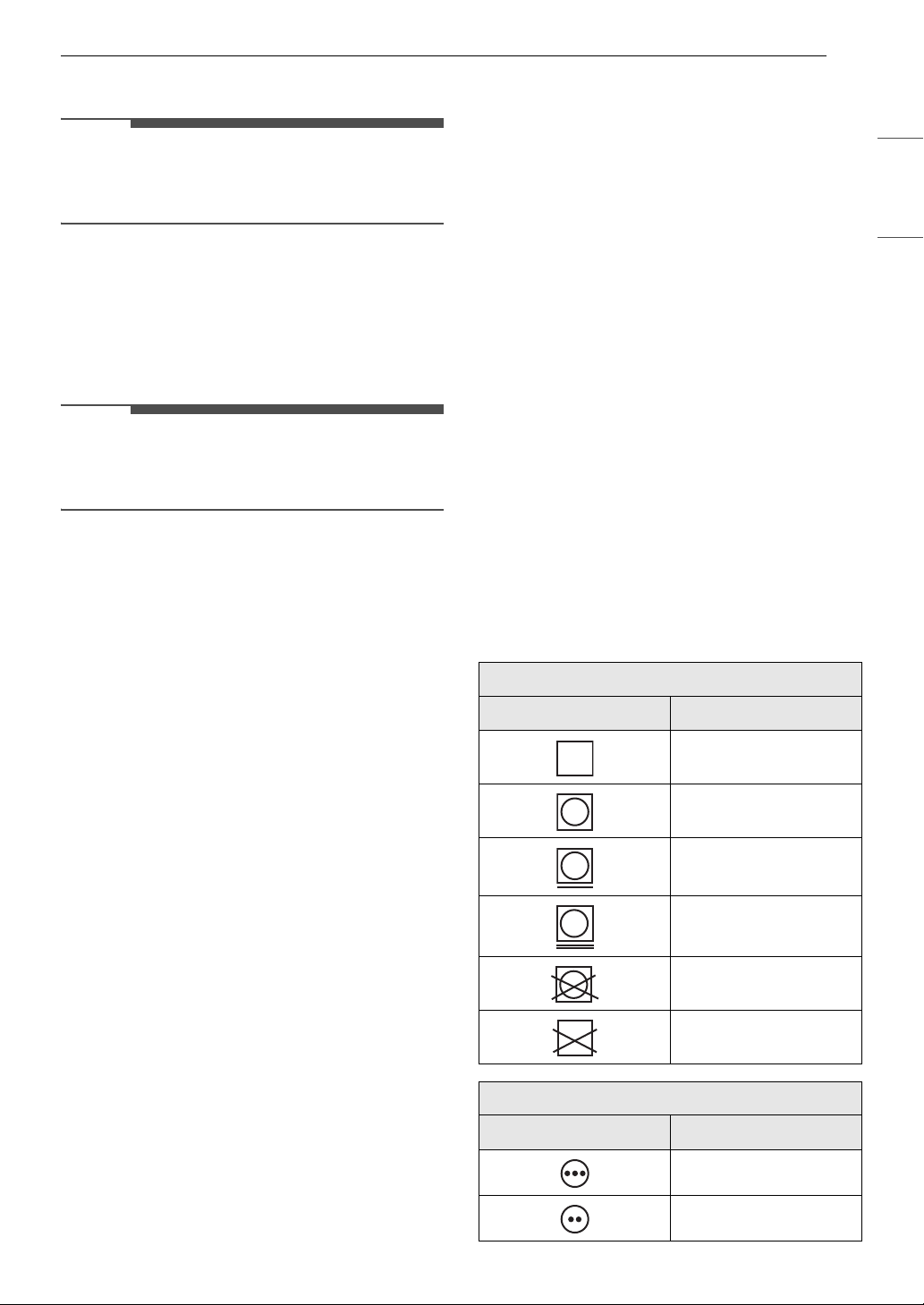
Check the Lint Filter Before Every
Load
Always make sure the lint filter a is clean before
starting a new load; a clogged lint filter will
increase drying time. To clean, pull the lint filter
straight up and roll any lint off the filter with your
fingers. Push the lint filter firmly back into place.
See Regular Cleaning for more information.
Always ensure that the lint filter is properly
installed before running the dryer. Running the
dryer with a loose or missing lint filter will damage
the dryer and articles in the dryer.
29OPERATION
ENGLISH
Loading the Dryer
NOTE
• For the best drying performance and most
efficient energy usage, do not overload the
appliance.
General Tips
• Combine large and small items in the same load.
• Use mesh laundry bags to separate clothes with
zippers, hooks, straps, and drawstrings to
prevent them from catching on or tangling with
other clothes or damaging the lint filter.
NOTE
• Damp clothes will expand as they dry. Do not
overload the dryer; clothes require room to
tumble and dry properly.
Grouping Similar Items
For the best drying results, and to reduce the
possibility of damage to clothing, sort clothes into
loads that can be dried with the same drying cycle.
Different fabrics have different care requirements,
and some fabrics will dry more quickly than others.
Woolen Items
• Always follow fabric care labels before drying
woolen items in a dryer. After the cycle, the
items may still be damp. Do not repeat the cycle.
Pull the items to their original shape if needed
and lay them flat to finish drying.
Woven and Loopknit Materials
• Some woven and loopknit materials may shrink,
depending on quality.
Permanent Press and Synthetics
• Do not overload your dryer. Take out permanent
press items as soon as the dryer stops to reduce
wrinkles.
Baby Clothes and Nightgowns
• Always check the manufacturer’s instructions.
Rubber and Plastics
• Do not dry any items made from or containing
rubber or plastics such as:
- Aprons, bibs and chair covers
- Curtains and tablecloths
- Bath mats
Fiberglass
• Do not dry fiberglass articles in your dryer. Glass
particles left in the dryer could be picked up by
your clothes the next time you use the dryer and
irritate your skin.
Fabric Care Labels
• Sort and dry laundry according to care labels,
size, and fabric type. Do not overload the dryer.
This will save energy and time and give the best
drying performance.
Fabric Care Labels
Many articles of clothing include a fabric care label.
Using the chart below, adjust the cycle and option
selections to care for your clothing according to
the manufacturer's recommendations.
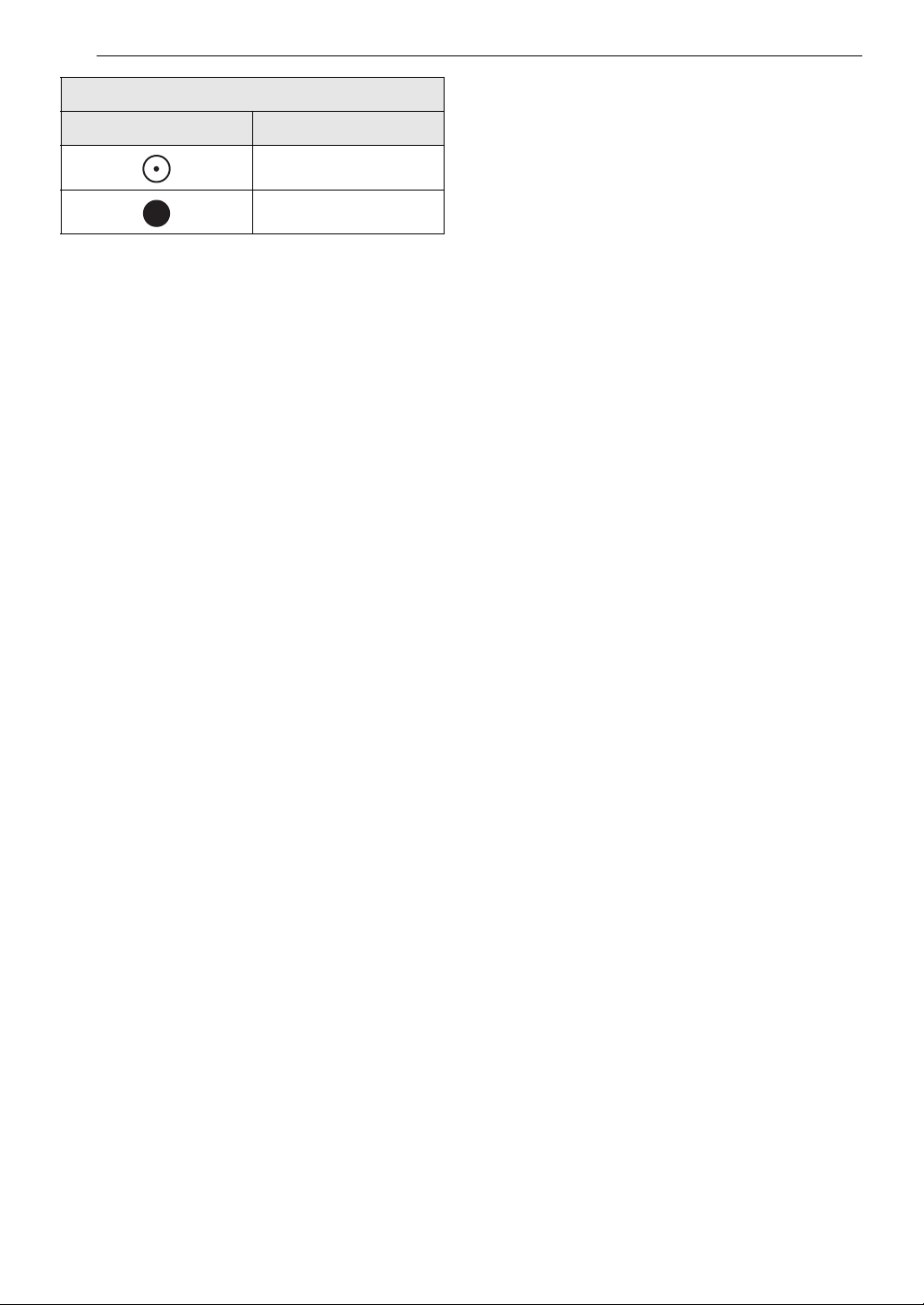
Tumble Dry
Label Directions
Dry
Normal
Permanent Press /
Wrinkle Resistant
Gentle / Delicate
Do not tumble dry
Do not dry (used with
do not wash)
Heat Setting
Label Directions
High
Medium
30 OPERATION
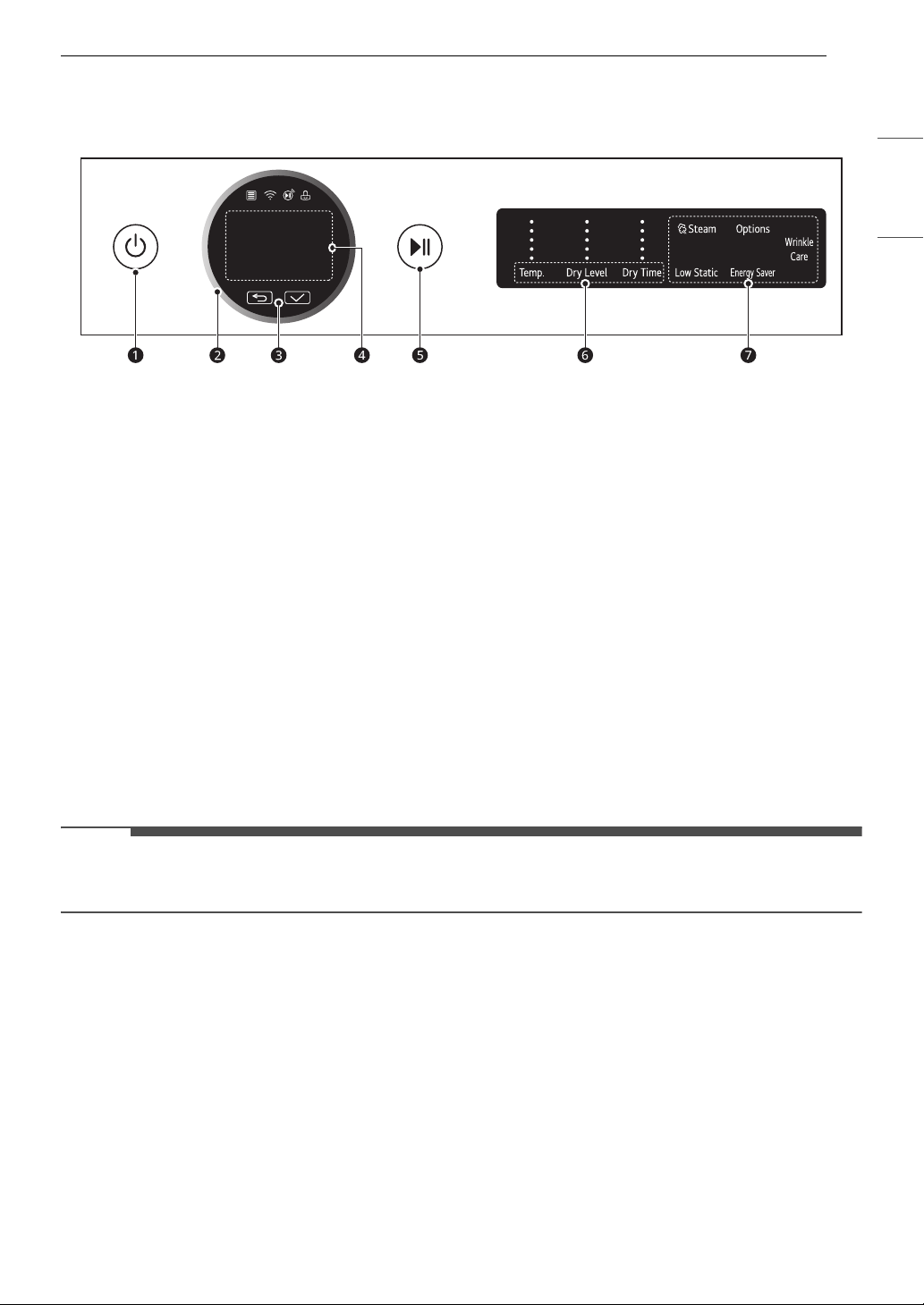
Low
No Heat / Air
Heat Setting
Label Directions
31OPERATION
ENGLISH
Control Panel
Control Panel Features
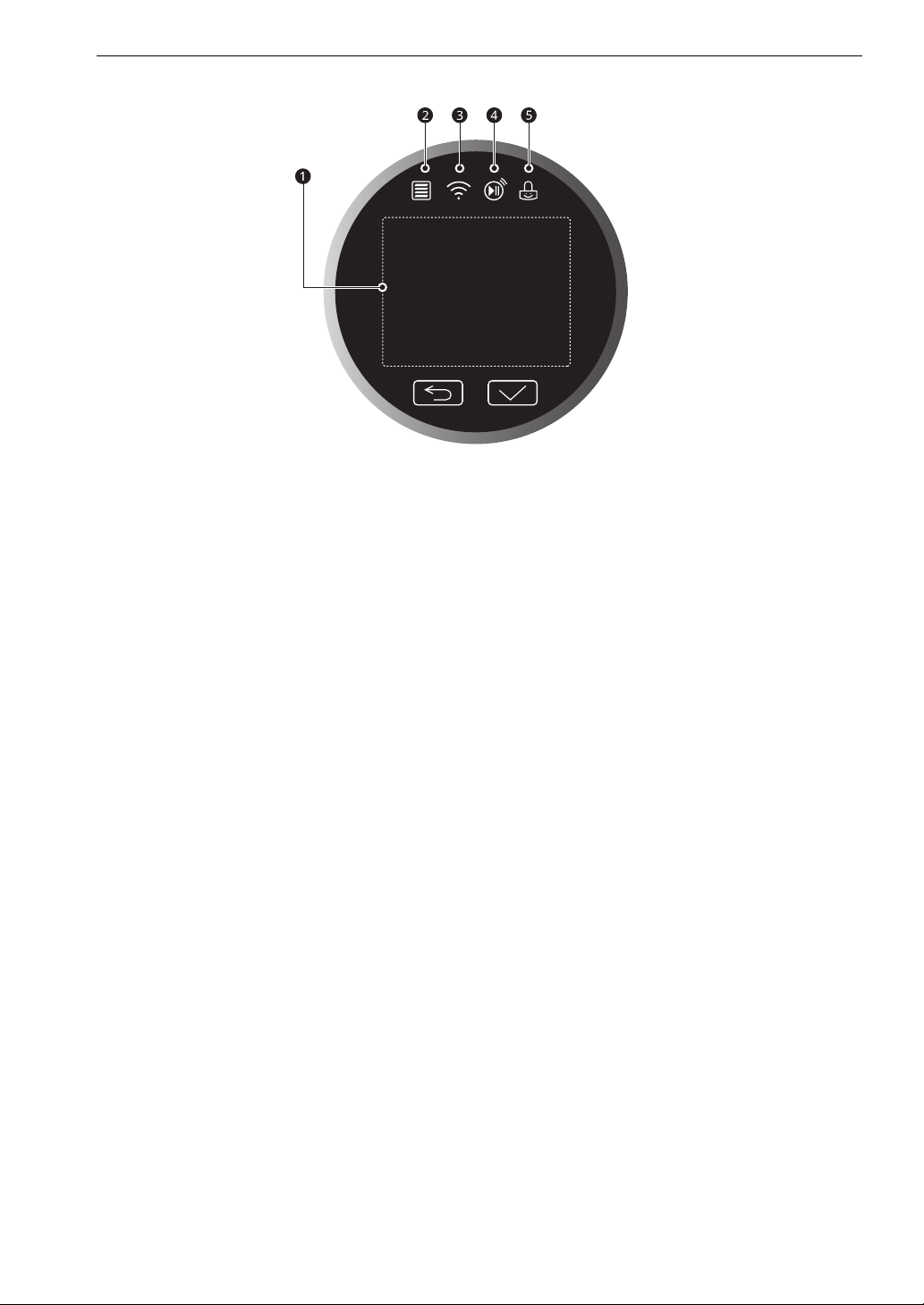
a Power On/Off Button
• Press this button to turn the appliance on and press and hold it briefly to turn it off.
• Pressing this button during a cycle will cancel that cycle and any load settings will be lost.
b Cycle Selector Knob
• Turn this knob to select the desired cycle or option.
• Once the desired cycle has been selected, the standard presets will appear in the display. These
settings can be adjusted using the Cycle Modifier buttons at any time before starting the cycle.
c N(Previous) & 8(OK)
•Press the N(Previous) button to go to the previous screen.
•Press the 8(OK) button to select a menu item or save the information.
d Status Display
• This LCD shows the settings, estimated time remaining, options, and status messages.
e Start/Pause Button
• Press this button to start the selected cycle.
• If the appliance is running, use this button to pause the cycle without losing the current settings.
NOTE
• If you do not press the Start/Pause button to resume a cycle within a certain time, the appliance turns
off automatically and all cycle settings are lost.
f Cycle Modifier Buttons
• Use these buttons to adjust the dry temperature, dry level and dry time settings for the selected
cycle. Not all options are available for each cycle.
• The current settings are shown in the display.
• Press the button for that option to select other settings.
g Option and Extra Function Buttons
• These buttons allow you to select additional cycle options.
32 OPERATION
Time and Status Display
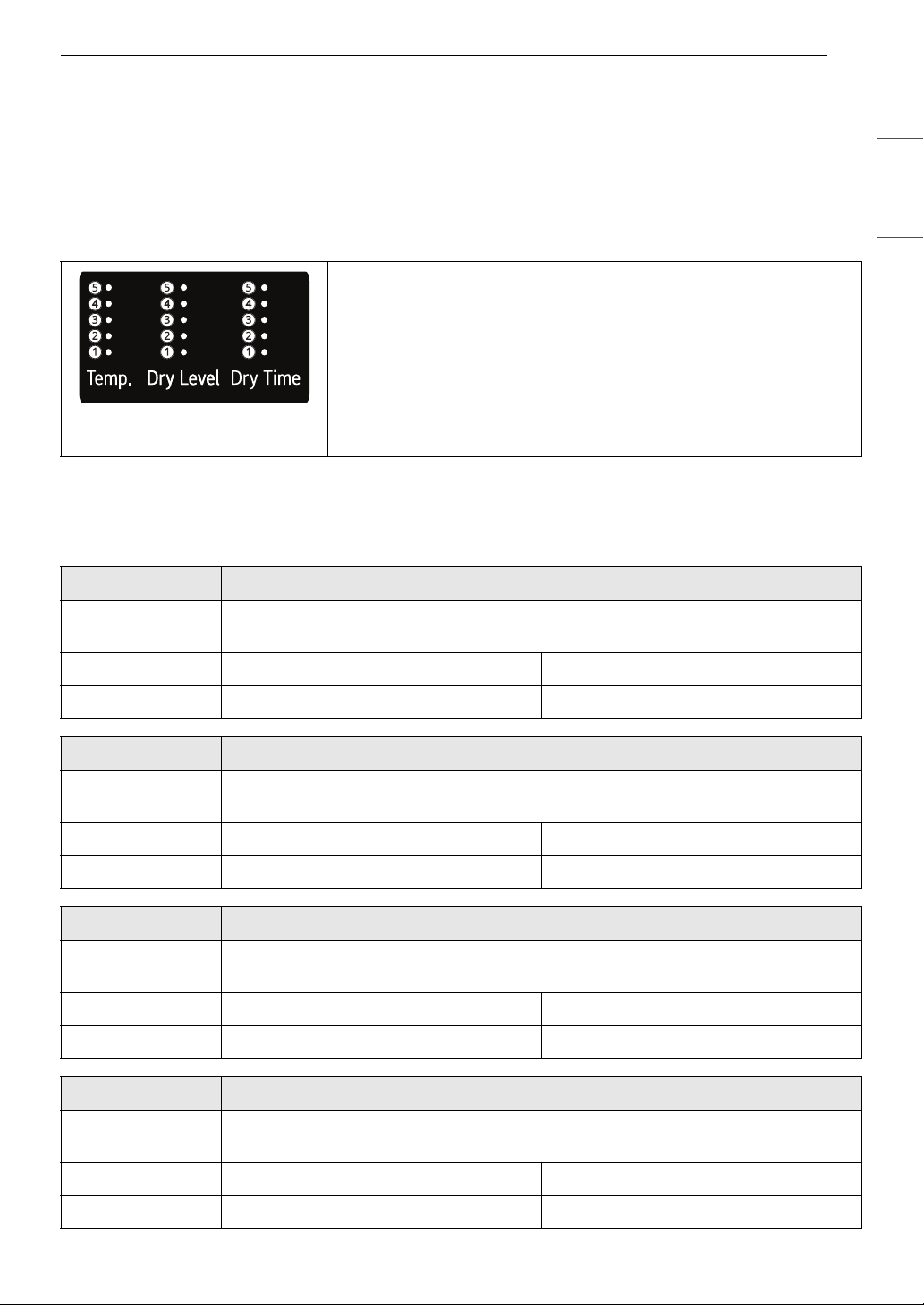
a Status Display
• The display shows the settings, estimated time remaining, options, and status messages.
b Flow Sense Indicator
• The Flow Sense
TM
duct blockage sensing system detects and alerts you to blockages in the ductwork
that reduce exhaust flow from the dryer.
• Maintaining a clean exhaust system improves operating efficiency and helps minimize service calls,
saving you money.
c Wi-Fi Indicator
• This indicator lights up when the product is connected to a home Wi-Fi network.
d Remote Start Indicator
• This indicator lights up when the Remote Start feature is activated.
e Control Lock Indicator
• This indicator lights up when the Control Lock feature is activated.
33OPERATION
ENGLISH
Dry Cycles
Turn the knob to select the desired cycle. When you select a dry cycle the default settings will light up in the
display.
Cycle Guide
The appliance automatically sets the dryness level and temperature at the recommended setting for each
cycle. The estimated time remaining will be shown in the display.
Default Cycles
These cycles are in the initial cycle list.
• Temperature indicator lights up and the selected setting is shown
in the knob display: A Low, B Med Low, D Medium, D Med High,
E High
• Dry Level indicator lights up and the selected setting is shown in
the knob display: A Damp, B Less, C Normal, D More, E Very
• Dry Time indicator lights up and the selected setting is shown in
the knob display: A 10-20 min, B 30-40 min, C 50-60 min, D 70-
80 min, E 90-100 min
Cycle Normal
Description Use this cycle for drying all normal items such as cotton, linen, shirts, jeans or mixed
loads, except delicate fabrics such as wool or silk.
Dry Level Default: Normal Available: All
Temperature Default: Med. High Available: Med. High
Cycle AI Dry
Description This cycle optimizes drying times and temperatures by detecting the laundry’s
characteristics.
Dry Level Default: Normal Available: Normal
Temperature Default: Med. High Available: Med. High
Cycle Bedding
Description Use this cycle for drying blankets or bulky items such as pillows, blankets, comforters,
sheets or pet bedding.
Dry Level Default: Normal Available: Very, More, Normal
Temperature Default: Medium Available: Medium
Cycle Delicates
Description Use this cycle for drying dress shirts/blouses, nylons, lingerie, or sheer and lacy clothes
which can easily be damaged.
Dry Level Default: Normal Available: All
Temperature Default: Med. Low Available: Med. Low
34 OPERATION
† Shirts : 70% cotton, 30% poly blend. Except especially delicate fabrics
Non-Default Cycles
Edit the list of dry cycles using the Cycle List Edit option to use these cycles.
Cycle Towels
Description Use this cycle for drying towels.
Dry Level Default: Normal Available: All
Temperature Default: Med. High Available: Med. High
Cycle Quick Dry
Description Use this cycle to quickly dry a small load of laundry.
Time Default: 30 minutes Available: 10 -100 minutes
Temperature Default: High Available: All
Cycle Timed Dry
Description Use this cycle to manually select the drying time,from 10 to 100 minutes, in 10-minute
increments.
Time Default: 10 minutes Available: 10 -100 minutes
Temperature Default: High Available: All
Cycle Power Dry
Description This cycle is a high-temperature dry cycle.
Dry Level Default: Very Available: Very
Temperature Default: High Available: High
Cycle Perm. Press
Description Use this cycle to minimize wrinkles when drying tablecloths or wrinkle-free clothes.
Dry Level Default: Normal Available: All
Temperature Default: Medium Available: Medium
Cycle
Steam Fresh
TM
Description Use this cycle to quickly reduce wrinkles and odors in fabrics using the power of steam.
Dry Level Not adjustable
Temperature Default: Med. High Available: All
Time 10 minutes (not adjustable)
Fabric Type (Max
Amount)
• Comforter (Single, 1 each)
•Shirts
†
(5 each)
35OPERATION
ENGLISH
Cycle Heavy Duty
Description Use this cycle for drying heavy-duty clothes like jeans or garments that need extra
drying.
Dry Level Default: Normal Available: All
Temperature Default: High Available: High
Cycle Air Dry
Description Use this cycle to dry all items (such as plastics or rubber) that can be tumble dried
without using heat.
Time Default: 30 minutes Available: 10 -100 minutes
Temperature Not adjustable
Cycle
Steam Sanitary
TM
Description Use this cycle to reduce odors using steam and high temperature.
Dry Level Not adjustable
Temperature Default: High Available: High
Time 31 minutes (not adjustable)
Fabric Type (Max
Amount)
• Comforter, Bedding (Single, 1 each)
• Children's Clothing (3 lbs.)
Cycle Super Dry
Description Thoroughly dries cotton fabrics.
Dry Level Default: Very Available: Very
Temperature Default: High Available: High
Cycle Active Wear
Description Special or treated fabrics for sports or outerwear.
Dry Level Default: Normal Available: Normal
Temperature Default: Medium Available: Medium
Cycle Jeans
Description This cycle is designed specifically for jeans.
Dry Level Default: Normal Available: Normal
Temperature Default: Medium Available: Medium
Cycle Blanket Refresh
Description Warms and fluffs up blankets.
Dry Level Not adjustable
36 OPERATION
WARNING
• To reduce the risk of serious injury, death, explosion, or fire, follow basic safety precautions, including
the following:
- Do not open the dryer door during steam cycles.
- Do not touch the steam nozzle in the drum during or after the steam cycle.
• Do not use steam cycles with the following clothes, as they may be damaged.
- Steam Sanitary
TM
: Urethane foam, down feathers or delicate items
Temperature Default: Low Available: Low
Cycle Low Temp Dry
Description Reduces energy consumption.
Dry Level Default: Normal Available: Very, More, Normal
Temperature Default: Med. Low Available: Med. Low
Cycle Overnight Dry
Description This energy efficient cycle dries a small load overnight.
Dry Level Default: Normal Available: Normal
Temperature Default: Med. Low Available: Med. Low
Cycle Easy Ironing
Description Leaves clothes slightly damp for easy ironing.
Dry Level Default: Damp Available: Damp
Temperature Default: Medium Available: Medium
Cycle Small Load
Description Use this cycle for drying light or small items. (up to 3 items)
Dry Level Default: Normal Available: Very, More, Normal
Temperature Default: High Available: High
Cycle Large Load Dry
Description This cycle is optimized to dry a half load of laundry properly.
Dry Level Default: More Available: More
Temperature Default: Med. High Available: Med. High
Cycle X Large Load Dry
Description This cycle is optimized to dry a full load of laundry properly.
Dry Level Default: Very Available: Very
Temperature Default: High Available: High
Cycle Blanket Refresh
37OPERATION
ENGLISH
- Steam Fresh
TM
: Wool, wool blankets, leather jackets, silk, lingerie, foam products, or electric blankets.
NOTE
•The Steam Sanitary
TM
and Steam Fresh
TM
cycles are designed for use with dry clothing.
Special Drying Cycles
These new or specialized drying cycles can be downloaded to your appliance with a smartphone.
Refer to the LG ThinQ smartphone application for a complete list of the cycles available for download.
Selectable Drying Options
Cycle Wrinkle Prevention
Description This cycle prevents wrinkles caused by clothes sitting in the dryer by tumbling clothes
without heat after the cycle is complete until the door is opened or the power is turned
off.
Dry level Default : Normal Available : Normal
Temperature Default : Medium Available : Medium
Cycle Rack Dry
Description This cycle is used with items, such as wool sweaters, silk items, and lingerie, that should
be dried flat. This cycle can also be used with items that should not be tumbled dry,
such as gym shoes or stuffed animals. Install the rack in the dryer drum before using
this cycle.
Default Time 50 minutes
Temperature Default : - Available : Med. Low, Low, -
Cycle
Option
Steam
Damp Dry
Signal
Energy
Saver
Low Static
Wrinkle
Care
Control
Lock
Normal
######
AI Dry
## ###
Bedding
##
Delicates
# ###
Towels
# ###
Quick Dry
###
Timed Dry
###
Power Dry
##
Perm. Press
## ###
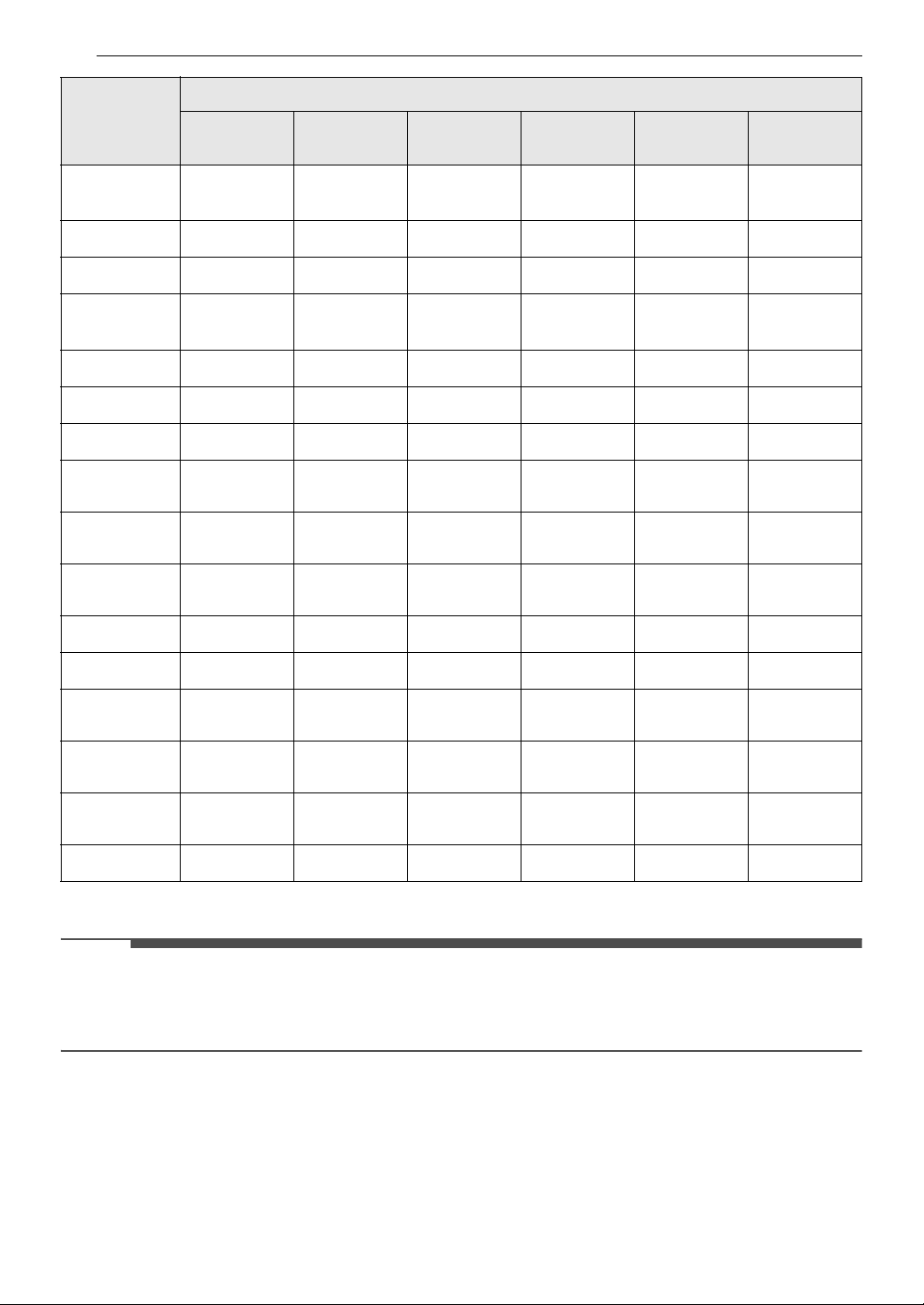
38 OPERATION
† This option is automatically selected for the cycle and cannot be deselected.
NOTE
•The Energy Saver option helps to reduce the energy use by drying clothes at lower temperatures than
the normal mode. When this option is set, the drying time will increase.
•The Steam and Energy Saver options cannot be used together.
Steam
Fresh
TM
#
†
##
Heavy Duty
## ###
Air Dry
##
Steam
Sanitary
TM
#
†
##
Super Dry
##
Active Wear
###
Jeans
###
Blanket
Refresh
##
Low Temp
Dry
##
Overnight
Dry
#
†
#
Easy Ironing
##
Small Load
##
Large Load
Dry
## ###
X Large Load
Dry
## ###
Wrinkle
Prevention
## #
#
†
#
Rack Dry
#
Cycle
Option
Steam
Damp Dry
Signal
Energy
Saver
Low Static
Wrinkle
Care
Control
Lock
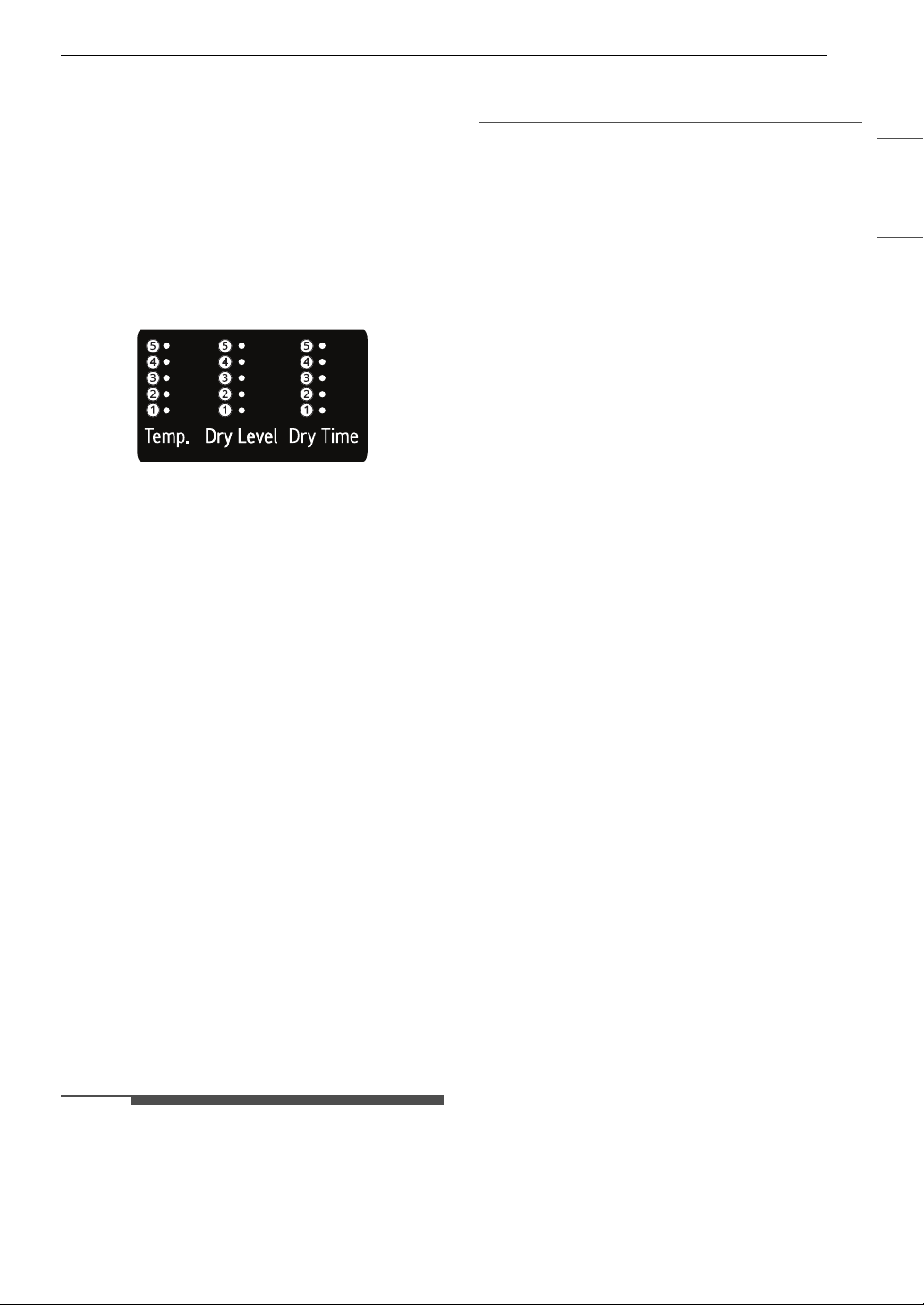
39OPERATION
ENGLISH
Cycle Modifiers
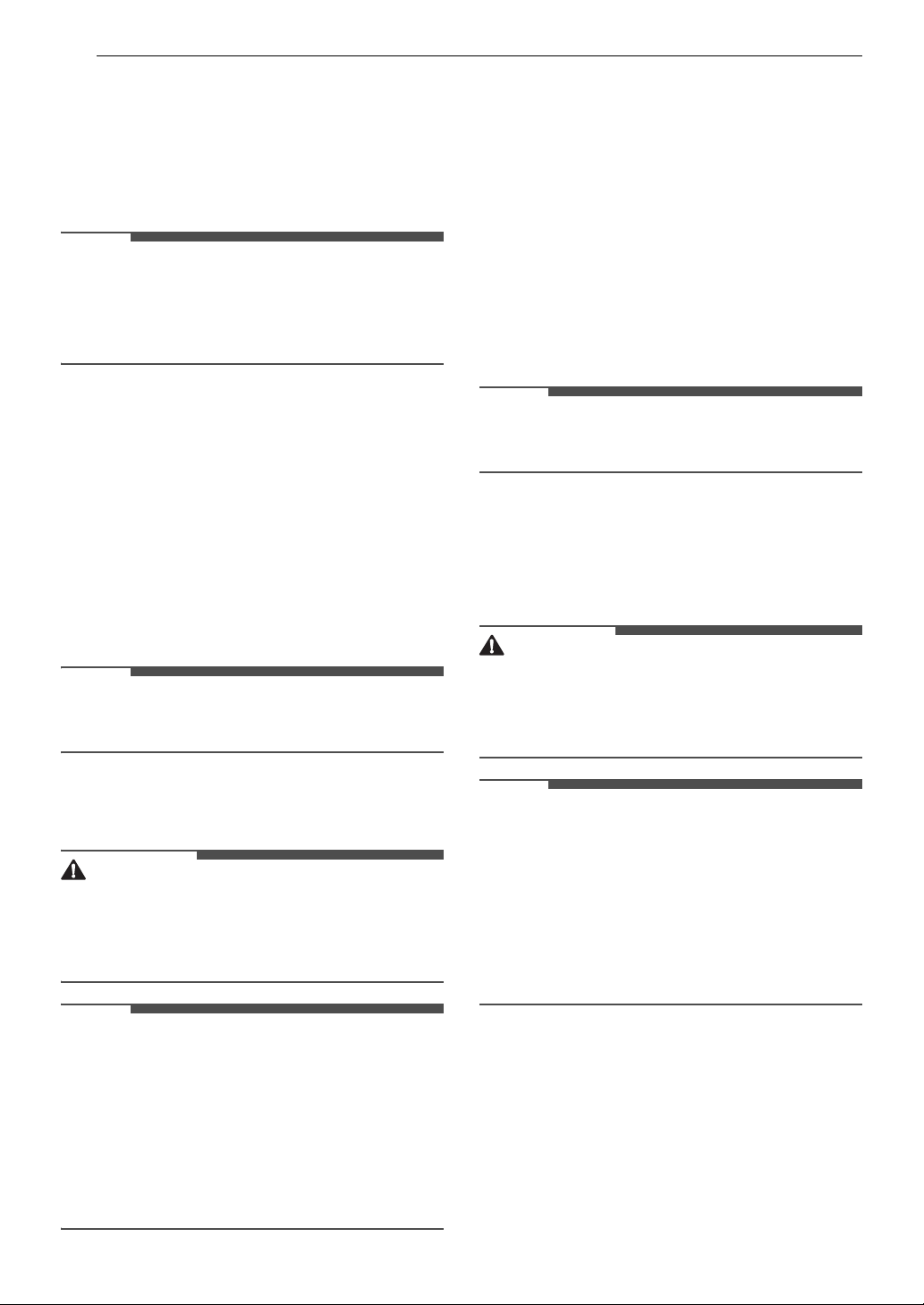
About Modifier Buttons
Each cycle has default settings that are selected
automatically. Customize these settings using the
cycle modifier buttons. Repeatedly press the
button for the desired modifier until the indicator
light for the desired setting is lit. Not every option
is available with every cycle. If a modifier is not
available, the button chimes twice and the setting
does not change.
• Temperature indicator lights up and the selected
setting is shown in the knob display: A Low, B
Med Low, C Medium, D Med High, E High
• Dry Level indicator lights up and the selected
setting is shown in the knob display: A Damp, B
Less, C Normal, D More, E Very
• Dry Time indicator lights up and the selected
setting is shown in the knob display: A 10-20
min, B 30-40 min, C 50-60 min, D 70-80 min, E
90-100 min
Temp.
Use this button to adjust the temperature setting.
This allows precise care of fabrics and garments.
Press the Temp. button repeatedly to scroll
through available settings.
Dry Level
Use this button to select the dryness level for the
cycle. Press the Dry Level button repeatedly to
scroll through available settings.
• The appliance will automatically adjust the cycle
time according to the selected dryness level.
Selecting More or Very will increase the cycle
time, while Less or Damp will decrease the cycle
time.
•Use a Less or Damp setting for items that you
wish to iron.
NOTE
• The appliance will automatically adjust the cycle
time according to the selected dryness level.
Selecting dry levels above Normal will increase
the cycle time. Selecting dry levels below
Normal will decrease the cycle time.
• Use dry level between Normal and Damp or the
Damp dry level for items that you wish to iron.
Dry Time
Use this button to manually select the drying time,
from 10 to 100 minutes, in 10-minute increments.
40 OPERATION
Options and Extra Functions
Your dryer includes several additional cycle
options to customize cycles to meet your individual
needs.
Select the desired option after selecting the
desired cycle and settings.
NOTE
• The LED for the option will light up when the
option is selected.
• To protect your garments, not every option is
available with every cycle.
Steam
Use this function to add steam to a cycle. This
function helps reduce wrinkles and odor in fabrics.
1 Turn on the dryer and turn the cycle selector
knob to select the desired cycle.
2 Use the cycle modifier buttons to customize
the settings for that cycle.
3 Press the Steam button.
NOTE
• When this function is selected, the Damp and
Less dry levels cannot be selected.
4 Press the Start/Pause button to start the
cycle.
WARNING
• Do not touch the door during steam cycles. The
door surface can become very hot.
• Do not attempt to reach into the dryer during a
steam cycle. Steam can cause severe burns.
NOTE
• Steam may not be clearly visible during steam
cycles. This is normal.
• Do not use steam with delicate fabrics such as
wool, silk, or easily discolored fabrics.
• When the filter/duct is clogged, this option may
not have optimal results.
• When this function is operating, the drum will
stop to allow steam to stay in the drum.
Low Static
Use this function to add steam. This function
injects steam late in the drying cycle to reduce the
static electricity caused by dry fabrics rubbing
together.
1 Turn on the dryer and turn the cycle selector
knob to select the desired cycle.
2 Use the cycle modifier buttons to customize
the settings for that cycle.
3 Press the Low Static button.
NOTE
• When this function is selected, the Damp and
Less dry levels cannot be selected.
4 Select ON.
5 Press the Start/Pause button to start the
cycle.
WARNING
• Do not touch the door during steam cycles. The
door surface can become very hot.
• Do not attempt to reach into the dryer during a
steam cycle. Steam can cause severe burns.
NOTE
• Steam may not be clearly visible during steam
cycles. This is normal.
• Do not use steam with delicate fabrics such as
wool, silk, or easily discolored fabrics.
• When the filter/duct is clogged, this option may
not have optimal results.
• When this function is operating, the drum will
stop to allow steam to stay in the drum.
Energy Saver
This option helps to reduce the energy
consumption of the Normal cycle, depending on
the load size. When the Energy Saver option is
selected, the cycle begins with an air dry section
and the drying time is increased.
41OPERATION
ENGLISH
NOTE
•The Energy Saver option is turned on by default
in the Normal cycle.
• Turning the Energy Saver option off changes
the default cycle to the last cycle used. To return
to the default settings, turn the Energy Saver
option on.
Wrinkle Care
Selecting this option will tumble the load
periodically for up to 3 hours after the selected
cycle, or until the door is opened. This is helpful in
preventing wrinkles when you are unable to
remove items from the dryer immediately.
Press the Wrinkle Care button before you start a
dry cycle.
NOTE
• When the option is turned on, only the Power
button works after the dry cycle ends.
• To select the option after starting a cycle, pause
the cycle, set the option, and press Start/Pause.
• Always turn off the appliance before unloading
the clothes.
Drum Light
The drum is equipped with a white LED light that
illuminates when the dryer is turned on. This light
automatically turns off when the door is closed
and the cycle starts.
• Press the Options button, turn the knob to
select Drum Light and press the 8(OK) button.
Select On and press the 8(OK) button.
• The drum light will turn off automatically after 4
minutes.
Damp Dry Signal
When this option is selected, the appliance signals
when the load is approximately 80% dry. This
allows you to remove faster-drying lightweight
items or items that you would like to iron or hang
while they are still slightly damp.
Press the Options button, turn the knob to select
Damp Dry Signal and press the 8(OK) button.
Select On and press the 8(OK) button.
Control Lock
Use this function to disable the controls. This
function can prevent children from changing
cycles or operating the dryer.
NOTE
• The function does not lock the door.
• Once this function is set, all buttons are locked
except the Power button.
• When the controls are locked, the Control Lock
indicator lights up and the dry cycle is shown on
the display.
• Turning off the power will not reset this function.
You must deactivate this function before you can
access any other options and functions.
• To activate/deactivate the function, turn the
dryer on, press the Options button, turn the
knob to select Control Lock, and press the
8(OK) button. Select Off and press the 8(OK)
button.
Cycle List Edit
Edit the list of dry cycles as desired.
1 Press the Options button.
2 Turn the knob to select Cycle List Edit, and
press the 8(OK) button.
3 Select a dry cycle and press the 8(OK) button.
NOTE
•The Normal cycle cannot be deleted.
• The order of cycles in the list can be changed. On
the product, use the Auto Cycle Optimization
function in the Additional Settings menu. In the
LG ThinQ application, use the Product Cycle
Management feature.
Additional Settings
1 Press the Options button.
2 Turn the knob to select Additional Settings
and press the 8(OK) button.
3 Turn the knob to select the desired setting
and press the 8(OK) button.

42 OPERATION
4 Turn the knob to select or change the setting
and press the 8 (OK) button to save the
setting.
5 To return to the previous screen, press the
Options button again or press the
N(Previous) button.
NOTE
• If no action is taken for several minutes after
pressing the Options button, the display reverts
to the previous screen.
Signal
The volume of the notification sounds and button
sounds can be set from quiet to very loud.
• Default volume is Very High and can be
adjusted.
- Volume : Off, Low, Medium, High, Very High
Wi-Fi Connection
Use to set up the Wi-Fi connection. When Wi-Fi is
turned on, the Wi-Fi icon appears in the display.
Cycle Optimization
When activated, this feature organizes the cycle
list and options automatically based on your usage
patterns.
• On is the default setting.
• Selecting Off retains the current list order.
Smart Diagnosis
Use this to help troubleshoot errors or
malfunctions.
• See the Smart Diagnosis section for more
details.
Reset Settings
Select this to delete all the stored data and
initialize settings.
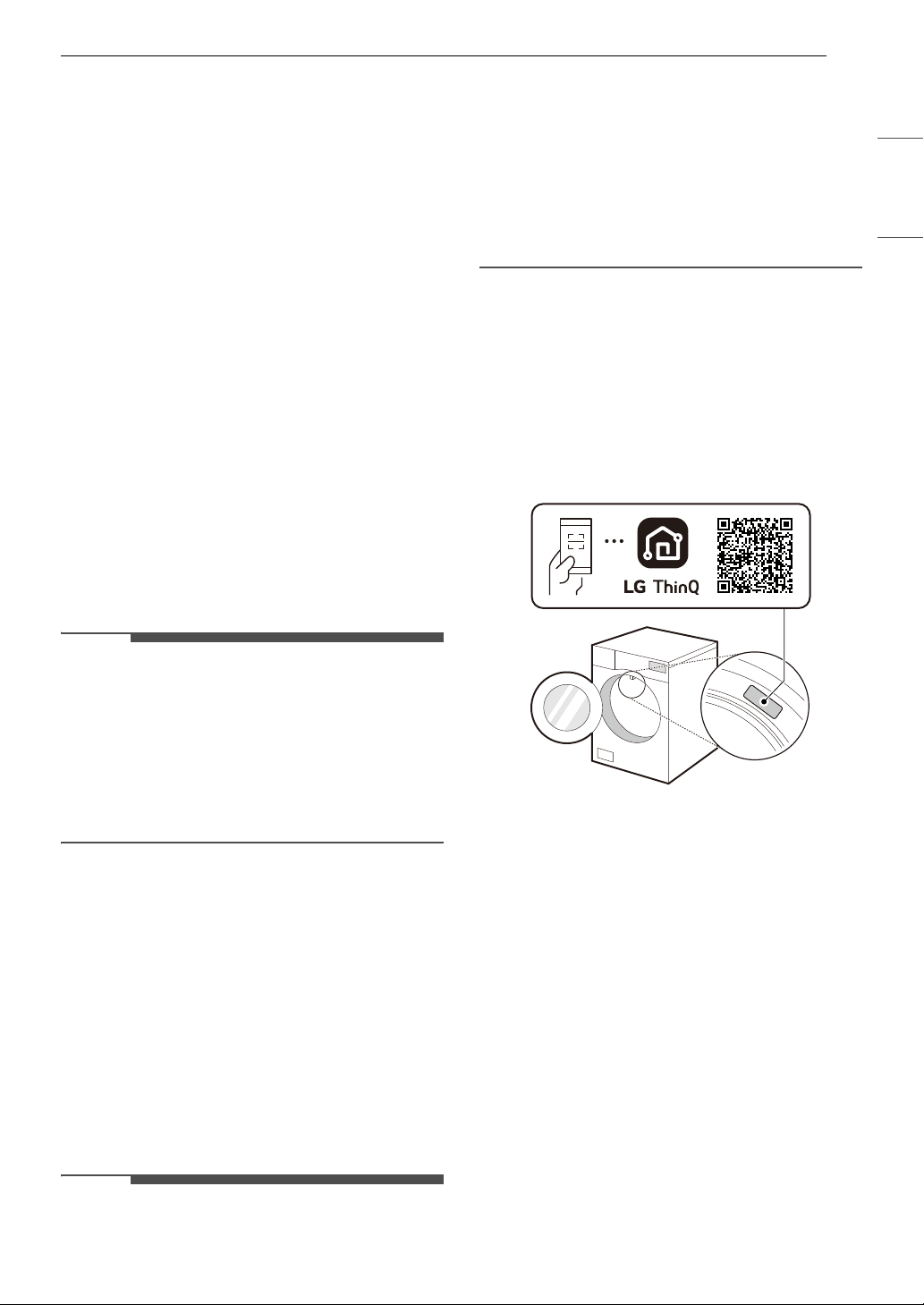
43SMART FUNCTIONS
ENGLISH
SMART FUNCTIONS
LG ThinQ Application
The LG ThinQ application allows you to
communicate with the appliance using a
smartphone.
LG ThinQ Application Features
• Dryer Cycle
- Download new and specialized cycles that are
not included in the standard cycles on the
appliance. Appliances that have been
successfully connected to the LG ThinQ
application can download a variety of specialty
cycles specific to the appliance.
• Energy Monitoring
†
- This feature keeps track of how the dryer’s
power consumption is affected by selected
drying cycles and options.
• Remote Control
- Control the appliance remotely or check to see
how much time is left in the cycle from the LG
ThinQ application.
NOTE
• Once the remote control feature is enabled, you
can start a cycle from the LG ThinQ application.
If the cycle is not started, the appliance will wait
to start the cycle until the appliance is turned off
remotely or the remote control feature is
disabled.
• If the door is opened, the remote control feature
is disabled.
• Push Messages
- When the cycle is complete or the appliance
has problems, you will receive a push
message.
• Smart Diagnosis
TM
- This function provides useful information for
diagnosing and solving issues with the
appliance based on the pattern of use.
• Settings
- Allows you to set various options on the
appliance and in the application.
† This feature is only available on some models.
NOTE
• If you change your wireless router, Internet
service provider, or password, delete the
connected appliance from the LG ThinQ
application and connect it again.
• This information is current at the time of
publication. The application is subject to change
for product improvement purposes without
notice to users.
Installing LG ThinQ App and
Connecting an LG Appliance
Models with QR Code
Scan the QR code attached to the product using
the camera or a QR code reader app on your
smartphone.
Models without QR Code
1 Search for and install the LG ThinQ app from
the Google Play Store or Apple App Store on a
smartphone.
2 Run the LG ThinQ app and sign in with your
existing account or create an LG account to
sign in.
3 Touch the add (~) button on the LG ThinQ
app to connect your LG appliance. Follow the
instructions in the app to complete the
process.
전기 세탁기
외형치수 : (폭) X (깊이) X (높이)
44 SMART FUNCTIONS
NOTE
• You may be asked to provide a password to
connect to the LG network (not your home
network) during the Wi-Fi setup. The password is
the last 4 characters of the network name,
repeated twice, with no spaces. For example, if
the network name appears as LG_XXXX_8b92,
then you would enter 8b928b92 as your
password. The password is case sensitive and
the last 4 characters are unique to your
appliance.
• To verify the Wi-Fi connection, check that the f
icon on the control panel is lit.
• The appliance supports 2.4 GHz Wi-Fi networks
only. To check your network frequency, contact
your Internet service provider or refer to your
wireless router manual.
• LG ThinQ is not responsible for any network
connection problems or any faults, malfunctions,
or errors caused by network connection.
• If the appliance is having trouble connecting to
the Wi-Fi network, it may be too far from the
router. Purchase a Wi-Fi repeater (range
extender) to improve the Wi-Fi signal strength.
• The Wi-Fi connection may not connect or may be
interrupted because of the home network
environment.
• The network connection may not work properly
depending on the Internet service provider.
• The surrounding wireless environment can
make the wireless network service run slowly.
• If the appliance cannot be registered due to
problems with the wireless signal transmission,
unplug the appliance and wait about a minute
before trying again.
• If the firewall on your wireless router is enabled,
disable the firewall or add an exception to it.
• The wireless network name (SSID) should be a
combination of English letters and numbers. (Do
not use special characters.)
• Smartphone user interface (UI) may vary
depending on the mobile operating system (OS)
and the manufacturer.
• If the security protocol of the router is set to
WEP, network setup may fail. Change the
security protocol (WPA2 is recommended) and
connect the product again.
Using the Appliance Remotely
Remote Start
Use a smartphone to control the appliance
remotely. You can also monitor the cycle operation
so you know how much time is left in the cycle.
Using Remote Start
1 Put the laundry into the drum and close the
dryer door.
2 Press the Power button.
3 Press the Options button, turn the knob to
select Remote Start and press the 8(OK)
button.
4 Turn the knob to select On and press the
8(OK) button to enable the remote control
function.
5 Start a cycle from the LG ThinQ application on
your smartphone.
NOTE
• Once the function is enabled, you can only start
a cycle from the LG ThinQ smartphone
application. If the cycle is not started, the
application will wait to start the cycle until it is
turned off remotely from the application or this
function is disabled.
• If the door has been opened, you cannot start a
cycle remotely.
Disabling Remote Start Manually
When the function is activated, press the Options
button, turn the knob to select Remote Start, and
press the 8(OK) button. Select Off and press the
8(OK) button.
Download Cycle
You can download new and specialized cycles that
are not included in the standard cycles on the
appliance.
Appliances that have been successfully connected
to a Wi-Fi network can download a variety of
specialty cycles specific to the appliance.
45SMART FUNCTIONS
ENGLISH
Wireless LAN Module Specifications
Industry Canada Statement
This device contains licence-exempt transmitter(s)/
receiver(s) that comply with Innovation, Science
and Economic Development Canada’s licence-
exempt RSS(s). Operation is subject to the
following two conditions:
(1) This device may not cause interference.
(2) This device must accept any interference,
including interference that may cause undesired
operation of the device.
IC Radiation Exposure Statement
This equipment complies with IC radiation
exposure limits set forth for an uncontrolled
environment.
This equipment should be installed and operated
with a minimum distance of 20 cm (7.8 inches)
between the antenna and your body.
NOTE
• THE MANUFACTURER IS NOT RESPONSIBLE FOR
ANY RADIO OR TV INTERFERENCE CAUSED BY
UNAUTHORIZED MODIFICATIONS TO THIS
EQUIPMENT. SUCH MODIFICATIONS COULD
VOID THE USER’S AUTHORITY TO OPERATE THE
EQUIPMENT.
Open Source Software Notice
Information
To obtain the source code that is contained in this
product, under GPL, LGPL, MPL, and other open
source licenses that have the obligation to disclose
source code, and to access all referred license
terms, copyright notices and other relevant
documents, please visit https://
opensource.lge.com.
LG Electronics will also provide open source code
to you on CD-ROM for a charge covering the cost
of performing such distribution (such as the cost of
media, shipping, and handling) upon email
request to open[email protected].
This offer is valid to anyone in receipt of this
information for a period of three years after our
last shipment of this product.
Smart Diagnosis
TM
Function
Use this feature to help you diagnose and solve
problems with your appliance.
NOTE
• For reasons not attributable to LGE’s negligence,
the service may not operate due to external
factors such as, but not limited to, Wi-Fi
unavailability, Wi-Fi disconnection, local app
store policy, or app unavailability.
• The feature may be subject to change without
prior notice and may have a different form
depending on where you are located.
Using LG ThinQ to Diagnose Issues
If you experience a problem with your Wi-Fi
equipped appliance, it can transmit
troubleshooting data to a smartphone using the
LG ThinQ application.
• Launch the LG ThinQ application and select the
Smart Diagnosis feature in the menu. Follow
the instructions provided in the LG ThinQ
application.
Using Audible Diagnosis to
Diagnose Issues
Follow the instructions below to use the audible
diagnosis method.
• Launch the LG ThinQ application and select the
Smart Diagnosis
TM
feature in the menu. Follow
the instructions for audible diagnosis provided
in the LG ThinQ application.
1 Press the Power button to turn on the
appliance.
2 Press the Options button.
3 Turn the knob to select Additional Settings
and press the 8(OK) button.
4 Turn the knob to select Smart Diagnosis and
press the 8(OK) button.
Type Frequency Range
Output
Power
(Max)
Wi-Fi 2412 - 2462 MHz < 30 dBm
Bluetooth 2402- 2480 MHz < 30 dBm
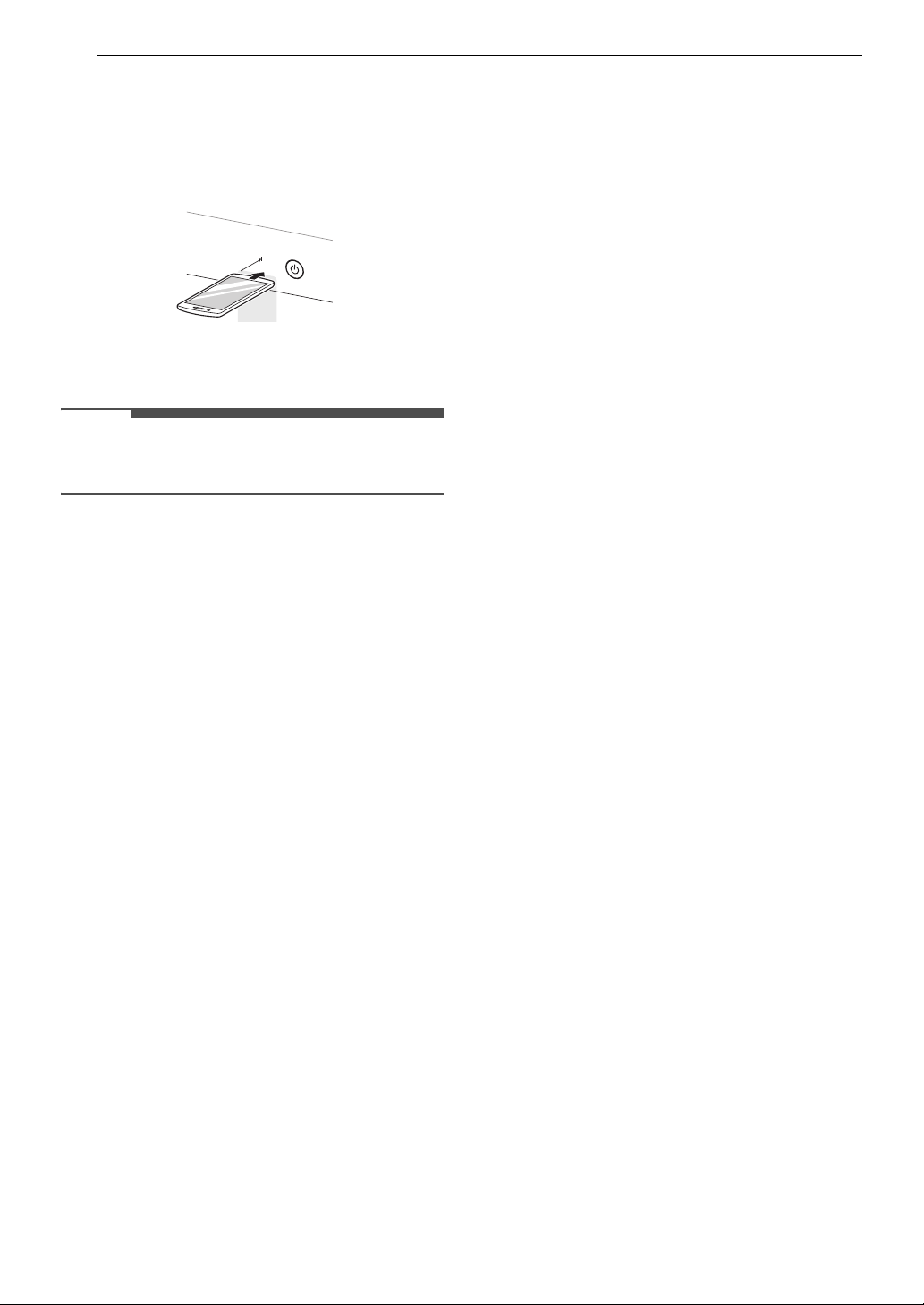
46 SMART FUNCTIONS
5 Place the mouthpiece of your smartphone
close to the Power button and press the
8(OK) button.
• Hold the smartphone mouthpiece to the
Power button until the data transfer is
complete.
6 After the data transfer is complete, the
appliance will turn off.
NOTE
• For best results, do not move the smartphone
while the tones are being transmitted.
Max.
10 mm
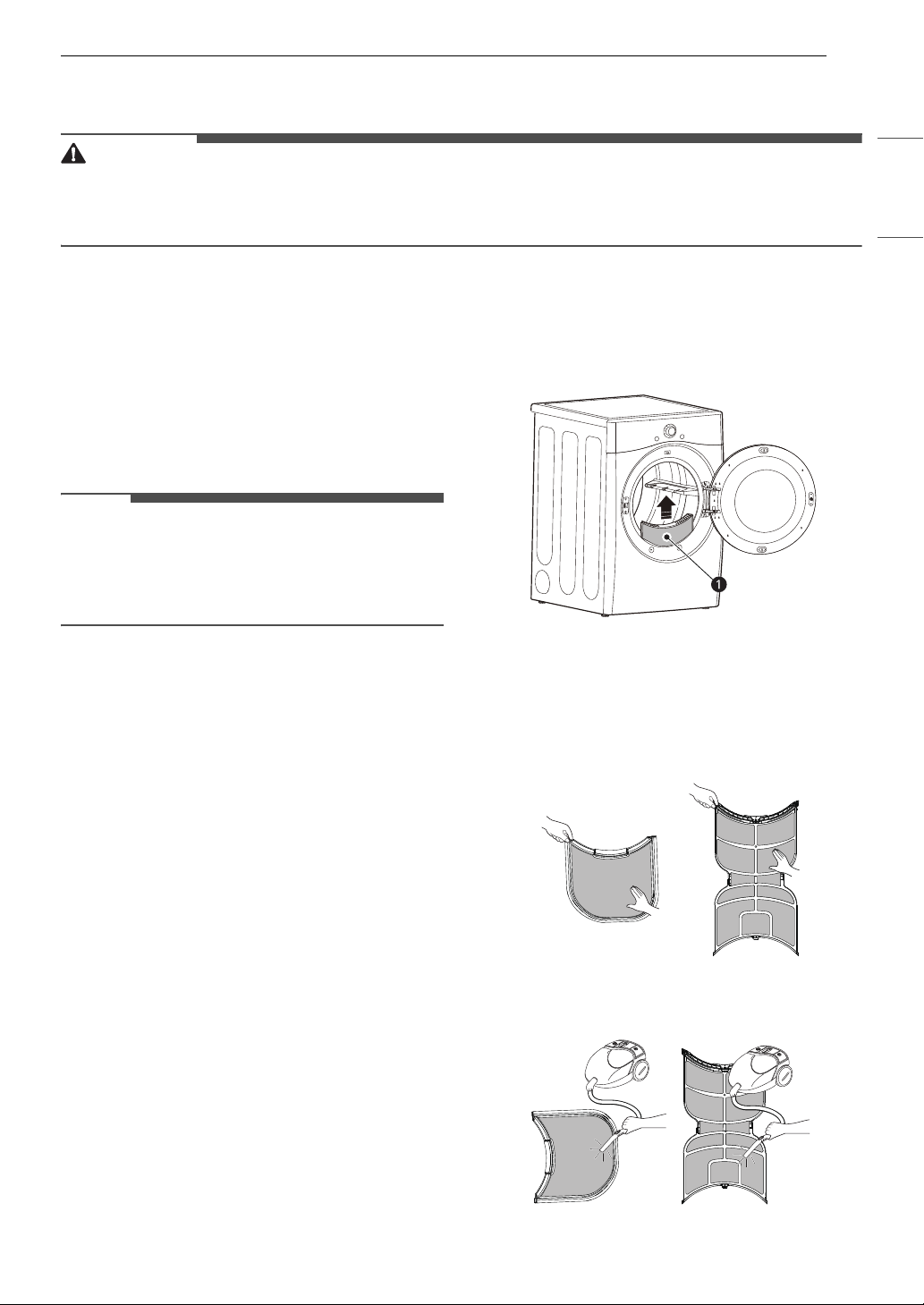
47MAINTENANCE
ENGLISH
MAINTENANCE
WARNING
• Unplug the appliance before cleaning.
• Never use harsh chemicals, abrasive cleaners, or solvents to clean the appliance. They will damage the
finish.
Regular Cleaning
Cleaning the Exterior
Proper care of your appliance can extend its life.
The outside of the appliance can be cleaned with
warm water and a mild, nonabrasive household
detergent. Immediately wipe off any spills with a
soft, damp cloth.
NOTE
• Do not use methylated spirits, solvents, or
similar products.
• Never use steel wool or abrasive cleansers; they
can damage the surface.
Cleaning the Interior
Wipe around the door opening and seal with a
soft, damp cloth to prevent lint and dust buildup
that could damage the door seal.
Clean the window with a soft cloth dampened with
warm water and a mild, nonabrasive household
detergent. Then wipe dry.
The stainless steel drum can be cleaned with a
conventional stainless steel cleaner, used
according to the manufacturer’s specifications.
Never use steel wool or abrasive cleansers; they
may scratch or damage the surface.
Cleaning Around and Under the
Appliance
Vacuum lint and dust from around the dryer and
underneath it regularly.
Maintaining Ductwork
Vent ductwork should be checked for lint buildup
once per month and cleaned at least once per
year. If any noticeable reduction in airflow or
drying performance occurs, immediately check
ductwork for obstructions and blockages and
contact a qualified technician or service provider.
Cleaning the Lint Filter
Always clean the lint from the filter after every
cycle.
a Lint Filter
To clean the lint filter, open the dryer door and pull
the lint filter straight up. Then:
1 For everyday cleaning, roll any lint off the
filter with your fingers, or
2 Vacuum the lint filter.
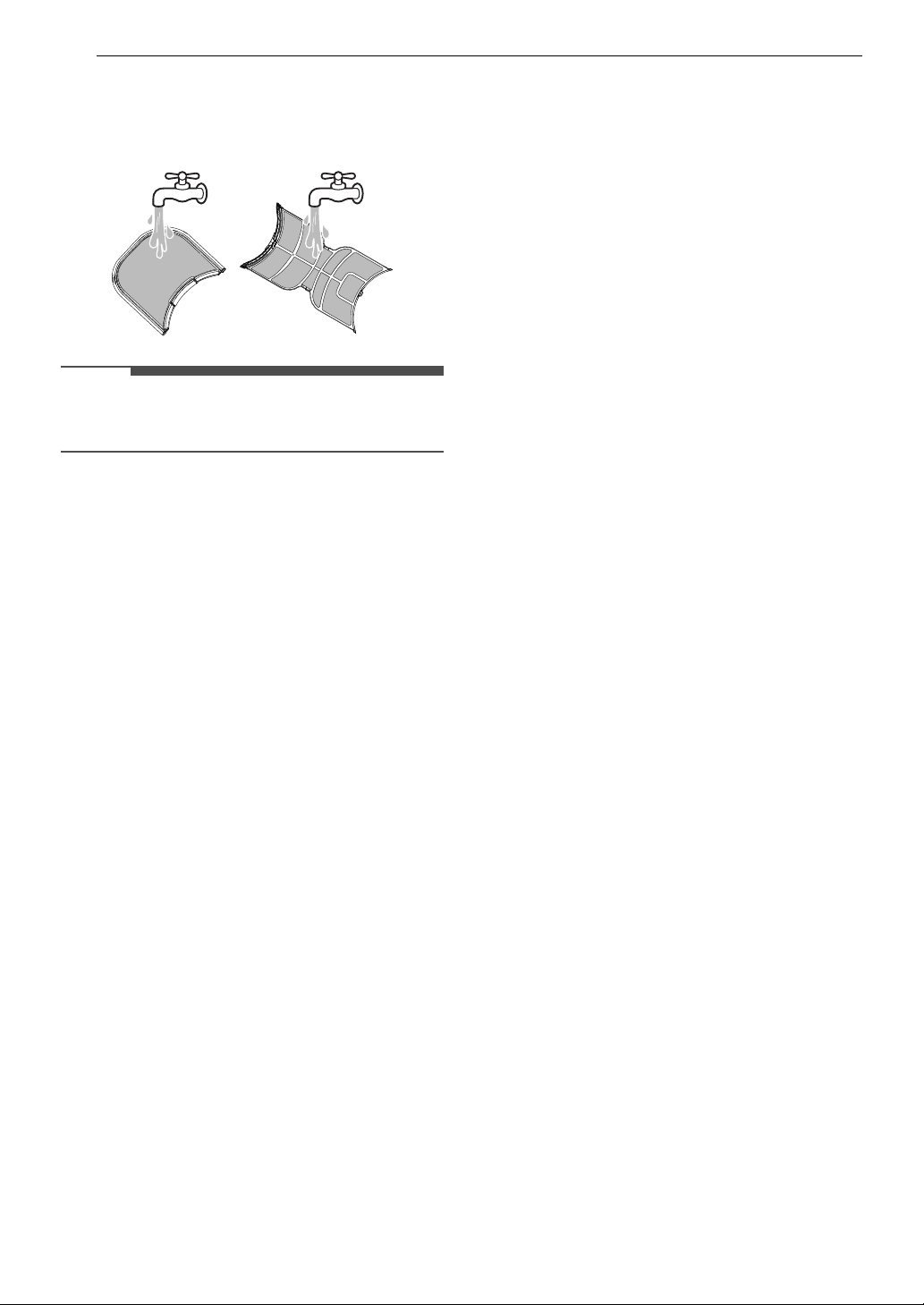
48 MAINTENANCE
3 If the lint filter has become very dirty or
clogged with fabric softener, wash the lint
filter in warm, soapy water and allow it to dry
thoroughly before reinstalling.
NOTE
• NEVER operate the appliance without the lint
filter in place.
49TROUBLESHOOTING
ENGLISH
TROUBLESHOOTING
FAQs
Frequently Asked Questions
User Support Videos
For further assistance, there are videos and tutorials available through the lg.com website.
1 On the lg.com/us home page, click on the Support menu tab to bring up the menu selections. Select
Video Tutorials.
2 Type Dryer in the search box on the new page and click the Search button.
Q: When I press a button, why does my dryer beep and then nothing happens?
A: The Control Lock feature is turned on. To turn it off, press the Options button, turn the knob to select
Control Lock, and press the 8(OK) button. Select Off and press the 8(OK) button.
Q: Why does my dryer take so long to dry clothes?
A: Proper airflow is critical to the efficient operation of clothes dryers. A lint filter which is full of lint or
clogged with fabric softener sheet residue can reduce the airflow to the point that the time required
to dry clothing will be greatly increased. For more tips, see the troubleshooting charts.
Q: Why does my dryer start by itself every few minutes?
A: This is how the Wrinkle Care feature works. The dryer runs briefly every few minutes for up to 3 hours
after the cycle finishes. This feature is designed to help prevent wrinkles from setting in when the
dryer is not unloaded immediately after the cycle is finished.
Scan this QR code to quickly access the video search
page on the offical LG website.
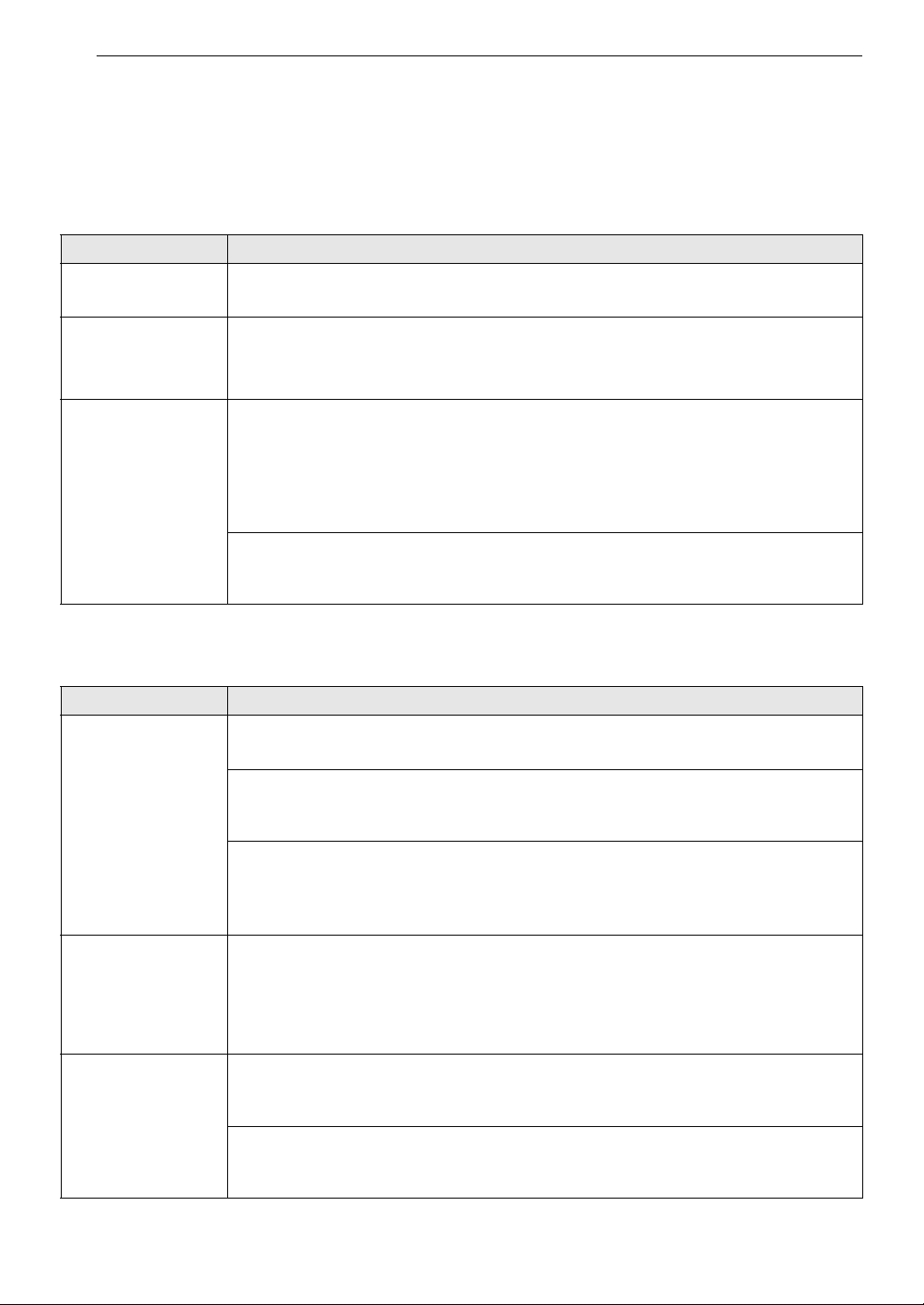
50 TROUBLESHOOTING
Before Calling for Service
The dryer is equipped with an automatic error-monitoring system to detect and diagnose problems at an
early stage. If the dryer does not function properly or does not function at all, check the following before
you call for service.
Error Messages
Operation
Problem Possible Cause & Solution
Temp sensor error 1 Temperature sensor failure.
• Turn off the appliance and call for service.
Power supply /
Power issue / High
voltage / Low
voltage
Power cord is connected incorrectly.
• Check the connection of the power cord to the terminal block.
Duct blockage (80%),
(90%), (95%)
Exhaust system is too long or has too many turns/restrictions.
• Do not use the appliance until the exhaust system has been cleaned and/or repaired.
Using the appliance with severely restricted exhaust is dangerous and could result in a fire
or other property damage.
• Check the outside dryer vent while the appliance is operating to make sure there is strong
airflow. If the exhaust system is extremly long, have it repaired or rerouted.
House exhaust system blocked.
• Keep the area around the dryer clean and free of clutter. Check vent hood for damage or
lint clogging. Make sure the area around the vent hood is clear.
Problem Possible Cause & Solution
Flow Sense
TM
indicator shows four
bars during the
drying cycle.
Exhaust system is too long or has too many turns/restrictions.
• Install a shorter or straighter duct run. See the Installation instructions for details.
Partial blockage of the ductwork due to lint buildup or other foreign object.
• Ductwork should be checked/cleaned immediately. The appliance can be used in this
condition, but drying times will be longer and energy consumption will increase.
The appliance has detected a restriction in the external dryer venting.
• If exhaust restrictions are sensed by the Flow Sense
TM
system, the indicator will remain on
for 2 hours after the end of the cycle. Opening the door or pressing the Power button will
turn off the display.
The Flow Sense
TM
indicator remains
active after clearing
the restriction in the
venting.
After clearing the restrictions, the Flow Sense
TM
system requires multiple, consecutive
cycles to determine that the performance value has improved before the Flow Sense
TM
indicator is reset.
•If the Flow Sense
TM
indicator remains active for more than five cycles after the restriction
has been cleared, call for service.
The appliance will
not turn on.
Power cord is not properly plugged in.
• Make sure that the power plug is securely plugged into a grounded outlet matching the
appliance's rating plate.
House fuse is blown, circuit breaker has tripped, or power outage has occurred.
• Reset circuit breaker or replace fuse. Do not increase fuse capacity. If the problem is a
circuit overload, have it corrected by a qualified electrician.
51TROUBLESHOOTING
ENGLISH
The appliance does
not heat.
House fuse is blown, circuit breaker has tripped, or power outage has occurred.
• Reset circuit breaker or replace fuse. Do not increase fuse capacity. If the problem is a
circuit overload, have it corrected by a qualified electrician.
Gas supply or service is turned off.
• Confirm that the hose gas shutoff and the shutoff valves of the dryer are both fully open.
Even if gas is not supplied to the appliance, it will run and no error codes will display. Verify
that other gas appliances in the home are working normally.
Energy Saver option is selected.
•If using Normal cycle, deselect the energy saver option that is selected by default. This
option reduces energy use by adding an air dry section to the beginning of the cycle. It is
normal to feel no heat at the beginning of the cycle while in Energy Saver mode.
Clothes take too long
to dry.
Exhaust ducts are blocked, dirty, or duct run is too long.
• Confirm that the exhaust duct is properly configured and free of debris, lint, and
obstructions. Make sure that the outside wall damper can open properly and is not
blocked, jammed, or damaged.
Load is not properly sorted.
• Separate heavy items from lightweight items. Larger and heavier items take longer to dry.
Light items in a load with heavy items can fool the sensor because the light items dry
faster.
Large and heavy fabrics are loaded.
• Heavy fabrics take longer to dry because they tend to retain more moisture. To help
reduce and maintain more consistent drying times for large and heavy fabrics, separate
these items into smaller loads of a consistent size.
Dryer controls are not set properly.
• Use the appropriate control settings for the type of load you are drying. Some loads may
require an adjustment of the dry level setting for proper drying.
Lint filter needs to be cleaned.
• Remove the lint from the filter before every load. With the lint removed, hold the filter up
to a light to see if it is dirty or clogged. With some loads that produce high amounts of lint,
such as new bath towels, it may be necessary to pause the cycle and clean the filter during
the cycle.
House fuse is blown, circuit breaker has tripped, or power outage has occurred.
• Reset circuit breaker or replace fuse. Do not increase fuse capacity. If the problem is a
circuit overload, have it corrected by a qualified electrician.
The appliance is overloaded.
• Divide extra large loads into smaller loads for better drying performance and efficiency.
The appliance is underloaded.
• If you are drying a very small load, add a few extra items to ensure proper tumble action. If
the load is small and you are using SENSOR DRY cycles, the electronic control cannot
properly sense the dryness of the load and may shut off too soon. Use MANUAL DRY
cycles or add some extra wet clothes to the load.
Energy Saver option is selected. (on some models)
•If using Normal cycle, deselect the energy saver option that is selected by default. This
option reduces energy use by adding an air dry section to the beginning of the cycle. It is
normal to feel no heat at the beginning of the cycle while in Energy Saver mode.
Drying time is not
consistent.
Heat settings, load size, or dampness of clothing is not consistent.
• The drying time for a load will vary depending on the size of the load, the type of fabrics,
the wetness of the clothes and the condition of the lint filter. Even an unbalanced load in
the washer can cause poor spinning, resulting in wetter clothes which will take longer to
dry.
Problem Possible Cause & Solution
52 TROUBLESHOOTING
Performance
Problem Possible Cause & Solution
Clothes are wrinkled. Clothes dried too long (overdried).
• Overdrying a load of laundry can lead to wrinkled clothes. Try a shorter drying time or use
a lower dry level setting and remove items while they still retain a slight amount of
moisture.
Clothes left in dryer too long after cycle ends.
• Use the Wrinkle Care option. This option will tumble the clothes briefly every few minutes
for up to 3 hours to help prevent wrinkling.
Greasy or dirty spots
on clothes.
Fabric softener used incorrectly.
• Check and follow the instructions provided with your fabric softener.
Clean and dirty clothes are being dried together.
• Only use your dryer to dry clean items. Soil from dirty clothes can transfer to the clean
clothes in the same or later loads.
Clothes were not properly cleaned or rinsed before being placed in the dryer.
• Stains on dried clothes could be stains that were not removed during the washing process.
Make sure that clothes are being completely cleaned or rinsed according to the
instructions for your washer and detergent. Some difficult soils may require pre-treating
prior to washing.
Clothes are
shrinking.
Garment care instructions are not being followed.
• To avoid shrinking your clothes, always consult and follow fabric care instructions. Some
fabrics will naturally shrink when washed. Other fabrics can be washed but will shrink
when dried in a dryer. Use a low or no heat setting.
Lint on clothes. Lint filter not cleaned properly.
• Remove the lint from the filter before every load. With the lint removed, hold the filter up
to a light to see if it is dirty or clogged. If it looks dirty, follow the cleaning instructions in
the MAINTENANCE section. With some loads that produce high amounts of lint, it may be
necessary to clean the filter during the cycle.
Laundry not sorted properly.
• Some fabrics are lint producers (i.e., a fuzzy white cotton towel) and should be dried
separately from clothes that are lint trappers (i.e., a pair of black linen pants).
Excess static in clothes.
• Use a fabric softener to reduce static electricity. Be sure to follow the manufacturer’s
instructions. Overdrying a load of laundry can cause a buildup of static electricity.
• Adjust settings and use a shorter drying time.
The appliance is overloaded.
• Divide extra large loads into smaller loads for drying.
Tissue, paper, etc., left in pockets.
• Check pockets thoroughly before washing and drying clothes.
Excess static in
clothes after drying.
Fabric softener is not used or is used incorrectly.
• Use a fabric softener or the Low Static option, if available, to reduce static electricity. Be
sure to follow the manufacturer’s instructions.
Clothes dried too long (overdried).
• Overdrying a load of laundry can cause a buildup of static electricity. Adjust settings and
use a shorter drying time. Select a lower dry level setting on the selected cycle, if
necessary.
Drying synthetics, permanent press, or synthetic blends.
• These fabrics are naturally more prone to static buildup. Try using fabric softener, or use a
lower dry level setting and/or shorter time settings.
53TROUBLESHOOTING
ENGLISH
Steam Functions
Clothes have damp
spots after drying.
Very large load or very small load. Single large item such as a blanket or comforter.
• If items are too tightly packed or too sparse the sensor may have trouble reading the
dryness level of the load. Use a Timed Dry cycle for very small loads.
• Large, bulky items such as blankets or comforters can sometimes wrap themselves into a
tight ball of fabric. The outside layers will dry and register on the sensors, while the inner
core remains damp. When drying a single bulky item, it may help to pause the cycle once
or twice and rearrange the item to unwrap and expose any damp areas.
• To dry a few remaining damp items from a very large load or a few damp spots on a large
item after a sensor cycle has completed, empty the lint trap, and then set a Timed Dry
cycle to finish drying the item(s).
Problem Possible Cause & Solution
Water drips from
nozzle when steam
cycle starts.
This is normal.
• This is steam condensation. The dripping water will stop after a short time.
Garments still
wrinkled after Steam
Fresh
TM
.
Too many or overly different types of garments in dryer.
• Small loads of 1 to 5 items work best. Load fewer garments. Load similar types of
garments.
Creases or pleats are
gone from garments
after Steam Fresh
TM
.
The function of this cycle is to remove wrinkles from fabric.
• Use an iron to replace creases and pleats in garments.
Garments have static
after using the Low
Static option.
This is normal.
• The amount of static experienced will depend on the individual moisture level in the skin.
Steam does not
generate, but no
error code is shown.
Water level error.
• Unplug dryer and call for service.
Water drips from
door during steam
cycle.
This is normal.
• Condensation will normally form on the inside of the dryer door during steam operation.
Some condensation may drip out the bottom of the door.
Steam is not visible
during steam cycle.
This is normal.
• Steam vapor is difficult to see when the door is closed. However, condensation will
normally form on the inside of the dryer door if the steam system is operating normally.
Drum does not turn
during steam cycle.
This is normal.
• The drum is turned off so that the steam vapor remains in the drum. The drum will
normally turn for about 2 seconds once a minute.
Cannot see steam
vapor at the
beginning of cycle.
This is normal.
• Steam is released at different stages of the cycle for each option.
Odors remain in
clothing after Steam
Fresh
TM
.
Steam Fresh
TM
did not remove odor completely.
• Fabrics containing strong odors should be washed in a normal cycle.
Problem Possible Cause & Solution
54 TROUBLESHOOTING
Odors
Wi-Fi
Problem Possible Cause & Solution
The appliance has an
unpleasant odor.
Are you using the appliance for the first time?
• The odor is caused by the rubber material inside the appliance. The odor is normal when
the appliance is new and disappears after you run several cycles.
Do you smell an odor during use?
• Do not exceed the manufacturer's recommended amount of detergent when washing
clothes. Excess detergent can build up on clothing and cause odors.
• Leaving clothes in the washer or dryer after the cycle ends can lead to odors. Unload
clothing promptly when the cycle ends.
• Keep lint filters clean. Clogged or dirty lint filters can cause odors. After cleaning the lint
filter, allow it to dry completely before using it.
Problem Possible Cause & Solution
Trouble connecting
appliance and
smartphone to Wi-Fi
network.
The password for the Wi-Fi network was entered incorrectly.
• Delete your home Wi-Fi network and begin the connection process again.
Mobile data for your smartphone is turned on.
• Turn off the Mobile data on your smartphone before connecting the appliance.
The wireless network name (SSID) is set incorrectly.
• The wireless network name (SSID) should be a combination of English letters and
numbers. (Do not use special characters.)
The router frequency is not 2.4 GHz.
• Only a 2.4 GHz router frequency is supported. Set the wireless router to 2.4 GHz and
connect the appliance to the wireless router. To check the router frequency, check with
your Internet service provider or the router manufacturer.
The appliance and the router are too far apart.
• If the appliance is too far from the router, the signal may be weak and the connection may
not be configured correctly. Move the router closer to the appliance or purchase and
install a Wi-Fi repeater.
During Wi-Fi setup, the app is requesting a password to connect to the product (on
certain phones).
• Locate the network name which starts with "LG" under Settings > Networks. Note the last
part of the network name.
- If the network name looks like LGE_Appliance_XX-XX-XX, enter lge12345.
- If the network name looks like LGE_Appliance_XXXX, enter XXXX twice as your password.
For example, if the network name appears as LGE_Appliance_8b92, then you would
enter 8b928b92 as your password. In this instance, the password is case sensitive and
the last 4 characters are unique to your appliance.
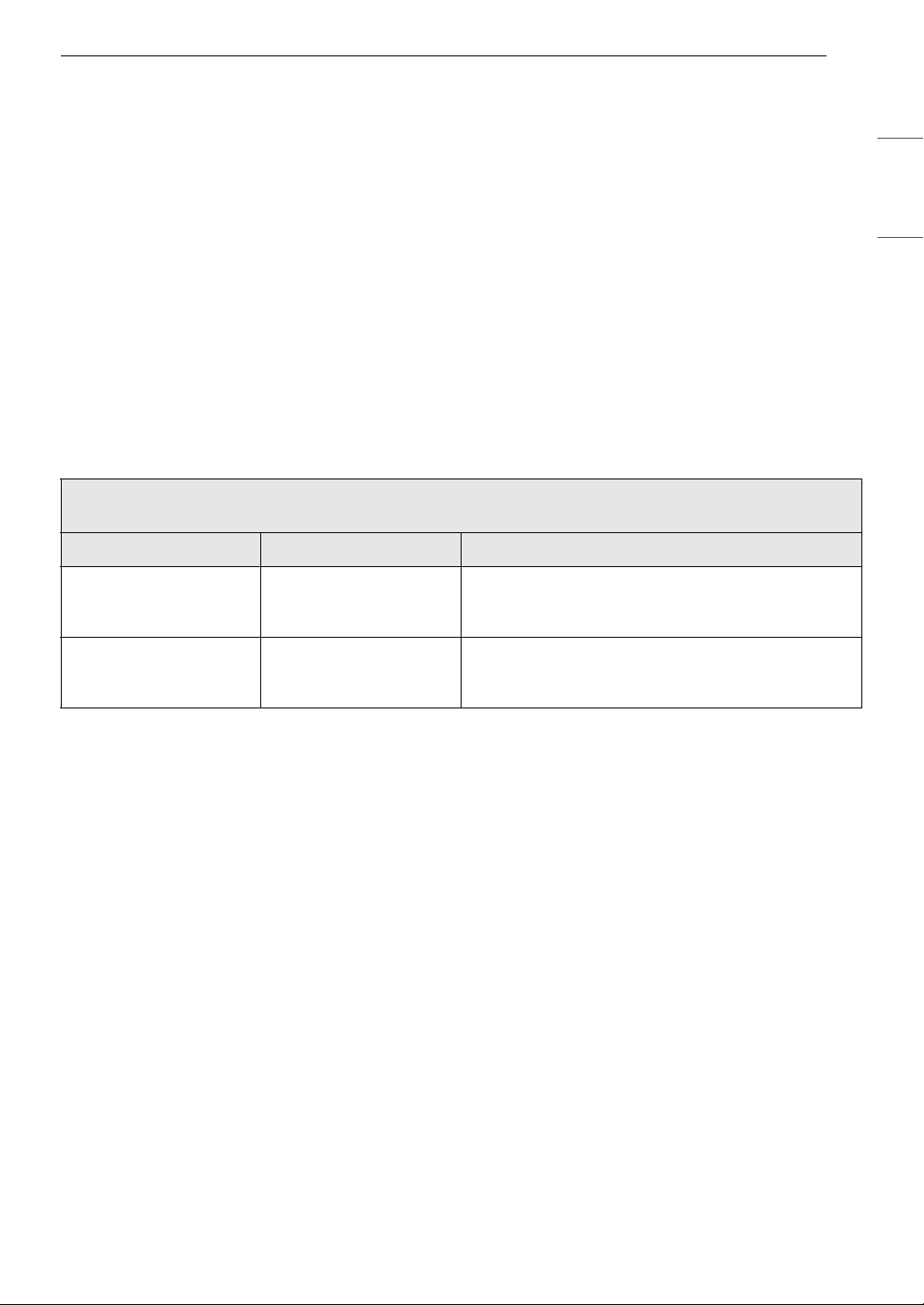
55WARRANTY
ENGLISH
WARRANTY
CANADA
TERMS AND CONDITIONS
ARBITRATION NOTICE: THIS LIMITED WARRANTY CONTAINS AN ARBITRATION PROVISION THAT
REQUIRES YOU AND LG TO RESOLVE DISPUTES BY BINDING ARBITRATION INSTEAD OF IN COURT,
UNLESS THE LAWS OF YOUR PROVINCE OR TERRITORY DO NOT PERMIT THAT, OR, IN OTHER
JURISDICTIONS, IF YOU CHOOSE TO OPT OUT. IN ARBITRATION, CLASS ACTIONS AND JURY TRIALS
ARE NOT PERMITTED. PLEASE SEE THE SECTION TITLED “PROCEDURE FOR RESOLVING DISPUTES”
BELOW.
Should your LG Dryer ("Product") fail due to a defect in materials or workmanship under normal and
proper use, during the warranty period set forth below, LG Electronics Canada, Inc. ("LGECI") will, at its
option, repair, replace or pro rate the Product upon receipt of proof of the original retail purchase. This
limited warranty is valid only to the original retail purchaser of the Product and applies only to a Product
distributed, purchased from an authorized retailer and used within Canada, as determined at the sole
discretion of LGECI.
• Replacement products and parts are warranted for the remaining portion of the original warranty period
or ninety (90) days, whichever is greater.
• Replacement products and parts may be new, reconditioned, refurbished, or otherwise factory
remanufactured, all at the sole discretion of LGECI.
• Proof of original retail purchase specifying the Product model and date of purchase is required to obtain
warranty service under this Limited Warranty.
LGECI’S SOLE LIABILITY IS LIMITED TO THE LIMITED WARRANTY SET OUT ABOVE. EXCEPT AS
EXPRESSLY PROVIDED ABOVE, LGECI MAKES NO, AND HEREBY DISCLAIMS, ALL OTHER WARRANTIES
AND CONDITIONS RESPECTING THE PRODUCT, WHETHER EXPRESS OR IMPLIED, INCLUDING BUT NOT
LIMITED TO, ANY IMPLIED WARRANTY OR CONDITION OF MERCHANTABILITY OR FITNESS FOR A
PARTICULAR PURPOSE, AND NO REPRESENTATIONS SHALL BE BINDING ON LGECI. LGECI DOES NOT
AUTHORIZE ANY PERSON TO CREATE OR ASSUME FOR IT ANY OTHER WARRANTY OBLIGATION OR
LIABILITY IN CONNECTION WITH THE PRODUCT. TO THE EXTENT THAT ANY WARRANTY OR
CONDITION IS IMPLIED BY LAW, IT IS LIMITED TO THE WARRANTY PERIOD SET OUT ABOVE. UNDER
NO CIRCUMSTANCES SHALL LGECI, THE MANUFACTURER OR DISTRIBUTOR OF THE PRODUCT, BE
LIABLE FOR ANY INCIDENTAL, CONSEQUENTIAL, SPECIAL, DIRECT, INDIRECT, PUNITIVE OR
EXEMPLARY DAMAGES, INCLUDING, WITHOUT LIMITATION, LOSS OF GOODWILL, LOST PROFITS, LOSS
OF ANTICIPATED PROFITS, LOST REVENUE, LOSS OF USE, OR ANY OTHER DAMAGE, WHETHER ARISING
DIRECTLY OR INDIRECTLY FROM ANY CONTRACTUAL BREACH, FUNDAMENTAL BREACH, TORT OR
OTHERWISE, OR FROM ANY ACTS OR OMISSIONS. LGECI’S TOTAL LIABILITY, IF ANY, SHALL NOT
EXCEED THE PURCHASE PRICE PAID BY YOU FOR THE PRODUCT.
This Limited Warranty gives you specific legal rights. You may also have other rights that vary from
province to province depending on applicable provincial laws. Any term of this Limited Warranty that
negates or varies any implied condition or warranty under provincial law is severable where it conflicts
with such provincial law without affecting the remainder of this warranty’s terms.
WARRANTY PERIOD (Note: If the original date of purchase cannot be verified, the warranty will
begin sixty (60) days from the date of manufacture)
Period Scope of Warranty HOW SERVICE IS HANDLED
One (1) year from the
date of original retail
purchase
Parts and Labor (internal/
functional parts only)
LG will provide parts and labor to repair or replace
defective parts.
Three (3) years from the
date of original retail
purchase
Dryer Drum (Parts only) Parts only. Customer will be responsible for any labor
or in-home service to replace defective parts.

56 WARRANTY
THIS LIMITED WARRANTY DOES NOT COVER:
• Service trips to i) deliver, pick up, or install or; educate on how to operate the Product; ii) correct wiring or
plumbing; or iii) correct unauthorized repairs or installations of the Product;
• Damage or failure of the Product to perform during power failures and interrupted or inadequate
electrical service;
• Damage or failure caused by leaky or broken water pipes, frozen water pipes, restricted drain lines,
inadequate or interrupted water supply or inadequate supply of air;
• Damage or failure resulting from operating the Product in a corrosive atmosphere or contrary to the
instructions outlined in the Product’s owner’s manual;
• Damage or failure to the Product caused by accidents, pests and vermin, lightning, wind, fire, floods, acts
of God, or any other causes beyond the control of LGECI or the manufacturer;
• Damage or failure resulting from misuse, abuse, improper installation, repair, or maintenance of the
Product. Improper repair includes use of parts not authorized or specified by LGECI. Improper
installation or maintenance includes installation or maintenance contrary to the Product’s owner’s
manual;
• Damage or failure caused by unauthorized modification or alteration of the Product, or if used for other
than the intended household purpose/use of the Product, or damage or failure resulting from any water
leakage due to improper installation of the Product;
• Damage or failure caused by incorrect electrical current, voltage or plumbing codes;
• Damage or failure caused by use that is other than normal household use, including, without limitation,
commercial or industrial use, including use in commercial offices or recreational facilities, or as
otherwise outlined in the Product’s owner’s manual;
• Damage or failure caused by the use of any accessories, components or cleaning products, including,
without limitation, that are not approved/authorized by LGECI;
• Damage or failure caused by transportation and handling, including scratches, dents, chips and/or other
damage to the finish of the Product, unless such damage results from defects in materials or
workmanship and is reported to LGECI within one (1) week of delivery of the Products;
• Damage or missing items to any display, open box, refurbished or discounted Product;
• Refurbished Product or any Product sold “As Is”, “Where Is”, “With all Faults”, or any similar disclaimer;
• Products with original serial numbers that have been removed, altered or cannot be readily determined
at the discretion of LGECI;
• Increases in utility costs and additional utility expenses in any way associated with the Product;
• Replacement of light bulbs, filters, fuses or any other consumable parts;
• Costs associated with removal and/or reinstallation of the Product for repairs;
• Noises associated with normal operation and failure to follow instructions found in the use and care and
installation guides or operating the unit in an unsuitable environment will not be covered under this
warranty.
• Coverage for "in Home" repairs, for products in-warranty, will be provided if the Product is within a 150
km radius from the nearest authorized service center (ASC), as determined by LG Canada. If your Product
is located outside a 150 km radius from a ASC, as determined by LG Canada, it will be your responsibility
to bring the Product, at your sole expense, to the ASC for in-warranty repair.
• Conversion of product from natural gas or LP gas.
All costs and expenses associated with the above excluded circumstances, listed under the heading,
This Limited Warranty Does Not Cover, shall be borne by the consumer.
TO OBTAIN WARRANTY SERVICE AND ADDITIONAL INFORMATION, PLEASE CALL OR VISIT OUR WEBSITE:
Call 1-888-542-2623 and select the appropriate option from the menu, or visit our website at http://
www.lg.com

57WARRANTY
ENGLISH
PROCEDURE FOR RESOLVING DISPUTES:
EXCEPT WHERE PROHIBITED AT LAW, ALL DISPUTES BETWEEN YOU AND LG ARISING OUT OF OR RELATING
IN ANY WAY TO THIS LIMITED WARRANTY OR THE PRODUCT SHALL BE RESOLVED EXCLUSIVELY THROUGH
BINDING ARBITRATION, AND NOT IN A COURT OF GENERAL JURISDICTION. EXCEPT WHERE PROHIBITED
AT LAW, YOU AND LG BOTH IRREVOCABLY AGREE TO WAIVE THE RIGHT TO A JURY TRIAL AND TO BRING
OR PARTICIPATE IN A CLASS ACTION.
Definitions. For the purposes of this section, references to “LG” mean LG Electronics Canada, Inc., its
parents, subsidiaries and affiliates, and each of their officers, directors, employees, agents, beneficiaries,
predecessors in interest, successors, assigns and suppliers; references to “dispute” or “claim” shall include
any dispute, claim or controversy of any kind whatsoever (whether based in contract, tort, statute,
regulation, ordinance, fraud, misrepresentation or any other legal or equitable theory) arising out of or
relating in any way to the sale, condition or performance of the product or this Limited Warranty.
Notice of Dispute. In the event you intend to commence an arbitration proceeding, you must first notify
LG in writing at least 30 days in advance of initiating the arbitration by sending a letter to LGECI Legal
Team at 20 Norelco Drive, North York, Ontario, Canada M9L 2X6 (the “Notice of Dispute”). You and LG
agree to engage in good faith discussions in an attempt to amicably resolve your claim. The notice must
provide your name, address, and telephone number; identify the product that is the subject of the claim;
and describe the nature of the claim and the relief being sought. If you and LG are unable to resolve the
dispute within 30 days of LG’s receipt of the Notice of Dispute, the dispute shall be resolved by binding
arbitration in accordance with the procedure set out herein. You and LG both agree that, during the
arbitration proceeding, the terms (including any amount) of any settlement offer made by either you or LG
will not be disclosed to the arbitrator until the arbitrator determines the dispute.
Agreement to Binding Arbitration and Class Action Waiver. Upon failure to resolve the dispute during
the 30 day period after LG’s receipt of the Notice of Dispute, you and LG agree to resolve any claims
between you and LG only by binding arbitration on an individual basis, unless you opt out as provided
below, or you reside in a jurisdiction that prevents full application of this clause in the circumstances of the
claims at issue (in which case if you are a consumer, this clause will only apply if you expressly agree to the
arbitration). To the extent permitted by applicable law, any dispute between you and LG shall not be
combined or consolidated with a dispute involving any other person’s or entity’s product or claim. More
specifically, without limitation of the foregoing, except to the extent such a prohibition is not permitted at
law, any dispute between you and LG shall not under any circumstances proceed as part of a class or
representative action. Instead of arbitration, either party may bring an individual action in small claims
court, but that small claims court action may not be brought on a class or representative basis except to
the extent this prohibition is not permitted at law in your province or territory of jurisdiction as it relates to
the claims at issue between you and LG.
Arbitration Rules and Procedures. To begin arbitration of a claim, either you or LG must make a written
demand for arbitration. The arbitration will be private and confidential, and conducted on a simplified and
expedited basis before a single arbitrator chosen by the parties under the provincial or territorial
commercial arbitration law and rules of the province or territory of your residence. You must also send a
copy of your written demand to LG at LG Electronics, Canada, Inc., Attn: Legal Department- Arbitration, 20
Norelco Drive, North York, Ontario M9L 2X6. This arbitration provision is governed by your applicable
provincial or territorial commercial arbitration legislation. Judgment may be entered on the arbitrator’s
award in any court of competent jurisdiction. All issues are for the arbitrator to decide, except that, issues
relating to the scope and enforceability of the arbitration provision and to the arbitrability of the dispute
are for the court to decide. The arbitrator is bound by the terms of this provision.
Governing Law. The law of the province or territory of your purchase shall govern this Limited Warranty
and any disputes between you and LG except to the extent that such law is preempted by or inconsistent
with applicable federal or provincial/territorial law. Should arbitration not be permitted for any claim,
action, dispute or controversy between you and LG, you and LG attorn to the exclusive jurisdiction of the
courts of the province or territory of your purchase for the resolution of the claim, action, dispute or
controversy between you and LG.
Fees/Costs. You do not need to pay any fee to begin an arbitration. Upon receipt of your written demand
for arbitration, LG will promptly pay all arbitration filing fees unless you seek more than $25,000 in
damages, in which case the payment of these fees will be governed by the applicable arbitration rules.
Except as otherwise provided for herein, LG will pay all filing, administration and arbitrator fees for any
arbitration initiated in accordance with the applicable arbitration rules and this arbitration provision. If you
prevail in the arbitration, LG will pay your attorneys’ fees and expenses as long as they are reasonable, by

58 WARRANTY
considering factors including, but not limited to, the purchase amount and claim amount. Notwithstanding
the foregoing, if applicable law allows for an award of reasonable attorneys’ fees and expenses, an
arbitrator can award them to the same extent that a court would. If the arbitrator finds either the
substance of your claim or the relief sought in the demand is frivolous or brought for an improper purpose
(as measured by the applicable laws), then the payment of all arbitration fees will be governed by the
applicable arbitration rules. In such a situation, you agree to reimburse LG for all monies previously
disbursed by it that are otherwise your obligation to pay under the applicable arbitration rules. Except as
otherwise provided for, LG waives any rights it may have to seek attorneys’ fees and expenses from you if
LG prevails in the arbitration.
Hearings and Location. If your claim is for $25,000 or less, you may choose to have the arbitration
conducted solely (1) on the basis of documents submitted to the arbitrator, (2) through a telephonic
hearing, or (3) by an in-person hearing as established by the applicable arbitration rules. If your claim
exceeds $25,000, the right to a hearing will be determined by the applicable arbitration rules. Any in-
person arbitration hearings will be held at the nearest, most mutually-convenient arbitration location
available within the province or territory in which you reside unless you and LG both agree to another
location or agree to a telephonic arbitration.
Severability and Waiver. If any portion of this Limited Warranty (including these arbitration procedures)
is unenforceable, the remaining provisions will continue in full force and effect to the maximum extent
permitted by applicable law. Should LG fail to enforce strict performance of any provision of this Limited
Warranty (including these arbitration procedures), it does not mean that LG intends to waive or has waived
any provision or part of this Limited Warranty.
Opt Out.You may opt out of this dispute resolution procedure. If you opt out, neither you nor LG can
require the other to participate in an arbitration proceeding. To opt out, you must send notice to LG no
later than 30 calendar days from the date of the first consumer purchaser’s purchase of the product by
either (i) sending an e-mail to [email protected], with the subject line: “Arbitration Opt Out;” or (ii) calling 1-
800-980-2973. You must include in the opt out e-mail or provide by telephone: (a) your name and address;
(b) the date on which the product was purchased; (c) the product model name or model number; and (d)
the serial number (the serial number can be found (i) on the product; or (ii) online by accessing https://
www.lg.com/ca_en/support/repair-service/schedule-repair and clicking on “Find My Model & Serial
Number”).
In the event that you “Opt Out”, the law of the province or territory of your residence shall govern this
Limited Warranty and any disputes between you and LG except to the extent that such law is preempted
by or inconsistent with applicable federal or provincial/territorial law. Should arbitration not be permitted
for any claim, action, dispute or controversy between you and LG, you and LG agree to attorn to the
exclusive jurisdiction of the courts of the province or territory of your residence for the resolution of the
claim, action, dispute or controversy between you and LG.
You may only opt out of the dispute resolution procedure in the manner described above (that is, by e-mail
or telephone); no other form of notice will be effective to opt out of this dispute resolution procedure.
Opting out of this dispute resolution procedure will not affect the coverage of the Limited Warranty in any
way, and you will continue to enjoy the full benefits of the Limited Warranty. If you keep this product and
do not opt out, then you accept all terms and conditions of the arbitration provision described above.
Conflict of Terms. In the event of a conflict or inconsistency between the terms of this Limited Warranty
and the End User License Agreement (“EULA”) in regards to dispute resolution, the terms of this Limited
Warranty shall control and govern the rights and obligations of the parties and shall take precedence over
the EULA.

59Memo

60 Memo

61Memo

62 Memo

63Memo
LG Customer Information Center
Register your product Online!
www.lg.com
For inquiries or comments,
visit www.lg.com or call:
1-800-243-0000
U.S.A.
1-888-542-2623
CANADA