IMPORTANT!
For optimum performance and
protection against hard water, please
fully read this owner’s manual before
proceeding with installation.
OWNER’S
MANUAL
(c) 2021 Aquasure USA - All Rights ReservedVersion 4.0 DEC 2020
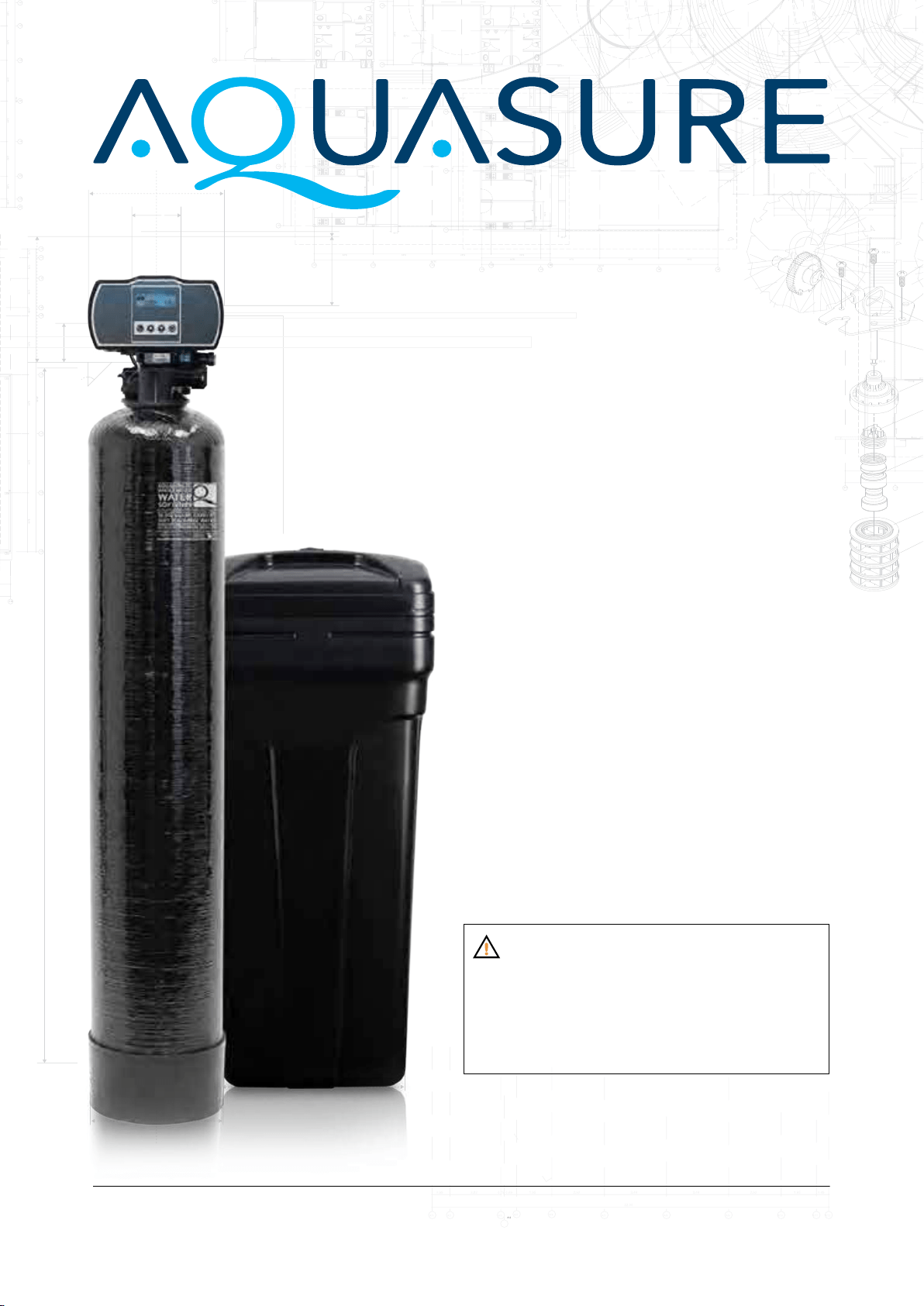
HARMONY SERIES
WHOLE HOUSE WATER SOFTENER


TABLE OF CONTENTS
WELCOME & CONGRATULATIONS 1
EXTENDED WARRANTY REGISTRATION 2
INSPECTION & PREPARATION 3
I. System Review and Installation Tools 3
II. Installation Safety Guide 4
III. Installation Diagram 6
INSTALLING THE SYSTEM 7
STEP 1. Shutting off the main water supply valve 7
STEP 2. Mounting the Control Valve 8
STEP 3. Connecting the Softener 9
STEP 4. Connecting the Brine Tank 10
STEP 5. Flushing and Testing the Plumbing Lines 12
SYSTEM INITIALIZATION 13
STEP 1. Become Familiar with Display Screen 13
STEP 2. System Startup 14
STEP 3. Programming the System 14
GALLONS CALCULATION TOOL 21
ADDITIONAL FEATURES & DISPLAYS 23
TECHNICAL SPECIFICATIONS 25
LIMITED PRODUCT WARRANTY 29

1
www.AQUASUREUSA.com
Tel: 1-800-661-0680
Thank you for choosing Aquasure. This owner’s manual will guide you through the necessary steps to
fully self-install the Harmony water softener.
For MAXIMUM effectiveness please thoroughly read this manual.
The information listed in this manual covers the steps for a self-serve installation. In the event that
you need support, our Aquasure technicians are available to answer any questions during hours of
operation as listed below.
Hours of Operation: M-F 8:30AM - 5:30PM PST
Telephone: 1800-661-0680
Email: [email protected]
Online Chat: aquasureusa.com/support
WELCOME & CONGRATULATIONS
2
AQUASURE HARMONY SERIES
Version 5 MAY 2021
DON’T MISS OUT ON FOUR FREE YEARS
WITH AQUASURE EXTENDED WARRANTY
Register your product within 60 Days from time of purchase to keep your full 5 year warranty. Simply visit
aquasureusa.com/support and enter your purchase and serial number, or ll out the information below
and follow the steps.
Fill in the information below for future reference and submit using the instructions below to receive the
extended 4 year product warranty.
Purchaser Name: _______________________________________________________________
Email:
___________________________________________________________________________
Phone:
Address: ________________________________________________________________________
__________________________________________________________________________________
City:
____________________________________________________________________________
State:
____________________________________________________________________________
Zip:
______________________________________________________________________________
Order Number:
_________________________________________________________________
Order Date:
_____________________________________________________________________
Serial Number: A10
_____________________________________________________________
Place of Order:
__________________________________________________________________
1. Fill out the form by
handwriting your info.
2. Take a picture of the form
with your device.
3. Scan the QR code with
your device camera and
click the banner that
appears.
4. Attach the picture of the
form to the email that
opens.
5. Hit Send and you’re
DONE!
Registration with your
mobile device is easy.
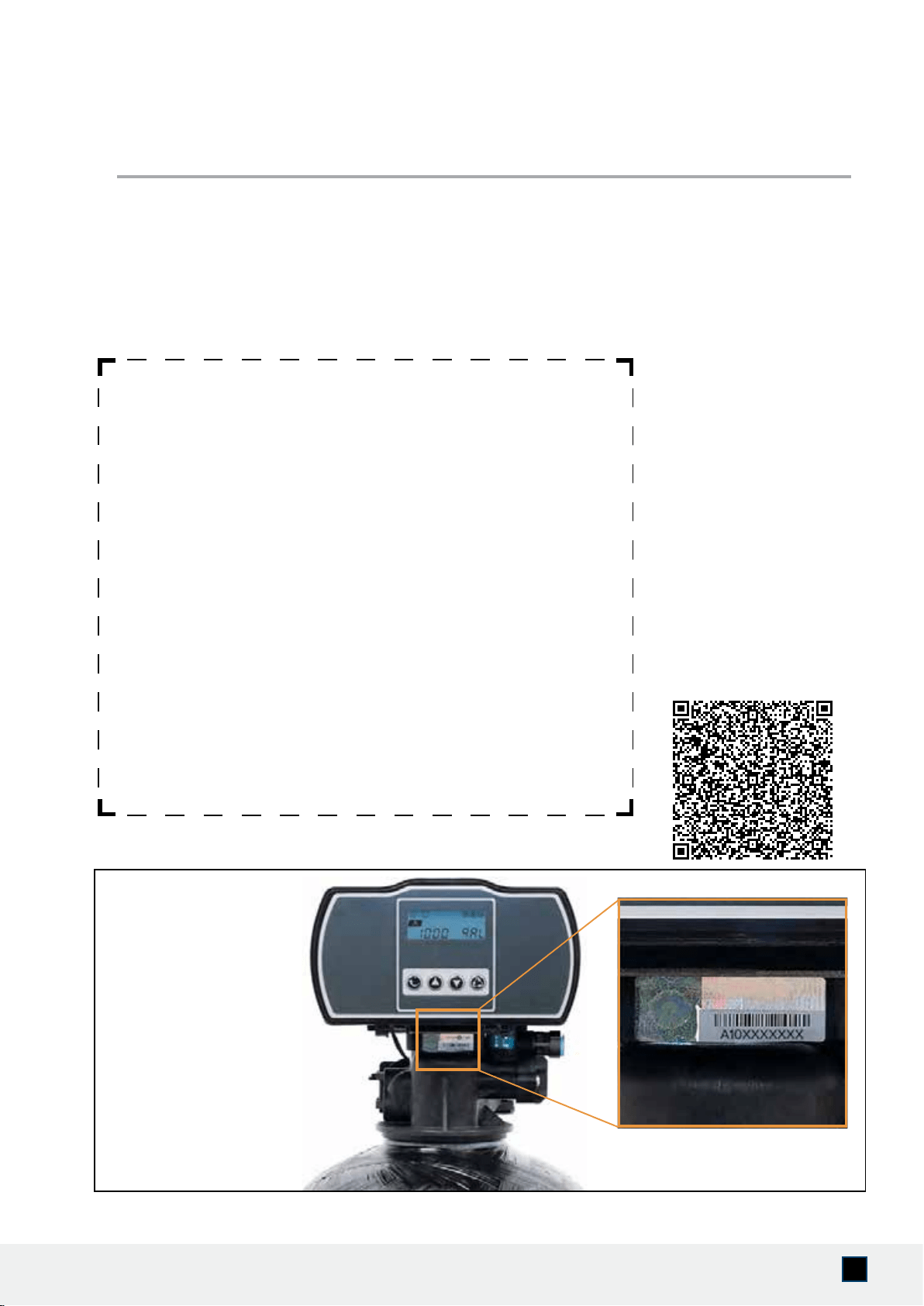
Where to
find your
Serial Number
3
www.AQUASUREUSA.com
Tel: 1-800-661-0680
I. System Review and Installation Tools
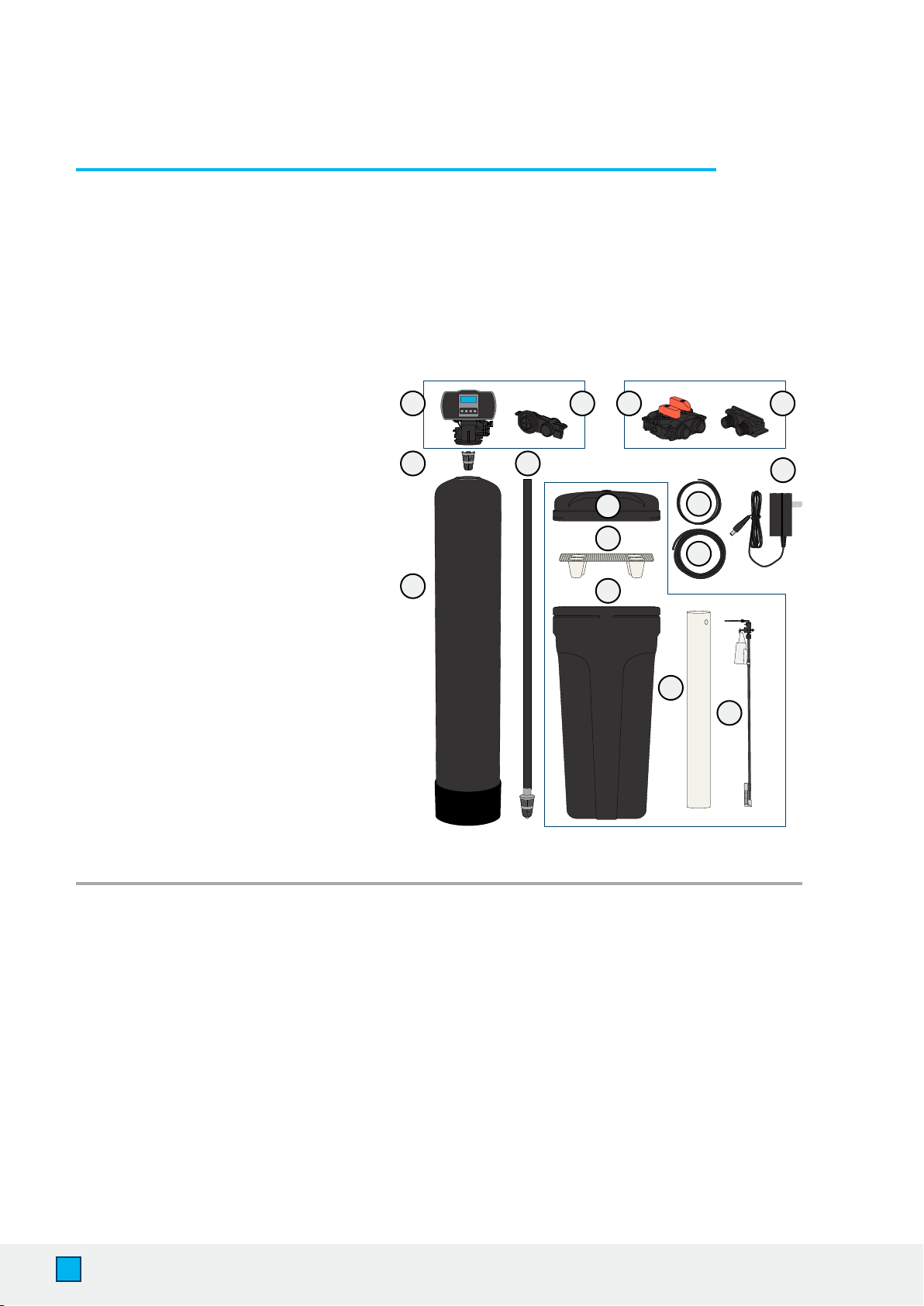
Please take the system and all the components out of the box. Inspect the system and all the
connection ttings carefully and make sure nothing was damaged during shipping. If any part is
cracked, broken, or missing, please do not proceed with the installation. Contact Aquasure support or
your distributor for a diagnosis or exchange.
INSPECTION & PREPARATION
System Components
1. Digital Control Valve
2. Upper Distribution Basket
3. Resin Tank
(Pre-lled)
4. Riser Tube & Bottom
Distribution Basket
(Pre-installed)
5. Thin Prole Hydraulic Meter
6. High Strength Bypass Valve
7. 1” Yoke Connection
(3/4” Available on request)
8. Brine Tank Lid
9. Grid Plate
10. Brine Tank
11. 6’ of 3/8” Brine Line
12. 10’ of 1/2” Drain Line
13. Power Adapter
14. Brine Well
15. Float Valve
16. Brine Drain Connection
Required Tool List for System Installation
• Channel Locks
• Screwdriver
• Plumber’s Tape
• Utility Knife
• Two Adjustable Wrenches
• Use 1”
(Or 3/4” Depending on system) copper, brass,
or PEX pipe and ttings. Some codes may
also allow PVC plastic pipe.
• Silicone Grease (Lubricant)
• Please note modication to home plumbing
may require the use of additional tools.
Required Components not Included with the System
• 80 lbs Extra Course Grade Salt Pellets are needed to ll the brine tank. The softener
system will use any kind of salt formulated for water softener use, but it is advised to use the
pellet-shaped salt as it tends to dissolve more evenly.
(Potassium can be used for a salt-free alternative)
Preassembled Preassembled
Preassembled
1
2
4
5 6 7
8
9
10
11
12
13
14
15
3

4
AQUASURE HARMONY SERIES
II. Installation Safety Guide
IMPORTANT! The following conditions for feed water supply must be met or warranty will be
void and the manufacturer assumes no responsibility for damage to system or property.
1. Water Temperature Parameter
The system MUST NOT be installed in an area where it is exposed to direct sunlight and must
be protected against freezing and extreme heat.
• Maximum: 100° F (37.8° C)
• Minimum: 32° F (0° C)
2. Water Pressure Parameter
The maximum allowable inlet water pressure is 125 psi. If daytime pressure is over 80 psi,
night time pressure may exceed the maximum allowed water pressure. Use a pressure
reducing valve (PRV) to reduce the pressure if needed.
• Maximum: 125 PSI (8.78 kg/cm2)
• Minimum: 25 PSI (1.75 kg/cm2)
3. Chlorine & Chloramine Tolerance
Softener resin may degrade in the presence of chlorine or chloramines. Feedwater that
contains these contaminants will reduce the life of the resin. In these conditions, a whole
house carbon ltration system with chlorine, chloramine reducing media is recommended.
• Maximum: 2 ppm
4. Pre-install environment checklist
• Not for use with microbiologically unsafe water. Pre-ltration to remove contaminants
and heavy sediment recommended to ensure optimum performance and product life.
• Properly ground to conform with all governing codes and ordinances. Use only lead-free
solder and ux for all sweat-solder connections as required by state and federal codes.
• Place softener as close as possible to the pressure tank (well system) / water meter (city water).
• Place softener as close as possible to a oor drain, or other acceptable drain point
(laundry tub, sump, standpipe, etc.) to prevent air breaks and back ow.
• Place softener in a place where water damage is least likely to occur if a leak develops.
• The brine tank should be located no more than 10’ from the resin tank.
• Connect the softener to the main water supply before the water heater. Do not run hot
water through the softener. Maximum temperature of softener water is 100º F.
• Outside faucets and irrigation systems should be supplied with pre-softened water. If this
is not possible, be sure to bypass the softener when watering grass or plants. Chronic soft
water exposure can be detrimental to plant life.
WARNING! For your safety, the information in this manual must be followed to minimize the
risk of electric shock, property damage or personal injury.
5
www.AQUASUREUSA.com
Tel: 1-800-661-0680
4. Pre-install environment checklist
(Continued)
• A 120 volt electric outlet must be within 6 feet of the softener. The transformer has an
included 8 foot power cable. Be sure the electric outlet and transformer are protected
from water and wet weather.
• If installing outside, necessary steps must be taken to ensure the softener, installation
plumbing, wiring, etc. are protected from the elements and contamination sources.
• Handle with care when moving the water softening system. Do not drop, drag, or set on
areas with sharp protrusions.
• The system works on standard 120v power plug only. Do not use any other transformer
except the one that is included with the system.
• Transformer must be plugged into an indoor 120 volt, grounded outlet.
• Use only clean water softening salt with at least 99.5% purity. Extra course grade or
crystal salt is recommended. Do not use rock, block or granulated salts. These contain
contaminants that could cause problems during maintenance.
• Always keep salt lid in place on the softener unless servicing or relling the unit.
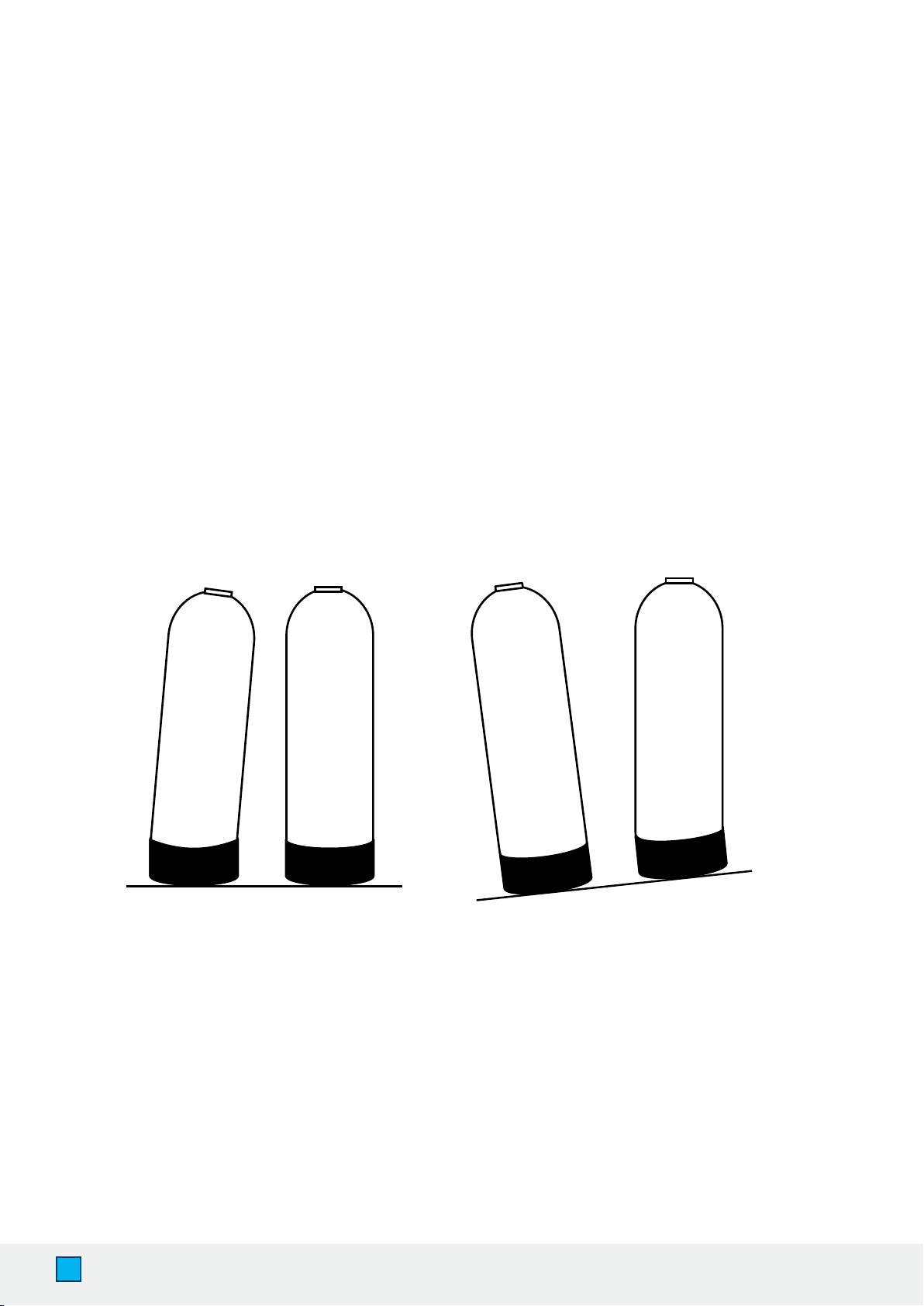
• Some applications may not have a level surface to place the tank. The oating base allows
the tank to be leveled within the base and ensures proper operation.
CORRECT CORRECTINCORRECT INCORRECT
6
AQUASURE HARMONY SERIES
Treated Water Out
Brine
Tank
Carbon
Filter
Pre-Filter
To Outside Water
Pressure Tank Well Head
120
Volt
Backwash Line
To Drain
Water
Softener
Water
Softener
Treated Water Out
Brine
Tank
Carbon
Filter
Pre-Filter
To Outside Water
Pressure Tank
Well Head
120
Volt
Backwash Line
To Drain
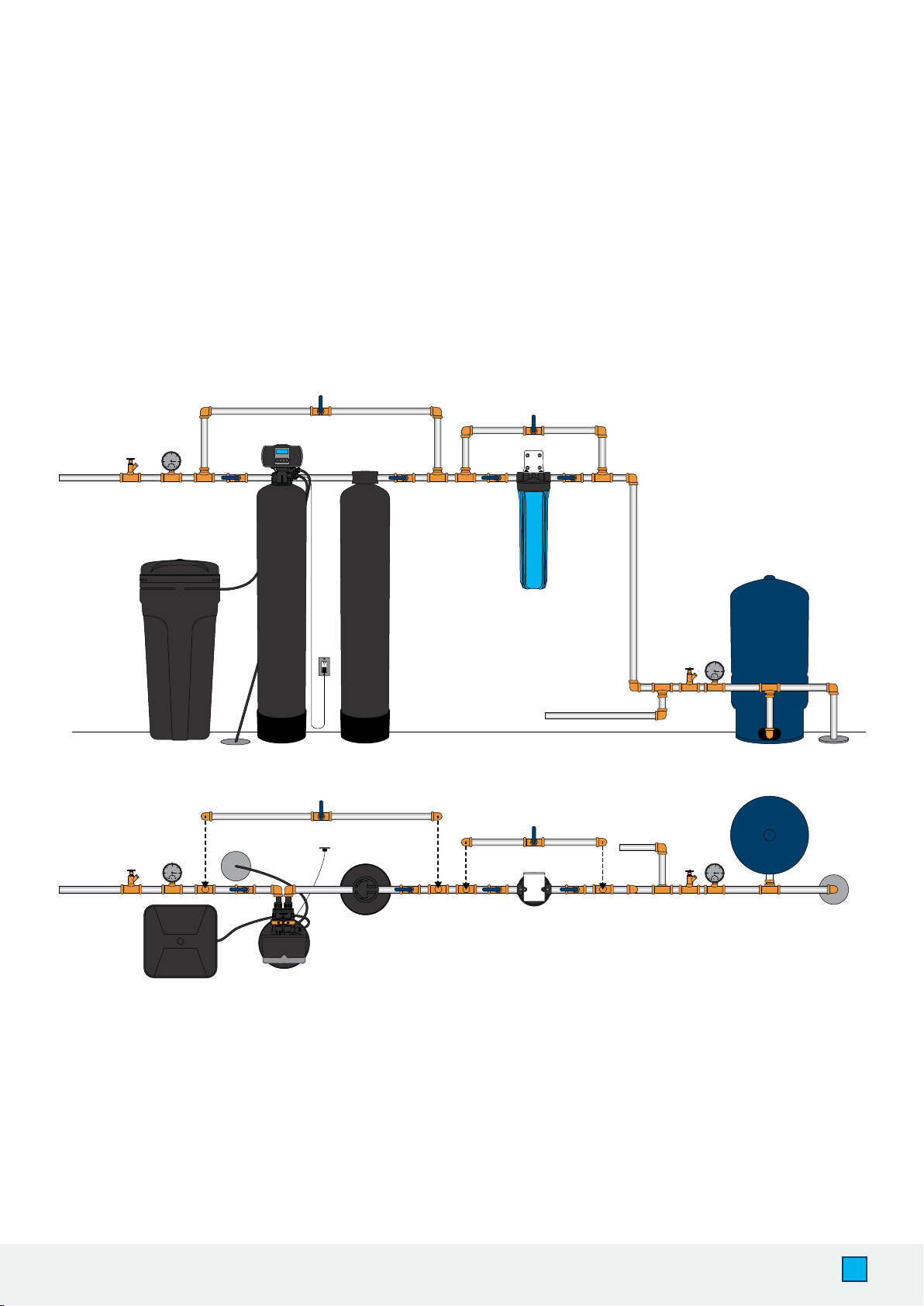
III. Installation Diagram
The following diagram displays how the water softener should be installed with a well or city water
setup. If you have city water, your plumbing arrangement will vary but the installation principles are
the same. This is an example of how a pre-lter, media tank and water softener ow in line together.
If you do not have a media tank/ carbon lter with your purchase, then exclude it from your
installation. A loop installation with shut-off valves is advised as seen below.
7
www.AQUASUREUSA.com
Tel: 1-800-661-0680
IMPORTANT! Locate and test the main water supply valve to the home before installing the
system. If the main water supply valve fails to shut off the water completely during the test, we
recommend contacting your local plumber to x the valve before installing the system.
STEP 1. Shut off the Main Water Supply Valve
1. Locate the main water supply valve of the house and turn off completely by turning the
shut-off handle clockwise.
2. Test to see if the water is completely shut off by turning on the closest faucet in the cold
water position. If the cold water cannot be shut off, please contact your local plumber to
x the valve before begin installing the system.
INSTALLING THE SYSTEM
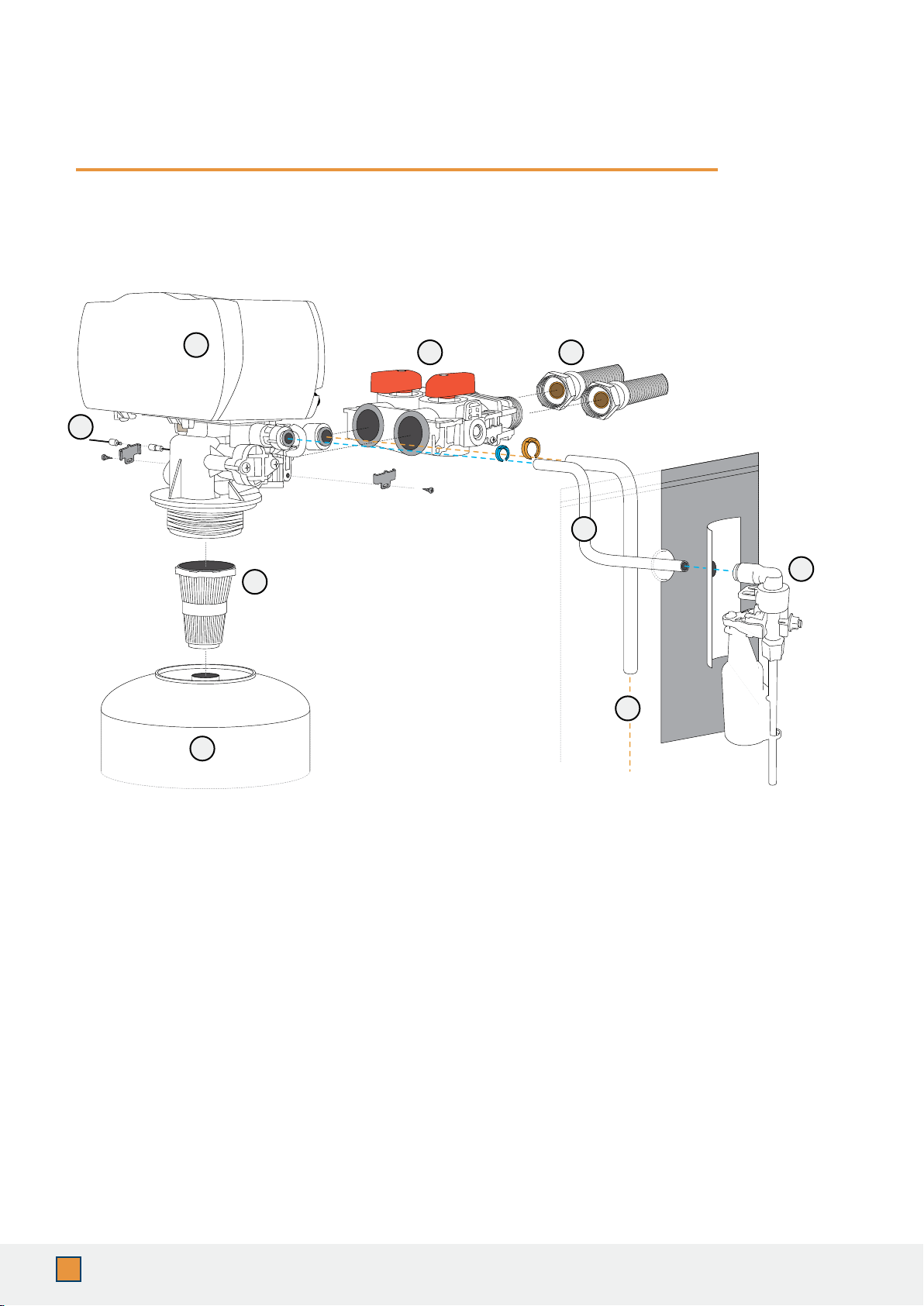
A. Control Head
B. Bypass Valve
C. Water Connection Hoses (Not Included)
D. Upper Basket
E. Resin Tank
F. Brine Line (Blue Clip)
G. Drain Line (Orange Clip)
H. Quick Connection (Float Assembly)
I. Control Head Power
A
B C
D
F
E
G
H
I
8
AQUASURE HARMONY SERIES
STEP 2. Mounting the Control Valve
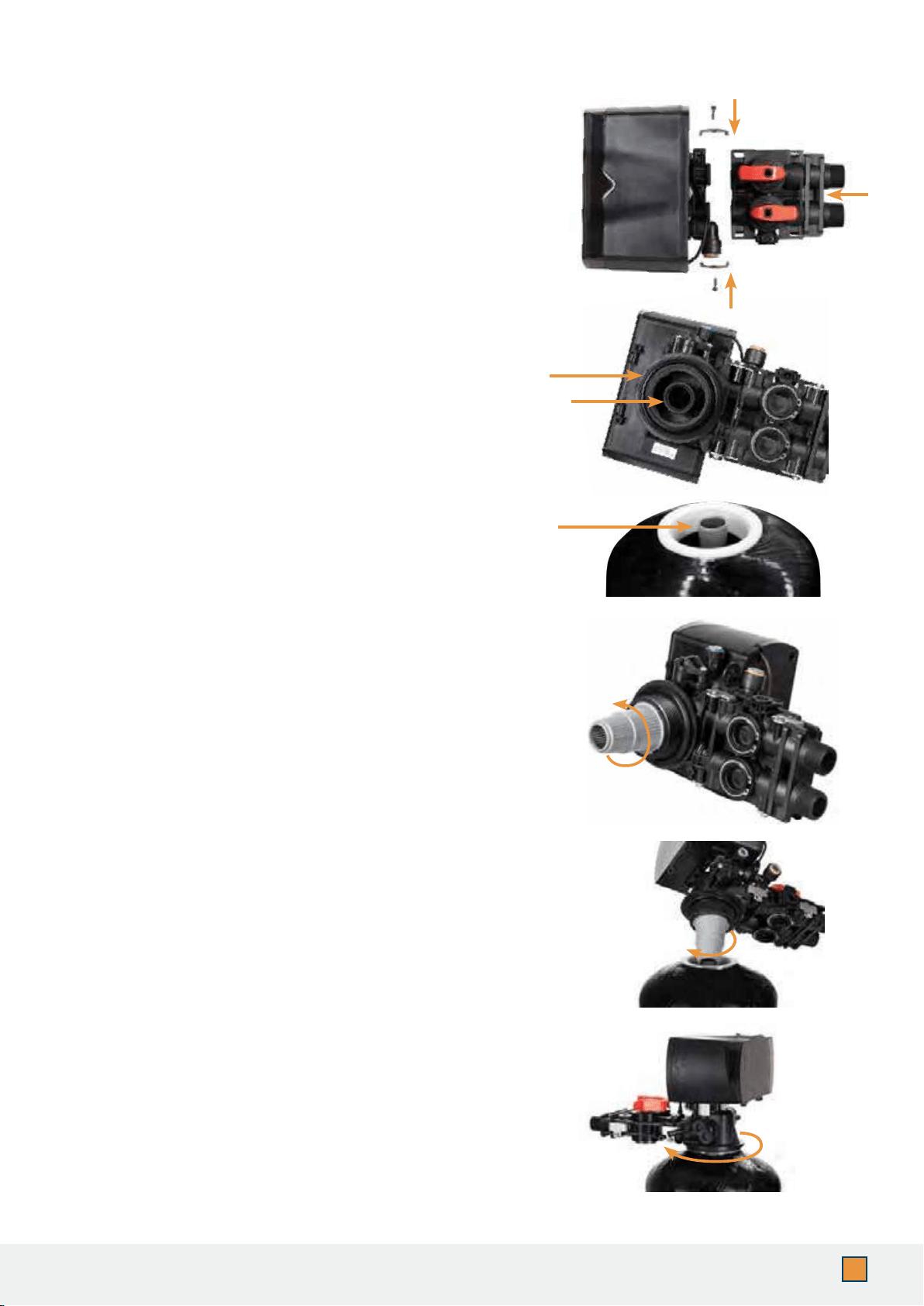
2. Make sure the o-rings are lubricated before
installing. Lubricate both O-rings on the bottom
of the control valve (inner and outer).
1. Attach the bypass valve onto the control head
and secure it with the metal plates. Make sure
the o-rings are lubricated before connecting.
(Silicone Grease recommended as lubricant.)
5. Place the upper basket over the distributor tube
and push the valve on the tank. Thread the valve
on the tank by turning it clockwise. Be sure not
to cross-thread the valve on the tank. The valve
should thread easily in the tank. If not, it may be
cross-threaded.
DO NOT LUBRICATE as you may over-tighten
the valve.
3. Lubricate the riser tube located on the opening
of the tank. Make sure riser tube is ush with
the top of the tank.
6. Tighten the valve hand tight, then snug it
further by tapping it with the palm of the hand.
DO NOT use tools to tighten the valve or
damage could occur.
4. Install the upper basket on the bottom of the
valve by lining up the tabs, pressing in, then
turning the basket counterclockwise to lock it in
place.
9
www.AQUASUREUSA.com
Tel: 1-800-661-0680
STEP 3. Connecting the Softener
IMPORTANT! On copper plumbing systems, be sure to install a grounding wire between
the inlet and outlet piping to maintain grounding.
WARNING! Any solder joints being soldered near the valve must be done before
connecting any piping to the valve. Always leave at least 6” (152 mm) between the
control valve and joints being soldered when soldering pipes that are connected to the
valve. Failure to do this could cause damage to the valve.
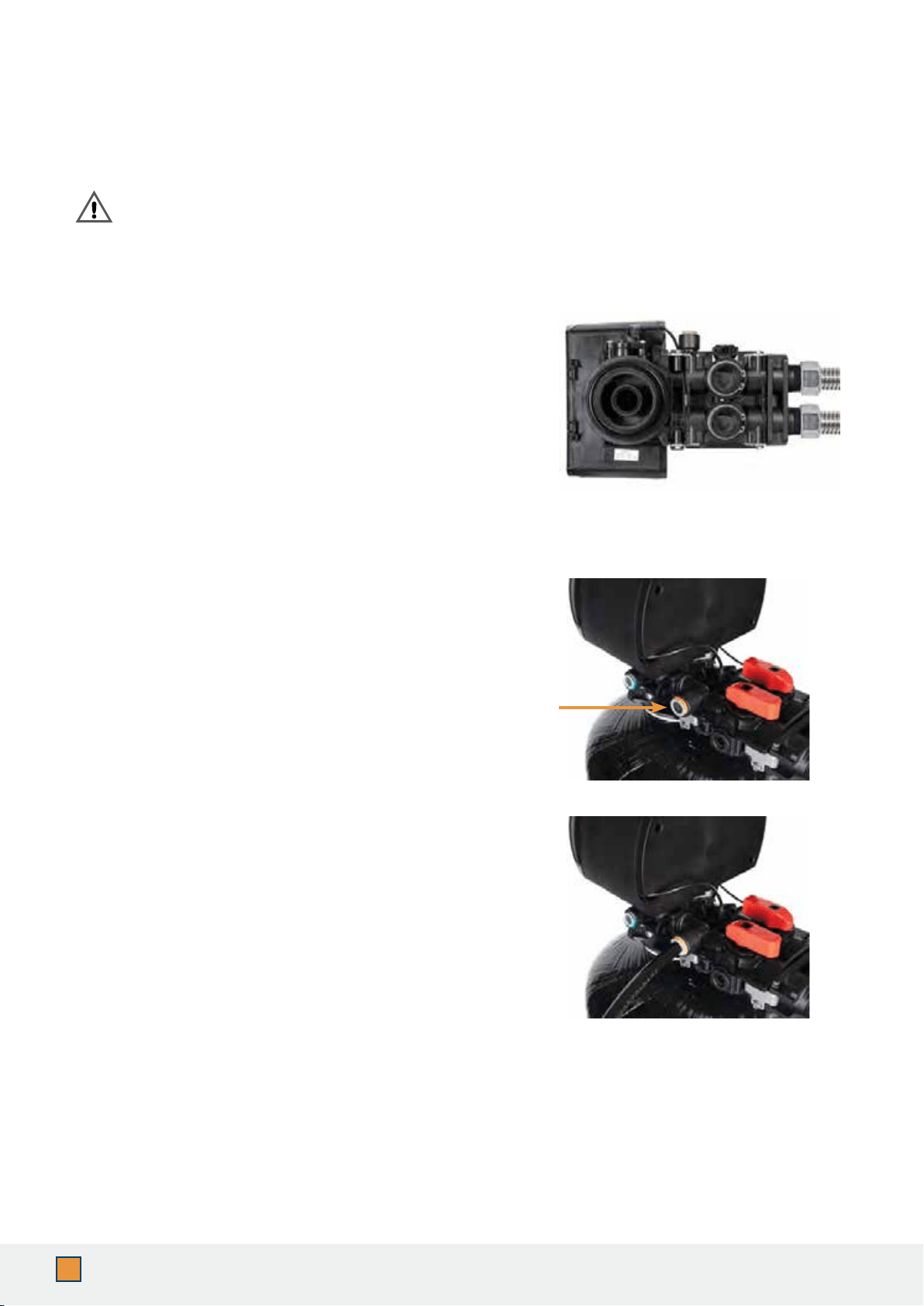
1. The control valve is equipped with 1” male NPT
connections. It is recommended that these
connections are made using 8-12 wraps of
plumber’s tape.
2. The inlet and outlet can be identied by the
arrows stamped in the bypass valve showing the
ow direction. The arrow pointing toward the
valve is the inlet and the arrow pointing away from
the valve is the outlet.
3. Apply the plumber’s tape onto the bypass inlet and
outlet ttings.
4. Connect the inlet and outlet of the softener using
appropriate ttings.
5. All piping should be secured to prevent stress on
the bypass valve and connectors.
6. Connect the drain hose to the valve by removing
the orange lock clip and push the 1/2” black tubing
into the hole. Secure the line by pushing the
locking clip back in.
7. Pull the drain line to see if it is secure. Run the drain
hose to the nearest laundry tub or oor drain. This
can be run a max of 7 ft overhead or down along
the oor. Drain hose should be a minimum of 1/2”.
If running the drain line more than 20 ft linear, it is
recommended to increase the hose size to 3/4” and
be sure there are no sags or “drops” in the hose on
the way to the drain destination.
Note:
A direct connection into a waste drain is not
recommended. A physical air gap of at least 1.5”
should be used to avoid bacteria and wastewater
traveling back through the drain line into the softener.
10
AQUASURE HARMONY SERIES
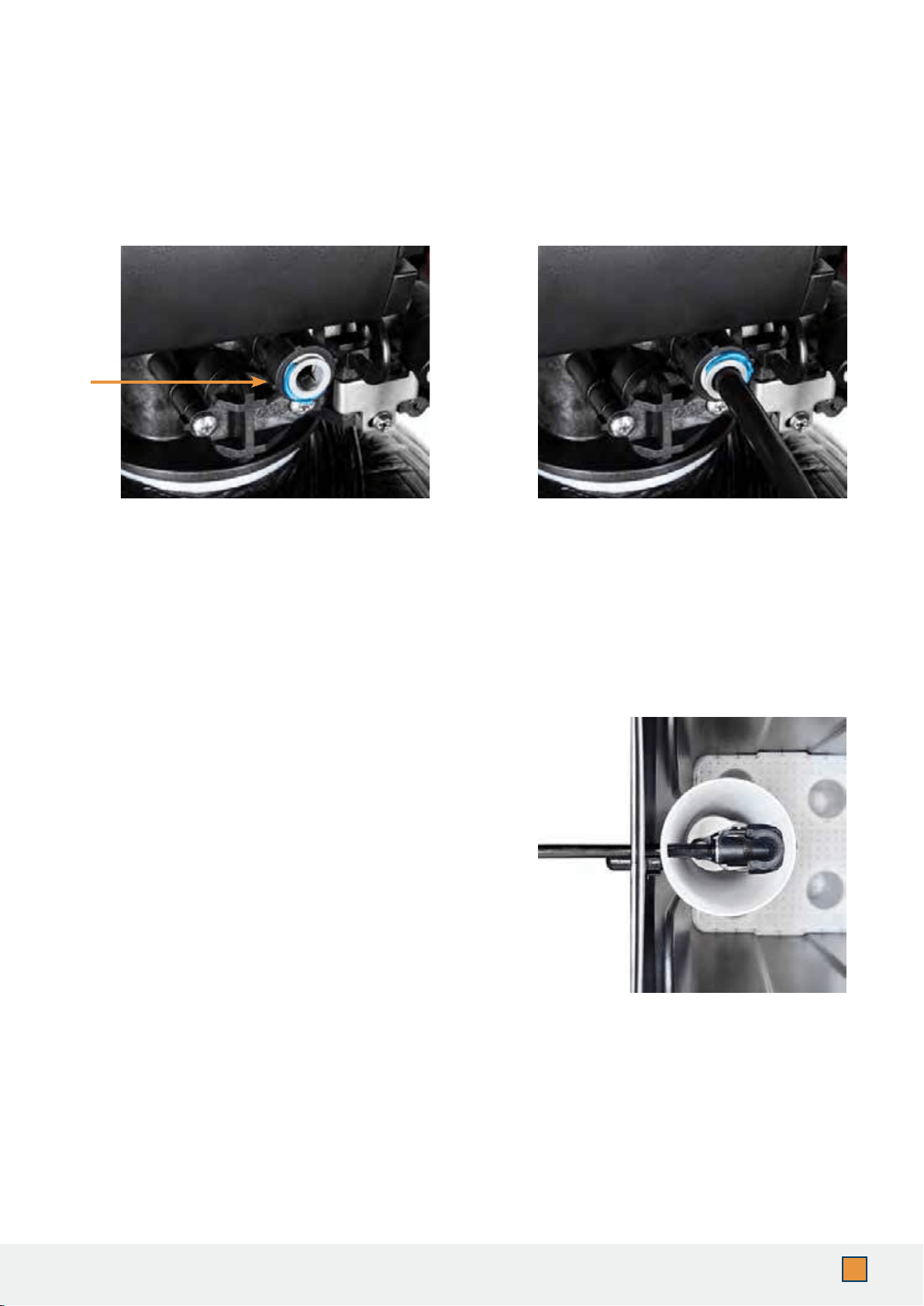
2. Push the brine line into the brine
line connector and make sure it goes
through the o-ring. Secure by pushing
in the locking clip. Pull the brine line to
see if it is secure.
1. Connect the brine line to the control
valve by removing the blue locking clip
on the brine line connector.
IMPORTANT! Make sure the brine line is secure to the connection provided on the brine tank. If
the brine line is not secure and sealed, it may not be able to perform a proper system regeneration
when needed, and can potentially cause overll in the brine tank and result in leaks.
STEP 4. Connecting the Brine Tank
3. Your brine tank system is 90% pre-assembled. To
nish the setup, remove the white lid on top of the
brine well.
4. Push the brine line through the opening on
the side of the brine tank, and also through the
opening on the side of the brine well.
5. Connect the brine line to the quick connection
on top of the oat assembly, and make sure it is
thoroughly connected.
6. Pour in 80 lbs (two bags) of course grade salt and
5 gallons of tap water into the brine tank.
11
www.AQUASUREUSA.com
Tel: 1-800-661-0680
Optional Brine Tank Overll Connection:
Below the brine hose connection you will notice a 90-degree barbed connection facing
downward. This connection is optional since the brine well is equipped with an automatic
oat valve shutoff.
If you still want to utilize the overll connection, lubricate the barbed connection with
silicone grease or any food-grade oil. You will need to purchase an additional ½” plumbing
hose and place the hose onto the connection for a secure seal. Typically, the other end of
the hose will feed off into a oor drain, laundry style sink, or dedicated drain connection.
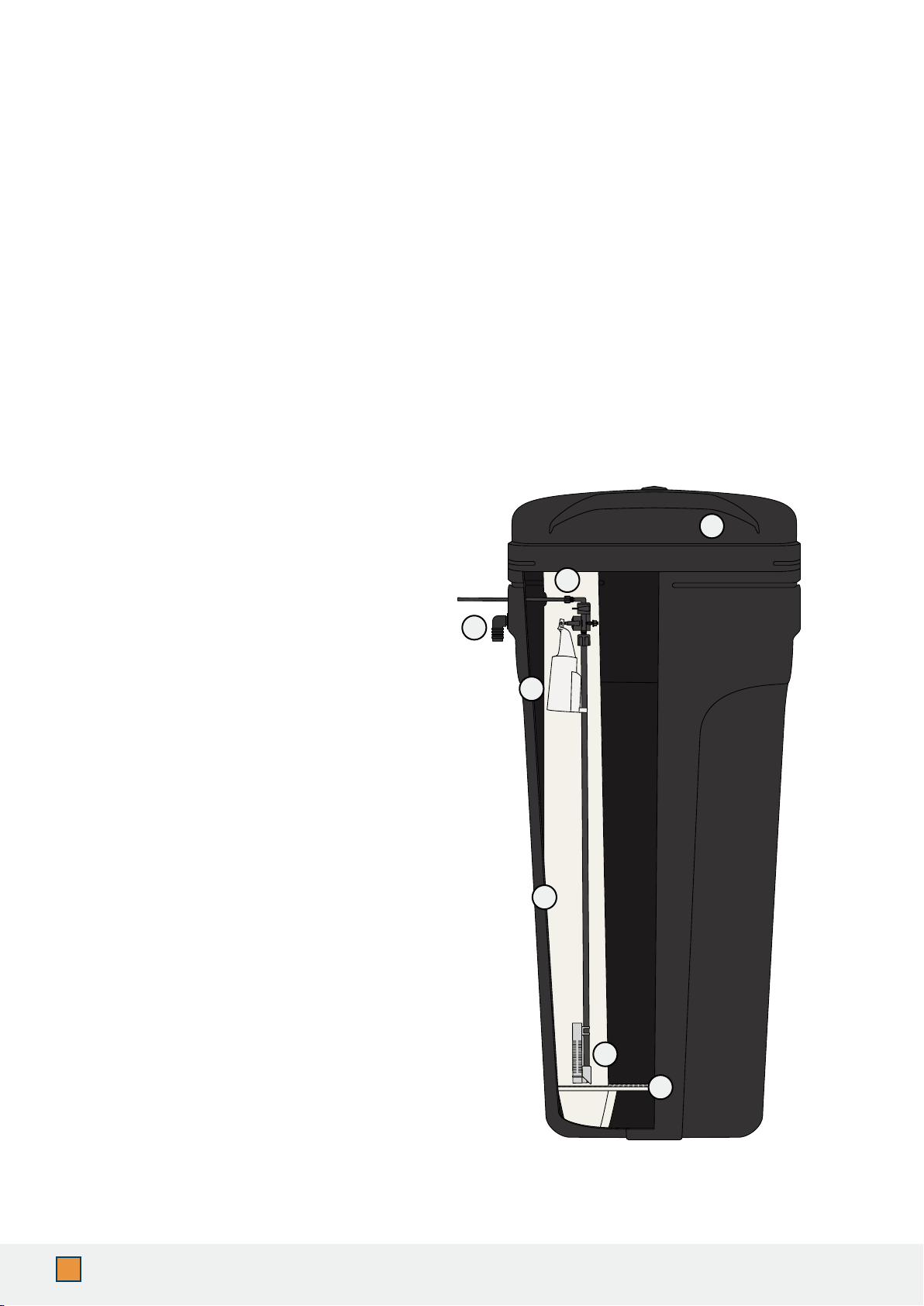
Brine Tank Components
1. Brine Tank with Lid
2. Quick Connect Brine Line
Connection
3. Optional Overow Line
Connection
4. Float Valve
5. Brine Well
6. Flow Regulator
7. Grid Plate
1
2
3
4
6
5
7
Note:
Assembly (color and shape of elements) may vary
from previous versions of the product.
IMPORTANT! This optional brine tank overll connection step is not required. For additional
security against leaks and prevention of disrupted service purposes only.
12
AQUASURE HARMONY SERIES
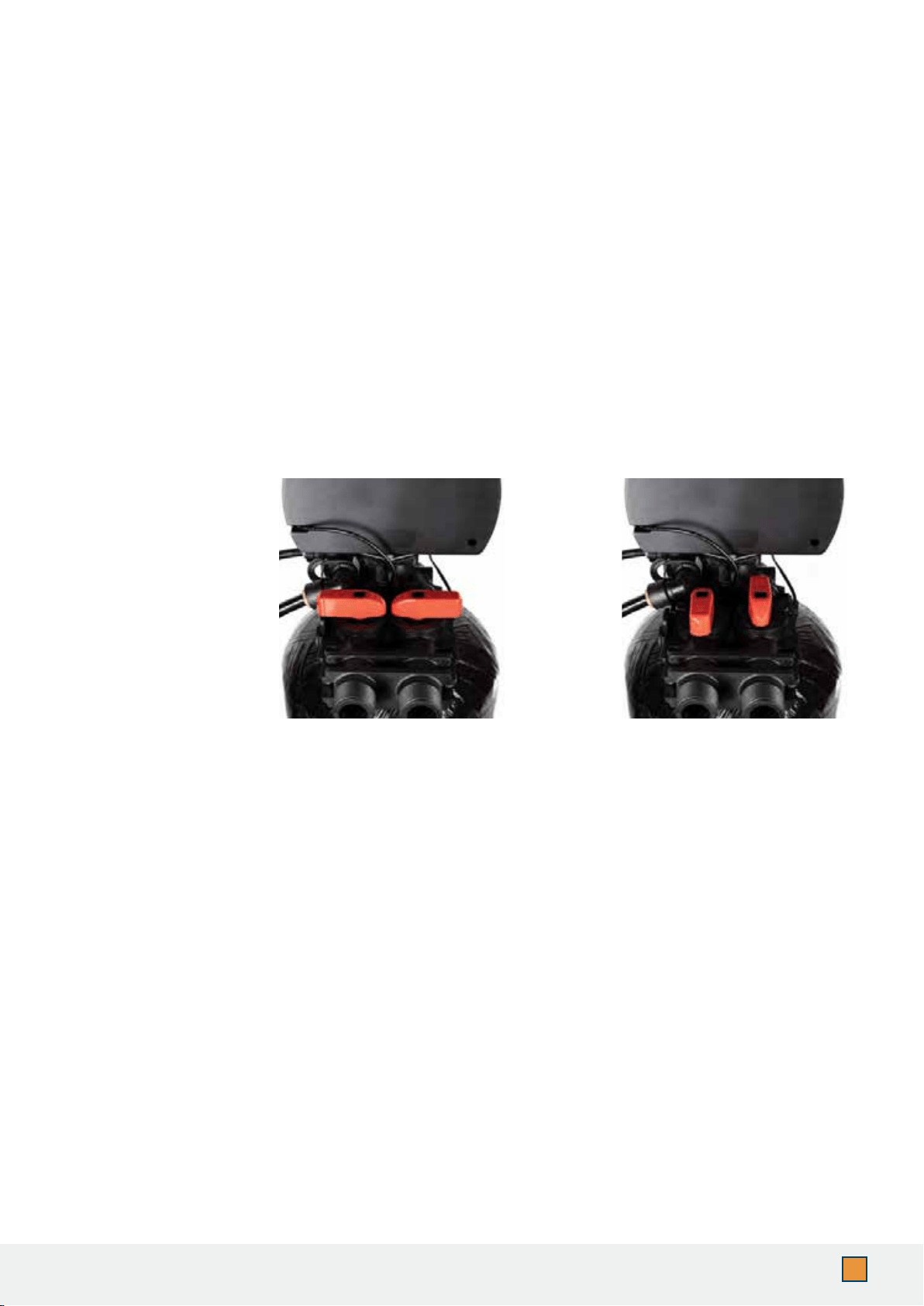
1. Place the unit in the bypass position. Locate the nearest faucet and remove aerator
(faucet screen) if there is any. Turn the cold water position on at the nearest faucet and
slowly turn on the main water supply. Let the water run for a few minutes or until the
system is free of any air or foreign material.
2. Make sure there are no leaks in the plumbing system before proceeding and shut off the
nearest faucet when water runs clear.
Service
Position
Bypass
Position
WARNING! If the system is leaking at all, turn the unit to the bypass position and shut off main
water supply before assessing leak.
STEP 5. Flushing and Testing the Plumbing Lines
IMPORTANT! Flushing the system lines is necessary to ensure that all plumbing work has been
done correctly, that there is no debris or air trapped in the piping, and that there are no leaks.
IMPORTANT! The system is not ready for service until you complete the “System Startup”
section of the owner’s manual.
(Page 13)
13
www.AQUASUREUSA.com
Tel: 1-800-661-0680
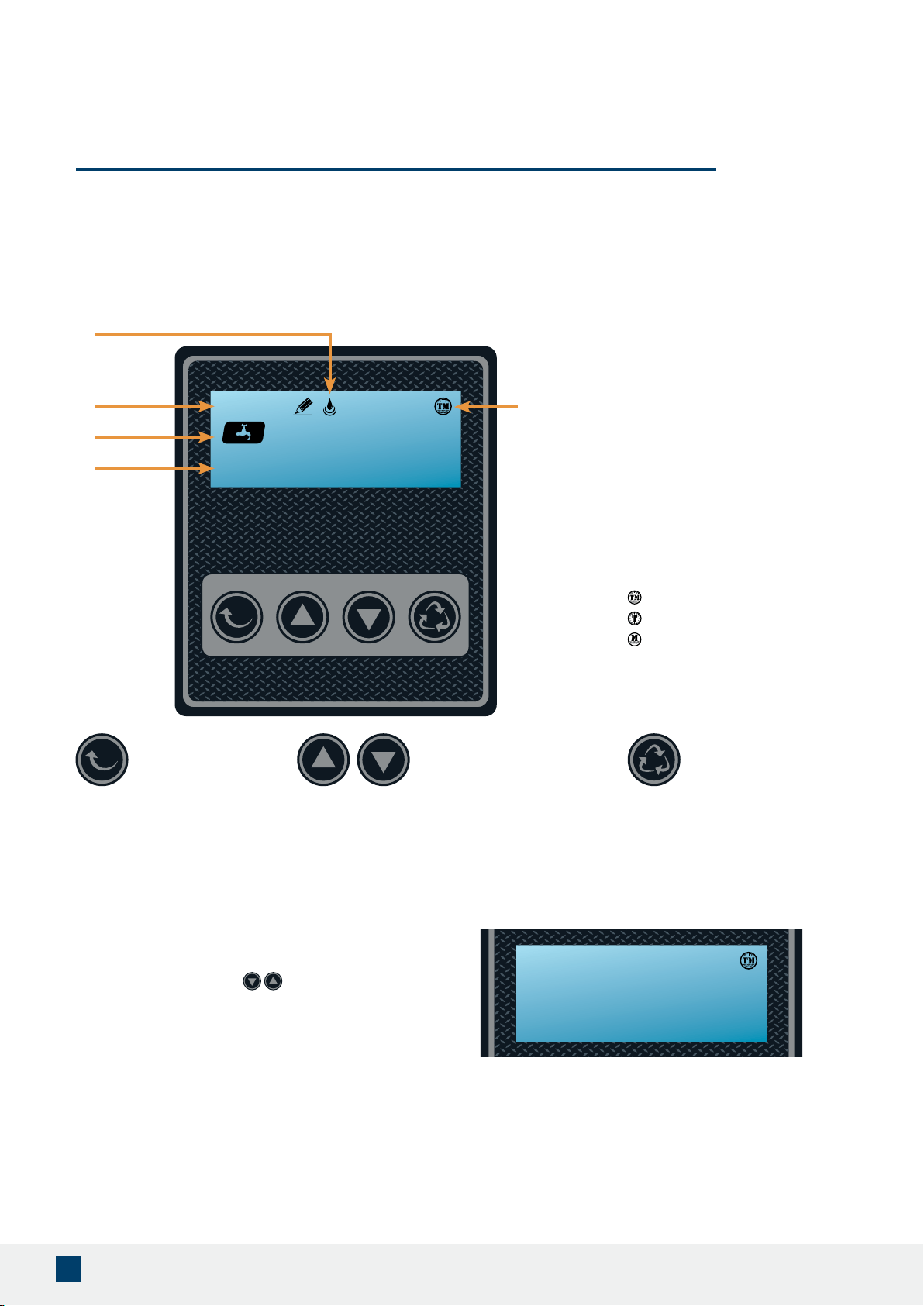
1. Flow Meter Indicator
(Appears when running water)
2. Time of Day
3. Status
4. Volume Remaining
5. Regeneration Mode
Time Meter Delay
Timer
Meter Immediate
STEP 1. Become Familiar with Display Screen
ENTER Button UP / DOWN Buttons CYCLE Button
1
2
3
4
5
IMPORTANT! Each button has multiple functions and has unique features when pressed during
different settings or screens. They can be combined with other buttons to execute the different
functions of the valve. Please be familiar with the buttons to operate the control valve.
1000 gAL
11:30
To Cancel Regeneration
During regeneration, if there is a need to stop
the process, press the simultaneously
to stop regenerating. The display will return to
the home screen after a few moments.
The display will show as:
goto Sr
11:30
WARNING! DO NOT UNPLUG THE UNIT’S POWER SUPPLY DURING REGENERATION!
SYSTEM INITIALIZATION
Note:
Make sure the system is powered on before starting. Plug the power transformer into an approved
power source. Connect the power cord to the control valve head and before continuing ensure that 5
gallons of water and at least 80 lbs of salt have been added to the brine tank.

14
AQUASURE HARMONY SERIES
STEP 2. System Startup
1. When power is supplied to the control, the screen will display the time of day, gallons
remaining and the regeneration mode. Press and hold the “Cycle” button for 5 seconds
until you see the words “
goto bW” and then release the “Cycle” button. The backwash
(bW) will be underway.
2. Once the valve is in the backwash (
bW) cycle, you will see the 15-minute (015) countdown
next to “bW”. Open the inlet on the bypass valve slowly and allow water to enter the unit. If
you hear any large “knocking” sounds, turn the red inlet valve partially closed (not all the
way) as the water is being fed too quickly and should be slowed. This process will begin to
purge air from the resin tank and ll the resin tank with water, allowing the air to escape
to the drain line. The water to the drain line will eventually start to run clear after 3-4
minutes.
3. After the backwash you will see the system move into the brine draw (
bd). The brine draw
is 60 minutes total and will normally draw out the saltwater within 20-30 minutes leaving
the rest of the time for the saltwater to bond with the resin. After the BD the rapid rinse
(rr) will start for a duration of 10 minutes. Allow the entire cycle to run so the resin is
rinsed clean.
4. When the rinse cycle is complete, the control screen will move on to the brine ll (
bF).
This phase will ll water back into the brine tank. You should gradually start to see the
water level rise to half a tank full. Let the entire brine ll nish.
5. When the regeneration cycle is complete, open the outlet side of the bypass completely
allowing water to ow into your home. From this point, locate the nearest treated water
faucet. Remove the aerator screen and run the cold water until the water is completely
clear. Once done, shut off the faucet water and place the aerator screen back on the
faucet.
STEP 3. Programming the System
IMPORTANT! The settings are pre-programmed from the factory to work with the majority of
homes. We recommend programming the system from settings 1 - 4 and leave settings 5 - 8 at
system default unless the condition of water requires adjustment.
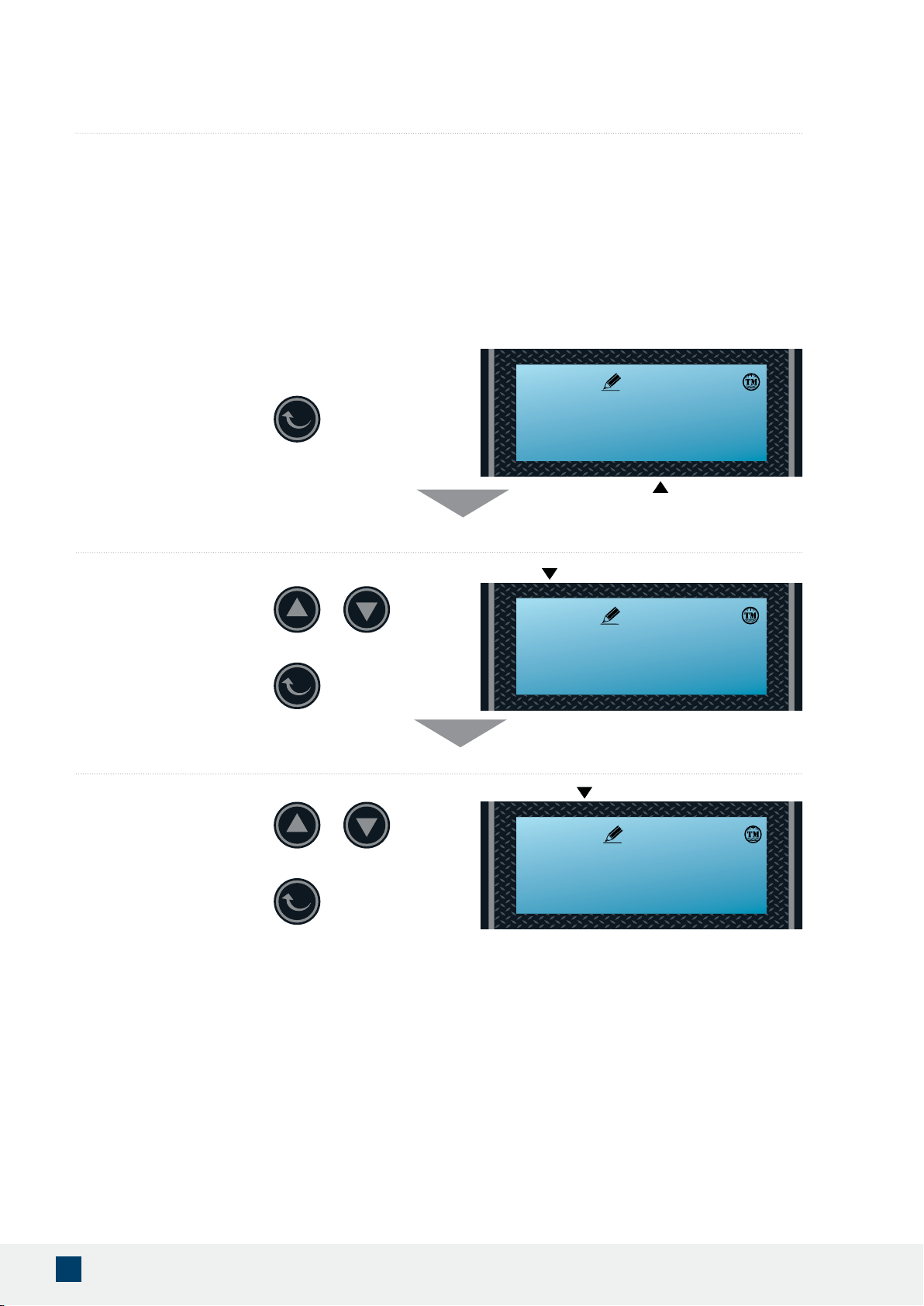
Enter Setting Menu by pushing both the ENTER button and UP button at the
same time. The screen will jump from the service screen with the faucet icon to
the rst setting screen to set time.
Flashing
SEt - 1 tIME
11:30
1000 gAL
11:30
15
www.AQUASUREUSA.com
Tel: 1-800-661-0680
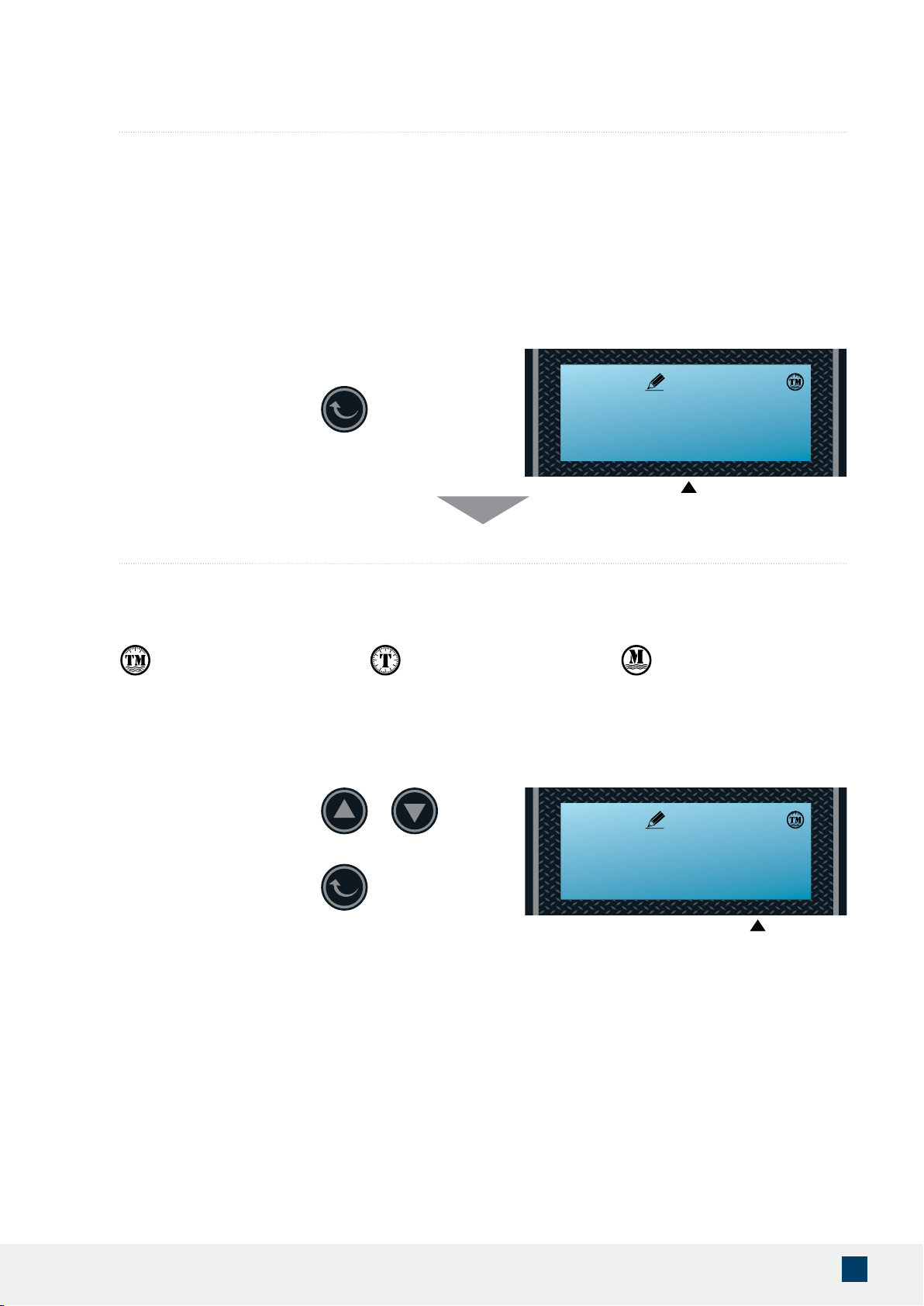
Setting 1 - Time of Day (Military Time)
Set the hour
Set the minutes
Flashing
Press the ENTER button to accept
and continue.
Press UP or DOWN buttons to
change hours.
Press the ENTER button to accept
and continue.
Press UP or DOWN buttons to
change minutes.
IMPORTANT! The system will default to regenerate at 2 am in the morning based on
the time entered in the setting. Setting the correct time of the day will ensure that the
system regenerates at the corresponding regeneration time.
Press the ENTER button to adjust
the time setting.
SEt - 1tIME
11:30
Flashing
11:30
Flashing
11:30
16
AQUASURE HARMONY SERIES
Flashing
Flashing
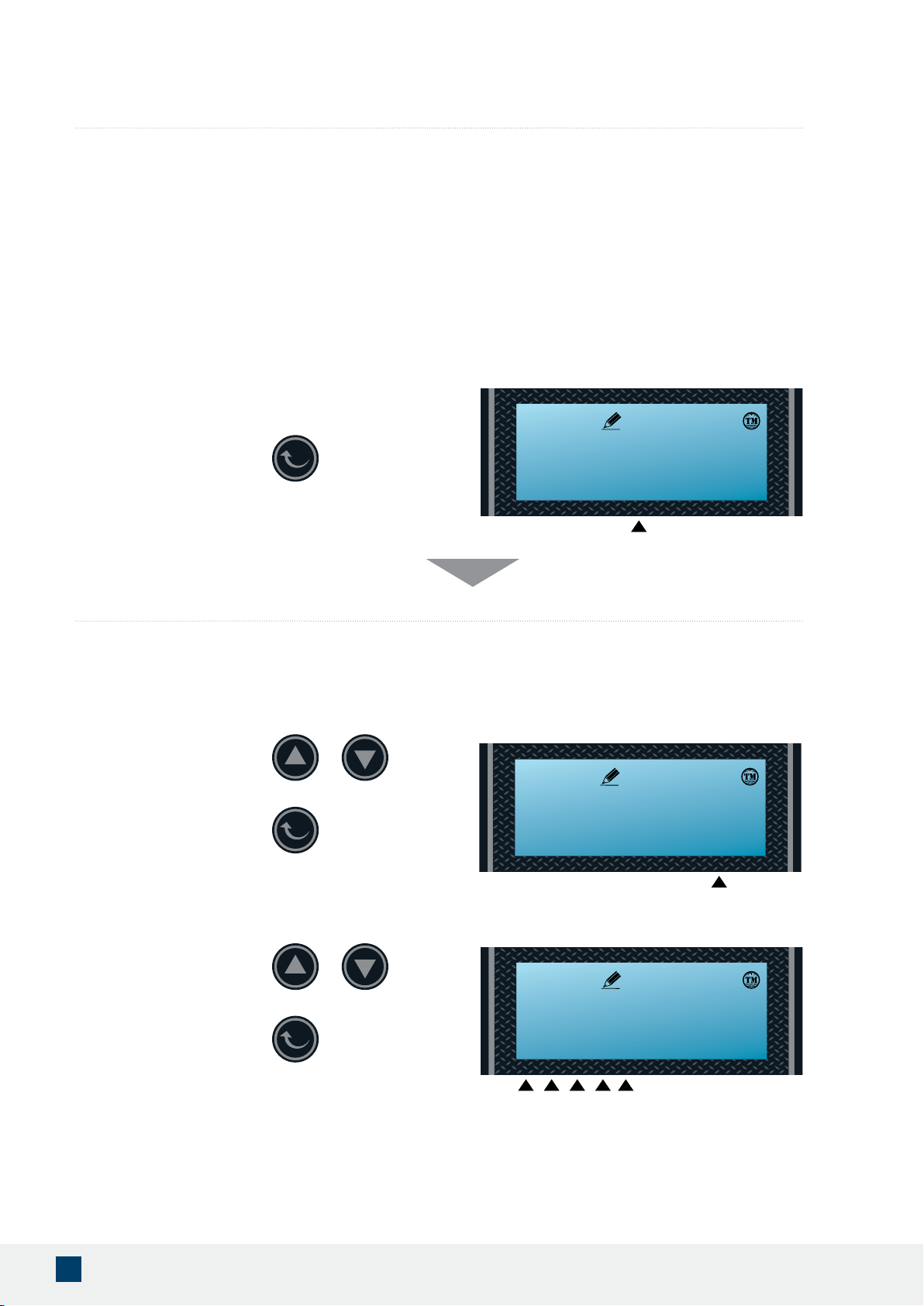
Setting 2 - Regeneration Type
Press Up or Down buttons to
change mode.
Choose Between Time, Meter or Meter Delayed
TIMER
Allow system to regenerate
based on set time interval.
METER
Regenerate immediately after
the set gallon reaches zero.
TIME METER DELAYED
Regenerate at 2 am on the night
after the set gallon reaches zero.
Press the ENTER button to accept
and continue.
IMPORTANT! The system offers three mode types depending on your needs. It is recommend
to set the system at (tM) Time Meter mode which allows the system to regenerate at 2 am in the
morning once the gallons reaches zero.
Press the ENTER button to adjust
the regeneration type setting.
/t/tM
/M
SEt - 2 tYPE
11:30
tYpE- tM
11:30
Note:
It is recommended to set the system to Time Meter.
17
www.AQUASUREUSA.com
Tel: 1-800-661-0680
Press the ENTER button
to accept and continue.
Press UP or DOWN buttons
to change units.
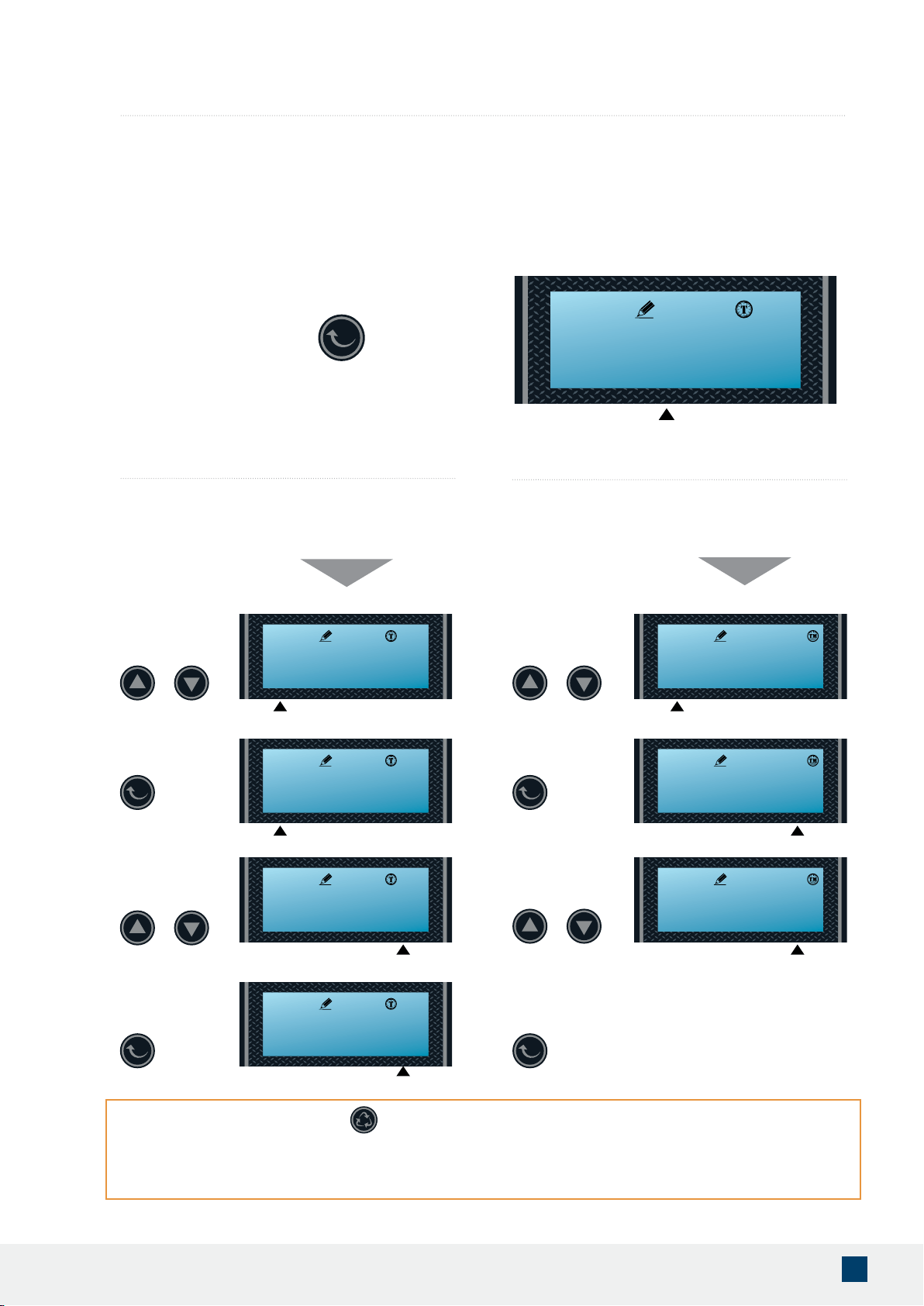
Setting 3 - Unit Capacity (Not shown if Timer Mode was selected in 2nd Step)
Set Unit Measurement - Gallons, Liters or Cubic Meters (Recommend setting to Gallons for US Customer)
Gallons
(Recommended)
Liters Cubic Meters
Press the ENTER key to adjust the
unit capacity setting.
IMPORTANT! This setting will only appear if the either (M ) Meter or (tM) Time Meter mode from
the previous setting was selected. User will not see this setting if (t) Timer mode was selected.
The system default is 1000 gallons with the option to change the unit measurement and the
capacity of the water treated before the system goes through a regeneration. It is recommended
to set the unit of measurement at (gAL) gallons and also calculate the correct amount of gallons
the system can treat by going through the worksheet on page 21 of owner’s manual or by
visiting our website https://aquasureusa.com/calculationtool
Press the ENTER button
to accept, and the number
to the left ashes.
Press UP or DOWN buttons
to set water capacity.
L M3
gAL
Flashing
SEt- 3 C-U
11:30
Flashing
01000 gAL
11:30
Flashing
5 4 3 2 1
01000 gAL
11:30
18
AQUASURE HARMONY SERIES
IMPORTANT! You may hit the button to exit to the main menu after setting up the gallons
needed for regeneration. Settings 5 - 8 have been preset from the factory and are only meant for
special applications that require customized settings. Consult your Aquasure Support Team for
further guidance if needed. 800-661-0680
Flashing
Flashing
Flashing
Flashing
Flashing
Flashing
Flashing
Flashing
Use UP and DOWN
buttons to adjust
Hours Override.
Use UP and DOWN
buttons to adjust the
Regeneration Time.
Use UP and DOWN
buttons to adjust
Hours Override.
Press the ENTER
button to accept and
continue.
Press the ENTER
button to accept and
continue.
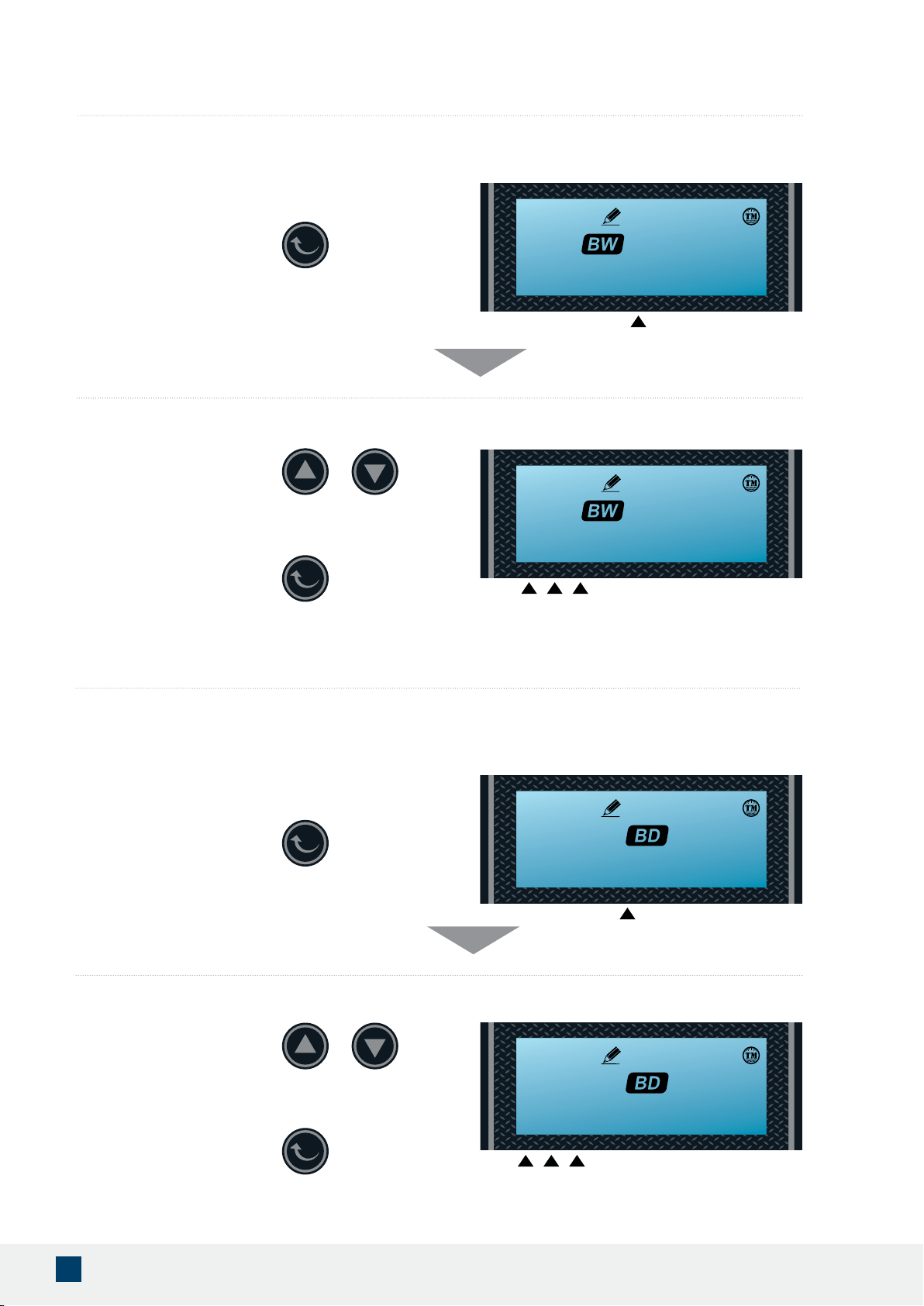
Default: 2:00 a.m. – 072 hours
Hours Override range:
Every 24 hours (24, 48, 72… 960)
Default: 2:00 a.m. – OFF
Hours Override range:
Every 24 hours (24, 48, 72… 960)
4. Regeneration Time and Hours Override
(t) Time Mode
(M) Meter or (tM) Time Meter Mode
Press ENTER to go to
Hours Override.
Press ENTER to go to
Hours Override.
IMPORTANT! Depending on the mode selected, the default setting may be set to regenerate at
every 72 hours. Even if (M) Meter or (tM) Time Meter mode is selected, the regeneration override
will still allow the system to regenerate even if the gallons didn’t count down to zero. It is highly
recommended to keep the setting at OFF if (M) Meter or (tM) Time Meter mode was selected.
Press the ENTER Key to adjust the
time and hour override setting.
Use UP and DOWN
buttons to adjust the
Regeneration Time.
SEt- 4 t-h
11:30
02 h-072
11:30
13 h-072
11:30
13 h-072
11:30
13 h-060
11:30
02 h-0ff
11:30
02 h-0ff
11:30
02 H-024
11:30
19
www.AQUASUREUSA.com
Tel: 1-800-661-0680
Flashing
Press the ENTER button to
accept and continue to the
next digit.
Press UP or DOWN buttons to
change Back Wash time (Minutes).
Range: 0 - 999
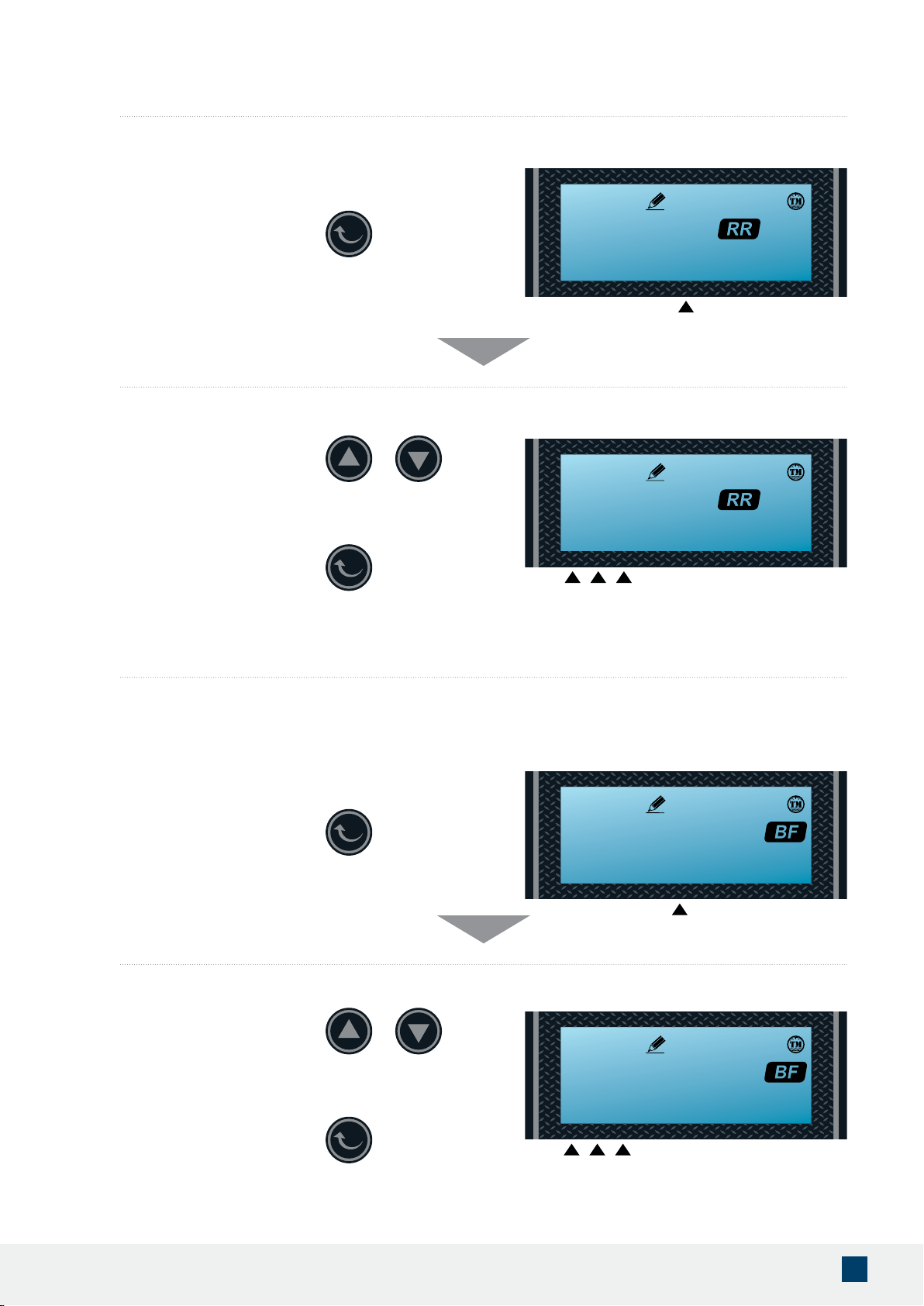
5. Setting the Back Wash Time (Recommend keeping at factory default setting)
6. Setting the Brine Time (Recommend keeping at factory default setting)
Set the Time
Default setting is 015
Press the ENTER key to adjust the
backwash setting.
(bW) Backwashing time allows the system to ush out any debris or particles that may enter the resin tank. It also helps create space in
between the resins to allow more contact surface for the next stage of regeneration.
The default setting is 15 minutes.
Flashing
1 2 3
Flashing
Press the ENTER Button
to accept and continue
to next digit.
Press UP or DOWN buttons to
change Brine time (Minutes).
Range: 0 - 999
Default setting is 060
Set the Time
Press the ENTER Key to adjust the
brine draw time setting.
Flashing
1 2 3
SEt- 5 -bW-
11:30
015 -bW-
11:30
(bd) Brine Draw pulls the brine water from the brine tank and allows the resin to mix with the brine water, regenerating the system. The
more contact time the system is set the more time it allows the resin to bond with the brine water.
The default setting is 60 minutes.
SET-6 -bd-
11:30
060 -bd-
11:30
20
AQUASURE HARMONY SERIES
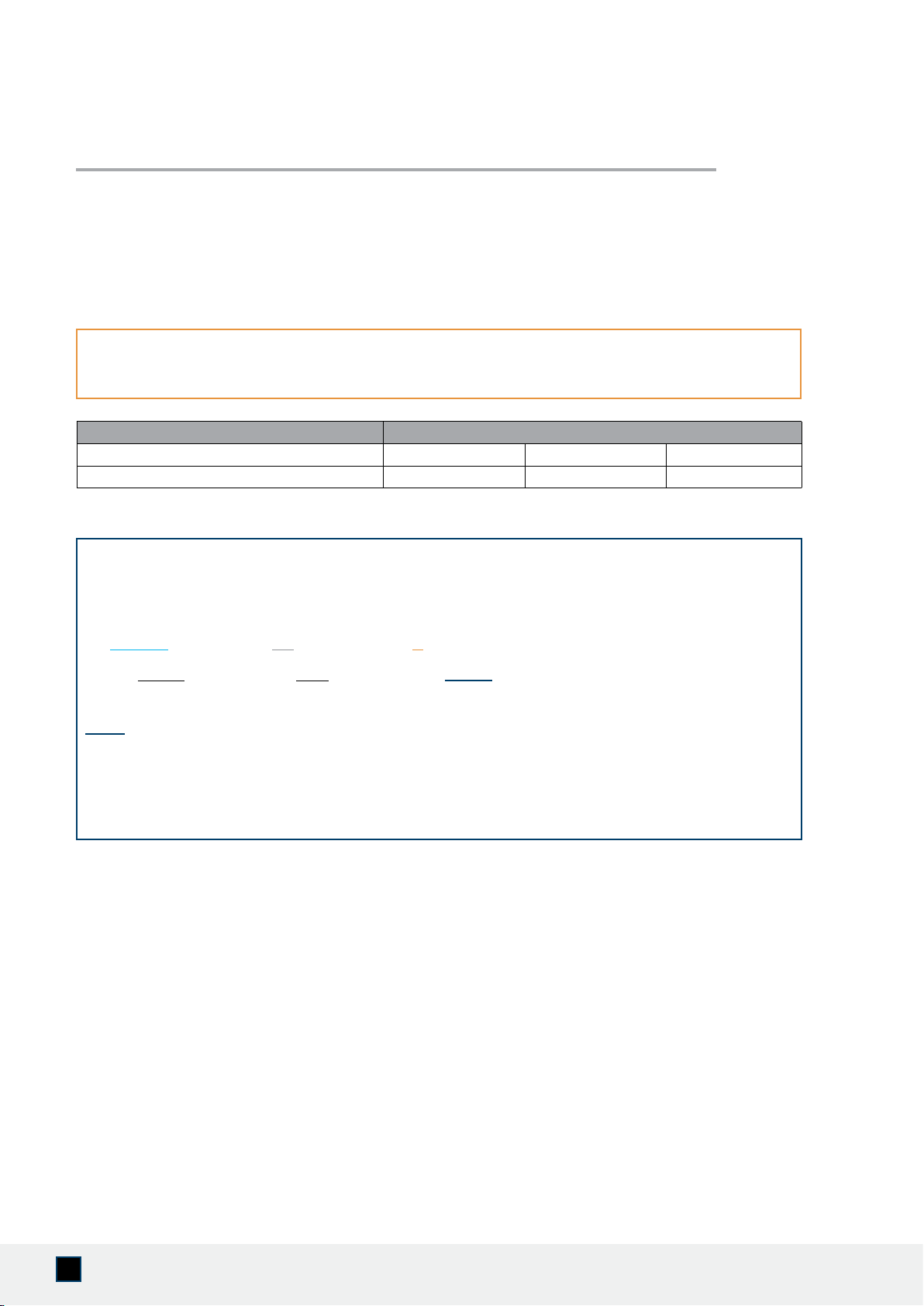
Flashing
7. Setting the Rapid Rinse Time (Recommend keeping at factory default setting)
Default setting is 010
Set the Time
(rr) Rapid Rinse time allows the system to ush the hardness and residual debris that may be left inside the system out to the drain.
The default setting is 10 minutes.
Press the ENTER Key to adjust
the rapid rinse time setting.
Press the ENTER button to
accept and continue to the
next digit.
Flashing
1 2 3
Flashing
Press the ENTER Button
to accept and continue
to next digit.
Press Up or Down buttons to
change Water Filling Time (Minutes).
Range: 0 - 999
8. Setting the Water Filling Time (Recommend keeping at factory default setting)
Default setting is 012
Set the Time
Press the ENTER Key to adjust the
brine water lling setting.
(bF) Brine Fill time allows the system to ll the brine tank back up with the water for the next regeneration. Depending on the water
pressure of the source water and the time set for brine ll, the amount of water inside the brine tank may vary.
The default setting is 12 minutes.
Flashing
1 2 3
SEt- 7 -rr-
11:30
010 -rr-
11:30
SEt- 8 -bf-
11:30
012 -bf-
11:30
Press UP or DOWN buttons to
change Rapid Rinse time (Minutes).
Range: 0 - 999
21
www.AQUASUREUSA.com
Tel: 1-800-661-0680
The control valve head uses a meter to count the gallons of water being treated through the system. Once the
gallons programmed in the unit have been exhausted, the system will regenerate. The total gallons of treatable
water the system can produce is based on the system size, family size, and the hardness level of the feed water.
A simple calculation is done to determine the amount of gallons to input during the “Setting 3” programming
portion of the installation.
NOTE: This calculation must be completed to program the unit:
Example:
System Capacity: AS-HS32D System/32,000 Grains (chart above)
Feed Water Hardness: 25 GPG (must be tested on-site by the end user or installer)
Number of People: 3
1,055 Gallons would be inputted for Total Gallons during “Setting 3” programming.
If the hardness level is given in ppm or mg/L, it can be converted to Grains Per Gallon by dividing
the value by 17.1.
Total Gallons = System Capacity in Grains (see chart below) / Hardness in (GPG) Grains
Per Gallon (determined by water test) - Number of People X 75 Gallons
( _
32,000
_Grains / ____
25
___GPG) - ( ____
3
_____ People X 75 Gallons)
___
1,280
__Gallons - ___
225
___Gallons = __
1,055
__ Total Gallons
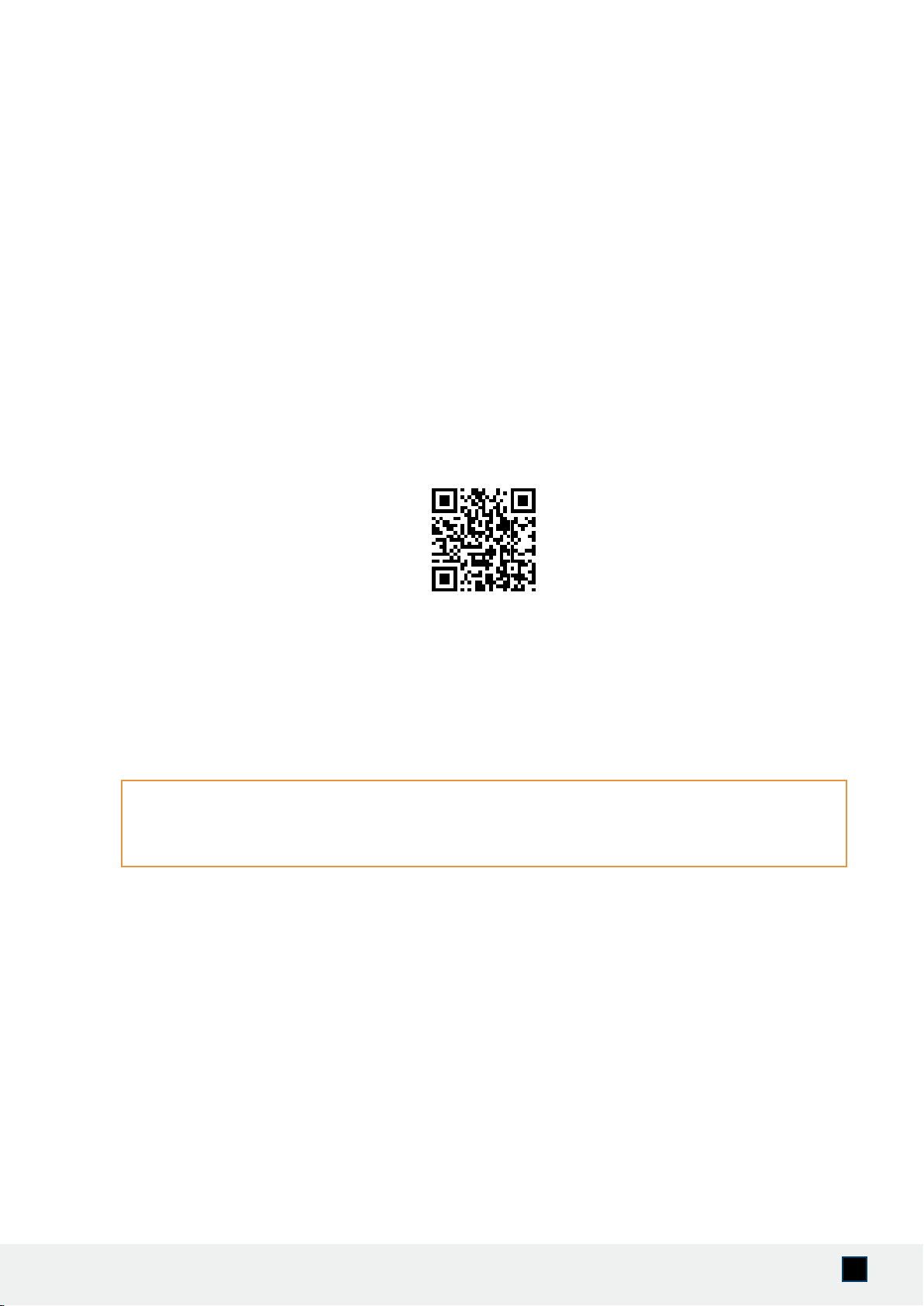
Parameter Aquasure Water Softener
Medium Salt Curve Capacity Setting 24,000 - 40,000 40,001 -56,000 56,001 - 80,000
Brine Fill Settings in Minutes 8 10 12
GALLONS CALCULATION TOOL
22
AQUASURE HARMONY SERIES
( __________Grains / __________GPG) - ( __________ People X 75 Gallons)
__________Gallons - __________Gallons = __________ Total Gallons
ONLINE GALLONS CALCULATION TOOL
Use your phone to scan the QR code below or visit aquasureusa.com/calculationtool for our online
gallons calculation tool. If you need further assistance, contact our support team
Input the site values in the equation below to gure out your total gallons value:
23
www.AQUASUREUSA.com
Tel: 1-800-661-0680
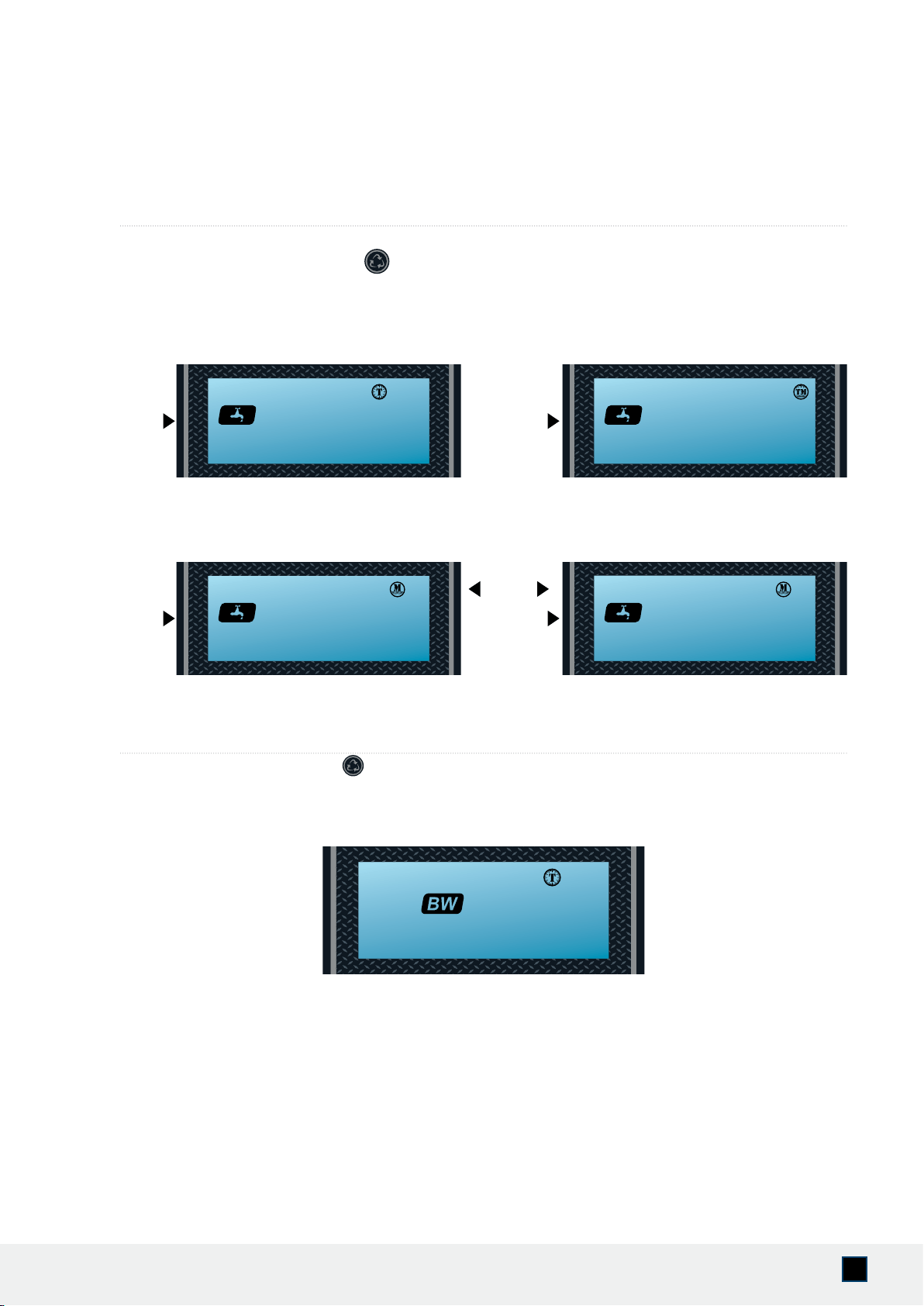
1. Display in Service
Reg. remaining time Reg. override days
Reg. remaining capacity
Reg. remaining time
Timed Regeneration Mode
The display will show the current time, remaining time to the next
set regeneration, and the days override.
Meter Regeneration Mode
The display will show the current time and the remaining treated
water to the next regeneration.
Time Meter Regeneration Mode
The display will show the current time and the remaining treated
water alternatively. When the remaining treated water counts
down to zero the display changes to the countdown of time till
regeneration starts.
1) Disconnect power to the control head.
2) Press and hold the button and plug in the power.
3) Release the button.
The system will go through the reset and restore to factory setting.
Note: The system may take a few moments before returning to the
normal screen.
3. Restore factory settings
ADDITIONAL FEATURES & DISPLAYS
02:18 01-d
11:30
618 gAL
11:30
rESEt
11:30
618 gAL
11:30
02:18
11:30
24
AQUASURE HARMONY SERIES
Queued Regeneration
When the valve is in service position press the button to activate the queued regeneration.
Queued Regeneration means the system will initiate a regeneration at the time set. If missed, it will initiate on the next day.
Flashing
Flashing
Flashing
Alternating
Display
Flashing
4. Manual regeneration
The display shows the Queued Regeneration
in TIMER Mode
The display shows the Queued Regeneration in Meter Delay Mode.
The system will initiate a regeneration - either the treated water remaining counts down to zero or the remaining time counts
down to zero, whichever is rst.
The display shows the Queued Regeneration
in Meter Delay Mode
5. Immediate Regeneration
From the home screen, press and hold the button for 5 seconds. An immediate regeneration will be initiated.
Your screen will feature this display as soon as the regeneration begins.
02:18 ----
11:30
02:18 ----
11:30
02:18 ---- 18 gAL
11:3011:30
gOtO bW
11:30
25
www.AQUASUREUSA.com
Tel: 1-800-661-0680
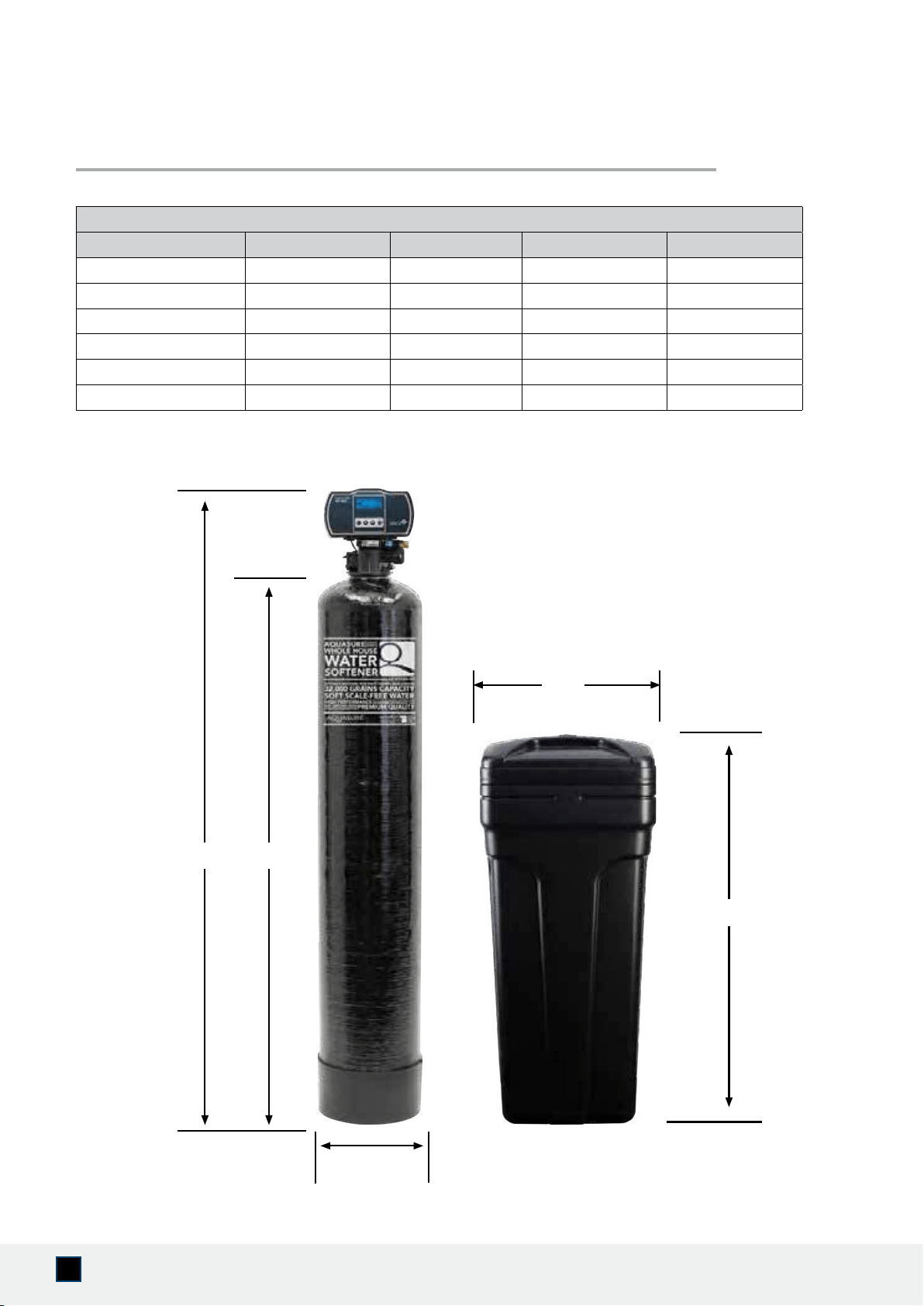
PRODUCT DIMENSIONS
C
BA
Aquasure Water Softeners
Capacity
(In Grains) Tank Size A B C
24,000 8”x44” 52” 44” 8”
32,000 8”x44” 52” 44” 8”
40,000 9”x48” 56” 48” 9”
48,000 10”x54” 62” 54” 10”
64,000 12”x52” 60” 52” 12”
80,000 13”x54” 62” 54” 13”
15"
37"
TECHNICAL SPECIFICATIONS
26
AQUASURE HARMONY SERIES
SYSTEM TROUBLESHOOTING
Use your phone to scan the QR code below or visit https://aquasureusa.com/support for most up
to date system troubleshoot. You can also contact our support team at [email protected].
Flow Rate @ 50 psi (3.5 bar) Valve Alone:
Continuous 15 psi (1 bar) Drop: 20 gpm (76 lpm)
Peak 25 psi (1.7 bar) Drop: 26 gpm (98 lpm)
Max Backwash 25 psi (1.7bar) Drop: 7 gpm (26 lpm)
CV 1 psi (0.07 bar) Drop: 5.0
Regeneration/Backwash:
Downow/Upow: Downow Cycles: 5
Adjustable Cycles: All
Time Available: Up to 999 minutes per cycle
Meter:
Accuracy Range:
Turbine Paddle 0.25 - 15 gpm
(0.95 - 57 lpm) ± 5%
Capacity Range: 1 - 9,999,999 gal
Valve Specifications:
Inlet/Outlet: 1" or 3/4", NPT
Mounting Base: 2-1/2" 8 NPSM
Distributor Pilot: 1.05" OD
Drain Line: 1/2" Quick Connect Elbow
Brine Line: 3/8" Quick Connect
Height: 7" (178 mm)
Weight
(Valve Gross): 4.84 lb (2.1 kg)
Additional Information:
Electrical Rating: Input: 120V AC 60Hz, Output: 24 V DC
Max. VA 3 VA
Water Pressure:
Hydrostatic: 300 psi (21 bar)
Working: 20 - 125 psi (1.4 bar - 8.6 bar)
Temperature: 34 - 110 °F (1 - 43 °C)

27
www.AQUASUREUSA.com
Tel: 1-800-661-0680
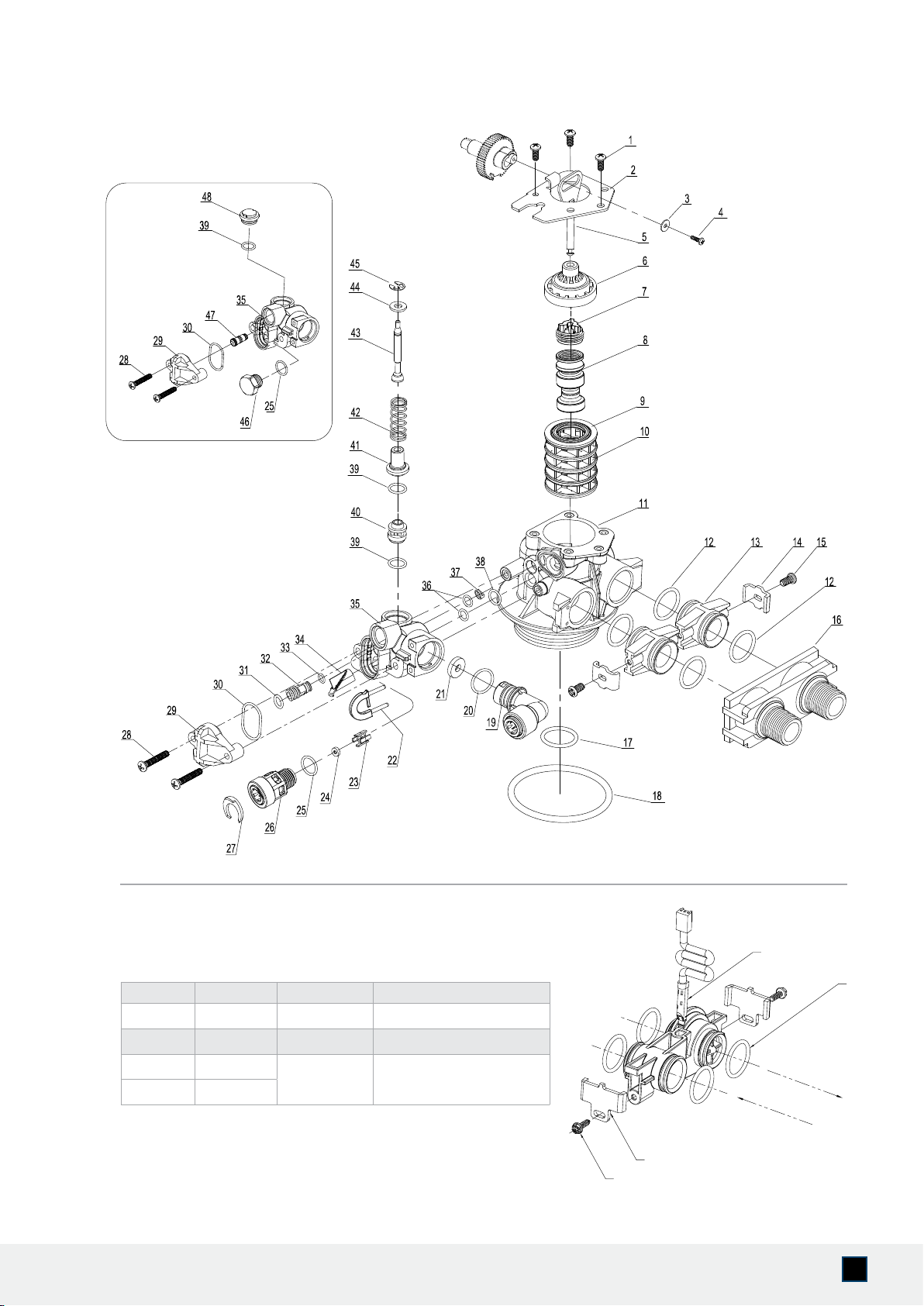
Valve Body Assembly and Parts List
Item No. Quantity Part No. Description
1 3 A-12112 Screw
2 1 A-13546 End Plug Retainer
3 1 A-13363 Washer
4 1 A-13296 Screw
5, 6, 7, 8 1 A-60102-20 Piston Softener & Filter
9, 10 1 A-60125 Seals (5) & Spacers (4) Assy.
11 1 A-61400-34 Valve Body Assembly, 3/4" Dist.
12 4 A-13305 O-ring, Adapter Coupling
13 2 A-19228 Adapter Coupling
14, 15 2 A-13255-FT Kit Adaptor Clip
16 1 A-187706 Yoke, Plastic, 1"
1 A-187706-02 Yoke, Plastic, 3/4"
17 1 A-13304 O-ring, Distributor Riser Tube
18 1 A-12281 O-ring, Top of Tank
19 1 A-56247 Drain, Quick Connector, Elbow, 1/2" Tubing
20 1 A-01019 O-ring, DLFC
21* 1 A-120XX DLFC Button
22 1 A-50011 Locking Clip, Drain QC
23 1 A-13245 BLFC Button Retainer
24** 1 A-120XX BLFC Button
25, 26, 27 1 A-13244 Brine Line Quick Connector 3/8" Tubing
28 2 A-13315 Screw
29 1 A-13166 Injector Cover
30 1 A-13303 O-ring, Injector Cover
31 1 A-01002 O-ring, Injector (Included w/ Injector)
32*** 1 A-10225-X-N Injector
33 1 A-01017 O-ring, Injector (Included w/ Injector)
34 1 A-56226 Screen, Injector
35 1 A-13163 Injector Body
36 2 A-13301 O-ring
37 1 A-13497 Air Disperser
38 1 A-12638 O-ring
39 - 45 1 A-60032 Brine Valve Assy
46 1 A-13918 BLFC Plug
47 1 A10913BLK-02 Injector Black Capped
48 1 A-13857 Brine Valve Plug
* Extra Option
28
AQUASURE HARMONY SERIES
IN
OUT
1
2
3
4
Item No. Quantity Part No. Description
1 1 A-19791-01 Meter Cable, Turbine AQT-56SE
2 4 A-13305 O-ring
3 2
A-13255-SE Adapter Clip
4 2

29
www.AQUASUREUSA.com
Tel: 1-800-661-0680
LIMITED PRODUCT WARRANTY
Aquasure warrants to the original retail purchaser that this Harmony Water Softener is free from
defects in material and workmanship, and agrees to replace, at Aquasure’s discretion, any defective
product free of charge within the warranty time periods from the date of purchase.
This warranty extends to the original retail purchaser only and commences on the date of the original
retail purchase of the Aquasure Harmony Series water softener system. The only exception shall be
when proof of purchase or installation is provided and then the warranty period shall be from the
date thereof.
• One year valve, electronics, and resin warranty if the product is not registered within 60
days of purchase.
• Five year valve, electronics, and resin warranty if the product is registered with Aquasure.
For information on how to register your product, view page 2
Valve, Electronics and Resin Guarantee
Aquasure will replace any part of the valve or electronics found in reasonable judgment to be
defective in material or workmanship. Resin and internal control valve parts will not be covered for
systems used to remove iron, manganese or chlorine that is above the suggested level for system
operation.
Ten Year Warranty on Resin Tank and Brine Tank
Aquasure will provide a replacement resin tank or brine tank to any original equipment purchaser
in possession of the Aquasure water softener that fails for (10) ten years after the date of purchase,
provided that it is at all times operated in accordance with specications and not subject to freezing.
General Provisions
Aquasure assumes no responsibility for incidental damage, consequential damage, or other damages
including, but not limited to, installation expense, telephone charges, rental of a like product during
the time warranty service, travel loss or damage to personal property, loss of revenue, loss of use of
the product, loss of time, or inconvenience.
No warranty is made with respect to defects or damage due to neglect, misuse, alterations, accident,
misapplication, physical damage, or damage caused by re, freezing, or other environmental damage.
Improper maintenance, or installation outside the recommended specs at any time will be considered
neglect and void warranty.
These warranties are in lieu of all other warranties expressed or implied, and we do not authorize any
person to assume for us any other obligation on the sale of this water conditioner. No responsibility
is assumed for delays or failure to meet these warranties caused by strike, government regulations or
other circumstances beyond the control of Aquasure.
Obtaining Warranty Coverage or General Inquiries
If coverage is available, you may obtain coverage under this Limited Product Warranty by providing
Aquasure with proof of original purchase, and that you are the original retail purchaser. For warranty
service under this Limited Product Warranty, you must notify Aquasure by phone at 1-800-661-
0680, by email at [email protected].
SOME STATES DO NOT ALLOW THE EXCLUSION OR LIMITATIONS OF INCIDENTAL OR
CONSEQUENTIAL DAMAGES SO THE ABOVE LIMITATION MAY NOT APPLY TO YOU. THIS
WARRANTY GIVES YOU SPECIFIC LEGAL RIGHTS, AND YOU MAY ALSO HAVE OTHER RIGHTS
WHICH VARY FROM STATE TO STATE.

30
AQUASURE HARMONY SERIES
NOTES

31
www.AQUASUREUSA.com
Tel: 1-800-661-0680
NOTES

32
AQUASURE HARMONY SERIES

www.AquasureUSA.com | 800.661.0680 | [email protected]