621-1790
OPERATOR’S MANUAL
CAUTION:
To Reduce the Risk of Injury, User Must
Read and Understand the Operator’s Manual. Save These
Instructions For Future Reference.
For questions / comments, technical assistance or repair parts –
Please Call Toll Free: 1-866-917-4374 (M-F 8:30am-5:00pm EST).
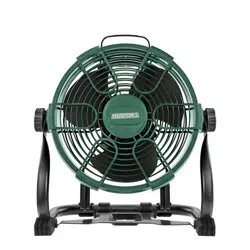
HYBRID 11” FAN

TABLE OF CONTENTS
Safety Symbols ......................................................... Page 2
Safety Instructions ...................................................... Page 3
Overview/Specifications ................................................. Page 8
Assembly ............................................................. Page 9
Operation ............................................................ Page 10
Maintenance .......................................................... Page 13
Troubleshooting ....................................................... Page 14
Warranty .............................................................Page 18
Page 2
SAFETY SYMBOLS
Some of these following symbols may be used on this tool. Please study them and learn their
meaning. Proper interpretation of these symbols will allow you to operate the tool better and
more safely.
Symbol
Name
Designation / Explanation
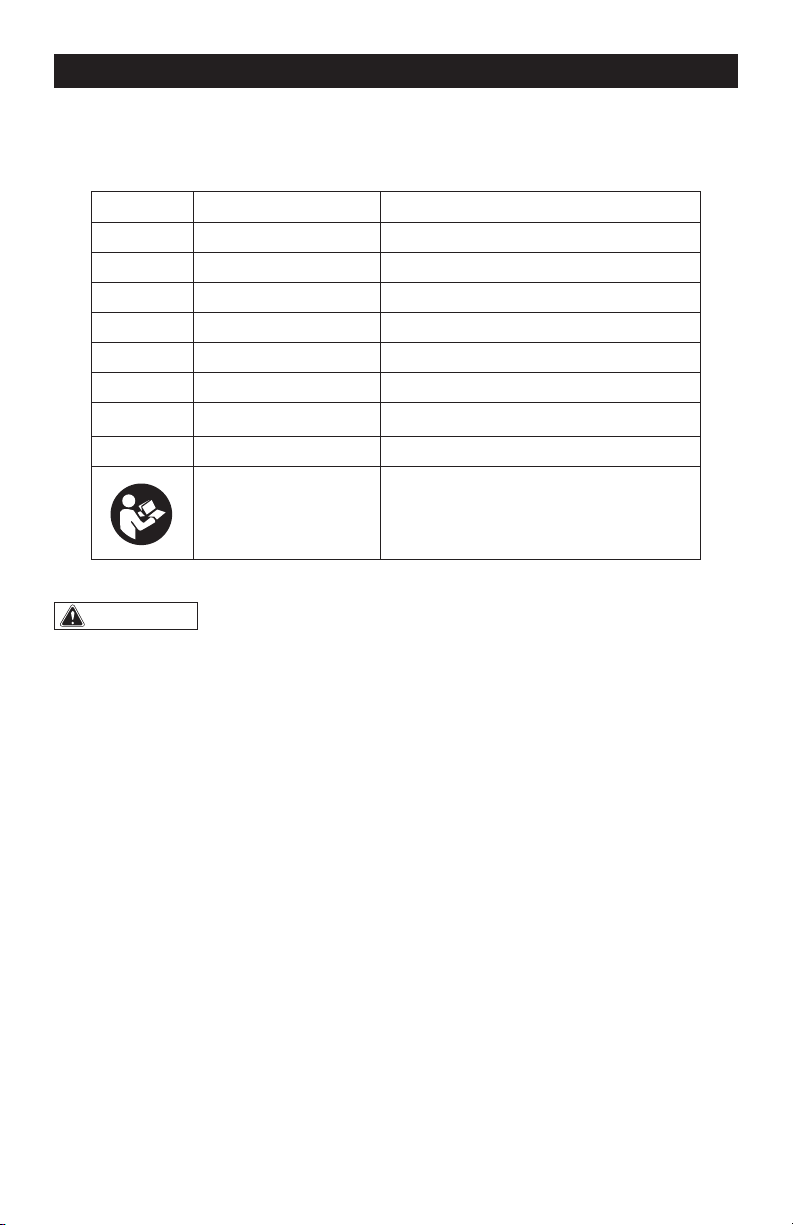
V Volts Voltage
A Amps Current
Hz Hertz Frequency (cycles per second)
W Watts Power
Ibs Pounds Weight
CFM Cubic Feet Per Minute Air Volume
�
or d.c.
Direct current Type of characteristic of current
~ or a.c. Alternating current Type of characteristic of current
Read instruction
manual
To reduce the risk of injury, user must
read instruction manual.
WARNING:
To ensure safety and reliability, all repairs should be performed by a
qualified service technician.
Page 3
SAFETY INSTRUCTIONS
The purpose of safety symbols is to attract your attention to possible dangers. The safety
symbols, and the explanations with them, deserve your careful attention and understand-
ing. The symbol warnings do not, by themselves, eliminate any danger. The instructions and
warnings they give are no substitutes for proper accident prevention measures.
WARNING:
Be sure to read and understand all safety instructions in this manual,
including all safety alert symbols such as “DANGER”, “WARNING” and “CAUTION” before
using this tool. Failure to follow all instructions listed below may result in electric shock,
fire, and/or serious personal injury.
SYMBOL MEANING
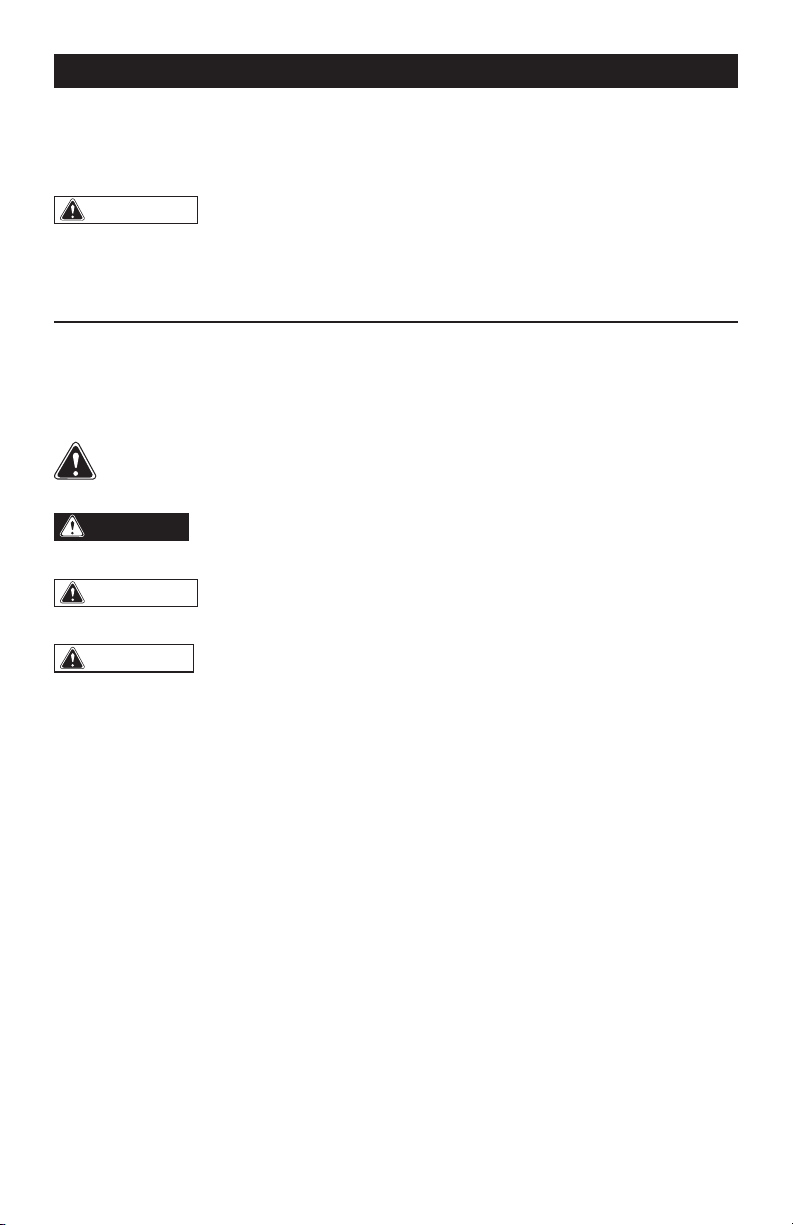
SAFETY ALERT SYMBOL: Indicates DANGER, WARNING, OR CAUTION.
May be used in conjunction with other symbols or pictographs.
DANGER:
Indicates an imminently hazardous situation, which, if not avoided, will
result in death or serious injury.
WARNING:
Indicates a potentially hazardous situation, which, if not avoided,
could result in death or serious injury.
CAUTION:
Indicates a potentially hazardous situation, which, if not avoided, could
result in minor or moderate injury.
NOTICE: (Without Safety Alert Symbol) Indicates a situation that may result in property
damage.
SAVE THESE INSTRUCTIONS!
Page 4
SAFETY INSTRUCTIONS
GENERAL POWER TOOL SAFETY
WARNINGS
WARNING:
The operation of any
power tool can result in foreign objects being
thrown into your eyes, which can result in
severe eye damage. Before beginning
power-tool operation, always wear safety
goggles or safety glasses with side shields
and a full-face shield, when needed. We
recommend using a wide vision safety mask
over eyeglasses or standard safety glasses
with shields. Always use eye protection
marked to comply with ANSI Z87.1.
WARNING:
This product may
contain chemicals, including lead, known to
the State of California to cause cancer, birth
defects or other reproductive harm. Wash
hands after handling.
WARNING:
Some dust created by
power sanding, sawing, grinding, drilling,
and other construction activities contains
chemicals known to the state of California
to cause cancer, birth defects, or other
reproductive harm. Some examples of these
chemicals are:
– Lead from lead-based paints.
– Crystalline silica from bricks, cement, and
other masonry products.
– Arsenic and chromium from chemically-
treated lumber.
Your risk from these exposures varies,
depending upon how often you do this type
of work.
To reduce your exposure to these chemicals:
– Work in a well-ventilated area.
– Work with approved safety equipment,
such as dust masks that are specially
designed to filter out microscopic particles.
– Avoid prolonged contact with dust from
power sanding, sawing, grinding, drilling,
and other construction activities. Wear
protective clothing and wash exposed
areas with soap and water. Allowing dust
to get into your mouth or eyes or to lie on
the skin may promote absorption of harmful
chemicals.
DANGER:
People with electronic
devices, such as pacemakers, should
consult their physician(s) before using this
product. Operation of electrical equipment
in close proximity to a heart pacemaker
could cause interference or failure of the
pacemaker.
KNOW THE TOOL
To operate this tool, carefully read this
manual and all labels affixed to the tool
before using it. Keep this manual available
for future reference.
GENERAL SAFETY WARNINGS
When using an electrical appliance, basic
precautions should always be followed,
including the following:
READ ALL INSTRUCTIONS BEFORE
USING THIS PRODUCT!
WARNING:
To reduce risk of fire,
electric shock, or injury:
• Know your power fan. Read the
instruction manual carefully. Learn the
fan’s applications and limitations, as well
as the specific potential hazards related to
this fan. Following this rule will reduce the
risk of electric shock, fire, or serious injury.
WORK AREA SAFETY
• Keep work area clean and well lit.
Cluttered or dark areas invite accidents.
• Do not operate the fan in explosive
atmospheres, such as in the presence of
flammable liquids, gases or dust. Power
tools create sparks, which may ignite the
dust or fumes.
• Keep children and bystanders away while
operating a power tool. Distractions can
cause you to lose control.

Page 5
SAFETY INSTRUCTIONS
ELECTRICAL SAFETY
• Avoid body contact with earthed
or grounded surfaces such as pipes,
radiators, ranges and refrigerators. There
is an increased risk of electric shock if
your body is earthed or grounded. Wear
electrically insulated footwear, such as
rubber boots.
• Do not expose appliance to rain or wet
conditions. Water entering an appliance will
increase the risk of electric shock.
PERSONAL SAFETY
• Stay alert, watch what you are doing
and use common sense when operating
appliance. Do not use the appliance while
tired, upset, or under the influence of
drugs, alcohol, or medication. A moment
of inattention while operating appliance may
result in serious personal injury.
• Use personal protective equipment.
Always wear eye protection. Protective
equipment such as a dust mask, non-skid
safety shoes, hard hat or hearing protection
used for appropriate conditions will reduce
personal injuries.
• Prevent unintentional starting. Ensure
the switch is in the off-position before
connecting to battery pack, picking up or
carrying the appliance. Carrying appliance
with your finger on the switch or energizing
appliance that have the switch on invites
accidents.
• Remove any adjusting key or wrench
before turning the appliance on. A wrench
or a key left attached to a rotating part of the
appliance may result in personal injury.
• Do not overreach. Keep proper footing
and balance at all times. This enables better
control of the power tool in unexpected
situations.
• Dress properly. Do not wear loose
clothing or jewelry. Keep your hair and
clothing away from moving parts. Loose
clothes, jewelry or long hair can be caught
in moving parts.
• If devices are provided for the connection
of dust extraction and collection facilities,
ensure that these are connected and
properly used. Use of dust collection can
reduce dust-related hazards.
• Do not let familiarity gained from
frequent use of tools allow you to become
complacent and ignore tool safety
principles. A careless action can cause
severe injury within a fraction of a second.
USE AND CARE
• Do not force the power tool. Use the
correct appliance for your application. The
correct appliance will do the job better and
safer at the rate for which it was designed.
• Do not use the appliance if the switch
does not turn it on and off. Any appliance
that cannot be controlled with the switch is
dangerous and must be repaired.
• Disconnect the battery pack from the
appliance before making any adjustments,
changing accessories, or storing
appliance. Such preventive safety measures
reduce the risk of starting the appliance
accidentally.
• Store idle appliance out of the reach
of children and do not allow persons
unfamiliar with the appliance or these
instructions to operate the appliance.
Appliances are dangerous in the hands of
untrained users.
• Maintain appliance and accessories.
Check for misalignment or binding of
moving parts, breakage of parts and
any other condition that may affect the
appliance’s operation. If damaged, have
the appliance repaired before use. Many
accidents are caused by poorly maintained
appliance.
• Use the appliance and accessories etc.
in accordance with these instructions,
taking into account the working conditions
and the work to be performed. Use of the
appliance for operations different from
those intended could result in a hazardous
situation.
Page 6
• Keep handles and grasping surfaces
dry, clean and free from oil and grease.
Slippery handles and grasping surfaces do
not allow for safe handling and control of the
appliance in unexpected situations.
Battery Pack Use and Care
• Recharge only with the charger specified
by the manufacturer. A charger that is
suitable for one type of battery pack may
create a risk of fire when used with another
battery pack.
• Use appliance only with specifically
designated battery packs. Use of any other
battery packs may create a risk of injury and
fire.
• To reduce the risk of electric shock or
damage to the chargers and batteries,
use only with the MASTERFORCE
®
battery
packs and chargers listed.
Battery pack Charger
252-8029 (1.5Ah)
252-8031 (2.0Ah)
252-8030 (2.5Ah)
252-8003 (2.5Ah)
252-8034 (4.0Ah)
252-8035 (5.0Ah)
252-8005 (5.0Ah)
252-8007 (7.5Ah)
252-8027 (7.5Ah)
252-8025
252-8026
252-8037
• For best results, your battery and tool
should be stored, charged and used in a
location where the temperature is more
than 5°C (41°F) but less than 40°C (104°F).
Do not store outside or in vehicles.
• When battery pack is not in use, keep it
away from other metal objects like paper
clips, coins, keys, nails, screws, or other
small metal objects that can make a
connection from one terminal to another.
Shorting the battery terminals together may
cause burns or a fire.
• Under abusive conditions, liquid may be
ejected from the battery; Avoid contact.
If contact accidentally occurs, flush with
water. If liquid contacts eyes, additionally
seek medical help. Liquid ejected from the
battery may cause irritation or burns.
• Do not use a battery pack or appliance
that is damaged or modified. Damaged or
modified batteries may exhibit unpredictable
behavior resulting in fire, explosion or risk of
injury.
• Follow all charging instructions and do
not charge the battery pack or appliance
outside the temperature range specified
in the instructions. Charging improperly or
at temperatures outside the specified range
may damage the battery and increase the
risk of fire.
SERVICE
• Have your appliance serviced by a
qualified repair person using only identical
replacement parts. This will ensure that the
safety of the power tool is maintained.
• Do not modify or attempt to repair the
appliance or the battery pack except as
indicated in the instructions for use and
care.
ADDITIONAL SAFETY WARNINGS
• Indoor use only.
• Do not allow the appliance to be used
as a toy. Close attention is necessary when
used by or near children.
• Use only as described in this manual.
Use only manufacturer’s recommended
attachments.
• Keep hair, loose clothing, fingers, and
all parts of body away from openings and
moving parts. Loose clothes, jewelry, or
long hair can be drawn into air vents.
• Do not leave the fan unattended when
the battery is inserted. Remove the battery
when the fan is not in use and before
servicing.
• Keep the fan and its handle dry, clean
and free from oil and grease. Always use
a clean cloth when cleaning. Never use
brake fluids, gasoline, petroleum-based
products, or any strong solvents to clean
SAFETY INSTRUCTIONS

Page 7
SAFETY INSTRUCTIONS
your fan. Following this rule will reduce the
risk of loss of control and deterioration of
the enclosure plastic.
• Do not put any object into any openings.
Do not use with any opening blocked;
keep openings free of dust, lint, hair, and
anything that may reduce air flow.
• Do not handle the charger, including
charger plug, or charger terminals with
wet hands.
• Do not charge the battery pack outdoors.
• Do not incinerate the appliance even if
it is severely damaged. The batteries can
explode in a fire.
• Batteries can explode in the presence of
a source of ignition, such as a pilot light.
To reduce the risk of serious personal
injury, never use any cordless product in
the presence of open flame. An exploded
battery can propel debris and chemicals. If
exposed, flush with water immediately.
• Save these instructions. Refer to them
frequently and use them to instruct others
who may use this tool. If you loan this tool to
someone else, also loan these instructions
to them to prevent misuse of the product
and possible injury.
SAVE THESE INSTRUCTIONS
Page 8
AC Power Inlet
Carrying Handle
Adjustable Head
Position
Adjustment Knob
Hooks
Battery Pack Port
Power Switch
SPECIFICATIONS
Rated Voltage
20 V
�, Max*
AC Power input ** 120V ~ 60Hz, 0.8 A
Power 20 W
Air Flow
850 CFM/High
600 CFM/Low
Speed Setting 2
Head Rotation Angle 360°
Recommended Power Cord Length 5 – 10 ft. (1.5 – 3m)
OVERVIEW
* Maximum battery voltage without workload; with workload nominal voltage is 18 V.
** Requires an extension cord. Sold separately.
Page 9
WARNING:
If any part is broken
or missing, DO NOT connect to power
source or operate the fan until the broken
or missing part is replaced. Failure to do so
could result in possible serious injury.
WARNING:
Do not attempt to
modify this fan or create accessories not
recommended for use with this fan. Any
such alteration or modification is misuse
and could result in a hazardous condition
leading to possible serious injury.
WARNING:
Your fan should
never be connected to the power source
when you are assembling parts, making
adjustments, cleaning, or when it is not
in use. Disconnecting the fan will prevent
accidental starting, which could cause
serious personal injury.
CONTENTS
Fan, Instruction manual
UNPACKING
1. Carefully remove the fan and any
accessories from the carton. Make sure
that all items listed in the packing list are
included.
2. Inspect the fan carefully to make sure
that no breakage or damage occurred
during shipping.
3. Do not discard the packing material
until you have carefully inspected and
satisfactorily operated the fan.
ASSEMBLY
Page 10
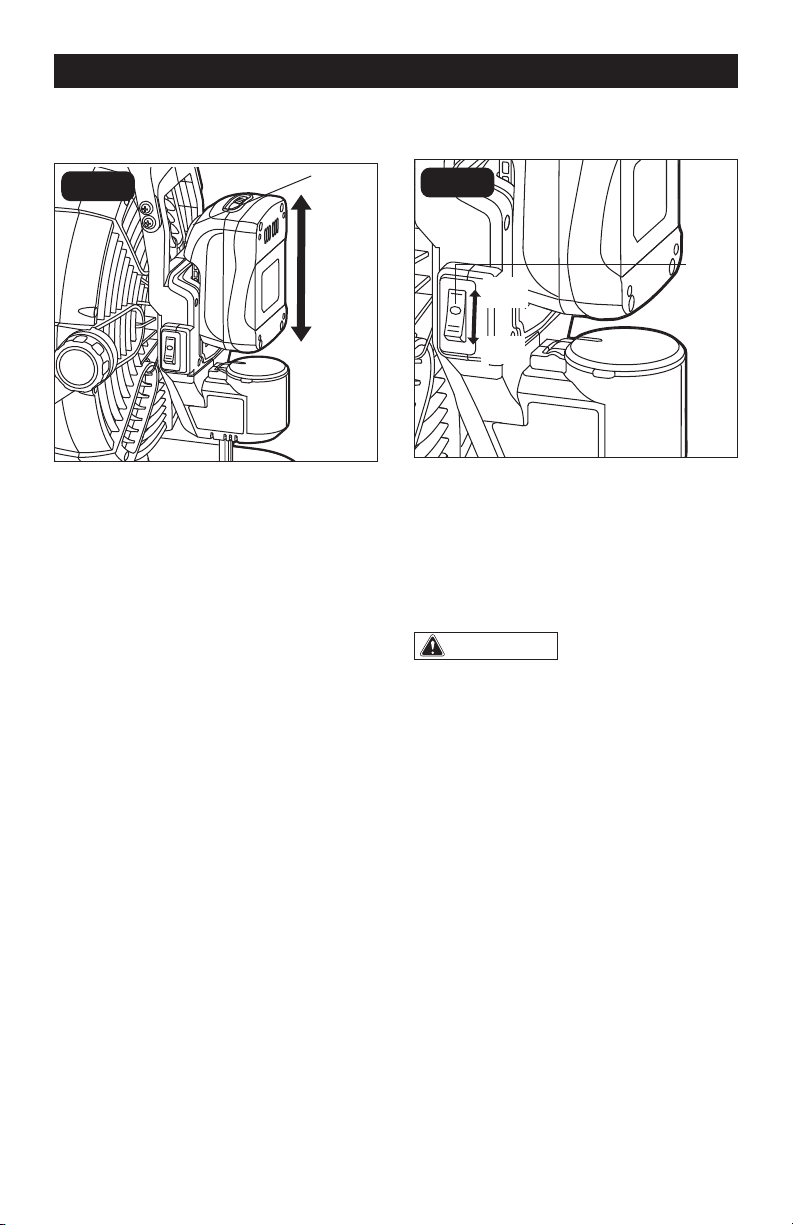
TO ATTACH BATTERY PACK
(FIG. 1)
FIG. 1
1. Make sure the fan is in the OFF (O)
position.
2. Align the raised rib on the battery pack
with the grooves on the back of the fan,
then slide the battery pack onto the fan.
3. Ensure that the battery-release button
on the battery pack snaps into place
and the battery pack is secured to the
fan before beginning operation.
NOTICE: When placing the battery pack
on the fan, be sure that the raised rib on
the battery pack aligns with the groove
on the fan and the latches snap into
place properly. Improper assembly of the
battery pack can cause damage to internal
components.
TO DETACH BATTERY PACK
(FIG. 1)
1. Press the battery-release button to
release the battery pack.
2. Pull the battery pack to remove it from
the fan.
OPERATION
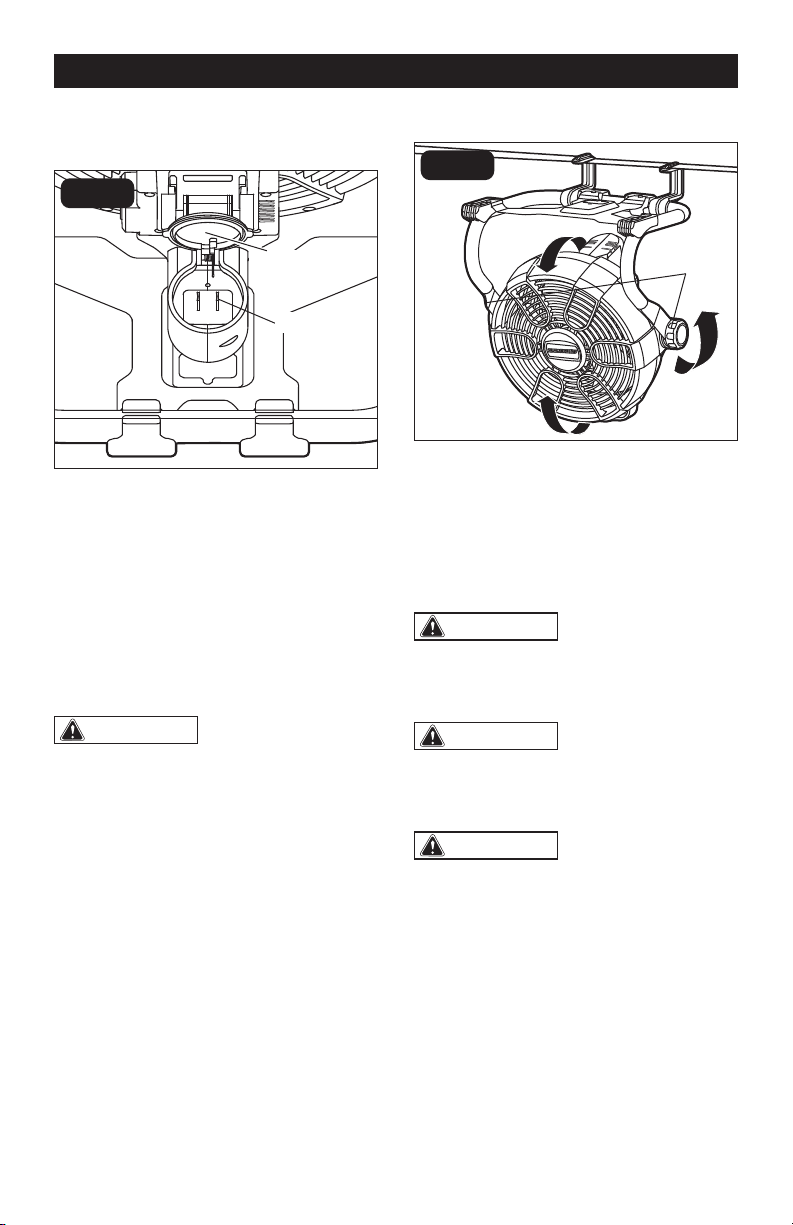
TO TURN THE FAN ON AND OFF
(FIG. 2)
FIG. 2
1. Attach the battery pack to the fan.
2. To turn the fan ON: Press the power
switch to the “I” or “II” position as
needed.
3. To turn the fan OFF: Press the power
switch to the “O” position.
WARNING:
Make sure that the
power switch is in the OFF position when
the fan is not in use.
TO CHANGE THE SPEED (FIG. 2)
1. For low speeds, press the power switch
to the “I” position.
2. For high speeds, press the power switch
to the “II” position.
Battery-
Release
Button
Detach
Attach
Power
Switch
Low
Speed
High
Speed
Page 11
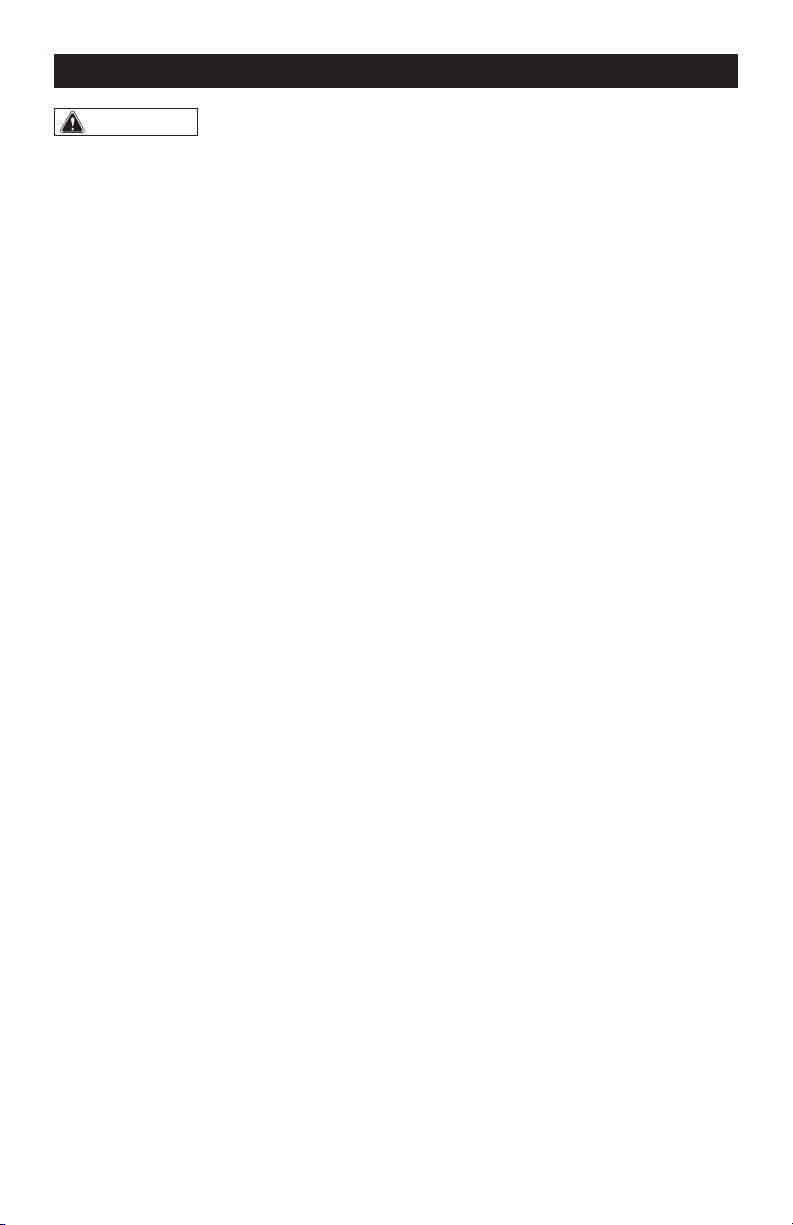
FIG. 3
TO USE AC POWER SOURCE
(FIG. 3)
1. Turn the power switch to the “O” (OFF)
position. Detach the battery pack.
2. Open the power inlet cover.
3. Plug the receptacle of an extension cord
(sold separately) into the AC power inlet.
4. Plug the other end of the cord into the
standard power outlet.
5. Make sure that the connection is secure
before beginning operation.
WARNING:
Use only extension
cords that are UL certified. Recommended
cord type: SPT-2-R, HPN-R, SVT-R, SJT-R.
Recommended cord length: 5 – 10 ft.
(1.5 – 3m). Using any other extension cord
may create a risk of fire, electric shock, and
damage to the fan.
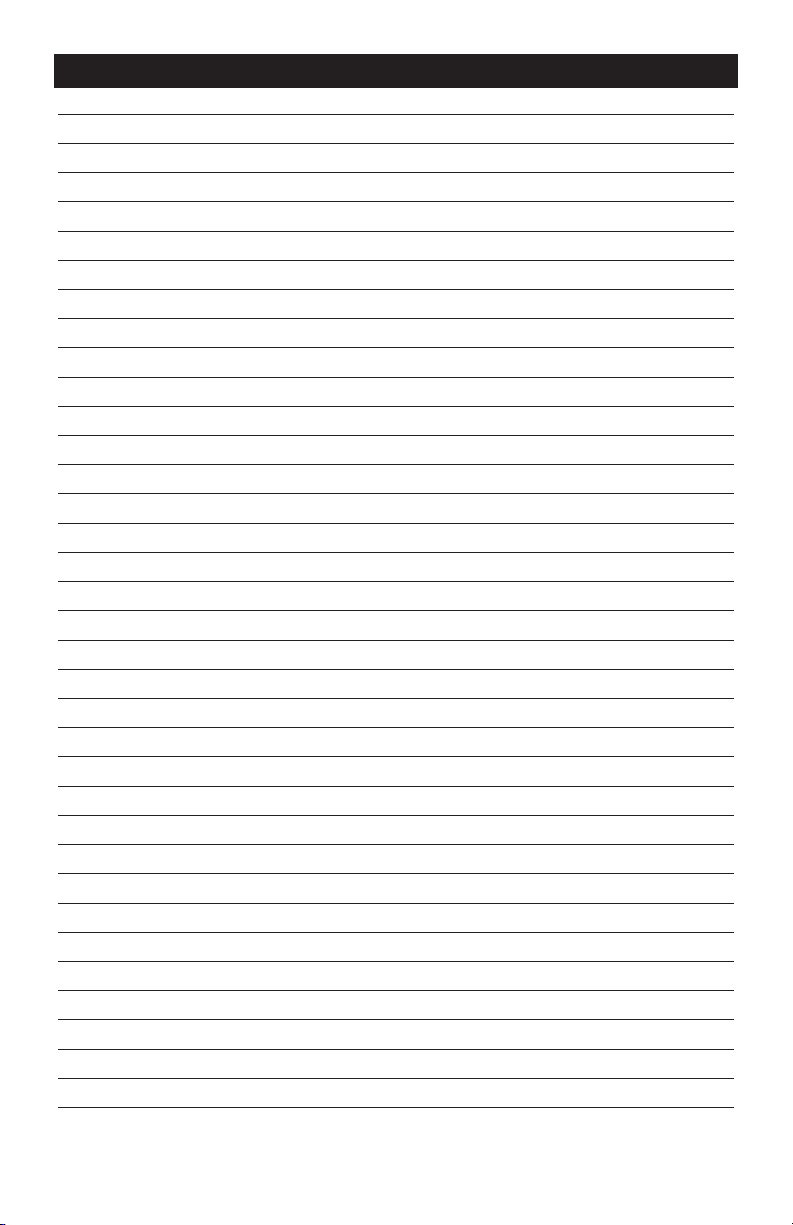
TO HANG THE FAN (FIG. 4)
FIG. 4
1. Turn the fan off and disconnect the
battery pack.
2. Connect the hooks through the base of
the fan.
3. Use the hooks to hang the fan, making
sure the fan is secure.
WARNING:
When hanging, be
careful to secure the fan to prevent it from
falling. Falling fan could cause injury or
damage.
WARNING:
Make sure that the
object that the fan is being hung on is
sturdy and can hold the combined weight
of the fan and the battery pack.
WARNING:
If the optional extension
cord is used, make sure the power cord
is positioned in such a way as to not be
pulled, stepped on, or tripped over.
OPERATION
Power Inlet Cover
Position
Adjustment
Knobs
AC Power Inlet

Page 12
OPERATION
TO ADJUST THE HEAD (FIG. 4)
The fan head can be positioned at different
angles from 0 to 360 degrees.
1. Turn the fan off and disconnect the
battery pack.
2. There are two ways to adjust the fan
angle:
(a): Grasp fan by the carrying handle and tilt
the fan head forward or backward.
(b): Rotate two position adjustment knobs
as shown to adjust the angle of the fan.
Page 13
MAINTENANCE
WARNING:
• Always wear safety goggles or safety
glasses with side shields during power
tool operations, or when blowing dust. If
operation is dusty, also wear a dust mask.
• Do not at any time let brake fluids,
gasoline, petroleum-based products,
penetrating oils, etc. come in contact with
plastic parts. Chemicals can damage,
weaken or destroy plastic, which may
result in serious personal injury.
1. Inspect the fan, the power switch and
the accessories for damage.
2. Check for damaged, missing, or worn
parts.
3. Check for loose screws, misalignment
or binding of moving parts, or any other
condition that may affect the operation.
4. If abnormal vibration or noise occurs,
turn the fan off immediately and have
the problem corrected before further
use.
5. Detach the battery from the fan before
cleaning or performing any maintenance.
Using compressed air may be the most
effective cleaning method. Always wear
safety goggles when cleaning tools
using compressed air.

Page 14
PROBLEM POSSIBLE CAUSE SOLUTION
The fan does not
work.
Low battery capacity. Charge the battery pack.
The battery pack or fan is
too hot.
Turn off the fan and allow the fan and
battery pack to cool.
The extension cord was not
connected to the power inlet
securely.
Check and connect them securely.
TROUBLESHOOTING
Page 15
NOTES
Page 16
NOTES
Page 17
NOTES
Page 18
SAVE YOUR RECEIPTS
THIS WARRANTY IS VOID WITHOUT THEM
HYBRID 11” FAN
WARRANTY
90-DAY MONEY BACK GUARANTEE:
This MASTERFORCE
TM
brand power tool carries our 90-DAY Money Back
Guarantee. If you are not completely satisfied with your MASTERFORCE
TM
brand
power tool for any reason within ninety (90) days from the date of purchase, return
the tool with your original receipt to any MENARDS
®
retail store, and we will provide
you a refund – no questions asked.
3-YEAR LIMITED WARRANTY:
This MASTERFORCE
TM
brand power tool carries our famous No Hassle 3-Year Limited
Warranty to the original purchaser. If, during normal use, this MASTERFORCE
TM
power
tool breaks or fails due to a defect in material or workmanship within three (3) years
from the date of original purchase, simply bring this tool with the original sales receipt
back to your nearest MENARDS
®
retail store. At its discretion, MASTERFORCE
TM
agrees to have the tool or any defective part(s) repaired or replaced with the same or
similar MASTERFORCE
TM
product or part free of charge, within the stated warranty
period, when returned by the original purchaser with original sales receipt. Not
withstanding the foregoing, this limited warranty does not cover any damage that
has resulted from abuse or misuse of the Merchandise. This warranty: (1) excludes
expendable parts including but not limited to blades, brushes, belts, bits, light bulbs,
and/or batteries; (2) shall be void if this tool is used for commercial and/or rental
purposes; and (3) does not cover any losses, injuries to persons/property or costs. This
warranty does give you specific legal rights and you may have other rights, which vary
from state to state. Be careful, tools are dangerous if improperly used or maintained.
Seller’s employees are not qualified to advise you on the use of this Merchandise.
Any oral representation(s) made will not be binding on seller or its employees. The
rights under this limited warranty are to the original purchaser of the Merchandise
and may not be transferred to any subsequent owner. This limited warranty is in lieu
of all warranties, expressed or implied including warranties or merchantability and
fitness for a particular purpose. Seller shall not be liable for any special, incidental, or
consequential damages. The sole exclusive remedy against the seller will be for the
replacement of any defects as provided herein, as long as the seller is willing or able
to replace this product or is willing to refund the purchase price as provided above.
For insurance purposes, seller is not allowed to demonstrate any of these power tools
for you.
For questions / comments, technical assistance or repair parts –
Please call toll free: 1-866-917-4374 (M-F 8:30am – 5:00pm EST).

01/2021
© 2021 Menard, Inc., Eau Claire, WI 54703