1
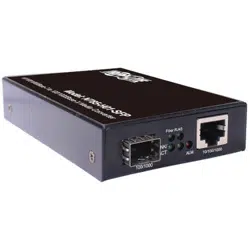
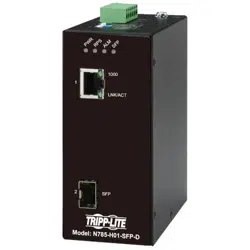
Hardened Gigabit
Copper to Fiber
Media Converter,
RJ45/SFP
Model: N785-H01-SFP-D
1111 W. 35th Street, Chicago, IL 60609 USA • tripplite.com/support
Copyright © 2021 Tripp Lite. All rights reserved.
Este manual está disponible en español en la página de Tripp Lite: tripplite.com
Ce manuel est disponible en français sur le site Web de Tripp Lite : tripplite.com
Quick Start Guide
WARRANTY REGISTRATION
Register your product today and be
automatically entered to win an ISOBAR
®
surge protector in our monthly drawing!
tripplite.com/warranty

2
• Extends a Gigabit Ethernet connection to an open SFP port
• Hardened material allows the media converters to withstand high
operating temperatures and provide ESD/RFI and surge protection
• Open SFP port allows for a variety of SFP transceivers to be used
• LEDindicatorsmonitorEthernetandberlinkstatus
• DIPswitchesallowforLineLoopBack(LLB),LinkFaultSignaling
(LFS),andReserveandFX100functions
• LinkFaultSignaling(LFS)LEDwillimmediatelyilluminatetoindicate
when a cable has been severed or another cause for disruption has
occurred
• LineLoopBack(LLB)teststhecoppernetworkconnection
• AutoMDI/MDI-Xfunctionalityremovestheneedforcrossovercabling
• Media Converter
• TerminalBlock(20-57VDC)
• DIN Rail Kit
• RJ45Cap
• SFP Cap
•QuickStartGuide
•N001-SeriesCat5eSnaglessPatchCables
• N201-Series Cat6 Snagless Patch Cables
• N286-Series Transceivers
Product Features
Package Contents
Optional Accessories

3
Notes:
• The following installation instructions refer to an installation in which two media
converters are used.
• To avoid damage due to Electrostatic Discharge (ESD), it is recommended you
handle the product while wearing an ESD wrist grounding strap or by touching
a conductive surface (such as metal) to discharge any potential ESD prior to
handling the product.
1. UsingCat5e/6cable,connecttheRJ45portonthemediaconverterto
yournetwork.
2.Connectatransceiver(suchasTrippLite’sN286-Series)totheopen
SFPportonthemediaconverter.Thenconnectbercablingmatching
thetransceivertypetothetransceiver’sport,aswellasasecond
matching transceiver and media converter.
3.UsingCat5e/6cable,connecttheRJ45portonthesecondmedia
convertertoyournetworkdevice(workstation,hub,switch,etc.).
4. Connect the external power supplies included with each media
converter and plug them into a power source.
Installation
4
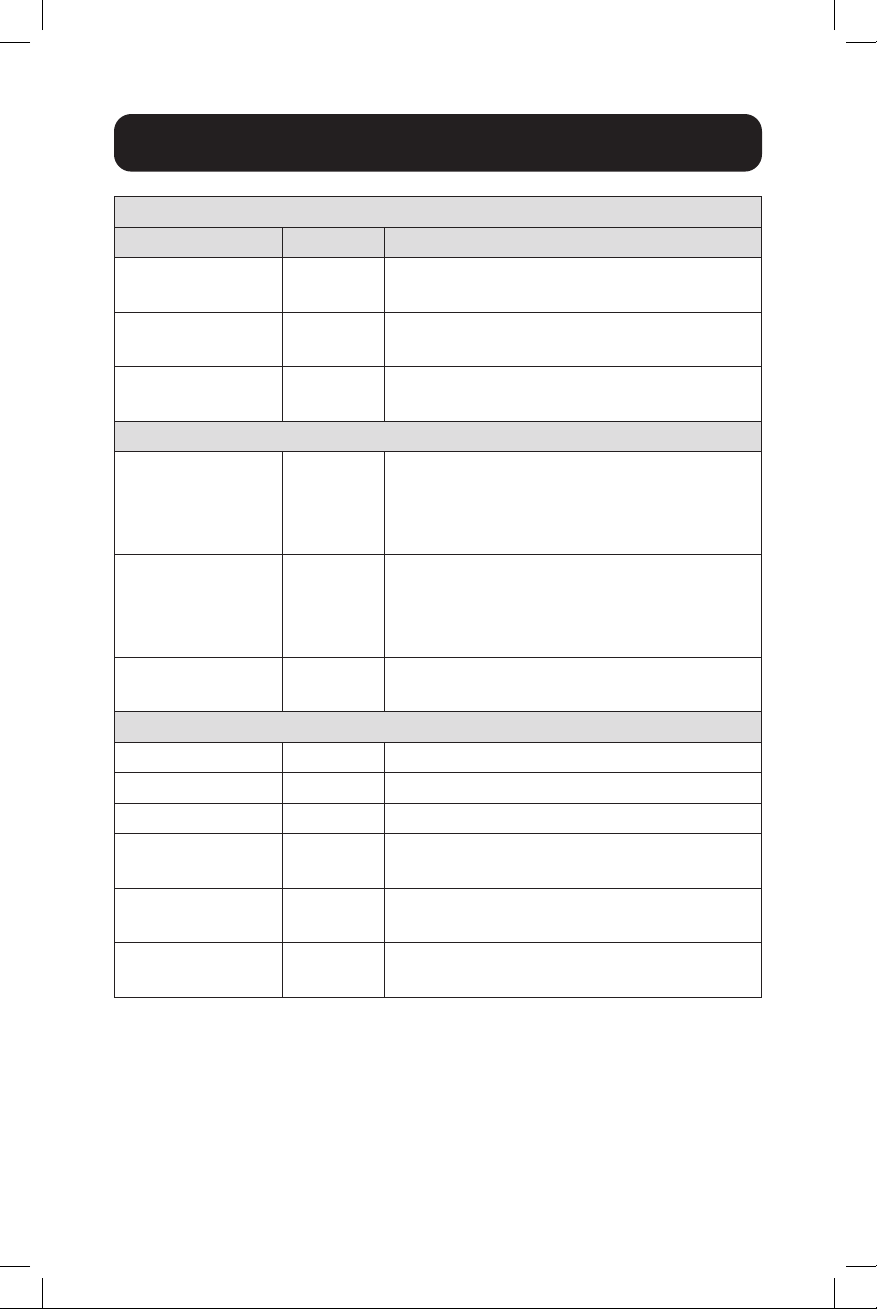
DIP Switch Setting
Switch Number Label Description
1 LLB
ON: LLB is enabled
OFF: LLB is disabled
2 LFS
ON: LFS is enabled
OFF: LFS is disabled
3 FX100
ON:Port2(SFP)speedat100Mbps
OFF:Port2(SFP)speedat1000Mbps
Switch Category: ALM (Alarm)
4 PWR
ON: Master power alarm reporting is
enabled
OFF: Master power alarm reporting is
disabled
5 RPS
ON: Redundant power alarm reporting is
enabled
OFF: Redundant power alarm reporting
is disabled
6 LFS
ON: Alarm for LFS issue is enabled
OFF: Alarm for LFS is disabled
LED Indicators
PWR(Green) ON Primary power is on
PWR(Green) OFF Primarypoweroorexperiencingfailure
RPS(Green) ON Redundant(Secondary)powerison
RPS(Green) OFF
Redundant(Secondary)powerisoor
experiencing failure
ALM(Red) ON
Alarmforfollowingconditions:LFS(Link
FaultSignaling)alarm;powerloss
ALM(Red) OFF
Normaloperation,noLFSalarmor
power loss
DIP Switch Function and LED Status Table
5
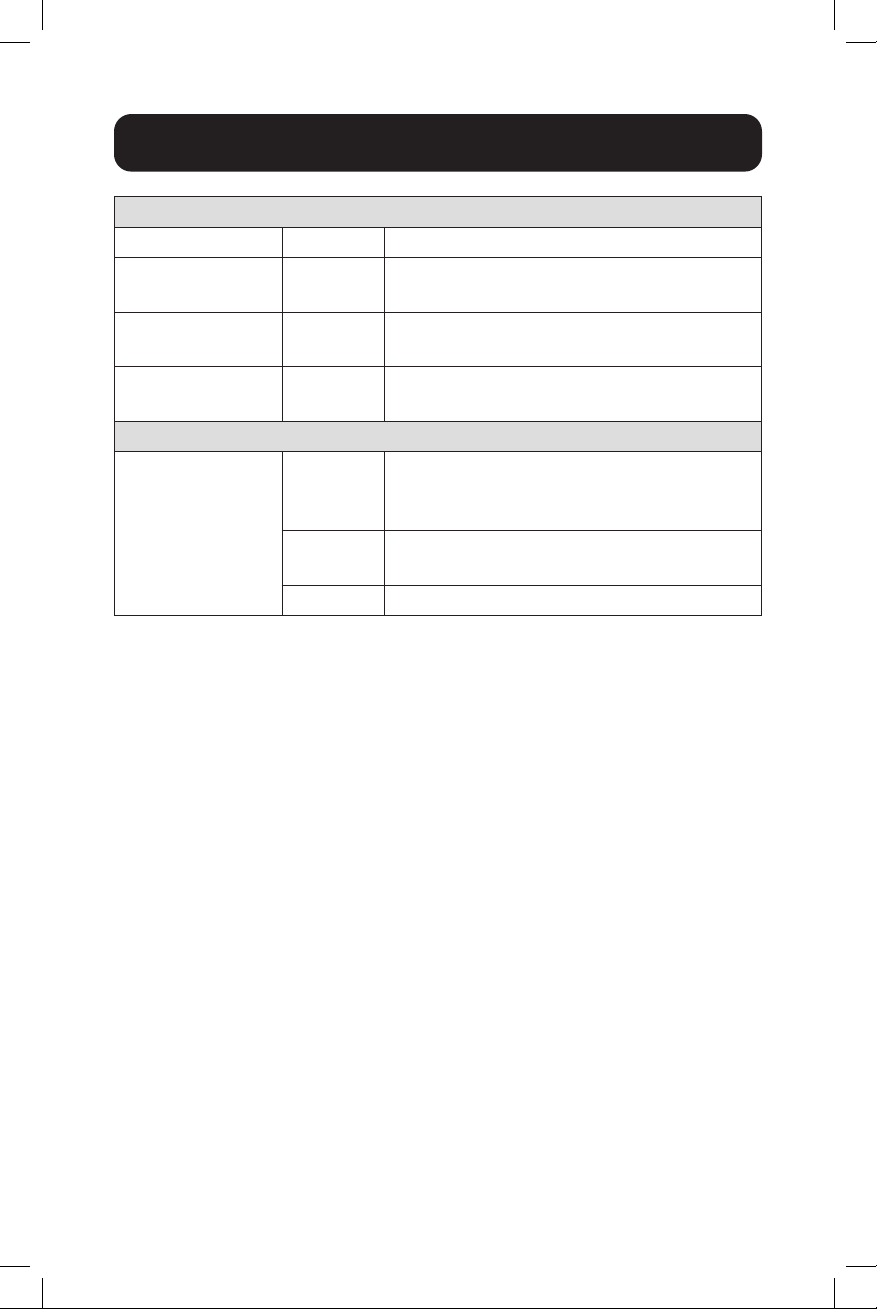
DIP Switch Function and LED Status Table
RJ45
1000M(Green) ON Copper connection up to 1000 Mbps
1000M(Green) OFF
Copper connection speed at 10/100
Mbps
LNK/ACT
(Green)
ON
(Blinking)
Copperportcorrectlylinked
LNK/ACT
(Green)
OFF Copperportlinkfailure
SFP
SFP(Green/
Amber)
ON
Ethernetlink-up
- Green: Speed 1000 Mbps
- Amber: Speed 100 Mbps
ON
(Blinking)
Activity(receivingortransmittingdata)
OFF Portdisconnectedorlinkfailed
6
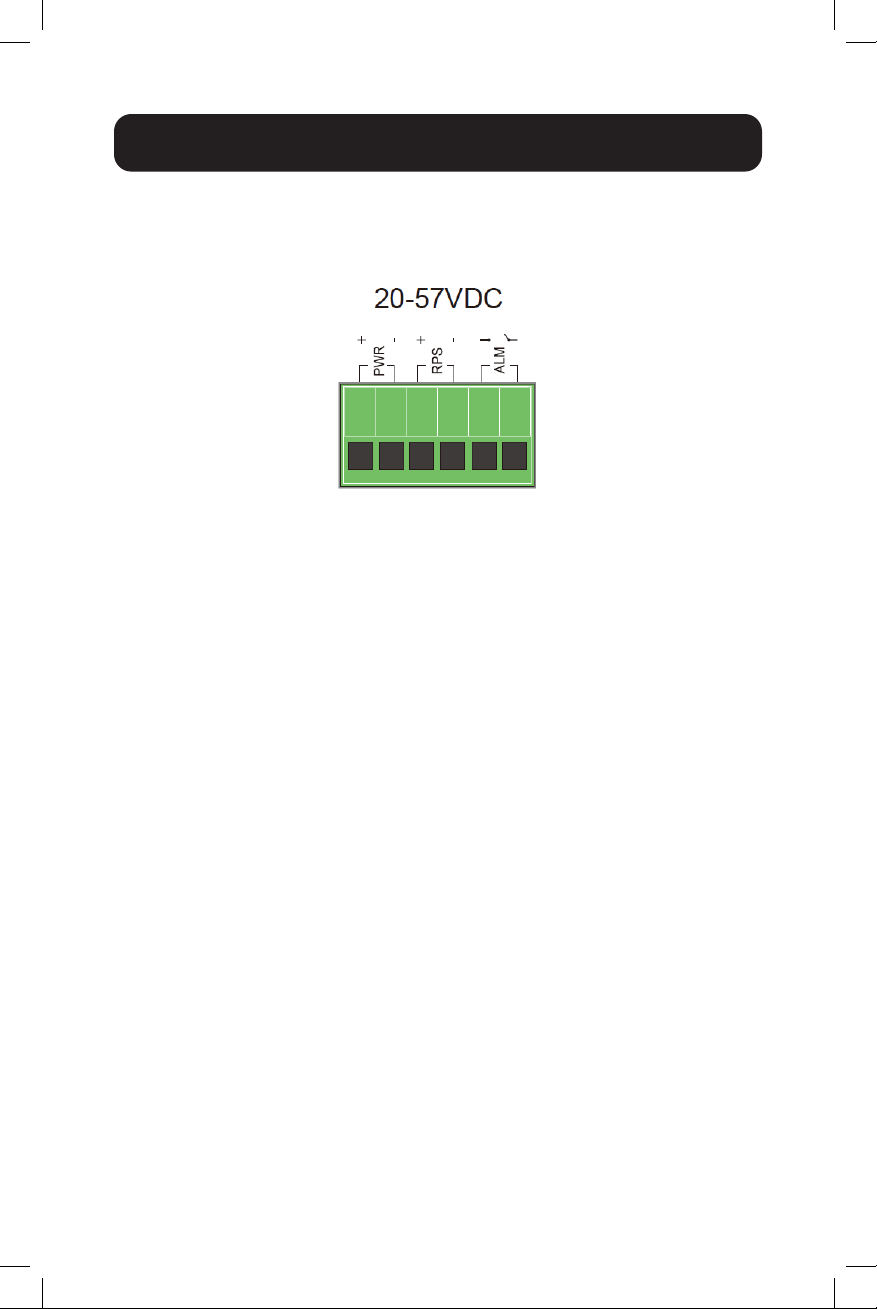
Wiring Redundant Power Inputs
Youcanuse“TerminalBlock(PWR)”forprimarypowerand“Terminal
Block(RPS)”forsecondarypower/redundantpowerinput.Thepower
input diagram is as follows:
Inserttheterminalblockconnectoraccessory,whichincludes“PWR”and
“RPS”intotheterminalblockreceptor.
Link Fault Signaling (LFS)
WhentheLFSDIPSwitchisenabled(#6),analarmindicatorwill
illuminate to indicate when a cable has been severed or when some
other cause of disruption in service has occurred. The LFS function
monitorsbothcopperandbersegmentsforatotalservicereport.
7
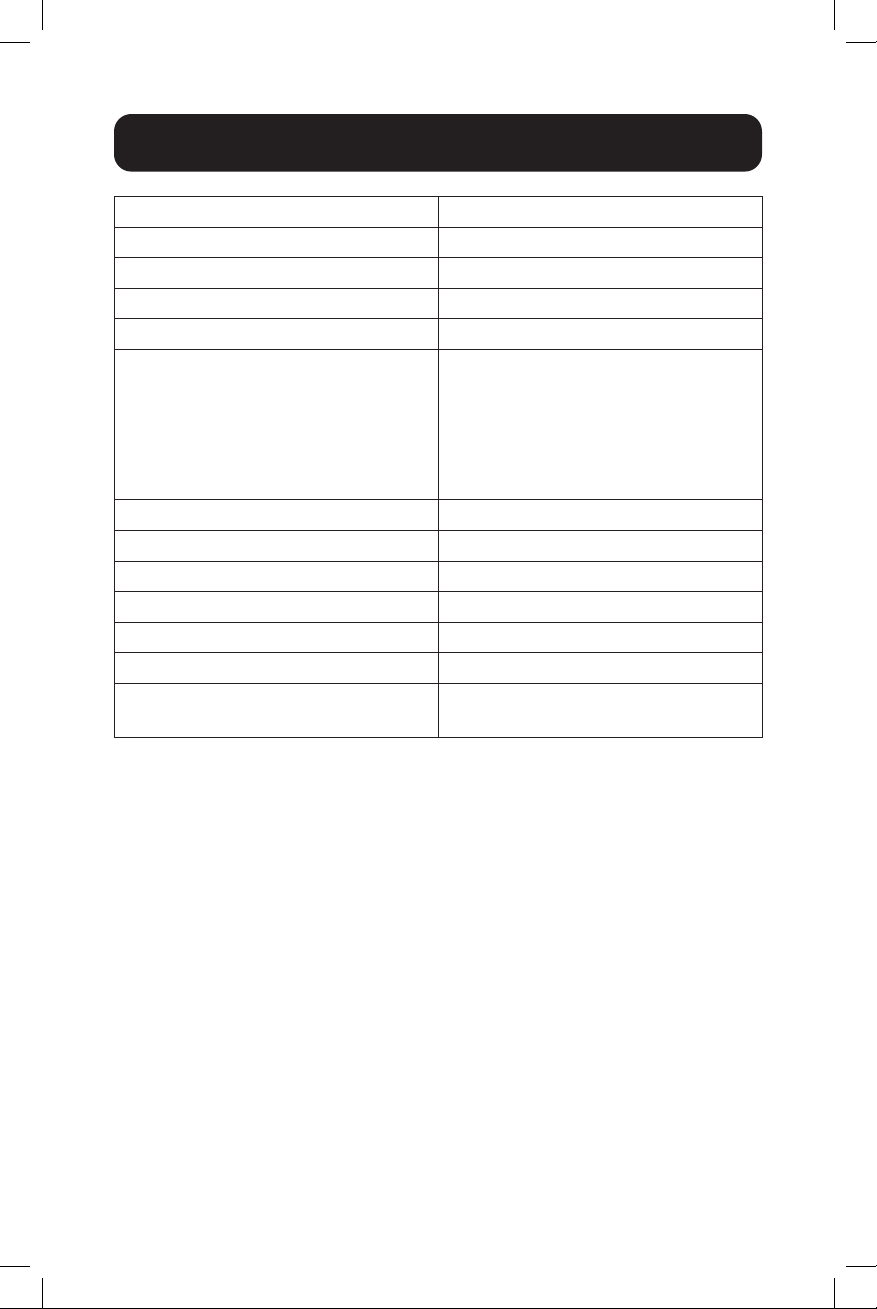
Specications
Optical Wavelength N/A
NetworkSpeed 10/100/1000Mbps(Gigabit)
Mode N/A(OpenSFP)
Transmission Distance N/A(OpenSFP)
Duplex Mode AutoMDI/MDIX
IEEE Standards Supported - 802.3 10Base-T
-802.3u100Base-TX/FX
-802.3ab1000Base-TX
-802.3z1000Base-SX/LX
- 802.3x Flow Control
- 802.3 Auto-Negotiation
Power Consumption 5.5W
Power Supply Input 20~57VDC(TerminalBlock)
Operating Temperature 14 to 140°F / -10 to 60°C
Storage Temperature -40to185°F/-40to85°C
Operating Humidity 10%to95%RH,NonCondensing
Storage Humidity 5%to95%RH,NonCondensing
Unit Dimensions [H x W x D] 1.97x4.57x3.94in./
5x11.6x10cm

8
1111 W. 35th Street, Chicago, IL 60609 USA • tripplite.com/support
21-07-01993-3F74_RevA
Warranty and Product Registration
2-YEAR LIMITED WARRANTY
TRIPPLITEwarrantsitsproductstobefreefromdefectsinmaterialsandworkmanship
foraperiodoftwo(2)yearsfromthedateofinitialpurchase.TRIPPLITE’sobligation
underthiswarrantyislimitedtorepairingorreplacing(atitssoleoption)anysuchdefective
products.Toobtainserviceunderthiswarranty,youmustobtainaReturnedMaterial
Authorization(RMA)numberfromTRIPPLITEoranauthorizedTRIPPLITEservicecenter.
Products must be returned to TRIPP LITE or an authorized TRIPP LITE service center
with transportation charges prepaid and must be accompanied by a brief description of
the problem encountered and proof of date and place of purchase. This warranty does not
applytoequipment,whichhasbeendamagedbyaccident,negligenceormisapplicationor
hasbeenalteredormodiedinanyway.
EXCEPTASPROVIDEDHEREIN,TRIPPLITEMAKESNOWARRANTIES,EXPRESS
ORIMPLIED,INCLUDINGWARRANTIESOFMERCHANTABILITYANDFITNESSFORA
PARTICULAR PURPOSE.
Somestatesdonotpermitlimitationorexclusionofimpliedwarranties;therefore,the
aforesaidlimitation(s)orexclusion(s)maynotapplytothepurchaser.
EXCEPTASPROVIDEDABOVE,INNOEVENTWILLTRIPPLITEBELIABLEFOR
DIRECT,INDIRECT,SPECIAL,INCIDENTALORCONSEQUENTIALDAMAGESARISING
OUTOFTHEUSEOFTHISPRODUCT,EVENIFADVISEDOFTHEPOSSIBILITYOF
SUCHDAMAGE.Specically,TRIPPLITEisnotliableforanycosts,suchaslostprotsor
revenue,lossofequipment,lossofuseofequipment,lossofsoftware,lossofdata,costs
ofsubstitutes,claimsbythirdparties,orotherwise.
Product Registration
Visittripplite.com/warrantytodaytoregisteryournewTrippLiteproduct.You’llbe
automatically entered into a drawing for a chance to win a FREE Tripp Lite product!*
*Nopurchasenecessary.Voidwhereprohibited.Somerestrictionsapply.Seewebsitefor
details.
Use of this equipment in life support applications where failure of this equipment can
reasonablybeexpectedtocausethefailureofthelifesupportequipmentortosignicantly
aectitssafetyoreectivenessisnotrecommended.
TrippLitehasapolicyofcontinuousimprovement.Specicationsaresubjecttochange
withoutnotice.Photosandillustrationsmaydierslightlyfromactualproducts.