Use _ Care Guide
30" Free-Standing Perfect Set TM Electric _ange
Finding Information
Tabmeof contents Pmease read & save this guide
Findinginformation ..................................................... 2 ThankyouforchoosingElectrolux thenewpremium
SAFETY ................................................................... 3-5 brand in homeappliances. This Use &Care Guide is
Features .................................................................. 6-9 partofourcommitmenttocustomersatisfactionand
Getting Started ,:................................................. 10-11 product quality throughout the service life of your new
e Power up & t mers I0 •
•: ........................................... appliance.
Control lock & oven hghts ................................... 11
SettingsforBestResults .................................... 12-13 Weviewyourpurchaseasthebeginning of a
SurfaoeCooking ....................................................... 14 relationship.Toensureourabilitytocontinueserving
SettingSurfaceControls .................................... 15-18 you pleaseusethispagetorecordimportant
, Settingcooktopcontrols ............................... 16-17 productinformation.
Setting warmerzone ........................................... 18
DisplayAbbreviations ............................................... = r nrA fnr
SettingOvenControls ......................................... 20-37 _ ...... _
:.Rapidpreheat ...................................................... 20 reference
Bake .................................................................... 2I
, Usingcooktime .................................................. 22
Usingcooktimewithendtime ............................ 23 _--
::: _ Broil .............................................................. 24-25 b'urcnaseaate
Convectionbake ................................................. 26
, Usingconvectionconvert .................................... 27 ------
• Convectionroast ........................................... 28-29 Electroluxmodelnumber
Convection broil .................................................. 30
Keep warm .......................................................... 31
• SIowcook ........................................................... 32 Electroluxserialnumber
Dehydrate ............................................................ 33
Bread proof ......................................................... 34
Saving & recalling my favorite recipes .................. 35
Setting Sabbath mode ................................... 36-37
Setting Warmer Oven Controls .......................... 39-40
Keep warm .................................................... 39-40
Setting Your Preferences ................................... 41-46
Setting clock ....................................................... 4I
, Setting clock display (CLO) ................................. 4I
Setting 12 or 24 hour mode (CLO) ....................... 42
, Changing between F° or C ° (F-C) ........................ 42
Setting 12hr energy saving mede(ES) ................. 43
, Setting audio mode (AUD) ................................... 43
Adjusting oven temperature (UPO) ...................... 44
, Adjusting lower oven temperature (UPO) ............. 44
, Factory default reset (RST) ................................... 45
User preferences chart ......................................... 46
Self-Clean ........................................................... 47-48
Care & Cleaning .................................................. 49-56
Cleaning recommendations ........................... 49-40
Cooktop maintenance ......................................... 51
Cooktop cleaning .......................................... 51-52
Oven door removal ........................................ 53-54
Changing oven lights .................................... 55-56
Solutions to Common Problems ......................... 57-59
Notes ................................................................... 60-62
Warranty ................................................................... 63
For toll-free telephone support in the U.S. and
Canada:
1-877-4ELECTROLUX (1-877-435-3287)
For online support and Internet production
information visit http://www.electroluxusa.com
i_i!_!_i!i_iii_!i!_!_i!i_iii_!i!_!_i!i_iii_!i!_!_i!i_iii_!i!_!_i!i_iii_!i!_!_i!i_iii_!i!_!_i!i_iii_!i!_!_i!i_iii_!i!_!_i!i_iii_!i!_!_i!i_iii_!i!_!_i!i_i__i ©2007 ElectroluxHome Products, Inc. All rights reserved. Printed inthe USA
Safety
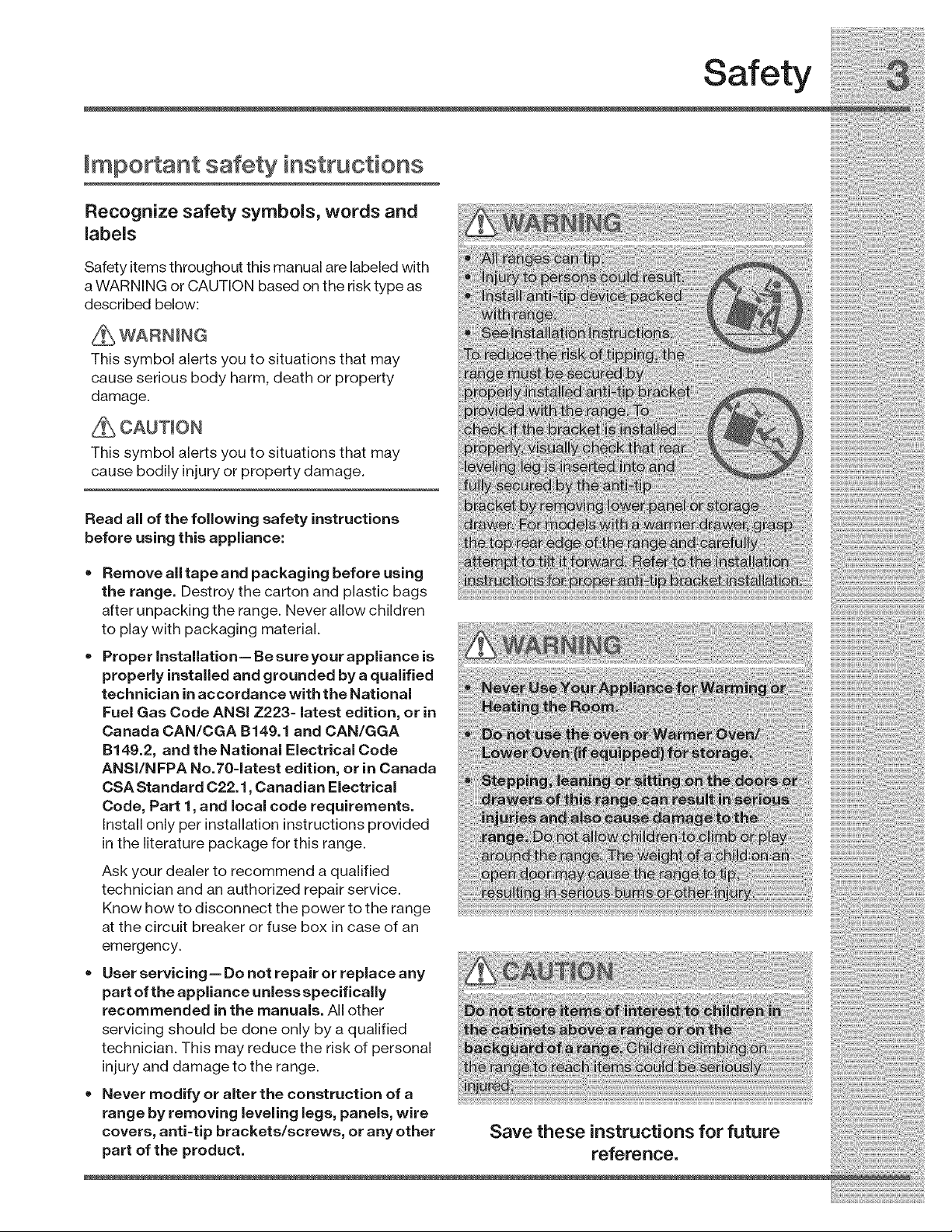
Important safety instructions
Recognize safety symbols, words and
labels
Safety items throughout this manual are labeled with
a WARNING or CAUTION based on the risk type as
described below:
This symbol alerts you to situations that may
cause serious body harm, death or property
damage.
This symbol alerts you to situations that may
cause bodily injury or property damage.
Read all of the following safety instructions
before using this appliance:
• Remove all tape and packaging before using
the range. Destroy the carton and plastic bags
after unpacking the range. Never allow children
to play with packaging material.
•Proper installation= Be sure your appliance is
properly installed and grounded by a qualified
technician in accordance with the National
Fuel Gas Code ANSi Z223= latest edition, or in
Canada CAN/CGA B149.1 and CAN/GGA
B149.2, and the National Electrical Code
ANS[/NFPA No.70=latest edition, or in Canada
CSA Standard 022.1, Canadian Electrical
Code, Part 1, and local code requirements.
Install only per installation instructions provided
in the literature package for this range.
Ask your dealer to recommend a qualified
technician and an authorized repair service.
Know how to disconnect the power to the range
at the circuit breaker or fuse box in case of an
emergency.
•User servicing = Do not repair or replace any
part of the appliance unless specifically
recommended in the manuals. All other
servicing should be done only by a qualified
technician. This may reduce the risk of personal
injury and damage to the range.
Never modify or alter the construction of a
range by removing leveling legs, panels, wire
covers, anti=tip brackets/screws, or any other
part of the product.
Save these instructions for future
reference.
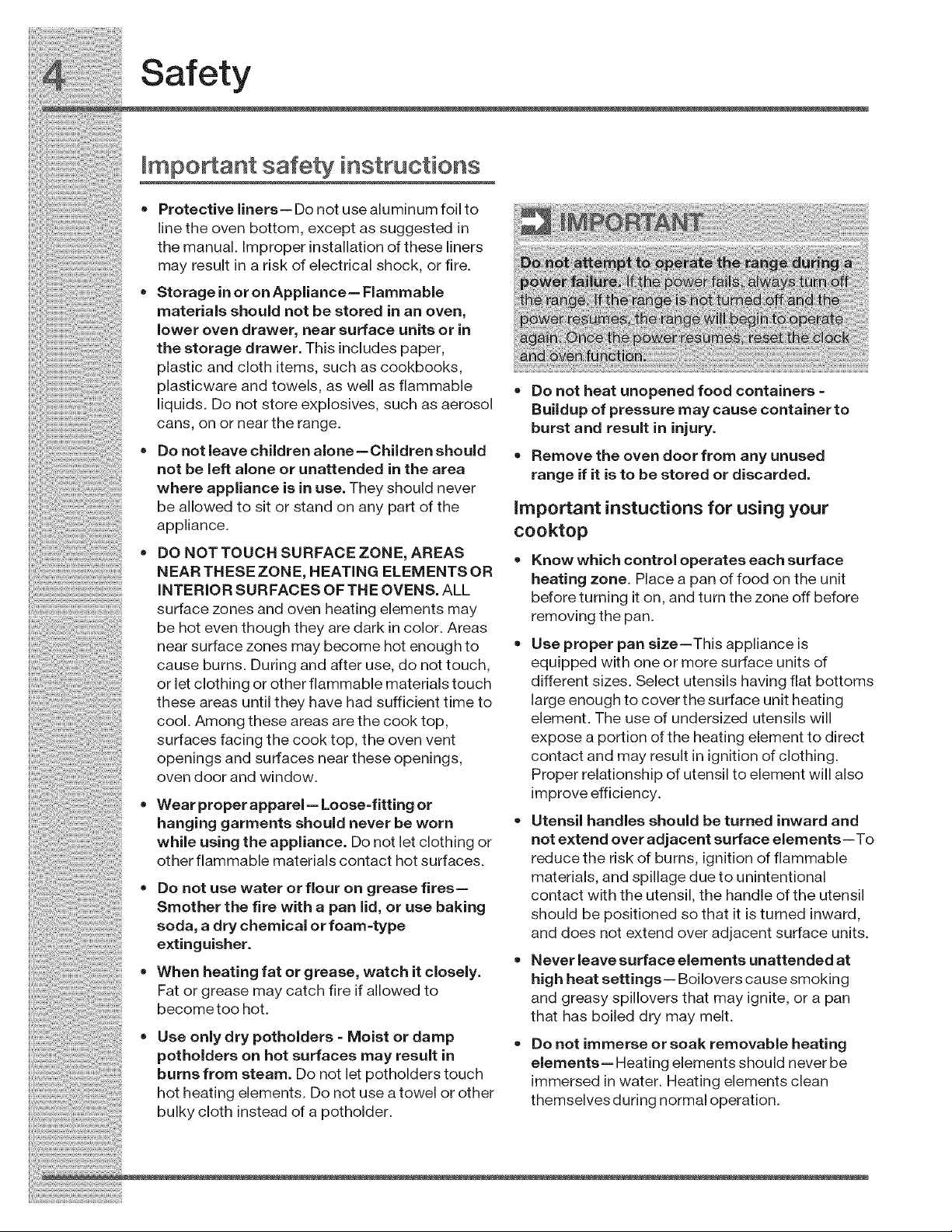
surface zones and oven heating elements may
be hot even though they are dark in color. Areas
near surface zones may become hot enough to
cause burns. During and after use, do not touch,
or let clothing or other flammable materials touch
these areas until they have had sufficient time to
cool. Among these areas are the cook top,
surfaces facing the cook top, the oven vent
openings and surfaces near these openings,
oven door and window.
Wear proper apparel = Loose=fitting or
hanging garments should never be worn
while using the appliance. Do not let clothing or
other flammable materials contact hot surfaces.
•Do not use water or flour on grease fires=
Smother the fire with a pan lid, or use baking
soda, adry chemical or foam =type
extinguisher.
• When heating fat or grease, watch it closely.
Fat or grease may catch fire if allowed to
become too hot.
Use only dry potholders =Moist or damp
potholders on hot surfaces may result in
burns from steam. Do not let potholders touch
hot heating elements. Do not use a towel or other
bulky cloth instead of a potholder.
before turning it on, and turn the zone off before
removing the pan.
Use proper pan size--This appliance is
equipped with one or more surface units of
different sizes. Select utensils having flat bottoms
large enough to cover the surface unit heating
element. The use of undersized utensils will
expose a portion of the heating element to direct
contact and may result in ignition of clothing.
Proper relationship of utensil to element will also
improve efficiency.
Utensil handles should be turned inward and
not extend over adjacent surface elements--To
reduce the risk of burns, ignition of flammable
materials, and spillage due to unintentional
contact with the utensil, the handle of the utensil
should be positioned so that it is turned inward,
and does not extend over adjacent surface units.
,, Never leave surface elements unattended at
high heat settings-- Boilovers cause smoking
and greasy spillovers that may ignite, or a pan
that has boiled dry may melt.
•Do not immerse or soak removable heating
elements= Heating elements should never be
immersed in water. Heating elements clean
themselves during normal operation.
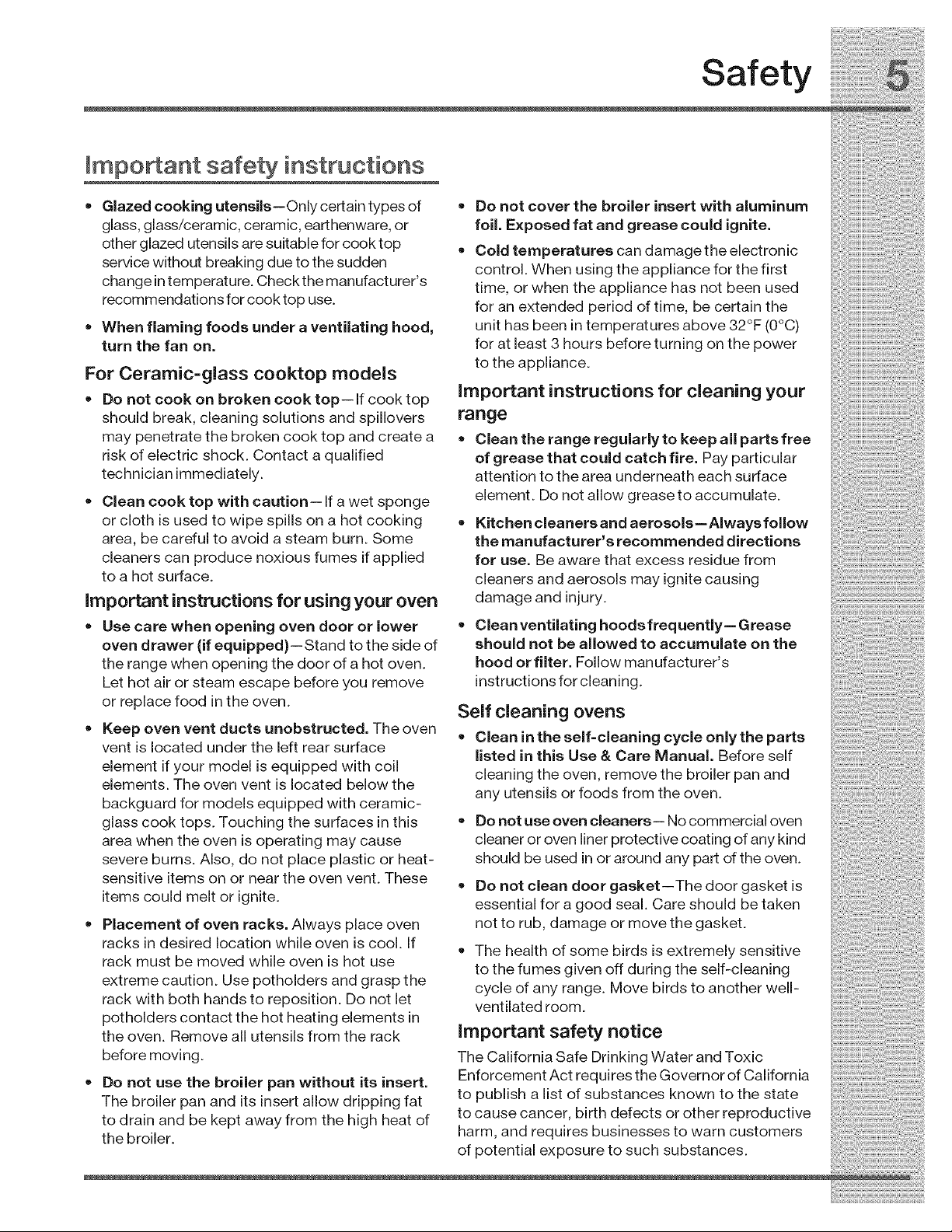
Safety
ImpoAant safety instructions
• Glazed cooking utensils--Only certain types of
glass, glass!ceramic, ceramic, earthenware, or
other glazed utensils are suitable for cook top
service without breaking due to the sudden
change intemperature. Check the manufacturer's
recommendations for cook top use.
When flaming foods under aventilating hood,
turn the fan on.
For Ceramic=glass cooktop models
= Do not cook on broken cook top-- If cook top
should break, cleaning solutions and spillovers
may penetrate the broken cook top and create a
risk of electric shock. Contact a qualified
technician immediately.
• Clean cook top with caution-- If a wet sponge
or cloth is used to wipe spills on a hot cooking
area, be careful to avoid a steam burn. Some
cleaners can produce noxious fumes if applied
to a hot surface.
important instructions for using your oven
=Do not cover the broiler insert with aluminum
foil. Exposed fat and grease could ignite.
= Cold temperatures can damage the electronic
control. When using the appliance for the first
time, or when the appliance has not been used
for an extended period of time, be certain the
unit has been intemperatures above 32°F (0°C)
for at least 3 hours before turning on the power
to the appliance.
important instructions for cleaning your
range
•Clean the range regularly to keep all parts free
of grease that could catch fire. Pay particular
attention to the area underneath each surface
element. Do not allow greaseto accumulate.
•Kitchen cleaners and aerosols--Always follow
the manufacturer s recommended directions
for use. Be aware that excess residue from
cleaners and aerosols may ignite causing
damage and injury.
• Use care when opening oven door or lower = Clean ventilating hoodsfrequently= Grease
over= drawer ( f equ pped)--Stand to the s de of should not be allowed to accumulate on the
the range when opening the door of a hot oven. hood or filter. Follow manufacturer s
Let hot air or steam escape before you remove instructions for cleaning.
or rep ace food n the oven A,_ -,_=: .......
Sell uleainily uveil_ :;:;
•Keep oven vent ducts unobstructed. The oven .............. :
=L;lean In 1:he selT=cleanlng cycle only _ne parl:s
vent is located under the left rear surface =istea in this bse & Care IVianuaL Before self :::::::
element if your model is equipped with coil cleaning the oven, remove the broiler pan and
elements. The oven vent _slocated below the ........
any u[enslls or TOOaSTrom[ne oven.
backguard for models equipped with ceramic- ::::::
glass cook tops. Touching the surfaces in this • Do not use oven cleaners-- No commercial oven
area when the oven is operating may cause cleaner or oven liner protective coating of any kind
severe burns. Also, do not place plastic or heat- should be used inor around any part of the oven.
sensitive items on o.r near the oven vent. These = Do not clean door gasket--The door gasket is
items could melt or ignite, essential for a good seal. Care should be taken
• Placement of oven racks. Always place oven not to rub, damage or move the gasket.
racks in desired location while oven is cool If
• " " . " . " "= The health of some birds is extremely sensitive ::
rack must be moved while oven is hot use to the fumes given off during the self-cleaning
extreme cau!2,n. Use.potholder.s and grasp the cycle of any range. Move birds to another well-
rack wltn bOth nanas to reposmon. L)Onot let vent ated room
potholders contact the hot heating elements in ".
the oven. Remove all utensils from the rack important safety not|ce
before moving. The California Safe Drinking Water and Toxic
• Do not use the broiler pan without its insert. Enforcement Act requires the Governor of California
The broiler pan and its insert allow dripping fat to pubhsh a hst of substances known to the state
to drain and be kept away from the high heat of to cause cancer, birth defects or other reproductive
the bro er harm, and requires businesses to warn customers ::
of potential exposure to such substances.
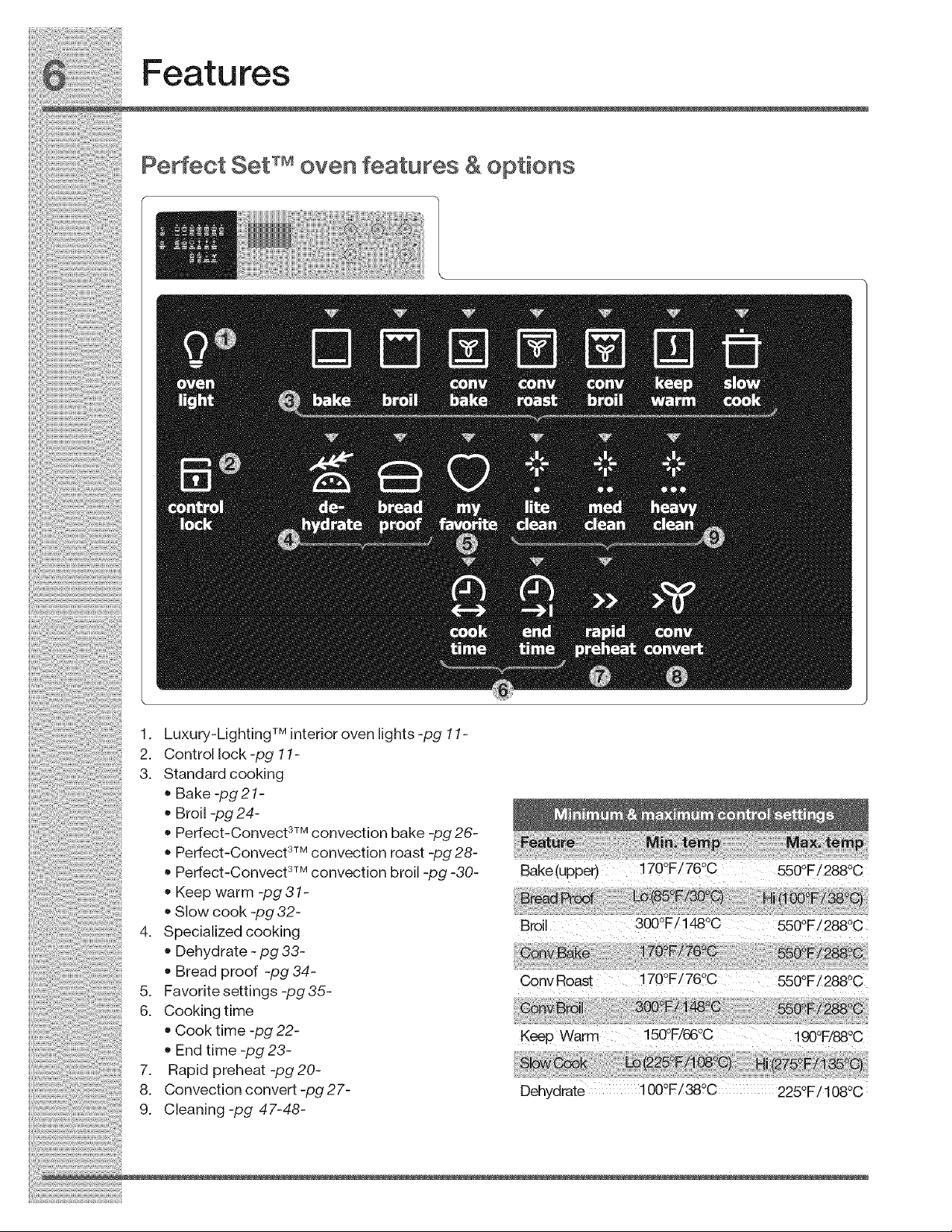
1. Luxury-LightingTM interior oven lights -pg 11-
2. Control lock -pg 11-
3. Standard cooking
• Bake -lag 21 -
Broil -pg 24-
Peffect-Convect 3TMconvection bake -pg 26-
• peffect-Convect 3TMconvection roast -pg 28-
• peffect-Convect 3TMconvection broil -pg -30-
Keep warm -lag 31-
Slow cook -lag 32-
4. Specialized cooking
Dehydrate - pg 33-
Bread proof -pg 34-
5. Favorite settings -pg35-
6. Cooking time
Cook time -pg 22-
End time -pg 23-
7. Rapid preheat -lag 20-
8. Convection convert -pg 27-
9. Cleaning-pg 47-48-
Bake(upper) 170°FZ76°C 550°F/288°C
Broil 300°F!!480C 550°F!2880C
Conv Roast 170°F/76°C 550°F/288°C
Keep Warm 150°F/66°C i 90°F/88°C
Dehydrate 1000F/38°C 225OF/108oc
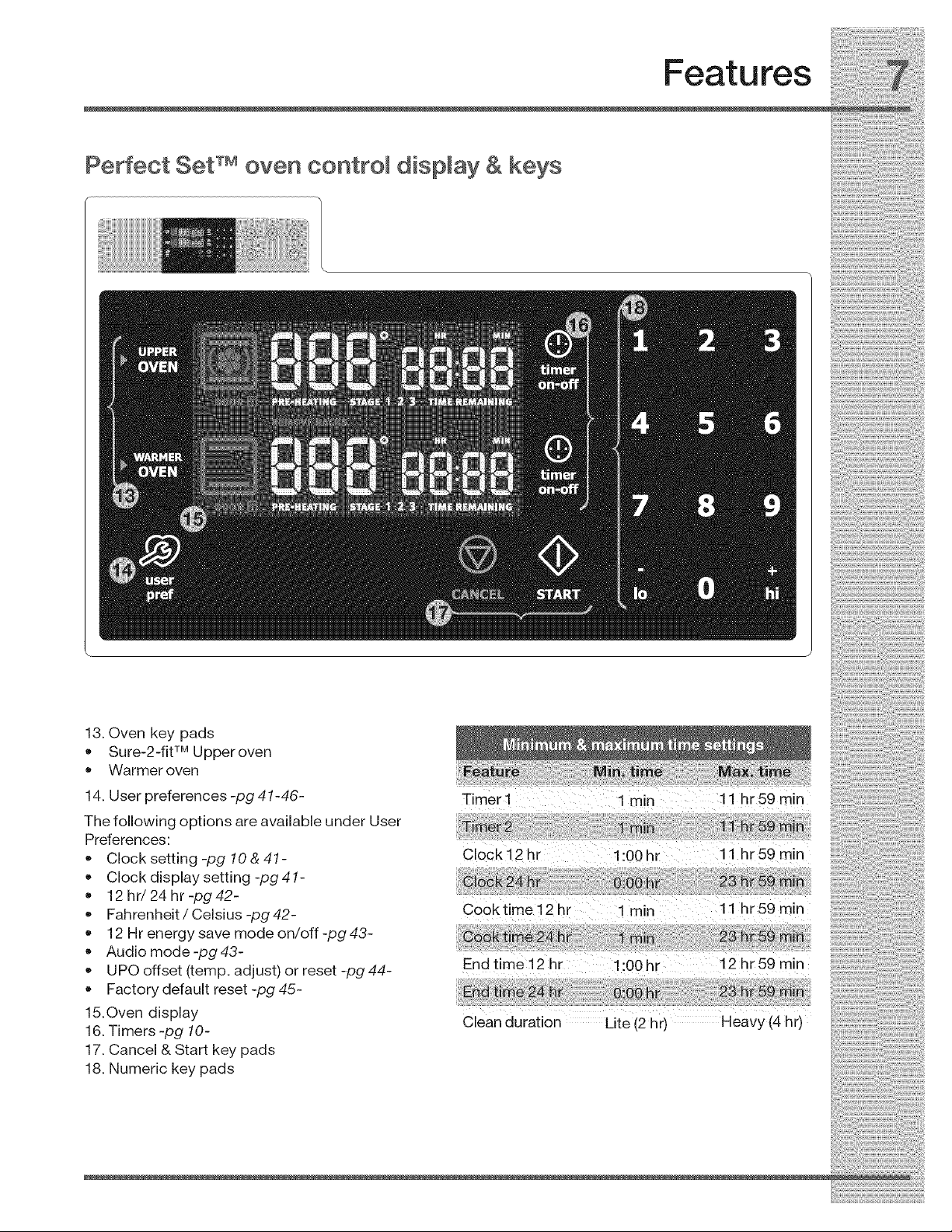
Features
Perfect Set TM oven controm dispmay & keys
13. Oven key pads
• Sure-2-flt TM Upperoven
• Warmer oven
14. User preferences -pg 41-46-
The following options are available under User
Preferences:
• Clock setting -pg 10 & 41-
Clock display setting -pg 41-
12 hr/24 hr -pg 42-
Fahrenheit /Celsius -pg 42-
12 Hr energy save mode on/off -pg 43-
Audio mode -pg 43-
UPO offset (temp. adjust) or reset -pg 44-
Factory default reset -pg 45-
15.Oven display
16. Timers -pg 10-
17. Cancel & Start key pads
18. Numeric key pads
Timer i 1rain 11 hr59min
Clock 12 hr i :00 hr 11 hr 59 min
Cooktime i2 hr 1rain ii hr59min
End time 12 hr i:00hr 12 hr59 min
Clean duration Lite (2 hr) Heavy (4 hr)
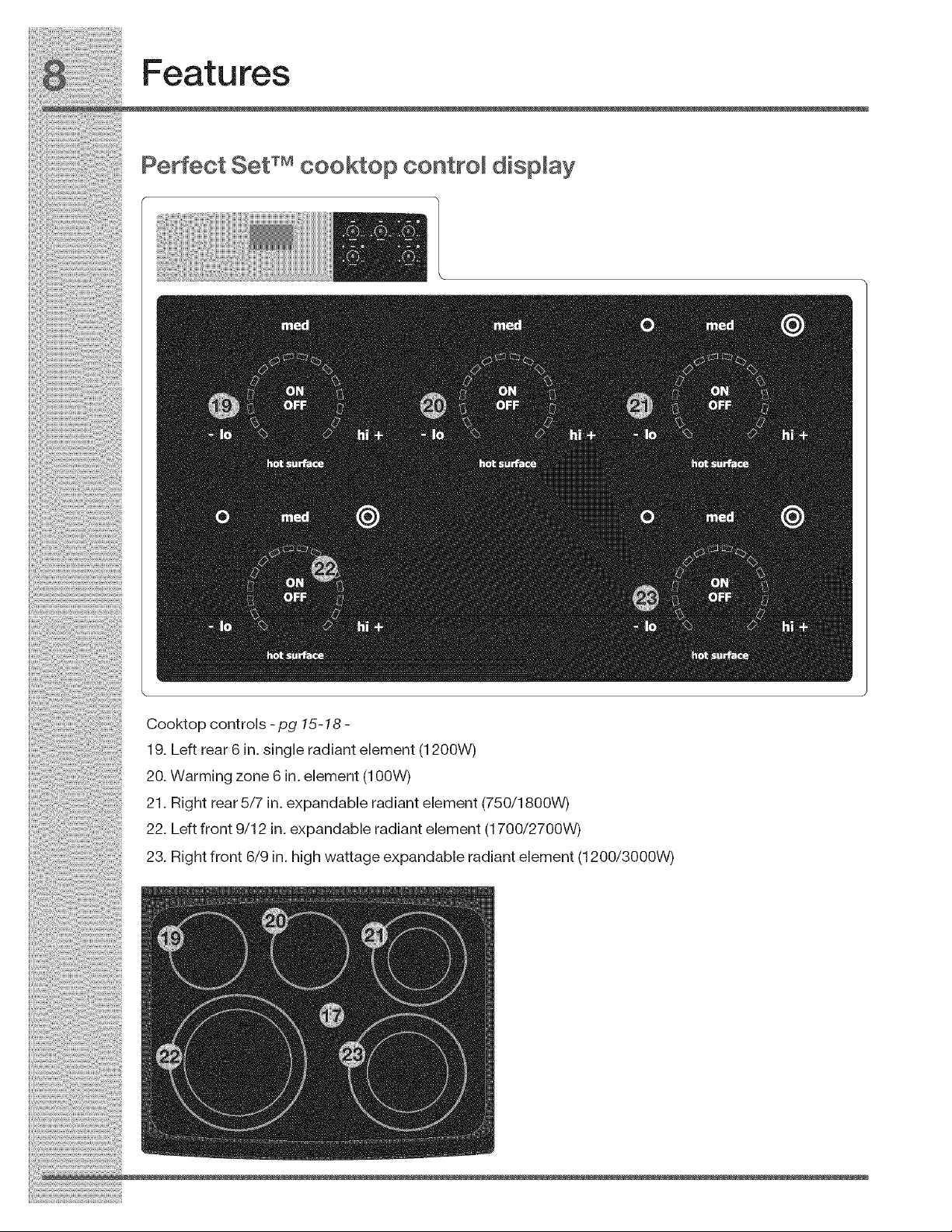
Cooktopcontrols-pg 15-18 -
19. Left rear 6 in. single radiant element (1200W)
20. Warming zone 6 in. element (100W)
21. Right rear 5/7 in. expandable radiant element (750/1800W)
22. Left front 9/12 in. expandable radiant element (1700/2700W)
23. Right front 6/9 in. high wattage expandable radiant element (1200/3000W)
Features
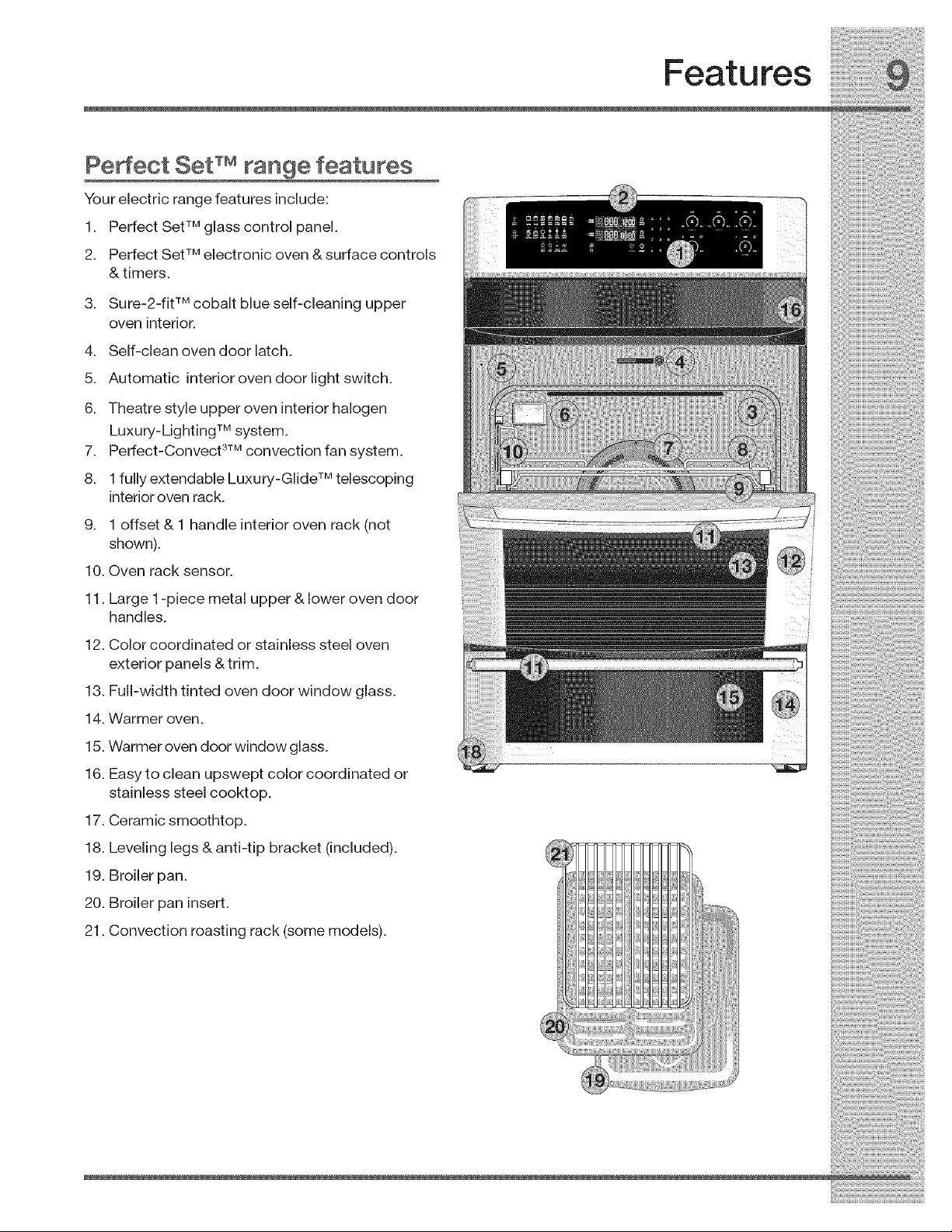
Pe ect Set TMrange features
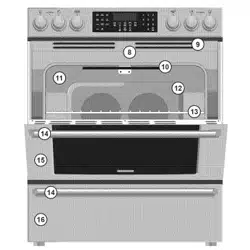
YoureJectrJcrangefeaturesJnclude:
1. PerfectSetTMglasscontrolpanel.
2. PerfectSetTMelectronicoven &surfacecontrols
&timers.
3. Sure-2-fjtTMcobaltblueself-cleanJngupper
oven interior.
4. Self-cleanovendoorlatch.
5. Automatic interiorovendoorlightswitch.
6. Theatre style upper oven interior halogen
Luxury-Lighting TM system.
7. Perfect-Convect 3TMconvection fan system.
8. 1 fully extendable Luxury-Glide TM telescoping
interior oven rack.
9. 1 offset & 1 handle interior oven rack (not
shown).
10. Oven rack sensor.
11. Large 1-piece metal upper & lower oven door
handles.
12. Color coordinated or stainless steel oven
exterior panels &trim.
13. Full-width tinted oven door window glass.
14. Warmer oven.
15. Warmer oven door window glass.
16. Easy to clean upswept color coordinated or
stainless steel cooktop.
17. Ceramic smoothtop.
18. Leveling legs & anti-tip bracket (included).
19. Broiler pan.
20. Broiler pan insert.
21. Convection roasting rack (some models).
Getting Started
SeAing clock at power up
You will be prompted to enter the time of day in the
event of a power failure or when you first provide
electric power to your appliance.
• When your appliance is first powered up, 12:00
will flash in the display.
• Enter the time of day using the numeric key
pads and press START to set.
If an invalid time of day is entered, the control will
triple beep. Re-enter a valid time of day and press
START. If CANCEL is pressed your clock will start
with thetime set for 12:00.
Select the user pref key to modify the time of day
during other situations such as day light savings.
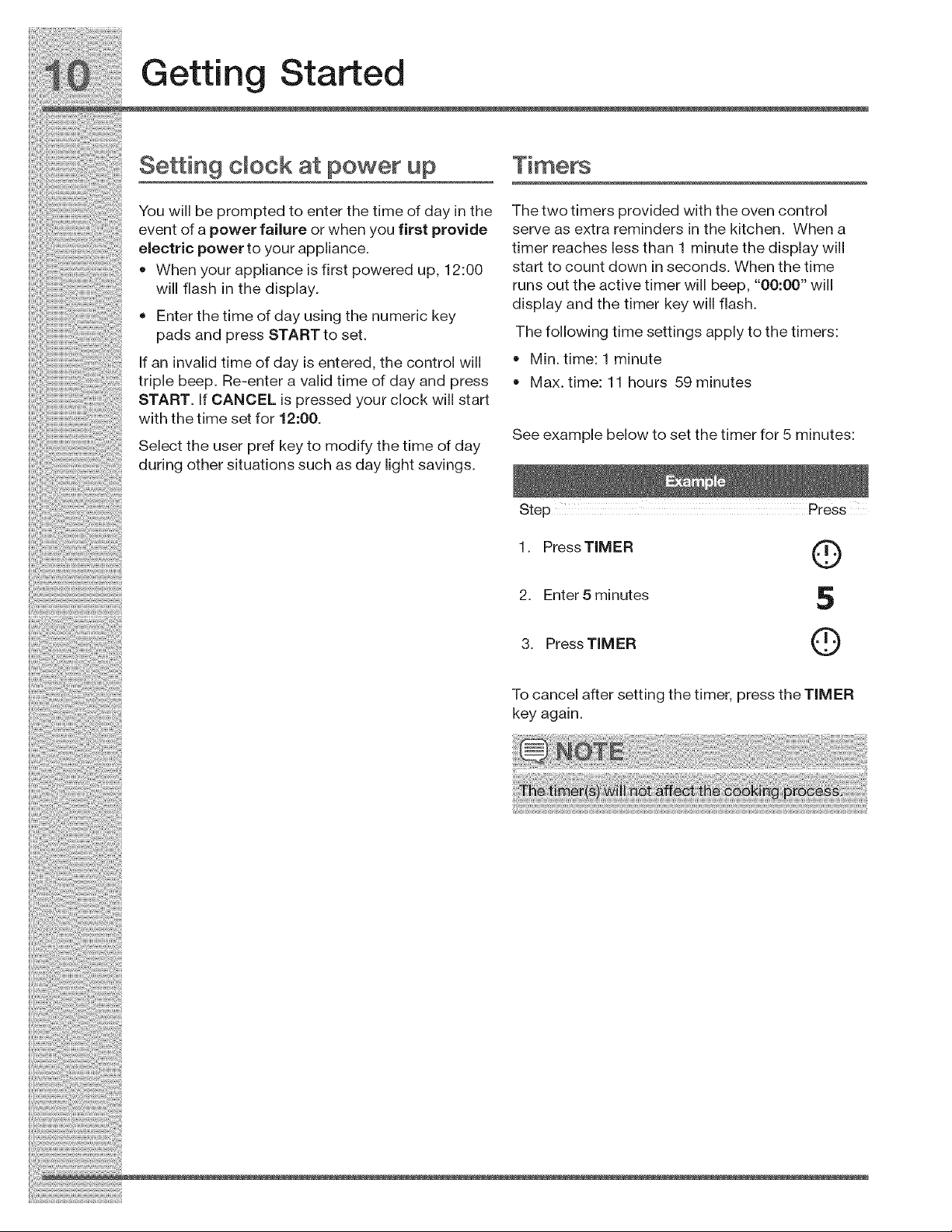
The two timers provided with the oven control
serve as extra reminders in the kitchen. When a
timer reaches less than 1 minute the display will
start to count down in seconds. When the time
runs out the active timer will beep, "00:00" will
display and the timer key will flash.
The following time settings apply to the timers:
Min. time: 1 minute
Max. time: 11 hours 59 minutes
See example below to set the timer for 5 minutes:
1. Press TIMER Q
2. Enter 5 minutes 5
3. Press TIMER Q
To cancel after setting the timer, press the TIMER
key again.
Getting Started
Changing settings
Software controls the upper and lower ovens so
that both may be set to operate at the same time
with unique settings. It is very important to
understand that before setting or modifying either
oven, you must first select which oven you desire
to set or modify.
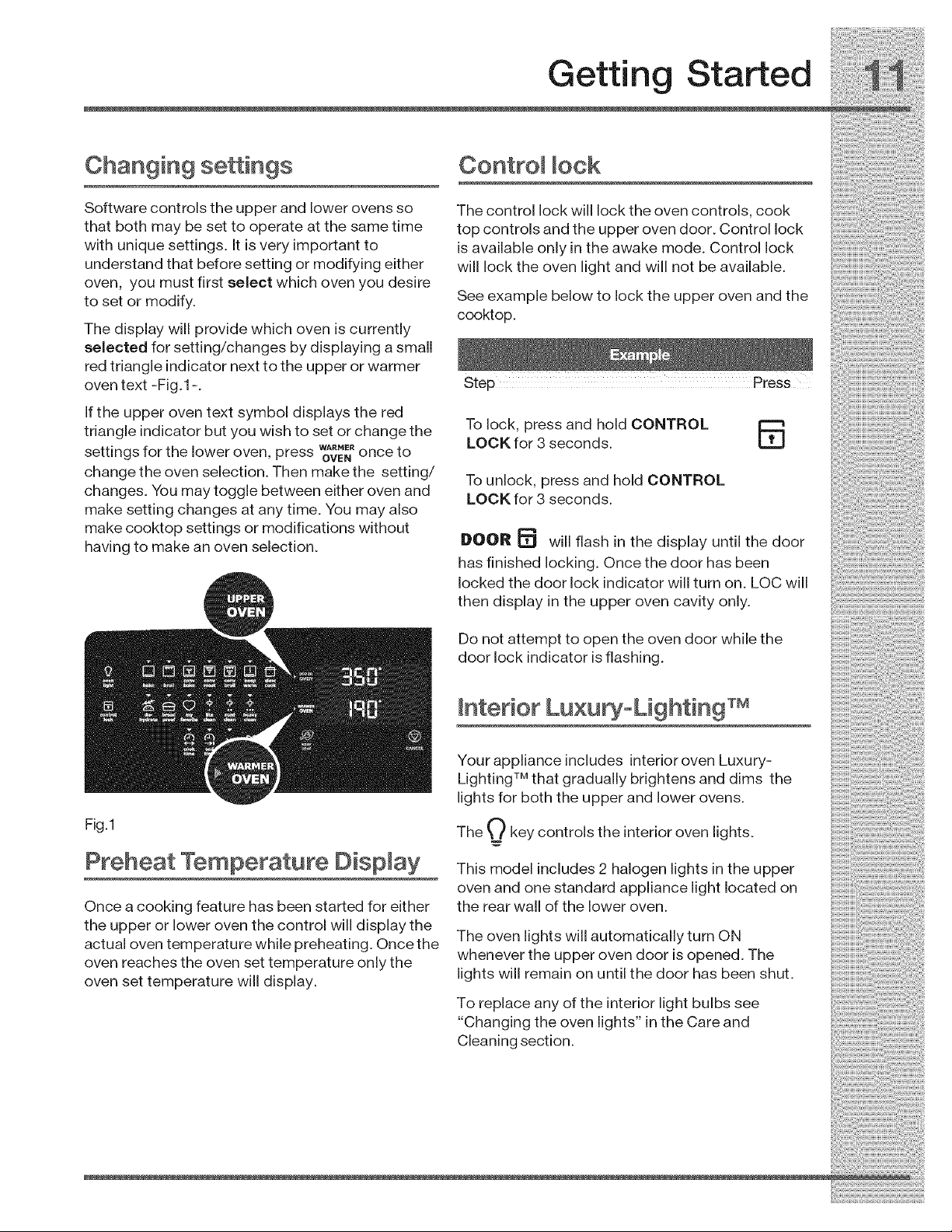
The display will provide which oven is currently
selected for setting/changes by displaying a small
red triangle indicator next to the upper or warmer
oven text -Fig.1 -.
If the upper oven text symbol displays the red
triangle indicator but you wish to set or change the
settings for the lower oven, press WA_ME_once to
OVEN
change the oven selection. Then make the setting/
changes. You may toggle between either oven and
make setting changes at any time. You may also
make cooktop settings or modifications without
having to make an oven selection.
Control lock
The control lock will lock the oven controls, cook
top controls and the upper oven door. Control lock
is available only in the awake mode. Control lock
will lock the oven light and will not be available.
See example below to lock the upper oven and the
cooktop.
To lock, press and hold CONTROL
LOCK for 3 seconds. _L.tJ
To unlock, press and hold CONTROL
LOCK for 3 seconds.
DOOR _ will flash in the display until the door
has finished locking. Once the door has been
locked the door lock indicator will turn on. LOC will
then display in the upper oven cavity only.
Do not attempt to open the oven door while the
door lock indicator is flashing.
Interior Lu×u oLighting TM
Fig.1
Preheat Temperature Display
Once a cooking feature has been started for either
the upper or lower oven the control will display the
actual oven temperature while preheating. Once the
oven reaches the oven set temperature only the
oven set temperature will display.
Your appliance includes interior oven Luxury-
Lighting TM that gradually brightens and dims the
lights for both the upper and lower ovens.
The O key controls the interior oven lights.
This model includes 2 halogen lights in the upper
oven and one standard appliance light located on
the rear wall of the lower oven.
The oven lights will automatically turn ON
whenever the upper oven door is opened. The
lights will remain on until the door has been shut.
To replace any of the interior light bulbs see
"Changing the oven lights" in the Care and
Cleaning section.
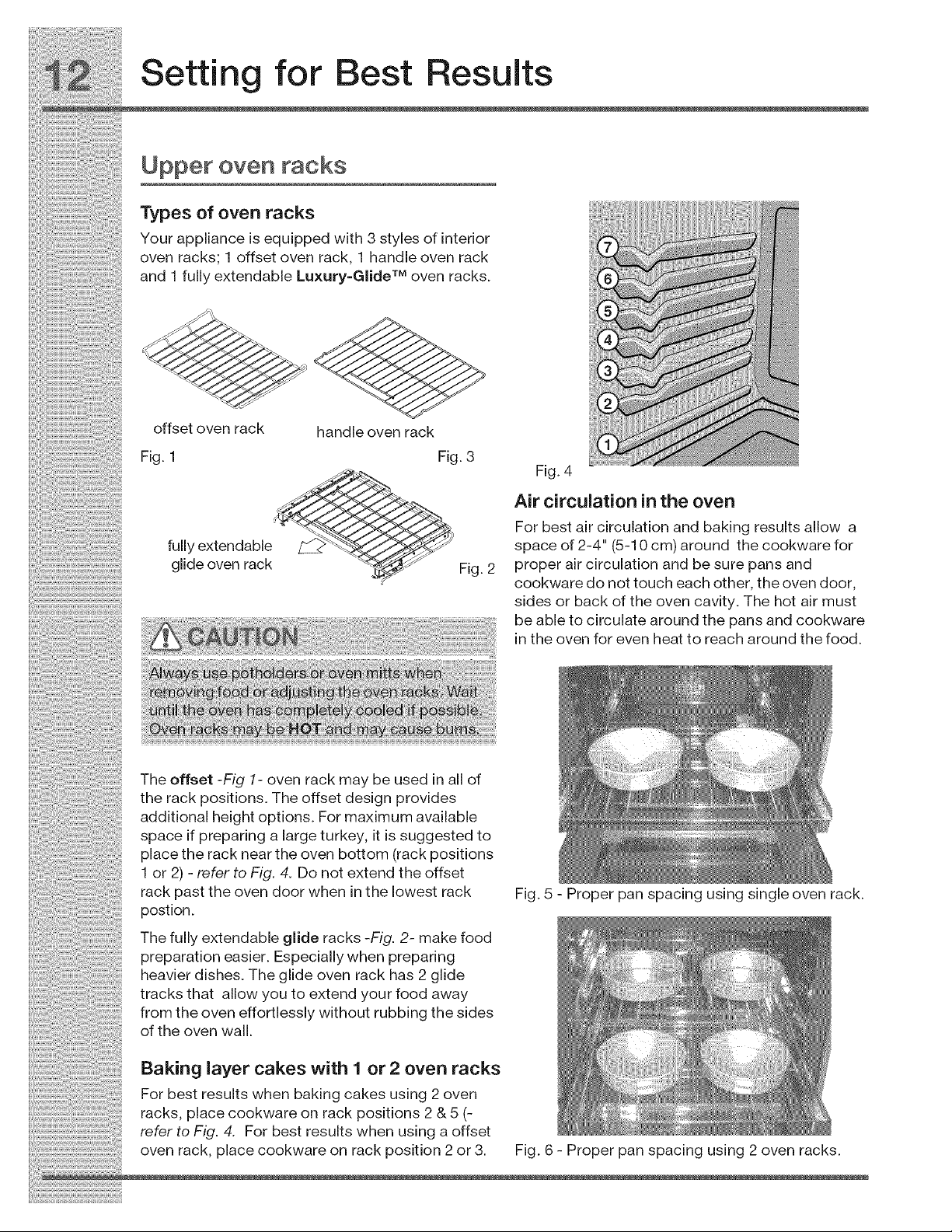
Theoffset-Fig1- oven rack may be used in all of
the rack positions. The offset design provides
additional height options. For maximum available
space if preparing a large turkey, it is suggested to
place the rack near the oven bottom (rack positions
1 or 2) - refer to Fig. 4. Do not extend the offset
rack past the oven door when in the lowest rack
postion.
The fully extendable glide racks -Fig. 2- make food
preparation easier. Especially when preparing
heavier dishes. The glide oven rack has 2 glide
tracks that allow you to extend your food away
from the oven effortlessly without rubbing the sides
of the oven wall.
Baking layer cakes with 1 or 2 oven racks
For best results when baking cakes using 2 oven
racks, place cookware on rack positions 2 & 5 (-
refer to Fig. 4. For best results when using a offset
oven rack place cookware on rack position 2 or 3.
Fig. 5 - Proper pan spacing using single oven rack.
Fig. 6 - Proper pan spacing using 2 oven racks.
Setting for Best Results
Upper oven racks
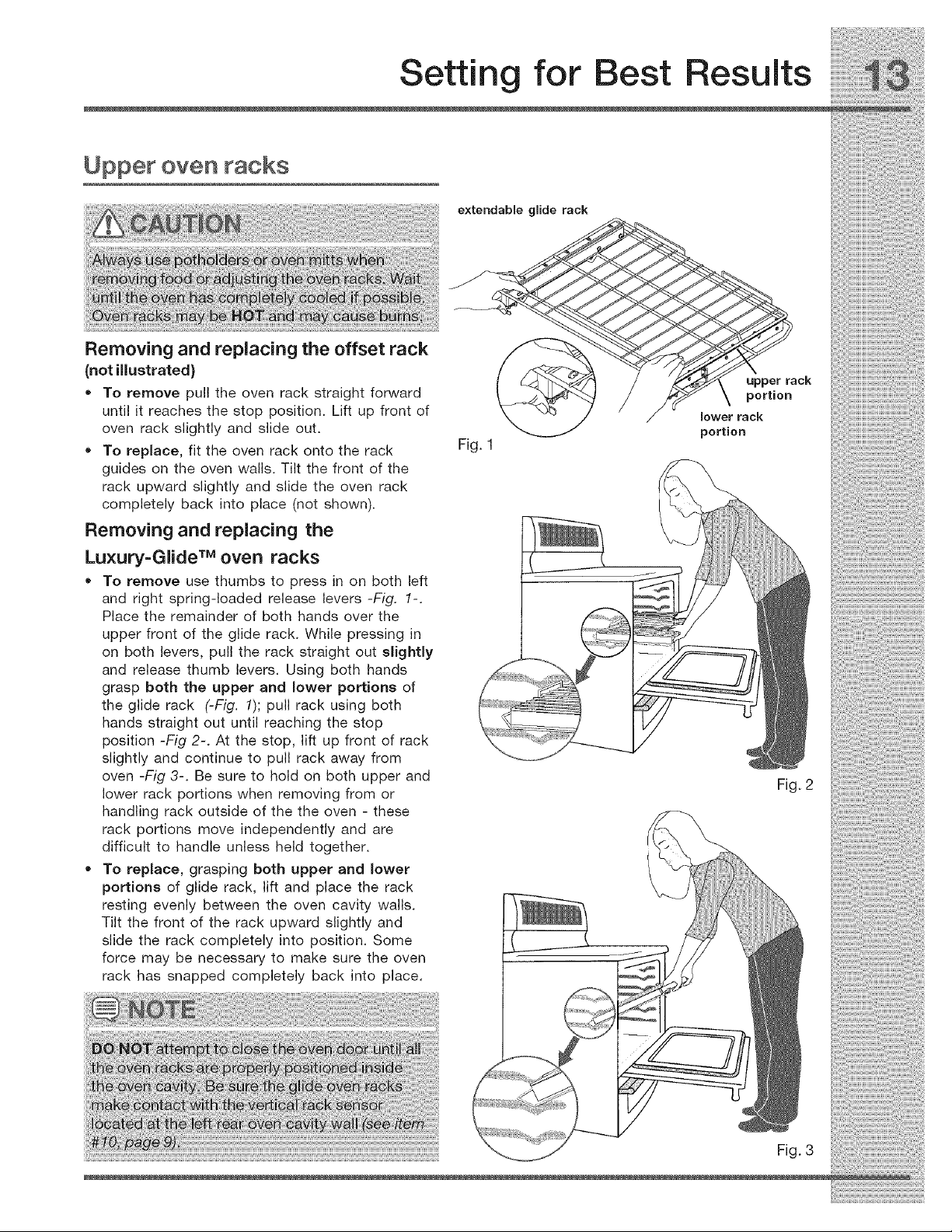
Removing and replacing the offset rack
(not illustrated)
• To remove pull the oven rack straight forward
until it reaches the stop position. Lift up front of
oven rack slightly and slide out.
• To replace, fit the oven rack onto the rack
guides on the oven walls. Tilt the front of the
rack upward slightly and slide the oven rack
completely back into place (not shown).
Removing and replacing the
Luxury=Glide TM oven racks
•To remove use thumbs to press in on both left
and right spring-loaded release levers -Fig. 1-.
Place the remainder of both hands over the
upper front of the glide rack. While pressing in
on both levers, pull the rack straight out slightly
and release thumb levers. Using both hands
grasp both the upper and lower portions of
the glide rack (-Fig. 1); pull rack using both
hands straight out until reaching the stop
position -Fig 2-. At the stop, lift up front of rack
slightly and continue to pull rack away from
oven -Fig 3-. Be sure to hold on both upper and
lower rack portions when removing from or
handling rack outside of the the oven - these
rack portions move independently and are
difficult to handle unless held together.
• To replace, grasping both upper and lower
portions of glide rack, lift and place the rack
resting evenly between the oven cavity walls.
Tilt the front of the rack upward slightly and
slide the rack completely into position. Some
force may be necessary to make sure the oven
rack has snapped completely back into place.
extendable glide rack
Fig. 1
ck
/_ \ portion
lower rack
portion
Fig. 2
Fig. 3
i_!_i_Ji_i_i%_;_i_i!5_i!_:;_:_i;i_i_i_i!_!_!iii_i_!_i_:_!
Surface Cooking
Cookware
Us ngpropercookware Cookwarem t typ =
Thesizeandtypeofcookware used will influence Thecookwarematefialdetermineshowevenlyand
thesettingneededforbestcookingresults, quicklyheatistransferredfromthesurfaceelement
Cookwareshouldhaveflatbottomsthatmakegood tothepanbottom. Themostpopularmaterials
contactwiththeentiresurfaceheatingelement, available are:
Checkforfiatnessbyrotatingaruleracrossthe • Aluminum-Excellentheatconductor. Some
bottomofthecookware, typesoffoodwillcauseittodarken(Anodized
aluminumcookwareresistsstaining&pitting). If
aluminum panssfdeacrosstheceramic
cooktop, theymayleavemetal markswhichwill
resemblescratches. Removethesemarks
immediately.
• Copper-Excellentheatconductorbutdiscolors
easily. Mayleavemetal markson ceramicglass
(seeAluminumabove).
,, Stainlesssteel-Slowheatconductorwith
unevencookingresults. Isdurable, easytoclean
and resists staining.
..... • Cast iron-Apoorheatconductorhoweverwill
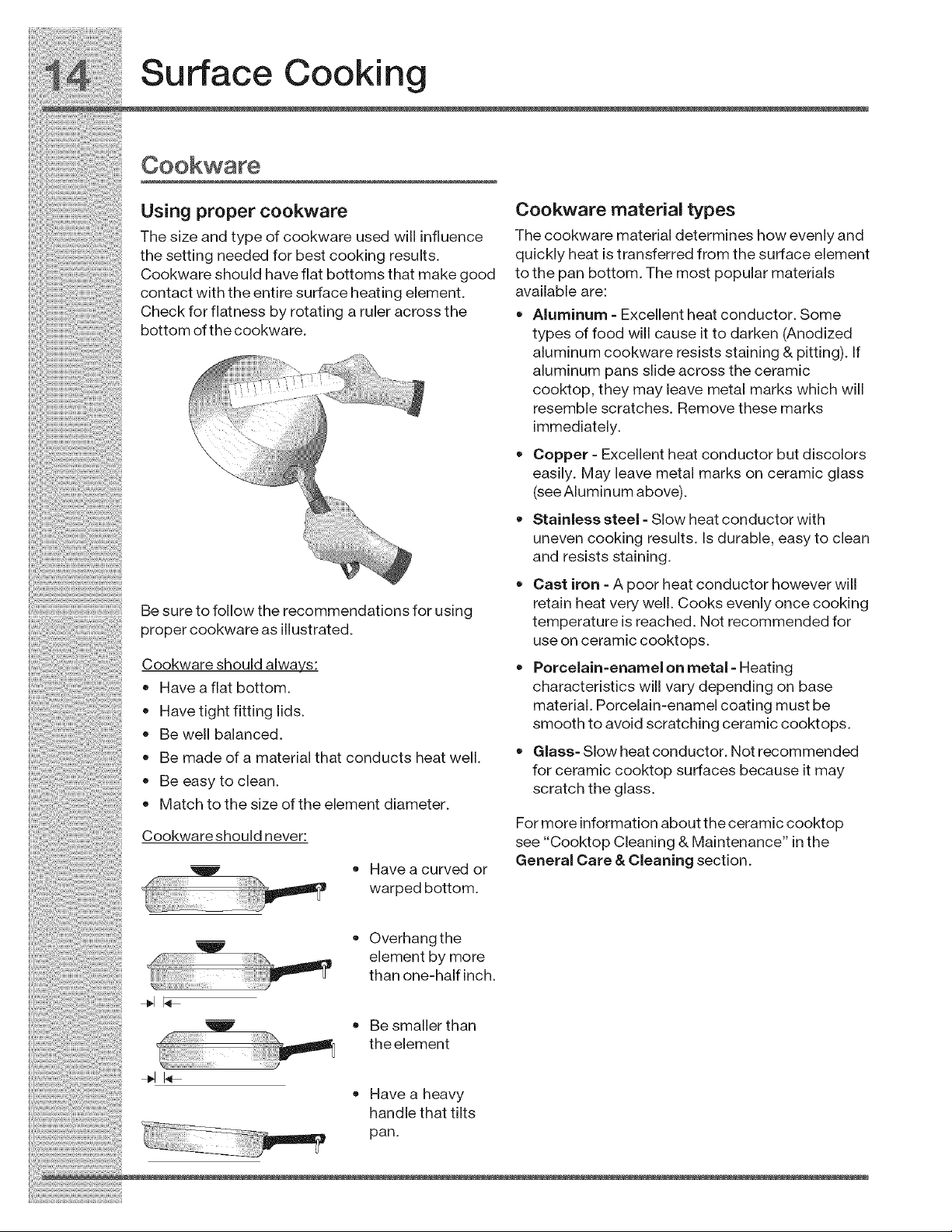
Be sure to follow the recommendations for using
proper cookware as illustrated.
Cookware should always:
Have a flat bottom.
Have tight fitting lids.
Be well balanced.
Be made of a material that conducts heat well.
• Be easy to clean.
Match to the size of the element diameter.
Cookwareshould never:
!_' • Have a curved or
I' warped bottom.
retain heat very well. Cooks evenly once cooking
temperature is reached. Not recommended for
use on ceramic cooktops.
Porcelain=enamel on metal - Heating
characteristics will vary depending on base
material. Porcelain-enamel coating must be
smooth to avoid scratching ceramic cooktops.
Glass- Slow heat conductor. Not recommended
for ceramic cooktop surfaces because it may
scratch the glass.
For more information about the ceramic cooktop
see "Cooktop Cleaning & Maintenance" in the
General Care & Cleaning section.
Overhangthe
elementbymore
than one-half inch.
• Be smaller than
theelement
Have a heavy
handle that tilts
pan.
Setting Surface Controls
How the cooktop works
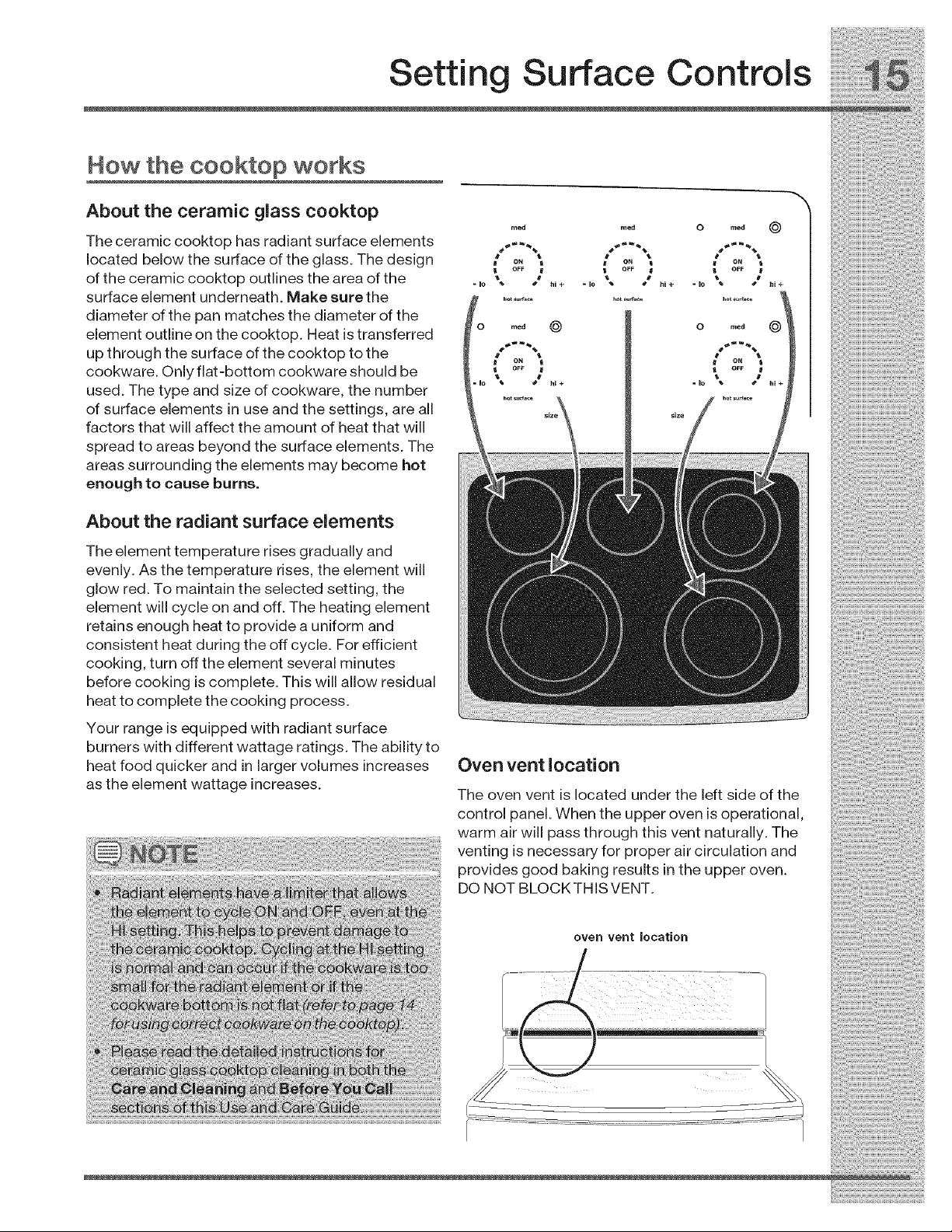
About the ceramic glass cooktop
The ceramic cooktop has radiant surface elements
located below the surface of the glass. The design
of the ceramic cooktop outlines the area of the
surface element underneath. Make sure the
diameter of the pan matches the diameter of the
element outline on the cooktop. Heat is transferred
up through the surface of the cooktop to the
cookware. Only flat-bottom cookware should be
used. The type and size of cookware, the number
of surface elements in use and the settings, are all
factors that will affect the amount of heat that will
spread to areas beyond the surface elements. The
areas surrounding the elements may become hot
enough to cause burns.
About the radiant surface elements
The element temperature rises gradually and
evenly. As the temperature rises, the element will
glow red. To maintain the selected setting, the
element will cycle on and off. The heating element
retains enough heat to provide a uniform and
consistent heat during the off cycle. For efficient
cooking, turn off the element several minutes
before cooking is complete. This will allow residual
heat to complete the cooking process.
Your range is equipped with radiant surface
burners with different wattage ratings. The ability to
heat food quicker and in larger volumes increases
as the element wattage increases.
reed reed O me,!J _)
ON ON ON
OFF
"10 \ /hi+ "IO \ tt .... IO " /"i+
© ®
Oven vent location
The oven vent is located under the left side of the
control panel. When the upper oven is operational,
warm air will pass through this vent naturally. The
venting is necessary for proper air circulation and
provides good baking results in the upper oven.
DO NOT BLOCKTHISVENT.
oven vent location
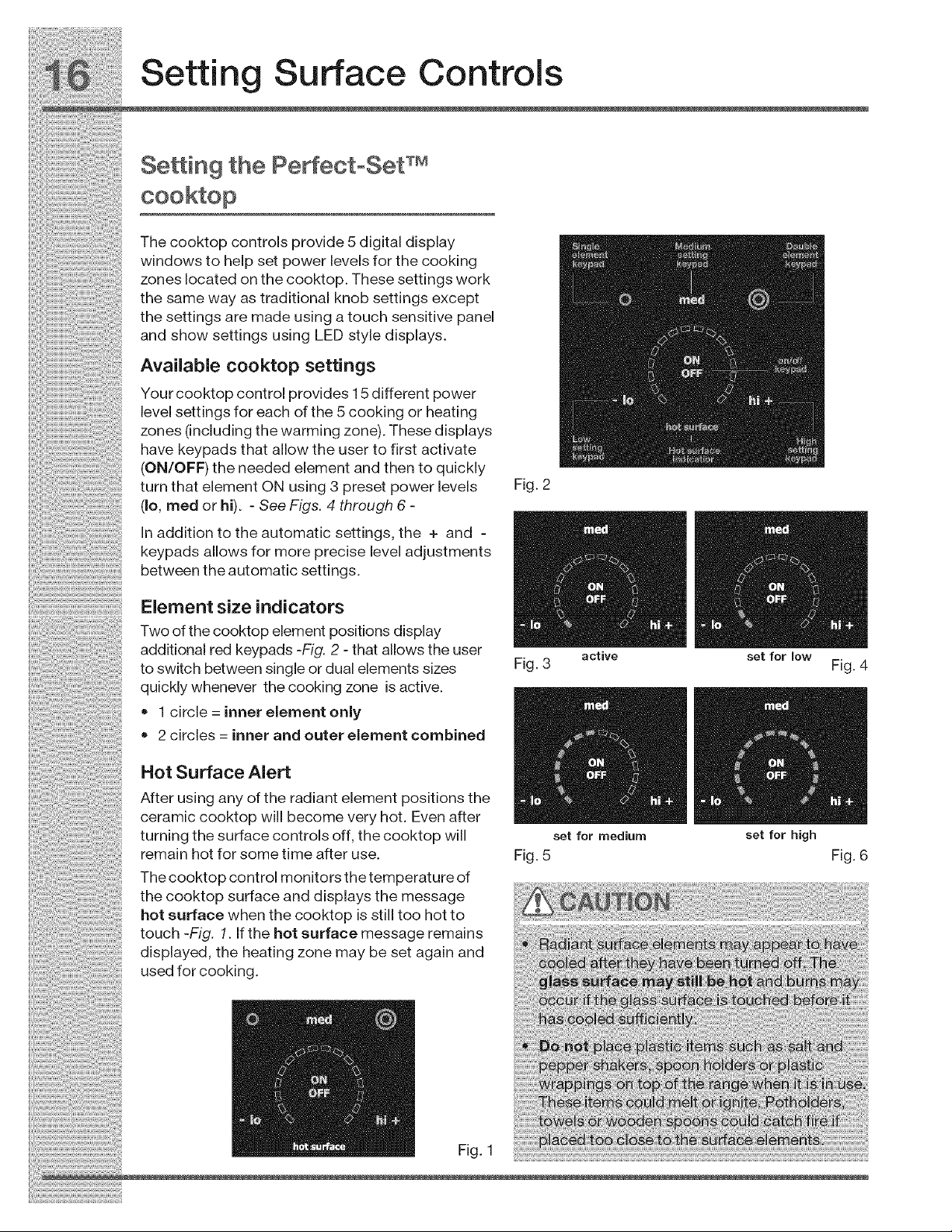
additional red keypads -Fig. 2- that allows the user
to switch between single or dual elements sizes
quickly whenever the cooking zone is active.
• 1 circle = inner element only
• 2 circles = inner and outer element combined
Hot Surface Alert
After using any of the radiant element positions the
ceramic cooktop will become very hot. Even after
turning the surface controls off, the cooktop will
remain hot for some time after use.
The cooktop control monitors the temperature of
the cooktop surface and displays the message
hot surface when the cooktop is still too hot to
touch -Fig. 1. If the hot surface message remains
displayed, the heating zone may be set again and
used for cooking.
Fig. 3 active set for low Fig. 4
mm
set for medium set for high
Fig. 5 Fig. 6
Fig. 1
Setting Surface Controls
SeAing the PerfectoSet TM
Setting cooktop elements
• Touch the ON OFF key to activate the desired
heating zone.
If the heating zone has more than one element
diameter size available, press the desired
element ring size symbol.
Press the desired power level key once (hi+,
reed or Io=) for quick automatic settings or for
more precise level settings use the hi+ or Io=
keys. Each press of the hi+ will increase or Io=
keypad will decrease the power one level at a
time. Any of these power level changes or ring
size changes may be made any time during the
heating process.
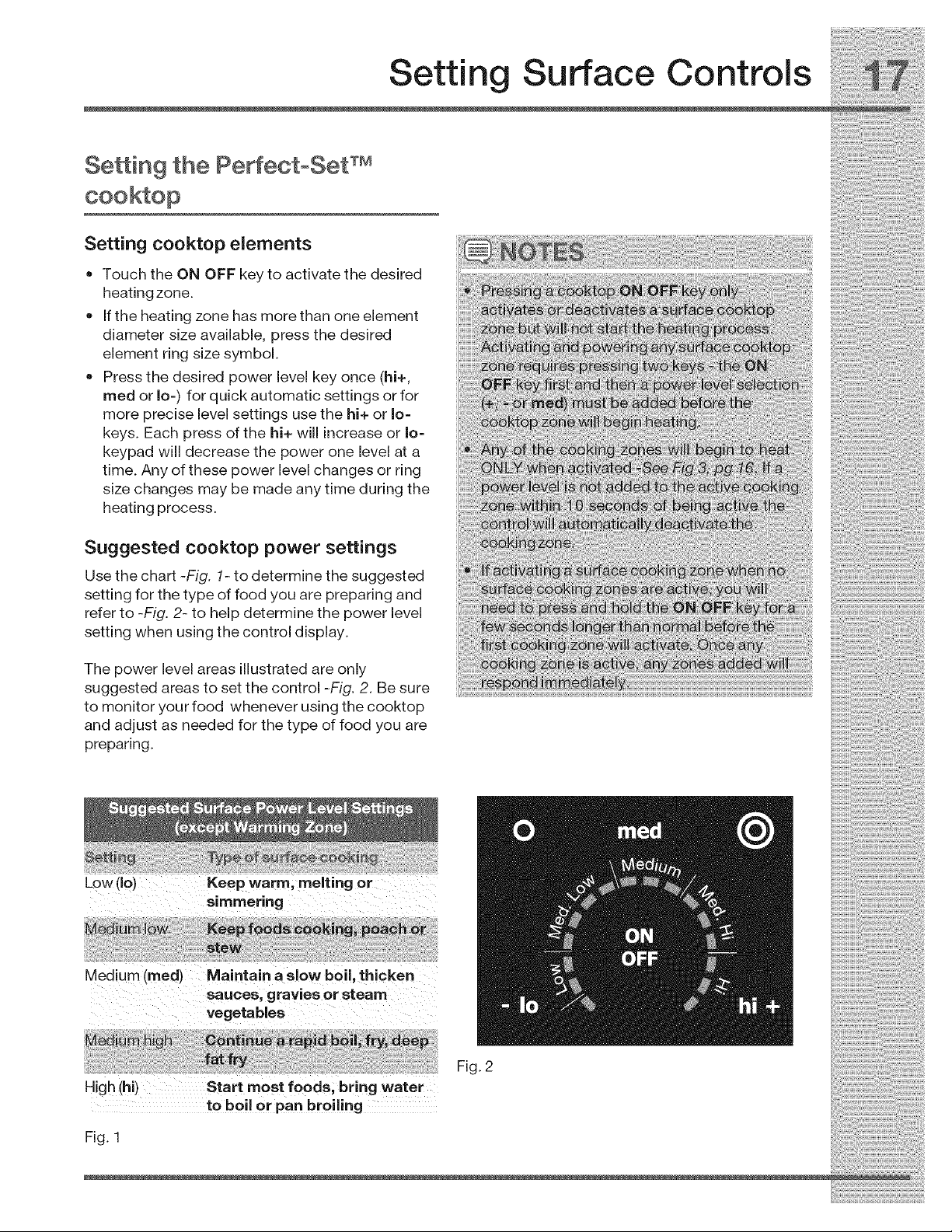
Suggested cooktop power settings
Use the chart -Fig. 1- to determine the suggested
setting for the type of food you are preparing and
refer to -Fig. 2- to help determine the power level
setting when using the control display.
The power level areas illustrated are only
suggested areas to set the control -Fig. 2. Be sure
to monitor your food whenever using the cooktop
and adjust as needed for the type of food you are
preparing.
Low (Io) Keep warm, melting or
simmering
Medium (reed) Maintain a slow boil, thicken
, gravies or steam
High (hi)Start most foods; bring water
tO boil or pan broiling
Fig. 2
Fig. 1
Setting Surface Controls
About the warming zone
Use the warming zone -Fig. 1- to keep hot cooked
foods warm such as; vegetables, gravies,
casseroles, soups, stews, breads, pastries and
oven-safe dinner plates. DO NOT heat cold food
using the warming zone.
Use only plates, cookware and utensils
recommended for oven and ceramic cooktop use.
Do not use plastic wrap or aluminum foil to
cover foods. Plastic or aluminum foil may melt onto
the ceramic cooktop.
Warming zone temperature selection
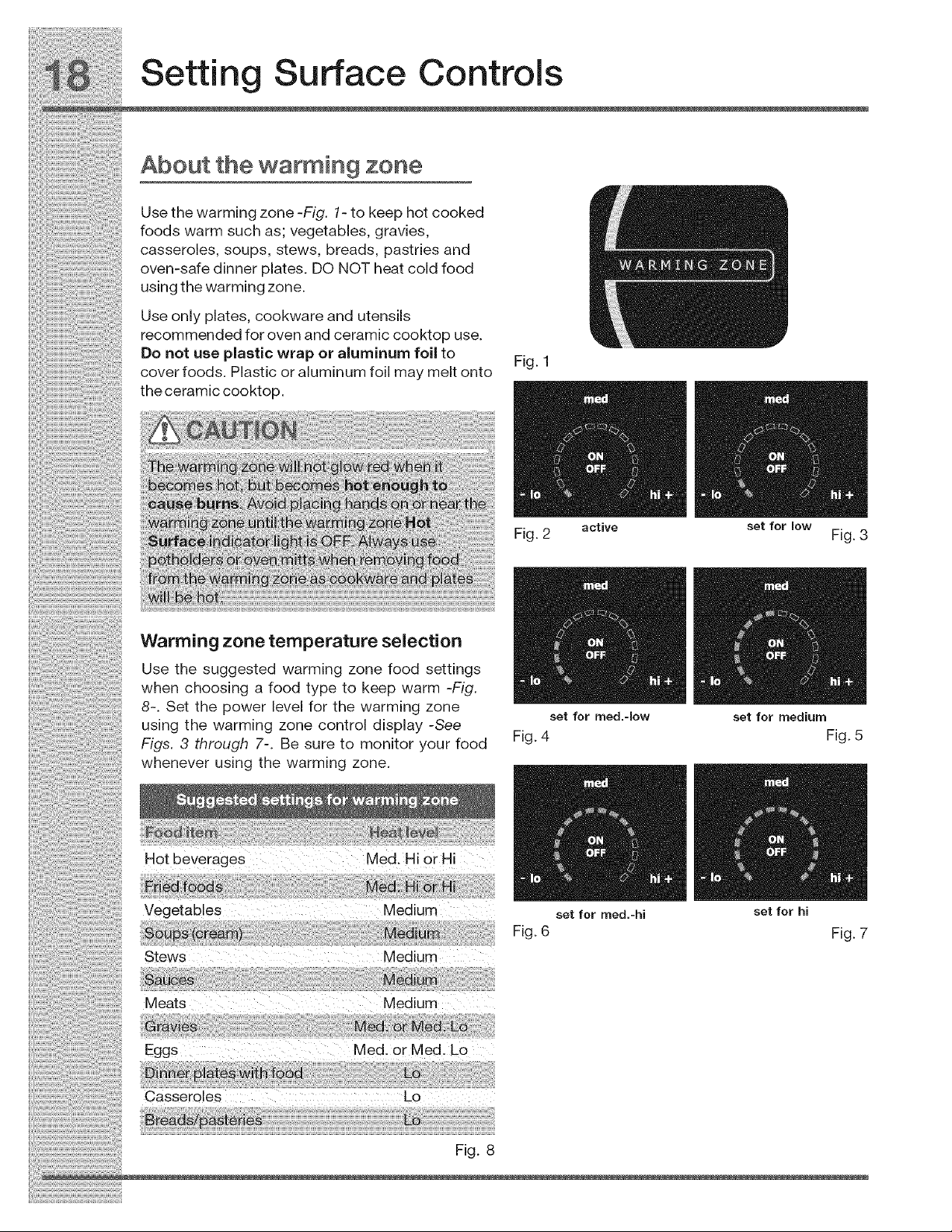
Use the suggested warming zone food settings
when choosing a food type to keep warm -Fig.
8-. Set the power level for the warming zone
using the warming zone control display -See
Figs. 3 through 7-. Be sure to monitor your food
whenever using the warming zone.
H0t beverages Med. Hi0r Hi
Vegetables Medium
Stews Medium
Meats Medium
Eggs Med. orMed. Lo
Casseroles Lo
Fig. 8
Fig. 1
mm
Fig. 2 active set for low Fig. 3
set for med.-[ow set for medium
Fig. 4 Fig. 5
/m
set for med.-hi set for hi
Fig. 6 Fig. 7
i_i!_!_i!i_ii_!i!_!_i!i_ii_!i!_!_i!i_ii_!i!_!_i!i_ii_!i!_!_i!i_ii_!i!_!_i!i_ii_!i!_!_i!i_ii_!i!_!_i!i_ii_!i!_!_i!i_ii_!i!_!_i!i_ii_!i!_!_i!i_i
Display Abbreviations
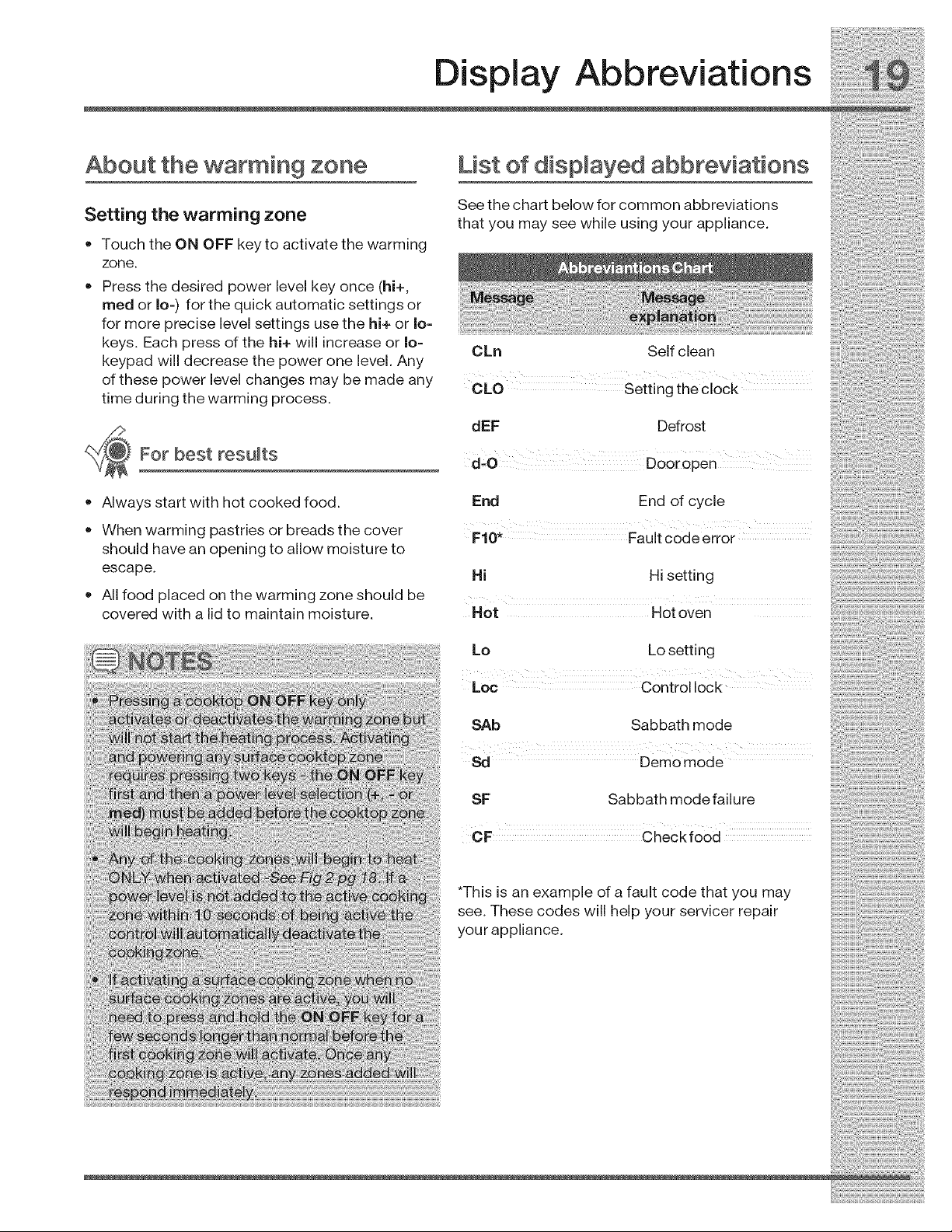
About the warming zone List of dispmayed abbreviations
....... See the chart below for common abbreviations
_etung me warming zone that you may see while using your appliance.
• TouchtheON OFFkeytoactivatethewarming
zone
• Press the desired power level key once (hi+
med or Io for the uickautomatic settin sot
-) q g
for more precise level settings use the hi+ or Io-
keys. Each press of the hi+ will increase or Io- ..................................................................................................
keypad w,II decrease the power one level. Any _kn _e, c can
of these power level changes may be made any OL0 seitin theci0ck
t ime d ur ing the w a rming p rco ess. g
.,_ dEF Defrost
For best results _ O _'00roZen
• Always start with hot cooked food. End End of cycle
•When warming pastries or breads the cover FaUit code error
should have an opening to allow moisture to
escape. Hi Hi setting
All food placed on the warming zone should be
covered with a lid to maintain moisture. Hot Hot oven
Lo Lo setting
Loc Control lock
SAb Sabbath mode
Sd Demo mode
SF Sabbath modefailure
*This is an example of a fault code that you may
see. These codes will help your servicer repair
your appliance.
!_!_i_i_i_!i_;_!i!i_!iii_i!_!_ii_;ii!_;_ii!;!_iii_;i_i_i!_i_i!i!_!!i!_!_i_!i!_!i!_!i!!i_i:iii_i!_ii_i_!_i_!i_i_i!i;ili!!i;i;i
Setting Oven Controls
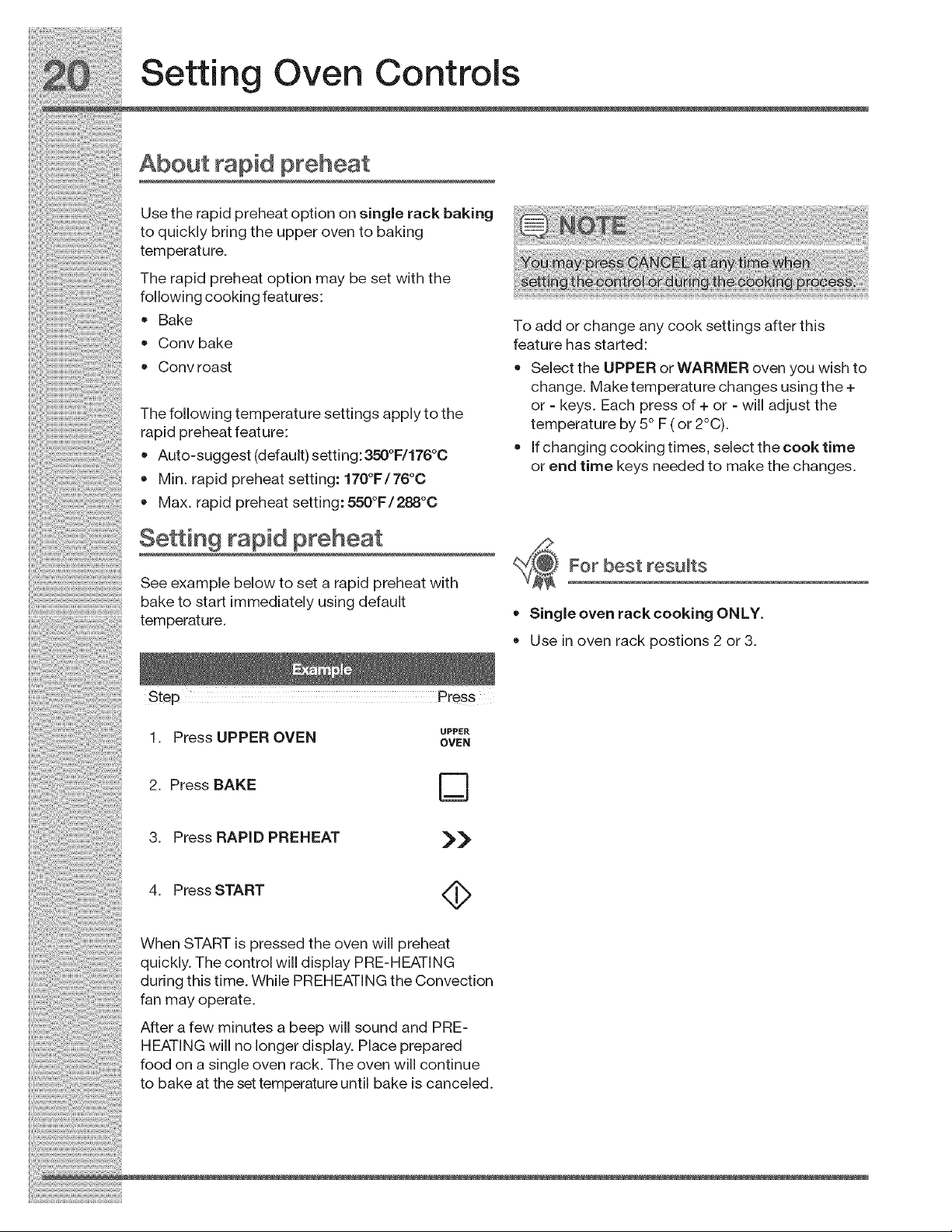
About rapid preheat
Use the rapid preheat option on single rack baking
to quickly bring the upper oven to baking
temperature.
The rapid preheat option may be set with the
following cooking features:
• Bake To add or change any cook settings after this
•Conv bake feature has started:
• Convroast • SelecttheUPPERorWARMERovenyouwishto
c hang e. Ma ke tem perat ure ch ang es usin g t he +
or - keys Each press of + or - w adjust the
The following temperature sethngs applyto the - -" - -o -, _o_,
rapid preheat feature: temperature _y b _-_or z u).
...................... • f chang ng cook ng t mes se ect the cook t me
•Auto-suggest [delault) settlng:_ _1]1_ _; ...........
o o or end _lme Keys needed to make tne cnanges.
::: • Min. rapid preheat setting: 170 F/76 C
•Max. rapid preheat setting: 550°rF/288"°C
Setting rapid preheat
FO[ best [@suits
..... See example below to set a rapid preheat with
bake to start immediately using default
temperature. • Single oven rack cooking ONLY.
Use in oven rack postions 2 or 3.
Step Press
1. Press UPPER OVEN
2. Press BAKE
3. Press RAPID PREHEAT
UPPER
OVEN
D
>>
4. Press START <_
When START is pressed the oven will preheat
quickly. The control will display PRE-HEATING
during this time. While PREHEATING the Convection
fan may operate.
After a few minutes a beep will sound and PRE-
HEATING will no longer display. Place prepared
food on a single oven rack. The oven will continue
to bake at the set temperature until bake is canceled.
Setting Oven Controls
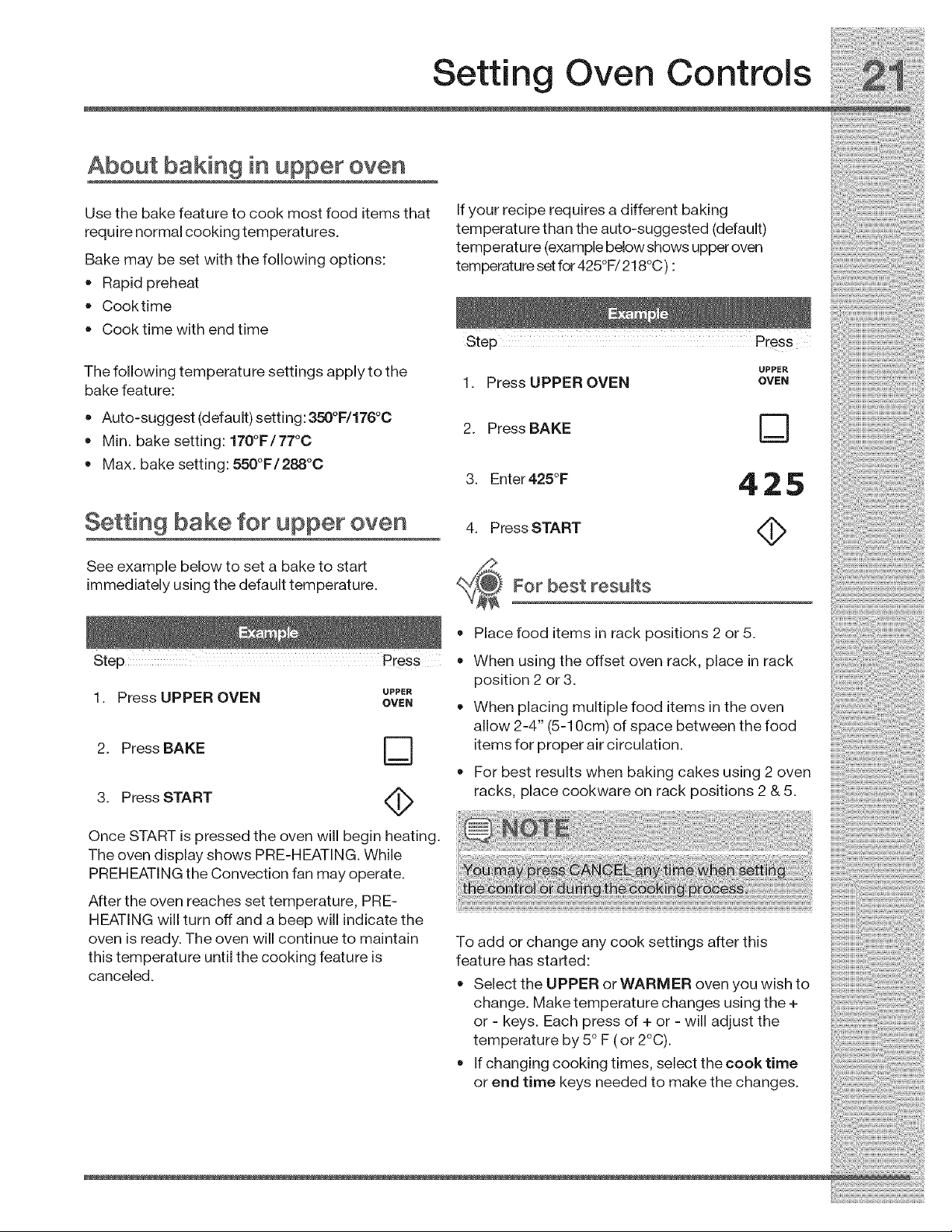
About baking in upper oven
Use the bake feature to cook most food items that
require normal cooking temperatures.
Bake may be set with the following options:
• Rapid preheat
Cooktime
Cook time with end time
The following temperature settings apply to the
bake feature:
Auto-suggest (default) setting: 350°F/176°0
Min. bake setting: 170°F/77°0
Max. bake setting: 550°F/288°0
Setting bake for upper oven
See example below to set a bake to start
immediately using the default temperature.
Step Press
If your recipe requires a different baking
temperature than the auto-suggested (default)
temperature (example below shows upper oven
temperature set for 425°F/218°C) :
Step Press
UPPER
1. Press UPPER OVEN OVEN
2. Press BAKE D
3. enter425°F 4 25
4. Press START <_
For best results
UPPER
1. Press UPPER OVEN OVEN
2. Press BAKE D
3. Press START <_
Once START is pressed the oven will begin heating.
The oven display shows PRE-HEATING. While
PREHEATING the Convection fan may operate.
After the oven reaches set temperature, PRE-
HEATING will turn off and a beep will indicate the
oven is ready. The oven will continue to maintain
this temperature until the cooking feature is
canceled.
Place food items in rack positions 2 or 5.
When using the offset oven rack, place in rack
position 2 or 3.
When placing multiple food items in the oven
allow 2-4" (5-10cm) of space between the food
items for proper air circulation.
For best results when baking cakes using 2 oven
racks, place cookware on rack positions 2 & 5.
To add or change any cook settings after this
feature has started:
Select the UPPER or WARMER oven you wish to
change. Make temperature changes using the +
or -keys. Each press of + or -will adjust the
temperature by 5° F (or 2°C).
If changing cooking times, select the cook time
or end time keys needed to make the changes.
_!_!_i_i;i_!i_!i_ii_i_!i_i_i_i_i_i_i_i_i_;_!_!_!i_i!!_i!_!i_i_!i_i!_i_i_i_i_i_i_i_!ii_i_!ii_i_!ii_i_!ii_i_i!_!_!_!_!_!_!;!_i_i_i_!i_
_ Setting Oven Controls
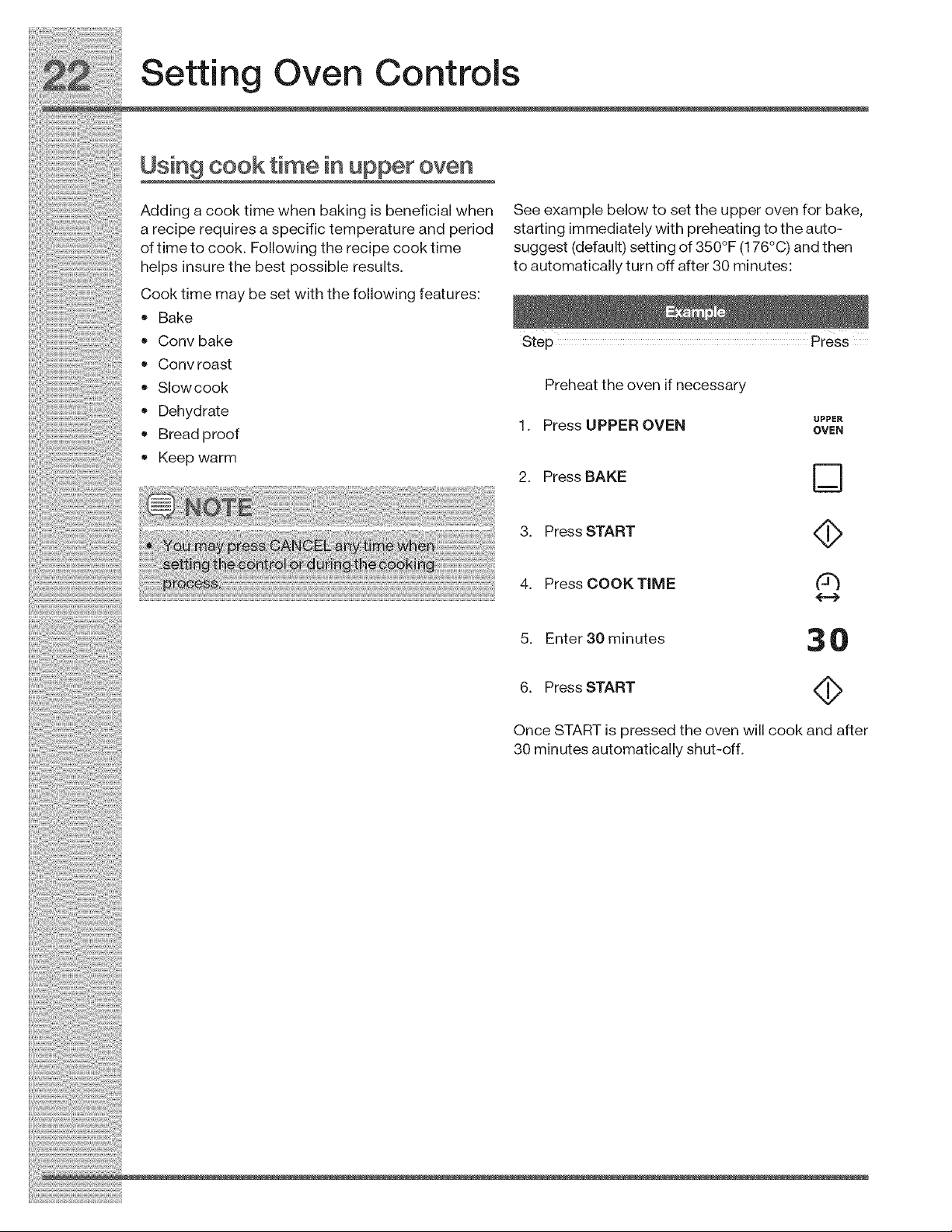
Using cooktimein upperoven
Addingacooktimewhen bakingisbeneficialwhen Seeexamplebelowtosettheupperovenforbake,
areciperequiresaspecifictemperatureand period startingimmediatelywithpreheatingtotheauto-
oftimetocook. Followingtherecipecooktime suggest(default) settingofS50°F(176°C)andthen
helps insurethebest possibleresults, toautomaticallyturnoffafter30minutes:
Cookfimemaybesetwiththefollowingfeatures:
• Bake
• Convbake step Press
• Convroast
• Slowcook Preheattheovenifnecessary
,, Dehydrate UPPER
.1. Press UPPER OVEN OWN
• I_reaa prooT
• Keepwarm 2 PressBAKE U--
3. PressSTART
..... 4. PressCOOKT_ME ee
5. Enter S0 minutes 3 0
6. Press START 4_
Once START is pressed the oven will cook and after
30 minutes automatically shut-off.
Setting Oven Controls
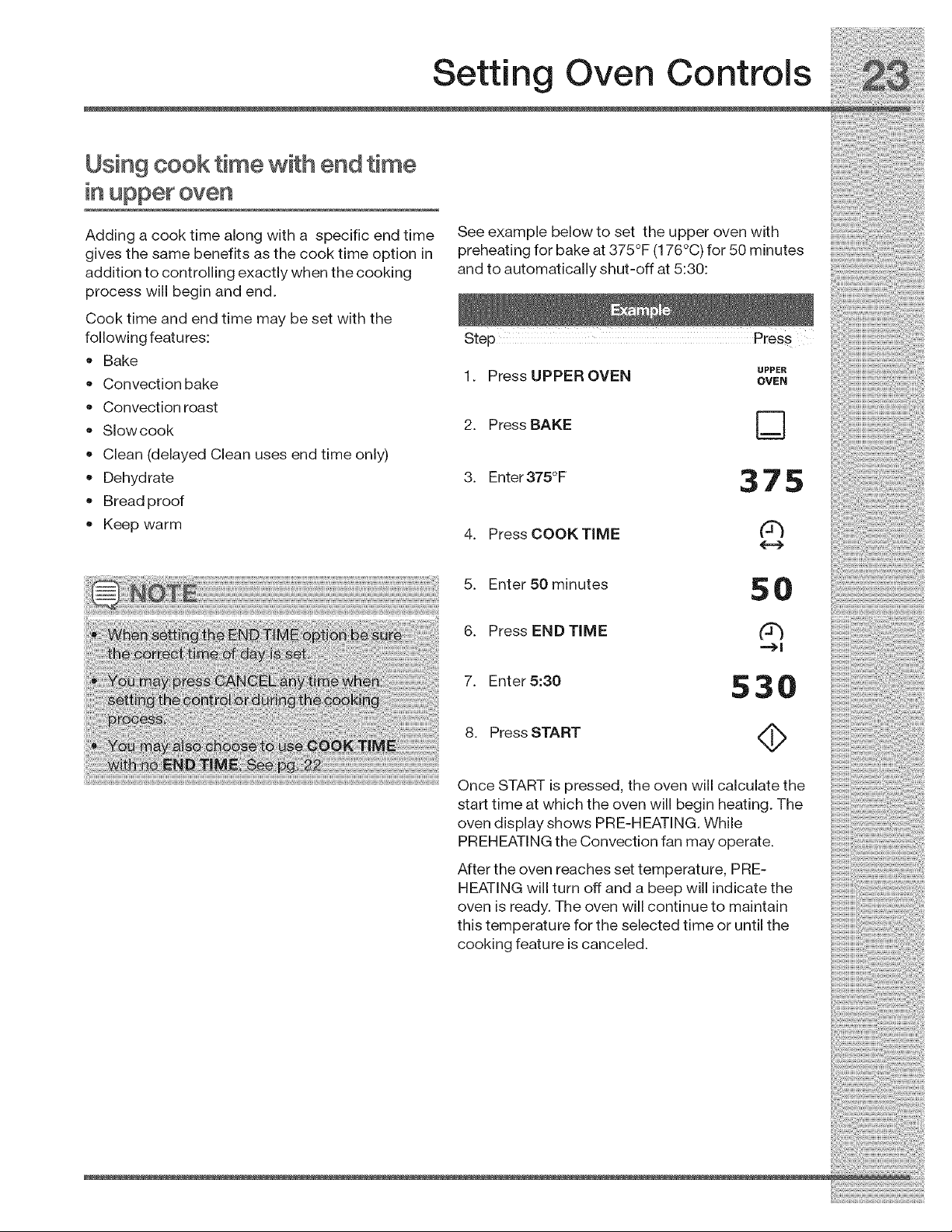
Using cook time with end time
in upper oven
Adding a cook time along with a specific end time
gives the same benefits as the cook time option in
addition to controlling exactly when the cooking
process will begin and end.
Cook time and end time may be set with the
following features:
• Bake
Convection bake
Convection roast
Slowcook
Clean (delayed Clean uses end time only)
Dehydrate
Bread proof
• Keep warm
See example below to set the upper oven with
preheating for bake at 375°F (176°C) for 50 minutes
and to automatically shut-off at 5:30:
Step Press
UPPER
1. Press UPPER OVEN OVEN
2. Press BAKE D
3. Enter375°F 37 S
4. Press COOKTIME _-_J
5. Enter 50 minutes 5 0
6. Press END TIME (_
7. Enter 5:30 S 3 0
8. Press START <_
Once START is pressed, the oven will calculate the
start time at which the oven will begin heating. The
oven display shows PRE-HEATING. While
PREHEATING the Convection fan may operate.
After the oven reaches set temperature, PRE-
HEATING will turn off and a beep will indicate the
oven is ready. The oven will continue to maintain
this temperature for the selected time or until the
cooking feature is canceled.
_!_!_i_i_i_!i_!i_iii_i_!ii_:i_iiiii!i_i!i_i!i_!_i_i_i!_!i_i!_!i_i!_!_i!i_i_i_i_!_i_i!i_ii_i_i_i_i!i!!!:i!i!:!i!S_iiii_!_i_i!i!i:i_i!!i!_!i
Setting Oven Controls
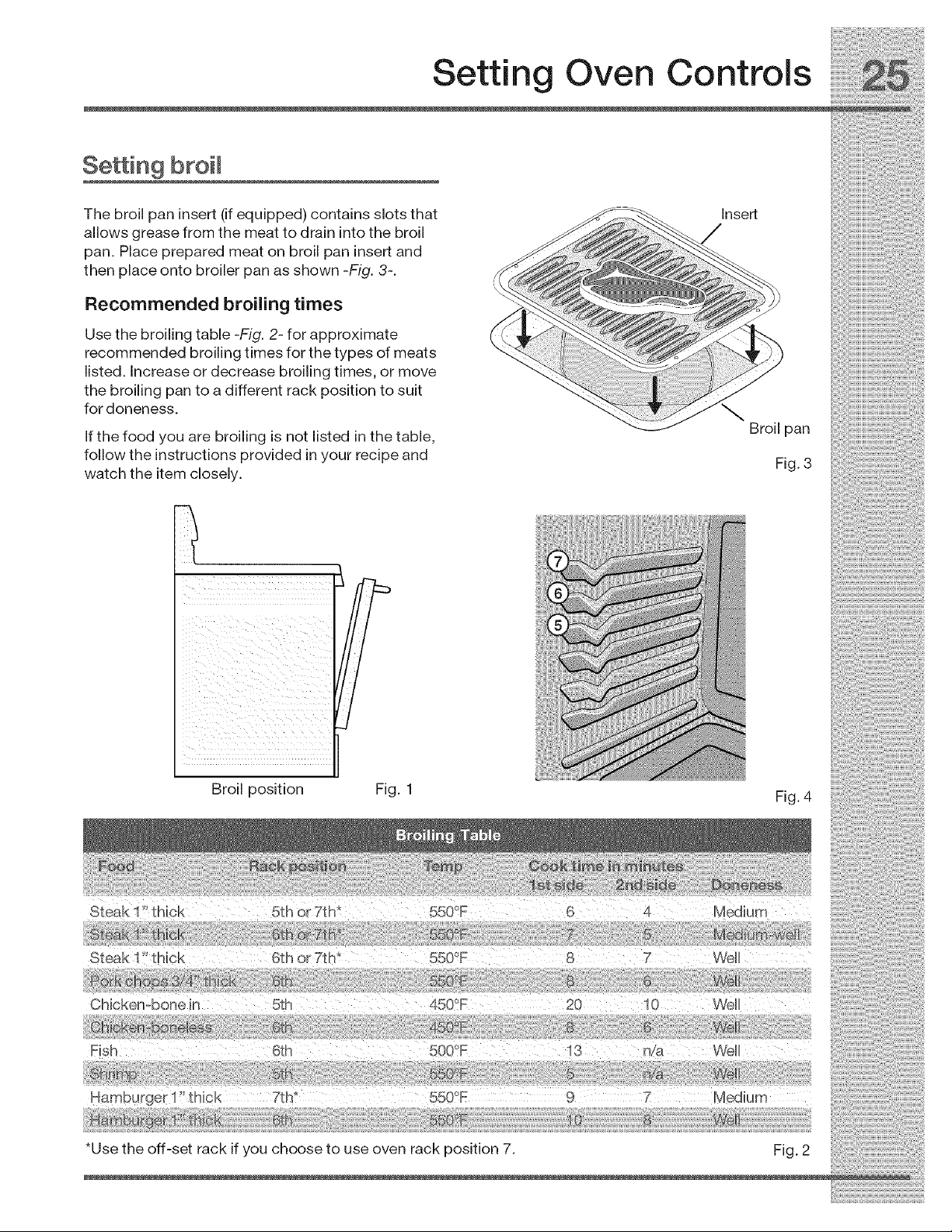
Broiling in upper oven Setting broil
Use thebroilfeaturetocook meats thatrequire See example below tosetbroilfortheupper oven
direct exposure to radiant heat for optimum starting immeadiately with the auto-suggest (de-
browning results. This cooking feature is only fault) setting:
available in the upper oven.
Use the conv broil feature to cook thicker cuts of
meats that requ re d rect exposure to rad ant heat Ste Press
P
and the convection fan for optimum browning
: results-p. 30-. 1. Place the broiler insert on the broiler pan, then
The following temperature settings apply to the place the meat on the insert. Remember to
broil feature: o o follow all warnings and cautions.
• Auto-suggest(default)setting:550F/288C 2. Arrangetheinteriorovenracktorackposition
• Min. broil setting: 300'°,OF/148C recommendations -p. 25 Figs. 2 & 4-. Be sure
...... o.... o^ to p ace the prepared food and pan d rect y
,, Max bro sett ng _ _-/z_ u under broil element. Leave the oven door
position. -p. 25 Fig. 1-
3. uppEROVEN
4. Press BROIL D
5. Press START <_
To add or change any cook settings after this
feature has started:
Select the UPPER or WARMER oven you wish to
change. Make temperature changes using the +
or - keys. Each press of + or - will adjust the
For best results temperature by 5° F ( or 2°C).
If changing cooking times, select the cook time
Use the recommended pans and oven rack or end time keys needed to make the changes.
positions for the type of meat being prepared -
p. 25 Figs. 3 & 4-.
• For optimum browning results, allow the oven to
preheat 5-6 minutes before placing the food in
the oven.
Setting Oven Controls
Se in 9 broil
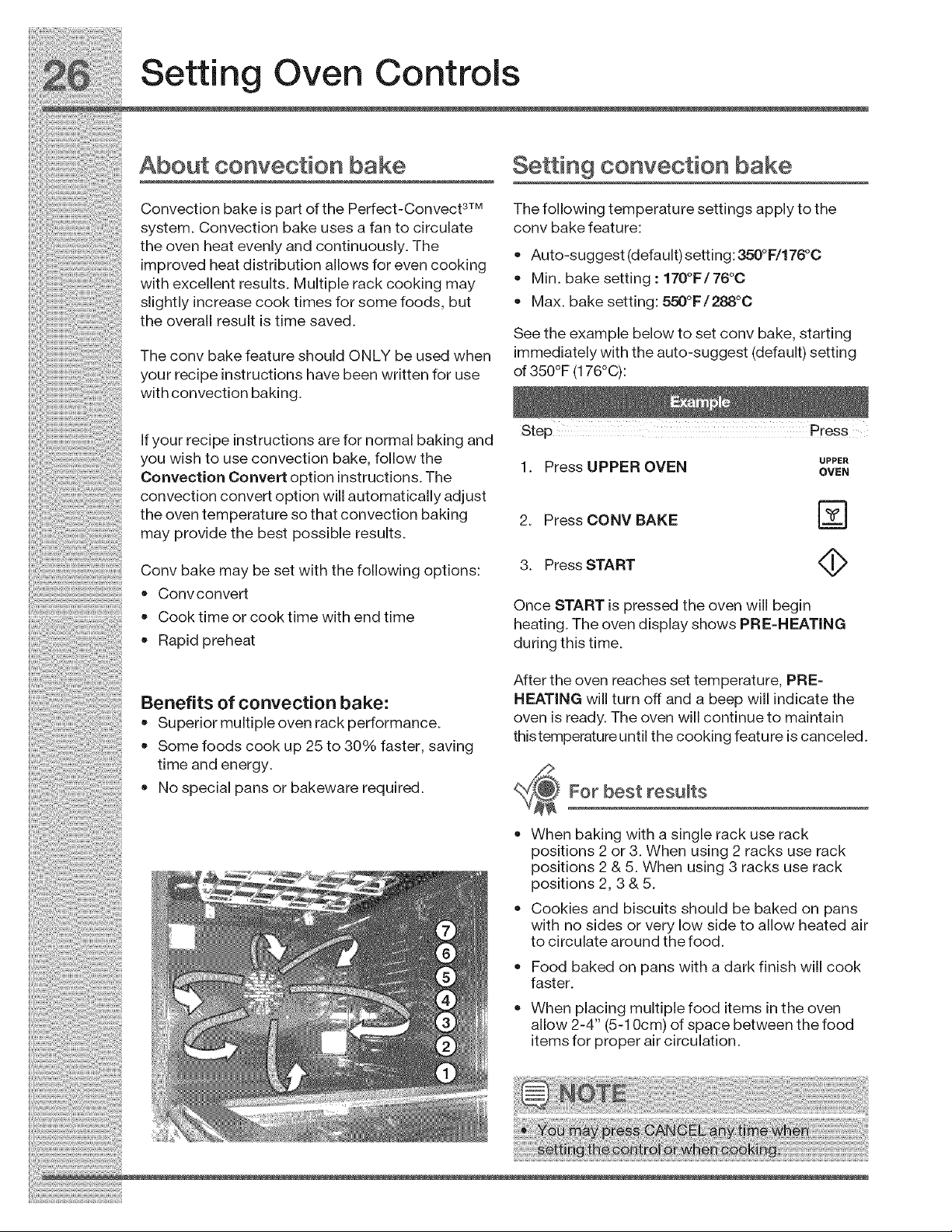
The broil pan insert (if equipped) contains slots that
allows grease from the meat to drain into the broil
pan. Place prepared meat on broil pan insert and
then place onto broiler pan as shown -Fig. 3-.
Recommended broiling times
Use the broiling table -Fig. 2- for approximate
recommended broiling times for the types of meats
listed. Increase or decrease broiling times, or move
the broiling pan to a different rack position to suit
for doneness.
If the food you are broiling is not listed in the table,
follow the instructions provided in your recipe and
watch the item closely.
ii i!I
i i iii
Insert
Broil pan
Fig. 3
Broil position Fig. 1 Fig. 4
Steak 11'thick 6th or7th* 550°F 8 7 Well
Hamburger 1!' thick 7th* 5500F 9 7 Medium
*Use the off-set rack if you choose to use oven rack position 7. Fig. 2
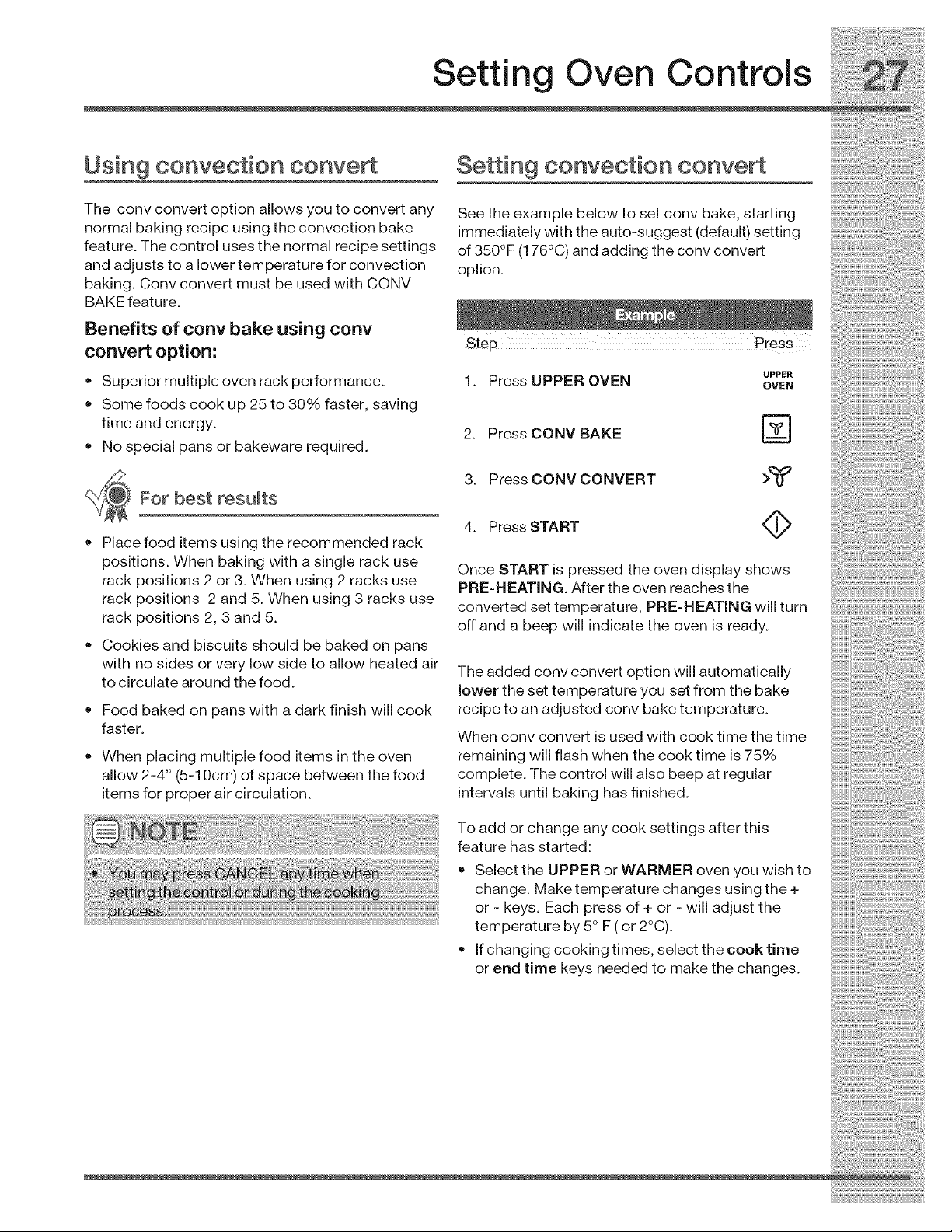
Convbakemaybesetwiththefollowingoptions:
• Convconvert
• Cooktimeorcooktimewithendtime
• Rapidpreheat
Benefits of convection bake:
• Superior multiple oven rack performance.
• Some foods cook up 25 to 30% faster, saving
time and energy.
• No special pans or bakeware required.
3. Press START <_
Once START is pressed the oven will begin
heating. The oven display shows PRE-HEATING
during this time.
After the oven reaches set temperature, PRE-
HEATING will turn off and a beep will indicate the
oven is ready. The oven will continue to maintain
thistemperature until the cooking feature is canceled.
For best results
When baking with a single rack use rack
positions 2 or 3. When using 2 racks use rack
positions 2 & 5. When using 3 racks use rack
positions 2, 3 & 5.
Cookies and biscuits should be baked on pans
with no sides or very low side to allow heated air
to circulate around the food.
Food baked on pans with a dark finish will cook
faster.
When placing multiple food items in the oven
allow 2-4" (5-10cm) of space between the food
items for proper air circulation.
Setting Oven Controls
Using convection conve
The conv convert option allows you to convert any
normal baking recipe using the convection bake
feature. The control uses the normal recipe settings
and adjusts to a lower temperature for convection
baking. Conv convert must be used with CONV
BAKE feature.
Benefits of cony bake using conv
convert option:
• Superior multiple oven rack performance.
Some foods cook up 25 to 30% faster, saving
time and energy.
No special pans or bakeware required.
For best results
Place food items using the recommended rack
positions. When baking with a single rack use
rack positions 2 or 3. When using 2 racks use
rack positions 2 and 5. When using 3 racks use
rack positions 2, 3 and 5.
Cookies and biscuits should be baked on pans
with no sides or very low side to allow heated air
to circulate around the food.
Food baked on pans with a dark finish will cook
faster.
• When placing multiple food items in the oven
allow 2-4" (5-10cm) of space between the food
items for proper air circulation.
Setting convection convert
See the example below to set conv bake, starting
immediately with the auto-suggest (default) setting
of 350°F (176°C) and adding the conv convert
option.
UPPER
1. Press UPPER OVEN OVEN
2. Press CONV BAKE r_
3. Press CONV CONVERT >_
4. Press START <_>
Once START is pressed the oven display shows
PRE-HEATING. After the oven reaches the
converted set temperature, PRE-HEATING will turn
off and a beep will indicate the oven is ready.
The added conv convert option will automatically
lower the set temperature you set from the bake
recipe to an adjusted conv bake temperature.
When conv convert is used with cook time the time
remaining will flash when the cook time is 75%
complete. The control will also beep at regular
intervals until baking has finished.
To add or change any cook settings after this
feature has started:
Select the UPPER or WARMER oven you wish to
change. Make temperature changes using the +
or - keys. Each press of + or - will adjust the
temperature by 5° F ( or 2°C).
If changing cooking times, select the cook time
or end time keys needed to make the changes.
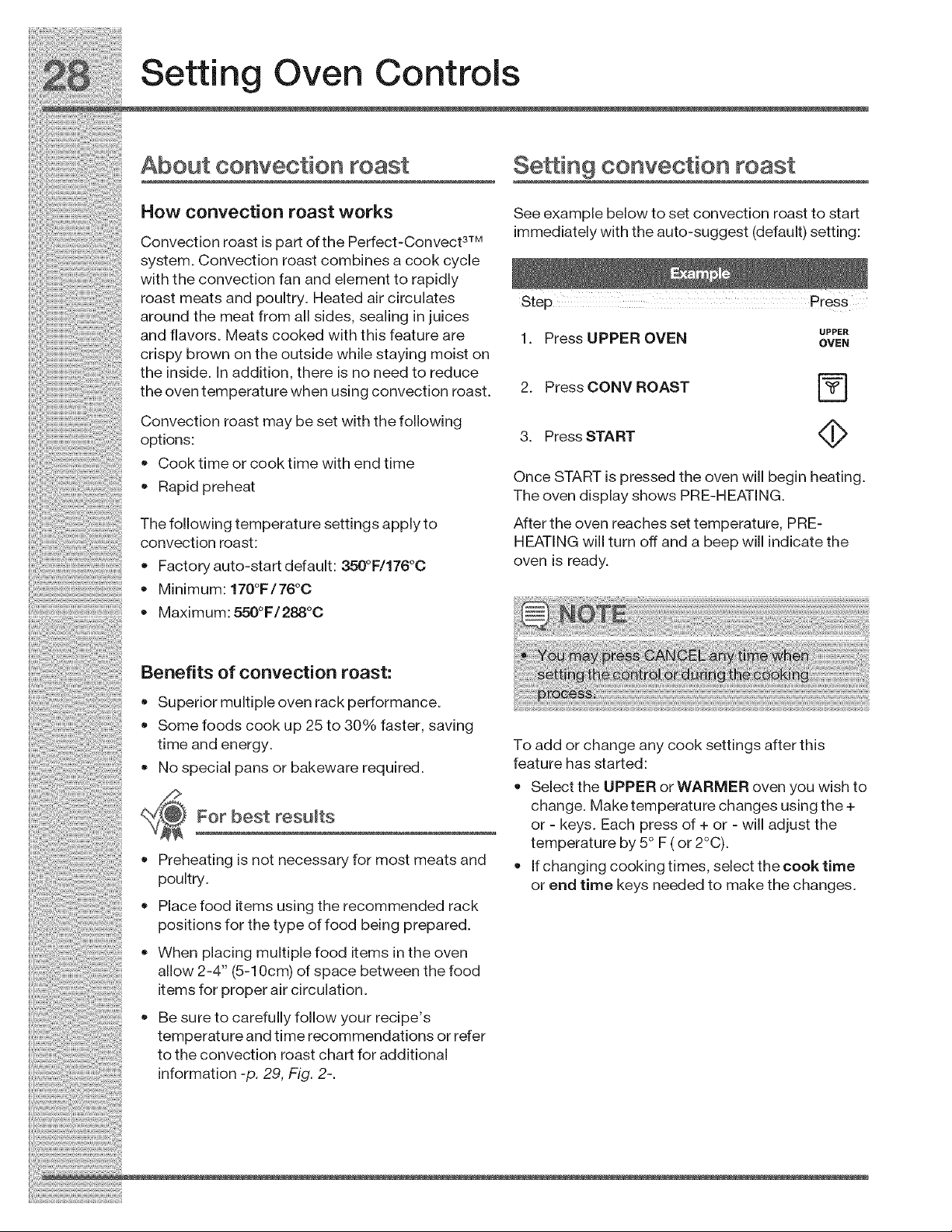
Factoryauto-startdefault:350°F/176°0
Minimum:170°F/76°C
Maximum:550°F/288°0
HEATINGwillturnoffandabeepwillindicatethe
ovenisready.
Benefits of convection roast:
• Superior multiple oven rack performance.
Some foods cook up 25 to 30% faster, saving
time and energy.
No special pans or bakeware required.
For best results
Preheating is not necessary for most meats and
poultry.
• Place food items using the recommended rack
positions for the type of food being prepared.
• When placing multiple food items in the oven
allow 2-4" (5-10cm) of space between the food
items for proper air circulation.
Be sure to carefully follow your recipe's
temperature and time recommendations or refer
to the convection roast chart for additional
information -p. 29, Fig. 2-.
To add or change any cook settings after this
feature has started:
Select the UPPER or WARMER oven you wish to
change. Make temperature changes using the +
or - keys. Each press of + or - will adjust the
temperature by 5° F ( or 2°C).
If changing cooking times, select the cook time
or end time keys needed to make the changes.
Setting Oven Controls
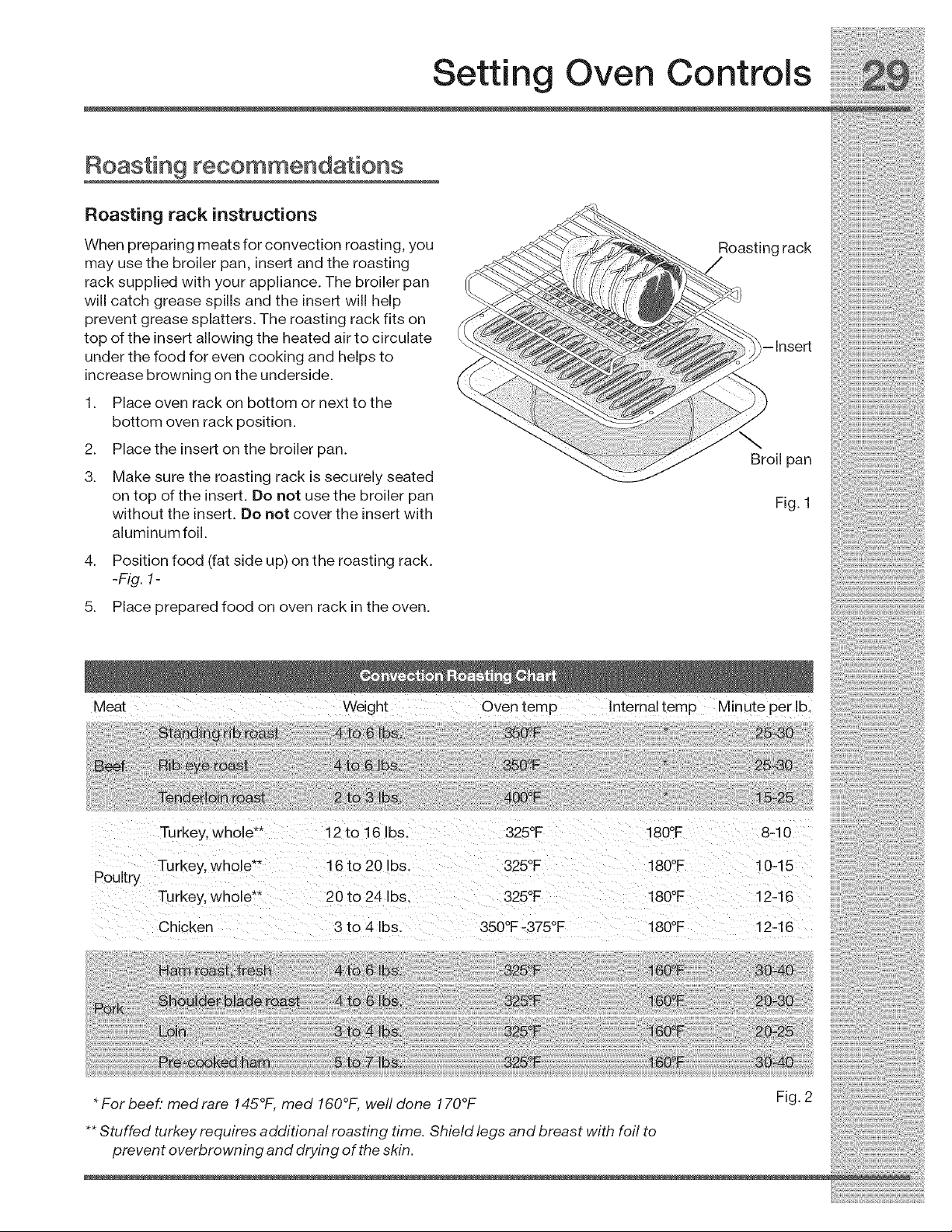
Roasting recommendations
Roasting rack instructions
When preparing meats for convection roasting, you
may use the broiler pan, insert and the roasting
rack supplied with your appliance. The broiler pan
will catch grease spills and the insert will help
prevent grease splatters. The roasting rack fits on
top of the insert allowing the heated air to circulate
under the food for even cooking and helps to
increase browning on the underside.
1. Place oven rack on bottom or next to the
bottom oven rack position.
2. Place the insert on the broiler pan.
3. Make sure the roasting rack is securely seated
on top of the insert. Do not use the broiler pan
without the insert. Do not cover the insert with
aluminum foil.
4. Position food (fat side up) on the roasting rack.
-Fig. 1-
5. Place prepared food on oven rack in the oven.
Roasting rack
-Insert
\
Broil pan
Fig. 1
Meat Weight Oven temp Internal temp Minute per Ib,
Poultry
Turkey, whole** 12 to 16 Ibs. 325°F 180°F 8-10
Turkey, whole _" 16 to 20 Ibs. 325°F 180°F 10-15
Turkey, whole" 20 to 24 Ibs. 325°F 180°F 12-16
Chicken 3 to 4 Ibs. 350°F-375°F 180°F 12-16
* For beef: med rare 145°t, med 160°F, well done 170°F
** Stuffed turkey requires additional roasting time. Shield legs and breast with foil to
prevent overbrowning and drying of the skin.
Fig. 2

Settin Oven Controls
About convection broiling
Convection broiling is part of the Perfect-Convect 3TM
system. Use the conv broil feature to cook thicker
cuts of meats that require direct exposure to
radiant heat and the convection fan for optimum
browning results. This cooking feature is only
available for the upper oven.
The following temperature settings apply to the
conv broil feature:
• Auto-suggest (default) setting:550°F/288°C
• Min. convection broil setting: 300°F/148°C
• Max. convection broil setting: 550°F/288°C
SeWng convection broil
See example below to set conv broil for the upper
oven to start immediately with the auto-suggest
(default) setting.
1.
2.
Place the broiler insert on the broiler pan, then
place the meat on the insert. Remember to
follow all warnings and cautions.
Arrange the interior oven rack -p. 25 Figs. 2&
4- for position recommendations. Be sure to
place the prepared food and pan directly
under broil element. Close the oven door
-p. 25 Fig. 1-.
UPPER
3. Press UPPER OVEN OVEN
4. Press CONV BROIL [_
5. Press START _>
For best results
• Use the recommended pans and rack positions.
-p. 25 Figs. 2 & 4-
•For optimum results preheat oven for 5-6
minutes.
To add or change any cook settings after this
feature has started:
Select the UPPER or WARMER oven you wish to
change. Make temperature changes using the +
or - keys. Each press of + or -will adjust the
temperature by 5° F ( or 2°C).
If changing cooking times, select the cook time
or end time keys needed to make the changes.
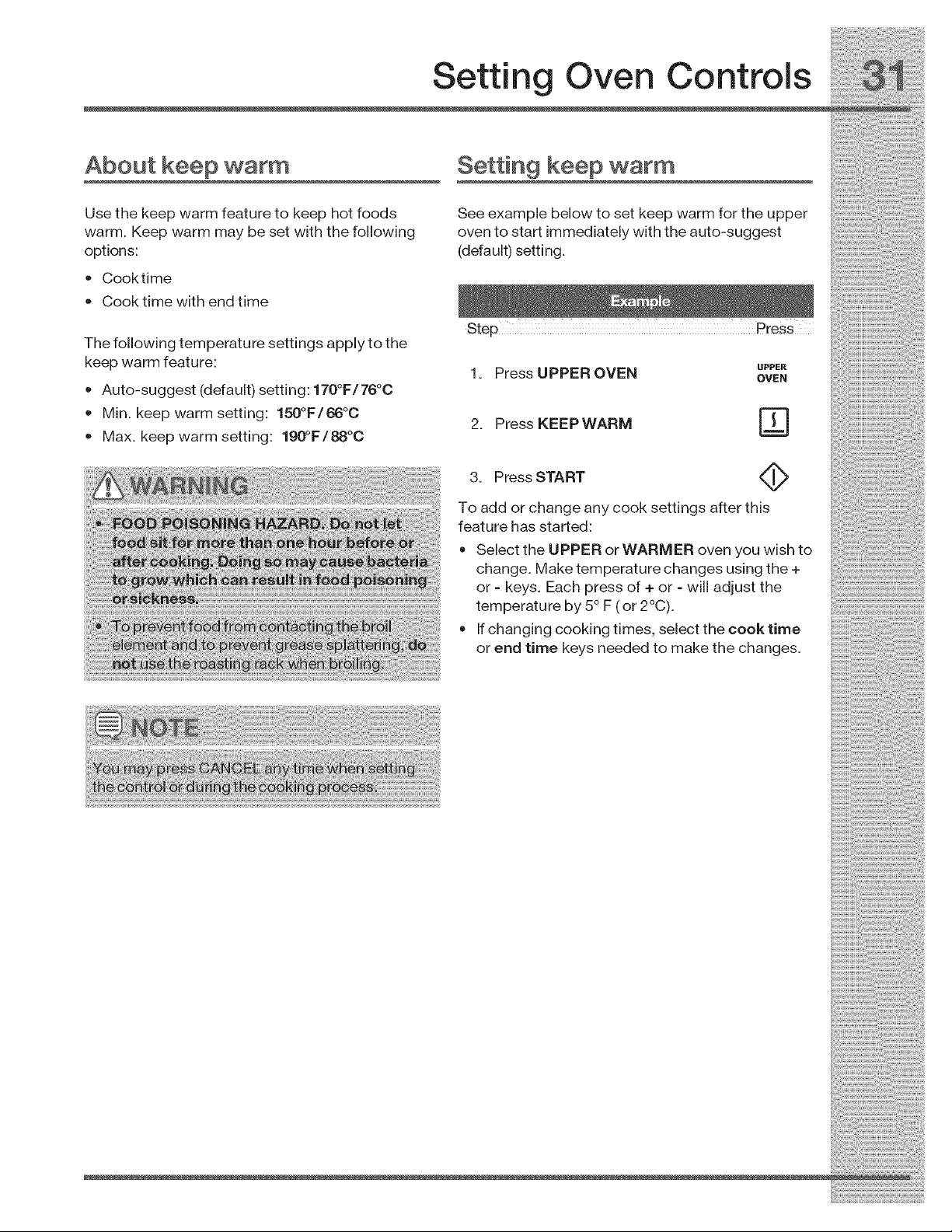
+ Max.keepwarmsetting:190°F/88°C
3. PressSTART
Toaddorchangeanycooksettingsafterthis
featurehasstarted:
SelecttheUPPERorWARMERovenyouwishto
change.Maketemperaturechangesusingthe+
or- keys.Eachpressof+ or - willadjustthe
temperatureby5° F(or2°C).
+ Ifchangingcookingtimes,selectthecook time
or end time keys needed to make the changes.
i!:_ii!:_!iii_iii_i_ii:i_ii:ii:_!_i_iiii_!i_:_!ii_i_!i_!_i_i_!_!!i_ii_!_iiiii_!_!i_!i_:0:_!!_i_!:!:!!i_i!_!i_i!_!i_i_i_i!i_!ii_!_
Setting Oven Controls
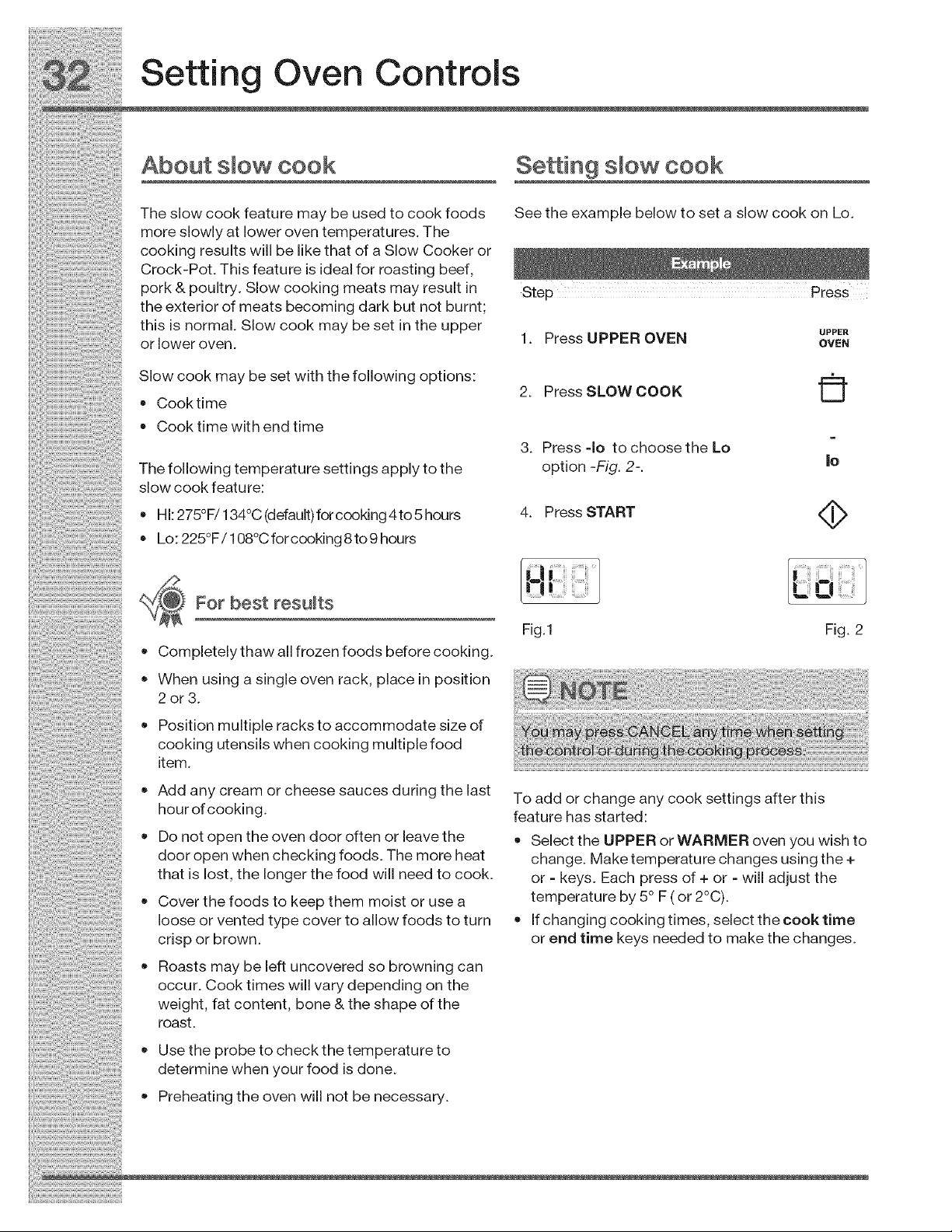
About smow cook SeWn 9 smowcook
Theslowcookfeaturemaybeusedtocookfoods Seetheexamplebelowtosetaslowcookon Lo.
moreslowlyatloweroventemperatures. The
cookingresultswillbelikethatofaSlowCookeror
Crock-Pot. Thisfeatureisidealforroasting beef,
pork & pou try Sow cook ng meats may resu t n Ste PreSS
.p
theexteriorof meats becoming dark but not burnt;
th s s norma Sow cook may be set n the upper _pE_
orloweroven: 1. PressUPPEROVEN _WN
Slow cook may be set with the following options:
2. PressSLOWCOOK LU
• Cooktime
Cooktimewithendtime
3. Press -Io tochoosethe Lo =
The following temperature settings apply to the option -Fig. 2-. |e
slowcookfeature:
•Hl:275OF/134oC(default)forcooking4to5hours 4. PressSTART
• o o "
Lo. 225 F/108 Cforcooklng8to9 hours
Fo bost oso s /'ql
• Completely thaw all frozen foods before cooking.
• When using a single oven rack, place in position
2or3.
Fig.1 Fig. 2
Position multiple racks to accommodate size of
cooking utensils when cooking multiple food
item.
• Add any cream or cheese sauces during the last
hour of cooking.
Do not open the oven door often or leave the
door open when checking foods. The more heat
that is lost, the longer the food will need to cook.
• Cover the foods to keep them moist or use a
loose or vented type cover to allow foods to turn
crisp or brown.
Roasts may be left uncovered so browning can
occur. Cook times will vary depending on the
weight, fat content, bone & the shape of the
roast.
To add or change any cook settings after this
feature has started:
Select the UPPER or WARMER oven you wish to
change. Make temperature changes using the +
or - keys. Each press of + or - will adjust the
temperature by 5° F ( or 2°C).
If changing cooking times, select the cook time
or end time keys needed to make the changes.
• Use the probe to check the temperature to
determine when your food is done.
Preheating the oven will not be necessary.
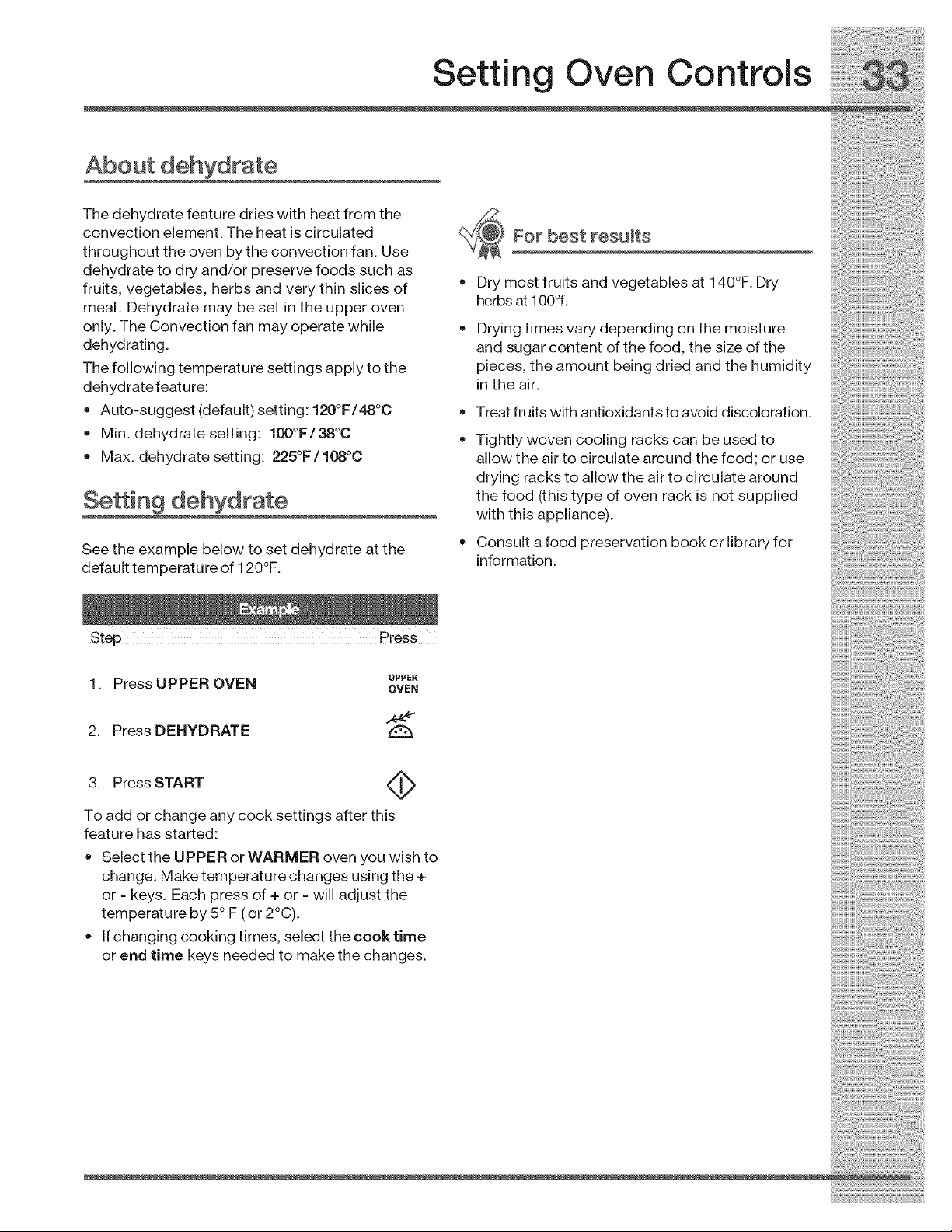
Setting Oven Controls
The dehydrate feature dries with heat from the
convection element. The heat is circulated
throughout the oven by the convection fan. Use
dehydrate to dry and/or preserve foods such as
fruits, vegetables, herbs and very thin slices of
meat. Dehydrate may be set in the upper oven
only. The Convection fan may operate while
dehydrating.
The following temperature settings apply to the
dehydratefeature:
• Auto-suggest (default) setting: 120°F/48°0
Min. dehydrate setting: 100°F/38°0
Max. dehydrate setting: 225°F/108°O
Setting dehydrate
See the example below to set dehydrate at the
default temperature of 120°F.
o
o
For best results
Dry most fruits and vegetables at 140°F. Dry
herbs at 100%
Drying times vary depending on the moisture
and sugar content of the food, the size of the
pieces, the amount being dried and the humidity
in the air.
Treat fruits with antioxidants to avoid discoloration.
Tightly woven cooling racks can be used to
allow the air to circulate around the food; or use
drying racks to allow the air to circulate around
the food (this type of oven rack is not supplied
with this appliance).
Consult a food preservation book or library for
information.
UPPER
1. Press UPPER OVEN OVEN
2. Press DEHYDRATE
A
3. Press START
To add or change any cook settings after this
feature has started:
Select the UPPER or WARMER oven you wish to
change. Make temperature changes using the +
or - keys. Each press of + or - will adjust the
temperature by 5° F (or 2°C).
If changing cooking times, select the cook time
or end time keys needed to make the changes.
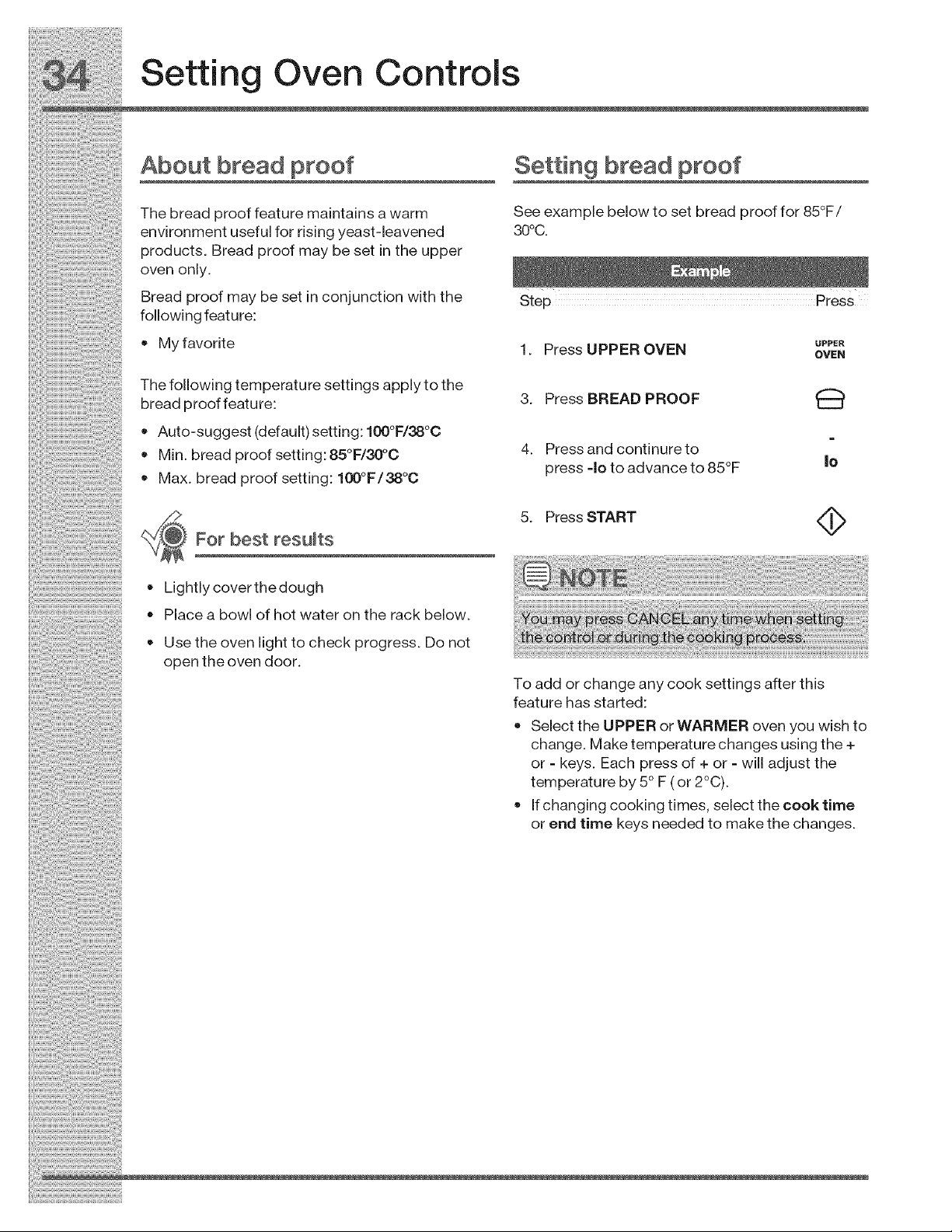
Placeabowlof hotwaterontherackbelow.
Usetheovenlighttocheckprogress.Donot
opentheovendoor.
Toaddorchangeanycooksettingsafterthis
featurehasstarted:
SelecttheUPPERorWARMERovenyouwishto
change.Maketemperaturechangesusingthe+
or- keys.Eachpressof+ or - willadjustthe
temperatureby5°F(or2°C).
Ifchangingcookingtimes,selectthecooktime
orendtimekeysneededtomakethechanges.
Setting Oven Controls
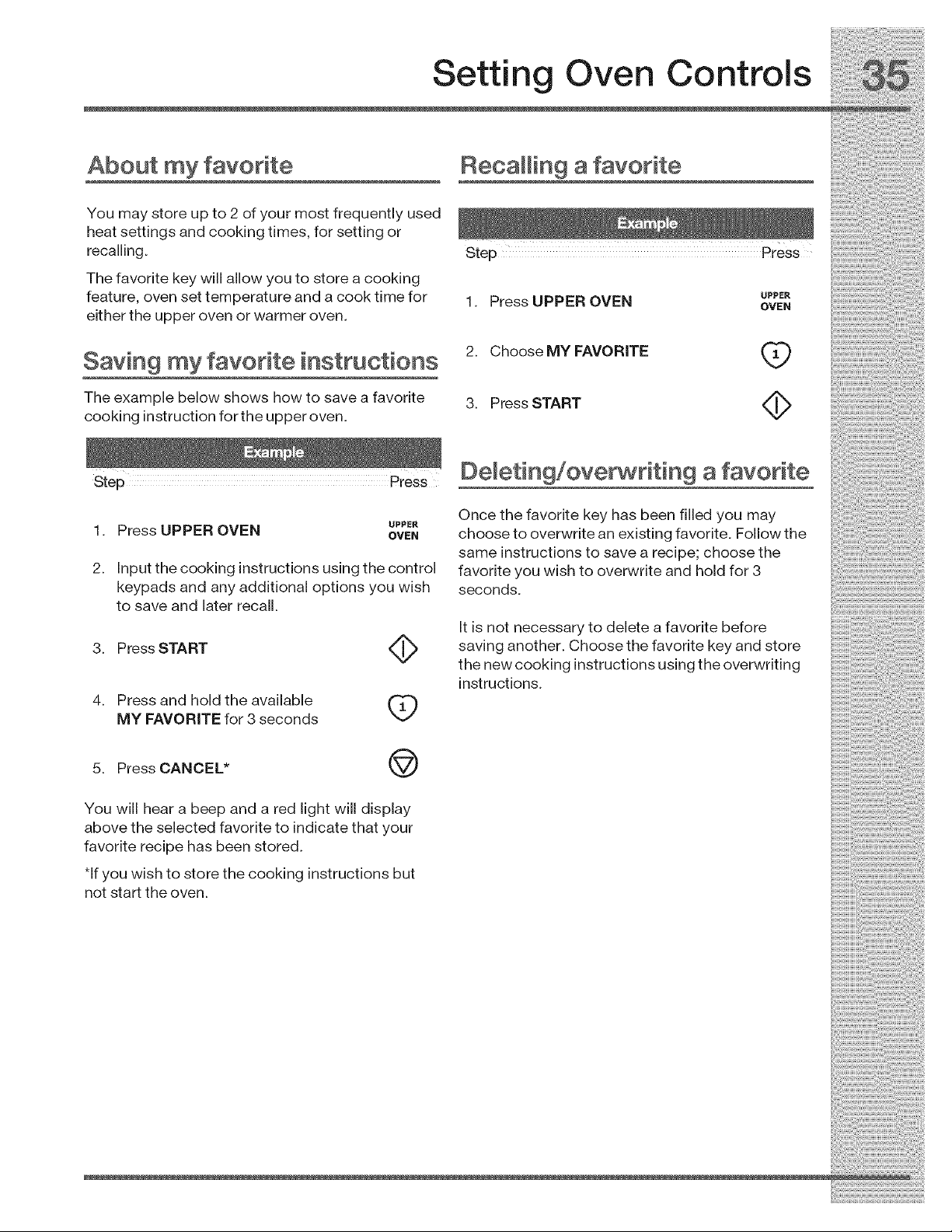
About my favorite Recalling afavorite iiiiiiiiiiiil
You may store up to 2 of your most frequently used
heat settings and cooking times, for setting or
recalling.
The favorite key will allow you to store a cooking
feature, oven set temperature and a cook time for 1. Press UPPER OVEN _,_
either the upper oven or warmer oven.
Saving my favorite instructions 2. Choose MY FAVORITE (_
The example below shows how to save a favorite 3. Press START
cooking instruction for the upper oven.
Step Press Demeting/ove_riting a favorite
Once the favorite key has been filled you may
1. Press UPPER OVEN _"_ choose to overwrite an existing favorite. Followthe
same instructions to save a recipe; choose the
2. Input the cooking instructions using the control favorite you wish to overwrite and hold for 3
keypads and any additional options you wish seconds.
to save and later recall.
Step Press
3. Press START
4. Press and hold the available
X_J
MY FAVORITE for 3 seconds
It is not necessary to delete a favorite before
saving another. Choose the favorite key and store
the new cooking instructions using the overwriting
instructions.
5. Press CANCEL* @
You will hear a beep and a red light will display
above the selected favorite to indicate that your
favorite recipe has been stored.
*If you wish to store the cooking instructions but
not start the oven.
i!:_ii!:_!iii_iii_i_ii:ii_ii:ii:_!!_!_!!_i_!_!_i!_:!_!_i_i_!!_!_!_!_ii_¸i:ii!ii:iii!_i!i!iii!!iii_i'i!ili_!!ii!i!i!i!!iiii_i
Setting Oven Controls
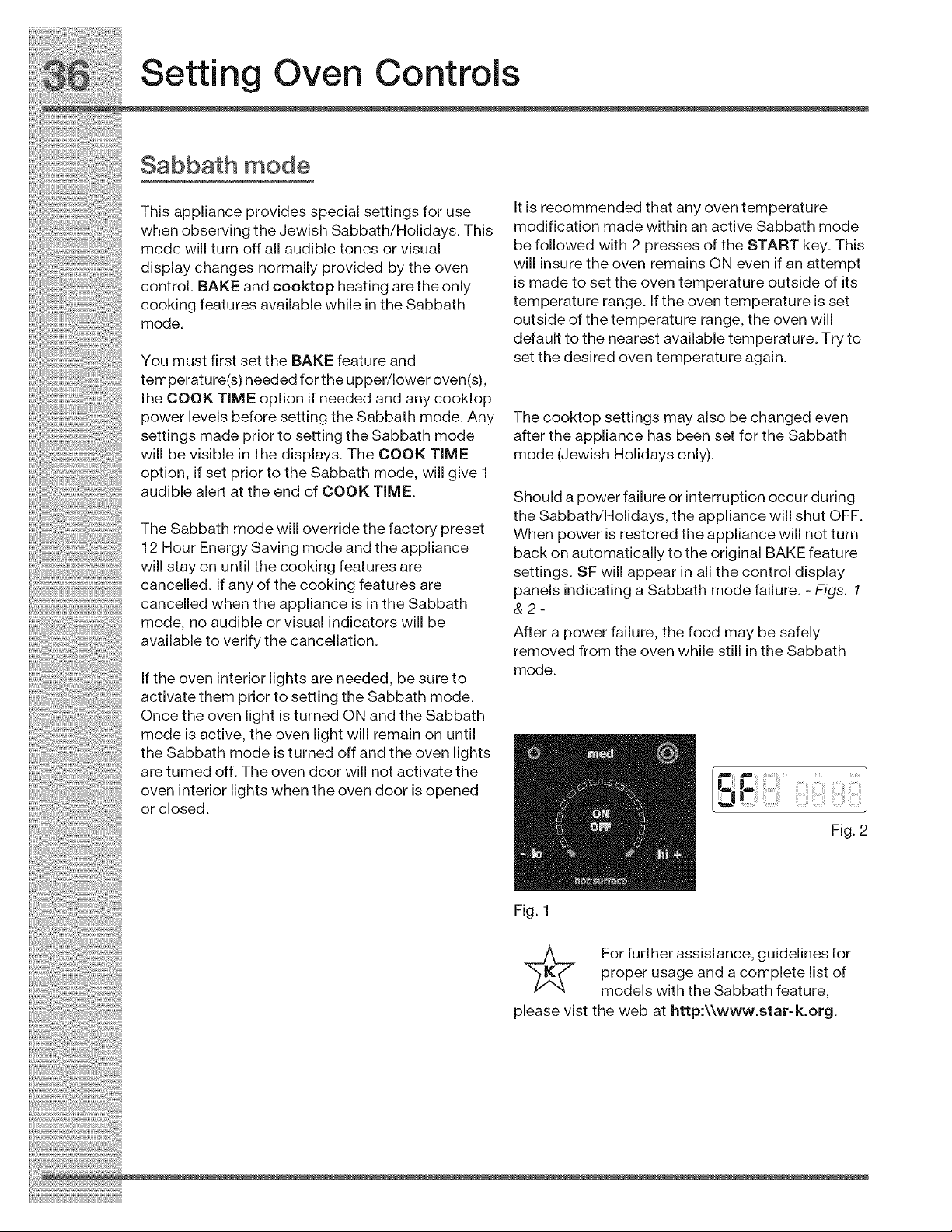
Sabbath mode
This appliance provides special settings for use It is recommended that any oven temperature
when observing the Jewish Sabbath/Holidays. This modlflcahon made within an active Sabbath mode
mode will turn off all audible tones or visual be followed with 2 presses of the START key. This
display changes normally provided by the oven will insure the oven remains ON even if an attempt
control. BAKE and cooktop heating are the only is made to set the oven temperature outside of its
cooking features available while in the Sabbath temperature range. If the oven temperature is set
mode outside of the temperature range, the oven will
defauIt to t he nearest ava ilable tem pe rat ur e. Try t o
You must first set the BAKE feature and set the desired oven temperature again.
temperature(s) needed for the upper/lower oven(s),
the COOK TiM E option if needed and any cooktop
power levels before setting the Sabbath mode. Any The cooktop settings may also be changed even
settings made prior to setting the Sabbath mode after the appliance has been set for the Sabbath
will be visible in the displays. The COOK TIME mode (Jewish Holidays only).
option, if set prior to the Sabbath mode, will give 1
audible alert at the end of COOK TiME "ShouId a powe r fail ure o r in terr uptio n co cur durin g
the Sabbath/Holidays the appliance will shut OFF.
The Sabbath mode will override the factory preset When power is restored the appliance will not turn
12 Hour Energy Saving mode and the appliance back on automatically to the original BAKE feature
will stay on until the cooking features are settings. SF will appear in all the control display
..... cancelled. If any of the cooking features are panels indicating a Sabbath mode failure. - Figs. 1
cancelled when the appliance is in the Sabbath &2-
mode, no audible or visual indicators will be
available to verify the cancellation.
If the oven interior lights are needed, be sure to
activate them prior to setting the Sabbath mode.
Once the oven light is turned ON and the Sabbath
mode is active, the oven light will remain on until
the Sabbath mode is turned off and the oven lights
are turned off. The oven door will not activate the
oven interior lights when the oven door is opened
or closed.
After a power failure, the food may be safely
removed from the oven while still in the Sabbath
mode.
Fig. 1
Fig. 2
._ For further assistance, guidelines for
proper usage and a complete list of
models with the Sabbath feature,
please vist the web at http:\\www.star-k.org.
iiiiiiii_iiiiiii_i!i_i!_i!_i_i!_i_i!_i_!i_i_i_!i!_!_ii_i_!i_i!iiii_!_i!i_!ii!i!_i...........
Setting Oven Controls !
Setting Sabbath mode Canceming Sabbath mode
Theexamplebelowshowssettingtheovento Theexamplebelowshowshowtocancelthe
observetheSabbath (and Jewish holidays). Sabbathmode.
p Step P ess
1. SettheBAKEfeatureyou need duringthe
SabbathfortheUPPERoven. AIsomakeany 1. PressandholdboththeLO . +
cooktop settings you may wish to have and HI keys together for 3 . & ..
available, seconds(abeepwillsound) ,o n,
and release:
2. PressandholdboththeLO 2. Allcookingfeaturespreviouslysetandthe
and Hlkeystogetherfor3 " & + cooktopwillautomaticallycancelonceSabbath
seconds(abeepwillsound) |o hi modehasended. ....
andre_ease:
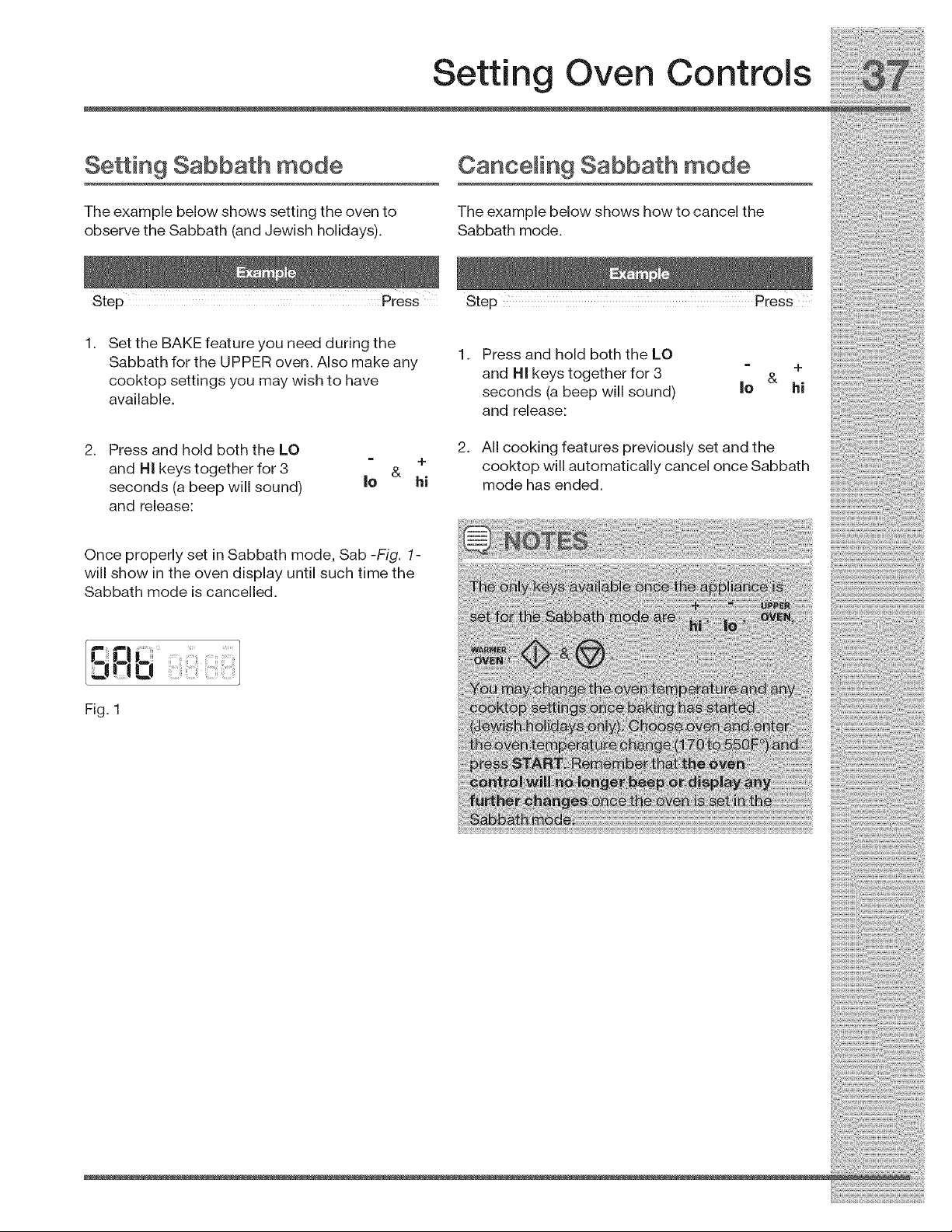
Once properly set in Sabbath mode, Sab -Fig. 1-
will show in the oven display until such time the
Sabbath mode is cancelled.
i_i_i_i_i_i_i_i_i!i:i!i!_y_!i!_i_!!;_;!_i_:;!_!i_ii_i_i_!_i_i_ii_ii_;_
Setting Warmer Oven Controls
Warmer oven features
The warmer oven is ideal for warming foods such
as pizza, casseroles, baked potatoes and frozen
convenience foods. Use the keep warm feature to
keep hot cooked foods at serving temperature.
i w re vi
The warmer oven may be set with the keep warm ro £ wet £ i
featu re. _ w 6
: : y ;
Recommendations for the warmer oven qv_ For best results
When placing food in the lower oven always use .....
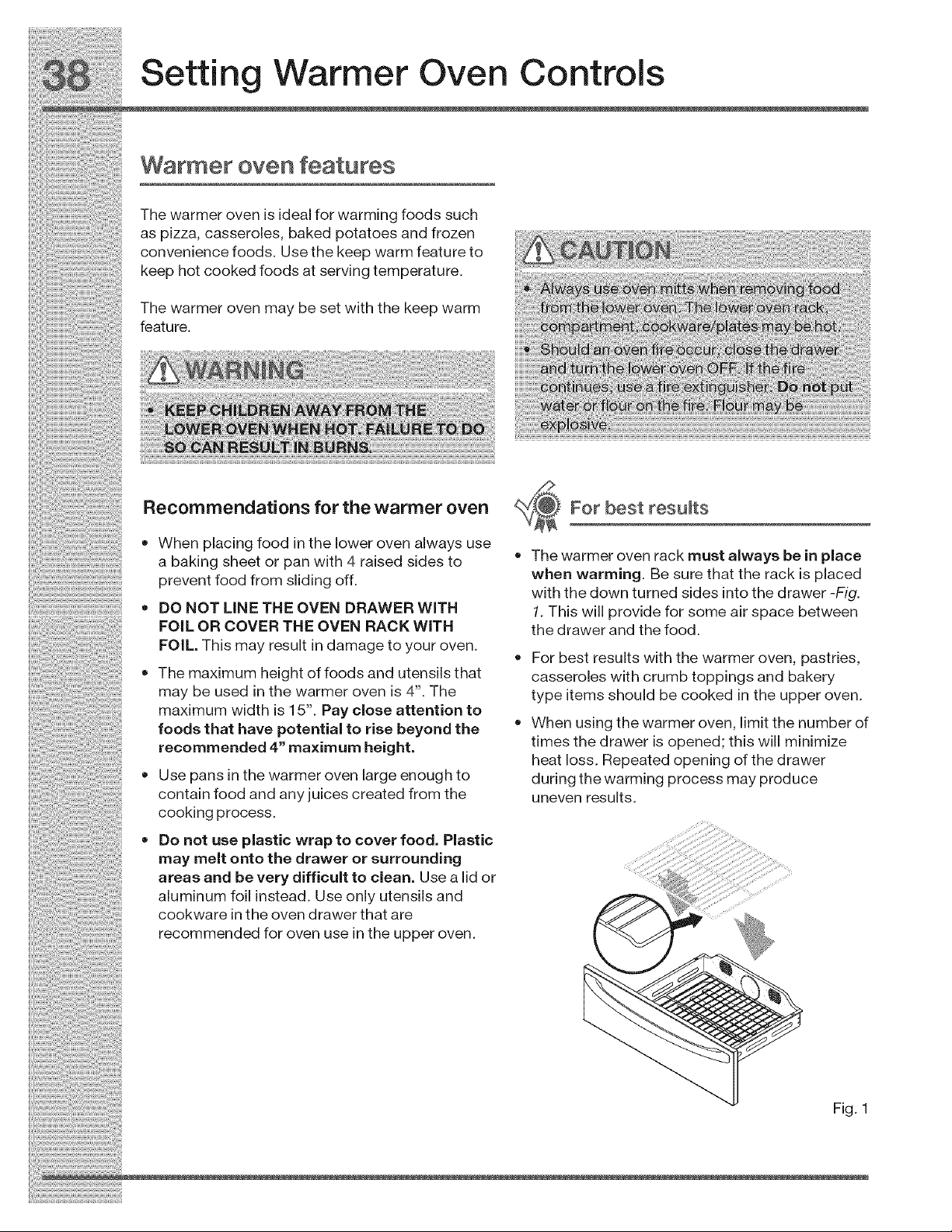
a baking sheet or pan with 4 raised sides to • The warmer oven rack must a ways De n p ace
prevent food from sliding off. when warming. Be sure that the rack is placed
...................................................................................................... with the down turned sides into the drawer -Fig.
', DO NOT LINE THE OVEN DRAWER WITH
FOiL OR COVER THE OVEN RACK WITH
FOIL. This may result in damage to your oven.
• The maximum height of foods and utensils that
may be used in the warmer oven is 4". The
maximum width is 15". Pay close attention to
foods that have potential to rise beyond the
recommended 4" maximum height.
• Use pans in the warmer oven large enough to
contain food and any juices created from the
cooking process.
• Do not use plastic wrap to cover food. Plastic
may melt onto the drawer or surrounding
areas and be very difficult to clean. Use a lid or
aluminum foil instead. Use only utensils and
cookware inthe oven drawer that are
recommended for oven use in the upper oven.
1. This will provide for some air space between
the drawer and the food.
For best results with the warmer oven, pastries,
casseroles with crumb toppings and bakery
type items should be cooked in the upper oven.
When using the warmer oven, limit the number of
times the drawer is opened; this will minimize
heat loss. Repeated opening of the drawer
during the warming process may produce
uneven results.
Fig. 1
Setting Warmer Oven Controls
About keep warm in the
waFmeF oven
Use the keep warm feature to keep cooked foods
warm.
When using keep warm always start with hot food.
Do not heat cold food.
Keep warm may be set with the following options:
• Cooktime
Cook time with end time
The following temperature settings apply to the
keep warm feature:
Auto-suggest (default) setting: 170°F/76°0
Min. keep warm setting: 150°F/66°C
Max. keep warm setting: 190°F/88°0
If you enter a temperature beyond this range your
Temperature selection
See the recommended settings chart below for
keep warm. If a particular food is not listed, use
the default temperature of 170°F. If more crispness
is desired, remove the lid or aluminum foil from the
food. Most foods can be kept at serving
temperatures at 170°F. When a combination of
foods are to be kept warm (for example a meat
with 2 vegetables and rolls) use 170°F.
Food Item Heating Level
Fried Foods 190OF
control will automatically default to the nearest
temperature available.
Soups(Cream) !70°F
To add or change any cook settings after this
feature has started:
Select the UPPER or WARMER oven you wish
to change. Make temperature changes using the
+ or - keys. Each press of + or - will adjust the
temperature by 5° F (or 2°C).
If changing cooking times, select the cook time
or end time keys needed to make the changes.
Dinner Plates with Food 150°F
Breads/Pasteries 150°F
Setting Warmer Oven Controls
Se_ing keep warm in the
warmer oven
See example below to set keep warm for the
warmer oven to start at 190°F/88°C:
Step Press
WARHER
1. Press WARMER OVEN OVEN
2. Press KEEP WARM r_7
3. Use +hi to increase the +
temp. to 190°E hi
4. Press START
Warmer oven cleaning tips
For easier clean-up, the warmer oven should be
cleaned as soon as the oven cools down. Clean
after each use to minimize build-up of spatter and
food leftovers. When cooking foods that spatter,
cover the food with heat-proof lid or foil. Use a mild
detergent and water to clean the oven drawer and
sides. For stubborn soils use a non-abrasive
cleaning pad to remove soils. DO NOT use oven
cleaners on the oven cavity.
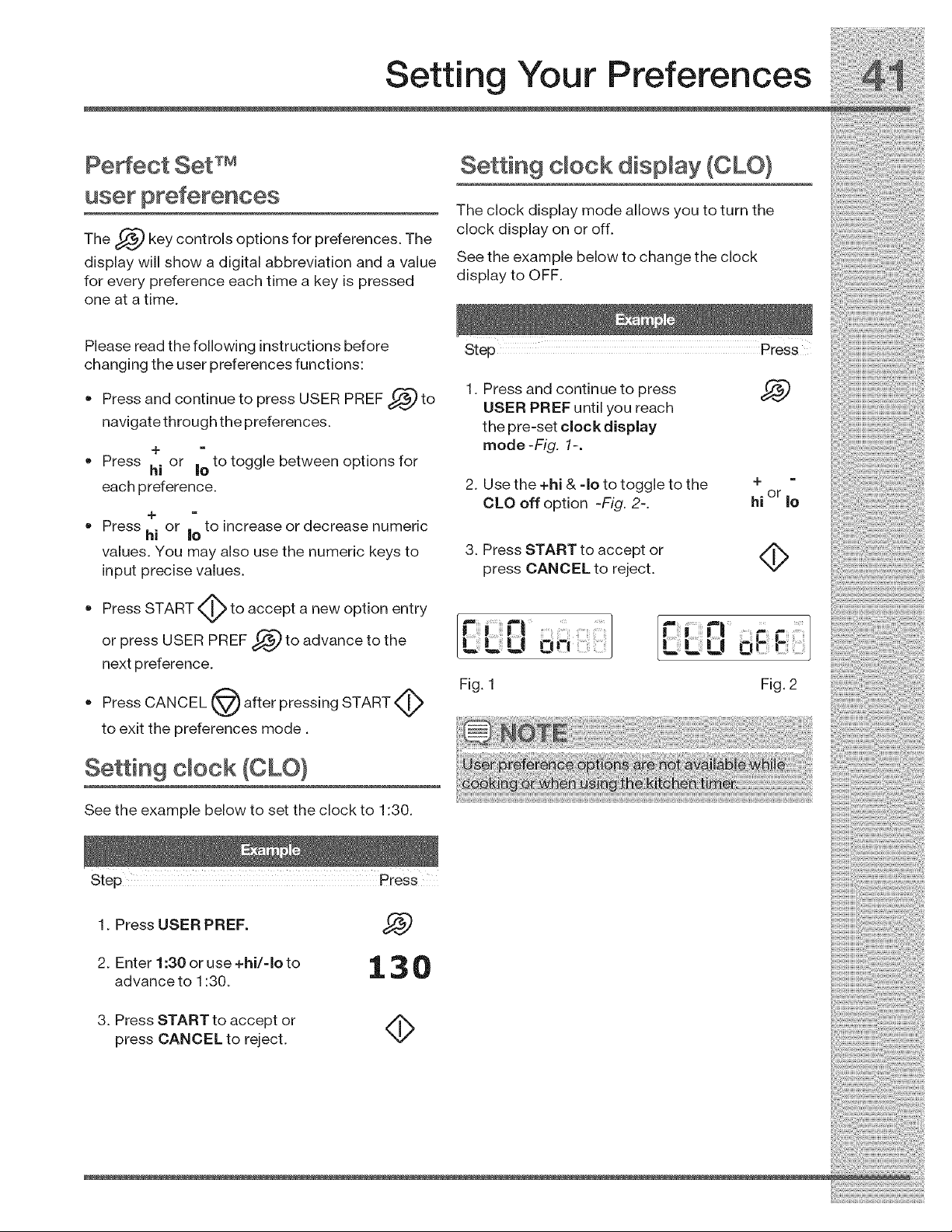
Setting Your Preferences
user preferences
The _ key controls options for preferences. The
display will show a digital abbreviation and a value
for every preference each time a key is pressed
one at a time.
Setting clock dispmay (CLO}
The clock display mode allows you to turn the
clock display on or off.
See the example below to change the clock
display to OFF.
Please read the following instructions before
changing the user preferences functions:
•Press and continue to press USER PREF _ to
navigate through the preferences.
• Press or to toggle between options for
hi Io
each preference.
+
Press hi or |o to increase or decrease numeric
values. You may also use the numeric keys to
input precise values.
oPress START to accept a new option entry
USER PREF _ to advance to the
or press
next preference.
• Press CANCEL LV_) after pressing START _l_
to exit the preferences mode.
Setting cmock (CLO}
1. Press and continue to press
USER PREF until you reach
the pre-set clock display
mode-FLg. 1-.
2. Use the +hi & -Io to toggle to the
CLO off option -Fig. 2-.
3. Press START to accept or
press CANCEL to reject.
Fig. 1
+
or
hi Io
........_ _
L| O rr
Fig, 2
See the example below to set the clock to 1:30.
1. Press USER PREF. __,:gJ
2. Enter 1:30 or use +hi/qo to 1, 3 0
advance to 1:30.
3. Press START to accept or
press CANCEL to reject. NV
i_i!_!_i!i_ii_!i!_!_i!i_ii_!i!_!_i!i_ii_!i!_!_i!i_ii_!i!_!_i!i_ii_!i!_!_i!i_ii_!i!_!_i!i_ii_!i!_!_i!i_ii_!i!_!_i!i_ii_!i!_!_i!i_ii_!i!_!_i!i_i
_!ii!!!i!!i_ii!!i_!i!_i!_!i!_!_i!_!_i!_!i!:_!_:!!_!:!!_!:!!_!_!iii!i_!_!_Jii!_i!i_i!iii_i_i_!_ii_i_ii_i_ii_i_i!_i!_i:_i_i_ii
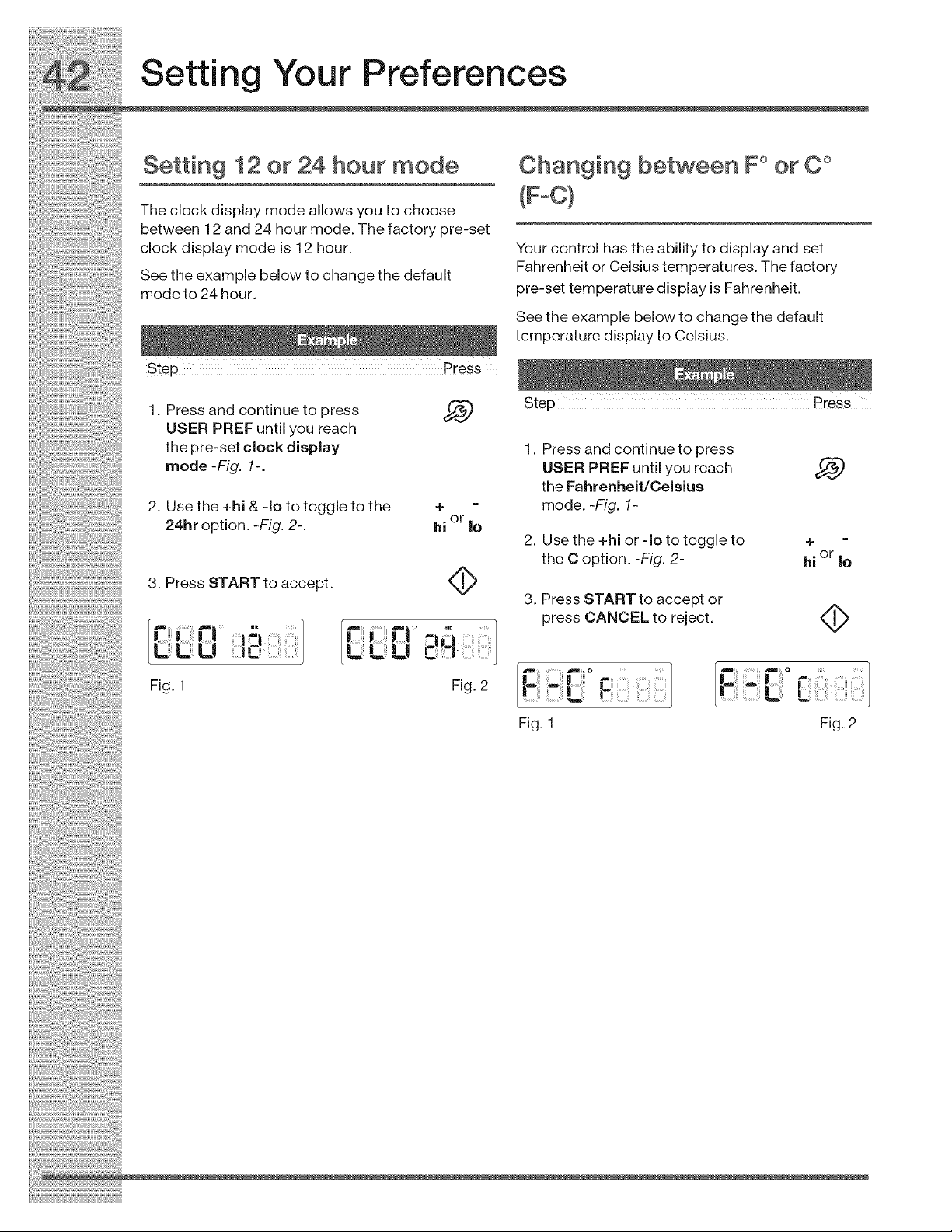
Setting Your Preferences
Settm9 12 or24 hour mode Changing between F° orC °
Theclockdisplaymodeallowsyoutochoose (F_C}
between 12 and 24 hour mode The factory pre-set Your control has the ability to display and set
cockdspaymode s12hour ............... T_'^facton'
r-anrennelt or L,elslustemperaLur_..H_ ,y
Smeo_tehtoe24hoP_re.bel°wt°changethedefault pre-settemperaturedisplayisFahrenheit.
Seetheexamplebelowtochangethedefault
temperaturedisplaytoCelsius.
st0p Pr0ss
1. Pressandcontinuetopress _ P
USER PREF until you reach
thepre-setclockdisplay 1 Pressandcont nuetopress
mode-FLg. 1-. USERPREFuntilyoureach
theFahrenheit/Celsius
2. Usethe+hi&-Iototoggletothe + - mode.-FLg. 1-
24hroption.-FLg. 2-. hi or le
2. Use the +hi or -Io to toggle to +
the C option. -Fig. 2- hi or Io
3. Press START to accept.
3. Press START to accept or
press CANCEL to reject. (It
u -J
Fig. 2Fig. 1
Fig. 1
F
L!;ii _ii?iii ......
Fig. 2
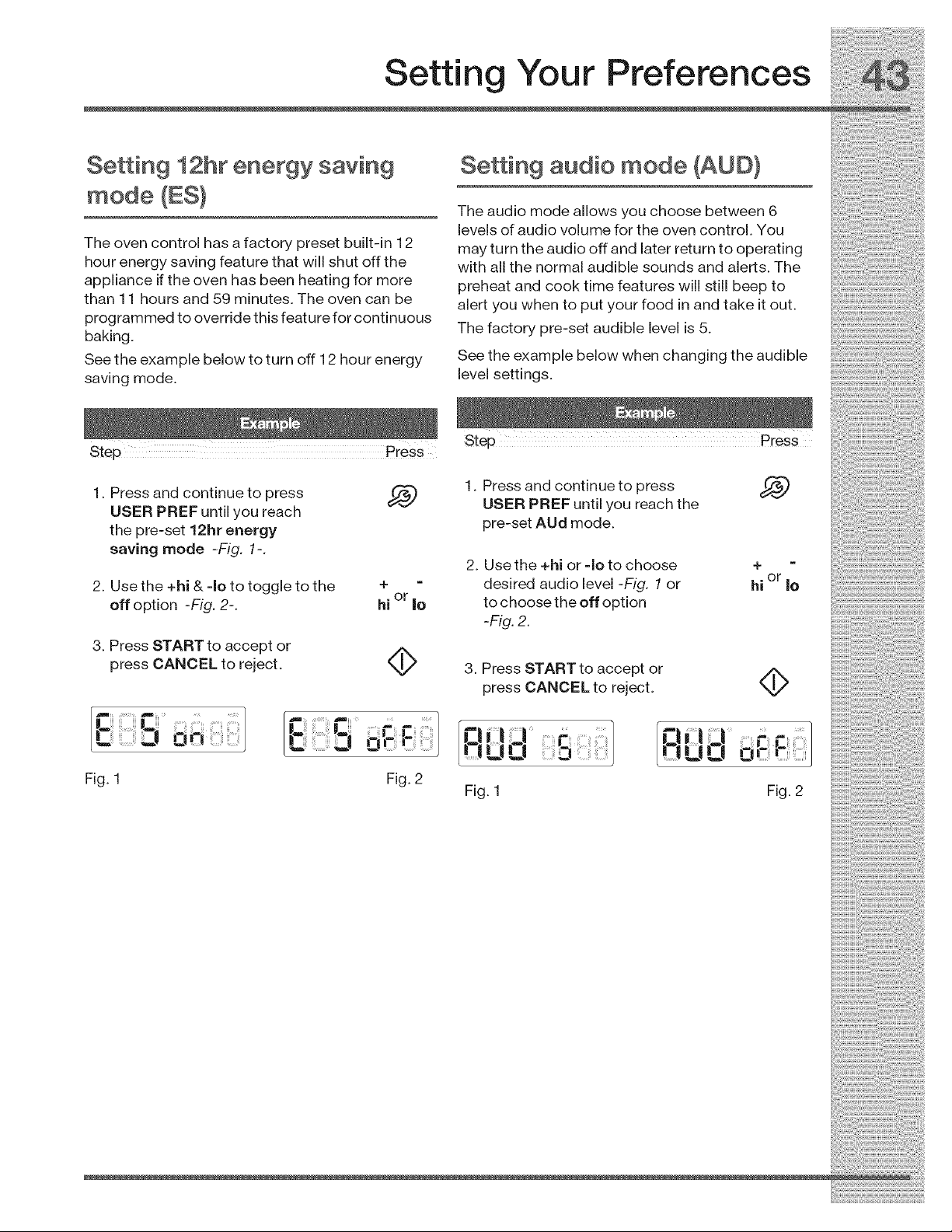
Setting Your Preferences
SeAing 12hr energy saving
mode (ES}
The oven control has a factory preset built-in 12
hour energy saving feature that will shut off the
appliance if the oven has been heating for more
than 11 hours and 59 minutes. The oven can be
programmed to override this feature for continuous
baking.
See the example below to turn off 12 hour energy
saving mode.
SeWn9 audio mode (AUD}
The audio mode allows you choose between 6
levels of audio volume for the oven control. You
may turn the audio off and later return to operating
with all the normal audible sounds and alerts. The
preheat and cook time features will still beep to
alert you when to put your food in and take it out.
The factory pre-set audible level is 5.
See the example below when changing the audible
level settings.
Step Press
1. Press and continue to press
USER PREF until you reach
the pre-set 12hr energy
saving mode -Fig. 1-.
2. Use the +hi & -Io to toggle to the
off option -Fig. 2-.
3. Press START to accept or
press CANCEL to reject.
1. Press and continue to press
USER PREF until you reach the
pre-set AUd mode.
2. Use the +hi or -Io to choose
desired audio level -Fig. 1or
to choose the off option
-F_g.2.
4-
or
hi Io
3. Press START to accept or
press CANCEL to reject. 4>
.r_!iil¢. I /c!,l ]
!tUd 0i- J
Fig. 1 Fig. 2
i_i!_!_i!i_ii_!i!_!_i!i_ii_!i!_!_i!i_ii_!i!_!_i!i_ii_!i!_!_i!i_ii_!i!_!_i!i_ii_!i!_!_i!i_ii_!i!_!_i!i_ii_!i!_!_i!i_ii_!i!_!_i!i_ii_!i!_!_i!i_i
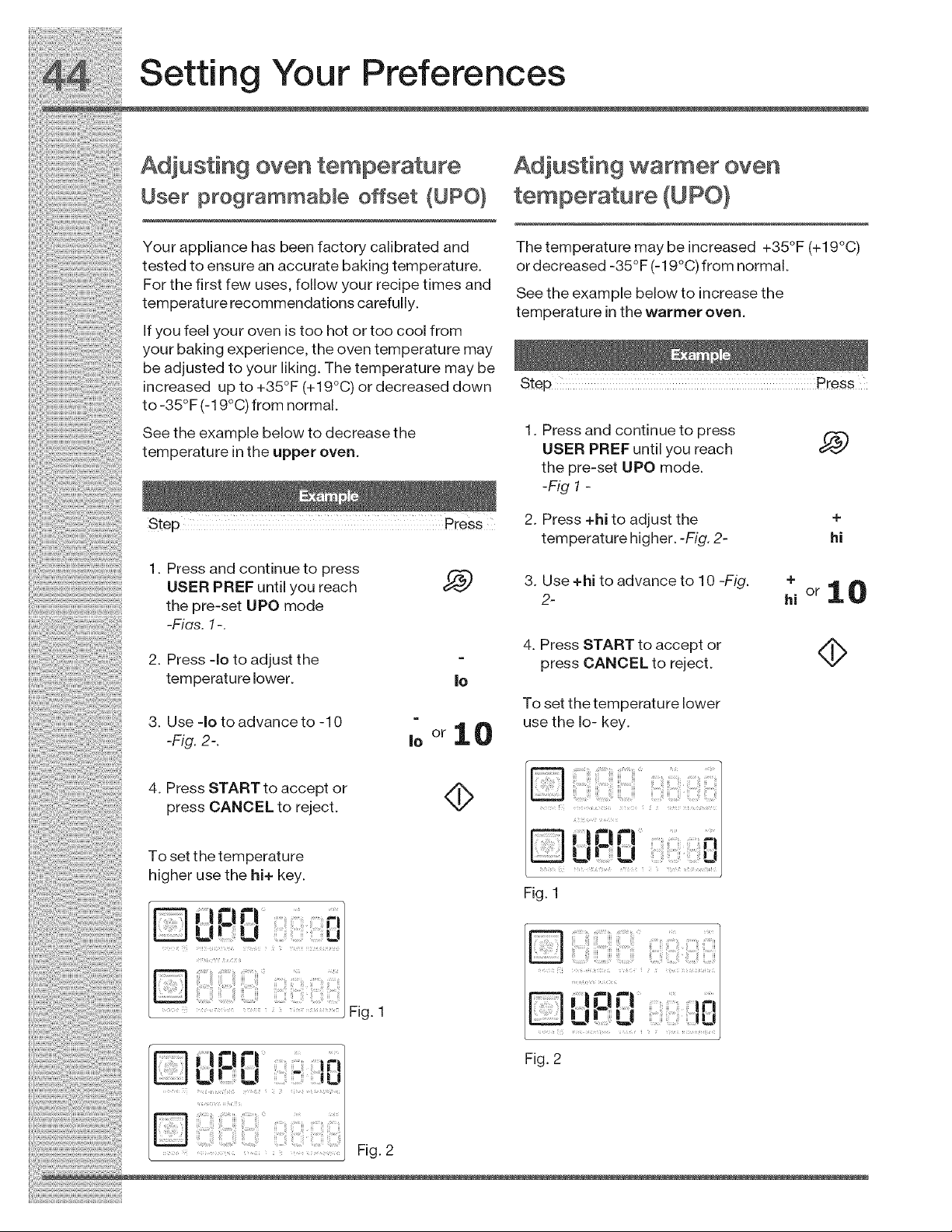
2.
3.
the pre-set UPO mode
-Fias. 1-.
Press qo to adjust the
temperature lower.
Use qo to advance to -10
-Fig. 2-.
4. Press START to accept or
press CANCEL to reject.
To set the temperature
higher use the hi+ key.
0 El ...............
u u urm
Fig. 1
|0
|O
orlO
4>
2-
4. Press START to accept or
press CANCEL to reject.
To set the temperature lower
use the Io- key.
Fig. 1
hi
Fig. 2
_ ........ _ Fig. 2
i_i!_!_i!i_ii_!i!_!_i!i_ii_!i!_!_i!i_ii_!i!_!_i!i_ii_!i!_!_i!i_ii_!i!_!_i!i_ii_!i!_!_i!i_ii_!i!_!_i!i_ii_!i!_!_i!i_ii_!i!_!_i!i_ii_!i!_!_i!i_i
Setting Your Preferences
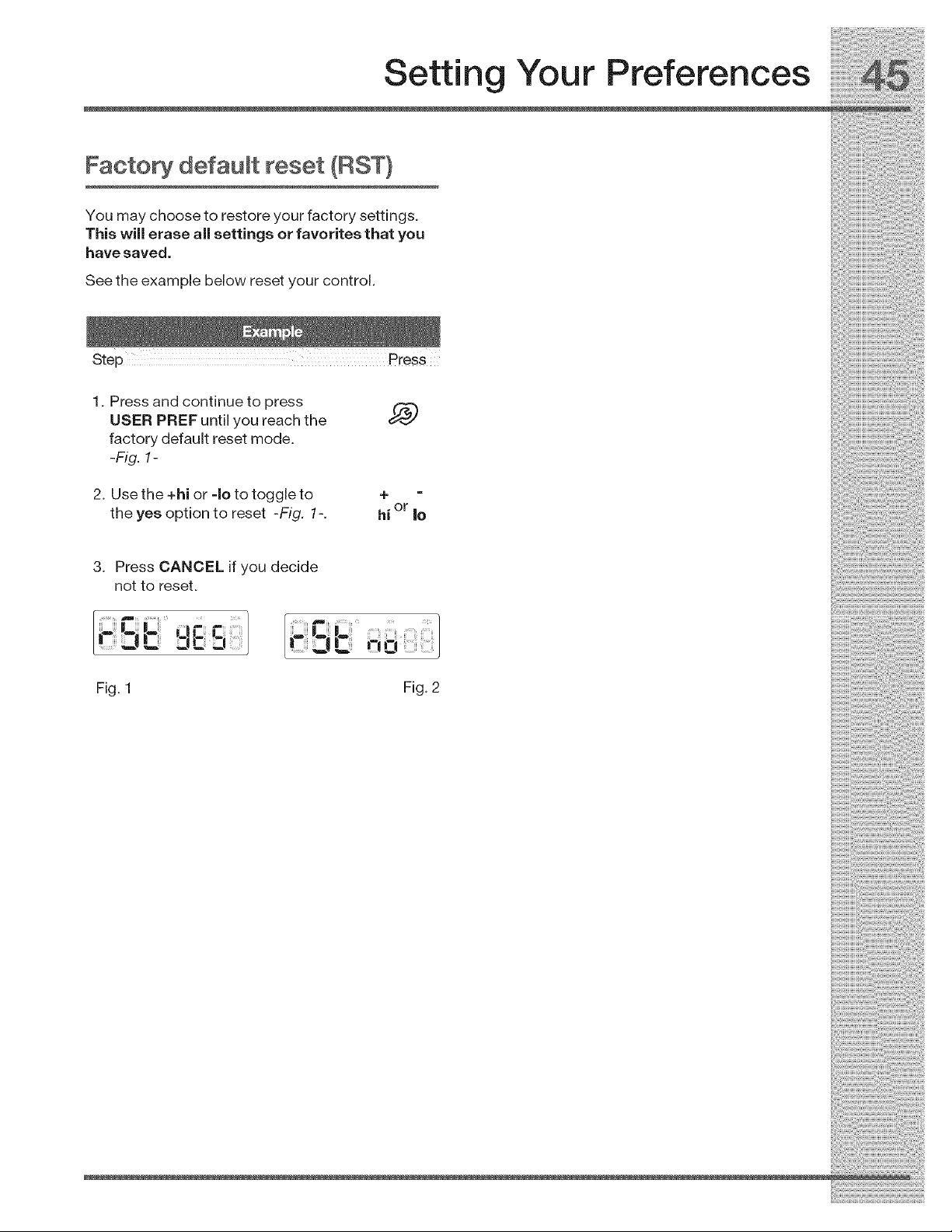
Facto_ default reset (RST}
You may choose to restore your factory settings.
This will erase all settings or favorites that you
have saved.
See the example below reset your control.
1. Press and continue to press
USER PREF until you reach the
factory default reset mode.
-Fig. 1-
2. Use the +hi or -Io to toggle to
the yes option to reset -Fig. 1-.
4-
or
hi |o
3. Press CANCEL if you decide
not to reset.
l'-2., " rZiC3 J _-!0
Fig. 1 Fig. 2

D _ii!!ii!i:ii!!_iillEiiliiiiiiiii!i!iii_il¸¸
UPO warmer oven ..........
L| !L|
Reset to factory ..............
pre-sets
[_ C L ; -
:iC3
[! ,7.! J Ip
* Audio mode provides 6 possible settings.
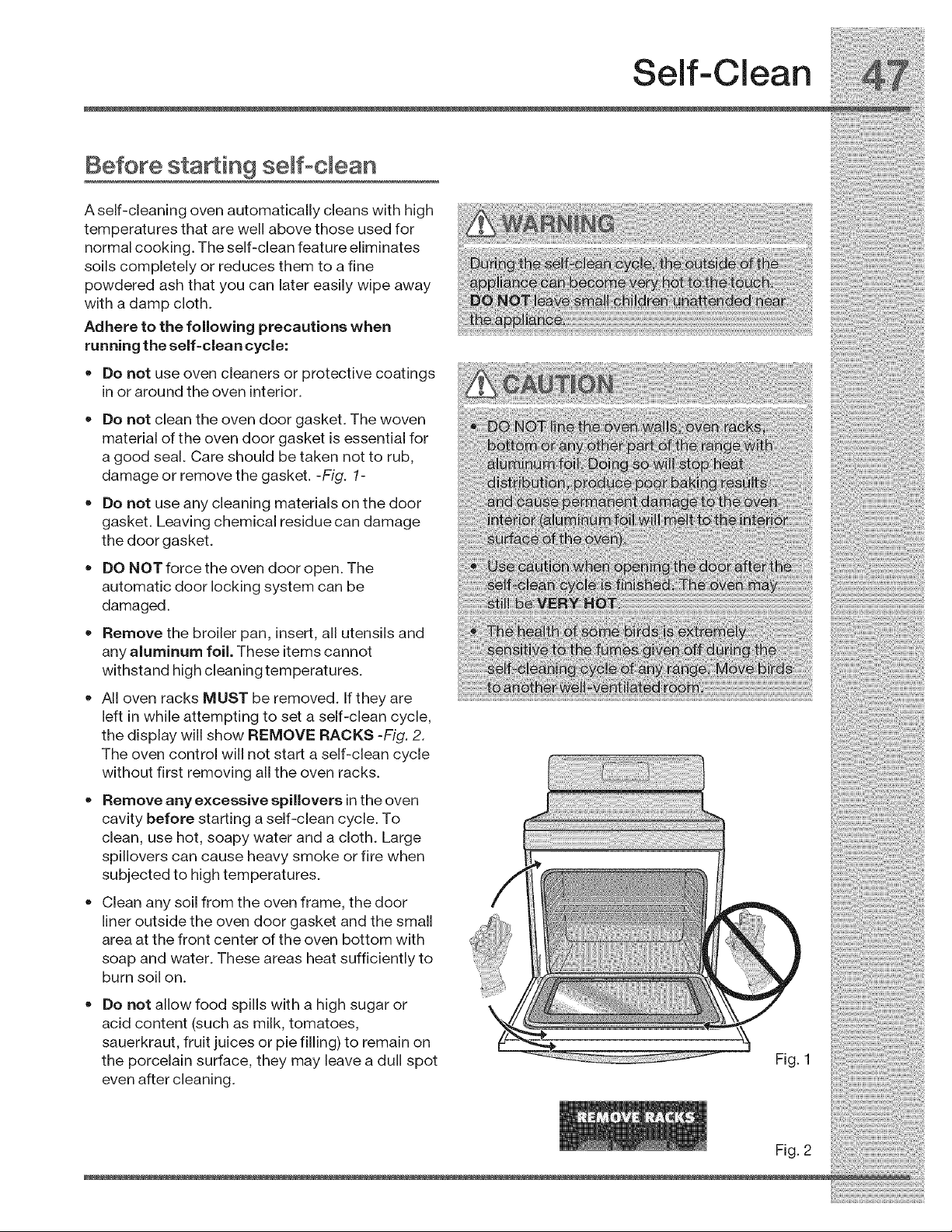
Before sta in9 semfoclean
A self-cleaning oven automatically cleans with high
temperatures that are well above those used for
normal cooking. The self-clean feature eliminates
soils completely or reduces them to a fine
powdered ash that you can later easily wipe away
with a damp cloth.
Adhere to the following precautions when
running the self=clea n cycle:
= Do not use oven cleaners or protective coatings
in or around the oven interior.
• Do not clean the oven door gasket. The woven
material of the oven door gasket is essential for
a good seal. Care should be taken not to rub,
damage or remove the gasket. -Fig. 1-
Do not use any cleaning materials on the door
gasket. Leaving chemical residue can damage
the door gasket.
DO NOT force the oven door open. The
automatic door locking system can be
damaged.
Remove the broiler pan, insert, all utensils and
any aluminum foil. These items cannot
withstand high cleaning temperatures.
All oven racks MUST be removed. If they are
left in while attempting to set a self-clean cycle,
the display will show REMOVE RACKS -Fig. 2.
The oven control will not start a self-clean cycle
without first removing all the oven racks.
•Remove any excessive spillovers inthe oven
cavity before starting a self-clean cycle. To
clean, use hot, soapy water and a cloth. Large
spillovers can cause heavy smoke or fire when
subjected to high temperatures.
Clean any soil from the oven frame, the door
liner outside the oven door gasket and the small
area at the front center of the oven bottom with
soap and water. These areas heat sufficiently to
burn soil on.
Do not allow food spills with a high sugar or
acid content (such as milk, tomatoes,
sauerkraut, fruit juices or pie filling) to remain on
the porcelain surface, they may leave a dull spot
even after cleaning.
Self-Clean
Fig. 2
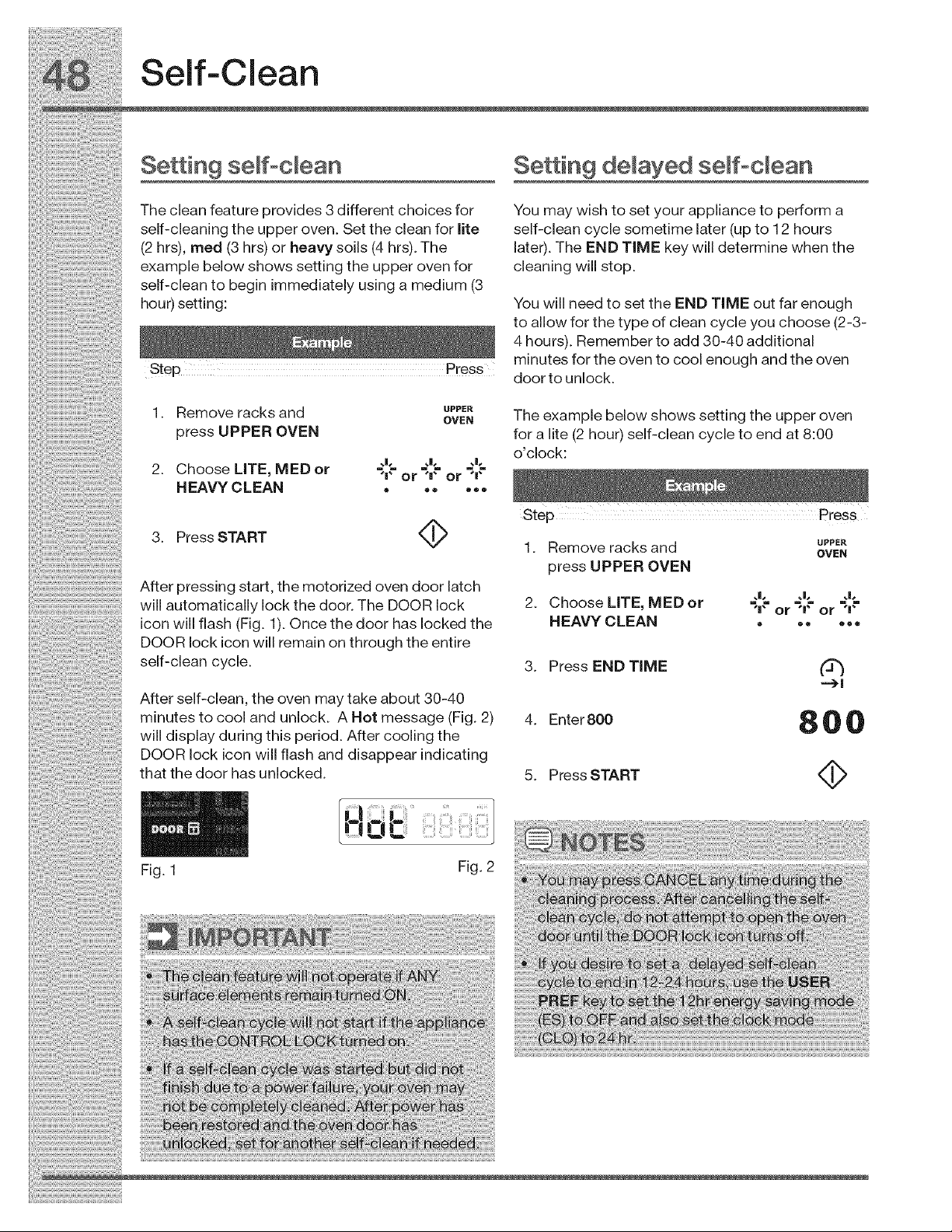
Self-Clean
Setting semf°clean Se ing delayed semf°cmean
The clean feature provides 3 different choices for You may wish to set your appliance to perform a
self-cleaning the upper oven. Set the clean for lite self-clean cycle sometime later (up to 12 hours
(2 hrs), meal (3 hrs) or heavy soils (4 hrs). The later). The END TIME key will determine when the
example below shows setting the upper oven for cleaning will stop.
self-cleantobegin immediatelyusinga medium (3
hour) setting: You will need to set the END TIME out far enough
toallowforthetypeofcleancycleyouchoose(2-3-
4hours). RemembertoaddS0-40additional
m nutes for the oven to coo enough and the oven
Step _ress door to unlock.
1. memoveracksand _ Theexamplebelowshowssettingtheupperoven
pressUPPER OVEN foralite(2 hour) self-clean cycletoend at8:00
o cock
2 Choose LITE MED or ._l? ._l,= ._l,=
"IOl" H Ol"
HEAVYCLEAN ......
3. PressSTART _ 1. Removeracksand _
press UPPER OVEN
..... After pressing start, the motorized oven door latch
will automaticallylockthedoor. The DOORIock 2. ChooseLITE, MEDor _,_ or"_,tor _,_"
icon will flash (Fig. 1). Once the door has locked the HEAVY CLEAN ......
DOOR lock icon will remain on through the entire
self-clean cycle.
After self-clean, the oven may take about 30-40
minutes to cool and unlock. A Hot message (Fig. 2)
will display during this period. After cooling the
DOOR lock icon will flash and disappear indicating
that the door has unlocked.
Fig. 1
3. Press END TiME (3_
4. Enter 800 8 0 0
5. Press START
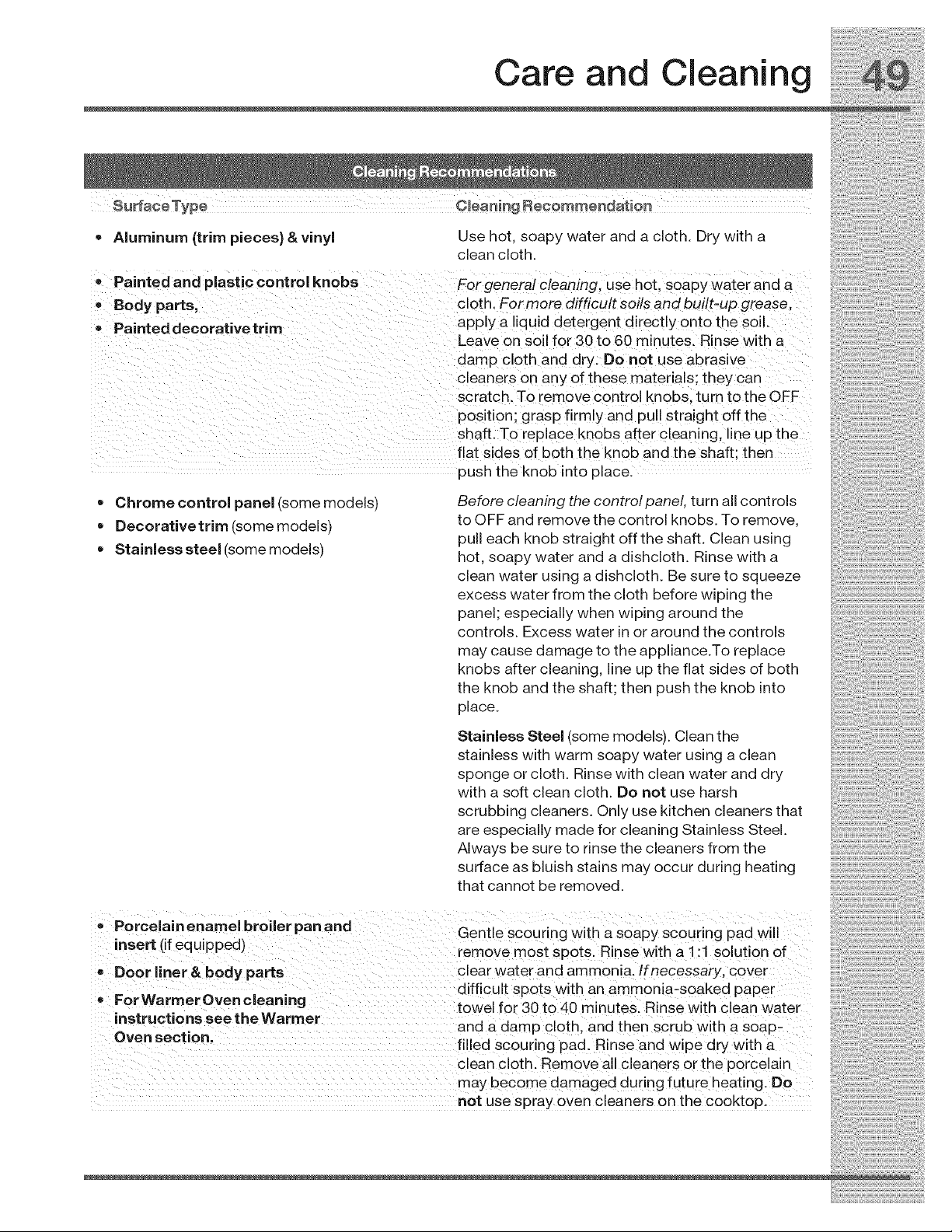
Care and Cleaning
• Aluminum {trim pieces) &vinyl Use hot, soapy water and a cloth. Dry with a
clean cloth.
tPaintedand plastic Control knobs Forgeneral cleaning, use hot, soapywater and a
, Bed arts; cloth Formore difficult Soils and built-up grease,
yp
Painted decorativetrim apply a !iqu id detergent d!rectlY 0nto the soi!.
Leave on soil for 30 to 60 minutes. Rinse with a
damp cl0th and dryi Do not use abrasive
cleaners on any of these materials they can
sCratchl To remoVe Control kn0bS turn tothe OFF
POSition grasp firmiy and pu!l straight off the
ShafL TO replace kn0bs affei Cleaning, ikle Up the
flat sides of b0th the knob and the Shaft; then
push the knob into place.
Chrome control panel (some models)
Decorative trim (some models)
Stainless steel (some models)
Before cleaning the control panel, turn all controls
to OFF and remove the control knobs. To remove,
pull each knob straight off the shaft. Clean using
hot, soapy water and a dishcloth. Rinse with a
clean water using a dishcloth. Be sure to squeeze
excess water from the cloth before wiping the
panel; especially when wiping around the
controls. Excess water in or around the controls
may cause damage to the appliance.To replace
knobs after cleaning, line up the flat sides of both
the knob and the shaft; then push the knob into
place.
Stainless Steel (some models). Clean the
stainless with warm soapy water using a clean
sponge or cloth. Rinse with clean water and dry
with a soft clean cloth. Do not use harsh
scrubbing cleaners. Only use kitchen cleaners that
are especially made for cleaning Stainless Steel.
Always be sure to rinse the cleaners from the
surface as bluish stains may occur during heating
that cannot be removed.
•Porcelain enamel broder pan and
" " Gentle sc0uring with a soapy scouring Pad Wil!
"nsert ('f equ'pped) remove most spots. Rinse with a ! :! solution of
-Door ner&bodyparts clear water and ammoni&lfnecessary cover
difficult Sp0ts With an ammonia,soaked paPei
oFor WarmerOven cleaning
. . towel for 30 to 40 minutesl Rinse with clean water
,nstructlons see the Warmer and a damP clothl and then Scrub With a soapL
°yen secti°m filled SCouring pad. Rinse and wipe dry with a
clean cloth. Remove all cleaners orthe porcelain
may become damaged during future heating. Do
not use spray oven cleaners on the cooktop.
•Ceramic cooktop
i_i!_!_i!i_ii_!i!_!_i!i_ii_!i!_!_i!i_ii_!i!_!_i!i_ii_!i!_!_i!i_ii_!i!_!_i!i_ii_!i!_!_i!i_ii_!i!_!_i!i_ii_!i!_!_i!i_ii_!i!_!_i!i_ii_!i!_!_i!i_i
See Cooktop Cleaning and Maintenance in the
Care & Cleaning section.
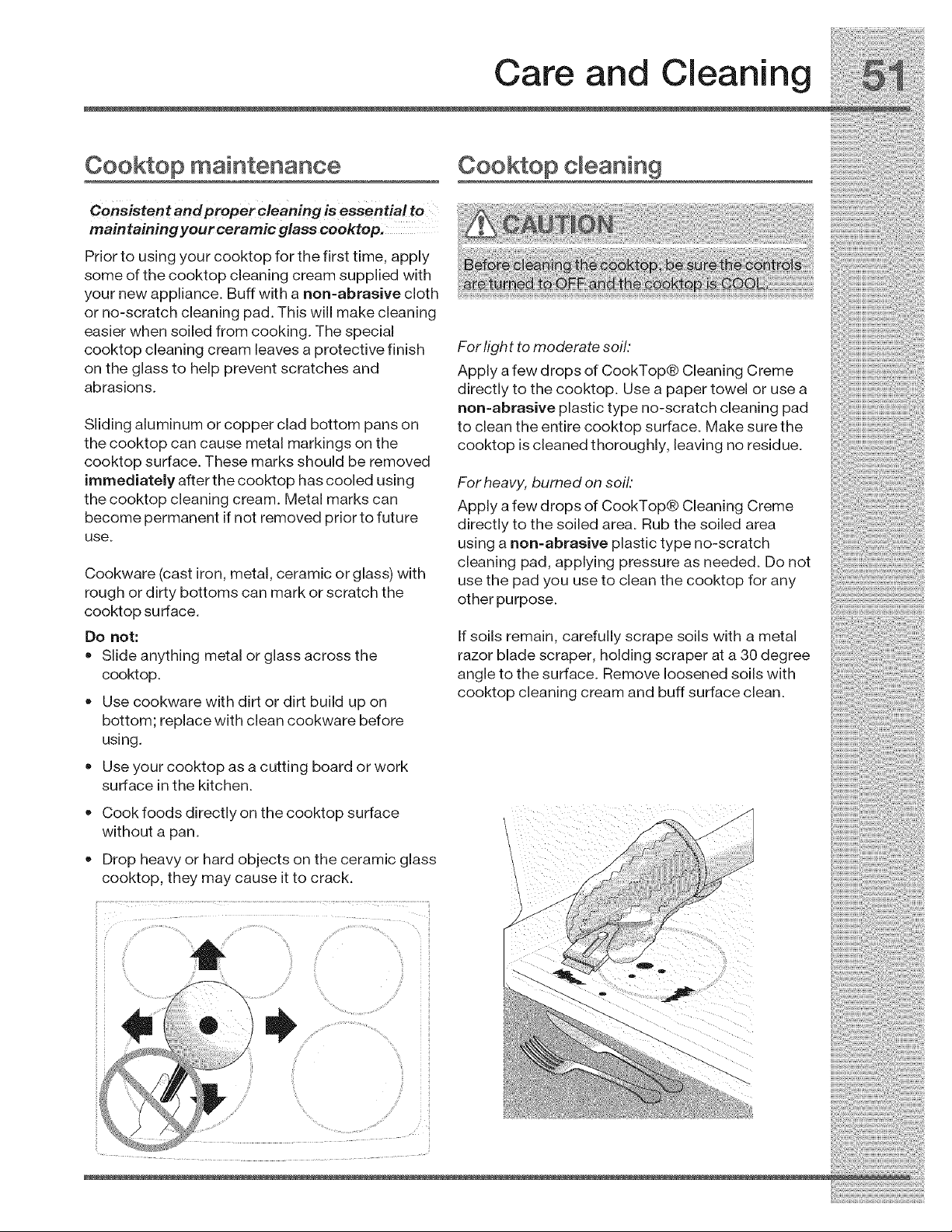
Care and Cleaning
Cooktop maintenance
Consistent and proper cleaning is essentia! to
maintaining your ceramic glass cooktop.
Prior to using your cooktop for the first time, apply
some of the cooktop cleaning cream supplied with
your new appliance. Buff with a non=abrasive cloth
or no-scratch cleaning pad. This will make cleaning
easier when soiled from cooking. The special
cooktop cleaning cream leaves a protective finish
on the glass to help prevent scratches and
abrasions.
Sliding aluminum or copper clad bottom pans on
the cooktop can cause metal markings on the
cooktop surface. These marks should be removed
immediately after the cooktop has cooled using
the cooktop cleaning cream. Metal marks can
become permanent if not removed prior to future
use.
Cookware (cast iron, metal, ceramic or glass) with
rough or dirty bottoms can mark or scratch the
cooktop surface.
Do not:
• Slide anything metal or glass across the
cooktop.
Use cookware with dirt or dirt build up on
bottom; replace with clean cookware before
using.
Use your cooktop as a cutting board or work
surface inthe kitchen.
Cook foods directly on the cooktop surface
without a pan.
Z)rop heavy or hard objects on the ceramic glass
cooktop, they may cause it to crack
Cooktop cleaning
For l_ght to moderate soft:
Apply a few drops of CookTop® Cleaning Creme
directly to the cooktop. Use a paper towel or use a
non-abrasive plastic type no-scratch cleaning pad
to clean the entire cooktop surface. Make sure the
cooktop is cleaned thoroughly, leaving no residue.
For heavy, burned on soil."
Apply a few drops of CookTop® Cleaning Creme
directly to the soiled area. Rub the soiled area
using a non-abrasive plastic type no-scratch
cleaning pad, applying pressure as needed. Do not
use the pad you use to clean the cooktop for any
other purpose.
If soils remain, carefully scrape soils with a metal
razor blade scraper, holding scraper at a 30 degree
angle to the surface. Remove loosened soils with
cooktop cleaning cream and buff surface clean.
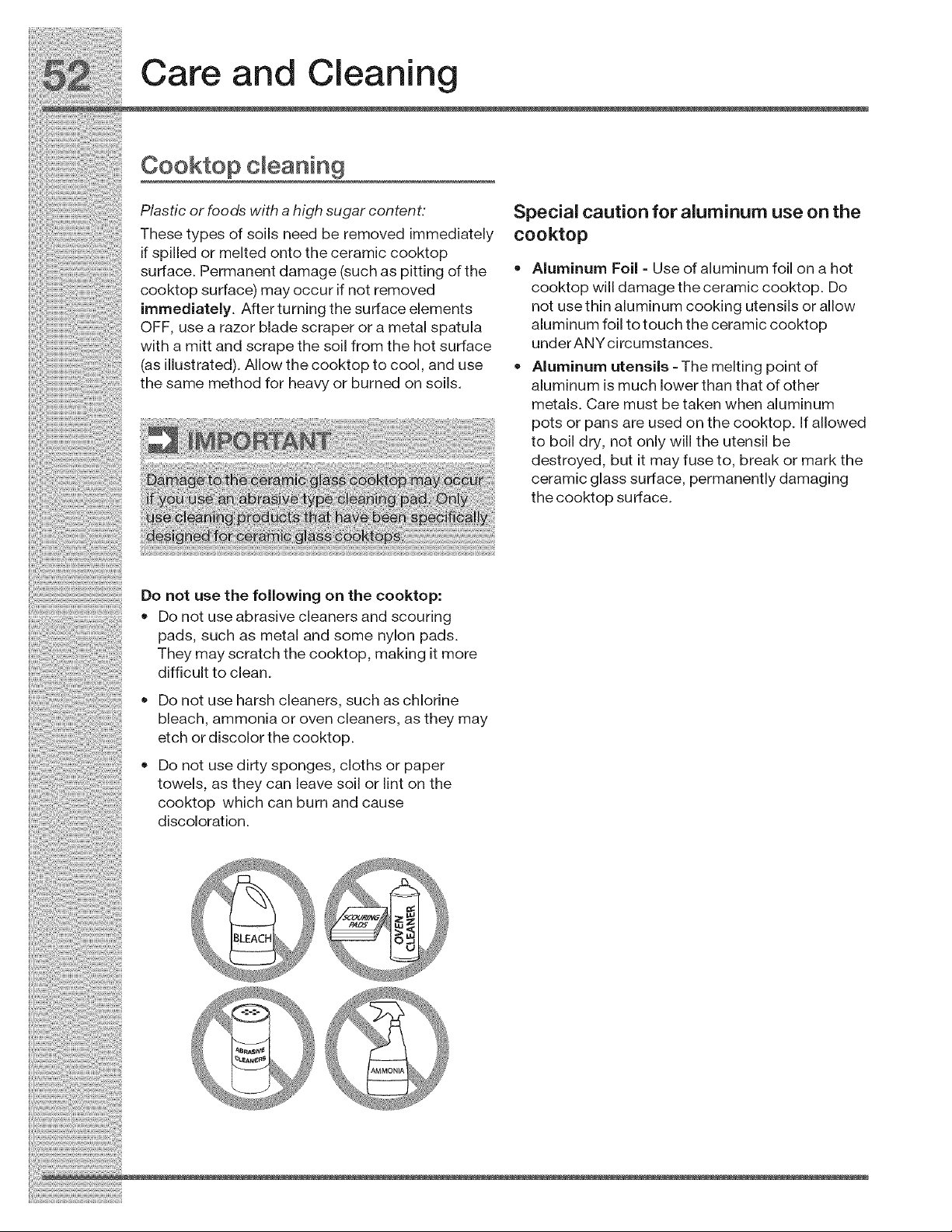
_!!!i_!!_i_i_!:!_!_i_i_ii_!_ii_!i!i_!_!i_i_!_ii_ii:i_!!i!i_!_!_i_i:i_!_i_!_:_i!_i_iii_!_iii_!_iii_!_!:!_i_!_!_i_!_!_i_!_!_i!_i_;_
Care and Cleaning
Cooktop cleaning
Plasticorfoodswithahighsugarcontent: Specialcautionforaluminumuseonthe
mhesetypesofsoils need beremoved immediately cooktop
_fsp_,edorme_tedontotheceramiccooktop
surface. Permanentdamage(suchaspittingofthe ,, Aluminum Foil- Useofaluminumfoilonahot
cooktopsorface)mayocc.r_fnotremoved cooktopw_damagetheceram_ccooktop.Do
immediately. Afterturningthesurfaceelements not usethln aluminum cooking utensils orallow
OFF use a razor blade scraper or a metal spatula aluminum foil totouchtheceramiccooktop
withamittandscrapethesoilfromthehotsurface underANYcircumstances.
(as ustrated) A ow the cooktop to coo and use ,, A um num utens s The me t n o nt of
. - g P
thesame methodfor heavyorburned onsoils, aluminum ismuchlowerthanthatofother
metals. Care must betaken when aluminum
potsorpansareusedonthecooktop._fa,owed
toboil dry, notonlywilltheutensil be
destroyed, but it mayfuseto, breakormarkthe
ceramicglasssufface, permanentlydamaging
thecooktopsufface.
Oono,.sot,o,o,ow °gont,ocooktop.
• Do not use abrasive cleaners and scouring
pads, such as metal and some nylon pads.
They may scratch the cooktop, making it more
difficult to clean.
• Do not use harsh cleaners, such as chlorine
bleach, ammonia or oven cleaners, as they may
etch or discolor the cooktop.
• Do not use dirty sponges, cloths or paper
towels, as they can leave soil or lint on the
cooktop which can burn and cause
discoloration.
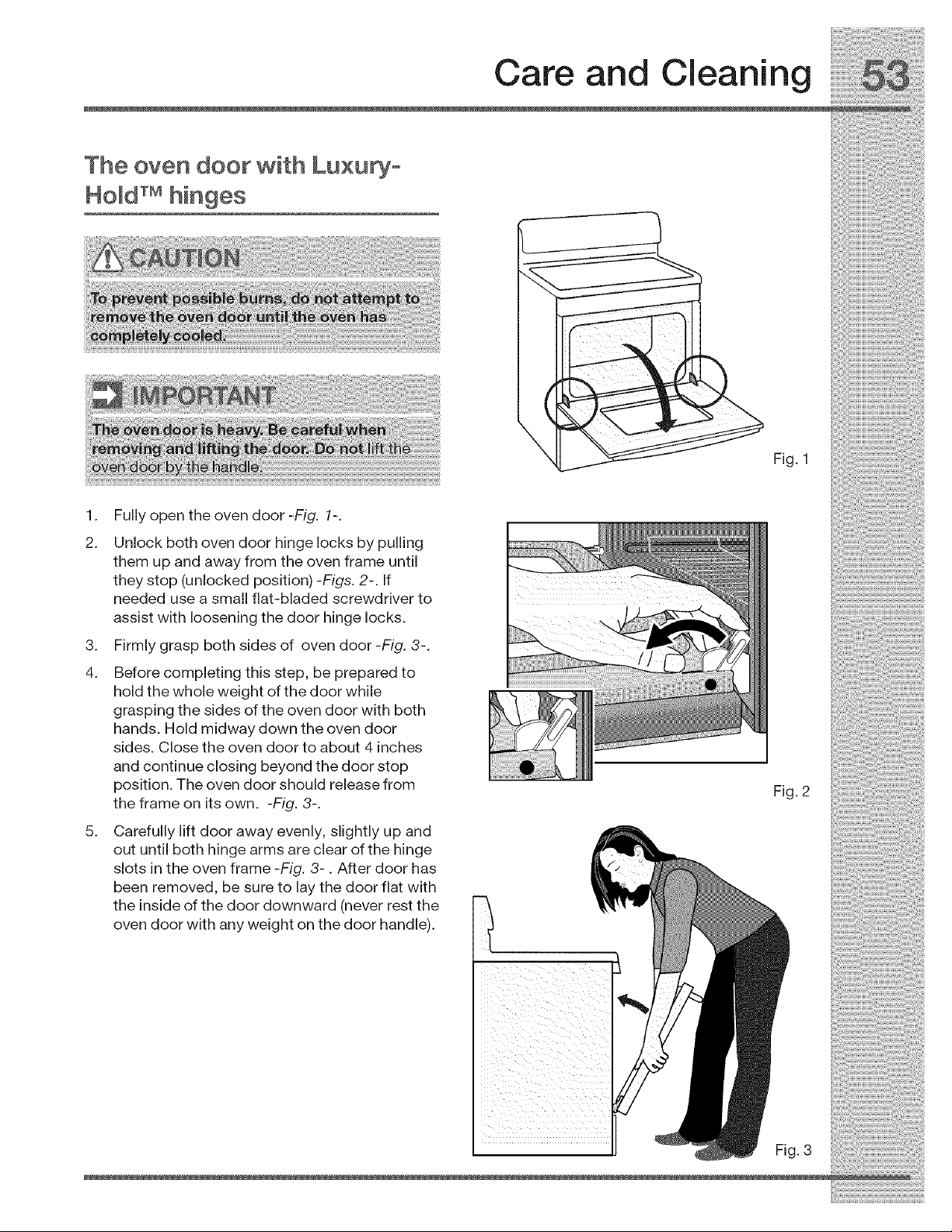
Care and Cleaning
The oven door with Luxupyo
Hold TM hinges
Fig. 1
1. Fully open the oven door -Fig. 1-.
2. Unlock both oven door hinge locks by pulling
them up and away from the oven frame until
they stop (unlocked position) -Figs. 2-. If
needed use a small flat-bladed screwdriver to
assist with loosening the door hinge locks.
3. Firmly grasp both sides of oven door -Fig. 3-.
4. Before completing this step, be prepared to
hold the whole weight of the door while
grasping the sides of the oven door with both
hands. Hold midway down the oven door
sides. Close the oven door to about 4 inches
and continue closing beyond the door stop
position. The oven door should release from
the frame on its own. -Fig. 3-.
5. Carefully lift door away evenly, slightly up and
out until both hinge arms are clear of the hinge
slots in the oven frame -Fig. 3-. After door has
been removed, be sure to lay the door flat with
the inside of the door downward (never rest the
oven door with any weight on the door handle).
Fig. 2
Fig. 3
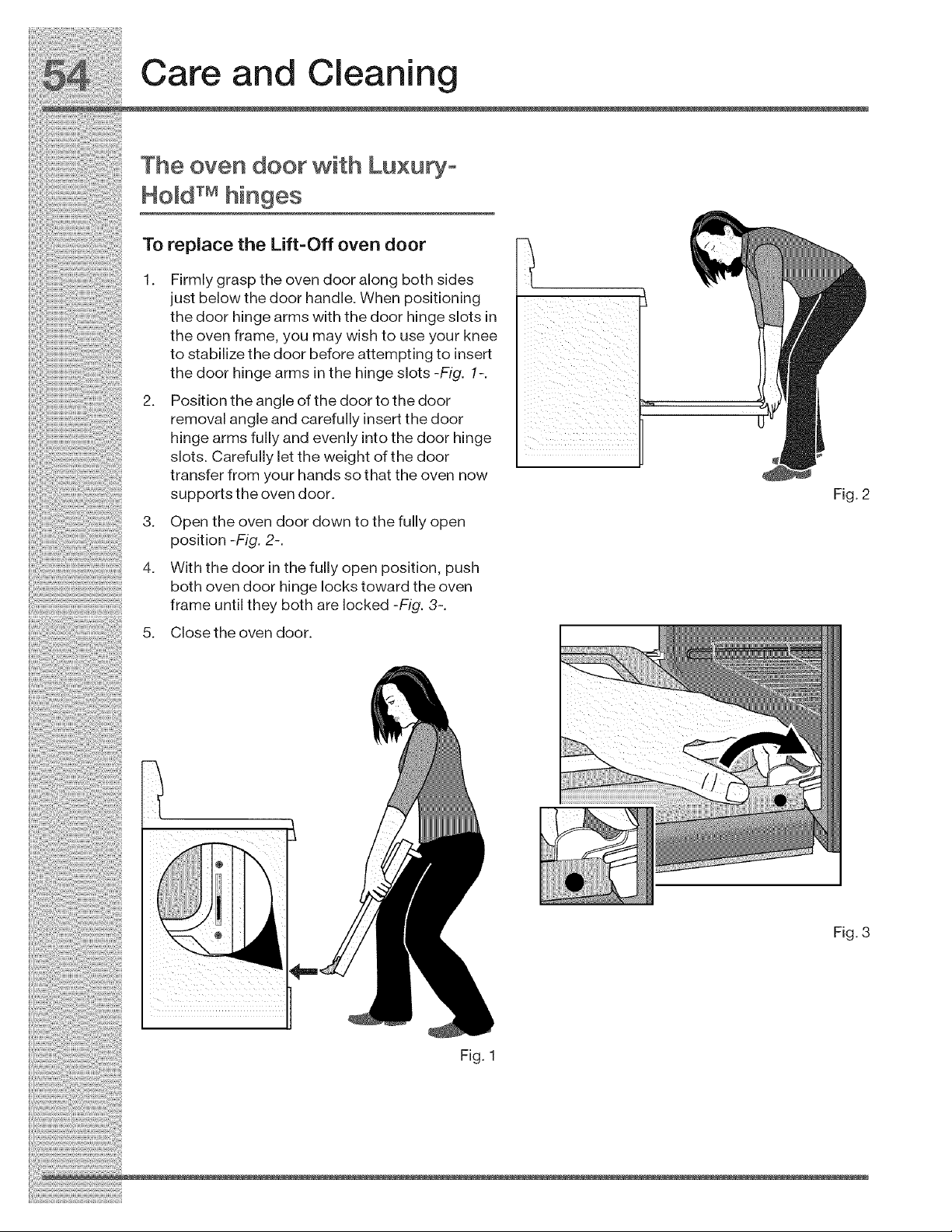
_!:!!i_!!!_i_iii!!_i!i_i_!iii!!i_i_!!_!_!_!Ji_!_i_i!i_!i!S_i_!i!_!:i_!_i_!_!i_i¸ili!i:iiii!!iiiiii!_i_iiii!:iiiiii:iii_i_iiiili_il
Care and Cleaning
The oven door with Luxury-
: HoM TM hinges
To_pi_c__._,if_-offov_oaoo_ _
1. Firmly grasp the oven door along both sides __ __ _IL
just below the door handle. When positioning _
the door hinge arms with the door hinge slots in mr
the oven frame, you may wish to use your knee _"
to stabilize the door before attempting to insert
the door hinge arms in the hinge slots -Fig. 1-.
2. Position the angle of the door to the door =
removal angle and carefully insert the door
hinge arms fully and evenly into the door hinge
slots. Carefully let the weight of the door
transfer from your hands so that the oven now
supports the oven door. Fig. 2
3. op_ th_ow_aoo_aow_toth_fu,yop_
position-Fig. 2-.
4. W,thth__oo_,oth_,o,,_o_o_os,t,oo._ush
..... both oven door hinge locks toward the oven
frame until they both are locked -Fig. 3-.
5. Close the oven door.
.g.
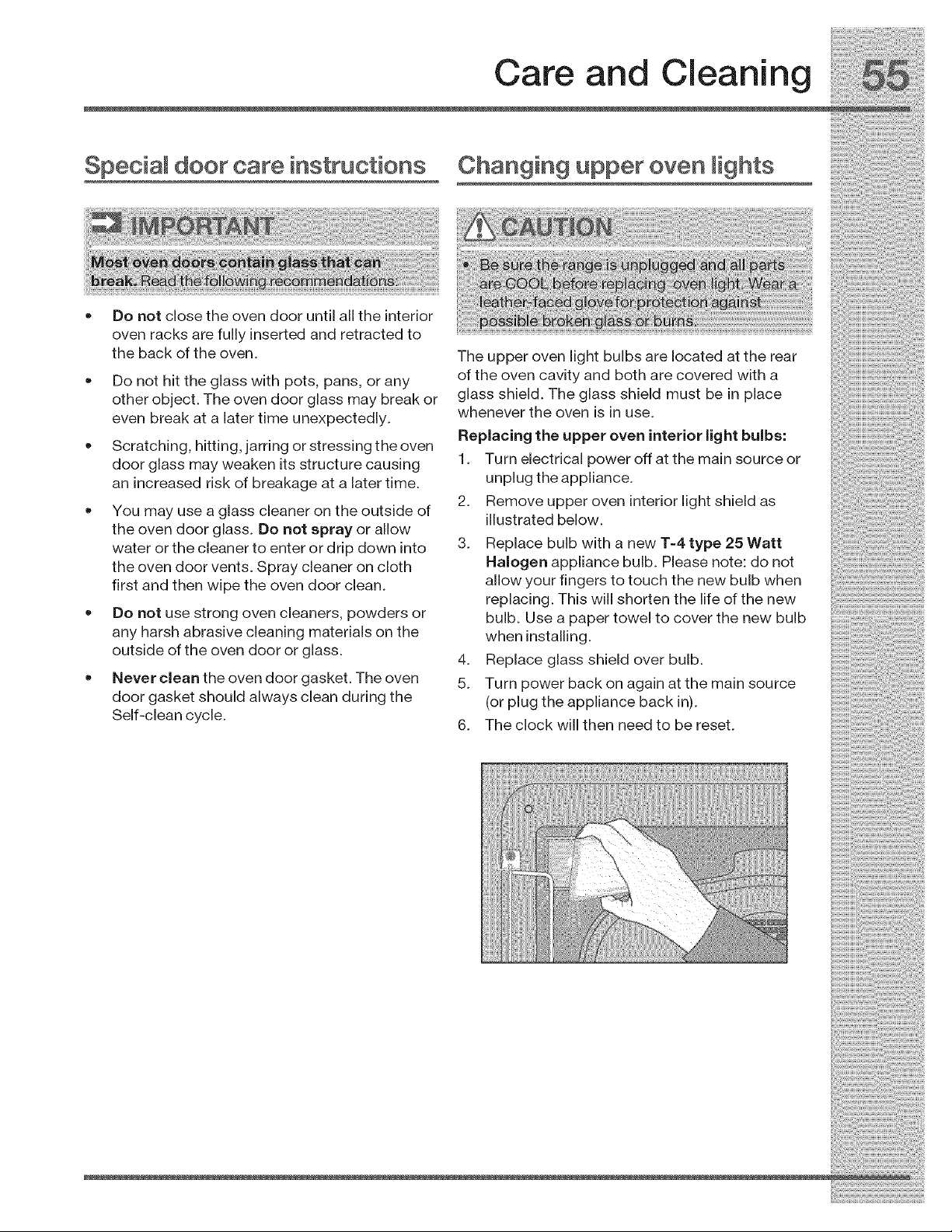
Special door care instructions
Do not close the oven door until all the interior
oven racks are fully inserted and retracted to
the back of the oven.
• Do not hit the glass with pots, pans, or any
other object. The oven door glass may break or
even break at a later time unexpectedly.
Scratching, hitting, jarring or stressing the oven
door glass may weaken its structure causing
an increased risk of breakage at a later time.
You may use a glass cleaner on the outside of
the oven door glass. Do not spray or allow
water or the cleaner to enter or drip down into
the oven door vents. Spray cleaner on cloth
first and then wipe the oven door clean.
Do not use strong oven cleaners, powders or
any harsh abrasive cleaning materials on the
outside of the oven door or glass.
Never clean the oven door gasket. The oven
door gasket should always clean during the
Self-clean cycle.
Care and Cleaning
Changing upper oven lights
The upper oven light bulbs are located at the rear
of the oven cavity and both are covered with a
glass shield. The glass shield must be in place
whenever the oven is in use.
Replacing the upper oven interior light bulbs:
1. Turn electrical power off at the main source or
unplug the appliance.
2. Remove upper oven interior light shield as
illustrated below.
3. Replace bulb with a new T=4 type 25 Watt
Halogen appliance bulb. Please note: do not
allow your fingers to touch the new bulb when
replacing. This will shorten the life of the new
bulb. Use a paper towel to cover the new bulb
when installing.
4. Replace glass shield over bulb.
5. Turn power back on again at the main source
(or plug the appliance back in).
6. The clock will then need to be reset.
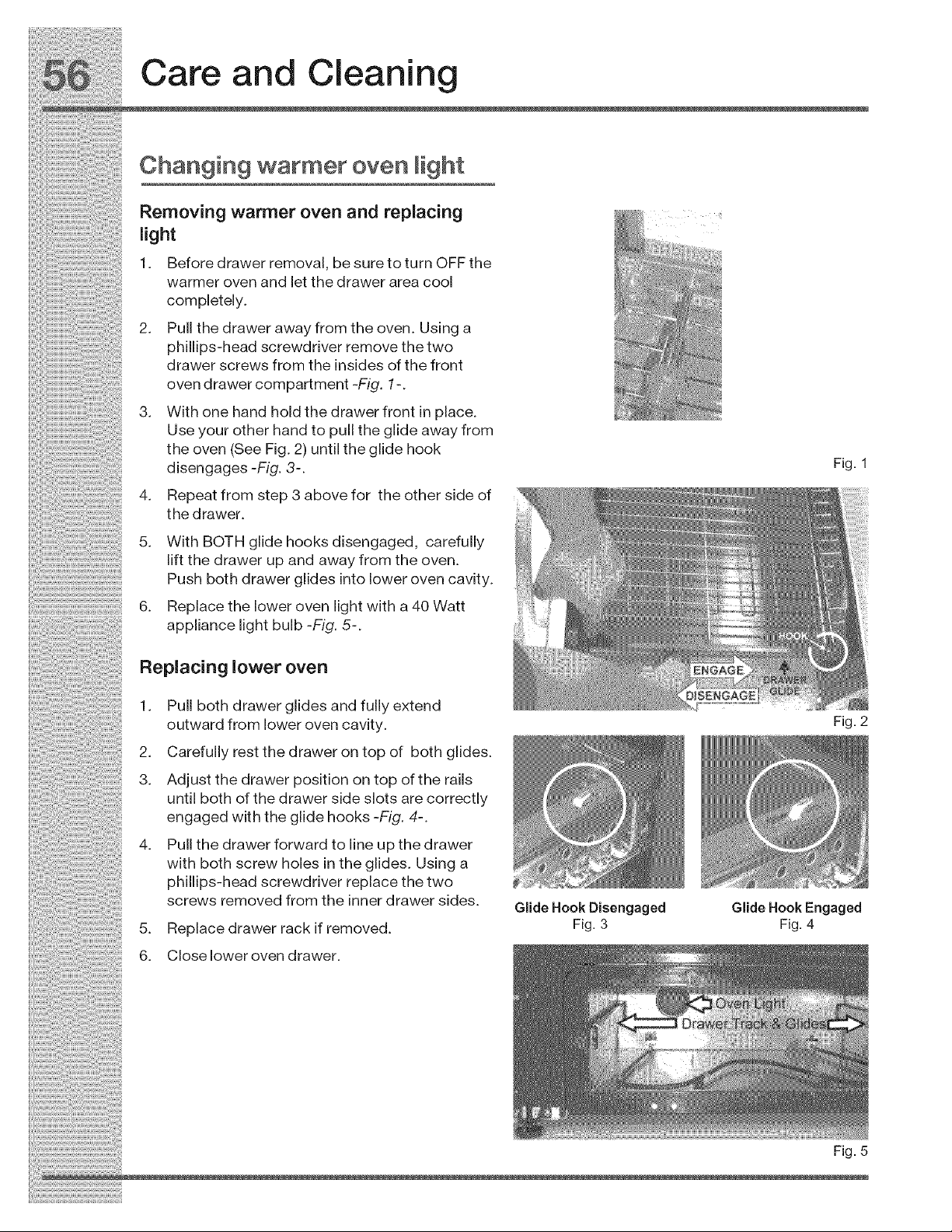
_!:!!i_;!!!_;i_iii!!_i!i_i;i_!i!i!_!_i_!_i_i!_i!i!_!i!Ji_!:!_i_i!i_!_:_!_!_:_!_:_ii_i!_ii_i!_ii_i!!!!_i!i!i_!ii_!!!i_!i_!_i_i!_i_ii_i_
Care and Cleaning
Changing warmer oven light
Removingwarmerovenandreplacing
light
1. Beforedrawerremoval, besuretoturnOFFthe
warmeroven and letthedrawerarea cool
completely.
2. Pullthedrawerawayfromtheoven. Usinga
phillips-headscrewdriverremovethetwo
drawerscrewsfrom the insides ofthefront
ovendrawercompartment-FLg. 1-.
3. Withonehandholdthedrawerfrontinplace.
Useyourotherhandtopulltheglideawayfrom
theoven(SeeFig. 2) untiltheglidehook
disengages-Fig. 3-. Fig. 1
4. Repeatfromstep3abovefor theothersideof
thedrawer.
5. WithBOTHglidehooksdisengaged, carefully
liftthedrawerupandawayfromtheoven.
..... Pushbothdrawerglidesintolowerovencavity.
6. Replacetheloweroven lightwith a40Watt
appliance light bulb -Fig. 5-.
Replacing lower over
1. Pull both drawer glides and fully extend
outward from lower oven cavity.
2. Carefully rest the drawer on top of both glides.
3. Adjust the drawer position on top of the rails
until both of the drawer side slots are correctly
engaged with the glide hooks -Fig. 4-.
4. Pull the drawer forward to line up the drawer
with both screw holes in the glides. Using a
phillips-head screwdriver replace the two
screws removed from the inner drawer sides.
5. Replace drawer rack if removed.
6. Close lower oven drawer.
Glide Hook Disengaged
Fig. 3
Fig. 2
Glide Hook Engaged
Fig. 4
Fig. 5
Solutions to Common Problems
Before you call for service, review the following list. It may save you time & expense. The list includes
common occurrences that are not the result of defective workmanship or materials in this appliance.
Pr0b ÷m Solution
Appliance is not level • Be sure floor is level, strong & stable enough to
adequately support range.
If floor is sagging or sloping, contact a carpenter to
correct the situation.
Poor installation. Place oven rack in center of oven.
Place a level on the oven rack. Adjust leveling legs at
base of appliance until the oven rack is level.
Kitchen cabinet alignment may make range appear not
level. Be sure cabinets are square & have sufficient
room for appliance clearance.
Cannot moveapp ance easi y,, cabinets net square or are built in too tightly Contact
Appliance must be accessible for builder Or installer to make appliance accessible:
carpet interferes With appliance:Pr0Vide Sufficient
space so appliance can be lifted over carpet.
Surface element too hot or not • Incorrect control setting. Be sure the correct control is
hot enough ON for the element that you are attempting to use.
surface element does not heat _ Lightweight 0r WaFped peas Used. use on!y i!at; evenly
balanced, mediu m Or.heavyweigh t c0ekwarel Flat pans
heat better than warped pan& Cookware materials and
weight of the material affect heatingl Heavy & medium'
Weight pans heat evenly BecauSe ightWeight PanS heat
unevenly f00ds may bum easily
Entireappliancedoesnot operate • The time of day is not set. The time of day must first be
set in order to operate the oven. See "Setting clock at
power up" inthe Getting Started section.
Make sure cord/plug is plugged correctly into outlet.
Service wiring is not complete. Contact your dealer
installing agent or authorized service agent.
• Electrical power outage. Check house lights to be sure.
Call your local electric company for service.
Oven does not operate ! Be sure the oven controls are set properly for the
deSired cooking feature: see setting Oven Co,ntrois in
this Use & Care Guide or read the instructions Entire
appliance does not operate' in this checklist.
Oven light does not work Replace or tighten bulb. See "Changing upper or
warmer oven lights" sections in this Use & Care
Guide.
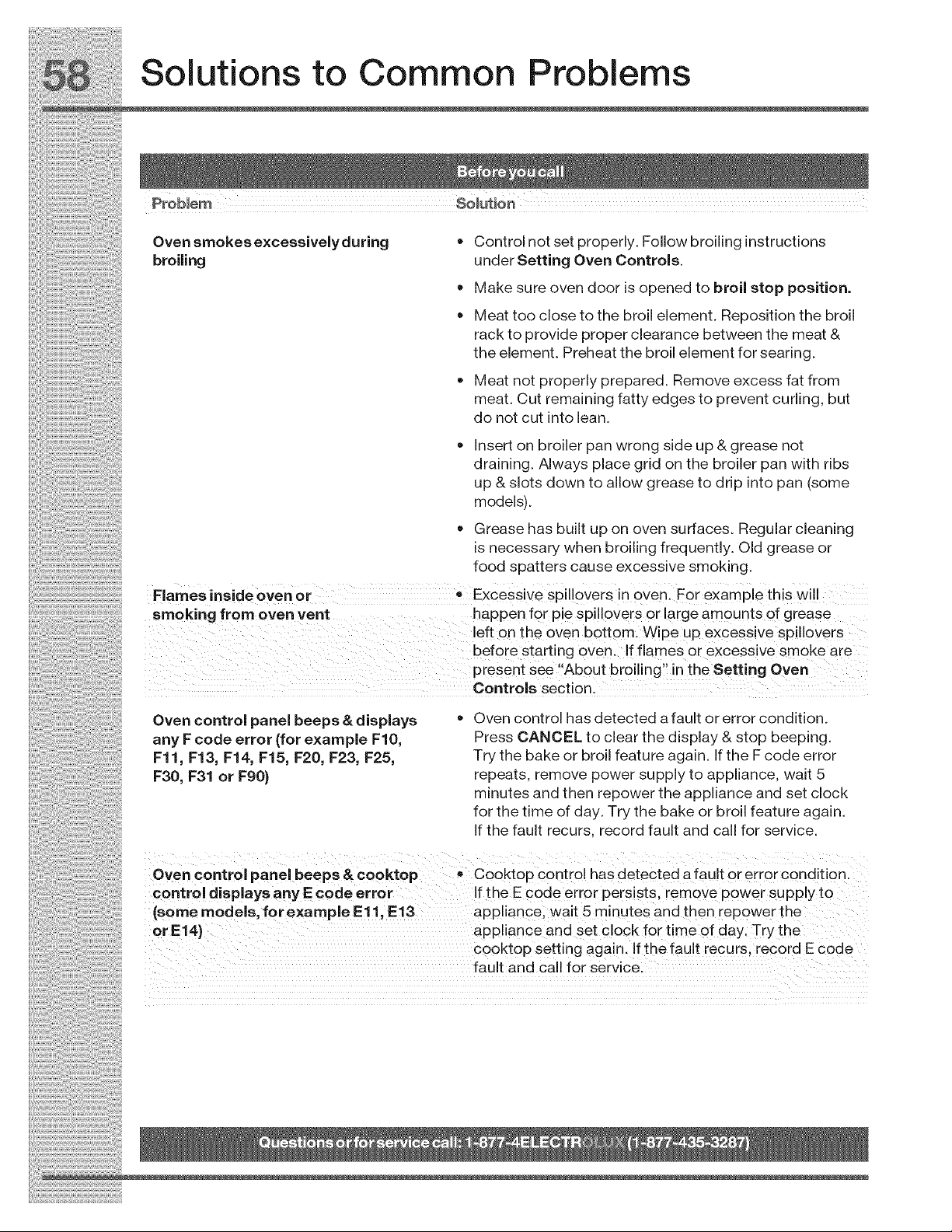
58 Solutions to Common Problems
Prob ÷m solution
: Oven srnokesexcessivelyduring • Control not set properly. Follow broiling instructions
::: broiling under Setting Oven Controls.
• Make sure oven door is opened to broil stop position,
• Meat too close to the broil element. Reposition the broil
rack to provide proper clearance between the meat &
t he elerne nt. Preheat t he broil ele men t for sear ing.
• Meat not properly prepared. Remove excess fat from
meat. Cut remaining fatty edges to prevent curling, but
do not cut into lean.
: • Insert on broiler pan wrong side up & grease not
draining. Always place grid on the broiler pan with ribs
up & slots down to allow grease to drip into pan (some
: :: mode s).
= Grease has built up on oven surfaces. Regular cleaning
is necessary when broiling frequently. Old grease or
.... food spatters cause excessive smoking.
..... Flames inside oven or Excessive SpilloVers in oven. For example this will
smoking from oven vent happen fo r pie Spil!0vers or large amounts of grease
left on the oven bottom. Wipe up excessive spillovers
before starting 0Yen. !f flames or excessive srnoke are
present see AbOut broiling in the Setting Oven
Controls sectionl
Oven control panel beeps & displays
any F code error (for example FIO,
Fll, F13, F14, F15, F20, F23, F25,
F30, F31 or F90)
• Oven control has detected a fault or error condition.
Press CANCEL to clear the display & stop beeping.
Try the bake or broil feature again. If the F code error
repeats, remove power supply to appliance, wait 5
minutes and then repower the appliance and set clock
for the time of day. Try the bake or broil feature again.
If the fault recurs, record fault and call for service.
Oven control panel beeps & cooktop
control displays any E code error
(some models, forexample Ell, E13
or E14}
Cooktop control has detected a fault or error condition.
If the E code error persists, remove power supply to
appliance, wait 5 minutes and then repower the
appliance and set clock for time of day. Try the
cooktop setting again. If the fault recurs, record E code
fault and call for service.
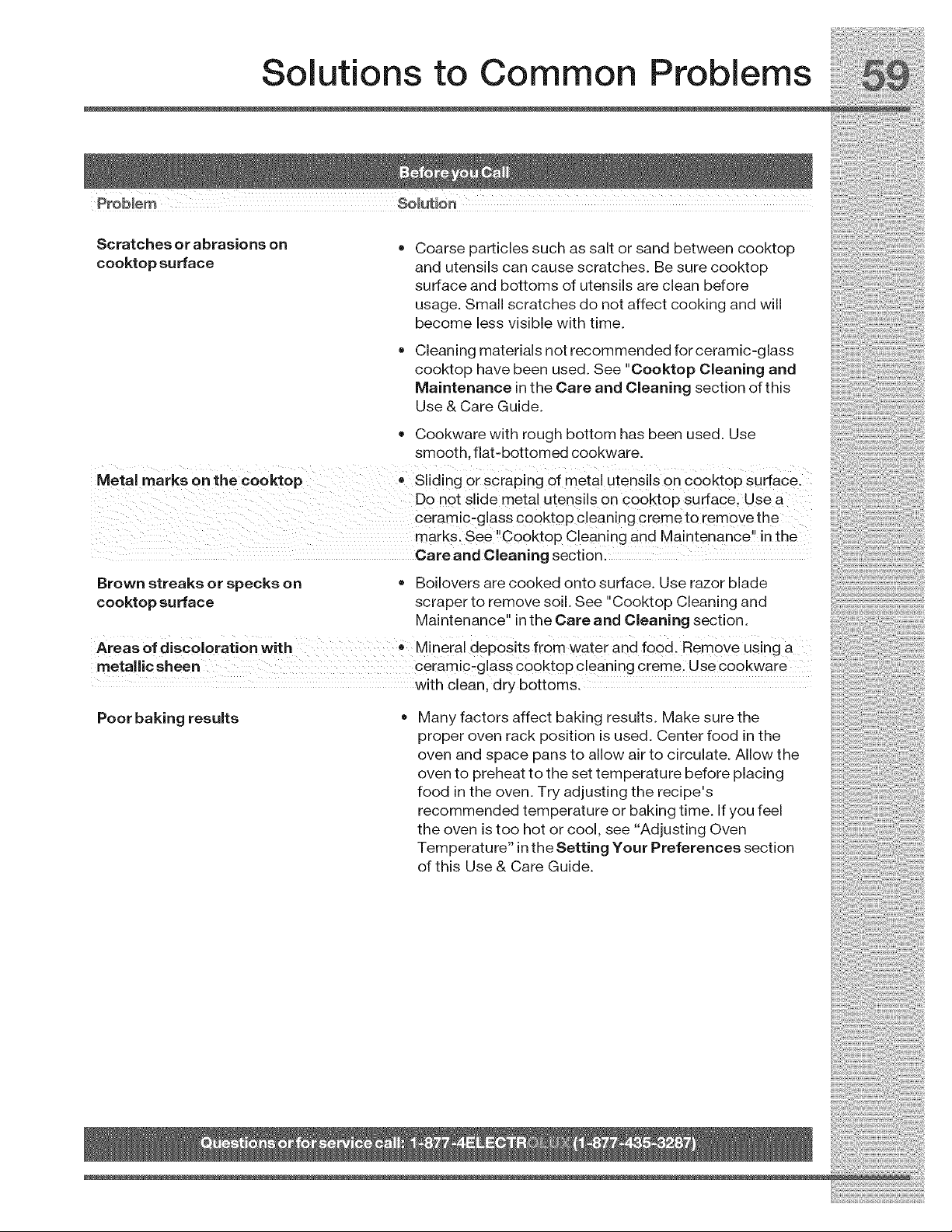
Solutions to Common Problems
Scratches or abrasions on
cooktop surface
Coarse particles such as salt or sand between cooktop
and utensils can cause scratches. Be sure cooktop
surface and bottoms of utensils are clean before
usage. Small scratches do not affect cooking and will
become less visible with time.
Cleaning materials not recommended for ceramic-glass
cooktop have been used. See "Cooktop Cleaning and
Maintenance in the Care and Cleaning section of this
Use & Care Guide.
Cookware with rough bottom has been used. Use
smooth, flat-bottomed cookware.
Metal marks on the €ooktop-Sliding or scraping of metal utensils on C00kt0P Surface:
D0 not slide metal utensils 0n cooktop surface; Use a
ceramic_glass cooktop C!eaning creme to rem0Ve the
marks. See "C0oktop Cleaning and Ma ntenance'! in the
Care and Cleaning sectionl
Brown streaks or specks on • Boilovers are cooked onto surface. Use razor blade
cooktop surface scraper to remove soil. See "Cooktop Cleaning and
Maintenance" in the Care and Cleaning section.
Areas of discoloration with Mineial deposits from water and food. Remov e using a
metallic sheen ceramicmglass cooktop cleaning creme. Use cookware
with clean, dry bottoms.
Poor baking results Many factors affect baking results. Make sure the
proper oven rack position is used. Center food in the
oven and space pans to allow air to circulate. Allow the
oven to preheat to the set temperature before placing
food in the oven. Try adjusting the recipe's
recommended temperature or baking time. If you feel
the oven is too hot or cool, see "Adjusting Oven
Temperature" in the Setting Your Preferences section
of this Use & Care Guide.

Notes
i_i!_!_i!i_ii_!i!_!_i!i_ii_!i!_!_i!i_ii_!i!_!_i!i_ii_!i!_!_i!i_ii_!i!_!_i!i_ii_!i!_!_i!i_ii_!i!_!_i!i_ii_!i!_!_i!i_ii_!i!_!_i!i_ii_!i!_!_i!i_i

Notes

Notes
i_i!_!_i!i_ii_!i!_!_i!i_ii_!i!_!_i!i_ii_!i!_!_i!i_ii_!i!_!_i!i_ii_!i!_!_i!i_ii_!i!_!_i!i_ii_!i!_!_i!i_ii_!i!_!_i!i_ii_!i!_!_i!i_ii_!i!_!_i!i_i
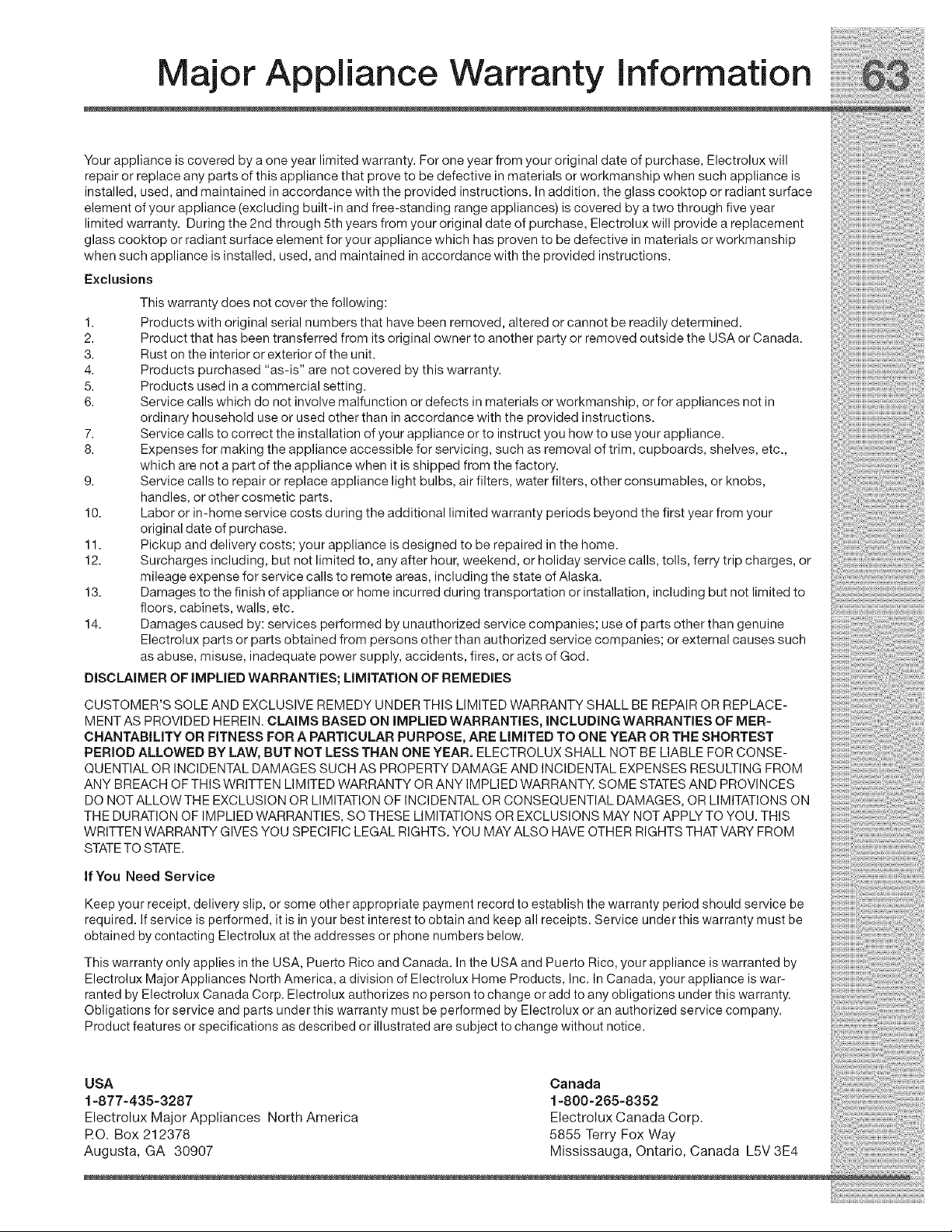
Major Appliance Warranty information
Your appliance is covered by a one year limited warranty. For one year from your original date of purchase, Electrolux will
repair or replace any parts of this appliance that prove to be defective in materials or workmanship when such appliance is
installed, used, and maintained in accordance with the provided instructions. In addition, the glass cooktop or radiant surface
element of your appliance (excluding built-in and free-standing range appliances) is covered by a two through five year
limited warranty. During the 2nd through 5th years from your original date of purchase, Electrolux will provide a replacement
glass cooktop or radiant surface element for your appliance which has proven to be defective in materials or workmanship
when such appliance is installed, used, and maintained in accordance with the provided instructions.
Exclusions
This warranty does not cover the following:
1. Products with original serial numbers that have been removed, altered or cannot be readily determined.
2. Product that has been transferred from its original owner to another party or removed outside the USA or Canada.
3. Rust on the interior or exterior of the unit.
4. Products purchased "as-is" are not covered by this warranty.
5. Products used in a commercial setting.
6. Service calls which do not involve malfunction or defects in materials or workmanship, or for appliances not in
ordinary household use or used other than in accordance with the provided instructions.
7. Service calls to correct the installation of your appliance or to instruct you how to use your appliance.
8. Expenses for making the appliance accessible for servicing, such as removal of trim, cupboards, shelves, etc.,
which are not a part of the appliance when it is shipped from the factory.
9. Service calls to repair or replace appliance light bulbs, air filters, water filters, other consumables, or knobs,
handles, or other cosmetic parts.
10. Labor or in-home service costs during the additional limited warranty periods beyond the first year from your
original date of purchase.
11. Pickup and delivery costs; your appliance is designed to be repaired in the home.
12. Surcharges including, but not limited to, any after hour, weekend, or holiday service calls, tolls, ferry trip charges, or
mileage expense for service calls to remote areas, including the state of Alaska.
13. Damages to the finish of appliance or home incurred during transportation or installation, including but not limited to
floors, cabinets, walls, etc.
14. Damages caused by: services performed by unauthorized service companies; use of parts other than genuine
Electrolux parts or parts obtained from persons other than authorized service companies; or external causes such
as abuse, misuse, inadequate power supply, accidents, fires, or acts of God.
DiSCLAiMER OF iMPLiED WARRANTIES; LiMiTATiON OF REMEDIES
CUSTOMER'S SOLE AND EXCLUSIVE REMEDY UNDER THIS LIMITED WARRANTY SHALL BE REPAIR OR REPLACE-
MENT AS PROVIDED HEREIN. CLAIMS BASED ON iMPLiED WARRANTIES, iNCLUDiNG WARRANTIES OF MER-
CHANTABiLiTY OR FITNESS FOR A PARTICULAR PURPOSE, ARE LiMiTED TO ONE YEAR OR THE SHORTEST
PERIOD ALLOWED BY LAW, BUT NOT LESS THAN ONE YEAR. ELECTROLUX SHALL NOT BE LIABLE FOR CONSE-
QUENTIAL OR INCIDENTAL DAMAGES SUCH AS PROPERTY DAMAGE AND INCIDENTAL EXPENSES RESULTING FROM
ANY BREACH OF THIS WRITTEN LIMITED WARRANTY OR ANY IMPLIED WARRANTY. SOME STATESAND PROVINCES
DO NOT ALLOW THE EXCLUSION OR LIMITATION OF INCIDENTAL OR CONSEQUENTIAL DAMAGES, OR LIMITATIONS ON
THE DURATION OF IMPLIED WARRANTIES, SO THESE LIMITATIONS OR EXCLUSIONS MAY NOT APPLY TO YOU. THIS
WRITTEN WARRANTY GIVES YOU SPECIFIC LEGAL RIGHTS. YOU MAY ALSO HAVE OTHER RIGHTS THAT VARY FROM
STATETO STATE.
if You Need Service
Keep your receipt, delivery slip, or some other appropriate payment record to establish the warranty period should service be
required. If service is performed, it is in your best interest to obtain and keep all receipts. Service under this warranty must be
obtained by contacting Electrelux at the addresses or phone numbers below.
This warranty only applies in the USA, Puerto Rico and Canada. In the USA and Puerto Rico, your appliance is warranted by
Electrolux Major Appliances North America, a division of Electrolux Home Products, Inc. In Canada, your appliance is war-
ranted by Electrolux Canada Corp. Electrolux authorizes no person to change or add to any obligations under this warranty.
Obligations for service and parts under this warranty must be performed by Electrolux or an authorized service company.
Product features or specifications as described or illustrated are subject to change without notice.
USA
1=877-435-3287
Electrolux Major Appliances North America
RO. Box 212378
Augusta, GA 30907
Canada
1-800-265-8352
Electrolux Canada Corp.
5855 Terry Fox Way
Mississauga, Ontario, Canada L5V 3E4