©2019 Galanz Americas Limited Company
nce,
using
rom
ted
ore
e
e
n it is
at
e for
cturing
ng.
moke
Model# GSWWA10SA10
Micro Convection Oven User Manual
Thank you for purchasing a Galanz product. Please read this manual carefully for correct usage and safety,
and keep for future reference. For service, support and warranty information, call 800-562-0738.
@2019 Galanz Americas Limited Company.
Model# GLCMKZ07BKR07
GLCMKZ07RDR07
GLCMKZ07GNR07
GLCMKZ07BER07
GLCMKZ07WER07
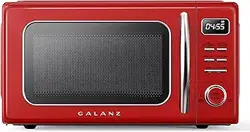
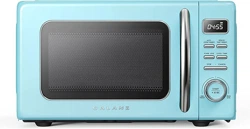
Retro Microwave Oven User Manual
Thank you for purchasing a Galanz product. Please read this manual carefully for correct usage and safety,
and keep for future reference. For service, support and warranty information, call 800-562-0738.
@2021Galanz Americas Limited Company.
年份改动见措施单

Thank you for purchasing a Galanz product. Please read this manual carefully for correct usage and safety,
and keep for future reference. For service, support and warranty information, call 800-562-0738.
FPO
Important Safety Instructions .................................................................................................. 1
Precautions to Avoid Possible Exposure to Excessive Microwave Energy .......................... 1
GALIFORNIA PROPOSITION 65 WARNING......................................................................... 1
Warning ................................................................................................................................. 1
Grounding Instructions ......................................................................................................... 3
Installation Guide .................................................................................................................. 4
Cooking Utensils Guide ........................................................................................................ 5
Specifications........................................................................................................................ 6
Product Diagram................................................................................................................... 7
Control Panel ........................................................................................................................ 8
Operation Instructions .............................................................................................................. 9
Setting the Clock .................................................................................................................. 9
Timer Function ...................................................................................................................... 10
Express Cooking................................................................................................................... 10
Microwave Cooking .............................................................................................................. 11
Time Defrost.......................................................................................................................... 12
Weight Defrost ...................................................................................................................... 13
Child Lock ............................................................................................................................. 14
Auto Cook Menus ................................................................................................................. 15
+30 Sec Function.................................................................................................................. 16
Auto Reheat Menus .............................................................................................................. 17
Cleaning And Care .................................................................................................................... 19
Product Warranty ...................................................................................................................... 20
CONTENTS
CONTENTS
©2019 Galanz Americas Limited Company
nce,
using
rom
ted
ore
e
e
n it is
at
e for
cturing
ng.
moke
Thank you for purchasing a Galanz product. Please read this manual carefully for correct usage and safety,
and keep for future reference. For service, support and warranty information, call 800-562-0738.
FPO
IMPORTANT SAFETY INSTRUCTIONS
IMPORTANT SAFETY INSTRUCTIONS
Do not attempt to operate this oven with the door open since
open-door operation can result in harmful exposure to microwave
energy. It is important not to defeat or tamper with the safety
interlocks.
Do not place any object between the oven front face and the door
or allow soil or cleaner residue to accumulate on sealing surfaces.
Do not operate the oven if it is damaged. It is very important that
the oven door close properly and that there is no damage to the
a) Door (including any dents),
b) Hinges and latches (broken or loosened),
c) Door seals and sealing surfaces.
The oven should not be adjusted or repaired by anyone except
qualified service personnel.
Cancer and Reproductive Harm-WWW.P65Warnings.ca.gov.
Read all instructions before using the appliance.
Read and follow the specific "PRECAUTIONS TO AVOID
POSSIBLE EXPOSURE TO EXCESSIVE MICROWAVE ENERGY" on
page 1.
This appliance must be grounded. Connect only to properly
grounded outlet. See "GROUNDING INSTRUCTIONS " on page 3.
Do not operate the oven when empty.
Install or locate this appliance only in accordance with the
provided installation instructions.
Some products such as whole eggs and sealed containers -for
example, closed glass jars- are able to explode and should not be
heated in this oven.
Use this appliance only for its intended use as described in this
manual. Do not use corrosive chemicals or vapors in this
appliance. This type of oven is specifically designed to heat, cook,
or dry food. It is not designed for industrial or laboratory use.
As with any appliance, close supervision is necessary when used
by children.
To reduce the risk of fire in the oven cavity:
Do not overcook food. Carefully attend appliance when paper,
plastic, or other combustible materials are placed inside the oven
to facilitate cooking.
Remove wire twist-ties from paper or plastic bags before placing
bag in oven.
If materials inside the oven should ignite, keep oven door closed,
turn oven off, and disconnect the power cord or shut off power at
PRECAUTIONS TO AVOID POSSIBLE EXPOSURE
TO EXCESSIVE MICROWAVE ENERGY
GALIFORNIA PROPOSITION 65 WARNING
SAVE THESE INSTRUCTIONS
WARNING
WARNING
To reduce the risk of burns, electric shock, fire, injury to persons or
exposure to excessive microwave energy:
—
—
©2019 Galanz Americas Limited Company
1

the fuse or circuit breaker panel.
Do not use the cavity for storage purposes. Do not leave paper
products, cooking utensils or food in the cavity when not in use.
Liquids, such as water, coffee, or tea are able to be overheated beyond
the boiling point without appearing to be boiling due to surface tension
of the liquid. Visible bubbling or boiling when the container is
removed from the microwave oven is not always present. THIS
COULD RESULT IN VERY HOT LIQUIDS SUDDENLY BOILING
OVER WHEN A SPOON OR OTHER UTENSIL IS INSERTED INTO
THE LIQUID. To reduce the risk of injury to person:
Do not overheat the liquid.
Stir the liquid both before and halfway through heating it.
Do not use straight-sided containers with narrow necks.
After heating, allow the container to stand in the microwave oven for a
short time before removing the container.
Use extreme care when inserting a spoon or other utensil into the
container.
Do not heat oil or fat for deep-frying. It is difficult to control the
temperature of oil in microwave oven.
Do not cover or block any openings on the appliance.
Do not operate this appliance if it has a damaged cord or a plug, if it
is not working properly or if it has been damaged or dropped.
Do not immerse cord or plug in water. Keep cord away from heated
surface. Do not let cord hang over edge of table or counter.
This appliance should be serviced only by qualified service
personnel, contact nearest authorized service facility for
examination, repair, or adjustment.
When cleaning surfaces of door and oven that comes together
on closing the door, use only mild, nonabrasive soaps, or
detergents applied with a sponge or soft cloth.
Oversized food or oversized metal utensils should not be
inserted in a microwave/toaster oven as they may create a
fire or risk of electric shock.
Do not store or use this appliance outdoors. Do not use this
product near water, for example, near a kitchen sink, in a
wet basement, near a swimming pool, or similar locations.
Do not clean with metal scouring pads. Pieces can burn off
the pad and touch electrical parts involving a risk of electric
shock.
Do not store any materials, other than manufacturer’s
recommended accessories, in this oven when not in use.
Do not cover racks or any other part of the oven with metal
foil. This will cause overheating of the oven.
This equipment has been tested and found to comply with
Part 18 of the FCC Rules. Operation is subject to the
following two conditions: (1) This device may not cause
harmful interference, and (2) this device must accept any
interference received, including interference that may cause
undesired operation.
CAUTION: Changes or modifications not expressly approved
by the party responsible for compliance could void the user's
authority to operate the product.
This equipment generates, uses and can radiate radio
frequency energy and, if not installed and used in
accordance with the instructions, may cause harmful
interference to radio communications. There is no guarantee
that interference will not occur in a particular installation. If
this equipment does cause harmful interference to radio or
television reception, which can be determined by turning the
equipment off and on, the user is encouraged to try to
—
—
—
—
—
Thank you for purchasing a Galanz product. Please read this manual carefully for correct usage and safety,
and keep for future reference. For service, support and warranty information, call 800-562-0738.
FPO
IMPORTANT SAFETY INSTRUCTIONS
IMPORTANT SAFETY INSTRUCTIONS
SAVE THESE INSTRUCTIONS
2
Thank you for purchasing a Galanz product. Please read this manual carefully for correct usage and safety,
and keep for future reference. For service, support and warranty information, call 800-562-0738.
FPO
IMPORTANT SAFETY INSTRUCTIONS
IMPORTANT SAFETY INSTRUCTIONS
correct the interference by one or more of the following
measures:
Reorient or relocate the receiving antenna.
Increase the separation between the equipment and receiver.
Connect the equipment into an outlet on a circuit different
from that to which the receiver is connected.
Consult the dealer or an experienced radio/TV technician for
help.
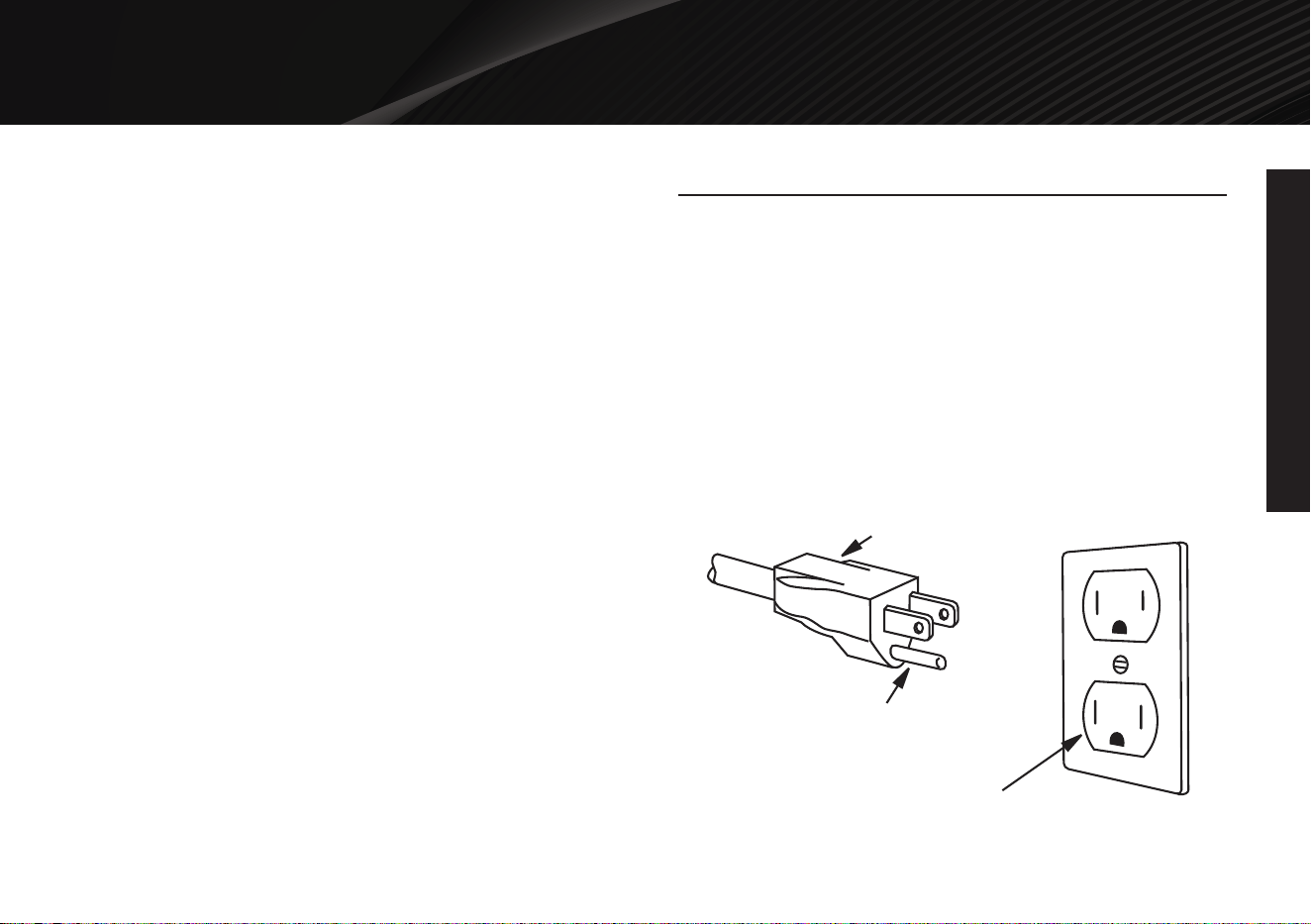
This appliance must be grounded. In the event of an electrical short
circuit, grounding reduces risk of electric shock by providing an
escape wire for the electric current. This appliance is equipped with
a cord having a grounding wire with a grounding plug. The plug must
be plugged into an outlet that is properly installed and grounded.
Consult a qualified electrician or serviceman if the grounding
instructions are not completely understood, or if doubt exists as to
whether the appliance is properly grounded, and if it is necessary to
use an extension cord, use only a 3-wire extension cord that has a
3-blade grounding plug and a 3-slot receptacle that will accept the
plug on the appliance. The marked rating of the extension cord shall
be equal to or greater than the electrical rating of the appliance.
SAVE THESE INSTRUCTIONS
—
—
—
—
3-Pronged Plug
Ground Plug
3-Prong Receptacle
GROUNDING INSTRUCTIONS
©2019 Galanz Americas Limited Company
nce,
using
rom
ted
ore
e
e
n it is
at
e for
cturing
ng.
moke
3
SAVE THESE INSTRUCTIONS
—
—
—
Thank you for purchasing a Galanz product. Please read this manual carefully for correct usage and safety,
and keep for future reference. For service, support and warranty information, call 800-562-0738.
FPO
IMPORTANT SAFETY INSTRUCTIONS
IMPORTANT SAFETY INSTRUCTIONS
Electrical Requirements
The electrical requirements are a 120 volt 60 Hz, AC only, 15 amp. It
is recommended that a separate circuit serving only the oven be
provided. The oven is equipped with a 3-prong grounding plug. It
must be plugged into a wall outlet properly installed and ground.
Power Cord
A short power supply cord is provided to reduce the risks resulting
from becoming entangled in or tripping over a longer cord.
Longer cord sets or extension cords are available and may be
used if care is exercised in their use.
If long cord or extension cord is used:
a) The marked electrical rating of the cord set or extension cord
should be at least as reat as the electrical rating of the appliance.
b) The extension cord must be a grounding-type 3-wire cord, and
the longer cord should be arranged so that it will not drape over the
counter top or table top where it can be pulled on by children or
tripped over accidentally.
Make sure that all the packing materials are removed from the
inside of the door.
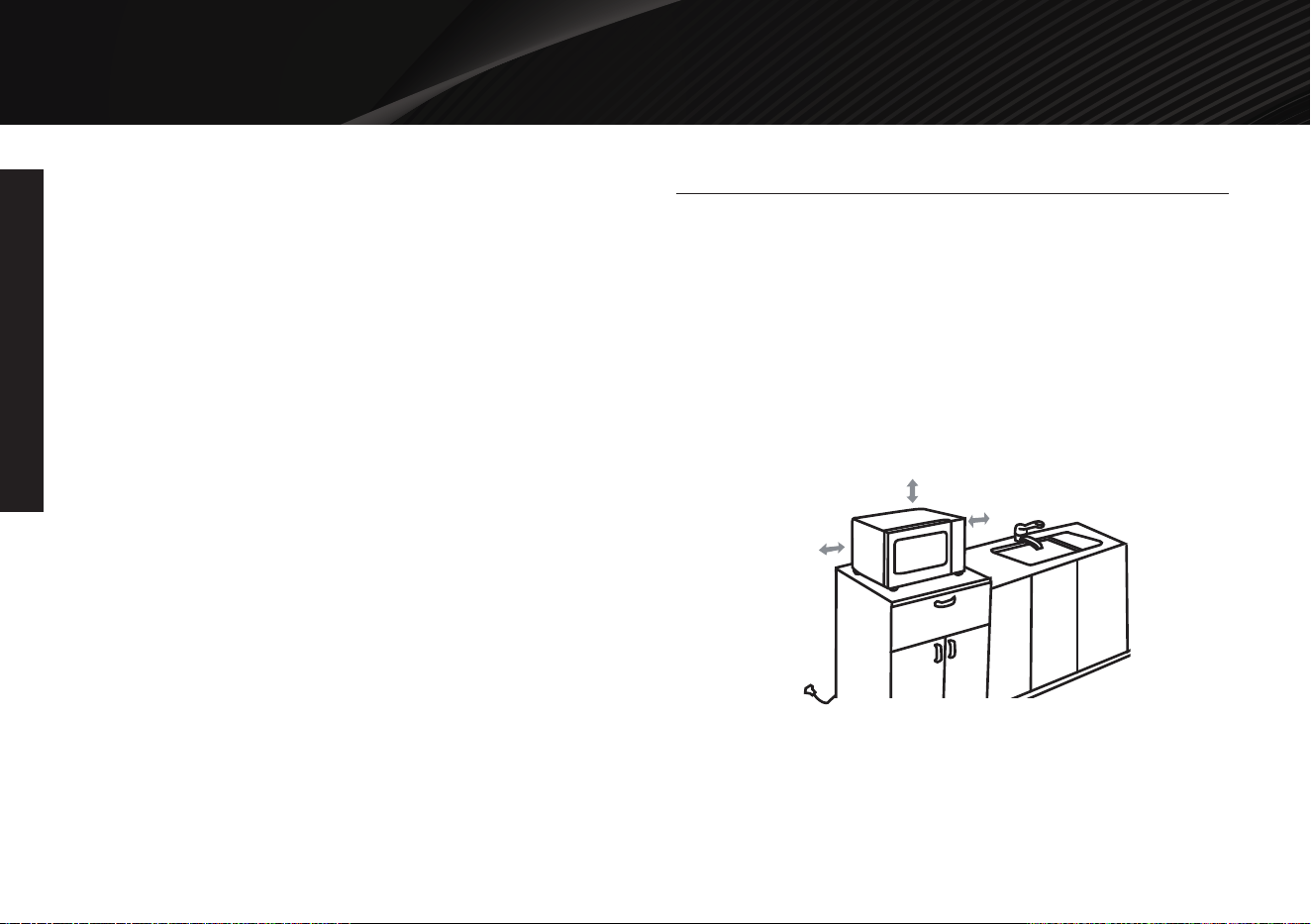
This microwave oven must be placed on a flat, stable surface.
For correct operation, the oven must have sufficient airflow. Allow
minimum 7.87 inch of free space necessary above the top surface
of the oven and 1.97 inch at both sides. Do not cover or block any
openings on the appliance. Do not remove feet.
The appliance shall be only used on a countertop over 3 feet
(914mm) above the floor.
Do not place the oven where heat, moisture, or high humidity are
generated, or near combustible materials.
Make sure that the power cord is undamaged and does not run
under the oven or over any hot or sharp surface.
The socket must be readily accessible so the microwave oven can
be easily unplugged in an emergency.
INSTALLATION GUIDE
7.87 inch
1.97 inch
1.97 inch
©2019 Galanz Americas Limited Company
nce,
using
rom
ted
ore
e
e
n it is
at
e for
cturing
ng.
moke
4
SAVE THESE INSTRUCTIONS
RECOMMENDED
Microwave browning dish — Use to brown the exterior of small
items such as steaks, chops, or pancakes. Follow the directions
provided with your browning dish.
Microwaveable plastic wrap — Use to retain steam. Leave a small
opening for some steam to escape and avoid placing it directly on
the food.
Paper towels and napkins — Use for short-term heating and
covering; these absorb excess moisture and prevent spattering. Do
not use recycled paper towels, which may contain metal and could
ignite.
Glass and glass-ceramic bowls and dishes — Use for heating or
cooking.
Paper plates and cups — Use for short-term heating at low
temperatures. Do not use recycled paper, which contain metal and
could ignite.
Wax paper — Use as a cover to prevent spattering.
Thermometers — Use only those labeled "Microwave Safe" and
follow all directions.
Check the food in several places. Conventional thermometers may be
used on microwave food once the food has been removed from the
oven.
LIMITED USE
Aluminum foil — Use narrow strips of foil to prevent overcooking of
exposed areas.
Using too much foil can damage your oven, so be careful. You
should keep distance of 1 inch (2.54cm) between aluminum foil and
cavity.
Ceramic, porcelain, and stoneware— Use these if they are
labeled "Microwave Safe". If they are not labeled, test them to make
sure they can be used safely.
Plastic — Use only if labeled "Microwave Safe". Other plastics can
melt.
NOT RECOMMENDED
Glass jars and bottles — Regular glass is too thin to be used in a
microwave. It can shatter and cause damage and injury.
Paper bags — These are a fire hazard, except for popcorn bags
bagsesidue on food.
Styrofoam plates and cups — These can melt and leave an
unhealthy residue on food.
Plastic storage and food containers — Containers such as
margarine tubs can melt in the microwave.
Metal utensils — These can damage your oven. Remove all metal
before cooking.
Note:
Should you wish to check if a dish is safe for microwaving, place the
empty dish in the oven and microwave on HIGH for 30 seconds. A
dish which becomes very hot should not be used.
Thank you for purchasing a Galanz product. Please read this manual carefully for correct usage and safety,
and keep for future reference. For service, support and warranty information, call 800-562-0738.
FPO
IMPORTANT SAFETY INSTRUCTIONS
IMPORTANT SAFETY INSTRUCTIONS
COOKING UTENSILS GUIDE
This section lists which utensils can be used in
this microwave, which have limited use for short periods,
and which should not be used in this microwave.
©2019 Galanz Americas Limited Company
5
Thank you for purchasing a Galanz product. Please read this manual carefully for correct usage and safety,
and keep for future reference. For service, support and warranty information, call 800-562-0738.
FPO
SPECIFICATIONS
SPECIFICATIONS
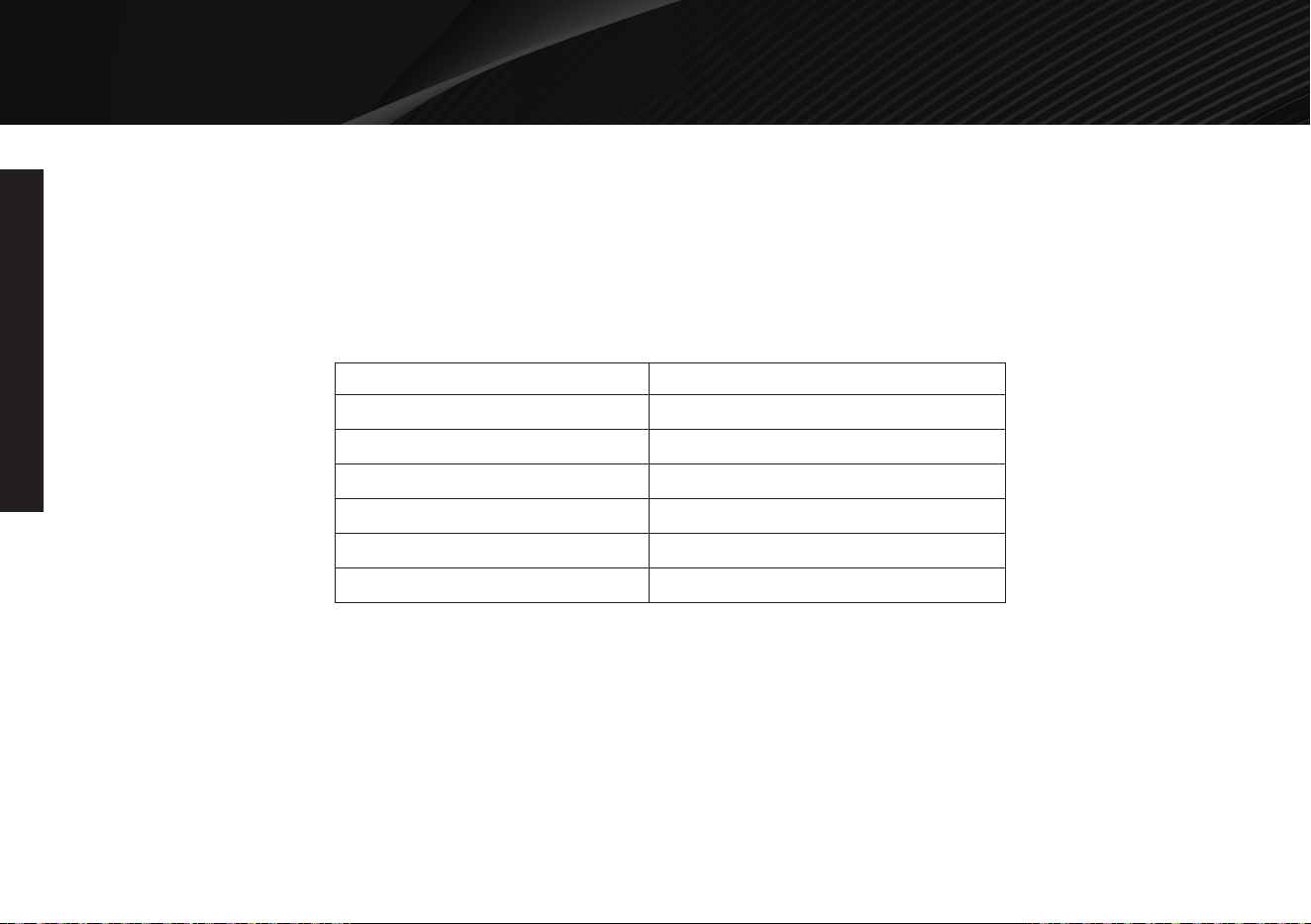
Power supply
Power Consumption (Microwave)
Rated Microwave Power Output
Operating Frequency
Outside Dimensions(H x W x D )
Oven Capacity
Net Weight
120V/60Hz
1100W
700W
2450MHz
9 7/16 X 17 9/16 X 14 1/8 inches
0.7 Cu.Ft.
Approx. 20.28 lbs
6
Thank you for purchasing a Galanz product. Please read this manual carefully for correct usage and safety,
and keep for future reference. For service, support and warranty information, call 800-562-0738.
FPO
PRODUCT DIAGRAM
PRODUCT DIAGRAM
©2019 Galanz Americas Limited Company
nce,
using
rom
ted
ore
e
e
n it is
at
e for
cturing
ng.
moke
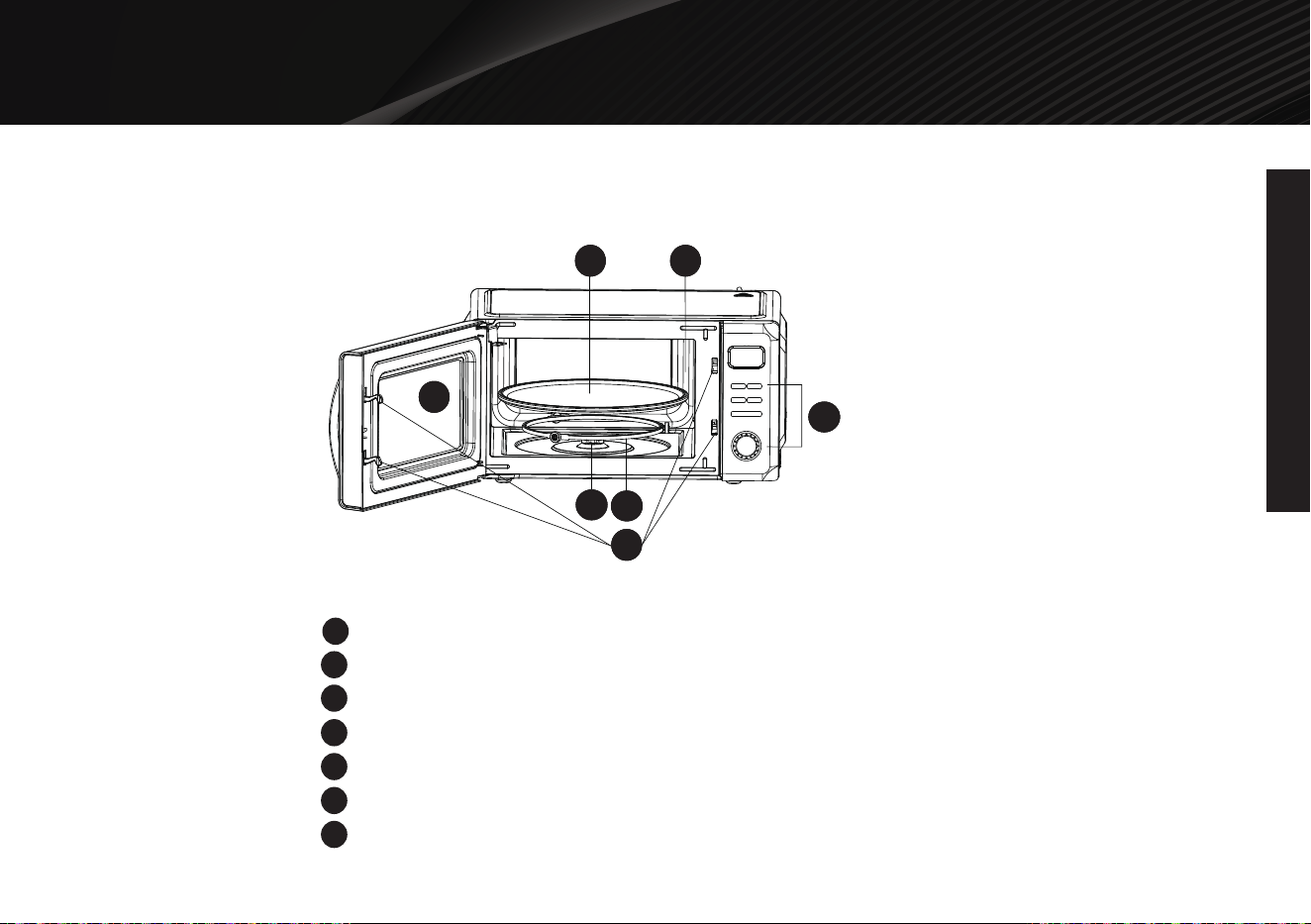
Door Safety Lock System
Oven Window
Shaft
Roller Ring
Control Panel
Wave Guide (Please do not remove the mica plate covering the wave guide)
Glass Tray
1
2
3
4
5
6
7
5
2
7
6
3
4
1
5
2
7
6
3
4
1
5
2
7
6
3
4
1
5
2
7
6
3
4
1
7
Thank you for purchasing a Galanz product. Please read this manual carefully for correct usage and safety,
and keep for future reference. For service, support and warranty information, call 800-562-0738.
FPO
CONTROL PANEL
CONTROL PANEL
©2019 Galanz Americas Limited Company
nce,
using
rom
ted
ore
e
e
n it is
at
e for
cturing
ng.
moke
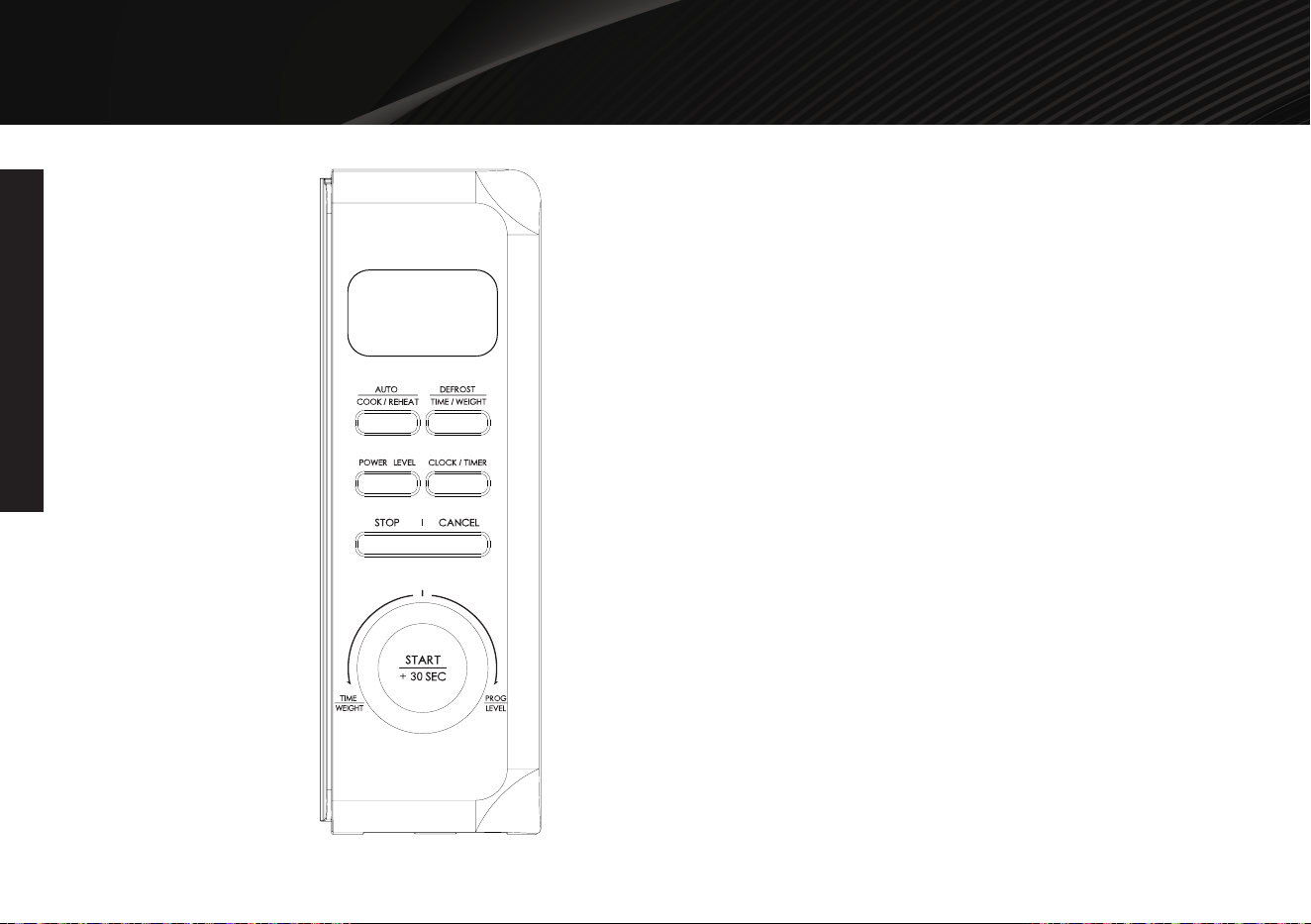
DISPLAY
Cooking time, power, indicators and clock time
are displayed.
AUTO/COOK/REHEAT
Press to set auto cooking and reheating programs.
DEFROST/TIME/WEIGHT
Press once to defrost food based on time.
Press twice to defrost food based on weight.
POWER LEVEL
Press to select cooking power level.
CLOCK/TIMER
Press to set clock time.
Press to set timer function.
STOP/CANCEL
Press once to temporarily stop cooking, or twice to
cancel cooking altogether.
It is also used to set child lock.
TIME/WEIGHT/PROG/LEVEL (dial)
Turn to set time and food weight.
Turn to select the type of defrosting and auto
cooking food.
START/+30 SEC
Press start cooking and defrosting programs.
Press to set express cooking program.
8
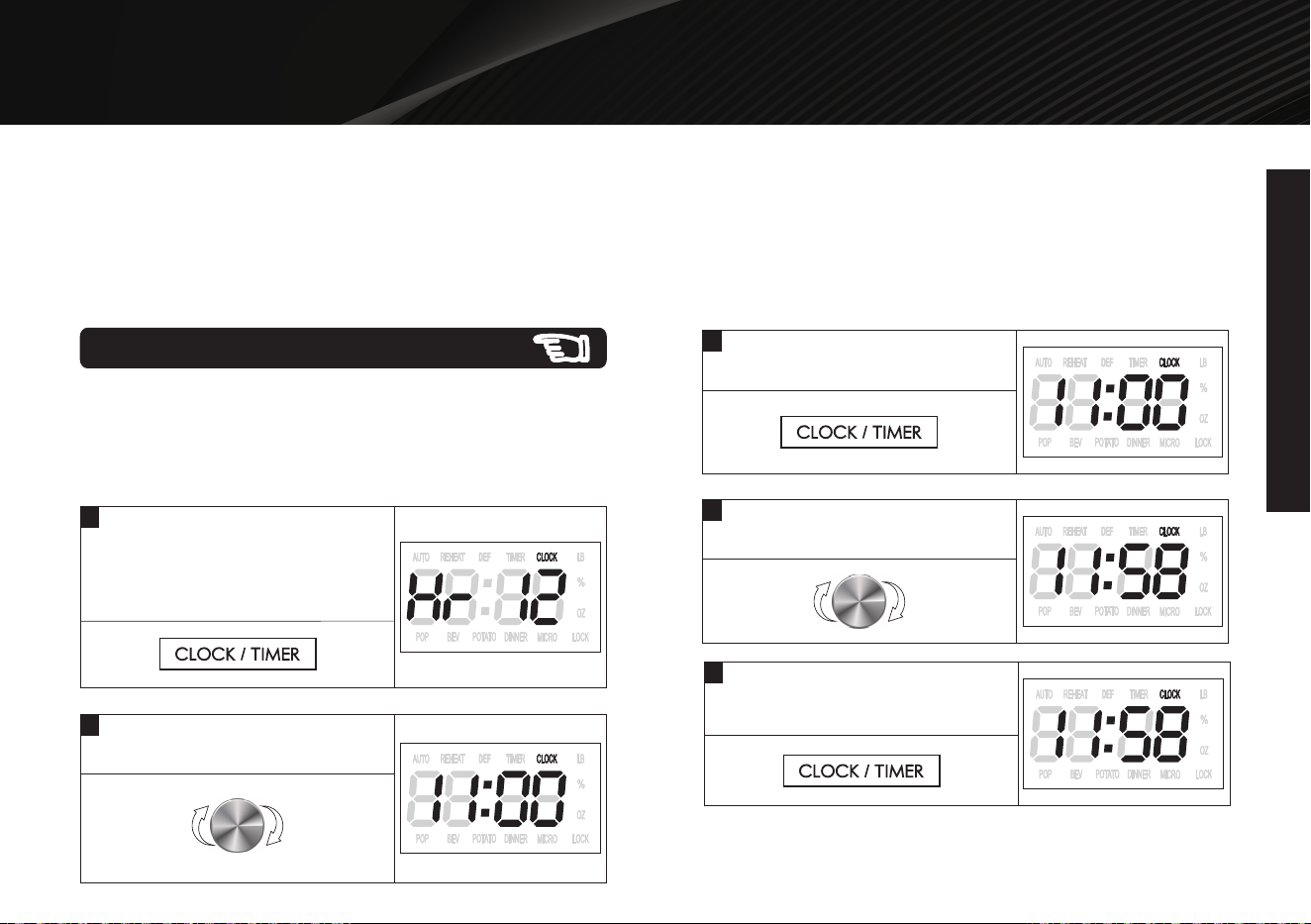
When the oven first plugged in, a beep will sound and the display will show "12:00" and "CLOCK".
In the process of setting, broken about 30 seconds the oven will return to standby mode.
During cooking, if press STOP/CANCEL button once, the program will be paused, then press START/+30 SEC button to resume.
But if press STOP/CANCEL button twice, the program will be cancelled.
After cooking end, the display will show End and beep will sound until user press any button or open the door.
In the process of operation, press a valid button, the buzzer rings once, but if press a invalid button, the buzzer rings twice.
1
This is a 12-hour or 24-hour clock. You can choose to set the clock
time in 12-hour or 24-hour cycle by pressing CLOCK/TIMER in
standby mode.
Example: Set a 12-hour clock at 11:58.
2
Turn the dial until the correct
hour is displayed.
Thank you for purchasing a Galanz product. Please read this manual carefully for correct usage and safety,
and keep for future reference. For service, support and warranty information, call 800-562-0738.
FPO
OPERATION INSTRUCTIONS
OPERATION INSTRUCTIONS
Setting the Clock
©2019 Galanz Americas Limited Company
9
In standby mode, press and hold
CLOCK/TIMER for 3 seconds to
select 24-hour clock (press the pad
again to select 12-hour clock).
4
Turn the dial until the correct
minute is displayed.
3
Press CLOCK/TIMER to confirm
the hour.
NOTE: During cooking, you can check the current time by
pressing CLOCK/TIMER button.
5
Press CLOCK/TIMER to confirm
the minute and finish setting.
X
2
OPERATION INSTRUCTIONS
Thank you for purchasing a Galanz product. Please read this manual carefully for correct usage and safety,
and keep for future reference. For service, support and warranty information, call 800-562-0738.
FPO
OPERATION INSTRUCTIONS
10
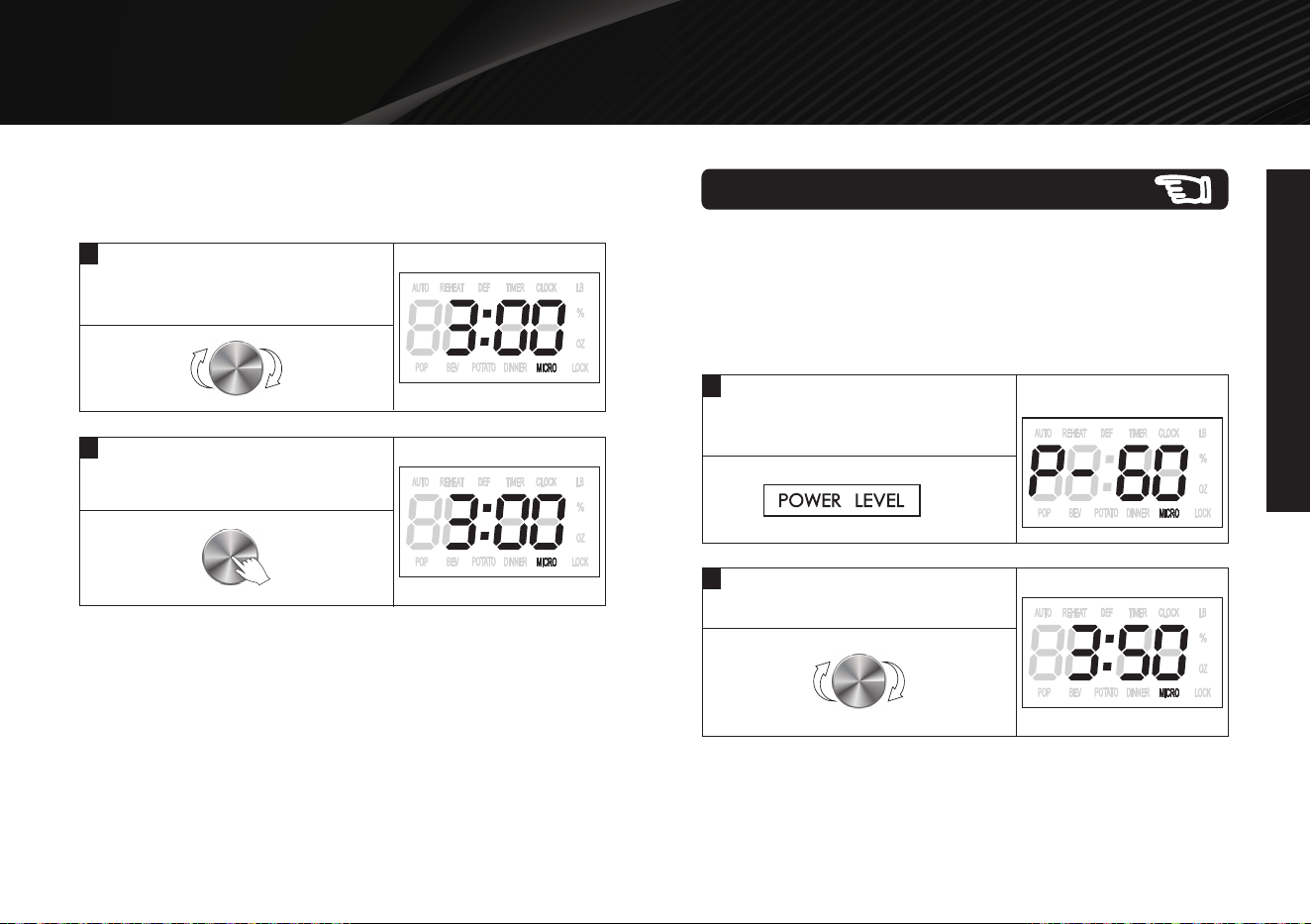
Use this feature to program the oven to microwave food at 100%
power conveniently.
Example: Set the cooking time for 3 minutes.
First way:Set the cooking time by pressing the dial.
Express Cooking
1
Instandby mode, press the dial
6 times to enter the time.(each press
for 30 seconds)
2
The oven starts working
automatically at full power.
NOTE: During cooking, you can add the cooking time by
pressing START/+30 SEC button. Each press to increase 30
seconds, and up to 30 minutes.
X
6
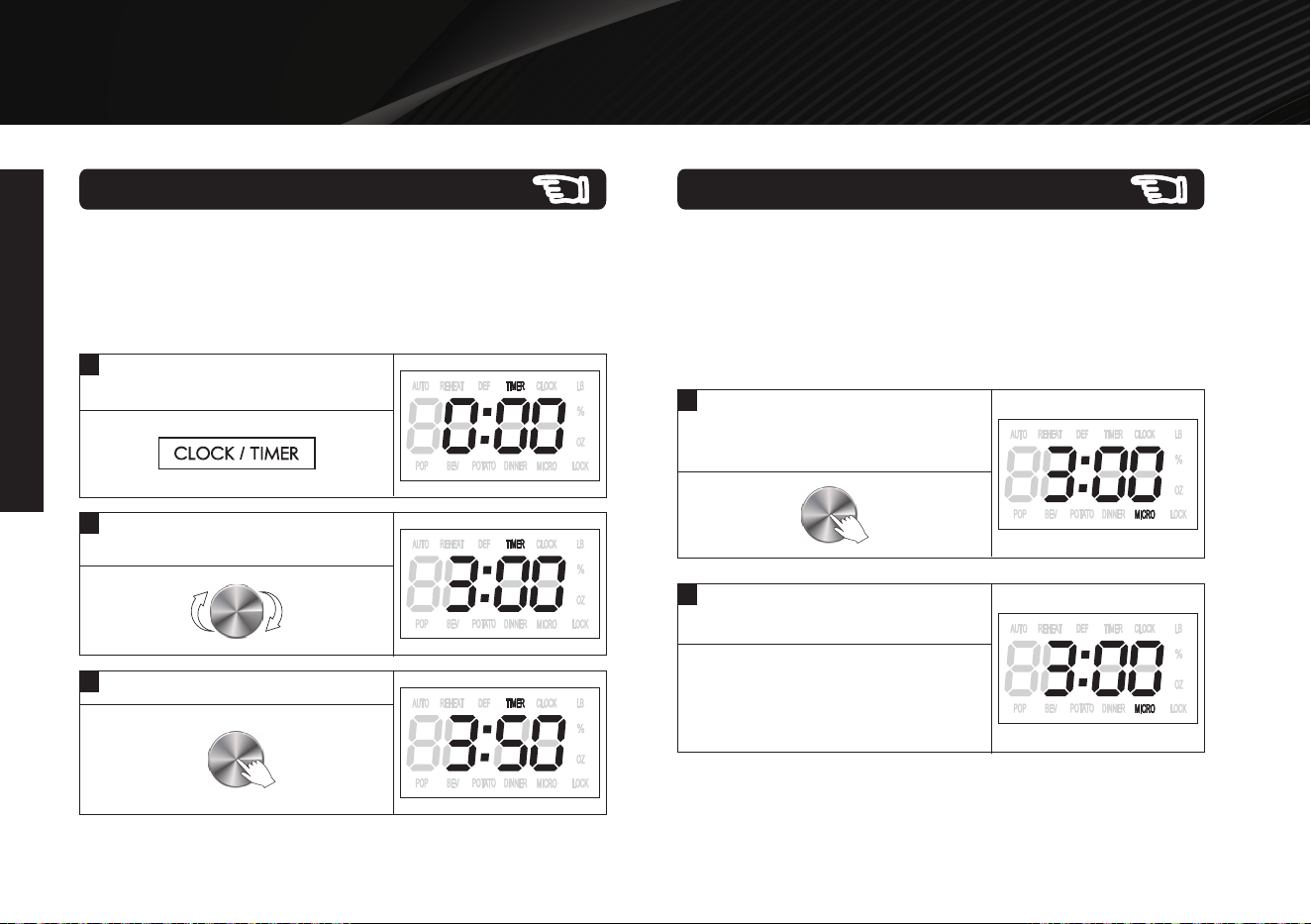
Timer Function
1
In standby mode or during cooking,
press CLOCK/TIMER button once.
2
Turn the dial to set desired time.
The longest time is 95 minutes.
3
Press the dial to confirm and start.
You can use the timer feature to count down a specific amount of
time whether it's for cooking or for anything else.
Example: How to set the timer for 3 minutes and 50
seconds.
NOTE: Timer countdown can be seen for 5 seconds by touching
CLOCK/TIMER, if press STOP/CANCEL during these 5 seconds,
the timer will be canceled.
nce,
using
rom
ted
ore
e
e
n it is
at
e for
cturing
ng.
moke
X
5
Thank you for purchasing a Galanz product. Please read this manual carefully for correct usage and safety,
and keep for future reference. For service, support and warranty information, call 800-562-0738.
FPO
OPERATION INSTRUCTIONS
OPERATION INSTRUCTIONS
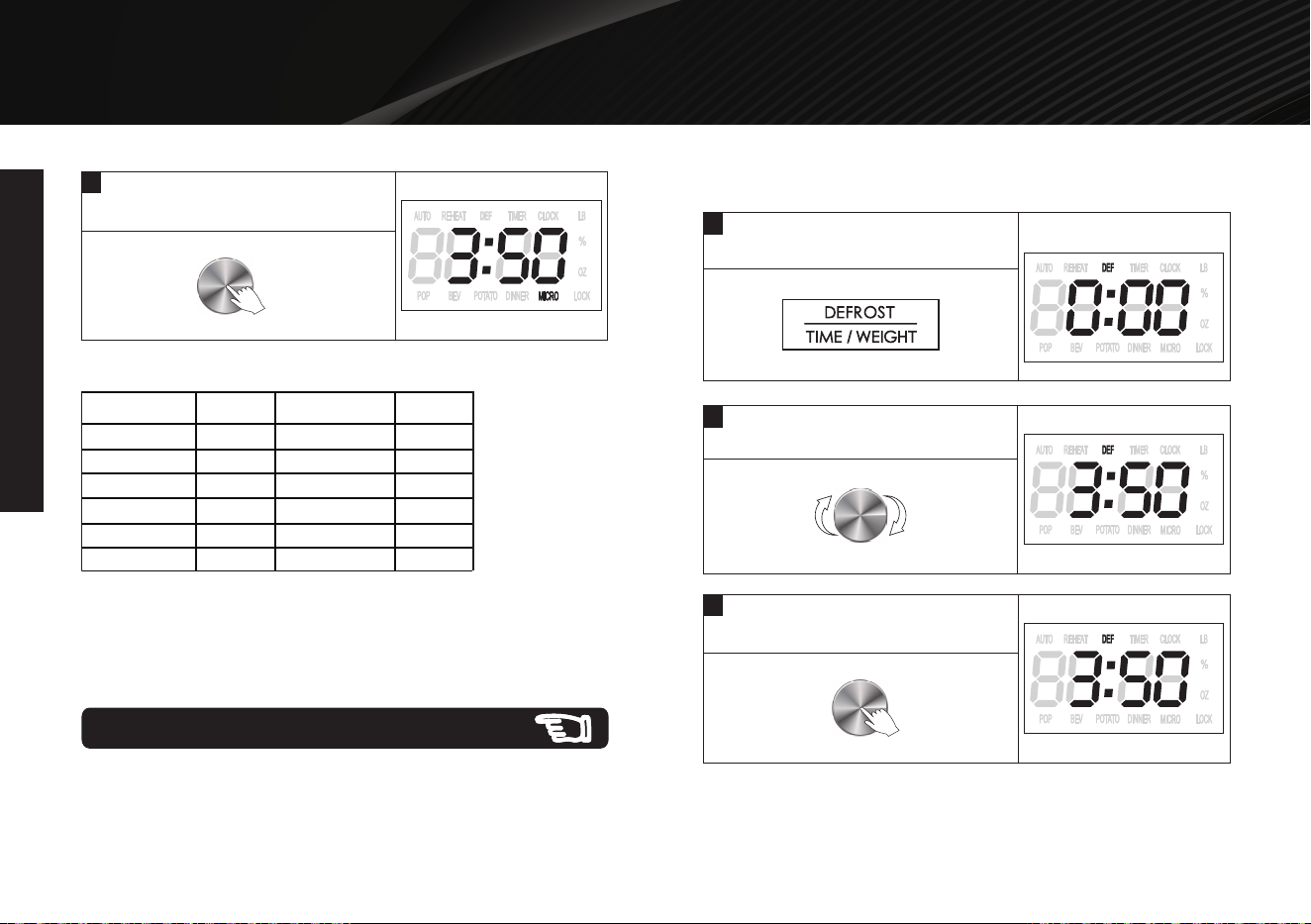
1
2
This feature allows you to choose the power level and cooking
time of microwave function. The longest cooking time is 95
minutes.
Example: Cook at 60% power level for 3 minutes and
50 seconds.
Press POWER LEVEL button
5 times to select the 60% power
level.
Turn the dial to enter the time.
The longest time is 95 minutes.
Microwave Cooking
©2019 Galanz Americas Limited Company
NOTE: The longest cooking time is 30 minutes.
Example: Set the cooking time for 3 minutes.
Second way:Set the cooking time by turning the dial.
1
In standby mode, turn the dial
clockwise to enter time
2
Press the dial and the oven starts
working. The oven starts working
automatically at full power.
11
©2019 Galanz Americas Limited Company
nce,
using
rom
ted
ore
e
e
n it is
at
e for
cturing
ng.
moke
The defrosting power is adjusted automatically once the cooking
time is programmed.
Time Defrost
NOTE:
During defrosting, the system will pause to remind user to turn
food over, and then press the dial to resume the defrosting.
NOTE:
If you want to set 100% power level, you can turn the dial to enter
cooking time directly and then press the dial to start.
2
Turn the dial to selcet the
defrosting time.
Example: Defrost food for 3 minutes and 50 seconds.
1
In standby mode, press the
DEFROST/TIME/WEIGHT once.
3
Press the dial to confirm and start
defrosting.
Thank you for purchasing a Galanz product. Please read this manual carefully for correct usage and safety,
and keep for future reference. For service, support and warranty information, call 800-562-0738.
FPO
OPERATION INSTRUCTIONS
OPERATION INSTRUCTIONS
Power Level
Display
Power Level
Display
100%
90%
80%
P100
P-90
P-80
40%
30%
20%
P-40
P-30
P-20
70%
60%
50%
P-70
P-60
P-50
10%
0%
P-10
P-00
Power Level Chart:
3
Press the dial to confirm and start
cooking.
12
Thank you for purchasing a Galanz product. Please read this manual carefully for correct usage and safety,
and keep for future reference. For service, support and warranty information, call 800-562-0738.
FPO
OPERATION INSTRUCTIONS
OPERATION INSTRUCTIONS
©2019 Galanz Americas Limited Company
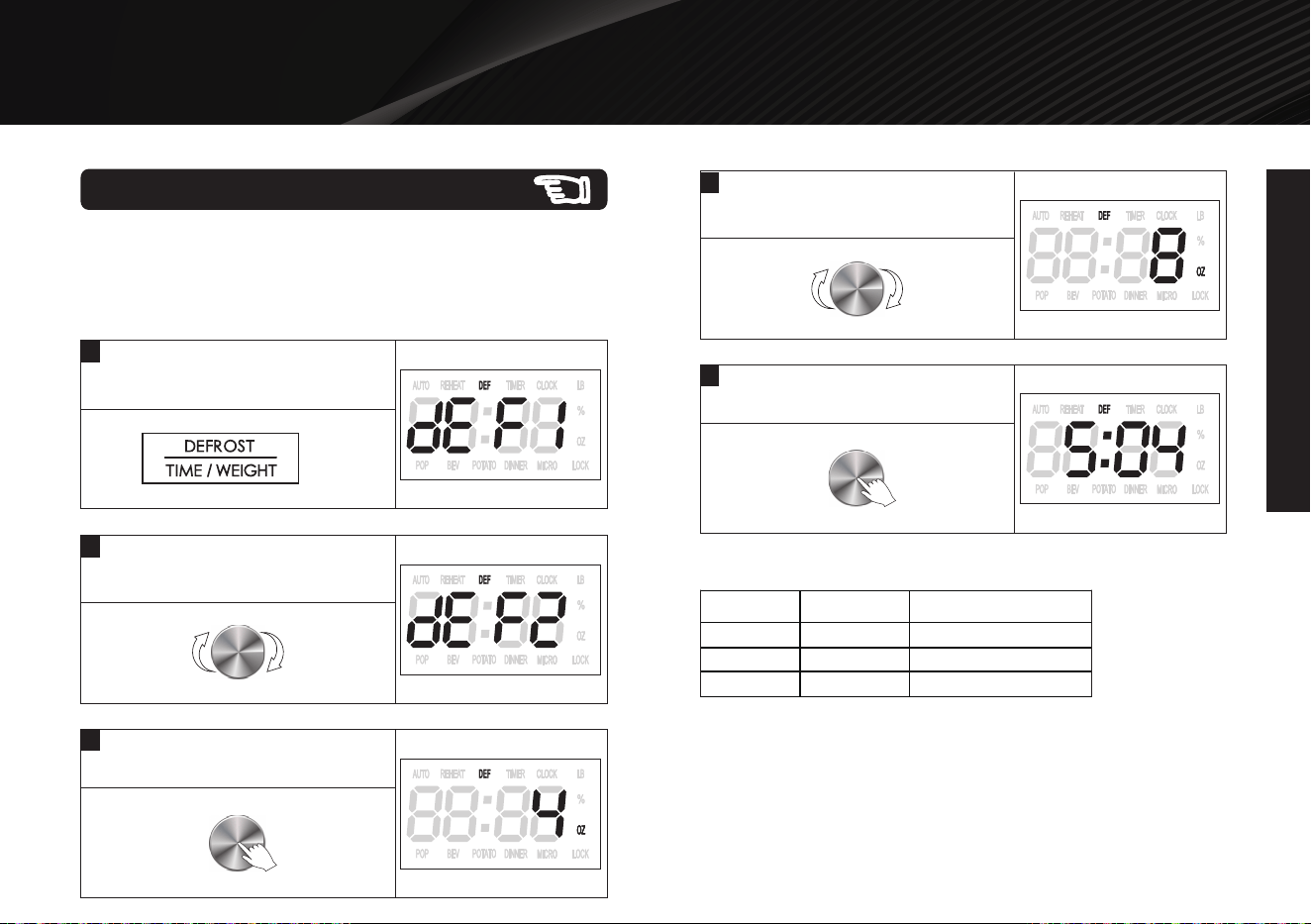
Defrost food code description:
Example: Defrost 8oz poultry.
The defrosting time and power level are automatically set once
the food category and weight are selected.
Weight Defrost
1
In standby mode, press the
DEFROST/TIME/WEIGHT twice.
3
Press the dial to confirm.
5
Press the dial to confirm.
2
Turn the dial to selcet the defrosting
food code.
Weight RangeCode
Food
dEF1
dEF2
dEF3
Meat
Poultry
Sea food
4 oz ~ 48 oz
4 oz ~ 48 oz
4 oz ~ 32 oz
13
4
Turn the dial to selcet the food
weight.
X
2
Thank you for purchasing a Galanz product. Please read this manual carefully for correct usage and safety,
and keep for future reference. For service, support and warranty information, call 800-562-0738.
FPO
OPERATION INSTRUCTIONS
OPERATION INSTRUCTIONS
14
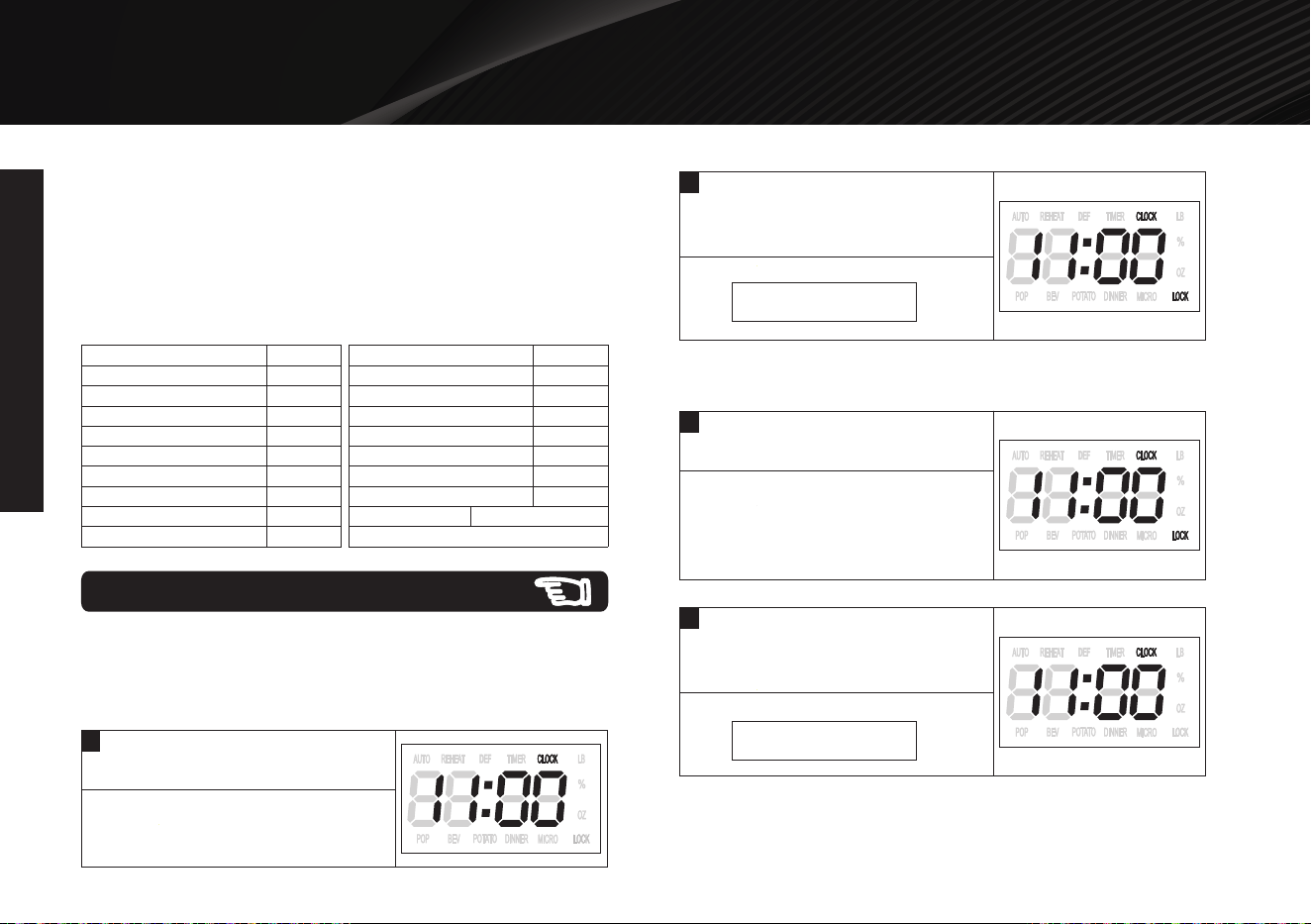
1
In standby mode, suppose the
displayer is showing 11:00.
2
Press and hold the
STOP/CANCEL for 3 seconds, a
beep and lock indicator turns off.
Example 2: To cancel the child lock.
Example1: Set the child lock.
The child proof lock prevents unsupervised operation by little
children.
Child Lock
1
In standby mode, suppose the
displayer is showing 11:00.
2
Press and hold the
STOP/CANCEL for 3 seconds, a
beep sounds and lock indicator lights.
NOTE:
During defrosting, the system will pause to remind user to turn
food over, and then press the dial to resume the defrosting.
Weight must be in pounds and ounces. If label gives weight in
pounds only, change the fraction of a pound to ounces using the
following chart.
Converting fractions of a pound to ounces::
9
10
11
12
13
14
15
.54 to .59
.60 to .65
.66 to .71
.72 to .78
.79 to .84
.85 to .90
.91 to .97
above .97
go to next even
.35 to
OuncesFractions of a pound
Less than .03 0
.03 to .09 1
.10 to .15 2
.16 to .21 3
.22 to .27 4
.28 to .34 5
.40 6
.41 to .46 7
.47 to .53 8
OuncesFractions of a pound
STOP/CANCEL
STOP/CANCEL
Thank you for purchasing a Galanz product. Please read this manual carefully for correct usage and safety,
and keep for future reference. For service, support and warranty information, call 800-562-0738.
FPO
OPERATION INSTRUCTIONS
OPERATION INSTRUCTIONS
©2019 Galanz Americas Limited Company
nce,
using
rom
ted
ore
e
e
n it is
at
e for
cturing
ng.
moke
15
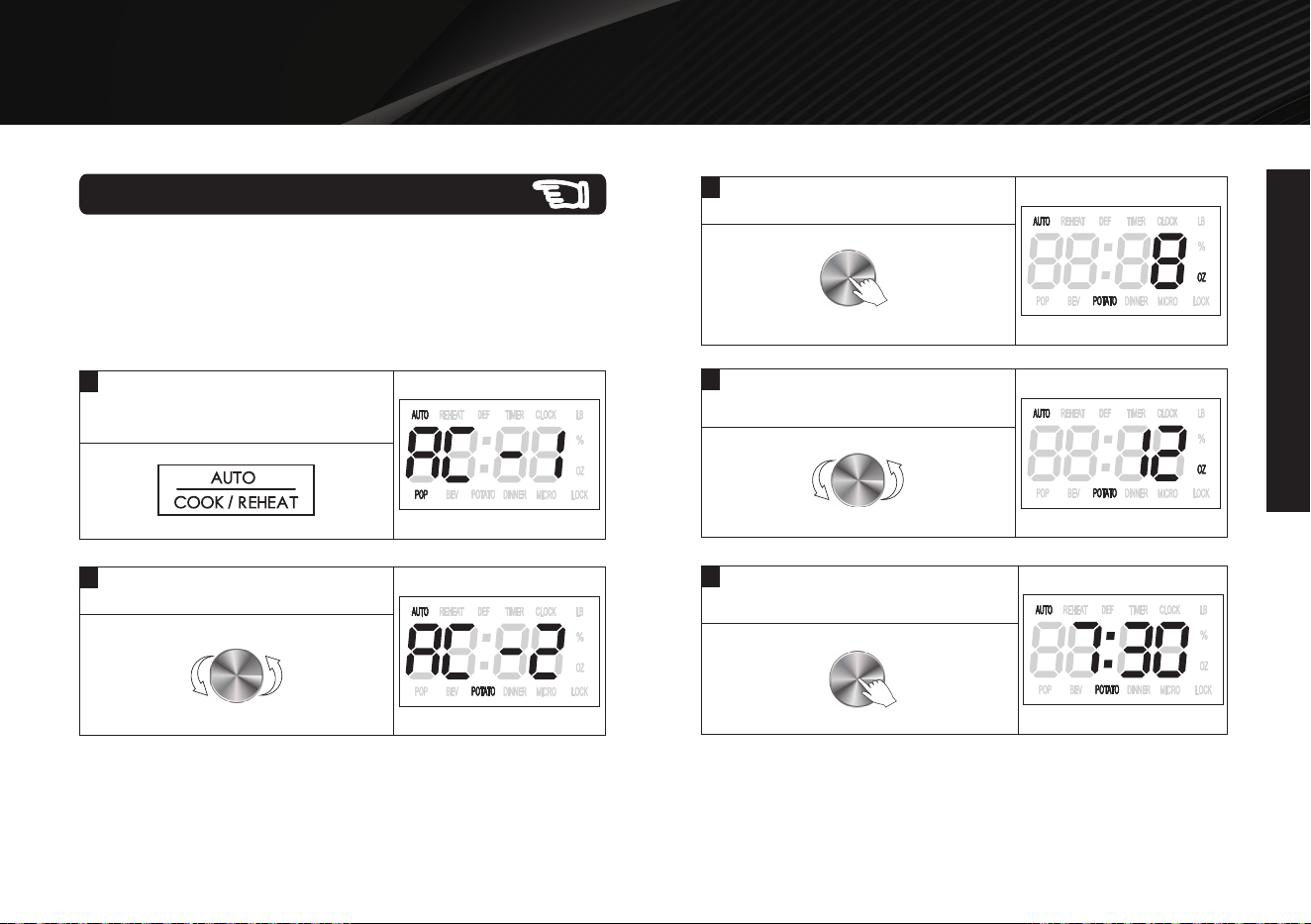
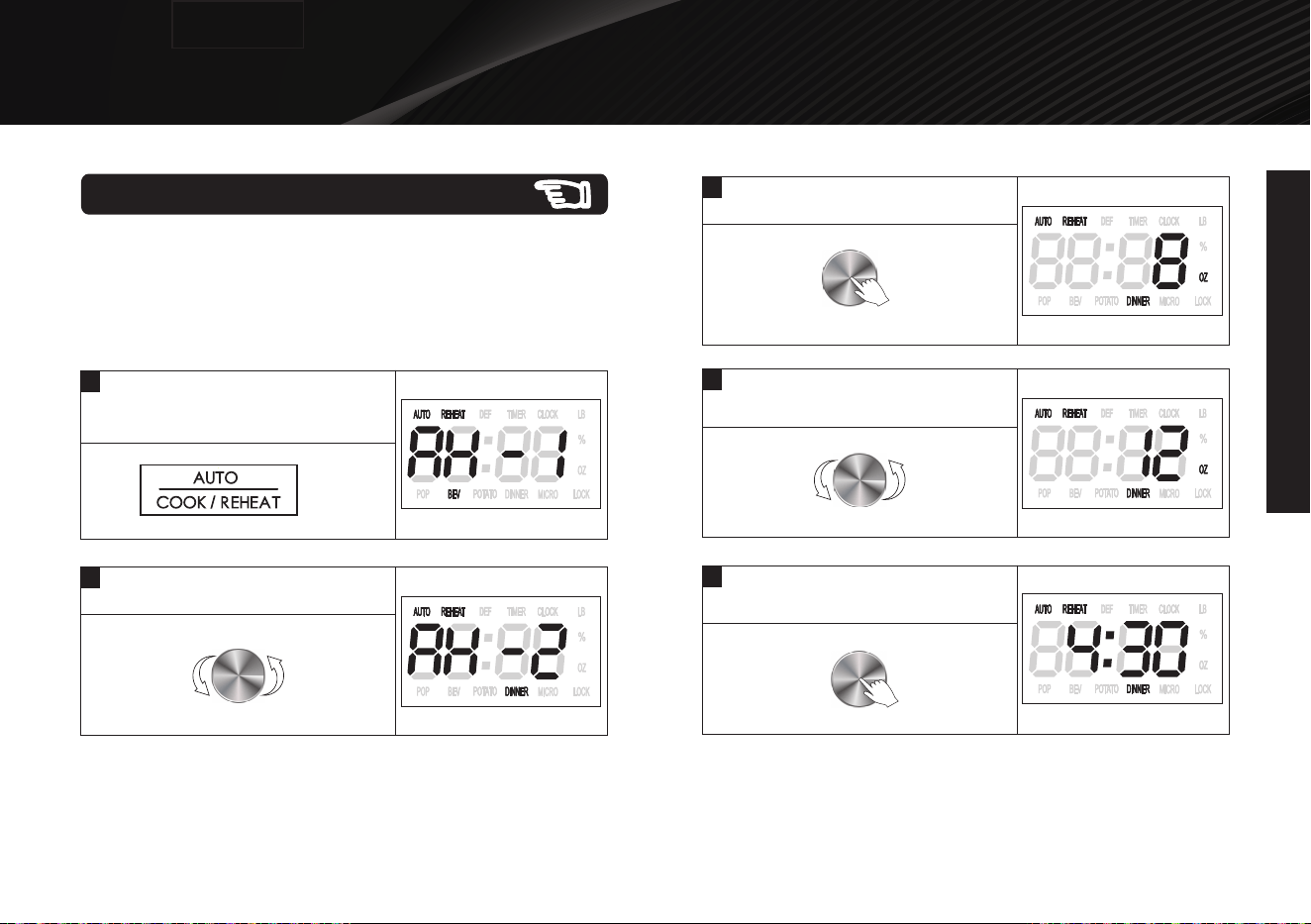
For the following foods, you do not need to input cooking power
and time. It is sufficient to indicate the type of food that you want
to cook as well as the weight or servings of this food.
Auto Cook Menus
1
In standby mode, press
AUTO COOK//REAHEAT button
once.
2
Turn the dial to select food code.
3
Press START/+30 SEC button once.
Example1: Cook potato for 12 oz.
4
Turn the dial to set food weight or
servings.
5
Press START/+30 SEC button to start.
Thank you for purchasing a Galanz product. Please read this manual carefully for correct usage and safety,
and keep for future reference. For service, support and warranty information, call 800-562-0738.
FPO
OPERATION INSTRUCTIONS
OPERATION INSTRUCTIONS
©2019 Galanz Americas Limited Company
nce,
using
rom
ted
ore
e
e
n it is
at
e for
cturing
ng.
moke
Auto Cook Menus
16
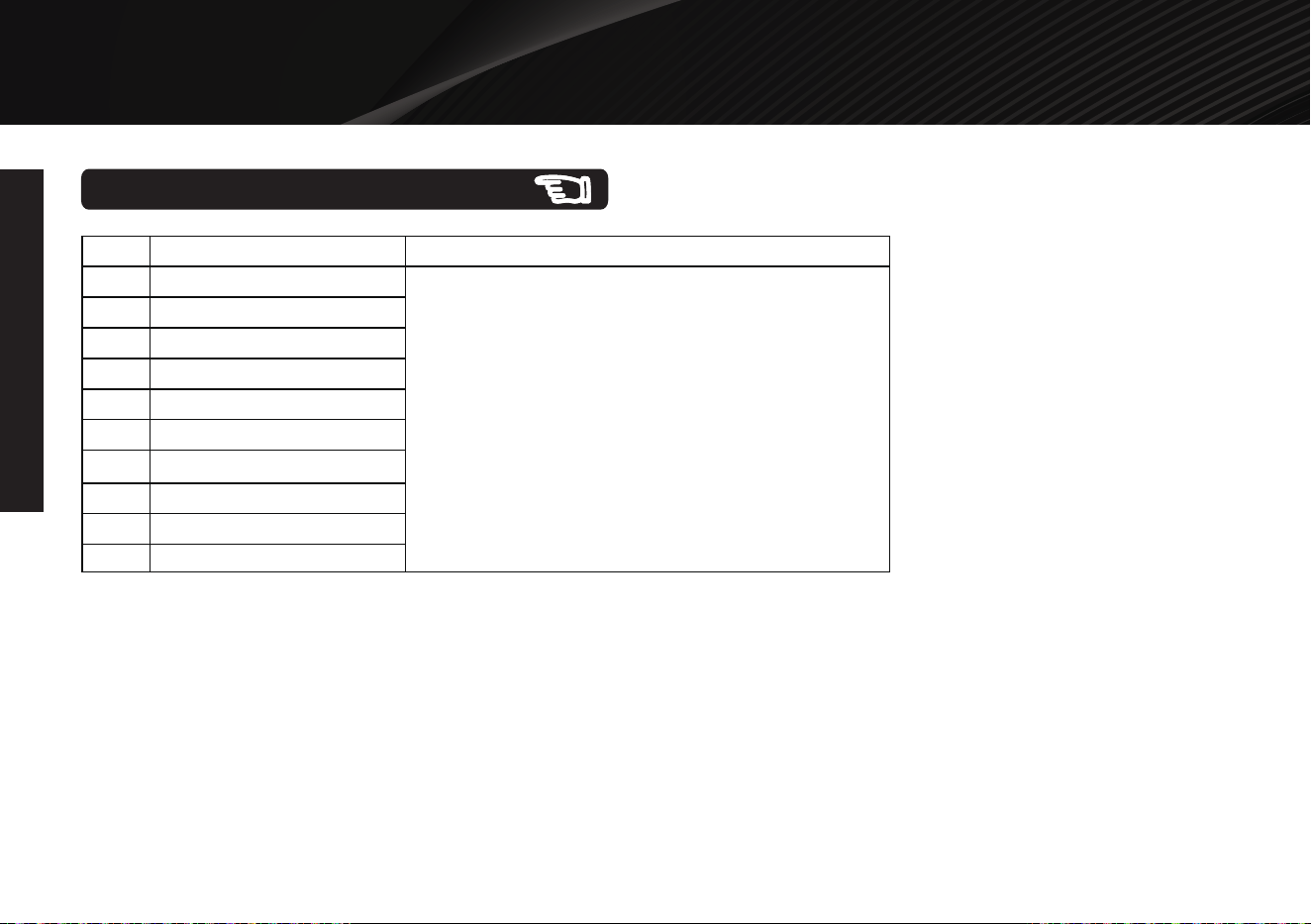
Code
AC-1
AC-2
AC-3
AC-4
AC-5
AC-6
AC-7
Menu
Popcorn (3.5 oz)
Potato (8-24 oz)
Fresh Vegetable
(8-20 oz)
Frozen Vegetable
(8-20 oz)
Oatmeal
(1-3 servings)
Corn On The
Cob (1-4 roots)
Rice (8 oz, 12 oz,
16 oz)
For popcorn, the default cooking
time is 2 minutes and 50 seconds.
You can adjust the cooking time by
turning TIME/WEIGHT/PROG/LEVEL
dial. The longest time is 5 minutes.
The result of auto cooking depends
on factors such as fluctuation of
voltage, the shape and size of food,
your personal preference as to the
doneness of certain foods and even
how well you happen to place food in
the oven. If you find the result at any
rate not quite satisfactory, please
adjust the cooking time a little bit
accordingly.
Note
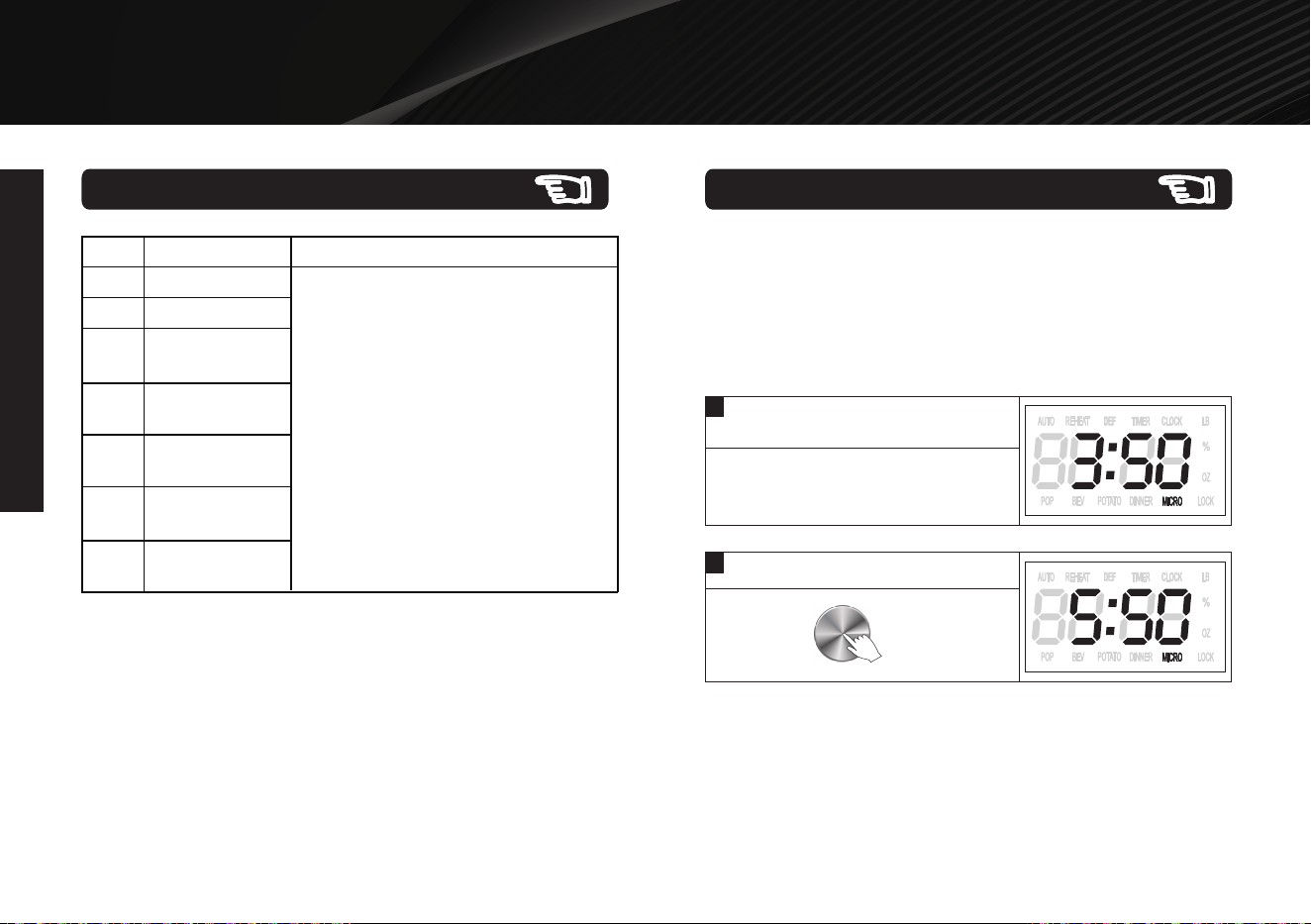
Example: During microwave cooking, add the cooking time
by 2 minutes by utilizing the dial.
In standby mode, you can touch the dial to start the microwave
oven immediately.
During cooking, you can add cooking time by touching the dial
repeatedly. The longest cooking time is 95 minutes.
+30 Sec Function
NOTE:
Below programs cannot use the dial during cooking.
AUTO COOK
AUTO REHEAT
TIME / WEIGHT DEFROST
—
—
—
1
During cooking, suppose the display
is showing 3:50.
2
Press the dial 4 times.
X
4
OPERATION INSTRUCTIONS
Thank you for purchasing a Galanz product. Please read this manual carefully for correct usage and safety,
and keep for future reference. For service, support and warranty information, call 800-562-0738.
FPO
OPERATION INSTRUCTIONS
©2019 Galanz Americas Limited Company
17
For the following foods, you do not need to input cooking power
and time. It is sufficient to indicate the type of food that you want
to cook as well as the weight or servings of this food.
Auto Reheat Menus
1
In standby mode, press
AUTO COOK//REAHEAT button
twice.
X
2
2
Turn the dial to select food code.
3
Press START/+30 SEC button once.
Example1: Cook dinner plate for 12 oz.
4
Turn the dial to set food weight or
servings.
5
Press START/+30 SEC button to
start .
Thank you for purchasing a Galanz product. Please read this manual carefully for correct usage and safety,
and keep for future reference. For service, support and warranty information, call 800-562-0738.
FPO
OPERATION INSTRUCTIONS
OPERATION INSTRUCTIONS
18
Code
AH-1
AH-2
AH-3
AH-4
AH-5
AH-6
AH-7
AH-8
AH-9
Menu
Beverage (8 oz, 10 oz, 12 oz)
Dinner Plate (8-24 oz)
Frozen Entree (8-24 oz)
Pizza (1-2 slices)
Soup/Sauce (8-24 oz)
Chili (8-24 oz)
Pasta (8-24 oz)
Mac and Cheese (8-24 oz)
Mashed Potatoes (8-24 oz)
Rice (8-24 oz)
The result of auto cooking depends on factors such as
fluctuation of voltage, the shape and size of food, your
personal preference as to the doneness of certain foods
and even how well you happen to place food in the oven.
If you find the result at any rate not quite satisfactory,
please adjust the cooking time a little bit accordingly.
Note
AH-10
Auto Reheat Menus
Thank you for purchasing a Galanz product. Please read this manual carefully for correct usage and safety,
and keep for future reference. For service, support and warranty information, call 800-562-0738.
FPO
©2019 Galanz Americas Limited Company
nce,
using
rom
ted
ore
e
e
n it is
at
e for
cturing
ng.
moke
19
CLEANING AND CARE
CLEANING AND CARE
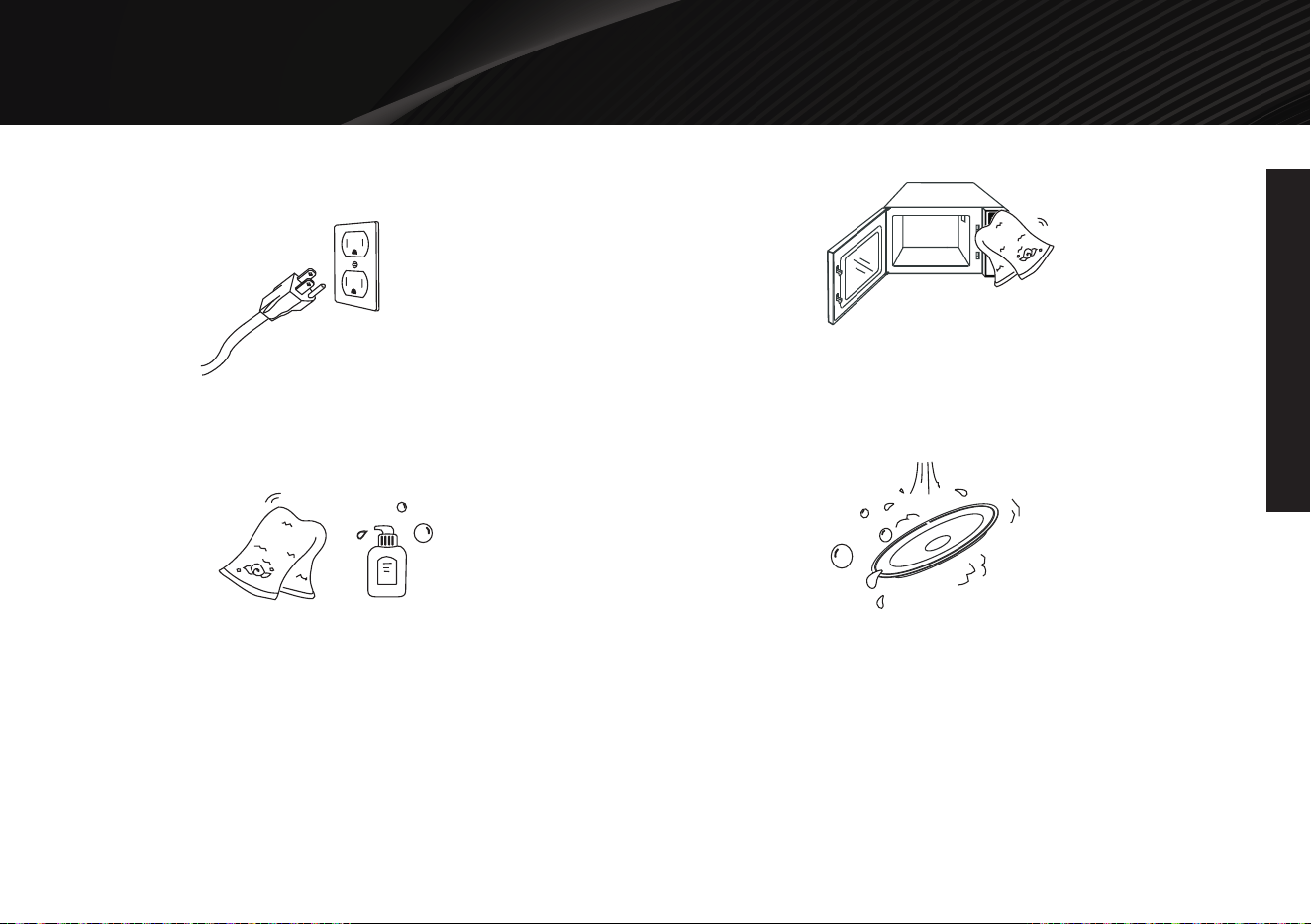
Turn off the oven and unplug the power cord from the wall when
cleaning.
Keep the inside of the oven clean. When food splatters or spilled
liquids adhere to oven walls, wipe with a damp cloth. Mild
detergents may be used if the oven gets very dirty. Avoid using
spray or other harsh cleaners. They may stain, streak or dull the
door surface.
The outside of the oven should be cleaned with a damp cloth. To
prevent damage to the operating parts inside the oven, water
should not be allowed to seep into the ventilation openings.
Wipe the door and window on both sides, the door seals and
adjacent parts frequently with a damp cloth to remove any spills or
spatters. Do not use abrasive cleaner.
Do not allow the control panel to become wet. Clean with a soft,
damp cloth. When cleaning the control panel, leave oven door
open to prevent oven from accidentally turning on.
If steam accumulates inside or around the outside of the oven
door, wipe with a soft cloth. This may occur when the microwave
oven is operated under high humidity condition. And it is normal.
It is occasionally necessary to remove the glass tray for cleaning.
Wash the tray in warm sudsy water or in a dishwasher.
If the light bulb burns out, please contact customer service to have
it replaced.
The oven should be cleaned regularly and any food deposits
should be removed. Failure to maintain the oven in a clean
condition could lead to deterioration of surface that could adversely
affect the life of the unit and could possibly result in a hazardous
situation.
Please do not dispose of this appliance into the domestic rubbish
bin; it should be disposed to the particular disposal center
provided by the municipalities.
Thank you for purchasing a Galanz product. Please read this manual carefully for correct usage and safety,
and keep for future reference. For service, support and warranty information, call 800-562-0738.
FPO
©2019 Galanz Americas Limited Company
20
PRODUCT WARRANTY
PRODUCT WARRANTY
This warranty applies to products sold by Galanz Americas in the
U.S. This warranty is in lieu of any other warranty and expressly
applies to the individual product only.
Galanz product is warrantied for one year following purchase for
defects in material and workmanship. Please save your receipt as
proof of purchase is required to make a warranty claim. During
this period, we will provide the purchase cost of this product, a
replacement or the equivalent, or repair per our discretion.
The warranty cannot be transferred through resale, including the
resale through a 3rd party unauthorized retailer and is only bestowed
up on the original consumer purchaser upon purchase from an
authorized retailer.
This warranty does not cover and excludes damage or
defects caused by:
Consumer misuse
Abuse
Neglect including the failure to clean and/or provide adequate
regular maintenance as outlined in the user manual
Commercial use
Subjecting the product to any voltage outside the specified range
Loss of parts
The affixing of any attachments not provided with the product
Accident
Use in a manner not intended and outlined in the user manual.
Any subsequent damages caused by the above listed exclusions
will not be covered and any claims determined to meet the above
exclusions will be denied. All liability is limited to the purchase price
and does not include any:
Retail offered extended warranties
Tax
Other charges(including postage to send required materials)
Incidental and/or consequential damages associated with the
product in question.
Every implied warranty, including any statutory warranty of
merchantability or fitness for a particular purpose is disclaimed
except to the extent prohibited by law, in which case such warranty
is limited to the duration of this written warranty. This warranty gives
you specific legal rights. You may have other legal rights that vary
depending on where you live. Some states do not allow limitations
on implied warranties or special, incidental, or consequential
damaged, so the above limitations may not apply to you.
If you have a claim under this warranty, please call our Customer
Service number: 800-562-0738.
For faster service, please have the model number, serial number, and
receipt ready for the operator to assist you.
22. Place less than 1.5kg of food evenly onto
the food tray or grid. Do not place the
food on either the side or end of the food
tray or grid.
23. Be careful not to be cut by sharp edges
of the appliance.
24. Do not put any object on a completely
opened glass door.
25. Be careful not to be burned by hot
surfaces of a working oven.
26. This is a Y-connection appliance.
Damage of the power cord need to be
fixed by professionals, call the supplier
or its maintenance department or its
maintenance personnel for
any damage
found.
27. Do not operate the appliance with an
external timer or a separate remote
control system.
28. Unplug from outlet when not in use and
before cleaning. Allow to cool before
putting on or taking off parts.
Caution: Be careful to avoid scalding
by the hot surfaces!
ELECTRICAL CONNECTIONS
A short power cord is provided to reduce
risks of becoming entangled or tripping
over a long cord, an extension cord may
be used if care is exercised in its use.
1. The electrical rating of the extension
cord
must be at least as great as the appliance.
the extension cord must be arranged so
that it will not drape over the counter-top
or table-top where it can be pulled on by
children or dripped over unintentionally.
2. All the fixings and replacements of the
power cord must be done by professionals
from the manufacturer’s maintenance
department or the relevant department.
READ BEFORE USING
If this is your first time using this appliance,
please be sure to:
1. Read this manual carefully bef
ore using
the appliance.
2. Remove protective film and sticker from
the surface of the oven.
3. Open oven door and remove all printed
documents and papers from inside.
4. Check and clean all accessories before
using.
5. Dry all accessories thoroughly before
inserting them back in. Connect the
appliance with a power source, then it is
ready for use.
6. Before using for the first time, preheat
the oven at its maximum temperature for
15 minutes to eliminate any manufacturing
residue that may remain a
fter shipping.
It is normal to experience some smoke
coming out.
Thank you for purchasing a Galanz product. Please read this manual carefully for correct usage and safety,
and keep for future reference. For service, support and warranty information, call 800-562-0738.
FPO
21
WARRANTY REGISTRATION
WARRANTY REGISTRATION
Please mail this warranty card to the address below within 30 days of purchase.
Galanz Americas, 55 Challenger Road, Suite 503, Ridgefield Park, NJ 07660
You must attach a copy of your purchase receipt to validate your registration.
Name
Address
City State ZIP
Phone Email
Model Number Serial Number
Purchase Location
PLEASE PRINT CLEARLY.

年份改动见措施单
Galanz Americas Limited Company©2021
年份改动见措施单