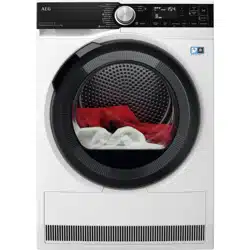

USER
MANUAL
EN User Manual
Tumble Dryer
TR959M6BC
CONTENTS
1. SAFETY INFORMATION......................................................................................3
2. SAFETY INSTRUCTIONS.................................................................................... 7
3. PRODUCT DESCRIPTION...................................................................................9
4. CONTROL PANEL..............................................................................................10
5.
WI-FI - CONNECTIVITY SETUP................................................................ 11
6. PROGRAMMES..................................................................................................14
7. OPTIONS............................................................................................................16
8. BEFORE FIRST USE..........................................................................................18
9. DAILY USE......................................................................................................... 19
10. HINTS AND TIPS..............................................................................................22
11. CARE AND CLEANING.................................................................................... 24
12. TROUBLESHOOTING......................................................................................27
13. TECHNICAL DATA........................................................................................... 30
14. PRODUCT INFORMATION SHEET................................................................. 31
15. ENVIRONMENTAL CONCERNS......................................................................33
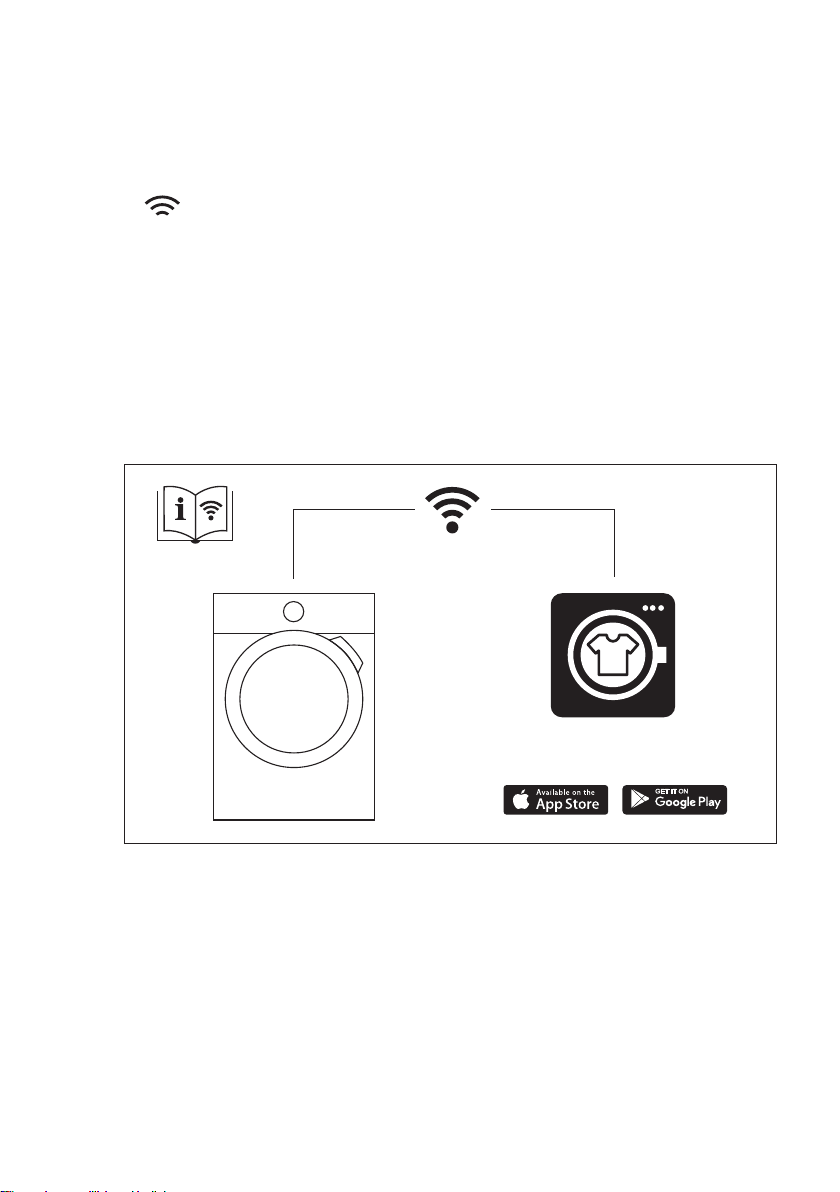
My AEG Care app
www.aeg.com2
FOR PERFECT RESULTS
Thank you for choosing this AEG product. We have created it to give you
impeccable performance for many years, with innovative technologies that help
make life simpler – features you might not find on ordinary appliances. Please
spend a few minutes reading to get the very best from it.
Visit our website to:
Get usage advice, brochures, trouble shooter, service and repair information:
www.aeg.com/support
Register your product for better service:
www.registeraeg.com
Buy Accessories, Consumables and Original spare parts for your appliance:
www.aeg.com/shop
CUSTOMER CARE AND SERVICE
Always use original spare parts.
When contacting our Authorised Service Centre, ensure that you have the
following data available: Model, PNC, Serial Number.
The information can be found on the rating plate.
Warning / Caution-Safety information
General information and tips
Environmental information
Subject to change without notice.
1. SAFETY INFORMATION
Before beginning the installation and use of this
appliance, carefully read the supplied instructions.
The manufacturer is not responsible for any injuries or
damage that are the result of incorrect installation or
usage. Always keep the instructions in a safe and
accessible location for future reference.
Warning: Risk of fire / Flammable materials.
The appliance contains flammable gas, propane (R290),
a gas with a high level of environmental compatibility.
Keep fire and ignition sources away from the appliance.
Be careful not to cause damage to the refrigerant circuit
containing propane.
ENGLISH 3

1.1 Children and vulnerable people safety
WARNING!
Risk of suffocation, injury or permanent
disability.
• This appliance can be used by children aged from 8
years and above and persons with reduced physical,
sensory or mental capabilities or lack of experience
and knowledge if they have been given supervision or
instruction concerning the use of the appliance in a
safe way and understand the hazards involved.
• Children between 3 and 8 years of age and persons
with very extensive and complex disabilities shall be
kept away from the appliance unless continuously
supervised.
• Children of less than 3 years of age should be kept
away from the appliance unless continuously
supervised.
• Do not let children play with the appliance.
• Keep all packaging away from children and dispose of
it appropriately.
• Keep detergents away from children.
• Keep children and pets away from the appliance when
the door is open.
• If the appliance has a child safety device, it should be
activated.
• Children shall not carry out cleaning and user
maintenance of the appliance without supervision.
1.2 General Safety
• This appliance is for drying domestic-type, machine-
dryable laundry only.
• Do not use the dryer function if laundry has been
soiled with industrial chemicals.
• This appliance is designed for single household
domestic use in an indoor environment.
• This appliance may be used in, offices, hotel guest
rooms, bed & breakfast guest rooms, farm guest
www.aeg.com4

houses and other similar accommodation where such
use does not exceed (average) domestic usage levels.
• Do not change the specification of this appliance.
• If the tumble dryer is put on top of a washing machine,
use the stacking kit. The stacking kit, available from
your authorized vendor, can be used only with the
appliance specified in the instructions supplied with
the accessory. Read it carefully before installation
(refer to the Installation leaflet).
• The appliance can be installed as freestanding or
below a kitchen counter with correct space (refer to
the Installation leaflet).
• Do not install the appliance behind a lockable door, a
sliding door or a door with a hinge on the opposite
side, that would prevent the appliance door from being
fully open.
• The ventilation opening in the base must not be
covered by a carpet, mat, or any floor covering.
• WARNING: The appliance must not be supplied
through an external switching device, such as a timer,
or connected to a circuit that is regularly switched on
and off by a utility.
• Connect the mains plug to the mains socket only at
the end of the installation process. Make sure that the
mains plug is accessible after installation.
• Ensure good air ventilation in the room where the
appliance is installed to avoid the backflow of
unwanted gases into the room from appliances
burning gas or other fuels, including open fires.
• WARNING: Do not install the appliance in an
environment with no air exchange.
The appliance contains flammable gas, propane
(R290), a gas with a high level of environmental
compatibility. Keep fire and ignition sources away from
the appliance. Be careful not to cause damage to the
refrigerant circuit containing propane.
ENGLISH 5

• WARNING: In the appliance enclosure or in the built -
in structure, keep ventilation opening clear of
obstruction.
• WARNING: Do not damage the refrigerant circuit.
• If the mains power supply cable is damaged, it must
be replaced by the manufacturer, its Authorised
Service Centre or similarly qualified persons to avoid
an electrical hazard.
• Do not exceed the maximum load of 9,0 kg (refer to
the "Programme chart" chapter).
• Wipe away lint or packaging debris that has
accumulated around the appliance.
• Do not run the appliance without a filter. Clean the lint
filter before or after each use.
• Do not dry unwashed items in the tumble dryer.
• Items that have been soiled with substances such as
cooking oil, acetone, alcohol, petrol, kerosene, spot
removers, turpentine, waxes and wax removers
should be washed in hot water with an extra amount of
detergent before being dried in the tumble dryer.
• Items such as foam rubber (latex foam), shower caps,
waterproof textiles, rubber backed articles and clothes
or pillows fitted with foam rubber pads should not be
dried in the tumble dryer.
• Fabric softeners, or similar products, should only be
used as specified by the product manufacturer’s
instructions.
• Remove all objects from items that could be a source
of fire ignition such as lighters or matches.
• WARNING: Never stop a tumble dryer before the end
of the drying cycle unless all items are quickly
removed and spread out so that the heat is dissipated.
• Before any maintenance operation, deactivate the
appliance and disconnect the mains plug from the
socket.
www.aeg.com6
2. SAFETY INSTRUCTIONS
2.1 Installation
Warning: Risk of fire / Flammable
materials.
• Remove all the packaging.
• Do not install or use a damaged
appliance.
• Follow the installation instructions
supplied with the appliance.
• Do not install the appliance in an
environment with no air exchange
The appliance contains flammable
gas, propane (R290), a gas with a
high level of environmental
compatibility. Keep fire and ignition
sources away from the appliance. Be
careful not to cause damage to the
refrigerant circuit containing propane.
• Always take care when moving the
appliance as it is heavy. Always use
safety gloves and enclosed footwear.
• Do not install or use the appliance
where the temperature can be lower
than 5°C or higher than 35°C.
• The floor area on which the appliance
is to be installed must be flat, stable,
heat resistant and clean.
• Make sure that there is air circulation
between the appliance and the floor.
• Always keep the appliance vertical
when it is being moved.
• The rear surface of the appliance
must be put against a wall.
• When the appliance is in its
permanent position, check if it is
levelled correctly with the aid of a
spirit level. If it is not, adjust the feet
accordingly.
2.2 Electrical connection
WARNING!
Risk of fire and electric
shock.
• Connect the mains plug to the mains
socket only at the end of the
installation. Make sure that there is
access to the mains plug after the
installation.
• WARNING: This appliance is
designed to be installed / connected
to a grounding connection in the
building.
• Make sure that the parameters on the
rating plate are compatible with the
electrical ratings of the mains power
supply.
• Always use a correctly installed
shockproof socket.
• Do not use multi-plug adapters and
extension cables.
• Do not pull the mains cable to
disconnect the appliance. Always pull
the mains plug.
• Do not touch the mains cable or the
mains plug with wet hands.
• This appliance is fitted with a 13 A
mains plug. If it is necessary to
change the mains plug fuse, use only
a 13 A ASTA (BS 1362) fuse (UK and
Ireland only).
2.3 Use
WARNING!
Risk of injury, electric shock,
fire, burns or damage to the
appliance.
Warning: Risk of fire / Flammable
materials. The appliance contains
flammable gas, propane (R290), a gas
with a high level of environmental
compatibility. Keep fire and ignition
sources away from the appliance. Be
careful not to cause damage to the
refrigerant circuit containing propane.
• This appliance is for household
(indoors) use only.
• Do not dry damaged (torn, frayed)
items that contain padding or fillings.
• If laundry has been washed with a
stain remover, carry out an additional
rinse cycle before starting a drying
cycle.
• Dry only fabrics that are suitable to
dry in the appliance. Follow the
cleaning instruction on the item label.
• Do not drink or prepare food with the
condensed water/distilled water. It can
cause health problems to people and
pets.
ENGLISH 7
• Do not sit or stand on the open door
of the appliance.
• Do not dry dripping wet clothes in the
appliance.
2.4 Internal lighting
WARNING!
Risk of injury.
• Visible LED radiation, do not look
directly into the beam.
• To replace the internal lighting,
contact the Authorised Service
Centre.
2.5 Care and cleaning
WARNING!
Risk of injury or damage to
the appliance.
Warning: Risk of fire / Flammable
materials. The appliance contains
flammable gas, propane (R290), a gas
with a high level of environmental
compatibility. Keep fire and ignition
sources away from the appliance. Be
careful not to cause damage to the
refrigerant circuit containing propane.
• Do not use water spray and steam to
clean the appliance.
• Clean the appliance with a moist soft
cloth. Use only neutral detergents. Do
not use abrasive products, abrasive
cleaning pads, solvents or metal
objects.
• Be careful when you clean the
appliance to prevent damage to the
cooling system.
2.6 Compressor
WARNING!
Risk of damage to the
appliance.
• The compressor and its system in the
tumble dryer is filled with a special
agent which is free from fluoro-chloro-
hydrocarbons. This system must stay
tight. The damage of the system can
cause a leakage.
2.7 Service
• To repair the appliance contact the
Authorised Service Centre.
• Use original spare parts only.
• Concerning the lamp(s) inside this
product and spare part lamps sold
separately: These lamps are intended
to withstand extreme physical
conditions in household appliances,
such as temperature, vibration,
humidity, or are intended to signal
information about the operational
status of the appliance. They are not
intended to be used in other
applications and are not suitable for
household room illumination.
2.8 Disposal
WARNING!
Risk of injury or suffocation.
Warning: Risk of fire / Risk of
material damage and damage to the
appliance.
• Disconnect the appliance from the
mains electrical and water supplies.
• Cut off the mains electrical cable
close to the appliance and dispose of
it.
• The appliance contains flammable
gas (R290). Contact your municipal
authority for information on how to
discard the appliance correctly.
• Remove the door catch to prevent
children or pets from becoming
trapped in the drum.
• Dispose of the appliance in
accordance with local requirements
for the disposal of Waste Electrical
and Electronic Equipment (WEEE).
www.aeg.com8
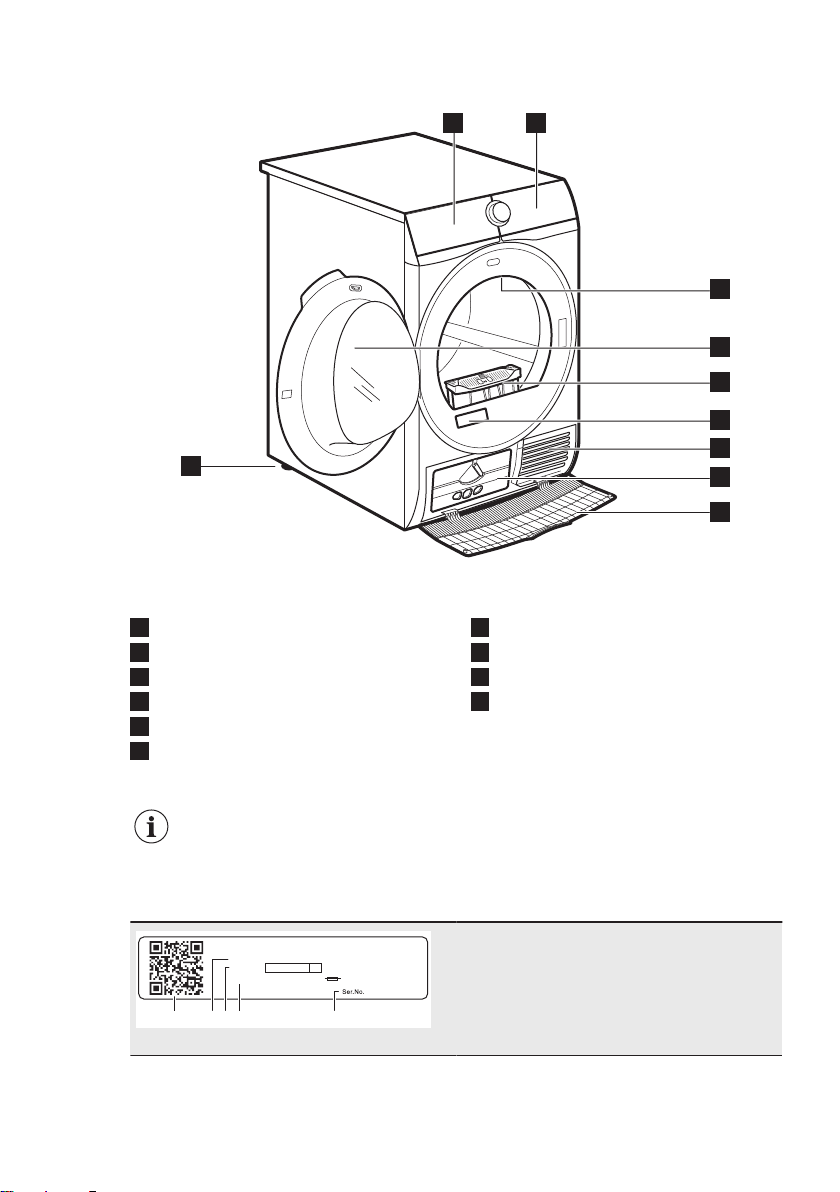
3. PRODUCT DESCRIPTION
1 2
8
3
4
5
6
7
10
9
1
Water container
2
Control panel
3
Internal lighting
4
Appliance door
5
Filter
6
Rating plate and QR Code
7
Airflow slots
8
Condenser lid
9
Condenser cover
10
Adjustable feet
For ease of loading laundry
or ease of installation the
door is reversible (see the
separate leaflet).
00000000
00A
Mod.
xxxxxxxxx
000V ~ 00Hz 0000 W
910000000
00
Prod.No.
B C D EA
The rating plate reports:
A. QR code
B. model name
C. product number
D. electrical ratings
E. serial number
ENGLISH 9
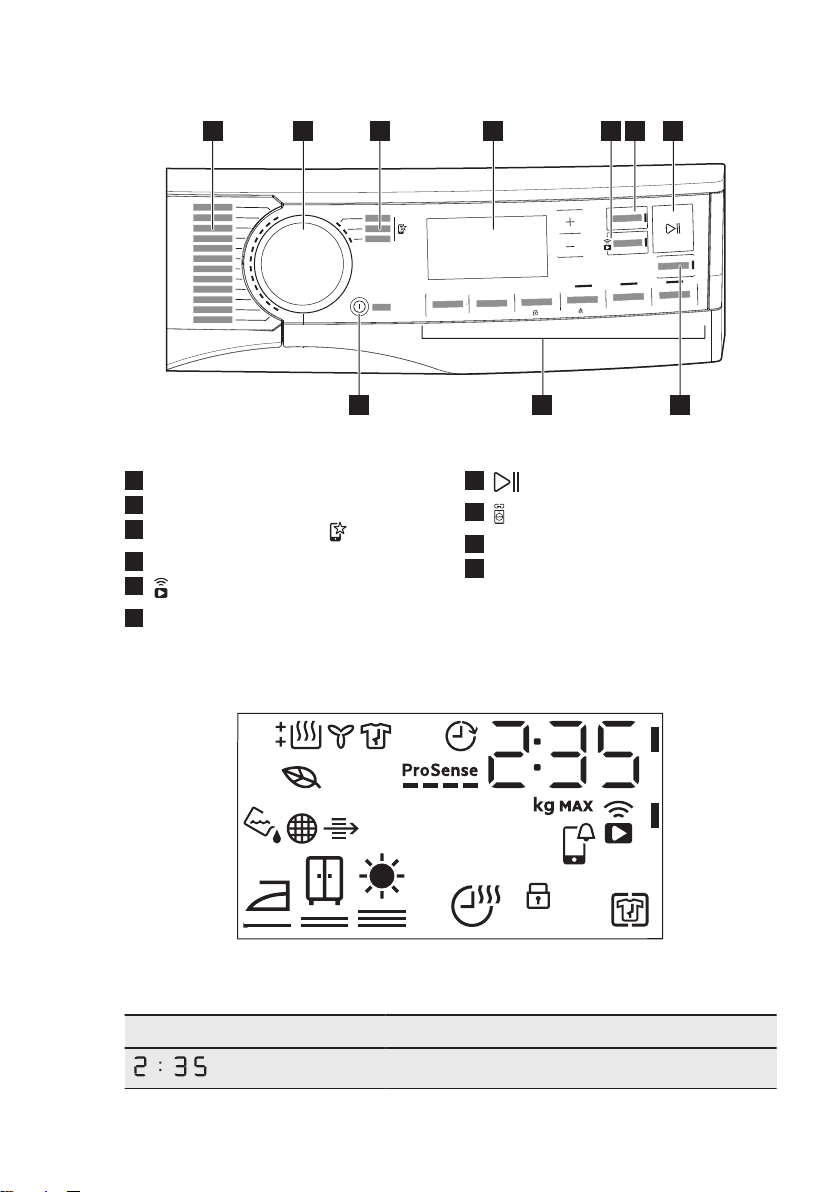
4. CONTROL PANEL
3
s
3
s
2 4 5 631
10 9
7
8
1
Programmes
2
Programme dial
3
Favourite programmes
4
Display
5
Remote Start button
6
Finish In button
7
Start/Pause button
8
SyncDry button
9
Options
10
On/Off button with
Auto Off
function
4.1 Display
Symbol on the display Symbol description
cycle time indication
www.aeg.com10
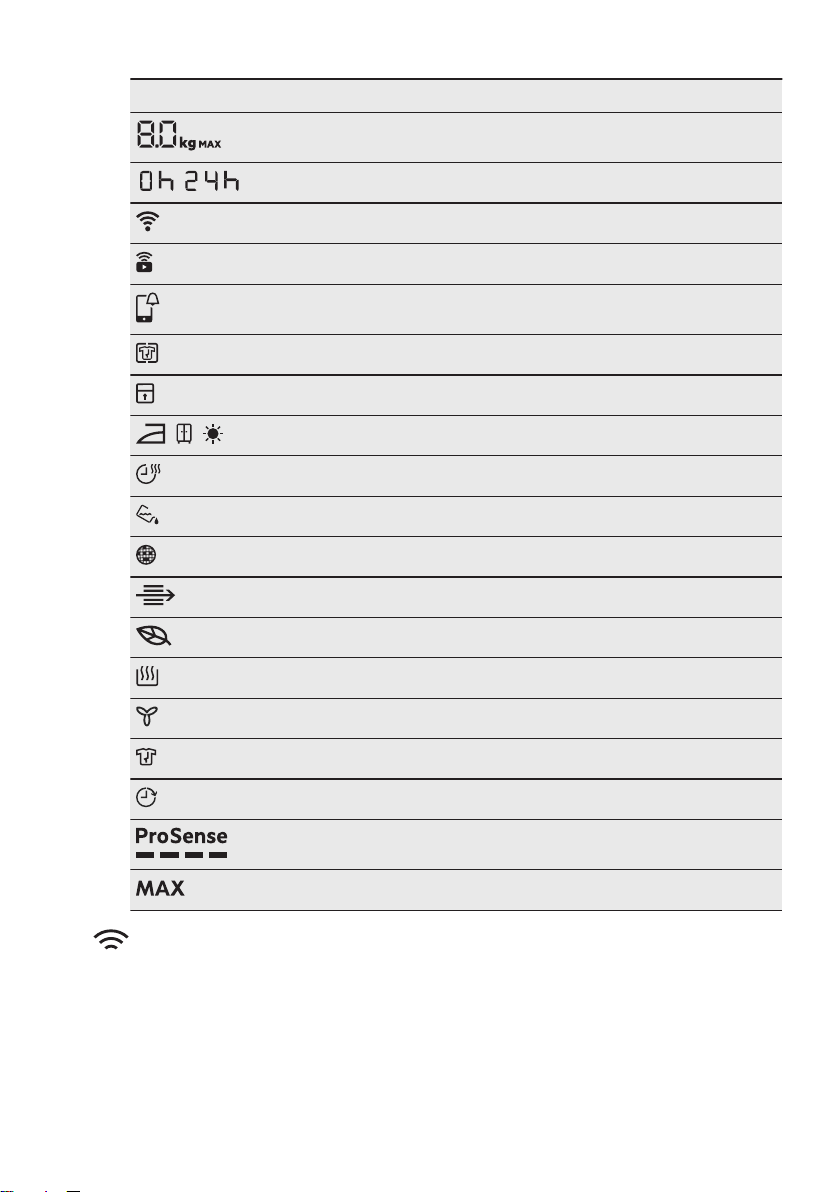
Symbol on the display Symbol description
maximum load
-
finish in selection (up to 24h)
wireless connection
remote control
APP notification to check
+ Anti Crease option on
child lock on
, ,
laundry dryness: iron dry, cupboard dry, extra dry
Time Dry option on
indicator:
drain the water container
indicator:
clean the filter
indicator:
check the condenser
ECO
mode drying
indicator:
drying phase
indicator:
cooling phase
indicator:
crease guard phase
Finish In option on
ProSense indicator
indicator:
maximum load exceeded
5. WI-FI - CONNECTIVITY SETUP
This chapter describes how to connect
the smart appliance to the Wi-Fi network
and to link it to a mobile devices.
By this functionality you can receive
notifications, monitor and control your
tumble dryer from your mobile devices.
The Wi-Fi functionality is off as factory
default setting.
To connect the appliance to enjoy the full
range of features and services you need:
• Wireless network at home with
internet connection enabled.
ENGLISH 11
• Mobile device connected to wireless
network.
Frequency 2.412 - 2.472 GHz for
European market
Protocol IEEE 802.11b/g/n
Max power < 20dBm
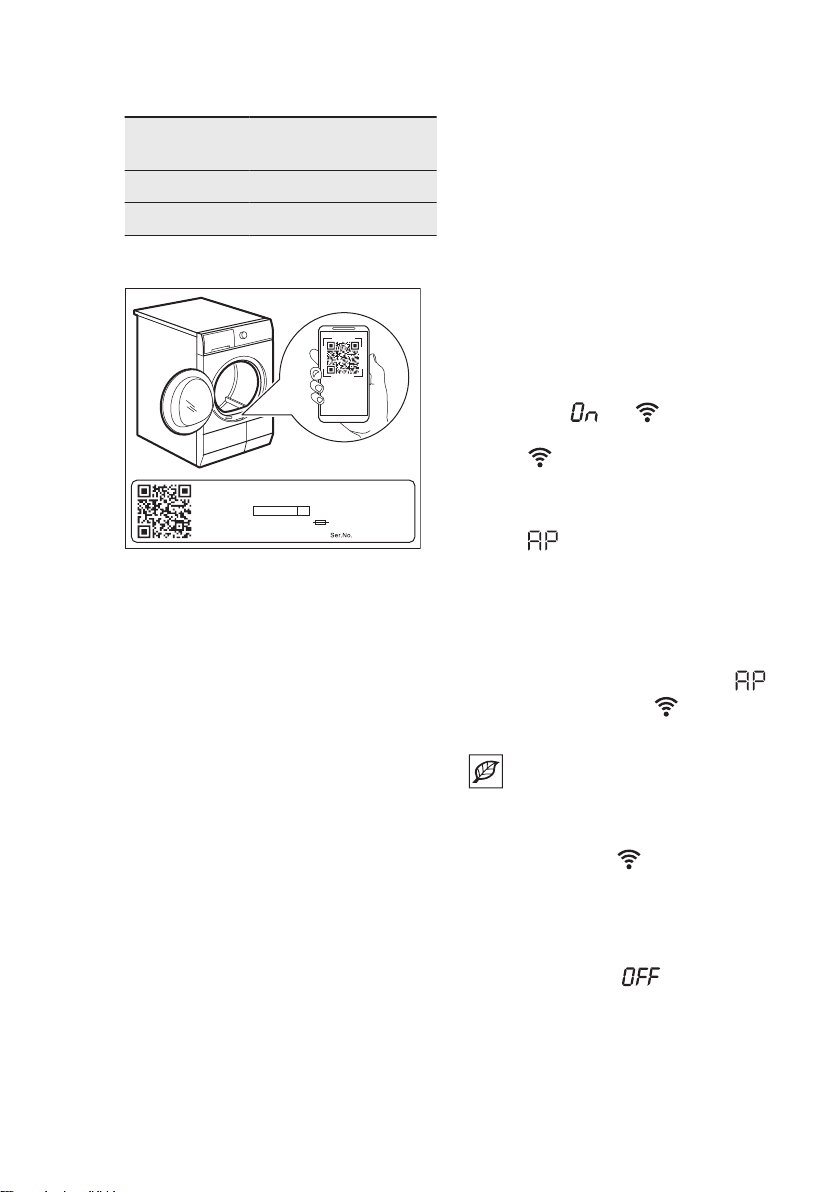
5.1 QR code on rating plate
00000000
00A
Mod.
xxxxxxxxx
000V ~ 00Hz 0000 W
910000000
00
Prod.No.
SCANNING...
QR code can be used in two ways:
• Scan the QR code with the built-in
camera app to download the My AEG
Care application from the App store
on your smart device and follow the
required steps.
• Pairing your smart device with
appliance to simplify the process.
Scan the QR code with QR code
scanner built-in My AEG Care
application.
5.2 Installing My AEG Care
When connecting the tumble dryer to the
application, stand near it with Your smart
device.
Make sure that your smart device is
connected to the wireless network.
1. Go to the App Store on your smart
device or scan QR code (
see chapter
"QR code on rating plate"
).
2. Download and install App My AEG
Care.
3. Make sure you started a Wi-fi
connection in the dryer. If not go to
the section below.
4. Start the application. Select the
country and language and login with
Your email and password. If you do
not have an account, create a new
one following the instructions in My
AEG Care.
5.3 Wireless connection
configuration
Before you begin the configuration
download and install My AEG Care
application on your smart device.
1. Push the On/Off button to switch on
the appliance.
2. Wait approximately 8 seconds.
3. Press and hold the Remote Start
button for around 3 seconds until you
hear a single 'click' sound.
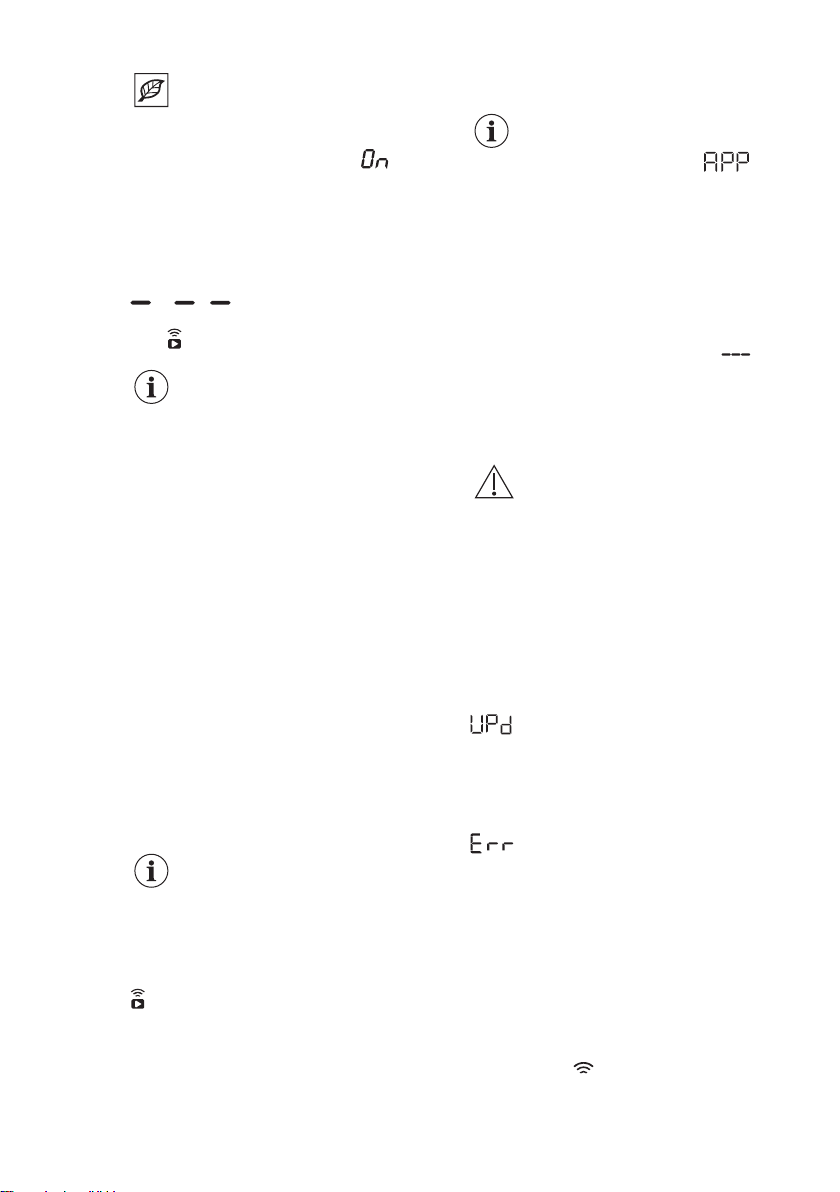
The symbols: and appear on the
display. After few seconds only flashing
symbol: remains. Appliance is
starting up the connection, it takes
around 10 second for the wireless
module to activate. When ready the
symbol: (Access Point) appears on
the display. Access Point is open for
around 3 minutes.
4. Configure the My AEG Care app on
your smart device and follow the on
screen instructions to connect the
appliance to your WiFi network.
5. If the connection is established,
symbol is off and the WiFi icon
stays lit steadily.
Each time you switch the
appliance on, the appliance
attempt to connect to the
network automatically. When
the connection is established
the symbol: stops
flashing.
To switch off the wireless connection,
touch and hold down Remote Start
button until you hear a single 'click'
sound. The symbol: appears on
the display.
www.aeg.com12
Appliance stores last
connection configuration. To
use wireless features of the
appliance the wireless
connection must be in
mode.
To remove the wireless credentials,
touch and hold down Remote Start
button for around 10 seconds until you
hear 2 'beeps' sound. The symbol:
appears on the display.
5.4 Remote Start
My AEG Care allows you to
control your laundry through
a mobile device.
It contains a large number of
programmes, useful features
and product information
tailored perfectly to the
appliance.
Through the app you can
select the programmes
already available from the
appliance control panel, plus
unlock additional
programmes available only
from a mobile device.
Additional programmes can
change over the time along
with new versions of the
app.
It's personalized laundry
care - all from your mobile
device.
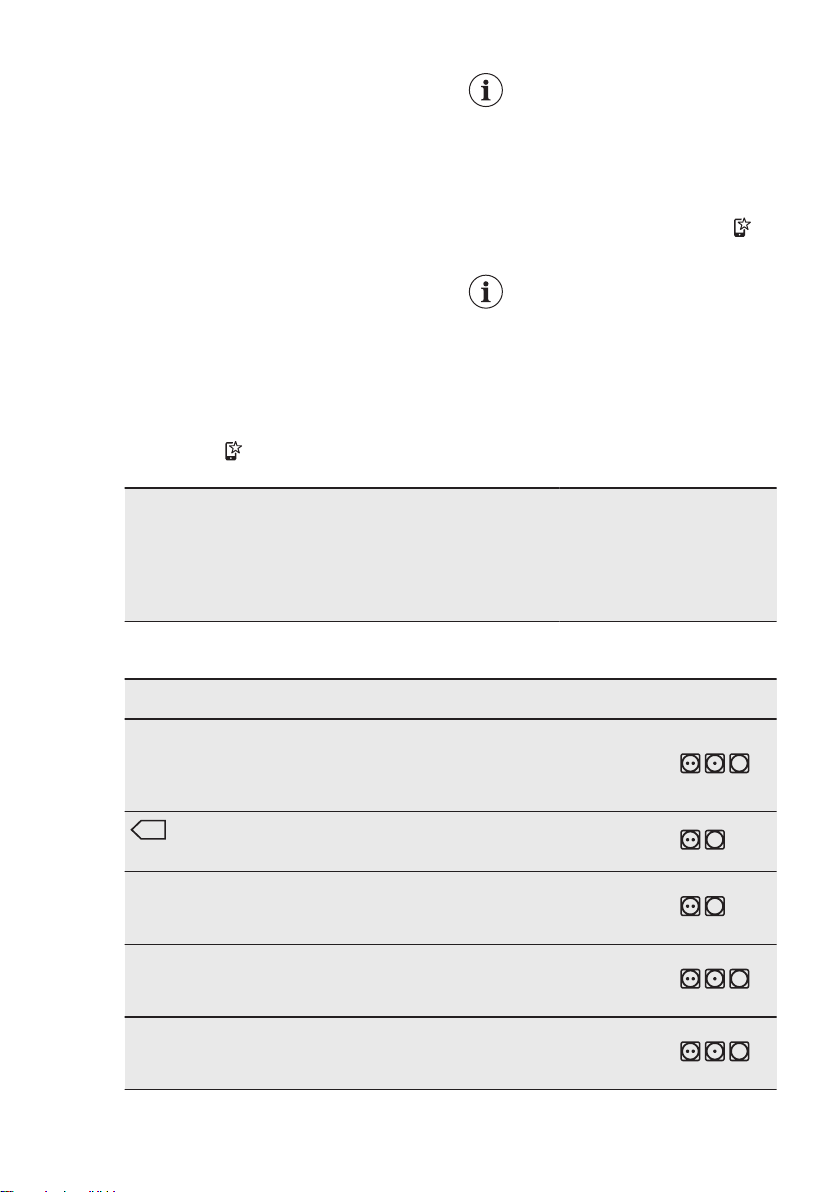
The Remote Start enables you to start a
cycle in remote control.
The Remote Control
activates automatically when
you press the Start/Pause
button to start the program,
but it is also possible to start
a drying program remotely.
Remote Start
A quick touch of this button activates the
Remote Start function that allows you to
start, pause and stop the appliance
remotely.
The related led comes on and the related
icon appears on display.
If you set a programme via
App and it does not match
with the knob position,
text appears alternating with
programme duration.
Press and hold this button for longer time
to provide two other functions:
• hold it down for 3 seconds as long as
a click sounds: the Wi-Fi is turned on
and off.
• hold it down for 10 seconds as long
as a double beep sounds and
appears on the display: to reset the
Network Credentials.
5.5 Over-the-air update
WARNING!
During the update it is highly
recommended to not turn off
or unplug the appliance.
The App may propose an update for
downloading new features.
The update is accepted via App only.
If a programme is running, the App
notifies that the update will start at the
end of the programme.
During the update, the appliance shows
in the display.
The appliance will usable again at the
end of the update, without any
notification about successful update.
If an error occurs, the appliance shows
in the display: just press any
buttons or turn the knob to return to
normal use.
5.6 Wi-Fi Always On
The Wi-Fi Always On function is
available in the App.
This function keeps the appliance
connected to the network even when the
appliance is turned off.
The indicator
goes on and off
intermittently (1 second on, 5 seconds
off).
ENGLISH 13
It is possible to turn the appliance on by
pressing the On/Off button or through the
App.
The Wi-Fi Always On
function may affect your
energy consumption.
6. PROGRAMMES
6.1 My AEG Care app and
additional hidden
programmes
My AEG Care app provides you with a
wide choice of additional hidden
programmes. Connect the appliance to
My AEG Care and you will be able to
choose a drying programme that suits
your needs most.
You can also memorize any of the
hidden cycles in the favourite
programmes
positions. To select the
programme from the appliance directly
refer to the "Favourite programmes "
paragraph in "Options" section.
Programme names are
subject to change depending
on market requirements
without notice.
The App will give you a
complete description of each
programme.
Sportswear
Daily Training
Soccer/Rugby
Skiing Gear
Running Shoes
Curtains
Pillow
Towels
Pet Hair
Easy Iron
Anti-Allergy
Denim
Silk
Baby
Linen
Drying Rack
6.2 Programmes
Programmes
Load
1)
Properties / Fabric mark
2)
MixDry 5,0 kg
Designed for routine drying of what
you wash without sorting. Dries
evenly clothes made of cotton, cot‐
ton-synthetic blends and synthetic.
/ , ,
3)
Cottons Eco
9,0 kg
Cotton fabrics programme designed
for maximum energy saving.
/ ,
Cottons 9,0 kg
White and coloured cotton fabrics
programme. Default setting is for
ready to store dryness level.
/ ,
Synthetics 4,0 kg
Blended garments containing mostly
synthetic fibres like polyester, polya‐
mide, etc.
/ , ,
Delicates 2,0 kg
Recommended for generic delicate
fabrics such as viscose, rayon, acryl‐
ic and their blends.
/ , ,
www.aeg.com14
Programmes
Load
1)
Properties / Fabric mark
2)
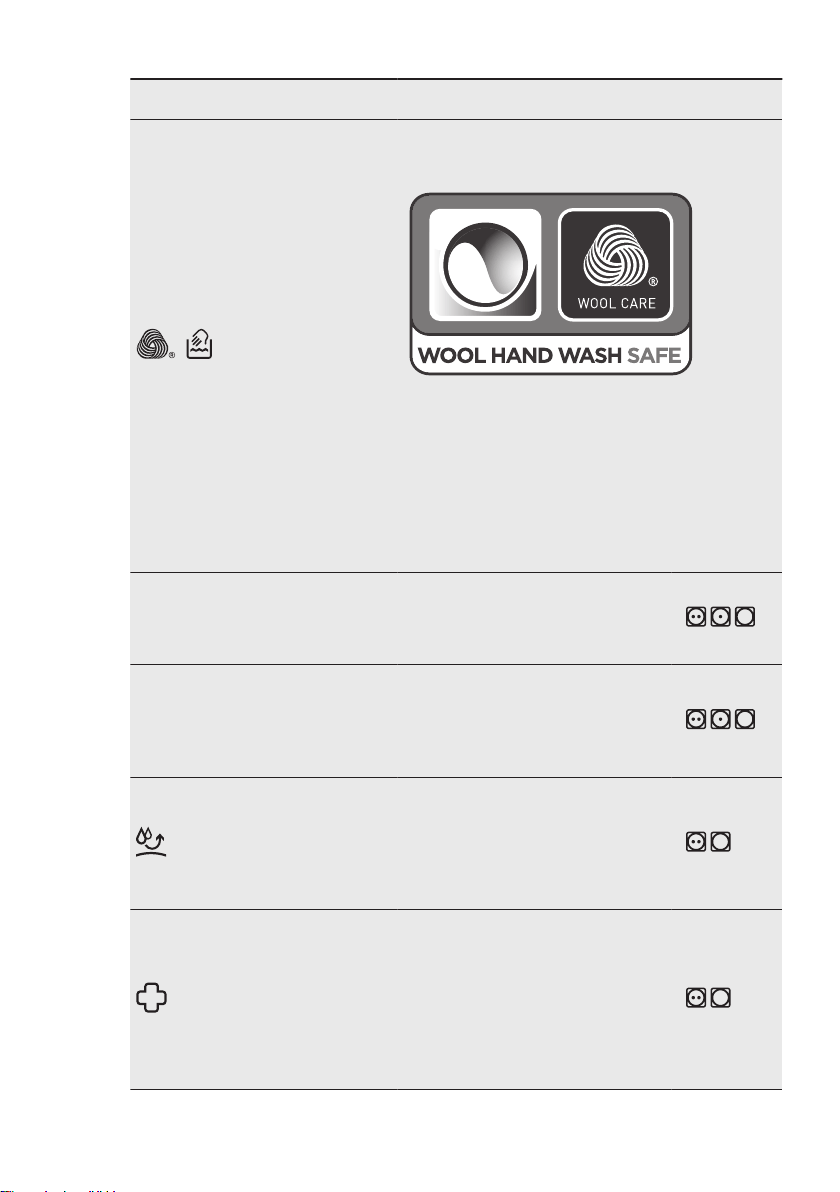
Wool
1,0 kg
Gently dries for machine and hand-washable wool‐
lens. Remove immediately the items when the pro‐
gramme is completed.
The wool drying cycle of this machine has been ap‐
proved by The Woolmark Company for the drying of
wool garments labelled as "hand wash" provided
that the garments are dried according to the instruc‐
tions issued by the manufacturer of this machine.
Follow the garment care label for other laundry in‐
structions. M2140
The Woolmark symbol is a Certification mark in
many countries.
Quick 3kg 3,0 kg
Fast cycle for everyday clothes
made of cotton, cotton-synthetic
blends and synthetic. Ideal for light
items.
/ , ,
Bedlinen XL 4,5 kg
Dries up to three bed linen sets at
once. Minimises twists and tangles
of large items to ensure every bed
linen reaches a uniform dryness
without wet spots.
/ , ,
Outdoor
2,0 kg
Maintains the functionality of outdoor
fabrics made of technical textile and
restores water repellency on water‐
proof jackets and shell jackets with
removable linings (suitable for drying
in tumble dryer).
/ ,
Hygiene
5,0 kg
Dries and sanitizes your garments
and other items maintaining the tem‐
perature above 60°C over time, re‐
moving 99.9% of bacteria and viru‐
ses
4)
.
Note: This cycle should only be used
for wet items. Not suitable for deli‐
cate items.
/ ,
ENGLISH 15
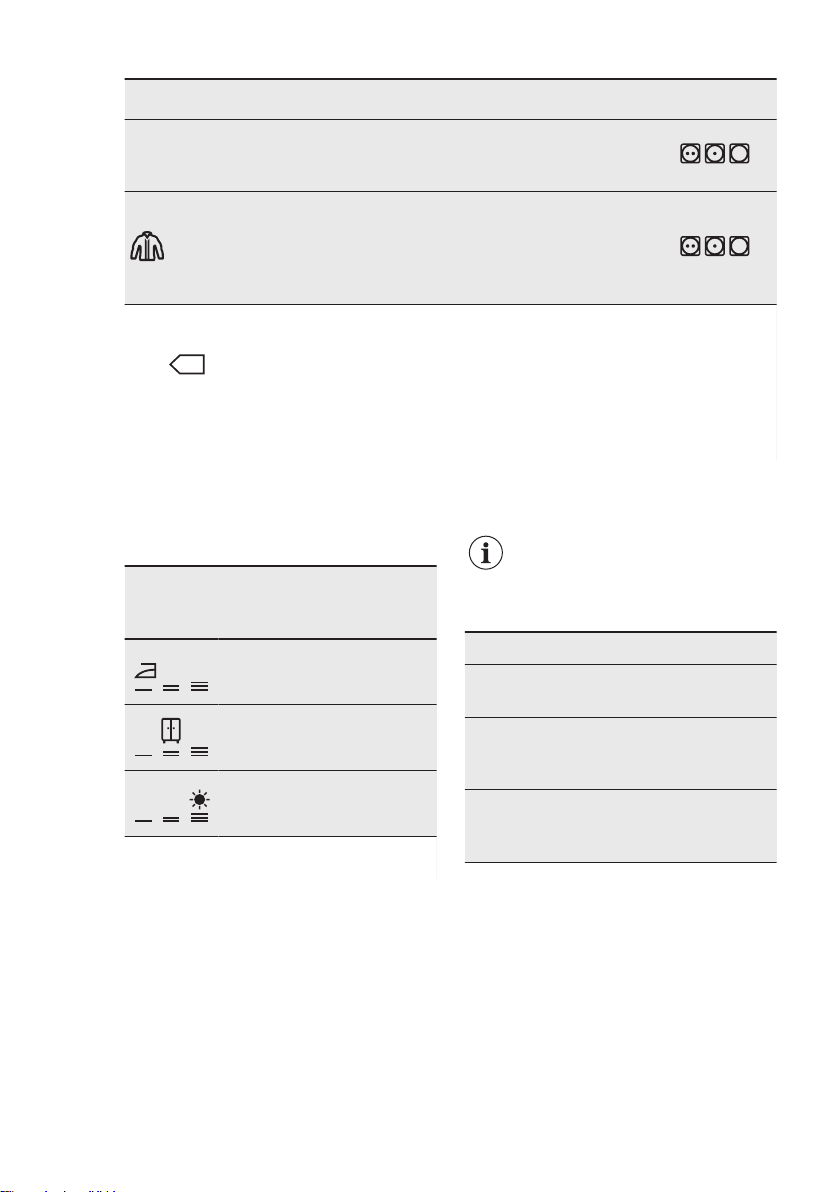
Programmes
Load
1)
Properties / Fabric mark
2)
Duvet 3,0 kg
Ensures proper drying of inner parts
through single or double duvets, pil‐
lows, and padded blankets.
/ , ,
Down Jackets
2,0 kg
An automatic programme that pre‐
cisely dries even the internal insula‐
tion of jackets with feather, down, or
synthetic filling. Maintains garment
appearance and thermal functionality
/ , ,
1)
The maximum weight refers to dry items.
2)
For fabric mark meaning see chapter
DAILY USE: Preparing the laundry.
3)
The Cottons Eco programme is the “Standard cotton programme” according to UK Ecodesign
for Energy-Related Products and Energy Information Regulations and to Commission Regulation EU No.
392/2012 and 932/2012.
4)
Tested for Candida albicans, MS2 Bacteriophage and Escherichia coli in external test performed by
Swissatest Testmaterialien AG in 2021 (Test Report No. 20212038).
7. OPTIONS
7.1 Dryness Level
This option helps to achieve requested
laundry dryness. You can select the level
of dryness:
ready to iron - iron dry level
ready to store - cupboard
dry level
1)
ready to store - extra dry
level
1)
Default selection which is related to the pro‐
gramme
7.2 Time Dry
For: Cottons, Bedlinen XL, Synthetics
and MixDry programs. Lets the user to
set drying time from minimum 10 min to
maximum of 2 hours (in 10 min steps).
When this option is maximum, load
indicator disappears.
The cycle lasts as long as
set drying time regardless of
the size of a load and its
dryness.
TIME DRYING RECOMMENDATION
up 10
min
action of cool air only (no heat‐
er).
10 - 40
min
additional drying to improve dry‐
ness after previous drying cy‐
cle.
> 40
min
full drying of the small laundry
loads up to 4 kg, well spun
(>1200 rpm).
Time Dry on Wool program
Option applicable to Wool program to
adjust final dryness level to more dry or
less dry.
7.3 + Anti Crease
Extends up to 120 minutes the anti-
crease phase (30 minutes) at the end of
the drying cycle. After drying phase drum
rotates from time to time to prevent
www.aeg.com16
creases. Laundry can be removed during
the anti-crease phase.
7.4 Silent
The appliance operates with low noise
without effect on the drying quality. The
appliance operates slowly with longer
cycle time.
7.5 Refresh
To refresh clothes that were in storage.
Maximal load cannot exceed 1 kg.
7.6 End Signal
The acoustic signal sounds at the
following:
• cycle end
• start and end of crease guard phase
The acoustic signal is by default always
on. You can use this option to activate or
deactivate the sound.
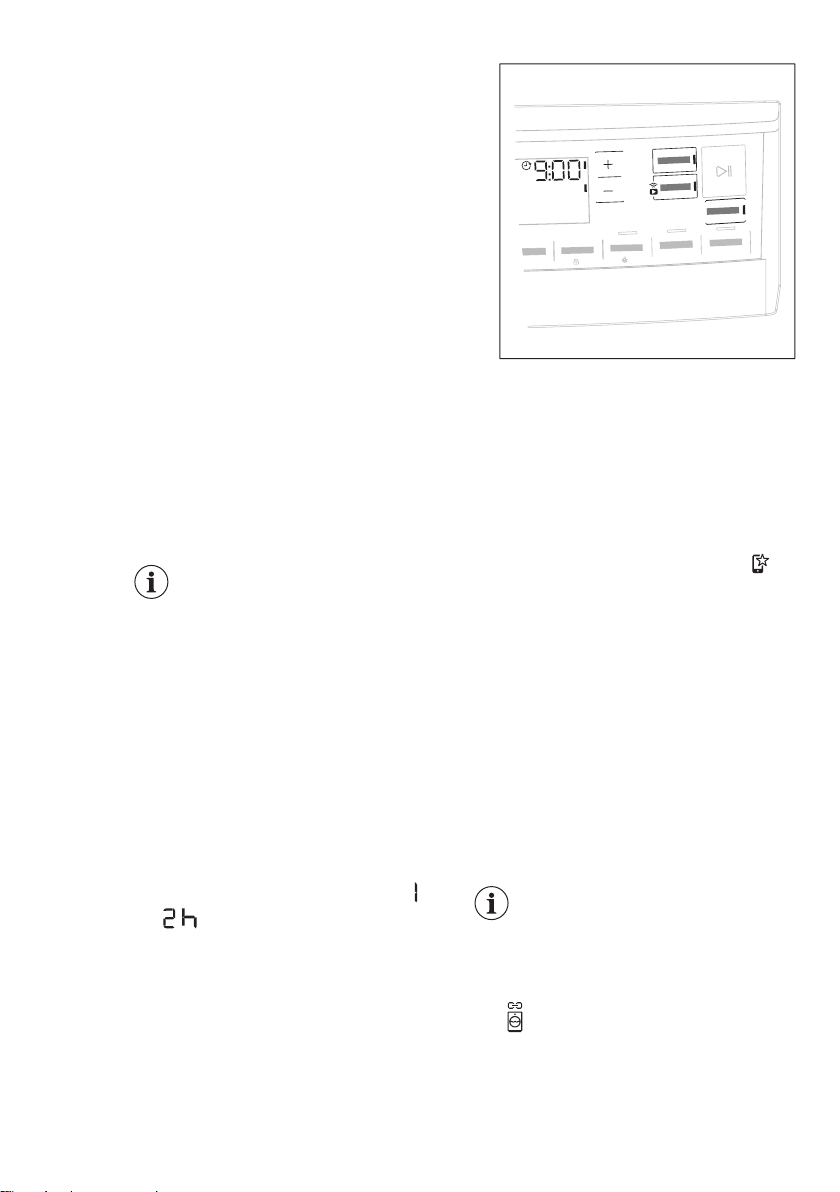
7.7 Finish In
This option allows choosing
the time at which a
programme should
terminate. Once activated
the machine waits for the
right moment to begin the
drying process.
Finish In time is the sum of stand by time
and drying time.
To set the Finish In option:
1. Set the drying programme and
options.
2. Touch Finish In button.
3. Touch the + or - button until the
display shows the desired time within
the programme should end (e.g.
if the programme has to finish
within 12 hours.)
3s
3s
4. Touch the Start/Pause button. The
drum starts rotating to perform the
ProSense estimation, if foreseen in
the selected programme.
5. The appliance starts the countdown
to the end of the programme and the
programme will start at the right
moment for ending.
7.8 Favourite programmes
These selector positions are available
after the appliance have been connected
to Wi-Fi.
The favourite programmes can be set
and saved via App only choosing from
the available ones which are divided into
the three categories indicated on the
control panel.
Once the favourite programmes have
been set, you can select one of them via
App or by turning the programme dial to
relevant position: the relevant led comes
on and the information on the display are
updated accordingly.
The favourite programmes
can be cancelled through the
related App command or
pressing the Factory Default
key combination.
7.9 SyncDry function
This feature lets your tumble dryer to
automatically set the most appropriate
programme that matches the last
ENGLISH 17
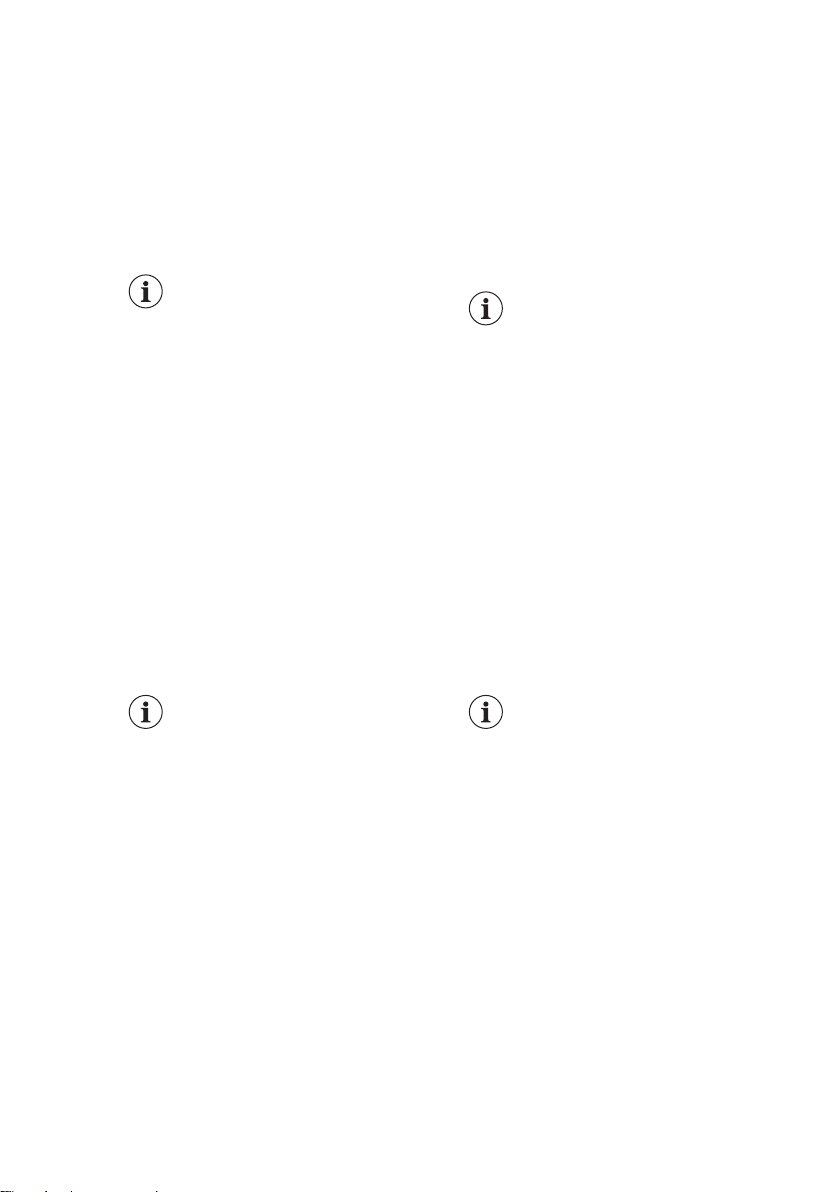
washing program recently executed. All
you need to do is start the drying
programme once your tumble dryer is
loaded. No other programme settings or
options are required on the tumble dryer.
Once the washing programme has come
to an end, the washing machine transfers
the programme data via the home router
Wi-Fi to the AEG Cloud, as well as to
your tumble dryer.
In order to use the SyncDry
function, the AEG tumble
dryer and washing machine
must be connected to the
same home network and
paired with the My AEG
Care application.
To activate the function:
1. Once the wash cycle has come to an
end, place the clean laundry in the
tumble dryer.
2. Touch SyncDry button.
3. All display symbols will stay lighted
off except Wi-Fi icon and ProSense
bars that run an animation for a few
seconds as the appliance is
retrieving data from the cloud.
4. Display will update itself
automatically with the suggested
programme. After 10 seconds, if data
retrieving is unsuccessful, the button
LED is switched off and the machine
gives an acoustic error signal. Then
previously selected programme is
restored.
5. Touch Start/Pause button to begin
drying process.
When SyncDry programme
is set, user is still allowed to
change options or select
another program by rotating
knob or using APP. In such
cases SyncDry button LED
will turn off to indicate that
the program is not anymore
the suggested one; SyncDry
automatic program can be
selected again by pressing
related button until data is
available on Cloud.
8. BEFORE FIRST USE
Rear drum locks are
removed automatically when
dryer is activated for the first
time. Possible to hear some
noise.
To unlock the rear drum locks:
1. Switch on the appliance.
2. Set any programme.
3. Press the Start/Pause button.
Drum starts to rotate. Rear drum locks
are automatically deactivated.
Before you use the appliance to dry
items:
• Clean the tumble dryer drum with a
moist cloth.
• Start a 1 hour programme with moist
laundry.
At the beginning of the
drying cycle (first 3-5 min)
there could be a slightly
higher sound level. This is
due to the compressor
starting up. This is normal
for compressor powered
appliances such as
refrigerators and freezers.
8.1 Unusual smell
The appliance is tightly packed.
After product unpacking you can feel an
unusual smell. This is normal for brand
new products.
Appliance is built of several different
types of material which all together can
generate unusual smell.
Over usage time, after few drying cycles
unusual smell gradually disappears.
www.aeg.com18
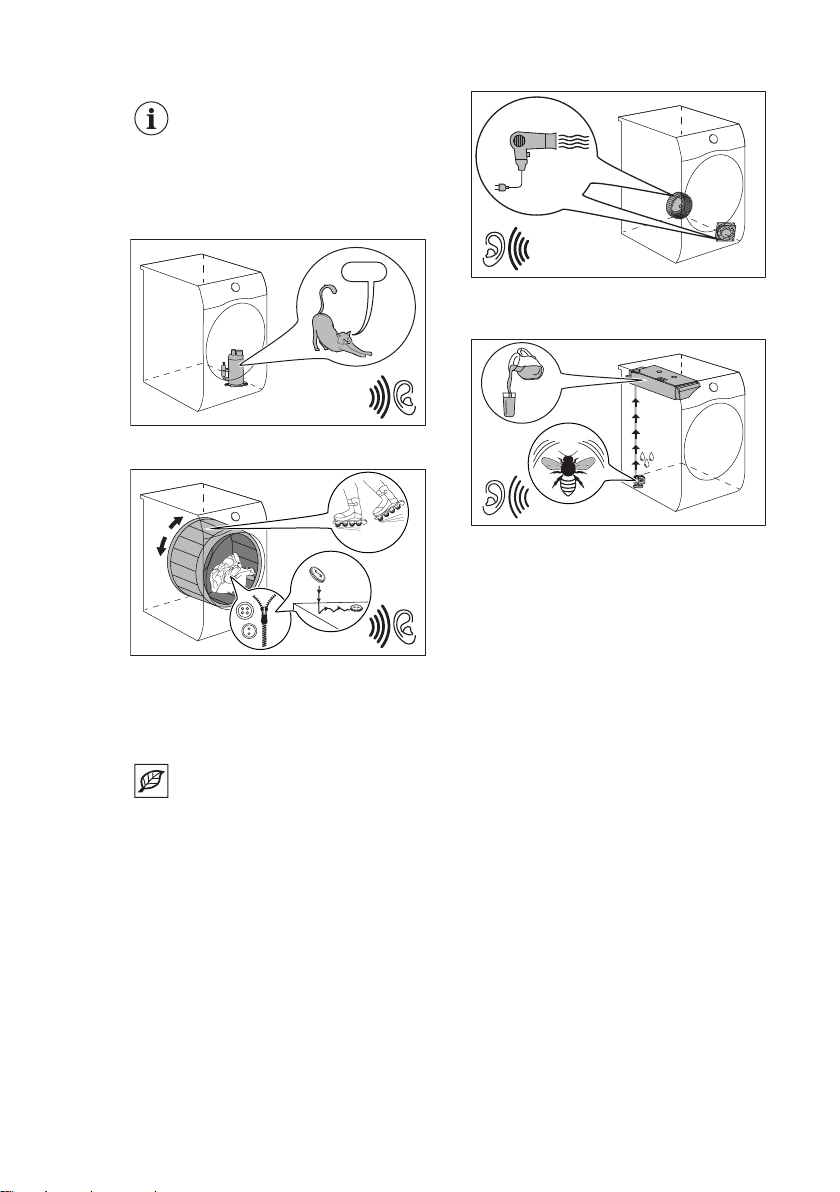
8.2 Noises
Different noises may be
heard at different times
during the drying cycle. They
are perfectly normal
operating sounds.
Working compressor.
Brrrr
Rotating drum.
Working fans.
Working pump and transferring
condensation to the tank.
9. DAILY USE
9.1 Preparing the laundry
Very often the clothes after
washing cycle are kneaded
and tangled altogether.
Drying kneaded and tangled
clothes is inefficient.
To assure proper air flow
and even drying it is
recommended to shake and
load one by one the clothes
to the tumble dryer.
To assure proper drying process:
• Close the zips.
• Close the fasteners of duvet covers.
• Do not dry ties or ribbons loose (e.g.
apron ribbons). Tie them before you
start a programme.
• Remove all items from pockets.
• Turn items with the internal layer
made of cotton inside out. Cotton
layer must be faced outwards.
• Always set the programme suitable
for the type of laundry.
• Do not put light and dark colours
together.
• Use suitable programme for cottons,
jersey and knitwear to reduce
shrinkage.
• Do not exceed the maximum load
stated in the programmes chapter or
shown on the display.
• Dry only the laundry that is suitable
for tumble drying. Refer to the fabric
label on the items.
• Do not dry large and small items
together. Small items can be trapped
inside the large items and remain wet.
• Shake the large clothes, fabrics
before placing in the tumble dryer. It is
ENGLISH 19
to avoid moist places inside the fabric
after the drying cycle.
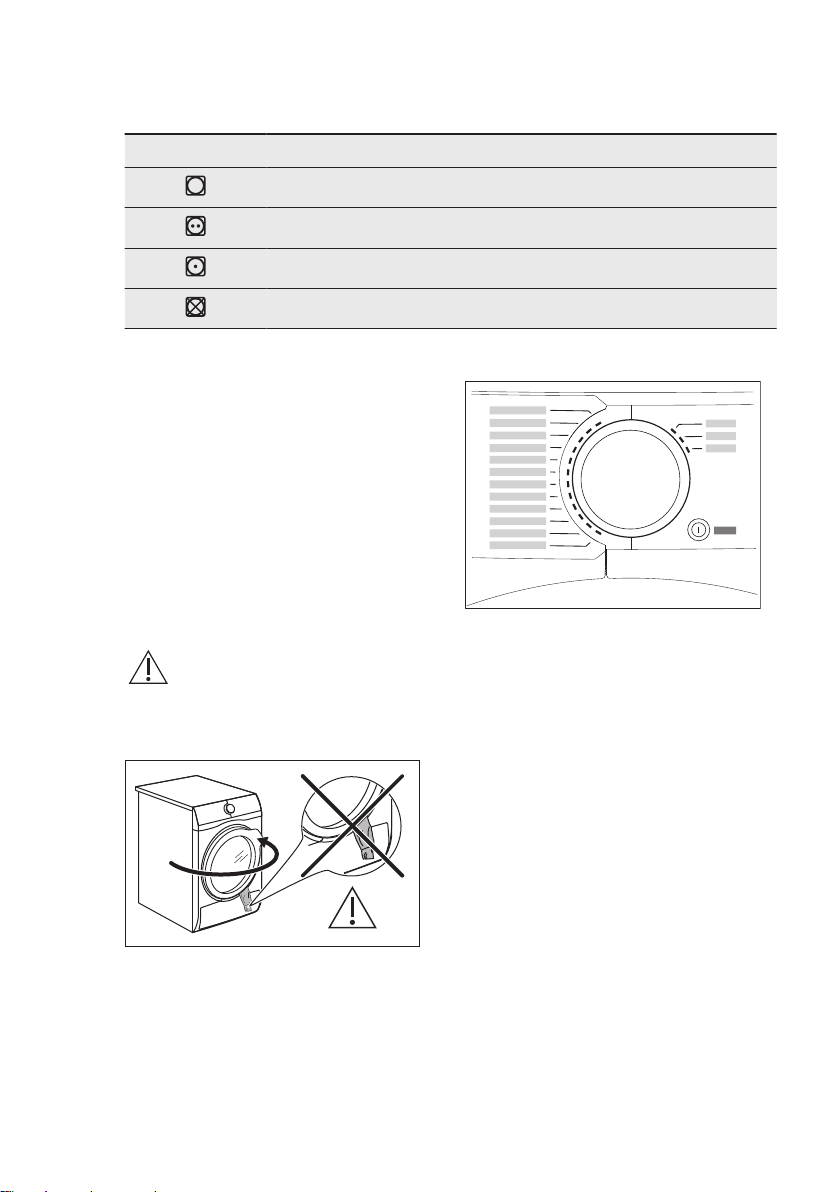
Fabric label Description
Laundry is suitable for tumble drying.
Laundry is suitable for tumble drying at higher temperatures.
Laundry is suitable for tumble drying at low temperatures only.
Laundry is not suitable for tumble drying.
9.2 To achieve best drying
results
• The selected programme must be
adequate to the type of dried clothes.
• The filter must be clean. Clogged filter
makes drying inefficient.
• It is recommended to shake items
before loading. Loose items are more
liable for drying.
• The recommended load of dried items
must be respected.
• The airflow slots must be clean.
9.3 Loading the laundry
CAUTION!
Ensure the laundry is not
trapped between the
appliance door and the
rubber seal.
1. Pull open the appliance door.
2. Load the laundry one item at a time.
3. Close the appliance door.
9.4 Turning on the appliance
To turn on the appliance:
Push the On/Off button.
If the appliance is on, some indicators
appear on the display.
9.5 Auto Off function
To decrease the energy consumption,
the Auto Off function turns the appliance
off automatically:
• if the Start/Pause touch button is not
touched within 5 minutes.
• 5 minutes after a cycle ends.
Push the On/Off button to turn on the
appliance.
If the appliance is on, some indications
appear on the display.
www.aeg.com20
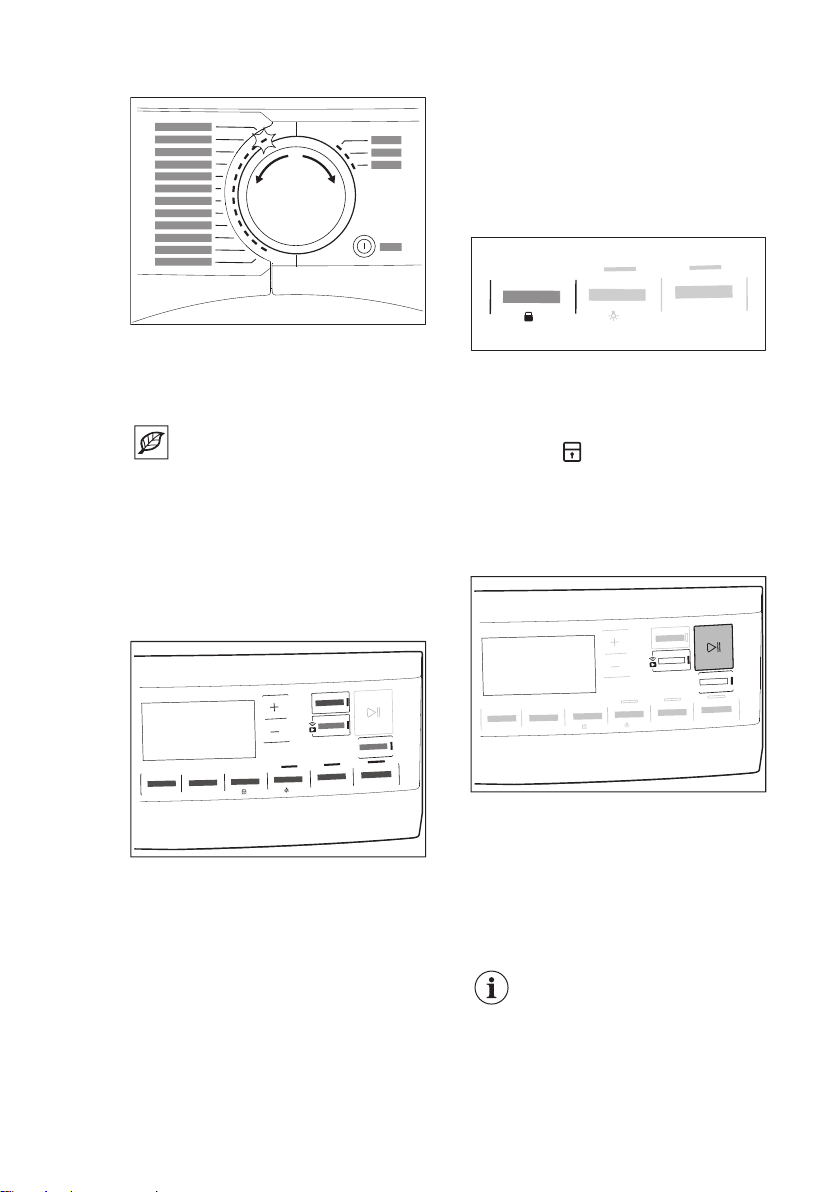
9.6 Setting a programme
Use the programme dial to set the
programme.
The approximate programme duration
appears on the display.
Real drying time will depend
on type of the load (quantity
and composition), the room
temperature and the
humidity of your laundry
after spin drying phase.
9.7 Options
Together with the programme you can
set 1 or more options.
3
s
3
s
To activate or deactivate an option touch
the relevant button.
its symbol appears on the display or the
led above the corresponding button lights
up.
9.8 Child lock option
The child lock can be set to prevent
children from playing with the appliance.
The child lock option locks all touch
buttons and the program dial (this option
does not lock the On/Off button).
You can activate the child lock option:
• before you touch the Start/Pause
button - the appliance cannot start
• after you touch the Start/Pause
button - programs and option
selection is unavailable.
Child lock option activation:
3s
3s
1. Turn the dryer on.
2. Select 1 of the available programs.
3. Touch and hold down + Anti Crease
button by around 3 seconds.
The symbol
appears on the display.
4. To deactivate the child lock, touch
the above button again until the
symbol disappears.
9.9 Starting a program
3s
3
s
To start the program:
Touch the Start/Pause button.
The appliance starts and the LED above
the button stops flashing and stays on.
9.10 The ProSense load
detection
The ProSense The
ProSense technology
detects the laundry load size
defining the programme
duration.
ENGLISH 21
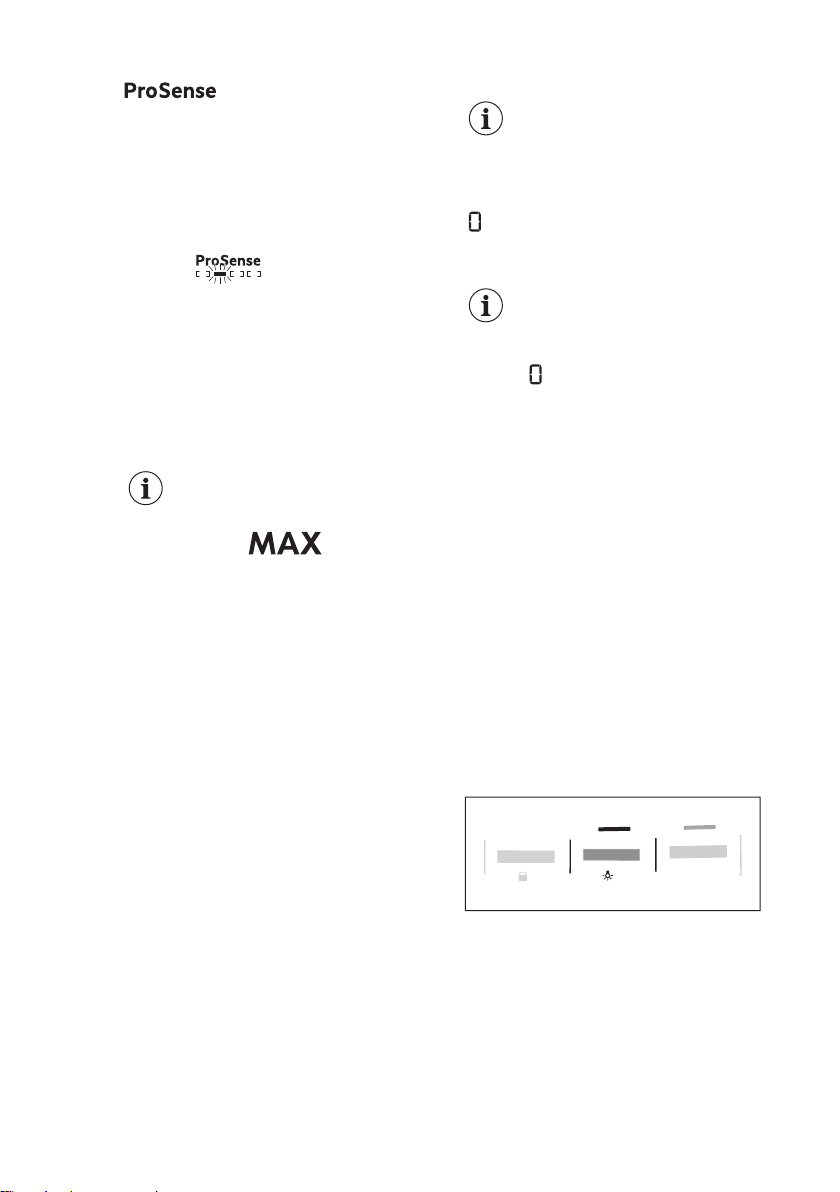
After setting a drying programme, the
icon lights up on the display
if the programme supports it.
Touching the Start/Pause button, the
ProSense starts the laundry load
detection:
1. The appliance detects the load in the
first minute: the indicator flashes, the
bars under the icon move back and
forth and the drum rotates
shortly.
2. When the drum stops rotating, the
display shows the new programme
duration adjusted according to the
detected load. The number of bars,
from 1 to 4, represents the estimated
load amount. 4 bars represent the
maximum load amount for the
selected programme.
In case of drum overload,
the maximum declared load
indicator comes on again
with the indicator
blinking. In this case, during
these 30 seconds, it is
possible to open the door
and remove the exceeding
garments. Once removed,
touch the Start/Pause button
to start the programme
again. If the laundry amount
will not be reduced, the
programme starts anyway.
In this case, it will be not
possible to guarantee the
best results.
9.11 Program change
To change a program:
1. Push the On/Off button to turn the
appliance off.
2. Push the On/Off button again to turn
on the appliance.
3. Set a new program.
9.12 Programme end
Clean the filter and drain the
water container after each
drying cycle. (See chapter
CARE AND CLEANING.)
If the drying cycle is finished, the symbol
appears on the display. If the End
Signal option is activated, the acoustic
signal sounds intermittently for 1 minute.
If you do not turn off the
appliance, the anti-crease
phase starts (not active with
all programmes). Flashing
symbol signals the
execution of the anti-crease
phase. Laundry can be
removed during this phase.
To remove the laundry:
1. Push the On/Off button for 2 seconds
to turn the appliance off.
2. Open the appliance door.
3. Remove the laundry.
4. Close the appliance door.
Possible causes of unsatisfactory drying
results:
• Inadequate default dryness level
settings. See chapter
Adjustment of
default dryness level
• Room temperature is too low or too
high. Optimal room temperature is
between 18°-25°C.
9.13 Drum light on
3
s
3s
Touch and hold down Silent button by
around 3 seconds.
The light inside the drum is on.
10. HINTS AND TIPS
10.1 Ecological hints
• Spin the laundry well before drying.
• Do not exceed the load sizes which
are specified in the programmes
chapter.
www.aeg.com22
• Clean the filter after each drying
cycle.
• Do not use fabric softener to wash
and then dry. In the tumble dryer
laundry becomes soft automatically.
• The water from the water container
can be used to iron the clothes. You
must first filter the water to eliminate
remaining textile fibres (simple coffee
filter is suitable).
• Always keep the airflow slots at the
bottom of the appliance clear.
• Make sure there is good airflow where
the appliance is to be installed.
10.2 Adjustment of default
dryness level
To change the default dryness level:
1. Turn the appliance on.
2. Select 1 of the available
programmes.
3. Touch and hold down the Time Dry
and + Anti Crease buttons at the
same time.
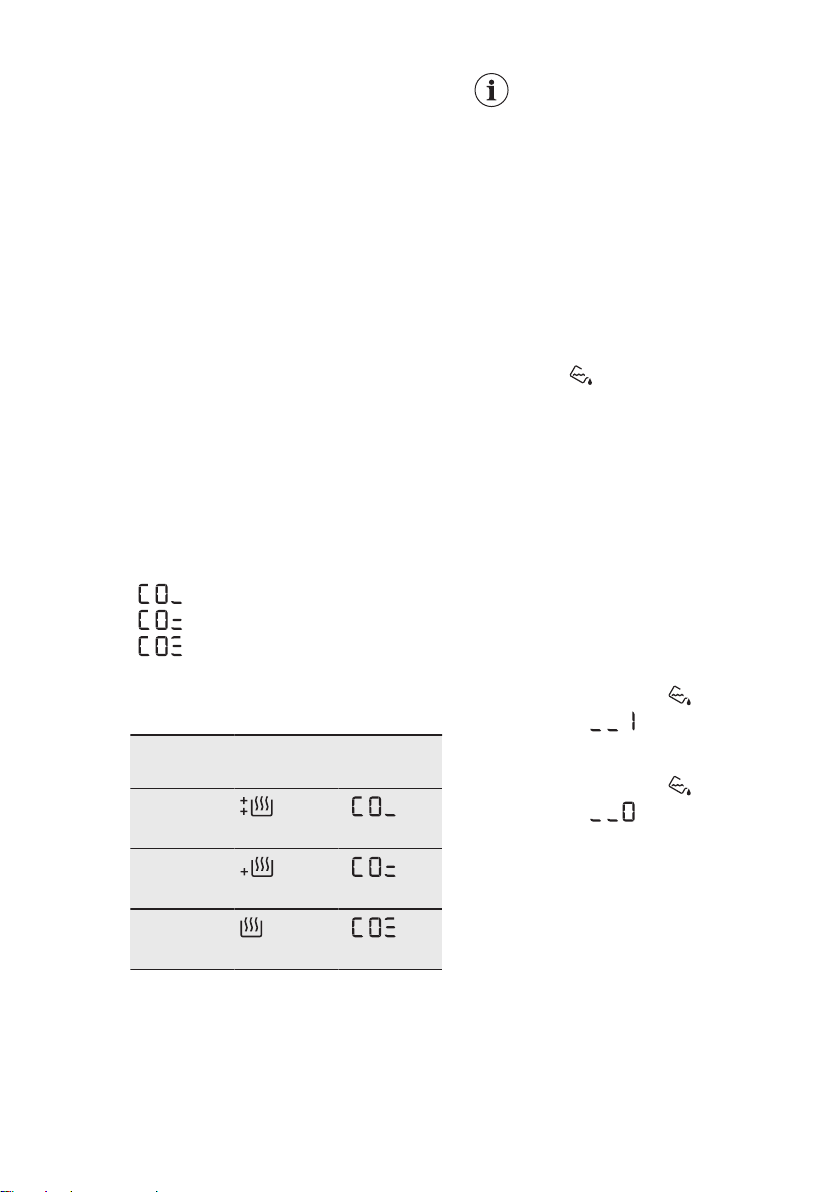
One of the symbols appears on the
display:
- Maximum dryness
- Extra dryness
- Standard dryness
4. Touch the Start/Pause button
repeatedly until you reach the
desired dryness level.
Dryness
level
Display symbol
Maximum
dryness
Extra dry‐
ness
Standard
dryness
5. To memorise the setting touch and
hold down the Time Dry and + Anti
Crease buttons at the same time for
approximately 2 seconds.
In case of Wi-Fi network
connected machines a
ProSense bars animation is
performed for a few seconds
to indicate that your
appliance is updating data to
the Cloud.
If instead the mode is
changed with knob rotation
or switching off the machine,
the data synchronization will
be done during the first Wi-Fi
reconnection.
10.3 Deactivating the tank
indicator
The water container indicator is activated
by default. It illuminates at the end of the
drying cycle or during the cycle if the
water reservoir is full. If the draining kit is
installed the water container is drained
automatically and the indicator can be
deactivated.
To deactivate the indicator:
1. Turn the appliance on.
2. Select 1 of the available
programmes.
3. Touch and hold down Silent and
Refresh buttons at the same time.
One of 2 configurations is possible:
• the Tank indicator:
is on if the
symbol appears - the
water container indicator is
permanently activated
• the Tank indicator:
is off if the
symbol appears - the
water container indicator is
permanently deactivated
10.4 Operating hours counter
This function gives a possibility to display
the total operating time of the appliance
in hours, which is counted from the
moment it is first switched on. The actual
operating time of the cycles is shown
(does not include pauses or delayed start
time).
To visualise this value, proceed as
follows:
ENGLISH 23
1. Switch the appliance on by pressing
the On/Off button.
2. Press and hold the Time Dry and
Dryness Level buttons for some
seconds.
3. After 3 seconds the total hours
operated by the appliance are shown
in the display: e.g. if the operating
time is 1276 hours, the display shows
the text Hr for 2 seconds then 12 for
2 seconds followed by 76. This value
is displayed with a sequence of two
digits at a time: the first two digits
indicate thousands and hundreds,
the second two digits indicate tens
and units.
To exit this mode, either press any
button, turn the selector knob or switch
the appliance off.
10.5 Factory Defaults
This function allows to restore the factory
default settings. The saved options and
working modes will be reset. It will also
remove WiFi network credentials from
the appliance memory and reset
personalized program settings.
To activate this option follow steps
below:
1. Switch the appliance on by pressing
On/Off button.
2. Wait approximately 8 seconds.
3. Press and hold the Silent and + Anti
Crease buttons for some seconds.
4. The appliance will acknowledge the
operation by displaying .
If the procedure does not
work (this could be due to
timeout or wrong keys
combination), switch the
appliance off and repeat the
sequence from the
beginning.
11. CARE AND CLEANING
11.1 Cleaning the filter
At the end of each cycle the
Filter
symbol comes on the display and you
must clean the filter.
The filter collects the lint
during the drying cycle.
To achieve the best drying
performances clean the filter
regularly , clogged filter lead
to longer cycles and energy
consumption increase.
Use your hand to clean the
filter , and if necessary , a
vacuum cleaner .
CAUTION!
Avoid the use of water to
clean the filter. Instead throw
away lint in the dustbin
( avoid dispersion of plastic
fiber in water ambient).
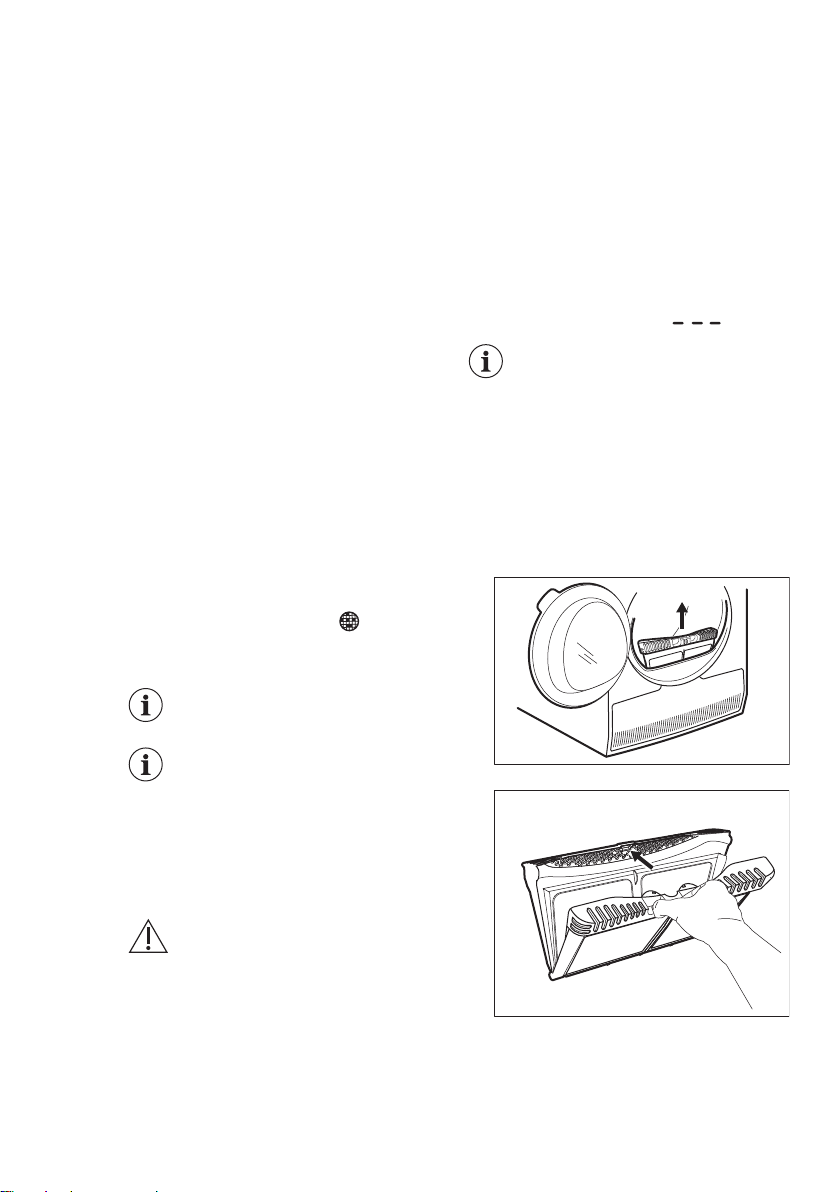
1. Open the door. Pull the filter up.
2. Push the hook to open the filter.
3. Gather lint with hand from both
internal parts of the filter.
www.aeg.com24
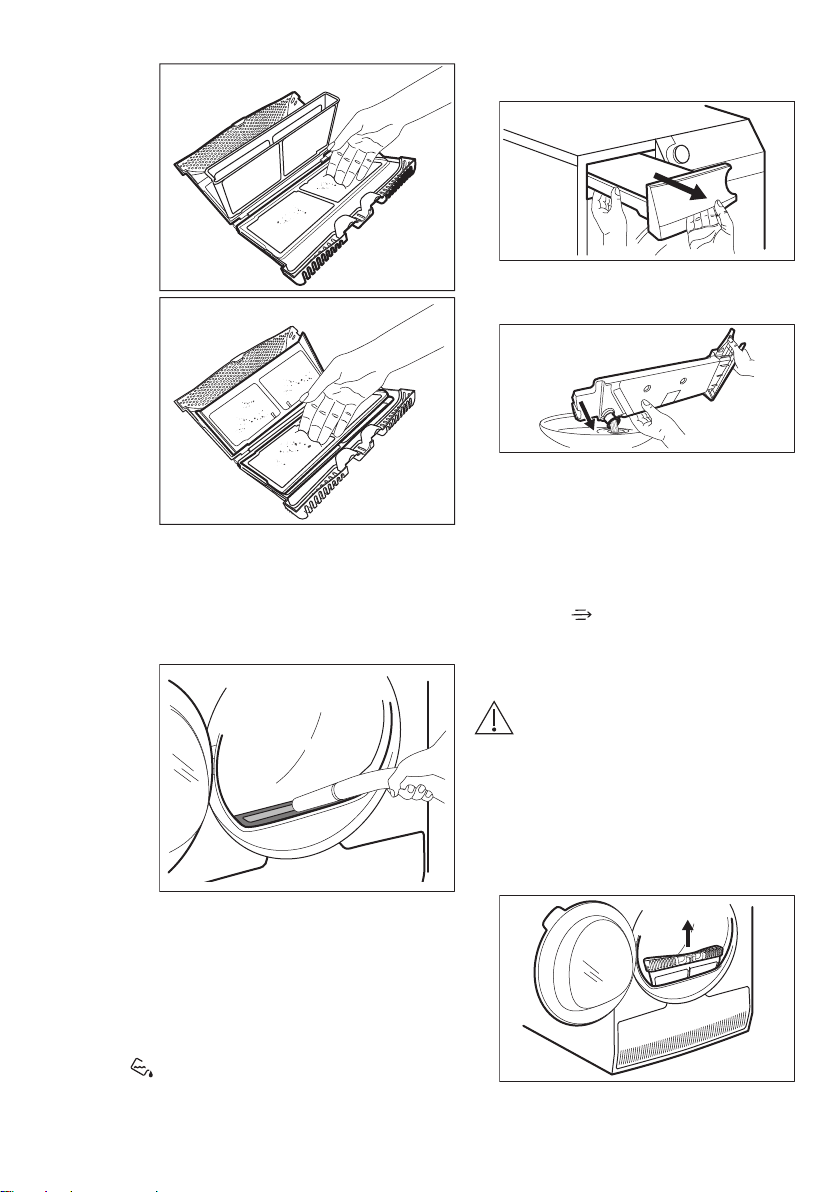
Throw the lint in the dustbin.
4. If necessary, clean the filter with a
vacuum cleaner. Close the filter.
5. If necessary, remove lint from the
filter socket and gasket. You can use
a vacuum cleaner. Place the filter
back inside the filter socket.
11.2 Emptying the water
container
Empty the condensed water container
after each drying cycle.
If the condensed water container is full,
the programme stops automatically. The
Tank
symbol comes on the display
and you must empty the water container.
To empty the water container:
1. Pull the water container out keeping
it in a horizontal position.
2. Pull the plastic connection out and
drain the water into a basin or
equivalent receptacle.
3. Push the plastic connection back in
and place the water container back
into position.
4. To continue the programme press
the Start/Pause button.
11.3 Cleaning the condenser
If the symbol
Condenser
flashes on
the display, inspect the condenser and
its compartment. If it is dirty, clean it. Do
the check not less than once a 6 months.
WARNING!
Do not touch the metal
surface with bare hands.
Risk of injury. Wear
protective gloves. Clean
carefully to avoid damaging
the metal surface.
To inspect:
1. Open the door. Pull the filter up.
2. Open the condenser cover.
ENGLISH 25
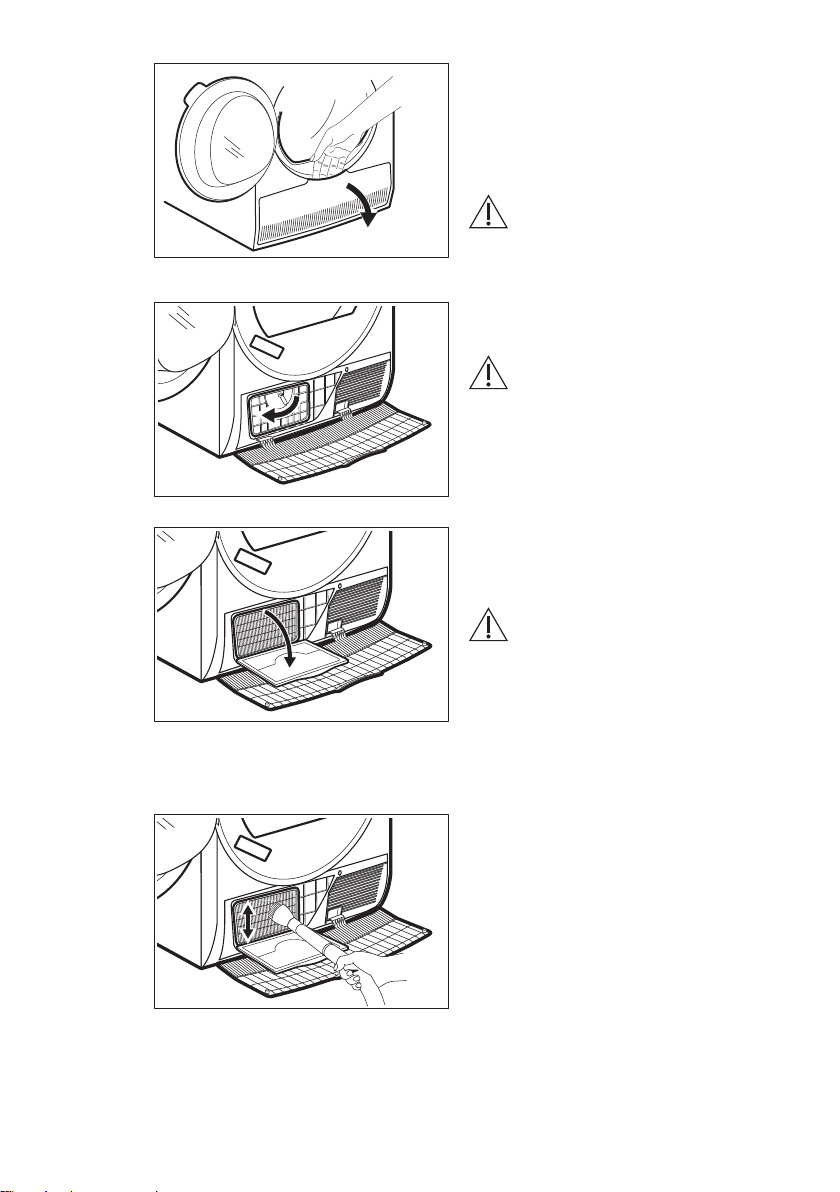
3. Turn the lever to unlock the
condenser lid.
4. Lower the condenser lid.
5. If necessary, remove the fluff from
the condenser and its compartment.
You can use a vacuum cleaner with a
brush attachment.
6. Close the condenser lid.
7. Turn the lever until it clicks into
position.
8. Put the filter back.
11.4 Cleaning the drum
WARNING!
Disconnect the appliance
before you clean it.
Use a standard neutral soap detergent to
clean the inner surface of the drum and
drum lifters. Dry the cleaned surfaces
with a soft cloth.
CAUTION!
Do not use abrasive
materials or steel wool to
clean the drum.
11.5 Cleaning the control
panel and housing
Use a standard neutral soap detergent to
clean the control panel and housing.
Use a moist cloth to clean. Dry the
cleaned surfaces with a soft cloth.
CAUTION!
Do not use furniture cleaning
agents or cleaning agents
which can cause corrosion.
11.6 Cleaning the airflow
slots
Use a vacuum cleaner to remove fluff
from the airflow slots.
www.aeg.com26
12. TROUBLESHOOTING
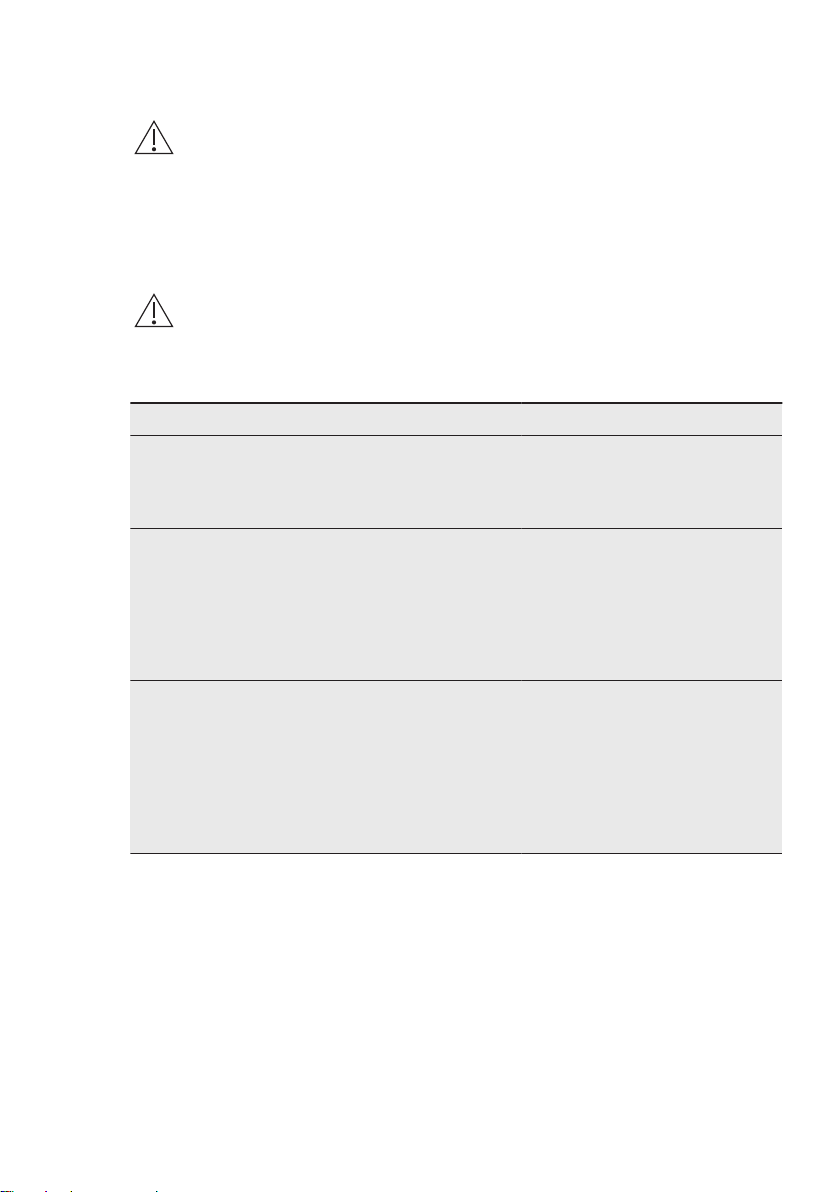
WARNING!
Refer to Safety chapters.
12.1 Error Codes
The appliance does not start or it stops during operation.
First try to find a solution to the problem (refer to the table). If the problem persists,
contact the Authorised Service Centre.
WARNING!
Deactivate the appliance before carrying out any check.
In case of major problems, the acoustic signals operate, the display shows an
error code and the Start/Pause button may flash continuously:
Error code Possible cause Remedy
E50
Appliance motor overloaded.
Too much laundry or entrap in the
drum.
The programme was not comple‐
ted. Remove the laundry from the
drum, set the programme and re‐
start the cycle.
E90 or E91
Internal fail. No communication be‐
tween electronic elements of the
appliance.
The programme was not finished
properly or the appliance stoped
too early. Switch the appliance off
and on again.
If the error code appears again,
contact the Authorised Service
Centre.
EH0
The mains supply is unstable. When the appliance is showing
EH0, please wait until main supply
is stable than press start. If the ap‐
pliance pause the cycle without
any indication then press the cycle
start. If the warning will occur
check the power cord / socket in‐
tegrity or main supply.
If the display shows other error codes, deactivate and activate the appliance. If the
problem continues, contact the Authorised Service Centre.
In case of different problem with the tumble dryer check the table below for possible
solutions.
ENGLISH 27
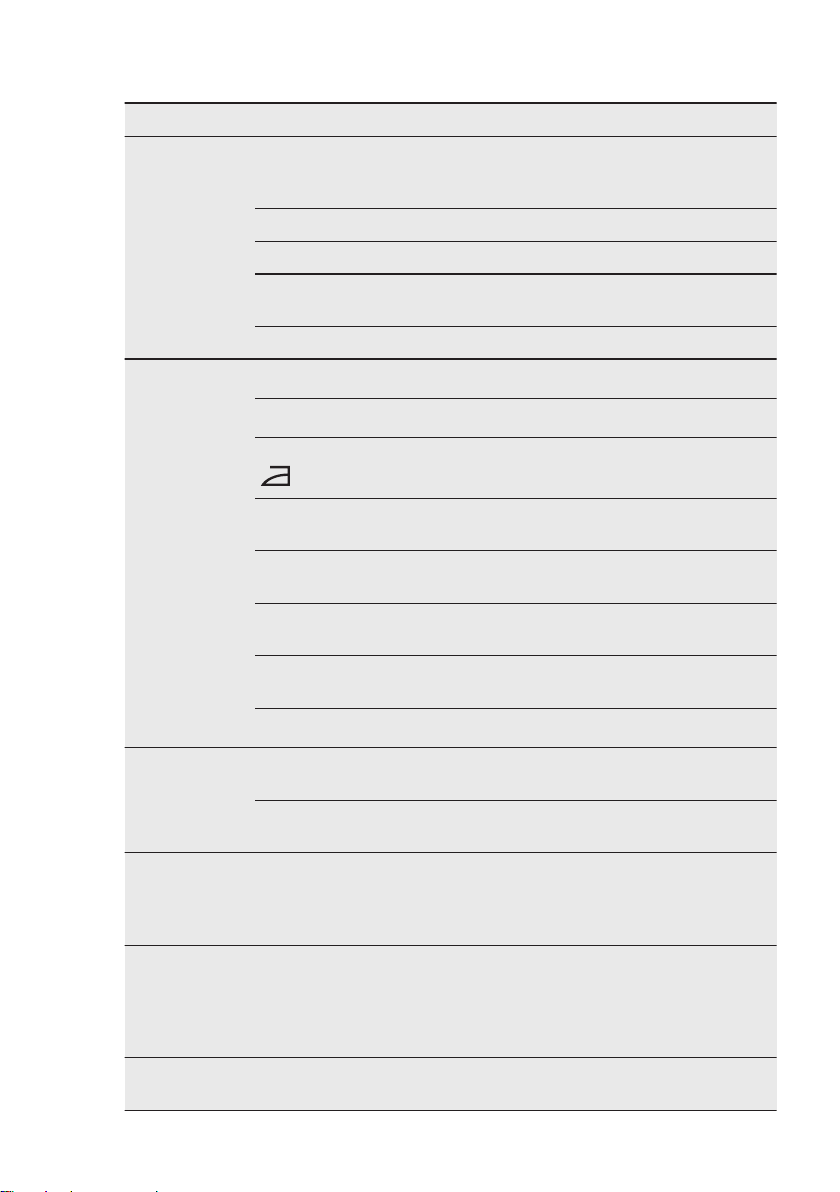
12.2 Troubleshooting
Problem Possible cause Remedy
The tumble dry‐
er does not op‐
erate.
The tumble dryer is not connected
to the mains supply.
Connect it to the mains socket.
Check the fuse in the fuse box (do‐
mestic installation).
The door is open. Close the door.
The On/Off button was not pushed. Push the On/Off button.
The Start/Pause button was not
touched.
Touch the Start/Pause button.
The appliance is in standby mode. Push the On/Off button.
Unsatisfactory
drying result.
Incorrect program selection.
Select a suitable program.
1)
The filter is clogged.
Clean the filter.
2)
Dryness Level option was set to
iron dry
.
3)
Change Dryness Level option to a
higher level.
The load was too large. Do not exceed the maximum load
size.
The airflow slots are clogged. Clean the airflow slots at the bot‐
tom of the appliance.
There is some dirt on the humidity
sensor in the drum.
Clean the front surface of the
drum.
The dryness level was not set to
the desired level.
Adjust the dryness level.
4)
The condenser is clogged.
Clean the condenser.
2)
The loading
door does not
close
The filter is not locked into posi‐
tion.
Put the filter in the correct position.
Laundry is trapped between the
door and the seal.
Remove trapped items and close
the door.
It is not possible
to change the
program or op‐
tion.
After a cycle starts it is not possi‐
ble to change the program or op‐
tion.
Turn the tumble dryer off and on.
Change the program or option as
required.
It is not possible
to select an op‐
tion. An acoustic
signal is emit‐
ted.
The option you tried to select is not
available for the selected program.
Turn the tumble dryer off and on.
Change the program or option as
required.
There is no
drum light
Defective drum lamp. Contact the service centre to re‐
place the drum lamp.
www.aeg.com28
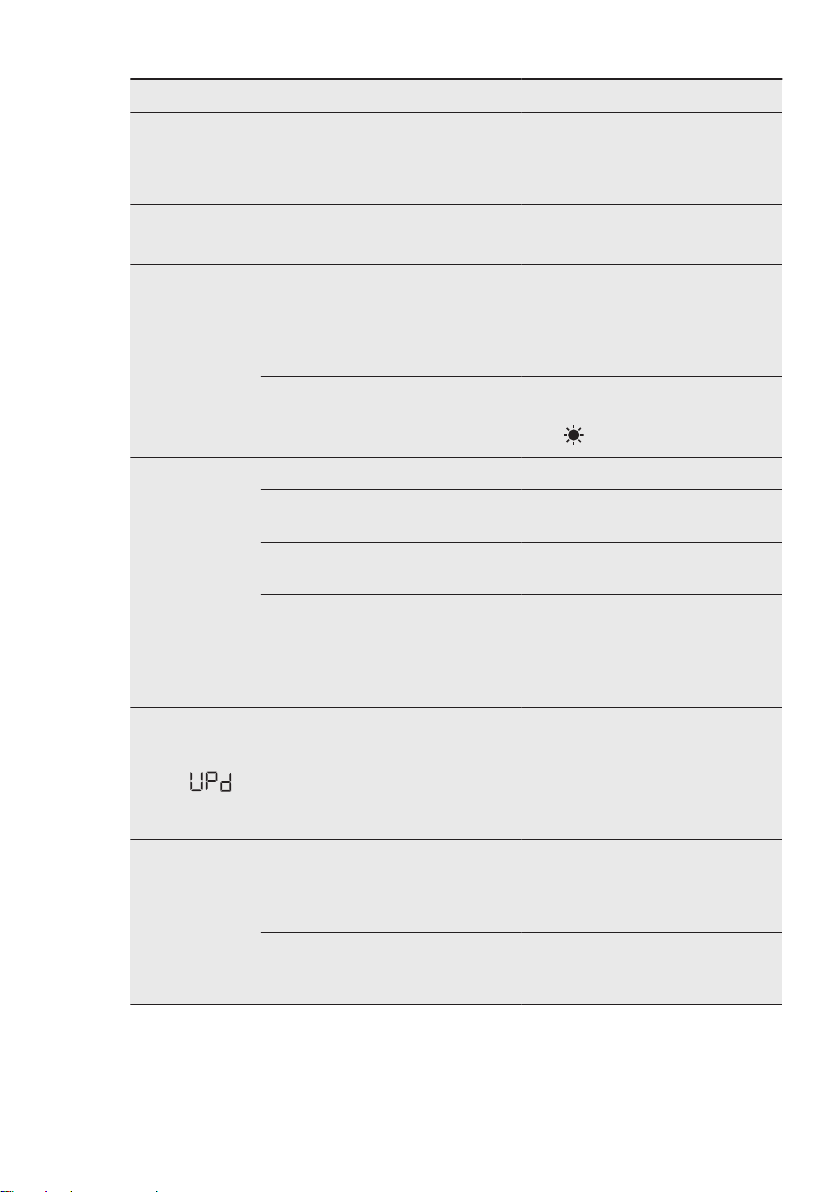
Problem Possible cause Remedy
Unexpected du‐
ration time ap‐
pears on the
display.
The drying duration is calculated
according to load size and damp‐
ness.
This is automated - the appliance
is working correctly.
A program is in‐
active.
The water container is full. Drain the water container, push the
Start/Pause button.
2)
The drying cycle
is too short.
The load size is small. Select a time program. The time
value must be related to the load.
To dry one item or a small amount
of laundry we recommend short
drying times.
The laundry is too dry. Select an appropriate time pro‐
gram or a higher dryness level
(e.g.
extra dry
)
Drying cycle too
long
5)
The filter is clogged. Clean the filter.
The load is too large. Do not exceed the maximum load
size.
The laundry was not spun suffi‐
ciently.
Spin the laundry well in the wash‐
ing machine.
Too low or too high room tempera‐
ture - this is not the appliance mal‐
function.
Ensure a room temperature higher
than +5°C and lower than +35°C.
Optimal room temperature to ach‐
ieve best drying results is between
18°-25°C.
The display
shows: .
All buttons are inactive, except the
Start/Pause.
The appliance downloads the APP
updates. Wait until the update
process is complete. If you deacti‐
vate the appliance during update, it
resumes when you activate the ap‐
pliance again.
No wireless con‐
nection or con‐
nection often
brakes off.
The wireless home network does
not work.
Check wireless home network con‐
figuration. Restart the router. If
problem still exists contact your
wireless service provider.
The smart device or the appliance
or both are not paired with the
wireless network.
Repeat connection configuration
steps on smart device or the appli‐
ance or both.
ENGLISH 29
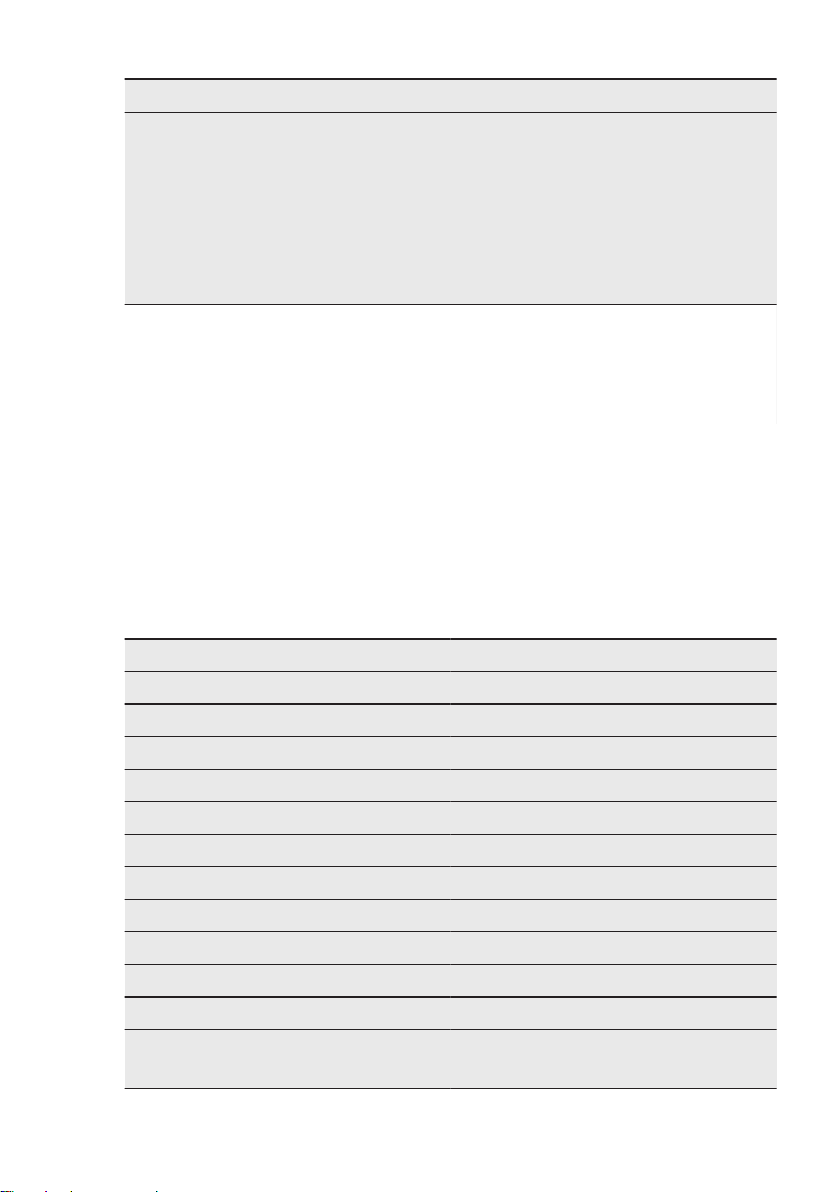
Problem Possible cause Remedy
The connection
with the appli‐
ance through
the My AEG
Care application
does not work
frequently.
Poor or missing connection be‐
tween the tumble dryer and router.
Assure proper connection between
the appliance and the home router.
Move the router closer to the appli‐
ance. Equip your home network
with wireless range extender.
Do not use at the same time micro‐
wave oven and remote control.
The microwave oven can disrupt
the connection signal.
1)
Follow the program description — see the PROGRAMS chapter .
2)
See the
CARE AND CLEANING
chapter.
3)
Only dryers with the Dryness Level option.
4)
See the HINTS AND TIPS chapter .
5)
Note: After a maximum of 6 hours the drying cycle ends automatically.
12.3 Possible causes of
unsatisfactory drying results:
• The filter is clogged. Clogged filter
makes drying inefficient.
• The airflow slots are clogged.
• The drum is dirty.
• Inadequate default dryness level
settings. See chapter
Adjustment of
default dryness level
• Room temperature is too low or too
high. Optimal room temperature is
between 18°-25°C.
13. TECHNICAL DATA
Height x Width x Depth 850 x 596 x 638 mm (maximal 663 mm)
Max. depth with the appliance door open 1108 mm
Max. width with the appliance door open 958 mm
Adjustable height 850 mm (+ 15 mm - feet regulation)
Drum volume 118 l
Maximum load volume 9,0 kg
Voltage 230-240 V
Frequency 50 Hz
Sound power level 63 dB
Necessary fuse 13 A
Total power 700 W
Energy efficiency class A+++
Energy consumption on the standard cotton
programme with the full load.
1)
1,68 kWh
www.aeg.com30
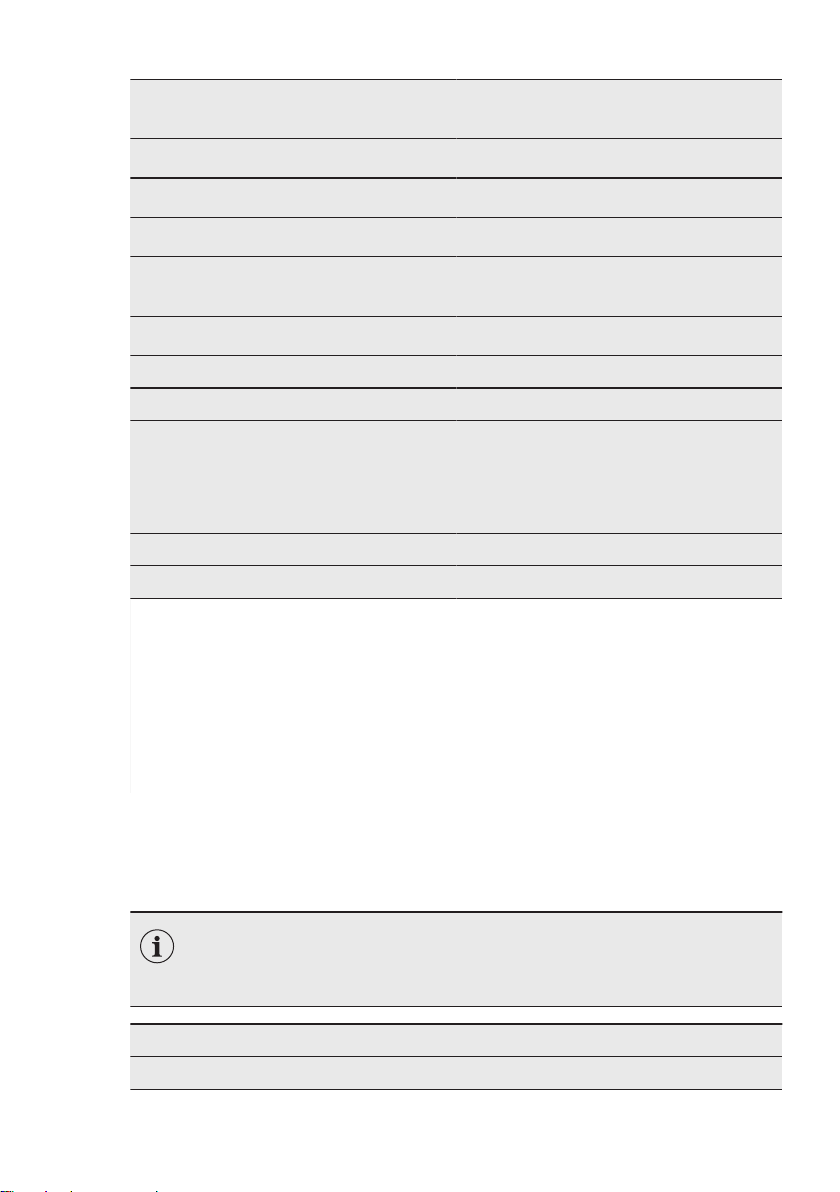
Energy consumption on the standard cotton
programme with the partial load.
2)
0,86 kWh
Annual energy consumption
3)
194,10 kWh
Left-on mode power absorption
4)
0,05 W
Off mode power absorption
4)
0,05 W
Power consumption in networked stand‐
by
5)4)
2,0 W
Time to networked standby
4)
15 min.
Type of use Household
Allowed ambient temperature + 5°C to + 35°C
Level of protection against ingress of solid
particles and moisture ensured by the pro‐
tective cover, except where the low voltage
equipment has no protection against mois‐
ture
IPX4
Gas designation R290
Weight 0,149 kg
1)
With reference to EN 61121. 9,0 kg of cotton centrifuged at 1000 rpm.
2)
With reference to EN 61121. 4,5 kg of cotton centrifuged at 1000 rpm.
3)
Energy consumption per year in kWh, based on 160 drying cycles of the standard cotton programme
at full and partial load, and the consumption of the low-power modes. Actual energy consumption per cy‐
cle will depend on how the appliance is used used (according to UK Ecodesign for Energy-Related Prod‐
ucts and Energy Information Regulations and to Commission Regulation EU No. 392/2012)
4)
With reference to BS EN 61121 & EN 61121
5)
The energy consumption of the connected function is approximately 17,5 kWh per year. To disconnect
this function, please refer to the chapter "Wi-fi - Connectivity setup".
The information given in the chart above is compliant with the EU Commission regulation
392/2012 implementing directive 2009/125/EC.
14. PRODUCT INFORMATION SHEET
ACCORDING TO UK ECODESIGN FOR ENERGY-RELATED PROD‐
UCTS AND ENERGY INFORMATION REGULATIONS AND EU Eco‐
design Regulation and the EU Energy Label Regulation 1369/2017.
Product Information Sheet
Trade Mark AEG
ENGLISH 31
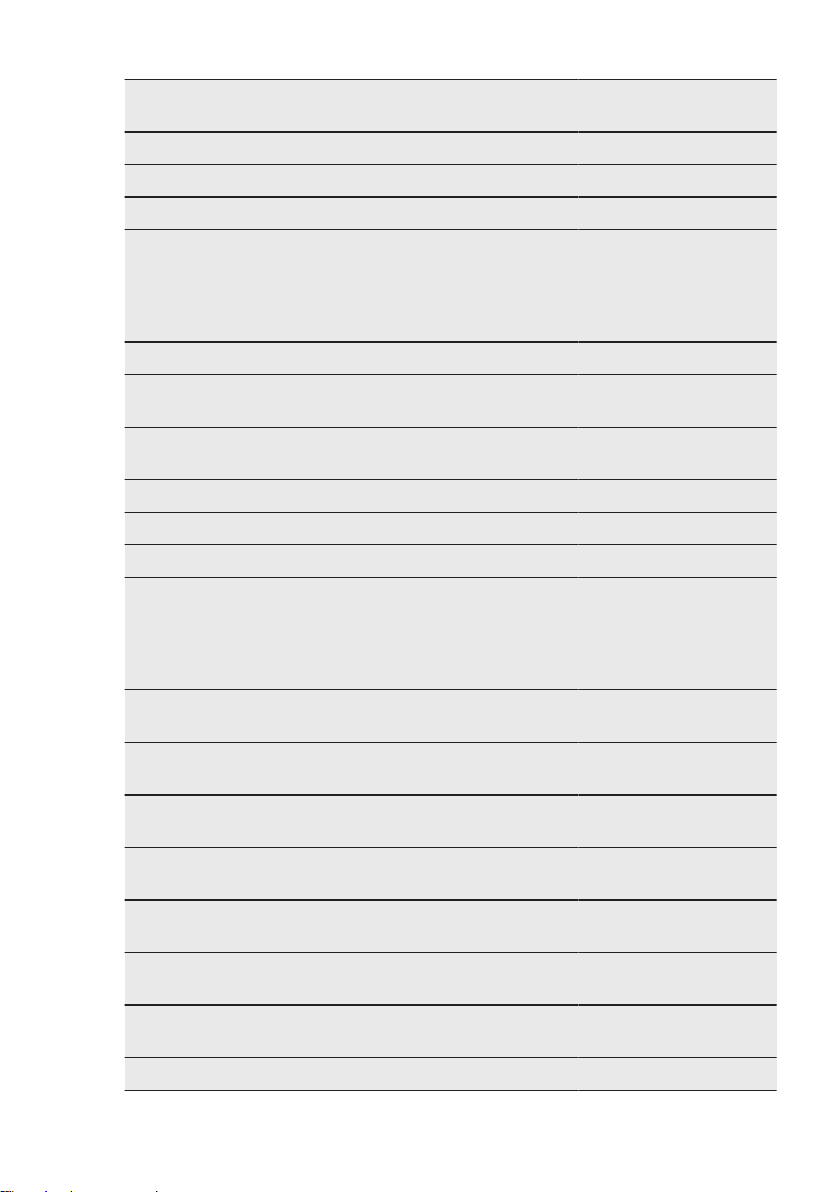
Model TR959M6BC
PNC916099249
Rated capacity in kg 9,0
Air vented or condenser tumble dryer Condenser
Energy efficiency class A+++
Energy consumption in kWh per year, based on 160 drying cy‐
cles of the standard cotton programme at full and partial load,
and the consumption of the low-power modes. Actual energy
consumption per cycle will depend on how the appliance is
used.
194,10
Automatic tumble drier or non-automatic tumble drier Automatic
Energy consumption of the standard cotton programme at full
load in kWh
1,68
Energy consumption of the standard cotton programme at par‐
tial load in kWh
0,86
Power consumption of the off-mode in W 0,05
Power consumption in left-on mode in W 0,05
Duration of the left on mode in minutes 10
The 'standard cotton programme' used at full and partial load
is the standard drying programme to which the information in
the label and the fiche relates, this programme is suitable for
drying normal wet cotton laundry and it is the most efficient
programme in terms of energy consumption for cotton.
Weighted programme time of the 'standard cotton programme
at full and partial load' in minutes
148
Programme time of the 'standard cotton programme at full
load' in minutes
199
Programme time of the 'standard cotton programme at partial
load' in minutes
110
Condensation efficiency class on a scale from G (least effi‐
cient) to A (most efficient)
A
Average condensation efficiency of the standard cotton pro‐
gramme at full load as a percentage
91
Average condensation efficiency of the standard cotton pro‐
gramme at partial load as a percentage
91
Weighted condensation efficiency for the 'standard cotton pro‐
gramme at full and partial load'
91
Sound power level in dB 63
www.aeg.com32

Built in appliance Y/N No
The information given in the chart above is compliant with UK Ecodesign for Energy-Related
Products and Energy Information Regulations and with the Commission Regulation EU No.
932/2012 implementing directive 2009/125/EC
15. ENVIRONMENTAL CONCERNS
Recycle materials with the symbol .
Put the packaging in relevant containers
to recycle it. Help protect the
environment and human health by
recycling waste of electrical and
electronic appliances. Do not dispose of
appliances marked with the symbol
with the household waste. Return the
product to your local recycling facility or
contact your municipal office.
*
ENGLISH 33


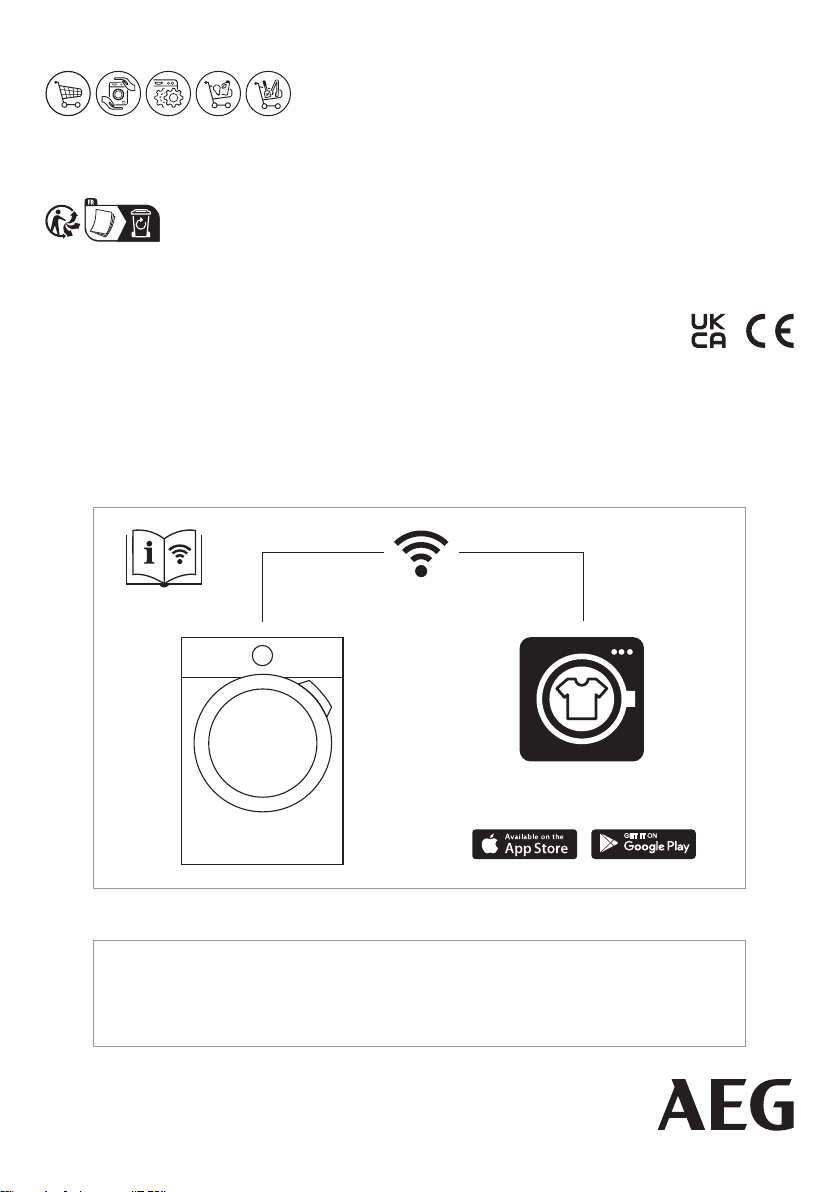
My AEG Care app
The software in this product contains components that are based on free and open source software. AEG gratefully
acknowledges the contributions of the open software and robotics communities to the development project.
To access the source code of these free and open source software components whose license conditions require
publishing, and to see their full copyright information and applicable license terms, please visit:
http://aeg.opensoftwarerepository.com (folder NIUS)
www.aeg.com/shop
136993911-A-102023