OWNER'S MANUAL
Thank you for your purchase of this air conditioner.
Before attempting to use your air conditioner, please read this manual carefully and store it for future reference.
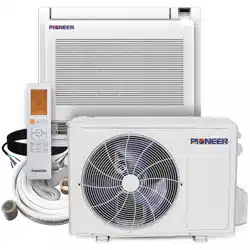
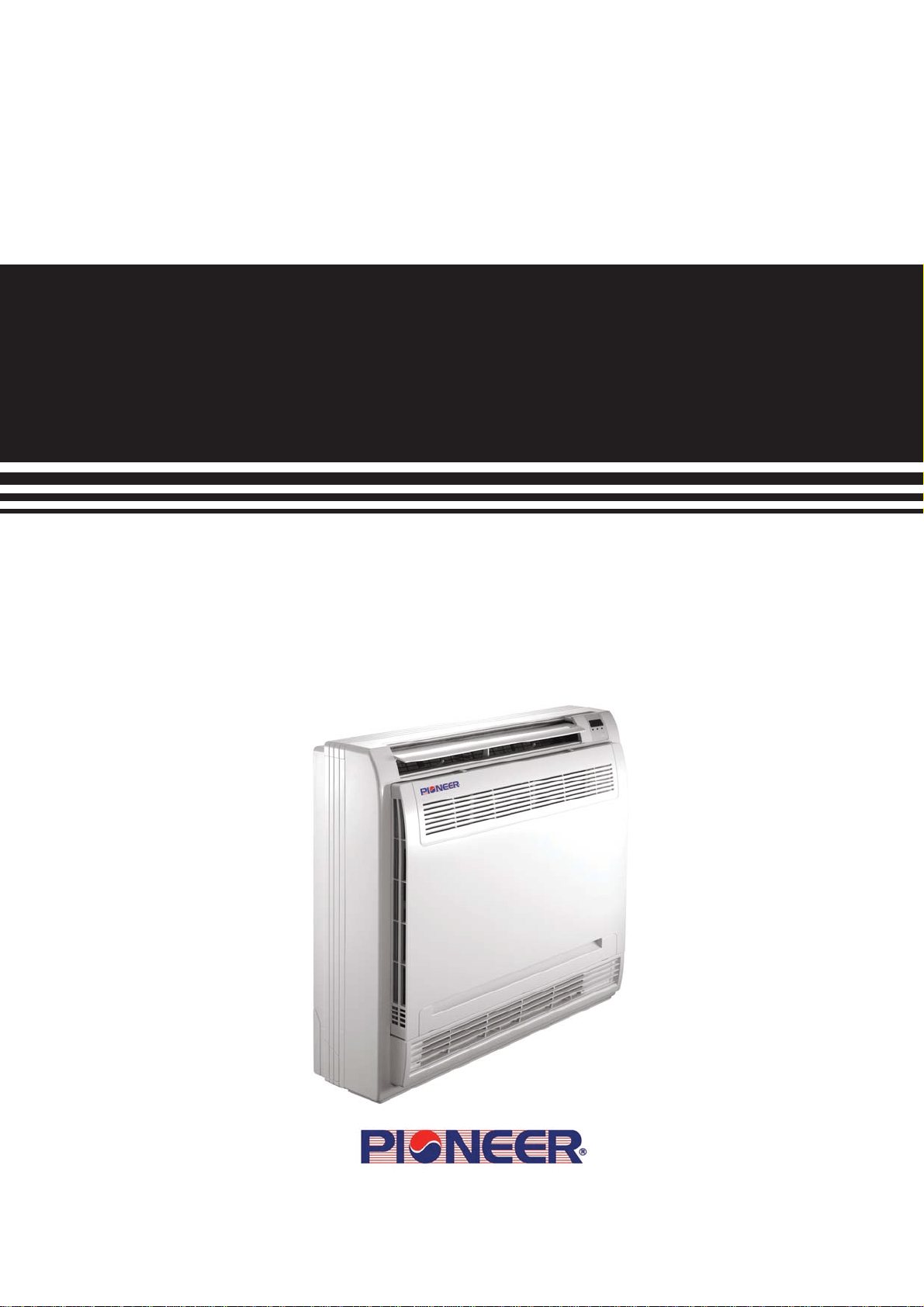
Floor Console Type Ductless Split Systems
FB009 - FB012 Indoor Units
FYB009 - FYB012 System Sets
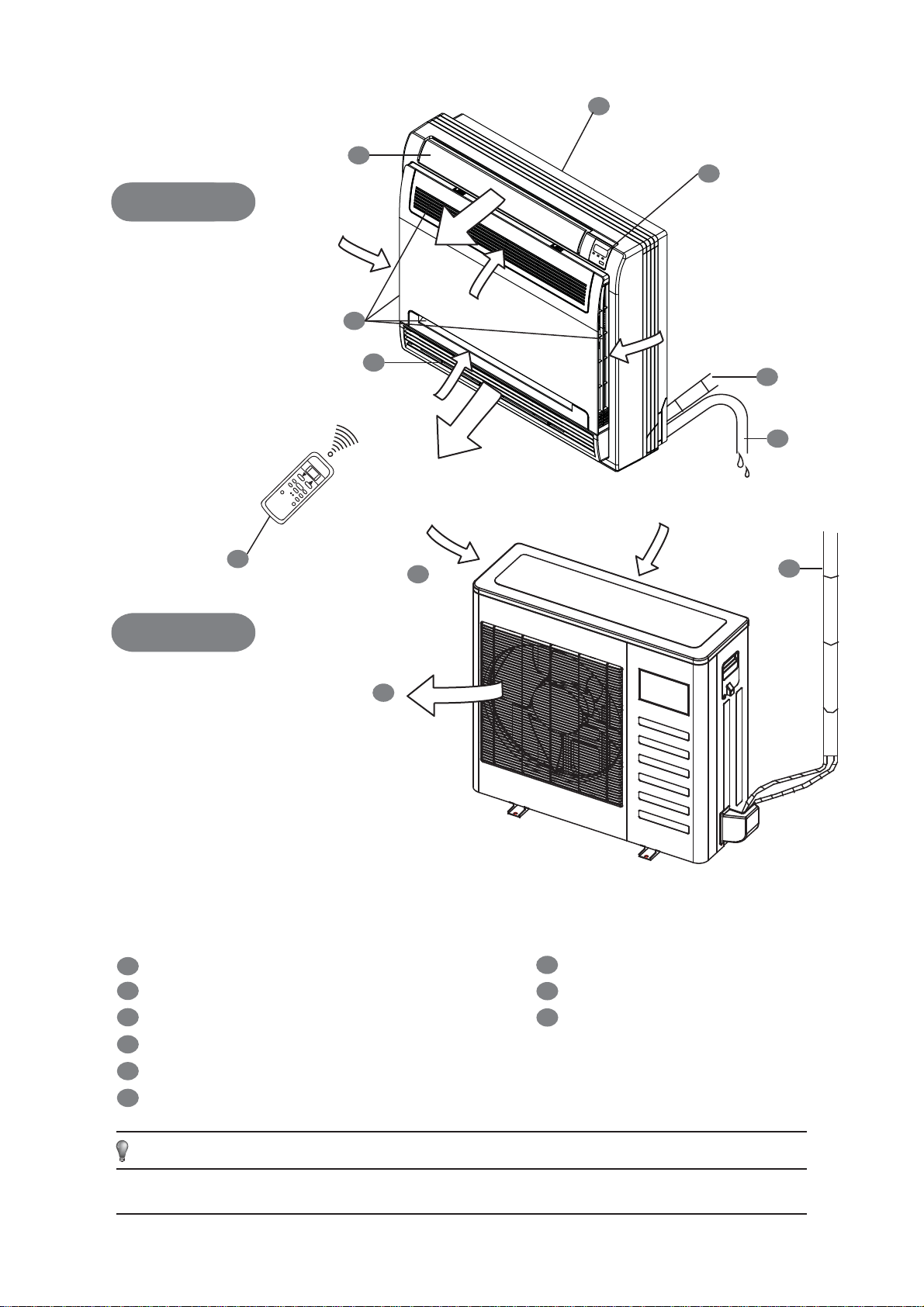
INDOOR UNIT
OUTDOOR UNIT
1
2
3
4
5
6
7
8
9
Display Panel
Connecting Pipe
Air Inlet
Drain Pipe
Air Outlet
Installation Section
Remote Controller
Fig.1
All graphics in this manual are for explanatory purposes only. There may be slight differences from the air
conditioner that you purchased (dependent on model). The actual shape shall prevail.
NOTE
Air Flow Louver (at Air Outlet)
Air Inlet (and Air Filter within)
INDOOR UNIT
OUTDOOR UNIT
7
8
1
9
6
7
1
3
4
2
5
1
owner’s manual
1. IMPORTANT SAFETY INFORMATION
To prevent injury to the user or other persons, as well as
property damage, the following instructions must be followed.
Incorrect operation due to ingnorance of instructions may
cause product damage or personal harm.
Consult your dealer for installation of the air conditioner.
Incomplete installation performed by yourself may result in a
water leakage, electric shock, or fire.
Ask your dealer for methods of improvement, repair, and
maintenance.
Improper improvement, repair, and maintenance may result
in a water leakage, electric shock, and fire.
In order to avoid electric shock, fire or injury, or if you
detect any abnormality such as fire odors, turn off the
power supply and call your dealer for more instructions.
Never let the indoor unit or the remote controller get
wet.
It may cause an electric shock or a fire.
Do not use the air conditioner for abnormal purposes.
In order to avoid any quality degredation, do not use the unit
for cooling of precision instruments, food, plants, animals, or
works of art.
Before cleaning, be sure to cease operation and turn the
breaker off or pull out the supply cord.
Otherwise, an electrical shock and possible injury may result.
Never press the button of the remote controller with a
hard, pointed object.
The remote controller may be damaged.
Never replace a fuse with that of an incorrectly rated
current, or other wires, when a fuse blows out.
Use of wire or copper fuses may cause the unit to break
down, or cause a fire.
It is not good for your health to expose your body to the
air flow for a prolonged period of time.
Do not insert fingers, rods, or other objects into the air
inlet or outlet.
When the fan is rotating at a high speed, it can cause injury.
Never use a flammable spray, such as hair spray,
lacqueror, or paint near the unit.
It may cause a fire.
Never touch the air outlet, or the horizontal blades, while
the swing flap is in operation.
Fingers may become caught within, or the unit may break.
Never put any objects into the air inlet or outlet.
Objects coming into contact with the high speed fan can
become dangerous.
Never inspect or service the unit by yourself.
Ask a qualified service person to perform this work.
Do not dispose of this product as unsorted municipal
waste. Separate collection of such waste for special
treatment is necessary.
Do not dispose of electrical appliances as unsorted
municipal waste. Use separate collection facilities.
Contact your local government for information regarding the
collection systems available.
If electrical appliances are disposed of in landfills or
dumps, hazardous substances can eventually leak into
the groundwater and get into the food chain, damaging
your health and well-being.
To prevent refrigerant leak, contact your dealer.
When the system is installed and runs in a small room, it is
required to keep the concentration of the refrigerant, if by any
chance it leaks, below the limit. Otherwise, oxygen in the
room may be affected, resulting in a serious hazard.
The refrigerant in the air conditioner is safe and normally
does not leak.
If the refrigerant leaks inside the room, contact with fire from a
burner, heater, or cooker may result in harmful gas. Turn off
any combustible heating devices, ventilate the room, and
contact the dealer from where you purchased the unit. Do not
use the air conditioner until a service person confirms that the
segment from where the refrigerant leaks is repaired.
CONTENTS PAGE
IMPORTANT SAFETY INFORMATION................................................................1
PARTS NAMES.........................................................................................................2
AIR CONDITIONER OPERATIONS AND PERFORMANCE.............................3
HINTS FOR ECONOMICAL OPERATION...........................................................3
ADJUSTING AIR FLOW DIRECTION...................................................................3
AIR FLOW SELECTION...........................................................................................4
MAINTENANCE........................................................................................................4
THESE SYMPTOMS ARE NOT AIR CONDITIONER TROUBLES...................6
TROUBLESHOOTING...............................................................................6
The safety precautions listed below are divided into two categories. In
either case, important safety information is given and must be read
carefully and complied with.
The appliance shall be installed in accordance with nation-
al wiring regulations. Failure to observe a warning may
result in severe injury and/or death.
Failure to observe a caution may result in personal injury
or damage to the equipment.
CAUTION
CAUTION
WARNING
WARNING
If used as a MULTI-unit, please refer to the Installation
& Operation Manuals packed with the outdoor unit.
2
owner’s manual
This appliance is not intended for use by persons
(including children) with reduced physical, sensory, or
mental capabilities, or lack of proper experience and
knowledge, unless they have been given supervision
or instruction concerning use of the appliance, by a
person responsible for their safety.
Children should be supervised to ensure that they do not
play with the appliance.
If the supply cord is damaged, it must be replaced by the
manufacturer, its service agent, or similarly qualified
persons, in order to avoid a hazard.
Do not operate your air conditioner in a wet room, such
as a bathroom or laundry room.
In order to avoid electric shock or fire, ensure that an
earth leak detector is installed.
Be sure that the air conditioner is grounded.
In order to avoid electric shock, make sure that the unit is
grounded and that the earth wire is not connected to a gas or
water pipe, lightning conductor, or telephone earth wire.
In order to avoid injury, do not remove the fan guard of
the outdoor unit.
Do not operate the air conditioner with wet hands.
An electric shock may occur.
Do not touch the heat exchanger fins.
These fins are sharp and could result in cutting injuries.
Do not place items which might be damaged by moisture
underneath the indoor unit.
Condensation may form if the humidity is above 80%, the
drain outlet is blocked, or the filter is polluted.
After extended use, check the unit stand and fitting for
damage.
If the stand is damaged, the unit may fall and result in injury.
To avoid the risk of oxygen deficiency, ventilate the room
sufficiently if any equipment with a burner is used
together with the air conditioner.
Arrange the drain hose to ensure smooth drainage.
Incomplete drainage may cause wetting of the building,
furniture, etc.
Never touch the internal parts of the controller.
Do not remove the front panel. Some parts inside are
dangerous to touch, and machine trouble may happen.
Never expose little children, plants, or animals directly to
the air flow.
Adverse harmful effects to little children, animals, and plants
may result.
Do not allow children to climb onto the outdoor unit, or to
place an object on top of it.
Falling or tumbling may result in injury.
Do not operate the air conditioner when using room
fumigation-type insecticide.
Failure to observe this precuation could cause the chemicals
to become deposited in the unit, which could endanger the
health of those who are hypersensitive to chemicals.
Do not place appliances which produce open fire in
places exposed to the air flow from the unit, or under the
indoor unit.
It may cause incomplete combuston, or deformation of the
unit, due to the heat.
Do not install the air conditioner in any place where
flammable gas may leak out.
If the gas leaks out and stays around the air conditioner, a fire
may break out.
The appliance is not intended for use by young children
or infirm persons without supervision.
This appliance can be used by children aged from 8
years and above, along with persons with reduced
physical, sensory or mental capabilities, or lack of
experience and knowledge, if they have been given
supervision or instruction concerning use of the
appliance in a safe way, and understand the hazards
involved. Children shall not play with the appliance.
Cleaning and user maintenance shall not be made by
children without supervision.
2. PARTS NAMES
The air conditioner consists of the indoor unit, the outdoor unit,
the connecting pipe, and the remote controller.
(Refer to Fig.1)
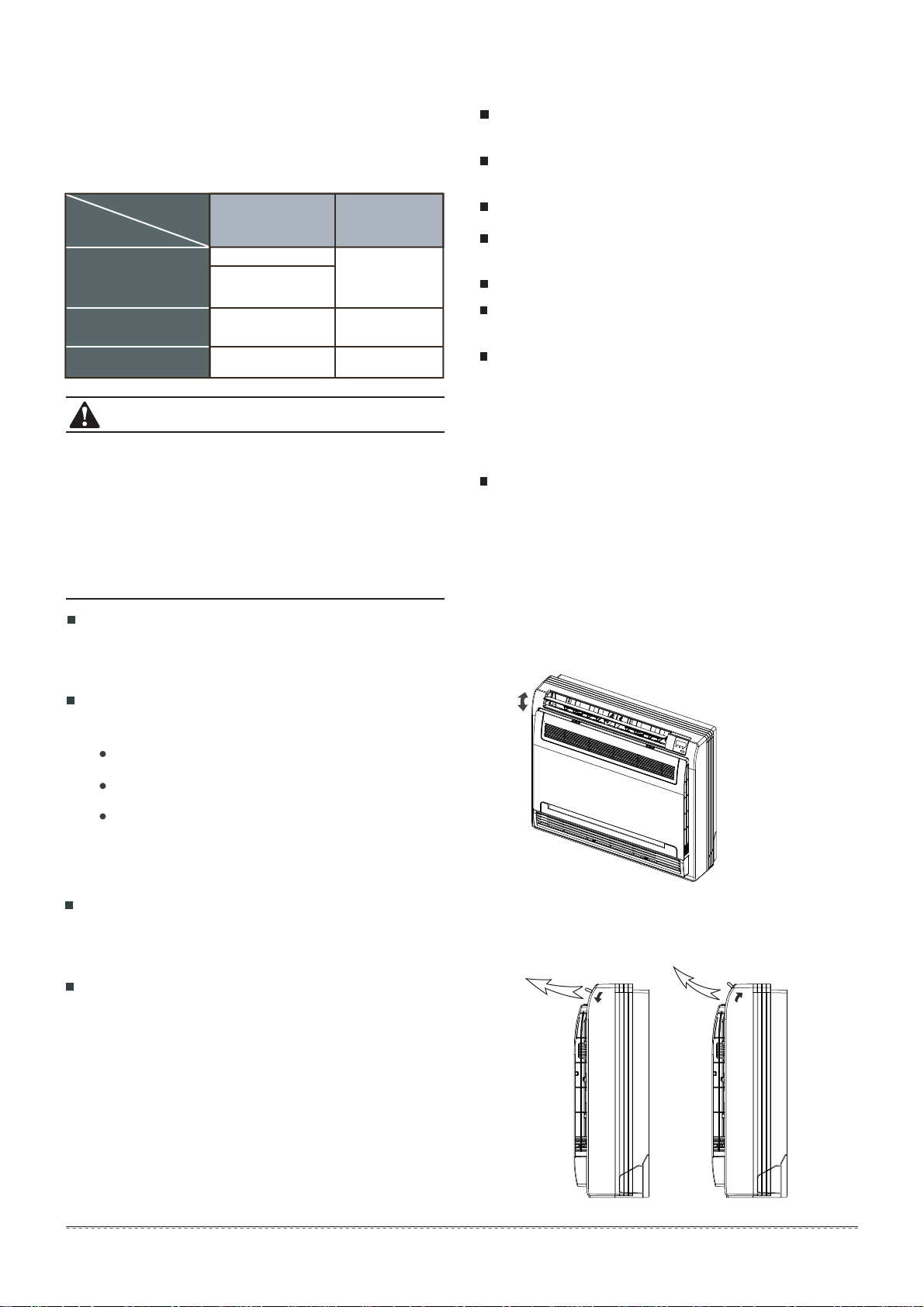
Function indicators on the Indoor Unit Display Panel
PRE-DEF Indicator(Cooling and Heating
Type)
or Fan-Only indicator(Cooling Only Type)
Infrared Signal Receiver
Operation Lamp
Timer Indicator
Temporary Button
This manual does not include Remote Controller Operations. See
the Remote Controller Owner's Manual (packed with the unit) for
details.
AUTO
The OPERATION lamp is lit, and the air conditioner will run
under AUTO mode. The remote controller operation is
configured to operate according to the received signal.
FORCED COOL
The air conditioner will turn to AUTO, after it is set to cool with a
wind speed of LOW for 30 minutes. The remote controller
operation is disabled.
OFF
The OPERATION lamp goes off. The air conditioner is OFF
while the remote controller operation is enabled.
1
2
3
Display Panel
Fig. 2-1
This function is used to operate the unit temporarily, in case you
misplace the remote controller or its batteries are exhausted.
Two modes, including AUTO and FORCED COOL, can be
selected through the TEMPORARY BUTTON on the display
panel. Once you push this button, the air conditioner will run in
the following order: AUTO, FORCED COOL, (COOLING TEST
HEATING TEST), OFF, and back to AUTO.
NOTE
3
owner’s manual
Use the system with the following temperatures for safe
and effective operation. The max operation temperatures
for the air conditioner is listed. (Cooling/Heating)
3. AIR CONDITIONER OPERATIONS AND
PERFORMANCE
1
If the air conditioner is used outside the above conditions, it
may cause the unit to function abnormally.
Relative room humidity should be less than 80%. If the air
conditioner is over 80, the surface of the air conditioner may
become moist . Please set the vertical air flow louver to its
maximum angle (vertically to the floor), and to HIGH speed.
Optimum performance will be only be achieved when within
these operating temperature ranges.
2
3
Fig. 5-1
Fig. 5-2
Fig. 5-3
4. HINTS FOR ECONOMICAL OPERATION
The following should be adhered to in order to ensure fully optimal
performance. (Refer to corresponding chapters for details)
5. ADJUSTING AIR FLOW DIRECTION
Auto-Swing
Press the SWING button, and the louver will swing up and down
automatically.
When Cooling:
Adjust the louver downwards (horizontally)
(Refer to Fig.5-2).
When Heating:
Adjust the louver vertically
(Refer to Fig.5-3).
Three-Minute Protection Fea-
A protection feature prevents the air conditioner from being
activated for approximately 3 minutes, when it restarts
immediately after operation.
Power Failure
Power failure during operation will stop the unit completely.
The OPERATION lamp on the indoor unit will start
flashing when the power is restored
To restart operation, push the ON/OFF button on the
remote controller.
Lightning or wireless telephones operating nearby may
cause the unit to malfunction.
Disconnect the unit from the power, and then reconnect the unit
to the power again. Push the ON/OFF button on the remote
controller to restart operation.
Adjust the air flow direction properly to avoid direct draft toward
your body.
Adjust the room temperature properly to get a comfortable
environment and to also avoid supercooling and superheating.
During cooling, close the curtains to avoid direct sunlight.
To keep cool or warm air in the room, never open doors or
windows more often than when necessary.
Set the timer for the desired operating time.
Never put obstructions near the air outlet or the air inlet. Else it
will cause lowered efficiency, or even a sudden stop.
If you don't plan to use the unit for a long time, disconnect the
power and remove the batteries from the remote controller.
When the power switch is connected, some energy will be
consumed, even if the air conditioner isn't in operation.
Disconnect the power to save energy. Also, switch the power
on 12 hours before you restart the unit to ensure a smooth
operation.
A clogged air filter will reduce cooling or heating efficiency,
therefore it’s important to clean it once every two weeks.
Manual Swing
Press the Air Direction button and the louver can be fixed at
a desired angle.The louver swings upward or downward to a
certain angle for each press.
CAUTION
Table 3-1
0°C ~ 30°C / 32 °F~86°F
17°C ~ 32°C
( 62 °F ~ 90°F)
17°C ~ 32°C
( 62 °F ~ 90°F)
Cooling Operation
Drying Operation
Heating Operation
(Inverter ++ Models Only)
Mode
Temperature
Outdoor
Temperature
(for models with the low
ambient cooling system)
Temperature
Room
0°C ~ 50°C / 32 °F~122°F
0°C ~ 50°C / 32 °F~122°F
-15°C ~ 50°C / 5 °F~122°F
-25°C ~ 24°C / -12 °F~76°F
With this new technology, the display area will show EC (if
applicable), and the LED indication lamps will continue flashing
when the outdoor unit detects refrigerant leakage.
Louver Angle Memory Function (optional):
For some models, the machine is specially designed with a
louver angle memory function. Power failure during operation,
or pressing the ON/OFF button on the remote controller, will
stop the unit completely. When the power restores, or by
pressing the ON/OFF button on the remote controller again, the
unit restarts automatically with the previous open angle of the
horizontal louver set by the memory function. Hence, we
strongly recommend that the open angle of the horizontal
louver should not be set to be too small, in case condensed
water forms and drops from the horizontal louver. By pressing
the manual control button, the open angle of the horizontal
louver will be restored to the standard angle.
Refrigerant Leakage Detection (optional):
,
,
4
owner’s manual
Do not try to adjust the horizontal louver by hand.
When adjusting by hand, the mechanism may not operate
properly, or condensation may drip from air outlets.
CAUTION
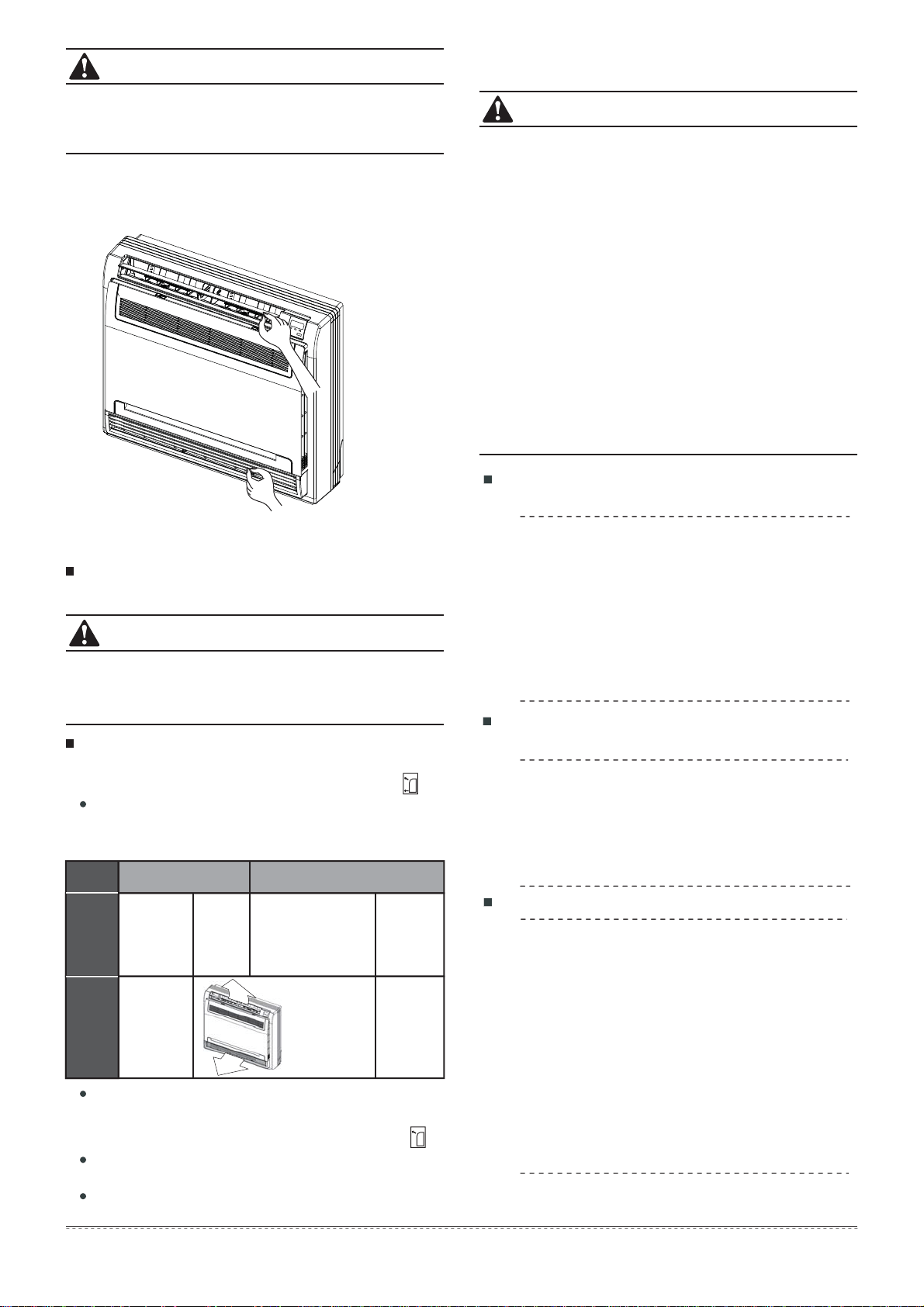
Table 6-1
Adjust the Air Flow Direction Left and Right
Hold the knob and move the louver.
You will find a knob on the left-side and the right-side blades.
(Refer to Fig.5-4)
7. MAINTENANCE
Maintenance After a Long Break Period
(e.g. at the beginning of the season)
Maintenance before a Long Stop Period
(e.g. at the end of the season)
Check and remove everything that might be blocking inlet
and outlet vents on the indoor units and outdoor units.
Clean the air filters and casings of indoor units.
Refer to "Cleaning the Air Filter" for details on how to
proceed, and make sure to install cleaned air filters back to
the same position.
Turn on the power at least 12 hours before operating the
unit, in order to ensure smoother operation. As soon as the
power is turned on, the remote controller displays appear.
Let the indoor units run in fan only operation for about half
a day in order to dry the interior of the units.
Clean the air filters and casings of the indoor units. Refer to
"Cleaning the Air Filter" for details on how to proceed, and
make sure to install cleaned air filters back to the same
position.
Cleaning the Air Filter
Before you clean the air conditioner, be sure the power
supply is off.
Check that the wiring is not broken or disconnected.
Use a dry cloth to wipe the indoor unit and the remote
controller.
A wet cloth may be used to clean the indoor unit if it is
very dirty.
Never use a damp cloth on the remote controller.
Do not use a chemically-treated duster for wiping, or leave
any such material on the unit for long, as it may damage or
cause fading on the surface of the unit.
Do not use benzene, paint thinner, polishing powder, or
similar solvents for cleaning.
Fig. 5-4
Before opening the front panel, be sure to cease
operation and turn the breaker OFF.
Do not touch the metal parts on the inside of the indoor
unit, as it may result in injury.
6. AIR FLOW SELECTION
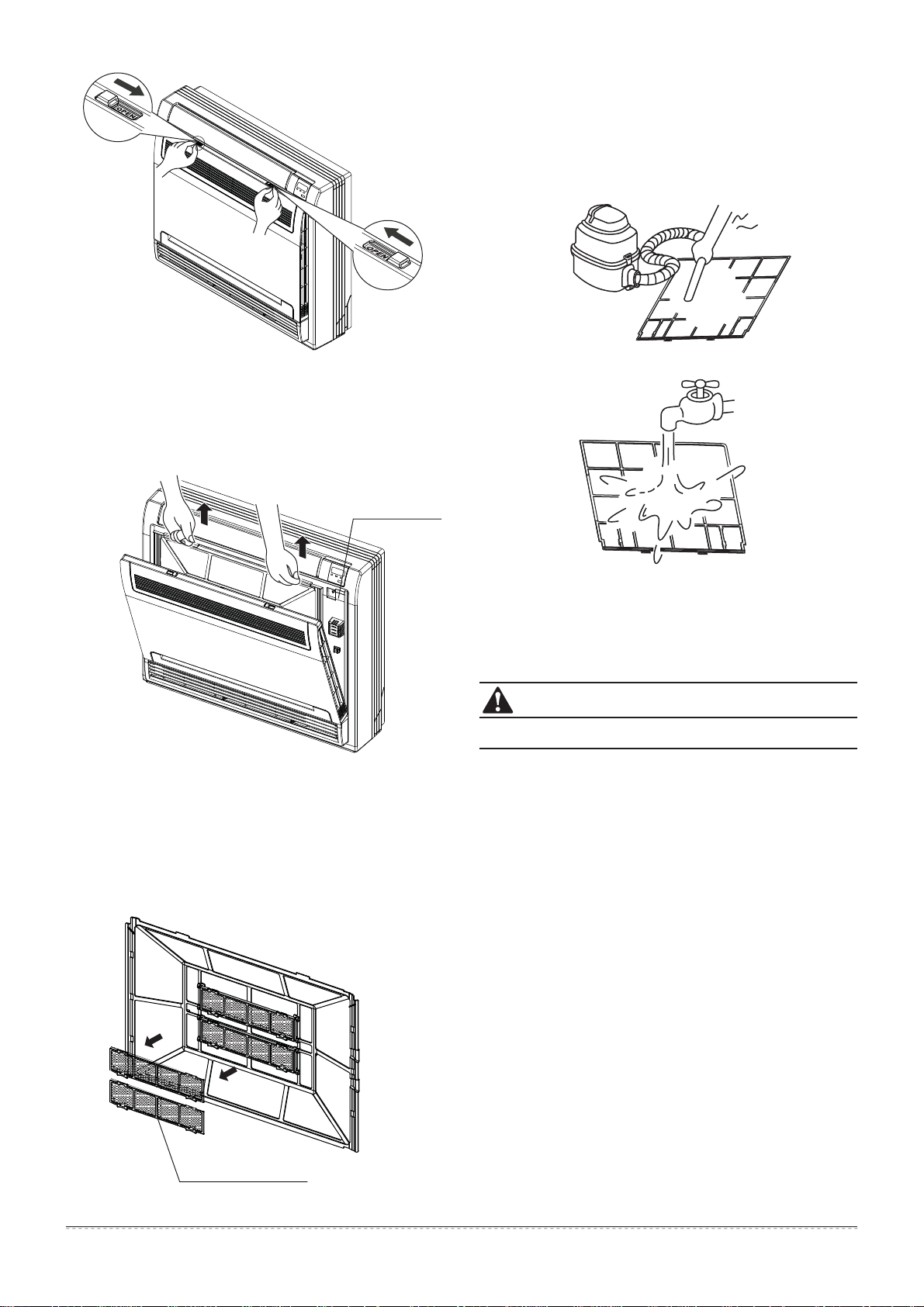
Open the front panel.
Refer to Fig.7-1 for instructions on doing so.
Set your air flow selection according to what suits you.
(Please refer to Fig. 7-2 for info regarding its position)
When setting the air flow selection switch to .
Air conditioner automatically decides the appropriate blowing
pattern depending on the operating mode/situation.
During Dry Mode, so that cold air does not come into direct
contact with people, air is blown through the upper air outlet.
Regardless of the operating mode or situation, air blows from
the upper air outlet.
Operating
Mode
Situation
Blowing
Pattern
COOL mode HEAT mode
When the room
has become fully
cooled, or when
one hour has
passed since
turning on the air
conditioner.
So that air does
not come into dir-
ect contact with
people, air is blo-
wn through the
upper air outlet,
and room temp.
is equalized.
At the start
of operation,
or other
times when
the room is
not fully
cooled.
At times other than below.
(”Normal time”)
Air is blown from the
upper and lower air
outlets for high spe-
ed cooling during
COOL mode, and
for filling the room
with warm air during
HEAT mode.
At the start, or
when the air
temperature is
low.
So that air does
not come into
direct contact
with people, air
is blown
through the
upper air outlet.
7. MAINTENANCE
The air filter can prevent dust or other particles from going
inside. In the case of blockage of the filter, the working
efficiency of the air conditioner may drastically decrease.
Therefore, the filter must be cleaned once every two weeks
during long time usage.
If the air conditioner is installed in a dusty place, clean the
the air filter frequently.
If the accumulated dust is too heavy to be cleaned, please
replace the filter with a new one (a replaceable air filter is
an optional fitting).
All filter cleaning should be performed by a suitable
handyperson.
CAUTION
CAUTION
When setting the air outlet selection switch to .
5
owner’s manual
Air Outlet
Selection Switch
Special Function Filter
Fig.7-1
Fig.7-2
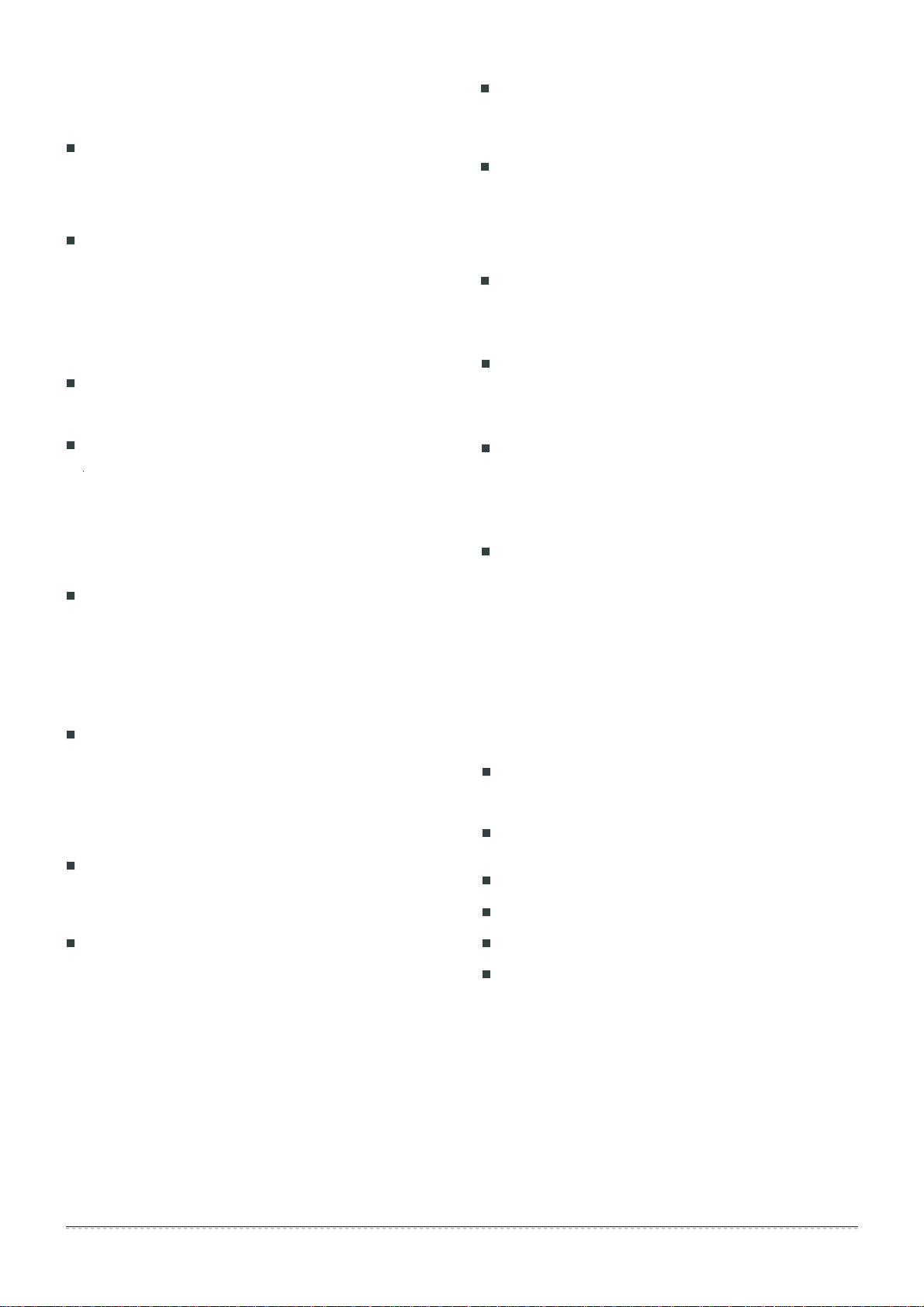
Do not dry out the air filter underneath direct sunshine.
Open the Front Panel
(Refer to Fig. 7-1).
1
Remove the Air Filter.
2
Clean the Air Filter
A vacuum cleaner or pure water may be used to clean the air
filter. If the dust accumulation is too heavy, please use a soft
brush and mild detergent to clean it, and dry out in cool place.
The air-in side should face up when using a vacuum cleaner.
(Refer to Fig. 7-4)
The air-in side should face down when using water.
(Refer to Fig. 7-5)
Press the claws on the right and left of the air filter down
slightly, and then pull upward
(Refer to Fig. 7-2).
Take off the Special Function Filter
3
Hold the tabs of the frame, and remove the claws in 4 places
(Refer to Fig.7-3).
The special function filter can be renewed
by washing it with water once every 6 months. We
recommend replacing it once every 3 years.
Reset the Air Filter and the Special Function Filter as they
were, and close the front panel.
5
Operating without air filters may result in trouble, as dust will
accumulate witihin the indoor unit.
4
Fig.7-3
Fig.7-4
Fig.7-5
CAUTION
6
owner’s manual
8. THE FOLLOWING SYMPTOMS ARE NOT
AIR CONDITIONER TROUBLES:
Symptom 1: System does not operate
Symptom 2: System switches to Fan
Mode during Cooling Mode
Symptom 3: White mist comes out of the Unit
Symptom 4: Noise of Air Conditioners cooling
The air conditioner fails to start immediately after the ON/OFF
button on the remote controller is pressed. If the operation lamp
lights up, then the system is in normal condition. To prevent
overloading of the compressor motor, the air conditioner starts 3
minutes after it is turned ON.
If the operation lamp and the "
PRE-DEF” indicator (cooling and
heating type) or “Fan-Only” indicator (cooling-only type)
lights
up, it means that you chose heating mode. When just booting, if
the compressor has not started, the indoor unit appears as
"anti cold wind" protection, due to overflow outlet temperature.
In order to prevent indoor evaporator frosting, the system will
switch to fan mode automatically, and will restore back to
cooling mode shortly after.
When the room temperature drops to the set temperature, the
compressor goes off, and the indoor unit changes to fan mode.
When the temperature rises up, the compressor starts again. It
works the same way in heating mode.
Symptom 3.1: Indoor Unit
Symptom 3.2: Indoor Unit, Outdoor Unit
Symptom 4.1: Indoor Unit
When humidity is high during a cooling operation, and if the
interior of an indoor unit is extremely dirtied, the temperature
distribution inside a room becomes uneven. It is necessary to
clean the interior of the indoor unit. Ask your dealer for details
on cleaning the unit. This operation requires qualified service
personnel.
When the system is switched over to a heating operation after a
defrosting operation, any moisture generated by defrosting
becomes steam, and is emitted outward.
A continuous and low hissing sound is heard when the system
is in a cooling operation, or at a stop.
When the drain pump (optional accessory) is in operation, this
noise is also heard.
A "pss-pss" squeaking sound is heard when the system stops
after completion of a heating operation.
Expansion and contraction of plastic parts caused by
temperature changes also make this noise.
Symptom 4.2: Indoor Unit, Outdoor Unit
A continuous low hissing noise is heard when the system is in
operation.
This is the sound of refrigerant gas flowing through both the
indoor and outdoor units.
A hissing sound is heard at the start, or immediately after,
stopping operation, or beginning a defrosting operation.
This is the noise of refrigerant, caused by flow stoppage or flow
change.
Symptom 4.3: Outdoor Unit
When the tone of operating noise changes.
This noise is caused by a change of frequency.
Symptom 5: Dust comes out of the Unit
Symptom 6: The Unit gives off strange odors
When the unit is used for the first time in a long time.
This is most likely due to dust having gotten inside the unit.
The unit can absorb the smell of rooms, furniture, cigarettes,
etc., and then emit it again.
Symptom 7: The Outdoor Unit fan does not
spin.
During operation, the speed of the fan is controlled in order to
optimize product operation.
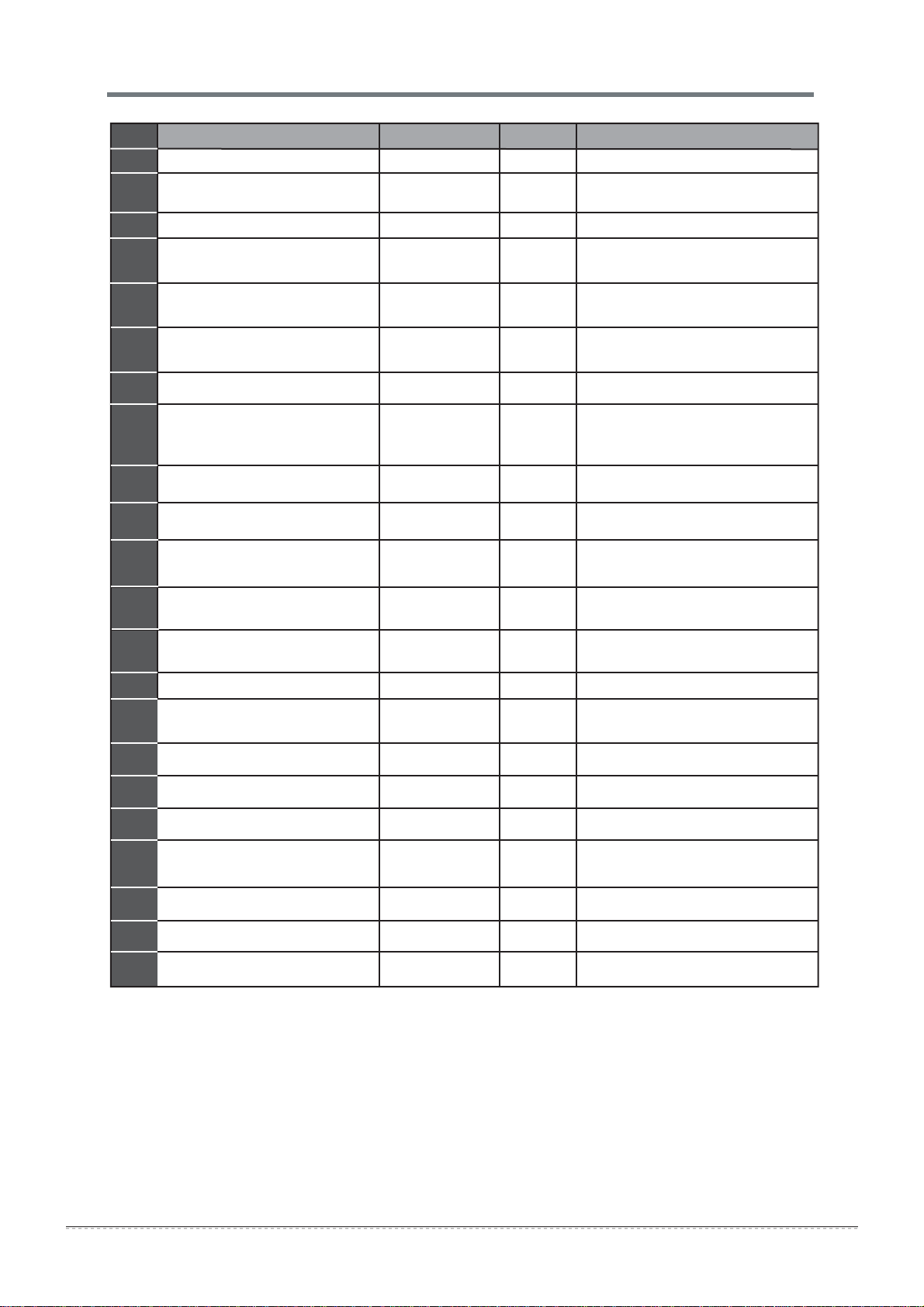
The operation lamp is flashing rapidly (~5Hz) and the lamp
continues flashing rapidly after turning off the power and turning
it on again. (Refer to Table 9-1)
Remote controller starts malfunctioingn or the buttons do not
work well.
A safety device, such as a fuse or breaker, frequently actuates.
Obstacles and/or water enter the unit.
Water leaks out of the indoor unit.
Any other strange, concerning malfunctions.
9. TROUBLESHOOTING
If one of the following malfunctions occur, cease operation,
shut off the power, and contact your dealer.
If the system does not properly operate, except when the above
mentioned cases or the above mentioned malfunctions is
evident, investigate the system according to the following
procedures (Refer to Table 9-2).
9.1. Malfunctions of the Air Conditioner
7
owner’s manual
Table 9-1
NO.
Malfunction timer lamp
running lamp (flashes per second)
1
2
3
4
5
6
7
8
display (nixie tube)
Refrigerant leakage detection
malfunction
OFF
EC
Water-level alarm malfunction
8
EE
OFF
Outdoor room temperature sensor
open circuit or short circuit
F1
2
Outdoor condenser pipe
temperature sensor error
3
4
5
ON
F2
E3
Indoor fan speed malfunction
OFF
E4
Indoor room temperature sensor
open circuit or short circuit
OFF
E5
Evaporator coil temperature
sensor open circuit or short circuit
OFF
E9
Other malfunctions of the twins model
OFF
9
Communication malfunction
between the indoor and outdoor units
OFF
E1
10
11
12
13
Discharging air temperature
sensor error
F3
Outdoor EEPROM error
F4
Communication malfunction
between two indoor units (for the
twins model)
E8
OFF
F0
1
10
9
7
6
5
4
2
1
Current overload protection
Indoor EEPROM error
E0
OFF
14
15
16
17
18
19
20
21
22
Outdoor fan speed malfunction
(Only for DC fan motor)
T2b sensor error
F5
F6
6
7
1
2
ON
ON
ON
ON
ON
ON
Inverter module IPM protection
P0
Flash
High/Low voltage protection
P1
Flash
High temperature protection of the
compressor top
P2
3
Outdoor low temp. protection
P3
4
Compressor drive error
P4
5
Mode conflict
P5
6
Flash
Flash
Flash
Flash

8
owner’s manual
Clean the heat exchanger.
Clean the air filter.
Eliminate all contaminants and make
filtrate the air.
Close doors and windows.
Draw curtains closed in order to shield
from sunshine.
Reduce heat source.
A/C cooling capacity is reduced (normal).
Check leakage and recharge refrigerant.
The air is flowing normally
but can’t completely cool
Unit starts or stops frequently
Insufficient cooling results
Low heating effect
Power failure.
Power switch is off.
Fuse of power switch may have burned.
Batteries of remote controller exhausted
or other problem of controller.
Temperature is not set correctly.
Possible 3 minute protection precaution
of compressor.
Too little or too much refrigerant inside.
Air or other concentrated gas in the
refrigerant circuit.
Malfuction of compressor.
Voltage is too high or too low.
System circuit is blocked.
Outdoor unit and/or indoor unit heat
exchanger is dirty.
The air filter is dirty.
Inlet/outlet of indoor/outdoor units has
blockage.
Doors and windows are open.
Sunlight is shine directly onto unit.
Too many heat sources within the area.
Outdoor temp. is too high.
Leakage of refrigerant, or lack of
refrigerant.
Wait for the return of power.
Switch on the power.
Replace the fuse.
Replace the batteries, or check the con-
troller.
Set the temperature properly.
Wait 3 minutes and try again.
Check leakage, and recharge the
refrigerant.
Vacuum and recharge refrigerant.
Maintenance, or change compressor.
Install a manostat.
Trace the resolve the blockage.
Use heating device.
Close doors and windows.
Check leakage and recharge
refrigerant.
Outdoor temperature is lower than 7 C
Doors and windows not completely
closed.
Leakage of refrigerant, or lack of
refrigerant.
SolutionSymptoms Causes
Unit does not start
Table 9-2
9.2 Malfunction of Remote Controller
Before sending in for service or repair, check the following points.
(Refer to Table 9-3)
Symptoms
Causes
The fan speed cannot be
changed.
Check whether the MODE
indicated on the display is
"AUTO"
Check whether the MODE
indicated on the display is
"DRY"
When the automatic mode is
selected, the air conditioner will
automatically change the fan
speed.
When dry operation is selected,
the air conditioner automatically
changes the fan speed. The fan
speed can be selected during
"COOL" , "FAN ONLY",
and
"HEAT"
The remote controller signal is
not transmitted, even when
the ON/OFF button is pushed.
Check whether the batteries
in the remote controller are
exhausted.
Use fresh batteries.
No receiving tone sounds
from the indoor unit, even
when the ON/OFF button is
pressed.
Check whether the signal
transmitter of the remote
controller is properly directed
to the infrared signal receiver
of the indoor unit when the
ON/OFF button is pressed.
Directly transmit the signal transmitter of
the remote controller to the
infrared signal receiver of the
indoor unit, and then repeatedly
push the ON/OFF button twice.
The indication on the display
disappears after a lapse of
time.
Check whether the timer
operation has come to an
end, when TIMER OFF
is indicated on the display.
The air conditioner operation will
stop at the set time
The TIMER ON indicator
goes off after a lapse of
certain time.
Check whether the timer
operation is started when
TIMER ON is indicated
on the display.
Up to the set time, the
air conditioner will automatically
start, and the appropriate
indicator will go off.
The TEMP. indicator does
not come on.
Check whether the MODE
indicated on the display is
FAN ONLY
The temperature cannot be set during
FAN mode.
Table 9-3
Solution

The design and specications of this product are subject to change without prior notice
as development continues. Consult with the sales agency or manufacturer for details.
QSBPZU-023AEN
16122600000003
20170328
Parker Davis HVAC International, Inc.
2250 NW 102 Place, Doral, FL 33172
Phone: (800) 243-0340
www.highseer.com