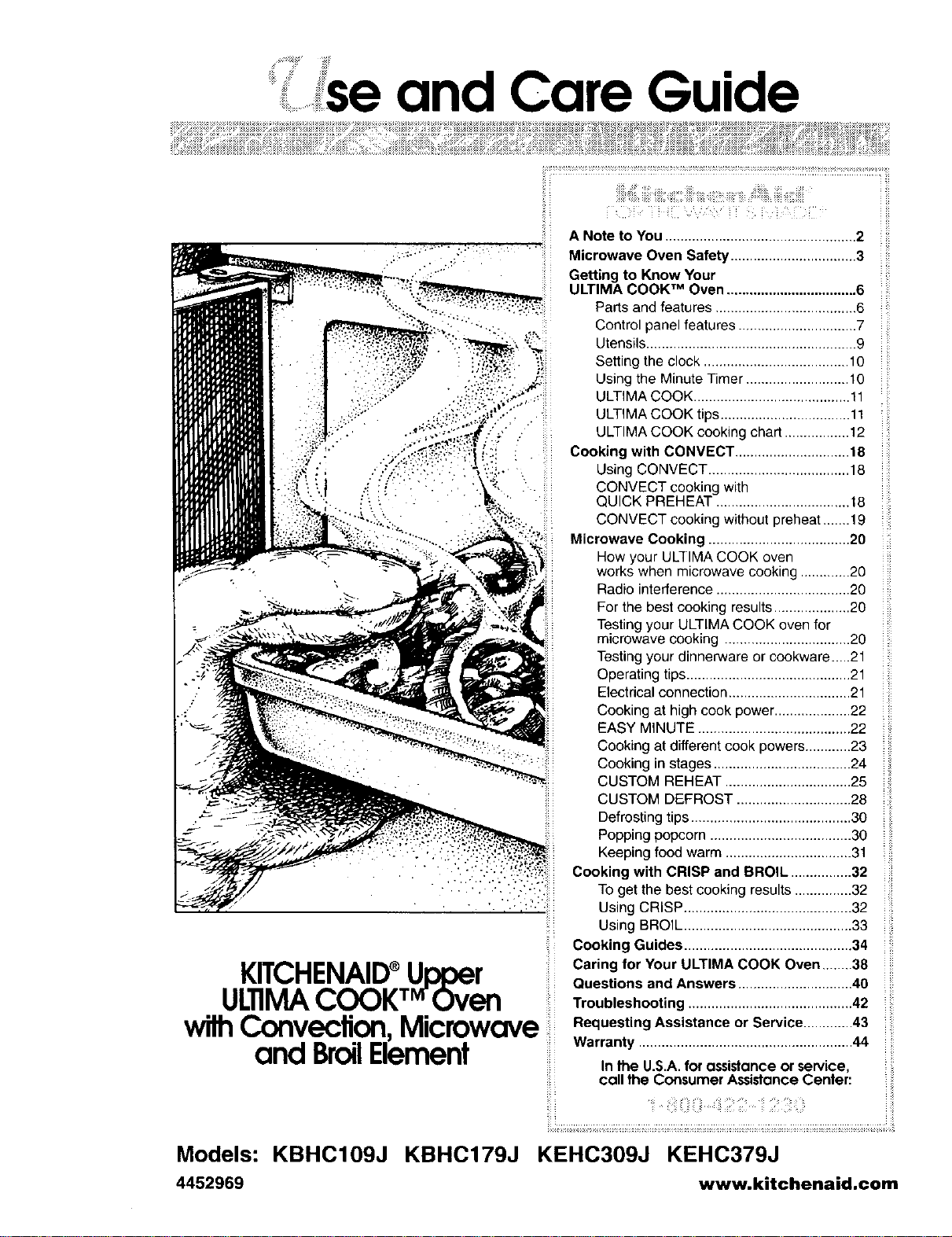
'se and Care Guide
KITCHENAID®Upper
ii !
ULIIMACOOKT_rOven
wilhConvection,Microwave
and BroilElement
A Note to You .................................................. 2
i i:i
Microwave Oven Safety ................................. 3
Getting to Know Your
ULTIMA COOK TM Oven .................................. 6
Parts and features ..................................... 6
Control panel features ............................... 7
Utensils ....................................................... 9
Setting the clock ...................................... 10
Using the Minute Timer ........................... 10
ULTIMA COOK ......................................... 11
ULTIMA COOK tips .................................. 11
ULTIMA COOK cooking chart ................. 12
Cooking with CONVECT .............................. 18
Using CONVECT ..................................... 18
CONVECT cooking with
QUICK PREHEAT ................................... 18
CONVECT cooking without preheat ....... 19
Microwave Cooking ..................................... 20
How your ULTIMA COOK oven
works when microwave cooking ............. 20
Radio interference ................................... 20
For the best cooking results .................... 20
Testing your ULTIMA COOK oven for
microwave cooking ................................. 20
Testing your dinnerware or cookware.._.21
Operating tips ........................................... 21
Electrical connection ................................ 21
Cooking at high cook power .................... 22
EASYM_NUTE........................................22
Cooking at different cook powers ............23
Cooking in stages .................................... 24
CUSTOM REHEAT ................................. 25
CUSTOM DE,FROST .............................. 28
Defrosting tips .......................................... 30
Popping popcorn ..................................... 30
Keeping food warm ................................. 31
Cooking with CRISP and BROIL ................ 32
To get the best cooking results ............... 32
Using CRISP ............................................ 32
Using BROIL ............................................ 33
Cooking Guides ............................................ 34
Caring for Your ULTIMA COOK Oven ........38
Questions and Answers .............................. 40
Troubleshooting ........................................... 42
Requesting Assistance or Service ............. 43
Warranty ........................................................ 44
i ii
In the U.S.A. for assistance or service,
call the Consumer Assistonce Center:
Models: KBHC109J KBHC179J KEHC309J KEHC379J
4452969 www.kitchenaid,com
Note toYou
_!_,J_i!_i?ii'i!_k U'i5_!__ ii_iii::_i!_I_::Yhi_ii i_!ii:iiC:i!i(i ii_!:iiii:i_ii!ii_ilYi,_'i_iiiii{_ _::_iiii:3_iii3!!ii_::ii_!__i_::i:_,_ii?_i
Because your life is getting busier and more complicated, KitchenAid ®appliances are
easy to use, save time, and help you manage your home better. To ensure that you
enjoy many years of trouble-free operation, we developed this Use and Care Guide.
It contains valuable information concerning how to operate and maintain your new
appliance properly. Please read it carefully. Also, please complete and
mail the enclosed Product Registration Card.
Whenever you call our Consumer Model Number
Assistance Center at 1-800-422-1230 or
request service for your appliance, you
need to know your complete model number
and serial number. You can find this infor-
mation on the model and serial number
plate (located on the lower oven ).
Please also record the purchase
information.
Serial Number
Purchase/
Installation Date
Builder/Dealer
Name
Address
NOTE: You must provide proof of purchase Phone
or installation date for in-warranty service.
Keep this book and the sales slip together in a safe place for future reference.
................_ _ii!¸
., _iiiiii
iiii;, i 'iiiiii iiiiii •
icrowave Oven Safety
Your safety and the safety of others are very important.
We have provided many important safety messages in this manual and on your appliance.
Always read and obey all safety messages.
This is the safety alert symbol.
This symbol alerts you to potential hazards that can kill or hurt you and
others.
All safety messages will follow the safety alert symbol and either the word
"DANGER" or "WARNING." These words mean:
You can be killed or seriously injured if you
don't immediately follow instructions.
You can be killed or seriously injured if you
don't follow instructions.
All safety messages will tell you what the potential hazard is, tell you how to reduce the
chance of injury, and tell you what can happen if the instructions are not followed.
IMPORTANT SAFETY INSTRUCTIONS
When using electrical appliances basic safety precautions should be followed, including
the following:
WARNING: To reduce the risk of burns,
electric shock, fire, injury to persons, or
exposure to excessive microwave energy:
• Read all instructions before using the
microwave oven.
• Read and follow the specific "PRE-
CAUTIONS TO AVOID POSSIBLE
EXPOSURE TO EXCESSIVE
MICROWAVE ENERGY" found in
this section.
• The microwave oven must be
grounded. Connect only to properly
grounded outlet. See "GROUNDING
INSTRUCTIONS" found in the
"Installation Instructions" section and on
page 5 of this manual.
• Install or locate the microwave oven
only in accordance with the provided
Installation Instructions.
• Some products such as whole eggs in
the shell and sealed containers - for
example, closed glass jars - may
explode and should not be heated in
the microwave oven.
• Use the microwave oven only for its
intended use as described in this manual.
Do not use corrosive chemicals or vapors
in the microwave oven. This type of oven
is specifically designed to heat, cook, or
dry food. It is not designed for industrial
or laboratory use.
• As with any appliance, close supervision
is necessary when used by children.
• Do not operate the microwave oven if it
has a damaged cord or plug, if it is not
working properly, or if it has been
damaged or dropped.
SAVE THESE INSTRUCTIONS
continued on next page
3
_::''_°......... _icrowave Oven Safety
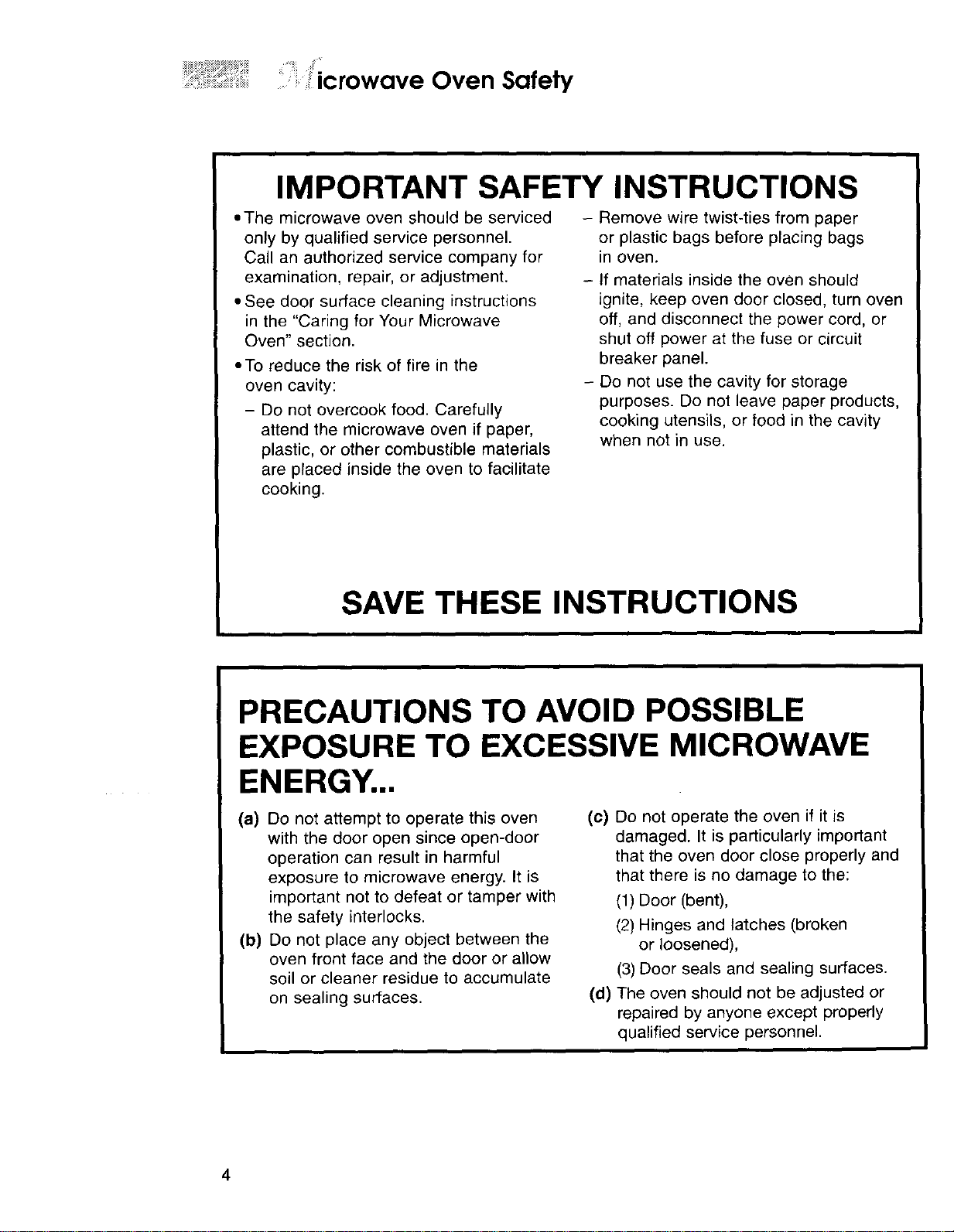
IMPORTANT SAFETY INSTRUCTIONS
,,The microwave oven should be serviced
only by qualified service personnel.
Call an authorized service company for
examination, repair, or adjustment.
• See door surface cleaning instructions
in the "Caring for Your Microwave
Oven" section.
• To reduce the risk of fire in the
oven cavity:
- Do not overcook food. Carefully
attend the microwave oven if paper,
plastic, or other combustible materials
are placed inside the oven to facilitate
cooking.
- Remove wire twist-ties from paper
or plastic bags before placing bags
in oven.
- If materials inside the oven should
ignite, keep oven door closed, turn oven
off, and disconnect the power cord, or
shut off power at the fuse or circuit
breaker panel.
- Do not use the cavity for storage
purposes. Do not leave paper products,
cooking utensils, or food in the cavity
when not in use.
SAVE THESE INSTRUCTIONS
PRECAUTIONS TO AVOID POSSIBLE
EXPOSURE TO EXCESSIVE MICROWAVE
ENERGY..,
(a) Do not attempt to operate this oven (c)
with the door open since open-door
operation can result in harmful
exposure to microwave energy. It is
important not to defeat or tamper with
the safety interlocks.
(b) Do not place any object between the
oven front face and the door or allow
soil or cleaner residue to accumulate
on sealing surfaces. (d)
Do not operate the oven if it is
damaged. It is particularly important
that the oven door close properly and
that there is no damage to the:
(1) Door (bent),
(2) Hinges and latches (broken
or loosened),
(3) Door seals and sealing surfaces.
The oven should not be adjusted or
repaired by anyone except properly
qualified service personnel.
4
icrowave Oven Safely
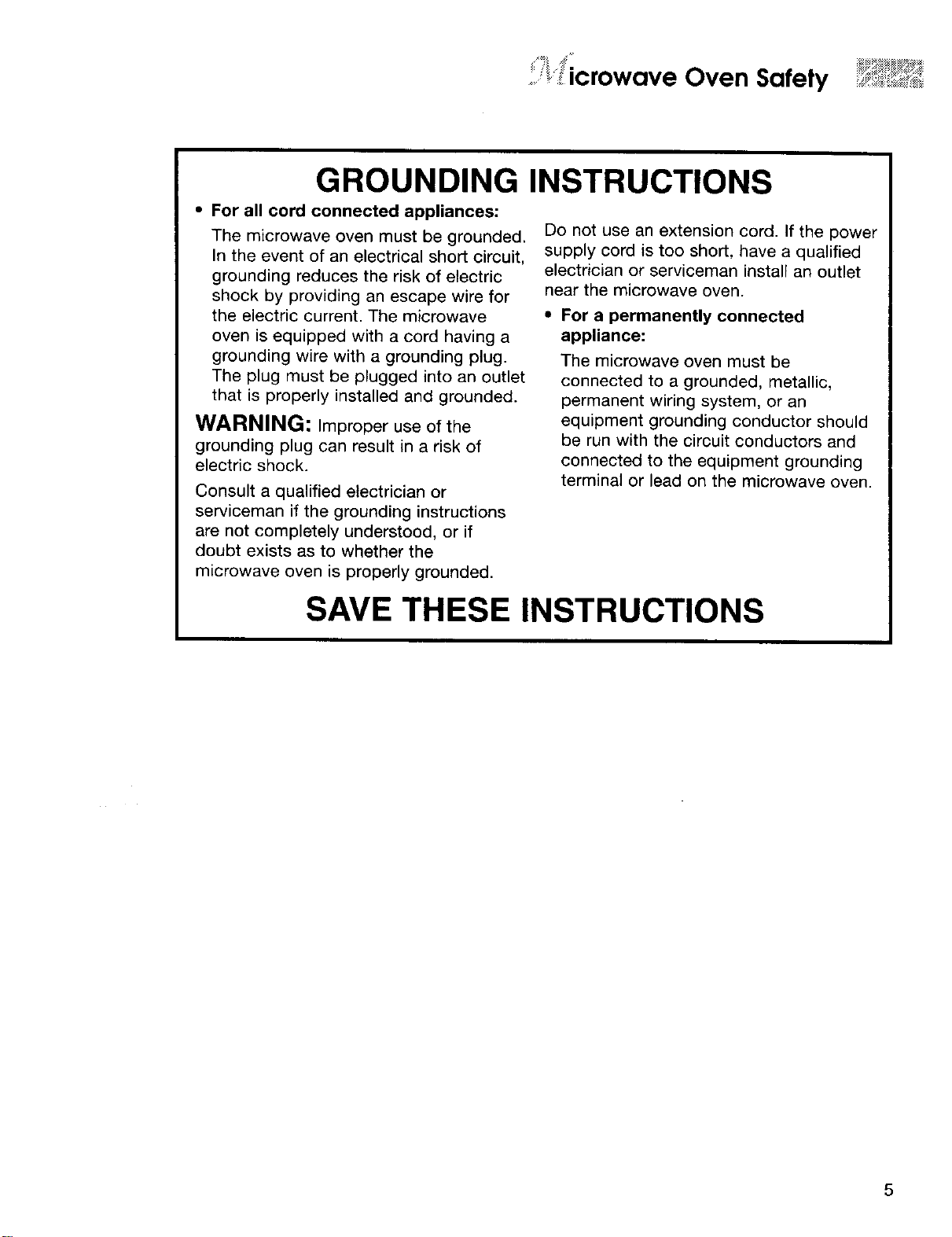
GROUNDING
• For all cord connected appliances:
The microwave oven must be grounded.
In the event of an electrical short circuit,
grounding reduces the risk of electric
shock by providing an escape wire for
the electric current. The microwave
oven is equipped with a cord having a
grounding wire with a grounding plug.
The plug must be plugged into an outlet
that is properly installed and grounded.
WARNING: Improper use of the
grounding plug can result in a risk of
electric shock.
Consult a qualified electrician or
serviceman if the grounding instructions
are not completely understood, or if
doubt exists as to whether the
microwave oven is properly grounded.
INSTRUCTIONS
Do not use an extension cord. If the power
supply cord is too short, have a qualified
electrician or serviceman install an outlet
near the microwave oven.
• For a permanently connected
appliance:
The microwave oven must be
connected to a grounded, metallic,
permanent wiring system, or an
equipment grounding conductor should
be run with the circuit conductors and
connected to the equipment grounding
terminal or lead on the microwave oven.
SAVE THESE INSTRUCTIONS
efling to Know Your
........ULTIMACOOK TMOven
@ ® ®
® ®
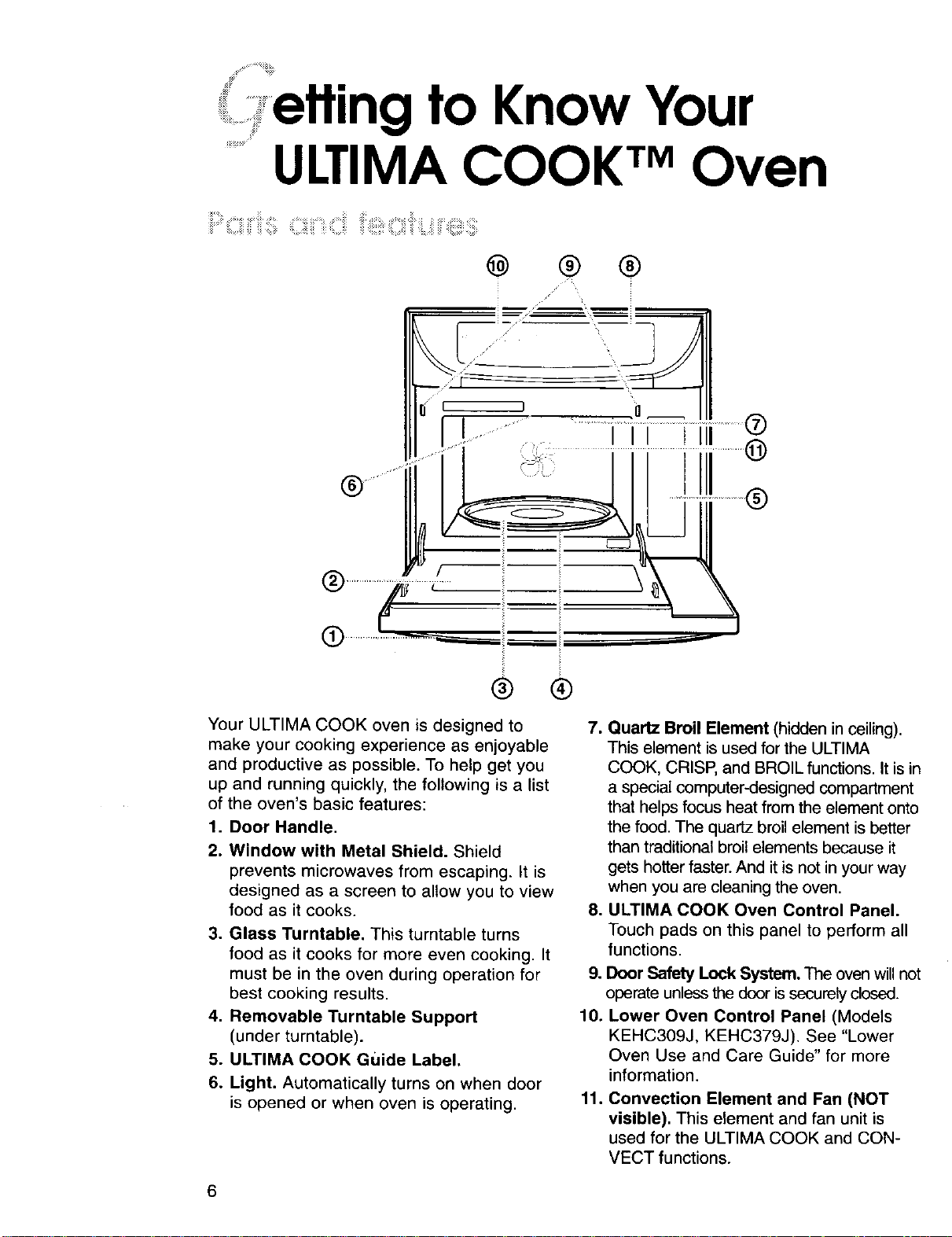
Your ULTIMA COOK oven is designed to
make your cooking experience as enjoyable
and productive as possible. To help get you
up and running quickly, the following is a list
of the oven's basic features:
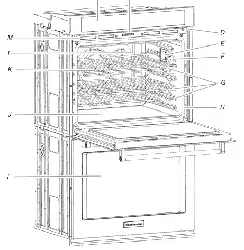
1. Door Handle.
2. Window with Metal Shield. Shield
prevents microwaves from escaping. It is
designed as a screen to allow you to view
food as it cooks.
3. Glass Turntable. This turntable turns
food as it cooks for more even cooking. It
must be in the oven during operation for
best cooking results.
4. Removable Turntable Support
(under turntable).
5. ULTIMA COOK Guide Label.
6. Light. Automatically turns on when door
is opened or when oven is operating.
7. Quartz Broil Element (hidden in coiling).
This element is used for the ULTIMA
COOK, CRISP, and BROIL functions. It is in
a special computer-designed compartment
that helps focus heat from the element onto
the food. The quartz broil element is better
than traditional broil elements because it
gets hotter faster. And it is not in your way
when you are cleaning the oven.
8. ULTIMA COOK Oven Control Panel.
Touch pads on this panel to perform all
functions.
9. Door Safety Lock System. The oven will not
operate unless the door is securely closed.
10. Lower Oven Control Panel (Models
KEHC309J, KEHC379J). See "Lower
Oven Use and Care Guide" for more
information.
11. Convection Element and Fan (NOT
visible). This element and fan unit is
used for the ULTIMA COOK and CON-
VECT functions.
6
_ fling to Know Your ULTIMA COOK TM Oven ....°_*"*"_;""_
I CLOCKSET.START _ ................(_
.,.__ ....
•,(_s,zEs__ _ _ _
® ® ® ®@®® @ @ @
A-B
: :: _ ,._ . : ;: i i;¸ _: _i::,_
:F : _r_!<i_i_,i i _ !i!,': i::i:iii ¸ _ _ • _ii :,," _ !_!'I__:!:! _: :: "_ ;_ ;: ¸¸
®
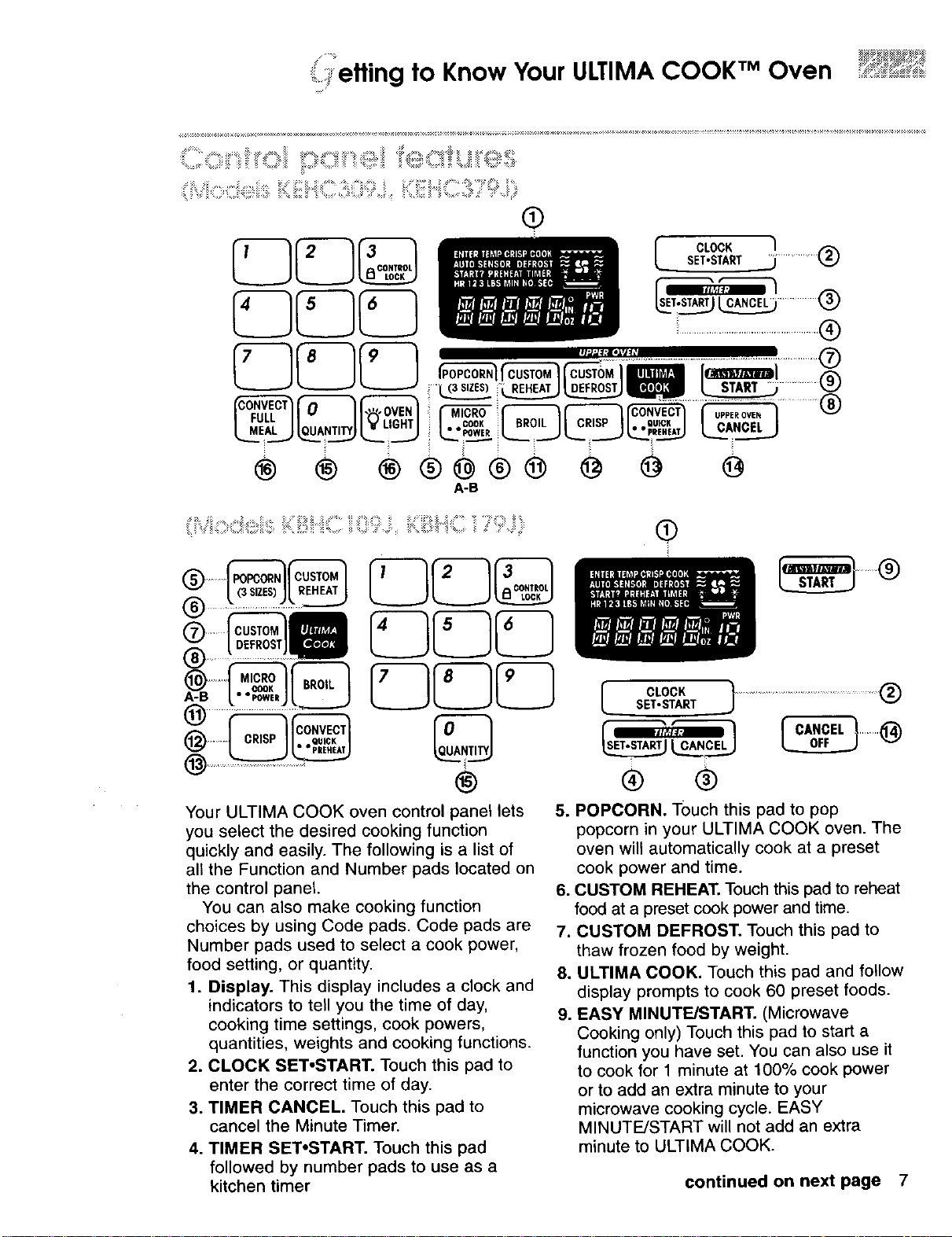
Your ULTIMA COOK oven control panel lets
you select the desired cooking function
quickly and easily. The following is a list of
all the Function and Number pads located on
the control panel.
You can also make cooking function
choices by using Code pads. Code pads are
Number pads used to select a cook power,
food setting, or quantity.
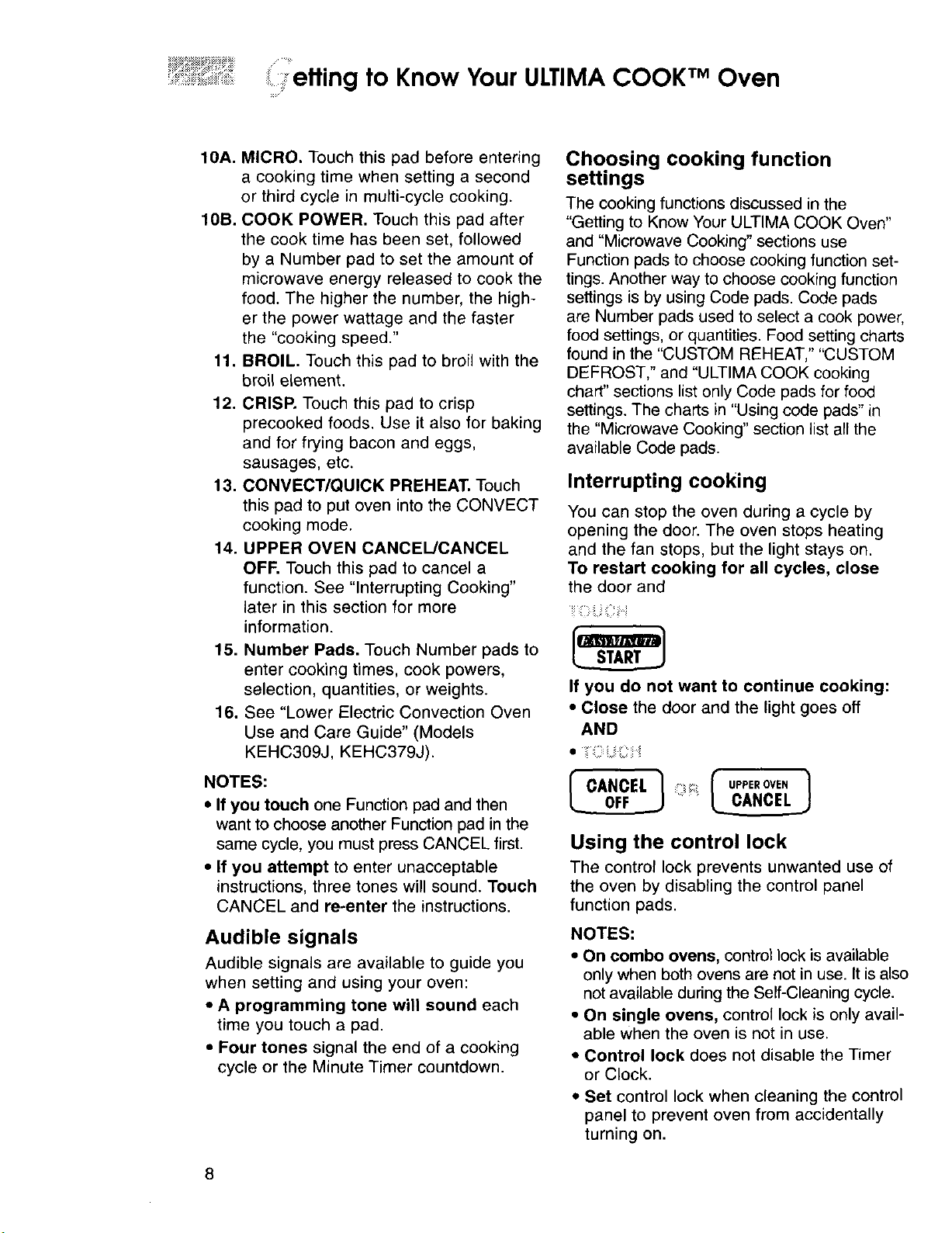
1. Display. This display includes a clock and
indicators to tell you the time of day,
cooking time settings, cook powers,
quantities, weights and cooking functions.
2. CLOCK SET*START. Touch this pad to
enter the correct time of day.
3. TIMER CANCEL. Touch this pad to
cancel the Minute Timer.
4. TIMER SET*START. Touch this pad
followed by number pads to use as a
kitchen timer
®
SET.S .,cl°cK............................................®
r CANCEL7" "_i_
v
® ®
5. POPCORN. Touch this pad to pop
popcorn in your ULTIMA COOK oven. The
oven will automatically cook at a preset
cook power and time.
6. CUSTOM REHEAT. Touch this pad to reheat
food at a preset cook power and time.
7. CUSTOM DEFROST. Touch this pad to
thaw frozen food by weight.
8. ULTIMA COOK. Touch this pad and follow
display prompts to cook 60 preset foods.
9. EASY MINUTE/START. (Microwave
Cooking only) Touch this pad to start a
function you have set. You can also use it
to cook for 1 minute at 100% cook power
or to add an extra minute to your
microwave cooking cycle. EASY
MINUTE/START will not add an extra
minute to ULTIMA COOK.
continued on next page 7
retting to Know Your ULTIMA COOK TM Oven
10A. MICRO. Touch this pad before entering
a cooking time when setting a second
or third cycle in multi-cycle cooking.
10B. COOK POWER. Touch this pad after
the cook time has been set, followed
by a Number pad to set the amount of
microwave energy released to cook the
food. The higher the number, the high-
er the power wattage and the faster
the "cooking speed."
11. BROIL. Touch this pad to broil with the
broil element.
12. CRISP. Touch this pad to crisp
precooked foods. Use it also for baking
and for frying bacon and eggs,
sausages, etc.
13. CONVECT/QUICK PREHEAT. Touch
this pad to put oven into the CONVECT
cooking mode.
14. UPPER OVEN CANCEL/CANCEL
OFF. Touch this pad to cancel a
function. See "Interrupting Cooking"
later in this section for more
information.
15. Number Pads. Touch Number pads to
enter cooking times, cook powers,
selection, quantities, or weights.
16. See "Lower Electric Convection Oven
Use and Care Guide" (Models
KEHC309J, KEHC379J).
NOTES:
• If you touch one Function pad and then
want to choose another Function pad in the
same cycle, you must press CANCEL first.
• If you attempt to enter unacceptable
instructions, three tones will sound. Touch
CANCEL and re-enter the instructions.
Audible signals
Audible signals are available to guide you
when setting and using your oven:
• A programming tone will sound each
time you touch a pad.
• Four tones signal the end of a cooking
cycle or the Minute Timer countdown.
Choosing cooking function
settings
The cooking functions discussed in the
"Getting to Know Your ULTIMA COOK Oven"
and "Microwave Cooking" sections use
Function pads to choose cooking function set-
tings. Another way to choose cooking function
settings is by using Code pads. Code pads
are Number pads used to select a cook power,
food settings, or quantities. Food setting charts
found in the "CUSTOM REHEAT," "CUSTOM
DEFROST," and "ULTIMA COOK cooking
chart" sections list only Code pads for food
settings. The charts in "Using code pads" in
the "Microwave Cooking" section list all the
available Code pads.
Interrupting cooking
You can stop the oven during a cycle by
opening the door. The oven stops heating
and the fan stops, but the light stays on.
To restart cooking for all cycles, close
the door and
If you do not want to continue cooking:
• Close the door and the light goes off
AND
_" CANCEL "i UPPEROVE,
Using the control lock
The control lock prevents unwanted use of
the oven by disabling the control panel
function pads.
NOTES:
• On combo ovens, control lock is available
only when both ovens are not in use. It is also
not available during the Self-Cleaning cycle.
• On single ovens, control lock is only avail-
able when the oven is not in use.
• Control lock does not disable the Timer
or Clock.
• Set control lock when cleaning the control
panel to prevent oven from accidentally
turning on.
8
etting to Know Your ULTIMA COOK TM Oven
To lock or deactivate the control panel:
Press and hold CONTROL LOCK (Number
Pad 3) for 5 seconds. A single
tone will sound and "CONTROL
LOCK /_" will appear on the dis-
play.
To unlock the control panel:
Press and hold CONTROL LOCK (Number
Pad 3) for 5 seconds. A single
tone will sound after 5 seconds
and "CONTROL LOCK P_"will
disappear from the display.
.......,, _=_=_=_iiii_iiii_¸iiiiii:_i;iiz¸
Your oven comes with useful cooking
utensils. Please review this chart to become
familiar with their use.
NOTE: Use oven mitt when removing
foods from oven. The interior of the oven will
become hot.
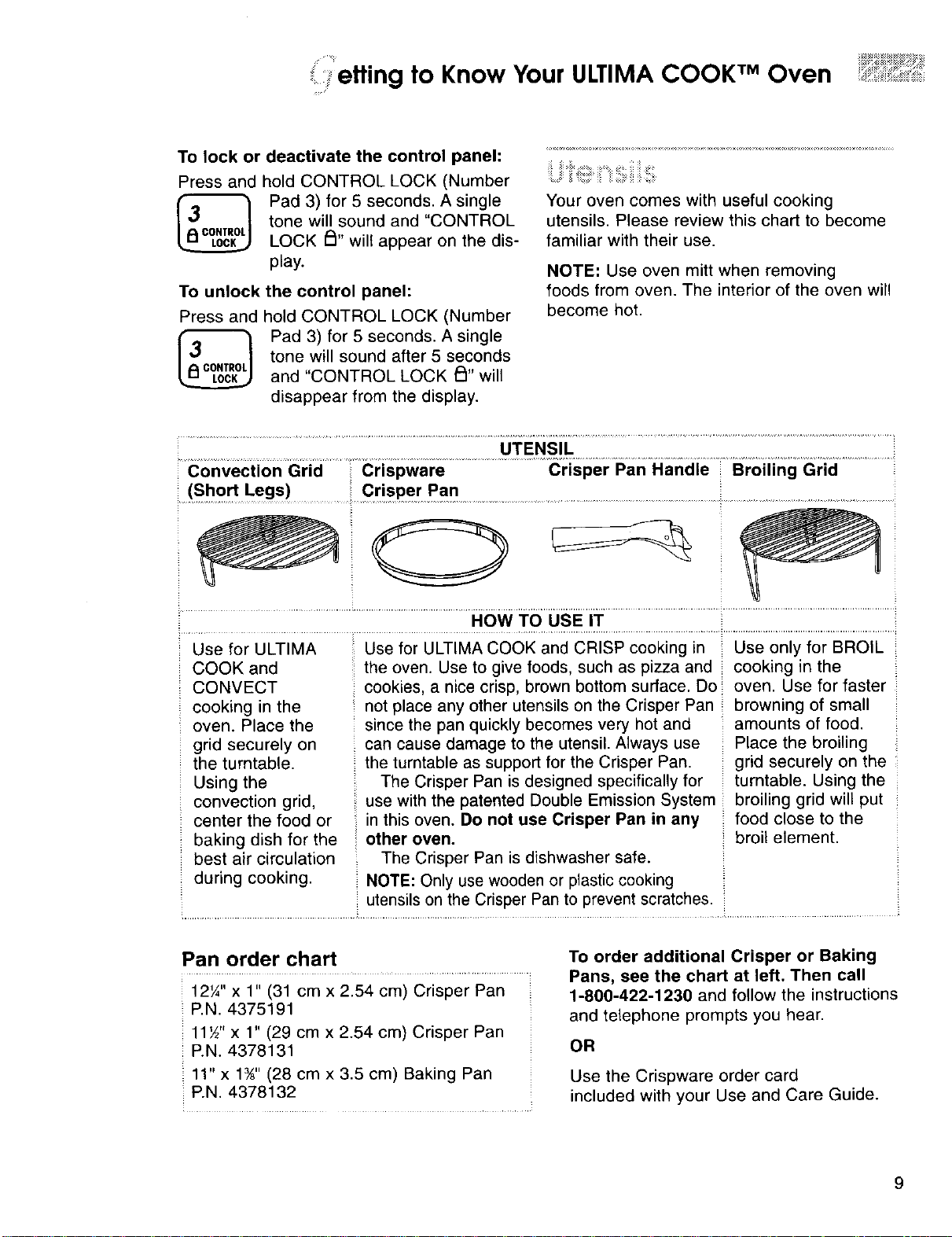
UTENSIL
Convection Grid Crispware Crisper Pan Handle Broiling Grid
(Short Legs) Crisper Pan
..............................................................................,owT00sEiT ..... .......................................
Use for ULTIMA Use for ULTIMA COOK and CRISP cooking in Use only for BROIL
COOK and the oven. Use to give foods, such as pizza and cooking in the
CONVECT cookies, a nice crisp, brown bottom surface. Do oven. Use for faster
cooking in the not place any other utensils on the Crisper Pan browning of small
oven. Place the since the pan quickly becomes very hot and amounts of food.
grid securely on can cause damage to the utensil. Always use Place the broiling
the turntable, the turntable as support for the Crisper Pan. grid securely on the
Using the The Crisper Pan is designed specifically for turntable. Using the
convection grid, use with the patented Double Emission System broiling grid will put
center the food or in this oven. Do not use Crisper Pan in any food close to the
baking dish for the : other oven. _:broil element.
best air circulation The Crisper Pan is dishwasher safe.
during cooking. NOTE: Only use wooden or plastic cooking
utensils on the Crisper Pan to prevent scratches.
Pan order chart
12'/," x 1" (31 cm x 2.54 cm) Crisper Pan
P.N. 4375191
11Y2'x 1" (29 cm x 2.54 cm) Crisper Pan
P.N. 4378131
11" x 1¾" (28 cm x 3.5 cm) Baking Pan
P.N. 4378132
To order additional Crisper or Baking
Pans, see the chart at left. Then call
1-800-422-1230 and follow the instructions
and telephone prompts you hear.
OR
Use the Crispware order card
included with your Use and Care Guide.
9
iiiiii e
.........,,,.........,_ _ fling to Know Your ULTIMA COOK TM Oven
:: :::::::::::::::::::::
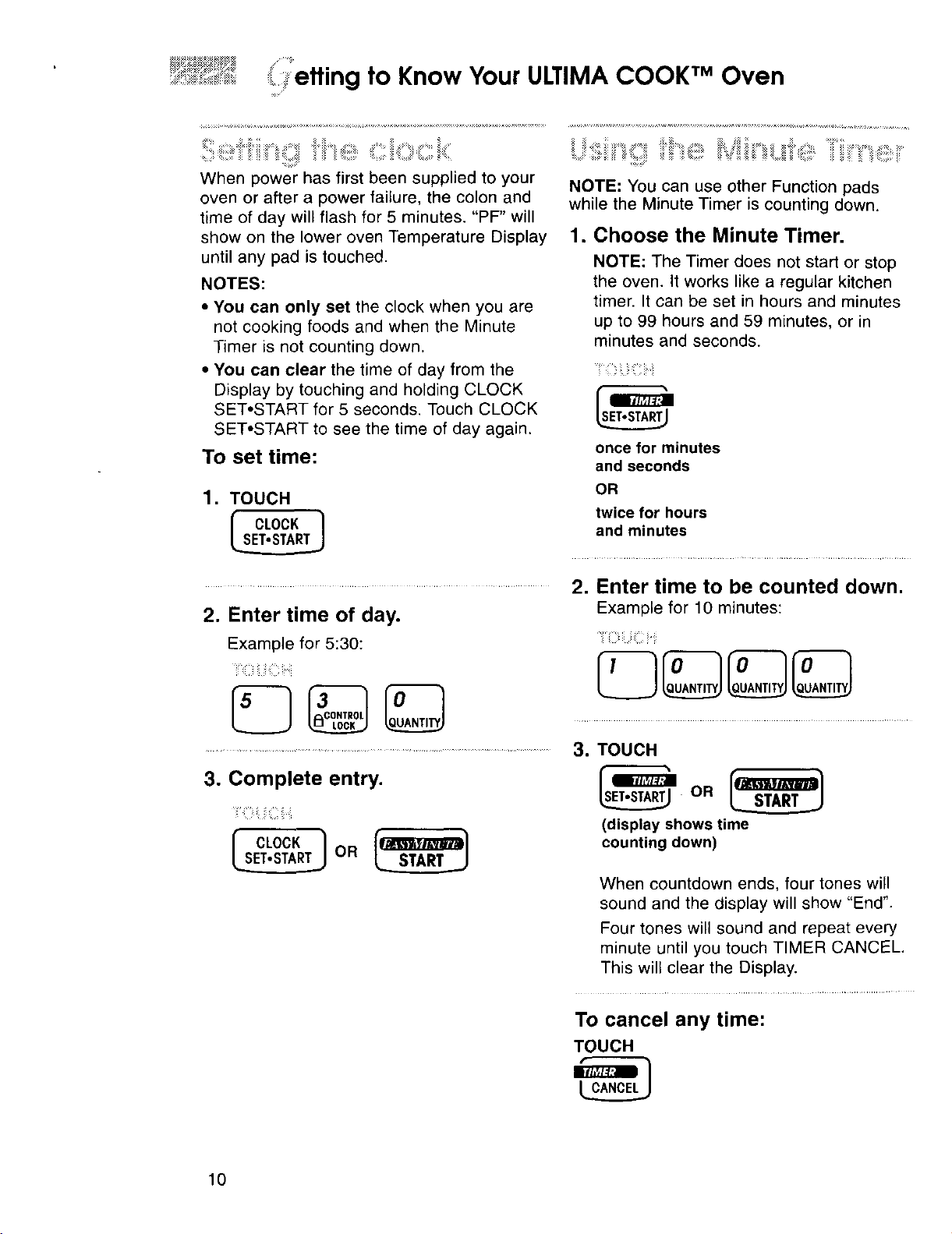
When power has first been supplied to your
oven or after a power failure, the colon and
time of day will flash for 5 minutes. "PF" will
show on the lower oven Temperature Display
until any pad is touched.
NOTES:
• You can only set the clock when you are
not cooking foods and when the Minute
Timer is not counting down.
• You can clear the time of day from the
Display by touching and holding CLOCK
SET*START for 5 seconds. Touch CLOCK
SET*START to see the time of day again.
To set time:
1. TOUCH
f CLOCK 1
NOTE: You can use other Function pads
while the Minute Timer is counting down.
1. Choose the Minute Timer.
NOTE: The Timer does not start or stop
the oven. It works like a regular kitchen
timer. It can be set in hours and minutes
up to 99 hours and 59 minutes, or in
minutes and seconds.
.....
once for minutes
and seconds
OR
twice for hours
and minutes
........................................ 2. Enter time to be counted down.
2. Enter time of day.
Example for 5:30:
...... .... ................. ............ 3o
3. Complete entry.
:
I CLOOK1
Example for 10 minutes:
=;
TOUCH
(display shows time
counting down)
When countdown ends, four tones will
sound and the display will show "End".
Four tones will sound and repeat every
minute until you touch TIMER CANCEL.
This will clear the Display.
To cancel any time:
TOUCH
10
/
etting to Know Your ULTIMA COOK TM Oven
i:! Z:i_:i:i_i::i;_ _i: ::i_ i_i :i: i:i _:i _i:i:i_::__
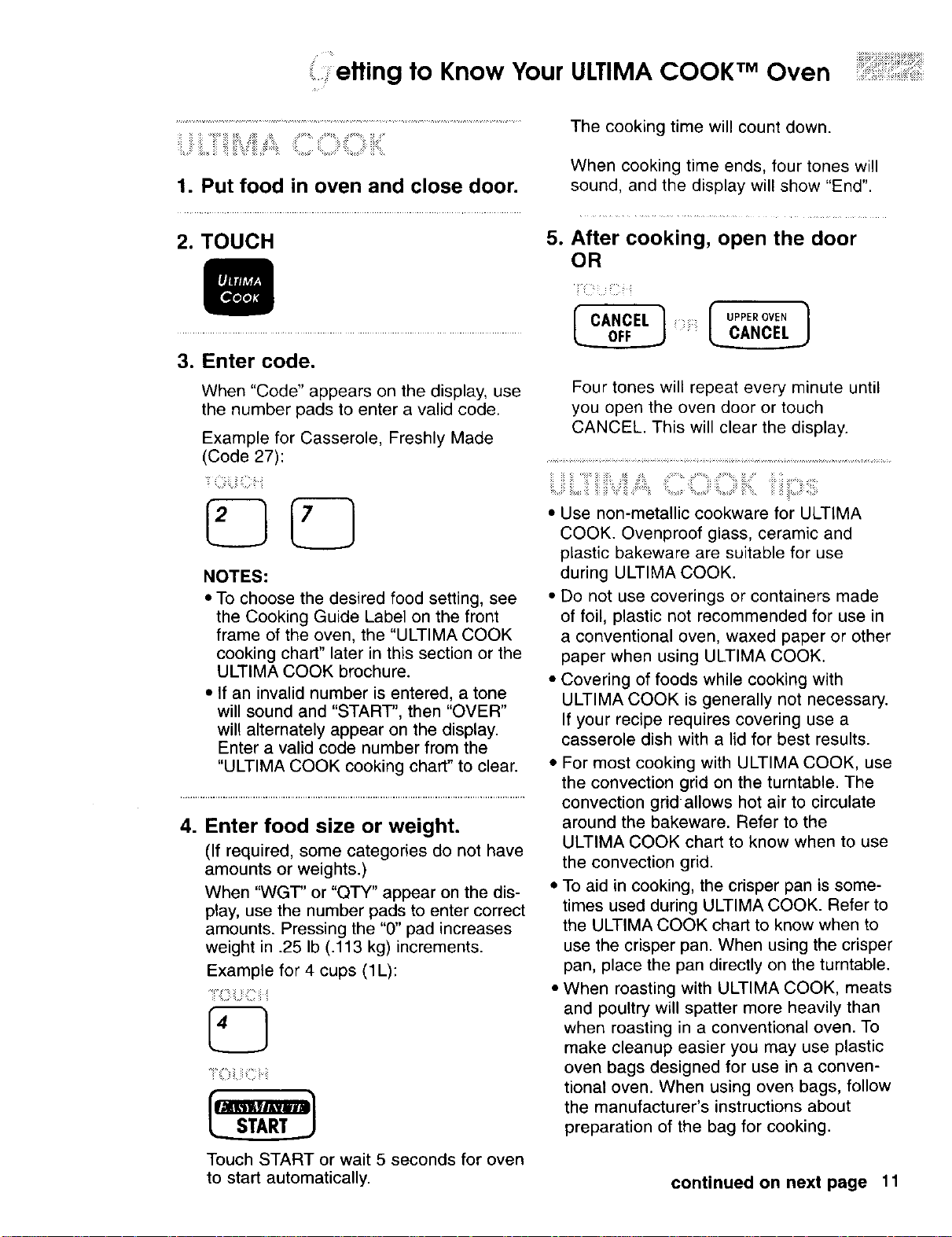
1. Put food in oven and close door.
2. TOUCH
3. Enter code.
When "Code" appears on the display, use
the number pads to enter a valid code.
Example for Casserole, Freshly Made
(Code 27):
NOTES:
• To choose the desired food setting, see
the Cooking Guide Label on the front
frame of the oven, the "ULTIMA COOK
cooking chart" later in this section or the
ULTIMA COOK brochure.
• If an invalid number is entered, a tone
will sound and "START", then "OVER"
will alternately appear on the display.
Enter a valid code number from the
"ULTIMA COOK cooking chart" to clear.
4. Enter food size or weight.
(If required, some categories do not have
amounts or weights.)
When "WGF' or "QTY" appear on the dis-
play, use the number pads to enter correct
amounts. Pressing the "0" pad increases
weight in .25 Ib (.113 kg) increments.
Example for 4 cups (1L):
-][, _! :!!i !i i ¸ _i Ei
Touch START or wait 5 seconds for oven
to start automatically.
The cooking time will count down.
When cooking time ends, four tones will
sound, and the display will show "End".
e
After cooking, open the door
OR
rc,.c,,EL x m]
Four tones will repeat every minute until
you open the oven door or touch
CANCEL. This will clear the display.
:. :: : ; :,: .....
::: ::: : ::: ::::::: :: i:;
• Use non-metallic cookware for ULTIMA
COOK. Ovenproof glass, ceramic and
plastic bakeware are suitable for use
during ULTIMA COOK.
• Do not use coverings or containers made
of foil, plastic not recommended for use in
a conventional oven, waxed paper or other
paper when using ULTIMA COOK.
• Covering of foods while cooking with
ULTIMA COOK is generally not necessary.
If your recipe requires covering use a
casserole dish with a lid for best results.
• For most cooking with ULTIMA COOK, use
the convection grid on the turntable. The
convection grid allows hot air to circulate
around the bakeware. Refer to the
ULTIMA COOK chart to know when to use
the convection grid.
• To aid in cooking, the crisper pan is some-
times used during ULTIMA COOK. Refer to
the ULTIMA COOK chart to know when to
use the crisper pan. When using the crisper
pan, place the pan directly on the turntable.
• When roasting with ULTIMA COOK, meats
and poultry will spatter more heavily than
when roasting in a conventional oven. To
make cleanup easier you may use plastic
oven bags designed for use in a conven-
tional oven. When using oven bags, follow
the manufacturer's instructions about
preparation of the bag for cooking.
continued on next page 11
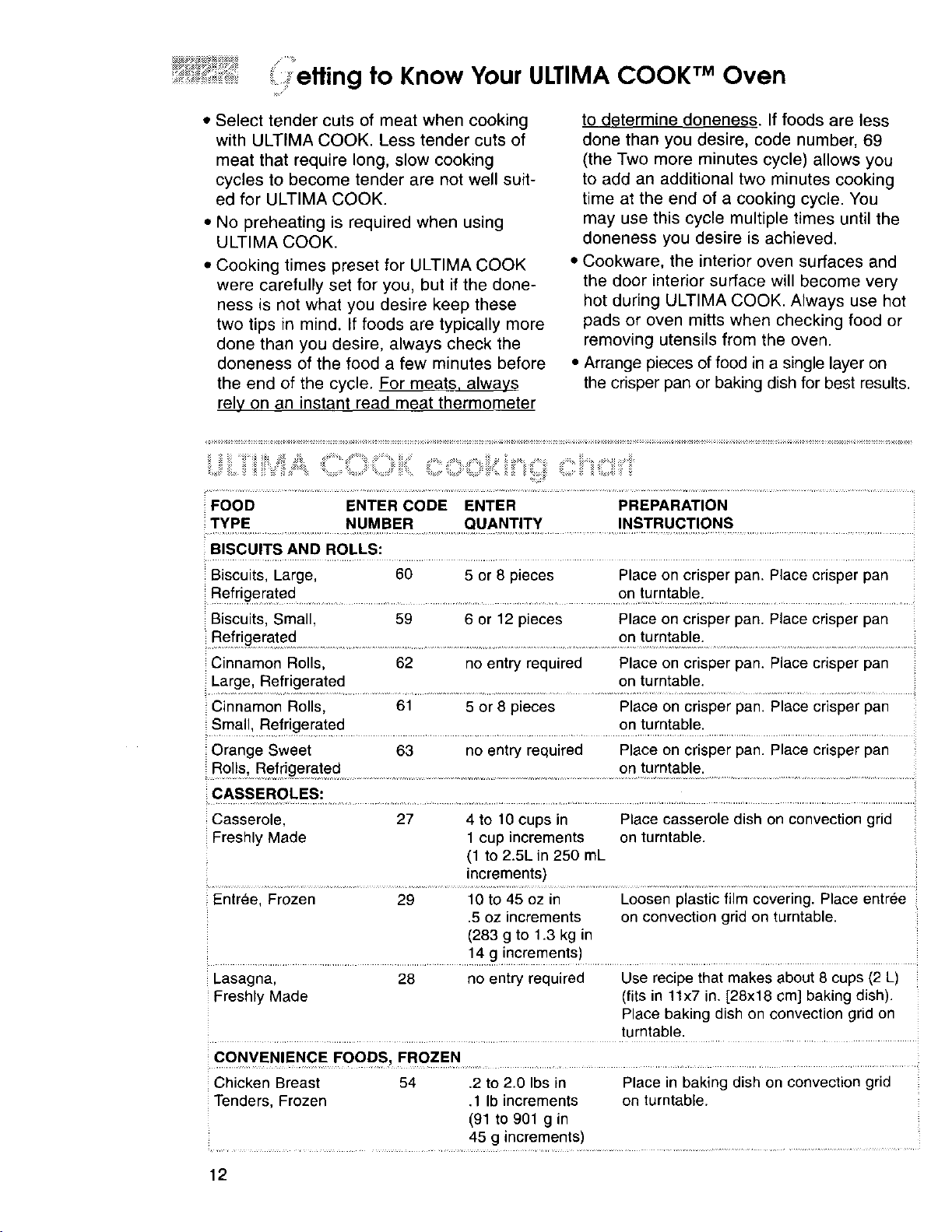
etting to Know Your ULTIMA COOK TMOven
• Select tender cuts of meat when cooking
with ULTIMA COOK. Less tender cuts of
meat that require long, slow cooking
cycles to become tender are not well suit-
ed for ULTIMA COOK.
• No preheating is required when using
ULTIMA COOK.
• Cooking times preset for ULTIMA COOK
were carefully set for you, but if the done-
ness is not what you desire keep these
two tips in mind. If foods are typically more
done than you desire, always check the
doneness of the food a few minutes before
the end of the cycle. For meats, always
rely on an instant read meat thermometer
to determine doneness. If foods are less
done than you desire, code number, 69
(the Two more minutes cycle) allows you
to add an additional two minutes cooking
time at the end of a cooking cycle. You
may use this cycle multiple times until the
doneness you desire is achieved.
• Cookware, the interior oven surfaces and
the door interior surface will become very
hot during ULTIMA COOK. Always use hot
pads or oven mitts when checking food or
removing utensils from the oven.
• Arrange pieces of food in a single layer on
the crisper pan or baking dish for best results.
...... .....
:z _ii_ _:_ii_:i_ii:! :ii!_:_::i ! iii i :ii : : _ : : :_-_ : : ; :: !:
:FOOD ENTER CODE ENTER PREPARATION
TYPE NUMBER QUANTITY INSTRUCTIONS
BISCUITS AND ROLLS:
Biscuits, Large, 60 5 or 8 pieces Place on crisper pan. Place crisper pan
Refr!ger_a!ed ............................................................................ on .!umtab.le.:..................................................
Biscuits, Small, 59 6 or 12 pieces Place on crisper pan. Place crisper pan
....Refrigera!ed ..........................................................................................on !urotable........................................................
Cinnamon Rolls, 62 no entry required Place on crisper pan. Place crisper pan
Large, Refrigerated on turntable.
Cinnamon Rolls, 61 5 or 8 pieces Place on crisper pan. Place crisper pan
. Small_.Refriger_ated....................................................................................en.tum_able:..........................................................
Orange Sweet 63 no entry required Place on crisper pan. Place crisper pan
......... on turntable.
Rolls, Refrigerated .....
:=CASSEROLES:
Casserole, 27 4 to 10 cups in Place casserole dish on convection grid
Freshly Made 1 cup increments on turntable.
(1 to 2.5L in 250 mL
increments)
Entree, Frozen 29 10 to 45 oz in Loosen plastic film covering. Place entree
.5 oz increments on convection grid on turntable.
(283 g to 1.3 kg in
.............................................. !4 g increments)................................................................
Lasagna, 28 no entry required Use recipe that makes about 8 cups (2 L)
Freshly Made (fits in 11x7 in. [28x18 cm] baking dish).
Place baking dish on convection grid on
turntable.
Chicken Breast 54 .2 to 2.0 Ibs in Place in baking dish on convection grid
Tenders, Frozen .1 Ib increments on turntable.
(91 to 901 g in
45 g increments)
12
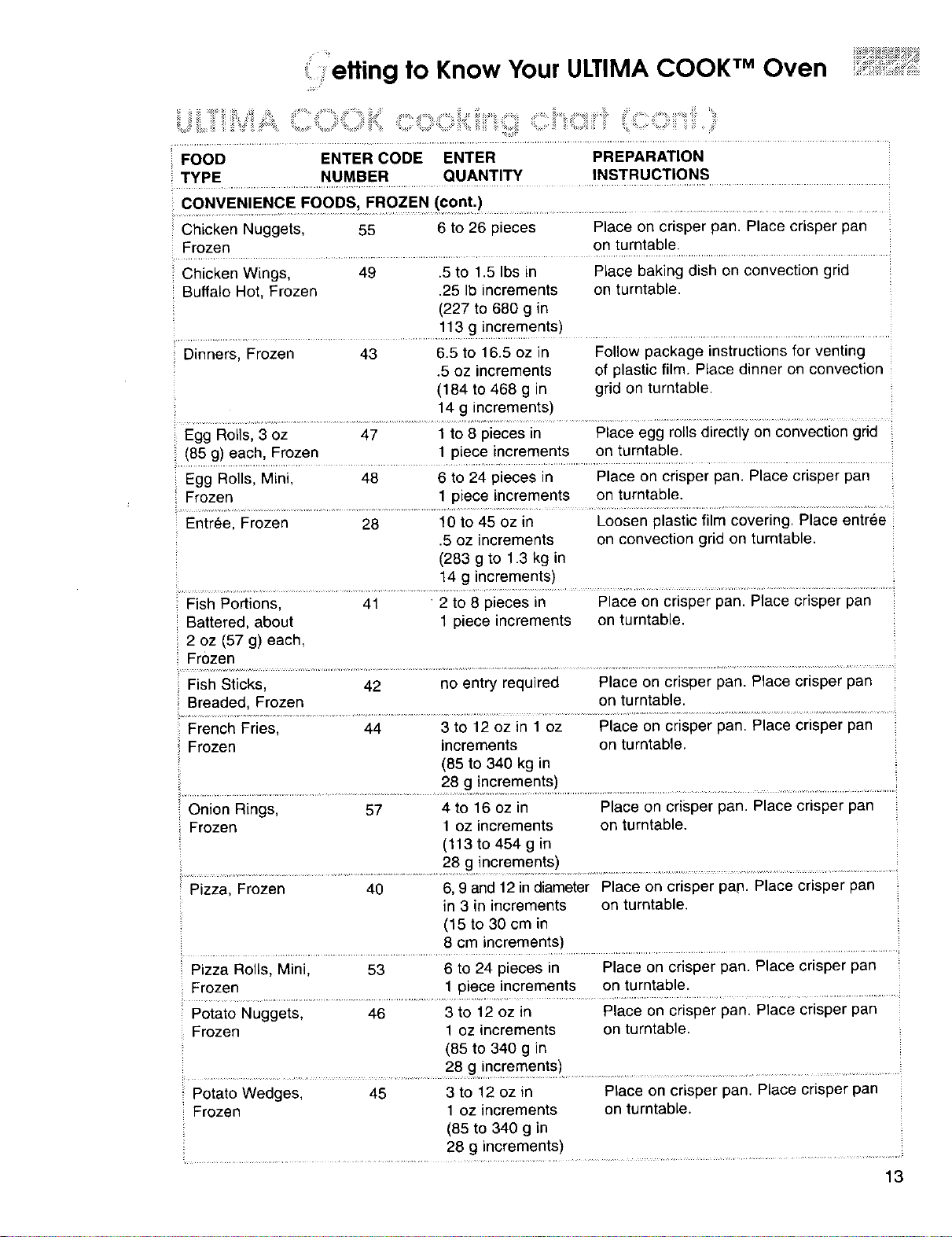
etting to Know Your ULTIMA COOK TM Oven
.............................. ii ....iiiTM!,•_ _,, ,i,.,_,,_ ,,,_,,.,_,,,,_,_,,_,,_,,,,_, ,,,_
FOOD ENTER CODE ENTER PREPARATION
TYPE NUMBER QUANTITY INSTRUCTIONS
Chicken Nuggets, 55 6 to 26 pieces Place on crisper pan. Place crisper pan
Frozen on turntable.
Chicken Wings, 49 .5 to 1.5 Ibs in PLacebaking dish on convection grid
Buffalo Hot, Frozen .25 Ib increments on turntable.
(227 to 680 g in
113 g increments)
Dinners, Frozen 43 6.5 to 16.5 oz in Follow package instructions for venting
.5 oz increments of plastic film. Place dinner on convection
(184 to 468 g in grid on turntable.
14 g increments)
Egg Rolls, 3 oz 47 1 to 8 pieces in Place egg rolls directly on convection grid
(85 g) each, Frozen 1 piece increments on turntable.
Egg Rolls, Mini, 48 6 to 24 pieces in Place on crisper pan. Place crisper pan
Frozen 1 piece increments on turntable.
Entree, Frozen 28 t0 to 45 oz in Loosen plastic film covering. Place entree
.5 oz increments on convection grid on turntable.
(283 g to 1.3 kg in
14 g increments)
Fish Portions, 41 2 to 8 pieces in Place on crisper pan. Place crisper pan
Battered, about 1 piece increments on turntable.
2 oz (57 g) each,
Frozen
Fish Sticks, 42 no entry required Place on crisper pan. Place crisper pan
Breaded, Frozen on turntable.
French Fries, 44 3 to 12 oz in 1 oz Place on crisper pan. Place crisper pan
Frozen increments on turntable.
(85 to 340 kg in
28 g increments)
Onion Rings, 57 4 to 16 oz in Place on crisper pan. Place crisper pan
Frozen 1 oz increments on turntable.
(113 to 454 g in
28 g increments)
Pizza, Frozen 40 6, 9 and 12 in diameter Place on crisper pan. Place crisper pan
in 3 in increments on turntable.
(15 to 30 cm in
8 cm increments)
Pizza Rolls, Minil ........ 53 ...............6 tO 24 pieces in.......... Piaceon crispe; pan. Place crisper pan
Frozen 1 piece increments on turntable.
Potato Nuggets, 46 3 to 12 oz in Place on crisper pan. Place crisper pan
Frozen 1 ez increments on turntable.
(85 to 340 g in
Potato Wedges, 45 3 to 12 oz in Place on crisper pan. Place crisper pan
Frozen 1 oz increments on turntable.
(85 to 340 g Ln
28 g increments)
13
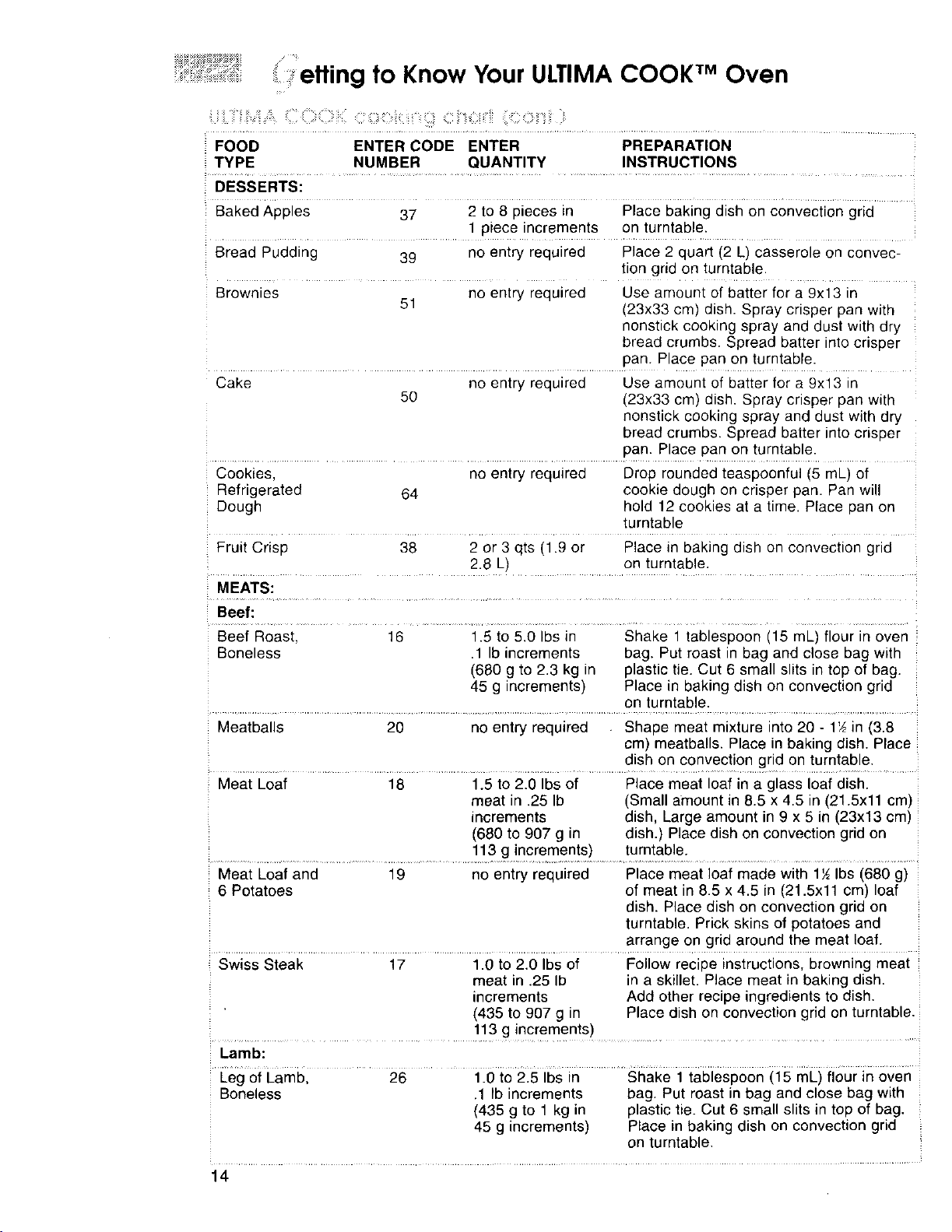
: etting to Know Your ULTIMA COOK TM Oven
FOOD ENTER CODE ENTER PREPARATION
TYPE NUMBER QUANTITY INSTRUCTIONS
DESSERTS:
Baked Appies 37 2 to 8 pieces in Place baking dish on convection grid
1 piece increments on turntable.
Bread Pudding 39 no entry required Place 2 quart (2 L) casserole on convec-
tion grid on turntable•
Brownies no entry required Use amount of batter for a 9x13 in
51 (23x33 cm) dish. Spray crisper pan with
nonstick cooking spray and dust with dry
bread crumbs. Spread batter into crisper
pan. Place pan on turntable.
Cake no entry required Use amount of batter for a 9x13 in
50 (23x33 cm) dish. Spray crisper pan with
nonstick cooking spray and dust with dry
bread crumbs. Spread batter intocrisper
pan. Place pan on turntable.
Cookies, no entry required Drop rounded teaspoonful (5 mL) of
Refrigerated 64 cookie dough on crisper pan. Pan will
Dough hold 12 cookies at a time. Place pan on
turntable
Fruit Crisp 38 2 or 3 qts (1.9 or Place in baking dish on convection grid
2.8 L) on turntable.
MEATS:
Beef:
Beef Roast, i6 .... i.5 to 5.0 Ibs in Shake i teblespoen (15 mE)flour in even
Boneless .1 Ib increments bag. Put roast in bag and close bag with
(660 g to 2.3 kg in plastic tie. Cut 6 small slits in top of bag.
45 g increments) Place in baking dish on convection grid
on turntable.
Meatballs 20 no entry required Shape meat mixture into 20 - 1½in (3.8
cm) meatballs. Place in baking dish. Place
dish on convection grid on turntable.
Meat Loaf 18 1.5 to 2.0 Ibs of Place meat loaf in a glass loaf dish.
meat in .25 Ib (Small amount in 8.5 x 4.5 in (21.5xll cm)
increments dish, Large amount in 9 x 5 in (23x13 cm)
(680 to 907 g in dish.) Place dish on convection grid on
113 g increments) turntable.
Meat Loaf and 19 no entry required Place meat loaf made with 1½Ibs (680 g)
6 Potatoes of meat in 8.5 x 4.5 in (21.5xll cm) loaf
dish. Place dish on convection grid on
turntable. Prick skins of potatoes and
arrange on grid around the meat loaf.
Swiss Steak 17 1.0 to 2.0 Ibs of Follow recipe instructions,browning meat
meat in .25 Ib in a skillet. Place meat in baking dish.
increments Add other recipe ingredients to dish.
(435 to 907 g in Place dish on convection grid on turntable.
...... 113 g increments ) ..........
Lamb:
Leg of Lamb, 26 1.0 to 2.5 Ibs in Shake 1 tablespoon (15 mL) flour in oven
Boneless .1 Ib increments bag. Put roast in bag and close bag with
(435 g to 1 kg in plastic tie. Cut 6 small slits in top of bag.
45 g increments) Place in baking dish on convection grid
on turntable.
14
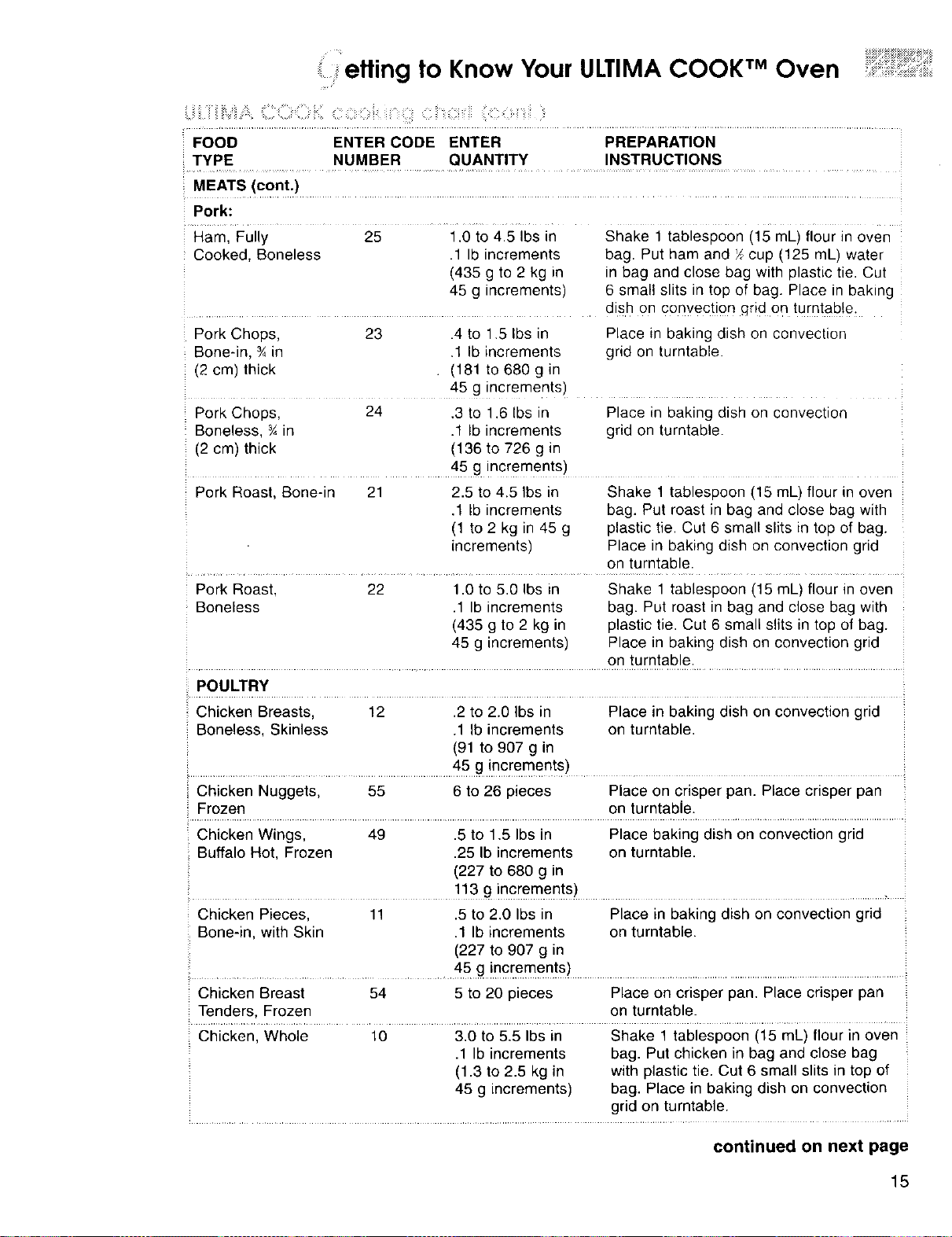
etting to Know Your ULTIMA COOK TM Oven
z ........................................................................................................................
FOOD ENTER CODE ENTER PREPARATION
TYPE NUMBER QUANTITY INSTRUCTIONS
MEATS(c°nt.) .................
Pork:
Ham, Fully 25 1.0 to 4.5 Ibs in Shake i tablespoon (i5 mL)flour in oven
Cooked, Boneless .1 Ib increments bag. Put ham and X cup (125 mL) water
(435 g to 2 kg in in bag and close bag with plastic tie. Cut
45 g increments) 6 small slits in top of bag. Place in baking
.............. dish on convection qrid on turntable.
Pork Chops, 23 .4 to 1.5 Ibs in Place in baking dish on convection
: Bone-in, ¾in .1 Ib increments grid on turntable.
(2 cm) thick (181 to 680 g in
45 g increments)
Pork Chops, 24 .3 to 1.6 Ibs in Place in baking dish on convection
Boneless, ¾ in .1 Ib increments grid on turntable.
(2 cm) thick (136 to 726 g in
................................................. 45gincre ments) .....
Pork Roast, Bone-in 21 2.5 to 4.5 Ibs in Shake 1 tablespoon (15 mL) flour in oven
.1 Ib increments bag. Put roast in bag and close bag with
(1 to 2 kg in 45 g plastic tie. Cut 6 small slits in top of bag.
increments) Place in baking dish on convection grid
on turntable.
Pork Roast, 22 1.0 to 5.0 Ibs in Shake 1 tablespoon (15 mL) flour in oven
Boneless .1 Ib increments bag. Put roast in bag and close bag with
(435 g to 2 kg in plastic tie. Cut 6 small slits in top of bag.
45 g increments) Place in baking dish on convection grid
on turntable.
POULTRY
!.Chicken Breasts, 12 .2 to 2.0 Ibs in Place in baking dish on convection grid
Boneless, Skinless .1 Ib increments on turntable.
(91 to 907 g in
45 g increments)
Chicken Nuggets, 55 6 to 26 pieces Place on crisper pan. Place crisper pan
_.F:[0zen...................................................................................... on turntable. .............................................
Chicken Wings, 49 .5 to 1.5 Ibs in Place baking dish on convection grid
Buffalo Hot, Frozen .25 Ib increments on turntable.
(227 to 680 g in
..... 113 g inct_fimen!s)....................................
Chicken Pieces, 11 .5 to 2.0 Ibs in Place in baking dish on convection grid
Bone-in, with Skin .1 Ib increments on turntable.
(227 to 907 g in
45 g increments) ......................................
Chicken Breast 54 5 to 20 pieces Place on crisper pan. Place crisper pan
Tenders, Frozen on turntable.
Chicken, Whole 10 3.0 to 5.5 Ibs in Shake 1 tablespoon (15 mL) flour in oven
.1 Ib increments bag. Put chicken in bag and close bag
(1.3 to 2.5 kg in with plastic tie. Cut 6 small slits in top of
45 g increments) bag. Place in baking dish on convection
grid on turntable.
continued on next page
15
etting to Know Your ULTIMA COOK TM Oven
FOOD ENTER CODE ENTER PREPARATION
TYPE NUMBER QUANTITY INSTRUCTIONS
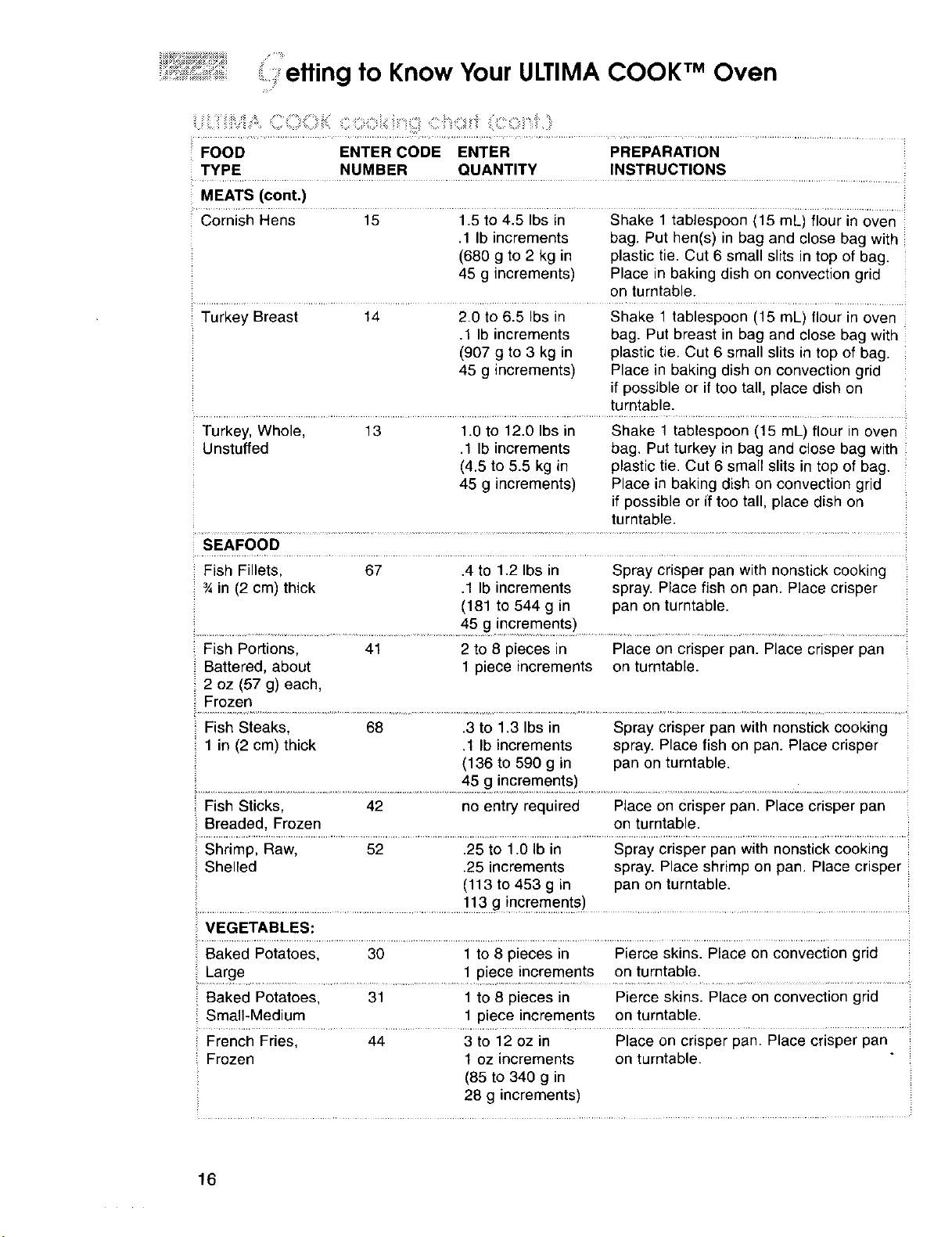
MEATS (cont.)
Cornish I--tens .............."15 ............i15 to 41,5ibsin Shake 1 tabiespooni15 mL) fioui in oven
.1 Ib increments bag. Put hen(s) in bag and close bag with
(680 g to 2 kg in plastic tie. Cut 6 small slits in top of bag.
45 g increments) Place in baking dish on convection grid
on turntable.
Turkey Breast 14
20 to 6.5 Ibs in
.1 Ib increments
(907 g to 3 kg in
45 g increments)
Shake 1 tablespoon (16 mL) flour in oven
bag. Put breast in bag and close bag with
plastic tie. Cut 6 small slits in top of bag.
Place in baking dish on convection grid
if possible or if too tall, place dish on
turntable.
Turkey, Whole, 13
Unstuffed
1.0 to 12.0 Ibs in
.1 Ib increments
(4.5 to 5.5 kg in
45 g increments)
Shake 1 tablespoon (15 mL) flour in oven
bag. Put turkey in bag and close bag with
plastic tie. Cut 6 small slits in top of bag.
Place in baking dish on convection grid
if possible or if too tall, place dish on
turntable.
SEAFOOD
Fish Fillets, 67 .4 to 1.2 Ibs in Spray crisper pan with nonstick cooking
¾ in (2 cm) thick .1 Ib increments spray. Place fish on pan. Place crisper
(181 to 544 g in pan on turntable.
45 g increments)
Fish Portions, 41 2 to 8 pieces in Place on crisper pan. Place crisper pan
', Battered, about 1 piece increments on turntable.
!. 2 oz (57 g) each,
i Fish Steaks, 68 .3 to 1,3 Ibs in Spray crisper pan with nonstick cooking
1 in (2 cm) thick .1 Ib increments spray. Place fish on pan. Place crisper
(136 to 590 g in pan on turntable.
45 g increments)
_,Fish Sticks, 42 no entry required Place on Crisper pan. Place crisper pan
Breaded, Frozen on turntable.
Shrimp, Raw, 52 .25 to 1.0 Ib in Spray crisper pan with nonstick cooking
Shelled .25 increments spray. Place shrimp on pan. Place crisper
(113 to 453 g in pan on turntable.
113 g increments)
VEGETABLES:
Baked Potatoes, 30 1 to 8 pieces in Pierce skins. Place on convection grid
Large 1 piece increments on turntable.
Baked Potatoes, 31 1 to 8 pieces in Pierce skins. Place on convection grid
Small-Medium 1 piece increments on turntable.
French Fries, 44 3 to 12 oz in Place on crisper pan. Place crisper pan
Frozen 1 oz increments on turntable.
(85 to 340 g in
28 g increments)
16
etting to Know Your ULTIMA COOK TM Oven
FOOD ENTER CODE ENTER PREPARATION
TYPE NUMBER QUANTITY INSTRUCTIONS
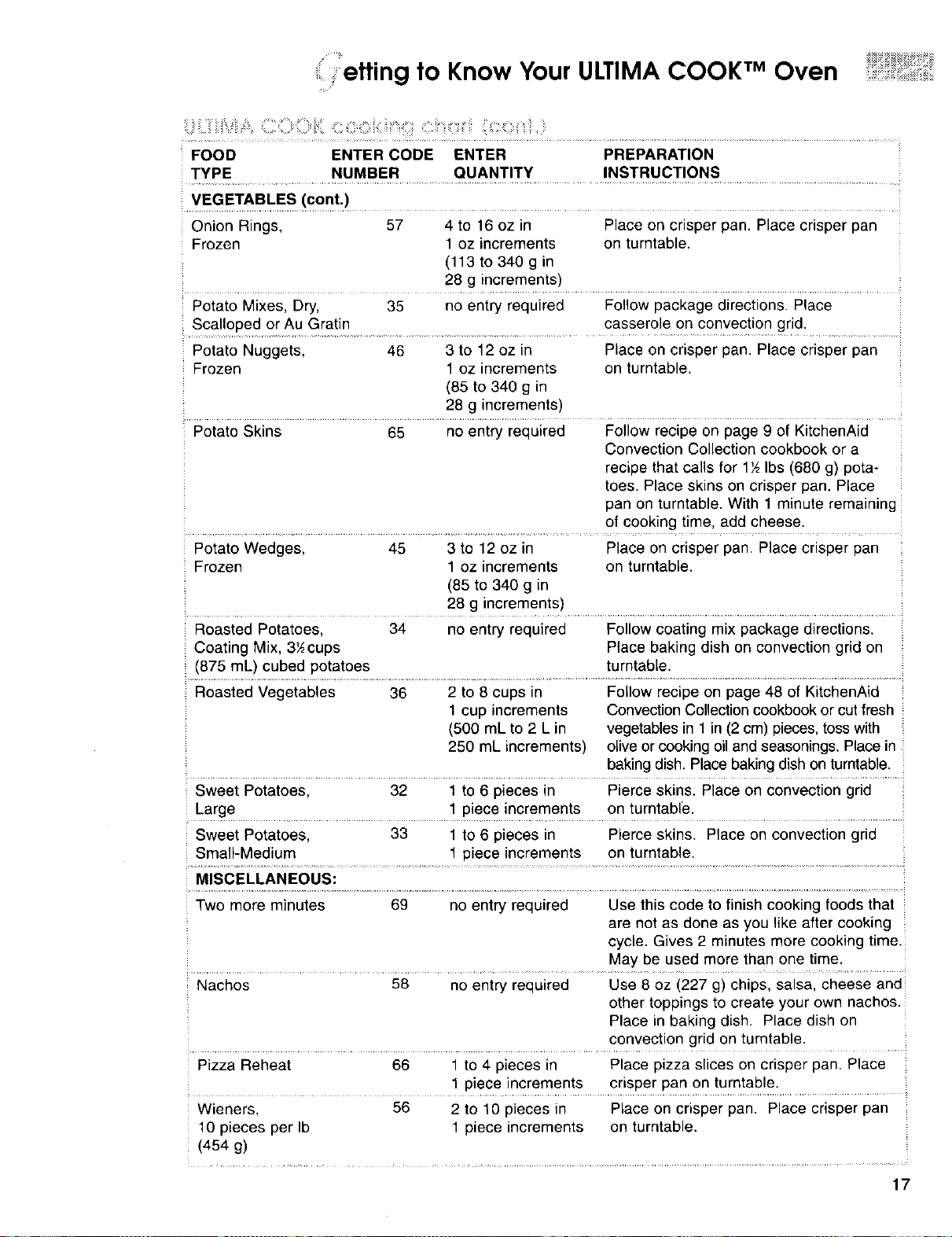
....VEG ETA.BI_ES!cont,) .................................................................
Onion Rings, 57 4 to 16 oz in Place on crisper pan. Place crisper pan
Frozen 1 oz increments on turntable.
(113 to 340 g in
28 g increments)
Potato Mixes, Dry, 35 no entry required Follow package directions. Place
Scalloped or Au G!a!in .......................... casserole On convection grid. ......
Potato Nuggets, 46 3 to 12 oz in Place on crisper pan. Place crisper pan
Frozen 1 oz increments on turntable.
(85 to 340 g in
28 g increments)
Potato Skins 65 no entry required Follow recipe on page 9 of KitchenAid
Convection Collection cookbook or a
recipe that calls for 1½Ibs (680 g) pota-
toes. Place skins on crisper pan. Place
pan on turntable. With 1 minute remaining
of cooking time, add cheese.
Potato Wedges, 45 3 to 12 oz in Place on crisper pan. Place crisper pan
Frozen 1 oz increments on turntable.
(85 to 340 g in
28 g increments)
Roasted Potatoes, 34 no entry required Follow coating mix package directions.
Coating Mix, 3'_cups Place baking dish on convection grid on
(875 mL) cubed potatoes turntable.
Roasted Vegetables 36 2 to 8 cups in Follow recipe on page 48 of KitchenAid
1 cup increments Convection Collection cookbook or cut fresh
(500 mL to 2 L in vegetables in 1 in (2 cm) pieces, toss with
250 mL increments) olive or cooking oil and seasonings. Place in
baking dish. Place baking dish on turntable.
Sweet Potatoes, 32 1 to 6 pieces in Pierce skins. Place on convection grid
La[ge ..........................................................................1 p!ece.!ncreme.rl!s on !urntable. ..............................
Sweet Potatoes, 33 1 to 6 pieces in Pierce skins. Place on convection grid
Small-Medium 1 piece increments on turntable.
MISCELLANEOUS:
Two more minutes 69 no entry required Use this code to finish cooking foods that
are not as done as you like after cooking
cycle. Gives 2 minutes more cooking time.
May be used more than one time.
Nachos 58 no entry required Use 8 oz (227 g) chips, salsa, cheese and
other toppings to create your own nachos.
Place in baking dish. Place dish on
convection grid on turntable.
Pizza Reheat 66 1 to 4 pieces in Place pizza slices on crisper pan. Place
1 piece increments crisper pan on turntable.
Wieners, 56 2 to 10 pieces in Place on crisper pan. Place crisper pan
10 pieces per Ib 1 piece increments on turntable.
(454 g)
17
......ooking with CONVECT
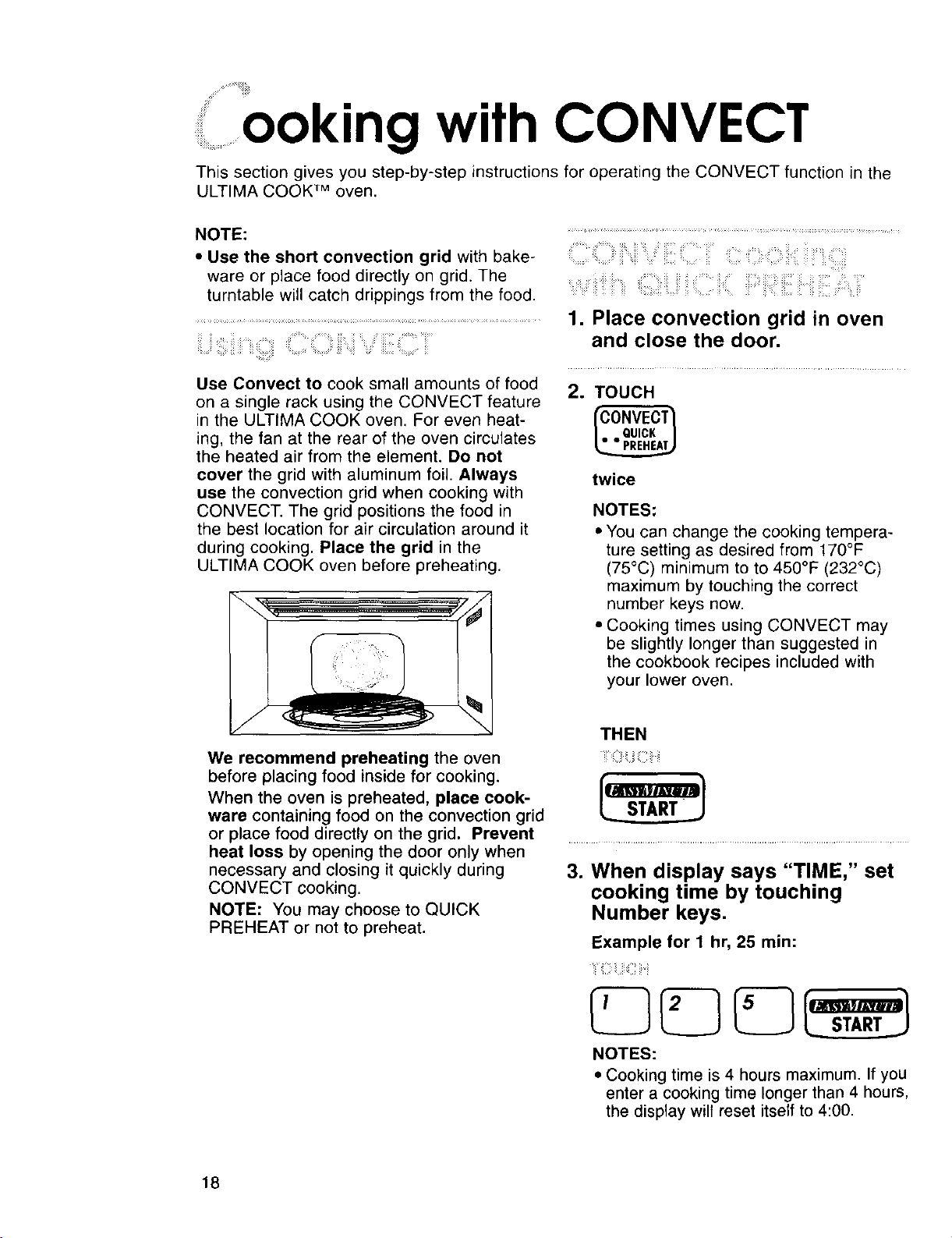
This section gives you step-by-step instructions for operating the CONVECT function in the
ULTIMA COOK TM oven.
NOTE: ..............................................................................................................................
• Use the short convection grid with bake- ;
ware or place food directly on grid, The
turntable will catch drippings from the food.
.........................................................................................................................................1. Place convection grid in oven
;;;;;; and close the door.
Use Convect to cook small amounts of food
on a single rack using the CONVECT feature
in the ULTIMA COOK oven, For even heat-
ing, the fan at the rear of the oven circulates
the heated air from the element. Do not
cover the grid with aluminum foil. Always
use the convection grid when cooking with
CONVECT. The grid positions the food in
the best location for air circulation around it
during cooking. Place the grid in the
ULTIMA COOK oven before preheating.
2. TOUCH
twice
NOTES:
• You can change the cooking tempera-
ture setting as desired from 170°F
(75°C) minimum to to 450°F (232°C)
maximum by touching the correct
number keys now.
• Cooking times using CONVECT may
be slightly longer than suggested in
the cookbook recipes included with
your lower oven.
We recommend preheating the oven
before placing food inside for cooking.
When the oven is preheated, place cook-
ware containing food on the convection grid
or place food directly on the grid. Prevent
heat loss by opening the door only when
necessary and closing it quickly during
CONVECT cooking.
NOTE: You may choose to QUICK
PREHEAT or not to preheat.
THEN
::i i::
=
When display says "TIME," set
cooking time by touching
Number keys,
Example for 1 hr, 25 min:
iiiii:iiiii ii.ii
NOTES:
• Cooking time is 4 hours maximum. If you
enter a cooking time longer than 4 hours,
the display wilt reset itself to 4:00.
18
illooking with CONVECT ..........
• When preheat reaches 170°F (75°C),
the display will show temperature in
5°F (3°C) increments until oven
reaches set cooking temperature.
When preheat time ends, one tone will
sound, and the display will show cooking
time.
NOTE:
• You can change the cooking tempera-
ture setting as desired from 170°F
(75°C) minimum to to 450°F (232°C)
maximum by touching the correct
number keys now.
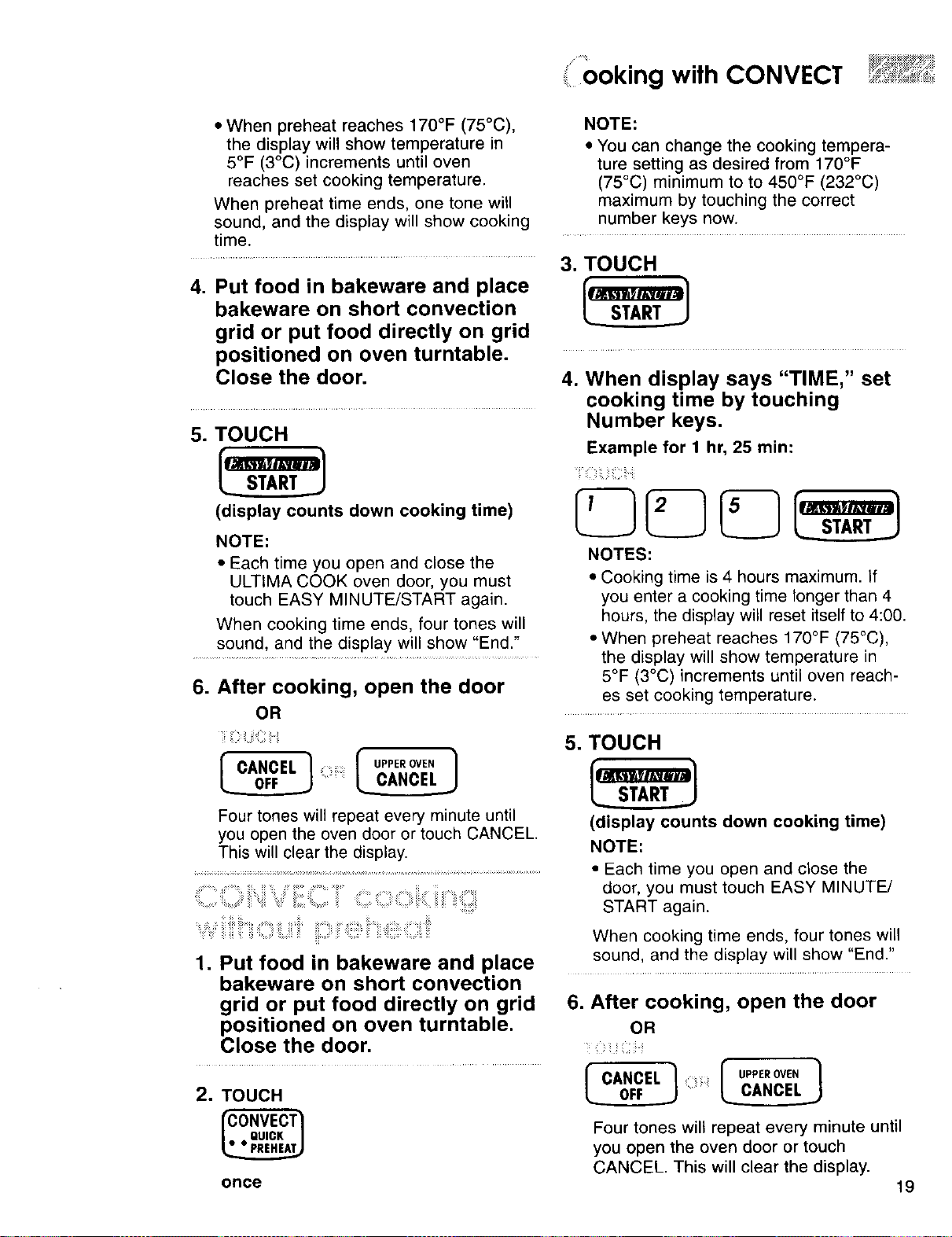
.............................................................. 3. TOUCH
4. Put food in bakeware and place
bakeware on short convection
grid or put food directly on grid
positioned on oven turntable.
Close the door.
5. TOUCH
(display counts down cooking time)
NOTE:
• Each time you open and close the
ULTIMA COOK oven door, you must
touch EASY MINUTE/START again.
When cooking time ends, four tones will
sound, and the display will show "End."
6. After cooking, open the door
OR
4. When display says "TIME," set
cooking time by touching
Number keys.
Example for 1 hr, 25 min:
NOTES:
• Cooking time is 4 hours maximum. If
you enter a cooking time longer than 4
hours, the display will reset itself to 4:00.
• When preheat reaches 170°F (75°C),
the display will show temperature in
5°F (3°C) increments until oven reach-
es set cooking temperature.
il iiii:i:il,ii_iiiii:ilii
I" CANCEL ]
Four tones will repeat every minute until
you open the oven door or touch CANCEL.
This will clear the display.
5. TOUCH
_START_
(display counts down cooking time)
NOTE:
• Each time you open and close the
door, you must touch EASY MINUTE/
START again.
1. Put food in bakeware and place
bakeware on short convection
grid or put food directly on grid
positioned on oven turntable.
Close the door,
2. TOUCH
once
When cooking time ends, four tones will
sound, and the display will show "End."
6. After cooking, open the door
OR
i_ _i ii !i ii
f CANCEL ]
Four tones will repeat every minute until
you open the oven door or touch
CANCEL. This will clear the display.
19
Cooking
• icrowave
: x;: i!_
This section discusses the concepts behind microwave cooking. It also shows you the
basics you need to know to operate your ULTIMA COOK TM oven for microwave cooking,
Please read this information before you use your oven.
,_"=,=/'__",/'::iii__"V'_'A _'_'=¸¸_¸='¸¸¸¸¸'_'¸''¸¸:_'_="=_"_''y_:="'=..................
,. ........ ,:,. ......
: : : .........:, _,_::, __,,
Microwave energy is not hot. It causes food to
make its own heat, and it's this heat that cooks
the food.
Microwaves are like TV waves, radio waves
or light waves. You cannot see them, but you
can see what they do.
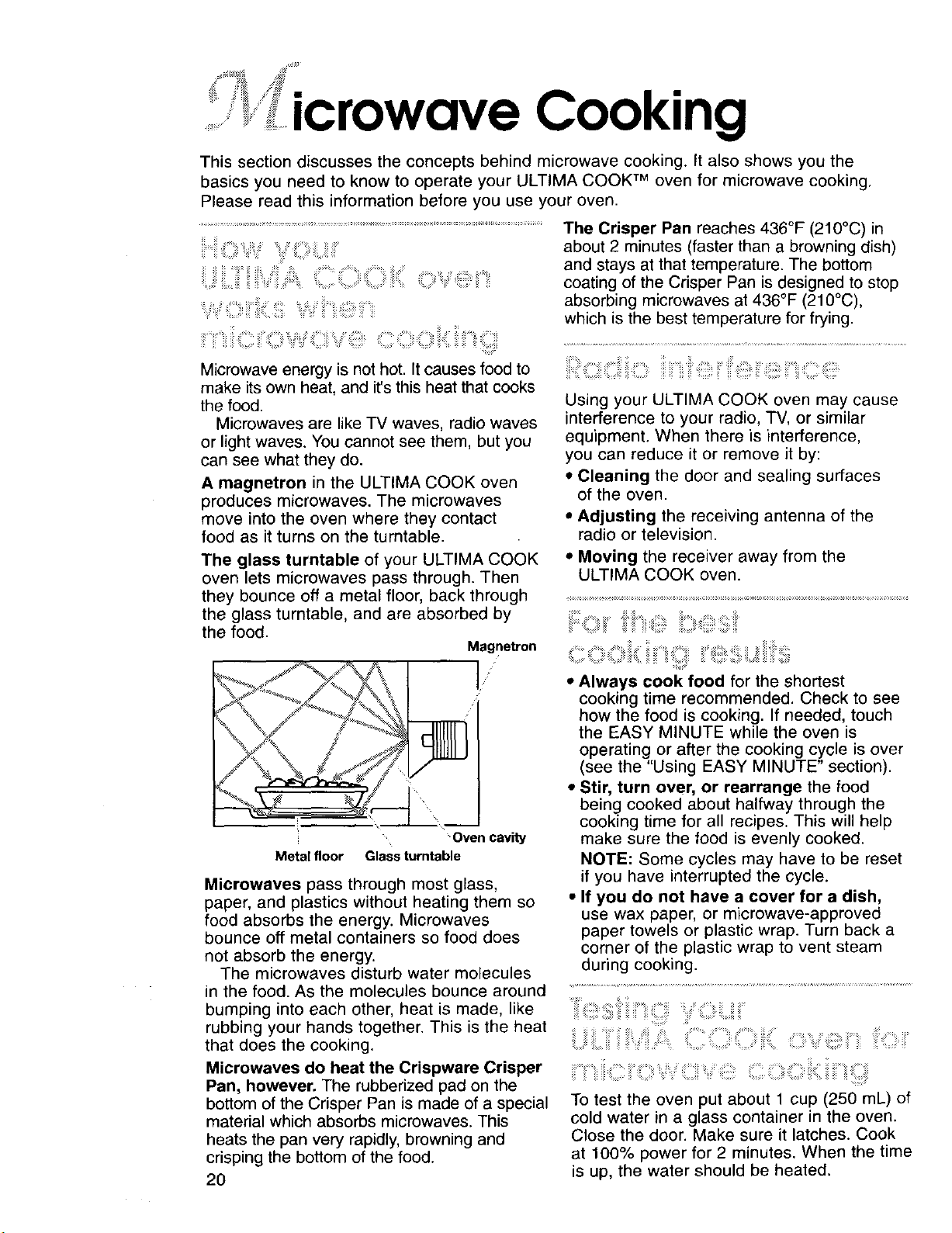
A magnetron in the ULTIMA COOK oven
produces microwaves. The microwaves
move into the oven where they contact
food as it turns on the turntable.
The glass turntable of your ULTIMA COOK
oven lets microwaves pass through. Then
they bounce off a metal floor, back through
the glass turntable, and are absorbed by
the food.
Magnetron
•Oven cavity
Metal floor Glass turntable
Microwaves pass through most glass,
paper, and plastics without heating them so
food absorbs the energy. Microwaves
bounce off metal containers so food does
not absorb the energy.
The microwaves disturb water molecules
in the food. As the molecules bounce around
bumping into each other, heat is made, like
rubbing your hands together. This is the heat
that does the cooking.
Microwaves do heat the Crispware Crisper
Pan, however. The rubberized pad on the
bottom of the Crisper Pan is made of a special
material which absorbs microwaves. This
heats the pan very rapidly, browning and
crisping the bottom of the food.
20
The Crisper Pan reaches 436°F (210°C) in
about 2 minutes (faster than a browning dish)
and stays at that temperature. The bottom
coating of the Crisper Pan is designed to stop
absorbing microwaves at 436°F (210°C),
which is the best temperature for frying.
Using your ULTIMA COOK oven may cause
interference to your radio, TV, or similar
equipment. When there is interference,
you can reduce it or remove it by:
• Cleaning the door and sealing surfaces
of the oven.
• Adjusting the receiving antenna of the
radio or television.
• Moving the receiver away from the
ULTIMA COOK oven.
...... i
• Always cook food for the shortest
cooking time recommended. Check to see
how the food is cooking. If needed, touch
the EASY MINUTE while the oven is
operating or after the cooking cycle is over
(see the "Using EASY MINUTE" section).
• Stir, turn over, or rearrange the food
being cooked about halfway through the
cooking time for all recipes. This will help
make sure the food is evenly cooked.
NOTE: Some cycles may have to be reset
if you have interrupted the cycle.
• If you do not have a cover for a dish,
use wax paper, or microwave-approved
paper towels or plastic wrap. Turn back a
corner of the plastic wrap to vent steam
during cooking.
'_ii_i!!!i!i!!i_::i!ili_ii_iiiii,'=,iii_ii::::::iiil,y'{:::i!_iLiiii¸¸
iLiiiiiiiiiiil_iiiIMA 'CO O'ii!{o v,_!i!i!!:__iiis
To test the oven put about 1 cup (250 mL) of
cold water in a glass container in the oven.
Close the door. Make sure it latches. Cook
at 100% power for 2 minutes. When the time
is up, the water should be heated.
_i i =:i¸ _!'f =:_:_i:_!_i_==::::_
icrowave Cooking
Test dinnerware or cookware before
using. To test a dish before use, put it into
the oven with 1 cup (250 mL) of water beside
it. Cook at 100% cook power for one minute.
If the dish gets hot and water stays cool,
do not use it. Some dishes (melamine,
some ceramic dinnerware, etc.) absorb
microwave energy, and may become too hot
to handle or may slow cooking times.
Cooking in metal containers not designed for
microwave use could damage the oven, as
could containers with hidden metal (twist-ties,
foil lining, staples, metallic glaze or trim).
zii iiiili!i-lii_iiiii:i:;!i!!ii!_iiiii_iiiiiiiiiHii_iii_iii;i_z_=_:::
• Never lean on the door or allow a child to
swing on it when the door is open.
• Use hot pads. Microwave energy does not
heat containers, but heat from the food can
make the container hot.
NOTE: Heat from the broil element will
cause container and oven parts to become
hot. Also, the Crisper Pan always
becomes very hot when used. Use oven
mitts when touching containers, oven parts,
and pan after broiling.
• Do not use newspaper or other printed
paper in the oven.
• Do not dry flowers, fruit, herbs, wood, paper,
gourds, or clothes in the oven.
• Do not start a microwave oven when it is
empty. Product life may be shortened. If
you practice programming the oven, put a
container of water in the oven. It is normal
for the oven door to look wavy after the
oven has been running for a while.
• Do not try to melt paraffin wax in the oven.
Paraffin wax will not melt in a microwave
oven because it allows microwaves to pass
through it.
• When you use a browning dish, the
browning dish bottom must be at least
¾6in (5 ram) above the turntable. Follow the
directions supplied with the browning dish.
• Never cook or reheat a whole egg inside
the shell. Steam buildup in whole eggs may
cause them to burst and possibly damage
the oven. Slice hard-boiled eggs before
heating. In rare cases, poached eggs have
been known to explode. Cover poached
eggs and allow a standing time of one
minute before cutting into them.
• For best results, stir any liquid several
times during heating or reheating.
Liquids heated in certain containers
(especially containers shaped like cylinders)
may become overheated. The liquid may
splash out with a loud noise during or after
heating or when adding ingredients (coffee
granules, tea bags, etc.).
• Microwaves may not reach the center of a
roast. The heat spreads to the center from
the outer, cooked areas just as in regular
oven cooking. This is one of the reasons
for letting some foods (for example, roasts
or baked potatoes) stand for a while after
cooking, or for stirring some foods during
the cooking time.
• Do not deep fry in the oven. Microwavable
cookware is not suitable and it is difficult to
maintain appropriate deep frying tempera-
tures.
• Do not overcook potatoes. At the end of
the recommended cooking time, potatoes
should be slightly firm because they will
continue cooking during standing time.
After microwaving, let stand for 5 minutes
to finish cooking.
• Do not operate the ULTIMA COOK TM oven
unless the glass turntable is securely in
place and can rotate freely. The turntable
can rotate in either direction. Make sure
the turntable is correct-side up in the oven.
Make sure support base is all the way on
the shaft in oven cavity floor. Handle your
turntable with care when removing itfrom
the oven to avoid possibly breaking it. If
your turntable cracks or breaks, contact
your appliance dealer for a replacement.
ili_i_i_iii_iiii!i]ii:__i_ iii _i__ _:_ _:_;_i_ii_i
_iii_=,=._=III_=,_,=Yiil iil_iilili_iiiil]i!il!__i_:_;_iiliii__!_:_9iiil iii
Your oven is connected to a 240-volt circuit.
If the incoming voltage to the oven is less
than specified, cooking times may be longer.
Have a qualified electrician check your elec-
trical system.
21
..................... ..... ..uuK,y"--":n-
........................................' _,__.ICrOWQVe
_ii_¸_¸¸_¸_,:>_> :_;• ii!i:: i_ i::::_ .>_:._ _ • i!E_•!! : _ _
......................_........................._,o,..... _i_,.... 4. After cooking, open the door
OR
1. Put food in oven and close the
door.
,
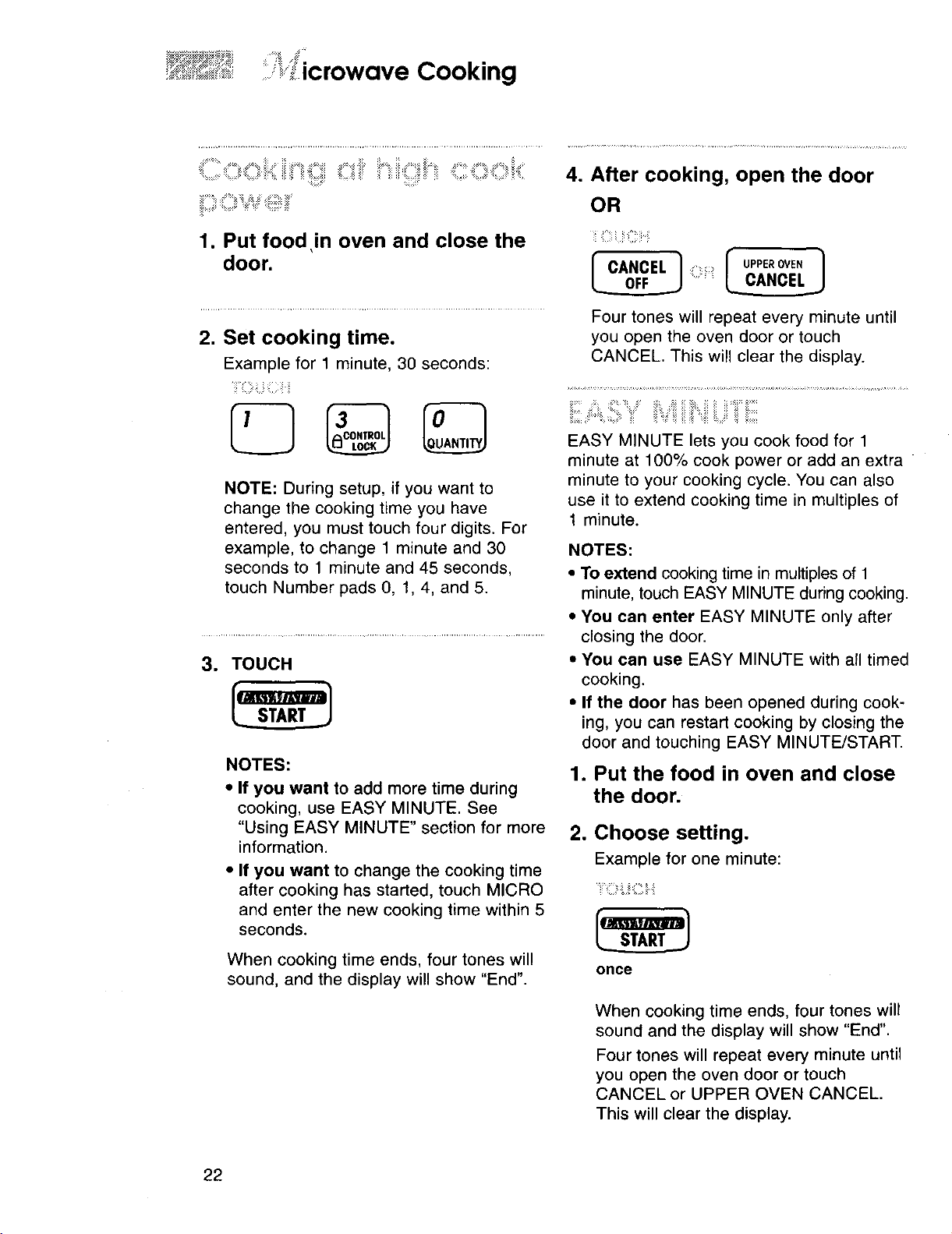
Set cooking time.
Example for 1 minute, 30 seconds:
iiii!i?iiii_ii!iil
NOTE: During setup, if you want to
change the cooking time you have
entered, you must touch four digits. For
example, to change 1 minute and 30
seconds to 1 minute and 45 seconds,
touch Number pads O, 1, 4, and 5.
3. TOUCH
NOTES:
• If you want to add more time during
cooking, use EASY MINUTE. See
"Using EASY MINUTE" section for more
information.
• If you want to change the cooking time
after cooking has started, touch MICRO
and enter the new cooking time within 5
seconds.
When cooking time ends, four tones will
sound, and the display will show "End".
I CANCEL 1 _i::i_ilil_
Four tones will repeat every minute until
you open the oven door or touch
CANCEL. This will clear the display.
EASY MINUTE lets you cook food for 1
minute at 100% cook power or add an extra
minute to your cooking cycle. You can also
use it to extend cooking time in multiples of
1 minute.
NOTES:
• To extend cooking time in multiples of 1
minute, touch EASY MINUTE during cooking.
• You can enter EASY MINUTE only after
closing the door.
• You can use EASY MINUTE with all timed
cooking.
• If the door has been opened during cook-
ing, you can restart cooking by closing the
door and touching EASY MINUTE/START.
1. Put the food in oven and close
the door.
2. Choose setting.
Example for one minute:
once
When cooking time ends, four tones will
sound and the display will show "End".
Four tones will repeat every minute until
you open the oven door or touch
CANCEL or UPPER OVEN CANCEL.
This will clear the display.
22
..........icrowave n ......
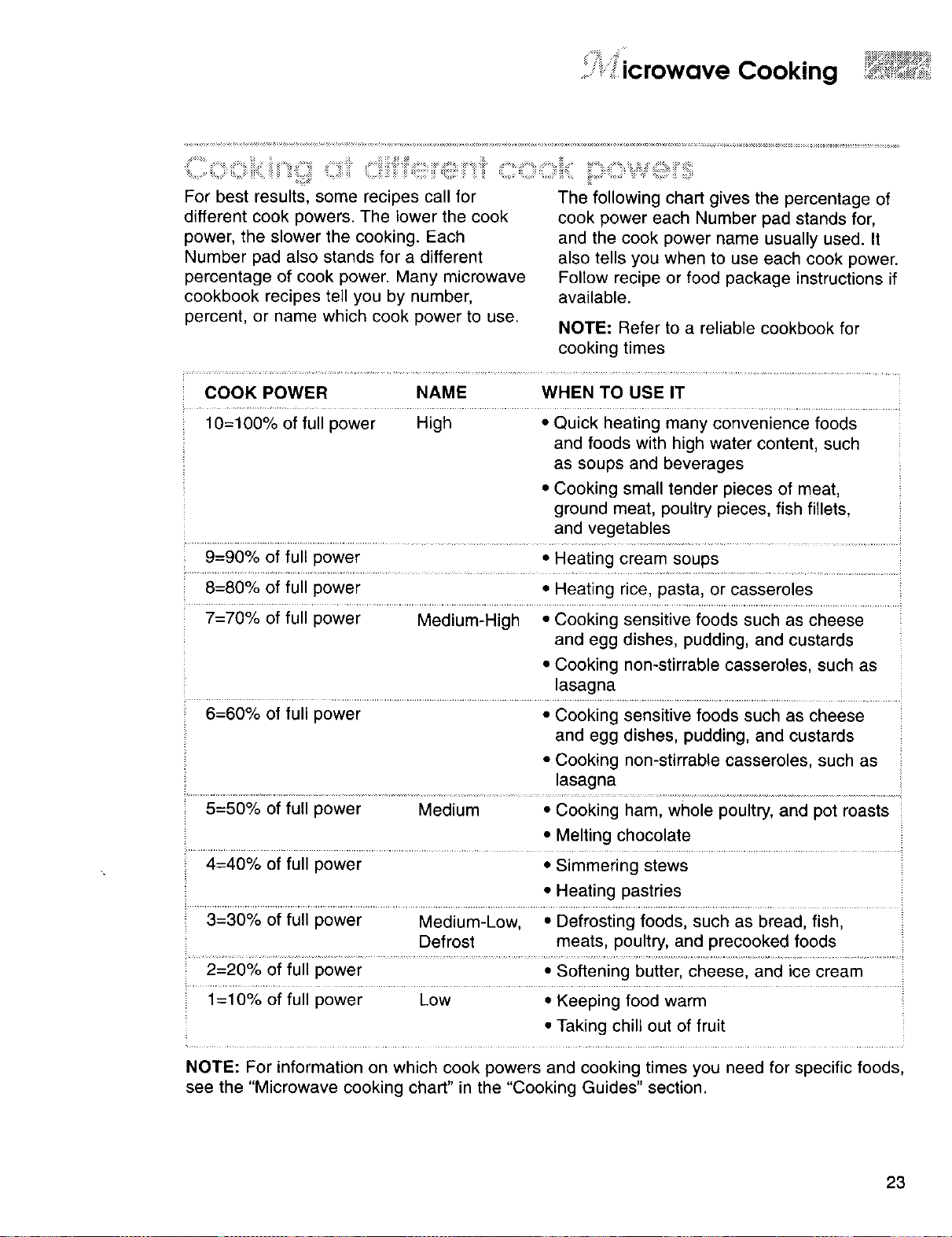
For best results, some recipes call for
different cook powers. The lower the cook
power, the slower the cooking. Each
Number pad also stands for a different
percentage of cook power. Many microwave
cookbook recipes tell you by number,
percent, or name which cook power to use.
The following chart gives the percentage of
cook power each Number pad stands for,
and the cook power name usually used. It
also tells you when to use each cook power.
Follow recipe or food package instructions if
available.
NOTE: Refer to a reliable cookbook for
cooking times
COOK POWER NAME WHEN TO USE IT
.......................................................................................................................................................... :
10=100% of full power High • Quick heating many convenience foods
and foods with high water content, such
as soups and beverages
• Cooking small tender pieces of meat,
ground meat, poultry pieces, fish fillets,
and vegetables
9=90% of full power • Heating cream soups
:: 8=80% of full power • Heating rice, pasta, or casseroles
7=70% of full power Medium-High • Cooking sensitive foods such as cheese
and egg dishes, pudding, and custards
• Cooking non-stirrable casseroles, such as
lasagna
6=60% of full power • Cooking sensitive foods such as cheese
and egg dishes, pudding, and custards
• Cooking non-stirrable casseroles, such as
lasagna
5=50% of full power Medium • Cooking ham, whole poultry, and pot roasts
• Melting chocolate
_ 4=40% of full power • Simmering stews
• Heating pastries
3=30°/o Or;t;Uii powei ...... Medium:Lowl 13eirosiingioods,such as breadl iish,
Defrost meats, poultry, and precooked foods
2=20% of full power • Softening butter, cheese, and ice cream
iuii powei ...................Low ..............................,,Keeping food warm
• Taking chili out of fruit
NOTE: For information on which cook powers and cooking times you need for specific foods,
see the "Microwave cooking chart" in the "Cooking Guides" section.
23
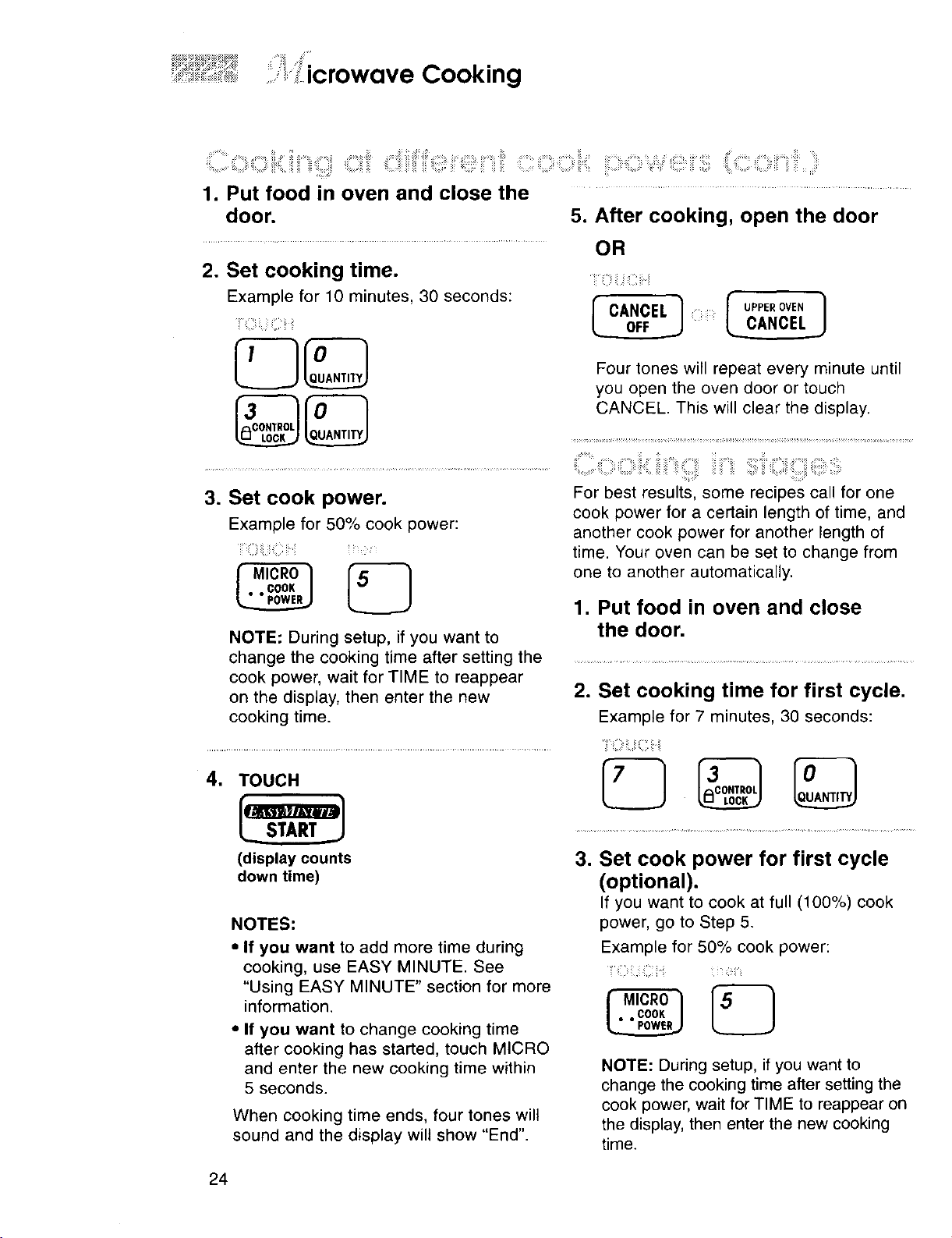
1. Put food in oven and close the ....................................
door. 5. After cooking, open the door
2. Set cooking time.
Example for 10 minutes, 30 seconds:
iuiiiiliiiii_ii_i:ii!
3. Set cook power.
Example for 50% cook power:
MicRo1
• • COOK
E_J
NOTE: During setup, if you want to
change the cooking time after setting the
cook power, wait for TIME to reappear
on the display, then enter the new
cooking time.
OR
I__i!?ii•iizil;:ii•I_
0___.._.___r-'CANCEL] UPPEeOVEN
Four tones will repeat every minute until
you open the oven door or touch
CANCEL. This will clear the display.
C: iiii:ii iii, : '!iiiii:ililiiiii;'i :ill!ill;•ii¸¸ ii::::iii !!iiiiiiiiiii
For best results, some recipes call for one
cook power for a certain length of time, and
another cook power for another length of
time. Your oven can be set to change from
one to another automatically.
1. Put food in oven and close
the door.
2. Set cooking time for first cycle.
Example for 7 minutes, 30 seconds:
4. TOUCH
(display counts
down time)
NOTES:
• If you want to add more time during
cooking, use EASY MINUTE. See
"Using EASY MINUTE" section for more
information.
• If you want to change cooking time
after cooking has started, touch MICRO
and enter the new cooking time within
5 seconds.
When cooking time ends, four tones will
sound and the display will show "End".
3. Set cook power for first cycle
(optional).
If you want to cook at full (100%) cook
power, go to Step 5.
Example for 50% cook power:
-_;i¸-i ii/ i ii i i•i:iii_ii•ii
NOTE: During setup, if you want to
change the cooking time after setting the
cook power, wait for TIME to reappear on
the display, then enter the new cooking
time.
24
ii,"_,!'icrowave Cooking
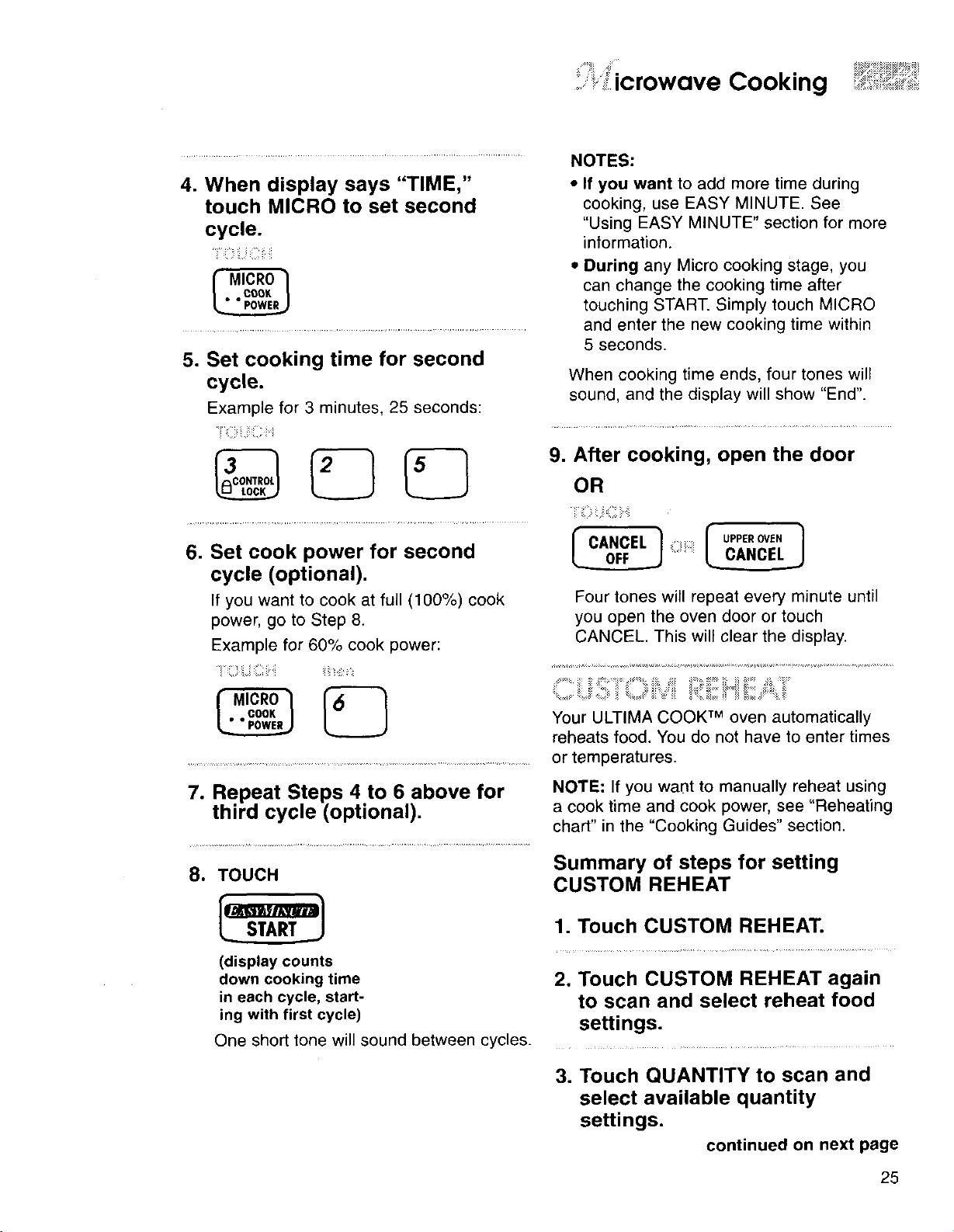
4. When display says "TIME,"
touch MICRO to set second
cycle.
!i¸_z_iii_illiiii
f MicRo1
• ° COOK
5. Set cooking time for second
cycle.
Example for 3 minutes, 25 seconds:
,ii i::
NOTES:
• If you want to add more time during
cooking, use EASY MINUTE. See
"Using EASY MINUTE" section for more
information.
• During any Micro cooking stage, you
can change the cooking time after
touching START. Simply touch MICRO
and enter the new cooking time within
5 seconds.
When cooking time ends, four tones will
sound, and the display will show "End".
9. After cooking, open the door
OR
6. Set cook power for second
cycle (optional).
If you want to cook at full (100%) cook
power, go to Step 8.
Example for 60% cook power:
Four tones will repeat every minute until
you open the oven door or touch
CANCEL. This will clear the display.
Your ULTIMA COOK TM oven automatically
reheats food. You do not have to enter times
or temperatures.
7. Repeat Steps 4 to 6 above for
third cycle (optional).
8. TOUCH
(display counts
down cooking time
in each cycle, start-
ing with first cycle)
NOTE: If you want to manually reheat using
a cook time and cook power, see "Reheating
chart" in the "Cooking Guides" section.
Summary of steps for setting
CUSTOM REHEAT
1. Touch CUSTOM REHEAT.
2. Touch CUSTOM REHEAT again
to scan and select reheat food
settings.
One short tone will sound between cycles.
3. Touch QUANTITY to scan and
select available quantity
settings.
continued on next page
25
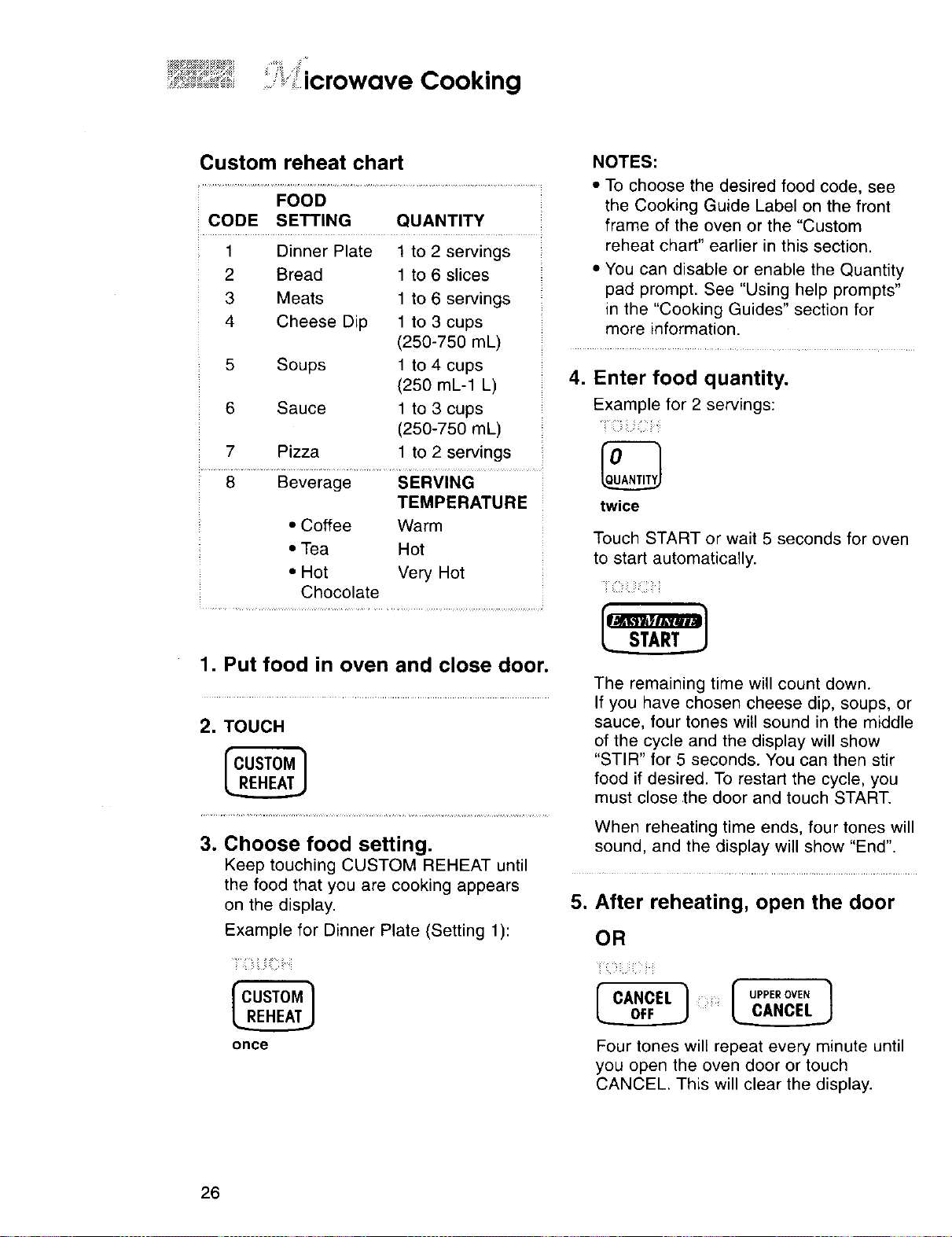
Custom reheat chart NOTES:
FOOD
CODE SETTING QUANTITY
1 Dinner Plate 1 to 2 servings
2 Bread 1 to 6 slices
3 Meats 1 to 6 servings
4 Cheese Dip 1 to 3 cups
• To choose the desired food code, see
the Cooking Guide Label on the front
frame of the oven or the "Custom
reheat chart" earlier in this section.
• You can disable or enable the Quantity
pad prompt. See "Using help prompts"
in the "Cooking Guides" section for
more information.
(250-750 mL) ....................................
5 Soups 1 to 4 cups
(250 mL-1 L)
6 Sauce 1 to 3 cups
(250-750 mL)
7 Pizza 1 to 2 servings
8 Beverage SERVING
TEMPERATURE
• Coffee Warm
• Tea Hot
• Hot Very Hot
Chocolate
,
1. Put food in oven and close door.
2. TOUCH
Enter food quantity.
Example for 2 servings:
:ii
twice
Touch START or wait 5 seconds for oven
to start automatically.
The remaining time will count down.
If you have chosen cheese dip, soups, or
sauce, four tones will sound in the middle
of the cycle and the display will show
"STIR" for 5 seconds. You can then stir
food if desired. To restart the cycle, you
must close the door and touch START.
When reheating time ends, four tones will
3. Choose food setting, sound, and the display will show "End".
Keep touching CUSTOM REHEAT until ......................................................................................................................................................
the food that you are cooking appears
on the display. 5. After reheating, open the door
Example for Dinner Plate (Setting 1):
OR
i__ z_zi_z;i __i__ i__ __i_i_!___
once Four tones will repeat every minute until
you open the oven door or touch
CANCEL. This will clear the display.
26
.. icrowave Cooking
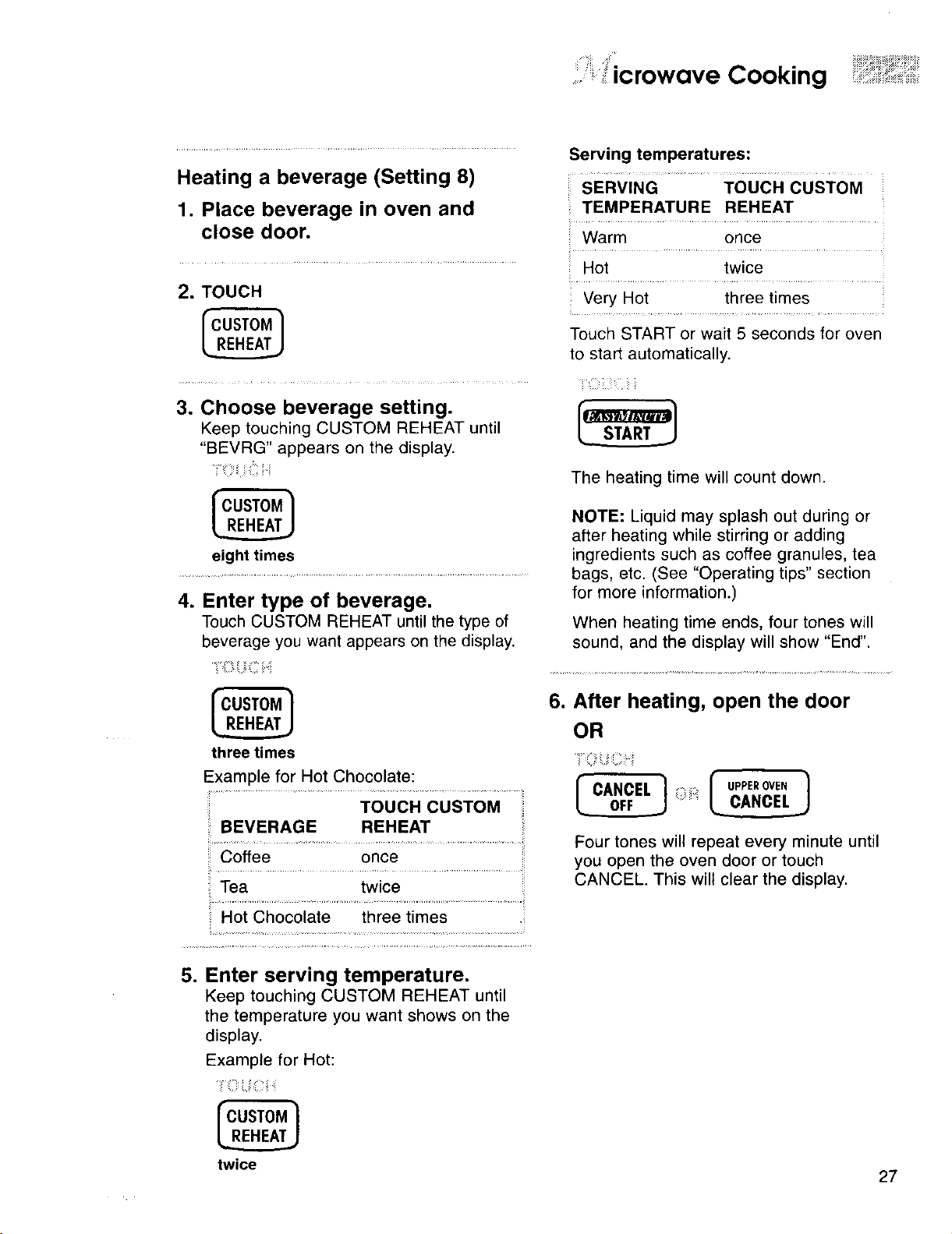
Heating a beverage (Setting 8)
1. Place beverage in oven and
close door.
2. TOUCH
.
Choose beverage setting.
Keep touching CUSTOM REHEAT until
"BEVRG" appears on the display.
eight times
.
Enter type of beverage.
Touch CUSTOM REHEAT until the type of
beverage you want appears on the display.
three times
Example for Hot Chocolate:
BEVERAGE REHEAT
Coffee once
Tea twice
Hot Chocolate three times
5. Enter serving temperature.
Keep touching CUSTOM REHEAT until
the temperature you want shows on the
display.
Example for Hot:
twice
Serving temperatures:
SERVING TOUCH CUSTOM
TEMPERATURE REHEAT
Warm once
Hot twice
Very Hot three times
Touch START or wait 5 seconds for oven
to start automatically.
The heating time will count down.
NOTE: Liquid may splash out during or
after heating while stirring or adding
ingredients such as coffee granules, tea
bags, etc. (See "Operating tips" section
for more information.)
When heating time ends, four tones will
sound, and the display will show "End".
6. After heating, open the door
OR
r CANCEL ] i:;;i: f _=e,_N, I
Four tones will repeat every minute until
you open the oven door or touch
CANCEL. This will clear the display.
27
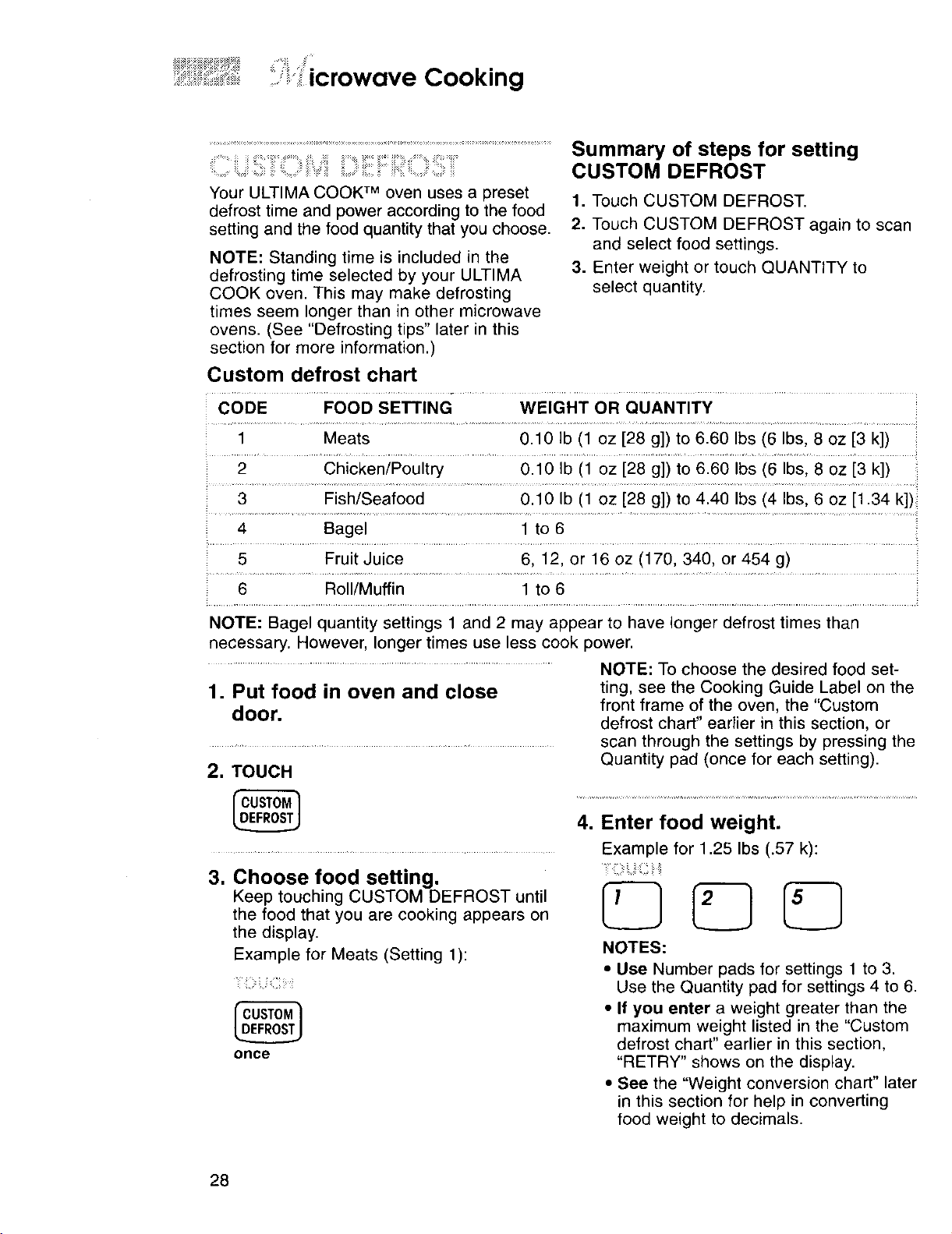
i icrowave Cooking
Your ULTIMA COOK TM oven uses a preset
defrost time and power according to the food
setting and the food quantity that you choose.
NOTE: Standing time is included in the
defrosting time selected by your ULTIMA
COOK oven. This may make defrosting
times seem longer than in other microwave
ovens. (See "Defrosting tips" later in this
section for more information.)
Summary of steps for setting
CUSTOM DEFROST
1. Touch CUSTOM DEFROST.
2. Touch CUSTOM DEFROST again to scan
and select food settings.
3. Enter weight or touch QUANTITY to
select quantity.
Custom defrost chart
CODE FOOD SETTING WEIGHT OR QUANTITY
1 Meats 0.10 Ib (1 oz [28 g]) to 6.60 Ibs (6 Ibs, 8 oz [3 k])
2 Chicken/Poultry 0.10 Ib (1 oz [28 g]) to 6.60 Ibs (6 Ibs, 8 ez [3 k])
3 Fish/Seafood 0.10 Ib (1 oz [28 g]) to 4.40 Ibs (4 Ibs, 6 oz [1.34 k])
4 Bagel 1 to 6
5 Fruit Juice 6, 12, or 16 ez (170, 340, or 454 g)
6 Roll/Muffin 1 to 6
NOTE: Bagel quantity settings 1 and 2 may appear to have longer defrost times than
necessary. However, longer times use less cook power.
1. Put food in oven and close
door.
2. TOUCH
NOTE: To choose the desired food set-
ting, see the Cooking Guide Label on the
front frame of the oven, the "Custom
defrost chart" earlier in this section, or
scan through the settings by pressing the
Quantity pad (once for each setting).
3. Choose food setting.
Keep touching CUSTOM DEFROST until
the food that you are cooking appears on
the display.
Example for Meats (Setting 1):
once
=
Enter food weight.
Example for 1.25 Ibs (.57 k):
NOTES:
• Use Number pads for settings 1 to 3.
Use the Quantity pad for settings 4 to 6.
• If you enter a weight greater than the
maximum weight listed in the "Custom
defrost chart" earlier in this section,
"RETRY" shows on the display.
• See the "Weight conversion chart" later
in this section for help in converting
food weight to decimals.
28
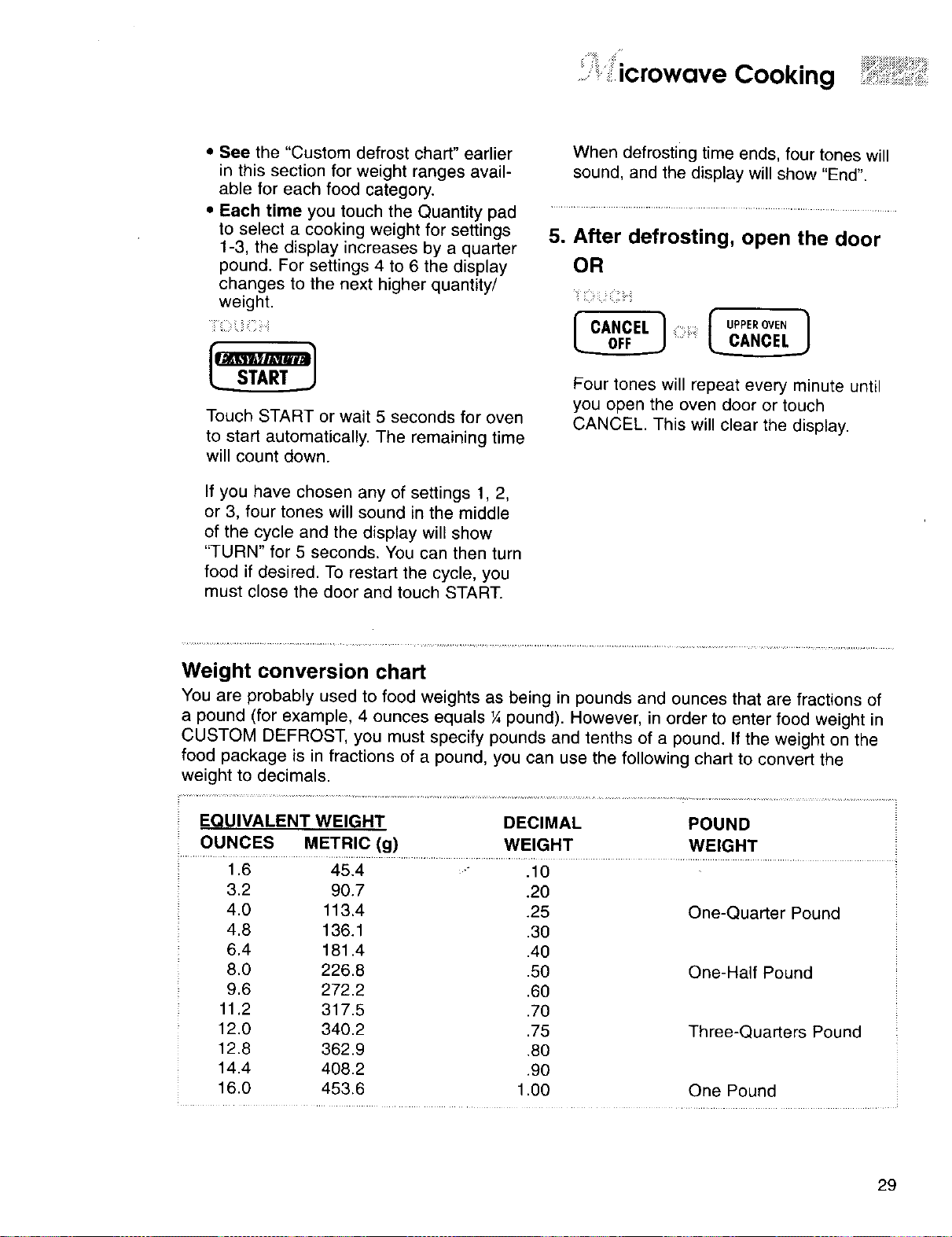
i 'icrowave Cooking
• See the "Custom defrost chart" earlier
in this section for weight ranges avail-
able for each food category.
• Each time you touch the Quantity pad
to select a cooking weight for settings
1-3, the display increases by a quarter
pound. For settings 4 to 6 the display
changes to the next higher quantity/
weight.
iii _i.2i_iiiiiii
Touch START or wait 5 seconds for oven
to start automatically. The remaining time
will count down.
If you have chosen any of settings 1, 2,
or 3, four tones will sound in the middle
of the cycle and the display will show
"TURN" for 5 seconds. You can then turn
food if desired. To restart the cycle, you
must close the doer and touch START.
When defrosting time ends, four tones will
sound, and the display will show "End".
w
After defrosting, open the door
OR
ii:_ i: .i
f CANCEL 1
Four tones will repeat every minute until
you open the oven door or touch
CANCEL. This will clear the display.
Weight conversion chart
You are probably used to food weights as being in pounds and ounces that are fractions of
a pound (for example, 4 ounces equals ¼ pound). However, in order to enter food weight in
CUSTOM DEFROST, you must specify pounds and tenths of a pound. If the weight on the
food package is in fractions of a pound, you can use the following chart to convert the
weight to decimals.
EQUIVALENT WEIGHT DECIMAL POUND
OUNCES METRIC (g) WEIGHT WEIGHT
1.6 45.4 - .10
3.2 90.7 .20
4.0 113.4 .25
4.8 136.1 .30
6.4 181.4 .40
8.0 226.8 .50
9.6 272.2 .60
11.2 317.5 .70
12.0 340.2 .75
12.8 362.9 .80
14.4 408.2 .90
16.0 453.6 1.00
One-Quarter Pound
One-Half Pound
Three-Quarters Pound
One Pound
29
ii:ii, icrowave Cooking
i ii ;i ¸ !: ii _:::: _. :i: i:i i: i:: i:: ::i::.:i
_:__:i_:___:=_:::J__;_i_i_i_i_i'_::S iii!iiiii=,iil¸;i:_!_
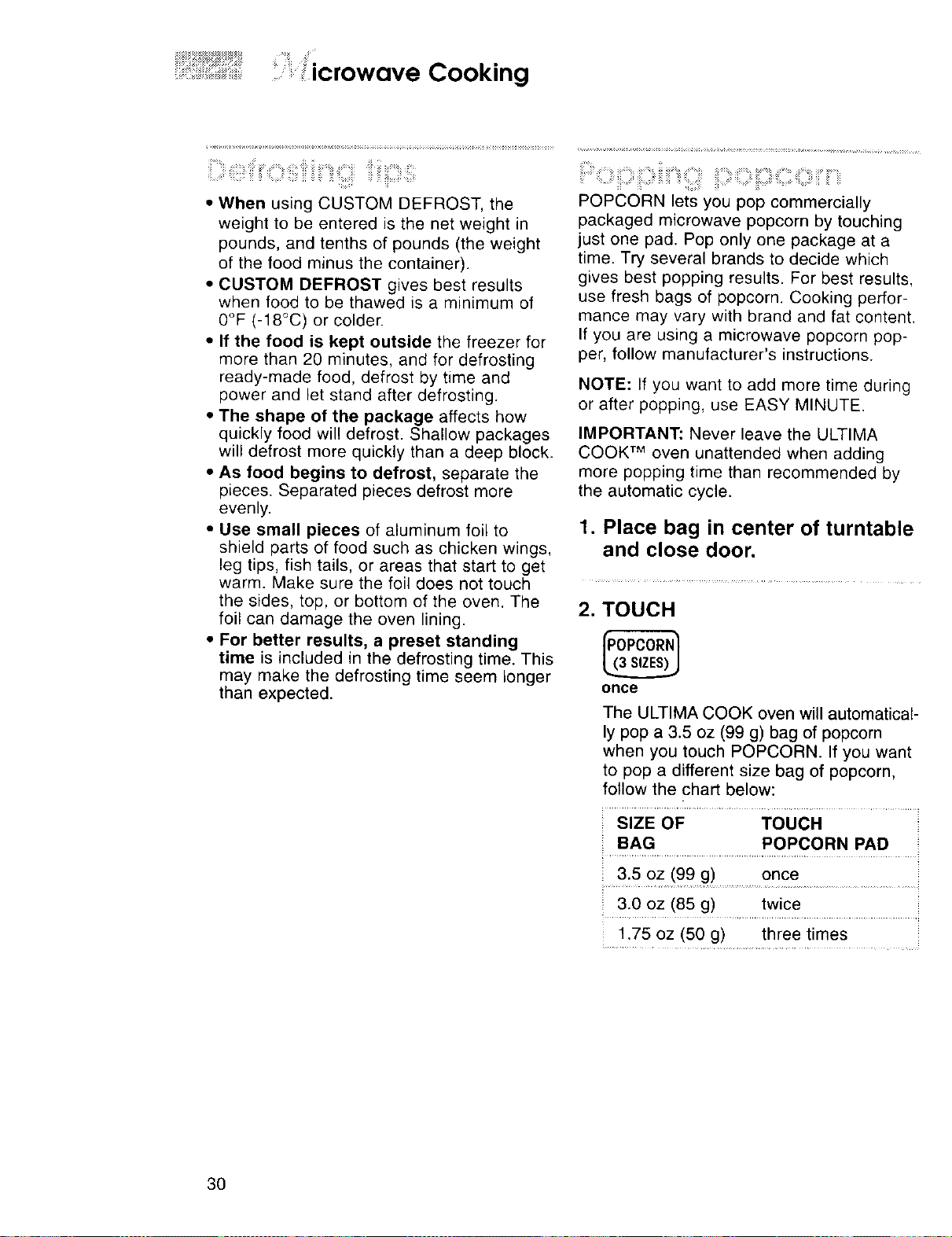
• When using CUSTOM DEFROST, the
weight to be entered is the net weight in
pounds, and tenths of pounds (the weight
of the food minus the container).
• CUSTOM DEFROST gives best results
when food to be thawed is a minimum of
0°F (-18°C) or colder.
• If the food is kept outside the freezer for
more than 20 minutes, and for defrosting
ready-made food, defrost by time and
power and let stand after defrosting.
• The shape of the package affects how
quickly food will defrost. Shallow packages
will defrost more quickly than a deep block.
• As food begins to defrost, separate the
pieces. Separated pieces defrost more
evenly.
• Use small pieces of aluminum foil to
shield parts of food such as chicken wings,
leg tips, fish tails, or areas that start to get
warm. Make sure the foil does not touch
the sides, top, or bottom of the oven. The
foil can damage the oven lining.
• For better results, a preset standing
time is included in the defrosting time. This
may make the defrosting time seem longer
than expected.
POPCORN lets you pop commercially
packaged microwave popcorn by touching
just one pad. Pop only one package at a
time. Try several brands to decide which
gives best popping results. For best results,
use fresh bags of popcorn. Cooking perfor-
mance may vary with brand and fat content.
If you are using a microwave popcorn pop-
per, follow manufacturer's instructions.
NOTE: If you want to add more time during
or after popping, use EASY MINUTE.
IMPORTANT: Never leave the ULTIMA
COOK TM oven unattended when adding
more popping time than recommended by
the automatic cycle.
1. Place bag in center of turntable
and close door.
2. TOUCH
once
The ULTIMA COOK oven will automatical-
ly pop a 3.5 oz (99 g) bag of popcorn
when you touch POPCORN. If you want
to pop a different size bag of popcorn,
follow the chart below:
SIZE OF TOUCH
BAG POPCORN PAD
: 3.5 0Z(99 g) once ........
3.0 oz (85 g) twice
1.75 oz (50 g) three times
3O
ii': icrowave Cooking
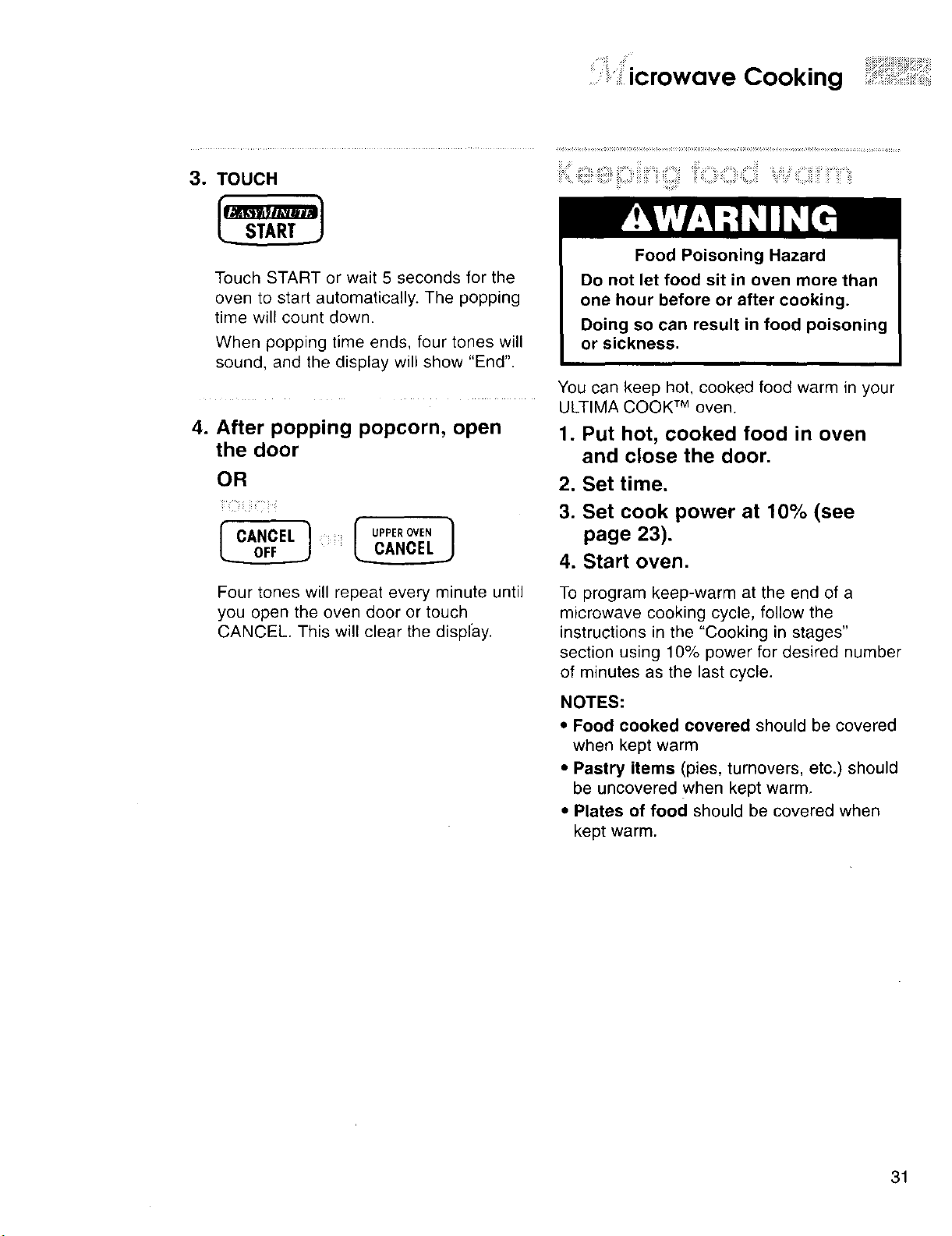
3. TOUCH
Touch START or wait 5 seconds for the
oven to start automatically. The popping
time will count down.
When popping time ends, four tones will
sound, and the display will show "End"
4. After popping popcorn, open
the door
OR
iiii-ii iii¸ ! i
OL...___O.____J_rCANCEL I UPPEROVEN
_,._,,_,_,_,.,_,:_:.,.,__.,.,_:,_,_,_'ii_O,Ci_,Ciil%_%:iiiii!i_!ii__'iii_'_i!_
Food Poisoning Hazard
Do not let food sit in oven more than
one hour before or after cooking.
Doing so can result in food poisoning
or sickness.
You can keep hot, cooked food warm in your
ULTIMA COOK TM oven.
1. Put hot, cooked food in oven
and close the door.
2. Set time.
3. Set cook power at 10% (see
page 23).
4. Start oven.
Four tones will repeat every minute until
you open the oven door or touch
CANCEL. This will clear the display.
To program keep-warm at the end of a
microwave cooking cycle, follow the
instructions in the "Cooking in stages"
section using 10% power for desired number
of minutes as the last cycle.
NOTES:
• Food cooked covered should be covered
when kept warm
• Pastry items (pies, turnovers, etc.) should
be uncovered when kept warm,
• Plates of food should be covered when
kept warm.
31
...........ooking with CRISPand BROIL
This section gives you step-by-step instructions for operating the Crisp and Broil functions.
• The Crispware Crisper Pan is specially
designed for crisping and browning food.
It can be preheated for 2 to 3 minutes
before use.
When using CRISP, microwaves heat the
Crisper Pan to brown and crisp the bottom
of food while the broil element cooks and
browns food from the top.
1. Place food on Crisper Pan, put
pan on turntable, and close
door.
• Brush Crisper Pan with _ tsp (3 mL) of oil
or spray with nonstick cooking spray before 2. TOUCH
heating, This will make it easier to remove
food from the pan and clean the pan I CRISP I
after use.
L_____J
• Use the broiling grid to place food closer
to the broil element for faster cooking. See
"Utensils" in the "Getting to Know Your
ULTIMA COOK TM Oven" section for more
information.
• If you want to add more time during
cooking, use EASY MINUTE.
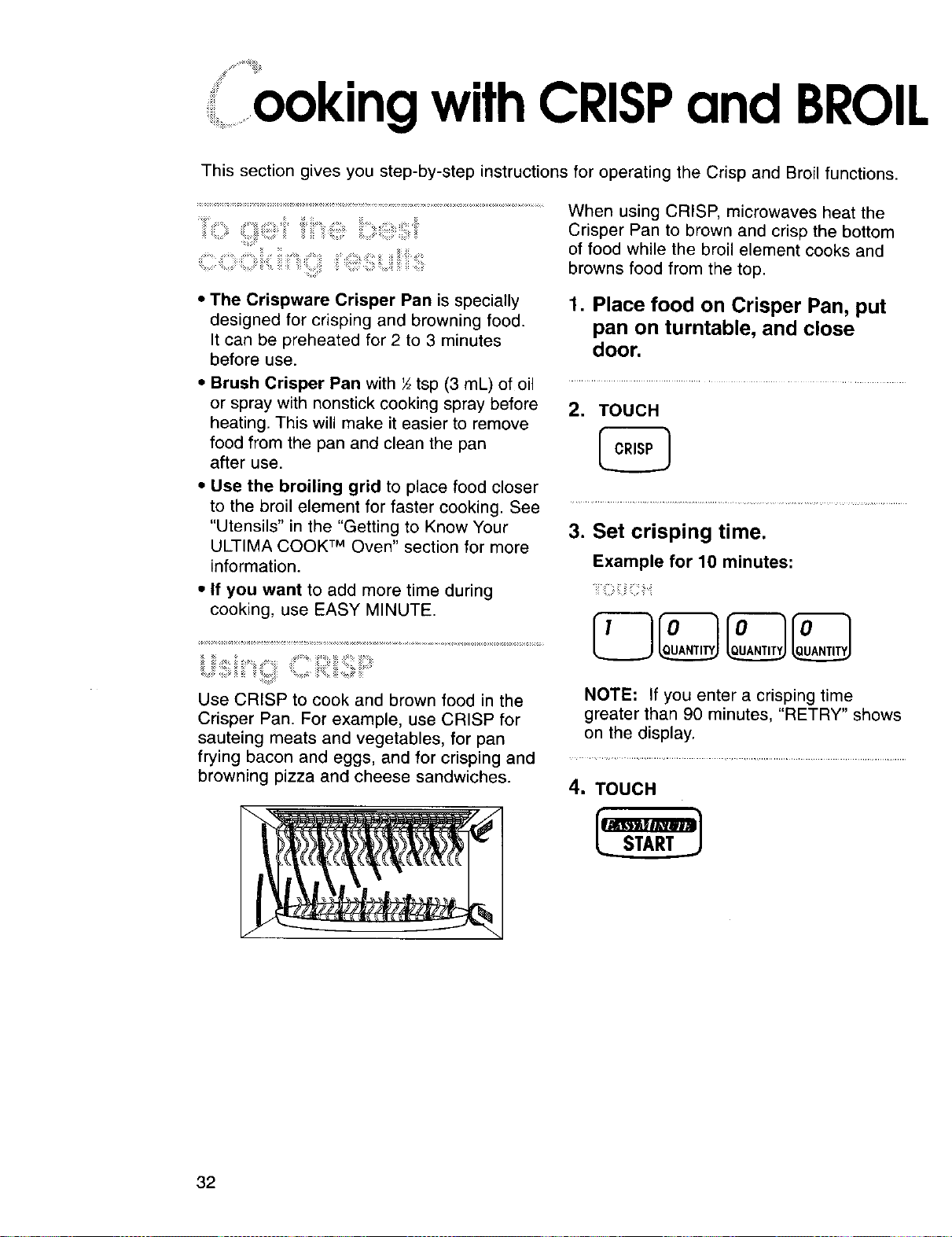
Use CRISP to cook and brown food in the
Crisper Pan. For example, use CRISP for
sauteing meats and vegetables, for pan
frying bacon and eggs, and for crisping and
browning pizza and cheese sandwiches.
3. Set crisping time.
Example for 10 minutes:
NOTE: If you enter a crisping time
greater than 90 minutes, "RETRY" shows
on the display.
4. TOUCH
32
ooking with CRISP and BROIL
NOTES:
• You can increase crisping time after
touching START by pressing EASY
MINUTE.
• You can disable or enable the USE
PAN prompt. See "Using help prompts"
in the "Cooking Guides" section for
more information.
After 4 seconds, the cooking time will
count down.
When cooking time ends, four tones will
sound and the display will show "End."
5. After cooking, open the door
OR
Four tones will repeat every minute until
you open the oven door or touch
CANCEL. This will clear the display.
Broil lets you cook and brown small
amounts of food (from 1 to 4 pieces). The
broil element is located in the ULTIMA
COOK TM oven ceiling near the door.
For best results when broiling:
• Remove turntable coupling located in the
center of the oven bottom under the glass
turntable. See the "Caring for Your
ULTIMA COOK TM Oven" section for more
information.
• Replace the glass turntable.
• Preheat the broil element for 2 to 3
minutes.
• After preheating, place all food on one half
of the broiling grid only.
• Place grid securely on turntable with food
positioned in the front area close to the
door and directly under the broil element.
• For even browning, turn food over halfway
through cooking.
• Do not leave the oven door open for long
periods of time when using the broil
element. This could affect cooking
performance.
1. Put food in oven and close door.
2. TOUCH
3. Set broiling time.
i:
NOTE: If you try to enter a broiling time
greater than 90 minutes, "RETRY"
shows on the display.
4. TOUCH
s,,.,,,==,,j
NOTES:
• You can increase broiling time after
touching START by pressing EASY
MINUTE.
• You can disable or enable the USE
GRID prompt. See "Using help
prompts" in the "Cooking Guides"
section for more information.
When cooking time ends, four tones will
sound, and the display will show "End."
5. After cooking, open the door
OR
OL.._.._.O___J_FCANCEL _ UPPEe0VE.
Four tones will repeat every minute until
you open the oven door or touch
CANCEL. This will clear the display.
33
ooking Guides
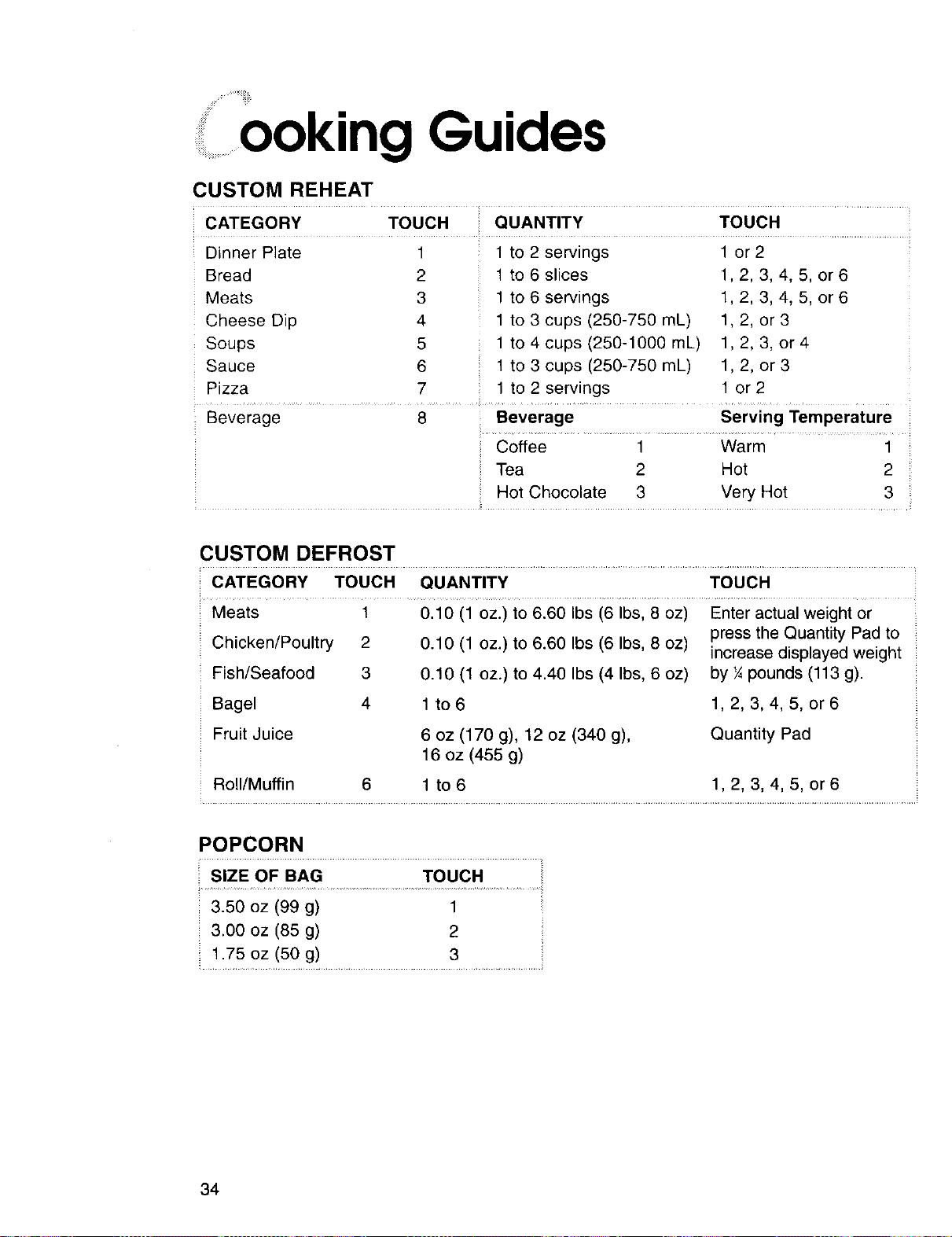
CUSTOM REHEAT
CATEGORY TOUCH QUANTITY TOUCH
Dinner Plate 1 1 to 2 servings 1 or 2
Bread 2 1 to 6 slices 1,2, 3, 4, 5, or 6
Meats 3 1 to 6 servings 1, 2, 3, 4, 5, or 6
Cheese Dip 4 1 to 3 cups (250-750 mL) 1, 2, or 3
Soups 5 1 to 4 cups (250-1000 mL) 1,2, 3, or 4
Sauce 6 1 to 3 cups (250-750 mL) 1,2, or 3
Pizza 7 1 to 2 servings 1 or 2
Beverage
8 : Beverage Serving Temperature
Coffee 1 Warm 1
Tea 2 Hot 2
Hot Chocolate 3 Very Hot 3
CUSTOM DEFROST
CATEGORY TOUCH QUANTITY TOUCH
Meats 1 0.10 (1 oz.) to 6.60 Ibs (6 Ibs, 8 oz) Enter actual weight or
Chicken/Poultry 2 0.10 (1 oz.) to 6.60 Ibs (6 Ibs, 8 oz) press the Quantity Pad to
increase displayed weight
Fish/Seafood 3 0.10 (1 oz.) to 4.40 Ibs (4 Ibs, 6 oz) by ¼pounds (113 g).
Bagel 4 1 to 6 1, 2, 3, 4, 5, or 6
Fruit Juice
6 oz (170 g), 12 oz (340 g),
16 oz (455 g)
Quantity Pad
Roll/Muffin 6 1 to 6 1, 2, 3, 4, 5, or 6
POPCORN
3.50 oz (99 g) 1
3.00 oz (85 g) 2
1.75 oz (50 g) 3
34
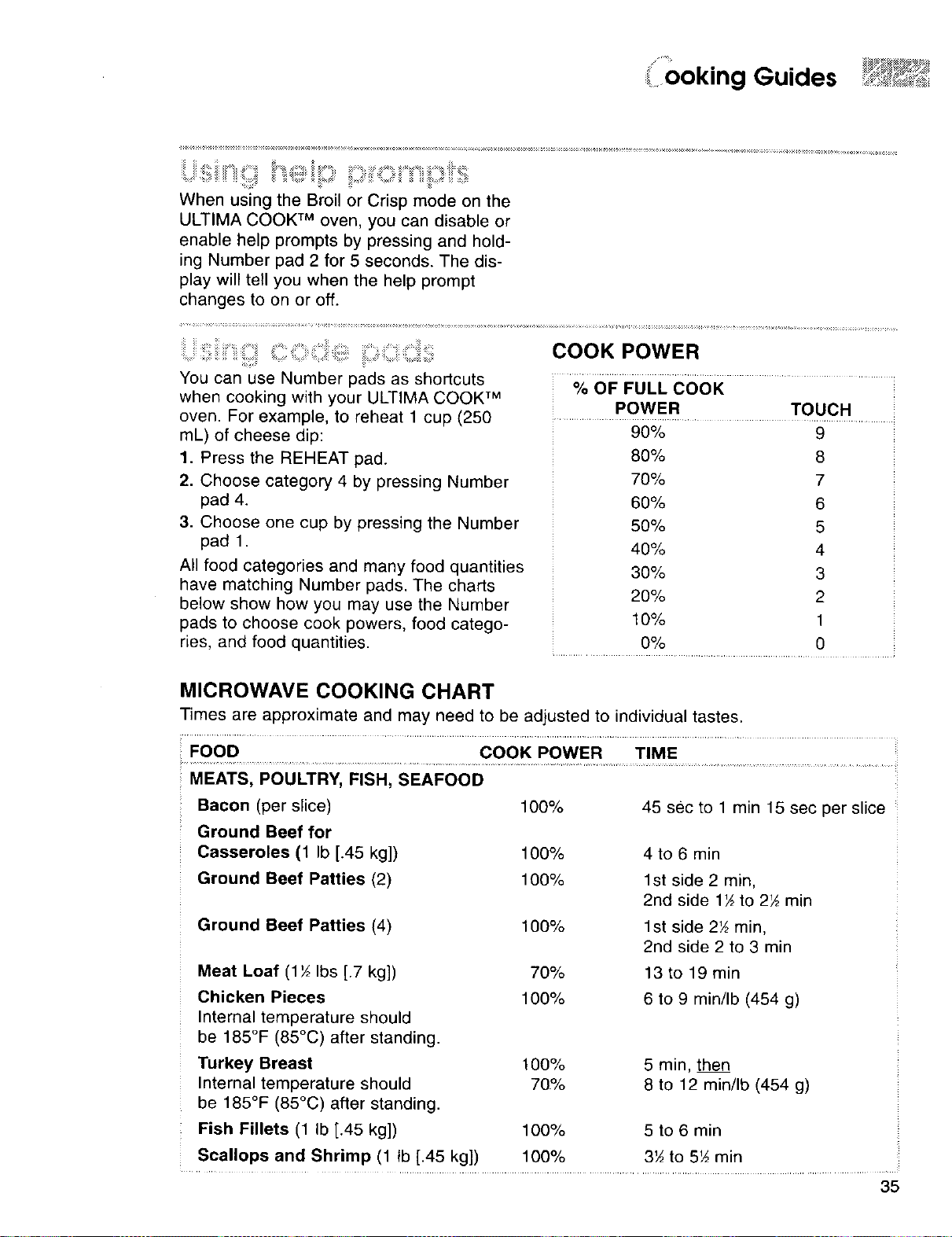
i ooking Guides
When using the Broil or Crisp mode on the
ULTIMA COOK TM oven, you can disable or
enable help prompts by pressing and hold-
ing Number pad 2 for 5 seconds. The dis-
play wili tell you when the help prompt
changes to on or off.
iii = iiiiiiiiii '!!iiiiil;iii,C i iii: iiiiii:iiii ,CiiiC!i;i!i;
You can use Number pads as shortcuts
when cooking with your ULTIMA COOK TM
oven. For example, to reheat 1 cup (250
mL) of cheese dip:
1. Press the REHEAT pad.
2. Choose category 4 by pressing Number
pad 4.
3. Choose one cup by pressing the Number
pad 1.
All food categories and many food quantities
have matching Number pads. The charts
below show how you may use the Number
pads to choose cook powers, food catego-
ries, and food quantities.
COOK POWER
% OF FULL COOK
POWER TOUCH
90%
80%
70%
60%
50%
40%
30%
20%
10%
O%
9
8
7
6
5
4
3
2
1
0
.................................................. i
MICROWAVE COOKING CHART
Times are approximate and may need to be adjusted to individual tastes.
FOOD COOK POWER TIME
MEATS, POULTRY, FISH, SEAFOOD
Bacon (per slice)
Ground Beef for
Casseroles (1 Ib [.45 kg])
Ground Beef Patties (2)
Ground Beef Patties (4)
Meat Loaf (lY_ Ibs [.7 kg])
Chicken Pieces
Internal temperature should
be 185°F (85°C) after standing.
Turkey Breast 100%
Internal temperature should 70%
be 185°F (85°C) after standing.
Fish Fillets (1 Ib [.45 kg]) 100%
Scallops and Shrimp (1 tb [.45 kg]) 100%
100% 45 sec to 1 min 15 sec per slice
100% 4 to 6 min
100% 1st side 2 min,
2nd side 1½ to 2_ min
100% 1st side 2_ rain,
2nd side 2 to 3 min
70% 13 to 19 min
100% 6 to 9 min/Ib (454 g)
5 rain, then
8 to 12 min/Ib (454 g)
5 to 6 min
3_ to 5½ min
35
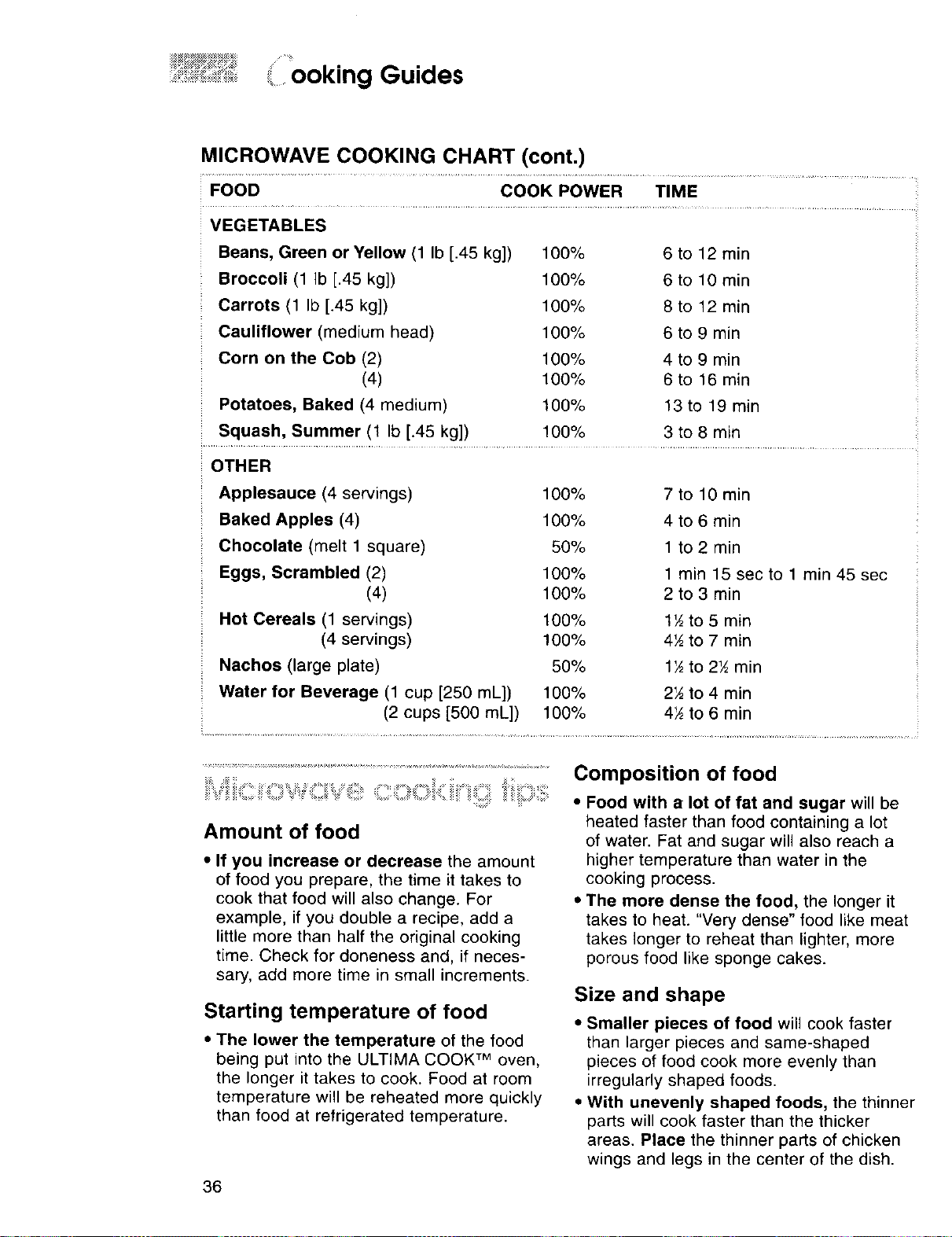
:_,_,,:E_:,,: $]:_: •!::
.... ..................ooking Guides
MICROWAVE COOKING CHART (cont.)
FOOD COOK POWER TIME
VEGETABLES
Beans, Green or Yellow (1 Ib [.45 kg])
Broccoli (1 Ib [.45 kg])
Carrots (1 Ib [.45 kg])
Cauliflower (medium head)
Corn on the Cob (2)
(4)
Potatoes, Baked (4 medium)
Squash, Summer (1 Ib [.45 kg])
100% 6 to 12 rain
100% 6 to 10 min
100% 8 to 12 min
100% 6 to 9 min
100% 4 to 9 min
100% 6 to 16 rain
100% 13to 19 min
100% 3 to 8 min
OTHER
Applesauce (4 servings) 100%
Baked Apples (4) 100%
Chocolate (melt 1 square) 50%
Eggs, Scrambled (2) 100%
(4) 100%
Hot Cereals (1 servings) 100%
(4 servings) 100%
Nachos (large plate) 50%
Water for Beverage (1 cup [250 mL]) 100%
(2 cups [500 mL]) 100%
7 to 10 rain
4 to 6 rain
1 to 2 min
1 rain 15 sec to 1 min 45 sec
2 to 3 min
1½ to 5 rain
4½ to 7 rain
1½to 2½ rain
2½ to 4 rain
4½ to 6 rain
i =;_"_ :;_ i ;!==!=!:,= _:: !
Amount of food
• If you increase or decrease the amount
of food you prepare, the time it takes to
cook that food will also change. For
example, if you double a recipe, add a
little more than half the original cooking
time. Check for aloneness and, if neces-
sary, add more time in small increments.
Starting temperature of food
* The lower the temperature of the food
being put into the ULTIMA COOK TM oven,
the longer it takes to cook. Food at room
temperature will be reheated more quickly
than food at refrigerated temperature.
36
Composition of food
• Food with a lot of fat and sugar will be
heated faster than food containing a lot
of water. Fat and sugar will also reach a
higher temperature than water in the
cooking process.
• The more dense the food, the longer it
takes to heat. "Very dense" food like meat
takes longer to reheat than lighter, more
porous food like sponge cakes.
Size and shape
• Smaller pieces of food will cook faster
than larger pieces and same-shaped
pieces of food cook more evenly than
irregularly shaped foods.
• With unevenly shaped foods, the thinner
parts will cook faster than the thicker
areas, Place the thinner parts of chicken
wings and legs in the center of the dish.
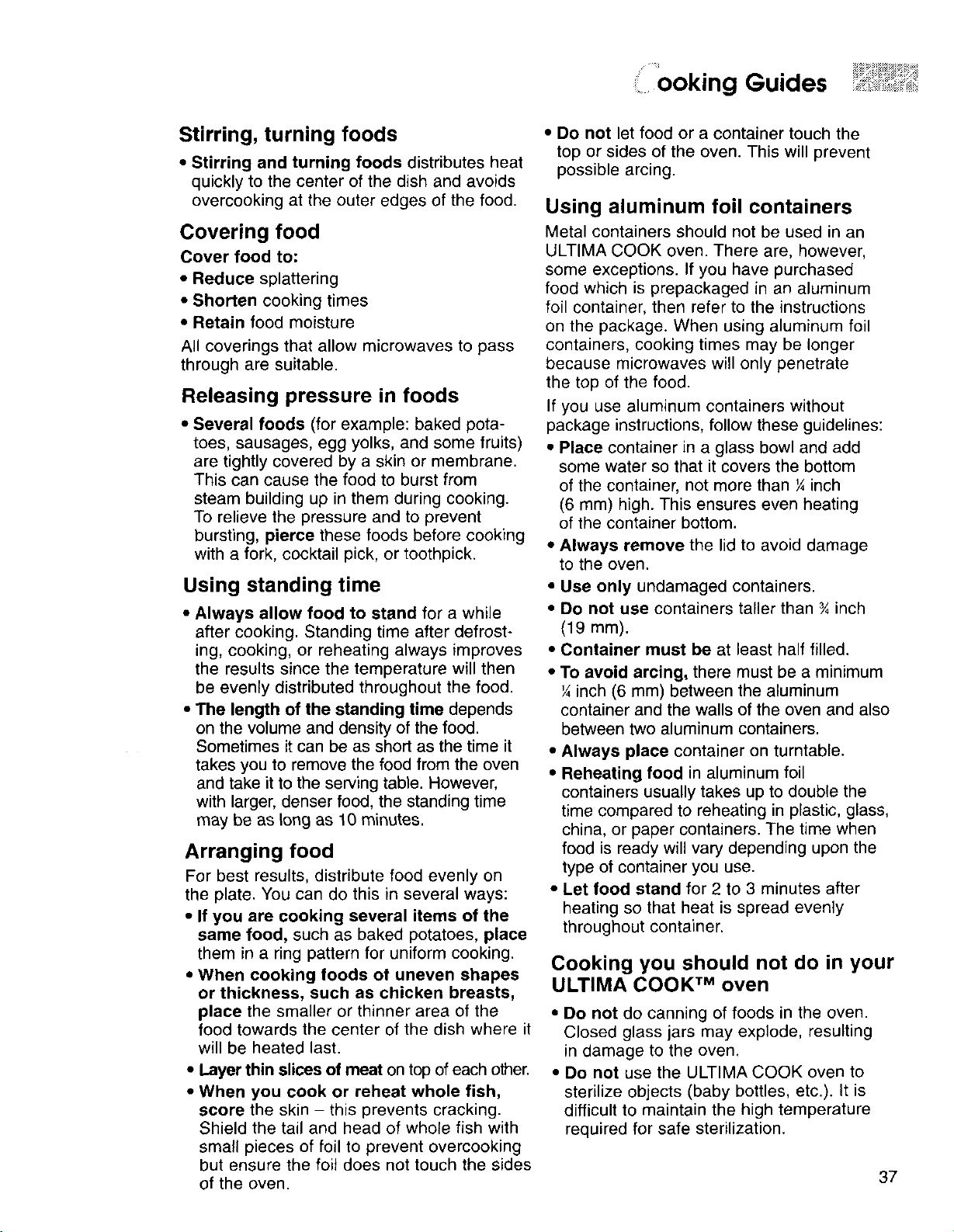
......ooking Guides
Stirring, turning foods
• Stirring and turning foods distributes heat
quickly to the center of the dish and avoids
overcooking at the outer edges of the food.
Covering food
Cover food to:
• Reduce splattering
• Shorten cooking times
• Retain food moisture
All coverings that allow microwaves to pass
through are suitable.
Releasing pressure in foods
• Several foods (for example: baked pota-
toes, sausages, egg yolks, and some fruits)
are tightly covered by a skin or membrane.
This can cause the food to burst from
steam building up in them during cooking.
To relieve the pressure and to prevent
bursting, pierce these foods before cooking
with a fork, cocktail pick, or toothpick.
Using standing time
• Always allow food to stand for a while
after cooking. Standing time after defrost-
ing, cooking, or reheating always improves
the results since the temperature will then
be evenly distributed throughout the food.
• The length of the standing time depends
on the volume and density of the food.
Sometimes it can be as short as the time it
takes you to remove the food from the oven
and take it to the serving table. However,
with larger, denser food, the standing time
may be as long as 10 minutes.
Arranging food
For best results, distribute food evenly on
the plate. You can do this in several ways:
• If you are cooking several items of the
same food, such as baked potatoes, place
them in a ring pattern for uniform cooking.
• When cooking foods of uneven shapes
or thickness, such as chicken breasts,
place the smaller or thinner area of the
food towards the center of the dish where it
will be heated last.
• Layer thin slices of meat on top of each other.
• When you cook or reheat whole fish,
score the skin - this prevents cracking.
Shield the tail and head of whole fish with
small pieces of foil to prevent overcooking
but ensure the foil does not touch the sides
of the oven.
• Do not let food or a container touch the
top or sides of the oven. This will prevent
possible arcing.
Using aluminum foil containers
Metal containers should not be used in an
ULTIMA COOK oven. There are, however,
some exceptions. If you have purchased
food which is prepackaged in an aluminum
foil container, then refer to the instructions
on the package. When using aluminum foil
containers, cooking times may be longer
because microwaves will only penetrate
the top of the food.
If you use aluminum containers without
package instructions, follow these guidelines:
• Place container in a glass bowl and add
some water so that it covers the bottom
of the container, not more than ¼ inch
(6 mm) high. This ensures even heating
of the container bottom.
• Always remove the lid to avoid damage
to the oven.
• Use only undamaged containers.
• Do not use containers taller than ¾ inch
(19 mm).
• Container must be at least half filled.
• To avoid arcing, there must be a minimum
¼ inch (6 mm) between the aluminum
container and the walls of the oven and also
between two aluminum containers.
• Always place container on turntable.
• Reheating food in aluminum foil
containers usually takes up to double the
time compared to reheating in plastic, glass,
china, or paper containers. The time when
food is ready will vary depending upon the
type of container you use.
• Let food stand for 2 to 3 minutes after
heating so that heat is spread evenly
throughout container.
Cooking you should not do in your
ULTIMA COOK TM oven
• Do not do canning of foods in the oven.
Closed glass jars may explode, resulting
in damage to the oven,
• Do not use the ULTIMA COOK oven to
sterilize objects (baby bottles, etc.). It is
difficult to maintain the high temperature
required for safe sterilization.
37
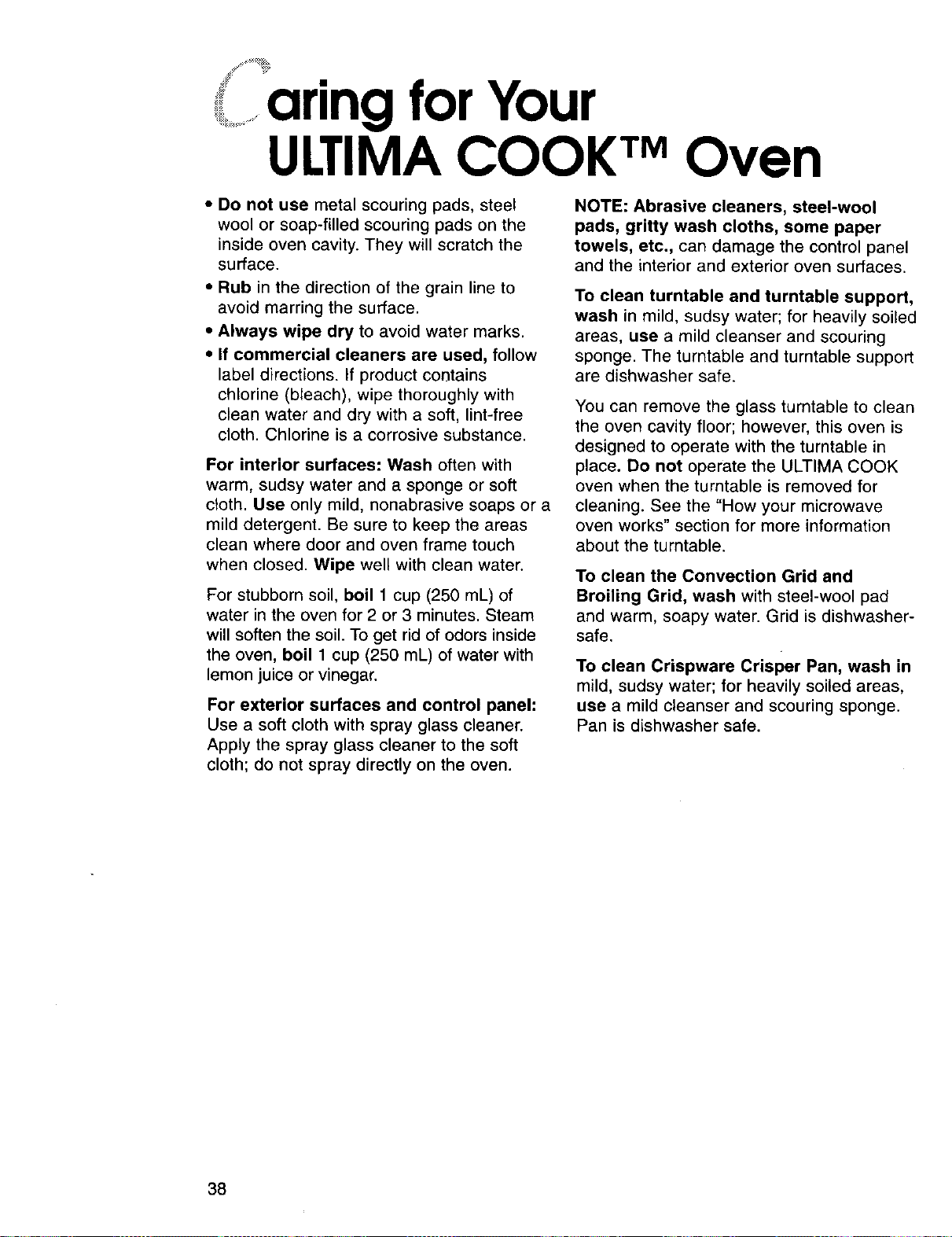
aring for Youriii.........
UCIMA COOK TMOven
• Do not use metal scouring pads, steel
wool or soap-filled scouring pads on the
inside oven cavity. They will scratch the
surface.
• Rub in the direction of the grain line to
avoid marring the surface.
• Always wipe dry to avoid water marks.
• If commercial cleaners are used, follow
label directions. If product contains
chlorine (bleach), wipe thoroughly with
clean water and dry with a soft, lint-free
cloth. Chlorine is a corrosive substance.
For interior surfaces: Wash often with
warm, sudsy water and a sponge or soft
cloth. Use only mild, nonabrasive soaps or a
mild detergent. Be sure to keep the areas
clean where door and oven frame touch
when closed. Wipe well with clean water.
For stubborn soil, boil 1 cup (250 mL) of
water in the oven for 2 or 3 minutes. Steam
will soften the soil. To get rid of odors inside
the oven, boil 1 cup (250 mL) of water with
lemon juice or vinegar.
For exterior surfaces and control panel:
Use a soft cloth with spray glass cleaner.
Apply the spray glass cleaner to the soft
cloth; do not spray directly on the oven.
NOTE: Abrasive cleaners, steel-wool
pads, gritty wash cloths, some paper
towels, etc., can damage the control panel
and the interior and exterior oven surfaces.
To clean turntable and turntable support,
wash in mild, sudsy water; for heavily soiled
areas, use a mild cleanser and scouring
sponge. The turntable and turntable support
are dishwasher safe.
You can remove the glass turntable to clean
the oven cavity floor; however, this oven is
designed to operate with the turntable in
place. Do not operate the ULTIMA COOK
oven when the turntable is removed for
cleaning. See the "How your microwave
oven works" section for more information
about the turntable.
To clean the Convection Grid and
Broiling Grid, wash with steel-wool pad
and warm, soapy water. Grid is dishwasher-
safe.
To clean Crispware Crisper Pan, wash in
mild, sudsy water; for heavily soiled areas,
use a mild cleanser and scouring sponge.
Pan is dishwasher safe.
38
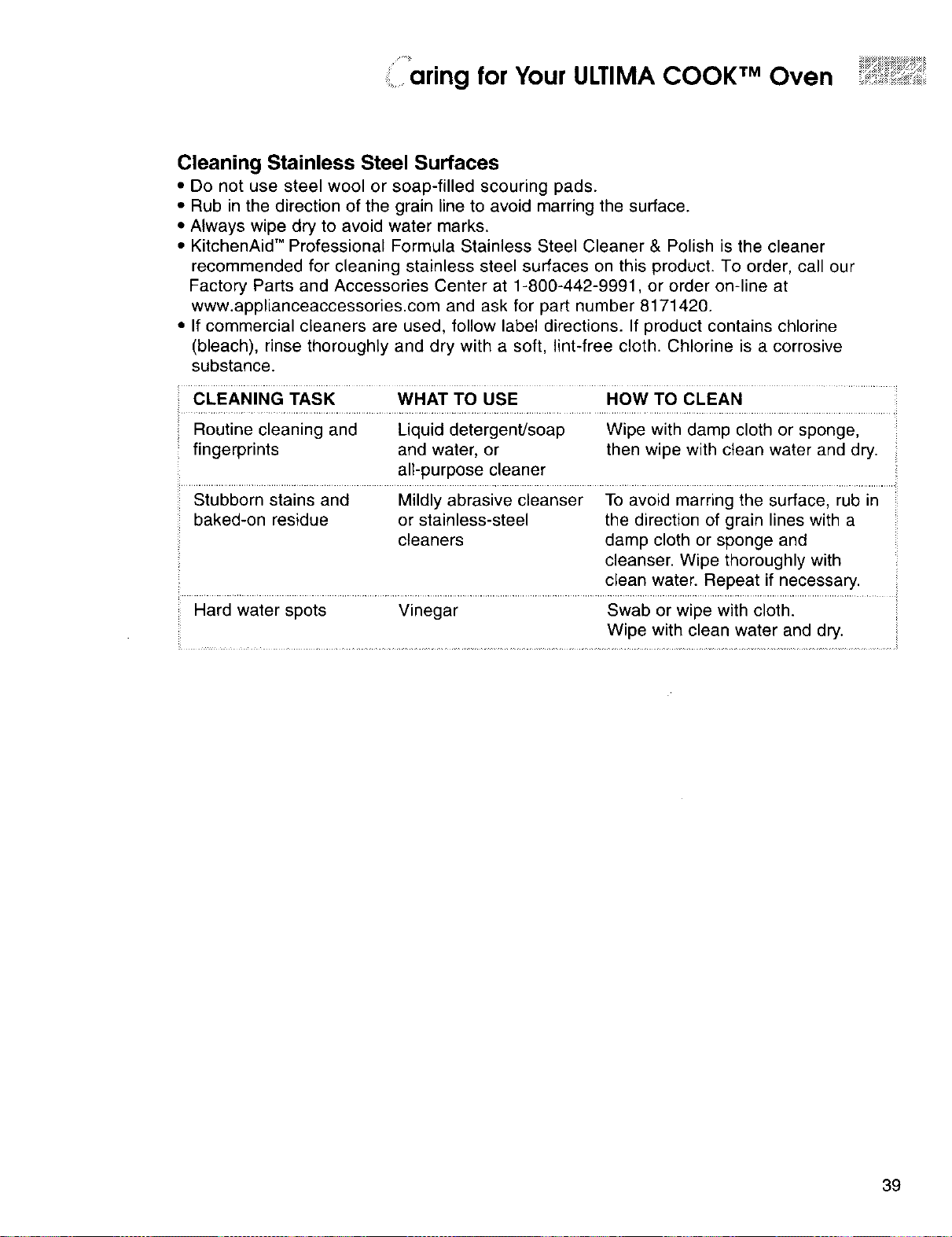
anng for Your ULTIMA COOK TM Oven ............
Cleaning Stainless Steel Surfaces
• Do not use steel wool or soap-filled scouring pads.
• Rub in the direction of the grain line to avoid marring the surface.
* Always wipe dry to avoid water marks.
• KitchenAid" Professional Formula Stainless Steel Cleaner & Polish is the cleaner
recommended for c_eaning stainless steel surfaces on this product. To order, call our
Factory Parts and Accessories Center at 1-800-442-9991, or order on-line at
www.applianceaccessories.com and ask for part number 8171420.
• If commercial cleaners are used, follow label directions, if product contains chlorine
(bleach), rinse thoroughly and dry with a soft, lint-free cloth. Chlorine is a corrosive
substance.
...... WHAT TO USE ...... How TO CLEAN ................
Routine cleaning and Liquid detergent/soap Wipe with damp cloth or sponge,
fingerprints and water, or then wipe with clean water and dry.
all-purpose cleaner
Stubborn stains and Mildly abrasive cleanser To avoid marring the surface, rub in
baked-on residue or stainless-steel the direction of grain lines with a
cleaners damp cloth or sponge and
cleanser. Wipe thoroughly with
clean water. Repeat if necessary. :
Hard water spots Vinegar Swab or wipe with cloth.
Wipe with clean water and dry.
39
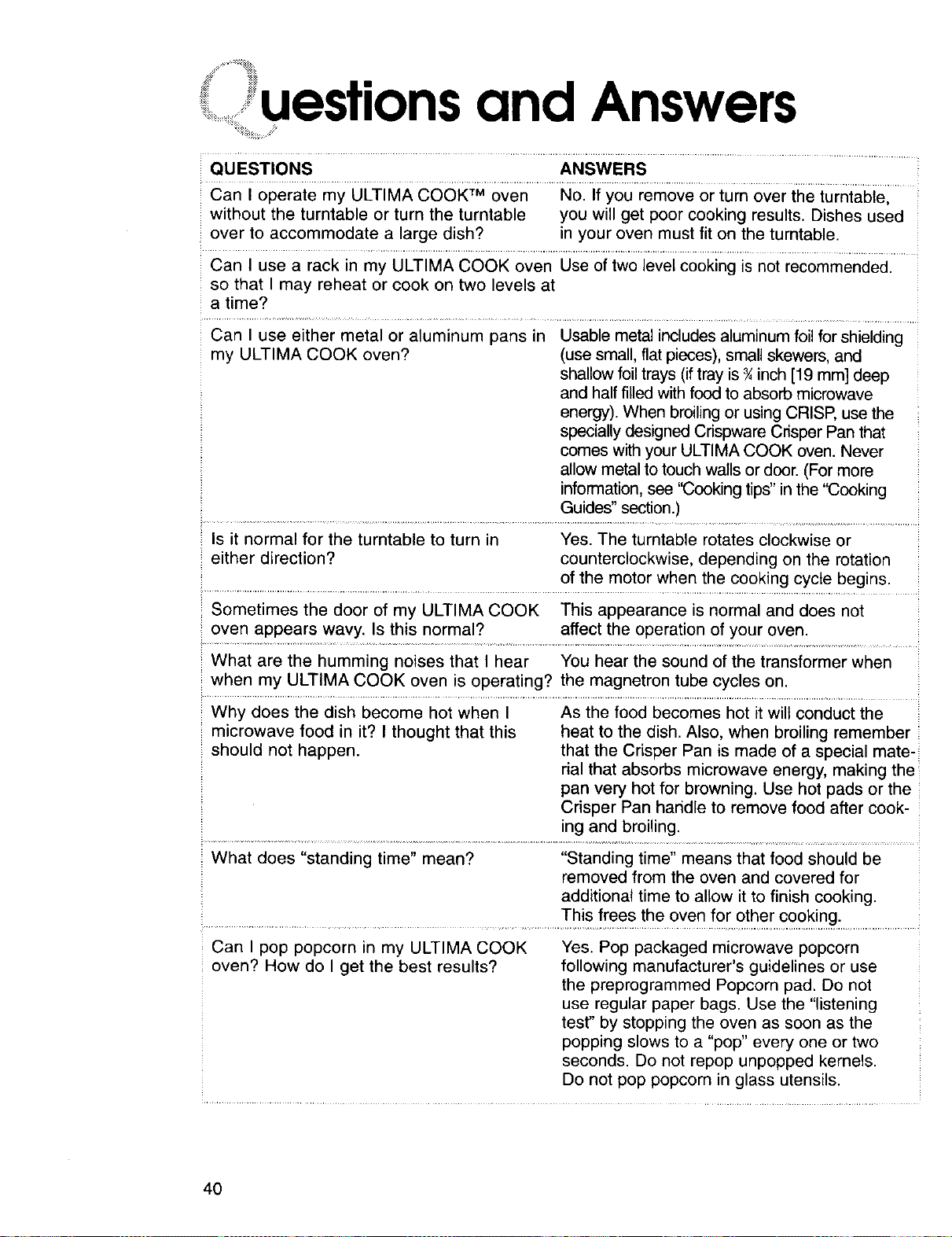
uestions and Answers
QU ESTIONS ANSWERS
Can I operate my ULTIMA COOK TM oven No. If you remove or turn over the turntable,
without the turntable or turn the turntable you will get poor cooking results. Dishes used
over to accommodate a large dish? in your oven must fit on the turntable.
Can I use a rack in my ULTIMA COOK oven Use of two level cooking is not recommended.
so that I may reheat or cook on two levels at
a time?
Can I use either metal or aluminum pans in Usable metal includes aluminum foil for shielding
my ULTIMA COOK oven? (use small, flat pieces), small skewers, and
shallow foil trays (if tray is ¾inch [19 mm] deep
and half filled with food to absorb microwave
energy). When broiling or using CRISP, use the
specially designed Crispware Crisper Pan that
comes with your ULTIMA COOK oven. Never
allow metal to touch wails or door. (For more
;: information, see "Cooking tips" in the "Cooking
i
Guides" section.)
Is it normal for the turntable to turn in Yes. The turntable rotates clockwise or
either direction? counterclockwise, depending on the rotation
of the motor when the cooking cycle begins.
Sometimes the door of my ULTIMA COOK This appearance is normal and does not
oven appears wavy. Is this normal? affect the operation of your oven.
What are the humming noises that I hear You hear the sound of the transformer when
when my ULTIMA COOK oven is operating? the magnetron tube cycles on.
Why does the dish become hot when I As the food becomes hot it wilt conduct the
microwave food in it? I thought that this heat to the dish. Also, when broiling remember
should not happen, that the Crisper Pan is made of a special mate-
rial that absorbs microwave energy, making the
pan very hot for browning. Use hot pads or the
Crisper Pan handle to remove food after cook-
ing and broiling.
What does "standing time" mean? "Standing time" means that food should be
removed from the oven and covered for
additional time to allow it to finish cooking.
This frees the oven for other cooking.
Can I pop popcorn in my ULTIMA COOK Yes. Pop packaged microwave popcorn
oven? How do I get the best results? following manufacturer's guidelines or use
the preprogrammed Popcorn pad. Do not
use regular paper bags. Use the "listening
test" by stopping the oven as soon as the
popping slows to a "pop" every one or two
seconds. Do not repop unpopped kernels.
Do not pop popcorn in glass utensils.
40
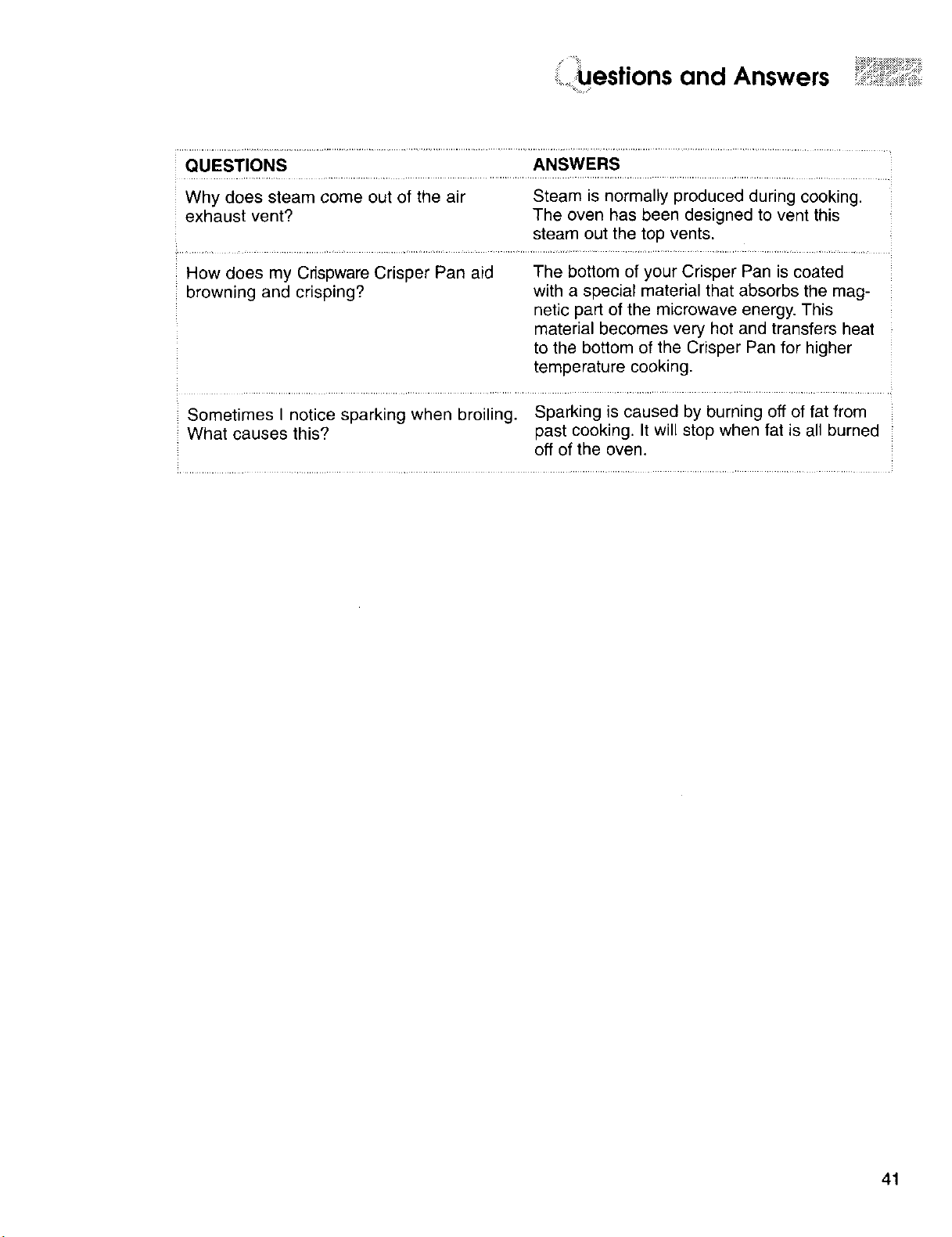
,, estions and Answers
QUESTIONS ANSWERS
Why does steam come out of the air Steam is normally produced during cooking.
exhaust vent? The oven has been designed to vent this
steam out the top vents.
How does my Crispware Crisper Pan aid The bottom of your Crisper Pan is coated
browning and crisping? with a special material that absorbs the mag-
netic part of the microwave energy. This
material becomes very hot and transfers heat
to the bottom of the Crisper Pan for higher
temperature cooking.
Sometimes I notice sparking when broiling. Sparking is caused by burning off of fat from
What causes this? past cooking. It will stop when fat is all burned
off of the oven,
41
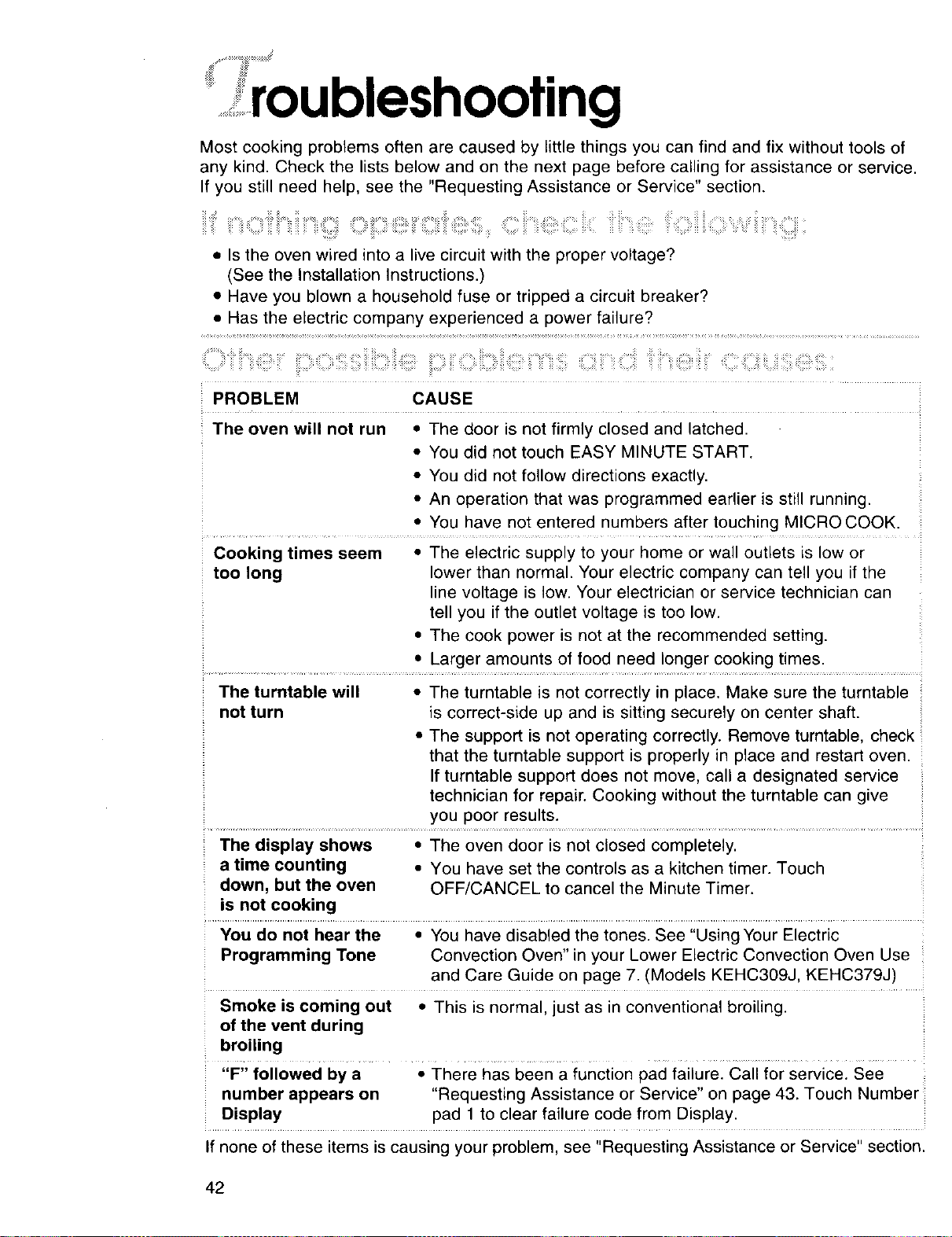
.....................roubleshooting
Most cooking problems often are caused by little things you can find and fix without tools of
any kind. Check the lists below and on the next page before calling for assistance or service.
If you still need help, see the "Requesting Assistance or Service" section.
• Is the oven wired into a live circuit with the proper voltage?
(See the Installation Instructions.)
• Have you blown a household fuse or tripped a circuit breaker?
• Has the electric company experienced a power failure?
PROBLEM CAUSE
The oven will not run • The door is not firmly closed and latched.
• You did not touch EASY MINUTE START.
• You did not follow directions exactly.
• An operation that was programmed earlier is still running.
• You have not entered numbers after touching MICRO COOK.
Cooking times seem The electric supply to your home or wall outlets is low or
too long lower than normal. Your electric company can tell rou if the
line volta( e is low. Your electrician or service technician can
tell _ou if the outlet voltage is too low.
• The cook )ower is not at the recommended setting.
• Larger amounts of food need Ion( er cooking times.
The turntable will • The turntable is not correctly in place. Make sure the turntable
not turn is correct-side up and is sitting securely on center shaft.
• The support is not operating correctly. Remove turntable, check
that the turntable support is properly in place and restart oven.
If turntable support does not move, call a designated service
technician for repair. Cooking without the turntable can give
you poor results.
The display shows • The oven door is not closed completely.
a time counting • You have set the controls as a kitchen timer. Touch
down, but the oven OFF/CANCEL to cancel the Minute Timer.
is not cooking
You do not hear the • You have disabled the tones. See "Using Your Electric
Programming Tone Convection Oven" in your Lower Electric Convection Oven Use
and Care Guide on page 7. (Models KEHC309J, KEHC379J)
Smoke is coming out • This is normal, just as in conventional broiling.
of the vent during
broiling
Z
"F" followed by a • There has been a function pad failure. Call for service. See
number appears on "Requesting Assistance or Service" on page 43. Touch Number
Display pad 1 to clear failure code from Display.
If none of these items is causing your problem, see "Requesting Assistance or Service" section.
42
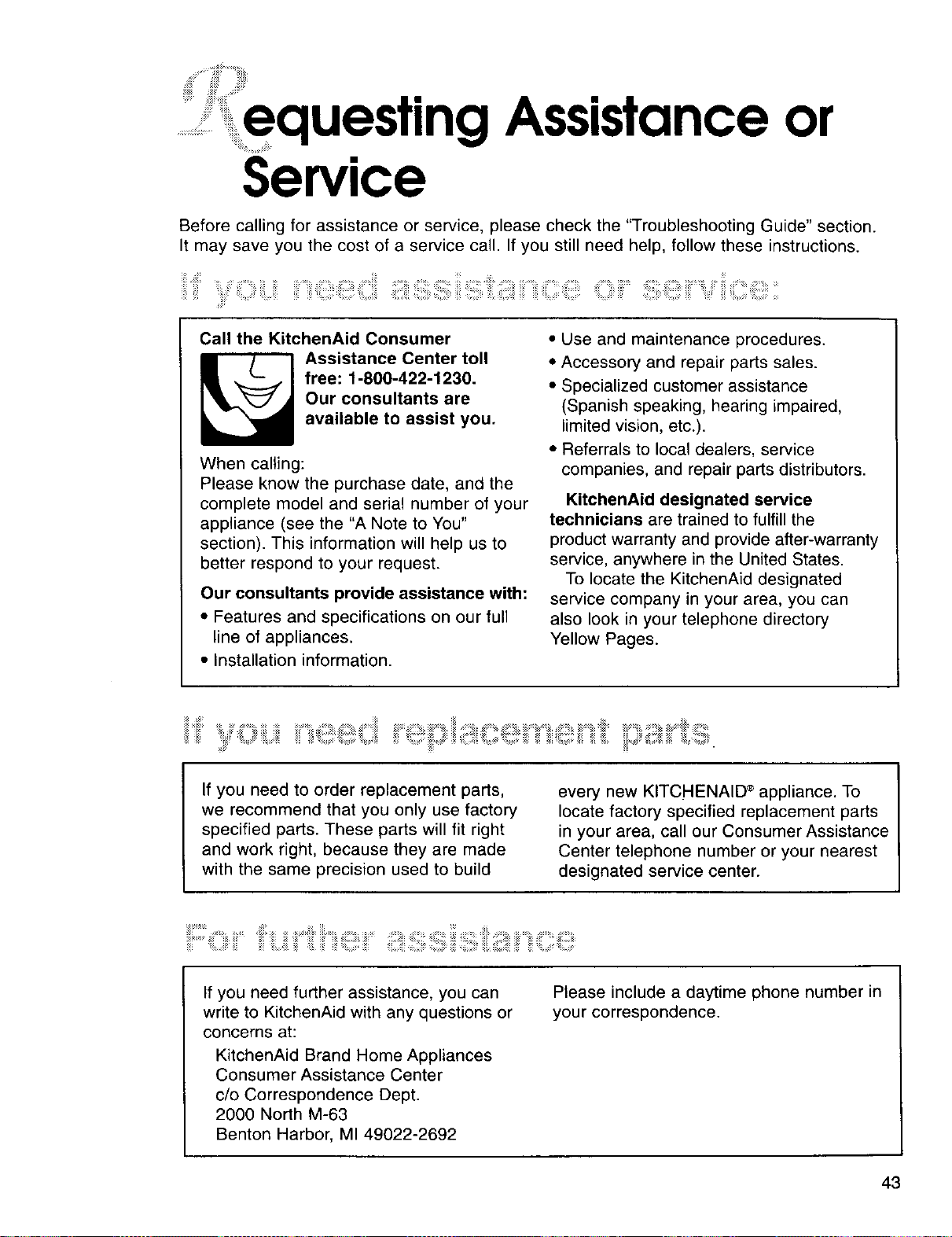
:=:equesting Assistance or
Service
Before calling for assistance or service, please check the "Troubleshooting Guide" section.
It may save you the cost of a service call. If you still need help, follow these instructions.
i!iiiiiiii!!i S, iiiiiiiiiiii ,ii!iiiiiiiii"iiii: iiii!i!iiii? iiiiili!!!! ,, iiiiiiiii!iii! iiiiiiiiiii iiii ¸"
Call the KitchenAid Consumer
_ ssistance Center toll
free: 1-800-422-1230.
Our consultants are
available to assist you.
When calling:
Please know the purchase date, and the
complete model and serial number of your
appliance (see the "A Note to You"
section). This information will help us to
better respond to your request.
Our consultants provide assistance with:
• Features and specifications on our full
line of appliances.
• Installation information.
• Use and maintenance procedures.
• Accessory and repair parts sales.
• Specialized customer assistance
(Spanish speaking, hearing impaired,
limited vision, etc.).
• Referrals to local dealers, service
companies, and repair parts distributors.
KitchenAid designated service
technicians are trained to fulfill the
product warranty and provide after-warranty
service, anywhere in the United States.
To locate the KitchenAid designated
service company in your area, you can
also look in your telephone directory
Yellow Pages.
:i
If you need to order replacement parts,
we recommend that you only use factory
specified parts. These parts will fit right
and work right, because they are made
with the same precision used to build
every new KITCHENAID ®appliance. To
locate factory specified replacement parts
in your area, call our Consumer Assistance
Center telephone number or your nearest
designated service center.
If you need further assistance, you can
write to KitchenAid with any questions or
concerns at:
KitchenAid Brand Home Appliances
Consumer Assistance Center
c/o Correspondence Dept.
2000 North M-63
Benton Harbor, MI 49022-2692
Please include a daytime phone number in
your correspondence.
43
::_> x_ ¸
:iii::_ #:!3 !:!_:!:: ;,:_:_ _[_: _iP:_!_: :_!:_ i:!_i!:! >
Electric Built-ln
ULTIMA COOK TMOven
_ _ii_ii_ ,_iiiii! ,iiii_
,arranty
LENGTH OF KITCHENAID KITCHENAID
WARRANTY: WILL PAY FOR: WILL NOT PAY FOR:
ONE-YEAR FULL
WARRANTY
FROM DATE OF
PURCHASE.
SECOND-
THROUGH FIFTH-
YEAR LIMITED
WARRANTY
FROM DATE OF
PURCHASE.
SECOND-
THROUGH
TENTH-YEAR
LIMITED
WARRANTY
FROM DATE OF
PURCHASE.
Replacement parts and
repair labor costs to
correct defects in mate-
rials or workmanship.
Service must be
provided by a
KitchenAid designated
servicing company.
Replacement parts for
microwave magnetron
or any oven electric
element to correct
defects in materials or
workmanship.
Replacement parts for
solid state touch control
system to correct
defects in materials or
workmanship.
Replacement parts for
the stainless steel oven
cavity/inner door if the
part rusts through due
to defects in materials
or workmanship.
A. Service calls to:
1. Correct the installation of the
microwave oven.
2. Instruct you hew to use the
microwave oven.
3. Replace house fuses or correct
house wiring.
B. Repairs when oven is used in other
than normal single-family household use.
C. Damage resulting from accident,
alteration, misuse, abuse, fire, flood,
acts of God, improper installation,
installation not in accordance with local
electrical codes, or use of products not
approved by KitchenAid.
D. Any labor costs during the limited
warranties.
E. Replacement parts or repair labor
costs for units operated outside the
United States.
F. Pickup and delivery. This product
is designed to be repaired in the home.
G. Repairs to parts or systems resulting
from unauthorized modifications made
to the appliance.
1/oo
KITCHENAID SHALL NOT BE LIABLE FOR INCIDENTAL OR CONSEQUENTIAL
DAMAGES. Some states do not allow the exclusion or limitation of incidental or consequential
damages, so this exclusion or limitation may not apply to you. This warranty gives you specific
legal rights and you may also have other rights which may vary from state to state.
Outside the 50 United States, this warranty does not apply. Contact your authorized
KitchenAid dealer to determine if another warranty applies.
If you need service, first see the "Requesting Assistance or Service" section of this book. After
checking "Requesting Assistance or'Sdl_l_e, '' additional help can be_Qund, by calling our
Consumer Assistance Center telepho_q_i_'flger, t.nr_,_.._?.p_._(i _/where in the U.S.
Copied
4452969 2/oo
© 2000 All rights reserved ® Registe_pn_rk/TM Trademark of KitchenAid, U.SA Printed in U S A