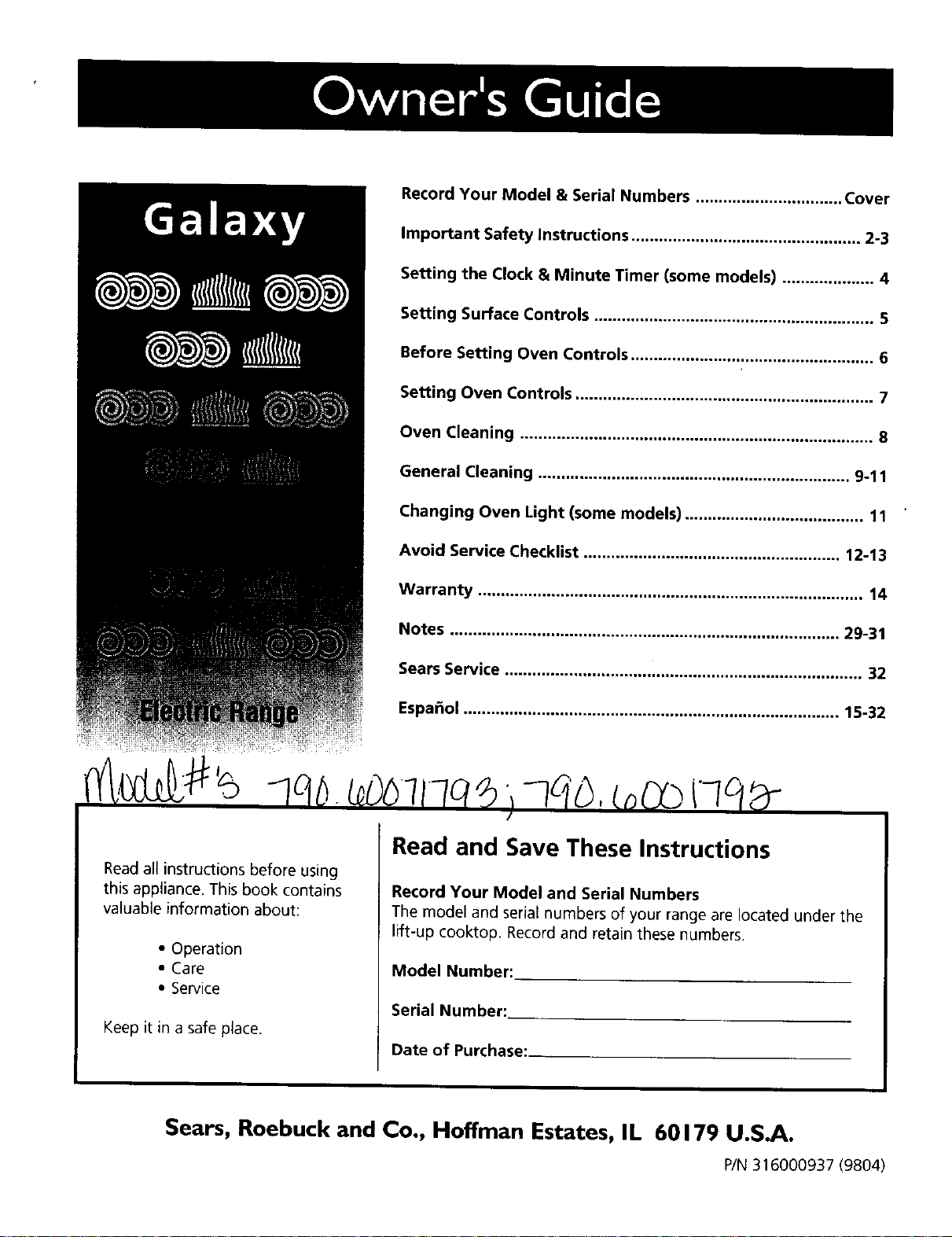
Record Your Model & Serial Numbers ................................ Cover
Important Safety Instructions .................................................. 2-3
Setting the Clock & Minute Timer (some models) .................... 4
Setting Surface Controls ............................................................. 5
Before Setting Oven Controls ..................................................... 6
Setting Oven Controls ................................................................. 7
Oven Cleaning ............................................................................. 8
General Cleaning .................................................................... 9-11
Changing Oven Light (some models) ....................................... 11
Avoid Service Checklist ........................................................ 12-13
Warranty .................................................................................... 14
Notes ..................................................................................... 29-31
Sears Service .............................................................................. 32
Espa_ol .................................................................................. 15-32
)qqB'boo
Read and Save These Instructions
Read al_instructions before using
this appliance. This book contains
valuable information about:
• Operation
• Care
•Service
Keep it in a safe place.
Record Your Model and Serial Numbers
The model and serial numbers of your range are located under the
lift-up cooktop. Record and retain these numbers.
Model Number:
Serial Number:
Date of Purchase:_
Sears, Roebuck and Co., Hoffman Estates, IL 60179 U.S.A.
P/N 316000937 (9804)
IMPORTANT SAFETY INSTRUCTIONS
Read all instructions before using this
appliance. Save these instructions for future
reference.
Thisguide containsimportantsafety symbols and
instructions. Pleasepay special attention to thesesymbols
and follow all instructions given. Here isa brief explanation
of the useof these symbols.
_This symbol will help alert you to situations
that may cause serious bodily harm, death or property
damage.
ilri_'_"_This symbol will help alert you to situations
that may cause bodily injury or property damage.
• Remove all tape and packaging wrap before using
the range. Destroy the carton and plastic bags after
unpacking the range. Never allow children to play with
packaging material.
•Proper Installation--Be sure your appliance is
properly installed and grounded by a qualified
technician in accordance with the National Electrical
Code ANSI/NFPA No. 70--latest edition and local
code requirements. Install only per installation
instructions provided in the literature package for this
range.
• Know how to disconnect the electrical power to the range
at the circuit breaker or fuse box in case of an emergency.
•User Servicing--Do not repair or replace any part of
the appliance unless specifically recommended in the
manuals. To reduce the risk of personal injury and
damage to the range, all other servicing should be done
only by a qualified technician.
•Never modify or alter the construction of a range by
removing leveling legs, panels, wire covers, anti-tip
brackets/screws, or any other part of the product.
Stepping, leaning or sitting on the doors
or drawers of this range can result in serious injuries
and may also cause damage to the range. Do not allow
children to climb or play around the range. The weight of a
child on an open door may cause the range to tip, resulting
in serious burns or other injury.
Do not use the oven for storage.
Do not store items of interest to children
in the cabinets above or on the backguard of a range.
Children climbing on the range to reach items could be
seriously injured.
®
®•All ranges can tip.
•Injury to persons could result.
•Install anti-tip device packed with
range.
•See Installation Instructions.
_To reduce the risk of tipping of the
range, the range must be secured by properly
installed anti-tip bracket(s) provided with the
range, To check if the bracket(s) is installed
properly, remove the *lower panel or storage
drawer and verify that the anti-tip bracket(s) is
engaged. Refer to the Installation Instructions for
proper anti-tip bracket(s) installation.
•Storage in or on Appliance--Flammable materials
should not be stored in the oven, near surface
elements, or in the storage drawer (if equipped).
These materials include flammable liquids, and paper,
plastic and cloth items, such ascookbooks, plasticware
and towels. Do not store explosives,such as aerosol cans
on or near the range. Flammablematerials may explode
and result in fire or property damage.
•Do not leave children alone. Children should not be
left alone or unattended in the area where an
appliance is in use. Theyshould never be allowed to sit
or stand on any part of the appliance.
•Do not touch surface elements, areas near these
elements, heating elements or interior surfaces of
the oven. Areas near surface units may become hot
enough to cause burns. Duringand after use,do not
touch, or let clothing or otherflammable materials touch
theseareas until they havehad sufficient time to cool.
Among these areasare the cooktop, surfaces facingthe
cooktop, the oven vent openings and surfaces near these
openings, oven door and window.
• Wear Proper Apparel--Loose-fitting or hanging
garments should never be worn while using the
appliance. Do not let clothing or other flammable
materials contact hot surfaces.
Never use your appliance for warming or
heating the room.
IMPORTANT SAFETY INSTRUCTIONS
• Do Not Use Water or Flour on Grease Fires_Smother
the fire with a pan lid, or use baking soda, a dry
chemical or foam-type extinguisher.
• When heating fat or grease, watch it closely. Fator
greasemay catchfire if allowed to becometoo hot.
•Use Only Dry Potholders--Moist or damp potholders
on hot surfaces may result in burns from steam. Do
not let the potholders touch the surface units. Do not use
a towel or other bulky cloth instead of a potholder.
•Do Not Heat Unopened Food Containers--Build-up of
pressure may causethe container to burst and result
in injury.
•Remove the oven door from any unused range if it is
to be stored or discarded.
•IMPORTANT--Do not attempt to operate the oven
during a power failure. If the power fails, always
turn the oven off. if the oven isnot turned off and the
power resumes,the oven will begin to operate again.
Foodleft unattendedcould catchfire or spoil.
Important Instructions for Using Your
Cooktop
•Know which knob controls each surface heating
element.
•Use proper pan size--This appliance is equippedwith
one or more surface elements of different sizes. Select
utensils having flat bottoms large enough to cover the
surface element. The useof undersized utensils will expose
a portion of the heating element to direct contact and
may result in ignitionof clothing. Proper relationship of
utensil to element will also improve efficiency.
•Utensil Handles Should BeTurned Inward and Should
Not Extend Over Adjacent Surface Elements--To
reducethe riskof burns, ignition of flammable materials,
and spillage due to unintentional contact with the utensil,
the handle of the utensil should be positioned so that it is
turned inward, and does not extend over adjacent surface
units.
• Do Not Immerse or Soak Removable Heating
Elements_Heating elements shouldneverbe immersedin
water. Heating elements clean themselves during normal
operation.
•Never Leave Surface Elements Unattended at High
Settings--Boilovers cause smoking and greasy spillovers
that may ignite,or a pan that hasboiled dry may melt.
•Make sure drip pans or drip bowls are in place--
Absence of these pans or bowls during cookingmay
subjectwiring or componentsunderneath to damage.
•Protective Liners--Do not use aluminum foil to line
surfaceunit reflectorpans, drip bowls, oven bottom or any
other part of the range. Only usealuminum foil as
recommended for baking if usedas a coverplaced on the
food. Any other useof protective linersor aluminum foil
may resultin ariskof electricshock or fire.
•Glazed Cooking Utensils--Only certain types of glass,
glass/ceramic, ceramic,earthenware, or other glazed
utensilsaresuitablefor rangetopservicewithout breaking
due to the suddenchangein temperature. Check the
manufacturer'srecommendationsfor rangetop use.
•Do Not Use Decorative Surface Element Covers. If an
element isaccidentallyturned on, the decorativecoverwill
become hot and possiblymelt. You will not be able to see
that thesurfaceunit ison. Burnswill occurif the hot
coversaretouched. Damage may also be doneto the
cooktop.
Important Instructions for Using Your Oven
•Use Care When Opening Door--Stand to the sideof the
rangewhen opening the door of ahot oven.Lethot air or
steamescape before you removeor replacefood in the
oven.
• Keep Oven Vent DuctsUnobstructed.The ovenvents
throughtheleftrearsurfaceelement.Touchingthe
surfaces in this area when the oven isoperating may cause
severe burns. Also, do not place plastic or heat-sensitive
items on or near the oven vent. These items could melt or
ignite.
• Placement of Oven Racks,Always place racks in desired
location while oven is cool. if a rack must be moved while
the oven is hot, use extreme caution. Use potholders and
grasp the rack with both hands to reposition. Do not let
potholders contact the hot oven element or interior of the
oven. Removeall utensils from the rack before removing
rack.
• Do not usethe broiler pan without its insert. The
broiler pan and grid allow dripping fat to drain and be
kept away from the high heat of the broiler.
•Do not cover the broiler grid with aluminum foil.
Exposedfat and grease could ignite.
•Do not touch a hot light bulb (some models) with a
damp cloth. Doing socould causethe bulb to break.
Disconnect the rangeor turn off the power to the range
before removingand replacingthe light bulb.
Important Instructions for Cleaning Your
Range
•Clean the range regularly to keep all parts free of
grease that could catch fire. Payparticularattention to
the area underneatheachsurfaceelement. Exhaustfan
ventilation hoods and greasefilters should be kept clean.
Do not allow greaseto accumulate. Greasy deposits in the
fan could catch fire. Refer to the hood manufacturer's
instructions for cleaning.
•Kitchen cleaners/aerosols--Always follow the
manufacturer's recommended directionsfor use. Beaware
that excessresiduefrom cleanersand aerosolsmay ignite
causingdamage and/or injury.
SAVE THESE INSTRUCTIONS
3
Setting the Clock and
Minute Timer
(some models)
I HOUt A
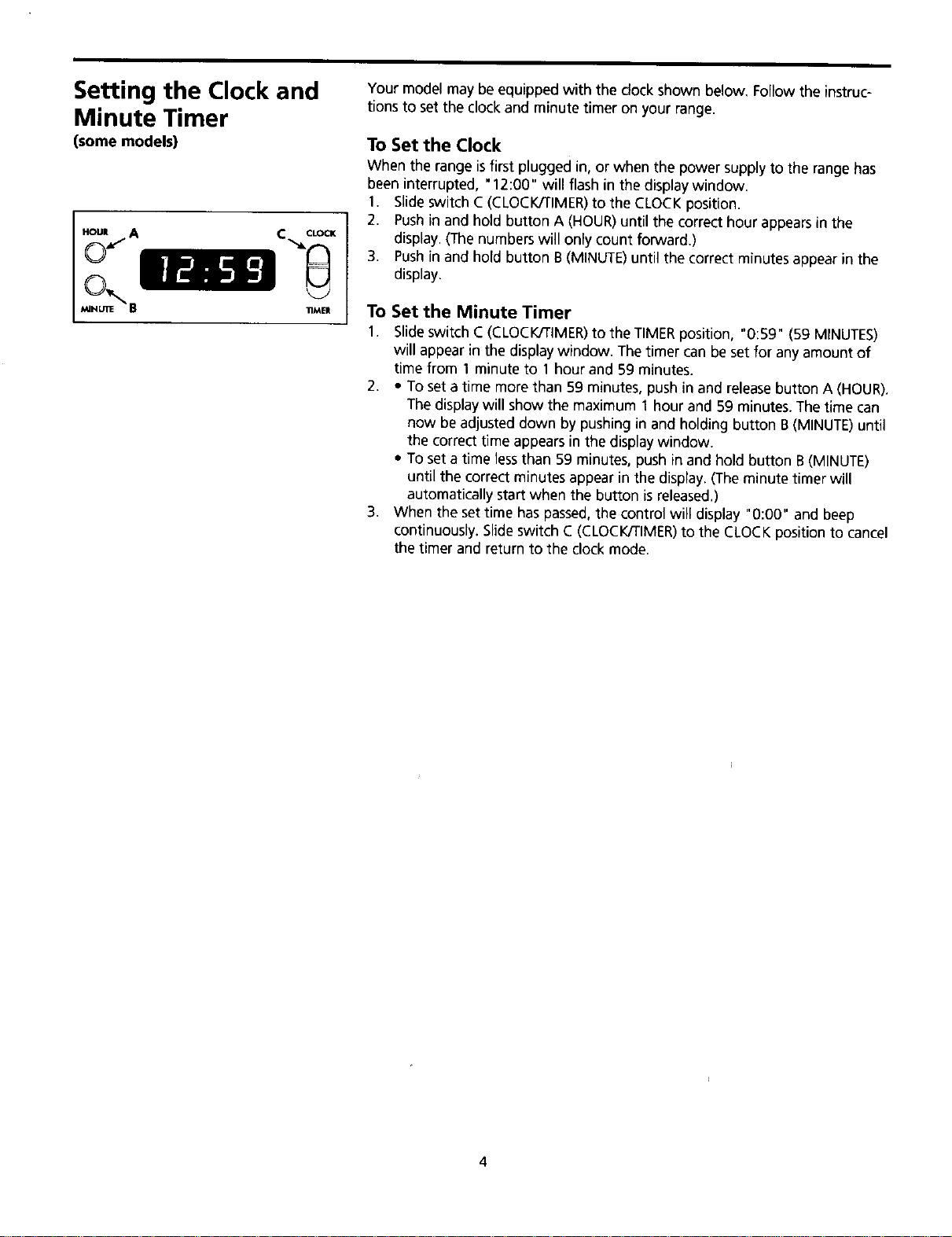
Your model may be equipped with the clock shown below. Follow the instruc-
tions to set the clock and minute timer on your range.
To Set the Clock
When the range isfirst plugged in, or when the power supply to the range has
been interrupted, "12:00" will flash in the display window.
1. Slide switch C(CLOCK/TIMER)to the CLOCK position.
2. Pushin and hold button A (HOUR)until the correct hour appearsin the
display. (The numbers will only count forward.)
3. Pushin and hold button B (MINUTE)until the correct minutes appear in the
display.
To Set the Minute Timer
1. Slide switch C(CLOCK/TIMER)to the TIMERposition, "0:59" (59 MINUTES)
will appear in the display window. The timer can be set for any amount of
time from 1 minute to 1 hour and 59 minutes.
2. •To set a time more than 59 minutes, push in and releasebutton A (HOUR).
The display will show the maximum 1 hour and 59 minutes. Thetime can
now be adjusted down by pushing in and holding button B (MINUTE)until
the correct time appears in the display window.
• To set a time lessthan 59 minutes, push in and hold button B (MINUTE)
until the correct minutes appear in the display. (Theminute timer will
automatically start when the button isreleased.)
3. When the set time haspassed,the control will display "0:00" and beep
continuously. Slide switch C (CLOCK/TIMER)to the CLOCK position to cancel
the timer and return to the clock mode.
4
Setting Surface
Controls
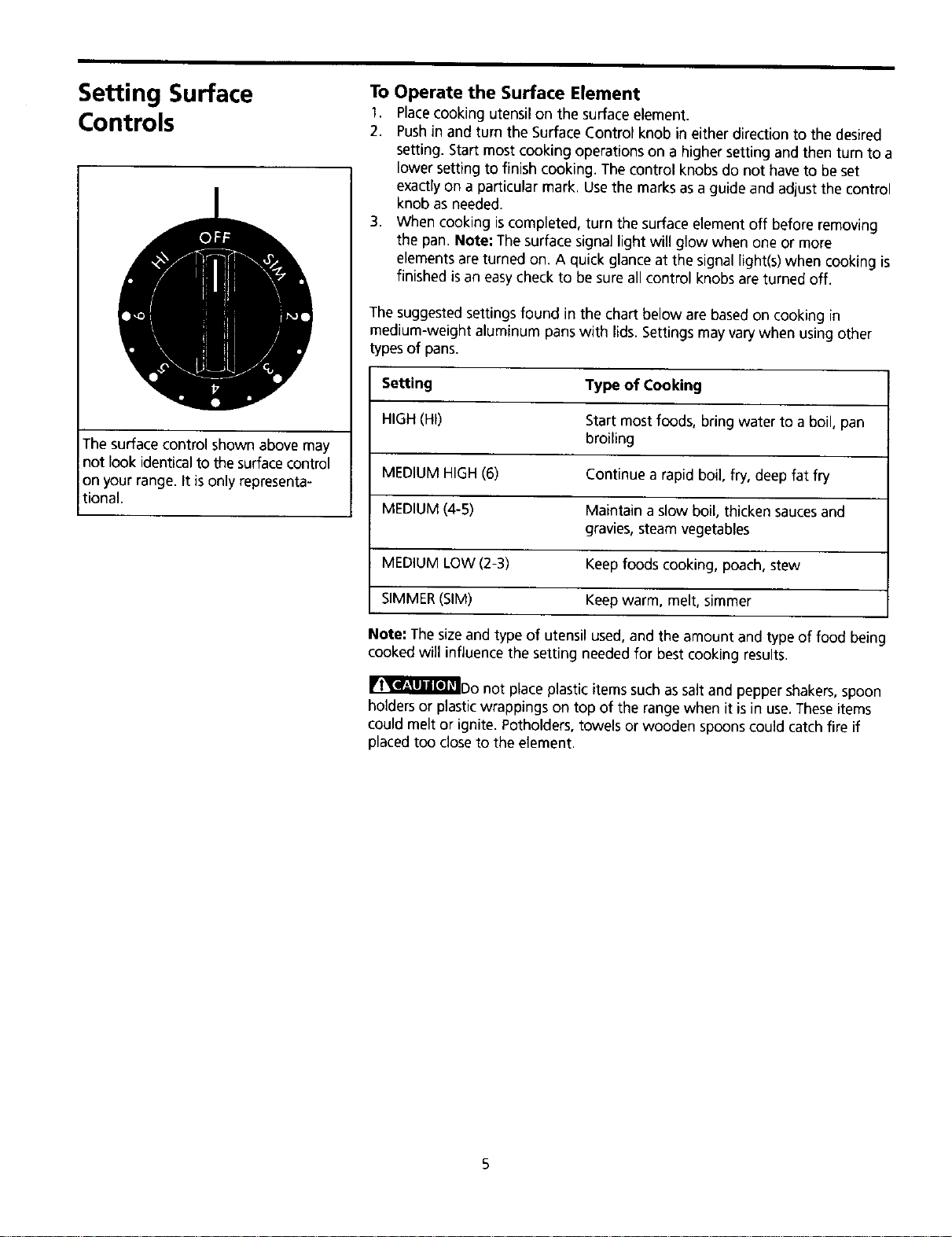
The surface control shown above may
not look identical to the surfacecontrol
on your range. It is only representa-
tional.
To Operate the Surface Element
1. Placecooking utensil on the surface element.
2. Pushin and turn the Surface Control knob in eitherdirection to the desired
setting. Start most cooking operations on a higher setting and then turn to a
lower setting to finish cooking. The control knobs do not haveto be set
exactly on a particular mark. Usethe marks asa guide and adjust the control
knob as needed.
3. When cooking iscompleted, turn the surface element off before removing
the pan. Note: The surface signal light will glow when one or more
elements are turned on. A quick glance at the signal light(s) when cooking is
finished is an easycheck to be sure all control knobs are turned off.
The suggested settings found in the chart below are basedon cooking in
medium-weight aluminum pans with lids.Settings may vary when using other
typesof pans.
Setting Type of Cooking
HIGH(HI) Start most foods, bring water to a boil, pan
broiling
MEDIUM HIGH(6) Continue a rapid boil, fry, deep fat fry
MEDIUM(4-5) Maintain a slow boil, thicken saucesand
gravies, steam vegetables
MEDIUM LOW(2-3) Keep foods cooking, poach, stew
SIMMER(SIM) Keep warm, melt, simmer
Note: Thesize and type of utensil used, and the amount and type of food being
cooked will influence the setting needed for best cooking results.
_IriT'_l_'_Do not place plastic items such assalt and pepper shakers, spoon
holders or plastic wrappings on top of the range when it is in use. Theseitems
could melt or ignite. Potholders, towels or wooden spoons could catch fire if
placed too close to the element.
Before Setting Oven
Controls Oven Vent Location
The oven isvented underthe left rear surface element. When the oven ison,
warm air isreleasedthrough the vents.Thisventingisnecessaryfor properair
circulationin theoven and good baking results.
Arranging Oven Racks
(Some models may haveone rack.) ALWAYSARRANGE OVENRACKSWHENTHE
OVENISCOOL(PRIORTOOPERATINGTHEOVEN).Always use oven mitts when
using the oven.
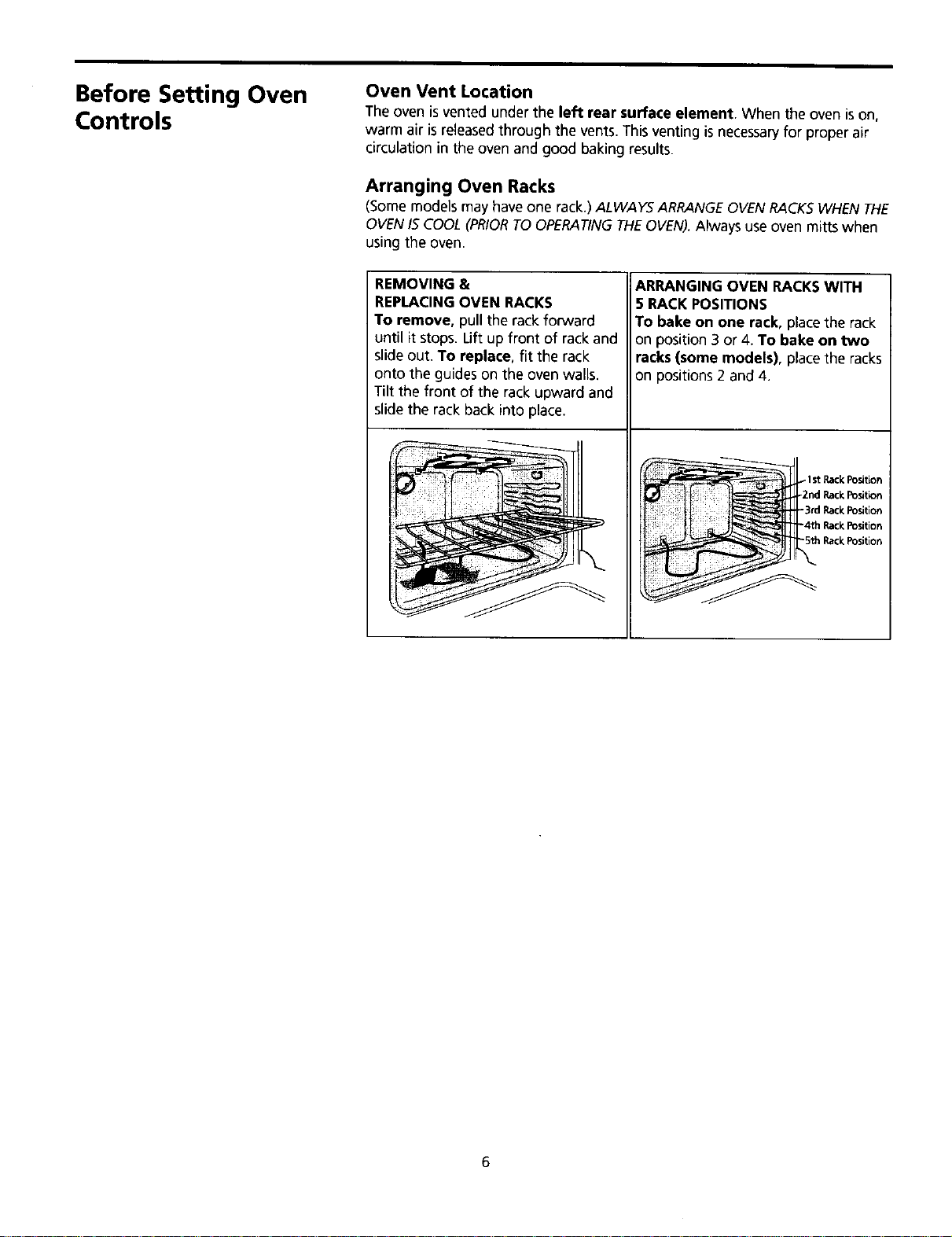
REMOVING &
REPLACINGOVEN RACKS
To remove, pull the rack forward
until it stops. Lift up front of rack and
slide out. To replace, fit the rack
onto the guides on the oven walls.
Tilt the front of the rack upward and
slide the rack back into place.
ARRANGING OVEN RACKSWITH
5 RACKPOSITIONS
To bake on one rack, placethe rack
on position 3 or 4. To bake on two
racks (some models), placethe racks
on positions 2 and 4,
Setting Oven Controls Bake
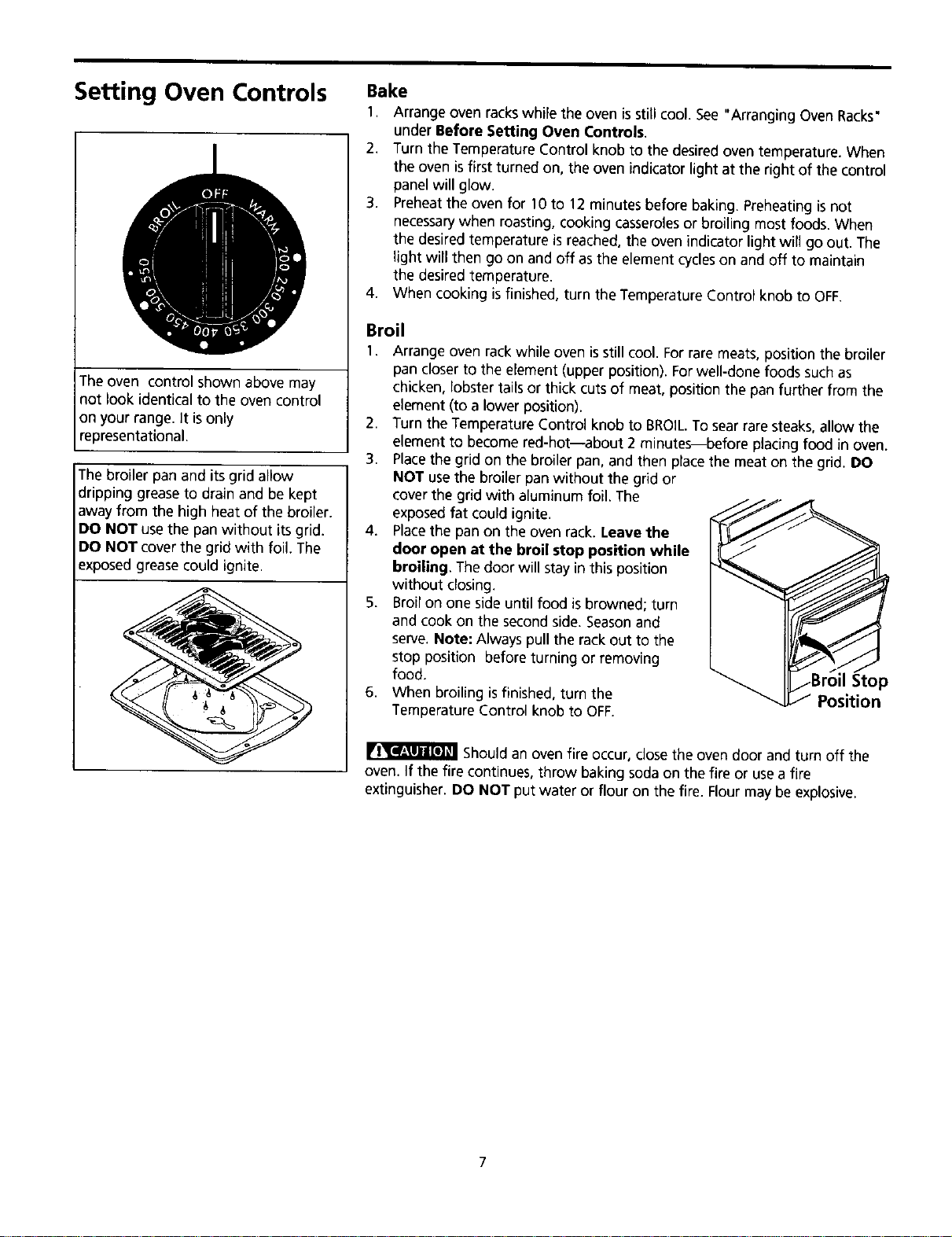
The oven control shown above may
not look identical to the oven control
on your range. It is only
representational.
The broiler pan and its grid allow
dripping grease to drain and be kept
away from the high heat of the broiler.
DO NOT usethe pan without itsgrid.
DO NOT cover the grid with foil. The
exposed grease could ignite.
1. Arrange oven rackswhile the oven isstill cool. See "Arranging Oven Racks"
under Before Setting Oven Controls.
2. Turn the TemperatureControl knob to the desiredoven temperature.When
the oven isfirstturned on, the ovenindicatorlight at the rightof the control
panel will glow.
3. Preheatthe oven for 10 to 12 minutes before baking. Preheating is not
necessarywhen roasting, cooking casserolesor broiling most foods. When
the desired temperature is reached, the oven indicator light will go out. The
light will then go on and off as the element cycleson and off to maintain
the desired temperature.
4. When cooking is finished, turn the Temperature Control knob to OFF.
Broil
1. Arrange oven rack while oven isstill cool. Forrare meats, position the broiler
pan closer to the element (upper position). Forwell-done foods such as
chicken, lobster tails or thick cuts of meat, position the pan further from the
element (to a lower position).
2. Turn the Temperature Control knob to BROIL.To sear rare steaks, allow the
element to become red-hot--about 2 minutes--before placing food in oven.
3. Placethe grid on the broiler pan, and then place the meat on the grid. DO
NOT usethe broiler pan without the grid or
cover the grid with aluminum foil. The
exposed fat could ignite.
4. Placethe pan on the oven rack. Leave the
door open at the broil stop position while
broiling. The door will stay in this position
without closing.
5. Broil on one side until food is browned; turn
and cook on the second side. Seasonand
serve. Note: Always pull the rack out to the
stop position before turning or removing
food.
6. When broiling isfinished, turn the
Temperature Control knob to OFF.
Should an oven fire occur, closethe oven door and turn off the
oven. If the fire continues, throw baking soda on the fire or usea fire
extinguisher. DO NOT put water or flour on the fire. Flour may be explosive.
7
Oven Cleaning
Follow these cleaning precautions:
•Allow the oven to cool before
cleaning. I
•Wear rubber gloves when cleaning
the appliance manua y.
Ammonia must be rinsed
before operating the oven. Provide
adequate vent at on.
DO NOT line the oven
walls, bottom, racks or any other
)art of the appliance with aluminum
foil. Doing so will destroy heat
distribution, produce poor baking
results and cause permanent damage
to the oven interior (aluminum foil
iwill melt to the interior surface of the
oven).
REMOVE SPILLOVERS AND HEAVY I
SOILING AS SOON AS POSSIBLE.
REGULAR CLEANINGS WILL REDUCEI
THE EFFORT REQUIRED FOR MAJOR
CLEANINGS LATER.
Porcelain Enamel Oven
The oven interior is porcelain on steel, it is safe to clean using oven cleaners.
General Cleaning
Removesoilsusinghot, soapywater. Do not allowfood spillswith a highsugar
or acid content (such as milk,tomatoes, saukerkraut,fruit juices or pie filling)
to remain on the surface as they may causea dull spot even after cleaning.
To Remove Heavy Soil
1. Allow a dish of ammonia to sit in the oven overnight or for several hours with
the oven door closed. Clean softened dirt spots using hot, soapy water.
Rinse well with water and a clean cloth.
2. If soil remains, use a soap-filled scouring pad or a nonabrasive cleaner. If
necessary, use an oven cleaner following manufacturer's instructions. DO
NOT mix ammonia with other cleaners.
3. Clean any soil from the oven frame, the door liner outside the oven door
gasket and the small area at the front center of the oven bottom. Clean with
hot, soapy water. Rinse well using clean water and a cloth.
Adhere to the following precautions when using oven cleaners:
1. DO NOT spray cleaner on the electrical controls or switches because it could
cause a short circuit and result in sparking or fire.
2. DO NOT allow a film from the cleaner to build up on the temperature sensing
bulb; it could cause the oven to heat improperly. (The bulb is located in the
rear of the oven.) Carefully wipe the bulb clean after each oven cleaning,
being careful not to move the bulb. A change in its position could affect how
the oven bakes. Avoid bending the bulb and capillary tube.
3. DO NOT spray any cleaner on the oven door trim or gasket, handles or any
exterior surfaces of the range, plastic or painted surfaces, The cleaner can
damage these surfaces.
8
General Cleaning Cleaning Various Parts of Your Range
Before cleaning any part of the range, be sure all controls are turned OFFand
the range isCOOL. REMOVESPILLOVERSAND HEAVYSOILINGAS SOONAS
POSSEBLE.REGULARCLEANINGSWILL REDUCETHE EFFORTREQUEREDFOR
MAJORCLEANINGSLATER.
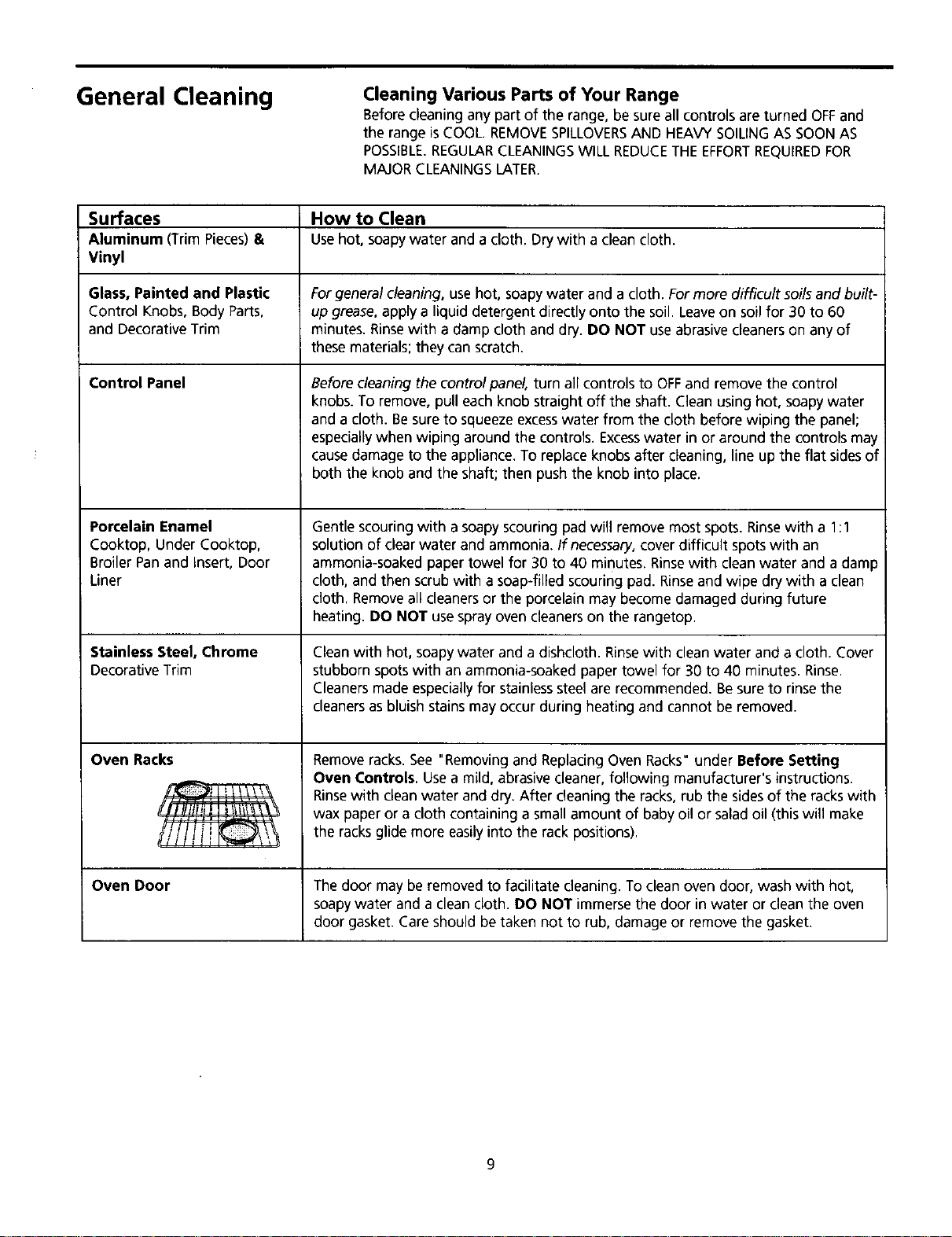
Surfaces How to Clean
Aluminum (Trim Pieces)&Usehot, soapy water and a cloth. Drywith a clean cloth.
Vinyl
Glass, Painted and Plastic Forgeneral cleaning, use hot, soapy water and a cloth. Formore difficult soils and built-
Control Knobs, Body Parts, up grease, apply a liquid detergent directly onto the soil. Leaveon soil for 30 to 60
and Decorative Trim minutes. Rinsewith a damp cloth and dry. DO NOT useabrasive cleaners on any of
these materials; they can scratch.
Control Panel
Porcelain Enamel
Cooktop, Under Cooktop,
Broiler Pan and Insert, Door
Liner
Stainless Steel, Chrome
Decorative Trim
Oven Racks
xJ[
Before cleaning the controlpanel, turn all controls to OFFand remove the control
knobs. To remove, pull each knob straight off the shaft. Clean using hot, soapy water
and a cloth. Be sureto squeeze excesswater from the cloth before wiping the panel;
especiallywhen wiping around the controls. Excesswater in or around the controls may
causedamage to the appliance. To replace knobs after cleaning, line up the flat sides of
both the knob and the shaft; then push the knob into place.
Gentle scouring with a soapy scouring pad will remove most spots. Rinsewith a 1:1
solution of clear water and ammonia. If necessary,cover difficult spots with an
ammonia-soaked paper towel for 30 to 40 minutes. Rinsewith cleanwater and a damp
cloth, and then scrub with a soap-filled scouring pad. Rinseand wipe dry with a clean
cloth. Removeall cleaners or the porcelain may become damaged during future
heating. DO NOT usespray oven cleaners on the rangetop.
Cleanwith hot, soapy water and a dishcloth. Rinsewith clean water and a cloth. Cover
stubborn spots with an ammonia-soaked paper towel for 30 to 40 minutes. Rinse.
Cleaners made especiallyfor stainlesssteel are recommended. Besure to rinsethe
cleanersas bluish stains may occur during heating and cannot be removed.
Removeracks. See "Removing and Replacing Oven Racks" under Before Setting
Oven Controls, Usea mild, abrasive cleaner, following manufacturer's instructions.
Rinsewith cleanwater and dry. After cleaning the racks, rub the sidesof the rackswith
wax paper or a cloth containing a small amount of baby oil or salad oil (this will make
the racks glide more easilyinto the rack positions).
Oven Door The door may be removed to facilitate cleaning. To clean oven door, wash with hot,
soapy water and a clean cloth. DO NOT immerse the door in water or clean the oven
door gasket. Care should be taken not to rub, damage or remove the gasket.
General Cleaning
continued)
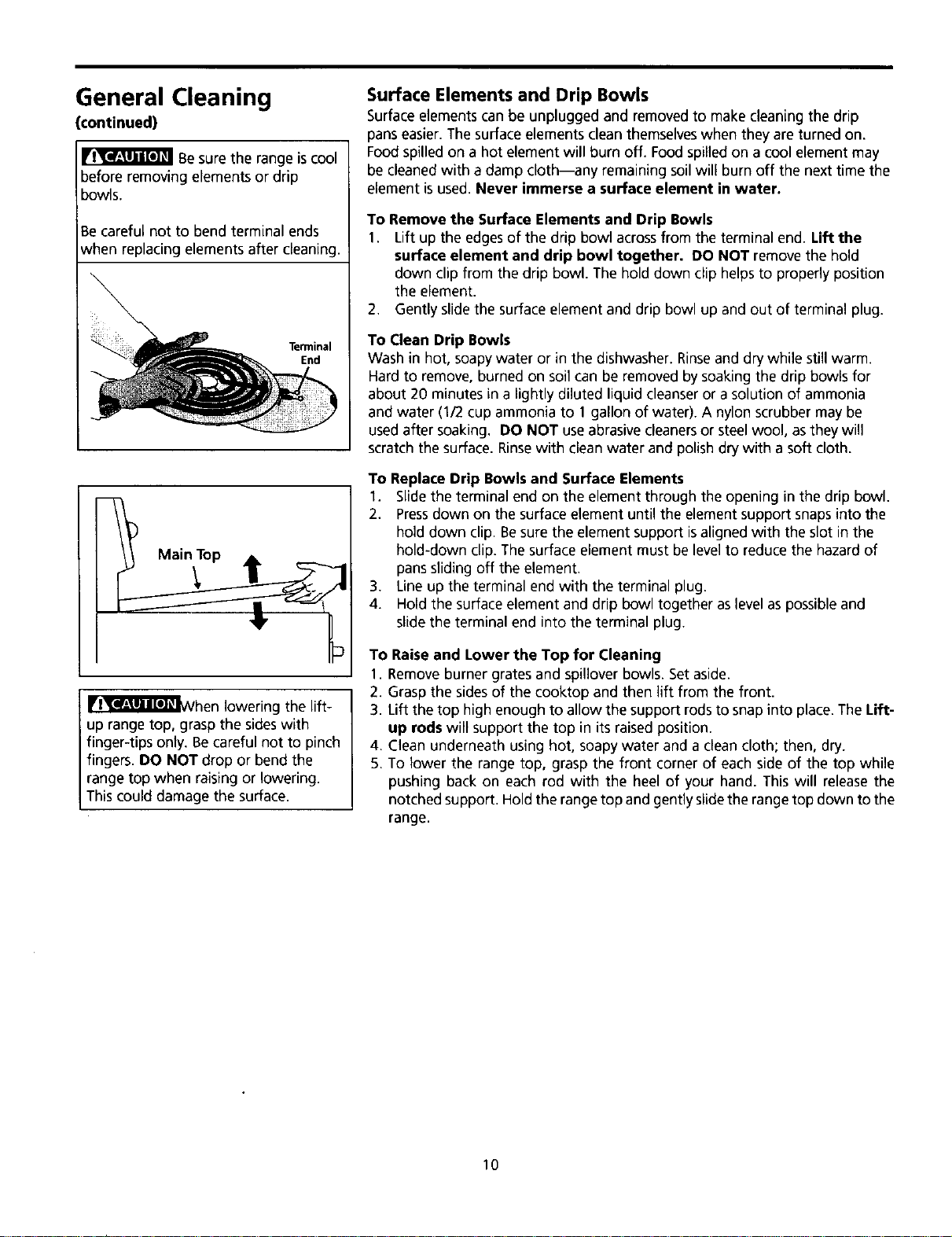
Be sure the range iscool
before removing elements or drip
bowls.
Be careful not to bend terminal ends
when replacing elements after cleaning.
Terminal
End
Main Top
IIr_'_l!_l_Vhen lowering the lift-
up range top, grasp the sideswith
finger-tipsonly. Be careful not to pinch
fingers. DO NOT drop or bend the
range top when raising or lowering.
This could damage the surface.
Surface Elements and Drip Bowls
Surface elements can be unplugged and removed to make cleaning the drip
pans easier. The surface elements clean themselveswhen they are turned on.
Food spilled on a hot element will burn off. Food spilled on a cool element may
be cleaned with a damp cloth--any remaining soil will burn off the next time the
element isused. Never immerse a surface element in water.
To Remove the Surface Elements and Drip Bowls
1. Lift up the edgesof the drip bowl acrossfrom the terminalend. Lift the
surface element and drip bowl together. DO NOT removethe hold
down clip from the drip bowl. The hold down clip helps to properlyposition
the element.
2. Gently slide the surface element and drip bowl up and out of terminal plug.
To Clean Drip Bowls
Wash in hot, soapy water or in the dishwasher. Rinseand dry while still warm.
Hard to remove,burnedon soil can be removedbysoakingthe drip bowls for
about 20 minutes in alightlydiluted liquidcleanseror a solutionof ammonia
and water (1/2 cup ammonia to 1 gallon of water). A nylon scrubbermay be
usedafter soaking. DO NOT useabrasive cleanersor steelwool, asthey will
scratchthe surface. Rinsewith cleanwater and polish dry with a soft cloth.
To Replace Drip Bowls and Surface Elements
1. Slidethe terminal end on the element throughthe opening inthe drip bowl.
2. Pressdownon the surface element untilthe element support snaps into the
hold down clip. Besure the elementsupport isalignedwith the slot in the
hold-downclip. The surface element mustbe levelto reducethe hazard of
panssliding off the element.
3. Line up the terminal end with the terminal plug.
4. Hold the surface element and drip bowl together aslevel aspossible and
slide the terminal end into the terminal plug.
To Raise and Lower the Top for Cleaning
1. Remove burner grates and spillover bowls. Set aside.
2. Grasp the sidesof the cooktop and then lift from the front.
3. Lift thetop high enoughto allowthe support rodstosnap into place.The Lift-
up rods will supportthe top in itsraisedposition.
4. Clean underneath usinghot, soapy water and aclean cloth; then, dry.
5. To lower the range top, grasp the front corner of each side of the top while
pushing backon each rod with the heel of your hand. This will releasethe
notchedsupport. Holdthe range top and gently slidethe range top down tothe
range.
10
General Cleaning
(continued)
_he door is heavy. For
safe, temporary storage, lay the door
flat with the inside of the door facing
down.
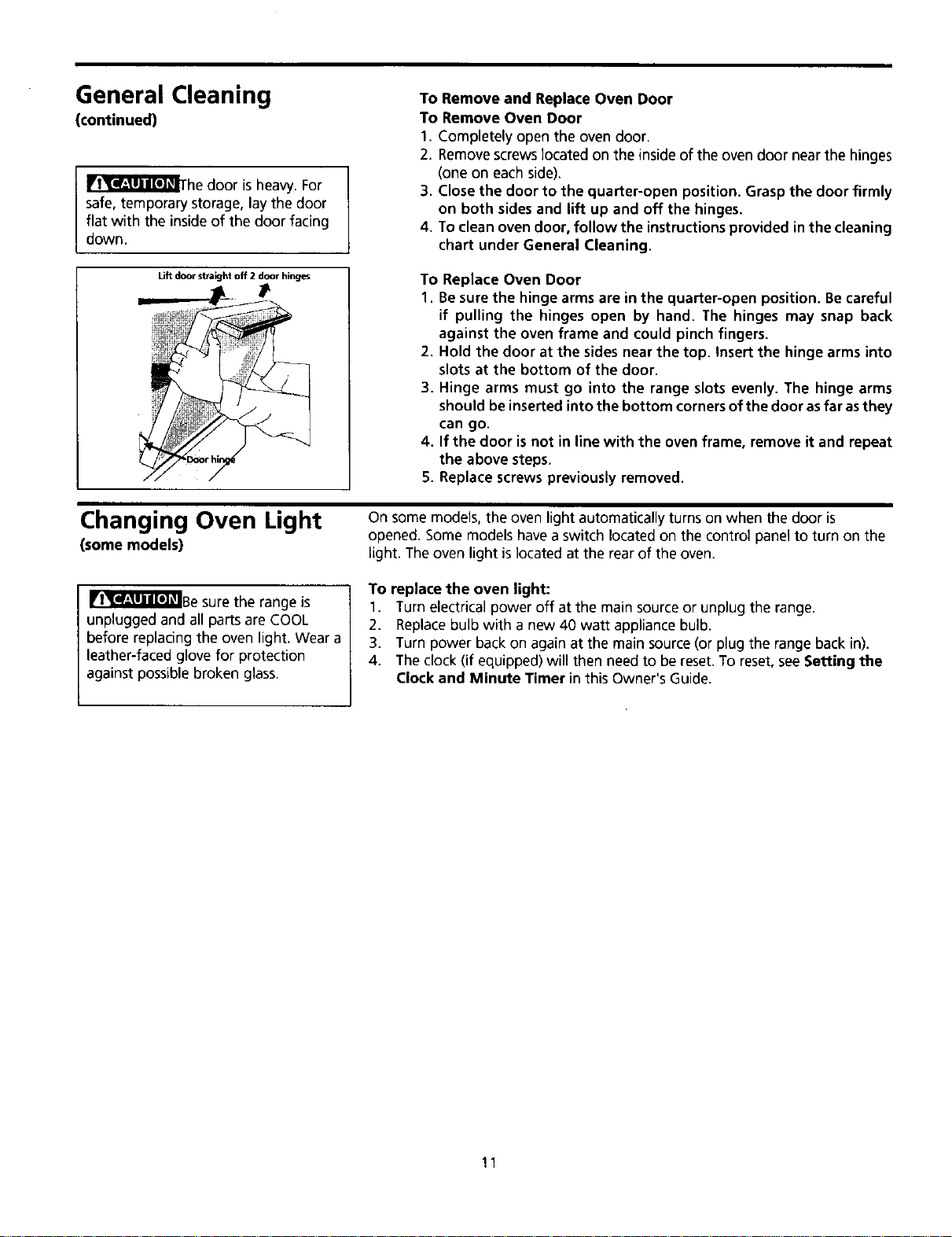
Lift door straight off 2door hinges
To Remove and Replace Oven Door
To Remove Oven Door
1. Completely open the oven door.
2. Removescrews located on the insideof the ovendoor near the hinges
(one on eachside).
3. Close the door to the quarter-open position. Grasp the door firmly
on both sides and lift up and off the hinges.
4. To clean oven door, follow the instructions provided in the cleaning
chart under General Cleaning.
To Replace Oven Door
1. Be sure the hinge arms are in the quarter-open position. Be careful
if pulling the hinges open by hand. The hinges may snap back
against the oven frame and could pinch fingers.
2. Hold the door at the sides near the top. Insert the hinge arms into
slots at the bottom of the door.
3. Hinge arms must go into the range slots evenly. The hinge arms
should be inserted into the bottom corners of the door as far as they
can go.
4. If the door is not in line with the oven frame, remove it and repeat
the above steps.
5. Replace screws previously removed.
Changing Oven Light
(some models)
On some models, the oven light automatically turns on when the door is
opened. Some models havea switch located on the control panel to turn on the
light. The oven light islocated at the rear of the oven.
IIl_l_Be sure the range is
unplugged and all parts are COOL
before replacing the oven light. Wear a
leather-faced glove for protection
against possible broken glass.
To replace the oven light:
1. Turn electrical power off at the main source or unplug the range.
2. Replacebulb with a new 40 watt appliance bulb.
3. Turn power back on again at the main source (or plug the range back in).
4. The clock (if equipped) will then need to be reset. To reset, seeSetting the
Clock and Minute Timer in this Owner's Guide.
11
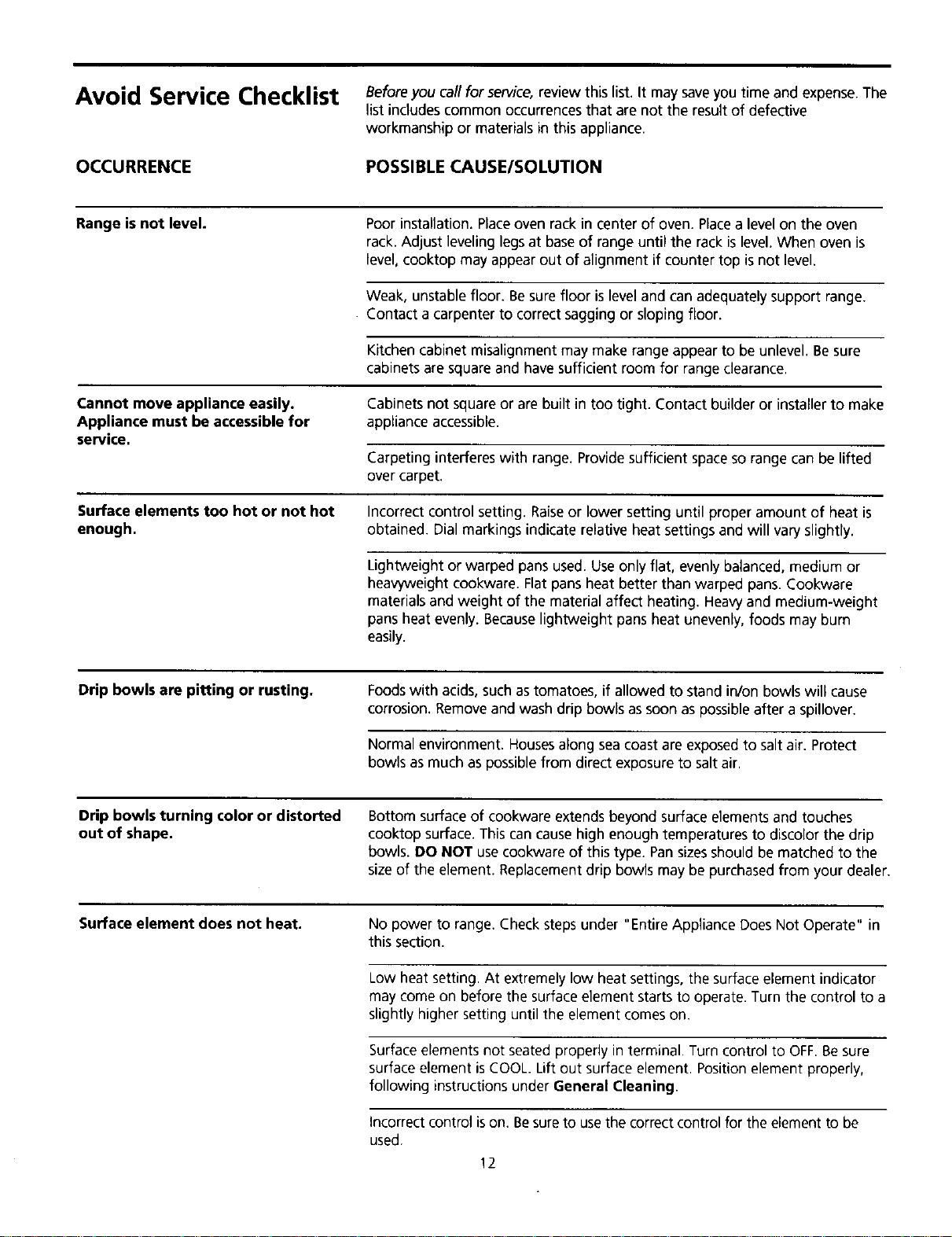
Avoid Service Checklist
OCCURRENCE
Beforeyou call for service, review this list. It may saveyou time and expense.The
list includes common occurrences that are not the result of defective
workmanship or materials in this appliance.
POSSIBLE CAUSE/SOLUTION
Range is not level. Poor installation. Placeoven rack in center of oven. Placea levelon the oven
rack. Adjust leveling legsat baseof range until the rack islevel. When oven is
level, cooktop may appear out of alignment if counter top is not level.
Weak, unstable floor. Besure floor is leveland can adequately support range.
Contact a carpenter to correct sagging or sloping floor.
Kitchen cabinet misalignment may make range appear to be unlevel. Besure
cabinets are square and havesufficient room for range clearance.
Cannot move appliance easily.
Appliance must be accessible for
service.
Cabinets not squareor are built in too tight. Contact builder or installerto make
appliance accessible.
Carpeting interferes with range. Providesufficient space so range can be lifted
over carpet.
Surface elements too hot or not hot
enough. Incorrect control setting. Raiseor lower setting until proper amount of heat is
obtained. Dial markings indicate relative heat settings and will vary slightly.
Lightweight or warped pans used. Useonly flat, evenly balanced, medium or
heav,_,eight cookware. Flat pans heat better than warped pans. Cookware
materials and weight of the material affect heating. Heavyand medium-weight
pansheat evenly. Becauselightweight pans heat unevenly, foods may burn
easily.
Drip bowls are pitting or rusting. Foodswith acids,such as tomatoes, if allowed to stand in/on bowls will cause
corrosion. Removeand wash drip bowls assoon aspossible after a spillover.
Normal environment.Housesalong sea coastare exposed to salt air. Protect
bowls as much aspossible from direct exposure to salt air,
Drip bowls turning color or distorted
out of shape. Bottom surface of cookware extends beyond surface elements and touches
cooktop surface. This cancause high enough temperatures to discolor the drip
bowls. DO NOT usecookware of this type. Pansizesshould be matched to the
size of the element. Replacement drip bowls may be purchased from your dealer.
Surface element does not heat. No power to range. Check steps under "Entire Appliance Does Not Operate" in
this section.
Low heat setting. At extremely low heat settings, the surface element indicator
may come on before the surfaceelement starts to operate. Turn the control to a
slightly higher setting until the element comeson.
Surfaceelements not seated properly in terminal. Turn control to OFF.Besure
surface element is COOL. Lift out surface element. Position element properly,
following instructions under General Cleaning.
Incorrect control ison. Besureto usethe correct control for the element to be
used. 12
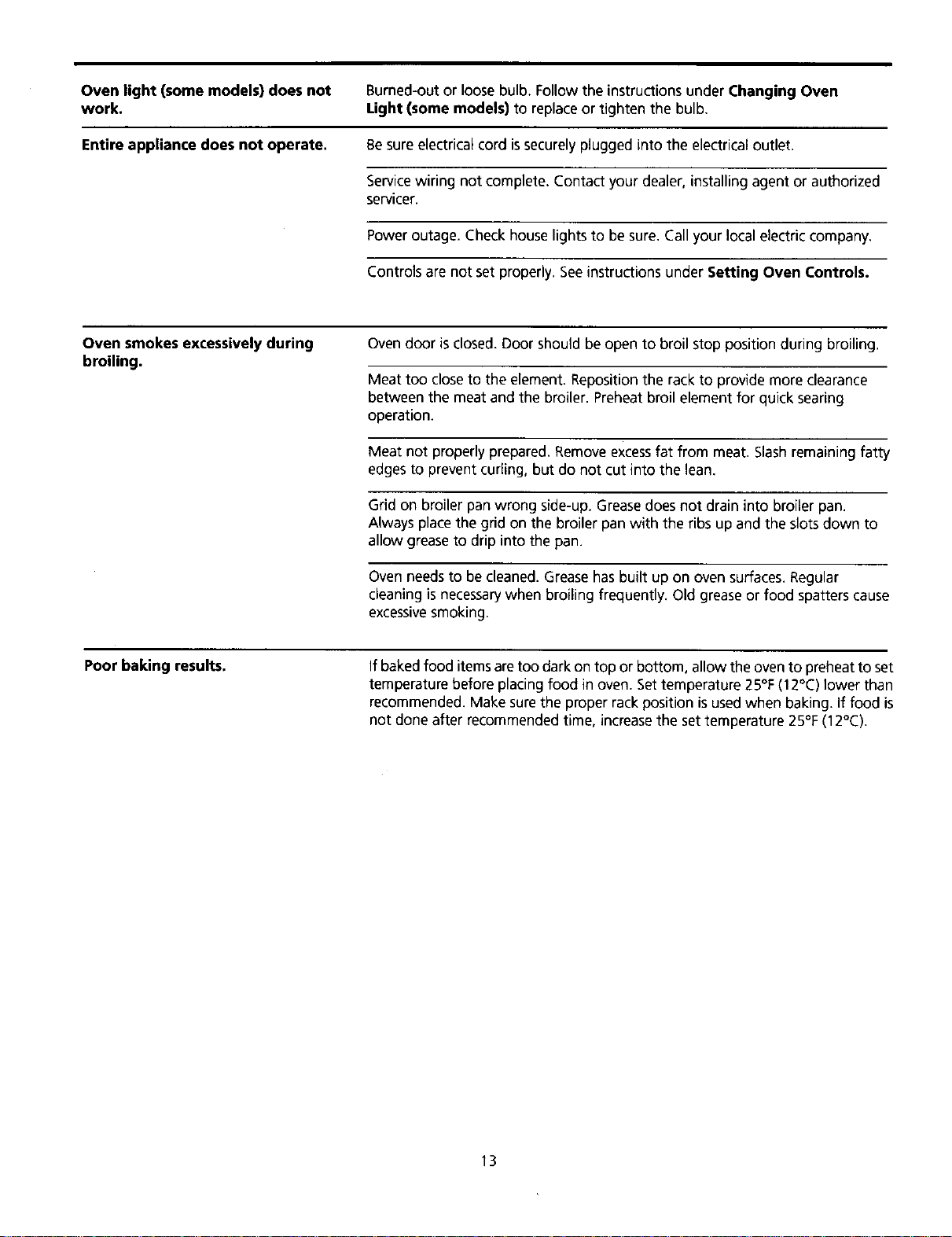
Oven light (some models) does not
work.
Entire appliance does not operate.
Burned-out or loose bulb. Follow the instructions under Changing Oven
Light (some models) to replaceor tighten the bulb.
Besure electrical cord issecurely plugged into the electrical outlet.
Servicewiring not complete. Contact your dealer, installing agent or authorized
servicer.
Power outage. Check house lights to be sure. Call your local electric company.
Controls are not set properly. Seeinstructions under Setting Oven Controls.
Oven smokes excessively during
broiling. Ovendoor is closed. Door should be open to broil stop position during broiling.
Meat too close to the element. Reposition the rack to provide more clearance
between the meat and the broiler. Preheatbroil element for quick searing
operation.
Meat not properly prepared. Removeexcessfat from meat. Slashremaining fatty
edges to prevent curling, but do not cut into the lean.
Grid on broiler pan wrong side-up. Greasedoes not drain into broiler pan.
Always placethe grid on the broiler pan with the ribs up and the slots down to
allow grease to drip into the pan.
Oven needs to be cleaned. Grease hasbuilt up on oven surfaces. Regular
cleaning is necessarywhen broiling frequently. Old grease or food spatters cause
excessivesmoking.
Poor baking results. If baked food items are too dark on top or bottom, allow the oven to preheat to set
temperature before placing food in oven. Settemperature 25°F(12°C) lower than
recommended. Make surethe proper rack position is usedwhen baking. If food is
not done after recommended time, increase the set temperature 25°F (12°C).
13

Ga Iaxy Range Warranty
fFULL ONE YEAR WARRANTY ON ALL PARTS
If, within one year from the date of installation, any part fails to
function properly due to a defect in material or workmanship, Sears
will repair or replace it, at our option, free of charge.
If the product is subjected to other than private family use, the
above warranty is effective for only 90 days.
WARRANTY SERVICE IS AVAILABLE BY CONTACTING THE NEAREST
SEARS SERVICE CENTER IN THE UNITED STATES.
This warranty gives you specific legal rights, and you may also have
other rights which vary from state to state.
Sears Roebuck and Co. Dept. 817 WA Hoffman Estates, IL 60179 J
To Further Add To The Value Of Your Range,
Buy a Sears Maintenance Agreement.
FYYearsof Ownership Coverage 1st Year 2nd Year 3rd Year -'_
1. Replacement of Defective Parts W MA MA
2. Annual Preventive Maintenance MA MA MA
Check at your request _./
W-Warranty MA -Maintenance Agreement
Your Galaxy Range isdesigned, manufactured and tested to provide years of dependable operation. Yet any
home appliance may require service from time to time. The SearsMaintenance Agreement offers you an
outstanding service program for your product.
The table above shows the numerous benefits our Sears Maintenance Agreement offers over and above those
provided by our Sears Warranty.
For information on purchasing a Sears Maintenance Agreement call 1-800-827-6655.