KitchenAid"
Kltchen_kld"
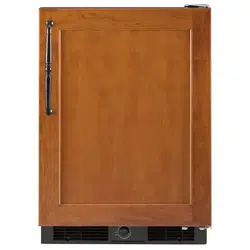
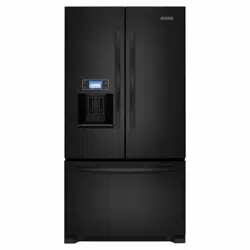
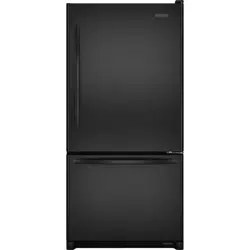
No-Frost Refrigerator
Models KSRS22Q KSPS22Q
KSRB22Q KSRS25Q
KSHS22Q KSRB25Q
KSPB22Q
A Note toYou ...................... 2
Impodonl Sofety
Instructions ........................... 3
Paris ond Feolures ............... 4
Installing lhe Refdgerotor ..... 5
Using the Refrigerotor ........... 7
Codng for the
Re_gerotor ........................ 21
Food Sloroge Guide .......... 24
IfYou Need Assidcr_ce
or Service .......................... 26
wam:z_ ............................2s
Call UsWithQuestions
Or Comments:
1-800-422-1230
Useand Care Guide
.,q Note to You
Thank you for buying a KitchenAicl ° home appliance.
You have purchased a quality, world-classhome appliance, Years of engineering experience
went Into Itsmanufacturing. To ensure that you enjoy many years of trouble-flee operation, we
developed thisUseand Care Guide. ItIsfullof valuable information on how to operate and
maintain your home appliance properly and safely. Pleaseread Itcarefully. Also, please
complete and mall the Ownership RegistrationCard provided with yourhome appliance.
Your safety is important to us.
Thisguide contains safety symbolsand statements. Please pay special attention to these
symbols and follow any Instructions given. Here isa brief explanation of the use of each
symbol.
Thissymbol _11help alert you to such
dangers as personal Injury, burns, fire and
electrical shock.
Thissymbol wUlhelp you avoid actions
which could cause product damage
(scratches, dents, etc.) and damage to
your personal property.
Our Consumer Assistance Center telephone number, 1-800-422-1230,
is toll-free, 24 hours a day.
Ifyou ever have a question concerning your home appliance's operation, or Ifyou need
service, feel free to call our toll-flee Consumer Assistance Center telephone number for help.
When calling, you will need to know your appllance°s complete model number and serial
number. You can find this Information on the model and serial number label (see diagram on
page 4). Foryour convenience, we have Included a handy place below for you to record
these numbers. Also, please record the date the product was purchased/Installed and the
Builder's or Dealer's name, address and phone number. You will need this Information If you
ever require service. Keep this book and the sales slip together In a safe place for future
reference.
IMPORTANT:You must provide proof of purchase or Installation date for In-warranty service.
Model Number
Builder/Dealer Name
Serial Number Address
Date Purchased Phone
Don't forget, KitchenAld offers a full line of quality home appllances.
Built-In RefTIgerators
Freestanding Refrigerators
50-Pound Ice Makers
Dishwashers
TrashCompactors
Hot Water Dispensers
Food Waste Disposers
Built-In Ovens
Ranges & Cooktops
Microwave Ovens
Washers & Dryers
Mixers & Blenders
Formore Information on these appliances, or the one you have purchased, call our
toll-flee Consumer Assistance Center telephone number, 1-800-422-1230.
2
Important Safety Instructions
To r_3=_:cethe riskof fire, e'.::_ical shock, or Injurywhen ,__=!ng
the refrigerator, follow .'-=-_-_=!cprocautlons Including the following:
• Read all Instructions before using the
refrigerator.
• Child entrapment and suffocationsare
not problems of the past. Junked or
abandoned refrigerators are still
dangerous.., even If they will 'just sitIn
the garage for a few days."
If you are getting rid of your old
refrigerator, do It safely. Please read the
enclosed safety booklet from the
Association of Home Appliance
Manufacturers. Help prevent accidents.
• Never allow children to operate, play
with or crawl insidethe refrigerator.
• Never clean refrigerator parts with
flammable fluids. The fumes can create a
fire hazard or explosion.
• FORYOURSAFETY•
DO NOT STOREOR USEGASOLINE OR
OTHER FLAMMABLE VAPORS AND LIQUIDS
IN THE VICINITY OF THIS OR ANY OTHER
APPLIANCE. THE FUMES CAN CREATE A FIRE
HAZARD OR EXPLOSION.
- SAVE THESE INSTRUCTIONS -
Help us help you
Please:
• Install and level unit on a floor that will hold
the weight, and in an area suitable for Its
sizeand use.
• Connect onlyto the proper kind of outlet,
with the correct electrical supplyand
grounding. (Refer to the Electrical
Requirements and Grounding Instructions
Sheet.)
• Useunit only for the uses described In this
manual.
• Make sure unit Isnot near an oven, radiator
or other heat source.
• Properly maintain unit.
• Make sure unit Isused Inan area where the
room temperature will not fall below 55°F
(13°C).
• Make sure unit Isnot used by anyone
unable to operate It properly.
• Make sure unit Isnot loaded with food
before It has time to get properly cold.
3
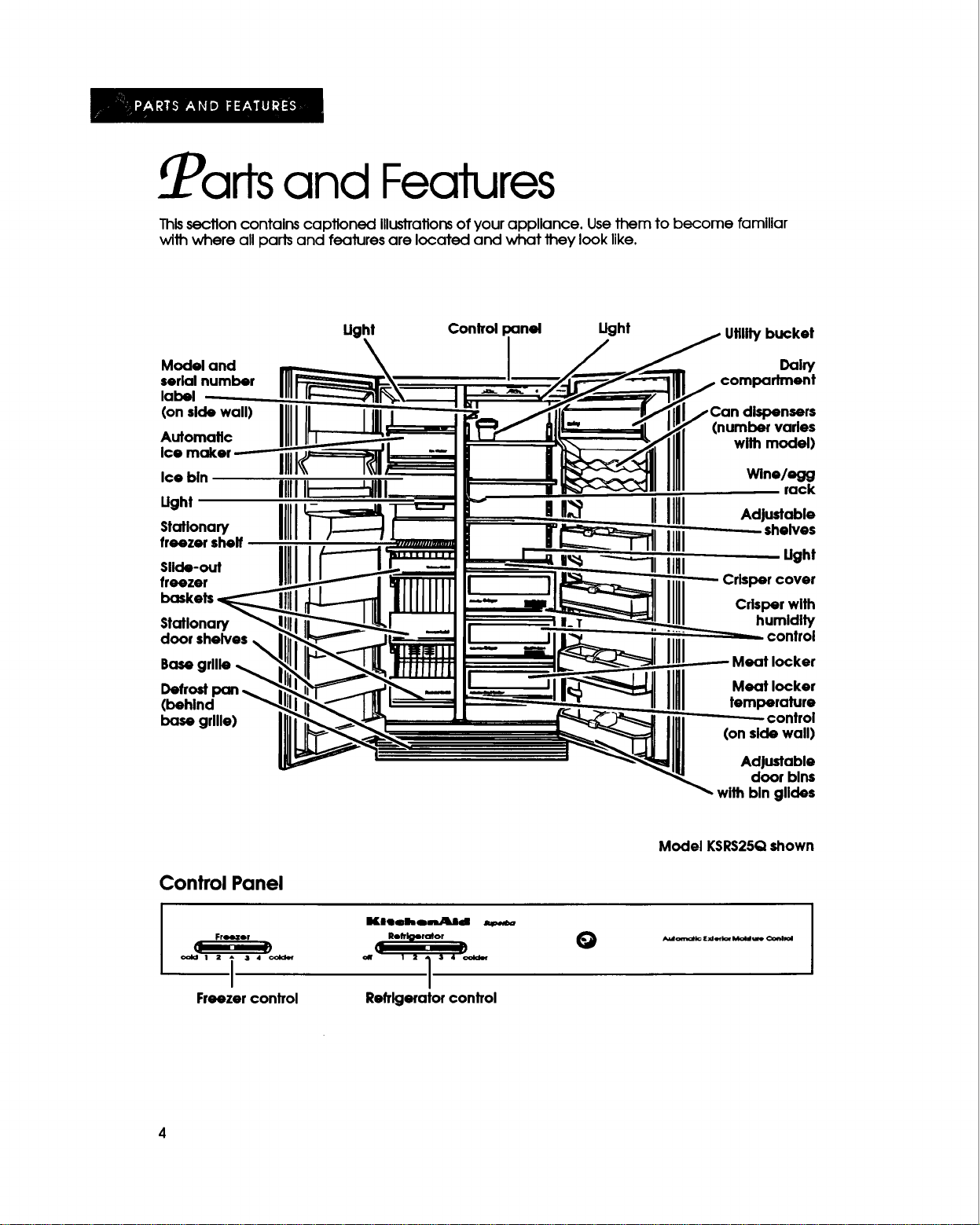
Parts and Features
Thissection contains captioned Illustrations of your appliance. Use them to become familiar
wilh where all pads and features are located and what 1hey look like.
Ught Control panel Ught Utilitybucket
I
Model and i _aiw
serialnumber n compartment
label
(on side wall)
Automatic
Ice bln
IIIII
Ught
s,.,ona Ill
freezer shelf
Slide-out
freezer
Stationary
door shelves
Basegrllle
Defrostpan
(behind
base grllle)
dispensers
(number varles
with model)
Wine/egg
rack
n_ IIIII _.,u.a_,°
IlUl ,.elves
I,,_ IIHI Ught
Crispercover
Crisper with
II. humldlty
control
deaf locker
Meat locker
temperature
control
(on side wall)
Adjustable
door blns
with bln glldes
Model KSRS25Qshown
Control Panel
-- Freezer _
1_. ._
oold 1 2 _ 34 (:older
i
Freezer control
Kl,llehomUllJId
Rolfl_lorotor --
q--
1 2 1 3 4
/
Refrigeratorcontrol
O
Installing the Refrigerator
In ThisSection
Page
Cleaning the refrigerator .......................... 5
Plugging In the refrigerator ....................... 5
i
I
If you want your refrigerator to work properly, you need to Install It properly. This section tells you
all you need to know to Install your refrigerator.
Page
Locatlng the refrigerator properly ............ 6
Leveling the refrigerator ............................ 6
Cleaning the refrigerator
Clean your refrigerator before using It, If nec-
essay/. See cleaning InstTuctlonson pages
21 and 22.
Remove the Consumer Buy Guide Label
and any shipping tape before using the
refrigerator.
To remove any remaining glue:
• Rub briskly with your thumb to make a ball,
then remove.
OR
• Soak area with liquid dishwashing detergent
before removing glue as described above.
IMPORTANT:DO NOT USEsharp Instruments,
rubbing alcohol, flammable fluids or abrasive
cleaners. Thesecan damage the material.
See "important Safety Instructions" on page 3.
DO NOT REMOVEthe Tech Sheet fastened
under the refrigerator, behind the base grille.
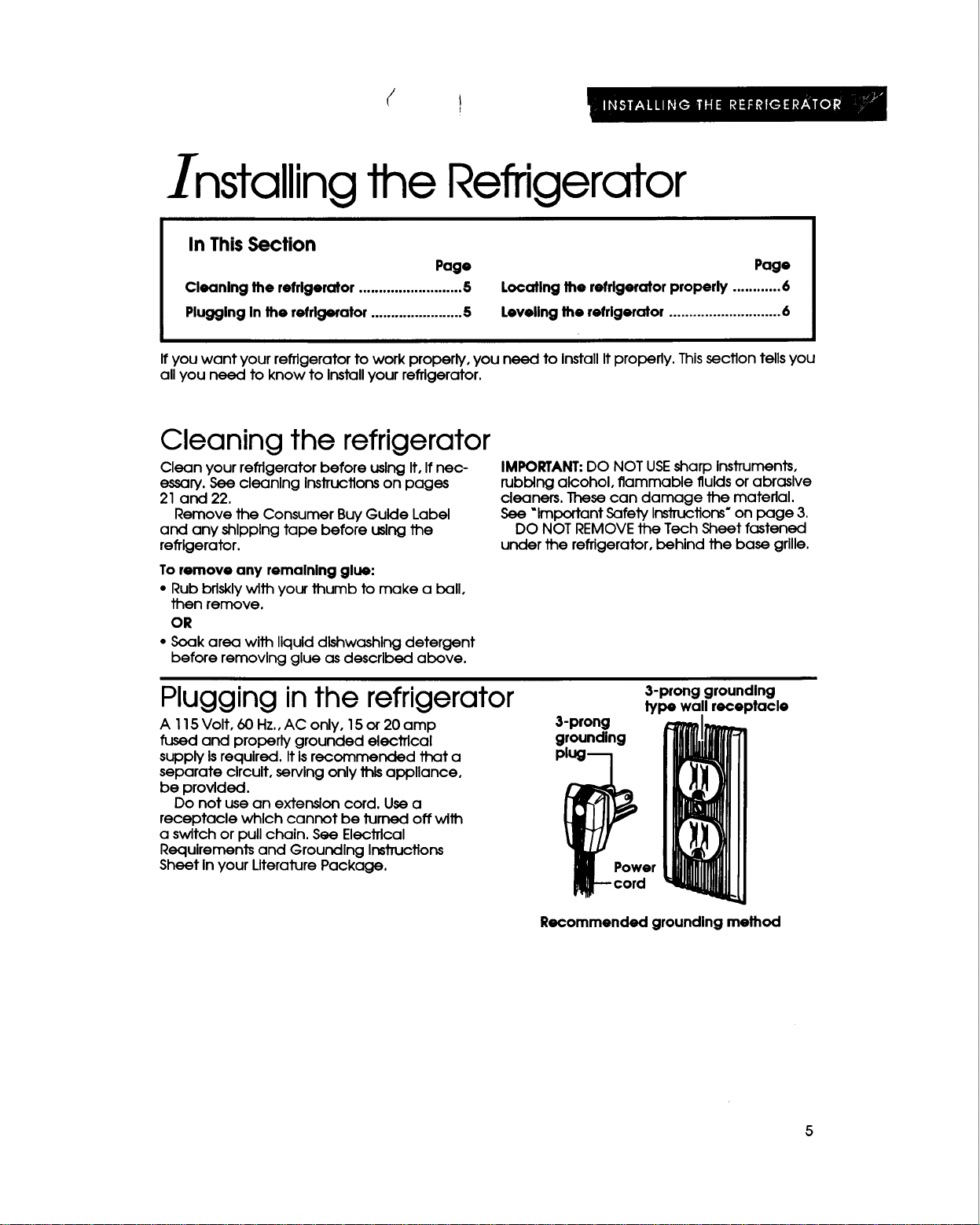
Plugging inthe refrigerator
A 115 Volt, 60 Hz., AC only, 15 or 20 amp
fused and properly grounded electrical
supply is required. It Is recommended that a
separate circuit, serving only this appliance,
be provided.
Do not use an extension cord. Use a
receptacle which cannot be turned off with
a switch or pull chain. See Elecffical
Requirements and Grounding Instructions
Sheet In your Literature Package.
3-prong grounding
type wall receptacle
3-prong
grounding
i Power
core
Recommended grounding method
5
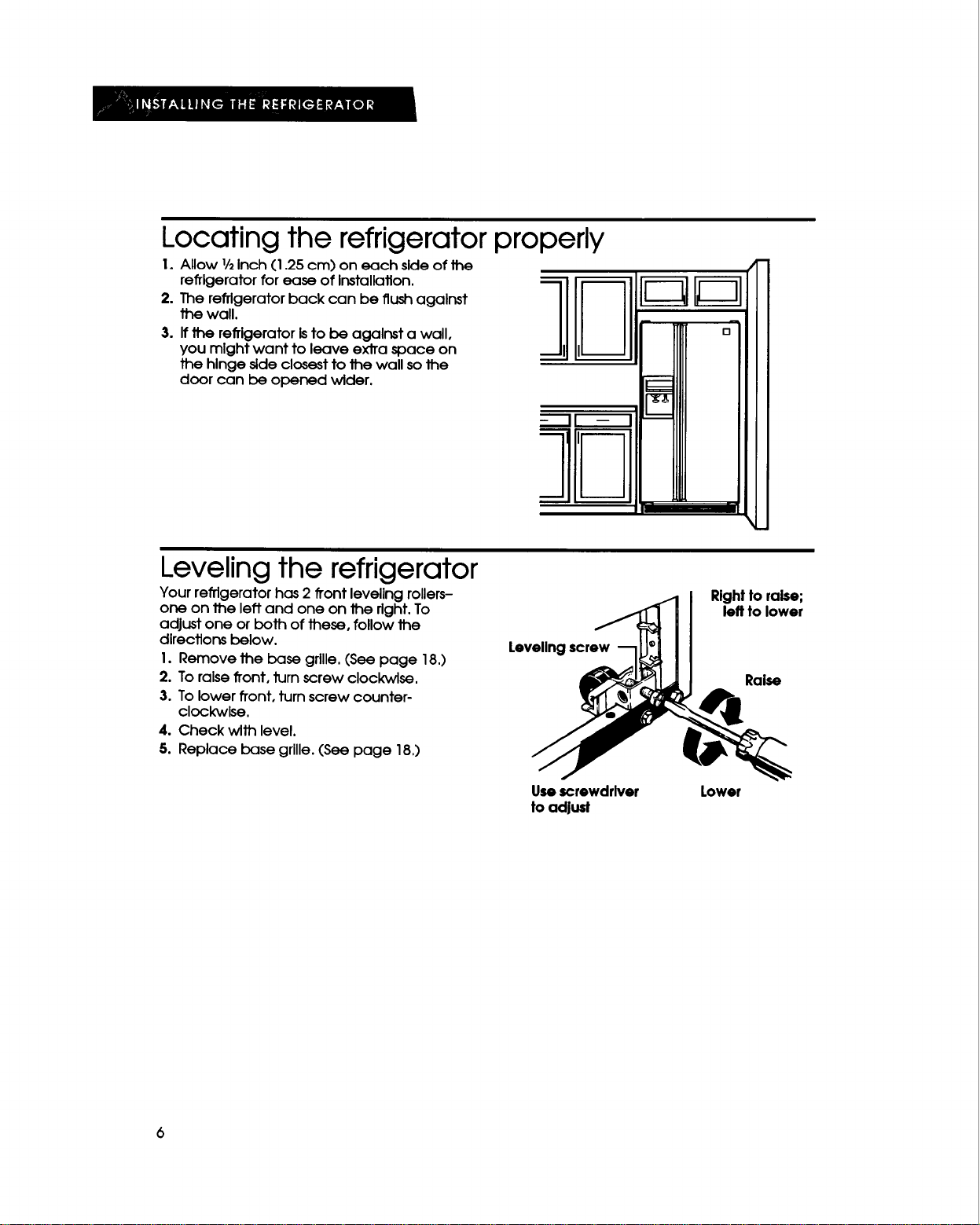
Locating the refrigerator properly
1. Allow 1/2Inch (1.25 cm) on each side of the
refrigerator for ease of Installation.
2. The refrigerator back can be flush against
the wall.
3. If _ refrigerator Isto be against a wall,
you mlght want to leave ex_a space on
the hinge side closest to the wall sothe
door can be opened wider.
Leveling the refrigerator
Your refrigerator has 2 front leveling rollers-
one on the left and one on the right. To
adjust one or both of these, follow the
directions below.
1. Remove the base grille. (See page 18.)
2. To raise front, turn screw clockwise.
3. To lower front, turn screw counter-
clockwise.
4. Check with level.
5. Replace base grille. (See page 18.)
Levelingscrew
Rightto raise;
left to lower
Raise
Usescrewdrlver
to adjust
Lowor
6
Using the Refrigerator
In ThisSection
Page
Settingthe controls ...................................7
Changlng the control settings ..................8
Removing the refrlgeratot door blns .......8
Adjusting the bin glldes ............................9
Removing the can dispensers .................9
Adjusting the cantilever
refrlgeratorshelves ...................................9
AdJustlngthe RollerTracTM shelf .............10
Uslngthe wlne/egg rack ........................ 10
Removing the crispersand cover ......... 11
Removing the meat locker .................... 11
Adjustingthe meat locker
temperature control................................ 12
Removing the freezer door
shelffronts................................................ 12
Page
Removingthe freezer shelf..................... 13
Removingthe freezer baskets ............... 13
Uslngthe Ice maker ................................ 13
Removing the ice maker
storage bln............................................... 14
Usingthe cold water and ice
dispensers................................................ 15
Removing the base grille ....................... 18
Removing the defrost pan ...................... 18
Changlng the light bulbs ........................ 19
Understandlngthe soundsyou
may hear .................................................. 20
Savingenergy .........................................20
To obtain the best possible resultsfrom your refrigerator, It IsImportant Jhatyou operate It
properly. ThIssection tells you how to do just that.
Setting the controls
Controls for the refrigerator and freezer are In the
refrigerator, When the refrigerator Isfirst plugged In:
I. Set the Refrigerator Control to •
(between numbers 2 and 3).
Refrigerator
I 2 -
Freezer
II
2. Set the Freezer Control to •
(between numbers 2 and 3).
3. Glve the refrigerator time to cool down
completely before adding food. Thismay take
several hours.
The settingsindicated al:x)ve should be
correct for normal, household refrigerator
usage. The controlsare set correctly when milk
or julce Isas cold as you like and when Ice
cream isfirm.Ifyou need to adjust these
seHJngs,see "Changing the controlsettings"on
page 8.
IMPORTANT:The Automatic ExteriorMoIsture
Control continuously guards against moIsture build-
up on the outside of the refrigerator cabinet. This
control does not have to be set or adjusted.
off
3 4 colder
cold I 2 - 3 4 colder
Changing the control settings
To change the temperature settings, follow
the steps below:
1. Adjust the Refrigerator Control first.
2, Walt at least 24 hours before making
further adjustments. Thisglves the
refrigerator and/or freezer time to reach
the set temperature.
3. Adjust the Freezer Control If necessary.
Tomake the refrlgerator or freezer colder,
slidethe control toward the number 4 setting.
Tomake the refrigerator or freezer lesscold,
slidethe control toward the number I setting.
Changing elther the Refrigerator Control or
the Freezer ConJTolwill affect the
temperatures of both compartments.
Usethe settingslisted In the chart below as a
guideline when adjusting the temperature
controls.
The following reasons can cause the
conditions listed below:
• Door opened often
• Large amount of food added
• Room temperature too warm
* Room temperature too cold (Refrigerator
can't cycle often enough.)
• Controls not set correctly for your
conditions
• Heavy Ice usage
CONDITION:
Refrigerator section Istoo warm
Freezer section Istoo warm
Refrigerator section Istoo cold
Ice Isn't made fast enough
Both sections are too warm
RECOMMENDEDCONTROLSETTINGADJUSTMENTS:
Refrlgerator Freezer
3 2
3 3
3 3
3 3
3 3
Removing the refrigerator door bins
Toremove bins:
I. LJftbln up.
2. Pullbln straight out.
Toreplace bins:
I. Hold back of bin above desired bin guide.
2. Push bin back and down until It stops.
Adjusting the bin glides
Use the bln glldesto secure odd-shaped
ItemsInthe door blnsortoseparate other
Items.
Toadjust lhe glides:
I. Grasp gllde.
2. Move glide along bln.
Removing the can dispensers
Each dispenser holds 5 beverage cans In a
convenient place, leaving more shelf space
for larger Items.
Toremove dlslpenser:
I. Uft dlspenserup.
2. Pulldlspenser stralght out.
Toreplace dispenser:
I. Hold back of dispenserabove desired
guide.
2. Pushdispenser back and down untilIt
stops.
IMPORTANT:When replacing the can
dispensers, you must replace the boffom
dispenser first.
Adjusting the cantilever refrigerator shelves
Adjust the shelves to match the way you use
your refrigerator.
To remove shelves:
I. Tiltshelf up at front.
2. Uft shelf up at back.
3. Pullshelf straight out.
IMPORTANT: Glass shelves are heavy, Handle
with care.
To replace shelves:
I. Guide the rear hooks of shelf Into slots In
the shelf supports.
2. Tilt shelf up at front until hooks drop Into
slots. Lower front of shelf to level position.
3. Check the stability of the shelf to be sure
hooks have been inserted properly.
Adjusting the RollerTracT" shelf
The RollerTrac shelf has rollers which allow
you to roll the shelf out for easier access to
foods stored on the rear of the shelf.
To roll shelf out:
• Carefully pull front of shelf toward you.
To roll shelf in:
• Push shelf In until it stops.
To remove shelf:
1. Tilt shelf up at front.
2. Uft shelf up at back,
3. Pull shelf straight out.
IMPORTANT: Glass shelves are heavy. Handle
with care,
Toreplace sheff:
I. Gulde the rear hooks of the shelf into the
shelf supports.
2. Tiltshelf up at front until hooksdrop into
sloJ_.Lowerfront of shelfto level position.
3. Check the stabilityof the shelf to be sure
hookshave been inserted properly.
Using the wine/egg rack
The rack holds either a bottle of wine or a
carton of eggs securely. Hang the rack over
the left or right slde of any refrigerator shelf.
II;I
I"'
I0
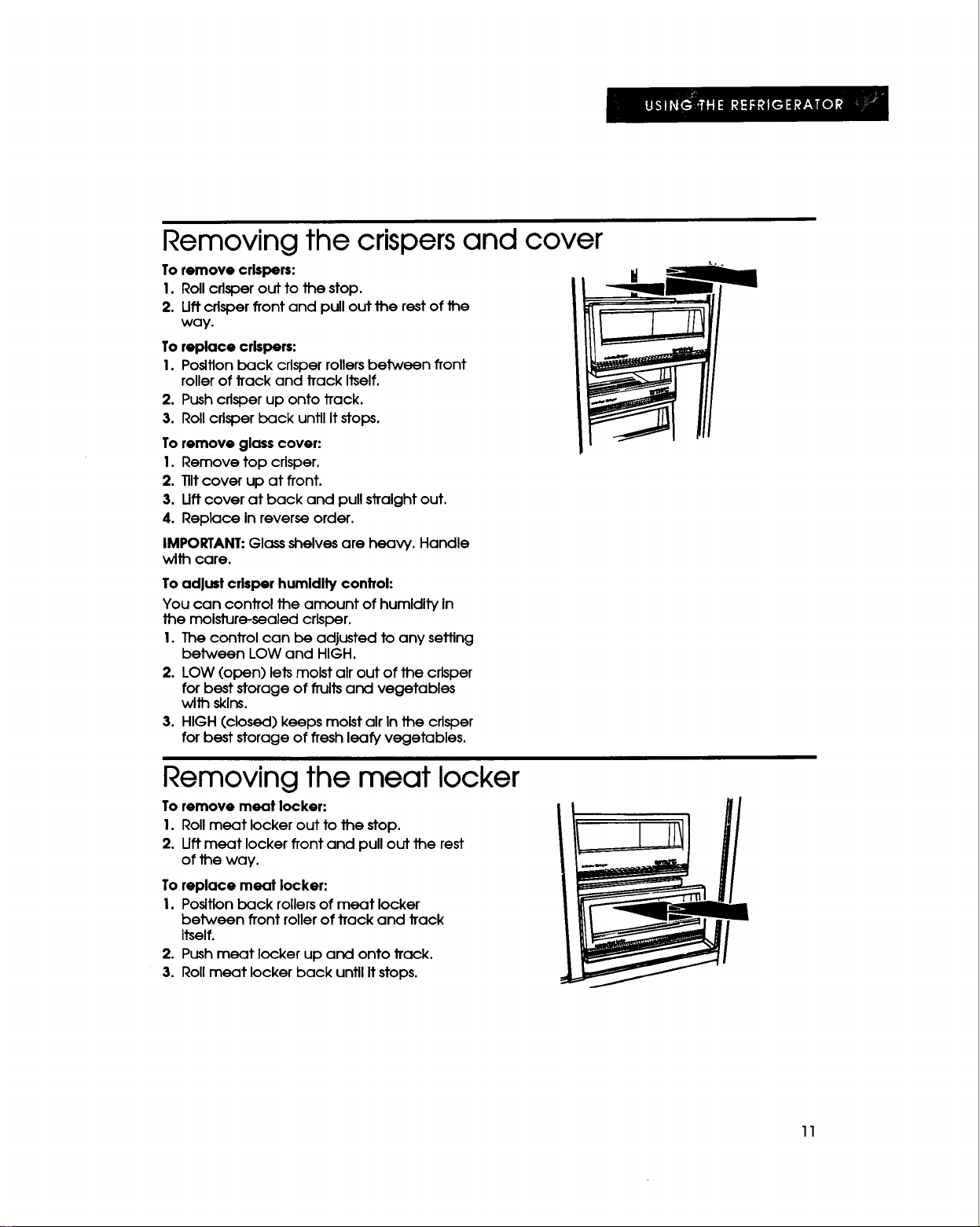
Removing the crispers and cover
To remove crispers:
1. Roll crisper out to the stop.
2. Liftcrisper front and pull out the rest of the
way.
To replace crispers:
I.Posltlonback crisperrollersbetween front
rollerof trackand trackItself.
2. Push crisperup onto track.
3. Rollcrisperback untilItstops.
To remove glass cover:
1. Remove top crisper.
2. 111tcover up at front.
3. lift cover at back and pull straight out,
4. Replace In reverse order.
IMPORTANT: Glass shelves are heavy. Handle
with care.
Toadjust crisper humldlty control:
You can control the amount of humidity In
the molsture-sealed crisper.
I. The control can be adjusted to any setting
between LOW and HIGH.
2. LOW (open) lets moist air out of the crisper
for best storage of fruitsand vegetables
with skins.
3. HIGH (closed) keeps moist air In the crisper
for best storage of fresh leafy vegetables,
Removing the meat locker
To remove meat locker:
I. Roll meat locker out to the stop.
2. llft meat locker front and pull out the rest
of the way.
To replace meat locker:
I. Position back rollers of meat locker
between front roller of track and track
Itself.
2. Push meat locker up and onto track.
3. Roll meat locker back until Itstops.
11
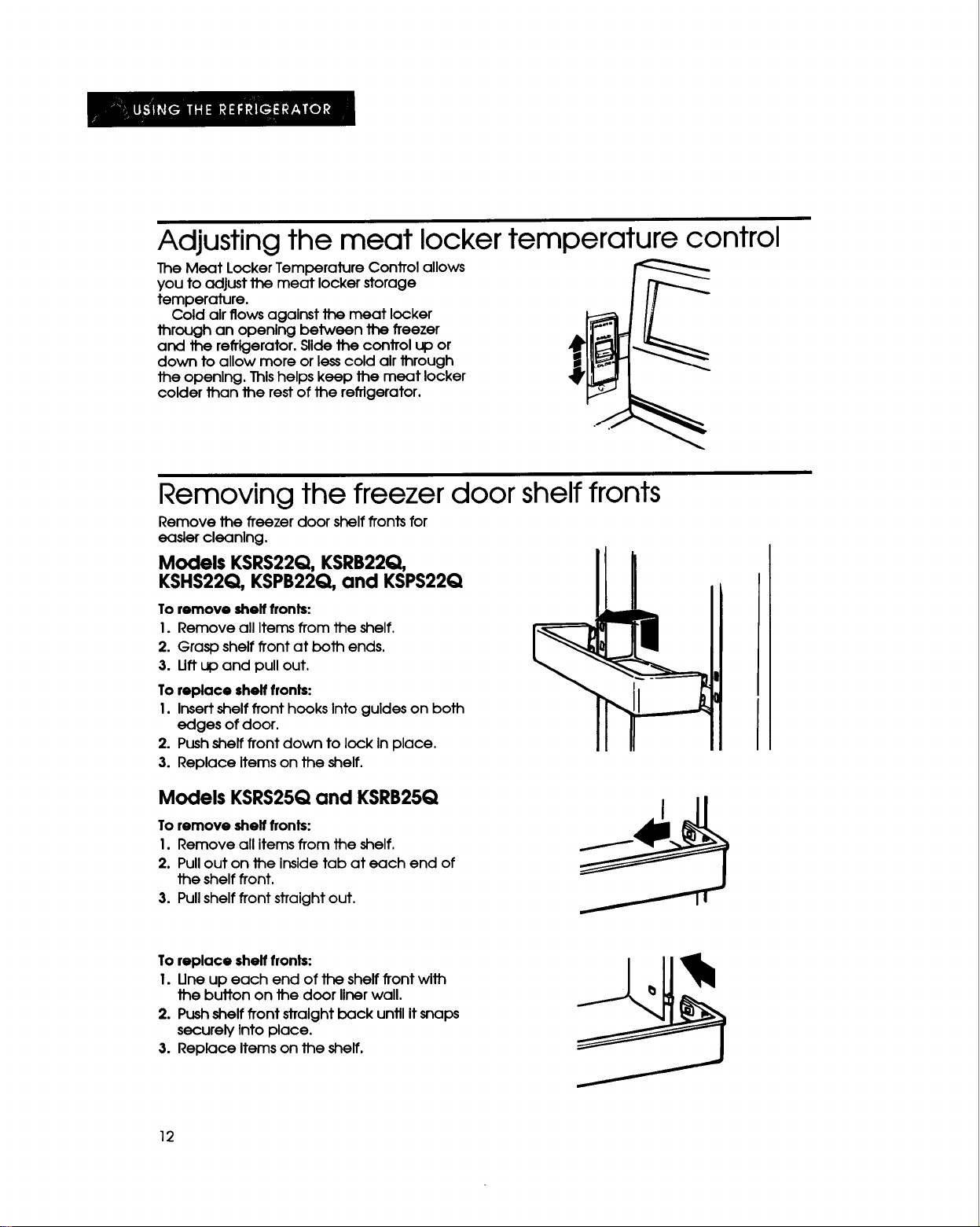
Adjusting the meat locker temperature control
The Meat LockerTemperatureControlallows
you toadjustthemeat lockerstorage
temperature.
Coldalrflowsagalnstthemeat locker
throughan openlngbetween thefreezer
and therefrigerator.SUde_e controlup or
down toallowmore orlesscoldalrthrough
theopenlng.Thishelpskeep themeat locker
colderthantherestoftherefrigerator.
Removing the freezer door shelf fronts
Remove thefreezerdoorshelffrontsfor
easlercleanlng.
Models KSRS22Q, KSRB22Q,
KSHS22Q, KSPB22Q, and KSPS22Q
To remove shelf fronts:
I. Remove all Items from the shelf.
2. Grasp shelf front at both ends.
3. Uft up and pull out.
To replace shelf fronts:
I. Insert shelf front hooks Into guides on both
edges of door.
2. Push shelf front clown to lock in place.
3. Replace Items on the shelf.
Models KSRS25Qand KSRB25Q
To remove shelf fronts:
I. Remove all Items from the shelf.
2. Pull out on the Inside tab at each end of
the shelf front,
3. Pull shelf front straight out,
To replace shelf fronts:
I. Une up each end of the shelf front with
the button on the door liner wall.
2. Pushshelf front straightback until It snaps
securely Into place.
3. Replace Items on the shelf.
12
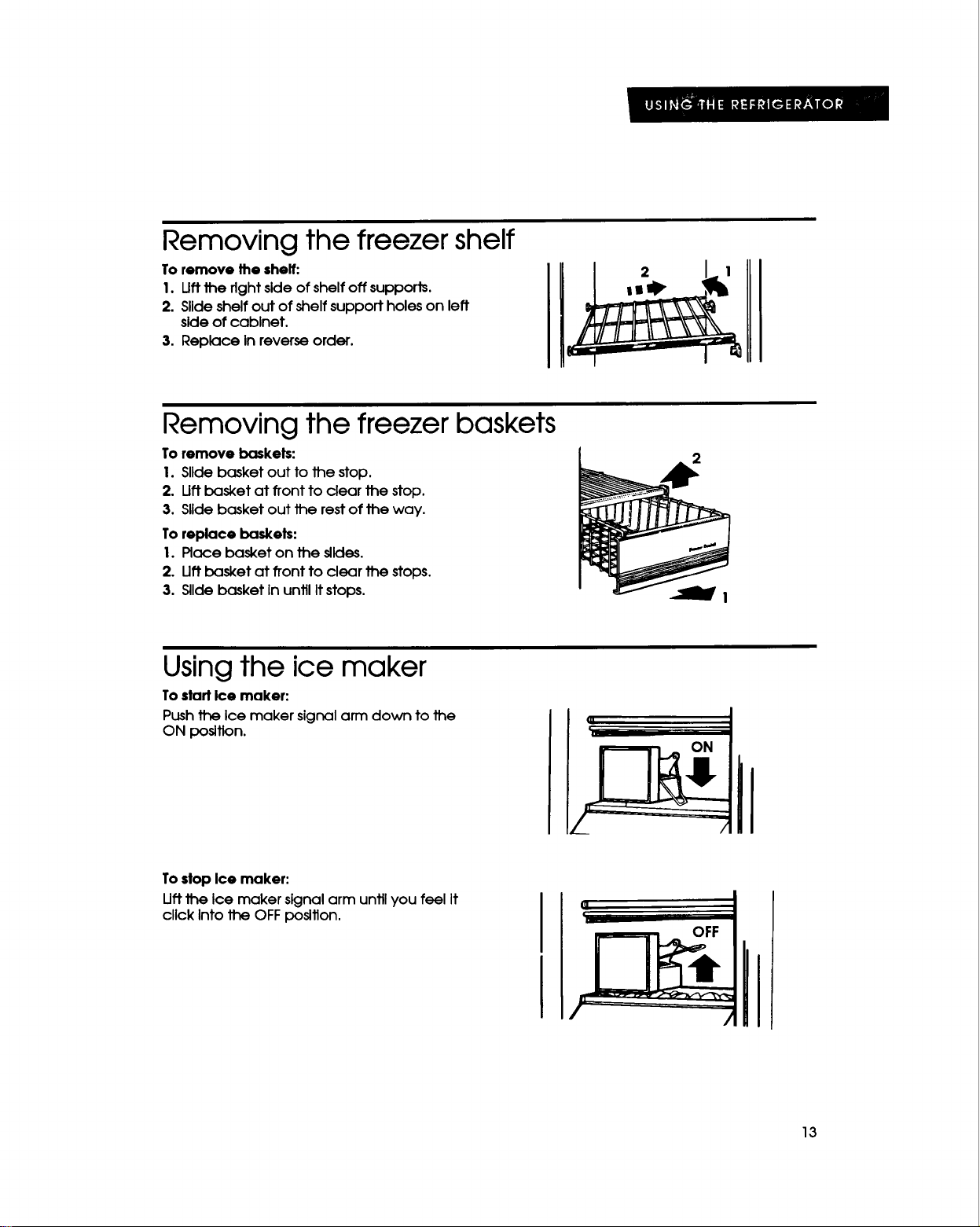
Removing the freezer shelf
To remove the shelf:
1. Uft the fight side of shelf off supports.
2. Slide shelf out of shelf support holes on left
side of cabinet.
3. Replace In reverse order.
Removing the freezer baskets
To remove baskets:
1. Slide basket out to the stop.
2. Oft basket at front to clear the stop.
3. Slide basket out the rest of the way.
To replace baskets:
I.Place basket on the silcles.
2. Oftbasket at fronttoclearthe stops.
3. Slldebasket InuntilItstops.
Using the ice maker
To start Ice maker:
Push the Ice maker signal arm down to the
ON position.
Tostop Ice maker:
Uftthe Ice maker signal arm untilyou feel it
cllck Intothe OFFposition.
13
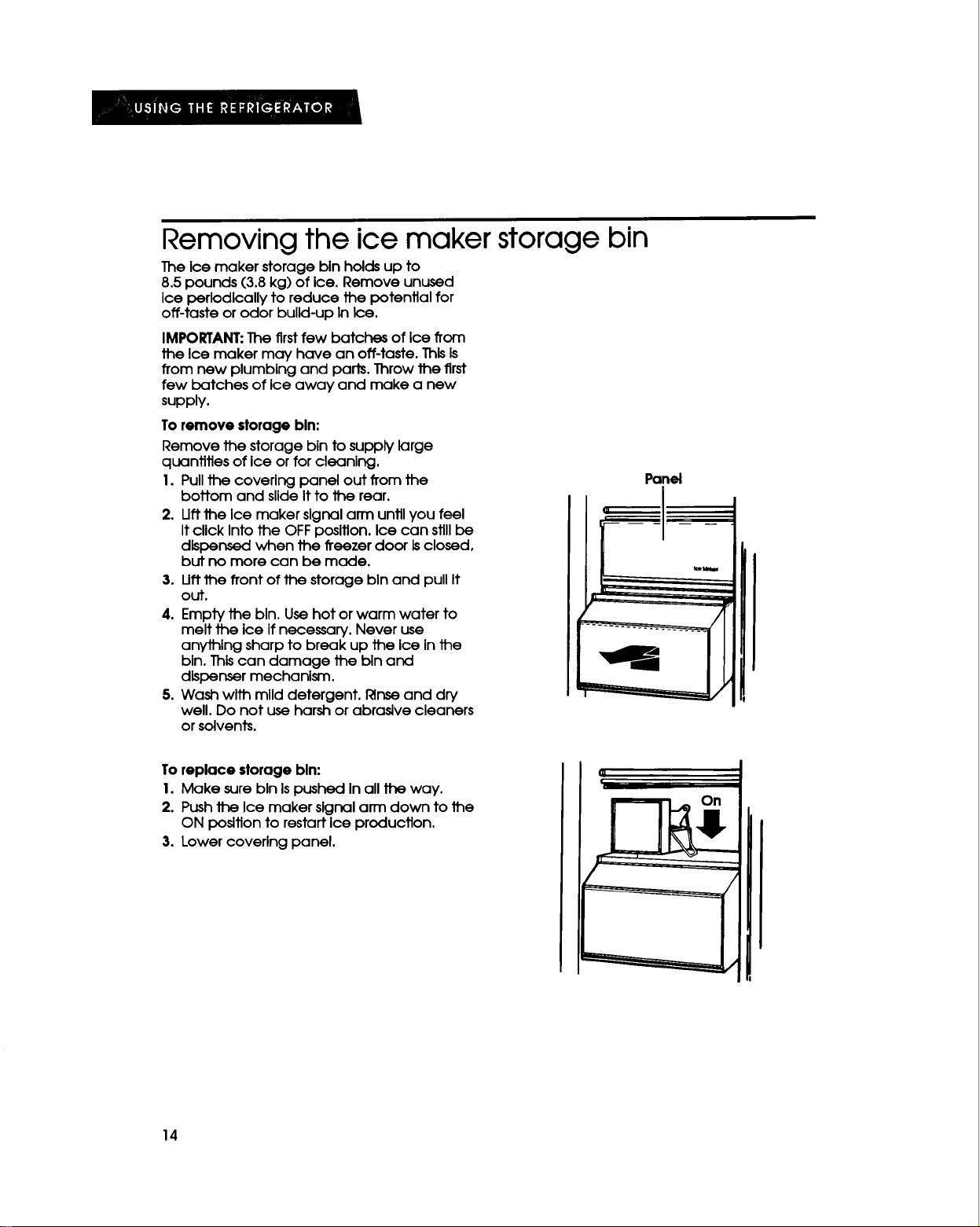
Removing the ice maker storage bin
The ice maker storage binholds up to
8.5pounds (3.8kg) of Ice.Remove unused
Ice perlodicallyto reduce the potentialfor
off-tasteor odor bulld-upInIce.
IMPORTANT: The firstfew batches of Ice from
the Ice maker may have an off-taste.ThlsIs
from new plumbing and parts.Throw the first
few batches of Ice away and make a new
supply.
To remove storage bln:
Remove the storage blnto supply large
quanfitiesofIce orforcleanlng.
I.Pullthe coverlng panel out from the
bottom and slldeItto the rear.
2. Uttthe Ice maker signalarm untilyou feel
ItclickIntothe OFF poslflon.Icecan stillbe
dispensed when the freezerdoor Isclosed,
but no more can be made.
3. Uftthe frontofthe storage bln and pullIt
out.
4. Empty the bln.Use hot or warm water to
melt the ice Ifnecessary.Never use
anythlng sharp to break up the Ice Inthe
bin.ThIscan damage the bin and
dIspensermechanism.
5.Wash wlth mllddetergent, l_nseand dry
well.Do not use harshor abrasivecleaners
orsolvents.
Panel
To replace storage bln:
I. Make sure bin Is pushed in all the way.
2. Push the Ice maker slgnal arm down to the
ON position to restart ice production.
3. Lower covering panel.
14
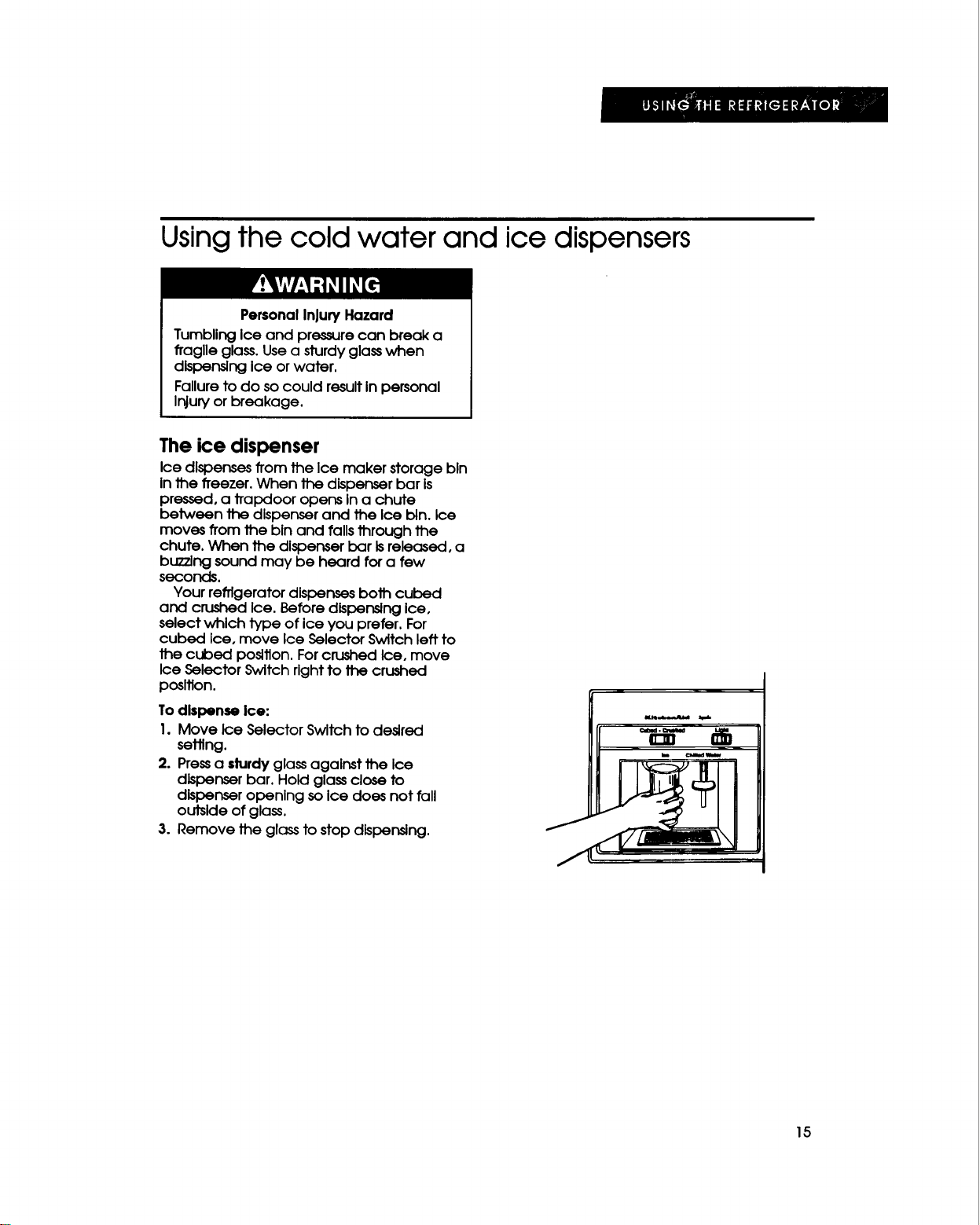
Using the cold water and ice dispensers
PersonalInjury Hazard
TumblingIce and pressure can break a
ffaglle glass.Usea sturdyglasswhen
dispensingice or water.
Failureto do socould resultin personal
Injuryor breakage.
The ice dispenser
Ice dispensesfrom the Ice maker storage bin
in the freezer. When the dispenserbar is
pressed, a trapdoor opens Ina chute
between the dispenser and the Ice bin. Ice
moves from the bin and falls through the
chute. When the dispenserbar isreleased, a
buzzing sound may be heard for a few
seconds.
Your refrigerator dispensesboth culoed
and crushed Ice. Before dispensingice,
select which type of ice you prefer. For
cubed Ice, move Ice Selector Switchleft to
the cubed position.Forcrushed Ice, move
Ice Selector Switch right to the crushed
pasltlon.
To dlspense Ice:
I. Move Ice Selector Switch to desired
setting.
2. Pressa sturdyglass agalnst the Ice
dispenserbar. Hold glassclose to
dispenseropening so Ice does not fall
outside of glass.
3. Remove the glassto stop dlspensing.
15
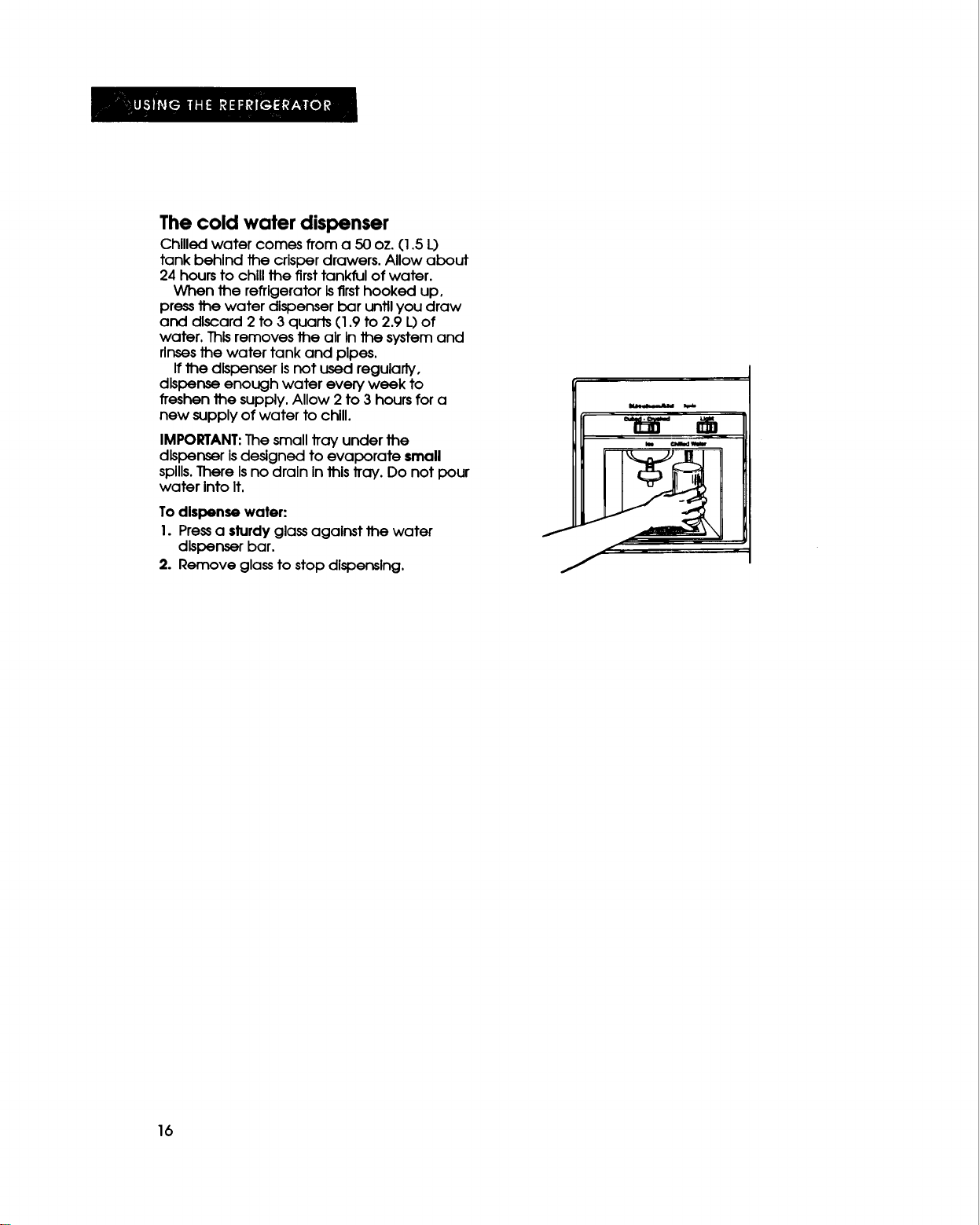
The cold water dispenser
Chilled water comes from a 50 oz. (1.5 L)
tank behind the crisper drawers. Allow about
24 hours to chill the first tankful of water.
When the refrigerator Isfirst hooked up,
press the water dispenser bar until you draw
and discard 2 to 3 quads (1.9 to 2.9 L)of
water. ThIsremoves the air In the systemand
rinses the water tank and pipes.
If the dIspenser Isnot used regularly,
dIspense enough water eve_, week to
freshen the supply. Allow 2 to 3 hours for a
new supply of water to chill.
IMPORTANT:The small tray under the
dIspenser Isdesigned to evaporate small
spills.There Isno drain in this tray. Do not pour
water Into It,
To dispense water:
1. Pressa sturdy glass against the water
dIspenser bar.
2. Remove glass to stop dispensing.
f
f
J
16
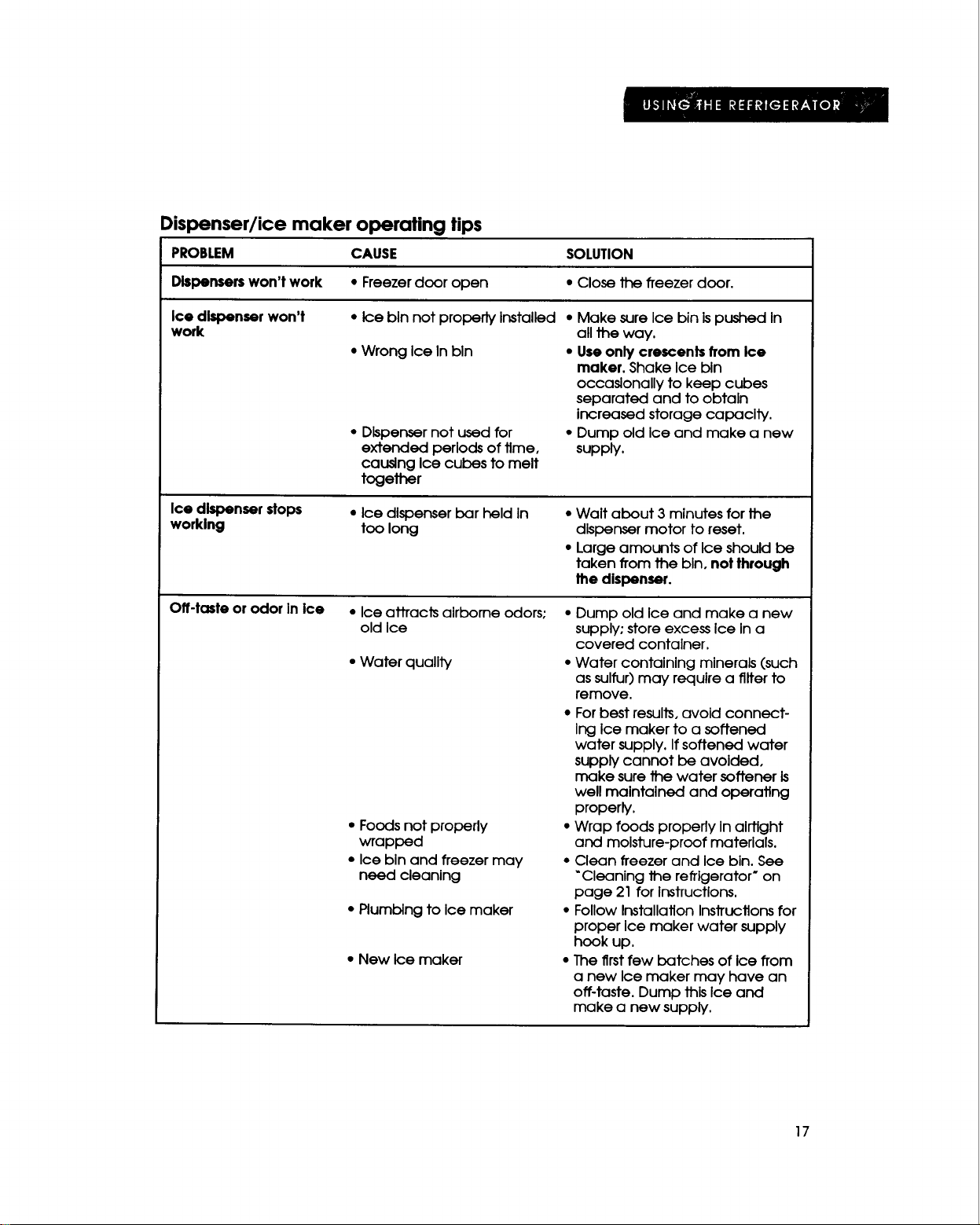
Dispenser/ice maker operating tips
PROBLEM CAUSE SOLUTION
Dbpensers won't work * Freezer door open * Close the freezer door.
Ice dispenser won't
work
•IceblnnotproperlyInstalled
•Wrong IceInbln
• Dispenser not used for
extended periods of time,
causing Ice cubes to melt
together
• Make sure Ice bin is pushed In
all the way.
• Use only crescents from Ice
maker. Shake Ice bin
occasionally to keep cubes
separated and to obtain
increased storage capacity.
• Dump old ice and make a new
supply.
Ice dlr_oenserstops
worklng
• Ice dispenser bar held In
too long
• Walt about 3 minutes for the
dispenser motor to reset.
• Large amounts of Ice should be
taken from the bin, not through
the dispenser.
Off-taste or odor In Ice
• Ice attractsalrbarneodors;
old Ice
•Water quality
• Foods not properly
wrapped
• Ice bin and freezer may
need cleaning
• Plumblng to Ice maker
• New Ice maker
• Dump old Ice and make a new
supply; store excess Ice In a
covered container.
• Water containing minerals (such
as sulfur) may require a filter to
remove.
• For best results, avoid connect-
Ing ice maker to a softened
water supply. If softened water
supply cannot be avoided,
make sure the water softener is
well maintained and operating
properly.
• Wrap foods properly In airtight
and moisture-proof materials.
• Clean freezer and Ice bin. See
"Cleaning the refrigerator" on
page 21 for instructions.
• Follow Installation Instructions for
proper Ice maker water supply
hook up.
• The first few batches of ice from
a new Ice maker may have an
off-taste. Dump this Ice and
make a new supply.
17
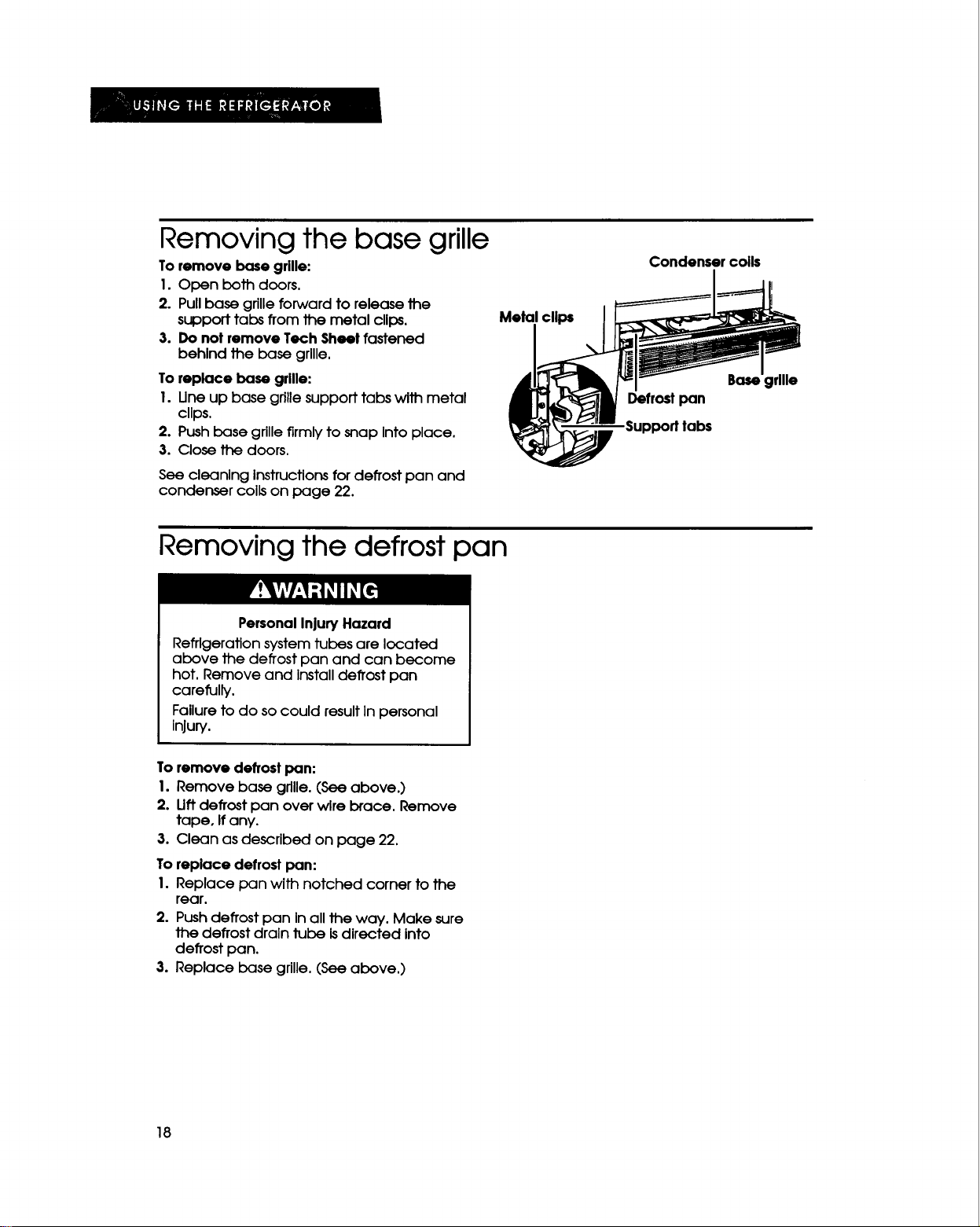
Removing the base grille
To remove base grille:
1. Open both doors.
2. Pull base grille forward to release the
support tabs from the metal clips.
3. Do not remove Tech Sheet fastened
behlnd the base grllle,
To replace base grille:
1. Line up base grille support tabs with metal
clips.
2. Push base grille firmly to snap Into place.
3. Close the doors.
See cleaning Instructionsfor defrost pan and
condenser coils on page 22.
Metal clips
Condenser coils
I
B_
Defrost pan
Support labs
Removing the defrost pan
Personal InjuryHazard
Refrigeration system tubes are located
above the defrost pan and can become
hot. Remove and Install defrost pan
carefully.
Failure to do so could result In personal
Injury.
To remove defrost pan:
I. Remove base grille. (See above.)
2. Liftdefrost pan over wire brace. Remove
tape, If any.
3. Clean as described on page 22.
To replace defrostpan:
I. Replace pan with notched corner to the
rear.
2. Pushdefrostpan Inalltheway. Make sure
thedefrostdralntubeIsdirectedInto
defrostpan.
3.Replace base grille.(Seeabove.)
18
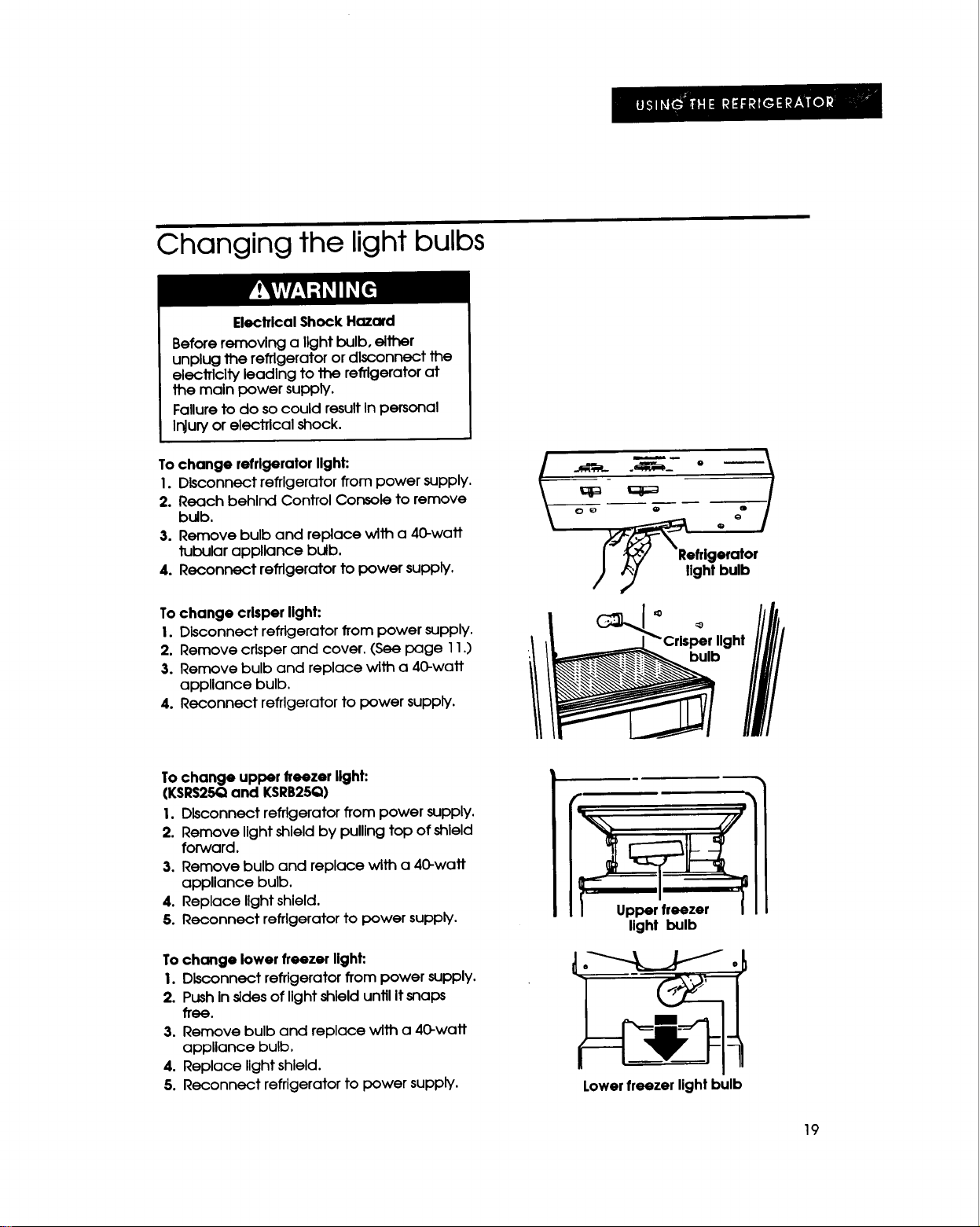
Changing the light bulbs
Electrlcal Shock Hazard
Before removing a light bulb, elther
unplug the refrigerator or dlsconnect the
elecJTlclty leading to the refrigerator at
the main power supply.
Failure to do so could result In personal
Injury or electrical shock.
To change refrlgerator llght:
I. Disconnect refrigerator from power supply,
2. Reach behind Control Console to remove
bulb.
3. Remove bulb and replace with a 40-watt
tubular appllance bulb.
4. Reconnect refrigerator to power supply.
To change crlsper llght:
I. Disconnect refrigerator from power supply.
2. Remove crisperand cover. (See page 11,)
3. Remove bulb and replace with a 40-watt
appliance bulb.
4. Reconnect refrigerator to power supply.
i .o-i
IV_/__Refrlgerator
/ _,_ light bulb
Crisper llght
To change upper freezer llght:
(KSRS25Qand KSRB25Q)
I. Disconnect refrigerator from power supply,
2. Remove light shield by pullingtop of shield
forward.
3. Remove bulb and replace with a 40-watt
appUance bulb.
4. Replace light shield.
5. Reconnect refrigerator to power supply.
Tochange lower freezer llght:
I. Disconnect refrigerator from power supply.
2. PushIn sldesof lightshield untilItsnaps
free.
3. Remove bulb and replace with a 40-watt
appliance bulb,
4. Replace light shield.
5. Reconnect refrigerator to power supply.
I Op r..z°,I
light bulb
Lower freezer light bulb
19
To change dispenser light:
I. Disconnect refrigerator from power supply.
2. Reach through front of dispenser area to
bulb.
3. Remove bulb and replace with a heavy-
duty tO-watt bulb.
4. Reconnect refrigerator to power supply.
IMPORTANT:Not all commercial appliance
bulbs will fit your refrigerator. Be sureto
replace a bulb with one of the same size and
shape.
Understanding the sounds you may hear
Your new refrigerator may make different The following chart describes the kinds of
sounds than your previous one. Hard surfaces sounds that might be new to you and what
such as the ceiling, walls and cabinets causes them.
around the refrigerator can make these
sounds seem louder.
SOUNDS/OBSERVATIONS CAUSES
Hum or hlss The refrigerator's fan motor and movlng alr.
Clicking or snapping sounds The thermostat makes a definite click when the
refrigeratorstopsrunning. Italso makes a sound
when the refrigerator starts.The defrost timer willclick
when the defrost cycle startsand stops.
Runnlngsounds The hlgh-efflclency compressorand motor willrun
longer than older designs.
Trlckllngwater/water sounds During the defrost cycle, the refrigerator willnot be
running. The tricklingwater isthe frost accumulation
on the freezer coil melting and running into the
defrost pan. When the refrigeratorstopsrunning, you
may hear gurgling in the tubing for a few minutes.
Saving energy
• Open the doors as few times as possible.
Keep food organized so you do not have
to search for what you want. Get
everything you need out at one time. Close
the doors as soon as food Is removed.
• Make sure your refrigerator Is not next to a
heat source such as a range, water heater,
furnace, radiator or In direct sunlight.
• Set the refrigerator and freezer
temperatures to suit your needs-ice cream
should be firm and beverages should be as
cold as you like them. Avoid setting the
refrigerator and freezer temperatures
colder than necessary.
• Check the door gasket for a tight seal.
Level the cabinet to be sure of a good seal.
• Clean the condenser coils regularly.
2O
aring for the Refrigerator
In This Section
Page
Cleanlng the refrlgerator ........................ 21
Vacation and moving care ................... 22
Page
Power Interruptions ............................... 23
Your new refrigerator-freezer isdesigned to give you many years of dependable service.
However, there are a few things you are expected to do In order to maintain your refrigerator-
freezer properly, This section tells you how to clean your refrigerator-freezer and how to care for
It when you are going on vacation or moving.
Cleaning the refrigerator
The refrigerator and freezer sections defrost
automatically. However, clean both sections
once a month to prevent odors from building
up. Wipe up spillsImmediately.
To clean the refrigerator, turn the
Refrigerator Control to OFF, unplug the unit,
take out all removable parts and clean the
refrigerator according to the dlrections
below.
PersonalInjury Hazard
Refrigeration systemtubes are located
above the defrostpan and can become
hot. Remove and Installdefrost pan
carefully.
Failure to do so could cause personal
Injury.
PART WHAT TO USE HOW TO CLEAN
Exterior surfaces Sponge, softclothor paper *
towel with mild detergent
and warm water
Also, use an appliance wax *
or good auto paste wax
Wash, rinseand dry well. Do
not useabrasive or harsh
cleaners.
Wax painted metal surfaces at
leasttwice a year, Apply wax
with a clean, soft cloth, Waxing
painted metal surfaces
provides rust protection.
Do not usewax on plastic
parts.
Panels • Clean as you would your
kitchen cabinets.
Base grille Vacuum cleaner with brush ° Vacuum grille.
attachment
Removable parts Sponge or softclothwithmild °Wash, rinseand dry well.
(shelves,meat detergent and warm water
locker,crlsper,
utilltydrawer, etc.)
continued on next page
21
PART WHATTO USE HOWTO CLEAN
Interlor walls
Sponge, softcloth or
paper towel with mild
detergent and warm
water
• Wash, rinseand dry well.
Door liners and
gaskets
Sponge, soft cloth or
paper towel with mild
detergent and warm
water
• Wash, rinseand dry well,
Do not usecleanlng waxes, concenlTat-
qKldetergents, bleaches, or cleaners
containing petroleum or alcohol on
plastic parts.
Defrost pan
Sponge or cloth with mild • See page 18 for removal and
detergent and warm replacement instructions.
water • Wash, rinse and dry well.
Condenser coils Vacuum cleaner with
extended narrow
attachment
• Clean coils when dusty or dirty, Coils
may need to be cleaned as often as
every other month.
• Remove base grille. (See page 18.)
• Vacuum coils.
• Replace base grille, (See page 18.)
Vacation and moving care
Short vacations
Ifyou will be away for lessthan four weeks,
there Isno need to shut offthe refrigerator.
Use up perishables and freeze other Items.
Turn off the automatic ice maker, then shut
off the water supply to the Ice maker. Empty
the Ice bin.
Long vacations
Remove all food if you will be gone a month
or more. Turn off the water supply to the Ice
maker at least one day before you leave.
When the last load of Ice drops Into the bin,
turn the Ice maker off. Turn the refrigerator-
freezer off. (See "Setting the controls" on
page 7.)
Unplug the refrigerator. Clean It, rinse well
and dry. Tape rubber or wood blocks to the
tops of both doors to prop them open far
enough for air to get in. This will keep odor
and mold from building up.
PersonalInjury Hazard
Do not allow children to climb on, play
near or crawl Insidethe refrigerator when
the doors are blocked open.
They may become Injured or happed.
Torestart the refrigerator, see "Setting the
controls" on page 7.
22
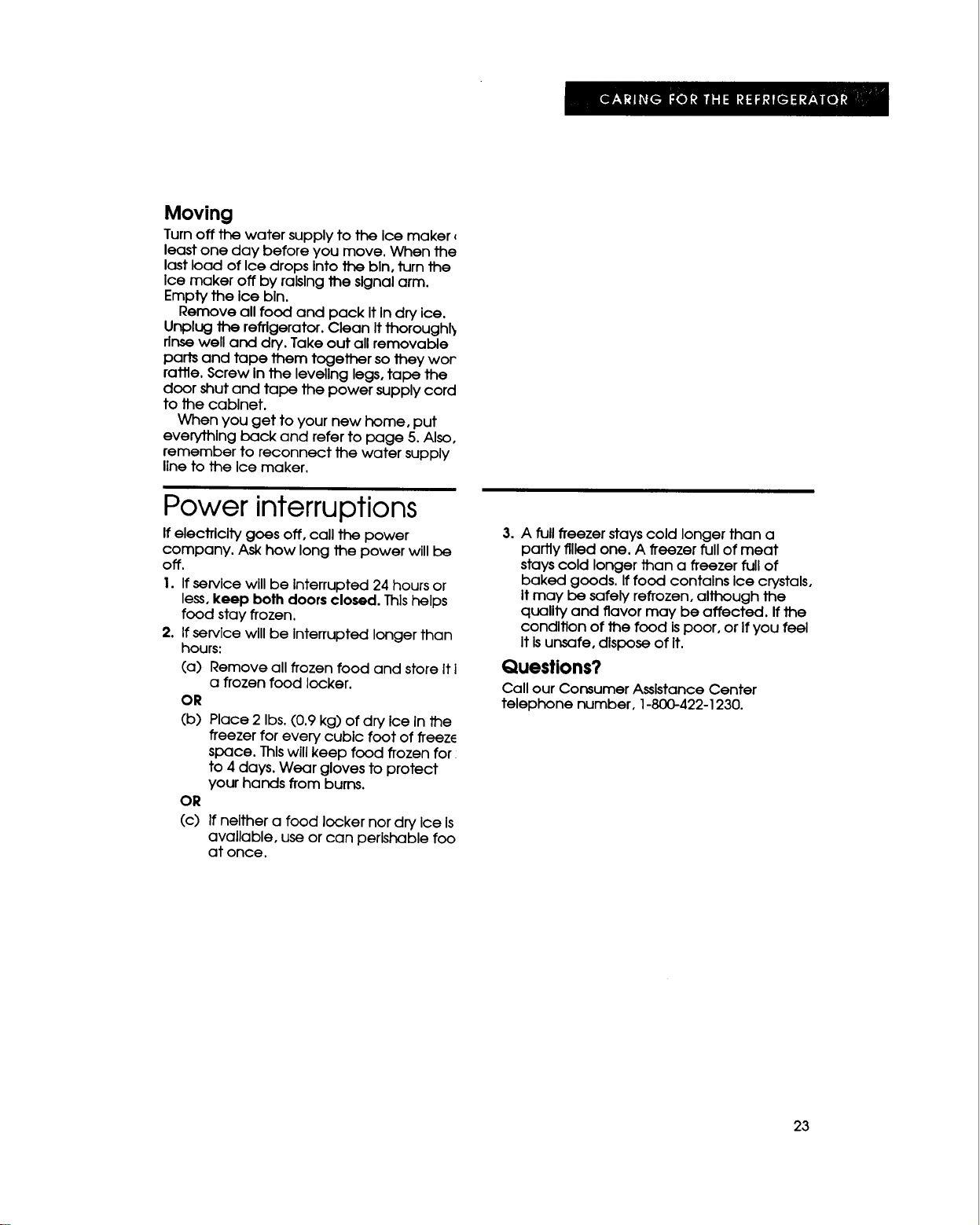
Moving
Turn off the water supply to the Ice maker
least one day before you move. When the
last load of Ice drops Into the bin, turn the
Ice maker off by raising the signal arm.
Empty the Ice bin.
Remove all food and pack It In dry ice.
Unplug the refrigerator. Clean It thoroughl_
rinse well and dry. Take out all removable
parts and tape them together so they wor
rattle. Screw In the leveling legs, tape the
door shut and tape the power supply cord
to the cabinet.
When you get to your new home, put
everything back and refer to page 5. Also,
remember to reconnect the water supply
line to the Ice maker.
Power interruptions
If electricity goes off, call the power
company. Ask how long the power will be
off.
1. If service will be interrupted 24 hours or
less, keep both doors closed. Thlshelps
food stay frozen.
2. If service will be interrupted longer than
hours:
(a) Remove all frozen food and store It i
a frozen food locker.
OR
(b) Place 2 Ibs. (0,9 kg) of dry Ice In the
freezer for every cubic foot of freez_
space. This will keep food frozen for_
to 4 days. Wear gloves to protect
your hands from burns.
OR
(c)
If neither a food locker nor dry Ice Is
available, use or can perishable foo
at once.
3. A full freezer stays cold longer than a
partly filled one. A freezer full of meat
stays cold longer than a freezer full of
baked goods. If food contains Ice crystals,
itmay be safely refrozen, although the
quality and flavor may be affected. If the
condition of the food ispoor, or If you feel
It Isunsafe, dispose of it.
Questions?
Call our Consumer Assistance Center
telephone number, 1-800-422-1230.
23
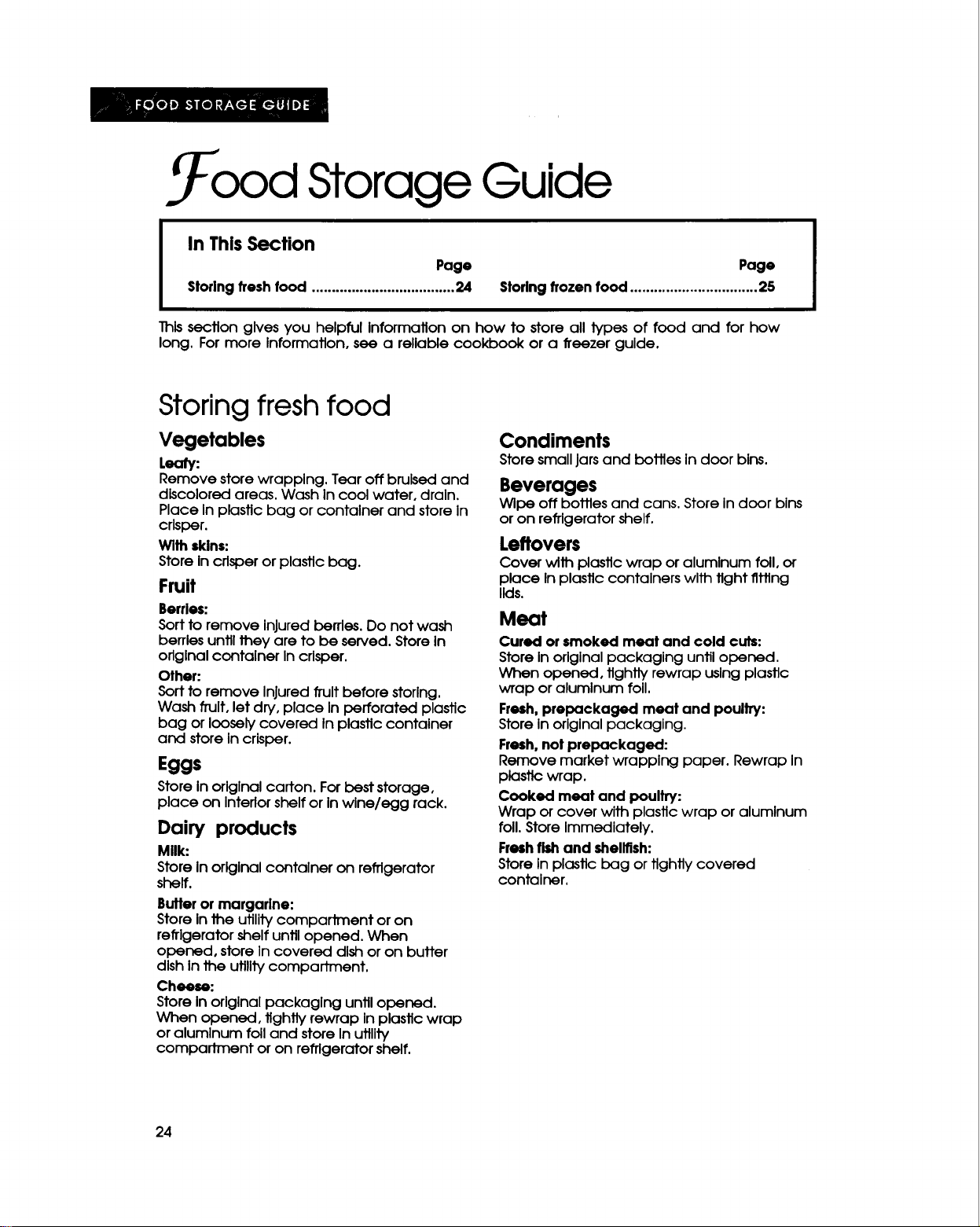
. ood Storage Guide
In ThisSection
Page
Storlng fresh food .................................... 24
Page
Storingfrozen food ................................ 25
This section gives you helpful Information on how to store all types of food and for how
long. For more information, see a reliable cookbook or a freezer guide.
Storing fresh food
Vegetables
Leafy:
Remove store wrapping. Tear off bruised and
discolored areas. Wash In cool water, drain.
Place In plastic bag or container and store In
crisper.
Wlth skins:
Store In crisper or plastic bag.
Fruit
Berries:
Sort to remove Injured berries. Do not wash
berries until they are to be served. Store In
original container In crisper.
Other:
Sort to remove Injured fruit before storlng.
Wash fruit, let dry, place In perforated plastic
bag or loosely covered In plastic container
and store In crisper.
Eggs
Store in original carton. For best storage,
place on Interlor shelf or in wine/egg rack.
Dairy products
Mllk:
Store In original container on refrigerator
shelf.
Butter or margarine:
Store In the utility compartment or on
refrigerator shelf until opened. When
opened, store In covered dish or on butter
dish In the utility compartment.
Cheese:
Store In orlglnal packaging until opened.
When opened, tightly rewrap In plastic wrap
or aluminum foil and store In utility
compartment or on refrigerator shelf.
Condiments
Store small jars and bottles in door bins.
Beverages
Wipe off bottles and cans. Store In door bins
or on refrigerator shelf.
Leftovers
Cover with plastic wrap or aluminum foil, or
place In plastic containers with tight thing
lids.
Meat
Cured orsmoked meat and cold cuts:
Store Inoriginal packaging until opened.
When opened, tightly rewrap usingplastic
wrap or aluminum foil.
Fresh,prepackaged meat and poultry:
Storein originalpackaging.
Fresh,not prepackaged:
Remove market wrapping paper. Rewrap In
plasticwrap.
Cooked meat and poultry:
Wrap or cover with plastic wrap or aluminum
foil. Store Immediately.
Freshfishand shellfish:
Store in plastic bag or tightly covered
container.
24
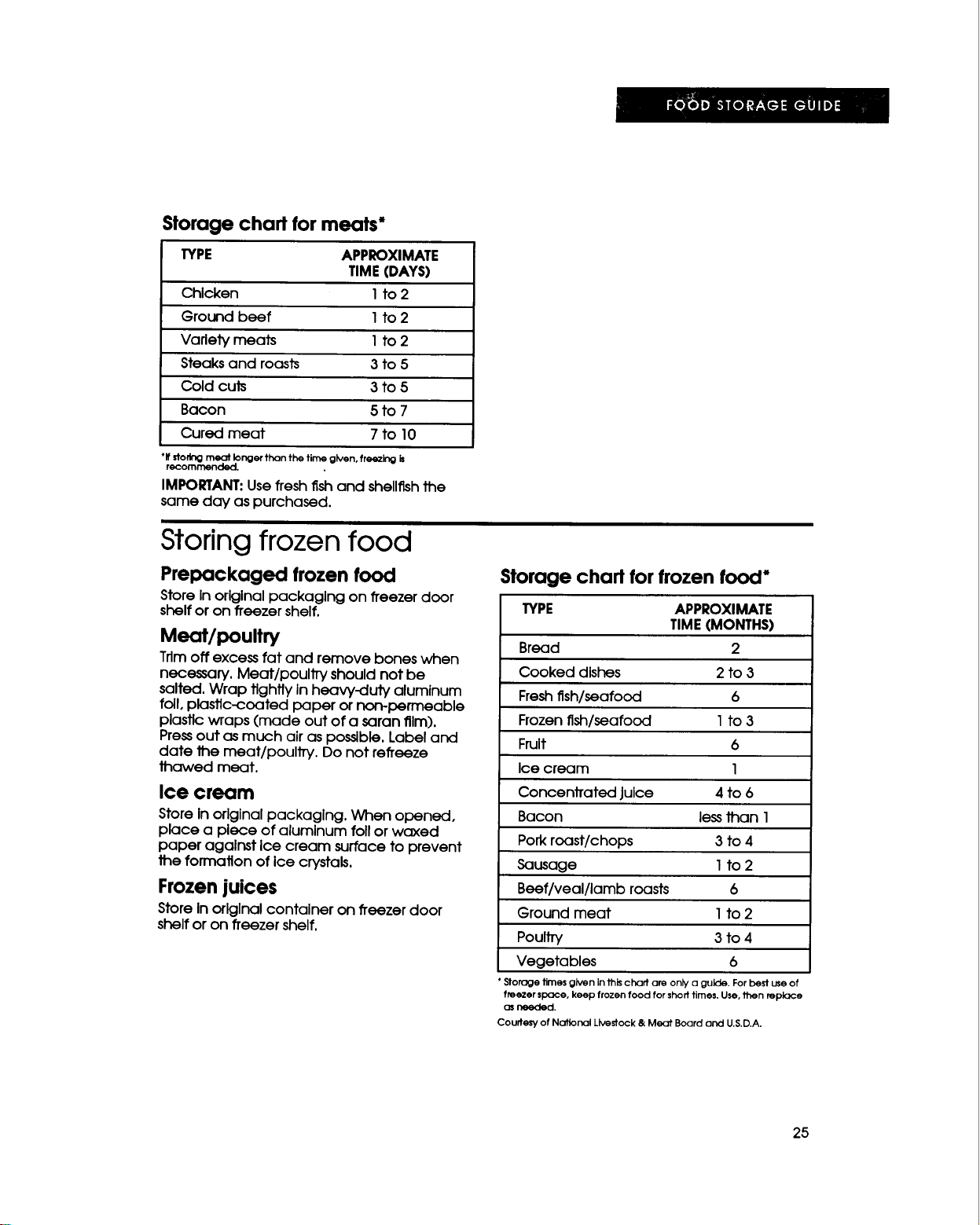
Storage chart for meats*
TYPE APPROXIMATE
TIME(DAYS)
Chicken I to 2
Ground beef I to 2
Variety meats I to 2
Steaks and roasts 3 to 5
Cold cuts 3 to 5
Bacon 5 to 7
Cured meat 7 to 10
*If storing meat. longer than the time given, freezing is
recommenaea.
IMPORTANT:Usefresh fish and shellfishthe
same day as purchased.
Storing frozen food
Prepackaged frozen food
Storein original packaging on freezer door
shelfor on freezer shelf.
Meat/poultry
Trim off excess fat and remove bones when
necessary. Meat/poultTy should not be
salted. Wrap tightly In heavy-duty aluminum
foil, plastic-coated paper or non-permeable
plastic wraps (made out of a saran film).
Press out as much air as possible. Label and
date the meat/poulJTy. Do not reffeeze
thawed meat.
Ice cream
Store In originalpackaging. When opened,
place a piece of aluminum foil or waxed
paper against ice cream surface to prevent
the formation of ice crystals,
Frozen juices
Store Inorlglnal container on freezer door
shelfor on freezer shelf,
Storage chart for frozen food*
TYPE APPROXIMATE
TIME(MONTHS)
Bread 2
Cooked dishes 2 to 3
Freshfish/seafood 6
Frozenfish/seafood I to 3
Fruit 6
Ice cream 1
ConcenJTated Juice 4 to 6
Bacon lessthan 1
Pork roast/chops 3 to 4
Sausage 1 to 2
Beef/veal/lambroasts 6
Ground meat Ito2
Poultry 3 to4
Vegetables 6
• Storage times given in this chart are only a guide. For best use of
freezer space, keep frozen food for shod times. Use, then replace
as needed.
Courtesy of National Livestock & Meat Board and U.S.D.A.
25
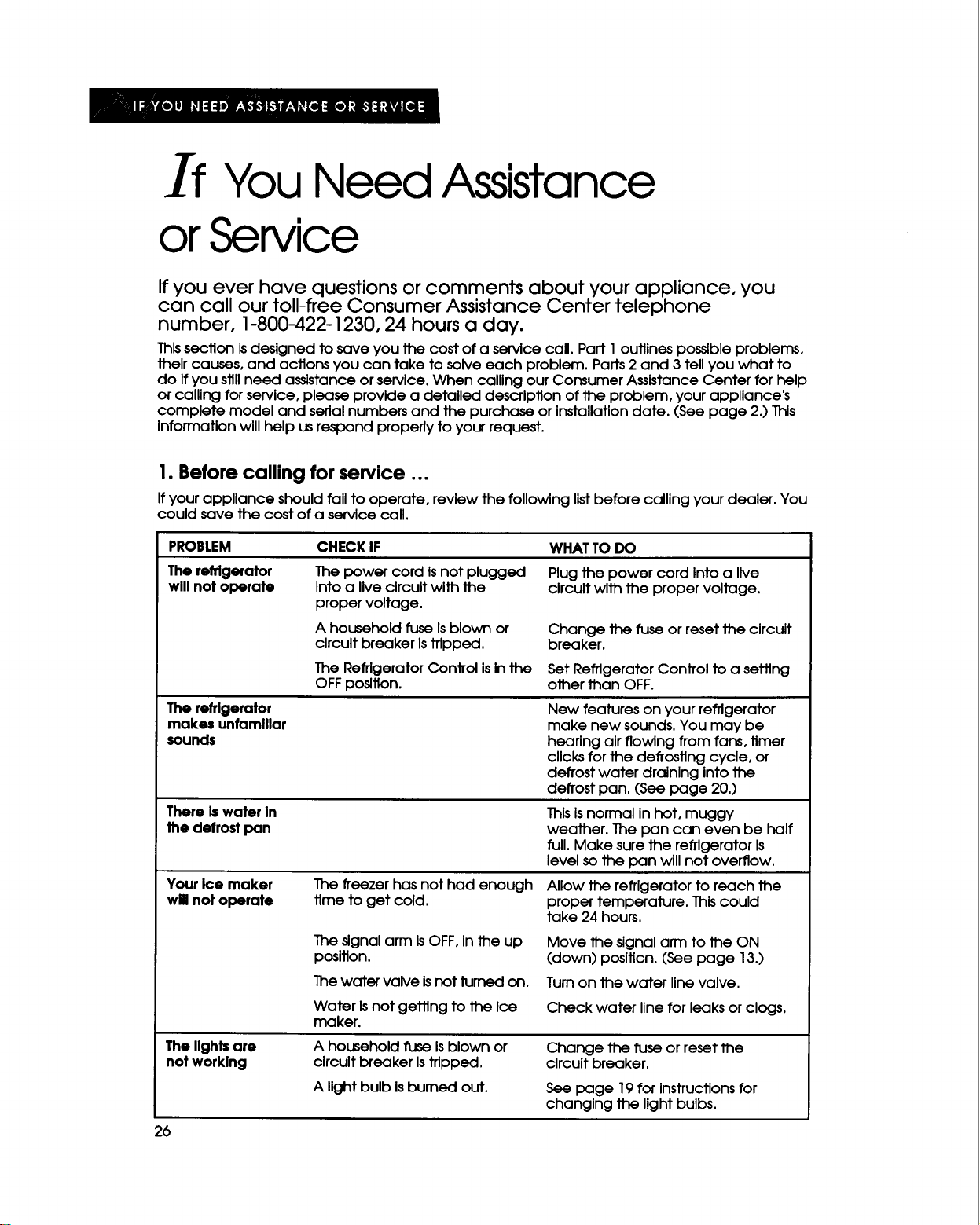
If You Need Assistance
or Service
If you ever have questions or comments about your appliance, you
can call our toll-free Consumer Assistance Center telephone
number, 1-800-422-1230, 24 hours a day.
This section is designed to save you the cost of a service call. Part 1outlines possible problems,
their causes, and actions you can take to solve each problem. Parts 2 and 3 tell you what to
do If you still need assistance or service. When calling our Consumer Assistance Center for help
or calling for service, please provide a detailed description of the problem, your appliance's
complete model and serlal numbers and the purchase or Installation date. (See page 2.) This
Information will help us respond properly to your request.
I. Before calling for service ...
If your appliance should fall to operate, review the following listbefore calling your dealer. You
could save the cost of a service call.
PROBLEM
The refrigerator
wlll not operate
The refrigerator
makes unfamiliar
sounds
ThereIs water In
the defrost pan
Your Ice maker
willnot operate
The llghf= are
not worklng
CHECKIF WHATTO DO
The power cord Is not plugged
Into a live circuit with the
proper voltage.
A household fuse Isblown or
circuit breaker Is trlpped.
The Refrigerator Control Is In the
OFF position.
Plug the power cord Into a live
circuit with the proper voltage.
Change the fuse or reset the circuit
breaker.
Set Refrigerator Control to a setting
other than OFF.
The freezer has not had enough
time to get cold.
New features on your refrigerator
make new sounds. You may be
hearing air flowing from fans, timer
clicks for the defrosting cycle, or
defrost water draining into the
defrost pan. (See page 20.)
ThisIsnormal In hot, muggy
weather. The pan can even be half
full. Make sure the refrigerator is
level so the pan will not overflow.
Allow the refrigerator to reach the
proper temperature. Thiscould
take 24 hours.
The signal arm IsOFF,Inthe up
position.
Move the signal arm to the ON
(down) position. (See page 13.)
Thewater valve Isnot fumed on. Turnon the water line valve.
Water Isnot getting to the Ice
maker.
Check water line for leaks or clogs,
A household fuse Is blown or
circuit breaker Is tripped.
A light bulb Is burned out.
Change the fuse or reset the
circuit breaker.
See page 19 for Instructions for
changing the light bulbs.
26
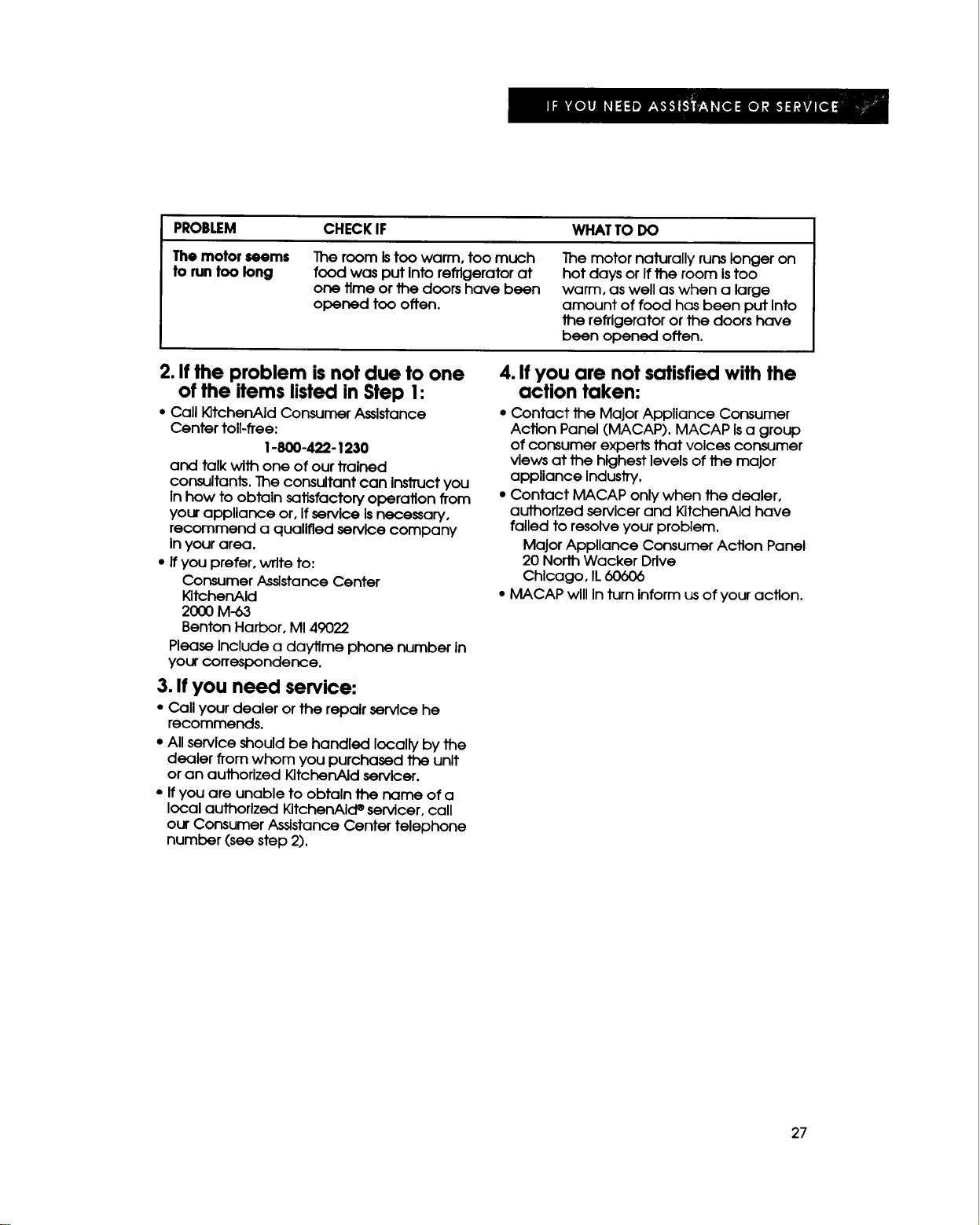
PROBLEM
The motor seems
to runtoo long
CHECK IF WHATTO DO
The room istoo warm, too much
food was put Into refrigerator at
one time or the doors have been
opened too often.
The motor naturally runs longer on
hot days or If the room Is too
warm, as well as when a large
amount of food has been put Into
the refrigerator or the doors have
been opened often.
2. If the problem is not due to one
of the items listed in Step I:
• Call K]tchenAId Consumer Assistance
Center toll-free:
1-800-422-1230
and talk with one of our trained
consultants. The consultant can Instruct you
In how to obtain satisfactory operation from
your appliance or, If service Isnecessary,
recommend a qualified service company
Inyour area.
• Ifyou prefer, write to:
Consumer Assistance Center
KitchenAId
2000 M-63
Benton Harbor, MI 49022
Please Include a daytime phone number in
your correspondence.
3. If you need service:
• Call your dealer or the repair service he
recommends.
• All service should be handled locally by the
dealer from whom you purchased the unit
or an authorized KitchenAid servicer.
• If you are unable to obtain the name of a
local authorized KitchenAIcP servicer, call
our Consumer Assistance Center telephone
number (see step 2).
4. If you are not satisfied with the
action taken:
• Contact the Major Appliance Consumer
Action Panel (MACAP). MACAP Isa group
of consumer experts that voices consumer
views at the highest levels of the major
appliance Industry.
• Contact MACAP only when the dealer,
authorized servicer and KitchenAId have
failed to resolve your problem.
Major Appliance Consumer Action Panel
20 Norlh Wacker Drive
Chicago, IL60606
• MACAP will In turn inform usof your action.
27
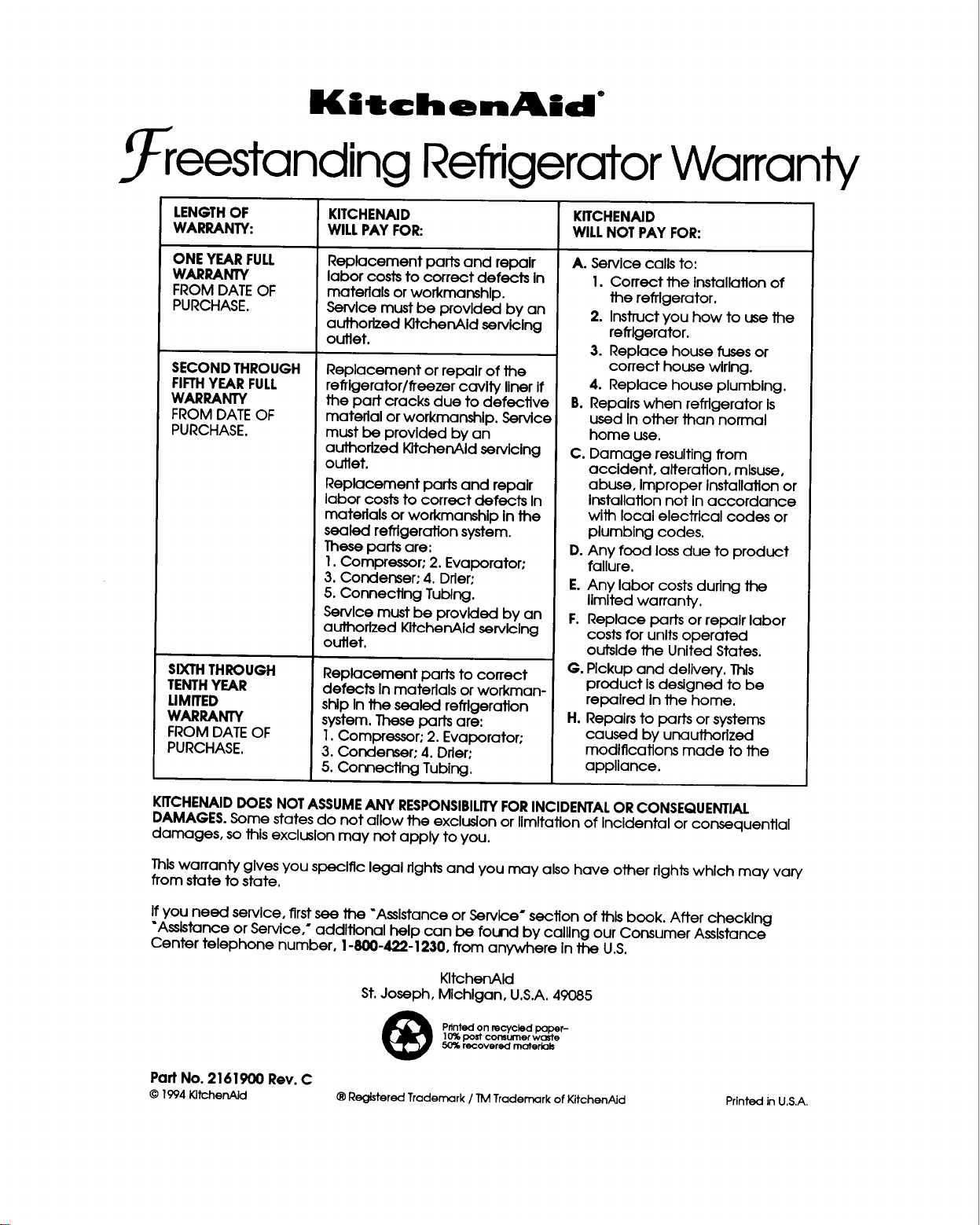
KitchenAid °
_ eestanding Refrigerator Warranty
LENGTH OF KITCHENAID KITCHENAID
WARRANTY: WILL PAY FOR: WILLNOT PAY FOR:
ONEYEARFULL
WARRANTY
FROMDATEOF
PURCHASE,
SECONDTHROUGH
FIFTHYEARFULL
WARRANTY
FROMDATEOF
PURCHASE.
SIXTHTHROUGH
TENTHYEAR
LIMITED
WARRANTY
FROM DATEOF
PURCHASE.
Replacement parts and repair
labor coststo correct defects In
materials or workmanship.
Service must be provided by an
authorized KltchenAldservicing
outlet.
Replacement orrepairofthe
refrigerator/freezercavitylinerIf
thepartcracksdue todefective
materialorworkmanshlp.Servlce
mustbe provldedby an
authorizedKltchenAldservlclng
outlet.
Replacement partsand repair
laborcoststo correctdefects In
materialsor workmanshlp Inthe
sealed refrigerationsystem.
These partsare:
I.Compressor, 2.Evaporator"
3.Condenser; 4.Drier;
5.Connecting Tublng.
Servlcemust be provlded by an
authorized KltchenAId servicing
outlet.
Replacement parts to correct
defects In materials or workman-
ship Inthe sealed refrigeration
system. These parts are:
1.Compressor: 2. Evaporator:
3. Condenser; 4. Drier"
5. Connecting Tubing.
A. Servicecallsto:
I.Correct the Installationof
the refrigerator.
2. Instructyou how to use the
refrigerator.
3. Replace house fusesor
correcthouse wlrlng.
4. Replace house plumblng.
B. Repalrswhen refrigeratorIs
used Inotherthan normal
home use.
C. Damage resultingfrom
accident, alteration,misuse,
abuse, Improper Installationor
Installationnot inaccordance
wlth localelectricalcodes or
plumblng codes.
D.Any food lossdue to product
failure.
E.Any laborcostsduring the
llmltedwarranty.
F. Replace partsorrepalrlabor
costsforunltsoperated
outsldethe UnitedStates.
G. Pickup and delivery.Thls
product Isdesigned to be
repalred Inthe home.
H. Repalrsto partsor systems
caused by unauthorized
modifications made to the
appliance.
KITCHENAIDDOESNOTASSUMEANY RESPONSIBILITYFORINCIDENTALOR CONSEQUENTIAL
DAMAGES.Some states do not allow the exclusionor limitation of Incidental or consequential
damages, sothis exclusionmay not apply to you.
Thiswarranty gives you specific legal rights and you may also have other rights which may vary
from state to state.
If you need service, first see the "Assistanceor Service" section of this book. After checking
"Assistanceor Service,* additional help can be found by calling our Consumer Assistance
Center telephone number, !-800-422-1230, from anywhere in the U.S.
KltchenAId
St.Joseph, Michigan, U.S.A.49085
Printed on recycled paper-
10% post consumer waste
50_ recovered moterk]Is
PartNo. 2161900 Rev. C
© 1994 KitchenAid ® Registered Trademark / TM Trademark of KitchenAid PrintedinU.S.A.