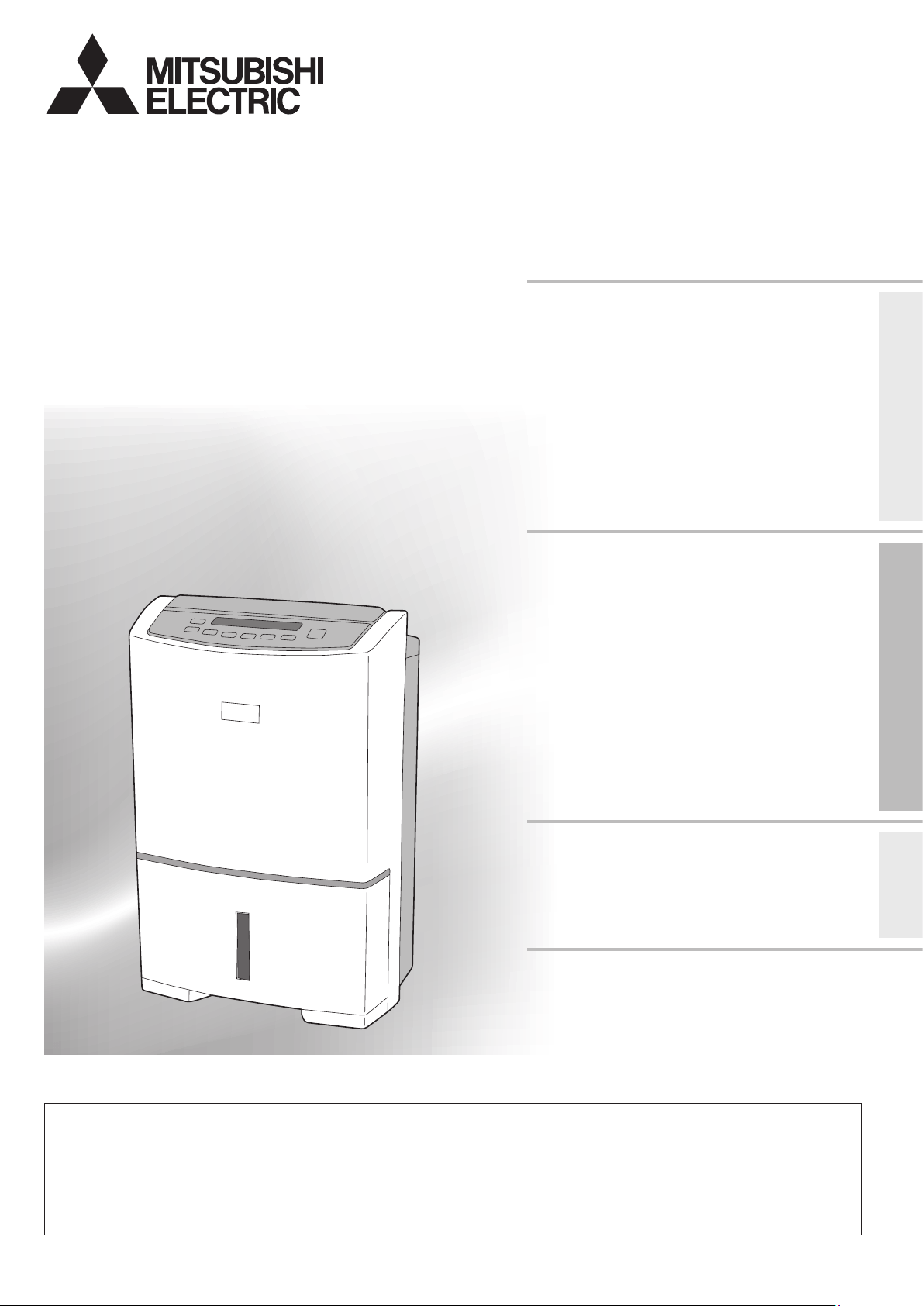
DEHUMIDIFIER
MODEL
MJ-EV38HR-A
INSTRUCTION MANUAL
Features
Compact and powerful
Inverter technology, energy saving
Air purifying function with
PM2.5 lter
Before Using the UnitOperating
Troubleshooting
This appliance is not intended for users (including children) with insufficient physiological, sensory or mental
capabilities or the lack of experience or knowledge, unless it is used under the supervision or instruction of a
qualified safety personnel.
Children should be supervised to ensure that they do not play with the appliance.
If the power cord is damaged, it must be replaced by the manufacturer, its services agent or any suitably qualified
electrical person in order to avoid a hazard.
Table of Contents page
Recommended Ways of
Using the Unit 2
Precautions 3
Warning 5
Tips on Dehumidication 5
Features of This Dehumidier 6
Names and Functions of Parts 7
Front/Back 7
Control Panel/Inverter Indicator/LCD Display 8
Before Using Your Dehumidier 9
Carrying the Unit 9
Drying Laundry 10
INTELLIGENT LAUNDRY
Dehumidifying 12
EASY/ECO AUTO/HIGH/LOW/MILDEW GUARD
Cleaning the Air (AIR PURIFIER) 15
Replacement Parts 15
Using Child Lock 15
Using Louvre 16
Using Timer 17
OFF TIMER/ON TIMER
Drying Inside Operation 18
Draining 19
Continuous Drainage 20
Maintenance 21
Storage 21
Troubleshooting 22
Specications Back cover
Disposal Back cover
In order to ensure correct usage, please read
this instruction manual carefully and retain it
for future reference.
Before accepting the Warranty at the time of
purchase, please make sure that the date of
purchase, place of purchase and other items
are correctly filled in the form.
2
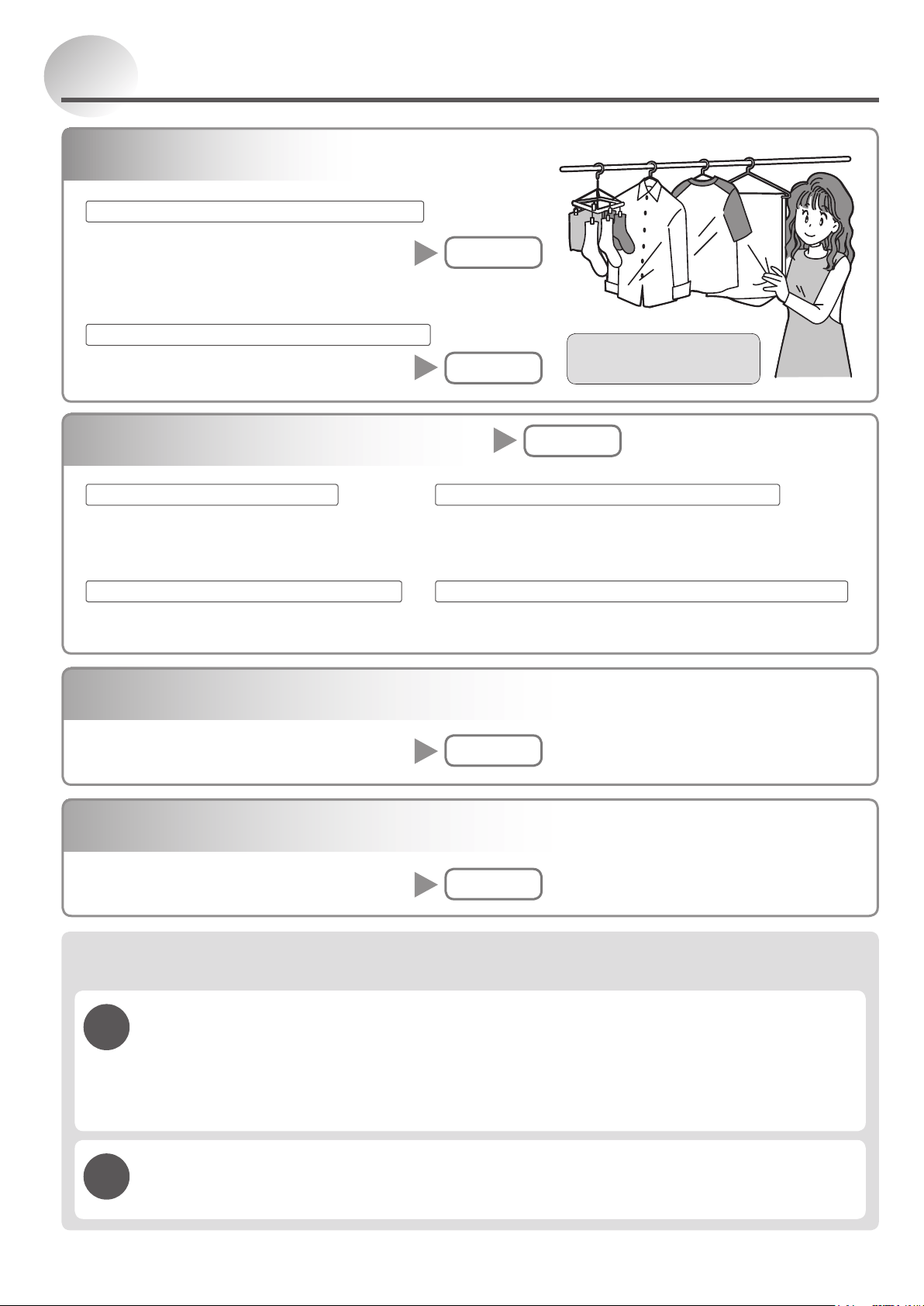
Recommended Ways of Using the Unit
When you want to dry laundry
When you want to perform automatic operation
When you want to perform continuous operation
When you want to perform automatic operation
When you want to perform continuous operationWhen you want to set the humidity
Reducing blowing sound and performing continuous operation
INTELLIGENT
LAUNDRY
HIGH
P. 10
P. 12-13
HIGH ECO AUTO
EASY LOW
MILDEW GUARD
P. 12·14
When you are worried about mildew in the bathroom
Tips on Drying Laundry
P. 11
AIR PURIFIER
P. 15
When you want to clean the air
Frequently Asked Questions
When you want to dehumidify
P. 12-13
Q.
Why is there still condensation on the windows in the morning?
A. The dehumidifier can take a few weeks to reduce the moisture in your home to an acceptable level.
This is best done by setting the unit to High and leaving it on 24 hours a day. We also recommend
the unit be moved from room to room. After this initial few weeks the unit can then be set to one of
the auto modes 50~70 and this will maintain the Humidity to your desired level. On cold mornings
there may still be a small amount of condensation on the windows.
Q.
Can I leave my Dehumidier turned on 24 hours a day?
A. No problem. The unit can to be left running unattended. It will switch off automatically when the tank
gets full or the required humidity is reached.
3
Before Using the Unit
Precautions
WARNING
Meanings of the graphic symbols used in this manual and on
the unit are explained below.
Forbidden
Keep
away from
fire
Do not
subject to
water
Do not
disassemble
Always
follow the
instructions
The following diagrams indicate circumstances where
danger can result from mishandling the unit.
WARNING
CAUTION
Mishandling may result in
fatal or serious injuries.
Mishandling may result in
minor injuries or damage to
your home or property, etc.
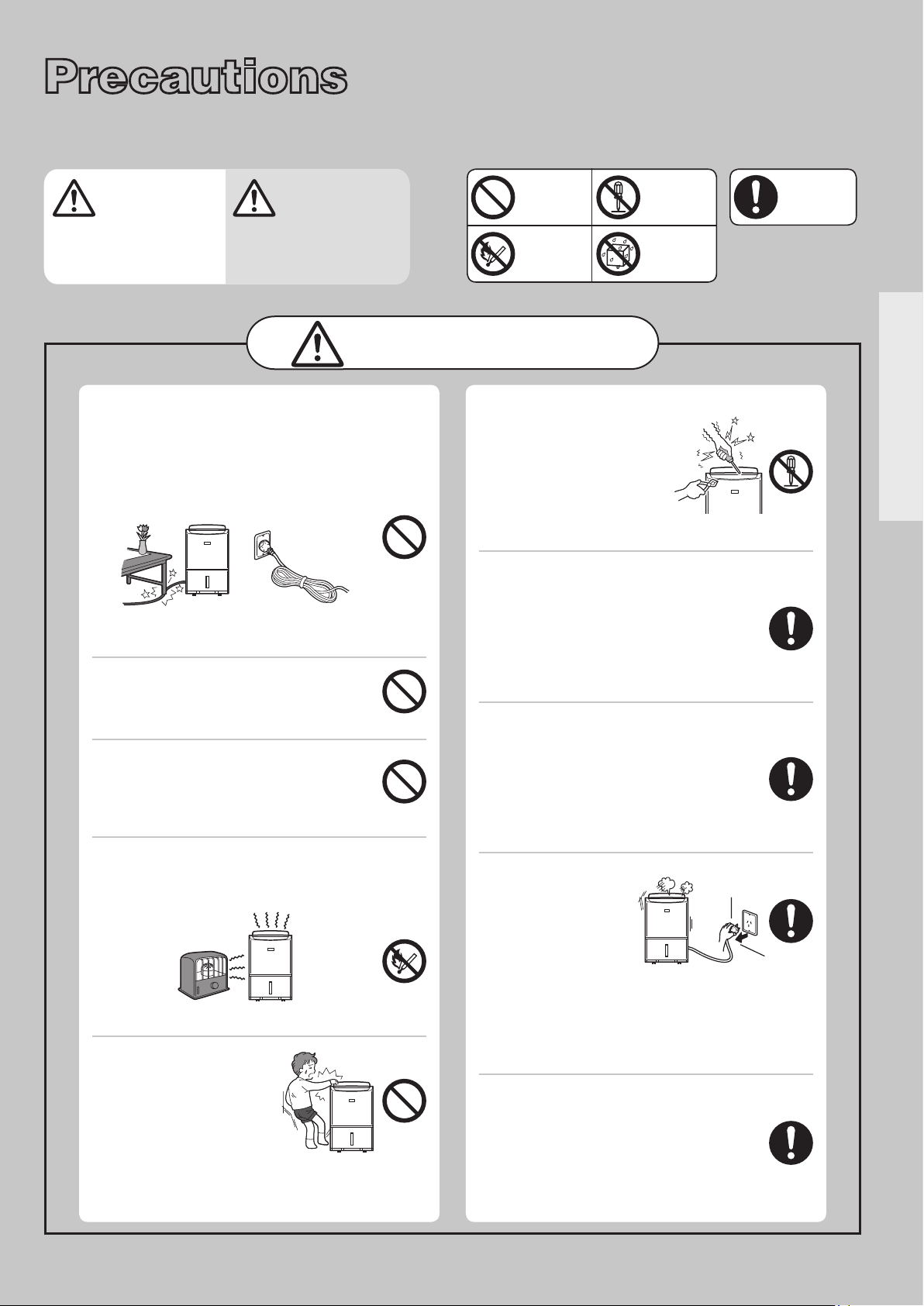
Do not damage or modify the power
cord or plug. Do not use power sockets
in which the plug ts loosely.
Do not modify, bundle, twist, bend or heat the
power cord. Do not place under objects or
use with the end close to the plug bent.
(Keep pets from biting the cord.)
The cord may be damaged resulting in re,
electric shock or heat generation.
Do not use extension cords or
multiple head adapters.
This may result in re or electric shock.
Do not start/stop the unit by
plugging/unplugging the power
cord.
This may result in re and/or electric shock.
Do not put the unit near heat-
generating devices (such as stoves, fan
heaters, etc.).
The plastic parts may melt and cause re.
Do not put your ngers
or any long object, into
the air intake/outlet. Do
not touch the swing
louvre.
The internal fan rotates at high speeds, and
such actions may result in injury.
Do not attempt to repair,
disassemble, or modify
the unit.
This may result in re and/
or electric shock. See the
last page for service contact
details.
Exclusively use 230-240 V AC
power sockets for the power
supply.
Failing to do so may result in a re and/
or electric shock.
* Use an extension cord by itself.
Wipe dust off the power plug and
insert the plug rmly.
If the plug is not fully inserted into
the socket, dust may gather on the
connectors which may cause re and/or
electric shock.
Should abnormal
symptoms occur
(a burning smell,
etc.), switch off the
unit and unplug it
from the socket.
Continuing to operate the unit may result in
re or electric shock.
See the last page for service contact
details.
Remove water that has collected
in the tank.
Accidentally drinking the water or using
it for other purposes may cause illness
and/or unforeseen accidents.
4
CAUTION
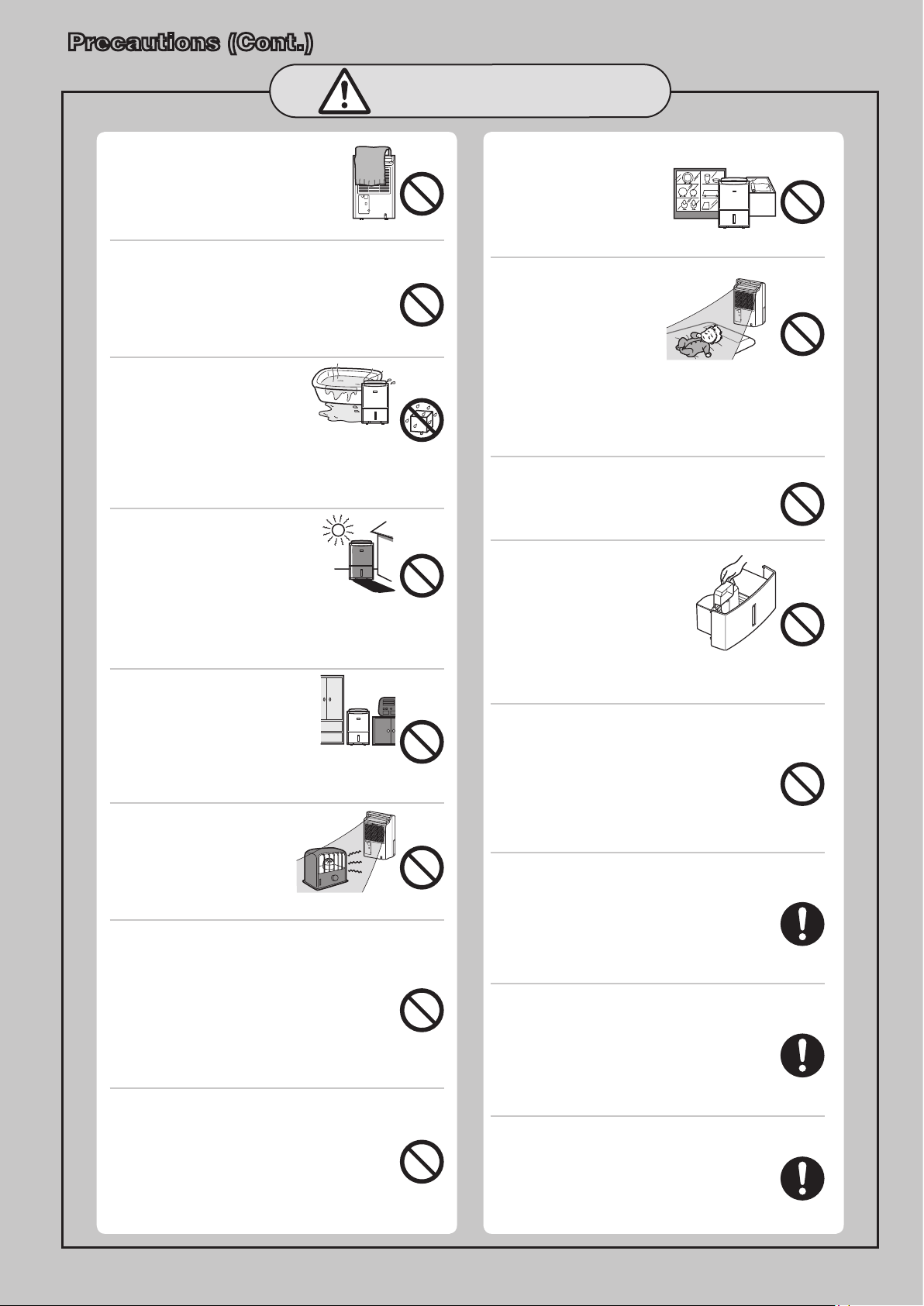
Do not cover an air outlet or
air intake with laundry, cloth,
curtain, etc.
This results in poor ventilation and
may cause heat generation/re.
Do not put vases or any other
objects lled with water on the unit.
Water may leak into the unit adversely
affecting electric insulation and cause
electric shock and/or re by short-
circuiting.
Do not use the unit in a
bathroom or other
location where it is
likely to come into
contact with water, or wash it with
water.
Exposure to water may result in re or electric
shock caused by an electric leak.
Do not use the unit
where it may be exposed
to direct sunlight or other
weather conditions.
(This unit is for indoor
use only.)
This may cause overheating, electric shock
and/or re caused by an electric leak.
Do not use the unit in
narrow, enclosed places
such as inside closets,
between pieces of
furniture, etc.
This results in poor ventilation and may
cause heat generation and/or re.
Do not use combustion
appliances in the path of
the air outlet.
This may cause
incomplete combustion
in the appliance.
Do not use the unit in places that
may be subject to oil or ammable
gas leakage.
Such a leak around the unit may cause
combustion and re.
In addition, chemicals and solvents
evaporated in the air may deteriorate the unit
(crack the main body) and cause water in the
tank to leak, resulting in damage to property.
Do not use the unit in places
where chemicals are used
(such as hospitals, factories,
laboratories or beauty salons).
Chemicals and solvents evaporated in the air
may harm the unit and cause water in the tank
to leak, resulting in damage to property.
Do not use the unit for special
purposes, such as
preservation of food,
art or scientic works.
This may negatively
affect the quality of the items stored.
Do not point airow from the
unit directly at the body for
a prolonged period of
time.
Be especially careful when
using the unit where there
is someone who is unable to adjust the humidity
(infant, child, or elderly person).
If air-flow is directed at the body for long
periods, it may harm one’s physical condition
and lead to dehydration.
Do not stand on, sit on or lean
against the unit.
As the unit is on casters, it may move, tip
over, or fall causing personal injury.
Do not remove the
Styrofoam from the
oating element.
The floating element will not
be able to detect a full tank
resulting in water leakage,
which may damage surrounding
objects or cause electric shock and/or
an electric leak.
Do not drain water continuously
if there is a possibility that
temperature around the hose
could drop to freezing point.
Water inside the hose may freeze and
prevent the water in the tank from flowing
out. The water may leak from the unit and
damage surrounding objects.
Install the unit in a location where
the oor is at and stable.
If the unit falls over, the water collected
in the water tank may leak damaging
surrounding objects and in turn result
in re or electric shock caused by an
electrical leak.
Before moving the unit always
switch it off, unplug it and remove
water from the water tank.
Moving the unit with water in its tank may
cause the water to leak and damage the
surrounding objects and in turn result
in electric shock and/or an electric leak.
After emptying the tank, transport
the unit by grasping the handle
rmly.
Losing your footing while carrying the
unit may cause personal injury or
damage to the oor.
Precautions (Cont.)
5
Before Using the Unit
Drain the water tank before use.
Close the door and windows during
operation.
Drying laundry
Drying times will vary depending on the type of
the laundry and the room temperature. The low
temperature may double the drying time of normal
temperature. (Low temperature means approx. 10°C
while normal temperature means above 20°C.)
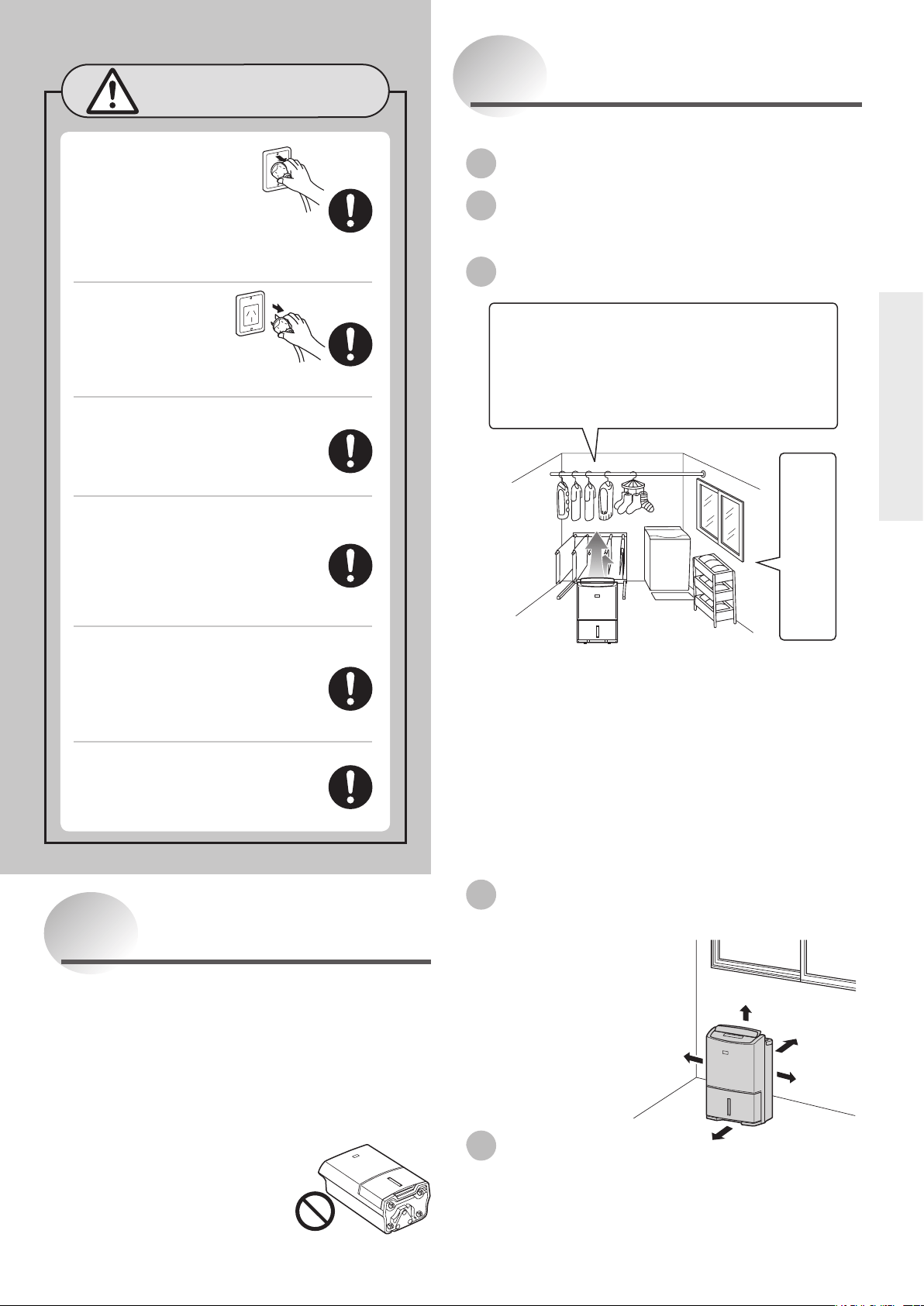
The strong airflow is blown from the top right point of
the unit.
Installing your dehumidier
Make sure to leave some space around the unit to
ensure good results.
Operating noise
Place the unit on top of a mat. This reduces vibration
and noise. It also prevents leaving depressions on
carpets.
At least 50 cm
At least
20 cm
At least
20 cm
At least 20 cm
At least
20 cm
Tips on Dehumidification
In winter, drying becomes easier if you also
use a heater to raise the room temperature to
approximately 16°C or more.
•Removewaterfromthelaundry.
•Pulltoremoveanywrinklesonthelaundry.
•Useswinginglouvretoblowairtothe
laundry.
•Keepenoughspacebetweenthelaundryto
allow air to pass through.
Use the dehumidifier in
a small enclosed room.
Warning
Keep the unit always in an upright
position.
Inclining the unit may cause water in the tank
to leak into the unit, resulting in malfunction.
Should you incline the unit accidentally, contact
service number on the last page for advice.
Do not carry or store the unit
horizontally.
This may result in
malfunctions. Such
malfunctions are NOT
covered under warranty.
Grasp the plug and remove
from the power socket.
When removing the plug from
the power socket, do not pull
on it diagonally or by the cord as this
may cause the projections/wiring to be
damaged resulting in a short circuit,
electric shock or re.
Switch the unit off and
unplug from the power
source when cleaning it.
When the unit is on, the
internal fan rotates at high speeds
and may cause injury.
Unplug the unit from the power
source when not using the unit
for an extended period of time.
Otherwise it may cause re and/or
electric shock caused by an electric leak.
When draining water continuously
or left unattended for long periods,
inspect the unit every two weeks.
When the filter or hose is clogged
with foreign materials or dirt, the
dehumidication operation is
disabled and may cause leakage.
When using the continuous
drainage outlet, make sure to
position the hose so that the
water drains without obstruction.
The water in the tank may leak and
damage surrounding objects.
Use the unit with caution in rooms
where the walls, furniture and art
work are vulnerable to dry air, as it
may cause cracks and warping.
CAUTION
6
Features of This Dehumidifier
Room temperature may rise
2–6°C during operation.
The dehumidier does not have a cooler function. Due
to heat produced during operation, the room temperature
may rise 2–6°C. As a result, the unit may blow warm air,
but this is not due to a malfunction. (During winter, the
air may not feel warm as the temperature is below body
temperature.)
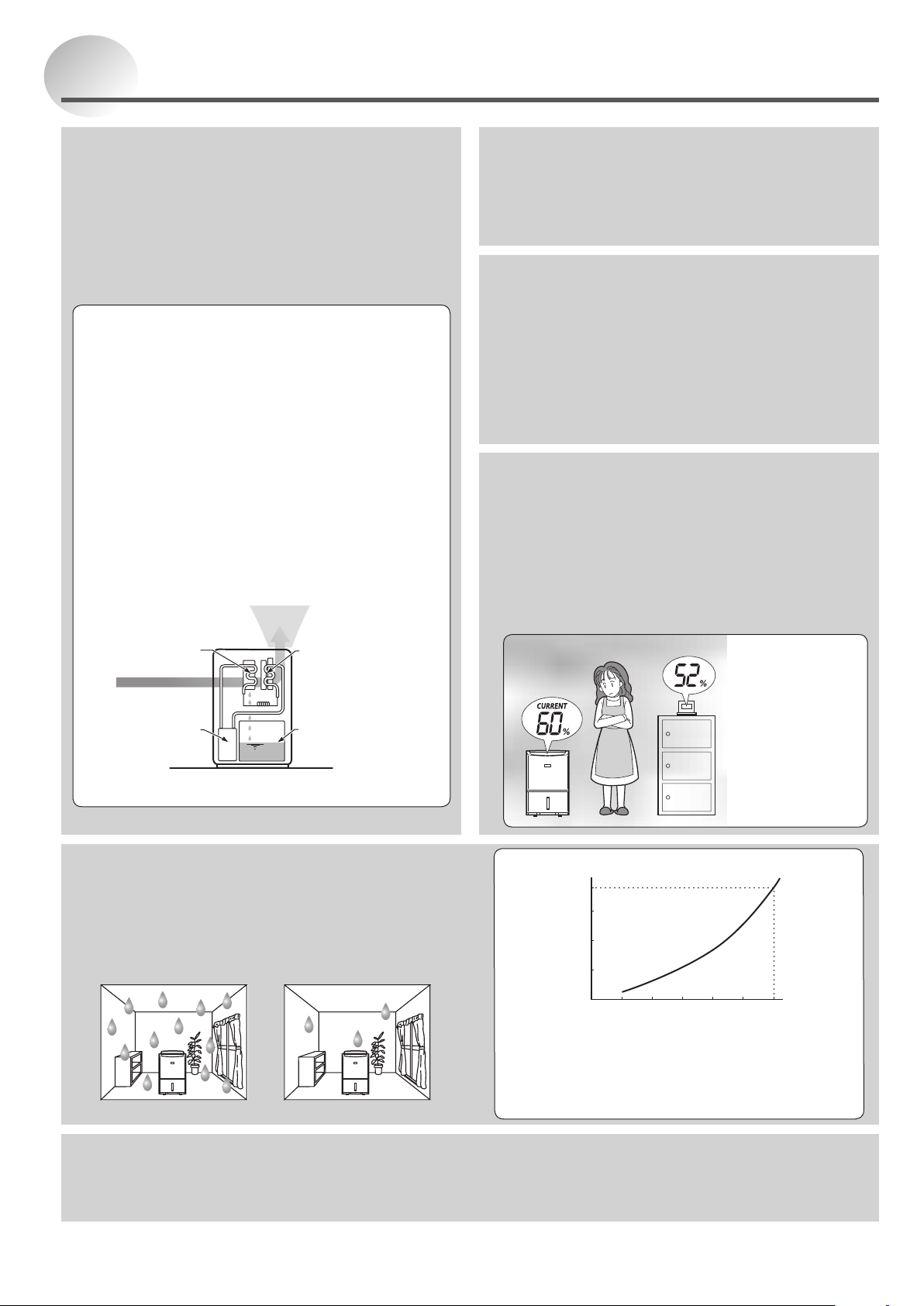
The humidity reading on
the unit may differ from a
hygrometer in the same room.
Even in the same room, temperature and humidity levels may
differ from place to place. If the hygrometer and the unit are in
different parts of the room, the humidity levels are prone to differ.
Moreover, humidity levels differ between places that have good
and no airow.
Use the reading on the unit as an estimate.
W
h
y
a
r
e
t
h
e
y
d
i
f
f
e
r
e
n
t
?
<Cause>
1. Inconsistencies
in temperature
and humidity
2. Difference in
location
3. Difference in
hygrometer
precision
How does the dehumidier work?
If you pour cold water into a cup, the air around it
becomes cold, causing water droplets to form on the
surface of the cup.
The dehumidifier takes advantage of this phenomenon
to remove moisture from the air.
1 The unit draws air from the room, cools it with its
cooling coil, causing the moisture to transform into
water droplets.
2 The water droplets fall into the water tank.
3 Dehumidied air is heated by the re-heating
coil, and then blown out.
The humidity of the room is thus reduced by repeating
the above steps.
1
2
3
Re-heating Coil
Cooling Coil
Inverter
Compressor
Water Tank
Dry (Warm) Air
Moist Air
The amount of dehumidifying
becomes less in winter.
When the temperature and humidity are low, the amount of water
collected is decreased.
In winter, because the temperature is lower than in summer, the effect of
the dehumidier is greatly reduced as shown in the graph on the right.
Although only a little water collects in the tank, this is not a malfunction.
Summer (humidity) Winter (dampness)
Value for HIGH when humidity is 80%
Dehumidifying capacity (L/day)
Room temperature (°C)
The values shown on the graph were measured at
constant temperature and humidity and do not reflect
values obtained in actual usage conditions.
The amount of dehumidifying varies depending on
the operation mode.
0
10
20
30
38
510152025
30
The unit can operate in a room
temperature range of 5–35°C.
If the room temperature exceeds 35°C, the unit may
operate in blower mode or increase the airow. This is
because the temperature within the unit rises causing
the protection mechanism to operate. In order to lower
the internal temperature of the unit, use the unit with the
swing stopped and louvre vertical.
If the temperature is below 5°C, only the blower is
operational to prevent the extracted water freeze.
Defrosting operation
When the room temperature drops to about 15°C, defrosting operation starts.
The operation runs every 70 minutes. Compressor stops, airow is delivered and the melted frost then drips into the
water tank.
Inverter
The inverter is a device that controls the rotational speed of the
compressor motor. When an operation starts immediately or in
other situations, strong dehumidication is performed at a high
motor speed. When the humidity becomes stable, the motor
speed is decreased to continue the operation economically.
7
Before Using the Unit
Front
Back
Louvre
P16
Air Outlet
Control Panel
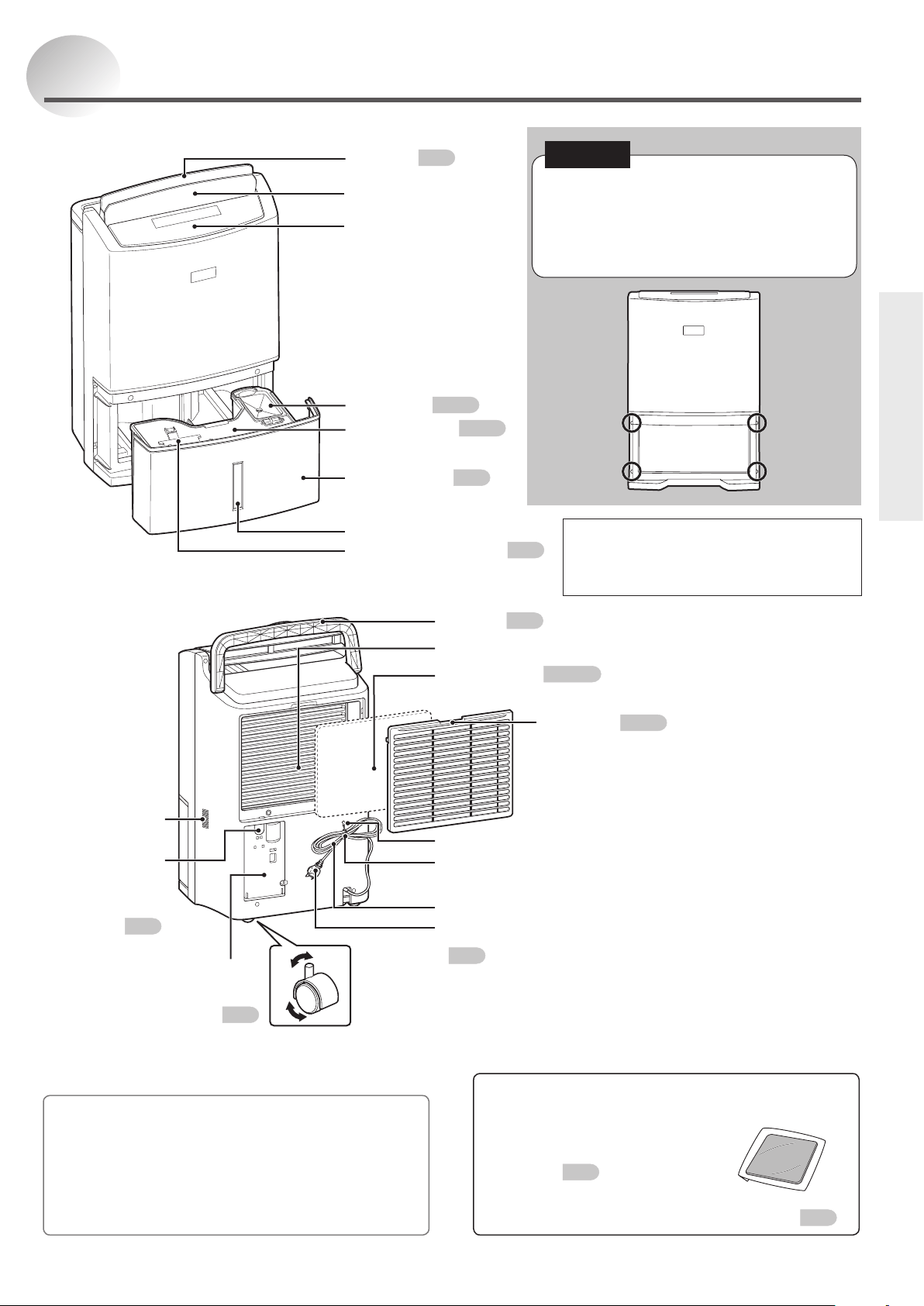
Names and Functions of Parts
Tank Lid
P9·19
Tank Guard
P9·19
Water Tank
P19
Level Window
Floating Element
P19
Sensor
Do not cover.
Handle
P9
Rear Air Intake
PM2.5 lter
P9·15·21
Storage Hook
Cord Tie
Remove during operation
Power Cord
Power Plug
Continuous
Drainage
Outlet
P20
Caster (4)
P9
Accessory
PM2.5 lter
PM2.5 filter is supplied with the appliance at the time
of purchase.
Please install it before using the
appliance.
P9
PM2.5 filter for
replacement
P15
What is the PM2.5 lter?
The PM2.5 filter has a two-layer structure consisting of a
white dust filter and a blue deodorizing filter.
The fine mesh filter can catch PM2.5 and dust.
The fibres contain a special deodorant and anti-bacterial
agent (antiallergen, anti bacterial and degerming).
This filter cannot remove cigarette smoke and poisonous
gases in smoke (e.g. carbon monoxide).
The water tank may contain water
residue at time of purchase. This is from
final product testing at the factory and is
not due to a defect.
Pre-lter
P9·21
Power Cord
Storage Case
P21
It is impossible to remove the back panel
because the four places shown are
tightened with four special screws.
If the unit has any malfunctions, contact your
Mitsubishi dealer.
NOTE
8
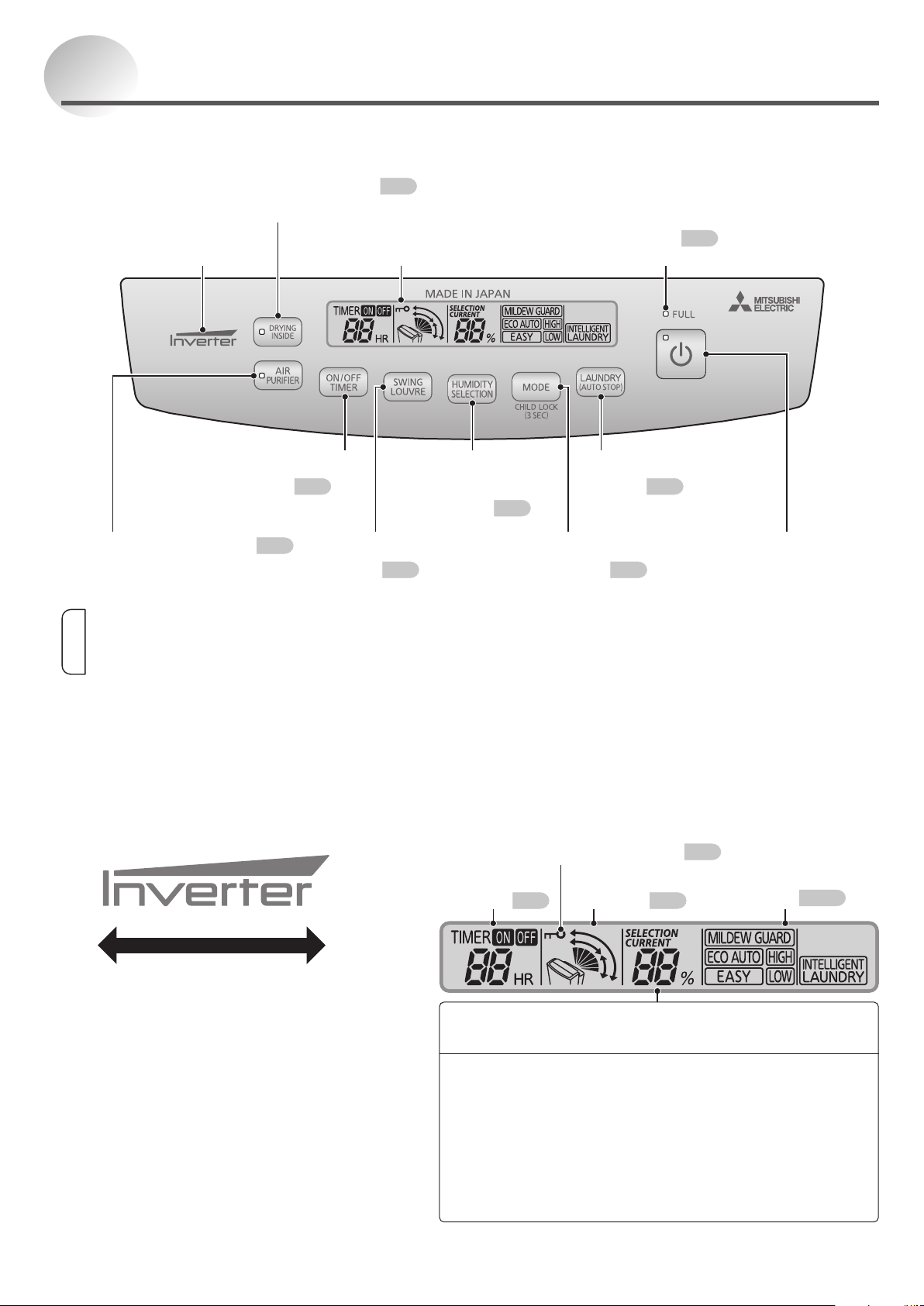
All of the indicators on the LCD display are
shown for explanation purposes.
When any switch is pressed, the LCD backlight
will turn on for approximately 10 seconds.
Control Panel
LCD Display
Names and Functions of Parts (Cont.)
Indicates the operation level of the
selected operation mode.
Inverter Indicator
Power-saving
operation
High-power
operation
Insert the power plug into the power socket to display the
current humidity.
CURRENT …Current humidity is displayed.
The humidity is displayed in a range from 30 to 80%
•Whenthehumidityislessthan30%:“30%”isdisplayed.
•Whenthehumidityismorethan80%:“80%”isdisplayed.
SELECTION …Humidity Setting is displayed.
(Only in ECO AUTO mode)
Timer
Display
P17
Swing
Monitor
P16
Operation Mode
Indicator
P10–14
Humidity Indicator
Indicates the approximate humidity.
This indicator does not light during AIR
PURIFIER operation and DRYING INSIDE
operation, when the water tank becomes
full, and when an error occurs.
Inverter Indicator LCD Display
DRYING INSIDE Switch
P18
DRYING INSIDE Lamp
FULL Lamp
P19
Lights when the tank is full of water.
AIR PURIFIER Switch
P15
AIR PURIFIER Lamp
ON/OFF TIMER
Switch
P17
SWING LOUVRE
Switch
P16
HUMIDITY
SELECTION
Switch
P12
LAUNDRY
Switch
P10
MODE Switch
P12
POWER Switch
POWER Lamp
Information
The dehumidifier remembers the operation mode. Even if the power plug is disconnected or the power is turned off, the
unit restarts at the previous setting.
In the case of a power outage during operation, the dehumidifier will restart operation upon restoration in the operation
mode before the power outage.
Child Lock Indicator
P15
9
Before Using the Unit
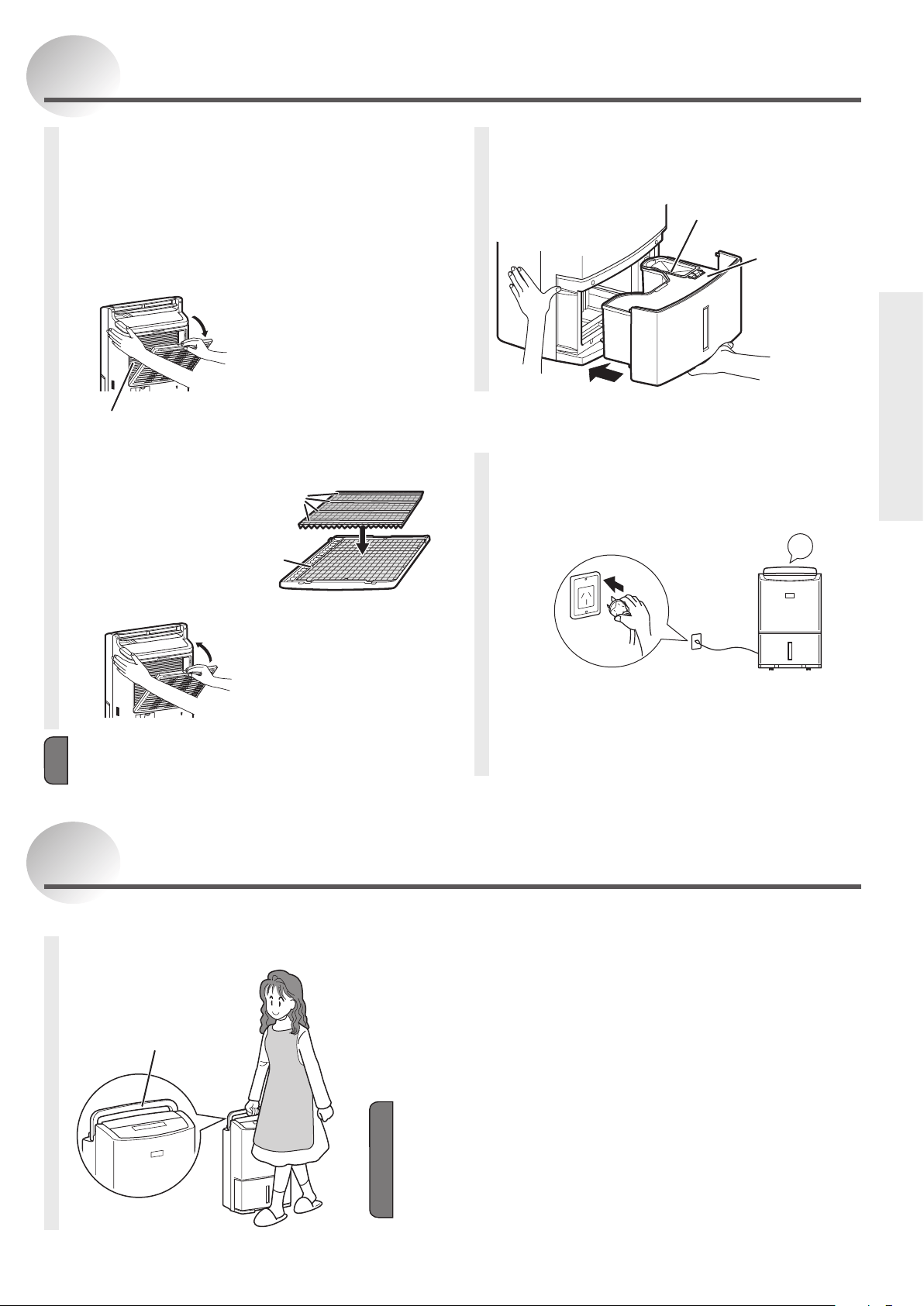
Inserting the water
tank correctly
Tank lid
Tank guard
Make sure the
tank guard
is securely
attached.
Plugging the power cord
into the power socket
Use a 230-240 V AC power socket only.
Blip
The current humidity is indicated.
If the louvre is open, it closes automatically.
Before Using Your Dehumidifier
Setting the PM2.5 filter
The PM2.5 filter is supplied with the unit at time of
purchase. Please install it before using the unit.
1
Remove the PM2.5 lter from the
polyethylene bag.
2
Remove the pre-lter.
Performance is unaffected even if the metal fin
inside the unit are slightly bent.
Pull the pre-lter toward
you, and then remove it.
3
Set the PM2.5 lter.
With the strips facing
up, set the lter inside
the tabs on the pre-
lter.
4
Set the pre-lter.
Insert the bottom tabs
into the unit until they
click.
Strips
Tabs (6)
Note
Make sure the PM2.5 filter is attached on the unit.
If it is not, fine dust will enter inside the unit and cause
a malfunction.
Carrying the Unit
Hold the handle and move it.
Casters can be used to move the unit.
First make sure to remove water from the water tank
and close the louvre before carrying the unit.
If casters are unable to roll smoothly, do not use
excessive force to move this unit so as to prevent
overturning.
Do not carry the unit by holding the louvre.
Note
Do not put the unit in horizontal position during carrying as this may
cause malfunctions.
Use casters to move the unit steadily in one direction.
Lift the unit up to go over the doorsill or stairs and do not use casters to
move the unit over the shaggy carpet as this may damage the carpet.
Do not allow the power cord to be pulled into the casters, as this may
damage the cord.
Handle
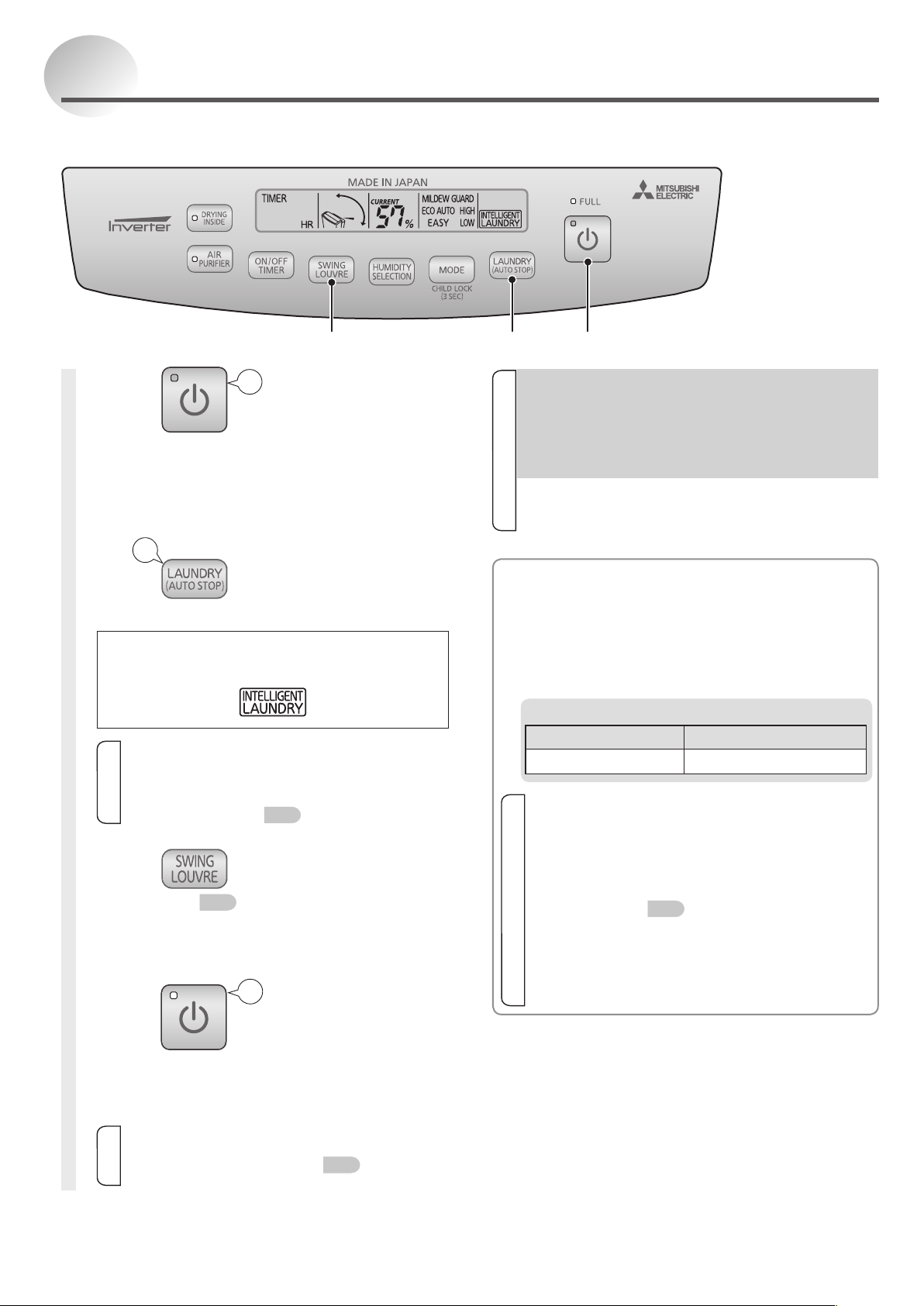
10
Drying Laundry
1
Press
POWER lamp lights.
The operation mode is displayed.
Inverter indicator lights.
Louvre opens, and blows air.
2
Press to select
INTELLIGENT LAUNDRY.
A border is displayed around
INTELLIGENT LAUNDRY
Information
It is impossible to preset humidity when
in INTELLIGENT LAUNDRY mode. In
INTELLIGENT LAUNDRY mode, press
HUMIDITY SELECTION switch to change into
ECO AUTO mode.
P12
3
Press and select the swing
direction.
P16
<To stop operation>
Press
POWER lamp goes out.
The operation mode indicator goes out.
Inverter indicator goes out.
Information
If the DRYING INSIDE (auto) operation has
been activated, the DRYING INSIDE operation
will start after the unit stops.
P18
Blip
1
2
3
•INTELLIGENT LAUNDRY
The unit controls the airflow rate while monitoring
the humidity in the room, and then estimates the
laundry drying time and stops automatically.
Operation time is approximately 1 hour and can
be up to approximately 12 hours.
Operating each operation mode
Operation mode Automatic stop
INTELLIGENT LAUNDRY
(
Operates for 1 to 12 hours)
Information
Remove the water from the tank before
operating the unit.
The unit may stop operating when the tank is full
before the laundry is dry.
When it is used with the OFF TIMER operation
mode, the unit may stop operating before the
laundry is dry.
P17
If the room temperature is approximately 5°C or
less, it becomes difficult for water to evaporate
from the laundry, and the operation will stop in
around 1 hour.
At this time, please use the HIGH operation mode.
Information
After the unit stops or the power plug is
inserted, the compressor will not be activated
(for compressor protection). The dehumidier
will begin to work in 3 minutes after pressing
the POWER switch. The noise emitted from the
unit will become louder when the unit begins to
dehumidify.
The dehumidifier remembers the operation mode.
Even if the power plug is disconnected or the power
is turned off, the unit restarts at the previous setting.
Blip
When in the operation of INTELLIGENT LAUNDRY, the unit will estimate the laundry drying time and stop
automatically.
Blip
11
Operating
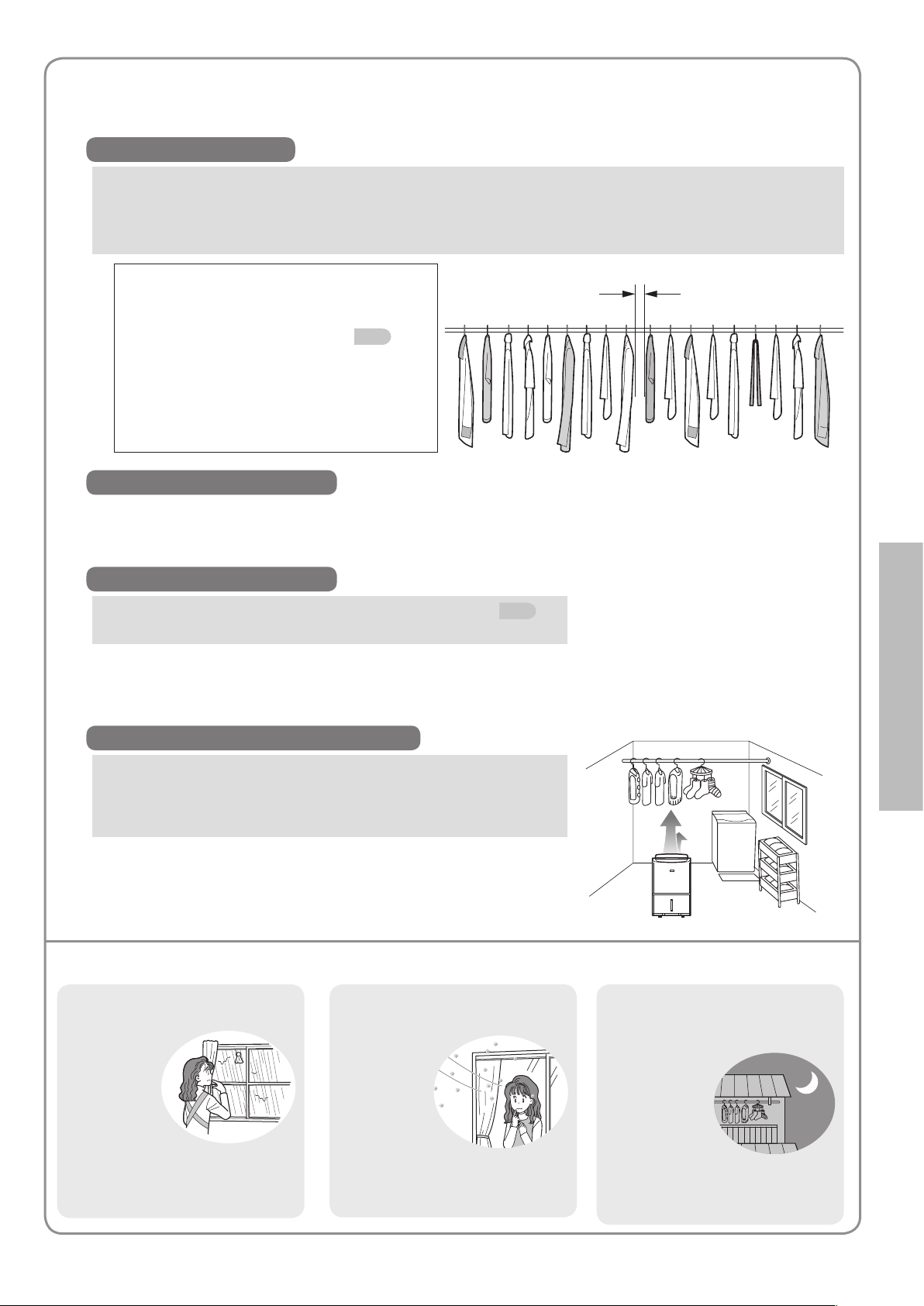
Tips on Drying Laundry
Make full use of the laundry drying operation to shorten the laundry drying time.
How to Hang Clothes
Pull to remove any wrinkles on the laundry.
Properly space the laundry for better ventilation (approximately 5 cm between the laundry).
Hang out the laundry which is difficult to dry to the place with good ventilation.
The drying time for the thicker parts of the laundry is probably longer.
<The following conditions will cause longer
drying time>
The laundry is of a large volume.
The room temperature is lower.
P5
When the temperature is low
(approximately 10°C), the drying time
is twice as long as that at normal
temperature (approximately 20°C).
The room is big.
How to Blow Air at Clothes
Placing the Dehumidier
Use swinging louvre to send air all over the laundry.
P16
The drying time of the part where the air cannot reach is longer.
The laundry is of a large volume.
Shift the position of the laundry during drying so that each part
can get the blowing air.
Place the dehumidier so that its back faces the laundry.
Air blows from the top of the dehumidifier towards the back.
About the Room for Hanging Clothes
In a small room, it is recommended that the door and window
be closed before dehumidifying.
It is effective not only to dehumidify, but also to dry the laundry
as soon as possible.
When the room temperature is low such as in winter
Use a heater in combination with the dehumidifier in order to
raise the room temperature to approximately 16°C or more, so
that it is easy to dry the laundry.
Using the unit to dry clothes hung in a room is recommended on days such as the following.
Cloudy and rainy days
During the days of high humidity
weather, the laundry will take a long
time to dry.
Days with a lot of pollen
and dust in the air
Drying the laundry indoor can
prevent pollen particles and other
dirt from attaching to the laundry.
Days you are unable
to bring in the laundry
during daylight hours
After sunset, as the outdoor air
becomes cool, the dried laundry will
absorb moisture.
Approximately 5 cm
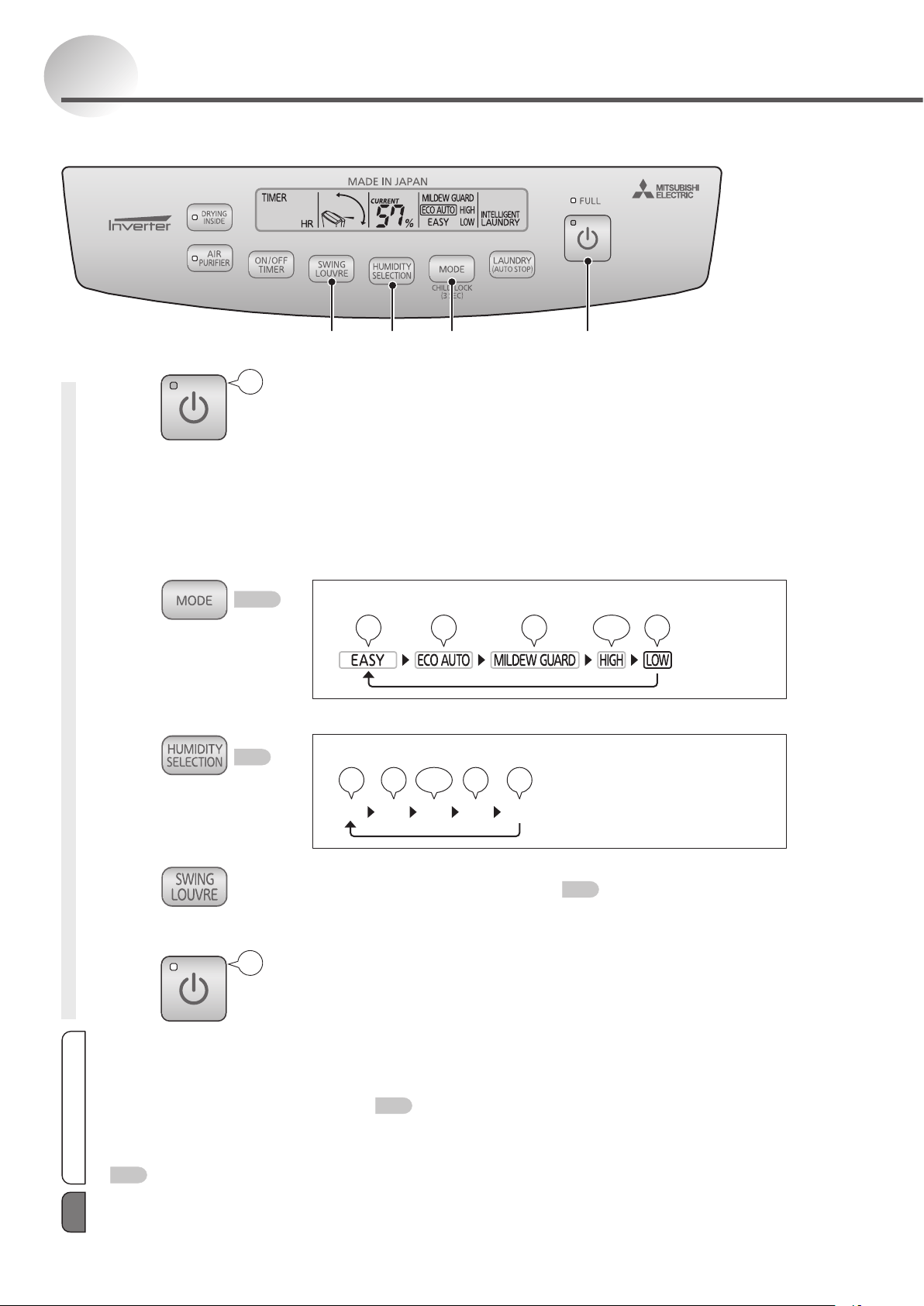
12
1
Press to begin operation.
2
Select the operation mode.
To select the dehumidifying mode and operate
Press
P13–14
To set the humidity and operate
Press
P13
3
Press and select the swing direction.
P16
<To stop operation>
Press
Dehumidifying
23 21
Blip
Blip
POWER lamp lights.
The operation mode is displayed.
Inverter indicator lights.
Louvre opens, and blows air.
The operation mode switches each time the button is pressed.
Blip Blip Blip Blip
Blip Blip
The set humidity changes each time the button is pressed.
657050%5560
Blip Blip Blip Blip
Blip Blip
POWER lamp goes out.
The operation mode indicator goes out.
Inverter indicator goes out.
Information
The dehumidifier remembers the operation mode. Even if the power plug is disconnected or the power is turned off, the
unit restarts at the previous setting.
Thehumiditycannotbesetinmodesotherthan“ECOAUTO”.
Operation stops when the tank is full. To restart operation, remove water from the tank. If a continuous drainage hose is set,
the dehumidifier will operate continuously.
P20
In the case of a power outage during operation, the dehumidifier will restart operation upon restoration in the operation
mode before the power outage.
If the DRYING INSIDE (auto) operation has been activated, the DRYING INSIDE operation will start after the unit stops.
P18
The operation mode can be selected accordingly to the situation.
When drying your shoes, put them in a position slightly higher from the floor so that the air from the dehumidifier is directed to
them.
Note
13
Operating
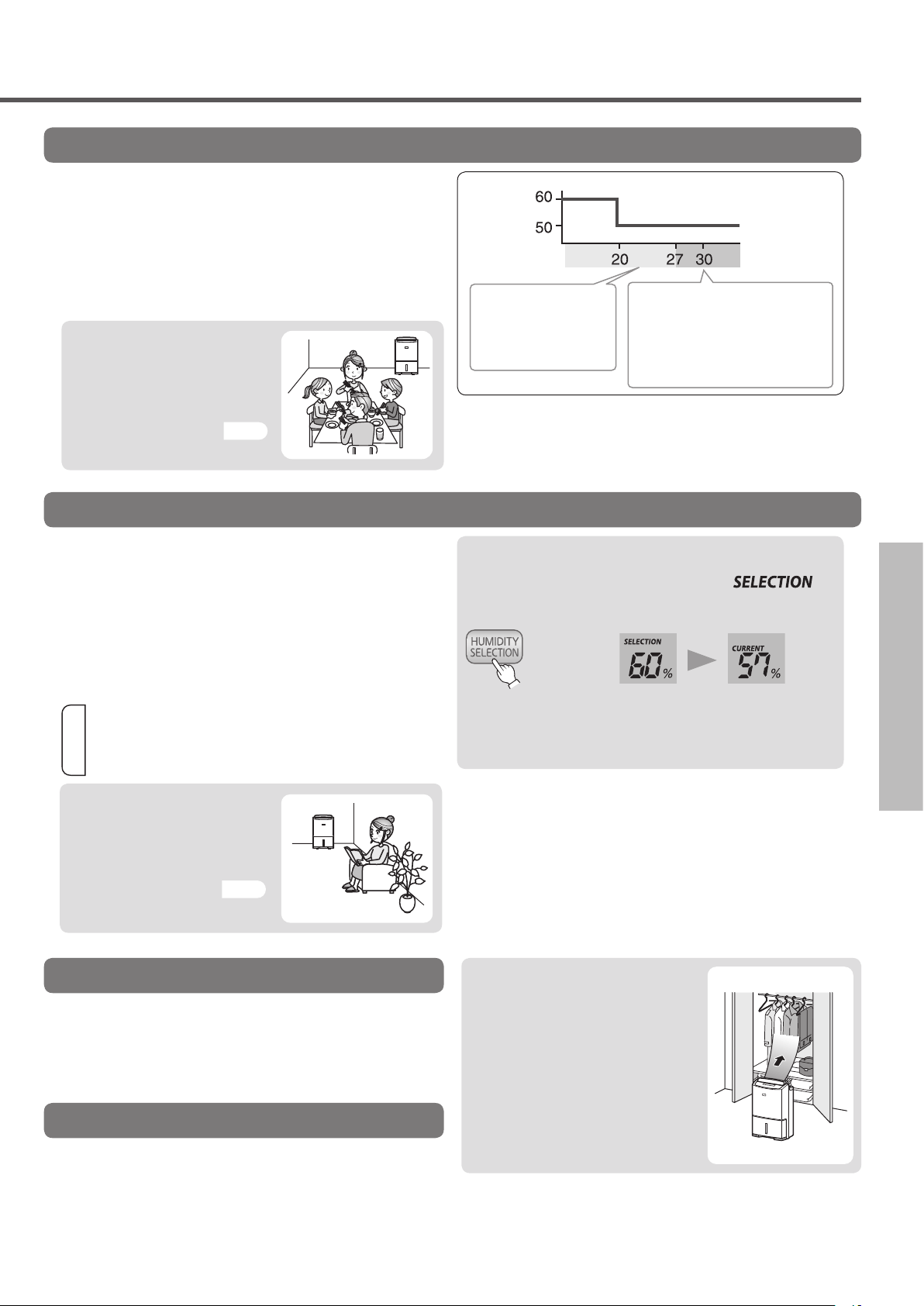
ECO AUTO
EASY
HIGH
LOW
In order to maintain the humidity level, the unit
operates intermittently after automatic switching of air
flow rate.
•When the current humidity is lower than the set
value, the unit will stop (both the blower/louvre will
stop). It will restart if the humidity level is higher than
the set value.
•For 6 minutes after the power is on, the unit will
begin operating regardless of the room humidity.
To relieve the discomfort from dampness, the unit
operates intermittently after the automatic switching
of airflow rate. Blowing air is used to control the room
temperature rise if the room temperature is high.
It is recommended when you want to maintain the
comfortable level of humidity.
•If the set humidity level is reached,sometimes the
blower/louvre will stop operating.
The blower operates continuously in HIGH airflow
mode.
The rotation speed of the compressor motor is
increased.
It is recommended for strong dehumidification.
The blower operates continuously in LOW airflow mode.
The rotation speed of the compressor motor is
decreased.
It is recommended when you want to dehumidify with
lower blower sounds.
Information
Sometimes it would take a long time to bring down
the humidity depending on opening and closing
frequency of the room door or the size or shape of
the room.
<To conrm the humidity setting>
•After displaying
,
the current humidity setting is
displayed.
After 3
seconds
After approximately 3
seconds,the display returns to
the current humidity display.
Press
Humidity setting (%)
Room temperature
(°C)
If the room temperature
is below 27°C, the
unit will dehumidify
according to the room
temperature.
If the room temperature is
above 27°C, the unit will stop
dehumidification when the humidity
level is below 50%, but the blower
will work. Dehumidification restarts
when humidity rises above 50%.
Installing the dehumidier
Place the back of the
dehumidifier towards a closet or
wardrobe to use it.
P5
Installing the dehumidier
Place the dehumidifier in the
room to use it.
(Make sure the back of the
dehumidifier is not too close
to any walls)
P5
Installing the dehumidier
Place the dehumidifier in the
room to use it.
(Make sure the back of the
dehumidifier is not too close
to any walls)
P5
14
Dehumidifying (Cont.)
MILDEW GUARD
About MILDEW GUARD mode
The unit continues to operate for about another 4 hours after the humidity decreases to 50% and then stops
automatically.
The operation time varies depending on temperature and humidity and ranges from approximately 4 hours
(approximately 6 hours if the room temperature is below 20°C) to approximately 12 hours.
How is mildew growth suppressed?
Mildew is unable to produce new spores if it is dried as mycelia.
This principle is applied to the MILDEW GUARD function.
(However, the spores have high resistance to dryness.)
“ResearchofBlackMold”
Experimental data from General Incorporated
Association Mold Prediction Laboratory
In this mode, the unit can dehumidify the bathroom to remove residual moisture and water drops, thus
suppressing the mildew growth as a means of mildew prevention.
Information
For better results, do not turn on the room
ventilation fan or open the window or door when
the unit is operating.
The results may vary depending on the size,floor
and wall materials of the bathroom.
There may be some residual water drops in the
places that can collect water.
Mildew growth may still occur due to the fungus
type and conditions of the room.
<e.g.> Under the containers of the bathroom,
deeper inside of closets and behind
furniture and places with bad air flow.
Places such as inside of the bathtub, under
containers or where the blowing air cannot reach,
cannot be dried.
This mode does not remove existing mildew,scales
and sticky liquids around the sinkhole.
When it is used with the OFF TIMER mode,the unit
may stop operating before completing the drying
operation.
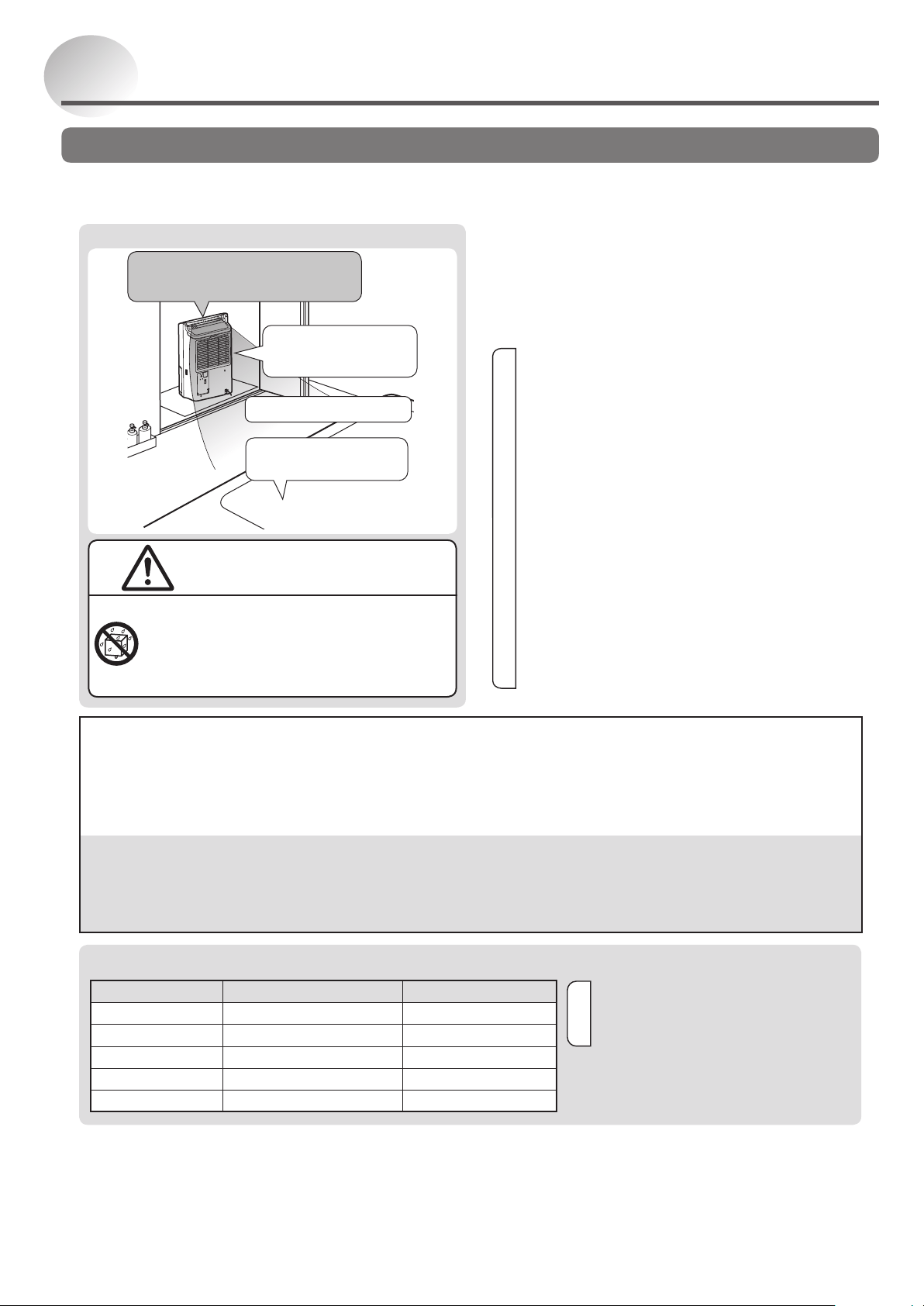
To install the unit
Install the unit in the changing room
(entrance to the bathroom)
(Do not install inside the bathroom)
Adjust the unit so that
the blowing air can be
delivered to every corner.
Cover the unit if there is still
some water in the bathtub.
CAUTION
Do not use the unit in a bathroom or other
location where it is likely to come into
contact with water, or wash it with water.
Exposure to water may result in re or electric shock
caused by an electric leak.
Close the bathroom window.
Close the bathroom window.
Operating each operation mode
Operation mode Automatic stop
Continuous operation
EASY —
*
ECO AUTO —
*
HIGH —
LOW —
MILDEW GUARD
(Operates for 4 to 12 hours)
—
Information
Operation stops when the tank is full. To
restart operation, remove water from the
tank.
*
Operates continuously according to the room
temperature and humidity. (Operates while
turning the blower and compressor ON and OFF)
15
Operating
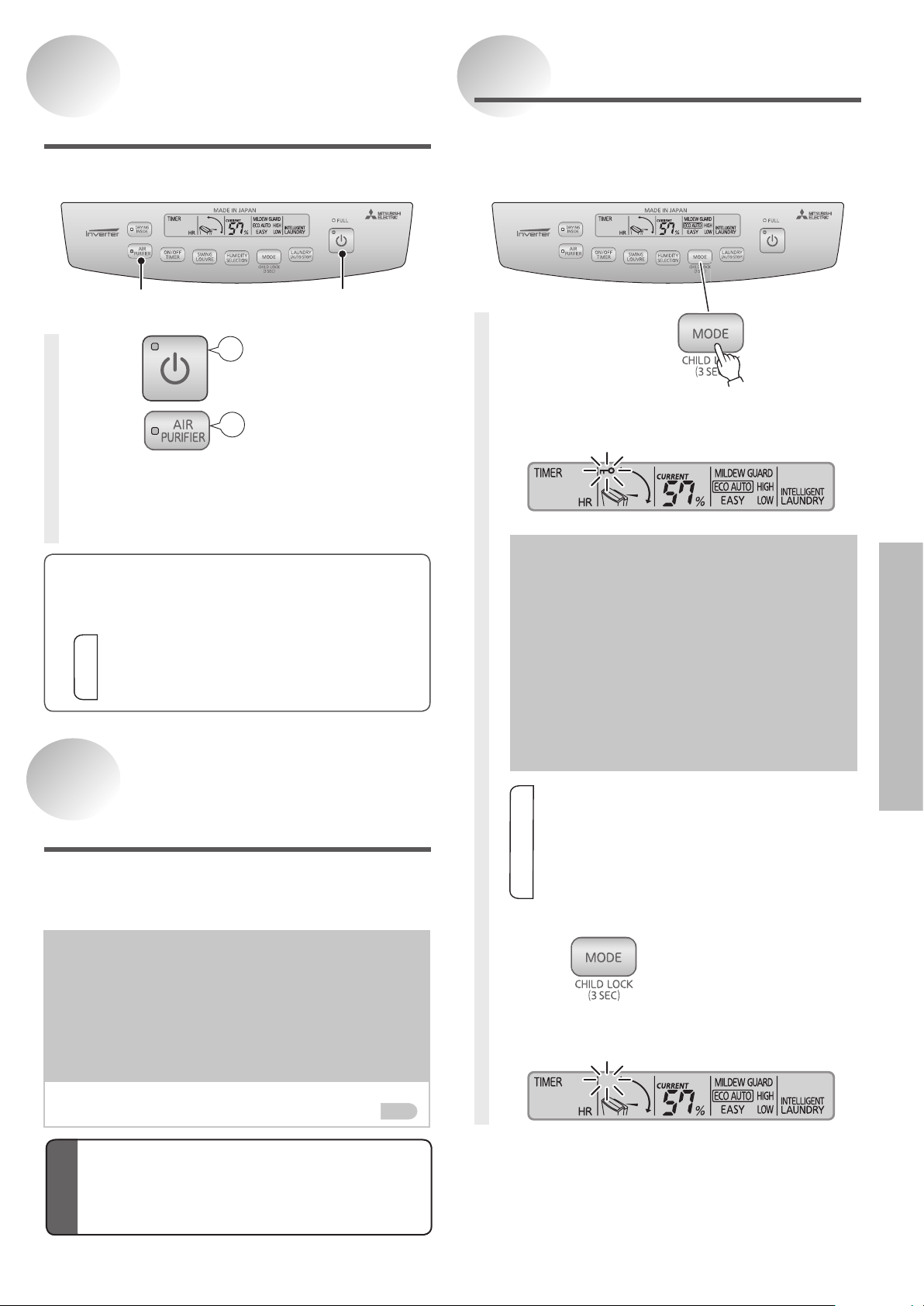
Using Child Lock
Press for 3
seconds or
more.
The child lock indicator is displayed.
(Example)
If you lock the unit when the
POWER is OFF.
The unit will not turn on, even if you
press the POWER switch to turn it
on. The LCD backlight and child lock
indicator will blink.
If you lock the unit when the
POWER is ON.
The unit will not turn off, even if you
press the POWER switch to turn it off.
Only the child lock indicator will blink.
Information
When the child lock is set, only the CHILD
LOCK switch can be used. When the child
lock is activated, other switches are not
operable. Deactivate the child lock to use the
other switches.
The child lock is cancelled when the power
cord is unplugged.
<Releasing the child lock>
Press for 3 seconds or
more.
The child lock indicator goes out.
(Example)
Cleaning the Air
(AIR PURIFIER)
21
1
Press
2
Press
AIR PURIFIER lamp lights.
To return to the previous mode, press the AIR
PURIFIER switch again.
Blip
Blip
The switches can be locked.
To prevent children from operating this unit, use this
function.
To operate the air purifier only.
AIR PURIFIER
The unit cleans the air by passing it through the pre- lter
and PM2.5 lter. The dehumidi er function is disabled.
Information
The air passes through the PM2.5 fi lter in all modes,
cleaning the air even if the AIR PURIFIER lamp is not lit.
Cigarette smoke and toxins found in smoke, such as
carbon monoxide, cannot be removed with these fi lters.
PM2.5 lter for replacement
Type: MJPR-EHPFT-HK
For these items contact your nearest
Mitsubishi Electric dealer.
Parts sold separately
Replacement
Parts
The PM2.5 filter is a consumable part.
Please replace the filter regularly.
Replacing PM2.5 lter
The PM2.5 lter is a consumable part.
If the filter is dirty, replace it with a new one. (The
filter cannot be reused even if it is washed)
Conditions to replace
The PM2.5 filter has turned yellow or black due to
cigarette smoke or dust.
The lifetime of the PM2.5 filter is one year. (It varies
depending on the usage conditions)
Remove the pre- lter and replace the PM2.5 lter.
Removing the fi lter
P9
16
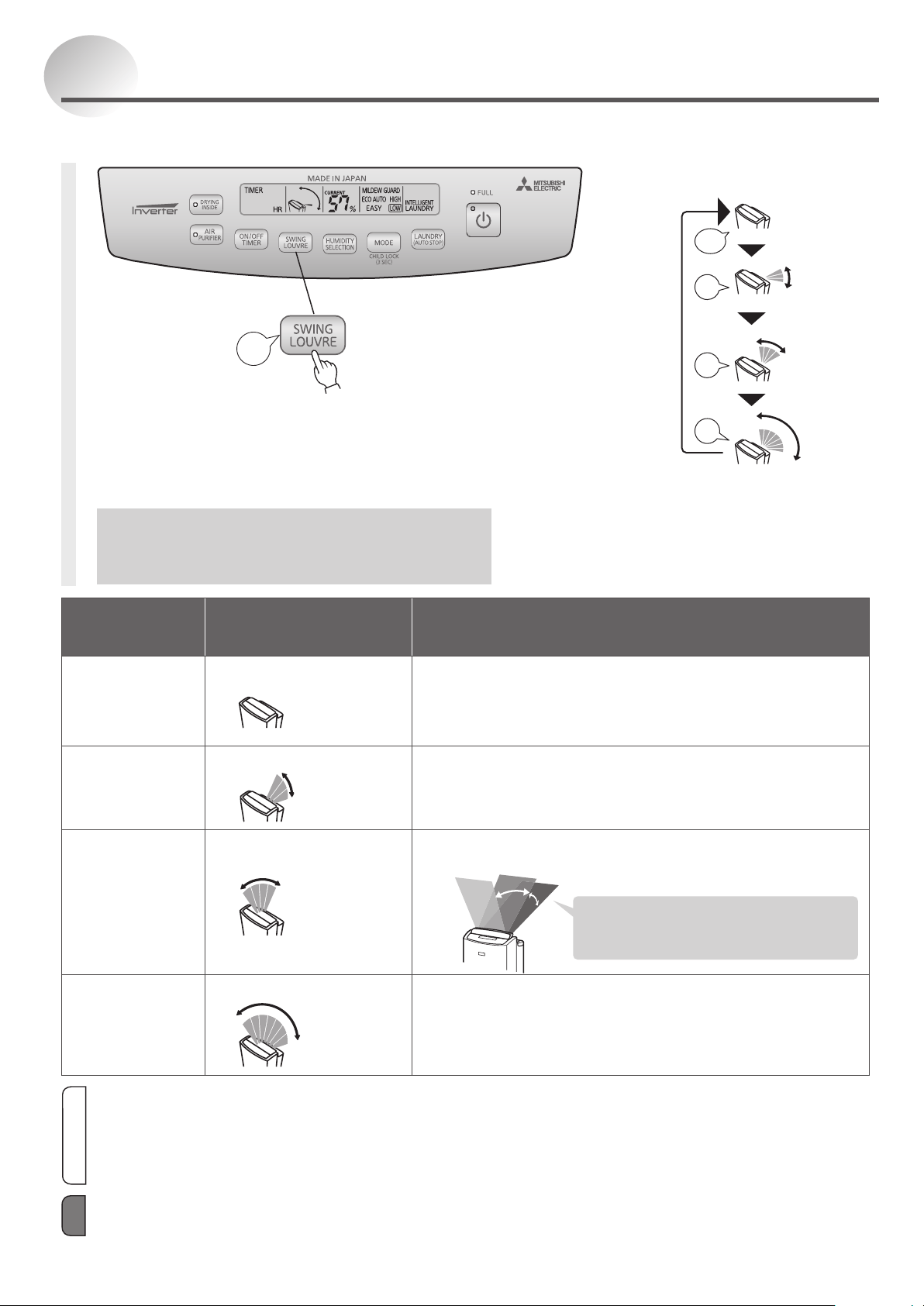
Using Louvre
•Automatic louvre starts
•The monitor displays louvre direction
Remove the plug from the power socket and
connect again, automatic louvre stops.
Displays louvre swing range
(The louvre and monitor do not move in
synchronization.)
Louvre
stopped
Rear
Upward
Wide
Each time
the switch
is pressed,
the swing
direction
changes.
Blip
Press
Objective
Recommended
swing mode
Explanation of swing
To stop the
louvre at the
desired angle
•Louvre stopped
Louvre stops in a vertical position, and louvre display
screen will disappear.
To change louvre to a desired angle, adjust the louvre
angle by hand.
To dehumidify
closets
•Rear
The louvre swings to send air to the back of the unit.
To dry the
laundry
•Upward
The louvre swing speed is automatically controlled so that
there is even distribution of air supply to the laundry.
To cover the
entire room
•Wide
The louvre swings from the upward position to the rear
position to send air to all corners of the room.
Approximately
50°
Approximately
60°
40°
20°
The louvre moves slowly through the last
20°of the swing, as it takes shorter time to
traverse the upward arc than the rear arc
when louvre moves at a constant speed.
Approximately
120°
Information
The level of noise emitted from the unit varies depending on the air-blowing direction.
To locate the position, the air outlet may stop up to 8 seconds and then start operating again.
If the louvre is touched by hand or object, the louvre angle will change, so readjust the louvre by pressing the louvre switch.
If air is blown directly onto a wall, the wall may become dirty because of dust in the air.
This dehumidifier memorizes the swing direction but not the desired angle at which the louvre was stopped. The next time
you start it, it returns to the default setting (upward).
The louvre can be made to swing. Select from the 4 possible settings to suit the purpose.
Blip
Blip
Blip
Blip
Blip
When drying your shoes, put them in a position slightly higher from the floor so that the air from the dehumidifier is directed to
them.
Note
17
Operating
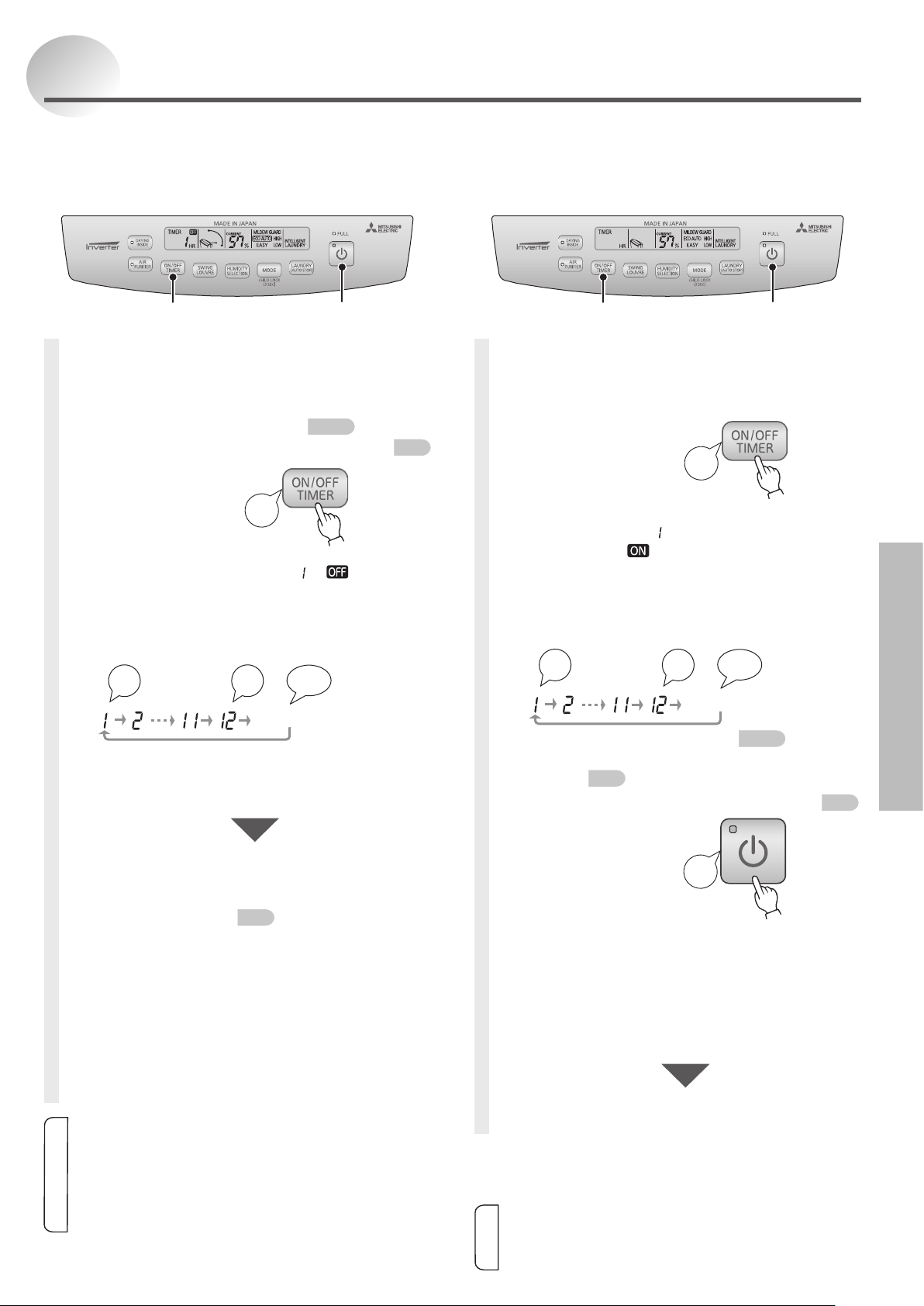
Setting OFF TIMER
1
Switch the power ON.
Select operation mode.
P10–14
Select the louvre swing direction.
P16
2
Blip
Press
Set the operation
time.
Press once to display “
” “ ”.
Each press will change the display in
the sequence of 1 to 12 hours.
(Holding the switch will cause the display to
change continuously.)
......
Blip
Blip
Blip Blip
No display
→The OFF TIMER is set.
The remaining time will decrease one
hour after each hour elapses.
When the set time is reached, the unit stops
automatically and the louvre closes automatically.
DRYING INSIDE (auto) operation will start if it
has been activated.
P18
Cancellation
<When you want to stop operation>
Press POWER switch g OFF
<When you want to disable the OFF
TIMER mode and continue operation>
Press and hold the ON/OFF TIMER switch until
the remaining time disappears from the display.
Setting ON TIMER
1
Switch the power OFF.
2
Set the time you
wish the unit to
turn ON.
Press once, the operation mode
indicator and “
” on the digital display
ash, and “
” is displayed.
Each press will change the display in
the sequence of 1 to 12 hours.
(Holding the switch will cause the display to
change continuously)
......
Blip Blip
Blip Blip
No display
Select operation mode.
P10–14
Set the DRYING INSIDE (auto) operation as
desired.
P18
Select the louvre swing direction.
P16
3
Conrm the time
setting by
pressing the
POWER switch.
The timer display lights.
g
The ON TIMER is set.
If both the timer display and operation mode indicator
blink, it means the POWER switch is not pressed.
(Analarm“blipblip”soundsfor1minute.)
The remaining time will decrease one
hour after each hour elapses.
When the set time is reached, the
unit automatically starts.
Cancellation
Press POWER switch g OFF
Information
When the ON TIMER is set during the DRYING
INSIDE operation, the operation is stopped.
The ON TIMER function is not operable using a
commercially-available timer plug.
Blip
Press
Blip
Press
OFF TIMER operation
The OFF TIMER can be set between 1 to 12 hours. Set
the timer when the power is switched on.
1
2
Using Timer
Information
Empty the water tank before operating. During operation, if the
tank becomes full, the FULL lamp lights and the unit stops.
The OFF TIMER and ON TIMER cannot be set at the same time.
If the OFF TIMER mode is used with the INTELLIGENT LAUNDRY
or MILDEW GUARD, the unit may stop before the laundry or the
bathroom is dry.
The OFF TIMER cannot be set during DRYING INSIDE operation.
1
.
32
ON TIMER operation
The ON TIMER can be set between 1 to 12 hours.
Set the timer when the POWER is off.
18
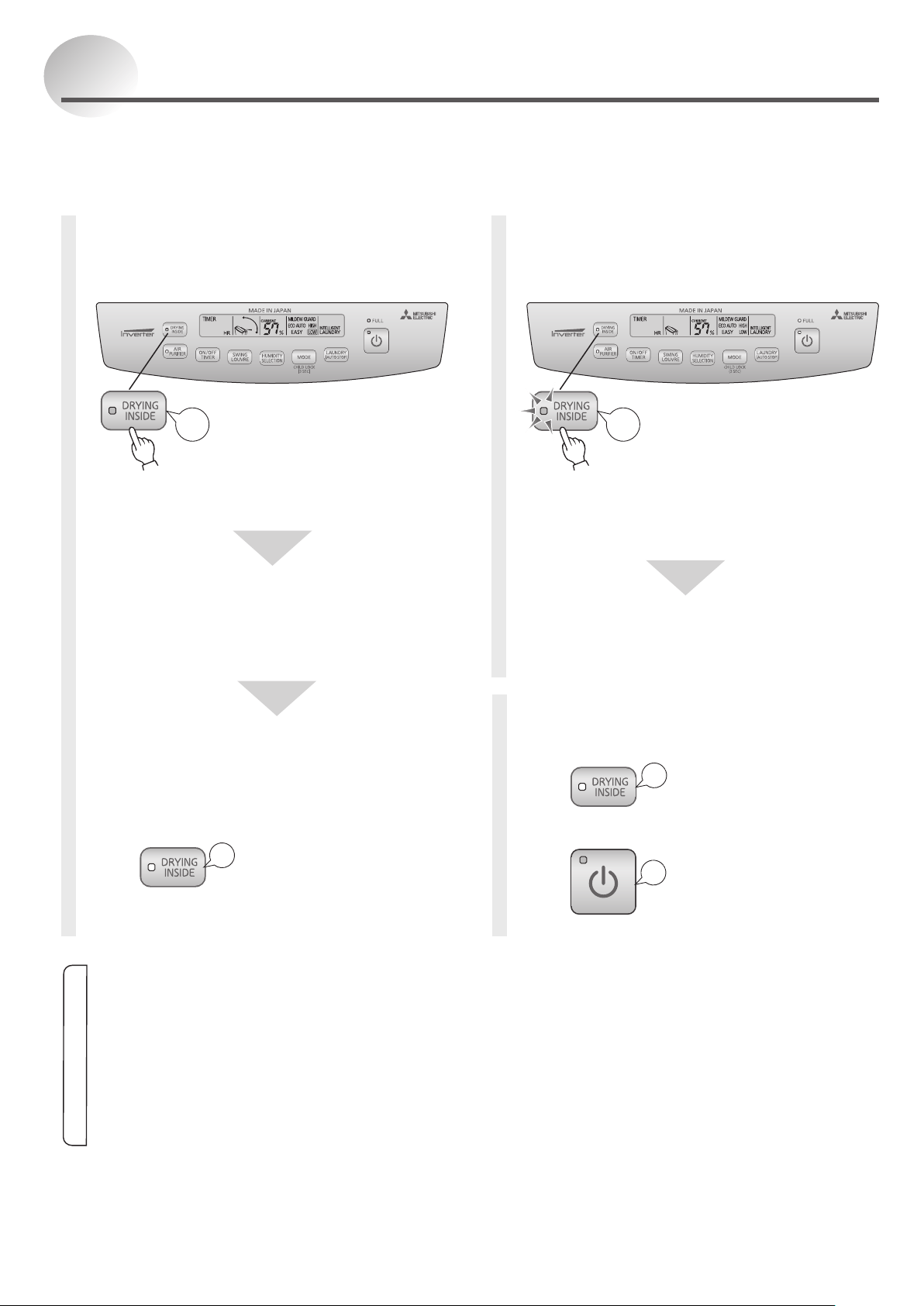
Drying Inside Operation
The inside of the unit can be dried to suppress mildew growth on the cooler.
The DRYING INSIDE operation is recommended after each use of the unit (approx. 1 hour).
When continuous operation is being performed by continuous drainage (setting hose), there is no need to perform the
DRYING INSIDE operation every day. However it is recommend that DRYING INSIDE operation is used after every two weeks.
To abort DRYING
INSIDE operation
Press while the unit is performing the
DRYING INSIDE operation (the DRYING INSIDE
lamp turns off).
Press
to abort the DRYING INSIDE
operation and resume the regular operation.
Blip
Blip
Automatic Operation
To activate DRYING INSIDE operation after each
use
Blip
Press while the
POWER is ON
DRYING INSIDE operation standby
(DRYING INSIDE lamp lights.)
DRYING INSIDE operation starts when
dehumidifying ends.
DRYING INSIDE operation starts.
The DRYING INSIDE lamp flashes, the
humidity indicator turns off, and the louvre
stops in the vertical position.
DRYING INSIDE Operation
DRYING INSIDE operation ends.
The DRYING INSIDE lamp turns off and the
louvre closes.
<To deactivate the automatic
operation>
Press
when the POWER is ON.
(The DRYING INSIDE lamp turns off.)
Blip
Manual Operation
The DRYING INSIDE operation can only start
when the POWER is OFF.
Blip
Press while the
POWER is OFF
DRYING INSIDE operation starts.
The DRYING INSIDE lamp flashes, the humidity
indicator turns off, and the louvre stops in the
vertical position.
DRYING INSIDE Operation
DRYING INSIDE operation ends.
The DRYING INSIDE lamp turns off and the
louvre closes.
Information
Disconnecting the power plug will stop the automatic operation.
This function does not remove existing mildew. Also, aborting the DRYING INSIDE operation may cause the benefits to
diminish.
During DRYING INSIDE operation, do not close the louvre. It will cause noise.
The moisture expelled from inside the unit may cause the room humidity level to rise.
The air emitting from the unit may appear white depending on the humidity or temperature of the room.
The moisture expelled from inside the unit may have a smell due to odorants, which have not been caught by the filter and
dissolve in water.
During DRYING INSIDE operation, the OFF TIMER cannot be set.
If operation is stopped while the FULL lamp is lit, the DRYING INSIDE operation cannot be set unless the power is turned
off.
19
Operating
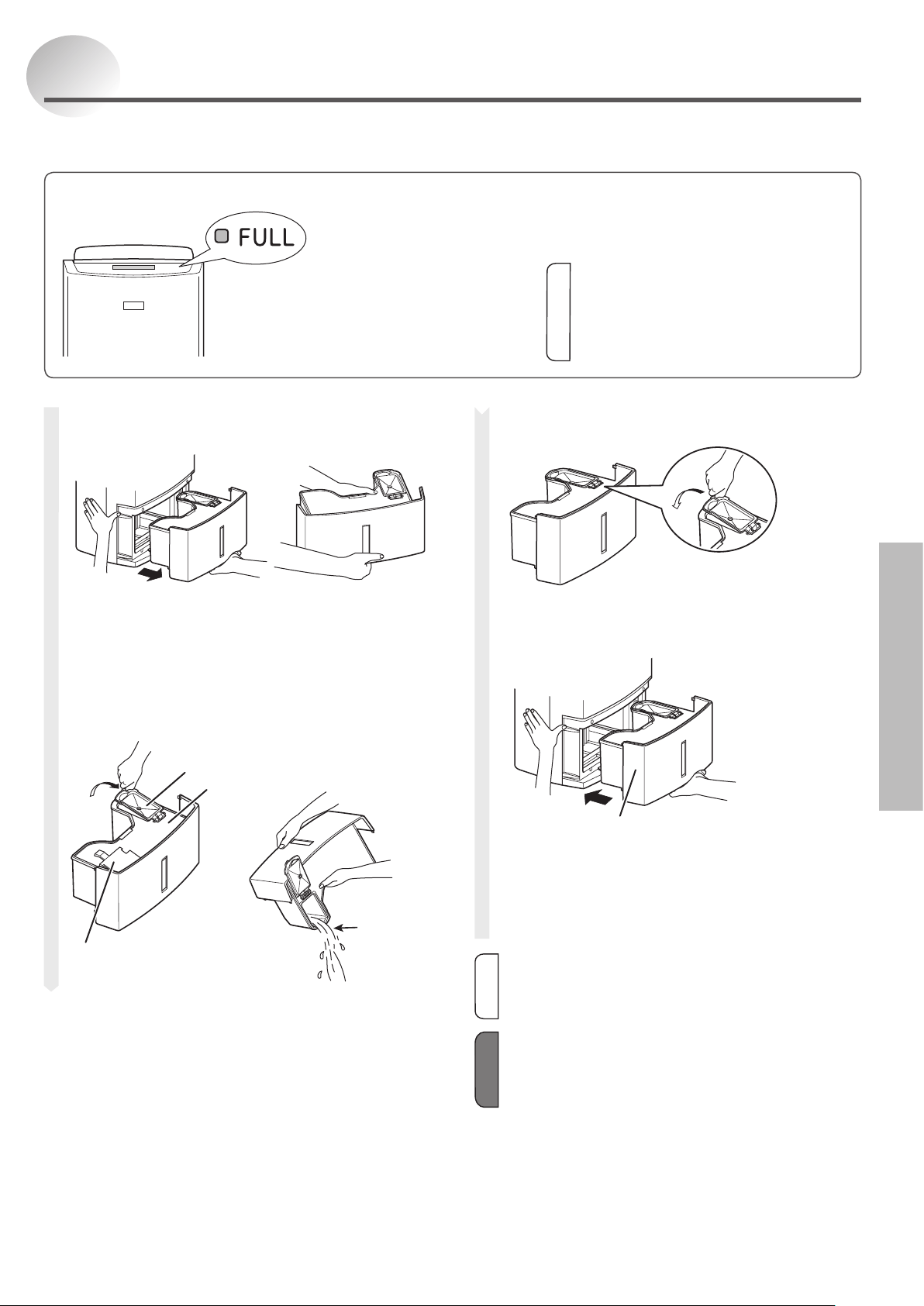
Draining
1
Remove the water tank.
Place your hand on the
handle and carefully pull the
water tank out straight to
prevent water from spilling.
Hold the water tank.
2
Open the tank lid, and pour out
the water.
Tank
guard
Floating element
Do not remove or
dismantle.
Tank lid
Pour the
water out
from here.
When the water tank becomes full, the FULL lamp lights.
FULL lamp lights.
(Therewillbecontinuoussounds“bleepbleepbleep”.)
Airow stops.
(Louvre stops.)
LCD indicators go out.
Information
After pouring out the water, replace the water tank,
and the FULL lamp will go out. The unit restarts.
When the FULL lamp is on, other operations
are forbidden except for pressing the POWER
switch.
In OFF TIMER operation, the FULL lamp is ON
as indicator.
3
Close the tank lid.
4
Check the tank, and rmly push it
all the way in.
Tank
Make sure the tank is
not broken or cracked.
Confirm that the tank lid and the tank guard are
securely attached, and push the tank in.
(Sounds“Blip”.)
Information
If the tank is not installed correctly, the FULL lamp will
come on, and the unit will not operate.
Note
Secure the tank lid and tank guard properly or else
the tank may become stuck.
Do not remove or dismantle the floating element from
the tank. If it is removed, the unit cannot detect the
water level, and this could result in leakage.
When the tank is full (approximately 5.5 L), the unit automatically stops and the FULL lamp lights.
Please empty the tank.
20
5
Close the power cord storage
case.
6
Attach the tank to the unit, and
set the end of the hose into the
drain.
If the tank is not reattached, the FULL lamp
remains ON and operation is not possible.
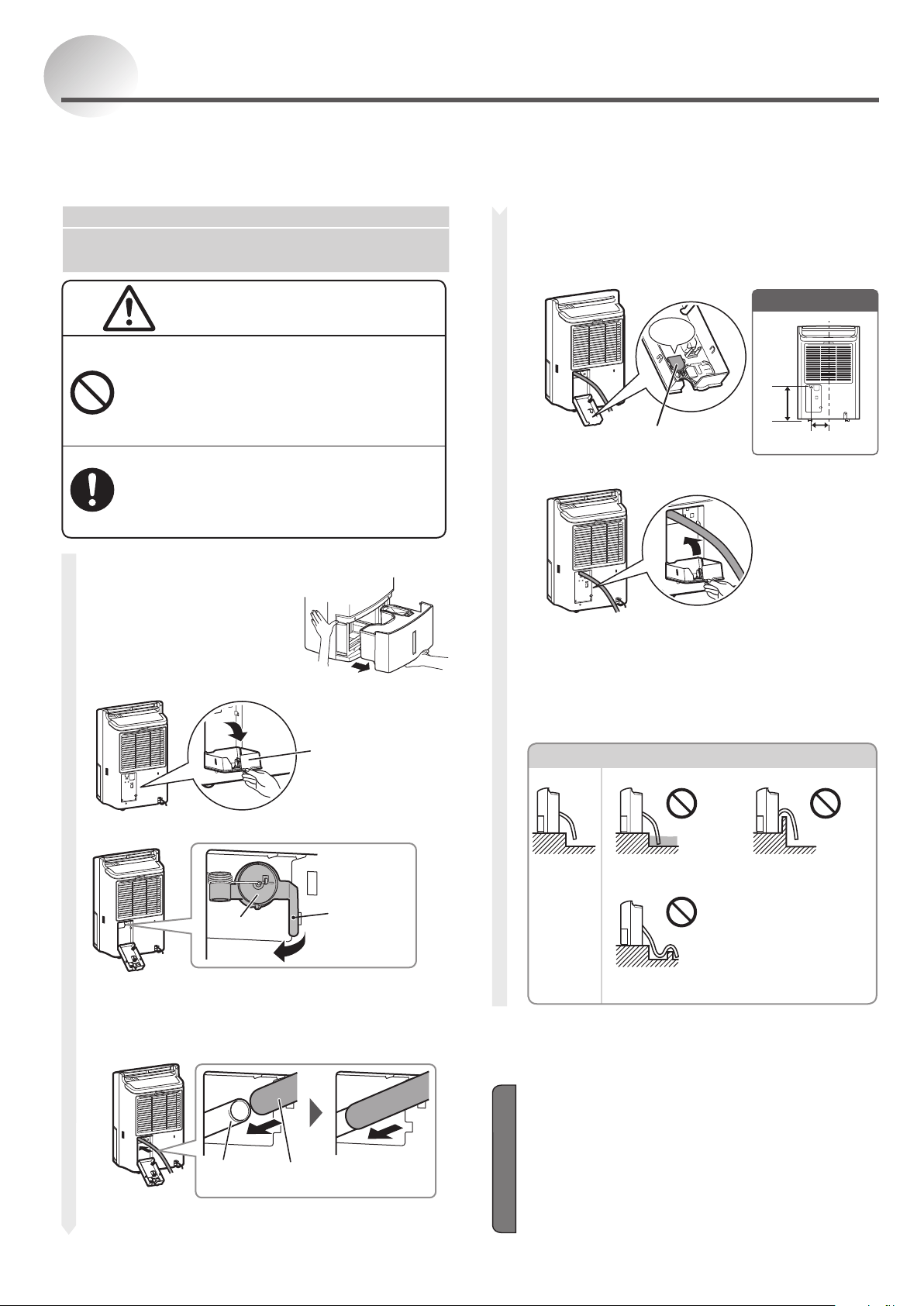
Continuous Drainage
If a drain is available, the unit can continuously drain water by attaching a commercially available hose (with
an internal diameter of 15 mm) to the drain. As the unit does not stop due to the water tank being full, it can
be operated for a long period of time without the need to empty the water tank. If there is power outage during
operation, once power is restored, the unit resumes in the mode it was operating before power outage.
Turn off the power switch and unplug the power cord.
1
Remove the water
tank.
2
Open the power cord storage case.
Power cord
Storage case
3
Pull the drainage outlet stopper.
Stopper
Push here.
4
Insert the hose.
Items to prepare
• Commercially available hose (ID 15 mm)
Long enough to reach the drain from the dehumidifier.
228
mm
114 mm
Continuous drainage
hole position
Note
Make sure the hose is in good condition free of bends
and cracks.
If it is hard to insert the hose, put it in water and then
insert it. Do not use oils or lubricants. It may damage
the unit.
To stop continuous drainage, remove the hose, put
the tank and use.
Do not use the power plug with the power plug being
stored in the power cord storage case.
CAUTION
Do not drain water continuously if there is
a possibility that temperature around the
hose could drop to freezing point.
Water inside the hose may freeze and prevent the water in the
tank from flowing out. The water may leak from the unit and
damage surrounding objects.
When draining water continuously or left
unattended for long periods, inspect the
unit every two weeks.
When the filter or hose is clogged with foreign materials or dirt,
the
dehumidication operation is disabled and may cause leakage
.
Keep the stopper pulled out, and push in the
commercially available hose firmly and straight
into the drainage outlet.
Pull lightly to confirm that the hose does not
come out.
Drainage
outlet
Hose
(ID 15 mm)
Push in straight
and firmly.
Fix the continuous drainage outlet.
Click
Continuous drainage
outlet
Close the power cord storage case.
Drainage Hose Installation Example
Correct
Incorrect
Hose is immersed
in water.
Hose is going
over a step.
Hose is higher than the
drainage outlet.
•
Water will not be drained.
•
Water will be collected in
the water tank. When the
tank becomes full, the
unit operation will stop.
21
Troubleshooting
Maintenance
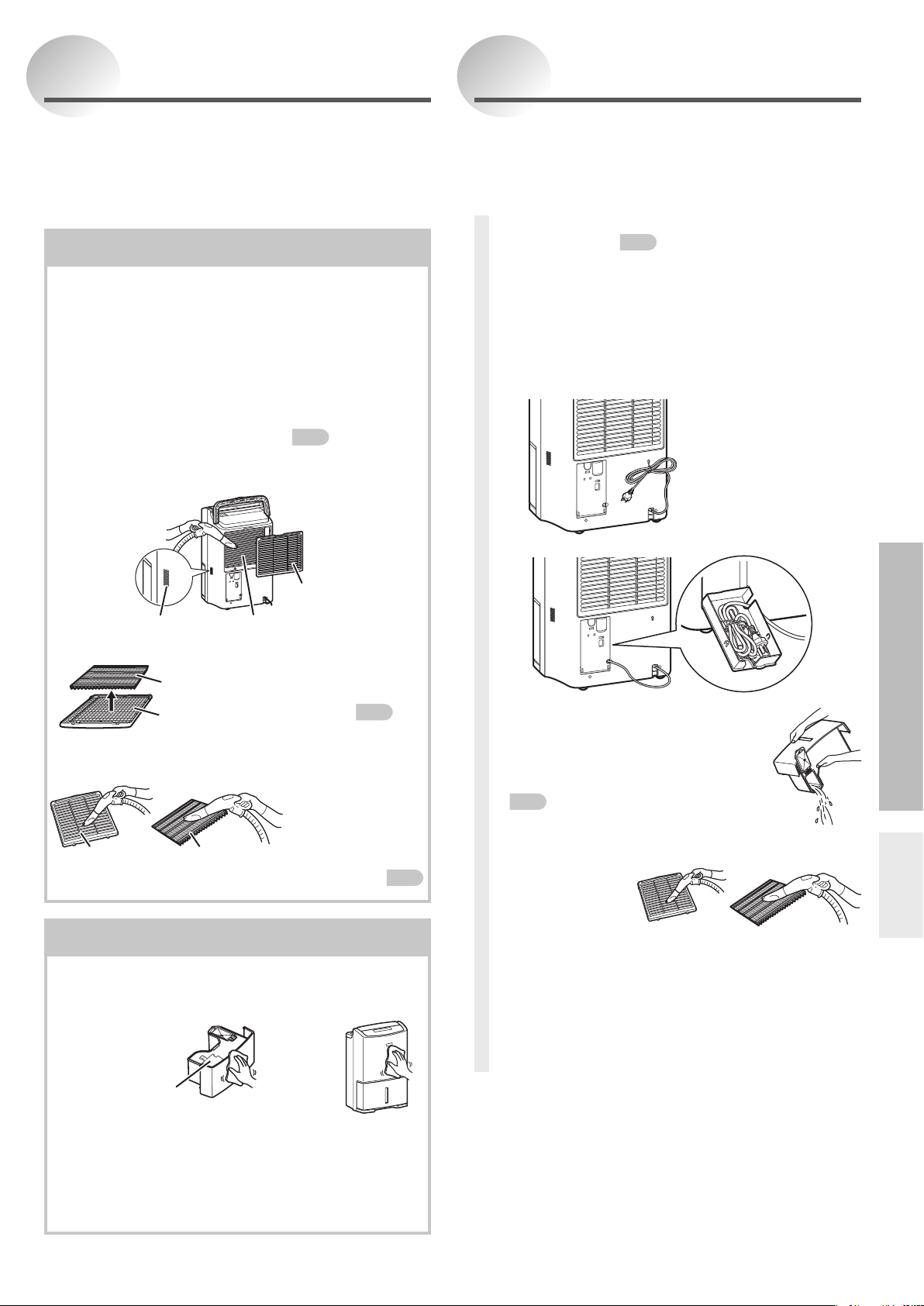
When Cleaning the Unit
Once Every Two Weeks
Water tank • Main body
Wipe with a soft cloth.
Rear air intake • pre-filter •
PM2.5 filter • sensor
Clogged pre-filter will reduce the effectiveness
of dehumidifying. Clean it every two weeks is
desirable. Pre-filter needs not to be replaced unless
it is damaged or broken.
1
Remove the pre-lter
P9
and use a
vacuum cleaner to suck up the dirt
from the rear air intake and sensor.
Sensor Rear air intake
Pre-filter
2
Remove the PM2.5 lter from the pre-lter.
The PM2.5 filter cannot be
washed. If the PM2.5 filter
is dirty, replace it.
P15
PM2.5
filter
Pre-filter
3
Use a vacuum cleaner to suck
up the dirt.
If the pre-filter is very
dirty, wash it with normal
or lukewarm water and
dry it thoroughly.
Pre-filter
PM2.5 filter
4
Set the PM2.5 lter and pre-lter.
P9
•Because the dust in the air may cause the tank
lid and water tank to become dirty. If the dirt
cannot be removed, wash with water then wipe
with a dry cloth.
•Mildew may form in the water tank when the dirt
is not removed thoroughly.
After switching the unit POWER off, leave for one day
until any residual water inside is removed. Then carry
out the following steps.
1
Perform the DRYING INSIDE
operation.
P18
DRYING INSIDE operation is recommended for
prevention of mildew growth inside the unit.
2
Hang the power cord on the
storage hook or put it into the
power cord storage case.
3
Drain out the water.
Drain any water from the water tank
and wipe off any remaining water.
P19
4
Clean the pre-lter and PM2.5 lter.
Use a vacuum
cleaner to suck
up dirt.
5
Store the unit.
Dry the unit fully and cover it with a cloth or
similar item to protect the unit from dust.
Store the unit in a place not exposed to direct
sunlight and with less humid, and keep it in
upright position.
Storage
Floating element
Do not remove or dismantle.
Do not use detergents, cleaning agents for heat
exchange equipment, decontaminative powders,
chemically treated cloth, gasoline, volatile oil, thinners,
etc. They can damage the water tank or main body,
which may result in leakage.
Operating
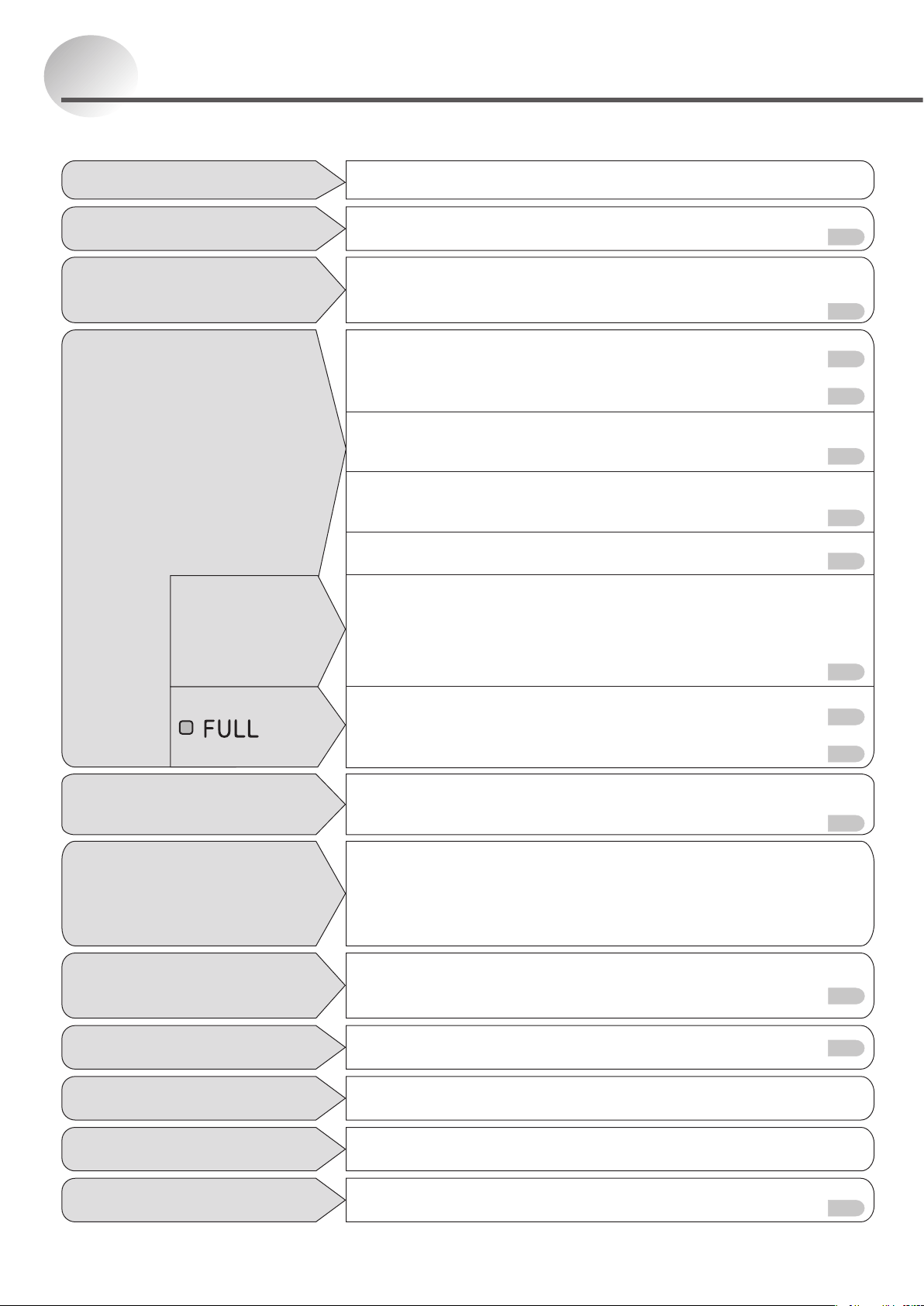
22
Check to see if the temperature/humidity is low.
At first, confirm the current humidity. Low humidity reduces dehumidifying
effectiveness. (In winter, the dry air makes the humidity low, and the
amount of water collected is decreased.) This is not a malfunction.
P6
Water does not collect in the water
tank (minimal dehumidifying results).
Check to see if the unit is in DRYING INSIDE operation.
The unit starts DRYING INSIDE operation automatically after
ending normal operations.
P18
The unit continues to operate
even though it is turned OFF.
Check to see if the room is too large.
g Use the unit for the specified area range.
Check to see if the windows and doors are opened too often.
g Try to keep the room closed during operation.
Check to see if steam producing appliances such as kerosene
heaters are on in the vicinity.
The humidity level does not
drop to the set level easily.
Hygrometer readings differ from place to place even if in the
same room. Use the unit humidity reading as an estimate.
P6
The hygrometer reading on
the unit differs from other
hygrometers in the room.
Symptom Cause/Remedy
Press the SWING LOUVRE switch again.
P16
The louvre does not work
as set.
The residue is from final product testing at the factory and is not
a malfunction.
The water tank contains
liquid or white water residue.
The residue is from the dirt in the air.
g Cleanaccordingtothe“Maintenance”procedures.
P21
There is black residue on the
inside of the water tank and lid.
When the power lamp is ON, it operates intermittently.
When the operation ends, the louvre closes.
The louvre remains open when
it stops.
Check to see whether the power cord is off.
g Plug the power cord fully into the power socket.
P9
Check to see if anything is blocking the air intake or outlet.
g Remove the obstruction.
P4
Check to see if the operation is performed in ECO AUTO and EASY mode.
g The unit automatically switches from dehumidification to air
blowing and stops.
P12-13
Check to see if operation is being performed in the MILDEW GUARD mode.
g This operation ends automatically when the humidity drops
and will stop in 4 hours as minimum.
P12·14
Check to see if the pre-filter is clogged.
g Cleanaccordingtothe“Maintenance”procedures.
P21
Check to see if operation is being performed in the INTELLIGENT
LAUNDRY mode.
g
If the room temperature drops to approximately 5°C or below, the
operation will stop in approximately one hour. The reason for this
is that if the room temperature is too low, it becomes difficult to
remove moisture from the laundry and humidity does not change.
P10
Check to see whether water tank is full.
g
Empty the water tank and return the water tank to its original position.
P19
Check to see if the water tank is inserted properly.
g Adjust the position of the water tank.
P9
The unit does not operate
(no air comes out and the
louvre does not swing).
The unit stops.
lights.
Stops after a
short time.
Troubleshooting
For the symptoms listed below, refer to the remedies listed right.
The unit blows out warm air because dehumidified air passes through
the re-heater. (There is no cooler function.) This is not a malfunction.
P6
The unit blows warm air.
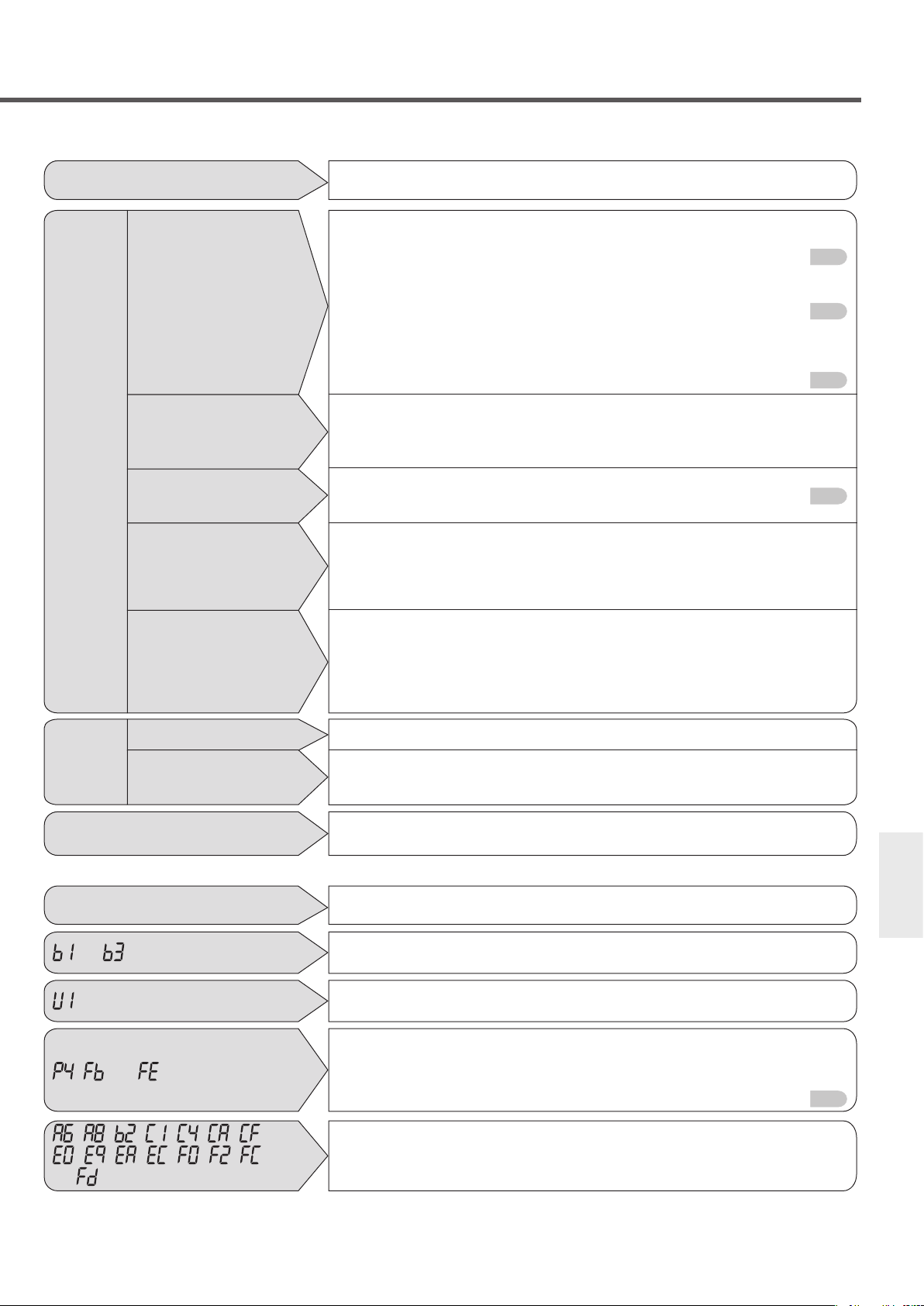
23
Troubleshooting
Symptom Cause/Remedy
Check to see if the unit is on a slope or uneven surface which
causes the unit to tilt or wobble.
g Move to a safe and even surface.
P4
Check to see if the pre-filter is clogged.
g Clean according to the methods specified in the
“Maintenance”section.
P21
Operating the unit on a wood board or in a small room is likely to
cause acoustic resonance.
g Placing a soft mat underneath the unit can reduce the acoustic
resonance.
P5
Sound increases when the compressor starts operation.
(Approximately three minutes after turning on the unit, or during
ECO AUTO and EASY operation.)
The volume of the sound differs depending on the louvre angle.
P16
This is the sound of the refrigerant flow.
The sound can be heard when the unit is turned on, during
operation, or when operation stops. No sound can be heard
when the refrigerant flow stabilizes.
This is the sound of the compressor when it starts up.
In ECO AUTO and EASY modes, the compressor operates
intermittently, so there is compressor startup sound. The
compressor does not start when the operation ends or until 3
minutes has passed after the unit is turned on. This is to protect
the compressor from damage.
The
unit
makes
noises.
The operating
noise is loud/
reverberates.
The operating
sound suddenly
increases in
volume.
The air blowing
sound changes in
volume.
The unit produces
a simmering
sound.
The unit produces
a buzz that sounds
intermittently (or
the compressor
does not activate).
When rst used
The temperature of heat exchanger goes up rapidly, causing transient odor.
The discharged moisture may emit an odor. It is common that the
PM2.5 filter cannot eliminate all the odors and the odors can be
absorbed by moisture inside the unit.
The unit
produces
an odor.
During DRYING
INSIDE operation
Error message (Humidity indicator)
Digital Display Cause/Remedy
Check to see if the power cord is plugged properly.
g Correctly plug the power cord into the power socket.
or appears.
Is the room temperature too high?
g
Press the POWER switch again when the room temperature becomes 40°C or less.
appears.
Check to see if anything is blocking the air outlet.
g
Remove the obstruction and plug the power cord into the power socket again.
Check to see if the pre-filter is clogged.
g Cleanaccordingtothe“Maintenance”procedures.
P21
, , or appears.
Malfunction
g Take note of error message, unplug the power cord, and seek
service assistance using the number on the next page.
, , , – , – ,
– , – , – , ,
or
appears.
If the symptoms persist even after following the prescribed remedies, or the error message does not disappear,
unplug the power cord, and seek service assistance using the number on the next page.
When unplugging and plugging back the power cord into the power socket, wait at least one minute before plugging it in.
Stop operation and seek service assistance using the number on
the next page.
The power plug or power socket
generates abnormal heat.
ZT936Z239H02
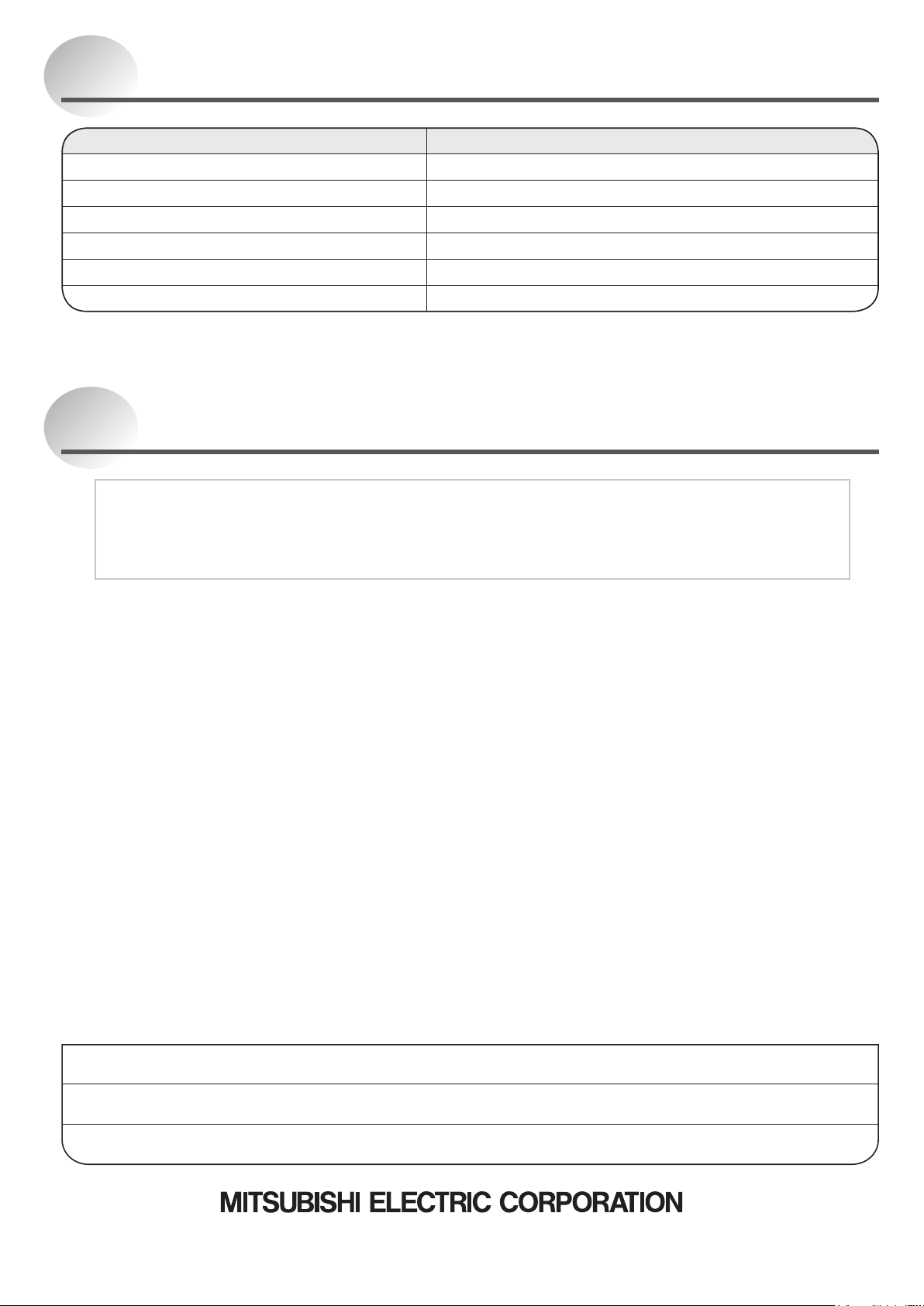
Specifications
The dehumidifying capacity is a value obtained when the dehumidifier is continuously run at a room temperature of
30°C and relative humidity of 80%. It indicates the amount of dehumidification per day (24 hours).
Model MJ-EV38HR-A
Power supply Single phase 230-240 V 50 Hz
Dehumidifying capacity
*1
38 L/day
Power consumption 500 W
Water tank capacity Stops automatically at approx. 5.5 L
Weight 18.1 kg
Dimensions (H × W × D) 630 mm × 410 mm × 299 mm
Disposal
Dispose according to the garbage regulations in your district.
PM2.5 filter
Material:PETandPS
Unit
Do not disassemble. Dispose according to
the garbage regulations in your district.
Website:https://www.mitsubishielectric.com
Place of purchase: Telephone number:
Authorised Service Centre: Telephone number:
Date of purchase: Day Month Year
Please complete the following form for your future reference.
SOLE AGENT in Australia
MITSUBISHI ELECTRIC AUSTRALIA PTY LTD.
(Incorporated in New South Wales) ABN 58 001 215 792
348 Victoria Road, Rydalmere NSW 2116
For more information and support contact
Website: www.mitsubishielectric.com.au
Call 1300 651 808
SOLE AGENT in New Zealand
BLACK DIAMOND TECHNOLOGIES LIMITED (BDT)
Website: https://www.mitsubishi-electric.co.nz
Wellington Office (Head Office)
1 Parliament Street, Lower Hutt, PO Box 30772, Lower Hutt 5040 Phone: (04) 560 9147, Fax: (04) 560 9133
Auckland Office
Unit 1, 4 Walls Road, Penrose, PO Box 12726, Penrose, Auckland 1061 Phone: (09) 526 9347, Fax: (09) 526 9348
Christchurch Office
44 Halwyn Drive, Hornby, PO Box 16904, Hornby, Christchurch 8441 Phone: (03) 341 2837, Fax: (03) 341 2838
For after sales and service
Phone: 0800 737 842, Fax: 0800 845 632