OWNER'S MANUAL
MICROWAVE OVEN
Before beginning installation, read these instructions
carefully. This will simplify installation and ensure that the
product is installed correctly and safely. Leave these
instructions near the product after installation for future
reference.
ENGLISH
MFL72033701
Rev.00_070623
www.lg.com
Copyright © 2023 LG Electronics Inc. All Rights Reserved.

TABLE OF CONTENTS
This manual may contain images or
content that may be different from the
model you purchased.
This manual is subject to revision by the
manufacturer.
IMPORTANT SAFETY INSTRUCTIONS
READ CAREFULLY AND KEEP FOR FUTURE REFERENCE.................................3
WARNING............................................................................................................3
CAUTION .............................................................................................................8
INSTALLATION
Product Overview.............................................................................................13
Installation Requirements ..............................................................................14
OPERATION
Control Panel ....................................................................................................15
Before Use ........................................................................................................15
Quick Start ........................................................................................................17
Cooking Mode ..................................................................................................17
Utensils Guide ..................................................................................................20
Cooking Guide..................................................................................................21
SMART FUNCTIONS
LG ThinQ Application.......................................................................................23
Smart Diagnosis ...............................................................................................23
TROUBLESHOOTING
FAQs...................................................................................................................24
Before Calling for Service................................................................................24
3
IMPORTANT SAFETY INSTRUCTIONS
ENGLISH
IMPORTANT SAFETY INSTRUCTIONS
READ CAREFULLY AND KEEP FOR FUTURE REFERENCE
The following safety guidelines are intended to prevent unforeseen
risks or damage from unsafe or incorrect operation of the appliance.
The guidelines are separated into ‘
WARNING
’ and ‘
CAUTION
’ as
described below.
Safety Messages
WARNING
WARNING
• To reduce the risk of explosion, fire, death, electric shock, injury or
scalding to persons when using this product, follow basic
precautions, including the following:
Technical Safety
• This appliance can be used by children aged from 8 years and above
and persons with reduced physical, sensory or mental capabilities or
lack of experience and knowledge if they have been given supervision
This symbol is displayed to indicate matters and operations
that can cause risk.
Read the part with this symbol carefully and follow the
instructions in order to avoid risk.
WARNING
This indicates that the failure to follow the instructions can
cause serious injury or death.
CAUTION
This indicates that the failure to follow the instructions can
cause the minor injury or damage to the appliance.
This symbol is displayed to alert that hot surface. Do not
touch surfaces during use in order to prevent burn hazard.

4
IMPORTANT SAFETY INSTRUCTIONS
or instruction concerning use of the appliance in a safe way and
understand the hazards involved. Children shall not play with the
appliance. Cleaning and user maintenance shall not be made by
children without supervision.
• This appliance is not intended for use by persons (including children)
with reduced physical, sensory or mental capabilities, or lack of
experience and knowledge, unless they have been given supervision
or instruction concerning use of the appliance by a person
responsible for their safety. Children should be supervised to ensure
that they do not play with the appliance.
• To reduce the risk of burns, electric shock, fire, injury to persons or
exposure to excessive microwave energy when using the microwave
oven, read all instructions before using the appliance.
• The appliance (especially ventilation) and its accessible parts become
hot during use. Care should be taken to avoid touching heating
elements. Children less than 8 years of age shall be kept away unless
continuously supervised.
• Do not attempt to tamper with, or make any adjustments or repairs
to the door , door seals, control panel, safety interlock switches or any
other part of the oven which would involve the removal of any cover
protecting against exposure to microwave energy.
• Only qualified service person from LG Electronics service centre
should disassemble, repair, or modify the appliance.
• It is hazardous for anyone other than a competent person to carry
out any service or repair operation that involves the removal of a
cover which gives protection against exposure to microwave energy.
• Unlike other appliances, the microwave oven is a high-voltage and a
high electrical-current piece of equipment. Improper use or repair
could result in harmful exposure to excessive microwave energy or in
electric shock.
• Do not operate the appliance if the door seals and adjacent parts of
the microwave oven are damaged until it has been repaired by
qualified service person from LG Electronics service centre.
• Do not use your microwave oven to cook eggs in the shell. Pressure
can build up inside the shell, causing it to burst.

5
IMPORTANT SAFETY INSTRUCTIONS
ENGLISH
• Liquids and other foods must not be heated in sealed containers
since they are liable to explode. Remove the plastic wrapping from
food before cooking or defrosting. Note though that in some cases
food should be covered with plastic film, for heating or cooking.
• Do not use harsh abrasive cleaners or sharp metal scrapers to clean
the oven door glass since they can scratch the surface, which may
result in shattering of the glass.
• The microwave oven must not be placed in a cabinet. The microwave
oven is intended to be used free-standing.
• Keep the appliance and its cord out of reach of children less than 8
years.
• The appliance is not intended to be operated by means of an external
timer or separate remote-control system.
• This appliance should not be used for commercial catering purposes.
This appliance is intended to be used in household and similar
applications such as:
- Staff kitchen areas in shops, offices and other working
environments;
- Farm house;
- By clients in hotels, motels and other residential environments;
- Bed and breakfast type environments.
• Do not install this appliance inside mobile vehicles (camping cars).
• Keep an eye on the appliance due to the possibility of ignition when
heating food in plastic or paper containers.
• The contents of feeding bottles and baby food jars shall be stirred or
shaken and the temperature checked before consumption, in order
to avoid burns.
• Use only utensils that are suitable for use in microwave ovens. They
may heat-up and char.
- Remove metal twist ties before using the appliance.
- Do not use wooden containers and ceramic containers that have
metallic (e.g. gold or silver) inlays.

6
IMPORTANT SAFETY INSTRUCTIONS
- Metallic containers for food and beverages are not allowed during
microwave cooking. Metal objects in particular may arc in the oven,
which can cause serious damage.
• The microwave oven is intended for heating food and beverages.
Drying of food or clothing and heating of warming pads, slippers,
sponges, damp cloth and similar may lead to risk of injury, ignition or
fire.
• If smoke is observed (or emitted), switch off or unplug the appliance
and keep the door closed in order to stifle any flame.
• Only use the temperature probe recommended for this appliance.
- You can not ascertain that the temperature is accurate with an
unsuitable temperature probe.
- This model does not provide a temperature probe.
• When heating liquids, e.g. soups, sauces and beverages in your
microwave oven,
- Avoid using straight sided containers with narrow necks.
- Do not overheat.
- Stir the liquid before placing the container in the oven and again
halfway through the heating time.
- Be careful when handling the container.
Microwave heating of beverages can result in delayed eruptive
boiling, therefore care must be taken when handing the container.
- After heating, let it stand in the appliance for a short time; stir or
shake it again carefully and check the temperature of it before
consuming to avoid burns (especially, contents of feeding bottles
and baby food jars).
• The appliance should be cleaned regularly and any food deposits
should be removed. Failure to maintain the appliance in a clean
condition could lead to deterioration of the surface that could
adversely affect the life of the appliance and possibly result in a
hazardous situation.
• Cleaning and user maintenance shall not be made by children unless
they are aged from 8 years and above and supervised.
• The appliance shall not be cleaned with a steam cleaner.
7
IMPORTANT SAFETY INSTRUCTIONS
ENGLISH
Installation
• Ensure that the outlet socket is properly grounded, and that the earth
pin on the power cord is not damaged or removed from the power
plug. For more details on grounding, inquire at an LG Electronics
customer information centre.
• This appliance must be earthed. The wires in the mains lead are
coloured in accordance with the following codes:
- BLUE: Neutral
- BROWN: Live
- GREEN and YELLOW: Earth
• As the colours of the wires in the mains lead of this appliance may not
correspond with the coloured markings identifying the terminals in
your plug proceed as follows:
- The wire which is coloured BLUE must be connected to the terminal
which is marked with the letter N or coloured BLACK.
- The wire which is coloured BROWN must be connected to the
terminal which is marked with the letter L or Coloured RED.
- The wire which is coloured GREEN & YELLOW or GREEN must be
connected to the terminal which is marked with the letter G or earth
symbol.
• This appliance incorporates an earth connection for functional
purposes.
• If the supply cord is damaged, it must be replaced by the
manufacturer, its service agent of similarly qualified persons in order
to avoid a hazard. Improper use may cause serious electric damage.
• The appliance is supplied from a cord extension set or an electrical
portable outlet device, the cord extension set on electrical portable
outlet device must be positioned so that it is not subject to splashing
or ingress of moisture.
• If the power cord is damaged or the hole of the outlet socket is loose,
do not use the power cord and contact an authorized service centre.
Earth symbol
8
IMPORTANT SAFETY INSTRUCTIONS
Operation
• Children should not allow to play with accessories or hang down from
the door or any part of the appliance.
• When the appliance is operated in the combination mode, children
should only use the appliance under adult supervision due to the
temperatures generated.
• Never operate the appliance when it is empty. Food or water should
always be in the appliance during operation to absorb the microwave
energy.
• Do not operate your appliance if it is damaged. It is particularly
important that the oven door closes properly and that there is no
damage to the: (1) door (bent), (2) hinges and latches (broken or
loosened), (3) door seals and sealing surfaces. It could result in
harmful exposure to excessive microwave energy.
• Do not use the appliance for the purpose of dehumidification. (ex.
Operating the microwave oven with wet newspapers, clothes, toys,
electric devices, pet or child etc.) It can be the cause of serious
damage to safety such as a fire, a burn or a sudden death due to an
electric shock.
• Be certain to use proper accessories on each operation mode.
Improper use could result in damage to your appliance and
accessories, or could make spark and a fire.
CAUTION
CAUTION
• To reduce the risk of injury to persons, malfunction, or damage to the
product or property when using the appliance, follow basic safety
precautions, including the following:
Installation
• Install the appliance according to the installation requirements that
are in this manual.

9
IMPORTANT SAFETY INSTRUCTIONS
ENGLISH
• Allow at least 8 cm from the front of the oven door to avoid accidental
tipping of the appliance.
• The turntable must always be in place when you operate the
appliance.
• Do not block an exhaust outlet that is located on the top, bottom or
side of the appliance.
• Do not place any object (such as kitchen towels, napkins, etc.)
between the appliance front face and the door.
• In order to avoid a hazard due to inadvertent resetting of the thermal
cut-out, this appliance must not be supplied through an external
switching device, such as a timer, or connected to a circuit that is
regularly switched on and off by the utility.
Operation
• Do not touch the appliance (including the oven door, outer cabinet,
rear cabinet, oven cavity, accessories and dishes) during grill mode,
convection mode and auto cook operations. The temperature of
accessible surfaces may be high when the appliance is operating.
There is the danger of a burn unless wearing thick culinary gloves.
• Do not place an object(a book, a box, water bottle, vase etc.) on the
appliance. The appliance may overheat or catch fire or the object may
fall, causing injury to persons.
• Do not operate the appliance with the door open. It could result in
harmful exposure to excessive microwave energy.
• Set the cooking times correctly. The small amounts of food require
shorter cooking or heating time. Over cooking may result in the food
catching on fire and subsequent damage to your appliance.
• Do not use recycled paper products. They may contain impurities
which may cause sparks or fires when used in cooking.
• Do not cook food wrapped in paper towels or newspaper, unless your
cook book contains instructions for the food you are cooking.
• Do not use newspaper in place of paper towels for cooking.
• Do not use the appliance to dry newspapers or clothes. They may
catch fire.

10
IMPORTANT SAFETY INSTRUCTIONS
• Do not cook eggs in their shell. Eggs in their shell and whole hard-
boiled eggs should not be heated in microwave ovens since they may
explode, even after microwave heating has ended. Pressure will build
up inside the egg which will burst.
• Do not attempt deep fat frying in your appliance. This could result in
a sudden boil over of the hot liquid.
• Pierce the skin of potatoes, apples or any such fruit or vegetables
before cooking. They could burst.
• If smoke is observed (or emitted), switch off or unplug the appliance
and keep the door closed in order to stifle any flame.
• Follow exact directions given by each manufacturer for their popcorn
product.
- Never use a brown paper bag for popping corn.
- Never attempt to pop leftover kernels.
- Do not leave the appliance unattended while the corn is being
popped.
- If corn fails to pop after the suggested times, discontinue cooking.
- Overcooking could result in the corn catching a fire.
• The power connection may be achieved by having the plug accessible
or by incorporating a switch in the fixed wiring in accordance with the
wiring rules. Using improper plug or switch can cause an electric
shock or a fire.
• All air vents should be kept clear during cooking. If air vents are
covered during appliance operation the appliance may overheat.
Maintenance
• Do not rinse containers, tray and rack by placing them in water
immediately after cooking.
• Unplug the power plug and allow it to cool before cleaning.
• Always use gloves when removing food and accessories after cooking
as the oven and accessories will be very hot.
• Allow the turntable to cool before removing it from the appliance.

11
IMPORTANT SAFETY INSTRUCTIONS
ENGLISH
• Do not allow food or cleaner residue to accumulate on sealing
surfaces of the appliance.
• Keep the inside and outside of the appliance clean.
Cleaning
Keep the oven clean inside and outside. Take special care to keep the
inner door panel and the front frame free of food or grease build-up.
Clean your oven weekly or more often, if needed.
• Abrasive cleansers, steel wool pads, gritty wash cloths, some paper
towels, etc., can damage the control panel and the interior and
exterior of the oven.
Cleaning the Interior
Use a damp cloth to clean the surfaces of the door and wipe out
crumbs between the door and the frame. Remove greasy spatters with
a soapy cloth then rinse and dry.
• Wipe spatters immediately with a wet paper towel, especially after
cooking chicken or bacon.
• If steam accumulates inside or outside of the oven door, wipe the
panels with a soft cloth.
Cleaning the Exterior
Clean the outside of the oven with soap and water. Rinse with clean
water and dry with a soft cloth or paper towel.
• Do not allow the water to seep into the ventilation openings to
prevent damage to the operating parts inside the oven.
• The door and door seals should be kept clean. Use only warm, soapy
water, rinse then dry thoroughly.
• Frequently wipe metal parts with a damp cloth.
Cleaning the Control Panel
Open the door to prevent the oven from accidentally starting. Wipe
with a damp cloth followed immediately by a dry cloth. Press
STOP
or
STOP/Cancel
after cleaning.
Cleaning the Accessories
Wash the glass tray and rotating ring in mild, sudsy water. For heavily
soiled areas, use a mild cleanser and scouring sponge. Dry completely
before use.

12
IMPORTANT SAFETY INSTRUCTIONS
• The glass tray and rotating ring are dishwasher safe.
13
INSTALLATION
ENGLISH
INSTALLATION
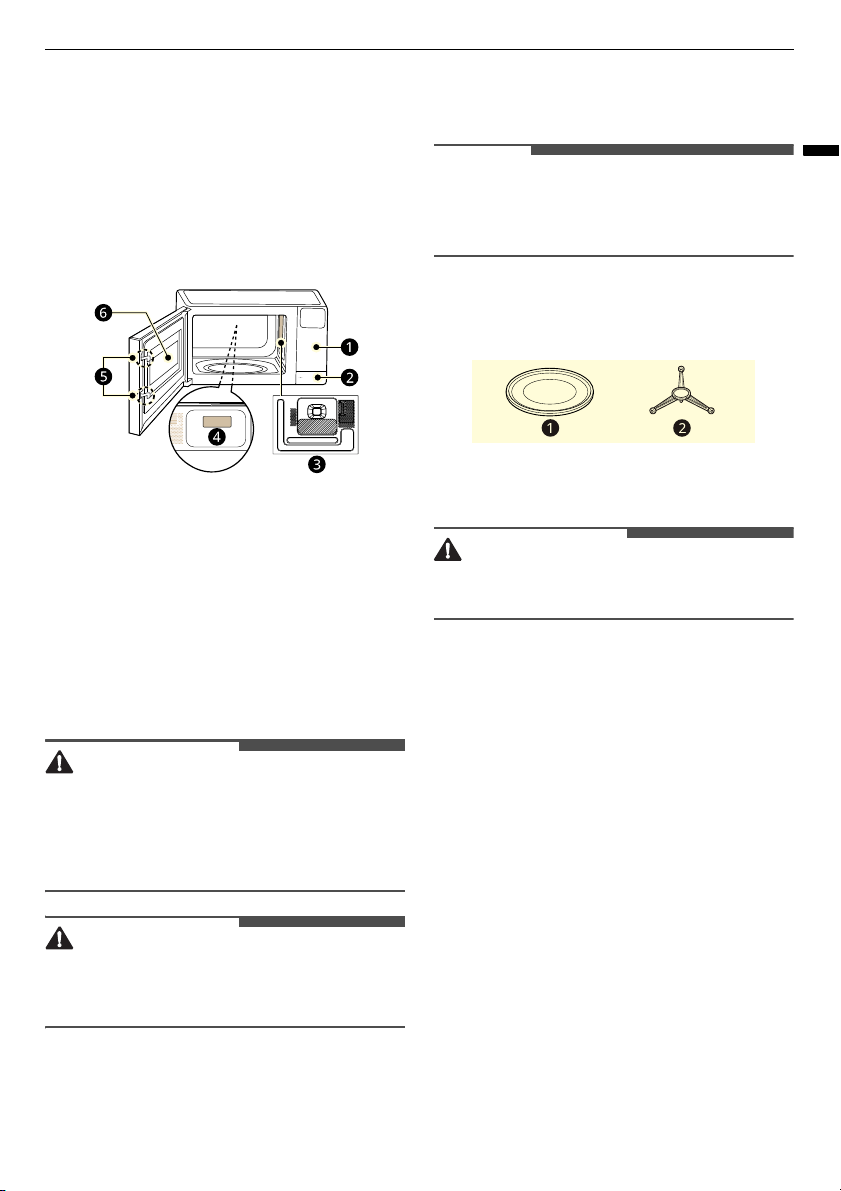
Product Overview
The appearance or components of the appliance
may differ from model to model.
Front View
a
Control Panel
b
Door Open Button
*1
c
Mica Sheet
d
Rating Label
e
Safety Door Lock System
f
Window
*1 This feature is only available on some models.
WARNING
• Do not operate the oven when it is empty or
without the glass tray. It is best to leave a glass
of water in the oven when not in use. The water
will safely absorb all microwave energy, if the
oven is accidentally started.
CAUTION
• To avoid risk of personal injury or property
damage, do not use stoneware, metal cookware,
or metal rimmed cookware in the oven.
NOTE
• Do not remove the mica sheet from the inside
cavity of the oven. It is there to protect the
microwave components from food spatters.
Accessories
a
Glass Tray
b
Rotating Ring
CAUTION
• Do not use the microwave oven without the
glass tray and rotating ring.
Specifications
Power supply and power consumption may vary
depending on the model purchased. Refer to the
labels for details.
MS203**** Model
•
Microwave Output
: Max. 625-700 W
*1
•
Frequency
: 2450 MHz
*2
•
Dimensions (W x H x D)
: 454 mm x 261 mm x
328 mm
•
Power Supply
: 230-240 V~ 50 Hz
•
Power Consumption
: Microwave 1000-1050 W
MS303**** Model
•
Microwave Output
: Max. 840-900 W
*1
•
Frequency
: 2450 MHz
*2
•
Dimensions (W x H x D)
: 508 mm x 290 mm x
400 mm
14
INSTALLATION
•
Power Supply
: 230-240 V~ 50 Hz
•
Power Consumption
: Microwave 1280-1350 W
*1 IEC 60705 RATING STANDARD. Specifications
are subject to change without prior notice.
*2 Microwave Frequency: 2450 MHz +/- 50 MHz
(Group 2 / Class B)
Group 2 equipment: group 2 contains all ISM RF
equipment in which radio-frequency energy in
the frequency range 9 kHz to 400GHz is
intentionally generated and used or only used,
in the form of electromagnetic radiation,
inductive and /or capacitive coupling, for the
treatment of material or inspection/analysis
purposes.
Class B equipment is equipment suitable for use
in domestic dwellings and domestic dwellings
directly connected to a low voltage power
supply network which supplies buildings used
for domestic purposes.
NOTE
• When operating at 100%, 90% and 80% power
levels for prolonged periods, the output power
will be reduced gradually to help prevent the
unit from electrically overheating.
Installation Requirements
Installation Location
1
Place the microwave oven on a flat surface with
more than 85 cm height.
• The front of the oven should be at least 8 cm
from the edge of the surface to prevent
tipping.
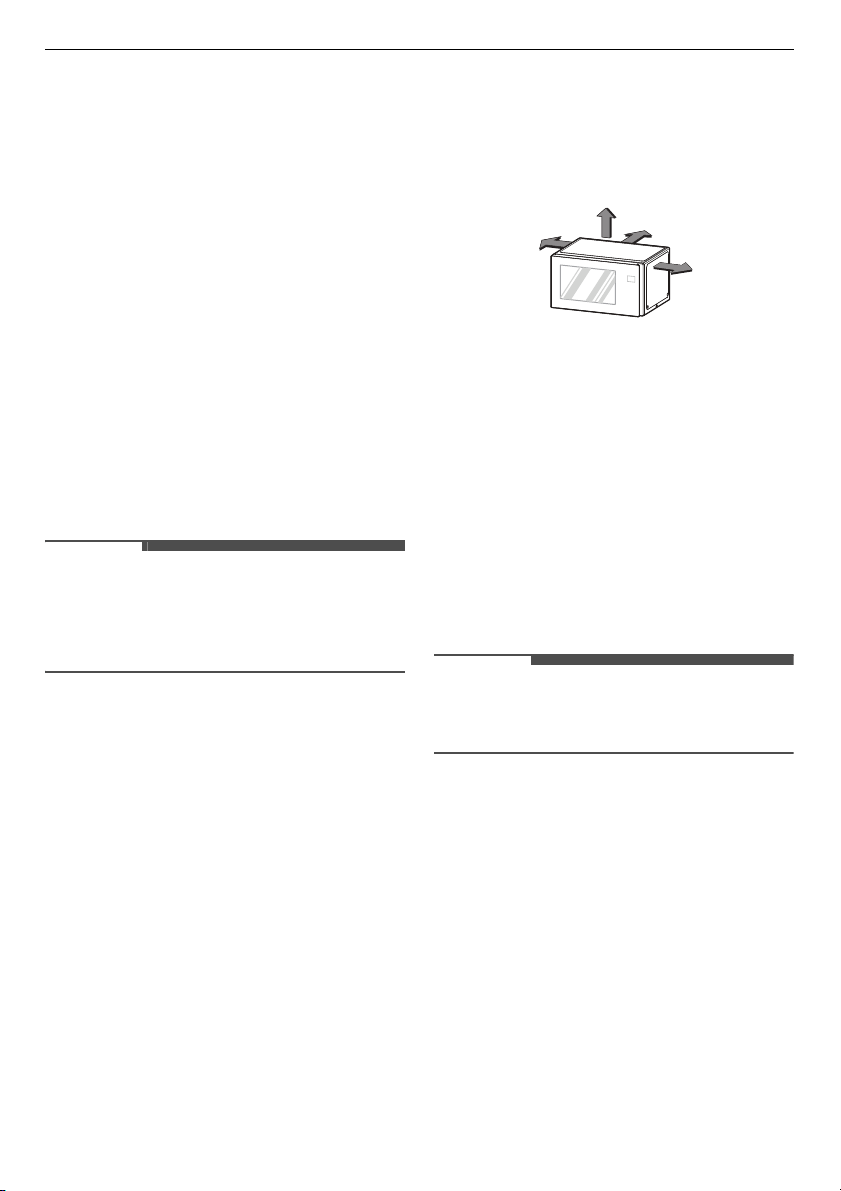
2
Allow at least 20 cm from the top, 20 cm from
the sides, and 20 cm back of the oven for
proper ventilation.
• Free airflow around the oven is important.
• An exhaust outlet is located on bottom or
side of the oven. Do not use the microwave
oven in an enclosed space or cupboard, the
air flow for cooling the product could be
worse. It may result in lower performance
and reduced service life. If possible, please
use the microwave oven in the counter top
condition.
3
Place the rotating ring inside the oven and
place the glass tray on top.
4
Insert the power plug into an outlet.
• Do not block the outlet to prevent damage
the oven.
• Make sure the microwave oven is the only
appliance connected to the socket.
• If your oven does not operate properly,
unplug it from the electrical socket and then
plug it back in.
NOTE
• Do not place oven above a gas or electric range.
• Do not use this oven in a built in application.
Radio Frequency Interference
• When operating the microwave oven, If you use
a product such as radio, TV, wireless LAN,
Bluetooth, medical equipment, wireless
equipment etc.
• Using the same frequency as the microwave
oven, the product may receive interference from
these products. This interference does not
indicate a problem of the microwave or the
product and is not a malfunction. Therefore, it is
safe to use. However, medical equipment may
receive interference as well, so use caution when
using medical equipment near the product.
20 cm
20 cm
20 cm
20 cm

15
OPERATION
ENGLISH
OPERATION
Control Panel
Control Panel Features
a
Display
Shows the time of day, cooking time settings,
and selected cooking functions.
b
Power
Set a cooking power level.
c
Auto Cook Mode
Press the buttons to select preprogrammed
cook and defrost settings for popular food
items.
d
More/Less
Set cooking time, power level, quantity, or
weight.
e
STOP/Cancel
Stop the oven or clear all entries.
• If you press and hold this button for 3
seconds to lock the control panel.
f
START/Select
Press this button to start the oven, enter
amounts, or cook at 100% cook power for 30
seconds.
• If you press this button during cooking to
increase cook time by 30 seconds. (Up to 99
minutes and 59 seconds)
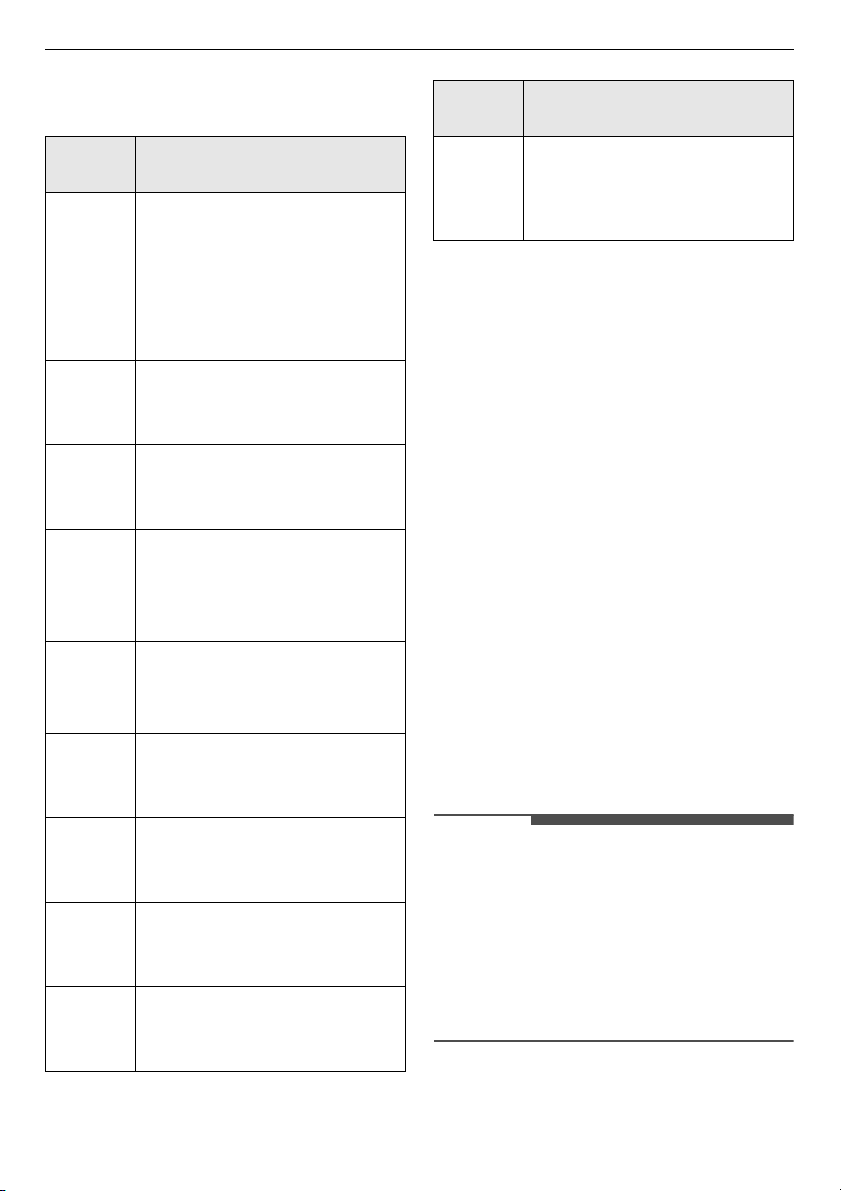
Display Icon
An icon displays when a function is selected or an
weight / a power level / a temperature is selected
by using
More/Less
.
NOTE
• A beep sounds each time you press a key. A
melody signals the end of a timer or a cooking
cycle.
• This oven has a built-in safety interlocks to
prevent exposure to excessive microwave
energy. The oven will automatically turn off any
cooking when the door is opened.
Before Use
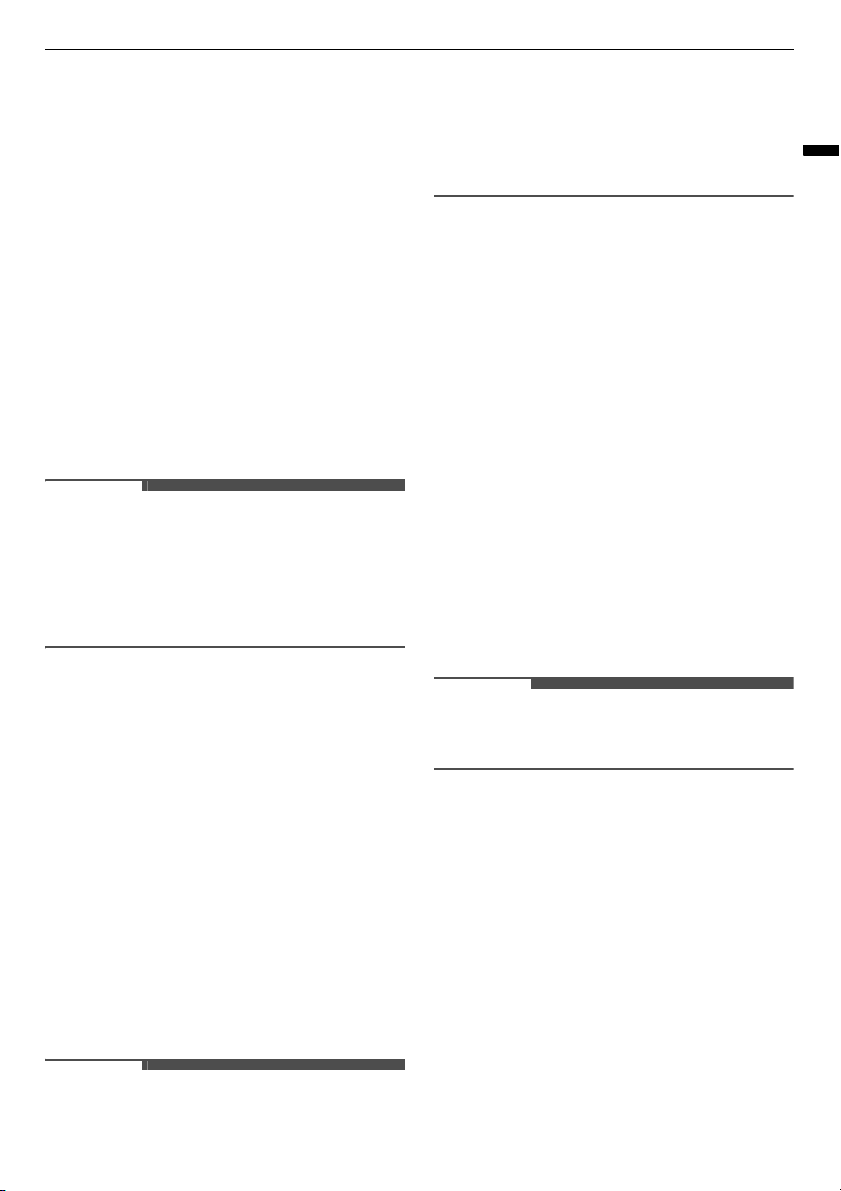
Microwave Power Levels
This microwave oven is equipped with 10 power
levels to give you maximum flexibility and control
over cooking. See the table for suggested power
levels for various foods.
• When operating at 100%, 90% and 80% power
levels for prolonged periods, the output power
Icon Indication
Microwave
Auto Cook
Auto Defrost
Start Cooking
Use More or Less
Select a Power Levels
Select an Weight
16
OPERATION
will be reduced gradually to help prevent the
unit from electrically overheating.
*1 For MS203**** model
*2 For MS303**** model
Setting the Clock
When the oven is plugged in for the first time or
when power resumes after a power interruption,
the clock defaults to the 12-hour clock mode and
12H appears in the display. You can set the time of
day or switch to the 24-hour clock mode.
1
Press
START/Select
to confirm the 12H clock
display.
• To switch to the 24-hour clock mode, use
More/Less
.
2
Select a desired hour by using
More/Less
, and
press
START/Select
.
3
Select a desired minutes by using
More/Less
,
and press
START/Select
.
NOTE
• To reset the clock mode, you must unplug and
reconnect the power cord.
• If you do not want the time of day to appear in
the display, press
STOP/Cancel
, after plugging
in the oven.
• When the oven is not in use, the display turns off
to save energy, unless the time of day is set to
show in the display.
Power
Level
Use
High
700 W
*1
/
900 W
*2
(100 %)
• Boiling water.
• Browning ground beef.
• Making candy.
• Cooking whole poultry, poultry
pieces, fish & vegetables.
• Cooking tender cuts of meat.
630 W
*1
/
810 W
*2
(90 %)
• Reheating rice, pasta &
vegetables.
560 W
*1
/
720 W
*2
(80%)
• Reheating prepared foods
quickly.
• Reheating sandwiches.
490 W
*1
/
630 W
*2
(70%)
• Cooking egg, milk and cheese
dishes.
• Cooking cakes and breads.
• Melting chocolate.
420 W
*1
/
540 W
*2
(60%)
• Cooking veal.
• Cooking whole fish.
• Cooking puddings and custard.
350 W
*1
/
450 W
*2
(50%)
• Cooking ham, whole poultry and
lamb.
• Cooking rib roast and sirloin tip.
280 W
*1
/
360 W
*2
(40%)
• Thawing meat, poultry and
seafood.
210 W
*1
/
270 W
*2
(30%)
• Cooking less tender cuts of meat.
140 W
*1
/
180 W
*2
(20%)
• Taking chill out of fruit.
• Softening butter.
70 W
*1
/
90 W
*2
(10%)
• Keeping casseroles and main
dishes warm.
• Softening butter and cream
cheese.
Power
Level
Use
17
OPERATION
ENGLISH
Child Lock
Use this safety feature to lock the control panel and
prevent the oven from being turned on when
cleaning the oven or prevent children from
unsupervised use of the oven.
Setting Child Lock to ON
1
Press
STOP/Cancel
.
2
Press and hold
STOP/Cancel
until a
Loc
appears in the display (approximately 3
seconds).
Cancelling Child Lock
Press
STOP/Cancel
and hold until a
Loc
disappears
in the display (approximately 3 seconds).
NOTE
• If set, the time of day reappears in the display
after 1 second.
• If the oven is locked, a
Loc
appears in the display
when any key is pressed.
• Unlock the oven to resume normal use.
Quick Start
Quick Start Feature
This feature allows you to set 30-second intervals
of High power cooking with each press of the
START/Select
button.
Cooking for 2 Minutes on High Power
1
Press
STOP/Cancel
.
2
Press
START/Select
four times.
• The oven starts cooking and the time counts
down in the display.
NOTE
• The oven will immediately start cooking for 30
seconds on high power.
• Press
START/Select
repeatedly to extend the
cook time by 30 seconds every time the button is
pressed.
• The cook time can be extended to 99 minutes
and 59 seconds.
Manual Cooking
When not using the auto cooking functions, the
cooking time and power level are set manually.
1
Press
STOP/Cancel
.
2
Press
Power
until a desired power level
appears in the display.
3
Select a desired time by using
More/Less
, and
press
START/Select
.
• When cooking is complete, a chime sounds
and
End
appears in the display window.
End
remains in the display and the chime repeats
every minute until the door is opened, or any
button is pressed.
NOTE
• If a power level is not selected, the oven defaults
to High power.
Cooking Mode
This feature has preprogrammed settings to
automatically cook certain foods.
Auto Reheat Mode
This feature reheats single servings of previously
cooked foods or a plate of leftovers.
1
Press
STOP/Cancel
.
2
Press
Auto Reheat
until a desired menu code
appears in the display.
18
OPERATION
3
Select a desired weight by using
More/Less
,
and press
START/Select
.
NOTE
• Do not use recycled paper products in the
microwave oven. They sometimes contain
impurities that cause arcing and sparking.
Auto Reheat Menu
Refer to the below to set the desired code and
weight.
1 Chilled Meal (0.3 - 0.6 kg)
• Initial Temperature: Refrigerated
• Pierce using a skewer on the surface.
• Place food on the glass tray.
- Stirrable e.g : Spaghetti bolognese, Beef stew
- Non-stirrable e.g : Lasagne, Cottage pie
• Standing time: 2-3 minutes.
NOTE
• For food contained in bag(s), pierce meat portion
and rice/pasta portions, etc.
- For stirrable foods, stir at beep.
- Non-stirrable foods, it is not necessary to stir
at beep.
2 Frozen Meal (0.3 - 0.6 kg)
• Initial Temperature: Frozen
• Pierce using a skewer on the surface.
• Place food on the glass tray.
- Stirrable e.g : Spaghetti bolognese, Beef stew
- Non-stirrable e.g : Lasagne, Cottage pie
• Standing time: 2-3 minutes.
NOTE
• For food contained in bag(s), pierce meat portion
and rice/pasta portions, etc.
- For stirrable foods, stir at beep.
- Non-stirrable foods, it is not necessary to stir
at beep.
3 Chilled Pizza (0.2 - 0.4 kg)
• Initial Temperature: Refrigerated
• Place food on the glass tray.
• Standing time: 2-3 minutes.
Auto Cooking Mode
Auto cook allows you to cook most of your favorite
food easily by selecting the food type and entering
the weight of the food.
1
Press
STOP/Cancel
.
2
Press
Auto Cook
until a desired menu code
appears in the display.
3
Select a desired weight by using
More/Less
,
and press
START/Select
.
Auto Cooking Menu
Refer to the below to set the desired code and
weight.
1 Popcorn (50 - 100 g)
• Initial Temperature: Room
• Follow package instructions.
• Use popcorn package which is made especially
for microwave cooking.
• Do not try to pop unpopped kernels.
• Heat only 1 package at a time.
• Do not leave the microwave oven unattended
while popping popcorn.
2 Potato (1 - 4 ea)
• Initial Temperature: Room
• Utensil: Paper towel
• Place in center of the oven on paper towel.
• Pierce potato several times with fork.
• After cooking, let stand for 5 minutes.
3 Beverage (1 - 2 cups)
• Initial Temperature: Room

19
OPERATION
ENGLISH
• Utensil: Mugs
• Use mug or microwave-safe cup.
• Stir after reheating.
4 Fresh Vegetable (1 - 4 cups)
• Initial Temperature: Room
• Utensil: Microwave-safe bowl
• Prepare vegetable (wash and cut into 12.7 mm
pieces).
• Cover with plastic wrap and vent.
5 Frozen Vegetable (1 - 4 cups)
• Initial Temperature: Frozen
• Utensil: Microwave-safe bowl
• Arrange food on turntable tray.
• Cover with plastic wrap and vent.
6 Frozen Entree (284 g)
• Initial Temperature: Frozen
• Follow the package instructions.
7 Bacon (4 thin rashers)
• Initial Temperature: Refrigerated
• Utensil: Microwave-safe dish
• Place food on paper towels on a microwave-safe
dish.
• Cover with paper towels.
8 Rice/Pasta (0.1 - 0.3 kg)
Ingredients for rice
• Rice / Butter melted / Onion, grated / Chicken
stock or Water
- 0.1 kg / 30 g / 50 g / 250 ml
- 0.2 kg / 40 g / 75 g / 500 ml
- 0.3 kg / 50 g / 100 g / 750 ml
• Salt to taste
Instructions for rice
• Initial Temperature: Room
• Utensil: Microwave-safe bowl
• Add rice, melted butter and onion in a deep and
large microwave-safe bowl (3 L) and mix well.
• Pour boiling chicken stock or water and add salt.
• Cover with plastic wrap and vent.
• After cooking, stir and stand covered for 5 - 10
minutes if needed.
Ingredients for pasta
• Rice / Water / Salt
- 0.1 kg / 400 ml
- 0.2 kg / 800 ml
- 0.3 kg / 1000 ml
• Salt to taste
Instructions for pasta
• Initial Temperature: Room
• Utensil: Microwave-safe bowl
• Place pasta and boiling water with salt in a deep
and large microwave-safe bowl (3 L).
• Cover with plastic wrap and vent.
• After cooking, rinse pasta with cold water.
Auto Defrosting Mode
The oven has 4 preset defrost cycles. The defrost
function provides the defrosting method for frozen
foods. The defrost table shows the suggested
defrost cycle for various foods. The defrost
function conveniently chimes during the cycle to
remind you to check, turn over, separate, or
rearrange the food.
1
Press
STOP/Cancel
.
2
Press
Auto Defrost
until a desired menu code
appears in the display.
3
Select a desired weight by using
More/Less
,
and press
START/Select
.
• The countdown appears in the display.
4
At the beep, open the door and remove any
portions that have thawed and turn the food
over.
20
OPERATION
5
Press
START/Select
to resume the defrost
cycle.
NOTE
• Remove fish, shellfish, meat, and poultry from its
original wrapping paper or plastic package.
Otherwise, the wrap will hold steam and juice
close to the foods, which can cause the outer
surface of the foods to cook.
• Place foods in a shallow container or on a
microwave roasting rack to catch drippings.
• Food should still be somewhat icy in the centre
when removed from the oven.
• The length of defrosting time varies according to
how solidly the food is frozen.
• The shape of the package affects how quickly
food will defrost. Shallow packages will defrost
more quickly than a deep block.
• Depending on the shape of the food can be
defrosted more or less.
Auto Defrost Menu
Refer to the below to set the desired code and
weight.
dEF1 Meat (0.1 - 4.0 kg)
• Beef: Ground beef, round steak, stew cubes,
tenderloin steak, pot roast, rib roast, rump roast,
chuck roast, hamburger patties
• Lamb: Chops, rolled roast
• Pork: Chops, hot dogs, spareribs, country-style
ribs, rolled roast, sausage
• Veal: Cutlets (0.5 kg, 20 mm thick)
• Standing time: 5 - 15 minutes.
dEF2 Poultry (0.1 - 4.0 kg)
• Poultry: Whole, cut-up, breast (boneless)
• Cornish Hens: Whole
• Turkey: Breast
• Standing time: 30 - 60 minutes.
dEF3 Fish (0.1 - 4.0 kg)
• Fish: Fillets, whole steaks
• Shellfish: Crab meat, lobster tails, shrimp,
scallops
• Standing time: 5 - 10 minutes.
dEF4 Bread (0.1 - 0.5 kg)
• Sliced bread, buns, baguettes, etc.
• Separate slices and place between paper towels
or on flat plate.
• Standing time: 1 - 2 minutes.
Utensils Guide
Microwave-Safe Utensils
•
Ovenproof Glass
: Glassware that is heat-
resistant is microwave-safe. This would include
all brands of oven tempered glass utensils.
However, do not use delicate glassware, such as
tumblers or wine glasses, as these might shatter
as the food warms.
•
Pottery Stoneware Ceramic
: Use bowls, cups,
serving plates, pottery, stoneware, ceramic, and
platters without metallic rim. Many containers
made of these materials are microwave-safe, but
test them before use.
•
Plastic
-
Plastic Storage Containers
: These can be
used to hold foods that are to be quickly
reheated. However, they should not be used
to hold foods that will need considerable time
in the oven as hot foods will eventually warp
or melt plastic containers.
-
Plastic Cooking Bags
: Provided they are
specially made for cooking, cooking bags are
microwave safe. Remember to make a slit in
the bag so that steam can escape. Never use
ordinary plastic bags for cooking in the
microwave oven, as they will melt and rupture.
-
Plastic Microwave Utensils
: A variety of
shapes and sizes of microwave utensils are
available. You may be able to use items you
already have on hand rather than investing in
new kitchen equipment.
•
Paper
: Use paper towels, waxed paper, paper
napkins, and paper plates with no metallic rim or
design. Paper plates and containers are
convenient and safe to use in the microwave
oven, provided that the cooking time is short and
foods to be cooked are low in fat and moisture.
Paper towels are also very useful for wrapping
21
OPERATION
ENGLISH
foods and for lining baking trays in which greasy
foods such as bacon are cooked. In general,
avoid coloured paper products as the color may
run. Some recycled paper products may contain
impurities which could cause arcing or fires
when used in the microwave.
•
Tableware
: Many containers made of pottery,
stoneware and ceramic are also microwave-safe.
If in doubt consult the manufacturer’s literature
or perform the microwave test. Do not put plates
with painted decoration in the oven, as the paint
may contain metal and cause arcing.
Microwave-Unsafe Utensils
•
Metal Containers
and
Metal Decoration
- Never use metal or metal-rimmed utensils in
the microwave oven.
- Microwaves cannot penetrate metal. They will
bounce off any metal object in the oven and
cause arcing, an alarming phenomenon that
resembles lightning.
- Metal shields the food from microwave
energy and produces uneven cooking. Also
avoid metal skewers, thermometers, foil trays,
metal-rimmed or metal-banded dinnerware,
casserole dishes, etc. The metal rim interferes
with normal cooking and may damage the
oven.
Testing Utensils before Use
Most heat resistant and non-metallic utensils is
safe for use in your oven. However, some utensils
may contain materials that are not suitable for
microwave use. Follow the steps below to find out
if utensils can be used in the microwave.
1
Place the container in question and a glass
measuring cup filled with water next to each
other inside the oven.
2
Heat the container and glass measuring cup
for 1 minute at HIGH power.
• If the water heats up but the container
remains cool to the press, the container is
microwave-safe.
• If the temperature of the water does not
change but the container becomes warm, it
is not safe for use in the microwave oven.
CAUTION
• Some items with high lead or iron content are
not suitable for microwave cooking.
• Utensils should be checked to ensure that it is
suitable for use in the microwave.
• Always be careful when taking utensils out of the
oven. Some dishes absorb heat from the cooked
food and may be hot.
Cooking Guide
Cooking Tips
Carefully monitor the food in the microwave oven
when it is cooked. Directions given in recipes to
elevate, stir, etc., are the minimum steps
recommended. If the food seems to be cooked
unevenly, simply make the necessary adjustments
to correct the problem.
•
Covering
: Cover the plate with a lid, parchment
paper (not waxed paper) or cling plastic wrap for
use in the microwave oven. A cover traps heat
and steam, which help to cook the food more
quickly.
•
Stirring
: Stir from the outside towards the
center, as food at the outside of the dish heats
more quickly.
•
Standing Time
: Standing time allows foods to
finish cooking and also helps flavors blend and
develop. Foods are often allowed to stand for 3
to 10 minutes after being removed from the
oven.
•
Cooking Time
: Set the cooking time according
to the temperature of the ingredients. Ice-cold
ingredients take considerably longer to cook
than room temperature ingredients.
•
Sprinkling
: Low-moisture foods such as roasts
and vegetables should be sprinkled with water
before cooking or covered to retain moisture.
•
Arranging
: The upper portion of thick foods will
be cooked more quickly than the lower portion.
Turn food over several times during cooking.

22
OPERATION
•
Piercing
: Pierce foods that are enclosed in a
shell, skin or membrane before cooking to
prevent them from bursting.
- Such foods include yolks and whites of eggs,
clams, oysters, potatoes, and other whole
vegetables and fruits.
•
Shape of Food
: Microwaves penetrate only
about 2 cm into food. Only the outer edge of
food is cooked by microwave energy; the rest is
cooked as the heat moves inward.
- Place the thickest portions of foods like meat,
poultry or fish toward the outside of the
utensils to help them cook more evenly.
- If possible, shape foods into thin rounds or
rings.
•
Density
: Light, porous food such as cakes and
breads are cooked more quickly than heavy,
dense foods such as roasts and casseroles.
•
Bones and Fat
: Bones conduct heat and fat
cooks more quickly than meat. Take care with
bony or fatty cuts of meat.
•
Quantity
: The more food you place in the oven,
the longer the required cooking time.
•
Shielding
: Cover the corners of square dishes
with strips of aluminum foil to prevent
overcooking. Do not use too much foil, and make
sure the foil is secured to the dish. If the foil gets
too close to the oven walls during cooking, it can
cause arcing.
23
SMART FUNCTIONS
ENGLISH
SMART FUNCTIONS
LG ThinQ Application
This feature is only available on models with the
c
or
d
icon.
The
LG ThinQ
application allows you to
communicate with the appliance using a
smartphone.
LG ThinQ Application Features
Communicate with the appliance from a
smartphone using the convenient smart features.
Smart Diagnosis
If you experience a problem while using the
appliance, this smart diagnosis feature will help
you diagnose the problem.
NOTE
• The application is subject to change for
appliance improvement purposes without notice
to users.
• Functions may vary by model.
Installing the LG ThinQ
Application
Search for the
LG ThinQ
application from the
Google Play Store or Apple App Store on a smart
phone.
• Follow instructions to download and install the
application.
• Run the
LG ThinQ
application and follow the
instructions in the application to register the
appliance.
Smart Diagnosis
This feature is only available on models with the
c
or
d
icon.
Use this function if you need an accurate diagnosis
by our customer information centre when the
appliance malfunctions or fails.
NOTE
• For reasons not attributable to LGE’s negligence,
the service may not operate due to external
factors such as, but not limited to, Wi-Fi
unavailability, Wi-Fi disconnection, local app
store policy, or app unavailability.
• The feature may be subject to change without
prior notice and may have a different form
depending on where you are located.
Using Audible Diagnosis to
Diagnose Issues
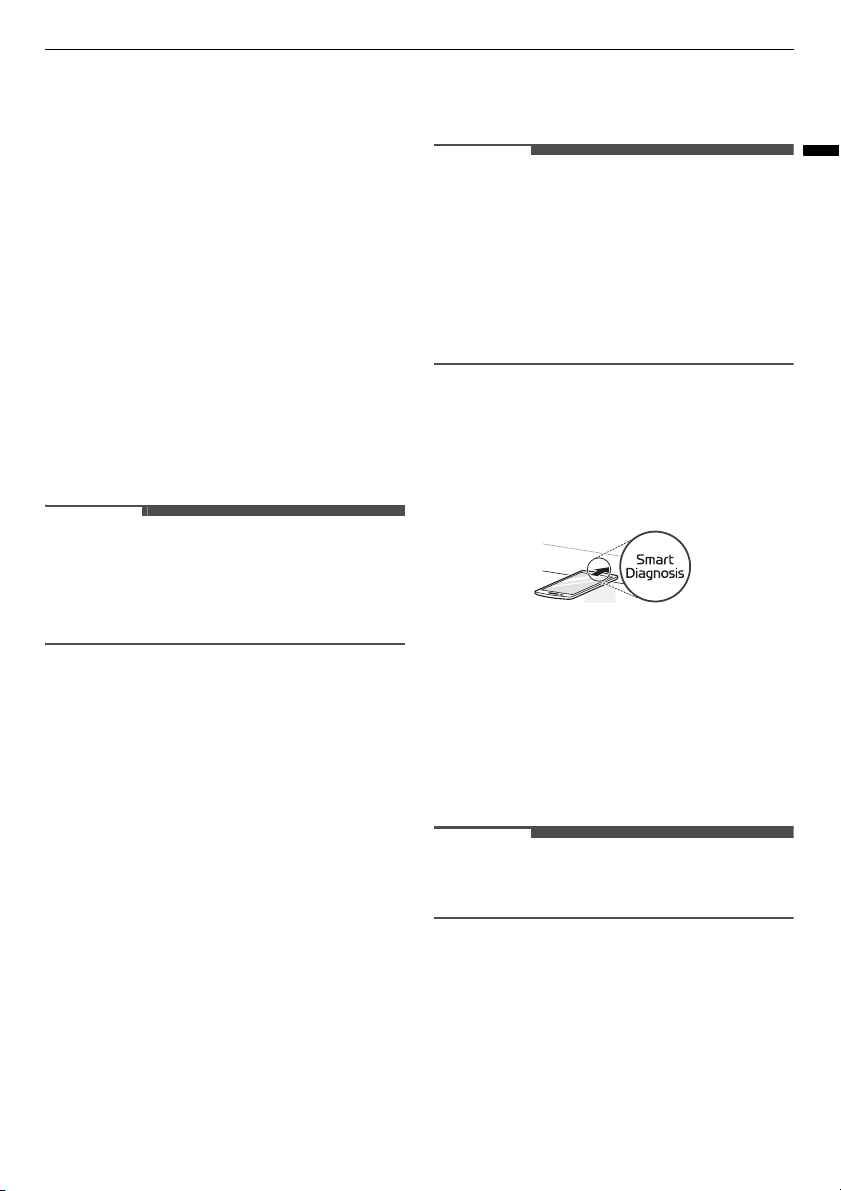
1) Hold the mouthpiece of your phone over the
Smart Diagnosis
logo. Do not touch any other
buttons.
2) Press and hold the
STOP/Cancel
button for 8
seconds until
5
appears in the display.
3) After you hear three beeps, release the
STOP/
Cancel
button.
4) Keep the phone in place until the tone
transmission has finished. The display will
count down the time. Once the countdown is
over and the tones have stopped, the
diagnosis will be displayed in the application.
NOTE
• For best results, do not move the phone while
the tones are being transmitted.

24
TROUBLESHOOTING
TROUBLESHOOTING
FAQs
Frequently Asked Questions
Q
:
What’s wrong when the oven light will not glow?
A: There may be several reasons why the oven light will not glow. Either the light bulb has blown or the
electric circuit has failed.
Q:
Does microwave energy pass through the viewing screen in the door?
A: No. The holes, or ports, are made to allow light to pass; they do not let microwave energy through.
Q:
Why does the beep tone sound when a button on the control panel is touched?
A: The beep tone sounds to assure that the setting is being properly entered.
Q:
Will the microwave function be damaged if it operates empty?
A: Yes. Never run it empty.
Q:
Why do eggs sometimes pop?
A: When baking, frying, or poaching eggs, the yolk may pop due to steam build up inside the yolk
membrane. To prevent this, simply pierce the yolk before cooking. Never microwave eggs in the shell.
Q:
Why is standing time recommended after microwave cooking is over?
A: After microwave cooking is finished, food keeps on cooking during standing time. This standing time
finishes cooking evenly throughout the food. the amount of standing time depends on the density of the
food.
Q:
Why doesn’t my oven always cook as fast as the cooking guide says?
A:
• Check your cooking guide again to make sure you have followed directions correctly, and to see what
might cause variations in cooking time.
• Cooking guide times and heat settings are suggestions, chosen to help prevent overcooking, the most
common problem in getting used to this oven.
• Variations in the size, shape, weight and dimensions of the food require longer cooking time.
• Use your own judgment along with the cooking guide suggestions to test food conditions, just as you
would do with a conventional cooker.
Q:
Why does the word ‘cool’ or remaining cooking time appear in the display with fan noise after
microwave cooking is over?
A: After cooking is complete, the fan may operate to cool the oven. The display will show Cool. If you open
the door or press once
STOP
or
STOP/Cancel
before the cooking time is complete, the remaining cooking
time will show on the display. This is not a malfunction.
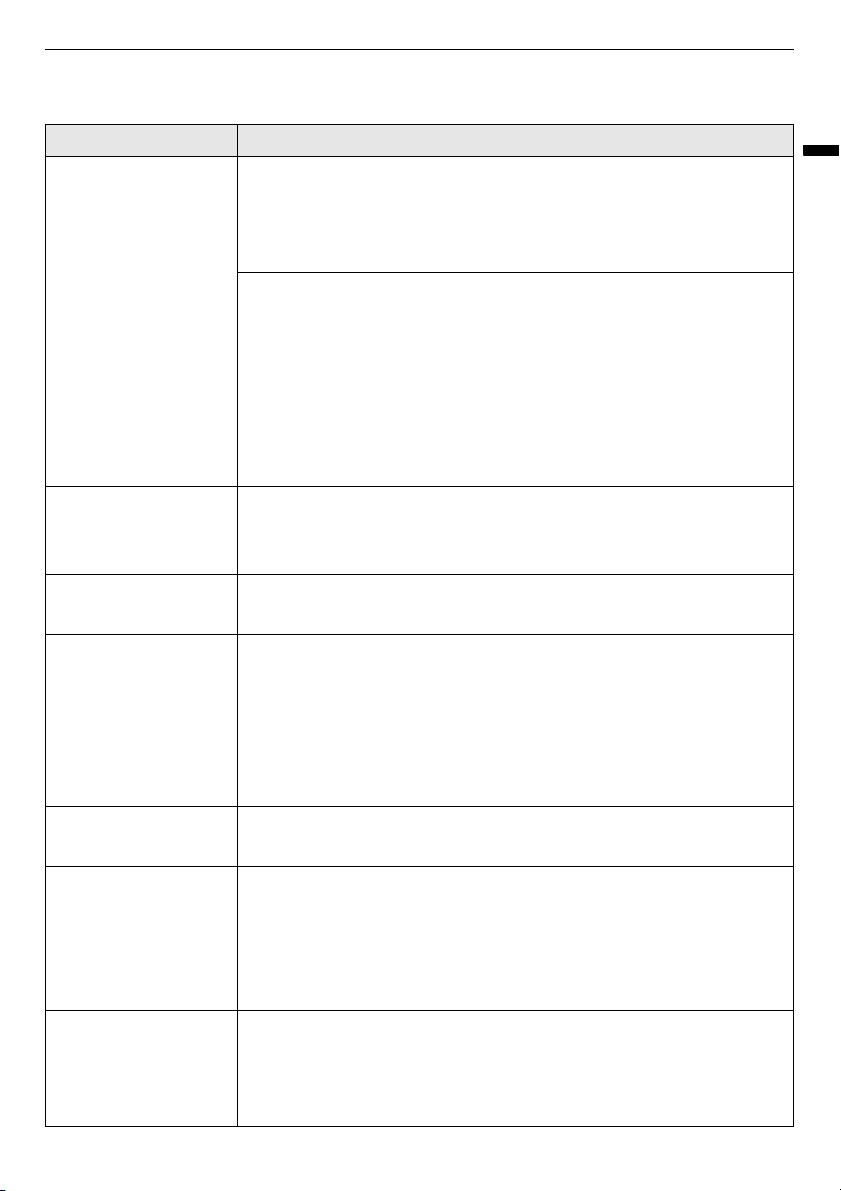
Before Calling for Service
If following symptoms appear while using the microwave oven, check it one more time. It may not be a
failure.
25
TROUBLESHOOTING
ENGLISH
Operation
Symptoms Possible Cause & Solution
Microwave oven does
not start
Power cord is unplugged, door is open. Or, cooking time is not set.
• Plug in power cord.
• Close oven door.
• Set cooking time.
A fuse in your home may be blown or the circuit breaker tripped. Or the
appliance is connected to a GFCI (Ground Fault Circuit Interrupter)
outlet, and the outlet's circuit breaker has tripped.
• Check the main electrical box and replace the fuse or reset the circuit
breaker.
Do not increase fuse capacity. If the problem is a circuit overload, have it
corrected by a qualified electrician.
• Reset the circuit breaker on the GFCI. If the problem persists, contact an
electrician.
Arcing or Sparking Utensils is not microwave safe. Or, operated the oven when it is empty.
• Use microwave-safe utensils. When in doubt, test utensils before use.
• Do not operate oven while it is empty.
Incorrect Time of Day Power is interruption.
• Reset the time. See Setting the Clock section to reset time of day.
Unevenly Cooked
Foods
Utensils is not microwave safe. Or, cooking settings was wrong.
• Test utensils to make sure it is microwave safe.
• Do not cook without the glass tray.
• Turn or stir food while cooking.
• Defrost food completely before cooking.
• Use correct cook time and power level.
Overcooked Foods Cooking settings and methods are wrong.
• Change cook time or power level.
Undercooked Foods Utensils is not microwave safe. Or, cooking settings was wrong.
• Test that utensils is microwave safe.
• Defrost food completely before cooking.
• Change cook time or power level.
• Make sure that ventilation ports are not blocked.
Improper Defrosting Utensils is not microwave safe. Or, cooking settings was wrong.
• Test that utensils is microwave safe.
• Change defrost time or weight.
• Turn or stir food during defrost cycle.
Memo
Memo