CONTENTS
SAFETY
USEANDCARE
Your Range and Ita Features ..................................... 5
Cooktop Controls ....................................................... 6
Oven Controls ............................................................. 6
Indicator Ughts ........................................................... 6
To Set Bake ................................................................. 6
Baking Tips ................................................................. 7
Hide Away Latch Handle ..................................... 7 & 9
To Set Broil ................................................................. 8
Cleaning Tips .................................................... 10 & 11
Removal of Packaglng Tape .................................... 10
Self-Cleaning Cycle .................................................... 9
Removable Range Parts ........... _......................... 11-13
"Do It Yourse[r' Temperature Adjustment ............. 16
BEFORE CALLING FOR SERVICE
What to Do Before Calling for Service .............. 14, 15
WARRANTY
MODELS 93131
SEARS
Kenmore
L
!
USE • CARE •SAFETY
MANUAL
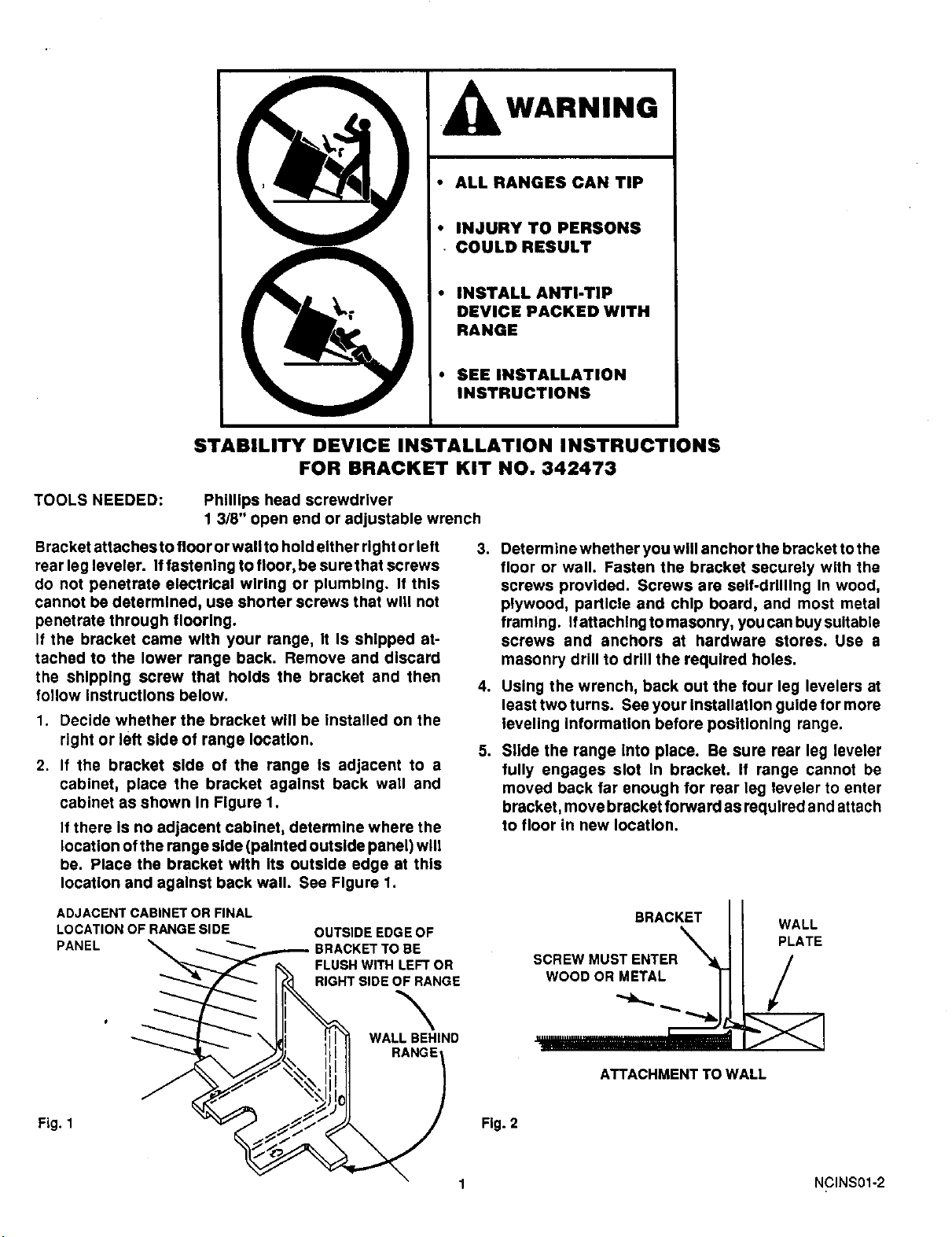
I kWARNING
• ALL RANGES CAN TIP
• INJURY TO PERSONS
• COULD RESULT
! • INSTALL ANTI-TIP
DEVICE PACKED WITH
RANGE
• SEE INSTALLATION
INSTRUCTIONS
STABILITY DEVICE INSTALLATION INSTRUCTIONS
FOR BRACKET KIT NO. 342473
TOOLS NEEDED:
Phillips head screwdriver
1 3/8" open end or adjustable wrench
Bracket attaches to floor or wall to hold either right or left
rear leg leveler. If fastening to floor, be sure that screws
do not penetrate electrical wiring or plumbing. If this
cannot be determined, use shorter screws that wig not
penetrate through flooring.
If the bracket came with your range, It Is shipped at-
tached to the lower range back. Remove and discard
the shipping screw that holds the bracket and then
follow instructions below.
1. Decide whether the bracket will be Installed on the
right or left side of range location.
2. If the bracket side of the range is adjacent to a
cabinet, place the bracket against back wall and
cabinet as shown In Figure 1.
If there Is no adjacent cabinet, determine where the
location ofthe range side (painted outside panel) will
be. Place the bracket with Its outside edge at this
location and against back wall. See Figure 1.
.
4.
.
ADJACENT CABINET OR FINAL
LOCATION OF RANGE SIDE
PANEL
OUTSIDEEDGEOF
BE
FLUSHWITHLEFTOR
RIGHTSIDEOFRANGE
\
WALLBEHIND
Determine whether you will anchor the bracket to the
floor or wall. Fasten the bracket securely with the
screws provided. Screws are self-drilling In wood,
plywood, particle and chip board, and most metal
framing. Ifattachlngtomasonry, youcanbuysuitable
screws and anchors at hardware stores. Use a
masonry drill to drill the required holes.
Using the wrench, back out the four leg levelers at
least two turns. See your installation guide for more
leveling information before positioning range.
Slide the range Into place. Be sure rear leg leveler
fully engages slot in bracket. If range cannot be
moved back far enough for rear leg leveler to enter
bracket, move bracket forward as required and attach
to floor in new location.
BRACKET
SCREWMUSTENTER_
WOODOR METAL |
WALL
PLATE
/
ATTACHMENT TO WALL
Fig. 1 Fig. 2
1 NCINS01-2
9:,"_
_i::.
_%19_'_ _ •_:_'_....... :_%%_ __:_"
IMPORTANT INSTRUCTIONS
FOR YOUR SAFETY
SAVE THESE INSTRUCTIONS
Read all instructions before using this appliance. When using electrical
appliances, basic safety precautions should be followed, including the following:
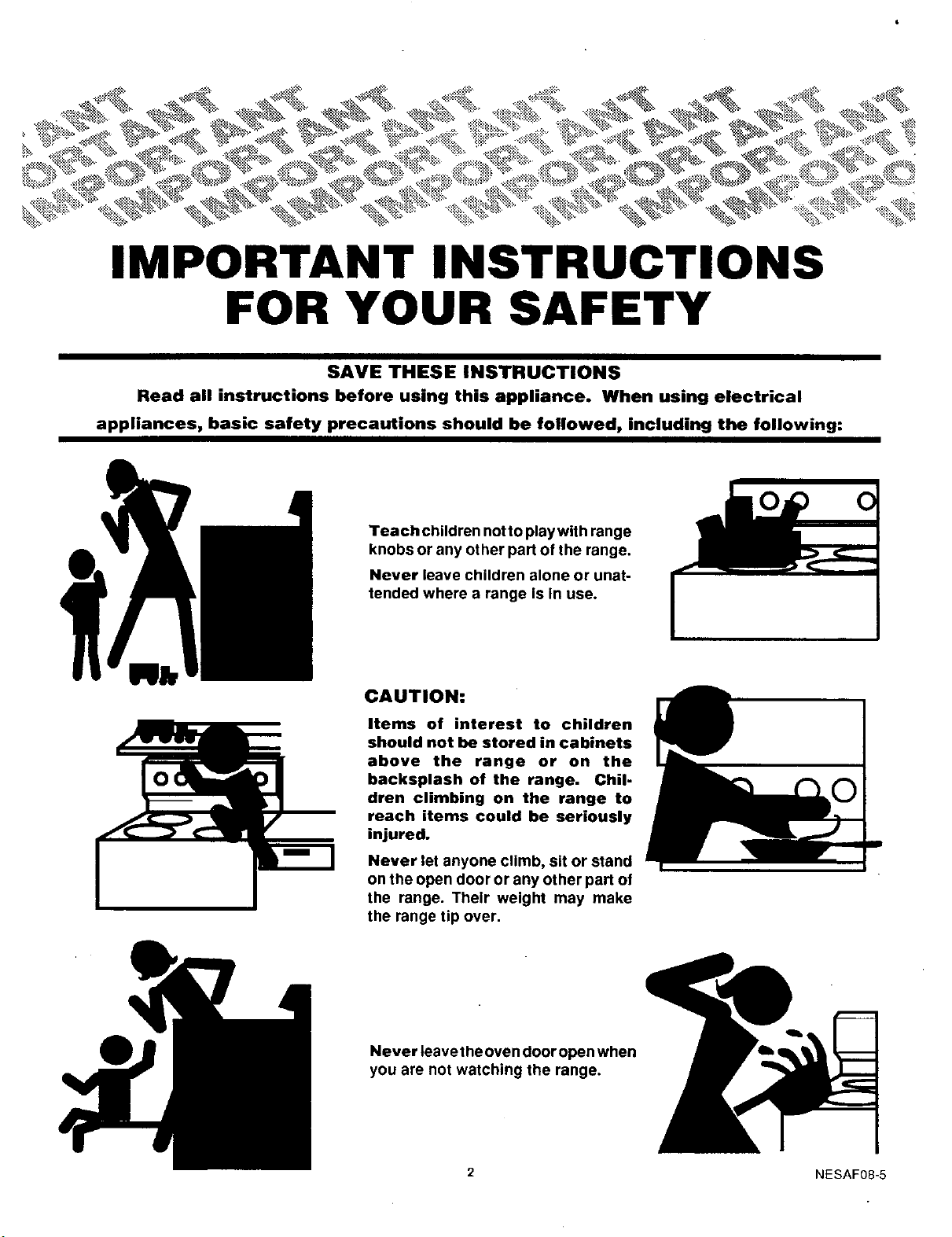
Teach children notto playwith range
knobs or any other part of the range,
Never leave children alone or unat-
tended where a range Is In use.
CAUTION:
Items of interest to children
should not be stored in cabinets
above the range or on the
backsplash of the range. Chil-
dren climbing on the range to
reach items could be seriously
injured.
Never let anyone climb, sit or stand
on the open door or any other part of
the range. Their weight may make
the range tip over.
Never leave theoven door open when
you are not watching the range.
2 NESAF08-5
To insure safety for yourself and your home, please read your Owner's Manual
carefully. Keep it handy for quick easy reference. Pay close attention to the
safety sections of your manual. You can recognize the safety sections by
looking for the __ symbol or the word "Safety".
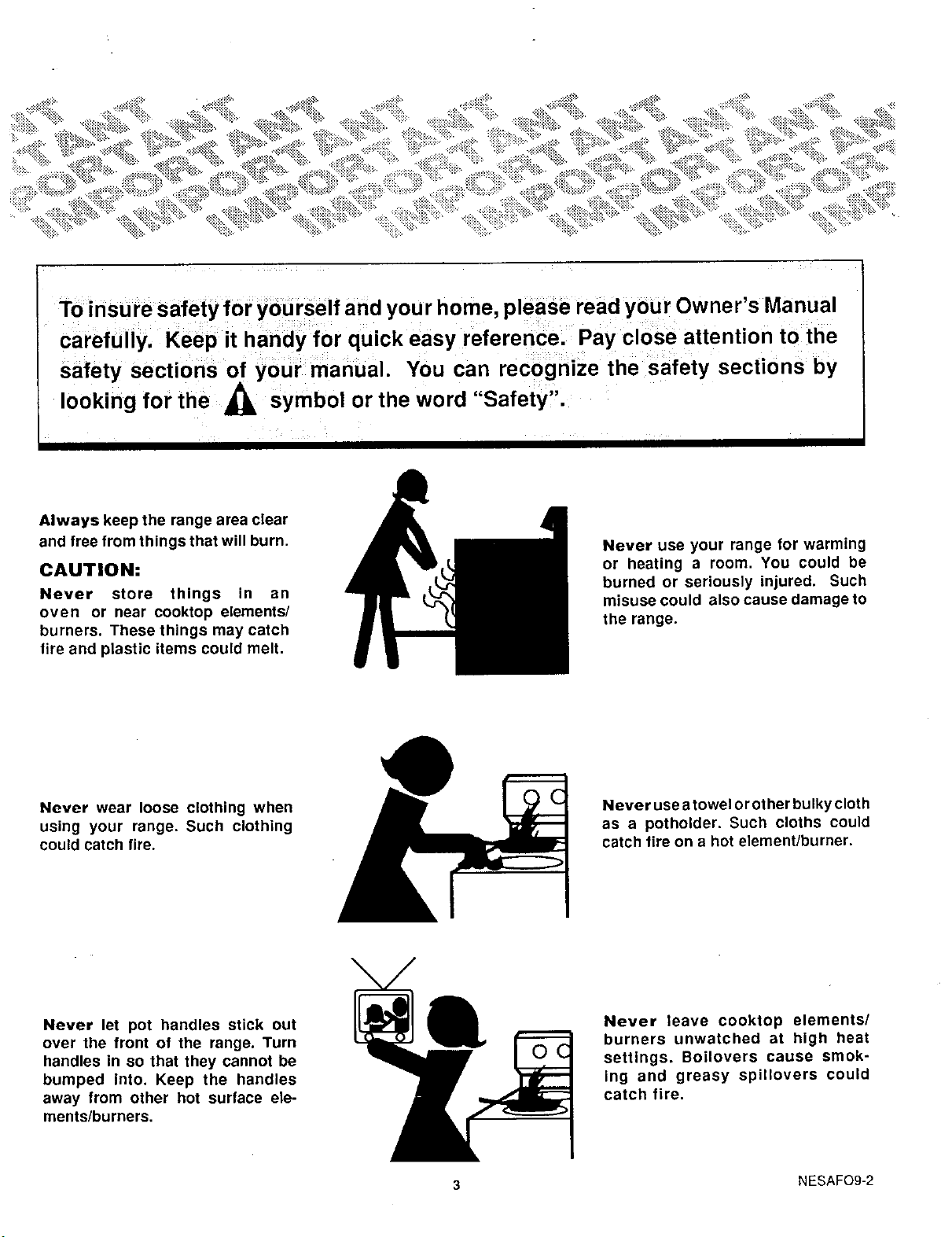
Always keep the range area clear
and free from things that will burn.
CAUTION:
Never store things in an
oven or near cooktop elements/
burners, These things may catch
fire and plastic items could melt,
Never use your range for warming
or heating a room. You could be
burned or seriously injured. Such
misuse could also cause damage to
the range.
Never wear loose clothing when
using your range. Such clothing
could catch fire.
Never use a towel orot her bulky cloth
as a potholder. Such cloths could
catch fire on a hot element/burner.
Never let pot handles stick out
over the front of the range. Turn
handles in so that they cannot be
bumped into. Keep the handles
away from other hot surface ele-
ments/burners.
Never leave cooktop elements/
burners unwatched at high heat
settings. Boilovers cause smok-
ing and greasy spillovers could
catch fire.
3 NESAFO9-2
IMPORTANT SAFETY INSTRUCTIONS
Keep this book for later use.
Be sure your range Is Installed and grounded properly
by a qualified technician.
Always use care when touching surface elements,
oven heating elements or Inside the oven. Heating
elements could be hot enough to burn you even If they
are dark In color. The oven vent duct and oven door may
also become hot during oven use.
After broiling, always take the broiler pan out of the
oven and clean It. Leftover grease In the broiler pan can
catch on fire next time you use the pan.
Always use dry potholders when removing pans from
the oven. Moist or damp potholders can cause steam
burns.
Always use care when opening oven door. Let hot air
and steam out before moving food.
Always follow cleaning Instructions In this book.
Always keep the range clean. Food and grease are
easy to ignite. Clean the oven regularly.
Always keep combustible wall coverings, curtains or
drapes a safe distance away from your range.
Always keep wooden and plastic utensils or canned
food a safe distance away from your range.
Always keep the appliance area clear and free from
things that will burn, gasoline and other flammable
vapors and liquids.
Always remove the broiler pan and other utensils from
the oven before a self-clean cycle.
Clean 0nly parts listed in the Manual.
Always keep dish towels, dish cloths, potholders, and
linens a safe distance away from your range. Never
store such items in or near your range.
Never heat unopened food containers. Pressure buildup
may make container burst and cause Injury.
Never leave jars or cans of fat or drippings on or near
the range. Never let grease build up on your range. You
can keep grease fires from starting if you clean up
grease and spills after each range use.
Never use aluminum foil to line oven bottoms or drip
bowls. Improper use of foil could start a fire.
Never block free airflow through the oven vent.
Never try to move a pan of hot fat, especially a deep fat
fryer. Walt until the fat has cooled.
Place oven racks In desired position while oven iscool.
If racks must be handled when hot, do not let potholder
contact hot heating element In oven.
Choose pots and pans with flat bottoms, large enough
to cover the entire cooktop element. This will cut down
the risk of setting potholders or clothing on fire with an
uncovered element and waste less energy.
Only some kinds of glass or ceramic pans can be used
for cooktop cooking. Be sure that the pan you use will
not break when heated on the cooktop elements.
Never try to clean utensils, cookware or removable
parts of your range in the oven during a self-clean cycle.
Never rub, move, clean or damage the door gasket on
self-cleaning oven. The gasket is essential for a good
seal.
If the self-cleaning mode malfunctions, turn off
and disconnect the power supply. Have serviced by a
qualified technician.
Never try to repair or replace any part of the range
unless instructions are given in this book. All other
work should be done by a skilled technician.
Do Not Use Oven Cleaners -- No commercial oven
cleaner or oven liner protective coating of any kind
should be used in or around any part of the oven.
Never put removable beating elements in water. Do not
put them in a dishwasher. Do not put them in the self-
clean cycle of your oven.
Never use the cooktop without reflector pans or drip
bowls in place. If these pans or bowls are not there
during cooking, wiring or other range parts may be
damaged.
Never clean cooktop surface when it is hot. Some
cleaners produce noxious fumes and wet cloths could
cause steam burns if used on a hot surface.
Be sure everyone in your home knows what to do
in case of a fire.
Read and understand this information NOW!
Should you ever need it, you will not have time for
reading.
COOKTOP GREASE FIRE
Never use water on a grease fire - it will only
spread the flames.
Never pick up a flaming pan...instead:
1. Turn off the element.
2. Smother the fire with a tightly fitting pan lid,
baking soda, or a foam, halon, or dry chemical
extinguisher.
OVEN FIRE
Do not try to move the pan.
1. Close oven door and turn controls off.
2. If fire continues, throw baking soda on the
fire, or use a foam, halon, or dry chemical
extinguisher.
Never use water on a grease fire -- it will only
spread the flames.
IMPORTANT SAFETY NOTICE
The Califomia Safe Drinking Water and Toxic Enforcement
Act requires the Governor of Califomia to publish a list of
substancesknownto thestateto causebirthdefectsor other
reproductive harm, and requires businesses to warn cus-
tomers ofpotential exposure to such substances.
4
The fiberglass insulation in self-clean ovens gives off a
very small amount ofcarbon monoxide during the clean-
ing cycle. Exposure can be minimized by venting with
an open window or using a ventilation fan or hood.
NESAF30-3
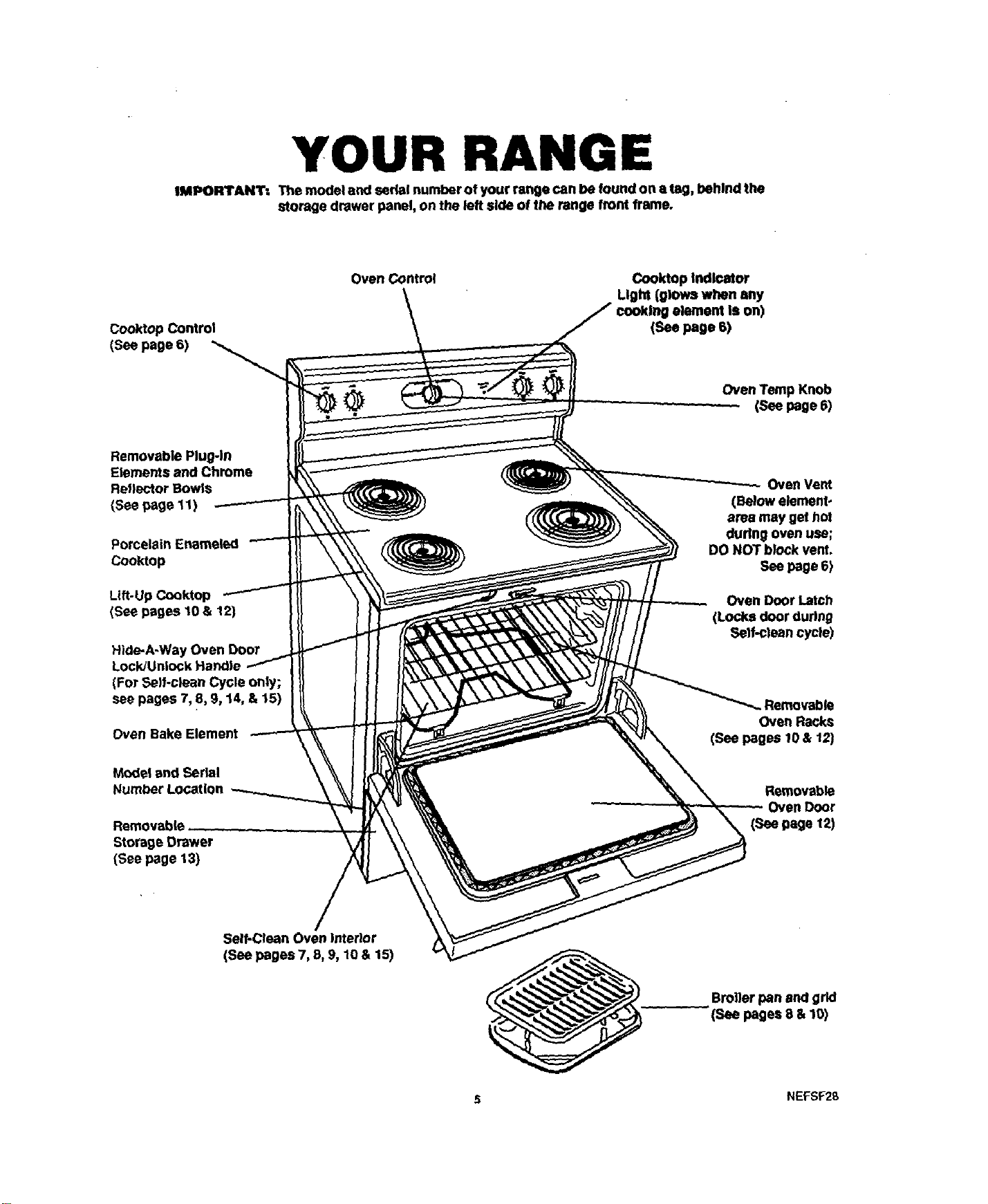
YOUR RANGE
IMPORTANT: The model and serfot number of your range can be found on a tag, behind the
storage drawer panel, on the left side of the range front frame.
Cooktop Control
(See page 6)
Oven Control
Cooktop Indlcotor
Light (glows when any
element Is on)
(See page 6)
Removable Plug-in
Elements and Chrome
Reflector Bowls
(See page 11)
Porcelain Enameled
Cooktop
Lift-Up Cooktop
(See pages lO& 12)
Hide-A-Way Oven Door
(For Self-clean Cycle only;
see pages 7, 8, 9, 14, & 15)
Oven Bake Element
Model and Serial
Number Location
Storage Drawer
(See page 13)
Oven TempKnob
(Seepage 6)
Oven Vent
(Below element-
area may get hot
during oven use;
DO NOT block vent.
See page 6)
Oven Door Latch
(Locks door during
Self-clean cycle)
Oven Racks
(See pages 10 & 12)
Removable
Oven Door
(See page 12)
Self-Clean Oven interior
(See pages 7, 8, 9, 10 & 15)
Broiler pan and grid
(See pages 8 & 10)
NEFSF2B
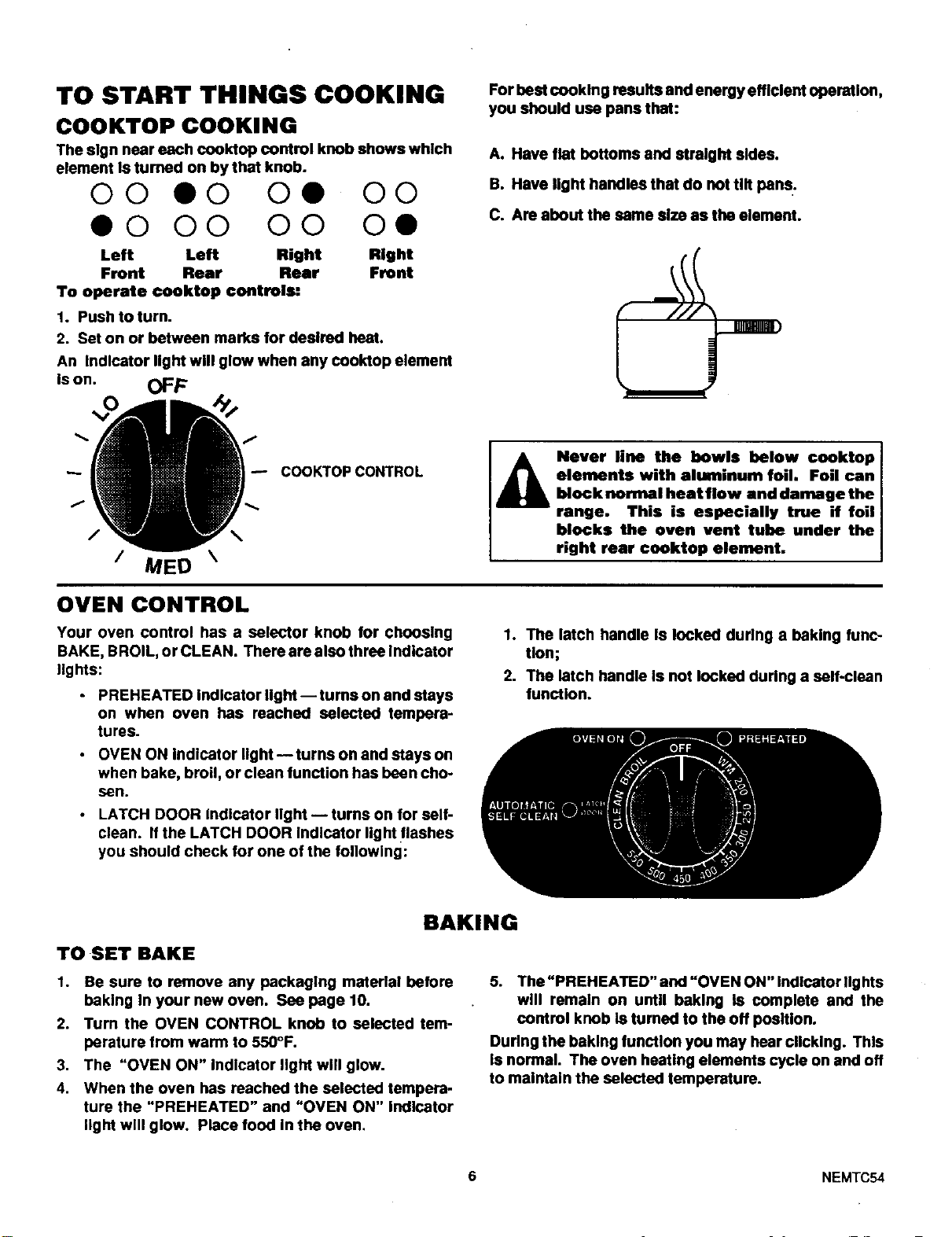
TO START THINGS COOKING
COOKTOP COOKING
The sign near each cooktop control knob shows which
element Is turned on by that knob.
O0 O0 Oe O0
• 0 O0 O0 O•
Left Left Right Right
Front Rear Rear Front
To operate ¢ooktop controls:
1. Push to turn.
2. Set on or between marks for desired heat.
An Indicator fight will glow when any cool(top element
is on. OFF
For best cooking results and energy efficient operation,
you should usa pans that:
A. Have flat bottoms and straight skies.
B. Have light handles that do not tilt pans.
C. Are about the same size as the element.
/
/ MED \
OVEN CONTROL
COOKTOPCONTROL
Your oven control has a selector knob for chcoslng
BAKE, BROIL, or CLEAN. There are also three Indicator
lights:
• PREHEATED Indicator light-- tums on and stays
on when oven has reached selected tempera-
tures.
I A Never line the bowls below conktop
elements with aluminum foil• Foil can
block normal heat flow end damage the
range. This is especially true if foil
blocks the oven vent tube under the
right rear cooktop element.
1. The latch handle Is locked during a baking func-
tion;
• OVEN ON Indicator light-- turns on and stays on
when bake, broil, or clean function has been cho-
sen.
• LATCH DOOR Indicator Ilght -- turns on for self-
clean. If the LATCH DOOR Indicator light flashes
you should check for one of the following:
2. The latch handle Is not locked during a salf-clean
function.
BAKING
TO SET BAKE
1. Be sure to remove any packaging material before
baking In your new oven. See page 10.
2. Turn the OVEN CONTROL knob to selected tem-
parature from warm to 550°F.
3. The "OVEN ON" Indicator light will glow.
4. When the oven has reached the selected tempera-
ture the "PREHEATED" and "OVEN ON" Indicator
light will glow. Place food In the oven,
5. The "PREHEATED" and =OVEN ON" Indicator IIghts
will remain on until baking Is complete and the
control knob Is turned to the off position.
During the baking function you may hear clicking. This
is normal. The oven heating elements cycle on and off
to maintain the selected temperature.
6 NEMTC54
BAKING TIPS
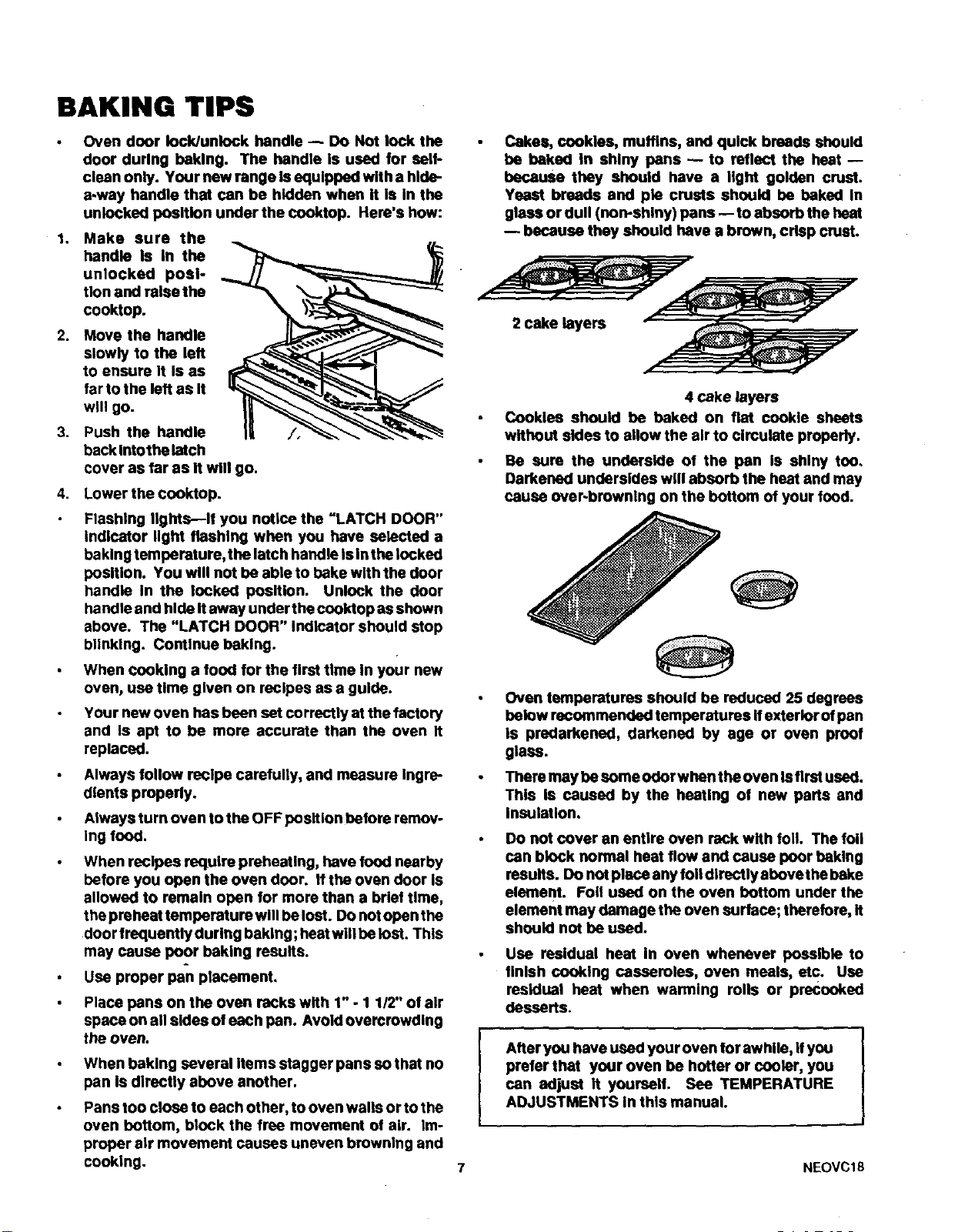
1.
2.
3.
Oven door lock/unlock handle -- DO Not lock the
door during haklng. The handle Is used for sell-
clean only. Your new range Is equlppad with a hide-
away handle that can be hidden when it Is In the
unlocked position under the cooktop. Hera's how:
Make sure the
handle Is In the
unlocked posi-
tion and raise the
cooktop.
Move the handle
slowly to the left
to ensure It Is as
far to the left as It
will go.
Push the handle
back Intothelatch
cover as far as It will go.
4. Lower the cooktop.
Flashing lights--If you notice the "LATCH DOOR"
Indicator light flashing when you have selected a
bakingtemperature, the latch handle Is Inthe locked
position. You will not be able to hake with the door
handle In the locked position. Unlock the door
handle and hide Itaway under the cooktop as shown
above. The "LATCH DOOR" Indicator should stop
blinking. Continue beklng.
When cooking a food for the first time in your new
oven, use time given on recipes as a guide.
Your new oven has been set correctly at the factory
and Is apt to be more accurate than the oven It
replaced.
Always follow recipe carefully, and measure Ingre-
dients properly.
Always turn oven to the OFF position before remov-
ing food.
When recipes require preheating, have food nearby
before you open the oven door. If the oven door is
allowed to remain open for more than a brief time,
the preheat temperature will be lost. DOnot open the
door frequently during baking; heatwill be list. This
may cause poor baking results.
Use proper pan placement.
Place pans on the oven racks with 1" - 1 1/2" of air
space on all sides of each pan. Avoid overcrowding
the oven.
When baking several Items stagger pans so that no
pan Is directly above another.
Pans too close to each other, to oven walls or to the
oven bottom, block the free movement of air. Im-
proper air movement causes uneven browning and
cooking.
Cakes, cookies, muffins, and quick breads should
be baked In shiny pans -- to reflect the heat --
because they should have a light golden crust.
Yeast breads and pie crusts should be baked In
glass or dull (non-shiny) pans -- to absorb the heat
because they should have a brown, crisp crust.
2 cake layers y-
4 cake layers
Cookies should be baked on flat cookie sheets
without sides to allow the air to circulate properly.
Be sure the underside of the pan Is shiny too.
Darkened undersides will absorb the heat and may
cause over.browning on the bottom of your food.
Oven temperatures should be reduced 25 degrees
below recommended temperatures if exterior of pan
Is predarkened, darkened by age or oven proof
glass.
There may be some odor when the oven Isfirst used.
This Is caused by the heating of new parts and
Insulation,
Do not cover an entire oven rack with foil. The foil
can block normal heat flow and cause poor baking
results. DOnot place any foil directly above the bake
element. Foil used on the oven bottom under the
element may damage the oven surface; therefore, it
should not be used.
Use residual heat In oven whenever possible to
finish cooking casseroles, oven meals, etc. Use
residual heat when warming rolls or precooked
desserts.
After you have used your oven for awhile, Ifyou
prefer that your oven be hotter or cooler, you
can adjust It yourself. See TEMPERATURE
ADJUSTMENTS In this manual.
7 NEOVC18
BROILING
TO SET BROIL:
1. Open the door to the
broil stop position.
2. Turn the oven control
knob to BROIL.
3. The =OVEN ON" Indi-
cator light will light up
and will stay on until
broil function is com-
plete and knob Is
turned to the off posi-
tion.
BROILING TIPS:
Brush chicken and fish with butter several times as
/_ i they br°lt" when broIlIng fIsh' gmasa the grid t°
prevent sticking and broil with skin side down. It Is
not necessary to turn fish.
Never leave a soiled broiler pan in the range.
Grease in the pan may smoke or bum the next time
the oven Is used.
!_ Be sure you know the correct procedure for
y__ putting out a grease fire. See the section on
safety.
Do not €over the entire broiler
Do not lock oven door during broiling. The
Iocldunlock handle Is used for self-cleaning only.
Broiling is cooking by direct heat from the broil
element. Tender cuts of meat or marinated meat
should be selected for broiling. For best results
steaks and chops should be at least 3/4" thick.
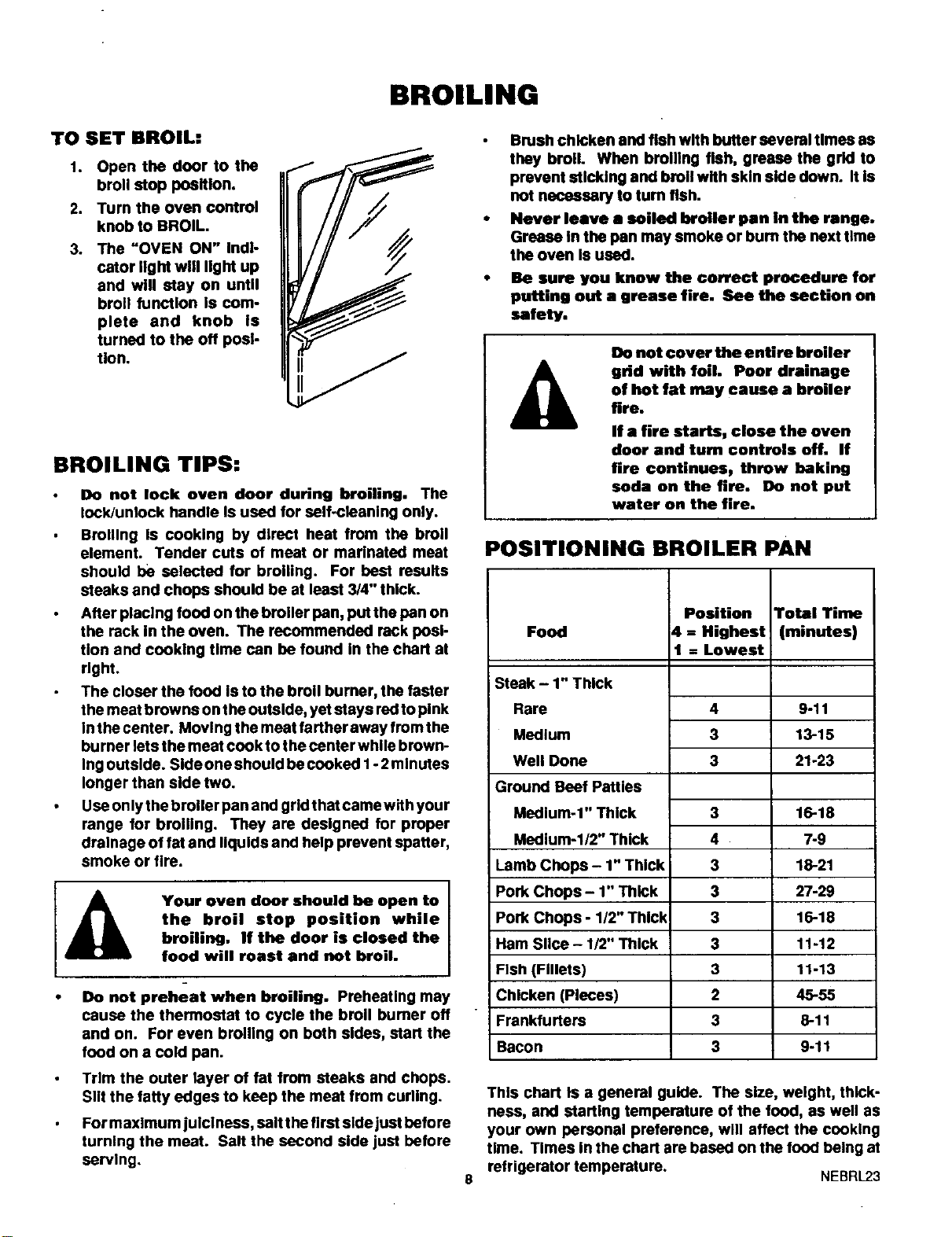
After placing food on the broiler pan, put the pan on
the rack In the oven. The recommended rack posi-
tion and cooking time can be found In the chart at
right.
The closer the food Is to the broil burner, the faster
the meat browns on the outside, yet stays redto pink
In the center. Moving the meat farther away from the
burner lets the meat cook to the center while brown-
Ing outside. Side one should be cooked I - 2minutes
longer than side two.
Use only the broiler pan and grldthat camewith your
range for broiling. They are designed for proper
drainage of fat and liquids and help prevent spatter,
smoke or tire.
I
Your oven door should he open to I
the broil stop position while
I
broiling, If the door is closed the
food will roast and not broil.
• Do not preheat when broiling. Preheating may
cause the thermostat to cycle the broil bumer off
and on. For even broiling on both sides, start the
food on a cold pan.
grid with foil. Poor drainage
of hot fat may cause a broiler
fire.
If a fire starts, close the oven
door and turn controls off. If
fire continues, threw baking
soda on the fire. Do not put
water on the fire.
POSITIONING BROILER PAN
Position Total Time
Food 4 = Highest (minutes)
1 = Lowest
Steak - 1" Thick
Rare
Medium
Well Done
Ground Beef Patties
Medium-1" Thick
Medium-I/2" Thick
Lamb Chops - 1" Thick
Pork Chops - 1" Thick
Pork Chops - 1/2" Thick
Ham Slice - 1/2" Thick
Fish (Fillets)
Chicken (Pieces)
Frankfurters
Bacon
4 9-11
3 13-15
3 21-23
3
4
3
3
3
3
3
2
3
3
16-18
7-9
1_21
27 29
16-18
11-12
11-13
45-5s
8-11
9-11
Trim the outer layer of fat from steaks and chops.
Slit the fatty edges to keep the meat from curling.
For maximum julclness, salt the first side just before
turning the meat. Salt the second side just before
serving.
8
This chart Is a general guide. The size, weight, thick-
ness, and starting temperature of the food, as well as
your own personal preference, will affect the cooking
time. Times in the chart are based on the food being at
refrigerator temperature. NEBRL23
THE SELF-CLEAN CYCLE
PREPARING YOUR OVEN:
1. Be sure your oven Is cool.
2. Removethe broil pan and grid,oven racks, all utensils
and any foil that may be In the oven. Do not try to
clean utensils or any other objects Inthe oven dudng
a seit.clean cycle. If oven racks are left in the
range during a clean cyclej they will darken_
lose their luster and become hard to slide. If
you choose to leave the racks in the oven, you can
polish the edges of the racks with steel wool and
apply a small amount of vegetable oll to the rack
edges after the self-clean cycle. This will make the
racks easier to slide.
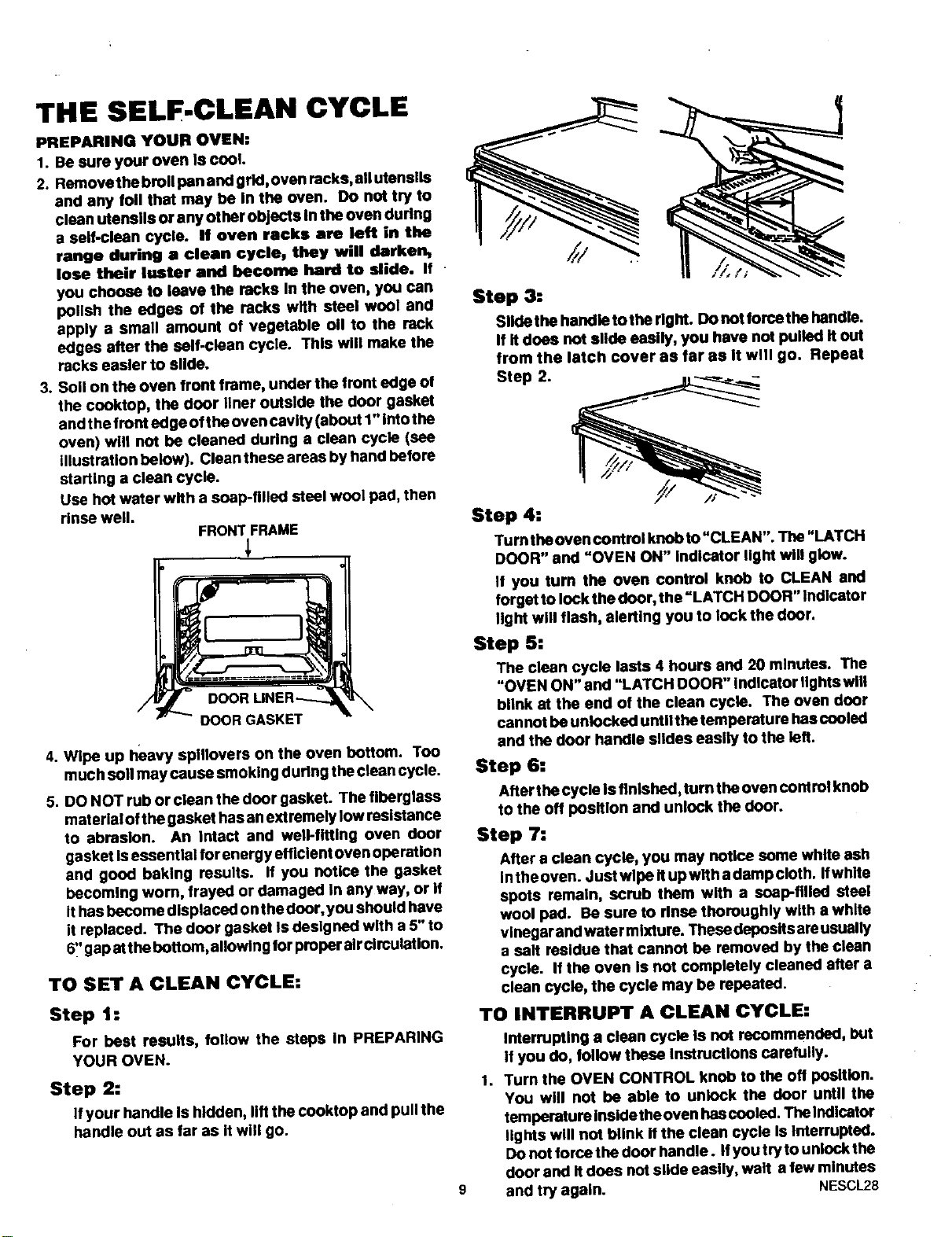
3. Soil on the oven front frame, under the front edge of
the cooktop, the door liner outside the door gasket
and thefront edge ofthe oven cavity (about 1" intothe
oven) will not be cleaned during a clean cycle (see
Illustration below). Clean these areas by hand before
starting a clean cycle.
Use hot water with a soap-filled steal wool pad, then
rinse well.
FRONT FRAME
Step 3=
Slide the handle tothe right. Do not force the handle.
If it does not slide easily, you have not pulled it out
from the latch cover as far as It will go. Repeat
Step 2.
Step 4=
Turn the oven control knob to"CLEAN". The"LATCH
t_ DOOR" and "OVEN ON" Indicator light will glow.
If you turn the oven control knob to CLEAN and
forget to lock the door, the "LATCH DOOR" Indicator
Itght will flash, alerting you to lock the dour.
Step 5:
The clean cycle lasts 4 hours and 20 minutes. The
"OVEN ON" and "LATCH OOOR" indicator Ilghtswlll
blink at the end of the clean cycle. The oven door
OOORGASKET cannot be unlocked untllthe temperature has cooled
4. Wipe up heavy splllovers on the oven bottom. Too
much soil may cause smoking during the clean cycle.
5. DO NOT rub or clean the door gasket. The fiberglass
material ofthe gasket has anextremely low resistance
to abrasion. An intact and well-fitting oven dour
gasket Isessential forenergy efficient oven operation
and good baking results. If you notice the gasket
becoming wom, frayed or damaged in any way, or if
it has become dlspleced on the door, you should have
it replaced. The dour gasket Is designed with a 5" to
6_'gap atthe bottom, allowing for proper air clrculatlono
TO SET A CLEAN CYCLE=
Step 1 =
For best results, follow the steps In PREPARING
YOUR OVEN.
Step 2:
If your handle Is hidden, lifl the cooklop and pull the
handle out as far as itwill go.
9
and the door handle slides easily to the left.
Step 6=
After the cycle Isfinished,turn the oven centrol knob
to the off position and unlock the door.
Step 7=
After e clean cycle, you may notice some white ash
inthe oven. Just wipe It up with a damp cloth. Ifwhite
spots remain, scrub them with a soap-filled steel
wool pad. Be sure to rinse thoroughly with a white
vinegar and water mixture. These deposits areusually
a salt residue that cannot be removed by the clean
cycle. If the oven Is not completely cleaned after a
clean cycle, the cycle may be repeated.
TO INTERRUPT A CLEAN CYCLE:
1.
Interrupting a clean cycle is not recommended, but
If you do, follow these Instructions carefully.
Turn the OVEN CONTROL knob to the off position.
You will not be able to unlock the door until the
temperature Insidetheoven hascooled. The Indicator
lights will not blink Ifthe clean cycle Is Interrupted.
Do not force the door handle. If you try to unlock the
door and It does not slide easily, walt a few minutes
and try again. NESCL28
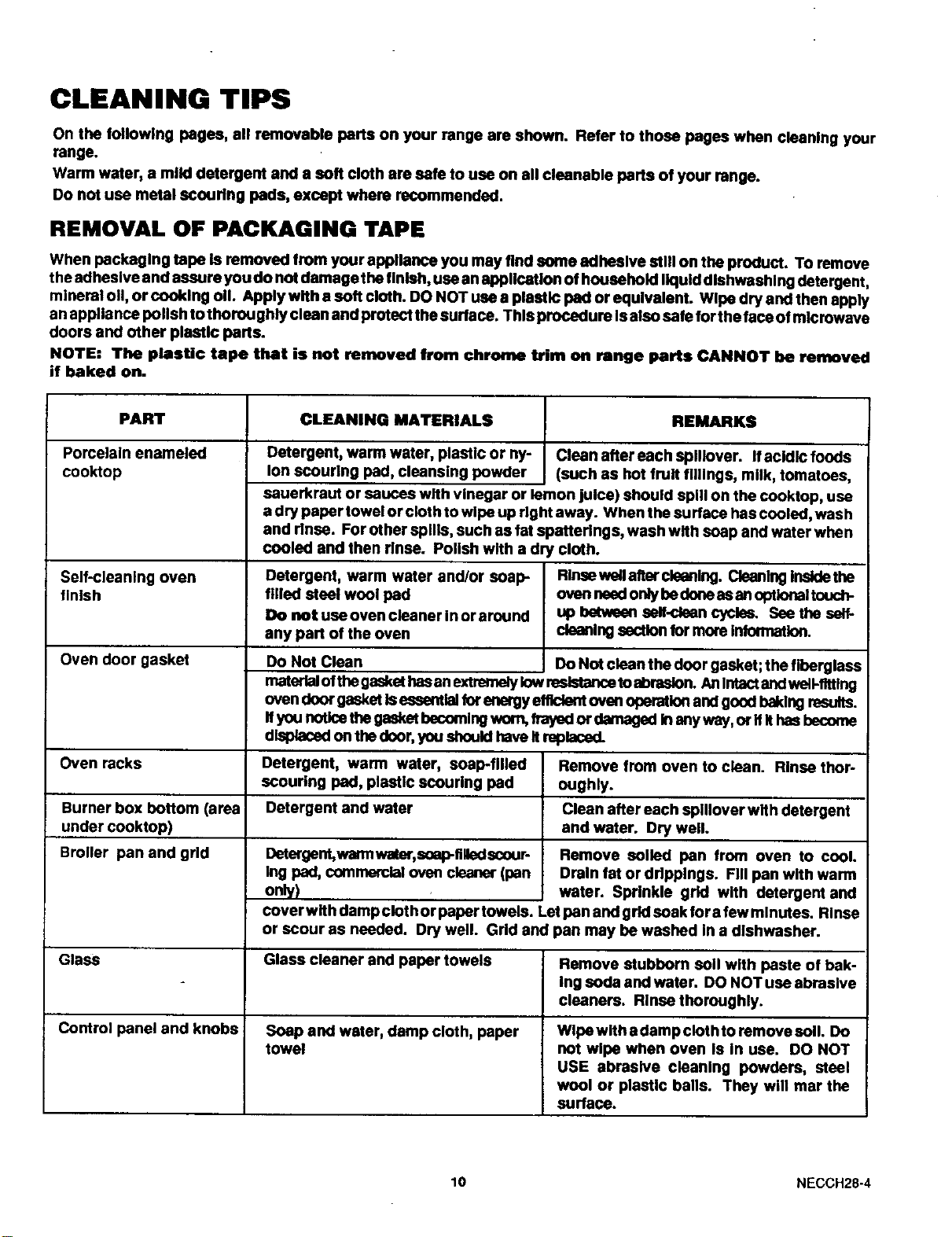
CLEANING TIPS
On the following pages, all removable parts on your range are shown. Refer to those pages when cleaning your
range.
Warm water, a miM detergent and a soft cloth are safe to use on all cleanable parts of your range.
Do not use metal scouring pads, except where recommended.
REMOVAL OF PACKAGING TAPE
When packaging tape is removed from your apptlance you may find some adhestve etitl on the product. TOremove
theadhesive and assure you do not damage the finish, use an application of household Ikluld dlshwashlng detergent,
mineral oil, or cooking oil. Apply with • soft cloth. DO NOT use a plastic pad or equivalent. Wlpa dry and then apply
an applla nce polish to thoroughly clean and protect the surface. This procedure Is also safe for the face of microwave
doors and other plastic parts.
NOTE: The plasUc tape that is not removed from chrome trim on range parts CANNOT be removed
if baked on.
PART
Porcelain enameled
cooktop
Self-cleaning oven
finish
Oven door gasket
CLEANING MATERIALS REMARKS
Detergent, warm water, plastic or ny- clean after each sptllover. Ifacidic foods
Ion scouring pad, cleansing powder (such as hot fruit fillings, milk, tomatoes,
sauerkraut or sauces with vinegar or lemon juice) should spill on the cooktop, use
a dry paper towel or cloth to wipe up right away. When the surtace has cooled, wash
and rinse. For other spills, such as fat spatterings, wash with soap and water when
cooled and then rinse. Polish with a dry cloth.
Detergent, warm water and/or soap-
filled steel wool pad
Do not use oven cleaner in or around
any part of the oven
Do Not Clean
Rlnsewetlafter cleaning. Cleaning Insidethe
oven nsedonly bedoneas anoptlenaltouch-
up between self-clean cycles. Sea the self-
cleaning sectlen for more Infermatlon.
Do Not clean the door gasket; the fiberglass
materialofthegaskethasan extremelylow resistancetoabraslen. An Intactand well-fitting
oven deor gasketle essentlalfer energyefficientoven operetlon and good baking results.
Ifyou noticethegasketbecomingwon%frayed or demaged Inanyway, or IfIthasbecome
dlspleced on the deor, you sheuld haveit mptaced.
Oven racks Detergent, warm water, soap-filled Remove from oven to clean. Rinse thor-
scouring pad, plastic scouring pad oughly.
Burner box bottom (area ! Detergent and water Clean after each splllover with detergent
under cooktop) and water. Dry well.
Broiler pan and grid
Detergent,warmwater,scap-filled scour-
Ing pad, commercial oven cleaner (pan
only)
Remove soiled pan from oven to cool.
Drain fat or ddpplngs. Fill pan with warm
water. Sprinkle grid with detergent and
coverwith damp clot hor paper towels. Letpan and grid soak for a few minutes. Rinse
or scour as needed. Dry well. Grid and pan may he washed In a dishwasher.
Glass Glass cleaner and paper towels Remove stubborn soil with paste of bak-
Ing soda and water. DO NOT use abrasive
cleaners. Rinse thoroughly.
Control panel and knobs Soap and water, damp cloth, paper Wlpewith adamp clothto ramove soil. Do
towel not wipe when oven Is In use. DO NOT
USE abrasive cleaning powders, steel
wool or plastic balls. They will mar the
surface.
10 NECCH28-4
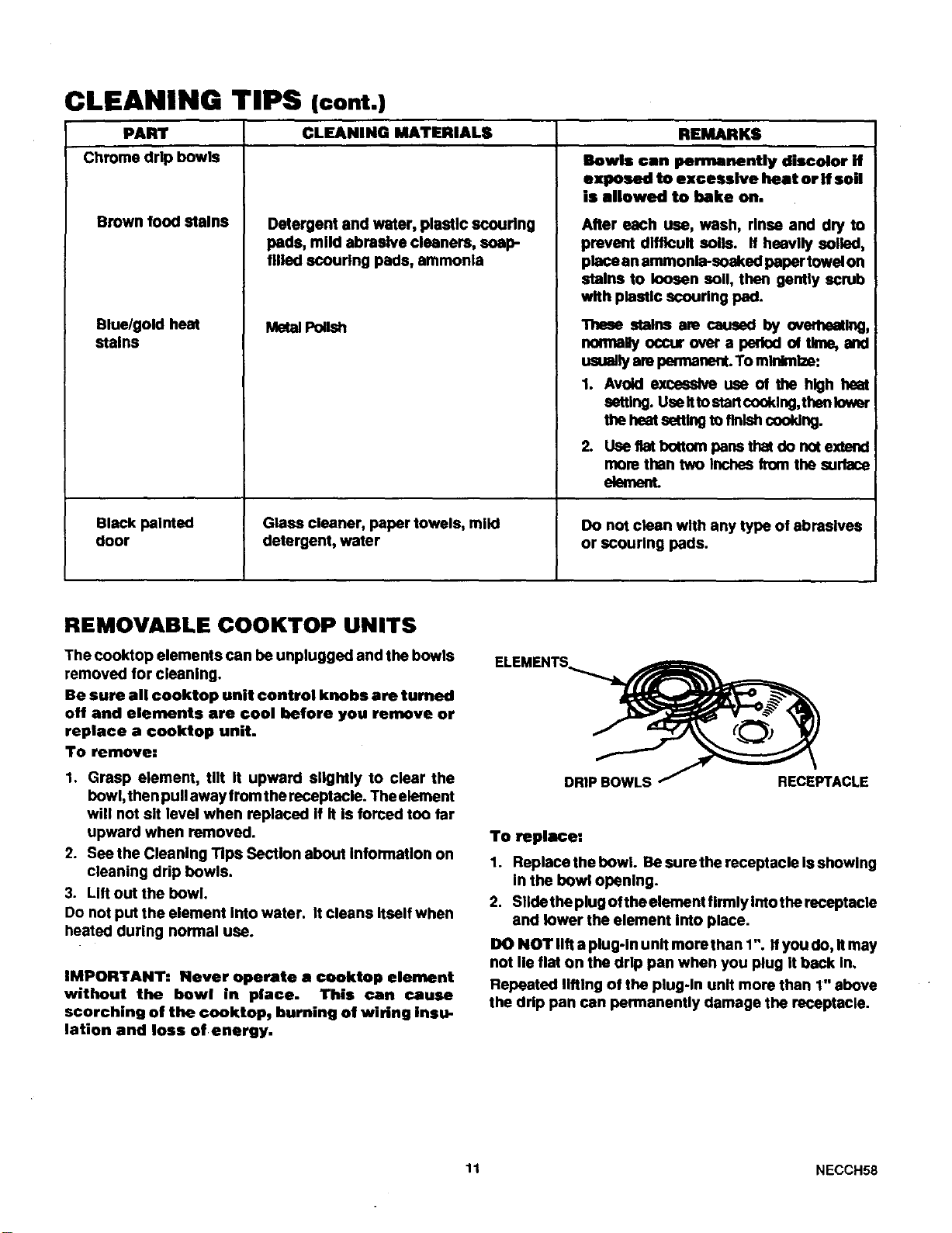
CLEANING TIPS (cont.)
PART CLEANING MATERIALS REMARKS
Chrome drip bowls
Brown food stains
Blue/gold heat
stains
Black painted
door
Detergent and water, plastic scouring
pads, mllclabrasive cleaners, soap-
filled scouring pads, ammonia
Metal Polish
Glass cleaner, paper towels, mikl
detergent, water
Bowls can permanently discolor if
exposed to excessive beat or if soil
is allowed to bake on.
After each use, wash, rinse and dry to
prevent dlftlcuit soils. If heavily soiled,
place an ammonia-soaked paper towel on
stains to loosen soil, then gently scrub
with plastic soourlng pad.
These stainsare caused by overhentlng,
sonnaey occurovera parkxl of Ume,and
usuallyam permanent.To minimize:
1. Avoid excessive use of the high heat
setting. UseItto staricooking,then lower
lhe _ sehtngIo llnlshcooklng.
2. Use flat 10ott(xnpans thet do not extend
more than two inches from the surface
ak_ne_
Do not clean with any type of abrasives
or scouring pads.
REMOVABLE COOKTOP UNITS
The cooktop elements can be unplugged and the bowls
removed for cleaning.
Be sure all cooktop unit control knobs ere turned
off and elements are cool before you remve or
replace a cooktop unit.
To remove:
1. Grasp element, tilt It upward slightly to clear the
bowl, then pull away from the receptacle. The element
will not sit level when replaced If It Is forced too far
upward when removed.
2. See the Cleanlng Tips Sectlon about lnformatlon on
cleaning drip bowls.
3. Lift out the bowl.
Do not put the element into water. It cleans Itself when
heated during normal use.
IMPORTANT: Never operate • cuoktop element
without the bowl in place. This can cause
scorching of the €ooktop, burning of wiring insu.
lation and loss of energy.
ELEMENTS_PTACL E
To replace:
1. Replace the bowl. Be sure the receptacle Is showing
In the bowl opanlng.
2. Slldethe plug ofthe element firmly Intothe receptacls
and lower the element Into place.
DO NOT lift a plug-In unit more than 1". If you do, Itmay
not lie flat on the drip pan when you plug It back In,
Repeated lifting of the plug-In unif more than 1" above
the drip pan can permanently damage the receptacle.
11 NECCH58
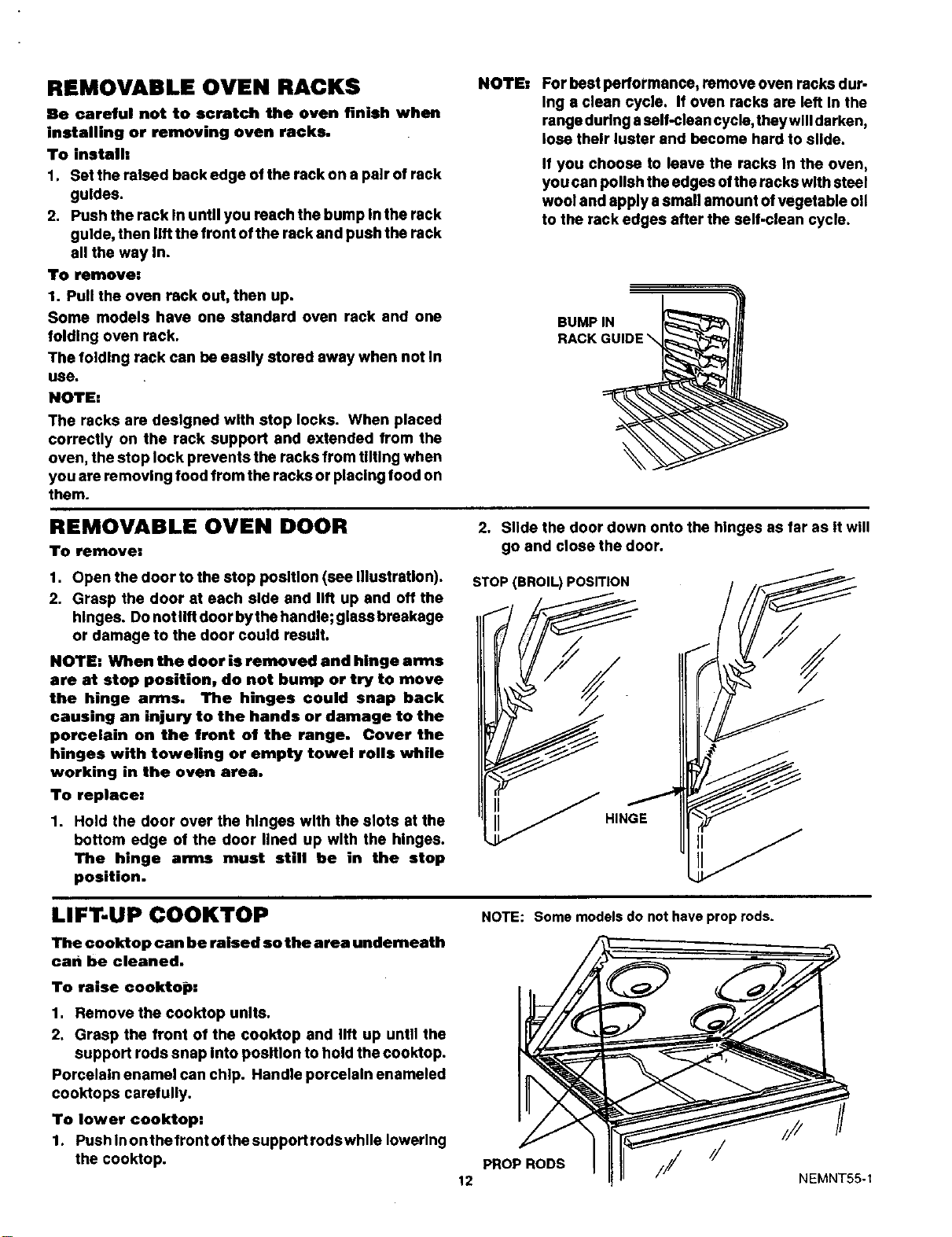
REMOVABLE OVEN RACKS
Be careful not to scratch the oven finish when
installing or removing oven racks.
To install:
1. Set the raised back edge of the rack on a pair of rack
guides.
2. Push the rack In until you reach the bump In the rack
guide, then lift the front of the rack and push the rack
all the way In.
To remove:
1. Pull the oven rack out, then up.
Some models have one standard oven rack and one
folding oven rack.
The folding rack can be easily stored away when not In
use.
NOTE:
The racks are designed with stop locks. When placed
correctly on the rack support and extended from the
oven, the stop lock prevents the racks from tilting when
you are removing food from the racks or placing food on
them.
NOTE= For hest pertormance, remove oven racks dur-
Ing a clean cycle. If oven racks are left In the
range during aself-clean cycle, they will darken,
lose their luster and become hard to slide.
If you choose to leave the racks In the oven,
you can polish theedges ofthe racks with steel
wool and apply asmall amount of vegetable oil
to the rack edges after the self-clean cycle.
BUMPIN
RACKGUIDE\
REMOVABLE OVEN DOOR
TO remove:
1. Open the door to the stop position (eee IllustraUon).
2. Grasp the door at each side and lift up and off the
hinges. Do not lift door by the handle; gless breakage
or damage to the door could result.
NOTE: When the door is removed and hinge arms
are at stop position, do not bump or try to move
the hinge arms. The hinges could snap back
causing an injury to the hands or damage to the
porcelain on the trent of the range. Cover the
hinges with toweling or empty towel rolls while
working in the oven area.
To replace:
1. Hold the door over the hinges with the slots at the
bottom edge of the door lined up with the hinges.
The hinge arms must still be in the stop
position.
2. Slide the door down onto the hinges as far as It will
go and close the door.
STOP (BROIL) POSITION
HINGE
LIFT-UP COOKTOP
The cooktop can be raised so the area underneath
can be cleaned.
To raise cookto_):
1. Remove the cooktop units.
2. Grasp the front of the cooktop and lift up until the
support rods snap Into position to hold the cooktop.
Porcelain enamel can chip. Handle porceleln enameled
cooktops carefully.
To lower cooktop:
1. Push In onthe front ofthe support rodswhlle lowering
the cooklop.
NOTE: Some models do not have prop rods.
P.Op.ODS f /
12 NEMNT55-1
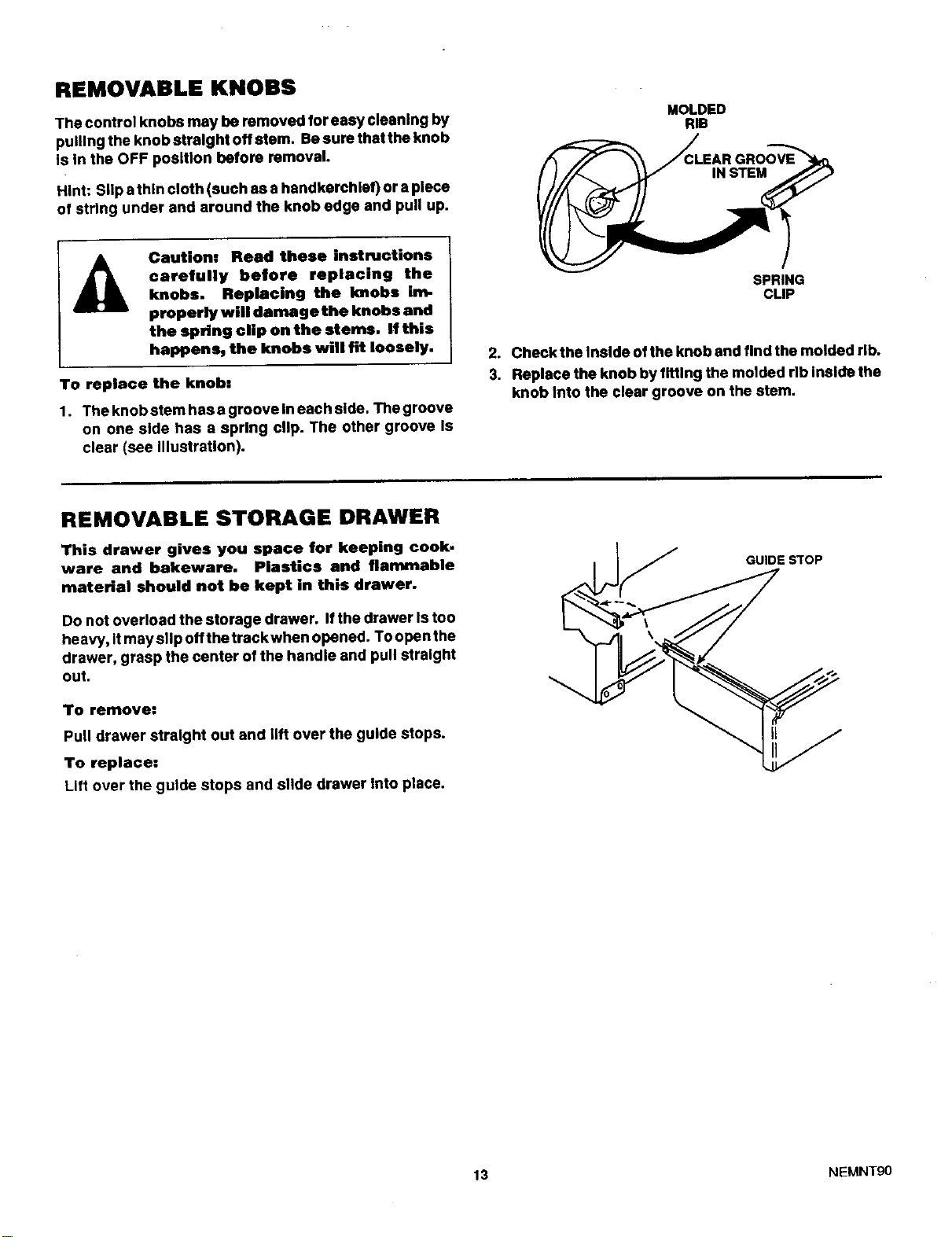
REMOVABLE KNOBS
The control knobs may be removed for easy cleaning by
pulling the knob straight off stem. Besure thatthe knob
Is In the OFF position before removal.
Hint: Slip athin cloth (such as a handkerchief) or a piece
of string under and around the knob edge and pull up.
MOLDED
RIB
Caution: Read these instructions
carefully before replacing the
knobs. Replacing the Imobs im-
properly will damage the knobs and
the spring cUp on the stems. If this
happens, the knobs will fit loosely.
To replace the knob|
1. Theknobstemhasagroovelneachslde. Thegroove
on one side has a spring clip. The other groove Is
clear (see Illustration).
SPRING
CLIP
2. Check the Inside ofthe knob and find the molded rib.
3. Replace the knob by fitting the molded rib Inside the
knob Into the clear groove on the stem.
REMOVABLE STORAGE DRAWER
This drawer gives you space for keeping cook.
ware and bakeware. Plastics and flammable
material should not be kept in this drawer.
Do not overload the storage drawer. If the drawer Is too
heavy, It may slip off the track when opened. To open the
drawer, grasp the center of the handle and pull straight
out.
To remove:
Pull drawer straight out and lift over the guide stops.
To replace:
Lift over the guide stops and slide drawer Into place.
(F._// GUIDE STOP
-"\
13 NI::MNTg0
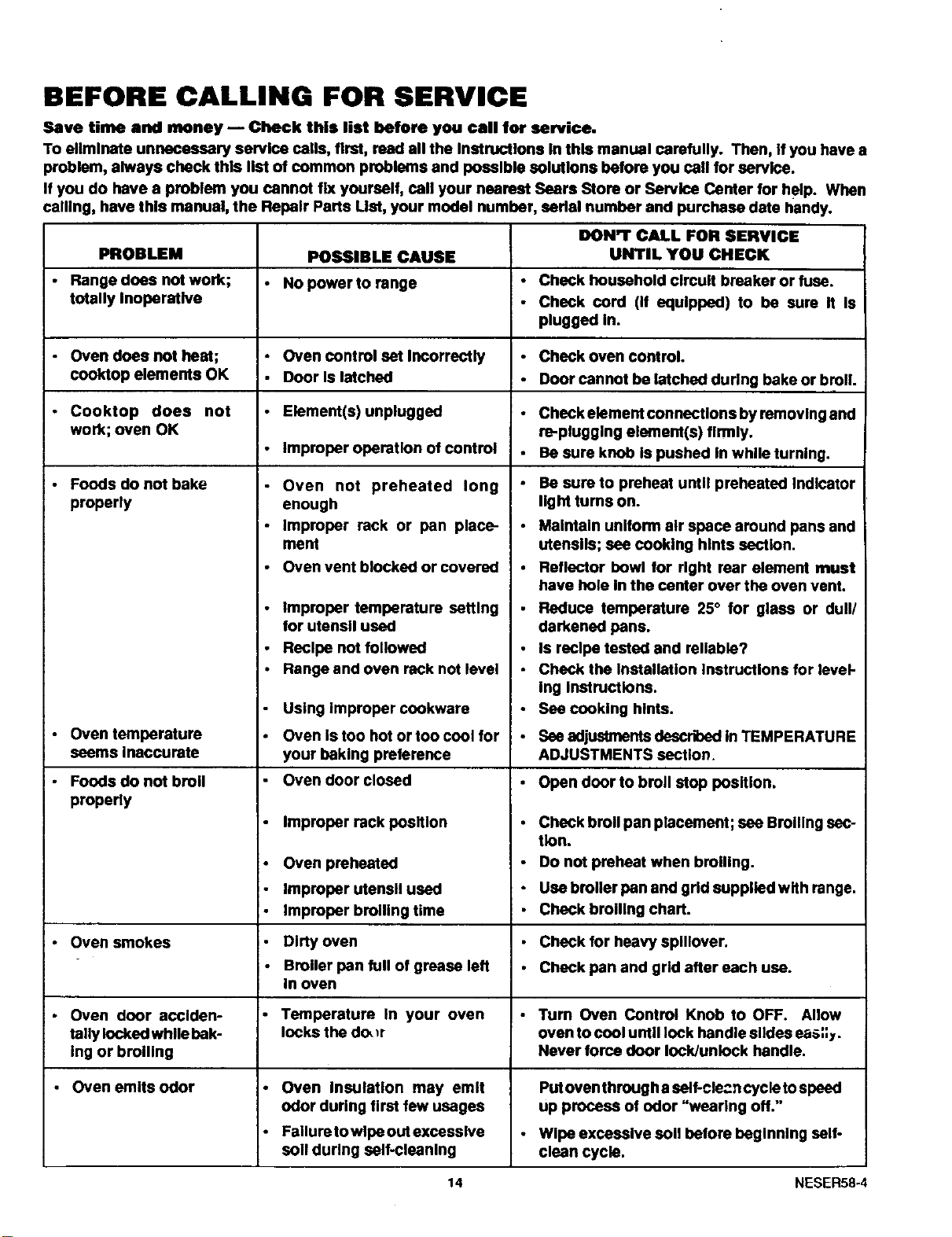
BEFORE CALLING FOR SERVICE
Save time and money -- Check this list before you call for service.
To eliminate unnecessary service cells, first, read all the Instructions In this manual carefully. Then, If you have a
problem, always check this list of common problems and possible solutions before you call for service.
If you do have a problem you cannot fix yourself, call your nearest Sears Store or Service Center for help. When
calling, have this manual, the Repair Parts LIst, your model number, eadal number and purchase date handy.
DON'T CALL FOR SERVICE
PROBLEM POSSIBLE CAUSE UNTIL YOU CHECK
• Range does not work; • No power to range Check household clmuit breaker or fuse.
totally Inoperative Check cord (if equipped) to be sure It Is
plugged In.
• Oven does not heat; • Oven control set Incorrectly Check oven control.
cool(top elements OK • Door Is latched Door cannot be latched during bake or broil
• Cooktop does not • Element(s)unplugged Checkelementconnectlonsbyremovlngand
work; oven OK re-plugging element(s) firmly.
• improper operation of control Be sure knob is pushed In while turning.
• Foods do not bake Be sure to preheat until preheated Indicator
properly light turns on.
• Oven temperature
seems Inaccurate
• Foods do not broil
properly
• Oven smokes
• Oven door acciden-
tally locked while bak-
ing or broiling
Oven emits odor
• Oven not preheated long
enough
• Improper rack or pan place-
ment
• Oven vent blocked or covered
Improper temperature setting
for utensil used
Recipe not followed
Range and oven rack not level
Using improper cookware
Oven is too hot or too cool for
your baking preference
Oven door closed
• Improper rack position
• Oven preheated
- Improper utensil used
• Improper broiling time
• Dirty oven
i• Broiler pan full of grease left
In oven
Temperature In your oven
locks the do_r
• Oven Insulation may emit
odor during first few usages
• Failure towipe out excessive
soll during self-cleaning
Maintain uniform air space around pans and
utensils; see cooking hints section.
Reflector bowl for right rear element must
have hole In the center over the oven vent.
Reduce temperature 25° for glass or dull/
darkened pans.
Is recipe tested and re.able?
Check the Installation Instructions for level-
Ing Instructions.
Sea cooking hints.
See adjuslments described In TEMPERATURE
ADJUSTMENTS section.
• Open door to broil stop position,
Check broil pan placement; see Broiling sec-
tion.
Do not preheat when broiling.
Use broiler pan and grid supplied with range.
Check broiling chart.
Check for heavy splllover.
Check pan and grid after each use.
•Tum Oven Control Knob to OFF. Allow
oven to cool until lock handle slides eas;;y.
Never force door lock/unlock handle.
Putoven through a self-cle_n cycle tospeed
up process of odor "wearing off."
Wipe exceselve soil before beginning self-
clean cycle.
14 NESER58-4
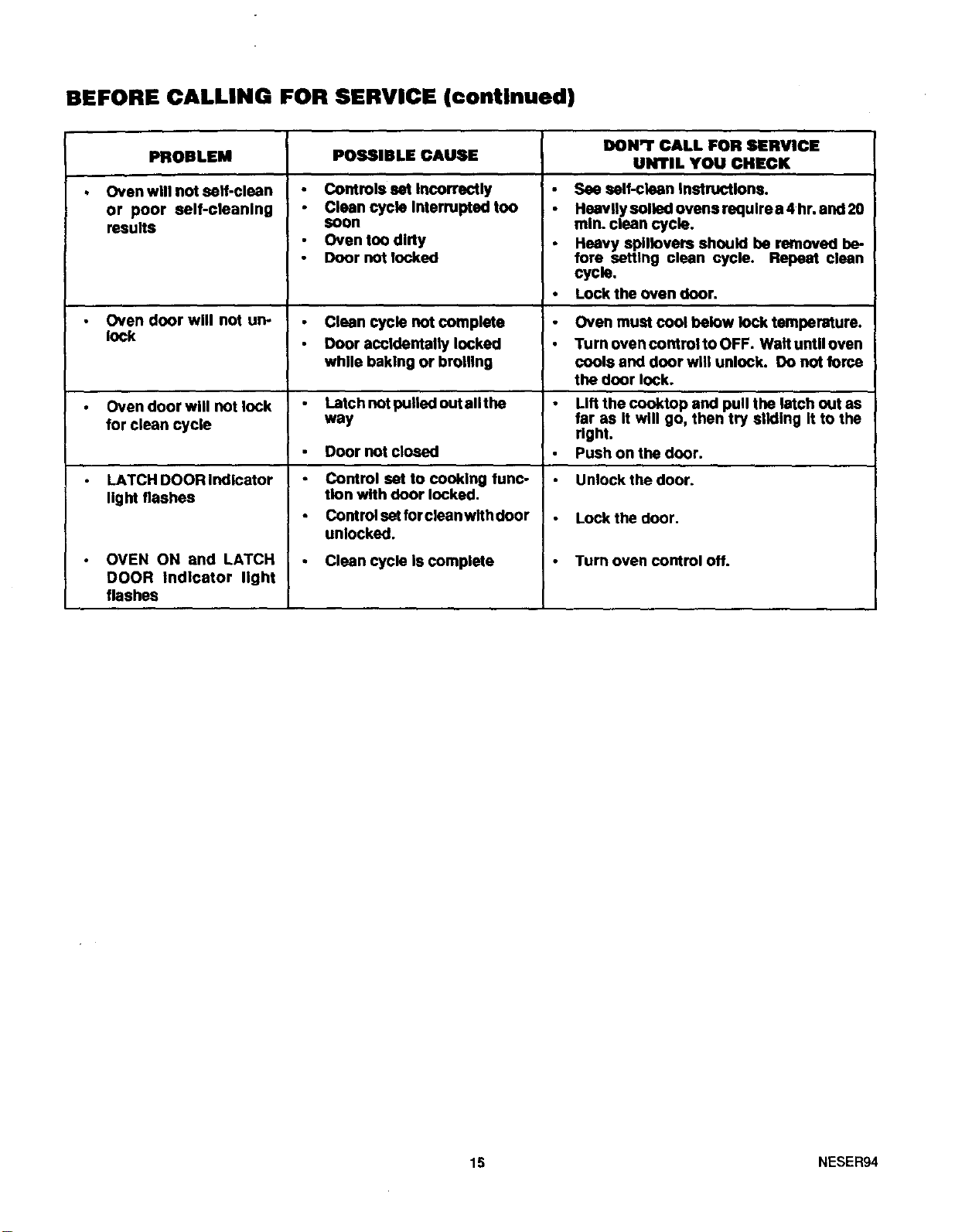
BEFORE CALLING FOR SERVICE (continued)
DON'T CALL FOR SERVICE
POSSIBLE CAUSE UNTIL YOU CHECK
I)
PROBLEM
Oven will not self-clean
or poor self-clsanlng
results
Controls set Incorrectly
Clean cycle Interrupted too
soon
Oven too dirty
Door not locked
See ealf-clean Instructions.
Heavily soiled ovens require a 4 hr. and 20
mln. clean cycle.
Heavy spillovers should be removed be-
fore setting clean cycle. Repeat clean
cycle.
Lock the oven door.
Oven door will not un- Clean cycle not complete Oven must cool below lock tempersture.
lock Door accidentally locked Turn oven control to OFF. Wall until oven
while baking or broiling cools and door will unlock. Do not force
the door lock.
Oven door will not lock Latch not pulled out sllthe Lift the cooktop and pull the latch out as
for clean cycle way far as It will go, then try sliding It to the
right.
Push on the door.
LATCH DOOR Indicator Unlock the door.
light flashes
Door not closed
Control set to cooking funC-
tion with door locked.
Control set for clean with door
unlocked.
Clean cycle Is complete
OVEN ON and LATCH
DOOR Indicator light
flashes
Lock the door.
Turn oven control Off.
15 NESER94
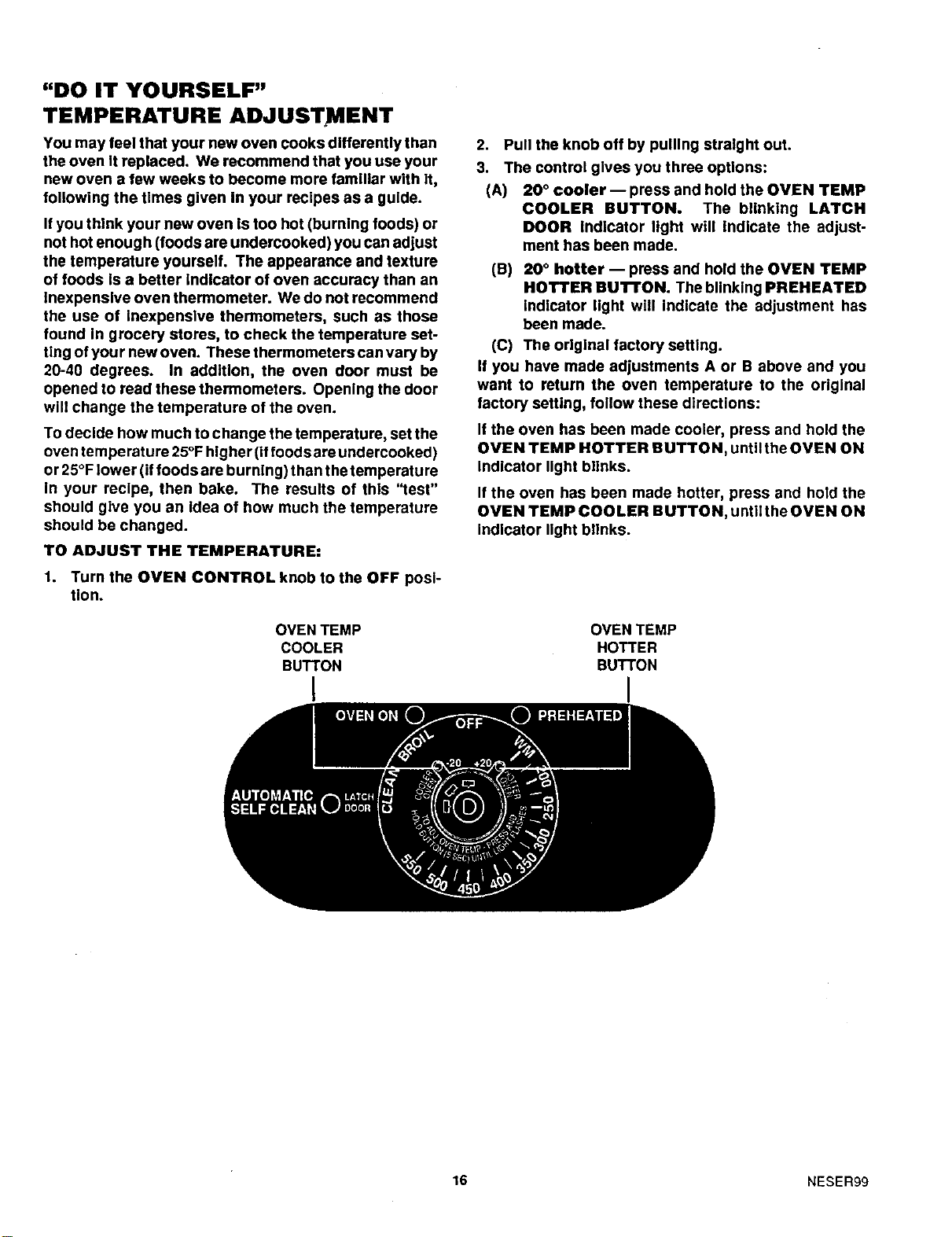
"DO IT YOURSELF"
TEMPERATURE ADJUSTMENT
You may feel that your new oven cooks differently than
the oven It replaced. We recommend that you use your
new oven a few weeks to become more familiar with it,
following the times given in your recipes as a guide.
Ifyou think your new oven Is too hot (burning foods) or
not hot enough (foods are undercooked) you can adjust
the temperature yourself. The appearance and texture
of foods Is a better Indicator of oven accuracy than an
inexpensive oven thermometer. We do not recommend
the use of Inexpensive thermometers, such as those
found In grocery stores, to check the temperature set-
ting ofyour new oven. These thermometers can vary by
20-40 degrees. In addition, the oven door must be
opened to read these thermometers. Opening the door
will change the temperature of the oven.
To decide how much to change the temperature, set the
oven temperature 25°F higher (if foods areundercooked)
or 25°F lower (if foods are burning) than the temperature
In your recipe, then bake. The results of this "test"
should give you an Idea of how much the temperature
should be changed.
TO ADJUST THE TEMPERATURE:
1. Turn the OVEN CONTROL knob to the OFF posi-
tion.
OVEN TEMP
COOLER
BUTTON
I
2. Pull the knob off by pulling straight out.
3. The control gives you three options:
(A) 20 ° cooler-- press and hold the OVEN TEMP
COOLER BUTTON. The blinking LATCH
DOOR indicator light will Indicate the adjust-
ment has been made.
(B) 20 ° hotter -- press and hold the OVEN TEMP
HOTTER BUTTON. The blinking PREHEATED
indicator light will Indicate the adjustment has
been made.
(C) The original factory setting.
If you have made adjustments A or B above and you
want to return the oven temperature to the original
factory setting, follow these directions:
If the oven has been made cooler, press and hold the
OVEN TEMP HOTTER BUTTON, until the OVEN ON
Indicator light blinks.
If the oven has been made hotter, press and hold the
OVEN TEMP COOLER BUTTON, untiithe OVEN ON
Indicator light blinks.
OVEN TEMP
HOTTER
BUTTON
I
16 NESER99

NOTES
17

NOTES
18
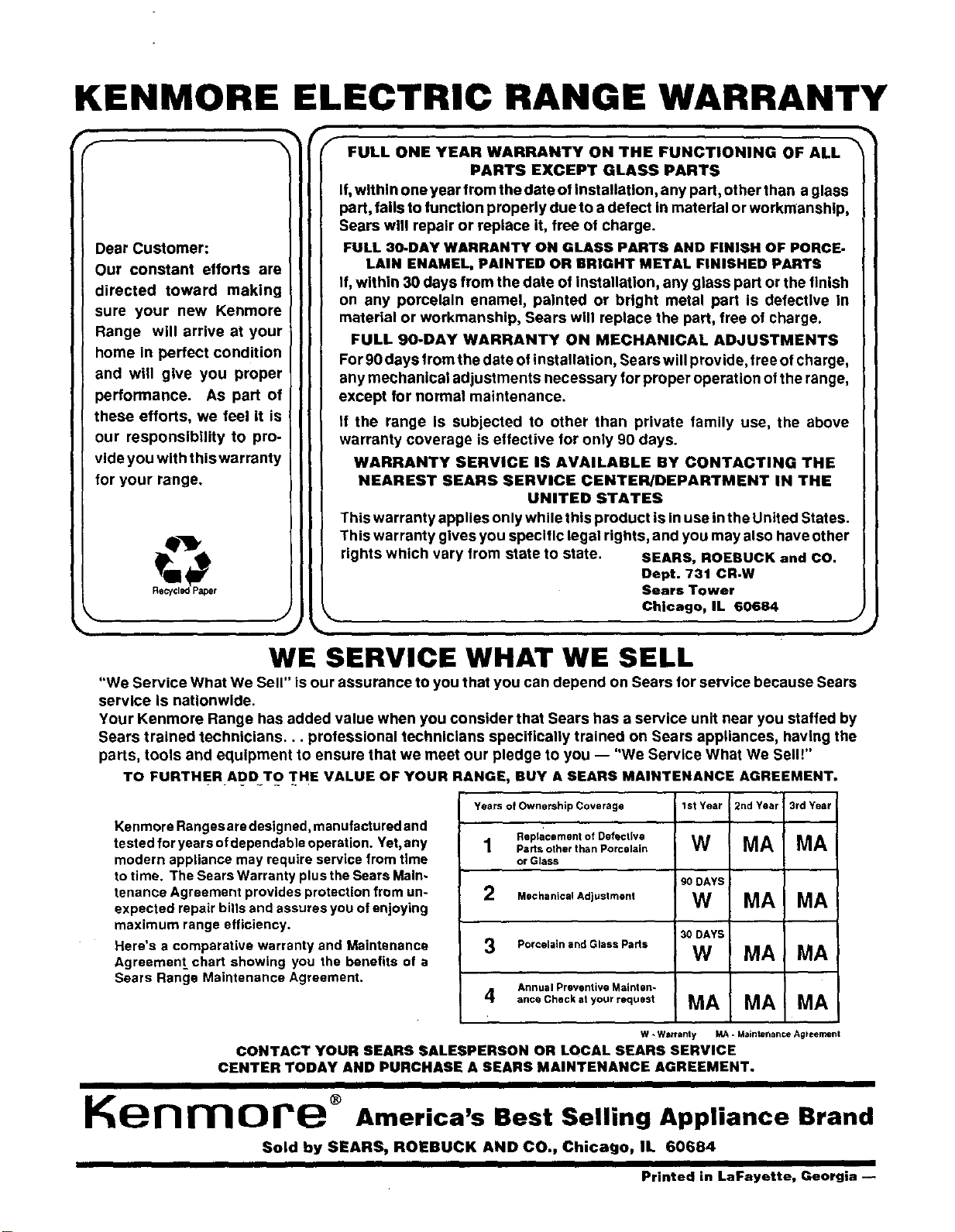
KENMORE ELECTRIC RANGE WARRANTY
f
Dear Customer:
Our constant etforts are
directed toward making
sure your new Kenmore
Range will arrive at your
home in perfect condition
and w give you proper
performance. As part of
these efforts, we feel it is
our responsibility to pro-
vide you with this warranty
for your range.
Q_J_
Recyclap Paper
J
f FULL ONE YEAR WARRANTY ON THE FUNCTIONING OF ALL _
PARTS EXCEPT GLASS PARTS
If,within one year from the date of installation, any part, other than a glass
part, fails to function properly due to a delect in material or workmanship,
Sears will repair or replace it, free of charge.
FULL 30-DAY WARRANTY ON GLASS PARTS AND FINISH OF PORCE-
LAIN ENAMEL, PAINTED OR BRIGHT METAL FINISHED PARTS
If, within 30 days from the date of installation, any glass part or the finish
on any porcelain enamel, painted or bright metal part is defective In
material or workmanship, Sears will replace the part, free of charge.
FULL SO-DAY WARRANTY ON MECHANICAL ADJUSTMENTS
For 90 days from the date of installation, Sears will provide, free of charge,
any mechanical adjustments necessary for proper operation o!the range,
except for normal maintenance.
if the range is subjected to other than private family use, the above
warranty coverage is effective for only 90 days.
WARRANTY SERVICE IS AVAILABLE BY CONTACTING THE
NEAREST SEARS SERVICE CENTER/DEPARTMENT IN THE
UNITED STATES
This warranty applies only while this product is inuse inthe United States.
This warranty gives you specific legal rights, and you may also have other
rights which vary from state to state. SEARS, ROEBUCK and CO,
Dept. 731 CR-W
Sears Tower
Chicago, IL 60684 J
WE SERVICE WHAT WE SELL
"We Service What We Sell" is our assurance to you that you can depend on Sears for service because Sears
service is nationwide.
Your Kenmore Range has added value when you consider that Sears has a service unit near you staffed by
Sears trained technicians.., professional technicians specifically trained on Sears appliances, having the
parts, tools and equipment to ensure that we meet our pledge to you -- "We Service What We Sell!"
TO FURTHER ADD TO THE VALUE OF YOUR RANGE, BUY A SEARS MAINTENANCE AGREEMENT.
Kenmore Ranges are designed, manufactured and
tested for years of dependable operation. Yet, any
modern appliance may require service from time
to time. The Sears Warranty plus the Sears Main-
tenance Agreement provides protection from un-
expected repair bills and assures you of enjoying
maximum range efficiency.
Here's a comparative warranty and Maintenance
Agreement_chart showing you the benefits of a
Sears Range Maintenance Agreement.
YearsofOwnershipCoverage lstYear 2ndYear 3rdYear
Reptacement of Defective
1 P,.sother than Porcelain W MA MA
or Glass
90 DAYS
2 MechanicalAdiustmen' W MA MA
30 DAYS
3 Porcelain and Glass Parts W MA MA
Annual Preventive Mainten-
4 ance Check at your request MA MA i MA
W - Warranty MA. Maintenance Agreement
CONTACT YOUR SEARS SALESPERSON OR LOCAL SEARS SERVICE
CENTER TODAY AND PURCHASE A SEARS MAINTENANCE AGREEMENT.
Idle i-i rr_ o i_e ® America's Best Selling Appliance Brand
Sold by SEARS, ROEBUCK AND CO., Chicago, IL 60684
I
Printed in LaFayette, Georgia --