UseAndCare
A Note ToYou 2
Important Safety
Instructions 3
Parts And Features 4
Using Your
Dishwasher 5
Loading Your
Dishwasher 19
Caring For Your
Dishwasher 23
Comnlon
Dishwashing
Problems 24
IfYou Need
Assistance
Or Service 27
Warranty 32
1-800-253-1301
Call us with questions or comments.
9400 SERIES DISHWASHERS
A Note To You
Thank you for buying a Whirlpool • appliance.
You have purchased aquality, world-class home appliance. Years of engineering experience
have gone into its manufacturing. To ensure that you will enjoy many years of trouble-free
operation, we have developed this Use and Care Guide. It isfull of valuable information on
how to operate and maintain your appliance properly and safely. Please read itcarefully. Also,
please complete and mail the Ownership Registration Card provided with your appliance. This
will help us notifyyou about any new informationon your appliance.
Your safety is important to us.
This guide contains safety symbols and statements. Please pay special attention to these
symbols and follow any instructions given. Here is a brief explanation of the use of each
symbol.
and electrical shock.
This symbol will help you avoid actions
which could cause product damage
(scratches, dents, etc.) and damage to
your personal property.
Our Consumer Assistance Center number, 1-800-253-1301,
is toll-free, 24 hours a day.
If you ever have a question concerning your appliance's operation, or ifyou need service, first
see "If You Need Assistance Or Service" on page 27. Ifyou need further help, feel free to call
our Consumer Assistance Center. When calling, you will need to know your appliance's
complete model number and serial number. You can find this information on the model and
serial number label (see diagram on page 4). For your convenience, we have included a
handy place below for you to record these numbers, the purchase date from the sales slip and
your dealer's name and telephone number. Keep this book and the sales sliptogether in a
safe place for future reference.
Model Number
Serial Number
Purchase Date
Dealer Name
Dealer Phone
Important Safety Instructions
To reduce the risk of fire, electrical shock, or injury when using
your dishwasher, follow basic precautions including the following:
•Read all instructions before using the
dishwasher.
• Use your dishwasher only for the uses
described in this manual.
•DISHWASHER MUST BE ELECTRI-
CALLY GROUNDED. Read the Installa-
tion Instructions for details.
•When discarding an old dishwasher,
always remove the door to prevent
accidental entrapment or suffocation.
•Use ONLY detergents and rinse agents
recommended for use in a dishwasher.
•Store dishwasher detergent in a cool,
dry place WHERE CHILDREN CAN'T
REACH IT.
• When loading items to be washed:
- Load sharp items and knives with the
handles up to reduce risk of cut-type
injuries.
- Locate sharp items and knives so that
they are not likely to damage the door
or tub.
•DO NOT let children play in or on the
dishwasher.
•DO NOT reach into the area below the
bottom rack until the heating element has
cooled for at least 20 minutes.
•DO NOT wash plastic items unless
marked "Dishwasher Safe" or the equiva-
lent. If not marked, check manufacturer's
recommendations.
•DO NOT use your dishwasher unless all
enclosure panels are properly in place.
•DO NOT sit on, stand on or abuse the
dishwasher door or dish racks.
• DO NOT tamper with controls.
•If hot water has not been used recently
(usually two weeks or longer), hydrogen
gases may build up in the water heater
and the hot water pipes. HYDROGEN
GAS IS EXPLOSIVE. To prevent injury
or damage, before using your dish-
washer, turn on all hot water faucets and
allow water to runfor several minutes.
This will allow gases to escape. Do not
smoke or use any open flame near the
faucet while itis open.
•DO NOT store or use gasoline or other
flammable vapors and liquids in the
vicinityof this or any other appliance.
The fumes can create a fire hazard or
explosion.
•Disconnect electrical power to the
dishwasher before attempting to service.
-SAVETHESEINSTRUCTIONS-
Help us help you
Please:
•Have your dishwasher installed by a
qualified installer.
•Install where dishwasher is protected from
the elements.
• Install and level dishwasher on afloor that
will hold the weight, and in an area suitable
for its size and use.
• Properly connect dishwasher to electricity,
water and drain.*
•Remove all shipping plugs from hoses and
connectors (such as drain connector on a
disposer) before installing.*
•Remove all hang tags and temporary labels.
•Make sure dishwasher is not used by
anyone unable to operate itproperly.
•Properly maintain dishwasher. See page 23.
* See Installation Instructions for complete information.
3
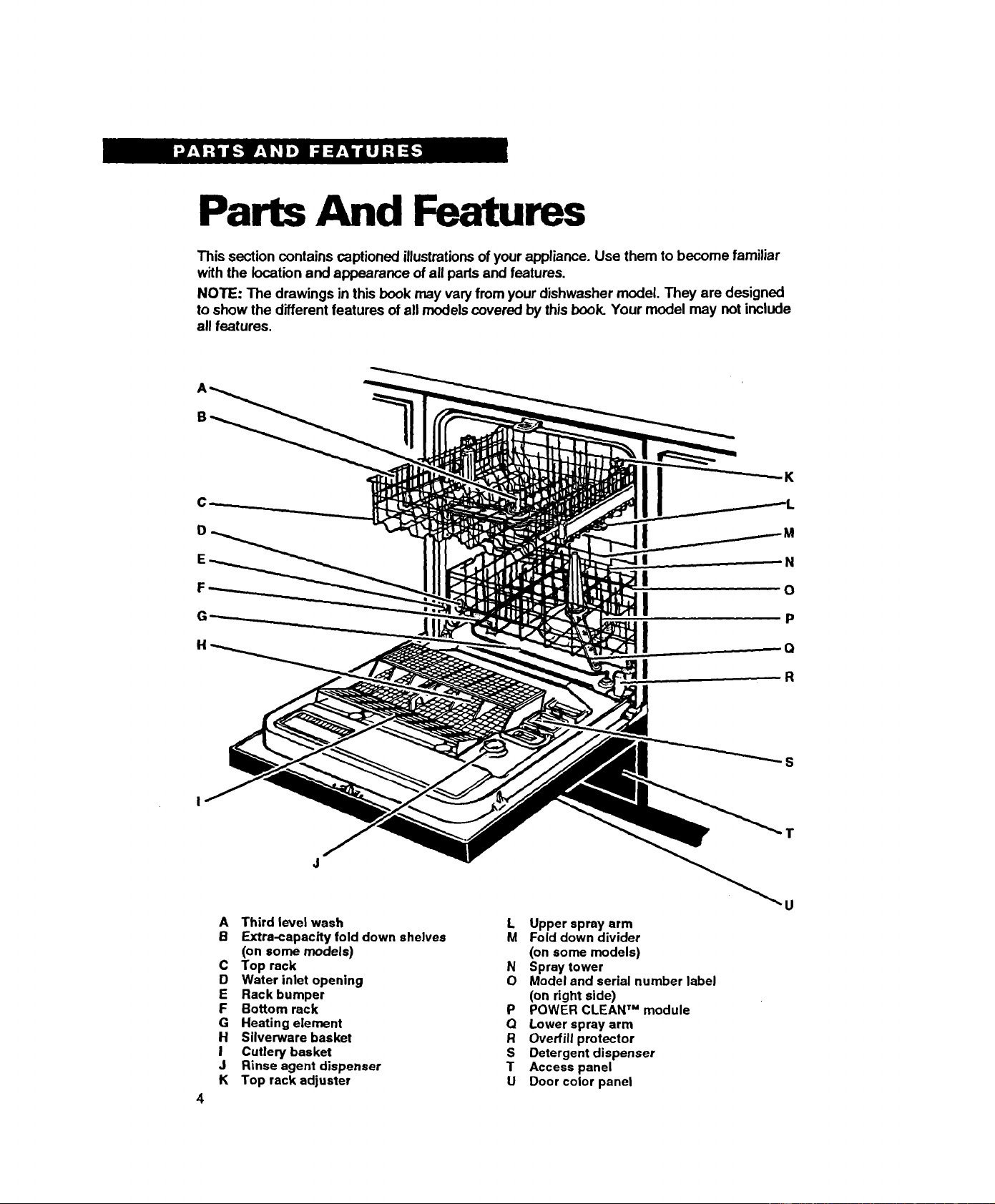
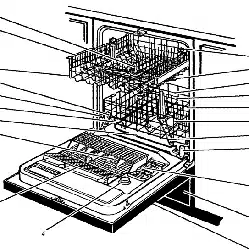
Parts And Features
This section contains captioned illustrationsof your appliance. Use them to become familiar
with the location and appearance of all pads and features.
NOTE: The drawings in this book may varyfrom your dishwasher model. They are designed
to show the different features of all models covered by this book. Your model may not include
all features.
B
C
D
E
H
K
N
O
P
r_
-,g
S
4
A Third level wash
B Extra-capacity fold down shelves
(on some models)
C Top rack
D Water inlet opening
E Rack bumper
F Bottom rack
G Heating element
H Silverware basket
ICutlery basket
J Rinse agent dispenser
K Top rack adjuster
L Upper spray arm
M Fold down divider
(on some models)
NSpray tower
O Model and serial number label
(on right side)
P POWER CLEAN TM module
Q Lower sprayarm
ROverfill protector
S Detergent dispenser
TAccess panel
U Door color panel
U
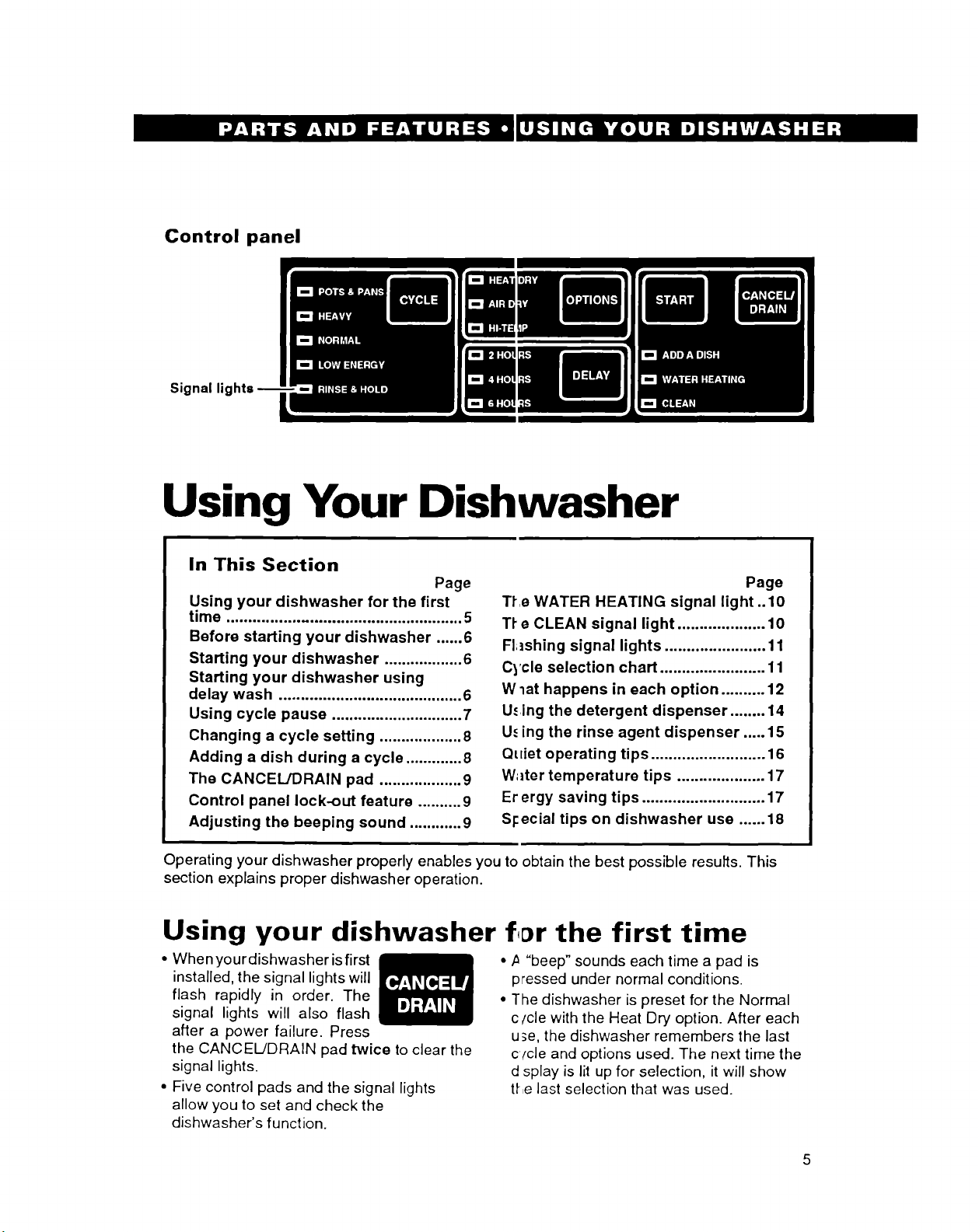
Control panel
Signal lights
Using Your Dishwasher
In This Section Page
Using your dishwasher for the first
time ..................................................... 5
Before starting your dishwasher ...... 6
Starting your dishwasher .................. 6
Starting your dishwasher using
delay wash .......................................... 6
Using cycle pause .............................. 7
Changing a cycle setting ................... 8
Adding a dish during a cycle ............. 8
The CANCEL/DRAIN pad ................... 9
Control panel lock-out feature .......... 9
Adjusting the beeping sound ............ 9
Page
Tfe WATER HEATING signal light ..10
Tf e CLEAN signal light .................... 10
Fhshing signal lights ....................... 11
Cycle selection chart ........................ 11
Wlat happens in each option .......... 12
U.¢ing the detergent dispenser ........ 14
U._ing the rinse agent dispenser ..... 15
Quiet operating tips .......................... 16
W;lter temperature tips .................... 17
Er ergy saving tips ............................ 17
Sl:ecial tips on dishwasher use ...... 18
Operating your dishwasher properly enables you to obtain the best possible results. This
section explains proper dishwasher operation.
Using your dishwasher the first time
•When your dishwasher isfirst
installed, the signal lights will
flash rapidly in order. The
signal lights will also flash
after a power failure. Press
the CANCEL/DRAIN pad twice to clear the
signal lights.
• Five control pads and the signal lights
allow you to set and check the
dishwasher's function.
• ,a "beep" sounds each time a pad is
pressed under normal conditions.
• The dishwasher is preset for the Normal
c/cle with the Heat Dry option. After each
u_e, the dishwasher remembers the last
cfcle and options used. The next time the
d splay is lit up for selection, it will show
the last selection that was used.
5
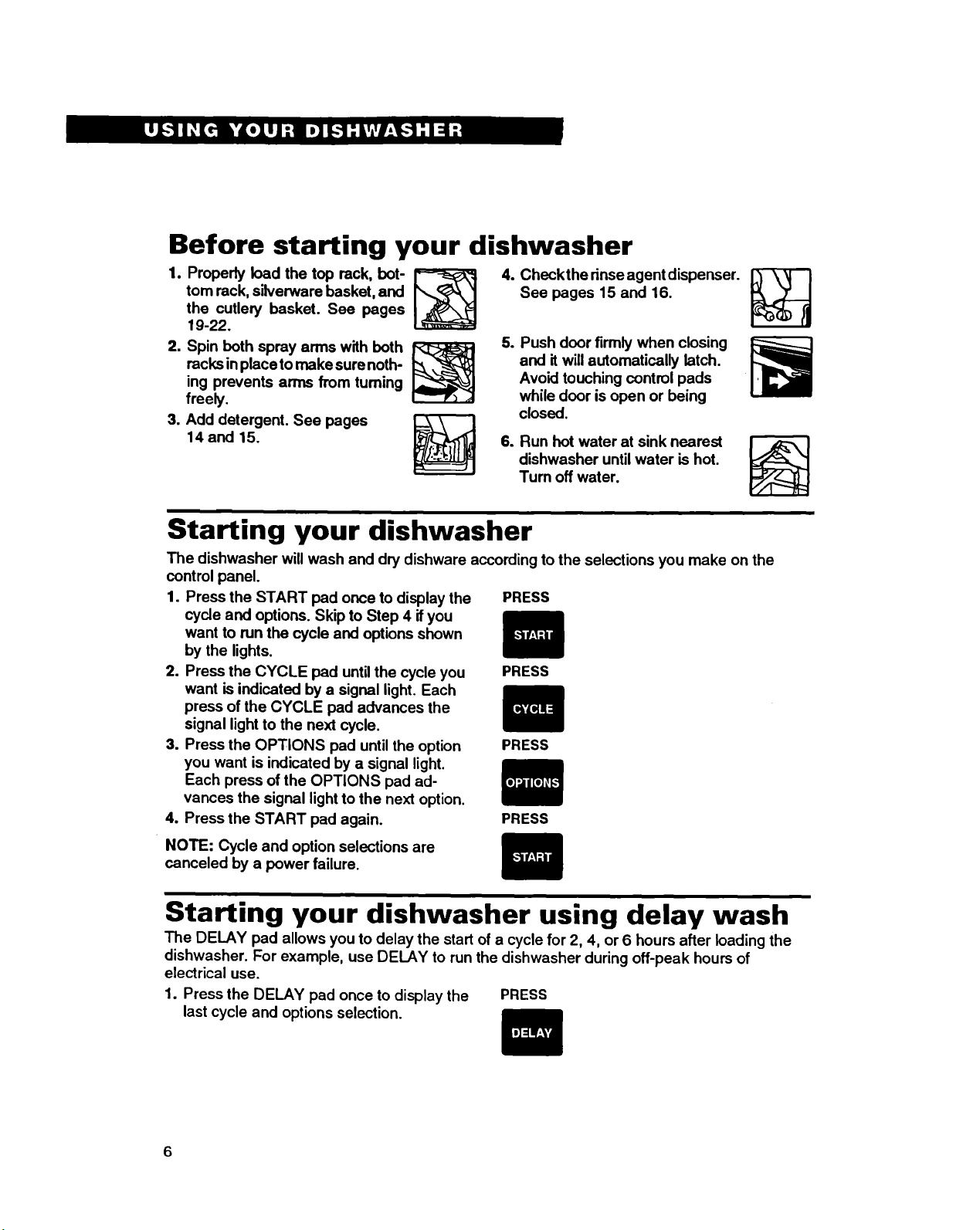
Before starting your dishwasher
1. Properly load the top rack, hot-
tom rack, silverware basket, and
the cutlery basket. See pages
19-22.
2. Spin both spray arms with both
racks inplace to make sure noth-
ing prevents arms from fuming
freely.
3. Add detergent. See pages _\ |
14 and 15.
4. Checkthe dnse agent dispenser.
See pages 15 and 16.
5. Push door firmly when closing
and it will automatically latch.
Avoid touching control pads
while door is open or being
closed.
6. Run hot water at sink nearest
dishwasher untilwater is hot.
Turn off water.
Starting your dishwasher
The dishwasher will wash and dry dishware according to the selections you make on the
control panel.
1. Press the START pad once to display the PRESS
cycle and options. Skip to Step 4 ifyou
want to run the cycle and options shown
by the lights.
2. Press the CYCLE pad until the cycle you PRESS
want is indicated by a signal light. Each
press of the CYCLE pad advances the
signal lightto the next cycle.
3. Press the OPTIONS pad until the option PRESS
you want is indicated by a signal light.
Each press of the OPTIONS pad ad-
vances the signal light to the next option.
4. Press the START pad again. PRESS
NOTE: Cycle and option selections are
canceled by a power failure.
Starting your dishwasher using delay wash
The DELAY pad allows you to delay the start of a cycle for 2, 4, or 6 hours after loading the
dishwasher. For example, use DELAY to run the dishwasher during off-peak hours of
electrical use.
1. Press the DELAY pad once to display the
last cycle and options selection. PRESS
2. Select a new cycle and option(s), if
desired. SELECT
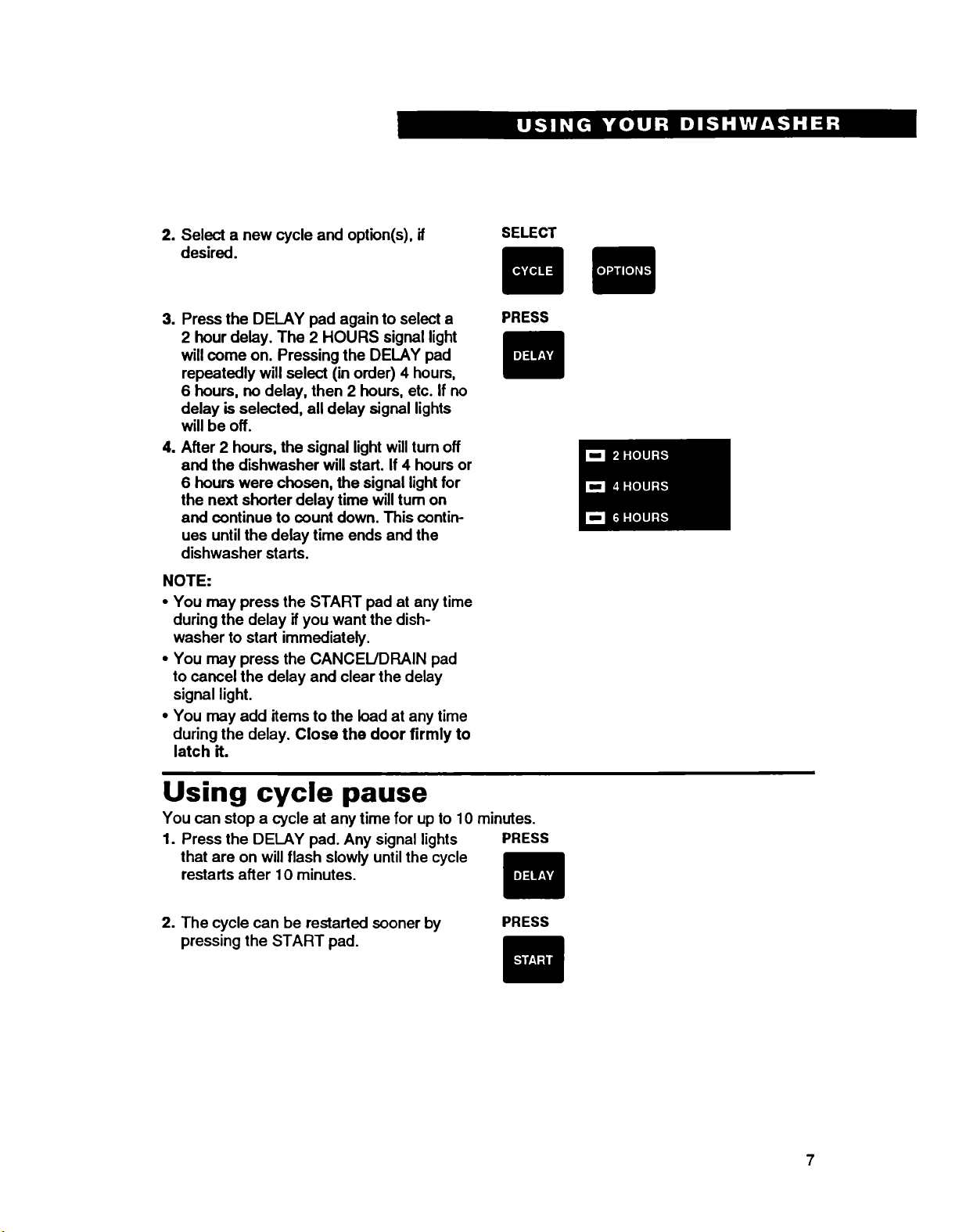
3. Press the DELAY pad again to select a
2 hour delay. The 2 HOURS signal light
will come on. Pressing the DELAY pad
repeatedly will select (in order) 4 hours,
6hours, no delay, then 2 hours, etc. If no
delay is selected, all delay signal lights
will be off.
4. After 2 hours, the signal light willturn off
and the dishwasher will start. If 4 hours or
6hours were chosen, the signal light for
the next shorter delay time willrum on
and continue to count down. This contin-
ues until the delay time ends and the
dishwasher starts.
NOTE:
• You may press the START pad at any time
during the delay if you want the dish-
washer to start immediately.
•You may press the CANCEL/DRAIN pad
to cancel the delay and clear the delay
signal light.
•You may add items to the load at any time
during the delay. Close the door firmly to
latch it.
PRESS
Using cycle pause
You can stop a cycle at any time for up to 10 minutes.
1. Press the DELAY pad. Any signal lights PRESS
that are on will flash slowly untilthe cycle
restarts after 10 minutes.
2. The cycle can be restarted sooner by
pressing the START pad. PRESS
7
Changing a cycle setting
You can change a setting anytime during any cycle.
During the first minute of a
cycle
During the first minute of a cycle the dish-
washer is filling with water and the wash
action has not started.
1. Select a new cycle and option(s).
2. Be sure the detergent dispensers are
filled properly for the new cycle.
After the first minute of a
cycle:
1. Press the CANCEL/DRAIN pad. The
dishwasher will go into a 2 minute drain
cycle, if needed.
SELECT
PRESS
2. Select a new cycle and option(s).
3. Be sure the detergent dispensers are
filled properly for the new cycle.
4. Press the START pad. The dishwasher
will start the new cycle.
SELECT
PRESS
Adding a dish during a cycle
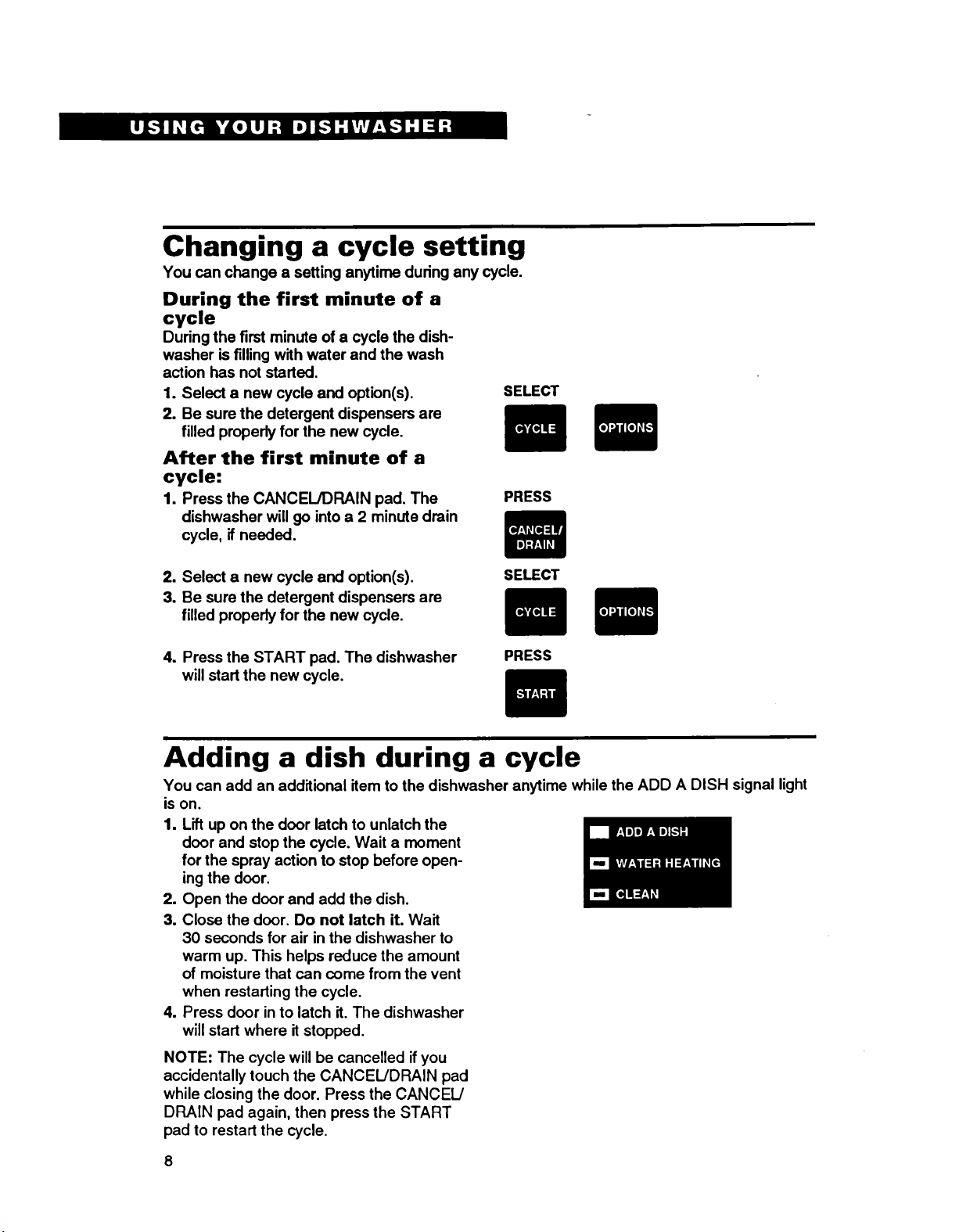
You can add an additional item to the dishwasher anytime while the ADD A DISH signal light
is on.
1. Lift up on the door latch to unlatch the
door and stop the cycle. Wait a moment
for the spray action to stop before open-
ing the door.
2. Open the door and add the dish.
3. Close the door. Do not latch it. Wait
30 seconds for air in the dishwasher to
warm up. This helps reduce the amount
of moisture that can come from the vent
when restarting the cycle.
4. Press door in to latch it. The dishwasher
will start where it stopped.
NOTE: The cycle will be cancelled if you
accidentally touch the CANCEIJDRAIN pad
while closing the door. Press the CANCEL/
DRAIN pad again, then press the START
pad to restart the cycle.
8
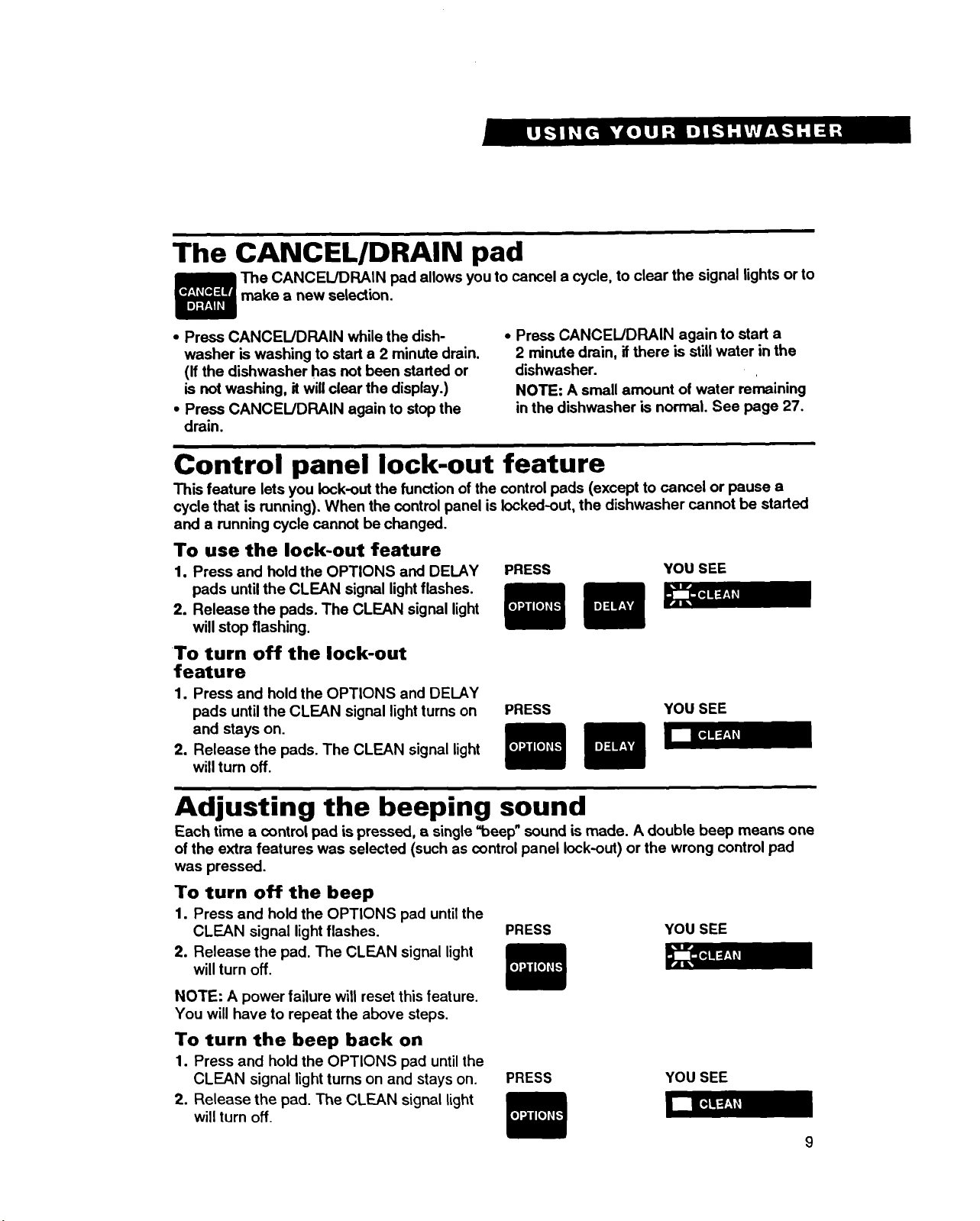
The CANCELIDRAIN pad
The CANCEL/DRAIN pad allows you to cancel a cycle, to clear the signal lights or to
make a new selection.
• Press CANCEL/DRAIN while the dish-
washer is washing to start a 2 minute drain.
(If the dishwasher has not been started or
is not washing, it will clear the display.)
•Press CANCEL!DRAIN again to stop the
drain.
•Press CANCEL!DRAIN again to start a
2 minute drain, if there is stilt water in the
dishwasher.
NOTE: A small amount of water remaining
in the dishwasher is normal. See page 27.
Control panel lock-out feature
This feature lets you lock-out the functionof the control pads (except to cancel or pause a
cycle that is running). When the controlpanel islocked-out, the dishwasher cannot be started
and a running cycle cannot be changed.
To use the lock-out feature
1. Press and hold the OPTIONS and DELAY
pads until the CLEAN signal light flashes.
2. Release the pads. The CLEAN signal light
will stop flashing.
To turn off the lock-out
feature
1. Press and hold the OPTIONS and DELAY
pads until the CLEAN signal lightturns on
and stays on.
2. Release the pads. The CLEAN signal light
willturn off.
PRESS YOU SEE
PRESS YOU SEE
Adjusting the beeping sound
Each time a control pad is pressed, asingle =beef)" sound is made. A double beep means one
of the extra features was selected (such as control panel lock-out) or the wrong control pad
was pressed.
To turn off the beep
1. Press and hold the OPTIONS pad until the
CLEAN signal light flashes. PRESS YOU SEE
2. Release the pad. The CLEAN signal light
will turn off.
NOTE: A power failure will reset this feature.
You will have to repeat the above steps.
To turn the beep back on
1. Press and hold the OPTIONS pad untilthe
CLEAN signal light turns on and stays on.
2. Release the pad. The CLEAN signal light
will turn off.
PRESS YOU SEE
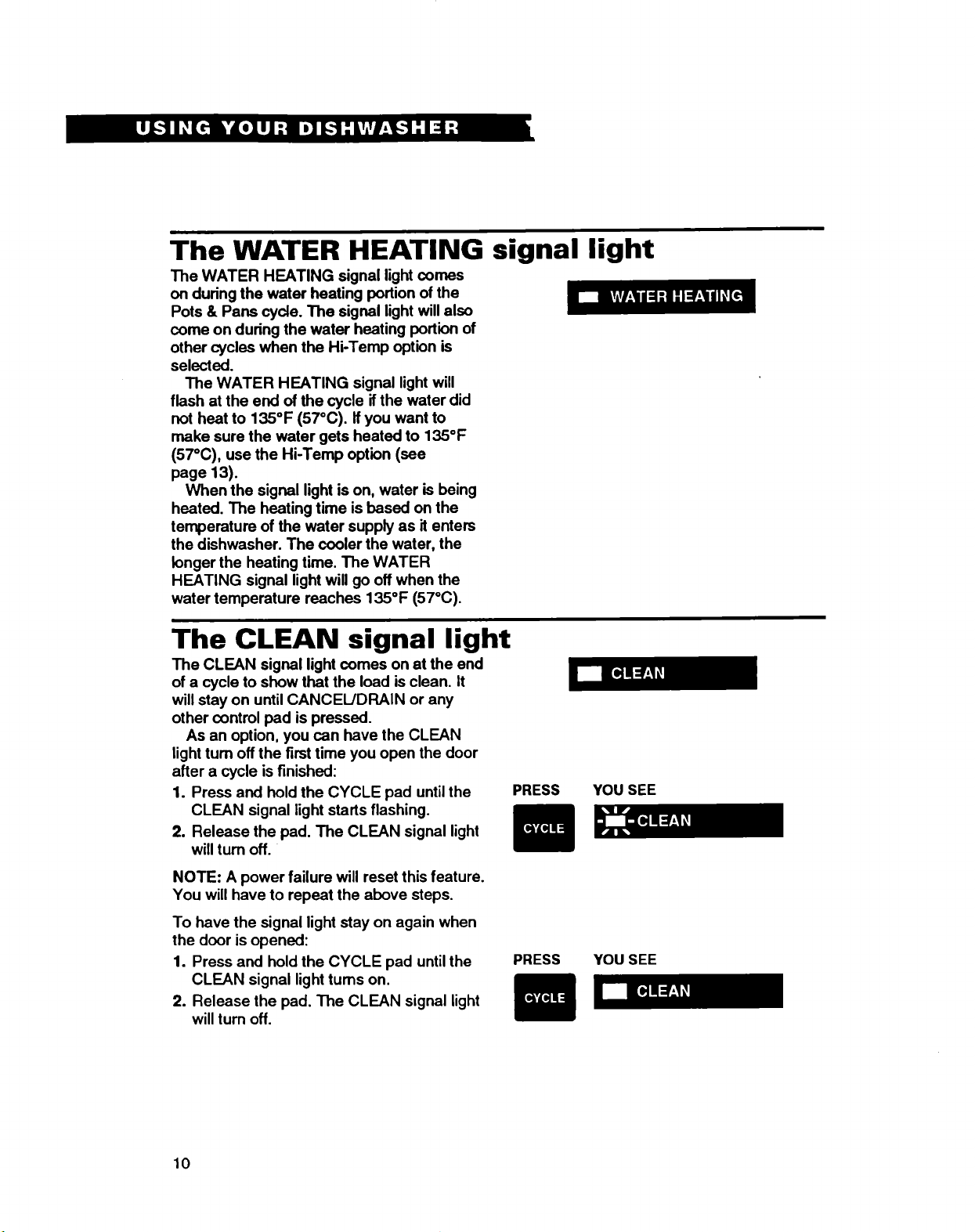
The WATER HEATING signal light
The WATER HEATING signal light comes
on during the water heating portion of the
Pots & Pans cycle. The signal light will also
come on during the water heating portion of
other cycles when the Hi-Temp option is
selected.
The WATER HEATING signal light will
flash at the end of the cycle ifthe water did
not heat to 135°F (57°C). Ifyou want to
make sure the water gets heated to 135°F
(57°C), use the Hi-Temp option (see
page 13).
When the signal light is on, water is being
heated. The heating time is based on the
temperature of the water supply as it enters
the dishwasher. The cooler the water, the
longer the heating time. The WATER
HEATING signal light will go off when the
water temperature reaches 135°F (57°C).
The CLEAN signal light
The CLEAN signal light comes on at the end
of a cycle to show that the load is clean. It
will stay on until CANCEL/DRAIN or any
other control pad is pressed.
As an option, you can have the CLEAN
light turn off the first time you open the door
after a cycle is finished:
1. Press and hold the CYCLE pad until the
CLEAN signal light starts flashing.
2. Release the pad. The CLEAN signal light
willturn off.
NOTE: A power failure will reset this feature.
You will have to repeat the above steps.
To have the signal light stay on again when
the door is opened:
1. Press and hold the CYCLE pad untilthe
CLEAN signal light turns on.
2. Release the pad. The CLEAN signal light
will turn off.
PRESS
PRESS
YOU SEE
YOU SEE
10
iFlashing signal lights
The signal lights willflash rapidly in order
when your dishwasher is first installed and
connected to electricity, The signal lights will
also flash following apower failure. Press
the CANCEIJDRAIN pad twice to clear the
signal lights.
PRESS TWICE
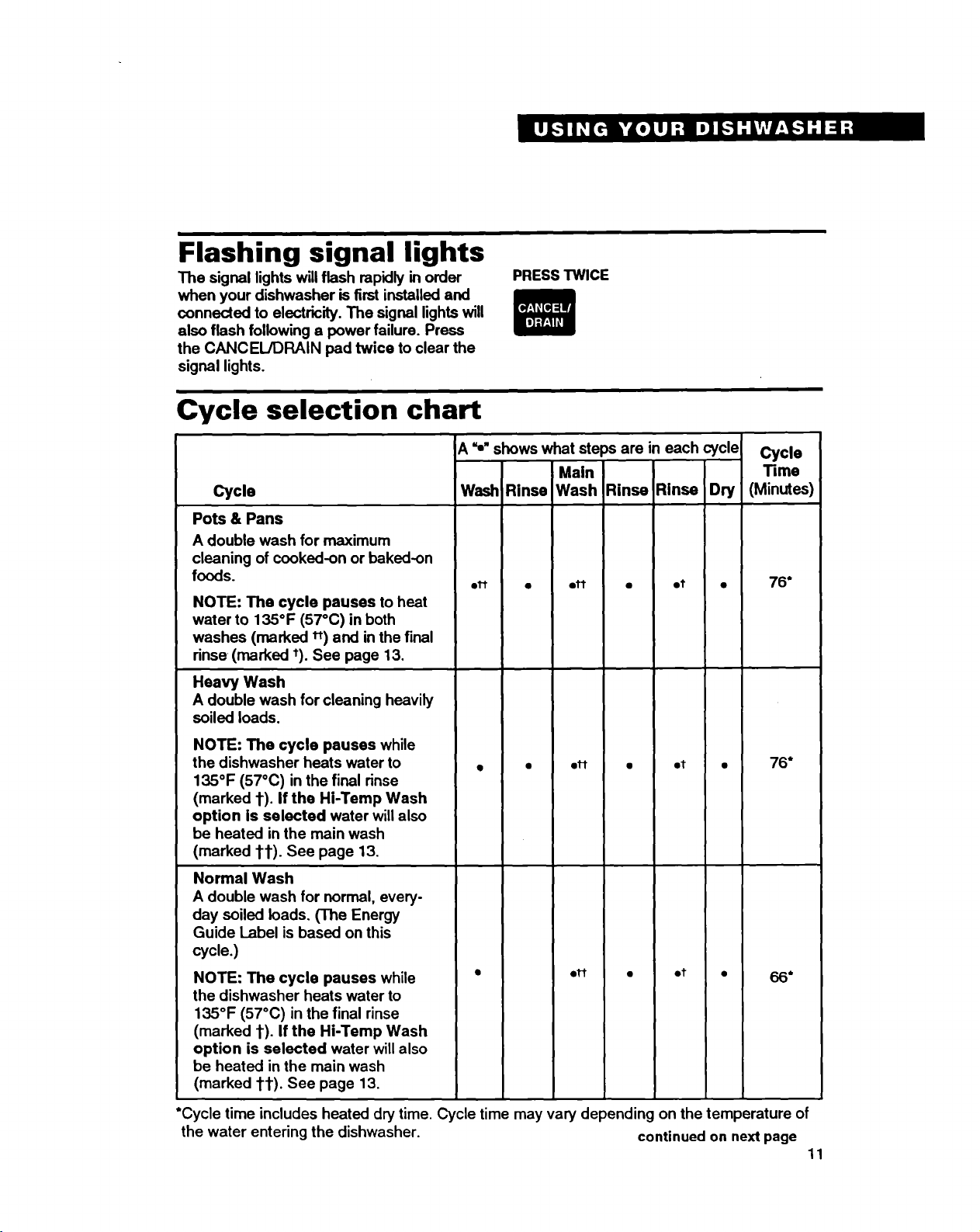
Cycle selection chart
Cycle
Pots & Pans
A double wash for maximum
cleaning of cooked-on or baked-on
foods.
NOTE: The cycle pauses to heat
water to 135°F (57°C) in both
washes (marked it) and in the final
rinse (marked _). See page 13,
Heavy Wash
A double wash for cleaning heavily
soiled loads.
NOTE: The cycle pauses while
the dishwasher heats water to
135°F (57°C) in the final rinse
(marked 1").If the Hi-Temp Wash
option is selected water willalso
be heated in the main wash
(marked 11"). See page 13.
Normal Wash
A double wash for normal, every-
day soiled loads. (The Energy
Guide Label is based on this
cycle.)
NOTE: The cycle pauses while
the dishwasher heats water to
135°F (57°C) in the final rinse
(marked 1). If the Hi-Temp Wash
option is selected water will also
be heated in the main wash
(marked 1"1").See page 13.
A_," shows what steps are in each cycle
Main
Wash Rinse Wash Rinse Rinse Dry
• ot
01"1" • e_
• • oi"I" • et •
• e1"t • et •
Cycle
Time
(Minutes)
76*
76*
6*
*Cycle time includes heated dry time. Cycle time may vary depending on the temperature of
the water entering the dishwasher, continued on next page 11
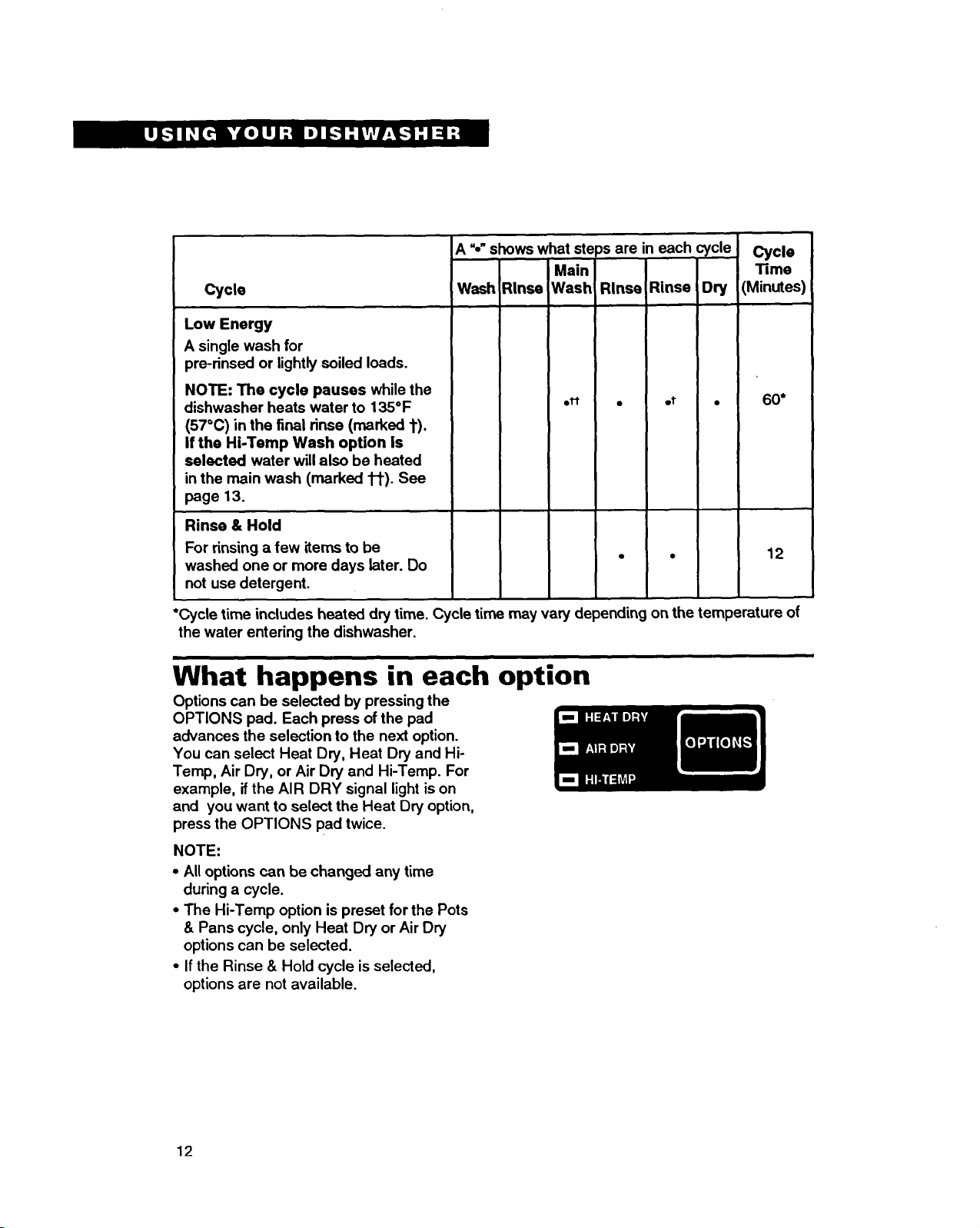
Cycle
LowEnergy
Asingle wash for
pre-rinsed or lightly soiled loads.
NOTE: The cycle pauses while the
dishwasher heats water to 135°F
(57°C) in the final rinse (marked t).
If the Hi-Temp Wash option is
selected water willalso be heated
in the main wash (marked 1_). See
page 13.
Rinse & Hold
For rinsing a few items to be
washed one or more days later. Do
not use detergent.
A"-"shows what steps are in each cycle
Main
Wash Rinse Wash Rinse Rinse Dry
eM °ot °
Cycle
"rime
(Minutes)
60*
12
*Cycle time includes heated dry time. Cycle time may vary depending on the temperature of
the water entering the dishwasher,
What happens in each option
Options can be selected by pressing the
OPTIONS pad. Each press of the pad
advances the selection to the next option.
You can select Heat Dry, Heat Dry and Hi-
Temp, Air Dry, or Air Dry and Hi-Temp. For
example, if the AIR DRY signal light ison
and you want to select the Heat Dry option,
press the OPTIONS pad twice.
NOTE:
• All options can be changed any time
during a cycle.
• The Hi-Temp option is preset for the Pots
& Pans cycle, only Heat Dry or Air Dry
options can be selected.
•If the Rinse & Hold cycle is selected,
options are not available.
12
Heat Dry option
When the Heat Dry option is selected, air in
the dishwasher is heated during the =dry"
part of the cycle. The HEAT DRY signal light
will be on when this option is selected. For
best drying results, use a liquid rinse agent.
NOTE: The Heat Dry option is not available
during the Rinse & Hold cycle.
Air Dry option
When the Air Dry option is selected, air in
the dishwasher is not heated during the "dry"
part of the cycle. The AIR DRY signal light
will be on when this option is selected. The
Air Dry option helps save energy, but the
load takes longer to dry (overnight) and
some spotting may result. Some items,
(such as plastics) may need towel drying.
For best drying results, use a liquid rinse
agent.
Hi-Temp option
When the Hi-Temp Wash option is selected,
water is heated in the dishwasher during the
main wash to improve washability. The Hi-
Temp Wash option is automatically selected
for both washes of the Pots & Pans cycle.
See =Cycle selection chart"on pages 11
and 12.
NOTE:
•The HI-TEMP signal light will be on when
this option is selected.
•The cycle will pause while the water is
heating.
•When the water temperature reaches
135°F (570C), the cycle will begin again.
•The heating time is based on the tempera-
ture of the water supply as it enters the
dishwasher. The cooler the water, the
longer the heating time.
If water temperature at the faucet is
below 120°F (49°C), have a qualified
person raise the water heater's thermostat
setting. See page 17.
•The dishwasher does not pause to heat
the water ifthe water entering the dish-
washer is already 135°F (57°C).
13
Using the detergent dispenser
What type of detergent to use
• Use automatic dishwasher detergent
only. Other detergents are too mild and
much too sudsy to work in the dishwasher.
•Follow manufacturer's directions when
using liquid automatic dishwasher deter-
gent or concentrated powder detergent.
•Do not add detergent until you are ready
to wash.
•Store detergent tightly closed in acool, dry
place. Fresh automatic dishwasher
detergent is necessary for best washing
results.
NOTE: Different brands of dishwasher
detergent have different amounts of phos-
phorus for softening water. If water is hard
and phosphorus content is low (6.0% or
less), you may need to:
•Use more detergent.
OR
Liquid
dishwasher
detergent
Powdered
dishwasher
detergent
See phosphorus content on package labels
•Use a brand with a higher phosphorus
content (8.7%).
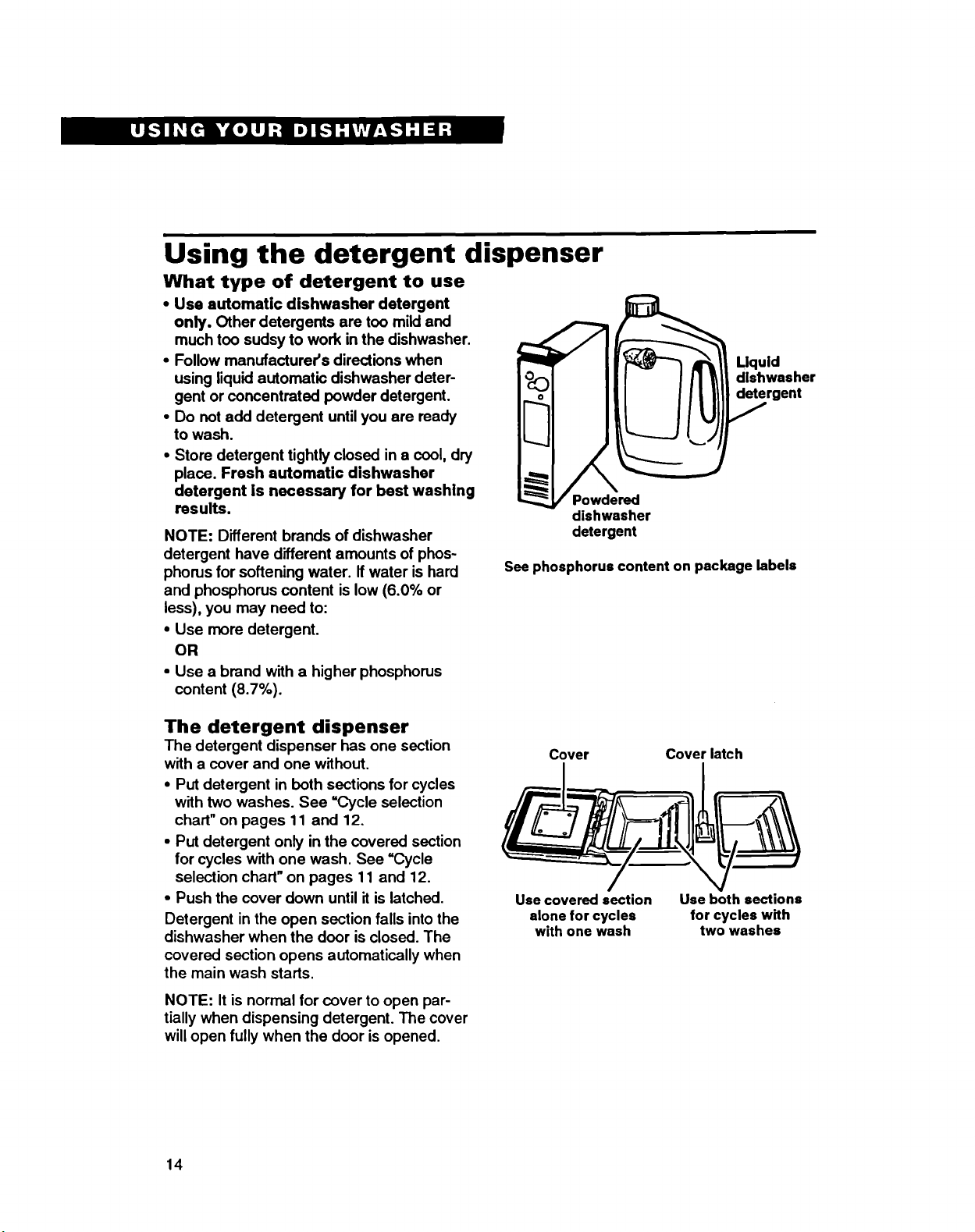
The detergent dispenser
The detergent dispenser has one section
with a cover and one without.
•Put detergent in both sections for cycles
with two washes. See "Cycle selection
chart"on pages 11 and 12,
•Put detergent only in the covered section
for cycles with one wash. See =Cycle
selection chart"on pages 11 and 12.
•Push the cover down until it is latched.
Detergent in the open section falls into the
dishwasher when the door is closed. The
covered section opens automatically when
the main wash starts.
NOTE: It is normal for cover to open par-
tially when dispensing detergent. The cover
will open fully when the door is opened.
Cover Cover latch
Use covered section
alone for cycles
with one wash
Use both sections
for cycles with
two washes
14
How much detergent to use
The amount of detergent to use depends on
the hardness of your water. If too littleis
used, dishes won't be clean. However, if too
much is used in soft water, glassware will
begin to etch.
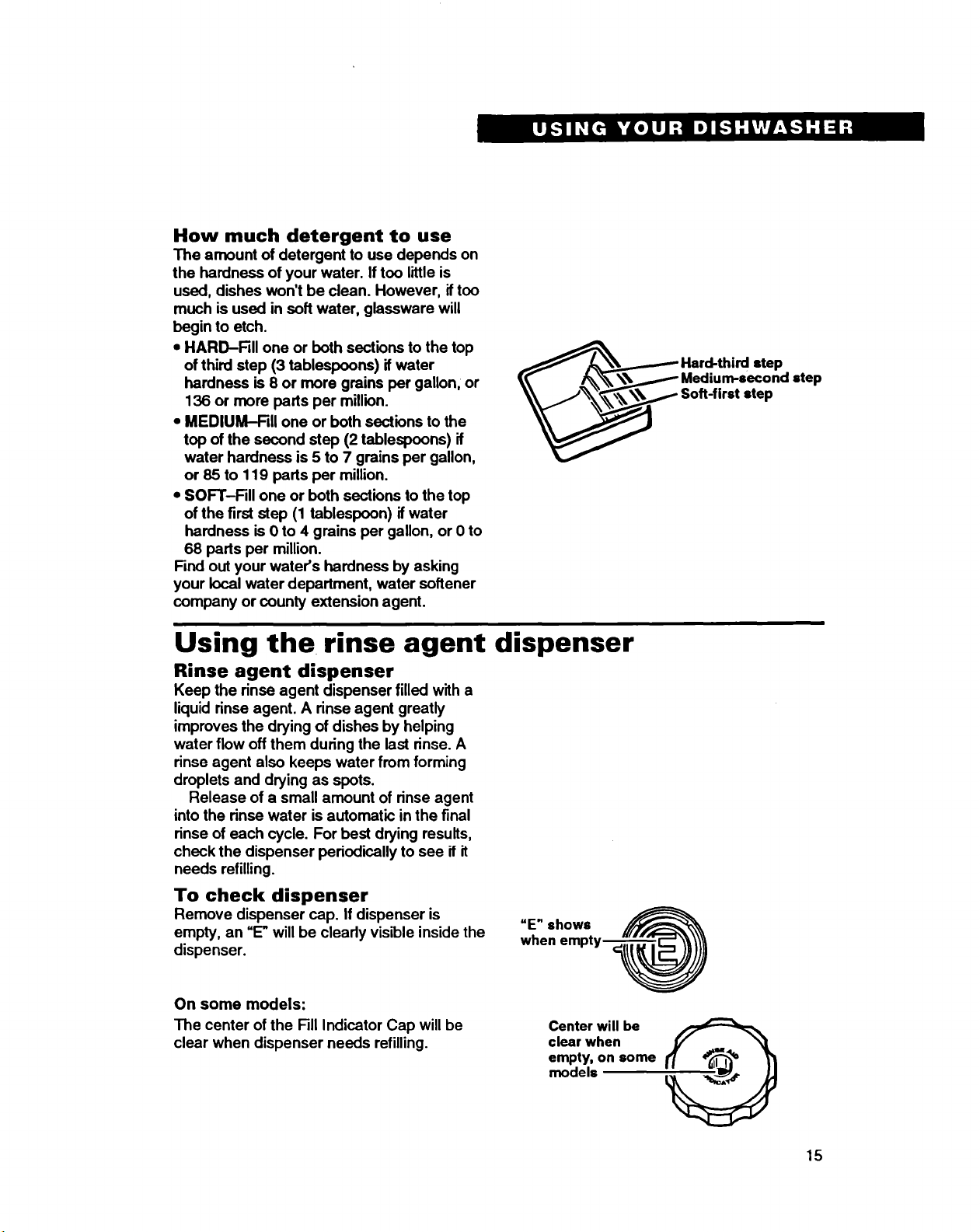
•HARD-Fill one or both sections to the top
of third step (3 tablespoons) if water
hardness is 8 or more grains per gallon, or
136 or more parts per million.
• MEDIUM-Fill one or both sections to the
top of the second step (2 tablespoons) if
water hardness is 5 to 7 grains per gallon,
or 85 to 119 parts per million.
• SOFT-Fill one or both sections to the top
of the first step (1 tablespoon) if water
hardness is 0 to 4 grains per gallon, or 0 to
68 parts per million.
Find out your water's hardness by asking
your local water department, water softener
company or county extension agent.
_ard-third step
Medium-second step
Soft-first step
Using the rinse agent dispenser
Rinse agent dispenser
Keep the rinse agent dispenser filled with a
liquid rinse agent. A rinse agent greatly
improves the drying of dishes by helping
water flow off them during the last rinse. A
rinse agent also keeps water from forming
droplets and drying as spots.
Release of a small amount of rinse agent
intothe rinse water is automatic in the final
rinse of each cycle. For best drying results,
check the dispenser periodically to see if it
needs refilling.
To check dispenser
Remove dispenser cap. If dispenser is
empty, an "E"will be cleady visible inside the
dispenser.
=E" shows
when
On some models:
The center of the Fill Indicator Cap will be
clear when dispenser needs refilling. Center will be
clear when
empty, on some
models
15
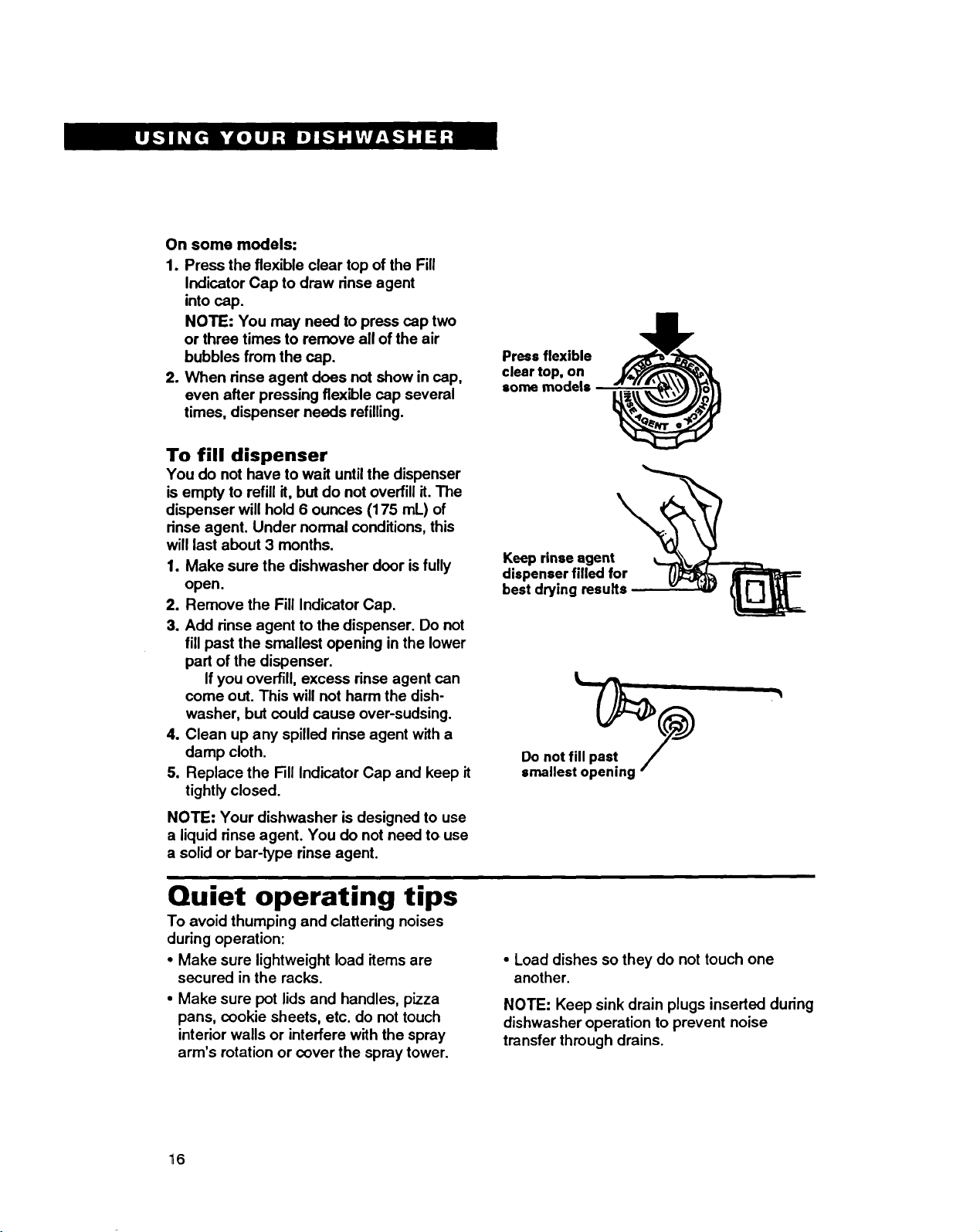
On some models:
1. Press the flexible clear top of the Fill
Indicator Cap to draw rinse agent
into cap.
NOTE: You may need to press cap two
or three times to remove all of the air
bubbles from the cap.
2. When rinse agent does not show in cap,
even after pressing flexible cap several
times, dispenser needs refilling.
Press flexible
clear top, on
some models
To fill dispenser
You do not have to wait until the dispenser
is empty to refill it, but do not overfill it. The
dispenser will hold 6 ounces (175 mL) of
rinse agent. Under normal conditions, this
will last about 3 months.
1. Make sure the dishwasher door is fully
open.
2. Remove the Fill Indicator Cap,
3. Add rinse agent to the dispenser. Do not
fill past the smallest opening in the lower
part of the dispenser.
If you overfill, excess rinse agent can
come out. This will not harm the dish-
washer, but could cause over-sudsing.
4. Clean up any spilled rinse agent with a
damp cloth.
5. Replace the Fill Indicator Cap and keep it
tightly closed.
NOTE: Your dishwasher is designed to use
a liquid rinse agent. You do not need to use
a solid or bar-type rinse agent.
Keep rinse agent
dispenser filled for
best drying results
Do not fill past
smallest opening
Quiet operating tips
To avoid thumping and clattering noises
during operation:
•Make sure lightweight load items are
secured in the racks.
• Make sure pot lids and handles, pizza
pans, cookie sheets, etc. do not touch
interior walls or interfere with the spray
arm's rotation or cover the spray tower.
• Load dishes so they do not touch one
another.
NOTE: Keep sink drain plugs inserted during
dishwasher operation to prevent noise
transfer through drains.
16
Water temperature tips
Hot water dissolves and activates the
dishwashing detergent. Hot water also
dissolves grease on dishes and helps dry
glasses spot-free. Use the Hi-Temp option if
you keep your water heater at a low setting.
For best dishwashing results, water must
be at least 120°F (49°C) as itenters the
dishwasher.
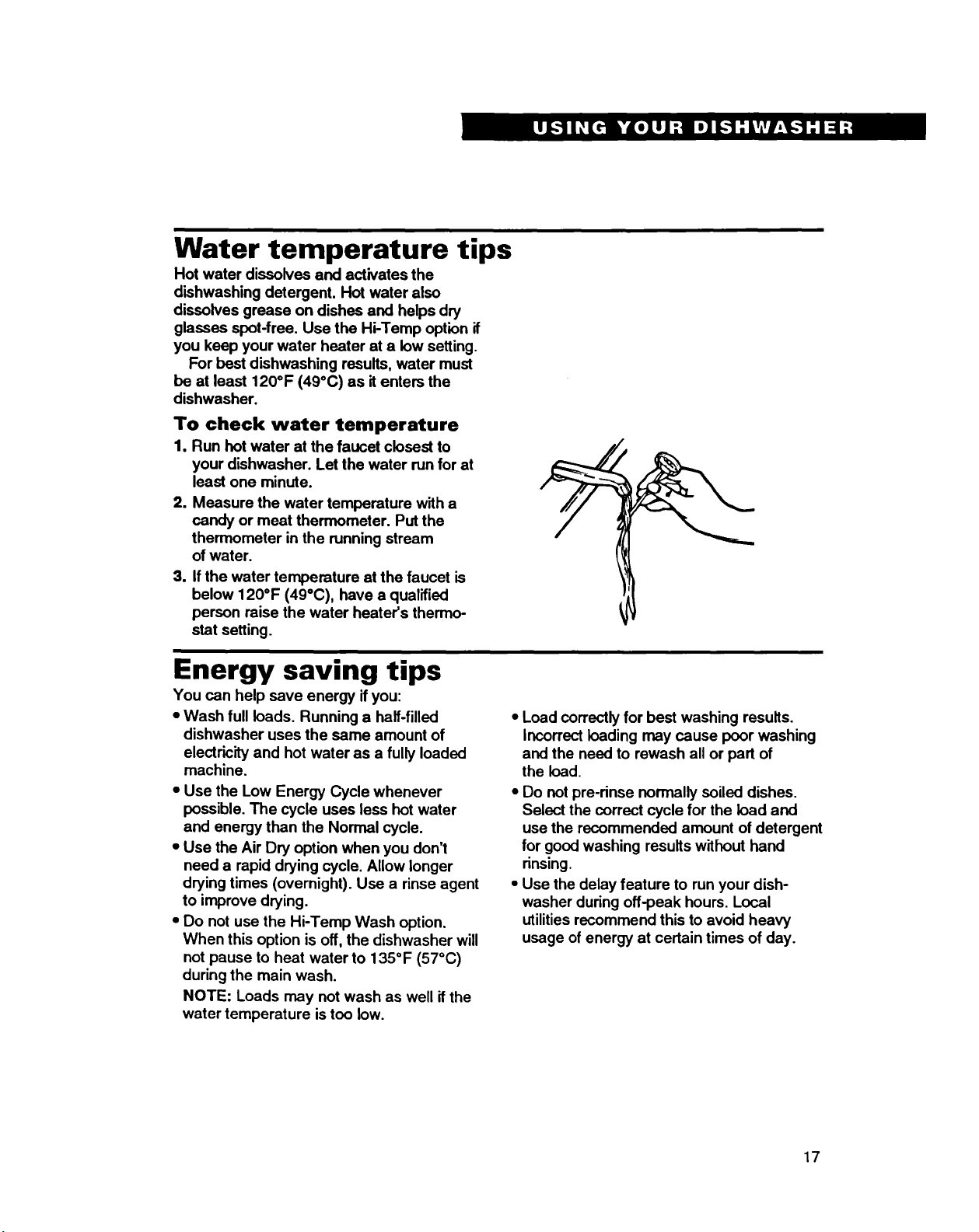
To check water temperature
1. Run hot water at the faucet closest to
your dishwasher. Let the water run for at
least one minute.
2. Measure the water temperature with a
candy or meat thermometer. Put the
thermometer in the running stream
of water.
3. Ifthe water temperature at the faucet is
below 120°F (49°C), have a qualified
person raise the water heater's thermo-
stat setting.
Energy saving tips
You can help save energy ifyou:
•Wash full loads. Running a half-filled •Load correctly for best washing results.
dishwasher uses the same amount of Incorrect loading may cause poor washing
electricity and hot water as a fully loaded and the need to rewash all or part of
machine.
•Use the Low Energy Cycle whenever
possible. The cycle uses less hot water
and energy than the Normal cycle.
•Use the Air Dry option when you don't
need a rapid drying cycle. Allow longer
the load.
•Do not pre-rinse normally soiled dishes.
Select the correct cycle for the load and
use the recommended amount of detergent
for good washing results without hand
rinsing.
drying times (overnight). Use a rinse agent
to improve drying.
•Do not use the Hi-Temp Wash option.
When this option is off, the dishwasher will
not pause to heat water to 1350F (570C)
during the main wash.
NOTE: Loads may not wash as well ifthe
water temperature is too low.
•Use the delay feature to run your dish-
washer during off-peak hours. Local
utilitiesrecommend this to avoid heavy
usage of energy at certain times of day.
17
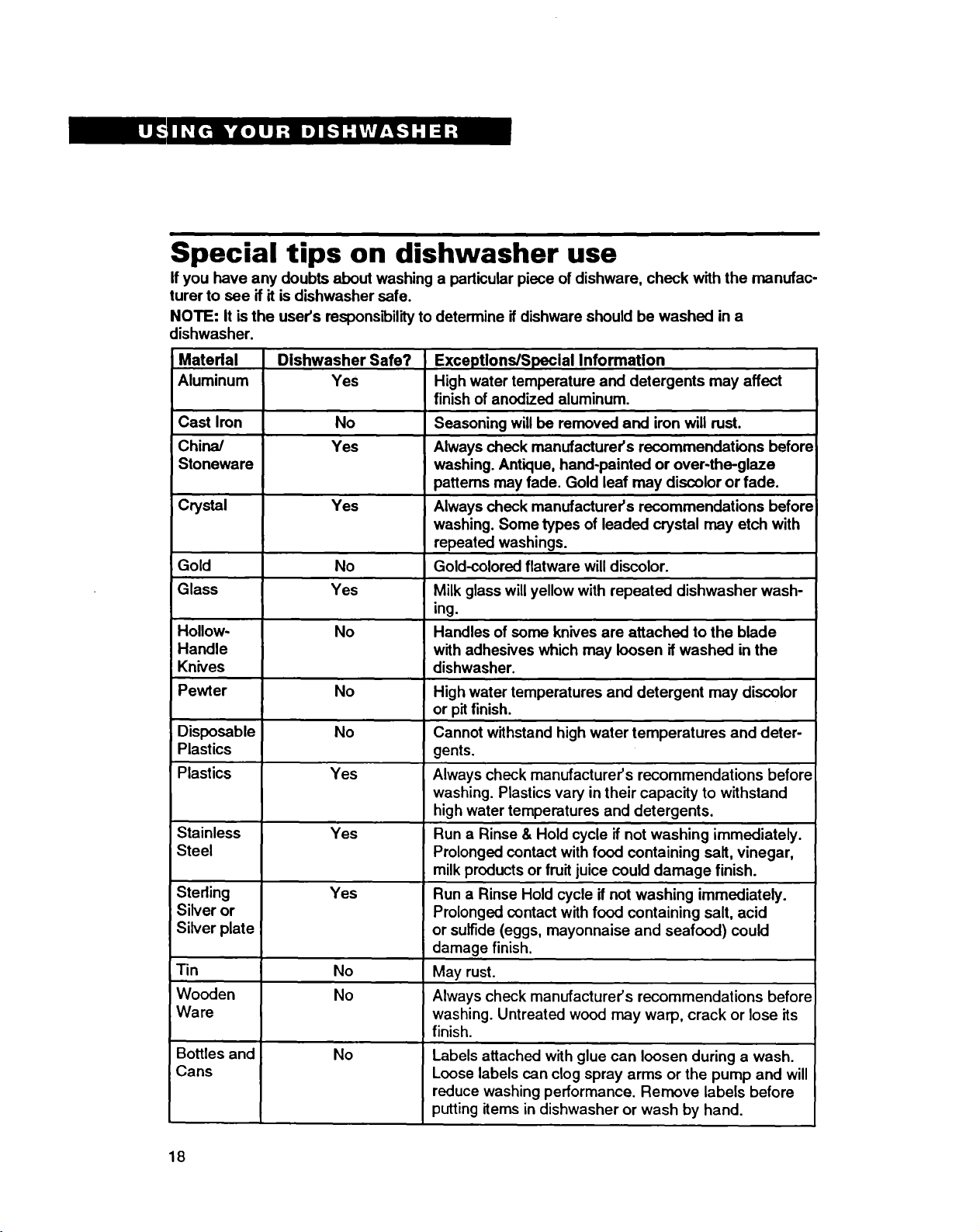
Special tips on dishwasher use
Ifyou have any doubts about washing a particular piece of dishware, check with the manufac-
turer to see if it is dishwasher safe.
NOTE: It is the user's respons_ility to determine ifdishware should be washed in a
dishwasher.
Material
Aluminum Dishwasher Safe?
Yes Exceptions/Special Information
High water temperature and detergents may affect
finish of anodized aluminum.
Cast Iron No Seasoning will be removed and iron will rust.
China/ Yes Always check manufacturer's recommendations before
Stoneware washing. Antique, hand-painted or over-the-glaze
patterns may fade. Gold leaf may discolor or fade.
Crystal Yes Always check manufacturer's recommendations before
washing. Some types of leaded crystal may etch with
repeated washings.
Gold No Gold-colored flatware will discolor.
Glass Yes Milk glass will yellow with repeated dishwasher wash-
ing.
Hollow- No Handles of soma knives are attached to the blade
Handle with adhesives which may loosen if washed in the
Knives dishwasher.
Pewter No High water temperatures and detergent may discolor
or pitfinish.
Disposable No Cannot withstand high water temperatures and deter-
Plastics gents.
Plastics Yes Always check manufacturer's recommendations before
washing. Plastics vary in their capacity to withstand
high water temperatures and detergents.
Stainless Yes Run a Rinse & Hold cycle if not washing immediately.
Steel Prolonged contact with food containing salt, vinegar,
milk products or fruit juice could damage finish.
Sterling Yes Run a Rinse Hold cycle if not washing immediately.
Silver or Prolonged contact with food containing salt, acid
Silver plate or sulfide (eggs, mayonnaise and seafood) could
damage finish.
T!n No May rust.
Wooden No Always check manufacturer's recommendations before
Ware washing. Untreated wood may warp, crack or lose its
finish.
Bottles and No Labels attached with glue can loosen during a wash.
Cans Loose labels can clog spray arms or the pump and will
reduce washing performance. Remove labels before
putting items in dishwasher or wash by hand.
18
Loading Your Dishwasher
In This Section
Page
Preparing to load the dishwasher ... 19
Loading the top reck ........................ 19
Loading the bottom rack .................. 20
Page
Loading the silverware basket ........ 21
Loading the cutlery basket .............. 22
This section tells you how to properly load your dishwasher for the best washing and rinsing
results.
Preparing to load the dishwasher
•To save water and energy, do not rinse •Foods like eggs, rice, pasta, and cooked
dishes before putting them into the
dishwasher.
•Remove large pieces of food, bones and
other hard items. The POWER CLEAN TM
module will remove food particles from the
water. The module contains a chopping
device which will reduc;ethe size of food
items.
NOTE: If hard items such as fruit seeds, nuts
and egg shells enter the POWER CLEAN
module, you might hear chopping, grindingl
crunching or buzzing sounds. Those sounds
are normal when hard items enter the mod-
ule. Do not let metallic items (such as pot
handle screws) get into the POWER CLEAN
module. This could damage the POWER
CLEAN module.
cereals may be hard to remove ifthey are
leftto dry over a period of time.
Run a Rinse & Hold cycle to keep dishes
moist if you do not plan to wash them
soon.
Load dishes so soiled surfaces face the
rotating spray arms.
Load dishes so they are not stacked or
overlapping. It is important for the water
spray to reach all soiled surfaces for best
washing. For best drying, water must be
able to drain from all surfaces.
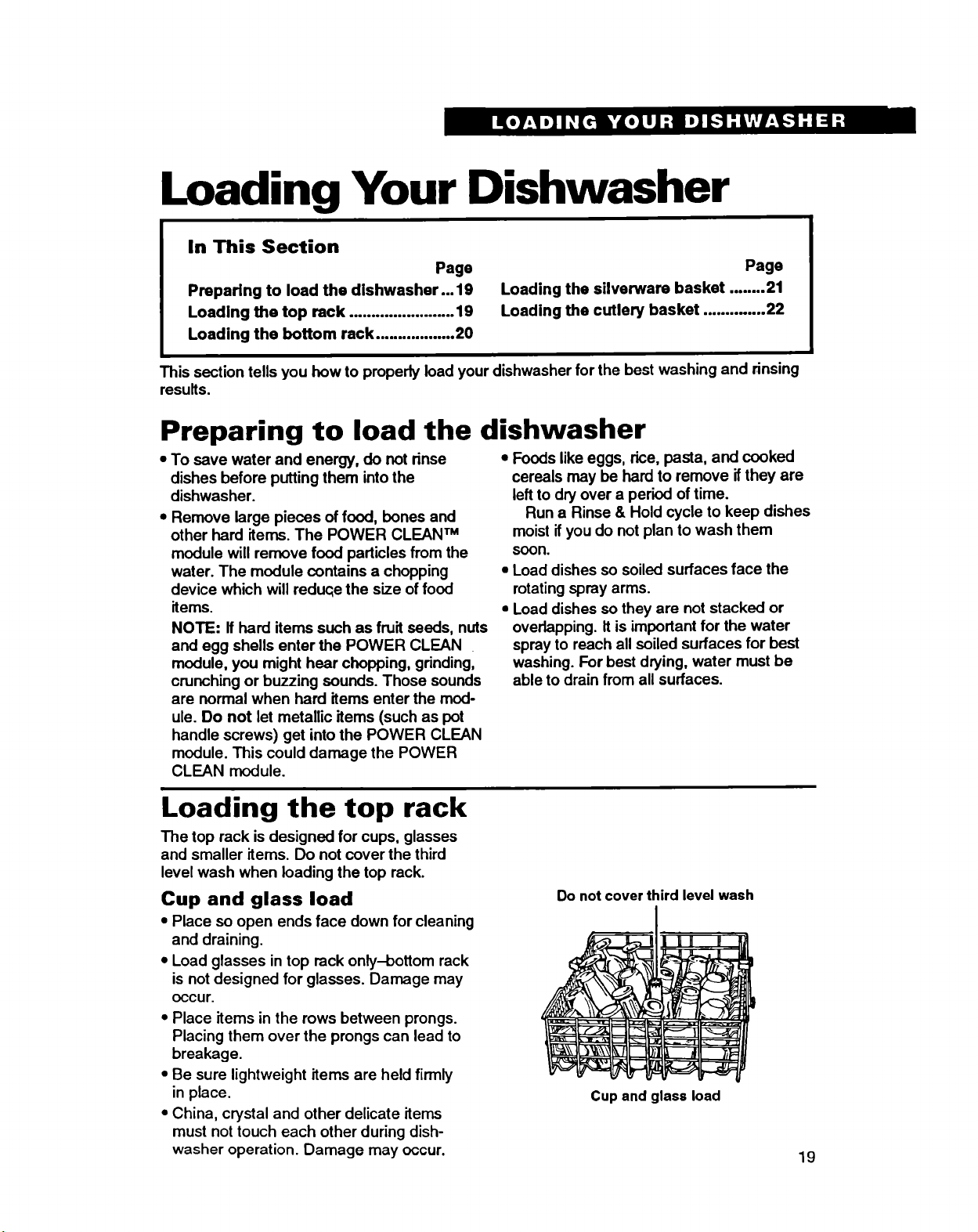
Loading the top rack
The top rack isdesigned for cups, glasses
and smaller items. Do not cover the third
level wash when loading the top rack.
Cup and glass load
•Place so open ends face down for cleaning
and draining.
• Load glasses in top rack only-bottom rack
is not designed for glasses. Damage may
occur.
•Place items in the rows between prongs.
Placing them over the prongs can lead to
breakage.
•Be sure lightweight items are held firmly
in place.
•China, crystal and other delicate items
must not touch each other during dish-
washer operation. Damage may occur.
Do not cover third level wash
Cup and glass load
19
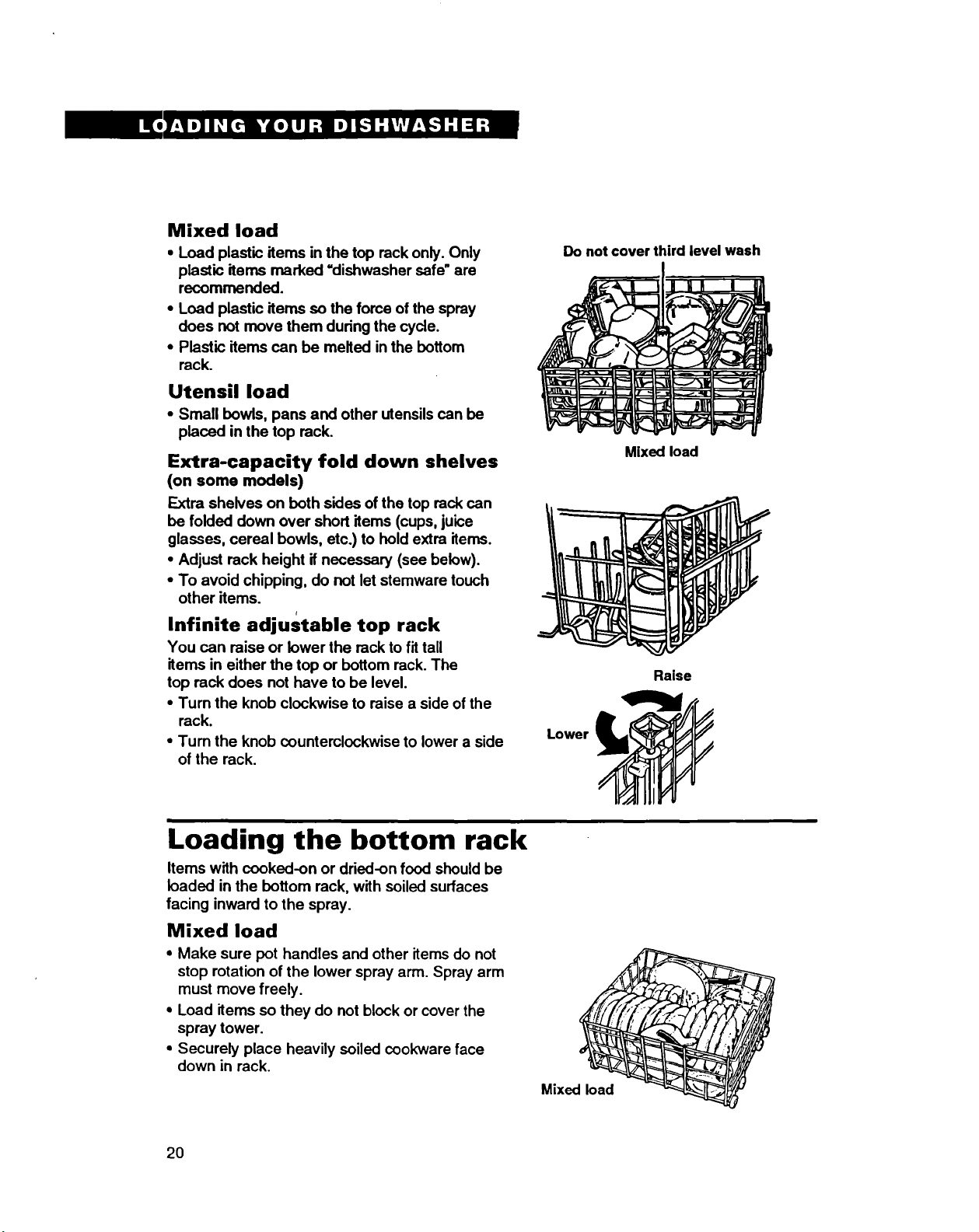
Mixed load
•Load plastic items in the top reck only. Only
plastic items marked =dishwasher safe" are
recommended.
•Load plastic items so the force of the spray
does not move them during the cycle.
•Plastic items can be melted in the bottom
rack.
Utensil load
• Small bowls, pans and other utensils can be
placed in the top reck.
Extra-capacity fold down shelves
(on some models)
Extra shelves on both sides of the top reck can
be folded down over short items (cups, juice
glasses, cereal bowls, etc.) to hold extra items.
•Adjust rack height if necessary (see below).
•To avoid chipping, do not let stemware touch
other items. r
Infinite adjustable top rack
You can raise or lower the reck to fit tall
items in either the top or bottom reck. The
top rack does not have to be level.
•Turn the knob clockwise to raise a side of the
rack.
•Turn the knob counterclockwise to lower a side
of the rack.
Do not cover third level wash
Mixed load
Raise
Lower
Loading the bottom rack
Items with cooked-on or dried-on food should be
loaded in the bottom reck, with soiled surfaces
facing inward to the spray.
Mixed load
•Make sure pot handles and other items do not
stop rotation of the lower spray arm. Spray arm
must move freely.
•Load items so they do not block or cover the
spray tower.
•Securely place heavily soiled cookware face
down in reck.
Mixed load
2O
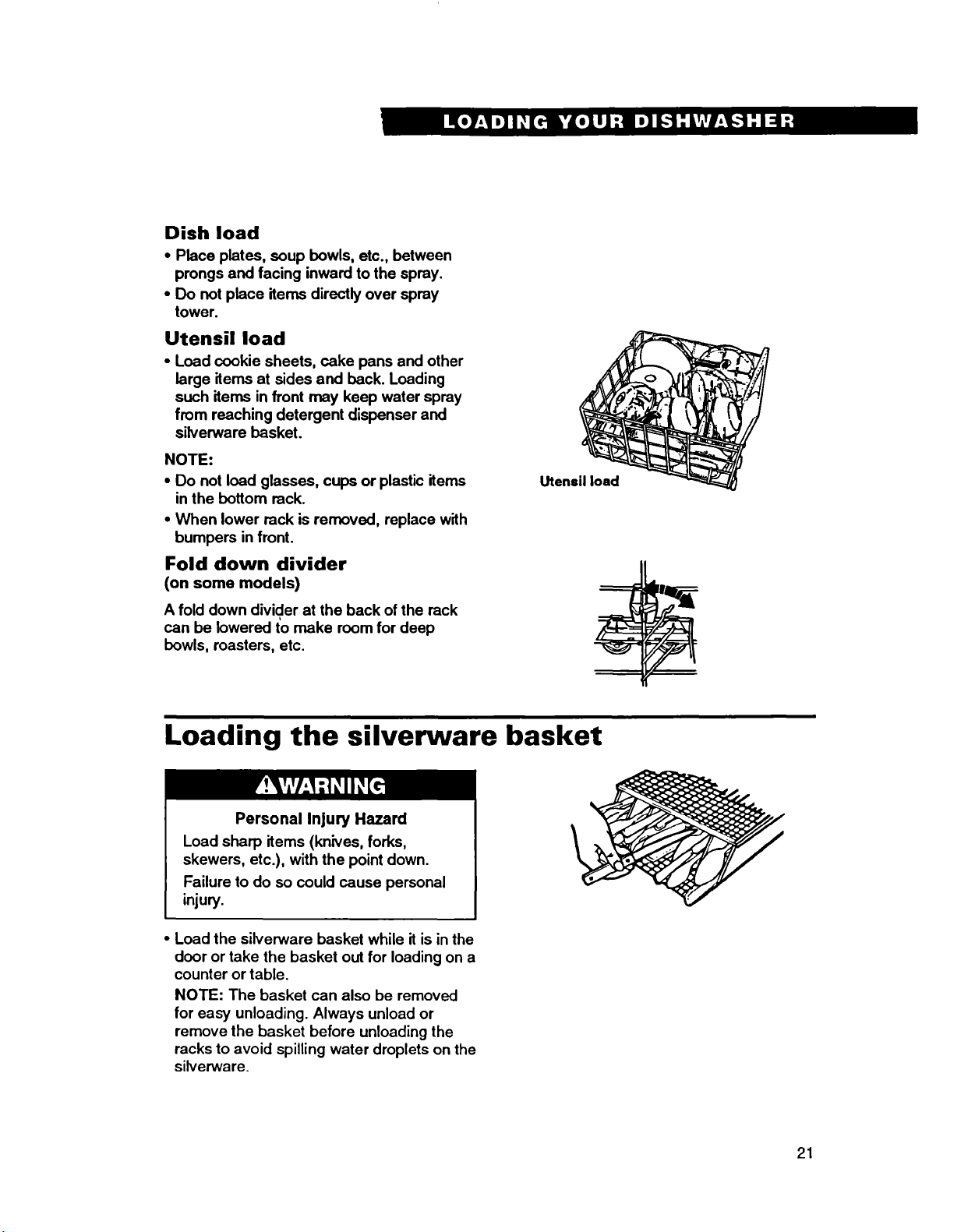
Dish load
• Place plates, soup bowls, etc., between
prongs and facing inward to the spray.
• Do not place items directly over spray
tower.
Utensil load
•Load cookie sheets, cake pans and other
large items at sides and back. Loading
such items in front may keep water spray
from reaching detergent dispenser and
silverware basket.
NOTE:
• Do not load glasses, cups or plastic items
in the bottom rack.
•When lower rack is removed, replace with
bumpers in front.
Fold down divider
(on some models)
Afold down divider at the back of the rack
can be lowered to make room for deep
bowls, roasters, etc.
Utensil load
Loading the silverware basket
Personal Injury Hazard
Load sharp items (knives, forks,
skewers, etc.), with the point down.
Failure to do so could cause personal
injury.
•Load the silverware basket while it is in the
door or take the basket out for loading on a
counter or table.
NOTE: The basket can also be removed
for easy unloading. Always unload or
remove the basket before unloading the
racks to avoid spilling water droplets on the
silverware.
21
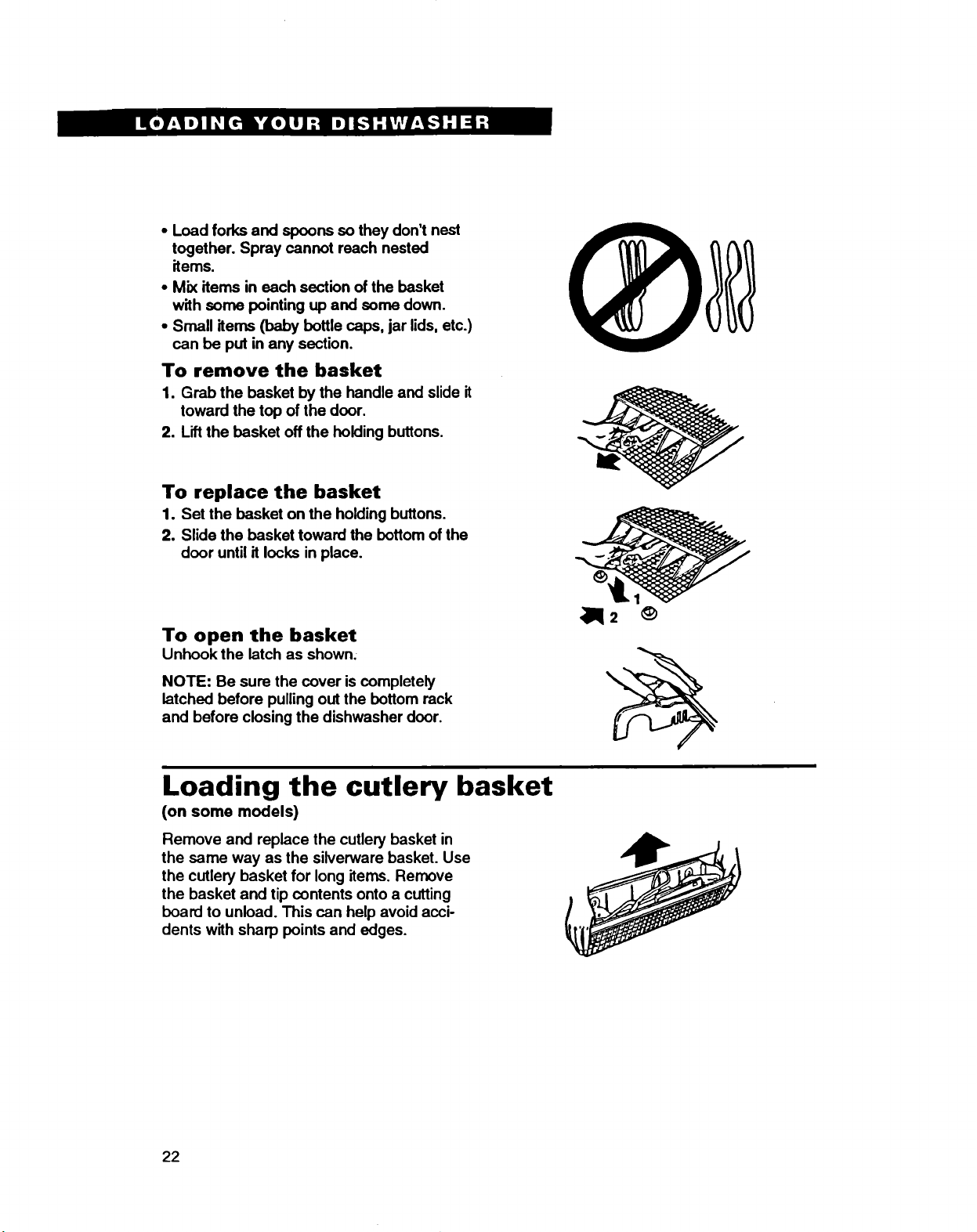
•Load forks and spoons so they don't nest
together. Spray cannot reach nested
items.
•Mix items in each section of the basket
with some pointing up and some down.
•Small items (baby bottle caps, jar lids, etc.)
can be put in any section.
To remove the basket
1. Grab the basket by the handle and slide it
toward the top of the door.
2. Lift the basket off the holding buttons.
To replace the basket
1. Set the basket on the holding buttons.
2. Slide the basket toward the bottom of the
door until it locks in place.
To open the basket
Unhook the latch as shown.
NOTE: Be sure the cover iscompletely
latched before pulling out the bottom rack
and before closing the dishwasher door.
Loading the cutlery basket
(on some models)
Remove and replace the cutlery basket in
the same way as the silverware basket. Use
the cutlery basket for long items, Remove
the basket and tip contents onto a cutting
board to unload. This can help avoid acci-
dents with sharp points and edges.
22
Caring For Your Dishwasher
Your new dishwasher is designed to give you many years of dependable service. There are a
few things you can do to maintain your dishwasher properly. This section tells you how to
clean and care for your dishwasher. Refer to "Solution chart"on pages 24-26 for special
cleaning problems.
Personal Injury Hazard
Before cleaning interior or filter screen,
wait at least 20 minutes after a cycle
for the heating element to cool down.
Failure to do so can result in bum
injuries.
Cleaning the exterior
In most cases, regular use of a soft, damp
cloth or sponge and a mild detergent is all
that is necessary to keep the outside of your
dishwasher nice looking and clean.
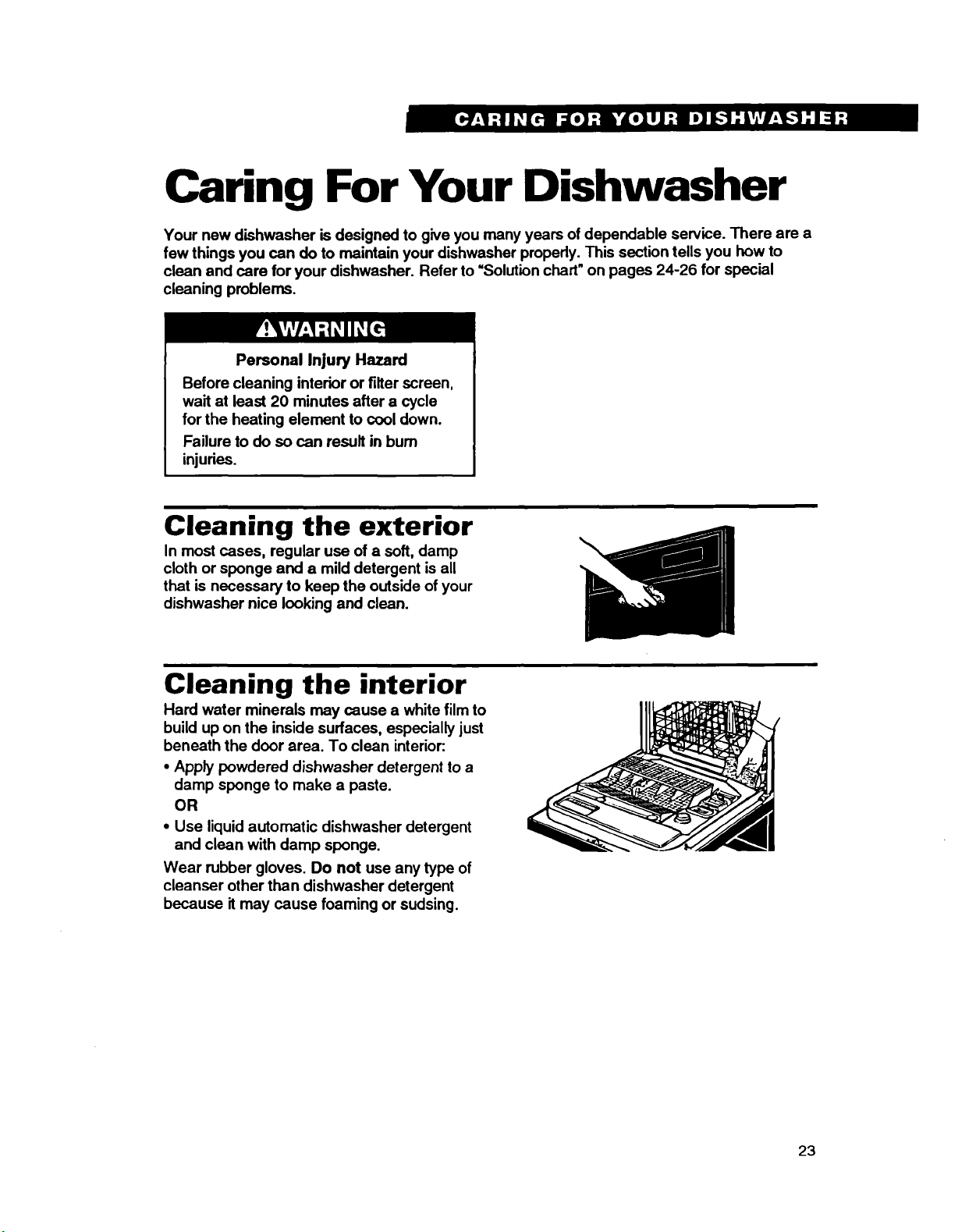
Cleaning the interior
Hard water minerals may cause a white film to
build up on the inside surfaces, especially just
beneath the door area. To clean interior:
• Apply powdered dishwasher detergent to a
damp sponge to make a paste.
OR
• Use liquid automatic dishwasher detergent
and clean with damp sponge.
Wear rubber gloves. Do not use any type of
cleanser other than dishwasher detergent
because it may cause foaming or sudsing.
23
Common Dishwashing
Problems
In This Section Page
Solution chart .................................. 24 Page
Removing spots and film ................. 26
Solution chart
A convenient checklist for handling minor performance problems. Go over this list before
calling for service. Ifyou are unable to solve your dishwasher's problem, rum to page 27 for
service information.
Problem
Food Soil Left on
Dishes
Spotting and
Filming
24
Cause
improper loading
Water temperature is
too low
Use of incorrect, too
little or ineffective
detergent
Detergent cakes in
dispenser
Pump or spray arm
clogged by labels from
bottles and cans
Low water pressure
due to insufficient fill
Slowdown of wash arm
due to high suds
Hard water or high
mineral content in
water
Solution
Follow loading instructions on
pages 19-22.
Use the Hi-Temp option, if needed, turn
home water heater up to ensure water
entering dishwasher is 120°F (49°C)
minimum. See recommended procedure
on page 17.
Use recommended dishwasher deter-
gents only. Follow recommendations on
pages 14 and 15 for amounts; never
use less than one tablespoon per load.
Detergent must be fresh to be effective.
Always store detergent in a cool, dry
area, preferably in an airtight container.
Use fresh detergent only. Do not allow
detergent to sit for several hours in a
wet dispenser. Check dispenser for
caked detergent. Clean dispenser when
caked detergent is present.
Remove labels before washing or wash
by hand. See page 18.
Home water pressure should be 20 to
120 psi for proper dishwasher fill. A
booster pump on the water supply may
be necessary if pressure istoo low.
Never use soap or laundry detergents.
Use recommended dishwasher deter-
gents only.
Conditioning the final rinse water with a
liquid rinse agent helps eliminate
spotting and filming. Keep the dispenser
full with a rinse agent at all times.
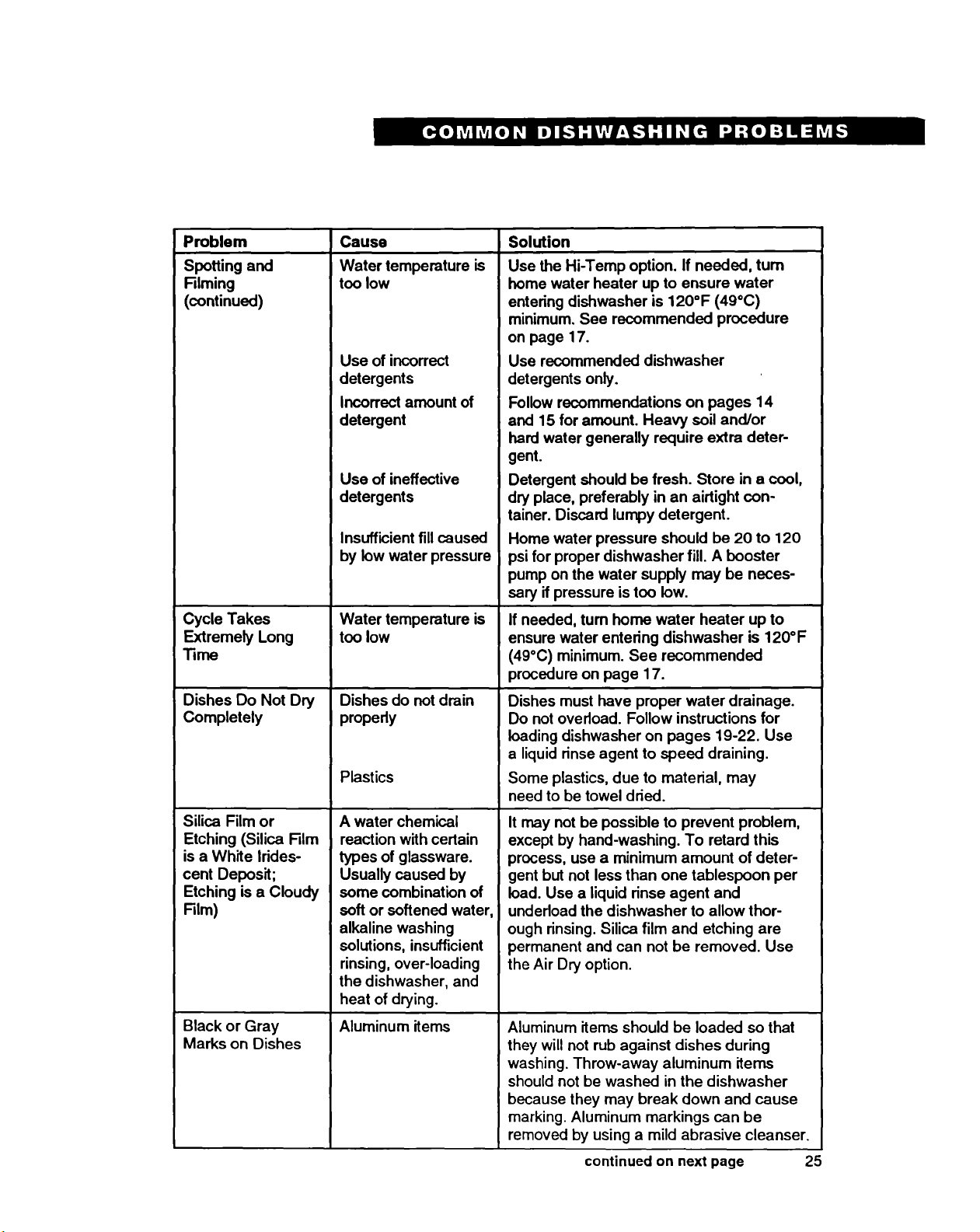
Problem
Spoffing and
Riming
(continued)
Cycle Takes
Extremely Long
Time
Dishes Do Not Dry
Completely
Silica Film or
Etching (Silica Film
isa White Irides-
cent Deposit;
Etching is a Cloudy
Film)
Black or Gray
Marks on Dishes
Cause
Water temperature is
too low
Use of incorrect
detergents
Incorrect amount of
detergent
Use of ineffective
detergents
Insufficient fillcaused
by low water pressure
Water temperature is
too low
Dishes do not drain
properly
Plastics
A water chemical
reaction with certain
types of glassware.
Usually caused by
some combination of
soft or softened water,
alkaline washing
solutions, insufficient
rinsing, over-loading
the dishwasher, and
heat of drying.
Aluminum items
Solution
Use the Hi-Temp option. If needed, turn
home water heater up to ensure water
entering dishwasher is 120°F (49°C)
minimum. See recommended procedure
on page 17.
Use recommended dishwasher
detergents only.
Follow recommendations on pages 14
and 15 for amount. Heavy soil and/or
hard water generally require extra deter-
gent.
Detergent should be fresh. Store in acool,
dry place, preferably in an airtight con-
tainer. Discard lumpy detergent.
Home water pressure should be 20 to 120
psi for proper dishwasher fill. A booster
pump on the water supply may be neces-
sary if pressure is too low.
If needed, turn homo water heater up to
ensure water entering dishwasher is 120°F
(49°C) minimum. See recommended
procedure on page 17.
Dishes must have proper water drainage.
Do not overload. Follow instructions for
loading dishwasher on pages 19-22. Use
a liquid rinse agent to speed draining.
Some plastics, due to material, may
need to be towel dried.
It may not be possible to prevent problem,
except by hand-washing. To retard this
process, use a minimum amount of deter-
gent but not less than one tablespoon per
load. Use a liquid rinse agent and
undedoad the dishwasher to allow thor-
ough rinsing. Silica film and etching are
permanent and can not be removed. Use
the Air Dry option.
Aluminum items should be loaded so that
they will not rub against dishes during
washing. Throw-away aluminum items
should not be washed in the dishwasher
because they may break down and cause
marking. Aluminum markings can be
removed by using a mild abrasive cleanser.
continued on next page 25
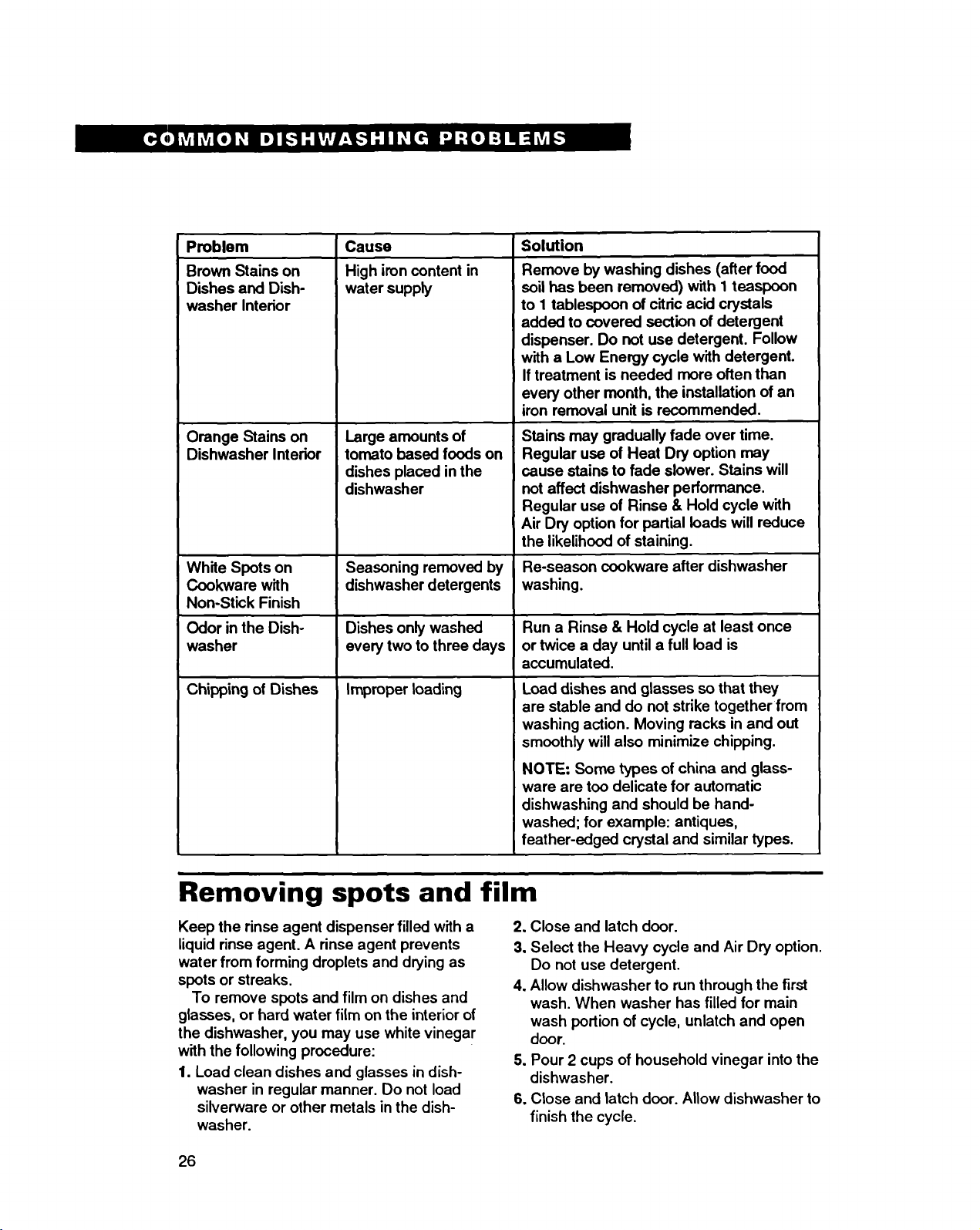
Problem Solution
Brown Stains on
Dishes and Dish-
washer interior
Orange Stains on
Dishwasher Interior
White Spots on
Cookware with
Non-Stick Finish
Odor in the Dish-
washer
Chipping of Dishes
Cause
High iron content in
water supply
Large amounts of
tomato based foods on
dishes placed in the
dishwasher
Seasoning removed by
dishwasher detergents
Dishes only washed
every two to three days
improper loading
Remove by washing dishes (after food
soilhas been removed) with I teaspoon
to 1 tablespoon of citric acid crystals
added to covered section of detergent
dispenser. Do not use detergent. Follow
with a Low Energy cycle with detergent.
If treatment is needed more often than
every other month, the installation of an
iron removal unit is recommended.
Stains may gradually fade over time.
Regular use of Heat Dry option may
cause stains to fade slower. Stains will
not affect dishwasher performance.
Regular use of Rinse & Hold cycle with
Air Dry option for partial loads will reduce
the likelihood of staining.
Re-season cookware after dishwasher
washing.
Run a Rinse & Hold cycle at least once
or twice a day until a full load is
accumulated.
Load dishes and glasses so that they
are stable and do not strike together from
washing action. Moving racks in and out
smoothly will also minimize chipping.
NOTE: Some types of china and glass-
ware are too delicate for automatic
dishwashing and should be hand-
washed; for example: antiques,
feather-edged crystal and similar types.
Removing spots and film
Keep the rinse agent dispenser filled with a
liquid rinse agent. A rinse agent prevents
water from forming droplets and drying as
spots or streaks.
To remove spots and film on dishes and
glasses, or hard water film on the interior of
the dishwasher, you may use white vinegar
with the following procedure:
1. Load clean dishes and glasses in dish-
washer in regular manner. Do not load
silverware or other metals in the dish-
washer.
2. Close and latch door.
3, Select the Heavy cycle and Air Dry option.
Do not use detergent.
4. Allow dishwasher to run through the first
wash. When washer has filled for main
wash portion of cycle, unlatch and open
door.
5. Pour 2 cups of household vinegar into the
dishwasher.
6. Close and latch door. Allow dishwasher to
finish the cycle.
26
If You Need Assistance
Or Service
This section is designed to help you save the cost of aservice call. When calling our Con-
sumer Assistance Center for help or callingfor service, please provide a detailed description
of the problem, your appliance's complete model and serial numbers and the purchase date.
(See page 2.) This information will help us respond properly to your request.
1. Before calling for assistance ...
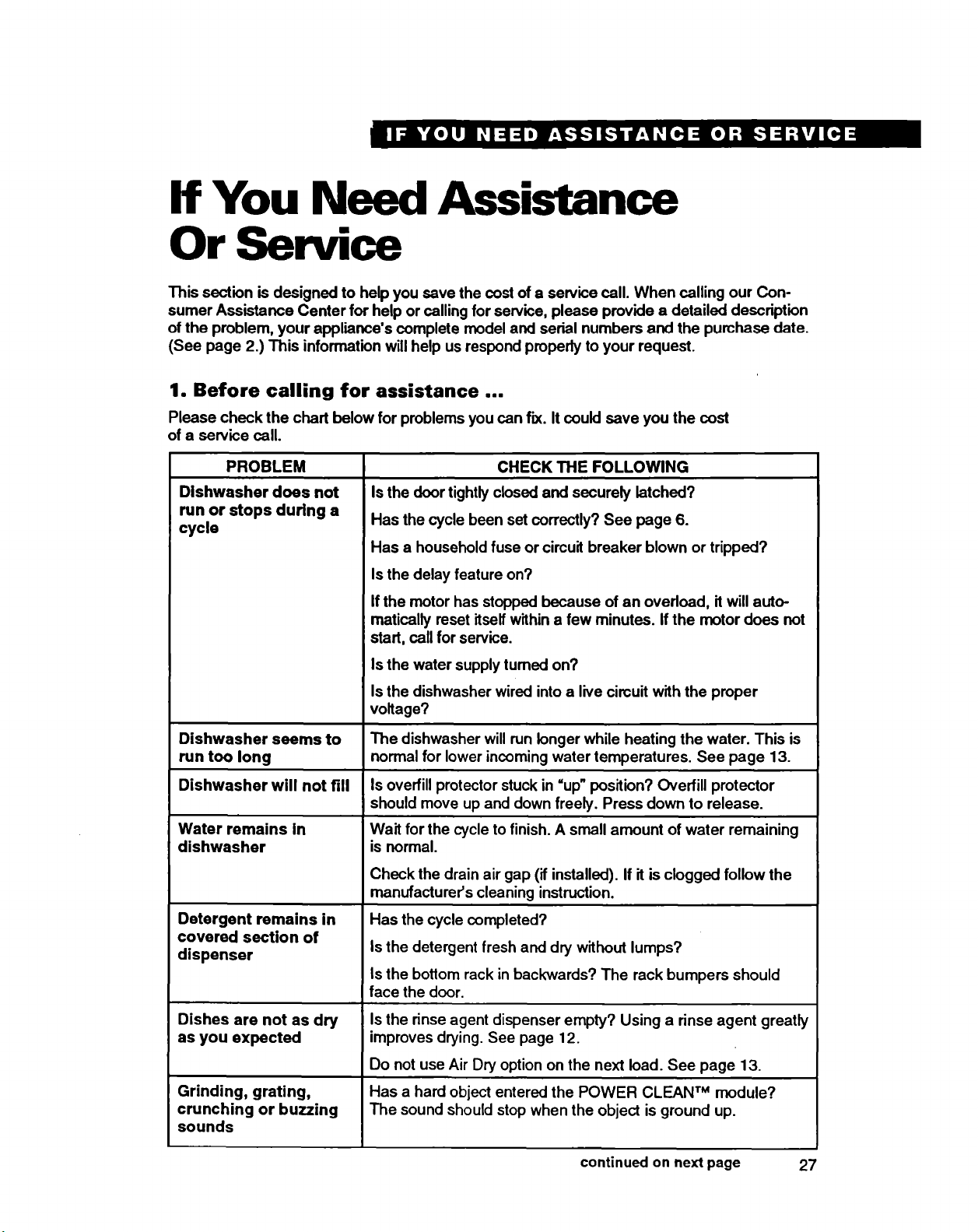
Please check the chart below for problems you can fix. It could save you the cost
of a service call.
PROBLEM
Dishwasher does not
run or stops during a
cycle
Dishwasher seems to
run too long
Dishwasher will not fill
Water remains in
dishwasher
Detergent remains in
covered section of
dispenser
Dishes are not as dry
as you expected
Grinding, grating,
crunching or buzzing
sounds
CHECK THE FOLLOWING
Is the door tightlyclosed and securely latched?
Has the cycle been set correctly? See page 6.
Has a household fuse or circuit breaker blown or tripped?
Is the delay feature on?
If the motor has stopped because of an overload, itwill auto-
matically reset itself within a few minutes. Ifthe motor does not
start, call for service.
Is the water supply turned on?
Is the dishwasher wired into a live circuit with the proper
voltage?
The dishwasher willrun longer while heating the water. This is
normal for lower incoming water temperatures. See page 13.
Is overfill protector stuck in =up" position? Overfill protector
should move up and down freely. Press down to release.
Wait for the cycle to finish. A small amount of water remaining
is normal.
Check the drain air gap (if installed). If it is clogged follow the
manufacturer's cleaning instruction.
Has the cycle completed?
Isthe detergent fresh and dry without lumps?
Isthe bottom rack in backwards? The rack bumpers should
face the door.
Isthe rinse agent dispenser empty? Using a rinse agent greatly
improves drying. See page 12.
Do not use Air Dry option on the next load. See page 13.
Has a hard object entered the POWER CLEAN TM module?
The sound should stop when the object is ground up.
continued on next page 27
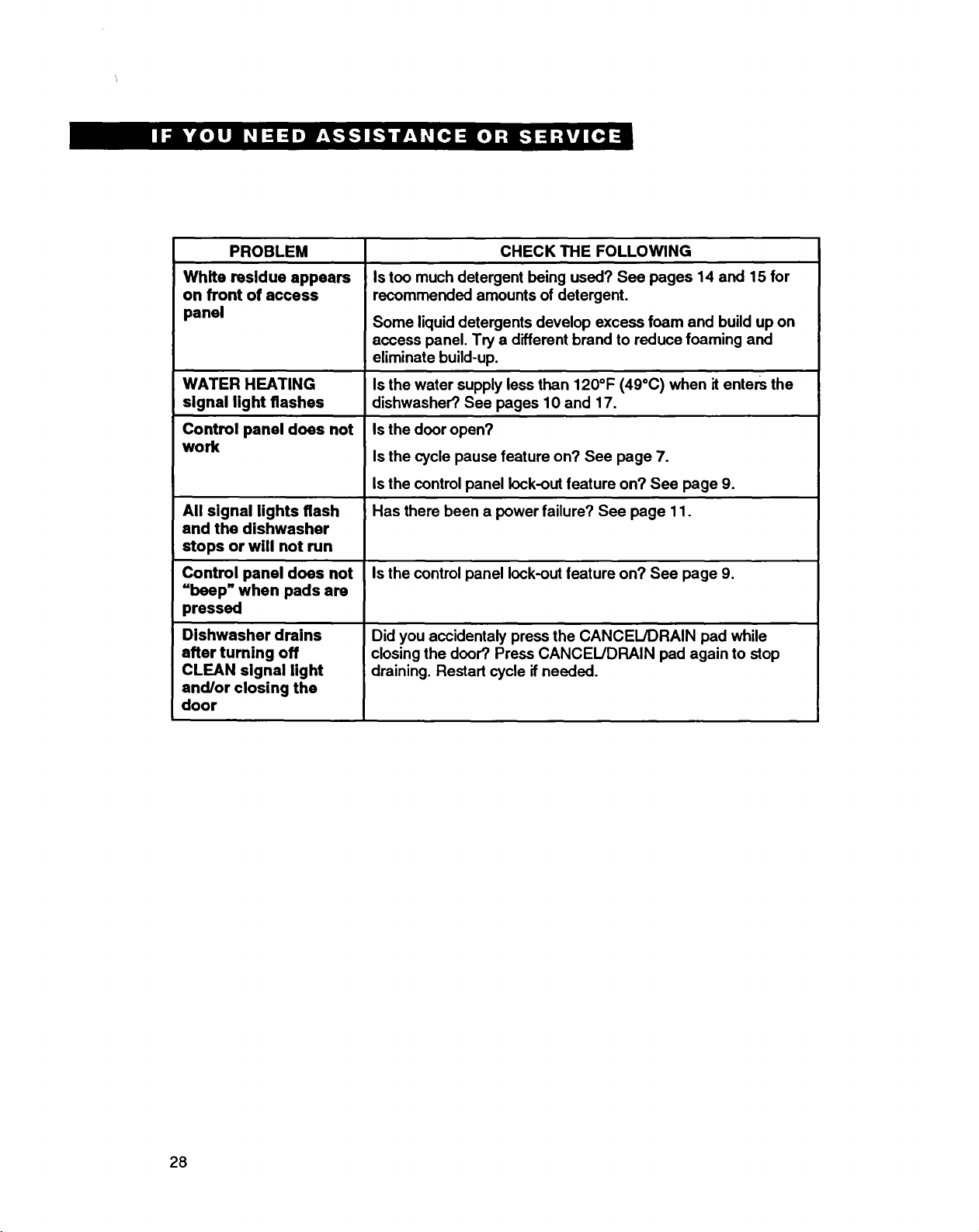
PROBLEM
White residue appears
on front of access
panel
WATER HEATING
signal light flashes
Control panel does not
work
All signal lights flash
end the dishwasher
stops or will not run
Control panel does not
=boep" when pads are
pressed
Dishwasher drains
after turning off
CLEAN signal light
and/or closing the
door
CHECK THE FOLLOWING
Is too much detergent being used? See pages 14 and 15 for
recommended amounts of detergent.
Some liquiddetergents develop excess foam and build up on
access panel. Try a different brand to reduce foaming and
eliminate build-up.
Is the water supply less than 120°F (49°C) when it entem the
dishwasher? See pages 10 and 17.
Isthe door open?
Is the cycle pause feature on? See page 7.
Isthe control panel lock-out feature on? See page 9.
Has there been a power failure? See page 11.
Is the control panel lock-out feature on? See page 9.
Did you accidentaly press the CANCEL/DRAIN pad while
closingthe door? Press CANCEL/DRAIN pad again to stop
draining. Restart cycle ifneeded.
28
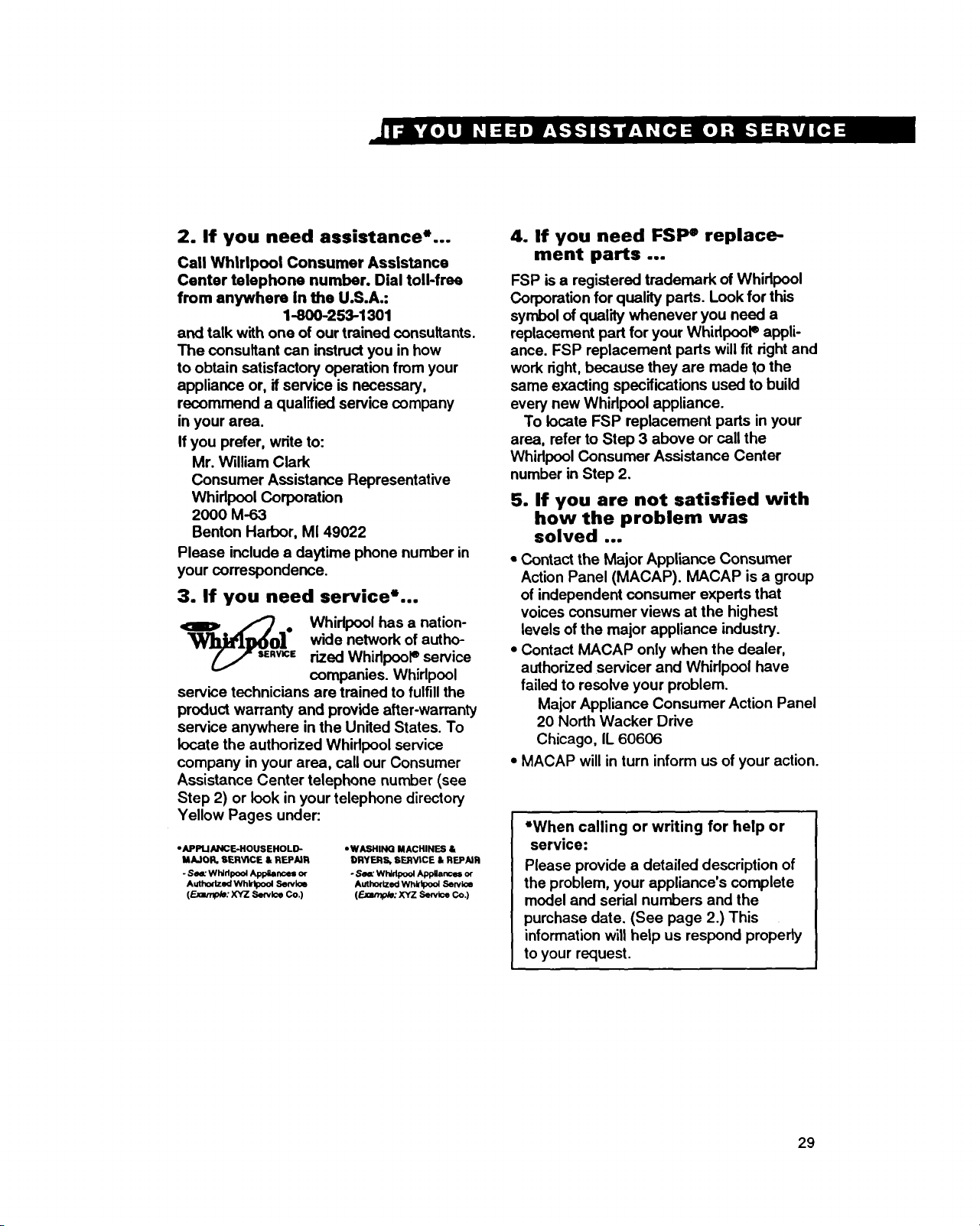
2. If you need assistance*...
Call Whirlpool Consumer Assistance
Center telephone number. Dial toll-free
from anywhere in the U.S.A.:
1-8OO-253-1301
and talk with one of our trained consultants.
The consultant can instruct you in how
to obtain satisfactory operation from your
appliance or, if service is necessary,
recommend a qualified service company
in your area.
If you prefer, write to:
Mr. William Clark
Consumer Assistance Representative
Whirlpool Corporation
20OO M-63
Benton Harbor, MI 49022
Please include a daytime phone number in
your correspondence.
3. If you need service*...
_ljl_O] .Whirlpool has a nation-wide network of autho-
_R_= rized WhidpooP service
companies. Whirlpool
service technicians are trained to fulfill the
product warranty and provide after-warranty
service anywhere in the United States. To
locate the authorized Whirlpool service
company in your area, call our Consumer
Assistance Center telephone number (see
Step 2) or look in your telephone directory
Yellow Pages under:
• APPLIANCE-HOUS EHOLD-
MAJOR, SERVtCE & REPAIR
-S_- Whirlpool Apphnces or
Authorized Whktpool Servkm
(_: XYZ Semite Co.)
•WASHING MACHINES &
DRYERS, SERVICE & REPAIR
• S_L" Whldpool Appiances or
Authorized Whlrtpool Service
(F-_mtp/=: XYZ Seek: Co.)
4. If you need FSP e replace-
ment parts ...
FSP is a registered trademark of Whirlpool
Corporation for quality pads. Look for this
symbol of quality whenever you need a
replacement part for your WhidpooP appli-
ance. FSP replacement parts will fit right and
work right, because they are made to the
same exacting specifications used to build
every new Whirlpool appliance.
To locate FSP replacement parts in your
area, refer to Step 3 above or call the
Whirlpool Consumer Assistance Center
number in Step 2.
5. If you are not satisfied with
how the problem was
solved ...
• Contact the Major Appliance Consumer
Action Panel (MACAP). MACAP is a group
of independent consumer experts that
voices consumer views at the highest
levels of the major appliance industry.
• Contact MACAP only when the dealer,
authorized servicer and Whirlpool have
failed to resolve your problem.
Major Appliance Consumer Action Panel
20 North Wacker Drive
Chicago, IL 60606
•MACAP will in turn inform us of your action.
•When calling or writing for help or
service:
Please provide a detailed description of
the problem, your appliance's complete
model and serial numbers and the
purchase date. (See page 2.) This
information will help us respond properly
to your request.
29
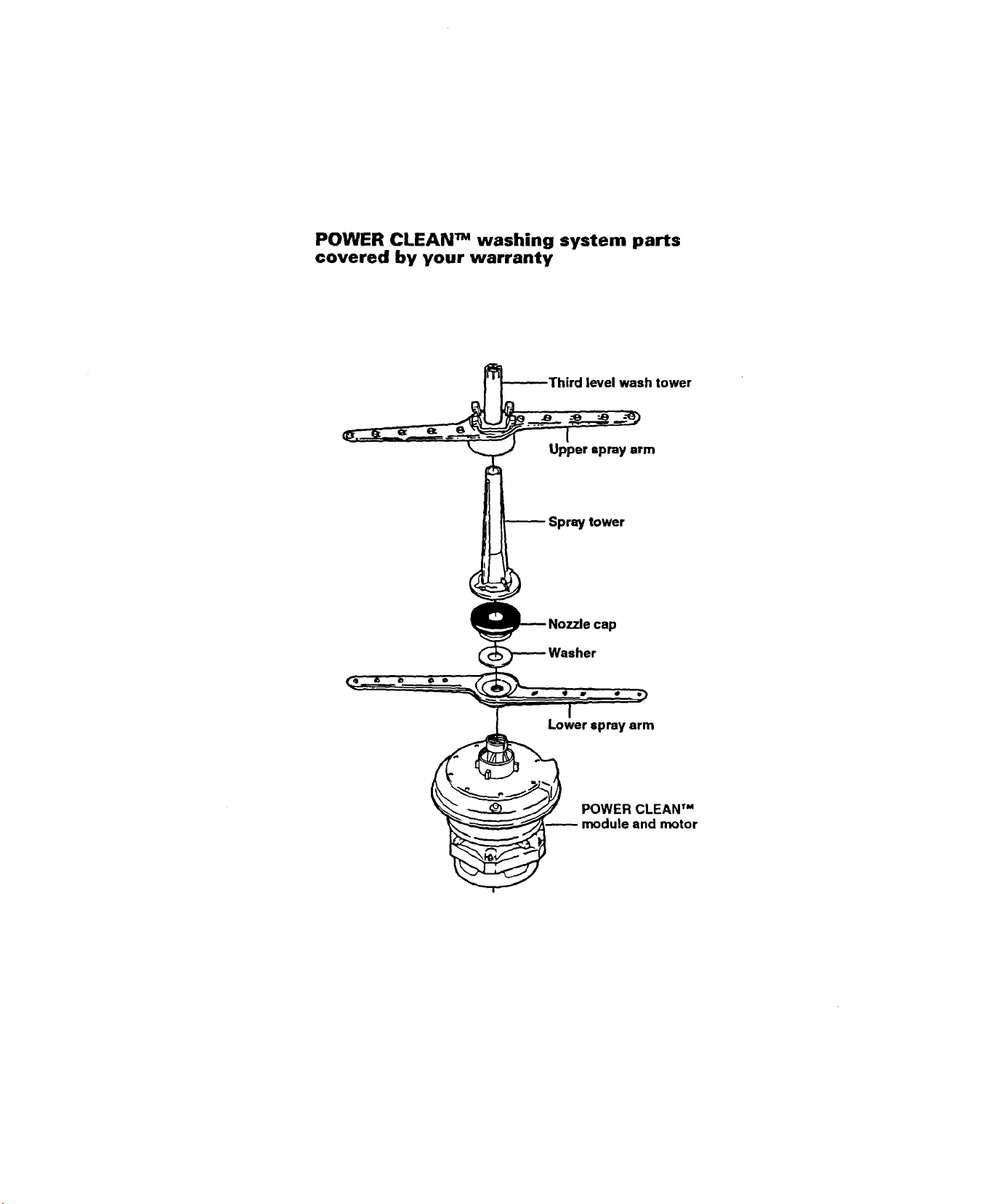
POWER CLEAN TM washing system parts
covered by your warranty
Third level wash tower
m
,tower
Lower spray arm
POWER CLEAN TM
module and motor
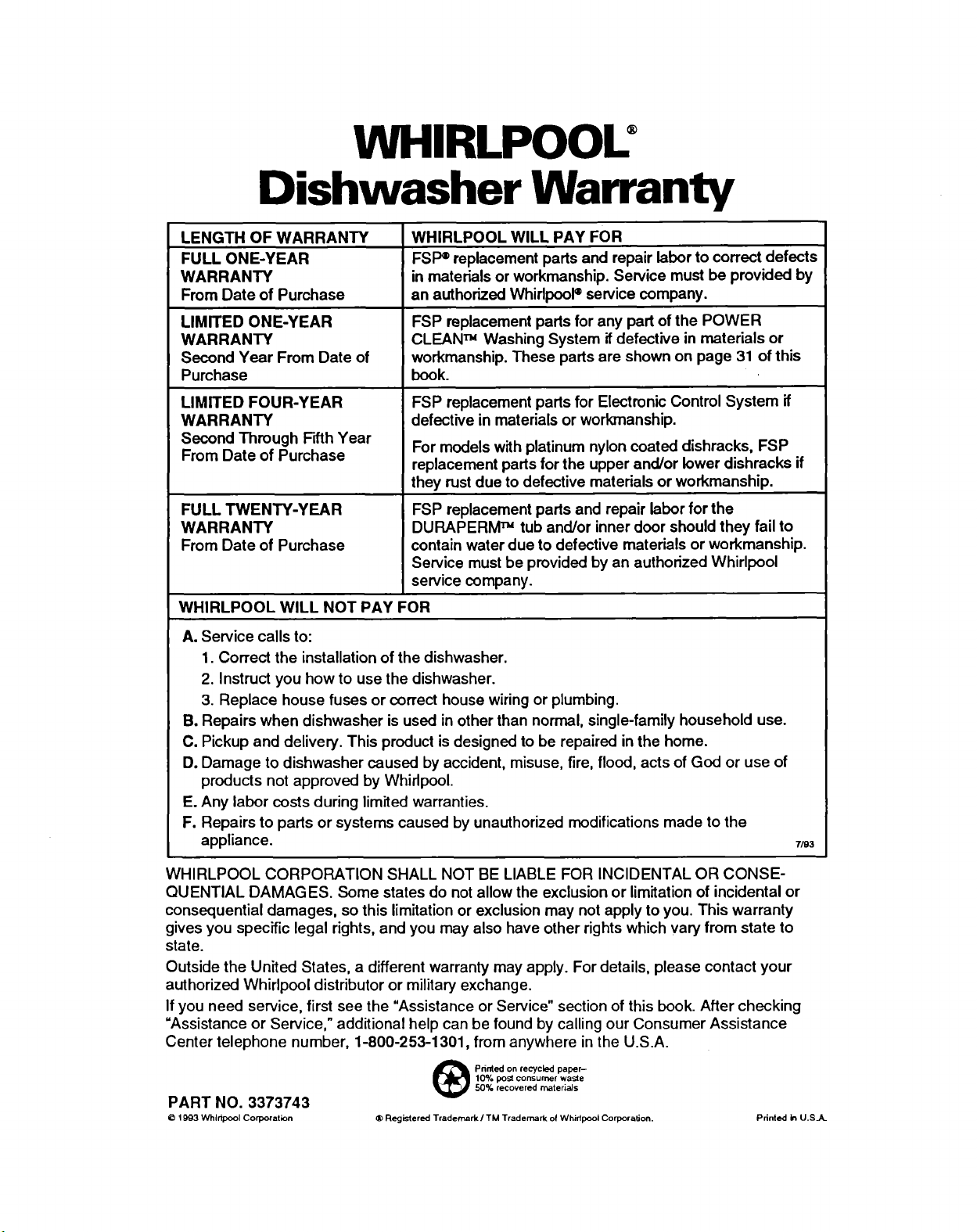
WHIRLPOOU
Dishwasher Warranty
LENGTH OF WARRANTY WHIRLPOOL WILL PAY FOR
FULL ONE-YEAR FSI_replacement parts and repair labor to correct defects
WARRANTY in materials or workmanship. Service must be provided by
From Date of Purchase an authorized Whirlpool®service company.
LIMITED ONE-YEAR FSP replacement parts for any part of the POWER
WARRANTY CLEAN _Washing System ifdefective in materials or
Second Year From Date of workmanship. These parts are shown on page 31 of this
Purchase book.
LIMITED FOUR-YEAR
WARRANTY
Second Through Fdth Year
From Date of Purchase
FULL TWENTY-YEAR
WARRANTY
From Date of Purchase
FSP replacement parts for Electronic Control System if
defective in materials or workmanship.
For models with platinum nylon coated dishracks, FSP
replacement parts for the upper and/or lower dishracks if
they rust due to defective materials or workmanship.
FSP replacement parts and repair labor for the
DURAPERM rMtub and/or inner door should they fail to
contain water due to defective materials or workmanship.
Service must be provided by an authorized Whirlpool
service company.
WHIRLPOOL WILL NOT PAY FOR
A. Service calls to:
1. Correct the installation of the dishwasher.
2. Instruct you how to use the dishwasher.
3. Replace house fuses or correct house wiring or plumbing.
B. Repairs when dishwasher is used in other than normal, single-family household use.
C. Pickup and delivery. This product is designed to be repaired in the home.
D. Damage to dishwasher caused by accident, misuse, fire, flood, acts of God or use of
products not approved by Whirlpool.
E. Any labor costs during limited warranties.
F. Repairs to parts or systems caused by unauthorized modifications made to the
appliance. 7/93
WHIRLPOOL CORPORATION SHALL NOT BE LIABLE FOR INCIDENTAL OR CONSE-
QUENTIAL DAMAGES. Some states do not allow the exclusion or limitation of incidental or
consequential damages, so this limitation or exclusion may not apply to you. This warranty
gives you specific legal rights, and you may also have other rights which vary from state to
state.
Outside the United States, a different warranty may apply. For details, please contact your
authorized Whirlpool distributor or military exchange.
If you need service, first see the "Assistance or Service" section of this book. After checking
=Assistance or Service," additional help can be found by calling our Consumer Assistance
Center telephone number, 1-800-253-1301, from anywhere in the U.S.A.
PART NO. 3373743
©1903 Whirlpool Corporation
_Printed on recycled paper-
10% post corlsurln_f waste
50% recovered rnateriaJs
®Registered Trademark /TM Trademark of Whirlpool Corpora, tJon. Printed in U.S.A.