Operator's Manual
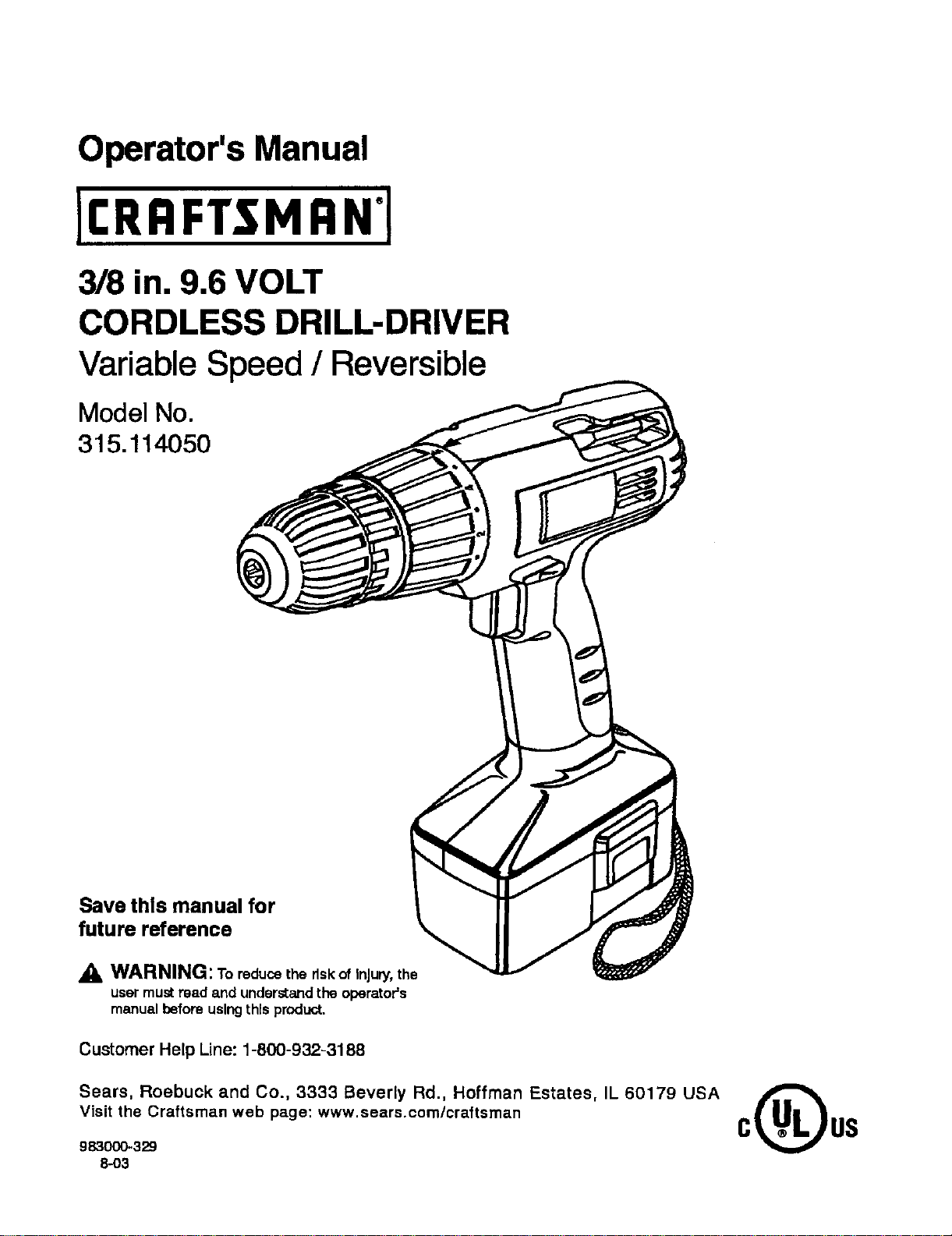
3/8 in. 9.6 VOLT
CORDLESS DRILL-DRIVER
Variable Speed / Reversible
Model No.
315.114050
Save this manual for
future reference
WARNING: Toreducethe risk of Injury, the
usermustread and understandthe operator's
manualbeforeusingthis product.
Customer Help Line: 1-800-932-3188
Sears, Roebuck and Co., 3333 Beverly Rd., Hoffman Estates, IL 60179 USA
Visit the Craftsman web page: www,sears.com/craftsman
983000-329
8-o3
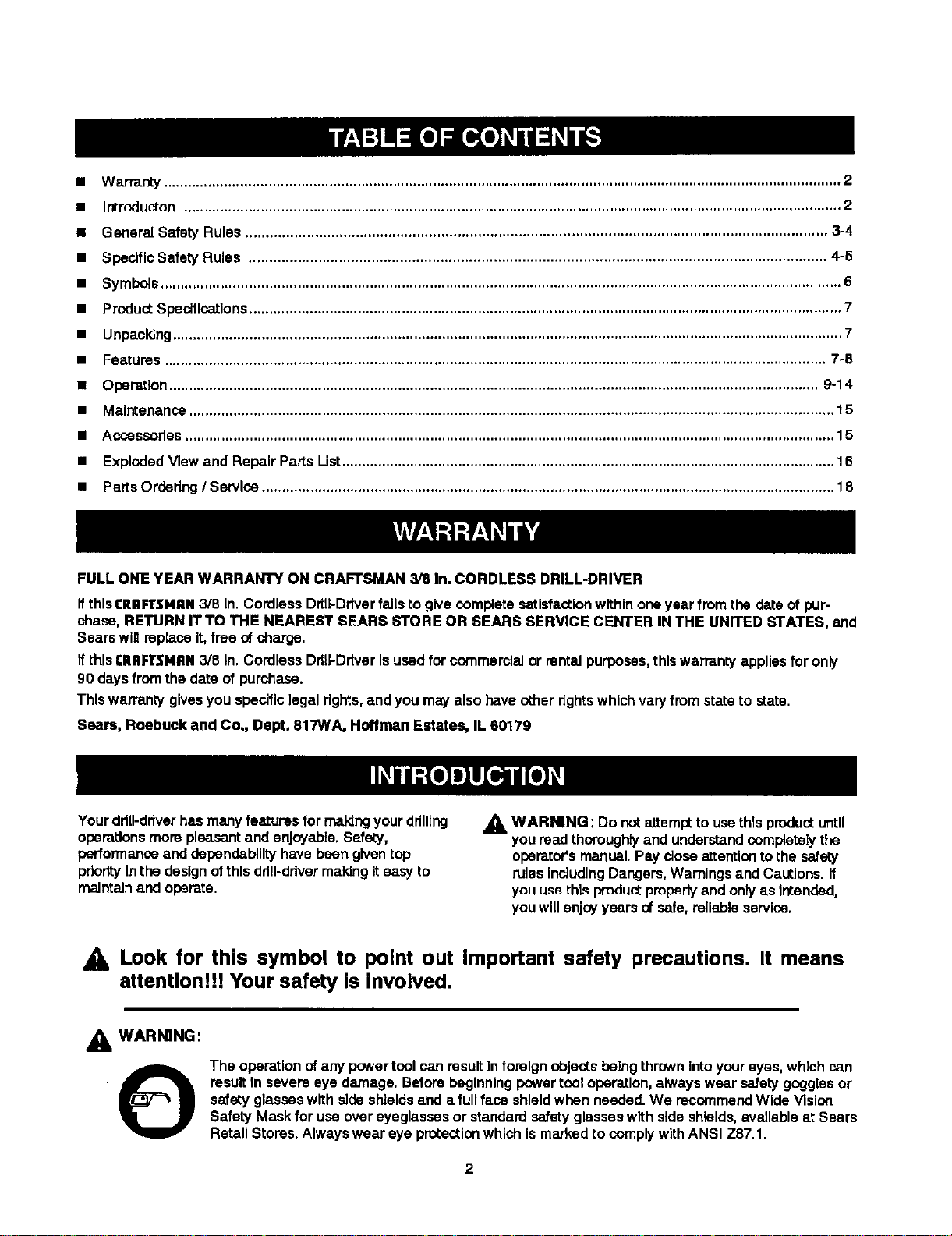
• Warranty......................................................................................................................................................................... 2
• Introducton..................................................................................................................................................................... 2
• General Safety Rules ............................................................................................................................................... 3-4
• SpeciflcSafety Rules .............................................................................................................................................. 4-5
• Symbols.......................................................................................................................................................................... 6
• ProductSpecifications.................................................................................................................................................... 7
• Unpacking....................................................................................................................................................................... 7
• Features ..................................................................................................................................................................... 7-8
• Operation.................................................................................................................................................................. 9-14
• Maintenance................................................................................................................................................................. 15
• Accesserles.................................................................................................................................................................. 15
• ExplodedView and Repelr Parts List........................................................................................................................... 16
• PartsOrdering/ Service ............................................................................................................................................... 18
FULL ONE YEAR WARRANTY ON CRAFTSMAN 3/8 In. CORDLESS DRILL-DRIVER
Ifthis CRRFTSMAN 3/8 In. Cordless DdlI-Ddver falls to give complete satisfaction within one year from the date of pur-
chase, RETURN rrTo THE NEAREST SEARS STORE OR SEARS SERVICE CENTER IN THE UNITED STATES, and
Sears wilt replace it, free of charge,
Ifthis €ItRFt'$NRN3/8 In,CordlessDdU-DdverIsusedfor commercialor rentalpurposes, thiswarranty appliesfor oniy
90 daysfromthe date of purchase.
Thiswarrantygivesyou specificlegalrights,and you may also haveother dghts whichvaryfrom stateto state.
Sears, Roebu-'k and Co., Dept. 817WA, Hoffman Estates, IL 60179
Yourdrill-driverhasmanyfeatures for makingyourddlllng
operationsmore pleasantand enjoyable.Safety,
performanceand dapendabllltyhave beengiventop
priorityInthe designof thisdrill-drivermakingiteasy to
maintainand operate.
_, WARNING: Do notattempt to usethis product until
youread thoroughly and understandcomplatelythe
operator'smanual.Pay close attentionto the safety
rulesincludingDangers,Warningsand Cautions. If
youuse this productproperlyand onlyas Intended,
youwillenjoyyears of safe, reliable service.
Look for this symbol to point out Important safety precautions. It means
attention!!! Your safety Is Involved.
_1= WARNING:
O
The operationofany powertool canresultInforeignobjectsbeing thrownintoyoureyes, whichcan
resultIn severe eye damage. Beforebeginning powertcol operation, always wear safety gogglesor
safetyglasseswith sideshieldsand a fullface shieldwhen needed. We recommendWide Vision
Safety Mask for useover eyeglassesor standardsafetyglasseswith side shields,availableat Sears
RetailStores.Alwayswear eye protectionwhich Ismarkedto complywithANSI Z87.1.
2
• 1,WARNING: Reed and understand all Instructions.
Failuretofollowall Instructionslistedbelow,may
msuk inelectricshock,fire and/orseriouspersonal
Injury.
SAVE THESE INSTRUCTIONS
Work Area
• Keep your work area clean and well lit, Cluttered
benchesand dark areas inviteaccidents.
Do not operate power tools in era(plosiveatmo-
spheres, such as in the presence offlammable
liquids, gases, or dust. Powertoolscreate sparks
whichmay ignitethe dust or fumes.
• Keep bystanders, children, and visitors away while
operating a power tool. Distractions cancauseyou
to lose control.
Eie=tdcal Safety
• A battery operaterl tool with integral batteries or a
separate battery pack must be recharged only with
the specified chargm for the battery.A chargerthat
may be suitableforone type ofbatterymay createa
riskoffire when used withanotherbattery.Use b_ttery
only with chargerlisted.
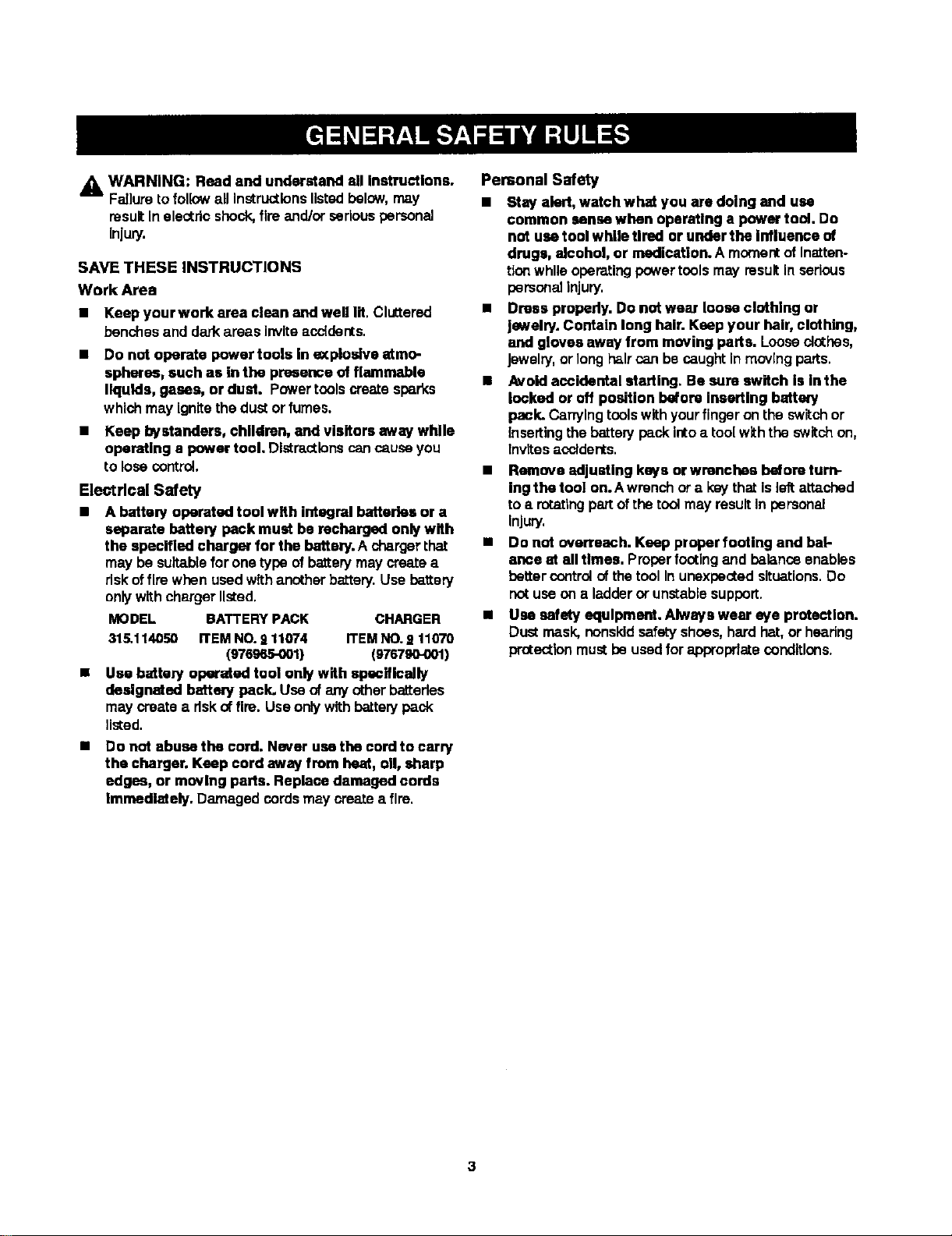
MODEL BATTERY PACK CHARGER
315.114050 ITEMNO.911074 ITEMNO.S11070
(976965-001) (976790-001)
Use battery operated tool only with specifically
designated batter/peck. Use ofany otherbatteries
maycreate a risk of fire. Useonlywithbatterypack
listed.
Do not abuse the cord. Never usethe cord to carry
the charger. Keep cord away from heat, oil, sharp
edges, or moving parts. Replace damaged cords
Immediately. Damaged cordsmay createa fire,
Personal Safety
• Stay alert, watch what you are doing and use
common sense when operating a power tool. Do
not use tool while Urad or under the Influence of
dregs, alcohol, or medication. A momentof inatten-
tionwhileoperatingpowertoolsmay resultin serious
personal injury.
• Dress properly. Do not wear loose clothing or
jewelry. Contain long heir. Keep your heir, clothing,
and gloves away from moving parts. Looseclothes,
Jewelry.or longhaircan becaught in movingparts.
• Avoid accidental starting. Be sure switch is in the
locked or off position before inserting battery
pack. Canylngtoolswithyourfingeron the switchor
insertingthebattery pack intoa toolw_hthe switch on,
invites acclder_s.
• Remove adjusting keys or wrenches before turn-
ing the tool on.Awrench ore keythat isle_ attached
to a rotatingpartofthe toolmay resultIn personal
Injury.
• Do not overreach. Keep proper footing and bat-
ance at all times. Properfootingand balanceenables
better controlof thetool Inunexpectedsituations.Do
not useona ladderor unstablesupport.
• Use safety equipment. Always wear eye protection.
Dust mask,nonskidsafetyshoes,hard hat, or hearing
protectionmustbe usedfor approprfateoondltlons.

Tool Use and Care
• Use clamps or other practical way to secure end
support the workpisee to a stable platform. Holding
the work by hand or againstyour body isunstable and
may lead to loss of control.
• Do not force tool. Use the correct tool for your
application. The correct toolwill dothe job better and
safer at the rete for which it is designed.
• Do not use tool if switch dose nof turn It on or off.A
tool that cannot be controlledwith the switch isd_ngsr-
ous and must be repaired:Tool Use and Care
• Disoseneot battew pack from toot or place the mltch In
the locked or otf pesRIon hefora maldng any adJustmmts,
ofta@ng acoessede_ or stedng the toot.Suchpraventlve
s_oty mes_umsreduceriskofstarlingtheted acddertally,
• Store Idle tools out of reach of children and other
untrained psmons. Tools are dangerous inthe hands of
untrained users.
• When battery pack Is not In use, keep it away from
other metal objects like: paper clips, coins, keys,
nails, screws, or other small metal objects that can
make a connection frem one terminal to another.
Shortingthe battery terminals together may cause
sparks, bums, or a fire.
• Maintain tools with cam. Keep cutting tools sharp
and clean. Properly maintained tools, with sharp cutting
edges am less likelyto bind end are easier to control.
• Check for mlsalignment or binding of moving parts,
breakage of parts, and any other condlUen thot may
alfeot the toore ogerstlon. If damaged, have the tool
servlcad before using. Many acoidents are caused by
poorlynaintair_d teals.
Use only accessories that are recommended by the
manufacturer for your model. Accessories that may be
su_ablefor one tool, may create a riskof injurywhen used
on another tool,
• Keep the tool end its handle dry, clean end free from
all and grease. Always use s clean clothwhen cleaning.
Never use broke fluids, gasoline, petroleum-bssed
products,or any strong solvents todean your tool
Selvlce
• Tool seralca must be performed only by qualified
repair personnel. Service or maintenance performed by
unqualifiedpersonnel oould result in a risk of injury,
• When servicing a tool, use only identical replacement
parts. Follow Instructions In the Malntenanca section
of this manual Use of unauthorized parts or f_lum to
follow Maintenance Instructionsmay create a dsk of shock
or injuly,
Hold tool by Insulated gripping surfaces when performing an operation where the cutting tool may contact
hidden wiring. Contactwitha "live" wirewill make exposedmetal partsofthetool "live=and shockthe operator.
Additional Safety Rttles
Know your power tool. Read operator's manual
carefully. Learn Its applications and limitations,
as well as the specific pofeatial hazards misted to
this tool. Followingthis rulewillreducethe risk of
electricshock,fire, or seflousInjury.
Additional Cordless Tool Rules
i
• WARNING: Never use a batterythat has been
dropped or receiveda sharpblow, A damaged
battery Is subjectto explosion.Properlydisposeof a •
droppedbatteryImmediately. Failureto heed this
wamlng can resultin sedouspersonal Injury.
• Battery tools do not have to be plugged Into an
electrical outlet; therefore, they are always In
operating condition. Be aware of possible haz- •
ards when not using your battery tool or when
changing accessories. Followingthis rule will
reducethe dskof electric shook,fire, or serious
personalInjury.
• DOnot place battery tools or their batteries near
fire or heat. This willreducethe riskofexplosionand
possibleInjury,
4
Batteries vent hydrogen gas and can explode In
the presence of a source of Ignition, such as a pilot
light. To reduce the dsk of sedous persona] Injury,
never use any cordless product in the presence of
open flame. An exploded battery can propel debris
and chemicals, If exposed, flush with water immedi-
ately.
Do not charge battery tool In a damp or wet loca-
tion. Following this rule will reduce the rtsk of a]eotflc
shock.
For best results, your battery tool should be
charged in a location when) the temperature Is
more than 50°F but less than IO0°F. Do not store
outside or In vehicles.
Under extreme usage or temperature conditions,
battery leakage may occur. If liquid comes In
contact with your skin, wash Immediately with
soap and water, than neutralize with lemon juice or
vinegar. If liquid gets Into your eyes, flush them
with clean water for el least 10 minutes, then seek
immediate medical attention. Followingthis rulewill
reclusethe dskof serious personalinjury.
_,WARNING: Never usa a batterythat hasbeen
droppedor receiveda sharpblow.A damaged bakery
Is subjecttoexplosion.Properlydisposeofa dropped
battery Immedla[ely.Failureto heed thiswarningcan
resultin sedous personalInjury.
• Before using battery charger, read all instructions
and caofionew markings In this manual, on
battery charger, and product using battew
charger. Followingthisrulewill reducethe riskof
electric shock,fire, or seriouspersonal injury.
• TO reduce risk of inJuw, charge only nickel-
cadmium type rechargsuble batterlce. Other types
of batteries may burst causing personal Injury and
damage. Follow]ngthis ru]ewill reducethe risk of
electdc shock,fire, or sadous persanal Injury.
• Do not expose charger to wet or damp conditions.
Followingthis rulewillreducethe flskof electflc
shock,fire, or seriouspersonal Injury.
• Use of an attachment not recommended or sold
by the battery charger manufacturer may result in
a risk of fire, electric shock, or Injury to persons.
Followingthis rule will reducethe riskof electric
shock,fire, or seriouspersonal injury.
• To reduce riM( of damage to charger body and
cord, pull by charger plug rather then cord when
disconnecting chargez. Followingthisrule will
reducethe riskof electric shock,fire, or serious
personal Injury.
• Make sure cord is located sc that It will not be
stepped on, tripped over, or otherwise subjected
to damage or stress. Followingthis rulewill reduce
Lherisk of seriouspersonalInlury.
• An extension cord should not be used unless
absolutely necessary. Use of improperextension
cordcould resultIna riskof fire and electric shock.If
extension cord mustbe used, make sure:
• That pinson plugof extensioncordare the
same number,size and shapeas those of
plugon charger.
• That extension cord Is properly wired and In
good electrical condition; and
• ThZ wire size Is largeenough forAC ampere
ral:lngof chargeras specifiedbelow:
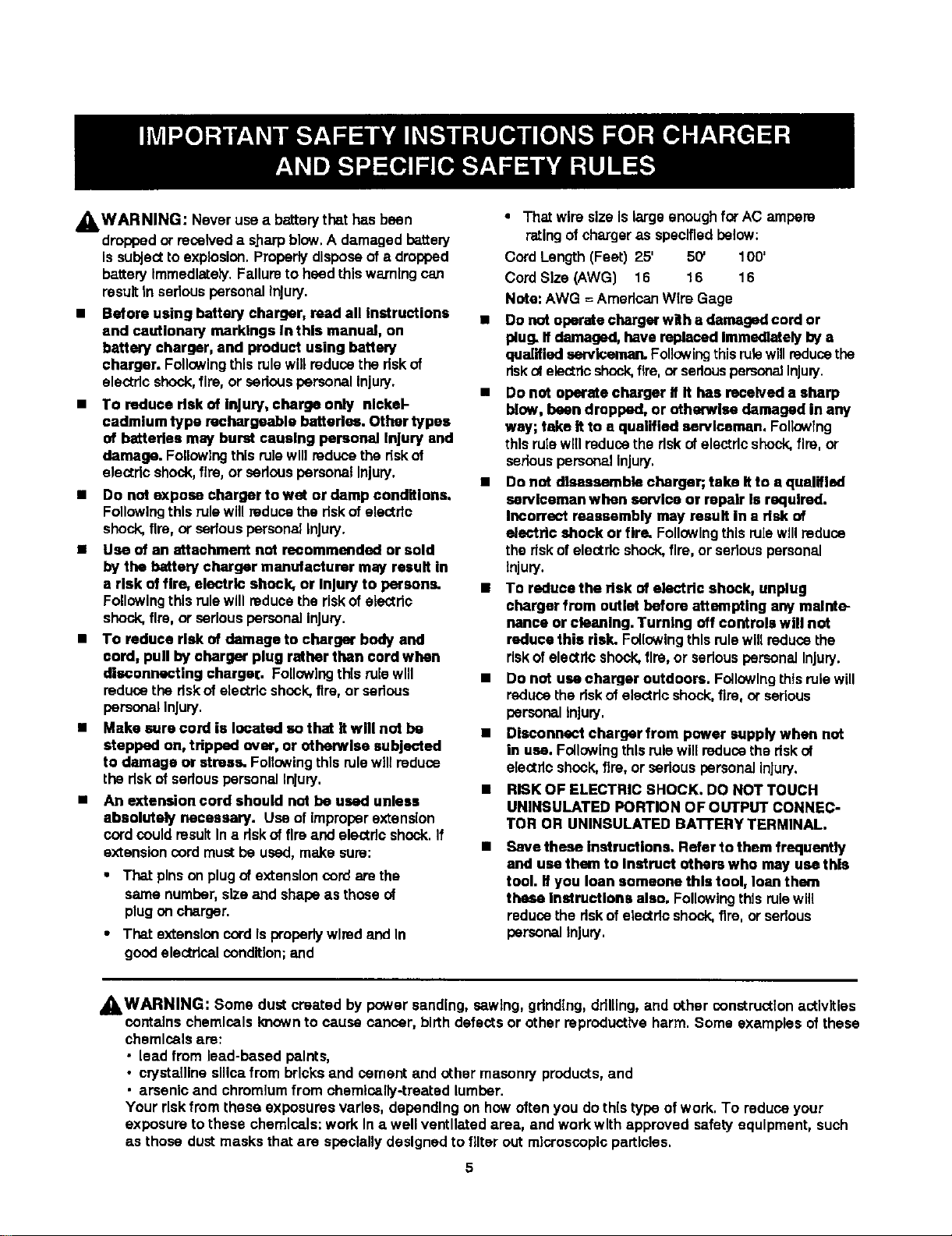
Cord Length (FeeL)25' 50' 100"
CordSize (AWG) 16 16 16
Note: AWG = AmericanWire Gage
• no not operatecharger with a damaged cord or
plug. Ifdamaged, have replaced Immediately by a
qualified serviceman. Followingthisrule willreducethe
risk_ electricshock,fire,or sadous pemor_JInjury.
• Do not operate charger If It has received a sharp
blow, been dropped, or otherwise damaged in any
way; take ifto a qualified serviceman. FolloWing
this rulewillreduce the dskof electricshock,fire, or
seriouspersonalinjury.
• Do not disassemble charger; take it to a qualified
surviceman when sundca or repair Is required.
Incorrect reassembly may result in a risk of
efectdc shock or fire. Followingthis rule willreduce
the rlskofelectricshock,fire,or seriouspersonal
Injury.
• To reduce the dak of alectdc shock, unplug
charger from outlet before attempting any msinte-
nanse or cleaning. Turning off controls will not
reduce this risk. Followingthis rulewill reducethe
riskof electricshock,fire, or seriouspersonal Injury.
• Do not use charger outdoors. FollowingLhtsrulewill
reducethe riskof electricshock,fire, or serious
personal injury,
• Disconnect charger from power supply when not
in use. Followingthls rulewill reducethe riskof
electricshock,fire, or seriouspersonalInjury.
• RISK OF ELECTRIC SHOCK. DO NOT TOUCH
UNINSULATED PORTION OF OUTPUT CONNEC-
TOR OR UNINSULATI=D BA'ITERY TERMINAL.
• love these Instruction,,. Refer to them frequently
and use them to Instruct others who may use this
tool. If you loan someone this tool, loanthem
these Instructions also. Followingthis rulewill
reducethe dskof electricshock,fire, or serious
personal injury.
_WARNING: Some dust created by power sanding, sawing, gdndtng, drilling, and other construct(on activities
contains chemicals knownto cause cancer, birthdefects or other reproductiveharm. Some examples ofthese
chemicals are:
• lead from lead-based points,
• crystallinesilicafrom bricksand cement and other masonry products,and
• arsanlc and chromiumfrom chemically-treated lumber.
Your risk from these exposures varies, depending on how often you do this type of work. To reduce your
exposure to these chemicals:work In a well ventll_ed area, and work with approved safety equipment, such
as those dust masks that are speciallydesigned to filter out microscopic particles.
5
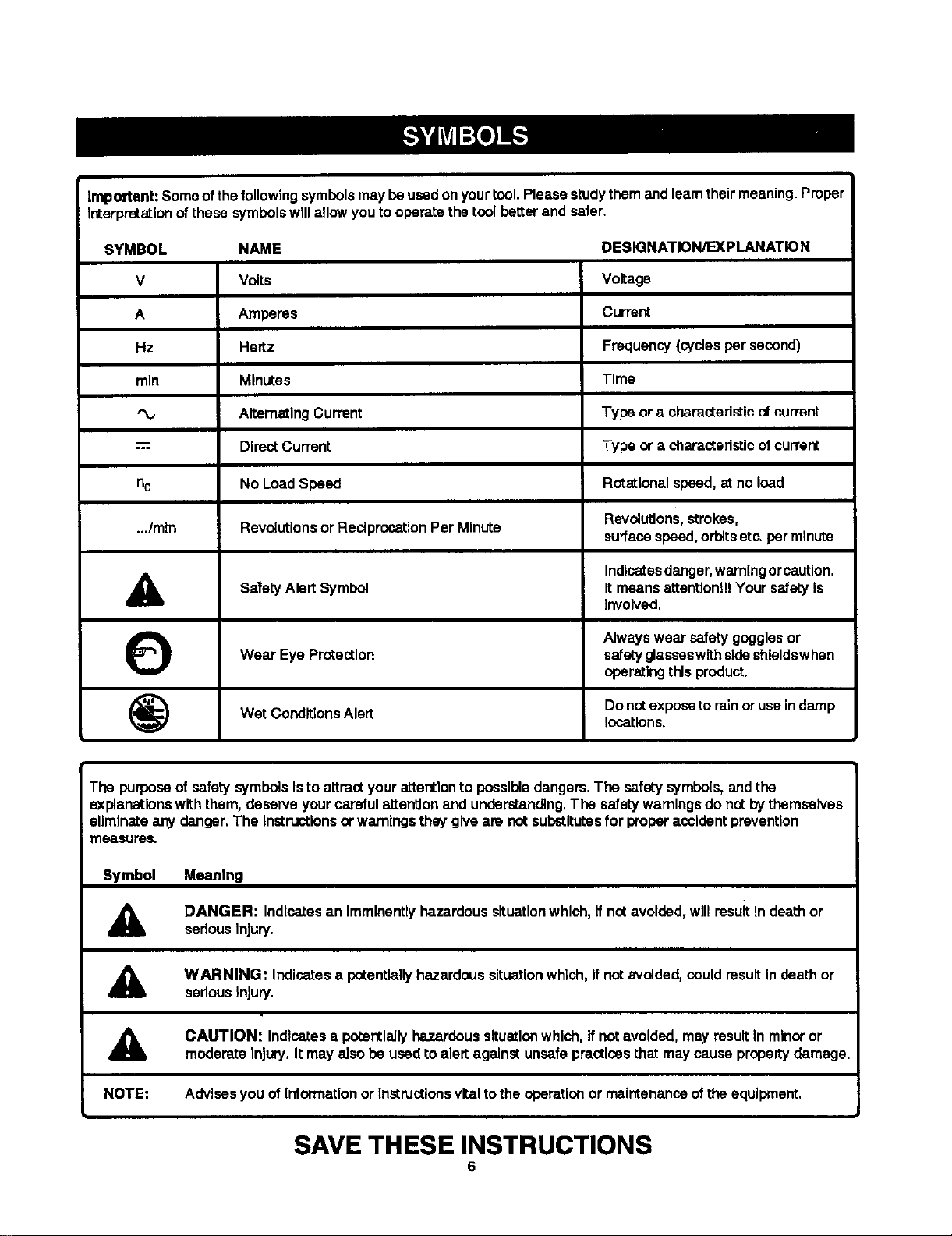
Important: Someofthefollowingsymbolsmay beusedonyourtool.Please studythemandleamtheirmeaning.Proper
interpretationofthese symbolswillallowyoutooperate the toolbetterand safer.
SYMBOL NAME
V Volts
A Amperes
Hz Hertz
mln Minutes
AlternatingCurrent
= DireotCurrent
no No LoadSpeed
.../mln Revolutionsor ReciprocationPer Minute
SafetyAlert Symbol
Wear Eye Protection
Wet ConditionsAlert
&
O
DESIGNATION/EXPLANATION
Voltage
Current
Frequency(cyclesper second)
Time
Type ora characteristicnf current
Type or a characteristicofcurrent
Rotationalspeed,at no load
Revolutloos, strokes,
surfacespeed,orbitsetc.per minute
Indicatesdanger,warningorcaution.
Itmeansattention!!! Your safetyis
involved.
Alwayswear safetygogglesor
safetyglasseswithsideshleldswhen
operatingthis produot.
Donotexposetorainor useindamp
Iocetlons.
The purposeof safetysymbolsIs to attract your attention to possibledangers.The safety symbols,and the
explanationswith them, deserve yourcarefulattention and understanding.The safetywarningsdo nntbythemselves
eliminateany danger.The Instructionsor warningsthey give are not substitutesfor properaccident prevention
neasures,
Symbol
A
Meaning
DANGER: Indicatesan Immlnantlyhazardoussituationwhich,If notavoided, willresuitin death or
seriousinjury.
A
WARNING: Indicatesa potentiallyhazardoussituationwhich, If notavoided,could resultIndeath or
serlousInjury.
A
NOTE:
CAUTION: Indicatesa potentiallyhazardoussituationwhich,If notavoided,may result in minoror
moderate Injury. Itmay also be used toalert against unsafepractices that maycause property damage.
Advises you of Information or Instructions vitalto the operationor maintenanceofthe equipment.
SAVE THESE INSTRUCTIONS
6
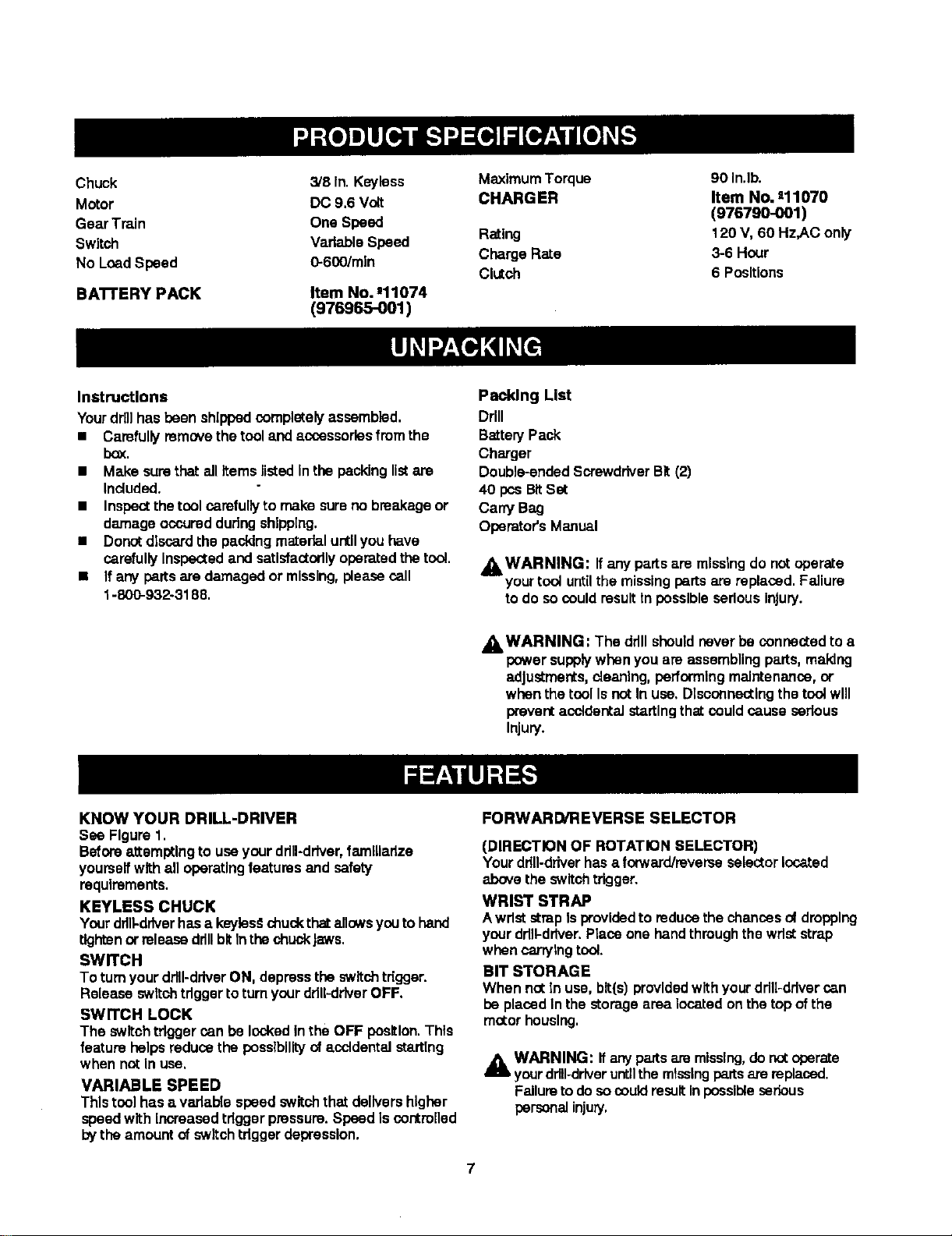
Chuck 3/8In. Key'less MaximumTorque
Motor DC 9.6 Volt CHARGER
Gear Train One Speed
Switch VadableSpeed Rating
No LoadSpeed O-600/min Charge Rate
Clutch
BATTERY PACK Item No. J11074
(976965-001)
90 In.lb.
Item No, =11070
(976790-001)
120 V, 60 Hz,AC only
3-6 Hour
6 Positions
instructions
Yourdrillhas been shippedcompletelyassembled.
• Carefullyremovethe tooland accessehes from the
box.
• Make surethat all Items listed Inthe peckinglistare
Included.
m Inspectthe tool carefullyto make sureno breakageor
damage ocouredduringshipping,
= Donotdiscardthe p=_cldngmaterialuntilyou have
carefully Inspected and satisfactorilyoperatedthetool.
• If any perts are damagedor missing,pleasecall
1-800-932o3188.
Pacldng List
DHII
BatteryPack
Charger
Double-anded ScrewdriverBIt (2)
40 pceBItSet
CarryBag
Operator's Manual
_WARNING: Ifany partsare missing do notoperate
yourtoof untilthe missingpartsare replaced. Failure
todo socould resulttnpossibleseriousInjury.
J_ WARNING: The ddll shouldneverbe connected to a
powersupplywhen you are assemblingparts,making
adjustments,cleaning,performingmaintenance,or
when thetool IsnotIn use, Dlsoonnectlngthe toolwill
preventacctdentaistartingthat could cause sedous
Injury.
KNOW YOUR DRILL-DRIVER
See Figure1.
BeforealtemlXIng to useyourdrill-driver,farnllladze
yourselfwithall operatingfeaturesand safety
requirements.
KEYLESS CHUCK
Yourdrill-driverhasa keyles#chuckthatallowsyou tohand
tightenor releasedrillbitInthe chuck Jaws.
SWITCH
To turnyourddll-ddverON, depressthe switchtdgger.
Release switch tdgger to turnyourddU-ddverOFF.
SWITCH LOCK
The switch tdgger can be lockedin the OFF position.This
feature helps reducethe possibilityof ,_ccldentaist-rtTng
when not In use,
VARIABLE SPEED
This tool has a varlab{e speed switch that delivershigher
speedwith Increased tdgger pressure.Speed Is contmnod
bytheamount of switch tdgger depression.
FORWARD/REVERSE SELECTOR
(DIRECTION OF ROTATION SELECTOR)
Yourddn-ddverhas a forward/reverseselector locked
above the switchtrigger,
WRIST STRAP
Awriststrap Isprovidedto reducethe chances of drepplng
yourdrill-driver.Place one handthrough the wdststrap
when carryingtool.
BIT STORAGE
When not in use, bit(s) providedwithyourdrill-drivercan
be placedInthe storage area located onthe top ofthe
motor housing.
A WARNING: Ifanypartsam missing,do notoperate
yourdrill-driveruntilthe missingparts are replaced.
Failuretodo socould resultInpossibleserious
personal injury.
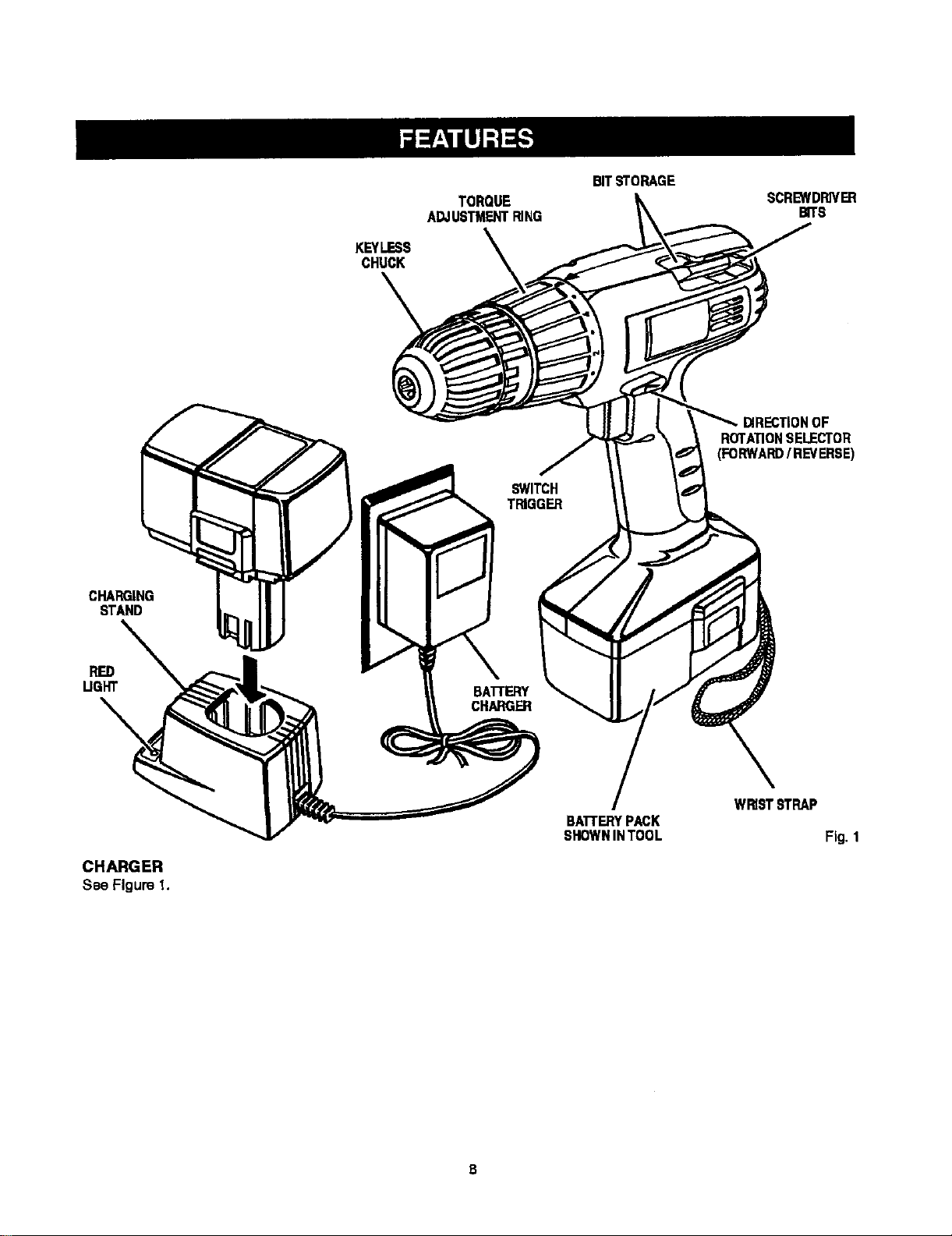
KEYLESS
CHUCK
TORQUE
ADJUSTMENTRING
BITSTORAGE
SCREWDRIVER
BITS
ROTATIONSELECTOR
CHARGING
STAND
UGHT
BATrERY
CHARGER
CHARGER
See Figure I.
BATI'ERYPACK
SHOWNINTOOL
Fig. 1
S
WARNING: Do not aJtowfamiliaritywith yourdrill-
driverto make you careless.Rememberthat a
carelessfraction ofa secondIssufficientto Inflict
severeInjury.
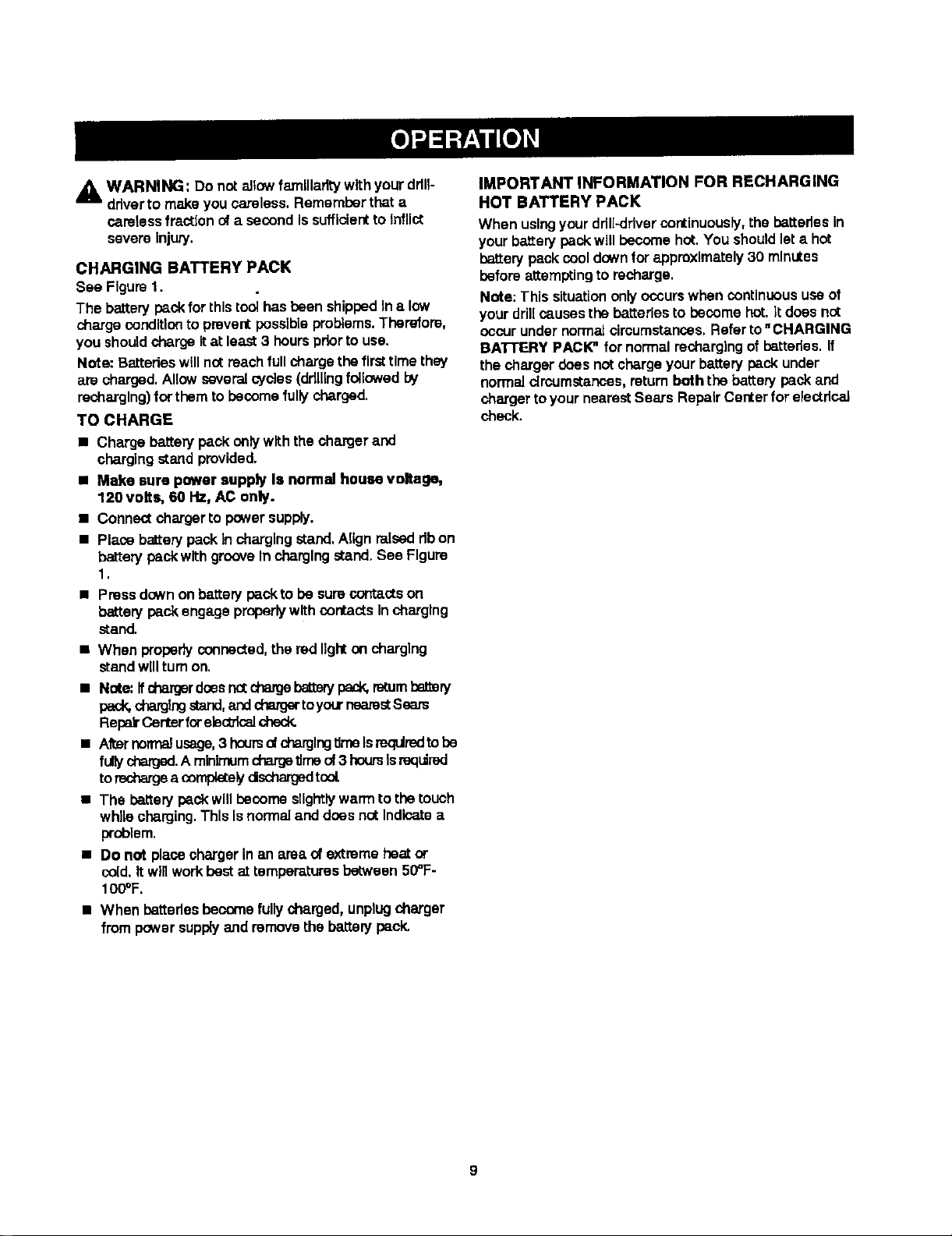
CHARGING BATTERY PACK
See Figure1.
The battery peck for thistoolhas been shippedIn a low
chargeconditionto preventpossibleproblems.Therefore,
you shouldcharge itat least3 hourspriorto use.
Note: Batterieswillnot reachfullcharge the firsttimethey
are charged. Allowseveralcy-cles(ddllingfollowedby
recharging)for themto become fullycharged.
TO CHARGE
• Charge batterypackonly with the charger and
chargingstand provided.
• Make sure power supply Is normal house voltage,
120 volts, 60 Hz, AC only.
• Connectcharger to powersupply.
• Placebatterypack Incharging stand.Alignraiseddbon
batten/peck with grooveIn chargingstand. See Figure
1.
• Pressdownon batterypeckto be surecontactson
batterypeck engage properlywithcontactsIncharging
stand.
• When properlyconnected,the red lighton charging
stand willturnon.
• Note:Ifcbargerdsesnctcbargebetterypack,mtumbaJ_ery
pack,chargingstand,andchargertoyourneatsstSeam
RepekCenterforelectdcaJcheck.
• Afternorma_usage,3 hcursol chargingtimeIsrequiredtobe
fullycharged.A minimumchargetimeof 3 hoursIsreqdmd
torechargea co_ely dschargedtool.
• The batterypeck willbecome sllghtlywarmto thetouch
whilecharging.Thls isnormaland does notIndicatea
problem.
• Do not place charger in an area ofextremeheat or
cold.it willworkbestat temper=_turesbetween 50_F-
100°F.
• When batteriesbecome fully charged,unplugcharger
from powersupplyand removethe batterypeck.
IMPORTANT INFORMATION FOR RECHARGING
HOT BATTERY PACK
When usingyourddl[_dver continuously, the batteries in
yourbatterypackwill become hot.You shouldleta hot
bakery pack cooldownfor approximately30 minutes
before attempting to recharge.
Note; This situationonlyoccurswhen continuous useof
yourdrillcausesthe batteriesto become hot.It does nct
occurunder normalcircumstances.Referto"CHARGING
BATrERY PACK_ for normalrechargingof bakeries. If
the charger does not chargeyour battery peck under
normalcircumstances,returnboth tha battery packand
charger toyour nearestSears Repair Centerfor electdcaJ
check.
9
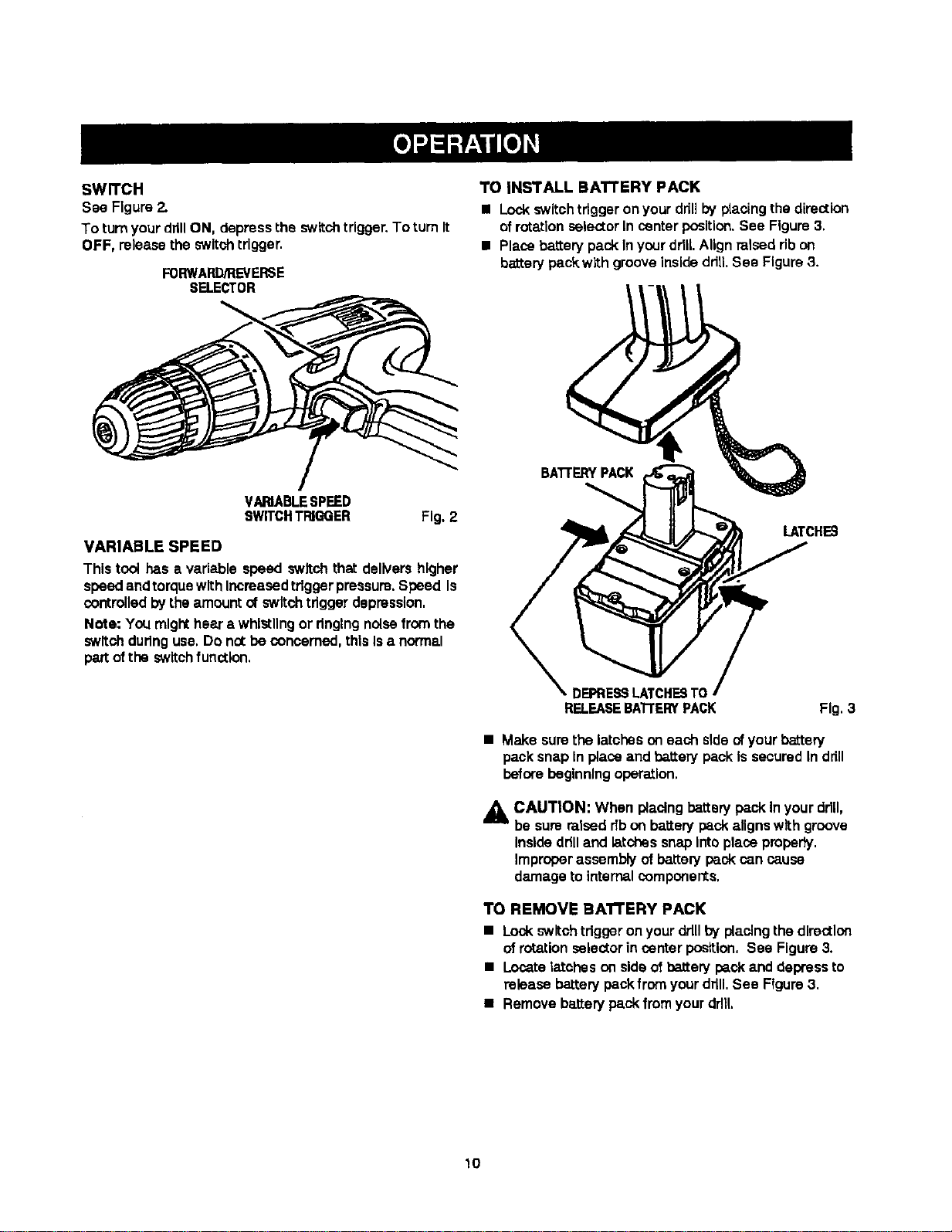
SWITCH
See Figure 2.
To turnyour drillON, depressthe switchtrigger.To turn it
OFF, release the switchtrigger.
FORWARD/REVERSE
SELECTOR
TO INSTALL BATTERY PACK
• Lockswitchtriggeron yourdrillby placingthe direction
of rotationselectorIn center position.See Figure 3,
• Placebatterypack InyourddlLAlign raiseddb on
batterypackwith grooveinsideddlLSee Figure3.
VARIABLESPEED
SWITCHTPJGGER Fig.2
VARIABLE SPEED
Thistool has a variable speed switch that delivers higher
speedand torquewithIncreased triggerpressure.Speed Is
controlledbythe amountofswitchtriggerdepression,
Note: You might hear a whistlingor dnglngnoisefrom the
switch duringuse, Do not beconcerned,this Isa normal
part ofthe switch function,
BATI'ERY PACK
LATCHES
_ DEPRE_ LATCHESTO
RELEASEBA'rrERY PACK
Fig. 3
• Make surethe latches on each s{deofyourbattery
pack snap Inplace and batterypack Is securedIn drill
beforebeginningoperation,
A CAUTION: When placingbatterypackInyour dd[I,
be sure raisedribon batterypackaligns w_thgroove
Insideddlland latchessnap intoplace pmpady.
Improperassembly ofbattery packcancause
damage to internalcomponents,
TO REMOVE BAI"rERY PACK
• Lockswitch tdggeron yourdrillby placing the direction
ofrotationselector in center position,See Figure3.
• Locatetatohes on side of batterypack and depressto
release batterypack from yourdrill.See Figure3.
• Removebatterypack fromyourdrill
10
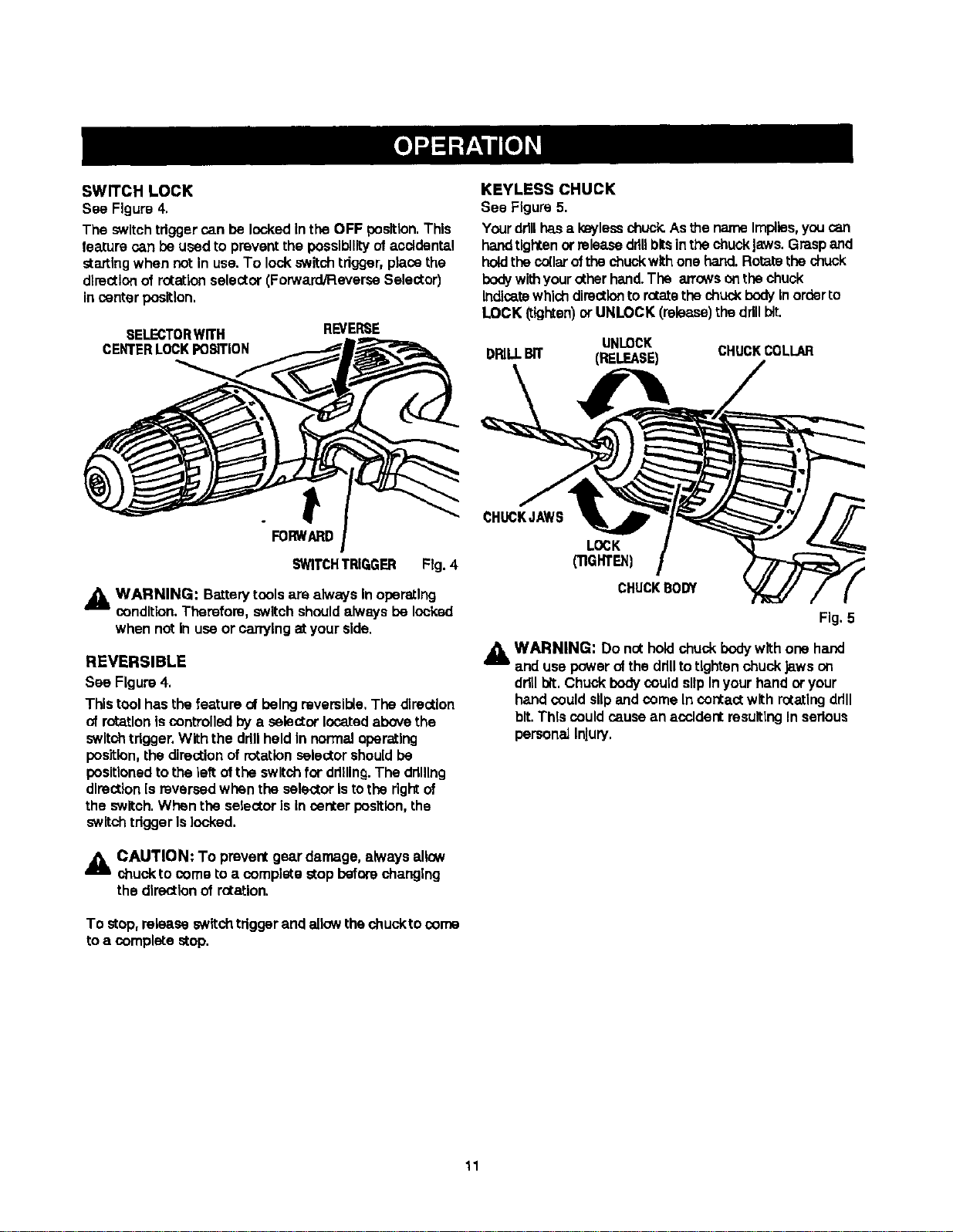
SWITCH LOCK
See Figure 4,
The switchtdgger can be lockedInthe OFF position.This
feature can beused to preventthe possibilityofaccldental
startingwhen notin use.To lock switchtrigger,placethe
directionof rotationselector(Forward/ReverSeSelector)
incenter position.
SELECTORWITH
CENTERLOCKPOSITION
REVERSE
KEYLESS CHUCK
See Figure5.
Yourdrillhasa k_=ylesschuck. Asthe nameImpites,you can
handtightenor releasedrillbitsinthe chuckJ;tws.Graspand
holdthecollarofthechuck withone hand.Rotatethechuck
bodywithyourotherhand.The arrowsonthechuck
Indicatewhichdirectionto rotatethe chuck bodyinorderto
LOCK (tighten)or UNLOCK (release)the ddllbiL
UNLOCK CHUCKCOLLAR
DI_LLBIT (RELEASE)
°
FORWARD
SWITCHTRIGGER Fig. 4
_lh WARNING: Batterytoolsare alwaysin operating
condition.Therefore, switchshouldalwaysbe locked
when not in useor canylng atyour side.
REVERSIBLE
See Figure 4.
Thistoolhas thefeature ofbeing reversible, The direction
of rotationiscontrolled bya selectorlocatedabovethe
switchtrigger,With the drillheldIn normaloperating
position,the directionof rotationselector shouldbe
positionedtothe leftofthe switchfor ddlllng.The drilling
direction[s reversedwhen the selector Istothe rightof
the switch.When the selectorIs Incenter position, the
switch triggerislocked,
CAUTION: To prevent gear damage, always allow
chuck to come to a complete stop before changing
the direction of rotation.
To stop,release switch triggerand allowthechuckto come
toa complete stop.
CHUCKJAW8
LOCK
('nGNTEN)
CHUCKBODY
Fig. 5
_h= WARNING: Do not holdchuck bodywith one hand
and usepowerof the drillto tightenchuck Jawson
drillbit.Chuckbodycould slipInyourhand or your
handcould slipand come Incontact with rotatingdrill
bit.This couldcausean accidentresultingInserious
persona]Injury.
11
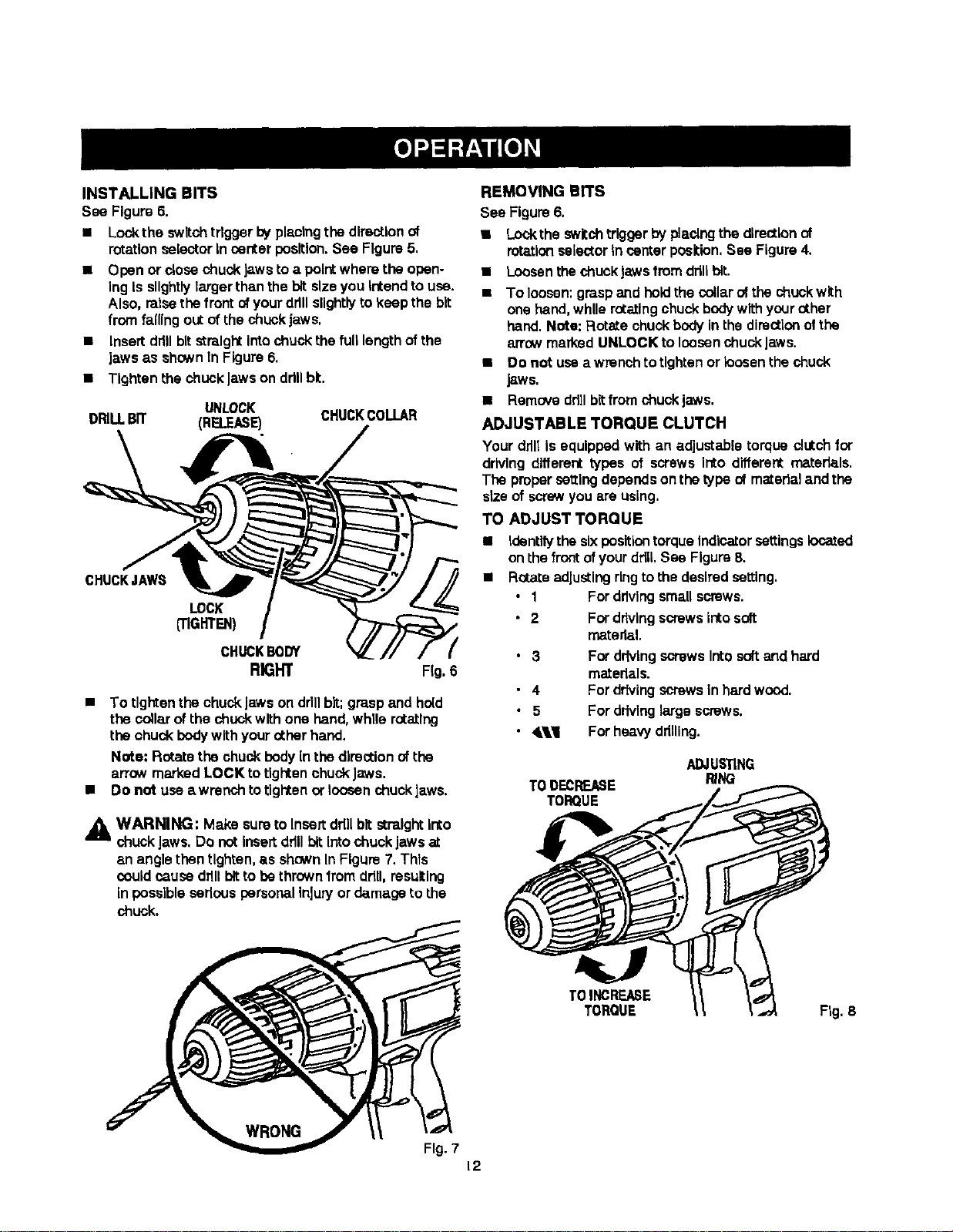
INSTALLING BITS
See Figure 6.
• Lockthe switchtdgger byplacing the directionof
rotation selectorIn centerposition.See Figure5,
• Open orclose chuckJawsto a pointwhere the open-
Ing Isslightlylarger thanthe bit size you Intend to use.
Also, raisethefront of yourdrillslightlyto keep the bit
fromfalling out of the chuckjaws,
• Insert ddll bit straightinto chuck the full length ofthe
jaws as shown In Figure 6.
• Tighten the chuck Jawson ddll bt.
UNLOCK
DRILLBIT (RELEASE) CHUCKCOLLAR
CHUCKJAWS
LOCK
(TIGHTEN)
CHUCKBODY
RK_HT Fig.6
• To tighten the chuckJawson ddllbit;grasp and hold
the cofla.rofthe chuck with one hand,while rotating
the chuck bodywithyourotherhand,
Note: Rotatethe chuck bodyInthe directionof the
arrow marked LOCK to tightenchuckJaws.
• Do not use awrenchto tighten or loosenchuck laws.
_IL WARNING: Make sureto Insert ddllbit straightInto
chuck Jaws.Do not Insert drillbitInto chuckJawsat
an angle then tighten, as shownIn Figure7. Thls
couldcause drillbit to be thrown from ddU,resulting
In possible sedous personalInjuryor damage to the
chuck.
REMOVING BITS
See Figum 6.
• Loekthe swltchtrigger byptaolngthedirectionof
rotation selectorIncenterposition.See Figure4,
• LoosenthechuckJawsfromddllbit.
• To loosen:graspand held the collarofthe chuckwith
one hand,whUerotatingchuckbodywithyourother
hand.Note: Rotate chuckbodyinthe directionofthe
arrowmarked UNLOCK to loosenchuckJaws.
• Do not usea wrenchto tightenor loosenthechuck
JSWS,
• Remove ddllbitfrem chuckjaws.
ADJUSTABLE TORQUE CLUTCH
Your ddltIsequipped with an adjustable torque clutchfor
drivingdifferent types of screws Into different materials.
The propersettingdependson thetype of mateflaland the
size of screwyou are using,
TO ADJUST TORQUE
• Identifythesixposition torqueIndicator settings located
onthe frontofyourddU.See Figure8.
• Rotateadjustingringtothe desiredsetting.
• 1 For drivingsmallscrews.
• 2 Fordrivingscrewsintosoft
materiel.
• 3 For ddvlngscrewsIntosoftand hard
materials.
• 4 For drivingscrewsIn hard wood.
• 5 For drivinglarge screws.
• 41.,'l For heavydrilling.
TODECREASE
TORQUE
ADJUSTING
RING
TOINCREASE
TORQUE Fig. 8
Fig. 7
12
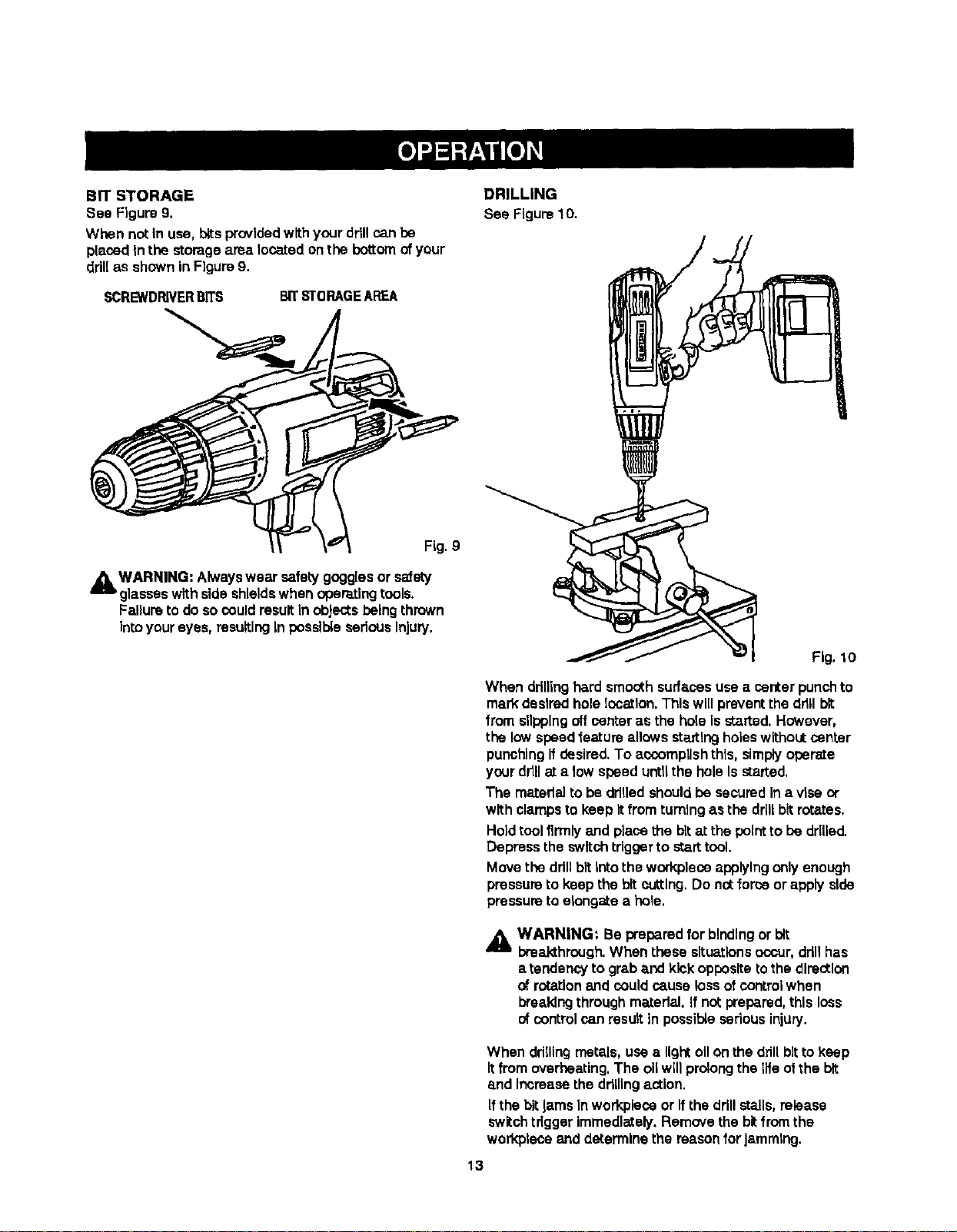
BIT STORAGE
See Figure 9,
When notIn use, bitsprovided withyour drill can be
placedIn the storagearealocatedonthe bottomofyour
ddll as shownin Figure9.
DRILLING
See Figure10.
SCREWDRIVERBITS BITSTORAGEAREA
Fig. lO
When drillinghard smoothsurfacesusea center punch to
mark desiredhole location. This wlifpreventthe ddll bit
from slippingoff center as the holeIs started.However,
the low speedfeature allows staltlngholeswithoutcenter
punchingIfdesired.To accomplish this,simplyoperate
yourdrillat a low speed untifthe hole Isstaked,
The matedal to be ddlledshouldbe securedIn a vise or
with clampsto keep itfrom turning as the drillbitrotates.
Holdtool firmlyand place the bitat the pointto be ddUed.
Depress the switchtdgger to starttool.
Move the ddllbit Into the workpleseapplying only enough
preessureto keep the bitcutting.Do nat forceor apply side
pressureto elongate e hole.
_ WARNING: Be preparedfor bindingor bit
breakthrough.When these situationsoccur,ddllhas
a tendencyto graba.ndkickoppositeto thedirection
of rotationand could cs.uselossofcontrolwhen
breakingthroughmaterial. If no(prepared,this loss
of control can resultIn possible sedous injury.
When ddlllngmetals,use a light ollon the drillbitto keep
Itfromoverheating.The oilwillprolongthe life ofthe bit
_mdIncreasethe drillingastlon.
Ifthe bitJamsInworkpleseor Ifthe drillstalls, release
switchtdgger Immediately.Removethe bitfromthe
workpleceand determinethe reasonforJamming.
13
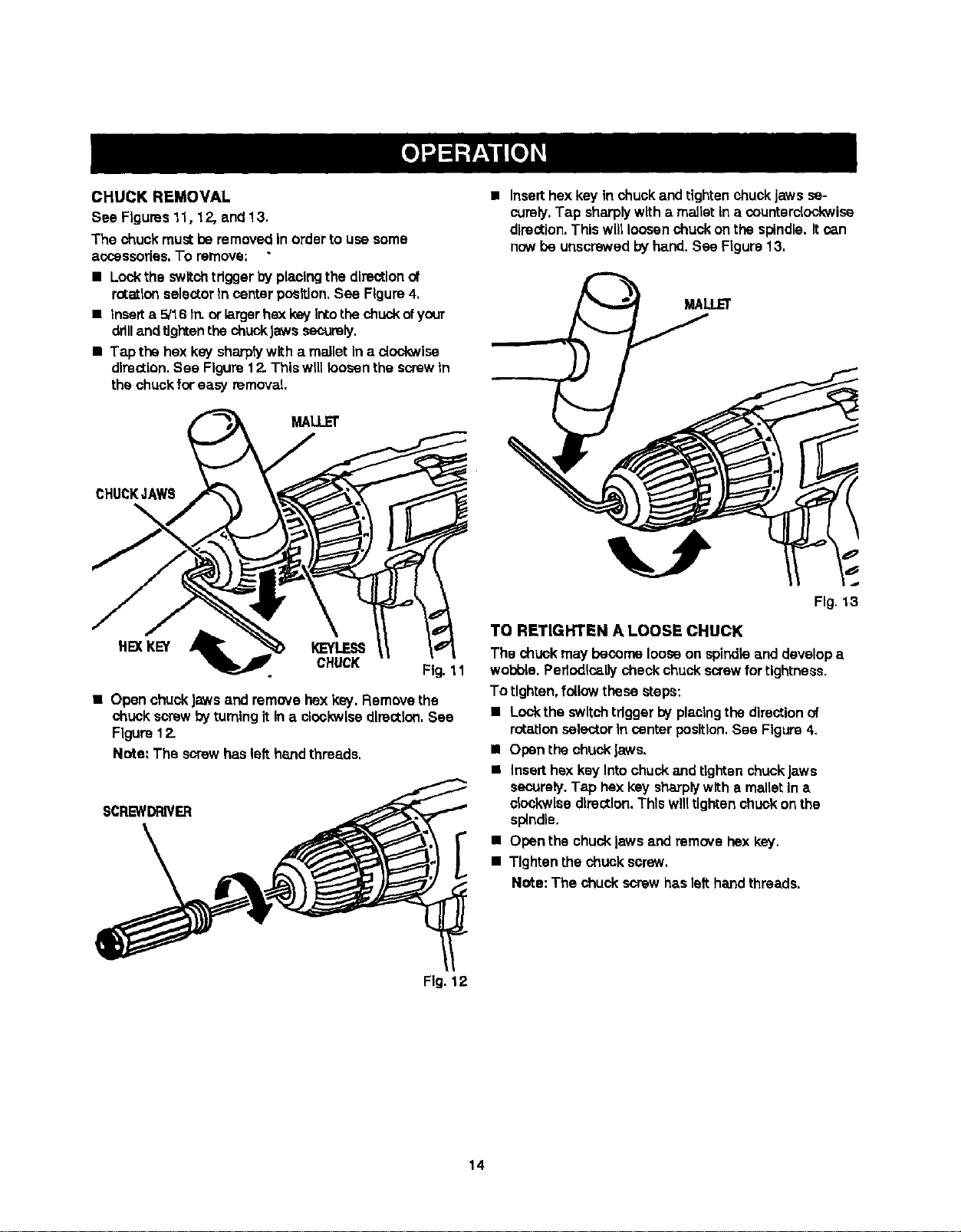
CHUCK REMOVAL
See Figures11,12, end 13.
The chuckmustbe removedIn orderto use some
accessodes.To remove:
• Lockthe switchtdgger by placingthe directionof
rotationselectorIn center position.See Figure4,
• Inserta 5/16 In. orlarger hexkey Irto the chuck ofyour
drilland tighten the chuckJawssecurely,
• Tap the hex key sharplywith a mallet in a clockwise
direction,See Figure12.Thiswill loosen the screwIn
the chuckforeasy removal
MALLET
CHUCKJAWS
HEXKEY KEYLESS
CHUCK
• OpenchuckJawsand remove hex key. Removethe
chuck screwby turningit In a clockwisedlrectlcxl,See
Figure12.
Note: The screwhas left handthreads,
SCREWDRIVER
[
• Insert hex key In chuck and tightenchuckjaws se-
curely.Tap sharplywitha malletin a counterclockwise
direction,Thiswillloosen chuck on the spindle.Itcan
nowbe unscrewedby hand, See Figure13,
MALLEI"
Fig. 13
TO RETIGHTEN A LOOSE CHUCK
The chuck may become looseon spindleand developa
wobble.Periodicallycheckchuckscrewfortightness.
To tighten,followthese steps:
• Lockthe switch trigger by placingthe directionof
rotationselector In center position,See Figure4,
• Openthe chuckJaws.
• Inserthex key Intochuckand tightenchuckJaws
securely.Tap hex key sharplywith a malletIn a
ck_,,kwlsedirection.This willtightenchuck onthe
spindle.
• Openthe chucklaws and remove hex key.
• Tighten the chuck screw.
Note: The chuck screw haslelt handthreads.
Fig, 12
14
_i WARNING: When selvlclng, us=,only Identical
Craftsman replacement parts. Use ofany other
pert may create a hazard or cause productdamage.
Avoidusingsolventswhen cleaningplasticparts,Most
plasticsare susceptibleto damage fromvadoustypesof
commercialsolventsand may bedamaged bytheiruse.
Use clean cloths to remove dirt,dust,oil, grease,etc.
,_ WARNING: Do not at a.nytimelet brakefluids,
gasoline,petroleum-besedproducts,penetratingoils,
etc. come Incontactwith plasticparts.They contain
chemicalsthat can damage,weaken or destroy
plastio.
Do not abuse powertools. Abusivepracticescan damage
tod as well as workplece.
Only the parts shownon partslist, page 16, are Intended
to be repairedor replacedbythe customer.Allotherparts
shouldbe replacedat a Sears Service Center,
,_k WARNING: Do not attemptto modify this tool or
create accessories notrecommendedfor usewith
thistool. Any suchaiteretion ormoditlcatlonIs
misuse and couldresult in a hazardouscondition
leadingto possiblesedouspersonalInjury.
BATTERIES
Your ddll'sbattery packis _:lUlpbed with nickel-cadmium
rechargeablepettedes. Length ofservice from each
charging willdepend on the type of workyou are doing.
The battehes Inthis toolhave been designed to provide
maximumtroublefree life.However, likeall batteries,they
willeventuallywear out. DO"not disassemblebatterypeck
andattemptto replacethe batteries.Handlingofthese
batteries,especially when weadng dngsand jewelry,
could resultIne serious bum.
To obtain the longestpossiblebattery life,we suggestthe
following:
• Store and chargeyourbatteriesin a coolarea.
Temperaturesabove or belownormalroom
temperature will shortenbatterylife.
• Never storebatteriesIna dischargedcondition.
Rechargethem Immediatelyafter they are
discharged.
• All ba_edesgraduallylosetheir charge.The higher
thetemperature the quickerthey losetheir charge, if
you store yourtool for longbedods of time without
usingit. rechargethe baZtedesevery monthor two.
Thispracticewill prolongbatterylife.
To preserve naturei resources, please
recycle or dispose d hattedes properly.
This product contains nlckel-sadmlum
batteries. Local, state or federal laws
may prohibit dlsposal of niokel-cadmlum
bettedes in ordinary trash.
Consultyour localwaste authorityfor Information
regardingavailable recyclingand/or disposaloptions,
BATTERY PACK REMOVAL AND PREPARATION
FOR RECYCLING
WARNING: Upon removal,coverthe battery pack's
terminalswith heaW dutyadhesive tape. Do cot
attempttodestroyordisassemblebattew packor
remove any ofIts components,Nickel-cadmium
batteriesmustbe recycled or disposedof properly.
Also, nevertouchbothterminals withmetalobjects
and/or bodypartsas shortc_rcuitmay result. Keep
away from children.Failureto comply withthese
warningscould result in fire and/or serious Injury.
The followingrecommendedaccessoriesare currentlyavailable atSears RetailStores.
• 6-Pc. ExtraLength Magnite Power BitSet • 17-Pc. Power Screwdriver/NutdrlverSet and Case
• 30-Pc. Power Screwddver/NutdrlverSet and Case • HighSpeed Bits(ForWood or Metal)..3/4 In.Max.
,_IL WARNING: The use of attachments or accessories not listed mightbe hazardous,
15
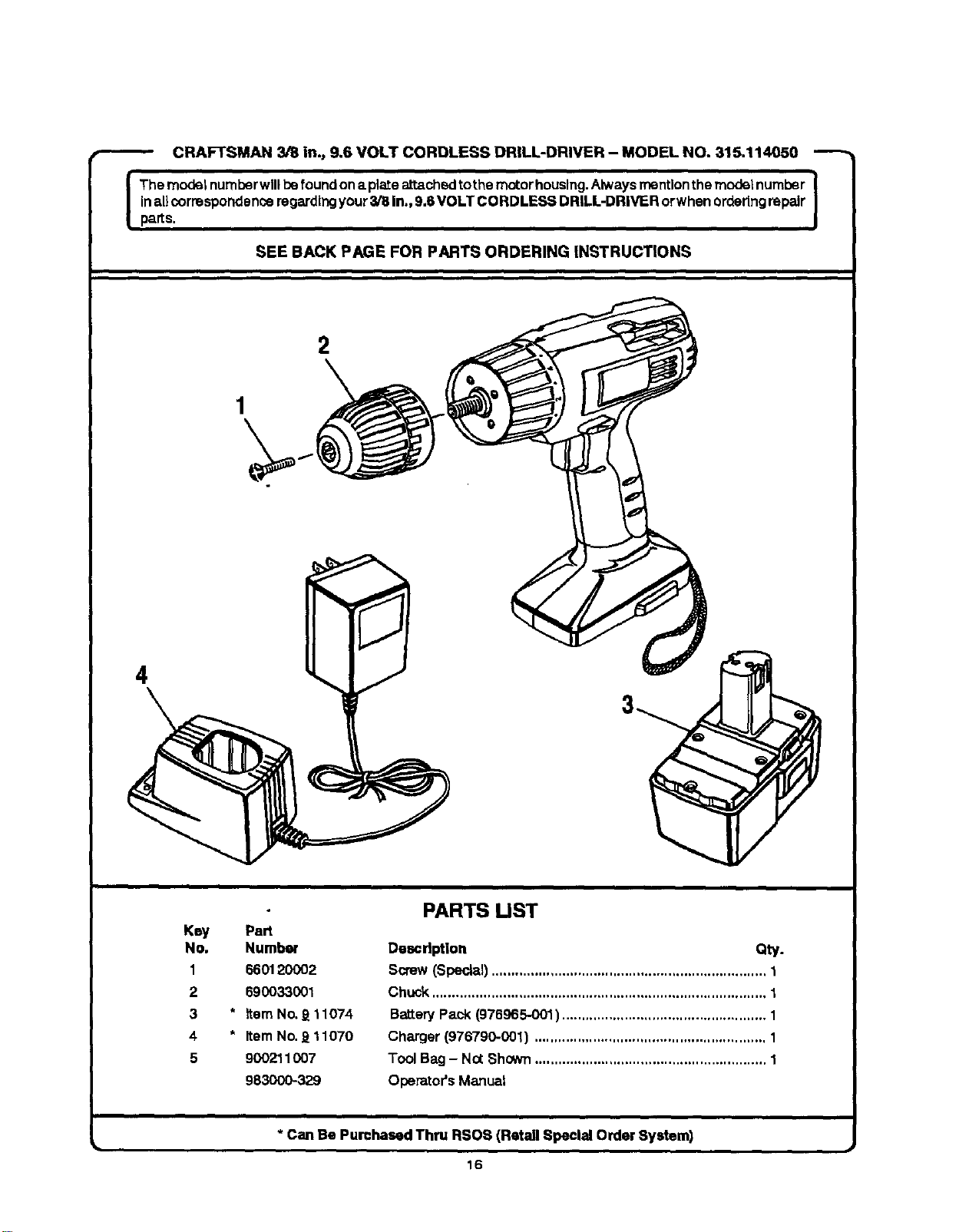
CRAFTSMAN3/8in.,9.6VOLTCORDLESSDRILL-DRIVER- MODELNO.315.114050
The modelnumberwillbefound ona plateattachedtothe motorhousing.Alwaysrnentlonthe modelnumber
Inall correspondenceregarding your318In., 9.6VOLT CORDLESS DRILL-DRIVER orwhen orderingrepair
parts.
SEE BACK PAGE FOR PARTS ORDERING INSTRUCTIONS
4
\
1
\
2
\
Key Part
No. Number
1 660120002
2 690033001
3 * Item No._ 11074
4 * ItemNo,J_11070
5 900211007
983OOO-329
PARTS UST
Descd_lon Qty.
Screw(Special)...................................................................... 1
Chuck..................................................................................... 1
BatteryPack (976965-001) .................................................... 1
Charger(976790-001) ........................................................... 1
Tool Bag - Not Shown........................................................... 1
Operator's Manual
* Can Be Purchased Thru RSOS (Retail Speclai Order System)
16

II II
IIII
17

Your Home
For repair-in your home-of all major brand appliances,
lawn and garden equipment, or heating and cooling systems,
no matter who made it, no matter who sold it!
For the replacement parts, accessories and
owner's manuals thatyou need to do-it-yourself.
For Sears professional installationof home appliances
and items like garage door openers and water heaters.
1-800-4-MY-HOME ® (1-800.469-4663)
Call anytime, day or night(U.S.A, and Canada)
|
www.sears.com www.sears.ca
Our Home
For repair of carry-in items likevacuums, lawn equipment,
and electronics, call or go on-line for the IocaUonof your nearest
Sears Parts & Repair Center.
1-800-488-1222
Call anytime, day or night(U.S.A. only)
WWW.sears.com
To purchase a protectionagreement (U.S.A.)
or maintenance agreement (Canada) on a productserviced by Sears:
1-800-827-6655 (U.S.A.)
Para pedir.servicio de reparacibn
a domicilio, y para ordenar piezas:
1-888-SU-HOGAR _
(1-888-784-6427)
1-800-361-6665 (Canada)
Au Canada pourservice en fran;ais:
1-800-LE-FOYER _c
(1-800-533-8937)
www.sears,ca
6E/ G
TM r SU
® Regist ered Tradem ark I T ademm'k I Sendce M ark d Sears, Rodouck md Co.
® M arca Regts_Kla I "n_Marca de F_tbdca / =MMarca de Sen_do de _eara. Roebudc _ _.
Mc MO
Marque de oomrneroe / M zrque d6po,s_mde Sears, Roebud_ md Co. © Seam, Roebud_ and Co,

