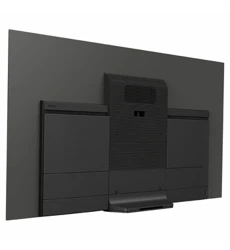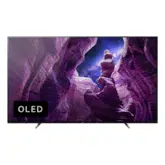
KD-65A8H / 55A8H
5-014-785-11(1)
KD-65A8H / 55A8H
C:\Users\User\Desktop\NC\SY20_NC_HK_RG_111\FINAL\5014785111\5014785111_01GB\5014785
111_GB.fm
master page: Cover
5-014-785-11(1)
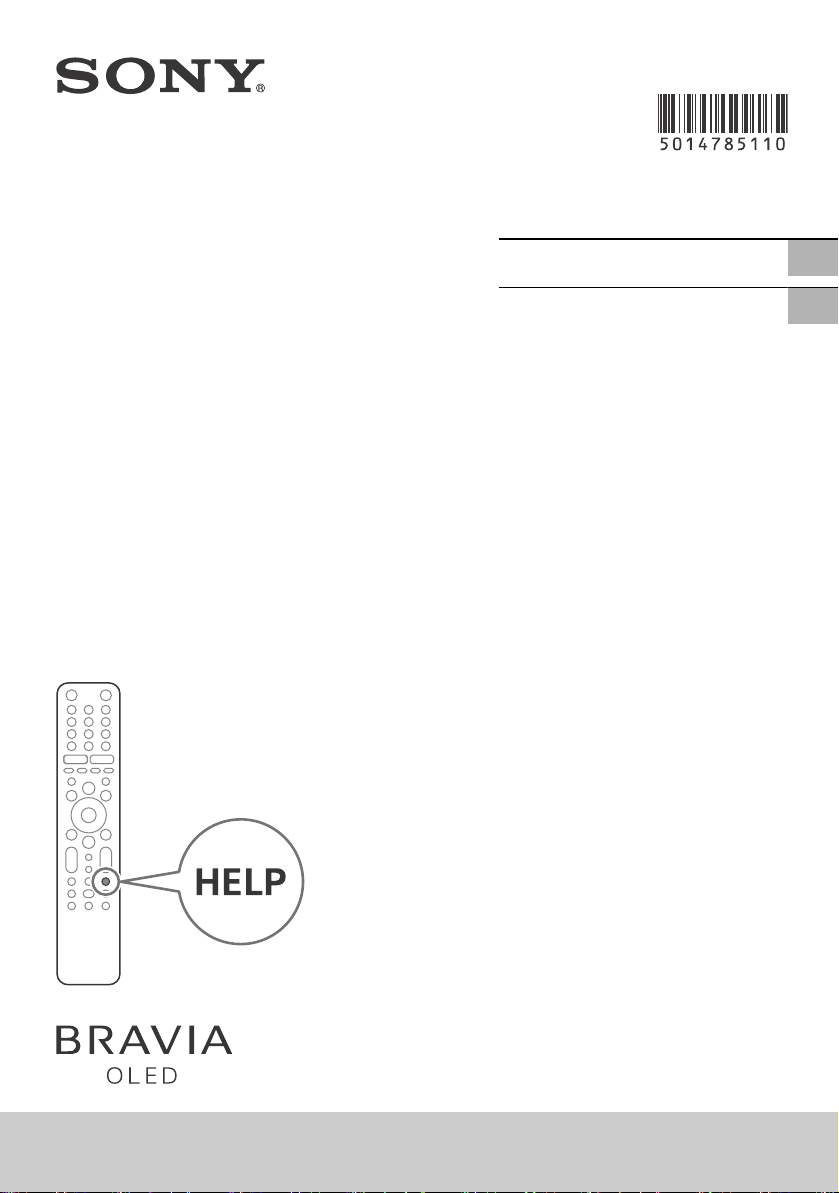
Television
Reference Guide
參考指南
GB
CT
C:\Users\User\Desktop\NC\SY20_NC_HK_RG_111\FINAL\5014785111\5014785111_01GB\5014785
111_GB.fm
master page: Left
KD-65A8H / 55A8H
5-014-785-11(1)
2
GB
Note
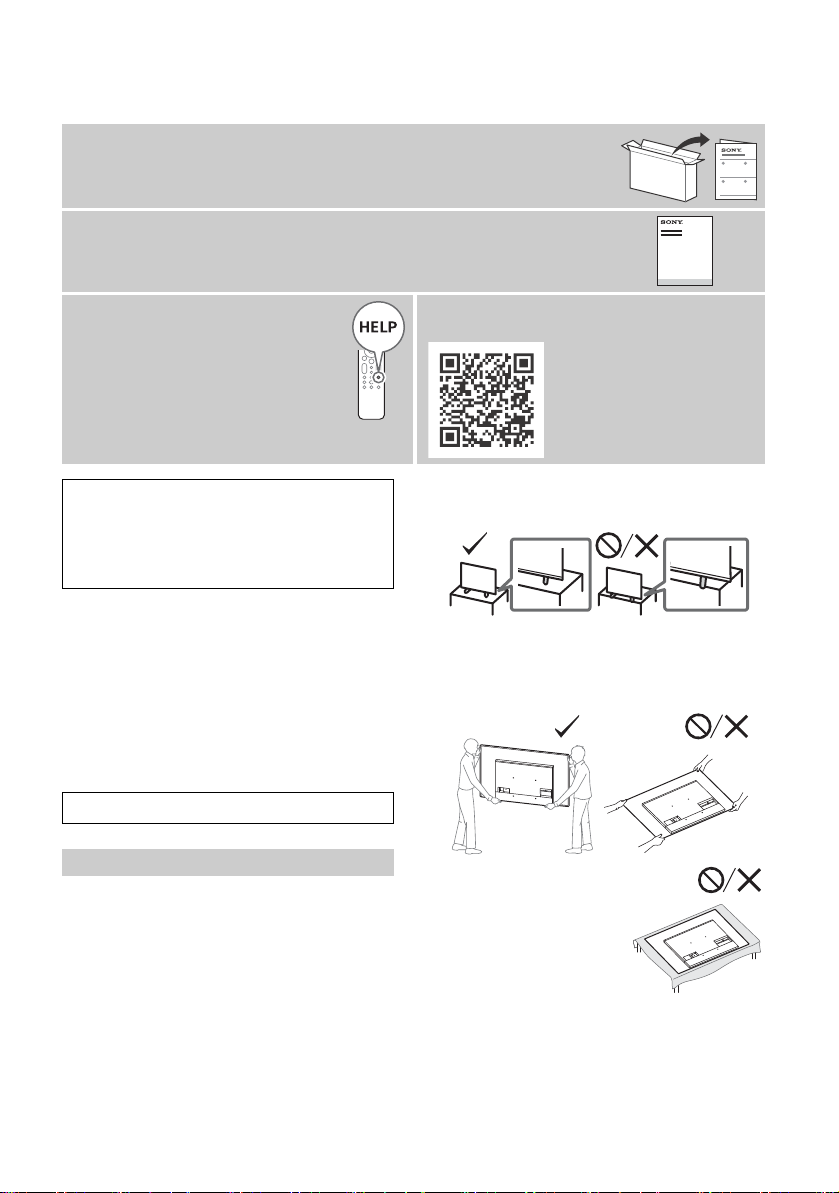
• Before operating the TV, please read the “Safety Information”.
• Read the supplied safety documentation for additional safety
information.
• Instructions about “Installing the TV to the Wall” are included
within this TV’s instruction manual.
• Images and illustrations used in the Setup Guide and this
m
anual are for reference only and may differ from the actual
product.
Location of the identification label
Labels for the TV Model No. and Power Supply rating are located
on the rear of the TV.
Safety Information
Installation/Set-up
Install and use the TV set in accordance with the instructions
below in order to avoid any risk of fire, electric shock or damage
and/or injuries.
Installation
• The TV set should be installed near an easily accessible AC
power outlet (mains socket).
• Place the TV set on a stable, level surface to prevent it from
f
alling over and causing personal injury or property damage.
• Install the TV where it cannot be pulled, pushed, or knocked
over.
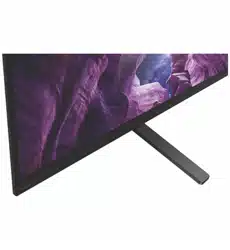
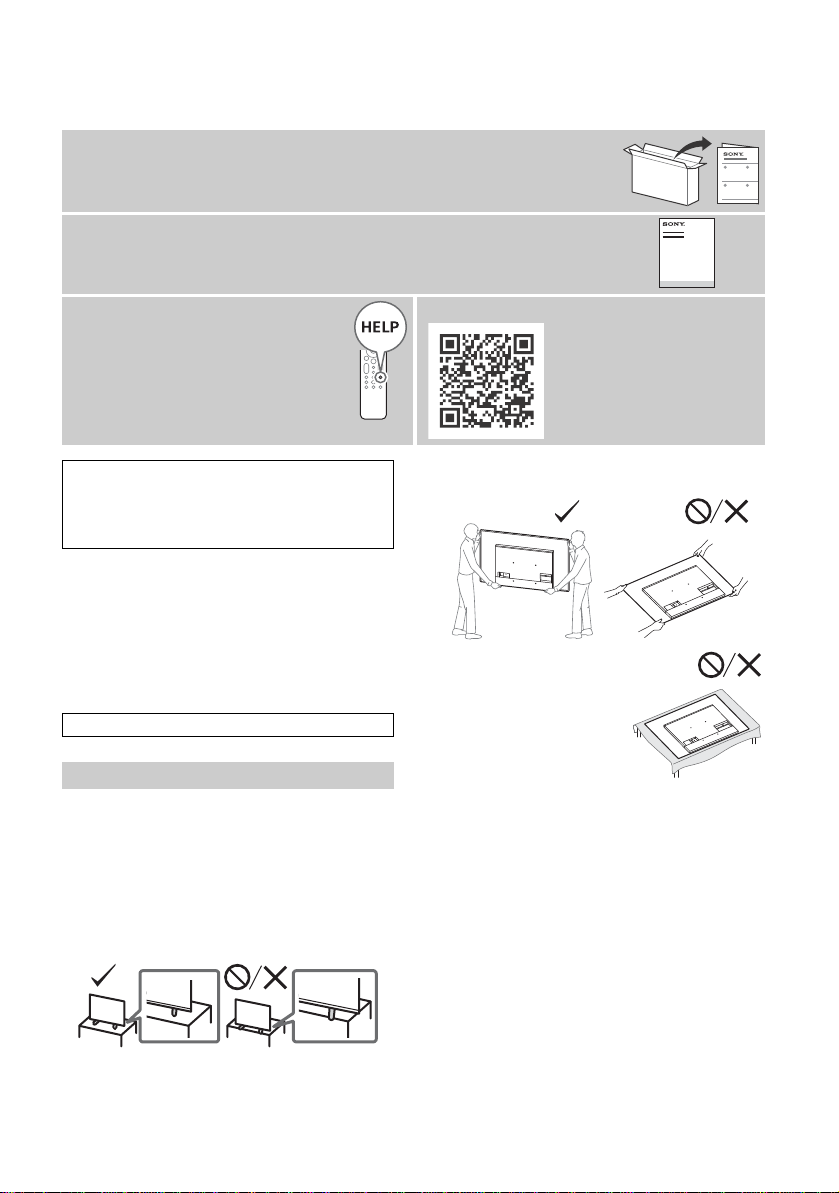
• Install the TV so that the TV’s Table-Top Stand does not protrude
o
ut from the TV stand (not supplied). If the Table-Top Stand
protrudes out from the TV stand, it may cause TV set to topple
over, fall down, and cause personal injury or damage to the TV.
Transporting
• Before transporting the TV set, disconnect all cables.
• Two or more people are needed to transport a large TV set.
• When transporting the TV set by hand, hold it as shown below.
Do
not put stress on the panel and the frame around the screen.
• When transporting the TV set, do not subject it to jolts or
e
xcessive vibration.
• When transporting the TV set for repairs or when moving, pack
it using the original carton and packing material.
About Manuals
This TV comes with the following manuals. Please retain the manuals for future reference.
Setup Guide
• TV installation and setup.
Reference Guide (this manual) / Safety Documentation
• Safety information, remote control, troubleshooting, wall-mount installation,
specification, etc.
Help Guide (On screen Manual)
• Settings, Android TV functions,
Internet connection, troubleshooting,
etc.
• To open it, press the HELP button on
the remote control and select Help
Guide.
• You can refer to the Help Guide with your
smartphone.
https://rd1.sony.net/
help/tv/hga1/h_ga/
IMPORTANT - Read the End User Software Licence
Agreement before using your Sony product. Using your
product indicates your acceptance of the End User Software
Licence Agreement. The software licence agreement between
you and Sony is available online at Sony website (http://
www.sony.net/tv-software-licenses/) or on your product
screen. Go to [Settings] t [Device Preferences] t [About] t
[Legal information] t [Notices and licences].
This television is designed for use in Hong Kong and ensured
the usage in Hong Kong only.
• When handling or mounting the TV
set, do not lay down the TV.
C:\Users\User\Desktop\NC\SY20_NC_HK_RG_111\FINAL\5014785111\5014785111_01GB\5014785
111_GB.fm
master page: Right
KD-65A8H / 55A8H
5-014-785-11(1)
3
GB
Topple prevention
Precautions to Protect the Screen from
Damage
Image retention
OLED TV’s are susceptible to image retention (burn-in) due to the
characteristics of the materials used. Image retention may occur if
images are displayed in the same location on the screen
repeatedly or over extended periods of time. This is not a
malfunction of the TV. Avoid displaying images that may cause
image retention.
The following are examples of images that may
cause image retention:
• Content with black bars either on the top and bottom and/or
the left and right sides of the screen. (for example, Letterboxed,
4:3 screen, Standard definition)
• Static images such as photos.
• Video games that might have static content in some part of the
scr
een.
• On-screen menus, programme guides, channel logos etc.
• Static content from applications.
• On-screen tickers, such as those used for news and headlines.
To reduce the risk of image retention:
• Sony recommends that you turn off the TV normally by pressing
the power button on the remote control or the TV.
• Fill the screen by changing [Wide mode] to eliminate the black
ba
rs. Select [Wide mode] other than [Normal].
• Turn off the OSD (On Screen Display) by pressing the /
button, and turn off the menus from connected equipment. For
details, refer to the instruction manuals for the connected
equipment.
• Avoid displaying static images with bright colours (including
w
hite), clocks or logos on any portion of the screen.
• Set the picture settings based on the ambient conditions. The
Standard Picture is recommended for home use and when
viewing content that often displays the station logos, etc.
The TV has following features to help reduce/prevent image
re
tention.
Panel refresh
A panel refresh will adjust the panel uniformity. Panel refresh can
be performed and should only be used when image retention is
very noticeable.
Caution:
• The Panel refresh function may affect the panel. Do not perform
P
anel refresh more than once a year as it may affect the usable
life of the panel.
• Panel refresh takes about one hour to complete.
• A white line may be displayed on the screen during the Panel
refresh, this is not a malfunction of the TV.
• Panel refresh will only work when the room temperature is
be
tween 10 ºC and 40 ºC.
Pixel shift
Automatically moves the image on the screen to prevent image
retention.
Other feature
The screen brightness is automatically reduced when displaying
still images, clocks, bright colours or logos etc.
1
2
3
9 mm – 13 mm
M6 screw (not supplied)
Screw (not supplied)
Cord (not
supplied)
1.5 N·m
{15 kgf·cm}
Protecting the TV Screen (OLED TV)
GB
C:\Users\User\Desktop\NC\SY20_NC_HK_RG_111\FINAL\5014785111\5014785111_01GB\5014785
111_GB.fm
master page: Left
KD-65A8H / 55A8H
5-014-785-11(1)
4
GB
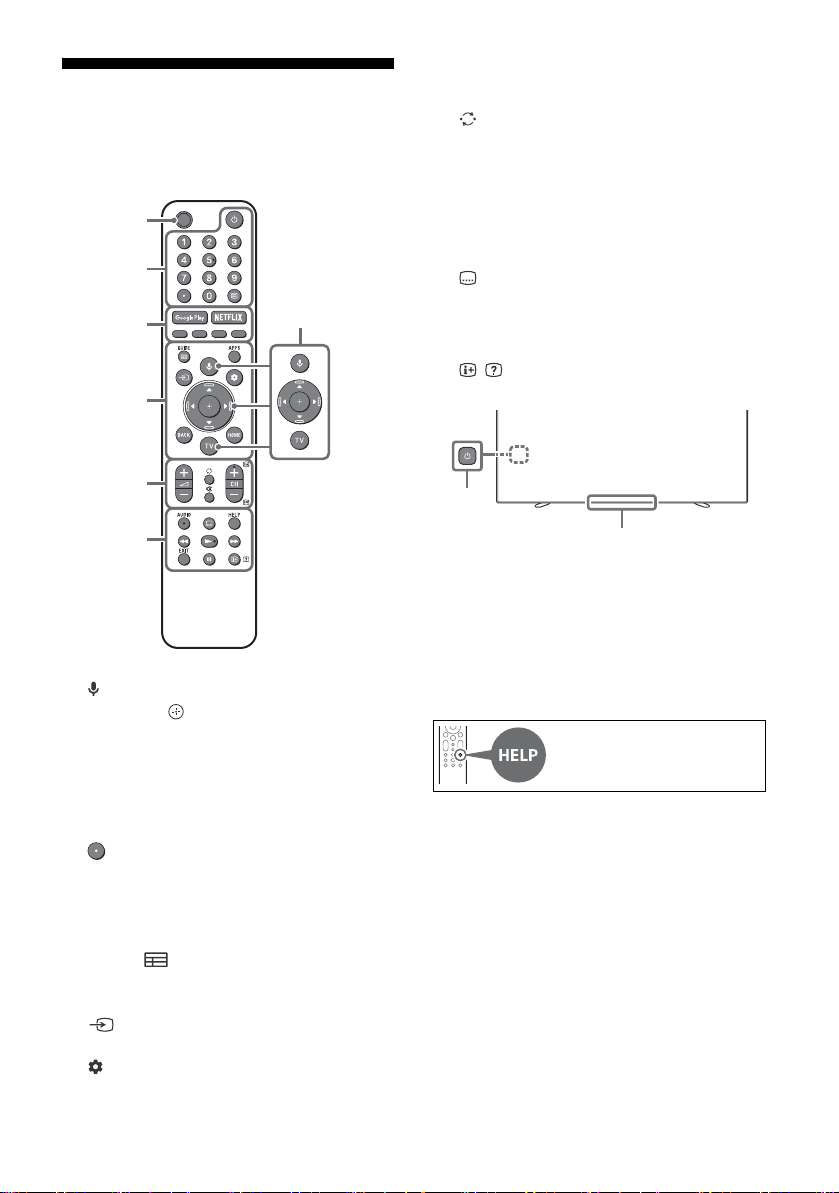
Remote Control and TV
The remote control shape, location,
availability and function of remote control
buttons may vary depending on your region/
country/TV model.
(Microphone): Use voice search*
1
.
//// : On screen menu navigation
and selection.
TV: Display TV channel list or switch to
input.
(TV standby)
Number buttons
(dot)
(T
ext): Display text information.
Google Play / NETFLIX*
2
/ Colour
buttons
GUIDE/ : Display the digital programme
guide.
APPS: Display a list of installed apps.
(Input select): Display and select the
input source, etc.
(Quick settings): Display Quick Settings.
BACK
HOME
+/– (Volume)
(Jump)
(Mu
te)*
3
CH +/–//: Select the channel, or next
() / previous () page.
AUDIO: Select the sound of multilingual
source or dual sound (depend on
programme source).
(Subtitle setting)
HELP:
Display the Help menu.
///
EXIT
/ (Info/Text reveal):
Display
information.
(Power)
Remote Control sensor / Light sensor /
LED
*1 The voice search requires an Internet connection.
*2 Only on limited region/country/TV model/
la
nguage.
*3 Accessibility shortcut is available by pressing and
h
olding (Mute).
MIC
Ȫ
ȫ
Ȭ
ȭ
Ȯ
ȩ
For more information, refer to
the Help Guide.
Ȱ
C:\Users\User\Desktop\NC\SY20_NC_HK_RG_111\FINAL\5014785111\5014785111_01GB\5014785
111_GB.fm
master page: Right
KD-65A8H / 55A8H
5-014-785-11(1)
5
GB
Installing the TV to the Wall
Using the optional Wall-Mount Bracket
(SU-WL850 or SU-WL450)* (not supplied)
To Customers:
For product protection and safety reasons, Sony
str
ongly recommends that installation of your
TV be performed by Sony dealers or licensed
contractors. Do not attempt to install it yourself.
To Sony Dealers and Contractors:
Provide full attention to safety during the
in
stallation, periodic maintenance and
examination of this product.
Wall-Mount Bracket Installation Information
This TV’s instruction manual only provides the
steps
to prepare the TV for Wall-Mount
installation before it is installed on the wall. For
instructions on Wall-Mount Bracket installation,
see the Installation Information (Wall-Mount
Bracket) on the product page for your TV model.
https://www.sony-asia.com/support
Preparing for Wall-Mount Installation
• Prepare the TV for the Wall-Mount Bracket
b
efore making cable connections.
• Follow the instruction guide provided with the
W
all-Mount Bracket for your model. Sufficient
expertise is required in installing this TV,
especially to determine the strength of the
wall for withstanding the TV’s weight.
• Be sure to entrust the attachment of this
pr
oduct to the wall to Sony dealers or licensed
contractors and pay adequate attention to
safety during the installation. Sony is not liable
for any damage or injury caused by
mishandling or improper installation.
• The screws for Wall-Mount Bracket are not
su
pplied (SU-WL450 only).
• Only qualified service personnel should carry
ou
t wall-mount installations.
• For safety reasons, it is strongly recommended
th
at you use Sony accessories, including:
W
all-Mount Bracket SU-WL850
W
all-Mount Bracket SU-WL450
• Be sure to use the screws supplied with the TV
wh
en attaching the Wall-Mount Bracket to the
TV set (SU-WL850 only). Be sure to use the
screws supplied with the Wall-Mount Bracket
when attaching the Wall-Mount Bracket to the
TV set (except SU-WL850).
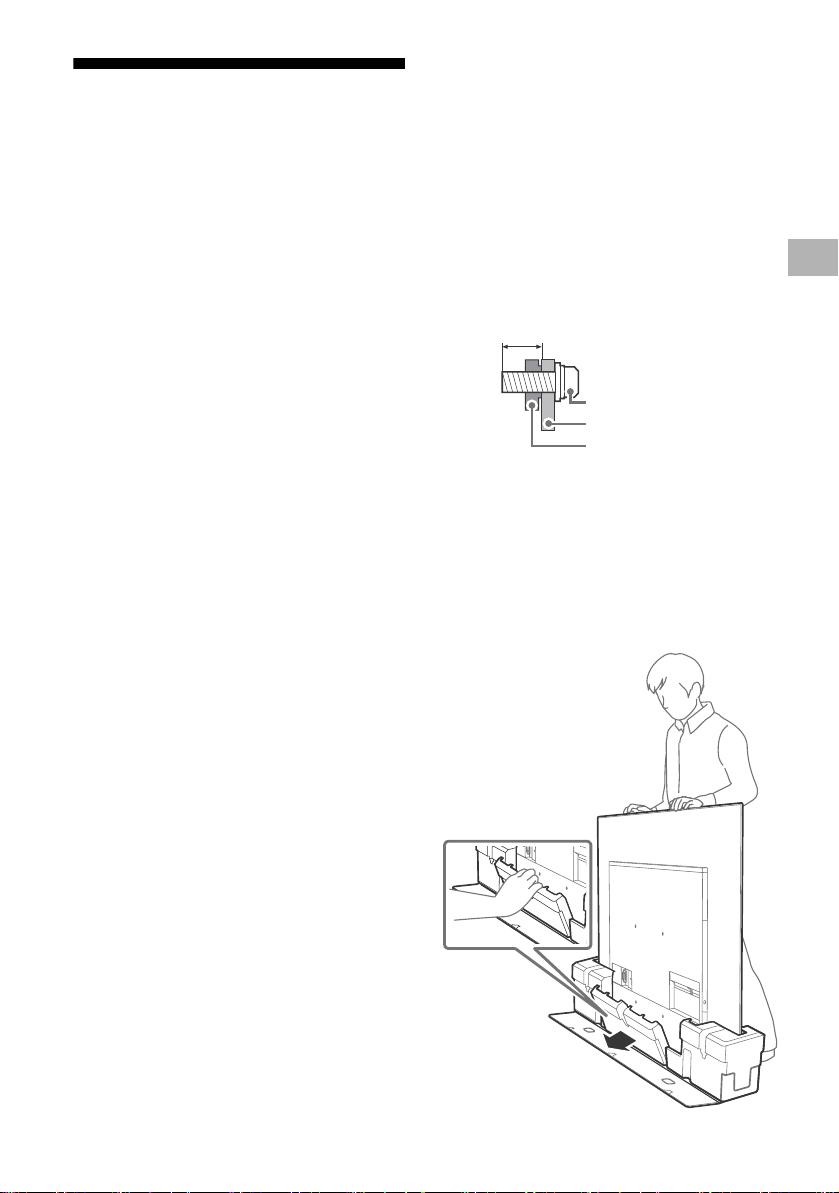
The supplied screws are designed as indicated
b
y illustration when measured from the
attaching surface of the Wall-Mount Bracket.
The diameter and length of the screws differ
d
epending on the Wall-Mount Bracket model.
Use of screws other than those supplied may
result in internal damage to the TV set or
cause it to fall, etc.
• Be sure to store the unused screws and
T
able-Top Stand in a safe place until you are
ready to attach the Table-Top Stand. Keep the
screws away from small children.
* Only on limited region/country/TV model.
Installing the TV to the Wall from Carton
1 Remove the centre cushion.
9 mm – 13 mm
Screw (M6)
Wall-Mount Bracket
TV’s rear cover
GB

C:\Users\User\Desktop\NC\SY20_NC_HK_RG_111\FINAL\5014785111\5014785111_01GB\5014785
111_GB.fm
master page: Left
KD-65A8H / 55A8H
5-014-785-11(1)
6
GB
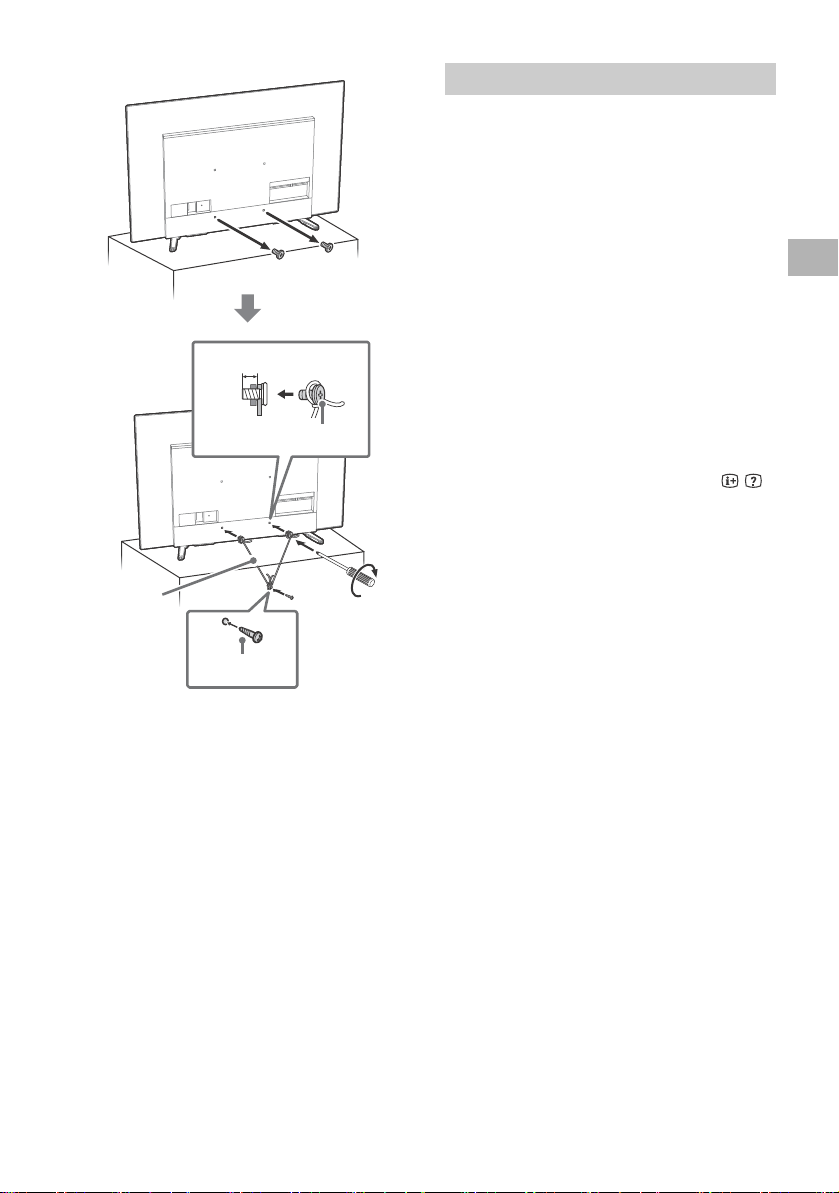
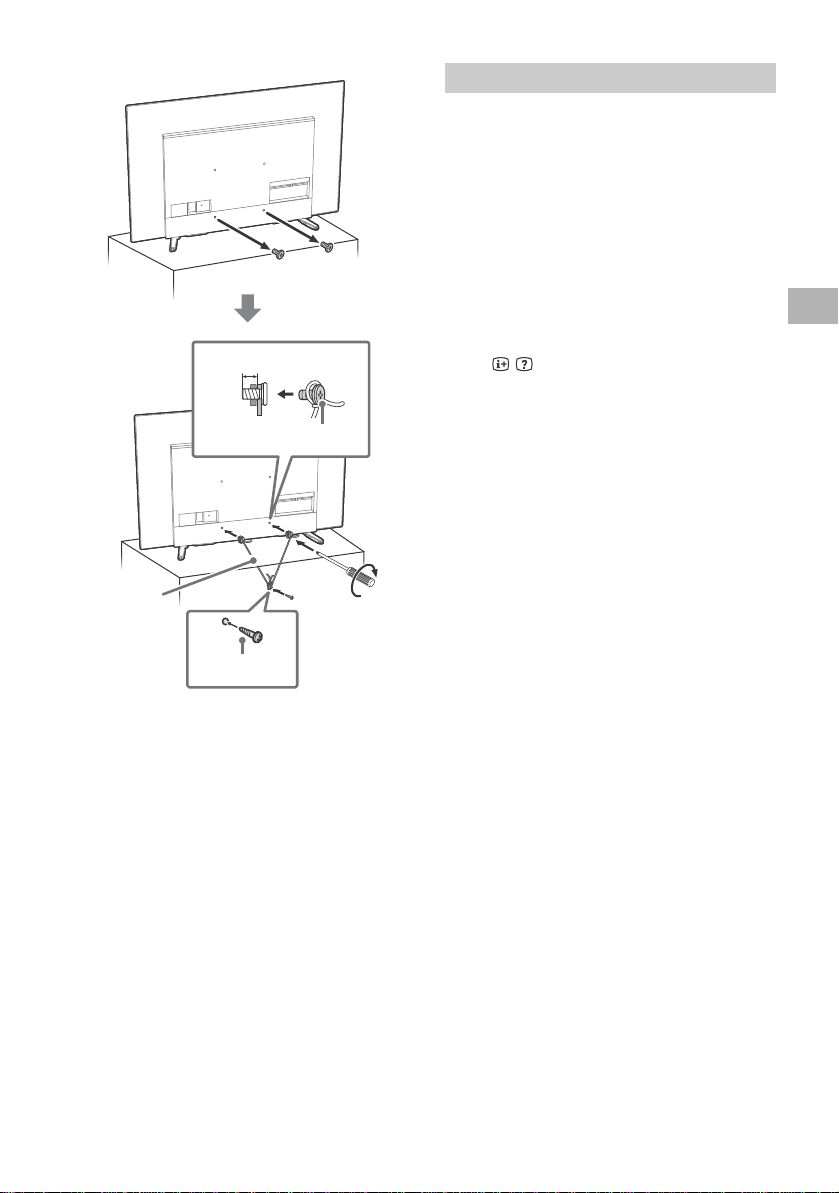
2 Remove the screws from the rear of the
TV.
Note
• Be sure to store the removed screws and reuse
when attaching the Wall-Mount Bracket to the TV
set (SU-WL850 only). Keep the screws away from
small children.
Installing the TV to the Wall from Table-Top
Stand
Remove the screws from the rear of the TV.
Note
• Be sure to store the removed screws and reuse when
attaching the Wall-Mount Bracket to the TV set
(SU-WL850 only). Keep the screws away from small
children.
Detaching the Table-Top Stand from the TV
1 Remove one side of the Table-Top Stand
at a time. Firmly hold the Table-Top
Stand securely with both hands while
the other people lift up the TV.
2 Repeat the previous step and remove
the other side of the Table-Top Stand.
Note
• Three or more people are required to detach the
Table-Top Stand.
• Be careful not to use excessive force while detaching
th
e Table-Top Stand from the TV as it may cause the
TV set to fall resulting in personal injury or physical
damage to the TV.
• Take care when handling the Table-Top Stand to
p
revent damage to the TV.
• Be careful when lifting the TV as the Table-Top Stand
i
s detached, the Table-Top Stand may topple over and
cause personal injury.
• Take care when removing the Table-Top Stand from
t
he TV to prevent it from falling over and damaging
the surface that the TV is sitting on.
C:\Users\User\Desktop\NC\SY20_NC_HK_RG_111\FINAL\5014785111\5014785111_01GB\5014785
111_GB.fm
master page: Right
KD-65A8H / 55A8H
5-014-785-11(1)
7
GB
Troubleshooting
General troubleshooting for issues like: black
screen, no sound, frozen picture, TV does not
respond, or network is lost, do the following
steps.
1 Restart your TV by pressing the power button
on the remote control for about five seconds.
The TV will restart. If the TV does not recover,
try unplugging the AC power cord (mains
lead). Then press the power button on the TV,
and release it. Wait for two minutes, and plug
in the AC power cord (mains lead).
2 Refer to the Help menu by pressing HELP on
the remote control.
3 Connect your TV to the Internet and perform
a software update. Sony recommends you to
keep your TV software updated. Software
updates provide new features and
performance improvements.
4 Visit Sony support website (information
provided at the end of this manual).
When you plug in the TV, the TV may not be
a
ble to turn on for a while even if you press
the power button on the remote control or
the TV.
It takes time to initialize the system. Wait for
ab
out one minute, then operate it again.
The remote control does not function.
• Replace the batteries.
The parental lock password has been
fo
rgotten.
• Enter 9999 for the PIN and enter the new PIN.
The screen becomes darker while watching
TV.
• If the whole image or part of the image
r
emains still, the screen brightness will be
gradually reduced to prevent image retention.
This is not a malfunction of the TV.
You are concerned about image retention.
If the same image is displayed repeatedly or for
lo
ng periods of time, image retention may
occur. To reduce image retention, we
recommend that you turn off the TV normally by
pressing the power button on the remote
control or the TV.
Note
• Perform Panel refresh only when image retention is
particularly noticeable. Avoid performing Panel
refresh more than once a year because it may affect
the usable life of the panel.
• Images that include clocks, logos and bright colours
(
including white) easily cause image retention. Avoid
displaying these types of images for long periods of
time, otherwise image retention may occur.
A white line appears on the screen.
• Panel refresh automatically runs after the TV
ha
s been used for long periods of time to
reduce image retention. Panel refresh starts
after the TV is turned off and takes about one
hour to complete. A white line may be
displayed on the screen during the Panel
refresh. This is not a malfunction of the TV.
The message [Panel refresh did not finish…] is
di
splayed.
When i) the TV is turned on, ii) the AC power
c
ord (mains lead) is unplugged, or iii) the room
temperature falls outside of the range between
10 ºC and 40 ºC during the Panel refresh, the
P
anel refresh is not completed. Please avoid the
above three conditions during the Panel refresh.
For more information on
troubleshooting, refer to the
Help Guide.
GB
C:\Users\User\Desktop\NC\SY20_NC_HK_RG_111\FINAL\5014785111\5014785111_01GB\5014785
111_GB.fm
master page: Left
KD-65A8H / 55A8H
5-014-785-11(1)
8
GB
Specifications
System
Panel system: OLED (Organic Light Emitting
Diode) Panel
TV system
Analogue: I, D/K, B/G, M
Digital: DTMB
Colour system: PAL/SECAM/NTSC3.58/
N
TSC4.43
Channel coverage
Analogue: UHF/VHF/Cable
Digital: UHF
Sound output: 10 W + 10 W + 5 W + 5 W
Wireless technology
Protocol IEEE 802.11a/b/g/n/ac
Bluetooth® Version 4.2
Input/Output jacks
Antenna (aerial)/cable
75 ohm external terminal for VHF/UHF
/ VIDEO IN
Video/Audio input (mini jack)
HDMI IN 1/2/3/4 (support 4K resolution, HDCP
2
.3-compatible)
Video:
4096 × 2160p (50, 60 Hz)*
1
*
2
, 4096 × 2160p
(24 Hz)*
1
, 3840 × 2160p (50, 60 Hz)*
2
, 3840 ×
2160p (24, 25, 30 Hz), 1080p (30, 50, 60, 100,
120 Hz), 1080/24p, 1080i (50, 60 Hz), 720p
(3
0, 50, 60 Hz), 720/24p, 576p, 480p, PC
Fo
rmats*
3
Audio:
In eARC (Enhanced Audio Return Channel)
mod
e
Refer to the Help Guide for details.
Except eARC mode
5.1 channel linear PCM: 32/44.1/48/88.2/
9
6/176.4/192 kHz 16/20/24 bits, Dolby
Au
dio, Dolby Atmos, DTS
eARC/ARC (Enhanced Audio Return Channel/
Au
dio Return Channel) (HDMI IN 3 only)*
4
In eARC mode
Refer to the Help Guide for details.
In ARC mode
Two channel linear PCM: 48 kHz 16 bits,
D
olby Audio, Dolby Atmos, DTS
DIGITAL AUDIO OUT (OPTICAL)
Digital optical jack (Two channel linear PCM:
48 kHz 16 bits, Dolby Audio, DTS)
(S
tereo mini jack)
Headphone
1, 2, 3
USB port 1 and 2 support High Speed USB
(U
SB 2.0)
USB port 3 supports Super Speed USB (USB 3.1
Ge
n 1)
LAN
10BASE-T/100BASE-TX connector (Depending
o
n the operating environment of the network,
connection speed may differ. The
communication rate and quality are not
guaranteed.)
Power and others
Power requirements
220 V – 240 V AC, 50 Hz
Screen size (measured diagonally) (Approx.)
KD-65A8H: 65 inches / 163.9 cm
KD-55A8H: 55 inches / 138.8 cm
Power consumption
Indicated on the rear of the TV
Standby power consumption*
5
*
6
0.5 W
Display resolution
3,840 pixels (horizontal) × 2,160 lines (vertical)
Output Rating
USB 1/2
5
V , 500 mA MAX
USB 3
5 V , 900 mA MAX
Dimensions (Approx.) (w × h × d) (mm)
with Table-Top Stand
Standard position:
KD-65A8H: 1,448 × 857 × 326
KD-55A8H: 1,227 × 733 × 326
Sound bar position:
KD-65A8H: 1,448 × 908 × 323
KD-55A8H: 1,227 × 784 × 323
without Table-Top Stand
KD-65A8H: 1,448 × 836 × 52
KD-55A8H: 1,227 × 712 × 52
Mass (Approx.) (kg)
with Table-Top Stand (without Table-Top Stand)
KD-65A8H: 23.6 (21.8)
KD-55A8H: 18.6 (16.8)
Others
Optional accessories
Wall-Mount Bracket: SU-WL850 / SU-WL450
Operating temperature: 0 ºC – 40 ºC
Operating humidity: 10 % – 80 % RH
(n
on-condensing)

C:\Users\User\Desktop\NC\SY20_NC_HK_RG_111\FINAL\5014785111\5014785111_01GB\5014785
111_GB.fm
master page: Right
KD-65A8H / 55A8H
5-014-785-11(1)
9
GB
*1 When 4096 × 2160p is input and [Wide mode] is set
to [Normal], the resolution is displayed as 3840 ×
2160p. To display 4096 × 2160p, set [Wide mode]
setting to [Full 1] or [Full 2].
*2 To support 18 Gbps, set [HDMI signal format] to
[E
nhanced format].
*3 Refer to the online Help Guide for details.
*4 Connect your audio system to the HDMI IN 3 to route
T
V audio to your audio system.
*5 Specified standby power is reached after the TV
fin
ishes necessary internal processes.
*6 Standby power consumption will increase when
y
our TV is connected to the network.
Note
• Optional accessories availability depends on
countries/region/TV model/stock.
• Design and specifications are subject to change
wi
thout notice.
Trademark Information
• The terms HDMI, HDMI High-Definition
Multimedia Interface, and the HDMI Logo are
trademarks or registered trademarks of HDMI
Licensing Administrator, Inc.
• Dolby, Dolby Vision, Dolby Atmos, Dolby
A
udio, and the double-D symbol are
trademarks of Dolby Laboratories.
Manufactured under license from Dolby
Laboratories. Confidential unpublished works.
Copyright © 2012-2018 Dolby Laboratories. All
rights reserved.
• Gracenote, the Gracenote logo and logotype,
“P
owered by Gracenote” logo are either
registered trademarks or trademarks of
Gracenote, Inc. in the United States and/or
other countries.
• Google, Google Play, Chromecast, YouTube,
A
ndroid TV and other related marks and logos
are trademarks of Google LLC.
• For DTS patents, see http://patents.dts.com.
M
anufactured under license from DTS, Inc.
DTS, the Symbol, DTS and the Symbol
together, and Digital Surround are registered
trademarks or trademarks of DTS, Inc. in the
United States and/or other countries. © DTS,
Inc. All Rights Reserved.
• Netflix is a registered trademark of Netflix, Inc.
• © 2019 RealNetworks, Inc. All rights reserved.
P
atents issued. RealMedia, RealNetworks, and
their logos are trademarks or registered
trademarks of RealNetworks, Inc.
• TUXERA is a registered trademark of Tuxera
I
nc. in the US and other countries.
• All other trademarks are the property of their
r
espective owners.
GB
C:\Users\User\Desktop\NC\SY20_NC_HK_RG_111\FINAL\5014785111\5014785111_02CT\5014785111
_CT.fm
master page: Left
KD-65A8H / 55A8H
5-014-785-11(1)
2
CT
註
• 使用電視機之前,請詳讀 “ 安全資訊 ”。
• 有關其他安全資訊,請閱讀隨附的安全檔案。
• 有關“將電視機安裝在牆上”的指示已包含在這台電視機的使用說
明書。
• 安裝指南和本說明書中使用的影像和插圖僅作參考並可能與實際產
品不同。
識別標籤的位置
電視機型號和電源等級的標籤位於電視機背面。
安全資訊
安裝 / 設定
為了避免火災、觸電或損壞及 / 或受傷等危險,請遵照下列指示來安
裝和使用電視機。
安裝
• 應將電視機安裝在易於插拔的 AC 電源插座附近。
• 將電視機
放在一個穩定的平面,以防止墜落和引起個人傷害或財產
損壞。
• 應將電視
機安裝在不容易被拉、推或碰倒之處。
• 安裝電視
機,使電視機的桌面底座不會從電視機櫃 (非附帶)凸
出。如果桌面底座從電視機櫃凸出,可能導致電視機翻倒、掉落及
人身傷害或對電視機造成損壞。
搬動
• 搬動電視機之前,請斷開所有纜線的連接。
• 兩個或更多的人都需要運輸的大電視機。
• 用手搬動電視
機時,請如下圖所示抓握。請勿對面板以及螢幕周圍
的框邊施加壓力。
• 搬動電視機時
,請勿使其受到搖晃或過度震動。
• 搬動電視機以
進行維修或移動時,請使用原有的紙箱和包裝材料進
行包裝。
關於說明書
本電視機附帶以下說明書。請保管好這些說明書,以供日後參考。
安裝指南
• 電視機安裝和設定。
參考指南 (本說明書)/ 安全檔案
• 安全資訊、遙控器、故障排除、壁掛式安裝、規格等。
說明指南 (電子說明書)
• 設定、Android TV 功能、網際網路連
線、故障排除等。
• 想要打開說明指南,請按遙控器上的
HELP 按鈕,選擇說明指南。
• 您可以使用您的智能手機來查閱說明指南。
https://rd1.sony.net/
help/tv/hga1/h_ga/
重要 - 在使用 Sony 產品之前,請先閱讀終端使用者軟體授權合
約。若使用您的產品,則表示您接受終端使用者軟體授權合約。您
與 Sony 之間的軟體授權合約可在 Sony 網站
(http://www.sony.net/tv-software-licenses/) 上線上獲取,也
可在您產品的螢幕上獲取。進入 [ 設定 ] t [ 裝置偏好設定 ]
t [ 關於 ] t [ 法律資訊 ] t [ 注意事項和授權 ]。
本電視設計在香港使用,只保證能在香港使用。
• 在搬運或安裝電視機時,不要將其平
放。
C:\Users\User\Desktop\NC\SY20_NC_HK_RG_111\FINAL\5014785111\5014785111_02CT\5014785111
_CT.fm
master page: Right
KD-65A8H / 55A8H
5-014-785-11(1)
3
CT
防止傾倒
保護螢幕免受損壞之預先注意事項
影像殘留
OLED 電視機由於所用材料的特性而容易出現影像殘留。如果影像在
螢幕上相同位置重複或長時間顯示,則可能出現影像殘留。這不是電
視機故障。避免顯示可能導致影像殘留的影像。
以下為可能導致影像殘留的影像範例:
• 螢幕上下側及 / 或左右側有帶黑條的內容。(例如,加黑邊、4:3 螢
幕、標準畫質)
• 靜態影像,例如相片。
• 螢
幕上某些部分含靜態內容的電玩。
• 螢
幕選單、程式指南及頻道標誌等。
• 應用程式中的靜態內容。
• 螢幕即時動態,例如用於新聞及標題的即時動態。
若要降低影像殘留的風險:
• Sony 建議您通過按遙控器或電視機上的電源按鈕正常關閉電視機。
• 透
過變更 [寬螢幕模式] 填充螢幕以消除黑條。選擇 [寬螢幕模式]
而非 [4:3 顯示模式 ]。
• 透過按 / 按鈕關閉 OSD (螢幕顯示),然後關閉來自所連
設備的選單。詳情請參考所連設備的使用說明書。
• 避免螢幕任何部分顯示含亮色 (包括白色)、時鐘或標誌的靜態影
像。
• 根據環境條件完成圖片設定。針對家用及檢視通常顯示電台標誌等
的內容推薦使用 「標準圖片」設定。
電視機擁有下列功能,有助於減少 / 防止影像殘留。
面板更新
面板更新將調整面板均勻度。可以執行面板更新,但應僅在影像殘留
非常顯著時使用。
注意事項 :
• 面
板更新功能可能影響面板。不要每年執行多過一次面板更新,因
為這可能會影響面板的使用壽命。
• 面
板更新需要大約一個小時完成。
• 面板更新期間,螢幕上可能顯示白線,這不是電視機故障。
• 面板更新僅在 10 ºC - 40 ºC 的室溫下進行。
像素位移
自動移動螢幕上的影像以防止影像殘留。
其它功能
當顯示靜止影像、時鐘、亮色或標誌等時,螢幕亮度會自動降低。
1
2
3
9 毫米 – 13 毫米
M6 螺絲 (非附帶)
螺絲 (非附帶)
導線 (非附帶)
1.5 N·m
{15 kgf·cm}
保護電視機螢幕 (OLED 電視機)
CT
C:\Users\User\Desktop\NC\SY20_NC_HK_RG_111\FINAL\5014785111\5014785111_02CT\5014785111
_CT.fm
master page: Left
KD-65A8H / 55A8H
5-014-785-11(1)
4
CT
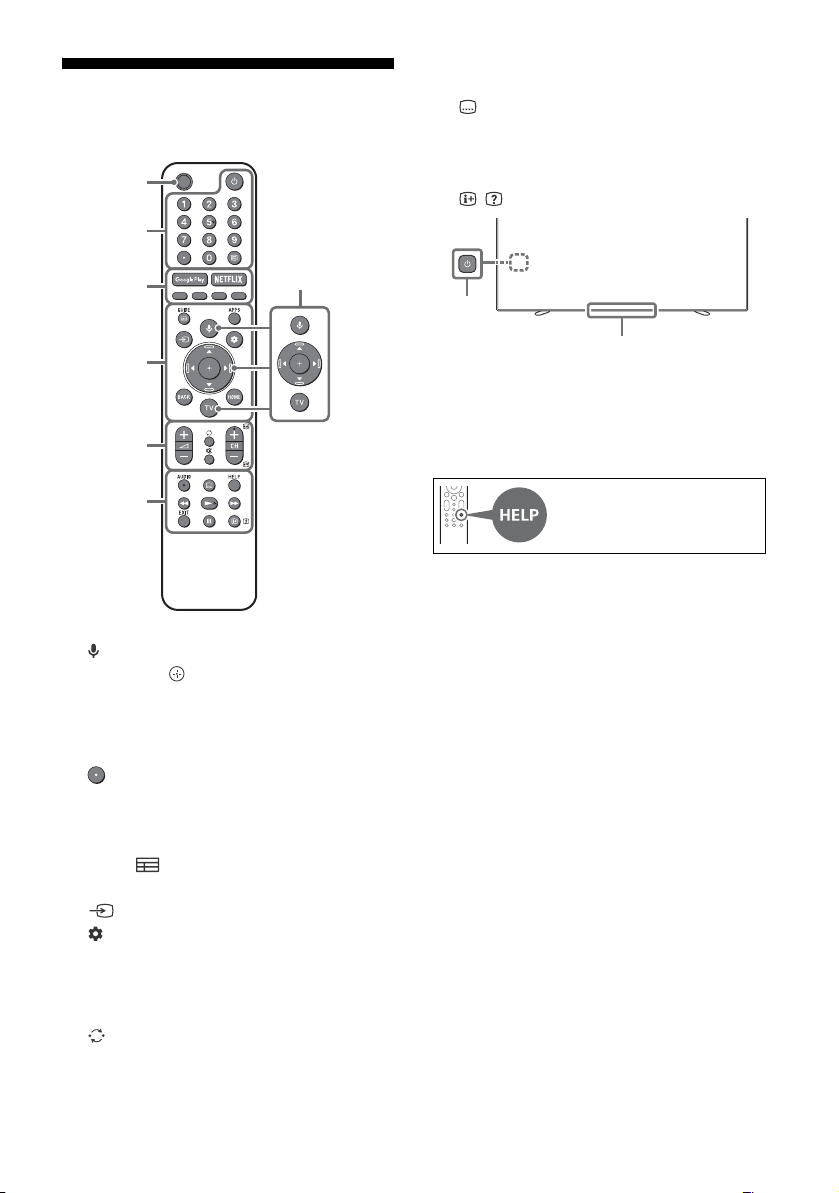
遙控器和電視機
遙控器外形、按鈕的位置、可用性與功能視您的國
家 / 區域 / 電視機型號而可能略有不同。
(麥克風):使用語音搜尋 *
1
。
//// : 在螢幕選單導航和選擇上。
TV: 顯示電視機頻道清單或切換為輸入。
(電視待機)
數字按鈕
(點)
(文
字):顯示文字資訊。
Google Play / NETFLIX*
2
/ 顏色按鈕
GUIDE/ : 顯示數位節目指南。
APPS: 顯示已安裝應用程式的清單。
(輸入選擇):顯示並選擇輸入來源等。
(快速設定):顯示快速設定。
BACK
HOME
+/– (音量)
(跳轉)
(
靜音) *
3
CH +/–//: 選擇頻道,或下一頁
()/
上一頁 ()。
AUDIO: 選擇多語言源的聲音或雙聲道 (視乎
節目源而定)。
(字幕設定)
HELP:
顯示說明選單。
///
EXIT
/ (顯現資訊 / 文字):
顯示資訊。
(電源)
遙控器感應器 / 光感應器 / LED
*1 語音搜尋需要網際網路連線。
*2 僅限限制的區域 / 國家 / 電視機型號 / 語言。
*3 按住 (靜音)
可使用輔助使用快捷鍵。
MIC
Ȫ
ȫ
Ȭ
ȭ
Ȯ
ȩ
有關更多資訊,請參閱說明指
南。
Ȱ
C:\Users\User\Desktop\NC\SY20_NC_HK_RG_111\FINAL\5014785111\5014785111_02CT\5014785111
_CT.fm
master page: Right
KD-65A8H / 55A8H
5-014-785-11(1)
5
CT
將電視機安裝在牆上
使用選購的壁掛式支架 (SU-WL850 或
SU-WL450)* (非附帶)
致客戶:
出於產品保護及安全原因,Sony 強烈建議由 Sony
經銷
商或授權的承包商安裝電視機。請勿嘗試自行
安裝電視機。
致 Sony 經銷商和承包商:
安裝、定期維護及檢查本產品時,請充分注意安
全。
壁掛式支架安裝資訊
本電視機使用說明書僅提供將電視機安裝到牆上前
準備
電視機進行壁掛式安裝的步驟。有關壁掛式支
架安裝的說明,請參閱您的電視機型號的產品頁上
的安裝訊息 (壁掛式支架)。
https://www.sony-asia.com/support
準備壁掛式安裝
• 讓電
視機準備用於壁掛式支架,然後連接纜線。
• 請遵
循適合您的型號的壁掛式支架隨附的使用說
明手冊。安裝本電視機須具備充足的專業知識,
確定牆壁是否能夠承受電視重量時尤為如此。
• 務
必委託 Sony 經銷商或授權的承包商將本產品
安裝至牆壁上,並在安裝期間充分注意安全。對
於因錯誤操作或安裝不當引致的任何損害,Sony
概不負責。
• 未
附帶壁掛式支架的螺釘 (僅限 SU-WL450)。
• 僅可
由合格的維修人員執行掛壁安裝。
• 為
了安全起見,強烈建議您使用 Sony 配件,包
括:
壁掛
式支架 SU-WL850
壁掛
式支架 SU-WL450
• 將掛
鉤 (底座)/ 壁掛式支架安裝於電視機上
時,務必要使用隨附於電視的螺絲 (僅限
SU-WL850)。將掛鉤 (底座)/ 壁掛式支架安裝
於電視機上時,務必要使用隨附於壁掛式支架的
螺絲 (SU-WL850 除外)。
隨附螺絲如插圖所示設計從掛鉤 (底座)/ 壁掛
式支
架安裝表面量起。
螺絲的直徑和長度會因為壁掛式支架的型號而有
所不
同。使用隨附螺絲以外的螺絲可能會造成電
視機內部損壞或者掉落等等。
• 務必
將未使用的螺絲及桌面底座存放於安全位
置,直到您已準備好連接桌面底座。請將螺絲存
放在兒童接觸不到的位置。
* 僅限限制的區域 / 國家 / 電視機型號。
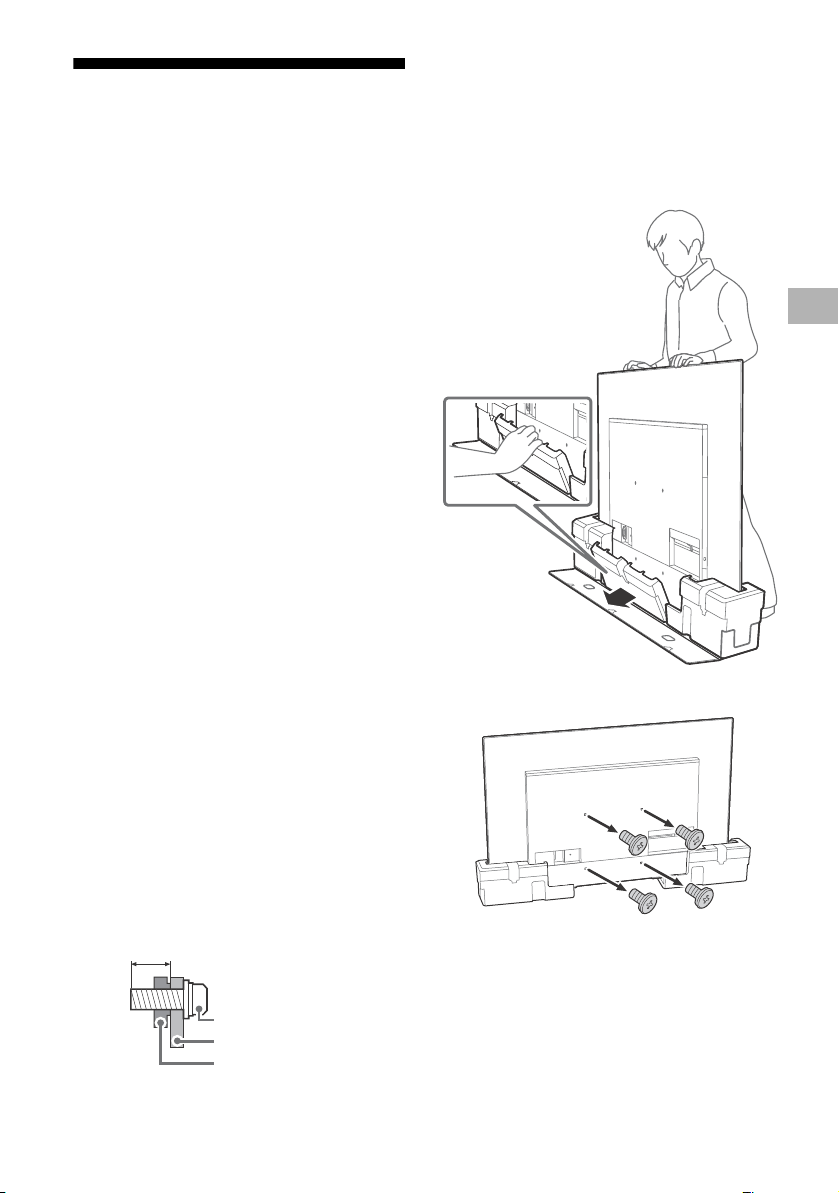
將電視機由紙箱裡安裝在牆上
1 拆下中央墊子。
2 從電視機背面卸下螺絲。
註
• 將掛鉤 (底座)/ 壁掛式支架安裝於電視機上時,
務必要存放好取下來的螺絲並再次使用 (僅限
SU-WL850)。請將螺絲存放在兒童接觸不到的位
置。
9 毫米 – 13 毫米
螺絲 (M6)
壁掛式支架
電視機後蓋
CT
C:\Users\User\Desktop\NC\SY20_NC_HK_RG_111\FINAL\5014785111\5014785111_02CT\5014785111
_CT.fm
master page: Left
KD-65A8H / 55A8H
5-014-785-11(1)
6
CT
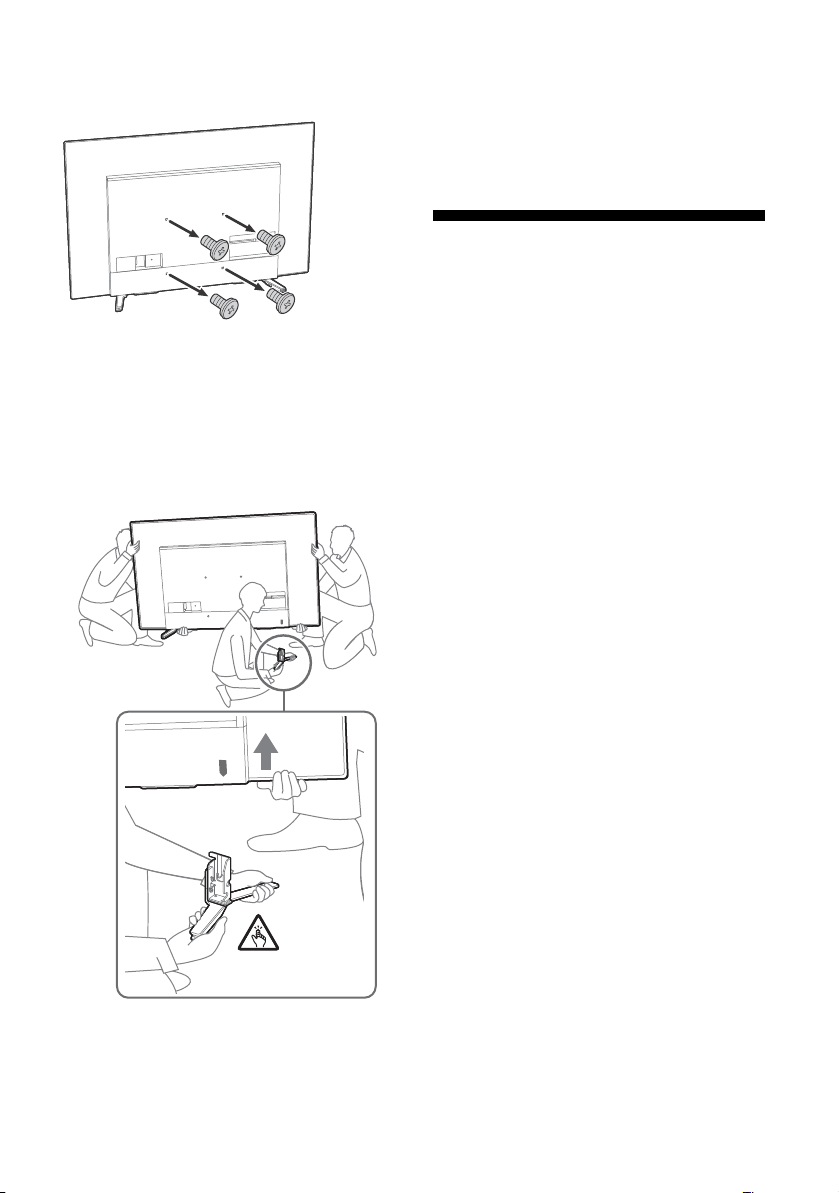
從桌面底座將電視機安裝在牆上
從電視機背面卸下螺絲。
註
• 將掛鉤 (底座)/ 壁掛式支架安裝於電視機上時,務必
要存放好取下來的螺絲並再次使用 (僅限 SU-WL850)。
請將螺絲存放在兒童接觸不到的位置。
將桌面底座從電視機上拆下來
1 一次拆下桌面底座的一側。當其他人抬起電
視機時,用雙手牢牢抓握住桌面底座。
2 重複上一步並拆下桌面底座的另一側。
註
• 需要三人或更多人拆卸桌面底座。
• 從電視
機拆卸桌面底座時,小心不要過度施力,以免導
致電視機掉落而造成人身傷害或對電視機造成物理性損
壞。
• 在搬運
桌面底座時,請小心處理,以避免損壞電視機。
• 拆卸桌
面底座後抬起電視機時要小心,以免桌面底座傾
倒而導致人身傷害。
• 當從電
視機拆下桌面底座時要小心,防止底座翻倒而損
壞放置電視機的表面。
故障排除
以下問題的一般故障排除:黑螢幕、沒有聲音、凍
結畫面、電視機沒有反應或網絡丟失,請依照以下
步驟操作。
1 按遙控器上的電源按鈕大約五秒重新啟動電視
機。電視機將重新啟動。如果電視機未恢復正
常,請嘗試拔下 AC 電源線。然後按電視機上的
電源按鈕,再鬆開此按鈕。等候兩分鐘,隨後
插入 AC 電源線。
2 請按遙控器上的 HELP 以參閱說明選單。
3 將電視機連接至網路,然後執行軟件更新。
Sony 建議您不斷更新您的電視機軟件。軟件更
新將提供新功能和效能改善。
4 造訪 Sony 支持網站 (本說明書末尾提供的資
訊)。
在插入電視機時,即使按遙控器或電視機上的電源
按鈕
,電視機也可能在一定時間不能開啟。
系統初始化需要一定時間。等待大約一分鐘,然後
再次
操作。
遙控器無效。
• 更換電池。
忘記家長鎖定的密碼。
• PI
N 碼輸入 9999,然後輸入新的 PIN 碼。
觀看電視機時,螢幕變得更黑了。
• 如果
整個影像或部分影像保持靜止,螢幕亮度將
逐漸降低以防止影像殘留。這不是電視機故障。
您擔心影像殘留。
如果相同影像重複顯示或長時間顯示,可能出現影
像殘
留。為了減少圖像殘留,我們建議您透過按下
遙控器或電視上的電源按鈕來正常關閉電視機。
註
• 只有在影像殘留特別明顯時才執行面板更新。應避免每
年執行多過一次面板更新,因為這可能會影響面板的使
用壽命。
• 包括時
鐘、標誌及亮色 (包括白色)的影像很容易導致
影像殘留。避免長時間顯示這些類型的影像,否則可能
出現影像殘留。
C:\Users\User\Desktop\NC\SY20_NC_HK_RG_111\FINAL\5014785111\5014785111_02CT\5014785111
_CT.fm
master page: Right
KD-65A8H / 55A8H
5-014-785-11(1)
7
CT
螢幕上顯示一條白線。
• 面板
更新在電視機長時間使用後自動執行,以減
少影像殘留。面板更新在關閉電視機後啟動,需
要大約一個小時才能完成。面板更新期間,螢幕
上可能顯示一條白線。這不是電視機故障。
將顯示 [ 面板重新整理未完成 …] 訊息。
當 i)開啟電視時,ii)拔下 AC 電源線 (主電源
線)
,或者 iii)在面板更新期間,室內溫度在
10 ºC 至
40 ºC 之外,面板更新未完成。面板更新
時,請避免上述三種情況。
規格
系統
面板系統:OLED (有機發光二極管)面板
電視系統
模擬:I,D/K,B/G,M
數位:DTMB
彩色系統:PAL/SECAM/NTSC3.58/NTSC4.43
頻道涵蓋範圍
模擬:UHF/VHF/ 纜線
數位:UHF
聲音輸出:10 瓦 + 10 瓦 + 5 瓦 + 5 瓦
無線技術
IEEE 802.11a/b/g/n/ac 協議
藍牙 ®
版本 4.2
輸入 / 輸出插孔
天線/纜線
VHF/UHF 的 75 歐姆外接端子
/ VIDEO IN
視訊 / 音訊輸入 (迷你插孔)
HDMI IN 1/2/3/4 (支援 4K 解析度、HDCP 2.3 相
容)
視訊:
4096 × 2160p (50, 60 Hz)*
1
*
2
, 4096 ×
2160p (24 Hz)*
1
, 3840 × 2160p (50,
60 Hz)*
2
, 3840 × 2160p (24, 25, 30 Hz),
1080p (30, 50, 60, 100, 120 Hz), 1080/
24p,
1080i (50, 60 Hz), 720p (30, 50,
60 Hz), 720/24p, 576p, 480p, PC 格式 *
3
音訊:
在 eARC (Enhanced Audio Return Channel)
模式
下
有關詳情,請參閱說明指南。
eARC 模式除外
5.1 聲道線性 PCM:32/44.1/48/88.2/96/
176
.4/192 kHz 16/20/24 位元 , Dolby
Aud
io, Dolby Atmos, DTS
eARC/ARC (Enhanced Audio Return Channel/
Au
dio Return Channel) (僅限 HDMI IN 3) *
4
在 eARC 模式下
有關詳情,請參閱說明指南。
在 ARC 模式下
兩聲道線性 PCM:48 kHz 16 位元 , Dolby
Audi
o, Dolby Atmos, DTS
DIGITAL AUDIO OUT (OPTICAL)
數位光纖插孔 (兩聲道線性 PCM:48 kHz 16 位
元
,Dolby Audio,DTS)
(立
體聲迷你插孔)
耳機
有關故障排除的更多資訊,請參
閱說明指南。
CT
C:\Users\User\Desktop\NC\SY20_NC_HK_RG_111\FINAL\5014785111\5014785111_02CT\5014785111
_CT.fm
master page: Left
KD-65A8H / 55A8H
5-014-785-11(1)
8
CT
1、 2、 3
USB 連接埠 1 和 2 支援高速 USB (USB 2.0)
USB 連接埠 3 支援超快速 USB (USB 3.1 Gen 1)
LAN
10BASE-T/100BASE-TX 接頭 (視網絡的作業環境
而定
,連線速度可能不同。不保證通訊率和通訊
品質。)
電源和其他規格
電源需求
220 V – 240 V AC, 50 Hz
螢幕尺寸 (對角測量)(大約)
KD-65A8H:65 英寸 / 163.9 厘米
KD-55A8H:55 英寸 / 138.8 厘米
耗電量
見電視機背面
待機耗電量 *
5
*
6
0.5 瓦
顯示解析度
3840 畫素 (水平)× 2160 條線 (垂直)
輸出率
USB 1/2
5 V ,500 mA 最大值
USB 3
5 V ,900 mA 最大值
尺寸 (大約)(寬 ×高×深)(毫米)
包含桌面底座
標準位置 :
KD-65A8H:1448 × 857 × 326
KD-55A8H:1227 × 733 × 326
條形音箱的位置 :
KD-65A8H:1448 × 908 × 323
KD-55A8H:1227 × 784 × 323
不含桌面底座
KD-65A8H:1448 × 836 × 52
KD-55A8H:1227 × 712 × 52
重量 (大約)(千克)
包含桌面底座 (不含桌面底座)
KD-65A8H:23.6 (21.8)
KD-55A8H:18.6 (16.8)
其他
選用的配件
壁掛式支架:SU-WL850 / SU-WL450
作業溫度:0 ºC –
40 ºC
操作濕度:10 % – 80 % 相對濕度 (非冷凝)
*1 當輸入 4096 × 2160p 且 [ 寬螢幕模式 ] 設為 [ 正常
模式 ] 時,解析度將顯示為 3840 × 2160p。要顯示
4096 × 2160p,請將 [ 寬螢幕模式 ] 設定設為 [ 全螢
幕模式 1] 或 [ 全螢幕模式 2]。
*2 若要支援 18 Gbps,將 [HDMI 訊號格式 ] 設定為 [ 增
強格
式 ]。
*3 有關詳情,請參閱線上說明指南。
*4 將音訊系統連接至 HDMI IN 3 以傳送電視機音訊至音
訊系統。
*5 電視機完成所需的內部處理后,達到規定的待機功率。
*6 當您的電視機連接至網絡時,待機耗電量將有所增加。
註
• 選購配件的供應視國家 / 區域 / 電視機型號 / 存貨而定。
• 設計與
規格可能變更而不事先通知。
商標資訊
• HDMI、HDMI 高畫質多媒體介面及 HDMI 標誌為
HDMI Licensing Administrator, Inc. 在美國及
其他國家的商標或註冊商標。
• Do
lby、杜比、Dolby Vision、Dolby Atmos、
Dolby Audio、和雙 D 符號是杜比實驗室的商
標。本產品經過杜比實驗室的許可而製造。未公
佈的機密作品。版權所有 © 2012-2018 杜比實
驗室。保留所有權利。
• Gr
acenote、Gracenote 標誌和標誌字型以及
“Powered by Gracenote” 標誌是 Gracenote,
Inc. 在美國和 / 或其他國家的註冊商標或商標。
• Go
ogle、Google Play、Chromecast、YouTube、
Android TV 和其他相關標記和徽標是 Google
LLC 的商標。
• 有
關 DTS 專利,請參閱 http://
patents.dts.com。由 DTS, Inc. 授權製造。
DTS、其標誌、DTS 連同其標誌、以及 Digital
Surround 是 DTS, Inc. 在美國和 / 或其他國家
的註冊商標或商標。 © DTS, Inc. 保留所有權
利。
• Ne
tflix 是 Netflix, Inc. 的註冊商標。
•© 2
019 RealNetworks, Inc. 保留所有權利。已
頒發專利。RealMedia,RealNetworks 以及它們
的標誌是 RealNetworks, Inc. 的商標或註冊商
標。
• TU
XERA 是 Tuxera Inc. 在美國及其他國家/地區
的註冊商標。
• 所有
其他商標屬於其各自的所有者。



C:\Users\User\Desktop\NC\SY20_NC_HK_RG_111\FINAL\5014785111\5014785111_01GB\BCO
HK.fm
master page: Cover
KD-65A8H / 55A8H
5-014-785-11(1)
Support / 支援
https://www.sony-asia.com/support
© 2020 Sony Corporation Printed in Japan