Use & Care Guide
Free-Standing Gas Wave-Touch TM Range
Finding Information
Table of contents Please read & save this guide
Findinginformation ..................................................... 2 ThankyouforchoosingElectrolux, thenewpremium
SAFETY ................................................................... 3-6 brandinhomeappliances. This Use&CareGuideis
Features .................................................................. 7-9 partofourcommitmenttocustomersatisfactionand
eettingStarted ................................................... 10-12 productqualitythroughouttheservicelifeofyournew
• Aboutthegrdde 10 a liance
, ................................................... pp
. Power up, control display modes &timers ........... 11
Control lock& oven lights ................................... 12 Weviewyour purchaseasthe beginning of a
Settings for Best Results .................................... 13-14 relationship. To ensure our ability to continue serving
SurfaceCooking ....................................................... 15 you pleaseusethis pagetorecord important
SettingSurfaceControls .......................................... 16 productinformation.
: Settingcooktopcontrols ..................................... 16
Burner ocatons 16 K _n _ r_r _ f_r n° i_k
• vv F _ v_ _ _ _
Settmg Oven Controls ......................................... 18-39
Rap dpreheat......................................................18 reference
Bake .................................................................... 19
: Usingcooktime .................................................. 20 __
Usingcooktimewithendtime ............................ 21 Purchasedate
Broil .............................................................. 22-23 ------
Convectionbake ................................................. 24
Usingconvectionconvert .................................... 28 _ .
L ec_ro ux mode numDer
........ bonvectionroast ........................................... 26-27
Probe ............................................................ 28-29
Keep warm .......................................................... 30
Slowcook ........................................................... 31 Electroluxserial number(see pictureforlocation)
Perfect turkey ...................................................... 32
Defrost ................................................................ 33
Dehydrate ............................................................ 33
Bread proof ......................................................... 34
Saving & recalling my favorite recipes .................. 35
Multi stage cooking ....................................... 36-37
Setting Sabbath mode ................................... 38-39
Setting Lower Oven Controls ............................. 40-42
Bake .................................................................... 41
Keep warm ................................................... 41-42
Setting Your Preferences ................................... 43-48
Setting clock display (CLO) ................................. 43
Setting 12 or 24 hour mode (CL©) ....................... 44
Changing between F° or C ° (F-C) ........................ 44
Setting 12hr energy saving mode (ES) ................. 48
Setting audio mode (AUD) ................................... 48
Adjusting oven temperature (UPC) ...................... 46
Factory default reset (RST) ................................... 47
User preferences chart ......................................... 48
Self-Clean ........................................................... 49-50
Care & Cleaning .................................................. 51-57
Cleaning recommendations ........................... 81-52
Cleaning cooktop and parts ................................ 83
Oven door removal ........................................ 84-56
Changing oven lights .................................... 86-57
Solutions to Common Problems ......................... 58-60
Warranty ................................................................... 63
For toll-free telephone support in the U.S. and
Canada:
1-877-4ELECTROLUX (1-877-435-3287)
For online support and Internet production
information visit http://www.electroluxusa.com
i_i!_!_i!i_iii_!i!_!_i!i_iii_!i!_!_i!i_iii_!i!_!_i!i_iii_!i!_!_i!i_iii_!i!_!_i!i_iii_!i!_!_i!i_iii_!i!_!_i!i_iii_!i!_!_i!i_iii_!i!_!_i!i_iii_!i!_!_i!i_i__i©2007 Electrolux Home Products, Inc. All rightsreserved. Printed inthe USA
Safety
Important safety instructions
Recognize safety symbols, words and
labels
Safety items throughout this manual are labeled with
a WARNING or CAUTION based on the risk type as
described below:
This symbol alerts you to situations that may
cause serious body harm, death or property
damage.
This symbol alerts you to situations that may
cause bodily injury or property damage.
Read all of the following safety instructions
before using this appliance:
Save these instructions for future reference.
;i:;i!i!!il;ii!;iiii!i_;!iiil;iiiiiii_ii_iiiii:iiiiiii!i):!;il;iiiii!!iiiii{_i_ii_!:i;
Sa,ety
!mportant safety instructions
Removea,tapeandpackagingbeforeusing
the range, Destroy the carton and plastic bags
: after unpacking the range. Never allow children
to play with packaging material.
. _ ...... _we fai!_re _ _ fai ff
I_roper ns_a a_ on--i:_esureyourapp ances :,
: properly installed and grounded by a qua[,fled re J: i _ te
techn c an naccordancew ththeNat ona
Fuel Gas Code ANSI ZZZ3-latest edition, or in fu
Canada CAN/OGA B149.1 and CAN/GGA
B149.2, and the National Electrical Code .
ANSi/N FPA No.70-1atest edition, or in Canada Do not leave children alone--Children should
CSA Standard 022.1, Canadian Electrical not be [eft alone or unattended in the area
: Code, Part 1, and local code requirements, where appliance is in use. They should never
Install only per installation instructions provided be allowed to sit or stand on any part of the
in the literature package for this range. . appliance.
As k your dealer to reco m mend a qua lifie d D O NOT TO U CH SU RFA CE BURN E RS,
techn c an and an author zed repa r serv ce AREAS NEARTHESE BURNERS, OVEN
Know how to disc onnec t th e power to thera nge B U RNE RS O R IN TE R IO R S UR FAC ES O F TH E
at the circuit breaker or fuse box in case of an OVEN, Both surface and oven burners may be
..... emergency, hot even though flames are not visible. Areas
near surface burners may become hot enough to
• User servicing--Do not repair or replace any
part of the appliance unless specificaly
recommended in the manuMs. All other
servicing should be clone only by a qualified
technician. This may reduce the risk of personal
injury and damage to the range.
• Never modify or alter the construction of a
range by removing leveling legs, panels, wire
covers, anti-tip brackets/screws, or any other
part of the product.
• Air curtain or other overhead range hoods,
which operate by blowing a downward air
flow on to a range, shall not be used in
conjunction with gas ranges other than when
the hood and range have been designed,
tested and listed by an independent test
laboratory for use in combination with each
other.
• Storage in or on Appliance--Flammable
materials should not be stored in an oven,
warmer drawer, near surface burners or in the
storage drawer. This includes paper, plastic
and cloth items, such as cookbooks,
plasticware and towels, as well as flammable
liquids. Do not store explosives, such as aerosol
CARS,on or near the range.
• Remove the oven door from any unused
rant if it is to be stored or discarded.
cause burns. During and after use, do not touch,
or let clothing or other flammable materials touch
these areas until they have had sufficient time to
cool. Among these areas are the cook top,
surfaces facing the cook top, the oven vent
openings and surfaces near these openings,
oven door and window.
Wear proper apparel--Loose-fitting or
hanging garments should never be worn
while using the appliance, Do not let clothing or
other flammable materials contact hot surfaces.
° Do not use water or flour on grease fires--
Smother the fire with a pan lid, or use baking
soda, a dry chemical or foam-type
extinguisher.
• When heating fat or grease, watch it closely.
Fat or grease may catch fire if allowed to
become too hot.
° Use only dry pothoiders - Moist or damp
pothoiders on hot surfaces may result in
burns from steam. Do not let potholders touch
hot heating elements. Do not use a towel or other
bulky cloth instead of a potholder.
° Do not heat unopened food containers -
Buildup of pressure may cause container to
burst and result in injury.
Safety
Important safety instructions
Important instuctions for using your
cooktop
• Know which knob controls each surface
burner. Place a pan of food on the burner before
turning it on, and turn the burner off before
removing the pan
• Always turn knob to the full LiTE position
when igniting top burners. Visually check that
burner has lit. Then adjust the flame so it does
not extend beyond the edge of the utensil.
• Utensil Handles Should Be Turned Inward and
Not Extend Over Adjacent Surface Burners--
To reduce the risk of burns, ignition of flammable
materials, and spillage due to unintentional
contact with the utensil, the handle of the utensil
should be positioned so that it is turned inward,
and does not extend over adjacent surface
burners.
• Never leave surface burners unattended at
high heat settings--Boilovers cause smoking
and greasy spillovers that may ignite, or a pan
that has boiled dry may melt.
• Protective Liners--Do not use aluminum foil to
line surface burner pans, or oven bottom, except
as suggested in this manual Improper
installation of these liners may result in risk of
electric shock, or fire.
• Glazed cooking utensils--Only certain types of
glass, glass/ceramic, ceramic, earthenware, or
other glazed utensils are suitable for cook top
service without breaking due to the sudden
change in temperature Check the
manufacturer's recommendations for cook top
use.
Important instructions for using your
OVeR
• Use care when opening oven door or lower
oven drawer (if equipped)--Stand to the side of
the range when opening the door of a hot oven
Let hot air or steam escape before you remove
or replace food in the oven.
• Keep Oven Vent Ducts Unobstructed. The
oven vent is located below the backguard.
Touching the surfaces in this area when the oven
is operating may cause severe burns. Also, do
not place plastic or heat-sensitive items on or
near the oven vent. These items could melt or
ignite
• Placement of oven racks. Always place oven
racks in desired location while oven is cool. If
rack must be moved while oven is hot use
extreme caution Use potholders and grasp the
rack with both hands to reposition. Do not let
potholders contact the hot heating elements in
the oven. Remove all utensils from the rack
before moving
• Do not use the broiler pan without insert. The
broiler pan and insert allows dripping fat to drain
and be kept away from the high heat of the
broiler.
Do not cover the broiler insert with aluminum
foil. Exposed fat and grease could ignite.
Cold temperatures can damage the electronic
control When using the appliance for the first
time, or when the appliance has not been used
for an extended period of time, be certain the
unit has been in temperatures above 32°F (0°C)
for at least 3 hours before turning on the power
to the appliance.
: Sa,ety
[mportantsafety[nstruct[ons
[ Importantcleaninginstructions Groundinglnstructions
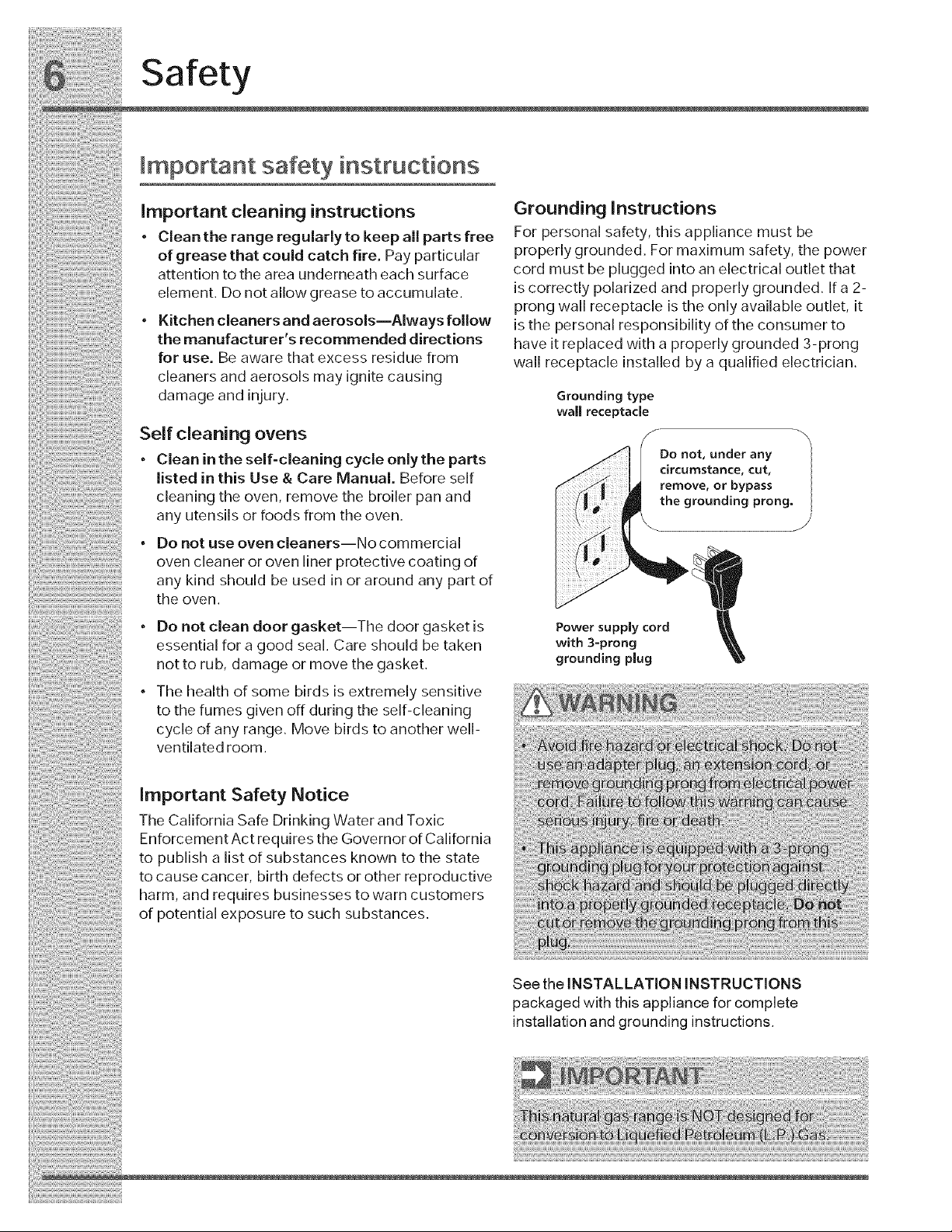
• C[ean the range regu[ar[y to keep a[[ parts free For persona[ safety, this app[iance must be
ofgreasethatcou[dcatchfire. Payparticular proper[ygrounded. For.max[mumsafety, thepower
[ attentiontothearea underneatheach surface cord mustbe plugged mtoan electncal outletthat
element. Donotallowgreasetoaccumulate. iscorrectlypolarizedand properlygrounded, fa 2-
, prong wall receptacle is the only available outlet, it
Kitchencleanersandaerosols--Alwaysfollow isthe personal responsibilityoftheconsumerto
themanufacturersrecommendeddirections haveitreplacedwithaproperlygrounded3-prong
for use Be aware that excess residue from
. wall receptacle installed bya qualified electrician.
cleaners and aerosols may ignite causing
damageandinjury. Groundingtype
wall receptacle
Selfcleaningovens --\
. Do not under any
C ean nthese f-c ean ngcyc eon ytheparts
c rcumstance cut,
I,sted ,nthls Use & Care Manual. Before self remove or bypass
cleaningtheoven, removethe broilerpanand thegrounding prong.
• any utensilsorfoodsfrom theoven.
Donotuseovencleaners--Nocommercial
ovencleanerorovenlinerprotectivecoatingof
..... anykindshould beusedinoraroundanypartof
theoven.
• Do not clean door gasket--The door gasket is
essential for a good seal. Care should be taken
notto rub, damage or move the gasket.
• The health of some birds is extremely sensitive
to the fumes given off during the self-cleaning
cycle of any range. Move birds to another well-
ventilated room.
Power supply cord
with 3-prong
grounding plug
Important Safety Notice
The California Safe Drinking Water and Toxic
Enforcement Act requires the Governor of California
to publish a list of substances known to the state
to cause cancer, birth defects or other reproductive
harm, and requires businesses to warn customers
of potential exposure to such substances.
See the INSTALLATION INSTRUCTIONS
packaged with this appliance for complete
installation and grounding instructions.
Features
Oven features & options
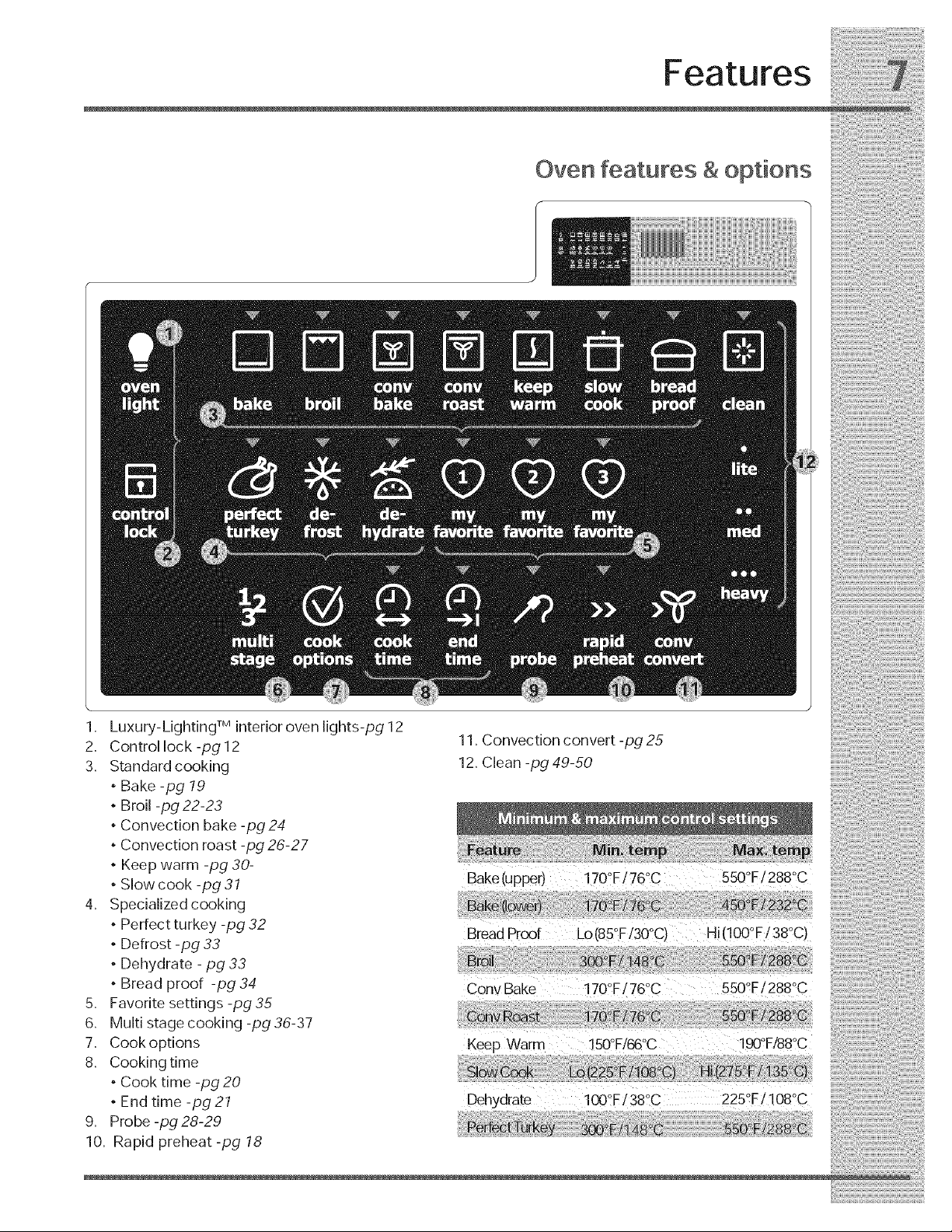
1. Luxury-Lighting TMinterior oven lights-pg 12
2. Control lock -pg 12
3, Standard cooking
• Bake -pg 19
• Broil -pg 22-23
• Convection bake -pg 24
• Convection roast -pg 26-27
• Keep warm -pg 30-
• Slow cook -pg 31
4, Specialized cooking
• Perfect turkey -pg 32
• Defrost -pg 33
• Dehydrate - pg 33
• Bread proof -pg 34
5. Favorite settings -pg 35
6, Multi stage cooking -pg 36-37
7. Cook options
8, Cooking time
• Cook time -pg 20
• End time -pg21
9. Probe -pg 28-29
10. Rapid preheat-pg 18
11, Convection convert -pg 25
12, Clean -pg 49-50
Bake(uppe0 1700F/76QC 550°F/288°C
Bread Pr_f Lo(85°F/300C) Hi (i00°F / 38°C)
cony Bake 170°F/76°C 550QF/288°C
Keep Warm 150°F/66°C 1900F/88°C
Dehydrate 100°F/38°C 225°F/108°C
!_!i!i!j;iiiii!iiiii,!!i!i!i_i!:!iiii!ii!_!_i_!_!iii!ii_i_i!ili_i¸ii!i!,iiii!ili!i;iii!_!iiiii!_iii_!iiil;!_ii_ii!iiiiii!!_iii!i¸iii!iiiiiii_ii_ii!i!i
Features
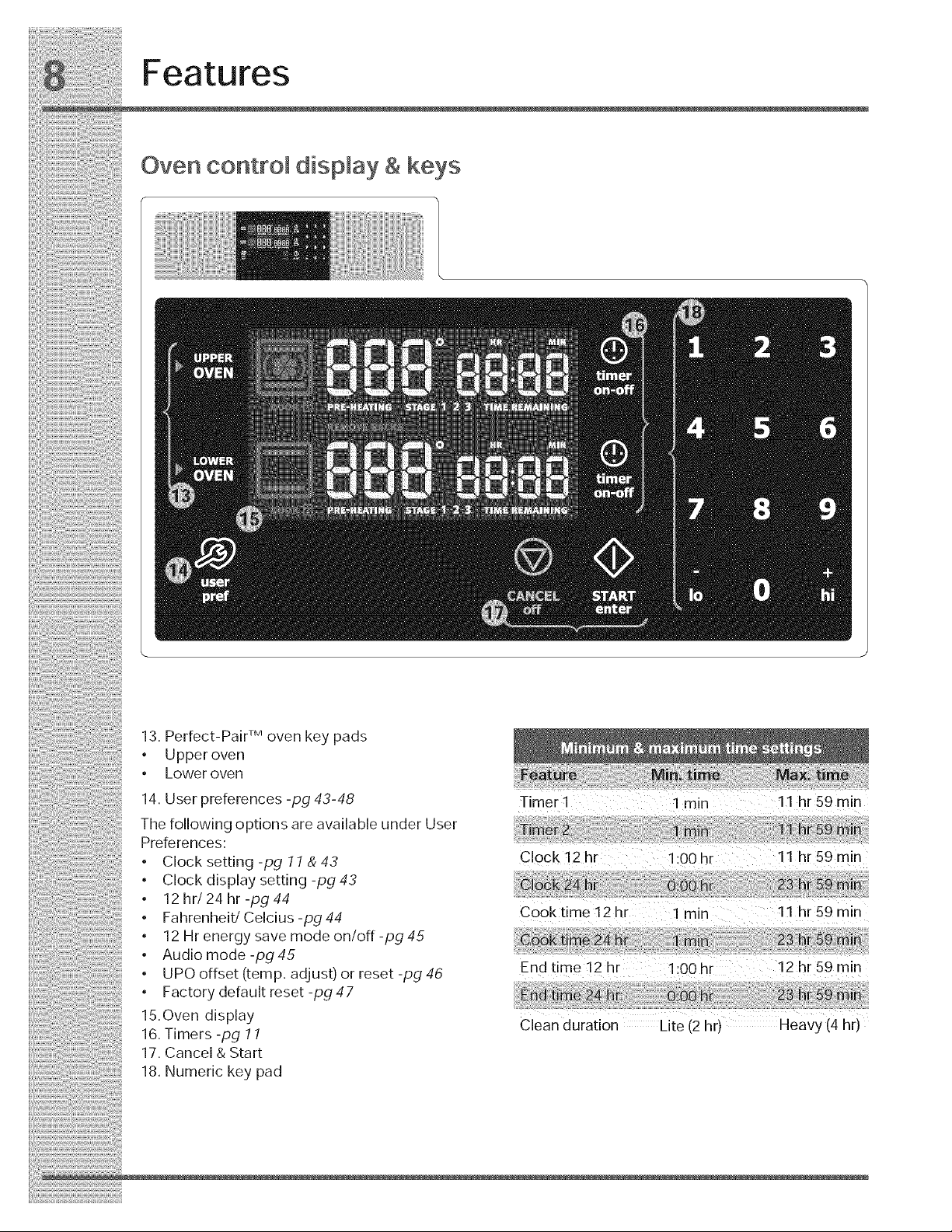
Oven control display & keys
13. Perfect-Pair TM oven key pads
• Upper oven
Lower oven
14. User preferences -pg 43-48 Timer 1 lmin 11 hrSgmin
The fo ow ng opt ons are ava abe under User
Preferences: :
• Clocksetting-pgll&43 Clock 12 hr 1:00 hr !1 hr 59 min
• Cockds a settn - 43
P Y g Pg
• 12 hr/24 hr-pci44
• Fahrenheit/ C_cius-pg 44 C0°k time !2 hr !m! n !!hr59min
} • 12 Hr ener save mode on/off- 45
gY Pg ,,
• Au d io m od e -po 45
• uPooffset(t;_ipadjost)orreset_g4_ E2d!m_ !00h! !2h!_?2in
• Factor defautreset- 47
Y Pg ....
1_Ovendspay
_ .... Clean duration L te (2 hr) Heav "4hr'y[
lb. Hmers-pg ii
17. Cancel & Start
18. Numeric key pad
Features
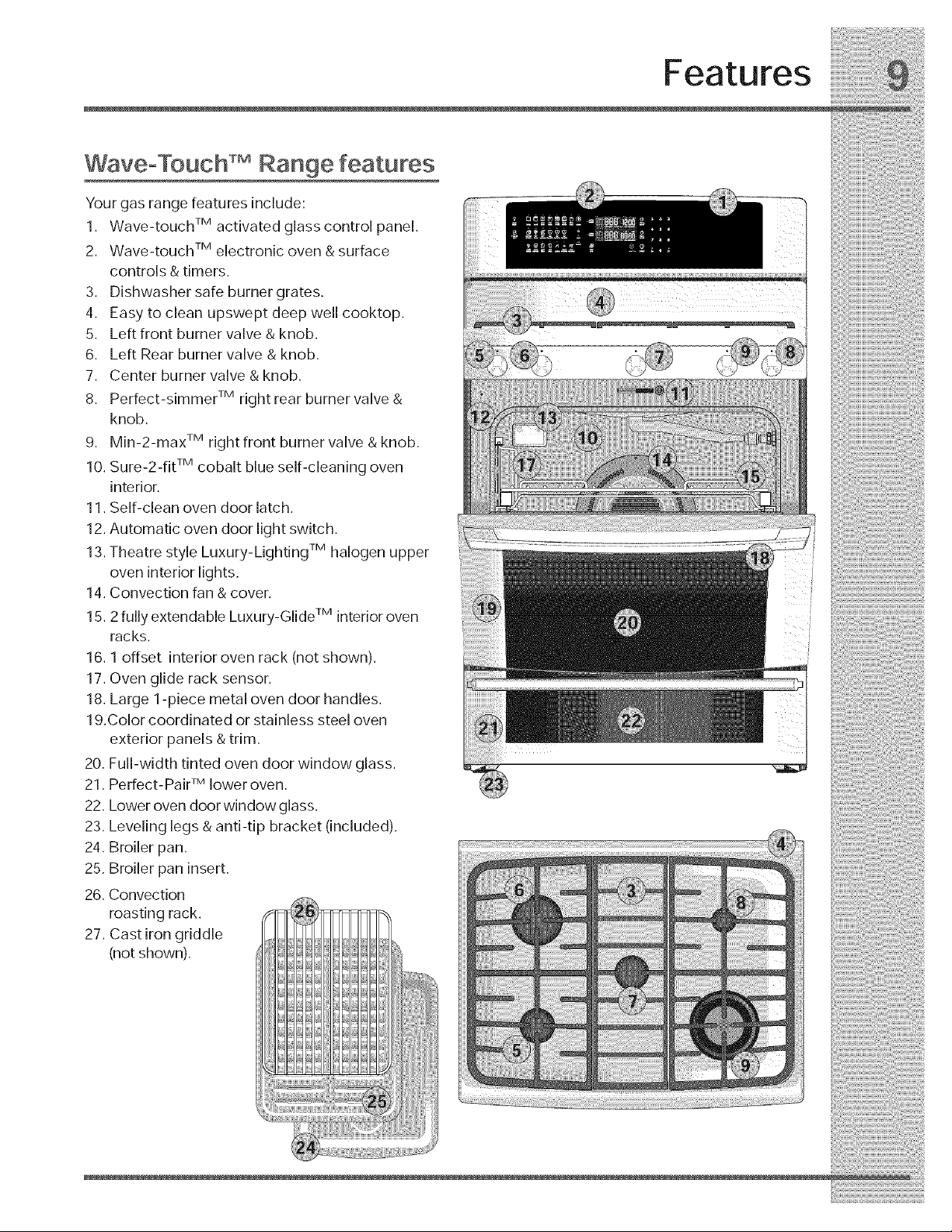
WaveoTouch TMRange features
Your gas range features include:
1. Wave-touch TM activated glass control panel.
2. Wave-touch TM electronic oven & surface
controls & timers,
3. Dishwasher safe burner grates,
4. Easy to clean upswept deep well cooktop.
5, Left front burner valve & knob,
6. Left Rear burner valve & knob.
7. Center burner valve & knob.
8. Perfect-simmer TM right rear burner valve &
knob.
9. Min-2-max TMright front burner valve & knob.
10. Sure-2-fit TMcobalt blue self-cleaning oven
interior.
11. Self-clean oven door latch.
12. Automatic oven door light switch.
13. Theatre style Luxury-Lighting TMhalogen upper
oven interior lights.
14. Convection fan & cover.
Getting Started
About the griddle
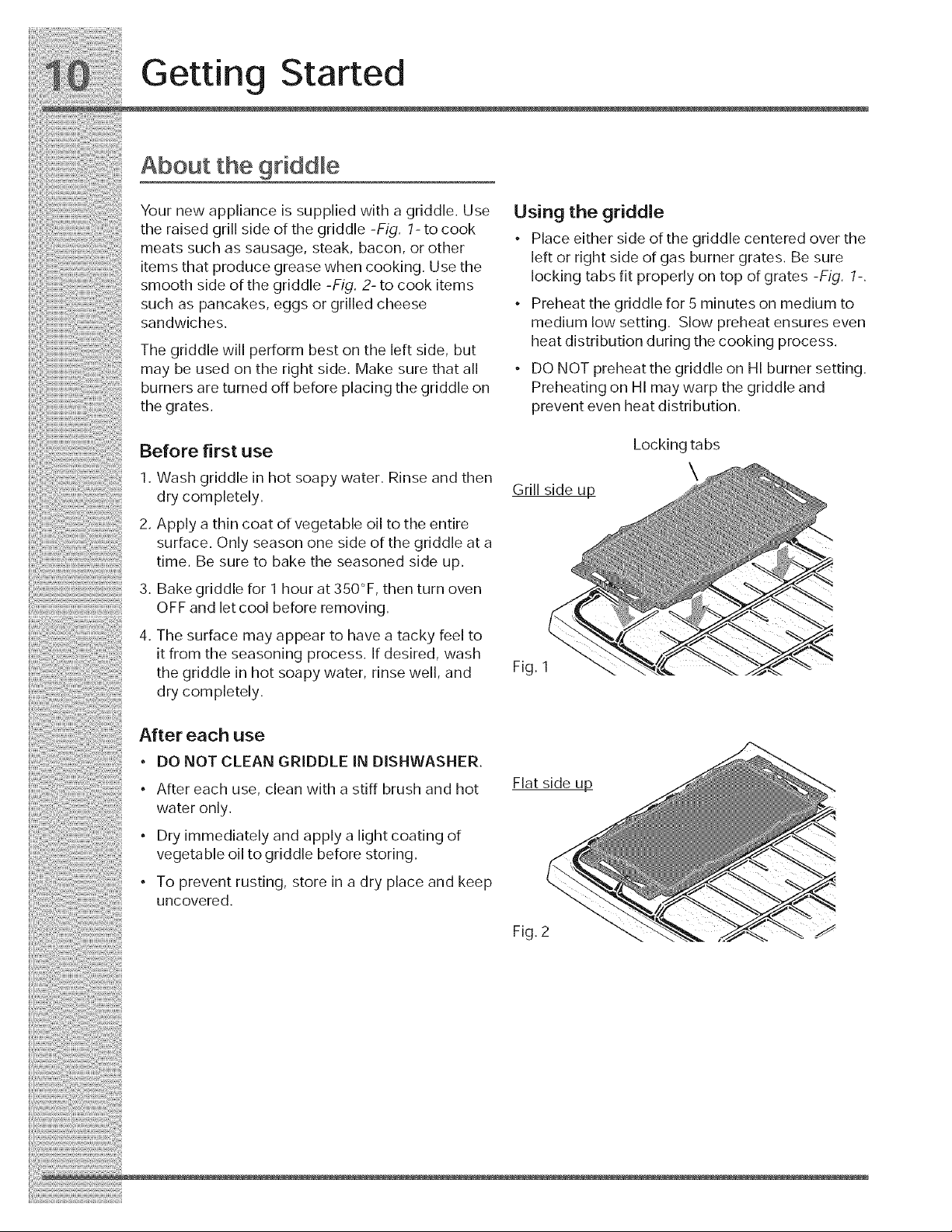
Your new appliance is supplied with a griddle. Use
the raised grill side of the griddle -Fig, 1- to cook
meats such as sausage, steak, bacon, or other
items that produce grease when cooking. Use the
smooth side of the griddle -Fig, 2- to cook items
such as pancakes, eggs or grilled cheese
sandwiches.
The griddle will perform best on the left side, but
may be used on the right side. Make sure that all
burners are turned off before placing the griddle on
the grates.
Before first use
1. Wash griddle in hot soapy water. Rinse and then
dry completely.
2, Apply a thin coat of vegetable oil to the entire
surface. Only season one side of the griddle at a
time. Be sure to bake the seasoned side up,
3, Bake griddle for 1 hour at 350°F, then turn oven
OFF and let cool before removing.
4, The surface may appear to have a tacky feel to
it from the seasoning process. If desired, wash
the griddle in hot soapy water, rinse well, and
dry completely.
After each use
• DO NOT CLEAN GRIDDLE IN DISHWASHER.
• After each use, clean with a stiff brush and hot
water only.
• Dry immediately and apply a light coating of
vegetable oil to griddle before storing.
• To prevent rusting, store in a dry place and keep
uncovered.
Using the griddle
• Place either side of the griddle centered over the
left or right side of gas burner grates. Be sure
locking tabs fit properly on top of grates -Fig, 1-,
° Preheat the griddle for 5 minutes on medium to
medium low setting. Slow preheat ensures even
heat distribution during the cooking process.
• DO NOT preheatthe griddle on HI burner setting.
Preheating on HI may warp the griddle and
prevent even heat distribution.
Grill side up
Locking tabs
\
Flat side up
Fig. 2
Setting clock at power up
You will be prompted to enter the time of day in the
event of a power failure or when you first provide
electric power to your appliance.
• When your appliance is first powered up, 12:00
will flash in the display.
• Enter the time of day using the numeric key
pads and press START to set.
If an invalid time of day is entered, the control will
triple beep. Re-enter a valid time of day and
press START. If CANCEL is pressed your clock
will start with the time set for 12:00.
Select the user pref key to modify the time of day
during other situations such as day light savings.
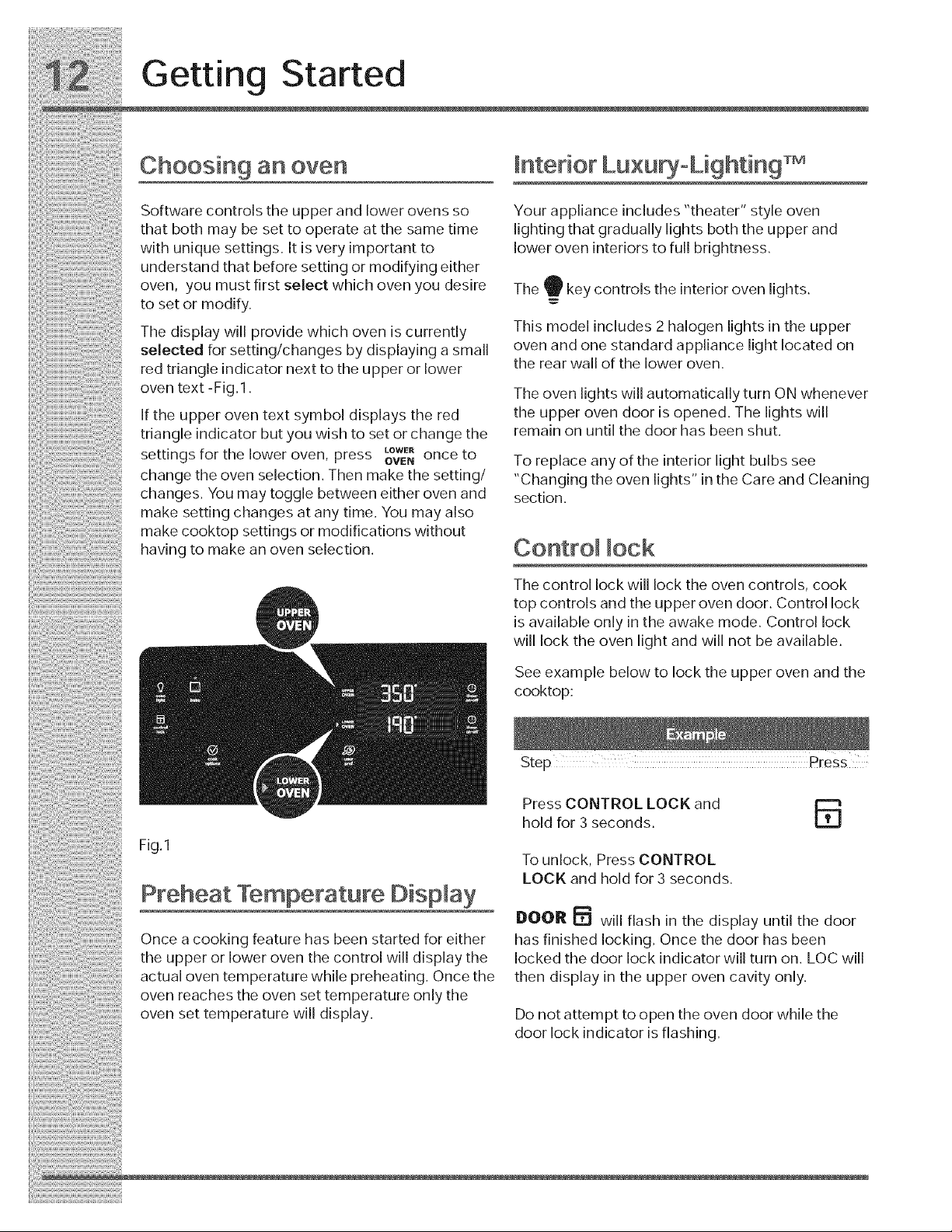
Wave-Touch display modes
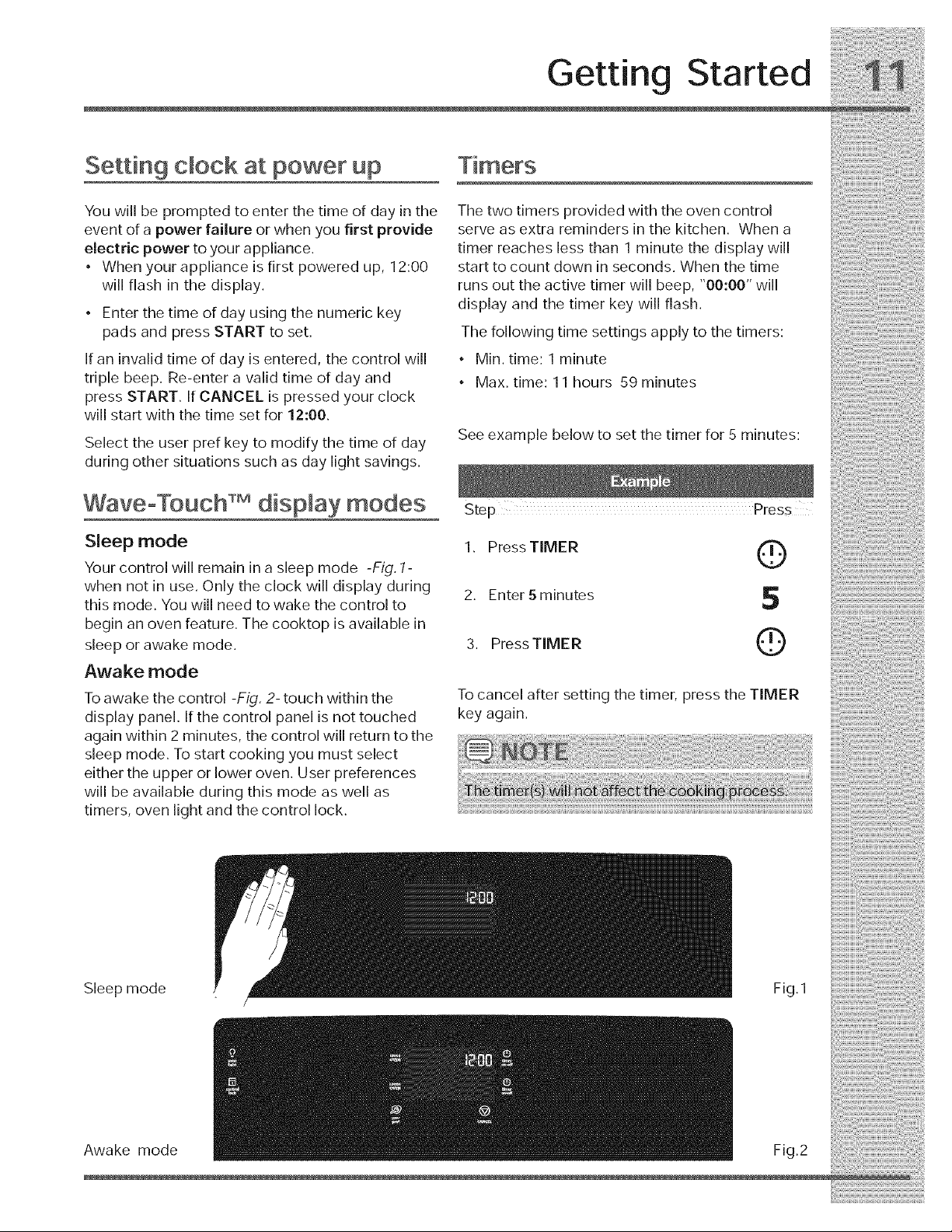
Sleep mode
Your control will remain in a sleep mode -Fig. 1-
when not in use. Only the clock will display during
this mode. You will need to wake the control to
begin an oven feature. The cooktop is available in
sleep or awake mode.
Awake mode
To awake the control -Fig. 2- touch within the
display panel. If the control panel is not touched
again within 2 minutes, the control will return to the
sleep mode. To start cooking you must select
either the upper or lower oven. User preferences
will be available during this mode as well as
timers, oven light and the control lock.
Getting Started
The two timers provided with the oven control
serve as extra reminders in the kitchen. When a
timer reaches less than 1 minute the display will
start to count down in seconds. When the time
runs out the active timer will beep, "00:00" will
display and the timer key will flash.
The following time settings apply to the timers:
° Min. time: 1 minute
° Max. time: 11 hours 59 minutes
See example below to set the timer for 5 minutes:
Step Press
1. Press TIMER O
2. Enter 5minutes 5
3. Press TIMER @
To cancel after setting the timer, press the TIMER
key again.
Sleepmode Fig.1
Awake mode Fig.2
iii i iii i iiii ilili ilili ili:i i ii!i! !,!!iiiii!iiii
Getting Started
Choosing an oven Interior Lu×u oLightin9
Software contro s the upper and ower ovens so Your app ance nc udes "theater" sty e oven
that both may be set to operate at the same time lighting that gradually lights both the upper and
with unique settings. It is very important to lower oven interiors to full brightness.
understand that before setting or modifying either
oven you must f rst se ect wh ch oven you des re The 9 ke controls the interior oven li hts
' y g .
to set or modify.
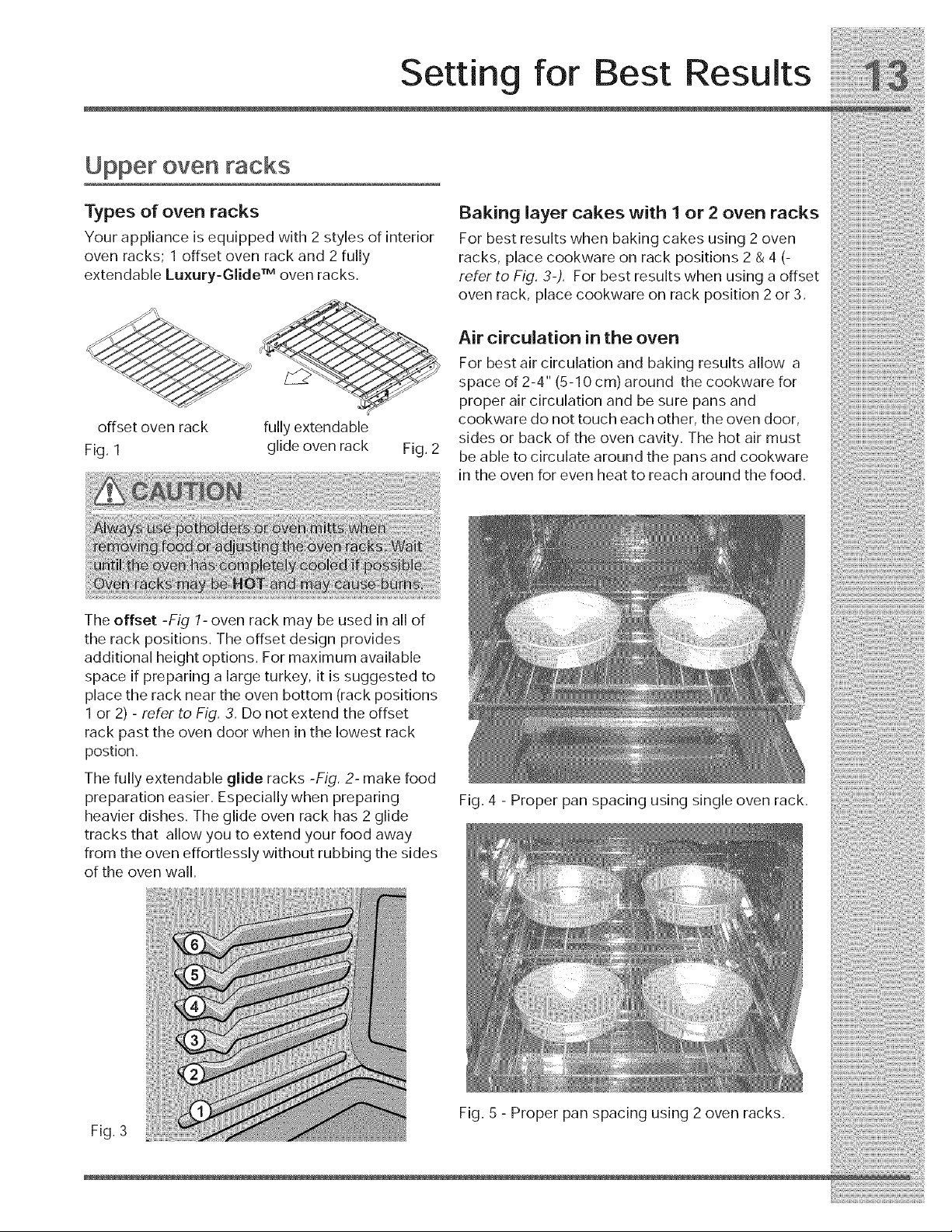
The display will provide which oven is currently This model includes 2 halogen ligh!s in the upper
selected for setting/changes by displaying a small oven and one standard apphance hght located on
red triangle indicator next to the upper or lower the rear wall of the lower oven.
oven text F_g 1
- " • ' The oven lights will automatically turn ON whenever
If the upper oven text symbol displays the red the upper oven door is opened. The lights will
triangle indicator but you wish to set or change the remain on until the door has been shut.
sett, ngs for the lower oven, press _v_ once to To replace any of the interior light bulbs see
change the oven selection. Then make the setting/ "Changing the oven lights" in the Care and Cleaning
changes. You may toggle between either oven and sect on
make setting changes at any time. You may also
make cooktop settings or modifications without _
having to make an oven selection. Control lock
..... The control lock will lock the oven controls, cook
to p controls an d t he up pe rove n doo r. Co nt rol Ioc k
is available only in the awake mode. Control lock
will lock the oven light and will not be available.
See example below to lock the upper oven and the
cooktop:
Fig.1
Preheat Temperature Display
Once a cooking feature has been started for either
the upper or lower oven the control will display the
actual oven temperature while preheating. Once the
oven reaches the oven set temperature only the
oven set temperature will display.
Step Press
Press CONTROL LOCK and
hold for 3 seconds.
To unlock, Press CONTROL
LOCK and hold for 3 seconds.
I:)OOR _ will flash in the display until the door
has finished locking. Once the door has been
locked the door lock indicator will turn on. LOC will
then display in the upper oven cavity only.
Do not attempt to open the oven door while the
door lock indicator is flashing.
Setting for Best Results
Upper oven racks
Types of oven racks
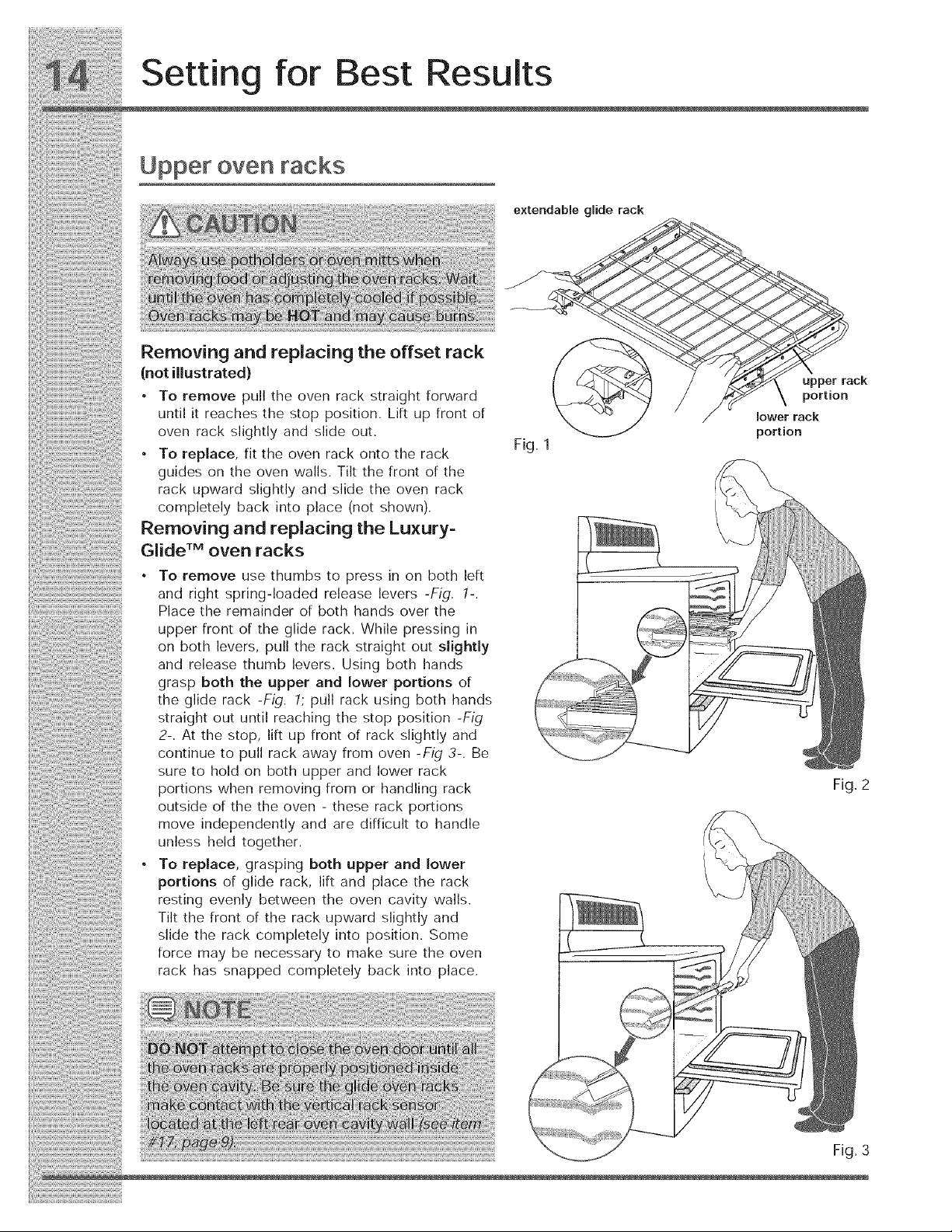
Your appliance is equipped with 2 styles of interior
oven racks; 1 offset oven rack and 2 fully
extendable Luxury-Glide TMoven racks.
offset oven rack fully extendable
Fig. 1 glide oven rack Fig. 2
Baking layer cakes with I or 2 oven racks
For best results when baking cakes using 2 oven
racks, place cookware on rack positions 2 & 4 (-
refer to Fig. 3-). For best results when using a offset
oven rack, place cookware on rack position 2 or 3.
Air circulation in the oven
For best air circulation and baking results allow a
space of 2-4" (5-10 cm) around the cookware for
proper air circulation and be sure pans and
cookware do not touch each other, the oven door,
sides or back of the oven cavity. The hot air must
be able to circulate around the pans and cookware
in the oven for even heat to reach around the food.
The offset -Fig 1- oven rack may be used in all of
the rack positions. The offset design provides
additional height options. For maximum available
space if preparing a large turkey, it is suggested to
place the rack near the oven bottom (rack positions
1 or 2)- refer to Fig. 3. Do not extend the offset
rack past the oven door when in the lowest rack
post on.
Thefu,yextendableg.deracks-Fig2-makefood
preparation easier. Especially when preparing Fig. 4- Proper pan spacing using single oven rack.
heavier dishes. The glide oven rack has 2 glide
tracks that allow you to extend your food away _ _ __ _ _ _
from the oven effort ess y w thout rubb ng the s des ___ __
i iiiii,lii,!iiiiiiiiiii_i!!ill
of the oven wall. _ _
..... _ ,_ _, _: .......... ,;_
sj i ii jjt ........ _ _ JJJJJJJJ *i J
...................), ........i r ........ , _ _ .............. ............. _¢"...............
!> s_ .........., if:! _ "']]1 f_
ii .......... i i i ;,,_ _ is@ s...... ,
Fi 3 S:;:: Fig. 5- Proper pan spacing using 2 oven racks.
g
i##ii_izlii_#!i!i_iiiili!;!#i_i;#!i!iii!zlii!zlii!zi!i_i_!ii#:#_!_iiiiii_!i!ili!i
14 Setting for Best ResuRs
Upper over racks
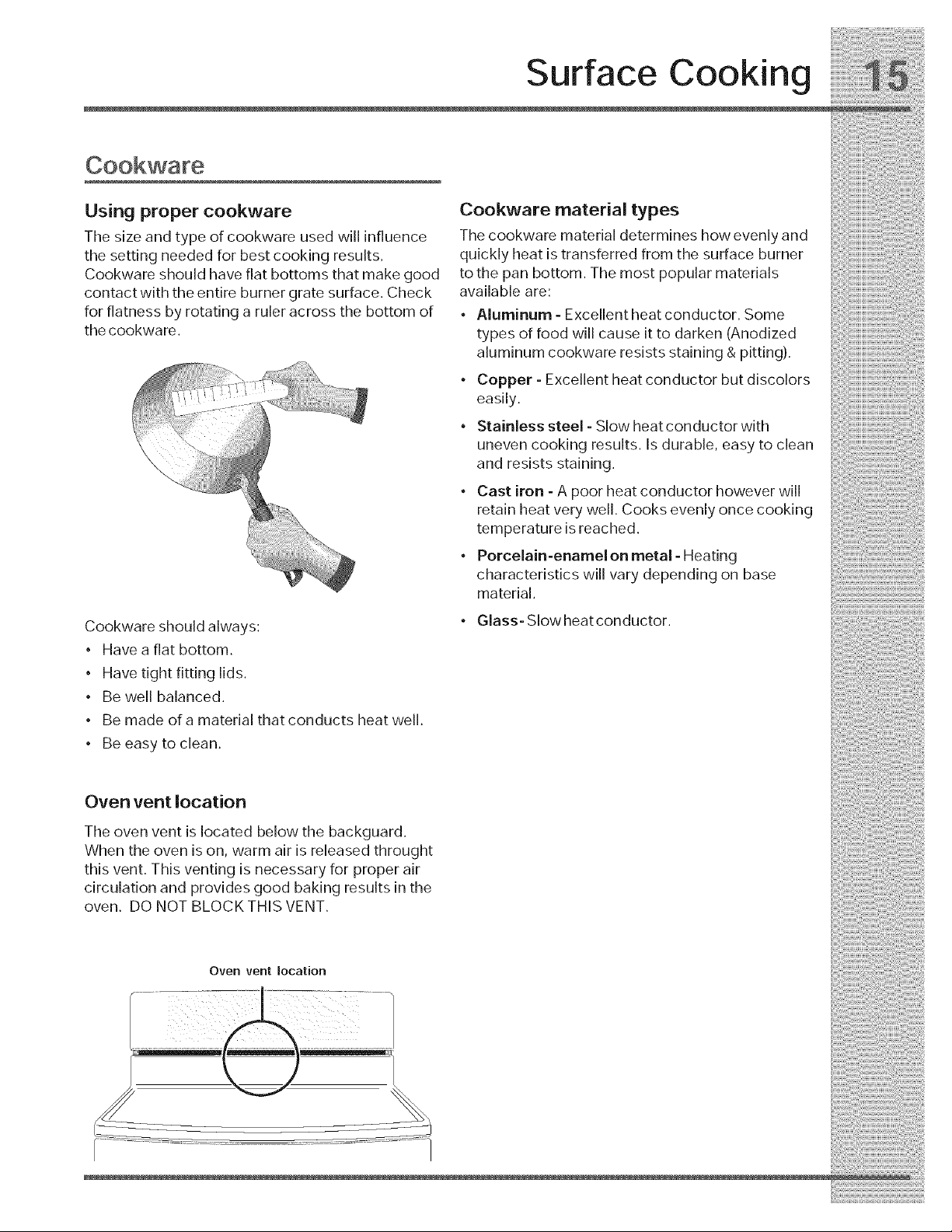
extendab e g de rack
0 J 0 re00 _[ te [_ , __
Removing and replacing the offset rack __
(not illustrated) "_ uXpperu-_err_rack
To remove pull the oven rack straight forward /_ \ portion
until it reaches the stop position. Lift up front of ° lower rack
oven rack slightly and slide out. portion
. F g 1
To repJace, fit the oven rack onto the rack
: ; guides on the oven walls. Tilt the front of the
rack upward slightly and slide the oven rack
::: : completely back into place (not shown).
Removing and replacing the Luxury-
Glide TM oven racks
• To remove use thumbs to press in on both left
...... and right spring-loaded release levers -Fig. 1-.
Place the remainder of both hands over the
upper front of the glide rack. While pressing in
on both levers, pull the rack straight out sJightly
and release thumb levers. Using both hands
grasp both the upper and lower portions of
the glide rack -Fig. 1; pull rack using both hands
straight out until reaching the stop position -Fig
2-. At the stop, lift up front of rack slightly and
continue to pull rack away from oven -Fig 3-. Be
sure to hold on both upper and lower rack
portions when removing from or handling rack Fig. 2
outside of the the oven - these rack portions
move independently and are difficult to handle
unless held together.
• To repJace, grasping both upper and lower
portions of glide rack, lift and place the rack
resting evenly between the oven cavity walls.
Tilt the front of the rack upward slightly and
slide the rack completely into position. Some
force may be necessary to make sure the oven
rack has snapped completely back into place.
Fig, 3
Surface Cooking
Using proper cookware
The size and type of cookware used will influence
the setting needed for best cooking results.
Cookware should have flat bottoms that make good
contact with the entire burner grate surface. Check
for flatness by rotating a ruler across the bottom of
the cookware.
Cookware material types
The cookware material determines how evenly and
quickly heat is transferred from the surface burner
to the pan bottom. The most popular materials
available are:
• Aluminum - Excellentheatconductor. Some
types of food will cause it to darken (Anodized
aluminum cookware resists staining & pitting).
• Copper - Excellent heat conductor but discolors
easily.
° Stainless steel - Slow heat conductor with
uneven cooking results. Is durable, easy to clean
and resists staining.
• Cast iron - A poor heat conductor however will
retain heat very well. Cooks evenly once cooking
temperature is reached.
• Porcelain-enamelon metal - Heating
characteristics will vary depending on base
material.
• Glass- Slow heat conductor.
#_!!_i_!i_i!i_:!!i_iiii;_i_:_i_!#_i!i;i_i!i;i_i!ii_i_!_!ii_iiii_!_!_!i_i!i_!!i!ii_i:i_i_i_i_ii_:#_i_!iii_
Setting Surface Controls ,M
Operatingsingl÷burners OperatingMin-Z-Max double
bumer
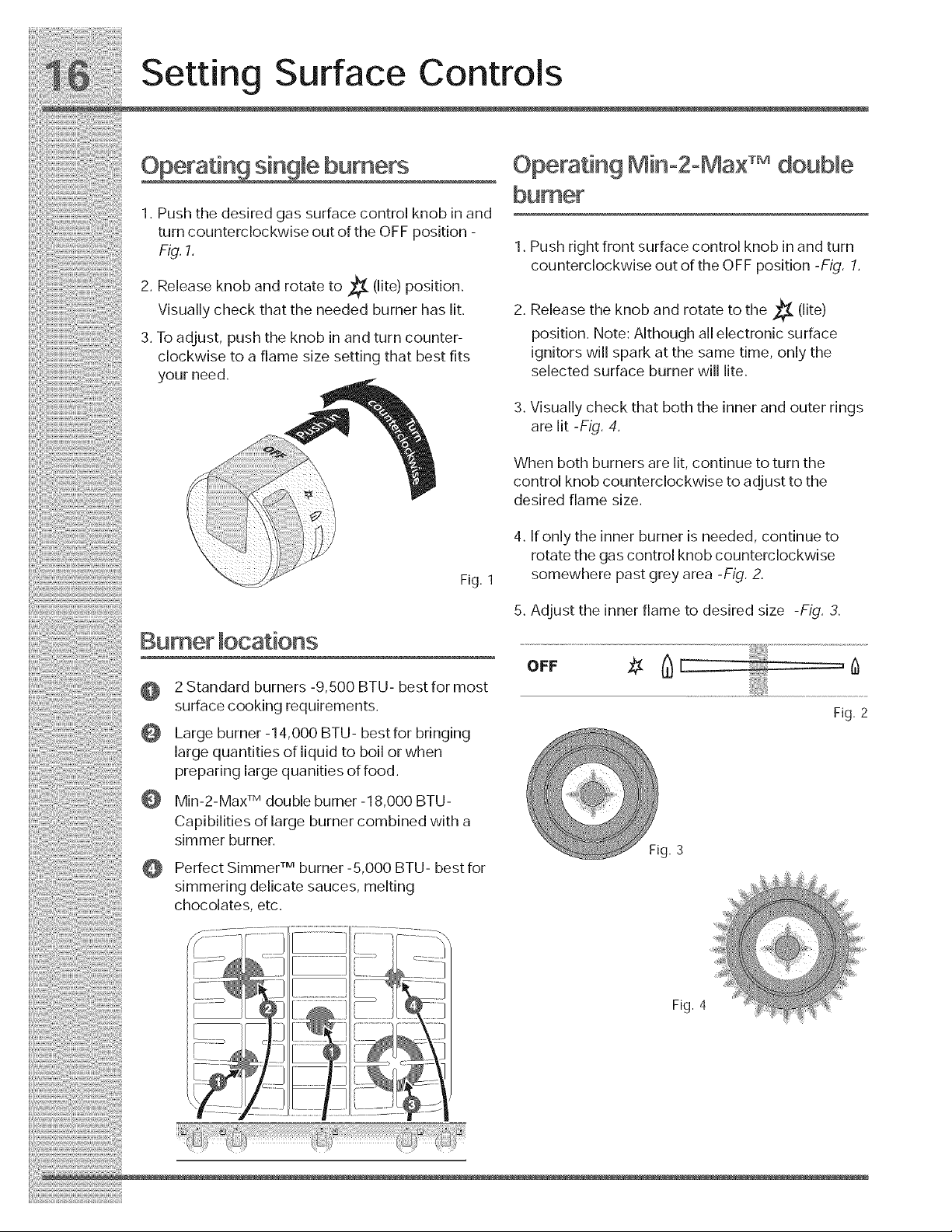
1. Pushthe desiredgas surfacecontrol knobinand
tumcounterclockwiseoutoftheOFF position-
Fig. 7. 1. Pushrightfrontsurfacecontrolknobinandturn
counterclockwise out of the OFF position -Fig. 7,
2. Releaseknobandrotateto_(lite) position,
Visuallycheckthattheneededburnerhaslit. 2, Releasetheknobandrotatetothe_(lite)
::: 3. To adjust, push the knob in and turn counter- position. Note: Although all elec!ronlc surface
clockwisetoa flame size setting that bestfits ignltorswdl sparkatthe same time, onlythe
yourneed, selected surface burnerwill lite,
:::::: 3, Visuallycheckthatboththeinnerandouterrings
:::: , arelit-Fig. 4,
; WhntnotkLhobumertea:/ol_kC?nttoU:d?u_rtoththe
' • u
des,red,ames,ze.
4, Ifonlytheinnerburnerisneeded, continueto
rotate the gas control knob counterclockwise
..... n_._ somewherepastgre_area-_,_._.
5, Adjustthe innerflame to desired size -Fig. 3,
Burner locations
0 2 Standard burners -9,500 BTU- best for most
surface cooking requirements.
Large burner -14,000 BTU- best for bringing
large quantities of liquid to boil or when
preparing large quanities of food,
Min-2-Max TM double burner -18,000 BTU-
Capibilities of large burner combined with a
simmer burner.
Perfect Simmer TM burner-5,000 BTU- best for
simmering delicate sauces, melting
chocolates, etc.
Rg. 2
Fig. 3
Rg. 4
Display Abbreviations
List of displayed abbreviations
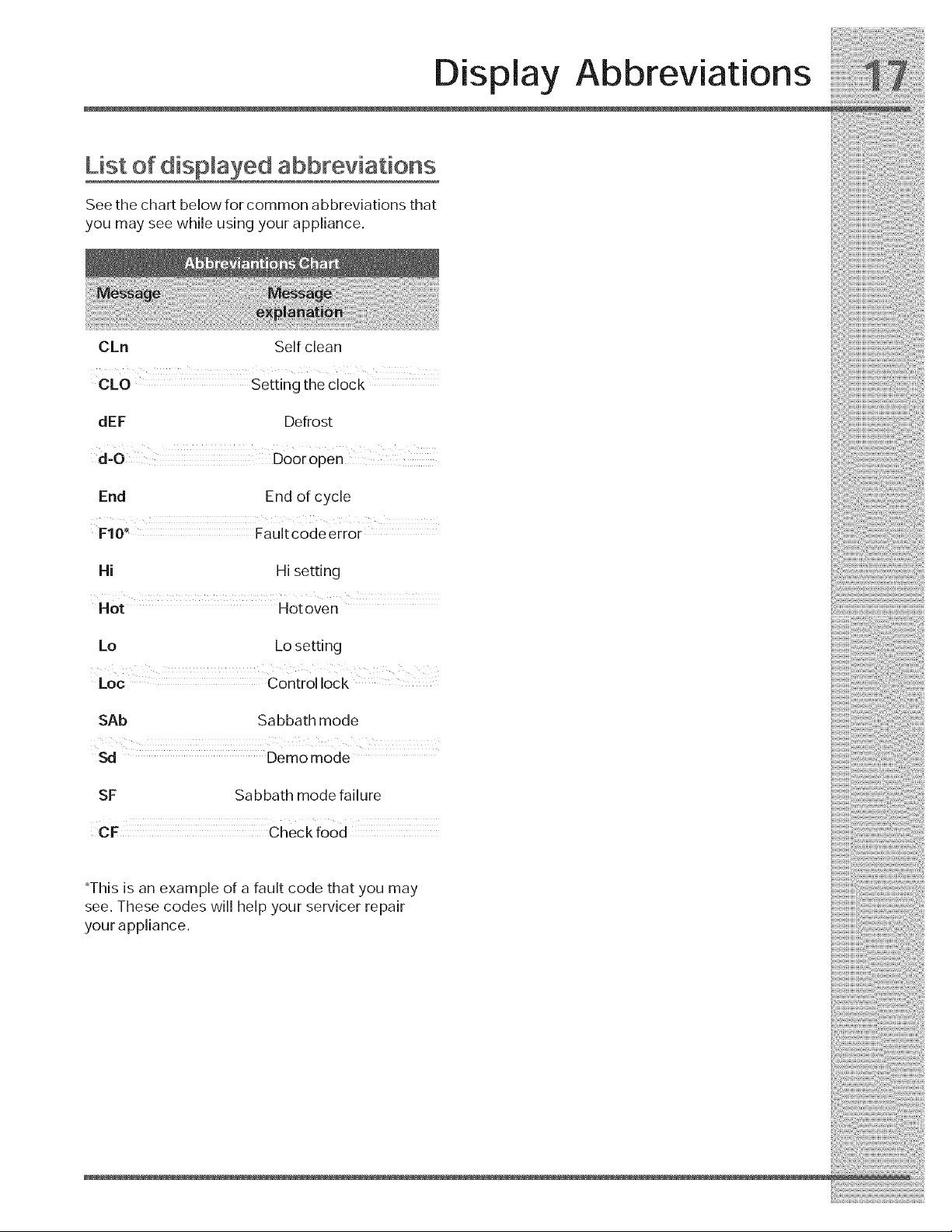
See the chart below for common abbreviations that
you may see while using your appliance.
CLn Self clean
CLO Setting the clock
dEF Defrost
End End of cycle
FIO_ Faultcodeerror
Hi Hi setting
Hot Hotoven
Lo Lo setting
SAb Sabbath mode
Sd Demo mode
SF Sabbath mode failure
*This is an example of a fault code that you may
see. These codes will help your servicer repair
your appliance.
Setting Oven Controls
About rapid preheat
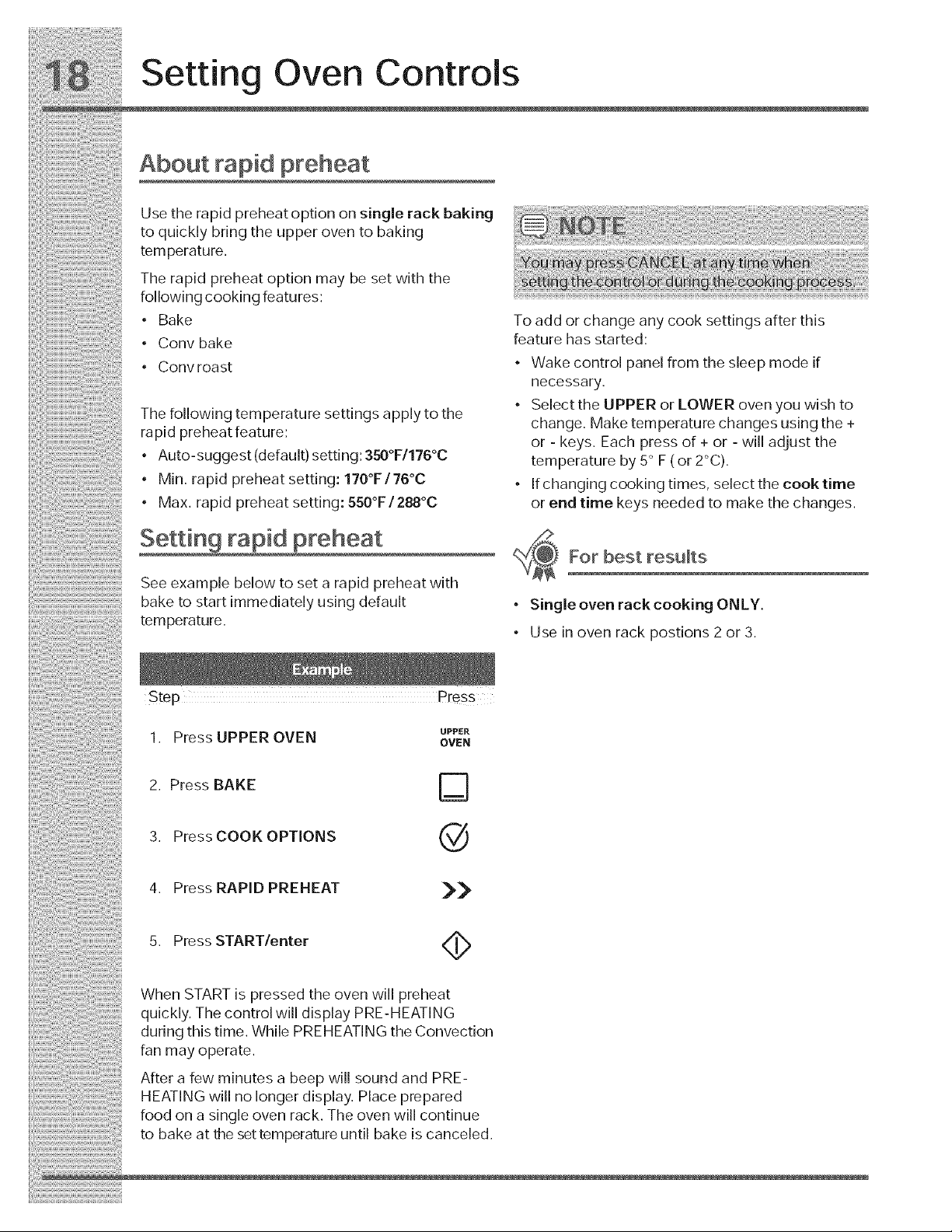
Use the rapid preheat option on single rack baking
to quickly bring the upper oven to baking
tern perature.
The rapid preheat option may be set with the
following cooking features:
• Bake
• Cony bake
• Convroast
The following temperature settings apply to the
rapid preheat feature:
• Auto-suggest(default) setting:gg0°F/176°C
• Min. rapid preheat setting: 170°F/76°C
• Max. rapid preheat setting: 550°F/288°C
Settin 9 rapid preheat
See example below to set a rapid preheat with
bake to start immediately using default
temperature.
To add or change any cook settings after this
feature has started:
Wake control panel from the sleep mode if
necessary.
Select the UPPER or LOWER oven you wish to
change. Make temperature changes using the +
or - keys. Each press of + or - will adjust the
temperature by 5 ° F (or 2°C).
• If changing cooking times, selectthe cooktime
or end time keys needed to make the changes.
For best results
• Singieoven rack cooking ONLY.
• Use in oven rack postions 2 or 3.
1. Press UPPER OVEN
2. Press BAKE
3. Press COOK OPTIONS
UPPER
OVEN
4. Press RAPID PREHEAT _,_
5. Press START/enter (_
When START is pressed the oven will preheat
quickly. The control will display PRE-HEATING
during this time. While PREHEATING the Convection
fan may operate.
After a few minutes a beep will sound and PRE-
HEATING will no longer display. Place prepared
food on a single oven rack. The oven will continue
to bake at the set temperature until bake is canceled.
Setting Oven Controls
About baking in upper oven
Use the bake feature to cook most food items that
require normal cooking temperatures,
Bake may be set with the following options:
• Rapid preheat
• Cook time
• Cook time with end time
• Probe
The following temperature settings apply to the
bake feature:
• Auto-suggest(default) setting:350°F/176°C
• Min. bake setting: 170°F/77°0
• Max. bake setting: 550°F/288°0
Setting bake for upper oven
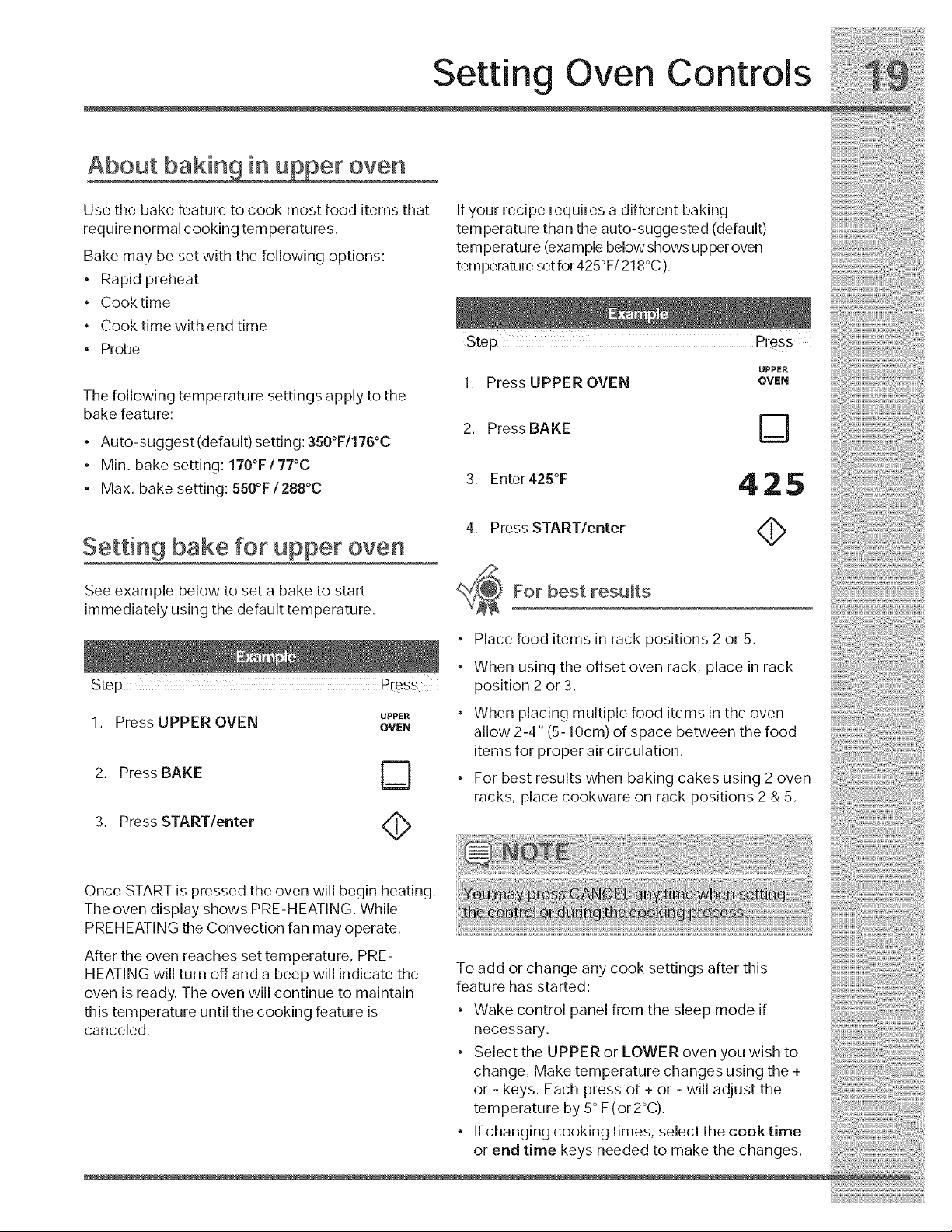
See example below to set a bake to start
immediately using the default temperature,
Ifyour recipe requires a different baking
temperature than the auto-suggested (default)
temperature (example below shows upper oven
temperature setfor 425°F/218°C).
1. Press UPPER OVEN
2. Press BAKE
3. Enter 425°F
4. Press START/enter
UPPER
OVEN
D
425
For best results
!_!;!!_i_i_i:_@_ii_!iii!!iiiii!i@i;{i!_@_{_ii_iii_z!:!_i_!:i_ii_!i!_:;i_;_i!_Si
Setting Oven Controls
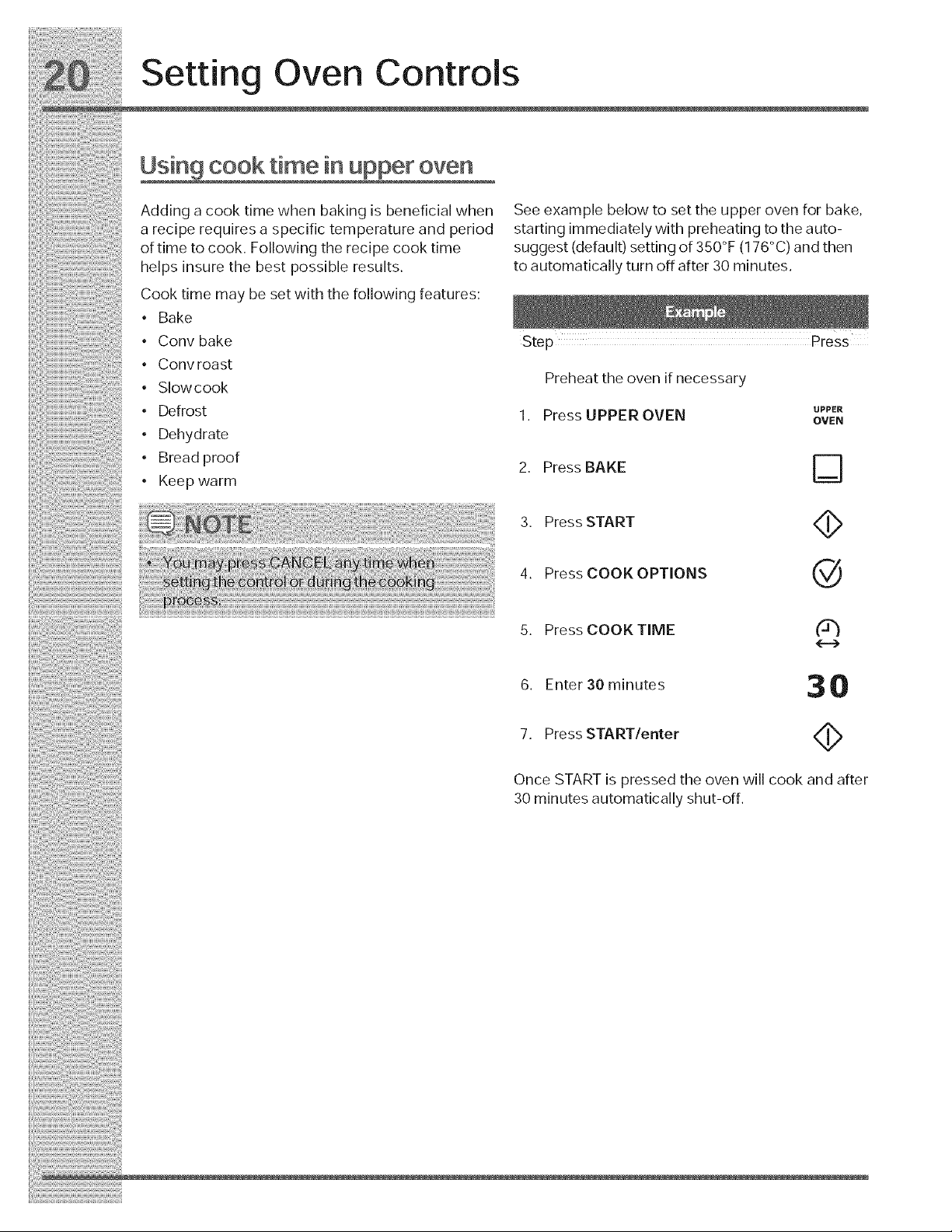
Using cook time in upper oven
Adding a cook time when baking is beneficial when See example below to set the upper oven for bake,
a recipe requiresa specific temperatureand period startingimmediatelywith preheatingtotheauto-
oftimetocook. Followingtherecipecooktime suggest(default) settingof350 F (176 C) andthen
helpsinsurethe bestpossibleresults, toautomaticallyturnoffafter3Ominutes.
Cooktimemaybesetwiththefollowingfeatures:
Bake
[Conv bake Step PreSs
Convroast
, _ ___,. Preheat the oven f necessary
Sluvv _.uu_
* Defrost UP_'ER
1, Press UPPEROVEN OVEN
i Dehydrate
Bread proof
. 2, Press BAKE [--]
Keep warm '_'
S. PFessSTART (_
..... 4, PressCOOKOPTIONS @
5. Press COOK TIME
30
Once START is pressed the oven will cook and after
30 minutes automatically shut-off.
6, Enter 30 minutes
7. Press START/enter
Setting Oven Controls
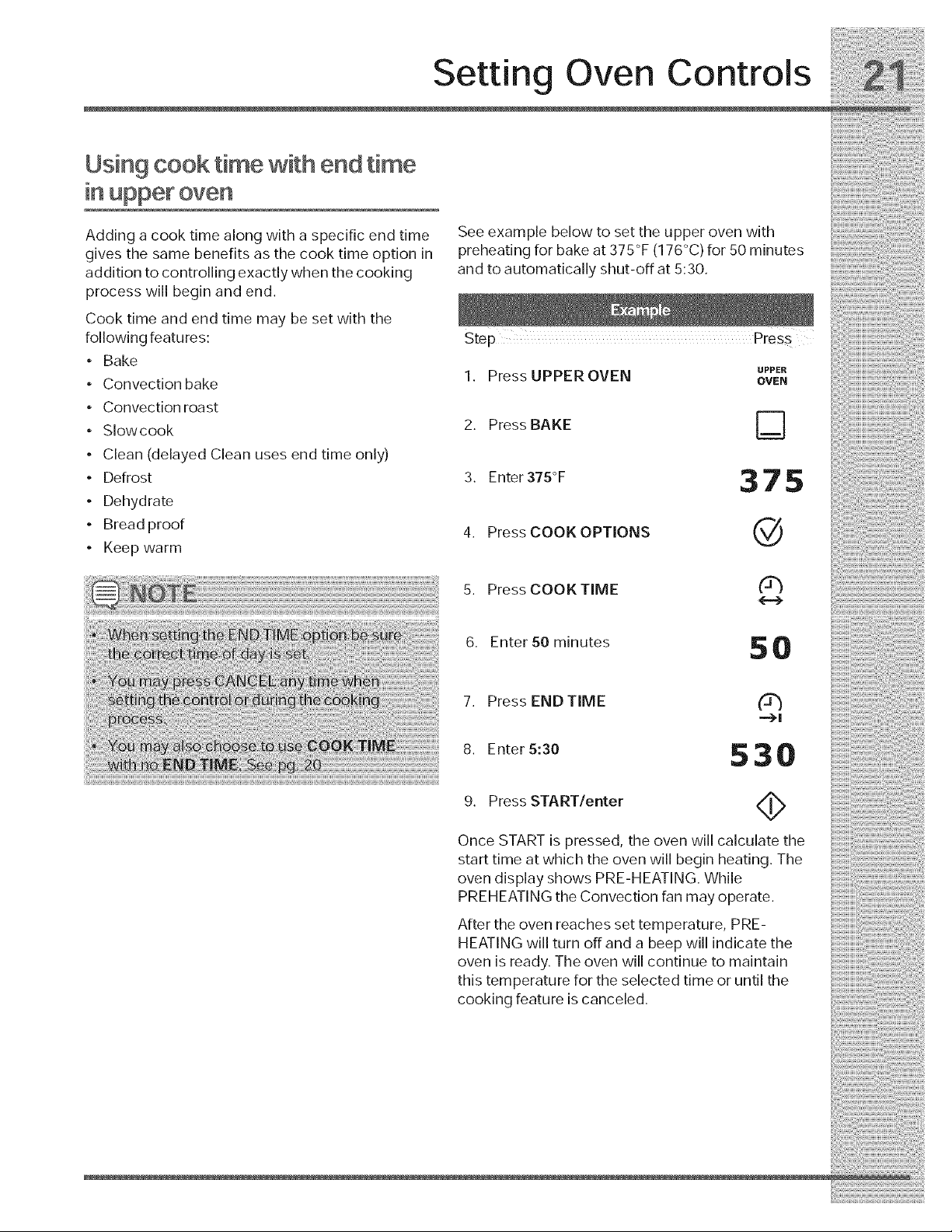
Using cook time with end time
in upper oven
Adding a cook time along with a specific end time
gives the same benefits as the cook time option in
addition to controlling exactly when the cooking
process will begin and end.
Cook time and end time may be set with the
following features:
• Bake
Convection bake
Convection roast
Slowcook
• Clean (delayed Clean uses end time only)
• Defrost
• Dehydrate
• Bread proof
• Keep warm
See example below to set the upper oven with
preheating for bake at 375°F (176°C) for 50 minutes
and to automatically shut-off at 5:30.
Step Press
UPPER
1. Press UPPER OVEN OVEN
2, Press BAKE D
3. Enter375°F 3 7 5
4. Press COOK OPTIONS @
5. Press COOK TIME
6. Enter 50 minutes 5 0
7. Press END TIME (3_
8. Enter 5:30 5 3 0
9. Press START/enter <_
Once START is pressed, the oven will calculate the
start time at which the oven will begin heating. The
oven display shows PRE-HEATING. While
PREHEATING the Convection fan may operate.
After the oven reaches set temperature, PRE-
HEATING will turn off and a beep will indicate the
oven is ready. The oven will continue to maintain
this temperature for the selected time or until the
cooking feature is canceled.
Setting Oven Controls
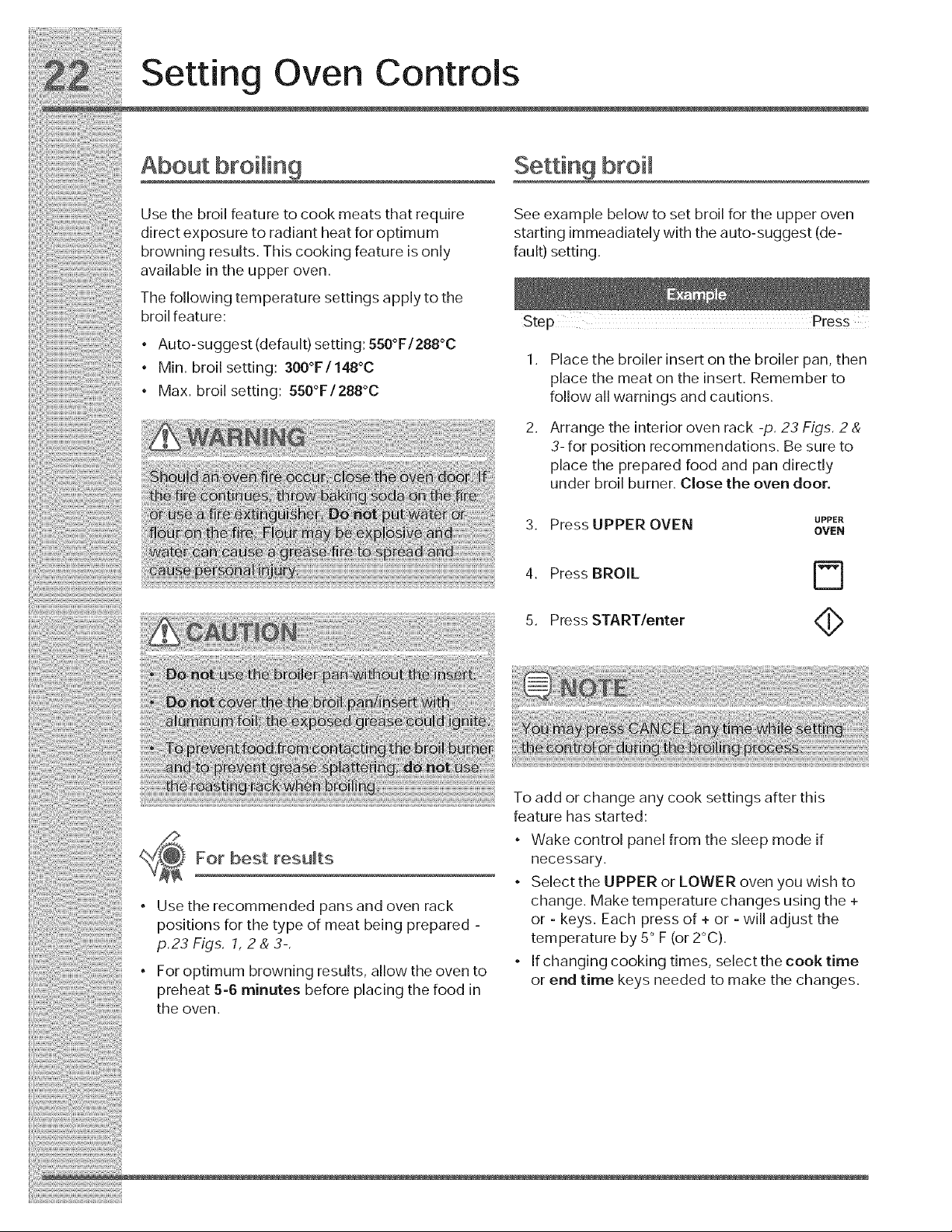
About broHin 9 Setting broil
Use the broil feature to cook meats that require
direct exposure to radiant heat for optimum
browning results. This cooking feature is only
available in the upper oven.
The following temperature settings apply to the
broil feature:
• Auto-suggest (default) setting: 550°F/288°C
• Min. broil setting: 300°F/148°C
, Max. broil setting: 550°F/288°0
See example below to set broil for the upper oven
starting immeadiately with the auto-suggest (de-
fault) setting.
2,
Place the broiler insert on the broiler pan, then
place the meat on the insert. Remember to
follow all warnings and cautions.
Arrange the interior oven rack -p. 23 Figs. 2 &
3- for position recommendations. Be sure to
place the prepared food and pan directly
under broil burner. Close the oven door.
3. Press UPPER OVEN UPPER
OVEN
4. Press BROIL [_
5. Press START/enter _:)
For best results
• Use the recommended pans and oven rack
positions for the type of meat being prepared -
p.23 Figs. 1,2&3-.
• For optimum browning results, allow the oven to
preheat 5-6 minutes before placing the food in
the oven.
To add or change any cook settings after this
feature has started:
• Wake control panel from the sleep mode if
necessary.
• Select the UPPER or LOWER oven you wish to
change. Make temperature changes using the +
or - keys. Each press of + or - will adjust the
temperature by 5° F (or 2°C).
• If changing cooking times, select the cook time
or end time keys needed to make the changes.
Setting Oven Controls
broil
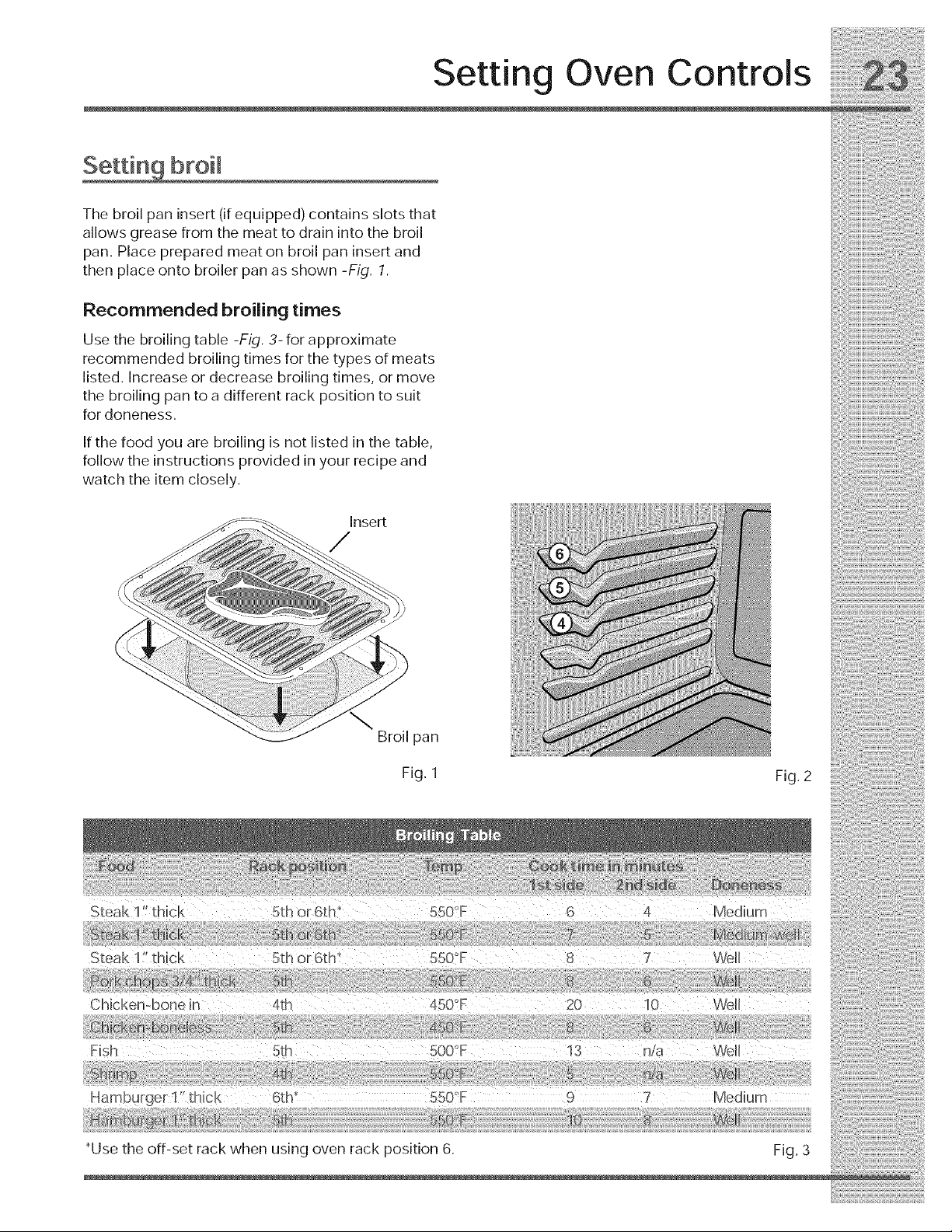
The broil pan insert (if equipped)contains slots that
allows grease from the meat to drain into the broil
pan. Place prepared meat on broil pan insert and
then place onto broiler pan as shown -Fig. 1.
Recommended broiling times
Use the broiling table -Fig. 3- for approximate
recommended broiling times for the types of meats
listed. Increase or decrease broiling times, or move
the broiling pan to a different rack position to suit
for doneness.
If the food you are broiling is not listed in the table,
follow the instructions provided in your recipe and
watch the item closely.
Insert
/
• Probe
• Rapid preheat
Benefits of convection bake:
• Superior multiple oven rack performance.
• Some foods cook up 25 to 30% faster, saving
time and energy•
• No special pans or bakeware required.
Setting Oven Controls
Aboutconvectionbake Settingconvectionbake
Convection bake is part of the Perfect_Convect 3TM The following temperature settings apply to the
system. Convection bakeusesa fantocirculate convbakefeature:
the oven heat even y and cont nuous y The .......... _,4_o, ._....... o=,,or_-,_or-
• Au_u-buUU_b_tu_,ou_1b_L My 0_,,,r,,.V ,..
improved heat dlstnbutlon allows for even cooking o o
withexcellentresults. Multiplerackcookingmay ° M,n. bake sett, ng: 170oF/76 C
slightly increasecooktimesforsomefoods, but ° Max. bake setting: 550 F/288 C
the overall result is time saved.
See the example below to set conv bake starting
Theconv bake feature should ONLY be used when immediatelywkhtheauto-suggest(default) setting
your recipe ins[rucuons nave been wntten ror use of 350°F (176°C}
withconvectionbaking.
Ifyourrecipeinstructionsarefornormalbakingand
youwishtouseconvection bake, followthe Step PreSS
ConvectionConvertoptioninstructions. The
convectonconvertoptonw automatca yadjust 1. PressUPPEROVEN UoP__
theoventemperature sothatconvection baking
may provide the best possible results. _ ..........
z. vress _..uu_v _r_-
Conv bake may be setwith the following options:
- Convconvert /t_
3. Press START/enter
..... ° Cooktimeorcooktimewithendtime
Once START is pressed the oven will begin
heating• The oven display shows PRE-HEATING
during this time.
After the oven reaches set temperature, PRE-
HEATING will turn off and a beep will indicate the
oven is ready. The oven will continue to maintain
thistemperature until the cooking feature is canceled.
For best results
When baking with a single rack use rack
positions 2 or 3. When using 2 racks use rack
positions 2 & 4. When using 3 racks use rack
positions 2, 3 & 5.
Cookies and biscuits should be baked on pans
with no sides or very low side to allow heated air
to circulate around the food,
Food baked on pans with a dark finish will cook
faster.
When placing multiple food items in the oven
allow 2-4" (5-10cm) of space between the food
items for proper air circulation.
Setting Oven Controls
Using convection convert
The conv convert option allows you to convert any
normal baking recipe using the convection bake
feature. The control uses the normal recipe settings
and adjusts to a lower temperature for convection
baking. Conv convert must be used with CONV
BAKE feature.
Benefits of cony bake using cony
convert option:
• Superior multiple oven rack performance.
• Some foods cook up 25 to 30% faster, saving
time and energy.
• No special pans or bakeware required.
For best results
• Place food items using the recommended rack
positions. When baking with a single rack use
rack positions 2 or 3. When using 2 racks use
rack positions 2 and 4. When using 3 racks use
rack positions 2, 3 and 5.
• Cookies and biscuits should be baked on pans
with no sides or very low side to allow heated air
to circulate around the food.
• Food baked on pans with a dark finish will cook
faster.
° When placing multiple food items in the oven
allow 2-4" (5-10cm) of space between the food
items for proper air circulation.
Setting convection convert
See the example below to set conv bake, starting
immediately with the auto-suggest (default) setting
of 350°F (176°C) and adding the conv convert
option.
Step Press
UPPER
1. Press UPPER OVEN OVEN
2. Press CONV BAKE r_
3. PressCOOK OPTIONS Q
4. Press CONV CONVERT :>_
5. Press START/enter <_
Once START is pressed the oven display shows
PRE-HEATING. After the oven reaches the
converted set temperature, PRE-HEATING will turn
off and a beep will indicate the oven is ready.
The added cony convert option will automatically
lower the set temperature you set from the bake
recipe to an adjusted cony bake temperature.
When cony convert is used with cook time the time
remaining will flash when the cook time is 75%
complete. The control will also beep at regular
intervals until baking has finished.
To add or change any cook settings after this
feature has started:
° Wake control panel from the sleep mode if
necessary.
• Select the UPPER or LOWER oven you wish to
change. Make temperature changes using the +
or - keys. Each press of + or - will adjust the
temperature by 5 ° F (or 2°C).
° If changing cooking times, select the cook time
or end time keys needed to make the changes.
#_i_i:#!#!#_i_!_#!_!;i:!_i_i!i_!_!i!!_iii_i_ii_i!i#_i_!i_!_i_i_:#_i_i_i
Setting Oven Controls
Aboutconvectionroast Settingconvectionroast
Howconvection roastworks Seeexamplebelowtosetconvectionroasttostart
................ TM immediatelywiththeauto-suggest(default) setting.
_onvec[ion roas[ is par[ orme ver[ec[-_onvec[ o
system. Convectionroastcombinesacookcycle
with the convection fan and elementto rapidly
roast meats and poultry. Heated air circulates step Press
around the meat from all sides, sealing in juices
and favors Meats cooked w th th s feature are 1 Press UPPER OVEN UPPER
• ' OVEN
crispy brown on the outside while staying moiston
the inside. In addition, there is noneed toreduce
theoventemperaturewhenusingconvectionroast. 2. PressCONVROAST ITI
Convection roast may be set with the following /_
options: 3. PressSTART/enter
• Probe
, Once START s pressed the oven w beg n heat ng
Cook time or cook time with end time ..........
. /ne oven d_sp_aysnows P'b_L-HLRI lIXHo.
Rapid preheat
Afterthe oven reaches settemperature, PRE-
The following temperature settings apply to HEATING will turn off and a beep will indicate the
convectionroast: ovenready
• Factory auto-start default: 350°F/176°0
• Minimum: 170°F/76°0
• Maximum: 550°F/288°C
Benefits of convection roast:
• Superior multiple oven rack performance.
• Some foods cook up 25 to 30% faster, saving
time and energy•
• No special pans or bakeware required•
For best results
• Preheating is not necessary for most meats and
poultry•
• Place food items using the recommended rack
positions for the type of food being prepared.
• When placing multiple food items in the oven
allow 2-4" (5-10cm) of space between the food
items for proper air circulation.
• Be sure to carefully follow your recipe's
temperature and time recommendations or refer
to the convection roast chart for additional
information -p. 27, Fig. 2.
To add or change any cook settings after this
feature has started:
• Wake control panel from the sleep mode if
necessary.
• Select the UPPER or LOWER oven you wish to
change• Make temperature changes using the +
or - keys. Each press of + or - will adjust the
temperature by 5 ° F (or 2°C).
° If changing cooking times, select the cook time
or end time keys needed to make the changes.
Setting Oven Controls
Roasting recommendations
Roasting rack instructions
When preparing meats for convection roasting, you
may use the broiler pan, insert and the roasting
rack supplied with your appliance. The broiler pan
will catch grease spills and the insert will help
prevent grease splatters. The roasting rack fits on
top of the insert allowing the heated air to circulate
under the food for even cooking and helps to
increase browning on the underside.
1. Place oven rack on bottom or next to the
bottom oven rack position.
2. Place the insert on the broiler pan.
3. Make sure the roasting rack is securely seated
on top of the insert. Do not use the broiler pan
without the insert. Do not cover the insert with
aluminum foil.
4. Position food (fat side up) on the roasting rack.
-Fig, 1-
5. Place prepared food on oven rack in the oven.
Roasting rack
-Insert
\
Broil pan
Fig. 1
Meat Weight Oven temp Interna ! temp Minute per !b _
Poultry
Turkey. whole *_ 12 to 16 Ibs. 325°F 180°F 8-10
Turkey. whole"" 16 to 20 Ibs 325°F 180°F 10-15
Turkey, whole** 20 to 24 Ibs 325°F 180°F 12-16
Chicken 3 to 4 as. 350°F-375°F 180°F 12-16
* For beeL" med rare 145 °F, med 160°F, well done 170°F
.....Stuffed turkey requires additional roasting time, Shield legs and breast with foil to
prevent overbrowning and drying of the skin,
Fig. 2
Setting Oven Controls
About the probe function
Checking the internal temperature of your food is
the most effective way of insuring that your food
has been properly cooked. When cooking meat
such as roasts, hams or poultry you can use the
probe to check the internal temperature without any
guesswork.
Your oven will automatically change from cooking
to keep warm once the probe has reached the set
tern perature.
The following temperature settings apply to the
probe function:
• Default: 170°F/76°C
• Minimum: 130°F/54°C
• Maximum: 210°F/98°C
Setting the probe
Proper probe placement
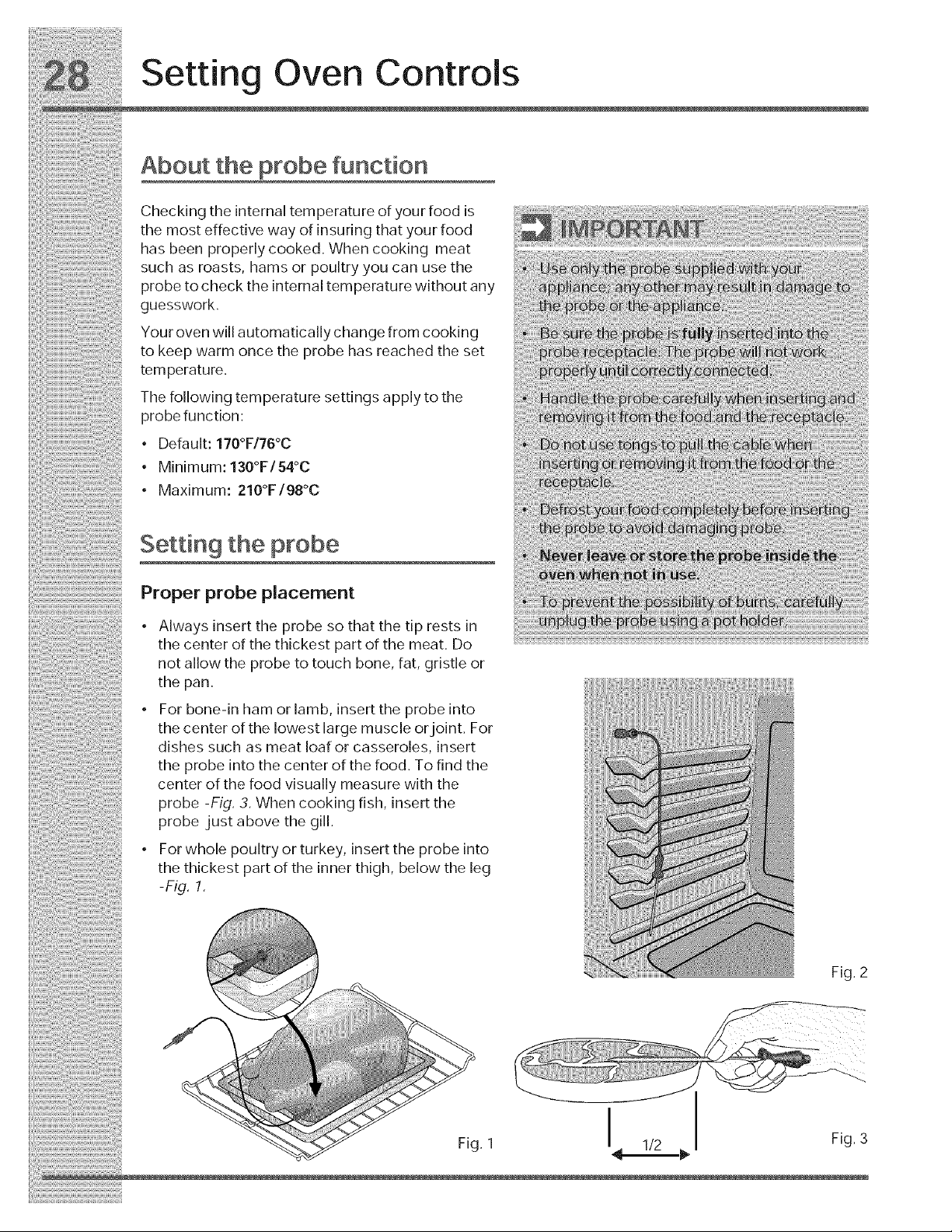
• Always insert the probe so that the tip rests in
the center of the thickest part of the meat. Do
not allow the probe to touch bone, fat, gristle or
the pan.
• For bone-in ham or lamb, insert the probe into
the center of the lowest large muscle or joint. For
dishes such as meat loaf or casseroles, insert
the probe into the center of the food. To find the
center of the food visually measure with the
probe -Fig. 3. When cooking fish, insert the
probe just above the gill.
• For whole poultry or turkey, insert the probe into
the thickest part of the inner thigh, below the leg
-Fig. 1.
Fig. 2
Fig. 3
Setting Oven Controls
Setting the probe
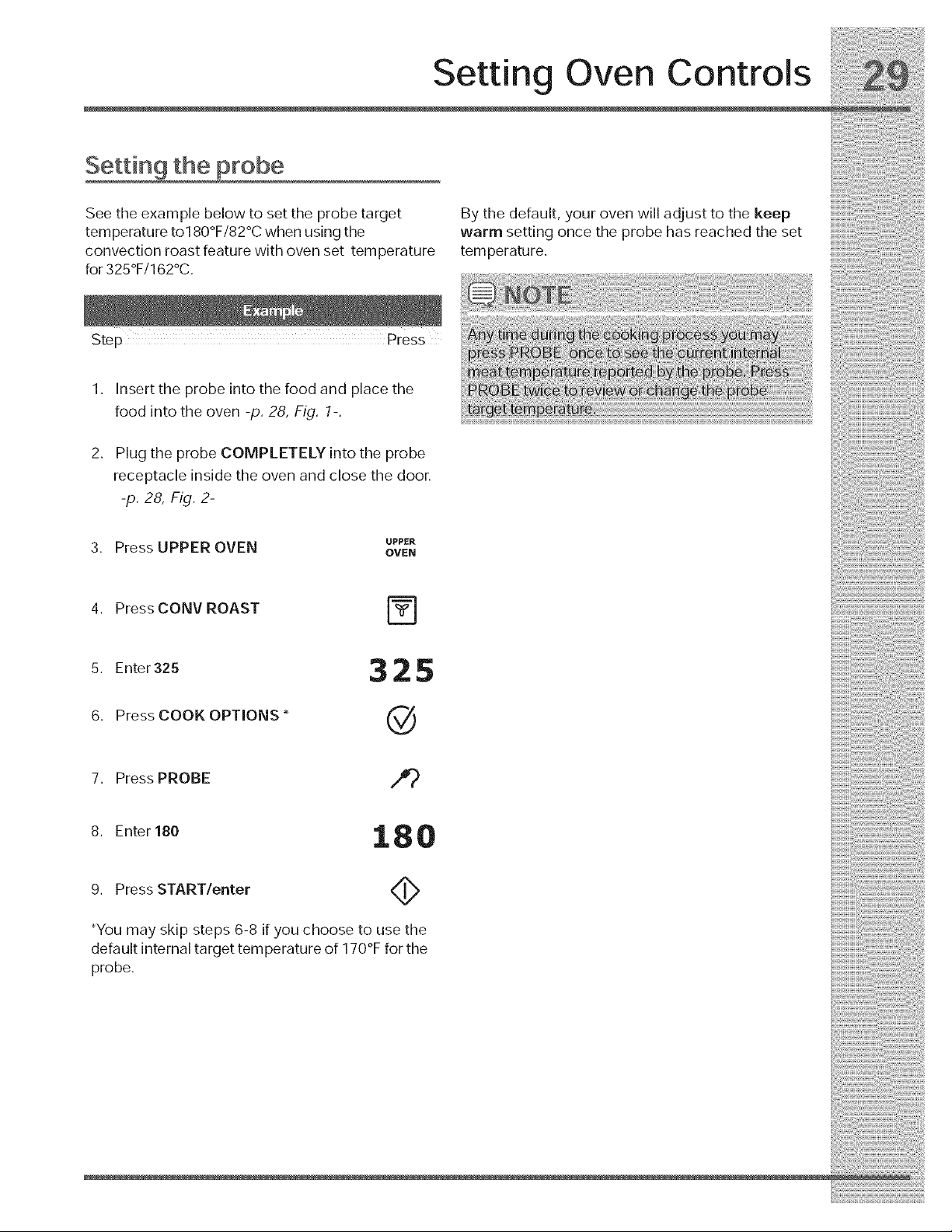
See the example below to set the probe target
temperature to180°F/82°C when using the
convection roast feature with oven set temperature
for 325°F/162°C.
Step Press
By the default, your oven will adjust to the keep
warm setting once the probe has reached the set
temperature.
1.
2.
Insert the probe into the food and place the
food into the oven -p. 28, Fig. 1-.
Plug the probe COMPLETELY into the probe
receptacle inside the oven and close the door.
-p. 28, Fig. 2-
UPPER
3. Press UPPER OVEN OVEN
4. PressCONV ROAST r_
5. Enter 325 3 2 5
6. Press COOK OPTIONS * @
7. Press PROBE
8. Enter 180 180
9. Press START/enter
*You may skip steps 6-8 if you choose to use the
default internal target temperature of 170°F for the
probe.
:ii_!iii_i_!i!_ii!_!_i_i_i_i_i_ii_i_!_ii!_!!_!_!i!i!i!_J!!:!_!i_i!_i!i_i_!_i_!_i_i_!i_i!!!i!ii_!_!i!_i!i_i_i_iii_i_!i_i!_
Setting Oven Controls
About keep warm Setting keep warm
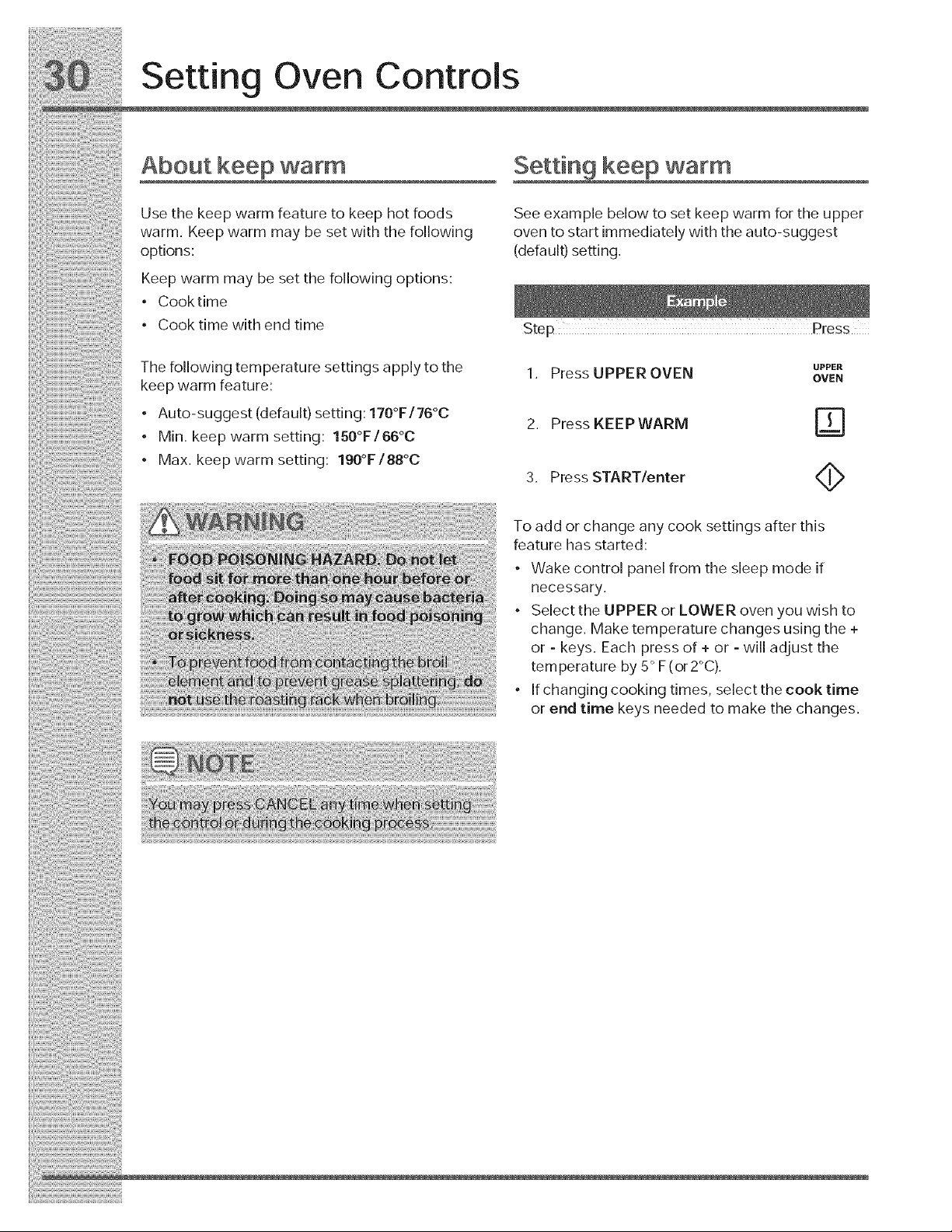
Usethekeepwarmfeaturetokeephotfoods Seeexamplebelowtosetkeepwarmfortheupper
warm. Keepwarm may be setwiththefoliowing oventostartimmediateiywiththeauto-suggest
options: (default) setting.
Keepwarmmaybesetthefollowingoptions:
, Cookhme
Cooktimewithendtime Step Press
Thefollowingtemperaturesettingsapplytothe 1 PressUPPEROVEN UPPER
keepwarmfeature: o o . own
• Auto-suggest(default) setting:IT0 F/76 C .............
o o z, b'ress r_LLF WgKIVl [ J I
[[[[ • Min. keep warm setting: 150 F/66 C
,Max. keepwarmsetting: 190°F/88°C /x
Toaddorchangeanycooksettingsafterthis
feature has started:
.... • Wake control panel from the sleep mode if
..... necessary.
• Select the UPPER or LOWER oven you wish to
change. Make temperature changes using the +
or - keys. Each press of + or - will adjust the
temperature by 5 ° F (or 2°C).
• If changing cooking times, select the cook time
or end time keys needed to make the changes.
Setting Oven Controls
About slow cook
The slow cook feature may be used to cook foods
more slowly at lower oven temperatures. The
cooking results will be like that of a Slow Cooker or
Crock-Pot. This feature is ideal for roasting beef,
pork & poultry. Slow cooking meats may result in
the exterior of meats becoming dark but not burnt;
this is normal. Slow cook may be set in the upper
or lower oven.
Slow cook may be set with the following options:
• Cook time
• Cook time with end time
• Probe
Setting slow cook
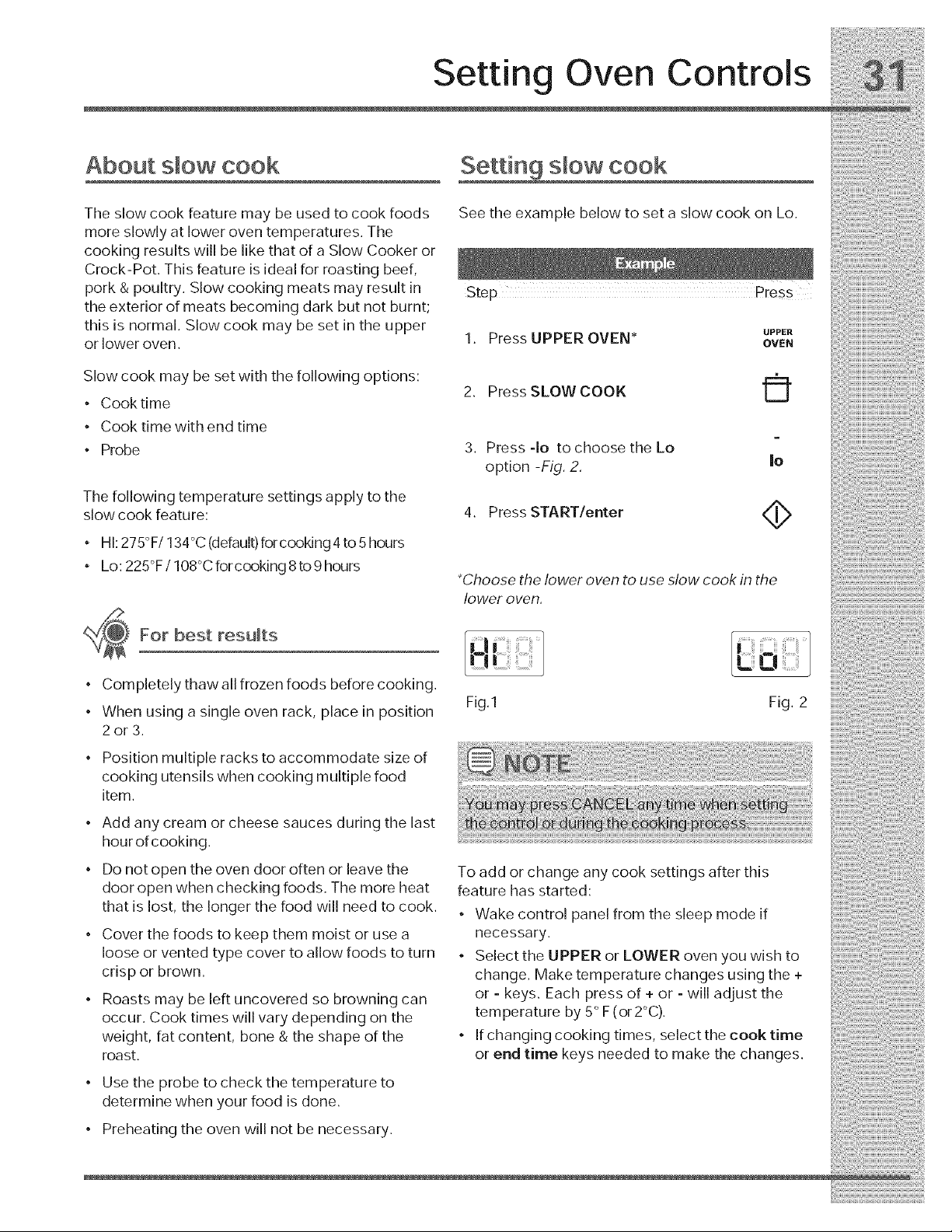
See the example below to set a slow cook on Lo.
The following temperature settings apply to the
slow cook feature:
° HI: 275°F/134°C (default)for cooking 4to 5 hours
° Lo: 225°F / 108°Cfor cooking 8 to 9 hours
For best results
• Completely thaw all frozen foods before cooking.
° When using a single oven rack, place in position
2or3.
• Position multiple racks to accommodate size of
cooking utensils when cooking multiple food
item.
° Add any cream or cheese sauces during the last
hour of cooking.
° Do not open the oven door often or leave the
door open when checking foods. The more heat
that is lost, the longer the food will need to cook.
• Cover the foods to keep them moist or use a
loose or vented type cover to allow foods to turn
crisp or brown.
° Roasts may be left uncovered so browning can
occur. Cook times will vary depending on the
weight, fat content, bone & the shape of the
roast.
• Use the probe to check the temperature to
determine when your food is done.
• Preheating the oven will not be necessary.
UPPER
1. Press UPPER OVEN* ovE_
2. Press SLOWCOOK "1_
3. Press -Io to choose the Lo
option -Fig. 2.
|0
4. Press START/enter 4_
_Choose the lower oven to use slow cook in the
lower oveR,
rL! [i
Fig.1 Fig. 2
To add or change any cook settings after this
feature has started:
• Wake control panel from the sleep mode if
necessary.
• Select the UPPER or LOWER oven you wish to
change. Make temperature changes using the +
or - keys. Each press of + or - will adjust the
temperature by 5 ° F (or 2°C).
• If changing cooking times, select the cook time
or end time keys needed to make the changes.
Setting Oven Controls
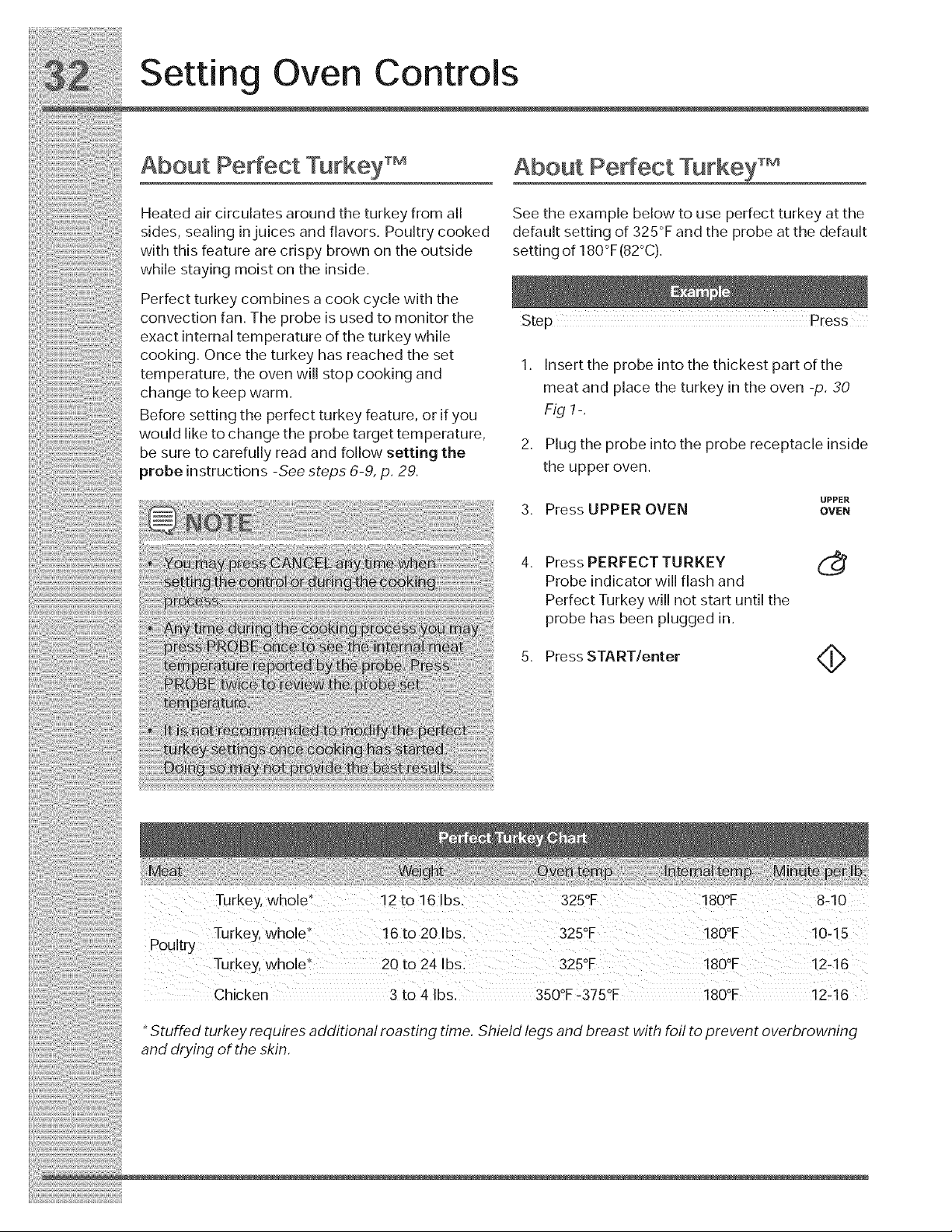
About Perfect Turkey TM
Heated air circulates around the turkey from all
sides, sealing in juices and flavors. Poultry cooked
with this feature are crispy brown on the outside
while staying moist on the inside.
Perfect turkey combines a cook cycle with the
convection fan. The probe is used to monitor the
exact internal temperature of the turkey while
cooking. Once the turkey has reached the set
temperature, the oven will stop cooking and
change to keep warm.
Before setting the perfect turkey feature, or if you
would like to change the probe target temperature,
be sure to carefully read and follow setting the
probe instructions -See steps 6-9, p. 29.
About Perfect Turkey TM
See the example below to use perfect turkey at the
default setting of 325°F and the probe at the default
setting of 180°F (82°C).
Step Press
1.
2,
Insert the probe into the thickest part of the
meat and place the turkey in the oven -p. 30
Fig 1-.
Plug the probe into the probe receptacle inside
the upper oven.
UPPER
3. Press UPPER OVEN OVEN
4. Press PERFECT TURKEY /Tj'
Probe indicator will flash and
Perfect Turkey will not start until the
probe has been plugged in.
5. Press START/enter <_
PoultP_y
Turkey, whole _ 12 to 16 bs, 325°F
Turkey, whole 16 to 20 Ibs. 325°F
Turkey, whole 20 to 24 Ibs. 325°F
Chicken 3 to 4 Ibs. 350°F-375°F
180°F 8-10
180°F 10-15
180°F 12-16
180°F 12-16
* Stuffed turkey requires additional roasting time, Shield legs and breast with foil to prevent overbrowning
and drying of the skin,
Setting Oven Controls
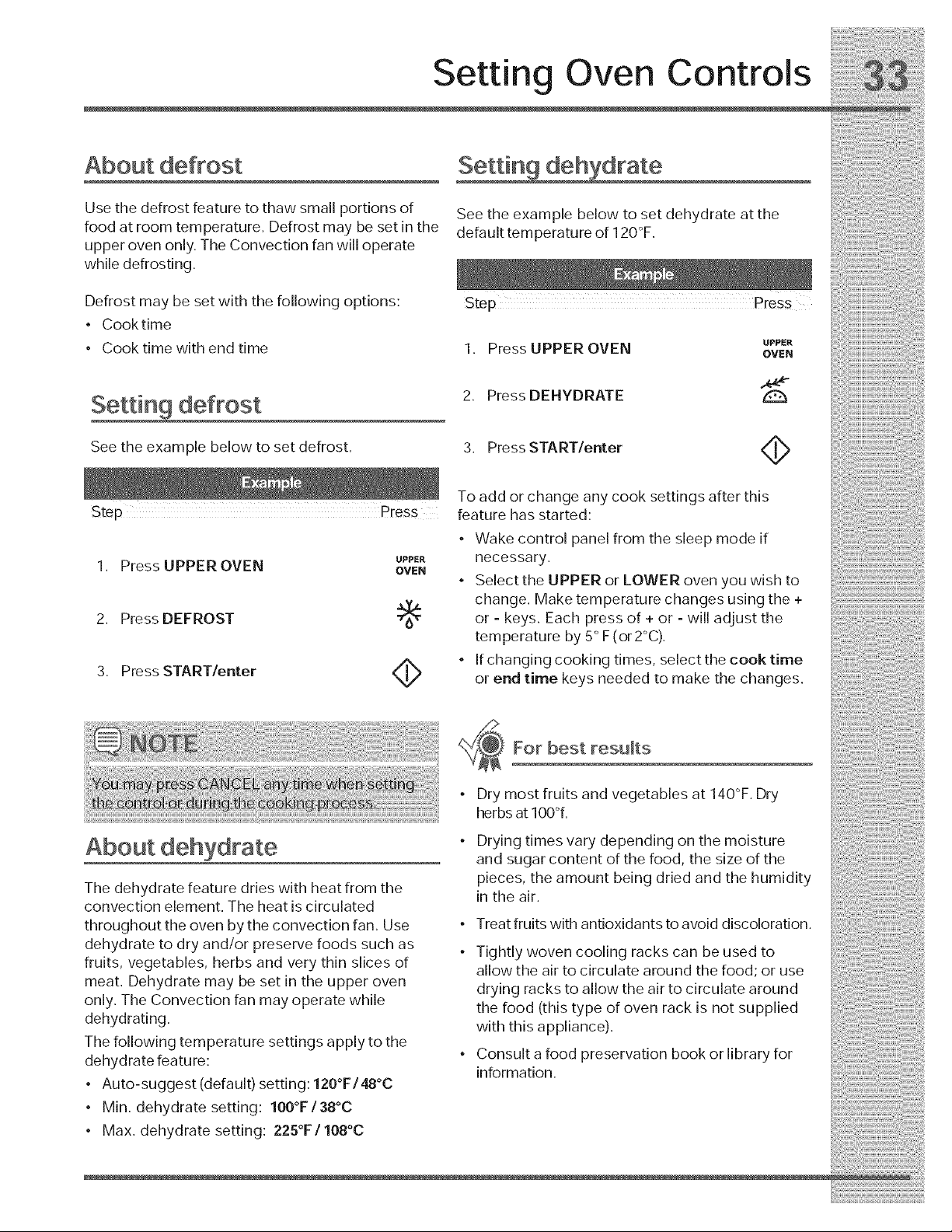
About defrost
Setting dehydrate
Use the defrost feature to thaw small portions of
food at room temperature. Defrost may be set in the
upper oven only. The Convection fan will operate
while defrosting.
See the example below to set dehydrate at the
default temperature of 120°F.
Defrost may be set with the following options:
• Cooktime
° Cook time with end time
Setting defrost
See the example below to set defrost.
1. Press UPPER OVEN
2. Press DEHYDRATE
3. Press START/enter
UPPER
OVEN
To add or change any cook settings after this
step Press feature has started:
• Wake control panel from the sleep mode if
UPPER necessary•
1. Press UPPER OVEN OVEN
° Select the UPPER or LOWER oven you wish to
_._ change. Make temperature changes using the +
2. Press DEFROST -_ or - keys. Each press of + or - will adjust the
. temperature by 5° F(or2°C).
i
A If changing cooking times, select the cook time
3 Press START/enter
I_ or end time keys needed to make the changes.
_ For best resu,ts
o o
Dry mostfrutsand vegetabesat 140 F Dry
Ahn.f dehydrate Drying times vary depending on the moisture
and sugar content of the food, the size of the
The dehydrate feature dries with heat from the trheamount being dned and the hum,d,ty
convection element. The heat is circulated ° '
throughout the oven by the convection fan. Use Treat fruits with antioxidants to avoid discoloration.
de_ydrat_ett° dlrYs?hd/rbrsprederv: f_h°ndSl_cuch 2 ° Tightly woven cooling racks can be used to
' g ' . Y allowthe air to circulate around the food; or use
meat Dehydrate may be set in the upper oven
• . . dry ng racks to a ow the a r to c rcu ate around
only The Convection fan may operate while
, , " , . the food (this type of oven rack is not supplied
aenya ranng. with this a pplia nce).
The following temperature settings apply to the °
dehydrate feature: Consult a food preservation book or library for
o o information.
• Auto-suggest (default)setting: 1201F/48 C
• Min. dehydrate setting: 100:/38 C
• Max. dehydrate setting: 225 F/108 C
Setting Oven Controls
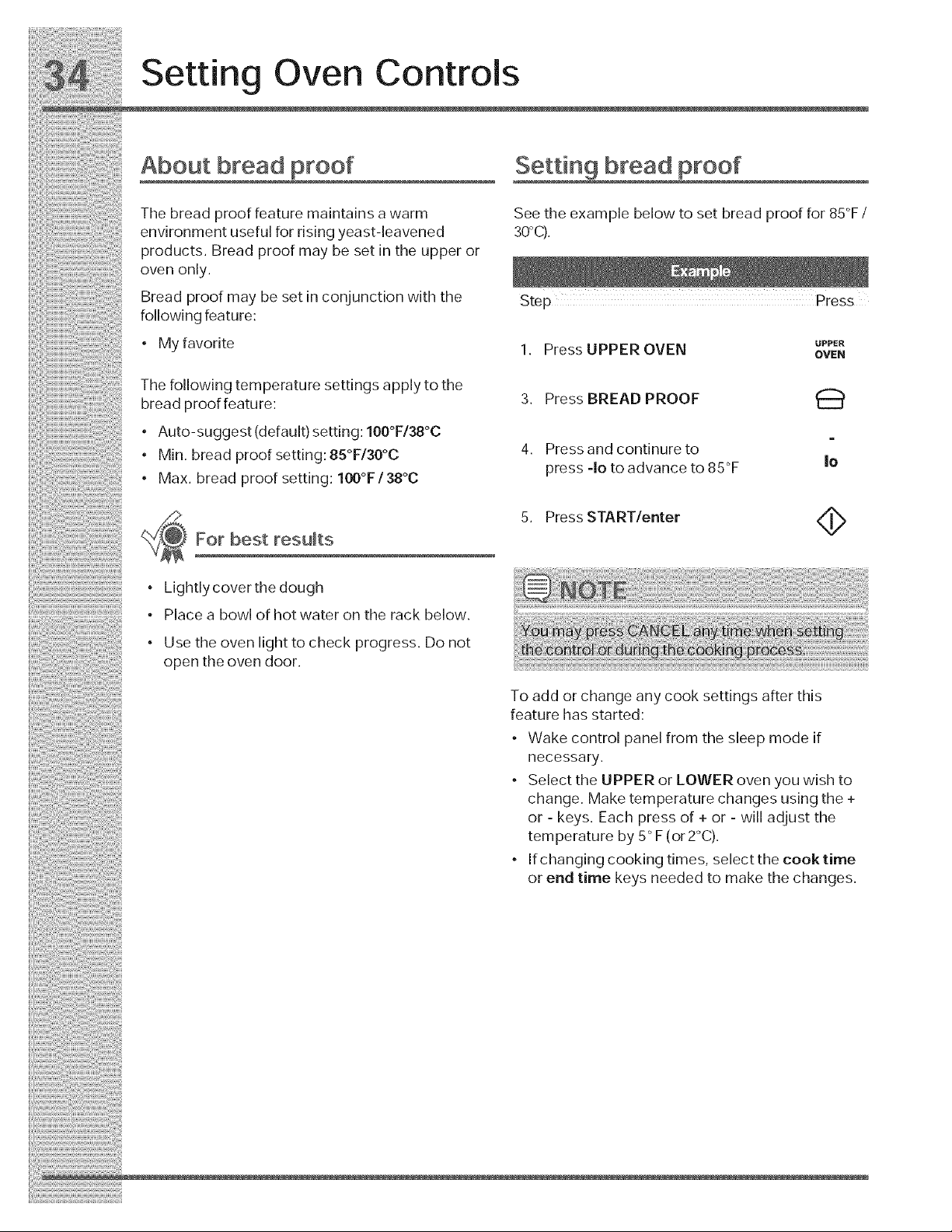
iiiiiii ! About bread proof Setting bread proof o
i:iii_i!i_ii!_ii!_iii!!!!!!!!!!!!!!!!_!!ii!_ii_ii_i_ii_i_i!_!ii!_!_i!iii!ii_ii!ii!_i_!i!_i_!i!_!i_Thebreadprooffeaturemaintainsawarm Seetheexampbbelowtosetbreadprooffor85 F/
:iiiiii_ii_ii!_ii!_ii!:_:i!i_i:i!i_i:i!i_i:i!i_i:i!_!_iii_i_iii_i_ii_i_i!_!_!_ii!_i!i!_!i!_ii_i_!i!i_i_ii!i_!i_!:i!_i_iii_i_!i!_i!!!environmentusefulforrisingyeast-leavened 30C).
i:iiiii__i_ii_!_!___!_!i!i_i_i_i!!!!_i!!:!ii_i!_ii_i!_ii_i!_ii_i!_ii_i!_ii_i!_ii!i!!i!i_!__iii___!!_i_!i_ii!!i_i_!!i!i__ii!i___ii_i_!i_i!i!:!i!i__i__!_!i!i!ii!i__i_i_products.Bread proofmaybesetintheupperor
iiiiiiiiiiiiii@i!!ii!i!!ii!i!!B!!ii!i!ili!i!ili!i!iiiiiii!i!ili!_!!iiiiiiovenon_y.
:_iiiii:ii:i_i_i_i_i_i!i_i_{i!i_!_i!ii!i!i_!_!i_!_!i_!_!i_!_!i_!iii_i_!_iiii!i_i_ii_ii_ii_ii_!_i_i_Breadproofmaybesetinconjunctionwiththe Step Press
i:_iiiiii:iiii:iii_iiii_iiii_iiii_iiii_iii_ii_!_!i_:i:_!_!_!i:!_!i:!_!i:!_!i:!_!i:!_!i:!_i_!_!i_!:i!i:!_!!!i_ii_i!_i_iii:i_ii}_!_!_!izi!_!_!_i_flollowingfeature:
iiiiiiii_i_ii_i_iiiiiiiiiiiiiiiiiiiiiiiiiii_ii_ii_ii_ii_ii_ii_iiii_!_!_:i____i_i_!_i_i!Ji_i!Ji_i!Ji_i!Ji_i!___i!i_i_i!!i!ii!__i!i!_i_i_!_ii_ii_i_i!!i!i!_!i Myfavorite 1. PFessUPPEROVEN _
:iiiii__i__iiiiiiiiiiiiiiiii_ii_ii_ii__iii!!i_i_!i!ii!__i:!_!_i:!_!_i:!_!_i:!_!_i:!i!__i!!i_!:__!___!_i_!!__!!_:iThefollowingtemperaturesettingsapplytothe
iiiiiii__i_i__i_i_iiiiiiiiiiiiiiiiiiiiiiiii_i_i!i_i_i!i_i_i!i_i_ii__i!i___i!i___i_i!__i:i!i_i_i_i_iii_i!i!!_i_ii!_i_ii!_i_iii_______iii!ii___i_i_i!i!_i_!_!i__i_breadprooffeature: 3. PressBREADPROOF
iiiiiiii_i_ii_i_iiiiiiiiiiiiiiiiiiiiiiiiiii!iii_i!iii_i!iii_i!iii_i!ii!ii!!_!ii!i_!_!!i!i_i!i!i_!i!_!_i!!iiii_iii_i_iii_i__i____!_i!_ii_ii!i_i_!_ii_i__i_iii___ii...................." Aut°-suggest(default) setti?g:100°F/38°C ,o
i:iiiii__i:____i:i__i_!i!i_!ii!i_!ii!i_!ii!i_!ii!i_i__i_i__!i!i__!i!i__!i!i___:i_i!_!i_i!_!i_i!i!i_!_!i_i_i!_i_i__!i_!_!i__i!_i_i:iiiiiii:!i!i!i!ii__!i!!{!!i:i_!iiii!• Min. bread proof setting:85 FI30C 4. Pressandcontmureto o .
, o o press - o to advance to 85 F
iii!_i_:_i_i!i!i!i_!_!_iii_!iii_!iii_!i_:i!ii!:i!ii!:i!ii!:i!;_!i_i!i!i_i_i!i_i_!i!_i_!i!_i_!_!_ii!_!_i!_!i_i!_!i!i!_!!_i_i_:_!_ii!_!_ii_i_!_!_Max. bread proof setting: 100 F/38 C
:i!:ii!:ii!iiiiiiiii3iiiiiii!!i!!iiiii!iiiiiiiiiii!iiiiii!!iiiiiii!il PressSTART,o°to,
4>
i!_i_!_i_!_i_!ii_i_!i_!i!i_!iiiiiiii!!i_ii!!i_ii!!i_ii!!i_ii!_i_!!!_i!i!_i!i!_!!_i!i!_ii_i_i_ii_i_i_!_i_!i_i!_!_!i_!_i_i_!_i!_iii!i_i<_/_ For bestresu_ts
..... • Lightlycoverthedough
• Place a bowl of hot water on the rack below.
• Use the oven light to check progress. Do not
open the oven door.
To add or change any cook settings after this
feature has started:
• Wake control panel from the sleep mode if
necessary.
• Select the UPPER or LOWER oven you wish to
change. Make temperature changes using the +
or - keys. Each press of + or - will adjust the
temperature by 5 ° F (or 2°C).
° If changing cooking times, selectthe cooktime
or end time keys needed to make the changes.
Setting Oven Controls
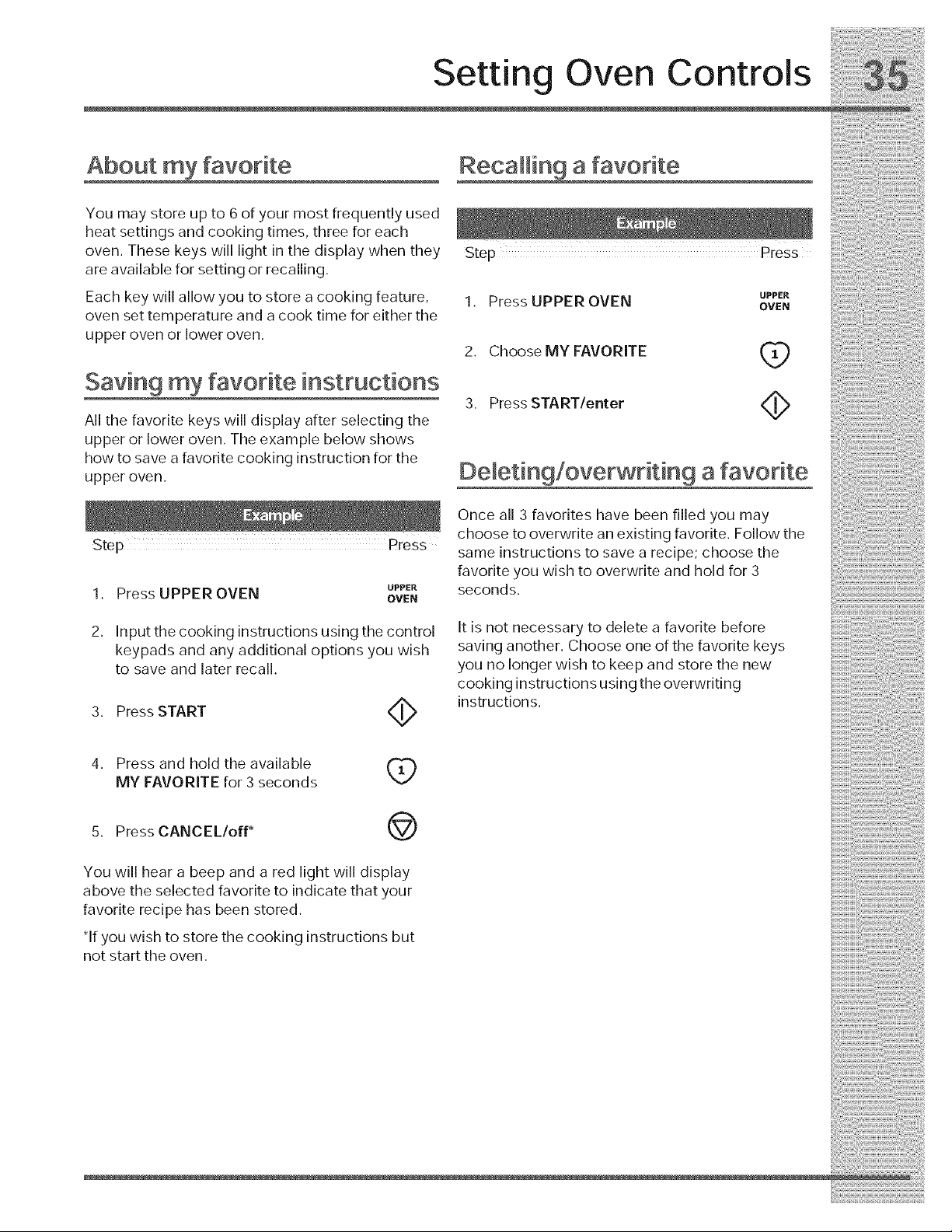
About my favorite
You may store up to 6 of your most frequently used
heat settings and cooking times, three for each
oven. These keys will light in the display when they
are available for setting or recalling.
Each key will allow you to store a cooking feature,
oven set temperature and a cook time for either the
upper oven or lower oven,
Saving my favorite instructions
All the favorite keys will display after selecting the
upper or lower oven. The example below shows
how to save a favorite cooking instruction for the
upper oven.
UPPER
1. Press UPPER OVEN OVEN
2. Input the cooking instructions using the control
keypads and any additional options you wish
to save and later recall.
3. Press START
Reca[[in 9 a favorite
Step Press
UPPER
1. Press UPPER OVEN OVEN
2. ChooseMY FAVORITE (_
3. Press START/enter
Deleting/overwriting a favorite
Once all 3 favorites have been filled you may
choose to overwrite an existing favorite. Follow the
same instructions to save a recipe; choose the
favorite you wish to overwrite and hold for 3
seconds.
It is not necessary to delete a favorite before
saving another. Choose one of the favorite keys
you no longer wish to keep and store the new
cooking instructions using the overwriting
instructions.
4. Press and hold the available
MY FAVORITE for 3 seconds
5. Press CANCEL/off* O
You will hear a beep and a red light will display
above the selected favorite to indicate that your
favorite recipe has been stored.
*If you wish to store the cooking instructions but
not start the oven.
ii_!_;ii!i_:_i_i_!_!_:;!:ii!;!:i;:!_i;:!;!ii_iiiiiiiiiiiii_:_ii_!:_;;_iii;i!i!_!_!:_ii_!!!!_!_!_;;:_!_;;:;!_i_i_;i_i_!i_;!i!!i:_J;_i_i_;_!_!
etting Oven Controls
iiiiiiiiiiiiiiiiiiiiiiiiiiiii!!iiii!!!!iiiiiiiiiii!i!iiiiiiiiiii!!ili!ili!iPerfectProgram "M multistage
iiiiiiiii_i_!i!_i_!i!_i_!i!_i_!i!_i!ii__i!ii__i!ii__i!ii__i!ii__i!iii_i_ii!____:!____:!_i_iii!i!i__ii!!_i!!i_!ii!i__i!iii!i!ii!_!;ii_i:!_i_i__& Enter6Ominutes 60
Multi stage will allowyou to program up to 3 stages
:iiiiii_:_ii_ii!_ii!_ii!:_:i!i_i:i!i_i:i!i_i:i!i_i:i!_!:iii_i:iii_i_ii_i_i!_!_!_ii!_i!i!_!i!_ii_i_!i!i_i_ii!i_!i_!:i!_i_iii_i_!of cooking. Each stagemay be programmedwitha A
_iiii___i__!__!!i_i_i_i!!!!_i!!:!ii_i!_ii_i!_ii_i!_ii_i!_ii_i!_ii_i!_ii!i!_iii_!__iii___!!_i_!i_i!!i_i_!!i!i__ii!i___ii_i_!__i!i!_!i!_i__!!iiiicookingfeature, settemperatureandacooktime. 7. PressSTART/enter V
__iii_:_:_iiiiiii!_ii!ii_i!i:ii!i!__i!i!__i!i!__iii!__iii!__iii!__iii!__iii!__i_!!_i_ii_i_!i_i!i_!iii_i!i!i_i!i!i_i_i__!__i__!_!!_i_iMulti stage is ideal whenyou wanttoadd a keep
_i_ii__:_i__:_i__iiii_iiii_iiii_iiiiii!!__!_!_!___!_i!Jii!_ii!_ii!_ii!_ii!;_!;_!_ii!i_!_i!_iii_iii_iii_iii_!_i__i!iwarmafteracookingfunction. _.
-- bragez -- --
:iiiiii:ii:i_i_i_i_i_i_i_i_!_i_!__i_!___i_____i_____i_____i_____i_____i_____ii____iii!_i_i__i!ii_______!_!_;__i!!_!_iThefollowingfunctionsmay besetwith multi stage: ......
_ vress I_KUIL U
• Bake/conv bake
iiiiiiiiiiiiiiiiiiiiiiiiiiiiiiiiiiiiiii_ii_ii_ii_ii_ii_ii_ii_i___i!i!!_i_ii!!!!!!!!!!!__i!i_!i______i_!____::!:!:!:!:iiiii!i!i!i_ " Broi./convbroi. IlOminutesmax.I 9 Enter5OO°F _nn
• Convroast w v w
iiiiiiiiiiii!!iii!!iiii!iiii!!ii!il. BreadProof 10PressSTART/enter
_:_!_!!i!_i_iiii_i:i!_!!ii_i!!ii_i!!ii_i!!ii_i!!ii_i!!ii_i!!ii_i!!i!iii!i!_i_!i!_i_i_!i_i_!i_i!i!_!i_i_ii_i_i_ii!_i_i_i:;!i_!_i_i!_!_ii!_!_i_!iiKeep warm o o o NM"
i_!_i_!ii_!i_!ii____!:!iii_i_!i_iii!!i!!i!!i!_!!ii!iii:!ii:i__!__!ii_ii!_ii!_ii!!_i_i_!_i_!_!iiKeepwarmcanbesetfrom150 F/66 Cto190 F/ 11 Enter4mnutes
!i_!i_!!i!__ii_i!___i!_i!_i_ii;ii!;ii!;ii!!_!ii_i_!_i_i!i!i_i_!_i__i_ii__i_ii__i__ii!i!_i_!__i_i_!_!_!_!i!_! 88°C. If you entera temperature beyond this range 4'
i!i__!i__!i__i!!_i__i_iii_iii_i_i_!_i_!_i_!_i_i___i__i__i__i_i_!i!!iii!ii!iiiii_ii!i__!i__!ii!iiiyourcontrol will automatically defaulttothe nearest
ii!_!i!i_i_!i!_!i!i_i_!i!_!i!i_i_!i!_!i!i_i_!i!_!i!i_i_!i!_!i!i_i_!i!_!i!i_i_!i!_!i!i_i_!i!_!i!i_i_!i!_!i!i_i_!i!_!i!i_iSetting mu_ti stag÷
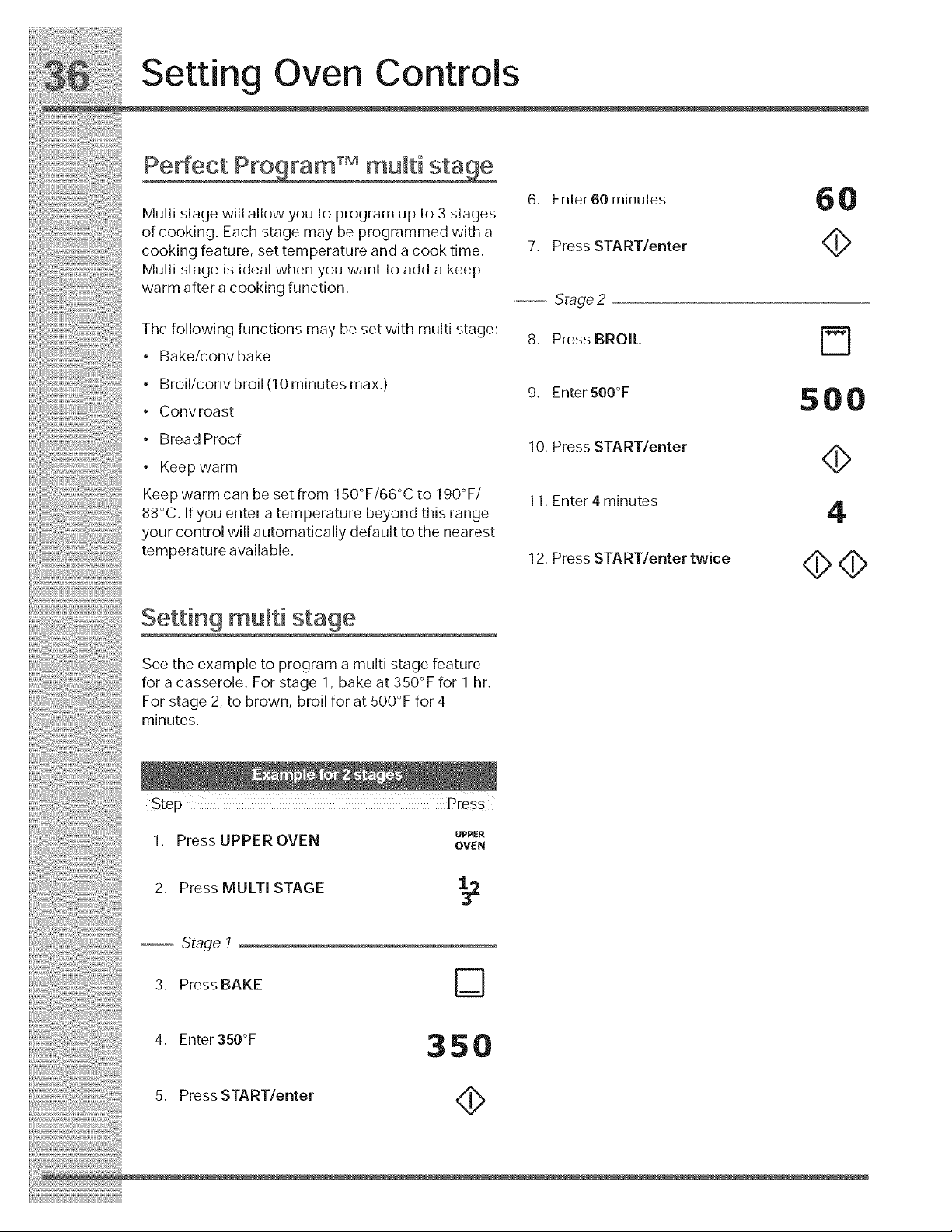
See the example to program a multi stage feature
for a casserole. For stage 1, bake at 350°F for 1 hr.
For stage 2, to brown, broil for at 500°F for 4
minutes.
1. Press UPPER OVEN
2. Press MULTi STAGE
UPPER
OVEN
Stage 1
3. Press BAKE r--]
4. Enter350°F 35 0
5. Press START/enter 4_
Setting Oven Controls
Perfect Program TMmulti stage
Multi stage will allow you to program up to 3 stages
of cooking. Each stage may be programmed with a
cooking feature, set temperature and a cook time.
Multi stage is ideal when you want to add a keep
warm after a cooking function.
The following functions may be set with multi stage:
• Bake/conv bake
• Broil/conv broil (10 minutes max.)
• Convroast
• Bread Proof
• Keep warm
Keep warm can be set from 150°F/66°C to 190°F/
88°C. If you enter a temperature beyond this range
your control will automatically default to the nearest
tern perature available.
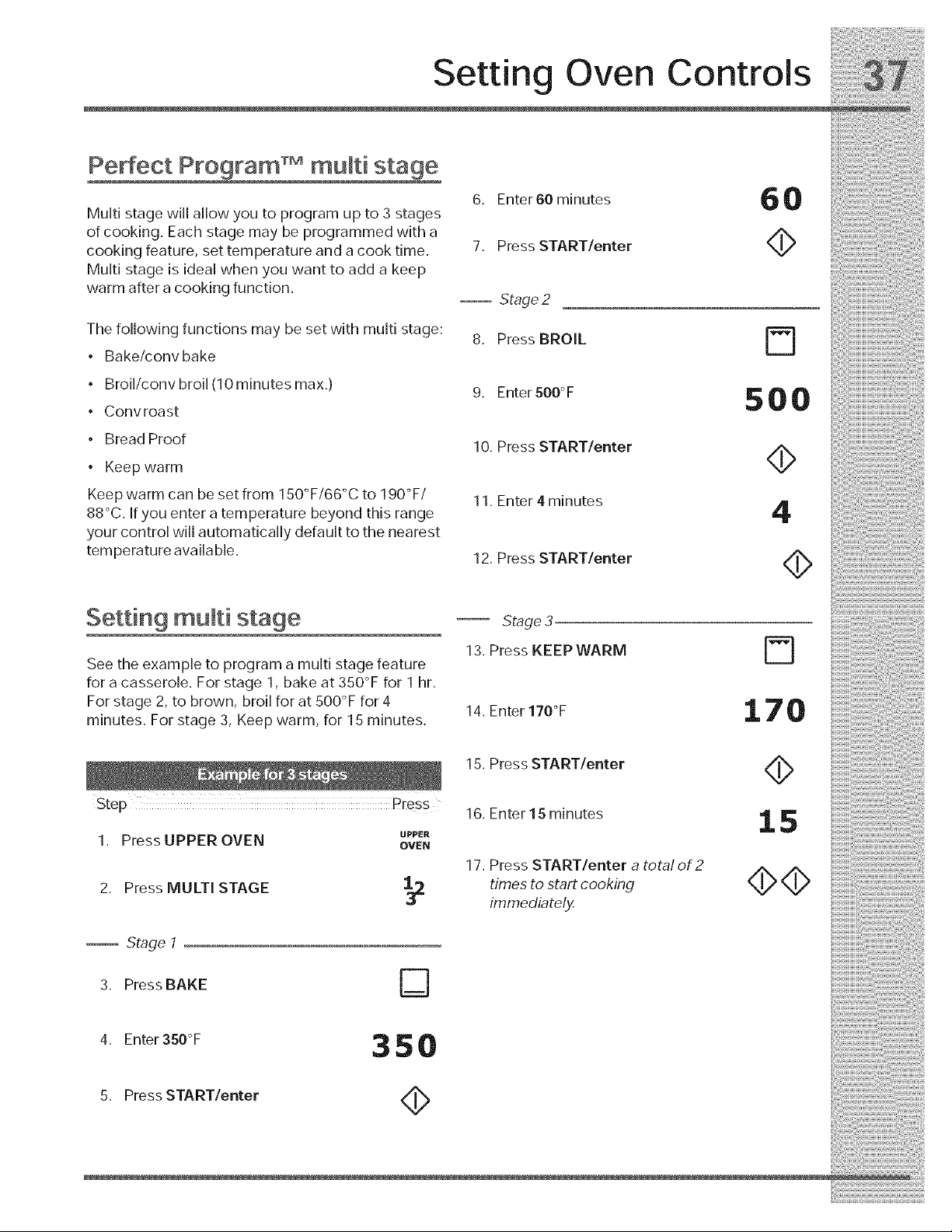
6. Enter60 minutes 6 0
7. Press START/enter 4_
-- Stage 2
8. Press BROIL
9. Enter 500°F
10. Press START/enter
11. Enter 4 minutes
12. Press START/enter
500
4
Setting multi stage
See the example to program a multi stage feature
for a casserole. For stage 1, bake at 350°F for 1 hr.
For stage 2, to brown, broil for at 500°F for 4
minutes. For stage 3, Keep warm, for 15 minutes.
1. Press UPPER OVEN
2. Press MULTI STAGE
UPPER
OVEN
Stage 1
3. Press BAKE [---]
Stage 3,
13. Press KEEP WARM
14. Enter 170°F
15. Press START/enter
16. Enter 15 minutes
17. Press START/enter a total of 2
times to start cooking
immediately.
170
15
4. Enter350°F 3 5 0
5. Press START/enter 4_
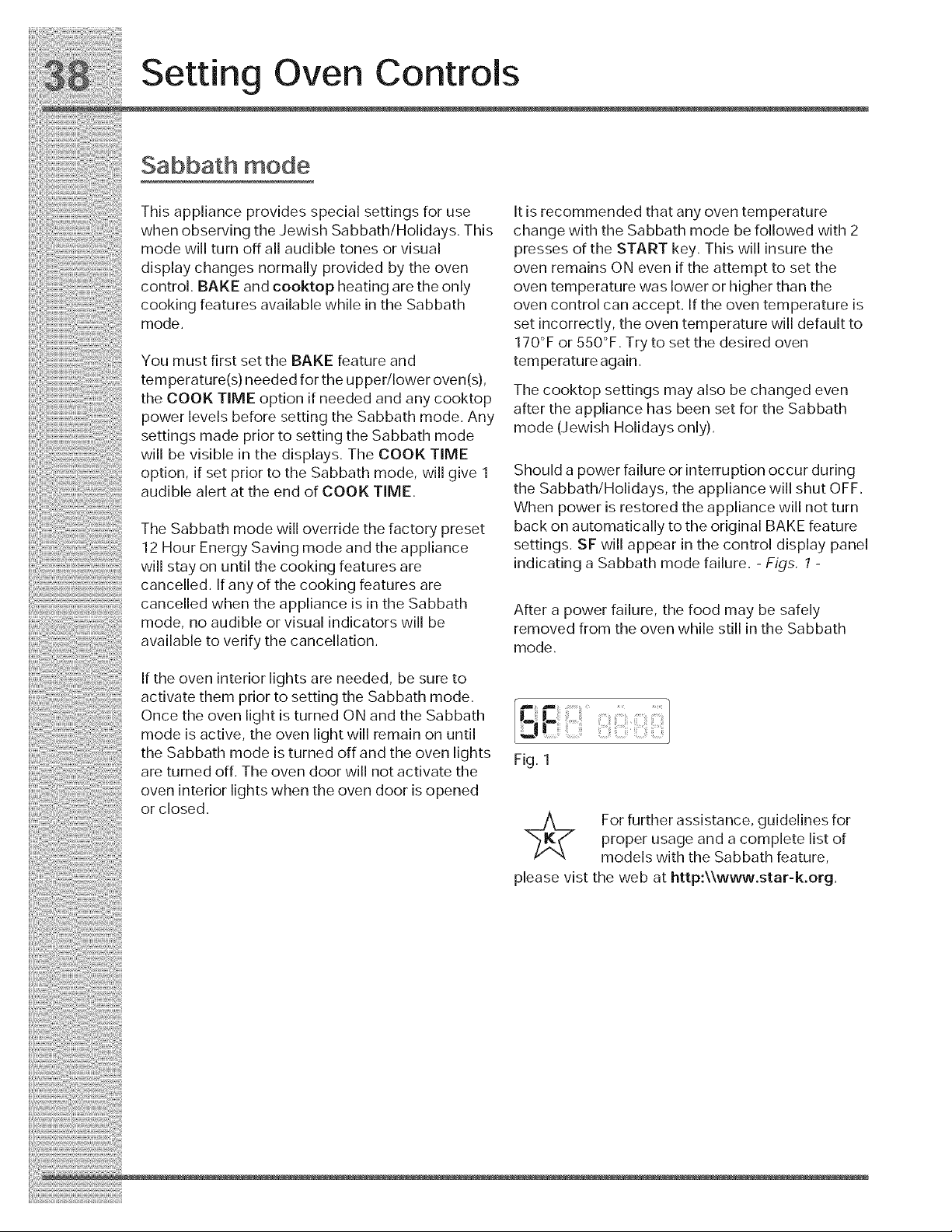
cancelled.Ifanyofthecookingfeaturesare
cancelledwhentheapplianceisintheSabbath
mode,noaudibleorvisualindicatorswillbe
availabletoverifythecancellation.
Iftheoveninteriorlightsareneeded,besureto
activatethempriortosettingtheSabbathmode.
OncetheovenlightisturnedONandtheSabbath
modeisactive,theovenlightwillremainonuntil
theSabbathmodeisturnedoffandtheovenlights
areturnedoff.Theovendoorwillnotactivatethe
oveninteriorlightswhentheovendoorisopened
orclosed.
Afterapowerfailure,thefoodmaybesafely
removedfromtheovenwhilestillintheSabbath
mode.
,,_|i--
Fig,1
_7 Forfurtherassistance,guidelinesfor
properusageandacompletelistof
modelswiththeSabbathfeature,
pleasevistthewebat http:\\www.star-k.org.
Setting Oven Controls
Setting Sabbath ode Canceling Sabbath mode
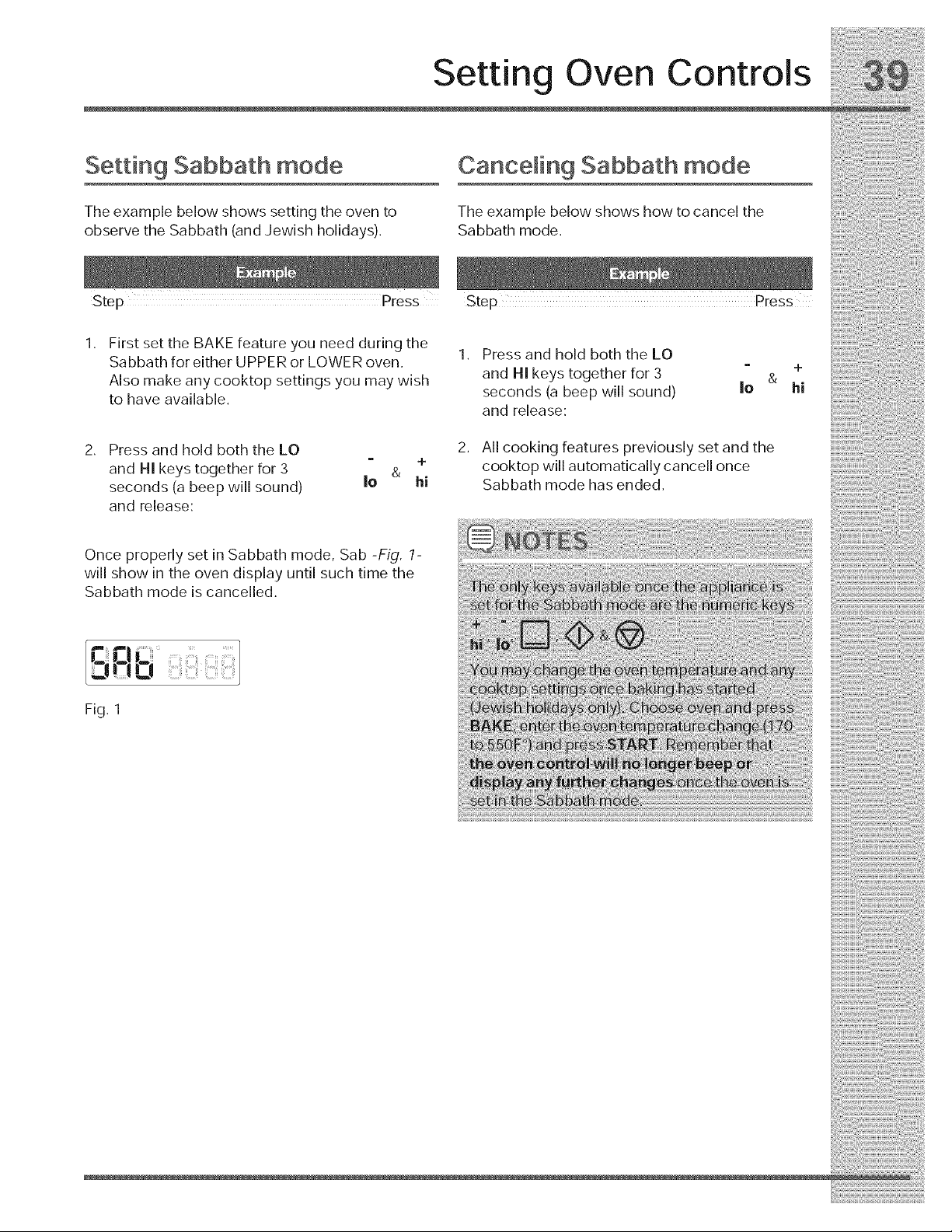
The example below shows setting the oven to
observe the Sabbath (and Jewish holidays).
The example below shows how to cancel the
Sabbath mode.
First set the BAKE feature you need during the
Sabbath for either UPPER or LOWER oven.
Also make any cooktop settings you may wish
to have available.
Step Press
Press and hold both the LO
and HI keys together for 3
seconds (a beep will sound)
and release:
I +
&
Io hi
2. Press and hold both the LO
and HI keys together for 3
seconds (a beep will sound)
and release:
I +
&
|o hi
2. All cooking features previously set and the
cooktop will automatically cancell once
Sabbath mode has ended.
Once properly set in Sabbath mode, Sab -Fig, 1-
will show in the oven display until such time the
Sabbath mode is cancelled.
ii5i_!i!_{;i_!i_i:_i_ii!;i_ii!i_;!i!_i_!!!_!i_!!i_{:;_;!_i;!_;_i_!_;!_i!;:_i_!;:_;i!_'i;i:i;:ii!i!!i!;_i!ili:iii:i:i!i!!i!_!!i!_!!!i!iii:i!iii:i
40 Setting !ower Oven Controls
Perfect Pair lower oven
features
The loweroven providestwo basicmodes, cooking
and warming,The loweroven isidealforcooking
foods such as pizza,casseroles,baked potatoes
and frozenconveniencefoods,Use thekeep warm _fo
feature to keep hot cooked foods at serving r° it w _ w
temperature.
These features are available for the lower oven:
Bake
• Sowcook-pg31
Keep warm
Fo
::: :: _ r best results
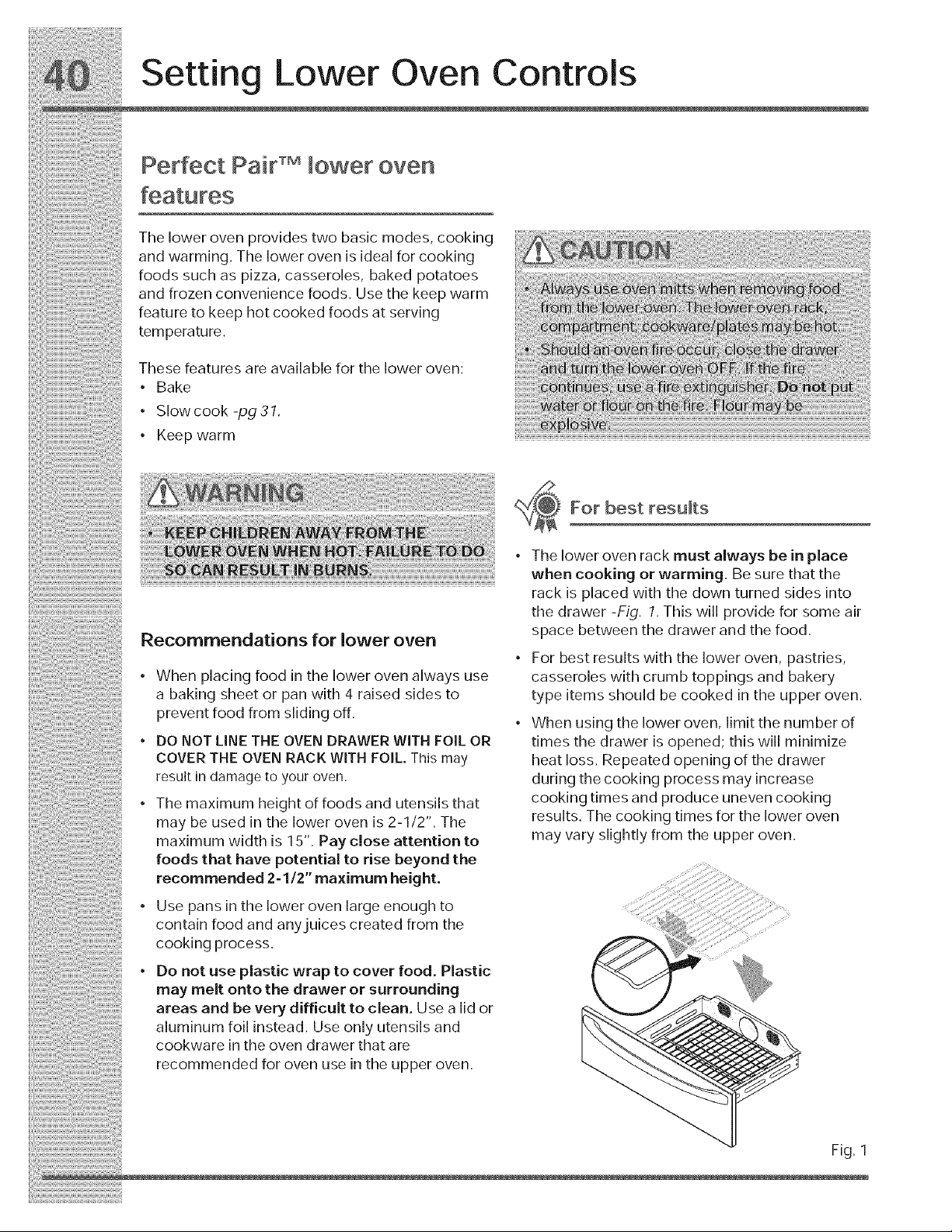
• The owerovenrackmusta waysbeinpUce
when cooking or warming. Be sure that the
...... rack is placed with the down turned sides into
i_i!_!_i!i_ii_!i!_!_i!i_ii_!i!_!_i!i_ii_!i!_!_i!i_ii_!i!_!_i!i_ii_!i!_!_i!i_ii_!i!_!_i!i_ii_!i!_!_i!i_ii_!i!_!_i!i_ii_!i!_!_i!i_ii_!i!_!_i!i_i
Recommendations for lower oven
When placing food in the lower oven always use
a baking sheet or pan with 4 raised sides to
prevent food from sliding off.
• DO NOT LINE THE OVEN DRAWER WITH FOIL OR
COVER THE OVEN RACK WITH FOIL. This may
result in damage to your oven.
• The maximum height of foods and utensils that
may be used in the lower oven is 2-1/2". The
maximum width is 15". Pay close attention to
foods that have potential to rise beyond the
recommended 2-1/2" maximum height.
• Use pans in the lower oven large enough to
contain food and any juices created from the
cooking process.
• Do not use plastic wrap to cover food. Plastic
may melt onto the drawer or surrounding
areas and be very difficult to clean. Use a lid or
aluminum foil instead. Use only utensils and
cookware in the oven drawer that are
recommended for oven use in the upper oven,
the drawer -Fig. 1. This will provide for some air
space between the drawer and the food.
For best results with the lower oven, pastries,
casseroles with crumb toppings and bakery
type items should be cooked in the upper oven.
When using the lower oven, limit the number of
times the drawer is opened; this will minimize
heat loss. Repeated opening of the drawer
during the cooking process may increase
cooking times and produce uneven cooking
results. The cooking times for the lower oven
may vary slightly from the upper oven.
Fig. 1
Setting Lower Oven Controls
About bake in the lower oven
Use the bake feature to cook food items with
normal cooking temperatures.
Bake may be set with the following options:
• Cooktime
• Cook time with end time
The following temperature settings apply to the
bake feature:
• Auto-suggest(default) setting: 350°F/176°C
• Min. bake setting: 170°F/76°C
• Max, bake setting: 450°F/232°0
Setting bake for lower oven
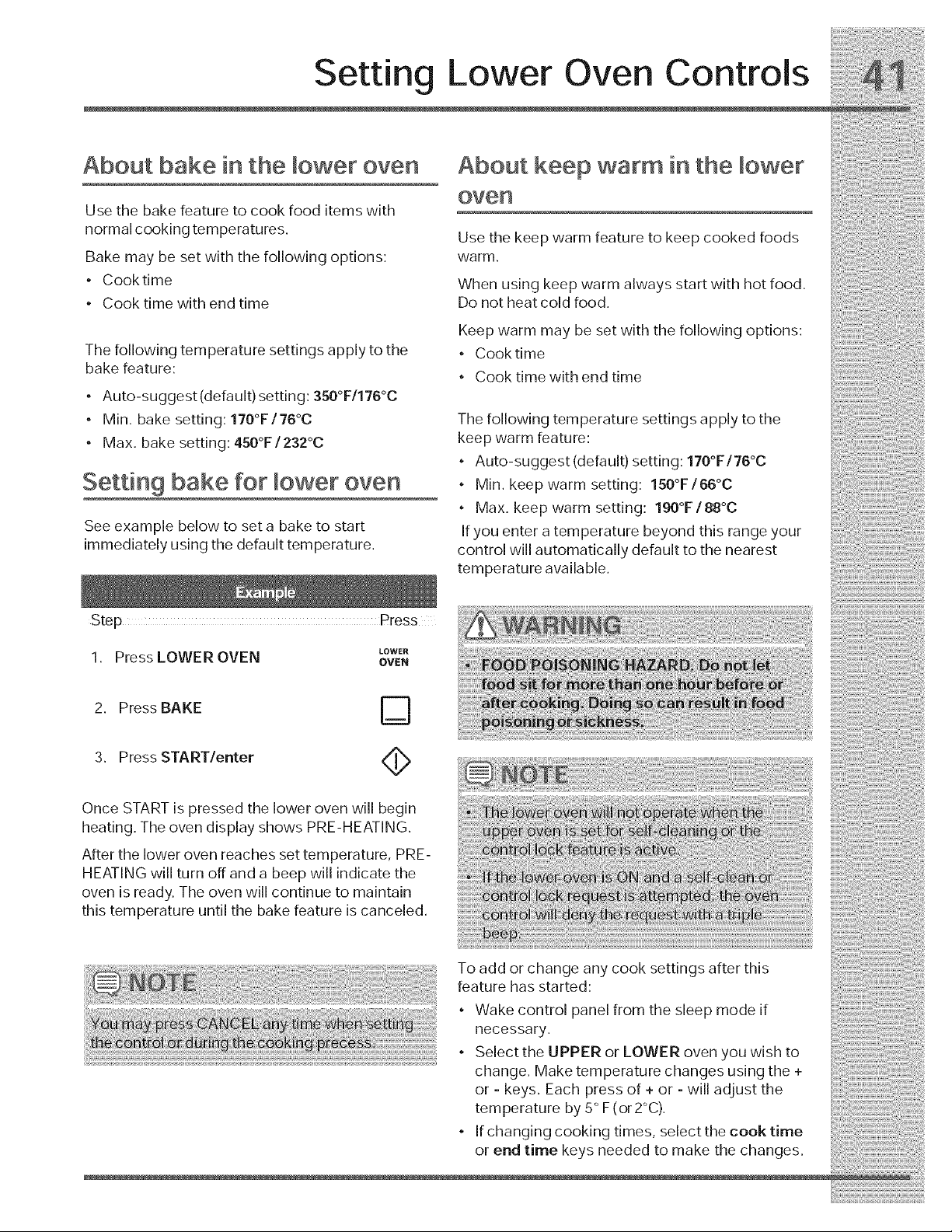
See example below to set a bake to start
immediately using the default temperature.
Step Press
About keep warm in the lower
Use the keep warm feature to keep cooked foods
warm.
When using keep warm always start with hot food.
Do not heat cold food.
Keep warm may be set with the following options:
° Cook time
° Cook time with end time
The following temperature settings apply to the
keep warm feature:
° Auto-suggest(default) setting: 170°F/76°0
° Min. keep warm setting: 150°F/66°0
° Max. keep warm setting: 190°F/88°0
If you enter a temperature beyond this range your
control will automatically default to the nearest
temperature available,
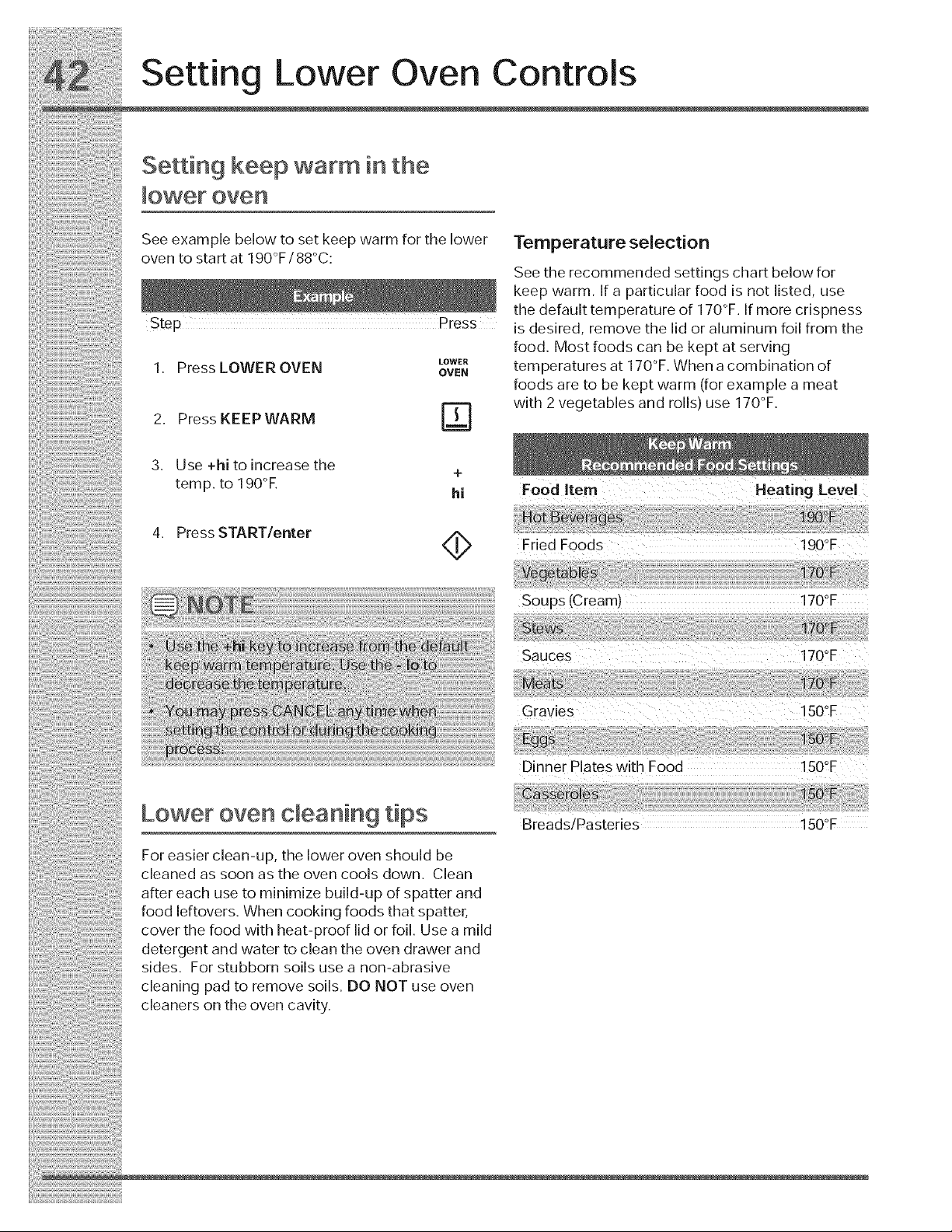
Soups(Cream)!70+F
DinnerPlatesWithF00d 150OF
Lower oven cleaning tips
For easier clean-up, the lower oven should be
cleaned as soon as the oven cools down. Clean
after each use to minimize build-up of spatter and
food leftovers. When cooking foods that spatter,
cover the food with heat-proof lid or foil. Use a mild
detergent and water to clean the oven drawer and
sides. For stubborn soils use a non-abrasive
cleaning pad to remove soils. DO NOT use oven
cleaners on the oven cavity.
BreadsiPasteries 150°F
Setting Your Preferences
About user preferences with
The (_ key controls options for preferences. The
display will show a digital abbreviation and a value
for every preference each time a key is pressed
one at a time.
Please read the following instructions before
changing the user preferences functions:
• Press and continue to press USER PREF _(:_._to
navigate through the preferences.
• Press or to toggle between options for
hi I0
each preference.
+
• Press hi or Io to increase or decrease numeric
values. You may also use the numeric keys to
input precise values.
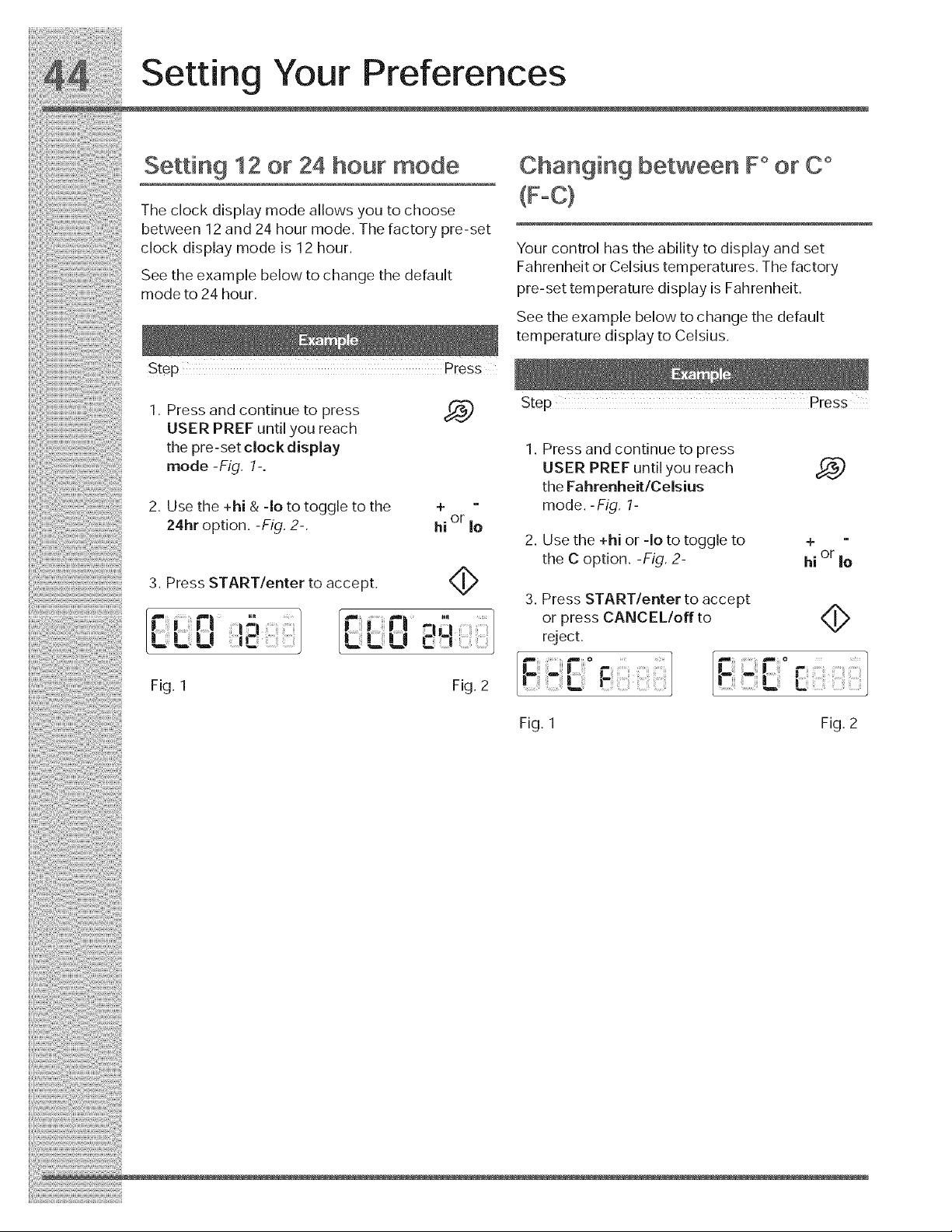
Setting clock display (CLO)
The clock display mode allows you to turn the
clock display on or off.
See the example below to change the clock
display to OFF,
Step Press
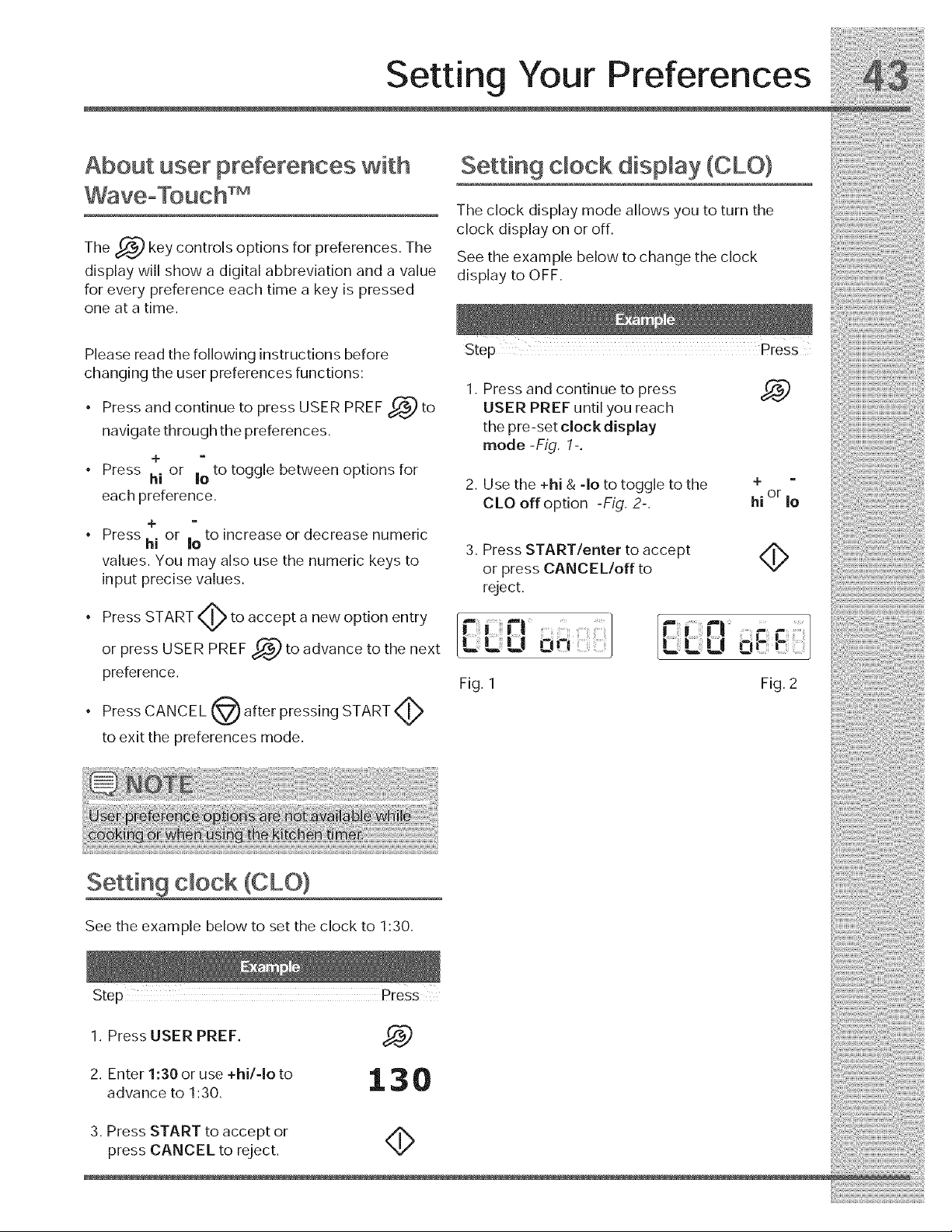
1. Press and continue to press
USER PREF until you reach
the pre-set clock display
mode-Fig. 1-.
2. Use the +hi & -Io to toggle to the
CLO off option -Fig. 2-.
+
or
hi [o
3. Press START/enter to accept
or press CANCEL/off to
reject.
4>
_5_!i_Ji_!_i_!_!_i!_i_i_i_!i_!_i_:_!i_!_!_i!ii_!:_:_!_!_!;_=_i_!_i_!_!_!_!
44 Setting Your Preferences o o
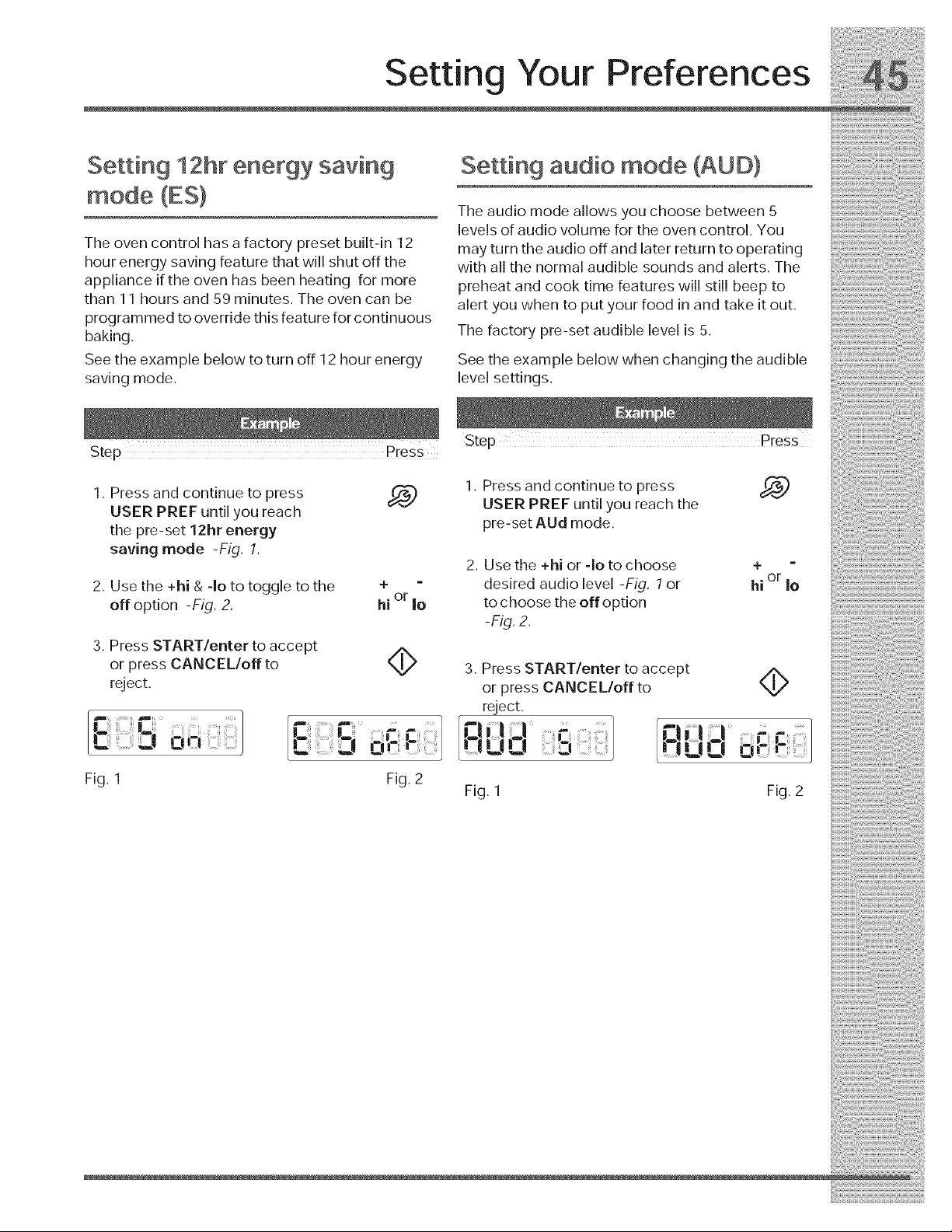
Setting 12 or 24 hour mode Changing between F or C
{F-c)
between 12and24hourmode. Thefactorypre-set
dock display mode is 12 hour. Your control has the ability to display and set
i Fahrenhe torCe s ustemperatures The factory
See the example below to change the default
modeto24hour, pre-settemperaturedisplayis Fahrenheit,
Seetheexamplebelowtochangethedefault
temperat°re=,_p,a_toOe,_,°_.
1, Pressandcontinuetopress _ P
USER PREF until you reach
thepre-setclockdisplay 1 Pressandcontnuetopress
mode-Fig, 1-. USERPREFuntilyoureach
theFahrenheit/Celsius
2. Usethe+hi& -Iototoggletothe + = mode.-Fig, 1-
24hroption. -Fig, 2-, hi °r lo
2. Use the +hi or -Io to toggle to +
............................................................ the C option. -Fig, 2- hi or Io
3. Press START/enter to accept,
L: L[
Fig, 1 Fig, 2
3. Press START/enter to accept
or press CANCEL/off to
reject,
..................,
Fig. 1 Fig. 2
Setting Your Preferences
Setting 12hr energy saving
mode (ES}
The oven control has a factory preset built-in 12
hour energy saving feature that will shut off the
appliance if the oven has been heating for more
than 11 hours and 59 minutes, The oven can be
programmed to override this feature for continuous
baking.
See the example below to turn off 12 hour energy
saving mode.
Step Press
Setting audio mode (AUD}
The audio mode allows you choose between 5
levels of audio volume for the oven control. You
may turn the audio off and later return to operating
with all the normal audible sounds and alerts. The
preheat and cook time features will still beep to
alert you when to put your food in and take it out.
The factory pre-set audible level is 5.
See the example below when changing the audible
level settings.
1. Press and continue to press
USER PREF until you reach
the pre-set 12hr energy
saving mode -Fig. 1.
2. Use the +hi & -Io to toggle to the
off option -Fig. 2.
3. Press START/enter to accept
or press CANCEL/off to
reject.
Fig, 1
+
or
hi 1o
1. Press and continue to press
USER PREF until you reach the
pre-set AUd mode.
2. Use the +hi or -Io to choose
desired audio level -Fig. I or
to choose the off option
-Fig. 2.
+
or
hi Io
3. Press START/enter to accept
or press CANCEL/off to
reject.
C! _ It! CI
U C| :m U
Fig.1 Fig.2
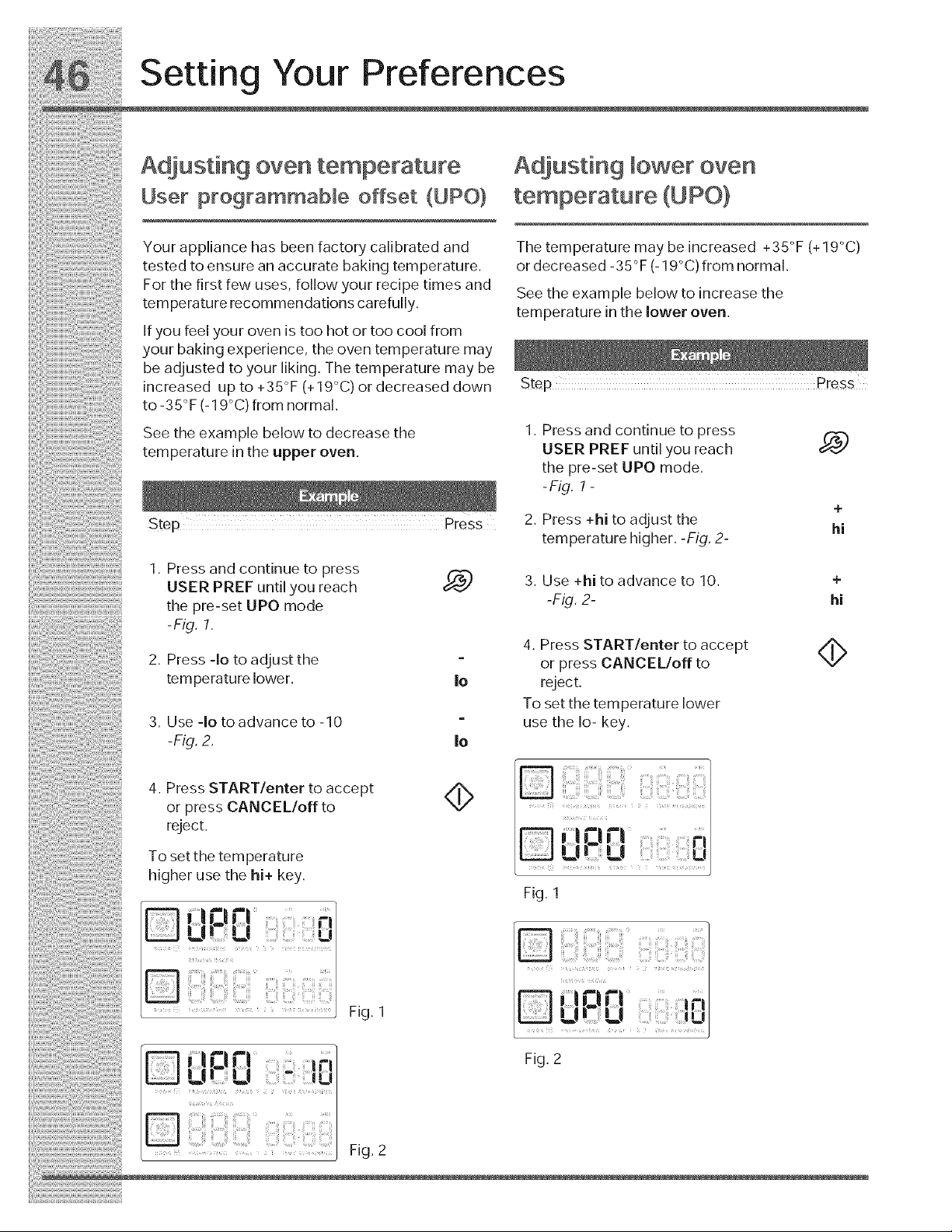
Setting Your Preferences
Adjusting oven temperature Adjusting lower oven
User programmable offset (UPO) temperature(UPO)
Your appliance has been factory calibrated and
tested to ensure an accurate baking temperature.
For the first few uses, follow your recipe times and
temperature recommendations carefully.
If you feel your oven is too hot or too cool from
your baking experience, the oven temperature may
be adjusted to your liking. The temperature may be
increased up to +35°F (+19°C) or decreased down
to -35°F (-19°C) from normal.
See the example below to decrease the
temperature in the upper oven.
The temperature may be increased +35°F (+19°C)
or decreased -35°F (- 19°C) from normal.
See the example below to increase the
temperature in the lower oven.
1.
2.
Press and continue to press
USER PREF until you reach
the pre-set UPO mode.
-Fig. l-
Press +hi to adjust the
temperature higher. -Fig. 2-
+
hi
1.
2.
3.
Press and continue to press
USER PREF until you reach
the pre-set UPO mode
-Fig. l.
Press -1o to adjust the
tern perature lower.
Use -Io to advance to -10
-Fig. 2.
4. Press START/enter to accept
or press CANCEL/off to
reject.
To set the tern perature
higher use the hi+ key.
Fig. 1
Io
3. Use +hi to advance to 10.
-Fig. 2-
4. Press START/enter to accept
or press CANCEL/off to
reject.
To set the temperature lower
use the Io- key.
Fig. 2
+
hi
4>
_ Fig. 2
i_i!_!_i!i_ii_!i!_!_i!i_ii_!i!_!_i!i_ii_!i!_!_i!i_ii_!i!_!_i!i_ii_!i!_!_i!i_ii_!i!_!_i!i_ii_!i!_!_i!i_ii_!i!_!_i!i_ii_!i!_!_i!i_ii_!i!_!_i!i_i
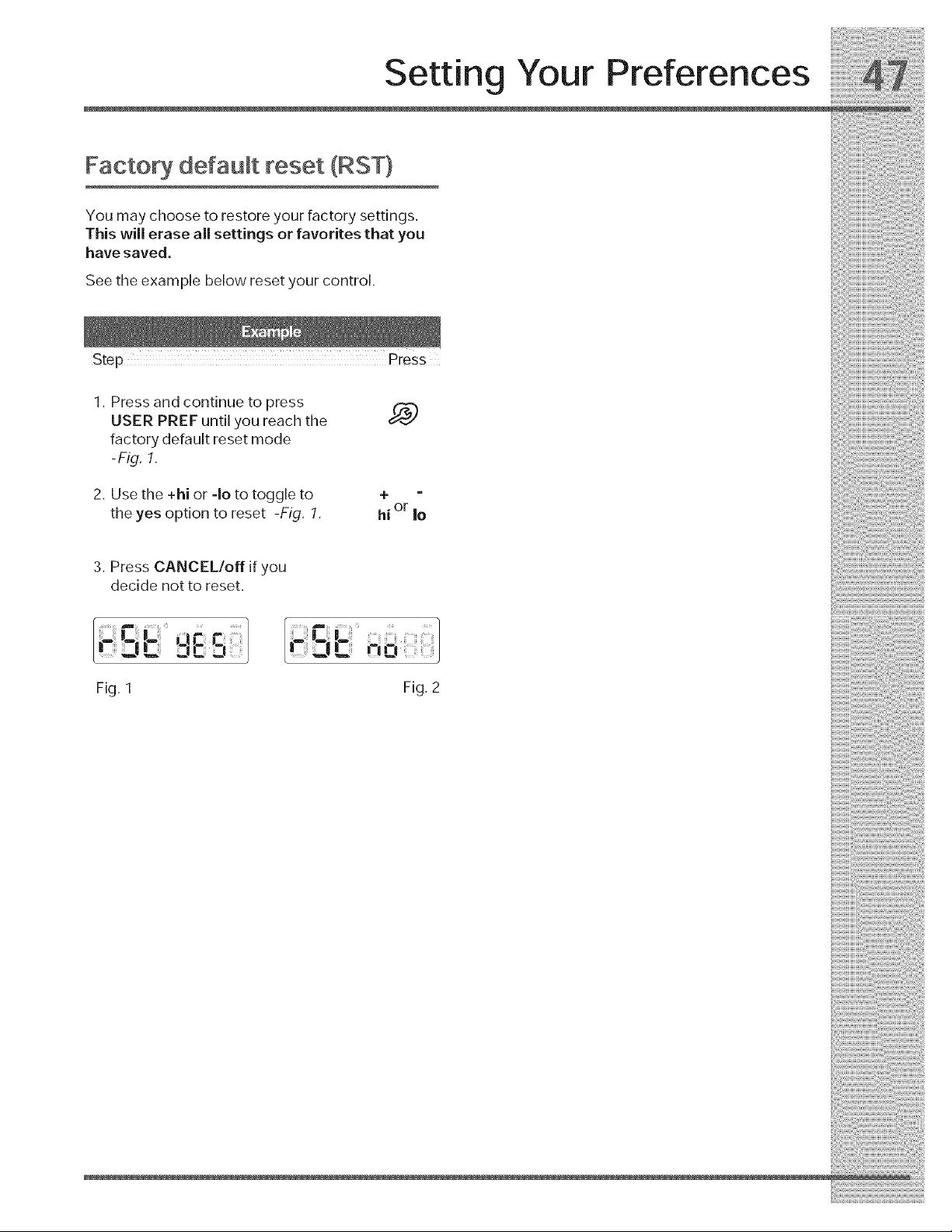
Setting Your Preferences
Factory default reset (RST)
You may choose to restore your factory settings.
This will erase all settings or favorites that you
have saved.
See the example below reset your control,
1. Press and continue to press
USER PREF until you reach the
factory default reset mode
-Fig. 1.
2. Use the +hi or -Io to toggle to
the yes option to reset -Fig, 1,
+
or
hi io
3. Press CANCEL/off if you
decide not to reset,
uc 3
,it r:
Fig. 1
/,-....................../
b ,-,,:,
Fig. 2
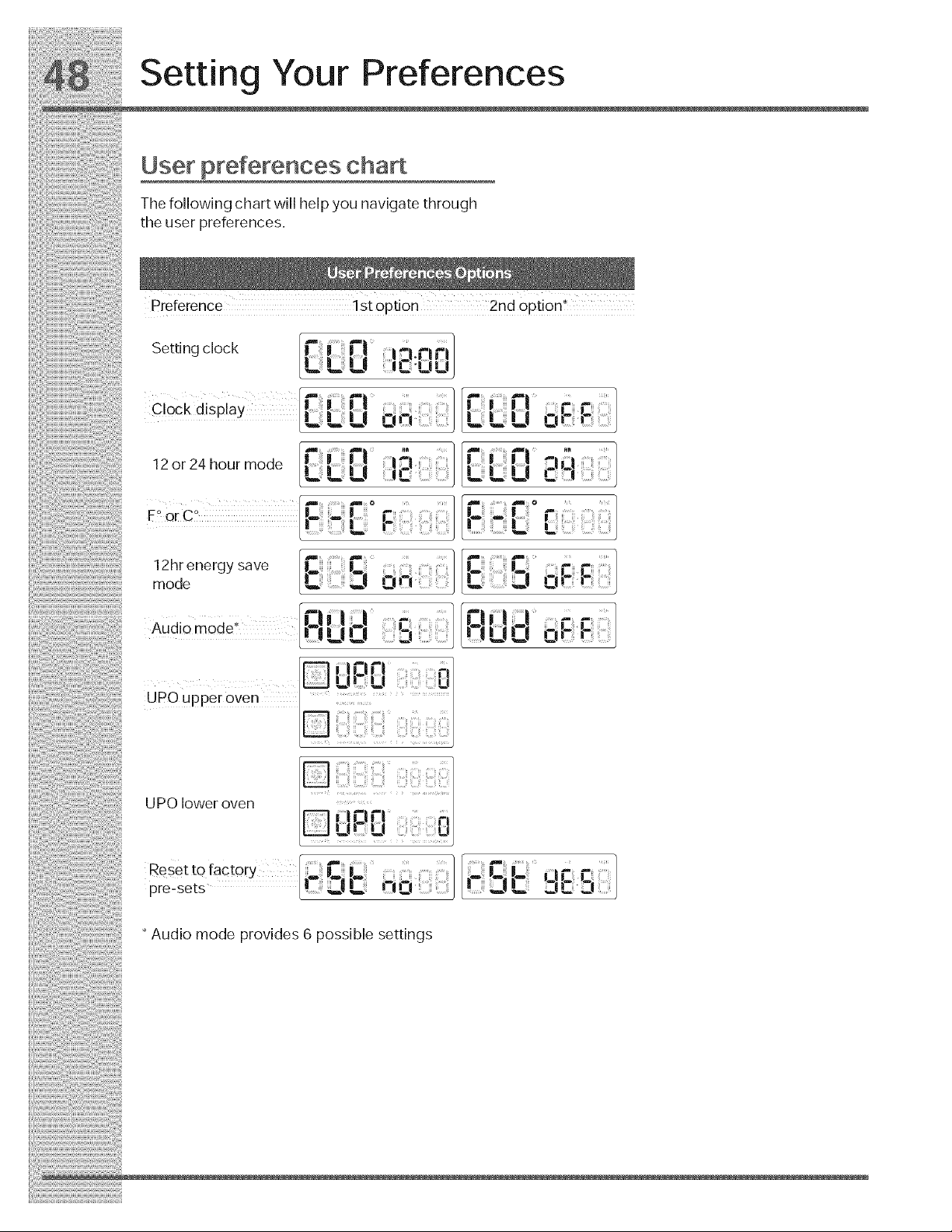
Setting Your Preferences
User preferences chart
The following chart will help you navigate through
the user preferences.
Preference 1st option 2nd option*
man
Setting clock _ LI IC'U U
p ....
C'ock U
FI....12 or 24 hourmode L|
Fi0rci ......F......
r_,,
12hr energy save C:
mode _ _1
L
AudIo m0de_ IFIIuoil_!
U PO lower oven il CI _1 £i
U I U _lJ
r_,-
U
U 0 0 i-
Reset to factory .......... i itF C
pre-sets _| E I-t C| ! ,_t _.i C _1'"
* Audio mode provides 6 possible settings
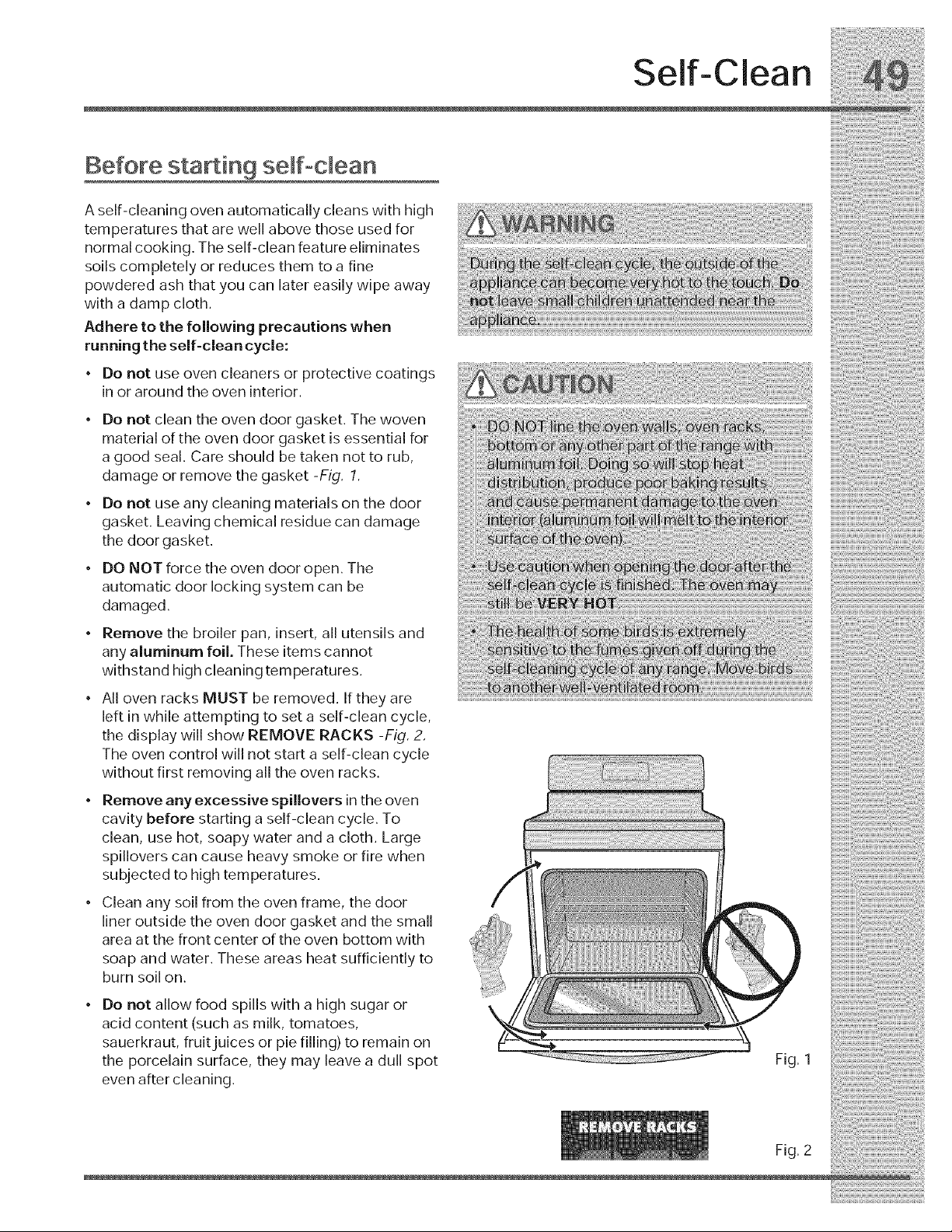
Before starting se[foc[ean
A self-cleaning oven automatically cleans with high
temperatures that are well above those used for
normal cooking. The self-clean feature eliminates
soils completely or reduces them to a fine
powdered ash that you can later easily wipe away
with a damp cloth.
Adhere to the following precautions when
running the self-clean cycle:
• Do not use oven cleaners or protective coatings
in or around the oven interior.
• Do not clean the oven door gasket. The woven
material of the oven door gasket is essential for
a good seal. Care should be taken not to rub,
damage or remove the gasket -Fig. 7.
• Do not use any cleaning materials on the door
gasket. Leaving chemical residue can damage
the door gasket.
• DO NOT force the oven door open. The
automatic door locking system can be
damaged.
Self-Clean
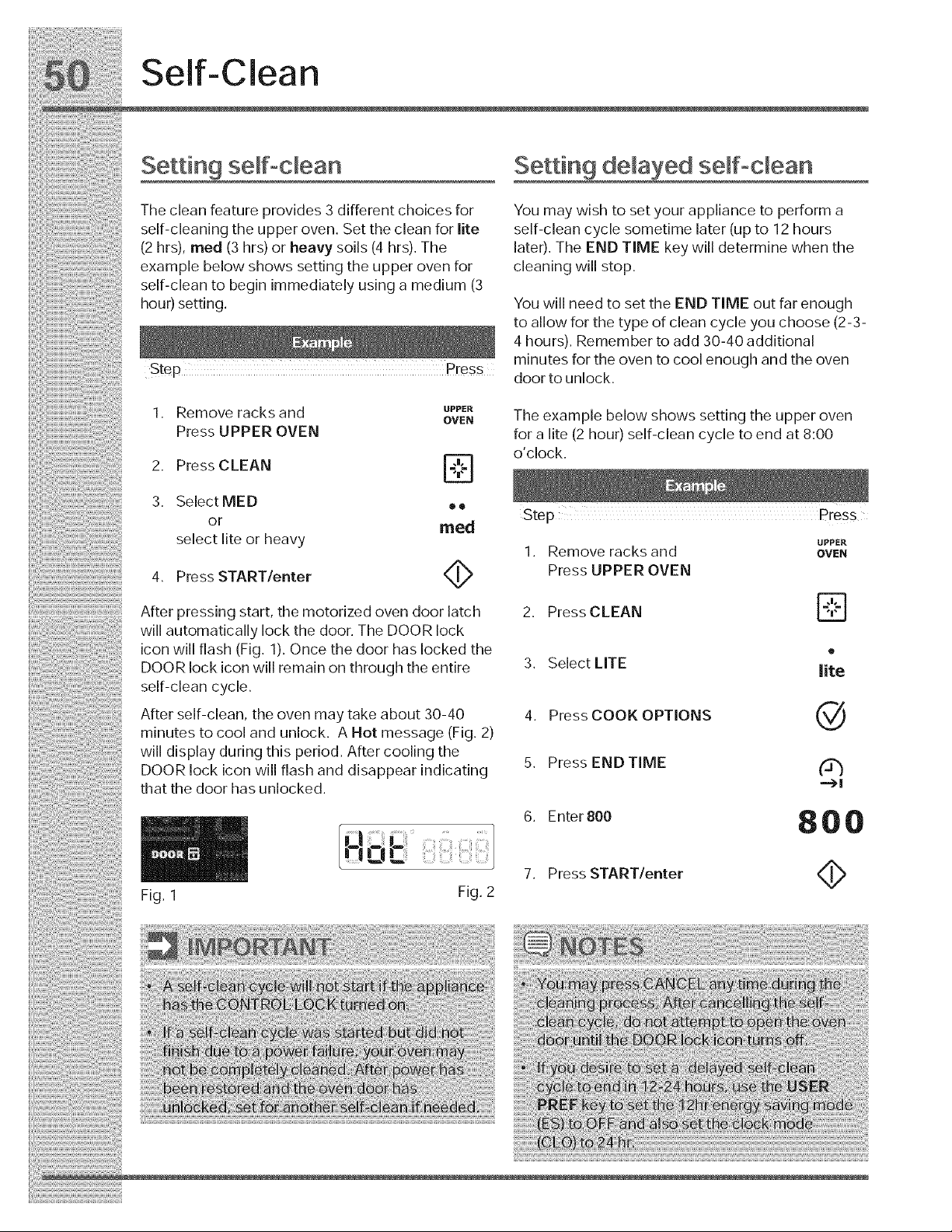
Care and Cleaning
• Aluminum (trim pieces) & vinyl
Use hot, soapy water and a cloth. Dry with a
clean cloth.
Painted and plastic control knobs
Body parts,
Painted decorative trim
• Chrome control panel (some models)
• Decorativetrim (some models)
• Stainlesssteel(somemodels)
Forgeneral cleaning, use hot. soap:y water and a
cloth. For more difficult soils and built-up grease.
apply a liquid detergent directly onto the soil.
Leave on soil for 30 to 60 minutes. Rinse with a
damp cloth and dry. Do not use abrasive
cleaners on any of these materials; they can
scratch. To remove control knobs, turn to the OFF
position: grasp firmly and pull straight off the
shaft. To replace knobs after cleaning, line up the
flat sides of both the knob and the shaft: then
push the knob into place
Before cleaning the control panel, turn all controls
to OFF and remove the control knobs. To remove,
pull each knob straight off the shaft. Clean using
hot, soapy water and a dishcloth. Rinse with a
clean water using a dishcloth. Be sure to squeeze
excess water from the cloth before wiping the
panel; especially when wiping around the
controls. Excess water in or around the controls
may cause damage to the appliance.To replace
knobs after cleaning, line up the flat sides of both
the knob and the shaft; then push the knob into
place.
Stainless steel (some models). Clean the stainless
with warm soapy water using a clean sponge or
cloth. Rinse with clean water and dry with a soft
clean cloth. Do not use harsh scrubbing cleaners.
Only use kitchen cleaners that are especially
made for cleaning Stainless Steel. Always be sure
to rinse the cleaners from the surface as bluish
stains may occur during heating that cannot be
removed.
* PorCe ain enamel broiler pan and Gentle Scouring with a Soapy Scounng pad will
insert (if equipped)remove m0st sp0ts, Rinse with a 1:i Solution of
.-, i: , _ Clear water and ammonia, if necesSary, cover
uoor I her e Doay par1:s ....
dlfflcu t spots with an ammonia-soaked paper
. For Lower Oven cleaning towel for 30 to 40 minutes. Rinse with Clean water
instructions see the Lower Oven and a damp C!oth, and then Scrub with a soap_
section, filled scouring pad. Rinse and wipe dry with a
clean cloth, Remove al! cleaners or the porcelain
may become damaged during future heating. Do
not use spray oven cleaners on the cooktop.
ci ii0ceaoo0
• yp Cleaning Recommendation
Oven racks Oven racks must be removed. Clean by using a
mild, abrasive cleaner following manufacturer's
, instructions. Rinse with clean water and dry.
Oven door Use soap & water to thoroughly clean the top
sides and front of the oven door, Rinse well. You
may use a glass cleaner on the outside glass of the
oven door. Do not immerse the door in water. Do
not spray or allow water or the glass cleaner to
enter the door vents. Do not use oven cleaners,
cleaning powders or any harsh abrasive cleaning
materials on the outside of the oven door,
Do not clean the oven door gasket, The oven door
gasket is made of a woven material on Self-
Cleaning models, which is essential for a good
seal. Care should be taken not to rub, damage or
remove this gasket.
• Burner heads, caps, grates & the cooktop See' Cleaning cooktop and parts in the Care and
Cleaning section.
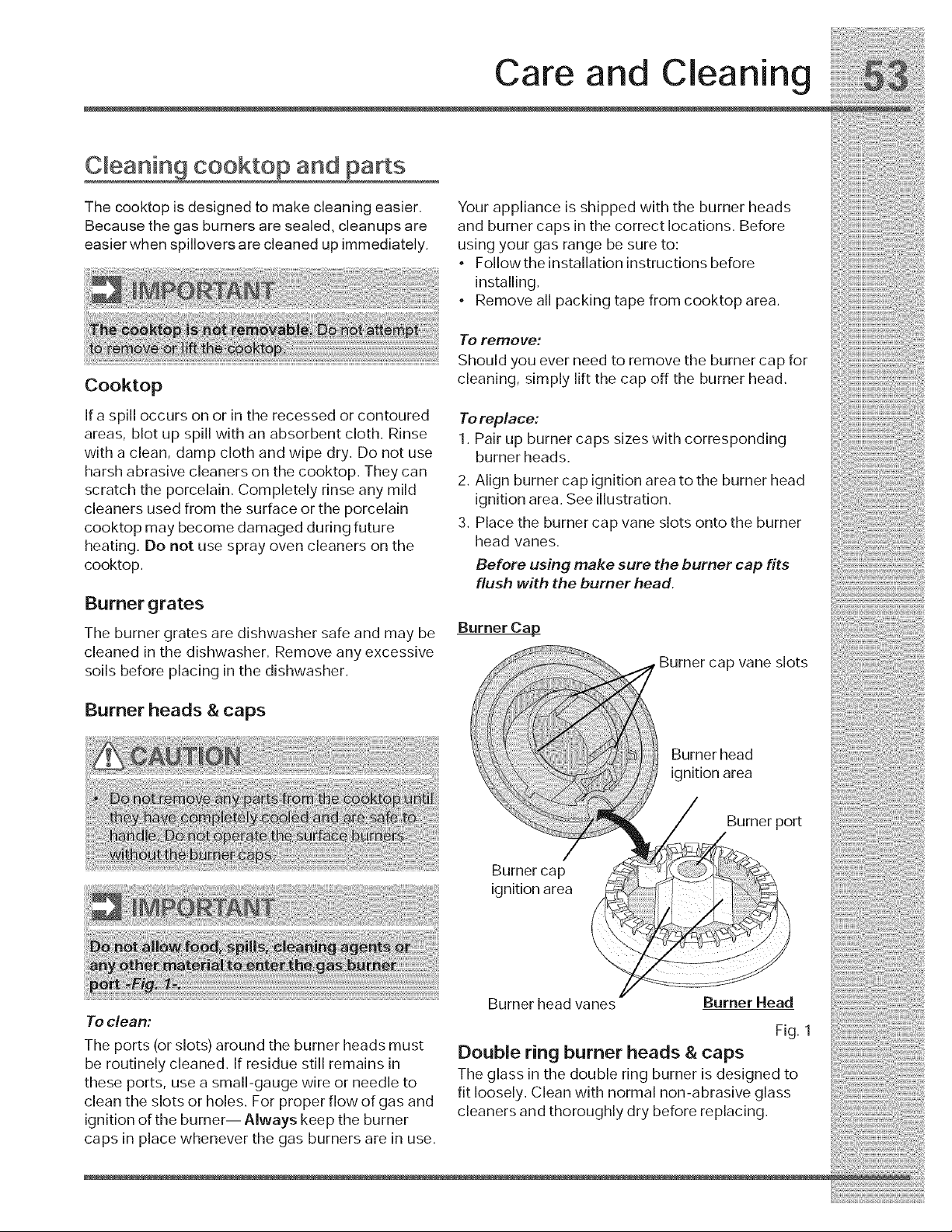
Care and Cleaning
Cleaning cooktop and Darts
The cooktop is designed to make cleaning easier.
Because the gas burners are sealed, cleanups are
easier when spillovers are cleaned up immediately.
Cooktop
Ifa spill occurs on or in the recessed or contoured
areas, blot up spill with an absorbent cloth. Rinse
with a clean, damp cloth and wipe dry. Do not use
harsh abrasive cleaners on the cooktop. They can
scratch the porcelain. Completely rinse any mild
cleaners used from the surface or the porcelain
cooktop may become damaged during future
heating. Do not use spray oven cleaners on the
cooktop.
Burner grates
Your appliance is shipped with the burner heads
and burner caps in the correct locations. Before
using your gas range be sure to:
• Followtheinstallation instructions before
installing.
• Remove all packing tape from cooktop area.
To remove:
Should you ever need to remove the burner cap for
cleaning, simply lift the cap off the burner head.
To replace:
1. Pair up burner caps sizes with corresponding
burner heads.
2. Align burner cap ignition area to the burner head
ignition area. See illustration.
3. Place the burner cap vane slots onto the burner
head vanes.
Before using make sure the burner cap fits
flush with the burner head,
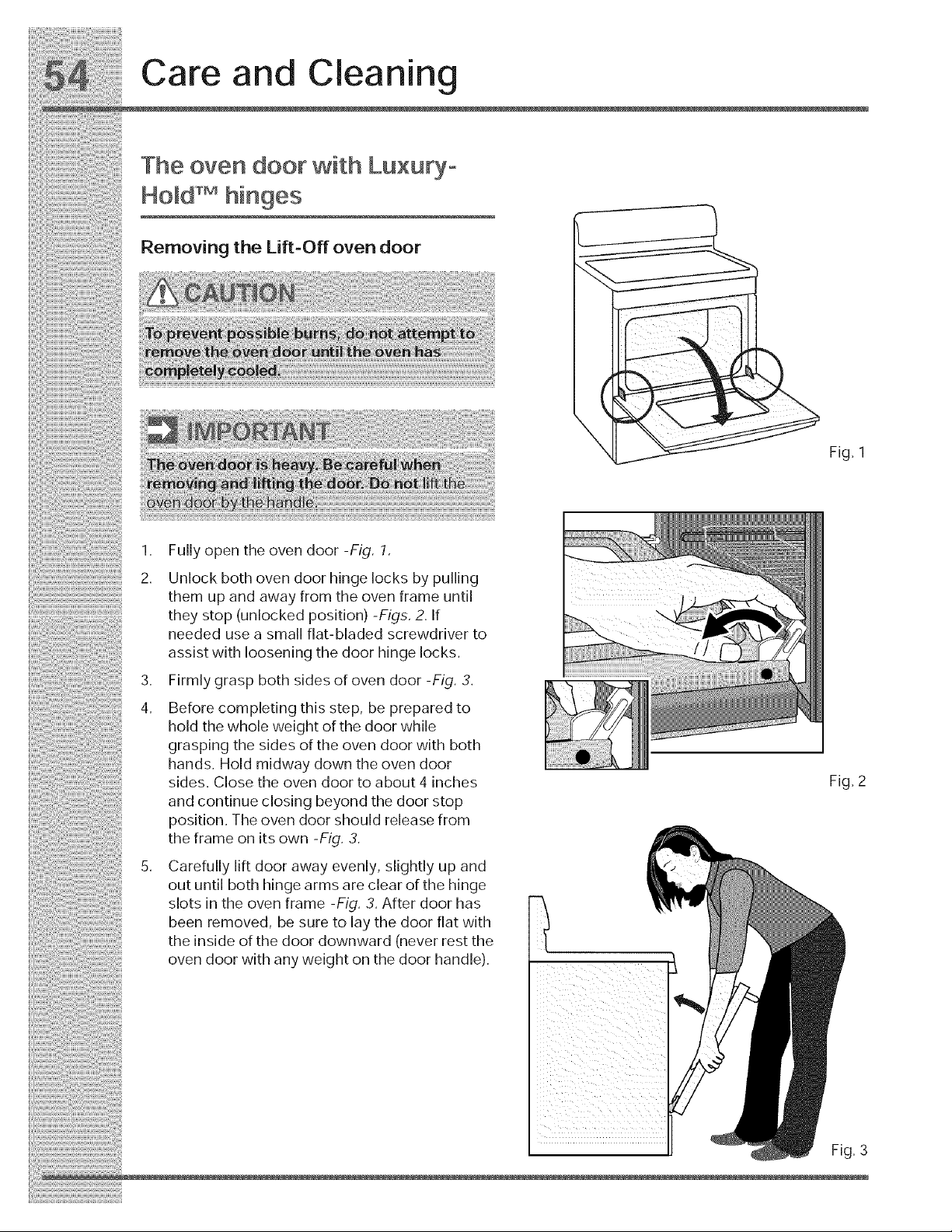
2. Unlock both oven door hinge locks by pulling
them up and away from the oven frame until
they stop (unlocked position) -Figs. 2. If
needed use a small flat-bladed screwdriver to
assist with loosening the door hinge locks.
3. Firmly grasp both sides of oven door -Fig. 3.
4. Before completing this step, be prepared to
hold the whole weight of the door while
grasping the sides of the oven door with both
hands. Hold midway down the oven door
sides. Close the oven door to about 4 inches
and continue closing beyond the door stop
position. The oven door should release from
the frame on its own -Fig. 3.
5. Carefully lift door away evenly, slightly up and
out until both hinge arms are clear of the hinge
slots in the oven frame -Fig. 3. After door has
been removed, be sure to lay the door flat with
the inside of the door downward (never rest the
oven door with any weight on the door handle).
Fig. 2
Fig. 3
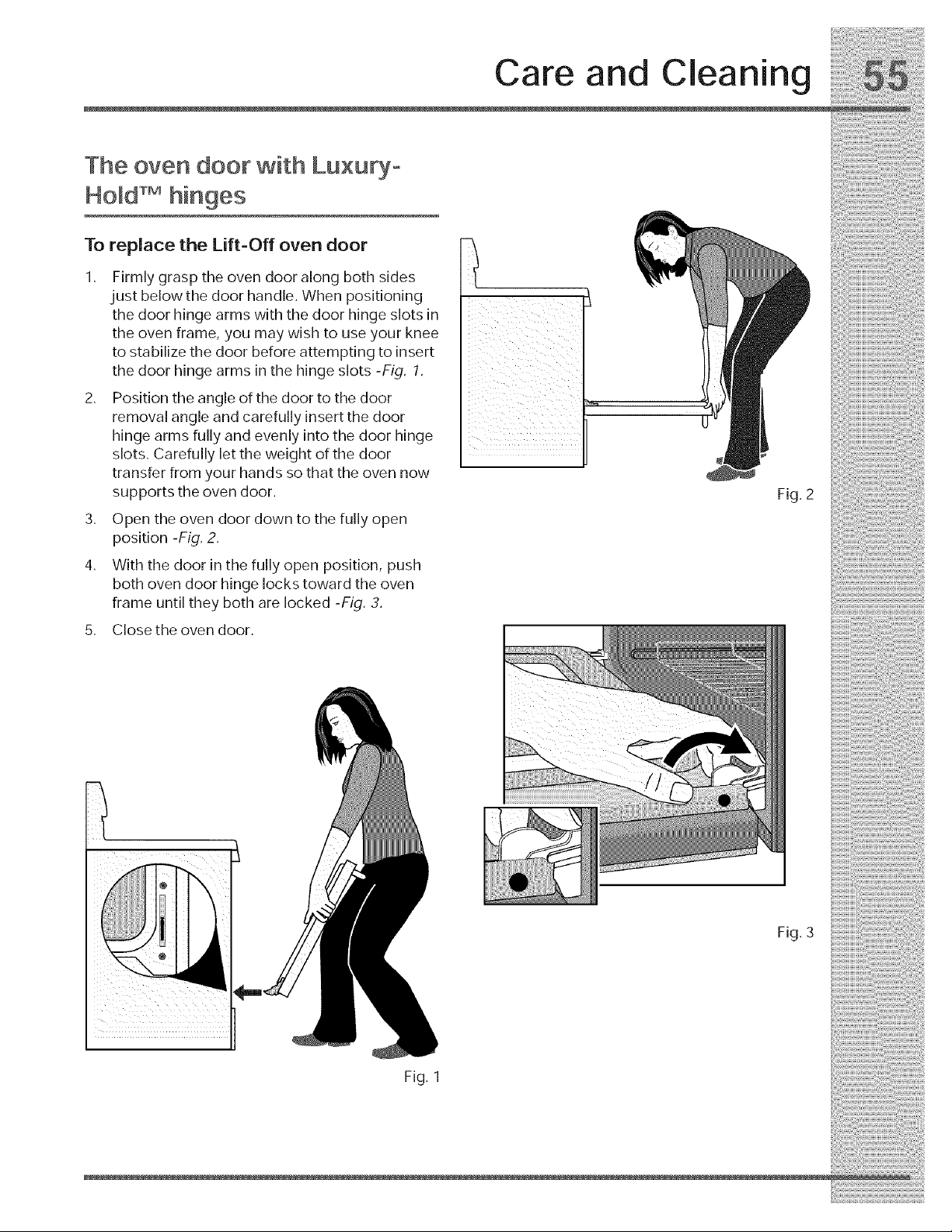
iiiii#_i!i!ii!_i:i_i:i_i_#!ii_!ii_i##_i_i_!i:_i_i_!!#_i_i!_i_i!_i_i!_i_i!S_!i_!_!;_
Care and Cleaning
The oven door with Luxuryo
Ho d h nges
To.e.,oce,.e..-o.o e°.oo.
1. Firmlygrasp the oven door alongbothsides _ _
j u st below t he door handie. When po sitio ning
the door hinge arms with the door hinge slots in
the oven frame, you may wish to use your knee
to stabilize the door before attempting to insert
the door hinge arms in the hinge slots -Fig. 1.
2. Position the angle of the door to the door --,
remova I a ng le and ca refully in sert the door
hinge arms fully and evenly into the door hinge
slots. Carefully let the weight of the door
transfer from your hands so that the oven now
supports the oven door. Fig. 2
3. Open the oven door down to the fully open
position -Fig. 2.
4. With the door in the fully open position, push
both oven door hinge locks toward the oven
frame until they both are locked -Fig. 3.
5. Close the oven door.
Fig. 3
Fig. 1
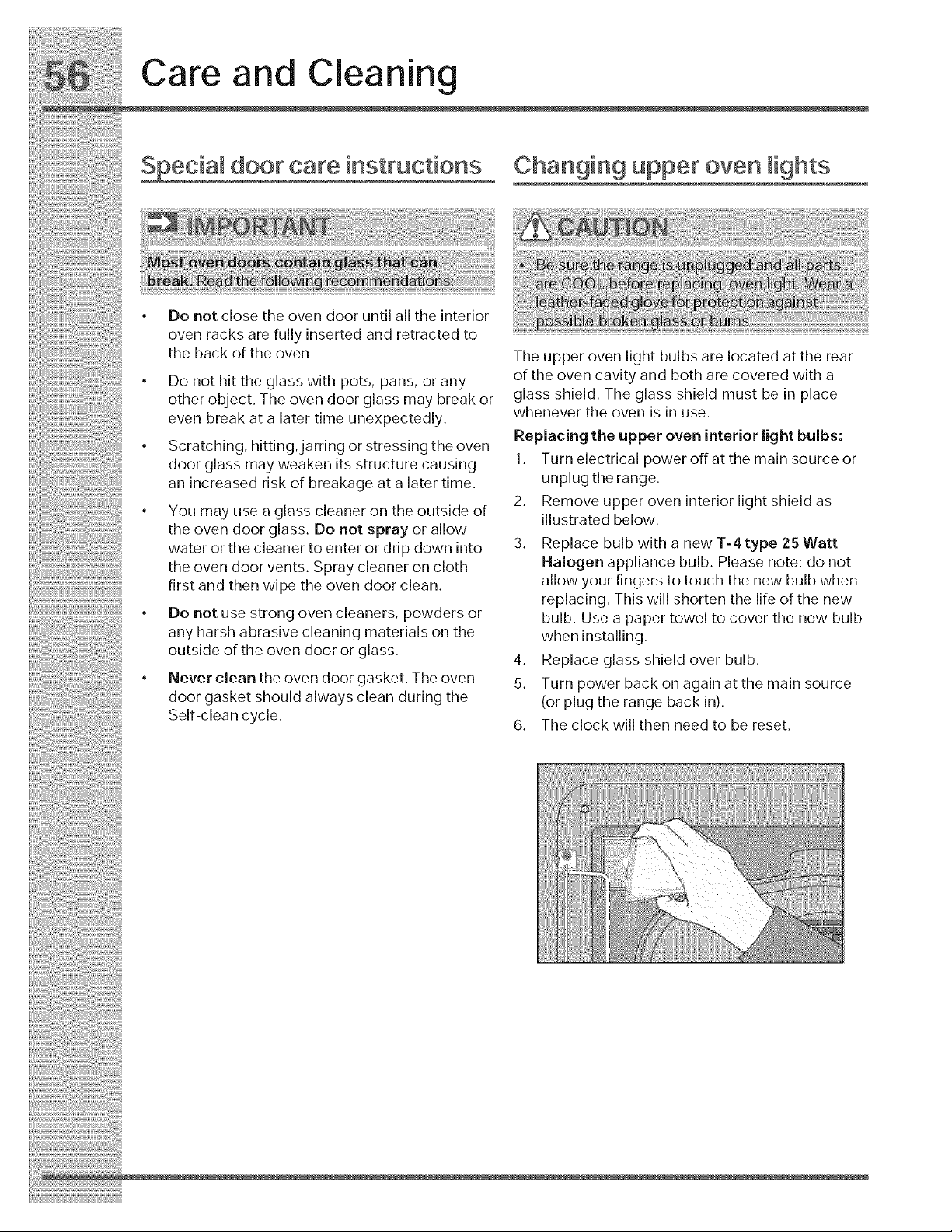
.
1_ii!i_!_!_!i_ii_i_i_i!_i!ii!i!iiii_!iiii_!iiii!_i_!_i_!i_!ii_i_iii_i_!!!_!_i!_i!_i_!_i_!!ii_!:i!ii_i_!!!i!!z!!_!_!!!_!i:!
Care and Cleaning
Special door care instructions Changing upper oven lights
i .......................................................................................................................................................................................................................................
Do notcosethe_ oven doorunt a the nteror B N _::: ::
oven racks are Tullyinsertea and retracted to
thebackoftheoven. Theupperovenlightbulbsarelocatedattherear
• Do not hit the -lass with _ots _ans or an of the oven cav ty and both are covered w th a
L3 _a , p , v . . .
otherobject. Theoven doorglass may breakor glass sh,eld. The glass sh,eld must be m place
even breakata latertime unexpectedly, wheneverthe oven ,s m use.
• Rep ac ng the upper oven nter or ght bu bs
Scratching, hitting,jarring or stressing the oven
door -lass ma weaken its structure causin - 1 Turn e ectr ca power off at the man source or
LJ v LJ
an increased riskofbreakageata latertime, unplugtherange.
• 2 Remove upper oven nter or ght she d as
You may use a g ass c eaner on the outs de of
ustrated De OW
:, the oven aoor glass, uo not spray or aHow
3 Replace bulb with a new T 4type 25 Watt
waterorthecleanertoenterordripdowninto . . "
Halogen apphance bulb Please note do not
theoven doorvents. Spraycleaneroncloth . :
first and then wi e the oven door clean allow your fingers to touch the new bulb when
..... P .
replacing. This will shorten the life of the new
Do not use strong oven cleaners, powders or
any harsh abrasive cleaning materials on the
outside of the oven door or glass.
Never clean the oven door gasket. The oven
door gasket should always clean during the
Self-clean cycle.
bulb. Use a paper towel to cover the new bulb
when installing.
4. Replace glass shield over bulb.
5. Turn power back on again at the main source
(or plug the range back in).
6. The clock will then need to be reset.
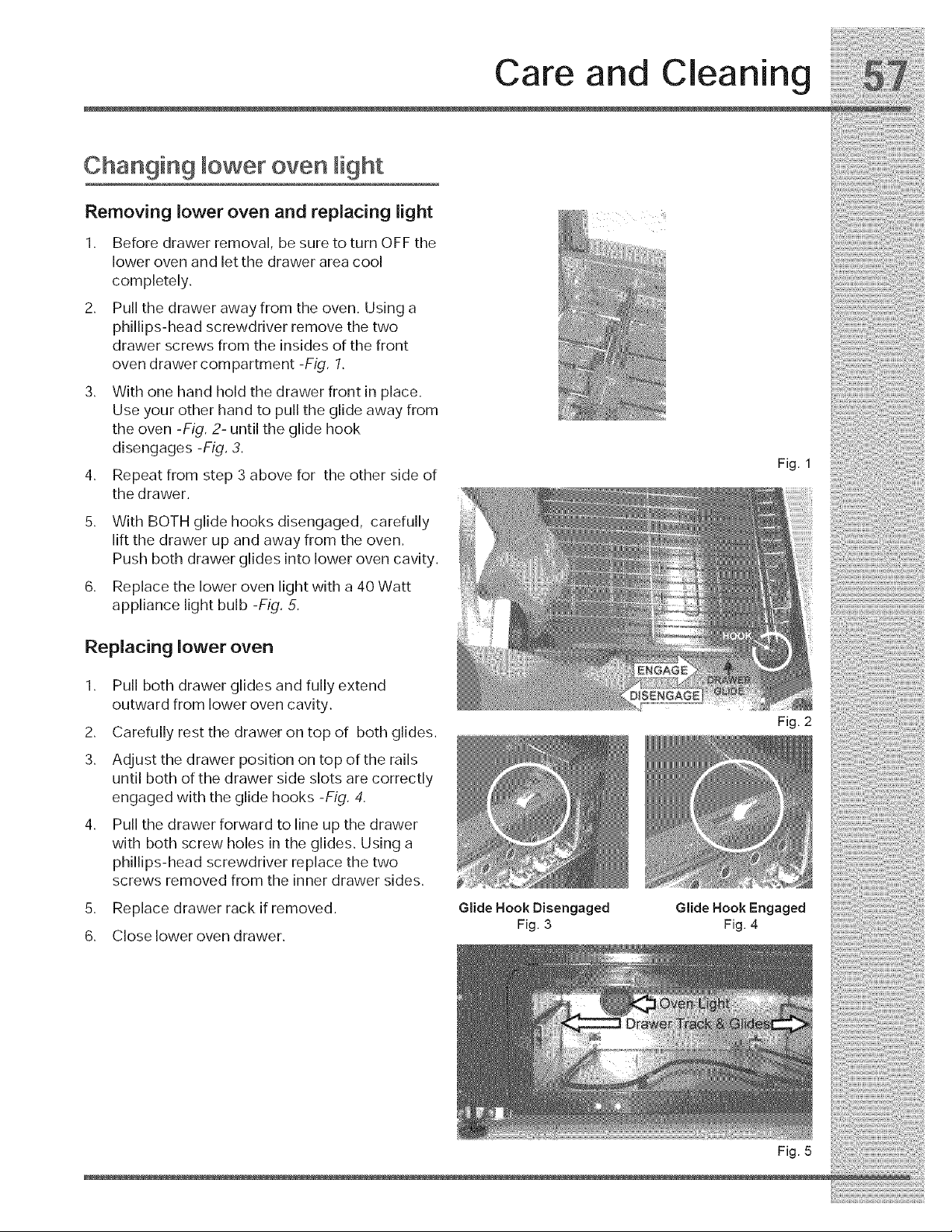
Care and Cleaning
Changing lower oven light
Removing lower oven and replacing light
1. Before drawer removal, be sure to turn OFF the
lower oven and let the drawer area cool
completely.
2. Pull the drawer away from the oven. Using a
phillips-head screwdriver remove the two
drawer screws from the insides of the front
oven drawer compartment -Fig. 1.
3. With one hand hold the drawer front in place.
Use your other hand to pull the glide away from
the oven -Fig. 2- until the glide hook
disengages -Fig, 3.
4. Repeat from step 3 above for the other side of
the drawer.
5. With BOTH glide hooks disengaged, carefully
lift the drawer up and away from the oven.
Push both drawer glides into lower oven cavity.
6. Replace the lower oven light with a 40 Watt
appliance light bulb -Fig. 5.
Fig. 1
Solutions to Common Problems
Beforeyou carl for service, review the following list. It may save you time & expense. The list includes
common occurrences that are not the result of defective workmanship or materials in this appliance.
Problem Solution
Appliance is not level
• Be sure floor is level, strong & stable enough to
adequately support appliance.
• If floor is sagging or sloping, contact a carpenter to
correct the situation.
° Poor installation. Place oven rack in center of oven.
Place a level on the oven rack. Adjust leveling legs at
base of appliance until the oven rack is level.
• Kitchen cabinet alignment may make appliance appear
not level. Be sure cabinets are square & have sufficient
room for appliance clearance.
Cannot move appliance easilyl" Cabinets not square or are built in too tightly. Contact
App ance must beaccess b efor builder or installer to make appliance accessible.
serv!ce , Carpet interferes With appliance. Provide Sufficient
space so appliance can be lifted over carpet.
Surface burners do not light Surface control knob has not been completely turned
to_ (lite). Push in and turn the surface control knob to
lite until burner ignites and then turn control knob to
desired flame size.
° Burner ports are clogged. With the burners OFF, use a
small-gauge wire or needle to clean ports. See
"Cleaning cooktop and parts" in the Care and Cleaning
section for complete instructions.
• Appliance power cord is disconnected from outlet. Be
sure power cord is securely plugged into the electrical
outlet.
Electrical power outage.
Surface burner flame burns halfway
around.
• Burner ports are clogged. With the burner OFF. c ean
0orts by usirg a small-gauge wire or needle.
Moisture s present after cleaning, Lightly fan the flame
and allow burner to operate until flame is full. Dry the
burners thoroughly and follow instructions unde[
"Cleaning cooktop and parts" in the Care and Cleaning
section.
Solutions to Common Problems
Surface burner flame is orange.
• Dust particles in main line. Allow the burner to operate a
few minutes until flame turns blue
. In coastal areas, a slightly orange flame is unavoidable
due to salt air.
oven does not operate Be Sure the oven Controls are Set properly for the desired
function. See Setting Oven Controls in this Use & Care
Guide or read the instructions Entire appliance does not
operate" in this checklist.
Entire appliance does not operate
• The time of day is not set. The time of day must first be
set in order to operate the oven. See "Setting the clock
at power up" in the Getting Started section.
• Be sure power cord is plugged correctly into electrical
outlet.
• Service wiring is not complete. Contactyour dealer,
installing agent or authorized service agent.
° Electrical power outage. Call your local electric company
for service.
°0ii t,oostocom iProb'ems
Oven smokes excessively during • Control not set properly. Follow broiling instructions under
broiling Setting Oven Controls.
Make sure oven door is closed when broiling.
Meat too close to the broil burner. Reposition the broil
rack to provide proper clearance between the meat & the
, element. Preheat the broil burner for searing.
Meat not properly prepared. Remove excess fat from
meat. Cut remaining fatty edges to prevent curling, but
° do not cut into lean.
Insert on broiler pan wrong side up & grease not draining.
Always place grid on the broiler pan with ribs up & slots
, down to allow grease to drip into pan (some models).
Grease has built up on oven surfaces. Regular cleaning is
necessary when broiling frequently. Old grease or food
spatters cause excessive smoking.
Flames inside oven or • Excessive spillovers in oven For example this will
smoking from oven vent happen for pie spillovers or large amounts of grease left
on the oven bot[om. WiDe up excessive spillovers before
starting oven If flames or excessive smoke are present
see "About broiling" in the Setting Oven Controls
section.
Oven control panel beeps &
displays any F code error (for
example FIO, F11, F13, F14,
F15, F20, F23, F25, F30, F31
or F90)
Oven control has detected a fault or error condition.
Press CANCEL to clear the display & stop beeping.
Try the bake or broil feature again. If the F code error
repeats, remove power supply to appliance, wait 5
minutes and then repower the appliance and set clock
for the time of day. Try the bake or broil feature again.
If the fault recurs, record fault and call for service.

N o t e $

Maor Appliance Warranty Information
Your appliance is covered by a one year limited warranty. For one year from your original date of purchase, Electrolux will
repair or replace any parts of this appliance that prove to be defective in materials or workmanship when such appliance is
installed, used, and maintained in accordance with the provided instructions. In addition, the glass cooktop or radiant surface
element of your appliance (excluding built-in and free-standing range appliances) is covered by a two through five year
limited warranty. During the 2nd through 5th years from your original date of purchase, Electrolux will provide a replacement
glass cooktop or radiant surface element for your appliance which has proven to be defective in materials or workmanship
when such appliance is installed, used, and maintained in accordance with the provided instructions.
Exclusions
This warranty does not cover the following:
1. Products with original serial numbers that have been removed, altered or cannot be readily determined.
2. Product that has been transferred from its original owner to another party or removed outside the USA or Canada.
3. Rust on the interior or exterior of the unit.
4. Products purchased "as-is" are not covered by this warranty.
5. Products used in a commercial setting.
6. Service calls which do not involve malfunction or defects in materials or workmanship, or for appliances not in
ordinary household use or used other than in accordance with the provided instructions.
7. Service calls to correct the installation of your appliance or to instruct you how to use your appliance.
8. Expenses for making the appliance accessible for servicing, such as removal of trim, cupboards, shelves, etc.,
which are not a part of the appliance when it is shipped from the factory.
9. Service calls to repair or replace appliance light bulbs, air filters, water filters, other consumables, or knobs,
handles, or other cosmetic parts.
10. Labor or in-home service costs during the additional limited warranty periods beyond the first year from your
original date of purchase.
11. Pickup and delivery costs; your appliance is designed to be repaired in the home.
12. Surcharges including, but not limited to, any after hour, weekend, or holiday service calls, tolls, ferry trip charges, or
mileage expense for service calls to remote areas, including the state of Alaska.
13. Damages to the finish of appliance or home incurred during transportation or installation, including but not limited to
floors, cabinets, walls, etc.
14. Damages caused by: services performed by unauthorized service companies; use of parts other than genuine
Electrolux parts or parts obtained from persons other than authorized service companies; or external causes such
as abuse, misuse, inadequate power supply, accidents, fires, or acts of God.
DISCLAIMER OF IMPLIED WARRANTIES; LIMITATION OF REMEDIES
CUSTOMER'S SOLE AND EXCLUSIVE REMEDY UNDER THIS LIMITED WARRANTY SHALL BE REPAIR OR REPLACE-
MENT AS PROVIDED HEREIN. CLAIMS BASED ON IMPLIED WARRANTIES, INCLUDING WARRANTIES OF MER-
CHANTABILITY OR FITNESS FOR A PARTICULAR PURPOSE, ARE LIMITED TO ONE YEAR OR THE SHORTEST
PERIOD ALLOWED BY LAW, BUT NOT LESS THAN ONE YEAR. ELECTROLUX SHALL NOT BE LIABLE FOR CONSE-
QUENTIAL OR INCIDENTAL DAMAGES SUCH AS PROPERTY DAMAGE AND INCIDENTAL EXPENSES RESULTING FROM
ANY BREACH OF THIS WRITTEN LIMITED WARRANTY OR ANY IMPLIED WARRANTY, SOME STATES AND PROVINCES
DO NOT ALLOW THE EXCLUSION OR LIMITATION OF INCIDENTAL OR CONSEQUENTIAL DAMAGES, OR LIMITATIONS ON
THE DURATION OF IMPLIED WARRANTIES, SO THESE LIMITATIONS OR EXCLUSIONS MAY NOT APPLY TO YOU. THIS
WRITTEN WARRANTY GIVES YOU SPECIFIC LEGAL RIGHTS, YOU MAY ALSO HAVE OTHER RIGHTS THAT VARY FROM
STATE TO STATE,
If You Need Service
Keep your receipt, delivery slip, or some other appropriate payment record to establish the warranty period should service be
required. If service is performed, it is in your best interest to obtain and keep all receipts. Service under this warranty must be
obtained by contacting Electrolux at the addresses or phone numbers below.
This warranty only applies in the USA, Puerto Rico and Canada. In the USA and Puerto Rico, your appliance is warranted by
Electrolux Major Appliances North America, a division of Electrolux Home Products, Inc. In Canada, your appliance is war-
ranted by Electrolux Canada Corp. Electrolux authorizes no person to change or add to any obligations under this warranty.
Obligations for service and parts under this warranty must be performed by Electrolux or an authorized service company.
Product features or specifications as described or illustrated are subject to change without notice.
USA
1-877-435-3287
Electrolux Major Appliances North America
RO. Box 212378
Augusta, GA 30907
Canada
1-800-265-8352
Electrolux Canada Corp.
5855 Terry Fox Way
Mississauga, Ontario, Canada LSV 3E4