®
Appliances
UseCare
A Note to You ............ 2
Range Safety ............. 3
Parts and Features ....5
Using Your Range ...... 6
Caring for Your
Range ....................... 20
Troubleshooting ....... 27
Requesting
Assistance or
Service ..................... 29
Index ........................ 31
Warranty ................... 32
Call our Consumer Assistance Center
with questions or comments.
TO THE INSTALLER: PLEASE LEAVE THIS INSTRUCTION
BOOK WITH THE UNIT.
TO THE CONSUMER: PLEASE READ AND KEEP THIS
BOOK FOR FUTURE REFERENCE.
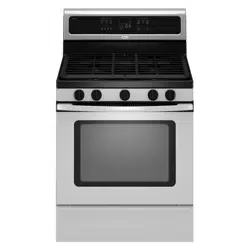
Super Capaei_ 465
4.65 Cubic Foot Oven
MODEL SF315PEG
www.whirlpool.com
8053372
ANOTETOYOU
The Whirlpool Brand is committed to designing quality products that consistently perform for you to make your
life easier. To ensure that you enjoy years of trouble-free operation, we developed this Use and Care Guide.
It is full of valuable information about how to operate and maintain your appliance properly and safely. Please
read it carefully.
Also, please complete and mail the Product Registration Card provided with your appliance. The card helps us
notify you about any new information on your appliance.
Whenever you call to request service for your appliance,
you need to know your complete model number and
serial number. You can find this information on the
model and serial number label/plate (see diagram in
the "Parts and Features" section).
Please also record the purchase date of your appliance
and your dealer's name, address, and telephone number.
Model Number.
Serial Number
Purchase Date
Dealer Name
Dealer Address
Dealer Phone
Keep this book and the sales slip together in a safe place for future reference. It is important
for you to save your sales receipt showing the date of purchase. Proof of purchase will assure
you of in-warranty service.
WARNING: If the information in this manual is not followed exactly, a fire or
explosion may result causing property damage, personal injury or death.
- Do not store or use gasoline or other flammable vapors and liquids in the vicinity
of this or any other appliance.
- WHAT TO DO IF YOU SMELL GAS
• Do not try to light any appliance.
• Do not touch any electrical switch; do not use any phone in your building.
• Immediately call your gas supplier from a neighbor's phone. Follow the gas
supplier's instructions.
• If you cannot reach your gas supplier, call the fire department.
- Installation and service must be performed by a qualified installer, service
agency or the gas supplier.
RANGESAFE
"ii_'_i,ii'i:__'_%i:'i::_ii!_'_i:i?¸_i_:t_::li:'_il'_i,:,!i,%i:_I'_l:_iiy_:i_i__:ii,_I_'iI"_!_i_'!i'_iii:!,;il;:'_'_!_!_,_"iiii,'¸iiiiii'_l_i_i_iiii_,2_ii_i,I""iii_i_:i'_t
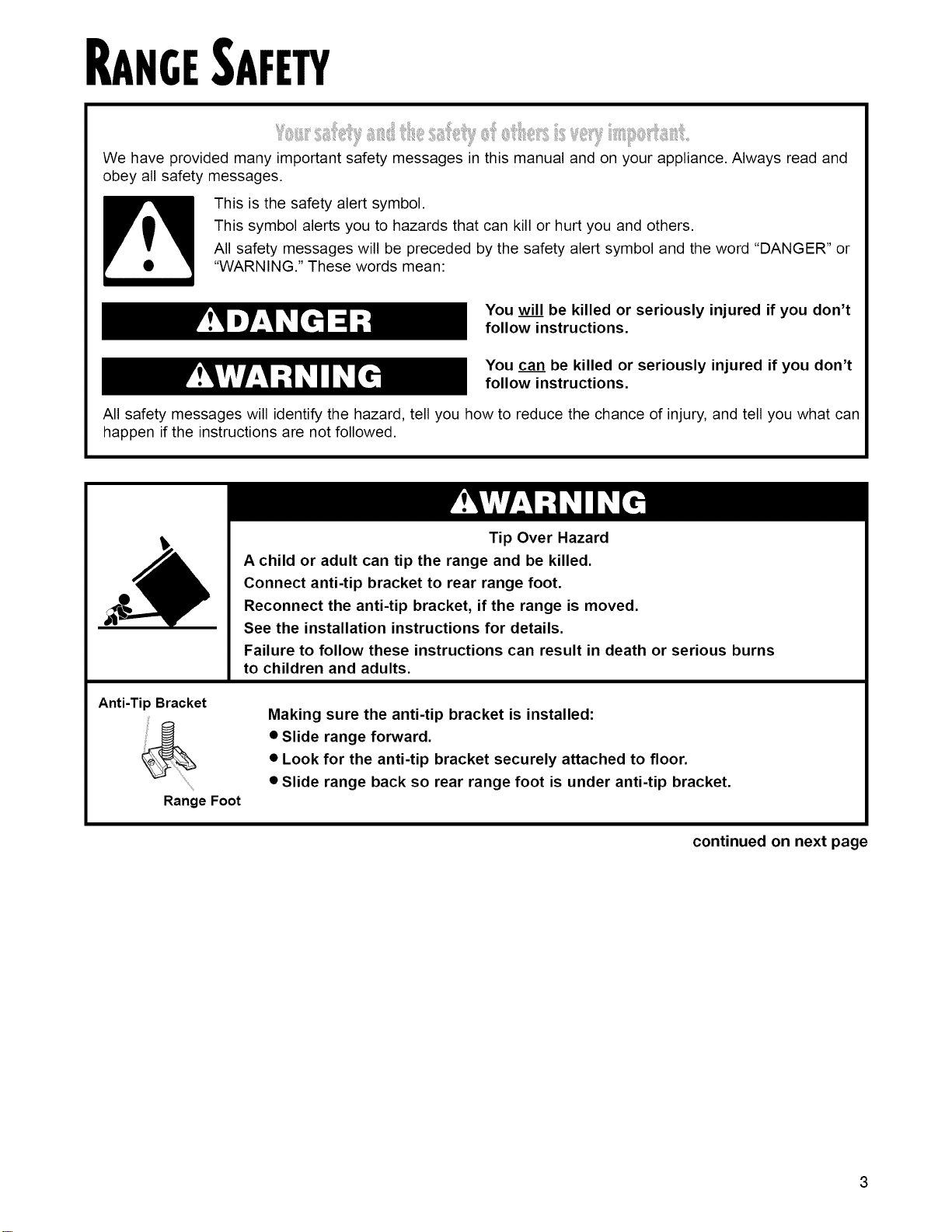
We have provided many important safety messages in this manual and on your appliance. Always read and
obey all safety messages.
This is the safety alert symbol.
This symbol alerts you to hazards that can kill or hurt you and others.
All safety messages will be preceded by the safety alert symbol and the word "DANGER" or
"WARNING." These words mean:
You will be killed or seriously injured if you don't
follow instructions.
You can be killed or seriously injured if you don't
follow instructions.
All safety messages will identify the hazard, tell you how to reduce the chance of injury, and tell you what can
happen if the instructions are not followed.
Anti-Tip Bracket
Range Foot
Tip Over Hazard
A child or adult can tip the range and be killed.
Connect anti-tip bracket to rear range foot.
Reconnect the anti-tip bracket, if the range is moved.
See the installation instructions for details.
Failure to follow these instructions can result in death or serious burns
to children and adults.
Making sure the anti-tip bracket is installed:
• Slide range forward.
• Look for the anti-tip bracket securely attached to floor.
• Slide range back so rear range foot is under anti-tip bracket.
continued on next page
3
iMPORTANT SAFETY iNSTRUCTIONS
WARNING: To reduce the risk of fire, electrical
shock, injury to persons, or damage when using the
range, follow basic precautions, including the
following:
•WARNING - TO REDUCE THE RISK OF
TIPPING OF THE RANGE, THE RANGE MUST
BE SECURED BY PROPERLY INSTALLED
ANTI-TIP DEVICES. TO CHECK IF THE DEVICES
ARE INSTALLED PROPERLY, SLIDE RANGE
FORWARD, LOOK FOR ANTI-TIP BRACKET
SECURELY ATTACHED TO FLOOR, AND SLIDE
RANGE BACK SO REAR RANGE FOOT IS
UNDER ANTI-TIP BRACKET.
• CAUTION - Do not store items of interest to
children in cabinets above a range or on the
backguard of a range - children climbing on the
range to reach items could be seriously injured.
• Proper Installation - The range, when installed,
must be electrically grounded in accordance with
local codes or, in the absence of local codes, with
the National Electrical Code, ANS!/NFPA 70. Be
sure the range is properly installed and grounded
by a qualified technician.
• This range is equipped with a three-prong
grounding plug for your protection against shock
hazard and should be plugged directly into a
properly grounded receptacle. Do not cut or
remove the grounding prong from this plug.
• Disconnect the electrical supply before
servicing the appliance.
• Never Use the Range for Warming or Heating
the Room.
• Injuries may result from the misuse of appliance
doors or drawers such as stepping, leaning, or
sitting on the doors or drawers.
• Maintenance - Keep range area clear and free from
combustible materials, gasoline, and other
flammable vapors and liquids.
• Storage in or on the Range - Flammable
materials should not be stored in an oven or
near surface units.
• Top burner flame size should be adjusted so it
does not extend beyond the edge of the
cooking utensil.
For self-cleaning ranges =
• Before Self-Cleaning the Oven - Remove broiler
pan and other utensils. Wipe off all excessive
spillage before initiating the cleaning cycle.
-SAVE THESE INSTRUCTIONS-
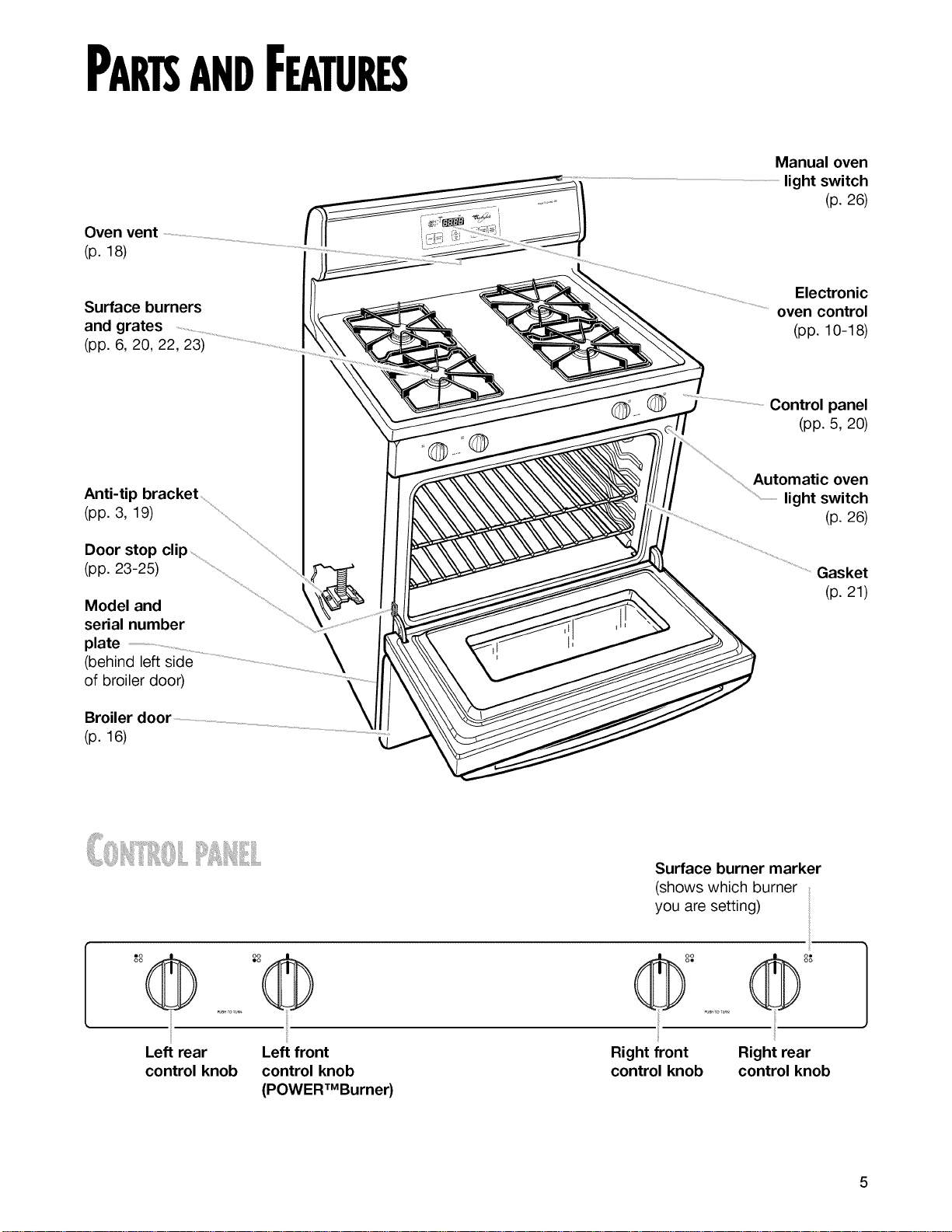
PARTSANDFEATURES
Oven vent
(p. 18)
Manual oven
light switch
(p. 26)
Surface burners
and grates
(pp. 6, 20, 22, 23)
Electronic
oven control
(pp. 10-18)
Anti-tip bracket .....
(pp. 3, 19) .........
Door stop clip
(pp. 23-25) ................ ........
Model and
serial number
plate
(behind left side
of broiler door)
Broiler door \Ji
(p. 16) .................................
Control panel
(pp. 5, 20)
Automatic oven
.............................................light switch
(p. 26)
Gasket
(p. 21)
Surface burner marker
(shows which burner
you are setting)
o@oo®
oo oo
Left rear Left front
control knob control knob
(POWERTMBurner)
_'_°°° ......... (@ °8
Right front Right rear
control knob control knob
5
USINGYOURRANGE
Fire Hazard
Do not let the burner flame extend beyond
the edge of the pan.
Turn off all controls when not cooking.
Failure to follow these instructions can
result in death or fire.
I;: !i;iiiiil!!iiil¸1:illii! ,
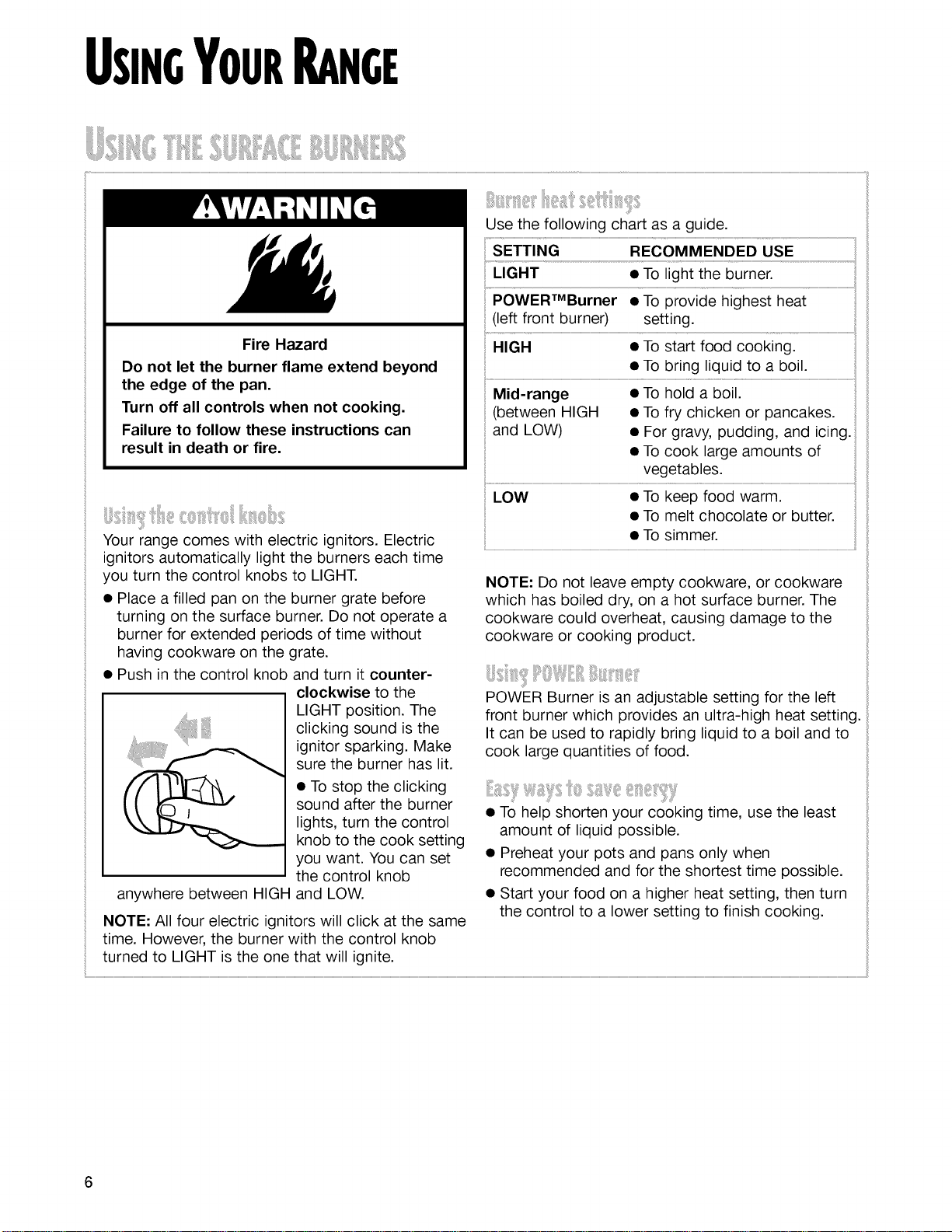
Your range comes with electric ignitors. Electric
ignitors automatically light the burners each time
you turn the control knobs to LIGHT.
• Place a filled pan on the burner grate before
turning on the surface burner. Do not operate a
burner for extended periods of time without
having cookware on the grate.
• Push in the control knob and turn it counter-
clockwise to the
LIGHT position. The
clicking sound is the
ignitor sparking. Make
sure the burner has lit.
• To stop the clicking
sound after the burner
lights, turn the control
knob to the cook setting
you want. You can set
the control knob
anywhere between HIGH and LOW.
NOTE: All four electric ignitors will click at the same
time. However, the burner with the control knob
turned to LIGHT is the one that will ignite.
Use the following chart as a guide.
!i...............................................................................................................................................................................................................................................iil
POWERTMBurner • To provide highest heat
(left front burner) setting.
HIGH e To siart food cooking: ...............................................................................
• To bring liquid to a boil.
Mid-range • To hold a boil.
(between HIGH • To fry chicken or pancakes.
and LOW) • For gravy, pudding, and icing.
• To cook large amounts of
vegetables.
LOW • To keep food warm.
• To melt chocolate or butter.
• To simmer.
NOTE: Do not leave empty cookware, or cookware
which has boiled dry, on a hot surface burner. The
cookware could overheat, causing damage to the
cookware or cooking product.
POWER Burner is an adjustable setting for the left
front burner which provides an ultra-high heat setting.
It can be used to rapidly bring liquid to a boil and to
cook large quantities of food.
• To help shorten your cooking time, use the least
amount of liquid possible.
• Preheat your pots and pans only when
recommended and for the shortest time possible.
• Start your food on a higher heat setting, then turn
the control to a lower setting to finish cooking.
¸ iyiiil J i ' i!i, '' ,
You can manually light surface burners. Hold a lit
match near a burner and turn the control knob to
the LIGHT position. After the burner lights, turn the
control knob to the setting you want.
• Refer to your canner manual for specific
instructions.
For up-to-date information on canning, contact your
local U.S. Government Agricultural Department
Extension Office or companies who manufacture
home canning products.
The large diameter of most water-bath or pressure
canners combined with high heat settings for long
periods of time can cause damage to the cooktop.
To protect your range:
• Center the canner over the surface burner. Do
not extend more than 1 inch outside the burner
area.
• Do not place your canner on two surface burners
at the same time.
• Start with hot water, cover with a lid and bring to
a boil; then reduce heat to maintain a boil or
required pressure levels in a pressure canner.
• The pan should have a flat bottom, straight sides,
and a well-fitting lid.
• Choose medium to heavy gauge (thickness)
cookware.
• The pan material (metal or glass) affects how
quickly and evenly the pan heats.
• When using glass or ceramic cookware, check to
make sure it is suitable for use on surface burners.
• To avoid tipping, make sure pots and pans are
centered on the grates.
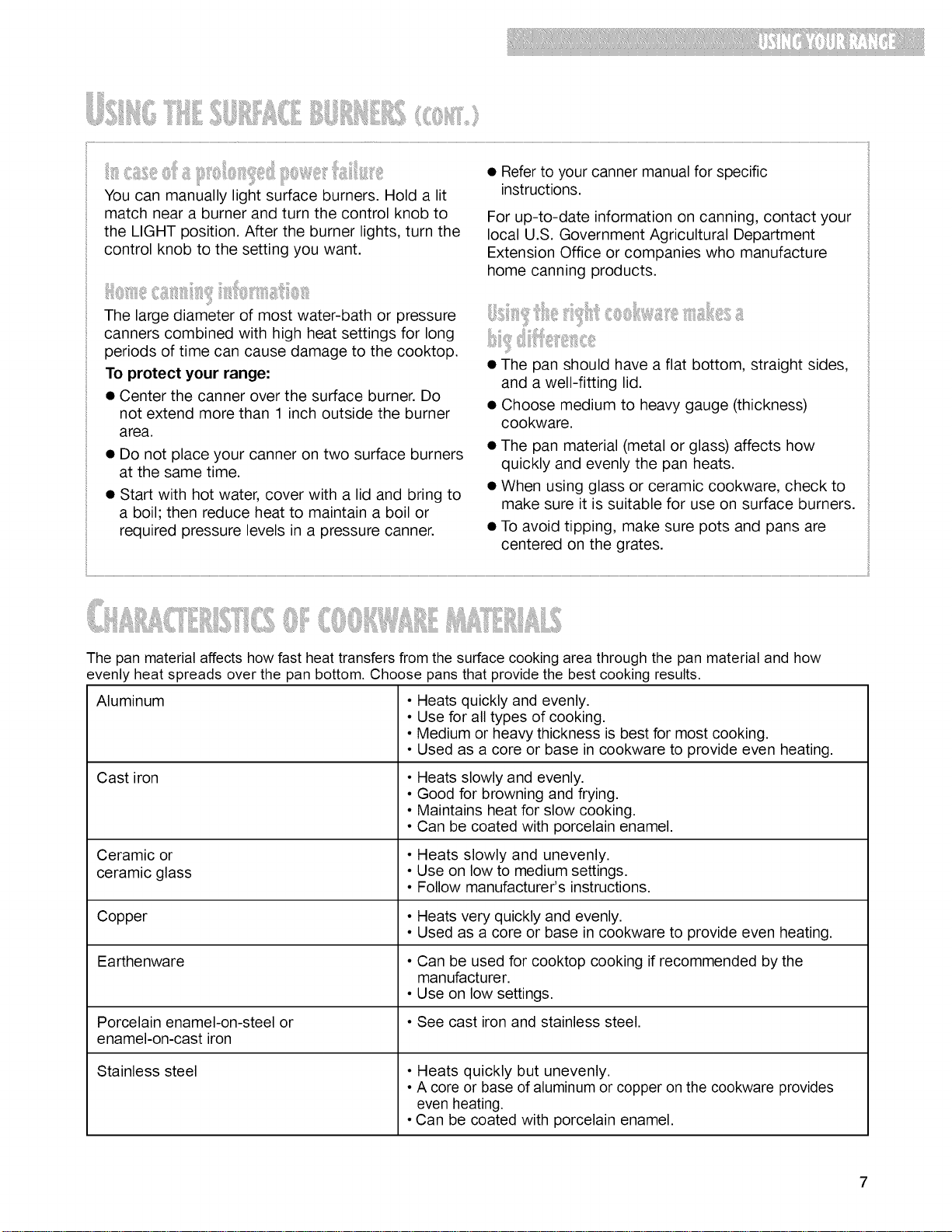
The pan material affects how fast heat transfers from the surface cooking area through the pan material and how
evenly heat spreads over the pan bottom. Choose pans that provide the best cooking results.
Aluminum
Cast iron
Ceramic or
ceramic glass
Copper
Earthenware
Porcelain enamel-on-steel or
enamel-on-cast iron
Stainless steel
• Heats quickly and evenly.
• Use for all types of cooking.
• Medium or heavy thickness is best for most cooking.
• Used as a core or base in cookware to provide even heating.
• Heats slowly and evenly.
• Good for browning and frying.
• Maintains heat for slow cooking.
• Can be coated with porcelain enamel.
• Heats slowly and unevenly.
• Use on low to medium settings.
• Follow manufacturer's instructions.
• Heats very quickly and evenly.
• Used as a core or base in cookware to provide even heating.
• Can be used for cooktop cooking if recommended by the
manufacturer.
• Use on low settings.
• See cast iron and stainless steel.
• Heats quickly but unevenly.
• A core or base of aluminum or copper on the cookware provides
even heating.
• Can be coated with porcelain enamel.
7
Placetheovenrackswhereyouneedthembefore
turningontheoven.
• Tomovearack,pullitouttothestopposition,
raisethefrontedgeandliftitout.
• Besuretherack(s)islevel.
• Usepotholdersorovenmittsto protectyourhands
ifrack(s)mustbemovedwhiletheovenishot.
• Forbestperformance,cookononerack.Place
theracksothetopofthefoodwillbecenteredin
theoven.
• Whencookingwithtworacks,arrangetheracks
onthe2ndand4thrackguides.Twosheetsof
cookiesmaybebakedifsheetsareswitchedat
Where to place pans:
WHEN YOU HAVE PLACE
1 pan
2 pans Side by side or slightly
3 or 4 pans In opposite corners on
each oven rack. Stagger
pans so no pan is directly
over another.
approximately three quarters of the total bake time. FOOD RACK POSITION
Increase baking time, if necessary. Frozen pies, large 1st or 2nd rack ........
• For best results allow 2 inches of space around
each pan and between pans and oven walls.
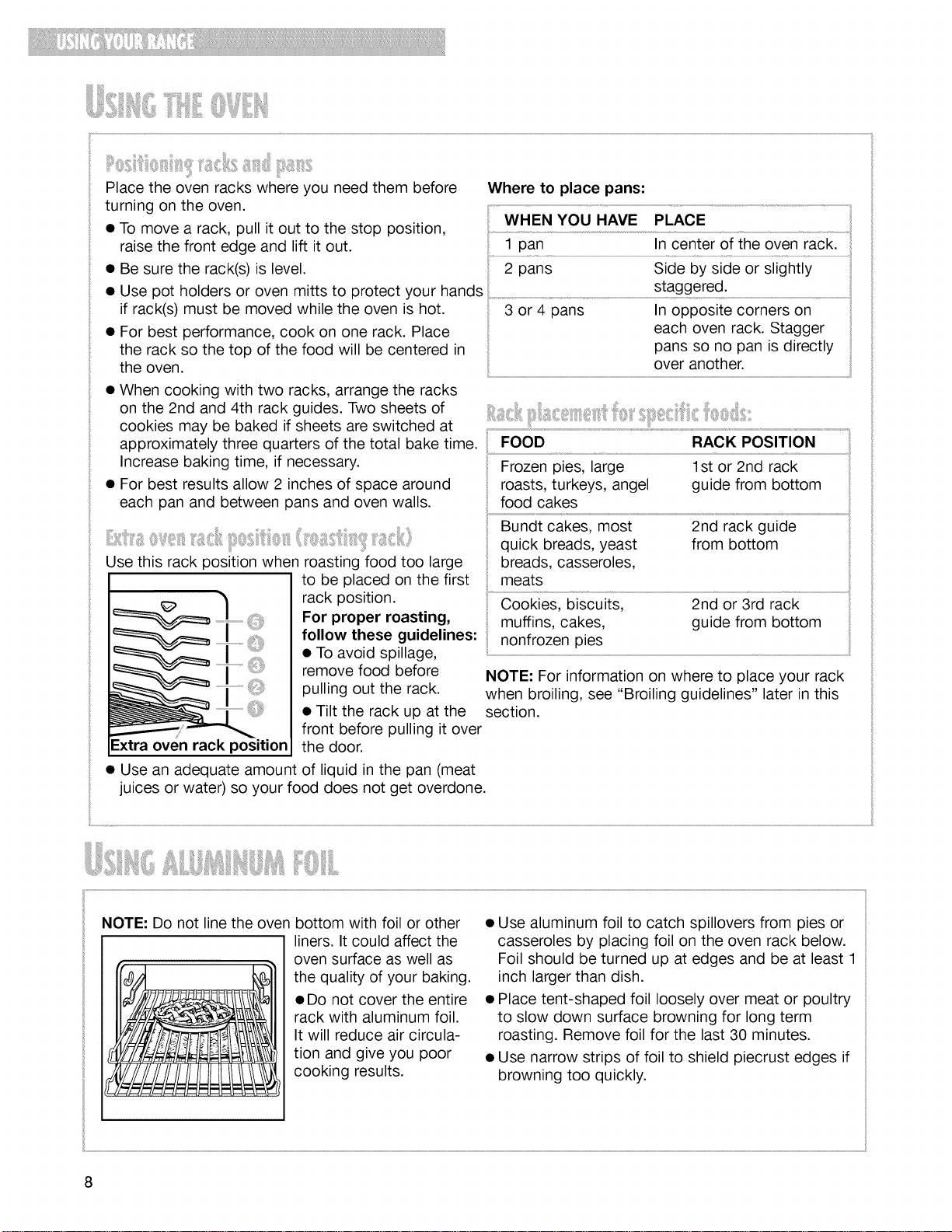
Use this rack position when roasting food too large
to be placed on the first
rack position.
For proper roasting,
follow these guidelines:
• To avoid spillage,
remove food before
pulling out the rack.
• Tilt the rack up at the
-xtra oven rack position
NOTE: For information on where to place your rack
when broiling, see "Broiling guidelines" later in this
section.
front before pulling it over
the door.
• Use an adequate amount of liquid in the pan (meat
juices or water) so your food does not get overdone.
NOTE."Do not line the oven bottom with foil or other
liners. It could affect the
oven surface as well as
the quality of your baking.
• Do not cover the entire
rack with aluminum foil.
It will reduce air circula-
tion and give you poor
cooking results.
• Use aluminum foil to catch spillovers from pies or
casseroles by placing foil on the oven rack below.
Foil should be turned up at edges and be at least 1
inch larger than dish.
• Place tent-shaped foil loosely over meat or poultry
to slow down surface browning for long term
roasting. Remove foil for the last 30 minutes.
• Use narrow strips of foil to shield piecrust edges if
browning too quickly.
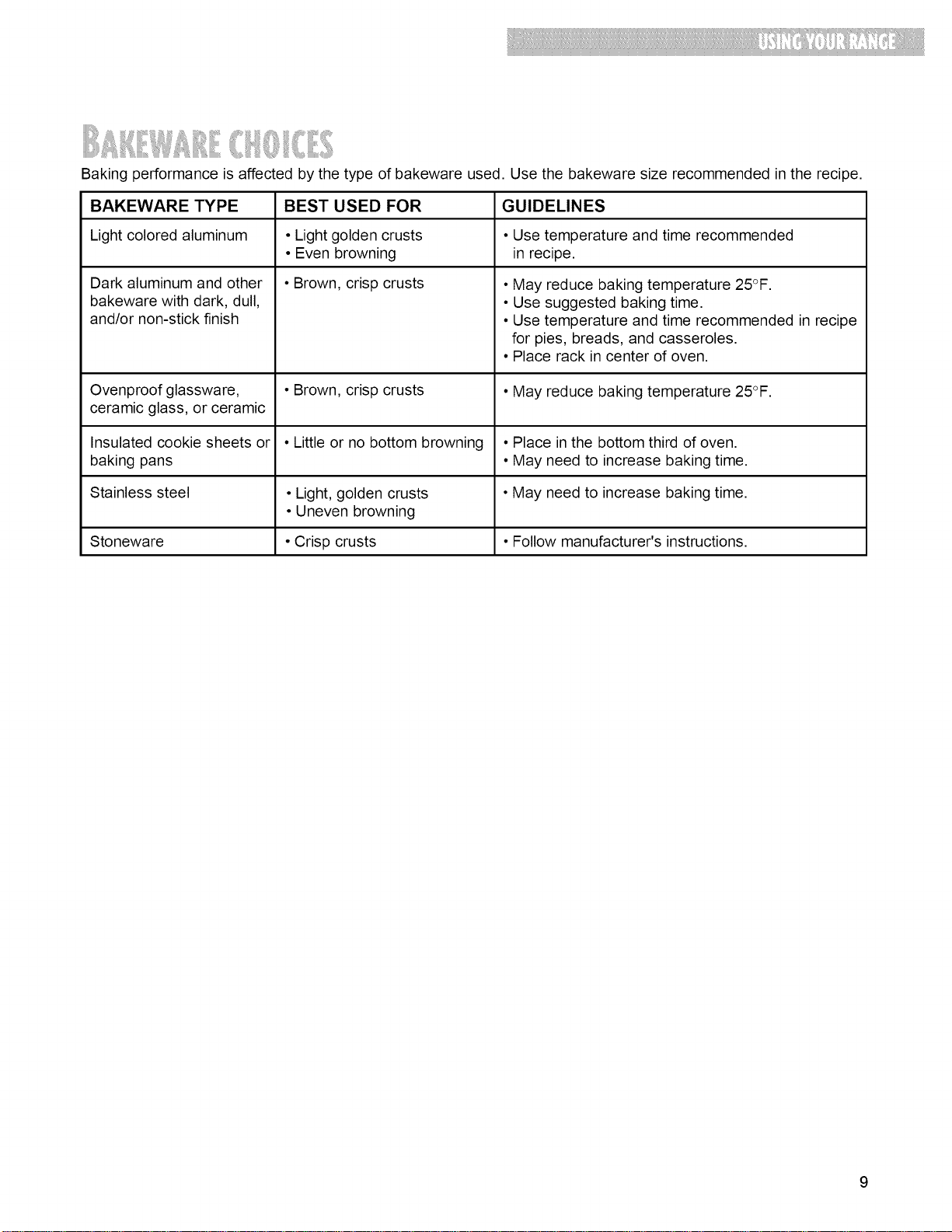
Bakingperformanceisaffectedbythetypeofbakewareused.Usethebakewaresizerecommendedintherecipe.
BAKEWARETYPE BESTUSEDFOR GUIDELINES
Lightcoloredaluminum • Lightgoldencrusts • Usetemperatureandtimerecommended
• Evenbrowning inrecipe.
• Brown,crispcrusts
Darkaluminumandother
bakewarewithdark,dull,
and/ornon-stickfinish
• Mayreducebakingtemperature25°F.
• Usesuggestedbakingtime.
• Usetemperatureandtimerecommendedinrecipe
forpies,breads,andcasseroles.
• Placerackincenterofoven.
Ovenproofglassware, • Brown,crispcrusts • Mayreducebakingtemperature25°F.
ceramicglass,orceramic
Insulatedcookiesheetsor • Littleornobottombrowning • Placeinthebottomthirdofoven.
bakingpans • Mayneedtoincreasebakingtime.
Stainlesssteel •Light,goldencrusts •Mayneedtoincreasebakingtime.
•Unevenbrowning
Stoneware •Crispcrusts • Followmanufacturer'sinstructions.
9
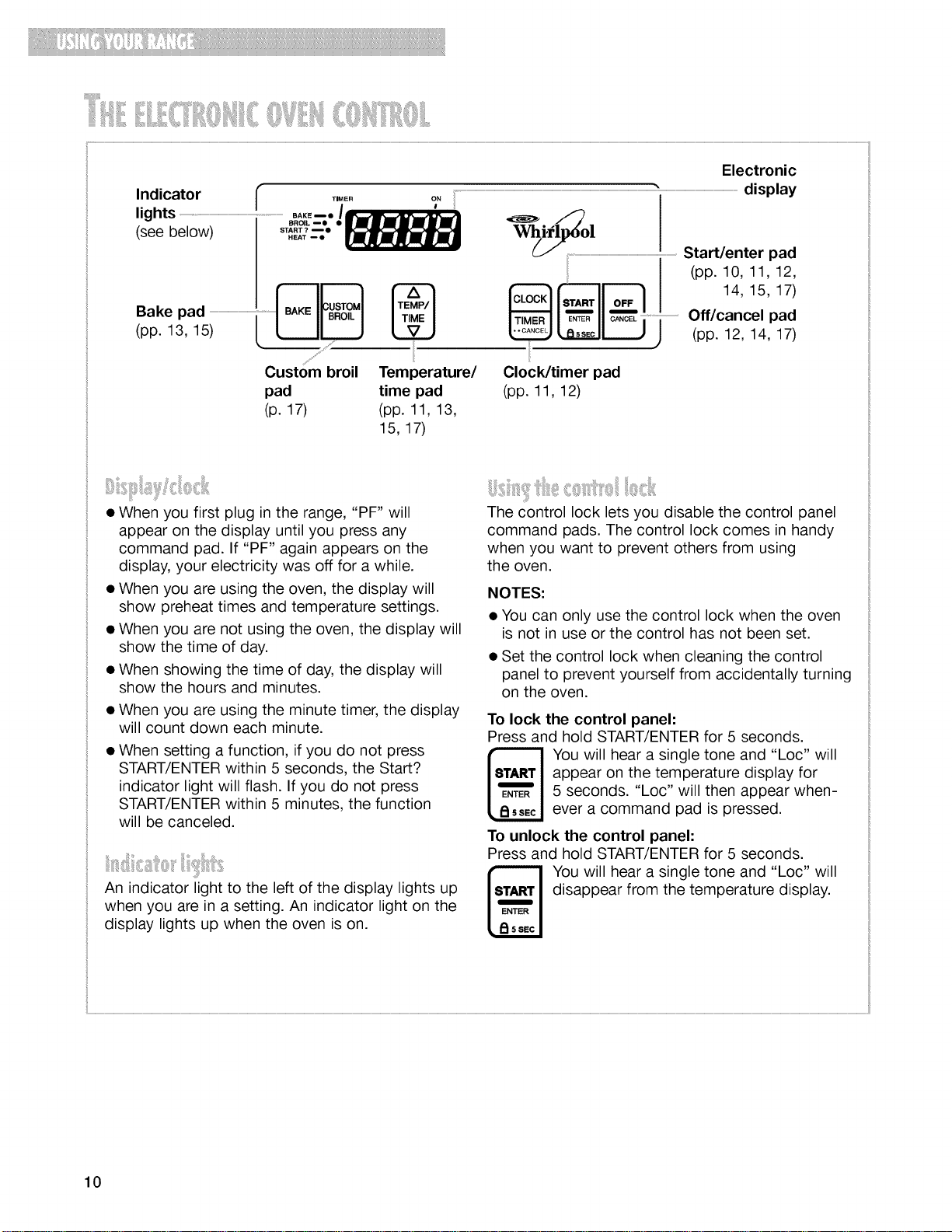
Indicator T.._. o,
(seelightsbelow) sT..T,_,T_,o,L.AK.--.7--.----"• .I_
_papkl3P,ad5)..............................................................................._R
Custom broil
pad
(p. 17)
Electronic
...................................................................................................................................................................................................................................................................."........................................................................................................display
.........................................................................................................Start/enter pad
] I (pp. 10,11,12,
14, 15, 17)
I 11o_,,
EN_R O..O_L Off/cancel pad
lo,s°ol!J.) (pp. 12, 14, 17)
Temperature/ Clock/timer pad
time pad (pp. 11, 12)
(pp. 11, 13,
15, 17)
• When you first plug in the range, "PF" will
appear on the display until you press any
command pad. If "PF" again appears on the
display, your electricity was off for a while.
• When you are using the oven, the display will
show preheat times and temperature settings.
• When you are not using the oven, the display will
show the time of day.
• When showing the time of day, the display will
show the hours and minutes.
• When you are using the minute timer, the display
will count down each minute.
• When setting a function, if you do not press
START/ENTER within 5 seconds, the Start?
indicator light will flash. If you do not press
START/ENTER within 5 minutes, the function
will be canceled.
An indicator light to the left of the display lights up
when you are in a setting. An indicator light on the
display lights up when the oven is on.
The control lock lets you disable the control panel
command pads. The control lock comes in handy
when you want to prevent others from using
the oven.
NOTES:
• You can only use the control lock when the oven
is not in use or the control has not been set.
• Set the control lock when cleaning the control
panel to prevent yourself from accidentally turning
on the oven.
To lock the control panel:
Press and hold START/ENTER for 5 seconds.
You will hear a single tone and "Loc" will
appear on the temperature display for
5 seconds. "Loc" will then appear when-
ever a command pad is pressed.
To unlock the control panel:
Press and hold START/ENTER for 5 seconds.
You will hear a single tone and "Loc" will
disappear from the temperature display.
10
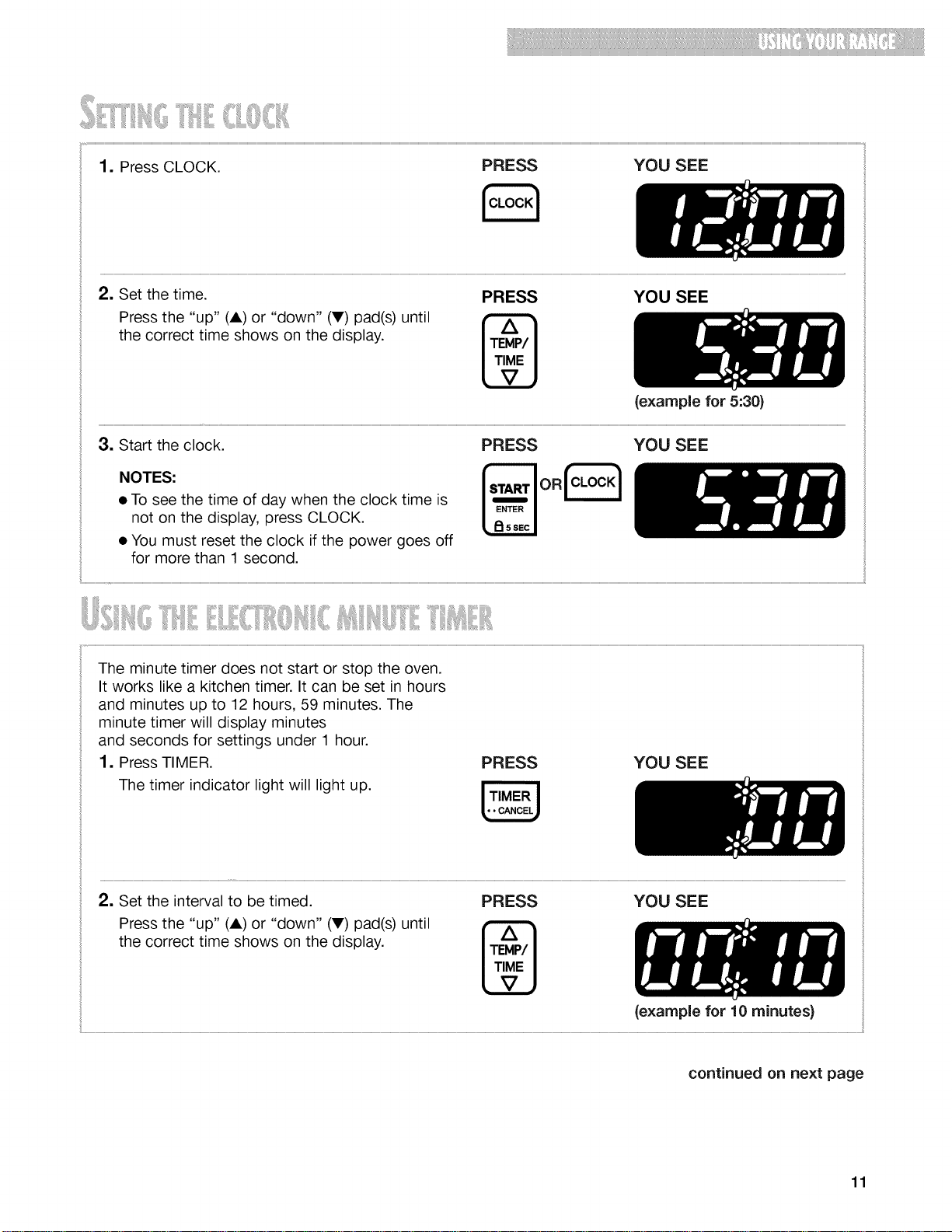
2, Setthetime.
Pressthe"up"(A)or"down"(V)pad(s)until
thecorrecttimeshowsonthedisplay.
PRESS YOU SEE
(example for 5:30)
3. Start the clock. PRESS YOU SEE
NOTES:
• To see the time of day when the clock time is
not on the display, press CLOCK.
• You must reset the clock if the power goes off
for more than 1 second.
The minute timer does not start or stop the oven.
It works like a kitchen timer. It can be set in hours
and minutes up to 12 hours, 59 minutes. The
minute timer will display minutes
and seconds for settings under 1 hour.
1, Press TIMER.
The timer indicator light will light up.
PRESS YOU SEE
2, Set the interval to be timed. PRESS YOU SEE
Press the "up" (A) or "down" (V) pad(s) until _
the correct time shows on the display.
(example for 10 minutes}
continued on next page
11
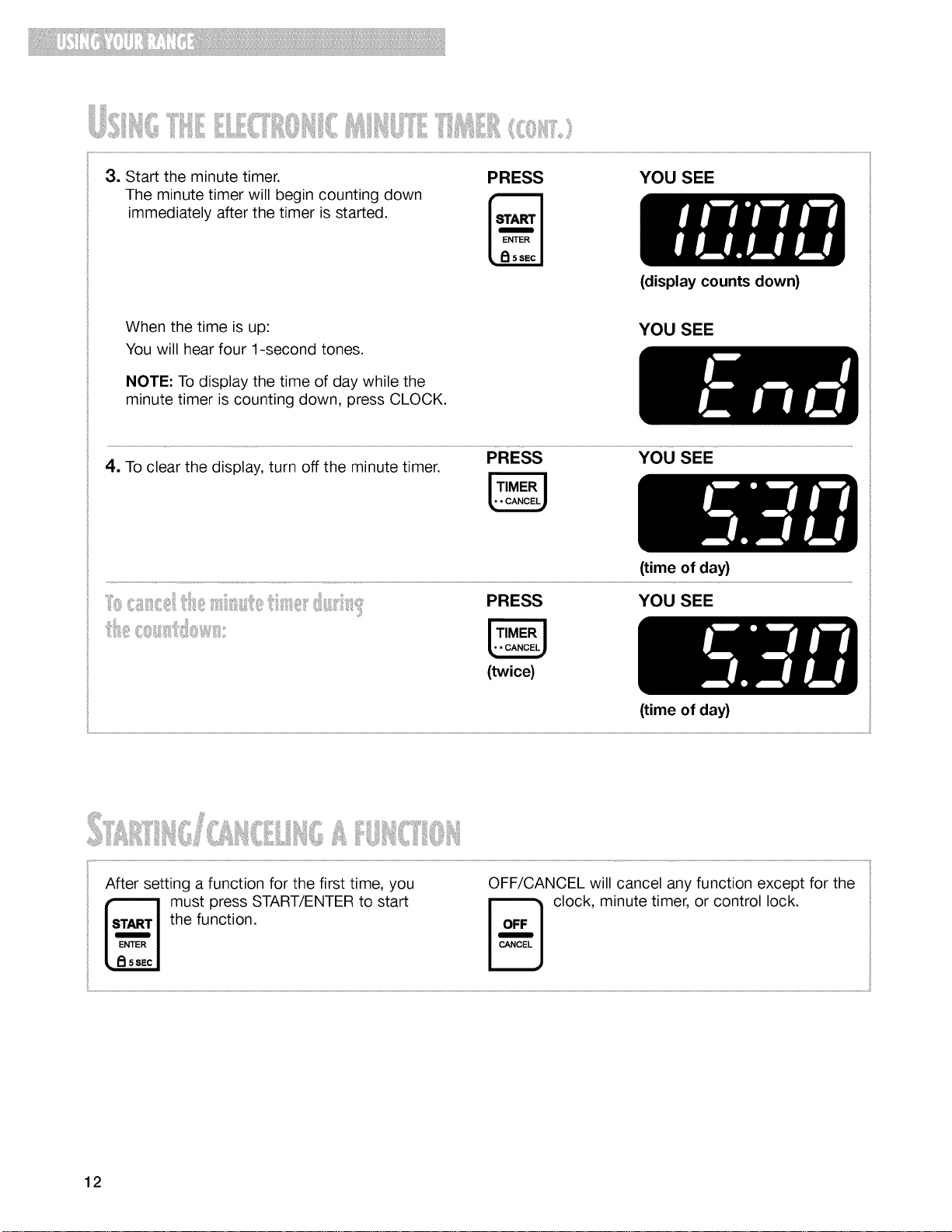
_iI¸_iii_I_if_iI!_!I!!iiiiiliii_ililii_ii_iiiJl_ili_Iii_<ll!!T_!i_iti!ii_ill_ii:i<:_:_,_:_<:i;
3. Start the minute timer.
The minute timer will begin counting down
immediately after the timer is started.
PRESS YOU SEE
When the time is up:
You will hear four 1-second tones.
NOTE: To display the time of day while the
minute timer is counting down, press CLOCK.
(display counts down)
YOU SEE
PRESS YOU SEE
4. To clear the display, turn off the minute timer.
(time of day)
PRESS YOU SEE
(twice)
(time of day)
After setting a function for the first time, you
must press START/ENTER to start
the function.
OFF/CANCEL will cancel any function except for the
_ clock, minute timer, or control lock.
12
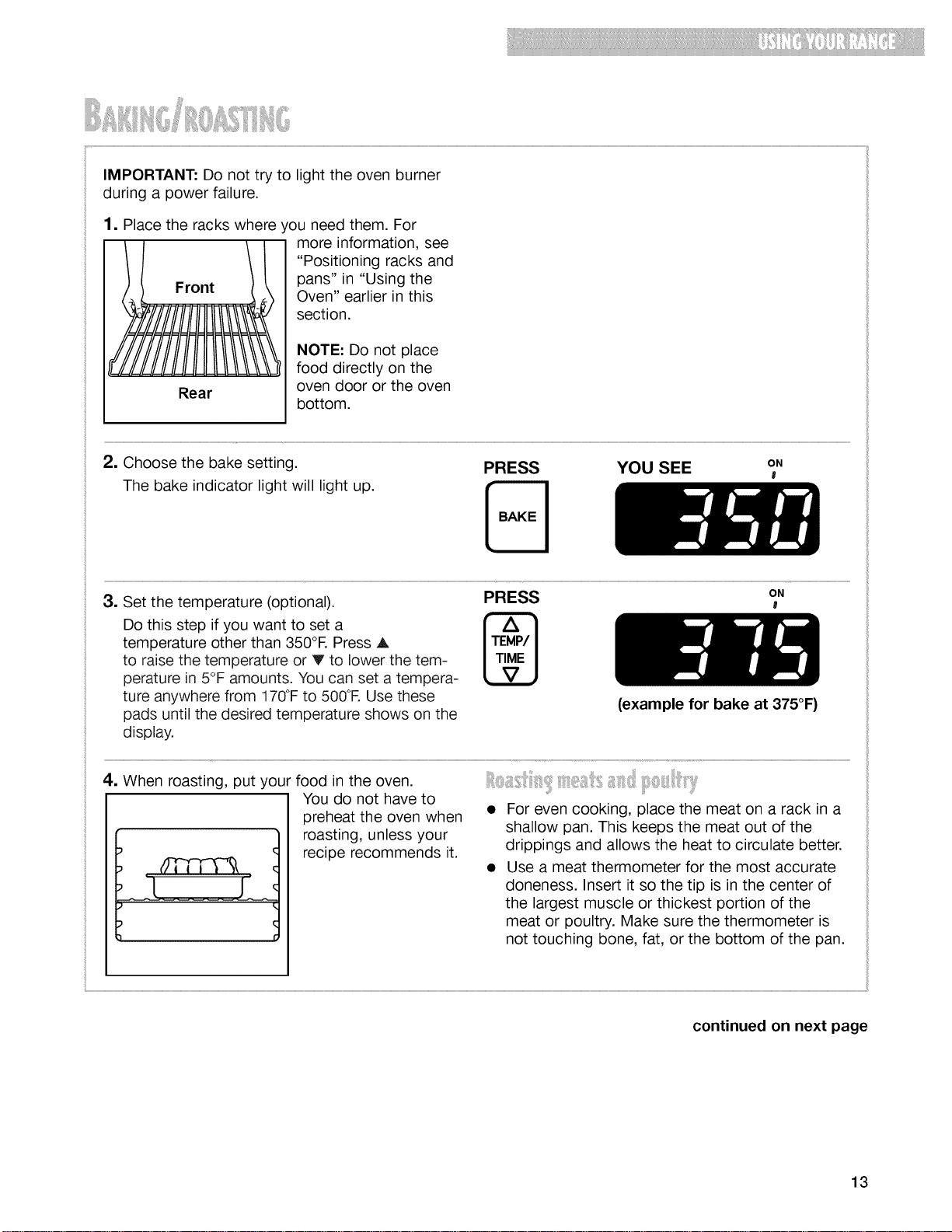
IMPORTANT:Donottrytolighttheovenburner
duringapowerfailure.
1. Place the racks where you need them. For
more information, see
"Positioning racks and
Front pans" in "Using the
Oven" earlier in this
section.
Rear
NOTE: Do not place
food directly on the
oven door or the oven
bottom.
2. Choose the bake setting.
The bake indicator light will light up.
PRESS YOU SEE oN
l
3. Set the temperature (optional).
Do this step if you want to set a
temperature other than 350°R Press A
to raise the temperature or V to lower the tem-
perature in 5°F amounts. You can set a tempera-
ture anywhere from 170°Fto 500°R Use these
pads until the desired temperature shows on the
display.
PRESS
ON
l
(example for bake at 375°F)
4. When roasting, put your food in the oven.
ffTnq&
[ j
You do not have to
preheat the oven when
roasting, unless your
recipe recommends it.
• For even cooking, place the meat on a rack in a
shallow pan. This keeps the meat out of the
drippings and allows the heat to circulate better.
• Use a meat thermometer for the most accurate
doneness. Insert it so the tip is in the center of
the largest muscle or thickest portion of the
meat or poultry. Make sure the thermometer is
not touching bone, fat, or the bottom of the pan.
continued on next page
13
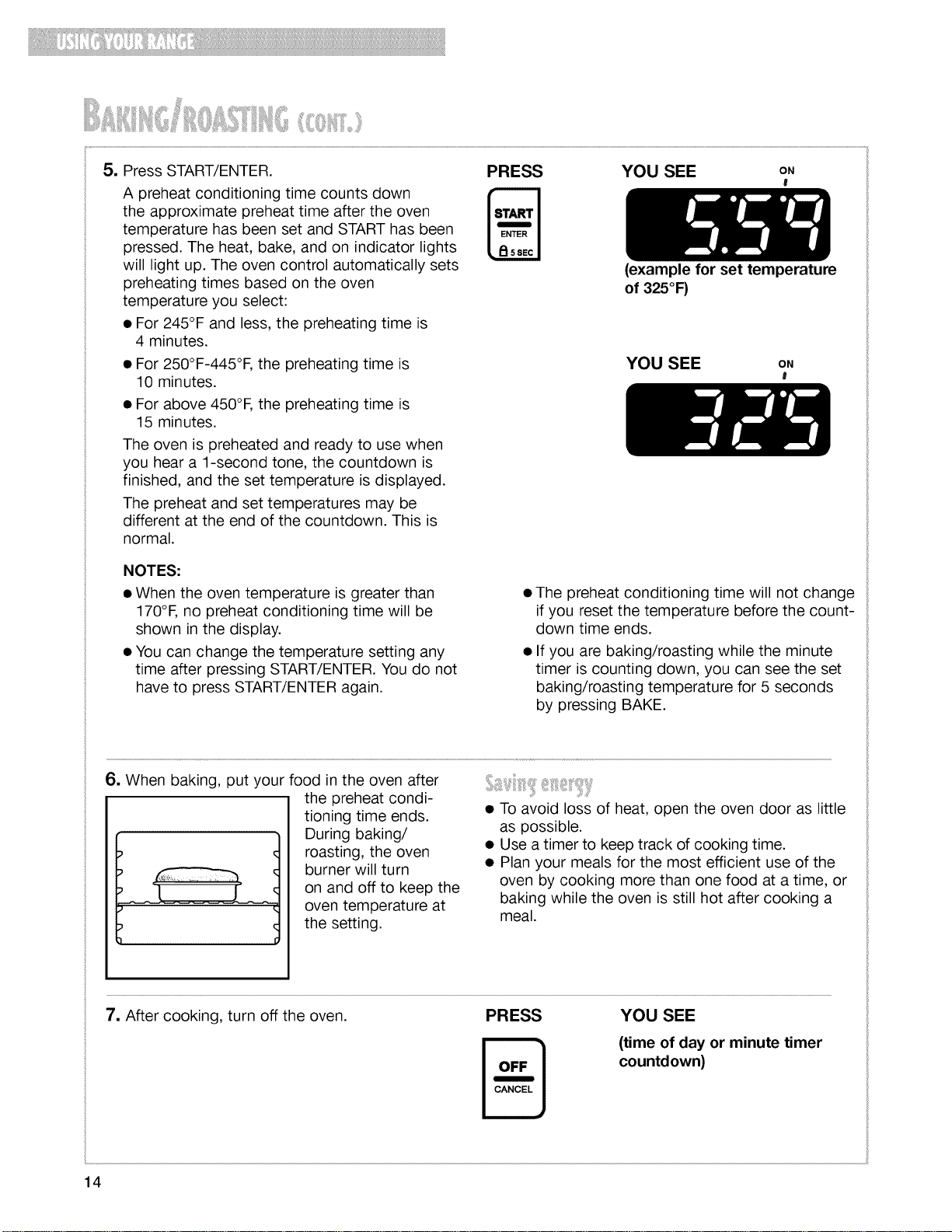
5. YOU SEE oN
l
Press START/ENTER.
A preheat conditioning time counts down
the approximate preheat time after the oven
temperature has been set and START has been
pressed. The heat, bake, and on indicator lights
will light up. The oven control automatically sets
preheating times based on the oven
temperature you select:
• For 245°F and less, the preheating time is
4 minutes.
PRESS
(example for set temperature
of 325°F)
• For 250°F-445°F, the preheating time is
10 minutes.
YOU SEE oN
I
• For above 450°F, the preheating time is
15 minutes.
The oven is preheated and ready to use when
you hear a 1-second tone, the countdown is
finished, and the set temperature is displayed.
The preheat and set temperatures may be
different at the end of the countdown. This is
normal.
NOTES:
• When the oven temperature is greater than
170°F, no preheat conditioning time will be
shown in the display.
• You can change the temperature setting any
time after pressing START/ENTER. You do not
have to press START/ENTER again.
• The preheat conditioning time will not change
if you reset the temperature before the count-
down time ends.
• If you are baking/roasting while the minute
timer is counting down, you can see the set
baking/roasting temperature for 5 seconds
by pressing BAKE.
6. When baking, put your food in the oven after
the preheat condi-
tioning time ends.
During baking/
roasting, the oven
burner will turn
on and off to keep the
oven temperature at
the setting.
t
• To avoid loss of heat, open the oven door as little
as possible.
• Use a timer to keep track of cooking time.
• Plan your meals for the most efficient use of the
oven by cooking more than one food at a time, or
baking while the oven is still hot after cooking a
meal.
7. After cooking, turn off the oven. PRESS
YOU SEE
(time of day or minute timer
countdown)
14
, Jl!iii,li{llli"i ]!,,ii! "'iii!l i i!ii '[ii,l! ili[ i!, I........
Although your new oven is properly adjusted to
provide accurate temperatures, it may cook faster
or slower than your old oven.
If you are not satisfied with the baking/roasting
results, you can change the offset temperature by
following the steps below.
NOTE: DO NOT measure the oven temperature with
a thermometer. Opening the oven door will lower
the oven temperature and give you an incorrect
reading. Also, the thermometer temperature reading
will change as your oven cycles.
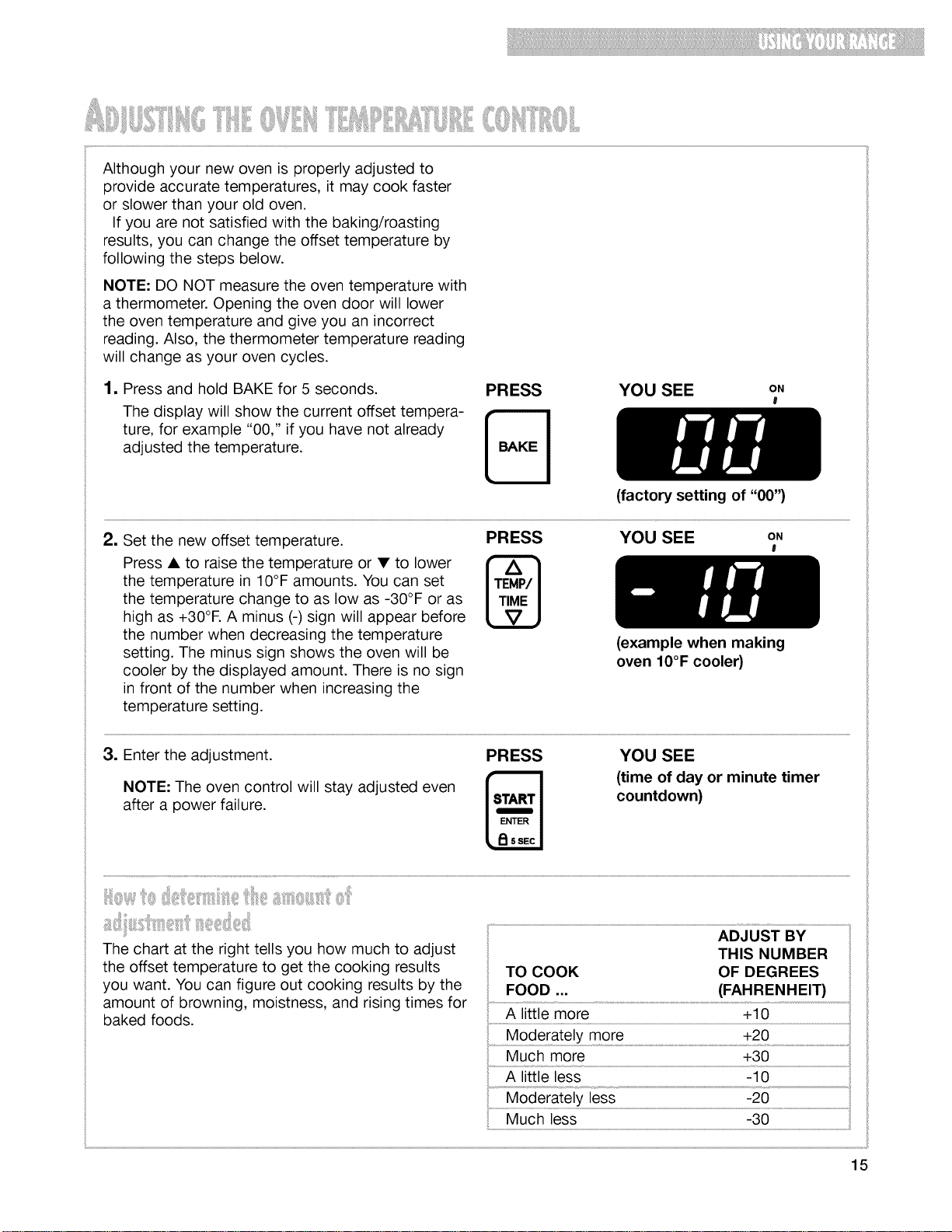
1. Press and hold BAKE for 5 seconds.
The display will show the current offset tempera-
ture, for example "00," if you have not already
adjusted the temperature.
PRESS YOU SEE ON
l
(factory setting of "00")
2. YOU SEE oN
I
Set the new offset temperature.
Press • to raise the temperature or • to lower
the temperature in 10°F amounts. You can set
the temperature change to as low as -30°F or as
high as +30°1=.A minus (-) sign will appear before
the number when decreasing the temperature
setting. The minus sign shows the oven will be
cooler by the displayed amount. There is no sign
in front of the number when increasing the
temperature setting.
PRESS
(example when making
oven 10°F cooler)
3. Enter the adjustment.
NOTE: The oven control will stay adjusted even
after a power failure.
PRESS YOU SEE
(time of day or minute timer
countdown)
The chart at the right tells you how much to adjust THIS NUMBER
the offset temperature to get the cooking results TO COOK OF DEGREES
you want. You can figure out cooking results by the FOOD ... (FAHRENHEIT)
amount of browning, moistness, and rising times for
A little more +10
baked foods.
..............M0derate!Y more +20
Much more +30
A little less -10
Moderately less -20
Much less -30
15
iyff:ii,, iii ! ! iiJi, iiii'iiii ::
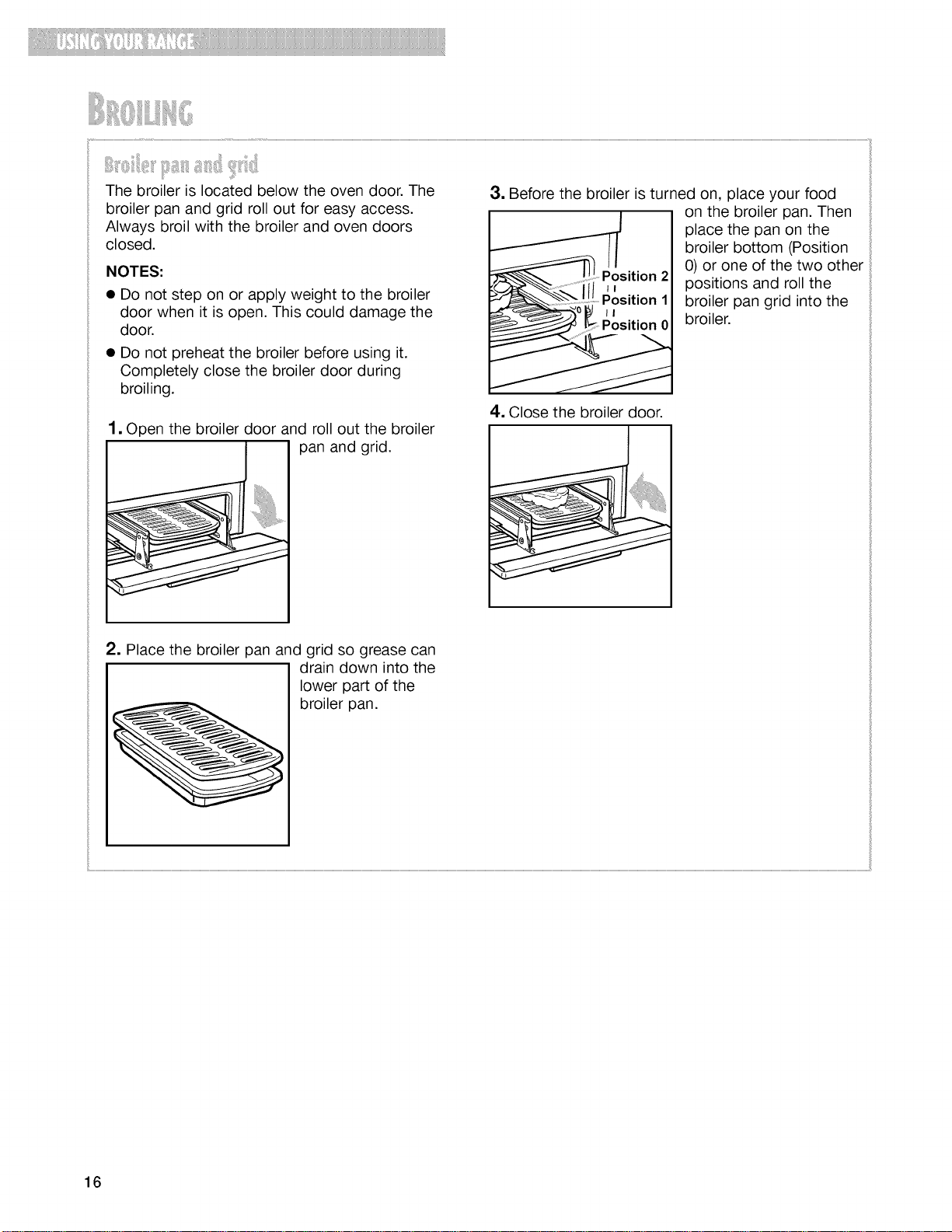
The broiler is located below the oven door. The
broiler pan and grid roll out for easy access.
Always broil with the broiler and oven doors
closed.
NOTES:
• Do not step on or apply weight to the broiler
door when it is open. This could damage the
door.
• Do not preheat the broiler before using it.
Completely close the broiler door during
broiling.
1, Open the broiler door and roll out the broiler
pan and grid.
i
3, Before the broiler is turned on, place your food
on the broiler pan. Then
place the pan on the
broiler bottom (Position
0) or one of the two other
positions and roll the
broiler pan grid into the
broiler.
4. Close the broiler door.
2, Place the broiler pan and grid so grease can
drain down into the
lower part of the
broiler pan.
16
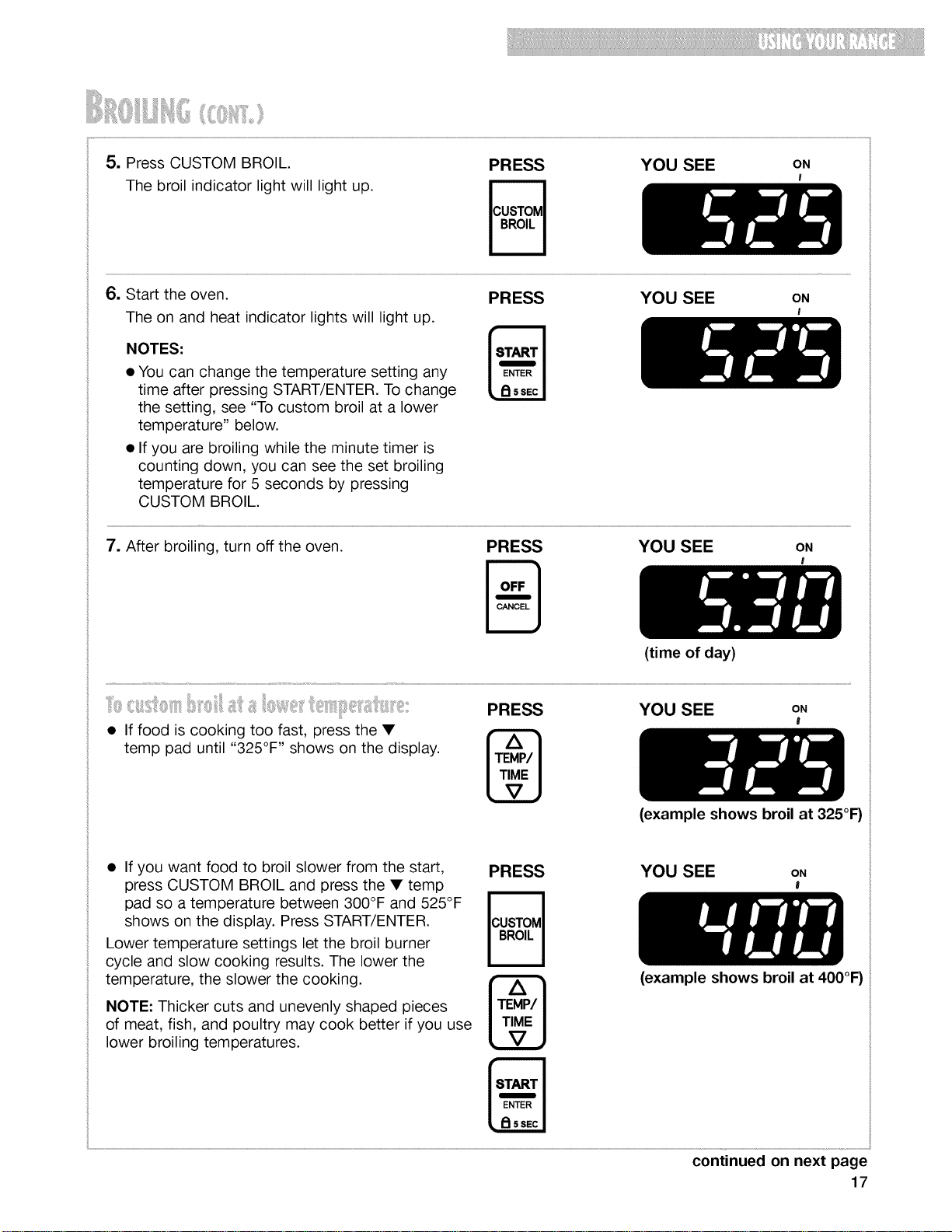
_i_:::;ili:iii_i,_ii_ii_ili,,_iii_i:::i_il;_iiii'¸,,iiiii_ili
5. Press CUSTOM BROIL.
The broil indicator light will light up.
PRESS YOU SEE ON
I
6. Start the oven.
The on and heat indicator lights will light up.
NOTES:
• You can change the temperature setting any
time after pressing START/ENTER. To change
the setting, see "To custom broil at a lower
temperature" below.
• If you are broiling while the minute timer is
counting down, you can see the set broiling
temperature for 5 seconds by pressing
CUSTOM BROIL.
PRESS YOU SEE ON
I
7. After broiling, turn off the oven. PRESS YOU SEE ON
B '
(time of day)
• If food is cooking too fast, press the •
temp pad until "325°F '' shows on the display.
PRESS YOU SEE ON
!
(example shows broil at 325°F)
• If you want food to broil slower from the start,
press CUSTOM BROIL and press the • temp
pad so a temperature between 300°F and 525°F
shows on the display. Press START/ENTER.
Lower temperature settings let the broil burner
cycle and slow cooking results. The lower the
temperature, the slower the cooking.
NOTE: Thicker cuts and unevenly shaped pieces
of meat, fish, and poultry may cook better if you use
lower broiling temperatures.
PRESS YOU SEE ON
J
(example shows broil at 400°F)
continued on next page
17
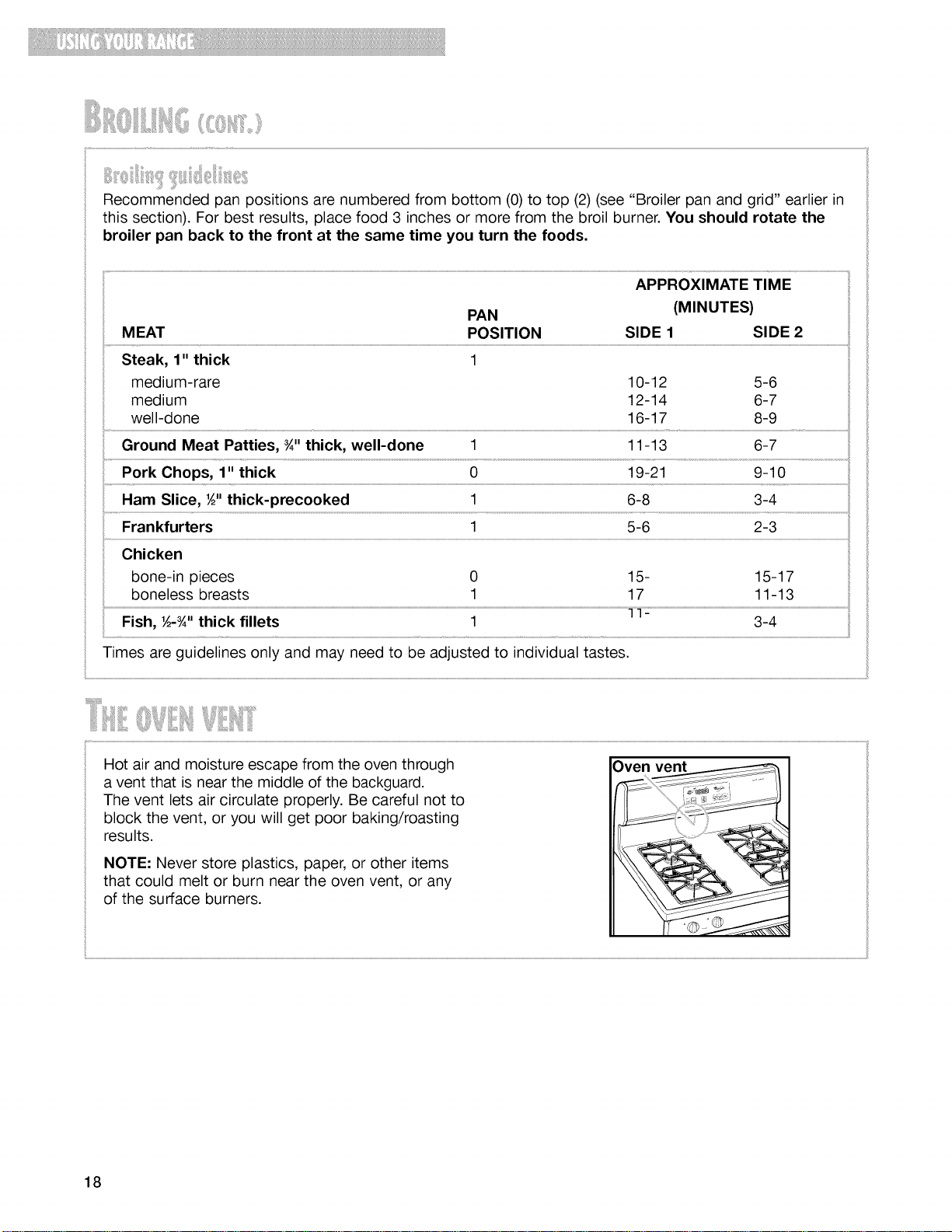
¸ iliiii '!il,!!ii iiii!iiiii ii
Recommended pan positions are numbered from bottom (0) to top (2) (see "Broiler pan and grid" earlier in
this section). For best results, place food 3 inches or more from the broil burner. You should rotate the
broiler pan back to the front at the same time you turn the foods.
APPROXIMATE TIME
PAN (MINUTES)
Steak, 1" thick 1
medium-rare 10-12 5-6
medium 12-14 6-7
well-done 16-17 8-9
Ground Meat Patties, _" thick, well-done 1 11-13 6-7
Ham Slice, ½" thick-precooked 1 6-8 3-4
....
Frankfurters 1 5-6 2-3
..... Chicken
..... bone-in pieces 0 15- 15-17
boneless breasts 1 17 11-13
Fish, ½-_" thick fillets 1 3-4
Times are guidelines only and may need to be adjusted to individual tastes.
Hot air and moisture escape from the oven through
a vent that is near the middle of the backguard.
The vent lets air circulate properly. Be careful not to
block the vent, or you will get poor baking/roasting
results.
NOTE: Never store plastics, paper, or other items
that could melt or burn near the oven vent, or any
of the surface burners.
Oven vent
18
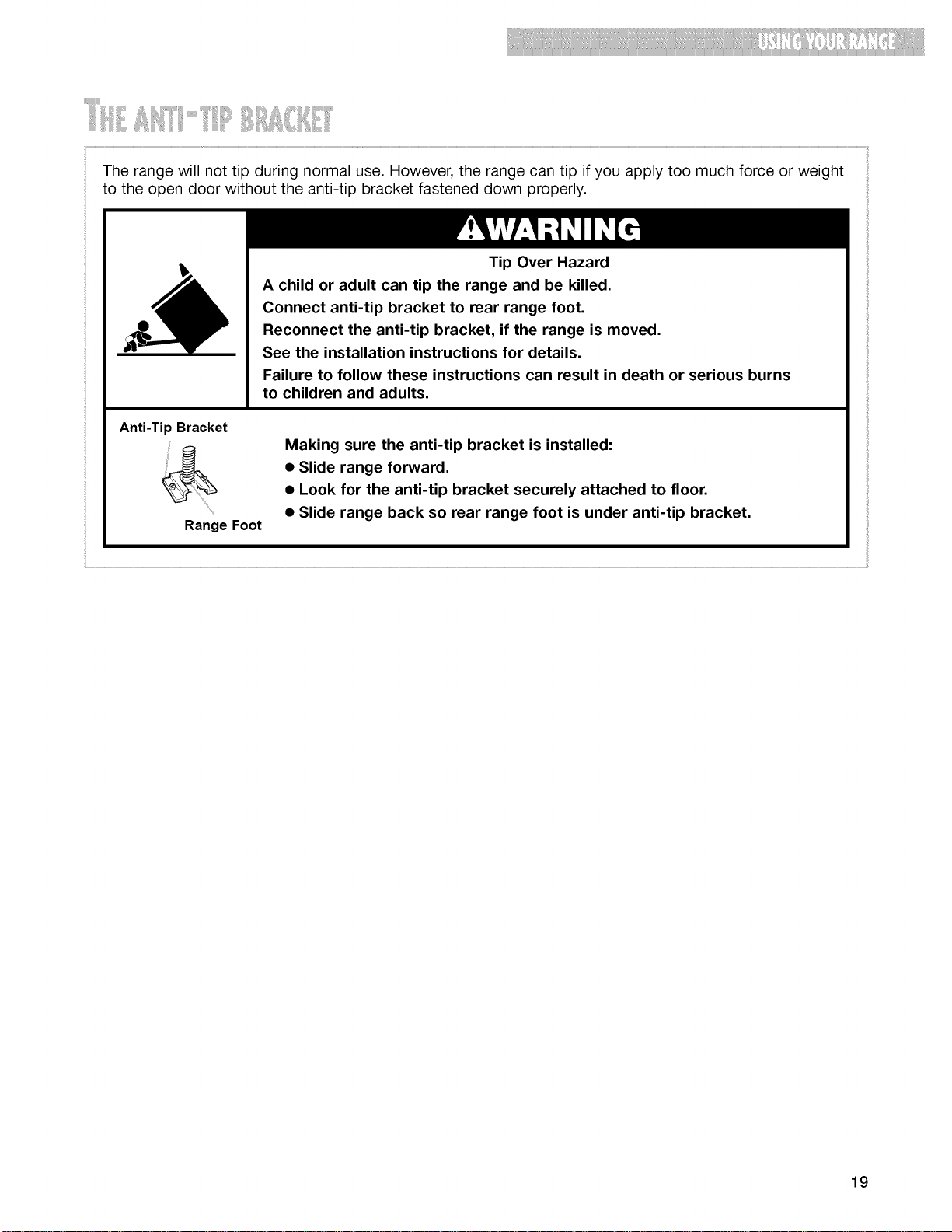
iilii!i!iii_I_I'''_''''ii_i;_'il!iii_i_i!iiiii.....
The range will not tip during normal use. However, the range can tip if you apply too much force or weight
to the open door without the anti-tip bracket fastened down properly.
Anti-Tip Bracket
Range Foot
Tip Over Hazard
A child or adult can tip the range and be killed.
Connect anti-tip bracket to rear range foot.
Reconnect the anti-tip bracket, if the range is moved.
See the installation instructions for details.
Failure to follow these instructions can result in death or serious burns
to children and adults.
Making sure the anti-tip bracket is installed:
• Slide range forward.
• Look for the anti-tip bracket securely attached to floor.
• Slide range back so rear range foot is under anti-tip bracket.
19
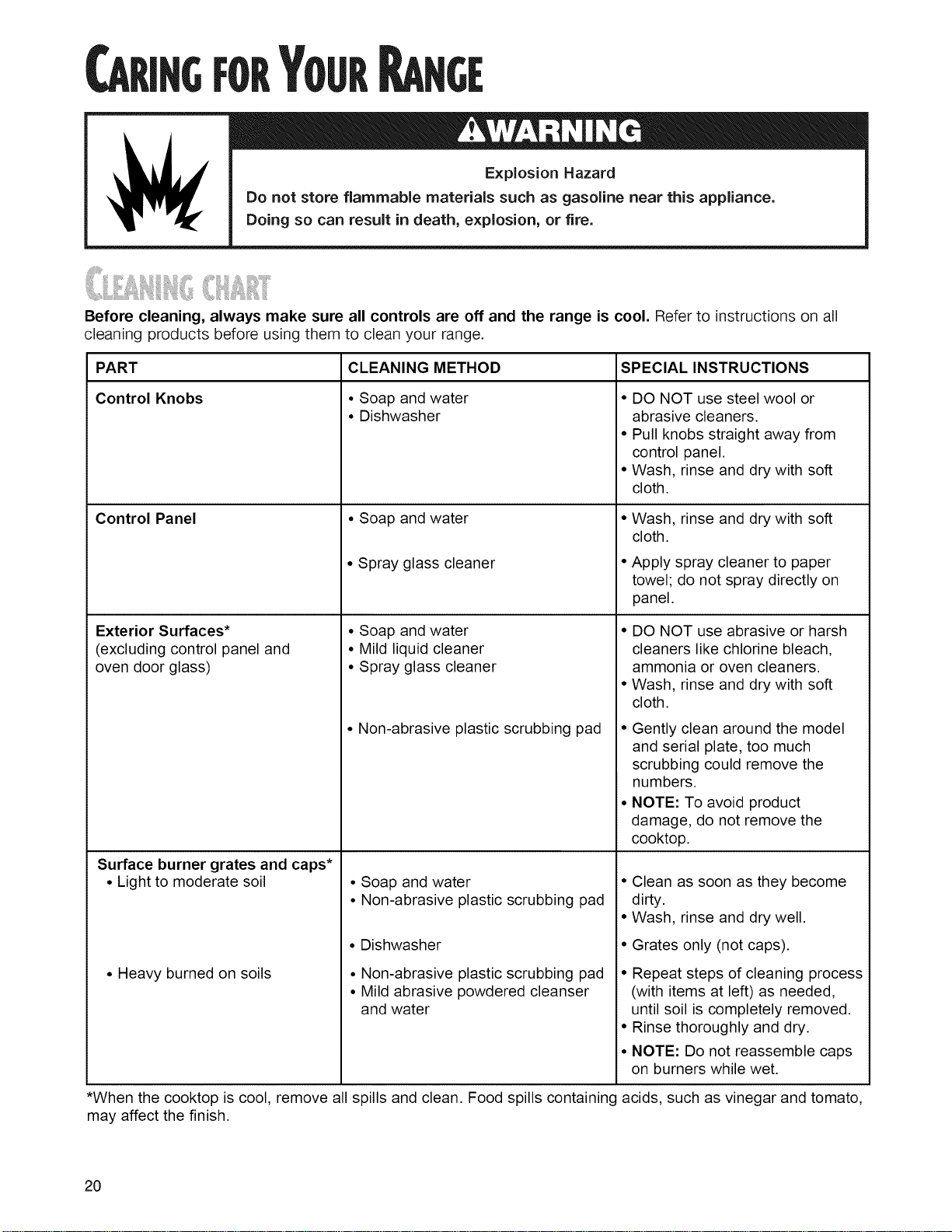
l _ J Explosion Hazard
Do not store flammable materials such as gasoline near this appliance.
Doing so can result in death, explosion, or fire.
Before cleaning, always make sure all controls are off and the range is cool. Refer to instructions on all
cleaning products before using them to clean your range.
PART
Control Knobs
Control Panel
Exterior Surfaces*
(excluding control panel and
oven door glass)
Surface burner grates and caps*
• Light to moderate soil
• Heavy burned on soils
CLEANING METHOD
• Soap and water
• Dishwasher
• Soap and water
• Spray glass cleaner
• Soap and water
• Mild liquid cleaner
• Spray glass cleaner
• Non-abrasive plastic scrubbing pad
• Soap and water
• Non-abrasive plastic scrubbing pad
• Dishwasher
• Non-abrasive plastic scrubbing pad
• Mild abrasive powdered cleanser
and water
SPECIAL INSTRUCTIONS
• DO NOT use steel wool or
abrasive cleaners.
• Pull knobs straight away from
control panel.
• Wash, rinse and dry with soft
cloth.
• Wash, rinse and dry with soft
cloth.
• Apply spray cleaner to paper
towel; do not spray directly on
panel.
• DO NOT use abrasive or harsh
cleaners like chlorine bleach,
ammonia or oven cleaners.
• Wash, rinse and dry with soft
cloth.
• Gently clean around the model
and serial plate, too much
scrubbing could remove the
numbers.
• NOTE: To avoid product
damage, do not remove the
cooktop.
• Clean as soon as they become
dirty.
• Wash, rinse and dry well.
• Grates only (not caps).
• Repeat steps of cleaning process
(with items at left) as needed,
until soil is completely removed.
• Rinse thoroughly and dry.
• NOTE: Do not reassemble caps
on burners while wet.
*When the cooktop is cool, remove all spills and clean. Food spills containing acids, such as vinegar and tomato,
may affect the finish.
20
llilJili ,i iillMIiiili,
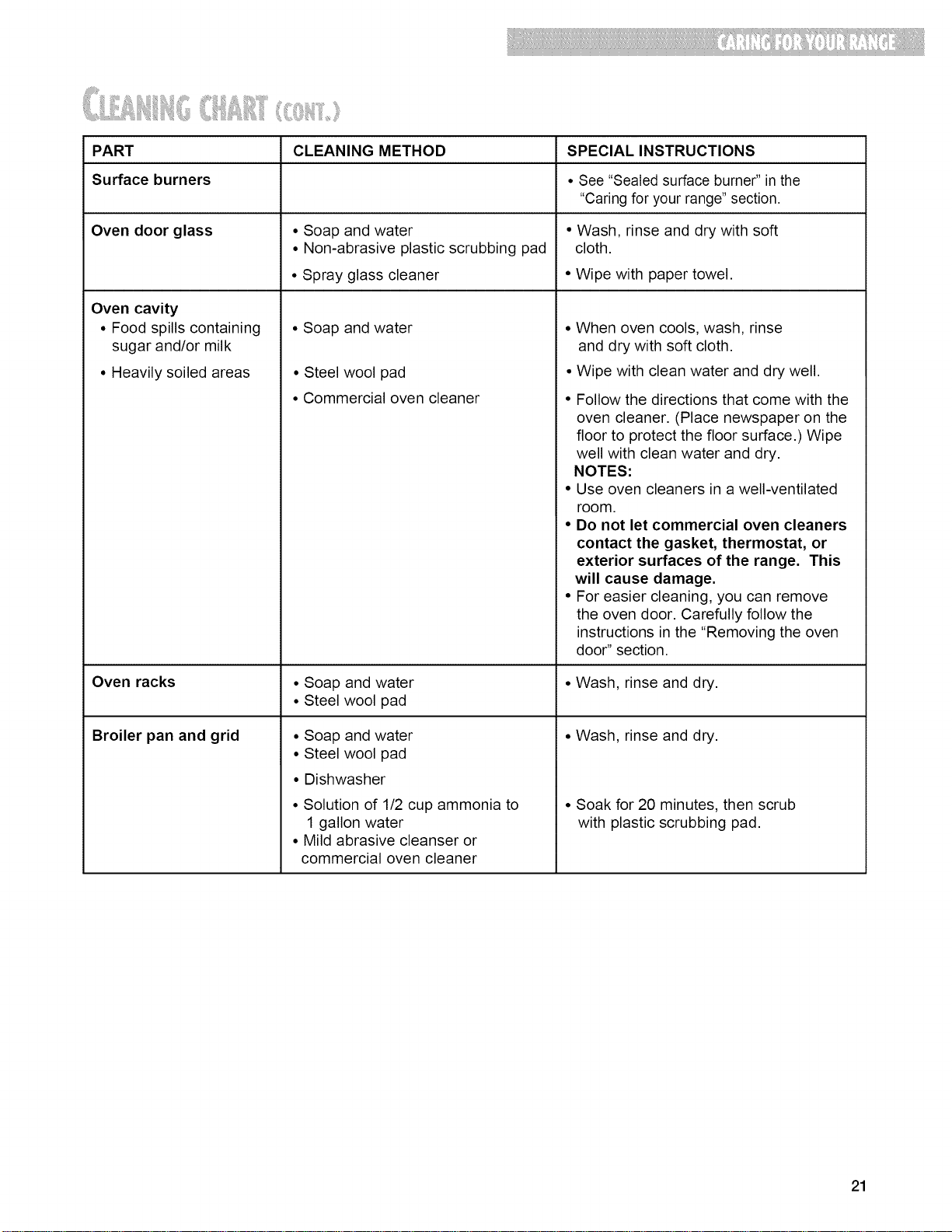
PART CLEANING METHOD SPECIAL INSTRUCTIONS
Surface burners • See "Sealed surface burner" in the
"Caring for your range" section.
Oven door glass • Soap and water • Wash, rinse and dry with soft
• Non-abrasive plastic scrubbing pad cloth.
• Spray glass cleaner • Wipe with paper towel.
Oven cavity
• Food spills containing
sugar and/or milk
• Heavily soiled areas
• Soap and water
• Steel wool pad
• Commercial oven cleaner
• When oven cools, wash, rinse
and dry with soft cloth.
• Wipe with clean water and dry well.
• Follow the directions that come with the
oven cleaner. (Place newspaper on the
floor to protect the floor surface.) Wipe
well with clean water and dry.
NOTES:
• Use oven cleaners in a well-ventilated
room.
• Do not let commercial oven cleaners
contact the gasket, thermostat, or
exterior surfaces of the range. This
will cause damage.
• For easier cleaning, you can remove
the oven door. Carefully follow the
instructions in the "Removing the oven
door" section.
Oven racks • Soap and water • Wash, rinse and dry.
• Steel wool pad
Broiler pan and grid • Wash, rinse and dry.Soap and water
Steel wool pad
Dishwasher
Solution of 1/2 cup ammonia to
1 gallon water
Mild abrasive cleanser or
commercial oven cleaner
• Soak for 20 minutes, then scrub
with plastic scrubbing pad.
21
_!!!_!_!!!!!!_!!_!_!!!!!!_i!_!!_!_]!!_!!_!_!_i_!!!!!!!!_i_!!_!_!!
_ii!_ii,iii!i!i!iiiiliil_iii!_ji!i_,_iliiii!i!iiiiiJiIiii_!iiIi!ill_iil_iii_l_iiiiiilitiizil_ilii_i_
iiiiiiI_i:!!_ii:_iii!_!illIi:iii:iil_ii__i_!!!i_ii_iii!iii:_:iiii_i_:_i_li_ii_!i;_
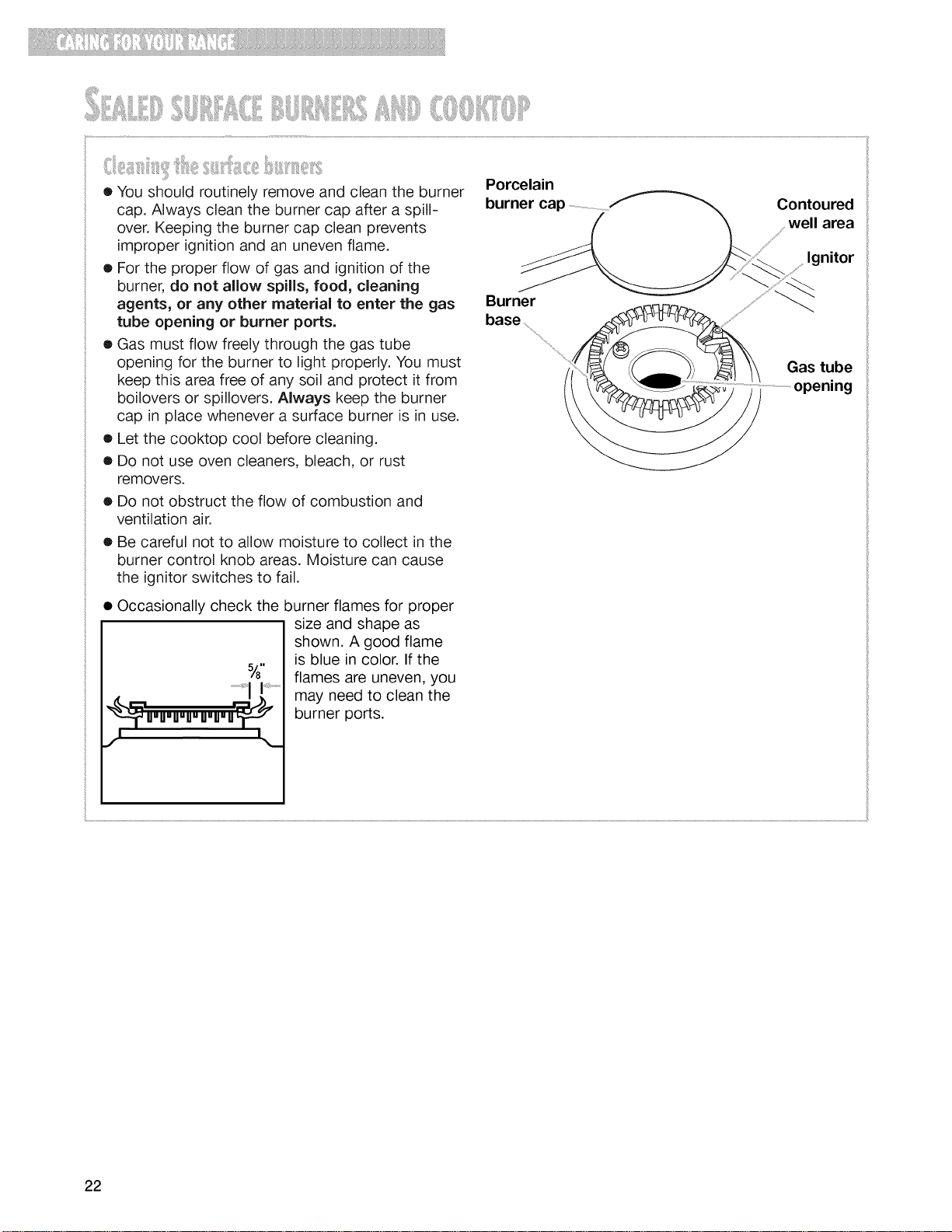
• You should routinely remove and clean the burner
cap. Always clean the burner cap after a spill-
over. Keeping the burner cap clean prevents
improper ignition and an uneven flame.
• For the proper flow of gas and ignition of the
burner, do not allow spills, food, cleaning
agents, or any other material to enter the gas
tube opening or burner ports.
• Gas must flow freely through the gas tube
opening for the burner to light properly. You must
keep this area free of any soil and protect it from
boilovers or spillovers. Always keep the burner
cap in place whenever a surface burner is in use.
• Let the cooktop cool before cleaning.
• Do not use oven cleaners, bleach, or rust
removers.
• Do not obstruct the flow of combustion and
ventilation air.
• Be careful not to allow moisture to collect in the
burner control knob areas. Moisture can cause
the ignitor switches to fail.
J8 II
_p"u_u_u_u_u_u_ur_
Occasionally check the burner flames for proper
size and shape as
shown. A good flame
is blue in color. If the
flames are uneven, you
may need to clean the
burner ports.
Porcelain
burner cap ..................................................
Burner
Contoured
well area
Ignitor
Gas tube
opening
22
1.
=
=
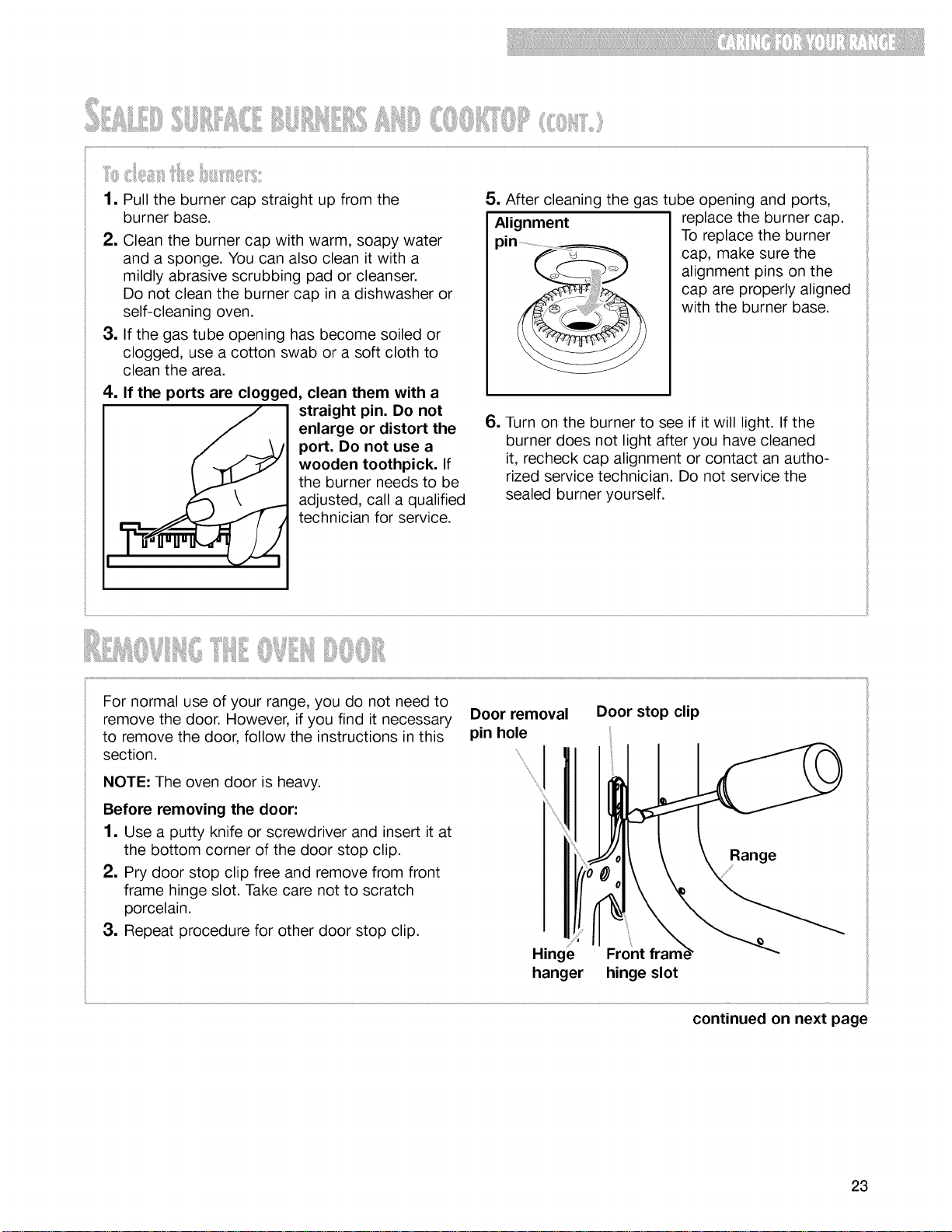
Pull the burner cap straight up from the
burner base.
Clean the burner cap with warm, soapy water
and a sponge. You can also clean it with a
mildly abrasive scrubbing pad or cleanser.
Do not clean the burner cap in a dishwasher or
self-cleaning oven.
If the gas tube opening has become soiled or
clogged, use a cotton swab or a soft cloth to
clean the area.
If the ports are clogged, clean them with a
straight pin. Do not
enlarge or distort the
port. Do not use a
wooden toothpick. If
the burner needs to be
adjusted, call a qualified
technician for service.
5. After cleaning the gas tube opening and ports,
Alignment replace the burner cap.
pin.............................................._ To replace the burner
cap, make sure the
alignment pins on the
...... ;,,, cap are properly aligned
with the burner base.
6. Turn on the burner to see if it will light. If the
burner does not light after you have cleaned
it, recheck cap alignment or contact an autho-
rized service technician. Do not service the
sealed burner yourself.
For normal use of your range, you do not need to
remove the door. However, if you find it necessary
to remove the door, follow the instructions in this
section.
NOTE: The oven door is heavy.
Before removing the door:
1. Use a putty knife or screwdriver and insert it at
the bottom corner of the door stop clip.
2. Pry door stop clip free and remove from front
frame hinge slot. Take care not to scratch
porcelain.
3. Repeat procedure for other door stop clip.
Door removal
pin hole
I
Door stop clip
Range
Hinge Front
hanger hinge slot
continued on next page
23
!iii_!_!i_iiiiiiii!Ji!_!tiliii!ii!_i_i_!!_!i_iiiiiiiii_ii__iil_i_ii_i:!¸i!iiiliiiii¸
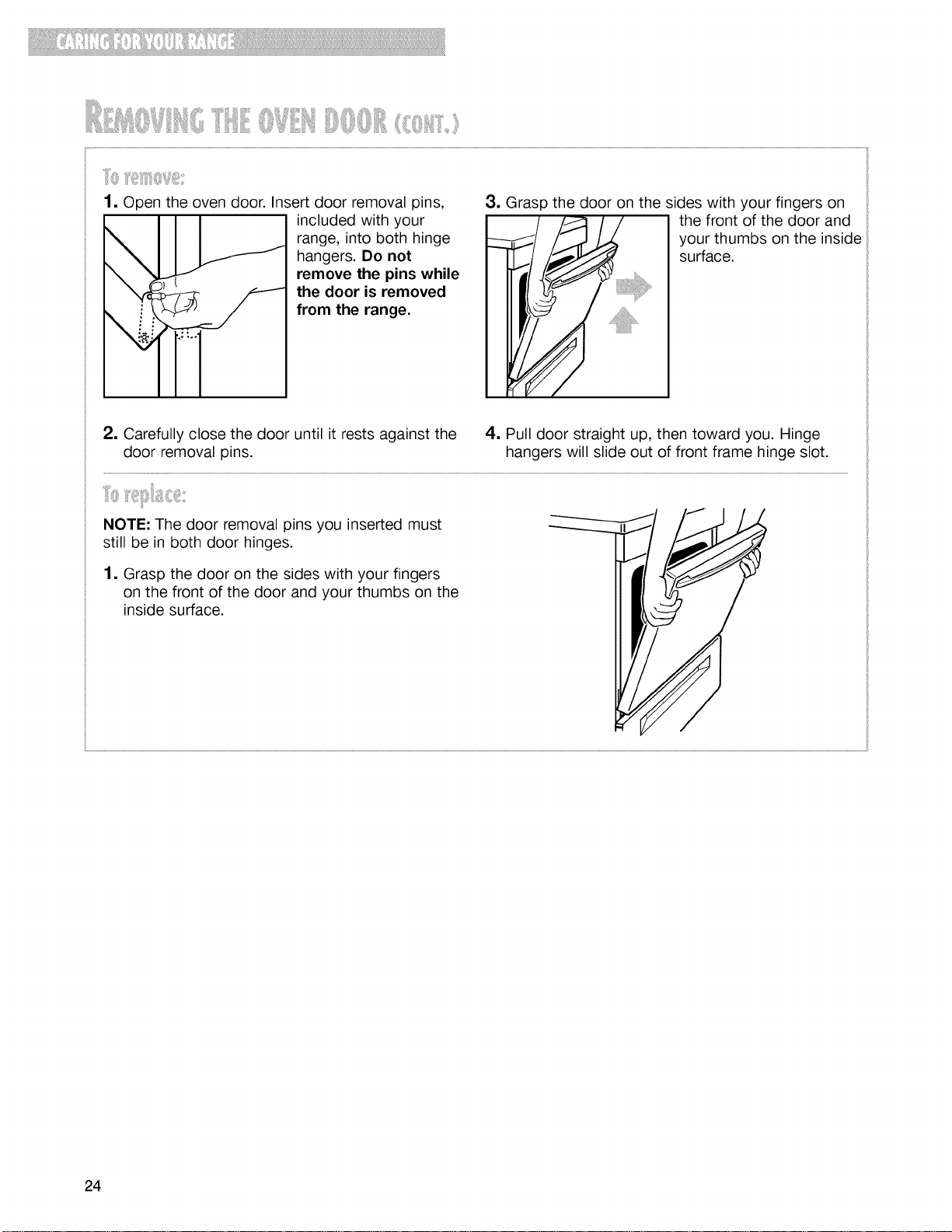
1, Open the oven door. Insert door removal pins,
included with your
range, into both hinge
hangers. Do not
remove the pins while
the door is removed
from the range.
3, Grasp the door on the sides with your fingers on
the front of the door and
your thumbs on the inside
surface.
2, Carefully close the door until it rests against the
door removal pins.
4, Pull door straight up, then toward you. Hinge
hangers will slide out of front frame hinge slot.
NOTE: The door removal pins you inserted must
still be in both door hinges.
1, Grasp the door on the sides with your fingers
on the front of the door and your thumbs on the
inside surface.
24
!iiiii_iiiiiii;,i_?ll_l_iiii..........Iiii!_ili!_i!_'ii!i_iiiii0iilii_i_iIiii_ii:_iiiiii:_)
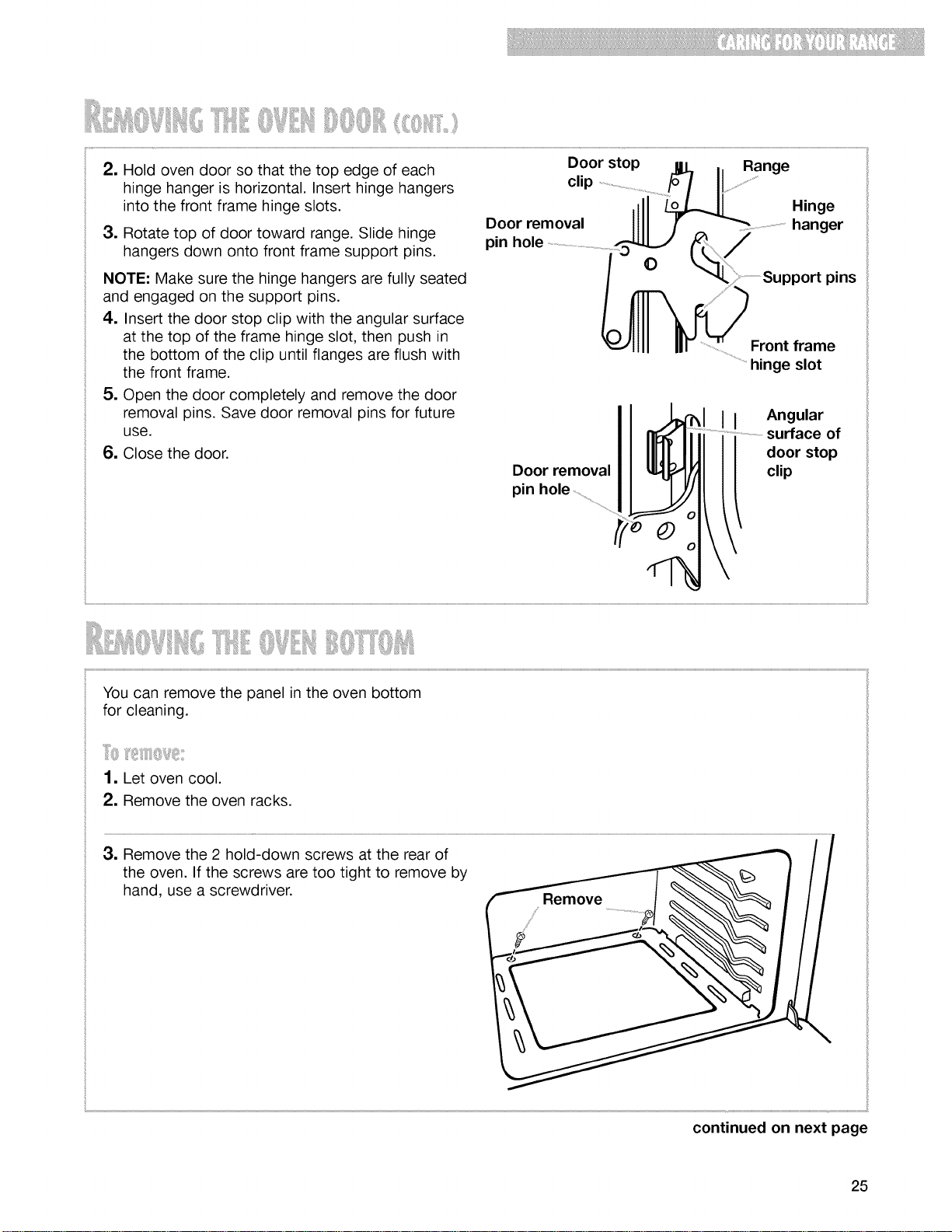
2, Hold oven door so that the top edge of each
hinge hanger is horizontal. Insert hinge hangers
into the front frame hinge slots.
3, Rotate top of door toward range. Slide hinge
hangers down onto front frame support pins.
NOTE: Make sure the hinge hangers are fully seated
and engaged on the support pins.
4. Insert the door stop clip with the angular surface
at the top of the frame hinge slot, then push in
the bottom of the clip until flanges are flush with
the front frame.
5. Open the door completely and remove the door
removal pins. Save door removal pins for future
use.
6. Close the door.
Door stop [], _ Range
clip ................................................................../_ I!.......................................
,111 Hinge
Door removal I111 [ _"--"........................................hanger
pinhole ......................................................................_ (_ /
...........................Support pins
Front frame
hinge slot
Door removal
pin
II
Angular
of
door stop
clip
3. Remove the 2 hold-down screws at the rear of
the oven. If the screws are too tight to remove by
hand, use a screwdriver.
continued on next page
25
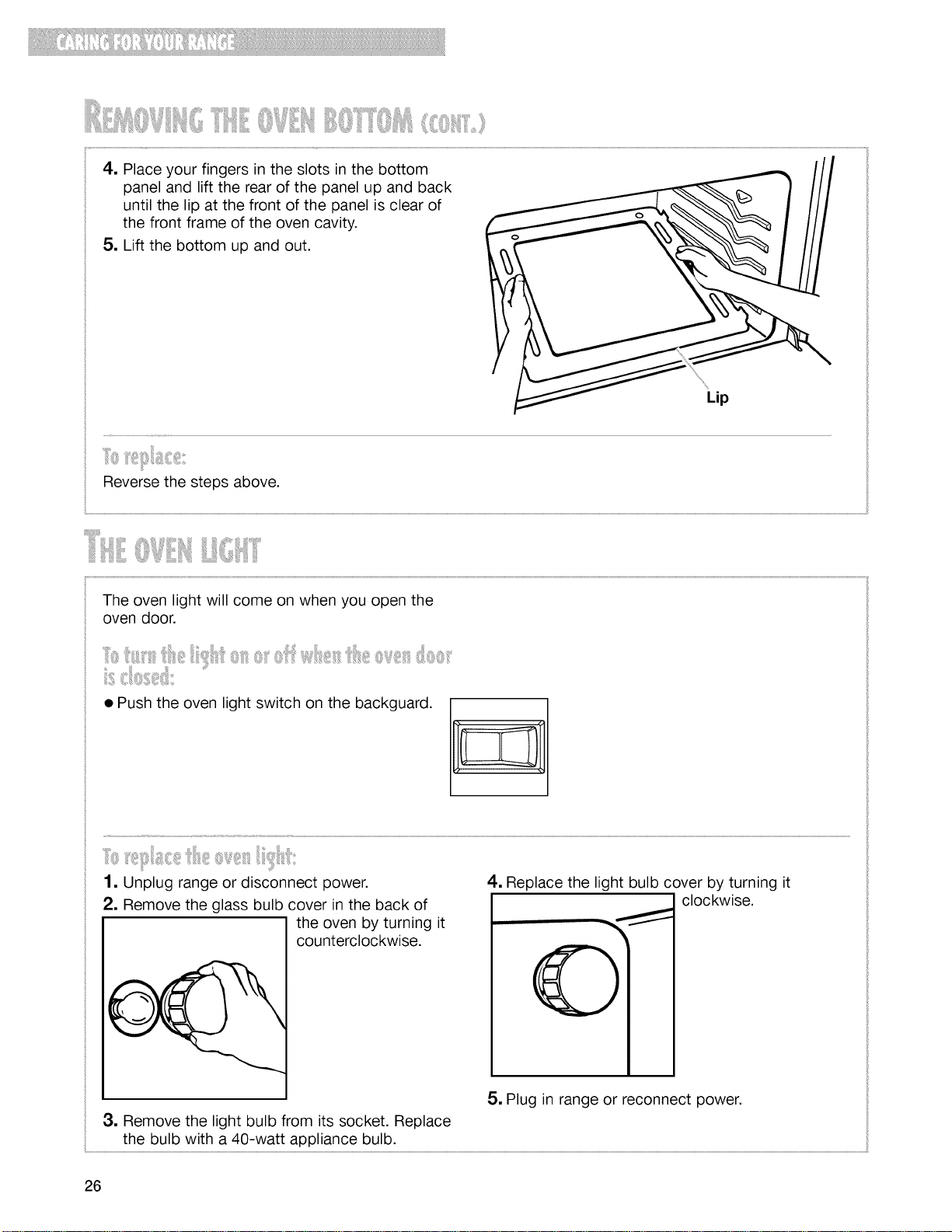
4, Placeyourfingersintheslotsinthebottom
panelandlifttherearofthepanelupandback
untilthelipatthefrontofthepanelisclearof
thefrontframeoftheovencavity.
5. Liftthebottomupandout.
Lip
Reverse the steps above.
< i:
The oven light will come on when you open the
oven door.
• Push the oven light switch on the backguard.
1. Unplug range or disconnect power.
2. Remove the glass bulb cover in the back of
the oven by turning it
counterclockwise.
4, Replace the light bulb cover by turning it
clockwise.
5. Plug in range or reconnect power.
3. Remove the light bulb from its socket. Replace
the bulb with a 40-watt appliance bulb.
26
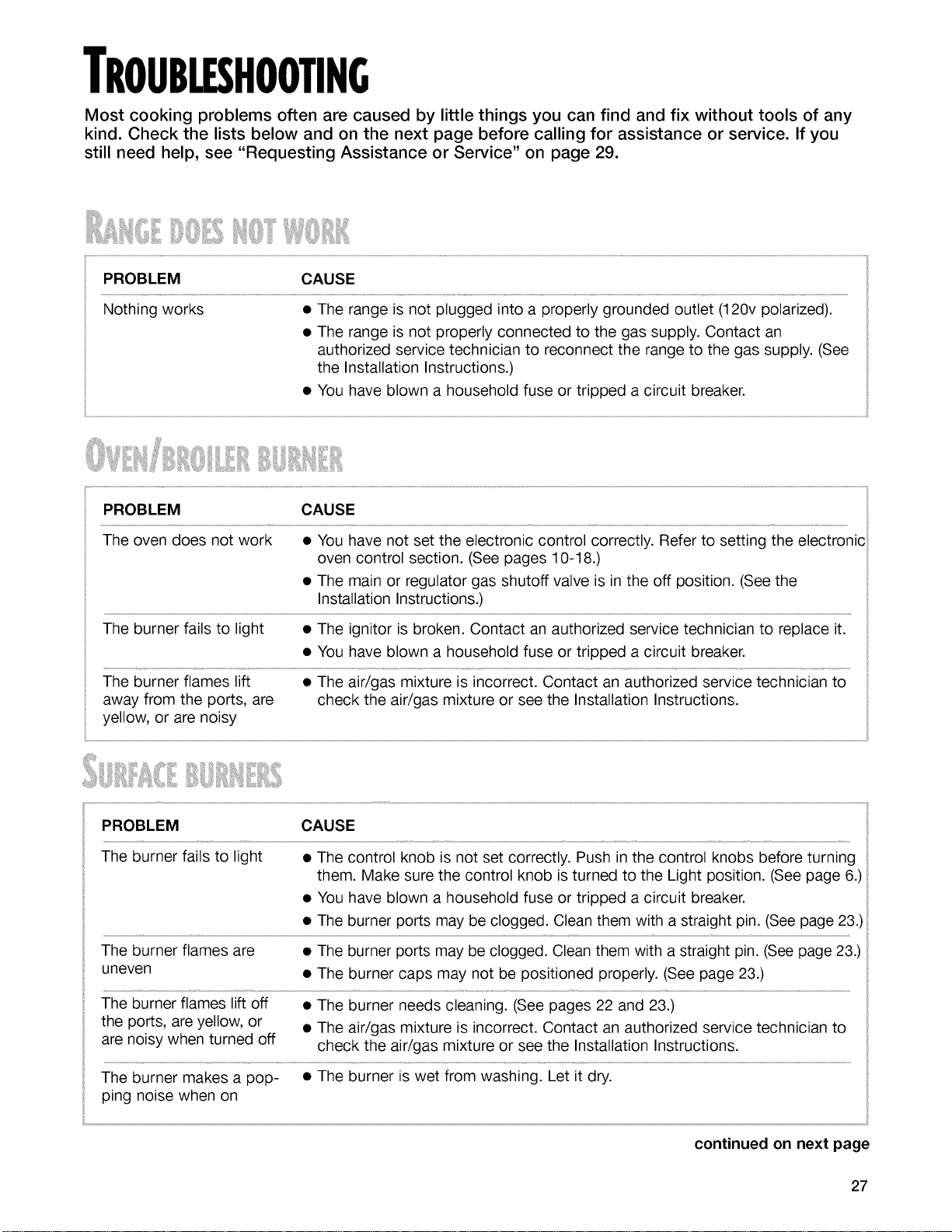
TROUBLESHOOTING
Most cooking problems often are caused by little things you can find and fix without tools of any
kind. Check the lists below and on the next page before calling for assistance or service. If you
still need help, see "Requesting Assistance or Service" on page 29.
PROBLEM CAUSE
Nothing works • The range is not plugged into a properly grounded outlet (120v polarized).
• The range is not properly connected to the gas supply. Contact an
authorized service technician to reconnect the range to the gas supply. (See
the Installation Instructions.)
• You have blown a household fuse or tripped a circuit breaker.
ii.........................................................................................................................................................................................................................................................................................................................................................................................................................................................................................................................................................................................................................................................................................................................................................................................................................................................................................................................................................................................................................................
PROBLEM CAUSE
The burner fails to light • The control knob is not set correctly. Push in the control knobs before turning
them. Make sure the control knob is turned to the Light position. (See page 6.)
• You have blown a household fuse or tripped a circuit breaker.
• The burner ports may be clogged. Clean them with a straight pin. (See page 23.)
The burner flames are • The burner ports may be clogged. Clean them with a straight pin. (See page 23.)
uneven • The burner caps may not be positioned properly. (See page 23.)
The burner flames lift off • The burner needs cleaning. (See pages 22 and 23.)
the ports, are yellow, or
• The air/gas mixture is incorrect. Contact an authorized service technician to
are noisy when turned off check the air/gas mixture or see the Installation Instructions.
The burner makes a pop- • The burner is wet from washing. Let it dry.
ping noise when on
continued on next page
27
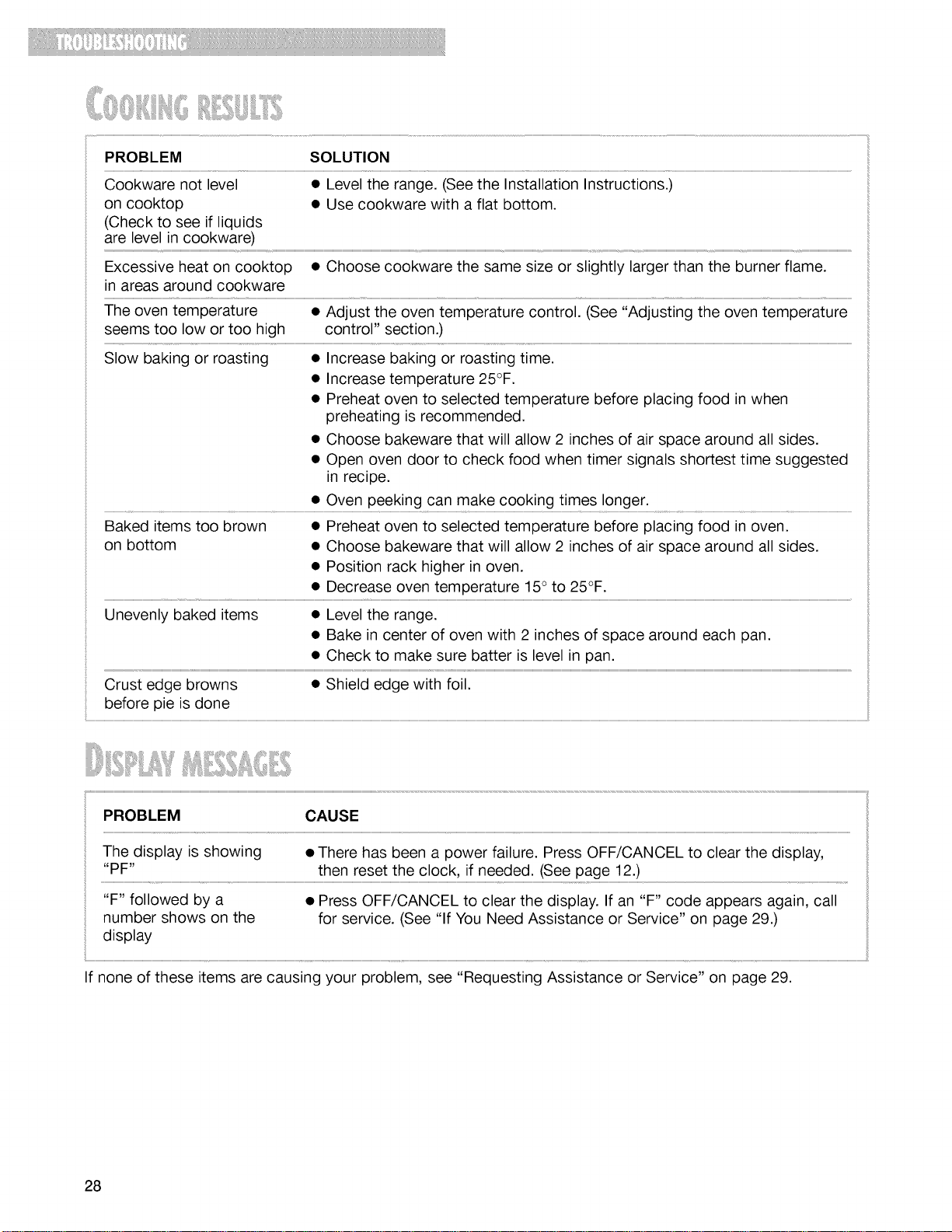
PROBLEM SOLUTION
Cookware not level • Level the range. (See the Installation Instructions.)
on cooktop • Use cookware with a flat bottom.
(Check to see if liquids
are level in cookware)
Excessive heat on cooktop • Choose cookware the same size or slightly larger than the burner flame.
in areas around cookware
The oven temperature • Adjust the oven temperature control. (See "Adjusting the oven temperature
seems too low or too high control" section.)
Slow baking or roasting • Increase baking or roasting time.
• Increase temperature 25°F.
• Preheat oven to selected temperature before placing food in when
preheating is recommended.
• Choose bakeware that will allow 2 inches of air space around all sides.
• Open oven door to check food when timer signals shortest time suggested
in recipe.
• Oven peeking can make cooking times longer.
Baked items too brown • Preheat oven to selected temperature before placing food in oven.
on bottom • Choose bakeware that will allow 2 inches of air space around all sides.
• Position rack higher in oven.
• Decrease oven temperature 15° to 25°F.
Unevenly baked items • Level the range.
• Bake in center of oven with 2 inches of space around each pan.
i
• Check to make sure batter is level in pan.
i
Crust edge browns • Shield edge with foil.
before pie is done
i
i
PROBLEM CAUSE
The display is showing • There has been a power failure. Press OFF/CANCEL to clear the display,
"PF" then reset the clock, if needed. (See page 12.)
"F" followed by a
number shows on the
display
• Press OFF/CANCEL to clear the display. If an "F" code appears again, call
for service. (See "If You Need Assistance or Service" on page 29.)
If none of these items are causing your problem, see "Requesting Assistance or Service" on page 29.
28
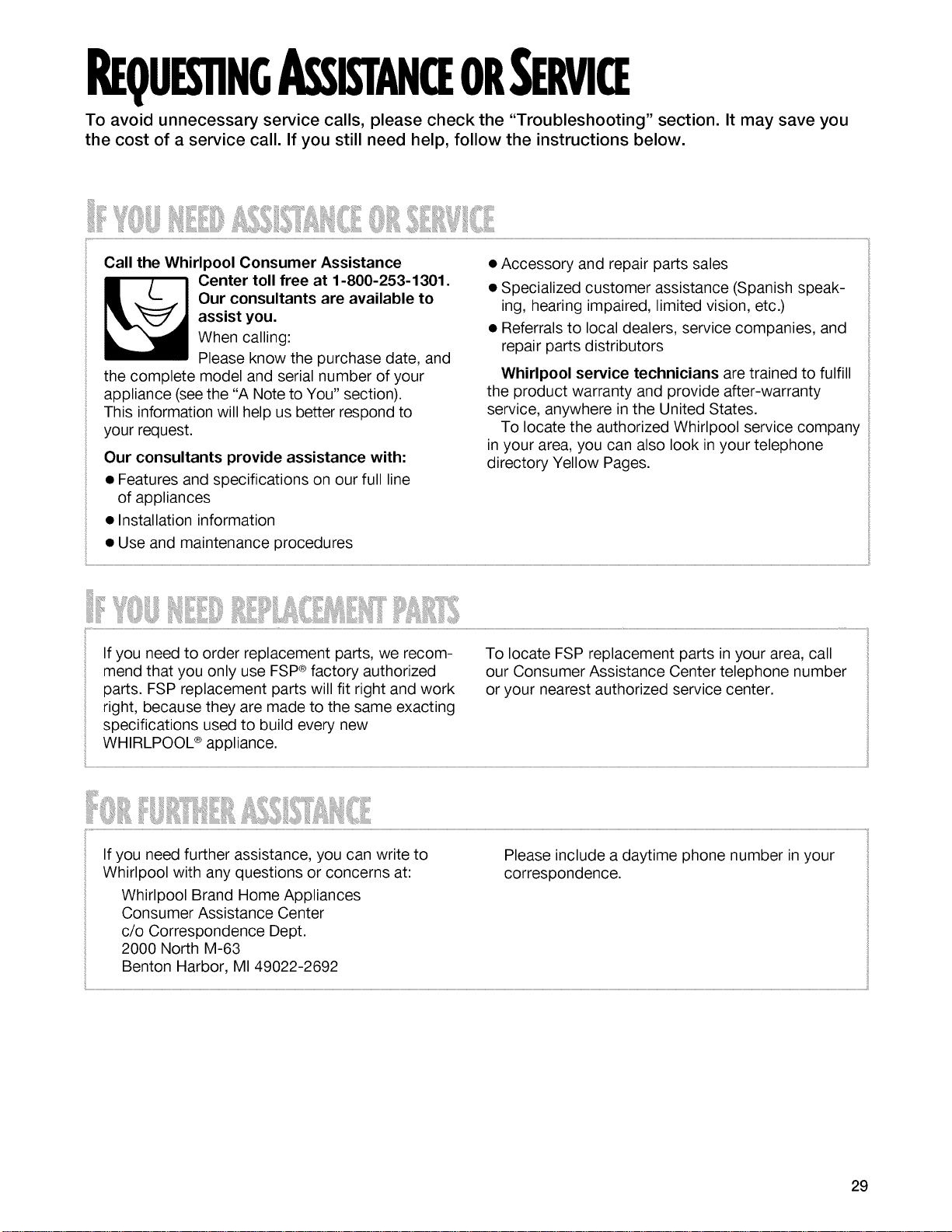
REQUES'nNGASSISTANCEORSERVICE
To avoid unnecessary service calls, please check the "Troubleshooting" section. It may save you
the cost of a service call. If you still need help, follow the instructions below.
When calling:
Please know the purchase date, and
the complete model and serial number of your
appliance (seethe "A Note to You" section).
This information will help us better respond to
your request.
Our consultants provide assistance with:
• Features and specifications on our full line
of appliances
• Installation information
• Referrals to local dealers, service companies, and
repair parts distributors
Whirlpool service technicians are trained to fulfill
the product warranty and provide after-warranty
service, anywhere in the United States.
To locate the authorized Whirlpool service company
in your area, you can also look in your telephone
directory Yellow Pages.
• Use and maintenance procedures
i:iiiiiiiiiiiiiii! iiii_ _iiiiiiiiiiii!i__iiiiiiii_i_;_¸_ iiii_i!ii_iiiiiiiiiiiiii:::iiiiililiiiiiii_idlililiiiiiiii¢iiii_iiiii_i!i!i!i!i!iii_iiiiiii_iiii_:_:i_iiiii/i!ii':;:;:;:;:ii;_ii}iiiiiii_iiiiiiiiiiiii:id_i_i_i_i_ili!iiiii_iiii_iiiiiiiiiiiiii::i;iiiililiiiii_iiiii_iii_ iii_ _i_i_i_i_ii_i':;:;:;:;:ii;iiiiii_iiiiiiiiiii_41_jiiiiilti¸
If you need to order replacement parts, we recom-
mend that you only use FSP®factory authorized
parts. FSP replacement parts will fit right and work
right, because they are made to the same exacting
specifications used to build every new
WHIRLPOOL ®appliance.
To locate FSP replacement parts in your area, call
our Consumer Assistance Center telephone number
or your nearest authorized service center.
If you need further assistance, you can write to
Whirlpool with any questions or concerns at:
Whirlpool Brand Home Appliances
Consumer Assistance Center
c/o Correspondence Dept.
2000 North M-63
Benton Harbor, MI 49022-2692
Please include a daytime phone number in your
correspondence.
29

ii ii lii!!!!!
3O
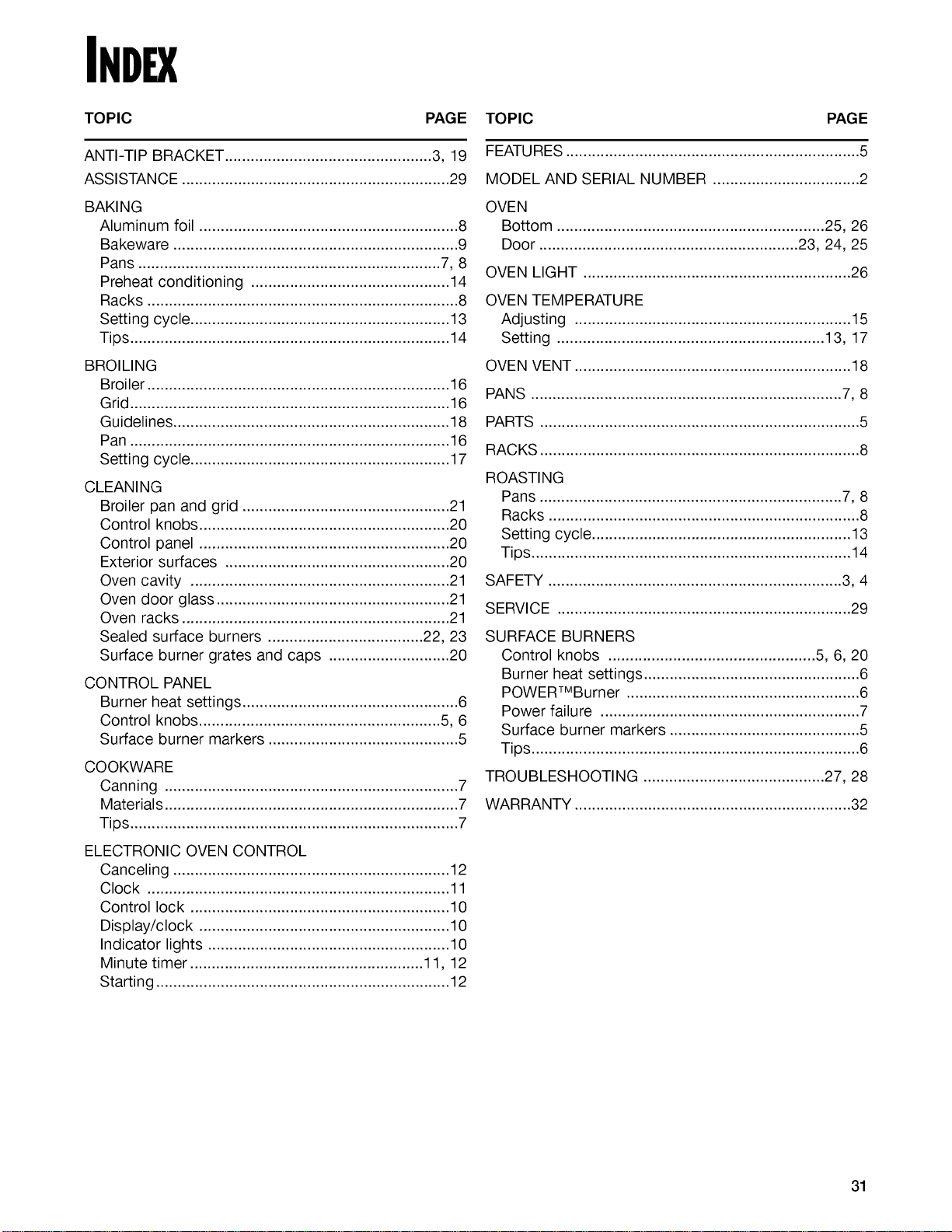
INDEX
TOPIC PAGE TOPIC PAGE
ANTI-TIP BRACKET ................................................ 3, 19
ASSISTANCE .............................................................. 29
BAKING
Aluminum foil ............................................................ 8
Bakeware .................................................................. 9
Pans ...................................................................... 7, 8
Preheat conditioning .............................................. 14
Racks ........................................................................ 8
Setting cycle ............................................................ 13
Tips .......................................................................... 14
BROILING
Broi let ...................................................................... 16
Grid .......................................................................... 16
Guidelines ................................................................ 18
Pan .......................................................................... 16
Setting cycle ............................................................ 17
CLEANING
Broiler pan and grid ................................................ 21
Control knobs .......................................................... 20
Control panel .......................................................... 20
Exterior surfaces .................................................... 20
Oven cavity ............................................................ 21
Oven door glass ...................................................... 21
Oven racks .............................................................. 21
Sealed surface burners .................................... 22, 23
Surface burner grates and caps ............................ 20
CONTROL PANEL
Burner heat settings .................................................. 6
Control knobs ........................................................ 5, 6
Surface burner markers ............................................ 5
COOKWARE
Canning .................................................................... 7
Materials .................................................................... 7
Tips ............................................................................ 7
ELECTRONIC OVEN CONTROL
Canceling ................................................................ 12
Clock ...................................................................... 11
Control lock ............................................................ 10
Display/clock .......................................................... 10
Indicator lights ........................................................ 10
Minute timer ...................................................... 11, 12
Starting .................................................................... 12
FEATURES .................................................................... 5
MODEL AND SERIAL NUMBER .................................. 2
OVEN
Bottom .............................................................. 25, 26
Door ............................................................ 23, 24, 25
OVEN LIGHT .............................................................. 26
OVEN TEMPERATURE
Adjusting ................................................................ 15
S_ting .............................................................. 13,17
OVEN VENT ................................................................ 18
PANS ........................................................................ 7,8
PARTS .......................................................................... 5
RACKS .......................................................................... 8
ROASTING
Pans ...................................................................... 7, 8
Racks ........................................................................ 8
Setting cycle ............................................................ 13
Tips .......................................................................... 14
SAFETY .................................................................... 3, 4
SERVICE .................................................................... 29
SURFACE BURNERS
Control knobs ................................................ 5, 6, 20
Burner heat settings .................................................. 6
POWERTMBurner ...................................................... 6
Power failure ............................................................ 7
Surface burner markers ............................................ 5
Tips ............................................................................ 6
TROUBLESHOOTING .......................................... 27, 28
WARRANTY ................................................................ 32
31
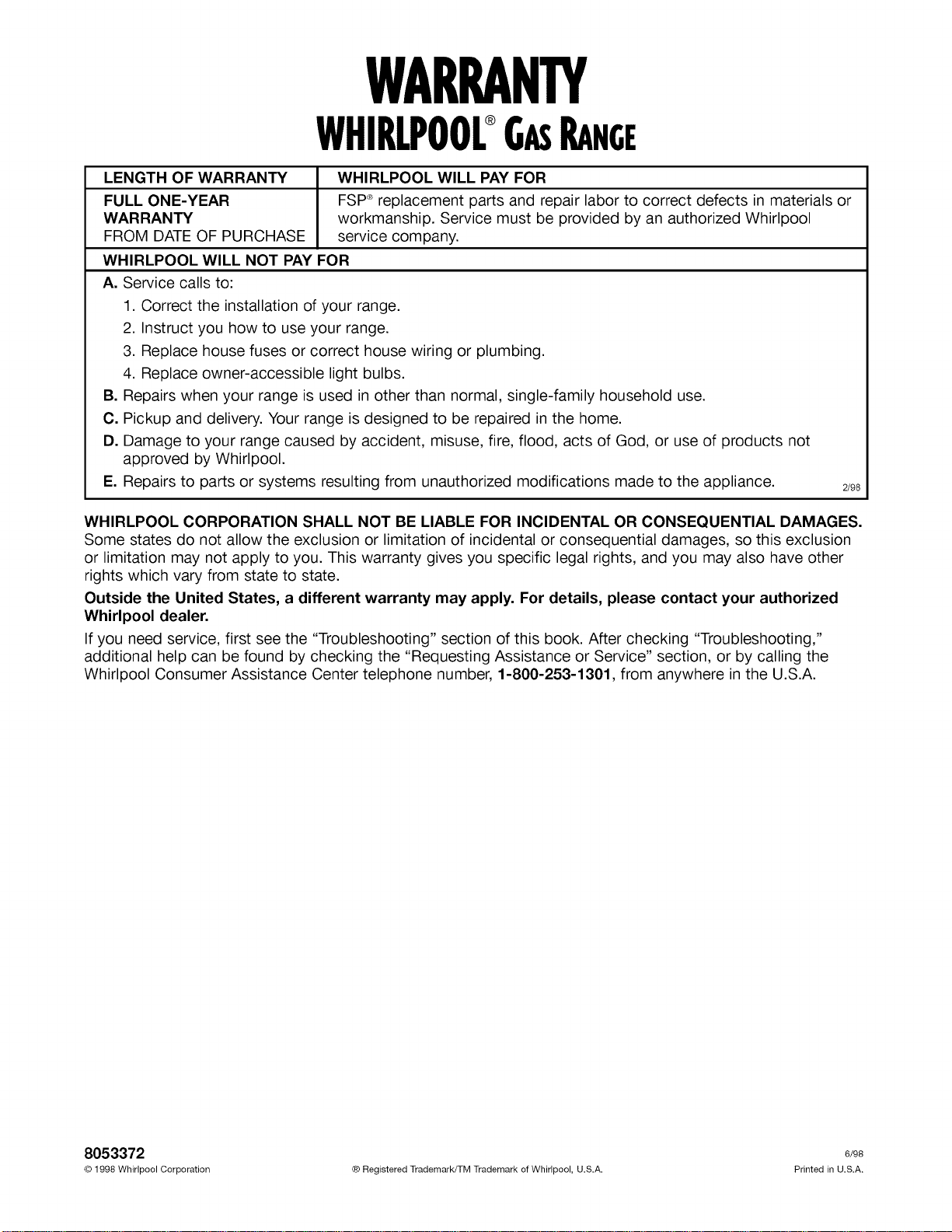
WARRANTY
WHIRLPOOL®GASRANCE
LENGTH OF WARRANTY
FULL ONE-YEAR
WARRANTY workmanship. Service must be provided by an authorized Whirlpool
FROM DATE OF PURCHASE service company.
WHIRLPOOL WILL NOT PAY FOR
A. Service calls to:
1. Correct the installation of your range.
2. Instruct you how to use your range.
3. Replace house fuses or correct house wiring or plumbing.
4. Replace owner-accessible light bulbs.
B. Repairs when your range is used in other than normal, single-family household use.
C. Pickup and delivery. Your range is designed to be repaired in the home.
D. Damage to your range caused by accident, misuse, fire, flood, acts of God, or use of products not
approved by Whirlpool.
E. Repairs to parts or systems resulting from unauthorized modifications made to the appliance.
WHIRLPOOL WILL PAY FOR
FSP®replacement parts and repair labor to correct defects in materials or
2/98
WHIRLPOOL CORPORATION SHALL NOT BE LIABLE FOR INCIDENTAL OR CONSEQUENTIAL DAMAGES.
Some states do not allow the exclusion or limitation of incidental or consequential damages, so this exclusion
or limitation may not apply to you. This warranty gives you specific legal rights, and you may also have other
rights which vary from state to state.
Outside the United States, a different warranty may apply. For details, please contact your authorized
Whirlpool dealer.
If you need service, first see the "Troubleshooting" section of this book. After checking "Troubleshooting,"
additional help can be found by checking the "Requesting Assistance or Service" section, or by calling the
Whirlpool Consumer Assistance Center telephone number, 1-800-253-1301, from anywhere in the U.S.A.
8053372 e/9s
© 1998 Whirlpool Corporation ® Registered Trademark/TM Trademark of Whirlpool, U.S.A. Printed in U.S.A.