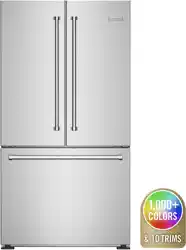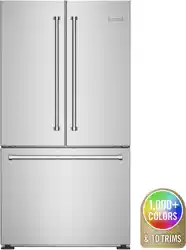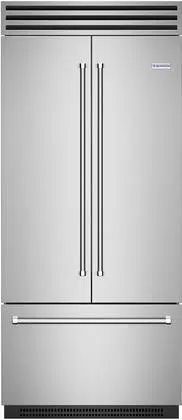

USE & CARE MANUAL
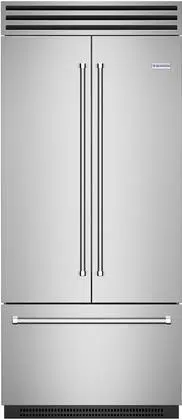
Built-in Refrigerator
Part # 799934 revision 0 © Prizer Painter Stove Works, Blandon, PA 19510
2 (877) 427-3290
Thank You and Welcome
Thank you for your purchase and welcome to the BlueStar
®
family!
BlueStar
®
refrigerators are designed for discerning home chefs who demand restaurant-quality results in their own
kitchens. As the owner of a new BlueStar
®
refrigerator you can look forward to years of cooling excellence. All equipment
is designed and manufactured to the highest quality standards in the industry—specifically to meet the needs of the
world’s most demanding chef: you. Please review and familiarize yourself with this Use & Care Manual, which includes
instructions and tips for getting the most out of your refrigerator.
Please take a few moments to register your product online at www.bluestarcooking.com/support/product-registration or
call customer service at (877) 427-3290.
Show us your kitchen and review us! Share your stunning new kitchen photos at www.bluestarcooking.com/inspiration/
submit-to-gallery and write a review on your experience and your new refrigerator at
www.houzz.com/pro/bluestar-main/bluestar.
We hope you enjoy your new refrigerator.
The BlueStar
®
Team
bluestarcooking.com 3
Contents
Model Information
Safety Information 4
Site Preparation 6
Installation Instructions 8
Models 14
Electronic Control 16
Refrigerator Features 17
Freezer Features 19
Operation 20
Care and Cleaning 22
Troubleshooting 23
Warranty 24
The model and serial numbers can be found on the serial
plate, which is located inside the refrigerator. Slide out the
pull-out tray and the serial plate is on the left side. Please
complete the information below for warranty purposes and
future reference:
Model Number
Serial Number
Installation Date
Dealer’s Name
Dealer’s Phone Number
Register your refrigerator online at
www.bluestarcooking.com/support/product-registration or
call customer service at (877) 427-3290.
If service is required under the warranty, it must be
performed by authorized service personnel. BlueStar also
recommends using authorized service personnel if service
is required after the warranty expires. To locate
authorized service personnel in your area, call customer
service at (877) 427-3290.
4 (877) 427-3290
Safety Information
Electrical Shock Hazard
Follow these basic precautions:
Plug into a grounded three-prong outlet.
Do not remove ground prong.
Do not use an adapter.
Do not use an extension cord.
Disconnect power before servicing.
Replace all parts and panels before operating.
Remove doors from your old refrigerator.
Use nonflammable cleaner.
Keep flammable materials and vapors, such as
gasoline, away from refrigerator.
Use two or more people to move and install
refrigerator.
Failure to follow these instructions can result in death,
electrical shock, or fire.
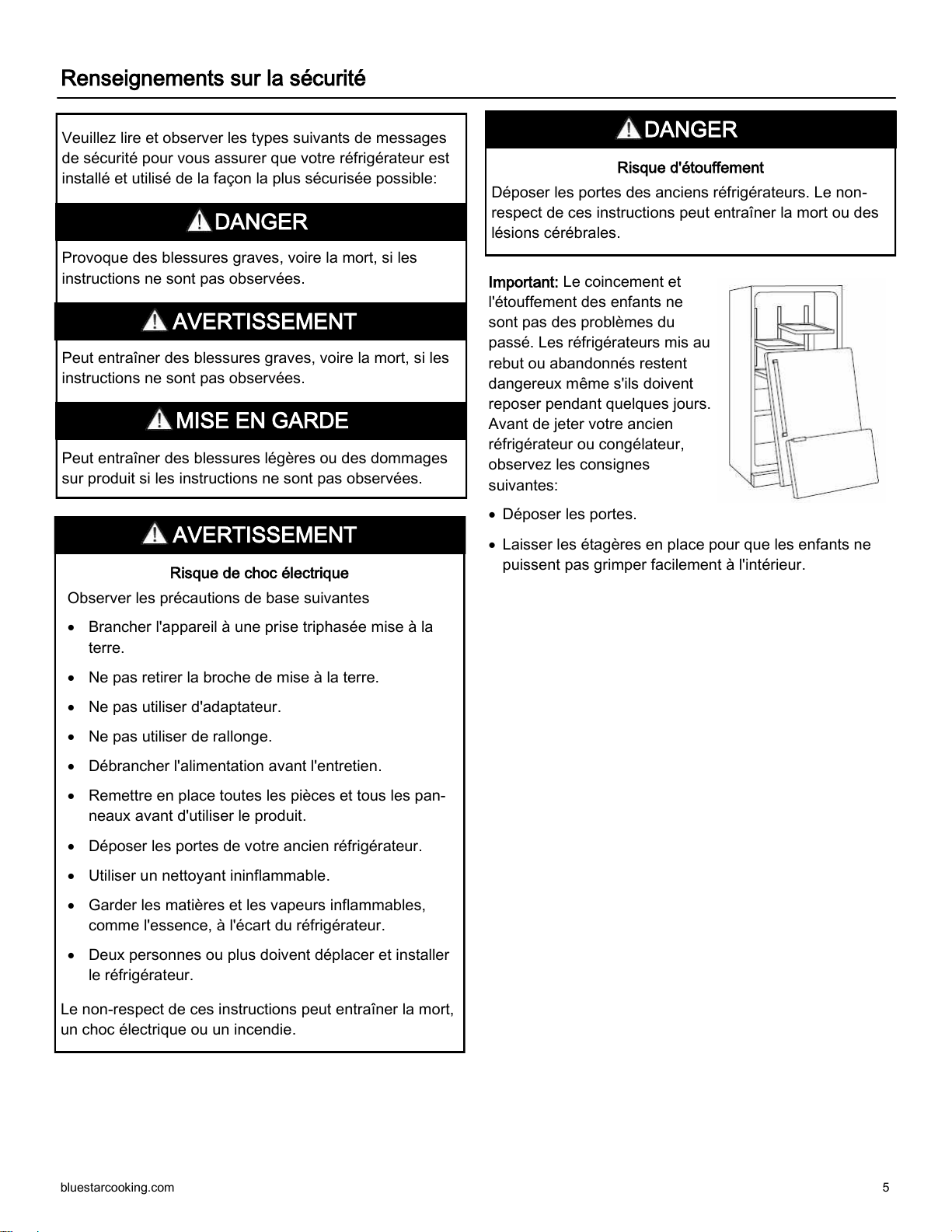
Important: Child entrapment and
suffocation are not problems of
the past. Junked or abandoned
refrigerators are still dangerous
even if they will sit for a few
days. Before you throw away
your old refrigerator or freezer,
do the following:
Take off the doors.
Leave the shelves in place so
that children may not easily
climb inside.
Suffocation Hazard
Remove doors from old refrigerators. Failure to follow
these instructions can cause death or brain damage.
Please read and obey the following types of safety
messages to ensure your refrigerator is installed and
operated as safely as possible:
Will cause serious injury or death if instructions are not
followed.
Can cause serious injury or death if instructions are not
followed.
Can cause minor injury or product damage if instructions
are not followed.
DANGER
DANGER
WARNING
WARNING
CAUTION
bluestarcooking.com 5
Important: Le coincement et
l'étouffement des enfants ne
sont pas des problèmes du
passé. Les réfrigérateurs mis au
rebut ou abandonnés restent
dangereux même s'ils doivent
reposer pendant quelques jours.
Avant de jeter votre ancien
réfrigérateur ou congélateur,
observez les consignes
suivantes:
Déposer les portes.
Laisser les étagères en place pour que les enfants ne
puissent pas grimper facilement à l'intérieur.
Renseignements sur la sécurité
Risque d'étouffement
Déposer les portes des anciens réfrigérateurs. Le non-
respect de ces instructions peut entraîner la mort ou des
lésions cérébrales.
DANGER
Risque de choc électrique
Observer les précautions de base suivantes
Brancher l'appareil à une prise triphasée mise à la
terre.
Ne pas retirer la broche de mise à la terre.
Ne pas utiliser d'adaptateur.
Ne pas utiliser de rallonge.
Débrancher l'alimentation avant l'entretien.
Remettre en place toutes les pièces et tous les pan-
neaux avant d'utiliser le produit.
Déposer les portes de votre ancien réfrigérateur.
Utiliser un nettoyant ininflammable.
Garder les matières et les vapeurs inflammables,
comme l'essence, à l'écart du réfrigérateur.
Deux personnes ou plus doivent déplacer et installer
le réfrigérateur.
Le non-respect de ces instructions peut entraîner la mort,
un choc électrique ou un incendie.
Veuillez lire et observer les types suivants de messages
de sécurité pour vous assurer que votre réfrigérateur est
installé et utilisé de la façon la plus sécurisée possible:
Provoque des blessures graves, voire la mort, si les
instructions ne sont pas observées.
Peut entraîner des blessures graves, voire la mort, si les
instructions ne sont pas observées.
Peut entraîner des blessures légères ou des dommages
sur produit si les instructions ne sont pas observées.
DANGER
AVERTISSEMENT
AVERTISSEMENT
MISE EN GARDE
6 (877) 427-3290
Site Preparation
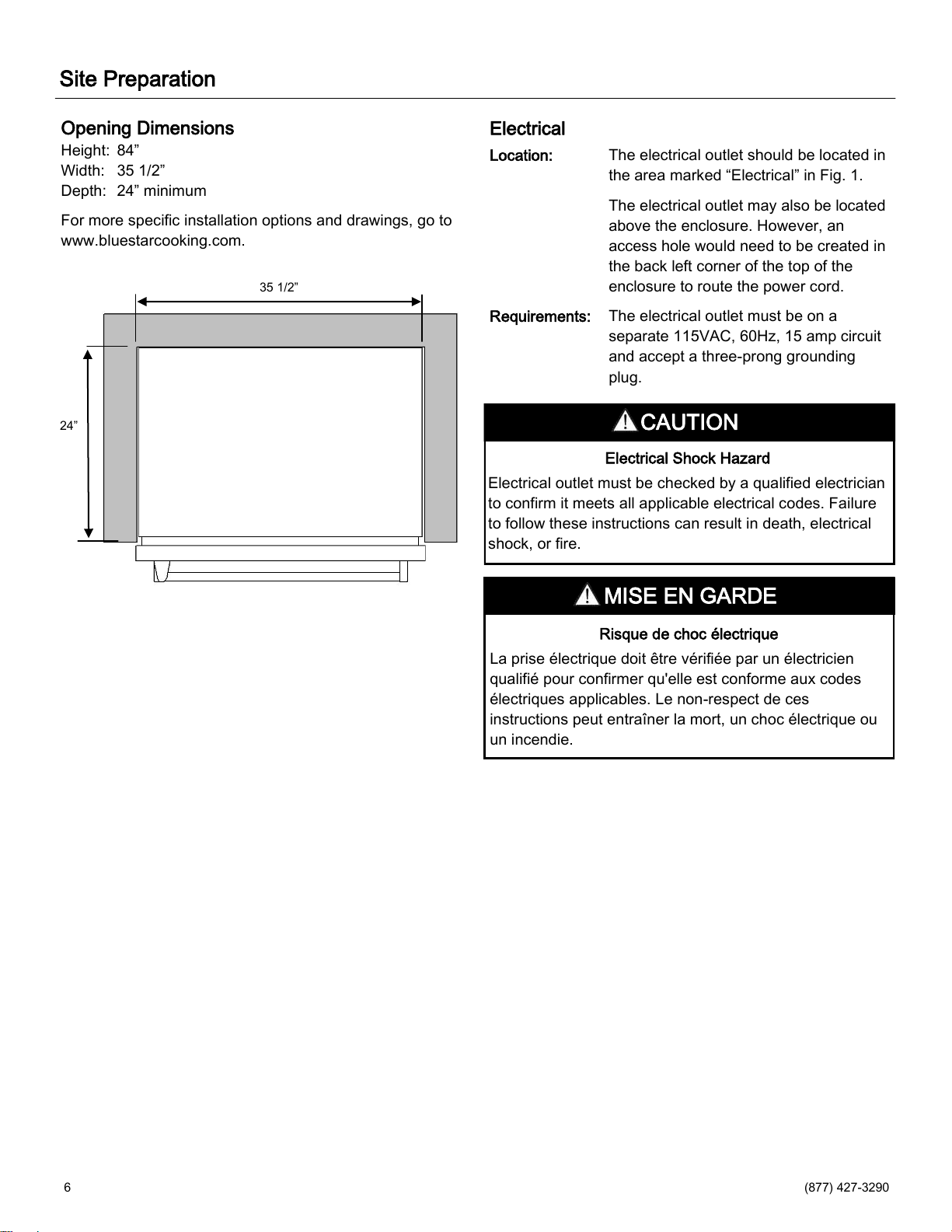
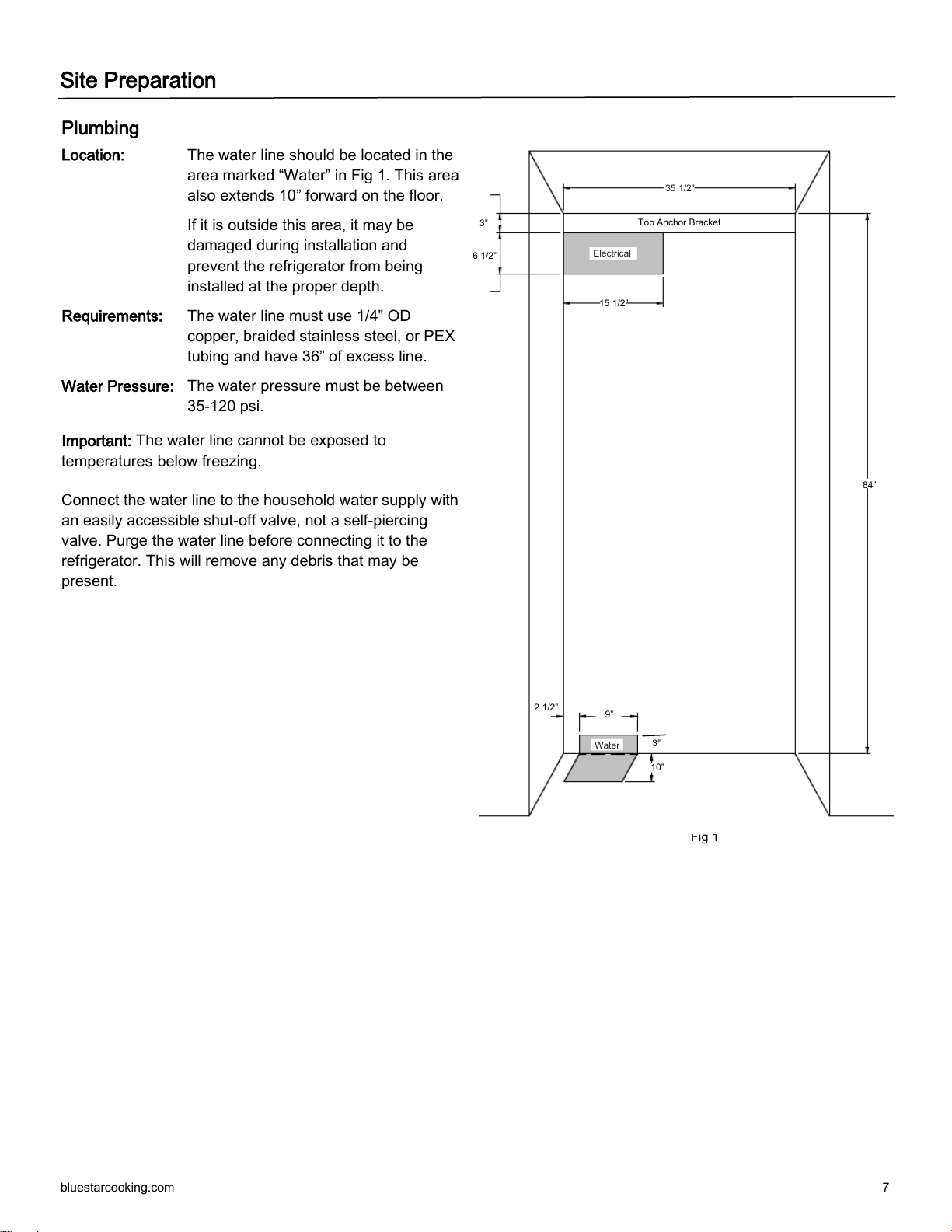
Opening Dimensions
Height: 84”
Width: 35 1/2”
Depth: 24” minimum
For more specific installation options and drawings, go to
www.bluestarcooking.com.
Electrical
Location: The electrical outlet should be located in
the area marked “Electrical” in Fig. 1.
The electrical outlet may also be located
above the enclosure. However, an
access hole would need to be created in
the back left corner of the top of the
enclosure to route the power cord.
Requirements: The electrical outlet must be on a
separate 115VAC, 60Hz, 15 amp circuit
and accept a three-prong grounding
plug.
Risque de choc électrique
La prise électrique doit être vérifiée par un électricien
qualifié pour confirmer qu'elle est conforme aux codes
électriques applicables. Le non-respect de ces
instructions peut entraîner la mort, un choc électrique ou
un incendie.
Electrical Shock Hazard
Electrical outlet must be checked by a qualified electrician
to confirm it meets all applicable electrical codes. Failure
to follow these instructions can result in death, electrical
shock, or fire.
24”
35 1/2”
CAUTION
MISE EN GARDE
bluestarcooking.com 7
Plumbing
Location: The water line should be located in the
area marked “Water” in Fig 1. This area
also extends 10” forward on the floor.
If it is outside this area, it may be
damaged during installation and
prevent the refrigerator from being
installed at the proper depth.
Requirements: The water line must use 1/4” OD
copper, braided stainless steel, or PEX
tubing and have 36” of excess line.
Water Pressure: The water pressure must be between
35-120 psi.
Important: The water line cannot be exposed to
temperatures below freezing.
Connect the water line to the household water supply with
an easily accessible shut-off valve, not a self-piercing
valve. Purge the water line before connecting it to the
refrigerator. This will remove any debris that may be
present.
Fig 1
2 1/2”
9”
10”
15 1/2”
84”
Electrical
6 1/2”
3”
Top Anchor Bracket
35 1/2”
Water
3”
Site Preparation
8 (877) 427-3290
Installation Instructions
Tip Over Hazard
Refrigerator is top heavy and tips easily when not
completely installed. Use two or more people to move
and install refrigerator. Failure to follow these instructions
can result in death or serious injury.
Risque de renversement
Le réfrigérateur est très lourd et se renverse facilement
quand il n'est pas complètement installé. Deux personnes
ou plus doivent déplacer et installer le réfrigérateur. Le
non-respect de ces instructions peut entraîner la mort ou
des blessures graves.
Tools and Materials
Phillips screwdriver
Flat blade screwdriver
Power drill and drill bits (for anchor bracket)
Stud finder (for anchor bracket)
1/2” socket wrench
Tubing cutter (for water line)
3’ of 1/4” OD copper, braided stainless steel, or PEX
tubing (for water line)
Saddle valve (for water line)
1/2” open end wrench
5/16” hex head socket
Gloves
Safety glasses
Step 1 — Uncrate and Inspect Refrigerator
Before starting the installation, uncrate and inspect
the refrigerator. Remove the packing materials but do
not discard the anchor bracket, toe grille, and
associated hardware.
Step 2 — Install Anchor Bracket
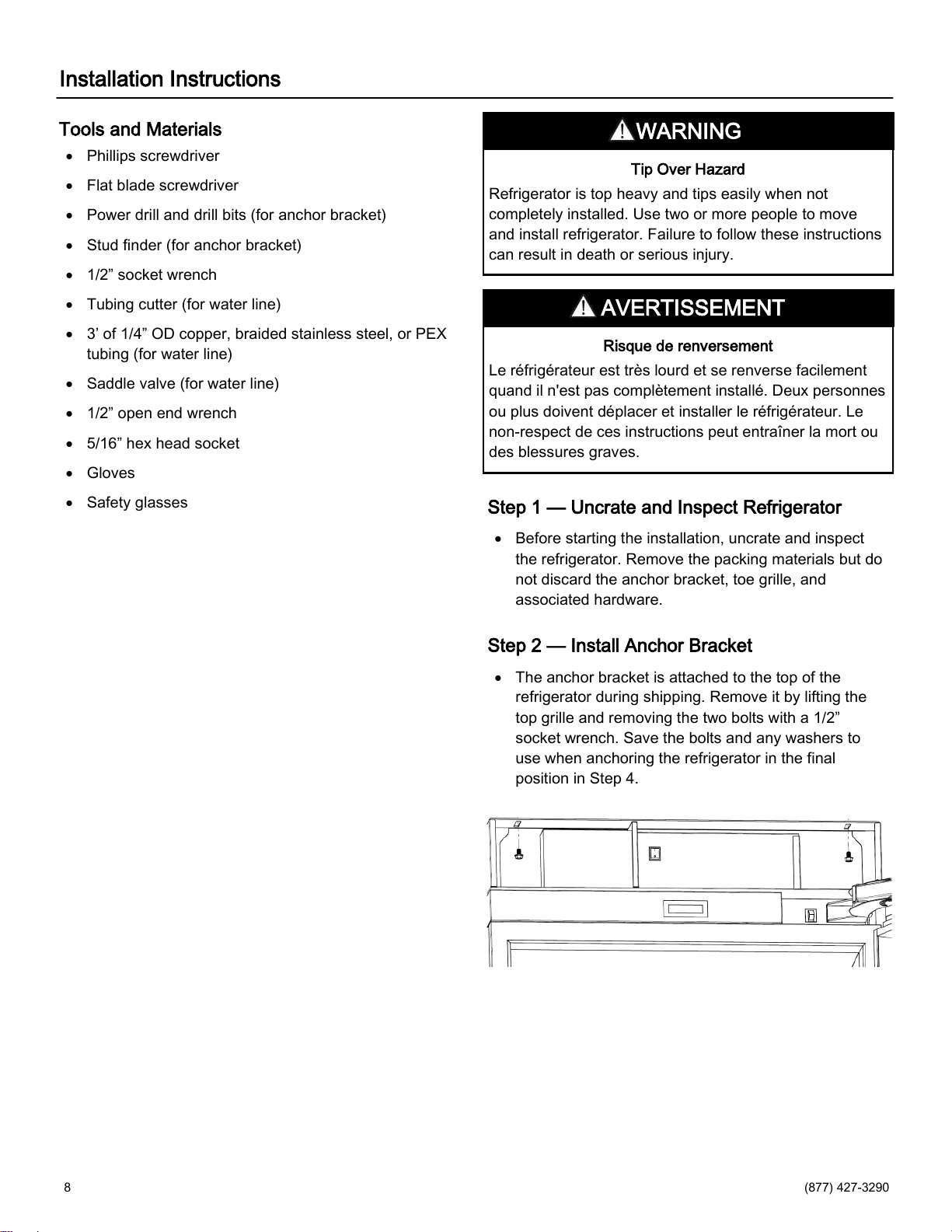
The anchor bracket is attached to the top of the
refrigerator during shipping. Remove it by lifting the
top grille and removing the two bolts with a 1/2”
socket wrench. Save the bolts and any washers to
use when anchoring the refrigerator in the final
position in Step 4.
WARNING
AVERTISSEMENT

bluestarcooking.com 9
Step 2 — Install Anchor Bracket (continued)
Install the anchor bracket on the back wall of the
enclosure. The notch in the back of the bracket
should be centered in the enclosure (from side to
side). Secure the anchor bracket with at least two
screws spaced far apart, close to the sides of the
bracket. Wood screws and self drilling sheet metal
screws are located in the plastic bag with the
literature. Screws must be securely threaded into
wood or metal studs that are structurally sound and
part of the building structure.
Step 3 — Route Water Line
Locate the household water line as shown below prior
to moving the refrigerator into position. It may be
helpful to tape the water line to the floor to avoid
damaging it as the refrigerator is rolled into position.
Tip Over Hazard
Anchor bracket must be installed properly to prevent
refrigerator from tipping. Failure to follow these
instructions can result in death or serious injury.
Risque de renversement
Le support d'ancrage doit être installé correctement pour
empêcher le renversement du réfrigérateur. Le non-
respect de ces instructions peut entraîner la mort ou des
blessures graves.
WARNING
AVERTISSEMENT
81”
To Floor
To Floor
Back Wall of Enclosure
84”
Installation Instructions
10 (877) 427-3290
Installation Instructions
Step 4 — Move Refrigerator into Position
Remove the wood base with a 1/2” socket or open
end wrench and discard the shipping bolts and
brackets. Use an appliance cart to move the
refrigerator near the front of the enclosure. To allow
the refrigerator to be rolled into position, ensure the
front feet are retracted with a 1/2” open end wrench.
Front and rear leveling can be done from the front
once the refrigerator is in position.
Important: If the refrigerator has been on its back or side,
it must stand upright for a minimum of 24 hours before
connecting power.
Plug the power cord into the grounded outlet.
Temporarily lift the anchor bracket away from the top
of the refrigerator. It may be helpful to temporarily
tape the front of the anchor bracket to the top of the
enclosure so it does not obstruct moving the
refrigerator into position. Roll the refrigerator into
position, ensuring the water line does not interfere
underneath and the power cord does not interfere at
the back. Slack in the power cord may be taken up in
the space around the water filter.
Important: If the floor is not level, it may be necessary to
level the refrigerator prior to rolling it into the enclosure.
See Step 6 on leveling to temporarily tilt the refrigerator.
Final leveling can be done from the front.
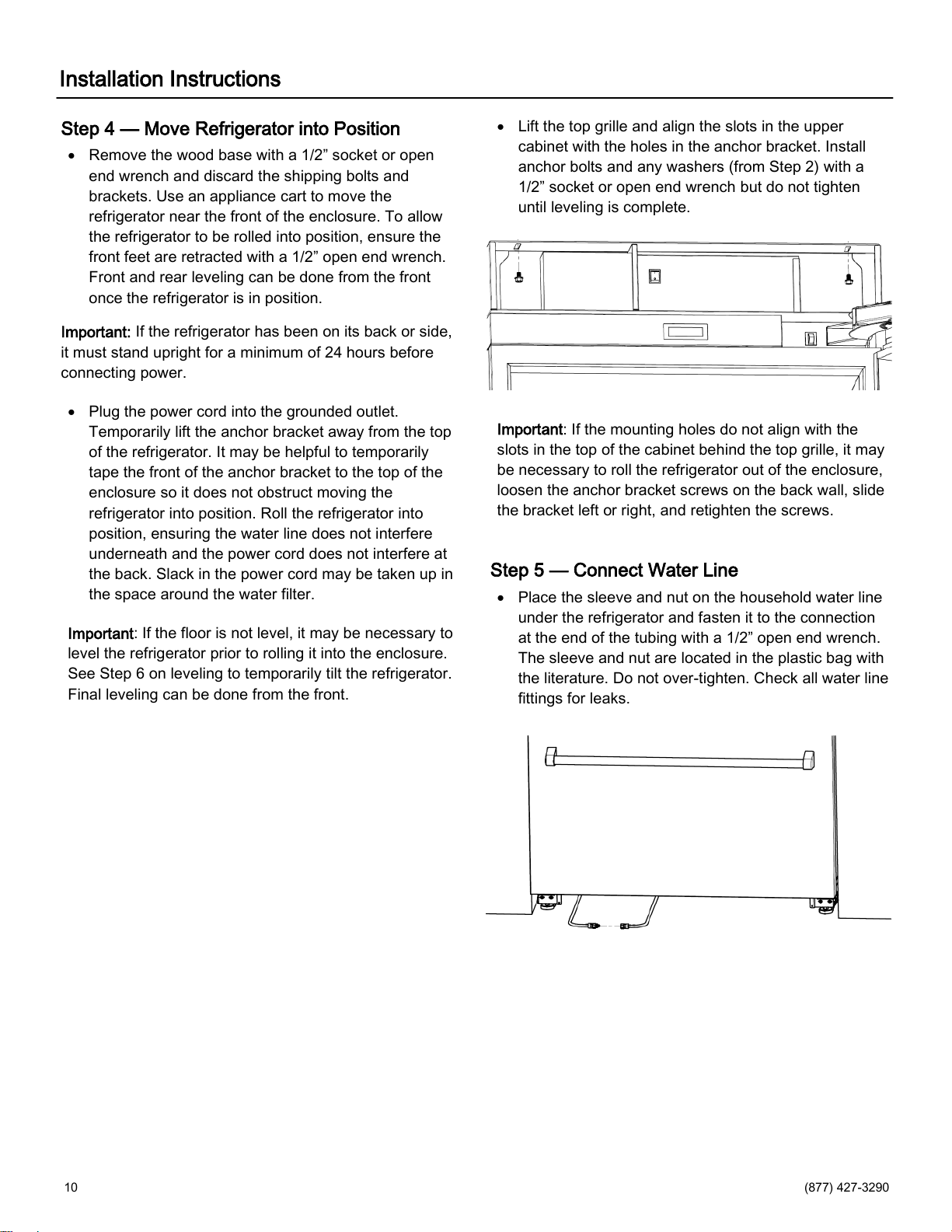
Lift the top grille and align the slots in the upper
cabinet with the holes in the anchor bracket. Install
anchor bolts and any washers (from Step 2) with a
1/2” socket or open end wrench
but do not tighten
until leveling is complete.
Important: If the mounting holes do not align with the
slots in the top of the cabinet behind the top grille, it may
be necessary to roll the refrigerator out of the enclosure,
loosen the anchor bracket screws on the back wall, slide
the bracket left or right, and retighten the screws.
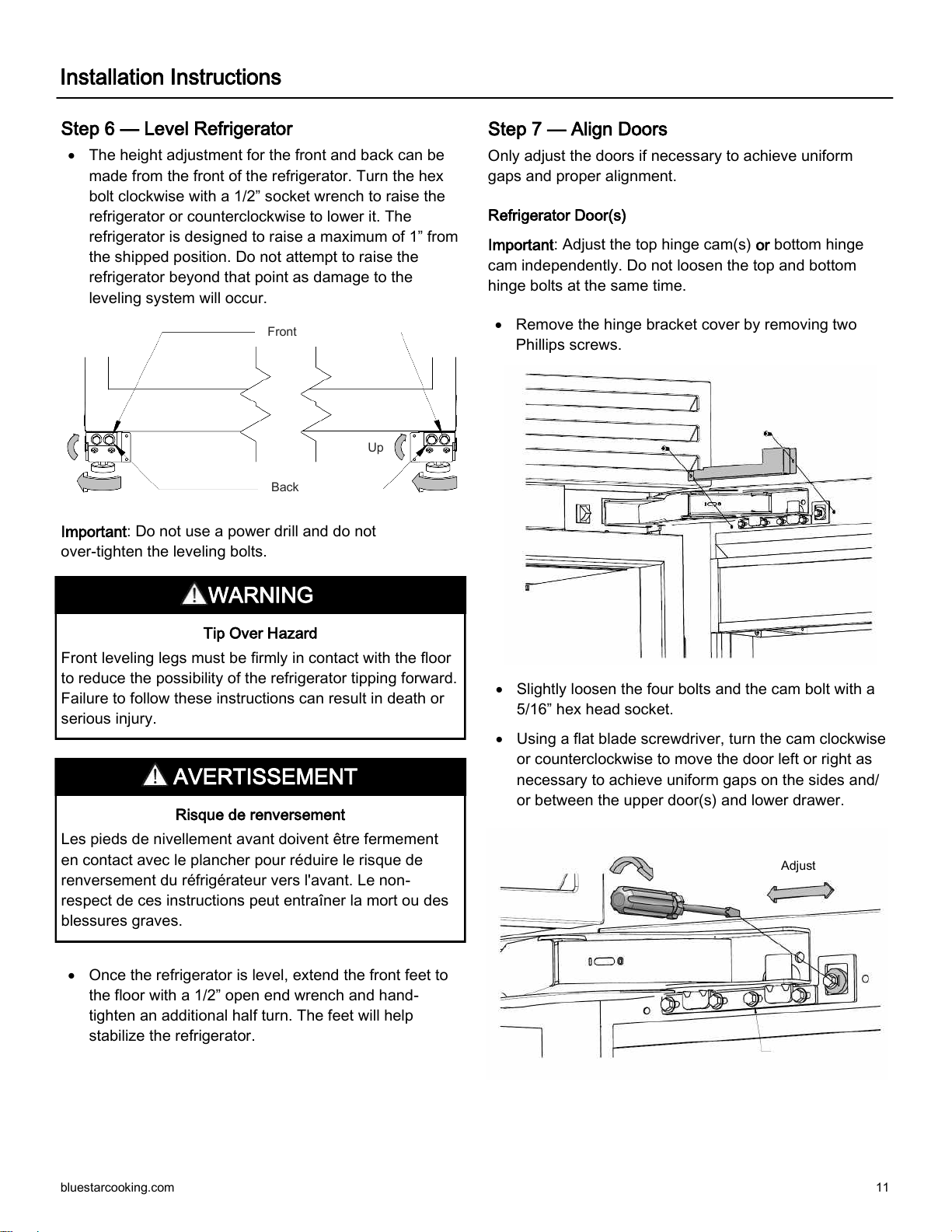
Step 5 — Connect Water Line
Place the sleeve and nut on the household water line
under the refrigerator and fasten it to the connection
at the end of the tubing with a 1/2” open end wrench.
The sleeve and nut are located in the plastic bag with
the literature. Do not over-tighten. Check all water line
fittings for leaks.
bluestarcooking.com 11
Step 6 — Level Refrigerator
The height adjustment for the front and back can be
made from the front of the refrigerator. Turn the hex
bolt clockwise with a 1/2” socket wrench to raise the
refrigerator or counterclockwise to lower it. The
refrigerator is designed to raise a maximum of 1” from
the shipped position. Do not attempt to raise the
refrigerator beyond that point as damage to the
leveling system will occur.
Important: Do not use a power drill and do not
over-tighten the leveling bolts.
Once the refrigerator is level, extend the front feet to
the floor with a 1/2” open end wrench and hand-
tighten an additional half turn. The feet will help
stabilize the refrigerator.
Tip Over Hazard
Front leveling legs must be firmly in contact with the floor
to reduce the possibility of the refrigerator tipping forward.
Failure to follow these instructions can result in death or
serious injury.
Risque de renversement
Les pieds de nivellement avant doivent être fermement
en contact avec le plancher pour réduire le risque de
renversement du réfrigérateur vers l'avant. Le non-
respect de ces instructions peut entraîner la mort ou des
blessures graves.
Step 7 — Align Doors
Only adjust the doors if necessary to achieve uniform
gaps and proper alignment.
Refrigerator Door(s)
Important: Adjust the top hinge cam(s) or bottom hinge
cam independently. Do not loosen the top and bottom
hinge bolts at the same time.
Remove the hinge bracket cover by removing two
Phillips screws.
Slightly loosen the four bolts and the cam bolt with a
5/16” hex head socket.
Using a flat blade screwdriver, turn the cam clockwise
or counterclockwise to move the door left or right as
necessary to achieve uniform gaps on the sides and/
or between the upper door(s) and lower drawer.
Adjust
Up
Back
Front
WARNING
AVERTISSEMENT
Installation Instructions
12 (877) 427-3290
Installation Instructions
Step 7 — Align Doors (continued)
Retighten the five bolts with a 5/16” hex head socket.
Bolts need to be tightened to 50 in. lb. It is normal for
the door(s) to lower and tilt slightly when loaded with
food.
Replace the hinge bracket cover with two Phillips
screws.
Repeat process for the bottom of the door(s).
On french door models, repeat the process for other
door.
Freezer Drawer
Important: Adjust one side at a time.
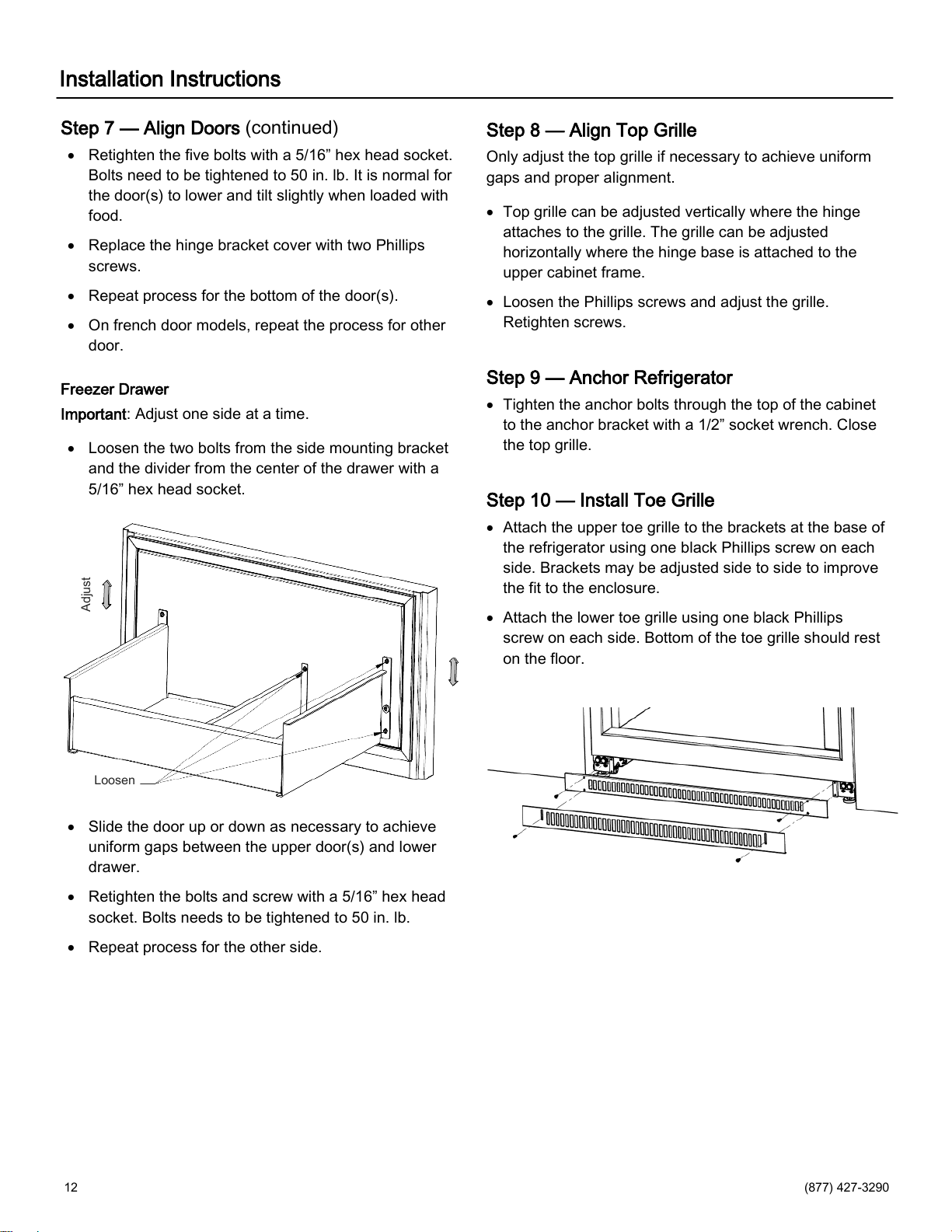
Loosen the two bolts from the side mounting bracket
and the divider from the center of the drawer with a
5/16” hex head socket.
Slide the door up or down as necessary to achieve
uniform gaps between the upper door(s) and lower
drawer.
Retighten the bolts and screw with a 5/16” hex head
socket. Bolts needs to be tightened to 50 in. lb.
Repeat process for the other side.
Step 8 — Align Top Grille
Only adjust the top grille if necessary to achieve uniform
gaps and proper alignment.
Top grille can be adjusted vertically where the hinge
attaches to the grille. The grille can be adjusted
horizontally where the hinge base is attached to the
upper cabinet frame.
Loosen the Phillips screws and adjust the grille.
Retighten screws.
Step 9 — Anchor Refrigerator
Tighten the anchor bolts through the top of the cabinet
to the anchor bracket with a 1/2” socket wrench. Close
the top grille.
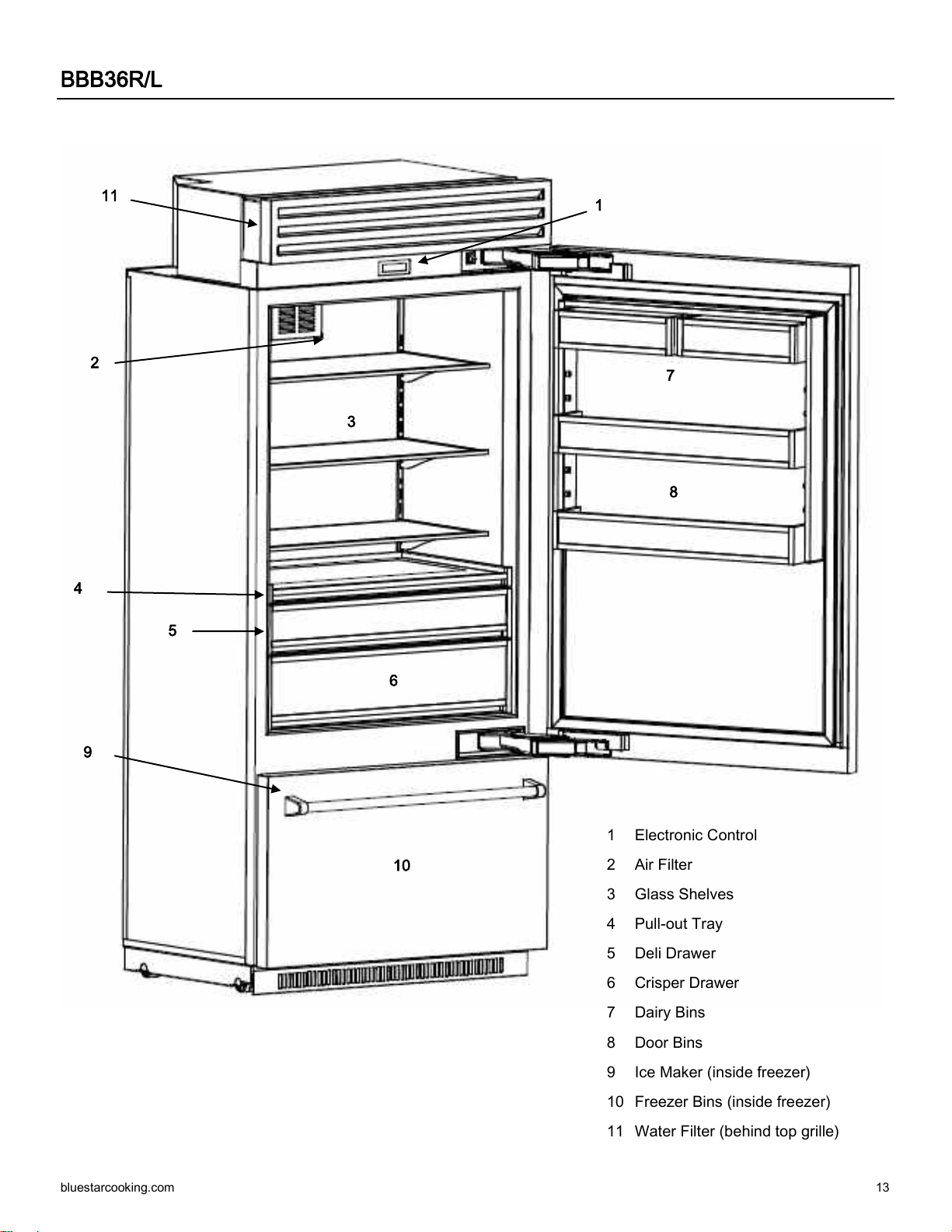
Step 10 — Install Toe Grille
Attach the upper toe grille to the brackets at the base of
the refrigerator using one black Phillips screw on each
side. Brackets may be adjusted side to side to improve
the fit to the enclosure.
Attach the lower toe grille using one black Phillips
screw on each side. Bottom of the toe grille should rest
on the floor.
Adjust
Loosen
bluestarcooking.com 13
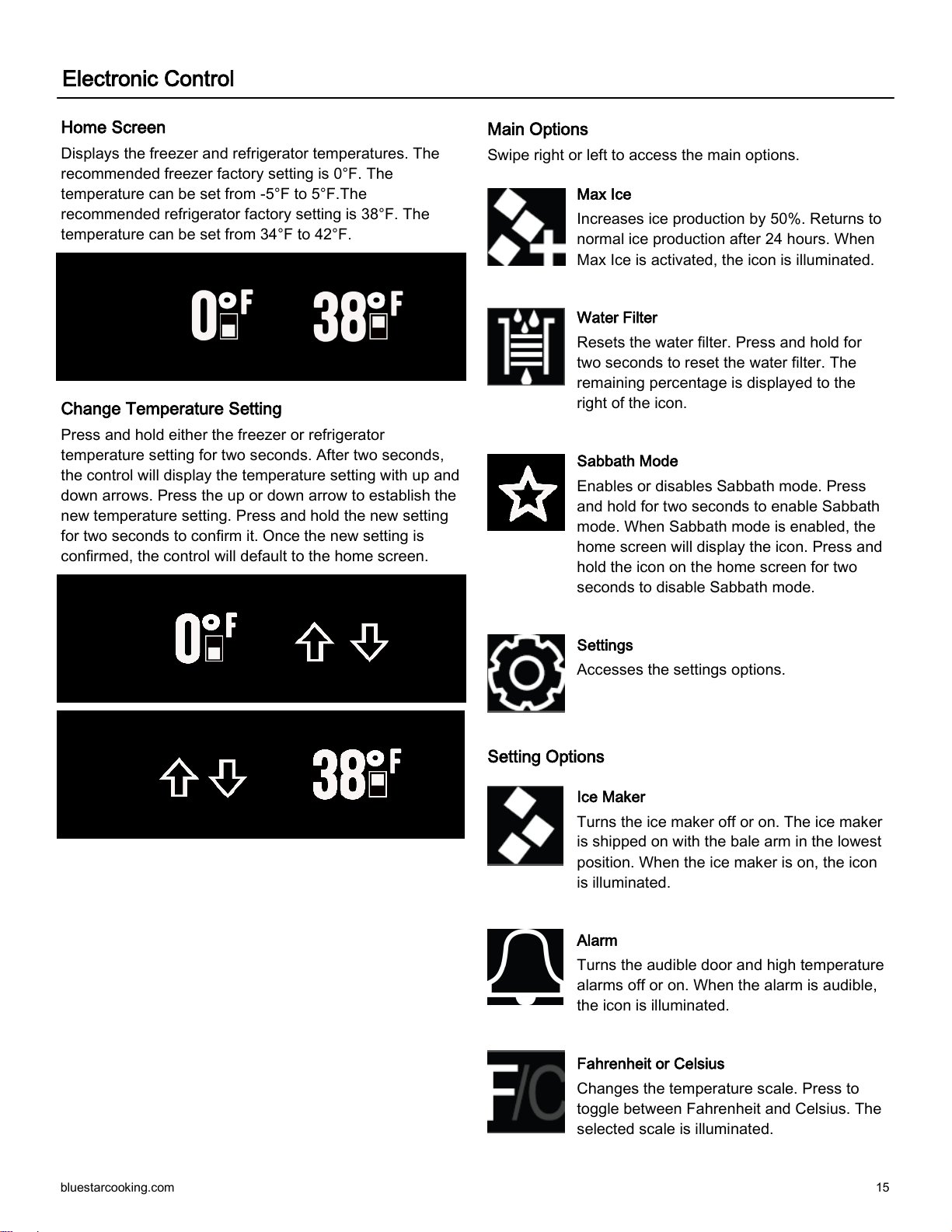
BBB36R/L
1
2
3
4
5
6
7
8
9
10
11
1 Electronic Control
2 Air Filter
3 Glass Shelves
4 Pull-out Tray
5 Deli Drawer
6 Crisper Drawer
7 Dairy Bins
8 Door Bins
9 Ice Maker (inside freezer)
10 Freezer Bins (inside freezer)
11 Water Filter (behind top grille)

14 (877) 427-3290
BBBF36
1
2
3
4
5
6
10
7
8
11
9
1 Electronic Control
2 Air Filter
3 Glass Shelves
4 Pull-out Tray
5 Deli Drawer
6 Crisper Drawer
7 Dairy Bins
8 Door Bins
9 Ice Maker (inside freezer)
10 Freezer Bins (inside freezer)
11 Water Filter (behind top grille)
bluestarcooking.com 15
Electronic Control
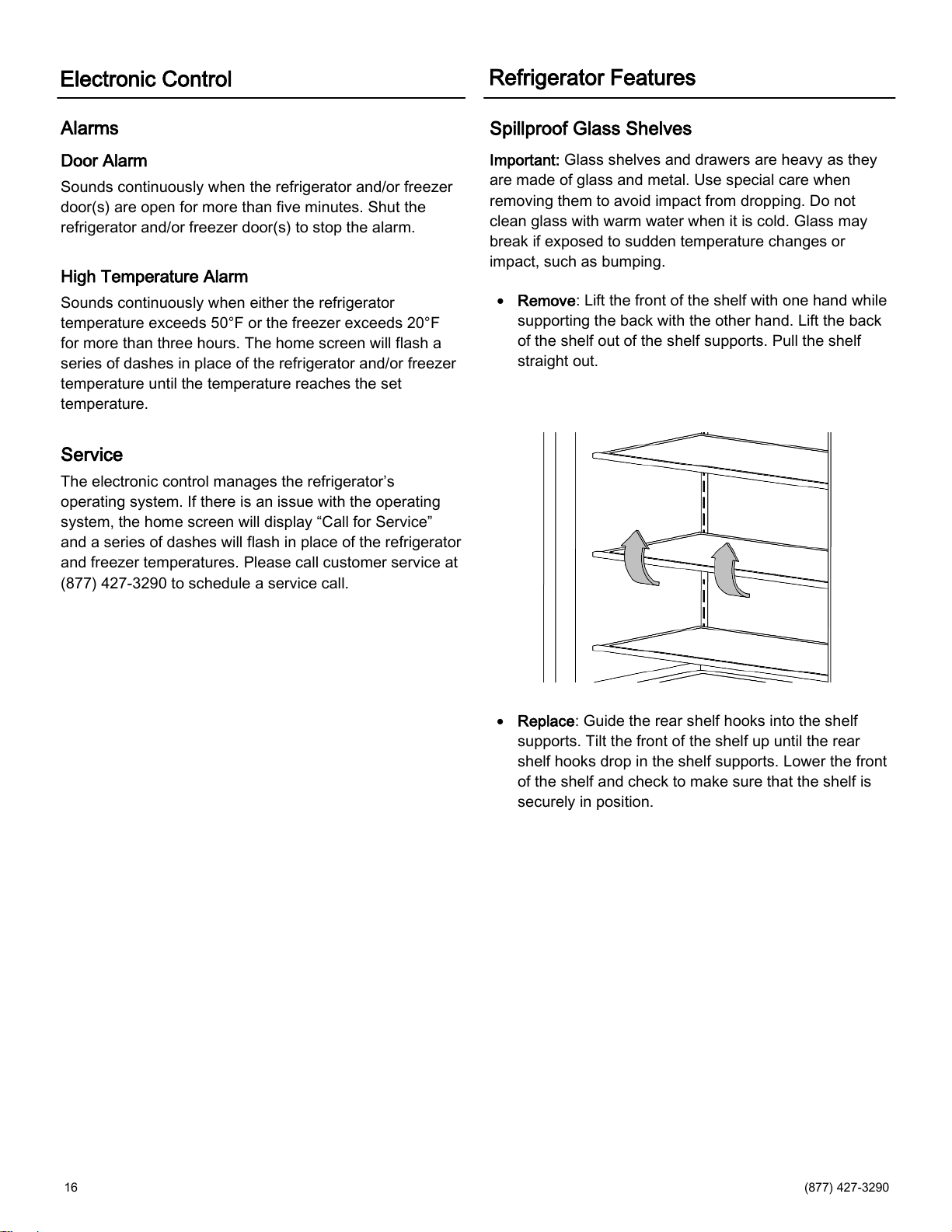
Home Screen
Displays the freezer and refrigerator temperatures. The
recommended freezer factory setting is 0°F. The
temperature can be set from -5°F to 5°F.The
recommended refrigerator factory setting is 38°F. The
temperature can be set from 34°F to 42°F.
Change Temperature Setting
Press and hold either the freezer or refrigerator
temperature setting for two seconds. After two seconds,
the control will display the temperature setting with up and
down arrows. Press the up or down arrow to establish the
new temperature setting. Press and hold the new setting
for two seconds to confirm it. Once the new setting is
confirmed, the control will default to the home screen.
Main Options
Swipe right or left to access the main options.
Max Ice
Increases ice production by 50%. Returns to
normal ice production after 24 hours. When
Max Ice is activated, the icon is illuminated.
Water Filter
Resets the water filter. Press and hold for
two seconds to reset the water filter. The
remaining percentage is displayed to the
right of the icon.
Sabbath Mode
Enables or disables Sabbath mode. Press
and hold for two seconds to enable Sabbath
mode. When Sabbath mode is enabled, the
home screen will display the icon. Press and
hold the icon on the home screen for two
seconds to disable Sabbath mode.
Settings
Accesses the settings options.
Setting Options
Ice Maker
Turns the ice maker off or on. The ice maker
is shipped on with the bale arm in the lowest
position. When the ice maker is on, the icon
is illuminated.
Alarm
Turns the audible door and high temperature
alarms off or on. When the alarm is audible,
the icon is illuminated.
Fahrenheit or Celsius
Changes the temperature scale. Press to
toggle between Fahrenheit and Celsius. The
selected scale is illuminated.
16 (877) 427-3290
Refrigerator Features
Spillproof Glass Shelves
Important: Glass shelves and drawers are heavy as they
are made of glass and metal. Use special care when
removing them to avoid impact from dropping. Do not
clean glass with warm water when it is cold. Glass may
break if exposed to sudden temperature changes or
impact, such as bumping.
Remove: Lift the front of the shelf with one hand while
supporting the back with the other hand. Lift the back
of the shelf out of the shelf supports. Pull the shelf
straight out.
Replace: Guide the rear shelf hooks into the shelf
supports. Tilt the front of the shelf up until the rear
shelf hooks drop in the shelf supports. Lower the front
of the shelf and check to make sure that the shelf is
securely in position.
Alarms
Door Alarm
Sounds continuously when the refrigerator and/or freezer
door(s) are open for more than five minutes. Shut the
refrigerator and/or freezer door(s) to stop the alarm.
High Temperature Alarm
Sounds continuously when either the refrigerator
temperature exceeds 50°F or the freezer exceeds 20°F
for more than three hours. The home screen will flash a
series of dashes in place of the refrigerator and/or freezer
temperature until the temperature reaches the set
temperature.
Service
The electronic control manages the refrigerator’s
operating system. If there is an issue with the operating
system, the home screen will display “Call for Service”
and a series of dashes will flash in place of the refrigerator
and freezer temperatures. Please call customer service at
(877) 427-3290 to schedule a service call.
Electronic Control
bluestarcooking.com 17
Pull-Out Tray
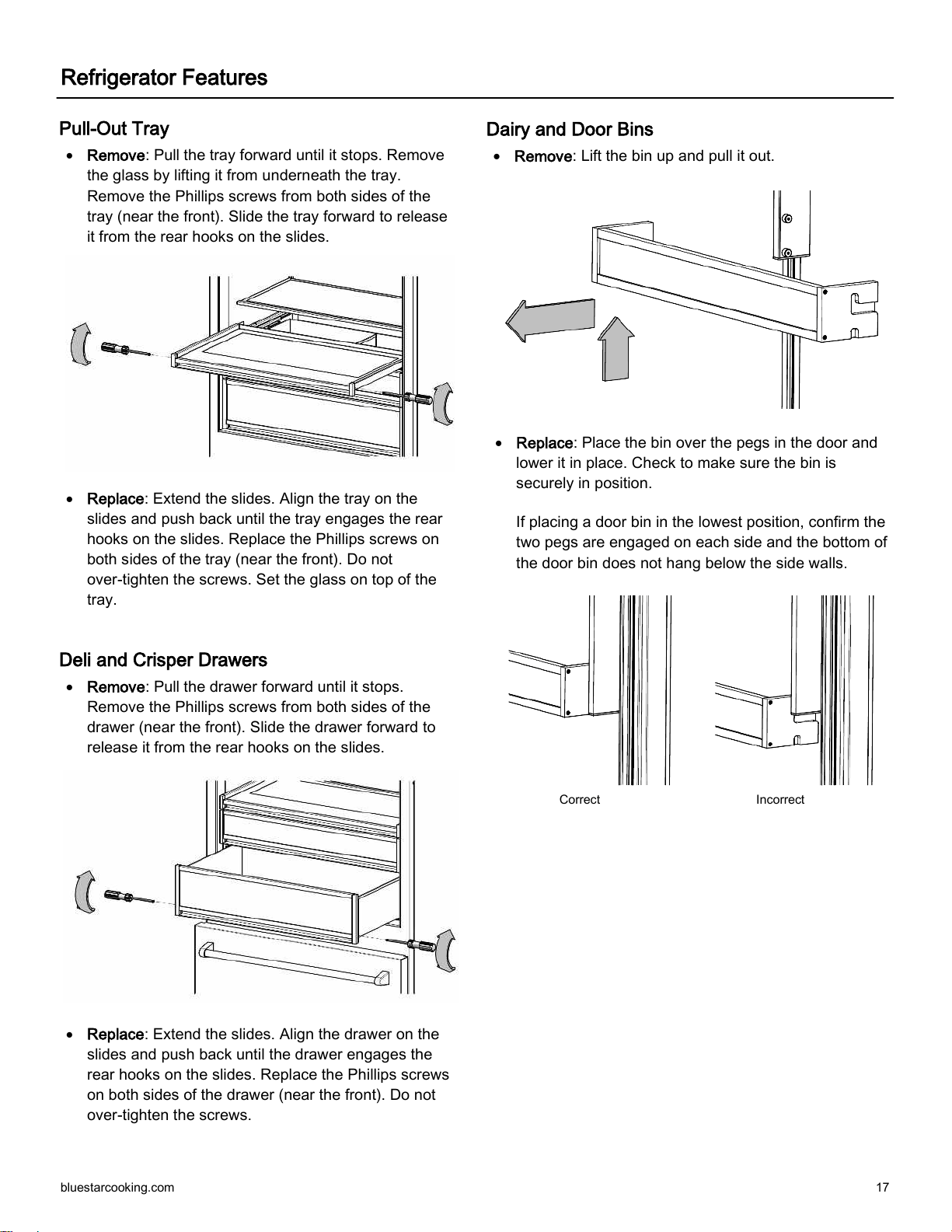
Remove: Pull the tray forward until it stops. Remove
the glass by lifting it from underneath the tray.
Remove the Phillips screws from both sides of the
tray (near the front). Slide the tray forward to release
it from the rear hooks on the slides.
Replace: Extend the slides. Align the tray on the
slides and push back until the tray engages the rear
hooks on the slides. Replace the Phillips screws on
both sides of the tray (near the front). Do not
over-tighten the screws. Set the glass on top of the
tray.
Deli and Crisper Drawers
Remove: Pull the drawer forward until it stops.
Remove the Phillips screws from both sides of the
drawer (near the front). Slide the drawer forward to
release it from the rear hooks on the slides.
Replace: Extend the slides. Align the drawer on the
slides and push back until the drawer engages the
rear hooks on the slides. Replace the Phillips screws
on both sides of the drawer (near the front). Do not
over-tighten the screws.
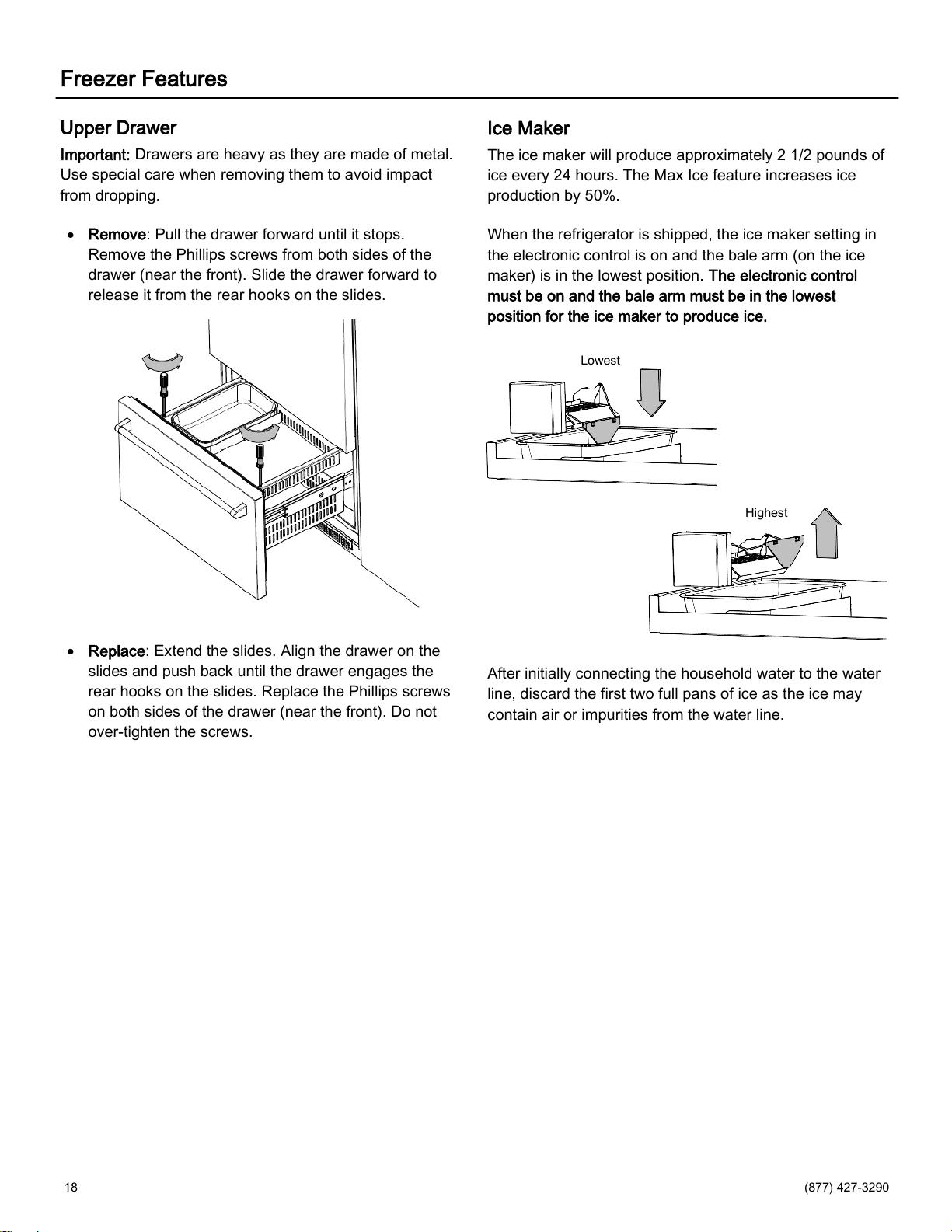
Dairy and Door Bins
Remove: Lift the bin up and pull it out.
Correct Incorrect
Replace: Place the bin over the pegs in the door and
lower it in place. Check to make sure the bin is
securely in position.
If placing a door bin in the lowest position, confirm the
two pegs are engaged on each side and the bottom of
the door bin does not hang below the side walls.
Refrigerator Features
18 (877) 427-3290
Freezer Features
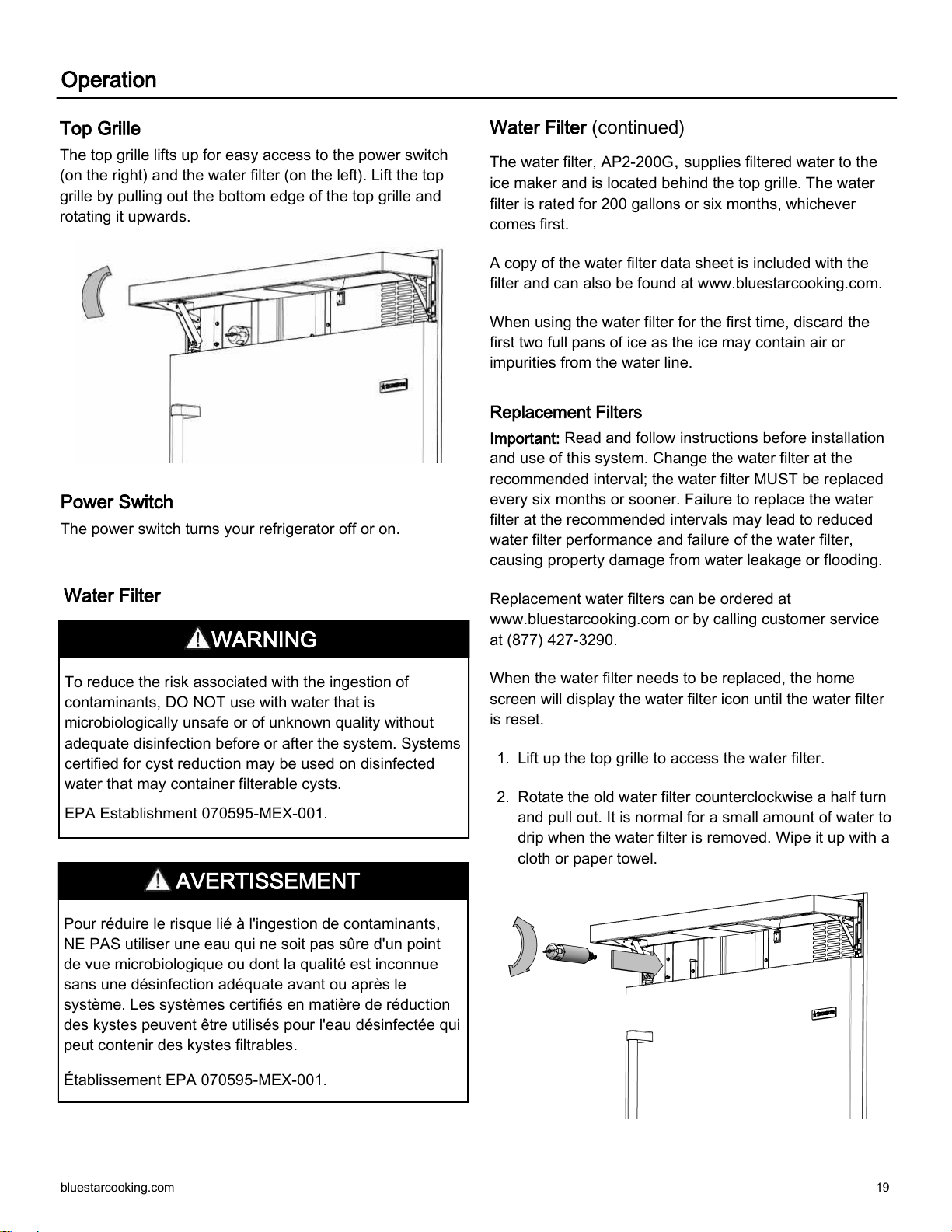
Upper Drawer
Important: Drawers are heavy as they are made of metal.
Use special care when removing them to avoid impact
from dropping.
Remove: Pull the drawer forward until it stops.
Remove the Phillips screws from both sides of the
drawer (near the front). Slide the drawer forward to
release it from the rear hooks on the slides.
Replace: Extend the slides. Align the drawer on the
slides and push back until the drawer engages the
rear hooks on the slides. Replace the Phillips screws
on both sides of the drawer (near the front). Do not
over-tighten the screws.
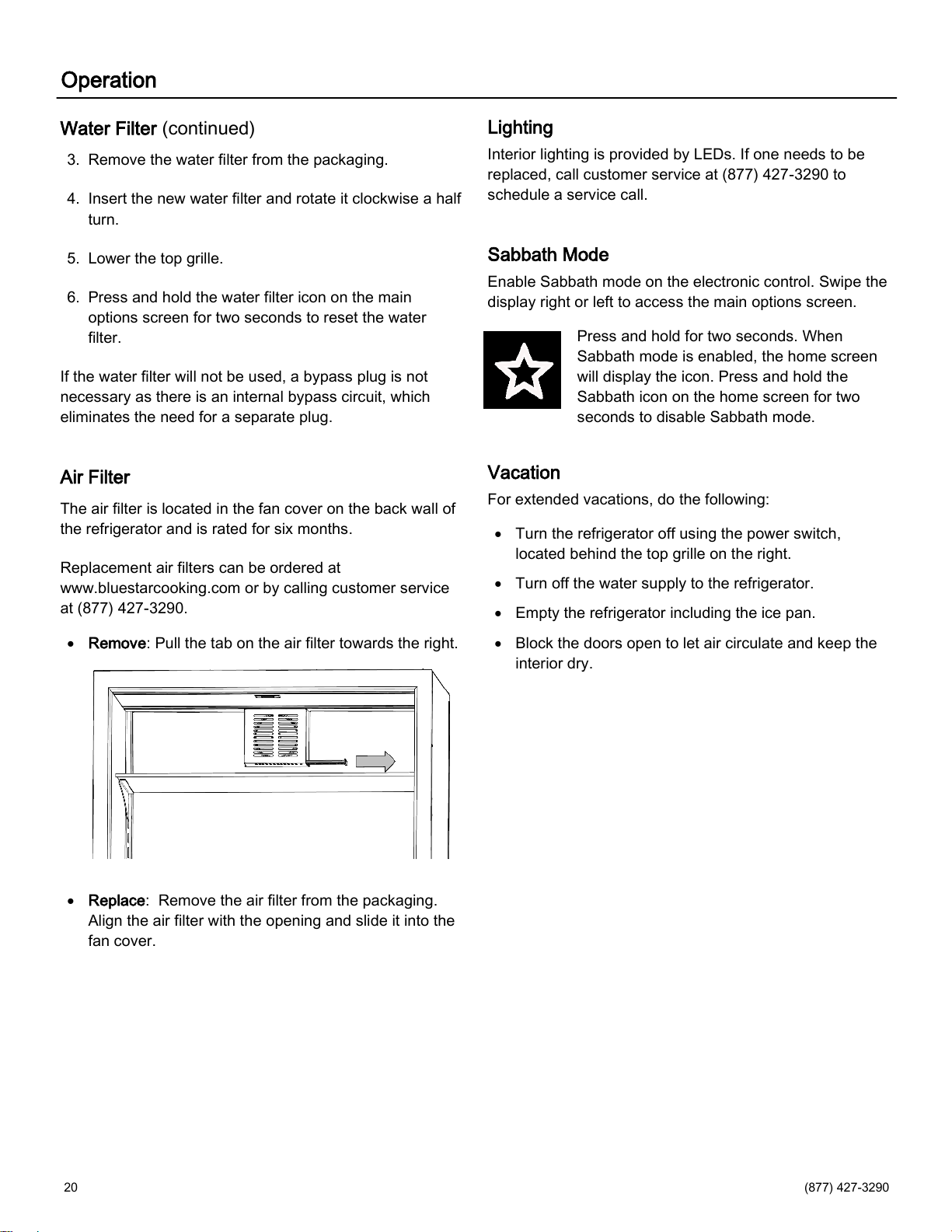
Ice Maker
The ice maker will produce approximately 2 1/2 pounds of
ice every 24 hours. The Max Ice feature increases ice
production by 50%.
When the refrigerator is shipped, the ice maker setting in
the electronic control is on and the bale arm (on the ice
maker) is in the lowest position. The electronic control
must be on and the bale arm must be in the lowest
position for the ice maker to produce ice.
After initially connecting the household water to the water
line, discard the first two full pans of ice as the ice may
contain air or impurities from the water line.
Lowest
Highest
bluestarcooking.com 19
Top Grille
The top grille lifts up for easy access to the power switch
(on the right) and the water filter (on the left). Lift the top
grille by pulling out the bottom edge of the top grille and
rotating it upwards.
Operation
Water Filter (continued)
The water filter, AP2-200G, supplies filtered water to the
ice maker and is located behind the top grille. The water
filter is rated for 200 gallons or six months, whichever
comes first.
A copy of the water filter data sheet is included with the
filter and can also be found at www.bluestarcooking.com.
When using the water filter for the first time, discard the
first two full pans of ice as the ice may contain air or
impurities from the water line.
Replacement Filters
Important: Read and follow instructions before installation
and use of this system. Change the water filter at the
recommended interval; the water filter MUST be replaced
every six months or sooner. Failure to replace the water
filter at the recommended intervals may lead to reduced
water filter performance and failure of the water filter,
causing property damage from water leakage or flooding.
Replacement water filters can be ordered at
www.bluestarcooking.com or by calling customer service
at (877) 427-3290.
When the water filter needs to be replaced, the home
screen will display the water filter icon until the water filter
is reset.
1. Lift up the top grille to access the water filter.
2. Rotate the old water filter counterclockwise a half turn
and pull out. It is normal for a small amount of water to
drip when the water filter is removed. Wipe it up with a
cloth or paper towel.
To reduce the risk associated with the ingestion of
contaminants, DO NOT use with water that is
microbiologically unsafe or of unknown quality without
adequate disinfection before or after the system. Systems
certified for cyst reduction may be used on disinfected
water that may container filterable cysts.
EPA Establishment 070595-MEX-001.
Pour réduire le risque lié à l'ingestion de contaminants,
NE PAS utiliser une eau qui ne soit pas sûre d'un point
de vue microbiologique ou dont la qualité est inconnue
sans une désinfection adéquate avant ou après le
système. Les systèmes certifiés en matière de réduction
des kystes peuvent être utilisés pour l'eau désinfectée qui
peut contenir des kystes filtrables.
Établissement EPA 070595-MEX-001.
Power Switch
The power switch turns your refrigerator off or on.
WARNING
AVERTISSEMENT
Water Filter
20 (877) 427-3290
Operation
Water Filter (continued)
3. Remove the water filter from the packaging.
4. Insert the new water filter and rotate it clockwise a half
turn.
5. Lower the top grille.
6. Press and hold the water filter icon on the main
options screen for two seconds to reset the water
filter.
If the water filter will not be used, a bypass plug is not
necessary as there is an internal bypass circuit, which
eliminates the need for a separate plug.
Air Filter
The air filter is located in the fan cover on the back wall of
the refrigerator and is rated for six months.
Replacement air filters can be ordered at
www.bluestarcooking.com or by calling customer service
at (877) 427-3290.
Remove: Pull the tab on the air filter towards the right.
Replace: Remove the air filter from the packaging.
Align the air filter with the opening and slide it into the
fan cover.
Lighting
Interior lighting is provided by LEDs. If one needs to be
replaced, call customer service at (877) 427-3290 to
schedule a service call.
Sabbath Mode
Enable Sabbath mode on the electronic control. Swipe the
display right or left to access the main options screen.
Press and hold for two seconds. When
Sabbath mode is enabled, the home screen
will display the icon. Press and hold the
Sabbath icon on the home screen for two
seconds to disable Sabbath mode.
Vacation
For extended vacations, do the following:
Turn the refrigerator off using the power switch,
located behind the top grille on the right.
Turn off the water supply to the refrigerator.
Empty the refrigerator including the ice pan.
Block the doors open to let air circulate and keep the
interior dry.
bluestarcooking.com 21
Condenser
Clean the condenser every three to six months to ensure
proper operation.
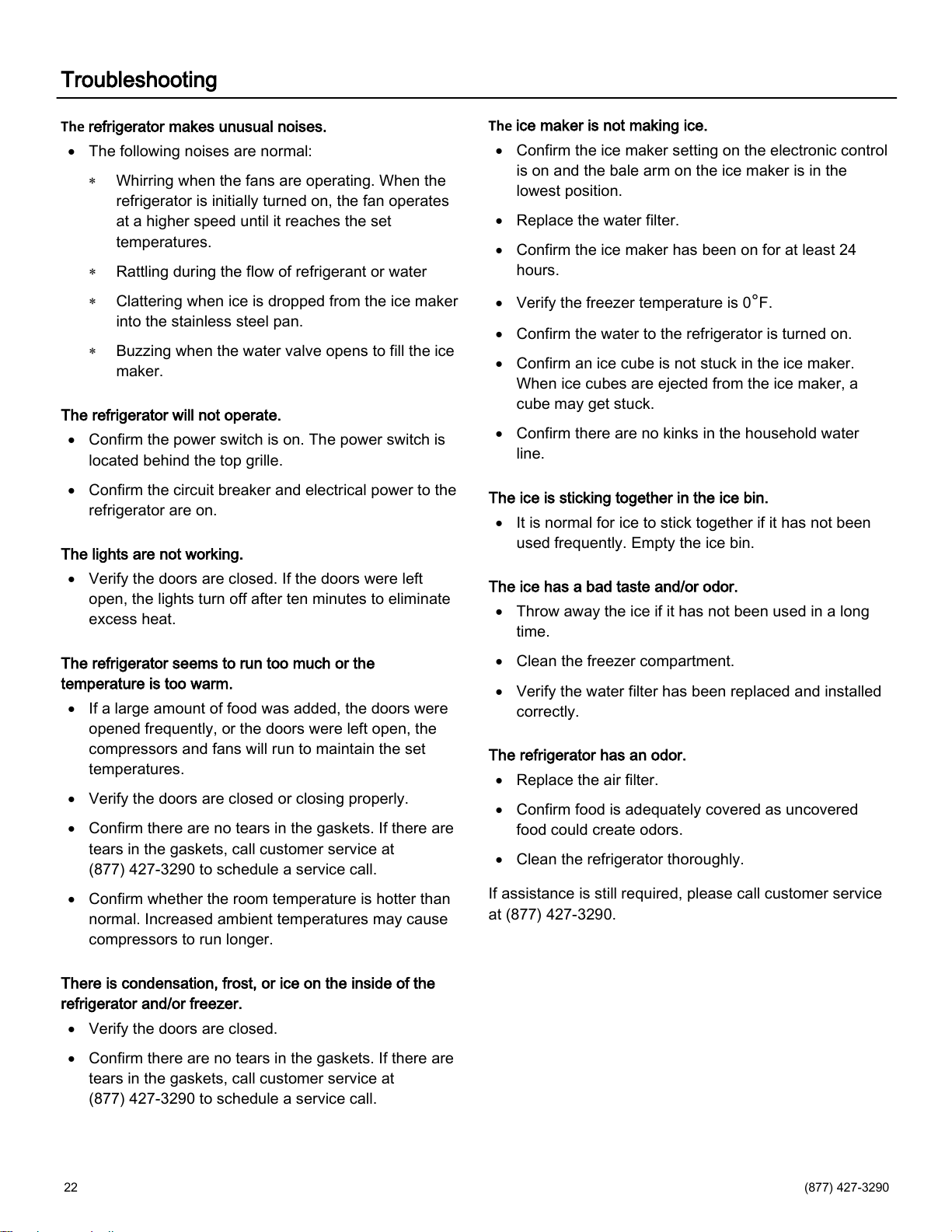
1. Lift up the top grille and turn the power off. The
condenser is on the left.
2. Use a soft bristle brush and vacuum to remove dust
and lint from the condenser. Vacuum in the direction
of the fins to avoid damaging the condenser.
3. Turn the power on and lower the top grille.
Care and Cleaning
Before cleaning, turn the refrigerator off using the power
switch, located behind the top grille. When finished
cleaning, turn the refrigerator on.
Stainless Steel Doors and Interior
Use a non-abrasive stainless steel cleaner and a soft
cloth. Always follow the grain of the stainless steel.
Painted Doors and Other Surfaces
Use a mild solution of soap and water and a soft cloth.
Electrical Shock Hazard
Turn power off before cleaning condenser. Failure to
follow these instructions can result in death, electrical
shock, or fire.
Risque de choc électrique
Mettre le réfrigérateur hors tension avant de nettoyer le
condenseur. Le non-respect de ces instructions peut
entraîner la mort, un choc électrique ou un incendie.
Condenser
CAUTION
MISE EN GARDE
22 (877) 427-3290
Troubleshooting
The
refrigerator makes unusual noises.
The following noises are normal:
Whirring when the fans are operating. When the
refrigerator is initially turned on, the fan operates
at a higher speed until it reaches the set
temperatures.
Rattling during the flow of refrigerant or water
Clattering when ice is dropped from the ice maker
into the stainless steel pan.
Buzzing when the water valve opens to fill the ice
maker.
The refrigerator will not operate.
Confirm the power switch is on. The power switch is
located behind the top grille.
Confirm the circuit breaker and electrical power to the
refrigerator are on.
The lights are not working.
Verify the doors are closed. If the doors were left
open, the lights turn off after ten minutes to eliminate
excess heat.
The refrigerator seems to run too much or the
temperature is too warm.
If a large amount of food was added, the doors were
opened frequently, or the doors were left open, the
compressors and fans will run to maintain the set
temperatures.
Verify the doors are closed or closing properly.
Confirm there are no tears in the gaskets. If there are
tears in the gaskets, call customer service at
(877) 427-3290 to schedule a service call.
Confirm whether the room temperature is hotter than
normal. Increased ambient temperatures may cause
compressors to run longer.
There is condensation, frost, or ice on the inside of the
refrigerator and/or freezer.
Verify the doors are closed.
Confirm there are no tears in the gaskets. If there are
tears in the gaskets, call customer service at
(877) 427-3290 to schedule a service call.
The
ice maker is not making ice.
Confirm the ice maker setting on the electronic control
is on and the bale arm on the ice maker is in the
lowest position.
Replace the water filter.
Confirm the ice maker has been on for at least 24
hours.
Verify the freezer temperature is 0°F.
Confirm the water to the refrigerator is turned on.
Confirm an ice cube is not stuck in the ice maker.
When ice cubes are ejected from the ice maker, a
cube may get stuck.
Confirm there are no kinks in the household water
line.
The ice is sticking together in the ice bin.
It is normal for ice to stick together if it has not been
used frequently. Empty the ice bin.
The ice has a bad taste and/or odor.
Throw away the ice if it has not been used in a long
time.
Clean the freezer compartment.
Verify the water filter has been replaced and installed
correctly.
The refrigerator has an odor.
Replace the air filter.
Confirm food is adequately covered as uncovered
food could create odors.
Clean the refrigerator thoroughly.
If assistance is still required, please call customer service
at (877) 427-3290.

bluestarcooking.com 23
Warranty
Who Is Providing The Warranty? Prizer-Painter Stove
Works, Inc. (“Prizer-Painter”) warrants the parts of your
BlueStar refrigeration appliance (“product”) as described
below.
Who Does This Warranty Cover? This warranty covers the
owner of the residence in which the product is installed,
and his or her spouse (“Owner”).
What Products Does this Warranty Cover? This warranty
applies only to BlueStar refrigeration appliances
purchased in the continental U.S. and Canada and
installed in residential properties only for normal
residential use. The product must be installed by a trained
technician for the warranty to apply. Damages resulting
from self-installations and/or installations or product
mountings inconsistent with the product specifications void
this warranty. This warranty is also void if the original
factory installed serial number is altered or removed from
the product.
What Products Does this Warranty Not Cover? This
warranty does not cover products installed or used in any
commercial or other non-residential property such as, but
not limited to, day care facilities, hotels, motels, inns, and
nursing homes. This warranty does not cover products
installed outside the U.S. or Canada.
What Does this Warranty Provide? Subject to the specific
conditions and limitations below, this warranty covers
parts and labor necessary to repair or replace any part of
the product that contains defects in materials and
workmanship that appear under normal use and
maintenance of refrigeration appliances in residential
properties.
Two Year Warranty. For two (2) years from the date of
installation, this warranty covers all parts and labor
necessary to repair or replace any part on the product
that proves defective.
Five Year Warranty-Sealed System. For five (5) years
from the date of installation, this warranty covers all parts
and labor on the compressor, condenser, evaporator,
drier and all connecting tubing.
Thirteen Year Limited Warranty-Sealed System. For
thirteen (13) years from the date of installation, the
compressor, condenser, evaporator, drier, and all
connecting tubing are covered by a limited parts only
warranty.
Cosmetic Component Warranty. This warranty covers
visible chips, scratches and dents for sixty (60) days from
the installation date of the product by the original
purchaser. Cosmetic components include stainless steel
and painted doors, handles, and surfaces.
Floor Models Not Used For Demonstration. There is no
cosmetic warranty of any kind for floor models. All other
applicable warranties apply from the date of purchase.
Floor Models Used For Demonstration. Floor models used
for demonstration are covered by a ninety (90) day limited
parts warranty only, from the date of installation. There is
no service or cosmetic warranty of any kind for floor
models
.
Exceptions. The replacement of a part or product under
this warranty does not extend the warranty period. None
of these warranty periods continues if the product is
removed from the location where it was originally
installed. Warranty service in areas beyond a 30 mile
radius from an authorized BlueStar retailer or service
provider may require certain costs to the consumer.
What Problems Does this Warranty Not Cover? This
warranty does not cover, and specifically excludes:
Damage caused by shipping.
Normal adjustments after installation and setup.
Normal wear, care, and maintenance of the product
as described in the Use and Care Manual.
Replacement water filters.
Damage or repairs caused by alterations or
modifications, abuse, misuse, neglect, or improper
installation, mounting, handling, operation,
maintenance or storage.
Accidental or intentional damage.
Damage or repairs caused by unauthorized service or
repairs, including unauthorized adjustments or
calibrations performed on the product.
Damage or repairs as a result of natural disasters,
fires, floods, earthquakes, winds, lightning, corrosive
atmosphere, loss of electrical power to the product for
any reason, or other conditions beyond
Prizer-Painter’s control.
Damage or repairs caused by alteration for outdoor
use.
Damage or repairs caused by the use of harsh
chemicals or cleaning products improperly applied.
For further information about this warranty, contact Prizer Painter Customer Service at (877) 427-3290.
24 (877) 427-3290
Warranty
How Can An Owner Obtain Warranty Service? All
warranty claims must be submitted to Prizer Painter
customer service by calling (877) 427-3290 prior to the
expiration of the applicable warranty periods set forth
above.
How Do I Register for the Warranty? To register, please
visit www.bluestarcooking.com/support/product-
registration or call customer service at (877) 427-3290 for
assistance.
California and Quebec Residents. Failure by California
and Quebec residents to register does not diminish
warranty rights.
LIMITATIONS ON LIABILITY. This warranty is in lieu of all
other express warranties. ALL IMPLIED WARRANTIES,
INCLUDING BUT NOT LIMITED TO WARRANTIES OF
MERCHANTABILITY AND FITNESS FOR PARTICULAR
PURPOSE ARE LIMITED TO THE DURATION OF THIS
WARRANTY. Some states and provinces do not allow
limitations on implied warranties, so the above limitations
may not apply to you.
THE OWNER AND PRIZER-PAINTER AGREE THAT
THE REMEDIES SET OUT HEREIN ARE THE OWNER’S
EXCLUSIVE REMEDIES FOR BREACH OF ALL
WARRANTIES, EXPRESS OR IMPLIED.
WHETHER ANY CLAIM IS BASED ON NEGLIGENCE
OR OTHER TORT, BREACH OF WARRANTY OR
BREACH OF CONTRACT, OR ANY OTHER TORT
THEORY, PRIZER-PAINTER SHALL IN NO EVENT BE
LIABLE FOR INCIDENTAL, CONSEQUENTIAL OR
SPECIAL DAMAGES, INCLUDING BUT NOT LIMITED
TO EXTRA UTILITY EXPENSES, SHIPPING COSTS
RELATED TO REPAIR OR REPLACEMENT OF ANY
PRODUCT OR DAMAGES TO PROPERTY, RESULTING
FROM BREACH OF THIS WARRANTY OR ANY
IMPLIED WARRANTY. Some states and provinces do not
allow the exclusion or limitation of incidental or
consequential damages, so this provision may not apply
to you.
This limited warranty gives you specific legal rights, and
you may also have other rights that may vary from state to
state or province to province.
Where Can Any Legal Remedies Be Pursued? Please
read carefully the Arbitration Clause and its Provisions,
which affect your legal rights. The Arbitration Clause is
also available on Prizer-Painter’s website.
ARBITRATION CLAUSE. IMPORTANT. PLEASE
REVIEW THIS ARBITRATION CLAUSE. IT AFFECTS
YOUR LEGAL RIGHTS.
1. Parties: This arbitration clause affects your rights
against Prizer-Painter Stove Works, Inc. and any of its
affiliates or employees or agents, successors, or assigns,
all of whom together are referred to as “we” or “us” for
ease of reference.
2. ARBITRATION REQUIREMENT: EXCEPT AS
STATED BELOW, ANY DISPUTE BETWEEN YOU AND
ANY OF US SHALL BE DECIDED BY NEUTRAL,
BINDING ARBITRATION RATHER THAN IN COURT OR
BY JURY TRIAL. “Dispute” will be given the broadest
possible meaning allowable by law. It includes any
dispute, claim, or controversy arising from or relating to
your purchase of a Prizer-Painter product, any warranty
upon the unit, or the unit’s condition. It also includes
determination of the scope or applicability of this
Arbitration Clause. The arbitration requirement applies to
claims in contract and tort, pursuant to statue, or
otherwise.
3.
CLASS-ARBITRATION WAIVER: ARBITRATION IS
HANDLED ON AN INDIVIDUAL BASIS. IF A DISPUTE IS
ARBITRATED, YOU EXPRESSLY WAIVE ANY RIGHT
TO PARTICIPATE AS A CLASS REPRESENTATIVE OR
CLASS MEMBER ON ANY CLASS CLAIM YOU MAY
HAVE AGAINST US, OR AS A PRIVATE ATTORNEY
GENERAL OR IN ANY OTHER REPRESENTATIVE
CAPACITY. YOU ALSO WAIVE ANY RIGHT TO CLASS
ARBITRATION OR ANY CONSOLIDATION OF
INDIVIDUAL ARBITRATIONS.
4. Discovery and Other Rights: Discovery and rights to
appeal in arbitration are generally more limited than in a
lawsuit. This applies to both you and us. Other rights that
you or we would have in court may not be available in
arbitration. Please read this Arbitration Clause and consult
the rules of the arbitration organizations listed below for
more information.
For further information about this warranty, contact Prizer Painter Customer Service at (877) 427-3290.
bluestarcooking.com 25
5. SMALL CLAIMS COURT OPTION: YOU MAY
CHOOSE TO LITIGATE ANY DISPUTE BETWEEN YOU
AND ANY OF US IN SMALL CLAIMS COURT, RATHER
THAN IN ARBITRATION, IF THE DISPUTE MEETS ALL
REQUIREMENTS TO BE HEARD IN SMALL CLAIMS
COURT.
6. OPTING OUT OF THIS ARBITRATION CLAUSE:
YOU MAY OPT OUT OF THIS ARBITRATION CLAUSE
WITHIN 60 DAYS OF PURCHASE, IF YOU INFORM
PRIZER-PAINTER IN WRITING, VIA REGISTERED
MAIL (PRIZER-PAINTER, 318 June Ave., Blandon, PA
19510) THAT YOU ARE OPTING OUT. There is no other
procedure to opt out. Opting out of this Arbitration Clause
will not affect your other rights under this warranty.
7. Governing Law: The procedures and effect of the
arbitration clause will be governed by the Federal
Arbitration Act (9 U.S.C. § 1
et seq
.) rather than by state
law concerning arbitration. The law governing your
warranty rights or other claims will be the law of the state
in which you purchased your product. Any court having
jurisdiction may enter judgment on the arbitration award.
8. Rules of the Arbitration: If the amount in controversy is
less than $50,000, the arbitration will be decided by a
single arbitrator. If the amount in controversy is greater
than or equal to $50,000, the arbitration will be decided by
a panel of three arbitrators. The arbitrator(s) will be
chosen pursuant to the rules of the organization that
administers the arbitration. You may choose either of the
following arbitration organizations, and its applicable
rules: the American Arbitration Association, 1633
Broadway, 10th Floor, New York, NY 10019
(www.adr.org); JAMS, 1920 Main Street, Ste. 300, Irvine,
CA 92614 (www.jamsadr.com); or other organization that
you may choose subject to our approval. These
organizations’ rules can be obtained by contacting or
visiting the organization’s website. If the arbitration
organization’s rules conflict with this Arbitration Clause,
the provisions of this Arbitration Clause control. The
award of the arbitrator(s) shall be final and binding on all
parties.
9. Location of the Arbitration Hearing: Unless applicable
law provides otherwise, the arbitration hearing will be
conducted in the federal district in which you reside.
For further information about this warranty, contact Prizer Painter Customer Service at (877) 427-3290.
10. Costs of the Arbitration: Each party is responsible for
its own attorney, expert and other fees, unless awarded
by the arbitrator(s) under applicable law. Prizer-Painter
will pay your share of the fees charged by the arbitration
organization and arbitrator(s) beyond the first $200.
Where permissible by law, you may be required to
reimburse Prizer-Painter for the fees of the arbitration
organization and arbitrator(s) in whole or in part by
decision of the arbitrator(s) at the discretion of the
arbitrator(s).
11. Survival and Enforceability of this Arbitration Clause:
This Arbitration Clause shall survive the expiration or
termination, or any transfer, of the warranty on your unit. If
any part of this Arbitration Clause, except waivers of class
-action rights, is found to be unenforceable for any
reason, the remainder shall remain enforceable. If, in a
case in which class-action allegations have been, a
waiver of class-action rights is found to be unenforceable
with respect to all or some parts of a dispute, the
remainder of this Arbitration Clause shall be
unenforceable as those parts. Instead, those parts will be
severed and proceed in court, with the remaining parts
proceeding in arbitration.
Name of Owner
Address of Installation
City/State-Province/Zip-Postal Code
Phone #
Model #:
Serial #
Installation Date
Warranty
26 (877) 427-3290
For Dealer’s Only
Enable showroom mode by swiping the main screen left or right to access the main options. Press the settings icon
to access the settings options. Press the Alarm icon and the blank space at the same time for three seconds. An S
with a circle around it will appear in the upper left corner on the main screen.
Disable showroom mode by swiping the main screen left or right to access the main options. Press the settings icon
to access the settings options. Press the Alarm icon and the blank space at the same time for three seconds.
bluestarcooking.com 27
Tested and Certified in System Model BS-AP2-200G
against NSF/ANSI Standards 42 and 53 for the reduction of
the claims specified on the Performance Data Sheet.