GEAppliances.com
0
lm
E
0
lm
L_
¢D
m
ELi
@
E
>
m
|
m
lm
Safety Information ........... 2
Warranty ....................... 6
Assistance / Accessories ..... 7
Using The Oven
Oven Controls ..................... 8
Special Features ................. 10
Oven Racks and Rack Positions... 11
Cookware ........................ 12
Cooking Modes .................. 13
Cooking Guide ................... 14
Care and Cleaning
Control Panel .................... 15
Oven Exterior .................... 15
Stainless Steel Surfaces .......... 15
Oven Interior ..................... 15
Oven Racks ...................... 16
Maintenance ..................... 1 7
Troubleshooting Tips ........ 18
PT9800 - 30" Double Wall Oven
CT9800 - 30" Double Wall Oven
For a Spanish version of this
manual, visit our Website at
GEAppliances.com.
Para consultar una version
en espa#ol de este manual
de instrucciones, visite
nuestro sitio de internet
GEAppliances.com.
Write the model and serial
numbers here:
Model #
Serial #
You can find them on a label on
the side trim or on the front of the
(lower) oven behind the oven door,
Printed on
Recycled Paper
Printed inthe United States 49-80706 03-14 GE
Z
©
m
©
LL
Z
m
>.,
t.--
I,.tJ
IMPORTANT SAFETYINFORMATION.
READALL INSTRUCTIONSBEFOREUSING.
FEDERALCOMMUNICATIONS COMMISSION
RADIO FREQUENCYINTERFERENCESTATEMENT (U.S.A.ONLY}
IA WARNING 1Thisequipmentgenerates
and uses ISM frequency
energy and if not installed and used properly, that
is in strict accordance with the manufacturer's
instructions, may cause interference to radio and
television reception. It has been type tested and
found to comply with limits for an ISM Equipment
pursuant to part 18 of FCC Rules, which are
designed to provide reasonable protection against
such interference in a residential installation.
However, there is no guarantee that interference
will not occur in a particular installation. If this
equipment does cause interference to radio or
television reception, which can be determined
by turning the equipment off and on, the user is
encouraged to try to correct the interference by one
or more of the following:
[] Reorient the receiving antenna of radio or
television.
[] Relocate the Microwave oven with respect to the
receiver.
[] Move the microwave oven away from the
receiver.
[] Plug the microwave oven into a different outlet so
that microwave oven and receiver are on different
branch circuits.
The manufacturer is not responsible for any
radio or TV interference caused by unauthorized
modification to this microwave oven. It is
the responsibility of the user to correct such
interference.
49 80706
IMPORTANTSAFETYINSTRUCTIONS
Upper Oven
(b)
PRECAUTIONS TO A VOID POSSIBLE EXPOSURE TO
EXCESSIVE MICROWAVE ENERGY
Do NotAtternpt to operate this oven with the door
open since open-door operation can result in harmful
exposure to microwave energy. It is important not to
defeat or tamper with the safety interlocks.
Do Not Place any object between the oven front
face and the door or allow soil or cleaner residue to
accumulate on sealing surfaces.
(c) Do Not Operate the oven if it is damaged.
It is particularly important that the oven door close
properly and that there is no damage to the:
(1) door (bent),
(2) hinges and latches (broken or loosened),
(3) door seals and sealing surfaces.
{d) The Oven ShouldNot be adjusted or repaired by
anyone except properly qualified service personnel.
A WARNING!
To reduce the risk of burns, electric shock, fire, injury to persons
or exoosure to excessive microwave energy:
SAFETY PRECAU T/ONS
ml Read all instructions before using
this appliance. When using electrical appliances, basic
safety precautions should be followed, including the
following:
[] Read and follow the specific precautions in the
PRECAUTIONS TOAVOID POSSIBLE EXPOSURE TO EXCESSIVE
MICROWAVE ENEROYsection on page 2.
[] Be sure your appliance is properly installed and grounded
by a qualified technician in accordance with the provided
installation instructions.
[] Install or locate this appliance only in accordance with the
provided installation instructions.
[] Some products such as whole eggs and sealed
containers--for example, closed jars-are able to explode
and should not be heated in this oven. Such use of the
oven could result in injury.
[] Do not mount this appliance over a sink.
[] Do not store anything directly on top of this appliance
surface when this appliance is in operation.
[] This oven is not approved or tested for marine use.
[] This oven is UL listed for standard wall installation.
[] Do not operate this appliance if it has been damaged or
dropped.
[] As with any appliance, close supervision is necessary when
used by children.
[] Use this appliance only for its intended use as described in
this manual.
[] Do not use corrosive chemicals or vapors in this appliance.
[] This oven is specifically designed to heat, dry or cook food
and is not intended for laboratory or industrial use.
[] This appliance must only be serviced by qualified service
personnel. Contact nearest authorized service facility for
examination, repair or adjustment.
[] Do not cover or block any openings on the appliance.
[] Do not store this appliance outdoors. Do not use this
product near water-for example, in a wet basement, near
a swimming pool, near a sink or in similar locations.
[] See door surface cleaning instructions in the C_?reand
Cleaning of the Oven section of this manual.
[] To reduce the risk of fire in the oven cavity:
-- Do not overcook food. Carefully attend appliance when
paper, plastic or other combustible materials are placed
inside the oven while microwave cooking.
-- Remove wire twist-ties and metal handles from paper or
plastic containers before placing them in the oven.
-- Do not use the oven for storage purposes. Do not leave paper
products, cooking utensils or food in the oven when not in use.
- If materials inside the oven ignite, keep the oven door
closed, turn the oven off and shut off power at the fuse or
circuit breaker panel. If the door is opened, the fire may
spread.
-- Do not use the Sensor Features twice in succession on the
same food portion. If food is undercooked after the first
countdown, use COOKBYTIME for additional cooking time.
SAVE THESE INSTRUCTIONS
49 %706
IMPORTANTSAFETYINSTRUCTIONS
,& WARNING!
SAFE TY PRECA
m
[]
Upper Oven
UTIONS
Do not operate the oven without the
turntable in place. The turntable must be
unrestricted so it can turn.
Potentially hot surfaces include the
oven door, floor, wells, oven reck end
turntable.
ARCING
Arcing can occur during both speedcooking and microwave cooking, if you see arcing,
press the CANCEL/OFF pad and correct the problem.
Arcing is the microwave term for sparks in the
oven. Arcing is caused by:
[] Metal or foil touching the side of the oven.
[] Foil not molded to food (upturned edges act
like antennas).
[] Use foil only as recommended in this manual.
[] Metal cookware used during either
speedcook or microwave cooking (except for
the pans provided with the oven).
[] Metul, such us twist-ties, poultry pins, or
gold-rimmed dishes, in the oven.
[] Recycled paper towels containing small
metal pieces being used in the oven.
FOODS
[] When microweving, piece ell foods end
containers on the clear glass tray.
[] Do not pop popcorn in your oven unless in
a special microwave popcorn accessory or
unless you use popcorn labeled for use in
microwave ovens.
[] Do not boil eggs in this oven. Pressure will
build up inside egg yolk and will cause it to
burst, possibly resulting in injury.
[] Do not operate the oven without food
inside. This may cause damage to the
oven. It increases the heat around the
magnetron and can shorten the life of the
oven.
[] Foods with unbroken outer "skin" such as
potutoes, hot dogs, seuseges, tomutoes,
epples, chicken livers end other giblets, end
egg yolks should be pierced to allow steam
to escape during cooking.
[] SUPERHEATED WA TEn
Liquids;such as water, coffee or tea, are able
to be overheated beyond the boiling point
without appearing to be boiling, Visiblebubbling
or boiling when the container is removed
from the microwave oven is not always
present, THISCOULDRESULTIN VERYHOT
LIQUIDSSUDDENLYBOILINGOVERWHENTHE
CONTAINERIS DISTURBEDORA SPOONOR
OTHERUTENSILISINSERTEDINTO THELIQUID,
To reduce the riskof injury to persons:
- Do not overheut the liquid.
- Stir the liquid both before end hulfwuy through
heating it.
-- Do not use struight-sided contuiners with
narrow necks,
- After heuting, ullow the contuiner to stund in
the microwave oven for a short time before
removing the container.
-- Use extreme care when inserting u spoon or
other utensil into the container.
SAVE THESE INSTRUCTIONS
49 80706
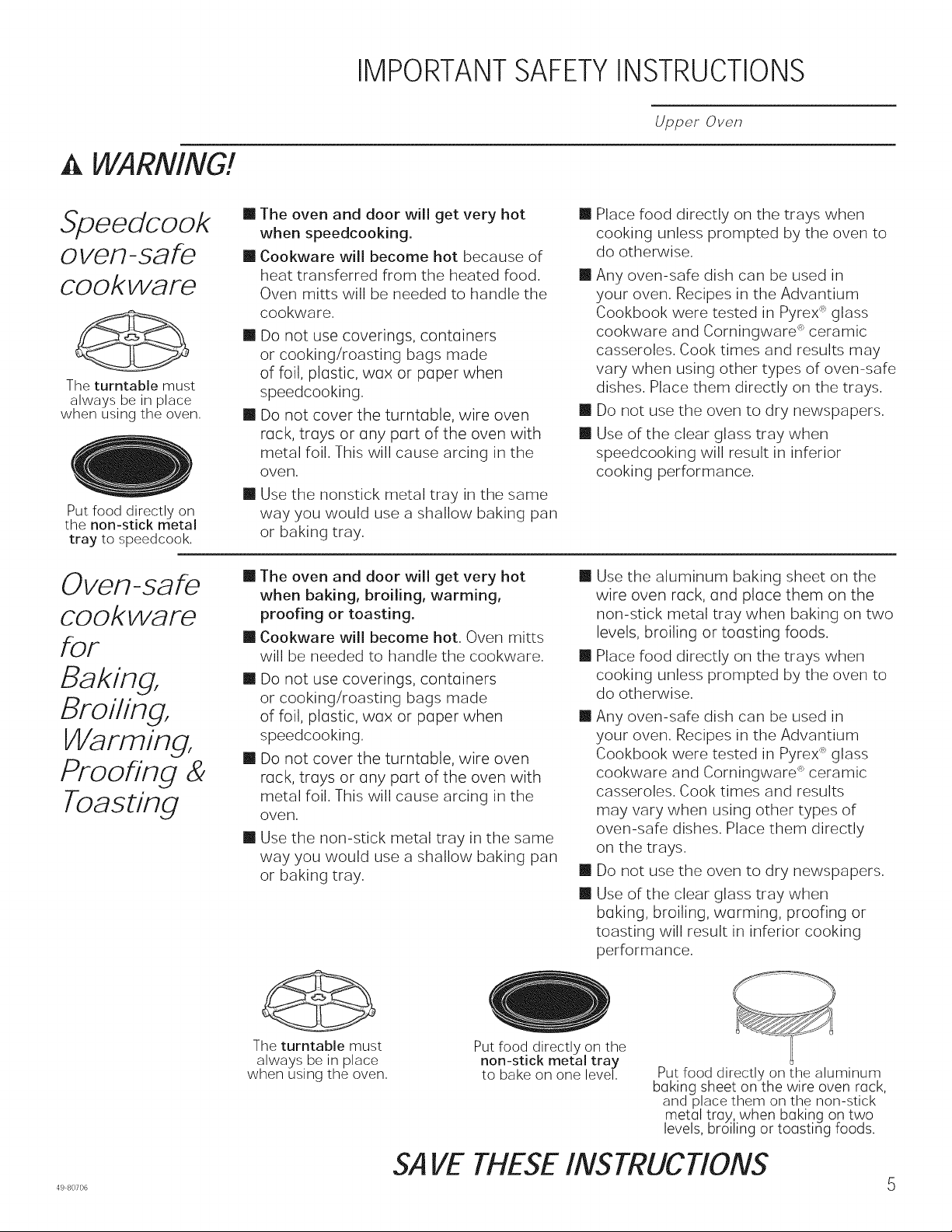
IMPORTANTSAFETYINSTRUCTIONS
WARNING!
Upper Oven
Stoeedcook
oven-safe
cookware
The turntable must
always be in place
when using the oven,
Put food directly on
the non-stick metal
tray to speedcook,
Oven-safe
cookware
fOF
Baking,
Broiling,
Warming,
Proofing &
Toasting
[] The oven and door will get very hot
when speedcooking.
[] Cookware will become hot because of
heat transferred from the heated food.
Oven mitts will be needed to handle the
cookware.
[] Do not use coverings, contoiners
or cooking/roasting bags made
of foil, plostic, wox or poper when
speedcooking.
[] Do not cover the turntoble, wire oven
rock, treys or ony port of the oven with
metal foil. This will cause arcing in the
oven.
[] Use the nonstick metal tray in the same
way you would use a shallow baking pan
or baking tray.
[] Place food directly on the trays when
cooking unless prompted by the oven to
do otherwise.
[] Any oven-safe dish can be used in
your oven. Recipes in the Advantium
Cookbook were tested in Pyrex :`<>glass
cookware and Corningware '_>ceramic
casseroles. Cook times and results may
vary when using other types of oven-safe
dishes. Place them directly on the trays.
[] Do not use the oven to dry newspapers.
[] Use of the clear glass tray when
speedcooking will result in inferior
cooking performance.
[] The oven and door will get very hot
when baking, broiling, warming,
proofing or toasting.
[] Cookware will become hot. Oven mitts
will be needed to handle the cookware.
[] Do not use coverings, contoiners
or cooking/roasting bags made
of foil, plostic, wox or poper when
speedcooking.
[] Do not cover the turntoble, wire oven
rock, treys or ony port of the oven with
metal foil. This will cause arcing in the
oven,
[] Use the non-stick metal tray in the same
way you would use a shallow baking pan
or baking tray,
The turntable must
always be in place
when using the oven,
[] Use the aluminum baking sheet on the
wire oven rock, end piece them on the
non-stick metal tray when baking on two
levels, broiling or roosting foods.
[] Place food directly on the trays when
cooking unless prompted by the oven to
do otherwise.
[] Any oven-safe dish can be used in
your oven. Recipes in the Advantium
Cookbook were tested in Pyrex %glass
cookware and Corningware "_ceramic
casseroles. Cook times and results
may vary when using other types of
oven-safe dishes. Place them directly
on the trays.
[] Do not use the oven to dry newspapers.
[] Use of the clear glass tray when
boking, broiling, worming, proofing or
toasting will result in inferior cooking
performance.
Put food directly on the
non-stick metal tray
to bake on one level, Put food directly on the aluminum
bGking sheet on the wire oven rGck,
and place them on the non-stick
metol troy, when boking on two
levels, broiling or toGsting foods.
SAVE THESE INSTRUCTIONS
49 80706 5
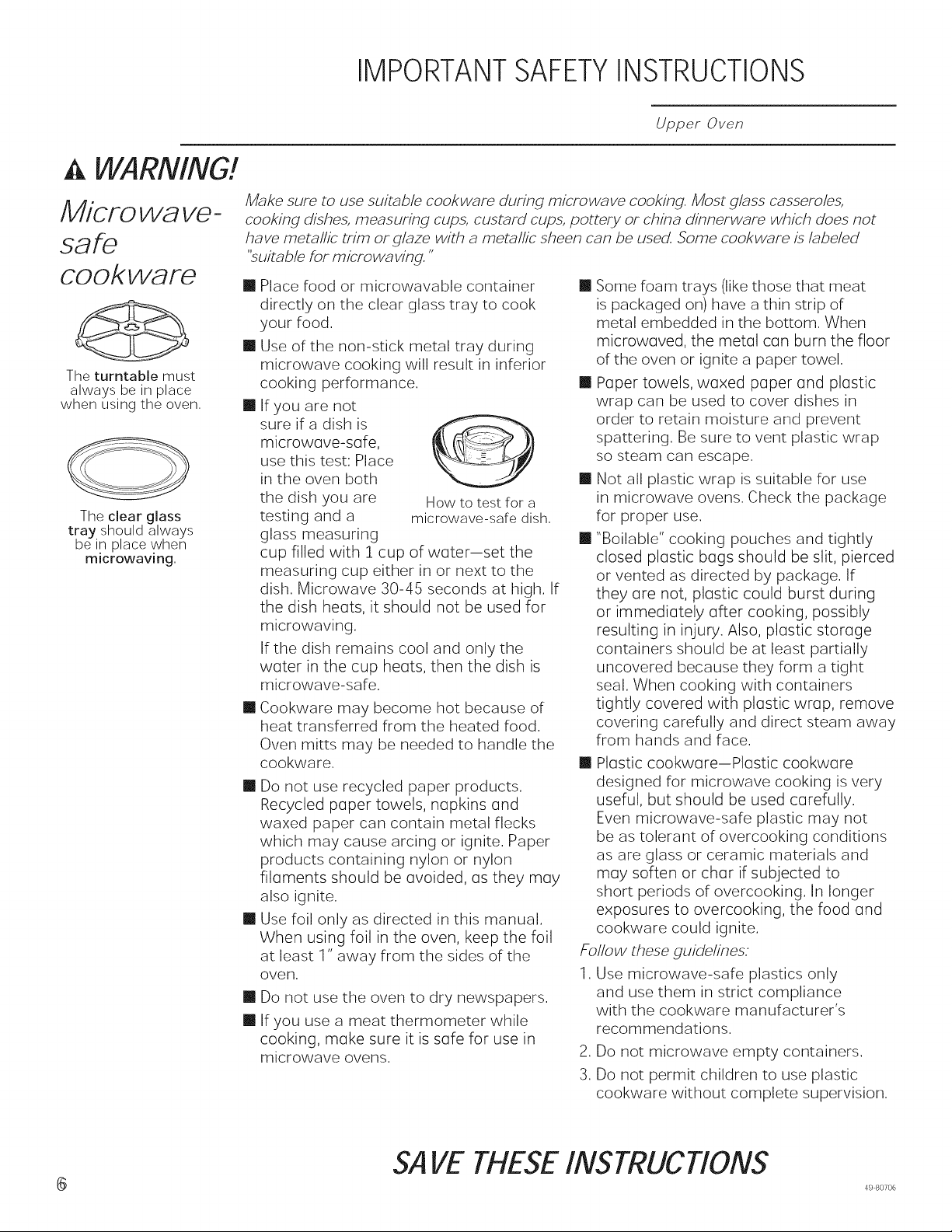
IMPORTANTSAFETYINSTRUCTIONS
,& WARNING!
Microwave-
safe
cookware
The turntable must
always be in place
when using the oven,
The clear glass
tray should always
be in place when
mlcrowavlng,
Upper Oven
Make sure to use suitable cookware during microwave cooking. Most glass casseroles,
cooking dishes, measuring cups, custard cups, pottery or china dinnerware which does not
have metallic trim or glaze with a metallic sheen can be used. Some cookware is labeled
"suitable for microwa ving."
[] Place food or microwavable container
directly on the clear glass tray to cook
your food.
[] Use of the non-stick metal tray during
microwave cooking will result in inferior
[]
[]
cooking performance.
If you are not
sure ira dish is
microwave-sole,
use this test: Place
in the oven both
the dish you are
testing and a
glass measuring
How to test for a
microwave-safe dish,
cup filled with 1 cup of water-set the
measuring cup either in or next to the
dish. Microwave 30-45 seconds at high. If
the dish heats, it should not be used for
microwaving.
If the dish remains cool and only the
water in the cup heats, then the dish is
microwave-safe.
Cookware may become hot because of
heat transferred from the heated food.
Oven mitts may be needed to handle the
cookware.
[] Do not use recycled paper products.
Recycled paper towels, napkins and
waxed paper can contain metal flecks
which may cause arcing or ignite. Paper
products containing nylon or nylon
filoments should be avoided, as they may
also ignite.
[] Use foil only as directed in this manual.
When using foil in the oven, keep the foil
at least 1" away from the sides of the
oveR,
[]
[]
Do not use the oven to dry newspapers.
If you use a meat thermometer while
cooking, make sure it is sole for use in
microwave ovens.
[] Some foam trays (like those that meat
is packaged on) have a thin strip of
metal embedded in the bottom. When
microwaved, the metul con burn the floor
of the oven or ignite a paper towel.
[] Paper towels, waxed paper and plustic
wrap can be used to cover dishes in
order to retain moisture and prevent
spattering. Be sure to vent plastic wrap
so steam can escape.
[] Not all plastic wrap is suitable for use
in microwave ovens. Check the package
for proper use.
[] "Boilable" cooking pouches and tightly
closed plastic bogs should be slit, pierced
or vented as directed by package. If
they ore not, plastic could burst during
or immediately offer cooking, possibly
resulting in injury. Also, plastic storage
containers should be at least partially
uncovered because they form a tight
seal. When cooking with containers
tightly covered with plastic wrap, remove
covering carefully and direct steam away
from hands and face.
[] Plastic cookware-Plastic cookware
designed for microwave cooking is very
useful, but should be used carefully.
Even microwave-safe plastic may not
be as tolerant of overcooking conditions
as are glass or ceramic materials and
may soften or char if subjected to
short periods of overcooking. In longer
exposures to overcooking, the food and
cookware could ignite.
Follow these guidelines:
1. Use microwave-safe plastics only
and use them in strict compliance
with the cookware manufacturer's
recommendations.
2. Do not microwave empty containers.
3. Do not permit children to use plastic
cookware without complete supervision.
SAVE THESE INSTRUCTIONS
49 80706
IMPORTANTSAFETYINSTRUCTIONS
Upper Oven
,& WARNING!
SAFETY PRECAU TIONS
m
[]
Don't defrost frozen beverages in narrow-
necked bottles (especially carbonated
beverages). Even if the container is open,
pressure can build up. This can cause the
container to burst, possibly resulting in injury.
Foods cooked in liquids (such as pasta)
may tend to boil more rapidly than foods
containing less moisture. Should this
occur, refer to the Care and Cleaning of
the oven section for instructions on how
to clean the inside of the oven.
m Hot foods and steam can cause burns. Be
careful when opening any containers of
hot food, including popcorn bags, cooking
pouches and boxes. To prevent possible
injury, direct steam away from hands and
face.
Im Do not overcook potatoes. They could
dehydrate and catch fire, causing damage to
your oven,
m Avoid heating baby food in glass jars, even
with the lid off. Make sure all infant food is
thoroughly cooked. Stir food to distribute the
heat evenly. Be careful to prevent scalding
when warming formula. The container may
feel cooler than the formula really is. Always
test the formula before feeding the baby.
m Do not attempt to deep fry in the oven.
Notice E
Pacemakers
ml Most pacemakers are shielded from
interference from electronic products,
including microwaves. However, patients
with pacemakers may wish to consult their
physicians if they have concerns.
SAVE THESE INSTRUCTIONS
49 80706 7
Z
©
m
tY
©
EL
Z
m
>.,
t--,
I,.tJ
o©
IMPORTANT SAFETYINFORMATION.
READALL INSTRUCTIONSBEFOREUSING.
Lower Oven
IA, WARNING I
Read all safety instructions before using the product. Failure to follow these instructions may result in fire,
electrical shock, serious injury or death.
STATEOF CALIFORNIA PROPOSITION 65 WARNING
The California Safe Drinking Water and Toxic Enforcement Act requires the Governor of California to
publish a list of substances known to the state to cause cancer, birth defects or other reproductive harm,
and requires businesses to warn customers of potential exposure to such substances.
i/I, WARNING lThis product contains one or more chemical known to the State of California to
cause cancer, birth defects or other reproductive harm.
Self-clean ovens can cause low-level exposure to some of these substances, including carbon monoxide,
during the cleaning cycle. Exposure can be minimized by venting with an open window or using a
ventilation fan or hood.
l/k WARNING I GENERALSAFETYINSTRUCTIONS
[] Use this appliance only for its intended purpose
as described in this Owner's Manual.
[] Be sure your appliance is properly installed and
grounded by a qualified installer in accordance
with the provided installation instructions.
[] Do not attempt to repair or replace any part of
your oven unless it is specifically recommended
in this manual. All other servicing should be
transferred to a qualified technician.
[] Before performing any service, disconnect the
power supply at the household distribution panel
by removing the fuse or switching off the circuit
breaker.
[] Do not leave children alone--children should not
be left alone or unattended in an area where an
appliance is in use. They should never be allowed
to climb, sit or stand on any part of the appliance.
[]A CAUTION.Donotstoreitemsof
interest to children in cabinets above an oven
- children climbing on the oven to reach items
could be seriously injured.
[] Use only dry pot holders--moist or damp pot
holders on hot surfaces may result in burns from
steam. Do not let pot holders touch hot heating
elements. Do not use a towel or other bulky cloth
in place of pot holders.
[] Never use your appliance for warming or heating
the room.
[] Do not touch the heating elements or the interior
surface of the oven. These surfaces may be hot
enough to burn even though they are dark in
color. During and after use, do not touch, or let
clothing or other flammable materials contact any
interior area of the oven; allow sufficient time for
cooling first. Other surfaces of the appliance may
become hot enough to cause burns. Potentially
hot surfaces include the oven vent opening,
surfaces near the opening and crevices around
the oven door.
[] Do not heat unopened food containers. Pressure
could build up and the container could burst,
causing an injury.
[] Do not use any type of foil or liner to cover the
oven bottom or anywhere in the oven, except as
described in this manual. Oven liners can trap
heat or melt, resulting in damage to the product
and risk of shock, smoke or fire.
[] Avoid scratching or impacting glass doors or
control panels. Doing so may lead to glass
breakage. Do not cook on a product with broken
glass. Shock, fire or cuts may occur.
[] Cook meat and poultry thoroughly--meat to
at least an internal temperature of 160°F and
poultry to at least an internal temperature of
180°F. Cooking to these temperatures usually
protects against foodborne illness.
SAVETHESE INSTRUCTIONS
49 80706

IA WARNING 1KEEPFLAMMABLEMATERIALSAWAYFROMTHEOVEN
I-- I
Failure to do so may result in fire or personal injury°
[] Do not store or use flammable materials in or near
an oven, including paper, plastic, pot holders,
linens, wall coverings, curtains, drapes and gasoline
or other flammable vapors and liquids.
[] Never wear loose-fitting or hanging garments while
using the appliance. These garments may ignite if
they contact hot surfaces, causing severe burns.
[] Do not let cooking grease or other flammable
materials accumulate in or near the oven. Grease
in the oven or near the oven may ignite.
l IN THE EVENTOF A FIRE,TAKE THE FOLLOWING
STEPS TO PREVENTINJURY AND FIRESPREADING
I,&WARNING
>
r-'13
,.-4
..<
m
Z
=r'!
©
n
©
Z
[] Do not use water on grease fires. Never pick up
a flaming pan.
[] If there is a fire in the oven during baking,
smother the fire by closing the oven door and
turning the oven off or by using a multi-purpose
dry chemical or foam-type fire extinguisher.
If there is a fire in the oven during self-clean, turn
the oven off and wait for the fire to go out. Do
not force the door open. Introduction of fresh air
at self-clean temperatures may lead to a burst
of flame from the oven. Failure to follow this
instruction may result in severe burns.
[A WARNING i OVENSAFETYINSTRUCTIONS
[] Stand away from the oven when opening the
oven door. Hot air or steam which escapes can
cause burns to hands, face and/or eyes.
[] Keep the oven vent unobstructed.
[] Keep the oven free from grease buildup. Grease
in the oven may ignite.
[] Place oven racks in desired location while oven is
cool. If rack must be moved while oven is hot, do not
let pot holder contact hot heating element in oven.
[] When using cooking or roasting bags in the
oven, follow the manufacturer's directions.
IA WARNING
[] Pulling out the standard racks to their stop-locks
or the extension rack to its fully open position is
a convenience in lifting heavy foods. It is also
a precaution against burns from touching hot
surfaces of the door or oven walls.
[] Do not leave items such as paper, cooking
utensils or food in the oven when not in use.
Items stored in an oven can ignite.
[] Never place cooking utensils, pizza or baking
stones, or any type of foil or liner on the oven
floor. These items can trap heat or melt, resulting
in damage to the product and risk of shock,
smoke or fire.
1SELF-CLEANINGOVEN SAFETYINSTRUCTIONS
The self-cleaning feature operates the oven at temperatures high enough to burn away food soils in the
oven. Follow these instructions for safe operation.
[] Do not touch oven surfaces during self-clean
operation. Keep children away from the oven
during self-cleaning. Failure to follow these
instructions may cause burns.
[] Before self-cleaning the oven, remove shiny
silver colored oven racks (on some models), the
probe, any aluminum foil, and any broiler pan,
grid, and other cookware. Only porcelain coated
oven racks may be left in the oven.
[] Before operating the self-clean cycle, wipe
grease and food soils from the oven. Excessive
amount of grease may ignite, leading to smoke
damage to your home.
[] If the self-cleaning mode malfunctions, turn the
oven off and disconnect the power supply. Have
it serviced by a qualified technician.
[] Do not clean the door gasket. The door gasket is
essential for a good seal. Care should be taken
not to rub, damage or move the gasket.
[] Do not use oven cleaners. No commercial oven
cleaner or oven liner protective coating of any kind
should be used in or around any part of the oven.
SAVETHESEINSTRUCTIONS
49 80706 9

Notes
_0 49 80706
Thank You! ... for your purchase of a GE Brand appliance.
Register Your Appliance: Register your new appliance on-line at your convenience!
www.geappliances.com/service and support/register/
Timely product registration will allow for enhanced communication and prompt service under the terms of your warranty,
should the need arise. You may also mail in the pre-printed registration card included in the packing material.
GE Electric Range Warranty
GEAppliances.com
All warranty service is provided by our Factory Service Centers, or an authorized Customer Care ® technician.
To schedule service, on-line, visit us at www.geappliances.com/service_and_support/, or call 800.GE.CARES
(800.432.2737). Please have serial number and model number available when calling for service.
Servicing your appliance may require the use of the onboard data port for diagnostics. This gives a GE factory
service technician the ability to quickly diagnose any issues with your appliance and helps GE improve its products
by providing GE with information on your appliance. If you do not want your appliance data to be sent to GE, please
advise your technician not to submit the data to GE at the time of service.
For the period of one year from the date of the original purchase. GE will provide any part of the range which fails due
to a defect in materials or workmanship. During this limited one-year warranty, GE will also provide, free of charge, all
labor and in-home service to replace the defective part.
What GE will not cover:
[] Service trips to your home to teach you how to use
the product.
[] Improper installation, delivery or maintenance.
[] Failure of the product if it is abused, misused,
modified or used for other than the intended purpose
or used commercially.
[] Replacement of house fuses or resetting of circuit
breakers.
[] Damage to the product caused by accident, fire,
floods or acts of God.
[] Incidental or consequential damage caused by
possible defects with this appliance.
[] Damage caused after delivery.
[] Product not accessible to provide required service.
[] Service to repair or replace light bulbs, except for LED
lamps.
EXCLUSION OF IMPLIED WARRANTIES
Your sole and exclusive remedy is product repair as provided in this Limited Warranty. Any implied warranties,
including the implied warranties of merchantability or fitness for a particular purpose, are limited to one year or the
shortest period allowed by law.
This warranty is extended to the original purchaser and any succeeding owner for products purchased for home use
within the USA. If the product is located in an area where service by a GE Authorized Servicer is not available, you
may be responsible for a trip charge or you may be required to bring the product to an Authorized GE Service location
for service. In Alaska, the warranty excludes the cost of shipping or service calls to your home.
Some states do not allow the exclusion or limitation of incidental or consequential damages. This warranty gives you
specific legal rights, and you may also have other rights which vary from state to state. To know what your legal rights
are, consult your local or state consumer affairs office or your state's Attorney General.
Warrantor: General Electric Company. Louisville, KY 40225
Extended Warranties: Purchase a GE extended warranty and learn about special discounts that are available while
your warranty is still in effect. You can purchase it on-line anytime
www.geappliances.com/service and_support/shop-for-extended-service-plans.htm
or call 800.626.2224 during normal business hours. GE Consumer Home Services will still be there after your
warranty expires.
Z
Lu
rn
CD
m
(i) -_
B'__
o_
w
_q3
r- "-_
:3 "_
_ 0
O?
t_
4980706 _
L.LJ
m
t-Y
©
t.,f)
L.LJ
(D
(D
L.LJ
¢,D
Z
m
Have a question or need assistance with your appliance?
Try the GE Appliances Website (www.geappliances.com/service_and_supportJ) 24 hours a day, any day of the
year! For greater convenience and faster service, you can now download Owner's Manuals, order parts or even
schedule service on-line.
Schedule Service: Expert GE repair service is only one
step away from your door. Get on-line and schedule your
service at www.geappliances.com/service_and_support/
Or call 800.GE.CARES (800.432.2737) during normal
business hours.
Parts and Accessories: Individuals qualified to service
their own appliances can have parts or accessories sent
directly to their homes (VISA, MasterCard and Discover
cards are accepted).Order on-line today, 24 hours every
day or by phone at 800.626.2002 during normal business
hours.
Instructions contained in this manual cover procedures
to be performed by any user. Other servicing generally
should be referred to qualified service personnel. Caution
must be exercised, since improper servicing may cause
unsafe operation.
Real Life Design Studio: GE supports the Universal
Design concept of products, services and environments
that can be used by people of all ages, sizes and
capabilities. We recognize the need to design for a wide
range of physical and mental abilities and impairments.
For details of GE's Universal Design applications, including
kitchen design ideas for people with disabilities, check out
our Website today. For the hearing impaired, please call
800.TDD.GEAC (800.833.4322).
Contact Us: If you are not satisfied with the service you
receive from GE, contact us on our Website with all the
details including your phone number, or write to:
General Manager, Customer Relations
GE Appliances, Appliance Park Louisville, KY 40225
Accessories
Looking For Something More?
GE offers a variety of accessories to improve your cooking and maintenance experiences!
To place an order visit us online at:
www.GEApplianceParts.com (U.S.) or www.GEAppliances.ca (Canada)
or call 800.626.2002 (U.S.) 800.661.1616 (Canada)
The following products and more are available:
Accessories
Small Broiler Pan (8 ¾" x 1 1/4"x 13 ½ ")
Large* Broiler Pan (12 ¾ "x 1 1A,x 16 ½ ")
XL** Broiler Pan (17 "x 1 1/4"x 19 1/4")
Parts
Oven racks
Oven elements
Light bulbs
Cleaning Supplies
CitruShine Stainless Steel Wipes
CeramaBryte Stainless Steel Appliance Cleaner
Graphite Lubricant
*The large broiler pan does not fit in 20"/24" ranges.
**The XL broiler pan does not fit in 24" wall ovens, 27"drop ins or 20V24" ranges
WB48X10055 (US) 222D2097G001 (Canada)
WB48X10056 (US) 222D2097G002 (Canada)
WB48X10057 (US) Not available in Canada
Part numbers vary by model
Part numbers vary by model
Part numbers vary by model
WX10X10007
PM10X311
WB02T10303
12
How to Remove Protective Shipping Film and Packaging Tape
Carefully grasp a corner of the protective shipping film
with your fingers and slowly peel it from the appliance
surface. Do not use any sharp items to remove the film.
Remove all of the film before using the appliance for the
first time.
To assure no damage is done to the finish of the
product, the safest way to remove the adhesive from
packaging tape on new appliances is an application of
a household liquid dishwashing detergent, Apply with a
soft cloth and allow to soak.
NOTE: The adhesive must be removed from all parts. It
cannot be removed if it is baked on.
49 80706
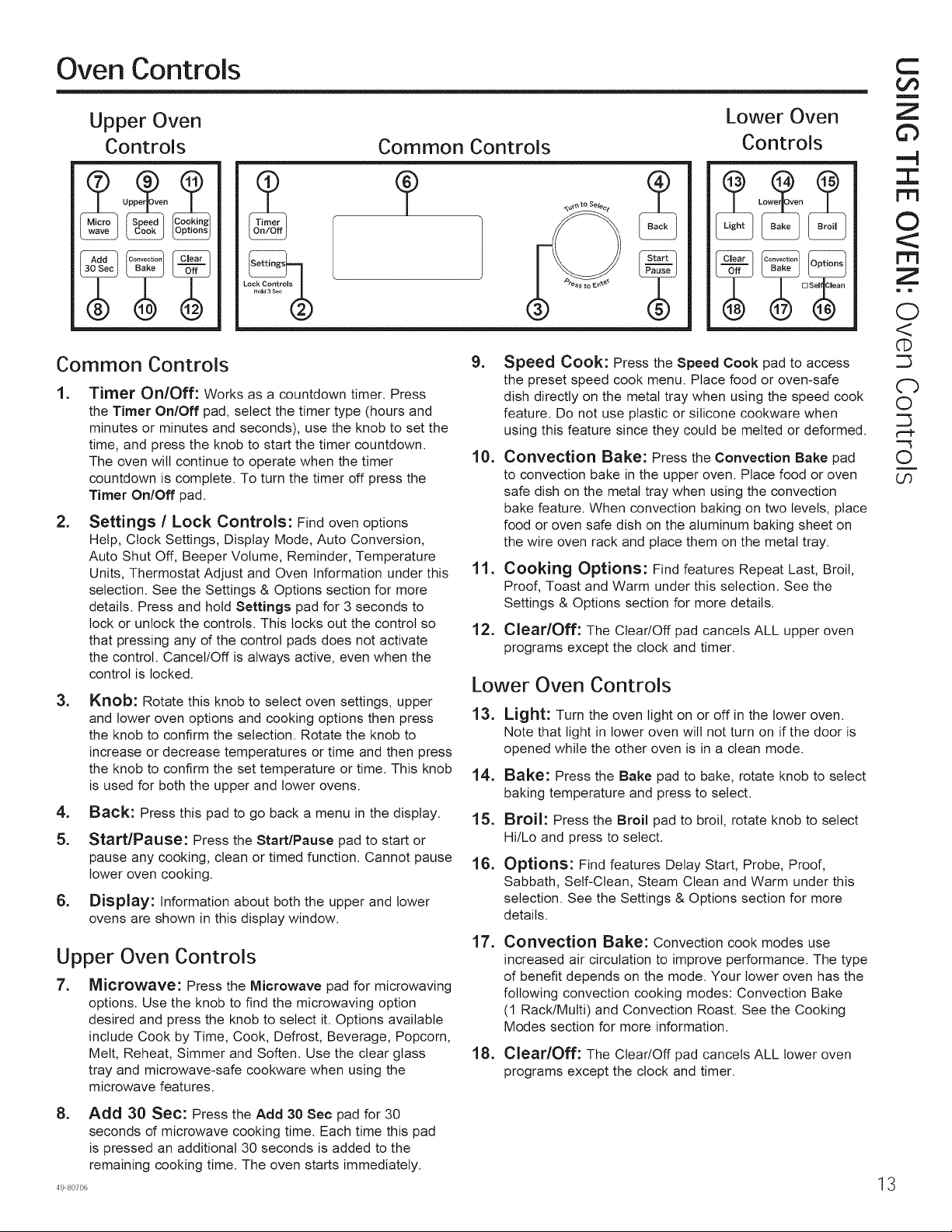
Oven Controls
Upper Oven
Controls
Lock Controls
%
o ee
Common Controls
Lower Oven
Controls
Common Controls
1,
2,
Timer On/Off: Works as a countdown timer. Press
the Timer On/Off pad, select the timer type (hours and
minutes or minutes and seconds), use the knob to set the
time, and press the knob to start the timer countdown.
The oven will continue to operate when the timer
countdown is complete. To turn the timer off press the
Timer On/Off pad.
Settings / Lock Controls: Find oven options
Help, Clock Settings, Display Mode, Auto Conversion,
Auto Shut Off, Beeper Volume, Reminder, Temperature
Units, Thermostat Adjust and Oven Information under this
selection. See the Settings & Options section for more
details. Press and hold Settings pad for 3 seconds to
lock or unlock the controls. This locks out the control so
that pressing any of the control pads does not activate
the control. Cancel/Off is always active, even when the
control is locked.
3,
4,
5.
6,
Knob: Rotate this knob to select oven settings, upper
and lower oven options and cooking options then press
the knob to confirm the selection. Rotate the knob to
increase or decrease temperatures or time and then press
the knob to confirm the set temperature or time. This knob
is used for both the upper and lower ovens.
Back: Press this pad to go back a menu in the display.
Start/Pause: Press the Start/Pause pad to start or
pause any cooking, clean or timed function. Cannot pause
lower oven cooking.
Display: Information about both the upper and lower
ovens are shown in this display window.
Upper Oven Controls
7. Microwave: Press the Microwave pad for microwaving
options. Use the knob to find the microwaving option
desired and press the knob to select it. Options available
include Cook by Time, Cook, Defrost, Beverage, Popcorn,
Melt, Reheat, Simmer and Soften. Use the clear glass
tray and microwave-safe cookware when using the
microwave features.
8,
Add 30 Sec: Press the Add 30 Sec pad for 30
seconds of microwave cooking time. Each time this pad
is pressed an additional 30 seconds is added to the
remaining cooking time. The oven starts immediately.
49 80706
9,
10.
11.
12.
Speed Cook: Press the Speed Cook pad to access
the preset speed cook menu. Place food or oven-safe
dish directly on the metal tray when using the speed cook
feature. Do not use plastic or silicone cookware when
using this feature since they could be melted or deformed.
Convection Bake: Press the Convection Bake pad
to convection bake in the upper oven. Place food or oven
safe dish on the metal tray when using the convection
bake feature. When convection baking on two bevels, place
food or oven safe dish on the aluminum baking sheet on
the wire oven rack and place them on the metal tray.
Cooking Options: Find features Repeat Last, Broil,
Proof, Toast and Warm under this selection. See the
Settings & Options section for more details.
Clear/Off: The Clear/Off pad cancels ALL upper oven
programs except the clock and timer.
Lower Oven Controls
13.
14.
15.
16.
Light: Turn the oven light on or off in the lower oven.
Note that light in lower oven will not turn on if the door is
opened while the other oven is in a clean mode.
Bake: Press the Bake pad to bake, rotate knob to select
baking temperature and press to select.
Broil: Press the Broil pad to broil, rotate knob to select
Hi/Lo and press to select.
Options: Find features Delay Start, Probe, Proof,
Sabbath, Self-Clean, Steam Clean and Warm under this
selection. See the Settings & Options section for more
details.
17. Convection Bake: Convection cook modes use
increased air circulation to improve performance. The type
of benefit depends on the mode. Your lower oven has the
following convection cooking modes: Convection Bake
(1 Rack/Multi) and Convection Roast. See the Cooking
Modes section for more information.
18. Clear/Off: The Clear/Off pad cancels ALL lower oven
programs except the clock and timer.
13
C
Oo
m
Z
Gb
,---4
Z
©
Z
m m
O
<
@
C-b
0
0
i
US
O0
c-
O
CL
O
O0
E:T)
C-
4.--J
4---J
Q
Or)
©
I
©
Z
m
Settings & Options
Lower Oven
There are several different special features on your wall oven. To change the settings of these special features,
press the BAKE and BROIL pads at the same time and hold for three seconds. "SF" will appear in the display.
Select the feature you want to change. When the change has been made, press the START key to save the change
and return to the time of day.
Adjust the Oven Temperature
This feature allows the oven baking and convection
baking temperature to be adjusted up to 35°F hotter
or down to 35°F cooler. Use this feature if you believe
your oven temperature is too hot or too cold and wish
to change it. For double oven models, the upper and
lower ovens are adjusted separately. This adjustment
affects Bake, and Convection Bake (1 Rack/Multi)
modes. No other cooking modes are affected.
Press the Bake pad to select the oven to be adjusted.
Press the Bake pad again to enter the temperature
adjustment mode. A number between 35 and - 35
will display. Use the number pads to set the desired
temperature adjustment and use the Bake pad to
change between negative and positive.
Press the Start pad to save the temperature adjustment.
End of Timer Signals
This is the tone that signals the end of a timer. The tone
can be continuous (Con bEEP) or one repeating beep
(bEEP). A continuous setting will continue to sound a tone
until a button on the control is pressed. Press the Broil pad
to view the current setting and then to change the setting.
Fahrenheit or Celsius Temperature Display
The oven control is set to use Fahrenheit temperatures
(F), but you can change it to use Celsius temperatures
(C). Press the number 6 and 8 pads at the same time
to view the current setting, press again to change the
setting.
Clock Display
This feature specifies how the time of day will be
displayed or if no time of day will be displayed. You can
select a standard 12-hour clock (12 H), 24-hour military
time display (24 H), or for no clock displayed (oFF).
Press the Clock pad to view the current setting, press
again to change the setting.
Auto Recipe Conversion
When using Convection Bake 1 Rack or Convection Bake
Multi Rack cooking options, Auto Recipe Conversion will
automatically convert the regular baking temperatures
entered to convection bake cooking temperatures
when turned on. Note that this option does not convert
convection bake cooking times, it only converts
temperatures. Press the Convection Bake (1 Rack/Multi)
pad to view the conversion setting, press again to toggle
between On (Con On) and Off (Con oFF).
Sound Volume
12-hour auto shut-off and Sabbath
Options for this feature are "12 SHdn", "no SHdn" and
"SAbbAtH".
12-hour auto shut-off turns off the oven after 12 hours of
continuous operations.
Sabbath mode disables the oven lights (the oven light
will not turn on when the door is opened), all sounds
(the control will not beep when a button is pressed),
Convection, Broil, Warm, Proof, Cook Time, Timer,
Clock, and Delay Time functions. Sabbath mode can
only be used with Bake. This feature conforms to the
Star-K Jewish Sabbath requirements.
Press and hold the Bake and Broil pads for 3 seconds
to enter special features.
Press the Delay Time pad to view the current setting
and then to change the setting.
To use Sabbath mode, select "SAbbAtH" and press 8tart.
A ] will appear in the display and the clock will not display.
Note that if you have a double wall oven, when you
place the control into Sabbath mode, both ovens are
now in Sabbath mode and available for cooking.
Once in Sabbath mode, at any time you can press Bake,
use the number pads to enter a temperature between
170F and 550F, and press Start. No sound will be given
when the keys are pressed. At a random time between
30 seconds and 1 minute, ][, will appear in the display
indicating the oven is running.
Note that both ovens of a double wall oven can be used
in Sabbath mode. Each oven can be programmed
to a different temperature and each oven must be
programmed separately.
If you need to adjust the temperature, press Bake, use
the number pads to enter a new temperature between
170F and 550F, and press Start.
To turn the oven off, press Cancel/Off at any time. The
oven will immediately turn off and ][ will change to ]
indicating that the oven has turned off.
Note that each oven of a double wall oven must be
turned off separately.
To exit Sabbath mode, make sure that the oven is
turned off. Press and hold the Bake and Broil pads for 3
seconds to enter special features then press Delay Time
until either "12 SHdn" or "no SHdn" is in the display and
press Start.
NOTE: If power outage occurs during Sabbath mode the
unit will remain in Sabbath mode but off when power is
restored.
This feature allows the oven tone volume to be adjusted
between high (HI bEEP HI), medium (Std bEEP Std),
low (Lo bEEP Lo) and off (oFF bEEP oFF). Press the
number I and 5 pads at the same time to view the
current setting or to change the setting. The control will
sound the oven tone at the new volume level each time
the sound level is changed.
4 49 80706
Settings & Options
Repeat last
Use this time saving feature for
cooking repetitive items/ike cookies or
appetizers.
NOTE: The/ast program used is stored
for two hours.
1. Press upper oven cook option and
select repeat last.
2. The last preset food will be
displayed.
3. Press the START/PAUSE pad or the
selector dial to start cooking.
Resume
feature
q,
,
If your food needs to cook a bit
longer, you con restart the oven by
pressing the START/PAUSE pad or
selector dial,
RESUME COOKING will be displayed
and the oven will restart immediately
at 10% of the original time.
The program stays in memory for 5
minutes. After that you will need to
begin the program again. See To use a
preset speedcook menu.
C
Oo
m
Z
©
I
rrl
©
m
Z
i m
GO
©
t_
O0
gao
0
¢--t-
0
O0
498o7o6 15
Speedcook Menu Guide
Upper Oven
Display
prompts
Preset
speedcook
f]nenu
selections
16
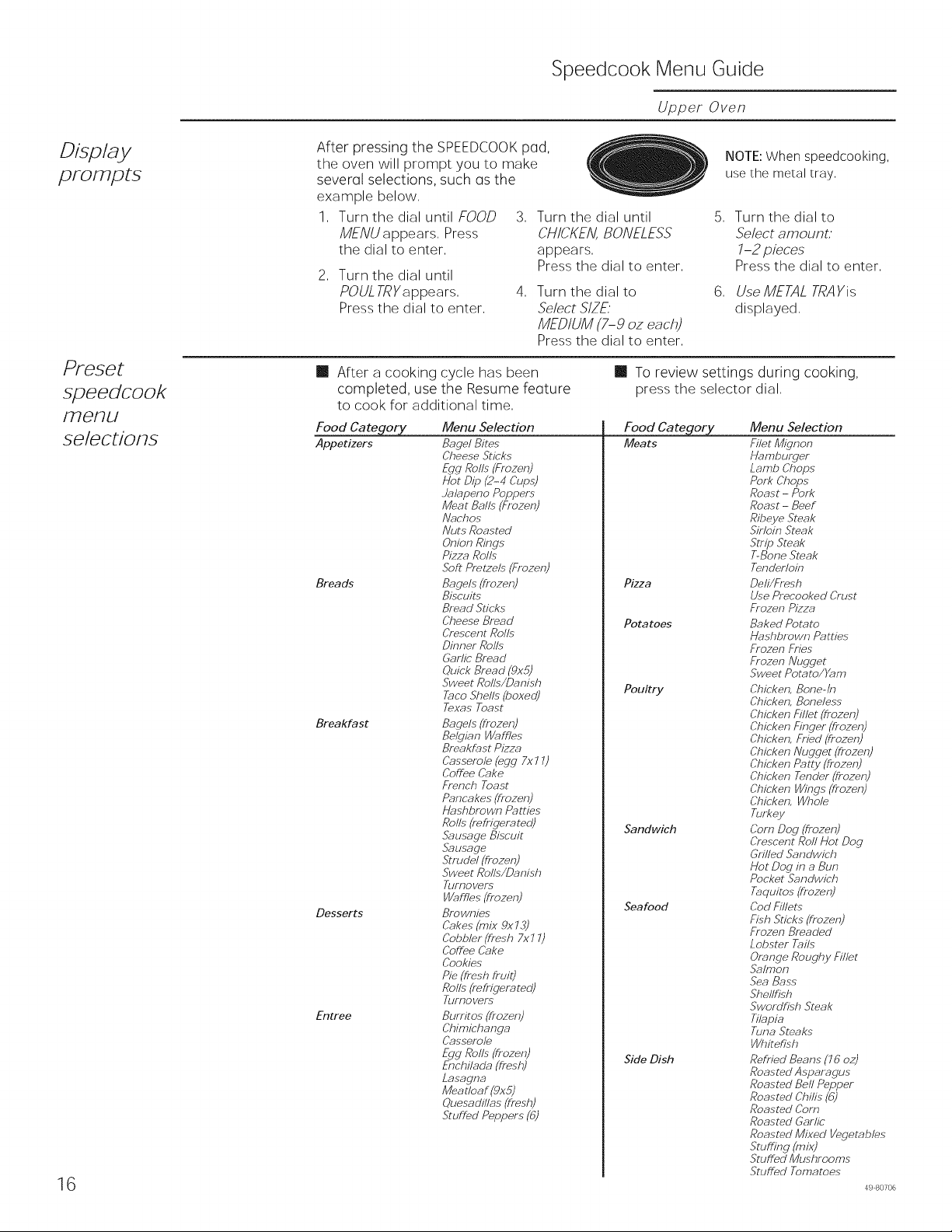
After pressing the SPEEDCOOKpad,
the oven will prompt you to make
several selections, such (Is the
example below,
1, Turn the dial until FOOD 3,
MENU a ppears, Press
the dial to enter,
2, Turn the dial until
POUL TRYappears,
Press the dial to enter,
,
Turn the dial until
CHICKEN,BONELESS
appears,
Pressthe dial to enter,
Turn the dial to
Select SIZE'
MEDIUM (7-9 oz each)
Press the dial to enter,
NOTE: When speedcooking,
use the metal tray,
, Turn the dial to
Select arnounL'
1-2 pieces
Press the dial to enter,
6, Use METALTRAYis
displayed,
[]
After a cooking cycle has been
completed, use the Resume feature
to cook for additional time,
Food Category Menu Selection
Appetizers BJge/ Bites
Cheese Sticks
Egg Rolls (Frozen)
Hot Dip (2-4 Cups)
Jalapeno Poppers
Meat Balls (Frozen)
/Vnchos
/Vuts Roasted
Onion Rings
Pizza Rolls
.Soft Pretzels (Frozen)
Breads Bagels (t?ozen)
Biscuits
Bread Sticks
Cheese Brewed
Crescent Rolls
Dinner Rolls
Garlic Bread
Quick Bread (9x5)
Sweet Rolls/Danish
TacoShells(boxedl
Texas Toast
Breakfast Bagels (t?ozen)
Belgian VVaffles
Breakfast Pizz_
Casserole (egg 7x 77)
(#off_e Cake
French Toast
Pancakes (t?ozen)
Hnshbrown Patties
Rolls (refrigerated)
Sausage Biscuit
Sausage
Strudel(fiozen)
Sweet Rolls/Danish
Turnovers
Waffles (t?ozen)
Desserts Pro wnies
Cakes _rrllx 9x73)
Cobbler (fresh 7x7 7)
(#off_e Cz_ke
Cookies
Pie (flesh fiuiU
Rolls (reffigeratedl
Turnovers
Entree Burritos (frozen)
(#himichanga
Casserole
Egg Rolls (frozen)
Enchilada (flesh)
Lasagna
Meatloaf (gx5)
Quesadlllas (flesh)
Stuft_d Peppers (6_
[] To review settings during cooking,
press the selector dial,
Food Category Menu Selection
Meats Filet Mignon
Hamburger
Lamb Chops
Pork Chops
Roast - Pork
Roast - Beef
Ribeye Steak
Sirloin Steak
Strip Steak
T-Bone Steak
Tenderloin
Pizza Dell/Fr esh
Use Precooked (#rust
Frozen Pizz_
Potatoes Baked Potato
Hashbrown Patties
Frozen Fries
Frozen Nugget
Sweet Potato/X.3m
Poultry Chicken, Bone-In
Chicken, Boneless
Chicken Fillet (t?ozen)
Chicken Finger (frozen)
Chicken, Fried (tkozen)
Chicken Nugget (frozen)
Chicken Patty (t?ozen)
Chicken Tender (t?ozen)
Chicken Wings (fiozen)
Chicken, Whole
Turkey
Sandwich Corn Dog (fiozen)
Crescent Roll Hot Dog
Grilled Sandwich
Hot Dog in a Bun
Pocket Sandwich
Taquitos (t?ozen)
Seafood Cod Fillets
Fish Sticks (t?ozen)
Frozen Breaded
Lobsmr Tails
Orange Roughy Fillet
Salmon
Sea Bass
Shellfish
Swordfish Steak
Tllapia
Tuna Steaks
Whitefish
Side Dish Refiied Benns (76 oz)
Roasmd Asparagus
Roasmd Bell Pepper
Roasmd Chilis (62
Roasmd Corn
Roasmd Garlic"
Roasmd Mixed Vegetables
Stuffing (mix)
Stuffed Mushrooms
Stuffed Tomatoes
49 80706
Using
speedcook
features
Speedcooking
Upper Oven
CAUTION:Whenusin speedcookprograms,re,.e,.berthatthe
oven, door and dishes will be very hod
APRECAUCION:-cuandoutilizelospro ramasde rapida,recuerde
que el homo, compuerta y los platos se iencontraran muy calientes!
Prior to the first use of your oven, the clock must be set.
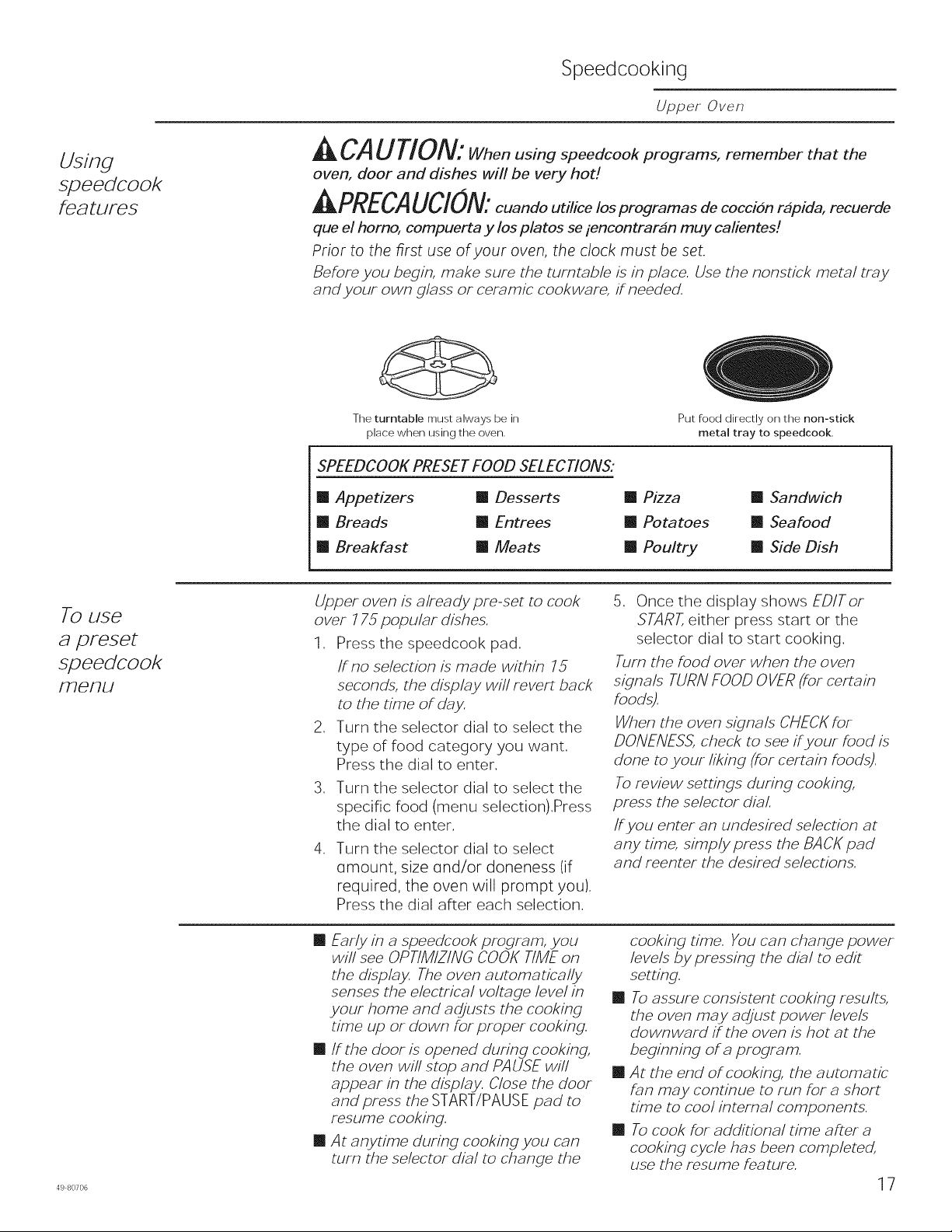
Before you begin, make sure the turntable is in place. Use the nonst/ck metal tray
and your own glass or ceramic cookware, tineeded.
The turntable must always be in
place when using the oven.
SPEEDCOOK PRESET FOOD SELECtiONS:
[] Appetizers [] Desserts
[] Breads [] Entrees
[] Breakfast [] Meats
Put food directly on the non-stick
metal tray to speedcook.
[] Pizza [] Sandwich
[] Potatoes [] Seafood
[] Poultry [] Side Dish
To use
a preset
speedcook
menu
49 80706
Upper oven is already pre-set to cook
over 775 popuMr dishes.
1. Press the speedcook pad.
if no selection is made within 75
seconds, the display will revert back
to the time of day.
2. Turn the selector dial to select the
type of food category you want.
Press the dial to enter.
3. Turn the selector dial to select the
specific food (menu selection).Press
the dial to enter.
4. Turn the selector dial to select
(]mount, size und/or doneness (if
required, the oven will prompt you).
Press the dial after each selection.
5. Once the display shows EDiTor
START,either press start or the
selector dial to start cooking.
Turn the food over when the oven
signals TURN FOOD OVER (for certain
foods).
When the oven signals CHECK for
DO/VE/VESS,check to see ti your food is
done to your liking (for certain foods).
To review settings during cooking,
press the selector dial.
if you enter an undesired selection at
any time, simply press the BACK pad
and reenter the desired selections.
[] Early in a speedcook program, you
will see OPTIMIZING COOK TIME on
the display. The oven automatically
senses the electrical voltage level in
your home and adjusts the cooking
time up or down for proper cooking.
[] ff the door is opened during cooking,
the oven will stop and PAUSE will
appear in the display. Close the door
and press the START/PAUSE pad to
Fesume cooking.
[] A t anytime during cooking you can
turn the selector dial to change the
cooking time. You can change power
levels by pressing the dial to edit
setting.
[] To assure consistent cooking results,
the oven may adjust power levels
downward tithe oven is hot at the
beginning of a program.
[] At the end of cooking, the automatic
fan may continue to run for a short
time to cool internal components.
[] To cook for additional time after a
cooking cycle has been completed,
use the resume feature.
17
Speedcooking
Upper Oven
Cooking tips
for great
tasting results
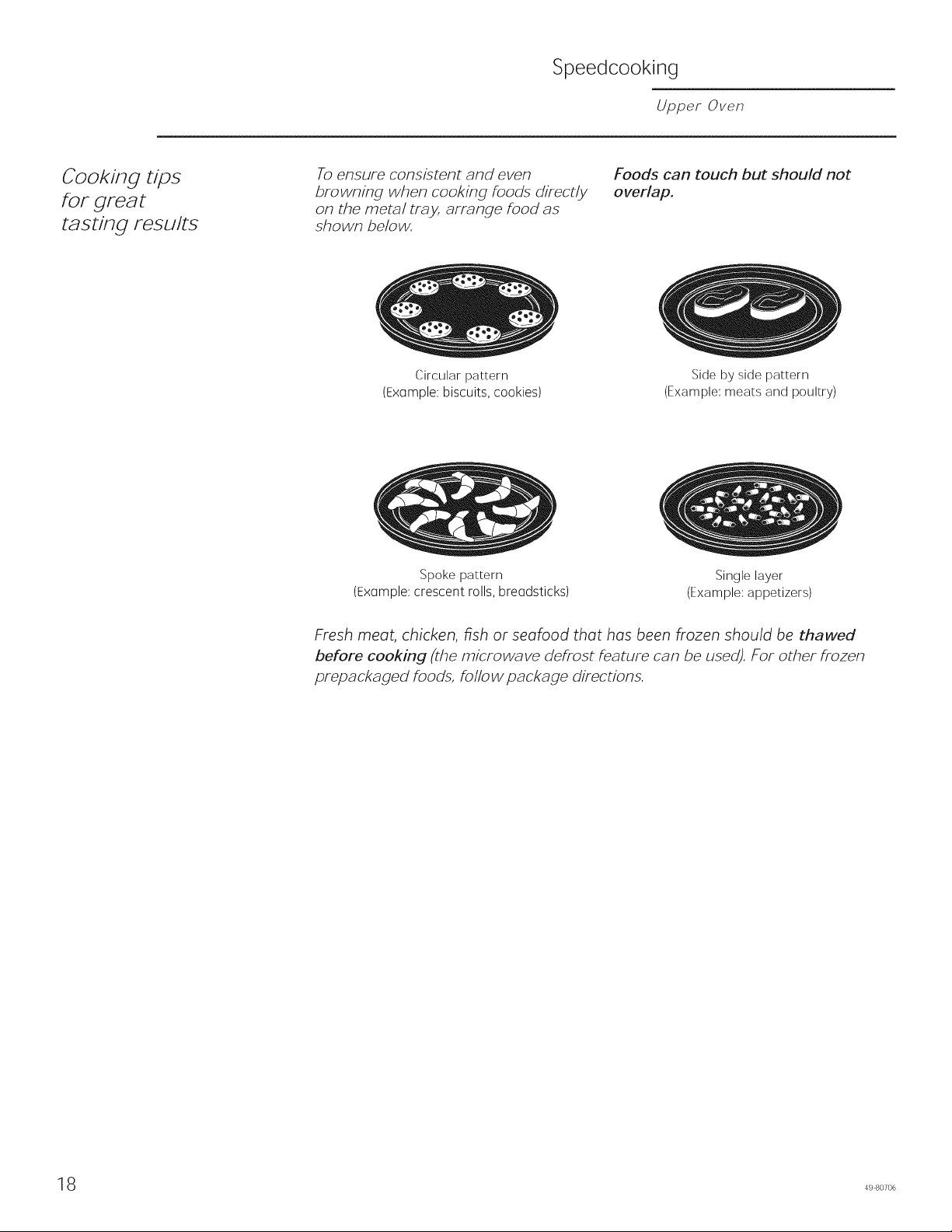
To ensure consistent and even
browning when cooking foods directly
on the metal tray, arrange food as
shown below.
Circular pattern
(ExGmple: biscuits, cookies)
Foods can touch but should not
overlap.
Spoke pattern
(Exomple: crescent rolls, breadsticks)
Side by side pattern
(Example: meats and poultry)
Single layer
(Example: appetizers)
Fresh meat, chicken, fish or seafood that has been frozen should be thawed
before cooking (the microwa ve defrost feature can be used). For other frozen
prepackaged foods, follow package directions.
8 49 80706
Speedcooking
Upper Oven
Speedcook
power le ve/
Upper oven uses power from a
high-intensity halogen light, ceramic
heaters and microwaves to cook food
from the top, bottom end interior
simultaneously to seal in moisture and
flavor.
When using the preset speedcook
recipes on the food menu, the power
levels are already selected for you.
However, these power levels con be
adjusted before or during cooking by
using the dial to select to edit the cook
mode setting. The my recipes feature
allows you to speedcook items not
on the preset food menu by selecting
your own cook time and power level
settings.
Select a higher setting to brown
foods more on the bottom. Select a
lower setting for less browning on the
bottom.
Microwave (M) controls the microwave
power. A higher setting will utilize
more microwave power causing food
to cook more evenly.
,
Each power level gives you heater
power and microwave energy for a 3.
certain percentage of the time.
UPPER t-tEATER(UH) controls both
the upper halogen light and upper
ceramic heater. A higher UPPER
t-tEATERsetting will utilize more upper
heater power, browning food foster 4.
on top.
Select a higher setting for foods such
as pizza and baked goods. Select
a lower setting for foods such as
cosseroles, meat and fish.
I OWER t-tEATER(IN) controls the lower
heater.
Press the SPEEDCOOK pod and turn
the dial to select FOOD MENU or
FAVORITE RECIPE,or press CUSTOH
SPEEDCOOK to munuolly set power
level and timer. Press the dial to
enter.
2. Turn the dial to select u food, time
or power level as prompted. Press
the dial to enter.
To change the power level when
prompted by the disploy, turn
the dial clockwise to increase or
counterclockwise to decrease the
upper power level. Press the dial to
enter.
.
Microwave levels are set
automatically based on the upper
and lower lamp settings.
Press the START/PAUSE pad or the
selector dial to start cooking.
/f you do not want to change one of
the settings, just press the dial to move
to the next selection.
NOTE: Be careful when adjusting
power levels so that you do not over-
or undercook food.
Follow these general guidelines when selecting the best UH, LH and M settings
for your favorite recipe.
UH =Select a higher setting for thin
foods requiring a golden brown
top (exemple: fish fillets, toast,
boneless chicken breasts). Select
a lower setting for thicker foods
and foods with high sugar or fat
content (exemple: cokes, roosts).
M = Select a higher setting to cook
food more evenly.
LH=
Select a higher setting for thick or
dense foods that may not cook
quickly in the center (example:
casseroles). Select a lower setting
for thin foods (example: cookies)
and foods containing high fat or
sugar content (example: pestry,
cakes).
498o7o6 19
Speedcooking
Upper Oven
Speedcook
cookwaFe
[] Follow cookware suggestions on
the oven display or in the cookbook
or cooking guide.
[] Cookware will become hot because
of heat transferred from the heated
food. Oven mitts will be needed to
handle the cookware.
[]
[]
[]
Place food directly on the nonstick
metal tray when cooking, unless
prompted by the oven to do
otherwise.
Use the nonst/ck metal tray in the
same way you would use a shallow
baking pan or baking tray.
/n addition to the cookware
provided, you can use non-metal
casserole dishes, pie plates and
other heat-safe cookware. Place
them directly on the turntable.
[]
[]
[]
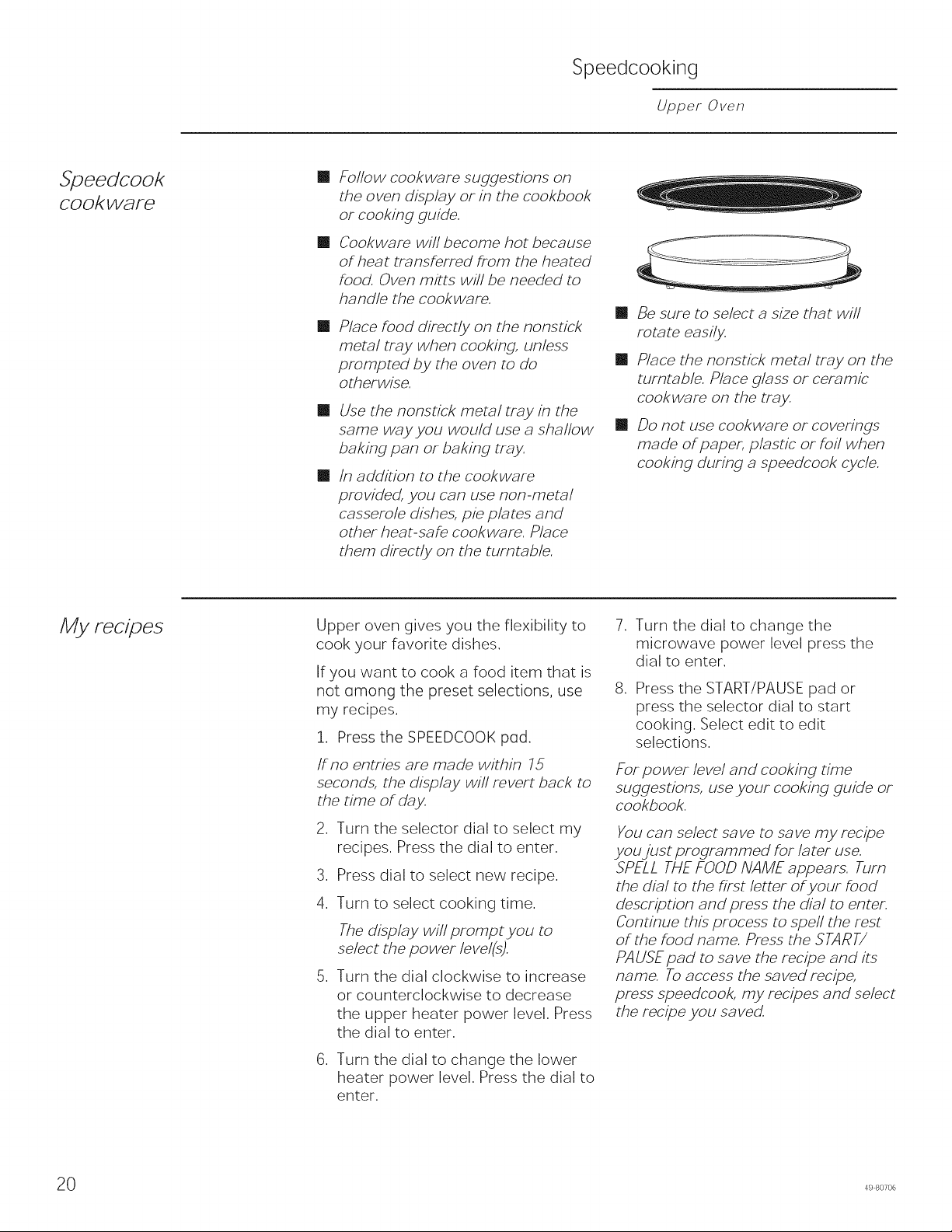
Be sure to select a size that will
rotate easily.
Place the nonst/ck metal tray on the
turntable. Place glass or ceramic
cookware on the tray.
Do not use cookware or coverings
made of paper, pMst/c or foil when
cooking during a speedcook cycle.
My recipes
Upper oven gives you the flexibility to
cook your favorite dishes.
If you want to cook a food item that is
not Gmong the preset selections, use
my recipes.
1. Press the SPEEDCOOK pod.
if no entries are made within 75
seconds, the display will revert back to
the time of day.
2. Turn the selector dial to select my
recipes. Press the dial to enter.
3. Press dial to select new recipe.
4. Turn to select cooking time.
The display will prompt you to
select the power level(s).
5. Turn the dial clockwise to increase
or counterclockwise to decrease
the upper heater power level. Press
the dial to enter.
6. Turn the dial to change the lower
heater power level. Press the dial to
enter.
7. Turn the dial to change the
microwave power level press the
dial to enter.
,
Press the START/PAUSE pad or
press the selector dial to start
cooking. Select edit to edit
selections.
For power level and cooking time
suggestions, use your cooking guide or
cookbook.
You can select save to save my recipe
you just programmed for later use.
SPELL THE FOOD NAME appears. Turn
the dial to the first letter of your food
description and press the dial to enter.
Continue this process to spell the rest
of the food name. Press the START/
PAUSE pad to save the recipe and its
name. To access the saved recipe,
press speedcook, my recipes and select
the recipe you saved.
0 49 80706
Speedcooking
Upper Oven
My recipes
To edit/delete stored custom
speedcook recipes:
1. Press the SPEEDCOOKpad.
2. Turn dial to my recipes. Press the
dial to enter.
3. Turn dial to select the stored
custom recipe. Press the dial to
enter.
4. Turn dial to edit or delete to edit
or delete the custom recipe. Press
the dial to edit or delete.
498°7°6 21
Baking, Broiling and Toasting
Upper Oven
Baking,
Broifing
and
Toasting
Baking allows you to cook foods the same way as a
conventional oven, using a heating element to raise
the temperature of the air inside the oven.Any oven
temperature from 250°Fto 450°Fmay be set.
Broiling allows you to broil foods in the same way as a
conventional oven.
Toasting allows you to toast foods the same way as a
conventional oven,
Afan gently circulates heated air throughout the
oven, over and around the food. Becausethe heated
air is kept constantly moving, not permitting a layer
of cooler air to develop around the food, some foods
cook slightly faster than in regular oven cooking.
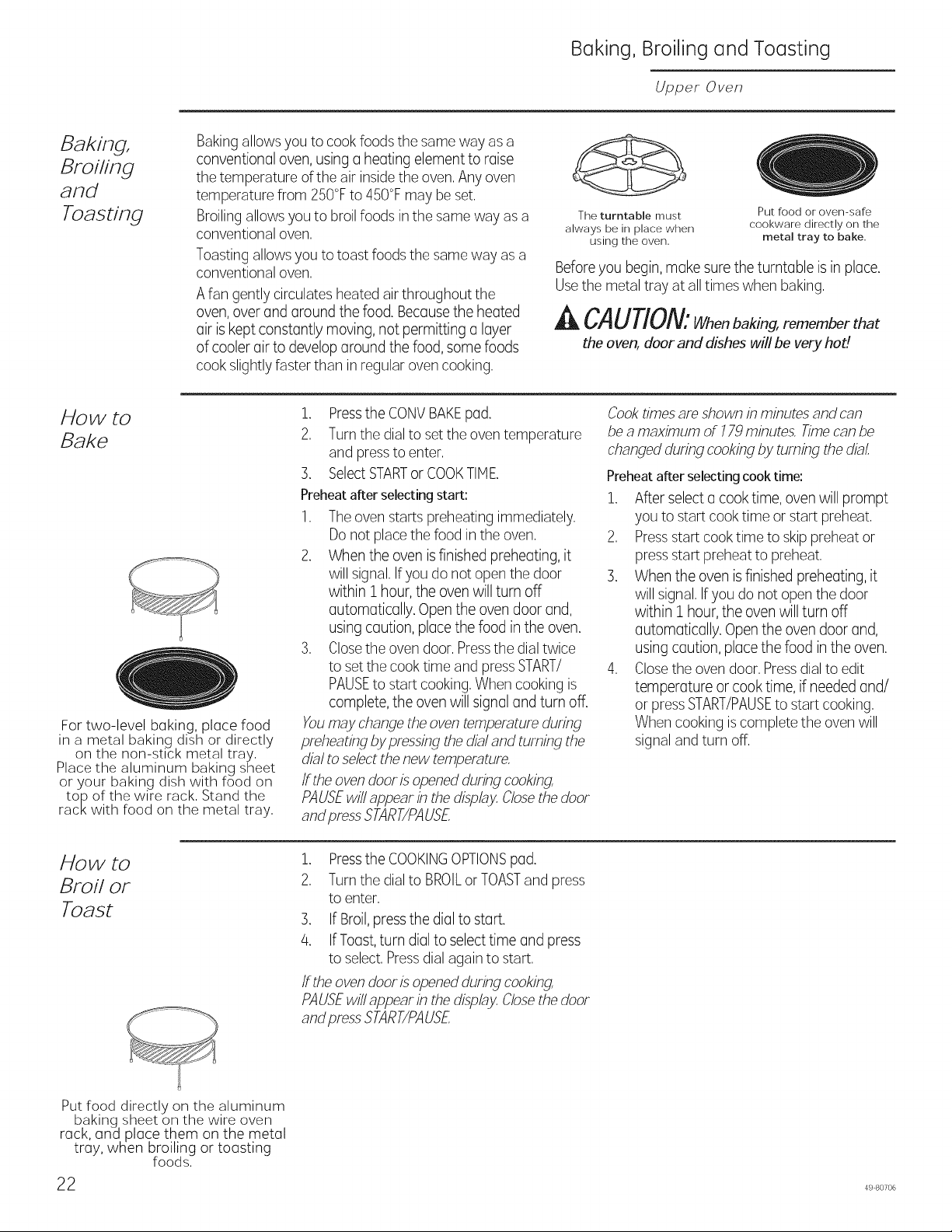
The turntable must
always be in place when
using the oven.
Put food or oven-safe
cookware directly on the
metal tray to bake.
Beforeyou begin, make sure the turntable is in place.
Usethe metal tray at all times when baking.
CAUTION:Whenbakin;,rememberthat
the oven, door and dishes will be very hod
How to
Bake
For two-level baking, place food
in a metal baking dish or directly
on the non-stick metal tray,
Place the aluminum baking sheet
or your baking dish with food on
top of the wire rack, Stand the
rack with food on the metal tray,
1. Pressthe CONVBAKEpad.
2. Turn the dial to set the oven temperature
and pressto enter.
3. SelectSTARTor COOKTIME.
Preheatafter selectingstart:
1. The oven starts preheating immediately.
Do not place the food in the oven.
2. When the oven is finished preheating, it
will signal. Ifyou do not open the door
within 1 hour, the oven will turn off
automatically. Open the oven door and,
using caution, place the food in the oven.
3. Closethe oven door. Pressthe dial twice
to set the cook time and pressSTART/
PAUSEto start cooking. When cooking is
complete, the oven will signal and turn off.
Youmay change the oven temperature during
preheating by pressing the dialand turning the
dial to sebct the new temperature,
ff the oven door is opened during cooking,
PAUSEwil! appear in the display Closethe door
and press START/PAUSE
Cooktimes am shown in minutes and can
be a maximum of 779 minutes, Timecan be
changed during cooking by turning the dial,
Preheatafter selectingcooktime:
1. After select a cook time, oven will prompt
you to start cook time or start preheat.
2. Pressstart cook time to skip preheat or
press start preheat to preheat.
3. When the oven is finished preheating, it
will signal.If you do not open the door
within 1 hour, the oven will turn off
automatically. Openthe oven door and,
using caution, place the food in the oven.
4. Closethe oven door. Pressdial to edit
temperature or cook time, if neededand/
or pressSTART/PAUSEto start cooking.
When cooking iscomplete the oven will
signal and turn off.
How to
Broil or
Toast
Put food directly on the aluminum
baking sheet on the wire oven
rack, an_l place them on the metal
tray, when broiling or toasting
foods.
22
1. Pressthe COOKINGOPTIONSpad.
2. Turn the dial to BROILor TOASTand press
to enter.
3. If Broil,pressthe dial to start.
4. If Toast,turn dialto select time and press
to select. Pressdial again to start.
ff the oven door is openedduring cooking,
PAUSEwi!! appear in the display Closethe door
and press START/PAUSE
49 80706
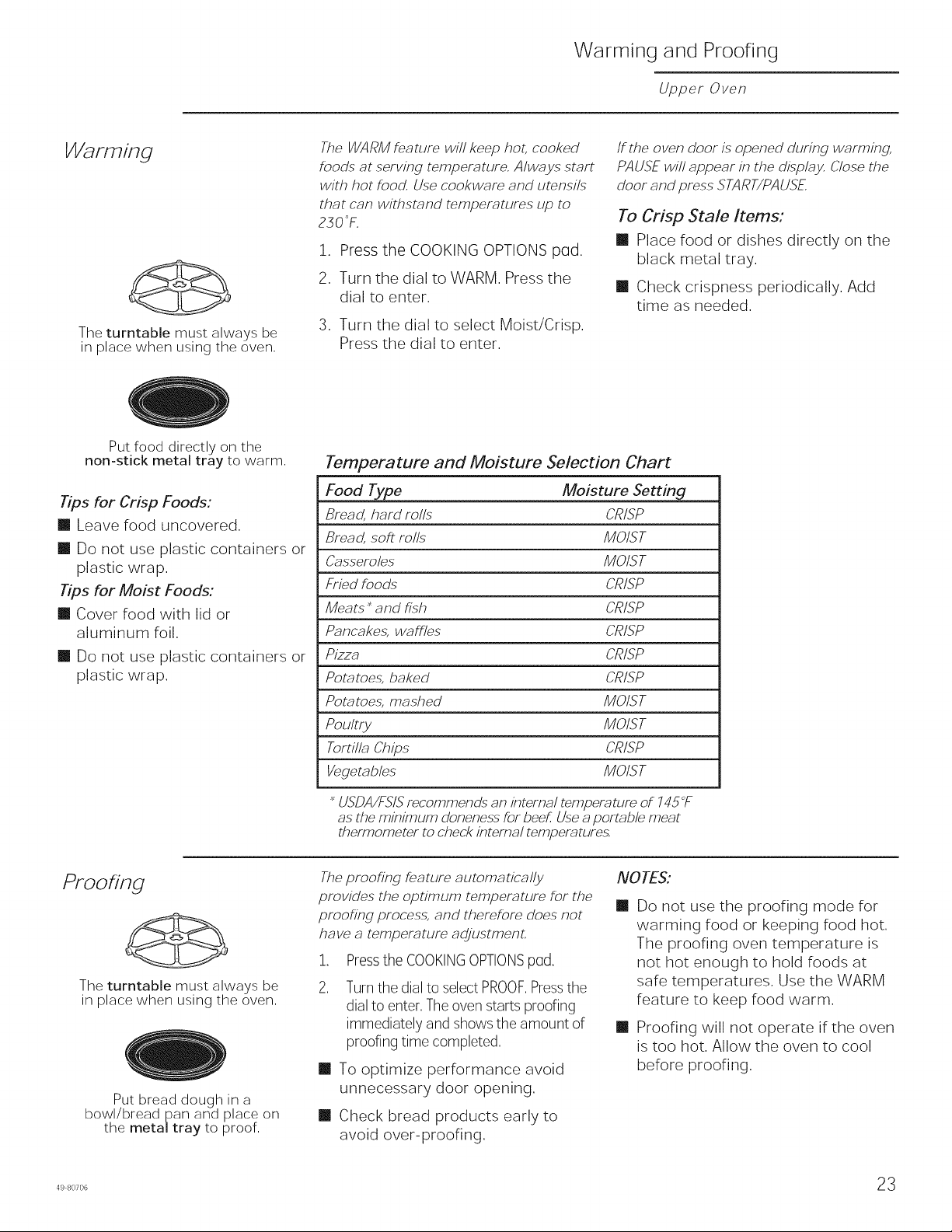
Warming and Proofing
Upper Oven
Warming
The turntable must always be
in place when using the oven,
The WARM feature will keep hot, cooked
foods at serving temperature, Always start
with hot food, Use cookware and utensils
that can withstand temperatures up to
230 °F.
1. Press the COOKING OPTIONS p(]d.
2. Turn the dial to WARM. Press the
dial to enter.
3. Turn the dial to select Moist/Crisp.
Press the dial to enter.
/f the oven door is opened during warming,
PAUSE will appear in the display, Close the
door and press START/PAUSE
To Crisp Stale Items."
[] Place food or dishes directly on the
black metal tray.
[] Check crispness periodically. Add
time as needed.
Put food directly on the
non-stick metal tray to warm,
Tips for Crisp Foods:
[] Leave food uncovered.
[] Do not use plastic containers or
plastic wrap.
Tips for Moist Foods:
[] Cover food with lid or
aluminum foil.
[] Do not use plastic containers or
plastic wrap.
Temperature and Moisture Selection Chart
Food Type Moisture Setting
Bread, hard rolls CRISP
Bread, soft rolls MOIST
Casseroles MOIST
Fried foods CRISP
Meats _ and fish CRISP
Pancakes, waffles CRISP
Pizza CRISP
Potatoes, baked CRISP
Potatoes, mashed MOIST
Poultry MOIST
Tortilla Chips CRISP
Vegetables MOIST
_USDA/FSISrecommends an internal temperature of 745°F
as the minimum alonenessfor beef, Usea portable meat
thermometer to check internal temperatures,
Proofing
The turntable must always be
in place when using the oven,
Put bread dough in a
bowl/bread pan and place on
the metaltray to proof,
The proofing feature auwrnatical_
provides the optimum temperature for the
proofing process, and therefore does not
have a temperature adjustment,
1. Press the COOKING OPTIONS pud.
, Turn the dial to select PROOF,Pressthe
dial to enter, Theoven starts proofing
immediately and shows the amount of
proofing time completed,
[] To optimize performance avoid
unnecessary door opening.
[] Check bread products early to
avoid over-proofing.
NOTES:
[]
[]
Do not use the proofing mode for
warming food or keeping food hot.
The proofing oven temperature is
not hot enough to hold foods at
safe temperatures. Use the WARM
feature to keep food warm.
Proofing will not operate if the oven
is too hot. Allow the oven to cool
before proofing.
Microwaving
Upper Oven
Using the
microwave
featuFes
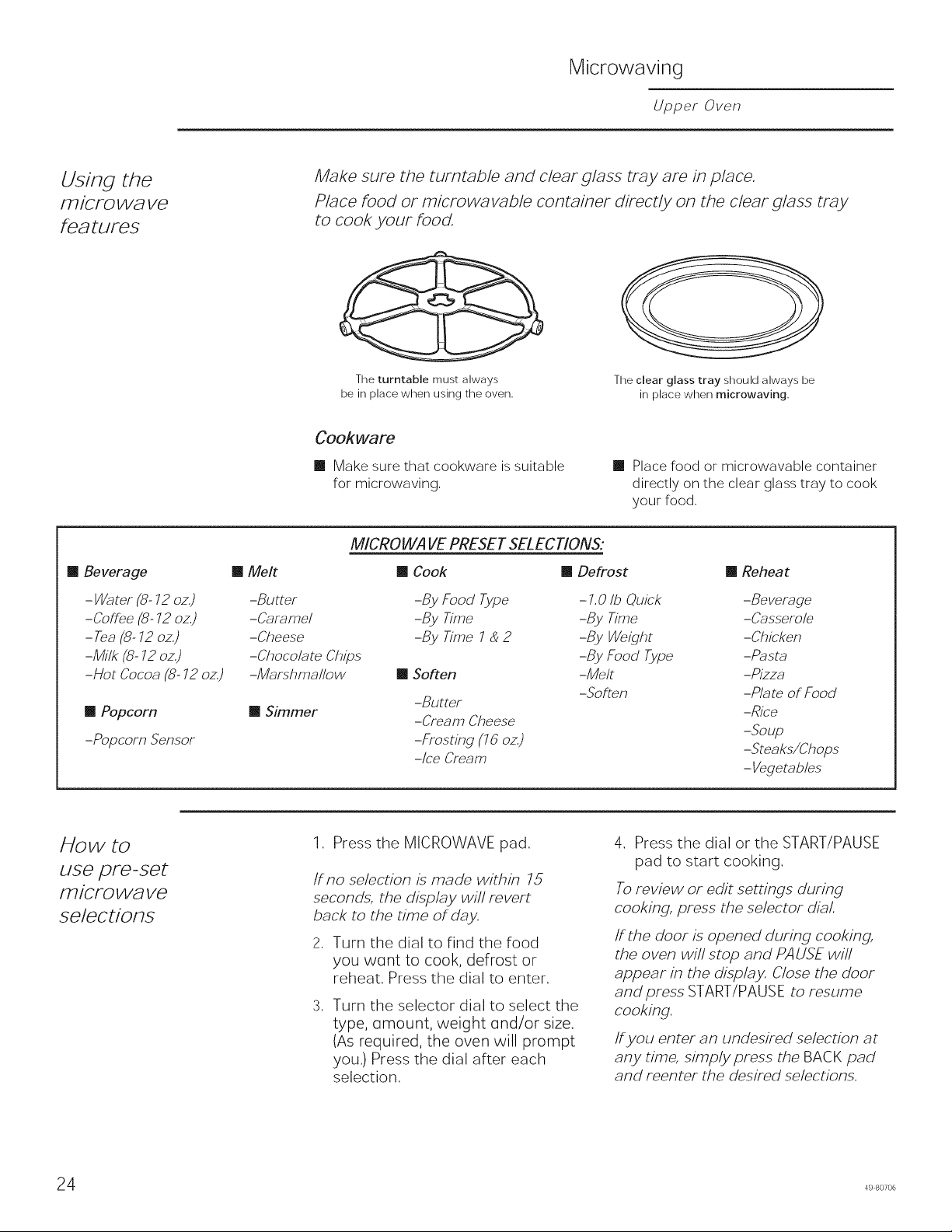
Make sure the turntable and clear glass tray are in place.
Place food or microwavable container directly on the clear glass tray
to cook your food.
The turntable must always
be in place when using the oven.
The clear glass tray should always be
in place when microwaving.
Cookware
Make sure that cookware is suitable
for microwaving,
m Place food or microwavable container
directly on the clear glass tray to cook
your food,
m Beverage
-Water (8- 72 oz,)
-Coffee (8- 72 oz,)
- Tea (8- 72 oz,)
-Milk (8- 72 oz,)
-Hot Cocoa (8- 72 oz)
m Popcorn
-Popcorn Sensor
MICROWAVE PRESET SELECTIONS:
m Melt m Cook m Defrost
-Butter
-Caramel
-Cheese
-Chocolate Chips
-Marshmallow
m Simmer
m Reheat
-By Food Type - 1,0 Ib Quick -Beverage
-By Time -By Time -Casserole
-By Time 7 _ 2 -By Weight -Chicken
-By Food Type -Pasta
m Soften -Melt -Pizza
-Soften -Plate of Food
-Butter -Rice
-Cream Cheese -Soup
-Frosting (75 oz) -Steaks/Chops
-Ice Cream - Vegetables
How to
use pre-set
iwicFow_ve
selections
1. Press the MICROWAVE pad.
if no selection is made within 15
seconds, the display will revert
back to the time of day.
2, Turn the dial to find the food
you w(]nt to cook, defrost or
reheat. Press the dial to enter.
, Turn the selector dial to select the
type, (]mount, weight (]nd/or size.
(As required, the oven will prompt
you.) Press the dial after each
selection.
4. Press the dial or the START/PAUSE
pad to start cooking.
To review or edit settings during
cooking, press the selector dial.
ff the door is opened during cooking,
the oven will stop and PAUSE will
appear in the display. Close the door
and press START/PAUSE to resume
cooking.
If you enter an undesired selection at
any time, simply press the BACK pad
and reenter the desired selections.
4 49 80706
Microwaving
Upper Oven
Cook By Time
and Cook By
Time 7 & 2
Use COOK BY TIME and COOK BY TIME
7 _ 2 to microwave food that is not in
the recipe section and at the time(s)
you seL
[] The power level is automatically set
at high, but you can change it for
more flexibility.
1. Press the MICROWAVE pad.
2. Turn the dial to select COOK BY
TIME or COOK BY TIME 1 & 2 and
press the dial to enter.
3. Turn the dial to set the cook time
and press the dial to enter.
4. Select power level setting.
ff you selecmd COOK B Y TIME 7 _ 2,
turn the dial to set the second cook
time, second power level setting and
press the dial to enter.
5. Press the dial or the START/PAUSE
pad to start cooking.
You may open the door during COOK
BY TIME and COOK BY TIME 7 _ 2 to
check the food. Close the door and
press START/PAUSE m resume cooking.
Add 30 Sec
Press ADD 30 SEC repeatedly for Use this feature to instantaneously
30-second increments of microwave start microwave, Also use this button
cooking time. Oven starts immediately, to add 30 seconds to cooking.
Microwave
po wet le vel(s)
[]
q.
2.
.
You can change the power level
during most cooking program.
Press the dial to edit
Rotate dial to change time and/or
press dial to enter.
Turn the dial clockwise to increase
and counterclockwise to decrease
the power level. Press the dial
to enter.
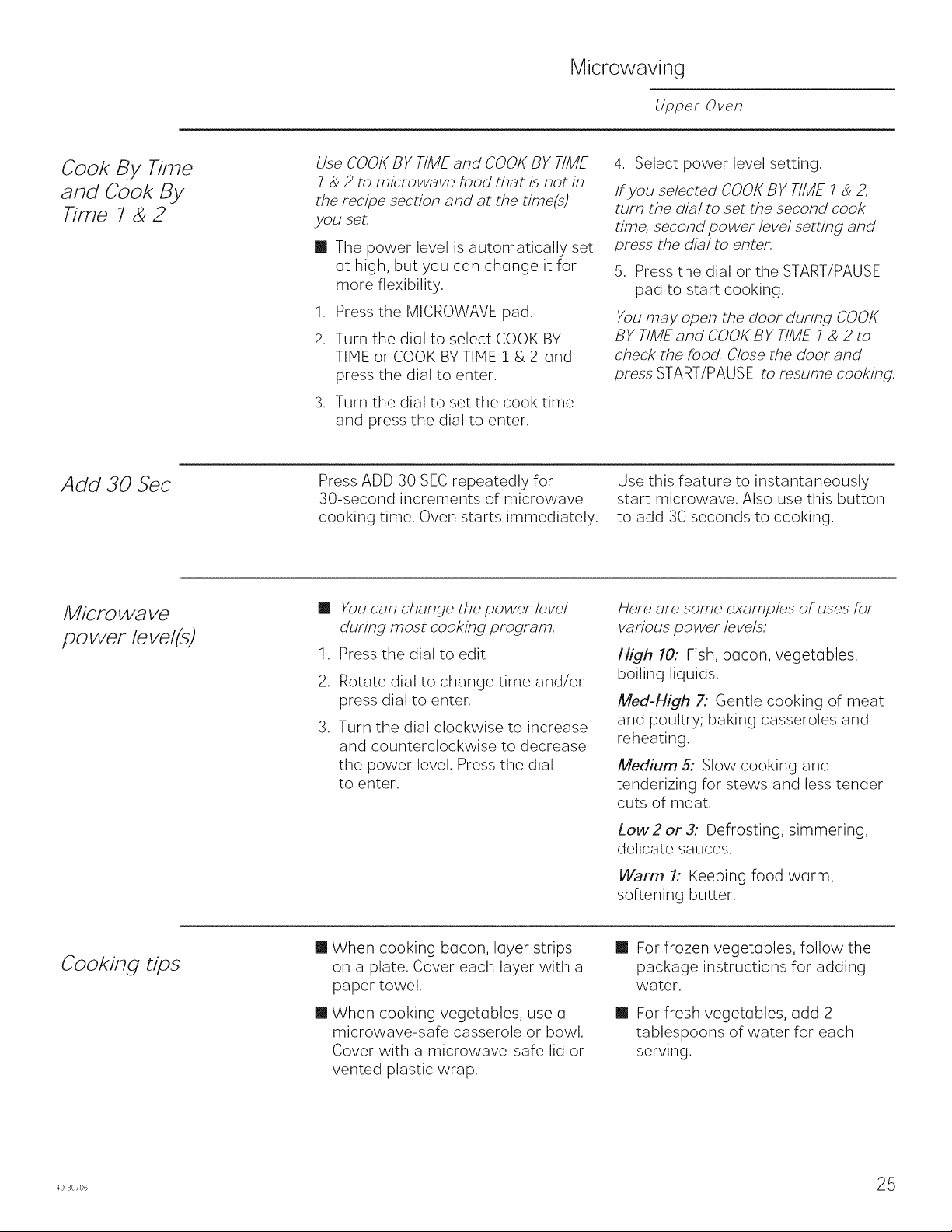
Here are some examples of uses for
various power levels.
High 10: Fish, bacon, vegetables,
boiling liquids.
Meal-High 7: Gentle cooking of meat
and poultry; baking casseroles and
reheating.
Medium 5: Slow cooking and
tenderizing for stews and less tender
cuts of meat.
Low2 or 3: Defrosting, simmering,
delicate sauces,
Warm 1: Keeping food warm,
softening butter.
Cooking tips
[] When cooking bacon, layer strips
on a plate, Cover each layer with a
paper towel,
[] When cooking vegetables, use a
microwave-safe casserole or bowl.
Cover with a microwave-safe lid or
vented plastic wrap.
[] For frozen vegetables, follow the
package instructions for adding
water.
[] For fresh vegetables, odd 2
tablespoons of water for each
serving.
498o7o6 25
Microwaving
Upper Oven
Defrost by
food type
Auto Defrost automatically sets the
defrosting times and power levels to
give even defrosting results for meGts,
poultry and fish weighing up to 6
pounds.
1. Remove food from the package
and place it on a microwave-safe
dish.
2. Press the MICROWAVE pad and
select defrost.
3. Turn the dial to DEFROST BY FOOD
TYPE Press the dial to enter.
4. Turn the dial to select food type.
Press the dial to enter,
,
Turn the dial to the food weight,
using the Conversion Guide at the
right. For exGmple, diGI 1.2 for 1.2
pounds (1 pound, 3 oz.) Press the
dial to enter.
,
,
Press the dial or START/PAUSE pad
to start defrosting.
Turn the food over when the oven
signals TURN FOOD OVER.
[] Remove defrosted meat or shield
warm areas with small pieces of foil
for even defrosting.
[] After defrosting, most meats need
to stand 5 minutes to complete
defrosting. Large roasts should
stand for about 30 minutes.
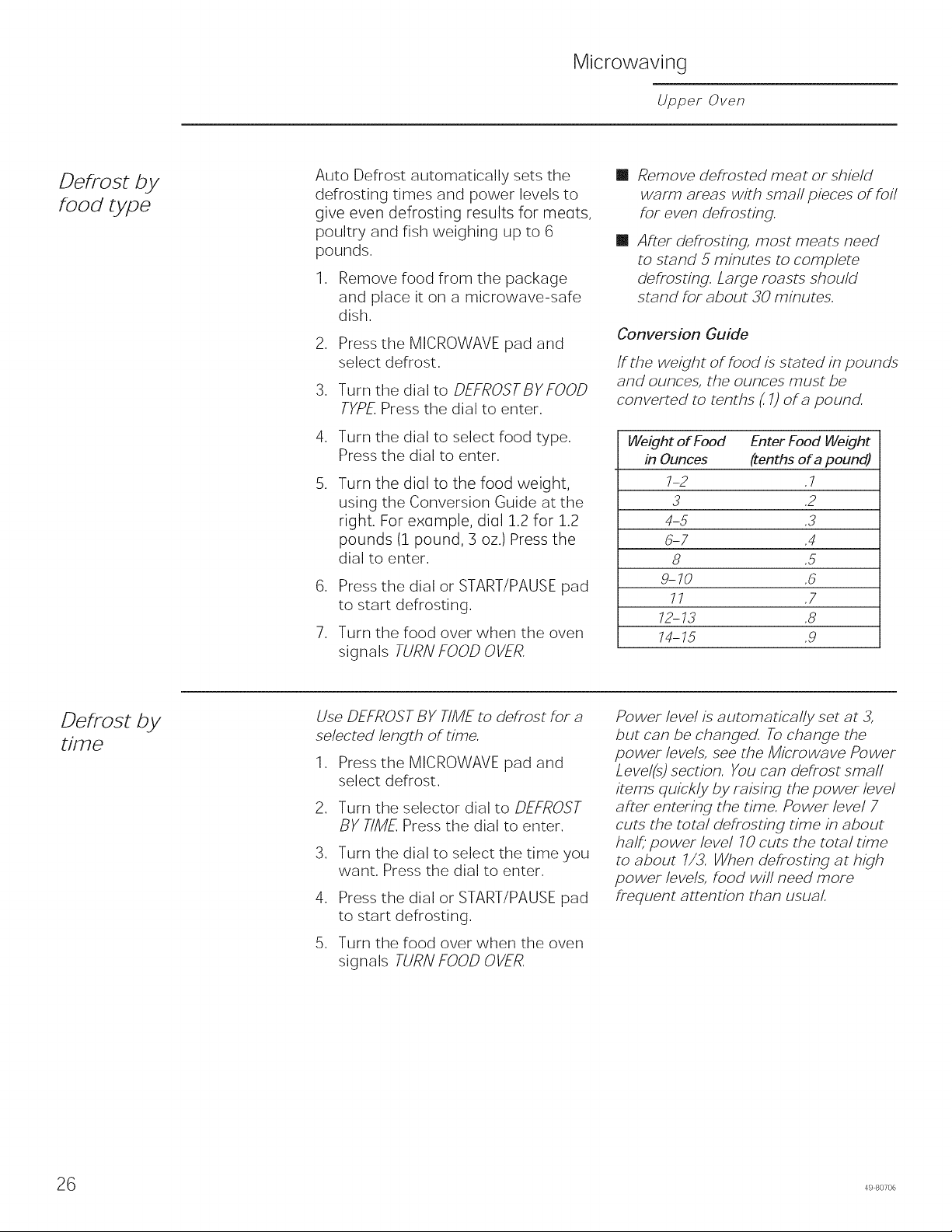
Conversion Guide
If the weight of food is stated in pounds
and ounces, the ounces must be
converted to tenths (.7)of a pound.
Weight of Food Enter Food Weight
in Ounces {tenths of a pound)
7-2 .7
3 ,2
4-5 ,3
5-7 .4
8 ,5
g-70 ,5
77 .7
12-13 .8
74-75 .g
Defrost by
time
Use DEFROST BY TIME to defrost for a
selected length of time.
1. Press the MICROWAVE pad and
select defrost.
2. Turn the selector dial to DEFROST
BY TIME Press the dial to enter.
3. Turn the dial to select the time you
want. Press the dial to enter.
4. Press the dial or START/PAUSE pad
to start defrosting.
5. Turn the food over when the oven
signals TURN FOOD OVER.
Power level is automatically set at 3,
but can be changed. To change the
power levels, see the Microwave Power
Level(s) section. You can defrost small
imms quickly by raising the power level
after entering the time. Power level 7
cuts the total defrosting time in about
half, power level 70 cuts the total time
to about 7/3. When defrosting at high
power levels, food will need more
frequent attention than usual.
6 49 80706
Microwaving
Upper Oven
Defrost by
weight
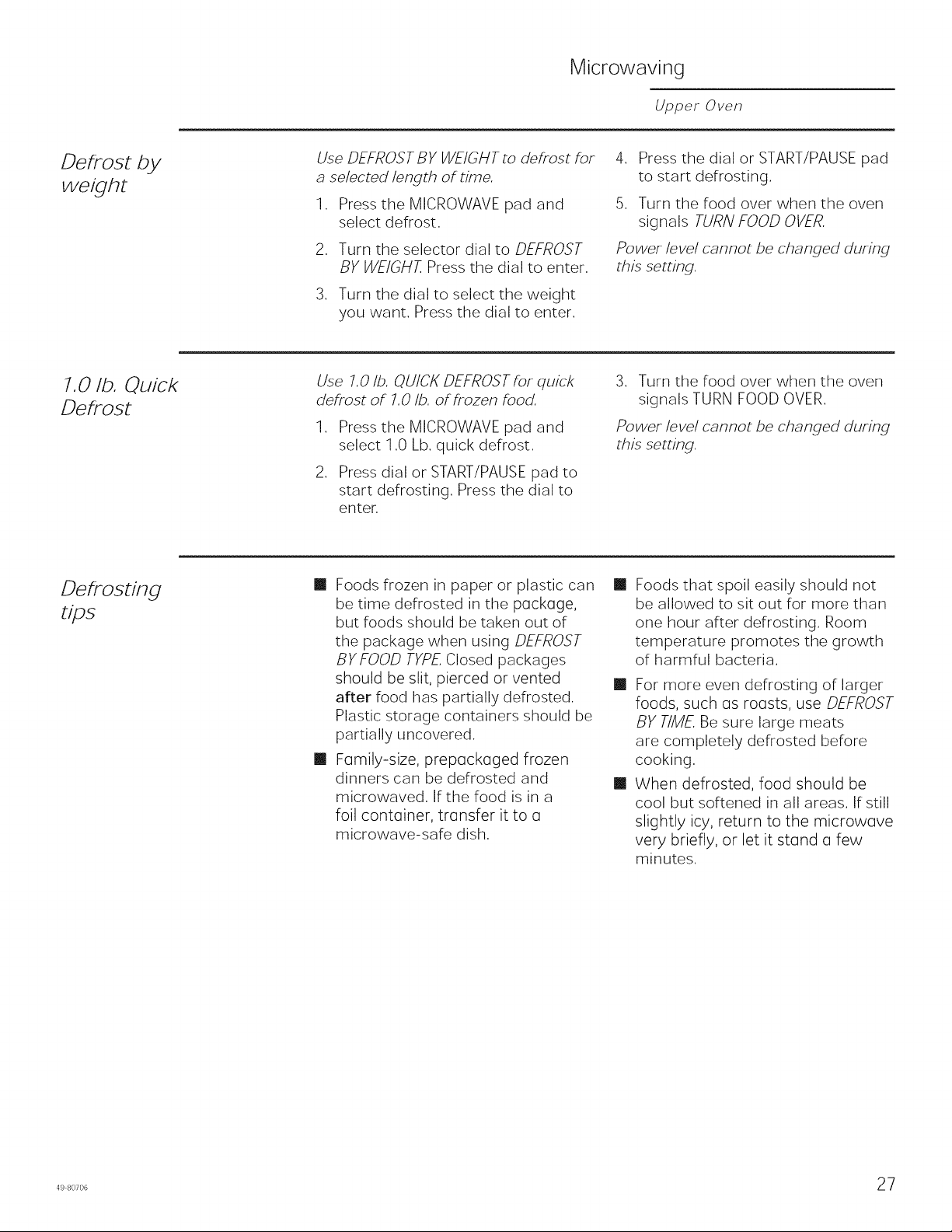
Use DEFROST B Y WEIGHT to defrost for
a selected length of time.
1. Press the MICROWAVE pad and
select defrost.
2. Turn the selector dial to DEFROST
BY WEIGHT. Press the dial to enter.
3. Turn the dial to select the weight
you want. Press the dial to enter.
4. Press the dial or START/PAUSE pad
to start defrosting.
5. Turn the food over when the oven
signals TURN FOOD OVER.
Power level cannot be changed during
this setting.
7.0 lb. Quick
Defrost
Use 7.0 lb. QUICK DEFROST for quick
defrost of 7.0 lb. of frozen food.
q.
.
Press the MICROWAVE pad and
select 1.O Lb. quick defrost.
Press dial or START/PAUSE pad to
start defrosting. Press the dial to
enter.
3. Turn the food over when the oven
signals TURN FOOD OVER.
Power level cannot be changed during
this setting.
Defrosting
tips
[] Foods frozen in paper or plastic can
be time defrosted in the package,
but foods should be taken out of
the package when using DEFROST
BY FOOD TYPE Closed packages
should be slit, pierced or vented
after food has partially defrosted.
Plastic storage containers should be
partially uncovered.
[] Family-size, prepackaged frozen
dinners can be defrosted and
microwaved. If the food is in a
foil container, transfer it to a
microwave-safe dish.
[]
Foods that spoil easily should not
be allowed to sit out for more than
one hour after defrosting, Room
temperature promotes the growth
of harmful bacteria,
[] For more even defrosting of larger
foods, such as roasts, use DEFROST
BY TIME Be sure large meats
are completely defrosted before
cooking.
[] When defrosted, food should be
cool but softened in all areas. If still
slightly icy, return to the microwave
very briefly, or let it stand a few
minutes.
4980706 27
Microwaving
Upper Oven
Reheat
Melt
Soften
Simmer
Beverage
Popcorn
8 49 80706
Microwaving
Upper Oven
/Vi/CFOWa VC
SQFISOF
cooking
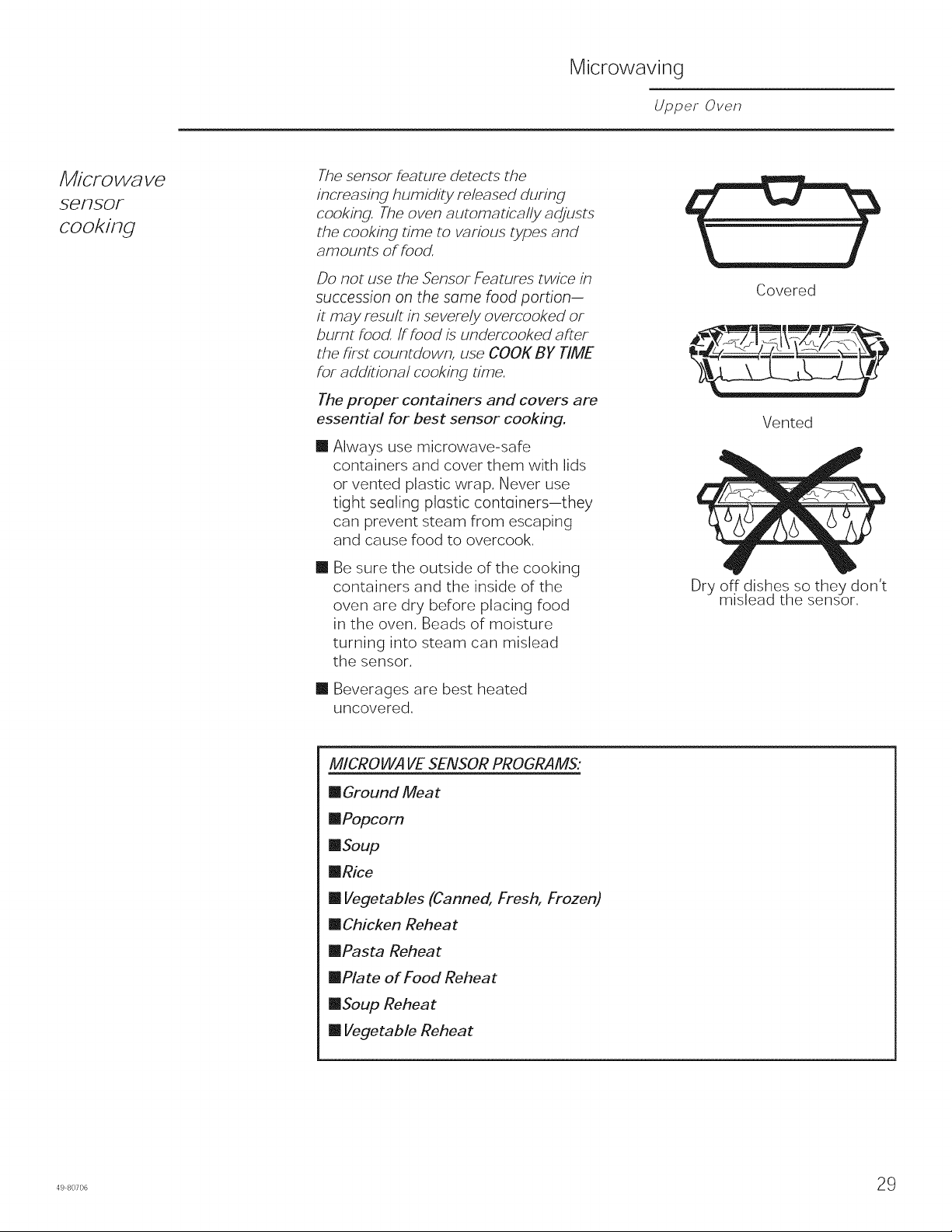
The sensor feature detects the
increasing humidity released during
cooking. The oven automatically adjusts
the cooking time to various types and
amounts of food.
Do not use the Sensor Features twice in
succession on the some food portion-
it may result in severely overcooked or
burnt food. ff food is undercooked after
the first countdown, use COOt{ BY TIME
for additional cooking time.
The proper containers and covers are
essential for best sensor cooking.
[]
Always use microwave-safe
containers and cover them with lids
or vented plastic wrap, Never use
tight seoling plostic contoiners-they
can prevent steam from escaping
and cause food to overcook,
[]
Be sure the outside of the cooking
containers and the inside of the
oven are dry before placing food
in the oven. Beads of moisture
turning into steam can mislead
the sensor.
[] Beverages are best heated
uncovered.
Covered
Vented
Dry off dishes so they don't
mislead the sensor.
MICROWAVE SENSOR PROGRAMS:
[] Ground Meat
[]Popcorn
[]Soup
[]Rice
[] Vegetables (Canned, Fresh, Frozen)
[] Chicken Reheat
[]Pasta Reheat
[]Plate of Food Reheat
[]Soup Reheat
[] Vegetable Reheat
498o7o6 29
Microwaving
Upper Oven
To use aN
SCFISOF
pFOgFa ms
Upper Oven microwave mode features
sensor cooking. It automatically senses
when food is done ond shuts itself off-
eliminating the need to program cook
times and power levels.
,
,
Press the MICROWAVE pad and
turn the diol to COOK BY FOOD
TYPE or REHEAT.Press the dial to
enter. Or press the REHEAT pad.
Turn the dial to select the food you
want. Press the dial to enter.
Press the dial or press the START/
PAUSE pad to start cooking.
Do not open the oven door until time
is counting down in the display or the
microwave stop cooking. If the door
is opened, close it ond press START/
PAUSE immediately. If the food is not
done enough, use COOK BY TIMEin the
microwave selector to cook for more
time.
NOTE: Do not use the Sensor Features
twice in succession on the same food
portion--it mcy result in severely
overcooked or burnt food.
[]
If you have been speedcooking
ond the oven is olre(]dy hot, it mcy
indicate that it is too hot for sensor
cooking. Of course, you can olwoys
continue with COOK BY TIME
NOTE: tithe oven is too hot then it will
automatically change to time cooking.
[]
To shorten or lengthen the cook
time, woit until the time countdown
shows in the display. Then turn the
dial to add or subtract time.
[]
If you open the door while
Sensor Cooking, SENSOR ERROR
will oppe(]r. Close the door, press
START/PAUSE to begin again.
Notes about the Reheat program:
Reheated foods may have wide
variations in temperature. Some areas
may be extremely hot.
It is best to use COOl(BY T/MEand not
REHEATfor these foods:
[] Bread products
[] Food that must be reheated
uncovered.
[] Foods that need to be stirred or
turned.
[] Foods calling for a dry look or crisp
surface after reheating,
0 49 80706
Other Advantium Features
Upper Oven
Cooking
Complete
Reminder
To remind you that you have food in
the oven, the oven will display COOK
TIME COMPLETED and beep once a
minute until you either open the oven
door or press the CANCEL/OFF pad.
Features
under the
SETTINGS
pad
Clock:
The clock must be set before you can
use your oven for the first time (see
Quick Start for instructions).
1. To change the clock time, press the
SETTINGS pad and turn the dial to
CLOCK. Press the dial to enter.
2. Turn the dial to set hours. Press the
dial to enter.
3. Turn the dial to set minutes. Press
the dial to enter.
4. Turn the dial to select AM or PM.
Press the dial to enter.
Display Mode:
Use this feature to set your display
to power saver mode or always on.
Press the OPTIONS pad, turn the dial
to select CLOCKDISPLA Y ON/OFE Turn
the dial to select ONor OFF. Press the
dial to enter.
Beeper Volume:
Use this feature to turn beeper volume
on. Press the SETTINGS pad, turn the
dial to select BEEPER VOLUME, press
the dial to enter some beeper tone are
not mutable.
Reminder:
Use this feature to set an alarm beep
to sound at a specific time of day.
Press the OPTIONS pad, turn the dial
to SET/CLEAR REMINDER and press
the dial to enter. Turn the dial to select
the hour and press to enter. Turn the
dial to select the minute and press to
enter. Turn the dial to select AM or PM
and press to enter.
To review the setting, turn the dial to
SET/CLEAR REMINDER and press the
dial to enter. Turn the dial to REVIEW
and press to enter.
To cancel the setting, turn the dial to
SET/CLEAR REMINDER and press the
dial to enter. Turn the dial to CLEAR
and press to enter.
498o7o6 31
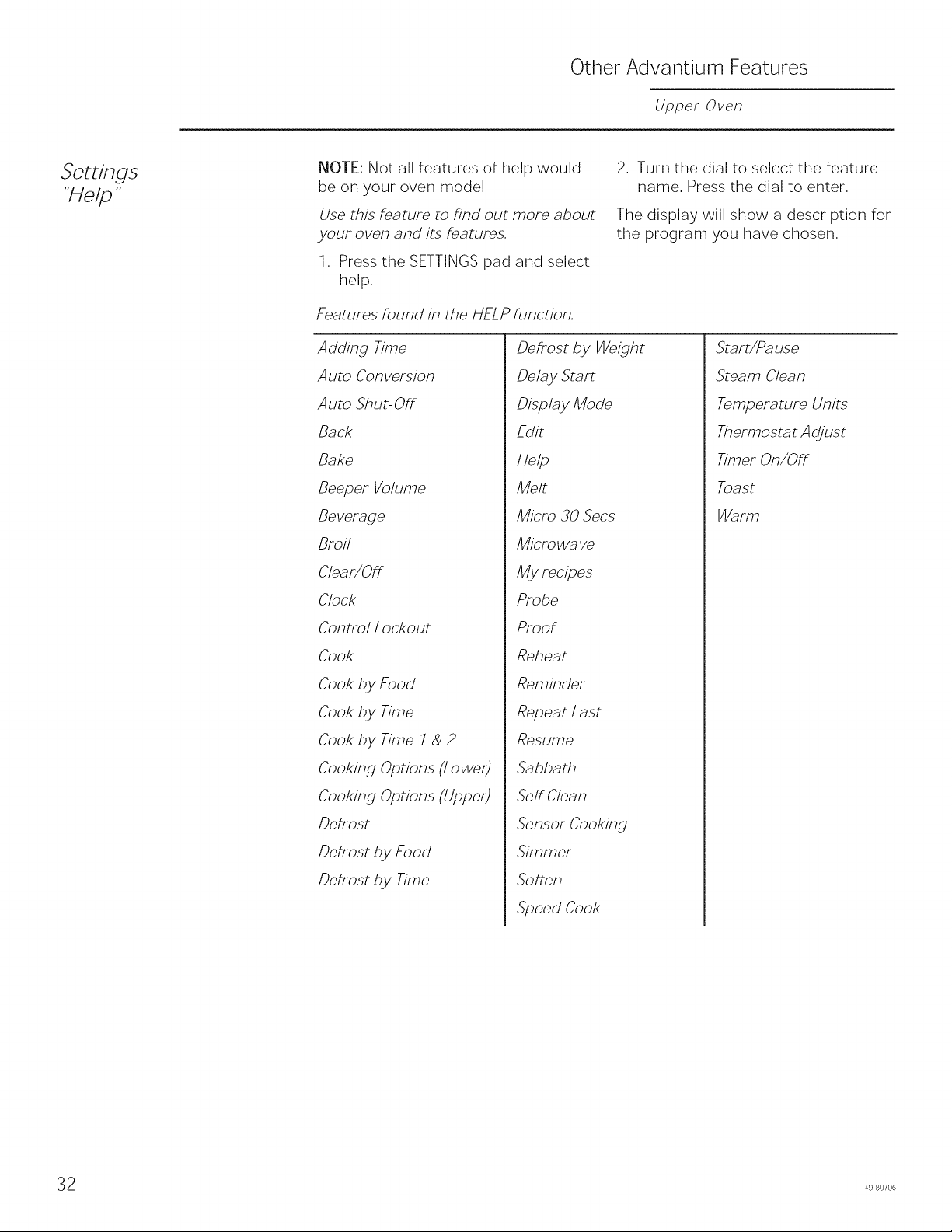
Other Advantium Features
Upper Oven
NOTE: Not all features of help would
be on your oven model
Use this feature to find out more about
your oven and its features.
1. Press the SETTINGS pad and select
help.
Features found in the HELP function.
2. Turn the dial to select the feature
name. Press the dial to enter.
The display will show a description for
the program you have chosen.
Adding Time
Auto Conversion
Auto Shut-Off
Back
Bake
Beeper Volume
Beverage
Broil
Clear/Off
Clock
Control Lockout
Cook
Cook by Food
Cook by Time
Cook by Time 7 & 2
Cooking Options (Lower)
Cooking Options (Upper)
Defrost
Defrost by Food
Defrost by Time
Defrost by Weight
Delay Start
Display Mode
Edit
Help
Melt
Micro 30 Secs
Microwave
My recipes
Probe
Proof
Reheat
Reminder
Repeat Last
Resume
Sabbath
Self Clean
Sensor Cooking
Simmer
Soften
Speed Cook
Start/Pa use
Steam Clean
Temperature Units
Thermosmt Adjust
Timer On/Off
Toast
Warm
2 49 80706
Speedcooking
Upper Oven
Cooking Times
[] When speedcooking preprogrammed foods,
you may see OPT/M/Z//VG C00/( T/MEin the
display several seconds after you press
START/PAUSE. The oven automatically
senses the electrical voltage level in your
home and adjusts the cooking time up or
down for proper cooking.
Fan/Vent
[]
[]
The fan will be on during cooking. At the
end of cooking, the automatic fan may
continue to run for a short time, and the
display will read Oven is Cooling. The fan
will automatically shut off when the internal
parts of the oven have cooled.
The oven vent will emit warm air while the
oven is on.
Lights
[] When the oven is on, light may be visible
around the door or outer case.
[]
The halogen lights will dim and cycle
on and off during a speedcook cycle,
sometimes even at full power levels. This is
normal. The oven senses the heat level and
adjusts automatically.
Oven Heat
[]
[]
[]
[]
No preheating time is required during
Speedcook cycles. The oven begins cooking
immediately.
The door and inside of the oven will be very
hot. Use caution when opening the door
and removing food.
Do not use cookware or coverings made of
paper, plastic or foil when cooking during a
speedcook cycle.
When cooking for an extended period
of time, the oven may automatically
reduce the power levels to maintain the
appropriate level of oven heat.
Sounds
[] Clicks and a fan blowing are normal sounds
during cooking. The relay board is turning
components on and off.
In terference
m
TV/radio interference might be noticed while
using the microwave, Similar to the interference
caused by other small appliances, it does not
indicate a problem with the microwave, Move
the radio or TV as far away from the microwave
as possible, or check the position of the TV/radio
antenna,
Ligh
ml The oven cavity light will come on during a
microwave cooking cycle,
Oven Heat
m
m
Cookware may become hot because of heat
transferred from the heated food, Oven mitts
may be needed to handle the cookware,
Steam or vapor may escape from around the
door,
498o7o6 33
(I3
(b
=(3
O
Z
O-)
c--
O
O
LD
©
-1"
©
Z
m
oO
Cooking Modes Loweroven
Your new oven has a variety of cooking modes to help you get the best results. These modes are described below.
Refer to the Cooking Guide section for recommendations for specific foods. Remember, your new oven may perform
differently than the oven it is replacing.
Baking and Roasting Modes
Select a mode for baking and roasting based on the
type and quantity of food you are preparing. When
preparing baked goods such as cakes, cookies, and
pastries always preheat the oven first. Follow recipe
recommendations for food placement. If no guidelines
are provided, center food in the oven.
Traditional Bake
The traditional bake mode is intended for single rack
cooking. This mode uses heat primarily from the lower
element but also from the upper element to cook
food. To use this mode, press the Bake pad, enter a
temperature, and then press Start. Preheating is generally
recommended when using this mode.
Convection Bake 1 Rack
The Convection Bake 1 Rack mode is intended for
single rack cooking. This mode uses heat from the
lower element and also the upper and rear elements,
along with air movement from the convection fan to
enhance evenness. Your oven is equipped with Auto
Recipe Conversion, so it is not necessary to convert the
temperature when using this mode. To use this mode
press the Convection Bake (1 Rack/Multi) pad, enter
a temperature, and then press Start. Preheating is
generally recommended when using this mode.
Convection Bake Multi Rack
The Convection Bake Multi Rack mode is intended
for baking on multiple racks at the same time. This
mode uses heat primarily from the rear element but
also heat from the upper and lower elements, along
with air movement from the convection fan to enhance
cooking evenness. Your oven is equipped with Auto
Recipe Conversion, so it is not necessary to convert the
temperature when using this mode. Baking time might
be slightly longer for multiple racks than what would be
expected for a single rack. To use this mode press the
Convection Bake (1 Rack/Multi) Multi Rack pad twice,
enter a temperature, and then press Start. Always
preheat when using this mode.
Convection Roast
The Convection Roast mode is intended for roasting
whole cuts of meat on a single rack. This mode uses heat
from the lower, upper, and rear elements along with air
movement from the convection fan to improve browning
and reduce cooking time. It is not necessary to convert
temperature. Check food earlier than the recipe suggested
time when using this mode, or use a meat probe. To use
this mode press the Convection Roast pad, enter a
temperature, and then press Start. It is not necessary to
preheat when using this mode.
Broiling Modes
Always broil with the door closed. The broil element in
this oven is very powerful. Monitor food closely while
broiling. Use caution when broiling on upper rack
positions as placing food closer to the broil element
increases smoking, spattering, and the possibility
of fats igniting. Broiling on rack position 6 is not
recommended.
Try broiling foods that you would normally grill. Adjust
rack positions to adjust the intensity of the heat to the
food. Place foods closer to the broil element when a
seared surface and rare interior is desired. Thicker foods
and foods that need to be cooked through should be
broiled on a rack position farther from the broiler or by
using Broil Lo. For best performance center food below
the broil heating element.
Broil Hi
The Traditional Broil Hi mode uses intense heat from
the upper element to sear foods. Use Broil Hi for thinner
cuts of meat and/or foods you prefer less done on the
interior. To use this mode press the Broil pad once and
then press Start. It is not necessary to preheat when
using this mode.
Broil Lo
The Traditional Broil Lo mode uses less intense heat from
the upper element to cook food thoroughly while also
producing surface browning. Use Broil Lo for thicker cuts
of meat and/or foods that you would like cooked all the
way through. To use this mode press the Broil pad twice
and then press Start. It is not necessary to preheat when
using this mode.
Proof
Proof mode is designed for rising (fermenting and
proofing) bread doughs. Press the Proof pad and then
press Start. Cover dough well to prevent drying out.
Bread will rise more rapidly than at room temperature.
Note that for double wall ovens, proof can not be run
when running a clean mode in the lower oven.
Warm
Warm mode is designed to keep hot foods hot for up to
3 hours. To use this mode, press the Warm pad then
press Start. Cover foods that need to remain moist and
do not cover foods that should be crisp. Preheating is not
required not use warm to heat cold food other than crisping
crackers, chips or dry cereal. It is also recommended that
food not be kept warm for more than 2 hours.
4 49 80706
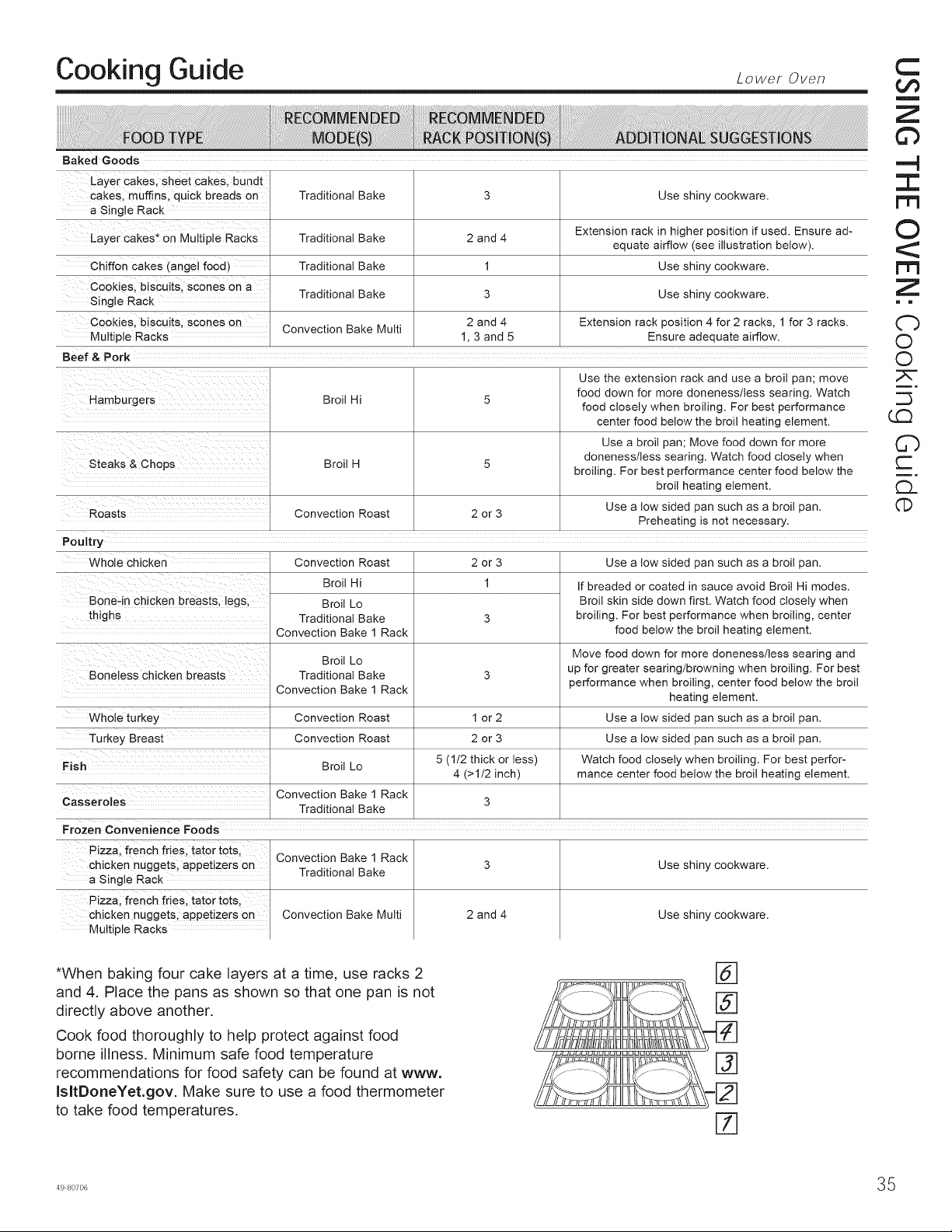
Cooking Guide Loweroven
Baked Goods
Layer cakes, sheet cakes, bundt
cakes, muffins, quick breads on
a Single Rack
Layer cakes* on MuJtiple Racks
Chiffon cakes (angel food)
Cookies, biscuits, scones on a
Single Rack
Cookies, biscuits, scones on
Multiple Racks
Traditional Bake
Traditional Bake
Traditional Bake
Traditional Bake
2 and 4
1
3
2 and 4
1, 3 and 5
Use shiny cookware.
Extension rack in higher position if used. Ensure ad-
equate airflow (see illustration below).
Use shiny cookware.
Use shiny cookware.
Extension rack position 4 for 2 racks, 1 for 3 racks.
Ensure adequate airflow.
Convection Bake Multi
Beef & Pork
Use the extension rack and use a broil pan; move
food down for more doneness/less searing. Watch
Hamburgers Broil Hi 5 food closely when broiling. For best performance
center food below the broil heating element.
Use a broil pan; Move food down for more
doneness/less searing. Watch food closely when
Steaks & Chops Broil H 5 broiling. For best performance center food below the
broil heating element.
Use a low sided pan such as a broil pan.
Convection Roast 2 or 3
Preheating is not necessary.
2 or 3 Use a low sided pan such as a broil pan.
1
Poultry
Whole chicken Convection Roast
Broil Hi
Broil Lo
thighs Traditional Bake
Convection Bake 1 Rack
Broil Lo
Boneless chicken breasts Traditional Bake
Convection Bake 1 Rack
If breaded or coated in sauce avoid Broil Hi modes.
Broil skin side down first. Watch food closely when
broiling. For best performance when broiling, center
food below the broil heating element.
Move food down for more doneness/less searing and
3 up for greater searing/browning when broiling. For best
performance when broiling, center food below the broil
heating element.
Whole turkey Convection Roast 1 or 2 Use a low sided pan such as a broil pan.
Turkey Breast Convection Roast 2 or 3 Use a low sided pan such as a broil pan.
Fish Broil Lo 5 (1/2 thick or less) Watch food closely when broiling. For best perfor-
4 (>1/2 inch) mance center food below the broil heating element.
Casseroles Convection Bake 1 Rack 3
Traditional Bake
Frozen Convenience Foods
Pizza, french fries, tator tots,
chicken nuggets, appetizers on
a Single Rack
Pizza, french fries, tator tots,
chicken nuggets, appetizers on
Mu t p e Racks
Convection Bake 1 Rack
Traditional Bake
Convection Bake Multi 2 and 4
Use shiny cookware.
Use shiny cookware.
*When baking four cake layers at a time, use racks 2
and 4. Place the pans as shown so that one pan is not
directly above another.
Cook food thoroughly to help protect against food
borne illness. Minimum safe food temperature
recommendations for food safety can be found at www.
IsltDoneYet.gov. Make sure to use a food thermometer
to take food temperatures.
%
C
m
Z
©
-4
I
O
r'rl
Z
= m
Cb
O
©
LQ
C)
c-
CL
©
498°7°6 35
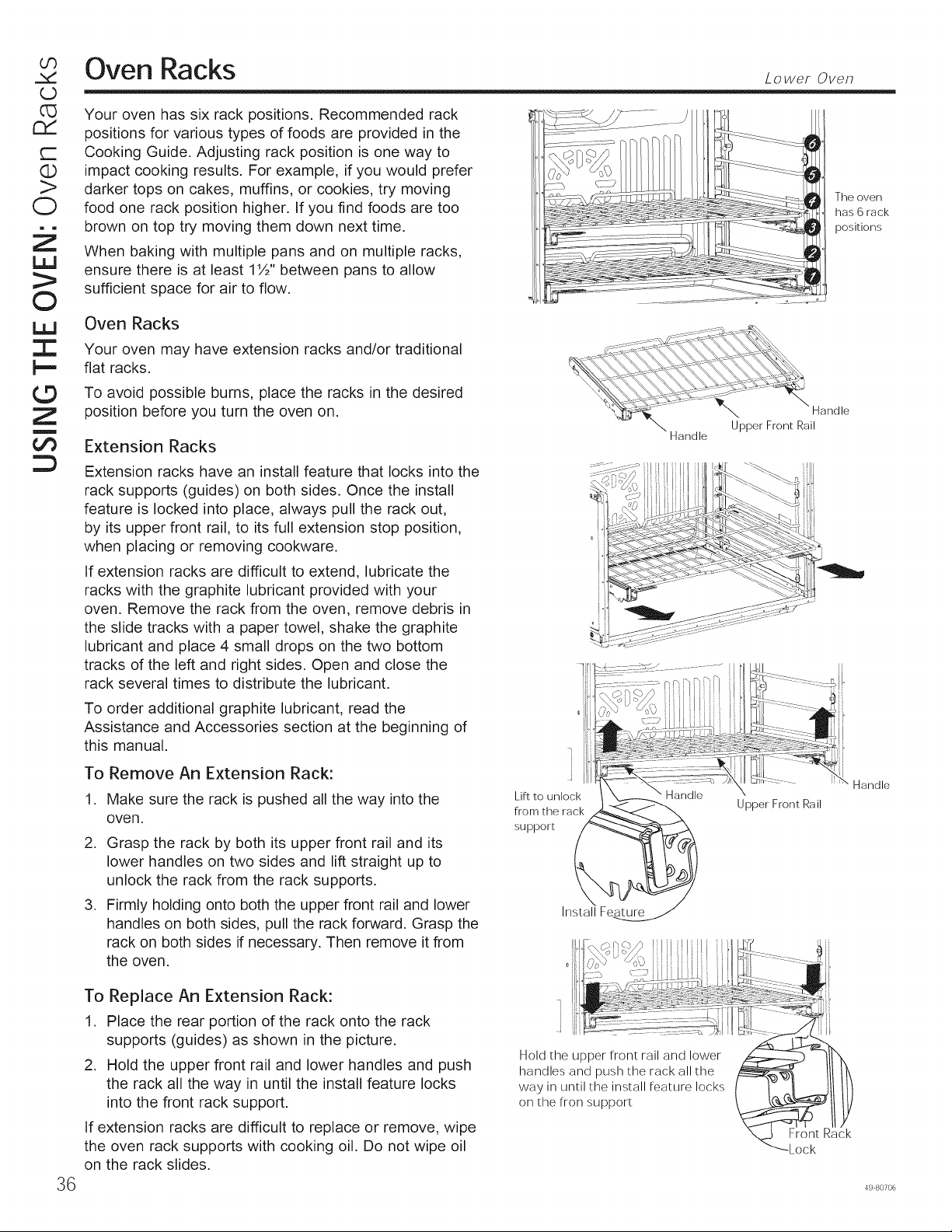
CO
LD
G3
rY
t-
(1)
>
O
ill
©
ill
:1::
t.-,
©
Z
m
oO
Oven Racks
36
Your oven has six rack positions. Recommended rack
positions for various types of foods are provided in the
Cooking Guide. Adjusting rack position is one way to
impact cooking results. For example, if you would prefer
darker tops on cakes, muffins, or cookies, try moving
food one rack position higher. If you find foods are too
brown on top try moving them down next time.
When baking with multiple pans and on multiple racks,
ensure there is at least 1½" between pans to allow
sufficient space for air to flow.
Oven Racks
Your oven may have extension racks and/or traditional
flat racks.
To avoid possible burns, place the racks in the desired
position before you turn the oven on.
Extension Racks
Extension racks have an install feature that locks into the
rack supports (guides) on both sides. Once the install
feature is locked into place, always pull the rack out,
by its upper front rail, to its full extension stop position,
when placing or removing cookware.
If extension racks are difficult to extend, lubricate the
racks with the graphite lubricant provided with your
oven. Remove the rack from the oven, remove debris in
the slide tracks with a paper towel, shake the graphite
lubricant and place 4 small drops on the two bottom
tracks of the left and right sides. Open and close the
rack several times to distribute the lubricant.
To order additional graphite lubricant, read the
Assistance and Accessories section at the beginning of
this manual.
To
1.
Remove An Extension Rack:
Make sure the rack is pushed all the way into the
oven.
2. Grasp the rack by both its upper front rail and its
lower handles on two sides and lift straight up to
unlock the rack from the rack supports.
3. Firmly holding onto both the upper front rail and lower
handles on both sides, pull the rack forward. Grasp the
rack on both sides if necessary. Then remove it from
the oven.
To Replace An Extension Rack:
1. Place the rear portion of the rack onto the rack
supports (guides) as shown in the picture.
2. Hold the upper front rail and lower handles and push
the rack all the way in until the install feature locks
into the front rack support.
If extension racks are difficult to replace or remove, wipe
the oven rack supports with cooking oil. Do not wipe oil
on the rack slides.
: :P:_g,_! I i i !
°' ii!ii ijL J
o
Lift to unlock
from the rack
support
Install Feature
Hold the upper front rail and lower
handles and push the rack all the
way in until the install feature locks
on the fron support
Lower Oven
The oven
has 6 rack
positions
Upper Front Rail
Handle
Front Rack
Lock
49 80706
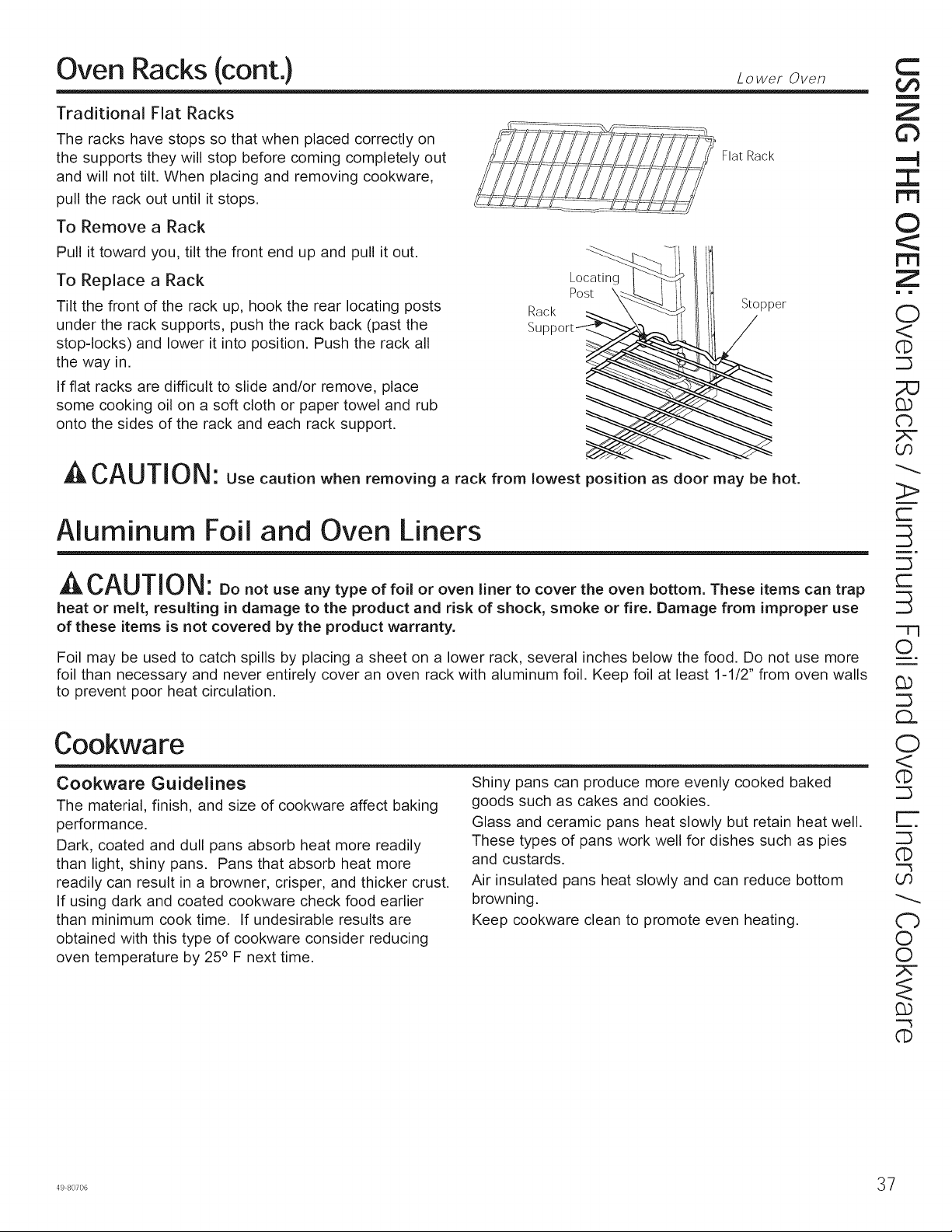
Oven Racks (cont.) Loweroven
Traditional Flat Racks
The racks have stops so that when placed correctly on
the supports they will stop before coming completely out
and will not tilt. When placing and removing cookware,
pull the rack out until it stops.
Flat Rack
To Remove a Rack
Pull it toward you, tilt the front end up and pull it out.
To Replace a Rack
Tilt the front of the rack up, hook the rear locating posts
under the rack supports, push the rack back (past the
stop-locks) and lower it into position. Push the rack all
the way in.
If fiat racks are difficult to slide and/or remove, place
some cooking oil on a soft cloth or paper towel and rub
onto the sides of the rack and each rack support.
Rack
Su
Locating
Post \
Stopper
A CAUTION: Use caution when removing a rack from lowest position as door may be hot.
Aluminum Foil and Oven Liners
^-_CAUTION: Donotuseanytypeoffo,oroven.nettocovertheovenbottomTheseitemscarl trap
heat or melt, resulting in damage to the product and risk of shock, smoke or fire. Damage from improper use
of these items is not covered by the product warranty.
Foil may be used to catch spills by placing a sheet on a lower rack, several inches below the food. Do not use more
foil than necessary and never entirely cover an oven rack with aluminum foil. Keep foil at least 1-1/2" from oven walls
to prevent poor heat circulation.
Cookware
Cookware Guidelines
The material, finish, and size of cookware affect baking
performance.
Dark, coated and dull pans absorb heat more readily
than light, shiny pans. Pans that absorb heat more
readily can result in a browner, crisper, and thicker crust.
If using dark and coated cookware check food earlier
than minimum cook time. If undesirable results are
obtained with this type of cookware consider reducing
oven temperature by 25 ° F next time.
Shiny pans can produce more evenly cooked baked
goods such as cakes and cookies.
Glass and ceramic pans heat slowly but retain heat well.
These types of pans work well for dishes such as pies
and custards.
Air insulated pans heat slowly and can reduce bottom
browning.
Keep cookware clean to promote even heating.
C
m
Z
©
I
©
m
Z
= m
O
<
dE)
('b
O0
r-
r-
=77
O
G)
¢b
O
<
dE)
r--
q:)
o0
d'b
O
©
G)
dE)
498°7°6 37
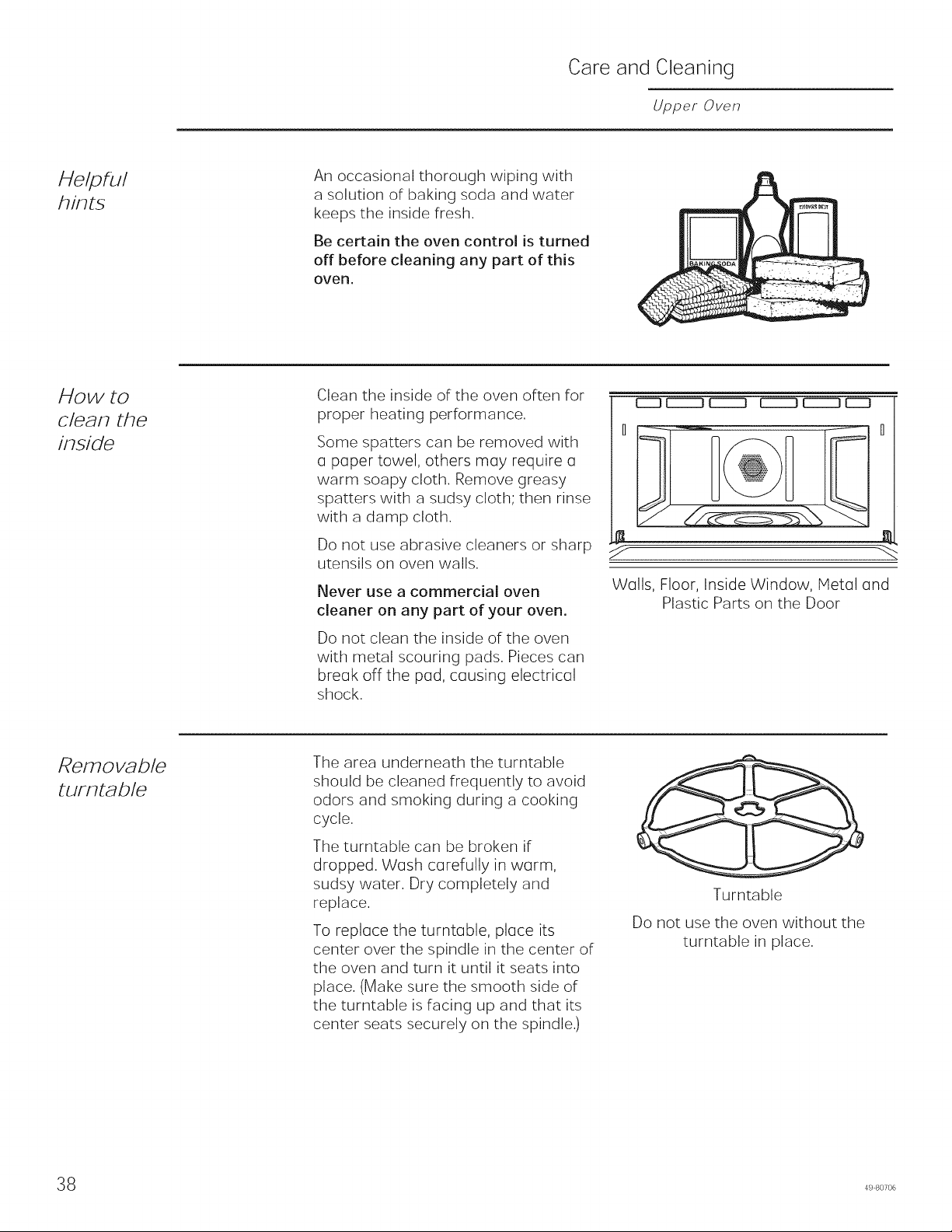
Care and Cleaning
Upper Oven
Helpful
hints
An occasional thorough wiping with
a solution of baking soda and water
keeps the inside fresh.
Be certain the oven control is turned
off before cleaning any part of this
oven.
How to
clean the
inside
Clean the inside of the oven often for
proper heating performance.
Some spatters can be removed with
o paper towel, others moy require o
warm soapy cloth. Remove greasy
spatters with a sudsy cloth; then rinse
with a damp cloth.
Do not use abrasive cleaners or sharp
utensils on oven walls.
Never use a commercial oven
cleaner on any part of your oven.
Do not clean the inside of the oven
with metal scouring pads. Pieces can
breok off the pod, cousing electricol
shock.
EIID EEIED (Z::::::::DEIIII:_ [:EED EIE]
H
J
Walls, Floor, Inside Window, Metal and
Plastic Parts on the Door
Removable
turntable
The area underneath the turntable
should be cleaned frequently to avoid
odors and smoking during a cooking
cycle.
The turntable can be broken if
dropped. Wash corefully in worm,
sudsy water. Dry completely and
replace.
To reploce the turntoble, ploce its
center over the spindle in the center of
the oven and turn it until it seats into
place. (Make sure the smooth side of
the turntable is facing up and that its
center seats securely on the spindle.)
Turntable
Do not use the oven without the
turntable in place.
8 49 80706
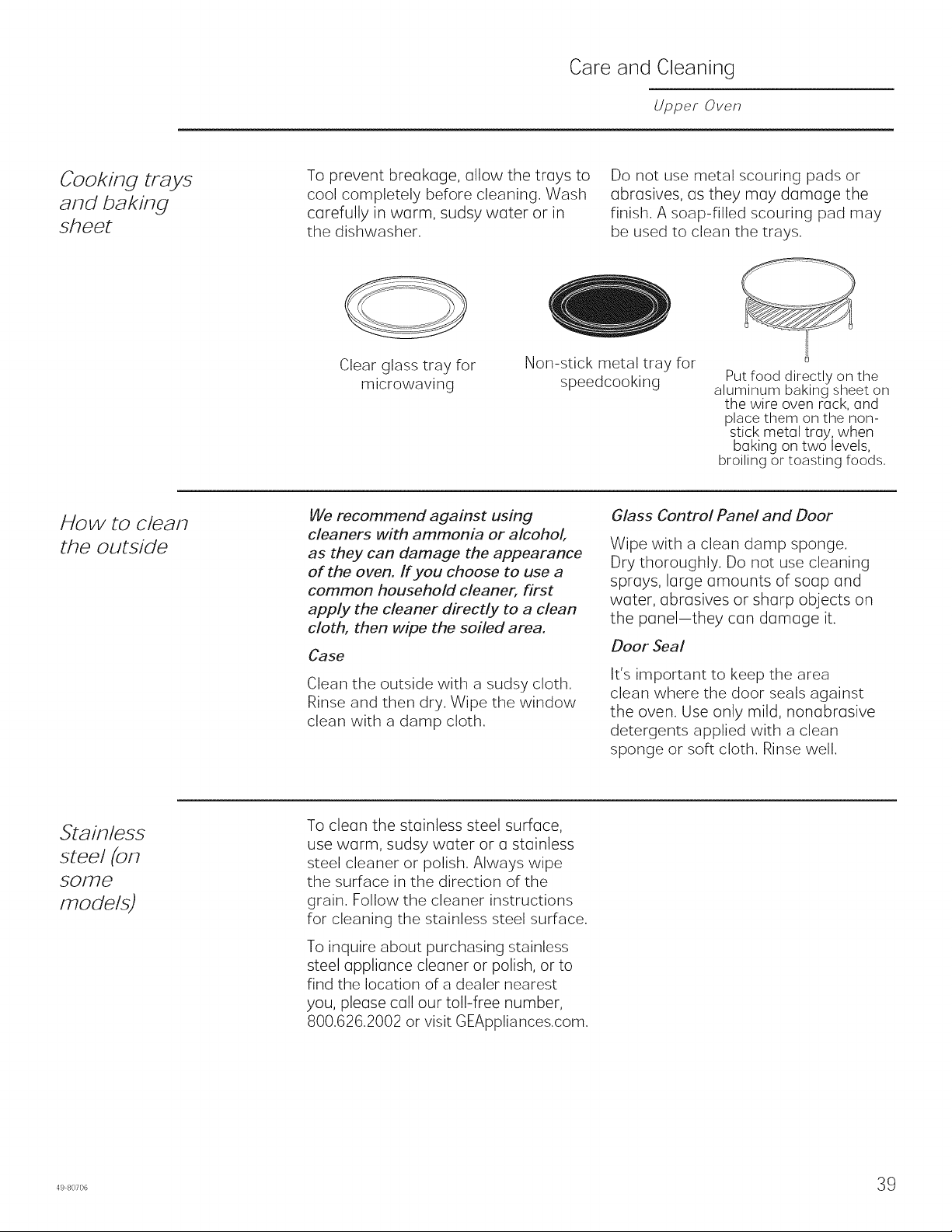
Care and Cleaning
Upper Oven
Cooking trays
and baking
sheet
To prevent breakage, allow the trays to
cool completely before cleaning. Wash
carefully in warm, sudsy water or in
the dishwasher.
Do not use metal scouring pads or
abrasives, as they may damage the
finish. A soap-filled scouring pad may
be used to clean the trays.
Clear glass tray for
microwaving
Non-stick metal tray for
speedcooking
Put food directly on the
aluminum baking sheet on
the wire oven rack, and
place them on the non-
stick metal tray, when
baking on two levels,
broiling or toasting foods.
How to clean
the outside
We recommend against using
cleaners with ammonia or alcohol,
as they can damage the appearance
of the oven. ff you choose to use a
common household cleaner, first
app,_ the cleaner directly to a clean
cloth, then wipe the soiled area.
Case
Clean the outside with a sudsy cloth.
Rinse and then dry. Wipe the window
clean with a damp cloth.
Glass Control Panel and Door
Wipe with a clean damp sponge.
Dry thoroughly. Do not use cleaning
sprays, large amounts of soap and
water, abrasives or sharp objects on
the panel-they can damage it.
Door Seal
It's important to keep the area
clean where the door seals against
the oven. Use only mild, nonabrasive
detergents applied with a clean
sponge or soft cloth. Rinse well.
Stainless
steel (on
some
models)
To clean the stainless steel surface,
use worm, sudsy water or a stainless
steel cleaner or polish. Always wipe
the surface in the direction of the
grain. Follow the cleaner instructions
for cleaning the stainless steel surface.
To inquire about purchasing stainless
steel appliance cleaner or polish, or to
find the location of a dealer nearest
you, please call our toll-free number,
800.626.2002 or visit GEAppliances.com.
498o7o6 39
©
Z
m
Z
Z
LL!
rY
L3
Care and Cleaning Lo , roven
Be sure electrical power is off and all surfaces are cool before cleaning any part of the oven.
Control Panel
It's a good idea to wipe the control panel after each use.
Clean with mild soap and water or vinegar and water,
rinse with clean water and polish dry with a soft cloth.
Do not use abrasive cleansers, strong liquid cleansers,
plastic scouring pads or oven cleaners on the control
panel--they will damage the finish.
Oven Exterior
Do not use oven cleaners, abrasive cleansers, strong
liquid cleansers, steel wool, plastic scouring pads, or
cleaning powders on the interior or exterior of the oven.
Clean with a mild soap and water or vinegar and water
solution. Rinse with clean water and dry with a soft cloth.
When cleaning surfaces, make sure that they are at
room temperature and not in direct sunlight.
If stain on the door vent trim is persistent, use a mild
abrasive cleaner and a sponge-scrubber for best results.
Spillage of marinades, fruit juices, tomato sauces and
basting liquids containing acids may cause discoloration
and should be wiped up immediately. Let hot surfaces
cool, then clean and rinse.
Stainless Steel Surfaces (on some models)
Do not use a steel wool pad; it will scratch the surface.
To clean the stainless steel surface, use warm sudsy
water or a stainless steel cleaner or polish. Always wipe
the surface in the direction of the grain. Follow the cleaner
instructions for cleaning the stainless steel surface.
To inquire about purchasing cleaning products including
stainless steel appliance cleaner or polish, read the
Assistance and Accessories section at the beginning of
this manual.
Oven Interior
The interior of your new oven can be cleaned manually
or by using the Steam Clean or Self Clean modes.
Spillage of marinades, fruit juices, tomato sauces and
basting liquids containing acids may cause discoloration
and should be wiped up immediately. Let hot surfaces
cool, then clean and rinse.
Manual Cleaning
Do not use oven cleaners, abrasive cleaners, strong
liquid cleansers, steel wool, scouring pads, or cleaning
powders on the interior of the oven. Clean with a mild
soap and water or vinegar and water solution. Rinse with
clean water and dry with a soft cloth. When cleaning
surfaces, make sure that they are at room temperature.
Steam Clean Mode
Steam clean is intended to clean small spills using water
and a lower cleaning temperature than Self-Clean.
To use the Steam Clean feature, wipe grease and soils
from the oven. Pour one cup of water into the bottom of
the oven. Close the door. Press the Clean pad twice
and then press Start. The oven door will lock. You can
not open the door during the 30 minute steam clean as
this will decrease the steam clean performance. At the
end of the steam clean cycle the door will unlock. Wipe
out any excess water and any remaining soil.
Self Clean Mode
Read Self-Cleaning Oven Safety Instructions at the
beginning of this manual before using Self Clean Mode.
Self clean uses very high temperatures to clean the oven
interior. The oven door will lock when using this feature.
Before operating the self clean cycle, wipe up grease and
soils from the oven. Remove all items from the oven other
than enameled (dark color) racks. Shiny or silver racks
and any cookware or other items should all be removed
from the oven before initiating a self-clean cycle. Close
the door. Press the Clean pad once and a default self-
clean time is displayed. The clean time can be changed
to any time between 3:00 and 5:00 hours by using the
number pads to enter a different time and pressing Start.
For heavily soiled ovens, the maximum 5 hour clean time
is recommended. If you wish to use the default time, press
the Start pad immediately after pressing the Clean pad.
The oven will turn off automatically when the self clean
cycle is complete. The door will stay locked until the oven
has cooled down. After the oven has cooled down wipe
any ash out of the oven.
IMPORTANT: The health of some birds is extremely
sensitive to the fumes given off during the self-cleaning
cycle of any range. Move birds to another well-
ventilated room.
0 49 80706
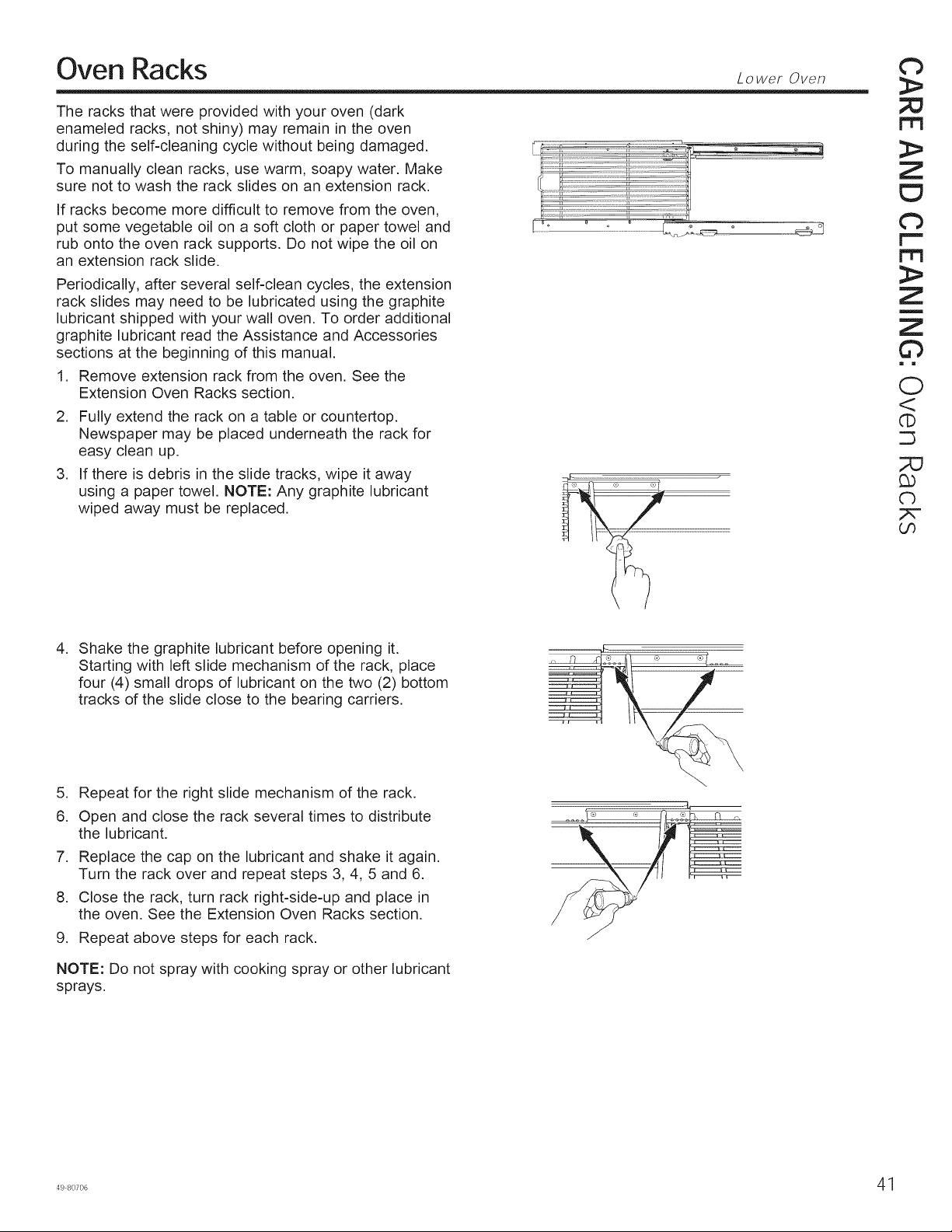
Oven Racks
The racks that were provided with your oven (dark
enameled racks, not shiny) may remain in the oven
during the self-cleaning cycle without being damaged.
To manually clean racks, use warm, soapy water. Make
sure not to wash the rack slides on an extension rack.
If racks become more difficult to remove from the oven,
put some vegetable oil on a soft cloth or paper towel and
rub onto the oven rack supports. Do not wipe the oil on
an extension rack slide.
Periodically, after several self-clean cycles, the extension
rack slides may need to be lubricated using the graphite
lubricant shipped with your wall oven. To order additional
graphite lubricant read the Assistance and Accessories
sections at the beginning of this manual.
1. Remove extension rack from the oven. See the
Extension Oven Racks section.
2. Fully extend the rack on a table or countertop.
Newspaper may be placed underneath the rack for
easy clean up.
3. If there is debris in the slide tracks, wipe it away
using a paper towel. NOTE: Any graphite lubricant
wiped away must be replaced.
Lower Oven
d)
m
Z
Z
Z
©
m i
0
©
;Z2
q_
Oo
,
Shake the graphite lubricant before opening it.
Starting with left slide mechanism of the rack, place
four (4) small drops of lubricant on the two (2) bottom
tracks of the slide close to the bearing carriers.
,
6.
7.
8.
9.
Repeat for the right slide mechanism of the rack.
Open and close the rack several times to distribute
the lubricant.
Replace the cap on the lubricant and shake it again.
Turn the rack over and repeat steps 3, 4, 5 and 6.
Close the rack, turn rack right-side-up and place in
the oven. See the Extension Oven Racks section.
Repeat above steps for each rack.
NOTE: Do not spray with cooking spray or other lubricant
sprays.
498°7°6 41
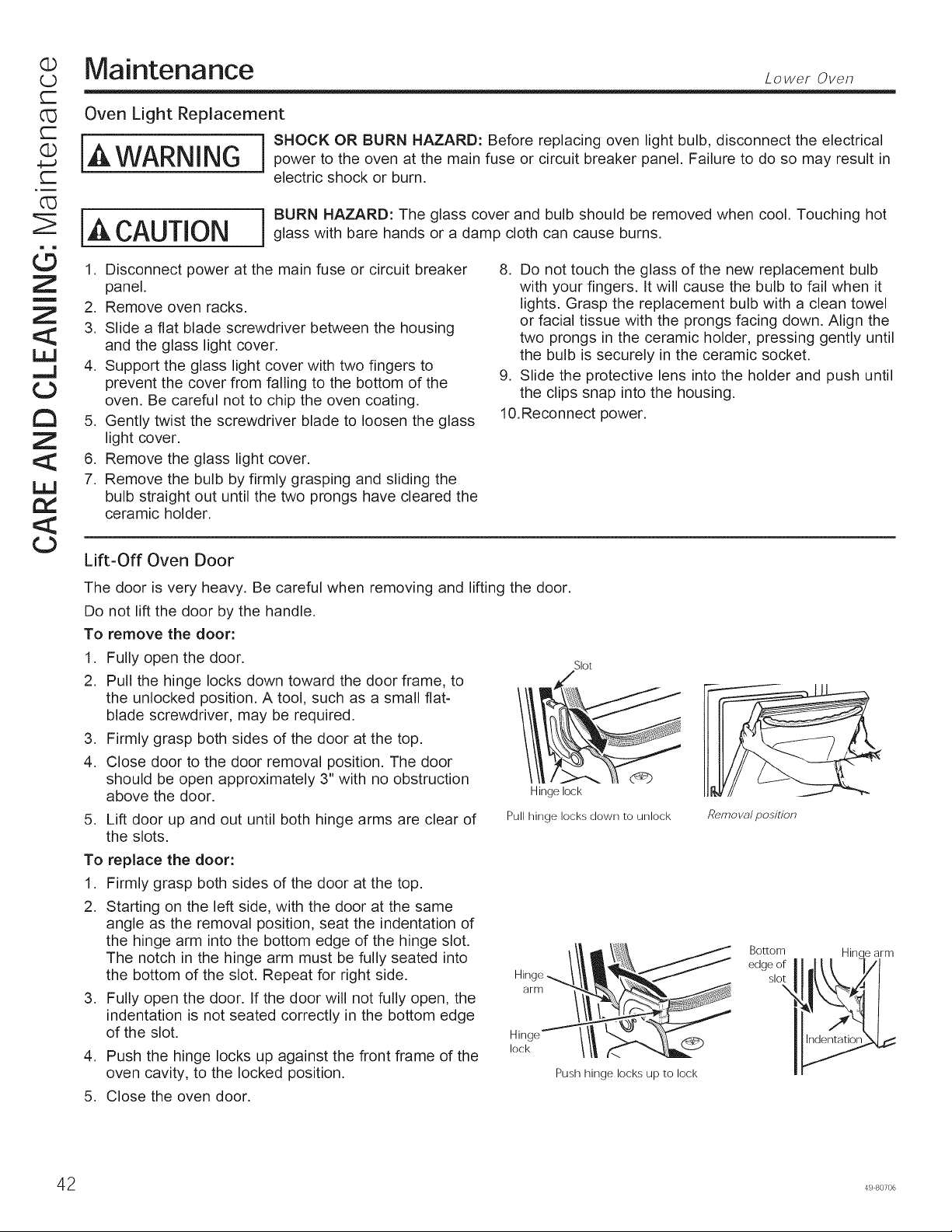
Q
r-
d5
r-
Q
4---J
r-
Z
(5
Z
m
Z
LLJ
¢3
tm
z
Ld
tY
¢3
Maintenance Loweroven
Oven Light Replacement
I ] SHOCK OR BURN HAZARD: Before replacing oven light bulb, disconnect the electrical
WARNING j power to the oven at the main fuse or circuit breaker panel. Failure to do so may result in
electric shock or burn.
CAUTION BURN HAZARD: The glass cover and bulb should be removed when cool. Touching hotglass with bare hands or a damp cloth can cause burns.
1. Disconnect power at the main fuse or circuit breaker
panel.
2. Remove oven racks.
3. Slide a flat blade screwdriver between the housing
and the glass light cover.
4. Support the glass light cover with two fingers to
prevent the cover from falling to the bottom of the
oven. Be careful not to chip the oven coating.
5. Gently twist the screwdriver blade to loosen the glass
light cover.
6. Remove the glass light cover.
7. Remove the bulb by firmly grasping and sliding the
bulb straight out until the two prongs have cleared the
ceramic holder.
8. Do not touch the glass of the new replacement bulb
with your fingers. It will cause the bulb to fail when it
lights. Grasp the replacement bulb with a clean towel
or facial tissue with the prongs facing down. Align the
two prongs in the ceramic holder, pressing gently until
the bulb is securely in the ceramic socket.
9. Slide the protective lens into the holder and push until
the clips snap into the housing.
10.Reconnect power.
Lift-Off Oven Door
The door is very heavy. Be careful when removing and lifting the door.
Do not lift the door by the handle.
To remove the door:
1. Fully open the door.
2. Pull the hinge locks down toward the door frame, to
the unlocked position. A tool, such as a small flat-
blade screwdriver, may be required.
3. Firmly grasp both sides of the door at the top.
4. Close door to the door removal position. The door
should be open approximately 3" with no obstruction
above the door.
5. Lift door up and out until both hinge arms are clear of
the slots.
To replace the door:
1. Firmly grasp both sides of the door at the top.
2. Starting on the left side, with the door at the same
angle as the removal position, seat the indentation of
the hinge arm into the bottom edge of the hinge slot.
The notch in the hinge arm must be fully seated into
the bottom of the slot. Repeat for right side.
3. Fully open the door. If the door will not fully open, the
indentation is not seated correctly in the bottom edge
of the slot.
4. Push the hinge locks up against the front frame of the
oven cavity, to the locked position.
Slot
Hinge lock
Pull hinge locks down to unlock
Hinge
arm
Hinge
lock
Push hinge locks up to lock
5. Close the oven door.
Remo va/ position
Bottom
edge of
slot
Hinc _ arm
2 49 80706

Notes

Notes
44 49 80706
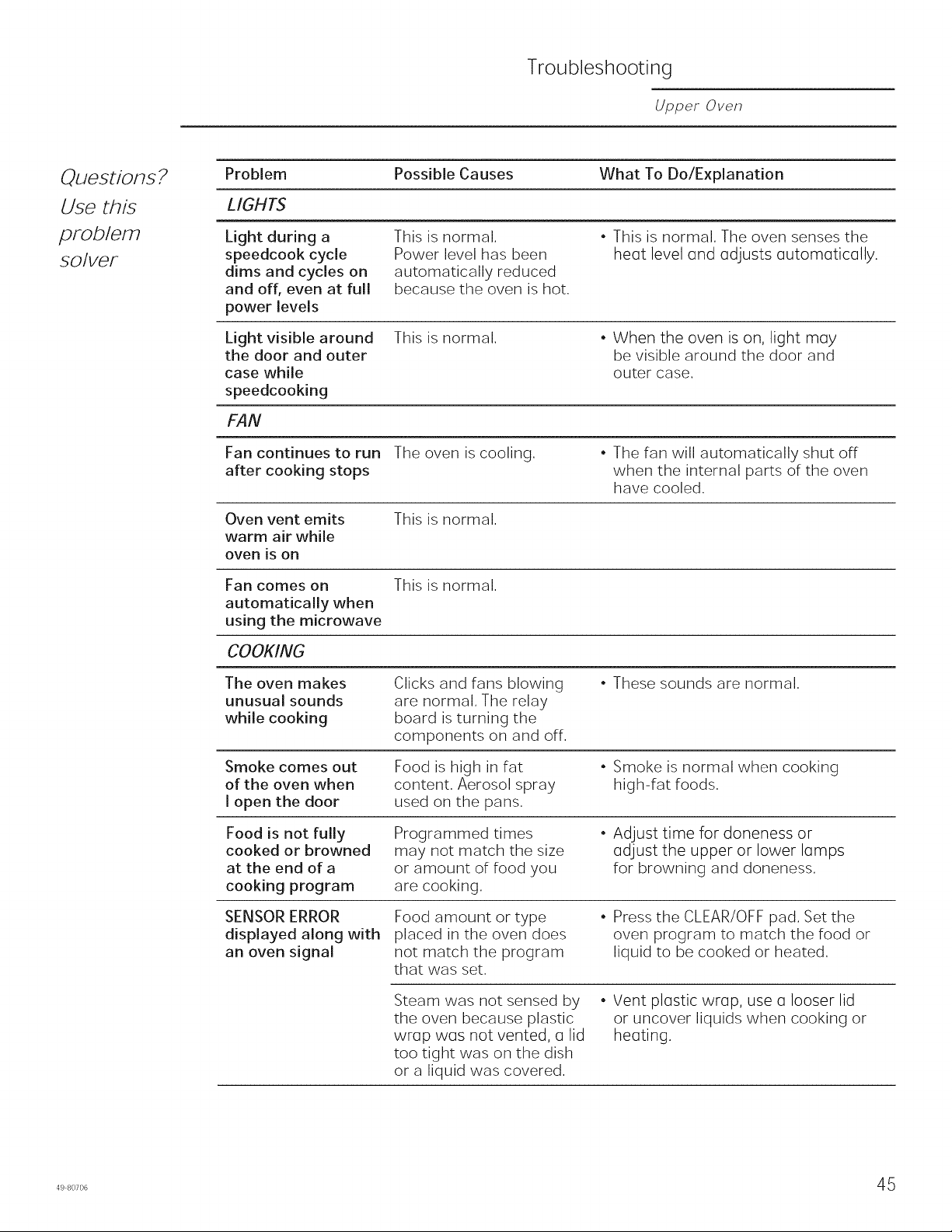
Troubleshooting
Upper Oven
Questions?
Use this
prob/em
so/vet
Problem Possible Causes What To Do/Explanation
LIGHTS
Light during a
speedcook cycle
dims and cycles on
and off, even at full
power levels
This is normal.
Power level has been
automatically reduced
because the oven is hot.
• This is normal. The oven senses the
heGt level Gnd Gdjusts outomGticolly.
Light visible around
the door and outer
case while
speedcooking
This is normal.
• When the oven is on, light mGy
be visible around the door and
outer case.
FAN
Fan continues to run The oven is cooling.
after cooking stops
• The fan will automatically shut off
when the internal parts of the oven
have cooled.
Oven vent emits
warm air while
oven is on
This is normal.
Fan comes on
automatically when
using the microwave
COOKING
This is normal.
The oven makes
unusual sounds
while cooking
Clicks and fans blowing
are normal, The relay
board is turning the
components on and off.
• These sounds are normal.
Smoke comes out
of the oven when
I open the door
Food is high in fat
content, Aerosol spray
used on the pans.
• Smoke is normal when cooking
high-fat foods.
Food is not fully
cooked or browned
at the end of a
cooking program
Programmed times
may not match the size
or amount of food you
are cooking,
• Adjust time for doneness or
Gdjust the upper or lower IGmps
for browning and doneness,
SENSOR ERROR
displayed along with
an oven signal
Food amount or type
placed in the oven does
not match the program
that was set.
• Press the CLEAR/OFF pad. Set the
oven program to match the food or
liquid to be cooked or heated.
Steam was not sensed by
the oven because plastic
wrap wos not vented, o lid
too tight was on the dish
or a liquid was covered.
• Vent plastic wrap, use a looser lid
or uncover liquids when cooking or
heoting.
4980706 45
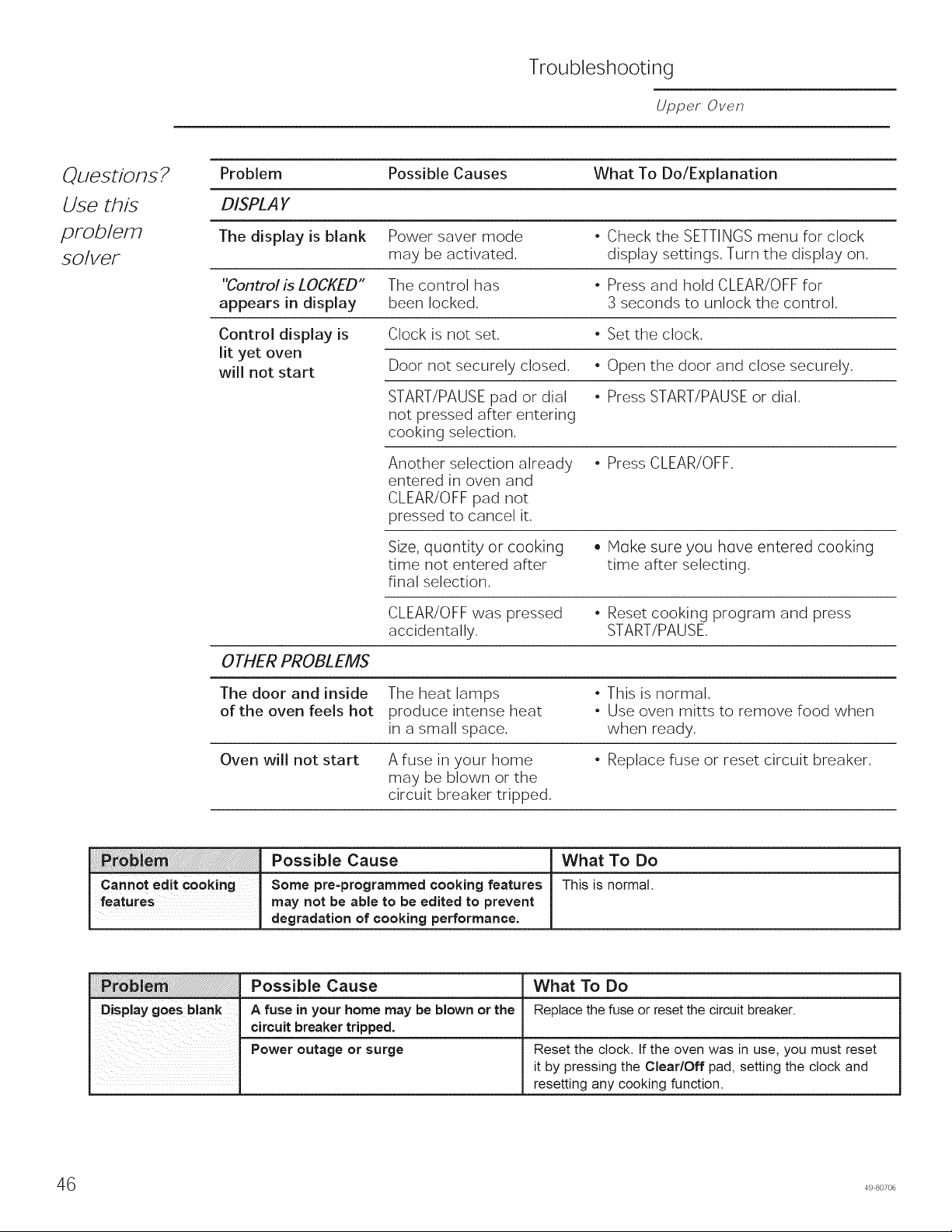
Troubleshooting
Upper Oven
Questions. 2
Use this
problem
so/vet
Problem Possible Causes What To Do/Explanation
DISPLAY
The display is blank Power saver mode • Check the SETTINGS menu for clock
may be activated, display settings. Turn the display on.
"Control is LOCKED" The control has • Press and hold CLEAR/OFF for
appears in display been locked. 3 seconds to unlock the control.
Control display is Clock is not set. • Set the clock.
lit yet oven
will not start
Door not securely closed. • Open the door and close securely.
START/PAUSE pad or dial • Press START/PAUSE or dial.
not pressed after entering
cooking selection.
Another selection already
entered in oven and
CLEAR/OFF pad not
pressed to cancel it.
• Press CLEAR/OFF.
Size, quontity or cooking
time not entered after
final selection.
• Hoke sure you hove entered cooking
time after selecting.
CLEAR/OFF was pressed
accidentally.
• Reset cooking program and press
START/PAUSE,
OTHER PROBLEMS
The door and inside The heat lamps • This is normal.
of the oven feels hot produce intense heat * Use oven mitts to remove food when
in a small space, when ready.
Oven will not start A fuse in your home * Replace fuse or reset circuit breaker.
may be blown or the
circuit breaker tripped.
Possible Cause What To Do
Cannot edit Cooking Some pre-programmed cooking features This is normal.
features may not be able to be edited to prevent
degradation of cooking performance.
Possible Cause What To Do
Display goes blank A fuse in your home may be blown or the Replacethe fuse or resetthe circuitbreaker.
circuitbreaker tripped.
Power outage or surge Reset the clock. If the oven was in use, you must reset
it by pressing the Clear/Off pad, setting the clock and
resetting any cooking function.
6 49 80706
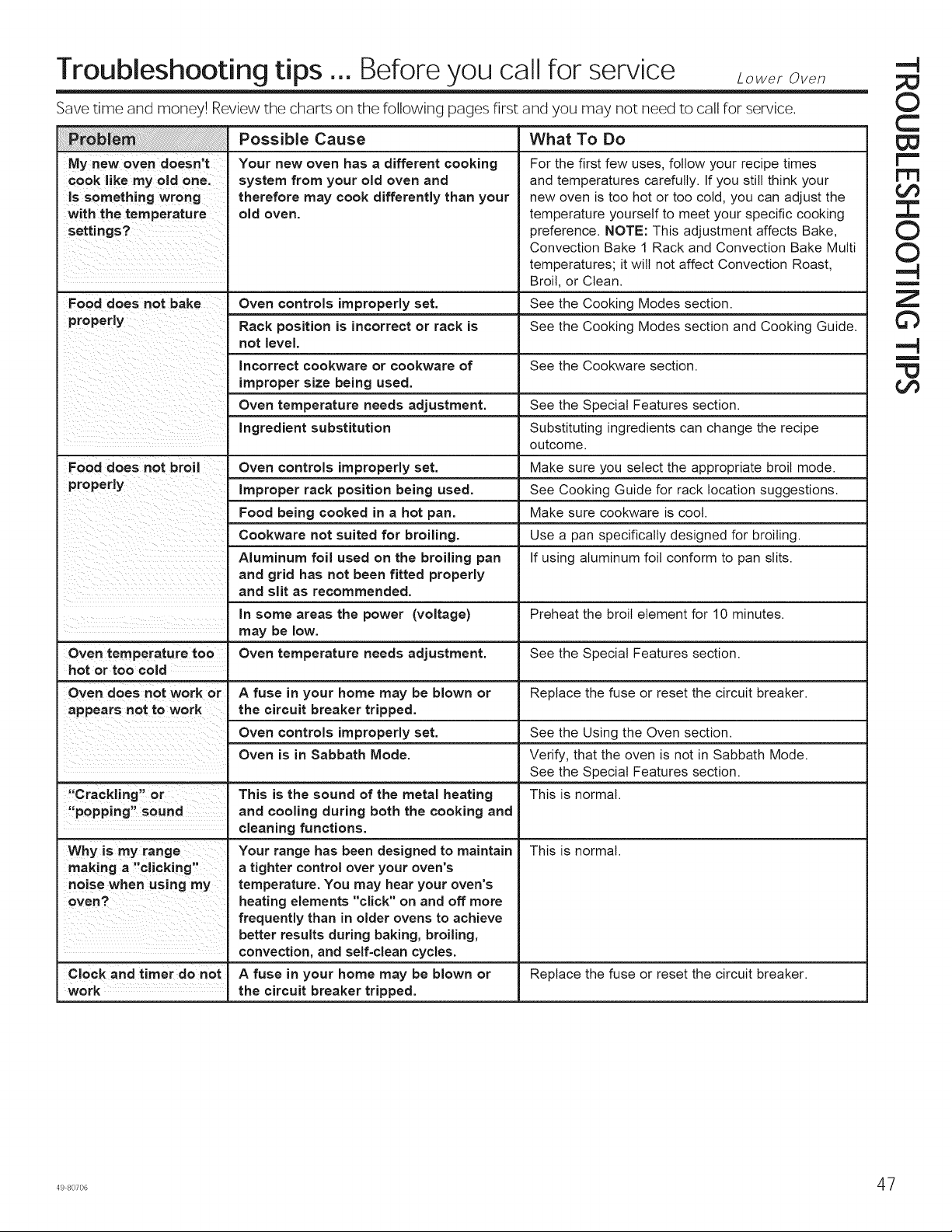
Troubleshooting tips ... Before you call for service Lower Oven
Save time and money! Review the charts on the following pages first and you may not need to call for service.
Possible Cause What To Do
My new oven doesn't
cook like my old one.
Is something wrong
with the temperature
settings?
Your new oven has a different cooking
system from your old oven and
therefore may cook differently than your
old oven.
For the first few uses, follow your recipe times
and temperatures carefully. If you still think your
new oven is too hot or too cold, you can adjust the
temperature yourself to meet your specific cooking
preference. NOTE: This adjustment affects Bake,
Convection Bake 1 Rack and Convection Bake Multi
temperatures; it will not affect Convection Roast,
Broil, or Clean.
Food does not bake Oven controls improperly set. See the Cooking Modes section.
properly Rack position is incorrect or rack is See the Cooking Modes section and Cooking Guide.
not level.
Incorrect cookware or cookware of See the Cookware section.
improper size being used.
Oven temperature needs adjustment. See the Special Features section.
Ingredient substitution Substituting ingredients can change the recipe
Food does not broil Oven controls improperly set.
Improper rack position being used.
Food being cooked in a hot pan.
Cookware not suited for broiling.
Aluminum foil used on the broiling pan
and grid has not been fitted properly
and slit as recommended.
in some areas the power (voltage)
A fuse in your home may be blown or
the circuit breaker tripped.
Oven controls improperly set.
Oven is in Sabbath Mode.
may be low.
Oven temperature too Oven temperature needs adjustment.
hot or too cold
Oven does not work or
appears not to work
"Crackling" or
"popping" sound
cleaning functions.
Why is my range
making a "clicking"
noise when using my
Clock and timer do not
work
This is the sound of the metal heating
and cooling during both the cooking and
Your range has been designed to maintain
a tighter control over your oven's
temperature. You may hear your oven's
heating elements "click" on and off more
frequently than in older ovens to achieve
better results during baking, broiling,
convection, and self-clean cycles.
A fuse in your home may be blown or
the circuit breaker tripped.
outcome.
Make sure you select the appropriate broil mode.
See Cooking Guide for rack location suggestions.
Make sure cookware is cool.
Use a pan specifically designed for broiling.
If using aluminum foil conform to pan slits.
Preheat the broil element for 10 minutes.
See the Special Features section.
Replace the fuse or reset the circuit breaker.
See the Using the Oven section.
Verify, that the oven is not in Sabbath Mode.
See the Special Features section.
This is normal.
This is normal.
Replace the fuse or reset the circuit breaker.
.-4
©
C
W
r==
1=1=1
tJ3
3:
O
O
-4
m
Z
©
-4
m
tJ3
498o7o6 47
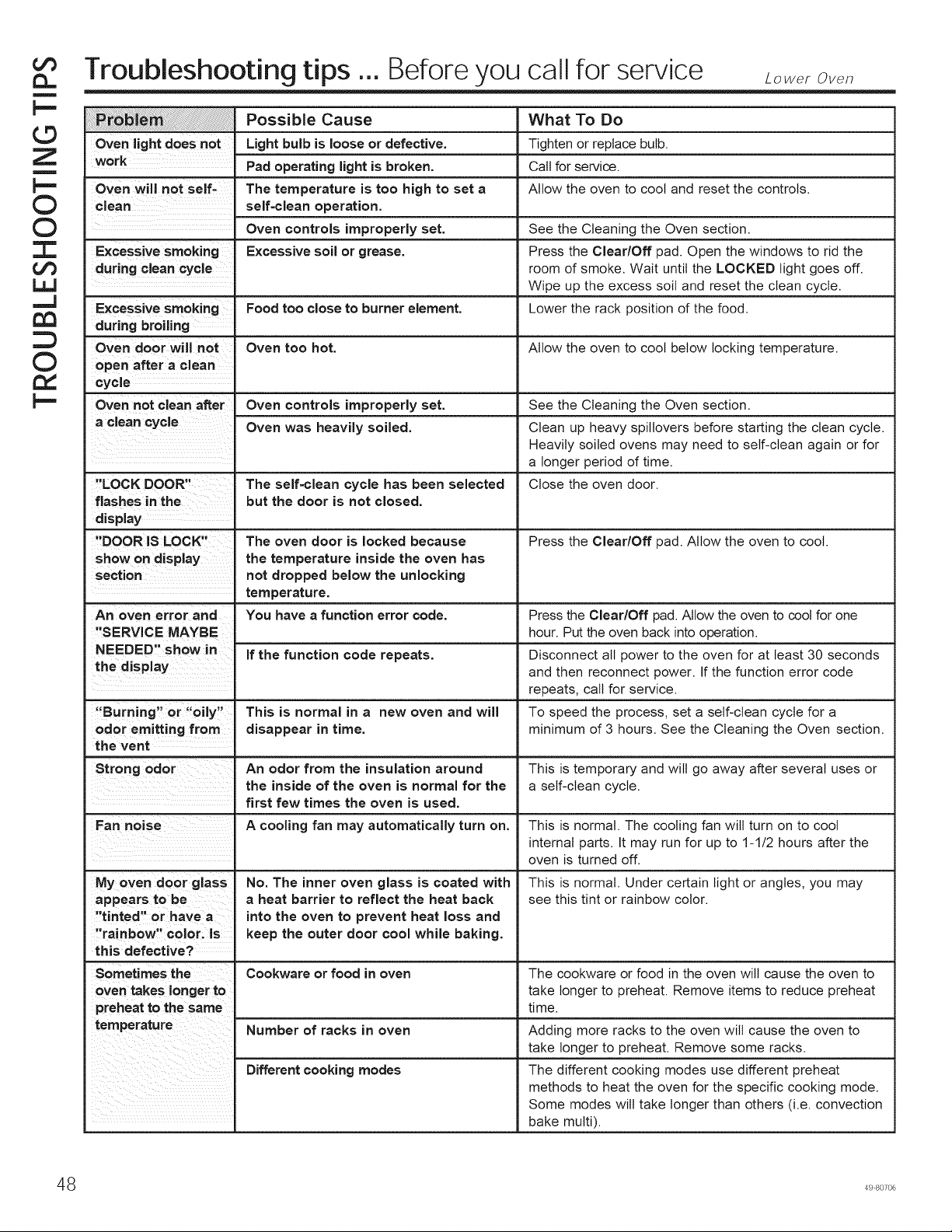
o©
m
p=
©
Z
m
p-
©
©
"r"
¢/3
L_
...J
©
rv,
p=
Troubleshooting tips ... Before you call for service Loweroven
Possible Cause What To Do
Oven light does not Light bulb is loose or defective. Tighten or replace bulb.
work Pad operating light is broken. Call for service.
Oven will not self- The temperature is too high to set a Allow the oven to cool and reset the controls.
clean self-clean operation.
Oven controls improperly set. See the Cleaning the Oven section.
Excessive smoking Excessive soil or grease. Press the Clear/Off pad. Open the windows to rid the
during clean cycle room of smoke. Wait until the LOCKED light goes off.
Wipe up the excess soil and reset the clean cycle.
Excessive smoking Food too close to burner element. Lower the rack position of the food.
during broiling
Oven door will not Oven too hot. Allow the oven to cool below locking temperature.
open after a clean
cycle
Oven not clean after Oven controls improperly set. See the Cleaning the Oven section.
a clean cycle Oven was heavily soiled. Clean up heavy spitlovers before starting the clean cycle.
Heavily soiled ovens may need to self-clean again or for
a longer period of time.
"LOCK DOOR" The self=clean cycle has been selected Close the oven door.
flashes in the but the door is not closed.
display
"DOOR IS LOCK" The oven door is locked because Press the Clear/Off pad. Allow the oven to cool.
show on display the temperature inside the oven has
section not dropped below the unlocking
temperature.
An oven error and You have a function error code. Press the Clear/Off pad. Allow the oven to coot for one
"SERVICE MAYBE hour. Put the oven back into operation.
NEEDED" show in If the function code repeats. Disconnect all power to the oven for at least 30 seconds
the display and then reconnect power. If the function error code
repeats, call for service.
"Burning" or "oily" This is normal in a new oven and will To speed the process, set a self-clean cycle for a
odor emitting from disappear in time. minimum of 3 hours. See the Cleaning the Oven section.
the vent
Strong odor An odor from the insulation around This is temporary and will go away after several uses or
the inside of the oven is normal for the a self-clean cycle.
first few times the oven is used.
Fan noise A cooling fan may automatically turn on. This is normal. The cooling fan will turn on to cool
internal parts. It may run for up to 1-1/2 hours after the
oven is turned off.
My oven door glass
appears to be
"tinted" or have a
"rainbow" color, is
this defective?
Sometimes the
oven takes longer to
preheat to the same
temperature
No. The inner oven glass is coated with
a heat barrier to reflect the heat back
into the oven to prevent heat loss and
keep the outer door cool while baking.
This is normal. Under certain light or angles, you may
see this tint or rainbow color.
Cookware or food in oven The cookware or food in the oven will cause the oven to
take longer to preheat. Remove items to reduce preheat
time.
Number of racks in oven Adding more racks to the oven will cause the oven to
take longer to preheat. Remove some racks.
Different cooking modes The different cooking modes use different preheat
methods to heat the oven for the specific cooking mode.
Some modes will take longer than others (i.e. convection
bake multi).
48 49 80706

