GEAppliances.com
Im
|
|
m
Im
Safety Information ........... 2
Warranty ....................... 6
Assistance / Accessories ..... 7
Using The Oven
Single Wall Oven Controls ......... 8
Double Wall Oven Controls ........ 9
Special Features ................. 10
12-hour Auto Shut-Off
and Sabbath (SAbbAtH) ......... 11
Oven Racks ...................... 12
Aluminum Foil and Oven Liners...13
Cookware ........................ 13
Cooking Modes .................. 14
Cooking Guide ................... 15
Care and Cleaning
Control Panel .................... 16
Oven Exterior .................... 16
Stainless Steel Surfaces .......... 16
Oven Interior ..................... 16
Oven Racks ...................... 17
Maintenance ..................... 18
Troubleshooting Tips ........ 19
PK7000 - 27" Single Wall Oven
CK7000 - 27" Single Wall Oven
PK7500 - 27" Double Wall Oven
CK7500 - 27" Double Wall Oven
For a Spanish version of this
manual, visit our Website at
GEApp/iances.com.
Pare consulter una version
en espaho/ de este manual
de instrucciones, visite
nuestro sitio de internet
GEApp/iances.com.
Write the model and serial
numbers here:
Model #
Serial #
You can find them on a label on
the side trim or on the front of the
(lower) oven behind the oven door.
Printed on
Recycled Paper
PrintedintheUnitedStates 49-80753-1 10-14 GE
Z
©
m
tY
©
EL
Z
m
>..
t--,
o©
IMPORTANT SAFETY INFORMATION.
READ ALL INSTRUCTIONS BEFORE USING.
IA WARNING I
Read all safety instructions before using the product. Failure to follow these instructions may result in fire,
electrical shock, serious injury or death.
STATEOF CALIFORNIA PROPOSITION 65 WARNING
The California Safe Drinking Water and Toxic Enforcement Act requires the Governor of California to
publish a list of substances known to the state to cause cancer, birth defects or other reproductive harm,
and requires businesses to warn customers of potential exposure to such substances.
IAWARNING IThisproductcontainsoneormorechemicalknowntotheStateofCaliforniato
cause cancer, birth defects or other reproductive harm.
Self-clean ovens can cause low-level exposure to some of these substances, including carbon monoxide,
during the cleaning cycle. Exposure can be minimized by venting with an open window or using a
ventilation fan or hood.
l,tl,WARNING I GENERALSAFETYINSTRUCTIONS
[] Use this appliance only for its intended purpose
as described in this Owner's Manual.
[] Be sure your appliance is properly installed and
grounded by a qualified installer in accordance
with the provided installation instructions.
[] Do not attempt to repair or replace any part of
your oven unless it is specifically recommended
in this manual. All other servicing should be
performed by a qualified technician.
[] Before performing any service, disconnect the
power supply at the household distribution panel
by removing the fuse or switching off the circuit
breaker.
[] Do not leave children alone--children should not
be left alone or unattended in an area where an
appliance is in use. They should never be allowed
to climb, sit or stand on any part of the appliance.
[]A CAUTION.Donotstoreitemsof
interest to children in cabinets above an oven
- children climbing on the oven to reach items
could be seriously injured.
[] Use only dry pot holders--moist or damp pot
holders on hot surfaces may result in burns from
steam. Do not let pot holders touch hot heating
elements. Do not use a towel or other bulky cloth
in place of pot holders.
[] Never use your appliance for warming or heating
the room.
[] Do not touch the heating elements or the interior
surface of the oven. These surfaces may be hot
enough to burn even though they are dark in
color. During and after use, do not touch, or let
clothing or other flammable materials contact any
interior area of the oven; allow sufficient time for
cooling first. Other surfaces of the appliance may
become hot enough to cause burns. Potentially
hot surfaces include the oven vent opening,
surfaces near the opening and crevices around
the oven door.
[] Do not heat unopened food containers. Pressure
could build up and the container could burst,
causing an injury.
[] Do not use any type of foil or liner to cover the
oven bottom or anywhere in the oven, except as
described in this manual. Oven liners can trap
heat or melt, resulting in damage to the product
and risk of shock, smoke or fire.
[] Avoid scratching or impacting glass doors or
control panels. Doing so may lead to glass
breakage. Do not cook on a product with broken
glass. Shock, fire or cuts may occur.
[] Cook meat and poultry thoroughly--meat to
at least an internal temperature of 160°F and
poultry to at least an internal temperature of
180°F. Cooking to these temperatures usually
protects against foodborne illness.
SAVETHESE INSTRUCTIONS
49 80753 1
iA, WARNING i KEEPFLAMMABLEMATERIALSAWAYFROMTHEOVEN
1-- .I
Failure to do so may result in fire or personal injury,
[] Do not store or use flammable materials in or near
an oven, including paper, plastic, pot holders,
linens, wall coverings, curtains, drapes and gasoline
or other flammable vapors and liquids.
[] Never wear loose-fitting or hanging garments while
using the appliance. These garments may ignite if
they contact hot surfaces, causing severe burns.
[] Do not let cooking grease or other flammable
materials accumulate in or near the oven. Grease
in the oven or near the oven may ignite.
i IN THE EVENTOF A FIRE,TAKE THE FOLLOWING
STEPS TO PREVENTINJURY AND FIRESPREADING
iAWARNING
""!'i
r"t3
..-4
..<
m
Z
=r'!
©
n
©
Z
[] Do not use water on grease fires. Never pick up
a flaming pan.
[] If there is a fire in the oven during baking,
smother the fire by closing the oven door and
turning the oven off or by using a multi-purpose
dry chemical or foam-type fire extinguisher.
[AWARNING
If there is a fire in the oven during self-clean, turn
the oven off and wait for the fire to go out. Do
not force the door open. Introduction of fresh air
at self-clean temperatures may lead to a burst of
flame from the oven.
]OVEN SAFETYINSTRUCTIONS
[] Stand away from the oven when opening the
oven door. Hot air or steam which escapes can
cause burns to hands, face and/or eyes.
[] Keep the oven vent unobstructed.
[] Keep the oven free from grease buildup. Grease
in the oven may ignite.
[] Place oven racks in desired location while oven is
cool. If rack must be moved while oven is hot, do not
let pot holder contact hot heating element in oven.
[] When using cooking or roasting bags in the
oven, follow the manufacturer's directions.
HAWARNING
[] Pulling out the standard racks to their stop-locks
or the extension rack to its fully open position is
a convenience in lifting heavy foods. It is also
a precaution against burns from touching hot
surfaces of the door or oven walls.
[] Do not leave items such as paper, cooking
utensils or food in the oven when not in use.
Items stored in an oven can ignite.
[] Never place cooking utensils, pizza or baking
stones, or any type of foil or liner on the oven
floor. These items can trap heat or melt, resulting
in damage to the product and risk of shock,
smoke or fire.
I SELF-CLEANINGOVENSAFETYINSTRUCTIONS
The self-cleaning feature operates the oven at temperatures high enough to burn away food soils in the
oven. Follow these instructions for safe operation.
[] Do not touch oven surfaces during self-clean
operation. Keep children away from the oven
during self-cleaning. Failure to follow these
instructions may cause burns.
[] Before self-cleaning the oven, remove shiny
silver colored oven racks (on some models), the
probe, any aluminum foil, and any broiler pan,
grid, and other cookware. Only porcelain coated
oven racks may be left in the oven.
[] Before operating the self-clean cycle, wipe
grease and food soils from the oven. Excessive
amount of grease may ignite, leading to smoke
damage to your home.
[] If the self-cleaning mode malfunctions, turn the
oven off and disconnect the power supply. Have
it serviced by a qualified technician.
[] Do not clean the door gasket. The door gasket is
essential for a good seal. Care should be taken
not to rub, damage or move the gasket.
[] Do not use oven cleaners. No commercial oven
cleaner or oven liner protective coating of any kind
should be used in or around any part of the oven.
SAVETHESE INSTRUCTIONS
49 80753 1 3
Z
©
m
©
EL
Z
m
t--.
IMPORTANT SAFETY INFORMATION.
READ ALL INSTRUCTIONS BEFORE USING.
The remote enable equipment installed on this oven
has been tested and found to comply with the limits
for a Class B digital device, pursuant to part 15 of
the FCC Rules. These limits are designed to:
(a) provide reasonable protection against harmful
interference in a residential installation. This
equipment generates, uses and can radiate radio
frequency energy and, if not installed and used
in accordance with the instructions, may cause
harmful interference to radio communications.
However, there is no guarantee that interference
will not occur in a particular installation. If this
equipment does cause harmful interference to radio
or television reception, which can be determined
by turning the equipment off and on, the user is
encouraged to try to correct the interference by one
or more of the following measures:
[] Reorient or relocate the receiving antenna.
[] Increase the separation between the equipment
and receiver.
[] Connect the equipment into an outlet on a
circuit different from that to which the receiver is
connected.
[] Consult the dealer or an experienced radio/TV
technician for help.
(b) accept any interference received, including
interference that may cause undesired operation of
the device.
Note that any changes or modifications to the
wireless communication device installed on this
oven that are not expressly approved by the
manufacturer could void the user's authority to
operate the equipment.
49 80753 1

Notes
49 80753 1 5
>..
Z
ty
09
.. o
__ [5
O
v _
"50_
_-- (D
tt_
c
_o
o "o
tlJ
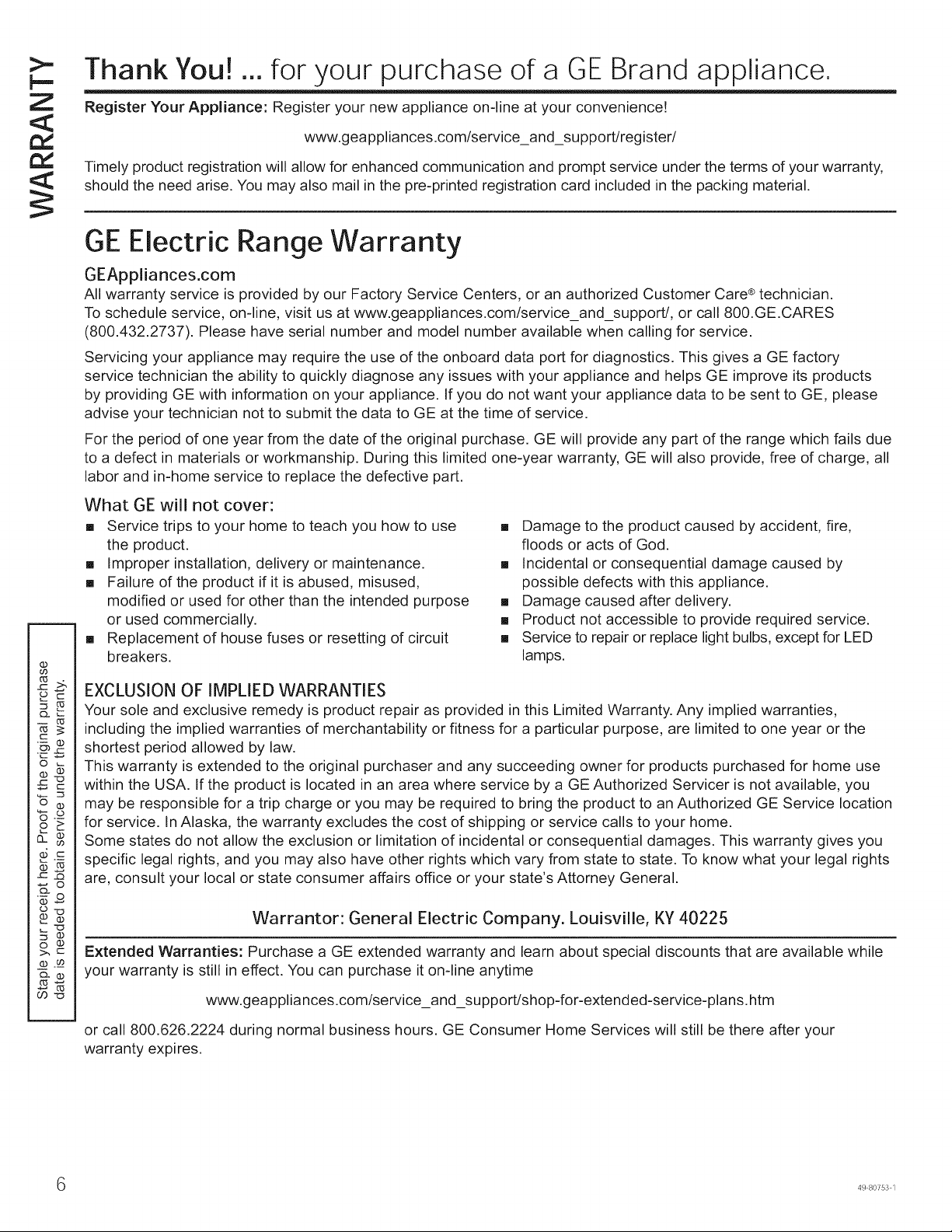
Thank You! ... for your purchase of a GE Brand appliance.
Register Your Appliance: Register your new appliance on-line at your convenience!
www.geappliances.com/service_and_support/register/
Timely product registration will allow for enhanced communication and prompt service under the terms of your warranty,
should the need arise. You may also mail in the pre-printed registration card included in the packing material.
GE Electric Range Warranty
GEAppliances.com
All warranty service is provided by our Factory Service Centers, or an authorized Customer Care ® technician•
To schedule service, on-line, visit us at www.geappliances.com/service_and_support/, or call 800.GE.CARES
(800•432•2737)• Please have serial number and model number available when calling for service.
Servicing your appliance may require the use of the onboard data port for diagnostics• This gives a GE factory
service technician the ability to quickly diagnose any issues with your appliance and helps GE improve its products
by providing GE with information on your appliance• If you do not want your appliance data to be sent to GE, please
advise your technician not to submit the data to GE at the time of service•
For the period of one year from the date of the original purchase• GE will provide any part of the range which fails due
to a defect in materials or workmanship• During this limited one-year warranty, GE will also provide, free of charge, all
labor and in-home service to replace the defective part.
What GE will not cover:
[] Service trips to your home to teach you how to use
the product•
[] Improper installation, delivery or maintenance•
[] Failure of the product if it is abused, misused,
modified or used for other than the intended purpose
or used commercially•
[] Replacement of house fuses or resetting of circuit
breakers.
[] Damage to the product caused by accident, fire,
floods or acts of God.
[] Incidental or consequential damage caused by
possible defects with this appliance.
[] Damage caused after delivery.
[] Product not accessible to provide required service•
[] Service to repair or replace light bulbs, except for LED
lamps.
EXCLUSION OF IMPLIED WARRANTIES
Your sole and exclusive remedy is product repair as provided in this Limited Warranty. Any implied warranties,
including the implied warranties of merchantability or fitness for a particular purpose, are limited to one year or the
shortest period allowed by law•
This warranty is extended to the original purchaser and any succeeding owner for products purchased for home use
within the USA• If the product is located in an area where service by a GE Authorized Servicer is not available, you
may be responsible for a trip charge or you may be required to bring the product to an Authorized GE Service location
for service. In Alaska, the warranty excludes the cost of shipping or service calls to your home.
Some states do not allow the exclusion or limitation of incidental or consequential damages. This warranty gives you
specific legal rights, and you may also have other rights which vary from state to state. To know what your legal rights
are, consult your local or state consumer affairs office or your state's Attorney General.
Warrantor: General Electric Company. Louisville, KY 40225
Extended Warranties: Purchase a GE extended warranty and learn about special discounts that are available while
your warranty is still in effect. You can purchase it on-line anytime
www.geappliances.com/service_and_support/shop-for-extended-service-plans.htm
or call 800•626•2224 during normal business hours. GE Consumer Home Services will still be there after your
warranty expires.
49 80753 1
Have a question or need assistance with your appliance?
r
Try the GE Appliances Website (www.geappliances.com/service_and_support/) 24 hours a day, any day of the
year! For greater convenience and faster service, you can now download Owner's Manuals, order parts or even
schedule service on-line.
Schedule Service: Expert GE repair service is only one
step away from your door. Get on-line and schedule your
service at www.geappliances.com/service_and_support/
Or call 800.GE.CARES (800.432.2737) during normal
business hours.
Remote Connectivity: For assistance with oven wireless
network connectivity, please call 1-800-220-6899.
Parts and Accessories: Individuals qualified to service
their own appliances can have parts or accessories sent
directly to their homes (VISA, MasterCard and Discover
cards are accepted).Order on-line today, 24 hours every
day or by phone at 800.626.2002 during normal business
hours.
Instructions contained in this manual cover procedures
to be performed by any user. Other servicing generally
should be referred to qualified service personnel. Caution
must be exercised, since improper servicing may cause
unsafe operation.
Real Life Design Studio: GE supports the Universal
Design concept of products, services and environments
that can be used by people of all ages, sizes and
capabilities. We recognize the need to design for a wide
range of physical and mental abilities and impairments.
For details of GE's Universal Design applications, including
kitchen design ideas for people with disabilities, check out
our Website today. For the hearing impaired, please call
800.TDD.GEAC (800.833.4322).
Contact Us: If you are not satisfied with the service you
receive from GE, contact us on our Website with all the
details including your phone number, or write to:
General Manager, Customer Relations
GE Appliances, Appliance Park Louisville, KY 40225
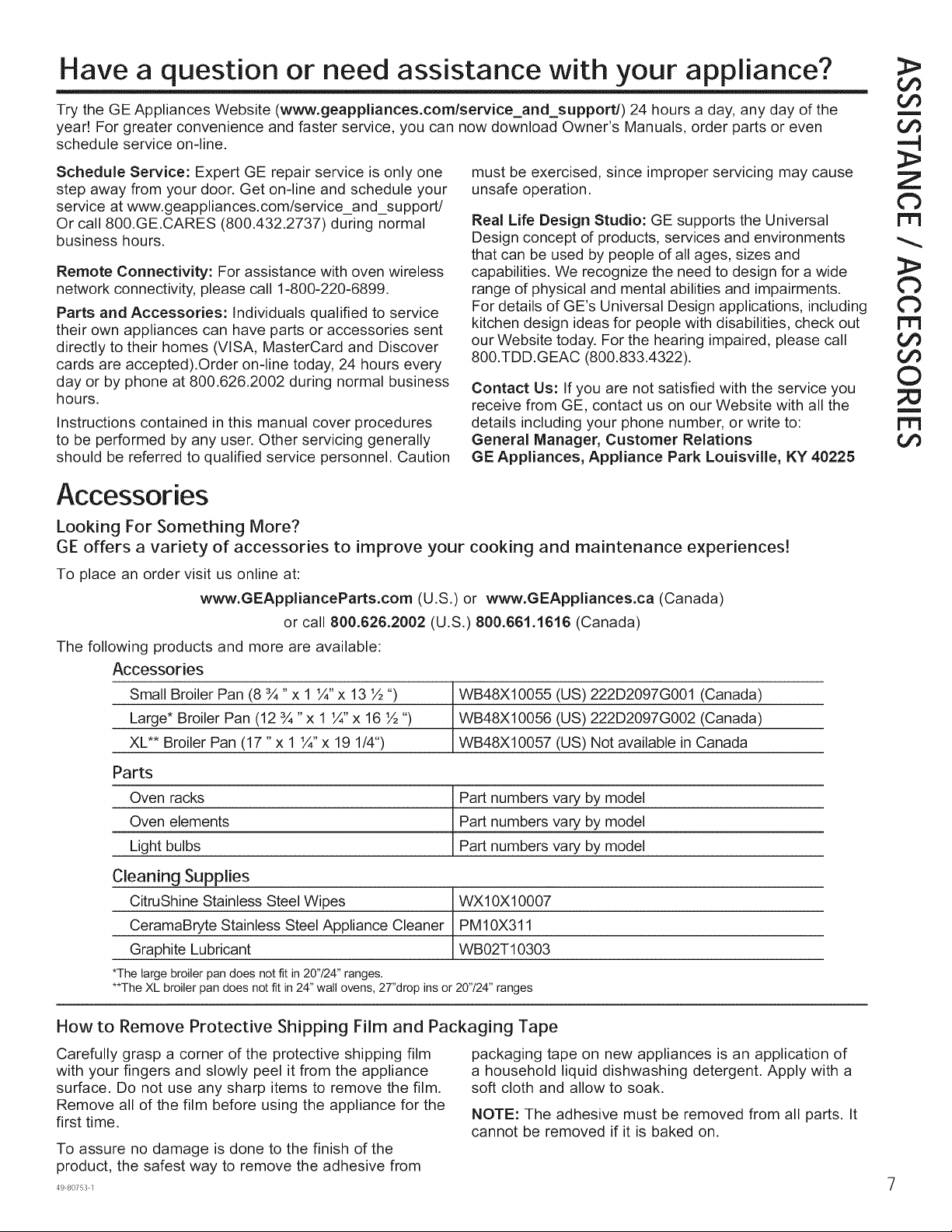
Accessories
Looking For Something More?
GE offers a variety of accessories to improve your cooking and maintenance experiences!
To place an order visit us online at:
www.GEApplianceParts.com (U.S.) or www.GEAppliances.ca (Canada)
or call 800.626.2002 (U.S.) 800.661.1616 (Canada)
The following products and more are available:
Accessories
Small Broiler Pan (8 ¾" x 1 1/4"x 13 ½ ")
Large* Broiler Pan (12 ¾ "x 1 1A,x 16 ½ ")
XL** Broiler Pan (17 "x 1 1/4"x 19 1/4")
Parts
Oven racks
Oven elements
Light bulbs
Cleaning Supplies
CitruShine Stainless Steel Wipes
CeramaBryte Stainless Steel Appliance Cleaner
Graphite Lubricant
*The large broiler pan does not fit in 20"/24" ranges.
**The XL broiler pan does not fit in 24" wall ovens, 27"drop ins or 20'724" ranges
WB48X10055 (US) 222D2097G001 (Canada)
WB48X10056 (US) 222D2097G002 (Canada)
WB48X10057 (US) Not available in Canada
Part numbers vary by model
Part numbers vary by model
Part numbers vary by model
WX10X10007
PM10X311
WB02T10303
m
Z
Cb
r-t3
Cb
Cb
r-t3
©
m
r-t3
How to Remove Protective Shipping Film and Packaging Tape
Carefully grasp a corner of the protective shipping film
with your fingers and slowly peel it from the appliance
surface. Do not use any sharp items to remove the film.
Remove all of the film before using the appliance for the
first time.
To assure no damage is done to the finish of the
product, the safest way to remove the adhesive from
packaging tape on new appliances is an application of
a household liquid dishwashing detergent. Apply with a
soft cloth and allow to soak.
NOTE: The adhesive must be removed from all parts. It
cannot be removed if it is baked on.
49 80753 1
CO
O
4---J
c-
O
LP
c-
Q
>
O
z
Q
c-
OO
_,J
©
_J
-1"
p-
©
Z
m
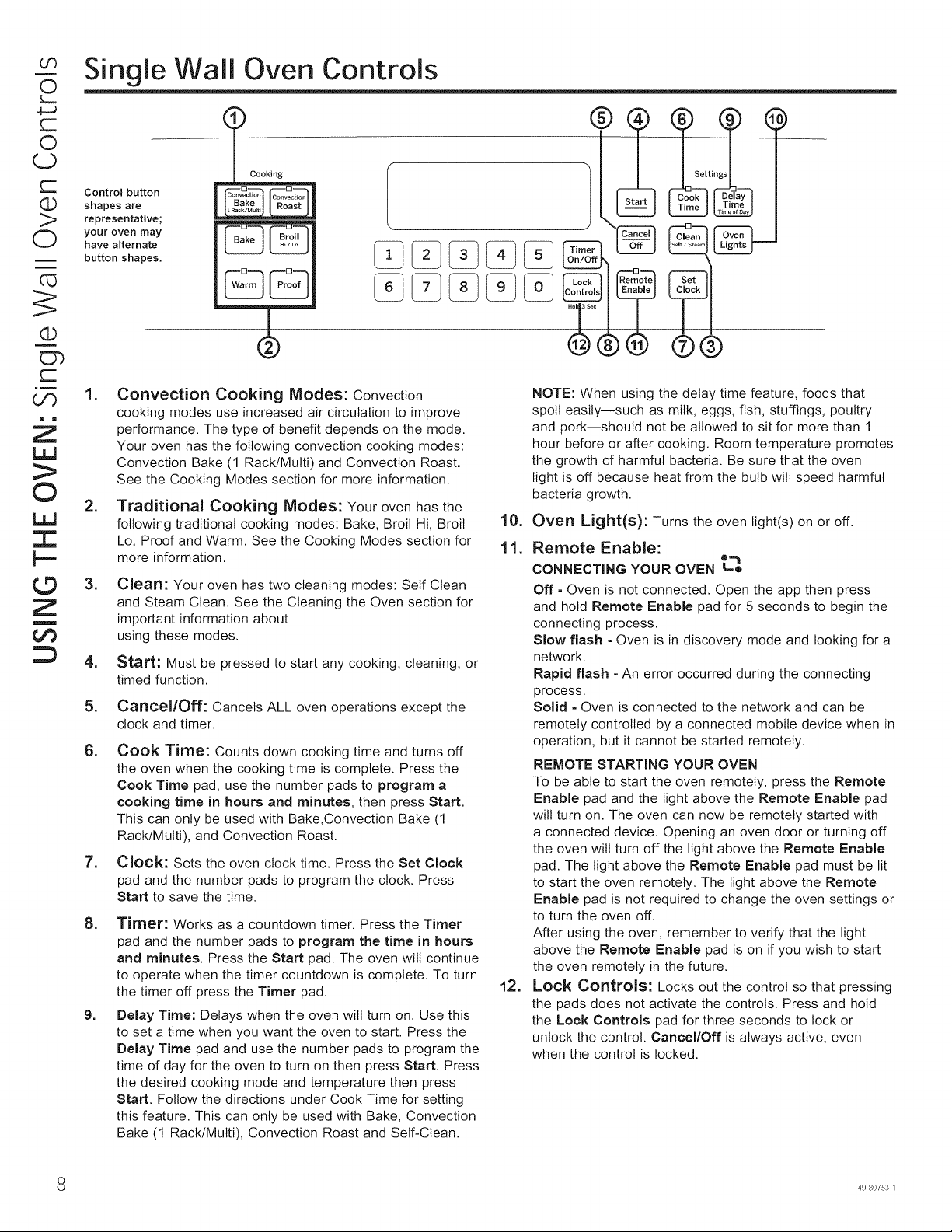
Single Wall Oven Controls
Control button
shapes are
representative;
your oven may
have alternate
button shapes,
t Cooking
Convection Convection
Set
®C
,
,
,
,
5.
6.
,
,
9.
Convection Cooking Modes: Convection
cooking modes use increased air circulation to improve
performance. The type of benefit depends on the mode.
Your oven has the following convection cooking modes:
Convection Bake (1 Rack/Multi) and Convection Roast.
See the Cooking Modes section for more information.
Traditional Cooking Modes: Your oven has the
following traditional cooking modes: Bake, Broil Hi, Broil
Lo, Proof and Warm. See the Cooking Modes section for
more information.
Clean: Your oven has two cleaning modes: Self Clean
and Steam Clean. See the Cleaning the Oven section for
important information about
using these modes.
Start: Must be pressed to start any cooking, cleaning, or
timed function.
Cancel/Off: Cancels ALL oven operations except the
clock and timer.
Cook Time: Counts down cooking time and turns off
the oven when the cooking time is complete. Press the
Cook Time pad, use the number pads to program a
cooking time in hours and minutes, then press Start.
This can only be used with Bake,Convection Bake (1
Rack/Multi), and Convection Roast.
Clock: Sets the oven clock time. Press the Set Clock
pad and the number pads to program the clock. Press
Start to save the time.
Timer: Works as a countdown timer. Press the Timer
pad and the number pads to program the time in hours
and minutes. Press the Start pad. The oven will continue
to operate when the timer countdown is complete. To turn
the timer off press the Timer pad.
Delay Time: Delays when the oven will turn on. Use this
to set a time when you want the oven to start. Press the
Delay Time pad and use the number pads to program the
time of day for the oven to turn on then press Start. Press
the desired cooking mode and temperature then press
Start. Follow the directions under Cook Time for setting
this feature. This can only be used with Bake, Convection
Bake (1 Rack/Multi), Convection Roast and Self-Clean.
10.
11.
12.
NOTE: When using the delay time feature, foods that
spoil easily--such as milk, eggs, fish, stuffings, poultry
and pork--should not be allowed to sit for more than 1
hour before or after cooking. Room temperature promotes
the growth of harmful bacteria. Be sure that the oven
bight is off because heat from the bulb wilt speed harmful
bacteria growth.
Oven Light(s): Turns the oven bight(s) on or off.
Remote Enable:
CONNECTING YOUR OVEN _,'_o
Off - Oven is not connected. Open the app then press
and hold Remote Enable pad for 5 seconds to begin the
connecting process.
Slow flash - Oven is in discovery mode and looking for a
network.
Rapid flash - An error occurred during the connecting
process.
Solid - Oven is connected to the network and can be
remotely controlled by a connected mobile device when in
operation, but it cannot be started remotely.
REMOTE STARTING YOUR OVEN
To be able to start the oven remotely, press the Remote
Enable pad and the light above the Remote Enable pad
will turn on. The oven can now be remotely started with
a connected device. Opening an oven door or turning off
the oven will turn off the light above the Remote Enable
pad. The light above the Remote Enable pad must be lit
to start the oven remotely. The light above the Remote
Enable pad is not required to change the oven settings or
to turn the oven off.
After using the oven, remember to verify that the light
above the Remote Enable pad is on if you wish to start
the oven remotely in the future.
Lock ControJ$: Locks out the control so that pressing
the pads does not activate the controls. Press and hold
the Lock Controls pad for three seconds to lock or
unlock the control. Cancel/Off is always active, even
when the control is locked.
8 49 80753 1
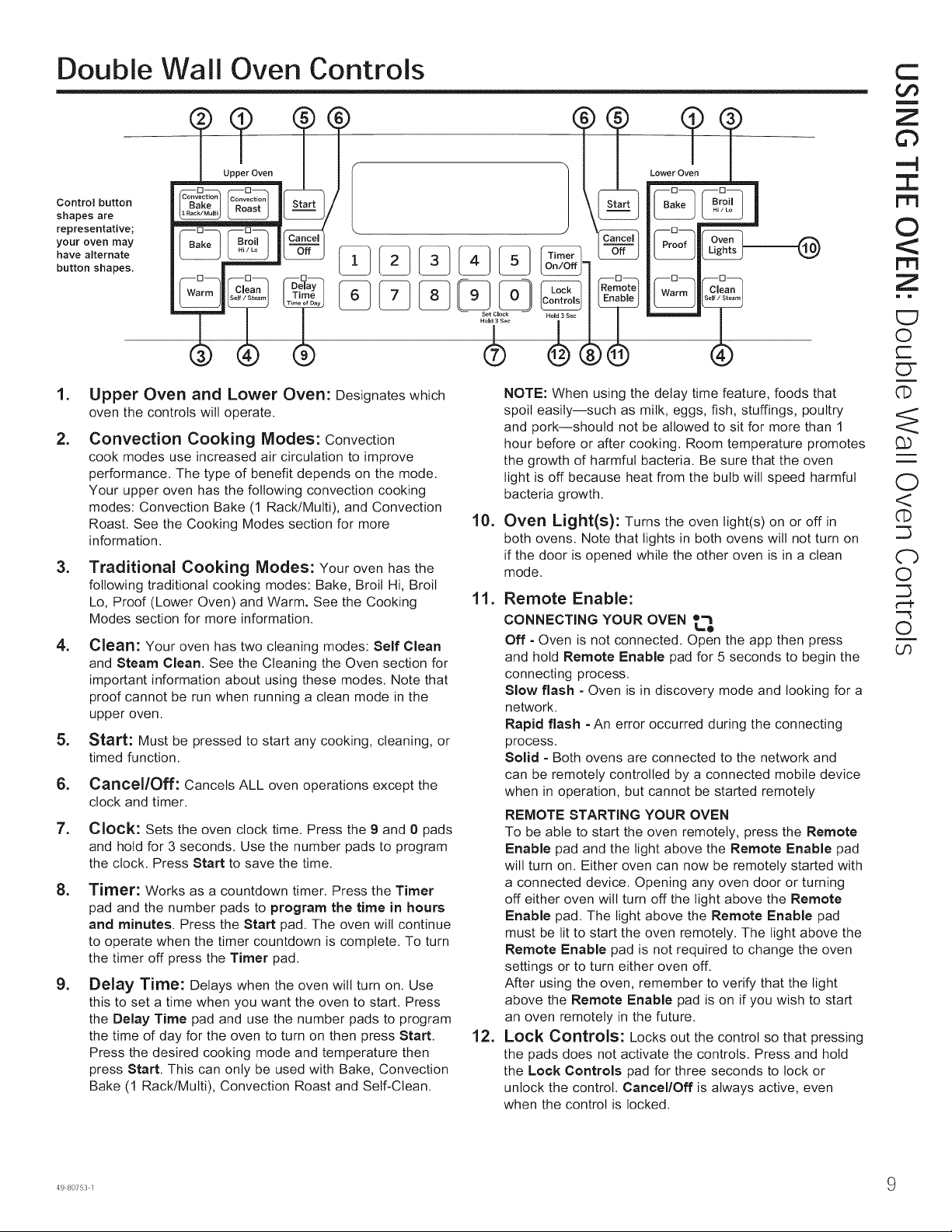
Double Wall Oven Controls
Control button
shapes are
representative;
your oven may
have alternate
button shapes.
Lower Oven
Warm Clean
I,
2.
,
,
,
6.
7.
,
,
Upper Oven and Lower Oven: Designates which
oven the controls will operate.
Convection Cooking Modes: Convection
cook modes use increased air circulation to improve
performance. The type of benefit depends on the mode.
Your upper oven has the following convection cooking
modes: Convection Bake (1 Rack/Multi), and Convection
Roast. See the Cooking Modes section for more
information.
Traditional Cooking Modes: Your oven has the
following traditional cooking modes: Bake, Broil Hi, Broil
Lo, Proof (Lower Oven) and Warm. See the Cooking
Modes section for more information.
Clean: Your oven has two cleaning modes: Self Clean
and Steam Clean. See the Cleaning the Oven section for
important information about using these modes. Note that
proof cannot be run when running a clean mode in the
upper oven.
Start: Must be pressed to start any cooking, cleaning, or
timed function.
Cancel/Off: Cancels ALL oven operations except the
clock and timer.
Clock: Sets the oven clock time. Press the 9 and 0 pads
and hold for 3 seconds. Use the number pads to program
the clock. Press Start to save the time.
Timer: Works as a countdown timer. Press the Timer
pad and the number pads to program the time in hours
and minutes. Press the Start pad. The oven will continue
to operate when the timer countdown is complete. To turn
the timer off press the Timer pad.
Delay Time: Delays when the oven will turn on. Use
this to set a time when you want the oven to start. Press
the Delay Time pad and use the number pads to program
the time of day for the oven to turn on then press Start.
Press the desired cooking mode and temperature then
press Start. This can only be used with Bake, Convection
Bake (1 Rack/Multi), Convection Roast and Self-Clean.
10.
NOTE: When using the delay time feature, foods that
spoil easily--such as milk, eggs, fish, stuffings, poultry
and pork--should not be allowed to sit for more than 1
hour before or after cooking. Room temperature promotes
the growth of harmful bacteria. Be sure that the oven
light is off because heat from the bulb will speed harmful
bacteria growth.
Oven Light(s): Turns the oven light(s) on or off in
both ovens. Note that lights in both ovens will not turn on
if the door is opened while the other oven is in a clean
mode.
11. Remote Enable:
CONNECTING YOUR OVEN t='_o
Off = Oven is not connected. Open the app then press
and hold Remote Enable pad for 5 seconds to begin the
connecting process.
Slow flash - Oven is in discovery mode and looking for a
network.
Rapid flash - An error occurred during the connecting
process.
Solid - Both ovens are connected to the network and
can be remotely controlled by a connected mobile device
when in operation, but cannot be started remotely
REMOTE STARTING YOUR OVEN
To be able to start the oven remotely, press the Remote
Enable pad and the light above the Remote Enable pad
will turn on. Either oven can now be remotely started with
a connected device. Opening any oven door or turning
off either oven will turn off the light above the Remote
Enable pad. The light above the Remote Enable pad
must be lit to start the oven remotely. The light above the
Remote Enable pad is not required to change the oven
settings or to turn either oven off.
After using the oven, remember to verify that the light
above the Remote Enable pad is on if you wish to start
an oven remotely in the future.
12. Lock Controls: Locks out the control so that pressing
the pads does not activate the controls. Press and hold
the Lock Controls pad for three seconds to lock or
unlock the control. Cancel/Off is always active, even
when the control is locked.
C
Co
m
Z
6"3
-4
Z
©
Z
= m
E7
O
r=
ET
i
q)
££
i
i
O
<
q)
Cb
0
¢--P
-"3
O
i
Ch
49 80753 1 9
Ch
(3.)
(D
LJ_
m
LP
(D
¢b
Or)
©
I
©
Z
m
Special Features
There are several different special features on your wall oven. To change the settings of these special features,
press the Bake and Broil Hi/Lo pads at the same time and hold for three seconds. "SF" will appear in the display.
Select the feature you want to change. When the change has been made, press the Start key to save the change
and return to the time of day. Press the Cancel/Off pad to exit Special Features without saving setting changes.
Adjust the Oven Temperature
This feature allows the oven baking and convection
baking temperature to be adjusted up to 35°F hotter
or down to 35°F cooler. Use this feature if you believe
your oven temperature is too hot or too cold and wish
to change it. For double oven models, the upper and
lower ovens are adjusted separately. This adjustment
affects Bake, and Convection Bake (1 Rack/Multi)
modes. No other cooking modes are affected.
Press the Bake and Broil Hi/Lo pads at the same
time and hold for three seconds until "SF" appears in
the display. Press the Bake pad to select the oven to
be adjusted. Press the Bake pad again to enter the
temperature adjustment mode. A number between 35
and - 35 will display. Use the number pads to set the
desired temperature adjustment and use the Bake pad
to change between negative and positive.
Press the Start pad to save the temperature adjustment.
End of Timer Signals
This is the tone that signals the end of a timer. The tone
can be continuous (Con blEEP) or one repeating beep
(bEEP). A continuous setting will continue to sound a tone
until a button on the control is pressed. Press the Bake
and Broil Hi/Lo pads at the same time and hold for
three seconds until "SF" appears in the display. Press
the Broil Hi/Lo pad to view the current setting and then to
change the setting.
Fahrenheit or Celsius Temperature Display
The oven control is set to use Fahrenheit temperatures
(F), but you can change it to use Celsius temperatures
(C). Press the Bake and Broil Hi/Lo pads at the same
time and hold for three seconds until "SF" appears in
the display. Press the number 6 and 8 pads at the same
time to view the current setting, press again to change
the setting.
Clock Display
This feature specifies how the time of day will be
displayed or if no time of day will be displayed. You can
select a standard 12-hour clock (12 H), 24-hour military
time display (24 H), or for no clock displayed (oFF).
Press the Bake and Broil Hi/Lo pads at the same time
and hold for three seconds until "SF" appears in the
display. Press the Clock pad on single wall ovens or
0 and 9 pads at the same time for double wall ovens
to view the current setting, press again to change the
setting.
Auto Recipe Conversion
When using Convection Bake 1 Rack or Convection Bake
Multi Rack cooking options, Auto Recipe Conversion will
automatically convert the regular baking temperatures
entered to convection bake cooking temperatures
when turned on. Note that this option does not convert
convection bake cooking times, it only converts
temperatures. Press the Bake and Broil Hi/Lo pads
at the same time and hold for three seconds until "SF"
appears in the display. Press the Convection Bake (1
Rack/Multi) pad to view the conversion setting, press
again to toggle between On (Con On) and Off (Con oFF).
Sound Volume
This feature allows the oven tone volume to be adjusted
between high (HI bEEP HI), medium (Std bEEP Std),
low (Lo bEEP Lo) and off (oFF bEEP oFF). Press the
Bake and Broil Hi/Lo pads at the same time and hold
for three seconds until "SF" appears in the display. Press
the number 1 and 5 pads at the same time to view the
current setting or to change the setting. The control will
sound the oven tone at the new volume level each time
the sound level is changed.
_0 49 80753 1
12-hour Auto Shut-Off and Sabbath (SAbbAtH)
12-hour auto shut-off turns off the oven after 12 hours of continuous operations. Options for this feature are "12
Shdn", "no Shdn" and "SAbbAtH". Press the Bake and Broil Hi/Lo pads at the same time and hold for three seconds
until "SF" appears in the display. Press the Delay Time pad to view the current setting and then to change the
setting. Sabbath mode disables the oven lights, all sounds, convection, broil, warm, proof, and all time functions.
Sabbath mode can only be used with Bake. This feature conforms to the Star-K Jewish Sabbath requirements.
NOTE" If a power outage occurs while in Sabbath Mode, the unit will return to Sabbath Mode when power is restored.
Enter the Sabbath Mode
Press Bake and Broil Hi/Lo pads at the same time and
hold for three seconds. "SF" will appear in the display.
Press the Delay Time pad until "SAbbAtH" appears on
the display, then press Start. The ] icon will appear in
the display to signify that the unit is in Sabbath Mode.
The clock will not be displayed.
Start a Sabbath Bake
Press Bake, use the number pads to enter a temperature
between 170°F and 550°F, and press 8tart. No sound
will be given when the keys are pressed. At a random
time between 30 seconds and 1 minute, the ][ icon will
appear in the display indicating the oven is running.
Adjust the Temperature During a
Sabbath Bake
Press Bake, use the number pads to enter a new
temperature between 170°F and 550°F, and press
Start. No sound will be given when the keys are
pressed. Since no feedback is given during temperature
change, an oven thermometer can be used to confirm
temperature changes.
Timed Bake During Sabbath
Start with the oven not in the Sabbath Mode. Press
Cook Time, use the number pads to enter the amount
of time to cook in hours and minutes, and press 8tart.
Follow the instructions above to enter the Sabbath
Mode. Press Bake, use the number pads to enter a
temperature between 170°F and 550°F and press 8tart.
No sound will be given when the keys are pressed.
The oven will turn off once the programmed cook time
is expired. NOTE: This feature is not available on a
double wall oven.
Exit the Sabbath Mode
To end a bake cycle, press Cancel/Off. The ][ icon will
change to the ] icon, indicating that the oven has turned off.
Press Bake and Broil Hi/Lo pads at the same time and
hold for three seconds. "SF" will appear in the display.
Press the Delay Time pad until "12 Shdn" or "no Shdn"
appears on the display, then press Start. The clock
will be displayed again indicating the oven is out of
Sabbath Mode.
C
t_o
m
Z
©
-4
I
©
Z
i m
bO
I
:::T
©
r-
3>
r-
r'-¢
©
U'3
CT
r-
r-'€
I
O
C_
¢b
Co
O-
ET
CT
(./3
3>
ET
E:T
3>
r-'€
49 80753 1 1
Ch
LP
rY
r--
Q
>
O
©
7"
©
Z
m
oO
Oven Racks
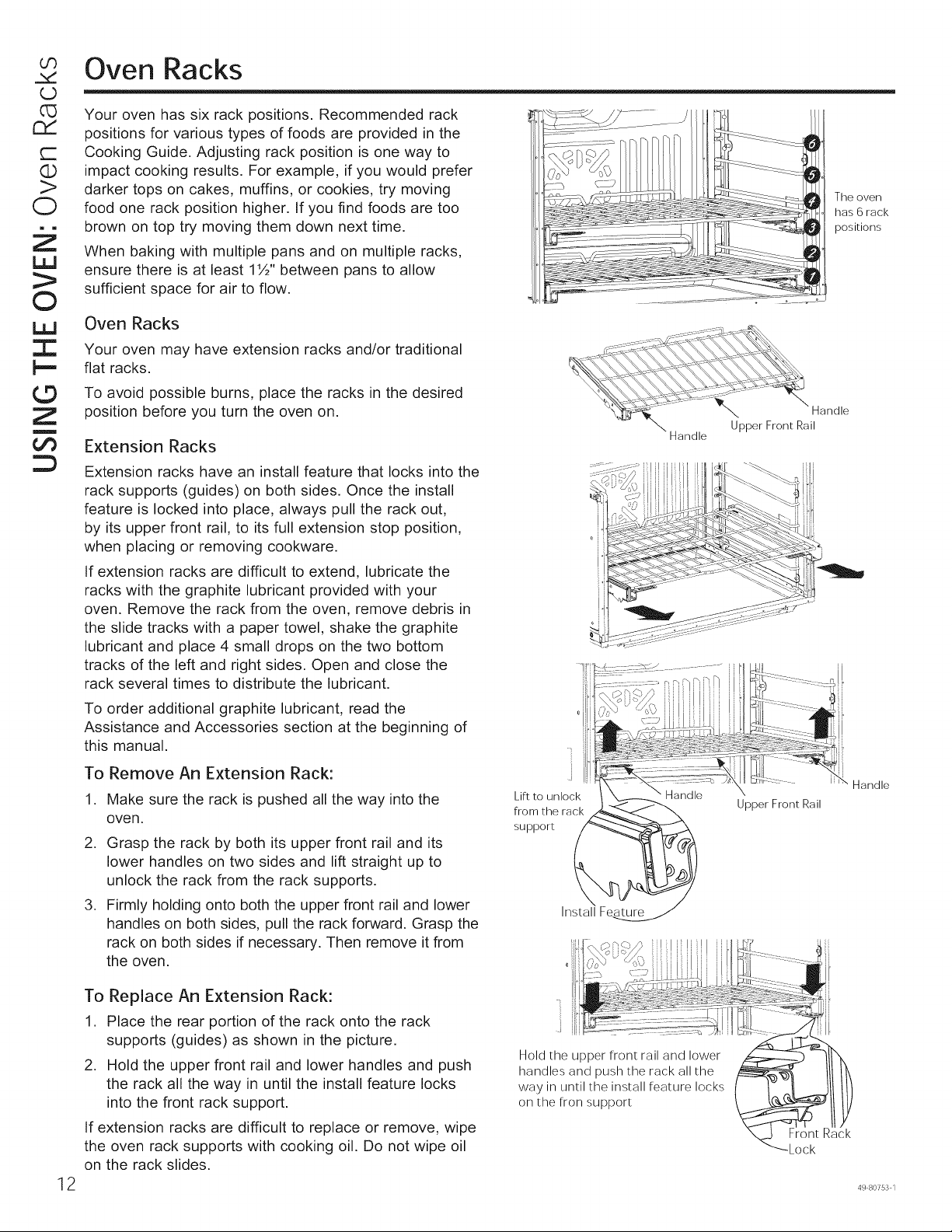
Your oven has six rack positions. Recommended rack
positions for various types of foods are provided in the
Cooking Guide. Adjusting rack position is one way to
impact cooking results. For example, if you would prefer
darker tops on cakes, muffins, or cookies, try moving
food one rack position higher. If you find foods are too
brown on top try moving them down next time.
When baking with multiple pans and on multiple racks,
ensure there is at least 1½" between pans to allow
sufficient space for air to flow.
The oven
has 6 rack
positions
Oven Racks
Your oven may have extension racks and/or traditional
flat racks.
To avoid possible burns, place the racks in the desired
position before you turn the oven on.
Extension Racks
Extension racks have an install feature that locks into the
rack supports (guides) on both sides. Once the install
feature is locked into place, always pull the rack out,
by its upper front rail, to its full extension stop position,
when placing or removing cookware.
If extension racks are difficult to extend, lubricate the
racks with the graphite lubricant provided with your
oven. Remove the rack from the oven, remove debris in
the slide tracks with a paper towel, shake the graphite
lubricant and place 4 small drops on the two bottom
tracks of the left and right sides. Open and close the
rack several times to distribute the lubricant.
To order additional graphite lubricant, read the
Assistance and Accessories section at the beginning of
this manual.
Handle
12
To Remove An Extension Rack:
1. Make sure the rack is pushed all the way into the
oven.
2. Grasp the rack by both its upper front rail and its
lower handles on two sides and lift straight up to
unlock the rack from the rack supports.
3. Firmly holding onto both the upper front rail and lower
handles on both sides, pull the rack forward. Grasp the
rack on both sides if necessary. Then remove it from
the oven.
To Replace An Extension Rack:
1. Place the rear portion of the rack onto the rack
supports (guides) as shown in the picture.
2. Hold the upper front rail and lower handles and push
the rack all the way in until the install feature locks
into the front rack support.
If extension racks are difficult to replace or remove, wipe
the oven rack supports with cooking oil. Do not wipe oil
on the rack slides.
Lift to unlock
from the rack
support
InstallFeature
Hold the upper front rail and lower
handles and push the rack all the
way in until the install feature locks
on the fron support
Upper Front Rail
Front Rack
Lock
Handle
49 80753 1
Oven Racks (cont.)
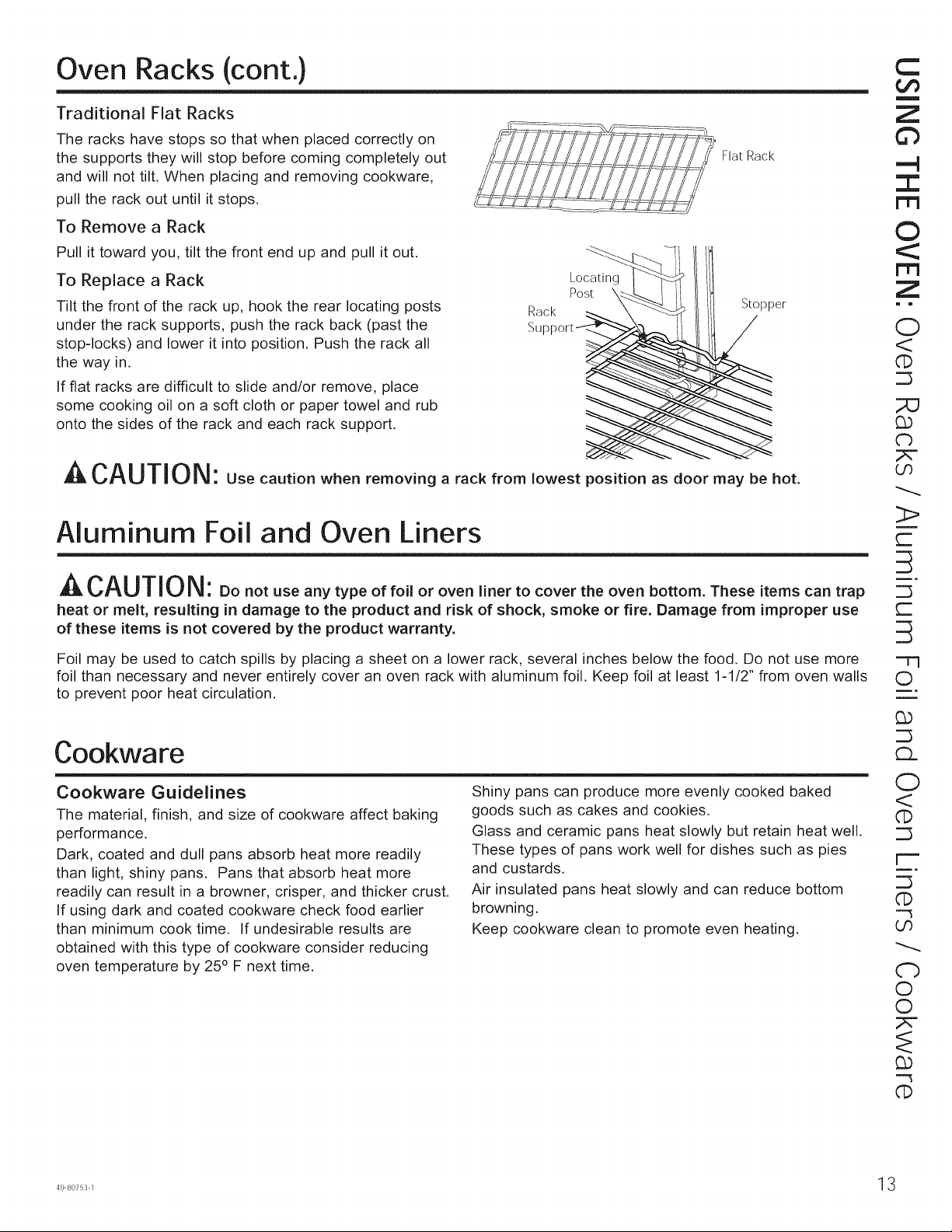
Traditional Flat Racks
The racks have stops so that when placed correctly on
the supports they will stop before coming completely out
and will not tilt. When placing and removing cookware,
pull the rack out until it stops.
Flat Rack
To Remove a Rack
Pull it toward you, tilt the front end up and pull it out.
To Replace a Rack
Tilt the front of the rack up, hook the rear locating posts
under the rack supports, push the rack back (past the
stop-locks) and lower it into position. Push the rack all
the way in.
If flat racks are difficult to slide and/or remove, place
some cooking oil on a soft cloth or paper towel and rub
onto the sides of the rack and each rack support.
Rack
Su
Locating
Post \
Stopper
A CAUTION: Use caution when removing a rack from lowest position as door may be hot.
Aluminum Foil and Oven Liners
^L,,CAUTION: Donotuseanytypeoffo,oroven,hertocovertheovenbottomTheseitemscantrap
heat or melt, resulting in damage to the product and risk of shock, smoke or fire. Damage from improper use
of these items is not covered by the product warranty.
C
¢,f)
m
Z
©
.-4
I
1-1-1
©
r,I=l
Z
i m
O
<
CD
db
OO
3>
r-
S
r--
Foil may be used to catch spills by placing a sheet on a lower rack, several inches below the food. Do not use more -Tq
foil than necessary and never entirely cover an oven rack with aluminum foil. Keep foil at least 1-1/2" from oven walls O
to prevent poor heat circulation, m.
Cookware
Cookware Guidelines
The material, finish, and size of cookware affect baking
performance.
Dark, coated and dull pans absorb heat more readily
than light, shiny pans. Pans that absorb heat more
readily can result in a browner, crisper, and thicker crust.
If using dark and coated cookware check food earlier
than minimum cook time. If undesirable results are
obtained with this type of cookware consider reducing
oven temperature by 25° F next time.
Shiny pans can produce more evenly cooked baked
goods such as cakes and cookies.
Glass and ceramic pans heat slowly but retain heat well.
These types of pans work well for dishes such as pies
and custards.
Air insulated pans heat slowly and can reduce bottom
browning.
Keep cookware clean to promote even heating.
O
<
('D
r--
q)
oo
Cb
O
©
""3
dD
OO
(13
"O
O
Z
O-)
c-
O
O
LD
l,L!
©
ill
3::
t--
©
Z
m
el)
Cooking Modes
Your new oven has a variety of cooking modes to help you get the best results. These modes are described below.
Refer to the Cooking Guide section for recommendations for specific foods. Remember, your new oven may perform
differently than the oven it is replacing.
Baking and Roasting Modes
Select a mode for baking and roasting based on the
type and quantity of food you are preparing. When
preparing baked goods such as cakes, cookies, and
pastries always preheat the oven first. Follow recipe
recommendations for food placement. If no guidelines
are provided, center food in the oven.
Bake
The bake mode is intended for single rack cooking. This
mode uses heat primarily from the lower element but also
from the upper element to cook food. To use this mode,
press the Bake pad, enter a temperature, and then press
Start. Preheating is generally recommended when using
this mode.
Convection Bake 1 Rack
The Convection Bake 1 Rack mode is intended for
single rack cooking. This mode uses heat from the
lower element and also the upper and rear elements,
along with air movement from the convection fan to
enhance evenness. Your oven is equipped with Auto
Recipe Conversion, so it is not necessary to convert the
temperature when using this mode. To use this mode
press the Convection Bake (1 Rack/Multi) pad, enter
a temperature, and then press Start. Preheating is
generally recommended when using this mode.
Convection Bake Multi Rack
The Convection Bake Multi Rack mode is intended
for baking on multiple racks at the same time. This
mode uses heat primarily from the rear element but
also heat from the upper and lower elements, along
with air movement from the convection fan to enhance
cooking evenness. Your oven is equipped with Auto
Recipe Conversion, so it is not necessary to convert the
temperature when using this mode. Baking time might
be slightly longer for multiple racks than what would be
expected for a single rack. To use this mode press the
Convection Bake (1 Rack/Multi) Multi Rack pad twice,
enter a temperature, and then press Start. Always
preheat when using this mode.
Convection Roast
The Convection Roast mode is intended for roasting
whole cuts of meat on a single rack. This mode uses heat
from the lower, upper, and rear elements along with air
movement from the convection fan to improve browning
and reduce cooking time. It is not necessary to convert
temperature. Check food earlier than the recipe suggested
time when using this mode, or use a meat probe. To use
this mode press the Convection Roast pad, enter a
temperature, and then press Start. It is not necessary to
preheat when using this mode.
Broiling Modes
Always broil with the door closed. The broil element in
this oven is very powerful. Monitor food closely while
broiling. Use caution when broiling on upper rack
positions as placing food closer to the broil element
increases smoking, spattering, and the possibility
of fats igniting. Broiling on rack position 6 is not
recommended.
Try broiling foods that you would normally grill. Adjust
rack positions to adjust the intensity of the heat to the
food. Place foods closer to the broil element when a
seared surface and rare interior is desired. Thicker foods
and foods that need to be cooked through should be
broiled on a rack position farther from the broiler or by
using Broil Lo. For best performance center food below
the broil heating element.
Broil Hi
The Broil Hi mode uses intense heat from the upper
element to sear foods. Use Broil Hi for thinner cuts of
meat and/or foods you prefer less done on the interior.
To use this mode press the Broil Hi/Lo pad once and
then press Start. It is not necessary to preheat when
using this mode.
Broil Lo
The Broil Lo mode uses less intense heat from the upper
element to cook food thoroughly while also producing
surface browning. Use Broil Lo for thicker cuts of meat
andlor foods that you would like cooked all the way
through. To use this mode press the Broil HilLo pad
twice and then press Start. It is not necessary to preheat
when using this mode.
Proof
Proof mode is designed for rising (fermenting and
proofing) bread doughs. Press the Proof pad and then
press Start. Cover dough well to prevent drying out.
Bread will rise more rapidly than at room temperature.
Note that for double wall ovens, proof can not be run
when running a clean mode in the lower oven.
Warm
Warm mode is designed to keep hot foods hot for up to
3 hours. To use this mode, press the Warm pad then
press 8tart, Cover foods that need to remain moist and
do not cover foods that should be crisp. Preheating is not
required not use warm to heat cold food other than crisping
crackers, chips or dry cereal. It is also recommended that
food not be kept warm for more than 2 hours.
4 49 80753 1
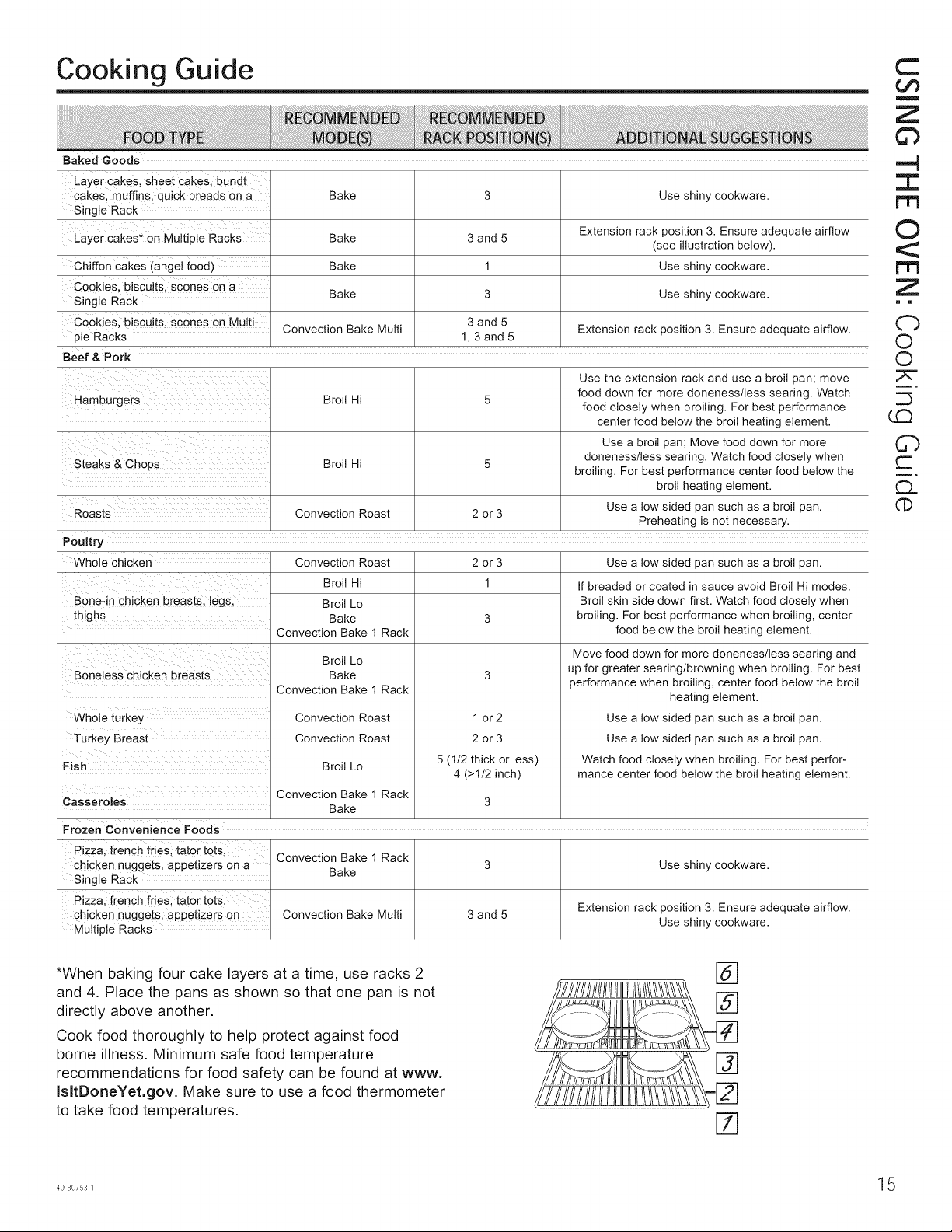
Cooking Guide
Baked Goods
Layer cakes, sheet cakes, bundt
cakes, muffins, quick breads on a
Single Rack
Layer cakes* on Multiple Racks
Chiffon cakes (angel food)
Cookies, biscuits, scones on a
Single Rack
Cookies, biscuits, scones on Multi-
ple Racks
Beef & Pork
Hamburgers
Steaks & Chops
Bake
Bake
Bake
Bake
Convection Bake Multi
Broil Hi
Broil Hi
3 and 5
1
3
3 and 5
1, 3 and 5
Use shiny cookware.
Extension rack position 3. Ensure adequate airflow
(see illustration below).
Use shiny cookware.
Use shiny cookware.
Extension rack position 3. Ensure adequate airflow.
Roasts Convection Roast 2 or 3
Preheating is not necessary.
2 or 3 Use a low sided pan such as a broil pan.
1
Use the extension rack and use a broil pan; move
food down for more doneness/less searing. Watch
food closely when broiling. For best performance
center food below the broil heating element.
Use a broil pan; Move food down for more
doneness/less searing. Watch food closely when
broiling. For best performance center food below the
broil heating element.
Use a low sided pan such as a broil pan.
Poultry
Whole chicken Convection Roast
Broil Hi
Broil Lo
thighs Bake
Convection Bake 1 Rack
Broil Lo
Boneless chicken breasts Bake
Convection Bake 1 Rack
Whole turkey
Turkey Breast
Fish
Casseroles
Convection Roast 1 or 2
Convection Roast 2 or 3
Broil Lo 5 (1/2 thick or less)
4 (>1/2 inch)
Convection Bake 1 Rack
3
Bake
Frozen Convenience Foods
If breaded or coated in sauce avoid Broil Hi modes.
Broil skin side down first. Watch food closely when
broiling. For best performance when broiling, center
food below the broil heating element.
Move food down for more doneness/less searing and
up for greater searing/browning when broiling. For best
performance when broiling, center food below the broil
heating element.
Use a low sided pan such as a broil pan.
Use a low sided pan such as a broil pan.
Watch food closely when broiling. For best perfor-
mance center food below the broil heating element.
Pizza, french fries, tater tots,
chicken nuggets, appetizers on a
Single Rack
Pizza, french fries, tater tots.
chicken nuggets, appetizers on
Multiple Racks
Convection Bake 1 Rack
Bake
Convection Bake Multi 3 and 5
Use shiny cookware.
Extension rack position 3. Ensure adequate airflow.
Use shiny cookware.
*When baking four cake layers at a time, use racks 2
and 4. Place the pans as shown so that one pan is not
directly above another.
Cook food thoroughly to help protect against food
borne illness. Minimum safe food temperature
recommendations for food safety can be found at wwwo
IsltDoneYet.gov. Make sure to use a food thermometer
to take food temperatures.
@
@
%
%
C
m
Z
©
.-4
I
©
Z
i m
Cb
O
O
C)
r--
£1.
q:)
©
Z
m
Z
LLJ
tm
z
LL!
tY
¢3
Care and Cleaning
Be sure electrical power is off and all surfaces are cool before cleaning any part of the oven.
Control Panel
It's a good idea to wipe the control panel after each use.
Clean with mild soap and water or vinegar and water,
rinse with clean water and polish dry with a soft cloth.
Do not use abrasive cleansers, strong liquid cleansers,
plastic scouring pads or oven cleaners on the control
panel--they will damage the finish.
Oven Exterior
Do not use oven cleaners, abrasive cleansers, strong
liquid cleansers, steel wool, plastic scouring pads, or
cleaning powders on the interior or exterior of the oven.
Clean with a mild soap and water or vinegar and water
solution. Rinse with clean water and dry with a soft cloth.
When cleaning surfaces, make sure that they are at
room temperature and not in direct sunlight.
If stain on the door vent trim is persistent, use a mild
abrasive cleaner and a sponge-scrubber for best results.
Spillage of marinades, fruit juices, tomato sauces and
basting liquids containing acids may cause discoloration
and should be wiped up immediately. Let hot surfaces
cool, then clean and rinse.
Stainless Steel Surfaces (on some models)
Do not use a steel wool pad; it will scratch the surface.
To clean the stainless steel surface, use warm sudsy
water or a stainless steel cleaner or polish. Always wipe
the surface in the direction of the grain. Follow the cleaner
instructions for cleaning the stainless steel surface.
To inquire about purchasing cleaning products including
stainless steel appliance cleaner or polish, read the
Assistance and Accessories section at the beginning of
this manual.
Oven Interior
The interior of your new oven can be cleaned manually
or by using the Steam Clean or Self Clean modes.
Spillage of marinades, fruit juices, tomato sauces and
basting liquids containing acids may cause discoloration
and should be wiped up immediately. Let hot surfaces
cool, then clean and rinse.
Manual Cleaning
Do not use oven cleaners, abrasive cleaners, strong
liquid cleansers, steel wool, scouring pads, or cleaning
powders on the interior of the oven. Clean with a mild
soap and water or vinegar and water solution. Rinse with
clean water and dry with a soft cloth. When cleaning
surfaces, make sure that they are at room temperature.
Steam Clean Mode
Steam clean is intended to clean small spills using water
and a lower cleaning temperature than Self-Clean.
To use the Steam Clean feature, wipe grease and soils
from the oven. Pour one cup of water into the bottom of
the oven. Close the door. Press the Clean pad twice
and then press Start. The oven door will lock. You can
not open the door during the 30 minute steam clean as
this will decrease the steam clean performance. At the
end of the steam clean cycle the door will unlock. Wipe
out any excess water and any remaining soil.
Self Clean Mode
Read Self-Cleaning Oven Safety Instructions at the
beginning of this manual before using Self Clean Mode.
IMPORTANT: The health of some birds is extremely
sensitive to the fumes given off during the self-cleaning
cycle of any range. Move birds to another well-
ventilated room.
Self clean uses very high temperatures to clean the oven
interior. The oven door will lock when using this feature.
Before operating the self clean cycle, wipe up grease and
soils from the oven. Remove all items from the oven other
than enameled (dark color) racks. Shiny or silver racks
and any cookware or other items should all be removed
from the oven before initiating a self-clean cycle. Close
the door. Press the Clean pad once and a default self-
clean time is displayed. The clean time can be changed
to any time between 3:00 and 5:00 hours by using the
number pads to enter a different time and pressing Start.
For heavily soiled ovens, the maximum 5 hour clean time
is recommended. If you wish to use the default time, press
the Start pad immediately after pressing the Clean pad.
The oven will turn off automatically when the self clean
cycle is complete. The door will stay locked until the oven
has cooled down. After the oven has cooled down wipe
any ash out of the oven.
On double oven models, you can set a clean cycle in
both ovens at the same time. The last oven set will
automatically delay its start until the end of the first oven's
clean cycle.
]6 49 80753 1
Oven Racks
The racks that were provided with your oven (dark
enameled racks, not shiny) may remain in the oven
during the self-cleaning cycle without being damaged.
To manually clean racks, use warm, soapy water. Make
sure not to wash the rack slides on an extension rack.
If racks become more difficult to remove from the oven,
put some vegetable oil on a soft cloth or paper towel and
rub onto the oven rack supports. Do not wipe the oil on
an extension rack slide.
Periodically, after several self-clean cycles, the extension
rack slides may need to be lubricated using the graphite
lubricant shipped with your wall oven. To order additional
graphite lubricant read the Assistance and Accessories
sections at the beginning of this manual.
1. Remove extension rack from the oven. See the
Extension Oven Racks section.
2. Fully extend the rack on a table or countertop.
Newspaper may be placed underneath the rack for
easy clean up.
3. If there is debris in the slide tracks, wipe it away
using a paper towel. NOTE: Any graphite lubricant
wiped away must be replaced.
C)
I"T'I
Z
i_
Z
Z
©
m i
0
©
;Z2
q_
O0
,
Shake the graphite lubricant before opening it.
Starting with left slide mechanism of the rack, place
four (4) small drops of lubricant on the two (2) bottom
tracks of the slide close to the bearing carriers.
,
6.
7.
8.
9.
Repeat for the right slide mechanism of the rack.
Open and close the rack several times to distribute
the lubricant.
Replace the cap on the lubricant and shake it again.
Turn the rack over and repeat steps 3, 4, 5 and 6.
Close the rack, turn rack right-side-up and place in
the oven. See the Extension Oven Racks section.
Repeat above steps for each rack.
NOTE: Do not spray with cooking spray or other lubricant
sprays.
r-
(b
4---J
r-
Z
(5
Z
m
Z
tm
z
LLI
tY
<1:
r,D
® Maintenance
_J
C
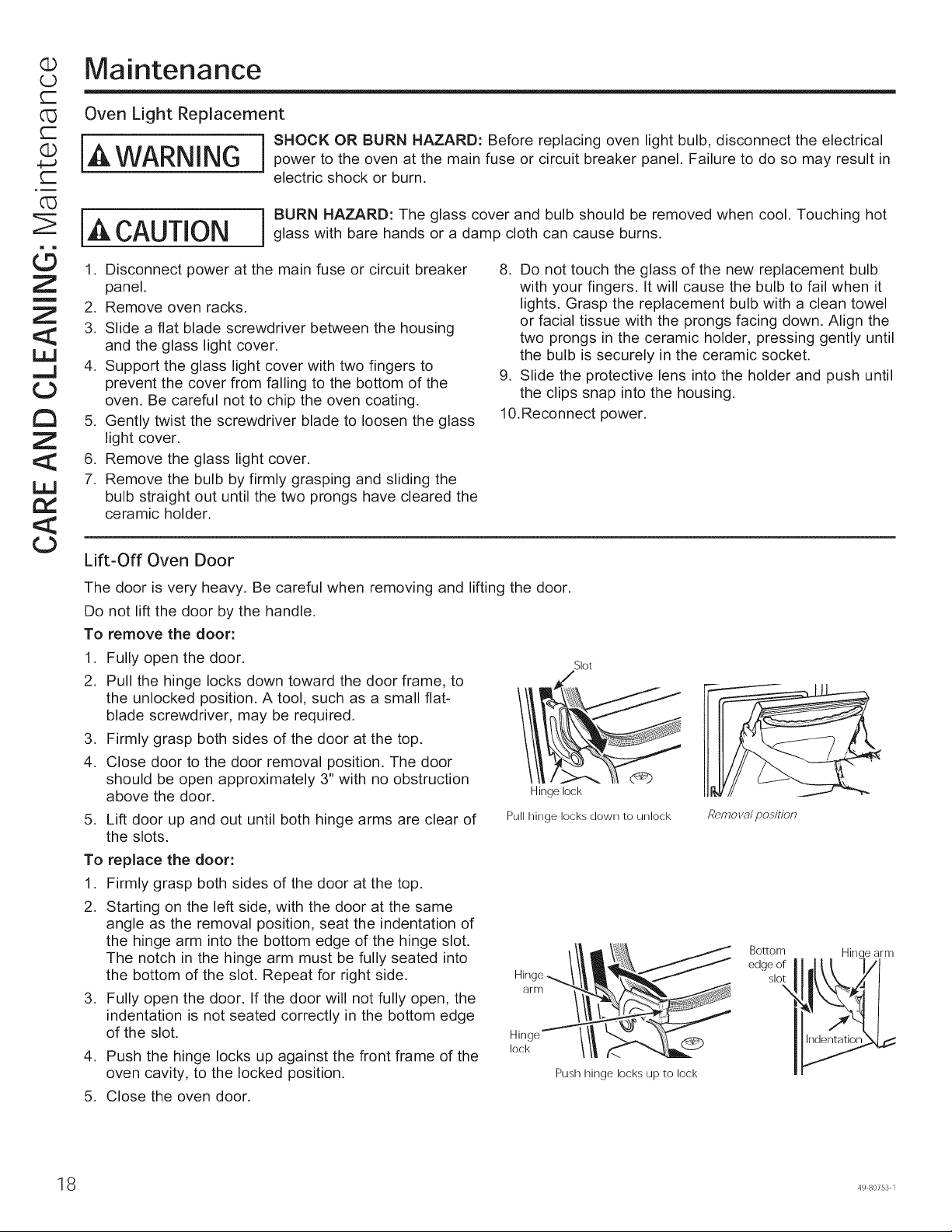
O_ Oven Light Replacement
IA ] SHOCK OR BURN HAZARD: Before replacing oven light bulb, disconnect the electrical.-- WARNING power to the oven at the main fuse or circuit breaker panel. Failure to do so may result in
electric shock or burn.
iA CAUTION BURN HAZARD: The glass cover and bulb should be removed when cool. Touching hot
glass with bare hands or a damp cloth can cause burns.
1. Disconnect power at the main fuse or circuit breaker
panel.
2. Remove oven racks.
3. Slide a flat blade screwdriver between the housing
and the glass light cover.
4. Support the glass light cover with two fingers to
prevent the cover from falling to the bottom of the
oven. Be careful not to chip the oven coating.
5. Gently twist the screwdriver blade to loosen the glass
light cover.
6. Remove the glass light cover.
7. Remove the bulb by firmly grasping and sliding the
bulb straight out until the two prongs have cleared the
ceramic holder.
8. Do not touch the glass of the new replacement bulb
with your fingers. It will cause the bulb to fail when it
lights. Grasp the replacement bulb with a clean towel
or facial tissue with the prongs facing down. Align the
two prongs in the ceramic holder, pressing gently until
the bulb is securely in the ceramic socket.
9. Slide the protective lens into the holder and push until
the clips snap into the housing.
10.Reconnect power.
Lift-Off Oven Door
The door is very heavy. Be careful when removing and lifting the door.
Do not lift the door by the handle.
To remove the door:
1. Fully open the door.
2. Pull the hinge locks down toward the door frame, to
the unlocked position. A tool, such as a small flat-
blade screwdriver, may be required.
3. Firmly grasp both sides of the door at the top.
4. Close door to the door removal position. The door
should be open approximately 3" with no obstruction
above the door.
5. Lift door up and out until both hinge arms are clear of
the slots.
To replace the door:
1. Firmly grasp both sides of the door at the top.
2. Starting on the left side, with the door at the same
angle as the removal position, seat the indentation of
the hinge arm into the bottom edge of the hinge slot.
The notch in the hinge arm must be fully seated into
the bottom of the slot. Repeat for right side.
3. Fully open the door. If the door will not fully open, the
indentation is not seated correctly in the bottom edge
of the slot.
4. Push the hinge locks up against the front frame of the
oven cavity, to the locked position.
Slot
Hinge lock
Pull hinge locks down to unlock
Hinge
arm
Hinge
lock
Push hinge locks up to lock
5. Close the oven door.
Remo va/ position
Bottom
edge of
slot
Hinc _ arm
8 49 80753 1
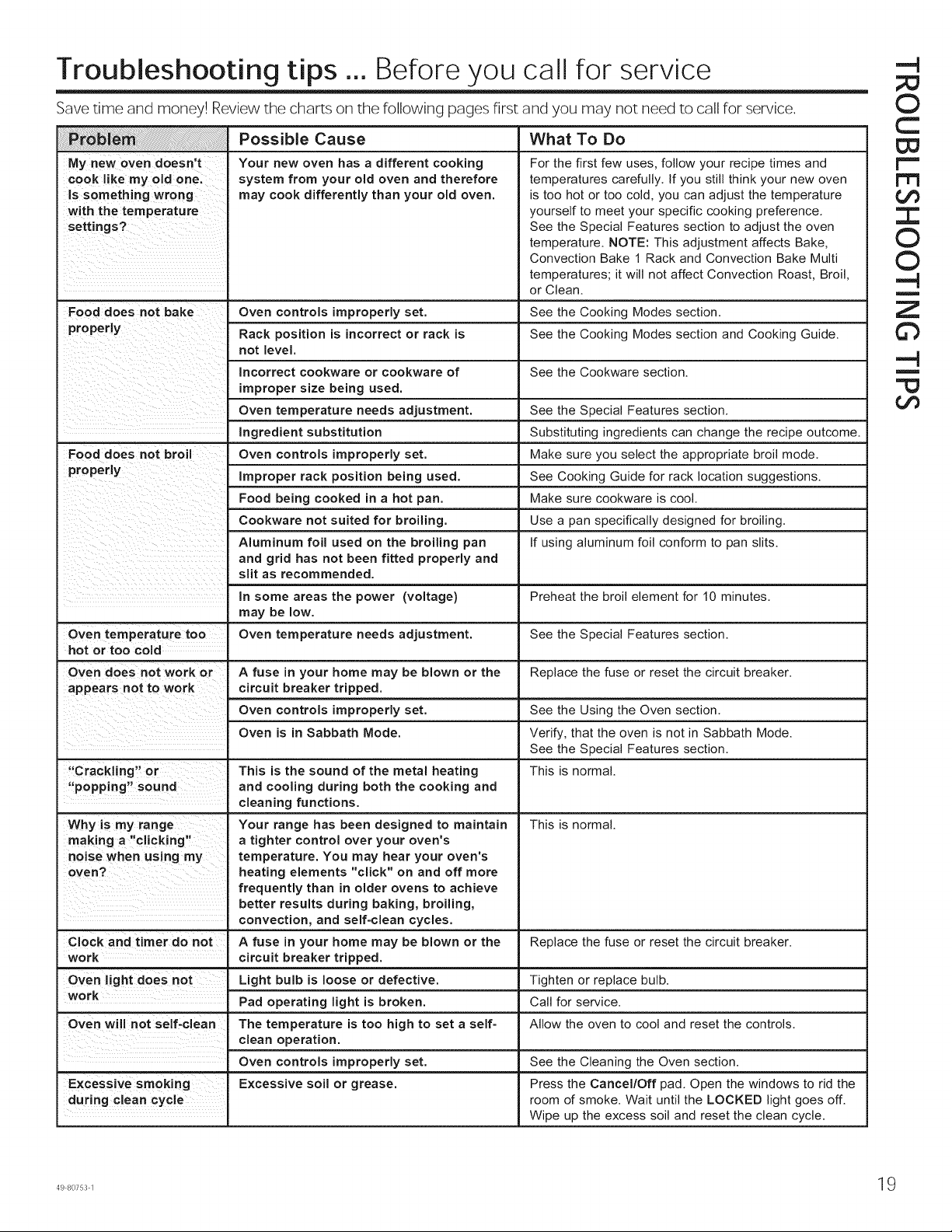
Troubleshooting tips ... Before you call for service
Save time and money! Review the charts on the following pages first and you may not need to call for service.
My new oven doesn't
cook like my old one.
Is something wrong
with the temperature
settings?
Food does not bake
Possible Cause
Your new oven has a different cooking
system from your old oven and therefore
may cook differently than your old oven.
What To Do
For the first few uses, follow your recipe times and
temperatures carefully. If you still think your new oven
is too hot or too cold, you can adjust the temperature
yourself to meet your specific cooking preference.
See the Special Features section to adjust the oven
temperature. NOTE: This adjustment affects Bake,
Convection Bake 1 Rack and Convection Bake Multi
temperatures; it will not affect Convection Roast, Broil,
or Clean.
Oven controls improperly set. See the Cooking Modes section.
Rack position is incorrect or rack is See the Cooking Modes section and Cooking Guide.
not level.
Incorrect cookware or cookware of See the Cookware section.
improper size being used.
Oven temperature needs adjustment. See the Special Features section,
Ingredient substitution Substituting ingredients can change the recipe outcome.
Food does not broil Oven controls improperly set. Make sure you select the appropriate broil mode.
Improper rack position being used. See Cooking Guide for rack location suggestions.
Food being cooked in a hot pan. Make sure cookware is cool.
Cookware not suited for broiling. Use a pan specifically designed for broiling.
Aluminum foil used on the broiling pan If using aluminum foil conform to pan slits.
and grid has not been fitted properly and
slit as recommended.
in some areas the power (voltage) Preheat the broil element for 10 minutes.
may be low.
Oven temperature too Oven temperature needs adjustment. See the Special Features section.
hot or too cold
Oven does not work or A fuse in your home may be blown or the Replace the fuse or reset the circuit breaker.
appears not to work circuit breaker tripped.
Oven controls improperly set. See the Using the Oven section.
Oven is in Sabbath Mode. Verify, that the oven is not in Sabbath Mode.
See the Special Features section.
"Crackling" or This is the sound of the metal heating This is normal.
"popp rig" sound and cooling during both the cooking and
cleaning functions.
This is normal.Why is my range
making a "clicking"
noise when using my
oven?
Clock and timer do not
work
Oven light does not
work
Oven will not self-clean
Excessive smoking
during clean cycle
Your range has been designed to maintain
a tighter control over your oven's
temperature. You may hear your oven's
heating elements "click" on and off more
frequently than in older ovens to achieve
better results during baking, broiling,
convection, and self-clean cycles.
A fuse in your home may be blown or the
circuit breaker tripped.
Light bulb is loose or defective.
Pad operating light is broken.
The temperature is too high to set a self=
clean operation.
Oven controls improperly set.
Excessive soil or grease.
Replace the fuse or reset the circuit breaker.
Tighten or replace bulb.
Call for service.
Allow the oven to cool and reset the controls.
See the Cleaning the Oven section.
Press the Cancel/Off pad. Open the windows to rid the
room of smoke. Wait until the LOCKED light goes off.
Wipe up the excess soil and reset the clean cycle.
©
C
t'="
t"1'3
¢,f)
I
©
©
-N
u
Z
©
-N
m
¢,f)
o©
m
p-
©
Z
m
p=.
©
©
"1-
o©
LLJ
...J
©
tY
p-
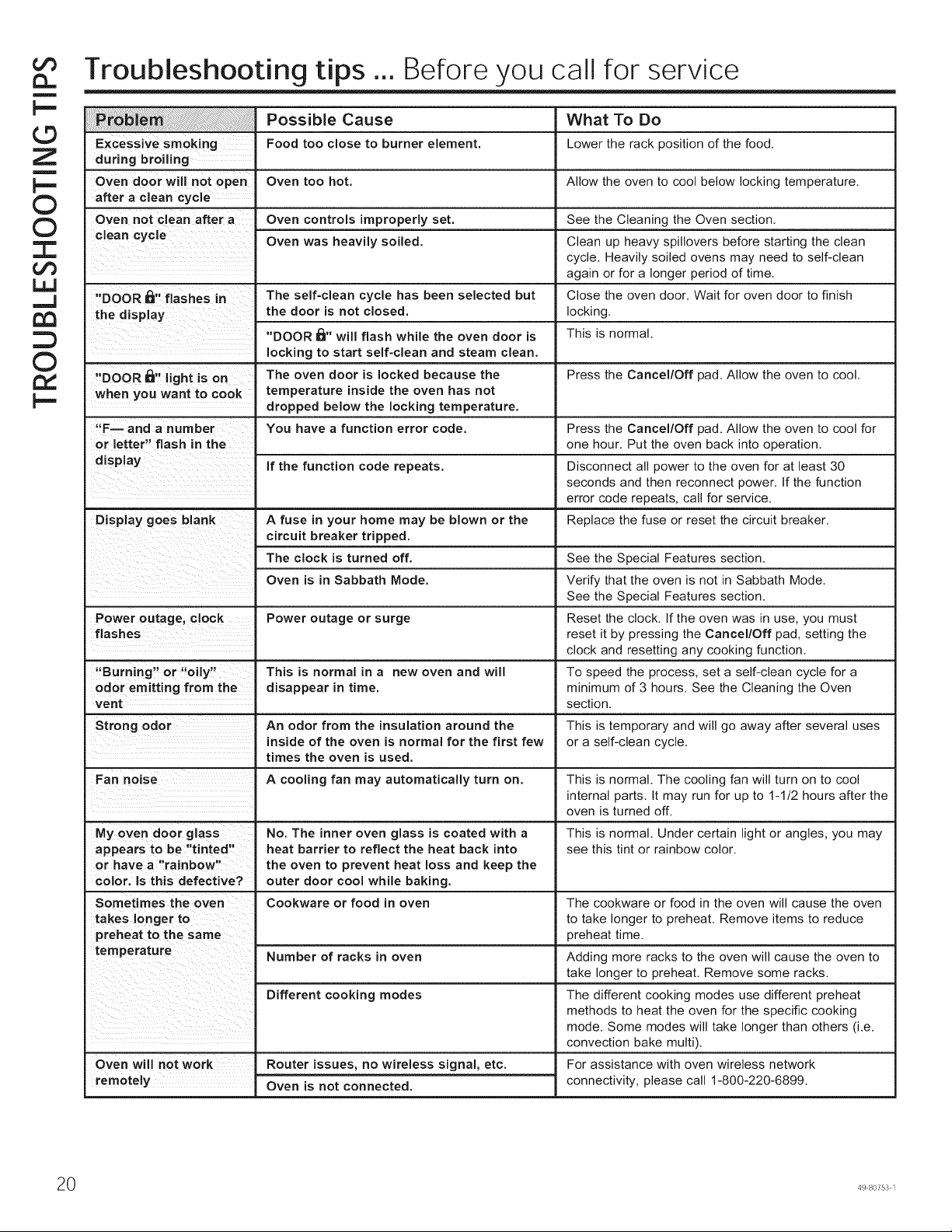
Troubleshooting tips ... Before you call for service
Excessive smoking
during broiling
Oven door w II not open
after a clean cycle
Oven not clean after a
clean cycle
"DOOR I_1" flashes in
the display
"DOOR i_r' light is on
when you want to cook
"F-- and a number
or letter" flash in the
display
D splay goes blank
Power outage, clock
flashes
"Burning" or "oily"
odor emitting from the
vent
Possible Cause
Food too close to burner element.
Oven too hot.
Oven controls improperly set.
Oven was heavily soiled.
The self-clean cycle has been selected but
the door is not closed.
"DOOR _" will flash while the oven door is
locking to start self-clean and steam clean.
The oven door is locked because the
temperature inside the oven has not
dropped below the locking temperature.
You have a function error code.
if the function code repeats.
What To Do
Lower the rack position of the food.
Allow the oven to cool below locking temperature.
See the Cleaning the Oven section.
Clean up heavy spillovers before starting the clean
cycle. Heavily soiled ovens may need to self-clean
again or for a longer period of time.
Close the oven door. Wait for oven door to finish
locking.
This is normal.
Press the Cancel/Off pad. Allow the oven to cool.
A fuse in your home may be blown or the
circuit breaker tripped.
The clock is turned off. See the Special Features section.
Oven is in Sabbath Mode. Verify that the oven is not in Sabbath Mode.
See the Special Features section.
Power outage or surge Reset the clock, tf the oven was in use, you must
reset it by pressing the Cancel/Off pad, setting the
clock and resetting any cooking function.
This is normal in a new oven and will To speed the process, set a self-clean cycle for a
disappear in time. minimum of 3 hours. See the Cleaning the Oven
Strong odor An odor from the insulation around the
' inside of the oven is normal for the first few
times the oven is used.
Fan noise A cooling fan may automatically turn on.
My oven door glass No. The inner oven glass is coated with a
appears to be "tinted" heat barrier to reflect the heat back into
or have a "rainbow" the oven to prevent heat loss and keep the
color. Is this defective? outer door cool while baking.
Sometimes the oven Cookware or food in oven
takes longer to
preheat to the same
temperature Number of racks in oven
Different cooking modes
Oven will not work Router issues, no wireless signal, etc.
remotely Oven is not connected.
Press the Cancel/Off pad. Allow the oven to cool for
one hour. Put the oven back into operation.
Disconnect all power to the oven for at least 30
seconds and then reconnect power. If the function
error code repeats, call for service.
Replace the fuse or reset the circuit breaker.
section.
This is temporary and will go away after several uses
or a self-clean cycle.
This is normal. The cooling fan will turn on to cool
internal parts. It may run for up to 1-1/2 hours after the
oven is turned off.
This is normal. Under certain light or angles, you may
see this tint or rainbow color.
The cookware or food in the oven will cause the oven
to take longer to preheat. Remove items to reduce
preheat time.
Adding more racks to the oven will cause the oven to
take longer to preheat. Remove some racks.
The different cooking modes use different preheat
methods to heat the oven for the specific cooking
mode. Some modes will take longer than others (i.e.
convection bake multi).
For assistance with oven wireless network
connectivity, please call 1-800-220-6899.
0 49 80753 1
GEAppliances.com
O
L_
O
3:
O
"O
O
o_
L_
O
¢3
r"
m
'O
um
¢3
¢3
>
r-
e
O
O
um
L_
¢3
'CD
Informacion de Seguridad ........ 2
Garantia ............................. 6
Asistencia / Accesorios ............ 7
Uso del Horno
Controles del Homo Simple de Pared ... 8
Controles del Horno Doble de Pared .... 9
Funciones Especiales .................. 10
Apagado automatico de 1 2 betas
y Mode Sabatico (SAbbAtH) .......... 11
Estantes del Homo .................... 12
Papel de Aluminio y Cobertores
del Horno ........................... 13
Utensilios ............................. 13
Modes de Coccion .................... 14
Guia de Coccion ...................... 15
Cuidado y Limpieza
Panel de Control ...................... 16
Exterior del Homo ..................... 16
Superficies de Acero Inoxidable ........ 16
Interior del Homo ..................... 16
Estantes del Homo .................... 17
Mantenimiento ........................ 18
Consejos para la
SoluciOn de Problemas ........... 19
Homo de Pared Simple PK7000 de 27"
Homo de Pared Simple CK7000 de 27"
Homo de Pared Doble PK7500 de 27"
Homo de Pared Doble CK7500 de 27"
Impreso en Estados Unidos
Escriba los mimeros de modelo y
de serie aqui:
N ° de Modelo
N ° de Serie
Los podra encontrar en una
etiqueta en el borde lateral o en el
frente del homo (inferior) detras de
la puerta del homo,
Impreso en
Papel Reciclado
49-80753-1 10-14 GE
tm
tm
INFORMACION IMPORTANTE DE SEGURIDAD
LEA TODAS LAS INSTRUCCIONES ANTES DE USAR
m
= IAADVERTENCIA]
t_ Lea todas las instrucciones antes de usar el producto. Si no se siguen estas instrucciones se podran producir
ELI
¢,_ incendios, descargas electricas, lesiones graves o la muerte.
ADVERTENCIA DE LA PROPOSICiON 65 DEL ESTADO DE CALIFORNIA
La Ley sobre Agua Potable Inocua y Tratamiento de Residuos T6xicos de California (California Safe Drinking Water
Z and Toxic Enforcement Act) solicita al Gobernador de California que publique una lista de sustancias que el estado
_O reconoce que producen c_ncer, defectos de nacimiento u otros dafios reproductivos y solicita a los empresarios que
adviertan a sus clientes sobre la posible exposici6n a tales sustancias.
< I_ ADVERTEN ClA ] Este producto contiene uno o m_s quimicos que el Estado de California entiende
t'Y que producen c_ncer, defectos en el nacimiento u otros da_os reproductivos.
C) Los hornos con limpieza autom_tica pueden ocasionar exposiciones de bajo nivel a algunas de estas sustancias,
I..L= incluyendo mon6xido de carbono, durante el ciclo de limpieza. La exposici6n puede ser minimizada si se ventila con
Z una ventana abierta o si se usa un ventilador o campana.
I ADVERTENCIAI INSTRUCCIONESGENERALESDE SEGURIDAD
[] Use este electrodomestico s61o para su prop6sito
original, como se describe en el Manual del Propietario.
[] Solicite que un instalador calificado instale su
electrodomestico y que este adecuadamente conectado
a tierra, de acuerdo con las instrucciones de instalaci6n
provistas.
[] No intente reparar o reemplazar ninguna parte del
horno, a menos que se recomiende especificamente
en este manual. Cualquier otra reparaci6n debera ser
realizada por un tecnico calificado.
[] Antes de realizar cualquier servicio tecnico, desconecte
el suministro de corriente desde el panel de distribuci6n
del hogar, retirando el fusible o desconectando el
disyuntor.
[] No deje a los nifios solos - no se debera dejar a los
nifios solos o fuera de su radio de atenci6n en el area
donde el electrodomestico se encuentre en uso. Nunca
se les debera permitir trepar, sentarse o pararse sobre
ninguna parte del electrodomestico.
[] ,&PRECAUCi0N: Nocoloque articulosde
interes para los nifios sobre los gabinetes que estan
sobre un homo - si los nifios se trepan sobre el horno
para Ilegar a estos articulos podrian sufrir lesiones
graves.
[] Use s61o mangos de ollas secas -los mangos
h0medos sobre superficies calientes pueden producir
quemaduras debido al vapor. No deje que los mangos
de las ollas toquen los elementos que estan calientes.
No use una toalla u otra tela voluminosa para
reemplazar el mango de las cacerolas.
[] Nunca use el electrodomestico para calentar o
calefaccionar la habitaci6n.
[] No toque el elemento calentador ni la superficie interior
del horno. Es posible que estas superficies esten
demasiado calientes como para quemar, aunque su
color sea oscuro. Durante y despues del uso, no toque
ni permita que telas u otros materiales inflamables
toquen cualquier area interior del homo; espere a que
haya pasado un tiempo suficiente para que se enfrien.
Otras superficies del electrodomestico se podran
calentar Io suficiente como para ocasionar lesiones.
Las superficies potencialmente calientes incluyen
la abertura de la ventilaci6n del homo, superficies
cercanas a la abertura y grietas alrededor de la puerta
del homo.
[] No caliente envases de comida que no hayan sido
abiertos. Se podria acumular presi6n y el envase
podrta explotar, ocasionando una lesi6n.
[] No use ning0n tipo de aluminio o cobertor para cubrir
el fondo del homo o cualquier parte del horno, excepto
como se describe en este manual. Los cobertores de
horno pueden atrapar el calor o derretirse, ocasionando
dafios sobre el producto y el riesgo de descargas,
humo o incendios.
[] Evite las ralladuras o impactos sobre las puertas
de vidrio o los paneles de control. Hacer esto podra
producir la rotura de vidrios. No cocine un producto con
un vidrio roto. Es posible que se produzcan descargas,
incendios o cortes.
[] Cocine carnes y carnes de ave en forma completa
-la came pot Io menos a una temperatura interna
de 1600 F y la carne de ave por Io menos a una
temperatura interna de 1800 F. Normalmente la cocci6n
a estas temperaturas es una protecci6n contra las
enfermedades transmitidas por la comida.
GUARDE ESTASINSTRUCCIONES
49 80753 1
i'_ i MANTENGA LOSMATERIALESINFLAMABLESALEJADOSDE LA COCINA
ADVERTENCIA estooose cumple,se podran sufrir(esionespersona(esgraveso incendios.
[] No guarde ni use materiales inflamables en o cerca
de un horno, incluyendo papel, pl_stico, mangos de
ollas, trapos, cobertores de pared, cortinas, pados y
gasolina u otros vapores y liquidos inflamables.
[] Nunca use prendas holgadas o que cuelguen
mientras usa el electrodom6stico. Estas prendas se
iAADVERTENCIAi
podr_n incendiar si entran en contacto con superficies
calientes, ocasionando quemaduras graves.
[] No permita que la grasa de la cocci6n u otros
materiales inflamables se acumulen en o cerca del
horno. La grasa que est_ en o cerca del homo se
podr_ incendiar.
EN CASO DE INCENDIO, SIGA LOS SIGUIENTES PASOS PARA
EVITAR LESIONES O LA PROPAGACION DEL FUEGO
[]
[]
No use agua sobre el fuego de la grasa. Nunca tome
una olla que se est6 incendiando.
Si hay un incend(o en el homo durante el horneado,
ahogue el fuego cerrando la puerta del homo y
apagando el mismo o usando un quimico seco
multiprop6sito o un extintor de incendio con espuma.
En caso de que haya fuego en el homo durante el ciclo
de limpieza autom_tica, apague el homo y espere a que
el fuego se extinga. No fuerce la puerta para abrirla.
La entrada de aire fresco sobre las temperaturas de la
limpieza autom_tica podr_ conducir a la producci6n de
llamas en el homo.
iA ADVERTENCIAi INSTRUCCIONESDE SEGURIDAD DEL HORNO
[] Mant6ngase alejado del horno al abrir la puerta del
mismo. El aire caliente o el vapor que sale puede
causar quemaduras en las manos, rostro y/u ojos.
[] Mantenga desobstruida la ventilaci6n del homo.
[] Mantenga el horno libre de acumulaci6n de grasa. La
grasa del homo se puede incendiar.
[] Coloque los estantes del horno en la ubicaci6n
deseada mientras 6ste se encuentra frio. Si es
necesario mover el estante mientras el homo est_
caliente, evite que el mango de la olla tenga contacto
con el elemento calentador en el homo.
[] AI usar las bolsas para cocinar o dorar en el homo,
siga las instrucciones del fabricante.
i,& ADVERTENCIAi
[] Es conveniente empujar hacia afuera los estantes
est&ndares hasta el tope o empujar el estante
extensible hasta la posici6n completamente abierta
para levantar comidas pesadas. Esto tambi6n es una
precauci6n contra quemaduras por tocar superficies
calientes de la puerta o las paredes del homo.
[] No deje productos tales como papel, utensilios de
cocina ni comida en el horno cuando 6ste no se
encuentre en uso. Los arficulos guardados en el
horno se pueden incendiar.
[] Nunca coloque los utensilios de cocina, piedras para
pizza u horneado o cualquier otro tipo de aluminio o
cobertor en la base del homo. Estos items pueden
atrapar el calor o derretirse, ocasionando da_os sobre
el producto y el riesgo de descargas, humo o incendios.
INSTRUCCIONES DE SEGURIDAD DEL HORNO CON LIMPIEZA AUTOMATICA
La funci6n de limpieza autom_tica usa el homo en temperaturas Io suficientemente altas como para consumir la
suciedad de comida que haya dentro del homo. Para un funcionamiento seguro, siga estas instrucciones.
[] No toque las superficies del homo durante el ciclo de
limpieza autom_tica. Mantenga a los ni_os alejados
del homo durante la limpieza autom_tica. Si no
se siguen estas instrucciones, se podr_n producir
quemaduras.
[] Antes de usar el ciclo de limpieza autom_tica del
homo, retire los estantes de color gris brillante (en
algunos modelos), la sonda, cualquier papel de
aluminio, y cualquier bandeja para asar, rejilla, u otros
utensilios. $61o se pueden dejar dentro del homo los
estantes para homo cubiertos de porcelana.
[] Antes de utilizar el ciclo de limpieza autom_tica,
limpie la grasa y restos de comida que haya en el
homo. Una cantidad excesiva de grasa se puede
GUARDE ESTAS
incendiar, Io cual puede producir dados con humo en
su hogar.
[] Si el modo de limpieza autom&tica funciona de
forma incorrecta, apague el homo y desconecte el
suministro de corriente. Solicite el servicio de un
t6cnico calificado.
[] No limpie la junta de la puerta. La junta de la puerta
es esencial para un buen sellado. Se debe tenet
cuidado de no frotar, da_ar ni mover la junta.
[] No use limpiadores para homo. No se deber_ usar
limpiadores comerciales para homo ni revestimientos
de protecci6n para hornos de ningQn tipo en o
alrededor de cualquier parte del homo.
INSTRUCCIONES
49 80753 1
m
Z
--r'l
O
¢'b
m
O,
Z
I"T'!
I"T'!
©
C
m
¢3
tm
tm
m
tY
:D
©
ELI
I,.IJ
tm
z
'O
m
r,D
<1:
tY
O
I1
Z
m
INFORMACION IMPORTANTE DE SEGURIDAD
LEA TODAS LAS INSTRUCCIONES ANTES DE USAR
El equipo de acceso remoto instalado en este homo fue
probado y cumple con los limites establecidos para un
dispositivo digital de clase B, segQn la parte 15 de la
Normativa de la FCC. Estos limites fueron dise_ados para:
(a) brindar una protecci6n razonable contra interferencias
nocivas en una instalaci6n residencial. Este equipo
genera, usa y puede emitir energia de radiofrecuencia y,
si no se instala y utiliza de acuerdo con las instrucciones,
puede ocasionar interferencias perjudiciales en las
comunicaciones de radio. Sin embargo, no se garantiza
que no se presenten interferencias en una instalaci6n en
particular. Si el equipo provoca interferencias perjudiciales
para la recepci6n de radio o televisi6n, Io cual puede
comprobar encendiendo y apagando el equipo, se aconseja
al usuario que intente corregir la interferencia con una de
las siguientes medidas:
[] Reoriente o reubique la antena receptora.
[] Aumente la separaci6n entre el equipo y el receptor.
[] Conecte el equipo a un tomacorriente de un circuito
diferente del tomacorriente al que se encuentra
conectado el receptor.
[] Para solicitar ayuda, consulte con el proveedor minorista
o a un t6cnico experimentado de radio/TV.
(b) tolerar cualquier interferencia recibida, incluyendo las
interferencias que puedan provocar un funcionamiento no
deseado del dispositivo.
Observe que todos los cambios o modificaciones sobre
el dispositivo de comunicaci6n inal_mbrico instalado en
este homo que no est6n expresamente aprobados pot
el fabricante podrian anular la autoridad del usuario para
operar el equipamiento.
49 80753 1

Notas
49 80753 1 5
Z
tY
©
o e)
oo:_
o o
>_
tu
q3
c
n
c
o- o
m
®'E
o _d
iGracias! ... por su compra de un electrodomestico de la Marca GE
Registre su Electrodomestico: i Registre su etectrodomestico nuevo a traves de Internet, segQn su conveniencia!
www.geappliances.com/service_and_support/register/
Un registro puntual de su producto permitira una mejor comunicaci6n y un servicio mas puntual de acuerdo con los terminos de su
garantia, en caso de surgir la necesidad. Tambien puede enviar una carta en la tarjeta de inscripci6n pre-impresa que se incluye con
et material embalado.
Garantia de la Cocina Electrica de GE
GEAppliances.com
Todo et servicio de garantia es provisto pot nuestros Centros de Servicio de Fabricaci6n, o un tecnico autorizado de Servicio al
Cliente (Customer Care®). Para programar una visita det servicio tecnico a traves de Intemet, visitenos en www.geappliances.
com/service_and_support/, o flame a1800.GE.CARES (800.432.2737). Cuando ltame para solicitar et servicio, tenga los nQmeros
de serie y de modeto disponibles.
Para realizar et servicio tecnico de su etectrodomestico se podra requerir et uso de datos det puerto de abordaje para su
diagn6stico. Esto da al tecnico det servicio de fabrica de GE ta habitidad de diagnosticar de forma rapida cualquier problema con
su etectrodomestico, y de ayudar a GE a mejorar sus productos al brindarle a GE ta informaci6n sobre su etectrodomestico. Si no
desea que los datos de su etectrodomestico sean enviados a GE, solicitamos que le indique a su tecnico no entregar los datos a
GE en et momento det servicio.
Durante et periodo de un afio desde la fecha original de compra. GE le brindara cualquier parte de la cocina que falle debido a
un defecto en los materiales o la fabricaci6n. Durante esta garantia timitada de un afio, GE tambien proveera, sin costo, todo et
trabajo y et servicio en et hogar retacionado con et reemplazo de la parte que presente defectos.
Que no cubrira GE:
[]
m
[]
m
[]
Viajes det tecnico det servicio a su hogar para ensefiarte
sobre c6mo usar el producto.
Instalaci6n, entrega o mantenimiento inadecuados.
Fallas del producto en caso de abuso, mal uso, modificaci6n
o uso para prop6sitos diferentes al original o uso comercial.
Reemplazo de fusibles de la casa o reinicio de disyuntores.
Dafios ocasionados sobre el producto pot accidente,
incendio, inundaciones o catastrofes naturales.
EXCLUSION DE GARANTJAS IMPLJCITAS
[] Dafios incidentales o consecuentes causados por posibles
defectos sobre este producto.
[] Dafio causado despues de la entrega.
[] Producto no accesible para brindar et servicio requerido.
[] Solicite et servicio tecnico para reparar o reemplazar las
lamparas, excepto las lamparas LED.
Su Qnica y exctusiva alternativa es ta reparaci6n del producto, como se indica en la Garantia Limitada. Las garantias implicitas,
inctuyendo garantias implicitas de comerciabitidad o conveniencia sobre un prop6sito particular, se limitan a un afio o al periodo
mas corto permitido por ta ley.
Esta garantia se extiende al comprador original y a cualquier duefio subsiguiente de productos comprados para uso hogarefio
dentro de EE.UU. Si el producto esta en un area donde no se encuentra disponible un Proveedor Autorizado det Servicio Tecnico
de GE, usted sera responsabte por et costo de un viaje o se podra requerir que traiga el producto a una ubicaci6n det Servicio
Tecnico de GE Autorizado para recibir et servicio. En Alaska, la garantia excluye et costo de envio o ltamadas det servicio a su
hogar.
Algunos estados no permiten ta exctusi6n o limitaci6n de dafios fortuitos o consecuentes. Esta garantia le da derechos legales
especificos yes posibte que tenga otros derechos legales que varian entre un estado y otto. Para conocer cuales son sus
derechos legales, consulte a la oficina de asuntos det consumidor local o estatal o al Fiscal de su estado.
Garante: General Electric Company. Louisville, KY 40225
GarantJas ExtendJdas: Adquiera una garantia extendida de GE y aprenda sobre descuentos especiales que estan disponibles
mientras su garantia aQn esta vigente. La puede adquirir en cualquier momento a traves de Intemet en
www.geappliances.com/service_and_support/shop-for-extended-service-plans.htm
o tlamando a1800.626.2224 durante et horatio comercial habitual. Los Servicios para et Consumidor Hogarefio de GE aQn estaran
alli cuando su garantia caduque.
49 80753 1
/ Desea realizar una consulta o necesita ayuda con su electrodomestico?
iConsulte et Sitio Web de Electrodomesticos de GE (www.geappliances.comlservJceandsupportl) durante las 24 horas, cual-
quier dia det a_o! Para mayor conveniencia y un servicio mas rapid©, ahora puede descargar et Manual det Propietario, ordenar
piezas o inctuso programar et servicio tecnico a traves de Internet.
Servicio Programado: El servicio de reparaci6n de expertos de
GE esta a s61o un paso de su puerta. Entre a Internet y programe
su servicio en www.geappliances.com/service_and_ support! o
Ilame al 800.GE.CARES (800.432.2737) durante el horatio de
atenci6n comercial.
ConectJvJdad Remota: Para solicitar asistencia para ta
conectividad de red inalambrica det homo (para modetos con
acceso remoto), por favor comuniquese al 800-220-6899.
PJezas y AccesorJos: Aquetlas personas calificadas para
realizar et servicio tecnico sobre sus propios etectrodomesticos
podran solicitar el envio de piezas o accesorios directamente
a sus hogares (se aceptan tas tarjetas VISA; MasterCard y
Discover). Ordene a traves de Internet hoy, durante las 24
horas o en forma tetef6nica al 800.626.2002 durante et horatio
de atenci6n comercial.
Las instrucciones que figuran en este manual cubren los
procedimientos que seran realizados por cualquier usuario.
Otros servicios tecnicos generatmente deberian set
derivados a personal calificado det servicio. Se debera tenet
Accesorios
_Busca Algo Mas?
cuidado, ya que una reparaci6n indebida podra hacer que et
funcionamiento no sea seguro.
EstudJo de Dise#o de la VJda Real: GE apoya el concept©
de Dise_o Universal en product©s, servicios y ambientes que
pueden set usados pot personas de todas tas edades, tama_os
y capacidades. Reconocemos la necesidad de realizar dise_os
para una amptia gama de habitidades e incapacidades fisicas y
mentates. Para mas detaltes sobre las aplicaciones de Dise_o
Universal de GE, incluyendo ideas de dise_o de cocinas para
personas con incapacidades, visite nuestro sitio web hoy. Sobre
casos de incapacidad auditiva, comuniquese al 800.TDD.GEAC
(800.833.4322).
Contactenos: Si no se encuentra satisfecho con et servicio
que recibi6 de GE, comuniquese con nosotros a traves de
nuestro sitio web con todos los detaltes, incluyendo su nQmero
tetef6nico, o escriba a:
General Manager, Customer Relations
GE Appliances, Appliance Park Louisville, KY 40225
iGE ofrece una variedad de accesorios para mejorar sus experiencias de coccidn y mantenimiento!
Para realizar una orden, visitenos a traves de Intemet en:
www.GEApplJaneeParts.com (EE.UU.) o en www.GEApplianees.ca (Canada)
o flame al 800.626.2002 (EE.UU.) 800.661.1616 (Canada)
Estos y otros productos estan disponibles:
Accesorios
Olta para Asar Peque_a (8 3A " x 1 ¼" x 13 ½ ")
Otla para Asar Grande* (12 3A" x 1 ¼" x 16 ½ ")
Otla para Asar Extra Grande* (17 3A " x 1 ¼" x 19 ½ ")
Piezas
Estantes det homo
Etementos det homo
Lamparas de luz
Sonda
Suministros de Limpieza
Limpiadores de Acero Inoxidabte CitriShine
Limpiador de Electrodomesticos de Acero Inoxidabte CeramaBryte
Lubricante de Grafito
*La olla para asar grande no entra en cocinas de 20"/24",
**La olla XL no entra en hornos de pared de 24", empotrabtes de 27" o cocinas de 20"/24".
Como Retirar la Pelicula Protectora de Envio y la Cinta
Con cuidado tome un extremo de la peticula protectora de envio
con los dedos y lentamente retire ta misma de ta superficie det
etectrodomestico.
No utilice ningOn product© ill©so para retirar la pelicula. Retire toda
la pelicula antes de usar el electrodomestico por primera vez.
Para asegurar que no haya da_os sobre et acabado det
49 80753 1
WB48X10055 (EE.UU.) 222D2097G001 (Canada)
WB48X10056 (EE.UU.) 222D2097G002 (Canada)
WB48X10057 (EE.UU.) No disponible en Canada
Los nQmeros de pieza varian segQn et model©
Los nQmeros de pieza varian segQn et model©
Los nQmeros de pieza varian segQn et model©
Los nQmeros de pieza varian segQn el model©
WX10X10007
PM10X311
WB02T10303
de Embalaje
product©, la forma mas segura de retirar el adhesivo de la cinta
de embalaje en electrodomesticos nuevos es aplicando un
detergente liquid© hogare_o para tavar platos. Aplique con una
teta suave y deje que se seque.
NOTA: Et adhesivo debera set eliminado de todas las partes.
No se puede retirar si se hornea con este dentro.
m
"-4
Z
¢b
m
¢b
¢b
DO
©
m
©
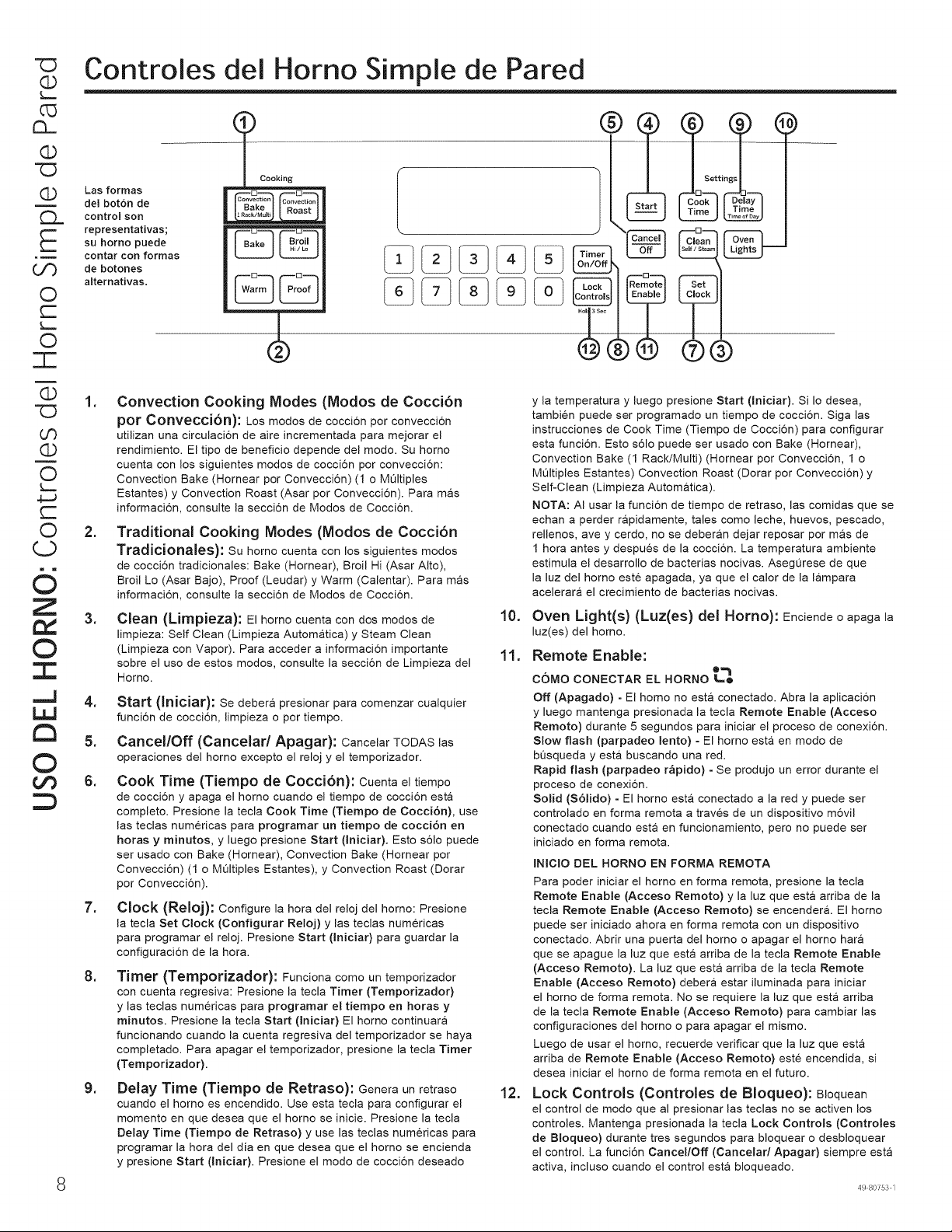
"C3
Q
L-.
c_
CL.
Q
Q
n
E
oO
O
C--
L,_
O
-r-
Q
U0
Q
O
L._
4-J
O
(j
d
Z
©
::C
,..J
LIJ
tm
©
of)
Controles del Horn© Simple de Pared
Las formas
del bot6n de
control sort
representativas;
su homo puede
contar con formas
de botones
alternativas,
_ Cooking
--D Q
Convection Convection
®
®®
=
.
=
=
5.
6.
=
=
=
Convection Cooking Modes (Modos de Cocci6n
por Conveoci6n): Los re©dos de coccion per convecci6n
utilizan una circulaci6n de aire incrementada para mejorar el
rendimiento. El tipo de beneficio depende del mode. Su homo
cuenta con los siguientes modes de coccion per conveccion:
Convection Bake (Hornear per Conveccion) (1 o MQItiples
Estantes) y Convection Roast (Asar per Conveccion). Para mas
informacion, consulte la seccion de Modes de Coccion.
Traditional Cooking Modes (Modos de Cocci6n
Tradicionales): Su homo cuenta con los siguientes modes
de cocci6n tradicionales: Bake (Hornear), Broil Hi (Asar Alto),
Broil L© (Asar Bajo), Proof (Leudar) y Warm (Calentar). Para mr;is
informaci6n, consulte la secci6n de Modos de Cocci6n.
Clean (Limpieza): El homo cuenta con dos modes de
limpieza: Self Clean (Limpieza Autornr;ltica) y Steam Clean
(Limpieza con Vapor). Para acceder a informaci6n importante
sobre el us© de estos rood©s, consulte la secci6n de Limpieza del
Homo.
Start (Iniciar): Se deber& presionar para comenzar cualquier
funci6n de cocci6n, limpieza o por tiempo.
Cancel/Off (Cancelar/Apagar): CancelarTODASlas
operaciones del homo excepto el reloj y el temporizador.
Cook Time (Tiempo de Cocci6n): Cuentael tiempo
de coccion y apaga el homo cuando el tiempo de cocci6n esta
complete. Presione la tecla Cook Time (Tiempo de Cocci6n), use
las teclas numericas para programar un tiempo de cocci6n en
horas y minutos, y luego presione Start (Iniciar). Esto s61o puede
ser usado con Bake (Hornear), Convection Bake (Hornear per
Convecci6n) (1 o MOltiples Estantes), y Convection Roast (Dorar
por Convecci6n).
Clock (Reloj): Configure la hera del reloj del horno: Presione
la tecla Set Clock (Configurar Reloj) y las teclas numericas
para programar el reloj. Presione Start (Iniciar) para guardar la
configuraci6n de la hera.
Timer (Temporizador): Funciona come un temporizador
con cuenta regresiva: Presione la tecla Timer (Temporizador)
y las teclas numericas para programar el tiempo en horas y
minutos. Presione la tecla Start (Iniciar) El homo continuara
funcionando cuando la cuenta regresiva del temporizador se haya
completado. Para apagar el temporizador, presione la tecla Timer
(Temporizador).
Delay Time (Tiempo de Retraso): Genera un retraso
cuando el homo es encendido. Use esta tecla para configurar el
momento en que desea que el homo se inicie. Presione la tecla
Delay Time (Tiempo de Retraso) y use las teclas numericas para
programar la hera del dia en que desea que el homo se encienda
y presione Start (Iniciar). Presione el mode de coccion deseado
10.
11.
12.
y la temperatura y luego presione Start (Iniciar). Si Io desea,
tambien puede ser programado un tiempo de cocci6n. Siga las
instrucciones de Cook Time (Tiempo de Cocci6n) para configurar
esta funci6n. Esto s61o puede ser usado con Bake (Hornear),
Convection Bake (1 Rack/Multi) (Hornear por Convecci6n, 1 o
MQItiples Estantes) Convection Roast (Dorar por Convecci6n) y
Self-Clean (Limpieza Automatica).
NOTA: AI usar la funci6n de tiempo de tetras©, las comidas que se
echan a perder r&pidamente, tales corn© leche, huevos, pescado,
rellenos, ave y cerdo, no se deberan dejar reposar por mr;is de
1 hora antes y despues de la cocci6n. La temperatura ambiente
estimula el desarrollo de bacterias nocivas. AsegQrese de que
la luz del homo este apagada, ya que el calor de la lampara
acelerara el crecimiento de bacterias nocivas.
Oven Light(s) (Luz(es) del Homo): Enciende o apaga la
luz(es) del homo.
Remote Enable:
®
c6Mo CONECTARELHORN©L_
Off (Apagado) - El homo no est& conectado. Abra la aplicaci6n
y luego mantenga presionada la tecla Remote Enable (Acceso
Rein©to) durante 5 segundos para iniciar el proceso de conexi6n.
Slow flash (parpadeo lento) - El homo esta en rood© de
bQsqueda y esta buscando una red.
Rapid flash (parpadeo r&pido) - Se produjo un error durante el
proceso de conexi6n.
Solid (S61ido) = El homo esta conectado a la red y puede set
controlado en forma remota a traves de un dispositivo m6vil
conectado cuando esta en funcionamiento, per© no puede set
iniciado en forma remota.
INIClO DEL HORN© EN FORMA REMOTA
Para poder iniciar el homo en forma remota, presione la tecla
Remote Enable (Acceso Rein©to) y la luz que est& arriba de la
tecla Remote Enable (Acceso Remoto) se encender&. El homo
puede ser iniciado ahora en forma remota con un dispositivo
conectado. Abrir una puerta del homo o apagar el homo har&
que se apague la luz que esta arriba de la tecla Remote Enable
(Acceso Rein©to). La luz que esta arriba de la tecla Remote
Enable (Acceso Rein©to) deber& estar iluminada para iniciar
el homo de forma remota. No se requiere la luz que esta arriba
de la tecla Remote Enable (Acceso Remoto) para cambiar las
configuraciones del homo o para apagar el raisin©.
Luego de usar el homo, recuerde verificar que la luz que esta
arriba de Remote Enable (Acceso Rein©to) este encendida, si
desea iniciar el homo de forma remota en el futuro.
Lock Controls (Controles de Bloqueo): BIoquean
el control de rood© que al presionar las teclas no se activen los
controles. Mantenga presionada la tecla Lock Controls (Controles
de Bloqueo) durante tres segundos para bloquear o desbloquear
el control. La funcion Cancel/Off (Cancelad Apagar) siempre esta
activa, incluso cuando el control esta bloqueado.
49 80753 1
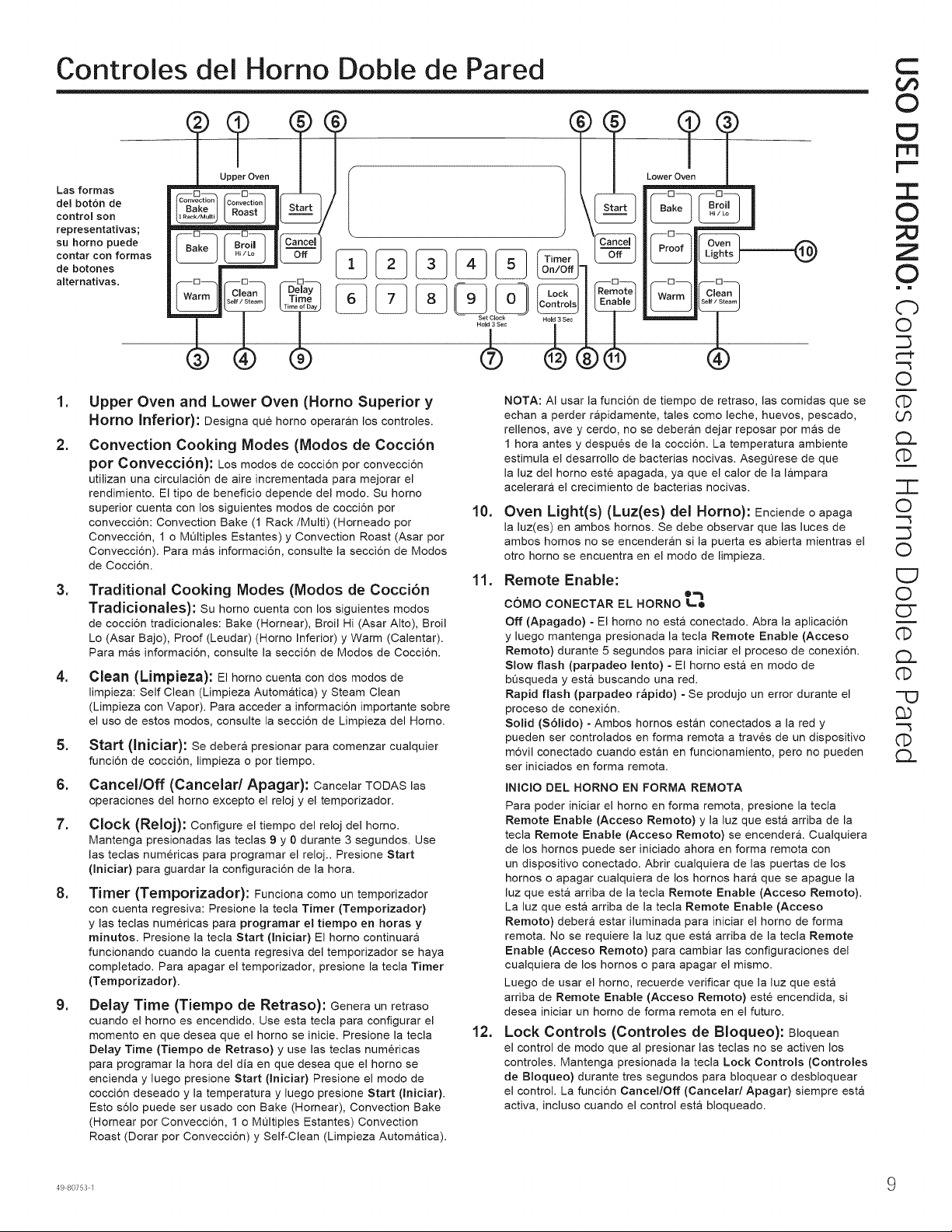
Controles del Horn© Doble de Pared
Las formas
del bot6n de
control son
representativas;
su homo puede
contar con formas
de botones
alternativas,
Lower Oven
W rm Clean
=
2.
=
.
=
6.
7.
=
=
Upper Oven and Lower Oven (Horno Superior y
Horn© Inferior): Designa que horno operaran los controles.
Convection Cooking Modes (Modos de Cocci6n
pot Convecc[6n): Los re©dos de coccion por conveccion
utilizan una circulacion de aire incrementada para mejorar el
rendimiento. El tip© de beneficio depende del rood©. Su homo
superior cuenta con los siguientes re©dos de coccion pot
convecci6n: Convection Bake (1 Rack/Multi) (Horneado por
Convecci6n, 1 o Mt_ltiples Estantes) y Convection Roast (Asar por
Conveccion). Para m&s informaci6n, consulte la seccion de Modos
de Coccion.
Traditional Cooking Modes (Modos de Cocci6n
Tradicionales): Su homo cuenta con los siguientes modes
de coccion tradicionales: Bake (Hornear), Broil Hi (Asar Alto), Broil
L© (Asar Bajo), Proof (Leudar) (Homo Inferior) y Warm (Calentar).
Para mas informacion, consulte la seccion de Modos de Coccion.
Clean (Lirnpieza): El homo cuenta con dos modos de
limpieza: Self Clean (Limpieza Autom&tica) y Steam Clean
(Limpieza con Vapor). Para acceder a informacion importante sobre
el us© de estos rood©s, consulte la seccion de Limpieza del Horn©.
Start (In[ciar): Se deber& presionar para comenzar cualquier
funci6n de cocci6n, limpieza o por tiempo.
Cancel/Off (Cancelar/Apagar): CancelarTODAS las
operaciones del homo excepto el reloj y el temporizador.
Clock (Reloj): Configure el tiempo del reloj del homo.
Mantenga presionadas las teclas 9 y 0 durante 3 segundos. Use
las teclas numericas para programar el reloj.. Presione Start
(Iniciar) para guardar la configuraci6n de la hora.
Timer (Ternporizador): Funciona come un temporizador
con cuenta regresiva: Presione la tecla Timer (Temporizador)
y las teclas numericas para programar el tiempo en horas y
minutos. Presione la tecla Start (Iniciar) El homo continuara
funcionando cuando la cuenta regresiva del temporizador se haya
completado. Para apagar el temporizador, presione la tecla Timer
(Temporizador).
Delay Time (Tiernpo de Retraso): Genera unretraso
cuando el homo es encendido. Use esta tecla para configurar el
momento en que desea que el homo se inicie. Presione la tecla
Delay Time (Tiempo de Retraso) y use las teclas numericas
para programar la hora del dia en que desea que el homo se
encienda y luego presione Start (Iniciar) Presione el mode de
cocci6n deseado y la temperatura y luego presione Start (Iniciar).
Esto s61o puede ser usado con Bake (Hornear), Convection Bake
(Homear por Convecci6n, 1 o MQItiples Estantes) Convection
Roast (Dorar por Convecci6n) y Self-Clean (Limpieza Automatica).
10.
11.
12.
NOTA: AI usar la funcion de tiempo de retraso, las comidas que se
echan a perder rapidamente, tales como leche, huevos, pescado,
rellenos, ave y cerdo, no se deberan dejar reposar por mas de
1 hera antes y despues de la cocci6n, La temperatura ambiente
estimula el desarrollo de bacterias nocivas, AsegQrese de que
la luz del homo este apagada, ya que el calor de la lampara
acelerara el crecimiento de bacterias nocivas,
Oven Light(s) (Luz(es) del Horn©): Enciendeo apaga
la luz(es) en ambos homes. Se debe observar que las luces de
ambos hornos no se encenderan si la puerta es abierta mientras el
otto homo se encuentra en el mode de limpieza.
Remote Enable:
COMO CONECTAR EL HORN© _-"lo
Off (Apagado) = El homo no est& conectado. Abra la aplicaci6n
y luego mantenga presionada la tecla Remote Enable (Acceso
Remoto) durante 5 segundos para iniciar el proceso de conexi6n.
Slow flash (parpadeo lento) - El homo esta en rood© de
bQsqueda y est& buscando una red.
Rapid flash (parpadeo r&pido) - Se produjo un error durante el
proceso de conexi6n.
Solid (S61ido) = Ambos hornos estan conectados a la red y
pueden ser controlados en forma remota a traves de un dispositivo
m6vil conectado cuando estan en funcionamiento, per© no pueden
set iniciados en forma remota.
INIClO DEL HORN© EN FORMA REMOTA
Para poder iniciar el homo en forma remota, presione la tecla
Remote Enable (Acceso Remoto) y la luz que esta arriba de la
tecla Remote Enable (Acceso Remoto) se encender&. Cualquiera
de los hornos puede ser iniciado ahora en forma remota con
un dispositivo conectado. Abrir cualquiera de las puertas de los
hornos o apagar cualquiera de los hornos hara que se apague la
luz que esta arriba de la tecla Remote Enable (Acceso Remoto).
La luz que esta arriba de la tecla Remote Enable (Acceso
Remoto) debera estar iluminada para iniciar el homo de forma
remota. No se requiere la luz que esta arriba de la tecla Remote
Enable (Acceso Remoto) para cambiar las configuraciones del
cualquiera de los hornos o para apagar el raisin©.
Luego de usar el homo, recuerde verificar que la luz que esta
arriba de Remote Enable (Acceso Remoto) este encendida, si
desea iniciar un homo de forma remota en el futuro.
Lock Controls (Controles de Bloqueo): BIoquean
el control de rood© que al presionar las teclas no se activen los
controles. Mantenga presionada la tecla Lock Controls (Controles
de Bloqueo) durante tres segundos para bloquear o desbloquear
el control. La funci6n Cancel/Off (Cancelad Apagar) siempre esta
activa, incluso cuando el control esta bloqueado.
C
GO
©
ED
rrl
r'-
:E
©
Z
©
= m
C')
O
¢'-P
"-3
O
U3
CL
G)
=T-
O
"-3
O
E7
O
ET
G)
CL
-'O
££
--3
CL
49 80753 1 9
Of3
(D
C)
(D
c1.
Of3
(D
Of3
(D
O
C)
C
±
d
Z
t,/
©
7"
..,,J
tm
©
Funciones especiales
Existen varias funciones especiales en su homo de pared. Para modificar las configuraciones de estas funciones especiales,
mantenga presionadas las tectas Bake (Hornear) y Broil Hi/Lo (Asar Alto/Bajo) al mismo tiempo durante tres segundos "SF"
aparecera en ta pantalla. Seteccione ta funci6n que desee modificar. Una vez reatizado et cambio, presione ta tecla Start (Iniciar)
para guardar dicho cambio y regrese a ta hora det dia. Presione la tecta Cancel/Off (Cancelar/Apagar) para salir de Special
Features (Funciones Especiales) sin guardar los cambios de configuraci6n.
Ajuste de la Temperatura del Horno
Esta funci6n permite que la temperatura de horneado det homo
y de horneado pot convecci6n sean ajustadas hasta 35°F mas
caliente o 35°F mas fria. Use esta funcidn si piensa que la
temperatura de su homo es demasiado caliente o demasiado
fria y desea modificarta. Para los modelos con homo
doble, los hornos superior e inferior se ajustan de forma
separada. Este ajuste afecta los modos Bake (Hornear), y
Convection Bake (1 Rack/Multi) (Hornear pot Convecci6n,
1 o Mt_ltiples Estantes). NingOn otto modo de cocci6n se ve
afectado.
Mantenga presionadas tas tectas Bake (Hornear) y Broil Hi/Lo
(Asar Alto/Bajo) at mismo tiempo durante tres segundos "SF"
aparecera en ta pantalla. Presione ta tecla Bake (Hornear)
para seteccionar et homo que sera ajustado. Presione ta tecta
Bake (Hornear) nuevamente para ingresar et modo de ajuste
de temperatura. Se exhibira un nOmero entre 35 y - 35. Use
las tectas numericas para configurar et ajuste de temperatura
deseado y use la tecta Bake (Hornear) para reatizar cambios
en forma descendente y ascendente. Presione ta tecla Start
(Iniciar) para guardar et ajuste de temperatura.
Sonido de Finalizacion del Temporizador
Se trata de un tono que indica la finalizaci6n de un
temporizador. El tono puede ser continuo (bEEP Cont) o un
pitido repetido (bEEP). Una configuraci6n continua seguira
haciendo que un tono suene hasta que un bot6n del control
sea presionado.Mantenga presionadas las teclas Bake
(Hornear) y Broil Hi/Lo (Asar Alto/Bajo) at mismo tiempo
durante tres segundos "SF" aparecera en la pantalla. Presione
la tecta Broil Hi/Lo (Asar Alto/Bajo) para visualizar la
configuraci6n actual y luego modifique la configuraci6n.
Selecci0n de Temperatura Fahrenheit o Celsius
El control det homo esta configurado para su uso con
temperaturas Fahrenheit (F), pero to puede modificar a
temperaturas Celsius (C). Mantenga presionadas las tectas
Bake (Hornear) y Broil Hi/Lo (Asar Alto/Bajo) al mismo
tiempo durante tres segundos "SF" aparecera en la pantalla.
Presione tas tectas numericas 6 y 8 al mismo tiempo para
visualizar ta configuraci6n actual; presione nuevamente para
modificar la configuraci6n.
Pantalla del Reloj
Esta funci6n especifica c6mo la hora del dia sera exhibida o
si no se exhibira la hora del dia. Puede seleccionar el reloj
con hora estandar de 12 horas (12 H), la hora militar de 24
horas (24 H), o que no se exhiba ningQn reloj (oFF) (Apagado).
Mantenga presionadas las tectas Bake (Hornear) y Broil Hi/
Lo (Asar Alto/Bajo) al mismo tiempo durante tres segundos
"SF" aparecera en la pantalta. Presione ta tecla Clock (Reloj)
para visualizar la configuraci6n actual, y vuetva a presionar la
misma para modificar ta configuraci6n. Presione la tecta Clock
(Reloj) en hornos de pared simple o 0 y 9 al mismo tiempo en
hornos de pared doble para visualizar la configuraci6n actual,
presione nuevamente para cambiar ta configuraci6n.
Conversion de Auto Recipe
AI usar tas opciones de cocci6n Convection Bake 1 Rack
(Hornear por Convecci6n en 1 Estante) o Convection Bake
Multi Rack (Hornear pot Convecci6n en MQltiples Estantes),
Auto Recipe Conversion (Conversi6n de Auto Receta)
convertira de forma automatica tas temperaturas de homeado
regular ingresadas a temperaturas de cocci6n de horneado
por convecci6n cuando se active. Se debe observar que esta
opci6n no convierte los tiempos de cocci6n det homeado pot
convecci6n, sino s61o las temperaturas. Mantenga presionadas
las tectas Bake (Hornear) y Broil Hi/Lo (Asar Alto/Bajo) al
mismo tiempo durante tres segundos "SF" aparecera en la
pantalla. Presione la tecta Convection Bake (1 Rack/Multi)
(Hornear por Conveccion en I o Multiples Estantes) para
visualizar la configuraci6n de conversi6n; vuelva a presionar
para altemar entre On (Con On) (Encendido Continuo) y Off
(Con Off) (Apagado Continuo).
Volumen del Sonido
Esta funci6n permite que et volumen det tono det homo sea
ajustado entre alto (HI bEEP HI) (Pitido Alto), medic (Std
bEEP Std) (Pitido Estandar) y apagado (oFF bEEP oFF)
(Pitido Apagado). Mantenga presionadas las teclas Bake
(Hornear) y Broil Hi/Lo (Asar Alto/Bajo) at mismo tiempo
durante tres segundos "SF" aparecera en la pantalla. Presione
las teclas numericas I y 5 al mismo tiempo para visualizar
la configuraci6n actual o para modificar la configuraci6n. El
control hara que et tono det homo suene en et nuevo nivel de
volumen cada vez que et nivet de sonido sea modificado.
_0 49 80753 1
Apagado autom4tico de 12 horas y Modo Sab4tico (SAbbAtH) c:::
El apagado automatic© de 12 horas apaga el homo luego de 12 horas de operaciones continuas. Las opciones de esta funci6n
son "12 Shdn" (Apagar luego de 12 horas), "no Shdn" (No apagar luego de 12 horas) y "SAbbAtH" (Sabatico). Mantenga
presionadas las tectas Bake (Hornear) y Broil Hi/L© (Asar Alto/Bajo) al mismo tiempo durante tres segundos "SF" aparecera
en la pantalla. Presione la tecla Delay Time (Tiempo de Restraso) para visualizar la configuraci6n actual y luego para cambiar
la configuraci6n. El modo Sabbath (Sabatico) anula las luces det homo, todos los sonidos, tas funciones de convecci6n, asar, [""
calentar, sonda, y todas tas funciones con temporizador. Et modo sabatico s6to puede ser usado con la funci6n Bake (Hornear).
Esta funci6n se activa conforme con los requisitos Sabaticos Judios de la Estretla K.
NOTA: Si se produce un corte de corriente mientras se encuentra en Sabbath Mode (Modo Sabatico), la unidad regresara a
dicho modo cuando la corriente sea restablecida
Ingrese Sabbath Mode (Modo SabatJco)
Mantenga presionadas las teclas Bake (Hornear) y Broil Hi/L©
(Asar Alto/Bajo) al mismo tiempo durante tres segundos. "SF"
aparecera en ta pantalla. Presione ta tecla Belay Time (Tiempo
de Retraso) hasta que "SAbbAtH" (Sabatico) aparezca en ta
pantalla, y tuego presione Start (Iniciar). El icon© ] aparecera
en la pantalla, indicando que la unidad se encuentra en
Sabbath Mode (Modo Sabatico). Et retoj no aparecer&
Inicie Sabbath Bake (Horneado SabatJco)
Presione Bake (Nornear), use las tectas numericas para
ingresar una temperatura entre 170°F y 550°F, y presione Start
(Iniciar). No se emitira ningQn sonido cuando tas teclas sean
presionadas. En un moment© al azar entre los 30 segundos y
1 minuto, et icon© ][ aparecera en la pantalla indicando que et
homo esta en funcionamiento.
Ajuste la Temperatura Durante el Horneado
SabatJco
Presione Bake (Nornear), use las teclas numericas para
ingresar una nueva temperatura entre 170°F y 550°F, y
presione Start (Iniciar). No se emitira ningQn sonido cuando
las tectas sean presionadas. Debido a que no hay ninguna
indicaci6n durante et cambio de temperatura, se puede
usar un termdmetro para homo para confirmar cambios de
temperatura.
Horneado con Temporizador Durante el Modo
Sab4tJco
Comience sin que et homo se encuentre en Sabbath Mode
(Modo Sabatico). Presione Cook Time (Tiempo de Cocci6n),
use las tectas numericas para ingresar la cantidad de tiempo
de cocci6n en horas y minutos, y presione Start (Iniciar).
Siga tas instrucciones anteriores para ingresar Sabbath Mode
(Modo Sabatico). Presione Bake (Hornear), use tas tectas
numericas para ingresar una temperatura entre 170°F y 550°F,
y presione Start (Iniciar). No se emitira ningOn sonido cuando
las tectas sean presionadas. El homo se apagara una vez que
et tiempo de cocci6n programado haya conctuido. NOTA: Esta
funci6n no esta disponible en un homo de pared doble.
Salga del Modo Sabatico
Para finalizar un cicto de horneado, presione Cancel/Off
(Cancelaff Apagar). Et icono ][ cambiara al icono ], indicando
que el homo se apag6.
Mantenga presionadas las tectas Bake (Hornear) y Broil Hi/
L© (Asar Alto/Bajo) al mismo tiempo durante tres segundos.
"SF" aparecera en la pantalla. Presione la tecla Delay Time
(Tiempo de Retraso) hasta que "12 Shdn" (apagar luego
de 12 horas) o "no Shdn" (No apagar luego de 12 horas)
aparezca en la pantalta, y luego presione Start (Iniciar). El
reloj aparecera nuevamente indicando que et homo ya no esta
en Sabbath Mode (Modo Sabatico).
3::
©
;X3
Z
©
i m
3>
_O
0
c--
0
£9,
C)
o
£)._
©
Z3-
0
U_
Z
0
0
CY
£9,
C)
0
3>
O-
3>
T
49 80753 1 1 1
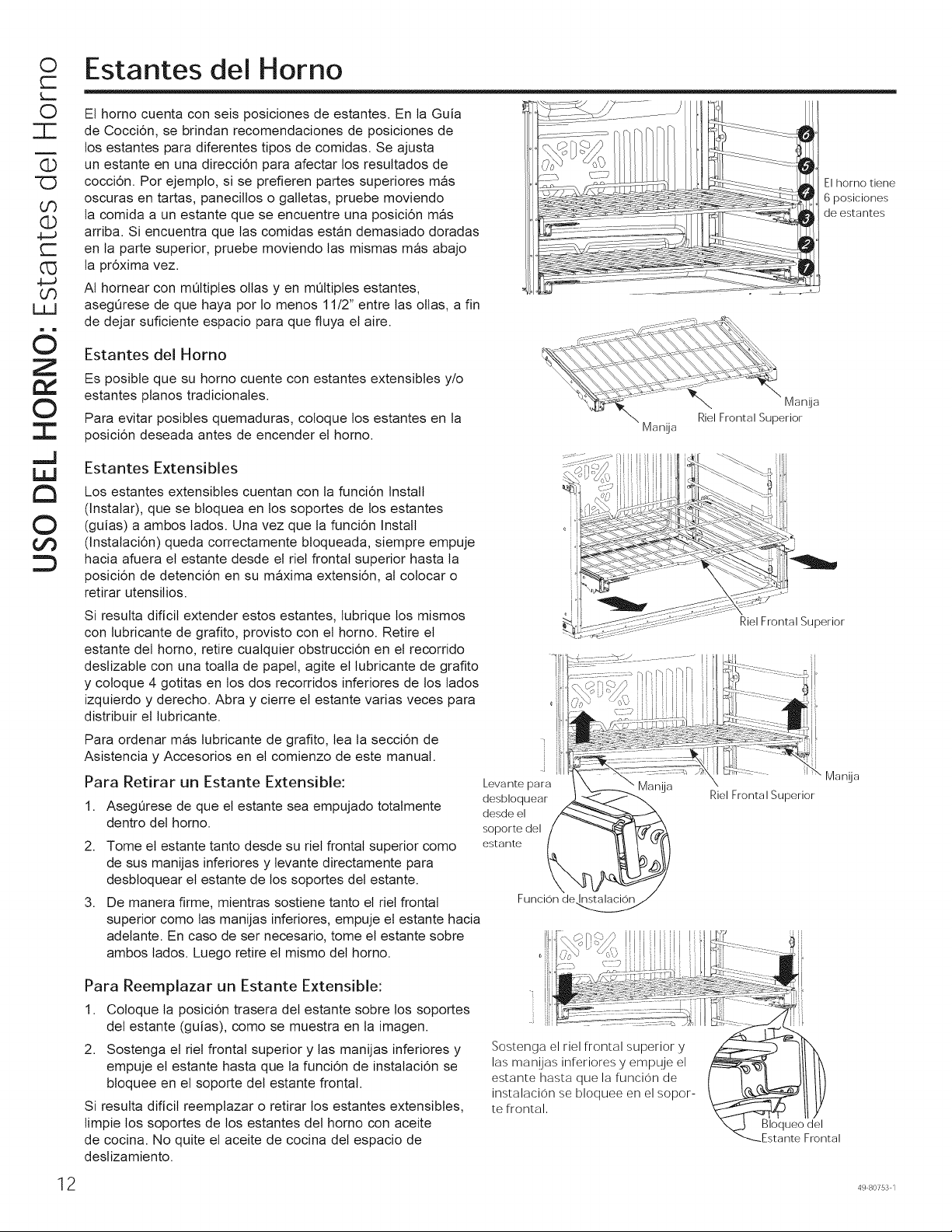
O
r-
L._
O
T
(13
zD
Or)
(13
4--J
r-
G3
4-J
GO
LZJ
d
Z
tY
©
--r.
,,,,J
tm
©
Estantes del Horno
El homo cuenta con seis posiciones de estantes. En ta Guia
de Cocci6n, se brindan recomendaciones de posiciones de
los estantes para diferentes tipos de comidas. Se ajusta
un estante en una direcci6n para afectar los resultados de
cocci6n. Por ejemplo, si se prefieren partes superiores mas
oscuras en tartas, panecitlos o galletas, pruebe moviendo
la comida a un estante que se encuentre una posici6n mas
arriba. Si encuentra que tas comidas estan demasiado doradas
en la parte superior, pruebe moviendo las mismas mas abajo
la pr6xima vez.
AI hornear con mQltiples ollas yen mQltiples estantes,
asegQrese de que haya pot lo menos 11/2" entre tas ollas, a fin
de dejar suficiente espacio para que fluya et aire.
El homo tiene
6 posiciones
de estantes
Estantes del Homo
Es posible que su homo cuente con estantes extensibles y/o
estantes pianos tradicionales.
Para evitar posibles quemaduras, coloque tos estantes en la
posici6n deseada antes de encender et homo.
Estantes Extensibles
Los estantes extensibles cuentan con ta funci6n Install
(Instalar), que se bloquea en los soportes de tos estantes
(guias) a ambos tados. Una vez que la funci6n Install
(Instalaci6n) queda correctamente bloqueada, siempre empuje
hacia afuera et estante desde et riet frontal superior hasta la
posici6n de detenci6n en su maxima extensi6n, al colocar o
retirar utensitios.
Si resutta dificit extender estos estantes, tubrique los mismos
con lubricante de grafito, provisto con et homo. Retire et
estante del homo, retire cualquier obstrucci6n en et recorrido
deslizabte con una toalla de papet, agite et tubricante de grafito
y coloque 4 gotitas en tos dos recorridos inferiores de los lados
izquierdo y derecho. Abra y cierre et estante varias veces para
distribuir et tubricante.
Para ordenar mas lubricante de grafito, lea ta secci6n de
Asistencia y Accesorios en et comienzo de este manual.
Para Retirar un Estante Extensible:
1,
2.
3,
AsegQrese de que et estante sea empujado totalmente
dentro det homo.
Tome el estante tanto desde su riet frontal superior como
de sus manijas inferiores y tevante directamente para
desbloquear et estante de los soportes det estante.
De manera flrme, mientras sostiene tanto et riet frontal
superior como las manijas inferiores, empuje et estante hacia
adetante. En caso de ser necesario, tome et estante sobre
ambos lados. Luego retire et mismo det homo.
Levante para
desbloquear
desde el
soporte del
estante
Manija
Manija
Riel Frontal Superior
Funcion de..
Para Reemplazar un Estante Extensible:
1. Coloque ta posici6n trasera det estante sobre los soportes
det estante (guias), como se muestra en la imagen.
2. Sostenga et riet frontal superior y las manijas inferiores y
empuje et estante hasta que la funci6n de instalaci6n se
bloquee en et soporte det estante frontal.
Si resulta dificit reemplazar o retirar los estantes extensibles,
limpie los soportes de los estantes det homo con aceite
de cocina. No quite et aceite de cocina det espacio de
deslizamiento.
Sostenga el riel frontal superior y
las man!jas inferiores y empuje el
estante hasta que la funcion de
instalacion se bloquee en el sopor-
te frontal,
Bloqueo del
Estante Frontal
12 49 80753 1
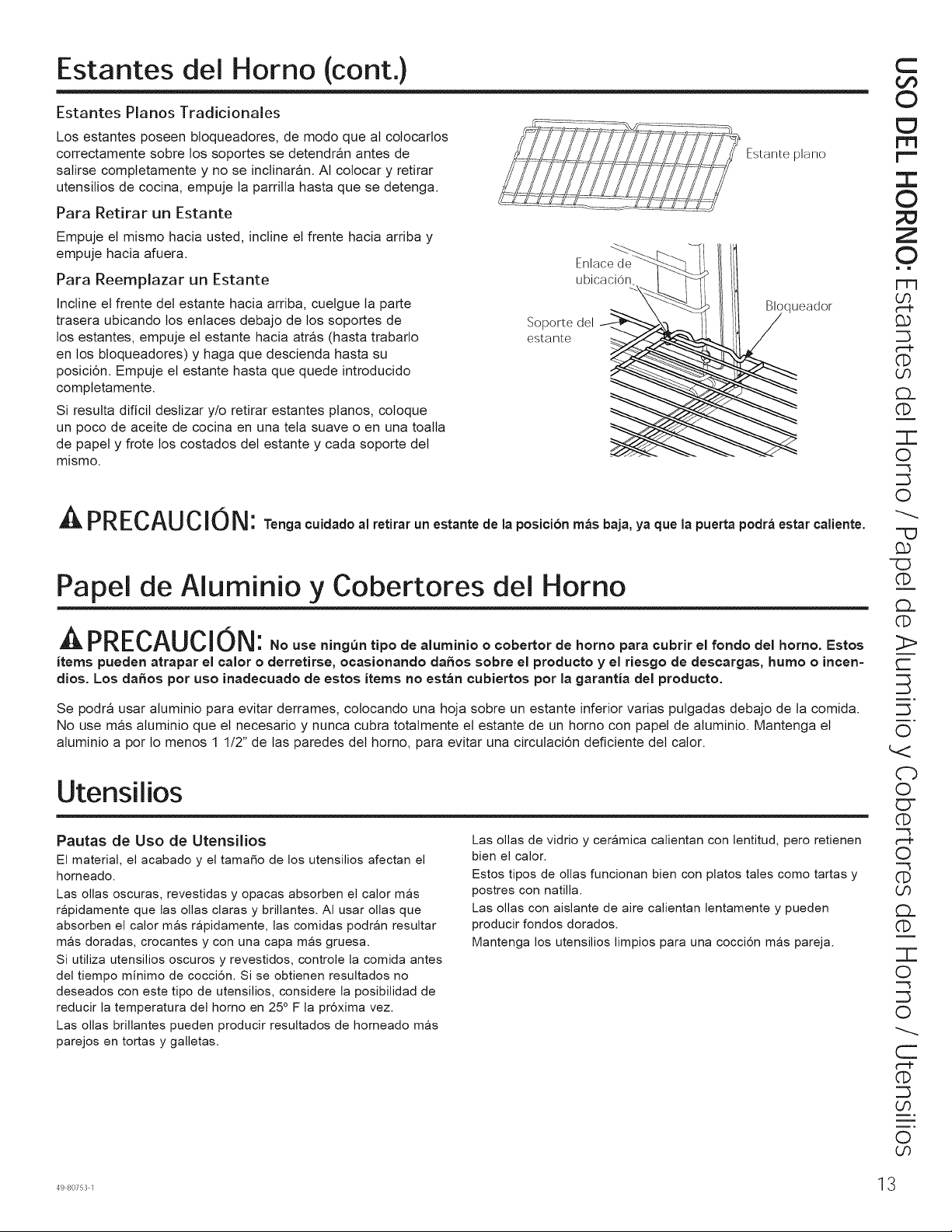
Estantes del Horno (cont.)
Estantes Pianos Tradicionales
Los estantes poseen bloqueadores, de modo que al colocarlos
correctamente sobre los soportes se detendran antes de
salirse completamente y no se inclinaran. At colocar y retirar
utensitios de cocina, empuje la parritta hasta que se detenga.
Para Retirar un Estante
Empuje el mismo hacia usted, incline et frente hacia arriba y
empuje hacia afuera.
Para Reemplazar un Estante
Incline et frente det estante hacia arriba, cuetgue la parte
trasera ubicando los enlaces debajo de los soportes de
los estantes, empuje et estante hacia atras (hasta trabarlo
en los bloqueadores) y haga que descienda hasta su
posici6n. Empuje et estante hasta que quede introducido
completamente.
Si resulta dificit destizar y/o retirar estantes pianos, coloque
un poco de aceite de cocina en una teta suave o en una toalta
de papety frote los costados det estante y cada soporte det
mismo.
ubicacion
Soporte del _-
estante ,_
Estante piano
,queador
A PRECAUCION" Too_oooidodool,ot_,o,uoos,ootodoloposioi6omasbojo,yoquolopuo.opodiaos,o,oo,ooto.
Papel de Aluminio y Cobertores del Horno
^,-,PREf_"l It_l _R|IL_UILJ | UI_ : No use ningun tipo de aluminio o oobertorde homo para cubrir el rondo del homo. Estos
items pueden atrapar el ¢alor o derretirse, ocasionande daffos sobre el producto y el riesgo de descargas, humo o incen=
dios. Los daffos pot uso inadeouado de estos items no estan cubiertos pot la garantia del producto.
Se podra usar aluminio para evitar derrames, colocando una hoja sobre un estante inferior varias pulgadas debajo de ta comida.
No use mas atuminio que et necesario y nunca cubra totalmente et estante de un homo con papet de aluminio. Mantenga et
aluminio a por 1o menos 1 1/2" de las paredes det homo, para evitar una circulaci6n deficiente det calor.
Utensilios
Pautas de Uso de Utensilios
El material, el acabado y el tamaffo de los utensilios afectan el
homeado.
Las ollas oscuras, revestidas y opacas absorben el calor mas
rapidamente que las elias claras y brillantes. AI usar ollas que
absorben el calor mas rapidamente, las comidas podran resultar
mas doradas, crocantes y con una capa mas gruesa.
Si utiliza utensilios oscuros y revestidos, controle la comicla antes
del tiempo minimo de cocci6n. Si se obtienen resultados no
deseados con este tipo de utensilios, considere la posibilidad de
reducir la temperatura del homo en 25 ° F la pr6xima vez.
Las ollas brillantes pueden producir resultados de horneado mas
parejos en tortas y galletas.
Las elias de vidrio y ceramica calientan con lentitud, pete retienen
bien el calor.
Estos tipos de elias funcionan bien con plates tales como tartas y
postres con natilla.
Las elias con aislante de aire calientan lentamente y pueden
producir rondos dorados.
Mantenga los utensilios limpios para una cocci6n mas pareja.
C
©
"T"
©
Z
©
= =
r-T3
o9
©
O9
£L
©
"T-
O
-"3
O
-'O
"(:3
©
£z
(1:)
:>
c-
o
Cb
O
O"
©
--3
t-"P
O
'-'3
©
O9
£L
©
"T-
O
-"3
O
©
O9
O
O9
498o7531 13
r-
'O
C)
C)
O
O
Q
C3
00
O
O
Z
d
Z
r,,,,
©
"l-
....J
I.J.J
tm
©
oO
Modos de Cocci6n
Su nuevo homo posee una variedad de modos de cocci6n para que pueda obtener los mejores resultados. Estos modos se describen a
continuaci6n. Para acceder a recomendaciones para comidas especificas, consulte la secci6n de la Guia de Cocci6n. Recuerde que es
posible que su nuevo homo funcione de manera diferente que aquel que esta reemplazando.
Modos de Horneado y Dorado
Seleccione un modo para hornear y dorar basado en el tipo y
cantidad de comida que esta preparando. AI preparar comidas
horneadas tales como tartas, galletas y masas, siempre
precaliente el homo primero. Siga las recomendaciones de la
receta sobre la colocaci6n de la comida. Si no se brindan pautas,
centre la comida en el horno.
Hornear
El modo de Hornear esta pensado para la cocci6n en un solo
estante. Este modo usa el calor principalmente desde el elemento
inferior, pero tambien desde el elemento superior para cocinar la
comida. Para usar este modo, presione la tecla Bake (Hornear),
ingrese una temperatura, y luego presione Start (Iniciar). El
precalentamiento generalmente se recomienda al usar este modo.
Horneado por Convecci6n en 1 Estante
El modo Convection Bake 1 Rack (Horneado por Convecci6n
en 1 Estante) esta pensado para la cocci6n en un solo estante.
Este modo utiliza el calor del elemento inferior y tambien de
los elementos superior y trasero, junto con el movimiento del
ventilador de la convecci6n, para que la cocci6n sea mas pareja.
El homo esta equipado con la funci6n Auto Recipe Conversion
(Conversi6n de Receta Automatica); de modo que no es necesario
convertir la temperatura al usar este modo. Para usar este modo,
presione la tecla Convection Bake (1 Rack/Multi) (Hornear
pot Convecci6n en 1 o Multiples Estantes), ingrese una
temperatura, y luego presione Start (Iniciar). El precalentamiento
generalmente se recomienda al usar este modo.
Honeado pot Conveccion en Estantes MUltiples
El modo Convection Bake Multi Rack (Honeado por Convecci6n
en Estantes MOltiples) esta pensado para honear en
mOltiples estantes al mismo tiempo. Este modo utiliza el calor
principalmente desde el elemento trasero, pero tambien calienta
desde los elementos superior e inferior, junto con el movimiento
de aire desde el ventilador por convecci6n para mejorar una
cocci6n pareja. El homo esta equipado con la funci6n Auto Recipe
Conversion (Conversi6n de Receta Automatica); de modo que
no es necesario convertir la temperatura al usar este modo. Es
posible que el tiempo de horneado sea un poco mas prolongado
con estantes mOltiples, en comparaci6n con Io que se espera
con un solo estante. Para usar este modo, presione la tecla
Convection Bake (1 Rack/Multi) (Hornear pot Convecci6n en
1 o Multiples Estantes) dos veces, ingrese una temperatura, y
luego presione Start (Iniciar). Siempre realice el precalentamiento
al usar este modo.
Dorar por Conveccion
El modo Convection Roast (Dorado por Convecci6n) esta pensado
para dorar cortes enteros de came en un solo estante. Este modo
utiliza el calor de los elementos inferior, superior y trasero, junto
con el movimiento del ventilador por convecci6n, a fin de mejorar
el dorado y reducir el tiempo de cocci6n. No es necesario convertir
la temperatura. Cuando use este modo, o si usa la sonda, controle
la comida antes que el tiempo sugerido en la receta. Para usar
este modo, presione la tecla Convection Bake (Hornear pot
Convecci6n), ingrese una temperatura, y luego presione Start
(Iniciar). No es necesario realizar el precalentamiento al usar este
modo.
Modo para Asar
Siempre ase con la puerta cerrada. El elemento para asar en
el homo es muy potente. Monitoree la comida de cerca al asar.
Tenga cuidado al asar en posiciones de estantes superiores,
ya que colocar la comida mas cerca del elemento para asar
incrementa el humo, salpicaduras y la posibilidad de que se
incendien las grasas. No se recomienda asar en el estante de la
posici6n 6.
Intente asar las comidas que normalmente haria a la parrilla.
Ajuste las posiciones de los estantes para ajustar la intensidad del
calor a la comida. Coloque las comidas mas cerca del elemento
para asar, cuando se desee una superficie mas cocinada y un
interior poco cocido. Las comidas mas gruesas y las comidas cuyo
interior debe ser cocinado deberian ser asadas en un estante en
una posici6n alejada del usado para asar, o usando las funciones
Broil Lo (Asar Bajo). Para un mejor rendimiento, centre la comida
debajo del elemento calentador para asar.
Asar Alto
El modo Broil Hi (Asar Alto) usa calor intenso del elemento
superior para soasar las comidas. Use la funci6n Broil Hi (Asado
Alto) para cortes mas delgados de came y/o comidas que
prefiera que quedan menos cocinadas en su interior. Para usar
este modo, presione la tecla Broil Hi/Lo (Asar Alto/Bajo) una
vez y luego presione Start (Iniciar). No es necesario realizar el
precalentamiento al usar este modo.
Asar Bajo
El modo Broil Lo (Asar Bajo) usa menos calor intenso del elemento
superior para cocinar la comida completamente mientras tambien
se realiza el dorado superficial. Use la funci6n Broil Lo (Asado Bajo)
para cortes de came mas gruesos y/o comidas que desee que
queden completamente cocinadas. Para usar este modo, presione
la tecla Broil Hi/Lo (Asar Alto/Bajo) dos veces y luego presione
Start (Iniciar). No es necesario realizar el precalentamiento al usar
este modo.
Leudar
El modo Proof (Leudar) esta dise_ado para elevar (fermentar y
leudar) masas de pan. Presione la tecla Proof (Leudar) y luego
presione Start (Iniciar). Cubra bien la masa para evitar que se
seque. El pan se elevara mas rapidamente que a temperatura
ambiente. Se debera observar que con los hornos de pared doble,
la funci6n para leudar no se podra activar cuando se este usando
un modo de limpieza en el homo inferior.
Calentar
El modo Warm (Calentar) esta diseSado para mantener comidas
calientes hasta durante 3 horas. Para usar este modo, presione la
tecla Warm (Caliente) y luego presione Start (Iniciar). Cubra las
comidas que necesitan mantener la humedad y no cubra aquellas
comidas que deberian quedar crocantes. No se requiere precalentar
las mismas. No use la funci6n Warm (Calentar) para calentar
comida fria, excepto galletas crujientes, papas fritas o cereales
secos. Tambien se recomienda que la comida no se mantenga
caliente por mas de dos horas.
4 49 80753 1
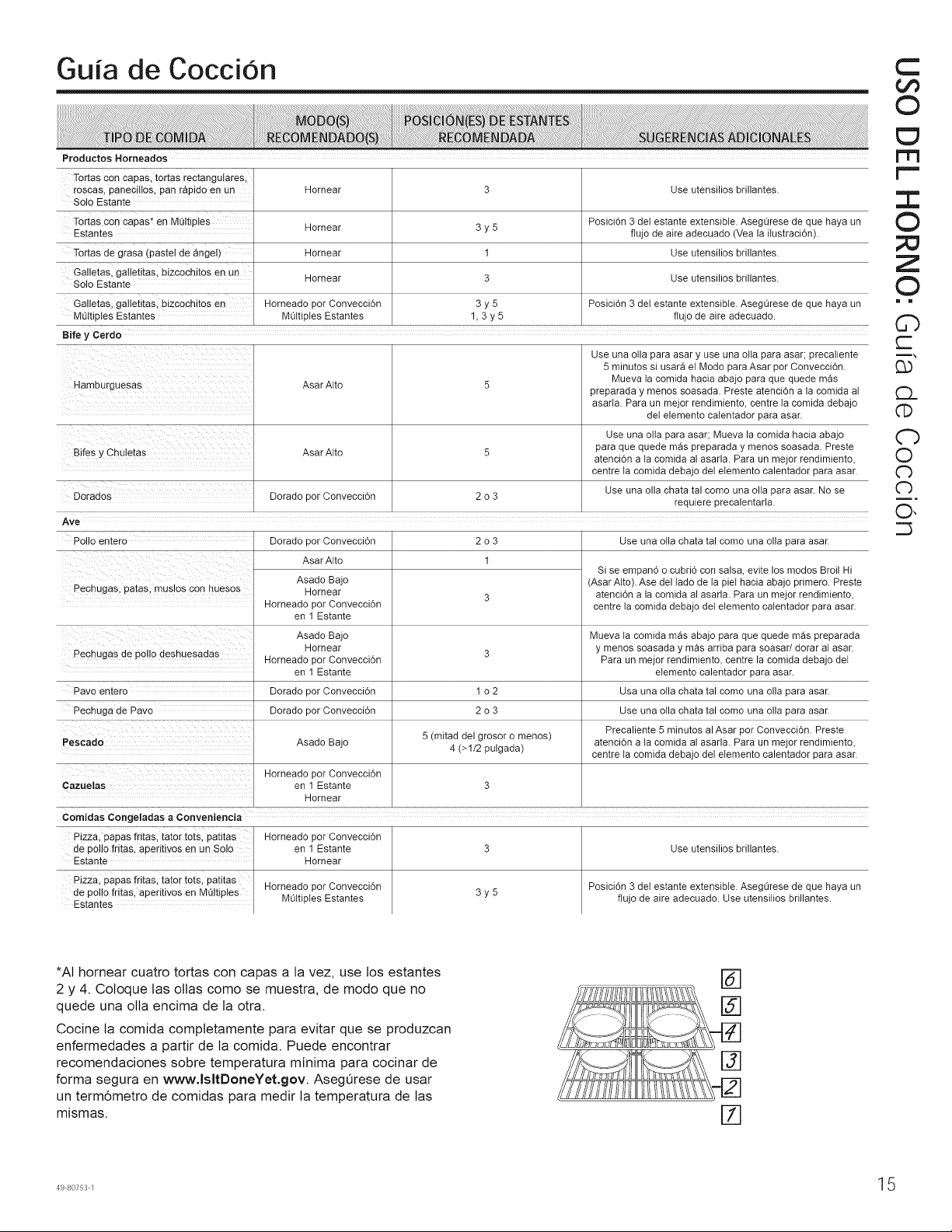
Guia de CocciOn
Productos Horneados
Tortas con capas, tortas rectangulares,
roscas, paneciltos, pan rapido en un Hornear 3 Use atensilios brillantes.
Solo Estante
Tortas con capas* en MUltiples Hornear 3 y 5 Posici6n 3 det estante extensible. AsegGrese de que haya an
Estantes flujo de aire adecuado (Vea la ilastraci6n).
Tortas de grasa (pastel de angel) Hornear 1 Use atensilios brillantes.
Galletas, galletitas, bizcochitos en un Hornear 3 Use atensilios brillantes.
Solo Estante
Galletas, galletitas, bizcochitos en Horneado por Convecci6n 3 y 5 Posici6n 3 det estante extensible. AsegGrese de que haya an
MUltiples Estantes MUltiples Estantes 1, 3 y 5 flujo de aire adecuado.
gife y Cerdo
Use ana olla para asar y use una ella para asar; precaliente
5 minutes si usara el Mode para Asar per Convecci6n.
Mueva la comida hacia abajo para qae qaede mas
Hamburguesas Asar Alto 5 preparada y menos soasada. Preste atenci6n a la comida al
asarla. Para un meier rendimiento, centre ta comida debajo
det elemento calentador para asar.
Use una olla para asar; Mueva la comida hacia abajo
Bifes y Chaletas Asar Alto 5 para qae quede m&s preparada y menos soasada. Preste
atenci6n a la comida al asarla. Para un meier rendimiento,
centre ta comida debajo del elemento calentador para asar.
Dorados Dorado por Convecci6n 2 o 3 Use ana olla chata tal come ana ella para asar. No se
reqaiere precalentarla.
Ave
Polio entero Dorado por Convecci6n 2 o 3 Use ana olla chata tal como ana olla para asar.
Asar Alto 1
Si se empan6 o cubri6 con salsa, evite los modos Broil Hi
Asado Bajo (Asar Alto). Ase del lado de la piel hacia abajo primero. Preste
Pechugas, patas, maslos con huesos Hornear
3 atenci6n a la comida al asarla. Para un meier rendimiento,
Horneado por Convecci6n centre ta comida debajo det elemento calentador para asar.
en 1 Estante
Asado Bajo Mueva ta comida mas abajo para que quede mas preparada
Hornear 3 y menos soasada y mas arriba para soasar/dorar al asar.
Pechugas de polio deshuesadas Horneado por Convecci6n Para un meier rendimiento, centre la comida debajo det
en 1 Estante elemento calentador para asar.
Pavo entero Dorado por Convecci6n 1 o 2 Usa una olla chata tal come una olla para asar.
Pechuga de Pavo Dorado por Convecci6n 2 o 3 Use una olla chata tal come una olla para asar.
Pescado Asado Bajo 5 (mitad del grosor o menos) Precaliente 5 minutes al Asar per Convecci6n. Preste
4 (>1/2 pulgada) atencidn a la comida al asarla. Para un meier rendimiento,
centre ta comida debajo del elemento calentador para asar.
Horneado por Convecci6n
Cazuelas en 1 Estante 3
Hornear
Comidas Congeladas a Conveniencia
Pizza, papas fntas, tater tots, patltas
de polio fritas, aperitivos en un Solo
-stante
P_zza,papas fritas, tator tots. patitas
de polio fritas, aperitivos en MUltiples
-stantes
Horneado per Convecci6n
en 1 Estante
mornear
Horneado por Convecci6n
MUltiples Estantes
3y5
Use utensilios brillantes.
Posici6n 3 det estante extensible. AsegQrese de que haya un
flujo de aire adecuado. Use utensifios brillantes.
C
©
m
i.m
:3:
©
Z
©
i m
C)
c-
m_
G)
CL
©
Cb
O
Cb
Cb
O,
*AI hornear cuatro tortas con capas a ta vez, use los estantes
2 y 4. Coloque tas ollas como se muestra, de modo que no
quede una olla encima de la otra.
Cocine la comida completamente para evitar que se produzcan
enfermedades a partir de ta comida. Puede encontrar
recomendaciones sobre temperatura minima para cocinar de
forma segura en www.lsltDoneYet.gov. Aseg_rese de usar
un term6metro de comidas para medir la temperatura de las
mismas.
[Z]
49807531 15
<
N
L_
m
m
>.
0
<
G5
Limpieza del Horno
Aseg_rese de que la corriente electrica este apagada y que todas las superficies esten frias antes de limpiar cualquier parte del homo.
Panel de Control
Una buena idea es timpiar et panel de control tuego de cada
uso. Limpie con un jab6n suave y agua o vinagre y agua,
enjuague con agua limpia y pula en seco con una teta suave.
No use limpiadores abrasivos, timpiadores liquidos fuertes,
almohaditlas para fregar de plastico ni limpiadores de homo en
et panel de control; daSaran et acabado.
Exterior del Homo
No use timpiadores de homo, limpiadores abrasivos,
limpiadores tiquidos fuertes, estropajos de acero, almohaditlas
para fregar de plastico, ni polvos limpiadores en et interior
o et exterior del homo. Limpie el mismo con agua y jab6n o
una soluci6n de vinagre y agua. Enjuague con agua limpia y
seque con una teta seca. AI limpiar supeficies, asegQrese de
que esten a temperatura ambiente y fuera det contacto con
la tuz solar. Si las manchas en el borde de la ventana de ta
puerta son persistentes, use un timpiador abrasivo suave o
una esponja con estropajo para obtener un mejor resultado. El
derrame de adobo, jugos de fruta, salsas de tomate y liquidos
para humedecer que contengan acidos pueden ocasionar
descoloraci6n y se deberan timpiar de inmediato. Deje que las
superficies calientes se enfrien, y luego limpie y enjuague.
Superficies de Acero Inoxidable (en algunos modelos)
No use virutas de acero; estas daSaran ta superficie. Para
limpiar ta superficie de acero inoxidable, use agua tibia
con jab6n o un limpiador o pulidor para acero inoxidable.
Siempre limpie ta superficie en la direcci6n det veteado. Siga
las instrucciones det limpiador para limpiar la superficie de
acero inoxidable. Para realizar consultas sobre ta adquisici6n
de productos, inctuyendo limpiadores o pulidores para
etectrodomesticos de acero inoxidabte, tea las secciones de
Asistencia y Accesorios, en et comienzo de este manual.
Interior del Homo
Et interior de su nuevo homo puede ser limpiado de forma
manual o utitizando los modos Steam Clean (Limpieza con
Vapor) o Self Clean (Limpieza Automatica).
El derrame de adobo, jugos de fruta, salsas de tomate y
liquidos para humedecer que contengan acidos pueden
ocasionar descoloraci6n y se deberan timpiar de inmediato.
Espere a que las superficies calientes se enfrien, y luego
limpie y enjuague.
Limpieza Manual
No use limpiadores de homo, limpiadores abrasivos,
limpiadores liquidos fuertes, estropajos de acero, almohaditlas
para fregar, ni polvos timpiadores en el interior del homo.
Limpie et mismo con agua y jab6n o una soluci6n de vinagre
y agua. Enjuague con agua limpia y seque con una teta seca.
AI limpiar supeficies, asegQrese de que esten a temperatura
ambiente y fuera det contacto con ta tuz solar.
Modo de Limpieza con Vapor
La limpieza con vapor esta pensada para limpiar pequeSos
derrames usando agua y a una temperatura de limpieza mas
baja que la funci6n Self-Clean (Limpieza Automatica).
Para usar ta funci6n Steam Clean (Limpieza con Vapor),
limpie las grasas y suciedades det homo. Vierta una taza de
agua en la parte inferior det homo. Cierre la puerta. Presione
la tecta Clean (Mmpiar) dos veees y tuego presione Start
(Iniciar). La puerta det homo se trabar& No podra abrir la
puerta durante los 30 minutos de ta timpieza con vapor, ya que
esto reducira su rendimiento. AI finalizar et ciclo de limpieza
al vapor, la puerta se destrabar& Limpie cualquier exceso de
agua y cualquier suciedad que haya quedado.
Modo de Limpieza Automatica
Lea las Instrucciones de Seguridad det Homo con Limpieza
Automatica, en et comienzo de este manual antes de usar et
modo Self Clean (Limpieza Automatica).
IMPORTANTE: Las emanaciones producidas por el ciclo de
autolimpieza de cualquier horno afectan ta salud de algunas
aves de manera notoria. Procure ttevar sus aves a otra
habitaci6n bien ventitada.
Este modo usa temperaturas muy altas para limpiar el interior
del horno. Cuando use esta funci6n, la puerta del homo se
trabar& Antes de utilizar el ciclo de limpieza automatica, limpie
la grasa y restos de comida que haya en el homo. Retire
todos los articulos del homo, excepto los estantes esmaltados
(color oscuro). Los estantes brillantes o de plata y cualquier
utensilio u otros articulos deberian set retirados del homo antes
de iniciar un ciclo de limpieza automatica. Cierre la puerta.
Presione la tecla Clean (Limpiar) y se exhibira un tiempo de
limpieza automatica por omisi6n. El tiempo de limpieza puede
set modificado en cualquier momento entre las 3:00 y las 5:00
horas, usando las teclas numericas para ingresar un tiempo
diferente y presionando Start (Iniciar). Si desea usar el tiempo
por omisi6n, presione la tecla Start (Iniciar) inmediatamente
luego de presionar la tecla Clean (Limpiar) El homo se apagara
de forma automatica cuando el ciclo de limpieza automatica sea
completado. La puerta permanecera bloqueada hasta que el
homo se haya enfriado. Una vez que el homo se haya enfriado,
limpie cualquier ceniza que haya quedado en el homo.
En modetos de homo doble, se puede programar un cicto de
limpieza de ambos hornos al mismo tiempo. El Gttimo homo
retrasara de forma automatica su comienzo hasta et final det
ciclo de limpieza det primer homo.
16 49 80753 1
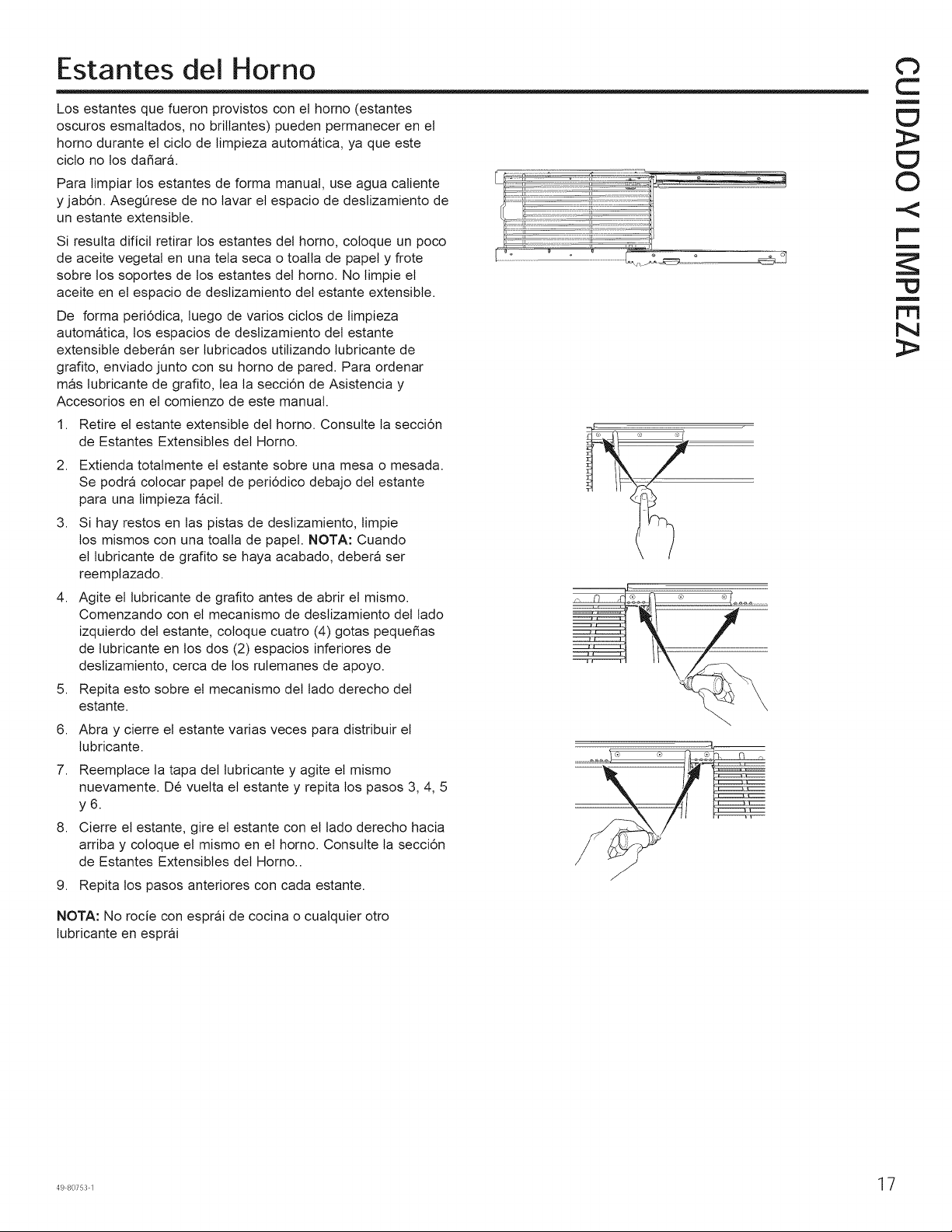
Estantes del Horno
Los estantes que fueron provistos con et horno (estantes
oscuros esmaltados, no brittantes) pueden permanecer en et
horno durante et ciclo de limpieza automatica, ya que este
ciclo no los da_ar&
Para limpiar los estantes de forma manual, use agua caliente
y jab6n. AsegQrese de no tavar et espacio de deslizamiento de
un estante extensible.
Si resulta dificit retirar los estantes del homo, coloque un poco
de aceite vegetal en una teta seca o toalla de papety frote
sobre los soportes de los estantes det homo. No timpie et
aceite en et espacio de deslizamiento det estante extensible.
De forma peri6dica, tuego de varios cictos de limpieza
automatica, los espacios de destizamiento del estante
extensibte deberan set lubricados utitizando lubricante de
grafito, enviado junto con su homo de pared. Para ordenar
mas tubricante de grafito, lea ta secci6n de Asistencia y
Accesorios en et comienzo de este manual.
1,
2.
3,
4,
5,
6.
7.
8,
Retire et estante extensibte det homo. Consulte la secci6n
de Estantes Extensibles det Homo.
Extienda totalmente el estante sobre una mesa o mesada.
Se podra colocar papet de peri6dico debajo det estante
para una timpieza facit.
Si hay restos en tas pistas de destizamiento, limpie
los mismos con una toatla de papet. NOTA: Cuando
et lubricante de grafito se haya acabado, debera set
reemplazado.
Agite et lubricante de grafito antes de abrir et mismo.
Comenzando con et mecanismo de destizamiento det tado
izquierdo det estante, coloque cuatro (4) gotas peque_as
de lubricante en los dos (2) espacios inferiores de
deslizamiento, cerca de los rulemanes de apoyo.
Repita esto sobre et mecanismo det tado derecho det
estante.
Abra y cierre et estante varias veces para distribuir et
lubricante.
Reemplace ta tapa del lubricante y agite et mismo
nuevamente. De vuetta et estante y repita los pasos 3, 4, 5
y6.
Cierre et estante, gire el estante con el tado derecho hacia
arriba y coloque et mismo en et homo. Consulte la secci6n
de Estantes Extensibles det Homo..
9. Repita los pasos anteriores con cada estante.
NOTA: No rocie con esprai de cocina o cualquier otto
lubricante en esprai
Cb
C
m
>
0
.<
rm
r_
N
>
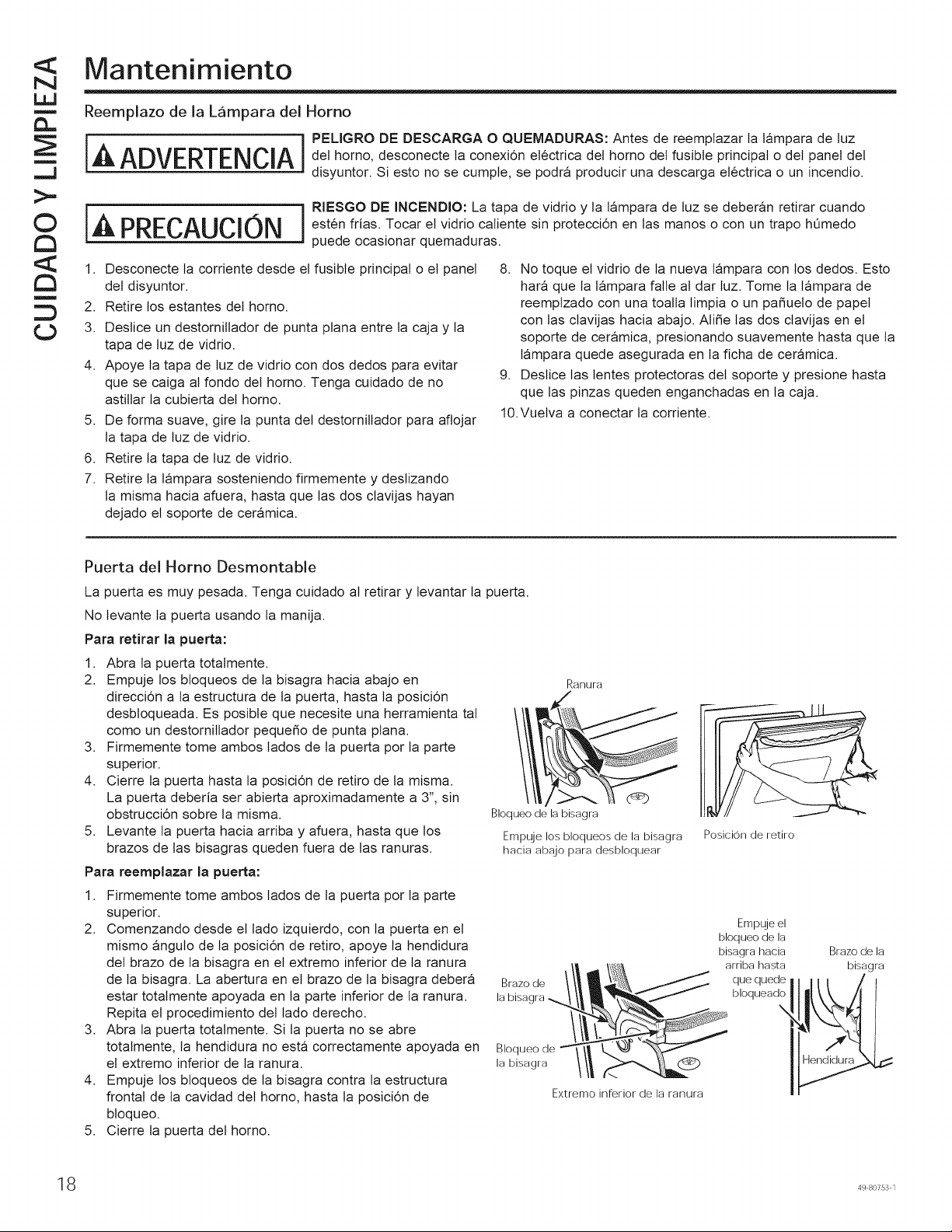
<
N
LIJ
m
m
>.
0
<
G5
Mantenimiento
Reemplazo de la Lampara del Homo
iA ADVERTENClAi °
det homo, desconecte la conexi6n etectrica det homo det fusible principal o det panel del
disyuntor. Si esto no se cumple, se podra producir una descarga etectrica o un incendio.
IALPRECAUCl0NliRIESGO DE INCENDIO: La tapa de vidrio y la lampara de luz se deberan retirar cuando
esten frias. Tocar et vidrio catiente sin protecci6n en las manos o con un trapo hQmedo
puede ocasionar quemaduras.
1. Desconecte ta corriente desde et fusible principal o et panel
del disyuntor.
2. Retire los estantes det homo.
3. Deslice un destornittador de punta plana entre la caja y la
tapa de luz de vidrio.
4. Apoye ta tapa de tuz de vidrio con dos dedos para evitar
que se caiga al fondo det homo. Tenga cuidado de no
astitlar la cubierta det homo.
5. De forma suave, gire ta punta det destomitlador para aflojar
la tapa de luz de vidrio.
6. Retire la tapa de luz de vidrio.
7. Retire la tampara sosteniendo firmemente y destizando
la misma hacia afuera, hasta que las dos clavijas hayan
dejado et soporte de ceramica.
8. No toque el vidrio de la nueva tampara con los dedos. Esto
hara que la lampara fatle al dar luz. Tome ta lampara de
reemplzado con una toalla limpia o un pafiueto de papet
con las ctavijas hacia abajo. Alifie tas dos clavijas en el
soporte de ceramica, presionando suavemente hasta que la
lampara quede asegurada en la ficha de ceramica.
9. Destice tas tentes protectoras det soporte y presione hasta
que las pinzas queden enganchadas en la caja.
10.Vuetva a conectar la corriente.
Puerta del Homo Desmontable
La puerta es muy pesada. Tenga cuidado al retirar y levantar la puerta.
No tevante ta puerta usando ta manija.
Para retirar la puerta:
1. Abra ta puerta totatmente.
2. Empuje los bloqueos de ta bisagra hacia abajo en
direcci6n a la estructura de la puerta, hasta la posici6n
desbtoqueada. Es posibte que necesite una herramienta tal
como un destomitlador pequefio de punta plana.
3. Firmemente tome ambos tados de ta puerta por la parte
superior.
4. Cierre ta puerta hasta la posici6n de retiro de la misma.
La puerta deberia set abierta aproximadamente a 3", sin
obstrucci6n sobre la misma.
5. Levante ta puerta hacia arriba y afuera, hasta que los
brazos de las bisagras queden fuera de las ranuras.
Para reemplazar la puerta:
1. Firmemente tome ambos lados de la puerta por la parte
superior.
2. Comenzando desde et lado izquierdo, con la puerta en et
mismo angulo de la posici6n de retiro, apoye la hendidura
det brazo de la bisagra en et extremo inferior de la ranura
de la bisagra. La abertura en el brazo de ta bisagra debera
estar totalmente apoyada en la parte inferior de ta ranura.
Repita el procedimiento det tado derecho.
3. Abra la puerta totalmente. Si la puerta no se abre
totalmente, la hendidura no esta correctamente apoyada en
et extremo inferior de la ranura.
4. Empuje los bloqueos de ta bisagra contra ta estructura
frontal de la cavidad det homo, hasta la posici6n de
bloqueo.
5. Cierre la puerta det homo.
Ranura
d©
Bloqueo de la bisagra
EmpL_je los bloqueos de la bisagra
hacia abajo para desbloquear
Posicion de retiro
Empujeel
bloqueo de la
bisagra hacia
la bisagra "__/! _ _a_ bloqueado\
Bloqueo de
la bisagra
Extremo inferior de la ranura
Brazo de la
bisagra
8 49 80753 1
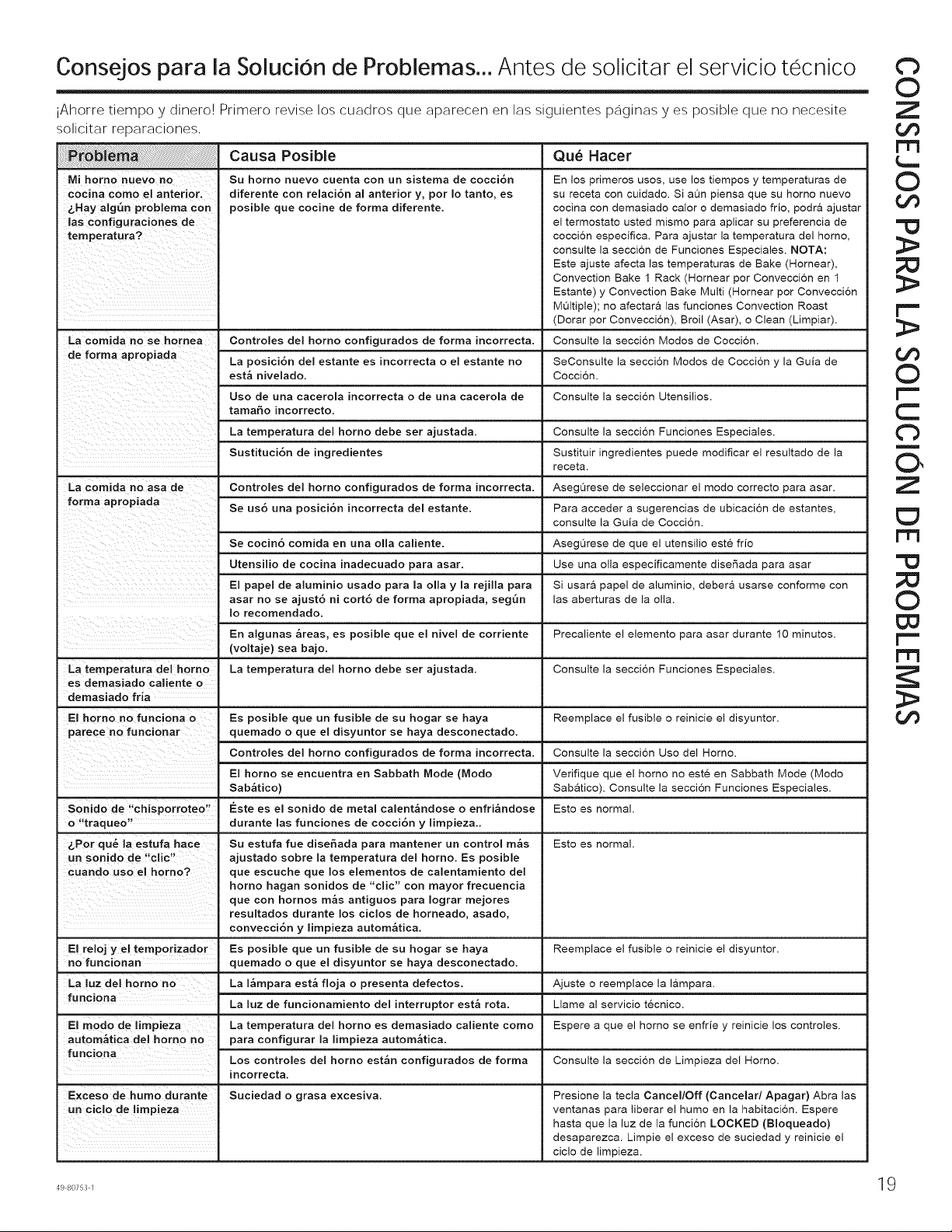
Consejos para la SoluciOn de Problemas... Antes de solicitar el servicio tecnico
iAhorre tiempo y dinero! Primero revise los cuadros que aparecen en las siguientes paginas yes posible que no necesite
solicitar reparaciones,
Mi homo nuevo no
cocina como el anterior.
_.Hay alg_n problema con
las configuraciones de
temperatura?
La comida no se hornea
La comida no asa de
Causa Posible Qu_ Hacer
Su homo nuevo cuenta con un sistema de cocci6n En los primeros uses, use los tiempos y temperaturas de
diferente con relaci6n al anterior y, por Io tanto, es su receta con cuidado. Si aOn piensa que su homo nuevo
posible que cocine de forma diferente, cocina con demasiado calor o demasiado frio, podr& ajustar
el termostato usted mismo para aplicar su preferencia de
coccion especifica. Para ajustar la temperatura del homo,
consulte la seccion de Funciones Especiales. NOTA:
Este ajuste afecta las temperaturas de Bake (Hornear),
Convection Bake 1 Rack (Hornear por Conveccion en 1
Estante) y Convection Bake Multi (Hornear por Conveccion
MOltiple); no afectara las funciones Convection Roast
(Dorar pot Conveccion), Broil (Asar), o Clean (Limpiar).
Controles del horno configurados de forma incorrecta. Consulte la seccion Modos de Coccion.
La posici6n del estante es incorrecta o el estante no SeConsulte la seccion Modos de Coccion y la Guia de
est_ nivelado. Cocci6n.
Uso de una cacerola incorrecta o de una cacerola de Consulte la secci6n Utensilios.
tamabo incorrecto.
La temperatura del homo debe ser ajustada. Consulte la secci6n Funciones Especiales.
Sustituci6n de ingredientes Sustituir ingredientes puede modificar el resultado de la
receta.
Controles del horno configurados de forma incorrecta. Asegt_rese de seleccionar el modo correcto para asar.
Se us6 una posici6n incorrecta del estante. Para acceder a sugerencias de ubicacion de estantes,
consulte la Guia de Coccion.
Se cocin6 comida en una olla caliente. AsegOrese de que el utensilio este frio
Utensilio de cocina inadecuado para asar. Use una olla especificamente diser_ada para asar
E! pape! de aluminio usado para la olla y la rejilla para Si usara papel de aluminio, debera usarse conforme con
asar no se ajust6 ni cort6 de forma apropiada, segQn las aberturas de la olla.
Io recomendado.
En algunas _reas, es posible que el nivel de corriente Precaliente el elemento para asar durante 10 minutos.
(voltaje) sea bajo.
La temperatura del homo La temperatura del homo debe ser ajustada. Consulte la seccion Funciones Especiales.
es demasiado caliente o
demasiado fria
El homo no funciona o Es posible que un fusible de su hogar se haya Reemplace el fusible o reinicie el disyuntor.
parece no funcionar quemado o que el disyuntor se haya desconectado.
Controles del homo configurados de forma incorrecta. Consulte la seccion Uso del Homo.
El horno se encuentra en Sabbath Mode (Modo
Sab_tico)
Sonido de "chisporroteo" Este es el sonido de metal calent&ndose o enfri_ndose
o "traqueo" durante las funciones de cocci6n y limpieza..
&Pot qu_ la estufa hace Su estufa rue disebada para mantener un control m_s
un sonido de "clic" ajustado sobre la temperatura del homo. Es posible
que escuche que los elementos de calentamiento del
homo hagan sonidos de "clic" con mayor frecuencia
que con hornos m_s antiguos para Iograr mejores
resultados durante !os cic!os de horneado, asado,
convecci6n y limpieza autom&tica.
El reloj y el temporizador Es posible que un fusible de su hogar se haya
no funcionan quemado o que el disyuntor se haya desconectado.
La luz del homo no La I_mpara est_ floja o presenta defectos.
funciona
La luz de funcionamiento del interruptor est_ rota,
El modo de limpieza La temperatura del horno es demasiado caliente como
autom_tica del homo no para configurar la limpieza autom_tica,
funciona Los controles del horno est_n configurados de forma
incorrecta.
E×ceso de humo durante Suciedad o grasa excesiva.
un ciclo de limpieza
Verifique que el homo no este en Sabbath Mode (Modo
Sabatico). Consulte la seccion Funciones Especiales.
Esto es normal.
Esto es normal.
Reemplace el fusible o reinicie el disyuntor.
Llame al servicio tecnico.
Espere a que el homo se enfrie y reinicie los controles.
Consulte la seccion de Limpieza del Homo.
Presione la tecla Cancel/Off (Cancelar/Apagar) Abra las
ventanas para liberar el humo en la habitacion. Espere
hasta que la luz de la funcion LOCKED (Bloqueado)
desaparezca. Limpie el exceso de suciedad y reinicie el
ciclo de limpieza.
49 80753 1
Cb
O
Z
rt3
O
r'"
O
r"-
C
13
n
O,
Z
¢3
m
=!3
O
D3
r"-
19
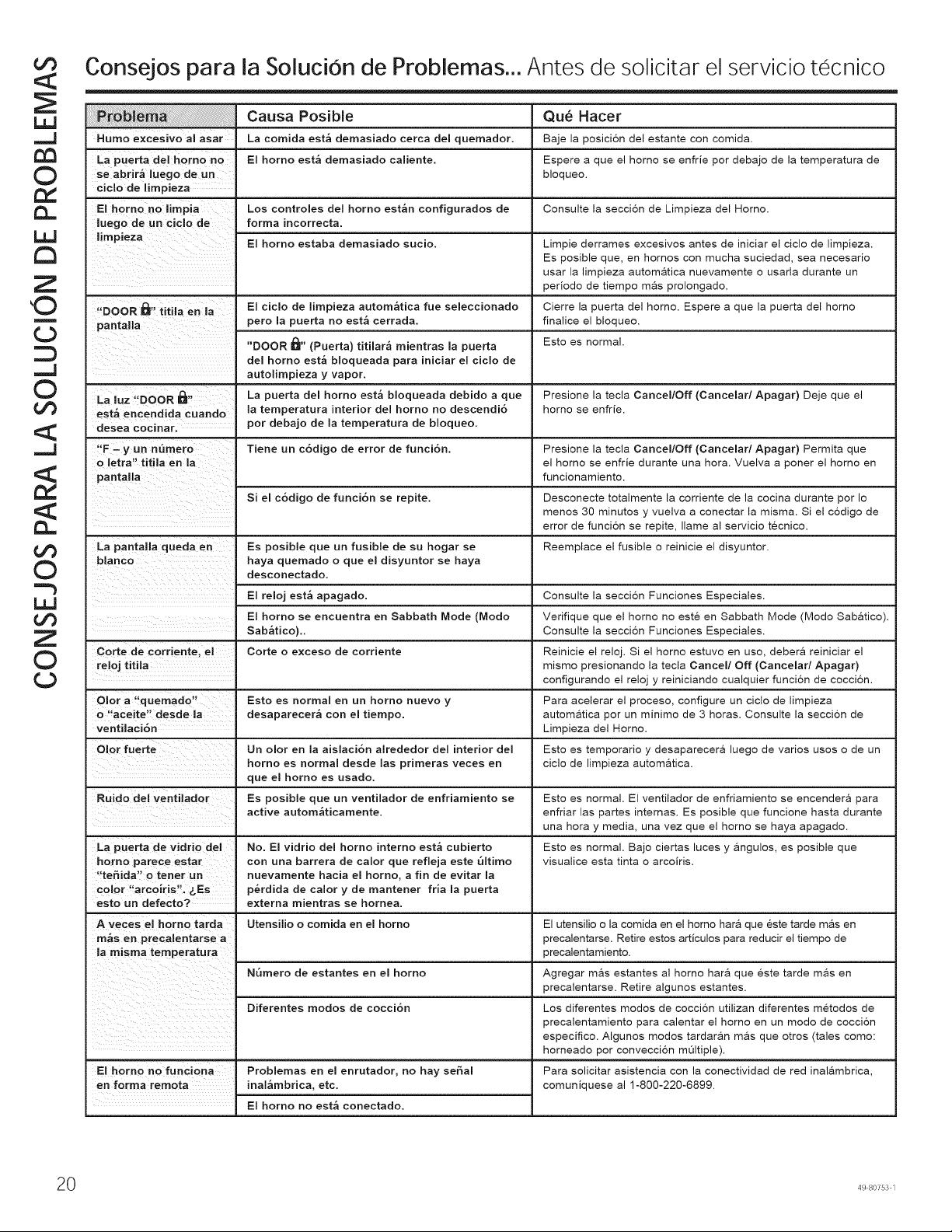
o©
<¢
©
Z
,©
m
¢.)
.,.J
©
o©
__J
o©
©
"h
o©
Z
©
¢.)
Consejos para la SoluciOn de Problemas... Antes de solicitar el servicio tecnico
Humo excesivo al asar
La puerta del horn© no
se abrir_ luego de un
ciclo de limpieza
El homo no limpia
luego de un ciclo de
"DOOR _" titila en la
pantalla
Causa Posible
La comida est_ demasiado cerca del quemador.
El horn© est_ demasiado caliente.
Los controles de! horn© est_n configurados de
forma incorrecta,
El horn© estaba demasiado sucio.
El ciclo de limpieza autom_tica rue seleccionado
per© la puerta no est_ cerrada.
"DOOR I_" (Puerta) titilar_ mientras la puerta
del horn© est_ bloqueada para iniciar el ciclo de
Qu_ Hacer
Baje la posicion del estante con comida.
Espere a que el homo se enfrie pot debajo de la temperatura de
bloqueo.
Consulte la secci6n de Limpieza del Horn©.
Limpie derrames excesivos antes de iniciar el ciclo de limpieza.
Es posible que, en hornos con mucha suciedad, sea necesario
usar la limpieza autom&tica nuevamente o usarla durante un
period© de tiempo mas prolongado.
Cierre la puerta del horn©. Espere a que la puerta del homo
finalice el bloqueo.
Esto es normal.
autolimpieza y vapor.
t_
La luz "DOOR m"
est_ encendida cuando
desea cocinar.
"F - y un nQmero
o letra" titila en la
pantalla
La pantalla queda en
blanc©
Corte de corriente, el
reloj titila
©lot a "quemado"
o "aceite" desde la
ventilaci6n
Olor fuerte
Ruido del ventilador
_"La puerta de vidrio del
homo parece estar
"te_ida" o tener un
color "arc©iris". _,Es
esto un defect©?
A veces el homo tarda
m_s en precalentarse a
a misma temperatura
El homo no funciona
en forrna remota
La puerta del horn© est_ bloqueada debido a que
la temperatura interior del horn© no descendi6
por debajo de la temperatura de bloqueo.
Tiene un c6digo de error de funci6n,
Si el c6digo de funci6n se repite.
Es posible que un fusible de su hogar se
haya quemado o que el disyuntor se haya
desconectado.
El reloj est_ apagado.
El horn© se encuentra en Sabbath Mode (Modo
Sab_tico),,
Corte o exceso de corriente
Esto es normal en un horno nuevo y
desaparecer_ con el tiempo,
Un ©lot en la aislaci6n alrededor del interior del
homo es normal desde las primeras veces en
que el homo es usado.
Es posible que un ventilador de enfriamiento se
active autom_ticamente.
No. El vidrio del horn© intern© est_ cubierto
con una barrera de calor que refleja este 61tim©
nuevamente hacia el horn©, a fin de evitar la
p_rdida de calor y de mantener fria la puerta
externa mientras se hornea.
Utensilio o comida en el horn©
N6mero de estantes en el horn©
Diferentes re©dos de cocci6n
Problemas en el enrutador, no hay seSal
inal_mbrica, etc.
El horn© no est_ conectado.
Presione la tecla Cancel/Off (Cancelar/Apagar) Deje que el
homo se enfrie.
Presione la tecla Cancel/Off (Cancelar/Apagar) Permita que
el homo se enfrie durante una hora. Vuelva a poner el homo en
funcionamiento.
Desconecte totalmente la corriente de la cocina durante por Io
menos 30 minutos y vuelva a conectar la misma. Si el codigo de
error de funcion se repite, Ilame al servicio tecnico.
Reemplace el fusible o reinicie el disyuntor.
Consulte la seccion Funciones Especiales.
Verifique que el homo no este en Sabbath Mode (Modo Sab&tico).
Consulte la seccion Funciones Especiales.
Reinicie el reloj. Si el homo estuvo en us©, debera reiniciar el
mismo presionando la tecla Cancel/Off (Cancelar/Apagar)
configurando el reloj y reiniciando cualquier funcion de coccion.
Para acelerar el proceso, configure un ciclo de limpieza
automatica pot un minim© de 3 horas. Consulte la seccion de
Limpieza del Homo.
Esto es temporario y desaparecera luego de varios usos o de un
ciclo de limpieza automatica.
Esto es normal. El ventilador de enfriamiento se encendera para
enfriar las partes internas. Es posible que funcione hasta durante
una hora y media, una vez que el homo se haya apagado.
Esto es normal. Bajo ciertas luces y angulos, es posible que
visualice esta tinta o arc©iris.
El utensilio o la comida en el homo har& que este tarde mas en
precalentarse. Retire estos articulos para reducir el tiempo de
precalentamiento.
Agregar mas estantes al homo hara que este tarde mas en
precalentarse. Retire algunos estantes.
Los diferentes modos de coccion utilizan diferentes met©dos de
precalentamiento para calentar el homo en un modo de coccion
especifico. Algunos modos tardaran mas que otros (tales corn©:
horneado pot conveccion m_ltiple).
Para solicitar asistencia con la conectividad de red inalambrica,
comuniquese al 1-800-220-6899.
0 49 80753 1

