Care Guide
Kitchen_kid °
FOR THE WAY IT'S MADE. TM
A Note to You ............... 2
Range Safety ............. 3-5
Getting to Know
Your Range .................. 6
Using and Caring
for Your Cooktop ......... 9
Using and Caring
for Your Oven ............. 14
Using the Self=
Cleaning Cycle ........... 36
if You Need
Assistance or
Service ........................ 40
Warranty ..................... 44
1-800-422-1230
Call us with questions
or comments.
KITCHENAID®
Electric Range
PART NO. 9780933 Rev. A
Model: KERC500
Note toYou
Thankyou for buying a KITCHENAID ®appliance!
KitchenAid designs the best tools for the most important room in your house. To
ensure that you enjoy many years of trouble-free operation, we developed this Use
and Care Guide. it contains valuable information concerning how to operate and
maintain your new appliance properly and safely. Please read it carefully.
Also, please complete and mail the enclosed Product Registration Card.
Please record your model's information.
Whenever you call our Consumer
Assistance Center at 1-800=422=1230 or
request service for your appliance, you need
to know your complete model number and
serial number. You can find this information
on the model and serial number plate (see
diagram on page 6 for location of plate).
Please also record the purchase
information.
Model Number
Serial Number
Purchase/
Installation Date
Builder/Dealer
Name
Address
NOTE: You must provide proof of purchase Phone
or installation date for in-warranty service.
Keep this book and the sales slip together in a safe place for future reference.
Safety
IMPORTANT SAFETYINSTRUCTIONS
Your safety is important to us.
This guide contains safety symbols and
statements. Please pay special attention to
these symbols and follow any instructions
given. Here is a brief explanation of the use
of the symbol.
General
This symbol alerts you
to hazards such as fire,
electrical shock, or
other injuries.
To reduce the risk of fire, electrical
shock, injury to persons, or damage
when using the range, follow basic
precautions, including the following:
• Read all instructions before using
the range.
• Install or locate the range only in
accordance with the provided
Installation Instructions, The
range must be installed by a
qualified installer. The range
must be properly connected to
electrical supply and grounded.
oWARNING: To reduce the risk
of tipping the appliance, the
appliance must be secured by a
properly installed anti=tip bracket.
To check if the bracket is in-
stalled properly, see "The anti=tip
bracket" on page 8.
• CAUTION: Do not store things
children might want above the
range. Children could be burned
or injured while climbing on it.
• Do not leave children alone or
unattended in area where the
range is in use. They should
never be allowed to sit or stand
on any part of the range. They
could be burned or injured.
• Do not use the range for warming
or heating the room. Persons
could be burned or injured, or a
fire could start.
• Use the range only for its intended
use as described in this manual.
• Do not touch surface units, areas
near units, heating elements, or
interior surfaces of oven. Surface
units and heating elements may
be hot even though they are dark
in color. Areas near surface units
and interior surfaces of an oven
become hot enough to cause
burns. During and after use, do
not touch, or let clothing or other
flammable materials contact
surface units, areas near units,
heating elements, or interior
surfaces of oven until they have
had sufficient time to cool. Other
surfaces of the range, such
as the oven vent opening, the
surface near the vent opening, the
cooktop, and the oven door and
window, could also become hot
enough to cause burns.
continued on next page 3
__nge Safely
oDo not operate the range if it is
damaged or not working properly.
oDo not wear loose or hanging
garments when using the range.
They could ignite if they touch a
hot surface unit and you could
be burned.
oUse only dry pot holders. Moist or
damp pot holders on hot surfaces
could result in burns from steam.
Do not let pot holder touch hot
heating elements. Do not use a
towel or bulky cloth for a pot
holder. It could catch on fire.
oKeep range vents unobstructed.
oDo not heat unopened containers.
They could explode. The hot
contents could cause burns and
container particles could cause
injury.
oUse only cookware approved for
oven use. Follow cookware manu-
facturer's instructions, especially
when using glass or plastic
cookware.
oDo not store flammable materials
on or near the range. The fumes
could create an explosion and/or
fire hazard.
oDo not repair or replace any part
of the range unless specifically
recommended in this manual. All
other servicing should be referred
to a qualified technician.
oDisconnect the electrical supply
before servicing the range.
When using the cookfop
oDo not cook on a broken ceramic
glass cooktop. If cooktop should
break, cleaning solutions and
spillovers could penetrate the
broken cooktop and create a risk
of electrical shock. Contact a
qualified technician immediately.
oSelect a pan with a flat bottom
that is about the same size as the
surface unit. If pan is smaller than
the surface unit, some of the
heating element will be exposed
and could result in the igniting of
clothing or pot holders. Correct
pan size also improves cooking
efficiency.
oCheck to be sure glass cookware
is safe for use on the range. Only
certain types of glass, glass-
ceramic, ceramic, earthenware,
or other glazed cookware are
suitable for cooktops without
breaking due to the sudden
change in temperature.
oNever leave surface units un-
attended at high heat settings.
A boilover could result and cause
smoking and greasy spillovers
that could ignite.
oTurn pan handles inward, but not
over other surface units. This will
help reduce the chance of burns,
igniting of flammable materials,
and spills due to bumping of
the pan.
4
__nge Safety
oGrease is flammable. Do not
allow grease to collect around
cooktop or in vents. Wipe spill-
overs immediately.
oDo not use water on grease fires.
Never pick up a flaming pan.
Smother flaming pan on range
by covering with a well-fitting lid,
cookie sheet, or flat tray. Flaming
grease outside of pan can be
extinguished with baking soda
or, if available, a multipurpose
dry chemical or foam-type
extinguisher.
oClean ceramic glass cooktop
with care. Some cleaners could
produce noxious fumes if applied
to a hot surface. If a wet paper
towel is used to wipe spills on a
hot cooking area, be careful to
avoid steam burns.
When using the oven
oSmall amounts of formaldehyde
and carbon monoxide are given
off in the Self-Cleaning cycle from
fiberglass insulation and food
decomposition. Significant expo-
sure to these substances could
cause cancer or reproductive
harm. Exposure can be minimized
by venting with a hood or open
window and wiping out excess
food spills prior to self-cleaning.
oDo not use oven cleaners. No
commercial oven cleaner or oven
liner protective coating of any kind
should be used in or around any
part of the oven.
oBefore self-cleaning the oven,
remove broiler pan, broiler grid,
oven racks, and other cookware.
Do not use your oven to clean
miscellaneous parts unless you
are instructed to do so in this Use
and Care Guide.
• Always position oven rack(s)in
desired location while oven is
cool. If a rack must be removed
while oven is hot, do not let pot
holder contact hot heating ele-
ments in oven.
oDo not clean door gasket. It is
essential for a good seal. Care
should be taken not to rub, dam-
age, or move the gasket. Clean
only parts recommended in this
Use and Care Guide.
oUse care when opening oven door.
Let hot air or steam escape before
removing or replacing food.
- SAVE THESE INSTRUCTIONS -
5
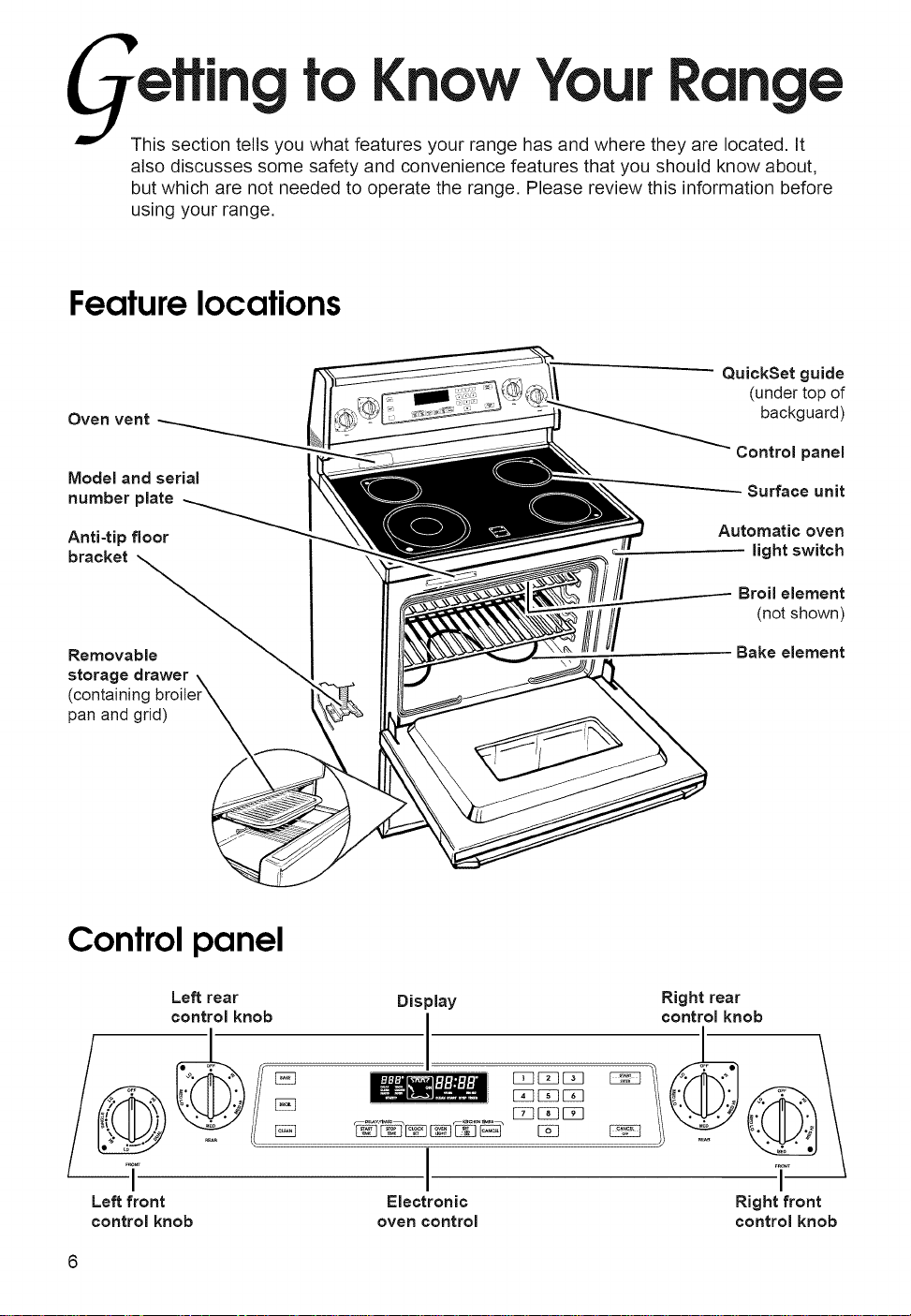
toKnow You
Range
This section tells you what features your range has and where they are located. It
also discusses some safety and convenience features that you should know about,
but which are not needed to operate the range. Please review this information before
using your range.
Featurelocations
Oven vent
Model and serial
number plate
Anti-tip floor
bracket
Removable
storage drawer
(containing
pan and grid)
QuickSet guide
(under top of
backguard)
Control panel
Surface unit
Automatic oven
light switch
Broil element
(not shown)
Bake element
Controlpanel
Left rear
control knob
Left front
control knob
Display
I
NIIIt_
/
Electronic
oven control
_DGEZ3
E_EBEE]
E2]EElEEl
Right rear
control knob
I
Right front
control knob
Gelling to Know Your Range
The oven vent
Oven
vent _
Hot air and moisture escape from the oven
through a vent on the lower left side of the
backguard. Do not block the vent by using
large pans or covers. Poor baking/roasting
can result,
,I;; lilt,
Burn Hazard
Use pot holders when touching items
left near oven vent.
Failure to do so can result in burns.
The storagedrawer
You can remove the storage drawer to make
it easier to clean under the range and to
check for installation of the anti-tip bracket,
Use care when handling the drawer.
Removing the storage drawer:
1. Empty drawer of any pots and pans
before removing drawer. Use recessed
area on top edge of drawer to pull drawer
straight out to the first stop. Lift front and
pull out to the second stop.
2. Lift back slightly and slide drawer all the
way out.
Replacing the storage drawer:
Drawer slide rail ,.4,
1. Fit ends of drawer slide rails into the
drawer guides on both sides of opening.
2. Lift drawer front and press in until metal
stops on drawer slide rails clear white
stops on drawer guides. Lift drawer front
again to clear second stop and slide
drawer closed,
7
Gelling to Know Your Range
The anti-tip bracket
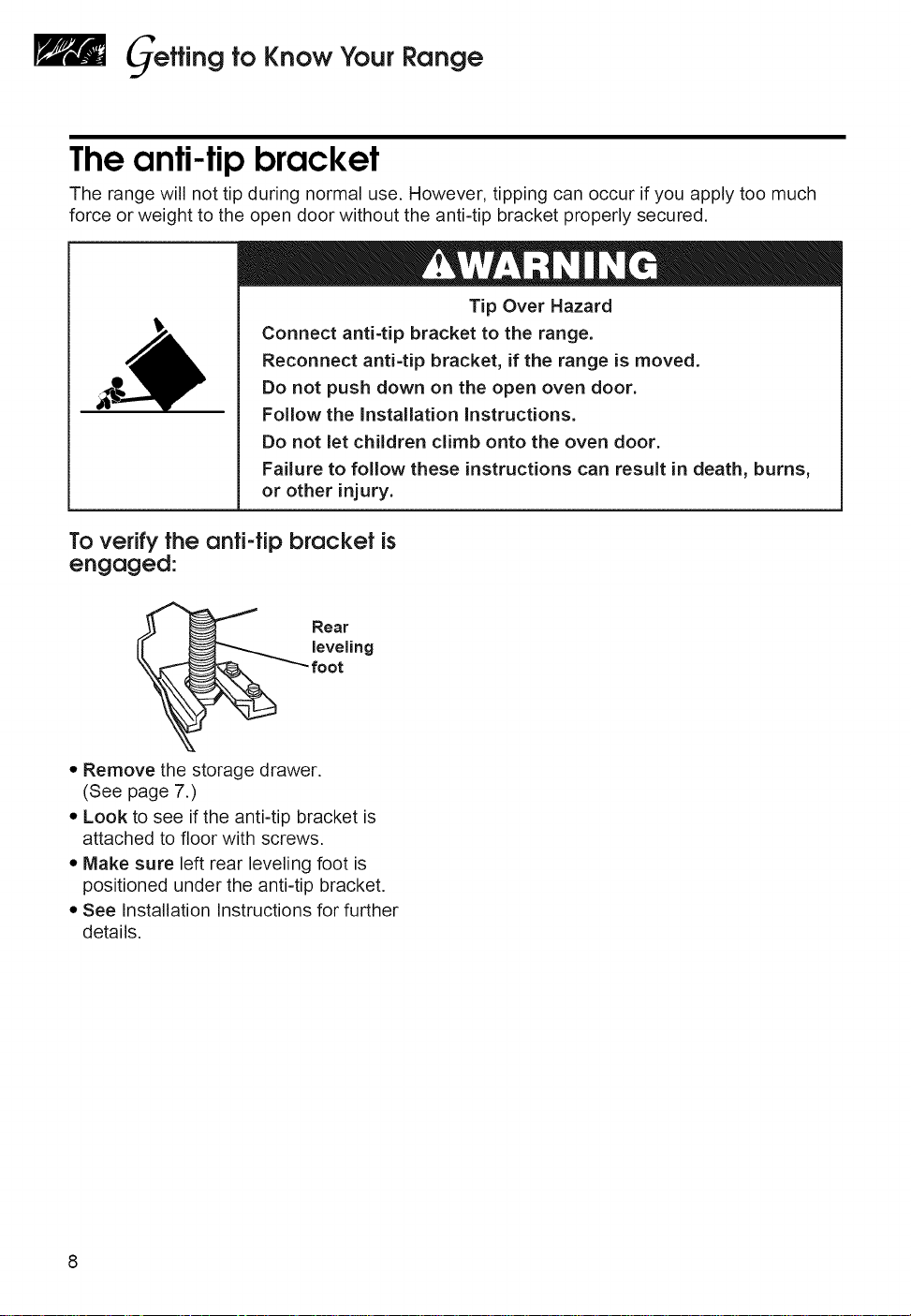
The range will not tip during normal use. However, tipping can occur if you apply too much
force or weight to the open door without the anti-tip bracket properly secured.
Tip Over Hazard
Connect anti=tip bracket to the range.
Reconnect anti-tip bracket, if the range is moved.
Do not push down on the open oven door.
Follow the installation Instructions.
Do not let children climb onto the oven door.
Failure to follow these instructions can result in death, burns,
or other injury.
To verifytheanti-tipbracket is
engaged:
• Remove the storage drawer.
(See page 7.)
• Look to see if the anti-tip bracket is
attached to floor with screws.
• Make sure left rear leveling foot is
positioned under the anti-tip bracket.
• See Installation Instructions for further
details.
sing and
Cooktop
Caring
forYou
This section tells you how to operate the controls to the cooktop. It also discusses
how the ceramic glass cooktop works, and includes tips on how to cook with and
maintain the cooktop.
IN THB SECTION
Using the surface units ................... 9
Cookware tips ................................. 11
Caring for your cooktop ................ 12
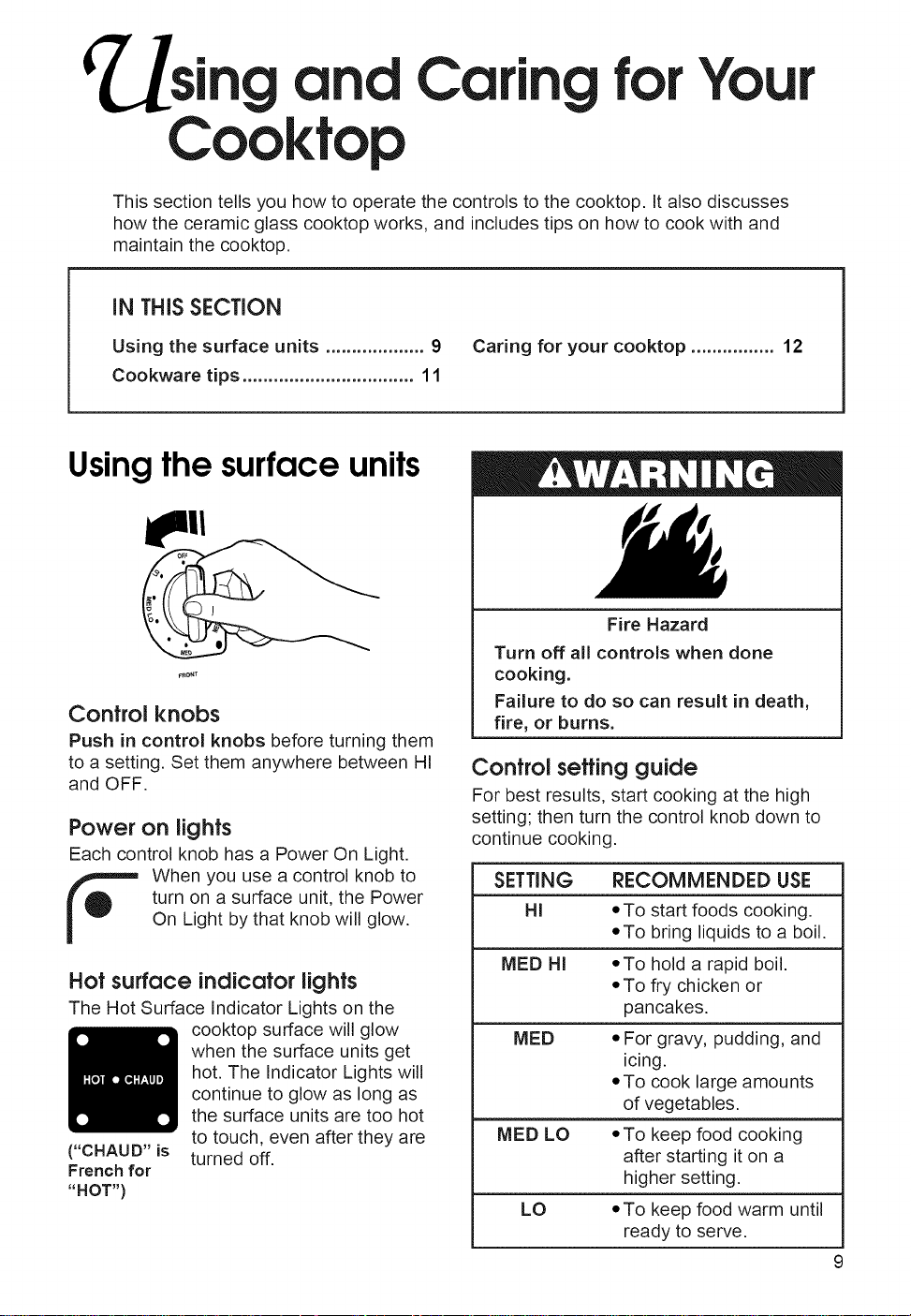
Usingthe surface units
_RO_T
Control knobs
Push in control knobs before turning them
to a setting. Set them anywhere between HI
and OFF.
Power on lights
Each control knob has a Power On Light.
When you use a control knob to
turn on a surface unit, the Power
On Light by that knob will glow.
Hot surface indicatorlights
The Hot Surface Indicator Lights on the
cooktop surface will glow
when the surface units get
hot. The Indicator Lights will
continue to glow as long as
the surface units are too hot
to touch, even after they are
turned off.
("CHAUD" is
French for
"HOT")
Fire Hazard
Turn off all controls when done
cooking.
Failure to do so can result in death,
fire, or burns.
Control settingguide
For best results, start cooking at the high
setting; then turn the control knob down to
continue cooking.
SETTING RECOMMENDED USE
HI *To start foods cooking.
*To bring liquids to a boil.
MED HI *To hold a rapid boil.
*To fry chicken or
pancakes.
MED *For gravy, pudding, and
icing.
*To cook large amounts
of vegetables.
MED LO *To keep food cooking
after starting it on a
higher setting.
LO *To keep food warm until
ready to serve.
9
"Using and Caring forYour Cooktop
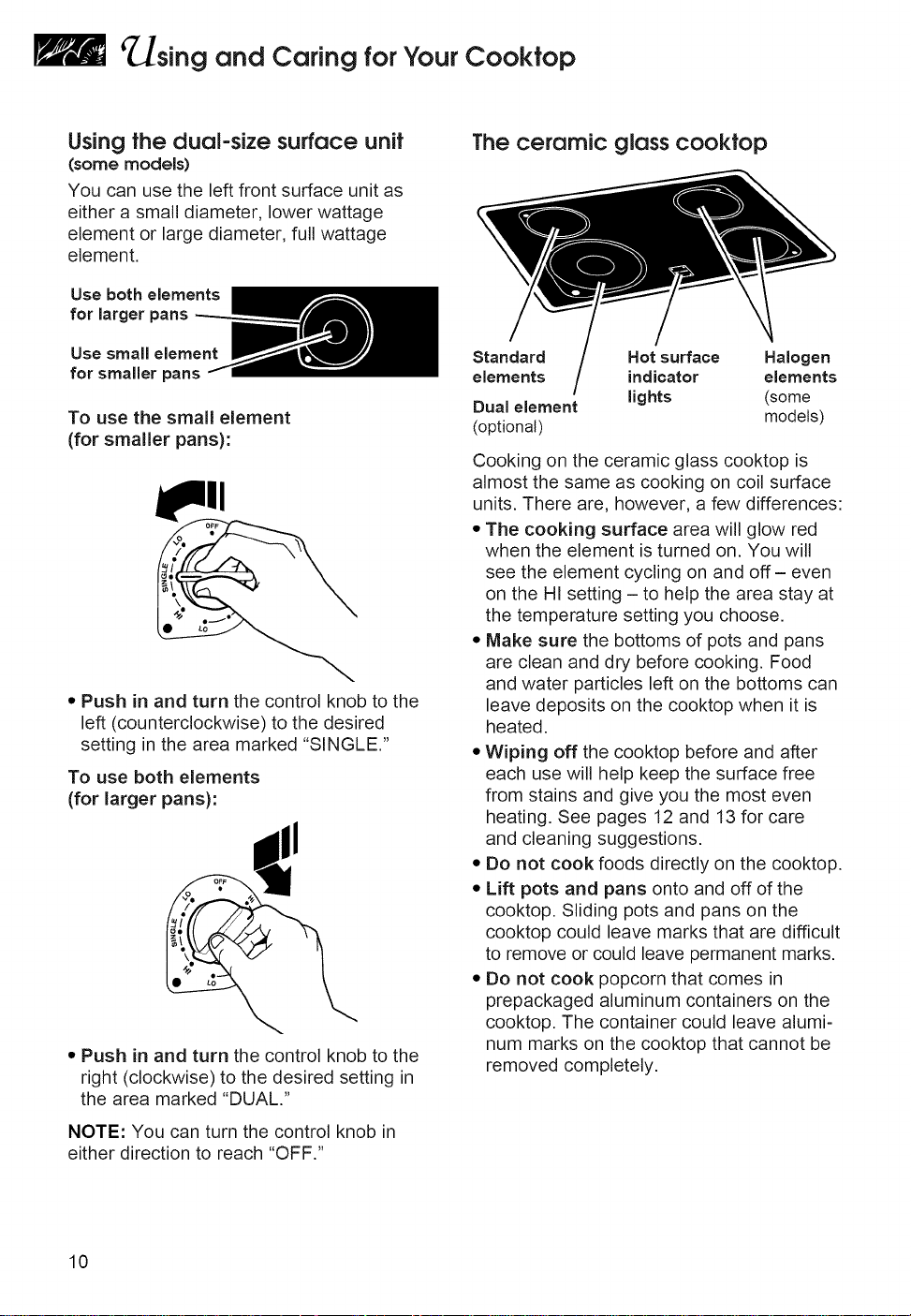
Using the dual-size surface unit
(some models)
You can use the left front surface unit as
either a small diameter, lower wattage
element or large diameter, full wattage
element.
Use both elements
for larger pans
Use small element
for smaller pans
To use the small element
(for smaller pans):
• Push in and turn the control knob to the
left (counterclockwise) to the desired
setting in the area marked "SINGLE."
To use both elements
(for larger pans):
• Push in and turn the control knob to the
right (clockwise) to the desired setting in
the area marked "DUAL."
NOTE: You can turn the control knob in
either direction to reach "OFF."
The ceramic glass cooktop
Standard Hot surface Halogen
elements indicator elements
Dual element lights (some
(optional) models)
Cooking on the ceramic glass cooktop is
almost the same as cooking on coil surface
units. There are, however, a few differences:
• The cooking surface area will glow red
when the element is turned on. You will
see the element cycling on and off- even
on the HI setting - to help the area stay at
the temperature setting you choose.
• Make sure the bottoms of pots and pans
are clean and dry before cooking. Food
and water particles left on the bottoms can
leave deposits on the cooktop when it is
heated.
• Wiping off the cooktop before and after
each use will help keep the surface free
from stains and give you the most even
heating. See pages 12 and 13 for care
and cleaning suggestions.
• Do not cook foods directly on the cooktop.
• Lift pots and pans onto and off of the
cooktop. Sliding pots and pans on the
cooktop could leave marks that are difficult
to remove or could leave permanent marks.
• Do not cook popcorn that comes in
prepackaged aluminum containers on the
cooktop. The container could leave alumi-
num marks on the cooktop that cannot be
removed completely.
10
¢ sing and Caring forYour Cooktop
• Do not use the cooktop as a cutting
board.
• Do not allow anything that could melt,
such as plastic or aluminum foil, to come
in contact with the cooktop while it is hot.
Cookware tips
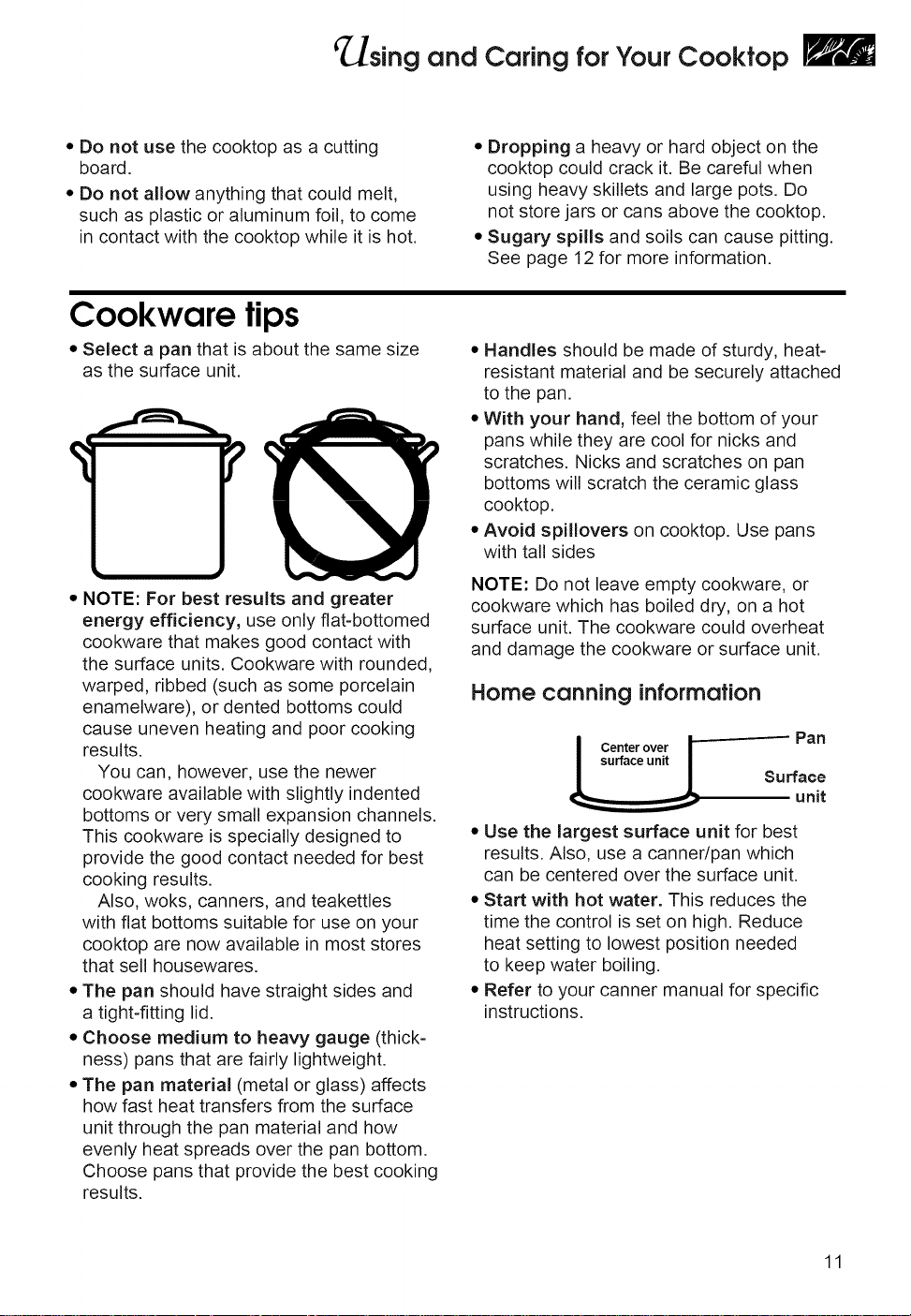
• Select a pan that is about the same size
as the surface unit.
! ?
• NOTE: For best results and greater
energy efficiency, use only flat-bottomed
cookware that makes good contact with
the surface units. Cookware with rounded,
warped, ribbed (such as some porcelain
enamelware), or dented bottoms could
cause uneven heating and poor cooking
results.
You can, however, use the newer
cookware available with slightly indented
bottoms or very small expansion channels.
This cookware is specially designed to
provide the good contact needed for best
cooking results.
Also, woks, canners, and teakettles
with flat bottoms suitable for use on your
cooktop are now available in most stores
that sell housewares.
• The pan should have straight sides and
a tight-fitting lid.
• Choose medium to heavy gauge (thick-
ness) pans that are fairly lightweight.
• The pan material (metal or glass) affects
how fast heat transfers from the surface
unit through the pan material and how
evenly heat spreads over the pan bottom.
Choose pans that provide the best cooking
results.
• Dropping a heavy or hard object on the
cooktop could crack it. Be careful when
using heavy skillets and large pots. Do
not store jars or cans above the cooktop.
• Sugary spills and soils can cause pitting.
See page 12 for more information.
• Handles should be made of sturdy, heat-
resistant material and be securely attached
to the pan.
• With your hand, feel the bottom of your
pans while they are cool for nicks and
scratches. Nicks and scratches on pan
bottoms will scratch the ceramic glass
cooktop.
• Avoid spillovers on cooktop. Use pans
with tall sides
NOTE: Do not leave empty cookware, or
cookware which has boiled dry, on a hot
surface unit. The cookware could overheat
and damage the cookware or surface unit.
Home canning information
Center over 1 -- Pan
Surface
unit
• Use the largest surface unit for best
results. Also, use a canner/pan which
can be centered over the surface unit.
• Start with hot water. This reduces the
time the control is set on high. Reduce
heat setting to lowest position needed
to keep water boiling.
• Refer to your canner manual for specific
instructions.
11
sing and Caring forYour Cooktop
Caring for your cooktop
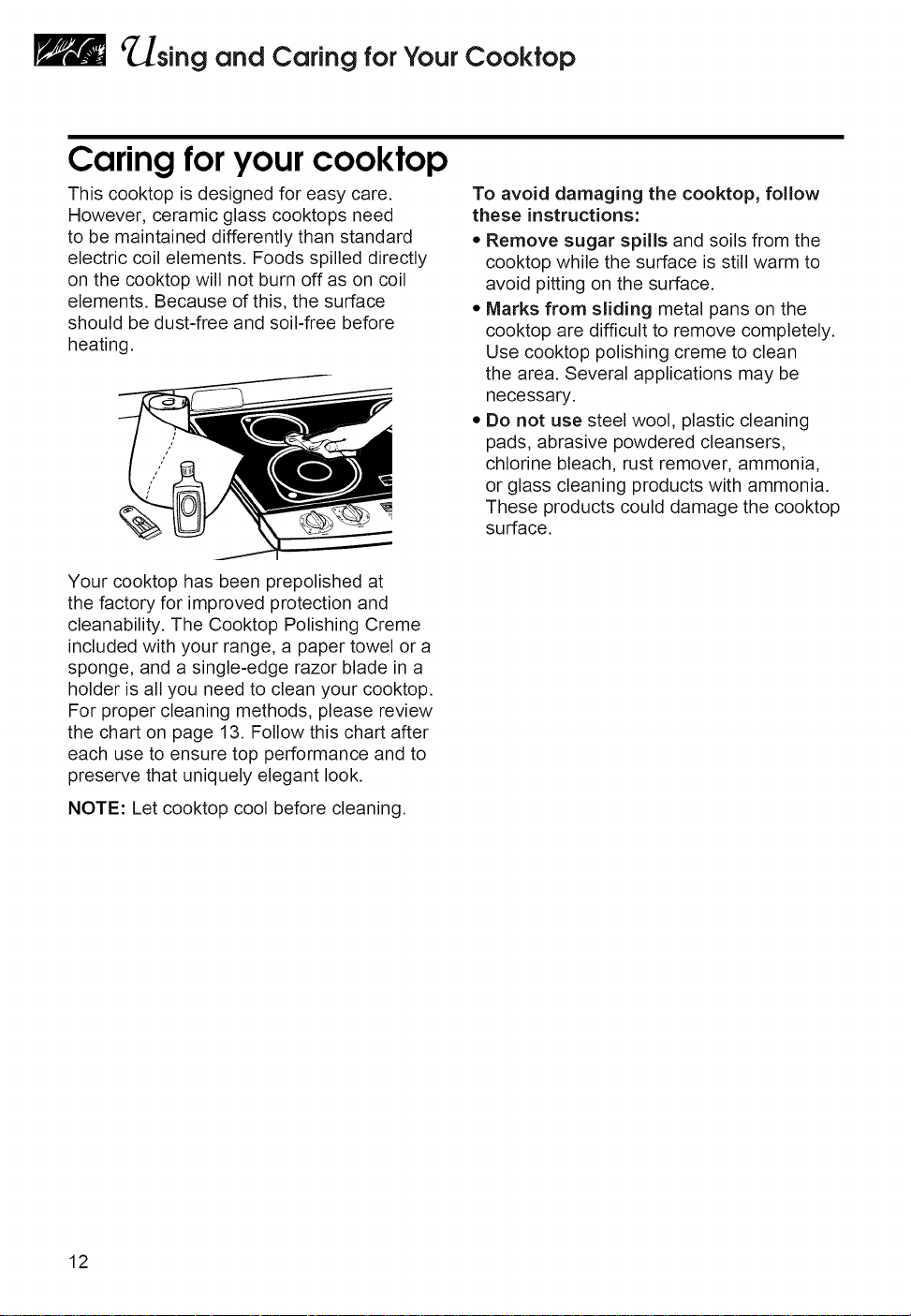
This cooktop is designed for easy care.
However, ceramic glass cooktops need
to be maintained differently than standard
electric coil elements. Foods spilled directly
on the cooktop will not burn off as on coil
elements. Because of this, the surface
should be dust-free and soil-free before
heating.
To avoid damaging the cooktop, follow
these instructions:
• Remove sugar spills and soils from the
cooktop while the surface is still warm to
avoid pitting on the surface.
• Marks from sliding metal pans on the
cooktop are difficult to remove completely.
Use cooktop polishing creme to clean
the area. Several applications may be
necessary.
• Do not use steel wool, plastic cleaning
pads, abrasive powdered cleansers,
chlorine bleach, rust remover, ammonia,
or glass cleaning products with ammonia.
These products could damage the cooktop
surface.
Your cooktop has been prepolished at
the factory for improved protection and
cleanability. The Cooktop Polishing Creme
included with your range, a paper towel or a
sponge, and a single-edge razor blade in a
holder is all you need to clean your cooktop.
For proper cleaning methods, please review
the chart on page 13. Follow this chart after
each use to ensure top performance and to
preserve that uniquely elegant look.
NOTE: Let cooktop cool before cleaning.
12
¢ sing and Caring forYour Cooktop
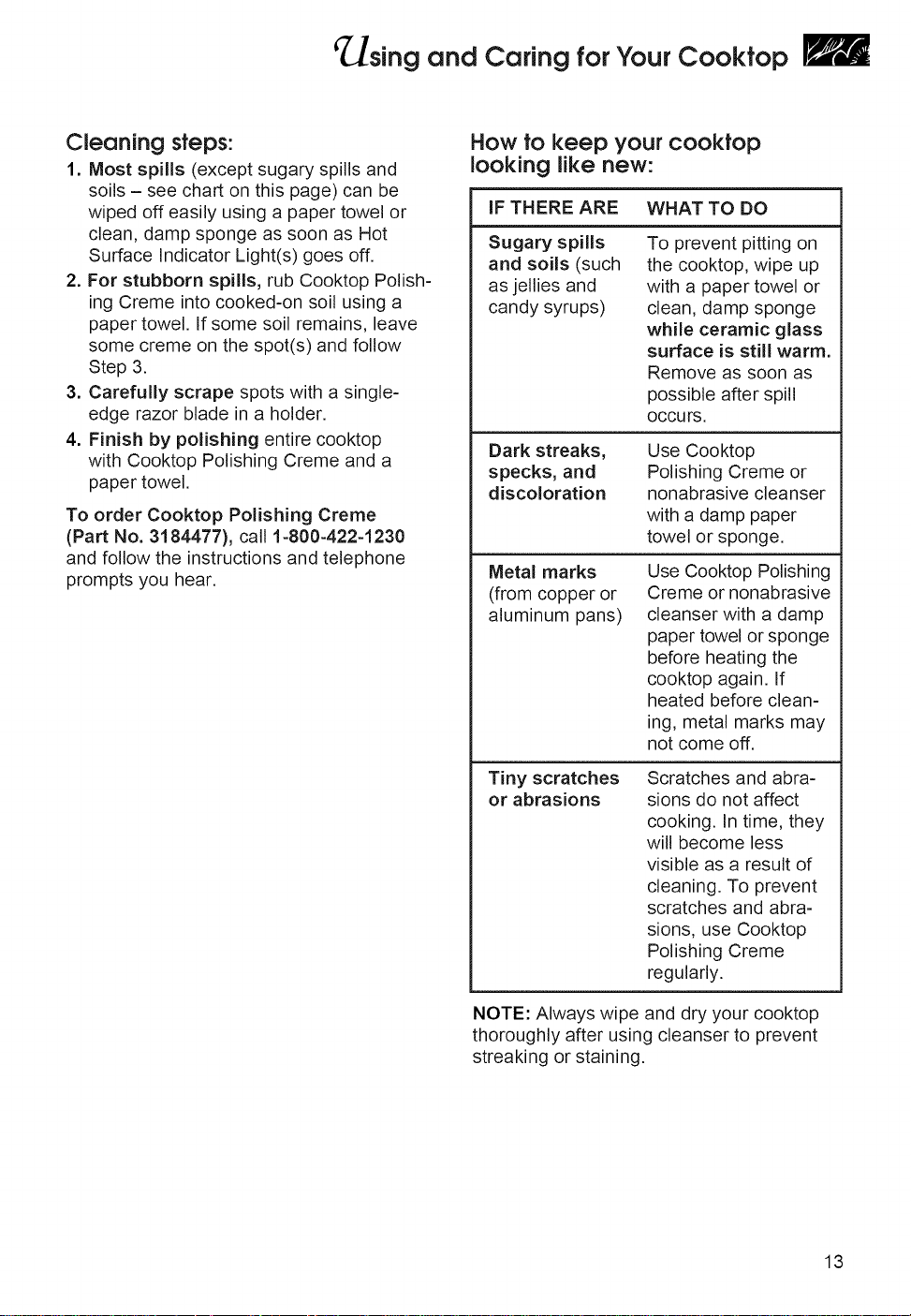
Cleaning steps:
1. Most spills (except sugary spills and
soils - see chart on this page) can be
wiped off easily using a paper towel or
clean, damp sponge as soon as Hot
Surface Indicator Light(s) goes off.
2. For stubborn spills, rub Cooktop Polish-
ing Creme into cooked-on soil using a
paper towel. If some soil remains, leave
some creme on the spot(s) and follow
Step 3.
3. Carefully scrape spots with a single-
edge razor blade in a holder.
4. Finish by polishing entire cooktop
with Cooktop Polishing Creme and a
paper towel.
To order Cooktop Polishing Creme
(Part No. 3184477), call 1-800-422-1230
and follow the instructions and telephone
prompts you hear.
How to keep your cooktop
looking likenew:
IF THERE ARE WHAT TO DO
Sugary spills
and soils (such
as jellies and
candy syrups)
To prevent pitting on
the cooktop, wipe up
with a paper towel or
clean, damp sponge
while ceramic glass
surface is still warm.
Remove as soon as
possible after spill
OCCU rs.
Dark streaks,
specks, and
discoloration
Metal marks
(from copper or
aluminum pans)
Use Cooktop
Polishing Creme or
nonabrasive cleanser
with a damp paper
towel or sponge.
Use Cooktop Polishing
Creme or nonabrasive
cleanser with a damp
paper towel or sponge
before heating the
cooktop again. If
heated before clean-
ing, metal marks may
not come off.
Tiny scratches
or abrasions
Scratches and abra-
sions do not affect
cooking. In time, they
will become less
visible as a result of
cleaning. To prevent
scratches and abra-
sions, use Cooktop
Polishing Creme
regularly.
NOTE: Always wipe and dry your cooktop
thoroughly after using cleanser to prevent
streaking or staining.
13
sing
Your
and Caring
Oven
for
This section tells you, step by step, how to operate all oven functions controlled by the
electronic control. Carefully follow these instructions, along with the cooking tips and
cleaning information, for successful use of your range.
IN THIS SECTION
Using the electronic oven
control ............................................. 14
Setting the clock ............................. 16
Using the kitchen timer .................. 16
Baking/roasting .............................. 18
Adjusting oven temperature .......... 20
Broiling ............................................ 22
Timed cooking ................................ 25
Cooking tips ..................................... 28
Cleaning your oven and controls ... 33
Using and replacing the
oven light(s) ..................................... 35
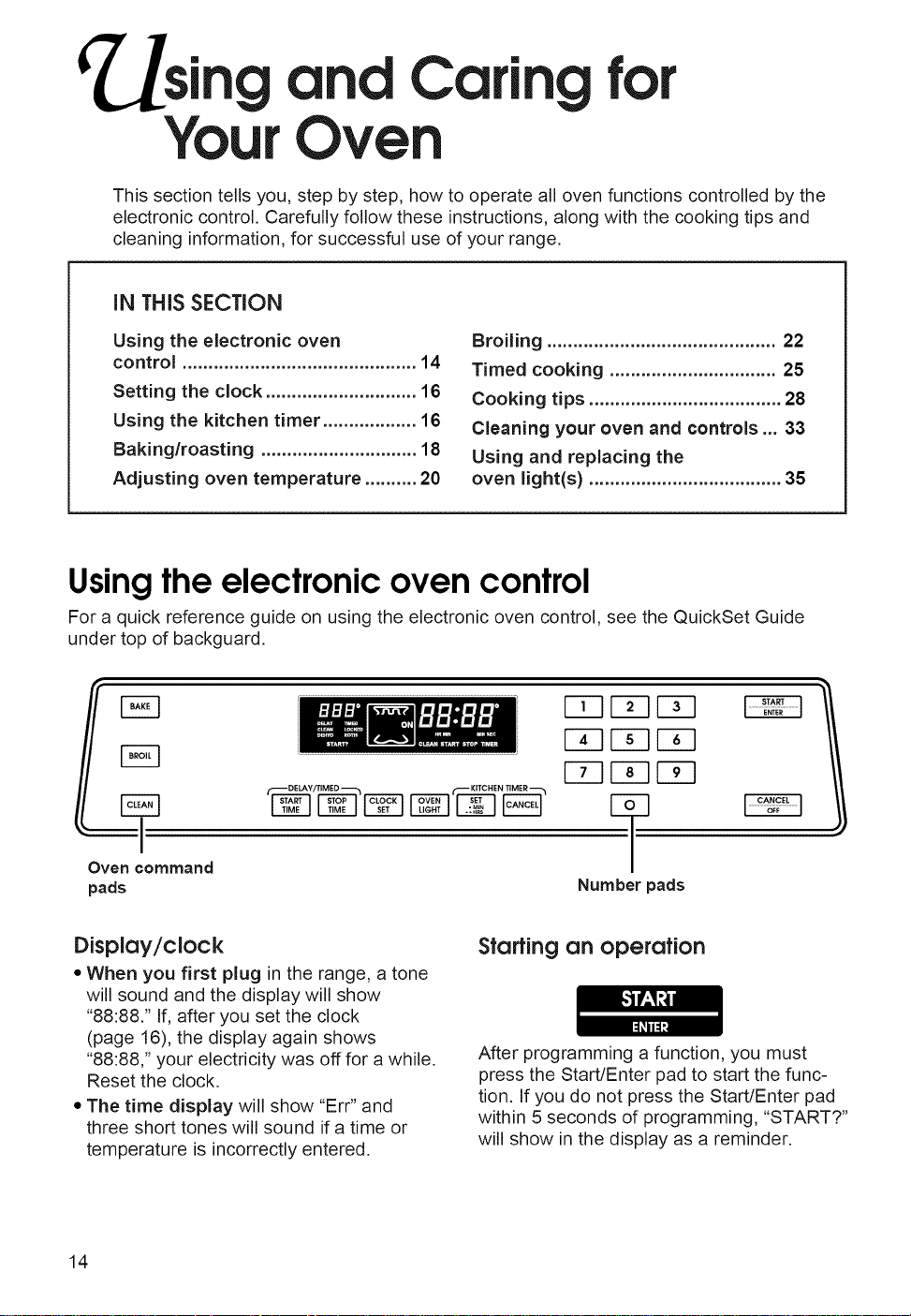
Using the electronic oven control
For a quick reference guide on using the electronic oven control, see the QuickSet Guide
under top of backguard.
F_q
r_q
Oven command
pads
DELAY/TIMED _ KITCHENTIMER
FTqr_q F_
F F_r-_
r F_EZ3
Number pads
Display/clock
• When you first plug in the range, a tone
will sound and the display will show
"88:88." If, after you set the clock
(page 16), the display again shows
"88:88," your electricity was off for a while.
Reset the clock.
• The time display will show "Err" and
three short tones will sound if a time or
temperature is incorrectly entered.
Starting an operation
After programming a function, you must
press the Start/Enter pad to start the func-
tion. If you do not press the Start/Enter pad
within 5 seconds of programming, "START?"
will show in the display as a reminder.
14
_sing and Caring forYour Oven
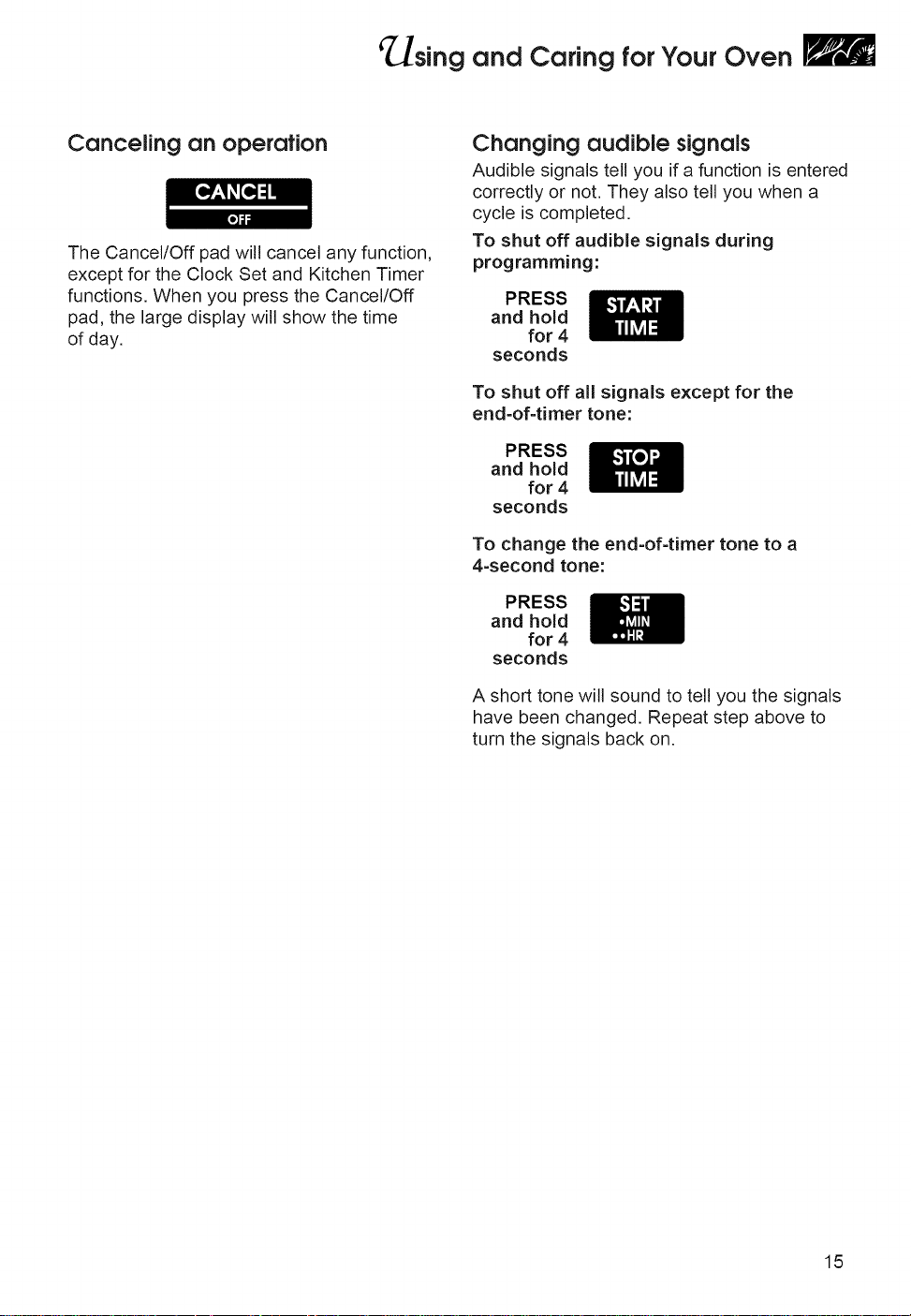
Canceling an operation
The Cancel/Off pad will cancel any function,
except for the Clock Set and Kitchen Timer
functions. When you press the Cancel/Off
pad, the large display will show the time
of day.
Changing audible signals
Audible signals tell you if a function is entered
correctly or not. They also tell you when a
cycle is completed.
To shut off audible signals during
programming:
PRESS
and hold
for 4
seconds
To shut off all signals except for the
end-of-timer tone:
PRESS
and hold
for 4
seconds
To change the end-of-timer tone to a
4-second tone:
PRESS
and hold
for 4
seconds
A short tone will sound to tell you the signals
have been changed. Repeat step above to
turn the signals back on.
15
_sing and Caring forYour Oven
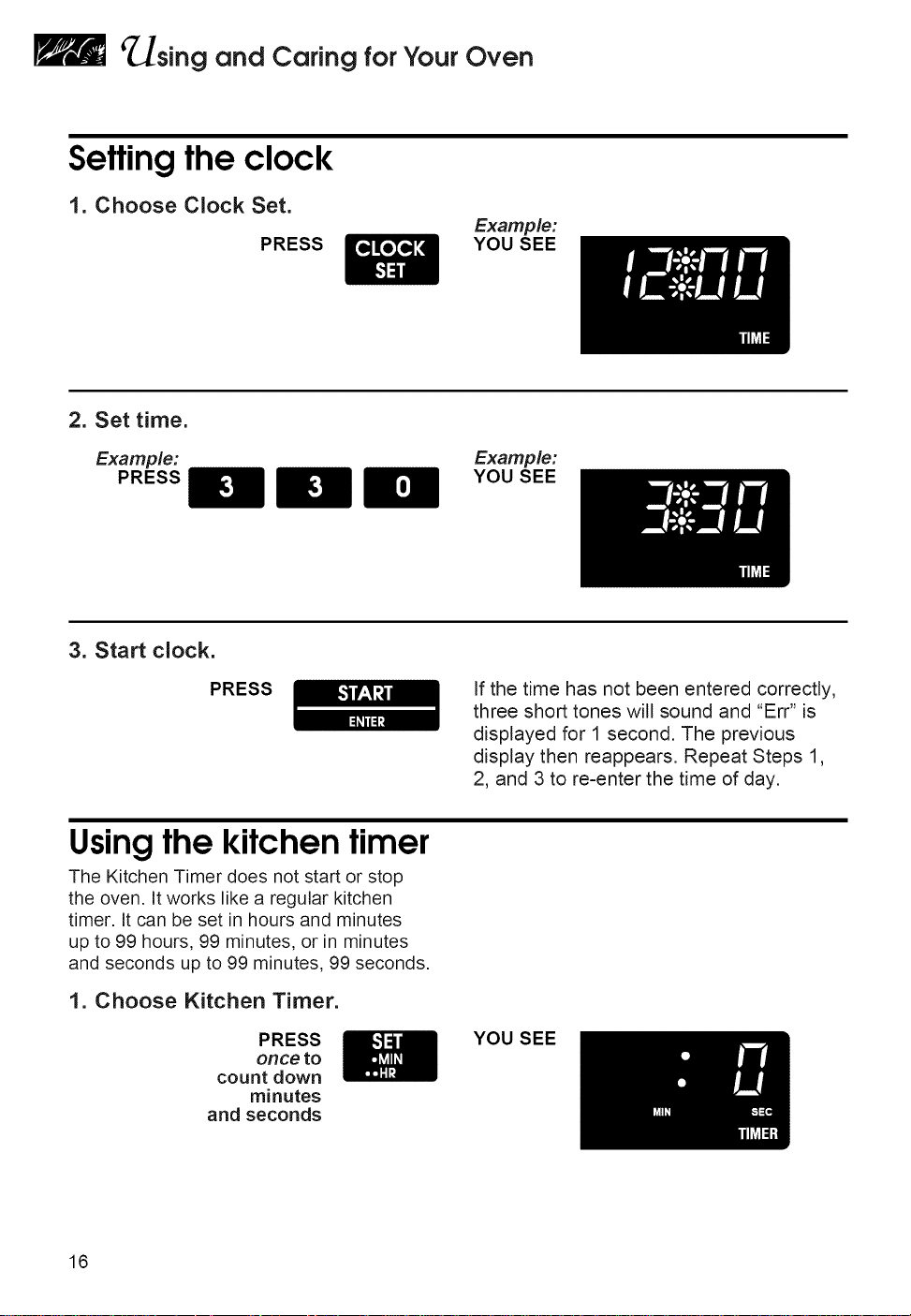
Settingtheclock
1. Choose Clock Set.
PRESS
Example:
YOU SEE
2. Set time.
Example: Example:
PRESS YOU SEE
3. Start clock.
PRESS
If the time has not been entered correctly,
three short tones will sound and "Err" is
displayed for 1 second. The previous
display then reappears. Repeat Steps 1,
2, and 3 to re-enter the time of day.
Using the kitchen timer
The Kitchen Timer does not start or stop
the oven. It works like a regular kitchen
timer. It can be set in hours and minutes
up to 99 hours, 99 minutes, or in minutes
and seconds up to 99 minutes, 99 seconds.
1. Choose Kitchen Timer.
PRESS
once to
count down
minutes
and seconds
YOU SEE
16
'_sing and Caring forYour Oven
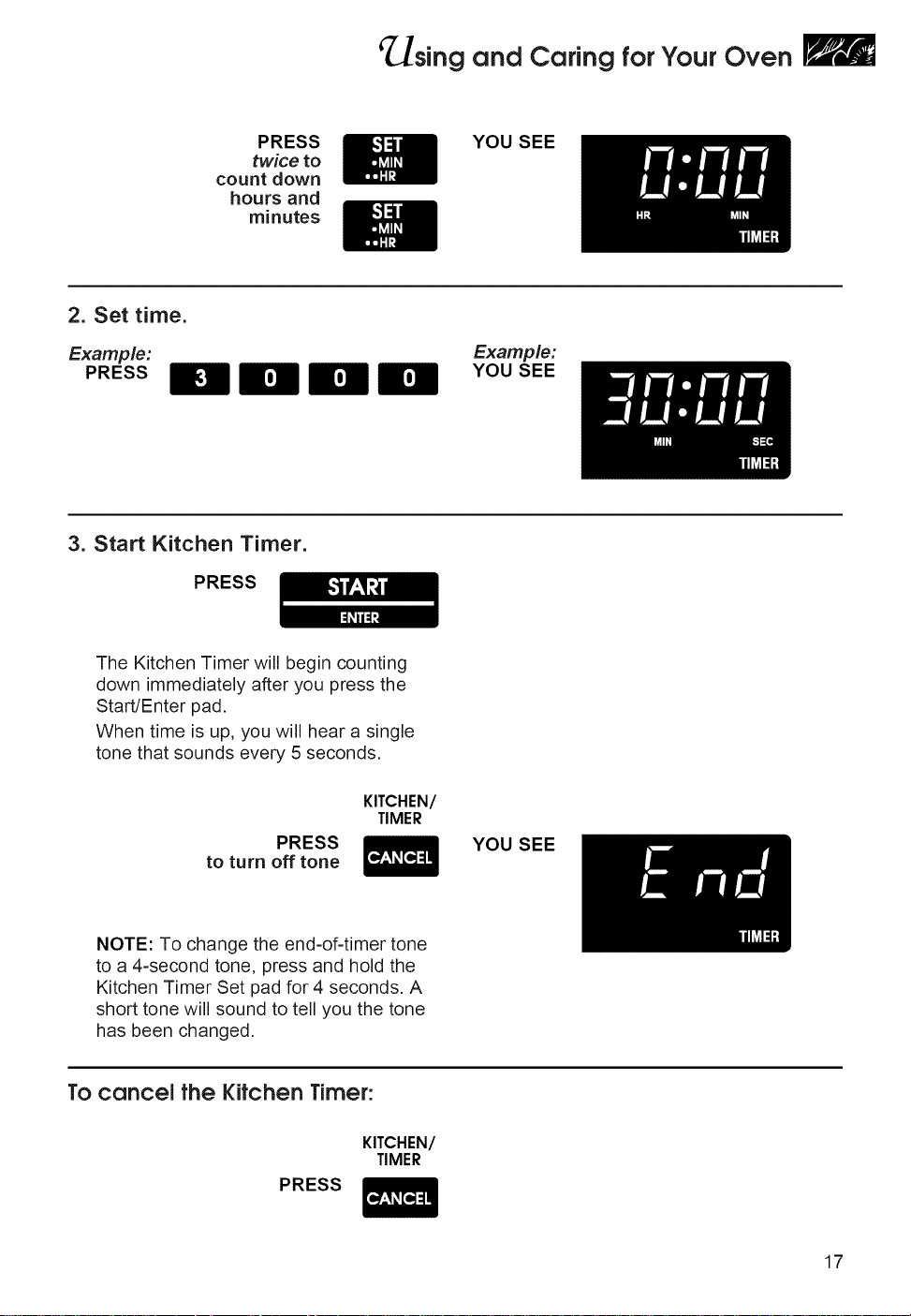
PRESS
twice to
count down
hours and
minutes
YOU SEE
2. Set time.
Example:
PRESS
Example:
YOU SEE
3. Start Kitchen Timer.
PRESS
The Kitchen Timer will begin counting
down immediately after you press the
Start/Enter pad.
When time is up, you will hear a single
tone that sounds every 5 seconds.
PRESS
to turn off tone
KITCHEN/
TIMER
YOU SEE
NOTE: To change the end-of-timer tone
to a 4-second tone, press and hold the
Kitchen Timer Set pad for 4 seconds. A
short tone will sound to tell you the tone
has been changed.
To cancel the Kitchen Timer:
KITCHEN/
TIMER
PRESS
17
_sing and Caring forYour Oven
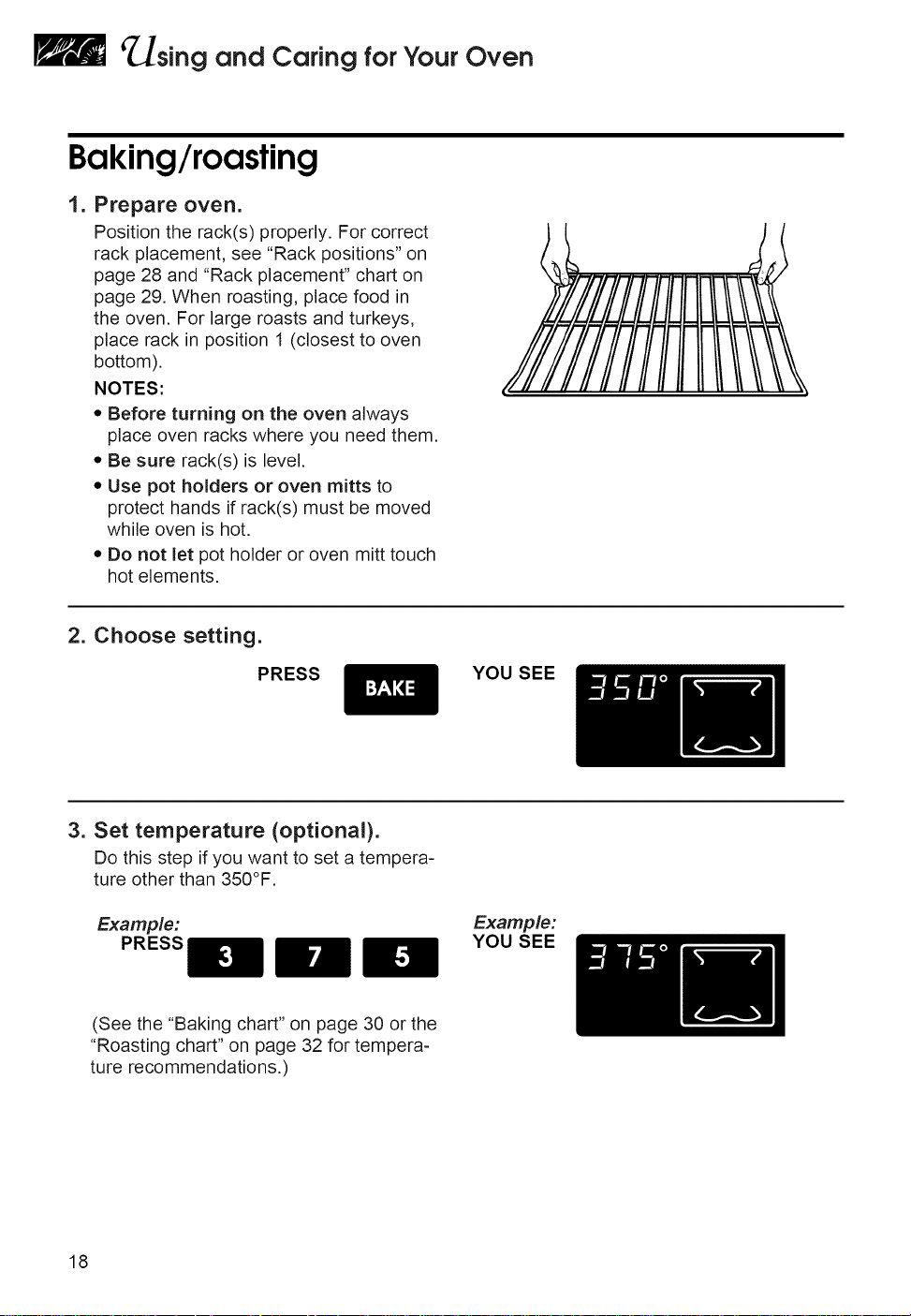
Baking/roasting
I.
Prepare oven.
Position the rack(s) properly. For correct
rack placement, see "Rack positions" on
page 28 and "Rack placement" chart on
page 29. When roasting, place food in
the oven. For large roasts and turkeys,
place rack in position 1 (closest to oven
bottom).
NOTES:
• Before turning on the oven always
place oven racks where you need them.
• Be sure rack(s) is level.
• Use pot holders or oven mitts to
protect hands if rack(s) must be moved
while oven is hot.
• Do not let pot holder or oven mitt touch
hot elements.
2. Choose setting.
PRESS
YOU SEE
3. Set temperature (optional).
Do this step if you want to set a tempera-
ture other than 350°F.
Example:
PRESS
Example:
YOU SEE
(See the "Baking chart" on page 30 or the
"Roasting chart" on page 32 for tempera-
ture recommendations.)
18
_sing and Caring forYour Oven
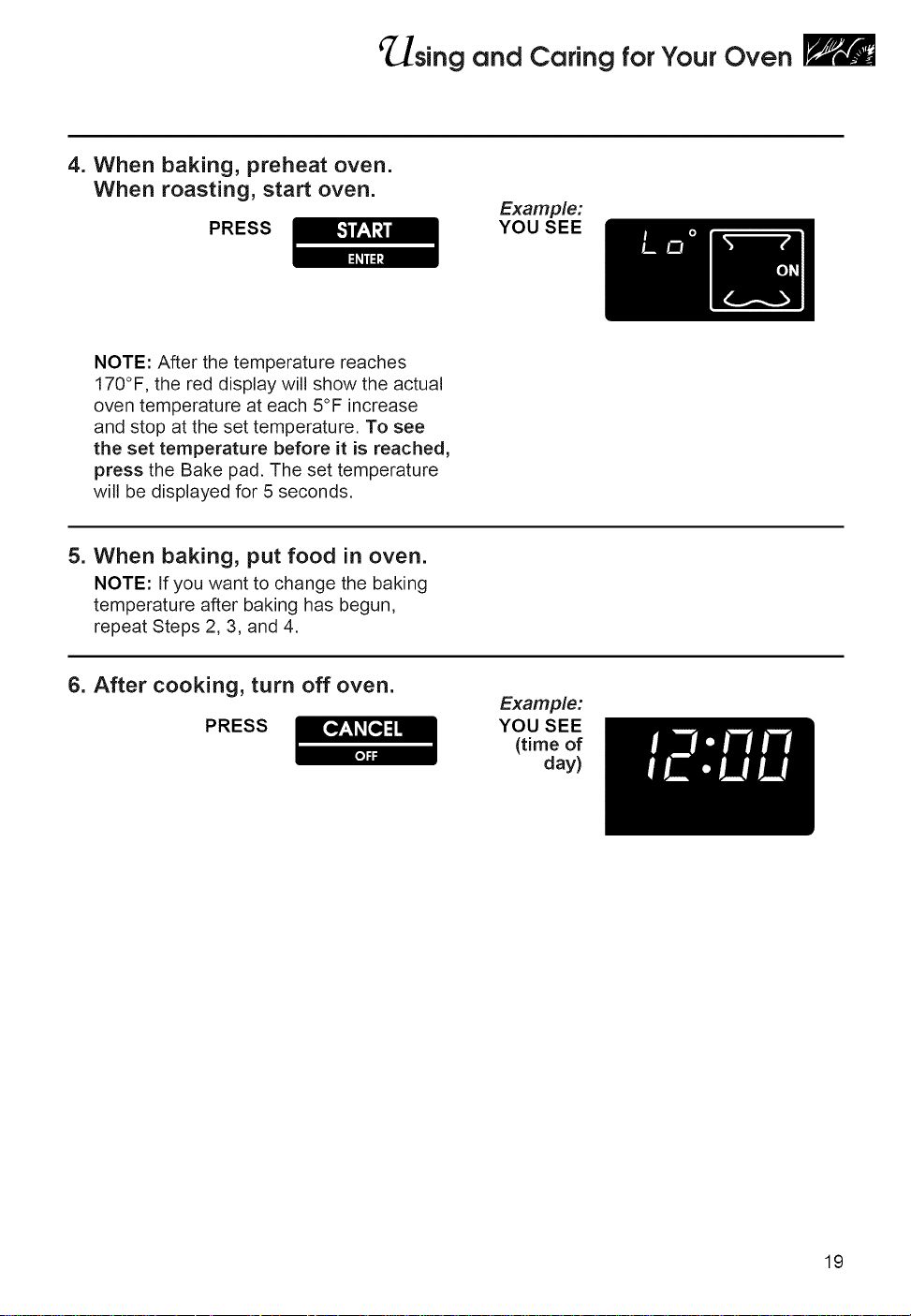
4. When baking, preheat oven.
When roasting, start oven.
PRESS
Example:
YOU SEE
NOTE: After the temperature reaches
170°F, the red display will show the actual
oven temperature at each 5°F increase
and stop at the set temperature. To see
the set temperature before it is reached,
press the Bake pad. The set temperature
will be displayed for 5 seconds.
5. When baking, put food in oven.
NOTE: If you want to change the baking
temperature after baking has begun,
repeat Steps 2, 3, and 4.
6. After cooking, turn off oven.
PRESS
Example:
YOU SEE
(time of
day)
19
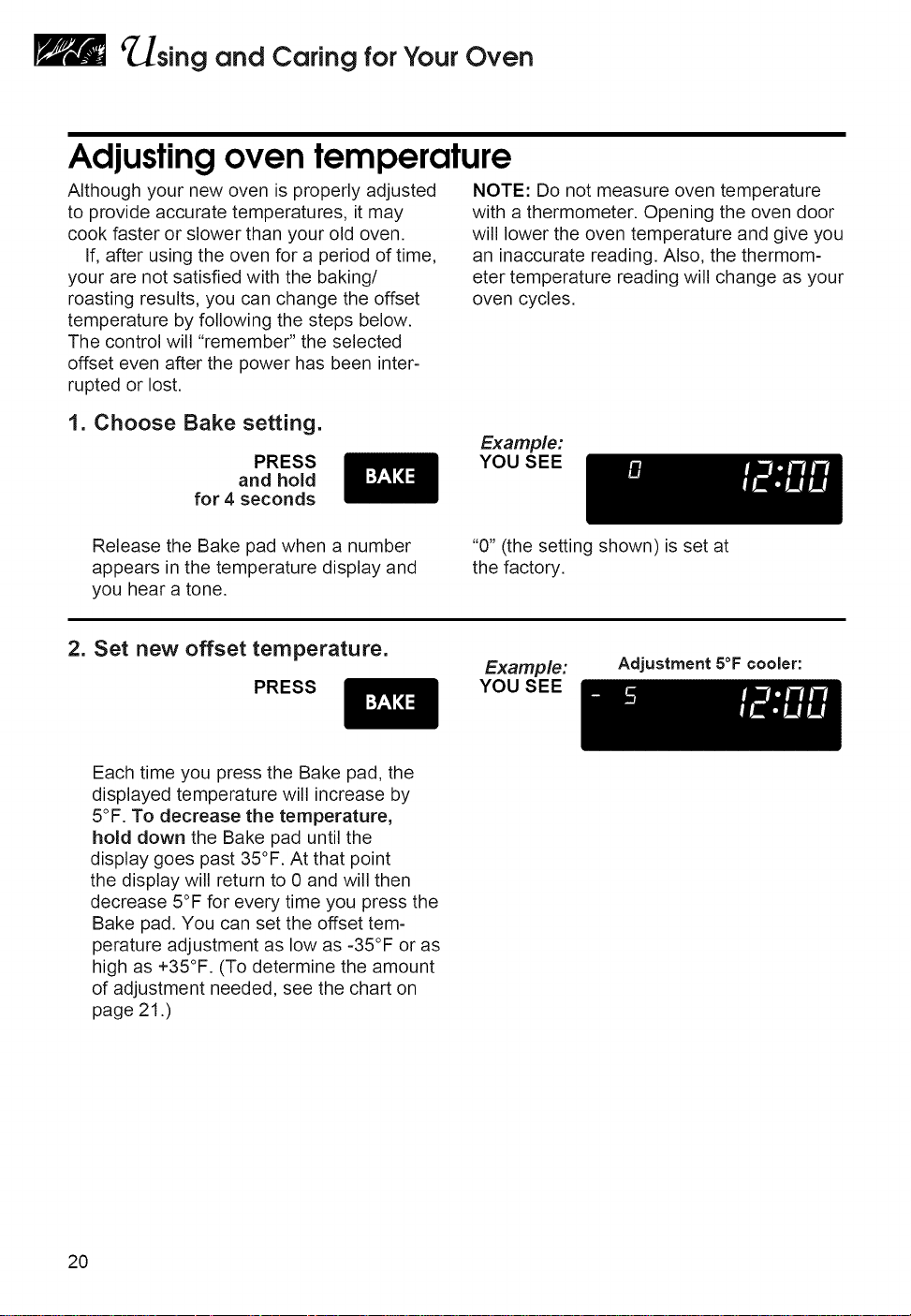
_sing and Caring forYour Oven
Adjustingoven temperature
Although your new oven is properly adjusted
to provide accurate temperatures, it may
cook faster or slower than your old oven.
If, after using the oven for a period of time,
your are not satisfied with the baking/
roasting results, you can change the offset
temperature by following the steps below.
The control will "remember" the selected
offset even after the power has been inter-
rupted or lost.
NOTE: Do not measure oven temperature
with a thermometer. Opening the oven door
will lower the oven temperature and give you
an inaccurate reading. Also, the thermom-
eter temperature reading will change as your
oven cycles.
1. Choose Bake setting.
PRESS
and hold
for 4 seconds
Example:
YOU SEE
Release the Bake pad when a number
appears in the temperature display and
you hear a tone.
"0" (the setting shown) is set at
the factory.
2. Set new offset temperature.
PRESS
Example:
YOU SEE
Adjustment 5°F cooler:
Each time you press the Bake pad, the
displayed temperature will increase by
5°F. To decrease the temperature,
hold down the Bake pad until the
display goes past 35°F. At that point
the display will return to 0 and will then
decrease 5°F for every time you press the
Bake pad. You can set the offset tem-
perature adjustment as low as -35°F or as
high as +35°F. (To determine the amount
of adjustment needed, see the chart on
page 21 .)
20
'_sing and Caring forYour Oven
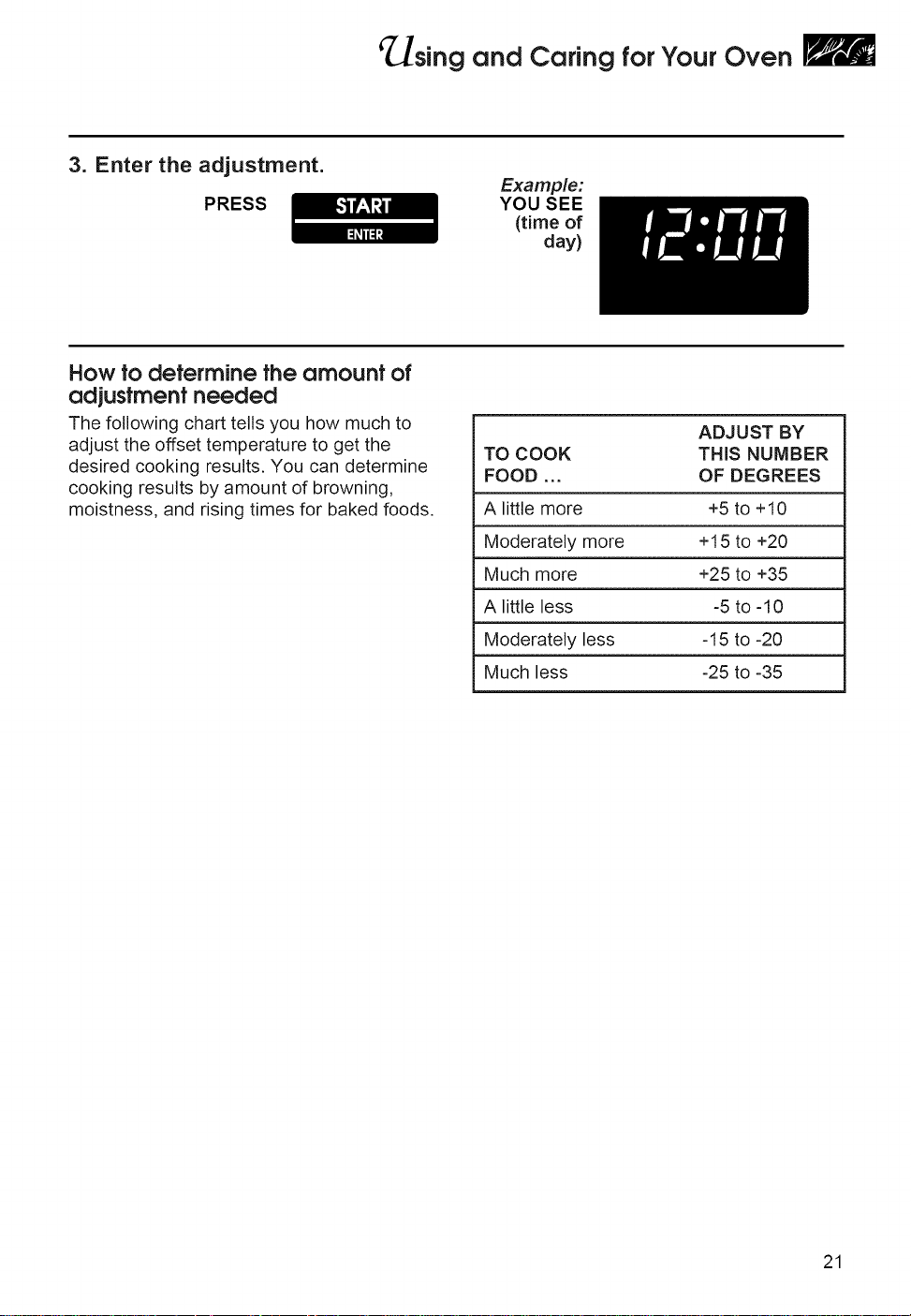
3. Enter the adjustment.
PRESS
Example:
YOU SEE
(time of
day)
How to determine the amount of
adjustmentneeded
The following chart tells you how much to
adjust the offset temperature to get the
desired cooking results. You can determine
cooking results by amount of browning,
moistness, and rising times for baked foods.
ADJUST BY
TO COOK THiS NUMBER
FOOD ... OF DEGREES
A little more +5 to +10
Moderately more +15 to +20
Much more +25 to +35
A little less -5 to -10
Moderately less -15 to -20
Much less -25 to -35
21
_sing and Caring forYour Oven
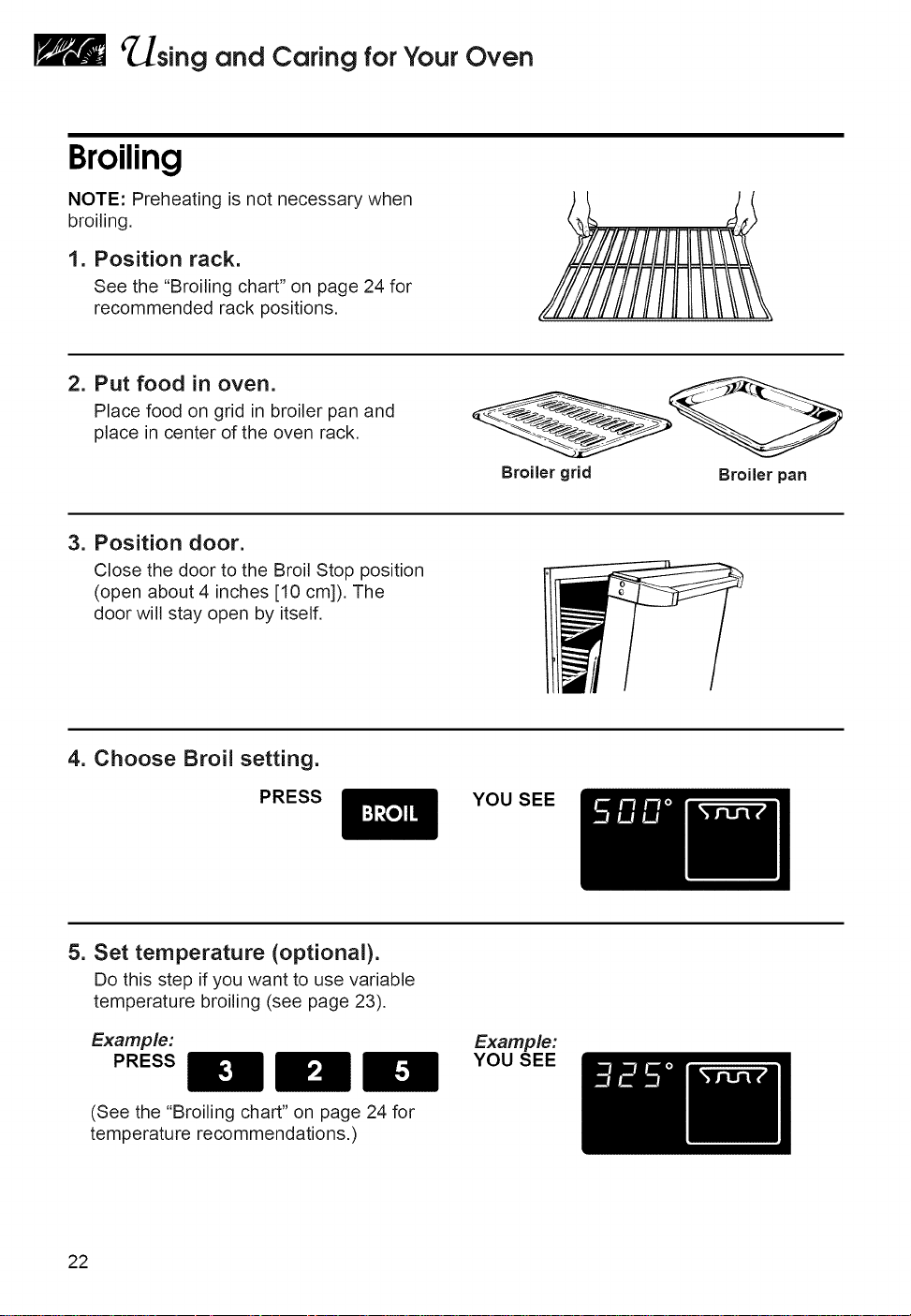
Broiling
NOTE: Preheating is not necessary when
broiling.
1. Position rack.
See the "Broiling chart" on page 24 for
recommended rack positions,
2. Put food in oven.
Place food on grid in broiler pan and
place in center of the oven rack.
Broiler grid Broiler pan
3. Position door.
Close the door to the Broil Stop position
(open about 4 inches [10 cm]). The
door will stay open by itself,
4. Choose Broil setting.
PRESS
YOU SEE
5. Set temperature (optional).
Do this step if you want to use variable
temperature broiling (see page 23).
Example:
PRESS
Example:
YOU SEE
(See the "Broiling chart" on page 24 for
temperature recommendations.)
22
_sing and Caring forYour Oven
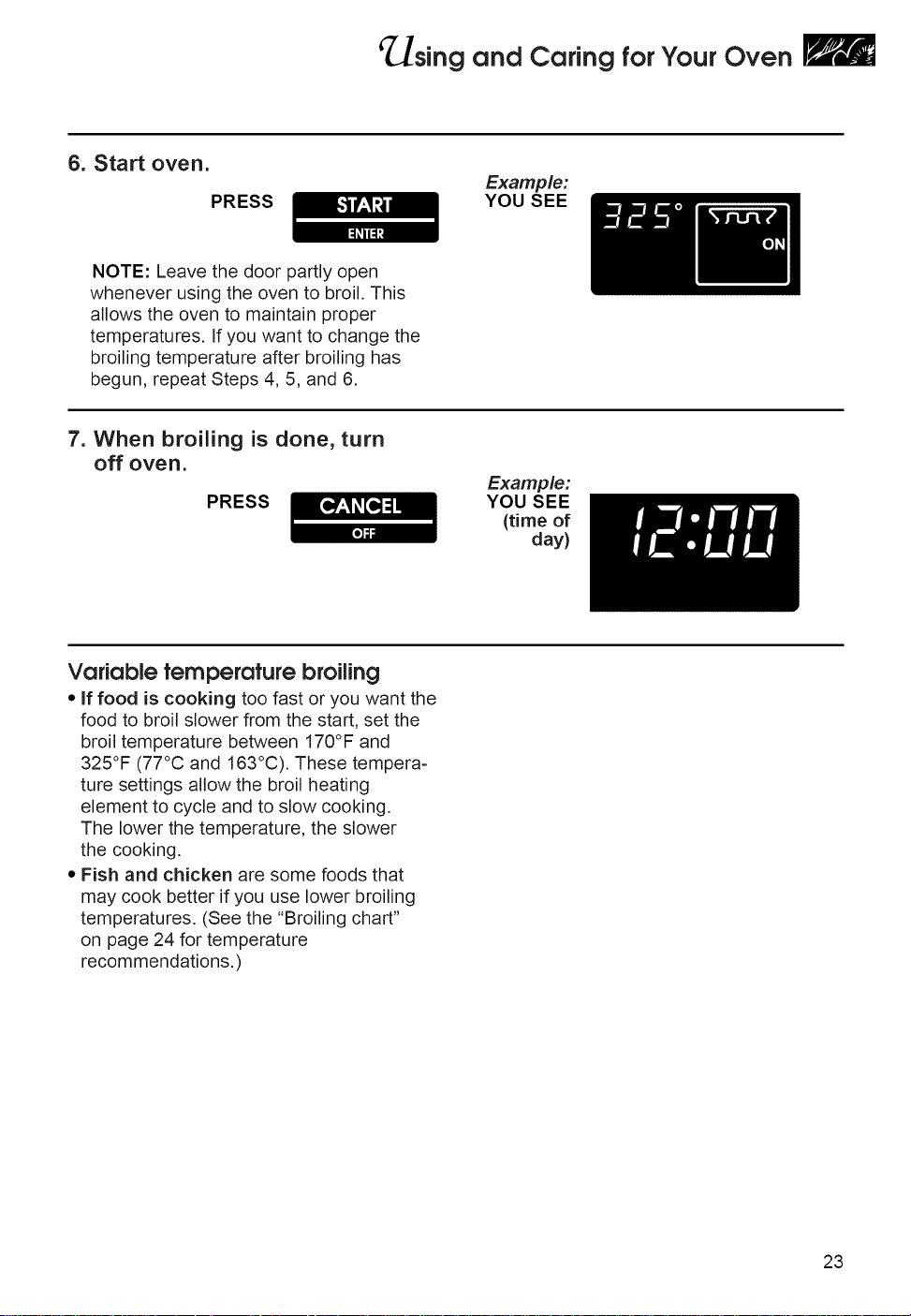
6. Start oven.
PRESS
Example:
YOU SEE
NOTE: Leave the door partly open
whenever using the oven to broil. This
allows the oven to maintain proper
temperatures. If you want to change the
broiling temperature after broiling has
begun, repeat Steps 4, 5, and 6.
7. When broiling is done, turn
off oven.
PRESS
Example:
YOU SEE
(time of
day)
Variable temperature broiling
• if food is cooking too fast or you want the
food to broil slower from the start, set the
broil temperature between 170°F and
325°F (77°C and 163°C). These tempera-
ture settings allow the broil heating
element to cycle and to slow cooking.
The lower the temperature, the slower
the cooking.
• Fish and chicken are some foods that
may cook better if you use lower broiling
temperatures. (See the "Broiling chart"
on page 24 for temperature
recommendations.)
23
¢ sing and Caring forYour Oven
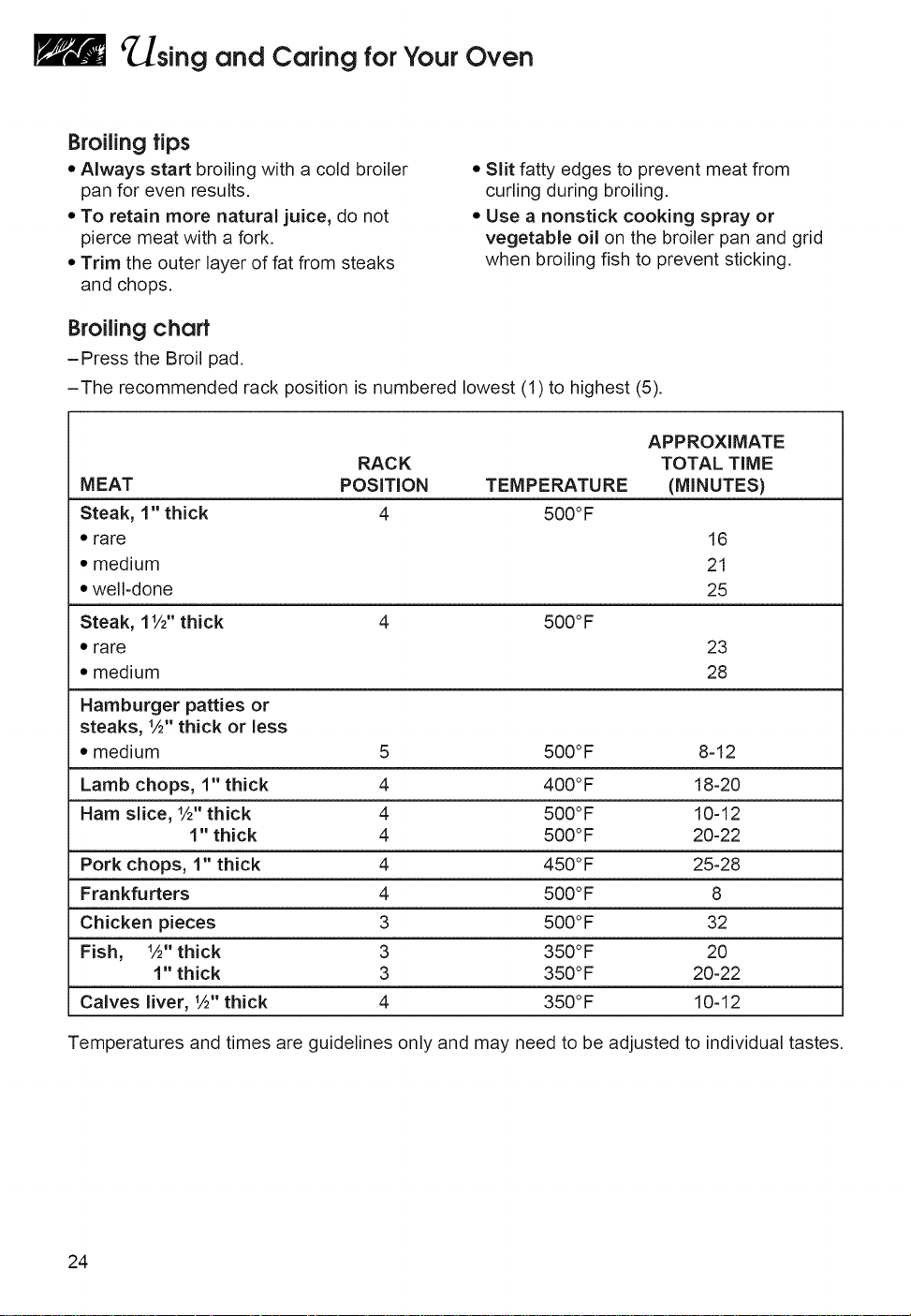
Broilingtips
• Always startbroilingwitha coldbroiler
pan for even results.
• To retain more natural juice, do not
pierce meat with a fork.
• Trim the outer layer of fat from steaks
and chops.
• Slit fatty edges to prevent meat from
curling during broiling.
• Use a nonstick cooking spray or
vegetable oil on the broiler pan and grid
when broiling fish to prevent sticking.
Broilingchart
-Press the Broil pad.
-The recommended rack position is numbered lowest (1) to highest (5).
MEAT
Steak, 1" thick
• rare
• medium
• well-done
Steak, 11/2"thick
• rare
• medium
Hamburger patties or
steaks, %" thick or less
• medium
Lamb chops, 1" thick
Ham slice, %" thick
1" thick
Pork chops, 1" thick
Frankfurters
Chicken pieces
Fish, %" thick
1" thick
Calves liver, %" thick
RACK
POSITION TEMPERATURE
4 500°F
APPROXIMATE
TOTAL TIME
(MINUTES)
16
21
25
4 500°F
23
28
5 500°F 8-12
4 400 °F 18-20
4 500°F 10-12
4 500°F 20-22
4 450°F 25-28
4 500°F 8
3 500°F 32
3 350°F 20
3 350°F 20-22
4 350°F 10-12
Temperatures and times are guidelines only and may need to be adjusted to individual tastes.
24
'_sing and Caring forYour Oven
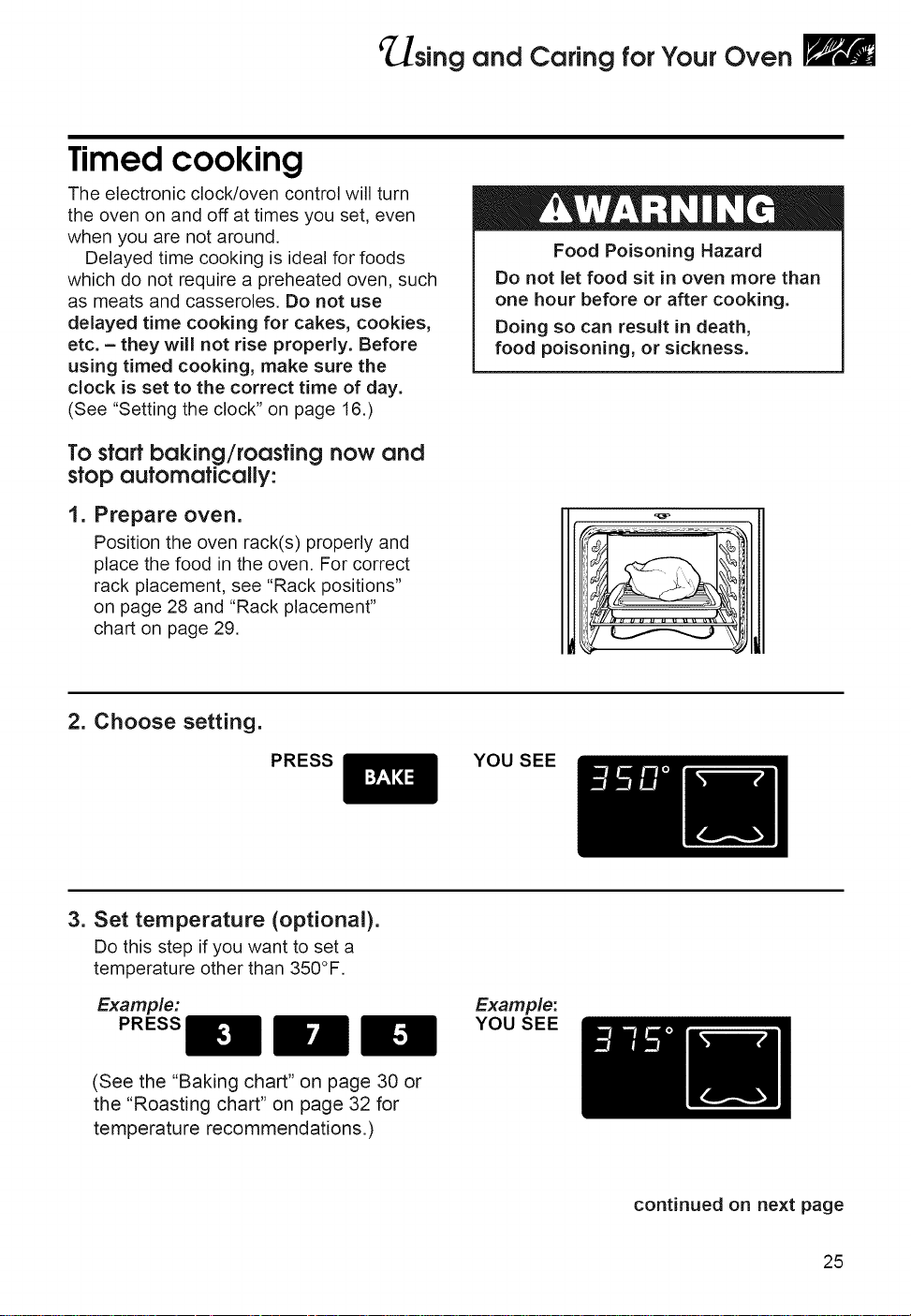
Timed cooking
The electronic clock/oven control will turn
the oven on and off at times you set, even
when you are not around.
Delayed time cooking is ideal for foods
which do not require a preheated oven, such
as meats and casseroles. Do not use
delayed time cooking for cakes, cookies,
etc. - they will not rise properly. Before
using timed cooking, make sure the
clock is set to the correct time of day.
(See "Setting the clock" on page 16.)
To startbaking/roastingnow and
stopautomatically:
1. Prepare oven.
Position the oven rack(s) properly and
place the food in the oven. For correct
rack placement, see "Rack positions"
on page 28 and "Rack placement"
chart on page 29.
Food Poisoning Hazard
Do not let food sit in oven more than
one hour before or after cooking.
Doing so can result in death,
food poisoning, or sickness.
2, Choose setting,
PRESS YOU SEE
3. Set temperature (optional).
Do this step if you want to set a
temperature other than 350°F.
Example:
PRESS
Example:
YOU SEE
(See the "Baking chart" on page 30 or
the "Roasting chart" on page 32 for
temperature recommendations.)
continued on next page
25
_sing and Caring forYour Oven
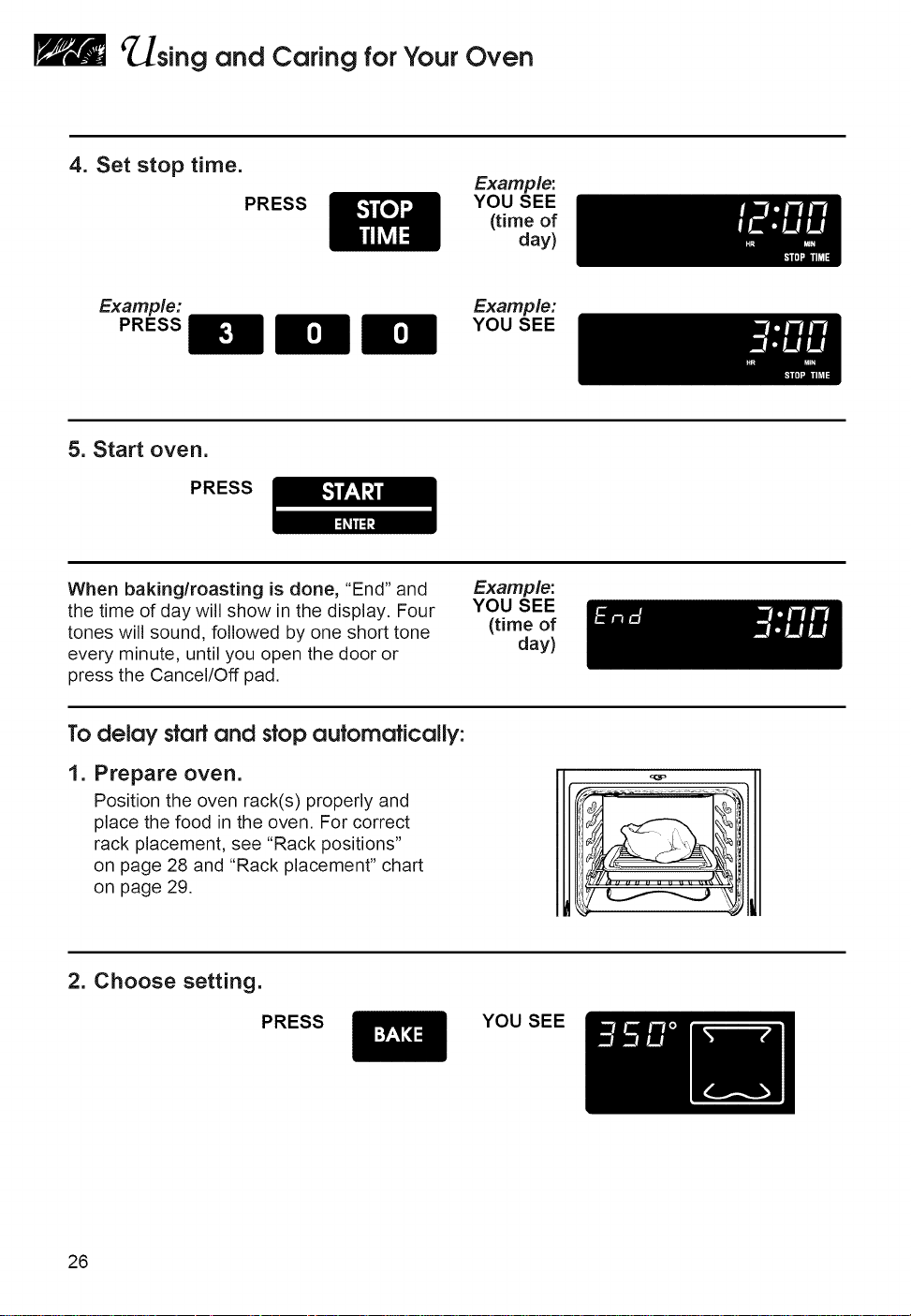
4. Set stop time.
PRESS
Example:
YOU SEE
(time of
day)
Example:
PRESS
Example:
YOU SEE
5. Start oven.
PRESS
When baking/roasting is done, "End" and
the time of day win show in the display. Four
tones will sound, followed by one short tone
every minute, until you open the door or
press the Cancel/Off pad.
Example:
YOU SEE
(time of
day)
Todelay start and stop automatically:
I.
Prepare oven.
Position the oven rack(s) properly and
place the food in the oven. For correct
rack placement, see "Rack positions"
on page 28 and "Rack placement" chart
on page 29.
2. Choose setting.
PRESS YOU SEE
26
_sing and Caring forYour Oven
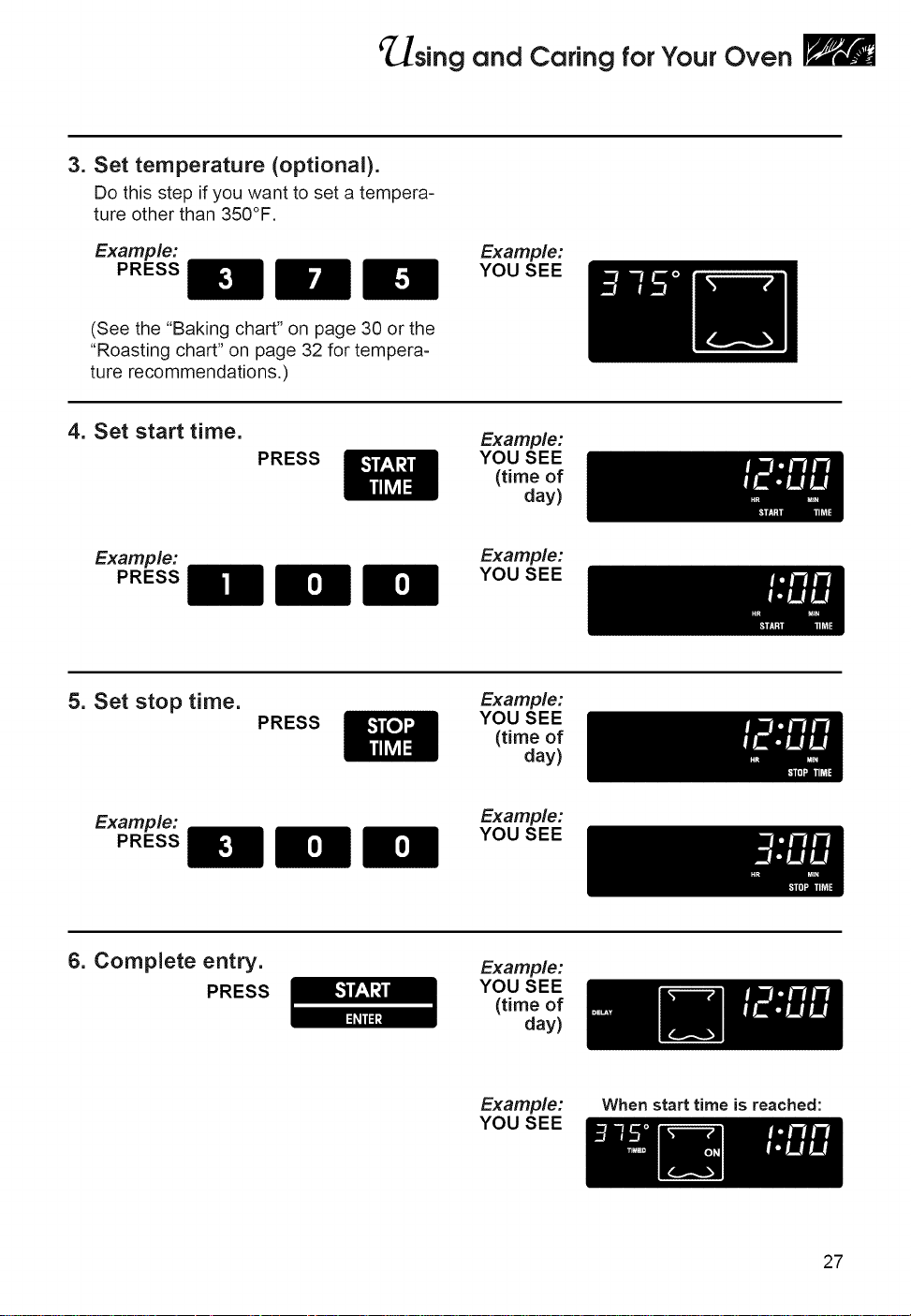
3. Set temperature (optional).
Do this step if you want to set a tempera-
ture other than 350°F.
Example:
PRESS
Example:
YOU SEE
(See the "Baking chart" on page 30 or the
"Roasting chart" on page 32 for tempera-
ture recommendations.)
4. Set start time.
PRESS
Example:
YOU SEE
(time of
day)
Example:
PRESS
Example:
YOU SEE
5. Set stop time.
PRESS
Example:
YOU SEE
(time of
day)
Example:
PRESS
Example:
YOU SEE
6. Complete entry.
PRESS
Example:
YOU SEE
(time of
day)
Example:
YOU SEE
When start time is reached:
27
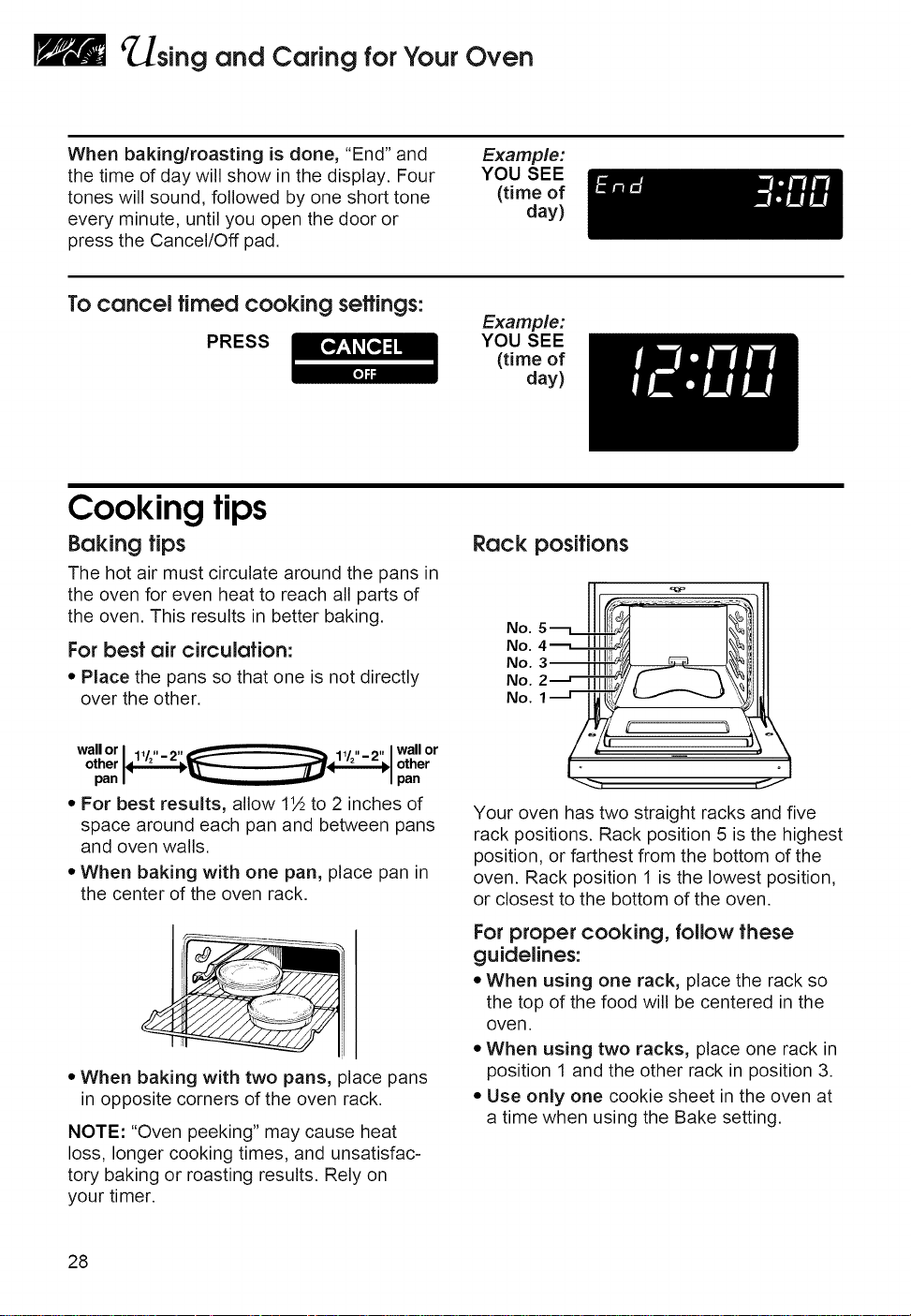
'_sing and Caring forYour Oven
When baking/roasting is done, "End" and
the time of day will show in the display. Four
tones will sound, followed by one short tone
every minute, until you open the door or
press the Cancel/Off pad.
Example:
YOU SEE
(time of
day)
To cancel timed cooking seffings:
PRESS
Example:
YOU SEE
(time of
day)
Cooking tips
Baking tips
The hot air must circulate around the pans in
the oven for even heat to reach all parts of
the oven. This results in better baking.
For besf air circulation:
• Place the pans so that one is not directly
over the other.
Rack positions
No.
No.
No.
No.
No.
wallor wall or
other other
pan pan
• For best results, allow 1½ to 2 inches of
space around each pan and between pans
and oven walls.
• When baking with one pan, place pan in
the center of the oven rack.
• When baking with two pans, place pans
in opposite corners of the oven rack.
NOTE: "Oven peeking" may cause heat
loss, longer cooking times, and unsatisfac-
tory baking or roasting results, Rely on
your timer,
Your oven has two straight racks and five
rack positions. Rack position 5 is the highest
position, or farthest from the bottom of the
oven. Rack position 1 is the lowest position,
or closest to the bottom of the oven.
For proper cooking, follow these
guidelines:
• When using one rack, place the rack so
the top of the food will be centered in the
oven.
• When using two racks, place one rack in
position 1 and the other rack in position 3.
• Use only one cookie sheet in the oven at
a time when using the Bake setting.
28
¢ sing and Caring forYour Oven
Bakeware tips
•When baking withinsulatedcookie
sheets or baking pans, place them in the
bottom third of the oven. You may need to
increase the recommended baking times,
so test for doneness before removing from
the oven.
• When using ovenproof glassware or
dark bakeware, reduce the oven tem-
perature by 25°F, but use the same
baking time. Because these pans absorb
heat, producing darker bottom browning
and crispier crusts, place the rack in the
center of the oven. When baking pies and
bread, you can use the temperature
suggested in the recipe.
Rock plocemenf forspecific foods:
(For rack positions, see "Rack positions" on
page 28.)
RACK
FOOl:) POSITION
Frozen pies 2
Angel food and bundt
cakes, most quick 1 or 2
breads, yeast breads,
casseroles, meats
Cookies, biscuits,
muffins, cakes, 2 or 3
nonfrozen pies
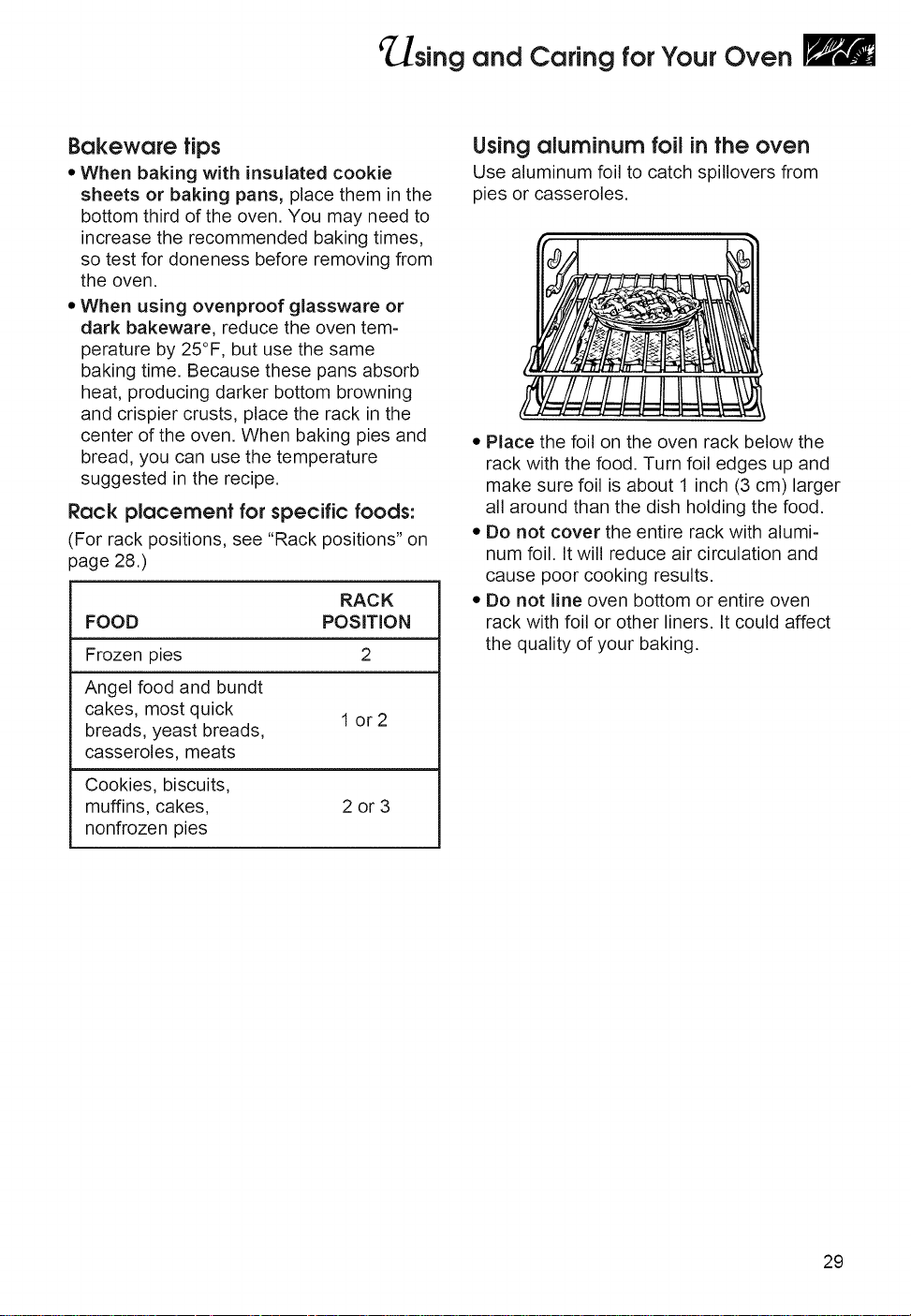
Using aluminum foilinthe oven
Use aluminum foil to catch spillovers from
pies or casseroles.
• Place the foil on the oven rack below the
rack with the food. Turn foil edges up and
make sure foil is about 1 inch (3 cm) larger
all around than the dish holding the food.
• Do not cover the entire rack with alumi-
num foil. It will reduce air circulation and
cause poor cooking results.
• Do not line oven bottom or entire oven
rack with foil or other liners. It could affect
the quality of your baking.
29
sing and Caring forYour Oven
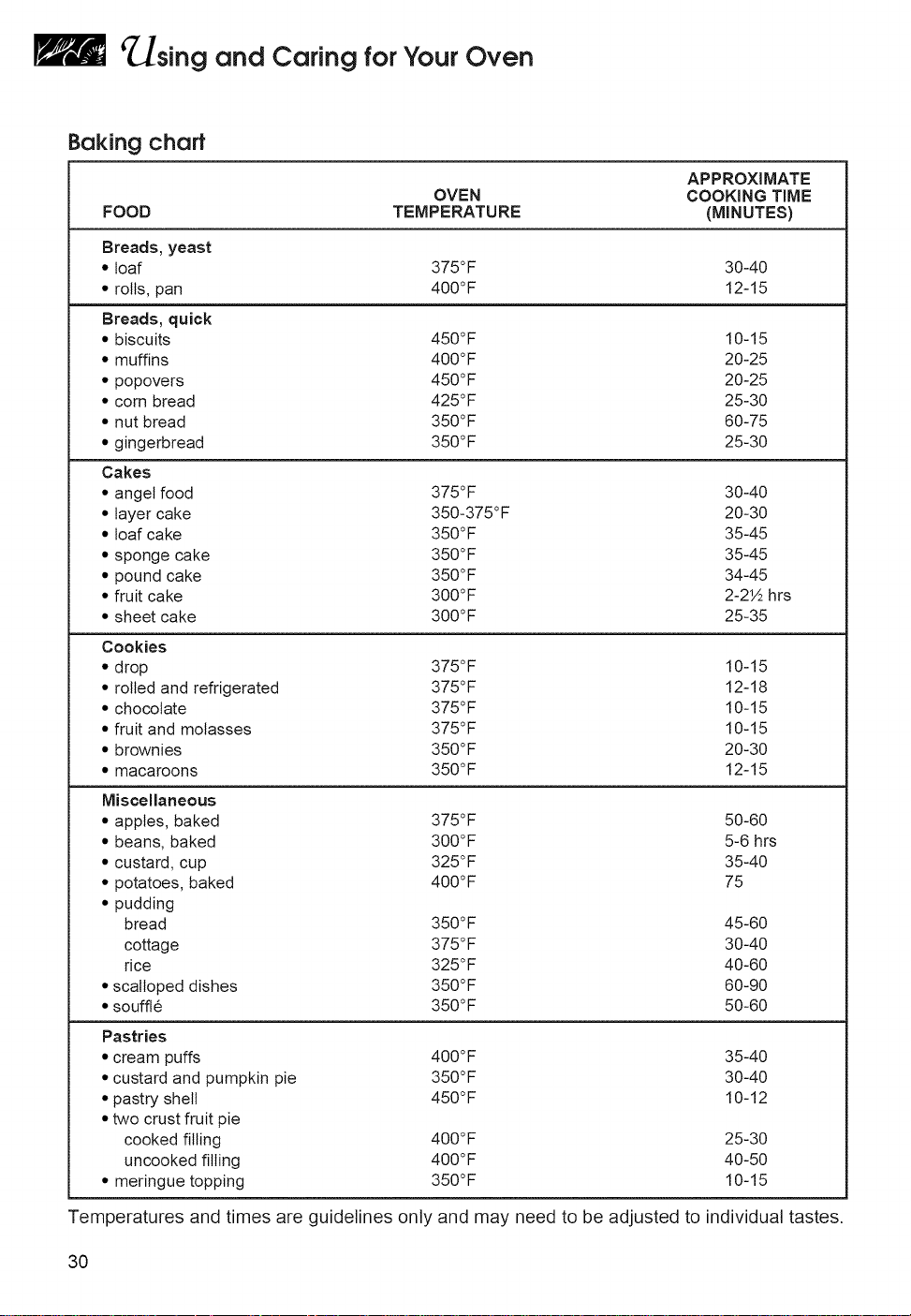
Baking chart
AP PROXI MATE
OVEN COOKING TIME
FOOD TEMPERATURE (MINUTES)
Breads, yeast
• loaf 375°F 30-40
* rolls, pan 400°F 12-15
Breads, quick
,, biscuits 450°F 10-15
* muffins 400°F 20-25
* popovers 450°F 20-25
* corn bread 425°F 25-30
* nut bread 350°F 60-75
• gingerbread 350°F 25-30
Cakes
• angel food 375°F 30-40
,, layer cake 350-375°F 20-30
,, loaf cake 350°F 35-45
,, sponge cake 350°F 35-45
,, pound cake 350°F 34-45
* fruit cake 300°F 2-2½ hrs
,, sheet cake 300°F 25-35
Cookies
* drop 375°F 10-15
,, rolled and refrigerated 375°F 12-18
* chocolate 375°F 10-15
* fruit and molasses 375°F 10-15
,, brownies 350°F 20-30
* macaroons 350°F 12-15
Miscellaneous
,, apples, baked 375°F 50-60
,, beans, baked 300°F 5-6 hrs
* custard, cup 325°F 35-40
* potatoes, baked 400°F 75
* pudding
bread 350°F 45-60
cottage 375°F 30-40
rice 325°F 40-60
,,scalloped dishes 350°F 60-90
,,souffle 350°F 50-60
Pastries
* cream puffs 400°F 35-40
,,custard and pumpkin pie 350°F 30-40
• pastry shell 450°F 10-12
• two crust fruit pie
cooked filling 400°F 25-30
uncooked filling 400°F 40-50
• meringue topping 350°F 10-15
Temperatures and times are guidelines only and may need to be adjusted to individual tastes.
30
sing and Caring forYour Oven
Roasting tips
• Roast meats fat-side up in a shallow pan
using a roasting rack.
• Use a roasting pan that fits the size of
the food to be roasted. Meat juices may
overflow the sides of a pan that is too
small. Too large of a pan will result in
increased oven spatter.
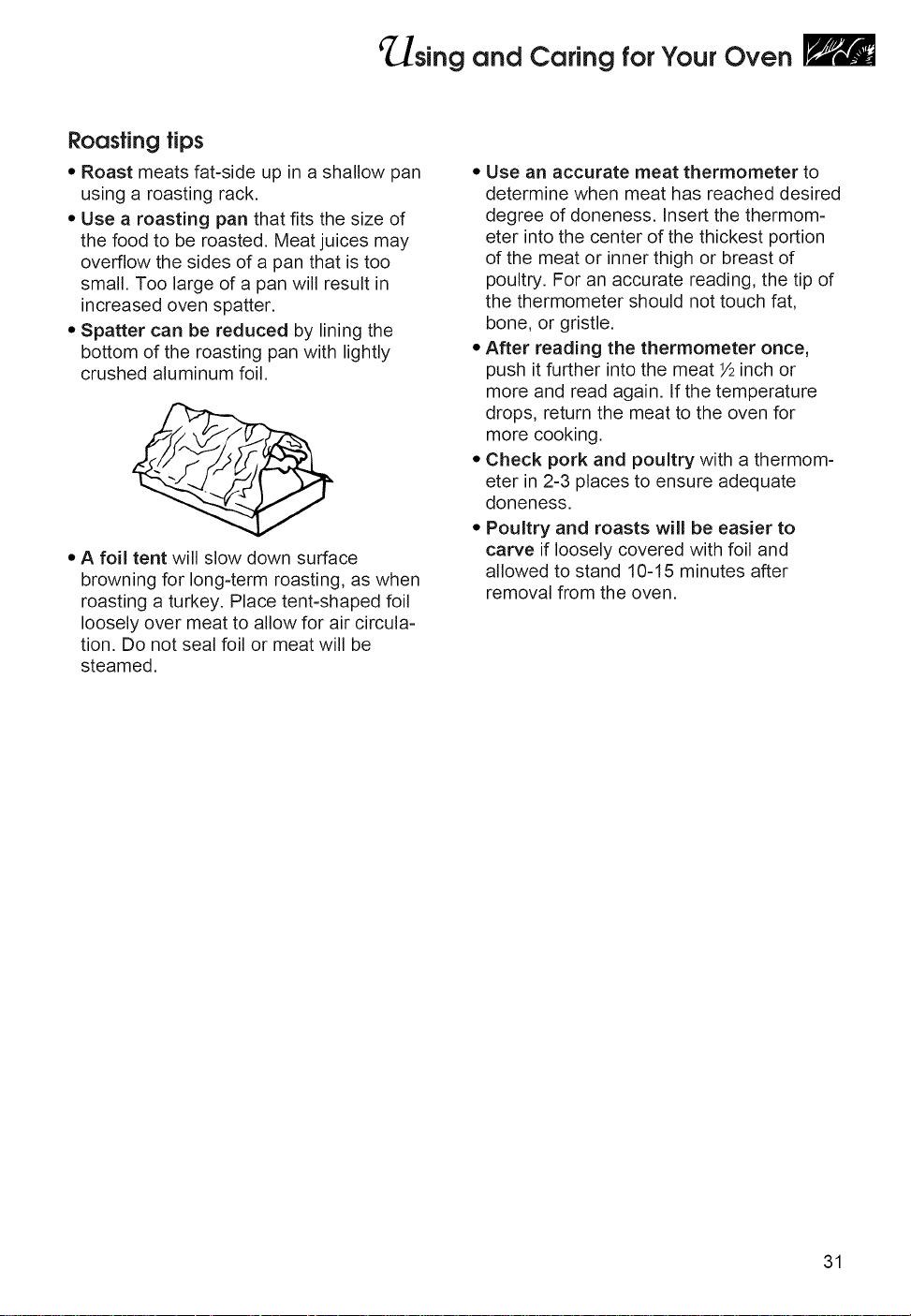
• Spatter can be reduced by lining the
bottom of the roasting pan with lightly
crushed aluminum foil.
• A foil tent will slow down surface
browning for long-term roasting, as when
roasting a turkey. Place tent-shaped foil
loosely over meat to allow for air circula-
tion. Do not seal foil or meat will be
steamed.
• Use an accurate meat thermometer to
determine when meat has reached desired
degree of doneness. Insert the thermom-
eter into the center of the thickest portion
of the meat or inner thigh or breast of
poultry. For an accurate reading, the tip of
the thermometer should not touch fat,
bone, or gristle.
• After reading the thermometer once,
push it further into the meat Y2inch or
more and read again. If the temperature
drops, return the meat to the oven for
more cooking.
• Check pork and poultry with a thermom-
eter in 2-3 places to ensure adequate
doneness.
• Poultry and roasts will be easier to
carve if loosely covered with foil and
allowed to stand 10-15 minutes after
removal from the oven.
31
sing and Caring forYour Oven
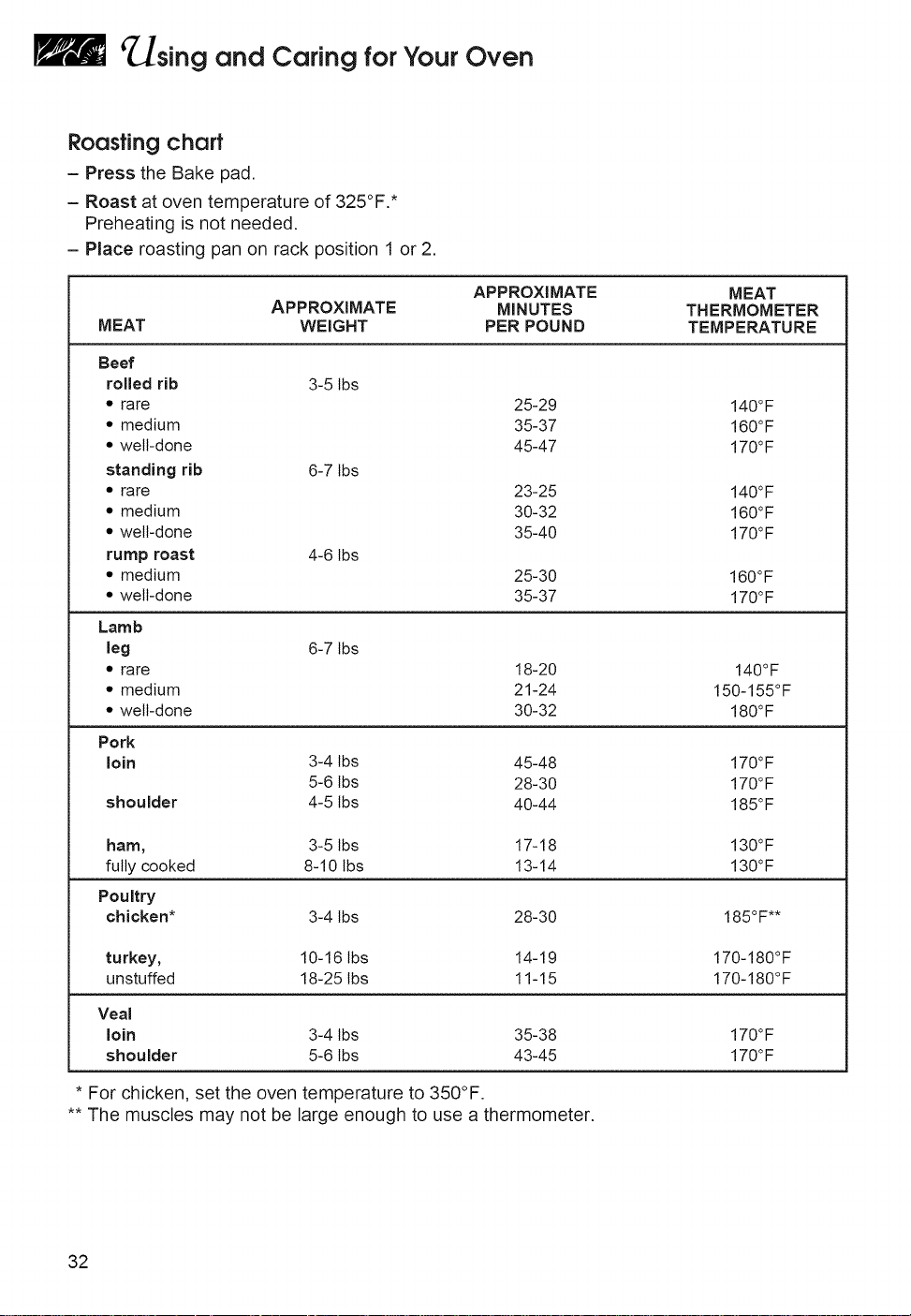
Roasting chart
- Press the Bake pad.
- Roast at oven temperature of 325°F. *
Preheating is not needed.
- Place roasting pan on rack position 1 or 2.
APPROXIMATE MEAT
APPROXIMATE MINUTES THERMOMETER
MEAT WEIGHT PER POUND TEMPERATURE
Beef
rolled rib 3-5 lbs
* rare
* medium
* well-done
standing rib 6-7 lbs
* rare
* medium
* well-done
rump roast 4-6 lbs
* medium
,, welt-done
25-29
35-37
45-47
23-25
30-32
35-40
25-30
35-37
Lamb
leg 6-7 lbs
* rare 18-20
* medium 21-24
* welt-done 30-32
Pork
loin
shoulder
140°F
160°F
170°F
140°F
160°F
170°F
160°F
170°F
140°F
150-155°F
180°F
3-4 tbs 45-48 170°F
5-6 lbs 28-30 170°F
4-5 lbs 40-44 185°F
ham, 3-5 tbs 17-18 130°F
fully cooked 8-10 lbs 13-14 130°F
Poultry
chicken* 3-4 lbs 28-30 185°F**
turkey, 10-16 lbs 14-19
unstuffed 18-25 lbs 11-15
Veal
loin 3-4 tbs 35-38
shoulder 5-6 lbs 43-45
170-180°F
170-180°F
170°F
170°F
* For chicken, set the oven temperature to 350°F.
** The muscles may not be large enough to use a thermometer,
32
sing and Caring forYour Oven
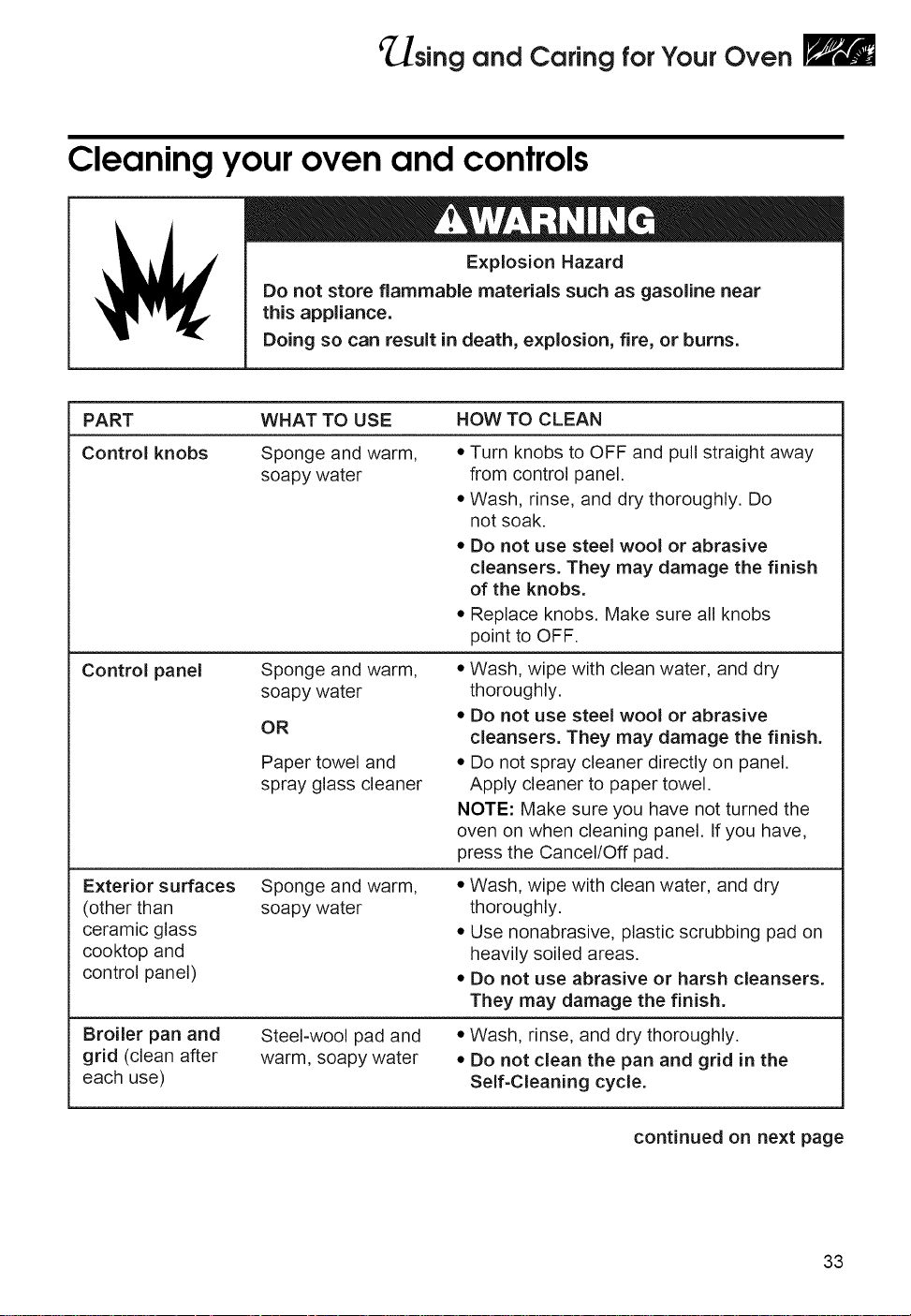
Cleaningyouroven and controls
__ Explosion Hazard
Do not store flammable materials such as gasoline near
this appliance.
Doing so can result in death, explosion, fire, or burns.
PART WHAT TO USE HOW TO CLEAN
Control knobs
Sponge and warm,
soapy water
• Turn knobs to OFF and pull straight away
from control panel.
• Wash, rinse, and dry thoroughly. Do
not soak.
• Do not use steel wool or abrasive
cleansers. They may damage the finish
of the knobs.
• Replace knobs. Make sure all knobs
point to OFF.
Control panel Sponge and warm,
soapy water
OR
Paper towel and
spray glass cleaner
• Wash, wipe with clean water, and dry
thoroughly.
• Do not use steel wool or abrasive
cleansers. They may damage the finish.
• Do not spray cleaner directly on panel.
Apply cleaner to paper towel.
NOTE: Make sure you have not turned the
oven on when cleaning panel. If you have,
press the Cancel/Off pad.
Exterior surfaces
(other than
ceramic glass
cooktop and
control panel)
Sponge and warm,
soapy water
• Wash, wipe with clean water, and dry
thoroughly.
• Use nonabrasive, plastic scrubbing pad on
heavily soiled areas.
• Do not use abrasive or harsh cleansers.
They may damage the finish.
Broiler pan and
grid (clean after
each use)
Steel-wool pad and
warm, soapy water
• Wash, rinse, and dry thoroughly.
• Do not clean the pan and grid in the
Self-Cleaning cycle.
continued on next page
33
sing and Caring forYour Oven
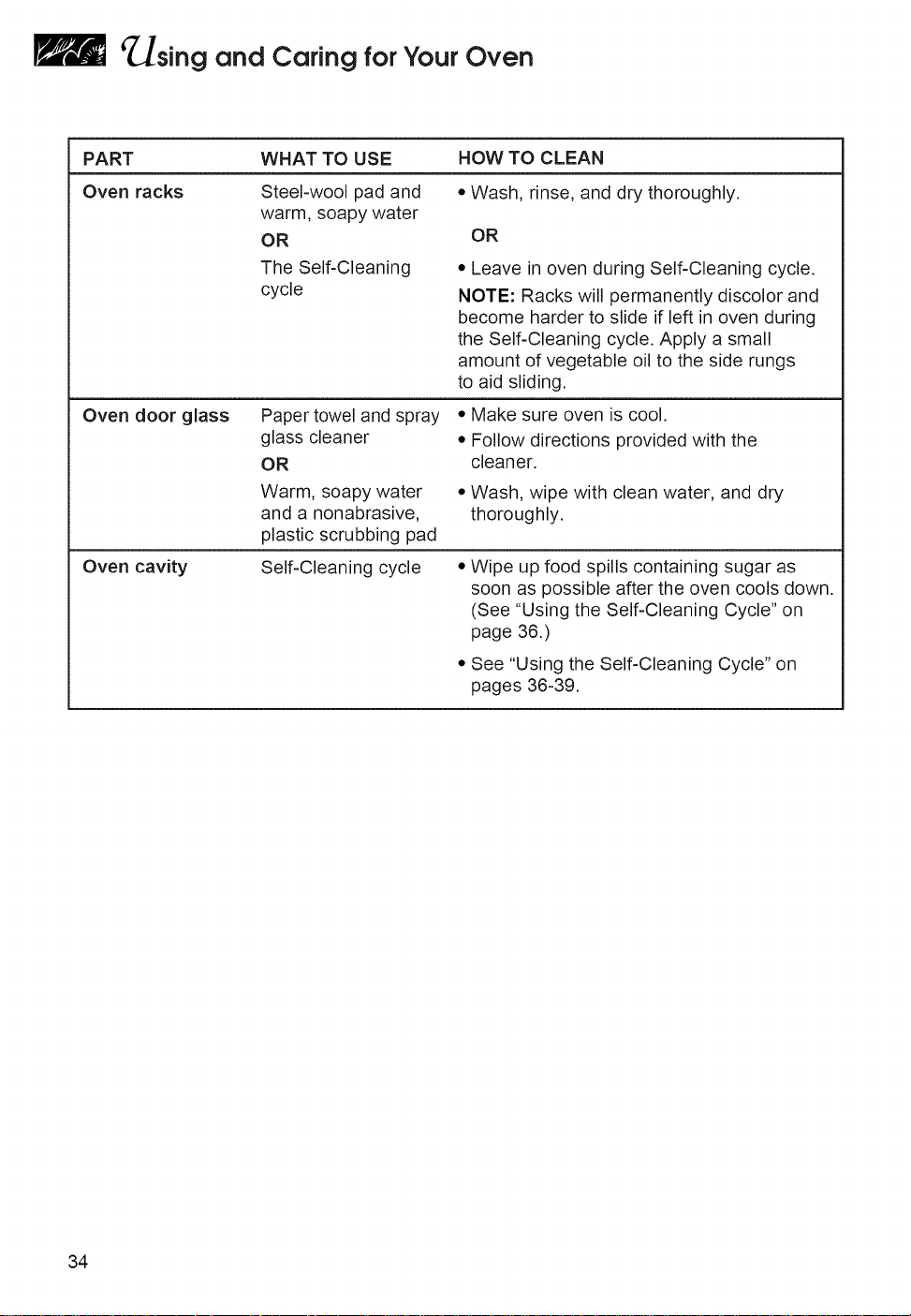
PART WHAT TO USE HOW TO CLEAN
Oven racks Steel-wool pad and • Wash, rinse, and dry thoroughly,
warm, soapy water
OR OR
The Self-Cleaning
cycle
• Leave in oven during Self-Cleaning cycle.
NOTE: Racks will permanently discolor and
become harder to slide if left in oven during
the Self-Cleaning cycle. Apply a small
amount of vegetable oil to the side rungs
to aid sliding.
Oven door glass Paper towel and spray
glass cleaner
OR
Warm, soapy water
and a nonabrasive,
plastic scrubbing pad
• Make sure oven is cool.
• Follow directions provided with the
cleaner.
• Wash, wipe with clean water, and dry
thoroughly.
Oven cavity Self-Cleaning cycle • Wipe up food spills containing sugar as
soon as possible after the oven cools down.
(See "Using the Self-Cleaning Cycle" on
page 36.)
• See "Using the Self-Cleaning Cycle" on
pages 36-39.
34
_sing and Caring forYour Oven
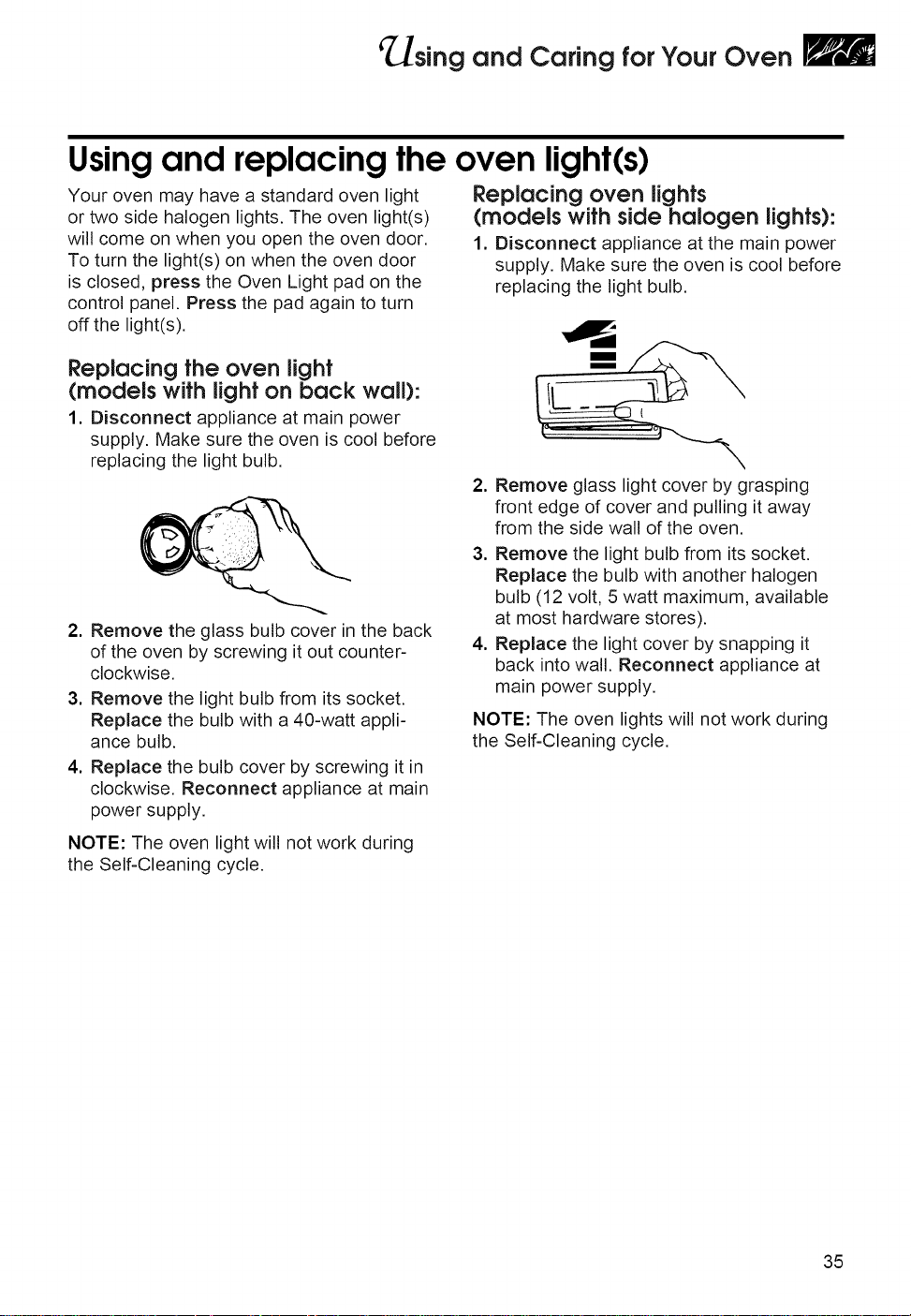
Using and replacing the oven light(s)
Your oven may have a standard oven light
or two side halogen lights. The oven light(s)
will come on when you open the oven door.
To turn the light(s) on when the oven door
is closed, press the Oven Light pad on the
control panel. Press the pad again to turn
off the light(s).
Replacing oven lights
(models with side halogen lights):
1. Disconnect appliance at the main power
supply. Make sure the oven is cool before
replacing the light bulb.
Replacing the oven light
(models with light on back wall):
1. Disconnect appliance at main power
supply. Make sure the oven is cool before
replacing the light bulb.
2. Remove the glass bulb cover in the back
of the oven by screwing it out counter-
clockwise.
3. Remove the light bulb from its socket.
Replace the bulb with a 40-watt appli-
ance bulb.
4. Replace the bulb cover by screwing it in
clockwise. Reconnect appliance at main
power supply.
NOTE: The oven light will not work during
the Self-Cleaning cycle.
2. Remove glass light cover by grasping
front edge of cover and pulling it away
from the side wall of the oven.
3. Remove the light bulb from its socket.
Replace the bulb with another halogen
bulb (12 volt, 5 watt maximum, available
at most hardware stores).
4. Replace the light cover by snapping it
back into wall. Reconnect appliance at
main power supply.
NOTE: The oven lights will not work during
the Self-Cleaning cycle.
35
sing the
Self-Cleaning
Cycle
The Self-Cleaning cycle saves you from the toil and mess that often come with hand-
cleaning the oven interior. Like the other functions of your oven, you operate the
Self-Cleaning cycle with the easy-to-use electronic control. To use this cycle properly,
follow the step-by-step instructions in this section.
Burn Hazard
Do not touch the oven during the Self-Cleaning cycle.
Keep children away from oven during Self-Cleaning cycle.
Do not use commercial oven cleaners in your oven.
Failure to follow these instructions can result in burns,
or illness from inhaling dangerous fumes.
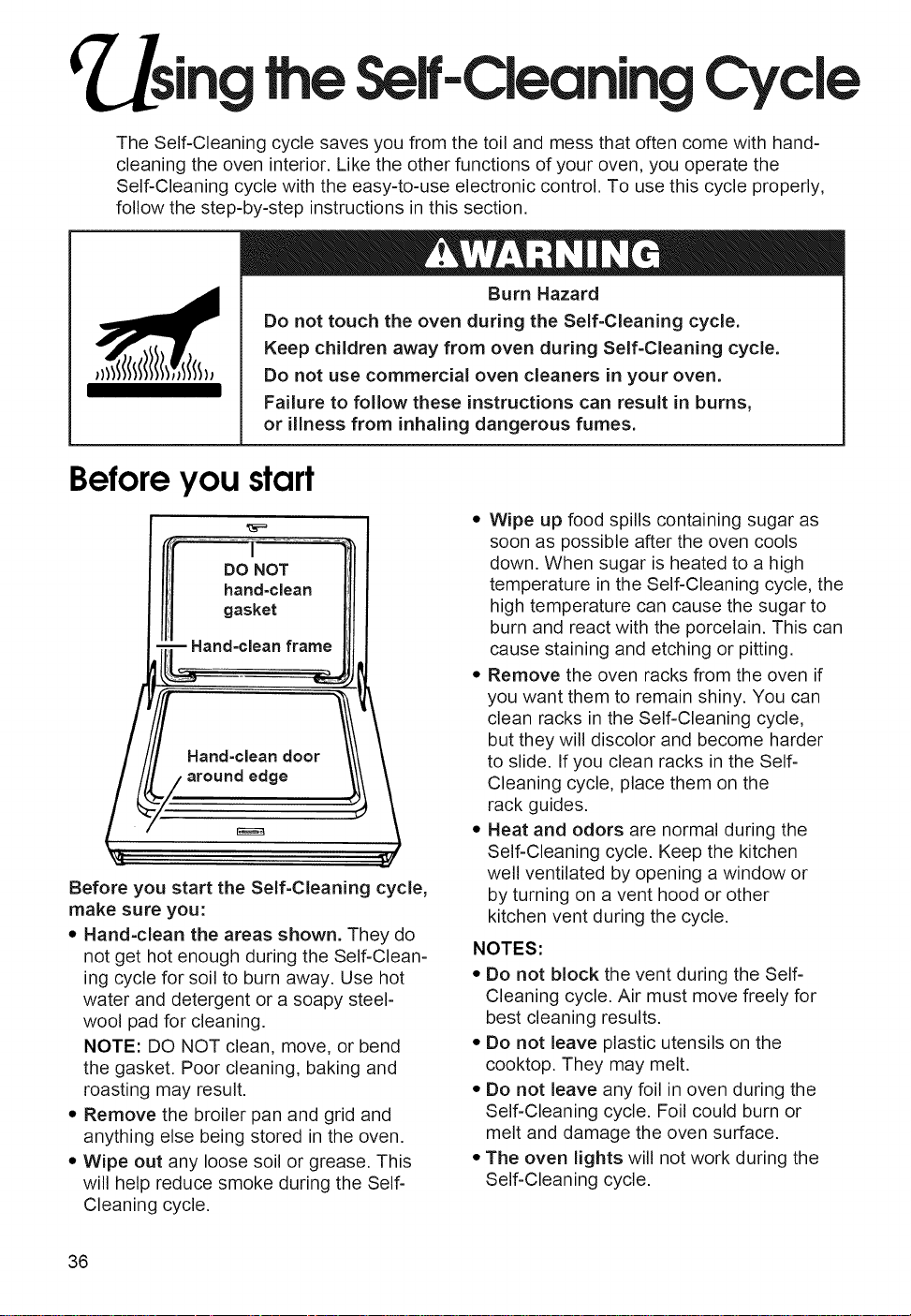
Beforeyou start
DO NOT
hand-clean
gasket
Hand-clean frame
Hand=clean door
around edge
Before you start the Self-Cleaning cycle,
make sure you:
• Hand-clean the areas shown. They do
not get hot enough during the Self-Clean-
ing cycle for soil to burn away. Use hot
water and detergent or a soapy steel-
wool pad for cleaning.
NOTE: DO NOT clean, move, or bend
the gasket. Poor cleaning, baking and
roasting may result.
• Remove the broiler pan and grid and
anything else being stored in the oven.
• Wipe out any loose soil or grease. This
will help reduce smoke during the Self-
Cleaning cycle.
• Wipe up food spills containing sugar as
soon as possible after the oven cools
down. When sugar is heated to a high
temperature in the Self-Cleaning cycle, the
high temperature can cause the sugar to
burn and react with the porcelain. This can
cause staining and etching or pitting.
• Remove the oven racks from the oven if
you want them to remain shiny. You can
clean racks in the Self-Cleaning cycle,
but they will discolor and become harder
to slide. If you clean racks in the Self-
Cleaning cycle, place them on the
rack guides.
• Heat and odors are normal during the
Self-Cleaning cycle. Keep the kitchen
well ventilated by opening a window or
by turning on a vent hood or other
kitchen vent during the cycle.
NOTES:
• Do not block the vent during the Self-
Cleaning cycle. Air must move freely for
best cleaning results.
• Do not leave plastic utensils on the
cooktop. They may melt.
• Do not leave any foil in oven during the
Self-Cleaning cycle. Foil could burn or
melt and damage the oven surface.
• The oven lights will not work during the
Self-Cleaning cycle.
36
_sing the Self-CleaningCycle
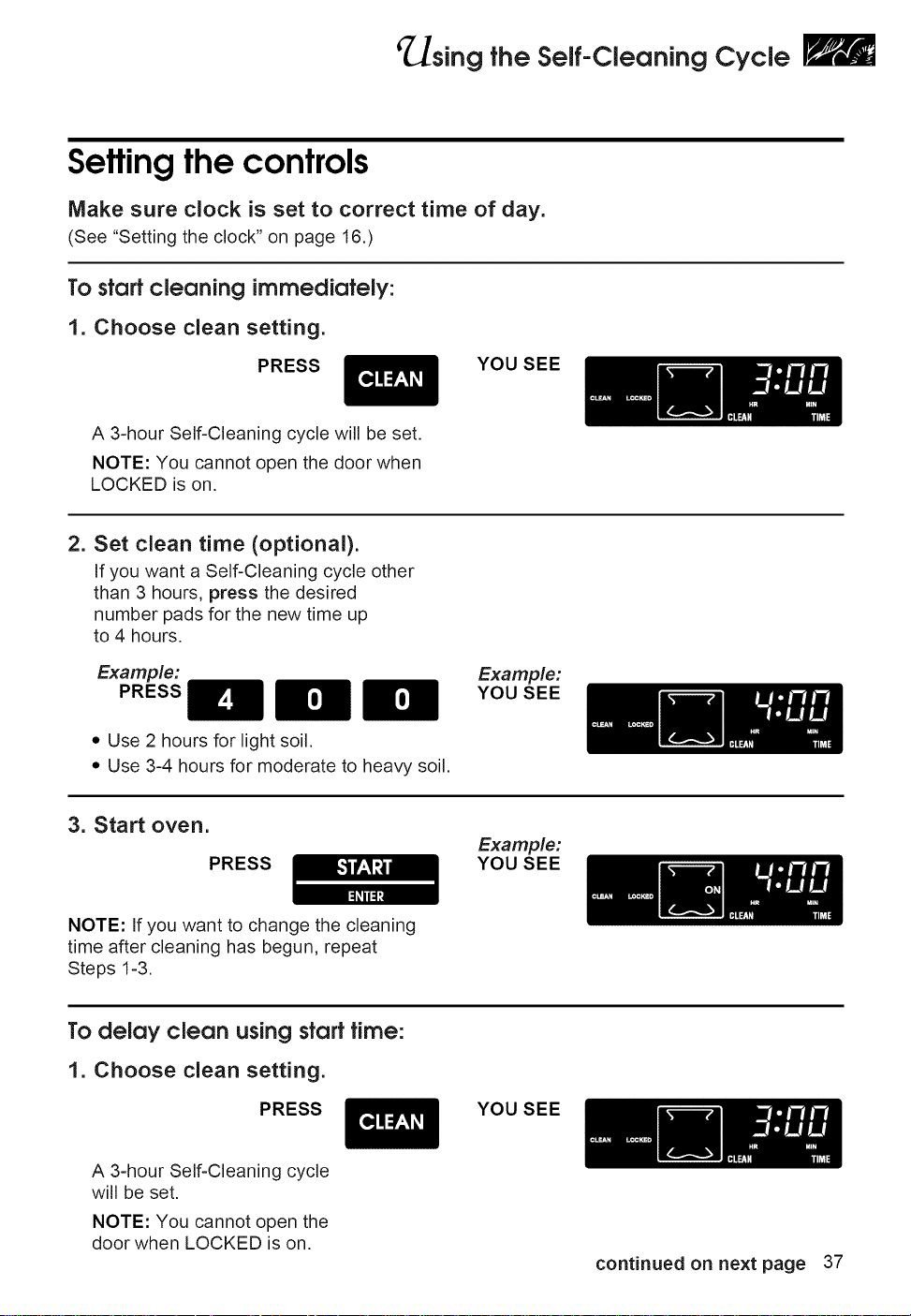
Setting the controls
Make sure clock is set to correct time of day.
(See "Setting the clock" on page 16.)
To start cleaning immediately:
1. Choose clean setting.
PRESS
YOU SEE
A 3-hour Self-Cleaning cycle will be set.
NOTE: You cannot open the door when
LOCKED is on.
2. Set clean time (optional).
If you want a Self-Cleaning cycle other
than 3 hours, press the desired
number pads for the new time up
to 4 hours.
Example:
PRESS
• Use 2 hours for light soil.
• Use 3-4 hours for moderate to heavy soil.
Example:
YOU SEE
3. Start oven.
PRESS
Example:
YOU SEE
NOTE: If you want to change the cleaning
time after cleaning has begun, repeat
Steps 1-3.
To delay clean using start time:
1. Choose clean setting.
PRESS YOU SEE
A 3-hour Self-Cleaning cycle
will be set.
NOTE: You cannot open the
door when LOCKED is on.
continued on next page 37
_sing the Self-CleaningCycle
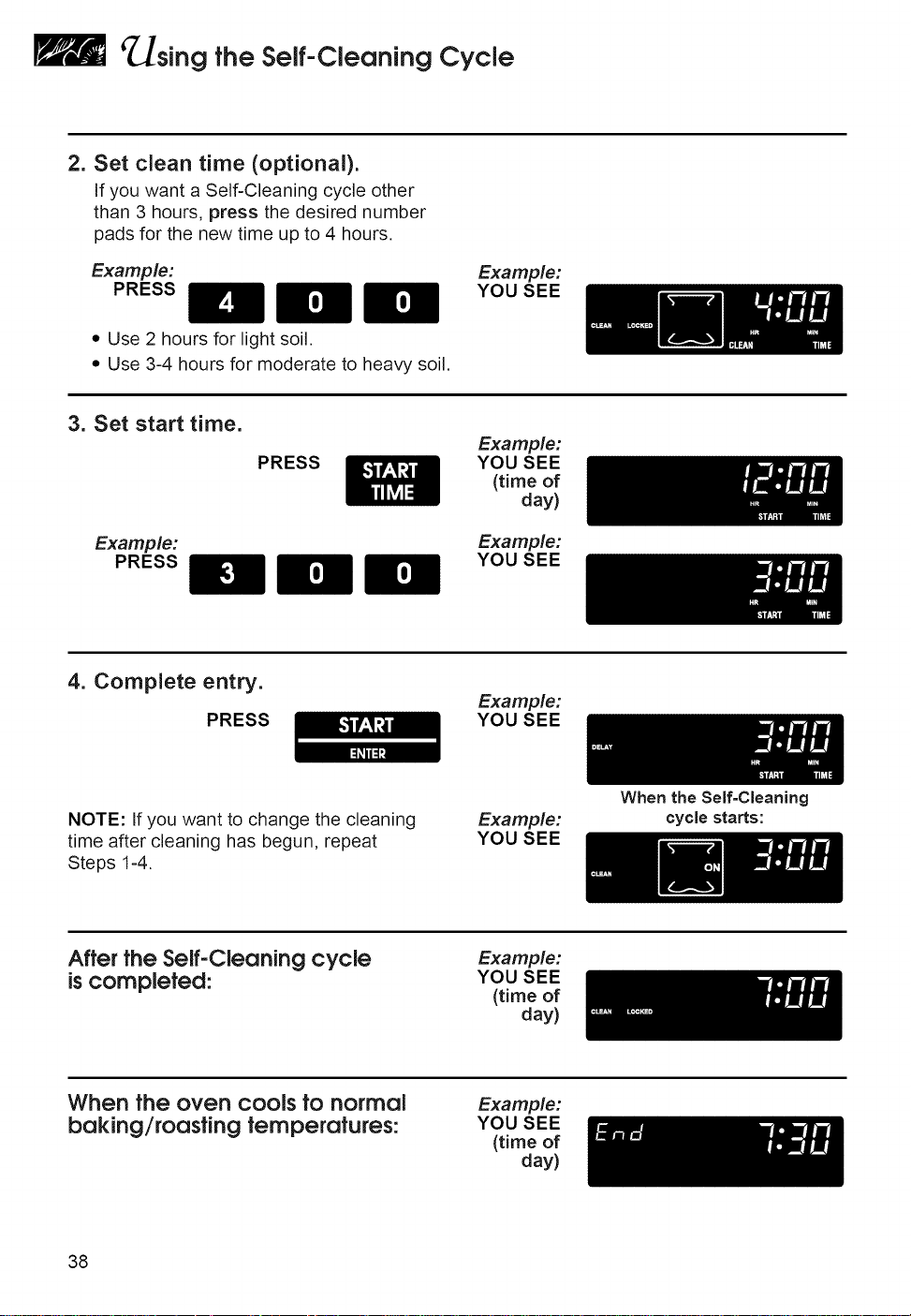
2. Set clean time (optional).
If you want a Self-Cleaning cycle other
than 3 hours, press the desired number
pads for the new time up to 4 hours.
Example:
PRESS
Example:
YOU SEE
• Use 2 hours for light soil.
• Use 3-4 hours for moderate to heavy soil.
3. Set start time.
Example:
PRESS
PRESS
Example:
YOU SEE
(time of
day)
Example:
YOU SEE
4. Complete entry.
PRESS
Example:
YOU SEE
NOTE: If you want to change the cleaning
time after cleaning has begun, repeat
Steps 1-4.
Example:
YOU SEE
After the Self-Cleaning cycle
is completed:
Example:
YOU SEE
(time of
day)
When the oven cools tonormal
baking/roastingtemperatures:
Example:
YOU SEE
(time of
day)
38
When the Self=Cleaning
cycle starts:
_]sing the Self-CleaningCycle
To stop the Self-Cleaningcycle at
any time:
PRESS
Example:
YOU SEE
(time of
day)
When the oven cools to normal
baking/roasting temperature:
Forbest cleaning results
• After the oven cools to room tempera=
ture, wipe up any residue or ash with a
damp cloth or sponge. If any spots remain,
clean with a mild abrasive cleanser or
cleaning sponge.
• Clean the oven before it gets heavily
soiled. Cleaning a very soiled oven takes
longer and results in more smoke than
usual.
• if the Self=Cleaning cycle does not get
the oven as clean as you expected, the
cycle may not have been set long enough
or you may not have prepared the oven
properly. Set the Self-Cleaning cycle
longer the next time and hand-clean areas
noted on page 36.
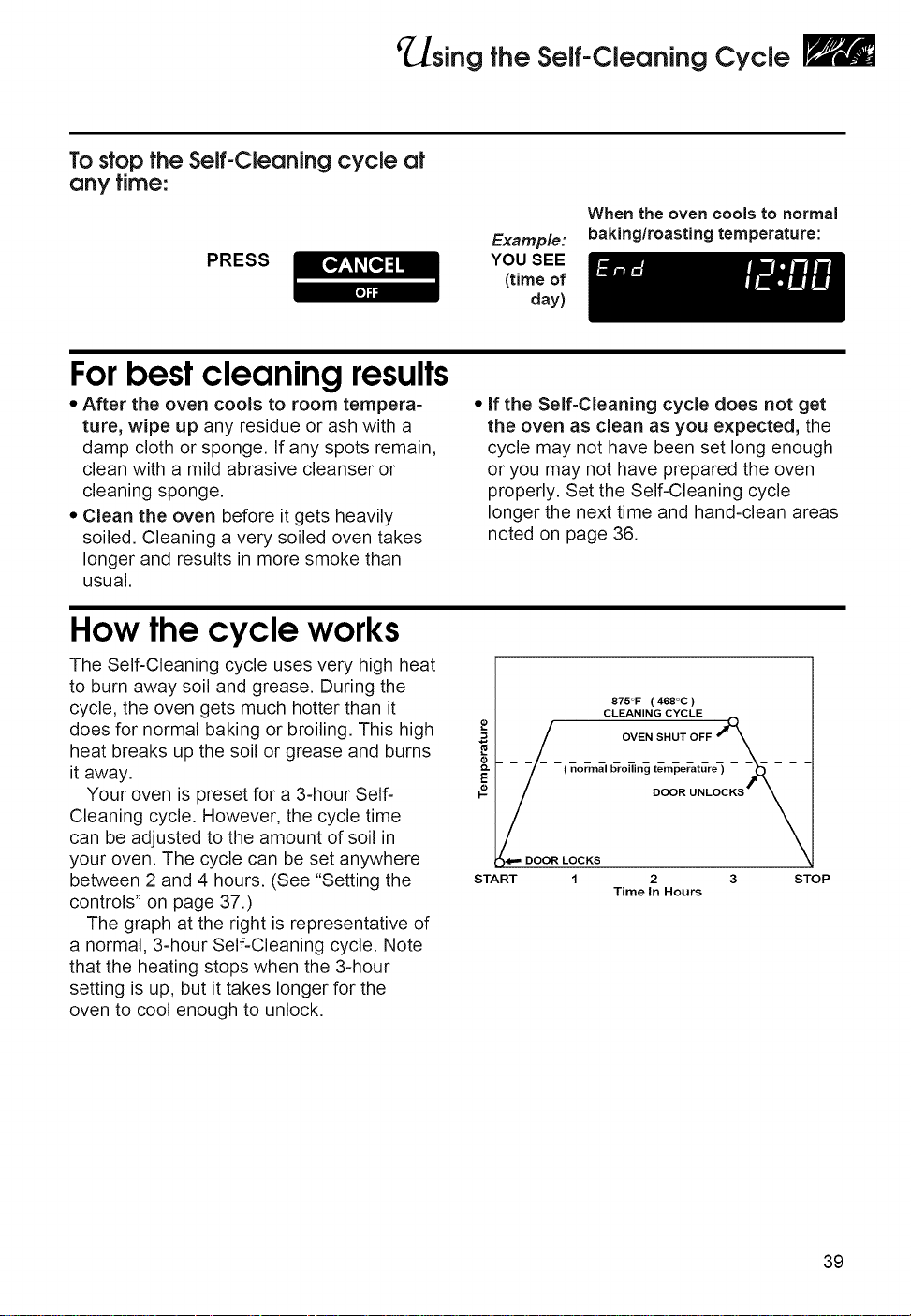
How the cycle works
The Self-Cleaning cycle uses very high heat
to burn away soil and grease. During the
cycle, the oven gets much hotter than it
does for normal baking or broiling. This high
heat breaks up the soil or grease and burns
it away.
Your oven is preset for a 3-hour Self-
Cleaning cycle. However, the cycle time
can be adjusted to the amount of soil in
your oven. The cycle can be set anywhere
between 2 and 4 hours. (See "Setting the
controls" on page 37.)
The graph at the right is representative of
a normal, 3-hour Self-Cleaning cycle. Note
that the heating stops when the 3-hour
setting is up, but it takes longer for the
oven to cool enough to unlock.
9
O.
E
START
S75°F ( 46S°C )
CLEANING CYCLE
OVEN SHUT OFF _____
( normal bro_i,_ tem_erature_ - _ - -
DOOR UNLOCKS _
DOOR LOCKS
1 2 3 STOP
Time In Hours
39
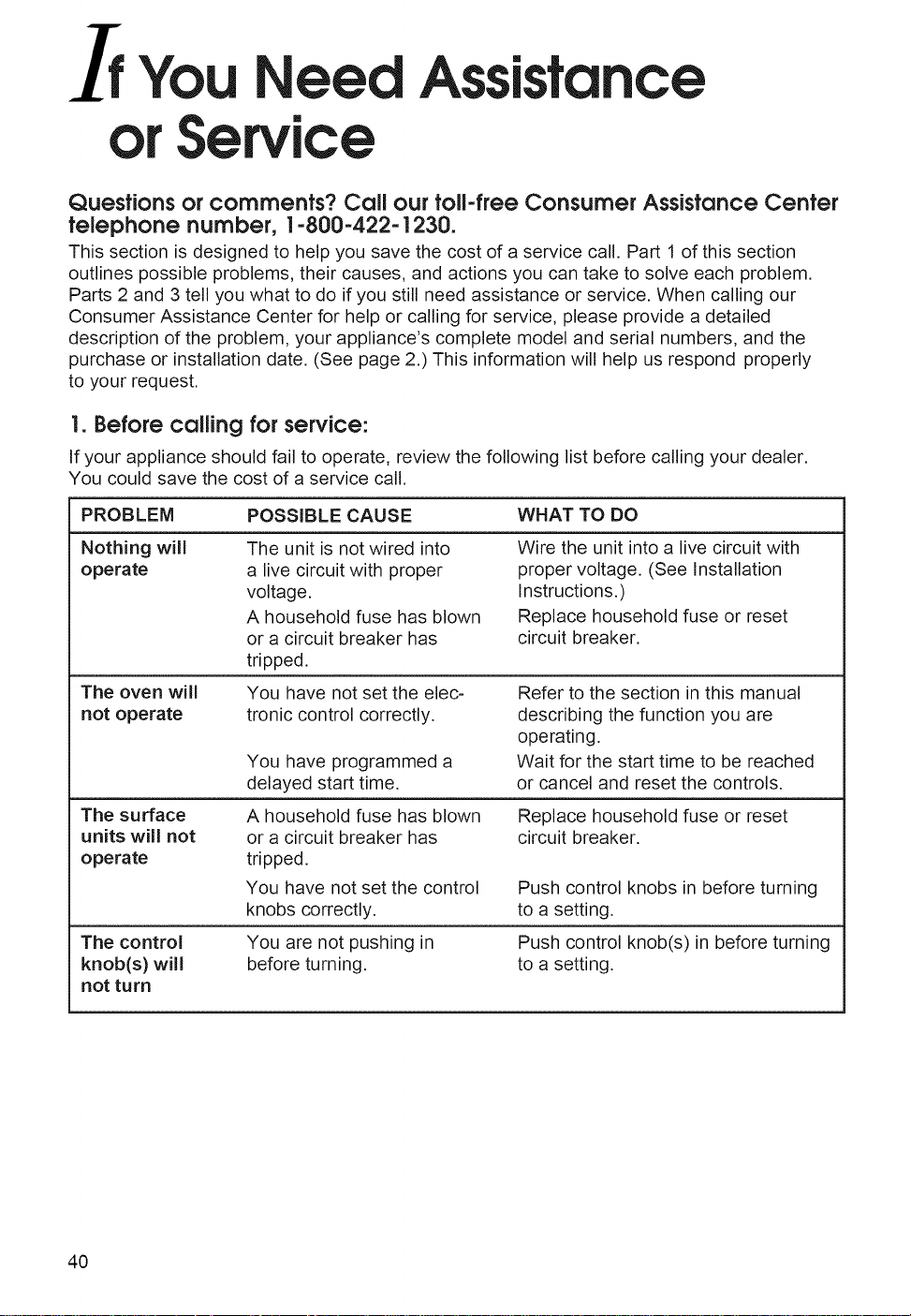
If You eed
orService
Assistance
Questions or comments? Call our toll-freeConsumer Assistance Center
telephone number, 1-800-422-1230.
This section is designed to help you save the cost of a service call. Part 1 of this section
outlines possible problems, their causes, and actions you can take to solve each problem.
Parts 2 and 3 tell you what to do if you still need assistance or service. When calling our
Consumer Assistance Center for help or calling for service, please provide a detailed
description of the problem, your appliance's complete model and serial numbers, and the
purchase or installation date. (See page 2.) This information will help us respond properly
to your request.
I.Before callingforservice:
If your appliance should fail to operate, review the following list before calling your dealer.
You could save the cost of a service call.
PROBLEM
Nothing will
operate
The oven will
not operate
The surface
units will not
operate
The control
knob(s) will
not turn
POSSIBLE CAUSE WHAT TO DO
The unit is not wired into
a live circuit with proper
voltage.
A household fuse has blown
or a circuit breaker has
tripped.
You have not set the elec-
tronic control correctly.
You have programmed a
delayed start time.
A household fuse has blown
or a circuit breaker has
tripped.
You have not set the control
knobs correctly.
You are not pushing in
before turning.
Wire the unit into a live circuit with
proper voltage. (See Installation
Instructions.)
Replace household fuse or reset
circuit breaker.
Refer to the section in this manual
describing the function you are
operating.
Wait for the start time to be reached
or cancel and reset the controls.
Replace household fuse or reset
circuit breaker.
Push control knobs in before turning
to a setting.
Push control knob(s) in before turning
to a setting.
40
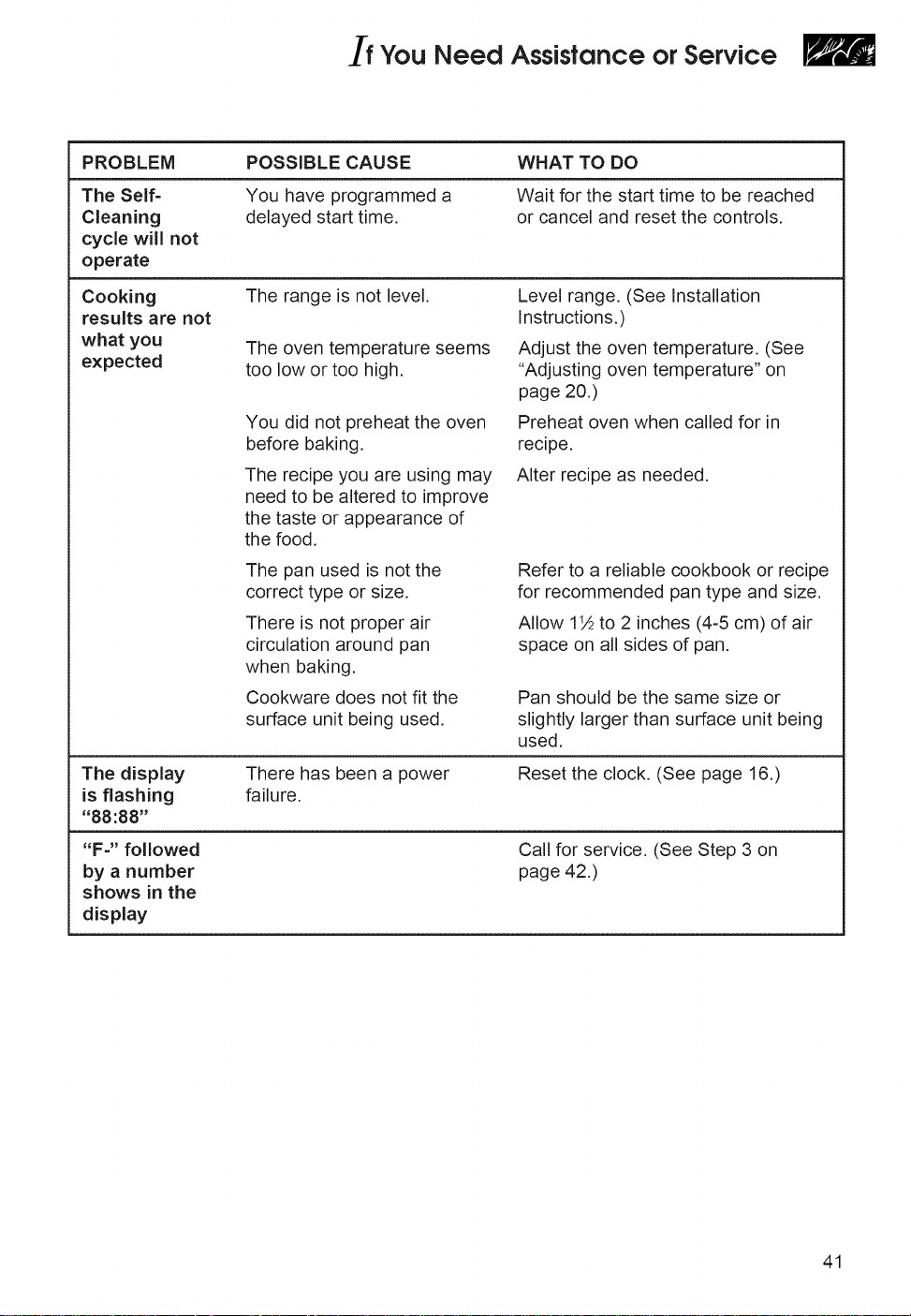
You Need Assistance or Service
PROBLEM
The Self-
Cleaning
cycle will not
operate
Cooking
results are not
what you
expected
The display
is flashing
"88:88"
"F-" followed
by a number
shows in the
display
POSSIBLE CAUSE
You have programmed a
delayed start time.
WHAT TO DO
Wait for the start time to be reached
or cancel and reset the controls
The range is not level.
The oven temperature seems
too low or too high.
You did not preheat the oven
before baking.
The recipe you are using may
need to be altered to improve
the taste or appearance of
the food.
Level range. (See Installation
Instructions.)
Adjust the oven temperature. (See
"Adjusting oven temperature" on
page 20.)
Preheat oven when called for in
recipe.
Alter recipe as needed.
The pan used is not the
correct type or size.
There is not proper air
circulation around pan
when baking.
Cookware does not fit the
surface unit being used.
Refer to a reliable cookbook or recipe
for recommended pan type and size.
Allow 1½ to 2 inches (4-5 cm) of air
space on all sides of pan.
Pan should be the same size or
slightly larger than surface unit being
used,
There has been a power
failure.
Reset the clock. (See page 16.)
Call for service. (See Step 3 on
page 42.)
41
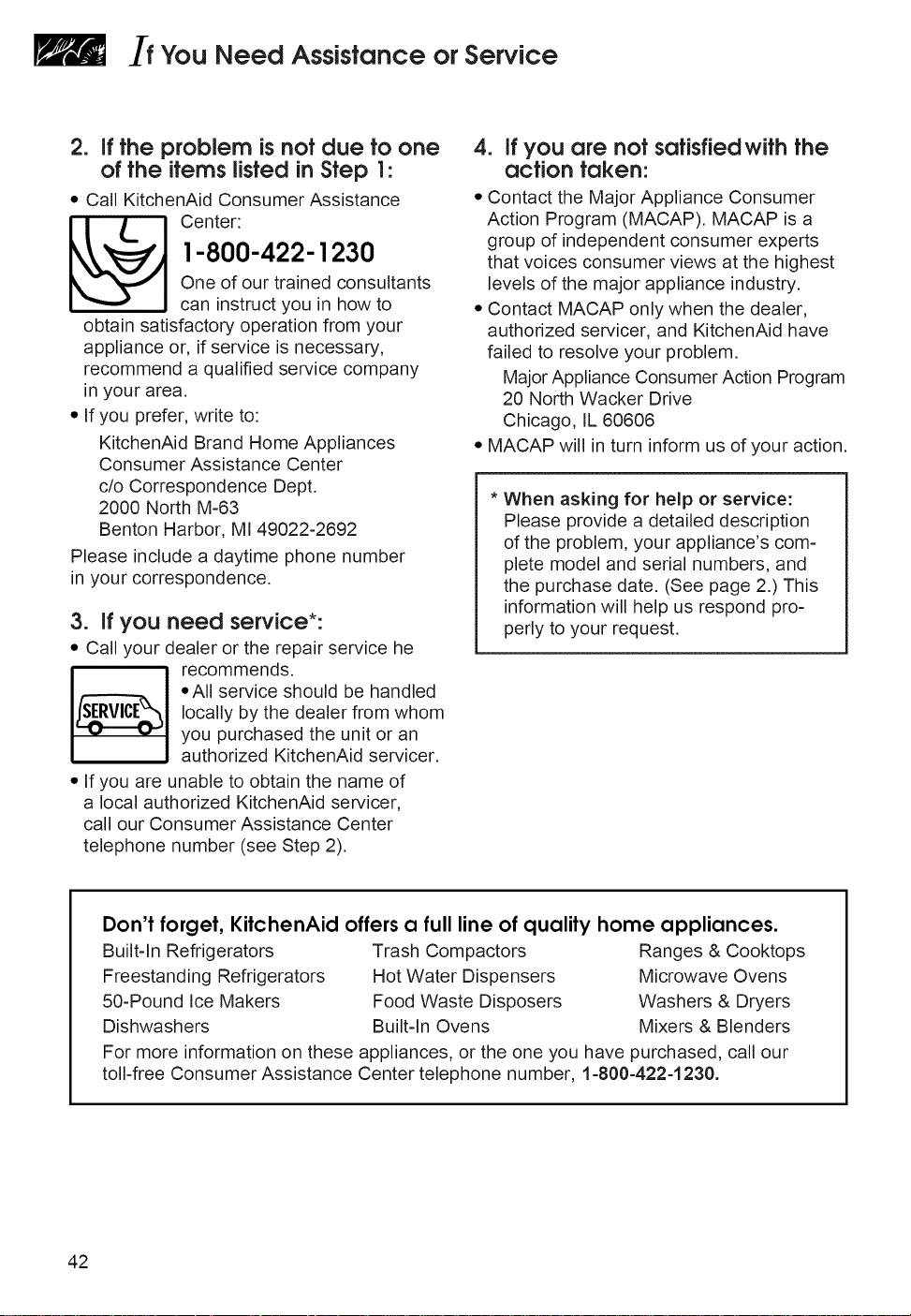
If You Need Assistance or Service
2. ifthe problem isnot due to one
of the items listedinStep 1:
• Call KitchenAid Consumer Assistance
_ enter:
1-800-422-1230
One of our trained consultants
can instruct you in how to
obtain satisfactory operation from your
appliance or, if service is necessary,
recommend a qualified service company
in your area.
• If you prefer, write to:
KitchenAid Brand Home Appliances
Consumer Assistance Center
c/o Correspondence Dept.
2000 North M-63
Benton Harbor, MI 49022-2692
Please include a daytime phone number
in your correspondence.
3. if you
• Call your
I
need service*:
dealer or the repair service he
recommends.
• All service should be handled
locally by the dealer from whom
you purchased the unit or an
authorized KitchenAid servicer.
• If you are unable to obtain the name of
a local authorized KitchenAid servicer,
call our Consumer Assistance Center
telephone number (see Step 2).
4. if you are not satisfied with the
action taken:
• Contact the Major Appliance Consumer
Action Program (MACAP). MACAP is a
group of independent consumer experts
that voices consumer views at the highest
levels of the major appliance industry.
• Contact MACAP only when the dealer,
authorized servicer, and KitchenAid have
failed to resolve your problem.
Major Appliance Consumer Action Program
20 North Wacker Drive
Chicago, IL 60606
• MACAP will in turn inform us of your action.
* When asking for help or service:
Please provide a detailed description
of the problem, your appliance's com-
plete model and serial numbers, and
the purchase date. (See page 2.) This
information will help us respond pro-
perly to your request.
Don't forget,KitchenAid offersa fulllineof qualityhome appliances.
Built-In Refrigerators Trash Compactors Ranges & Cooktops
Freestanding Refrigerators Hot Water Dispensers Microwave Ovens
50-Pound Ice Makers Food Waste Disposers Washers & Dryers
Dishwashers Built-In Ovens Mixers & Blenders
For more information on these appliances, or the one you have purchased, call our
toll-free Consumer Assistance Center telephone number, 1-800-422-1230.
42

43
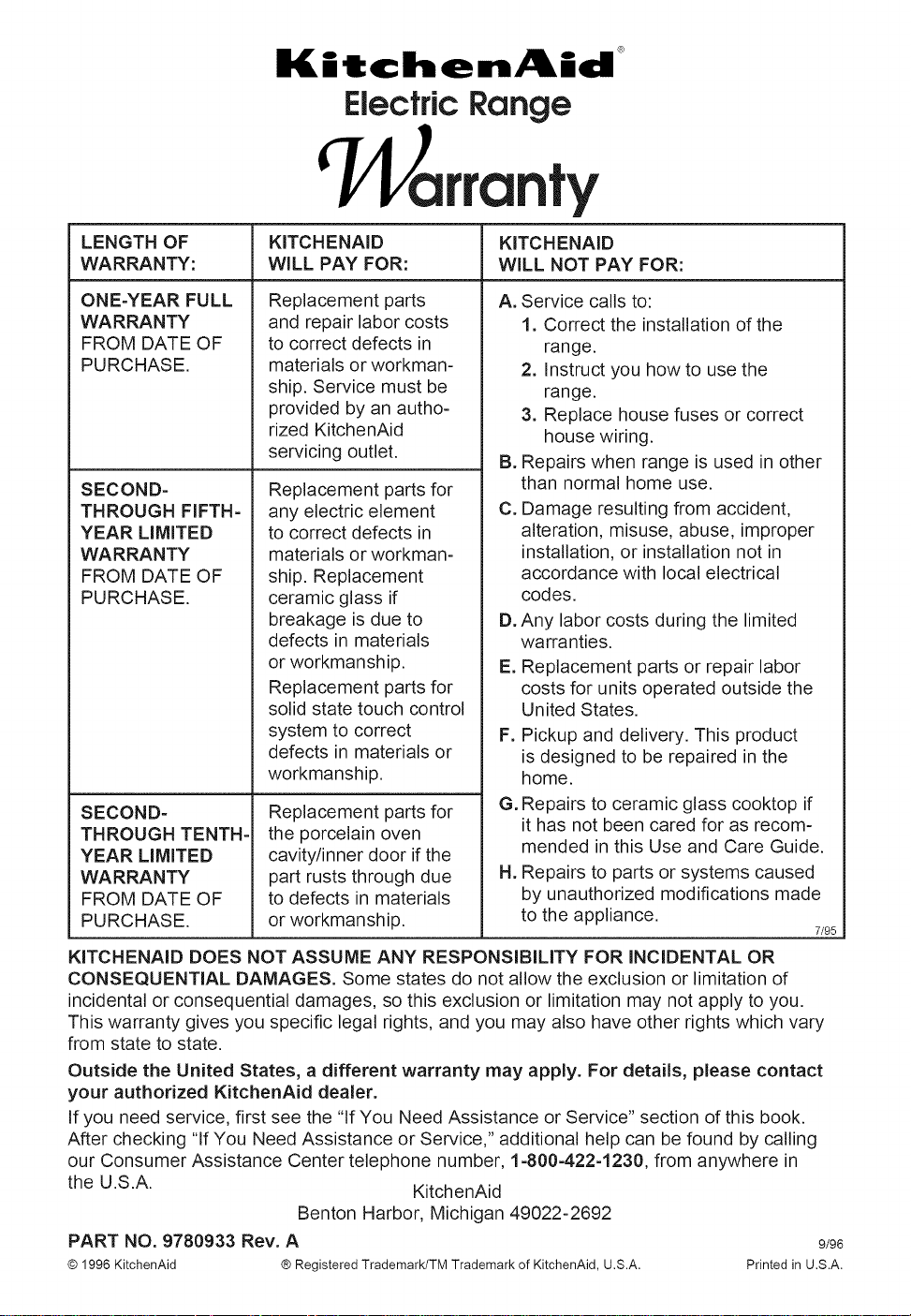
Kitchen kid
Electric Range
arranty
LENGTH OF KITCHENAID KITCHENAID
WARRANTY: WiLL PAY FOR: WiLL NOT PAY FOR:
ONE-YEAR FULL
WARRANTY
FROM DATE OF
PURCHASE.
SECOND-
THROUGH FIFTH-
YEAR LIMITED
WARRANTY
FROM DATE OF
PURCHASE.
SECOND-
THROUGH TENTH-
YEAR LIMITED
WARRANTY
FROM DATE OF
PURCHASE.
Replacement parts
and repair labor costs
to correct defects in
materials or workman-
ship. Service must be
provided by an autho-
rized KitchenAid
servicing outlet.
Replacement parts for
any electric element
to correct defects in
materials or workman-
ship. Replacement
ceramic glass if
breakage is due to
defects in materials
or workmanship.
Replacement parts for
solid state touch control
system to correct
defects in materials or
workmanship.
Replacement parts for
the porcelain oven
cavity/inner door if the
part rusts through due
to defects in materials
or workmanship.
A. Service calls to:
1. Correct the installation of the
range.
2. Instruct you how to use the
range.
3. Replace house fuses or correct
house wiring.
B. Repairs when range is used in other
than normal home use.
C. Damage resulting from accident,
alteration, misuse, abuse, improper
installation, or installation not in
accordance with local electrical
codes.
D. Any labor costs during the limited
warranties.
E. Replacement parts or repair labor
costs for units operated outside the
United States.
F. Pickup and delivery. This product
is designed to be repaired in the
home.
G. Repairs to ceramic glass cooktop if
it has not been cared for as recom-
mended in this Use and Care Guide.
Repairs to parts or systems caused
by unauthorized modifications made
H.
to the appliance.
7/95
KITCHENAID DOES NOT ASSUME ANY RESPONSiBiLiTY FOR INCIDENTAL OR
CONSEQUENTIAL DAMAGES. Some states do not allow the exclusion or limitation of
incidental or consequential damages, so this exclusion or limitation may not apply to you.
This warranty gives you specific legal rights, and you may also have other rights which vary
from state to state.
Outside the United States, a different warranty may apply. For details, please contact
your authorized KitchenAid dealer.
If you need service, first see the "If You Need Assistance or Service" section of this book.
After checking "If You Need Assistance or Service," additional help can be found by calling
our Consumer Assistance Center telephone number, 1-800-422-1230, from anywhere in
the U.S.A. KitchenAid
Benton Harbor, Michigan 49022-2692
PART NO. 9780933 Rev. A 9/96
© 1996 KitchenAid ® Registered Trademark/TM Trademark of KitchenAid, U.S.A. Printed in U.S.A.