www.CasablancaFanCo.com
1.888.227.2178
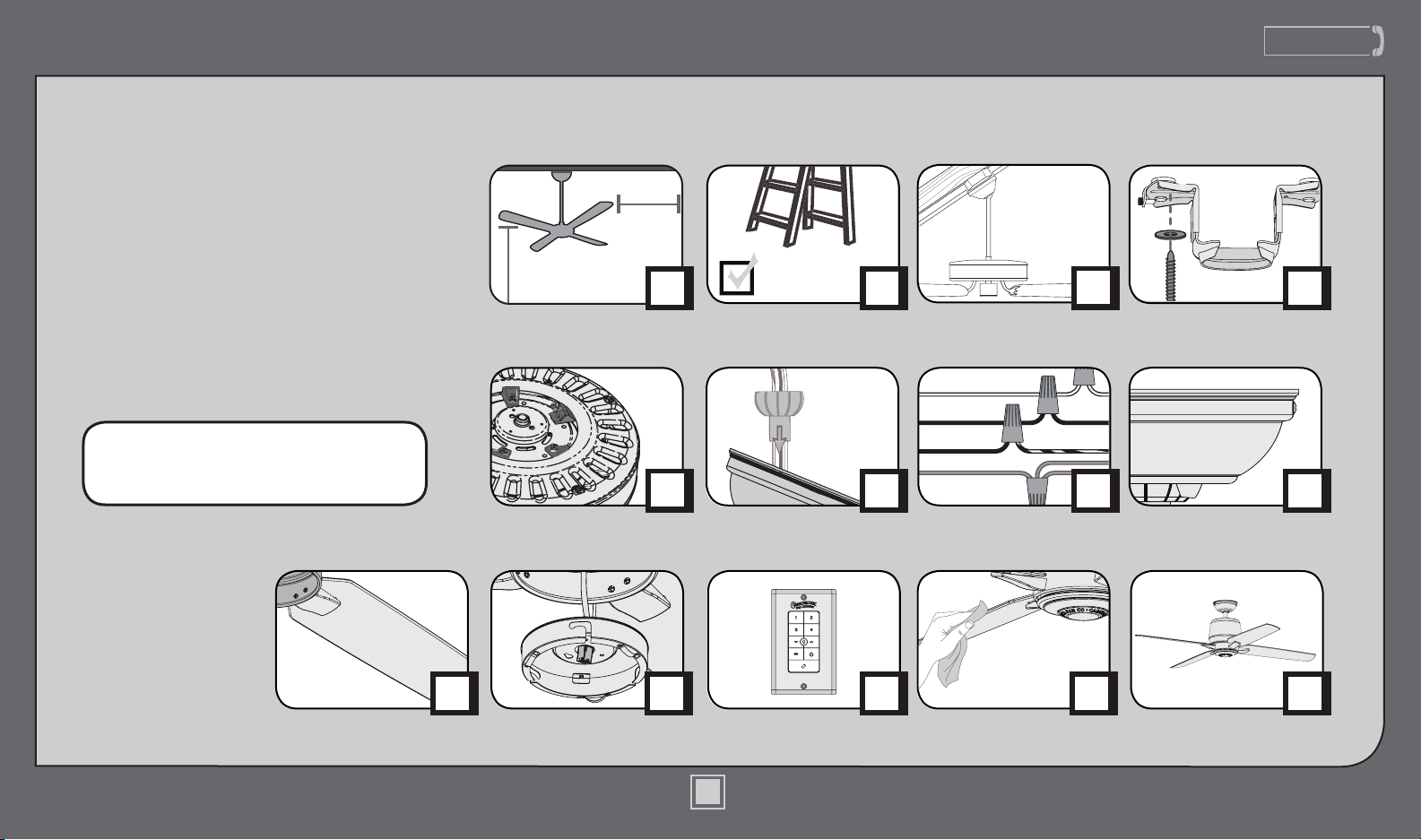
PAGE
7
PAGE
14
PAGE
10
PAGE
5
PAGE
6
PAGE
13
30 inches
7 feet
PAGE
2
What to Expect with
Your Installation Ceiling Bracket
Ladder
PAGE
3
Tools Needed
Wiring
Canopy
Maintenance
& Cleaning
Blades Troubleshooting
Downrod
Switch Housing
Preparation
PAGE
12
Table of Contents
?
PAGE
18
PAGE
17
Operation
PAGE
16
PAGE
4
Mounting Options
Congratulations on purchasing your new
Casablanca® ceiling fan! It will provide
comfort and performance in your home
or ofce for many years. This installation
and operation manual contains complete
instructions for installing and operating
your fan.
We are proud of our work and appreciate
the opportunity to supply you with the
best ceiling fan available anywhere in the
world.
To register your fan, please visit:
www.CasablancaFanCo.com/register
Save your receipt for proof of purchase.
1
M8520-01 • 12/11/13 • © Casablanca Fan Company
?
?
?
www.CasablancaFanCo.com
1.888.227.2178
www.CasablancaFanCo.com
1.888.227.2178
www.CasablancaFanCo.com
1.888.227.2178
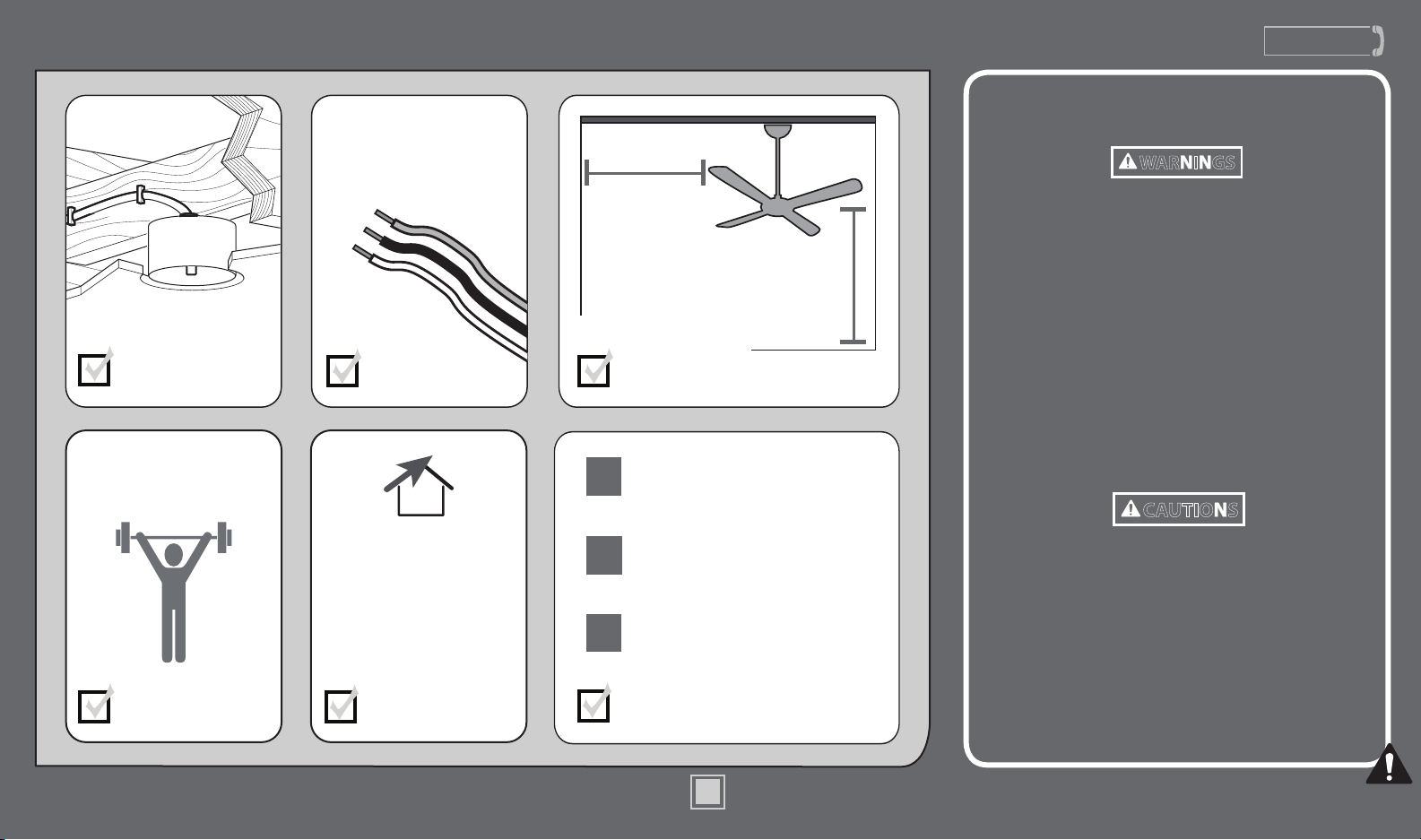
What to Expect with Your Installation
Know your wiring
If you are unfamiliar
with wiring, use a
qualied electrician.
You may need a
friend to help you.
Check box to see
fan weight
Assess location
30 inches
from blade tip to
nearest wall or
obstruction
7 feet
from bottom
edge of blade
to the oor
Select a downrod length
w.1 - To reduce the risk of re, electrical shock, or personal
injury, mount fan directly from building structure and/or an
outlet box marked acceptable for fan support of 70 lbs (31.8 kg)
and use the mounting screws provided with the outlet box.
w.2 - To avoid possible electrical shock, before installing or
servicing your fan, disconnect the power by turning off the
circuit breakers to the outlet box and associated wall switch
location. If you cannot lock the circuit breakers in the off
position, securely fasten a prominent warning device, such as a
tag, to the service panel.
w.3 - To reduce the risk of re, electrical shock, or motor damage,
use only Casablanca Solid State Speed Controls.
w.4 - To reduce the risk of personal injury, do not bend the blade
brackets when installing the blade brackets, balancing the blades,
or cleaning the fan. Do not insert foreign objects in between
rotating fan blades.
c.1 - All wiring must be in accordance with national and local
electrical codes ANSI/NFPA 70. If you are unfamiliar with wiring,
use a qualied electrician.
c.2 - Use only Casablanca replacement parts.
This equipment has been tested and found to comply with the
limits for a Class B digital device, pursuant to part 15 of the FCC
Rules. These limits are to provide reasonable protection against
harmful interference in a residential installation. This equipment
generates, uses and can radiate radio frequency energy and if not
installed and used in accordance with the instructions may cause
harmful interference to radio communications.
Assess ceiling angle
Read and Save These Instructions
This product conforms to UL Standard 507.
WARNINGS
CAUTIONS
Must be able to
secure the fan to
building structure or
fan-rated outlet box
1
2
3
Standard Downrod
for ceilings 8-10 feet high
Shorter Downrod
for fans installed close to ceiling
Longer Downrod
for ceilings 10 feet or higher
Ceiling angles greater
than 34° will require an
Angled Mounting Kit.
See page 4 for details.
2
M8520-01 • 12/11/13 • © Casablanca Fan Company
2
www.CasablancaFanCo.com
1.888.227.2178
3
M8520-01 • 12/11/13 • © Casablanca Fan Company
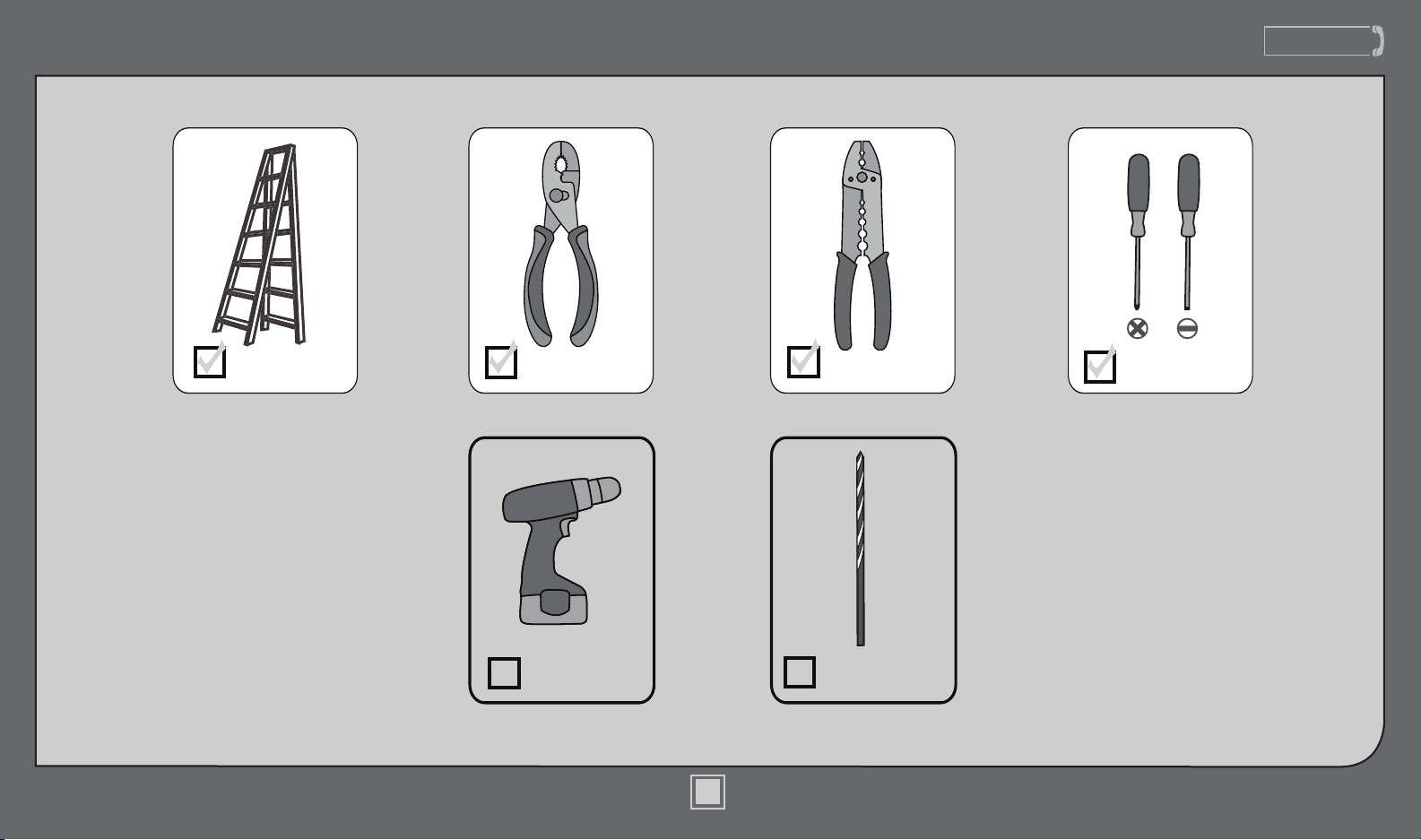
Tools Needed
Ladder
Power Drill
(optional)
9/64” Drill Bit
(optional)
Screwdrivers
Pliers Wire Strippers
If mounting to a support structure, you will also need these tools.
www.CasablancaFanCo.com
1.888.227.2178
4
M8520-01 • 12/11/13 • © Casablanca Fan Company
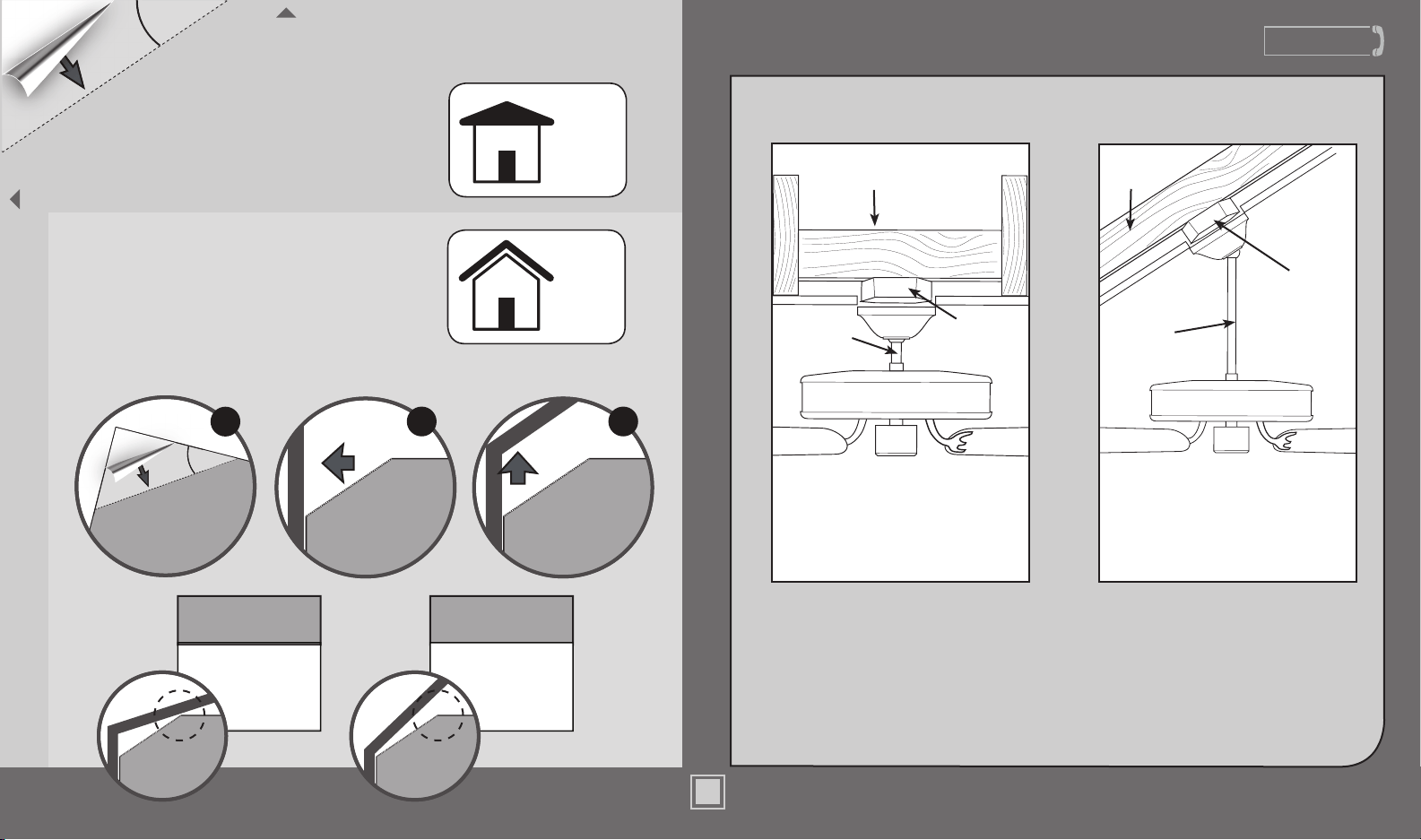
If you have an angled ceiling:
1. You will need a longer downrod (sold separately).
2. If your ceiling angle is greater than 34°, you will
also need an Angled Mounting Kit (sold separately).
Guide Touches
BOTH Ceiling & Wall
S
I
T
U
A
T
I
O
N
1
Guide Touches
Wall
but
NOT Ceiling
S
I
T
U
A
T
I
O
N
2
You need BOTH
a Longer
Downrod &
an Angled
Mounting Kit
You need ONLY
a Longer
Downrod
*most common
If you have a at ceiling:
Hang your fan by a standard downrod (included).
Mounting Options
Support
Structure
Ceiling
Outlet Box
(required)
Angled
Mounting
Style
Standard
Mounting
Style
Support
Structure
Ceiling
Outlet Box
(required)
Use Standard Mounting
or Low-Prole Mounting
to hang the fan from a at ceiling.
Use Angled Mounting
to hang the fan from a
vaulted or angled ceiling.
4
34
O
CEILING
WALL
OPTION
1
Standard
Mounting
OPTION
2
Angled
Mounting
2 3
SLIDE
toward ceiling
PLACE
against wall
1
FOLD
on dotted line
34°
Use the three steps below to determine if your ceiling angle is greater than 34°
1.888.227.2178
M8520-01 • 12/11/13 • © Casablanca Fan Company
www.CasablancaFanCo.com
1.888.227.2178
1.888.227.2178
www.CasablancaFanCo.com
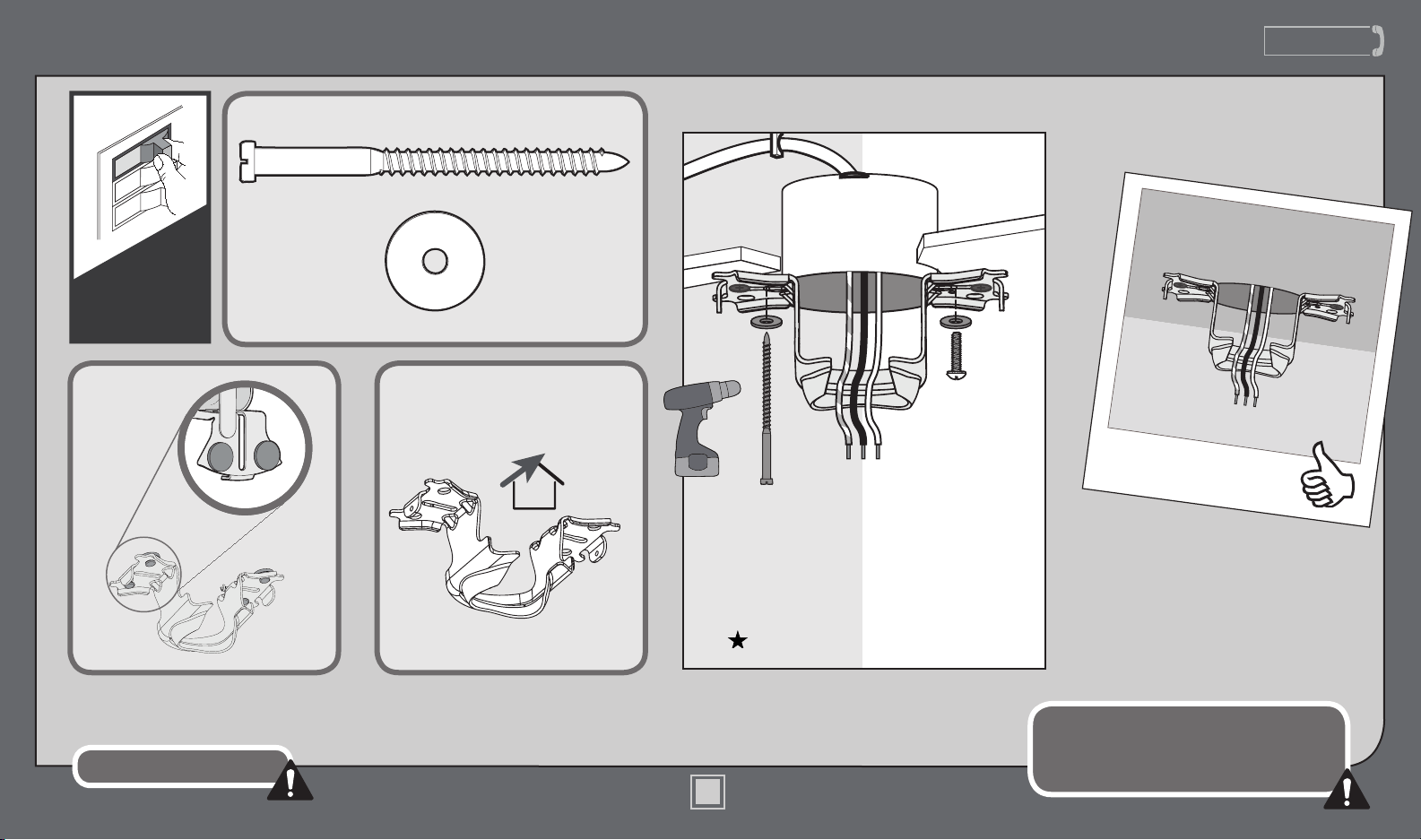
Ceiling Bracket
Refer to warning w.1 on pg. 2
To avoid possible electrical shock, before
installing your fan, disconnect the power by
turning off the circuit breakers to the outlet
box associated with the wall switch location.
For angled ceilings, point
opening toward peak.
If you are unable to do this,
call Technical Support at
1-888-277-2178.
Make sure all four bumpers are
still attached.
Use wood screws
(included) when securing
to support structure with
approved electrical outlet
box. Drill 9/64” pilot holes
in support structure to aid
in securing ceiling bracket
with hardware found in
the hardware bag.
Use machine screws
(provided with outlet
box) when securing to
existing ceiling fan-rated
outlet box. Make sure
it is securely installed
and is acceptable for fan
support of 31.8 kg (70 lbs)
or less.
OFF
Turn Power
5
M8520-01 • 12/11/13 • © Casablanca Fan Company
www.CasablancaFanCo.com
1.888.227.2178
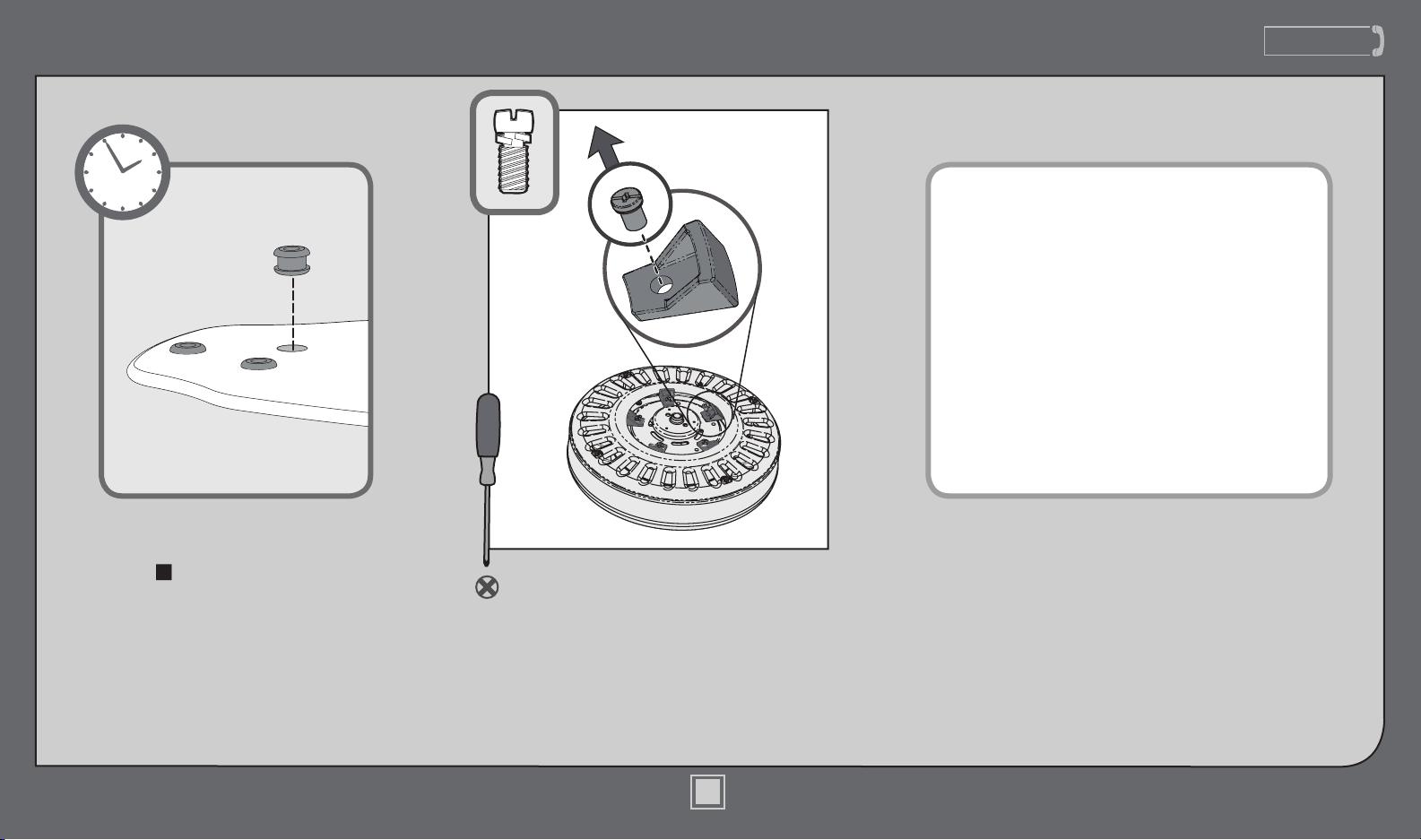
Preparation
1.888.227.2178
www.CasablancaFanCo.com
Remove the shipping blocks from the
motor. Discard the screws.
Note: Some fans will have a shipping
ring instead of shipping blocks. Please
remove the ring and save the screws.
Time Saver Tip: Get a helper
to insert grommets, found in
the hardware bag, into the
blades while you’re doing the
next couple of steps.
If you are installing multiple remote-controlled
fans on the same circuit breaker,
you may need to perform a few extra steps to
prevent interference or faulty operation of your
remote controls.
Go to www.CasablancaFanCo.com/FAQs and click
“How do I properly install multiple remote-
controlled fans?” for more information.
D
I
S
C
A
R
D
D
I
S
C
A
R
D
6
M8520-01 • 12/11/13 • © Casablanca Fan Company
www.CasablancaFanCo.com
1.888.227.2178
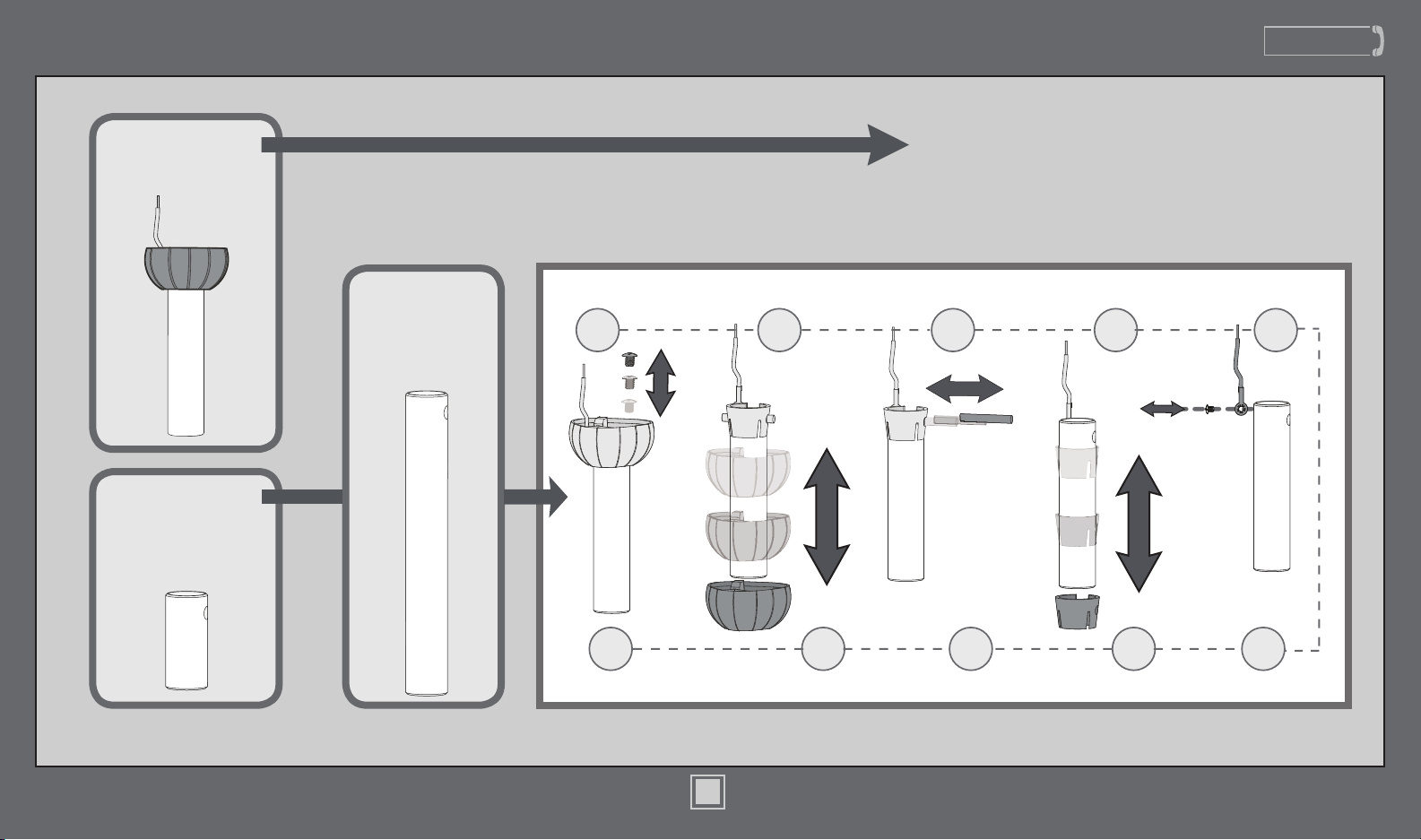
Downrod
Slide
Slide
1 2 3 4 5
678910
Sold Separately
Included
Longer
Downrod
for angled
ceilings or
ceilings 10’ or
higher
Shorter
Downrod
for fans installed
close to ceiling
Standard
Downrod
for ceilings 8-10’ high
Option 1Option 2
Option 3
skip to next page
If you need a different downrod length follow these steps:
Steps 1-5 to remove standard downrod pipe
Steps 6-10 to reassemble with new pipe
Included
(pre-assembled)
7
M8520-01 • 12/11/13 • © Casablanca Fan Company
www.CasablancaFanCo.com
1.888.227.2178
KEEP!
8”
3/8”
C
U
T
&
S
T
R
I
P
(not to scale)
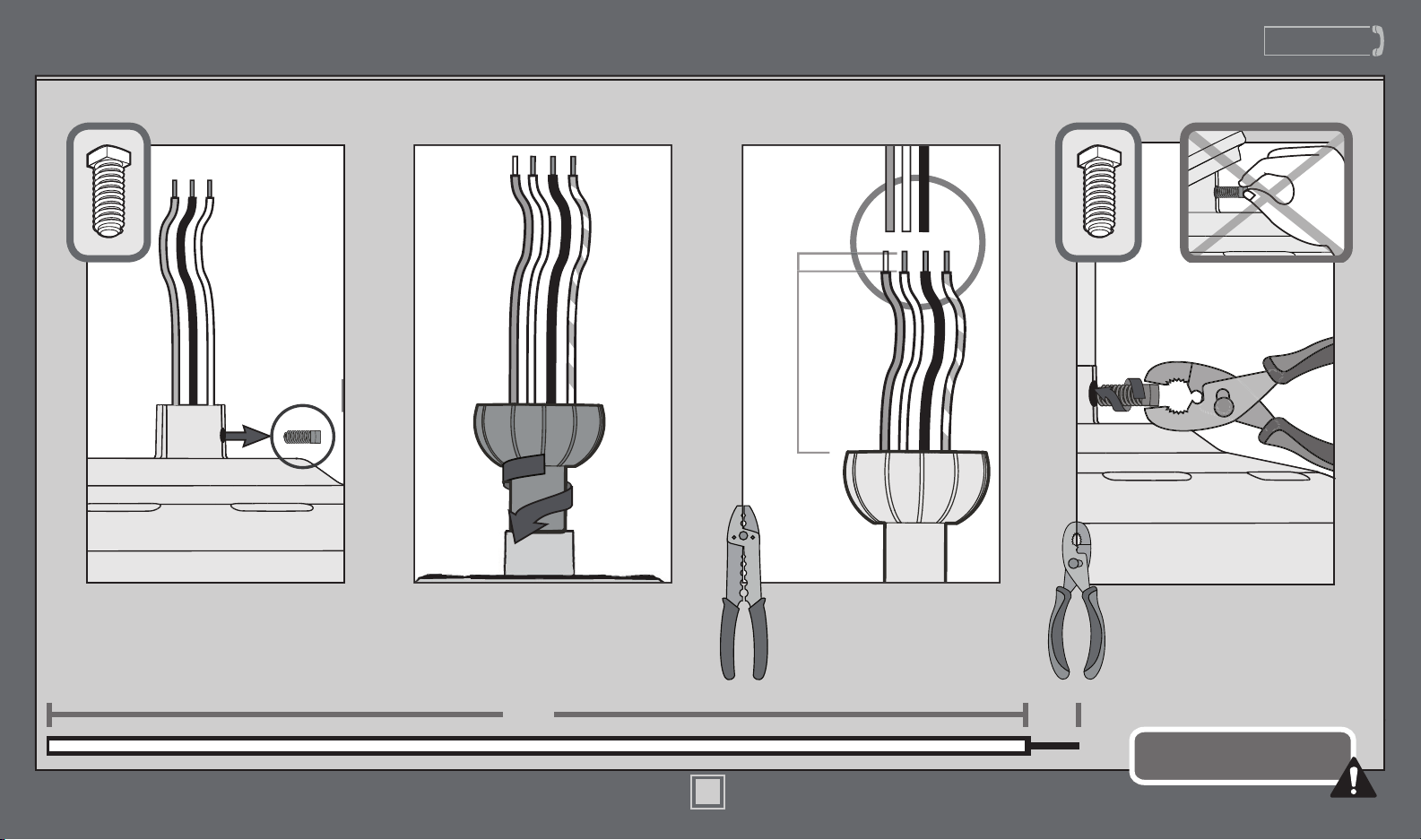
Remove the pre-installed
setscrew so that the downrod
can be inserted.
Hand tighten the downrod (at
least 4-5 full turns) until it stops.
The wires can be cut, but
leave at least 8” extending
from the top of the downrod.
Downrod (continued)
8”
3/8”
Tighten the setscrew
with pliers. DO NOT
HAND TIGHTEN.
If the setscrew is not tightened
securely, the fan may fall.
K
E
E
P
!
8
M8520-01 • 12/11/13 • © Casablanca Fan Company
www.CasablancaFanCo.com
1.888.227.2178
9
M8520-01 • 12/11/13 • © Casablanca Fan Company
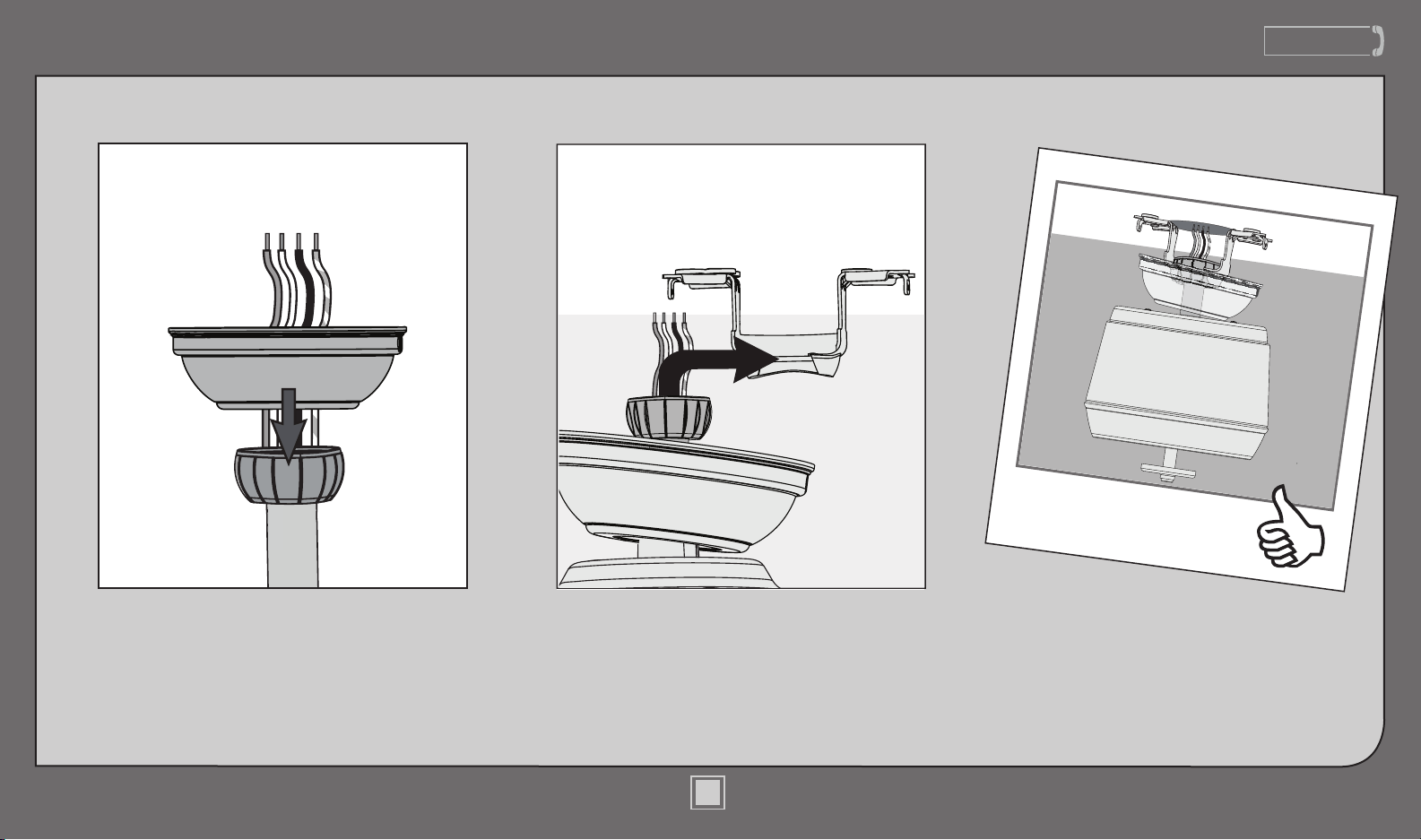
Downrod (continued)
DO NOT PICK THE FAN UP BY THE
CANOPY OR WIRES. Place the downrod
ball into the slot in the ceiling bracket.
Put the wires and downrod through the canopy.
Let the canopy sit loosely on top of the fan.
www.CasablancaFanCo.com
1.888.227.2178
Wiring
F
R
O
M
R
E
C
E
I
V
E
R
F
R
O
M
C
E
I
L
I
N
G
F
R
O
M
C
E
I
L
I
N
G
B
R
A
C
K
E
T
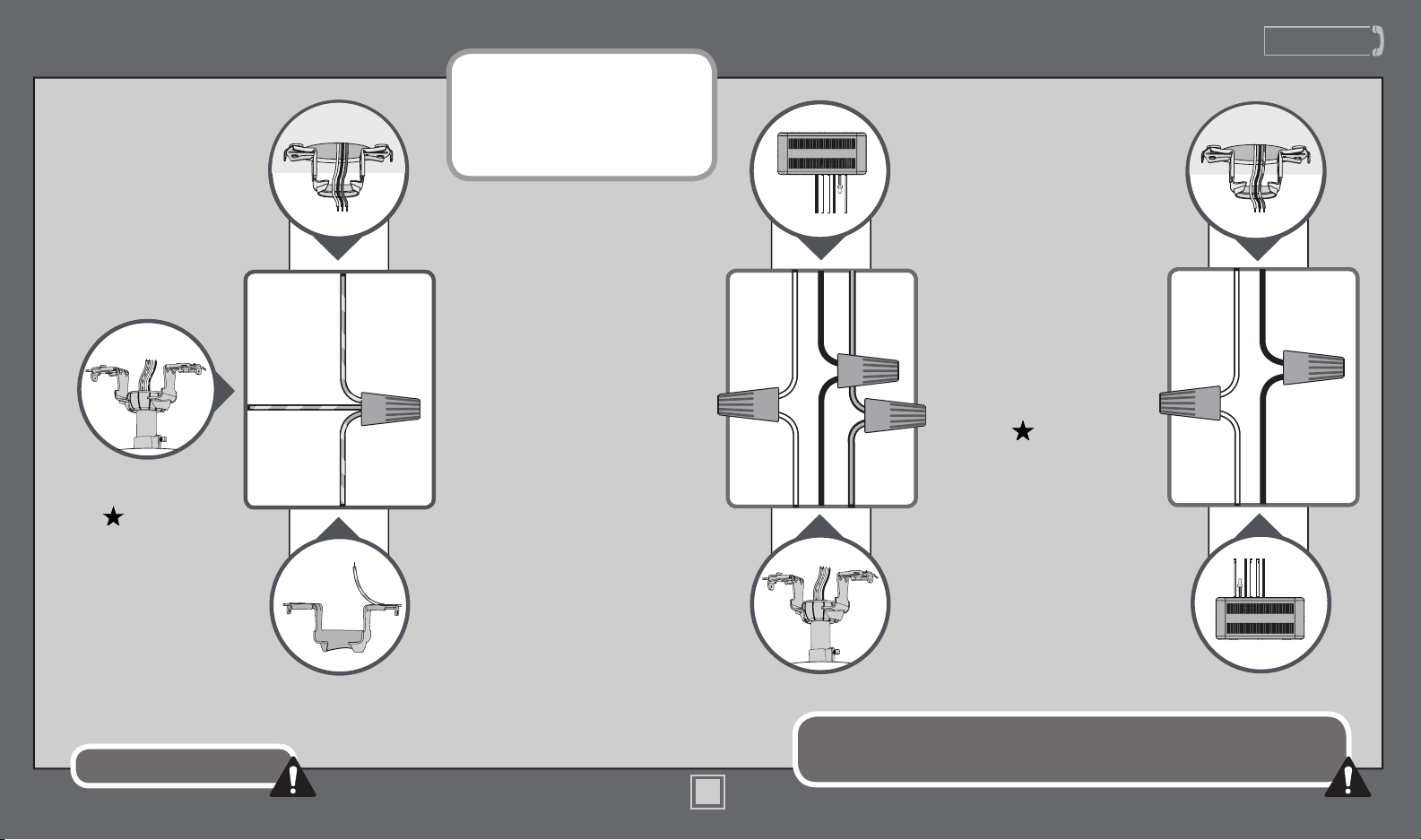
Using an orange wire
connector from
the hardware bag,
connect the three
grounding wires
(green, green/yellow
stripe, or bare copper)
coming from the ceiling,
downrod, and hanging
bracket.
green/yellow stripe
(grounding)
green/yellow stripe
green/yellow stripe
white
black
blue
white (common out)
black (fan out)
blue (light out)
Turn the splices upward and push them carefully back through the hanger bracket
into the outlet box. Spread the wires apart, with the grounded wires on one side of
the outlet box and the ungrounded wires on the other side of the outlet box.
Note: To connect the wires,
hold the bare metal leads
together and place a wire
connector over them, then twist
clockwise until tight.
Using the blue wire
connectors from the remote
control hardware bag,
connect the white wire
from the receiver (marked
“common out”) to the white
wire from fan. Connect the
black wire from the receiver
(marked “fan out”) to the
black wire from the fan.
Connect the blue wire from
the receiver (marked ”light
out”) to the blue wire from
the fan. The red wire from
the receiver will not be used,
it has a pre-installed wire
terminator.
F
R
O
M
F
A
N
F
R
O
M
F
A
N
Refer to CAUTION c.1 on pg. 2
F
R
O
M
R
E
C
E
I
V
E
R
Using an orange wire
connector from
the hardware bag,
connect the black wire
(ungrounded) from the
ceiling to the black wire
from the receiver (marked
“live in”). Connect the
white wire (grounded)
from the ceiling to
the white wire from
the receiver (marked
“neutral in” or
“common in”).
F
R
O
M
C
E
I
L
I
N
G
black (ungrounded)
white (grounded) white (neutral in)
black (live in)
10
M8520-01 • 12/11/13 • © Casablanca Fan Company
www.CasablancaFanCo.com
1.888.227.2178
11
M8520-01 • 12/11/13 • © Casablanca Fan Company
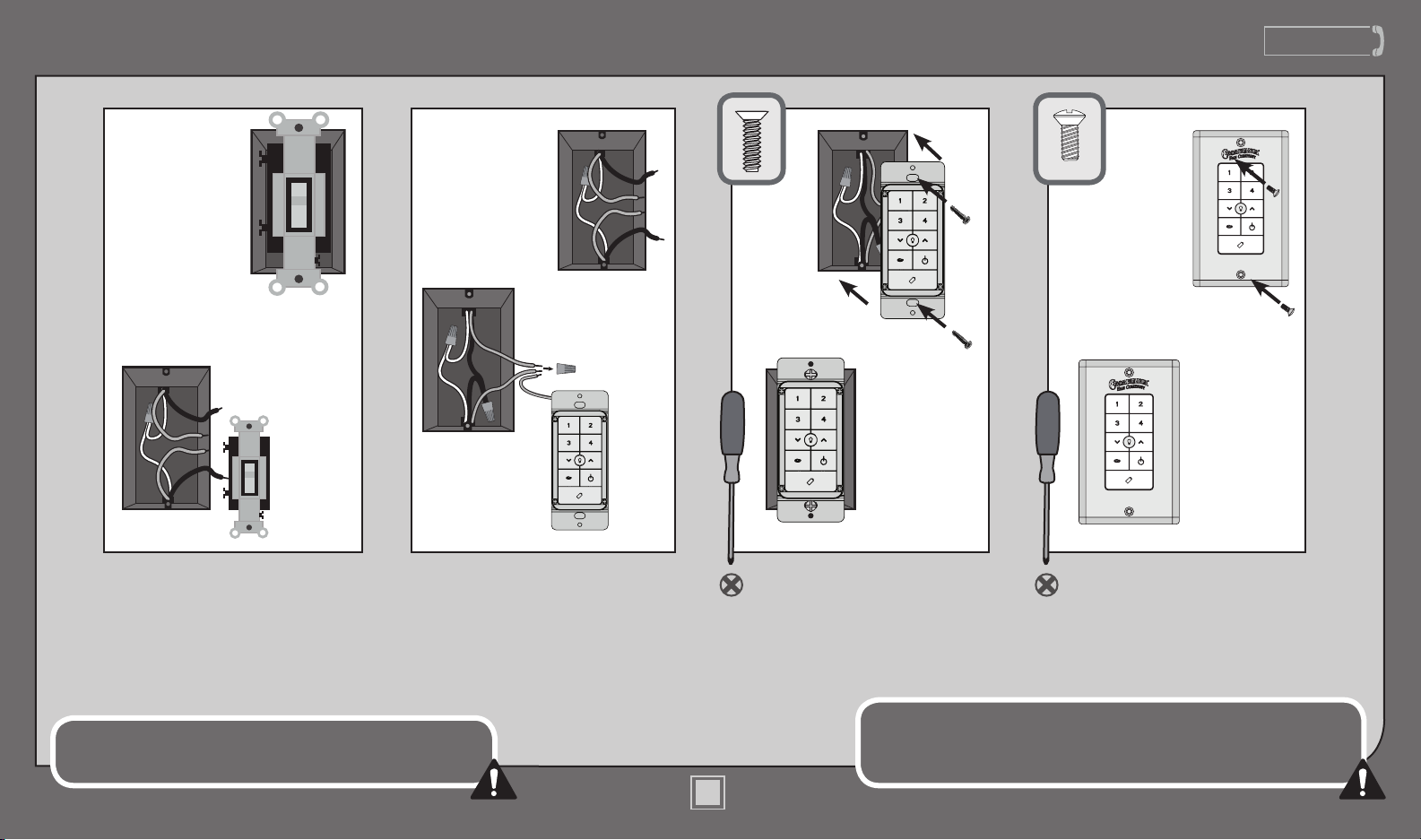
Using orange wire connectors,
connect the two black wires
(ungrounded) from the outlet
box. Also connect the two green
or bare wires (grounding) from
the outlet box with the grounding
wire from the wall control.
After removing the switch plate
cover, remove all wiring from
the switch.
Insert the wall control into
the outlet box and secure the
two screws using a Phillips
head screwdriver.
Install the cover plate using a
Phillips Head screwdriver to
secure the two cover plate screws.
Wiring (continued)
Push all connections to the back of the switch box. Spread the
wires apart, with the grounded wires on one side of the switch box
and the ungrounded wires on the other side of the switch box.
This device complies with Part 15 of the FCC Rules. Operation is subject to
the following conditions: (1) this device may not cause harmful interference,
and (2) this device must accept any interference received, including
interference that may cause undesired operation.
Before
BeforeBefore
Before
After After After After
www.CasablancaFanCo.com
1.888.227.2178
12
M8520-01 • 12/11/13 • © Casablanca Fan Company
Canopy
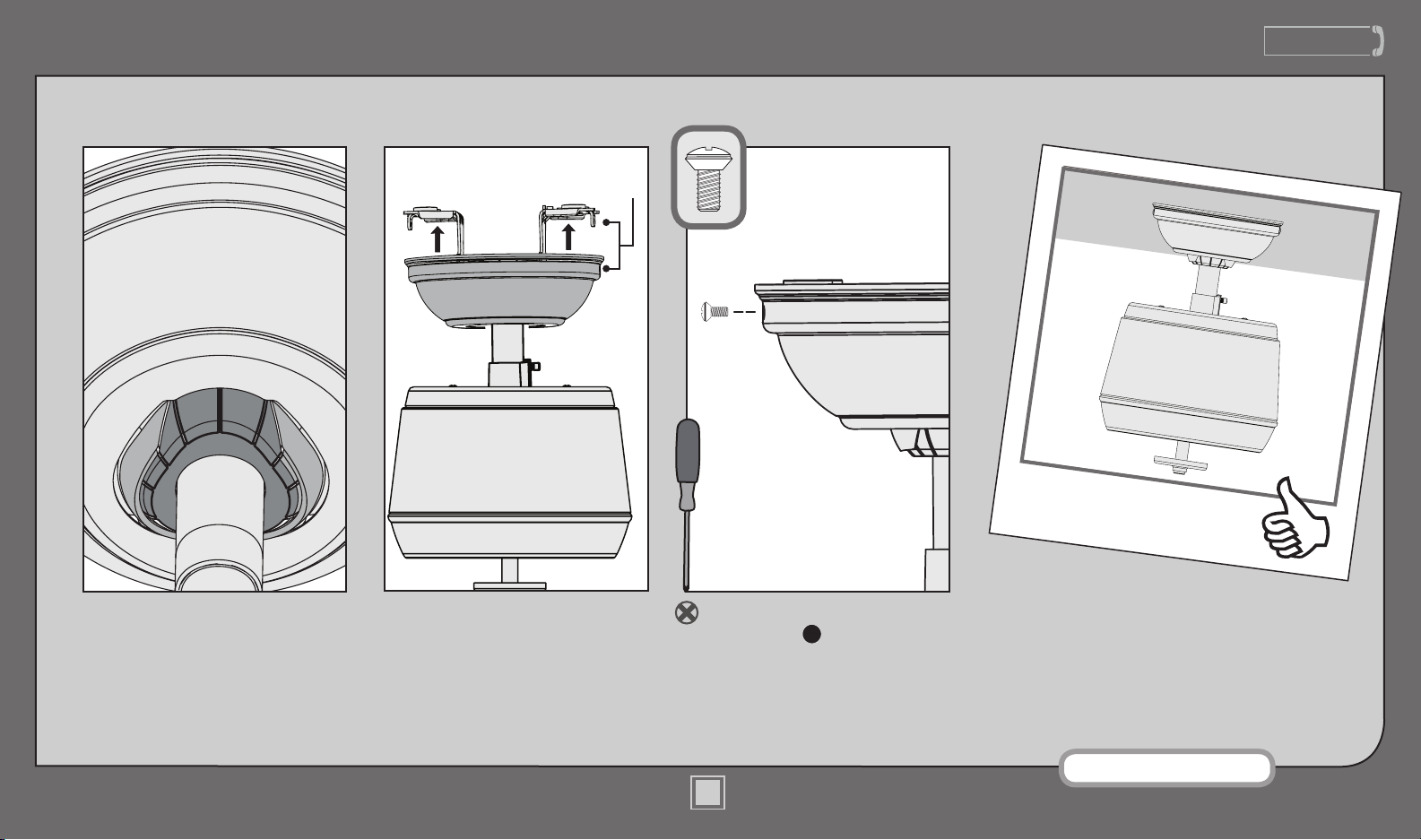
Note: Fan style may vary.
Lift the canopy into place so that
the screw holes are aligned.
Position the canopy so that, when
lifted into place, the canopy ts into
the hanging bracket as shown.
Screw
Holes
Install the two canopy screws
found in the hardware bag.
www.CasablancaFanCo.com
1.888.227.2178
M8520-01 • 12/11/13 • © Casablanca Fan Company
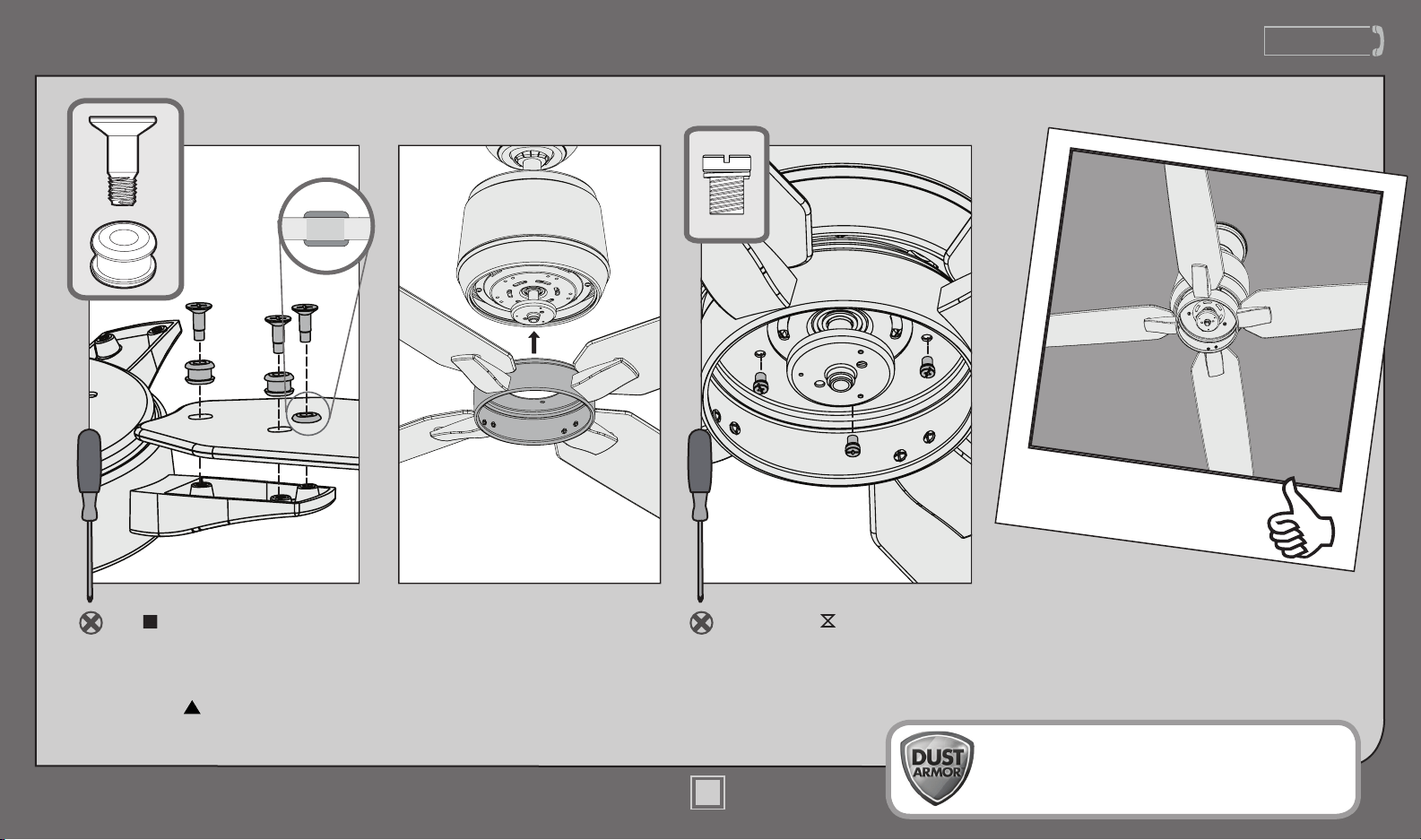
Install the ve blade ring screws,
found in the hardware bag.
Insert the grommets, found in
the hardware bag, into the
holes in the blades, then secure
each blade to the blade ring with
the blade assembly screws, found
in the hardware bag.
Once all blades have been
assembled, lift the blade assembly
and align the ve screw holes
in the blade ring with the screw
holes in the motor. It does not
matter which set of motor screw
holes you choose.
Blades
Your blades are shielded with Dust Armor® which
is a nanotechnology coating that repels dust. For
cleaning the fan, use soft brushes or cloths to prevent
scratching. Cleaning agents may damage the nishes.
13
www.CasablancaFanCo.com
1.888.227.2178
Switch Housing
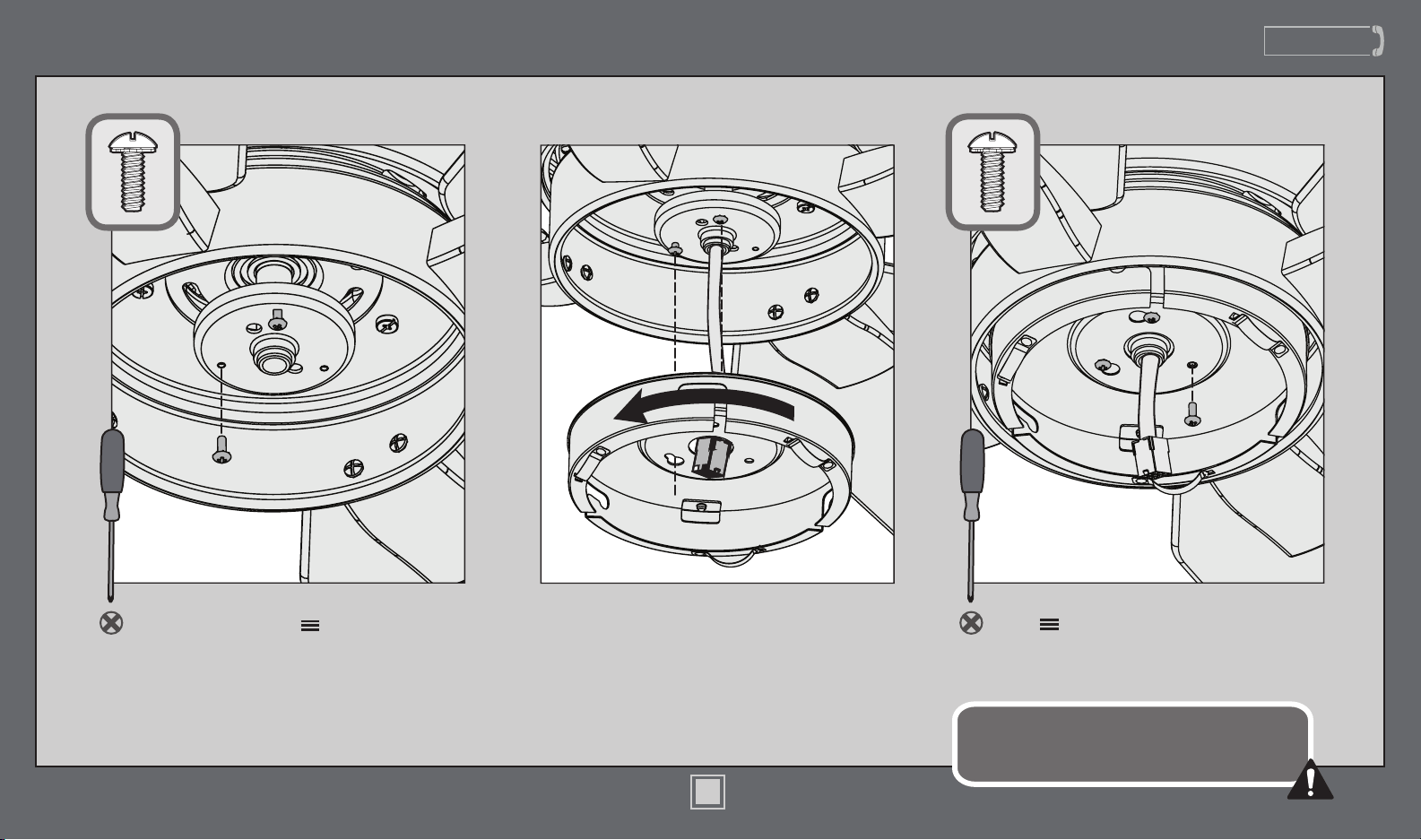
Insert the third screw, found in
the hardware bag, into place and
then tighten all three screws.
Make sure the upper switch housing is securely
attached to the mounting plate. Failure to properly
secure all 3 assembly screws could result in the switch
housing xture falling.
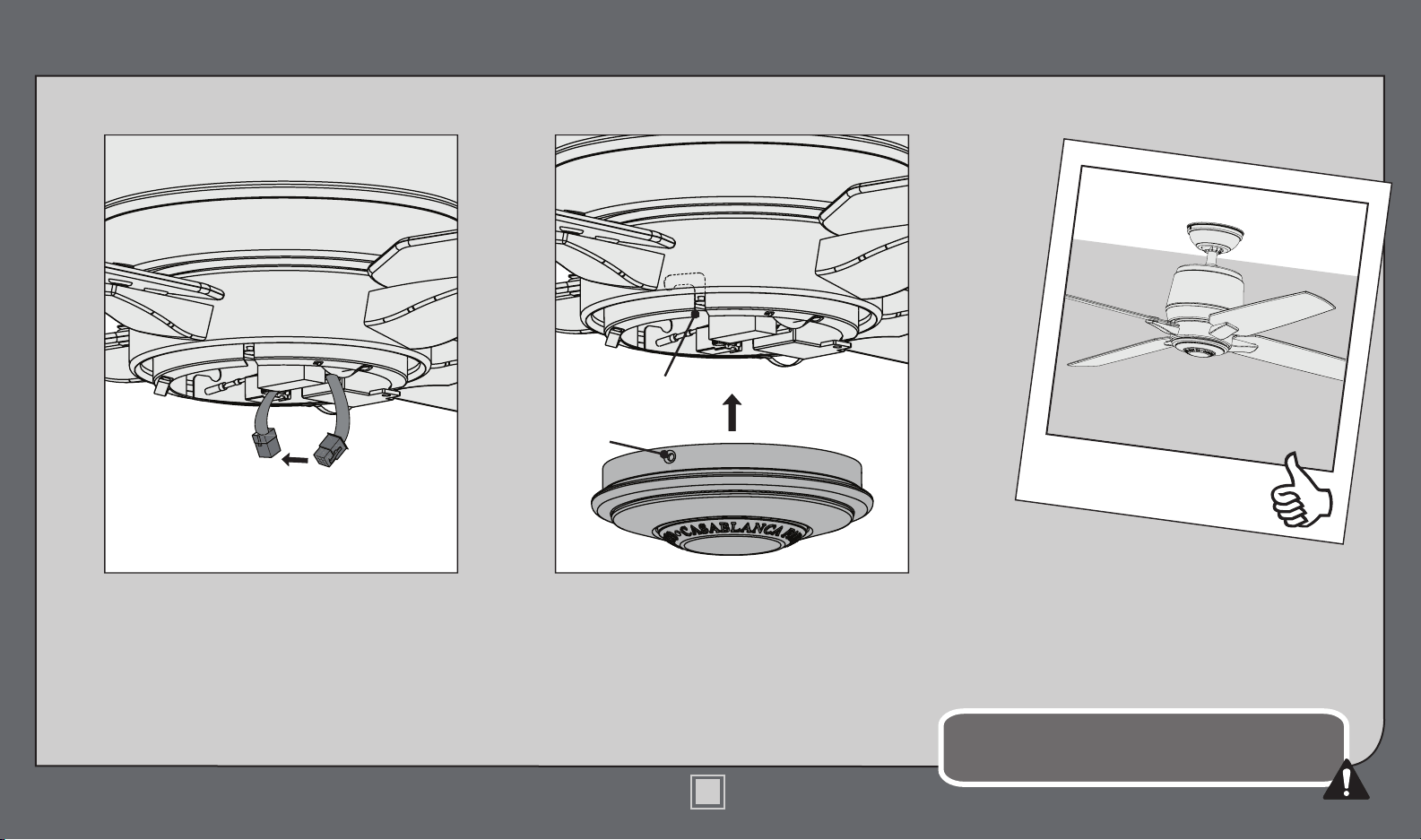
Feed the wire plug through the center
hole of the upper switch housing, then
wrap keyhole slots around the screws and
twist counterclockwise.
Screw two switch housing assembly
screws, found in the hardware bag,
halfway into the motor housing. It does not
matter which two screw holes you choose.
M8520-01 • 12/11/13 • © Casablanca Fan Company
14
www.CasablancaFanCo.com
1.888.227.2178
Switch Housing (continued)
Connect the 9-pin plug connector from
the switch housing to the 9-pin plug
connector coming from the motor
housing. Make sure to line up the colored
markings on the connectors.
Align the posts inside the lower switch
housing with the notches in the upper
switch housing. Lift the lower switch
housing up as far as it will go, then rotate it
clockwise until the posts are held tightly in
place by the notches.
Make sure the lower switch housing is securely attached to
the upper switch housing. Failure to properly secure the posts
could result in the switch housing xture falling.
CONGRATULATIONS!
YOU’RE DONE!
Post
Notch
M8520-01 • 12/11/13 • © Casablanca Fan Company
15
www.CasablancaFanCo.com
1.888.227.2178
M8520-01 • 12/11/13 • © Casablanca Fan Company
16
Operation
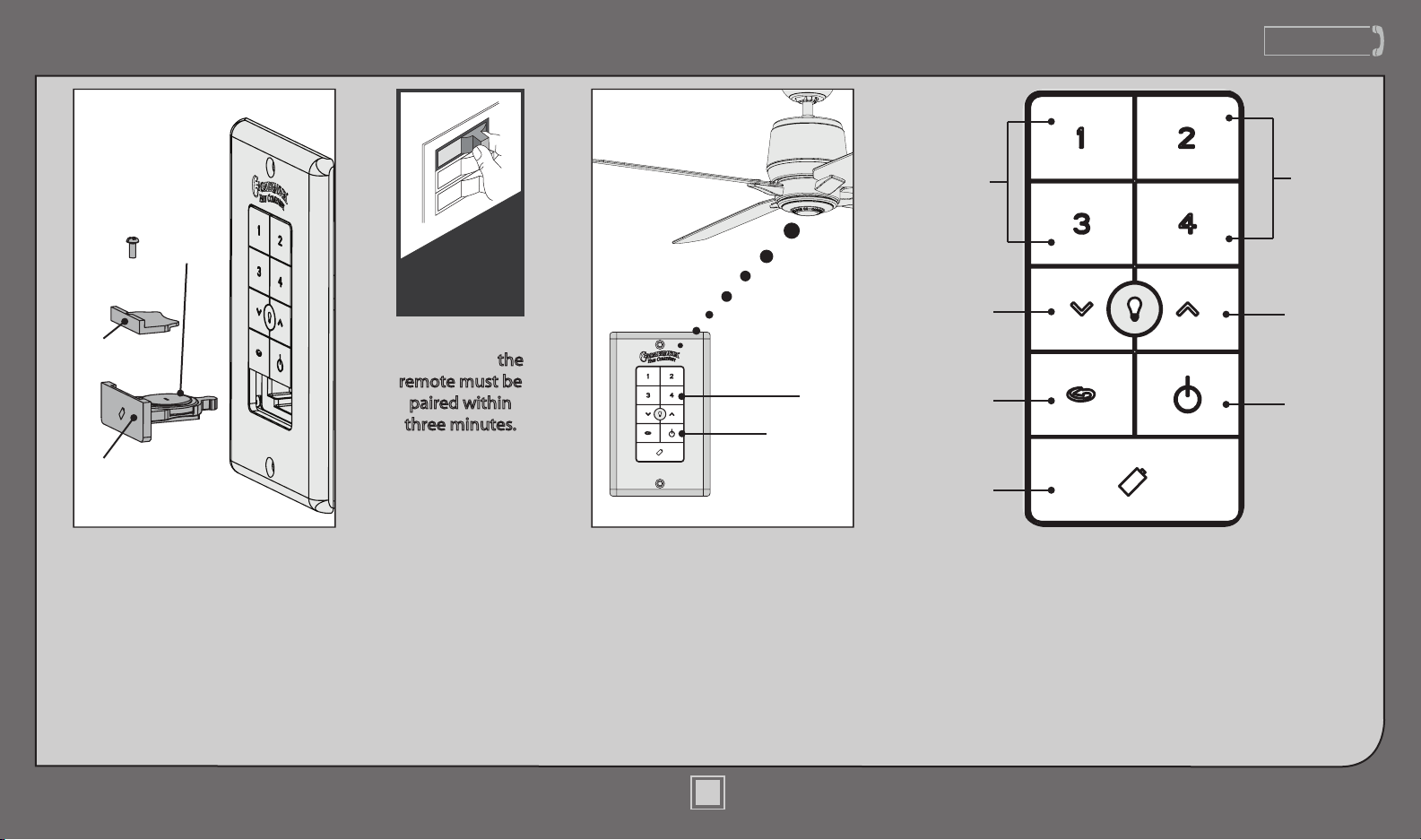
Quickly press the up or down arrow
to turn the lights off and on. Hold
the up or down arrow to dim or
raise the light level. The reverse
button changes the direction that
the blades turn. The power button
turns the fan off and on.
The fan must be paired before
it will operate. Press the “4”
button and the fan power
button simultaneously for at
least three seconds. The fan
will turn at the lowest speed
signifying that the remote
pairing process is complete.
ON
Turn Power
Lights
Down
Fan
Speed
Reverse
Battery
Holder
Fan
Power
Lights
Up
Fan
Speed
Fan
Power
4
(Low)
(High)
Once the power
is turned on,
the
remote must be
paired within
three minutes.
Pairing is only
required once
after initial
installation.
Before operating the wall control,
press on the battery door to eject it.
Unscrew the battery holder. Insert the
battery, found in the control hardware
bag, with the positive (+) side facing
downward. Reinstall the battery
holder and reinsert the battery door
into the wall control.
Battery
Battery
Holder
Battery
Door
If you are installing
multiple remote-
controlled fans on the
same circuit breaker, you
may need to perform a
few extra steps to prevent
interference or faulty
operation of your remote
controls. Go to www.
CasablancaFanCo.com/
FAQs and click “How do I
properly install multiple
remote-controlled fans?” for
more information.
www.CasablancaFanCo.com
1.888.227.2178
Maintenance & Cleaning
ON
Turn Power
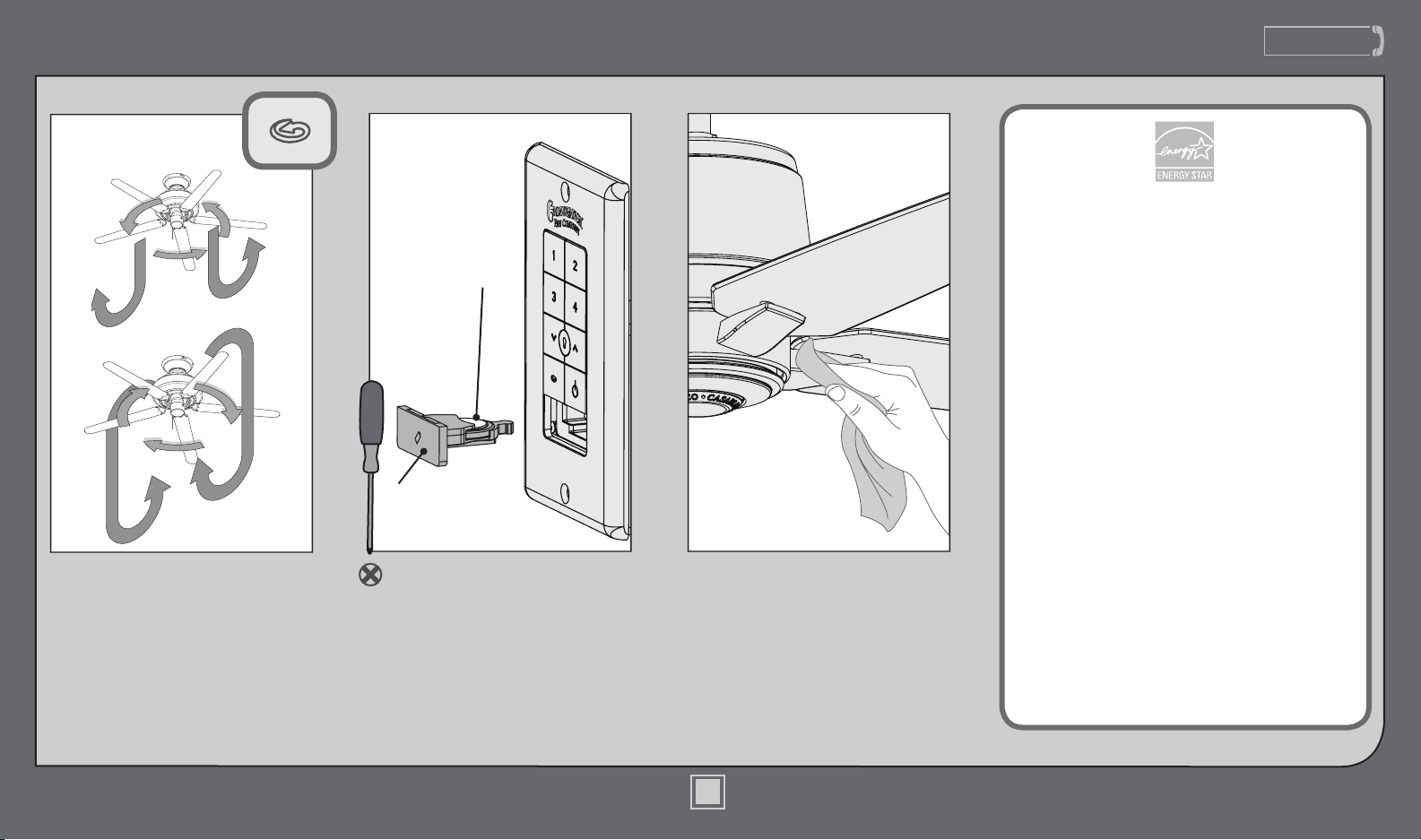
For cleaning the fan, use soft
brushes or cloths to prevent
scratching. Cleaning products
may damage the nishes.
The reverse button on the wall
control changes the air ow
direction. In warm weather, use
(a) downward air ow pattern.
In cold weather, use (b) upward
air ow pattern.
(a)
(b)
Reverse
Button
To change the battery, push on
the battery door to eject it. Remove
the battery using a small Phillip’s
head screwdriver. Replace with
same type battery, making sure
the (+) side is facing down. Replace
battery holder and battery door.
Battery
Battery
Door
Casablanca fans have the power to cut your cooling
costs up to 40%.
Beat the High Cost of Cooling
The air movement created by a Casablanca ceiling
fan lets you set your thermostat higher and still stay
comfortable. Every degree you raise the thermostat
saves up to 7% on energy costs. So, you can cut back
on expensive air conditioning ... and save up to 40%*
on cooling. In winter, your Casablanca fan recirculates
warm air and saves up to 10%* on heating bills.
* On average at low speed settings. Your savings may
vary based on climate, building type and thermostat
setting.
Save Energy and Money While Protecting
the Environment
Congratulations! You’re saving energy and money
while protecting the environment by purchasing this
ENERGY STAR qualied Casablanca ceiling fan! With
this purchase, you are doing your part to protect the
environment.
Your new ceiling fan has earned the ENERGY STAR label
because it meets high energy efciency specications
set by the Environmental Protection Agency (EPA).
ENERGY STAR labeled ceiling fans save energy because
they have more efcient fan motors and air delivery
due to more aerodynamic blade congurations. Ceiling
fan models bearing the ENERGY STAR label move air
14 - 20% more efciently than typical ceiling fan
models. For more information on ENERGY STAR visit
www.energystar.gov.
M8520-01 • 12/11/13 • © Casablanca Fan Company
17
www.CasablancaFanCo.com
1.888.227.2178
18
M8520-01 • 12/11/13 • © Casablanca Fan Company
Troubleshooting
AUTHORIZED SERVICE CENTERS
For the most updated listing of Casablanca Authorized
Service Centers, visit www.CasablancaFanCo.com or
call toll free 1-888-227-2178.
Excessive wobbling
• Tighten all of the blade and
blade ring screws until they
are snug.
• Turn the power off, support
the fan carefully, and check
that the hanger ball is
properly seated.
• Use the provided balancing
kit and instructions to balance
the fan.
Noisy Operation
• Tighten all of the blade and
blade ring screws until they
are snug.
• Check to see if any of the
blades are cracked. If so, replace
all of the blades.
Remote doesn’t work
• Install a fresh battery in the wall
control.
• Make sure you have paired the
remote.
Fan doesn’t work
• Press a fan speed button (1-4).
• Check the circuit breaker to
ensure the power is turned on.
• Check the wall control battery.
• Make sure that you have paired
the wall control.
• Make sure the blades spin freely.
• Turn off power from the circuit
breaker, then loosen the canopy
and check all the connections
according to the wiring diagram
on page 10-11.
• Check the plug connection in
the switch housing.
If you have multiple remotes or
multiple remote-controlled fans
installed on the same circuit
breaker and you are experiencing
interference or faulty operation of
your remote controls, please go to
www.CasablancaFanCo.com/FAQs
and click “How do I properly install
multiple remote-controlled fans?” for
information on how to correct this
issue.