Owner’s Manual
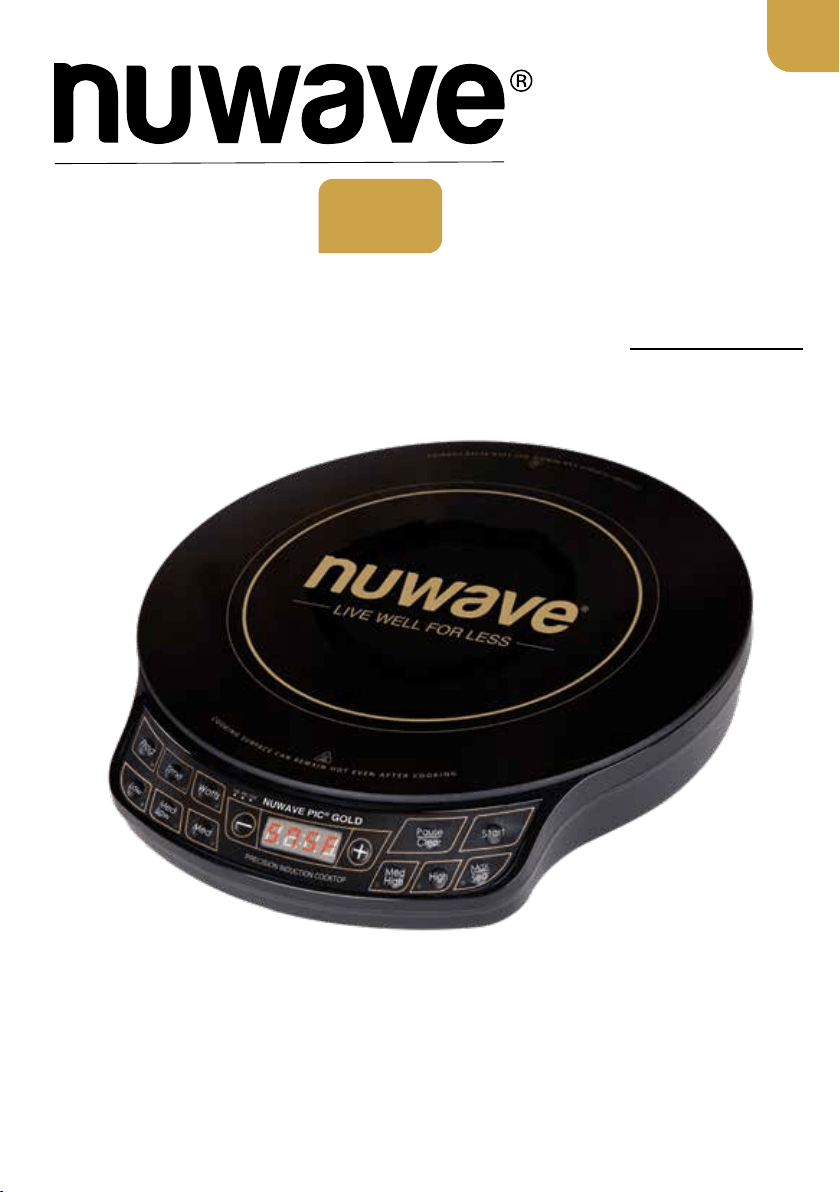
Model No: 30211
Questions or Concerns?
Toll Free: 1-877-689-2838 • help@nuwavenow.com
(Mon-Fri 7:30am-4:30pm CST)
PIC
®
Precision Induction Cooktop
Gold
Open your mobile app store
(App Store, Google
™
Play).
Search for "QR code readers."
Simply download the QR code
reader to your phone, open it, scan
the code and you are ready to go.
NOTE: You may need to open your
downloaded QR code reader each
time you want to scan a QR code.
1
2
3
QR code readers
PRODUCT REGISTRATION
Thank you for purchasing the NuWave PIC® Gold
REGISTER YOUR PURCHASE
1. Visit
nuwavenow.com/QR
2. Scan the QR code using your
mobile device.
3. Fill in the information requested on the
website.
RECORD THIS INFORMATION
Model Number: _________________
Serial Number: __________________
Date of Purchase ________________
(Keep receipt)
Store of Purchase _______________
TECHNICAL SPECIFICATIONS
Voltage: 120V, 60Hz
Wattage: 1500 watts
TIP: You can locate the model and serial
numbers, as well as the QR code, on the
label on the bottom of the unit.
REGISTER
NOW!
CUSTOMER SERVICE
Phone: 1-877-689-2838
(Mon - Fri 7:30am - 4:30pm, CST)
Email:
help@nuwavenow.com
Welcome to the
NuWave
®
Family!
Congratulations on getting your new NuWave
PIC Precision Induction Cooktop! We are
incredibly excited to be able to join in your home
cooking journey and want to make sure you get
the most out of your PIC experience.
That’s what this manual is all about. In it, we
have provided detailed operating and care
instructions covering every aspect of your new
induction cooktop to make sure the NuWave PIC
is meeting your needs.
Here at NuWave, the relationship we have with
our customers only begins with the purchase. We
are with you every step of the way because we
are dedicated to making your experience as easy
and rewarding as possible. So, if you have any
questions, comments, or concerns, please don’t
hesitate to contact Customer Service by calling
1-877-689-2838 (Mon-Fri 7:30am-4:30pm CST)
or emailing us anytime at help@nuwavenow.com
We’re glad you’re with us, and we know that you
will be, too!
Connect with Us!
#nuwavenow
Visit nuwavenow.com to see other
great products and accessories.
2 | nuwavenow.com

TABLE OF CONTENTS
nuwavenow.com | 3
Safeguards & Information ......................................................................... 4-6
Electrical Information ................................................................................... 5
FCC Information .......................................................................................... 6
Parts & Accessories .................................................................................. 7
Primary Controls ....................................................................................... 8–9
Easy Start .................................................................................................... 8
Controls & Functions ................................................................................... 9
PIC Gold Features ..................................................................................... 10
Cooking Functions .................................................................................... 11–13
Start Cooking ............................................................................................... 11
Setting the Cooking Temperature ................................................................ 11
Changing the Temperature Format .............................................................. 11
Setting the Cooking Time ............................................................................ 11
The Pause/Clear Function ........................................................................... 12
The Programming Function ......................................................................... 12
The Delay Function ..................................................................................... 12
The Wattage Function ................................................................................. 12
Cooking Tips ................................................................................................ 13
Care and Maintenance .............................................................................. 14
Troubleshooting Guide ............................................................................. 15
Limited Warranty ....................................................................................... 16–17
Notes........................................................................................................... 18
Para la versión en español de este manual, visita www.nuwavenow.com

4 | nuwavenow.com
WARNING: When using the PIC, always
follow basic safety precautions:
1. There may be residual heat on the
cooking surface. Do not touch.
2. To protect against electrical shock, do
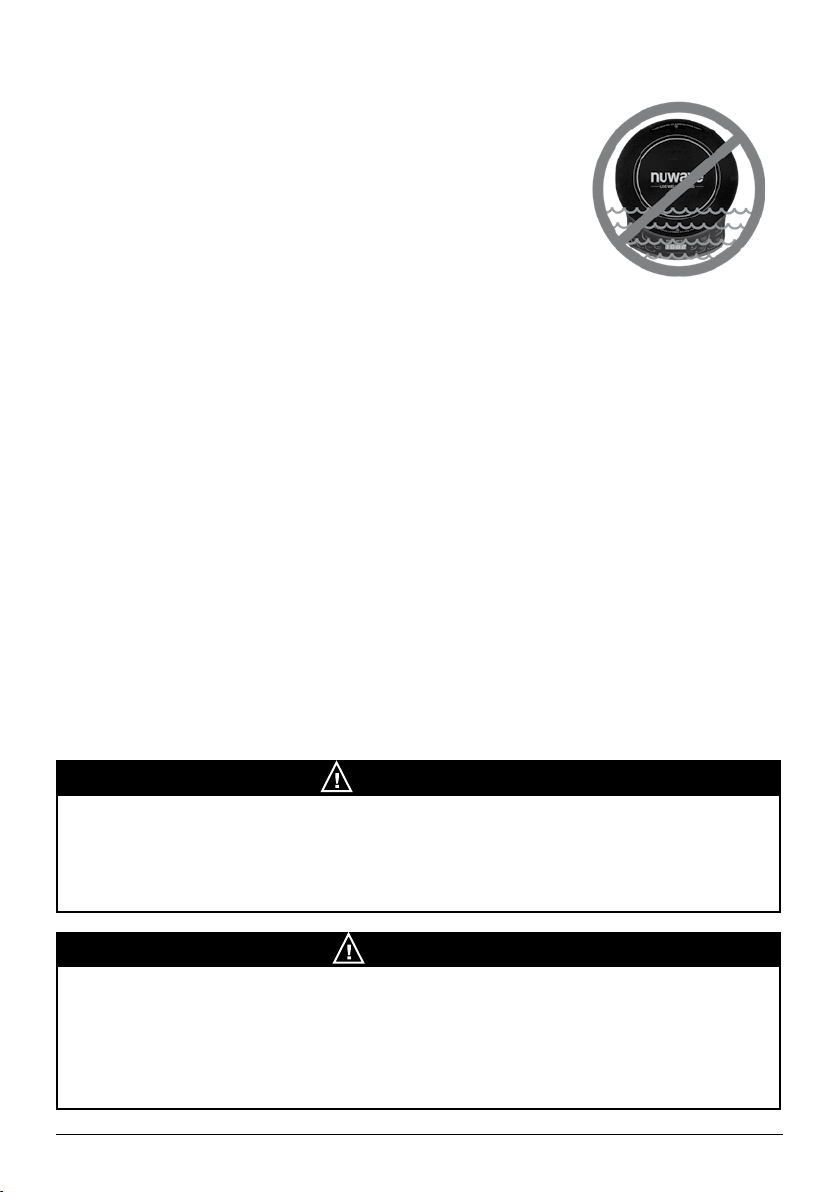
not immerse cord, plugs, or the PIC in
water or other liquids.
3. Do not operate the PIC with a damaged
cord, plug, after the appliance
malfunctions, or has been damaged in
any manner. Return appliance to the
nearest authorized service facility for
examination, repair, or adjustment.
4. Close supervision is necessary when
the PIC is used near children. This
appliance is not intended for use
by persons (including children) with
reduced physical, sensory or mental
capabilities, or who lack experience
or knowledge, unless they have
been given supervision or instruction
concerning use of the appliance by a
person responsible for their safety.
5. The use of accessories not
intended for use with the PIC is not
recommended. Doing so may damage
the PIC and can cause accidents.
6. FOR HOUSEHOLD USE ONLY. NOT
INTENDED FOR OUTDOOR USE.
7. Do not use the PIC for any purpose
other than its intended use.
8. Do not let cord hang from tables or
countertops, touch hot surfaces, or
come into contact with sharp edges.
9. Do not place the PIC on or near a hot
gas, electric burner, in a heated oven,
or on a stovetop.
10. Never use the cooktop in the proximity
of open res or other heat sources, on
ammable surfaces (e.g., tablecloth,
carpet, etc.), close to any ammable
materials, heating units, or in wet
areas.
11. Do not move the PIC while in
operation, especially with any pots or
pans containing hot oil or other hot
liquids. Remove these from the PIC
and allow it to cool before moving.
12. To disconnect, turn the PIC off and
then remove the plug from the outlet.
13. When removing the plug, do so by
the head, not the cord.
14. Never put the PIC against the wall or
other appliances. There should be at
least 3 inches of free space for the
back, sides, and the top of the PIC.
15. Unplug the PIC from outlet when not in
use and before cleaning. Allow the PIC
to cool before cleaning, putting on or
taking off parts.
16. It is normal for some smoke to escape
the PIC when heating for the rst time.
17. If a lot of smoke is escaping from the
air vent during operation, unplug the
PIC immediately and contact Customer
Service at 1-877-689-2838 or via email
at
help@nuwavenow.com.
18. Place the cooktop on a stable, level,
non-metallic surface.
19. The cooktop’s surface is designed
with temperature-resistant glass. In
the event that damage to the PIC is
observed, even a small crack on the
glass surface, immediately disconnect
the PIC from the power supply.
20. Never use a towel or other material
or object to block the air vents. Do
not block the ventilation slots of the
induction cooktop. This may cause the
PIC to overheat.
21. Make sure the cord is not compressed
beneath the PIC.
22. Do not place devices or objects that
are sensitive to magnetic elds on
top of or next to the PIC, e.g., credit
cards, cellphones, radios, TVs, etc.
SAFEGUARDS & INFORMATION
ALWAYS KEEP THIS MANUAL HANDY FOR FUTURE REFERENCE.
nuwavenow.com | 5
SAFEGUARDS & INFORMATION
23. Prior to connecting the PIC, conrm
that the voltage needs indicated
in this manual correspond to the
voltage supply in your home. A wrong
connection may lead to the PIC’s
damage and possible injury to persons.
24. If any trouble arises during operation,
any service MUST be done by NuWave
LLC or authorized by the manufacturer
for repairs.
25. The appliance is not intended to be
operated by means of an external timer
or separate remote-control system.
26. Do not disassemble the PIC or replace
any parts without prior written consent
from the manufacturer.
27. Make sure the PIC is always clean prior
to cooking.
28. Use extreme caution when operating
the PIC or any other appliance.
Electrical Information
A short power-supply cord is provided to
reduce the risk resulting from becoming
entangled in or tripping over a longer cord.
Longer detachable power-supply cords or
extension cords are available and may be
used if care is exercised in their use. If a
longer detachable power-supply cord or
extension cord is used:
1. The marked electrical rating of the
extension cord should be at least as
great as the electrical rating of the
appliance.
2. The longer cord should be arranged
so that it will not drape over the
countertop or tabletop where it
could be pulled on or tripped over
unintentionally. The PIC should be
operated on a separate electrical
outlet from other operating
appliances due to wattage limitations.
The appliance has a polarized plug
(one blade is wider than the other).
To reduce the risk of electric shock,
this plug is intended to fit into a
polarized outlet only one way. If the
plug does not fit fully into the outlet,
reverse the plug. If it still does not
fit, contact a qualified electrician. Do
not attempt to modify the plug in any
way.
ALWAYS KEEP THIS MANUAL HANDY FOR FUTURE REFERENCE.
SEE CARE & MAINTENANCE
BEFORE USE
SAVE THESE INSTRUCTIONS
Read and understand the entire manual
before using the PIC.
THE FAILURE TO FOLLOW THESE
SAFEGUARDS AND INSTRUCTIONS IS A
MISUSE OF YOUR PIC THAT CAN VOID
YOUR WARRANTY AND CREATE THE
RISK OF SERIOUS INJURY.
NOTICE
This appliance is intended for normal
household use. It is not intended to
be used in environments such as staff
kitchens/cafeterias of shops, ofces,
farms, or other work environments, nor is
it intended to be used by clients in hotels,
motels, bed and breakfasts, and non-
residential environments.
WARNING
In case of malfunction, immediately
unplug the PIC and contact NuWave’s
Customer Service Department at
1-877-689-2838 (Mon - Fri, 7:30am to
4:30pm, CST) or help@nuwavenow.com
6 | nuwavenow.com
SAFEGUARDS & INFORMATION
IMPORTANT - FCC Information:
Warning: Changes or modications to this
unit not expressly approved by the party
responsible for compliance could void the
user’s authority to operate the equipment.
Note: This equipment has been tested
and found to comply with the limits for a
consumer ISM equipment, pursuant to
Part 18 of the FCC Rules. These limits
are designed to provide reasonable
protection against harmful interference in
a residential installation. This equipment
generates, uses, and can radiate radio
frequency energy and, if not installed and
used in accordance with the instructions,
may cause harmful interference to radio
communications. However, there is no
guarantee that the interference will not
occur in a particular installation. If this
equipment does cause harmful interference
to radio or television reception, which can
be determined by turning the equipment
off and on, the user is encouraged to try to
correct the interference by one or more of
the following measures:
• Reorient or relocate the receiving
antenna.
• Increase the separation between the
equipment and receiver.
• Connect the equipment into an outlet
on a circuit different from that to which
the receiver is connected.
• Consult the dealer or an experienced
radio TV technician for help.
The device complies with part 18 of the
FCC rules. Operation is subject to the
following two conditions: (1) This device
may not cause harmful interference, and (2)
This device must accept any interference
received, including interference that may
cause undesired operation.
Questions About
Your PIC Gold?
Just contact our friendly and know edg-
able Customer Service Team Monday‒Fri-
day, from 7:30am‒4:30pm,CST
at 877-689-2838 or anytime by email at
help@nuwavenow.com
WARNING
Electric shock hazard. Use with adequate
electrical system. Do not use if cord or
plug is damaged.
WARNING: All items on the cooktop can
get very hot during cooking. Please be
careful when removing these items from
the unit. Always wear oven mitts or use
pot holders. Cooktop may retain residual
heat after cookware has been removed.
Allow everything to cool completely
before cleaning.
Correct Disposal
of this Product
This marking
indicates that this
product should not
be disposed of with
other household
wastes throughout
the EU. To prevent possible harm to
the environment or human health from
uncontrolled waste disposal, recycle it
responsibly to promote the sustainable
reuse of material resources. To return
your used device, please use return and
collection systems or contact the retailer
where the product was purchased.
They can handle environmentally safe
recycling.
NOTICE
nuwavenow.com | 7
PARTS & ACCESSORIES
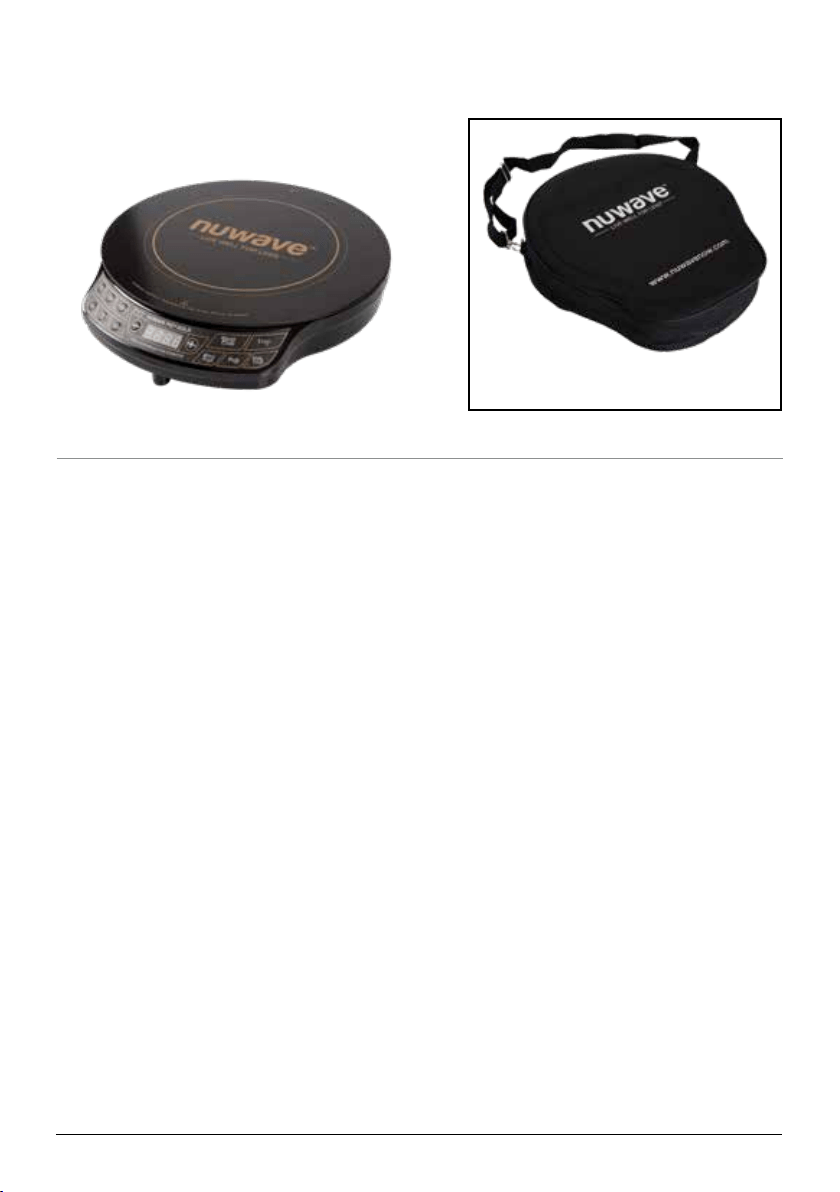
PIC Gold
Part #: 30211
Optional PIC Carrying Case
order at www.nuwavenow.com
Induction-Ready Cookware
Induction technology is based on a magnetic
eld distributing heat through ferrous (iron-
based, magnetic) metal. Some cookware
is made of naturally magnetic metals (such
as pure iron), while others are rendered
magnetic by “sandwiching” a thin layer of a
ferrous metal within the base. Examples of
compatible cookware include:
• All NuWave Cookware, NuWave
Duralon
®
Healthy Ceramic Non-Stick
Cookware
• Cast iron
• Enameled iron and steel
• Stainless-steel with a magnetic base
Incompatible cookware includes:
• Copper
• Glass
• Aluminum
• Pottery-type vessels
Checking Induction Compatibility
There are three simple ways to check if your
existing pots and pans, or future cookware
purchases, are compatible with the PIC
Gold:
1. A magnet is typically a great indicator.
If it sticks to the bottom of a piece of
cookware, this typically means the pot
or pan is induction-ready. However,
sometimes a cooking vessel’s magnetic
properties are not strong enough to work
efficiently with the PIC Gold.
2. Place a small amount of water in a pot or
pan and place it on the PIC Gold while
operating. If it is induction compatible,
water will begin to boil.
3. An induction-ready symbol may be
printed on the bottom of the cookware.
8 | nuwavenow.com
GETTING STARTED
Primary Controls
Easy Start
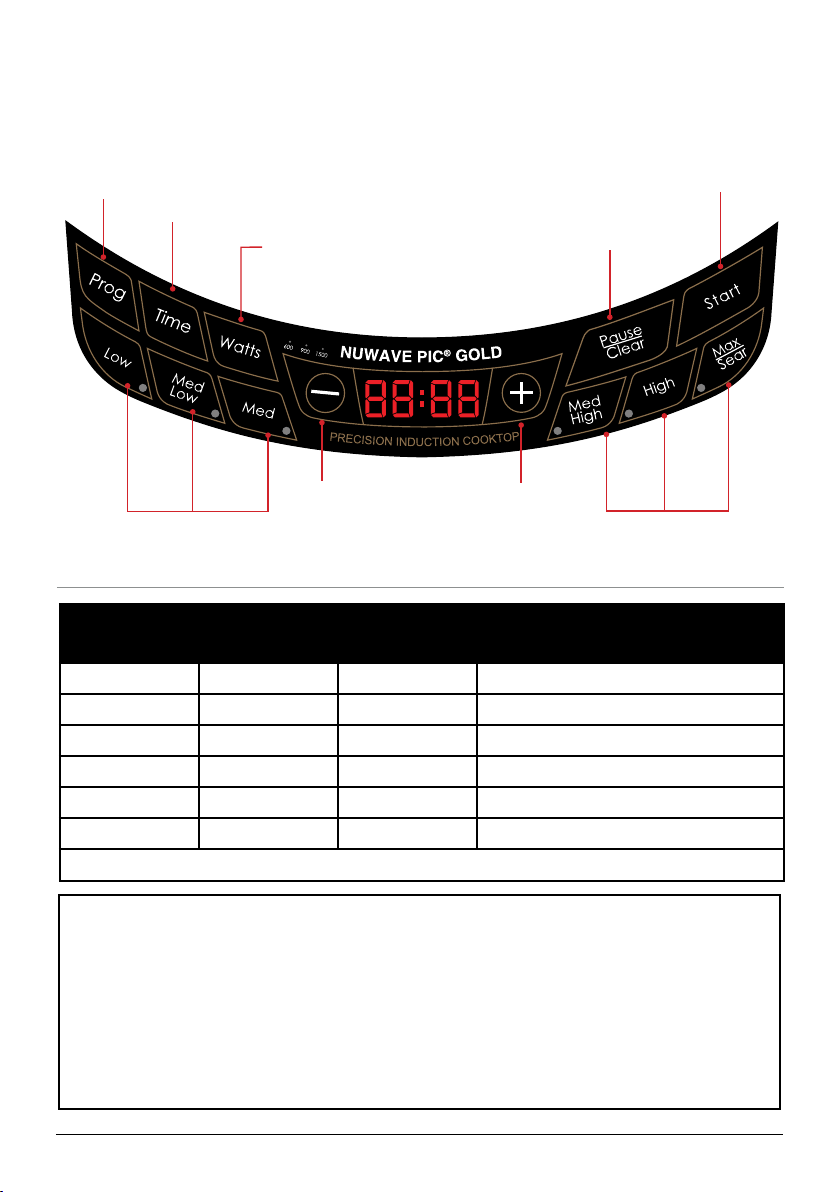
The PIC Gold is preset to cook on Med/High (375°F) for 1 hour. Turn it on, and you
will see “0” on the display, showing that the unit is on but the program is clear (See the
Pause/Clear Function section for more). Then, place an induction-ready pot on the cooking
surface and press Start.
This default setting is adjustable before or during the cooking cycle. Press one of the
preset temperature buttons (Low, Med/Low, Med, High, or Max/Sear) or press - or + to
decrease or increase the cooking temperature.
Preset Temperatures
Press Button Temperature Panel Display Examples
Low 100°F 100F Warm
Med/Low 175°F 175F Simmer
Med 275°F 275F Steam
Med/High 375°F 375F Stir/Deep-Fry
High 425°F 425F Boil/Saute
Max/Sear 575°F SEAR Sear
The minimum is 100F while the maximum temperature reaches 500F.
Decrease
cooking
temperature or
time.
Adjustable set
temperatures: 100°F,
175°F, and 275°F.
Adjustable set
temperatures: 375°F,
425°F, 575°F (Sear).
Increase
cooking
temperature or
time.
Prog:
Set your
own cooking
stages.
Time:
Adjusts the
cooking time.
Pause/Clear:
Pauses and
clears the cooking
process.
Start:
Begins the cooking
process.
Watts
Controls the
power consuption.
nuwavenow.com | 9
GETTING STARTED
Primary Controls
CAUTION
While the PIC Gold is in operation, do not touch the cooking surface as it may
become very hot, leading to the risk of burns. The cooktop may retain residual heat
after cookware has been removed.
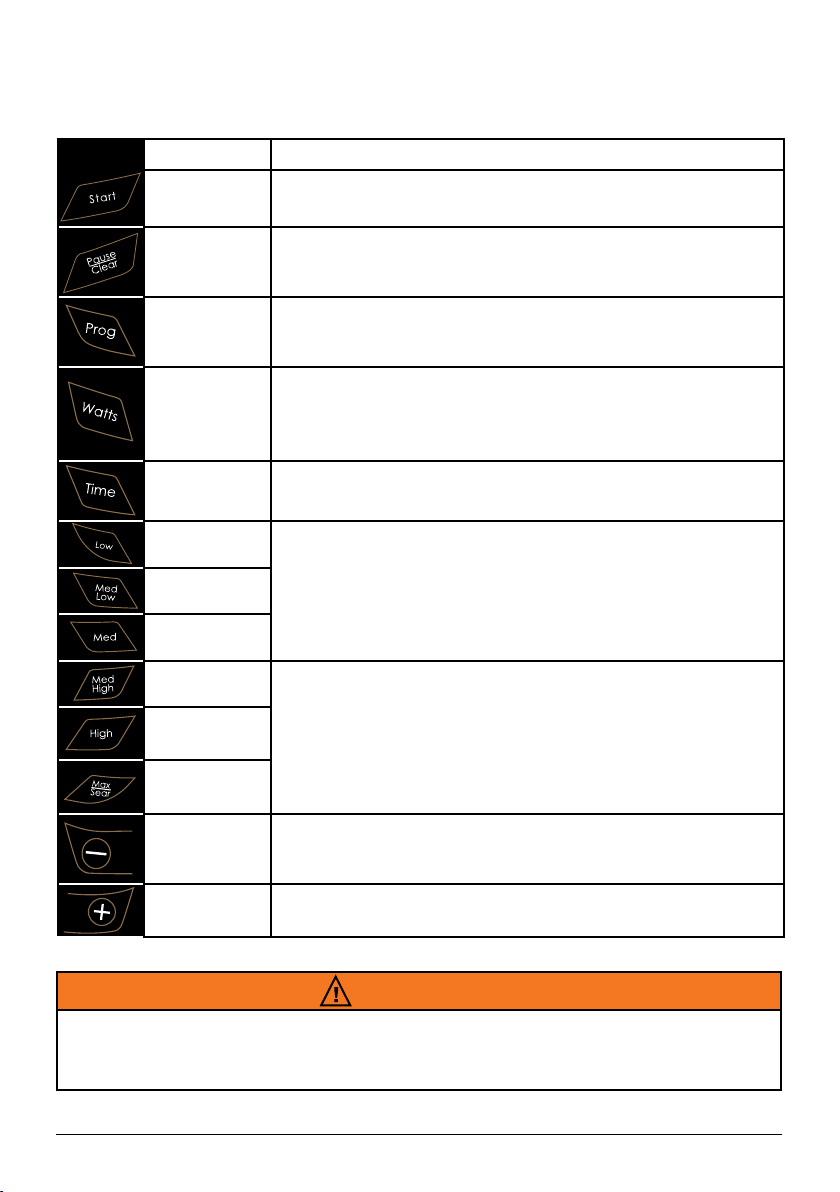
Control
Function
Start
Press Start to begin cooking. If you have paused cooking,
pressing Start will begin the cooking process again.
Pause/
Clear
Press Pause/Clear to pause cooking. To clear out a set
cooking sequence, press Pause/Clear a second time.
Prog
Set up to 10 cooking stages.
Watts
Controls the power consumption of your PIC. The default
wattage is 1500W. The lower wattage will consume less
energy, ideal if your home does not take 1500 watts. Press
WATTS to adjust from 1500W to 600W to 900W.
Time
Allows you to adjust the cooking time before and during the
cooking process.
Low
Left side set temperature buttons: Low (100°F), Med Low
(175°F), and Med (275°F). Use the - or + keys to further adjust
the cooking temperature in 10°F increments.
Med Low
Med
Med High
Right side set temperature buttons: Med High (375°F), High
(425°F), and Max/Sear (575°F). Use the - or + keys to further
adjust the cooking temperature in 10°F increments.
High
Max/Sear
(-)
Allows you to decrease the cooking temperature and time
before and during the cooking process.
(+)
Allows you to increase the cooking temperature and time
before and during the cooking process.
10 | nuwavenow.com
GETTING STARTED
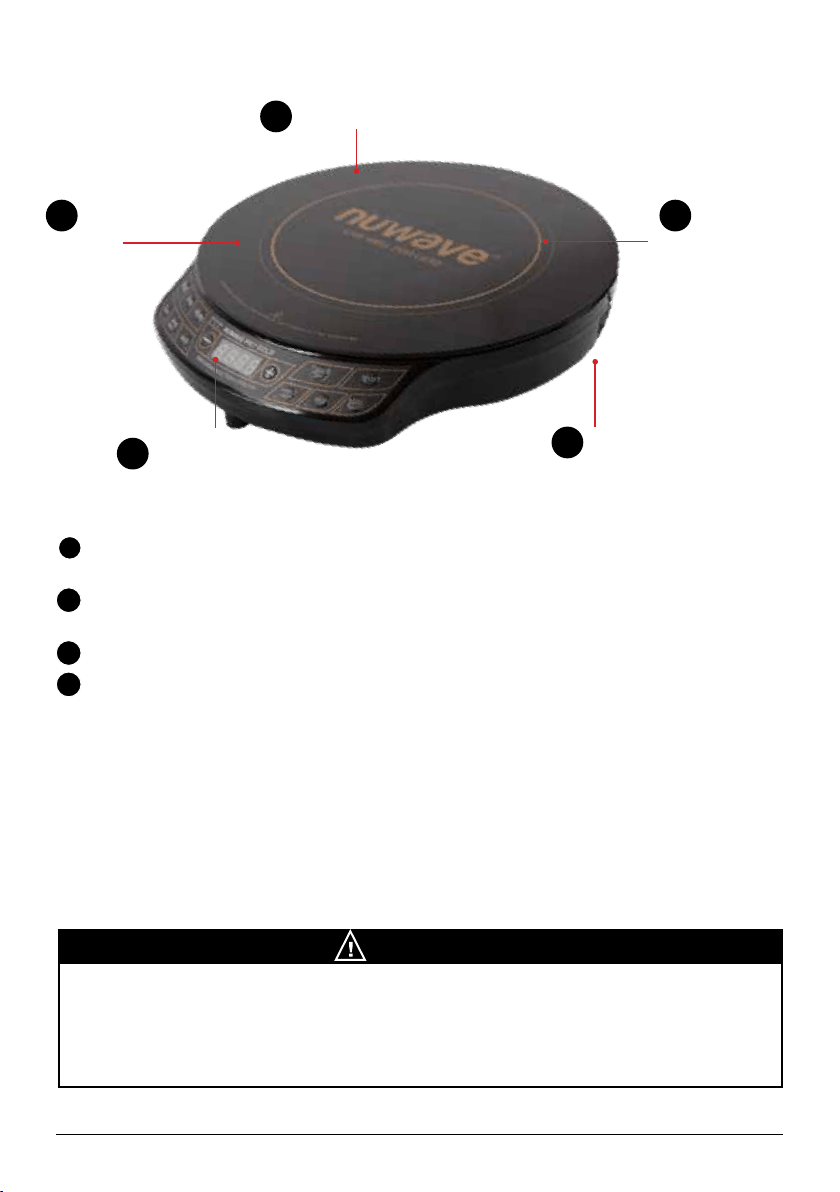
Ventilation Air Vents
Ventilation Air Vents
Surface:
Heat-resistant
glass
Heat Source:
Electromagnetic
Coils Under the
Heat-Resistant
Glass
Control Panel
with LED
Display
3
2
1
4
1
1
2
3
4
Ventilation: Air vents allow any heat generated by the unit to escape, preventing
heat transfer to the cooking surface and ensuring efcient performance.
Surface: The NuWave PIC Gold’s heat-resistant glass surface stays cool to the touch
and cleans easily with the simple wipe of a damp cloth.
Control Panel with LED Display: Clearly lit, easy-to-read control panel.
Heat Source: Electromagnetic coils located below the glass surface generate heat
within the induction-ready cookware.
INDUCTION COOKING
The heating surface is located inside the thicker silver ring. The minimum diameter of
acceptable cookware is 3 inches. Always place cookware in the center of the heating
circle. You may use pans measuring up to the 10-inch width of the PIC Gold, but heat
will transfer more slowly to the outer edges. Not recommended for pans larger than 10
inches.
NOTICE
The heating surface is located inside the thicker silver ring. The minimum diameter of
acceptable cookware is 3 inches. Always place cookware in the center of the heating
circle. You may use pans measuring up to the 10-inch width of the PIC Gold, but heat
will transfer more slowly to the outer edges. The PIC Gold is not recommended for pans
larger than 10 inches.
nuwavenow.com | 11
COOKING FUNCTIONS
To Start Cooking
There are several ways to begin
cooking with your PIC Gold.
1. Press Start. The defaults are 375°F for
1 hour.
2. Set the cooking temperature and press
Start. The default cooking time is 1
hour.
3. Set the cooking time and press Start.
The default cooking temperature is
375°F.
4. Set temperature and time, then press
“Start”.
• The PIC Gold will automatically stop
cooking once time has expired and the
PIC will beep.
• The display will always show current
temperature during the cooking cycle.
• To display time lapse, press “Time” and
a countdown will appear, marking the
duration before the cycle or stage is
complete.
Setting the Cooking Temperature
This appliance is preset to cook on
Med/High (375°F).
1. To reset, press the desired
temperature on the control panel then
press “Start”. The temperature range
will appear on the display.
2. To raise or lower the temperature in
10-degree increments, press “+” or
“-” until the desired temperature is
displayed.
Refer to the Preset Temperatures Chart on
page 8 for preset temperature information.
NOTE: Displayed temperature represents
the center temperature of 1.5L of oil in the
NuWave 3.5-quart Stainless Steel Pot.
Thermometer location was tested at the
origin (middle) of the NuWave 3.5-quart
Stainless Steel Pot at an equidistant length
between the pot base and the top of the oil.
Temperature Format: ºF to ºC
The PIC Gold defaults to displaying the
cooking temperature in degrees Fahrenheit
(F), but this can be changed to Celsius.
1. Press Prog.
2. Press - twice.
The display will change and temperature
will be displayed in Celsius. To return to
Fahrenheit, simply press - once more.
To close out of the F/C conversion option,
press Pause/Clear until a “0” appears on
the display.
Setting the Cooking Time
1. Press Time. “0” will flash in the far right
corner of the display.
2. Press + until the desired amount of
time is reached.
Example 1: To program 5 minutes, press
Time once, then press + until “00:05” is
displayed. Press Start.
Example 2: For 20 minutes, press
Time twice, then press + until “00:20” is
displayed. Press Start.
Example 3: For 2 hours and 30 minutes,
press Time twice, then press + until you
reach “00:30”, then press Time again.
Press + until “02:30” is displayed, then
press Start.
• The blinking “0” indicates the digit you
can adjust. The maximum time is 99
hours and 60 minutes.
• The display shows hours and minutes,
but not seconds.

12 | nuwavenow.com
COOKING FUNCTIONS
The Pause/Clear Function
To interrupt cooking time, press
Pause/Clear once. This will pause
the NuWave PIC Gold regardless of cooking
stage.
The temperature will remain listed in the
display panel, but the “F” will be blinking.
To resume cooking, press Start.
To clear the cooking mode or display
while the PIC Gold is in operation, press
Pause/Clear twice. The display will be fully
cleared and “0” will appear.
The Programming Function
(Stage Cooking)
1. Press Prog. “Pro” will appear on the
display.
2. Set the cooking temperature using the
preset temperature keys, from Low to
Max/Sear. To increase or decrease the
temperature, press - or +.
3. Press Time. “00:00” will be displayed,
then press - or + until the desired time
is reached. See Setting Cooking Time
for entering minutes and hours.
• To add additional stages, repeat steps
1 and 2 then press Start to begin the
program. You may program up to 10
stages (delay is considered a stage).
• To change any part of the program,
press Pause/Clear twice to start over.
Example: Boil for 5 minutes before
reducing to a simmer for 20 minutes:
Press Prog. Press Max/Sear. Press Time
once, and then press + until “00:05” is
reached. Press Med/Low. Press Time
twice, and then press + until “00:20” is
reached. Finally, press Start.
NOTE: The maximum programmable cook
time is 99 hours and 60 minutes.
The Delay Function
This function allows for set programs to start at
a later time.
1. To delay a program, press Prog.
2. Press Time. A “0” will ash in the
display.
3. Press + until the desired amount of time
to delay the program start is reached.
See “Setting Cooking Time” for more.
4. Press Prog again to set the cooking
program. The amount of time selected
for delay is included in the programmed
stages.
• To continue to the next stage,
enter the cooking temperature and
then continue with Step 2 from the
“Programming Function” instructions.
5. Once ready for the countdown to begin,
press Start. When the delay countdown
reaches “0”, the PIC Gold will beep
twice and the cooking time will start with
the cooking temperature displayed.
The Wattage Function
The default wattage of the PIC Gold is 1500
watts, which is adjustable to 900 watts and
600 watts.
1. Press Watts once. The red light will
illuminate above “600”, indicating that
the PIC Gold is now set to 600 watts.
2. Press Watts again. The red light above
“900” will illuminate, indicating the PIC
Gold is now set to 900 watts.
3. Press Watts once more and the red
light above “1500” will illuminate,
indicating that the PIC Gold is now set
to the default 1500 watts.

nuwavenow.com | 13
COOKING FUNCTIONS
Cooking Tips
The recipe book contains valuable information designed to assist in the incorporation of the
PIC Gold into daily life. We’ve provided easy-to-prepare recipes along with helpful tips at
the beginning of each section for perfect results every time.
Here we’d like to offer a few general suggestions to help you start cooking:
• Place a small bowl next to your cutting board for discarding food scraps.
• Flexible cutting boards are very convenient. Just chop and lift–no mess, no spills.
• Glass measuring cups are preferred for liquids while plastic measuring cups work well
for dried ingredients.
• After you have juiced lemons, put them in the garbage disposal to freshen the
surrounding air.
• Pay close attention to butter as it’s melting. Butter melts when its internal temperature
reaches a range of 82.4°F~96.8°F. This means it melts fast, so be prepared to remove
it from the PIC quickly.
Measuring Up
Here are some measurements that every chef and home cook should know:
• 1 square of baker’s chocolate = 1 ounce
• 4 pecks = 1 bushel
• 8 tablespoons = ½ cup
• 1 pound of chopped nuts = 2 cups
• ½ cup of butter = 1 stick
• 2 cups granulated sugar = 1 pound
• 2 cups butter = 1 pound
• 16 uid ounces = 1 pint
• 1 cup = ½ pint
Questions About
Your PIC Gold?
Just contact our friendly and know edg-
able Customer Service Team Monday‒Fri-
day, from 7:30am‒4:30pm,CST
at 877-689-2838 or anytime by email at
help@nuwavenow.com
14 | nuwavenow.com
CARE AND MAINTENANCE
Cleaning the PIC Gold
Before rst use, wipe the cooking surface with a cloth damp with
warm, soapy water. Dry throughly before plugging the PIC Gold
into any electrical outlet.
General Cleaning Instructions
1. Unplug the PIC before cleaning.
2. Clean after each use.
3. Make sure the PIC has cooled completely prior to cleaning.
4. The outer surface may be cleaned by wiping carefully with a damp dishcloth or
sponge.
5. Remove the power plug prior to cleaning the NuWave PIC. Do not use caustic
cleaning agents and water should not penetrate the interior of the induction cooktop.
6. Never immerse the PIC cables or plug in water or other liquids.
7. Wipe the glass surface with a damp cloth or use a mild, non-abrasive soap solution.
8. Wipe casing and operating panel with a damp soft cloth and mild detergent.
9. Do not use oil-based cleansing products as their use may damage plastic parts or the
casing/operating panel.
10. Do not use flammable, acidic or alkaline materials or substances near the PIC, as
this may reduce the service life of the induction cooktop or pose a fire risk when the
induction cooktop is in use.
11. Ensure that the bottom of any cookware does not scrape the PIC’s glass surface,
although a scratched surface will not impair the use of the induction cooktop.
12. Properly clean the PIC before storing it in a cool, dry place.
NOTICE
Check Your Electrical Outlets
Check your electrical outlets to ensure proper operation. Do not use in an outlet where
other major appliances are engaged. Check the wattage settings if the PIC is cooking
too slowly.
The electrical plug must be properly plugged into the outlet.
WARNING
Electric Shock Hazard
Do not immerse the PIC Gold in water or attempt to cycle it through dishwasher. The
outer surface may be cleaned by wiping carefully with a damp dishcloth or sponge.
Make sure PIC has cooled completely prior to cleaning.
nuwavenow.com | 15
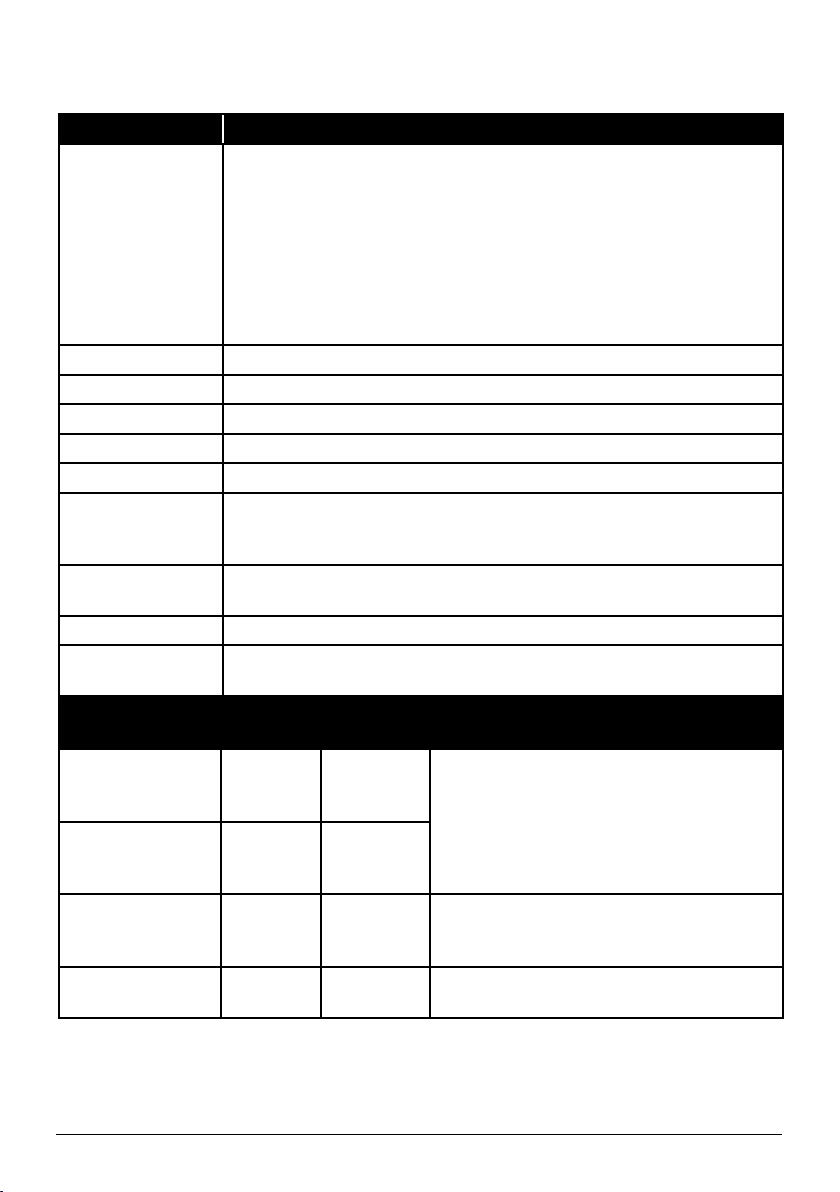
Error Messages
TROUBLESHOOTING
Error Message: Solution(s):
E1
An E1 reading typically means the PIC Gold does not detect
cookware on its surface. This can occur for one of two reasons:
1. The induction coils contained within the PIC Gold will only work
when they are in direct contact with a piece of cookware. To
maintain your appliance’s effectiveness, always ensure that it
rests on a flat surface and that contact is consistent with your
cookware.
2. An E1 message may also occur if the chosen cookware is not
induction-ready.
E2 The PIC is malfunctioning. Contact Customer Service.
E3 The PIC’s voltage is too low. Minimum = 85 volts
E4 The PIC’s voltage is too high. Maximum = 144 volts
E5 The PIC is malfunctioning. Contact Customer Service.
E6 The PIC is malfunctioning. Contact Customer Service.
E7
Overheating, or air ventilation is obstructed. If internal temperature
exceeds 230F (110C), operation will cease, and the PIC will beep.
Press Pause/Clear twice. Wait for the PIC to cool.
E8
Overheating, if PIC exceeds a temperature 20F (-7C) higher than
sear, the appliance will turn off. Contact Customer Service.
E9 The PIC is malfunctioning. Contact Customer Service.
FULL
In programming mode, when the total entered time reaches the
appliance’s limit of 99:60, no additional stages can be inputted.
After Removing
Cookware:
Beep
Sound:
Display: Reference:
Initial
< 10
seconds
“F” or “C”
or Sear or :
flashing.
Return cookware to PIC Gold. Cooking will
automatically resume.
< 10 seconds None
“F” or “C”
or Sear or :
flashing.
11- 70 seconds Yes E1
If an error is displayed, return cookware to
PIC Gold and press Start to automatically
resume cooking.
After 70 seconds None 0
Cooking stops. Choose desired
temperature setting and press “Start.”
• When any error messages are displayed, the PIC will beep at least once.
• The fan will run up to a maximum of 60 seconds after pressing Pause/Clear or when
cooking has stopped. Press Start within 45 minutes to resume cooking. After that, it
will turn off if no buttons are pressed, displaying “0” when the program clears.

16 | nuwavenow.com
LIMITED WARRANTY
The NuWave PIC
®
Gold (Precision Induction Cooktop)
THE MANUFACTURER WARRANTS
The PIC is to be free from manufacturer defects. All electrical components are warrantied for 1 year
from the date of purchase, under normal household use, and when operated in accordance with the
Manufacturer’s written instructions. The Manufacturer will provide the necessary parts and labor to
repair any part of the NuWave PIC at NuWave LLC Service Department. After the expiration of the
warranty, the cost of the labor and parts will be the responsibility of the owner.
THE WARRANTY DOES NOT COVER
The Limited Warranty is voided if repairs are made by an unauthorized dealer and/or the serial
number data plate is removed and/or defaced. Normal deterioration of finish due to use or exposure
is not covered by this Warranty. This Limited Warranty does not cover failure, damages or inadequate
performance due to accident, acts of God (such as lightning), fluctuations in electric power, alterations,
abuse, misuse, misapplications, corrosive-type atmospheres, improper installation, failure to operate in
accordance with the Manufacturer’s written instructions, abnormal use or commercial use. NuWave LLC
reserves the right to void the Limited Warranty, where allowable by law, for products purchased from an
unauthorized dealer.
TO OBTAIN SERVICE
The owner shall have the obligation and responsibility to: pay for all services and parts not covered by
the warranty; prepay the freight to and from Service Department for any part or system returned under
this warranty; and carefully package the product using adequate padding material to prevent damage
in transit. The original container is ideal for this purpose. Include in the package the owner’s name,
address, daytime telephone number, a detailed description of the problem, and your “RGA number.” Call
1-877-689-2838 or email
help@nuwavenow.com
to obtain the RGA number (Return Goods Authorization
number). Provide the cooking system model & serial number and proof of date of purchase (a copy of
the receipt) when making claims under this warranty.
MANUFACTURER’S OBLIGATION
The Manufacturer’s obligation under this Limited Warranty is limited, to the extent allowable by law, to
repairing or replacing any part covered by this Limited Warranty which upon examination is found to
be defective under normal use. The Limited Warranty is applicable only within the continental United
States and only to the original purchaser of the manufacturer’s authorized channels of distribution.
THE LIMITED WARRANTY MAY NOT BE ALTERED, VARIED OR EXTENDED EXCEPT BY A
WRITTEN INSTRUMENT EXECUTED BY THE MANUFACTURER. THE REMEDY OF REPAIR
OR REPLACEMENT AS PROVIDED UNDER THIS LIMITED WARRANTY IS EXCLUSIVE. IN NO
EVENT SHALL THE MANUFACTURER BE LIABLE FOR ANY CONSEQUENTIAL OR INCIDENTAL
DAMAGES TO ANY PERSON, WHETHER OR NOT OCCASIONED BY NEGLIGENCE OF THE
MANUFACTURER, INCLUDING WITHOUT LIMITATION, DAMAGES FOR LOSS OF USE, COSTS
OF SUBSTITUTION, PROPERTY DAMAGE, OR OTHER MONEY LOSS.
Some states do not allow the exclusion or limitation of incidental or consequential damages, so the
above limitation exclusions may not apply. This Limited Warranty gives specific legal rights, and there
may also be other rights which vary from state to state. EXCEPT AS OTHERWISE EXPRESSLY
PROVIDED ABOVE, THE MANUFACTURER MAKES NO WARRANTIES EXPRESSED OR
IMPLIED ARISING BY LAW OR OTHERWISE, INCLUDING WITHOUT LIMITATION, THE IMPLIED
WARRANTIES OF MERCHANTABILITY AND FITNESS FOR A PARTICULAR PURPOSE TO ANY
OTHER PERSON. READ YOUR OWNER’S MANUAL. IF YOU STILL HAVE ANY QUESTIONS
ABOUT OPERATION OR WARRANTY OF THE PRODUCT, PLEASE CONTACT NUWAVE LLC.
DISPUTE RESOLUTION PROCEDURE
For disputes relating to use of the website or use or purchase of a NuWave product or service
(collectively “Disputes”), you agree to first contact NuWave LLC at (877) 689-2838 (phone), (847)
367-5486 (facsimile), or
legal@nuwavenow.com
(email). If we cannot resolve your dispute informally,
any and all disputes shall be submitted to final and binding arbitration. You may start the arbitration
process by submitting in writing a demand to the American Arbitration Association (“AAA”) and sending
a copy to NuWave. NuWave will pay all filing costs. A single arbitrator of the AAA will conduct the

nuwavenow.com | 17
LIMITED WARRANTY
arbitration in a location convenient to you or by phone. The arbitrator’s award will be binding and may
be entered as a judgment in a court of competent jurisdiction. The arbitration will be conducted in
accordance with the provisions of AAA’s Commercial Arbitration Rules and Mediation Procedures in
effect at the time of submission of your demand for arbitration. See
https://www.adr.org/sites/default/
files/CommercialRules_Web.pdf
. Except as may be required by law as determined by an arbitrator, no
party or arbitrator may disclose the existence, content, or results of any arbitration hereunder without
prior written consent of both parties.
A. WAIVER OF RIGHT TO SUE. By agreeing to arbitration you understand that, to the maximum
extent permitted by law, you are agreeing to waive your right to file suit in any court, to a court hearing,
judge trial, and jury trial.
B. CLASS ACTION WAIVER. To the maximum extent permitted by law you expressly agree to
refrain from bringing or joining any claims in any representative or class-wide capacity, including but
not limited to, bringing or joining any claims in any class action or class-wide arbitration.
C. OPT OUT PROCEDURE. To opt out of arbitration you must contact NuWave. To request to opt
out of arbitration contact us at
legal@nuwavenow.com
(email), NuWave LLC, 560 Bunker Ct., Vernon
Hills, IL 60061, U.S.A., (847) 367-5486 (fax), or (877) 689-2838. You will have thirty (30) days from the
date of product delivery to opt out of arbitration with respect to any dispute arising out of or relating to
use or purchase of any NuWave product. If more than 30 days have passed you are not eligible to opt
out of arbitration and will have waived your right to sue or participate in a class action with respect to
the dispute arising out of your purchase or use of a NuWave product. For any dispute arising out of
your use of NuWave’s website, you have thirty (30) days from the date you provided information to the
website to opt out of arbitration. If more than 30 days have passed you are not eligible to opt out of
arbitration and you will have waived your right to sue and participate in a class action with respect to
the dispute arising out of your use of NuWave’s website.
D. SOME MATTERS ARE NOT SUBJECT TO ARBITRATION. Notwithstanding the foregoing, the
following shall not be subject to arbitration and may be adjudicated only in the state and federal courts
of Illinois: (i) any dispute, controversy, or claim relating to or contesting the validity of our intellectual
property rights and proprietary rights, including without limitation, patents, trademarks, service
marks, copyrights, or trade secrets; (ii) an action by a party for temporary, preliminary, or permanent
injunctive relief, whether prohibitive or mandatory, or other provisional relief; or (iii) interactions with
governmental and regulatory authorities. You expressly agree to refrain from bringing or joining any
claims in any representative or class-wide capacity, including but not limited to, bringing or joining any
claims in any class action or any class-wide arbitration.
READ YOUR OWNER’S MANUAL
If you still have any questions about operation or warranty of the product, please contact NuWave LLC
at: 1-877-689-2838 or email
help@nuwavenow.com.
Este producto puede exponerle a químicos, incluídos el plomo, el cual es conocido en el Estado
de California por causar cáncer y Bisfenol A (BPA) y plomo, los cuales son conocidos en el
Estado de California por causar defectos de nacimiento u otros daños reproductivos.
Para mayor información, visite: www.P65Warnings.ca.gov.
WARNING
ADVERTENCIA
This product can expose you to chemicals including lead, which is known to the State of
California to cause cancer, and Bisphenol A (BPA) and lead, which are known to the State of
California to cause birth defects or other reproductive harm.
For more information go to: www.P65Warnings.ca.gov.

18 | nuwavenow.com
NOTES
nuwavenow.com | 19
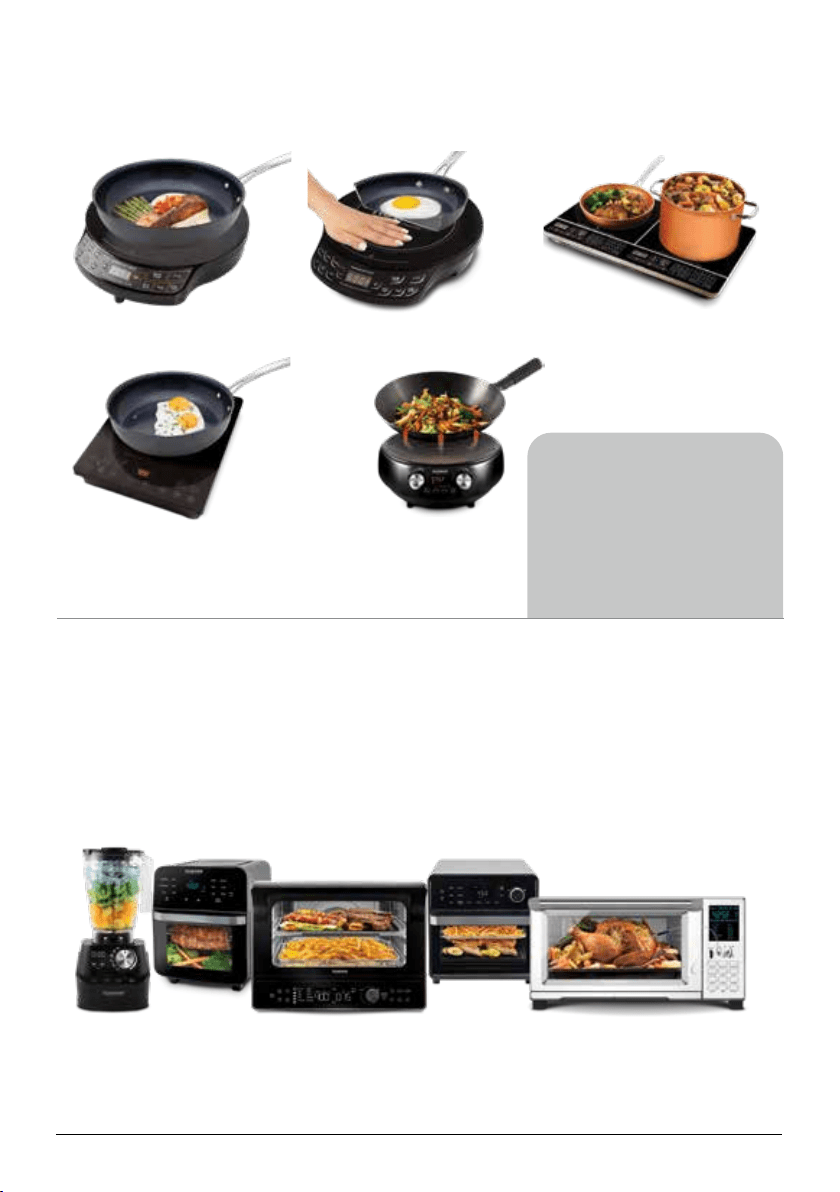
Visit www.nuwavenow.com
to see our other NuWave products and accessories.
Precision Induction Wok
Model #: 30802
PIC Gold (Induction Cooktop)
Model #: 30242
Mosaic
®
PIC Flex (Induction Cooktop)
Model #: 30537
PIC Pro Chef (Induction Cooktop)
Model #: 30702
PIC Double (Induction Cooktop)
Model #: 30602
Visit
www.nuwavenow.com
to see our other
NuWave products
and accessories.
Precision Induction Cooking

BM30211
Rev. 24-CB
09-02-22
FOR HOUSEHOLD USE ONLY
120VAC, 60Hz, 1500 Watts
Model: 30211
Para la versión en español de este manual,
visita www.nuwavenow.com.
For patent information please go to:
www.nuwavenow.com/legal/patent
Designed & Developed in USA
NuWave LLC
560 Bunker Ct.
Vernon Hills, IL 60061, U.S.A.
Customer Service:
Tel: 1-877-689-2838
Mon - Fri 7:30 am to 4:30 pm (CST)
Email:
help@nuwavenow.com
Made in China
©2022 NuWave LLC • All Rights Reserved.
PIC
®
Precision Induction Cooktop
Gold