UseE,Care
A Note to You ............ 2
Range Safety ......... 3-5
Parts and Features ... 6
Using Your Range ..... 8
Using the Self-
Cleaning Cycle ........ 26
Caring for Your
Range ..................... 29
Troubleshooting ...... 39
Requesting
Assistance or
Service .................... 41
Index ....................... 43
Warranty ................. 44
Call our Consumer Assistance Center
with questions or comments.
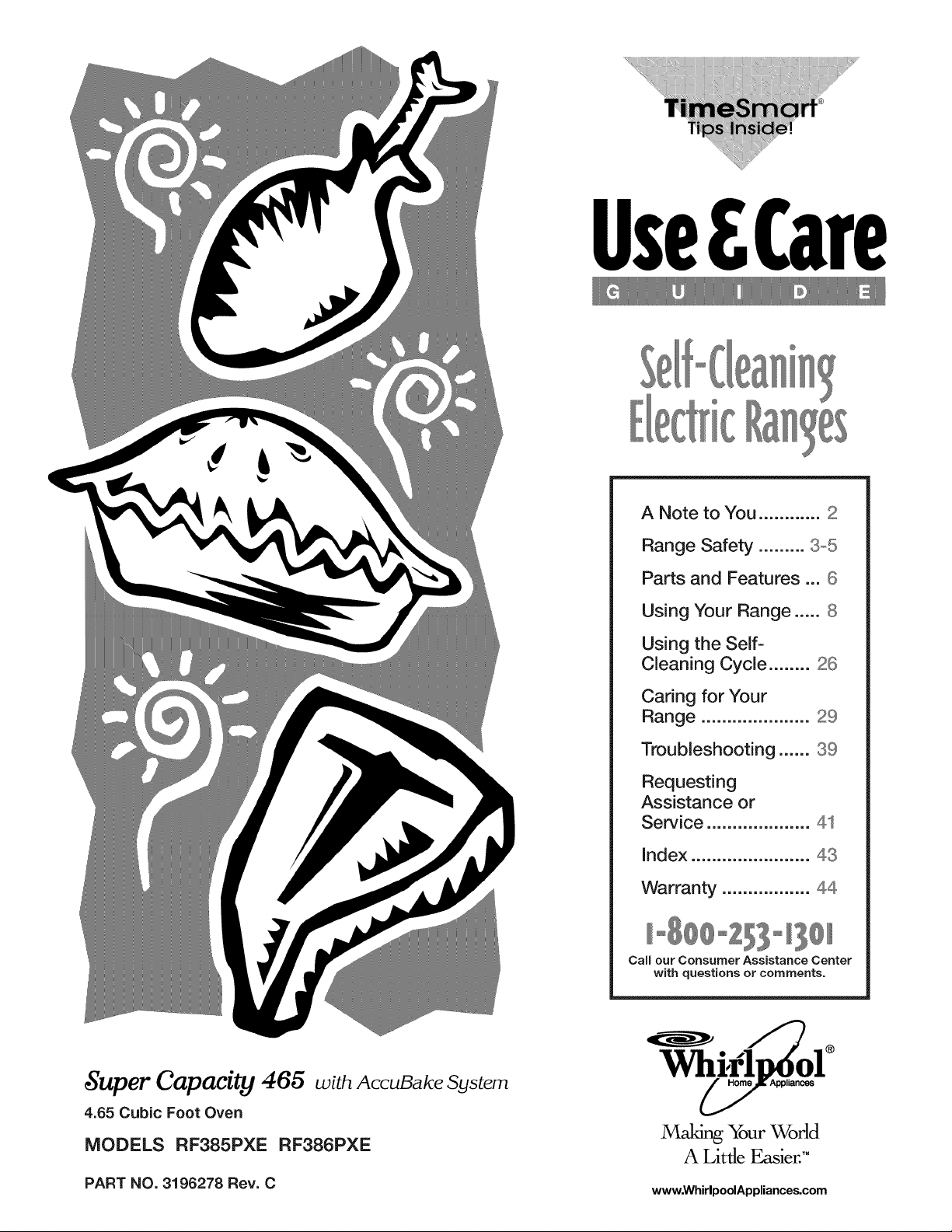
,Super Capacity 466 wia AccuBake System
4.65 Cubic Foot Oven
MODELS RF385PXE RF386PXE
®
Making_ur World
A Little Easier."
PART NO. 3196278 Rev. C www.WhirlpoolAppliances.com
T_a_ky@_bt b_yi_ aWH_BLP@@R_ @p_.ia_Ceo
Because your life is getting busier and more compli-
cated, WHIRLPOOL appliances are easy to use, save
time, and help you manage your home better. To
ensure that you enjoy years of trouble-free operation,
we developed this Use and Care Guide. it is full of
valuable information about how to operate and
maintain your appliance properly and safely. Please
read it carefully.
Also, complete and mail the Product Registration
Oard provided with your appliance. The card helps
us notify you about any new information on
your appliance.
r t_
LJ_ OL
l_ )v
)1 ne
P_.easetec0tay0H_s0@_._si_bt_ati0_L
Whenever you call to request service for your appli-
ance, you need to know your complete model number
and serial number. You can find this information on the
model and serial number label/plate (see the diagram
in the "Parts and Features" section). Also, record the
other information shown in the next column.
Model Number
Serial Number
Purchase Date
Dealer Name
Dealer Address
Dealer Phone
@_@_s_e__ssista_ce@_tetm_mbe_istoll ffeeo
To find detailed product information, the location of the nearest Whirlpool dealer or authorized servicer, to
purchase an accessory item, or register your appliance on-line, please visit our Web site at
www.WhirlpoolAppliances.com
SAFE'IY
s ety thesafety thersisveryi ? t't to
We have provided many important safety messages in this manual and on your appliance, Always read and
obey all safety messages,
This is the safety alert symbol.
This symbol alerts you to hazards that can kill or hurt you and others.
All safety messages will be preceded by the safety alert symbol and the word "DANGER" or
"WARNING." These words mean:
Youfollowwillinstructions,be killed or seriously injured if you don't
Youfollowcaninstructions,be killed or seriously injured if you don't
All safety messages will identify the hazard, tell you how to reduce the chance of injury, and tell you what can
happen if the instructions are not followed.
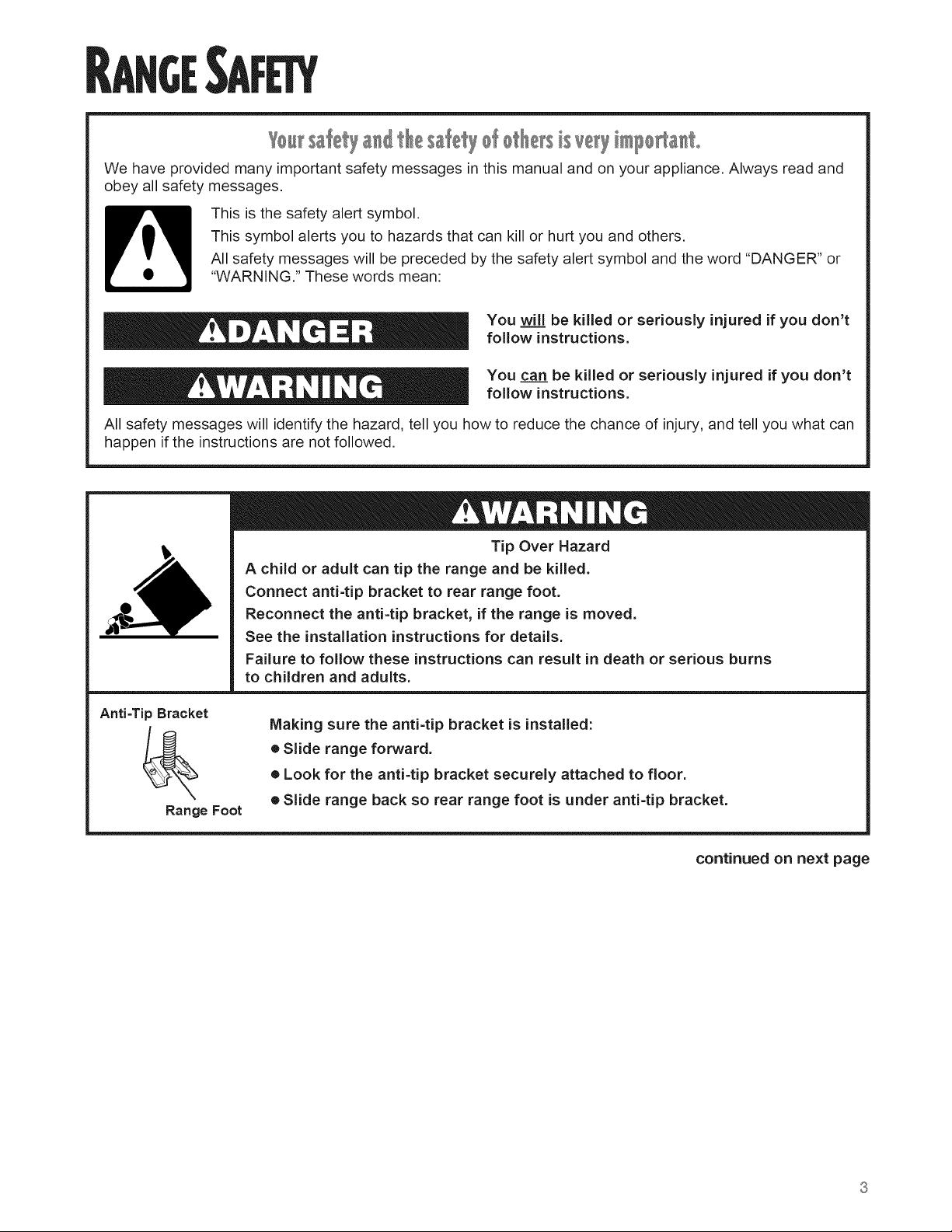
Tip Over Hazard
A child or adult can tip the range and be killed.
Connect anti-tip bracket to rear range foot.
Reconnect the anti=tip bracket, if the range is moved.
See the installation instructions for details.
Failure to follow these instructions can result in death or serious burns
to children and adults.
Anti-Tip Bracket
Range Foot
Making sure the anti=tip bracket is installed:
• Slide range forward.
• Look for the anti-tip bracket securely attached to floor.
• Slide range back so rear range foot is under anti-tip bracket.
continued on next page
................. C'T II IPOR SAFETY IINST ' U ONS
WARNING: To reduce the risk of fire, electrical
shock, injury to persons, or damage when using
the range, follow basic precautions, including the
following:
÷ WARNING - TOREDUCETHERISKOF
TIPPING OF THE RANGE, THE RANGE MUST
BE SECURED BY PROPERLY INSTALLED
ANTI-TIP DEVICES. TO CHECK IF THE DEVICES
ARE INSTALLED PROPERLY, SLIDE RANGE
FORWARD, LOOK FOR ANTI-TIP BRACKET
SECURELY A-R-ACHED TO FLOOR, AND SLIDE
RANGE BACK SO REAR RANGE FOOT IS
UNDER ANTI-TIP BRACKET.
÷ CAUTION - Do not store items of interest to
children in cabinets above a range or on the
backguard of a range - children climbing on the
range to reach items could be seriously injured.
® Proper Installation - Be sure the range is properly
installed and grounded by a qualified technician.
® Never Use the Range for Warming or Heating the
Room.
® Do Not Leave Children Alone - Children should
not be left alone or unattended in area where the
range is in use. They should never be allowed to
sit or stand on any part of the range.
® Wear Proper Apparel - Loose-fitting or hanging
garments should never be worn while using
the range.
® User Servicing - Do not repair or replace any part
of the range unless specifically recommended in
the manual. All other servicing should be referred
to a qualified technician.
® Storage in or on the Range - Flammable
materials should not be stored in an oven or
near surface units.
® Do Not Use Water on Grease Fires - Smother
fire or flame or use dry chemical or foam-type
extinguisher.
® Use Only Dry Potholders - Moist or damp
potholders on hot surfaces may result in burns
from steam. Do not let potholder touch hot
heating elements. Do not use a towel or other
bulky cloth.
® DO NOT TOUCH SURFACE UNITS OR AREAS
NEAR UNITS - Surface units may be hot even
though they are dark in color. Areas near surface
units may become hot enough to cause burns.
During and after use, do not touch, or let clothing
or other flammable materials contact surface
units or areas near units until they have had
sufficient time to cool. Among those areas are
the cook-top and surfaces facing the cook-top.
® Use Proper Pan Size - The range is equipped
with one or more surface units of different size.
Select utensils having flat bottoms large enough
to cover the surface unit heating element. The
use of undersized utensils will expose a portion
of the heating element to direct contact and may
result in ignition of clothing. Proper relationship
of utensil to burner will also improve efficiency.
® Never Leave Surface Units Unattended at High
Heat Settings - Boilover causes smoking and
greasy spillovers that may ignite.
® Make Sure Reflector Pans or Drip Bowls Are in
Place - Absence of these pans or bowls during
cooking may subject wiring or components
underneath to damage.
® Protective Liners - Do not use aluminum foil to
line surface unit drip bowls or oven bottoms,
except as suggested in the manual. Improper
installation of these liners may result in a risk of
electric shock, or fire.
® Glazed Cooking Utensils - Only certain types of
glass, glass/ceramic, ceramic, earthenware, or
other glazed utensils are suitable for range-top
service without breaking due to the sudden
change in temperature.
® Utensil Handles Should Be Turned Inward and
Not Extend Over Adjacent Surface Units - To
reduce the risk of burns, ignition of flammable
materials, and spillage due to unintentional
contact with the utensil, the handle of a utensil
should be positioned so that it is turned inward,
and does not extend over adjacent surface units.
® Do Not Soak Removable Heating Elements -
Heating elements should never be immersed in
water.
-SAVE THESE INSTRUCTIONS-
................. C'T II IPOR SAFE'TY IINST ' U ONS
® Do Not Cook on Broken Cook-Top - If cook-top
should break, cleaning solutions and spillovers
may penetrate the broken cook-top and create a
risk of electric shock. Contact a qualified techni-
cian immediately.
® Clean Cook-Top With Caution - If a wet sponge
or cloth is used to wipe spills on a hot cooking
area, be careful to avoid steam burn. Some
cleaners can produce noxious fumes if applied to
a hot surface.
® Use Care When Opening Door - Let hot air or
steam escape before removing or replacing food.
® Do Not Heat Unopened Food Containers-
Build-up of pressure may cause container to
burst and result in injury.
® Keep Oven Vent Ducts Unobstructed.
® Placement of Oven Racks - Always place oven
racks in desired location while oven is cool. If
rack must be moved while oven is hot, do not let
potholder contact hot heating element in oven.
® DO NOT TOUCH HEATING ELEMENTS OR
INTERIOR SURFACES OF OVEN - Heating
elements may be hot even though they are dark
in color. Interior surfaces of an oven become hot
enough to cause burns. During and after use, do
not touch, or let clothing or other flammable
materials contact heating elements or interior
surfaces of oven until they have had sufficient
time to cool. Other surfaces of the appliance may
become hot enough to cause burns - among
these surfaces are oven vent openings and
surfaces near these openings, oven doors, and
windows of oven doors.
- SAVE THESE
For self=cleaning ranges -
® Do Not Clean Door Gasket - The door gasket is
essential for a good seal. Care should be taken
not to rub, damage, or move the gasket.
® Do Not Use Oven Cleaners - No commercial
oven cleaner or oven liner protective coating of
any kind should be used in or around any part
of the oven.
® Clean Only Parts Listed in Manual.
® Before Self-Cleaning the Oven - Remove broiler
pan and other utensils.
For units with ventilating hood =
® Clean Ventilating Hoods Frequently - Grease
should not be allowed to accumulate on hood
or filter.
® When flaming foods under the hood, turn the fan
off. The fan, if operating, may spread the flame.
INSTRUCTIONS -
AND
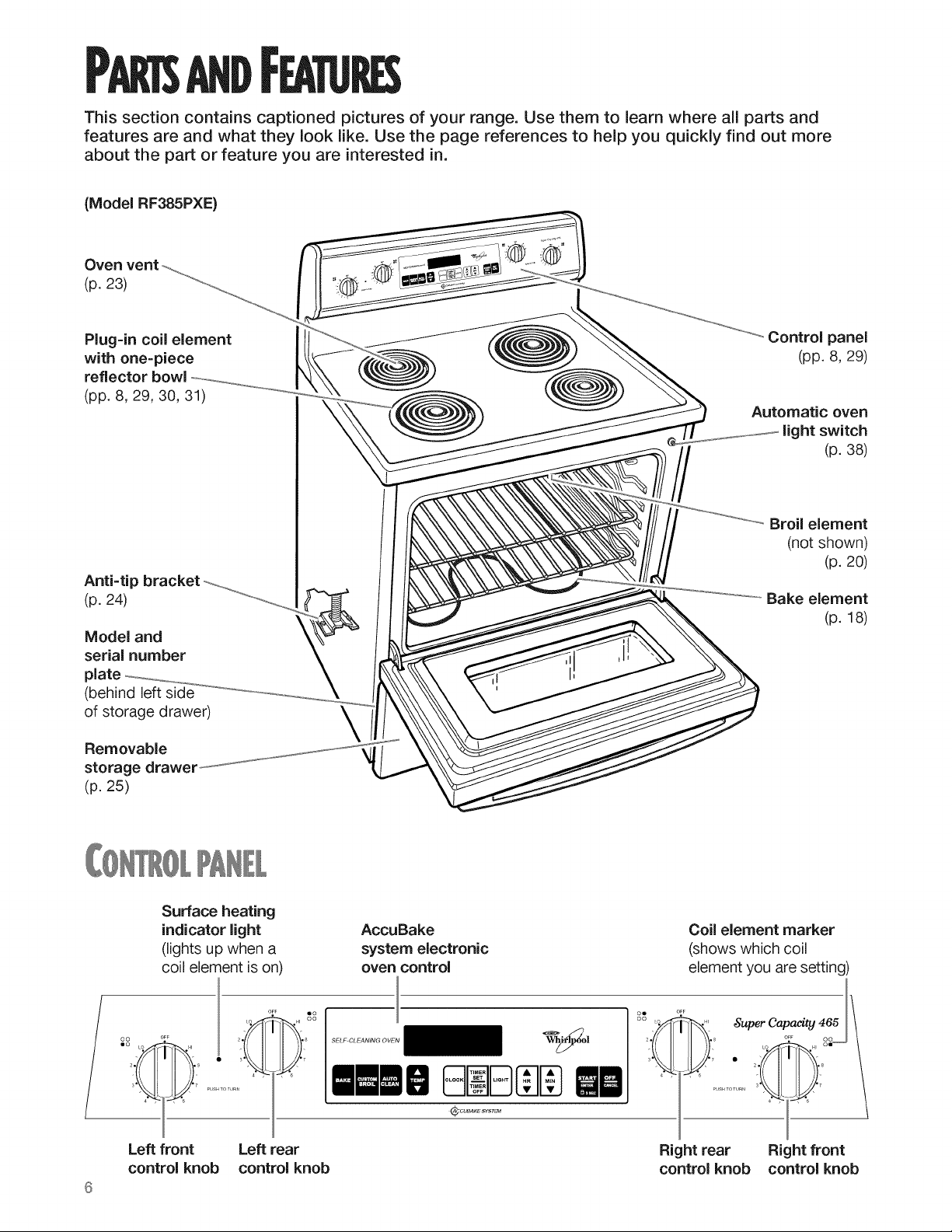
This section contains captioned pictures of your range. Use them to learn where all parts and
features are and what they look like. Use the page references to help you quickly find out more
about the part or feature you are interested in.
(Model RF385PXE)
Oven vent
(p. 23)
Plug=in coil element
with one=piece
reflector bowl
(pp. 8, 29, 30, 31)
Anti=tip bracket
(p. 24)
Model and
serial number
(behind left side
of storage drawer)
Removable
storage drawem
(p. 25)
\
Control panel
(pp. 8, 29)
Automatic oven
light switch
(p. 38)
Broil element
(not shown)
(p. 20)
Bake element
(p. 18)
/
Surface heating
indicator light
(lights up when a
coil element is on)
AccuBake
system electronic
oven control
Coil element marker
(shows which coil
element you are setting)
O_F
oe OF,F
O0 'o HI
2 b8
_quperCapaeity465
Left front Left rear
control knob control knob
Right rear Right front
control knob control knob
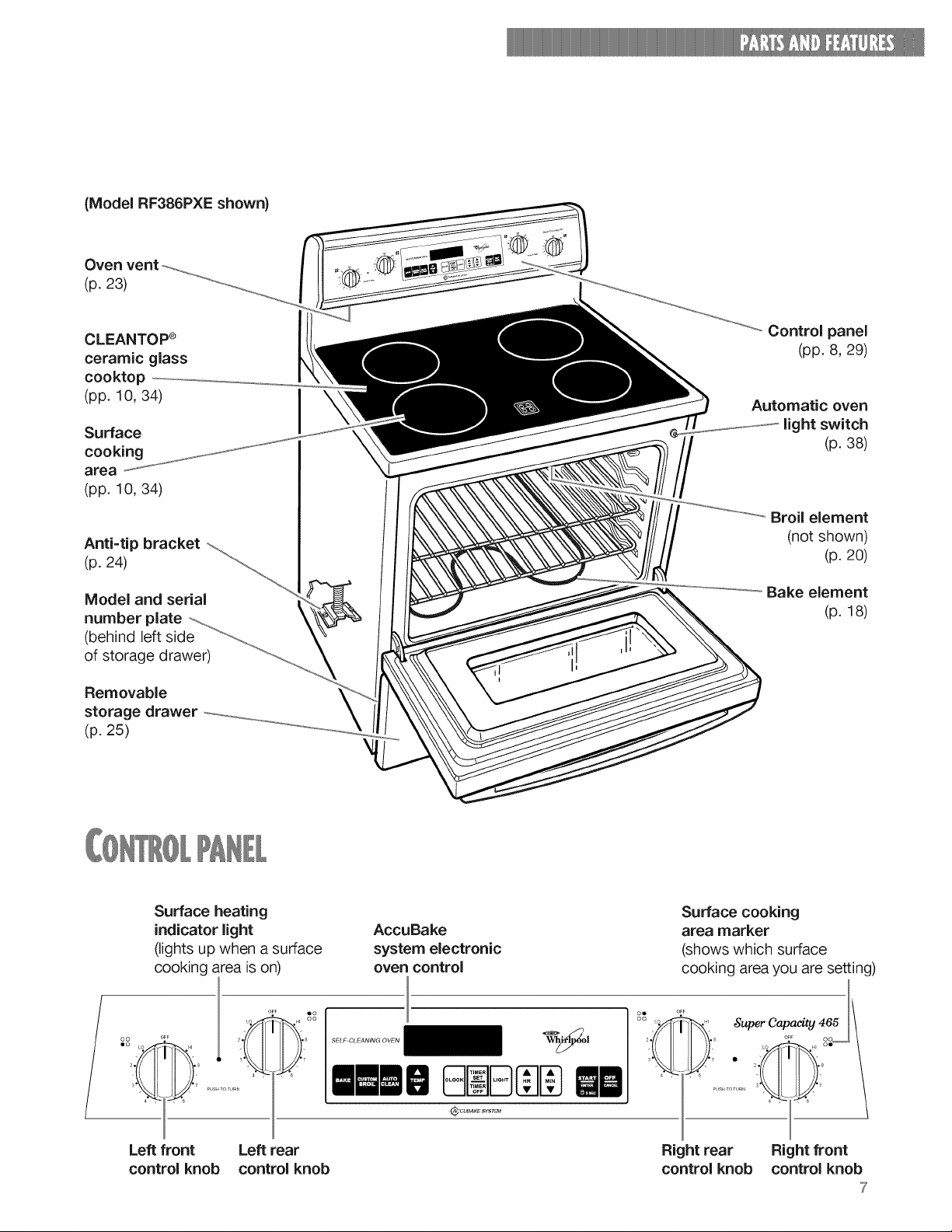
(ModelRF386PXEshown)
Ovenvent
(p. 23)
CLEANTOP ®
ceramic glass
cooktop
(pp. 10, 34)
Surface
cooking
area
(pp. 10, 34)
Anti=tip bracket
(p. 24)
Model and serial
number plate
(behind left side
of storage drawer)
Removable
storage drawer
(p. 25)
Control panel
(pp. 8, 29)
Automatic oven
light switch
(p. 38)
Broil element
(not shown)
(p. 20)
Bake element
(p. 18)
/
Surface heating
indicator light
(lights up when a surface
cooking area is on)
AccuBake
system electronic
oven control
O._F
Surface cooking
area marker
(shows which surface
cooking area you are setting)
oe o F_
oo ,o HI
_quperCapaeity465
Left front Left rear
control knob control knob
Right rear Right front
control knob control knob
7
To get the best cooking results, you should use your range the correct way. This section tells you
what you need to know to use your range safely and efficiently.
_si_ thec_tM k_
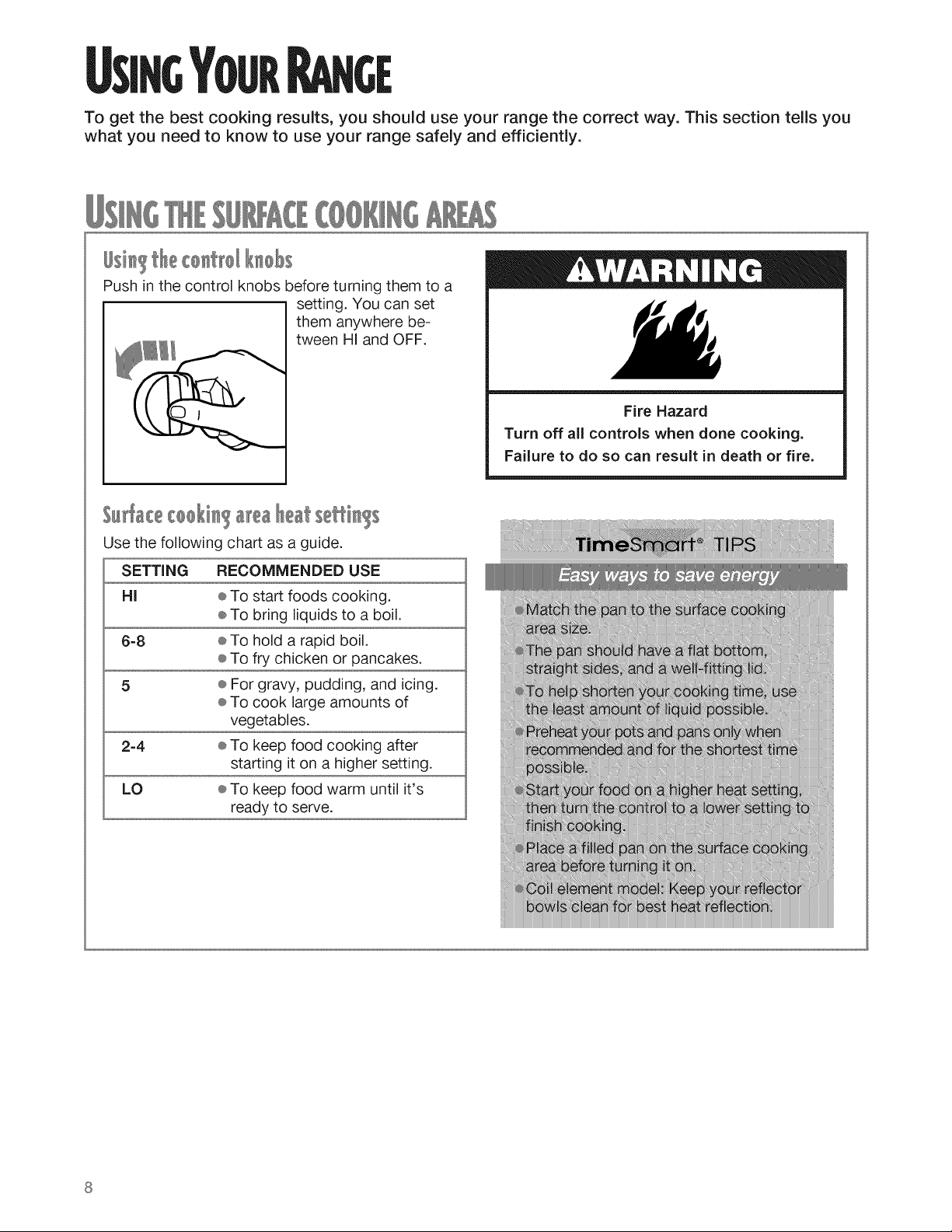
Push in the control knobs before turning them to a
setting. You can set
them anywhere be-
tween HI and OFF.
S_ cec_ki_ _re_Ihe4s
Use the following chart as a guide.
SETTING RECOMMENDED USE
HI ® To start foods cooking.
÷ To bring liquids to a boil.
6-8 ÷ To hold a rapid boil.
÷ To fry chicken or pancakes.
5 ÷ For gravy, pudding, and icing.
÷ To cook large amounts of
vegetables.
2-4 ÷ To keep food cooking after
starting it on a higher setting.
LO ÷ To keep food warm until it's
ready to serve.
Fire Hazard
Turn off all controls when done cooking.
Failure to do so can result in death or fire.
Osi ?cookw e
® Use the correct cookware to prevent damage to
the surface cooking area, cooktop, wiring, and
surrounding areas.
® If the cookware is too small for the surface
cooking area or the bottom is not flat, the
surface cooking area could stay glowing red
for an extended length of time causing damage
to the range.
® If you start cooking on high, it is important to turn
the control down to a lower setting to complete
cooking.
® The surface cooking area could overheat or be
damaged if a pot has boiled dry or has been left
empty on a hot surface cooking area.
iiiiiiiiiii:iiii?iiii!iiiiiiiii_
iiiiiiiiiiiiiiiiiiiiiiiiiiiiiiiiiii_
iiiiiiJiiiiiiiiiiiiiiiiiiiiiiii}_iF
@iiiiiiiiii@!;!;!_
ii!i!i!i!i;ii@iiiiiiiiiiiiiii(C
iiJJJJJJi_ii_iiiiii@i_
,)@(
[1(
}}}®:*
I
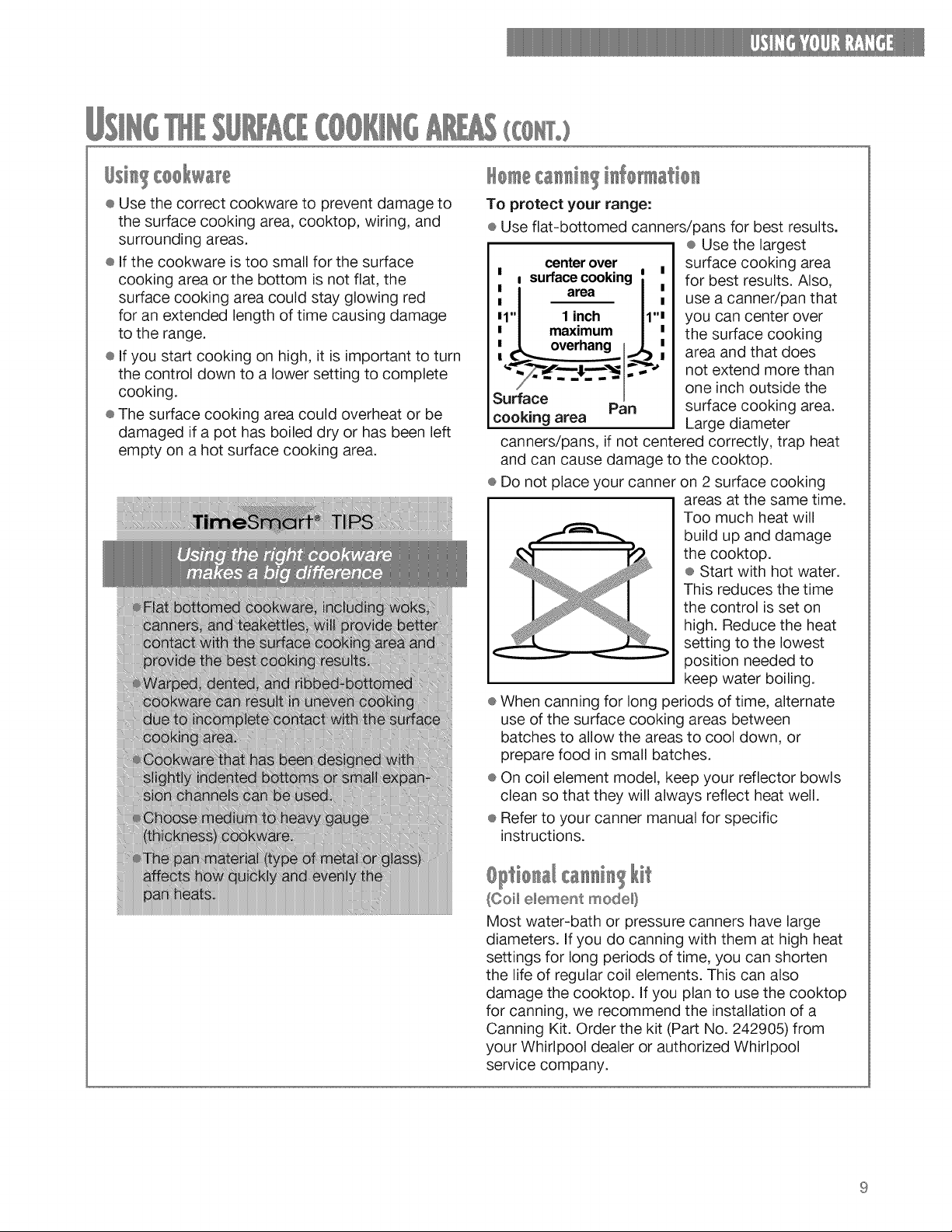
To protect your range:
÷ Use flat-bottomed canners/pans for best results.
÷ Use the largest
1 I!
Surface
cooking area
centerover
surfacecooking i
area I
1 inch 11''
maxmmum /
overhang I1_
,,
Pan
surface cooking area
for best results. Also,
use a canner/pan that
you can center over
the surface cooking
area and that does
not extend more than
one inch outside the
surface cooking area.
Large diameter
canners/pans, if not centered correctly, trap heat
and can cause damage to the cooktop.
÷ Do not place your canner on 2 surface cooking
areas at the same time.
Too much heat will
build up and damage
the cooktop.
÷ Start with hot water.
This reduces the time
the control is set on
high. Reduce the heat
setting to the lowest
position needed to
keep water boiling.
÷ When canning for long periods of time, alternate
use of the surface cooking areas between
batches to allow the areas to cool down, or
prepare food in small batches.
÷ On coil element model, keep your reflector bowls
clean so that they will always reflect heat well.
® Refer to your canner manual for specific
instructions.
Optio [ Ikit
(OoH e_ement mode_}
Most water-bath or pressure canners have large
diameters. If you do canning with them at high heat
settings for long periods of time, you can shorten
the life of regular coil elements. This can also
damage the cooktop. If you plan to use the cooktop
for canning, we recommend the installation of a
Canning Kit. Order the kit (Part No. 242905) from
your Whirlpool dealer or authorized Whirlpool
service company.
9
(Ceramicglasscooktopmodel)
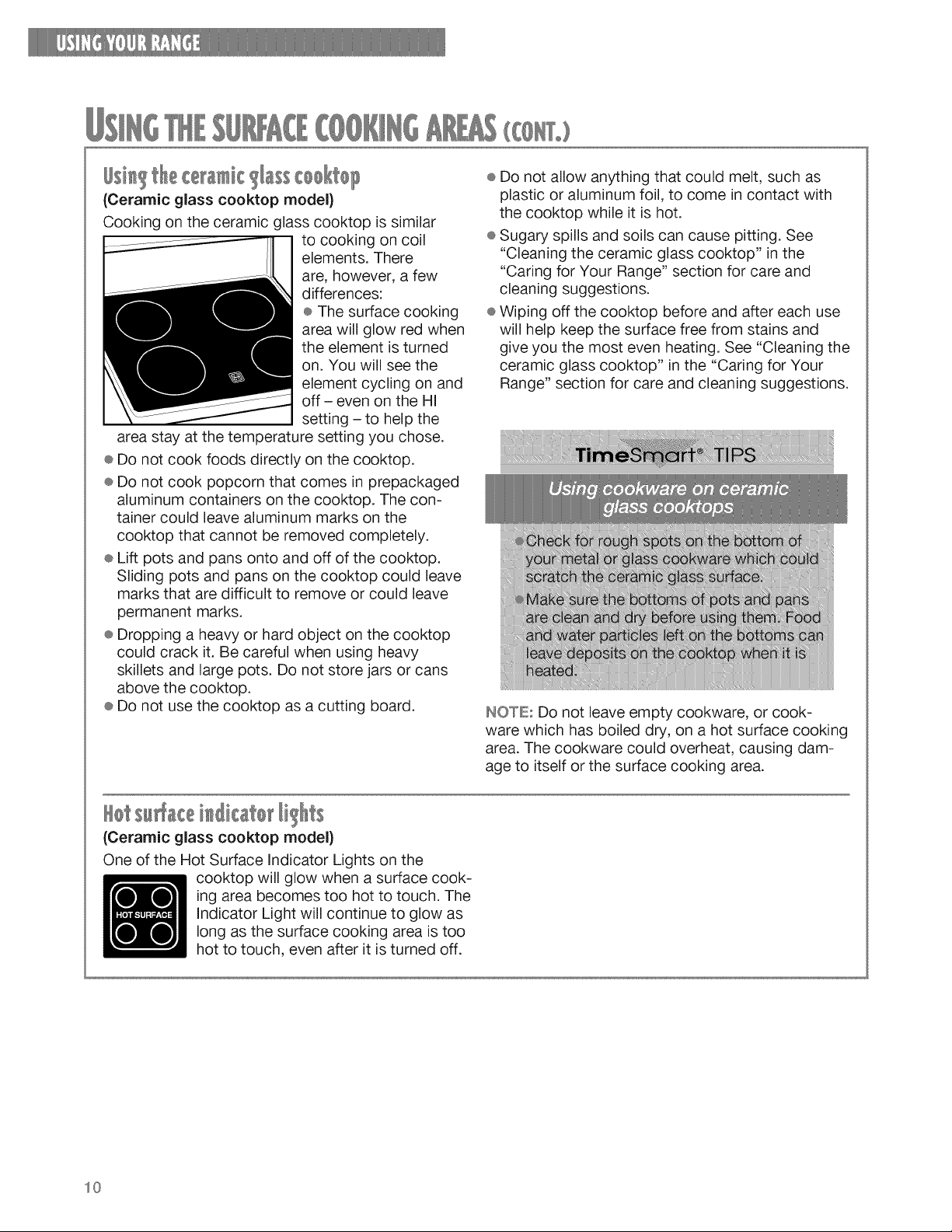
Cooking on the ceramic glass cooktop is similar
to cooking on coil
elements. There
are, however, a few
differences:
÷ The surface cooking
area will glow red when
the element is turned
on. You will see the
element cycling on and
off - even on the HI
setting - to help the
area stay at the temperature setting you chose.
÷ Do not cook foods directly on the cooktop.
÷ Do not cook popcorn that comes in prepackaged
aluminum containers on the cooktop. The con-
tainer could leave aluminum marks on the
cooktop that cannot be removed completely.
÷ Lift pots and pans onto and off of the cooktop.
Sliding pots and pans on the cooktop could leave
marks that are difficult to remove or could leave
permanent marks.
® Dropping a heavy or hard object on the cooktop
could crack it. Be careful when using heavy
skillets and large pots. Do not store jars or cans
above the cooktop.
÷ Do not use the cooktop as a cutting board.
÷ Do not allow anything that could melt, such as
plastic or aluminum foil, to come in contact with
the cooktop while it is hot.
÷ Sugary spills and soils can cause pitting. See
"Cleaning the ceramic glass cooktop" in the
"Caring for Your Range" section for care and
cleaning suggestions.
÷ Wiping off the cooktop before and after each use
will help keep the surface free from stains and
give you the most even heating. See "Cleaning the
ceramic glass cooktop" in the "Caring for Your
Range" section for care and cleaning suggestions.
INOTE= Do not leave empty cookware, or cook-
ware which has boiled dry, on a hot surface cooking
area. The cookware could overheat, causing dam-
age to itself or the surface cooking area.
(Ceramic glass cooktop model)
One of the Hot Surface Indicator Lights on the
cooktop will glow when a surface cook-
ing area becomes too hot to touch. The
Indicator Light will continue to glow as
long as the surface cooking area is too
hot to touch, even after it is turned off.
10
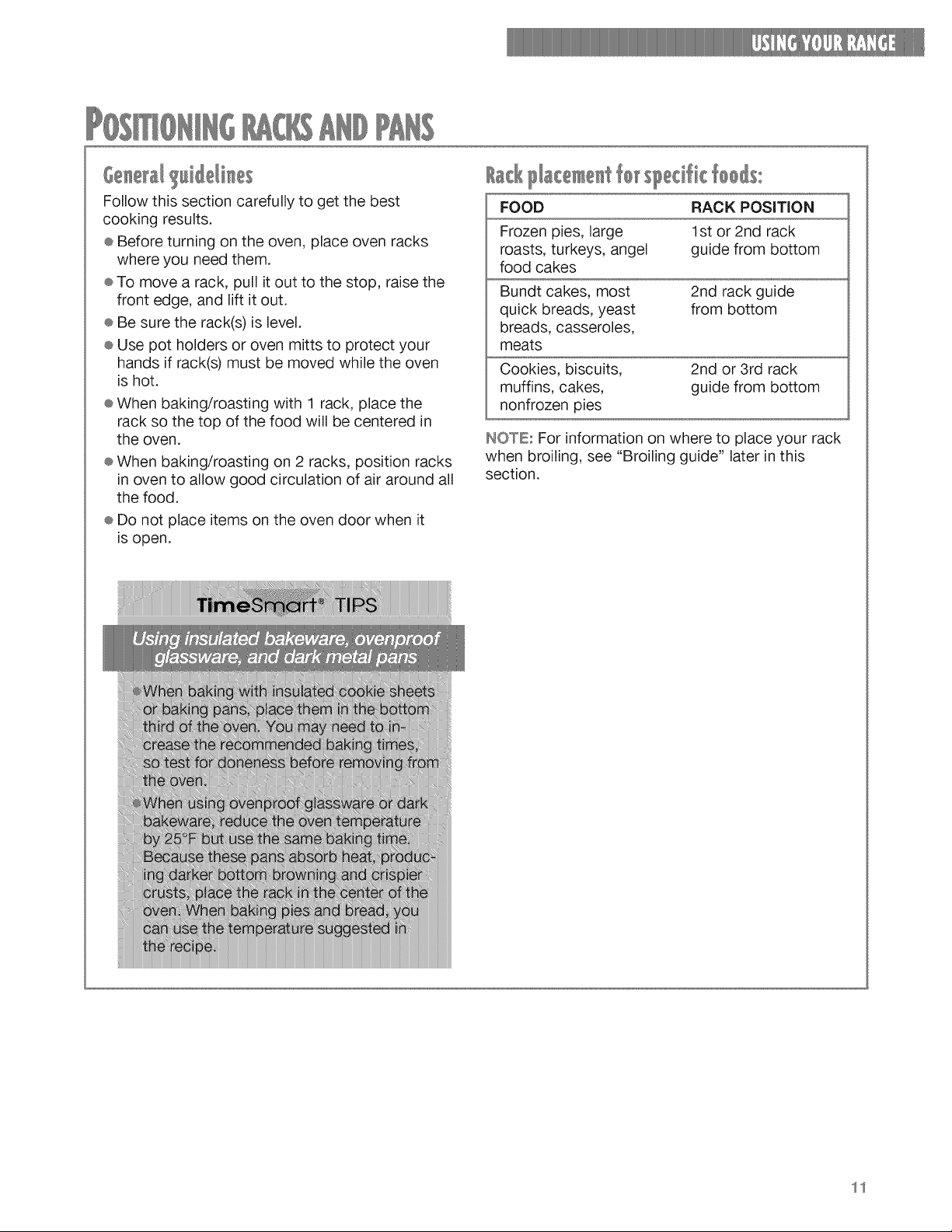
6 M Hile/i e
Follow this section carefully to get the best
cooking results.
e Before turning on the oven, place oven racks
where you need them.
e To move a rack, pull it out to the stop, raise the
front edge, and lift it out.
÷ Be sure the rack(s) is level.
e Use pot holders or oven mitts to protect your
hands if rack(s) must be moved while the oven
is hot.
e When baking/roasting with 1 rack, place the
rack so the top of the food will be centered in
the oven.
e When baking/roasting on 2 racks, position racks
in oven to allow good circulation of air around all
the food.
® Do not place items on the oven door when it
is open.
/ ck l/ace e t sled k :
FOOD RACK POSiTiON
Frozen pies, large
roasts, turkeys, angel
food cakes
1st or 2nd rack
guide from bottom
Bundt cakes, most
quick breads, yeast
breads, casseroles,
meats
2nd rack guide
from bottom
Cookies, biscuits,
muffins, cakes,
nonfrozen pies
2nd or 3rd rack
guide from bottom
IHOTEu For information on where to place your rack
when broiling, see "Broiling guide" later in this
section.
11
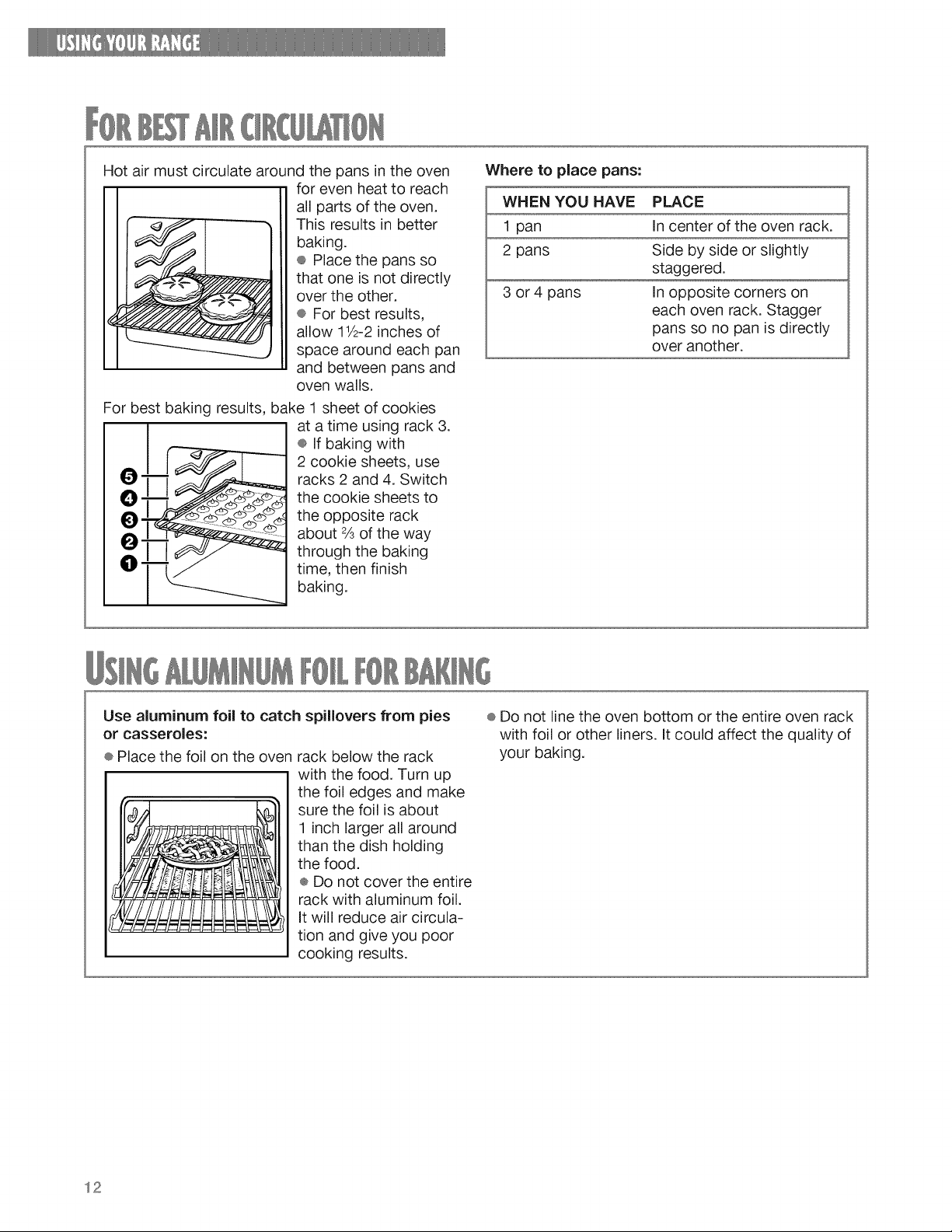
Hotairmustcirculatearoundthepansintheoven
forevenheatto reach
allpartsof theoven.
Thisresultsinbetter
baking.
÷ Placethepansso
thatoneisnotdirectly
overtheother.
®Forbestresults,
allow11/2-2inchesof
spacearoundeachpan
andbetweenpansand
ovenwalls.
Forbestbakingresults,bake1sheetofcookies
I
O ....... .... _df'f
at a time using rack 3.
® If baking with
2 cookie sheets, use
racks 2 and 4. Switch
the cookie sheets to
the opposite rack
about ¾ of the way
through the baking
time, then finish
baking.
Where to place pans:
WHEN YOU HAVE PLACE
1 pan In center of the oven rack.
2 pans Side by side or slightly
staggered.
3 or 4 pans In opposite corners on
each oven rack. Stagger
pans so no pan is directly
over another.
Use aluminum foil to catch spillovers from pies
or casseroles:
÷ Place the foil on the oven rack below the rack
with the food. Turn up
I I the foil edges and make
sure the foil is about
1 inch larger all around
than the dish holding
the food.
÷ Do not cover the entire
rack with aluminum foil.
It will reduce air circula-
tion and give you poor
cooking results.
÷ Do not line the oven bottom or the entire oven rack
with foil or other liners. It could affect the quality of
your baking.
12
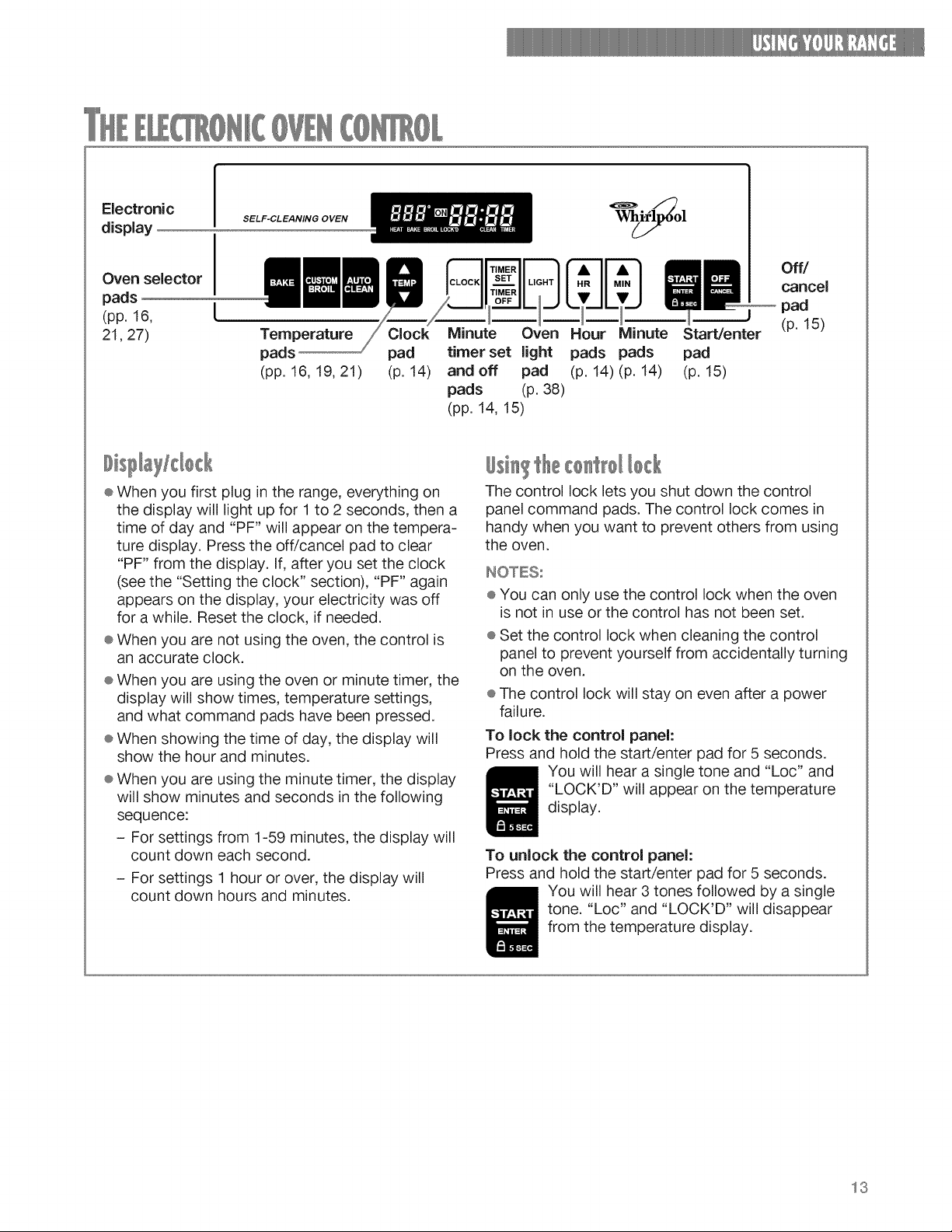
Electronic
display
SELF-CLEANING OVEN
Oven selector
pads
(pp. 16, [
21,27)
Temperature Clock
pads pad
(pp. 16, 19, 21) (p. 14)
Minute Oven Hour Minute Start/enter
timer set light pads pads pad
and off pad (p. 14) (p. 14) (p. 15)
pads (p. 38)
(pp. 14, 15)
Off/
cancel
pad
(p. 15)
÷ When you first plug in the range, everything on
the display will light up for 1 to 2 seconds, then a
time of day and "PF" will appear on the tempera-
ture display. Press the off/cancel pad to clear
"PF" from the display. If, after you set the clock
(see the "Setting the clock" section), "PF" again
appears on the display, your electricity was off
for a while. Reset the clock, if needed.
÷ When you are not using the oven, the control is
an accurate clock.
® When you are using the oven or minute timer, the
display will show times, temperature settings,
and what command pads have been pressed.
÷ When showing the time of day, the display will
show the hour and minutes.
÷ When you are using the minute timer, the display
will show minutes and seconds in the following
sequence:
- For settings from 1-59 minutes, the display will
count down each second.
- For settings 1 hour or over, the display will
count down hours and minutes.
#si Ithe
The control lock lets you shut down the control
panel command pads. The control lock comes in
handy when you want to prevent others from using
the oven.
INOTESs
® You can only use the control lock when the oven
is not in use or the control has not been set.
÷ Set the control lock when cleaning the control
panel to prevent yourself from accidentally turning
on the oven.
÷ The control lock will stay on even after a power
failure.
To lock the control panel:
Press and hold the start/enter pad for 5 seconds.
You will hear a single tone and "Loc" and
"LOCK'D" will appear on the temperature
display.
To unlock the control panel:
Press and hold the start/enter pad for 5 seconds.
You will hear 3 tones followed by a single
tone. "Loc" and "LOCK'D" will disappear
from the temperature display.
13
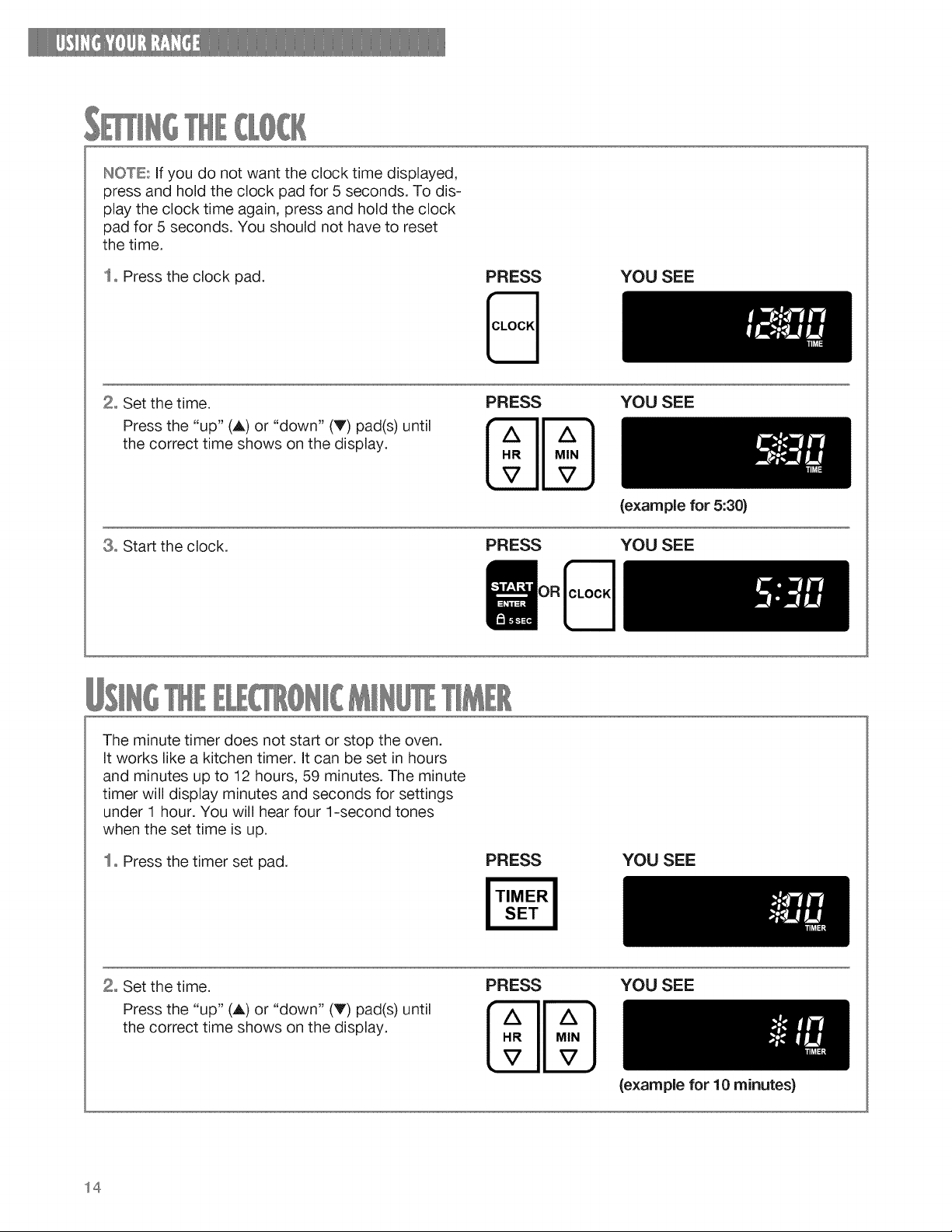
INOTE:ifyoudonotwanttheclocktimedisplayed,
pressandholdtheclockpadfor 5seconds.Todis-
playtheclocktimeagain,pressandholdtheclock
padfor5seconds.Youshouldnothaveto reset
thetime.
1oPresstheclockpad.
PRESS YOU SEE
2° Set the time.
Press the "up" (A) or "down" (V) pad(s) until
the correct time shows on the display.
8o Start the clock.
PRESS
MN
PRESS
YOU SEE
(example for 5:30)
YOU SEE
The minute timer does not start or stop the oven.
It works like a kitchen timer, it can be set in hours
and minutes up to 12 hours, 59 minutes. The minute
timer will display minutes and seconds for settings
under 1 hour. You will hear four 1-second tones
when the set time is up.
1o Press the timer set pad.
PRESS YOU SEE
2° Set the time.
Press the "up" (A) or "down" (V) pad(s) until
the correct time shows on the display.
PRESS YOU SEE
(example for 10 minutes)
14
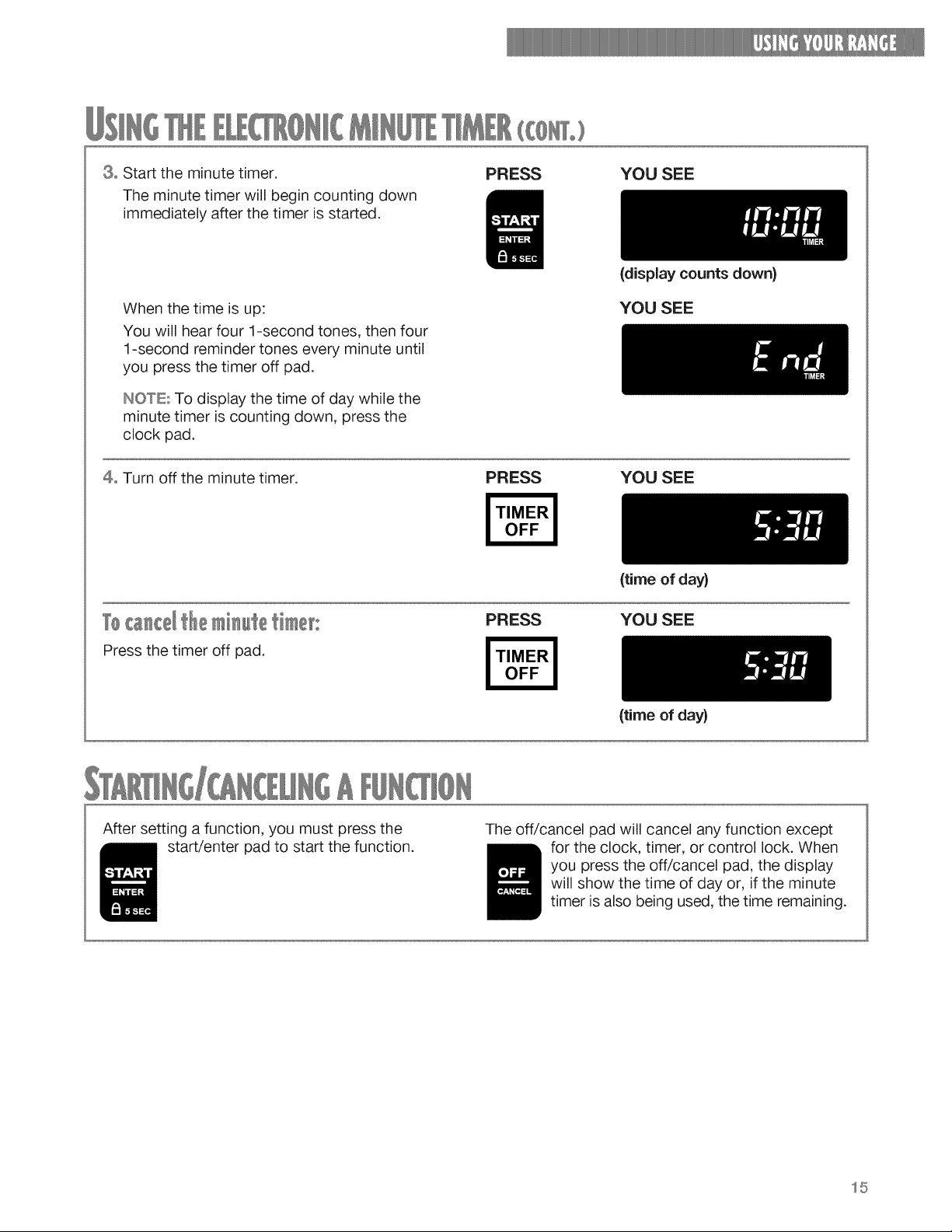
3° Starttheminutetimer.
Theminutetimerwillbegincountingdown
immediatelyafterthetimerisstarted.
PRESS YOU SEE
When the time is up:
You will hear four 1-second tones, then four
1-second reminder tones every minute until
you press the timer off pad.
INOTE; To display the time of day while the
minute timer is counting down, press the
clock pad.
(display counts down}
YOU SEE
4° Turn off the minute timer. PRESS YOU SEE
Press the timer off pad.
PRESS
(time of day)
YOU SEE
(time of day}
After setting a function, you must press the
start/enter pad to start the function.
The off/cancel pad will cancel any function except
for the clock, timer, or control lock. When
you press the off/cancel pad, the display
will show the time of day or, if the minute
timer is also being used, the time remaining.
15
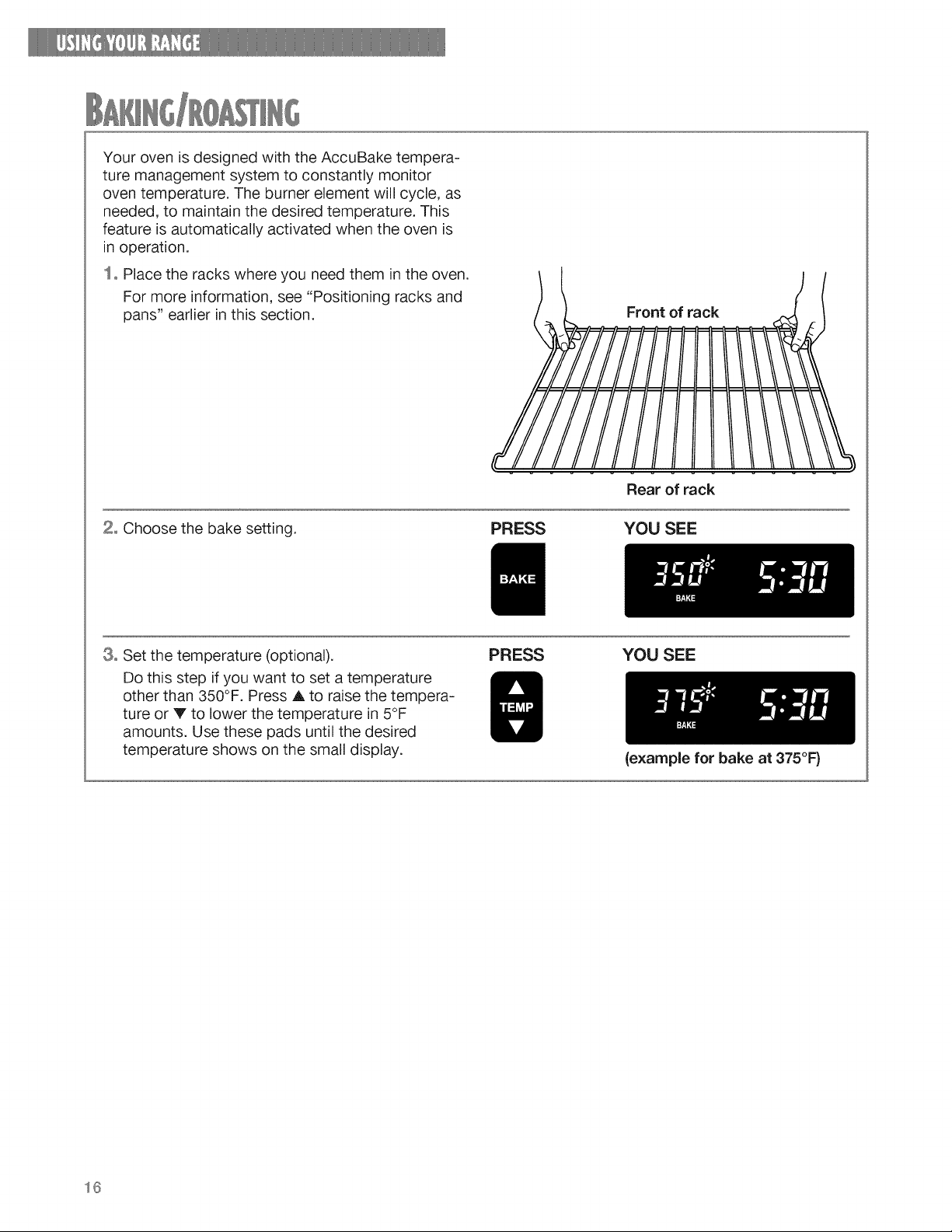
Yourovenis designedwiththeAccuBaketempera-
turemanagementsystemto constantlymonitor
oventemperature.Theburnerelementwillcycle,as
needed,to maintainthedesiredtemperature.This
featureis automaticallyactivatedwhentheovenis
inoperation.
1oPlacetherackswhereyouneedthemintheoven.
Formoreinformation,see"Positioningracksand
pans"earlierinthissection.
Frontof rack
2, Choose the bake setting.
PRESS
Rear of rack
YOU SEE
3o Set the temperature (optional).
Do this step if you want to set a temperature
other than 350°F. Press A to raise the tempera-
ture or V to lower the temperature in 5°F
amounts. Use these pads until the desired
temperature shows on the small display.
PRESS YOU SEE
16
{example for bake at 375°F)
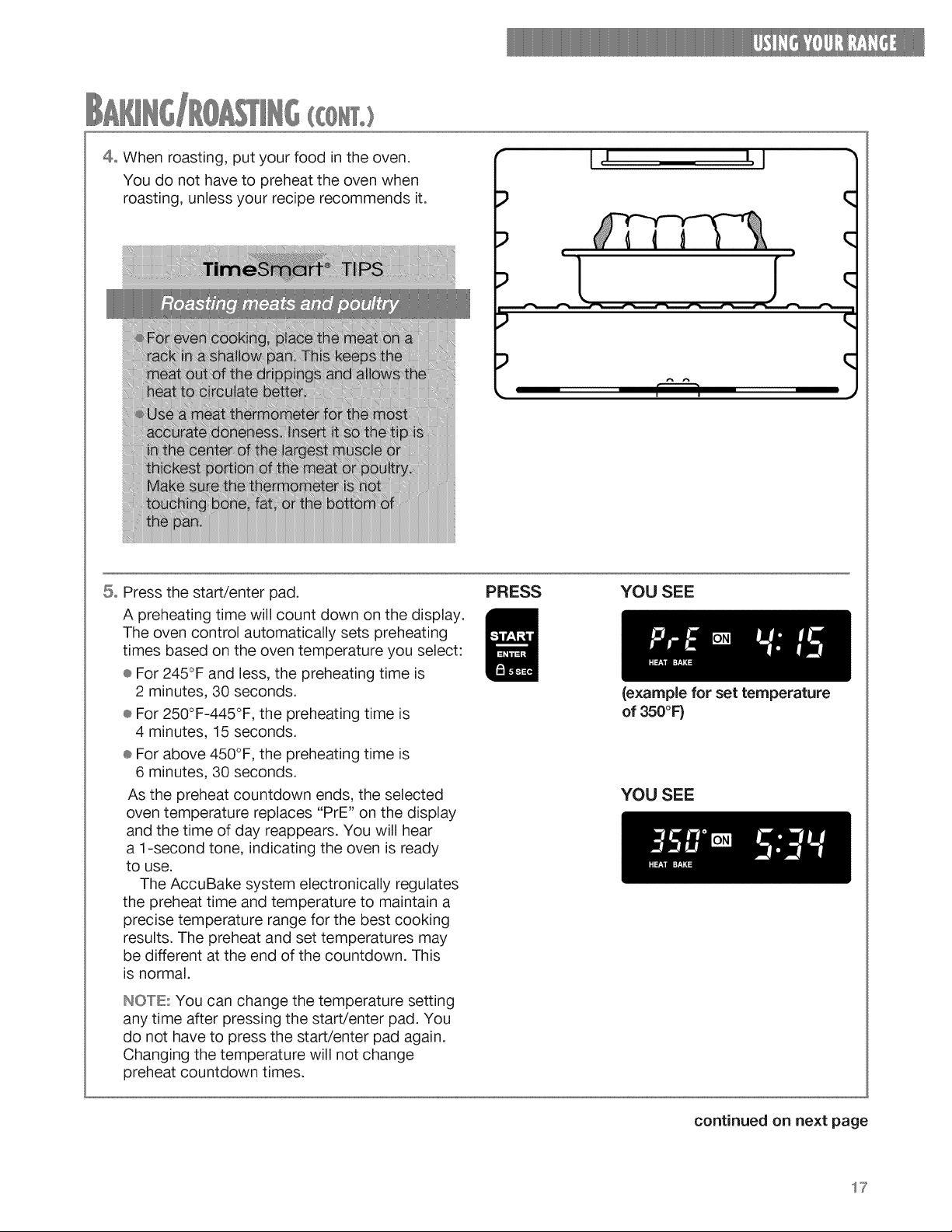
4oWhenroasting,putyourfoodintheoven.
Youdo nothaveto preheatthe ovenwhen
roasting,unlessyourreciperecommendsit.
7iiJJ
iiiiil
INC
its
mt
_ot
J I l,J
q
) C
5o Press the start/enter pad.
A preheating time will count down on the display.
The oven control automatically sets preheating
times based on the oven temperature you select:
® For 245°F and less, the preheating time is
2 minutes, 30 seconds.
® For 250°F-445°F, the preheating time is
4 minutes, 15 seconds.
÷ For above 450°F, the preheating time is
6 minutes, 30 seconds.
As the preheat countdown ends, the selected
oven temperature replaces "PrE" on the display
and the time of day reappears. You will hear
a 1-second tone, indicating the oven is ready
to use.
The AccuBake system electronically regulates
the preheat time and temperature to maintain a
precise temperature range for the best cooking
results. The preheat and set temperatures may
be different at the end of the countdown. This
is normal.
NOTE: You can change the temperature setting
any time after pressing the start/enter pad. You
do not have to press the start/enter pad again.
Changing the temperature will not change
preheat countdown times.
PRESS YOU SEE
(example for set temperature
of 350°F)
YOU SEE
continued on next page
17
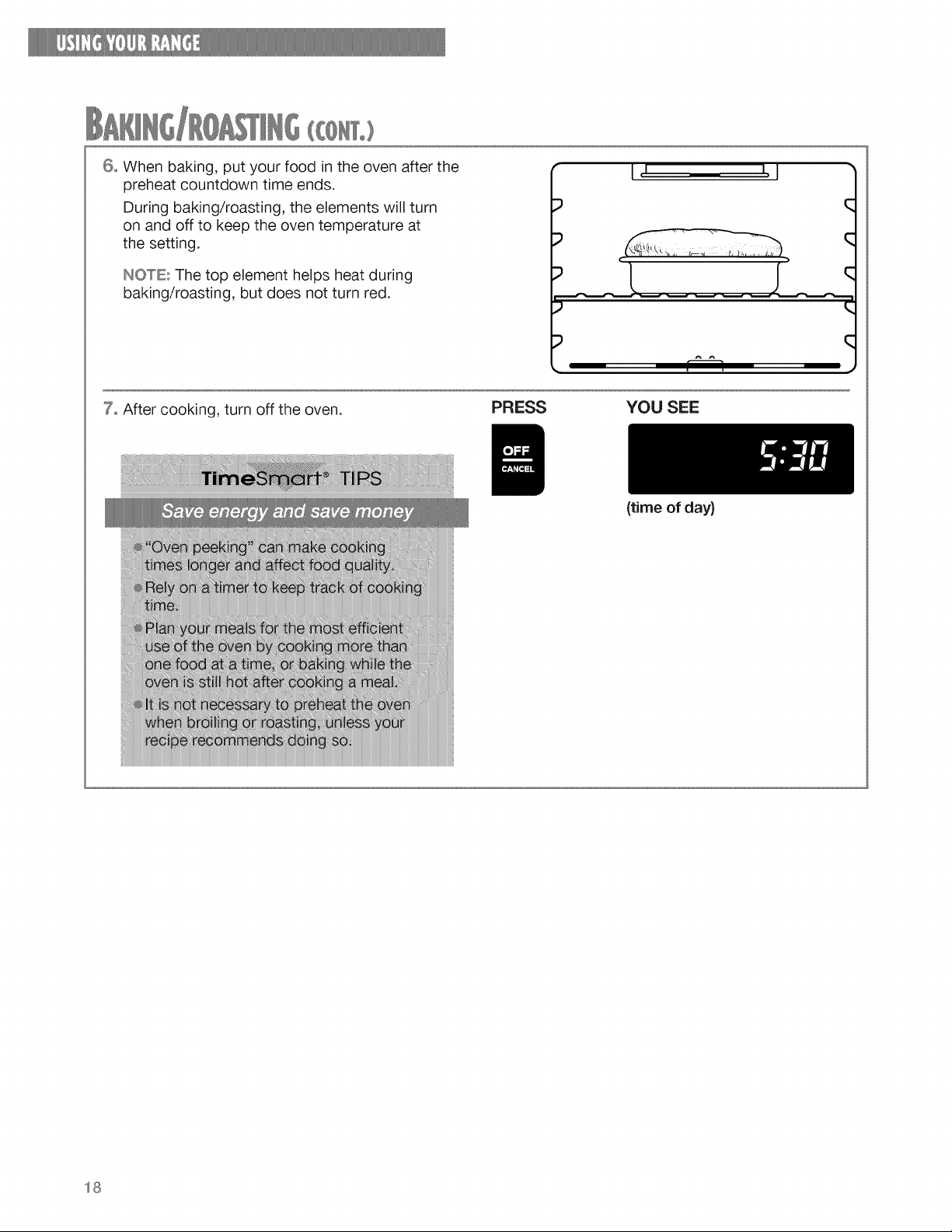
6° Whenbaking,putyourfoodintheovenafterthe
preheatcountdowntimeends.
Duringbaking/roasting,theelementswillturn
onandoffto keeptheoventemperatureat
thesetting.
INO°'rE:Thetopelementhelpsheatduring
baking/roasting,butdoesnotturnred.
I, I I, I
q
• I"---1 •
7° After cooking, turn off the oven.
PRESS YOU SEE
(time of day)
18
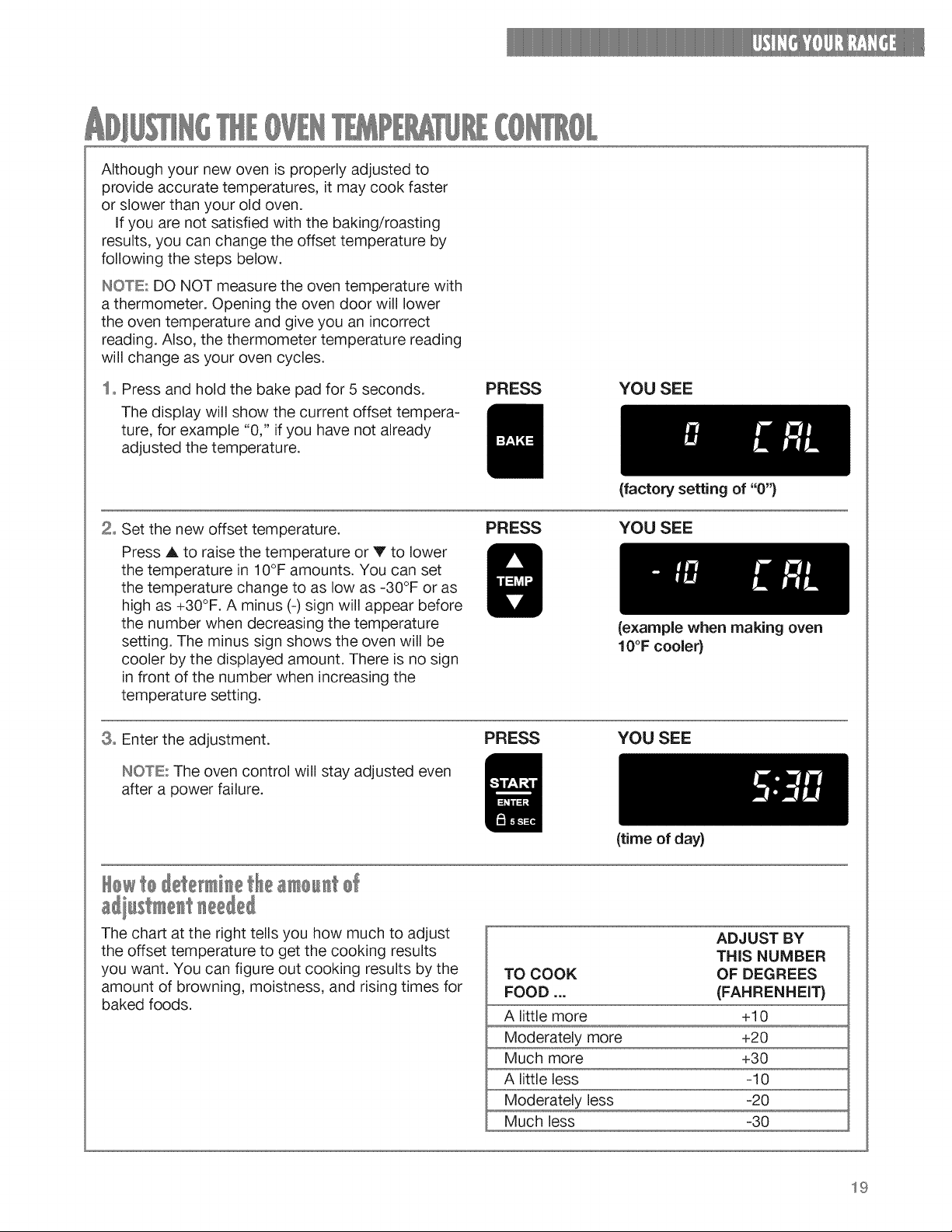
Althoughyournewovenis properlyadjustedto
provideaccuratetemperatures,it maycookfaster
orslowerthanyouroldoven.
Ifyouarenotsatisfiedwiththebaking/roasting
results,youcanchangetheoffsettemperatureby
followingthe stepsbelow.
IHOTE.'DONOTmeasuretheoventemperaturewith
athermometer.Openingtheovendoorwilllower
theoventemperatureandgiveyouanincorrect
reading.Also,thethermometertemperaturereading
willchangeasyourovencycles.
1=Pressandholdthebakepadfor5 seconds.
Thedisplaywillshowthecurrentoffsettempera-
ture,forexample"0,"if youhavenotalready
adjustedthetemperature.
PRESS YOU SEE
2= Set the new offset temperature.
Press _, to raise the temperature or V to lower
the temperature in 10°F amounts. You can set
the temperature change to as low as -30°F or as
high as +30°F. A minus (-) sign will appear before
the number when decreasing the temperature
setting. The minus sign shows the oven will be
cooler by the displayed amount. There is no sign
in front of the number when increasing the
temperature setting.
(factory setting of "0")
PRESS YOU SEE
8° Enter the adjustment.
ItUOTE::The oven control will stay adjusted even
after a power failure.
(example when making oven
10°F cooler}
PRESS YOU SEE
£Qwt0 £ete i etie
(time of day)
The chart at the right tells you how much to adjust
the offset temperature to get the cooking results
you want. You can figure out cooking results by the
amount of browning, moistness, and rising times for
baked foods.
ADJUST BY
THIS NUMBER
TO COOK OF DEGREES
FOOD ... (FAHRENHEIT}
A little more +10
Moderately more +20
Much more +30
A little less -10
Moderately less -20
Much less -30
19
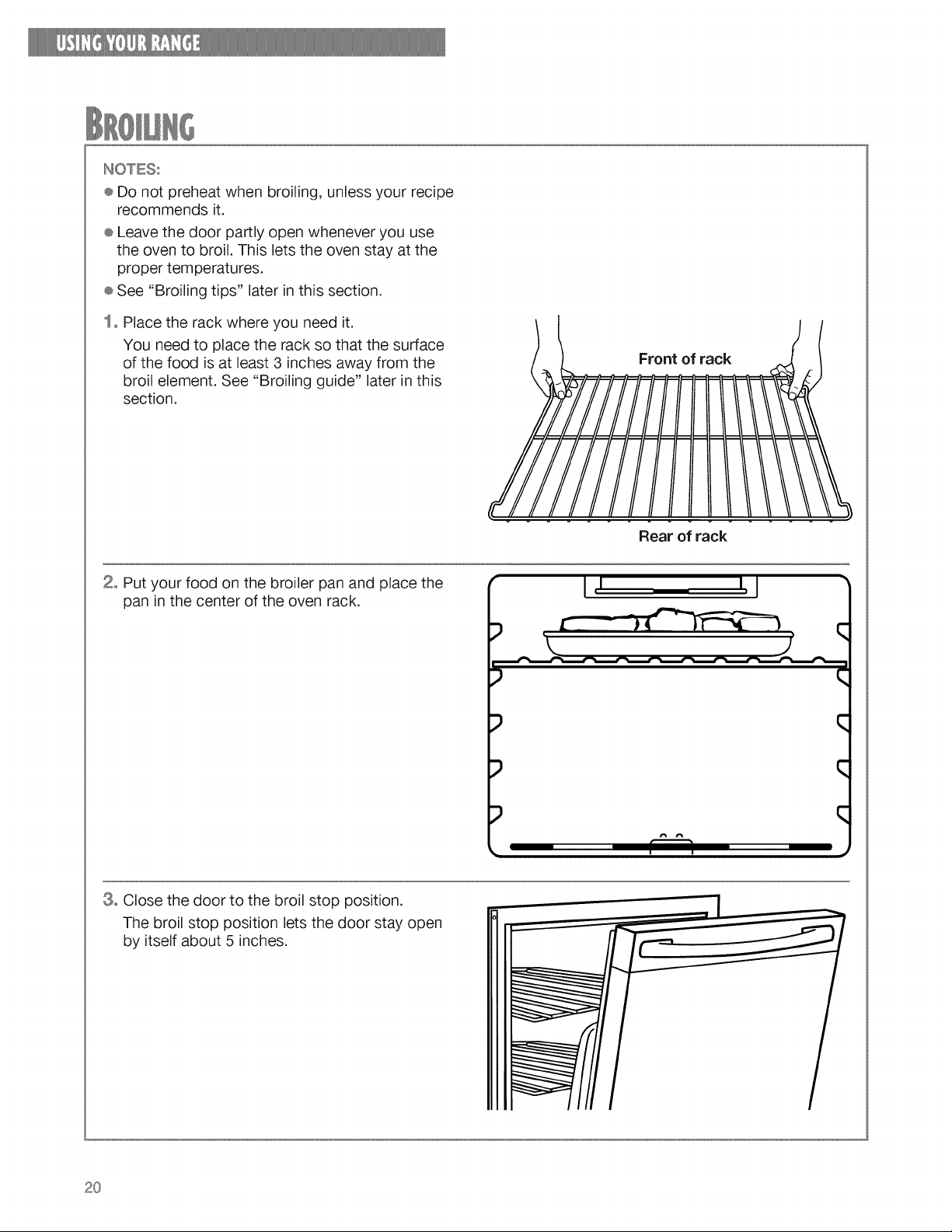
INOTESs
®Donotpreheatwhenbroiling,unlessyourrecipe
recommendsit.
÷Leavethedoorpartlyopenwheneveryouuse
theovento broil.Thisletstheovenstayatthe
propertemperatures.
÷See"Broilingtips" laterinthissection.
1° Placetherackwhereyouneedit.
Youneedto placetheracksothatthesurface
ofthefoodisat least3 inchesawayfromthe
broilelement.See"Broilingguide"laterinthis
section.
of rack
2° Putyourfoodonthebroilerpanandplacethe
paninthecenteroftheovenrack.
Rear of rack
I I I,J
) q
) q
q
8° Close the door to the broil stop position.
The broil stop position lets the door stay open
by itself about 5 inches.
2O
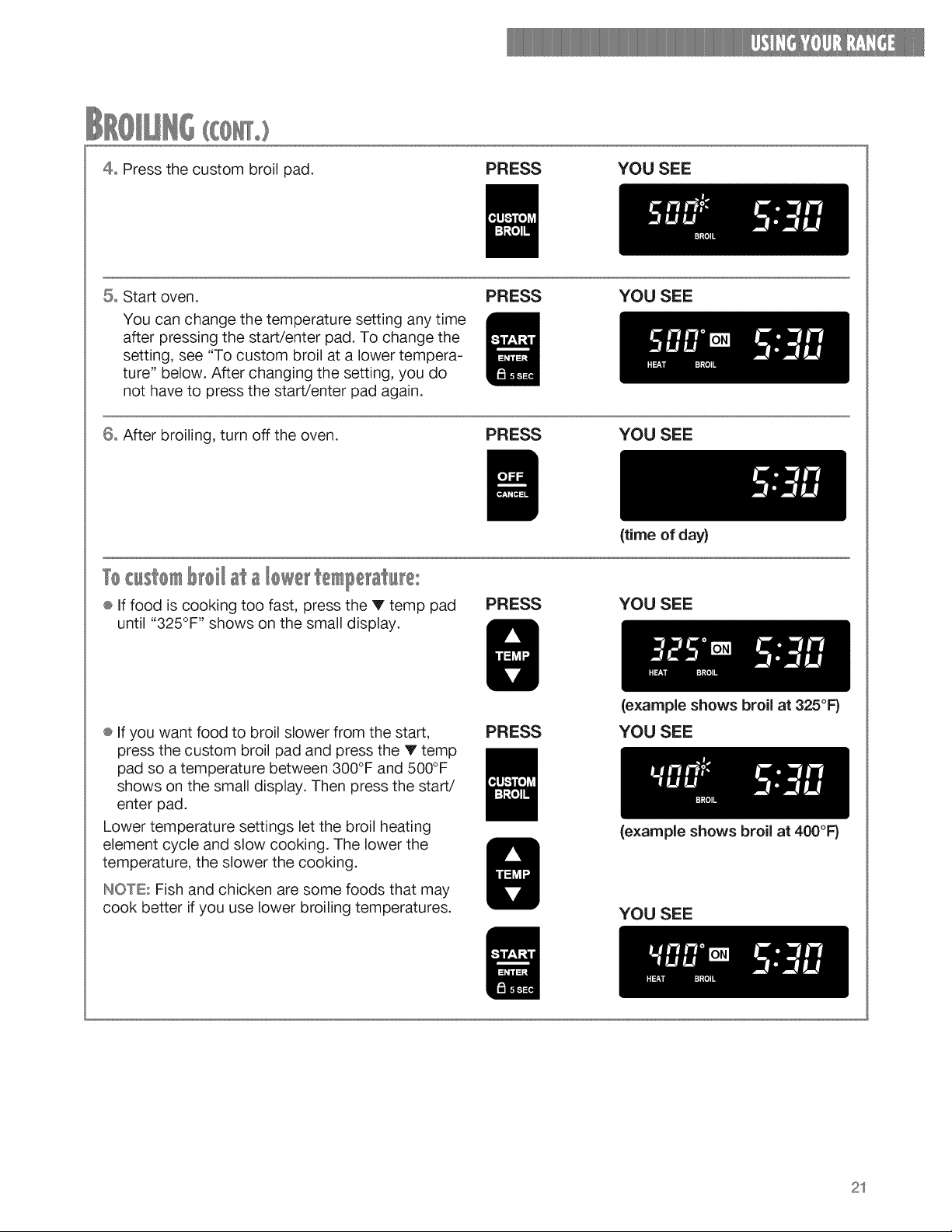
4oPressthecustombroilpad.
PRESS YOU SEE
5o Start oven.
You can change the temperature setting any time
after pressing the start/enter pad. To change the
setting, see "To custom broil at a lower tempera-
ture" below. After changing the setting, you do
not have to press the start/enter pad again.
PRESS YOU SEE
6o After broiling, turn off the oven.
PRESS YOU SEE
T¢c st m ata te ?erat te:
® If food is cooking too fast, press the V temp pad
until "325°F" shows on the small display.
PRESS
{time of day)
YOU SEE
® If you want food to broil slower from the start,
press the custom broil pad and press the V temp
pad so a temperature between 300°F and 500°F
shows on the small display. Then press the start/
enter pad.
Lower temperature settings let the broil heating
element cycle and slow cooking. The lower the
temperature, the slower the cooking.
INOTE: Fish and chicken are some foods that may
cook better if you use lower broiling temperatures.
PRESS
{example shows broil at 325°F)
YOU SEE
{example shows broil at 400°F}
YOU SEE
21
÷ Use the broiler pan and grid for broiling. They are
designed to drain extra liquid and grease away
from the cooking surface. This drainage helps
prevent spatter or smoke.
÷ Do not cover the broiler grid with foil.
÷ To make sure the grease drains well, do not use
cookie sheets or similar pans for broiling.
÷ Place food about 3 inches or more from the broil
element.
÷ After broiling, remove the broiler pan from the
oven when you remove the food. Drippings will
bake on the pan if you leave it in the heated oven.
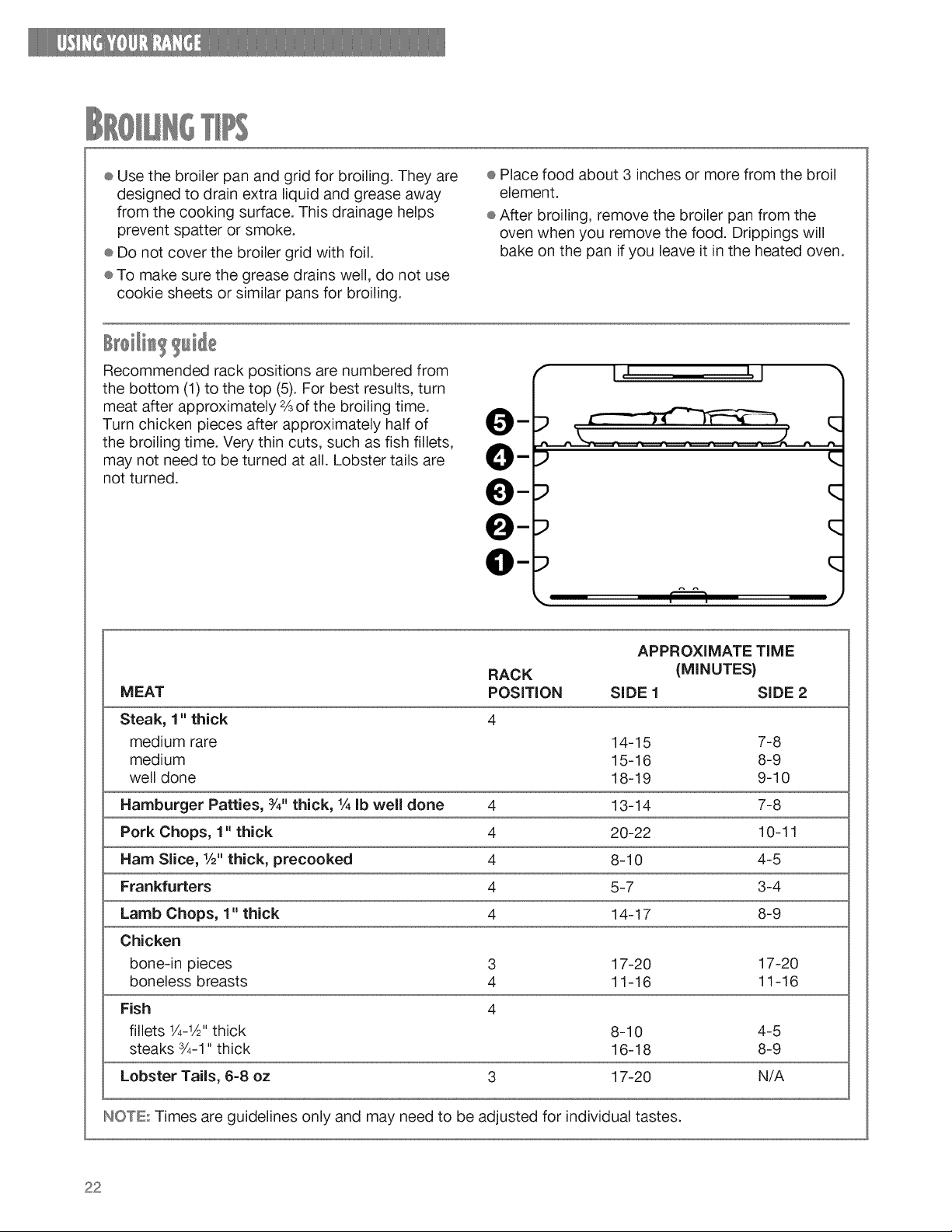
Recommended rack positions are numbered from
the bottom (1) to the top (5). For best results, turn
meat after approximately ¾ of the broiling time.
Turn chicken pieces after approximately half of
the broiling time. Very thin cuts, such as fish fillets,
may not need to be turned at all. Lobster tails are
not turned.
m
O-
O-
e-
O-
I, I I, I
) q
p q
P q
q
. r--q .)
MEAT
APPROXIMATE TiME
RACK (MINUTES)
POSITION SiDE 1 SiDE 2
Steak, 1" thick 4
medium rare 14-15 7-8
medium 15-16 8-9
well done 18-19 9-10
Hamburger Patties, 3/4"thick, IA Ib well done 4 13-14 7-8
Pork Chops, 1" thick 4 20-22 10-11
Ham Slice, 1/2"thick, precooked 4 8-10 4-5
Frankfurters 4 5-7 3-4
Lamb Chops, 1" thick 4 14-17 8-9
Chicken
bone-in pieces 3 17-20 17-20
boneless breasts 4 11-16 11-16
Fish 4
fillets 1/4-1A"thick 8-10 4-5
steaks 3/4-1"thick 16-18 8-9
Lobster Tails, 6=8 oz 3 17-20 N/A
NOTE: Times are guidelines only and may need to be adjusted for individual tastes.
22
BurnHazard
Usepotholders when touching items left
near oven vent.
Failure to do so can result in burns.
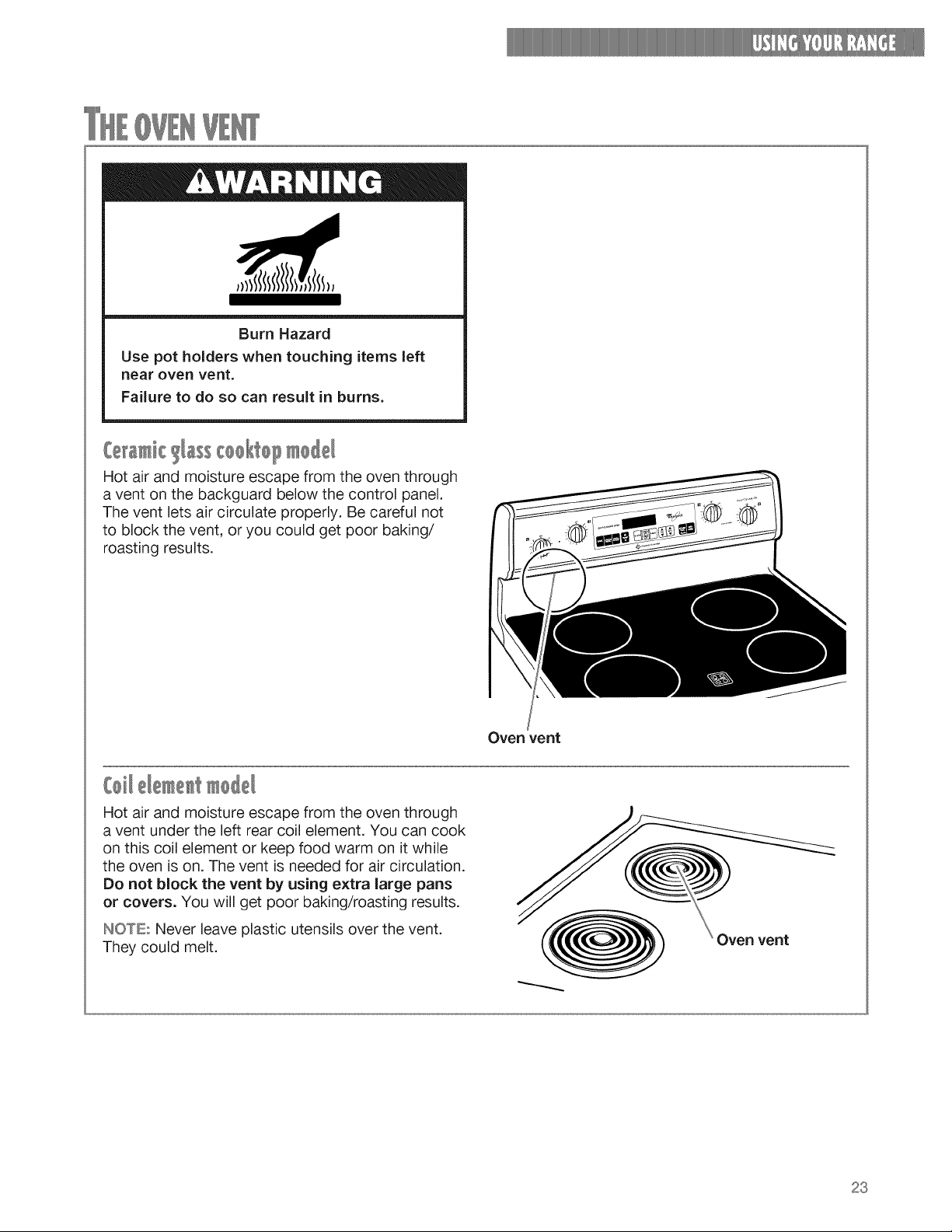
Hot air and moisture escape from the oven through
a vent on the backguard below the control panel.
The vent lets air circulate properly. Be careful not
to block the vent, or you could get poor baking/
roasting results.
Oven vent
Hot air and moisture escape from the oven through
a vent under the left rear coil element. You can cook
on this coil element or keep food warm on it while
the oven is on. The vent is needed for air circulation.
Do not block the vent by using extra large pans
or covers. You will get poor baking/roasting results.
INOTE:: Never leave plastic utensils over the vent.
They could melt.
Oven vent
23
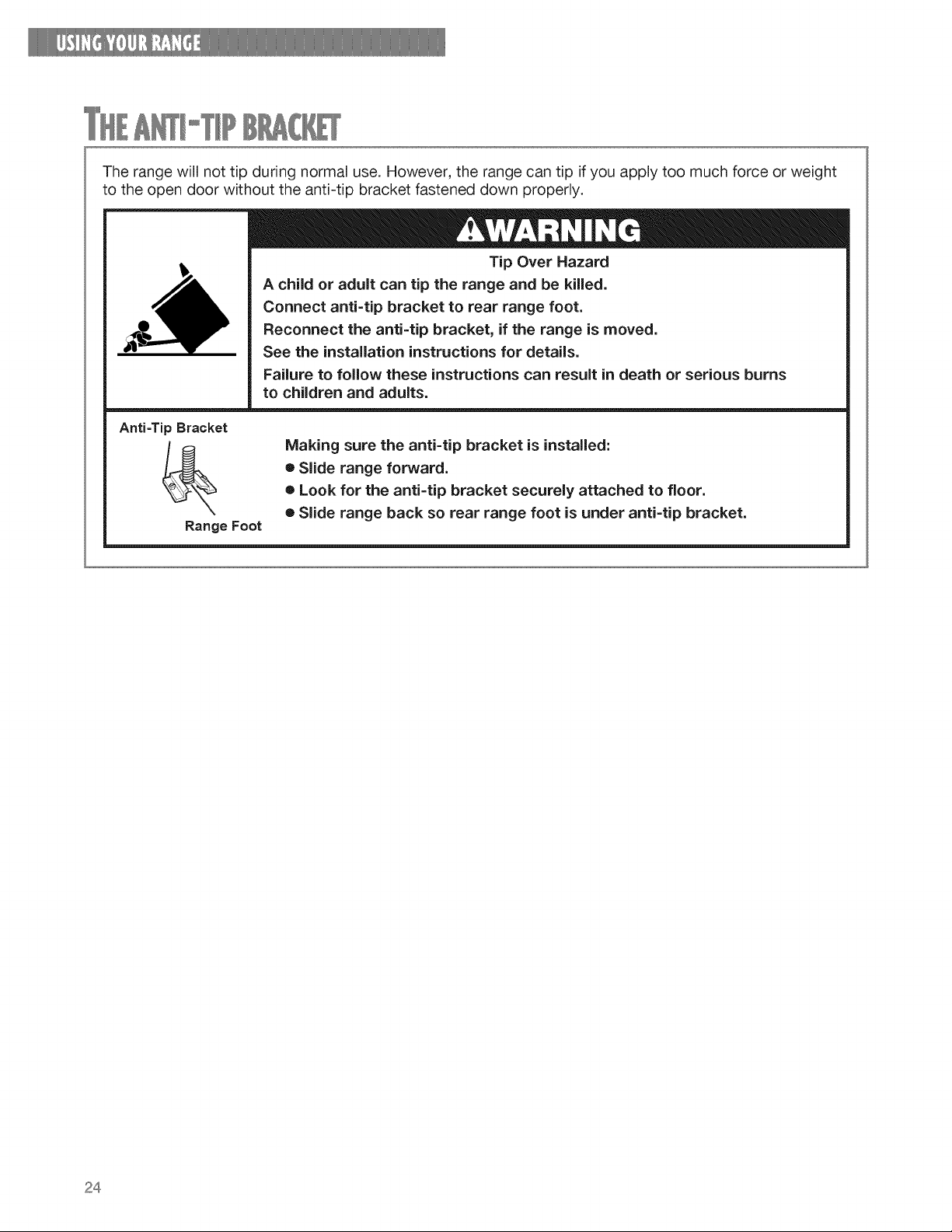
Therangewillnottip duringnormaluse.However,therangecantip ifyouapplytoomuchforceorweight
totheopendoorwithouttheanti-tipbracketfasteneddownproperly.
Tip Over Hazard
A child or adult can tip the range and be killed.
Connect anti=tip bracket to rear range foot.
Reconnect the anti=tip bracket, if the range is moved.
See the installation instructions for details.
Failure to follow these instructions can result in death or serious burns
to children and adults.
Anti-Tip Bracket
Range Foot
Making sure the anti=tip bracket is installed:
e Slide range forward.
e Look for the anti=tip bracket securely attached to floor.
• Slide range back so rear range foot is under anti=tip bracket.
24
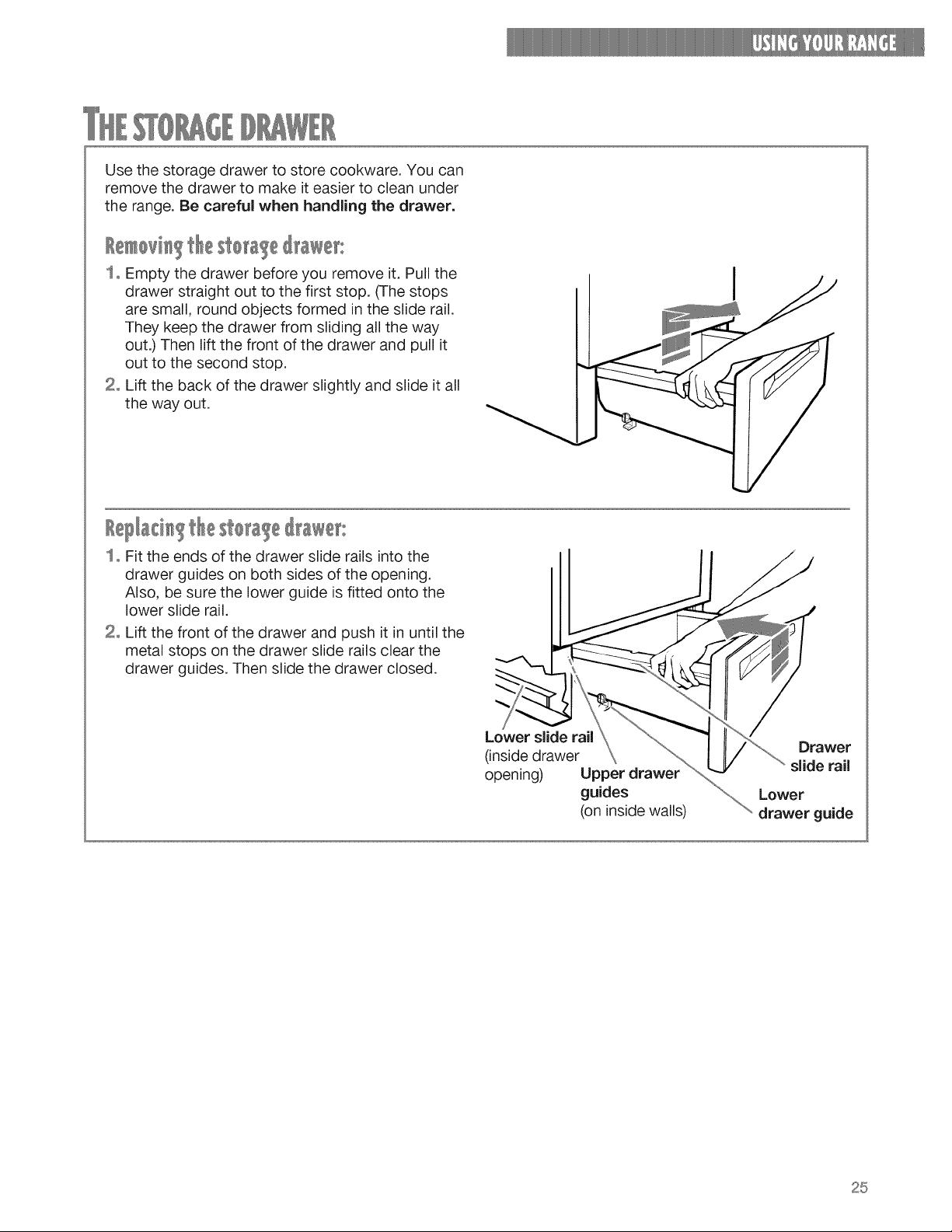
Usethe storagedrawerto storecookware.Youcan
removethedrawerto makeit easierto cleanunder
therange.Becarefulwhenhandlingthe drawer.
storage@awer:
1o Empty the drawer before you remove it. Pull the
drawer straight out to the first stop. (The stops
are small, round objects formed in the slide rail.
They keep the drawer from sliding all the way
out.) Then lift the front of the drawer and pull it
out to the second stop.
2o Lift the back of the drawer slightly and slide it all
the way out.
I
&d g sto 'age@awet:
So Fit the ends of the drawer slide rails into the
drawer guides on both sides of the opening.
Also, be sure the lower guide is fitted onto the
lower slide rail.
2° Lift the front of the drawer and push it in until the
metal stops on the drawer slide rails clear the
drawer guides. Then slide the drawer closed.
Lower slide rail
(inside drawer
opening) Upper drawer
guides
(on inside walls)
Drawer
slide rail
Lower
drawer guide
25
SELF-CtEANINCCYCU
The Self-Cleaning cycle saves you from the toil and mess that often come with hand-cleaning the
inside of the oven. Like the other functions of your range, you run the Self-Cleaning cycle with the
easy-to-use controls. Please review the instructions in this section to keep your oven spotless.
Burn Hazard
Do not touch the oven during the Self=Cleaning cycle.
Keep children away from oven during Self-Cleaning cycle.
Do not use commercial oven cleaners in your oven.
Failure to follow these instructions can result in burns, or illness from inhaling
dangerous fumes.
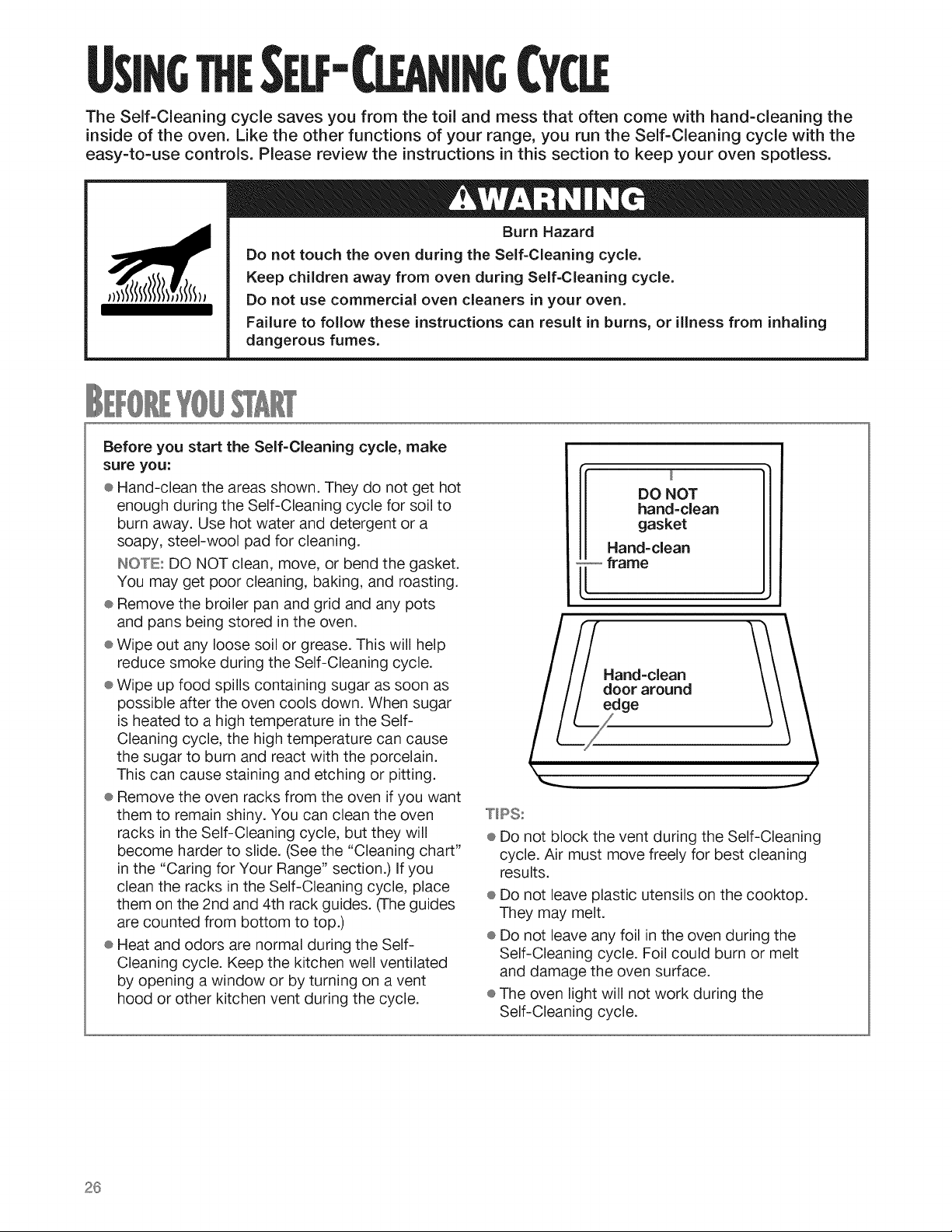
Before you start the Self-Cleaning cycle, make
sure you:
® Hand-clean the areas shown. They do not get hot
enough dunng the Self-Cleaning cycle for soil to
burn away. Use hot water and detergent or a
soapy, steel-wool pad for cleaning.
IN©TE: DO NOT clean, move, or bend the gasket.
You may get poor cleaning, baking, and roasting.
÷ Remove the broiler pan and grid and any pots
and pans being stored in the oven.
® Wipe out any loose soil or grease. This will help
reduce smoke during the Self-Cleaning cycle.
® Wipe up food spills containing sugar as soon as
possible after the oven cools down. When sugar
is heated to a high temperature in the Self-
Cleaning cycle, the high temperature can cause
the sugar to burn and react with the porcelain.
This can cause staining and etching or pitting.
® Remove the oven racks from the oven if you want
them to remain shiny. You can clean the oven
racks in the Self-Cleaning cycle, but they will
become harder to slide. (See the "Cleaning chart"
in the "Caring for Your Range" section.) if you
clean the racks in the Self-Cleaning cycle, place
them on the 2nd and 4th rack guides. (The guides
are counted from bottom to top.)
® Heat and odors are normal during the Self-
Cleaning cycle. Keep the kitchen well ventilated
by opening a window or by turning on a vent
hood or other kitchen vent during the cycle.
DO NOT
hand=clean
gasket
Hand-clean
frame
Hand=clean
door around
e
T_PS:
÷ Do not block the vent during the Self-Cleaning
cycle. Air must move freely for best cleaning
results.
÷ Do not leave plastic utensils on the cooktop.
They may melt.
÷ Do not leave any foil in the oven during the
Self-Cleaning cycle. Foil could burn or melt
and damage the oven surface.
÷ The oven light will not work during the
Self-Cleaning cycle.
26
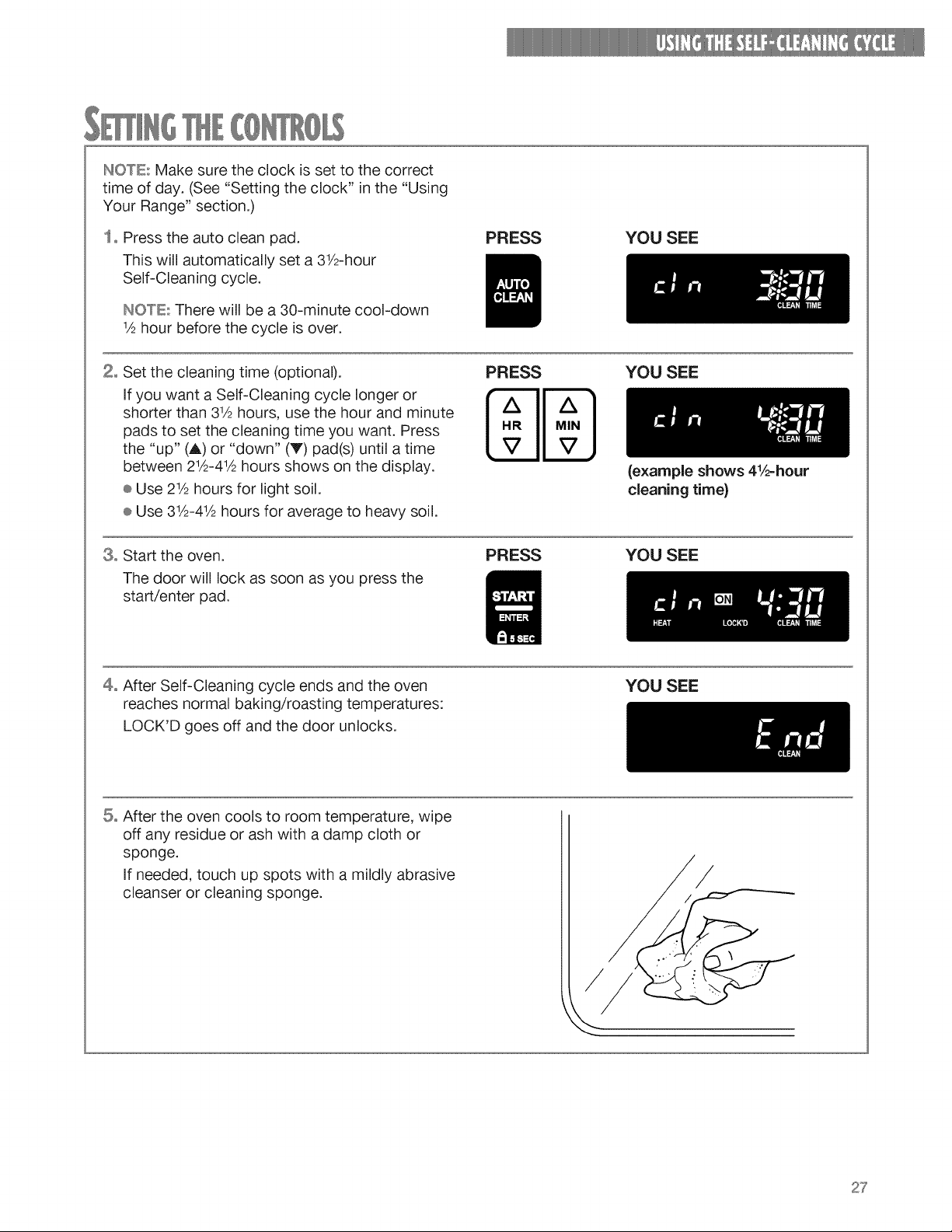
IN©TE..','Makesuretheclockissetto thecorrect
timeofday.(See"Settingtheclock"inthe"Using
YourRange"section.)
1oPresstheautocleanpad.
Thiswillautomaticallyseta 31/2-hour
Self-Cleaningcycle.
INO'TE:Therewill bea30-minutecool-down
½hourbeforethecycleisover.
PRESS YOU SEE
2° Set the cleaning time (optional).
If you want a Self-Cleaning cycle longer or
shorter than 31/2hours, use the hour and minute
pads to set the cleaning time you want. Press
the "up" (,_) or "down" (V) pad(s) until a time
between 2½-4½ hours shows on the display.
® Use 21/2hours for light soil.
÷ Use 31/2-41/2hours for average to heavy soil.
PRESS YOU SEE
8o Start the oven.
The door will lock as soon as you press the
start/enter pad.
PRESS
(example shows 4½=hour
cleaning time}
YOU SEE
4° After Self-Cleaning cycle ends and the oven
reaches normal baking/roasting temperatures:
LOCK'D goes off and the door unlocks.
YOU SEE
5° After the oven cools to room temperature, wipe
off any residue or ash with a damp cloth or
sponge.
If needed, touch up spots with a mildly abrasive
cleanser or cleaning sponge.
/
27
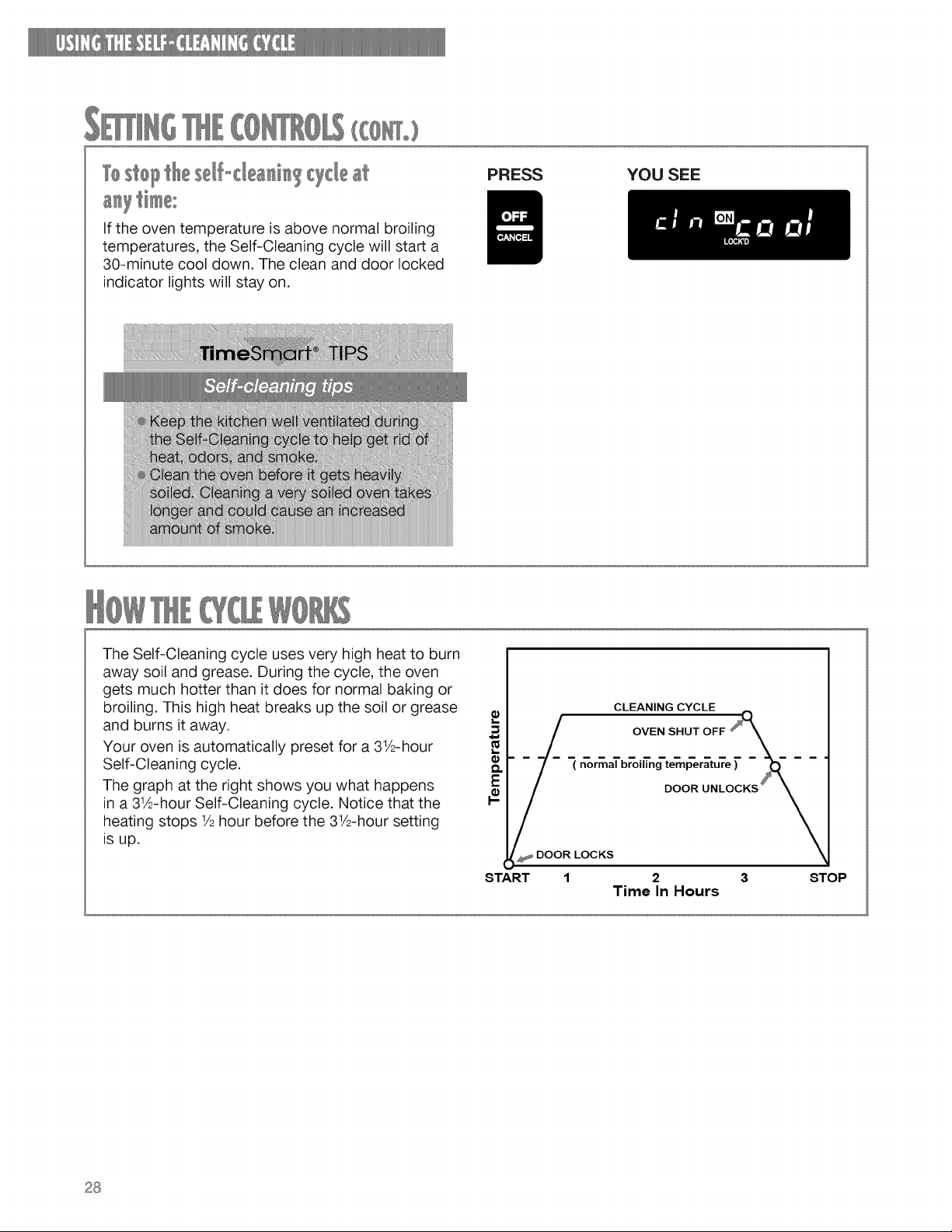
West@I tle sel,-dea_i_ Wclcle at
PRESS YOU SEE
If the oven temperature is above normal broiling
temperatures, the Self-Cleaning cycle will start a
30-minute cool down. The clean and door locked
indicator lights will stay on.
The Self-Cleaning cycle uses very high heat to burn
away soil and grease. During the cycle, the oven
gets much hotter than it does for normal baking or
broiling. This high heat breaks up the soil or grease
and burns it away.
Your oven is automatically preset for a 31_2-hour
Self-Cleaning cycle.
The graph at the right shows you what happens
in a 31A-hour Self-Cleaning cycle. Notice that the
heating stops 1/2hour before the 31_2-hoursetting
is up.
!
CLEANING CYCLE
.___ OVEN SHUT OFF _____,
-7- (normalbr'oi_ng-te"mp"er_tu're)"-_--
_DOOR LOCKS DOOR UNLOCKS_
START 2 3
Time In Hours
STOP
28
Your range is designed so you can care for it easily. You can do most cleaning with items found
around your home. Cleaning your range whenever spills or soiling occurs will help to keep it
looking and working like new.
, oo.z,
Do not store flammable materials such as gasoline near this appliance.
Doing so can result in death, explosion, or fire.
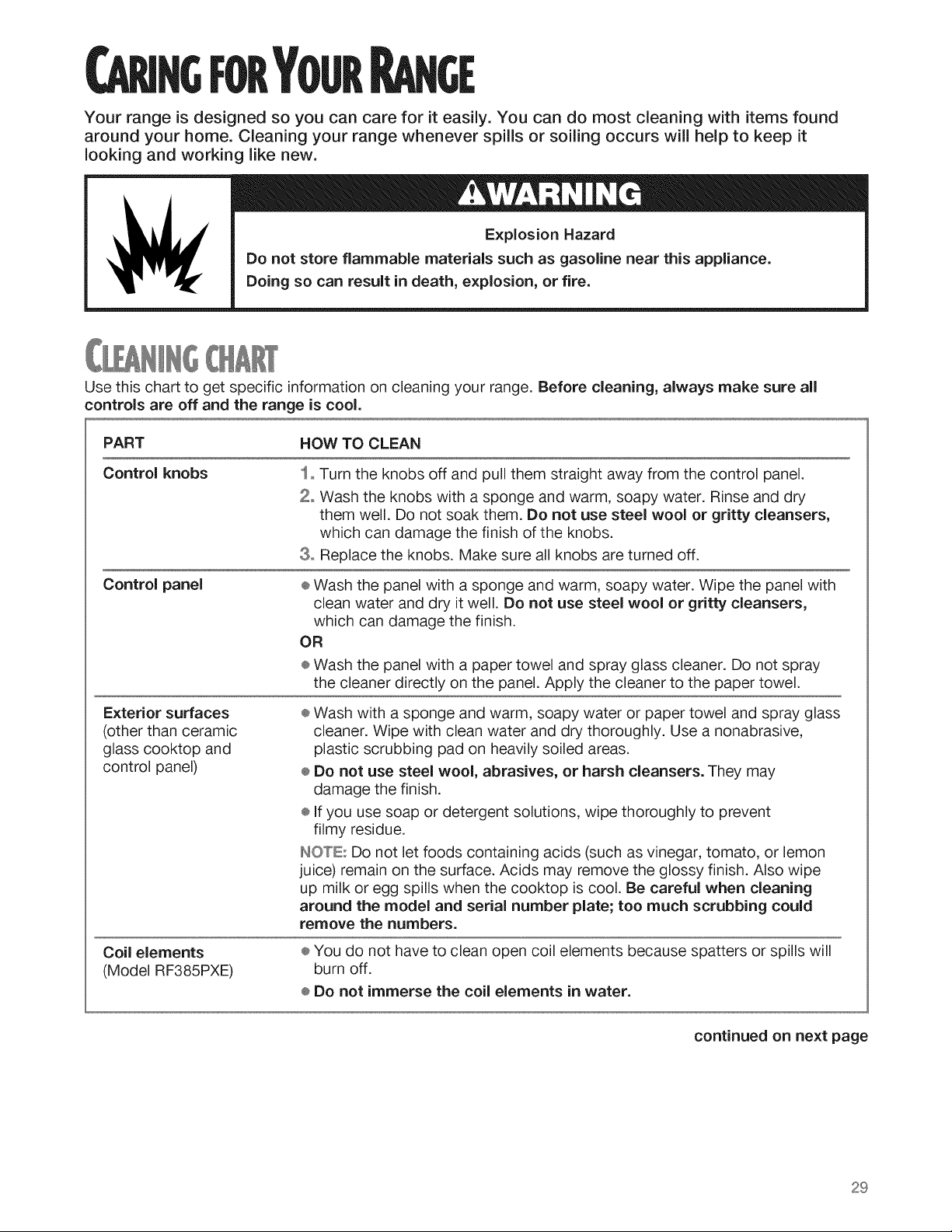
Use this chart to get specific information on cleaning your range. Before cleaning, always make sure all
controls are off and the range is cool.
PART HOW TO CLEAN
Control knobs
Control panel
Exterior surfaces
(other than ceramic
glass cooktop and
control panel)
Coil elements
(Model RF385PXE)
1o Turn the knobs off and pull them straight away from the control panel.
2. Wash the knobs with a sponge and warm, soapy water. Rinse and dry
them well. Do not soak them. Do not use steel wool or gritty cleansers,
which can damage the finish of the knobs.
3o Replace the knobs. Make sure all knobs are turned off.
÷ Wash the panel with a sponge and warm, soapy water. Wipe the panel with
clean water and dry it well. Do not use steel wool or gritty cleansers,
which can damage the finish.
OR
÷ Wash the panel with a paper towel and spray glass cleaner. Do not spray
the cleaner directly on the panel. Apply the cleaner to the paper towel.
÷ Wash with a sponge and warm, soapy water or paper towel and spray glass
cleaner. Wipe with clean water and dry thoroughly. Use a nonabrasive,
plastic scrubbing pad on heavily soiled areas.
® Do not use steel wool, abrasives, or harsh cleansers. They may
damage the finish.
® If you use soap or detergent solutions, wipe thoroughly to prevent
filmy residue.
INO'_'LEr:DO not let foods containing acids (such as vinegar, tomato, or lemon
juice) remain on the surface. Acids may remove the glossy finish. Also wipe
up milk or egg spills when the cooktop is cool. Be careful when cleaning
around the model and serial number plate; too much scrubbing could
remove the numbers.
® You do not have to clean open coil elements because spatters or spills will
burn off.
÷ Do not immerse the coil elements in water.
continued on next page
29
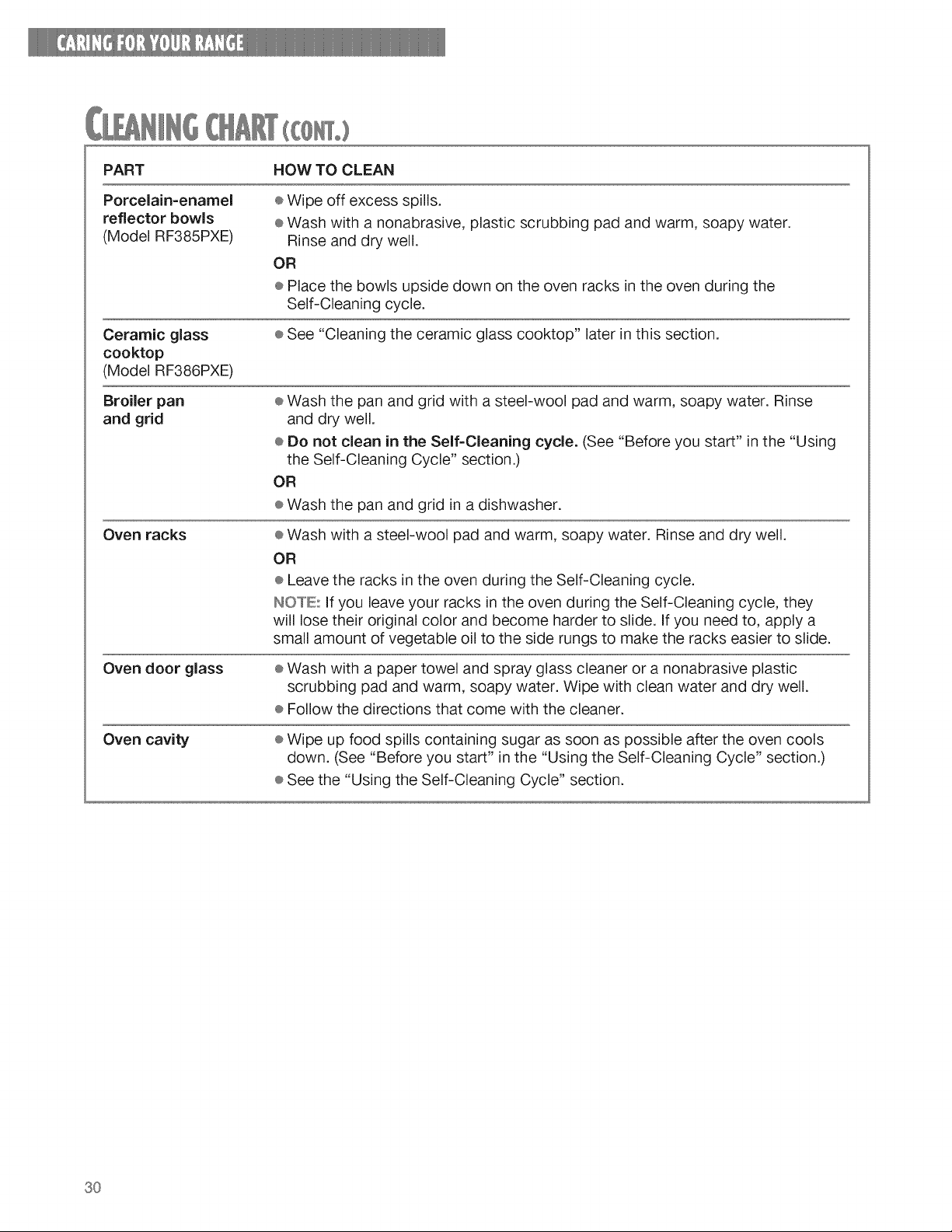
PART HOWTOCLEAN
Porcelain=enamel
reflector bowls
(Model BF385PXE)
Ceramic glass
cooktop
(Model BF386PXE)
Broiler pan
and grid
Oven racks
Oven door glass
Oven cavity
÷ Wipe off excess spills.
® Wash with a nonabrasive, plastic scrubbing pad and warm, soapy water.
Rinse and dry well.
OR
÷ Place the bowls upside down on the oven racks in the oven during the
Self-Cleaning cycle.
÷ See "Cleaning the ceramic glass cooktop" later in this section.
÷ Wash the pan and grid with a steel-wool pad and warm, soapy water. Rinse
and dry well.
÷ Do not clean in the Self=Cleaning cycle. (See "Before you start" in the "Using
the Self-Cleaning Cycle" section.)
OR
÷ Wash the pan and grid in a dishwasher.
÷ Wash with a steel-wool pad and warm, soapy water. Rinse and dry well.
OR
® Leave the racks in the oven during the Self-Cleaning cycle.
INOI°'E:If you leave your racks in the oven during the Self-Cleaning cycle, they
will lose their original color and become harder to slide. If you need to, apply a
small amount of vegetable oil to the side rungs to make the racks easier to slide.
÷ Wash with a paper towel and spray glass cleaner or a nonabrasive plastic
scrubbing pad and warm, soapy water. Wipe with clean water and dry well.
÷ Follow the directions that come with the cleaner.
÷ Wipe up food spills containing sugar as soon as possible after the oven cools
down. (See "Before you start" in the "Using the Self-Cleaning Cycle" section.)
÷ See the "Using the Self-Cleaning Cycle" section.
3O
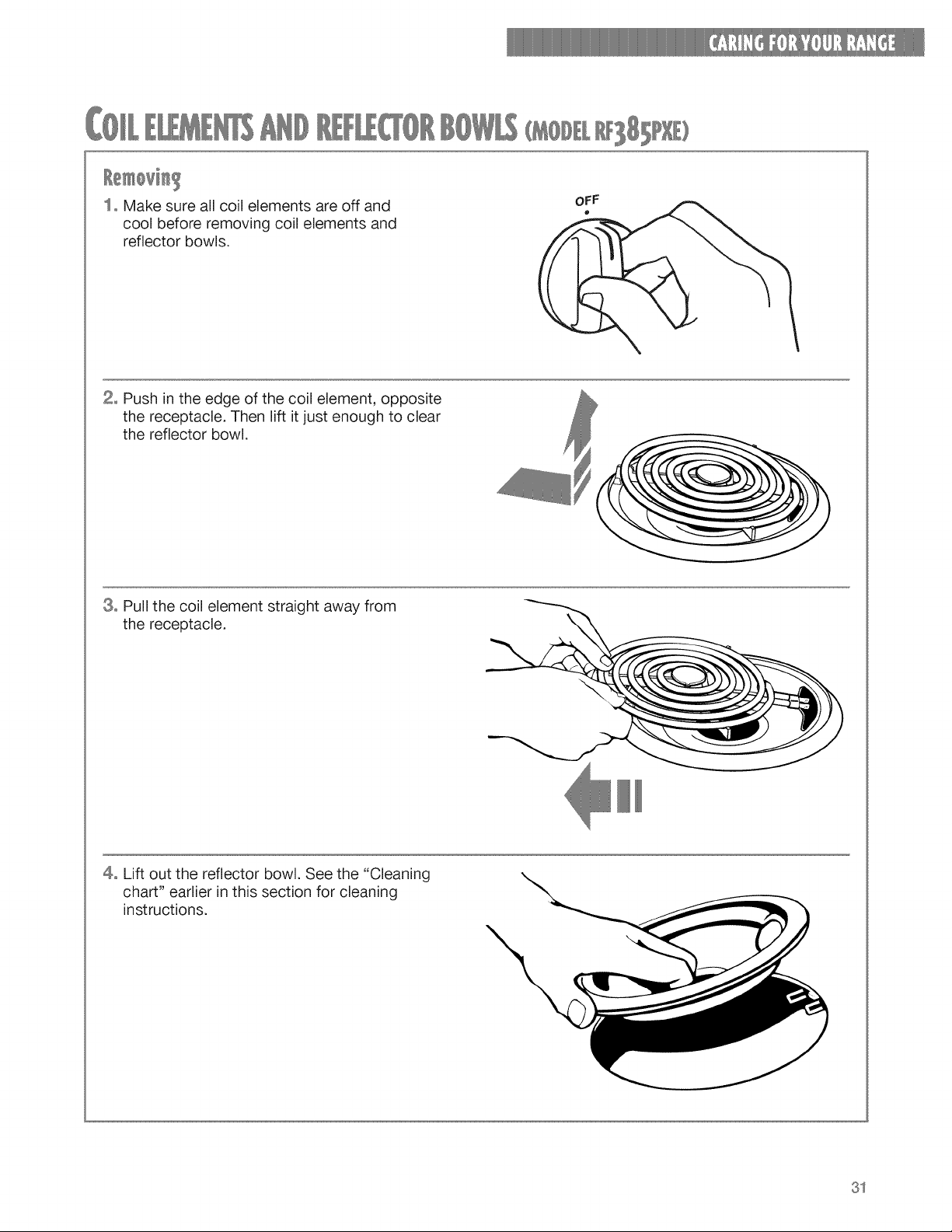
( 81 )
1= Make sure all coil elements are off and
cool before removing coil elements and
reflector bowls.
2° Push in the edge of the coil element, opposite
the receptacle. Then lift it just enough to clear
the reflector bowl.
3° Pull the coil element straight away from
the receptacle.
\
4° Lift out the reflector bowl. See the "Cleaning
chart" earlier in this section for cleaning
instructions.
31
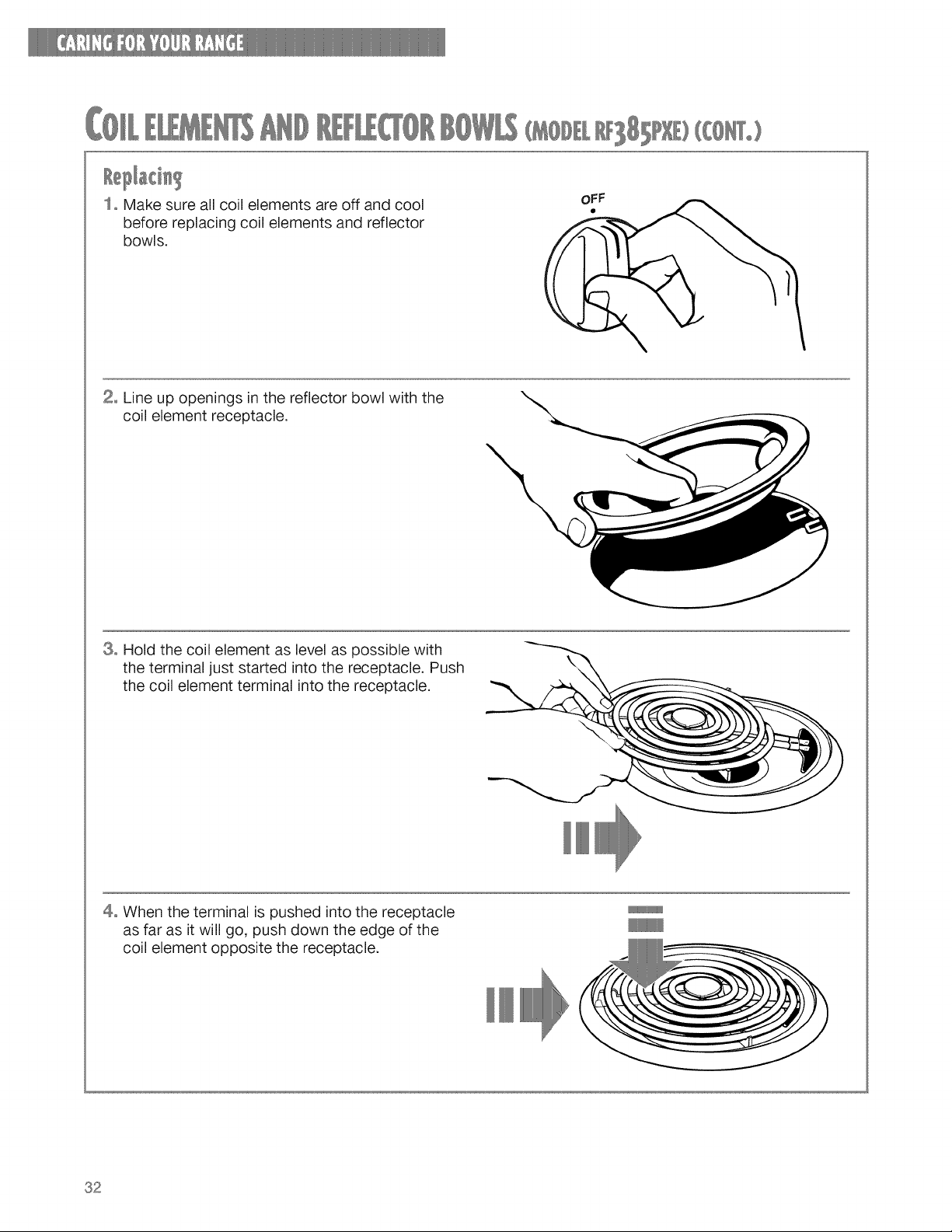
81 )([ °)
1= Make sure all coil elements are off and cool
before replacing coil elements and reflector
bowls.
oFF
(
2= Line up openings in the reflector bowl with the
coil element receptacle.
3= Hold the coil element as level as possible with
the terminal just started into the receptacle. Push
the coil element terminal into the receptacle.
\
4° When the terminal is pushed into the receptacle
as far as it will go, push down the edge of the
coil element opposite the receptacle.
32
INOTE:Reflectorbowlsreflectheatbacktothe
cookwareonthecol elements.Theyalsohelp
catchspills.Whentheyarekeptclean,they
reflectheatbetterandlooknewlonger.
Ifareflectorbowlchangescolor,someof your
cookwaremaynotbefiatenough,or somemaybe
toolargeforthecoilelement.Ineithercase,some
oftheheatthat'smeanttogo intooraroundcook-
waregoesdownandheatsthereflectorbowl.This
extraheatcancauseit tochangecolor.
( 81
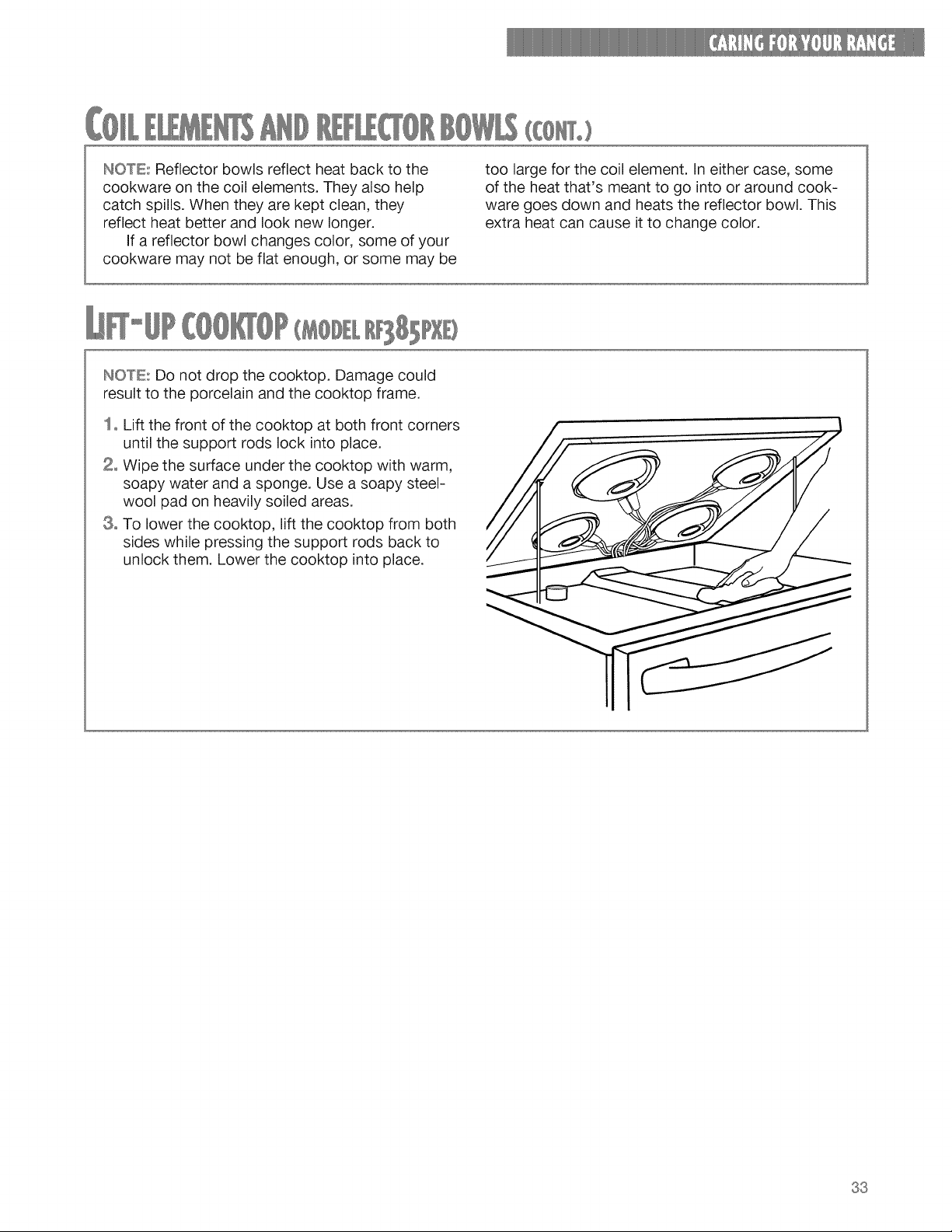
INOTE: Do not drop the cooktop. Damage could
result to the porcelain and the cooktop frame.
1= Lift the front of the cooktop at both front corners
until the support rods lock into place.
2= Wipe the surface under the cooktop with warm,
soapy water and a sponge. Use a soapy steel-
wool pad on heavily soiled areas.
8° To lower the cooktop, lift the cooktop from both
sides while pressing the support rods back to
unlock them. Lower the cooktop into place.
33
( 8 E)
Your cooktop is designed for easy care. However,
you need to maintain your ceramic glass cooktop
differently than you would standard electric open-
coil elements. Foods spilled directly on the cooktop
will not burn off as on open-coil elements. Because
of this, you should keep the surface dust free and
soil free before heating.
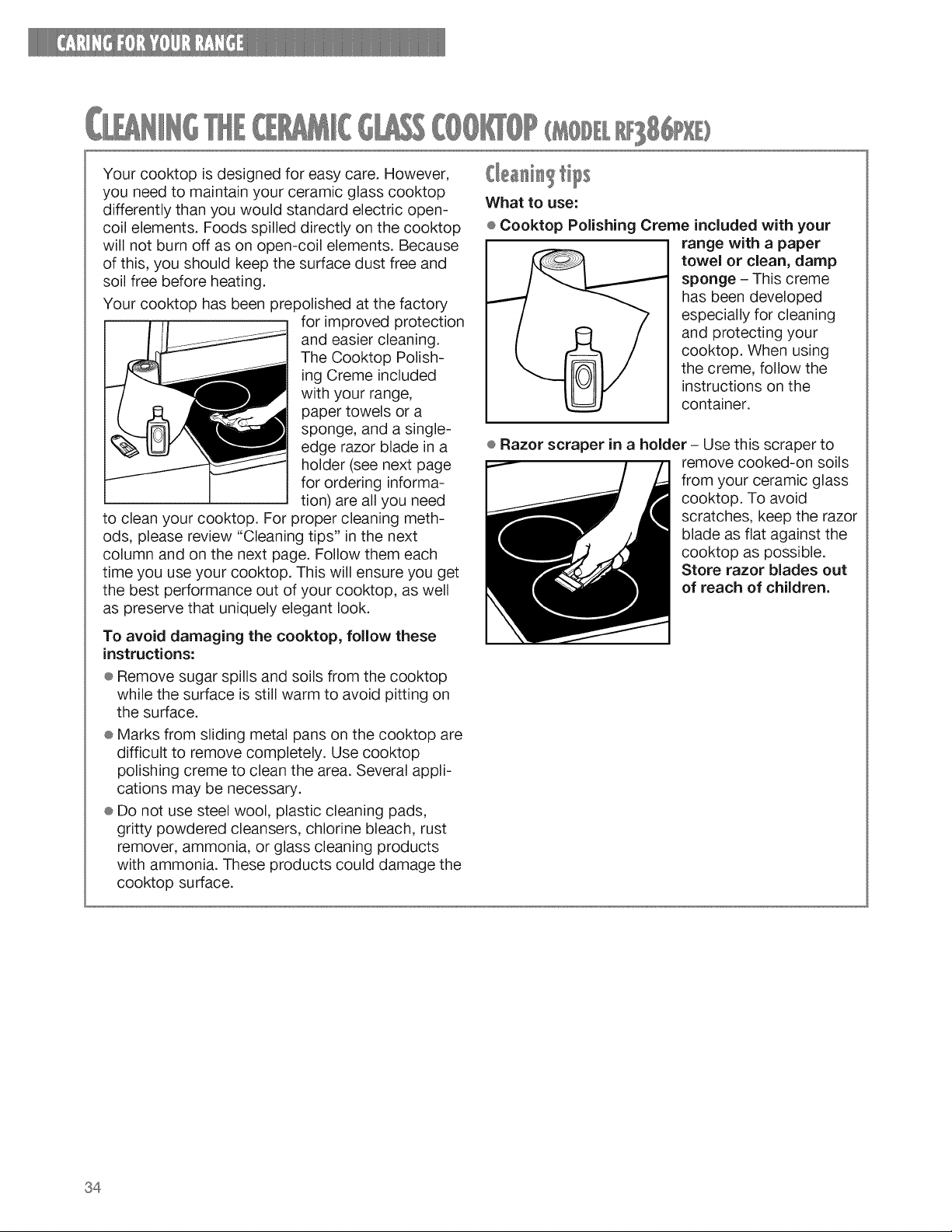
Your cooktop has been prepolished at the factory
for improved protection
and easier cleaning.
The Cooktop Polish-
ing Creme included
with your range,
paper towels or a
sponge, and a single-
edge razor blade in a
holder (see next page
for ordering informa-
tion) are all you need
to clean your cooktop. For proper cleaning meth-
ods, please review "Cleaning tips" in the next
column and on the next page. Follow them each
time you use your cooktop. This will ensure you get
the best performance out of your cooktop, as well
as preserve that uniquely elegant look.
To avoid damaging the cooktop, follow these
instructions:
® Remove sugar spills and soils from the cooktop
while the surface is still warm to avoid pitting on
the surface.
® Marks from sliding metal pans on the cooktop are
difficult to remove completely. Use cooktop
polishing creme to clean the area. Several appli-
cations may be necessary.
® Do not use steel wool, plastic cleaning pads,
gritty powdered cleansers, chlorine bleach, rust
remover, ammonia, or glass cleaning products
with ammonia. These products could damage the
cooktop surface.
What to use:
÷ Cooktop Polishing Creme included with your
range with a paper
towel or clean, damp
sponge - This creme
has been developed
especially for cleaning
and protecting your
cooktop. When using
the creme, follow the
instructions on the
container.
e Razor scraper in a holder - Use this scraper to
remove cooked-on soils
from your ceramic glass
cooktop. To avoid
scratches, keep the razor
blade as flat against the
cooktop as possible.
Store razor blades out
of reach of children.
34
(£8) (To)
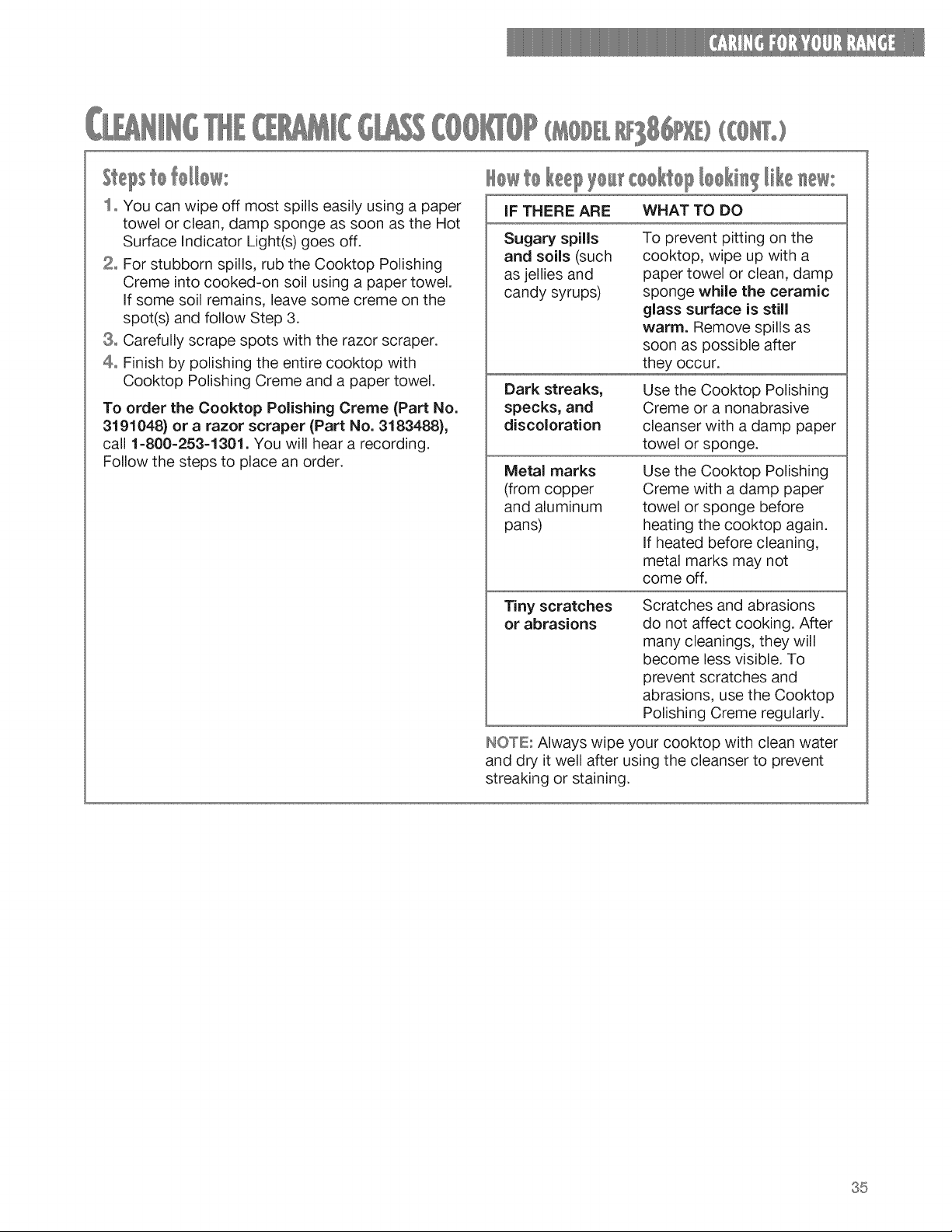
ltepstoM/0w:
1o You can wipe off most spills easily using a paper
towel or clean, damp sponge as soon as the Hot
Surface Indicator Light(s) goes off.
2= For stubborn spills, rub the Cooktop Polishing
Creme into cooked-on soil using a paper towel.
If some soil remains, leave some creme on the
spot(s) and follow Step 3.
@=Carefully scrape spots with the razor scraper.
4= Finish by polishing the entire cooktop with
Cooktop Polishing Creme and a paper towel.
To order the Cooktop Polishing Creme (Part No.
3191048) or a razor scraper (Part No. 3183488),
call 1=800=253=1301. You will hear a recording.
Follow the steps to place an order.
Howto t coo top oo i /ke ew:
IF THERE ARE WHAT TO DO
Sugary spills
and soils (such
as jellies and
candy syrups)
Dark streaks,
specks, and
discoloration
Metal marks
(from copper
and aluminum
pans)
To prevent pitting on the
cooktop, wipe up with a
paper towel or clean, damp
sponge while the ceramic
glass surface is still
warm. Remove spills as
soon as possible after
they occur.
Use the Cooktop Polishing
Creme or a nonabrasive
cleanser with a damp paper
towel or sponge.
Use the Cooktop Polishing
Creme with a damp paper
towel or sponge before
heating the cooktop again.
If heated before cleaning,
metal marks may not
come off.
Tiny scratches
or abrasions
Scratches and abrasions
do not affect cooking. After
many cleanings, they will
become less visible. To
prevent scratches and
abrasions, use the Cooktop
Polishing Creme regularly.
IHOTE: Always wipe your cooktop with clean water
and dry it well after using the cleanser to prevent
streaking or staining.
35
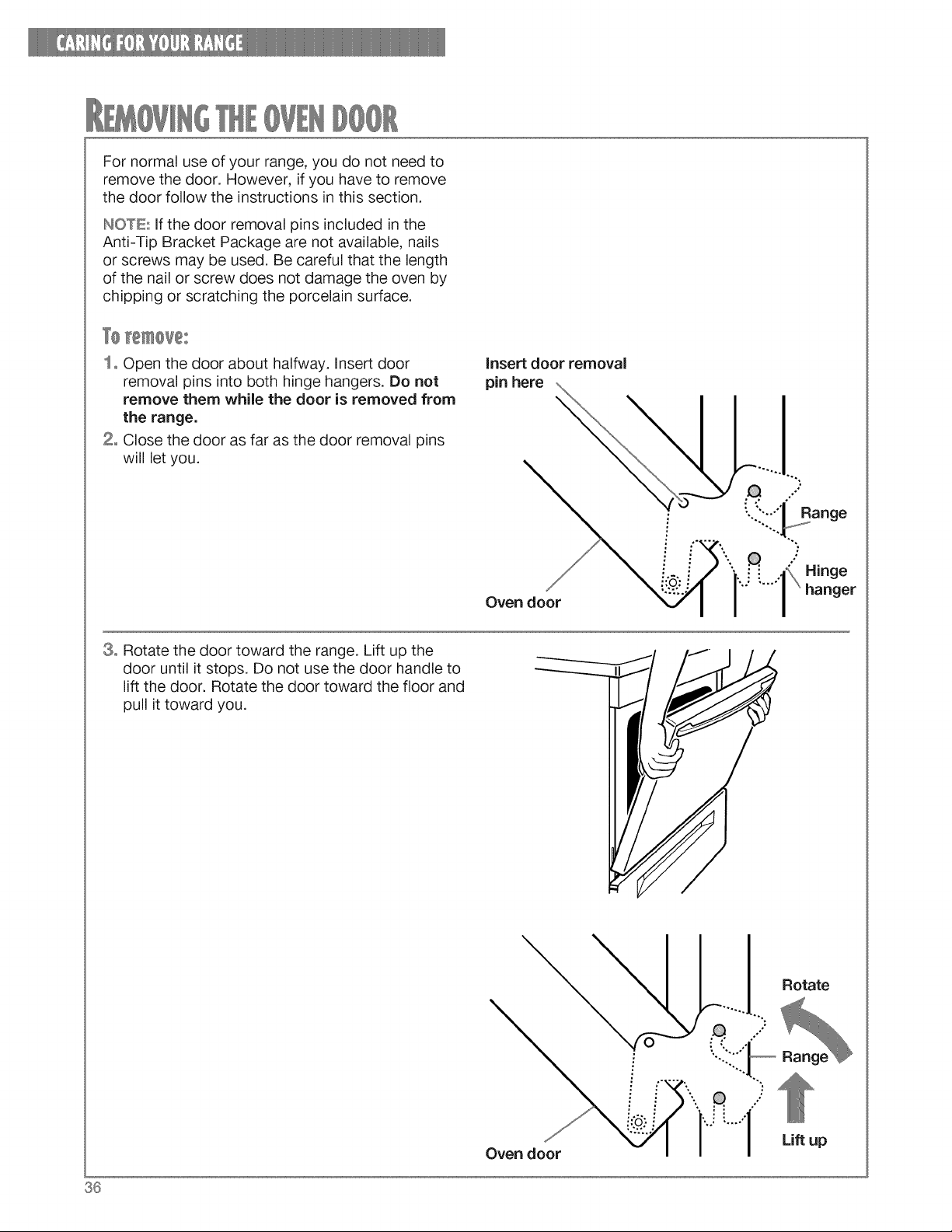
Fornormaluseofyourrange,youdonotneedto
removethedoor.However,ifyouhaveto remove
thedoorfollowthe instructionsinthissection.
INOTE.:ifthedoorremovalpinsincludedinthe
Anti-TipBracketPackagearenotavailable,nails
orscrewsmaybeused.Becarefulthatthelength
ofthenailorscrewdoesnotdamagetheovenby
chippingor scratchingtheporcelainsurface.
1oOpenthedoorabouthalfway,insertdoor
removalpinsintobothhingehangers.Donot
removethemwhilethedooris removedfrom
therange.
2° Closethedoorasfarasthedoorremovalpins
willletyou.
insert door removal
pin here
Oven door
Range
<,XHinge
hanger
8o Rotate the door toward the range. Lift up the
door until it stops. Do not use the door handle to
lift the door. Rotate the door toward the floor and
pull it toward you.
Oven door
Rotate
Lift up
36
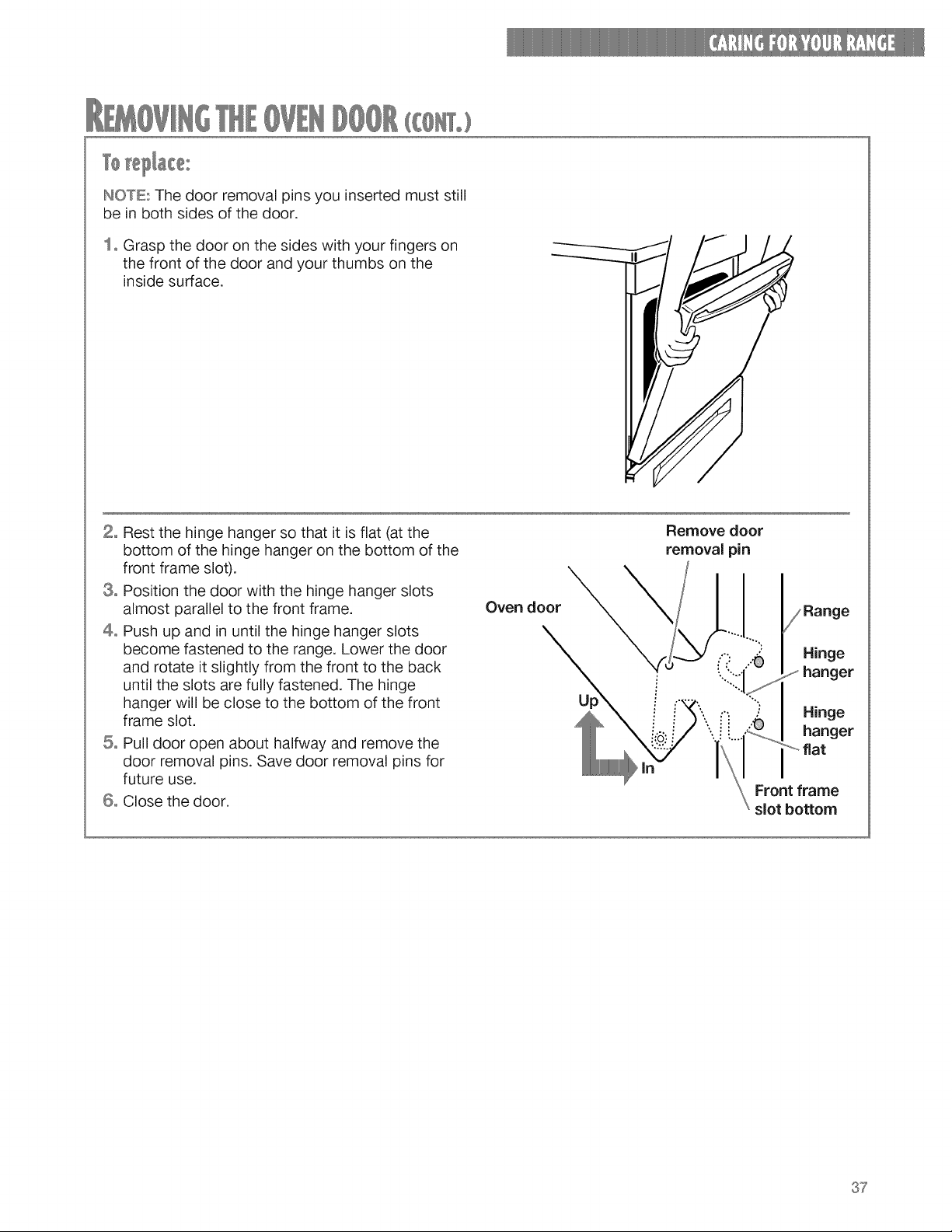
HOWE:Thedoorremovalpinsyouinsertedmuststill
bein bothsidesofthedoor.
1° Graspthedooronthesideswithyourfingerson
thefrontofthedoorandyourthumbsonthe
insidesurface.
2=Restthehingehangersothatit isflat(atthe
bottomofthehingehangeronthebottomofthe
frontframeslot).
8° Positionthedoorwiththe hingehangerslots
almostparallelto thefrontframe.
4° Pushupandin untilthehingehangerslots
becomefastenedto therange.Lowerthedoor
androtateit slightlyfromthe frontto theback
untiltheslotsarefullyfastened.Thehinge
hangerwillbeclosetothebottomofthefront
frameslot.
5° Pulldooropenabouthalfwayandremovethe
doorremovalpins.Savedoorremovalpinsfor
futureuse.
6=Closethedoor.
Oven door
Remove door
removal pin
Hinge
hanger
Front frame
slot bottom
37
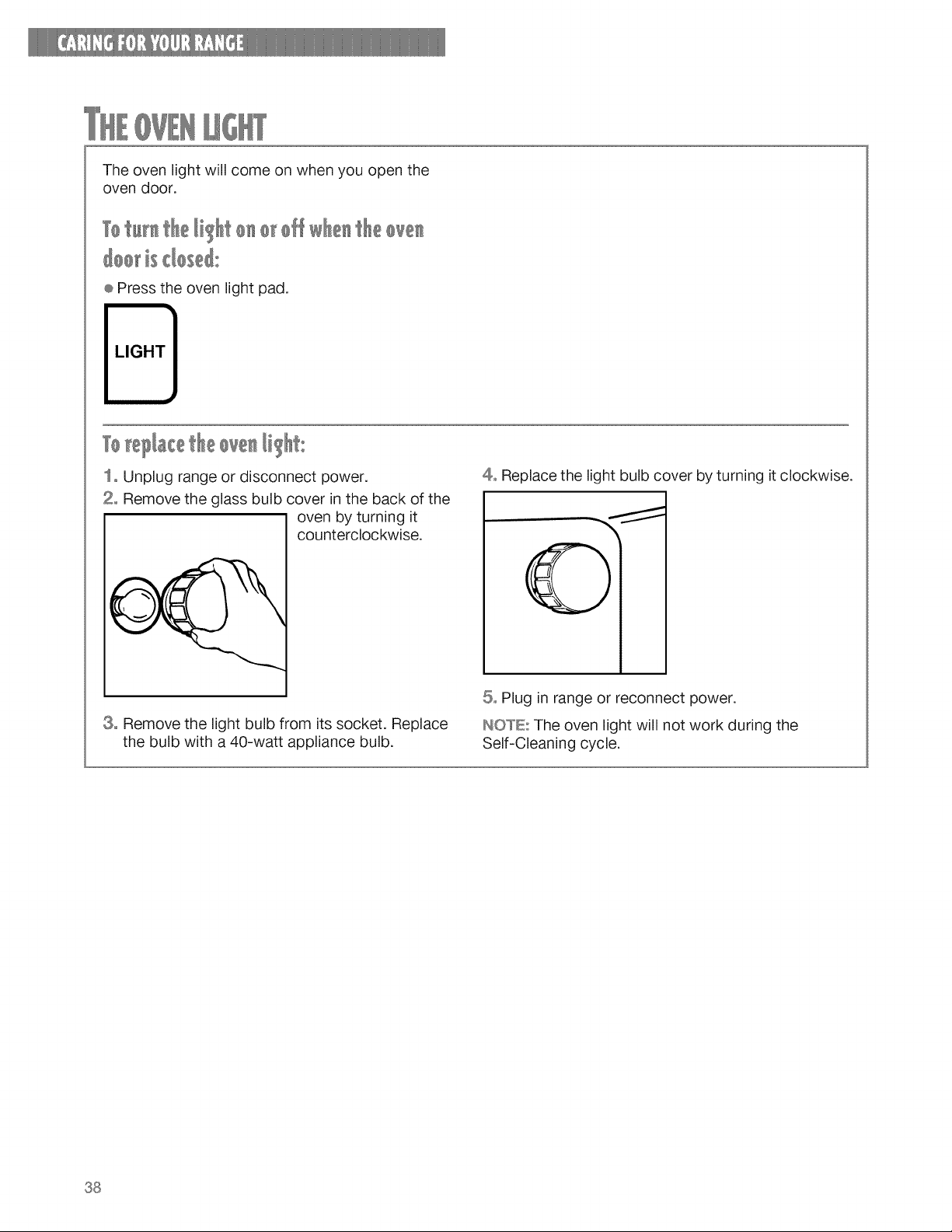
Theovenlightwillcomeonwhenyouopenthe
ovendoor,
TotH_theli o_o_offw t£eove_
@o_isdos@
÷ Press the oven light pad.
LIGHT
I_ te?l_cet£e@ve_I o
1= Unplug range or disconnect power.
2° Remove the glass bulb cover in the back of the
oven by turning it
counterclockwise.
3° Remove the light bulb from its socket. Replace
the bulb with a 40-watt appliance bulb.
4° Replace the light bulb cover by turning it clockwise.
5° Plug in range or reconnect power.
HOWE: The oven light will not work during the
Self-Cleaning cycle.
38
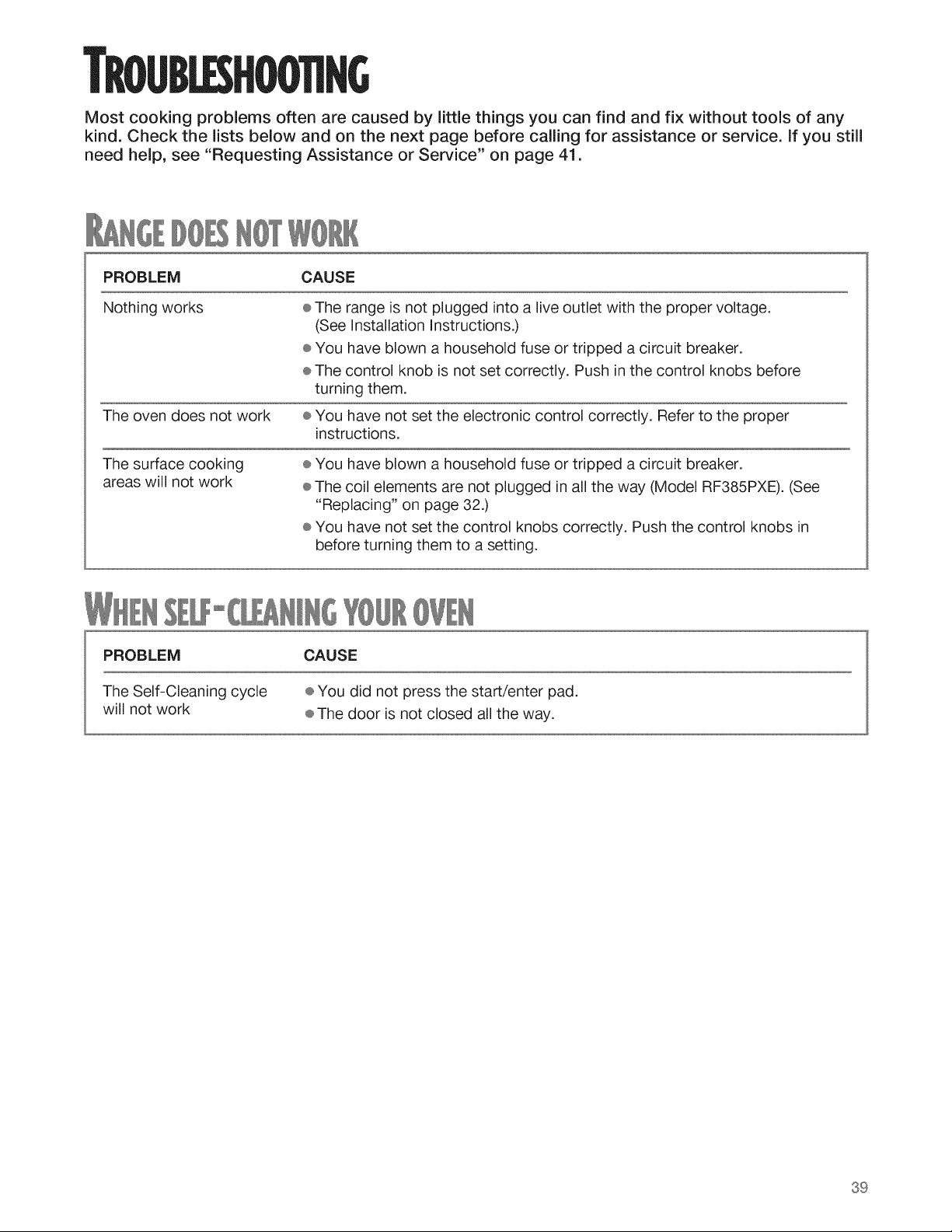
TROUBLESHOO'nNG
Most cooking problems often are caused by little things you can find and fix without tools of any
kind. Check the lists below and on the next page before calling for assistance or service, if you still
need help, see "Requesting Assistance or Service" on page 41.
PROBLEM CAUSE
Nothing works ÷ The range is not plugged into a live outlet with the proper voltage.
(See Installation Instructions.)
÷ You have blown a household fuse or tripped a circuit breaker.
÷ The control knob is not set correctly. Push in the control knobs before
turning them.
The oven does not work ÷ You have not set the electronic control correctly. Refer to the proper
instructions.
The surface cooking
areas will not work
÷ You have blown a household fuse or tripped a circuit breaker.
÷ The coil elements are not plugged in all the way (Model RF385PXE). (See
"Replacing" on page 32.)
÷ You have not set the control knobs correctly. Push the control knobs in
before turning them to a setting.
PROBLEM CAUSE
The Self-Cleaning cycle ÷ You did not press the start/enter pad.
will not work ÷ The door is not closed all the way.
39
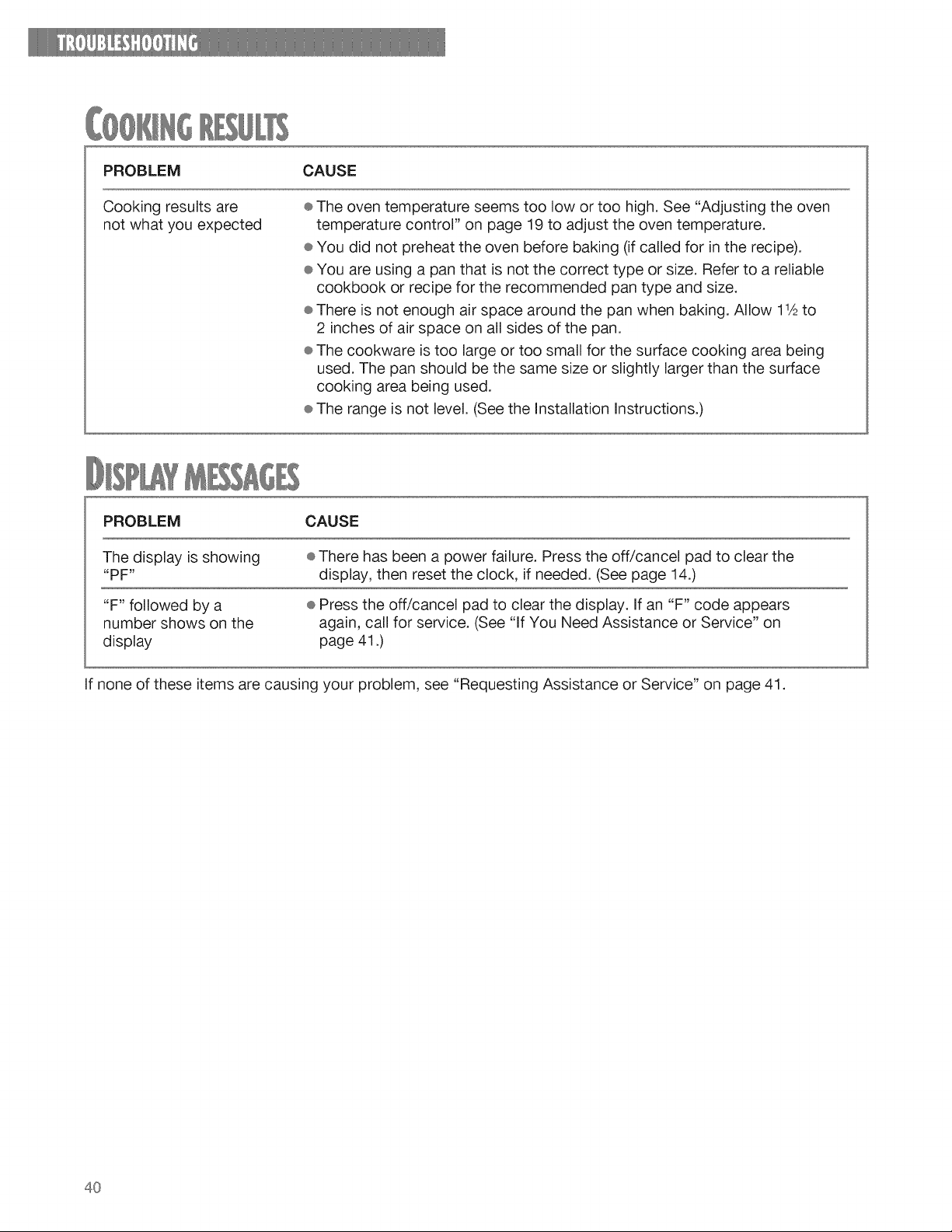
PROBLEM CAUSE
Cookingresultsare
notwhatyouexpected
®Theoventemperatureseemstoolowortoohigh.See"Adjustingtheoven
temperaturecontrol"onpage19to adjusttheoventemperature.
÷Youdidnotpreheatthe ovenbeforebaking(ifcalledfor intherecipe).
÷Youareusingapanthatisnotthe correcttypeorsize.Referto a reliable
cookbookor recipefortherecommendedpantypeandsize.
÷Thereisnotenoughairspacearoundthe panwhenbaking.Allow11Ato
2 inchesof airspaceonallsidesof thepan.
÷Thecookwareistoolargeor toosmallforthesurfacecookingareabeing
used.Thepanshouldbethesamesizeor slightlylargerthanthesurface
cookingareabeingused.
÷Therangeisnotlevel.(Seethe InstallationInstructions.)
PROBLEM CAUSE
The display is showing
"PF"
÷ There has been a power failure. Press the off/cancel pad to clear the
display, then reset the clock, if needed. (See page 14.)
"F" followed by a
number shows on the
display
÷ Press the off/cancel pad to clear the display. If an "F" code appears
again, call for service. (See "If You Need Assistance or Service" on
page 41.)
If none of these items are causing your problem, see "Requesting Assistance or Service" on page 41.
4O
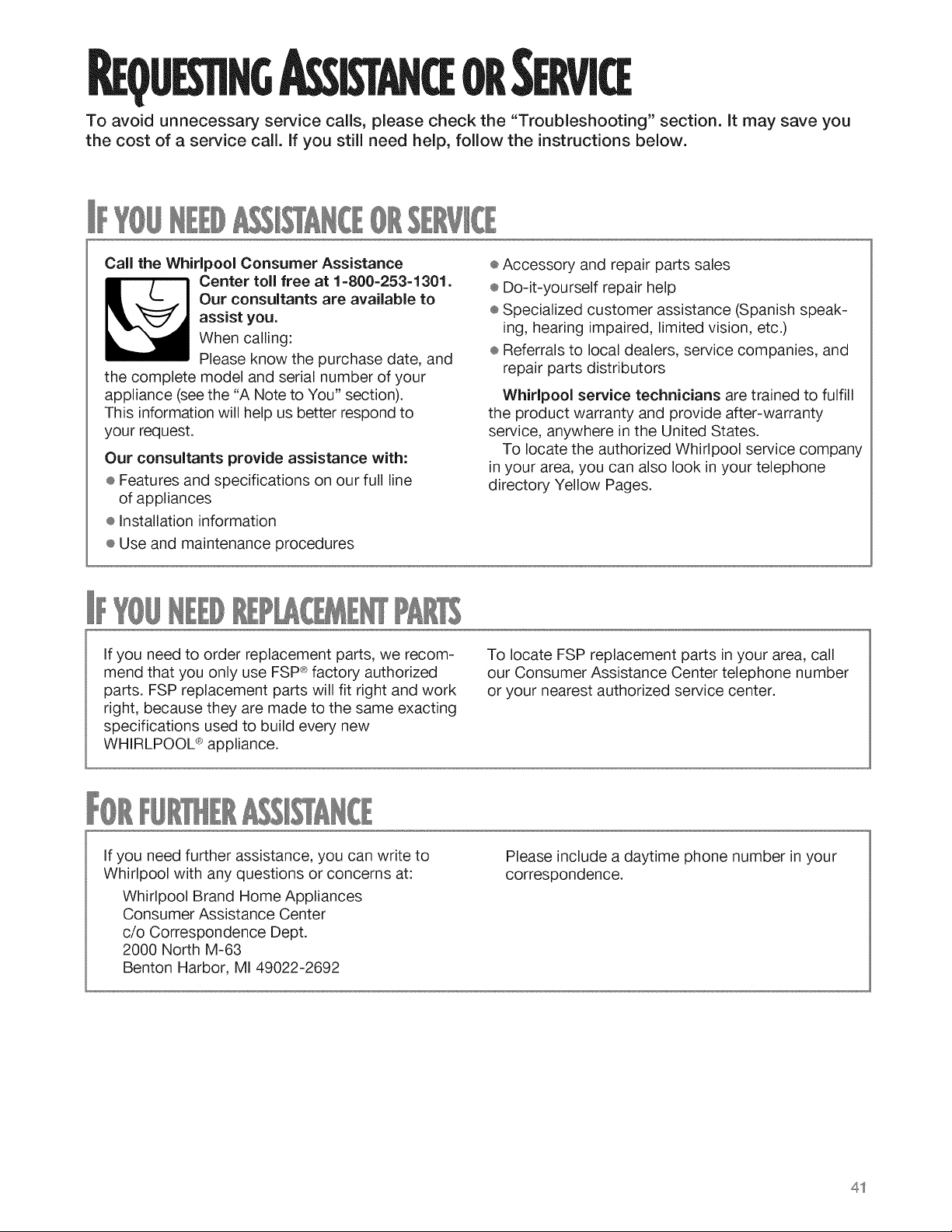
U511NG OR
To avoid unnecessary service calls, please check the "Troubleshooting" section, it may save you
the cost of a service call. if you still need help, follow the instructions below.
CaR the Whirlpool Consumer Assistance
Center toll free at 1-800-253-1301.
Our consultants are available to
assist you.
When calling:
Please know the purchase date, and
the complete model and serial number of your
appliance (see the "A Note to You" section).
This information will help us better respond to
your request.
Our consultants provide assistance with:
÷ Features and specifications on our full line
of appliances
÷ Installation information
÷ Use and maintenance procedures
÷ Accessory and repair parts sales
® Do-it-yourself repair help
® Specialized customer assistance (Spanish speak-
ing, hearing impaired, limited vision, etc.)
÷ Referrals to local dealers, service companies, and
repair parts distributors
Whirlpool service technicians are trained to fulfill
the product warranty and provide after-warranty
service, anywhere in the United States.
To locate the authorized Whirlpool service company
in your area, you can also look in your telephone
directory Yellow Pages.
If you need to order replacement parts, we recom-
mend that you only use FSP® factory authorized
parts. FSP replacement parts will fit right and work
right, because they are made to the same exacting
specifications used to build every new
WHIRLPOOL ® appliance.
To locate FSP replacement parts in your area, call
our Consumer Assistance Center telephone number
or your nearest authorized service center.
If you need further assistance, you can write to
Whirlpool with any questions or concerns at:
Whirlpool Brand Home Appliances
Consumer Assistance Center
c/o Correspondence Dept.
2000 North M-63
Benton Harbor, MI 49022-2692
Please include a daytime phone number in your
correspondence.
41

42
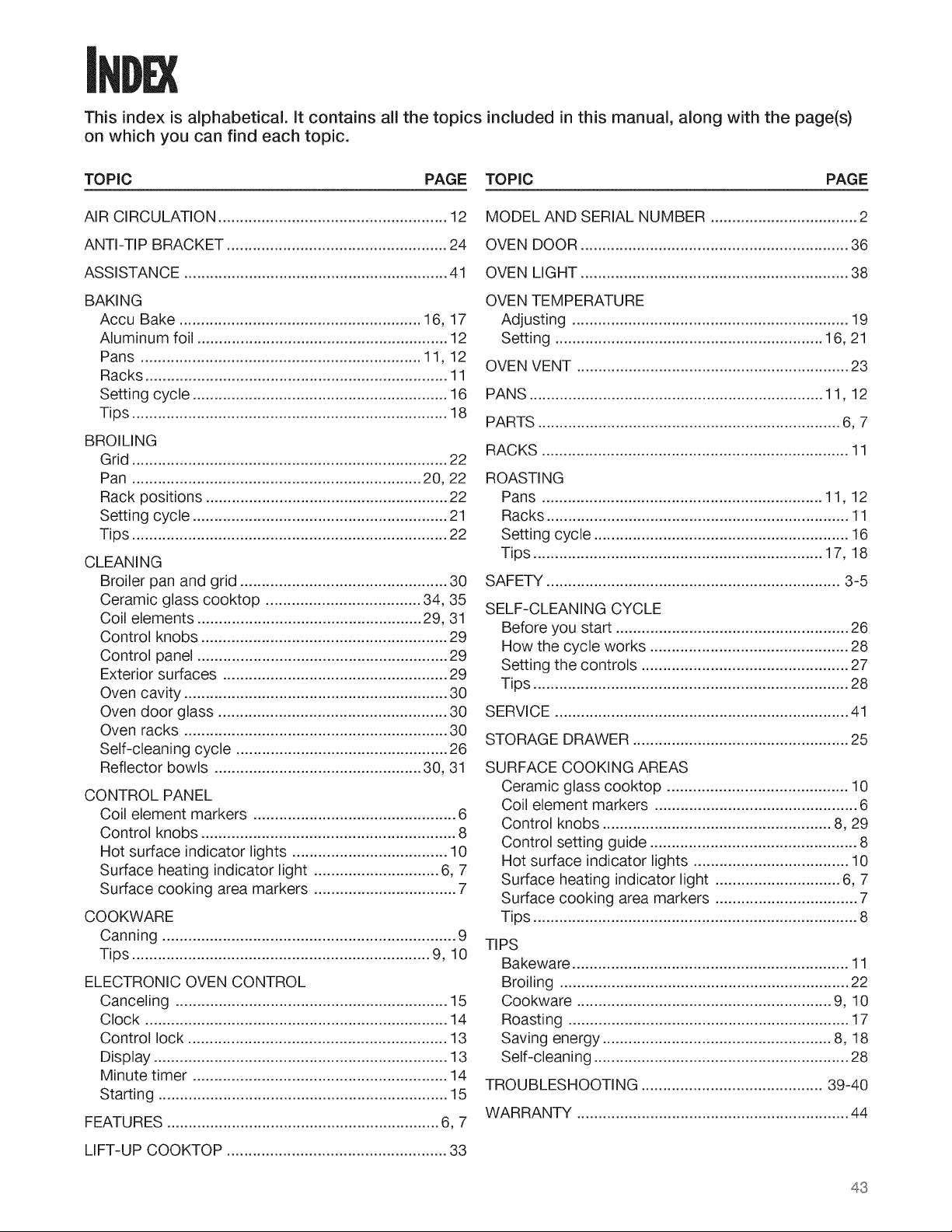
This index is alphabetical. It contains all the topics included in this manual, along with the page(s)
on which you can find each topic.
TOPIC PAGE TOPIC PAGE
AIR CIRCULATION ..................................................... 12
ANTI-TIP BRACKET ................................................... 24
ASSISTANCE ............................................................. 41
BAKING
Accu Bake ........................................................ 16, 17
Aluminum foil .......................................................... 12
Pans ................................................................. 11, 12
Racks ...................................................................... 11
Setting cycle ........................................................... 16
Tips ......................................................................... 18
CLEANING
Broiler pan and grid ................................................ 30
Ceramic glass cooktop .................................... 34, 35
Coil elements .................................................... 29, 31
Control knobs ......................................................... 29
Control panel .......................................................... 29
Exterior surfaces .................................................... 29
Oven cavity ............................................................. 30
Oven door glass ..................................................... 30
Oven racks ............................................................. 30
Self-cleaning cycle ................................................. 26
Reflector bowls ................................................ 30, 31
CONTROL PANEL
Coil element markers ............................................... 6
Control knobs ........................................................... 8
Hot surface indicator lights .................................... 10
Surface heating indicator light ............................. 6, 7
Surface cooking area markers ................................. 7
COOKWARE
Canning .................................................................... 9
Tips ..................................................................... 9, 10
ELECTRONIC OVEN CONTROL
Canceling ............................................................... 15
Clock ...................................................................... 14
Control lock ............................................................ 13
Display .................................................................... 13
Minute timer ........................................................... 14
Starting ................................................................... 15
FEATURES ............................................................... 6, 7
LIFT-UP COOKTOP ................................................... 33
MODEL AND SERIAL NUMBER .................................. 2
OVEN DOOR .............................................................. 36
OVEN LIGHT .............................................................. 38
OVEN TEMPERATURE
Adjusting ................................................................ 19
Setting .............................................................. 16, 21
OVEN VENT ............................................................... 23
PANS .................................................................... 11, 12
PARTS ...................................................................... 6, 7
RACKS ....................................................................... 11
ROASTING
Pans ................................................................. 11, 12
Racks ...................................................................... 11
Setting cycle ........................................................... 16
Tips ................................................................... 17, 18
SAFETY .................................................................... 3-5
SELF-CLEANING CYCLE
Before you start ...................................................... 26
How the cycle works .............................................. 28
Setting the controls ................................................ 27
Tips ......................................................................... 28
SERVICE .................................................................... 41
STORAGE DRAWER .................................................. 25
TROUBLESHOOTING .......................................... 39-40
WARRANTY ............................................................... 44
43
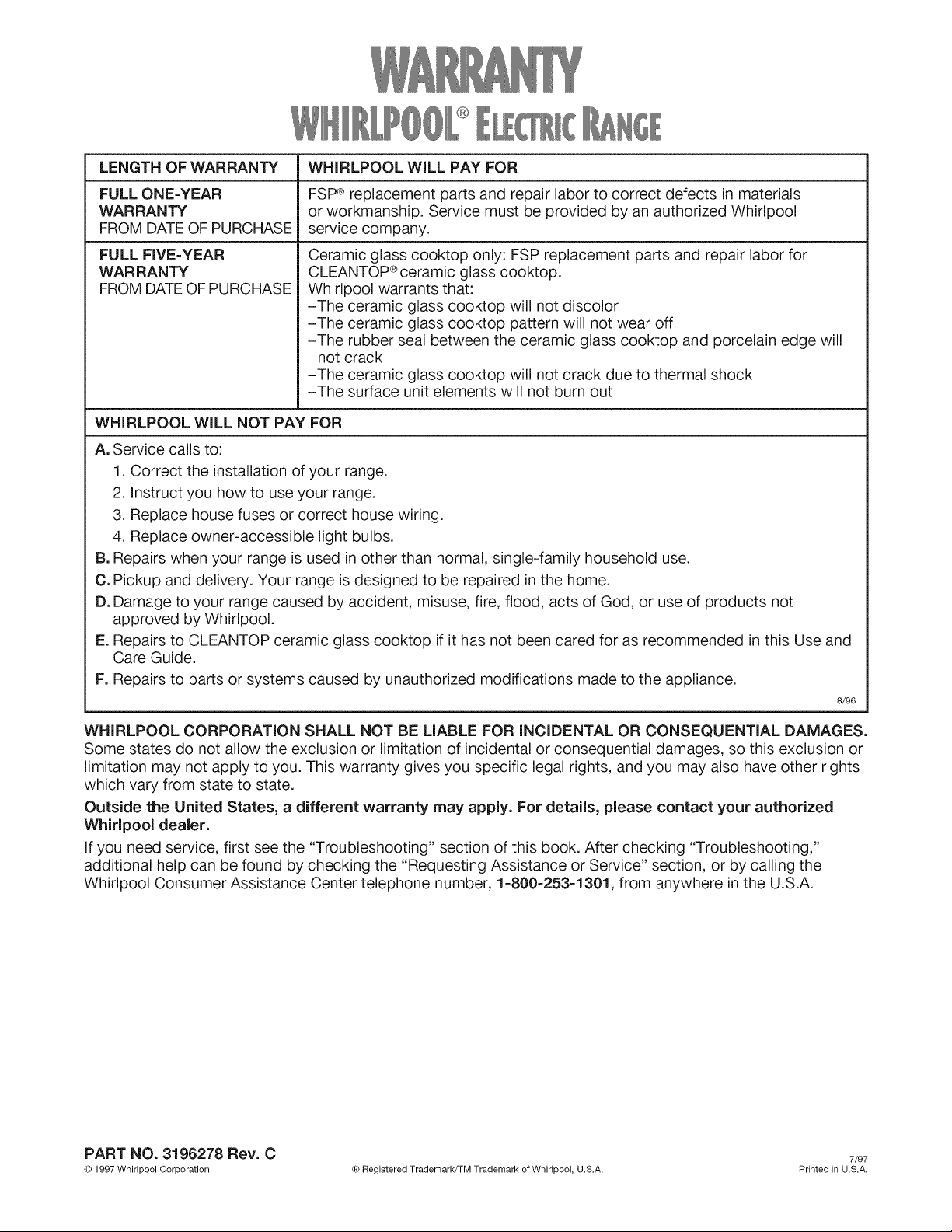
LENGTH OF WARRANTY WHIRLPOOL WILL PAY FOR
FULL ONE=YEAR FSP® replacement parts and repair labor to correct defects in materials
WARRANTY or workmanship. Service must be provided by an authorized Whirlpool
FROM DATE OF PURCHASE service company.
FULL FIVE=YEAR
WAR RAN TY
FROM DATE OF PURCHASE
Ceramic glass cooktop only: FSP replacement parts and repair labor for
CLEANTOP ®ceramic glass cooktop.
Whirlpool warrants that:
-The ceramic glass cooktop will not discolor
-The ceramic glass cooktop pattern will not wear off
-The rubber seal between the ceramic glass cooktop and porcelain edge will
not crack
-The ceramic glass cooktop will not crack due to thermal shock
-The surface unit elements will not burn out
WHIRLPOOL WiLL NOT PAY FOR
A. Service calls to:
1. Correct the installation of your range.
2. Instruct you how to use your range.
3. Replace house fuses or correct house wiring.
4. Replace owner-accessible light bulbs.
B. Repairs when your range is used in other than normal, single-family household use.
C. Pickup and delivery. Your range is designed to be repaired in the home.
D. Damage to your range caused by accident, misuse, fire, flood, acts of God, or use of products not
approved by Whirlpool.
E. Repairs to CLEANTOP ceramic glass cooktop if it has not been cared for as recommended in this Use and
Care Guide.
F. Repairs to parts or systems caused by unauthorized modifications made to the appliance.
8/96
WHIRLPOOL CORPORATION SHALL NOT BE LIABLE FOR iNCiDENTAL OR CONSEQUENTIAL DAMAGES.
Some states do not allow the exclusion or limitation of incidental or consequential damages, so this exclusion or
limitation may not apply to you. This warranty gives you specific legal rights, and you may also have other rights
which vary from state to state.
Outside the United States, a different warranty may apply. For details, please contact your authorized
Whirlpool dealer.
If you need service, first see the "Troubleshooting" section of this book. After checking "Troubleshooting,"
additional help can be found by checking the "Requesting Assistance or Service" section, or by calling the
Whirlpool Consumer Assistance Center telephone number, 1-800-253-1301, from anywhere in the U.S.A.
PART NO. 3196278 Rev. C 7/97
©D1997 Whirlpool Corporation ® Registered Trademark/TM Trademark of Whirlpool, U.S.A. Printed in U.S.A.