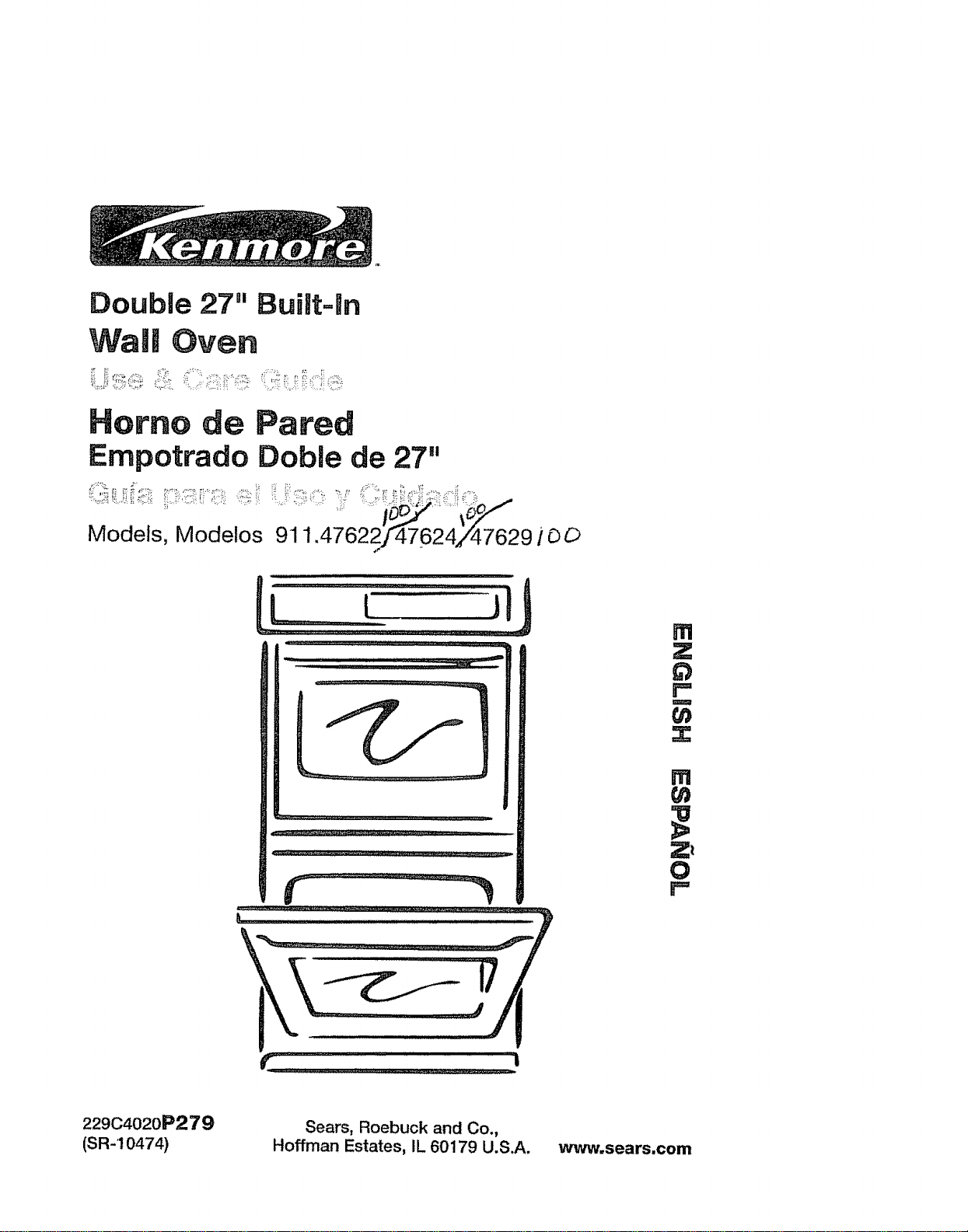
Double 27" Built=ran
WaiJ Oven
Her=no de Pared
Empotrado Dobie de 27"
........., ......,_,_i_,_,,,_
Models, Modetos 911.47622jr47624/47629 ! r3O
! z :: ]lfll,, i ....i1"'I!1 i
fll
Z
r =
W
{n
z
m
{n
Zt
0
r l........................i__iii...................................,
22904020P279
(SR-10474)
Sears, Roebuck and Co.,
Hoffman Estates, IL 60179 U.S.A.
www, sears.com
DOUBLEBUILF/N WALLOVEN
Tableof Contents
Oven Safety ................ 3-4
Features of Your Oven ......... 5
Removal of Packaging Tape .... 5
Oven Control, Clock, Timer
(Upper Oven) ................... 6
Control Display (Upper Oven) .. 7
Clock (Upper Oven) ............. 8
Kitchen Timer (Upper Oven) .8
Tones (Upper Oven) ............... 9
F Codes (Upper Oven) ......... 9
Oven Cooking Tips ....... I0-12
Baking and Broiling
(Lower Oven) ..................... t2
Baking (Upper Oven) ...... t3
Broiling (Both Ovens) ...... 14
Setting Special Features
(Upper Oven) ................. 15-I9
Self-Cleaning Cycle
(Upper Oven) ............. ., 20-21
Control Panel ......................... 22
Broiler Pan and Grid .............. 22
Oven Light Bulb ....................... 22
Oven Interior - Self-Cleaning
(Upper Oven) ......................... 23
Oven Interior - Conventional
(Lower Oven) ..................... 23
Oven Racks ..................... 23
Oven Door ............................... 24
Before Calling for
Service ......................... 25-26
Temperature Adjustment .... 27-28
Warranty ................. 30
Consumer Service Numbers. 60
For your convenience and future reference, please write down your model
and serial numbers in the space provided. They are located on the vertical
side trim, when the door is opened,
MODEL NUMBER: SERIAL NUMBER:
_2" 2 2zz [ [ C:C lrllr .............................. :t .=:. , " """; .... : [ _L ....... : L&LJ L: ........... [[
© Sears, Roebuck and Co,
2
SAVE THESE INSTRUCTIONS
Read all instructions before using this appliance. When using gas or
electrical appliances, basic safety precautions should be followed,
including the following:
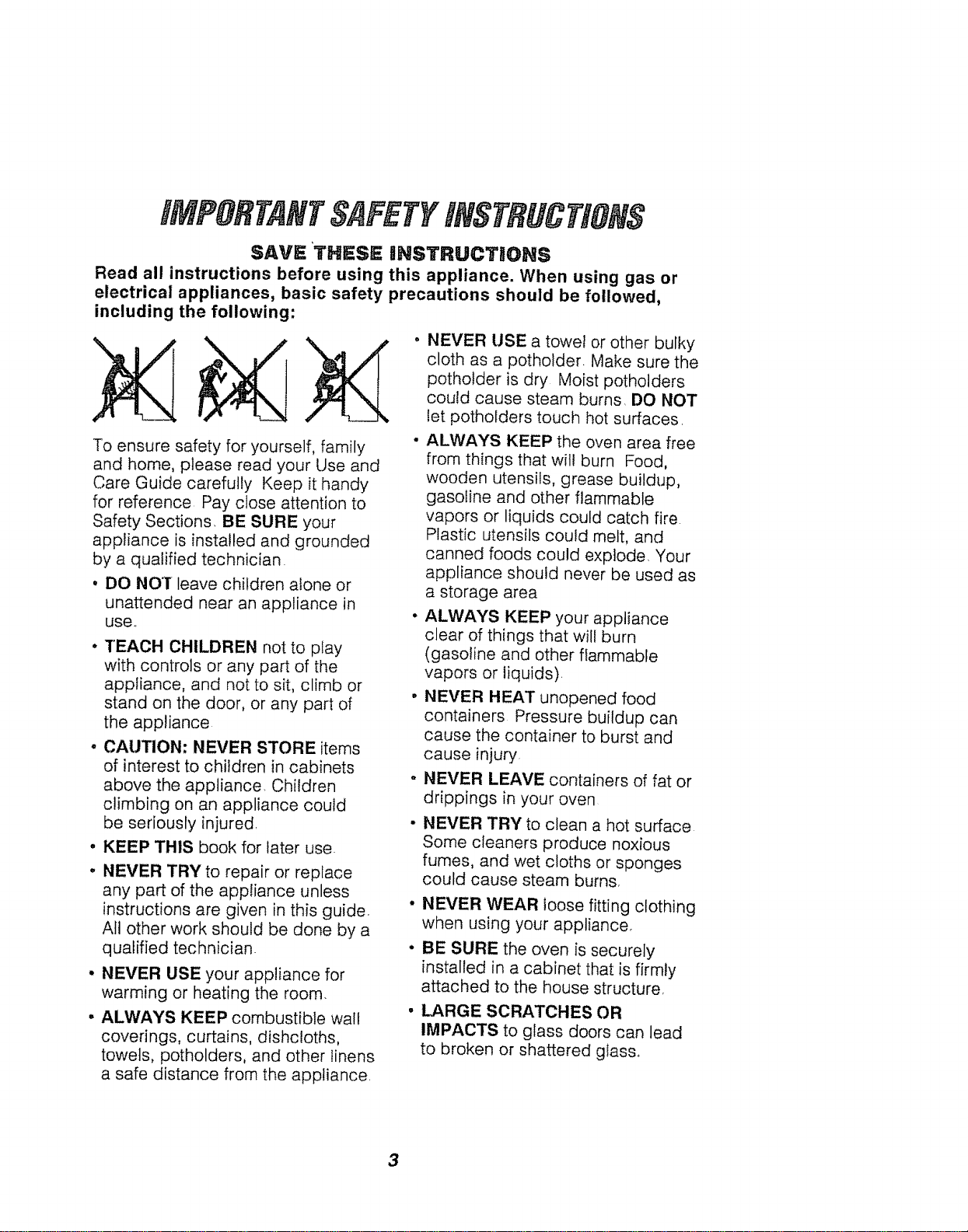
To ensure safety for yourself, family
and home, please read your Use and
Care Guide carefully Keep it handy
for reference Pay close attention to
Safety Sections. BE SURE your
appliance is installed and grounded
by a qualified technician
, DO NOT leave children alone or
unattended near an appliance in
use.,
* TEACH CHILDREN not to play
with controls or any part of the
appliance, and not to sit, climb or
stand on the door, or any part of
the appliance
, CAUTION: NEVER STORE items
of interest to children in cabinets
above the appliance. Children
climbing on an appliance could
be seriously injured,
. KEEP THIS book for later use
- NEVER TRY to repair or replace
any part of the appliance unless
instructions are given in this guide.
All other work should be done by a
qualified technician.
° NEVER USE your appliance for
warming or heating the room.
• ALWAYS KEEP combustible wall
coverings, curtains, dishcloths,
towels, potholders, and other linens
a safe distance from the appliance
NEVER USE a towel or other bulky
cloth as a potholder Make sure the
potholder is dry Moist potholders
could cause steam burns, DO NOT
let pothofders touch hot surfaces
ALWAYS KEEP the oven area free
from things that will burn Food,
wooden utensils, grease buildup,
gasoline and other flammable
vapors or liquids could catch fire
Plastic utensils could melt, and
canned foods could explode, Your
appliance should never be used as
a storage area
ALWAYS KEEP your appliance
clear of things that wil! burn
(gasoline and other flammable
vapors or liquids).
NEVER HEAT unopened food
containers Pressure buildup can
cause the container to burst and
cause injury.
NEVER LEAVE containers of fat or
drippings in your oven
NEVER TRY to clean a hot surface
Some cleaners produce noxious
fumes, and wet cloths or sponges
could cause steam burns,
• NEVER WEAR loose fitting clothing
when using your appliance°
• BE SURE the oven is securely
installed in a cabinet that is firmly
attached to the house structure,
LARGE SCRATCHES OR
IMPACTS to glass doors can lead
to broken or shattered glass.
3
SAFETY
• DO NOT touch heating elements,
surfaces near them, or interior oven
surfaces, These may be hot enough
to cause burns even though they are
dark in color. During and after use, do
not touch or let clothing or flammable
material contact the elements or hot
surfaces until they have had time to
coot. Other surfaces near the oven
vent openings, oven door, and
window may also be hot enough
to cause burns.
o PLACE OVEN RACKS in the desired
position while the oven is cool If racks
must be moved while oven is hot, do
not let potholder contact the hot oven
element
e AFTER BROILING, always take the
broiler pan and grid out of the oven
and clean them, Leftover grease in the
broiler pan could catch fire the next
time you use your oven,
• ALWAYS USE care when opening
the oven door, Let hot air and steam
escape before moving foods,
o NEVER USE aluminum foil to line the
oven bottom, Improper use of foil
could start a fire, or electrical shock
could result,
• NEVER BLOCK the oven vent
opening.
. CLEAN ONLY the par_s listed in this
manual, Follow all cleaning instructions.
NEVER RUB, move, clean or damage
the door gasket on self-cleaning ovens
It is essential for a good seal,
. NEVER TRY to clean utensils,
cookware, removable parts or broiler
pan and grid in the self-clean cycle,
• DO NOT USE oven cleaners - No
commercial oven cleaner or protective
coating of any kind, should be used in
or around any part of the oven,
• IF THE SELF.CLEANING mode
malfunctions, turn the oven off and
disconnect the power supply, Have it
serviced by a qualified technician
_MPORTANT SAFETY NOlrlICE!
The California Safe DrinkingWater and
Toxic EnforcementAct requiresthe
governor ofCaliforniato publish a
list ofsubstancesknownto the state
to cause birthdefects orother
reproductiveharm and requires
businessesto warntheir customers of
potentialexposureto such substances,
The fiberglass insulation in a
self-cleaningoven will give off a very
small amountof carbon monoxide
duringthe cleaningcycle, Exposure
can be minimizedby venting with an
open doororwindow or using a
ventilation fan or hood.
IIMIPORTANT: The health of some
birds isextremely sensitive tothe
fumes givenoff during the self-cleaning
cycleof any oven. Movebirds to
another well-ventilatedroom.
READ AND UNDERSTAND
THiS INFORMATION NOW,"
Be sure everyone in your home knows
what to do in case of fire, Never use
water on a grease fire; it will only
spread the flames.
OVEN FIRE:
Do not try to move the pan!
1. Close the oven door and turn
controls off,
2. If fire continues carefully open the
door, throw baking soda on the fire,
or use a dry chemical, foam, or halon
type extinguisher.
4
OPERATION
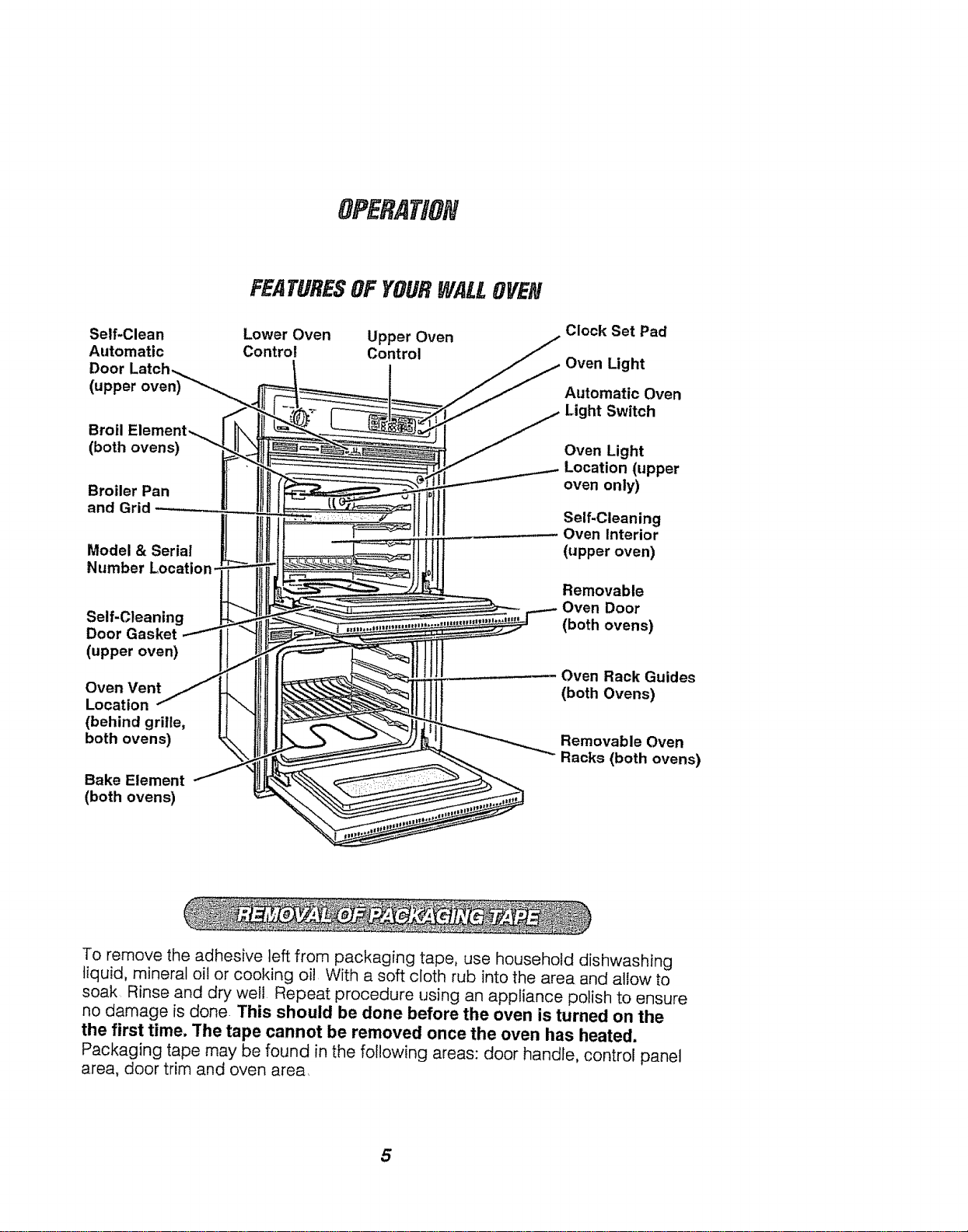
Self.Clean
Automatic
Door
(upper oven)
Broil
(both ovens)
Broiler Pan
and Grid
Model & Serial
Number Locat
Self-Cleaning
Door Gasket
(upper oven)
Oven Vent
Location
(behind grille,
both ovens)
Bake Element
(both ovens)
FEATURESOFYOURWALLOVEN
Lower Oven Upper Oven
Control Control
Clock Set Pad
Oven Light
Automatic Oven
Light Switch
Oven Light
Location (upper
oven only)
Self-Cleaning
Oven Interior
(upper oven)
Removable
Oven Door
(both ovens)
Oven Rack Guides
(both Ovens)
Removable Oven
Racks (both ovens)
To remove the adhesive left from packaging tape, use household dishwashing
tiquid, mineral oil or cooking oil With a soft cloth rub into the area and allow to
soak Rinse and dry well Repeat procedure using an appliance polish to ensure
no damage is done. This should be done before the oven is turned on the
the first time. The tape cannot be removed once the oven has heated.
Packaging tape may be found in the following areas: door handle, control panel
area, door trim and oven area,
5
OPERATION
OvenControl,Clock and Timer
(UpperOven)
f
© @©
@ @@
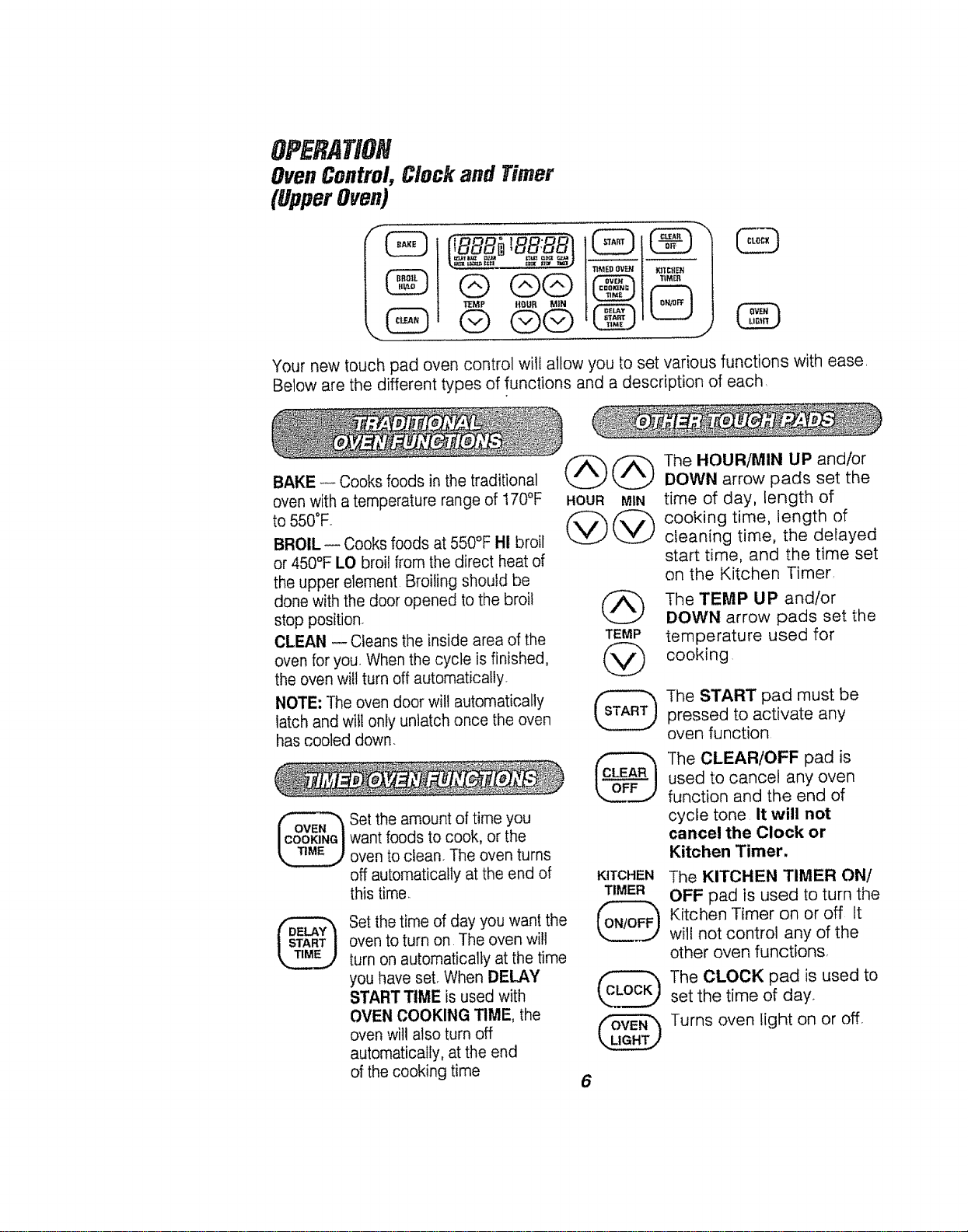
Your new touch pad oven control wili allow you to set various functions with ease,
Below are the different types of functions and a description of each
BAKE -- Cooks foods in the traditional
oven with a temperature range of 170°F
to 550"F.
BROIL -- Cooks foods at 550°F HI broil
or 450°F LO broif from the direct heat of
the upper element Broiling should be
done with the door opened to the broil
stop position.
CLEAN -- Cleans the inside area of the
oven for your When the cycle is finished,
the oven will turn off automatically.
NOTE; ]-he oven door wilt automatically
latch and will only unlatch once the oven
has cooled down.
Set the amount of time you
want foods to cook, or the
oven to clean. The oven turns
off automatically at the end of
this time.
Set the time of day you want the
oven to turn on The oven will
turn on automatically at the time
you have set. When DELAY
START TIME is used with
OVEN COOKING TIME, the
oven will also turn off
automatically, at the end
of the cooking time
HOUR MIN
@@
@
TEMP
@
KITCHEN
TIMER
@
@
6
The HOUR/MIN UP and/or
DOWN arrow pads set the
time of day, length of
cooking time, length of
cleaning time, the delayed
start time, and the time set
on the Kitchen Timer
The TEMP UP and/or
DOWN arrow pads set the
temperature used for
cooking
The START pad must be
pressed to activate any
oven function
The CLEAR/OFF pad is
used to cancel any oven
function and the end of
cycle tone It will not
cancel the Clock or
Kitchen Timer.
The KITCHEN TIMER ON!
OFF pad is used to turn the
Kitchen Timer on or off It
will not control any of the
other oven functions,
The CLOCK pad is used to
set the time of day°
Turns oven light on or off,
OPERATION
ControlDisplay(UpperOven)
Oven Function Indicator to let you know
indicator / the oven has turned on
Flash,ng ,rid, tor i_.Z__ D,_ Mr ==,__ _'_-__
" " "ca S S _ _ . ocatlon for the
E _ -- _ --, -- '== Time of Day Clock,
to alert you to set _ _ _ L_J _ _ _ _i T Kitchen Timer
a temperature or ] DELAYBAKE CLEAN STARTCLOCKCLEAN! no1.,,, _,._,_ "t_,._
a time _. BROIL\LOCKEDDOOR COOK_TOP1!TIMER) _ '=Y..._"='=. .......
"_,-_.._/7,_ .............. _.. -._...iii_ _" uven UooKmg, or
_ Cleaning Time
Oven Function Oven Function
indicator indicator
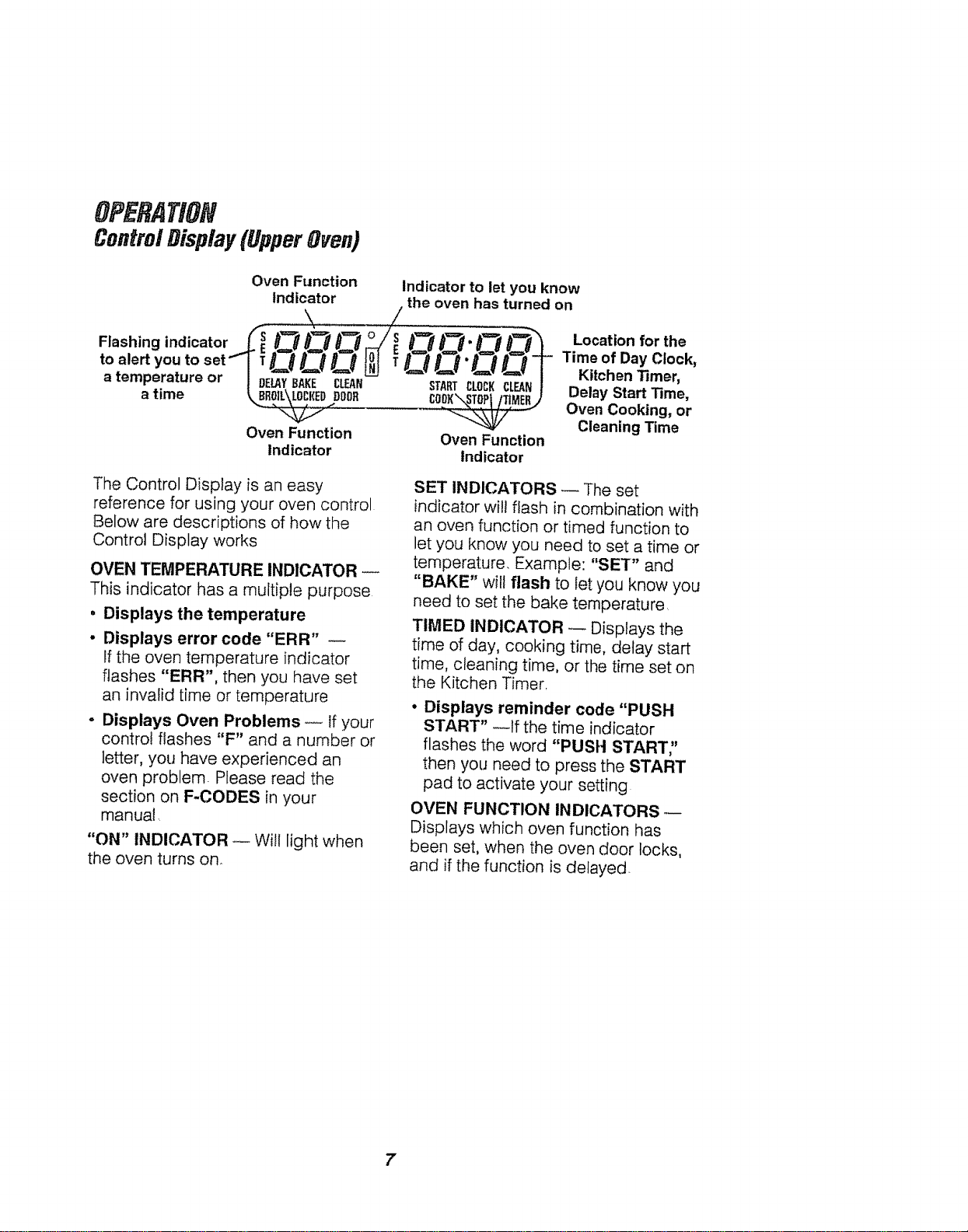
The Control Display is an easy
reference for using your oven control
Below are descriptions of how the
Control Display works
OVEN TEMPERATURE INDICATOR
This indicator has a multiple purpose
* Displays the temperature
- Displays error code "ERR"
If the oven temperature indicator
flashes "ERR", then you have set
an invalid time or temperature
- Displays Oven Problems _ if your
control flashes "F" and a number or
letter, you have experienced an
oven problem Please read the
section on F-CODES in your
manual.
"ON" INDICATOR _ Will light when
the oven turns on.
SET INDICATORS _ The set
indicator will flash in combination with
an oven function or timed function to
let you know you need to set a time or
temperature. Example: "SET" and
"BAKE" will flash to let you know you
need to set the bake temperature
TIMED INDICATOR _ Displays the
time of day, cooking time, delay start
time, cleaning time, or the time set on
the Kitchen Timer,
• Displays reminder code "PUSH
START" _tf the time indicator
flashes the word "PUSH START"
then you need to press the START
pad to activate your setting
OVEN FUNCTION INDICATORS
Displays which oven function has
been set, when the oven door locks,
and if the function is delayed.
7
OP RATION
Clockand Timer(UpperOven)
The clock must be set for the correct
time of day before a delayed oven
function can work properly,. The time
of day cannot be changed during a
timed oven function, but can be
changed during a bake or broil
function.
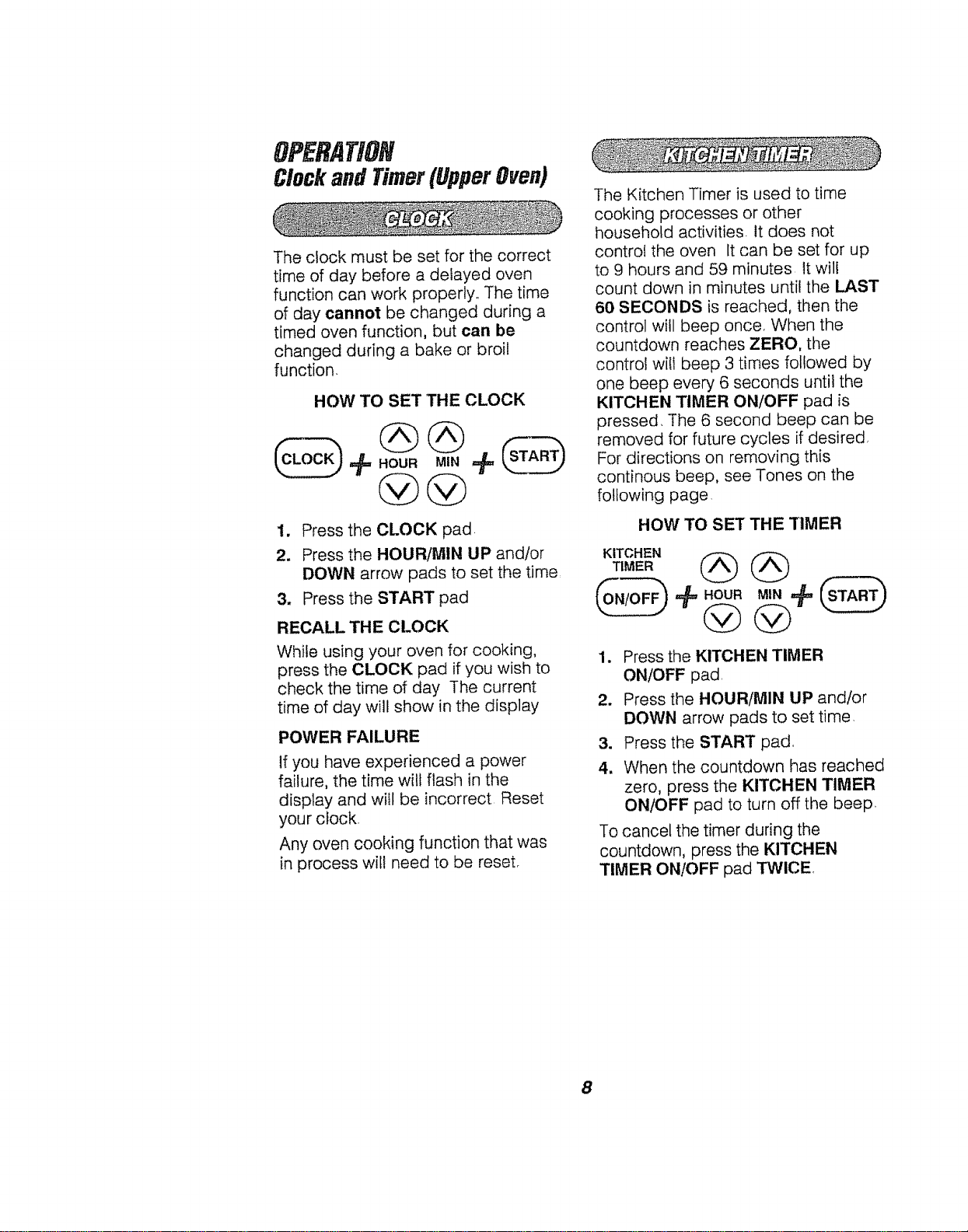
HOW TO SET THE CLOCK
HOUR MIN
1. Press the CLOCK pad.
2. Press the HOUR/MIN UP and/or
DOWN arrow pads to set the time,
3. Press the START pad
RECALL THE CLOCK
While using your oven for cooking,
press the CLOCK pad if you wish to
check the time of day The current
time of day will show in the display
POWER FAILURE
If you have experienced a power
failure, the time will flash in the
display and will be incorrect Reset
your clock.
Any oven cooking function that was
in process wil! need to be reset.
The Kitchen Timer is used to time
cooking processes or other
household activities, it does not
control the oven It can be set for up
to 9 hours and 59 minutes It will
count down in minutes until the LAST
60 SECONDS is reached, then the
control will beep once, When the
countdown reaches ZERO, the
control will beep 3 times followed by
one beep every 6 seconds until the
KITCHEN TIMER ON/OFF pad is
pressed, The 6 second beep can be
removed for future cycles if desired,
For directions on removing this
continous beep, see Tones on the
following page,
HOW TO SET THE TIMER
KITCHEN
TIMER
@÷
1.
2.
3.
4.
Press the KITCHEN TIMER
ON/OFF pad,
Press the HOUR/M1N UP and/or
DOWN arrow pads to set time,
Press the START pad,
When the countdown has reached
zero, press the KITCHEN TIMER
ON/OFF pad to turn off the beep,
To cancel the timer during the
countdown, press the KITCHEN
TIMER ON/OFF pad TWICE.
8
OPERATION
OvenControl,ClockandTimer
(UpperOven)
Your new control has a series of
tones that will sound at different times
These tones may sound while you set
the control for an oven function, or at
the end of the oven function, tt will also
alert you that there may be a problem
with the functions Below are the types
of tones and a brief description of
each.
TONES WHILE SETTING THE
CONTROL- When you press a touch
pad you wil! hear a beep This beep
will let you know you have placed
enough pressure on the pad to
activate it. (The arrow pads do not
beep).
END OF TIMED CYCLE TONE --At
the end of a timed cooking function,
you will hear 3 short beeps followed
by 1 beep every 6 seconds. This
6-second beep wilt continue to sound
unti! the CLEAR/OFF pad is pressed
or you may select the special feature
to cancel this 6 second beep from
sounding at the end of future cycles
TO CANCEL THE 6 SECOND BEEP
1,
Press and hold the BAKE and
BROIL pads, at the same time
for 3 seconds, until the display
shows "SF°"
2. Press the KITCHEN TIMER
ON/OFF pad The display will show
"CON BEEP" (continuous beep)
3. Press the KITCHEN TIMER
ON/OFF pad again. The display
will show "BEEP" (beep canceled).
4. Press the START pad to cancel
the 6-second beep and leave the
special feature mode.
If you would like to return the 6-second
beep, repeat steps above until the
display shows your choice and press
the START pad.
AI"TENTION TONE-- This tone will
sound if you make an error or an
oversight is made while setting an
oven function,
Examples would be:
a. Setting a clean cycle and the oven
door is not properly closed,
b. Setting a function and not pressing
the START pad.
c. Pressing an additional function
pad without first setting a temperature
or time,
du
ERR will flash if you set an invalid
temperature Press the CLEAR!OFF
pad to clear the control and the oven
function
Any of these can be quickly identified
by watching the display
PREHEAT TONE-- When you
set an oven temperature, the oven
automatically starts to heat When the
temperature inside the oven reaches
the temperature you have set, a tone
will sound to let you know the oven is
ready for baking
If you set an oven function and the
control beeps while the display is
flashing "F" and a number or letter
such as "F-4" or "FI," there may be
a problem with the control or oven.
Simply press the CLEAR/OFF pad
and wait about an hour. Try setting the
function again If the code repeats,
write down the flashing code and call
for service. Tell the technician what
code was flashing
9
OPERATION
OvenCookingTips
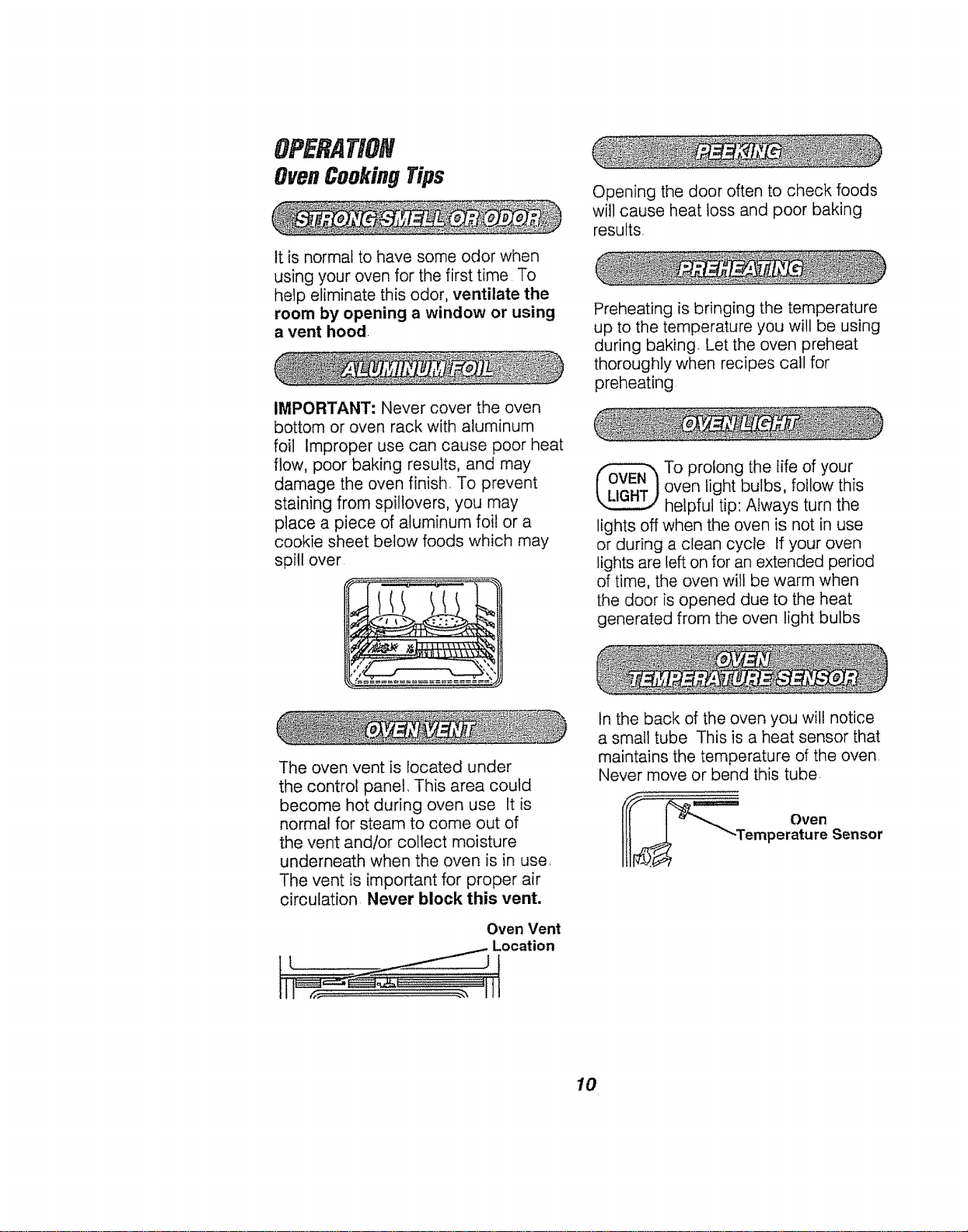
It is normal to have some odor when
using your oven for the first time To
help eliminate this odor, ventilate the
room by opening a window or using
a vent hood,
IMPORTANT: Never cover the oven
bottom or oven rack with aluminum
foil Improper use can cause poor heat
flow, poor baking results, and may
damage the oven finish, To prevent
staining from spillovers, you may
place a piece of aluminum foil or a
cookie sheet below foods which may
spill over
Opening the door often to check foods
will cause heat loss and poor baking
results
Preheating is bringing the temperature
up to the temperature you will be using
during baking. Let the oven preheat
thoroughly when recipes call for
preheating
To prolong the life of your
oven light bulbs, follow this
helpful tip: Always turn the
lights off when the oven is not in use
or during a clean cycle If your oven
lights are left on for an extended period
of time, the oven wilt be warm when
the door is opened due to the heat
generated from the oven light bulbs
The oven vent is located under
the control panel. This area could
become hot during oven use It is
normal for steam to come out of
the vent andlor collect moisture
underneath when the oven is in user
The vent is important for proper air
circulation Never block this vent.
Oven Vent
_.. Location
Ji
tn the back of the oven you wil! notice
a small tube This is a heat sensor that
maintains the temperature of the oven
Never move or bend this tube
Oven
emperature Sensor
10
OPERATION
OvenCookingTips
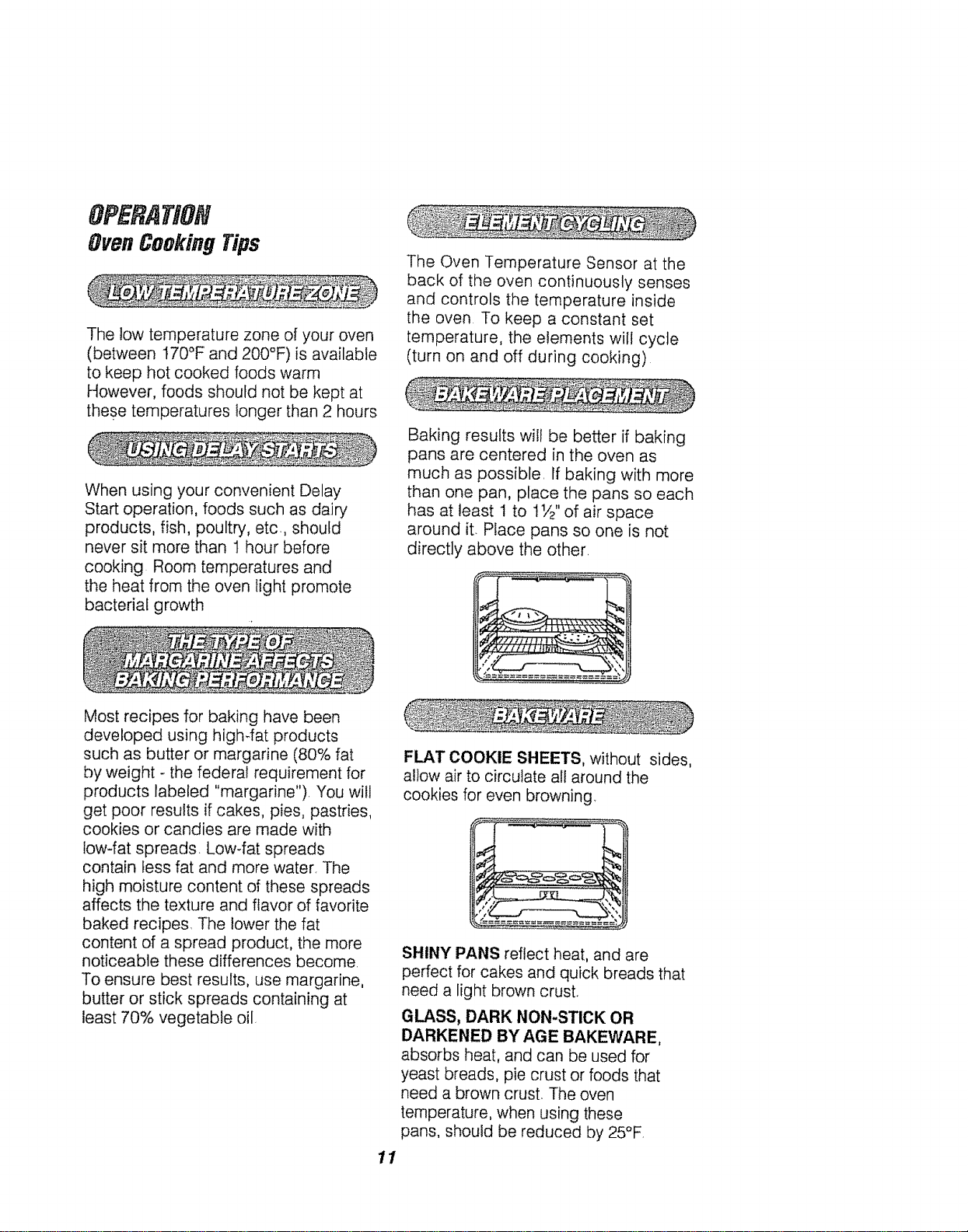
The low temperature zone of your oven
(between t70°F and 200°F)is available
to keep hot cooked foods warm
However, foods should not be kept at
these temperatures longer than 2 hours
When using your convenient Delay
Start operation, foods such as dairy
products, fish, poultry, etc., should
never sit more than t hour before
cooking Room temperatures and
the heat from the oven light promote
bacterial growth
The Oven Temperature Sensor at the
back of the oven continuously senses
and controls the temperature inside
the oven To keep a constant set
temperature, the elements will cycle
(turn on and off during cooking)
Baking results wilt be better if baking
pans are centered in the oven as
much as possible. If baking with more
than one pan, place the pans so each
has at least 1 to t 1/2"of air space
around it. Place pans so one is not
directly above the other.
Most recipes for baking have been
developed using high-fat products
such as butter or margarine (80% fat
by weight - the federal requirement for
products labeled "margarine"). You will
get poor results if cakes, pies, pastries,
cookies or candies are made with
low-fat spreads Low-fat spreads
contain tess fat and more water. The
high moisture content of these spreads
affects the texture and flavor of favorite
baked recipes. The lower the fat
content of a spread product, the more
noticeable these differences become.
To ensure best results, use margarine,
butter or stick spreads containing at
least 70% vegetable oil
11
FLAT COOKIE SHEETS, without sides,
allow air to circulate all around the
cookies for even browning
7,,
SHINY PANS reflect heat, and are
perfect for cakes and quick breads that
need a light brown crust.
GLASS, DARK NON-STICK OR
DARKENED BY AGE BAKEWARE,
absorbs heat, and can be used for
yeast breads, pie crust or foods that
need a brown crust. The oven
temperature, when using these
pans, should be reduced by 25°F.
OPERATION
OvenCookingTips/Bakingand
Broiling(LowerOven)
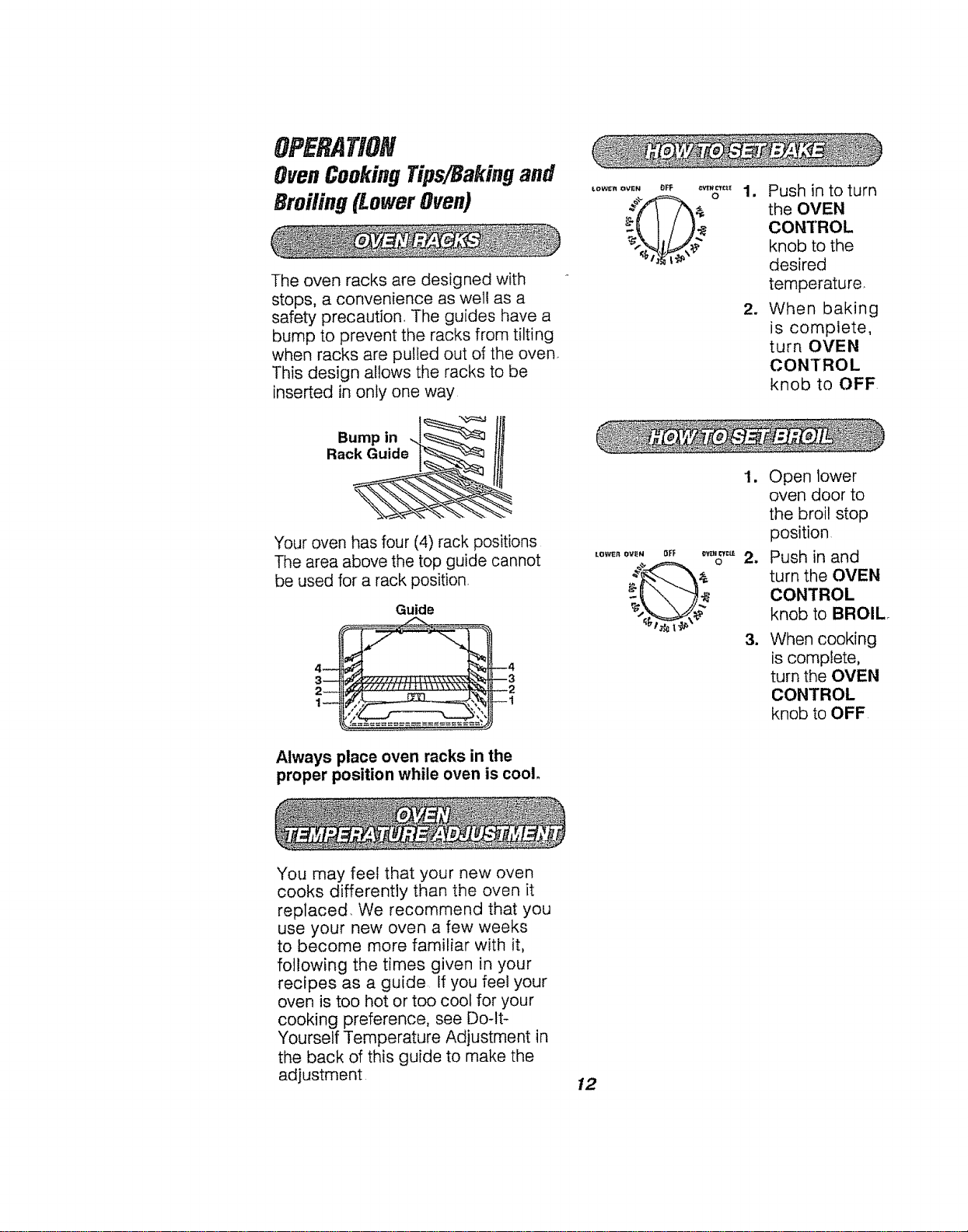
The oven racks are designed with
stops, a convenience as well as a
safety precaution The guides have a
bump to prevent the racks from tilting
when racks are pulled out of the oven
This design allows the racks to be
inserted in only one way
LOWER OVEN OFF _
1. Push in to turn
the OVEN
CONTROL
knob to the
desired
temperature
2. When baking
is complete,
turn OVEN
CONTROL
knob to OFF
Bump in
Rack Guide
Your oven has four (4) rack positions
The area above the top guide cannot
be used for a rack position,
Guide
Always place oven racks in the
proper position while oven is cool.
LOWI_n OVEN
OFF _ CYc_
o 2.
3.
1. Open lower
oven door to
the broil stop
position
Push in and
turn the OVEN
CONTROL
knob to BROIL
When cooking
is complete,
turn the OVEN
CONTROL
knob to OFF
You may feel that your new oven
cooks differently than the oven it
replaced, We recommend that you
use your new oven a few weeks
to become more familiar with it,
following the times given in your
recipes as a guide If you feel your
oven is too hot or too cool for your
cooking preference, see Do-It-
Yourself Temperature Adjustment in
the back of this guide to make the
adjustment
12
OPERATION
Baking(UpperOven)
TEMP
@
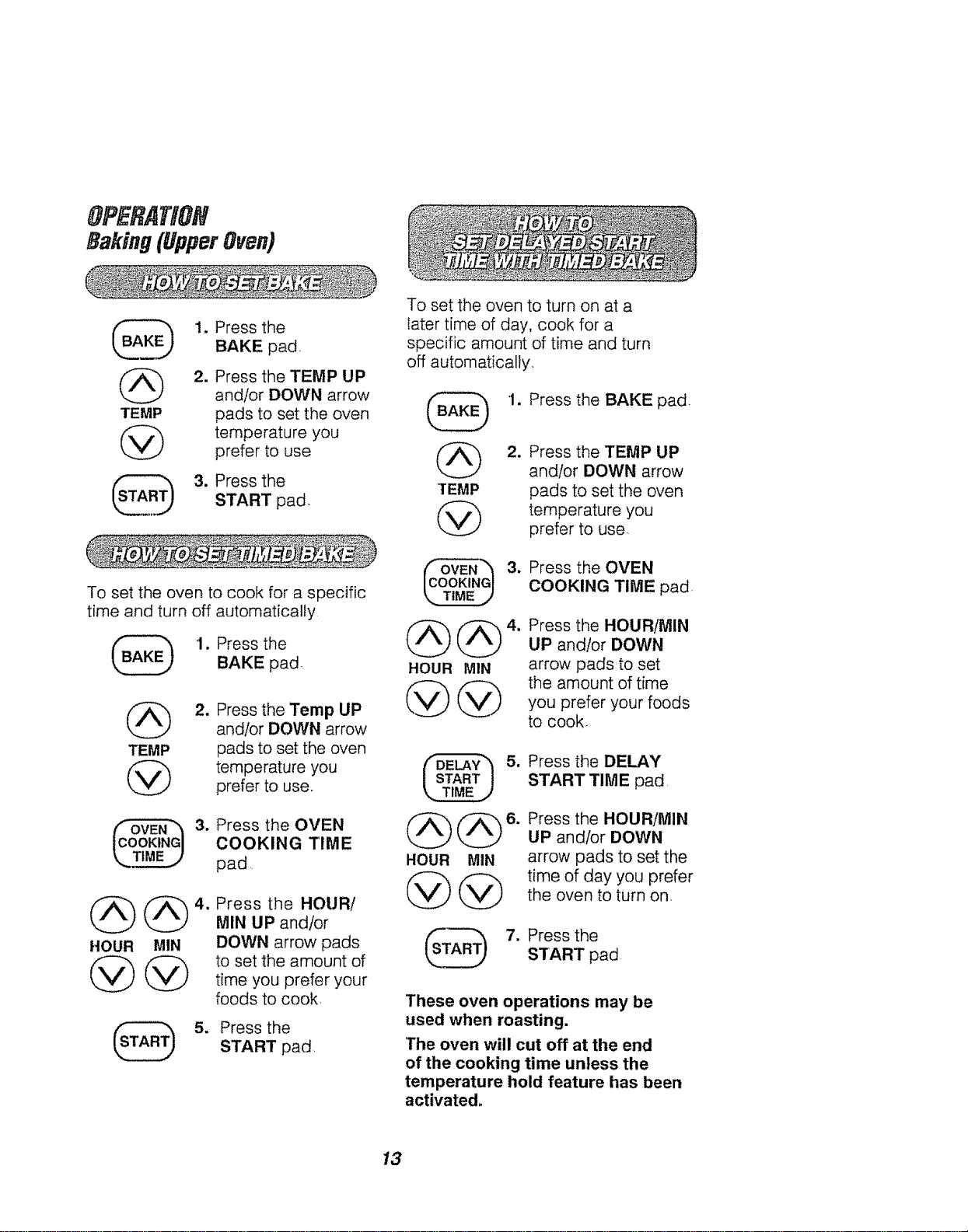
1. Press the
BAKE pad,
=
Press the TEMP UP
and/or DOWN arrow
pads to set the oven
temperature you
prefer to use
3. Press the
START pad.
To set the oven to cook for a specific
time and turn off automatically
1. Press the
BAKE pad,
TEMP
@
2_
Press the Temp UP
and/or DOWN arrow
pads to set the oven
temperature you
prefer to use,
3. ress the OVEN
COOKING TIME
pad
HOUR MIN
@@
S=
Press the HOURi
MIN UP and/or
DOWN arrow pads
to set the amount of
time you prefer your
foods to cook,
Press the
START pad
To set the oven to turn on at a
later time of day, cook for a
specific amount of time and turn
off automatically,
1. Press the BAKE pad,
2.
TEMP
@
_ 3.
@@°.
HOUR MIN
@@
Press the TEMP UP
and/or DOWN arrow
pads to set the oven
temperature you
prefer to use.
Press the OVEN
COOKING TIME pad
Press the HOUR/MIN
UP and/or DOWN
arrow pads to set
the amount of time
you prefer your foods
to cook,
5.
HOUR MIN
Press the DELAY
START TIME pad
Press the HOUR/MIN
UP andlor DOWN
arrow pads to set the
time of day you prefer
the oven to turn on.
'TA_._ 7. Press the
START pad
These oven operations may be
used when roasting.
"The oven will cut off at the end
of the cooking time unless the
temperature hold feature has been
activated.
13
OPERATION
Broiling(BothOvens)
Broiling is cooking by direct heat
from the upper element The oven
door should remain open to the broil
stop position during broiling,
It is not necessary to preheat the
oven when broiling Use the broiler
pan and grid that came with your
oven. Both are designed for proper
drainage of fat and liquids
_'_ J _LLU.... I '1.... _ " _1_
lf foil is used it must be
molded tightly to the
grid and slits cut into
the foil to match those
of the grid. This allows fats and
liquids to drain into the broiler
pan, preventing fire and
excessive smoke.
Always remove the pan and grid
from the oven,
Storing or forgetting
a soiled broiler pan
in the oven is a
potential smoke or
fire hazard.
The U,So Department of Agriculture
recommends to cook meat and
poultry thoroughly--meat to at least
an INTERNAL temperature of 160°F
and poultry to at least an INTERNAL
temperature of 180°F Cooking to
these temperatures usually protects
against food-borne illness,
The closer you place foods to the
broil element, the faster foods brown
on the outside yet remain red to pink
in the center
Moving meats away from the element
will allow the meat to cook to the
center while browning on the outside,
Cook side 1 at least 2 minutes longer
than side 2, tf your oven is connected
to 208 volts, you may want to use a
higher rack position and/or broil
foods longer,
The size, weight, thickness, starting
temperature and your preference of
the doneness of the meat will affect
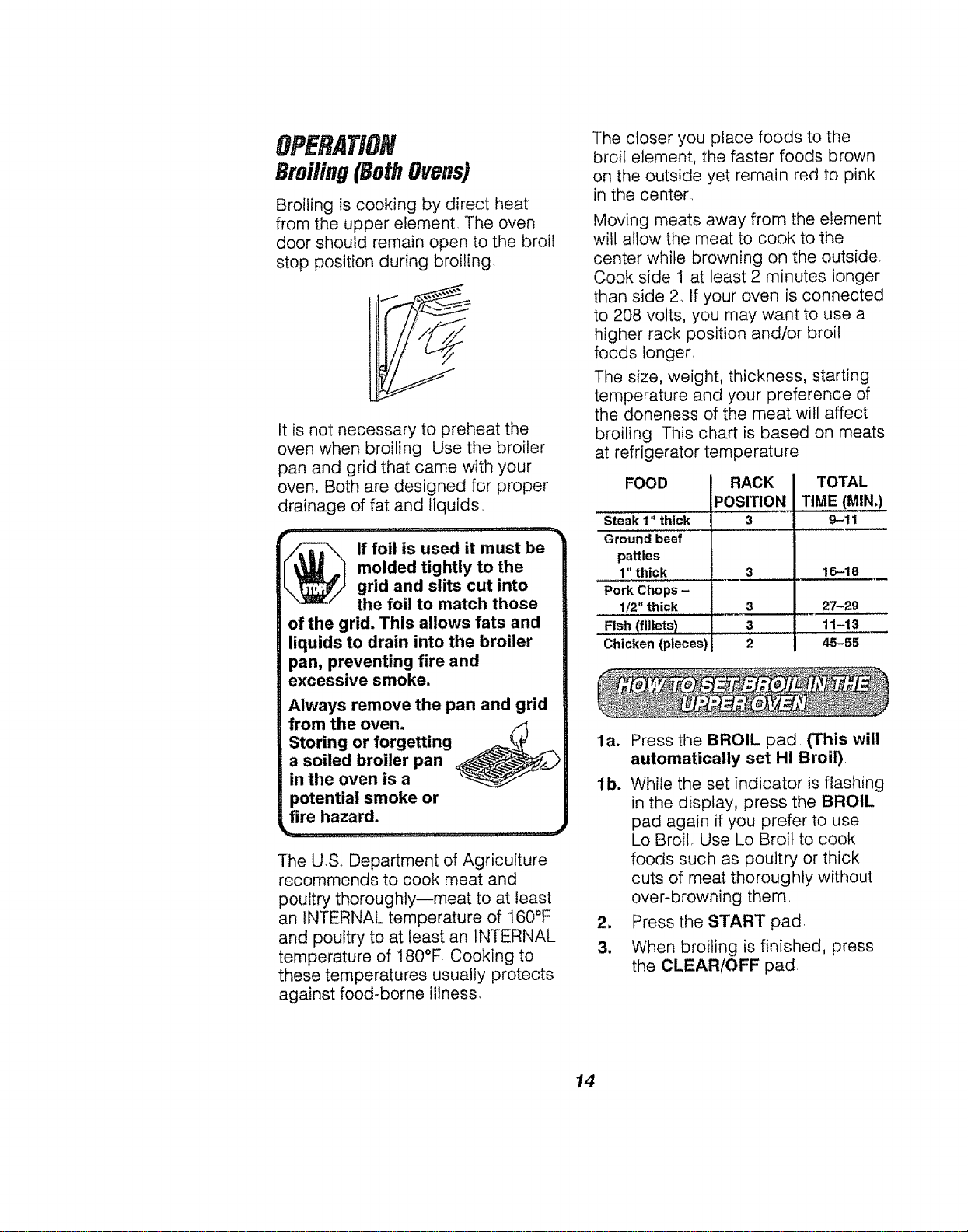
broiling This chart is based on meats
at refrigerator temperature.
FOOD
Steak 1" thick
Ground beef
patties
1" thick
Pork Chops -
1/2" thick
_Fish (fil!ets)...................
Chicken (pieces)
i RACK
iPOSITION
3
3
3
2
TOTAL
TIME (MIN,)
9-11
16-18
27-29
11-13
45-55
la. Press the BROIL pad (This will
automatically set HI Broil)
lb. While the set indicator is flashing
in the display, press the BROIL
pad again if you prefer to use
Lo Broil, Use Lo Broil to cook
foods such as poultry or thick
cuts of meat thoroughly without
over-browning them
2. Press the START pad
3. When broiling is finished, press
the CLEAR/OFF pad,
14
OPERATION
SettingSpecialFeatures
(UpperOven)
Your new touch pad control has
additional features that you may
choose to use After making your
selection, if you want to change the
setting, follow the steps until the
display shows your choice
2. (a) Press the BROIL pad The
control display will show the
degrees sign and "F"
(b) Press the BROIL pad again
This wil! change "F" (Fahrenheit)
to "C" (Celsius)
3. Press the START pad
The control is automatically set to
turn off the oven after 12 hours
baking or 3 hours broiling should you
forget and leave the oven on If you
want to remove this feature:
Press and hold, at the same
time, the BAKE and BROIL pads
for 3 seconds, until the display
shows "SF"
2. Press the DELAY START TIME
pad. The display shows
"12Shdn" ( 12 hour shut-off)
Press the DELAY START TIME
pad again. The display will show
"no shdn" (no shut-off),
3. Press the START pad
Your oven control is set for the
Fahrenheit temperature selections
Most recipes are given using the
Fahrenheit scale You can change
this to use the Celsius selection
1.
Press and hold, at the same
time, the BAKE and BROIL pads
for 3 seconds, until the display
shows "SE"
Your control is set to use the 12 hour
clock If you prefer to use the 24 hour
Military Time clock or black out the
display:
Press and hold, at the same
time, the BAKE and BROIL pads
for 3 seconds, until the display
shows "SF "
2_
(a) Press the CLOCK pad The
display shows "12hr" If this is
your choice press the START
pad
or
(b) Press the CLOCK pad again.
The display will show "24hr."
Example: 5:00 on the 12 hour
clock will show 17:00 hours on the
military clock. If this is your choice
press the START pad
or
(c) Press the CLOCK pad again.
The display will show "OFF." If
this is your choice press START.
The display will not show time
(The Delay Start Time feature will
not operate )
15
OPERATION
Setting Special Features
(UpperOven)
Your control will allow you to lock
the touch pads so they cannot be
activated when pressed If you're
worried about leaving the oven
unsupervised, activate this feature
1. Press and hold, at the same
time, the BAKE and BROIL pads
for 3 seconds, until the display
shows "SE"
2. (a) Press the CLEAN pad,
The display shows "LOC OFF"
(lockout off)
(b) Press the CLEAN pad again,
The display will show "LOC ON"
(lockout on),
3. Press the S'i"ART pad
This feature can only be set when
the oven is not in use.
When this feature is on, the display
will show "LOC," if a touch pad is
pressed_ (This feature wil! not affect
the Clock, Timer or Oven light pads )
Your new control has a cook and
hold feature for timed cooking only
that will keep hot cooked foods warm
up to 3 hours after the timed cooking
is finished To activate this feature:
1. Press and hold, at the same
time, the BAKE and BROIL pads
for 3 seconds, until the display
shows "SF."
2. (a) Press the OVEN COOKING
TIME pad, The display will show
"HLd OFF"
(b) Press the OVEN COOKING
TIME pad again to activate the
feature, The display will show
"HLd ON "
3. Press the START pad.,
This special feature wilt allow you to
change the speed; #1 means speed
of change is slow up to #5 which
means speed of change is fast To
set the speed you prefer, follow
these steps:
1. Press and hold, at the same
time, the BAKE and BROIL pads
for 3 seconds, untii the disptay
shows "SE"
2. Press the UP arrow pad The
display will show the current set
speed
3. Press the UP arrow to increase
the speed up to the number 5
or
Press the DOWN arrow pad to
decrease the speed down to the
number 1,
4. Press the START pad
16
OPERATION
Setting Special Features
(UpperOven)
(Designed for use on the Jewish
Sabbath and Holidays.)
(On some models)
The Sabbath feature can be used
for baking/roasting only It cannot
be used for broiling, self-cleaning,
or Delay Start cooking.
NOTE: The oven light comes on
automatically (on some models)
when the door is opened and goes
off when the door is closed The bulb
may be removed See the Oven Light
Replacement section On models with
an OVEN LIGHT pad, the oven light
may be turned on and left on
HOW TO SET FOR REGULAR
BAKING/ROASTING
NOTE: To understand how the oven
control works, practice using regular
baking (non-Sabbath) before entering
the Sabbath mode,
Make sure the clock shows the
correct time of day and the oven
is off.
_ '1 •
@
4_
Touch and hold both
the BAKE and BROIL
HIiLO pads, at the
same time, until the
display shows "SF"
Tap the DELAY START
TIME pad until "SAb
bAtH" appears in the
display.
Touch the START pad
and D will appear in the
display,
Touch the BAKE pad.
No signal will be given,
@
TEMP
@
5_
The preset starting
temperature will
automatically be set to
350°F Tap the UP or
DOWN arrow pads to
increase or decrease
the temperature in 5°
increments The
temperature can be set
between I70°F and
550°F No signal or
temperature will be given=
Touch the START pad°
After a random delay
period of approximately
30 seconds to 1 minute,
D c wilt appear in the
display indicating that the
oven is baking/roasting.
tf D c does not appear in
the display, start again at
Step 4.
To adjust the oven temperature,
touch the BAKE pad and tap the UP
or DOWN arrow pads to increase or
decrease the temperature in 5°
increments. Touch the START pad.
NOTES:
,, When the display shows D the
oven is set in Sabbath. When the
display shows D c the oven is
baking/roasting
e The CLEAR/OFF and OVEN
COOKING TIME pads are active
during the Sabbath feature.
17
OPERATION
SettingSpecialFeatures
(UpperOven)
HOW TO SET FOR TIMED BAKING/
ROASTING-IMMEDIATE START
AND AUTOMATIC STOP
NOTE: To understand how the oven
control works, practice using regular
(non-Sabbath) Immediate Start and
Automatic Stop before entering the
Sabbath mode,
Make sure the clock shows the
correct time of day and the oven
is off.
@
'I.
2_
3.
@@°.
HOUR MIN
Touch and hold both
the BAKE and BROIL
HI/LO pads, at the
same time, until the
display shows "SF."
Tap the DELAY START
TIME pad until "SAb
bAtH" appears in the
display.
Touch the START pad
and :3 will appear in the
display
Touch the OVEN
COOKING TIME pad.
No signal will be given.
Touch the UP or DOWN
arrow pads to set the
desired length of
cooking time between
1 minute and 9 hours
and 59 minutes. The
cooking time that
you entered will be
displayed
TEMP
@
6. Touch the START pad.
1
8.
Touch the BAKE pad°
No signal will be given.
The preset starting
temperature will
automatically be set to
350°F. Tap the UP or
DOWN arrow pads to
increase or decrease
the temperature in 5°
increments The
temperature can be
set between 170°F and
550°F, No signal or
temperature will be
given.
Touch the START pad
After a random delay
period of approximately
30 seconds to 1 minute,
c will appear in the
display indicating that
the oven is baking/
roasting. If D c does not
appear in the display,
start again at Step 7.
To adjust the oven temperature,
touch the BAKE pad and tap the UP
or DOWN arrow pads to increase or
decrease the temperature in 5 °
increments Press the START pad.
NOTES:
o When the display shows D the
oven is set in Sabbath. When the
display shows _ c the oven is
baking/roasting.
° When cooking is finished, the
display wilt change from D c to
and 0:00 wilt appear, indicating
that the oven has turned OFF but
is still set in Sabbath. Remove the
cooked food.
18
OPERATION
SettingSpecialFeatures
(UpperOven)
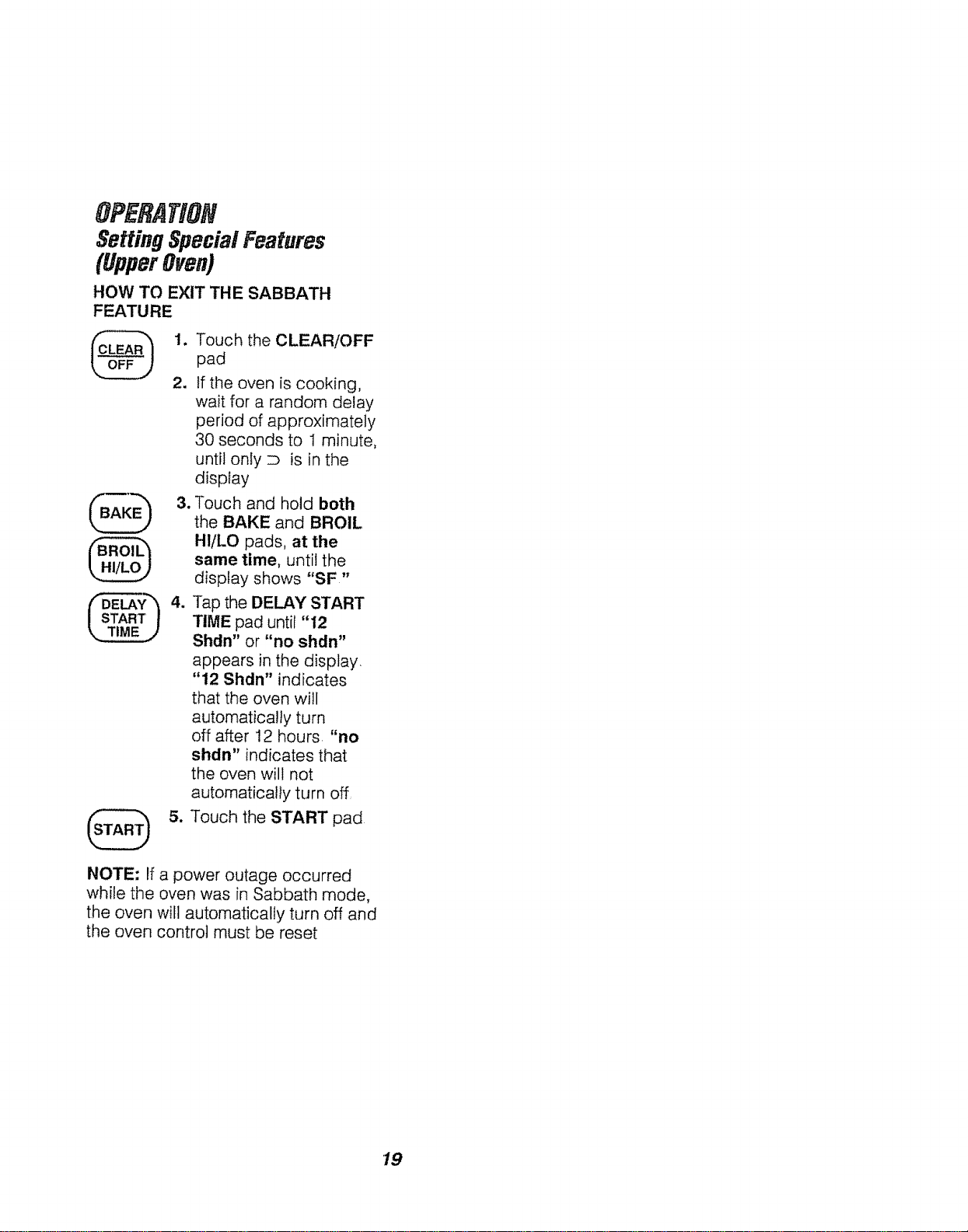
HOW TO EXIT THE SABBATH
FEATURE
@'.
2.
B_@ 3.
@
Touch the CLEAR/OFF
pad
if the oven is cooking,
wait for a random delay
period of approximately
30 seconds to 1 minute,
until only D is in the
display
Touch and hold both
the BAKE and BROIL
HIiLO pads, at the
same time, until the
display shows "SF"
Tap the DELAY START
TIME pad until "12
Shdn" or "no shdn"
appears in the display.
"12 Shdn" indicates
that the oven will
automatically turn
off after 12 hours "no
shdn" indicates that
the oven will not
automatically turn off,
Touch the START pad
NOTE: If a power outage occurred
while the oven was in Sabbath mode,
the oven will automatically turn off and
the oven control must be reset
19
AN# ttllNG
Self-Cleaning Cycle
(UpperOven)
1. Remove the broiler pan and grid,
oven racks, utensils and any foil
that may be in the oven
2. If your oven is equipped
with nickel oven racks, they
should be removed If your
oven is equipped with gray
porcelain-coated oven racks,
they may stay in the oven during
the self-clean cycle
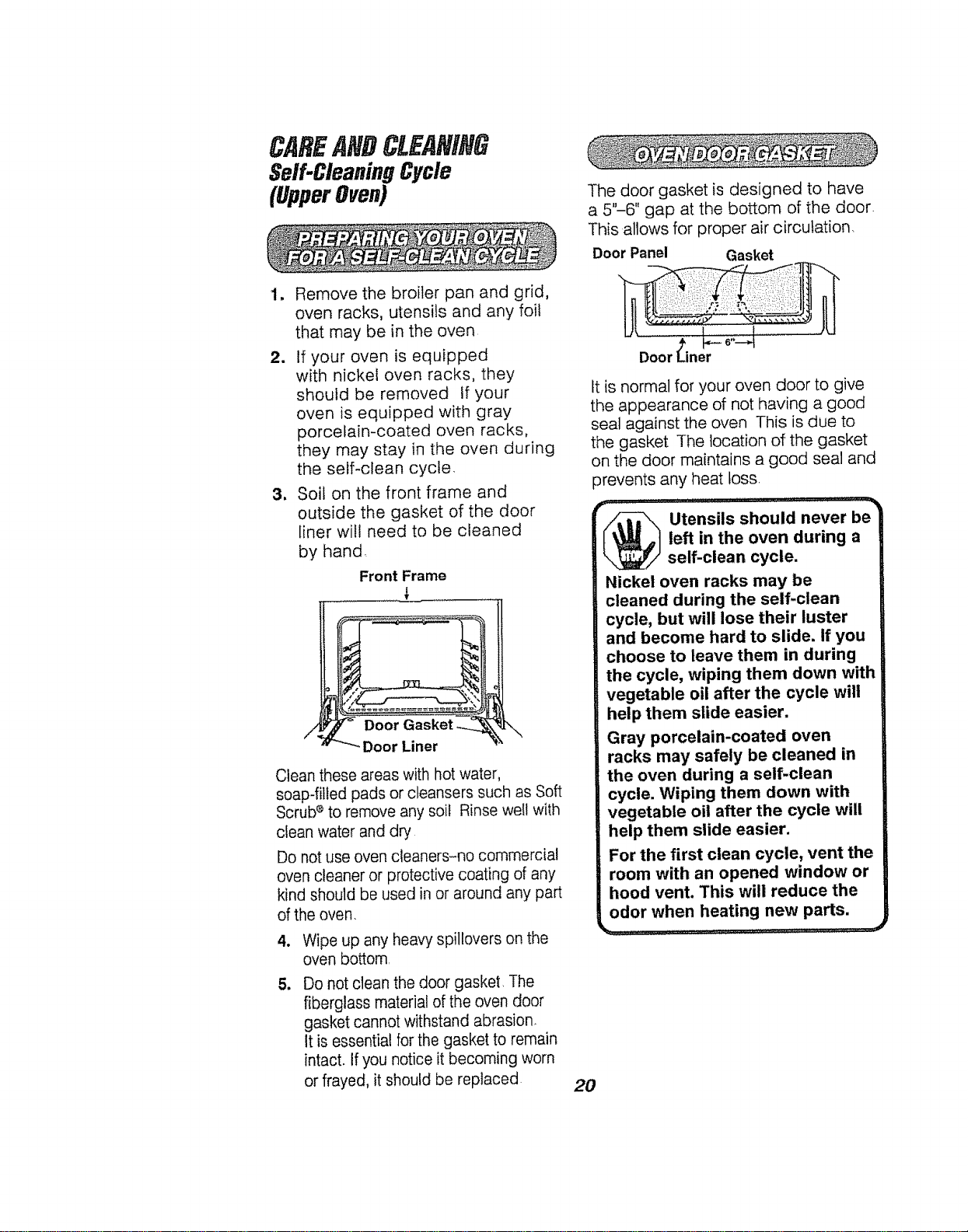
3, Soil on the front frame and
outside the gasket of the door
liner will need to be cleaned
by hand.
Front Frame
\
Clean these areas with hot water,
soap-filled pads or cleansers such as Soft
Scrub®to remove any soil Rinse well with
clean water and dry
Do not use oven cleaners-no commercial
oven cleaner or protective coating of any
kind should be used in or around any part
of the oven.
t
5.
Wipe up any heavy spiltovers on the
oven bottom
Do not clean the door gasket. The
fiberglass material of the even door
gasket cannot withstand abrasion.
It is essential for the gasket to remain
intact. If you notice it becoming worn
or frayed, it should be replaced
The door gasket is designed to have
a 5"-6" gap at the bottom of the door.
This allows for proper air circulation.
Door Panel Gasket
........ _'i,:i:
...................................
Door Liner
It is normal for your oven door to give
the appearance of not having a good
seal against the oven This is due to
the gasket The location of the gasket
on the door maintains a good seal and
prevents any heat toss,
_ tensils should never be
left in the oven during a
self-clean cycle.
Nickel oven racks may be
cleaned during the self-clean
cycle, but will lose their luster
and become hard to slide. If you
choose to leave them in during
the cycle, wiping them down with
vegetable oil after the cycle will
help them slide easier.
Gray porcelain-coated oven
racks may safely be cleaned in
the oven during a self-clean
cycle. Wiping them down with
vegetable oil after the cycle will
help them slide easier.
For the first clean cycle, vent the
room with an opened window or
hood vent. This will reduce the
odor when heating new parts.
20
CAREANDCLEANING
Self-CleaningCycle
(UpperOven)
The Clean Cycle, including coot down
time, is automatically set for 4 hours,
but you may change this from 3 hours
if oven is lightly soiled, up to 5 hours if
oven is heavily soiled
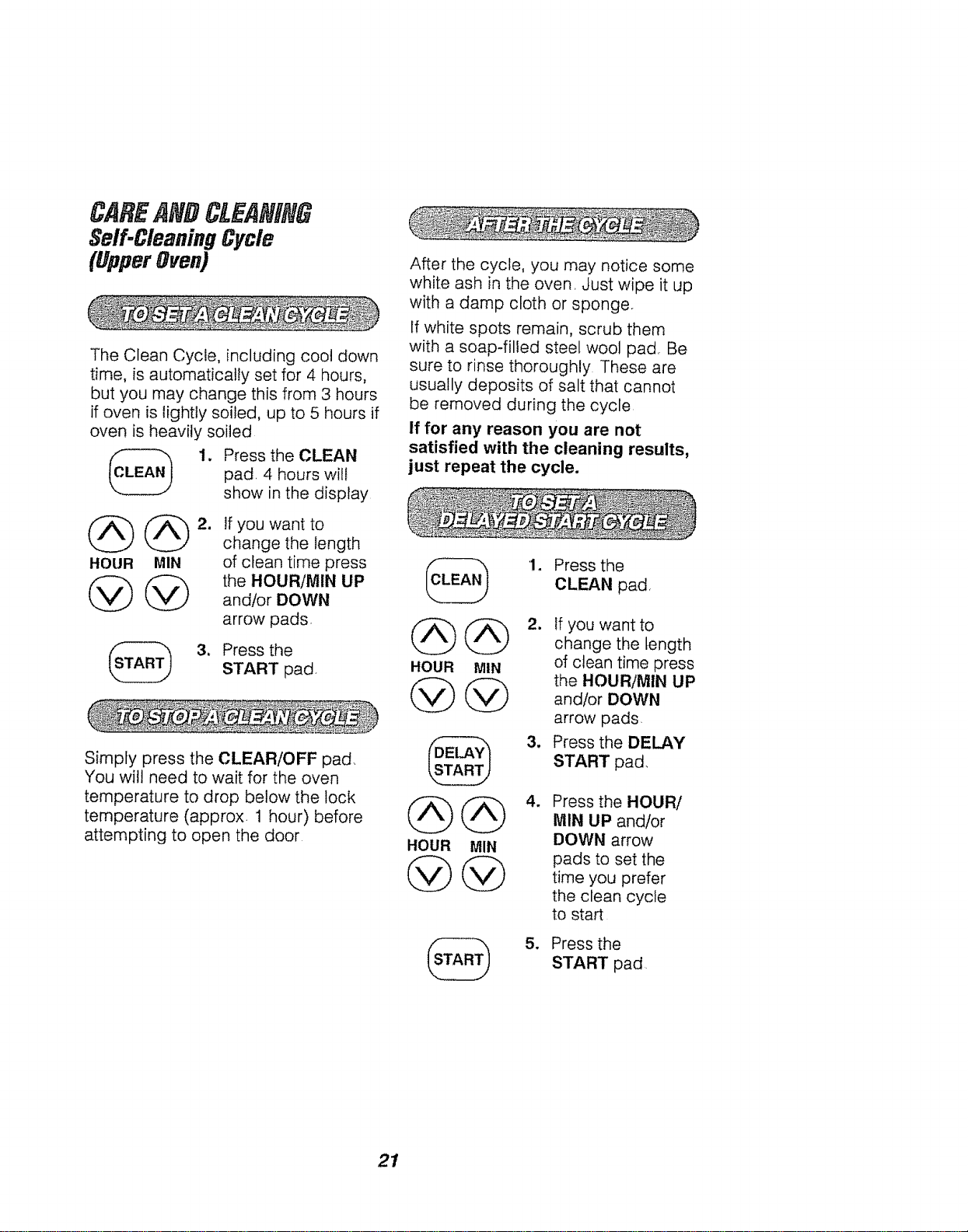
1. Press the CLEAN
pad, 4 hours will
show in the display
(_ @ 2. If you want to
change the length
HOUR MIN of clean time press
@ @ the HOUR/MIN UP
and/or DOWN
arrow pads.
3, Press the
START pad.
Simply press the CLEAR!OFF pad,
You wilt need to wait for the oven
temperature to drop below the lock
temperature (approx. 1 hour) before
attempting to open the door
After the cycle, you may notice some
white ash in the oven. Just wipe it up
with a damp cloth or sponge.
If white spots remain, scrub them
with a soap-filled steel wool pad. Be
sure to rinse thoroughly These are
usually deposits of salt that cannot
be removed during the cycle
If for any reason you are not
satisfied with the cleaning results,
just repeat the cycle.
HOUR MIN
@@
@
HOUR MIN
1. Press the
CLEAN pad,
2. tf you want to
change the length
of clean time press
the HOUR/MIN UP
and/or DOWN
arrow pads.
3, Press the DELAY
START pad.
w
St
Press the HOUR/
M1N UP and/or
DOWN arrow
pads to set the
time you prefer
the clean cycle
to start
Press the
START pad
21
CAREANDCLEANING
RemovableParts
CLEANING MATERIALS
• Dishwashing detergent
• Warm water
• Soft cloth
Do not use abrasive cleaners,
industrial cleaners or bleach.
CLEANING MATERIALS
- Dishwashing detergent
• Warm water
° Soap-filled scouring pad
- Commercial oven cleaner
TO CLEAN
Allow the pan to soak Sprinkle the
grid with dishwashing detergent and
cover with a damp cloth or paper
towel. Rinse and dry well Scour as
needed, You may also place both the
pan and grid in the dishwasher
CAUTION: Disconnect
electrical power to the
oven at the main circuit
breaker or fuse box before
attempting to replace the oven
light bulb. Do not touch a hot
light bulb with wet hands or a
wet cloth. Wait until the bulb has
cooled and use a dry cloth,
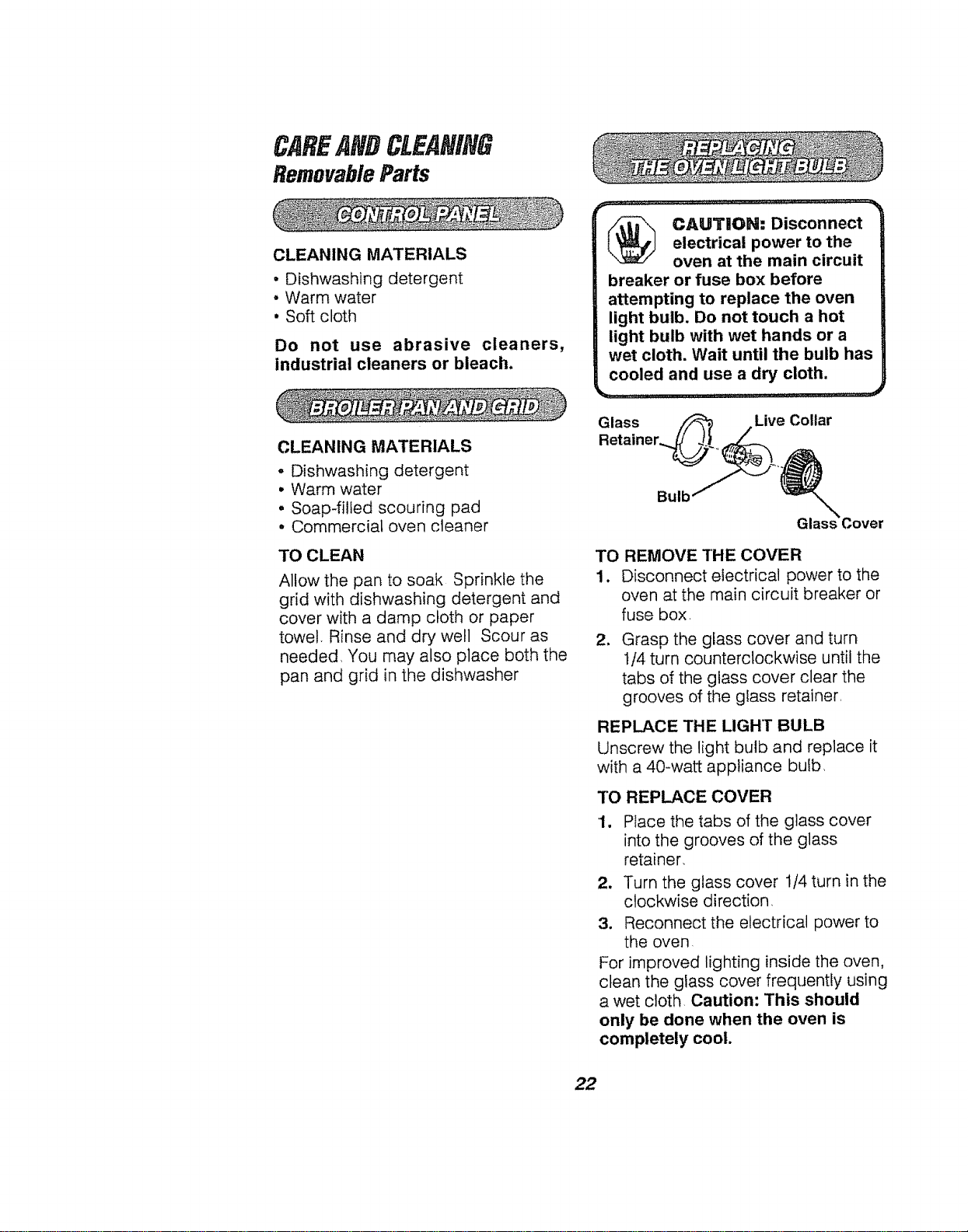
Glass Live Collar
Bulb
TO
1.
,
REMOVE THE COVER
Disconnect electrical power to the
oven at the main circuit breaker or
fuse box=
Grasp the glass cover and turn
tt4 turn counterclockwise until the
tabs of the glass cover clear the
grooves of the glass retainer
REPLACE THE LIGHT BULB
Unscrew the light bulb and replace it
with a 40-watt appliance bulb,
TO REPLACE COVER
1, Place the tabs of the glass cover
into the grooves of the glass
retainer,
2, Turn the glass cover 1/4 turn in the
clockwise direction_
3. Reconnect the electrical power to
the oven,
For improved lighting inside the oven,
clean the glass cover frequently using
a wet cloth, Caution: This should
only be done when the oven is
completely cool.
22
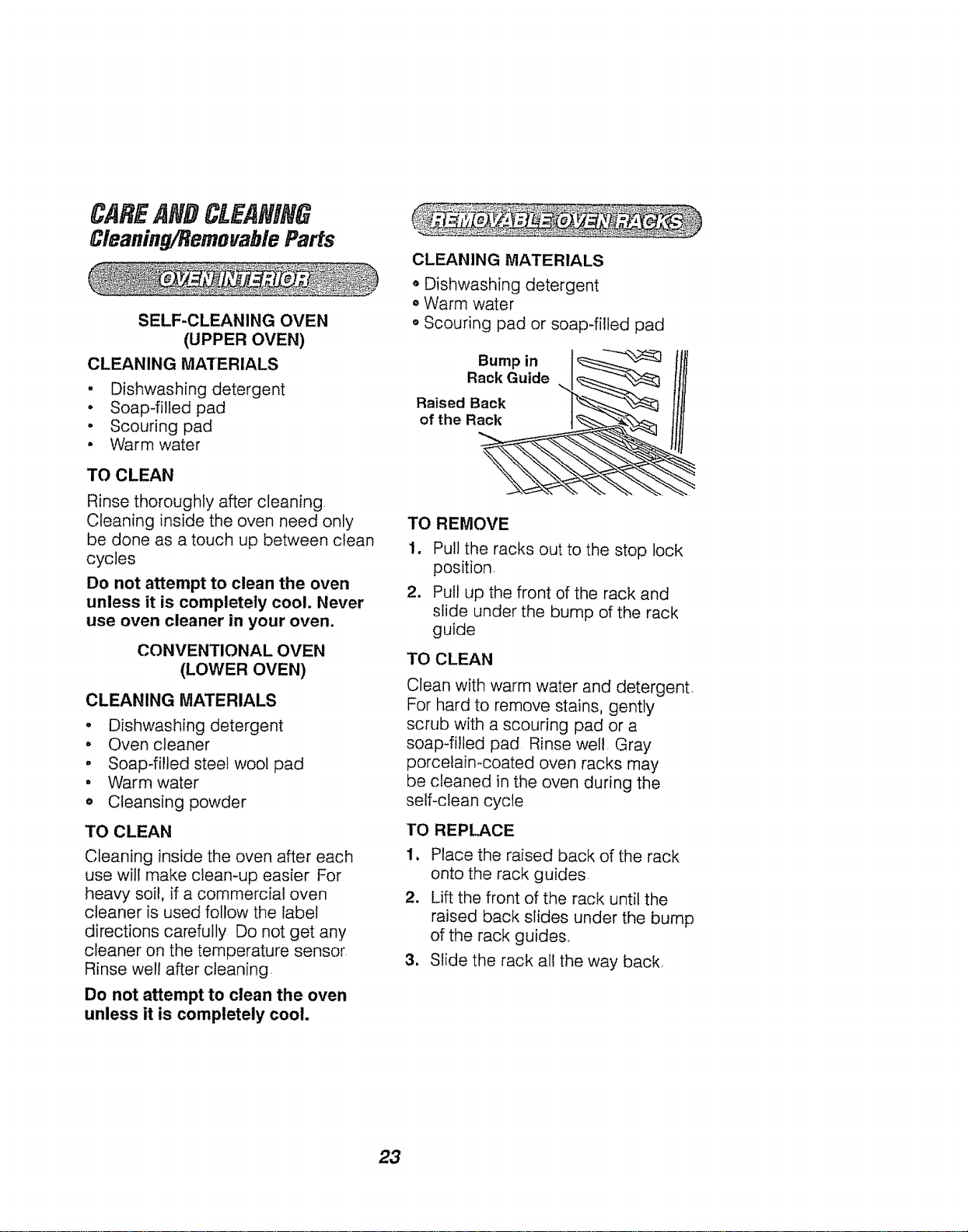
Cleaning/RemovableParts
SELF-CLEANING OVEN
(UPPER OVEN)
CLEANING MATERIALS
. Dishwashing detergent
• Soap-filled pad
- Scouring pad
° Warm water
TO CLEAN
Rinse thoroughly after cleaning
Cleaning inside the oven need only
be done as a touch up between clean
cycles
Do not attempt to clean the oven
unless it is completely cool. Never
use oven cleaner in your oven.
CONVENTIONAL OVEN
(LOWER OVEN)
CLEANING MATERIALS
• Dishwashing detergent
• Oven cleaner
• Soap-filled steel wool pad
° Warm water
o Cleansing powder
TO CLEAN
Cleaning inside the oven after each
use will make ciean-up easier For
heavy soi!, if a commercial oven
cleaner is used follow the label
directions carefully Do not get any
cleaner on the temperature sensor
Rinse well after cleaning
Do not attempt to clean the oven
unless it is completely cool.
CLEANING MATERIALS
,, Dishwashing detergent
o Warm water
o Scouring pad or soap-filled pad
Bump in
Rack Guide
Raised Back
of the Rack
TO REMOVE
1. Pull the racks out to the stop lock
position
2. Pull up the front of the rack and
slide under the bump of the rack
guide
TO CLEAN
Clean with warm water and detergent,
For hard to remove stains, gently
scrub with a scouring pad or a
soap-filled pad Rinse well. Gray
porcelain-coated oven racks may
be cleaned in the oven during the
self-clean cycle
TO REPLACE
1. Place the raised back of the rack
onto the rack guides,
2. Lift the front of the rack until the
raised back slides under the bump
of the rack guides,
3, Sfide the rack all the way back,
23
CAREANDCLEANING
RemovableParts
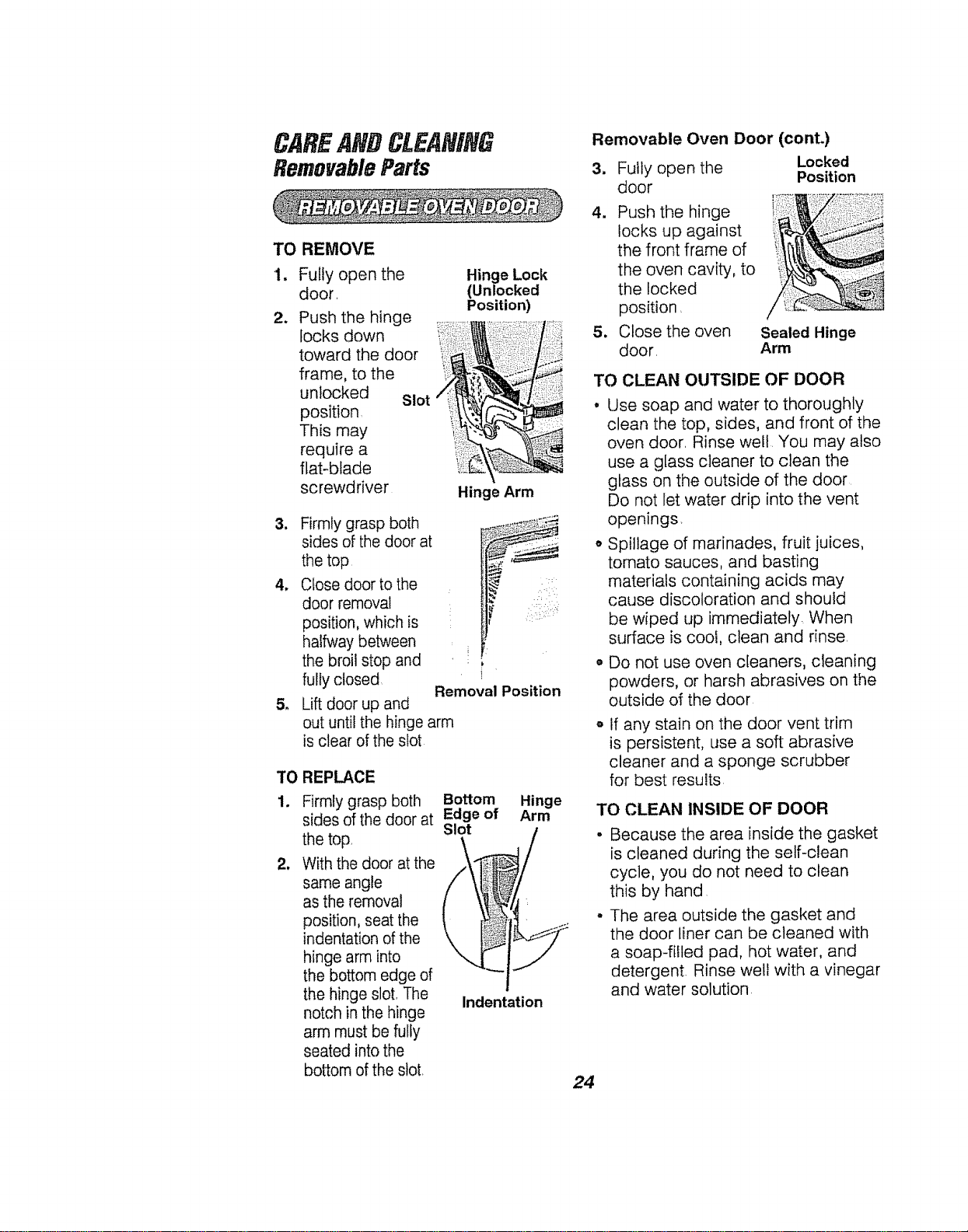
TO REMOVE
1.
2.
Fully open the
door.
Push the hinge .
,o sdow
toward the door
frame, to the _i_
unlocked Slot
position _i!i! _
This may
requ,re a '_ii!i_
flat-blade
screwdriver Hinge Arm
Hinge Lock
(Unlocked
Position)
3. Firmly grasp both
sides of the door at
the top
4. Close door to the
door removal
position, which is
halfway between
the broil stop and
fully closed
5. Lift door up and
i[
Removal Position
out until the hinge arm
is clear of the slot
TO REPLACE
1,
m
Firmly grasp both Bottom
sides of the door at Edge of
Slot
the top,
With the door at the
same angle
as the removal
position, seat the
indentation of the
hinge arm into
the bottom edge of
the hinge slot, The
notch in the hinge
arm must be fully
seated into the
bottom of the slot,
Indentation
Hinge
Arm
Removable Oven Door (cont.)
3. Fully open the Locked
Position
door
4. Push the hinge
locks up against
the front frame of
the oven cavity, to
the Locked
position,
5. Close the oven Sealed Hinge
door, Arm
TO CLEAN OUTSIDE OF DOOR
• Use soap and water to thoroughly
clean the top, sides, and front of the
oven door. Rinse well You may also
use a glass cleaner to clean the
glass on the outside of the door
Do not let water drip into the vent
openings.
o Spillage of marinades, fruit juices,
tomato sauces, and basting
materials containing acids may
cause discoloration and should
be wiped up immediately. When
surface is cool, clean and rinse.
o Do not use oven cleaners, cleaning
powders, or harsh abrasives on the
outside of the door
if any stain on the door vent trim
is persistent, use a soft abrasive
cleaner and a sponge scrubber
for best results
TO CLEANINSIDEOFDOOR
• Because the area inside the gasket
is cleaned during the self-clean
cycle, you do not need to clean
this by hand
• The area outside the gasket and
the door liner can be cleaned with
a soap-filled pad, hot water, and
detergent. Rinse well with a vinegar
and water solution
24
BEFORECALLI#GFORSERVICE
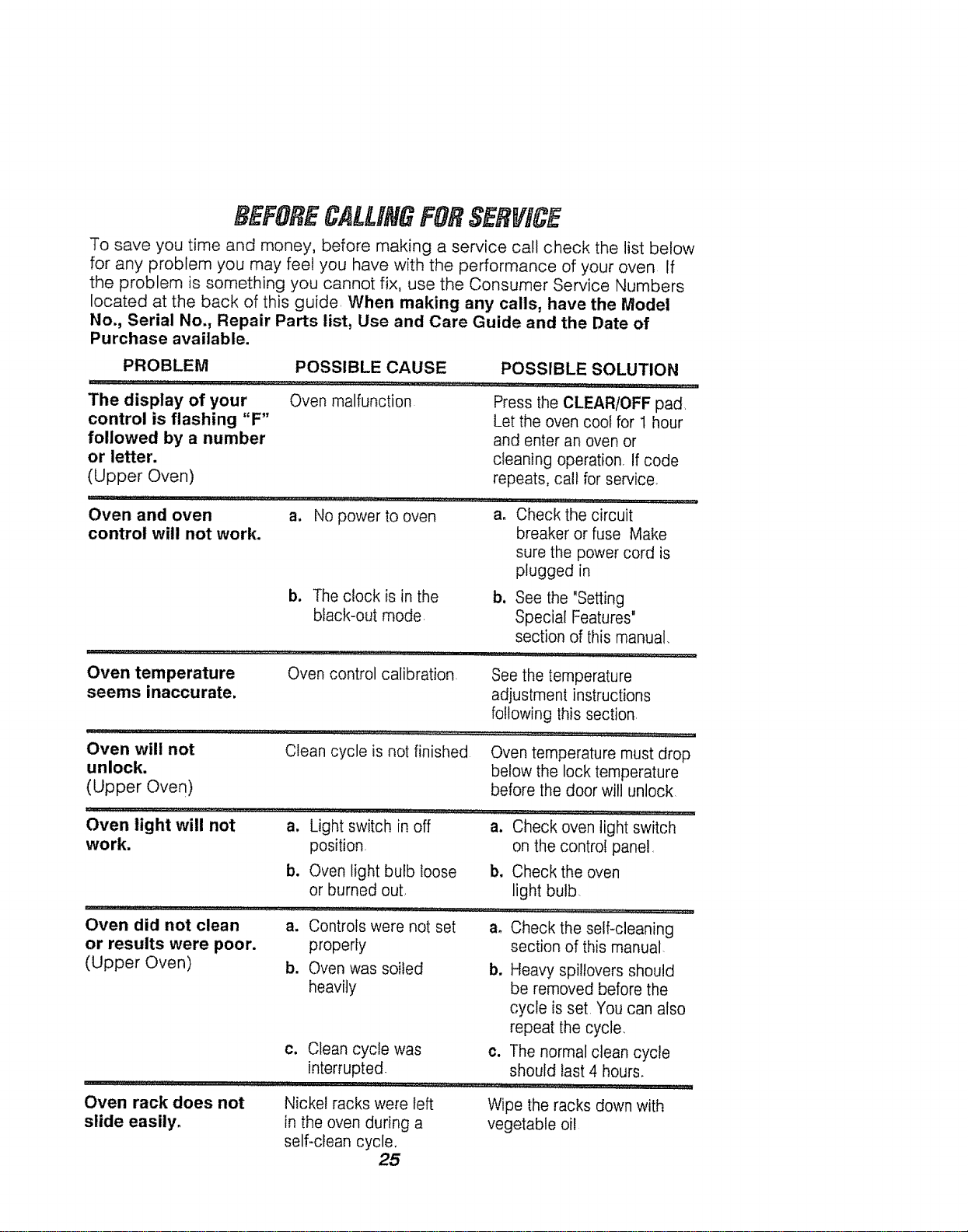
To save you time and money, before making a service call check the list below
for any problem you may feet you have with the performance of your oven If
the problem is something you cannot fix, use the Consumer Service Numbers
located at the back of this guide When making any calls, have the Model
No., Serial No., Repair Parts list, Use and Care Guide and the Date of
Purchase available.
PROBLEM POSSIBLE CAUSE
The display of your Oven malfunction
control is flashing "F"
followed by a number
or letter.
(Upper Oven)
Oven and oven a.
control will not work.
Oven temperature
seems inaccurate,
No power to oven
POSSIBLE SOLUTION
Press the CLEAR/OFF pad,
Let the oven cool for 1 hour
and enter an oven or
cleaning operation, If code
repeats, call for service.
a. Check the circuit
breaker or fuse Make
sure the power cord is
plugged in
b. Theclock is in the
black-out mode
Oven will not
unlock.
(Upper Oven)
Oven control calibration
Clean cycle is not finished
Oven light will not
work.
Oven did not clean
or results were poor.
(Upper Oven)
b, See the "Setting
Special Features"
section of this manual.
,ql ...............,_, H_L !,, 2'2_
See the temperature
adjustment instructions
following this section
Oven temperature must drop
below the lock temperature
before the door will unlock
a. Light switch in off a. Check oven light switch
position on the control panel,
b. Oven light bulb loose b. Check the oven
or burned out light bulb
a. Controls were not set a. Check the self-cleaning
properly section of this manual
b. Oven was soiled b. Heavy spillovers should
heavily be removed before the
cycle is set You can also
repeat the cycle.
c. Clean cycle was c. The normal clean cycle
interrupted, should last 4 hours.
Oven rack does not
slide easily.
Nickel racks were left
in the oven during a
self-clean cycle,
25
Wipe the racks down with
vegetable oi!
BEFORECALLIHGFORSERVICE
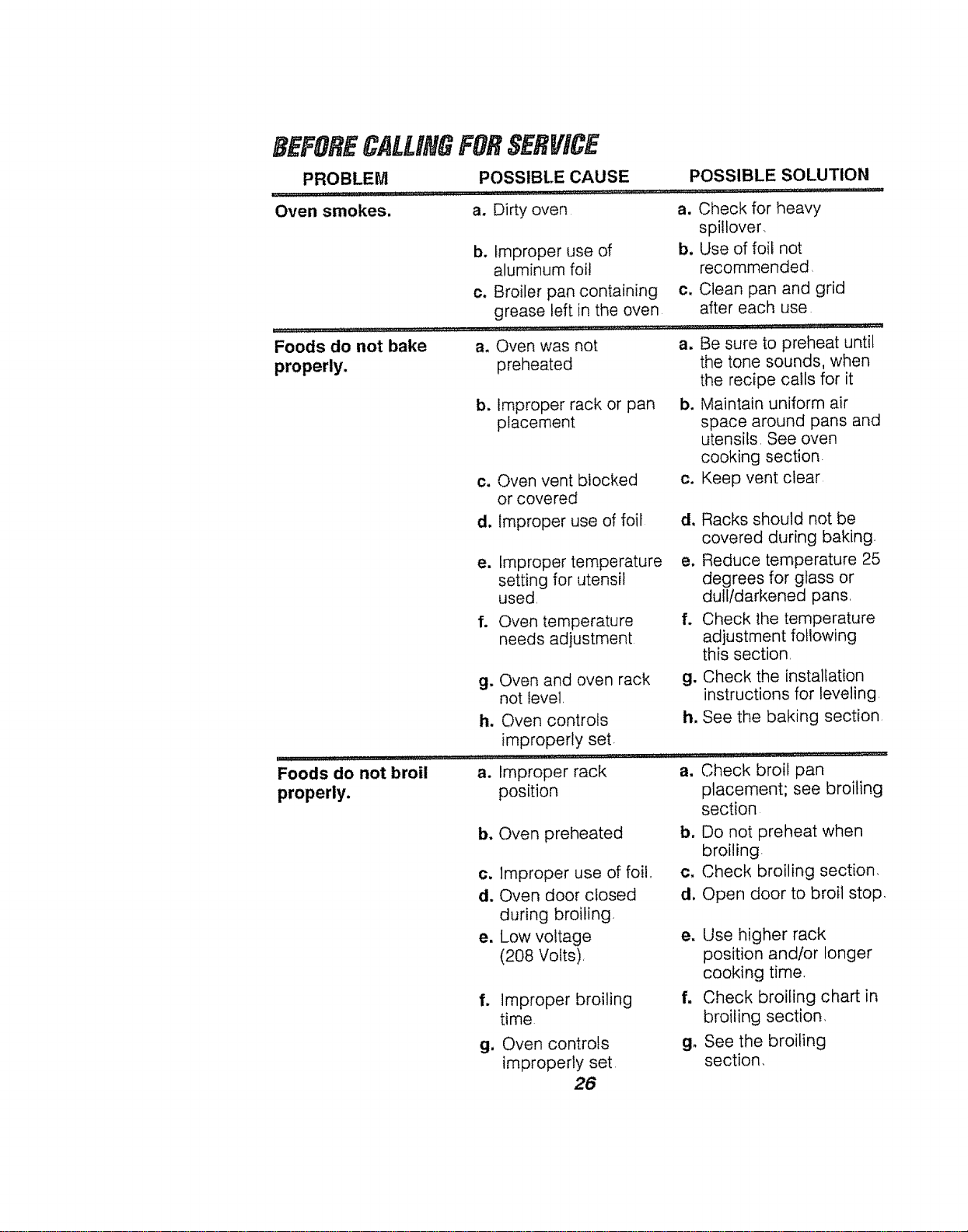
PROBLEM POSSIBLE CAUSE
Oven smokes, a. Dirty oven
Foods do not bake
properly.
b. Improper use of
aluminum foi!
c. Broiler pan containing
grease left in the oven
....... ,,,,,,,,, ..... ,, ,, • _,_,,J_,,,,L,_,
Foods do not broil
properly.
a. Oven was not
preheated
POSSIBLE SOLUTION
a. Check for heavy
spi!!over,
b. Use of foil not
recommended
c, Clean pan and grid
after each use
b, Improper rack or pan
placement
a.
c. Oven vent blocked
or covered
d, Improper use of foil
b.
e. Improper temperature
setting for utensil
used
f. Oven temperature
needs adjustment
g. Oven and oven rack
not Ievel,
h. Oven controls
improperly set
a. Improper rack
position
b. Oven preheated
c. Improper use of foil,,
d. Oven door closed
during broiling
e. Low voltage
(208 Votts),
f. improper broiling
time
g. Oven controls
improperly set
26
Ci
d, Racks should not be
covered during baking.
e, Reduce temperature 25
degrees for glass or
dulltdarkened pans,
f. Check the temperature
adjustment following
this section
g. Check the installation
instructions for leveling
h. See the baking section
Check broil pan
placement; see broiling
section
Do not preheat when
broiling.
Check broiling section,
Open door to broil stop.
b.
d,
e. Use higher rack
position and/or longer
cooking time,
f. Check broiling chart in
broiling section,
g. See the broiling
section,
Be sure to preheat until
the tone sounds, when
the recipe calls for it
Maintain uniform air
space around pans and
utensils See oven
cooking section
Keep vent clear
a.
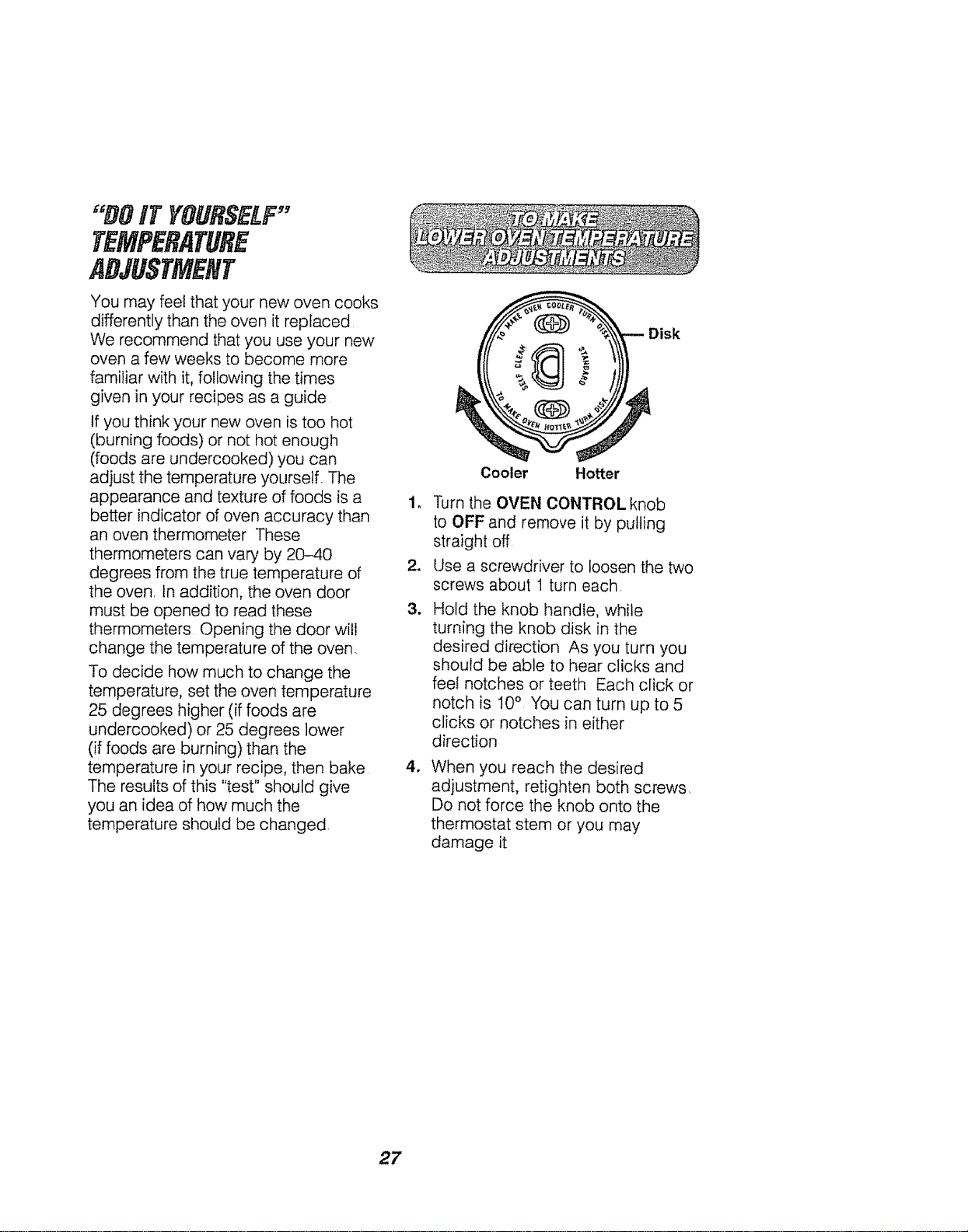
"nOiT YOURSELF"
TEMPERATURE
ADJUSTMENT
You may feel that your new oven cooks
differently than the oven it replaced
We recommend that you use your new
oven a few weeks to become more
familiar with it, following the times
given in your recipes as a guide
If you think your new oven is too hot
(burning foods) or not hot enough
(foods are undercooked) you can
adjust the temperature yourself. The
appearance and texture of foods is a 1o
better indicator of oven accuracy than
an oven thermometer These
thermometers can vary by 20-40
degrees from the true temperature of 2.
the oven. tn addition, the oven door
must be opened to read these 3.
thermometers Opening the door wil!
change the temperature of the oven,
To decide how much to change the
temperature, set the oven temperature
25 degrees higher (if foods are
undercooked) or 25 degrees lower
(if foods are burning) than the
temperature in your recipe, then bake 4.
The results of this "test" should give
you an idea of how much the
temperature should be changed.
Disk
Cooler Hotter
Turn the OVEN CONTROL knob
to OFF and remove it by pulling
straight off
Use a screwdriver to loosen the two
screws about I turn each,
Hold the knob handle, while
turning the knob disk in the
desired direction As you turn you
should be able to hear clicks and
feet notches or teeth Each click or
notch is I0 ° You can turn up to 5
clicks or notches in either
direction
When you reach the desired
adjustment, retighten both screws,
Do not force the knob onto the
thermostat stem or you may
damage it
27
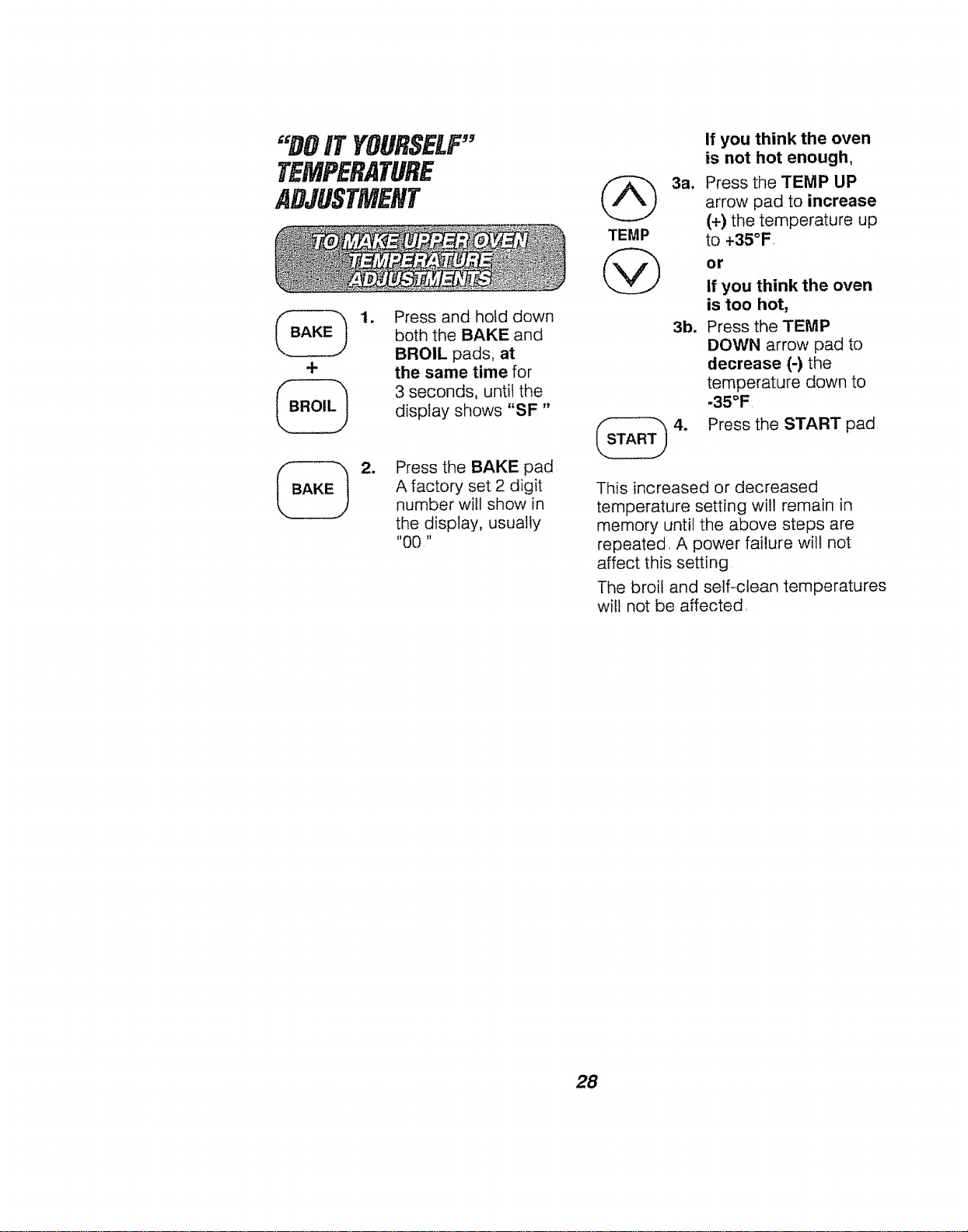
"DOIT YOURSELF"
TEMPERATURE
ADJUSTMENT
+
1. Press and hold down
both the BAKE and
BROIL pads, at
the same time for
3 seconds, until the
display shows "SF"
=
Press the BAKE pad
A factory set 2 digit
number will show in
the display, usually
"00"
_ 3a,
TEMP
@
3b.
If you think the oven
is not hot enough,
Press the TEMP UP
arrow pad to increase
(+) the temperature up
to +35°F
or
If you think the oven
is too hot,
Press the TENIP
DOWN arrow pad to
decrease (-) the
temperature down to
.35°F
Press the START pad
This increased or decreased
temperature setting will remain in
memory until the above steps are
repeated, A power failure will not
affect this setting
The broil and self-clean temperatures
will not be affected,
28

NOTES
29
BUILFIN
WALLOVF.HWARRANTY
f
FULL ONE YEAR WARRANTY ON ALL PARTS
If, within one year from the date of installation, any part fails to function
properly due to a defect in material or workmanship, Sears will repair or
replace it, at our option, free of charge
If this product is subjected to other than private family use, the above
warrant,./is effective for only 90 days
WARRANTY SERVICE IS AVAILABLE BY CONTACTING THE NEAREST
SEARS SERVICE CENTER IN THE UNITED STATES
This warranty gives you specific legal rights, and you may also have other
rights which vary from state to state
Sears Roebuck and Co Dept. 817 WA Hoffman Estates, iL 60179
"to further add to the vaUue of your Oven,
Buy a Sears Maintenance Agreement,
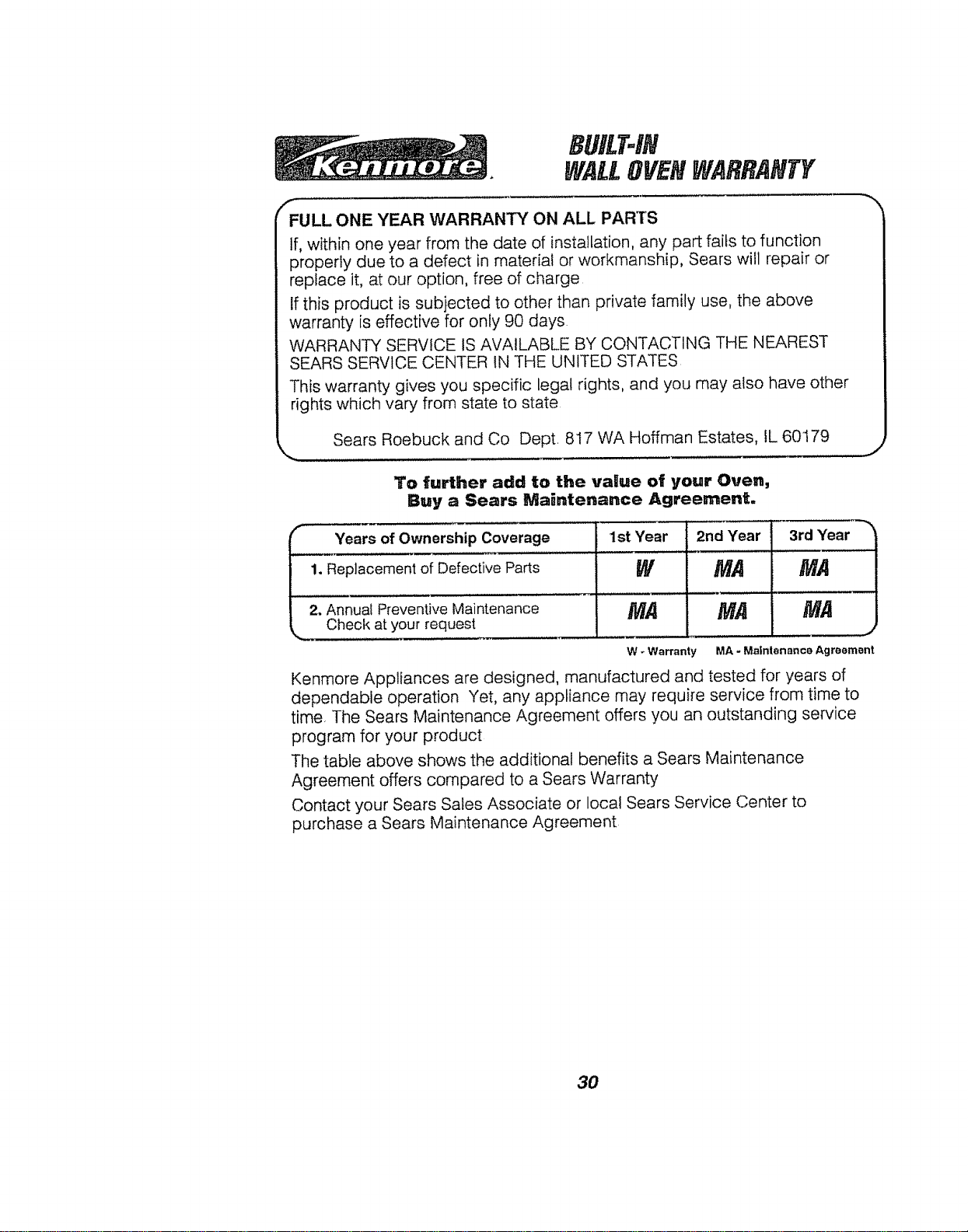
.._. Year.__s20mwnershi_p
co o,a__2 o
1. Replacement of Defective Parts
2. Annual Preventive Maintenance
Check at your request
1st Year 3rd Year
W MA
MA
W - Warranty
Kenmore Appliances are designed, manufactured and tested for years of
dependable operation Yet, any appliance may require service from time to
time, The Sears Maintenance Agreement offers you an outstanding service
program for your product
The table above shows the additional benefits a Sears Maintenance
Agreement offers compared to a Sears Warranty
Contact your Sears Sales Associate or local Sears Service Center to
purchase a Sears Maintenance Agreement
3O