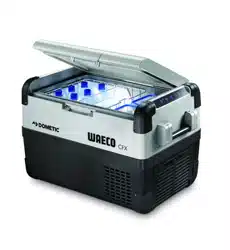
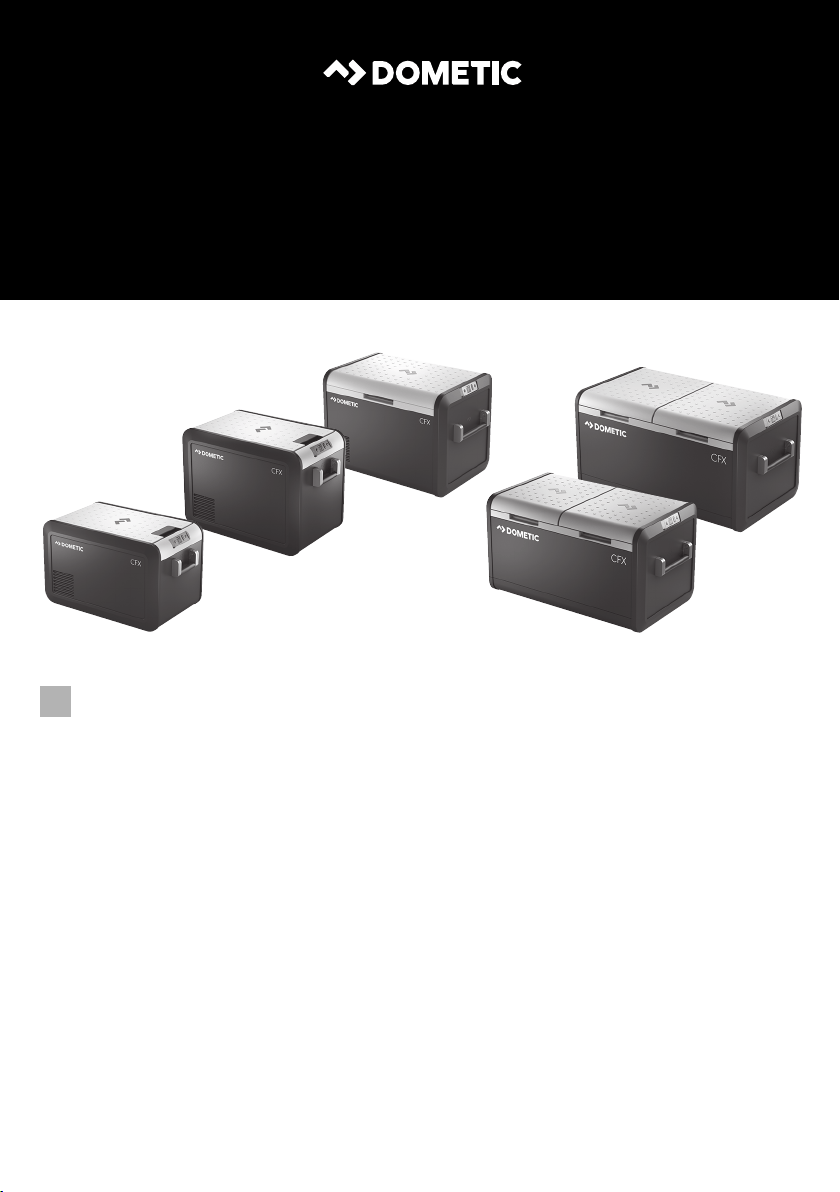
CFX3 35, CFX3 45, CFX3 55, CFX3 55IM, CFX3 75DZ, CFX3 95DZ
Compressor Cooler
Operating manual
EN
MOBILE COOLING
CFX3
CFX3_OPM_APAC(en).book Seite 1 Donnerstag, 23. Januar 2020 6:54 18

© 2020 Dometic Group. The visual appearance of the contents of this manual is
protected by copyright and design law. The underlying technical design and the
products contained herein may be protected by design, patent or be patent
pending. The trademarks mentioned in this manual belong to Dometic Sweden AB.
All rights are reserved.
CFX3_OPM_APAC(en).book Seite 2 Donnerstag, 23. Januar 2020 6:54 18
CFX3
3
5 V/2 A5 V/2 A 12/24 V DC12/24 V DC 100-240 V AC100-240 V AC
1
CFX3 35, CFX3 45
1
CFX3 55, CFX3 55IM,
CFX3 75DZ, CFX3 95DZ
2
CFX3_OPM_APAC(en).book Seite 3 Donnerstag, 23. Januar 2020 6:54 18
CFX3
4
DC V
11.8
-8
°C
CFX3 35, CFX3 45,
CFX3 55
DC V
11.8
-128
°C °C
CFX3 75DZ, CFX3 95DZ
DC V
11.8
-8
°C
CFX3 55 IM
DC V
11.8
-8
°C
32 41
3
1 2
4
3
4
CFX3_OPM_APAC(en).book Seite 4 Donnerstag, 23. Januar 2020 6:54 18
CFX3
5
1.
2.
3.
1.
2.
4.
3.
180°
5
CFX3_OPM_APAC(en).book Seite 5 Donnerstag, 23. Januar 2020 6:54 18
CFX3
6
1.
2.
3.
1.
2.
1.
2.
2.
1.
3.
2.
1.
180°
6
CFX3_OPM_APAC(en).book Seite 6 Donnerstag, 23. Januar 2020 6:54 18
CFX3
7
1.1.
2.2.
7
1.1.
2.2.
3.
3.
100 – 240 Vw
8
CFX3_OPM_APAC(en).book Seite 7 Donnerstag, 23. Januar 2020 6:54 18
CFX3
8
DC V
11.8
-
°
CLICK
3.
3.
2.
2.
1.
1.
9
2.
1.
1.
2.
3 sec
2.
1.
12/24 V
100 – 240 V
0
DC V
11.7
-8
°C
DC V
11.7
-8
°C
ABC
a
CFX3_OPM_APAC(en).book Seite 8 Donnerstag, 23. Januar 2020 6:54 18
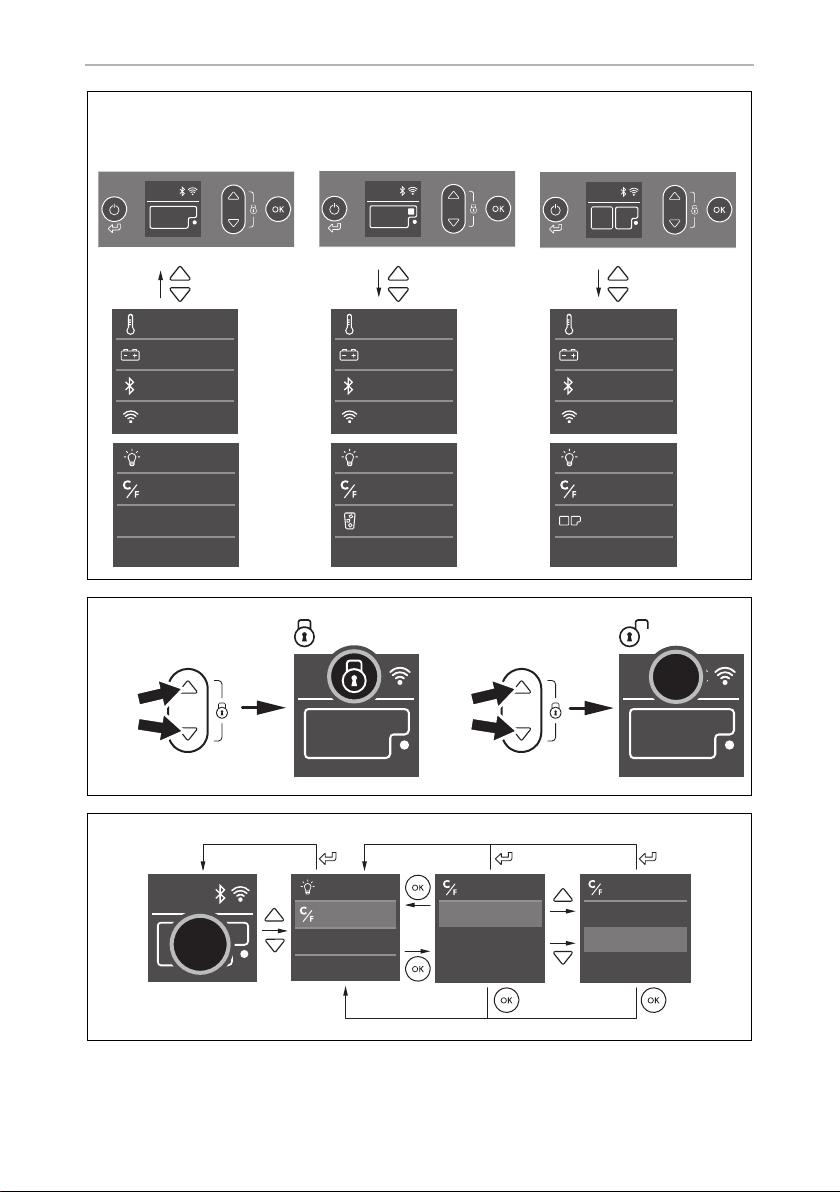
CFX3
9
Bluetooth
Battery protection
WiFi
Set temp
Display
Temp units
CFX3 35/CFX3 45/
CFX3 55
Bluetooth
Battery protection
WiFi
Set temp
Display
Temp units
Zone control
CFX3 75DZ/
CFX3 95DZ
Bluetooth
Battery protection
WiFi
Set temp
Ice maker
Display
Temp units
CFX3 55IM
DC V
11.8
-8
°C
DC V
11.8
-8
°C
DC V
11.8
-128
°C °C
b
3 sec
3 sec
DC V
11.8
-8
°C
DC V
11.8
-8
°C
c
DC V
11.8
-8
°C
Temp units
Celsius
Fahrenheit
Temp units
Celsius
Fahrenheit
Display
Temp units
°C
d
CFX3_OPM_APAC(en).book Seite 9 Donnerstag, 23. Januar 2020 6:54 18
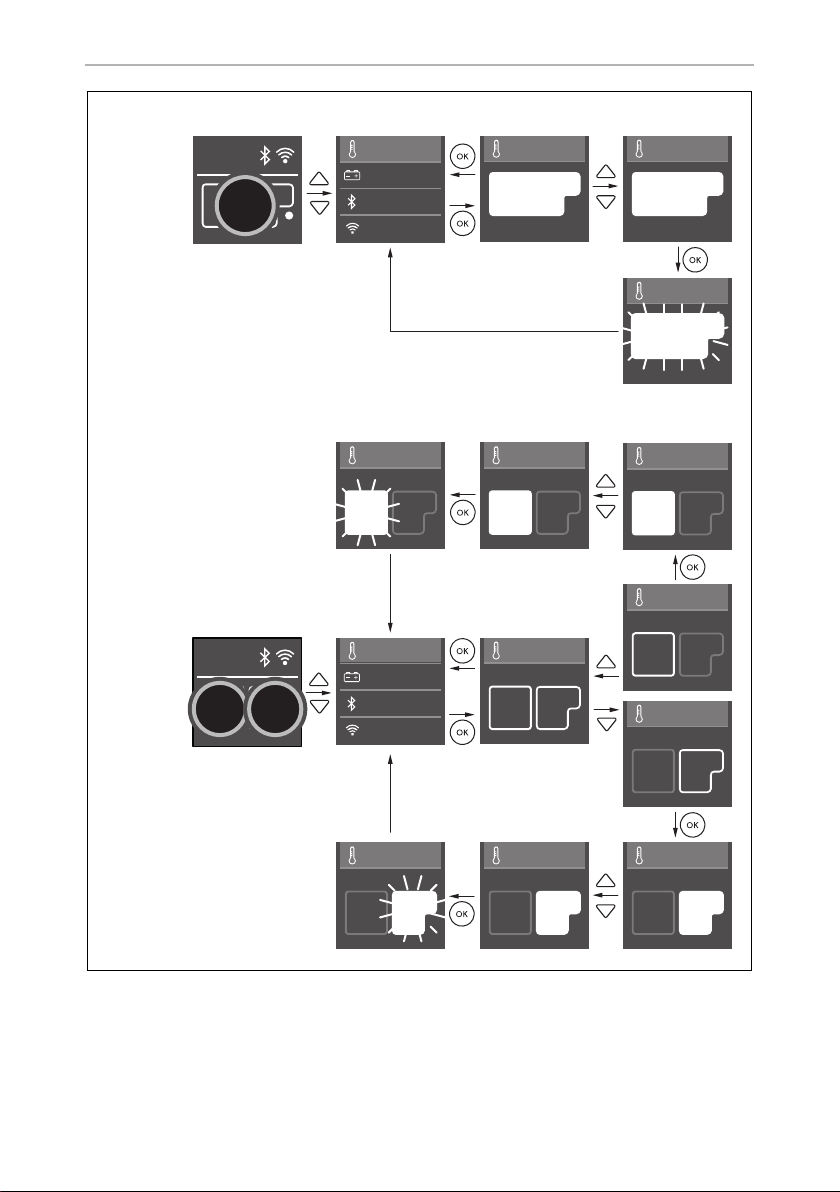
CFX3
10
Bluetooth
Battery protection
WiFi
Set temp
DC V
11.8
-8
°C
-8
°C
Set temp
-6
°C
Set temp
Set temp
-6
°C
-8
°C
CFX3 35/CFX3 45/CFX3 55/CFX3 55IM
CFX3 75DZ/CFX3 95DZ
DC V
11.8
-128
°C °C
Bluetooth
Battery protection
WiFi
Set temp
Set temp
-128
°C °C
Set temp
-128
°C °C
Set temp
-128
°C °C
Set temp
-128
°C °C
Set temp
-108
°C °C
Set temp
-108
°C °C
Set temp
-128
°C °C
Set temp
-126
°C °C
Set temp
-126
°C °C
8
°C
-8
°C
e
CFX3_OPM_APAC(en).book Seite 10 Donnerstag, 23. Januar 2020 6:54 18
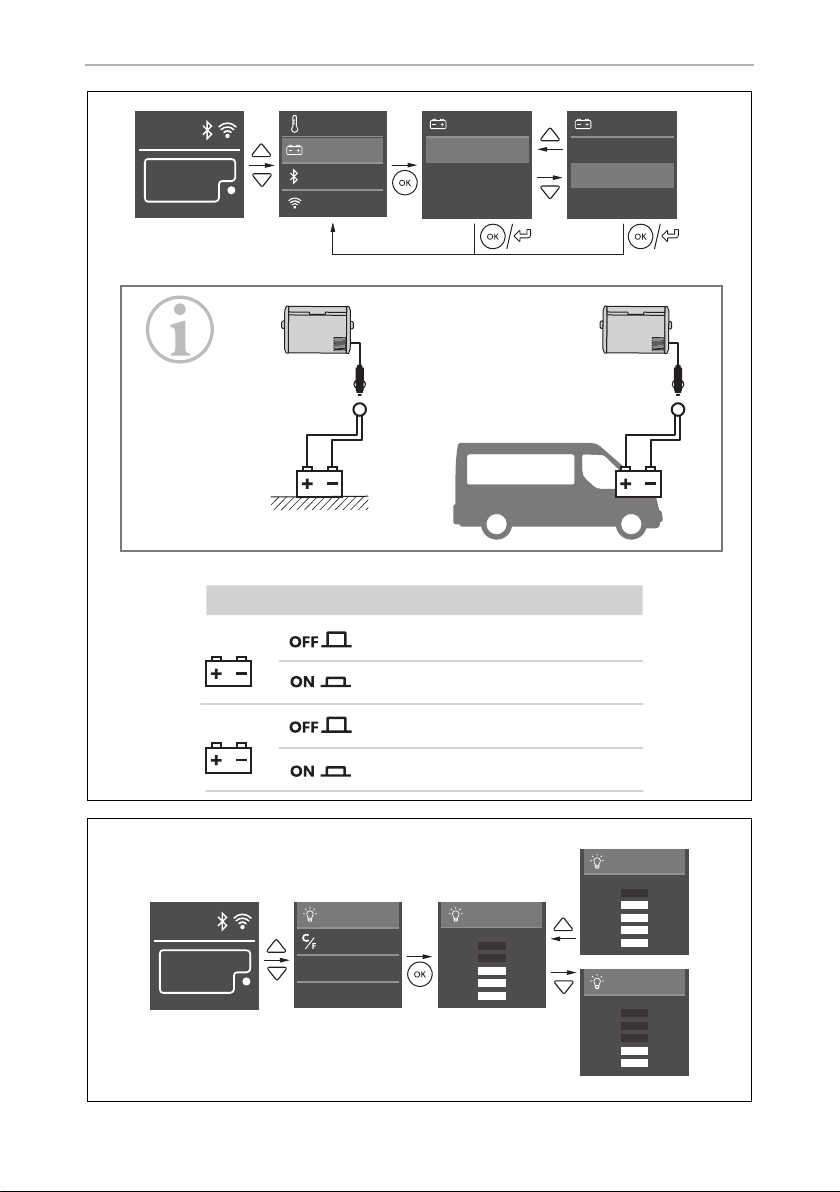
CFX3
11
Bluetooth
Battery protection
WiFi
Set temp
DC V
11.8
-8
°C
Battery protection
High
Medium
Low
Battery protection
High
Medium
Low
...
Medium/HighLow
Low Medium High
10.1 V 11.2 V 11.8 V
11.4 V 12.2 V 12.6 V
12 V
21.5 V 24.1 V 24.6 V
23.0 V 25.3 V 26.2 V
24 V
f
DC V
11.8
-8
°C
Display
Display
Display
Temp units
...
...
Display
g
CFX3_OPM_APAC(en).book Seite 11 Donnerstag, 23. Januar 2020 6:54 18
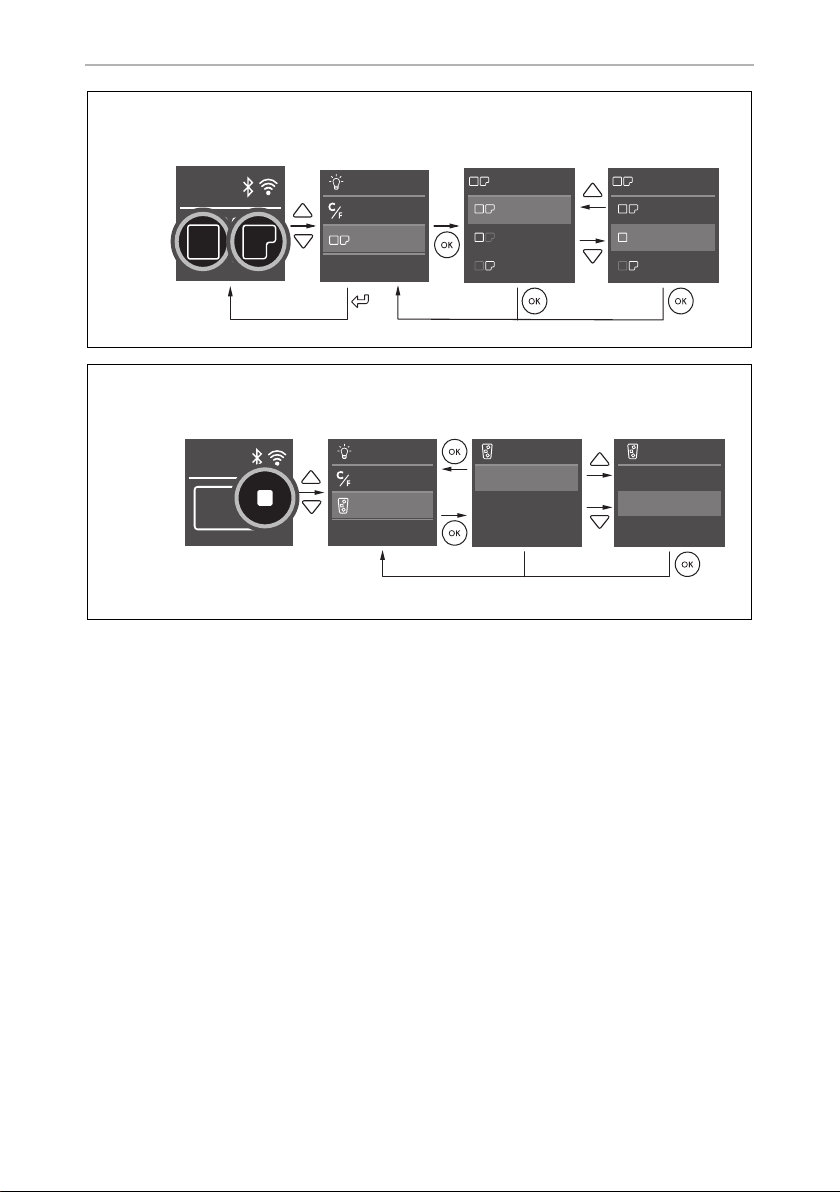
CFX3
12
...
Both On
Large On
Small On
Zone control
Both On
Large On
Small On
Zone control
Zone control
Display
Temp units
DC V
11.8
-128
°C °C
CFX3 75DZ/CFX3 95DZ
h
DC V
11.8
-8
°C
On
Off
Ice maker
On
Off
Ice maker
Display
Temp units
Ice maker
CFX3 55 IM
i
CFX3_OPM_APAC(en).book Seite 12 Donnerstag, 23. Januar 2020 6:54 18
CFX3
13
1
2
j
Bluetooth
Battery protection
WiFi
Set temp
DC V
11.8
-8
°C
Bluetooth
ON
OFF
PAIR
Bluetooth
ON
OFF
PAIR
Bluetooth
ON
OFF
PAIR
DC V
11.8
-8
°C
k
CFX3_OPM_APAC(en).book Seite 13 Donnerstag, 23. Januar 2020 6:54 18
CFX3
14
WiFi
Are you sure
want to reset?
Ye s
No
WiFi
Are you sure
want to reset?
Ye s
No
Bluetooth
Battery protection
WiFi
Set temp
DC V
11.8
-8
°C
WiFi
ON
OFF
RESET
WiFi
ON
OFF
RESET
WiFi
ON
OFF
RESET
WiFi
ON
OFF
RESET
l
DC V
11.8
-8
°C
FACTORY
RESET
++
3 sec
m
DC V
11.7
DC V
11.7
-8
°C
AB
n
CFX3_OPM_APAC(en).book Seite 14 Donnerstag, 23. Januar 2020 6:54 18
CFX3
15
1.
2.
2 A/5 V
o
1.
2.
3.
4.
p
CFX3_OPM_APAC(en).book Seite 15 Donnerstag, 23. Januar 2020 6:54 18

EN
CFX3
16
Please read this manual carefully before starting the device. Keep it in a
safe place for future reference. If the device is passed on to another
person, this manual must be handed over to the user along with it.
The manufacturer cannot be held liable for damage resulting from improper usage
or incorrect operation.
Contents
1 Explanation of symbols . . . . . . . . . . . . . . . . . . . . . . . . . . . . . . . . . . . . . . .17
2 Safety instructions . . . . . . . . . . . . . . . . . . . . . . . . . . . . . . . . . . . . . . . . . . .18
3 Scope of delivery. . . . . . . . . . . . . . . . . . . . . . . . . . . . . . . . . . . . . . . . . . . . 20
4 Accessories . . . . . . . . . . . . . . . . . . . . . . . . . . . . . . . . . . . . . . . . . . . . . . . . . 20
5 Intended use. . . . . . . . . . . . . . . . . . . . . . . . . . . . . . . . . . . . . . . . . . . . . . . . .21
6 Function description. . . . . . . . . . . . . . . . . . . . . . . . . . . . . . . . . . . . . . . . . 22
6.1 Scope of functions. . . . . . . . . . . . . . . . . . . . . . . . . . . . . . . . . . . . . . . 22
6.2 Operating and display elements . . . . . . . . . . . . . . . . . . . . . . . . . . . 23
7Operation . . . . . . . . . . . . . . . . . . . . . . . . . . . . . . . . . . . . . . . . . . . . . . . . . . 24
7.1 Before initial use . . . . . . . . . . . . . . . . . . . . . . . . . . . . . . . . . . . . . . . . 24
7.2 Energy saving tips . . . . . . . . . . . . . . . . . . . . . . . . . . . . . . . . . . . . . . . 24
7.3 Reversing the lid opening direction . . . . . . . . . . . . . . . . . . . . . . . . . 24
7.4 Connecting the cooler . . . . . . . . . . . . . . . . . . . . . . . . . . . . . . . . . . . 24
7.5 Using the cooler . . . . . . . . . . . . . . . . . . . . . . . . . . . . . . . . . . . . . . . . 25
7.6 Using the display . . . . . . . . . . . . . . . . . . . . . . . . . . . . . . . . . . . . . . . . 25
7.7 Locking/unlocking the display . . . . . . . . . . . . . . . . . . . . . . . . . . . . . 26
7.8 Selecting the temperature units . . . . . . . . . . . . . . . . . . . . . . . . . . . . 26
7.9 Setting the temperature . . . . . . . . . . . . . . . . . . . . . . . . . . . . . . . . . . 26
7.10 Using the battery protection. . . . . . . . . . . . . . . . . . . . . . . . . . . . . . . 27
7.11 Setting the display‘s brightness . . . . . . . . . . . . . . . . . . . . . . . . . . . . 27
7.12 Switching on or off the compartments
(only CFX3 75DZ, CFX3 95DZ) . . . . . . . . . . . . . . . . . . . . . . . . . . . . 27
7.13 Using the ice maker (only CFX3 55IM). . . . . . . . . . . . . . . . . . . . . . . 28
7.14 Downloading the CFX3 app. . . . . . . . . . . . . . . . . . . . . . . . . . . . . . . 29
7.15 Setting the Bluetooth signal and connecting to the app. . . . . . . . . 30
7.16 Setting the WiFi signal and connecting to the app . . . . . . . . . . . . . 30
7.17 Changing CFX name and password in the app . . . . . . . . . . . . . . . . 30
7.18 Resetting the app password (WiFi only). . . . . . . . . . . . . . . . . . . . . . 30
CFX3_OPM_APAC(en).book Seite 16 Donnerstag, 23. Januar 2020 6:54 18

EN
CFX3 Explanation of symbols
17
7.19 Resetting to factory settings . . . . . . . . . . . . . . . . . . . . . . . . . . . . . . . .31
7.20 USB port for power supply . . . . . . . . . . . . . . . . . . . . . . . . . . . . . . . . .31
7.21 Defrosting the cooler . . . . . . . . . . . . . . . . . . . . . . . . . . . . . . . . . . . . .31
7.22 Replacing the AC fuse. . . . . . . . . . . . . . . . . . . . . . . . . . . . . . . . . . . . 32
7.23 Replacing the DC fuse. . . . . . . . . . . . . . . . . . . . . . . . . . . . . . . . . . . . 32
7.24 Replacing the DC plug fuse . . . . . . . . . . . . . . . . . . . . . . . . . . . . . . . 32
7.25 Replacing the light PCB. . . . . . . . . . . . . . . . . . . . . . . . . . . . . . . . . . . 32
8 Cleaning and maintenance. . . . . . . . . . . . . . . . . . . . . . . . . . . . . . . . . . . 33
9Troubleshooting . . . . . . . . . . . . . . . . . . . . . . . . . . . . . . . . . . . . . . . . . . . . 33
10 Warranty . . . . . . . . . . . . . . . . . . . . . . . . . . . . . . . . . . . . . . . . . . . . . . . . . . . 36
11 Disposal . . . . . . . . . . . . . . . . . . . . . . . . . . . . . . . . . . . . . . . . . . . . . . . . . . . . 36
12 Technical data . . . . . . . . . . . . . . . . . . . . . . . . . . . . . . . . . . . . . . . . . . . . . . 37
1 Explanation of symbols
D
!
!
A
I
DANGER!
Safety instruction: Indicates a hazardous situation that, if not avoided,
will result in death or serious injury.
WARNING!
Safety instruction: Indicates a hazardous situation that, if not avoided,
could result in death or serious injury.
CAUTION!
Safety instruction: Indicates a hazardous situation that, if not avoided,
could result in minor or moderate injury.
NOTICE!
Indicates a situation that, if not avoided, can result in property damage.
NOTE
Supplementary information for operating the product.
CFX3_OPM_APAC(en).book Seite 17 Donnerstag, 23. Januar 2020 6:54 18

EN
Safety instructions CFX3
18
2 Safety instructions
!
WARNING! Failure to obey these warnings could result in death
or serious injury.
Electrocution hazard
• Do not operate the cooling device if it is visibly damaged.
• If this cooling device's power cable is damaged, it must be replaced
by the manufacturer, customer service or a similarly qualified person in
order to prevent safety hazards.
• If this cooling device's power cable is damaged, it must be replaced
to prevent safety hazards.
• This cooling device may only be repaired by qualified personnel.
Improper repairs can lead to considerable hazards.
Fire hazard
• When positioning the device, ensure the supply cord is not trapped or
damaged.
• Do not locate multiple portable socket-outlets or portable power
supplies at the rear of the device.
Health hazard
• This device can be used by children aged from 8 years and above and
persons with reduced physical, sensory or mental capabilities or lack
of experience and knowledge if they have been given supervision or
instruction concerning use of the device in a safe way and understand
the hazards involved.
• Children shall not play with the device.
• Cleaning and user maintenance shall not be made by children without
supervision.
• Children aged from 3 to 8 years are allowed to load and unload
cooling devices.
Explosion hazard
• Do not store any explosive substances such as spray cans with a
flammable propellant in the cooling device.
!
CAUTION! Failure to obey these cautions could result in minor or
moderate injury.
Electrocution hazard
• Before starting the cooling device, ensure that the power supply line
and the plug are dry.
CFX3_OPM_APAC(en).book Seite 18 Donnerstag, 23. Januar 2020 6:54 18

EN
CFX3 Safety instructions
19
• Disconnect the cooling device from the power supply
– before each cleaning and maintenance
– after every use
Health hazard
• Please check if the cooling capacity of the device is suitable for storing
the food or medicine you wish to cool.
• Food may only be stored in its original packaging or in suitable
containers.
• Opening the cooling device for long periods can cause significant
increase of the temperature in the compartments of the device.
• Clean regularly surfaces that can come in contact with food and
accessible drainage systems.
• Store raw meat and fish in suitable containers in the device, so that it is
not in contact with or can drip onto other food.
• If the device is left empty for long periods:
– Switch off the device.
– Defrost the device.
– Clean and dry the device.
– Leave the lid open to prevent mould developing within the device.
A
NOTICE! Damage hazard
• Check that the voltage specification on the type plate corresponds to
that of the energy supply.
• Only connect the cooling device as follows:
– With the DC connection cable to a DC power supply in the vehicle
– Or with the AC connection cable to an AC power supply
• Never pull the plug out of the socket by the cable.
• If the cooling device is connected to a DC outlet: Disconnect the
cooling device and other power consuming devices from the battery
before connecting a quick charging device.
• If the cooling device is connected to a DC outlet: Disconnect the
cooling device or switch it off when you turn off the engine. Otherwise
you may discharge the battery.
• The cooling device is not suitable for transporting caustic materials or
materials containing solvents.
• The insulation of the cooling device contains flammable cyclopentane
and requires special disposal procedures. Deliver the cooling device
at the end of its life-cycle to an appropriate recycling center.
CFX3_OPM_APAC(en).book Seite 19 Donnerstag, 23. Januar 2020 6:54 18

EN
Scope of delivery CFX3
20
• Do not use electrical devices inside the cooling device unless they are
recommended by the manufacturer for the purpose.
• Do not place the cooling device near naked flames or other heat
sources (heaters, direct sunlight, gas ovens etc.).
• Risk of overheating!
Ensure at all times that there is a minimum of 50 mm ventilation on all
four sides of the cooling device. Keep the ventilation area free of any
objects that could restrict the air flow to the cooling components.
Do not place the cooling device in closed compartments or areas with
none or minimal air flow.
• Ensure that the ventilation openings are not covered.
• Do not fill the inner container with ice or fluids.
• Never immerse the cooling device in water.
• Protect the cooling device and cables against heat and moisture.
3Scope of delivery
4Accessories
Available as accessory (not included in scope of delivery):
Item in
fig. 1,
page 3
Quantity Description
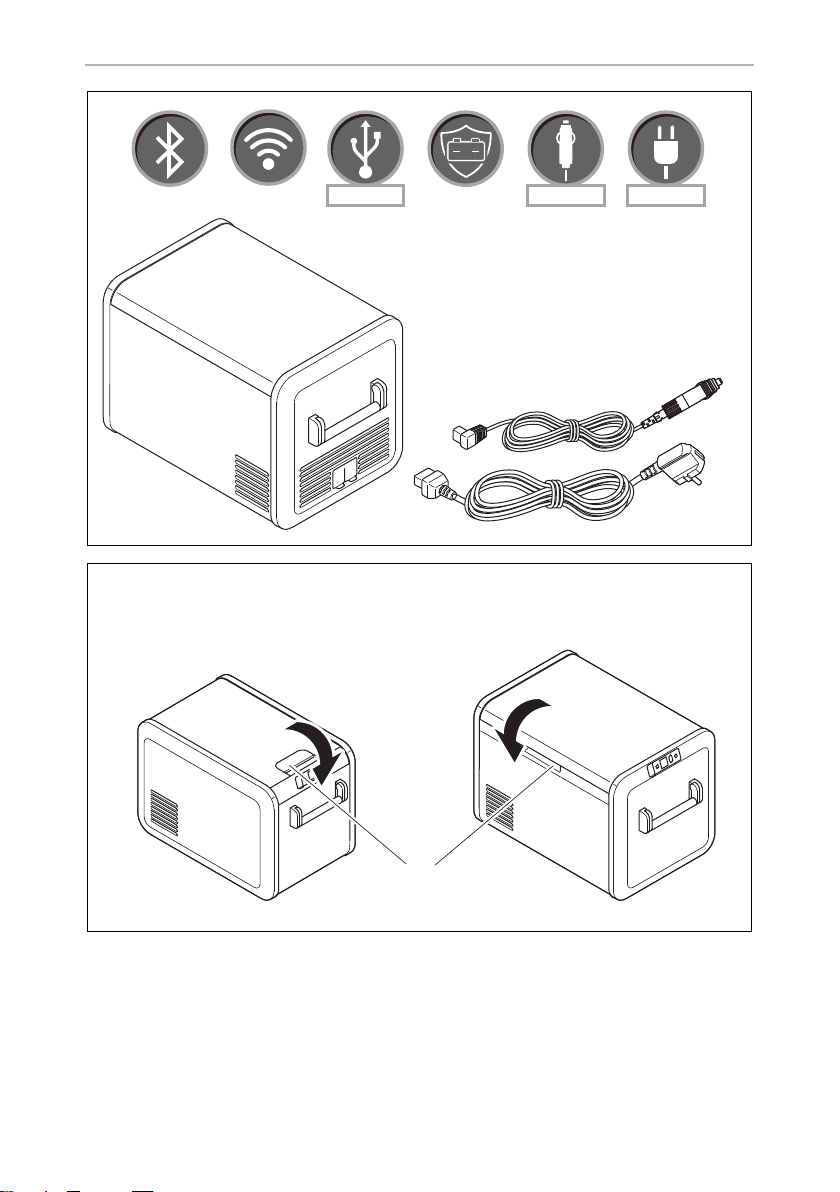
1 1 Cooler
2 1 Connection cable for DC connection
3 1 Connection cable for AC connection
Designation Ref. no. Model
Universal fixing kit (belt system) CFX-UFK 9108300002 suits all models
CFX3_OPM_APAC(en).book Seite 20 Donnerstag, 23. Januar 2020 6:54 18

EN
CFX3 Intended use
21
Note that the CFX3 app may not be available in your country.
5 Intended use
The device is suitable for:
• Operation in vehicles
• Cooling and freezing food
•Camping use
The device is not suitable for:
• Storage of corrosive, caustic or solvent-containing substances
• Quick-freezing of food
The cooling device is suitable for camping use. The device shall not to be exposed
to rain.
Protective cover 9600026468 CFX3 35
9600026469 CFX3 45
9600026470 CFX3 55
CFX3 55IM
9600026471 CFX3 75DZ
9600026472 CFX3 95DZ
Fridge slide 9610000651 CFX3 35
CFX3 45
9610000652 CFX3 55
CFX3 55IM
9105306633 CFX3 75DZ
9105306558 CFX3 95DZ
CFX3 app – suits all models
Designation Ref. no. Model
CFX3_OPM_APAC(en).book Seite 21 Donnerstag, 23. Januar 2020 6:54 18

EN
Function description CFX3
22
6 Function description
The cooler can chill products, keep them cool as well as freeze them. A low
maintenance refrigerant circuit with compressor provides the cooling. The generous
insulation and powerful compressor ensure efficient and fast cooling.
The cooler is portable.
The cooler can withstand a short-term inclination of 30°.
6.1 Scope of functions
• Power supply with priority circuit for connecting to the AC mains
• Three-level battery protection to protect the vehicle battery
• Display with temperature gauge in °C and °F
• Temperature setting in steps of 1 °C (1 °F)
• Integrated WiFi and Bluetooth function hence controllable using an app
• Foldable carrying handles
• USB charger for portable devices such as mobile phones
• Removable wire basket
• CFX3 55IM only: Ice maker
CFX3_OPM_APAC(en).book Seite 22 Donnerstag, 23. Januar 2020 6:54 18
EN
CFX3 Function description
23
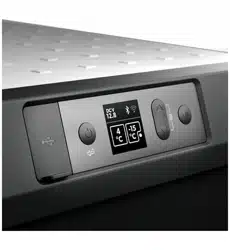
6.2 Operating and display elements
Latch for lid: fig. 2 1, page 3
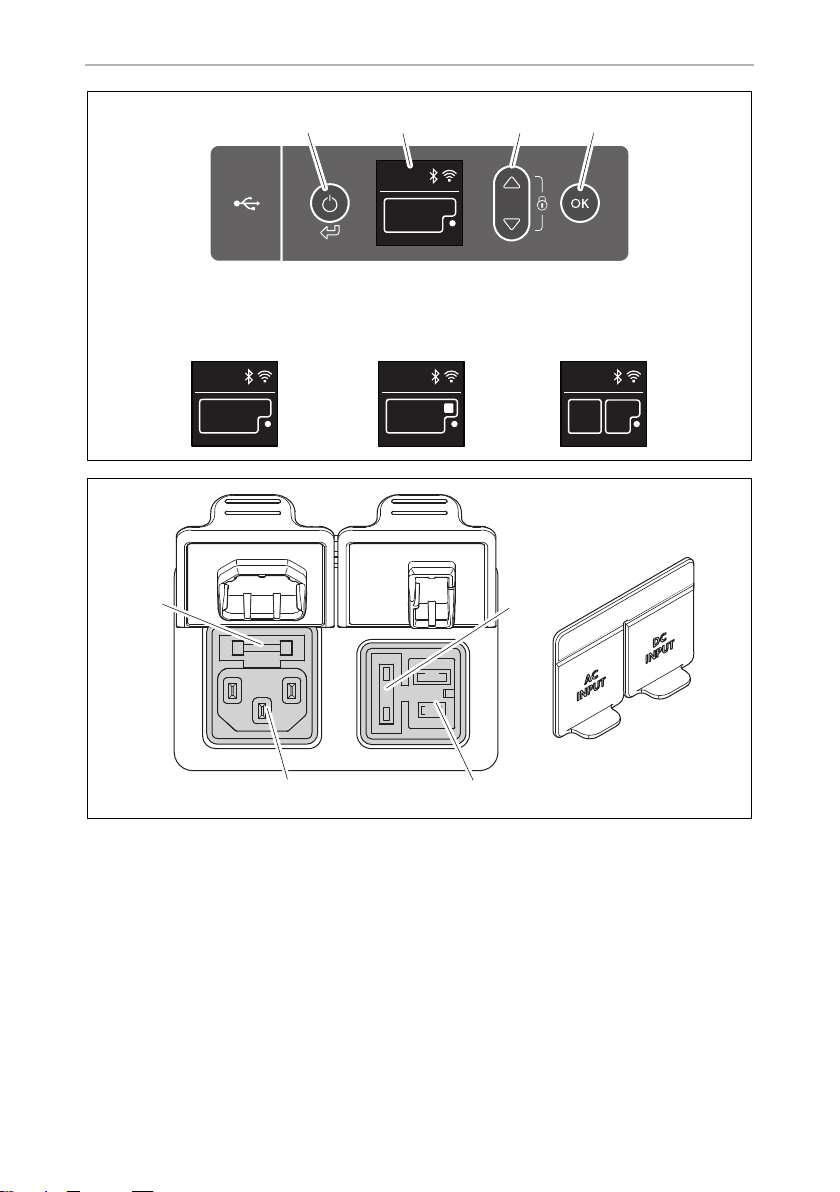
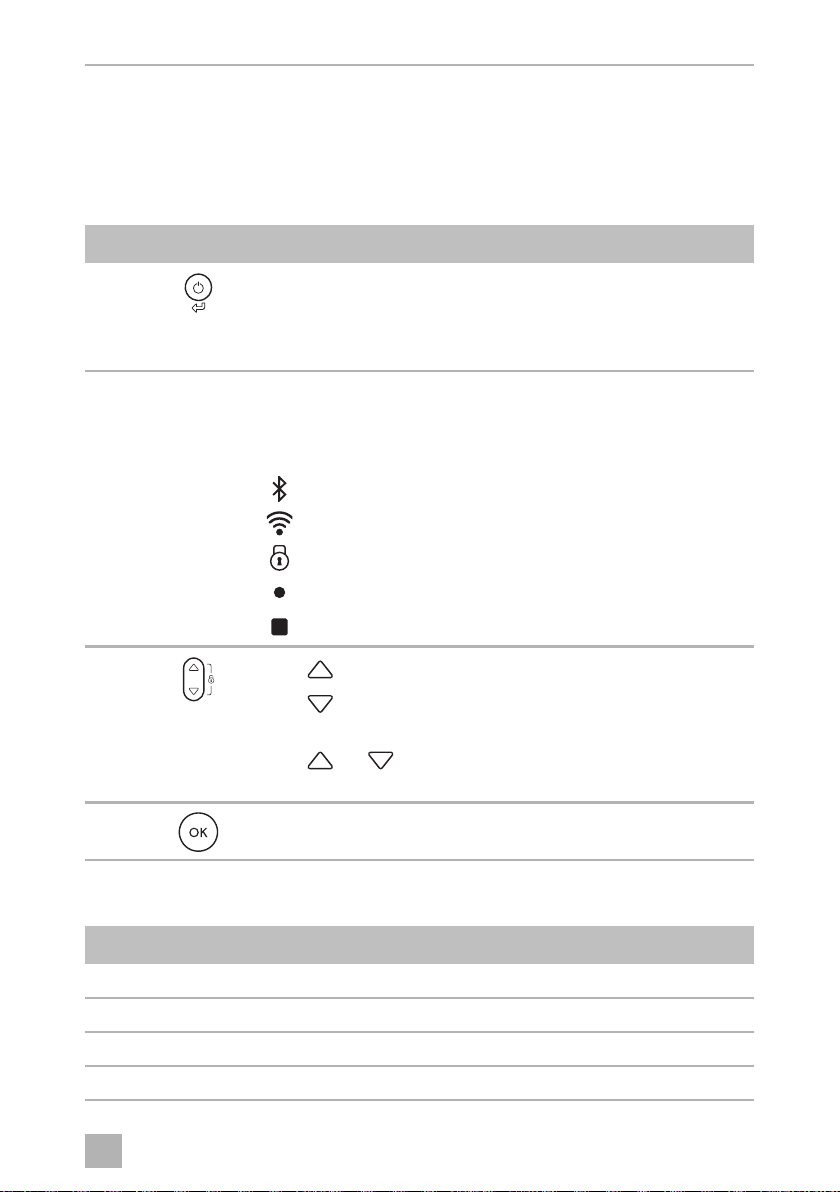
Operating panel (fig. 3, page 4):
Connection sockets (fig. 4, page 4):
Item Description Explanation
1 Switches the cooler on when the button is pressed briefly
Switches the cooler off when the button is pressed for three
seconds
Returns to the previous menu
2 Display Shows the information
: AC power supply is connected
: DC power supply is connected
: Bluetooth is activated
: WiFi is activated
: Display is locked
: Compressor is working
: Ice maker is working (CFX3 55IM only)
3
Press to navigate upwards or to increase the selected value.
Press to navigate downwards or to decrease the selected
value.
Press and simultaneously for 3 s to lock or unlock the
display.
4 Press to select a menu or to save the selected value.
Item Description
1 Connection socket AC voltage supply
2 Connection socket DC voltage supply
3 DC Fuse holder
4 AC Fuse holder
A
C
DC V
CFX3_OPM_APAC(en).book Seite 23 Donnerstag, 23. Januar 2020 6:54 18

EN
Operation CFX3
24
7Operation
7.1 Before initial use
I
7.2 Energy saving tips
• Choose a well ventilated location which is protected from direct sunlight.
• Allow warm food to cool down first before placing it in the cooling device to
keep cool.
• Do not open the cooling device more often than necessary.
• Do not leave the cooling device open for longer than necessary.
• Defrost the cooler once a layer of ice forms.
• Avoid unnecessarily low temperatures.
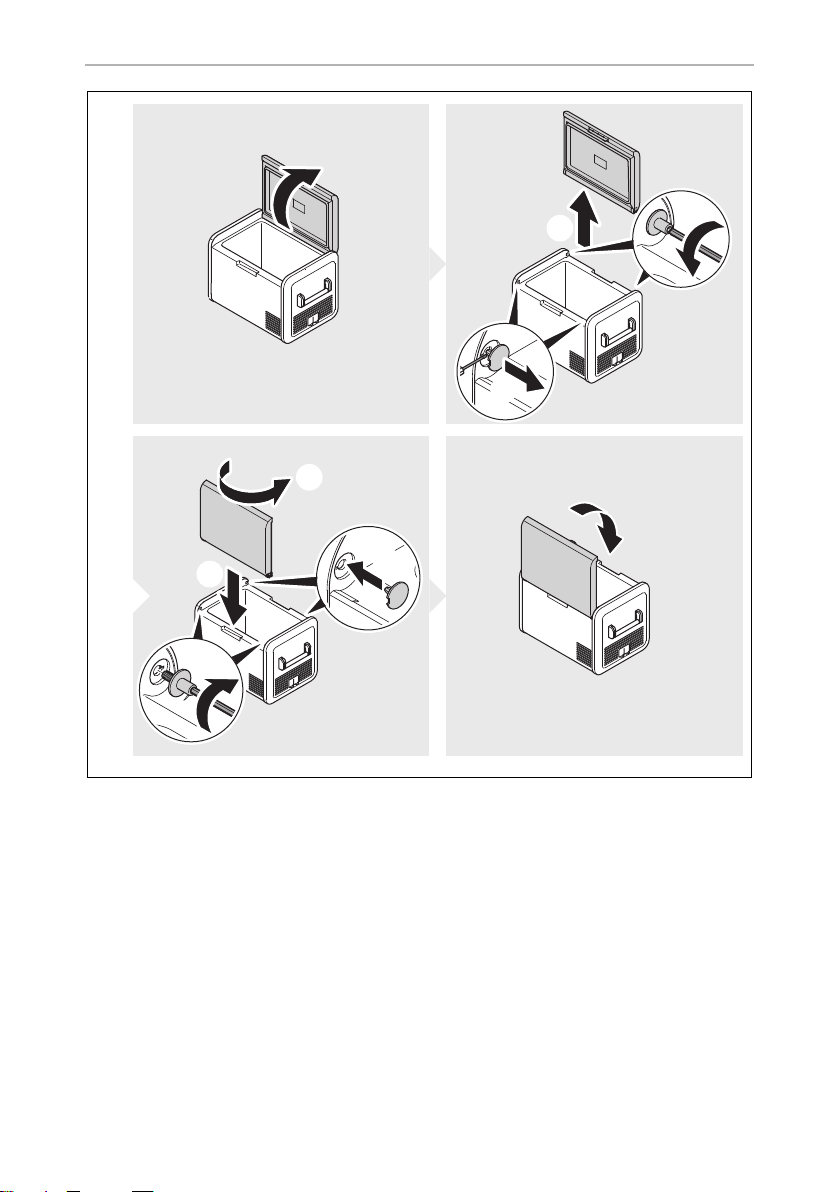
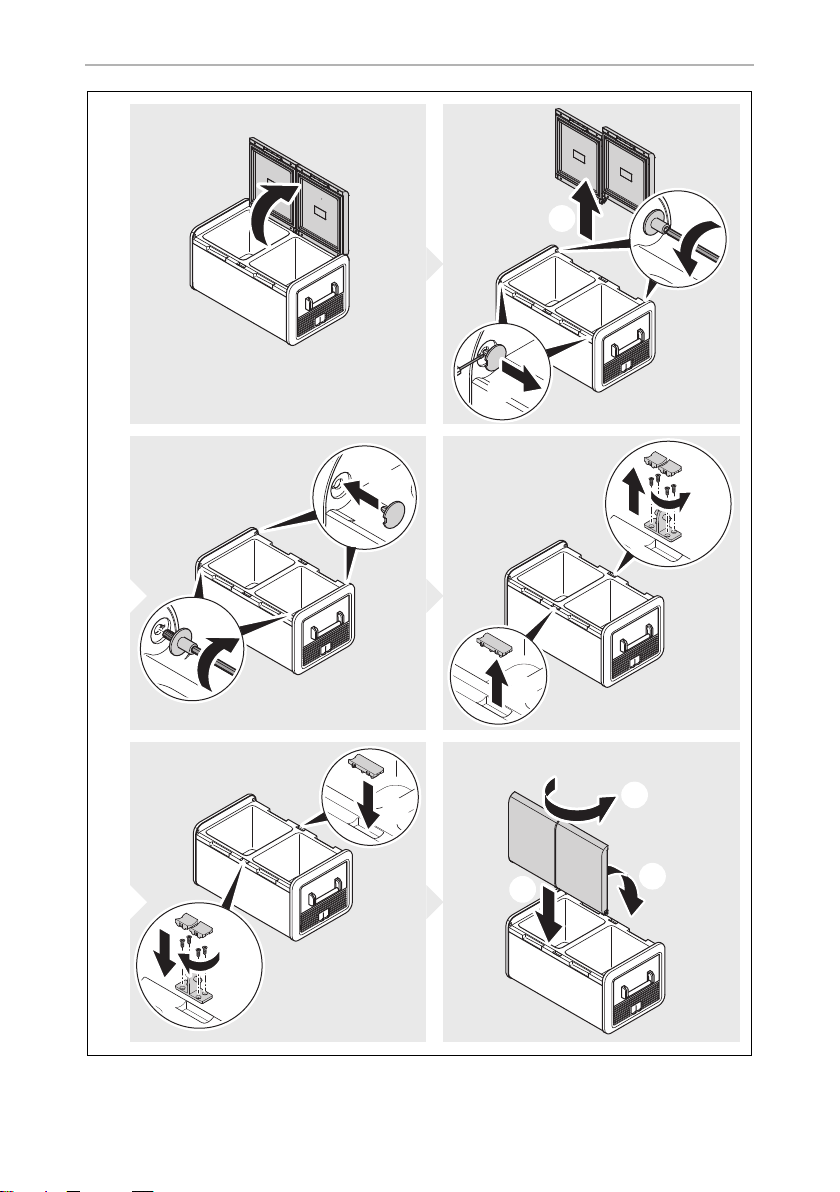
7.3 Reversing the lid opening direction
CFX3 55, CFX3 55IM
➤ Proceed as shown (fig. 5, page 5).
CFX375DZ, CFX3 95DZ
➤ Proceed as shown (fig. 6, page 6).
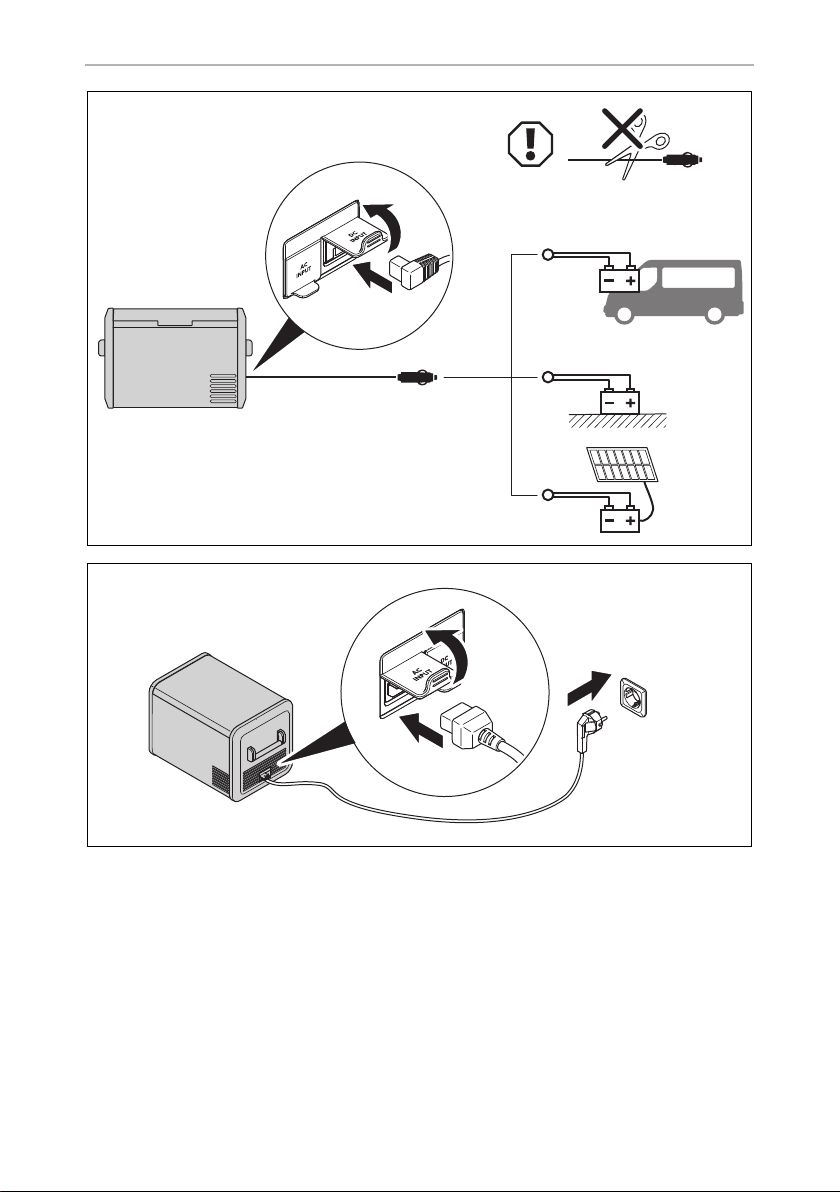
7.4 Connecting the cooler
A
NOTE
Before starting your new cooler for the first time, you should clean it
inside and outside with a damp cloth for hygienic reasons (please also
refer to the chapter “Cleaning and maintenance” on page 33).
NOTICE! Damage hazard
• For protection of the device the DC cable supplied includes a fuse
inside the plug. Do not remove the fused DC plug.
Only use the DC cable supplied.
• Disconnect the cooler and other consumer units from the battery
before you connect the battery to a quick charging device.
Overvoltage can damage the electronics of the device.
CFX3_OPM_APAC(en).book Seite 24 Donnerstag, 23. Januar 2020 6:54 18

EN
CFX3 Operation
25
Connecting to a battery
➤ Proceed as shown (fig. 7, page 7).
Connecting to an AC power supply
D
➤ Proceed as shown (fig. 8, page 7).
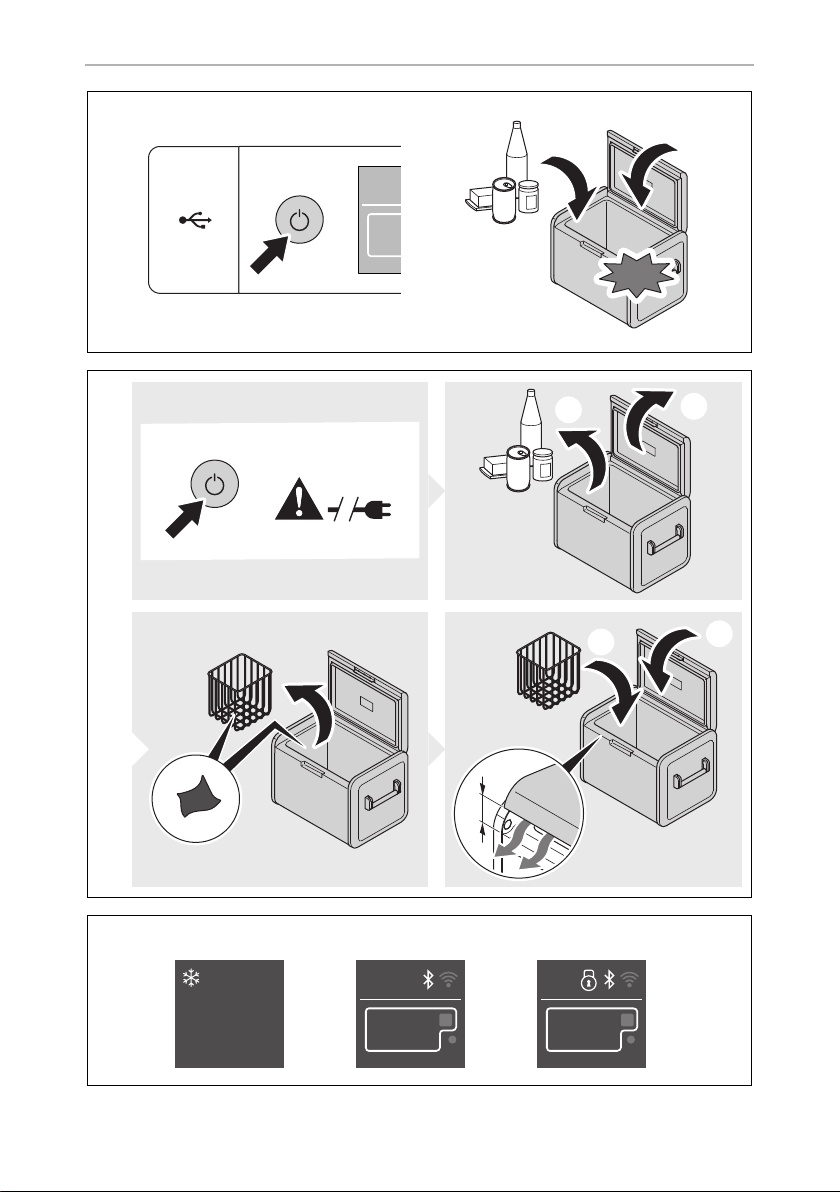
7.5 Using the cooler
A
I
• Switching on the cooler: fig. 9, page 8
• Switching off the cooler: fig. 0, page 8
7.6 Using the display
Display states (fig. a, page 8)
DANGER! Electrocution hazard
• Never handle plugs and switches with wet hands or if you are
standing on a wet surface.
• If you are operating your cooler on board a boat from a AC power
supply, you must install a residual current circuit breaker between the
AC power supply and the cooler.
Seek advice from a trained technician.
NOTICE! Risk of overheating
Ensure at all times that there is sufficient ventilation so that the heat that
generated during operation can dissipate. Ensure that the ventilation
slots are not covered. Make sure that the device is sufficiently far away
from walls and other objects so that the air can circulate.
NOTE
When operating with the battery, the display switches off automatically
if the battery voltage is low.
Item Description
A Stand by
BIdle
C Locked
CFX3_OPM_APAC(en).book Seite 25 Donnerstag, 23. Januar 2020 6:54 18

EN
Operation CFX3
26
Display overview: fig. b, page 9
Navigating through the menus
The highlighted menu is selected.
➤ Press to navigate upwards.
➤ Press to navigate downwards.
Choosing a menu
➤ Press to select the required menu.
Changing settings
The highlighted value or setting is selected.
➤ Press to increase the selected value or to choose the previous setting.
➤ Press to decrease the selected value or to choose the next setting.
Returning to the previous menu
➤ Press to return to the previous menu without saving.
7.7 Locking/unlocking the display
➤ Press and simultaneously for 3 s to lock or unlock the display (fig. c,
page 9).
7.8 Selecting the temperature units
➤ Proceed as shown (fig. d, page 9).
7.9 Setting the temperature
A
➤ Proceed as shown (fig. e, page 10).
NOTICE! Damage hazard from excessively low temperature
Ensure that only those objects are placed in the cooler that are intended
to be cooled at the selected temperature.
CFX3_OPM_APAC(en).book Seite 26 Donnerstag, 23. Januar 2020 6:54 18

EN
CFX3 Operation
27
7.10 Using the battery protection
The device is equipped with 3-stage battery protection. The battery protection pre-
vents excessive discharging when the device is connected to a vehicle starter battery
or maximises the use of a supply battery.
If the cooler is operated when the vehicle ignition is switched off, the cooler switches
off automatically as soon as the supply voltage falls below a set level. The cooler will
switch back on once the battery has been recharged to the restart voltage level.
A
I
➤ Proceed as shown (fig. f, page 11).
7.11 Setting the display‘s brightness
➤ Proceed as shown (fig. g, page 11).
7.12 Switching on or off the compartments
(only CFX3 75DZ, CFX3 95DZ)
You can activate each zone individually or both of them.
➤ Proceed as shown (fig. h, page 12).
NOTICE! Damage hazard
When switched off by the battery protection, the battery will no longer
be fully charged. Avoid starting repeatedly. Ensure that the battery is
recharged.
NOTE
When the cooler is supplied by a starter battery, select the battery pro-
tection mode “MEDIUM“ or “HIGH”. If the cooler is connected to a
supply battery, the battery protection mode “LOW” is ideal.
CFX3_OPM_APAC(en).book Seite 27 Donnerstag, 23. Januar 2020 6:54 18

EN
Operation CFX3
28
7.13 Using the ice maker (only CFX3 55IM)
I
➤ Proceed as shown (fig. i, page 12).
Filling the ice trays with water
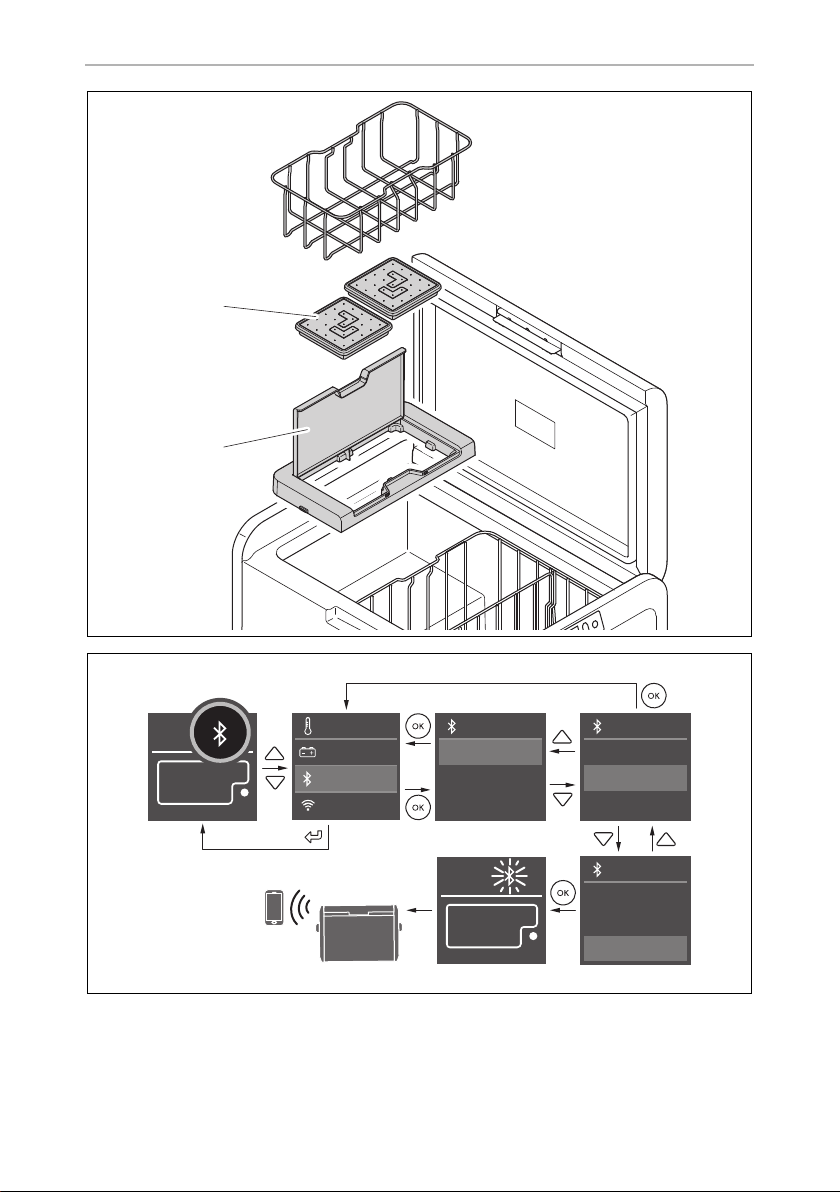
➤ Remove the ice trays (fig. j 1, page 13) from the ice maker housing (fig. j 2,
page 13).
➤ Remove the ice tray covers, fill with clean water and re-fit the cover, taking care to
press the edge seal all the way around.
➤ Re-position the ice trays in the ice maker housing and close the lid.
I
Removing the ice cubes
➤ Open the ice maker housing lid and lift under the front of the ice trays.
I
➤ Remove the ice tray covers and twist trays to release the ice cubes.
NOTE
• Independent of the main compartment‘s temperature setting, the
ice maker zone is designed for making ice cubes if the ice maker is
switched on.
• The cooler‘s energy consumption increases with ice maker on.
Therefore you should switch off the ice maker if it is not needed.
• The factory setting for the ice maker is OFF.
NOTE
Dry any water spillage from under the ice trays.
This will reduce ice build up under the trays and make removal easier.
NOTE
Removal may require additional force using two hands in high humidity
conditions which may create an ice bond underneath the ice trays.
CFX3_OPM_APAC(en).book Seite 28 Donnerstag, 23. Januar 2020 6:54 18

EN
CFX3 Operation
29
Removing the ice maker housing
The ice maker housing can be removed for cleaning or when not in use to increase
usable space inside the cooler:
➤ Lift the housing at one end until the lug unclips, then remove.
➤ Reverse procedure for re-fit, pushing down on lugs to snap into position.
Tips for using the ice maker
• The ice maker makes ice fast for a number of hours after switching on and then
automatically goes into an ice maintenance mode to reduce energy
consumption. If multiple batches of ice are required as quickly as possible,
switching the ice maker off and back on will set it back into fast ice making mode.
Repeat as required.
• Low freezer temperature settings in the main compartment may not be main-
tained in high ambient conditions with the ice maker switched on.
Cleaning and drying the ice maker
➤ When not in use clean and dry the ice trays and inside the ice maker housing to
prevent mould.
➤ Following extended periods of non-use clean the inside of the ice trays with a
mild dish washing solution and rinse with clean water prior to use.
7.14 Downloading the CFX3 app
The cooler can be monitored and controlled via Bluetooth or WiFi using an app that
you can install on a compatible device.
➤ Download the CFX3 app from App Store or Google Play.
Note that the CFX3 app may not be available in your country.
CFX3_OPM_APAC(en).book Seite 29 Donnerstag, 23. Januar 2020 6:54 18

EN
Operation CFX3
30
7.15 Setting the Bluetooth signal and connecting to the
app
The cooler can be monitored and controlled via Bluetooth. To do so, you have to
pair the cooler with your Bluetooth device.
I
➤ Proceed as shown (fig. k, page 13).
7.16 Setting the WiFi signal and connecting to the app
The cooler can be monitored and controlled via WiFi direct to cooler or via a
WiFi network.
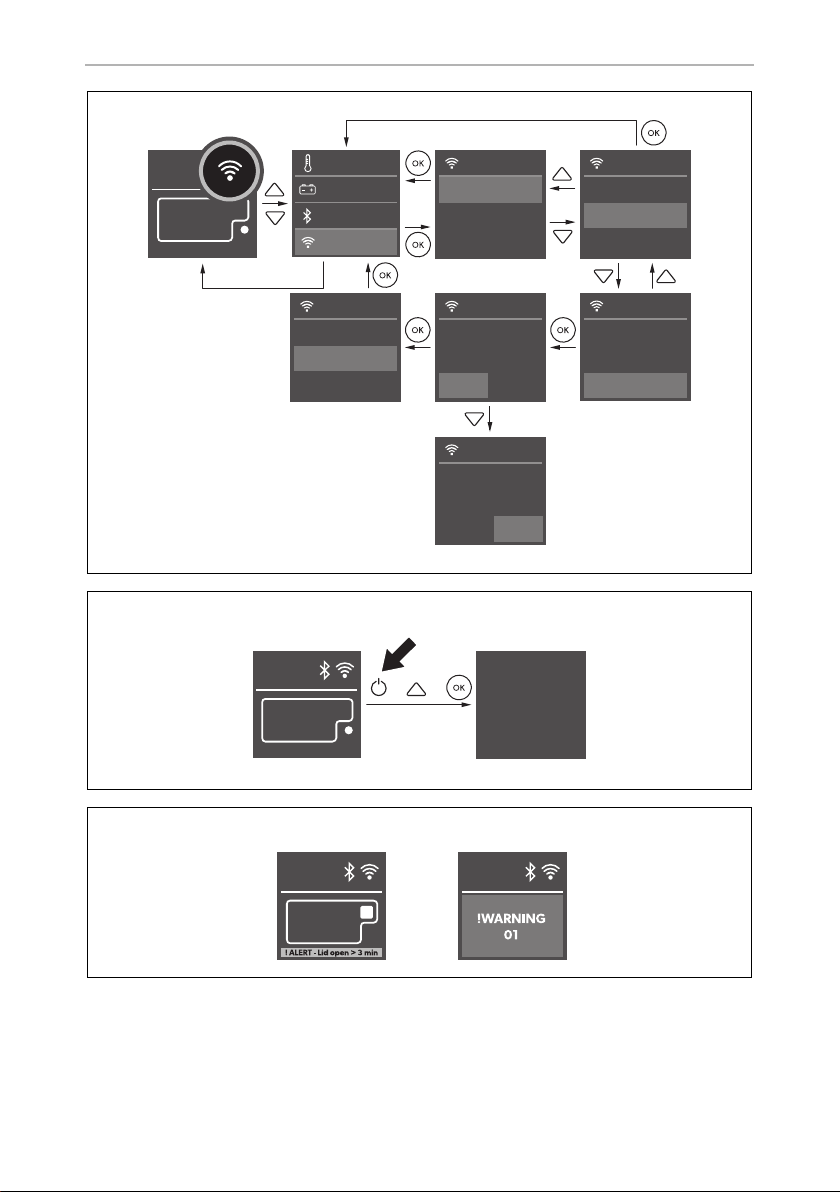
➤ Proceed as shown (fig. l, page 14) to turn WiFi on.
➤ For WiFi direct to cooler, go to device settings and select your cooler.
– The WiFi name of your cooler begins with “CFX3“.
– The preset password is “00000000”.
– You can personalise the WiFi name and the password in the CFX3 app.
I
7.17 Changing CFX name and password in the app
• You can personalise the name of your CFX in the app.
• The same name applies to both Bluetooth and WiFi.
• You can also personalise your password in the app -applicable only to WiFi.
➤ Proceed to “CFX name and password” in the app SETTINGS.
7.18 Resetting the app password (WiFi only)
• You can reset the app password to the factory setting “00000000”.
➤ Proceed as shown (fig. l, page 14).
NOTE
• Pairing must be done within the CFX3 app, not in device settings.
• There is no password required for Bluetooth connection.
NOTE
For connection via WiFi network, go to “network connection“ in the app
SETTINGS.
CFX3_OPM_APAC(en).book Seite 30 Donnerstag, 23. Januar 2020 6:54 18

EN
CFX3 Operation
31
7.19 Resetting to factory settings
The reset function changes all display menu and app fields to the original factory
settings.
➤ Proceed as shown (fig. m, page 14).
7.20 USB port for power supply
The USB port allows you to charge small devices like mobile phones and
mp3 players.
I
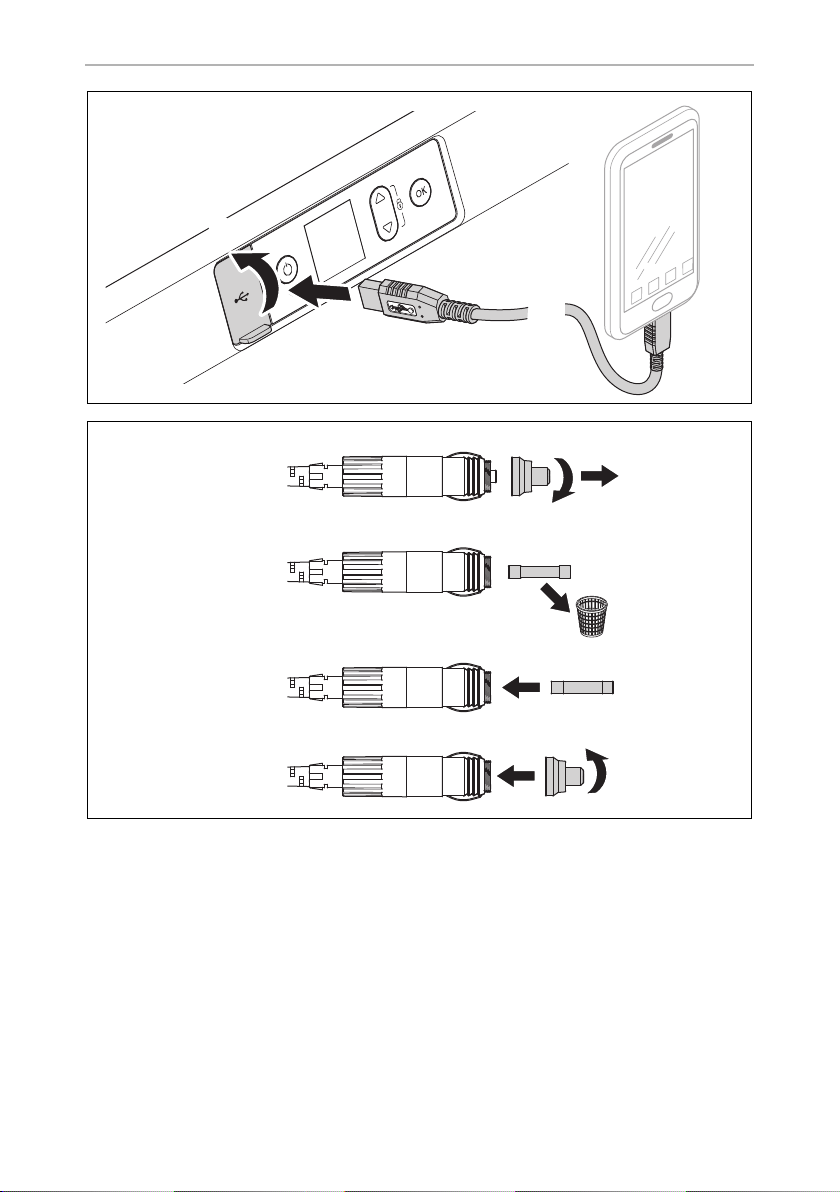
➤ Proceed as shown (fig. o, page 15).
7.21 Defrosting the cooler
Humidity can form frost in the interior of the cooling device or on the evaporator. This
reduces the cooling capacity. Defrost the device in good time to avoid this.
A
To defrost the cooler, proceed as follows:
➤ Take out the contents of the cooler.
➤ If necessary, place them in another cooling device to keep them cool.
➤ Switch off the device.
➤ Leave the lid open.
➤ Wipe off the defrosted water.
NOTE
Ensure that any small device connected to the USB port is compatible
with 5 V/2 A operation.
NOTICE! Damage hazard
Never use hard or pointed tools to remove ice or to loosen objects
which have frozen in place.
CFX3_OPM_APAC(en).book Seite 31 Donnerstag, 23. Januar 2020 6:54 18

EN
Operation CFX3
32
7.22 Replacing the AC fuse
D
➤ Disconnect the power supply to the device.
➤ Pull out the connection cable.
➤ Pry out the fuse insert (fig. 4 4, page 4) with a screwdriver.
➤ Replace the defective glass fuse with a new one of the same type and rating
(FastActing, 4A, 250V).
➤ Press the fuse insert back into the housing.
➤ Reconnect the power supply to the device.
7.23 Replacing the DC fuse
➤ Pry out the fuse cover (fig. 4 3, page 4) with a screwdriver.
➤ Reverse the fuse cover and use hook to remove the defective blade fuse.
➤ Push in a new fuse of the same type and rating.
➤ Re-fit the fuse cover.
7.24 Replacing the DC plug fuse
➤ Replace the defective fuse with a new fuse of the same type and rating.
➤ Proceed as shown (fig. p, page 15).
7.25 Replacing the light PCB
A
DANGER! Electrocution hazard
Disconnect the power supply and the connection cable before you
replace the device fuse.
NOTICE! Damage hazard
The lamp can only be replaced by the manufacturer, service agent or
similarly qualified person to avoid hazard.
CFX3_OPM_APAC(en).book Seite 32 Donnerstag, 23. Januar 2020 6:54 18

EN
CFX3 Cleaning and maintenance
33
8 Cleaning and maintenance
A
➤ Occasionally clean the device interior and exterior with a damp cloth.
➤ Make sure that the air inlet and outlet vents on the device are free of any dust and
dirt, so that heat can be released and the device is not damaged.
9 Troubleshooting
NOTICE! Damage hazard
• Never clean the cooler under running water or in dish water.
• Do not use abrasive cleaning agents or hard objects during cleaning
as these can damage the cooler.
Fault Possible cause Suggested remedy
The device does not
function (DC mode,
ignition on).
No voltage was
detected in the
DC power outlet.
In most vehicles the ignition must be
turned on before power will be supplied
to the DC power outlet.
The DC outlet is dirty.
This results in a poor
electrical contact.
If the plug of the device becomes very
warm in the DC outlet, either the
DC outlet must be cleaned or the plug
has not been assembled correctly.
The fuse of the DC plug
has blown.
Replace the fuse in the DC plug, see
chapter “Replacing the DC plug fuse” on
page 32.
The device DC fuse has
blown.
Replace the device DC fuse, see chapter
“Replacing the DC fuse” on page 32.
The vehicle fuse has
blown.
Replace the vehicle’s DC outlet fuse.
Please refer to your vehicle’s operating
manual.
The device does not
function (AC mode).
No voltage present in
the AC voltage socket.
Try using another plug socket.
The device AC fuse has
blown.
Replace the device AC fuse, see chapter
“Replacing the AC fuse” on page 32.
The integrated AC
adapter is defective.
This can only be repaired by an
authorised repair centre.
The display does not
respond to keystrokes.
The display is locked. Unlock the display, see chapter “Lock-
ing/unlocking the display” on page 26.
CFX3_OPM_APAC(en).book Seite 33 Donnerstag, 23. Januar 2020 6:54 18

EN
Troubleshooting CFX3
34
Alert messages
E.g. see
fig. n A, page 14.
The app cannot con-
trol the device.
Bluetooth or WiFi is not
connected.
Connect Bluetooth, see chapter “Set-
ting the Bluetooth signal and connecting
to the app” on page 30, or Connect
WiFi, see chapter “Setting the WiFi sig-
nal and connecting to the app” on
page 30
The display shows an
alert message or
warning code.
– See table below.
Alert message Description Possible cause Suggested remedy
!ALERT - Lid open
> 3min
Lid open more
than 3 minutes
• Lid not fully
latched
•Internal fault
• Check lid latched fully
• Authorised repair centre
inspection required
!ALERT - Voltage
low
The device has
stopped working
on DC due to low
voltage
• Insufficient supply
voltage
• Battery voltage is
too low
• Battery protec-
tion is set too high
• Check voltage drop
from battery to power
outlet and increase wir-
ing gauge if necessary
• Test the battery and
charge as needed
• Select a lower battery
protection setting
Fault Possible cause Suggested remedy
CFX3_OPM_APAC(en).book Seite 34 Donnerstag, 23. Januar 2020 6:54 18

EN
CFX3 Troubleshooting
35
Warning codes
E.g. see
fig. n B, page 14.
Warning code Fault Possible cause Suggested remedy
!WARNING 32 Fan over-current Internal fault. Turn off the device for at
least 5 mins., then restart. If
the problem persists,
authorised repair centre
inspection required
!WARNING 33 Compressor start
fail
!WARNING 34 Compressor
speed low
• High ambient
temperature
• Air vent blocked
or insufficient
clearance
•Internal fault
• Turn off the device for at
least 30 mins., or move
to a cooler location,
then restart
• Clear the vents
• Authorised repair centre
inspection required
!WARNING 35 Controller over-
temperature
!WARNING 01 NTC open circuit
SZ & DZ LARGE
Internal fault Authorised repair centre
inspection required
!WARNING 11 NTC open circuit
DZ SMALL
!WARNING 02 NTC short circuit
SZ & DZ LARGE
!WARNING 12 NTC short circuit
DZ SMALL
!WARNING 09 DZ valve or Ice
Maker valve faulty
Turn off the device for at
least 1min., then restart. If
the problem persists,
authorised repair centre
inspection required
!WARNING
03/43
Communication
error
CFX3_OPM_APAC(en).book Seite 35 Donnerstag, 23. Januar 2020 6:54 18

EN
Warranty CFX3
36
10 Warranty
The statutory warranty period applies. If the product is defective, please contact your
retailer or the manufacturer's branch in your country (see back page).
For repair and warranty processing, please include the following documents when
you send in the device:
• A copy of the receipt with purchasing date
• A reason for the claim or description of the fault
Australia only
Our goods come with guarantees that cannot be excluded under the Australian
Consumer Law. You are entitled to a replacement or refund for a major failure and for
compensation for any other reasonably foreseeable loss or damage. You are also
entitled to have the goods repaired or replaced if the goods fail to be of acceptable
quality and the failure does not amount to a major failure. The benefits provided to
you as the consumer by this warranty are in addition to other rights and remedies
available to you under the law.
New Zealand only
This warranty policy is subject to the conditions and guarantees which are mandatory
as implied by the Consumer Guarantees Act 1993(NZ).
11 Disposal
➤ Place the packaging material in the appropriate recycling waste bins wherever
possible.
M
If you wish to finally dispose of the product, ask your local recycling centre
or specialist dealer for details about how to do this in accordance with the
applicable disposal regulations.
!
WARNING! Risk of child entrapment
Before disposing of your old cooling device:
• Dismantle the lid.
• Leave the baskets in place so that children may not easily climb
inside.
CFX3_OPM_APAC(en).book Seite 36 Donnerstag, 23. Januar 2020 6:54 18
EN
CFX3 Technical data
37
12 Technical data
I
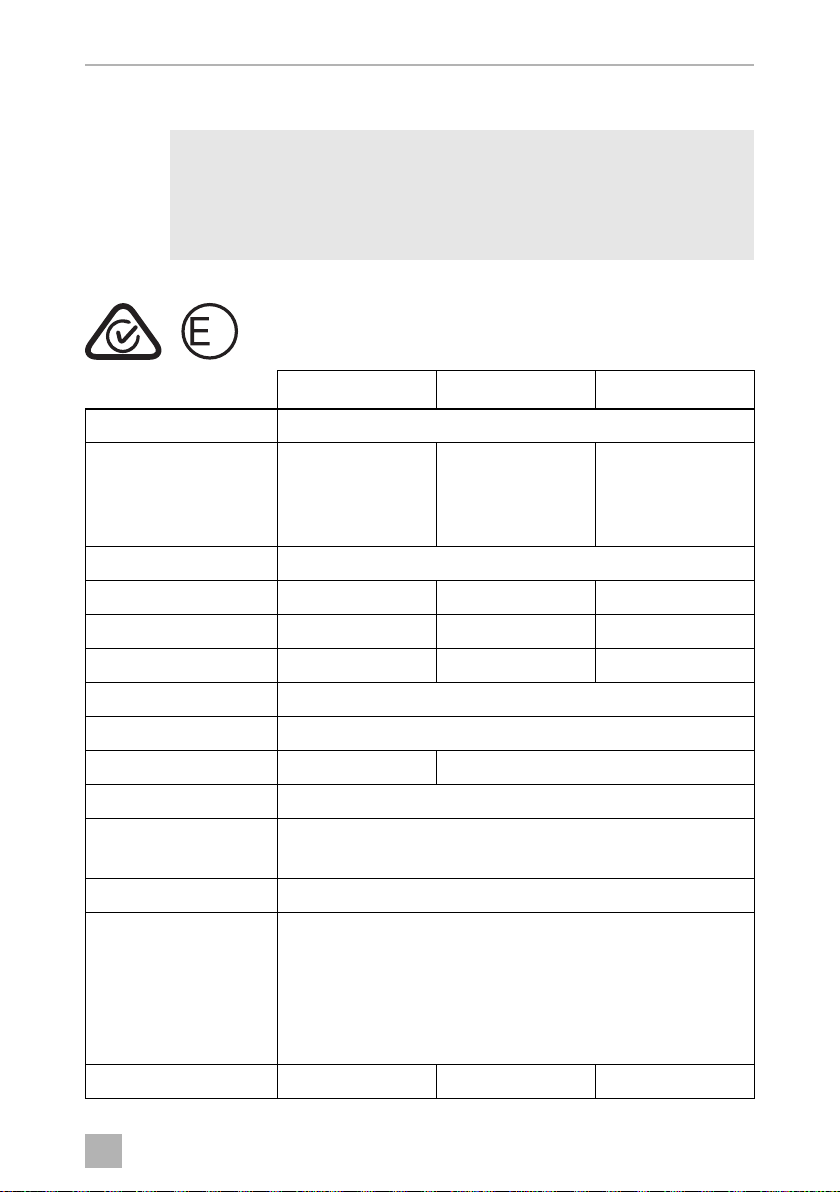
Test/certificates:
NOTE
The minimum temperature shown in „Cooling capacity“ cannot be
attained if the ambient temperature is above 32 °C (90 °F) for models
CFX3 35/45/55/55IM or the ambient temperature is above 30 °C
(86 °F) for models CFX3 75DZ/95DZ (set small –22 °C/large +4 °C).
CFX3 35 CFX3 45 CFX3 55
Connection voltage: 12/24 Vg and 100 – 240 Vw
Rated current: 12 Vg: 7.5 A
24 Vg: 3.3 A
100 Vw: 0.94 A
240 Vw: 0.39 A
12 Vg: 8.2 A
24 Vg: 3.5 A
100 Vw: 0.96 A
240 Vw: 0.40 A
12 Vg: 8.7 A
24 Vg: 3.7 A
100 Vw: 0.98 A
240 Vw: 0.41 A
Cooling capacity: –22 °C to +10 °C (–8 °F to +50 °F)
Energy consumption: 81 kWh/annum 79 kWh/annum 83 kWh/annum
Gross volume: 36 l 46 l 55 l
Storage volume: 36 l 46 l 55 l
Climate class: N, T
Ambient temperature: +16 °C to +43 °C (+61 °F to +110 °F)
Noise emission: 44 dB(A) 47 dB(A)
USB charging port: 5 Vg, 2 A
Frequency range: WiFi: 2412 MHz – 2472MHz/2422 MHz – 2462MHz
Bluetooth/BLE: 2402 MHz – 2480 MHz
Frequency band (WiFi): 2.4 GHz
RF output power: WiFi: 16.62 dBm (802.11b),
16.23 dBm (802.11g),
16.45 dBm (802.11n20),
16.02 dBm (802.11n40)
Bluetooth: 8.31 dBm
Bluetooth LE: 6.67 dBm
Refrigerant quantity: 38 g 42 g 45 g
13
CFX3_OPM_APAC(en).book Seite 37 Donnerstag, 23. Januar 2020 6:54 18
EN
Technical data CFX3
38
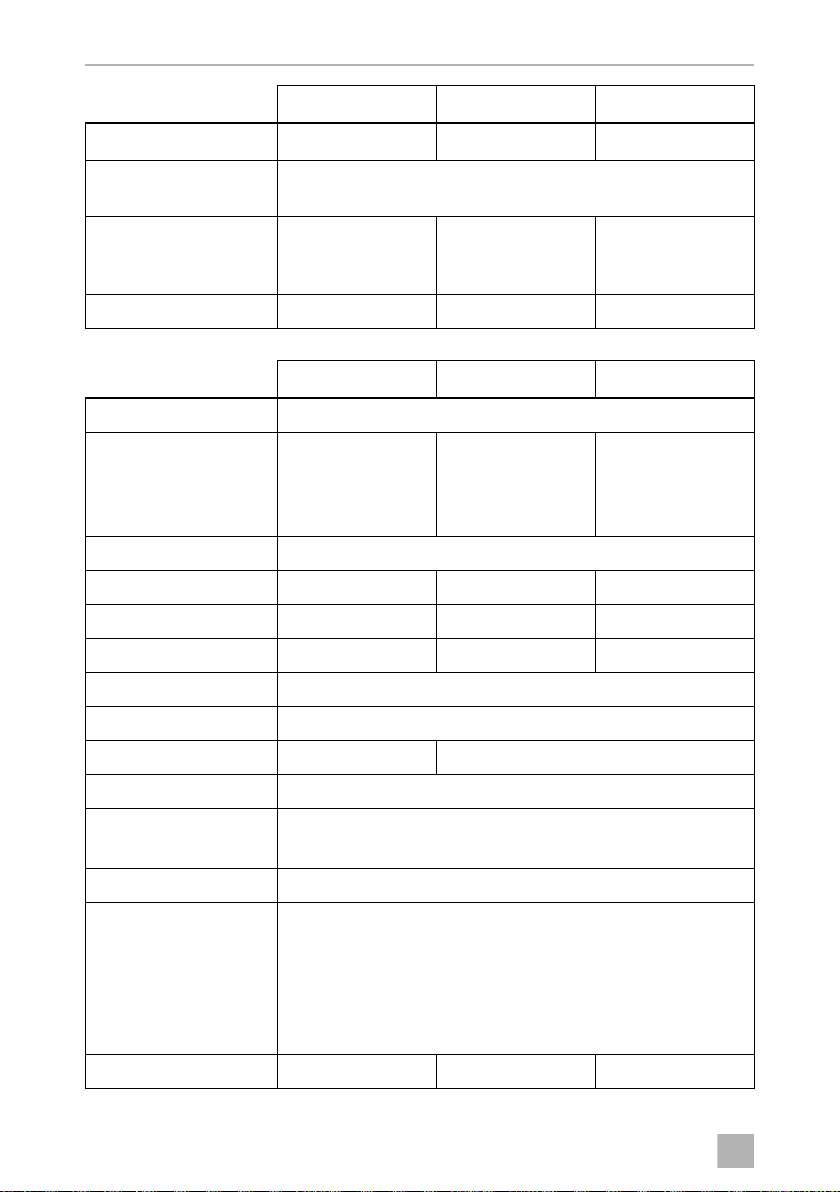
CO
2
equivalent: 0.054 t 0.060 t 0.064 t
Global warming
potential (GWP):
1430
Dimensions
(WxDxH) inmm
(including handles):
398 x 694 x 407 398 x 694 x 476 720 x 455 x 480
Weight: 16.9 kg 18.7 kg 20.4 kg
CFX3 55IM CFX3 75DZ CFX3 95DZ
Connection voltage: 12/24 Vg and 100 – 240 Vw
Rated current: 12 Vg: 8.9 A
24 Vg: 3.8 A
100 Vw: 1.00 A
240 Vw: 0.42 A
12 Vg: 9.6 A
24 Vg: 4.2 A
100 Vw: 1.12 A
240 Vw: 0.47 A
12 Vg: 10.4 A
24 Vg: 4.6 A
100 Vw: 1.22 A
240 Vw: 0.51 A
Cooling capacity: –22 °C to +10 °C (–8 °F to +50 °F)
Energy consumption: 82 kWh/annum 108 kWh/annum 111 kWh/annum
Gross volume: 55l 75l (45l/30l) 94l (55l/39l)
Storage volume: 53l 75l (45l/30l) 94l (55l/39l)
Climate class: N, T
Ambient temperature: +16 °C to +43 °C (+61 °F to +110 °F)
Noise emission: 48 dB(A) 50 dB(A)
USB charging port: 5 Vg, 2 A
Frequency range: WiFi: 2412 MHz – 2472MHz/2422 MHz – 2462MHz
Bluetooth/BLE: 2402 MHz – 2480 MHz
Frequency band (WiFi): 2.4 GHz
RF output power: WiFi: 16.62 dBm (802.11b),
16.23 dBm (802.11g),
16.45 dBm (802.11n20),
16.02 dBm (802.11n40)
Bluetooth: 8.31 dBm
Bluetooth LE: 6.67 dBm
Refrigerant quantity: 45 g 59 g 67 g
CFX3 35 CFX3 45 CFX3 55
CFX3_OPM_APAC(en).book Seite 38 Donnerstag, 23. Januar 2020 6:54 18

EN
CFX3 Technical data
39
The coolant circuit contains R134a.
Contains fluorinated greenhouse gases
Hermetically sealed equipment
Standards
Determination of energy consumption: IEC 62552 (2018)
Determination of volume: AS/NZS 4474.1:2007
CO
2
equivalent: 0.064 t 0.084 t 0.096 t
Global warming
potential (GWP):
1430
Dimensions
(WxDxH) inmm
(including handles):
720 x 455 x 480 892 x 495 x 472 962 x 530 x 472
Weight: 21.3 kg 27.8 kg 29.8 kg
CFX3 55IM CFX3 75DZ CFX3 95DZ
CFX3_OPM_APAC(en).book Seite 39 Donnerstag, 23. Januar 2020 6:54 18

YOUR LOCAL
SALES OFFICE
dometicĶ ,*ű0)"0Ŗ,= "s
YOUR LOCAL
DEALER
dometic.com/dealer
YOUR LOCAL
SUPPORT
dometic.com/contact
dometic.com
*+-)"1")&01*#*+"1& *+-,&"0ķ4%& % *+-/&0"1%"*+"1& /*2-ķ ,"#*2,!&,1%"-2)& 9)&,$0*#ĸ
DOMETIC GROUP AB"+3E/,0$1,ĉčŖĉďĉčČ*),4"!",
4445103033 01/2020
CFX3_OPM_APAC(en).book Seite 40 Donnerstag, 23. Januar 2020 6:54 18