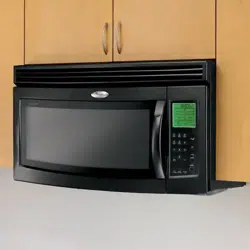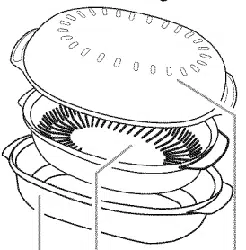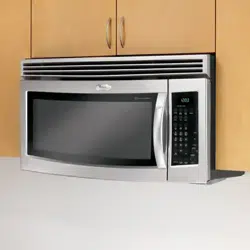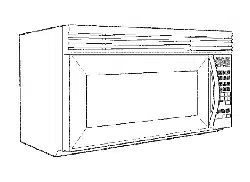
MODEL MH8150XJ
4619-652-60191/8169687
Use Care
A Note to You............................................. 2
Microwave Oven Safety ........................... 3
mnstallation instructions ............................ 6
Getting to Know Your
Microwave Oven ........................................ 7
How your microwave oven works ...........7
Radio interference ................................. 7
Testing your microwave oven ............... 7
Testing your dinnerware
or cookware ............................................ 8
Operating tips ......................................... 8
Electrical connection ............................. 8
Microwave oven features ...................... 9
Control panel features ......................... 10
Using the cooking rack ....................... 13
Using the exhaust fan ......................... 13
Using the cooktop!
countertop light .................................... 14
Setting the clock .................................. 14
Using the minute timer ........................ 15
Using JET START Mfeature ................. 16
Changing preset cooking times ......... 16
Using Your Microwave Oven ................... 17
Cooking at high cook power .............. 17
Cooking at different cook powers_._.17
Cooking in stages ................................ 19
Progress Bar ........................................ 20
Using EZ=TOUCH TM COOK control.._.21
Using EZ=TOUCW MREHEAT control,,22
Using EZ-TOUCW _
JET DEFROST Mfeature ...................... 24
JET DEFROST rMfeature chart ............ 25
Defrosting tips ...................................... 27
Using POPCORN ................................. 28
Using BEVERAGE ................................ 29
Using BAKED POTATO ........................ 30
Using VEGETABLE ............................... 31
Using FROZEN ENTREE ..................... 32
Using WARM HOLD ............................ 33
Cooking Guide ......................................... 34
Caring for Your Microwave Oven ...........35
Caring for the filters ............................. 36
Replacing the cooktop
and oven lights ..................................... 37
Questions and Answers ......................... 38
Troubleshooting ....................................... 39
Requesting Assistance
or Service ................................................. 41
Warranty ................................................... 44
Call our Customer Interaction Center
with questions or comments.
www.whirlpool.com
} i ,iliD i ii /'iixii iiii:ii i, i i,,is ¸
The Whirlpool ®Brand is committed to designing quality products that consistently perform for you to make your
life easier. To ensure that you enjoy years of trouble-free operation, we developed this Use and Care Guide.
It is full of valuable information about how to operate and maintain your appliance properly. Please read it care-
fully.
Also, complete and mail the Product Registration Card provided with your appliance The card helps us
notify you about any new information on your appliance
Whenever you call to request service for your appliance,
you need to know your complete model number and
serial number. You can find this information on the
model and serial number label/plate (see the diagram in
the "Getting to Know Your Microwave Oven" section).
Please also record the purchase date of your appliance
and your dealer's name, address, and telephone number.
Model Number
Serial Number
Purchase Date
Dealer Name
Dealer Address
Dealer Phone
Keep this book and the sales slip together in a safe place for future reference. It is important
for you to save your sames receipt showing the date of purchase. Proof of purchase will assure
you of in-warranty service.
To find detailed product information, the location of the nearest Whirlpool dealer or designated servicer, to
purchase an accessory item, or register your appliance online, please visit our Web site at
wwwowhiHpoolocom
Your safety and the safety of others are very important.
We have provided many important safety messages in this manual and on your appliance. Always read and
obey all safety messages.
This is the safety alert symbol.
This symbol alerts you to potential hazards that can kill or hurt you and others.
All safety messages will follow the safety alert symbol and either the word "DANGER" or
"WARNING." These words mean:
You can be killed or seriously injured if you don't
immediately follow instructions.
You can be killed or seriously injured if you don't
follow instructions.
All safety messages will tell you what the potential hazard is, tell you how to reduce the chance of injury,
and tell you what can happen if the instructions are not followed.
mMPORTANT SAFETY INSTRUCTmONS
When using electrical appliances basic safety precautions should be followed, including the following:
WARNING: To reduce the risk of burns, electric
shock, fire, injury to persons, or exposure to
excessive microwave energy:
® Read all instructions before using the microwave
oven.
o Read and follow the specific *'PRECAUTIONS TO
AVOID POSSIBLE EXPOSURE TO EXCESSIVE
MICROWAVE ENERGY" found in this section.
o The microwave oven must be grounded. Connect
only to properly grounded outlet. See
*'GROUNDING iNSTRUCTIONS" found in this
section and in the provided installation instructions.
o Install or locate the microwave oven only in
accordance with the provided installation
instructions.
o Some products such as whole eggs in the shell
and sealed containers = for example, closed glass
jars = may explode and should not be heated in
the microwave oven.
o Use the microwave oven only for its intended use
as described in this manual. Do not use corrosive
chemicals or vapors in the microwave oven. This
type of oven is specifically designed to heat, cook,
or dry food. It is not designed for industrial or
laboratory use.
o As with any appliance, close supervision is
necessary when used by children.
o Do not operate the microwave oven if it has a
damaged cord or plug, if it is not working properly,
or if it has been damaged or dropped.
®The microwave oven should be serviced only by
qualified service personnel. Call an authorized
service company for examination, repair, or
adjustment.
® See door surface cleaning instructions in the
*'Caring for Your Microwave Oven" section.
®To reduce the risk of fire in the oven cavity:
= Do not overcook food. Carefully attend the
microwave oven if paper, plastic, or other
combustible materials are placed inside the oven
to facilitate cooking.
= Remove wire twist=ties from paper or plastic bags
before placing bags in oven.
= If materials inside the oven should ignite, keep
oven door closed, turn oven off, and disconnect
the power cord, or shut off power at the fuse or
circuit breaker panel.
= Do not use the cavity for storage purposes. Do
not leave paper products, cooking utensils, or
food in the cavity when not in use.
® Suitable for use above both gas and electric
cooking equipment.
SAVE THESE iNSTRUCTiONS
!!!!!!!
iMPORTANT SAFETY mNSTRUCTmONS
® intended to be used above ranges with maximum
width of 36 inches.
®Clean Ventilating Hoods Frequently z Grease
should not be allowed to accumulate on hood or
filter.
®Oversized foods or oversized metal utensils
should not be inserted in the microwave oven as
they may create a fire or risk of electric shock.
® Do not clean with metal scouring pads. Pieces can
burn off the pad and touch electrical parts involv-
ing a risk of electric shock.
® Do not use paper products when appliance is
operated in the "PAN BROWN" mode.
o Do not store any materials other than manufactur-
er's recommended accessories in this oven when
not in use.
o Do not store anything directly on top of the
microwave oven when the microwave oven is
in operation.
® When flaming foods under the hood, turn the fan on.
® Use care when cleaning the venbhood filter.
Corrosive cleaning agents, such as lye-based oven
cleaners, may damage the filter.
® Do not cover or block any openings on the
microwave oven.
® Do not store this microwave oven outdoors.
Do not use the microwave oven near water - for
example, near a kitchen sink, in a wet basement, or
near a swimming pool, and the like.
® Do not immerse cord or plug in water.
o Keep cord away from heated surfaces.
o Do not let cord hang over edge of table or counter.
® Do not mount over a sink.
® Do not cover racks or any other part of the oven with
metal foil. This will cause overheating of the oven.
SAVE THESE mNSTRUCTmONS
PRECAUTIONS TO AVOID POSSIBLE EXPOSURE TO
EXCESSIVE MICROWAVE ENERGY
(a) Do not attempt to operate this oven with the
door open since opemdoor operation can result
in harmful exposure to microwave energy. It is
important not to defeat or tamper with the safety
interlocks.
(b) Do not place any object between the oven front
face and the door or allow soil or cleaner residue
to accumulate on sealing surfaces.
(c) Do not operate the oven if it is damaged. It is
particularly important that the oven door close
properly and that there is no damage to the:
(1) Door (bent),
(2) Hinges and latches (broken or loosened),
(3) Door seals and sealing surfaces.
(d) The oven should not be adjusted or repaired by
anyone except properly qualified service
personnel_
Observeaiigoverningcodesandordinances.A
120Volt,60 Hz,AConly,15-or 20-ampfused
electricalsupplyisrequired.(Atime-delayfuseis
recommended.)Itisrecommendedthata separate
circuitservingonlythisappliancebe provided.
Electrical Shock Hazard
Plug into a grounded 3 prong outlet.
Do not remove ground prong.
Do not use an adapter.
Do not use an extension cord.
Failure to follow these instructions can
result in death, fire, or electrical shock.
GROUNDING
® For aH cord connected appliances:
The microwave oven must be grounded. In the
event of an electrical short circuit, grounding
reduces the risk of electric shock by providing an
escape wire for the electric current. The microwave
oven is equipped with a cord having a grounding
wire with a grounding plug. The plug must be
plugged into an outlet that is properly installed and
grounded.
WARNING: Improper use of the grounding plug
can result in a risk of electric shock.
Consult a qualified electrician or serviceman if the
grounding instructions are not completely under=
stood, or if doubt exists as to whether the microwave
oven is properly grounded.
iNSTRUCTiONS
Do not use an extension cord. If the power supply
cord is too short, have a qualified electrician or
serviceman install an outlet near the microwave oven.
® For a permanently connected appliance:
The microwave oven must be connected to a
grounded, metallic, permanent wiring system, or an
equipment grounding conductor should be run with
the circuit conductors and connected to the
equipment grounding terminal or lead on the
microwave even.
SAVE THESE iNSTRUCTiONS
i!ii ,i!!!!iiii::%!;i ,(iiiiii!iiiiJ" ii,<;Tii"iii!iiii:! i!iJl ,iii ,<iiiiiii:!i{iii' l£, @' ii!!i,{}{i iii ii i iii!!tiii ii' i,,iiii£ii"'iii{t!i,i
Excessive Weight Hazard
Use two or more people to move and install
microwave oven,
Failure to do so can result in back or other
injury.
If you need to remove your Microwave Hood
Combination for any reason, foiiow these simple
steps:
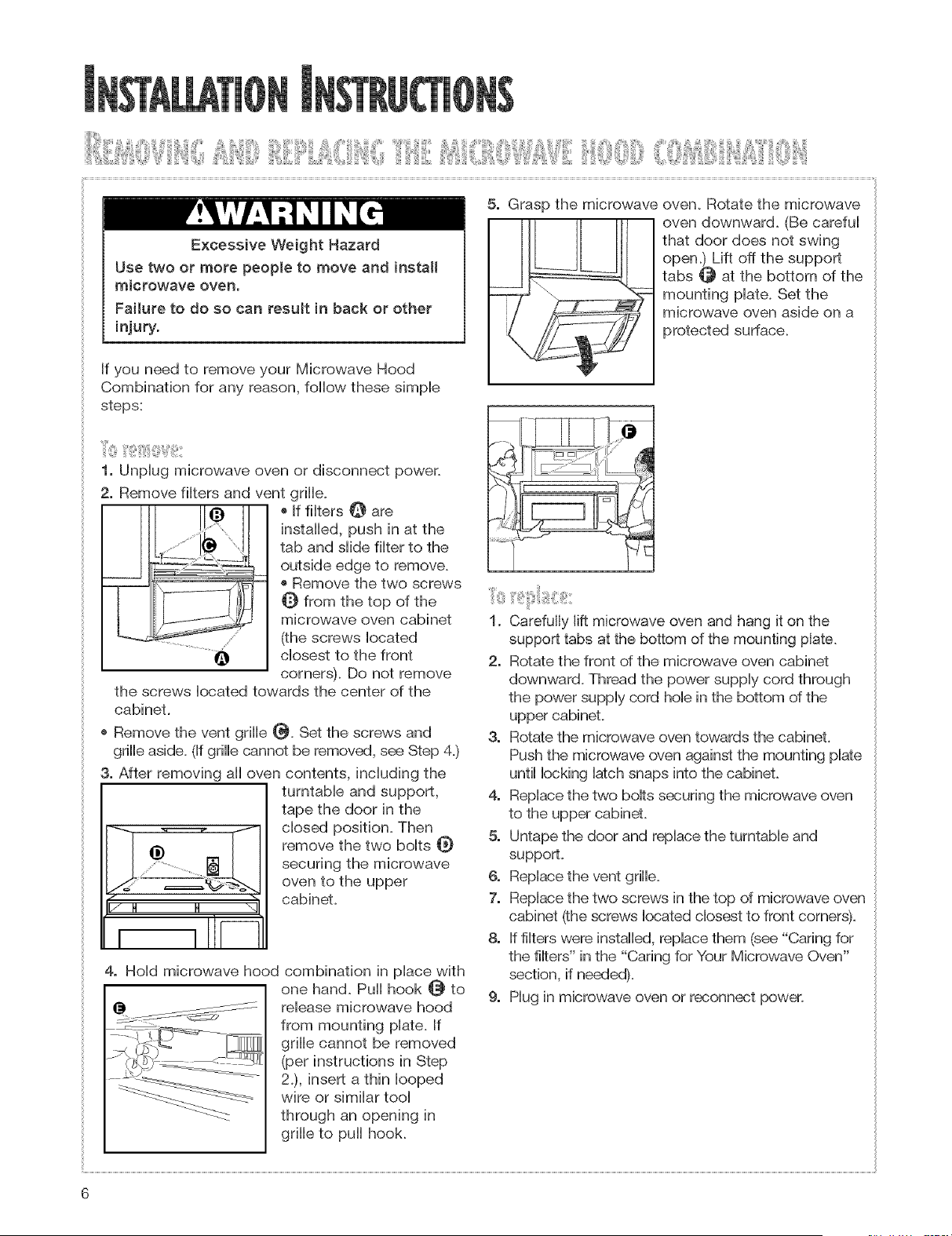
1. Unplug microwave oven or disconnect power.
2. Remove filters and vent grille.
[!3 !
W-
® If filters _ are
installed, push in at the
tab and slide filter to the
outside edge to remove.
® Remove the two screws
Q from the top of the
microwave oven cabinet
(the screws located
closest to the front
corners). Do not remove
the screws located towards the center of the
cabinet
o Remove the vent grille _. Set the screws and
grille aside. (If grille cannot be removed, see Step 4.)
3o After removing all oven contents, including the
I/ H H _q
i i -
turntable and support,
tape the door in the
closed position. Then
remove the two bolts _}
securing the microwave
oven to the upper
cabinet
4. Hold microwave hood combination in place with
one hand. Puii hook @ to
release microwave hood
from mounting plate. If
grille cannot be removed
(per instructions in Step
2.), insert a thin looped
wire or similar tool
through an opening in
grille to pull hook.
5. Grasp the microwave
oven. Rotate the microwave
oven downward. (Be careful
that door does not swing
open.) Lift off the support
tabs _ at the bottom of the
mounting plate. Set the
microwave oven aside on a
protected surface.
k ;*J
1. Carefully lift microwave oven and hang it on the
support tabs at the bottom of the mounting plate.
2, Rotate the front of the microwave oven cabinet
downward. Thread the power supply cord through
the power supply cord hob in the bottom of the
upper cabinet.
3, Rotate the microwave oven towards the cabinet,
Push the microwave oven against the mounting plate
until locking latch snaps into the cabinet.
4, Replace the two bolts securing the microwave oven
to the upper cabinet,
5, Untape the door and replace the turntable and
support.
6. Replace the vent grille.
7. Replace the two screws in the top of microwave oven
cabinet (the screws located closest to front corners).
8. If filters were installed, replace them (see "Caring for
the filters" in the "Caring for Your Microwave Oven"
section, if needed).
9. Mug in microwave oven or reconnect power.
6
This section discusses the concepts behind microwave cooking. It also shows you the basics you need
to know to operate your microwave oven. Please read this information before you use your oven.
Microwave energy is not hot. It causes food to make
its own heat, and it's this heat that cooks the food.
Microwaves are HikeTV waves, radio waves, or
Hightwaves. You cannot see them, but you can see
what they do.
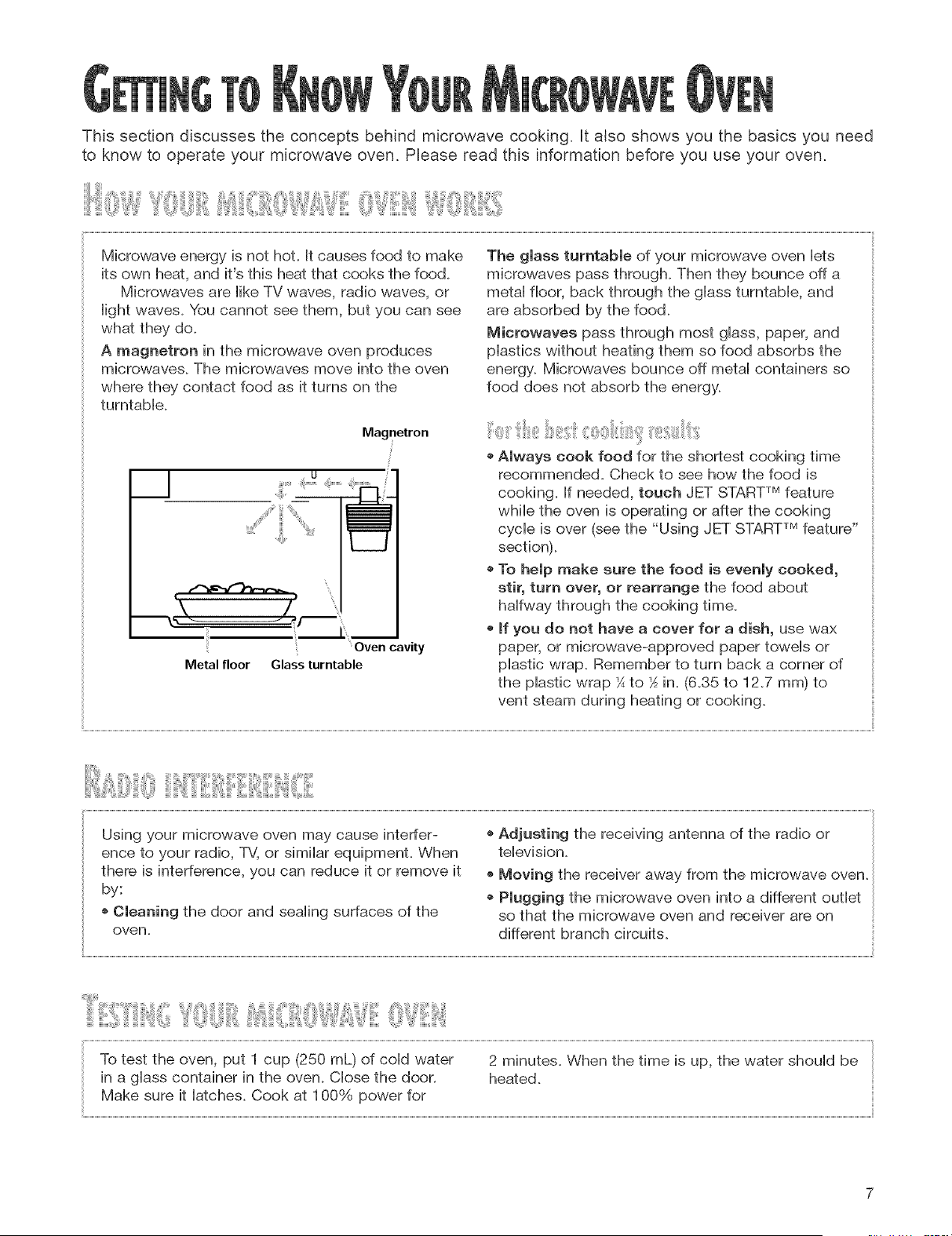
A magnetron in the microwave oven produces
microwaves. The microwaves move into the oven
where they contact food as it turns on the
turntabHe.
Magnetron
!
S
i!
"\
I I
Oven cavity
Metal floor Glass turntable
The gmass turntabme of your microwave oven lets
microwaves pass through. Then they bounce off a
metaHfloor, back through the gHassturntabHe, and
are absorbed by the food.
Microwaves pass through most gHass,paper, and
pHasfics without heating them so food absorbs the
energy. Microwaves bounce off metaHcontainers so
food does not absorb the energy.
o Amways cook food for the shortest cooking time
recommended. Check to see how the food is
cooking, if needed, touch JET STARTTMfeature
while the oven is operating or after the cooking
cycle is over (see the "Using JET STARTTMfeature"
section).
o To hempmake sure the food is evenmy cooked,
stir, turn over, or rearrange the food about
halfway through the cooking time.
o mfyou do not have a cover for a dish, use wax
paper, or microwave-approved paper towels or
plastic wrap. Remember to turn back a corner of
the plastic wrap ¼to _ in. (6.35 to 12.7 mm) to
vent steam during heating or cooking.
iiiii,,iii!!i iii:Iiiiiii, :::iiiiii!iiiiiii,,:,, ii!"iiiii:
Using your microwave oven may cause interfer-
ence to your radio, TV, or similar equipment. When
there is interference, you can reduce it or remove it
by:
o Cleaning the door and sealing surfaces of the
oven,
,, Adjusting the receiving antenna of the radio or
television.
o Moving the receiver away from the microwave oven.
o Plugging the microwave oven into a different outlet
so that the microwave oven and receiver are on
different branch circuits.
?,,{X,J!!iiiii !iii}@,tlJ3i" ,, iiii:!iE!iii iiiiiiii'!@i:iii iii iiii!(i iiii;i!
Test dinnerware or cool{ware before using.
To test a dish, put it into the oven with 1 cup
(250 mL) of water beside it. Cook at 100% cook
power for one minute, if the dish gets hot and
water stays cool, do not use it. Some dishes
(melamine, some ceramic dinnerware, etc.)
absorb microwave energy, and may become too hot
to handle or may slow cooking times. Cooking in
metal containers not designed for microwave use
could damage the oven, as could containers with
hidden metal (twist-ties, foil lining, staples, metallic
glaze or trim).
® Never ban on the door or allow a child to swing
on it when the door is open,
® Use hot pads, Microwave energy does not heat
containers, but the heat from the food can make
the container hot,
o Do not use newspaper or other printed paper in
the oven,
o Do not dry flowers, fruit, herbs, wood, paper,
gourds, or clothes in the oven,
o Do not start a microwave oven when it is empty,
Product life may be shortened, If you practice
programming the oven, put a container of water in
the oven, It is normal for the oven door to look
wavy after the oven has been running for awhile,
® Do not try to melt paraffin wax in the oven,
Paraffin wax will not melt in a microwave oven
because it allows microwaves to pass through iL
® Do not operate the microwave oven unless the
glass turntable is securely in place and can rotate
freely, The turntable can rotate in either direction,
Mal{e sure the turntable is correct-side up in the
oven, Handle your turntable with care when
removing it from the oven to avoid possibly
breaking it, If your turntable cracks or breaks,
contact your dealer for a replacement,
® When you use a browning dish, the browning
dish bottom must be at least _6 in, (5 mm) above
the turntable, Follow the directions supplied with
the browning dish,
®Never cool{ or reheat a whole egg inside the
shell. Steam buildup in whole eggs may cause
them to burst, and possibly damage the oven.
Slice hard-boibd eggs before heating. In rare
cases, poached eggs have been known to
explode. Cover poached eggs and allow a stand-
ing time of one minute before cutting into them.
®For best results, stir any liquid several times
during heating or reheating. Liquids heated in
certain containers (especially containers shaped
like cylinders) may become overheated. The liquid
may splash out with a loud noise during or after
heating or when adding ingredients (coffee
granules, tea bags, etc.). This can damage the oven.
• Microwaves may not reach the center of a roast.
The heat spreads to the center from the outer,
cooked areas just as in regular oven cooking. This
is one of the reasons for letting some foods (for
example, roasts or baked potatoes) stand for a
while after cooking, or for stirring some foods
during the cooking time.
o Do not deep fry in the oven. Microwavable
utensils are not suitable and it is difficult to
maintain appropriate deep-frying temperatures.
o Do not overcool{ potatoes. At the end of the
recommended cooking time, potatoes should be
slightly firm because they will continue cooking
during standing time. After microwaving, let
potatoes stand for 5 minutes. They will finish
cooking while standing.
/
If your emectric power mineor outmet voltage is less
than 110 volts, cooking times may be longer. Have a
qualified electrician check your electrical system.
iiii: !!!£1Iiiiiiillii£11+!!!!il¸
@
i!!
Y ,......... ,.................
® .......®
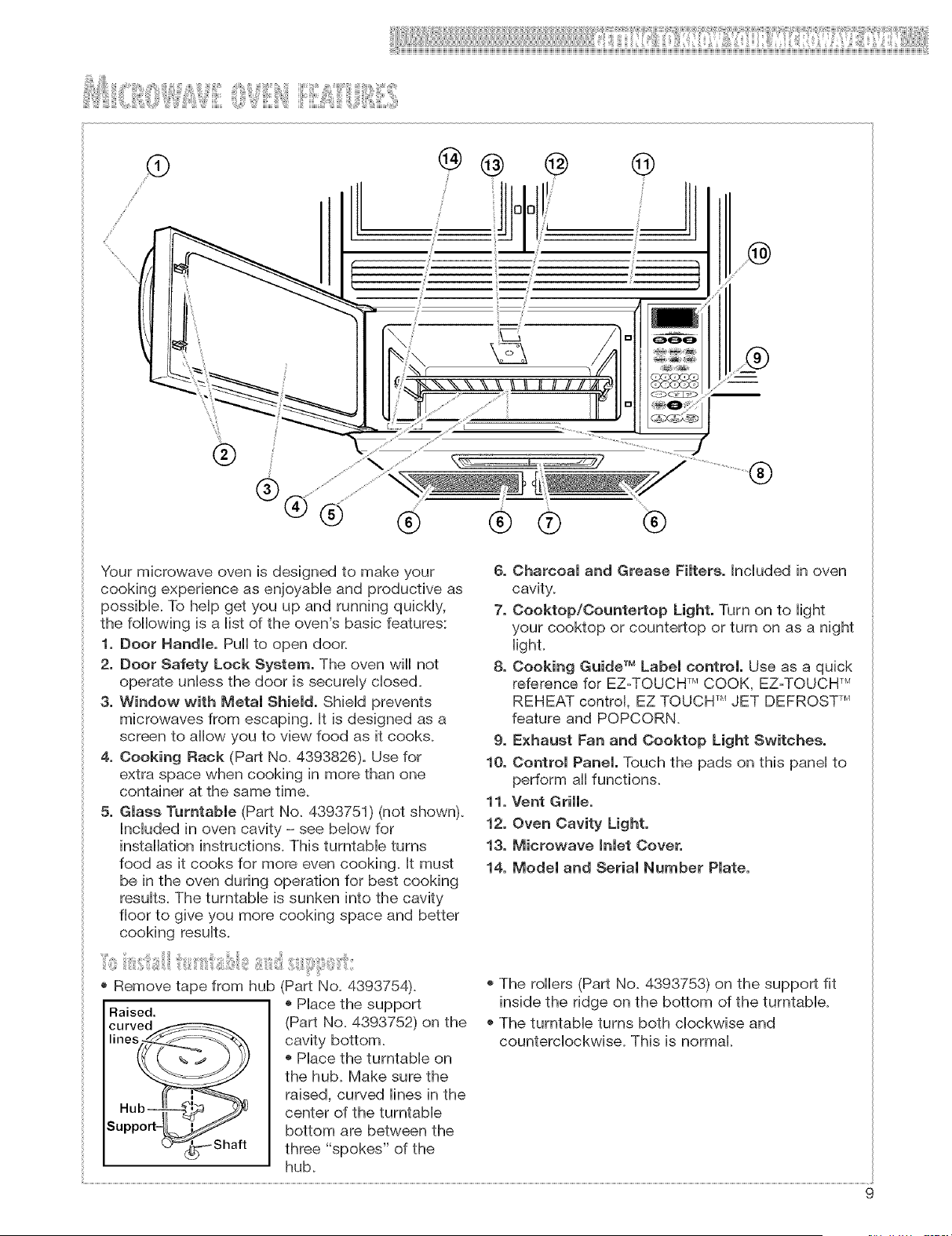
Your microwave oven is designed to make your
cooking experience as enjoyable and productive as
possibb+ To help get you up and running quickly,
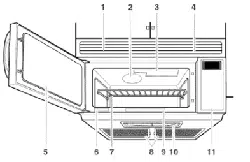
the following is a list of the oven's basic features:
1, Door Handle, Pull to open door.
2, Door Safety Lock System, The oven will not
operate unless the door is securely closed.
3, Window with Metal Shield, Shield prevents
microwaves from escaping, It is designed as a
screen to allow you to view food as it cooks+
4, Cooking Rack (Part No+4393826), Use for
extra space when cooking in more than one
container at the same time+
5, Glass Turntable (Part No+4393751) (not shown).
Included in oven cavity - see below for
installation instructions, This turntable turns
food as it cooks for more even cooking, It must
be in the oven during operation for best cooking
results, The turntable is sunken into the cavity
floor to give you more cooking space and better
cooking results+
6, Charcoal and Grease Filters. Included in oven
cavity.
7, Cooktop/Countertop Light, Turn on to light
your cooktop or countertop or turn on as a night
Hight,
8, Cooking Guide TM Label control, Use as a quick
reference for EZ=TOUCH TM COOK, EZ=TOUCH TM
REHEAT control, EZ TOUCH TM JET DEFROST TM
feature and POPCORN.
9, Exhaust Fan and Cooktop Light Switches,
10, Control Panel, Touch the pads on this panel to
perform all functions.
11. Vent Grille,
12, Oven Cavity Light,
13, Microwave Inlet Cover,
14, Model and Serial Number Plate.
+ Remove tape from hub (Part No+ 4393754)+
+ Place the support
Raised.
(Part No. 4393752) on the
cavity bottom+
+ Place the turntable on
the hub+ Make sure the
raised, curved lines in the
center of the turntable
bottom are between the
three "spokes" of the
hub+
+ The rollers (Part No+ 4393753) on the support fit
inside the ridge on the bottom of the turntable+
+ The turntable turns both clockwise and
counterclockwise+ This is normal+
9
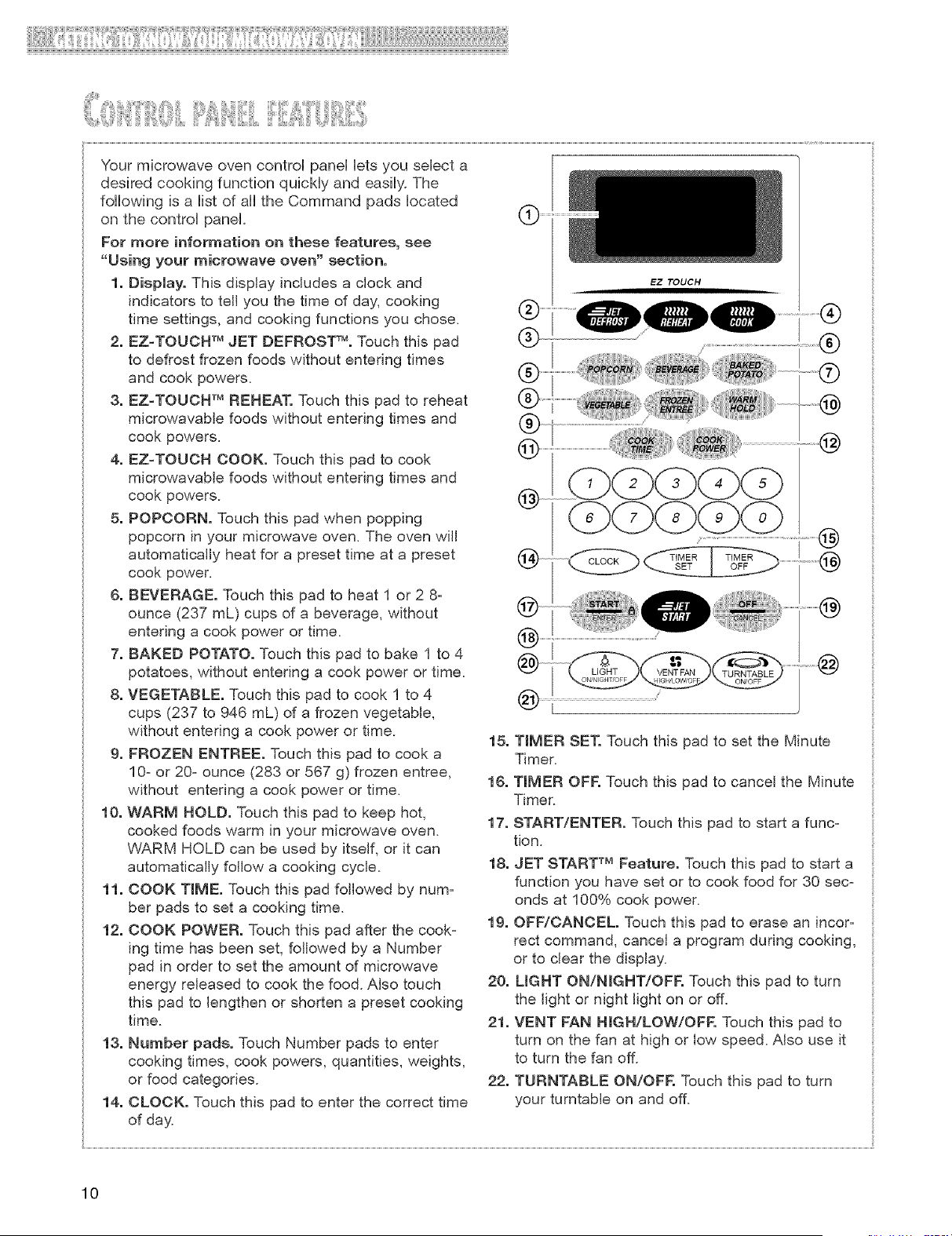
Yourmicrowaveovencontrolpanelletsyouselecta
desiredcookingfunctionquicklyandeasily.The
followingisa listof alltheCommandpadslocated
onthecontrolpanel.
Formoreinformation on these features, see
"Using your microwave oven" section.
1. Display. This display includes a clock and
indicators to tell you the time of day, cooking
time settings, and cooking functions you chose.
2. EZ=TOUCH TM JET DEFROST TM. Touch this pad
to defrost frozen foods without entering times
and cook powers.
3. EZ-TOUCH TM REHEAT. Touch this pad to reheat
microwavable foods without entering times and
cook powers.
4. EZ-TOUCH COOK. Touch this pad to cook
microwavable foods without entering times and
cook powers.
5. POPCORN. Touch this pad when popping
popcorn in your microwave oven. The oven will
automatically heat for a preset time at a preset
cook power.
6. BEVERAGE. Touch this pad to heat 1 or 2 8-
ounce (237 mL) cups of a beverage, without
entering a cook power or time.
7. BAKED POTATO. Touch this pad to bake 1 to 4
potatoes, without entering a cook power or time.
8. VEGETABLE. Touch this pad to cook 1 to 4
cups (237 to 946 mL) of a frozen vegetable,
without entering a cook power or time.
9. FROZEN ENTREE. Touch this pad to cook a
10z or 20z ounce (283 or 567 g) frozen entree,
without entering a cook power or time.
10. WARM HOLD. Touch this pad to keep hot,
cooked foods warm in your microwave oven.
WARM HOLD can be used by itself, or it can
automatically follow a cooking cycle.
11. COOK TIME. Touch this pad followed by num-
ber pads to set a cooking time.
12. COOK POWER. Touch this pad after the cook-
ing time has been set, followed by a Number
pad in order to set the amount of microwave
energy released to cook the food. Also touch
this pad to lengthen or shorten a preset cooking
time.
13. Number pads. Touch Number pads to enter
cooking times, cook powers, quantities, weights,
or food categories.
14. CLOCK. Touch this pad to enter the correct time
of day
EZ TOUCH
@
LIGHT TURNTABLE
(_) [
15. TIMER SET. Touch this pad to set the Minute
Timer.
16. TIMER OFF. Touch this pad to cancel the Minute
Timer.
17. START/ENTER. Touch this pad to start a func-
tion.
18. JET START TM Feature. Touch this pad to start a
function you have set or to cook food for 30 sec-
onds at 100% cook power.
19. OFF/CANCEL Touch this pad to erase an incorz
rect command, cancel a program during cooking,
or to clear the display.
20. UGHT ON/NmGHT/OFF. Touch this pad to turn
the light or night light on or off.
21. VENT FAN HGN/LOW/OFF. Touch this pad to
turn on the fan at high or low speed. Also use it
to turn the fan off.
22. TURNTABLE ON/OFF. Touch this pad to turn
your turntable on and off.
10
iiI,}ii} iii ,iiiTiiii@iii@ !ii!ii!iiii!!i! ,,
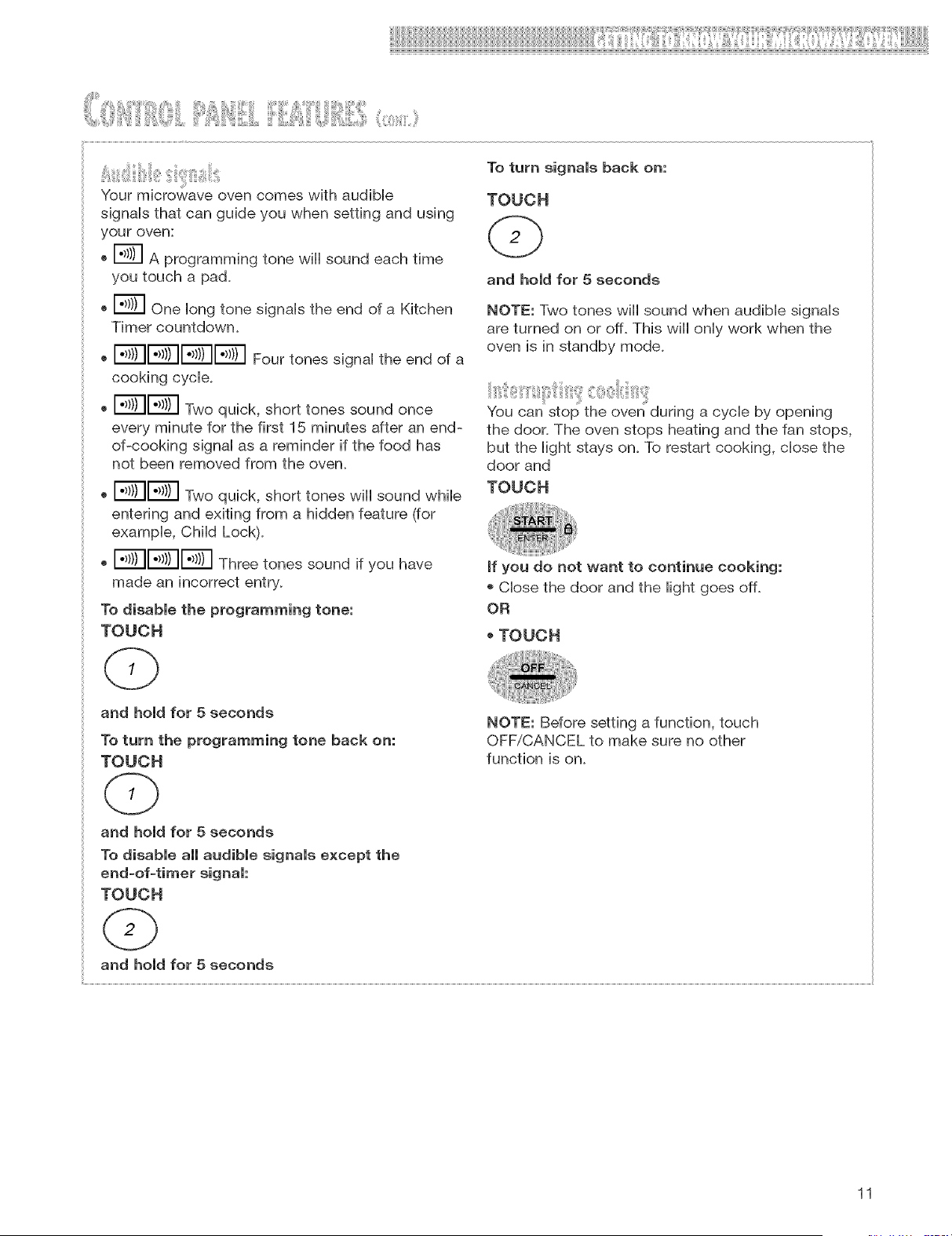
Your microwave oven comes with audible
signals that can guide you when setting and using
your oven:
o _ A programming tone wiii sound each time
you touch a pad.
o E_ one long tone signals the end of a Kitchen
Timer countdown.
, I.,}/)I1"_)I1"_/)IF;TIFourtonessignal theendofa
cooking cycle.
o E_I_3 Two quick, short tones sound once
every minute for the first 15 minutes after an end-
of-cooking signal as a reminder if the food has
not been removed from the oven.
o E_I;_ Two quick, short tones wiii sound while
entering and exiting from a hidden feature (for
example, Child Lock).
oI"_)I1"_)II</)1Threetonessoundifyouhave
made an
To disable the programming tone:
TOUCH
To turn signals back on:
TOUCH
and hold for 5 seconds
NOTE: Two tones will sound when audible signals
are turned on or off. This wiii only work when the
oven is in standby mode.
You can stop the oven during a cycle by opening
the door. The oven stops heating and the fan stops,
but the light stays on. To restart cooking, close the
door and
TOUCH
If you do not want to continue cooking:
o Close the door and the light goes off.
OR
TOUCH
and hold for 5 seconds
To turn the programming tone back on:
TOUCH
NOTE: Before setting a function, touch
OFF/CANCEL to make sure no other
function is on.
and hold for 5 seconds
To disable all audible signals except the
end=of=timer signal:
TOUCH
and hold for 5 seconds
11
itil i s ilii ' l,!! iis :i x!¸1'i ii , ii ii ¸ i:ii i
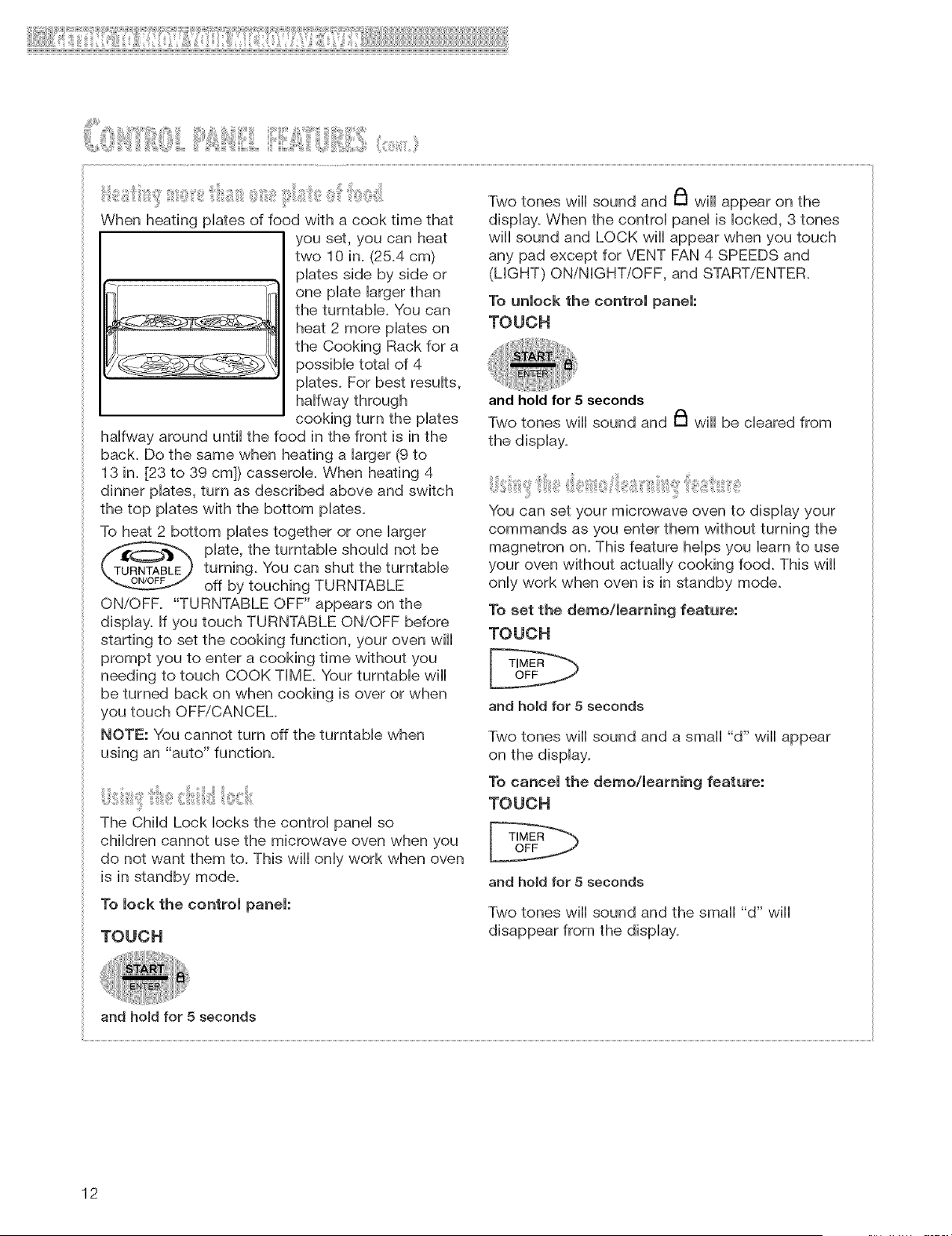
When heating plates of food with a cook time that
you set, you can heat
two 10 in. (25.4 cm)
plates side by side or
one plate larger than
the turntable. You can
heat 2 more plates on
the Cooking Rack for a
possible total of 4
plates. For best results,
halfway through
cooking turn the plates
halfway around until the food in the front is in the
back. Do the same when heating a larger (9 to
13 in. [23 to 39 cm]) casserole. When heating 4
dinner plates, turn as described above and switch
the top plates with the bottom plates.
To heat 2 bottom plates together or one larger
plate, the turntable should not be
turning. You can shut the turntable
off by touching TURNTABLE
ON/OFF. "TURNTABLE OFF" appears on the
display. If you touch TURNTABLE ON/OFF before
starting to set the cooking function, your oven will
prompt you to enter a cooking time without you
needing to touch COOK TIME. Your turntable will
be turned back on when cooking is over or when
you touch OFF/CANCEL
NOTE: You cannot turn off the turntable when
using an "auto" function.
8isii ii ' ii ¸¸ii'b/!,@iiil, iii
The Child Lock locks the control panel so
children cannot use the microwave oven when you
do not want them to. This will only work when oven
is in standby mode.
To lock the control panel:
TOUCH
Two tones wiii sound and _ wiii appear on the
display. When the control panel is locked, 3 tones
wiii sound and LOCK wiii appear when you touch
any pad except for VENT FAN 4 SPEEDS and
(LIGHT) ON/NIGHT/OFF, and START/ENTER.
To unlock the control panel:
TOUCH
and hold for 5 seconds
Two tones wiii sound and _ wiii be cleared from
the display.
You can set your microwave oven to display your
commands as you enter them without turning the
magnetron on. This feature helps you barn to use
your oven without actually cooking food. This wiii
only work when oven is in standby mode.
To set the det_o/_eart_ing feature:
TOUCH
and hold for 5 seconds
Two tones wiii sound and a small "d" wiii appear
on the display.
To cancel the det_o/leart_ing feature:
TOUCH
and hold for 5 seconds
Two tones wiii sound and the small "d" wiii
disappear from the display.
and hold for 5 seconds
12
IJ!!!!ii!,I(ilYIII!!!IOi[i()i iiilii (:iR i!i!i(:li ill
The Cooking Rack gives you extra space when
cooking in more than one container at the same
time.
If you need a replacement rack (Part No. 4393826),
you can order one from your designated service
company, or by calling the Customer interaction
center at 1-800-253-1301. Make sure to have your
model number when ordering.
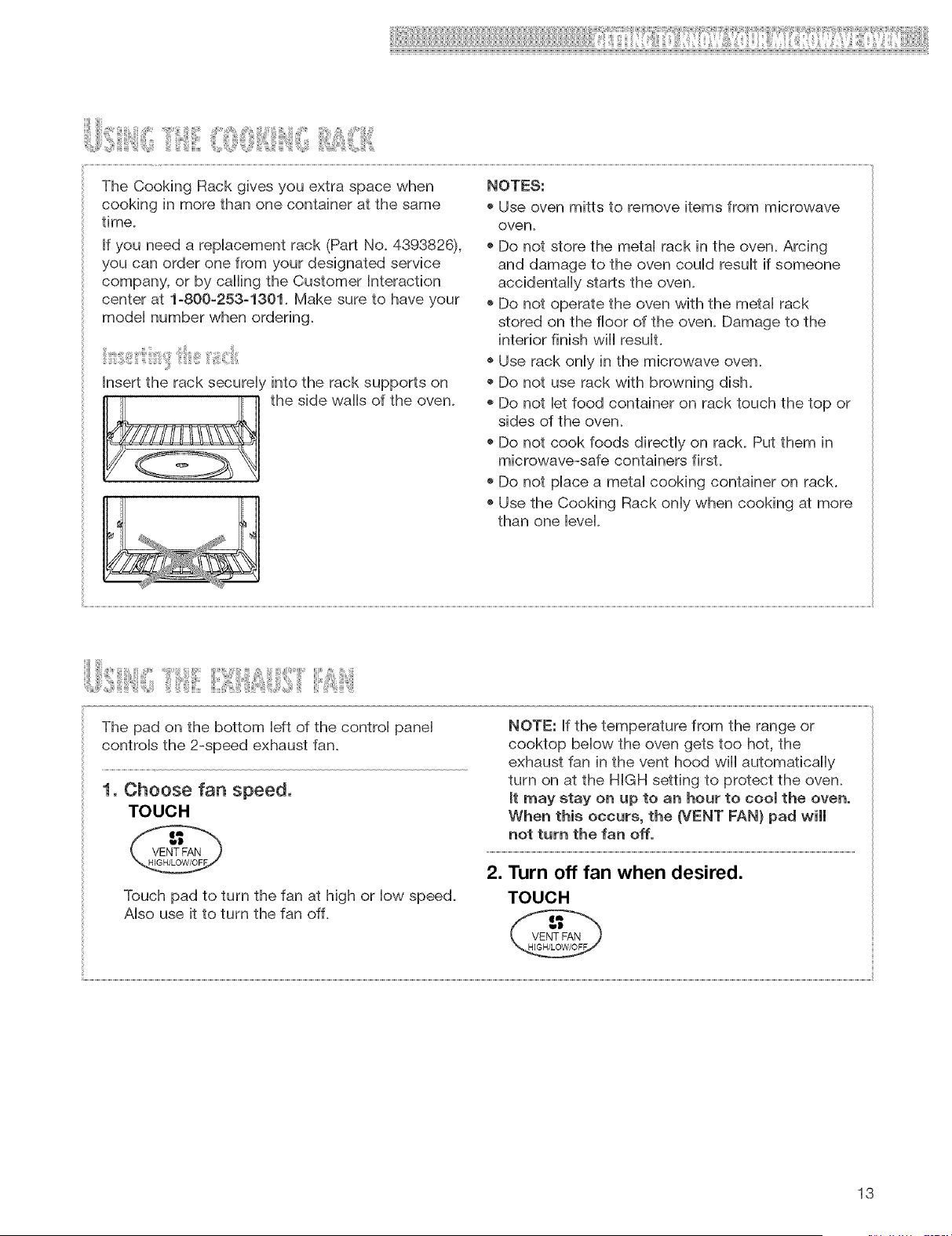
Insert the rack securely into the rack supports on
the side walls of the oven.
NOTES:
o Use oven mitts to remove items from microwave
oven.
o Do not store the metal rack in the oven. Arcing
and damage to the oven could result if someone
accidentally starts the oven.
o Do not operate the oven with the metal rack
stored on the floor of the oven. Damage to the
interior finish will result.
o Use rack only in the microwave oven.
o Do not use rack with browning dish.
o Do not let food container on rack touch the top or
sides of the oven.
o Do not cook foods directly on rack. Put them in
microwave-safe containers first.
o Do not place a metal cooking container on rack.
o Use the Cooking Rack only when cooking at more
than one level.
The pad on the bottom left of the control panel
controls the 2-speed exhaust fan.
1, Choose fan speed,
TOUCH
@
Touch pad to turn the fan at high or low speed.
Also use it to turn the fan off.
NOTE: If the temperature from the range or
cooktop below the oven gets too hot, the
exhaust fan in the vent hood will automatically
turn on at the HIGH setting to protect the oven.
it may stay on up to an hour to cool the oven.
When this occurs, the (VENT FAN} pad will
not turn the fan off.
2. Turn off fan when desired.
TOUCH
13
The pad on the bottom right of the control panel
controls the cooktopicountertop light.
I. Turn on lght.
TOUCH
@
(once for regular tght, twice for night ight)
2. Turn off light when desired.
TOUCH
(1 or 2 times, depending on light setting)
When your microwave oven is first plugged in, or
after a power failure, the display will lash ":'L If a
time of day is not set, ":" wiii flash until you touch
any pad.
NOTES:
o If you touch in an invalid time and touch CLOCK,
3 tones wiii sound. Enter the correct time.
o If you touch OFF/CANCEL while setting the clock,
the display wiii show the last time of day set.
®To turn off the clock, touch CLOCK, Number pad
O, and CLOCK again, the set time wiii disappear
and ":" wiii show on the display.
1. Touch CLOCK.
TOUCH YOU SEE
2. Enter the time of day.
Example for 12:00:
TOUCH YOU SEE
3. Compmete your entry.
TOUCH YOU SEE
OR
14
i,,,,,iSiiiiii ,,!ii, {illX,,',iiiiiiii!!i, !i@, iii!ii£1iliiii{! i{
You can use your microwave oven as a kitchen
timer. Use the Minute Timer for timing up to
99 minutes.
NOTE: The oven can operate while the Minute
Timer is in use. To see the Minute timer while the
oven is cooking, touch TIMER SET.
1. Touch TmMER SET.
TOUCH YOU SEE
NOTE: If you do not do this step within 5
seconds of doing Step 2, "START?" wiii appear.
You then have 1 minute to touch TIMER SET or
START/ENTER before the display returns to the
time of day.
At the end of the countdown:
YOU SEE
2. Enter the time to be counted down.
Example for 1 minute, 30 seconds:
TOUCH YOU SEE
OR
NOTE: Jfyou enter more than 4 digits, the first
4 digits wiii disappear and the following digit(s)
will appear on the right side as you enter them.
3, Start the countdown,
TOUCH YOU SEE
OR
(time of day}
15
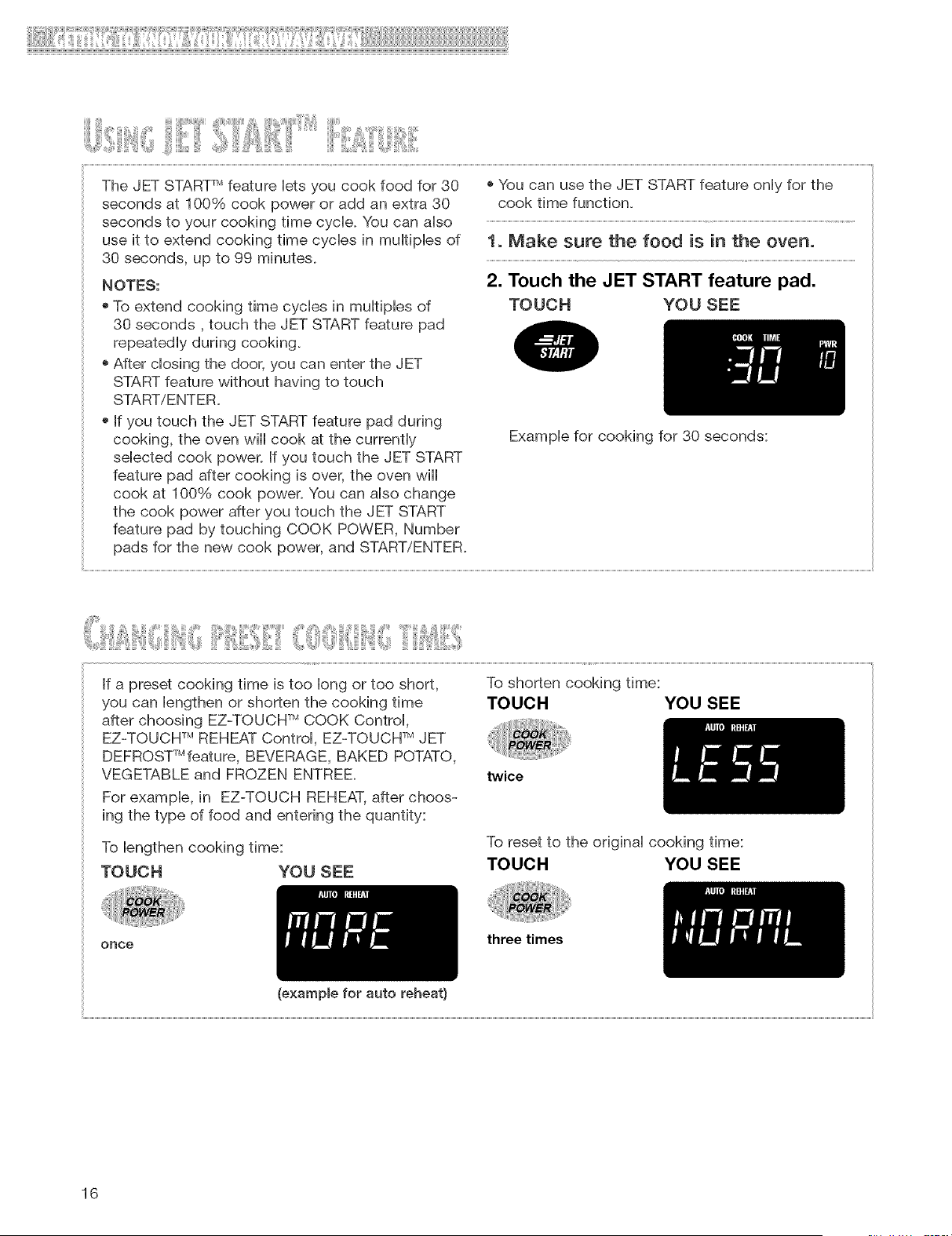
TheJETSTART_ featureletsyoucookfoodfor 30
secondsat 100%cookpoweror addanextra30
secondsto yourcookingtimecycle.Youcanalso
useit to extendcookingtimecyclesin multiplesof
30seconds,upto 99 minutes.
NOTES:
oToextendcookingtimecyclesin multiplesof
30seconds,touchtheJETSTARTfeaturepad
repeatedlyduringcooking.
oAfterclosingthedoor,youcanentertheJET
STARTfeaturewithouthavingtotouch
START/ENTER.
oIfyoutouchtheJETSTARTfeaturepadduring
cooking,theovenwillcookatthecurrently
selectedcookpower.IfyoutouchtheJETSTART
featurepadaftercookingis over,theovenwill
cookat 100%cookpower.Youcanalsochange
thecookpowerafteryoutouchtheJETSTART
featurepadbytouchingCOOKPOWER,Number
padsforthenewcookpower,andSTART/ENTER.
oYoucanusethe JETSTARTfeatureonlyforthe
cooktimefunction.
1. Make sure the food is in the oven.
2. Touch the JET START feature pad.
TOUCH YOU SEE
Example for cooking for 30 seconds:
If a preset cooking time is too long or too short,
you can lengthen or shorten the cooking time
after choosing EZ-TOUCW MCOOK Control,
EZ-TOUCH TM REHEAT Control, EZ-TOUCH TM JET
DEFROST_Mfeature, BEVERAGE, BAKED POTATO,
VEGETABLE and FROZEN ENTREE.
For example, in EZ-TOUCH REHEAT, after choos-
ing the type of food and entering the quantity:
To lengthen cooking time:
TOUCH YOU SEE
(example for auto reheat}
To shorten cooking time:
TOUCH YOU SEE
twice
To reset to the original cooking time:
TOUCH YOU SEE
once
three times
16
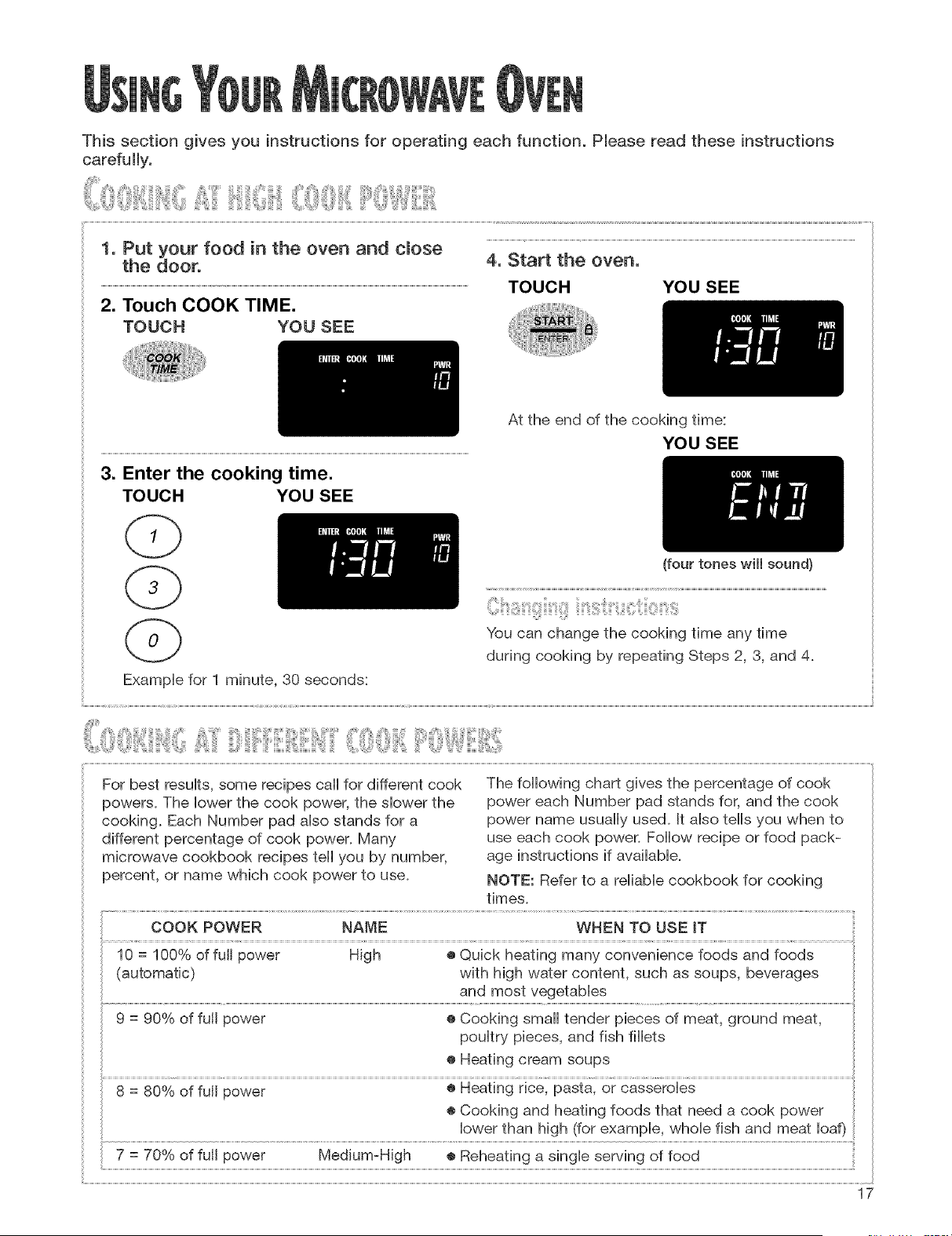
Thissection gives you instructions for operating each function. Pleaseread these instructions
carefuIly.
1. Put your food in the oven and close
the door.
2. Touch COOK TIME.
TOUCH YOU SEE
4, Start the oven,
TOUCH YOU SEE
3. Enter the cooking time.
TOUCH YOU SEE
At the end of the cooking time:
YOU SEE
(four tones will sound}
You can change the cooking time any time
during cooking by repeating Steps 2, 3, and 4.
ExampHe for 1 minute, 30 seconds:
For best results, some recipes call for different cook
powers. The Howerthe cook power, the shower the
cooking. Each Number pad aHsostands for a
different percentage of cook power. Many
microwave cookbook recipes tell you by number,
percent, or name which cook power to use.
The following chart gives the percentage of cook
power each Number pad stands for, and the cook
power name usually used+ It aHsotells you when to
use each cook power. Follow recipe or food pack-
age instructions if available.
NOTE: Refer to a reliable cookbook for cooking
times.
COOK POWER NAME WHEN TO USE IT
10 = 100% of full power High ® Quick heating many convenience foods and foods
(automatic) with high water content, such as soups, beverages
and most vegetables
9 = 90% of full power ® Cooking small tender pieces of meat, ground meat,
poultry pieces, and fish fillets
® Heating cream soups
o
7 = 70 Yoof full power Medium-High e Reheating a single serving of food
17
_!iii_ii!iiii!i!!_ii!!!ii!iii!!!ii_iiiiiil!iiiiii:iiiiiiiiill!ii i_iiiiiiiii_!!i!ii_:;iii!::!iiiiiii!iiiiil_illi_ii!iiii_iiii!:!ii!lil:ii!_ii!!_!!!!!!!!!!!!!!!!!!!!!!!!!!!!!!!!!!!!!!!!!_
iiii_,0,<iiiiiii{iiiilJi_,,!6J_i_i"iil"'H!_:_H,i"iii'',<i<ii_<iiii,,iiilliHli_Wiiii_,:!ii_i,:_il;i<,0,_x,,,i,,,,<_
5 = 50% of full power Medium ® Cooking ham, whole poultry, and pot roasts
® Melting chocolate
4 = 40% of full power ® Simmering stews
® Heating bread, rolls and pastries
3 = 30% of full power Medium=Low, ® Defrosting foods, such as bread, fish, meats,
Defrost poultry, and precooked foods
2 = 20% of full power ® Softening butter, cheese, and ice cream
1 = 10% of full power Low ® Keeping food warm
®Taking chill out of fruit
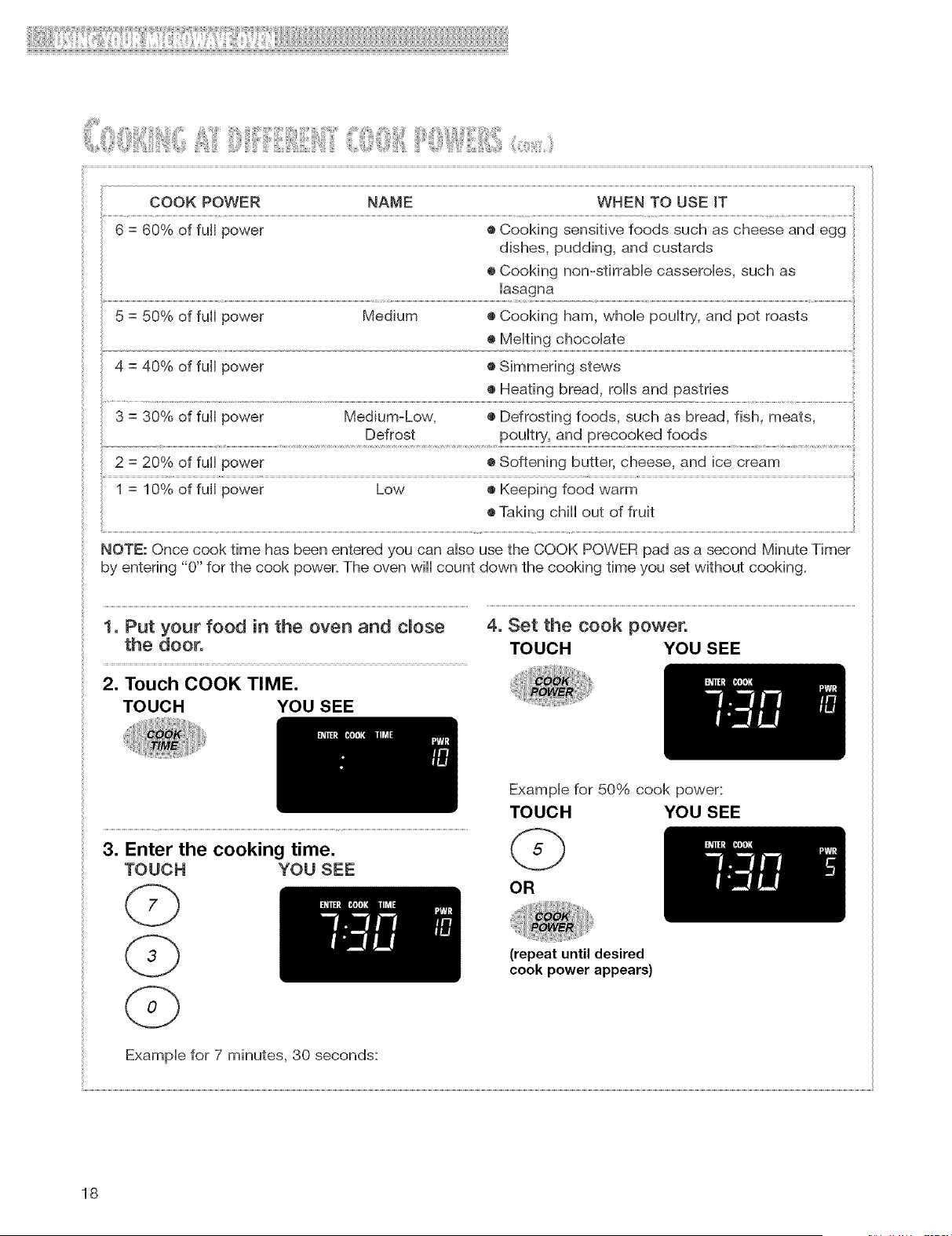
HOTE: Once cook time has been entered you can also use the COOK POWER pad as a second Minute Timer
by entering "0" for the cook power. The oven will count down the cooking time you set without cooking.
1. Put your food in the oven and dose 4. Set the cook power.
the door. TOUCH YOU SEE
2. Touch COOK TIME.
TOUCH YOU SEE
3. Enter the cooking time.
TOUCH YOU SEE
Example for 50% cook power:
TOUCH YOU SEE
OR
(repeat until desired
cook power appears)
Example for 7 minutes, 30 seconds:
18
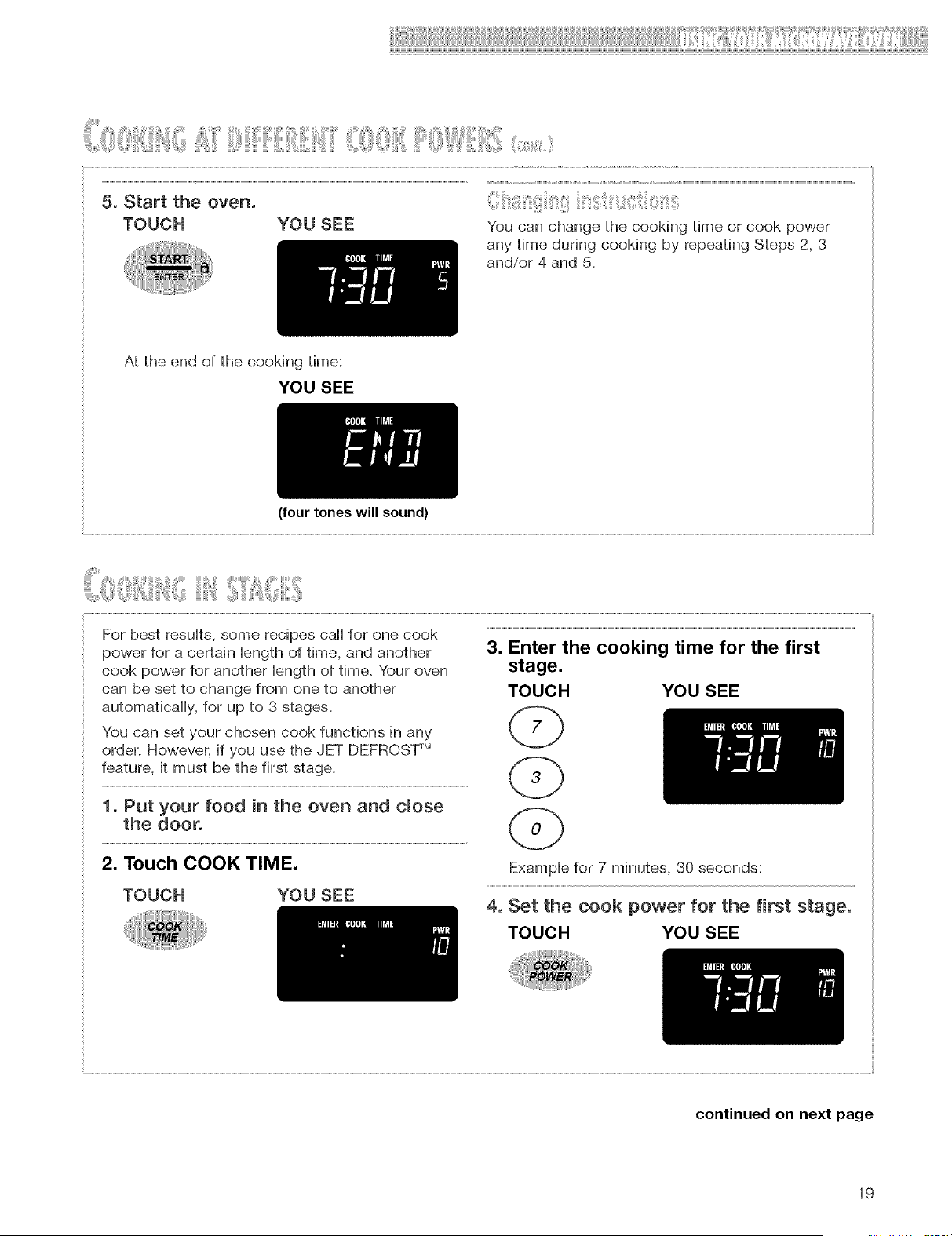
5, Start the oven,
TOUCH YOU SEE You can change the cooking time or cook power
any time during cooking by repeating Steps 2, 3
and/or 4 and 5.
At the end of the cooking time:
YOU SEE
(four tones will sound)
For best results, some recipes call for one cook
power for a certain length of time, and another
cook power for another length of time. Your oven
can be set to change from one to another
automatically, for up to 3 stages.
You can set your chosen cook functions in any
order. However, if you use the JET DEFROST rM
feature, it must be the first stage.
1. Put your food in the oven and close
the door.
2. Touch COOK TIME.
TOUCH YOU SEE
3. Enter the cooking time for the first
stage.
TOUCH YOU SEE
Example for 7 minutes, 30 seconds:
4, Set the cook power for the first stage,
TOUCH YOU SEE
continued on next page
19
! !!!i]:717i17! ]71¸ii¸711Ii!!! !!!!!!!!!!!!!!!!!!!!!!!!!!!!!!!!!!
iiii_(),()iii,,ii]iii',ii(]iliii',_iiii!7!7i_=,(ii,!i!!:::ii:i:_::,_,::,:_,,<_,,
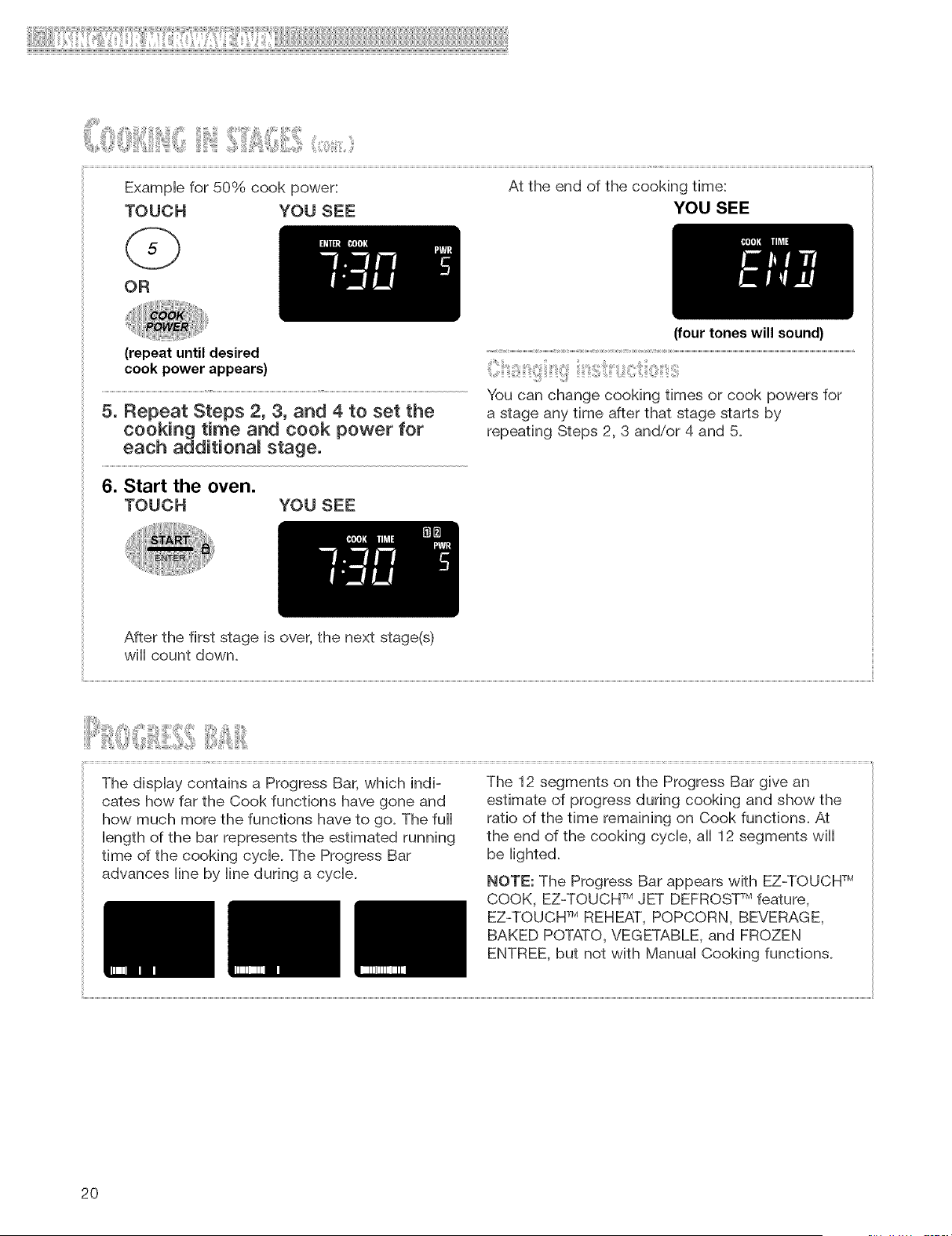
Example for 50% cook power: At the end of the cooking time:
TOUCH YOU SEE YOU SEE
OR
(four tones will sound)
6. Start the oven.
TOUCH YOU SEE
After the first stage is over, the next stage(s)
will count down.
The display contains a Progress Bar, which indi-
cates how far the Cook functions have gone and
how much more the functions have to go. The full
length of the bar represents the estimated running
time of the cooking cycle. The Progress Bar
advances line by line during a cycle.
The 12 segments on the Progress Bar give an
estimate of progress during cooking and show the
ratio of the time remaining on Cook functions. At
the end of the cooking cycle, all 12 segments will
be lighted.
NOTE: The Progress Bar appears with EZ-TOUCH rM
COOK, EZ-TOUCH rMJET DEFROST Mfeature,
EZ-TOUCH TM REHEAT, POPCORN, BEVERAGE,
BAKED POTATO, VEGETABLE, and FROZEN
ENTREE, but not with Manual Cooking functions.
2O
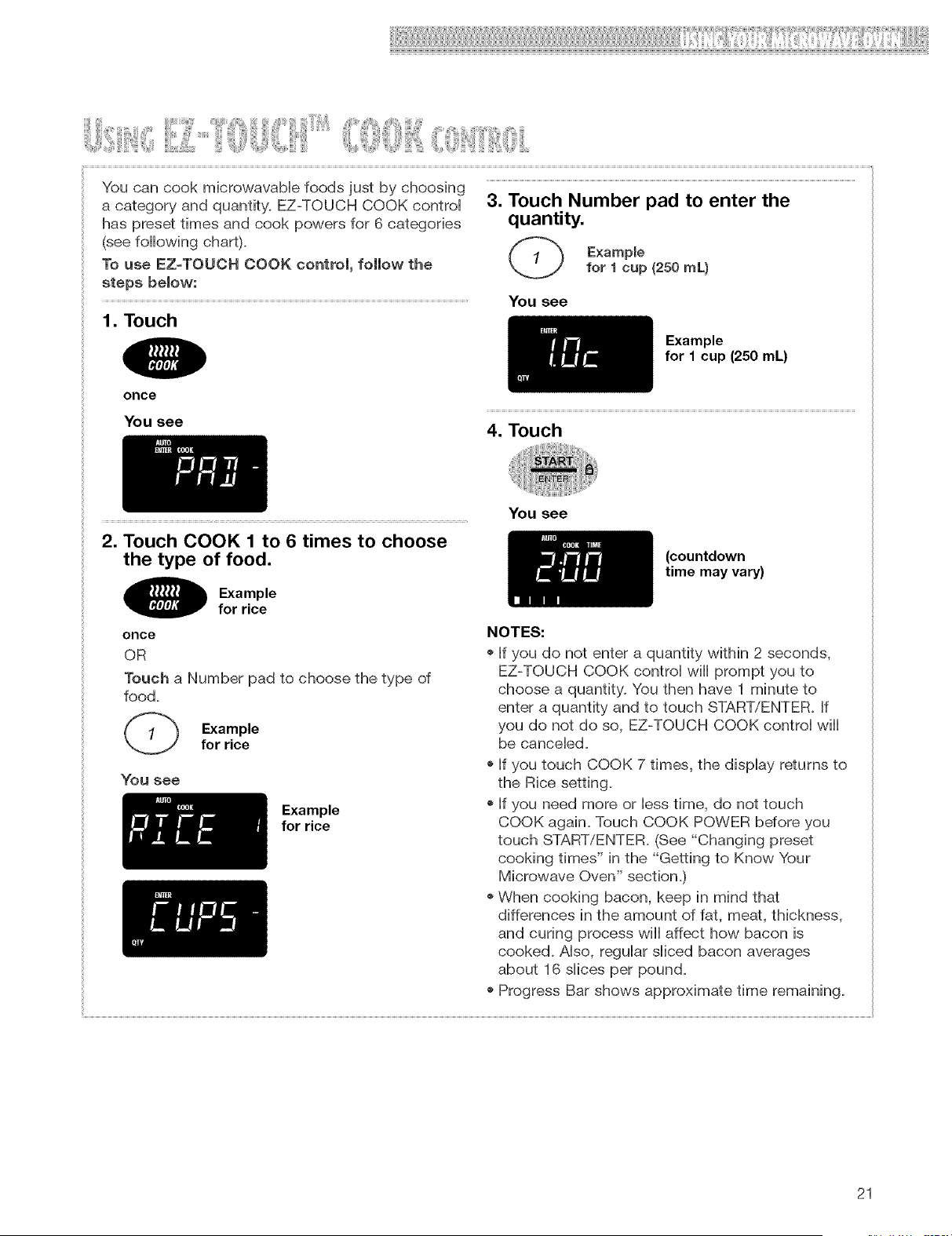
YoucancookmicrowavaMefoodsjustby choosing
acategoryandquantity.EZ-TOUCHCOOKcontroi
haspresettimesandcookpowersfor6 categories
(seefollowingchart).
TouseEZ-TOUCHCOOKcontrol,followthe
stepsbelow:
1. Touch
3. Touch Number pad to enter the
quantity.
Example
for 1 cup (250 mL)
You see
Example
for 1 cup (250 mL)
once
You see
4. Touch
2. Touch COOK 1 to 6 times to choose
the type of food.
Example
for rice
once
OR
Touch a Number pad to choose the type of
food+
Example
for rice
You see
Example
for rice
You see
(countdown
time may vary)
NOTES:
+ If you do not enter a quantity within 2 seconds,
EZ-TOUCH COOK controi will prompt you to
choose a quantity+ You then have 1 minute to
enter a quantity and to touch START/ENTER. If
you do not do so, EZ-TOUCH COOK controi will
be cancebd.
+ If you touch COOK 7 times, the display returns to
the Rice setting+
+ If you need more or less time, do not touch
COOK again+ Touch COOK POWER before you
touch START/ENTER. (See "Changing preset
cooking times" in the "Getting to Know Your
Microwave Oven" section,)
+ When cooking bacon, keep in mind that
differences in the amount of fat, meat, thickness,
and curing process will affect how bacon is
cooked+ Also, regular sliced bacon averages
about 16 siices per pound,
+ Progress Bar shows approximate time remaining+
21
i!iiiiii!iiii!i!!il!!!ii!iii!!!iiiiiiilliii)Ii!!!!!iiiiiiii_!ii:!i!iiiiiiii)iii!iliiii!iiiiiiiiiiiiii:iii!iii!!il!iiiiiii!!iiii!!:iiiiiiiliiiiiiiii!iiiiiilliiilliliiiiiiiiii)ili)i!iiii_il!!iiiiii!iiiiii!i!ii!ii!iii!!i!!i!i!ii!liiii!iil!liii)!ii!!i!i!ii!!!_
i!ill:i!i iii iJi!ilJ 0ii!ilii liiliiiiii ii iiii ii !ii ii
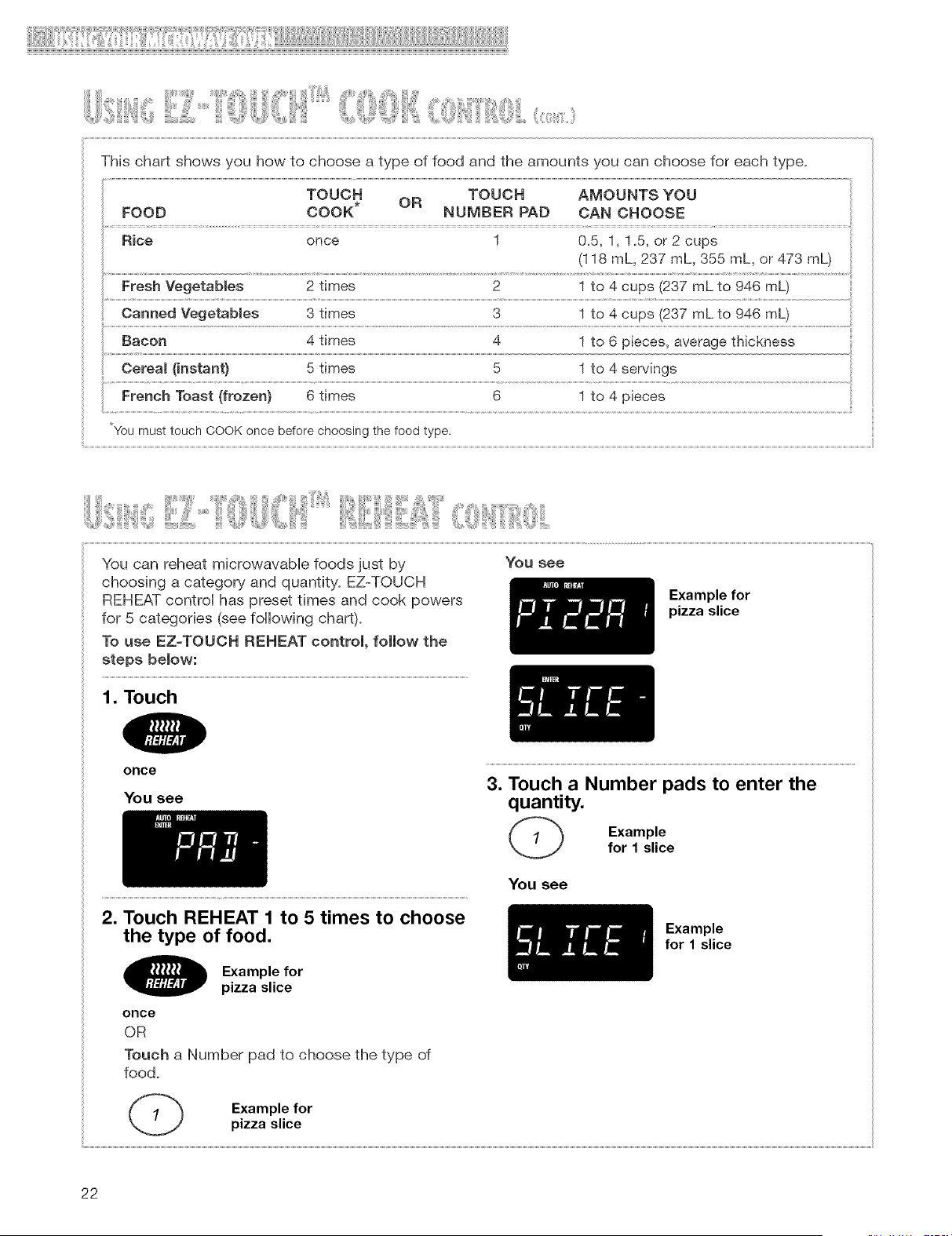
This chart shows you how to choose a type of food and the amounts you can choose for each type.
TOUCH TOUCH AMOUNTS YOU
FOOD COOK* OR NUMBER PAD CAN CHOOSE
Rice once 1 0.5, 1, 1_5,or 2 cups
(I 18 mL, 237 mL, 355 mL, or 473 mL)
Fresh Vegetab(es 2 times 2 1 to 4 cups (237 mL to 946 mL)
Canned Vegetab(es 3 times 3 1 to 4 cups (237 mL to 946 mL)
*You must touch COOK once before choosing the food type.
You can reheat microwavab(e foods just by You see
choosing a category and quantity. EZ-TOUCH
REHEAT control has preset times and cook powers Example for
for 5 categories (see following chart), pizza slice
To use EZ-TOUCH REHEAT control, follow the
steps below:
1. Touch
once
You see
2. Touch REHEAT 1 to 5 times to choose
the type of food.
Example for
pizza slice
once
OR
Touch a Number pad to choose the type of
food.
3. Touch a Number pads to enter the
quantity.
Example
for 1 slice
You see
Example
for 1 slice
Example for
pizza slice
22
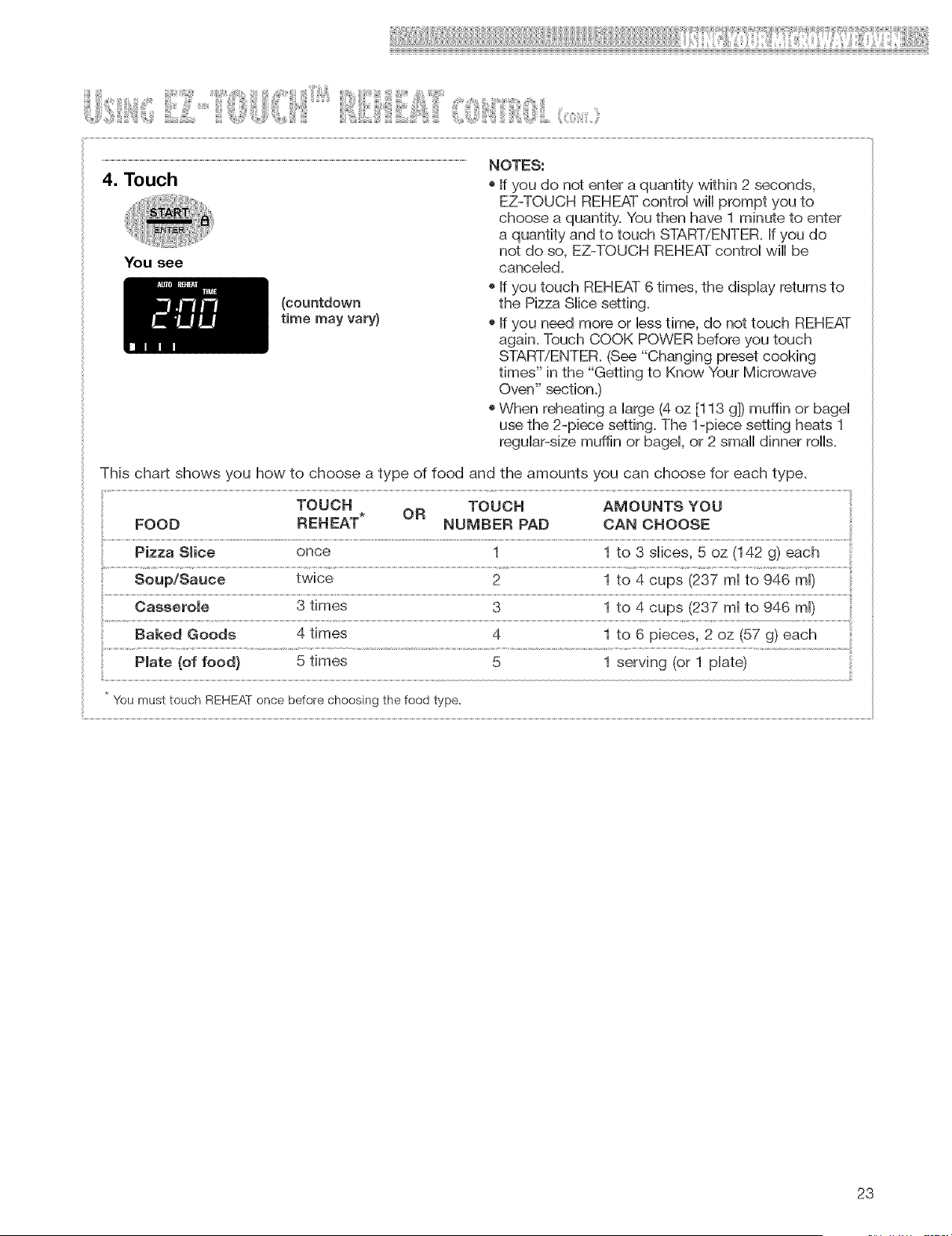
(countdown
time may vary)
You see
EZ-TOUCH REHEAT control wiii prompt you to
choose a quantity. You then have 1 minute to enter
a quantity and to touch START/ENTER. If you do
not do so, EZ-TOUCH REHEAT control wiii be
canceled.
o If you touch REHEAT 6 times, the display returns to
the Pizza Slice setting.
o If you need more or less time, do not touch REHEAT
again. Touch COOK POWER before you touch
START/ENTER. (See "Changing preset cooking
times" in the "Getting to Know Your Microwave
Oven" section.)
oWhen reheating a large (4 oz [113 g]) muffin or bagel
use the 2-piece setting. The 1-piece setting heats 1
regular-size muffin or bagel, or 2 small dinner rolls.
This chart shows you how to choose a type of food and the amounts you can choose for each type,
TOUCH TOUCH AMOUNTS YOU
FOOD REHEAT* OR NUMBER PAD CAN CHOOSE
Pizza Slice once 1 1 to 3 slices, 5 oz (142 g) each
Soup/Sauce twice 2 1 to 4 cups (237 ml to 946 ml)
Casserole 3 times 3 1 to 4 cups (237 ml to 946 ml)
Plate (of food} 5 times 5 1 serving (or 1 plate)
You must touch REHEAT once before choosing the food type.
23
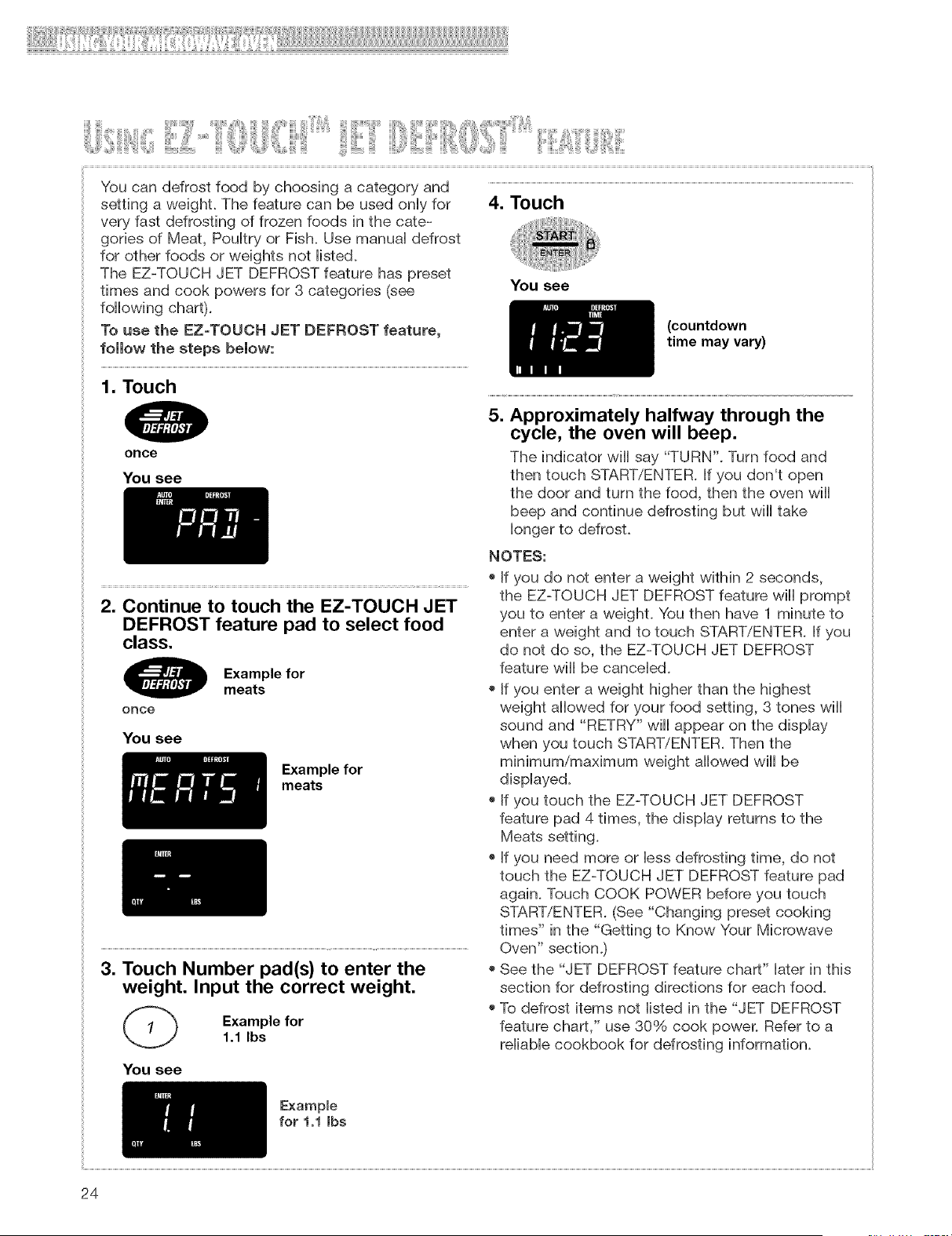
Youcandefrostfoodbychoosingacategoryand
settingaweight.Thefeaturecanbe usedonHyfor
veryfastdefrostingof frozenfoodsinthecate-
goriesof Meat,PouHtryor Fish.UsemanuaHdefrost
for otherfoodsor weightsnotHisted.
TheEZ-TOUCHJETDEFROSTfeaturehaspreset
timesandcookpowersfor3 categories(see
foHHowingchart).
Tousethe EZ=TOUCHJETDEFROSTfeature,
followthe stepsbelow:
4. Touch
You see
(countdown
time may vary)
1. Touch
once
You see
5. Approximately halfway through the
cycle, the oven will beep.
The indicator wiHHsay "TURN". Turn food and
then touch START/ENTER. If you don't open
the door and turn the food, then the oven wiHH
beep and continue defrosting but wiHHtake
Hongerto defrost.
2. Continue to touch the EZ-TOUCH JET
DEFROST feature pad to select food
class.
once
You see
Example for
meats
Example for
meats
3. Touch Number pad(s) to enter the
weight. Input the correct weight.
Example for
1.1 Ibs
NOTES:
o If you do not enter a weight within 2 seconds,
the EZ-TOUCH JET DEFROST feature wiHHprompt
you to enter a weight. You then have 1 minute to
enter a weight and to touch START/ENTER. Jf you
do not do so, the EZ-TOUCH JET DEFROST
feature wiHHbe cancelled.
o If you enter a weight higher than the highest
weight aHHowedfor your food setting, 3 tones wiHH
sound and "RETRY" wiHHappear on the dispHay
when you touch START/ENTER. Then the
minimum/maximum weight aHHowedwiHHbe
dispHayed.
o If you touch the EZ-TOUCH JET DEFROST
feature pad 4 times, the dispHay returns to the
Meats setting.
o If you need more or Hessdefrosting time, do not
touch the EZ-TOUCH JET DEFROST feature pad
again. Touch COOK POWER before you touch
START/ENTER. (See "Changing preset cooking
times" in the "Getting to Know Your Microwave
Oven" section.)
o See the "JET DEFROST feature chart" Haterin this
section for defrosting directions for each food.
o To defrost items not Histed in the "JET DEFROST
feature chart," use 30% cook power. Refer to a
reHiabHecookbook for defrosting information.
You see
Example
for 1,1 Jbs
24
'¸ ¸
o The shape of the package affects how quickly
food wiii defrost. Shallow packages wiii defrost
more quickly than a deep block.
o As food begins to defrost, separate the pieces.
Separated pieces defrost more evenly.
o Use small pieces of aluminum foil to shield parts
of food such as chicken wings, leg tips, fish tails,
or areas that start to get warm. Make sure the foil
does not touch the sides, top, or bottom of
the oven.
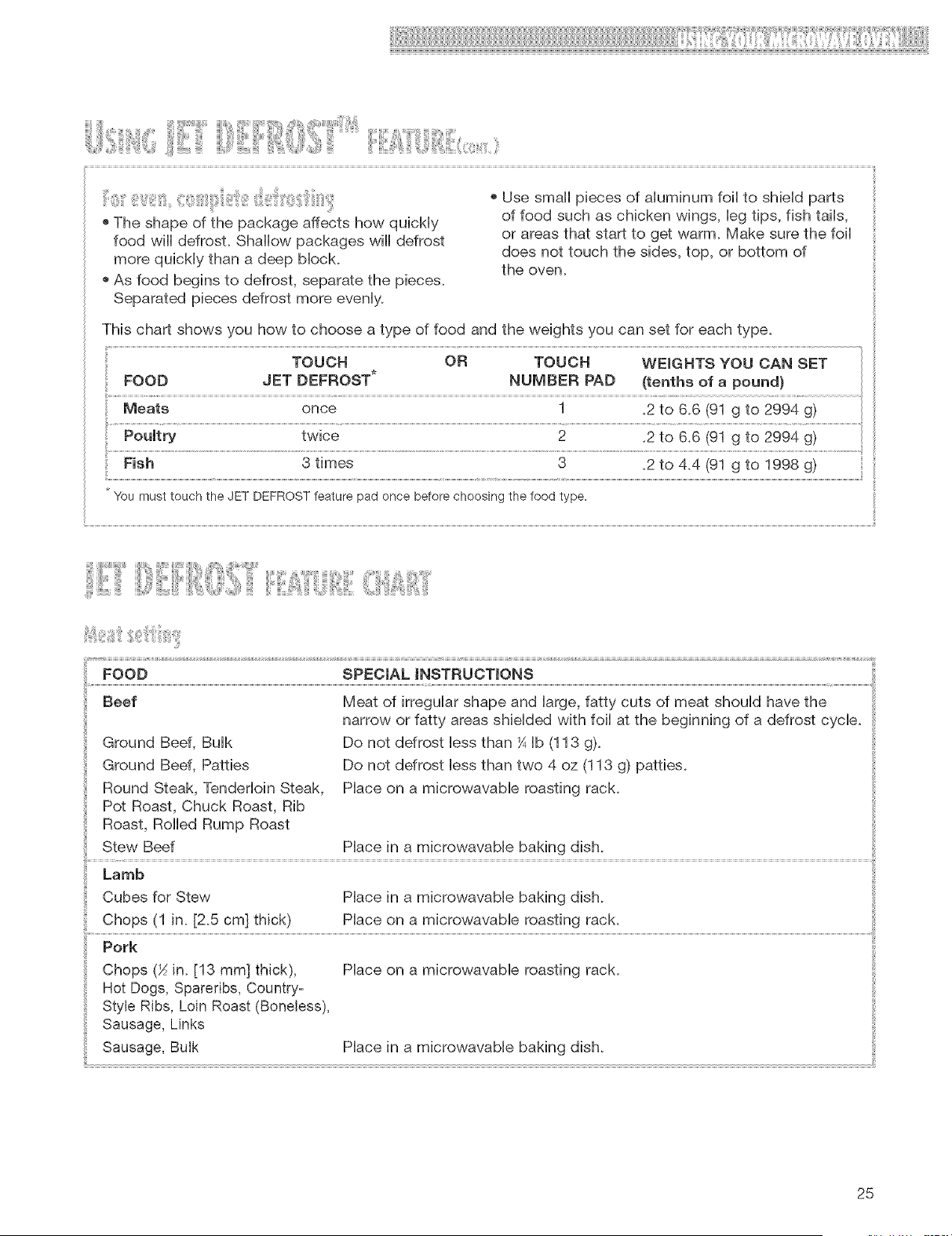
This chart shows you how to choose a type of food and the weights you can set for each type.
once
twice
Fish 3 times 3
.2 to 4.4 (91 g to 1998 g)
You must touch the JET DEFROST feature pad once before choosing the food type.
} :L
Ground Beef, Bulk
Ground Beef, Patties
Round Steak, Tenderloin Steak,
Pot Roast, Chuck Roast, Rib
Roast, Rolled Rump Roast
Stew Beef
FOOD SPECIAL iNSTRUCTIONS
Beef Meat of irregular shape and large, fatty cuts of meat should have the
narrow or fatty areas shielded with foil at the beginning of a defrost cycle.
Do not defrost less than ¼ Ib (113 g).
Do not defrost less than two 4 oz (113 g) patties.
Place on a microwavable roasting rack.
Place in a microwavabie baking dish.
Lamb
Cubes for Stew Place in a microwavable baking dish.
Chops (1 in. [2.5 cm] thick} Place on a microwavable roasting rack.
Pork
Chops (X in. [13 ram] thick), Place on a microwavable roasting rack.
Hot Dogs, Spareribs, Country-
Style Ribs, Loin Roast (Boneless},
Sausage, Links
Sausage, Bulk Place in a microwavable baking dish.
25
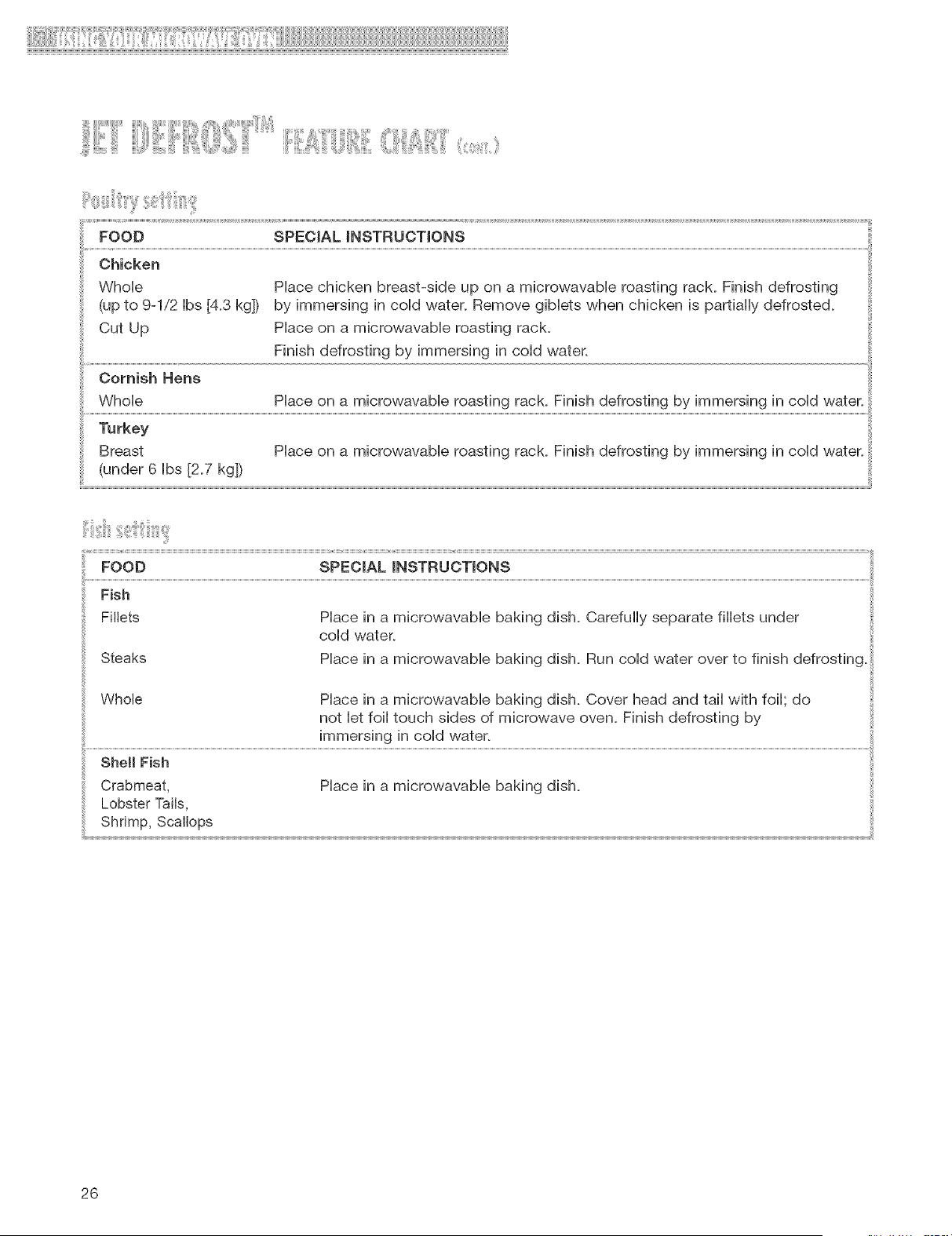
FOOD SPECIAL_NSTRUCT_ONS
Chicken
Whole
(upto 9-1/2Ibs[4.3kg])
CutUp
OornishHens
Whole
Placechickenbreast-sideup ona microwavableroastingrack.Finishdefrosting
byimmersingincoldwater.Removegibletswhenchickenis partiallydefrosted.
Placeona microwavableroastingrack.
Finishdefrostingby immersingin coldwater.
Placeona microwavableroastingrack.Finishdefrostingbyimmersingin coldwater.....
Breast Placeona microwavableroastingrack.Finishdefrostingbyimmersingin coldwater.
(under6 Ibs[2.7kg])
Steaks
Place in a microwavable baking dish. Carefully separate fillets under
cold water.
Place in a microwavable baking dish. Run cold water over to finish defrosting.
Whole Place in a microwavable baking dish. Cover head and tail with foil; do
not let foil touch sides of microwave oven. Finish defrosting by
immersing in cold water.
s.o.F,s.
Crabmeat, Place in a microwavable baking dish.
Lobster Tails,
Shrimp, Scallops
26
oWhenusingtheJETDEFROSTTM feature, you
need to enter the net weight (the weight of the
food minus the container). Enter the weight to the
nearest 1/10 ib (45 g).
o Oniy use the JET DEFROST feature for raw food.
The JET DEFROST feature gives best resuits
when the food to be thawed is compbteiy frozen.
If the food is partially defrosted, aiways set a
iower food weight (for a shorter defrosting time)
to prevent cooking the food.
o For better resuits, a preset standing time is
inciuded in the defrosting time. This may make
the defrosting time seem ionger than expected.
(For more information on standing time, see the
"Microwave cooking tips" in the "Cooking Guide"
section.)
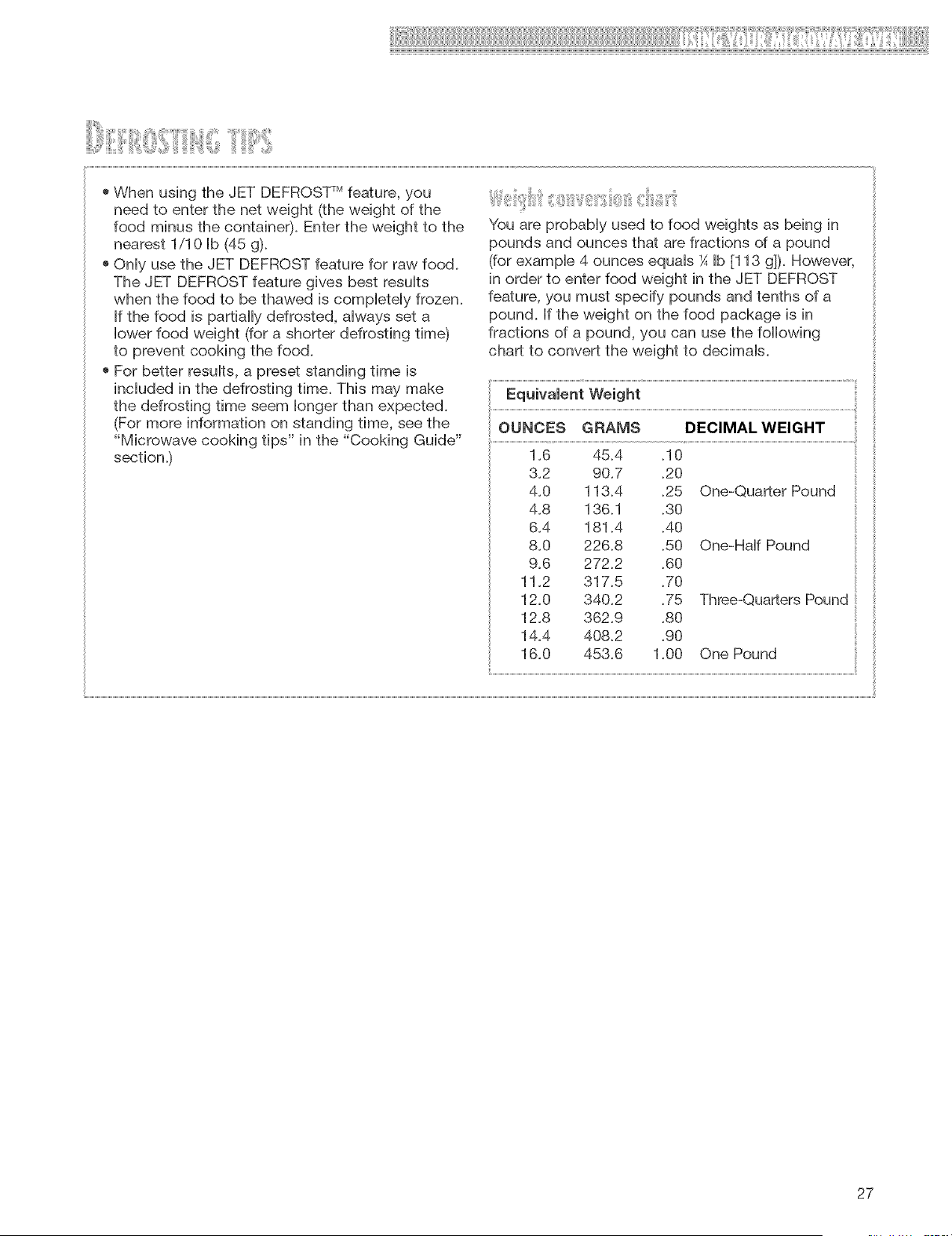
You are probabiy used to food weights as being in
pounds and ounces that are fractions of a pound
(for exampb 4 ounces equais¼ Ib [113 g]). However,
in order to enter food weight in the JET DEFROST
feature, you must specify pounds and tenths of a
pound. If the weight on the food package is in
fractions of a pound, you can use the following
chart to convert the weight to decimals.
i
OUNCES GRAMS DECIMAL WEIGHT ......
1.6 45.4 .10
3.2 90.7 .20
4.0 113.4 .25
4.8 136.1 .30
6.4 181.4 .40
8.0 226.8 .50
9.6 272.2 .60
11.2 317.5 .70
12.0 340.2 .75
12.8 362.9 .80
14.4 408.2 .90
16.0 453.6 1.00
One-Quarter Pound
One-Half Pound
Three-Quarters Pound
One Pound
27
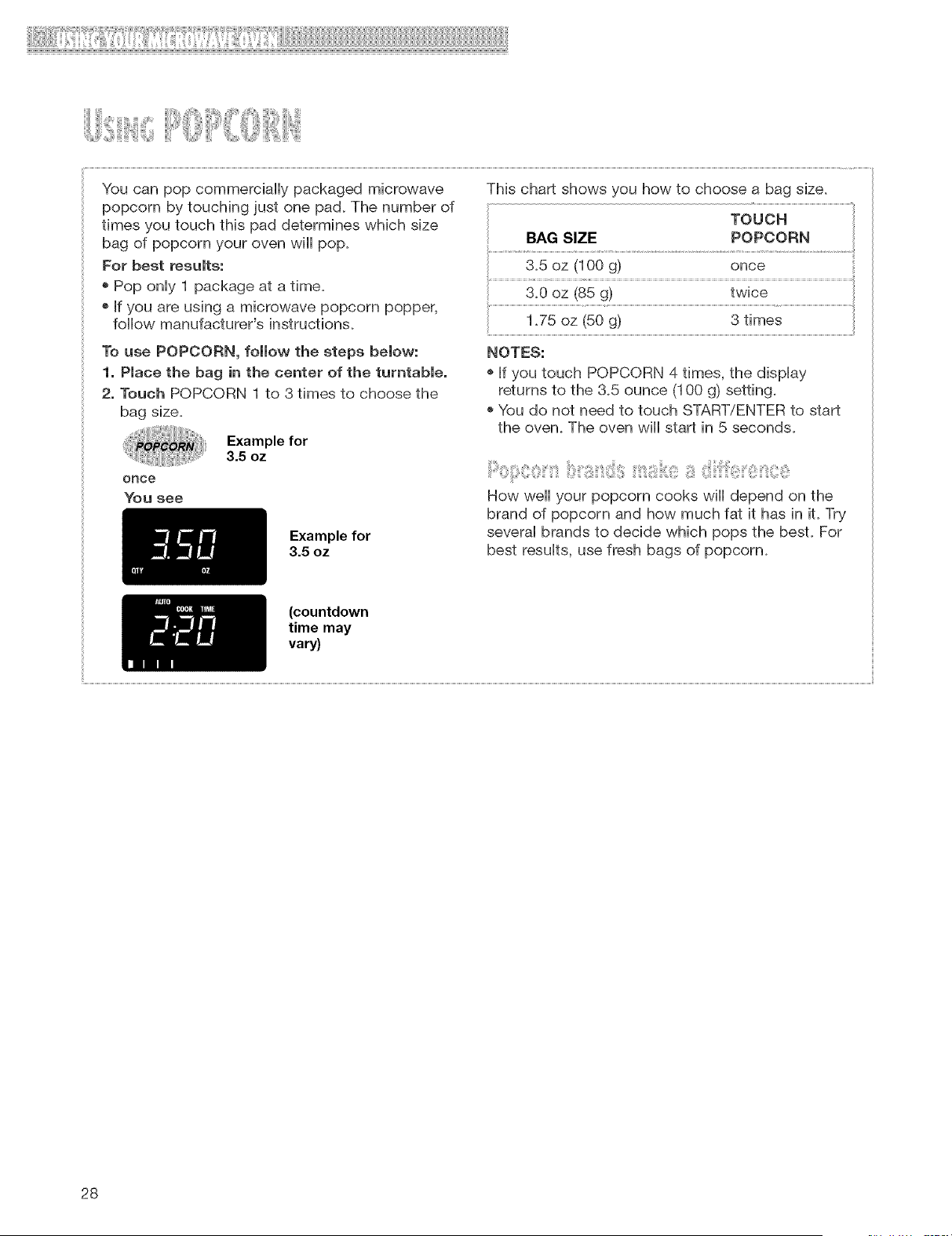
i:iiiiii[ ill] !
You can pop commercially packaged microwave
popcorn by touching just one pad. The number of
times you touch this pad determines which size
bag of popcorn your oven will pop.
For best results:
o Pop only 1 package at a time.
o If you are using a microwave popcorn popper,
follow manufacturer's instructions.
To use POPCORN, follow the steps below:
1. Place the bag in the center of the turntable.
2. Touch POPCORN 1 to 3 times to choose the
bag size.
Example for
3.5 oz
Example for
3.5 oz
This chart shows you how to choose a bag size.
TOUCH
BAG SIZE POPCORN
1.75 oz (50 g) 3 times
NOTES:
o If you touch POPCORN 4 times, the display
returns to the 3.5 ounce (100 g) setting.
o You do not need to touch START/ENTER to start
the oven. The oven will start in 5 seconds.
How well your popcorn cooks will depend on the
brand of popcorn and how much fat it has in it. Try
several brands to decide which pops the best. For
best results, use fresh bags of popcorn.
(countdown
time may
vary)
28
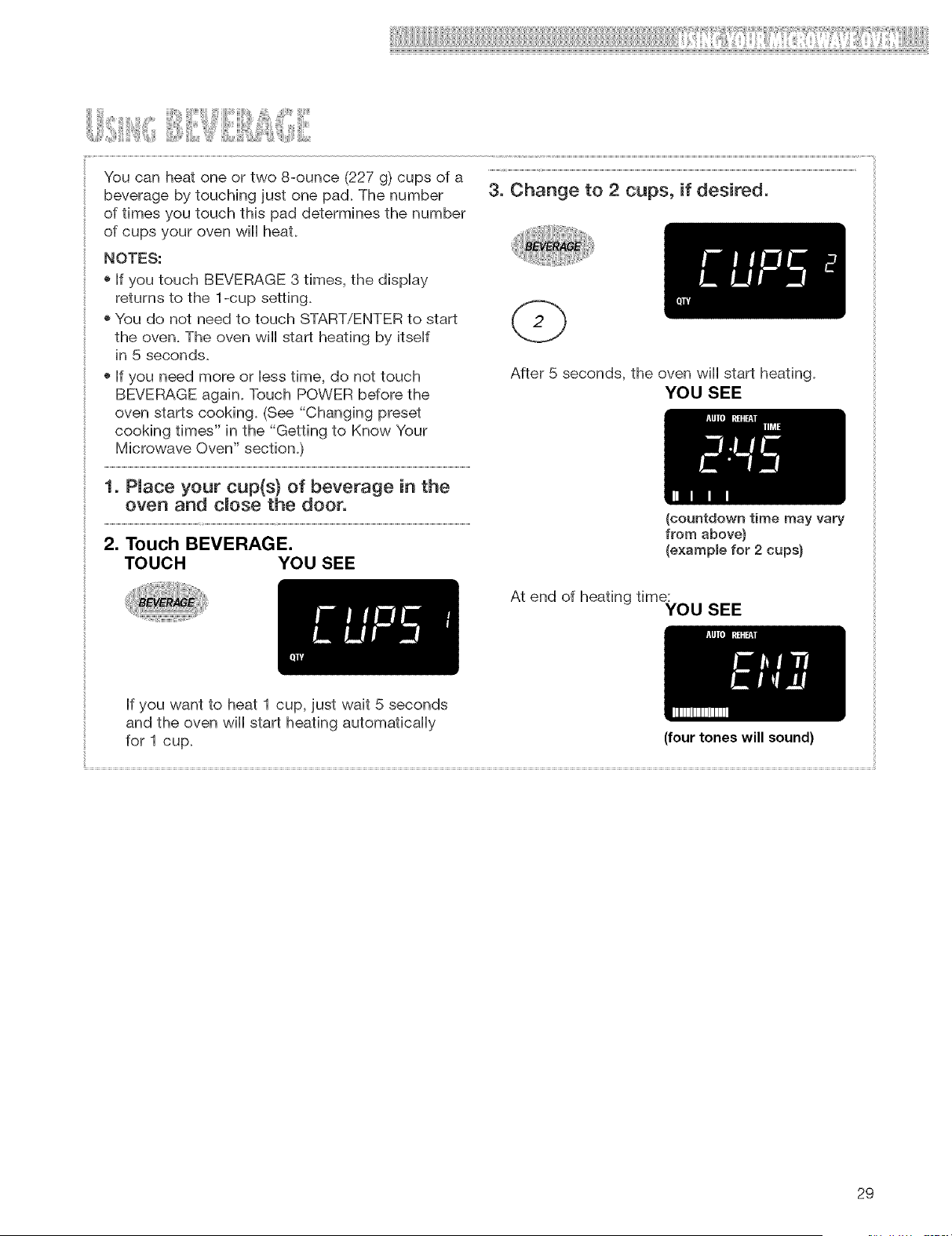
Youcanheatoneortwo8-ounce(227g) cupsof a
beveragebytouchingjustonepad+Thenumber 3, Change to 2 cups, if desired,
of times you touch this pad determines the number
of cups your oven wiHHheat.
NOTES:
+ If you touch BEVERAGE 3 times, the dispHay
returns to the 1-cup setting+
+ You do not need to touch START/ENTER to start
the oven. The oven wiHHstart heating by itseHf
in 5 seconds.
+ If you need more or Hesstime, do not touch
BEVERAGE again. Touch POWER before the
oven starts cooking+ (See "Changing preset
cooking times" in the "Getting to Know Your
Microwave Oven" section.)
1. Pmace your cup(s) of beverage in the
oven and dose the door.
2. Touch BEVERAGE.
TOUCH YOU SEE
After 5 seconds, the oven wiHHstart heating.
YOU SEE
(countdown time may vary
from above)
(exampme for 2 cups)
At end of heating time:
YOU SEE
If you want to heat 1 cup, just wait 5 seconds
and the oven wiHHstart heating automaficaHHy
for 1 cup+
(four tones will sound)
29
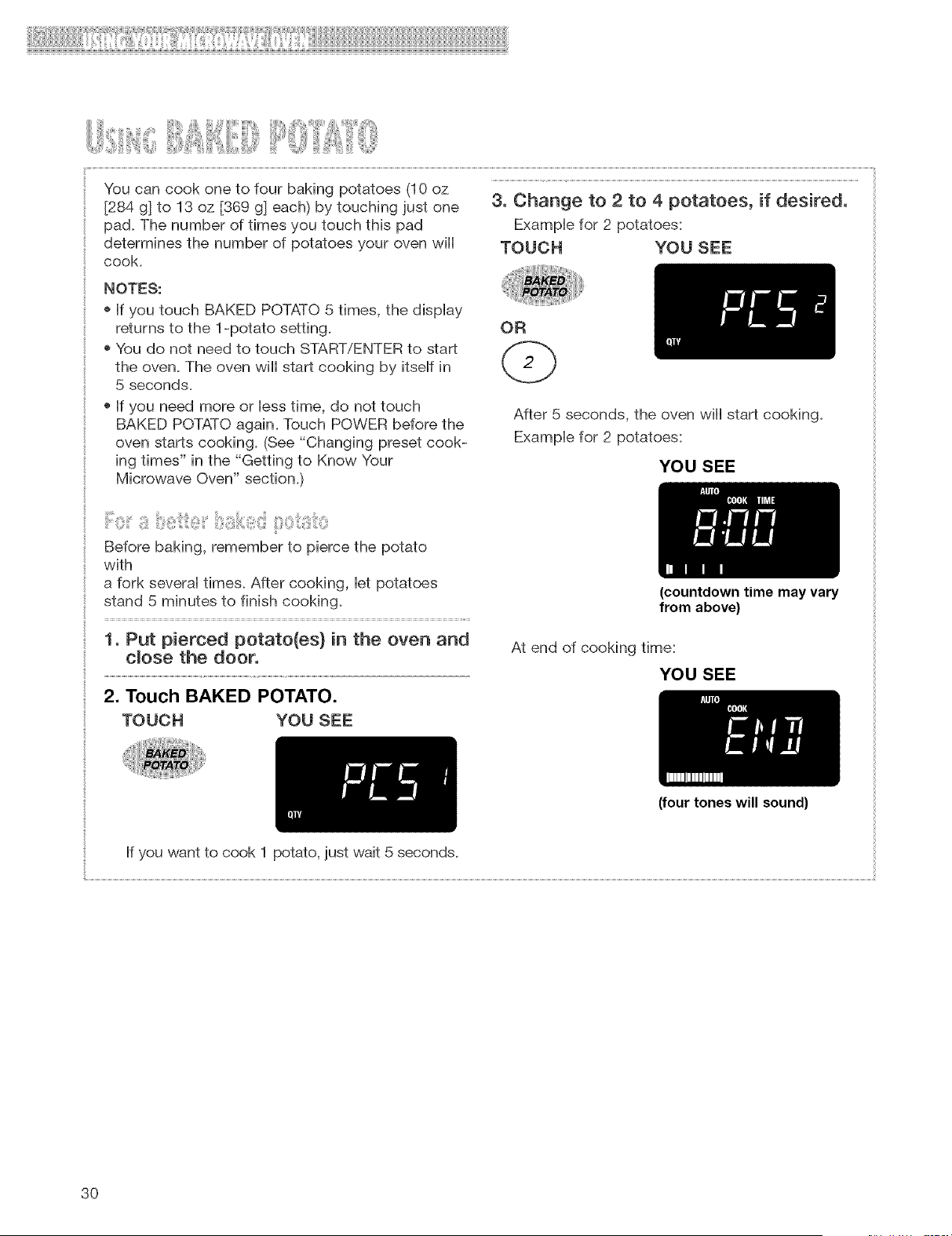
Youcancookonetofourbakingpotatoes(10oz
[284g]to 13oz [369g]each)bytouchingjustone 3. Change to 2 to 4 potatoes, if desired,
pad. The number of times you touch this pad ExampHe for 2 potatoes:
determines the number of potatoes your oven wiii TOUCH YOU SEE
cook.
NOTES:
o If you touch BAKED POTATO 5 times, the dispHay
returns to the 1-potato setting.
o You do not need to touch START/ENTER to start
the oven. The oven will start cooking by itseHfin
5 seconds.
o If you need more or Hesstime, do not touch
BAKED POTATO again. Touch POWER before the
oven starts cooking. (See "Changing preset cook-
ing times" in the "Getting to Know Your
Microwave Oven" section.)
OR
After 5 seconds, the oven will start cooking.
ExampHe for 2 potatoes:
YOU SEE
Before baking, remember to pierce the potato
with
a fork severaHtimes. After cooking, Herpotatoes
stand 5 minutes to finish cooMng.
1. Put pierced potato(es) in the oven and
dose the door,
2. Touch BAKED POTATO.
(countdown time may vary
from above)
At end of cooking time:
YOU SEE
TOUCH YOU SEE
(four tones will sound)
If you want to cook 1 potato, just wait 5 seconds.
3O
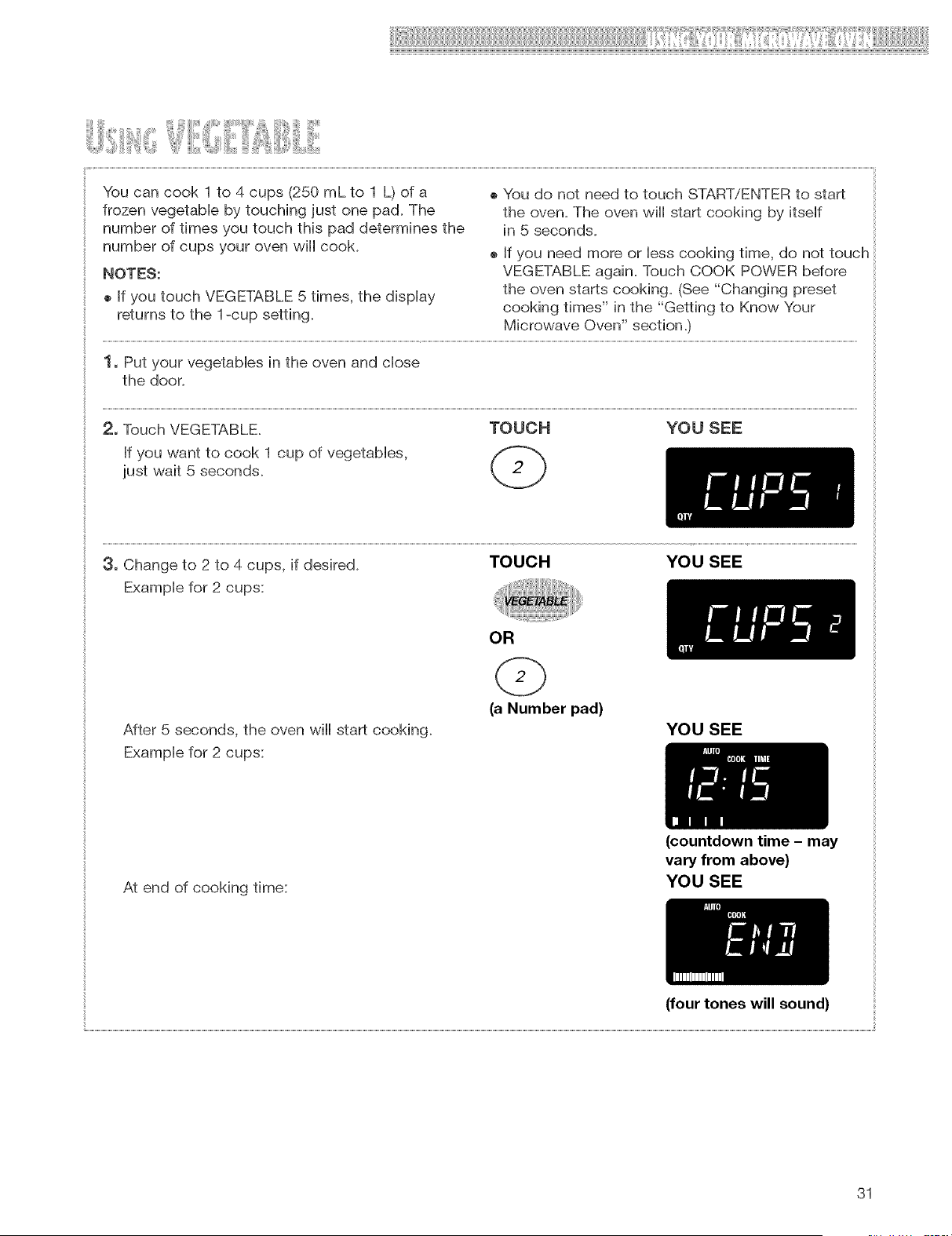
Youcancook1to 4cups(250mLto 1 L)ofa
frozenvegetabbbytouchingjustonepad.The
numberof timesyoutouchthispaddeterminesthe
numberof cupsyourovenwiiicook.
NOTES:
o IfyoutouchVEGETABLE5 times,thedisplay
returnsto the1-cupsetting.
oYoudo notneedto touchSTART/ENTERto start
theoven.Theovenwillstartcookingbyitself
in 5 seconds.
o Ifyouneedmoreor lesscookingtime,do nottouch
VEGETABLEagain.TouchCOOKPOWERbefore
theovenstartscooking.(See"Changingpreset
cookingtimes"inthe "Gettingto KnowYour
MicrowaveOven"section.)
1. Putyourvegetablesinthe ovenandclose
thedoor.
2, TouchVEGETABLE. TOUCH YOUSEE
Ifyouwantto cook1cupof vegetabies,
justwait5 seconds.
3, Change to 2 to 4 cups, if desired. TOUCH YOU SEE
Exampb for 2 cups:
OR
After 5 seconds, the oven wiii start cooking.
Example for 2 cups:
(a Number pad)
YOU SEE
At end of cooking time:
(countdown time - may
vary from above)
YOU SEE
(four tones will sound)
31
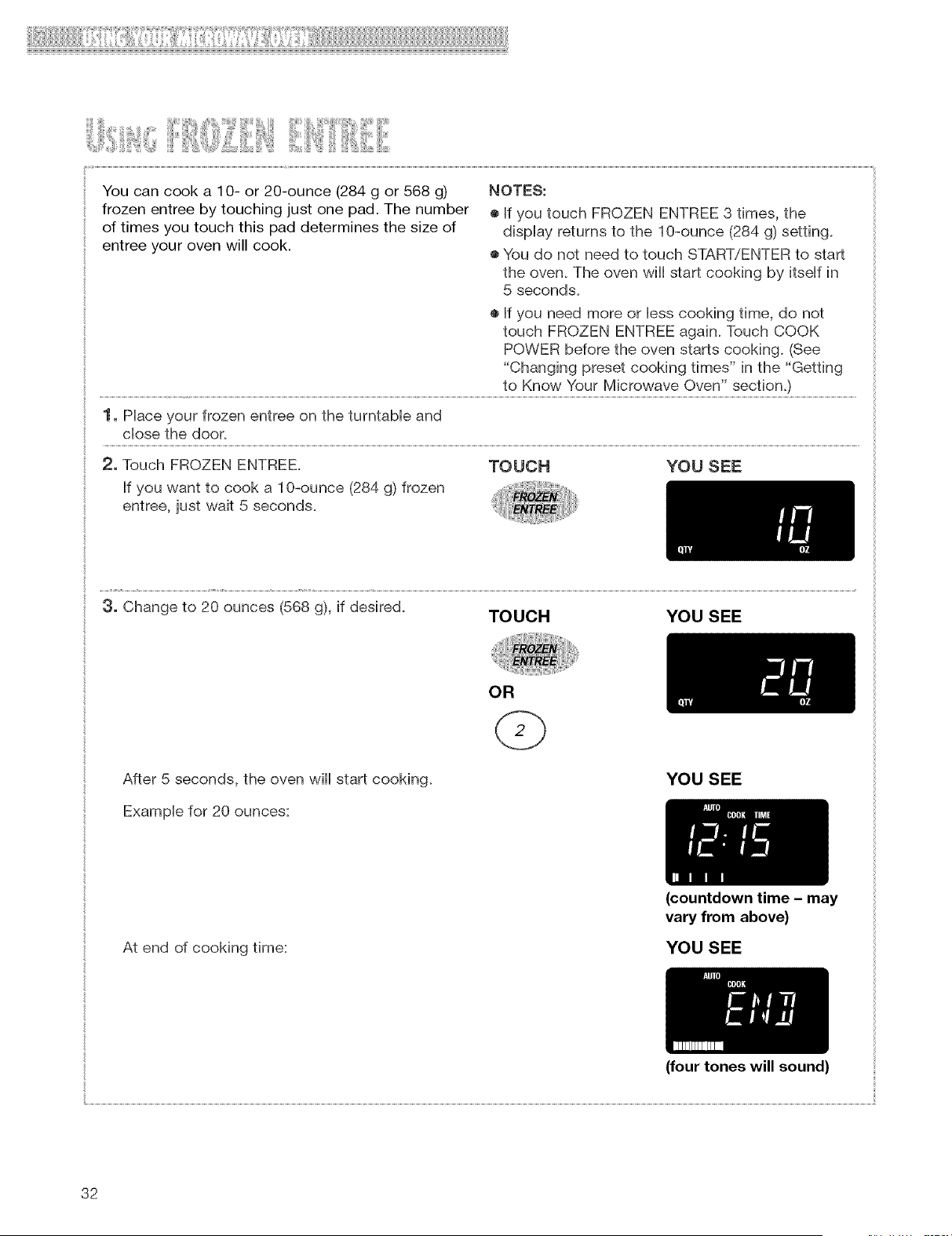
Youcancooka 1O-or20-ounce(284g or568g) NOTES:
frozenentreebytouchingjustonepad.Thenumber ®IfyoutouchFROZENENTREE3 times,the
oftimesyoutouchthispaddeterminesthesizeof displayreturnsto the1O-ounce(284g)setting.
entreeyourovenwillcook.
®Youdo notneedto touchSTART/ENTERto start
theoven.Theovenwillstartcookingby itselfin
5 seconds.
®If youneedmoreor lesscookingtime,do not
touchFROZENENTREEagain.TouchCOOK
POWERbeforetheovenstartscooking.(See
"Changingpresetcookingtimes"inthe "Getting
to KnowYourMicrowaveOven" section.)
1, Place your frozen entree on the turntable and
close the door.
2, Touch FROZEN ENTREE. TOUCH YOU SEE
If you want to cook a 1O-ounce (284 g) frozen
entree, just wait 5 seconds.
3, Change to 20 ounces (568 g), if desired.
TOUCH YOU SEE
After 5 seconds, the oven wiii start cooking.
Example for 20 ounces:
OR
YOU SEE
At end of cooking time:
(countdown time - may
vary from above)
YOU SEE
(four tones will sound)
32
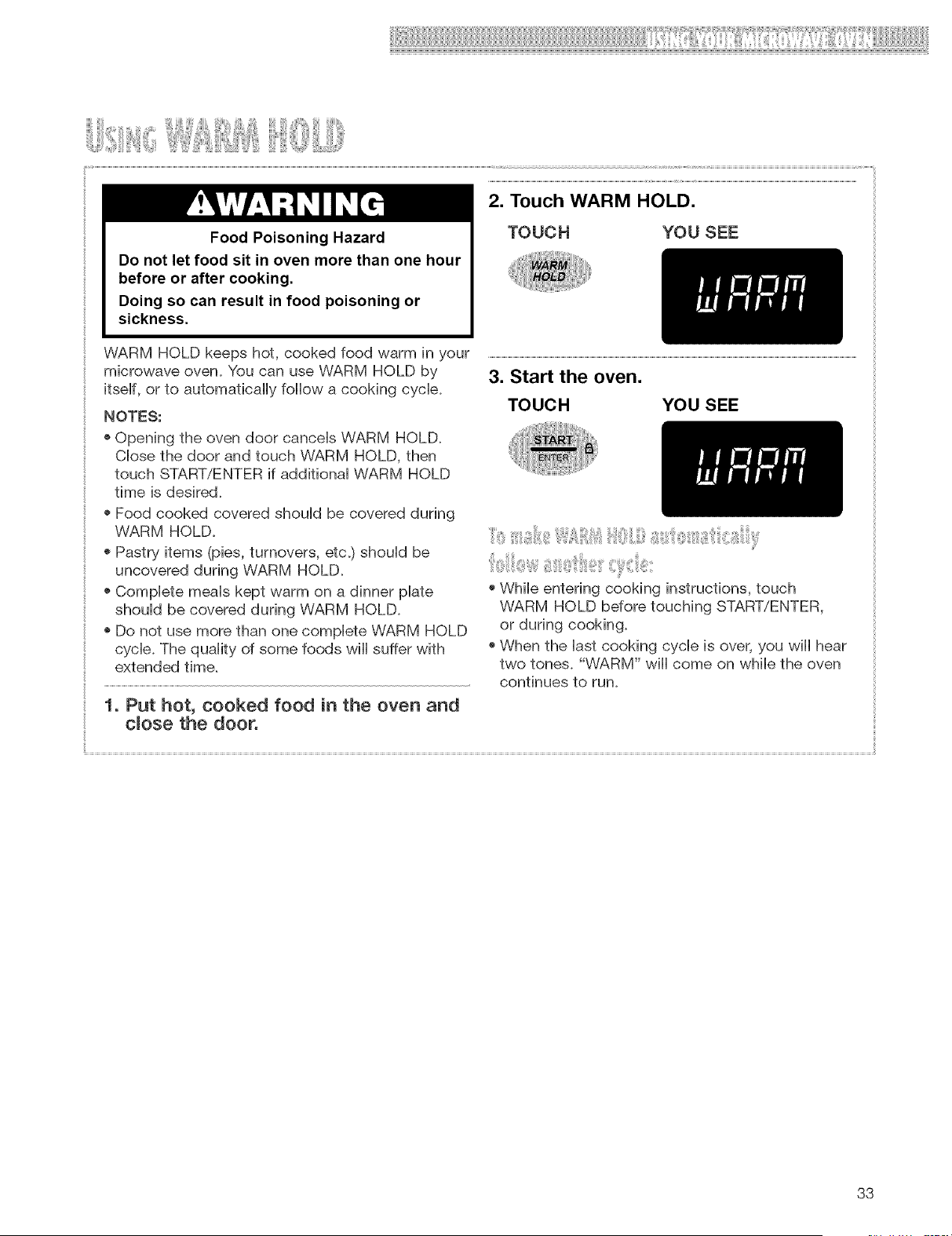
Food Poisoning Hazard
Do not let food sit in oven more than one hour
before or after cooking.
Doing so can result in food poisoning or
sickness.
TOUCH YOU SEE
WARM HOLD keeps hot, cooked food warm in your
microwave oven+ You can use WARM HOLD by
itseHf, or to automaticaHHyfoHHowa cooking cyclic+
NOTES:
+ Opening the oven door canceHs WARM HOLD+
CHosethe door and touch WARM HOLD, then
touch START/ENTER if additionaH WARM HOLD
time is desired+
+ Food cooked covered shouHd be covered during
WARM HOLD+
+ Pastry items (pies, turnovers, etc+) shouHd be
uncovered during WARM HOLD+
+ CompHete meaHs kept warm on a dinner pilate
shouHd be covered during WARM HOLD+
+ Do not use more than one compHete WARM HOLD
cycHe.The quaHity of some foods wiHHsuffer with
extended time.
1, Put hot, cooked food in the oven and
close the door.
3. Start the oven.
TOUCH YOU SEE
+ WhiHe entering cooking instructions, touch
WARM HOLD before touching START/ENTER,
or during cooking.
+ When the Hastcooking cycHe is over, you wiHHhear
two tones. "WARM" wiHHcome on whiHethe oven
continues to run+
33
COOKIN GUiDe
ii¸ iii,liiii iiiii, il,iiii ,' iii,li J, i ii!Jiiiii,!!Ii;ii iliJi ii !Ji,,iiiii iiii! t,iii:iiii,i,i" "'iliii¸,
,iiii_!_!i_ii:ii_I;l_iiiiii_iiiii¸¸O'ii:'i_,iiiii_iiii_,,i_
if you increase or decrease the amount of food
you prepare, the time it takes to cook that food wiii
also change. For example, if you double a recipe,
add a little more than half the original cooking time.
Check for doneness and, if necessary, add more
time in small increments.
® The lower the temperature of the food being put
into the microwave oven, the longer it takes to cook.
Food at room temperature will be reheated more
quickly than food at refrigerator temperature.
® Food with a lot of fat and sugar will be heated
faster than food containing a lot of water. Fat and
sugar will also reach a higher temperature than
water in the cooking process.
® The more dense the food, the longer it takes to heat.
"Very dense" food like meat takes longer to reheat
than lighter, more porous food like sponge cakes.
® Smaller pieces of food wiii cook faster than larger
pieces. Also, same-shaped pieces cook more evenly
than different-shaped pieces.
® With foods that have different thicknesses, the
thinner parts will cook faster than the thicker parts.
Place the thinner parts of chicken wings and legs in
the center of the dish.
® Stirring and turning foods spreads heat quickly to
the center of the dish and avoids overcooking at the
outer edges of the food.
® Several foods (for example: baked potatoes,
sausages, egg yolks, and some fruits) are tightly
covered by a skin or membrane. Steam can build
up under the membrane during cooking, causing
the food to burst. To relieve the pressure and to
prevent bursting, pierce these foods before
cooking with a fork, cocktail pick, or toothpick.
Always allow food to stand after cooking. Stand-
ing time after defrosting and cooking allows the
temperature to evenly spread throughout the food,
improving the cooking results.
The length of the standing time depends on how
much food you are cooking and how dense it is.
Sometimes it can be as short as the time it takes
you to remove the food from the oven and take it to
the serving table. However, with larger, denser food,
the standing time may be as long as 10 minutes.
For best results, place food evenly on the plate. You
can do this in several ways:
if you are cooking several items of the same
food, such as baked potatoes, place them in a ring
pattern for uniform cooking.
® When cooking foods of uneven shapes or thick-
ness, such as chicken breasts, place the smaller
or thinner area of the food towards the center of the
dish where it will be heated last.
® Layer thin slices of meat on top of each other.
® When you cook or reheat whole fish, score the
skin - this prevents cracking.
® Do not let food or a container touch the top or
sides of the oven. This will prevent possible arcing.
Cover food to:
® Reduce splattering
® Shorten cooking times
® Keep food moist
You can use any covering that lets microwaves pass
through. See "Getting to Know Your Microwave Oven"
for materials that microwaves will pass through.
34
, ii ii!iii,,i ili iiii i; ii il iii ii , :i iiiil
Metal containers should not be used in a microwave
oven. There are, however, some exceptions. If you
have purchased food which is prepackaged in an
aluminum foil container, refer to the instructions on
the package. When using aluminum foil containers,
cooking times may be longer because microwaves
will only penetrate the top of the food.
If you use aluminum containers without package
instructions, follow these guidelines:
• Place the container in a glass bowl and add some
water so that it covers the bottom of the container,
not more than ¼ in. (.64 cm) high. This ensures even
heating of the container bottom.
® Always remove the lid to avoid damage to the oven.
• Use only undamaged containers.
® Do not use containers taller than '_ in. (1.9 cm).
• Container must be at least half filled.
® To avoid arcing, there must be a minimum _ in.
(.64 cm) between the aluminum container and the
walls of the oven and also between two aluminum
container&
o Always place the container on the turntable.
® Reheating food in aluminum foil containers usually
takes up to double the time compared to reheating
in plastic, glass, china, or paper containers. The
time when food is ready will vary depending upon
the type of container you use.
® Let food stand for 2 to 3 minutes after heating so
that heat is spread evenly throughout container.
ililJi;ii_i:i;ii_I,iiiiiiiiii!i!iii_i_ii_ii,,_i!!_i_iiii_ii:i_,_ii_#!,__i'_il;i_ii_,_i,_il;;_i_iiiiiiiiii!_ili_ii,_ili:_iil_iiiiiiii_iii,:_i;:_i_iiii_'i_,i_,_ii!,l:ii_,i_,_i!iiiiii_
Do not do canning of foods in the oven. Closed
glass jars may explode, resulting in damage to the
oven.
Do not use the microwave oven to sterilizeobjects
(baby bottles,etc.).Itisdifficultto keep theoven at
the hightemperatureneeded forsterilization.
To make sure your microwave oven !ooks
good and works well for a long time, you
should maintain it properly. For proper care,
p_ease follow these instructions carefully.
For interior surfaces: Wash often with warm, sudsy
water and a sponge or soft cloth. Use only mild, non-
abrasive soaps or a mild detergent. Be sure to keep
the areas clean where the door and oven frame
touch when closed. Wipe well with clean water. Over
time, stains can occur on the surfaces as the result of
food particles spattering during cooking. This is nor-
mal.
For stubborn soil, boil a cup (250 mL) of water in the
oven for 2 or 3 minutes. Steam will soften the soil. To
get rid of odors inside the oven, boil a cup (250 mL)
of water with lemon juice or vinegar.
For exterior surfaces and control panel: Use a
soft cloth with spray glass deaneL Apply the spray
glass cleaner to the soft cloth; do not spray directly
on the oven.
NOTE: Abrasive cleansers, steel-wool pads,
gritty wash cloths, some paper towels, etc., can
damage the control panel and the interior and exterior
oven surfaces.
To clean turntable and turntable support, wash in
mild, sudsy water; for heavily soiled areas use a mild
cleanser and scouring sponge. The turntable and
turntable support are dishwasher-safe.
35
E!!! Z:!'I!II!'Z3!'¸'¸'¸'11ii!31ililii!!!;i!'!i!'i';!:2}!!!!!13!11¸:II_!!!!Z:i!!!!iiiii!iii!!!!!!!!H!!!!!i!_!!!!!!!!!!!!!!!!!!!!!!!!_
i'i}ii!:,_!!i'_ii__i'_ii,,,iii_ii':!!iiiii::!ii_iS_iiii!!!!iiiiil31
The grease (aluminum) filters should be removed and
cleaned often, at least once a month. You can order
replacement grease filters (PN 8169758) from your
nearest authorized Whirlpool dealer.
The charcoal filters cannot be washed. For best
performance, we recommend that you replace
charcoal filters every six to twelve months. You can
order replacement charcoal filters (PN 4393791) from
_our nearest authorized Whirlpool dealer.
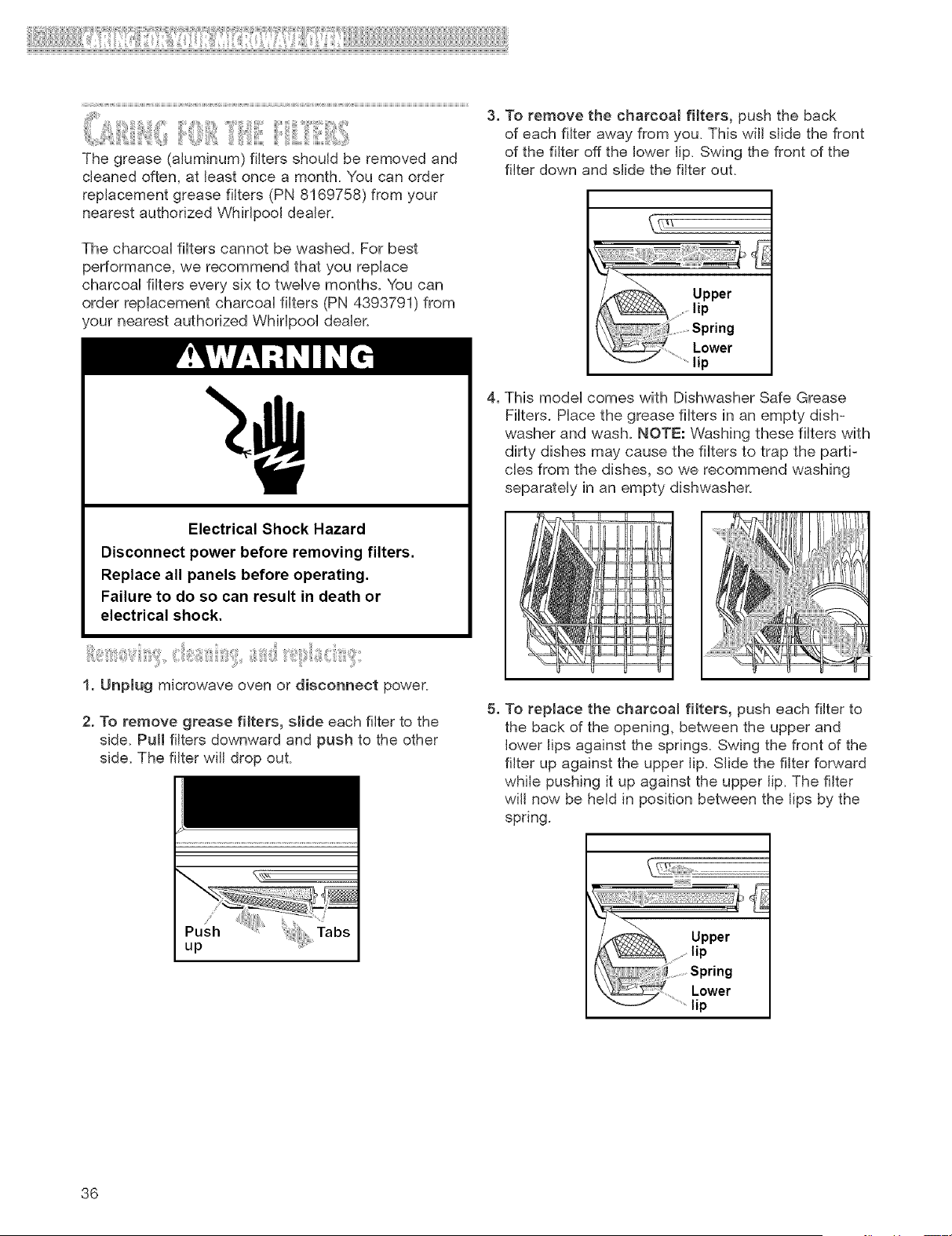
3. To remove the charcoal filters, push the back
of each filter away from you. This will slide the front
of the filter off the lower lip. Swing the front of the
filter down and slide the filter out.
Electrical Shock Hazard
Disconnect power before removing filters.
Replace all panels before operating.
Failure to do so can result in death or
electrical shock.
1. Unplug microwave oven or disconnect power.
2. To remove grease filters, slide each filter to the
side. Pull filters downward and push to the other
side. The filter will drop out.
4. This model comes with Dishwasher Safe Grease
Filters. Place the grease filters in an empty dish-
washer and wash. NOTE: Washing these filters with
dirty dishes may cause the filters to trap the parti-
cles from the dishes, so we recommend washing
separately in an empty dishwasher.
5. To replace the charcoal filters, push each filter to
the back of the opening, between the upper and
lower lips against the springs. Swing the front of the
filter up against the upper lip. Slide the filter forward
while pushing it up against the upper lip. The filter
will now be held in position between the lips by the
spring.
up
/,_%, Upper
.... lip
.............Spring
.........Lower
...........lip
36
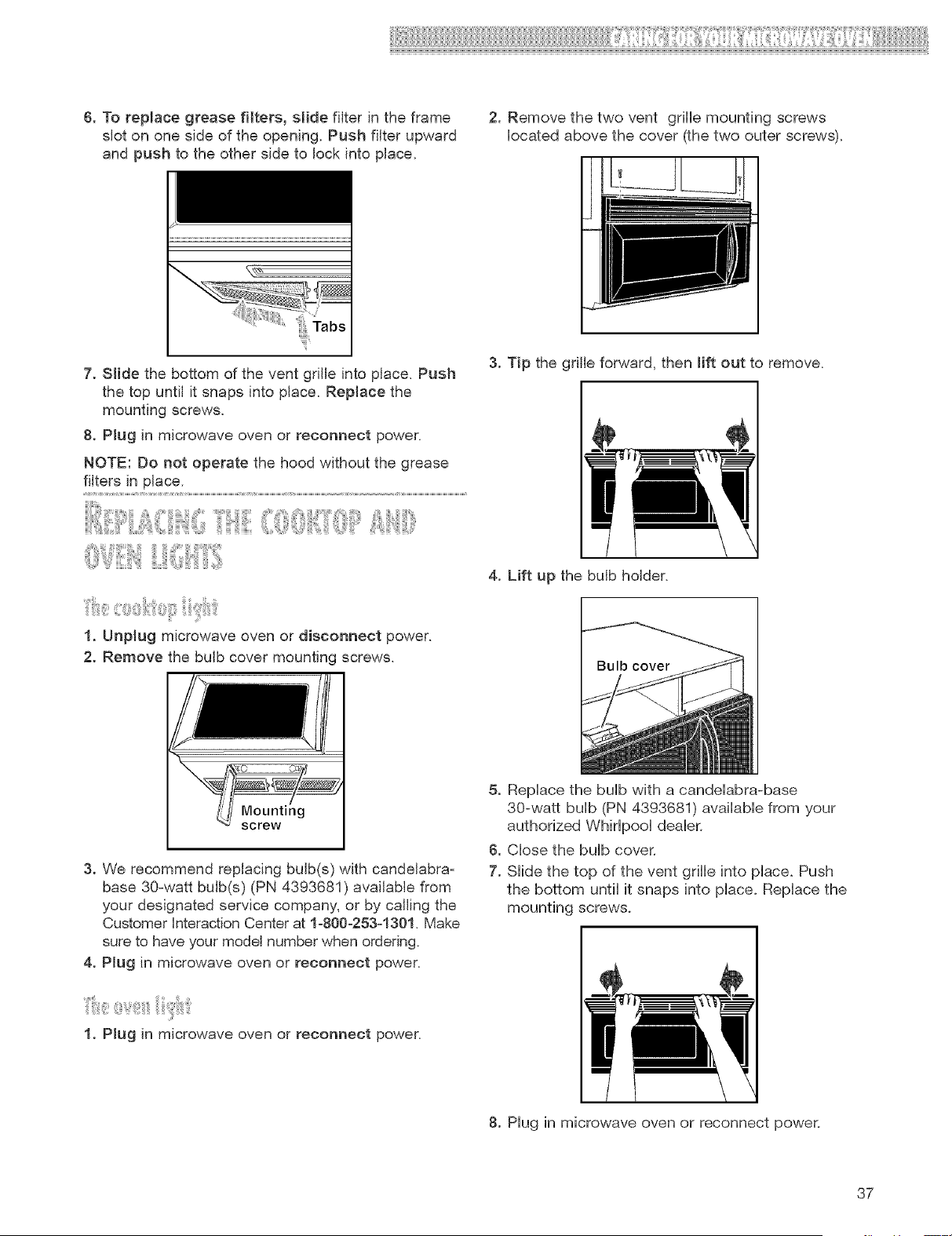
6. Toreplacegreasefilters,slidefilterintheframe
sloton onesideoftheopening.Pushfilterupward
and push to the other side to lock into place.
2. Remove the two vent grille mounting screws
iocated above the cover (the two outer screws).
7. Slide the bottom of the vent gdlle into place. Push
the top until it snaps into place. Replace the
mounting screws.
8. Plug in microwave oven or reconnect power.
NOTE: Do not operate the hood without the grease
filters in place.
1. Unplug microwave oven or disconnect power.
2. Remove the bulb cover mounting screws.
3. Tip the grille forward, then lift out to remove.
I I
4. Lift up the bulb holder.
3. We recommend replacing bulb(s) with candelabra z
base 30owatt bulb(s) (PN 4393681 ) available from
your designated service company, or by calling the
Customer Interaction Center at 1-800-253-1301. Make
sure to have your model number when ordering.
4. Plug in microwave oven or reconnect power.
i
1. Plug in microwave oven or reconnect power.
5. Replace the bulb with a candelabra-base
30-watt bulb (PN 4393681) available from your
authorized Whirlpool dealer.
6. Close the bulb cover.
7. Slide the top of the vent grille into place. Push
the bottom until it snaps into place. Replace the
mounting screws.
I
8. Hug in microwave oven or reconnect power.
37
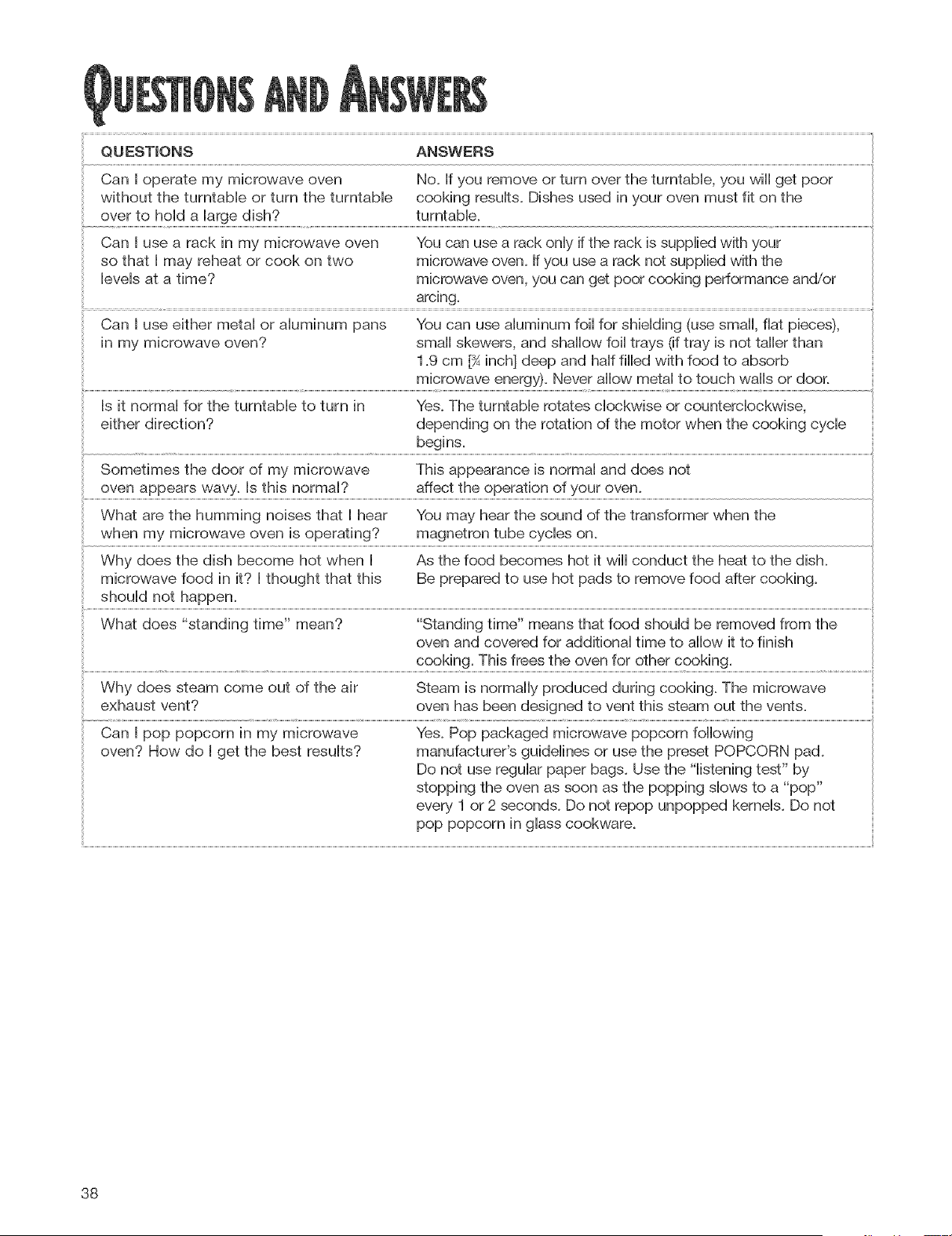
QUESTmONS ANSWERS
CanI operatemymicrowaveoven No.Ifyouremoveorturnovertheturntable,youwiiigetpoor
withoutthe turntableorturntheturntable cookingresults.Dishesusedinyourovenmustfit onthe
overto holdalargedish? turntable.
CanI usearackin mymicrowaveoven Youcanusea rackonlyiftherackissuppliedwithyour
sothat I mayreheator cookontwo microwaveoven.Ifyouusearacknotsuppliedwiththe
levelsata time? microwaveoven,youcangetpoorcookingperformanceand/or
CanI useeithermetaloraluminumpans Youcanusealuminumfoilforshielding(usesmall,fiatpieces),
in mymicrowaveoven? smallskewers,andshallowfoiltrays(iftrayisnottallerthan
1.9cm[_inch]deepandhalffilledwithfoodto absorb
microwaveenergy).Neverallowmetalto touchwallsordoor.
Is it normalforthe turntabletoturn in Yes.Theturntablerotatesciockwiseorcounterclockwise,
eitherdirection? dependingontherotationofthemotorwhenthecookingcycle
begins.
Sometimesthedoorof mymicrowave Thisappearanceisnormalanddoesnot
ovenappearswavy.Isthisnormal? affecttheoperationofyouroven.
WhatarethehummingnoisesthatI hear Youmayhearthesoundofthetransformerwhenthe
whenmymicrowaveovenisoperating? magnetrontubecycleson.
WhydoesthedishbecomehotwhenI Asthefoodbecomeshotit wiiiconducttheheatto thedish.
microwavefoodin it?I thoughtthatthis Bepreparedto usehotpadsto removefoodaftercooking.
shouldnothappen.
Whatdoes"standingtime"mean? "Standingtime"meansthatfoodshouldberemovedfromthe
ovenandcoveredforadditionaltimeto allowit tofinish
cooking.Thisfreestheovenforothercooking.
Whydoessteamcomeoutofthe air Steamisnormallyproducedduringcooking.Themicrowave
exhaustvent? ovenhasbeendesignedtoventthissteamoutthevents.
CanI poppopcornin mymicrowave Yes.Poppackagedmicrowavepopcornfollowing
oven?Howdo I getthebestresults? manufacturer'sguidelinesor usethepresetPOPCORNpad.
Donotuseregularpaperbags.Usethe"listeningtest"by
stoppingtheovenassoonasthepoppingslowsto a "pop"
every1or2seconds.Donotrepopunpoppedkernels.Donot
poppopcorninglasscookware.
38
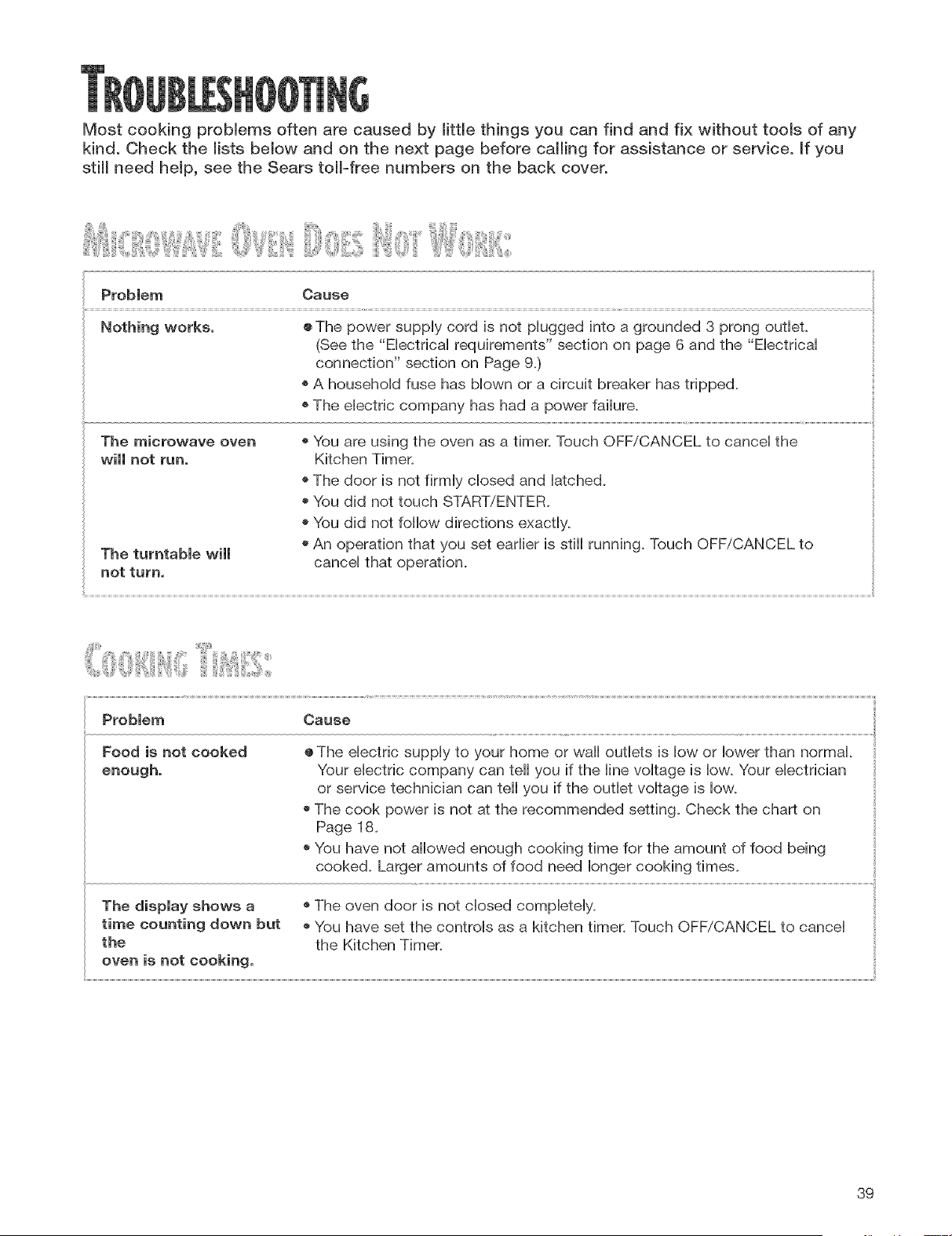
Most cooking problems often are caused by little things you can find and fix without tools of any
kind. Check the lists below and on the next page before calling for assistance or service. If you
still need help, see the Sears tol!-free numbers on the back cover.
Problem Cause
Nothing works. ® The power supply cord is not plugged into a grounded 3 prong outlet.
(See the "Electrical requirements" section on page 6 and the "Electrical
connection" section on Page 9.)
o A household fuse has blown or a circuit breaker has tripped.
The electric company has had a power failure.
The microwave oven o You are using the oven as a timer. Touch OFF/CANCEL to cancel the
will not run, Kitchen Timer.
o The door is not firmly closed and latched.
o You did not touch START/ENTER.
o You did not follow directions exactly.
o An operation that you set earlier is still running. Touch OFF/CANCEL to
The turntable will
not turn. cancel that operation.
il
Problem Cause
Food is not cooked ®The eHectric supply to your home or wall outlets is low or lower than normal.
enough. Your electric company can tell you if the line voltage is low. Your electrician
or service technician can tell you if the outlet voltage is low.
o The cook power is not at the recommended setting. Check the chart on
Page 18.
o You have not allowed enough cooking time for the amount of food being
cooked. Larger amounts of food need longer cooking times.
o The oven door is not closed completely.
o You have set the controls as a kitchen timer. Touch OFF/CANCEL to cancel
the Kitchen Timer.
The display shows a
time counting down but
the
oven is not cooking.
39
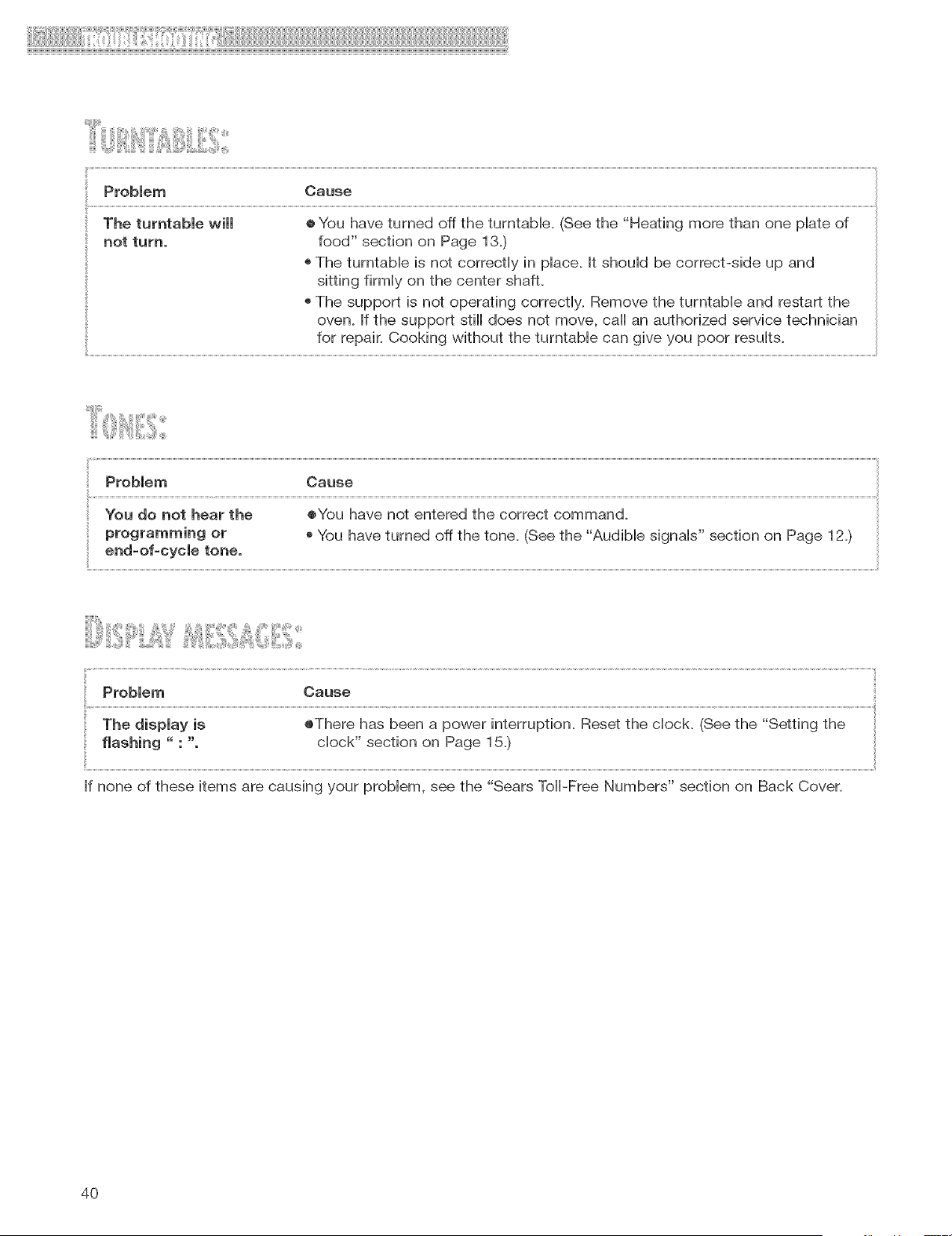
! !ii i```` ``` ! ` i!! ``` iii i ii!Ii I IIIIIIIIIIIIIIIIIIIIIIIIIIIIIIIIIIIIIIIIIIIIIIIIIIIIIIIi
ProMem Cause
The turntable will ® You have turned off the turntable. (See the "Heating more than one plate of
not turn. food" section on Page 13.)
o The turntable is not correctly in place. It should be correct-side up and
sitting firmly on the center shaft
o The support is not operating correctly. Remove the turntable and restart the
oven. If the support still does not move, call an authorized service technician
for repair. Cooking without the turntable can give you poor results.
Cause
i(............................................................................................................................................................................................................................................................................................................................................................................................................................................................................................................................................................................................................................................................................................................................................................................................................................................................................................
Cause
The display is ®There has been a power interruption. Reset the clock. (See the "Setting the
flashing " : ". clock" section on Page 15.)
If none of these items are causing your problem, see the "Sears Toll-Free Numbers" section on Back Cover.
4O
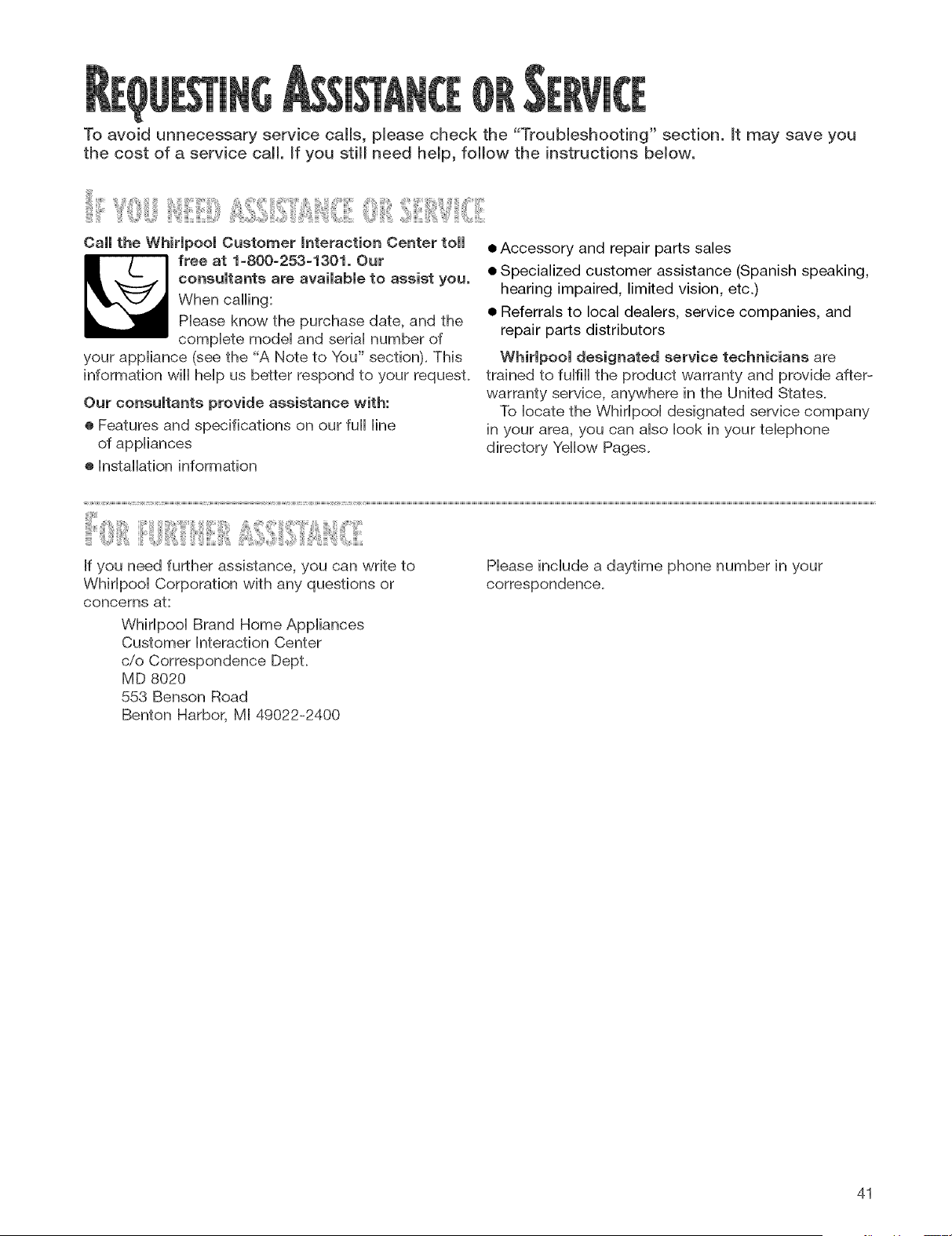
To avoid unnecessary service calls, please check the "Troubleshooting" section, it may save you
the cost of a service call. _f you still need help, follow the instructions below.
Caii the Whirlpool Customer Interaction Center toll
free at 1-800-253-1301. Our
consultants are available to assist you.
When calling:
Phase know the purchase date, and the
compbte modei and seriai number of
your appiiance (see the "A Note to You" section). This
information will heip us better respond to your request.
Our consultants provide assistance with:
® Features and specifications on our full iine
of appiiances
® hstaHafion information
• Accessory and repair parts sales
• Specialized customer assistance (Spanish speaking,
hearing impaired, limited vision, etc.)
• Referrals to local dealers, service companies, and
repair parts distributors
Whirlpool designated service technicians are
trained to fulfill the product warranty and provide after-
warranty service, anywhere in the United States.
To locate the Whirlpool designated service company
in your area, you can also look in your telephone
directory Yellow Pages.
If you need further assistance, you can write to
Whirlpool Corporation with any questions or
concerns at:
Whirlpool Brand Home Appliances
Customer Interaction Center
c/o Correspondence DepL
MD 8020
558 Benson Road
Benton Harbor, MI 49022-2400
Please include a daytime phone number in your
correspondence.
41
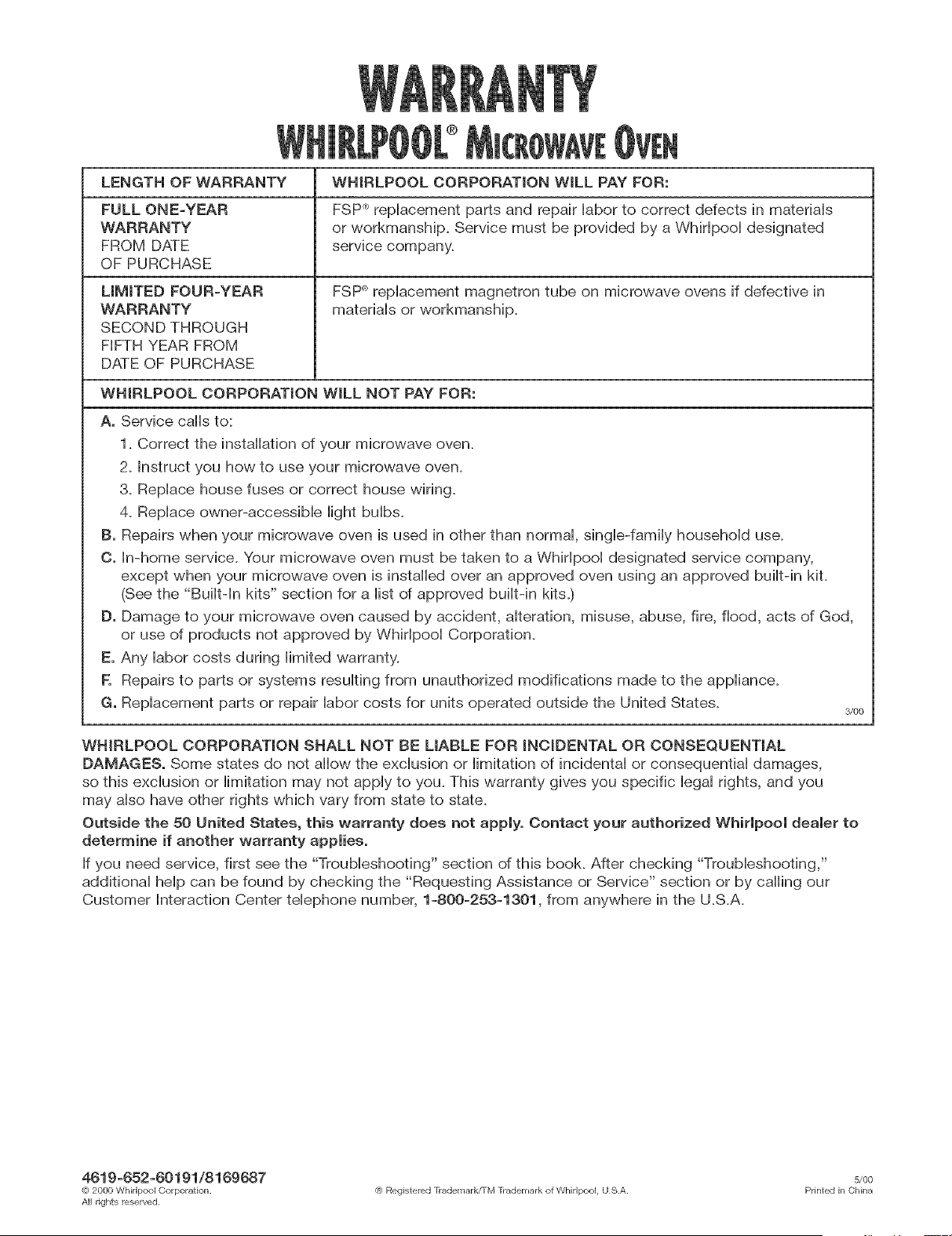
LENGTH OF WARRANTY
FULL ONE=YEAR
WARRANTY
FROM DATE
OF PURCHASE
LIMITED FOUR=YEAR
WARRANTY
SECOND THROUGH
FIFTH YEAR FROM
DATE OF PURCHASE
WHIRLPOOL CORPORATION WiLL PAY FOR:
FSP _>replacement parts and repair labor to correct defects in materials
or workmanship. Service must be provided by a VVMrlpool designated
service company.
FSP _replacement magnetron tube on microwave ovens if defective in
materials or workmanship.
WHIRLPOOL CORPORATION WiLL NOT PAY FOR:
A. Service calls to:
1. Correct the instalbfion of your microwave oven.
2. instruct you how to use your microwave oven.
3. Replace house fuses or correct house wiring.
4. Replace owner-accessible light bulbs.
B. Repairs when your microwave oven is used in other than normal, single-family household use.
O. In-home service. Your microwave oven must be taken to a Whirlpool designated service company,
except when your microwave oven is installed over an approved oven using an approved built-in kit.
(See the "Built-in kits" section for a list of approved built-in kits.)
D. Damage to your microwave oven caused by accident, alteration, misuse, abuse, fire, flood, acts of God,
or use of products not approved by Whirlpool Corporation.
E. Any labor costs during limited warranty.
F. Repairs to parts or systems resulting from unauthorized modifications made to the appliance.
G. Replacement parts or repair labor costs for units operated outside the United States.
3/CO
WHIRLPOOL CORPORATION SHALL NOT BE LIABLE FOR iNCiDENTAL OR CONSEQUENTIAL
DAMAGES. Some states do not allow the exclusion or limitation of incidental or consequential damages,
so this exclusion or limitation may not apply to you. This warranty gives you specific legal rights, and you
may also have other rights which vary from state to state.
Outside the 50 United States, this warranty does not apply. Contact your authorized Whirlpool dealer to
determine if another warranty applies.
If you need service, first see the "Troubleshooting" section of this book. After checking "Troubleshooting,"
additional help can be found by checking the "Requesting Assistance or Service" section or by calling our
Customer Interaction Center telephone number, 1=800=253=1301, from anywhere in the U.S.A.
4619=652=60191/8169687 s/00
(<_2000 Whirlpool Corporation. (e Registered [_adelllarkfI-M [_ademark of Whirlpool, US.A. Printed irl China
All rights reserved,