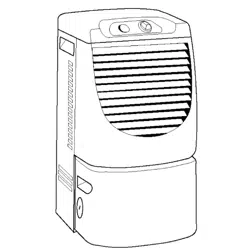
DEHUMIDIFIER
For questions about features, operation/performance, parts,
accessories or service call: 1-800-253-1301
or visit our website at... www.whirlpool.com
In Canada, call for assistance, installation and service,
call: 1-800-807-6777
or visit our website at_.www.whirlpool.ca
DESHUlVHDIFICADOR
Si tiene preguntas respeoto alas caracter[sticas, funcionamiento,
rendimiento, pares, accesorios o servicio teonico,
Ilame al: 1-800-253-1301
o visite nuestro sito web en... www.whirlpool.com
Table of Contents/Indice ..................................... 2
1188927
TABLEOFCONTENTS
DEHUMIDIFIER SAFETY ............................................................... 2
INSTALLATION REQUIREMENTS ................................................ 3
Electrical Requirements ............................................................... 3
Location Requirements ................................................................ 3
DEHUMIDIFIER USE ...................................................................... 4
Setting the Controls (Control Types I and 2 Only) ...................... 4
Setting the Controls (Control Types 3 and 4 Only) ...................... 5
Draining the Dehumidifier ............................................................. 6
Normal Sounds ............................................................................. 7
DEHUMIDIFIER CARE ................................................................... 7
Cleaning the Air Filter (on some models) ..................................... 7
Cleaning the Dehumidifier ............................................................ 8
TROUBLESHOOTING .................................................................... 8
ASSISTANCE OR SERVICE ........................................................... 9
In the U.S.A.................................................................................. 9
In Canada ..................................................................................... 9
J
INDICE
SEG URIDAD DEL DESHUMIDIFICADOR .................................. 11
REQUISITOS DE INSTALACION ................................................. 12
Requisites electricos .................................................................. 12
Requisites de ubicaci6n ............................................................. 12
COMO USAR EL DESHUMIDIFICADOR .................................... 13
Ajuste de los controles (S61opara modelos
con controles tipo 1 y 2 )............................................................ 13
Ajuste de los controles ($61o para modelos
con controles tipo 3 y 4)............................................................. 14
C6mo desaguar el deshumidificador ......................................... 15
Sonidos normales ....................................................................... 16
CUlDADO DEL DESHUMIDIFICADOR ....................................... 17
Limpieza del filtro de aire (en algunos modelos) ....................... 17
Limpieza del deshumidificador .................................................. 17
SOLUCION DE PROBLEMAS ...................................................... 18
AYUDA O SERVICIO TI_CNICO ................................................... 19
En los EE.UU.............................................................................. 19
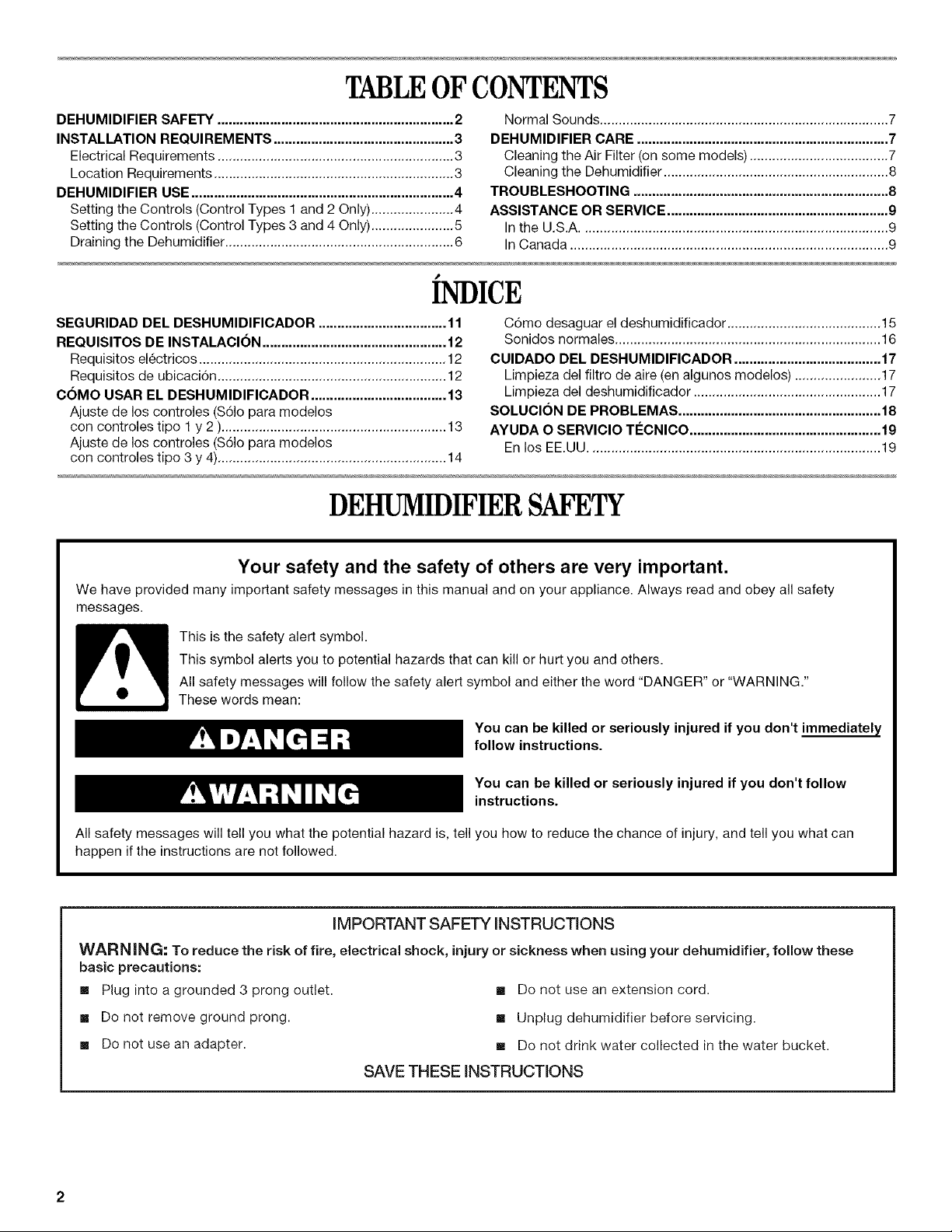
DEHUMIDIFIERSAFETY
Your safety and the safety of others are very important.
We have provided many important safety messages in this manual and on your appliance. Always read and obey all safety
messages.
This is the safety alert symbol.
This symbol alerts you to potential hazards that can kill or hurt you and others.
All safety messages will follow the safety alert symbol and either the word "DANGER" or "WARNING."
These words mean:
You can be killed or seriously injured if you don't immediately
follow instructions.
You can be killed or seriously injured if you don't follow
instructions.
All safety messages will tell you what the potential hazard is, tell you how to reduce the chance of injury, and tell you what can
happen if the instructions are not followed.
iMPORTANT SAFETY iNSTRUCTiONS
WARN ING: To reduce the risk of fire, electrical shock, injury or sickness when using your dehumidifier, follow these
basic precautions:
[] Plug into a grounded 3 prong outlet.
[] Do not remove ground prong.
[] Do not use an adapter.
[] Do not use an extension cord.
[] Unplug dehumidifier before servicing.
[] Do not drink water collected in the water bucket.
SAVE THESE iNSTRUCTiONS
INSTALLATIONREQUIREMENTS
Electrical Shock Hazard
Plug into a grounded 3 prong outlet.
Do not remove ground prong.
Do not use an adapter.
Do not use an extension cord.
Failure to follow these instructions can result in death,
fire, or electrical shock.
Specific electrical requirements are listed in the chart below.
Follow the requirements for the type of plug on the power supply
cord.
Power supply cord Wiring requirements
• 115 volt (103.5 min. to
126.5 max.)
• 15-amp time-delay fuse or
circuit breaker
Recommended grounding method
This dehumidifier must be grounded. This dehumidifier is
equipped with a power supply cord having a grounded 3 prong
plug. To minimize possible shock hazard, the cord must be
plugged into a mating, grounded 3 prong outlet, grounded in
accordance with all local codes and ordinances. If a mating outlet
is not available, it is the customer's responsibility to have a
properly grounded 3 prong outlet installed by a qualified electrical
installer.
It is the customer's responsibility:
• To contact a qualified electrical installer.
• To assure that the electrical installation is adequate and in
conformance with National Electrical Code, ANSl/NFPA 70 -
latest edition, and all local codes and ordinances.
Copies of the standards listed may be obtained from:
National Fire Protection Association
One Batterymarch Park
Quincy, MA 02269
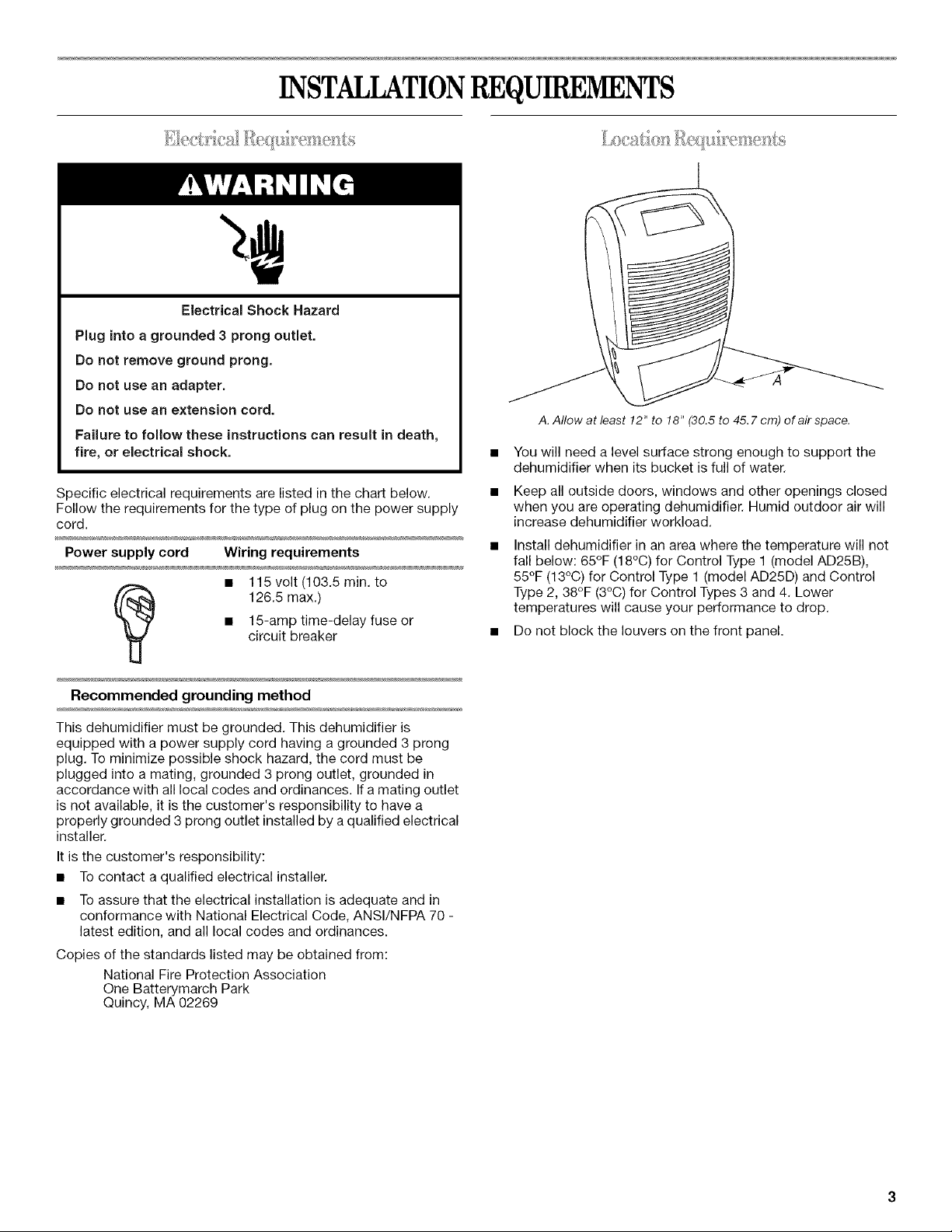
A. Allow at least 12" to 18" (30.5 to 45.7 crn) of air space.
You will need a level surface strong enough to support the
dehumidifier when its bucket is full of water.
Keep all outside doors, windows and other openings closed
when you are operating dehumidifier. Humid outdoor air will
increase dehumidifier workload.
Install dehumidifier in an area where the temperature will not
fall below: 65°F (18°C) for Control Type I (model AD25B),
55°F (13°C) for Control Type 1 (model AD25D) and Control
Type 2, 38°F (3°C) for Control Types 3 and 4. Lower
temperatures will cause your performance to drop.
• Do not block the louvers on the front panel.
DEHUMIDIFIERUSE
........ (
Starting/Stopping the Dehumidifier
NOTE: Before turning on the dehumidifier, be sure that the
bucket is empty and fits all the way into the dehumidifier.
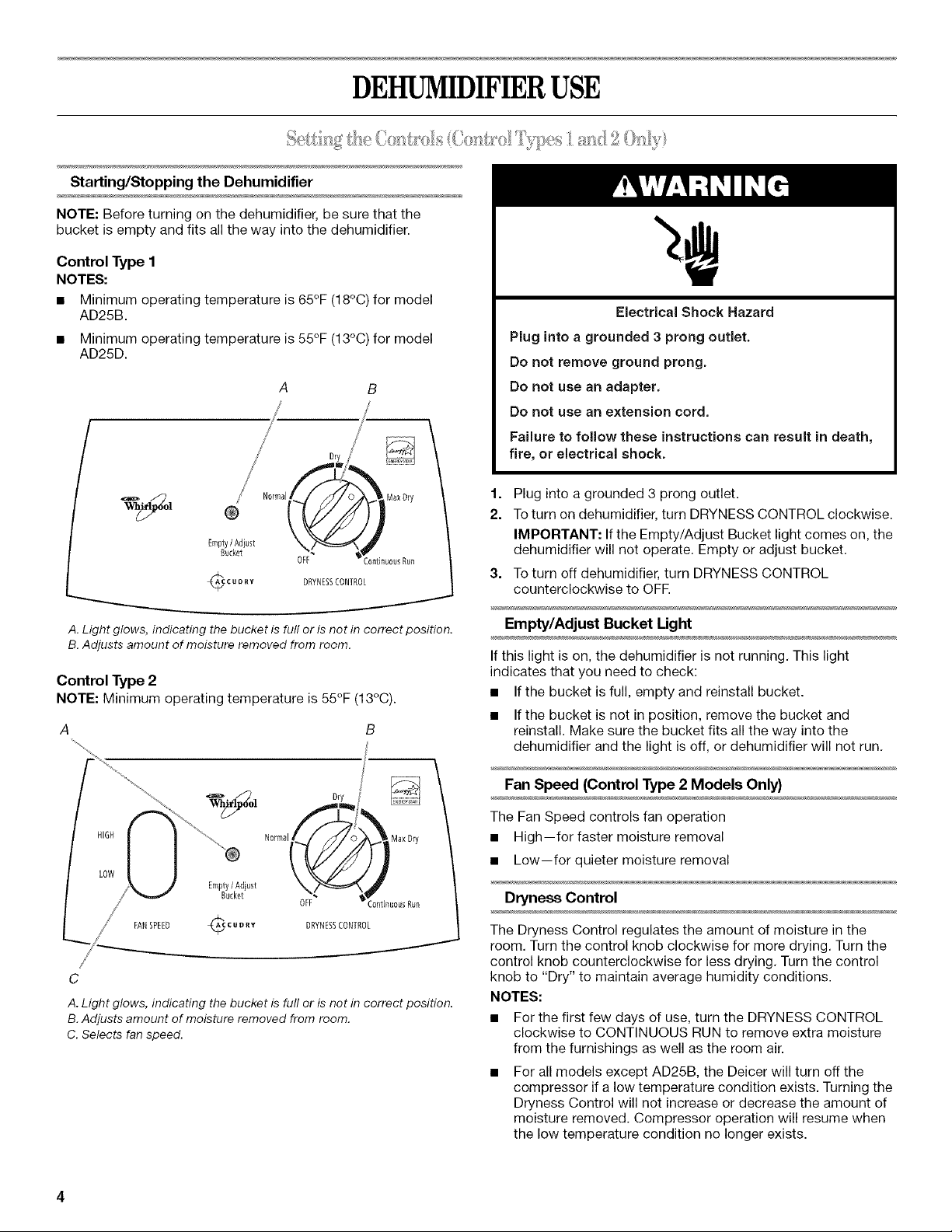
Control Type 1
NOTES:
• Minimum operating temperature is 65°F (18°C) for model
AD25B.
• Minimum operating temperature is 55°F (13°C) for model
AD25D.
A
/
/
/ /
/ Dry
CUD_y
B
/
:0nfinu0usRun
DRYNESSCONTROL
A. Light glows, indicating the bucket is full or is not in correct position.
B. Adjusts amount of moisture removed from room.
Control Type 2
NOTE: Minimum operating temperature is 55°F(13°C).
A
FAN SPEED
i
C
A. Light glows, indicating the bucket is full or is not in correct position.
B. Adjusts amount of moisture removed from room.
C. Selects fan speed.
Electrical Shock Hazard
Plug into a grounded 3 prong outlet.
Do not remove ground prong.
Do not use an adapter,
Do not use an extension cord.
Failure to follow these instructions can result in death,
fire, or electrical shock.
1.
2.
Plug into a grounded 3 prong outlet.
Toturn on dehumidifier, turn DRYNESS CONTROL clockwise.
IMPORTANT: If the Empty/Adjust Bucket light comes on, the
dehumidifier will not operate. Empty or adjust bucket.
3. Toturn off dehumidifier, turn DRYNESS CONTROL
counterclockwise to OFE
Empty/Adjust Bucket Light
If this light is on, the dehumidifier is not running. This light
indicates that you need to check:
• If the bucket is full, empty and reinstall bucket.
• If the bucket is not in position, remove the bucket and
reinstall. Make sure the bucket fits all the way into the
dehumidifier and the light is off, or dehumidifier will not run.
Fan Speed (Control Type 2 Models Only)
The Fan Speed controls fan operation
• High--for faster moisture removal
• Low--for quieter moisture removal
Dryness Control
The Dryness Control regulates the amount of moisture in the
room. Turn the control knob clockwise for more drying. Turn the
control knob counterclockwise for less drying. Turn the control
knob to "Dry" to maintain average humidity conditions.
NOTES:
• For the first few days of use, turn the DRYNESS CONTROL
clockwise to CONTINUOUS RUN to remove extra moisture
from the furnishings as well as the room air.
For all models except AD25B, the Deicer will turn off the
compressor if a low temperature condition exists. Turning the
Dryness Control will not increase or decrease the amount of
moisture removed. Compressor operation will resume when
the low temperature condition no longer exists.
Starting/Stopping the Dehumidifier
NOTES:
• Before turning on the dehumidifier, be sure that the bucket is
empty and fits all the way into the dehumidifier.
• Each time you unplug the dehumidifier or power is
interrupted, the control will return to your previous settings
when power is restored.
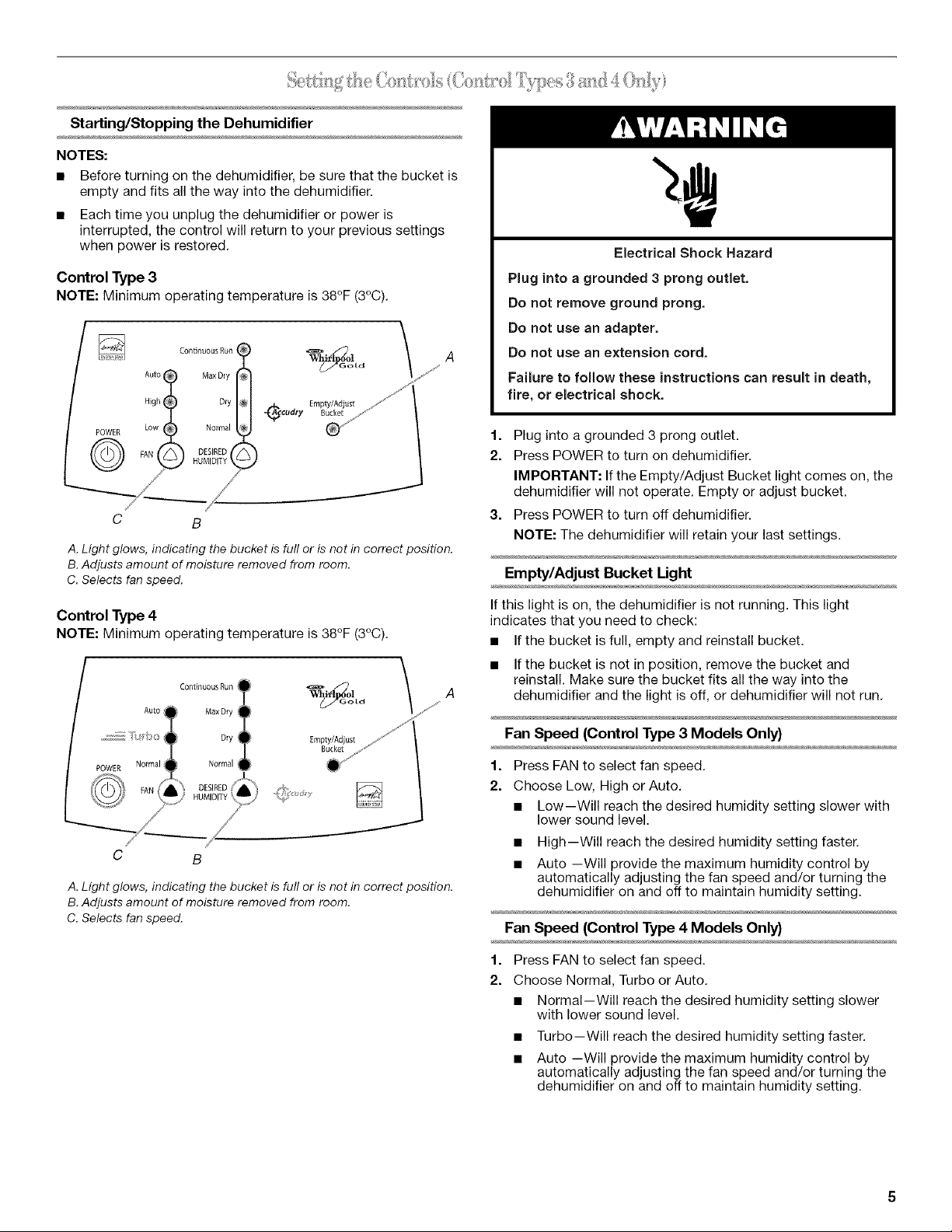
Control Type 3
NOTE: Minimum operating temperature is38°F (3°C).
_ Continuous Run
© Aot MaxOry
High Dry
POWER Low Normal
FAN )ESIRE
JMIDIT
_/// /
/ /'
C B
A. Light glows, indicating the bucket is full or is not in correct position.
B. Adjusts amount of moisture removed from room.
C. Selects fan speed.
Control Type 4
NOTE: Minimum operating temperature is38°F (3°C).
Empty/Adjust
Bucket
C B
A. Light glows, indicating the bucket is full or is not in correct position.
B. Adjusts amount of moisture removed from room.
C. Selects fan speed.
Electrical Shock Hazard
Plug into a grounded 3 prong outlet.
Do not remove ground prong.
Do not use an adapter.
Do not use an extension cord.
Failure to follow these instructions can result in death,
fire, or electrical shock.
f. Plug into a grounded 3 prong outlet.
2. Press POWER to turn on dehumidifier.
IMPORTANT: If the Empty/Adjust Bucket light comes on, the
dehumidifier will not operate. Empty or adjust bucket.
3. Press POWER to turn off dehumidifier.
NOTE: The dehumidifier will retain your last settings.
Empty/Adjust Bucket Light
If this light is on, the dehumidifier is not running. This light
indicates that you need to check:
• If the bucket is full, empty and reinstall bucket.
• If the bucket is not in position, remove the bucket and
reinstall. Make sure the bucket fits all the way into the
dehumidifier and the light is off, or dehumidifier will not run.
Fan Speed (Control Type 3 Models Only)
1. Press FAN to select fan speed.
2. Choose Low, High or Auto.
• Low--Will reach the desired humidity setting slower with
lower sound level.
• High--Will reach the desired humidity setting faster.
• Auto --Will provide the maximum humidity control by
automatically adjusting the fan speed and/or turning the
dehumidifier on and off to maintain humidity setting.
Fan Speed (Control Type 4 Models Only}
1. Press FAN to select fan speed.
2. Choose Normal, Turbo or Auto.
• Normal--Will reach the desired humidity setting slower
with lower sound level.
• Turbo--Will reach the desired humidity setting faster.
• Auto --Will provide the maximum humidity control by
automatically adjusting the fan speed and/or turning the
dehumidifier on and off to maintain humidity setting.
Desired Humidity
1. Press DESIRED HUMIDITY to select the desired humidity
setting.
2. Choose Normal, Dry, Max Dry or Continuous Run.
• Normal--Will operate the dehumidifier at the selected fan
speed until the humidity levels are lowered.
• Dry--Will operate the dehumidifier at the selected fan
speed until the humidity levels are lowered more than the
Normal setting.
Max Dry--Will operate the dehumidifier at the selected
fan speed until the humidity levels are lowered to the
maximum level.
Continuous Run--Will operate the dehumidifier
continuously at the selected fan speed regardless of
humidity level. The dehumidifier will turn off only if the
bucket is full or removed.
NOTE: The electronic control will cycle the compressor
on and off if a low temperature condition exists.
Pressing the Desired Humidity arrow will not increase
or decrease the amount of moisture removed during a
low temperature condition. Normal compressor operation
will resume when the low temperature condition no
longer exists.
Sickness Hazard
Do not drink water collected in water bucket.
Doing so can result in sickness.
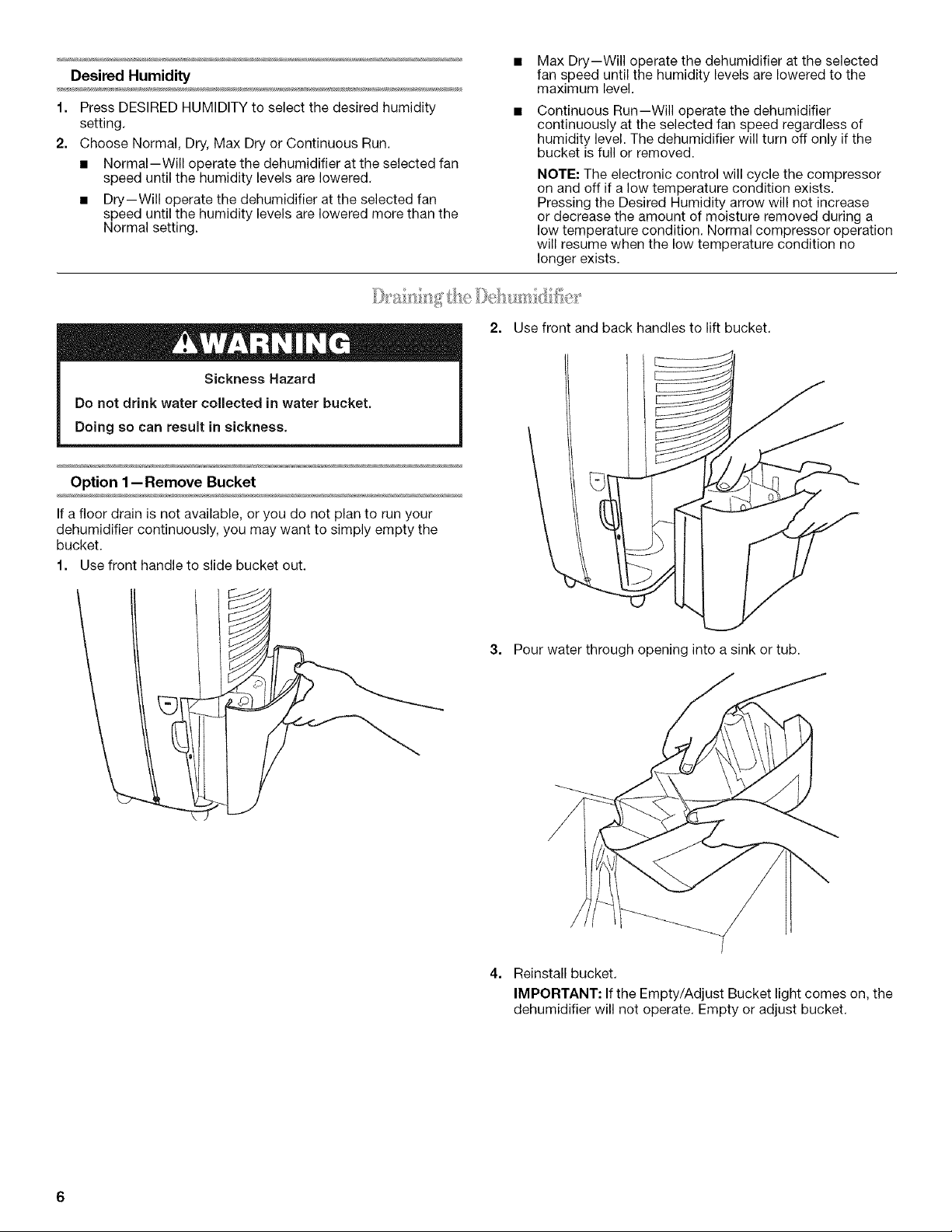
2. Use front and back handles to lift bucket.
Option 1-- Remove Bucket
If a floor drain is not available, or you do not plan to run your
dehumidifier continuously, you may want to simply empty the
bucket.
1. Use front handle to slide bucket out.
3. Pour water through opening into a sink or tub.
4. Reinstall bucket.
IMPORTANT: If the Empty/Adjust Bucket light comes on, the
dehumidifier will not operate. Empty or adjust bucket.
Option 2-- Connect Drain Hose
If you plan to run your dehumidifier continuously, you may want
to attach a garden hose to the drain hose connector.
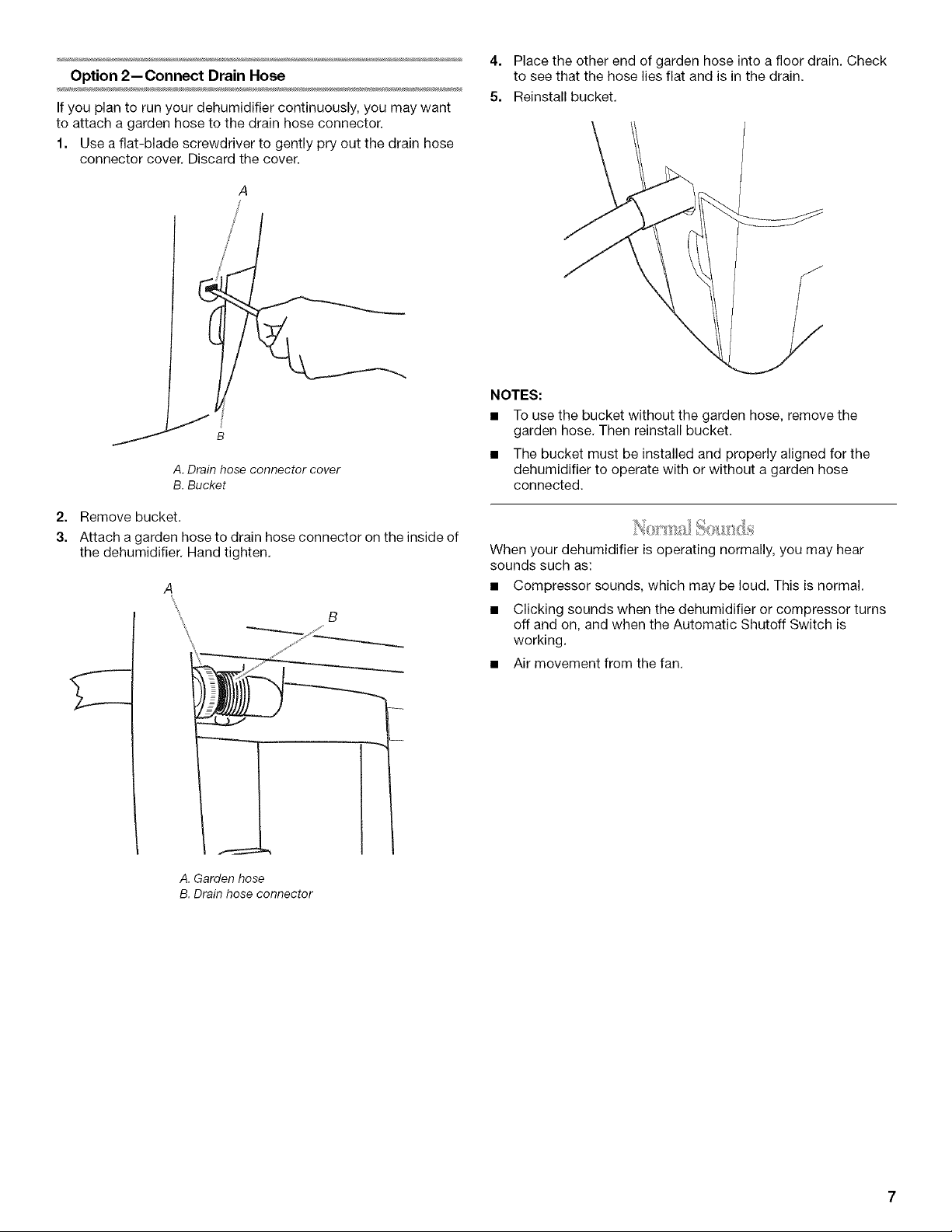
1. Use a flat-blade screwdriver to gently pry out the drain hose
connector cover. Discard the cover.
J
J
B
A
/
A. Drain hose connector cover
B. Bucket
2. Remove bucket.
3. Attach a garden hose to drain hose connector on the inside of
the dehumidifier. Hand tighten.
A
B
A. Garden hose
B. Drain hose connector
4. Place the other end of garden hose into a floor drain. Check
to see that the hose lies flat and is in the drain.
5. Reinstall bucket.
NOTES:
• To use the bucket without the garden hose, remove the
garden hose. Then reinstall bucket.
• The bucket must be installed and properly aligned for the
dehumidifier to operate with or without a garden hose
connected.
When your dehumidifier is operating normally, you may hear
sounds such as:
• Compressor sounds, which may be loud. This is normal.
• Clicking sounds when the dehumidifier or compressor turns
off and on, and when the Automatic Shutoff Switch is
working.
• Air movement from the fan.
DEHUMIDIFIERCARE
Your new dehumidifier is designed to give you many years of dependable service. This section tells you how to clean and care for your
dehumidifier. Call your local authorized dealer for an annual cleaning of the dehumidifier.
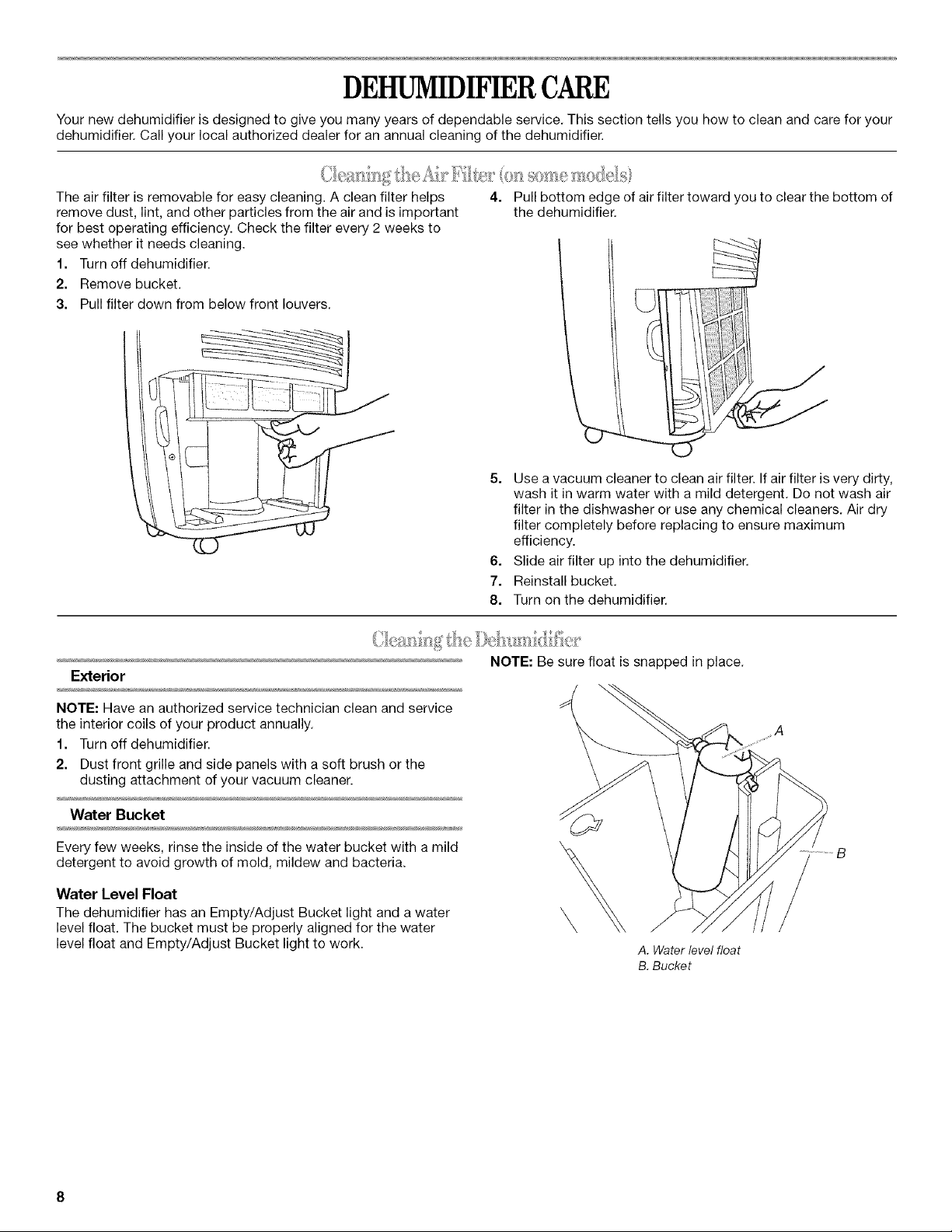
The air filter is removable for easy cleaning. A clean filter helps
remove dust, lint, and other particles from the air and is important
for best operating efficiency. Check the filter every 2 weeks to
see whether it needs cleaning.
1. Turn off dehumidifier.
2. Remove bucket.
3. Pull filter down from below front louvers.
4=
Pull bottom edge of air filter toward you to clear the bottom of
the dehumidifier.
5. Use a vacuum cleaner to clean air filter. If air filter is very dirty,
wash it in warm water with a mild detergent. Do not wash air
filter in the dishwasher or use any chemical cleaners. Air dry
filter completely before replacing to ensure maximum
efficiency.
6. Slide air filter up into the dehumidifier.
7. Reinstall bucket.
8. Turn on the dehumidifier.
Exterior
NOTE: Have an authorized service technician clean and service
the interior coils of your product annually.
1. Turn off dehumidifier.
2. Dust front grille and side panels with a soft brush or the
dusting attachment of your vacuum cleaner.
Water Bucket
Every few weeks, rinse the inside of the water bucket with a mild
detergent to avoid growth of mold, mildew and bacteria.
Water Level Float
The dehumidifier has an Empty/Adjust Bucket light and a water
level float. The bucket must be properly aligned for the water
level float and Empty/Adjust Bucket light to work.
NOTE: Be sure float is snapped in place.
\
A. Water level float
B. Bucket
TROUBLESHOOTING
Before calling for service, try the suggestions below to see whether you can solve your problem without outside help.
Dehumidifier will not run
• Is the dehumidifier turned on? Turn on dehumidifier.
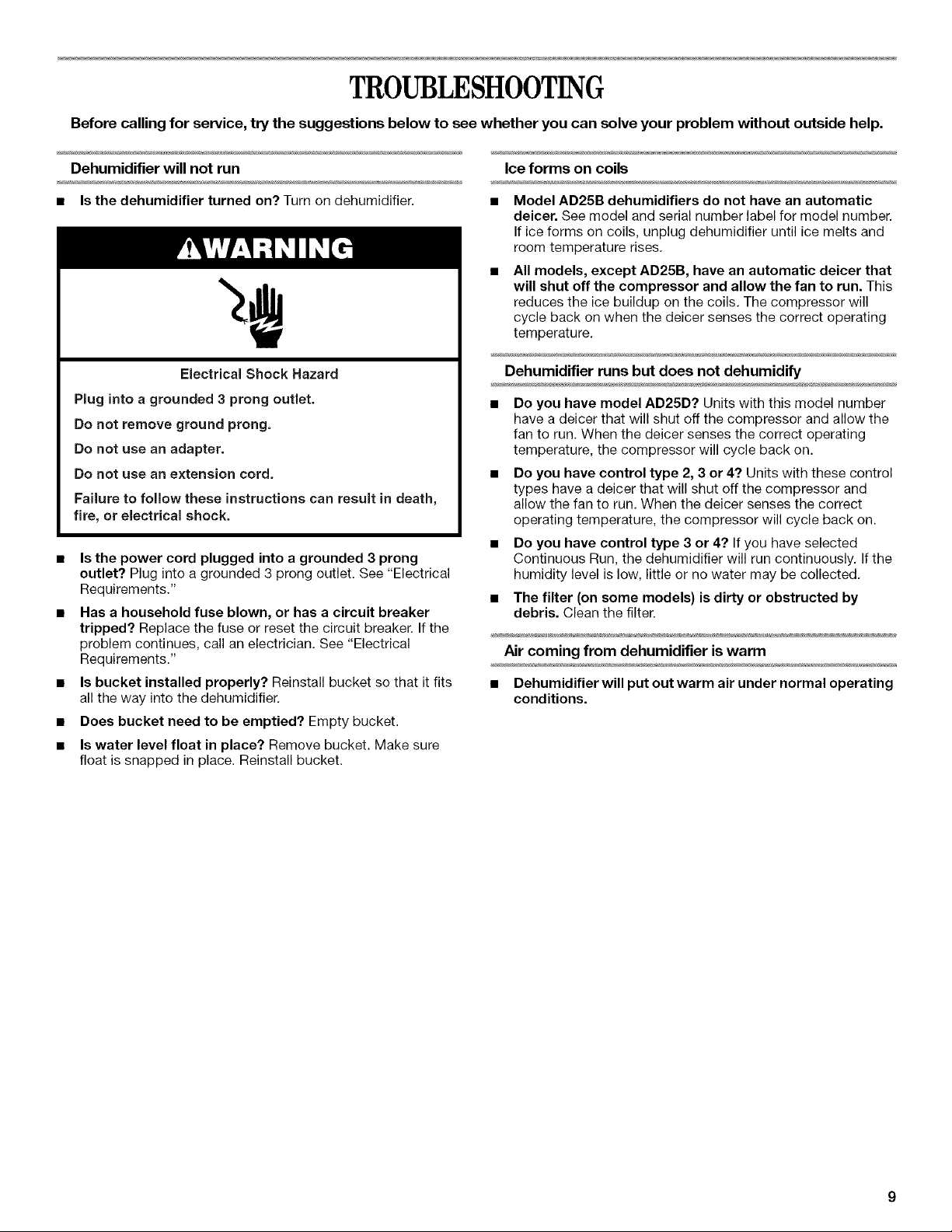
Electrical Shock Hazard
Plug into a grounded 3 prong outlet.
Do not remove ground prong.
Do not use an adapter.
Do not use an extension cord.
Failure to follow these instructions can result in death,
fire, or electrical shock.
Is the power cord plugged into a grounded 3 prong
outlet? Plug into a grounded 3 prong outlet. See "Electrical
Requirements."
Has a household fuse blown, or has a circuit breaker
tripped? Replace the fuse or reset the circuit breaker. If the
problem continues, call an electrician. See "Electrical
Requirements."
Is bucket installed properly? Reinstall bucket so that it fits
all the way into the dehumidifier.
Does bucket need to be emptied? Empty bucket.
Is water level float in place? Remove bucket. Make sure
float is snapped in place. Reinstall bucket.
Ice forms on coils
Model AD25B dehumidifiers do not have an automatic
deicer. See model and serial number label for model number.
If ice forms on coils, unplug dehumidifier until ice melts and
room temperature rises.
All models, except AD25B, have an automatic deicer that
will shut off the compressor and allow the fan to run. This
reduces the ice buildup on the coils. The compressor will
cycle back on when the deicer senses the correct operating
temperature.
Dehumidifier runs but does not dehumidify
Do you have model AD25D? Units with this model number
have a deicer that will shut off the compressor and allow the
fan to run. When the deicer senses the correct operating
temperature, the compressor will cycle back on.
Do you have control type 2, 3 or 4? Units with these control
types have a deicer that will shut off the compressor and
allow the fan to run. When the deicer senses the correct
operating temperature, the compressor will cycle back on.
Do you have control type 3 or 4? If you have selected
Continuous Run, the dehumidifier will run continuously. If the
humidity level is low, little or no water may be collected.
The filter (on some models) is dirty or obstructed by
debris. Clean the filter.
Air coming from dehumidifier is warm
• Dehumidifier will put out warm air under normal operating
conditions.
ASSISTANCEORSERVICE
Before calling for assistance or service, please check
"Troubleshooting." It may save you the cost of a service call. If
you still need help, follow the instructions below.
When calling, please know the purchase date and the complete
model and serial number of your appliance. This information will
help us to better respond to your request.
If you need replacement parts
If you need to order replacement parts, we recommend that you
use only FSP_ replacement parts. FSP° replacement parts will fit
right and work right because they are made with the same
precision used to build every new WHIRLPOOL ® appliance.
To locate FSP_ replacement parts in your area, call us or your
nearest Whirlpool designated service center.
Call the Whirlpool Customer eXperience Center
toll free: 1-800-253-1301 or visit our website at
www.whirlpool.com.
Our consultants provide assistance with:
• Features and specifications on our full line of appliances.
• Installation information.
• Use and maintenance procedures.
• Accessory and repair parts sales.
• Specialized customer assistance (Spanish speaking, hearing
impaired, limited vision, etc.).
• Referrals to local dealers, repair parts distributors, and
service companies. Whirlpool designated service technicians
are trained to fulfill the product warranty and provide after-
warranty service, anywhere in the United States.
To locate the Whirlpool designated service company in your
area, you can also look in your telephone directory Yellow
Pages.
For further assistance
If you need further assistance, you can write to Whirlpool
Corporation with any questions or concerns at:
Whirlpool Brand Home Appliances
Customer eXperience Center
553 Benson Road
Benton Harbor, M149022-2692
Please include a daytime phone number in your correspondence.
Call the Whirlpool Canada LP Customer Interaction Centre toll
free: 1-800-807-6777.
Our consultants provide assistance with:
• Features and specifications on our full line of appliances.
• Use and maintenance procedures.
• Accessory and repair parts sales.
• Referrals to local dealers, repair parts distributors, and
service companies. Whirlpool Canada LP designated service
technicians are trained to fulfill the product warranty and
provide after-warranty service, anywhere in Canada.
For further assistance
If you need further assistance, you can write to Whirlpool
Canada LP with any questions or concerns at:
Customer Interaction Centre
Whirlpool Canada LP
1901 Minnesota Court
Mississauga, Ontario L5N 3A7
Please include a daytime phone number in your correspondence.
10
Please record your model's information.
Whenever you call to request service on your appliance, you
need to know your complete model number and serial number.
You can find this information on the model and serial number
label. The model and serial number label is located on the wall
behind the water bucket.
Please record the model and serial number information below.
Also, record the purchase date of your appliance and the store's
name, address, and telephone number.
Model Number
Serial Number
Purchase Date
Store Name
Store Address
Store Phone
Keep this book and the sales slip together for future reference.
11
SEGURIDADDELDESHUMIDIFICADOR
Su seguridad y la seguridad de los demos es muy importante.
Hemos incluido muchos mensajes importantes de seguridad en este manual yen su electrodomestico. Lea y obedezca siempre
todos los mensajes de seguridad.
Este es el sfmbolo de advertencia de seguridad.
Este sfmbolo le llama la atencion sobre peligros potenciales que pueden ocasionar la muerte o una lesidn a
usted y a los demas.
Todos los mensajes de seguridad iran a continuacidn del simbolo de advertencia de seguridad y de la palabra
"PELIGRO" o "ADVERTENCIA". Estas palabras significan:
Si no eigue lae instrucciones de inmediato, usted puede
morir o sufrir una lesion grave.
Si no eigue lae instrucciones, usted puede morir o eufrir
una lesion grave.
Todos los mensajes de seguridad le diran el peligro potencial, le diran cdmo reducir las posibilidades de sufrir una lesidn y Io que
puede suceder si no se siguen las instrucciones.
INSTRUCCIONES IMPORTANTES DE SEGURIDAD
ADVERTENCIA: Para reducir el riesgo de incendio, choque el_ctrico, lesiones personales o enfermedad al usar su
deshunnidificador, siga estas precauciones b_sicas:
[] Conecte a un contacto de pared de conexi6n a tierra de
3 terminales.
[]
[]
[] No use un cable electrico de extensi6n.
No quite el terminal de conexi6n a tierra.
No use un adaptador.
[] Desconecte el deshumidificador antes de darle servicio.
[] No beba el agua acumulada en el balde de agua.
CONSERVE ESTAS INSTRUCCIONES
12
#
REQUISITOSDEINSTALACION
Peligro de Choque El_ctrieo
Conecte a un contacto de pared de cone×i6n a tierra de
3 terminalee.
No quite la terminal de conexion a tierra.
No use un adaptador.
No use un cable electrico de extensi6n.
No seguir eetas instruccionee puede ocaeionar
la muerte, incendie o cheque electrico.
Los requisites electricos especfficos se indican en la tabla a
continuaci6n. Siga los requisites para el tipo de enchufe en el
cable de alimentaci6n electrica.
El cable electrico Requisites de cableado
• 115 voltios (103,5 rain. a
126,5 max.)
• Fusible de retardo de 15 amperios
o cortacircuitos
M_todo recomendado para la puesta a tierra
Este deshumidificador debe ser puesto a tierra. Este
deshumidificador esta equipado con un cable de suministro de
energia provisto de un enchufe con tres terminales. Para reducir
a un minimo el peligro de posibles cheques electricos, el cable
debe ser enchufado en un contacto apropiado de pared de tres
terminales conectado a tierra de acuerdo con todos los c6digos
y reglamentos locales. Si no se dispone de un tomacorriente
apropiado, es responsabilidad del cliente hacer instalar un
contacto con tres terminales debidamente puesto a tierra per un
instalador electrico calificado.
Es responsabilidad del cliente:
• Llamar a un instalador electrico calificado.
Asegurarse de que la instalaci6n electrica sea adecuada y
este hecha de acuerdo con el C6digo Nacional Electrico,
ANSI/NFPA 70, 01tima edici6n, y todos los c6digos y
reglamentos locales.
Pueden obtenerse copias de las normas seSaladas en:
National Fire Protection Association
One Batterymarch Park
Quincy, MA 02269
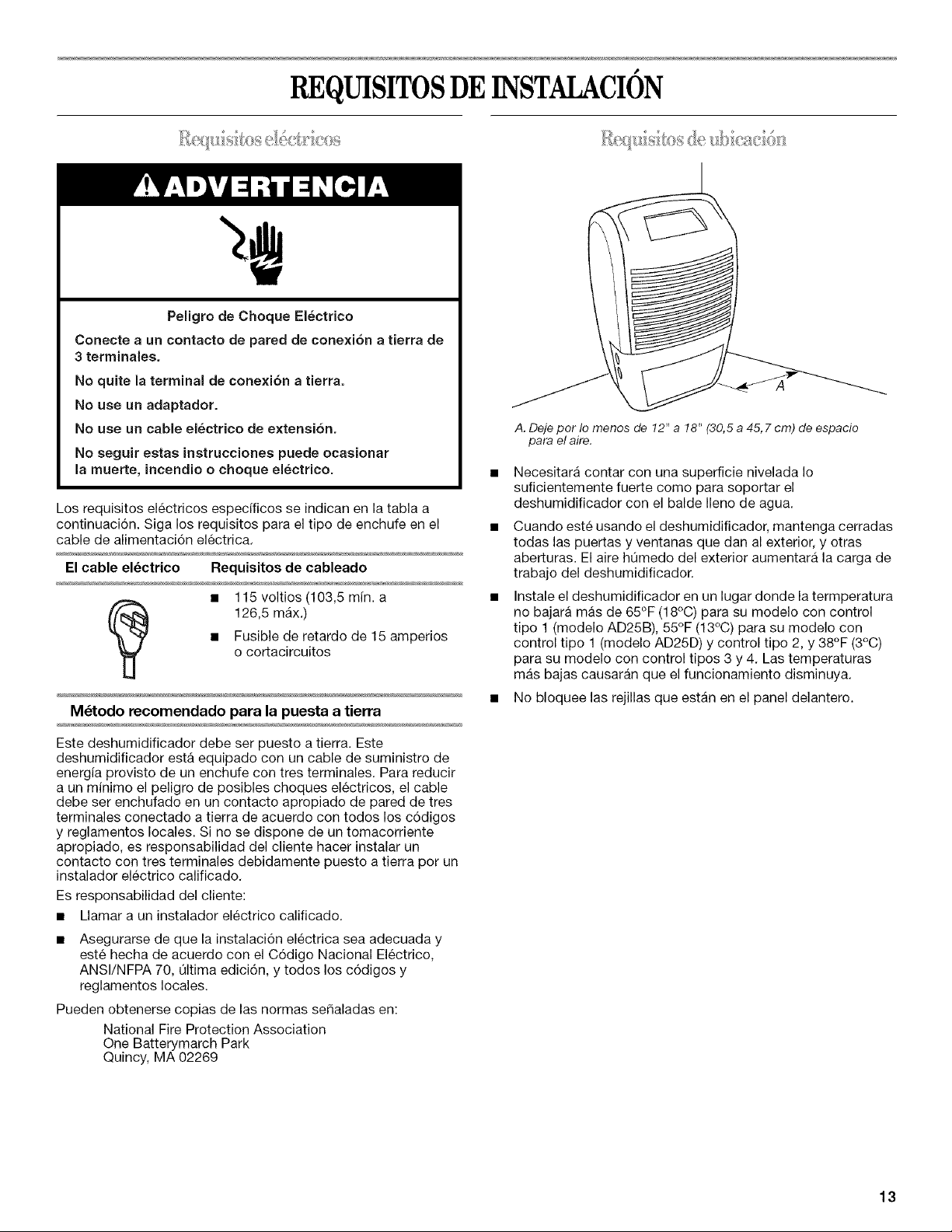
A. Deje per Io menos de 12" a 18" (30,5 a 45, 7 cm) de espacio
para el aire.
Necesitara contar con una superficie nivelada Io
suficientemente fuerte come para soportar el
deshumidificador con el balde Ileno de agua.
Cuando este usando el deshumidificador, mantenga cerradas
todas las puertas y ventanas que dan al exterior, y otras
aberturas. El aire h0medo del exterior aumentara la carga de
trabajo del deshumidificador.
Instale el deshumidificador en un lugar donde la termperatura
no bajara mas de 65°F (18°C) para su modelo con control
tipo 1 (modelo AD25B), 55°F (13°C) para su modelo con
control tipo 1(modelo AD25D) y control tipo 2, y 38°F (3°C)
para su modelo con control tipos 3 y 4. Las temperaturas
mas bajas causaran que el funcionamiento disminuya.
• No bloquee las rejillas que estan en el panel delantero.
13
#
COMOUSARELDESHUMIDIFICADOR
it_) l,p;_Y _'_ £t<_'©S............... O_'_':,,B/ , s ,}
Encender/Apagar el deshumidiflcador
NOTA: Antes de encender el deshumidificador, asegOrese de
que el balde este vacio y debidamente insertado en el
deshumidificador.
Control tipo 1
NOTAS:
• Temperatura minima de funcienamiento 65°F (18°C) para el
modelo AD25B.
• Temperatura minima de funcionamiento 55°F (13°C) para el
modelo AD25D.
/
A B
/ L
/ /
i o,y/
j Normal_ MaxDry
ecuo_v DRYNESSCONTROL
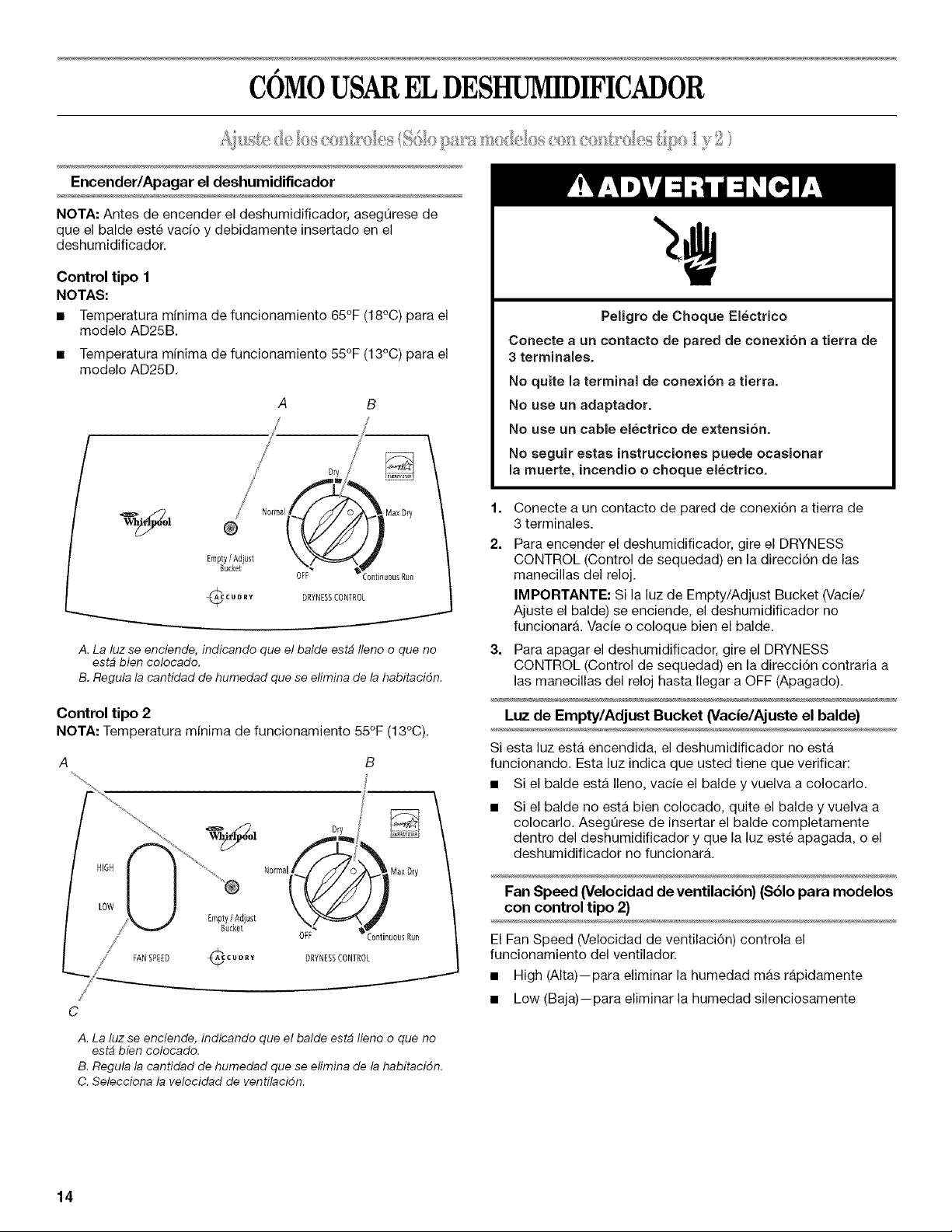
A. La luz se enciende, indicando que el balde estb Ileno o que no
estb bien colocado.
B. Regula la cantidad de humedad que se efimina de la habitacidn.
Control tipo 2
NOTA: Temperatura minima de funcionamiento 55°F (13°C).
/
/
C
HIGH
LOW
Empty/Adjust
Bucket
FANSPEED ¢c c u o _v
Dry
Normal MaxDry
OFF :ontinuousRun
DRYNBSSCONTROL
Peligro de Cheque Electrico
Conecte a un contacto de pared de cone×ion a tierra de
3 terminales.
No quite la terminal de conexion a tierra.
No use un adaptador.
No use un cable electrico de extensi6n.
No seguir estae instruccionee puede ocaeionar
la muerte, incendio o cheque electrico.
1,
2.
Conecte a un contacto de pared de conexi6n a tierra de
3 terminales.
Para encender el deshumidificador, gire el DRYNESS
CONTROL (Control de sequedad) en la direcci6n de las
manecillas del reloj.
IMPORTANTE: Si la luz de Empty/Adjust Bucket (Vacie/
Ajuste el balde) se enciende, el deshumidificador no
funcionara. Vacie o coloque bien el balde.
3. Para apagar el deshumidificador, gire el DRYNESS
CONTROL (Control de sequedad) en la direcci6n contraria a
las manecillas del reloj hasta Ilegar a OFF (Apagado).
Luz de Empty/Adjust Bucket (Vacie/Ajuste el balde)
Siesta luz esta encendida, el deshumidificador no esta
funcionando. Esta luz indica que usted tiene que verificar:
• Si el balde esta Ileno, vacie el balde y vuelva a colocarlo.
Si el balde no esta bien colocado, quite el balde y vuelva a
colocarlo. Aseg0rese de insertar el balde completamente
dentro del deshumidificador y que la luz este apagada, o el
deshumidificador no funcionara.
Fan Speed (Velocidad de ventilacibn) ($61o para modelos
con control tipo 2)
El Fan Speed (Velocidad de ventilaci6n) controla el
funcionamiento del ventilador.
• High (Alta)--para eliminar la humedad mas rapidamente
• Low (Baja)--para eliminar la humedad silenciosamente
A. La luz se enciende, indicando que el balde est# Ileno o que no
est_ bien colocado.
B. Regula la cantidad de humedad que se efimina de la habitacidn.
C. Selecciona la velocidad de ventilacidn.
14
Dryness Control (Control de sequedad)
El Dryness Control (Control de sequedad) controla la cantidad de
humedad en la habitaci6n. Gire la perilla de control en la
direcci6n de las manecillas del reloj para mayor sequedad. Gire
la perilla de control en direcci6n contraria alas manecillas del
reloj para menor sequedad. Gire la perilla de control hasta "Dry"
(Seco) para mantener condiciones de humedad media.
NOTAS:
• Para los primeros dias de uso, gire el DRYNESS CONTROL
(Control de sequedad) en la direcci6n de las manecillas del
reloj hasta CONTINUOUS RUN (Funcionamiento continuo)
para eliminar humedad adicional de los muebles asi como del
ambiente de la habitaci6n.
Para todos los modelos excepto AD25B, el deshelador
apagara el compresor si existe un estado de baja
temperatura. El girar el control de sequedad no aumentara ni
bajara la cantidad de humedad quitada. El compresor volvera
a funcionar cuando se termine el estado de temperatura baja.
Encender/Apagar el deshumidiflcador
NOTAS:
• Antes de encender el deshumidificador, aseg0rese de que el
balde este vacio y debidamente insertado en el
deshumidificador.
• Siempre que usted desconecte el deshumidificador o se
interrumpa el suministro de energia electrica, el control
volvera a su 01timo ajuste cuando se restablezca la energia.
Control tipo 3
NOTA: Temperatura mfnima de funcionamiento 38°F (3°C).
/
ContinuousBun 1
Auto
High
Low
FANt
POWER
©
ecudry Empty/Adjust
Bucket
C B
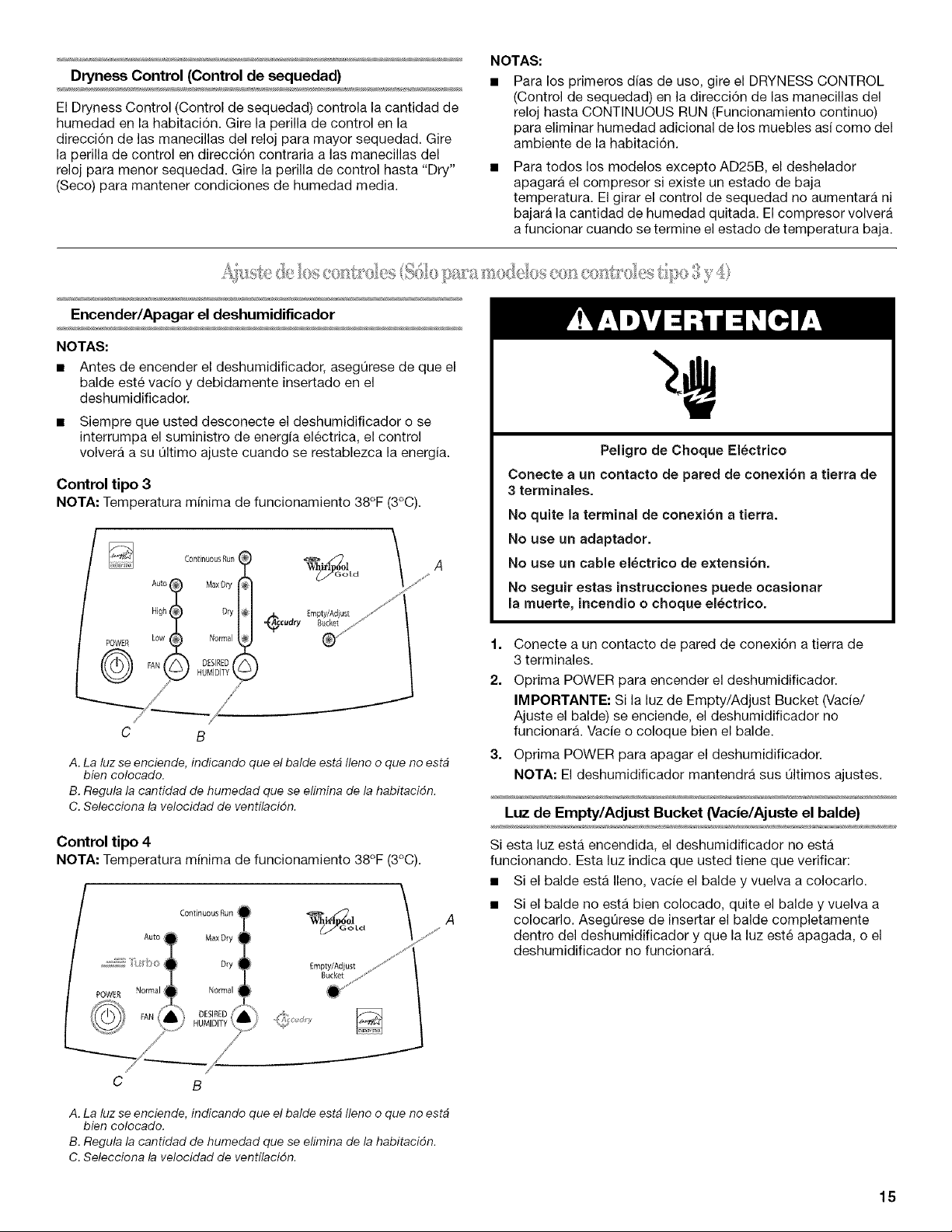
A.La luzseenciende,indicando queel balde estb Ilenooque no estb
bien colocado.
B.Regulala cantidad de humedad que se elimina de la habitacidn.
C.Selecciona la velocidad de ventflacidn.
Control tipo 4
NOTA: Temperatura mfnima de funcionamiento 38°F (3°C).
Auto
POWER Normal i
FAN
Empty/Adjust
Bucket
Peligro de Choque Electrico
Conecte a un contaeto de pared de cone×ion a tierra de
3 terminalee.
No quite la terminal de conexion a tierra.
No use un adaptador.
No use un cable electrico de extensi6n,
No seguir estas instrucciones puede ocaeionar
la muerte, incendio o choque electrico.
1=
2.
3=
Conecte a un contacto de pared de conexi6n a tierra de
3 terminales.
Oprima POWER para encender el deshumidificador.
IMPORTANTE: Si la luz de Empty/Adjust Bucket (Vacie/
Ajuste el balde) se enciende, el deshumidificador no
funcionara. Vacie o coloque bien el balde.
Oprima POWER para apagar el deshumidificador.
NOTA: El deshumidificador mantendra sus 01timos ajustes.
_sssssss_
Luz de Empty/Adjust Bucket (Vacie/Ajuste el balde)
Si esta luz esta encendida, el deshumidificador no esM
funcionando. Esta luz indica que usted tiene que verificar:
• Si el balde esta Ileno, vacie el balde y vuelva a colocarlo.
Si el balde no esta bien colocado, quite el balde y vuelva a
colocarlo. Aseg0rese de insertar el balde completamente
dentro del deshumidificador y que la luz este apagada, o el
deshumidificador no funcionara.
C B
A. La luz se enciende, indicando que el balde estb Ileno o que no estb
bien colocado.
B. Regula la cantidad de humedad que se efimina de la habitacidn.
C. Selecciona la velocidad de ventflacidn.
15
Velocidaddeventilacibn
(Sbloparamodelosconcontroltipo3)
1.
2.
Oprima FAN (ventilacidn) para seleccionar la velocidad de
ventilaci6n.
Seleccione Low (bajo), High (alto) o Auto (automatico).
• Low--Alcanzara mas lentamente el nivel de humedad
deseado con un nivel de sonido mas bajo.
• High--Alcanzara mas rapido el nivel de humedad
deseado.
Auto--Ofrecera el mejor control de humedad al ajustar
automaticamente la velocidad del ventilador y/o
encender y apagar la unidad para mantener el ajuste de
humedad.
Velocidad de ventilacibn
(Sblo para modelos con control tipo 4)
1. Oprima FAN para seleccionar la velocidad de ventilaci6n.
2. Seleccione Normal, Turbo o Auto (automatico).
• NormaI--AIcanzara mas lentamente el nivel de humedad
deseado con un nivel de sonido mas bajo.
• Turbo--AIcanzara mas rapido el nivel de humedad
deseado.
• Auto--Ofrecera el mejor control de humedad al ajustar
automaticamente la velocidad del ventilador y/o
encender y apagar la unidad para mantener el ajuste de
humedad.
Humedad deseada
1.
2.
Oprima DESIRED HUMIDITY (Humedad deseada) para
seleccionar el ajuste de humedad deseado.
Elija Normal, Dry (seco), Max Dry (mAxima sequedad) o
Continuous Run (funcionamiento continuo).
• Normal--El deshumidificador funcionara en la velocidad
de ventilaci6n seleccionada hasta que los niveles de
humedad bajen.
• Dry--El deshumidificador funcionara en la velocidad de
ventilaci6n seleccionada hasta que los niveles de
humedad disminuyan por debajo del ajuste Normal.
• Max Dry--El deshumidificador funcionara en la velocidad
de ventilaci6n seleccionada hasta que los niveles de
humedad bajen a su nivel maximo.
• Continuous Run--El deshumidificador funcionara
continuamente a la velocidad de ventilaci6n seleccionada
independientemente del nivel de humedad. El
deshumidificador se apagara solamente si el balde esta
Ileno o se quit6.
NOTA: Si existe un estado de baja temperatura, el control
electr6nico encendera y apagara el compresor. Si
presiona la fecha de Desired Humidity (Humedad
deseada), la cantidad de humedad quitada no aumentara
ni bajara durante un estado de baja temperatura. El
compresor volvera a funcionar normalmente cuando se
termine el estado de temperatura baja.
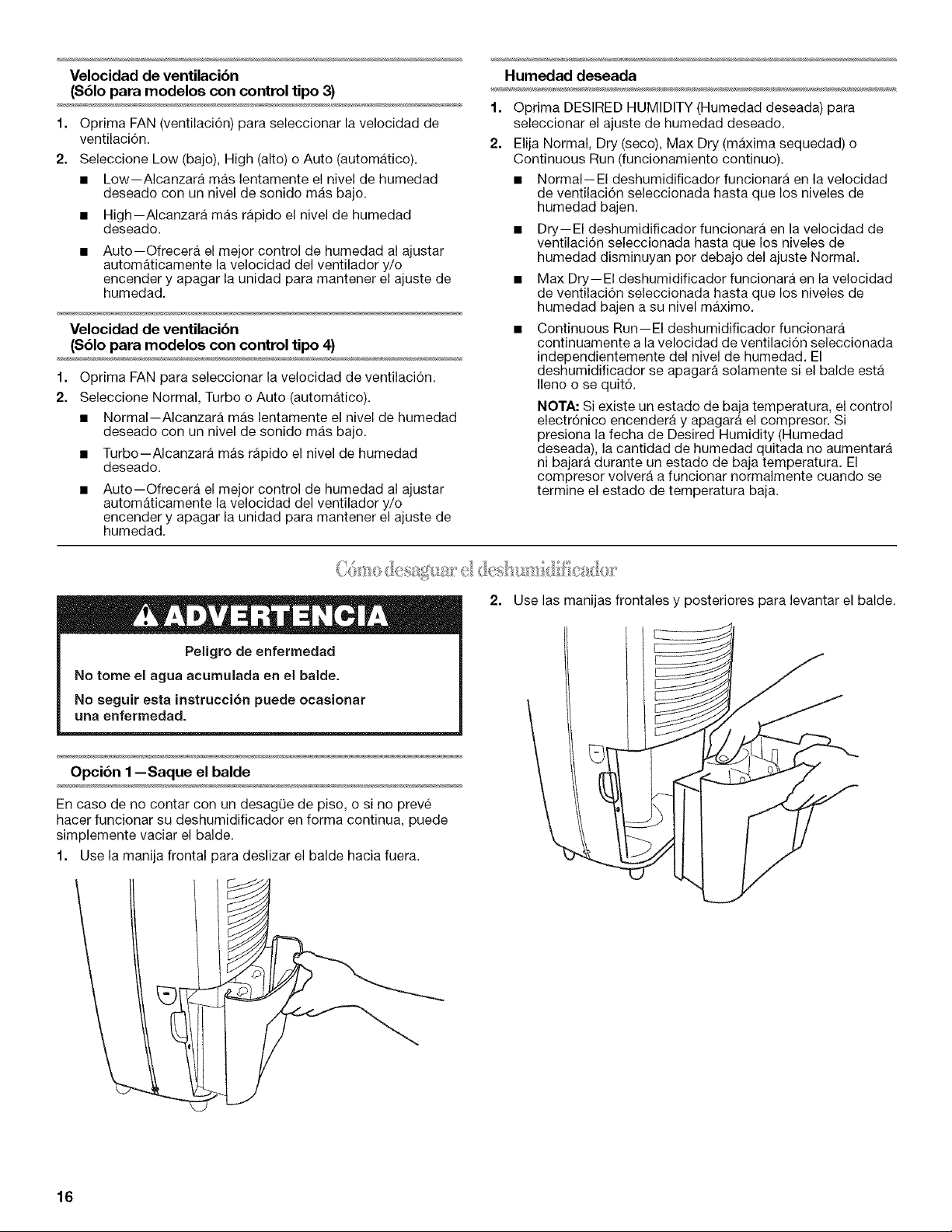
2. Use las manijas frontales y posteriores para levantar el balde.
Peligro de enfermedad
No tome el agua acumuiada en el balde.
No seguir eeta instrucci6n puede ocasionar
una enfermedad.
Opcibn 1 --Saque el balde
En caso de no contar con un desagQe de piso, o si no preve
hacer funcionar su deshumidificador en forma continua, puede
simplemente vaciar el balde.
1. Use la manija frontal para deslizar el balde hacia fuera.
16
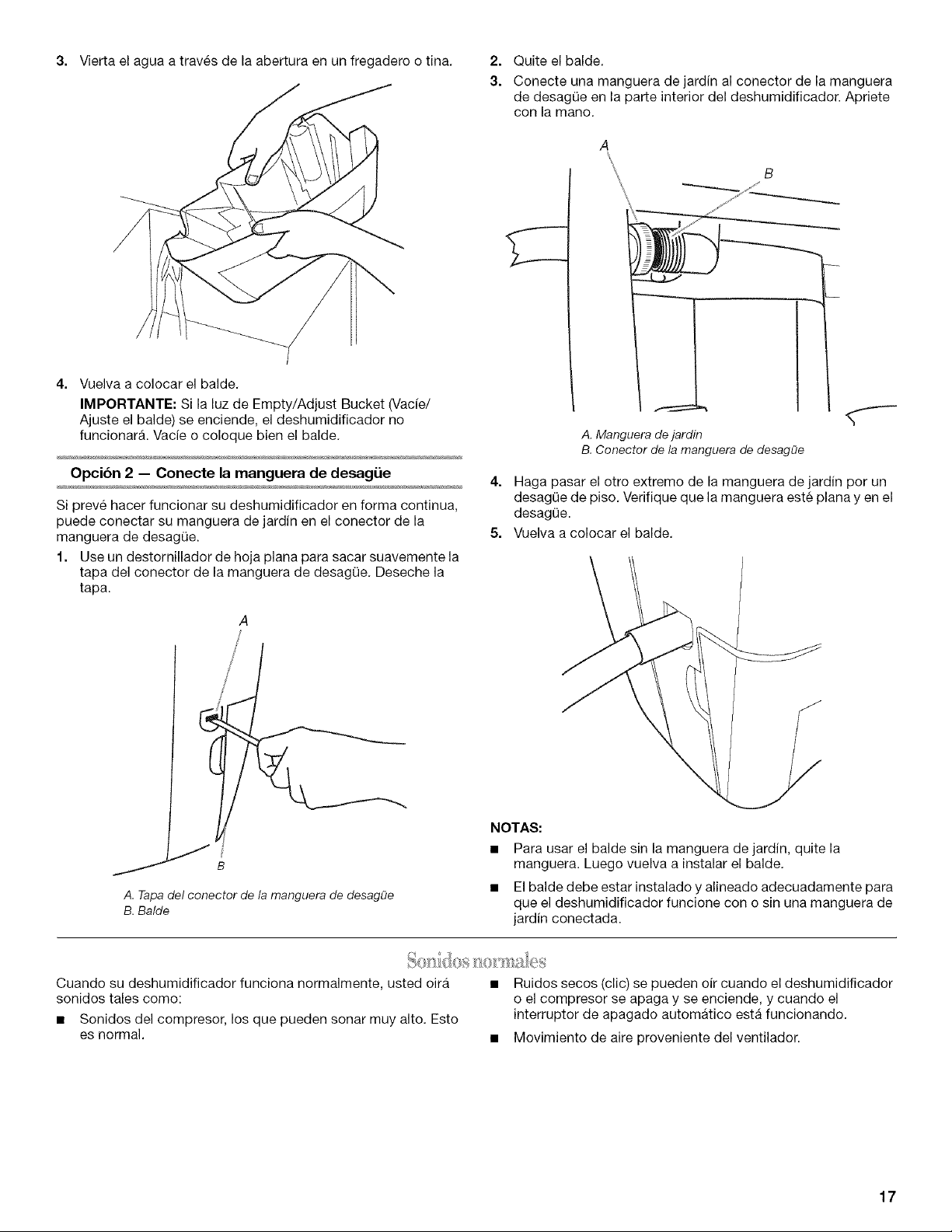
3. Vierta el agua a traves de la abertura en un fregadero o tina.
4. Vuelva a colocar el balde.
IMPORTANTE: Si la luz de Empty/Adjust Bucket (Vacfe/
Ajuste el balde) se enciende, el deshumidificador no
funcionara. Vacie o coloque bien el balde.
Opcibn 2 -- Conecte la manguera de desag_ie
Si preve hacer funcionar su deshumidificador en forma continua,
puede conectar su manguera de jardin en el conector de la
manguera de desag(Je.
1. Use un destornillador de hoja plana para sacar suavemente la
tapa del conector de la manguera de desag0e. Deseche la
tapa.
A
/
j B
A.Tapadel conector de lamanguera de desagf_e
B.Balde
2.
3.
Quite el balde.
Conecte una manguera de jardin al conector de la manguera
de desagQe en la parte interior del deshumidificador. Apriete
con la mano.
B
A. Manguera de jardin
B. Conector de la manguera de desagOe
4. Haga pasar el otro extremo de la manguera de jardin por un
desag0e de piso. Verifique que la manguera este plana yen el
desag(_e.
5. Vuelva a colocar el balde.
NOTAS:
• Para usar el balde sin la manguera de jardin, quite la
manguera. Luego vuelva a instalar el balde.
• El balde debe estar instalado y alineado adecuadamente para
que el deshumidificador funcione con o sin una manguera de
jardin conectada.
Cuando su deshumidificador funciona normalmente, usted oira
sonidos tales como:
• Sonidos del compresor, los que pueden sonar muy alto. Esto
es normal.
Ruidos secos (clic) se pueden oir cuando el deshumidificador
o el compresor se apaga y se enciende, y cuando el
interrupter de apagado automatico esta funcionando.
• Movimiento de aire proveniente del ventilador.
17
CUIDADODELDESHUMIDIFICADOR
Su nuevo deshumidificador esta disefrado para darle muchos afros de servicio confiable. Esta secci6n le ofrece la informaci6n acerca
de la limpieza y el cuidado de su deshumidificador. Llame al vendedor autorizado de su Iocalidad para una limpieza anual del
deshumidificador.
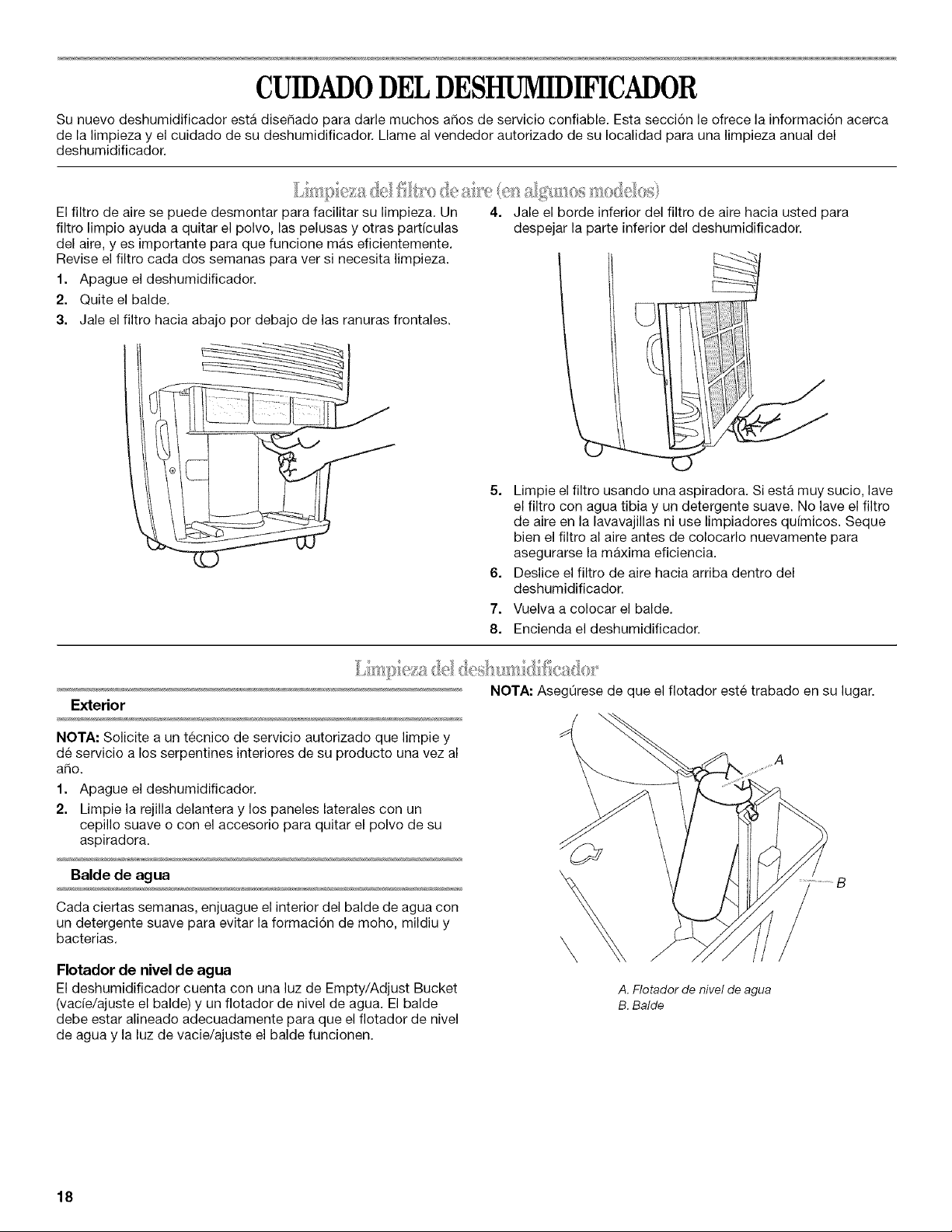
El filtro de aire se puede desmontar para facilitar su limpieza. Un
filtro limpio ayuda a quitar el polvo, las pelusas y otras particulas
del aire, y es importante para que funcione mas eficientemente.
Revise el filtro cada dos semanas para ver si necesita limpieza.
1. Apague el deshumidificador.
2. Quite el balde.
3. Jale el filtro hacia abajo por debajo de las ranuras frontales.
4=
Jale el borde inferior del filtro de aire hacia usted para
despejar la parte inferior del deshumidificador.
5. Limpie el filtro usando una aspiradora. Si esta muy sucio, lave
el filtro con agua tibia y un detergente suave. No lave el filtro
de aire en la lavavajillas ni use limpiadores qufmicos. Seque
bien el filtro al aire antes de colocarlo nuevamente para
asegurarse la maxima eficiencia.
6. Deslice el filtro de aire hacia arriba dentro del
deshumidificador.
7. Vuelva a colocar el balde.
8. Encienda el deshumidificador.
Exterior
NOTA: Solicite a un tecnico de servicio autorizado que limpie y
de servicio a los serpentines interiores de su producto una vez al
afro.
1. Apague el deshumidificador.
2. Limpie la rejilla delantera y los paneles laterales con un
cepillo suave o con el accesorio para quitar el polvo de su
aspiradora.
Balde de agua
Cada ciertas semanas, enjuague el interior del balde de agua con
un detergente suave para evitar la formaci6n de moho, mildiu y
bacterias.
Flotador de nivel de agua
El deshumidificador cuenta con una luz de Empty/Adjust Bucket
(vade/ajuste el balde) y un flotador de nivel de agua. El balde
debe estar alineado adecuadamente para que el flotador de nivel
de agua y la luz de vacie/ajuste el balde funcionen.
NOTA: AsegQrese de que el fiotador este trabado en su lugar.
\
A. Flotador de nivel de agua
B. Balde
18
#
SOLUCIONDEPROBLEMAS
Antes de solicitar servicio, pruebe las sugerencias que se incluyen a continuacibn para ver si puede resolver el
problema sin ayuda.
El deshumidificador no funciona
• &Esta encendido el deshurnidificador? Encienda el
deshumidificador.
Peligro de Choque Electrico
Conecte a un contacto de pared de conexion a tierra de
3 terrninales.
No quite la terminal de conexion a tierra.
No use un adaptador.
No use un cable el_ctrico de extensi6n.
No seguir estas instrucciones puede ocas=onar
la rnuerte, incendio o choque el_ctrico.
&Esta enchufado el cable el_ctrico en un contacto de
pared de conexi6n a tierra con 3 terminales? Conecte a un
contacto de pared de conexi6n a tierra de 3 terminales. Vea
"Requisitos electricos".
&Hay un fusible de la casa fundido o se disparb el
cortacircuitos? Reemplace el fusible o reposicione el
cortacircuitos. Si el problerna contin0a, Ilarne a un
electricista. Vea "Requisites electricos".
&Esta instalado debidarnente el balde de agua? Vuelva a
instalar el balde para que encaje completamente en el
deshumidificador.
&Necesita vaciar el balde de agua? Vacfe el balde.
&El flotador de nivel de agua esta en su lugar? Quite el
balde. AsegQrese de que el flotador este trabado en su lugar.
Vuelva a instalar el balde.
Se forma hielo en los serpentines
Los deshumidificadores de rnodelo AD25B no tienen un
deshelador automatico. Vea la etiqueta con el nL_merodel
modelo y de la serie para obtener el nQmero de modelo. Si se
forma hielo en los serpentines, desenchufe el
deshumidificador hasta que se derrita el hielo y suba la
temperatura de la habitaci6n.
Para todos los modelos excepto AD25B, tienen un
deshelador automatico que apagara el compresor y
perrnitira que funcione el ventilador. Esto reduce la
acumulaci6n de hielo en los serpentines. El compresor
resumira el ciclo una vez que el deshelador detecte la
temperatura correcta de funcionamiento.
El deshumidificador funciona pero no deshumidiflca
&Tiene usted el rnodelo AD25D? Las unidades con este
nQmero de modelo tienen un deshelador que apagara el
compresor y permitira que funcione el ventilador. Cuando el
deshelador detecta la temperatura correcta de
funcionamiento, el compresor resumira su ciclo.
&Tiene usted el control tipo 2, 3 6 4? Las unidades con
estos tipos de controles tienen un deshelador que apagara el
cornpresor y perrnitira que funcione el ventilador. Cuando el
deshelador detecta la temperatura correcta de
funcionarniento, el compresor resumira su ciclo.
&Tiene usted el control tipo 3 6 4? Si ha seleccionado
Continuous Run (funcionamiento continue), el
deshumidificador funcionara continuamente. Si es bajo el
nivel de humedad, es posible que recoja poca agua o nada
de agua.
• El filtro (en algunos rnodelos) est_ sucio u obstruido por
escombros. Limpie el filtro.
Est&tibio el aire que viene del deshumidificador
• Bajo condiciones normales de funcionamiento, el
deshumidificador sacara aire tibio.
19
AYUDA0 SERVICIOTECNICO
Antes de solicitar ayuda o servicio tecnico, por favor consulte la
secci6n "Soluci6n de problemas". Esto le podria ahorrar el costo
de una visita de servicio tecnico. Si considera que aOn necesita
ayuda, siga las instrucciones que aparecen a continuaci6n.
Cuando Ilame, tenga a mane la fecha de compra y el nOmero
completo del modelo y de la serie de su electrodomestico. Esta
informaci6n nos ayudara a atender mejor a su pedido.
Si necesita piezas de repuesto
Si necesita pedir piezas de repuesto, recomendamos que use
0nicamente piezas de repuesto FSP®. Estas piezas encajaran
bien y funcionaran bien ya que estan confeccionadas con la
misma precisi6n empleada en la fabricaci6n de cada
electrodomestico nuevo de WHIRLPOOL ®.
Para encontrar piezas de repuesto FSP® en su Iocalidad,
Ilamenos o comuniquese con el centro de servicio designado per
Whirlpool mas cercano a su Iocalidad.
Llame al Centre para la eXperiencia del cliente de Whirlpool sin
costo alguno al: 1-800-253-1301 o visite nuestro sito web en
www.whirlpool.com.
Nuestros consultores ofrecen asistencia con respecto a:
• Caracteristicas y especificaciones de nuestra linea completa
de electrodomesticos.
• Informaci6n sobreinstalaci6n.
• Procedimiento para el uso y mantenimiento.
• Venta de accesorios y piezas para reparaci6n.
• Asistencia especializada para el cliente (habla hispana,
problemas de audici6n, visi6n limitada, etc.).
Recomendaciones con distribuidores locales, compar_fas que
dan servicio y distribuidores de partes para reparaci6n. Los
tecnicos de servicio designados per Whirlpool estan
entrenados para cumplir con la garantia del producto y
ofrecer servicio una vez que la garantfa termine, en cualquier
lugar de los Estados Unidos.
Para Iocalizar a una compar_ia de servicio designada por
Whirlpool en su Area, tambien puede consultar la secci6n
amarilla de su gufa telef6nica.
Para obtener mas asistencia
Si necesita asistencia adicional, puede escribir a Whirlpool
Corporation con sus preguntas o dudas a:
Whirlpool Brand Home Appliances
Customer experience Center
553 Benson Road
Benton Harbor, M149022-2692
Favor de incluir un nOmero telef6nico de dfa en su
correspondencia.
Por favor anote la informacibn sobre su modelo.
Siempre que Ilame para solicitar servicio del aparato, necesitara
saber el n0mero del modelo y el nL_merode serie completos. Esta
informaci6n la encuentra en la placa de n0mero del modelo y
nL_merode serie. La etiqueta con el nL_merode modelo y de serie
esta ubicada en la pared detras del balde de agua.
Por favor anote la informaci6n sobre el n0mero del modelo y el
nL_merode serie que se incluye abajo. Anote tambien la fecha de
compra del aparato, asi como el nombre, la direcci6n y el
telefono de la tienda.
Nt_mero de modelo
Nt_mero de serie
Fecha de compra
Nombre de la tienda
Direcci6n de la tienda
Tel_fono de la tienda
Guarde este manual y la nota de compra juntos para referencia
futura.
1188927
© 2006 Whirlpool Corporation.
All rights reserved.
Todos los derechos reservados.
12/06
® Registered TrademarldTM Trademark of Whirlpool, U.S.A. Whirlpool Canada LP Licensee in Canada Printed in U.S.A.
® Marca registrada/TM Marca de comercio de Whirlpool, EEUU., uso bajo licencia de Whirlpool Canada LP en Canada Impreso en EE.UU.