Owner's
Manual
27" and 30"
Convection
Wall Oven
ZEK938 - 27" Single _:all Oven
ZEK958 - 27" Double Wall Oven
ZET938 - 30" Single Wall Oven
ZET958 - 30" Double Wall Oven
Monogram:
Consumer Inff)rmation
l:l%l[ Oven
Introduction
Yore" new Monogram wall oven makes all eloquent statement of style, convenience and kitchen
i)lanning flexibility. Whether you chose it fl_r its pm'ity of design, assiduous attention to detail--
or fin" both of these reasons--you'll find that yore" Monogram wall oven's superior blend of fin'm
and ftmction will delight you fl)r years to come.
Your Monogram wall oven was designed to provide the flexibility to blend in with your kitchen
cabinetry. Its sleek design can be beautihflly integrated into the kitchen.
The infi)rmation on the following pages will hel I) you operate and maintain yore" wall oven
properly.
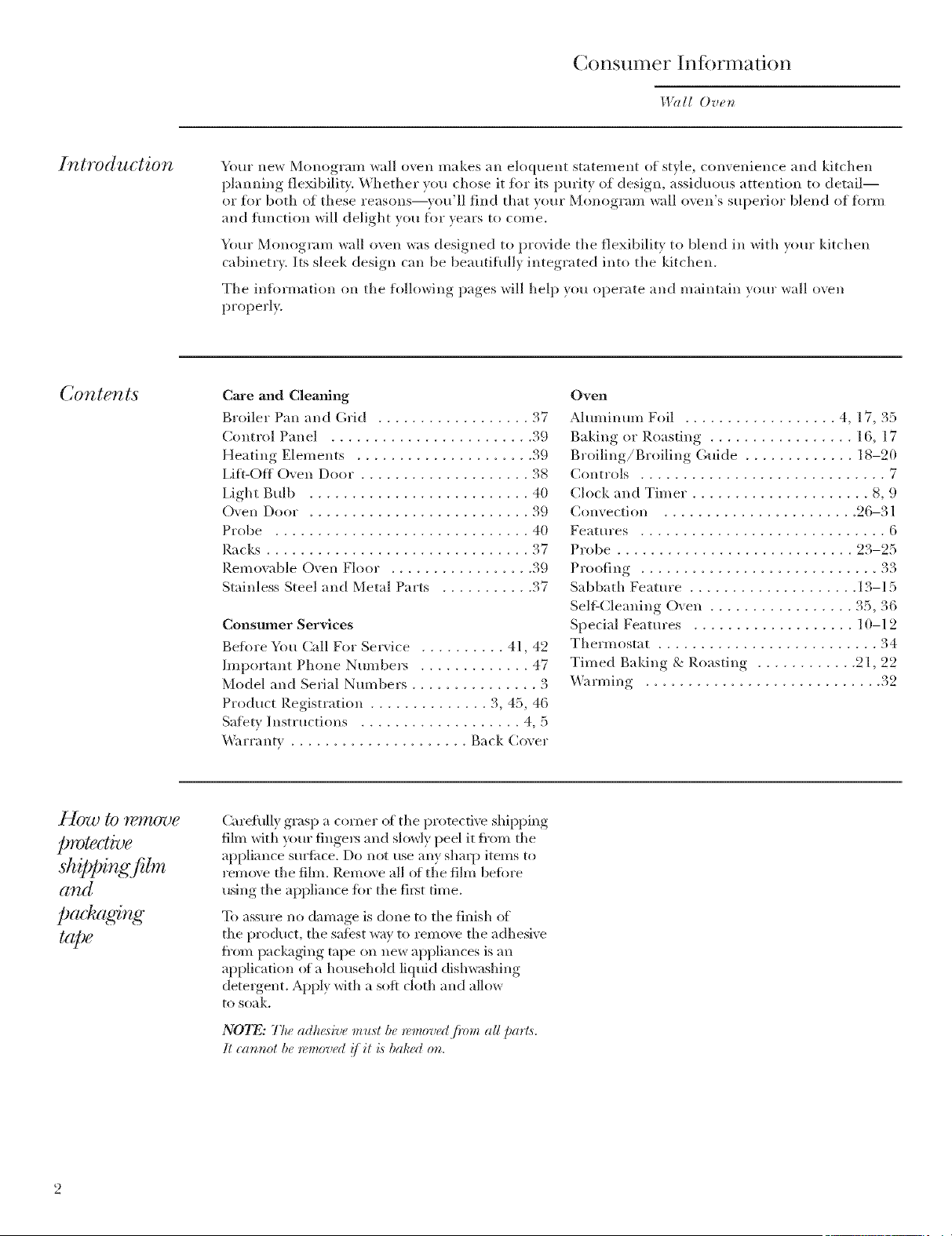
Contents
Care and Cleaning
Broiler Pan and Grid .................. 37
Control Panel ........................ 39
Heating Elements ..................... 39
Lift-Off O',en Door .................... 38
Light Bulb .......................... 40
(-)yen Door .......................... 39
Probe .............................. 40
Racks ............................... 37
P.emowlble Oven Floor . ................ 39
Stainless Steel and Metal Parts ........... 37
Consumer Services
Befl)re You Call For Service .......... 41, 42
Important Phone Numbe_ ............. 47
Model and Serial Nmnbers ............... 3
Product Registration .............. 3, 45, 46
Satbty Instructions ................... 4, 5
_%u'ranty ..................... Back Cover
Oven
Aluminum Foil .................. 4, 17, 35
Baking or Roasting ................. 16, 17
Broiling/Broiling Guide ............. 18-20
Controls ............................. 7
Clock and Timer ..................... 8, 9
Convection ....................... 26-31
Features ............................. 6
Probe ............................ 23-25
Proofing ............................ 33
Sabbath Featm'e .................... 13-15
Sell:Cleaning Oven ................. 35, 36
Special Features ................... 10-12
Thermostat .......................... 34
Timed Baking & Roasting ............ 21, 22
_%u'ming ............................ 32
protective
shitsOing f!lm
and
p(M' ag&g
t(@e
Carehflly grasp a corner (ff the protective shipl:fing
film with your fingers and slowly peel it fl'om the
appliance sm'fime. Do not use any shaq) items to
remove the film. Remove all ot the film befiwe
using the appliance fiw the fil_t time.
To assm'e no damage is done to the finish o_
tile product, tile sa_bst way to remo_v the adhesive
from packaging tape on new appliances is an
application of a household liquid dish_;Mfing
detergent. Apply with a sott cloth and allow
to soak.
N07_: The adhesive must be removedjhmz all parts.
It cat, not be removad !/it is bah(,(I o_z.
Be[bre
using your
wall oven
Read this manual carefully. It is intended to
help )ou operate and maintain ``our new wall
o``en i)roperlx,
Kee I) it hand) for ans``_ers to )our questi(ms.
If you don't understand something or need
more help, there is a list of toll-fl'ee consumer
service nmnbers included in tile back section
(sf this manual
OR
Visit our \'\Tebsite at: ge.com
-Write
down the
model &
serial
numbers
You'll find them on a label on tile side trim
or (m tile front (>f tile (lower) o``en behind
the s),,'esl dssot2
Fill out and return tile Consmner Product
P.egistration Card that is packed with this
product. If you cannot find it, please send
in tile duplicate card printed in the back
of this manual.
Before sending in this card, please write these
numbers here:
Model Number
Serial Number
Use these llttl/lbeFs ill all} COITeSl)(sndellCe (st"
service calls concerning }our ``<all o`` en,
{/you
received a
damaged
wall oven
Immediately contact the dealer (or btulder)
that sold )ou tile wall o``en,
Save time
& money
Before )ssu request serx4ce, check tile Problem
Solver in the back of this manual.
It lists causes of minor ol)erating, problems that
}S)tt casl c(st't'ect }ourself.
/./you
need
service
To obtain service, see tile (;onsumer Services
page in the back of this manual.
We're })roud of our service and want you to be
pleased. If %r some reason you are not happy
with the service vou receive, here are tile steps
to %llow %)" further help.
FIRST, contact tile peoI)le who serviced ``our
appliance. Explain ``_ll} )(m are not pleased.
In most cases, this vAll s(s]`` e tile problem.
NEXT, if vsm are still not pleased, write all tile
details--including }(mr ph(me ram)bet--to:
Managex; Customer Relations
GE Api)liances
Appliance Park
Louisville,/<.Y 40225
IMPORTANT SAFETY INSTRUCTIONS
WARNING!
For xour saiety, tile infornmtion in this manual must be followed to mininlize tile risk of fire or
explosion, electric shock, or to prexent propert) damage personal ii_jury or loss of life.
IMPOR 7ANT SA[i 'TY NO TICE
" The California Safe Drinking Water and
Toxic Enforcement Act requires tile Governor
of CaliJ_m'nia to publish a list of substances
known to tile state to cause cancer, birth
de_bcts or other reproductive harm, and
requires businesses to warll CtlStOl/lers o_
potential exposure to such substances.
" The fiberglass insulation in self-cleaning
ovens gives off a very small amount of carbon
monoxide during the cleaning cycle. Exposm'e
can be minimized by venting with an open
window or using a ventilation lira or hood.
lru-rlD g--_ -i-_ v-p A -_ Trlp
"l[±VJ[r_.Jl[_ J[a_Jk_ ][ : Tile health of
some birds is extremelx sensitixe to the fumes
gixen off during the sel_Lcleaulng c) cle of an}
oven. Move birds to another well-ventilated
roon/.
SAf >;TY PRECA U770NS
When using your appliance, follow basic safety
precautions, including the following:
, Use this appliance only for its intended use
as described in this manual.
" Be sure your appliance is properly installed
and grounded b) a qualified technician in
accordance with tile provided installation
instrslctiosls.
, Be sure the oven is securely installed in a
cabinet that is firmly attached to the house
structure. Never allow anyone to climb, sit,
stasld or hang oil tile ovesl door.
" Have the installer show you the location of
the circuit breaker or fuse. Mark it for eas}
re_erellce.
, Do not attempt to repair or replace any part
of your wall oven unless it is specifically
recommended in this manual. All other
servicing should be re_brred to a qualified
technician.
" Teach children not to play with the controls
or any ()tiles" part of the oven.
"Never leave the oven door open when you
are not watching the oven.
, Always keep dish towels, dish cloths, pot
holders and other linens a safe distance from
yonr oven.
" For your safety, never use your appliance for
warming or heating the room.
, Always keep wooden and plastic utensils
and canned food a safe distance away from
yOUF oven.
" Keep the oven free from grease buildup.
, Always keep combustible wall coverings, curtains
or drapes a safe distance from your oven.
, DO NOT STORE OR USE COMBUSTIBLE
MATERIALS, GASOLINE OR OTHER
FLAMMABLE VAPORS AND LIQUIDS IN
THE VICINITY OF THIS OR ANY OTHER
APPLIANCE,
, Do not let cooking grease or other flammable
materials accumulate in or near the wall oven.
* Do not use water on grease fires. Smother fire
or flame or use a multi-purpose dry chemical
or loam-type fire extinguisher.
Flame in tile oven can be smothered
completely by closing the oven door
and turning the oven off or by using a
multi-pro'pose dry chemical or fl)am-type
fire extinguisher.
, Do not use aluminum foil to line oven
bottoms, except as suggested in this manual.
hnproper installation of altll_linum foil ma)
result in a risk of electric shock or fire.
, Cook meat and poultry thoroughly--meat to
at least an INTERNAL temperature of 160°F
and poultry to at least an INTERNAL
temperature of 180°1)'. Cooking to these
temperatures usually protects against
fl)odborne illness.
"Before performing any service, DISCONNECT
THE OVEN POWER SUPPLY AT THE
HOUSEHOLD DISTRIBUTION PANEL BY
REMOVING THE FUSE OR SWITCHING
OFF THE CIR(R)IT BREAKER.
, Do not store flammable materials in the oven.
4
SAP 2TY PRE CA U770NS
" Do not leave children alone--children shoukl
not be leit alone or unattended in an area
where all appliance is ill use. They should
never be allowed to sit or stand on ally part
of the appliance.
, Do not touch the heating elements or the
interior surface of the oven. These sm'Ihces
may be hot enough to burn even though they
are dark in color. During and after use, do not
touch, or let clothing or other flammable
materials contact, any interior area of the
oven; allow sufficient time fl)r cooling first.
Potentially hot surfhces include the oven vent
openings and sur_hces near the openings,
crevices around the oven doox; the edges of
the door window and metal trim parts above
the door.
Remember: Tile inside surfitce of the oven
may be hot when tile door is opened.
. CAUTION: ITEMSOFINTEr:ST
TO CHILDREN SHOULD NOT BE STORED
IN CABINETS ABOVE A WALL OVEN--
CHILDREN CLIMBING ON THE OVEN
TO REACH ITEMS COULD BE SERIOUSLY
INJURED.
* Never wear loose-fitting or hanging garments
while using the appliance. Be careful when
reaching fl)r items stored over the oven.
Flammable material could be ignited if
brought in contact with oven heating
elements and may cause severe burns.
* Do not heat unopened food containers.
Pressure could build up and the container
could bm_t, causing all i@n'y.
* Keep the oven vent unobstructed.
" Place the oven rack in the desired position
while the oven is cool. If racks must be handled
when hot, do not let pot holder contact the
heating elements.
"Never leave jars or cans of fat drippings in or
near your oven.
, Pulling out the rack to the rack stop is a
convenience in lifting heavy foods. It is also
a precaution against blu'ns fl'om touching
hot surti_ces of the door or oven walls.
, When using cooking or roasting bags in the
oven, fi_lh)w the manufiictm'er's directions.
" Do not use your oven to dry newspapers.
If o\ erheated, they can catch on fire.
, Do not use oven for a storage area. Items stored
ill all oven can ignite.
" Do not leave paper products, cooldng utensils
or food in the oven when not in use,
, Do not allow anyone to climb, stand or hang
on the door, They could damage the oven or
cause severe personal il_jur)';
, Use only dry pot holders--moist or damp pot
holders on hot sllrfi_ces ulav restllt ill bt/rlls
fl'om steam. Do not let pot holders touch oven
heating elements. Do not use a towel
or other bulky cloth.
, After broiling, always taJ_e the broiler pan out
of the oven and dean it. Leftover grease ill the
broiler pan can catch fire the next time you use
the pan.
, Stand away from the oven when opening the
oven door. Hot air or steam which escapes call
cause burns to hands, fi_ce and/or eves.
, Large scratches or impacts to glass doors cam
lead to broken or shattered glass.
SEI_ r -CLEANING OVEN
" Do not clean the door gasket. The door gasket
is essential %r a good seal. Care should be
taken not to rub, damage or move the gasket.
* Do not use oven cleaners. No COl/lulerrial ovell
cleaner or oven liner protective coating of ally
kind should be used in or around ally paI_ of
the oven. Residue from o\ ell cleaners will
damage the inside of the oven when the
selIklean cycle is used.
, CleaJa only parts listed in tiffs Owner's Manual.
, Before self-clea_aing the oven, remove the
broiler pan, grid and other cookware.
" Be sure to wipe up excess spillage before
staxting the self-clemffng operation.
" If the sdf-deaxiing mode maJfunctions, turn
tlle oven off and disconnect the power supply.
Have it seIMced by a qualified technidan.
SAVE THESE INSTRUCTIONS
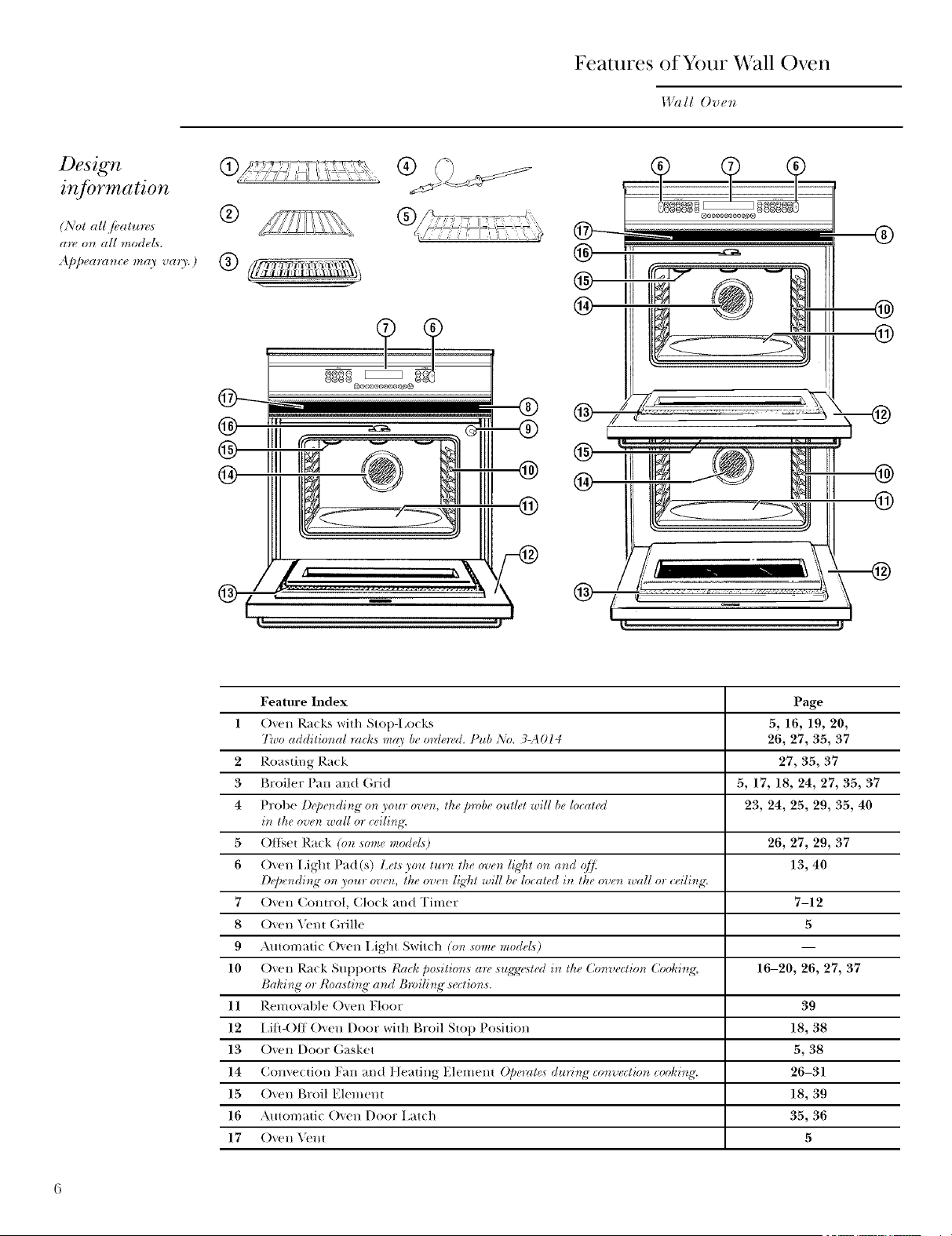
Features of Your Wall Oven
I.l_lll Ove*_
Design
inJbrmation
(NO1 all [bal*_r_<s
are o_ all modeL_.
41_peam_ce_ay vaU.)
®
®
J
®
@
@
Feature Index Page
1 Oven Racks with Stop-I,ocks 5, 16, 19, 20,
Two additio_al mcl_s m_O' be o_Uered. Pub ,\'o. 3-A014 26, 27, 35, 37
2 Roasting Rack 27, 35, 37
3 Broiler Pan and (;rid 5, 17, 18, 24, 27, 35, 37
4 Probe Depe_tdi_tg on your overt, the probe outlet will be Ioc_lted 23, 24, 25, 29, 35, 40
i_t the oven wall or ceili_g'.
5 ()ttset Rack (o_t some mode£) 26, 27, 29, 37
6 Oven I Aght Pad (s) Lel._ you tur_ the overt ligDt o_t _l_td qD_; 13, 40
D_'pe_di_g >on your ove_, the ove_ [_,_'htwill be located i_ the ove_ w_UI or ceili_g'.
7 Oven ConU:ol, Clo(k and Timer 7-12
8 Oven Veni Grille 5
9 Amomatic Oven 15ght Switch (on some models) I
10 Oven Rack Supports thick position,s are sugg','_t{>Ui_ the Convectio_ Cooki_g, 16-20, 26, 27, 37
Baking or Ro:_sti_g" a_d B_ili_g sections.
11 Removable ()yen Floor 39
12 15fl-()ff Oven Door witt_ Broil Slop Position 18, 38
13 Oven Door Gasket 5, 38
14 Convection Fan and tIeating Elemenl ()/)emt_ during co_roectio_ cooki_g'. 26-31
15 Oven Broil Elemeni 18, 39
16 Automatic Oven Door I,atch 35, 36
17 Oven _'nt 5
Oven Control, (;lock & Timer
14%II Oven
ooo 2oo
Doubleovencontrolshown.(Appearancemayvary.)
k atures of
yO_llT 07}C72
control,
clock and
tim
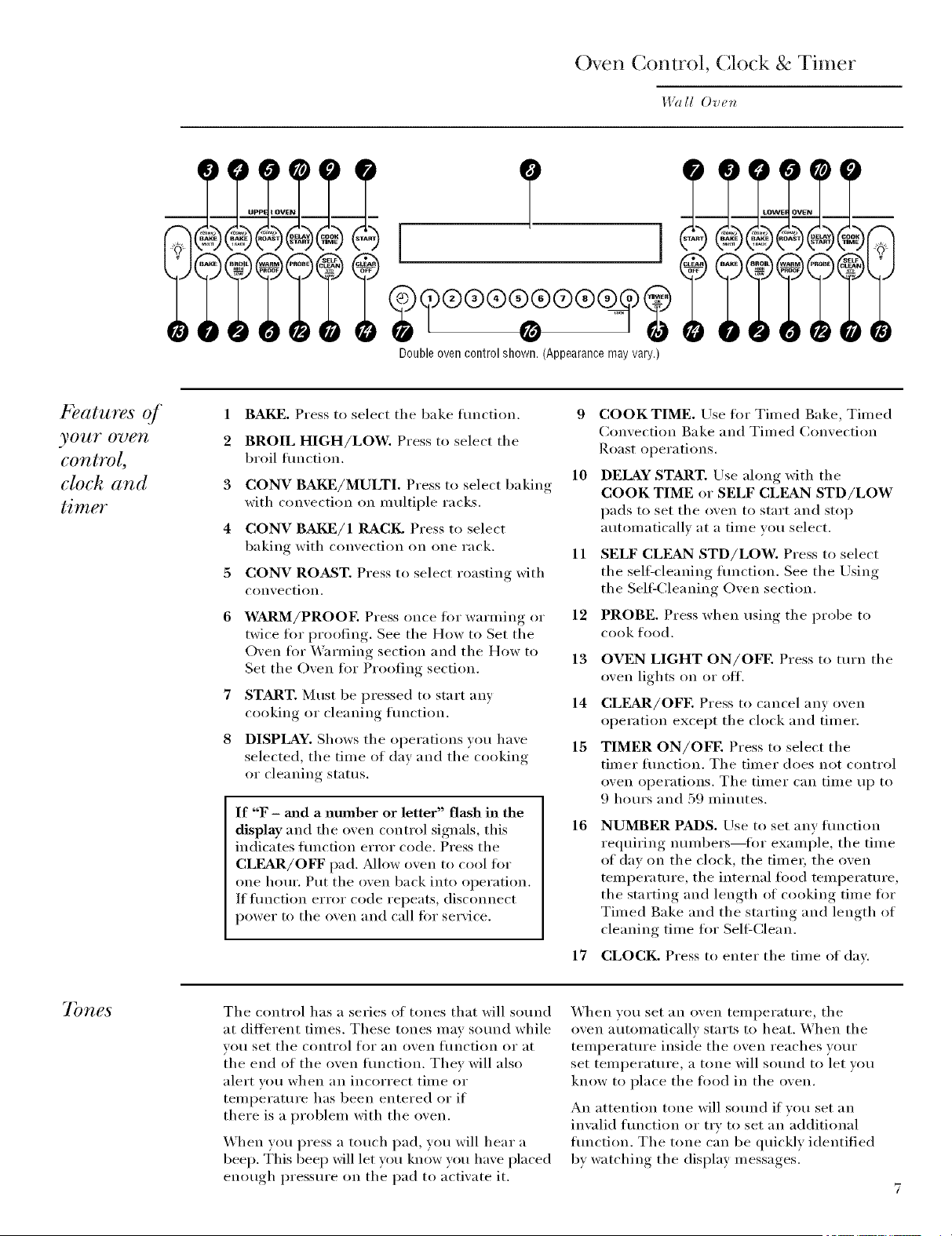
1
2
3
4
5
6
7
8
BAKE. Press to select the bake flmction.
BROIL HIGH/LOW. Press to select the
broil flmction.
CONV BAI_]/MULTI. Press to select baking
with convection on multiple racks.
CONV BAld]/1 RACK. Press to select
baking with convection on one rack.
CONV ROAST. Press to select roasting with
convection.
WARM/PROOE Press once tk_I"warming or
twice ff)r proofing. See the How to Set the
Oven for Warming section and the How to
Set the Oven for Proofing section.
START. Must be pressed to start any
cooking or cleaning flmction.
DISPLAY. Shows the operations you have
selected, the time of day and the cooking
or cleaning status.
If "F - mad a number or letter" flash in the
display and the oven control signals, this
indicates hmction error code. Press the
CLFAR/OFF pad. Allow oven to cool for
one horn'. Put the oven back into operation.
If flmction error code repeats, disconnect
power to the oven and call for service.
9 COOKTIME. Use fi)r Timed Bake, Timed
Convection Bake and Timed Convection
Roast operatiollS.
10 DELAY START. Use along with the
COOK TIME or SELF CLEAN STD/LOW
pads to set the oven to start and stop
automatically at a time you select.
11 SELF CLEAN STD/LOW. Press to select
the sellecleaning flmction. See the Lrsing
the SeltZCleaning Oven section.
PROBE. Press when using the probe to
cook food.
12
13
14
15
16
OVEN LIGHT ON/OFE Press to mrn the
oven lights on or off.
CLEAR/OFE Press to cancel any oven
operation except the clock and timer.
TIMER ON/OFE Press to select the
timer flmction. The timer does not control
oven operations. The timer can time up to
9 horn's and 59 minutes.
NUMBER PADS. Use to set any flmction
requiring numbers--fi)r example, the time
of dav on the clock, the timer, the oven
temperatm'e, the internal food temperatm'e,
the starting and length of cooking time for
Timed Bake and the starting and length of
cleaning time for Sell:Clean.
17 CLOCK. Press to enter the time of day.
7bnes
The control has a series of tones that will sound
at dilterent times. These tones may sotmd while
you set the control for an oven function or at
the end of the oven fimction. They will also
alert VO/l whell }lil illcorrect tillle or
temperature has been entered or if
there is a problem with the oven.
When vou press a touch pad, you will hear a
beep. This beep will let w)u know you have placed
enough pressure on the pad to activate it.
When vou set an oven temperatm'e, the
oven automatically starts to heat. When the
temperatm'e inside the oven reaches your
set temperature, a tone will sotmd to let you
know to place the tood in the oven.
An attention tone will sotmd if vou set an
invalid flmction or try to set an additional
flmction. The tone can be quickly identified
by watching the display messages.
Oven Control, Clock & Timer
l;Va 11 Ove_
Clock
The c[od_ must be set f>r the automatic oven timir_g"
,]'Unctions to work prop_,rly,
The time of day clock cammt be changed
during Delay Start. (It can be changed during
a regular bake or broil operation.)
7b set
the clock
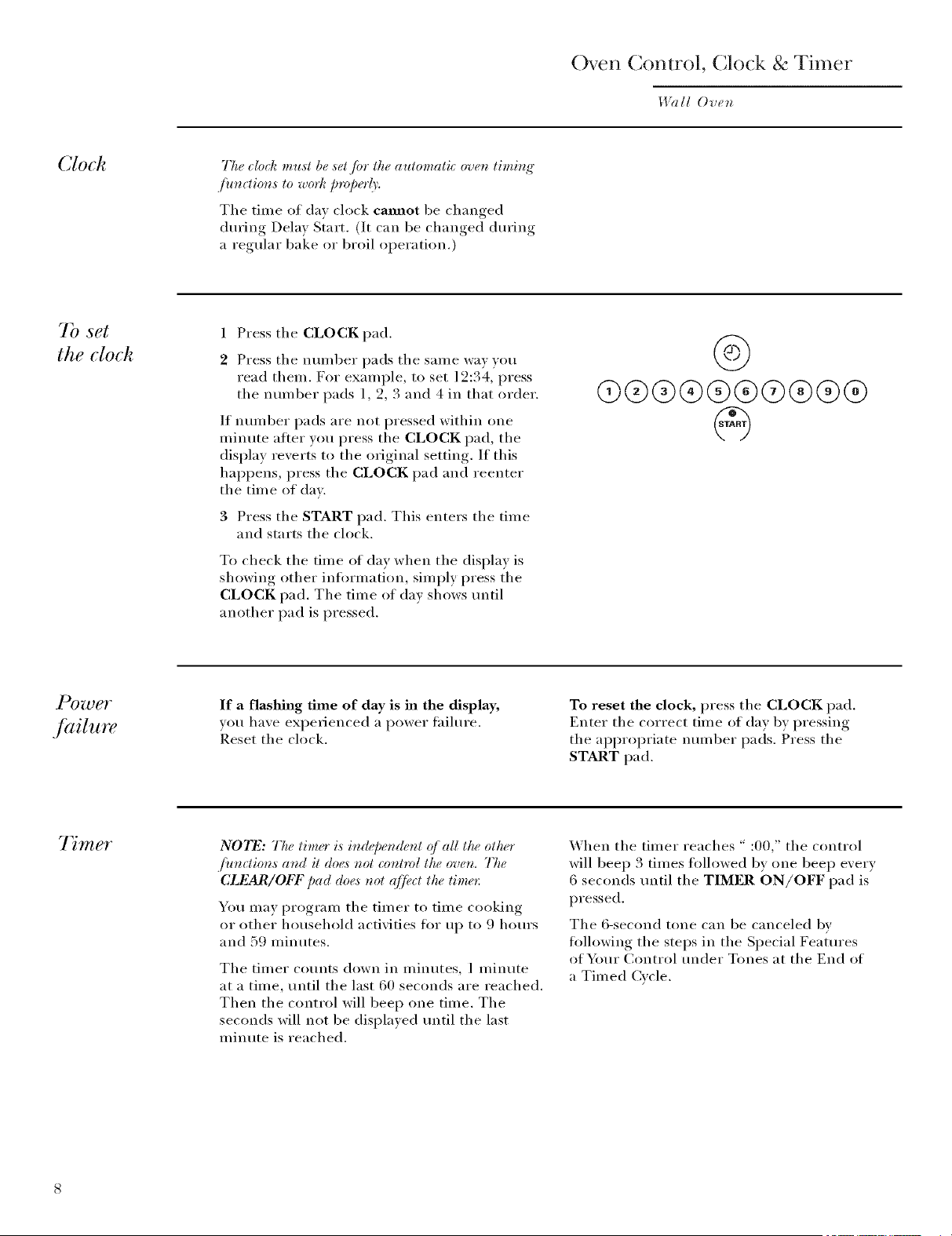
1 Press the CLOCK pad.
2 Press the number pads the same way you
read them. For example, to set ] 2:34, press
the number pads 1, 2, 3 and 4 in that order.
If number pads are not pressed within one
minute aiier you press the CLOCK pad, the
display reverts to the original setting. If this
hal)pens, press the CLOCK pad and reenter
the time of day.
3 Press the START pad. This enters the time
and starts the clock.
To check the time of day when the display is
showing other infi)rmation, simply press the
CLOCK pad. The time of day shows tmtil
another pad is pressed.
@
@@@®®®@®®®
If a flashing time of day is ha the display,
you have expe_ienced a power thilure.
Reset the clock.
To reset the clock, press the CLOCK pad.
Enter the correct time of day by pressing
the ai)i)ropriate number pads. Press the
START pad.
7 mer
NOTE: The timer is independe_zt (?]all the oth(<r
,]')_n_tions and it doe,s not _ontrol the oven, The
CLEAR/OFF pad doe,_not (qf, ct the time_:
You may program the timer to time cooking
or other household activities fl)r up to 9 horn's
and 59 minutes.
The timer counts down in minutes, 1 minute
at a time, until the last 60 seconds are reached.
Then the control will beep one time. The
seconds will not be displayed tmtil the last
minute is reached.
When the timer reaches " :00," the control
will beep 3 times fi)llowed by one beep eveI'v
6 seconds tmtil the TIMER ON/OFF pad is
pressed.
The 6-second tone can be canceled bv
fi)llowing the steps in the Special Features
of Your Control under Tones at the End of
a Timed Cw'le.
Using
the timer
1 Press tile TIMER ON/OFF pad.
2 Press tile nmnber pads to set tile time. For
example, to enter 2 hours and 45 minutes,
touch 2, 4 and 5 in that order.
(/you make a mislake, press lhe 77MER ON/OFF
pad a_d b_q'it_ ag'aim
3 Press tile START pad.
After pressing tile START pad, "SET"
disappears; this tells you the time is cotmting
down, although the display does not change
until one minute has passed. Seconds will not
be shown in the display until the last minute is
counting down.
4 _'_lien time is up, tile oven control signals
until )ou press the TIMER ON/Ol_" pad.
Display then shows the time of da_.
NOTE: 77w mbmte timer is i_depet_de_l (?/all lhe
olher /)t_clio_,s at_d il does _ol co_lrol lhe ove_.
The CLEAR/OFF pad does t_ol qff_¢cl ttte time*:
@
®®®®®®®®®@
@
To reset the timer:
If tile display is still showing tile time remaining,
you may change it by pressing the TIMER
ON/OFF pad, then press the nun/bet pads until
the time you want appea_5 in the display.
If tile remaining time is not in tile display (clock,
delay start or cooking time are in the display),
recall the remaining time by pressing the TIMER
ON/OFF pad and then pressing tile number pads
to enter tile new tiule vo/i iV_lilt,
To cancel the timer:
Press tile TIMF, R ON/OFF pad twice.
Control
lockout
Your control will allow vou to lock out tile
touch pads so they cannot be activated when
pressed.
N07_: Or_doable ovea model,s, this aUival¢,s this
./_,ature /br both oveas.
To lock/mflock the controls:
1 Press the 9 and 0 pads at the same time tot 3
seconds, until the display shows "I,OC ON."
2 To tmlock tile control, press tile 9 and 0 pads
(on double oven Inodels, use tile upper oven
controls) at tile san/e time tot 3 seconds,
tmtil the display shows "I,OC OFK"
"_,_hen this featm'e is on and tile touch pads are
pressed, tile control will beep and tile displa)
will show "I,OC ON."
NOTES:
• 77w cor_lrol bchoul mode @cls all ioudz pads. 5)_
loluh pad_willworkwlu:r_l/fi,sf,alutvh aaivab,d.
• 77_,¢ac(]u,slme¢_lrvifi be rdabwd it_ memor) after a
power fifihm,
fi)®
LOCK
Special Features
5 ecial
.[eatures q[
.yOUr OUgTI
control
}bur new touch pad cot_trol has additiot_al fi_atu**,s
that you may choose to use.
They remain ill tile control's memory until
the steps are repeated. When the display shows
your choice, press the START pad. The special
features will remain in memory Mter a power
fifilure, except fiw tile Sabbath ibature, which *_ill
have to be reset.
Tile special tbatm'e modes can only be activated
while tile displa} is showing tile time of da_ clock,
Tile follo,_ing are tile features and ho*_ }ou
ma) actixate them.
7bnes at
the end q/ a
timed ucle
At the end g_]a timed o'ch; 3 short beeps will
sound Jblh_wed by one be@ every 6 secon& until
the CLI_2AR/OFF pad is pre._.s,¢d.This _ontinuous
6-s_ond beep m(O' be (an_e#d. 7b cancel the
6-s*¢cond ba'/):
Press tile BAKE and BROIL HIGH/LOW
pads (on double oven models, use tile upper
oven controls) at the same time tin" 3 seconds
tmtil the display shows "SF,"
Press tile TIMER ON/OFF pad. Tile display
shows "CON BEEP" (continuous beep). Press
the TIMER ON/OFF pad again. The display
shows "BEER" (This cancels the one beep
every 6 seconds.)
3 Press tile START pad.
NOTE: On double oven models, this cancels the
end-(*/:O_ le tone fin" both oven,s.
0
7bne
volume
10
77_i,sfiCatureallowsyou toac(iu,st#w tonevolumes toa
mo*eacceptablevoh,,me. 77te_ea*,_threepo,s,sihl_voh,,me
l_,veL*.
1 Press tile BAKE and BROIL HIGH/LOW pads
(on double oven models, use tile upper oven
controls) at the same time fi)r 3 seconds, tmtil
the display sho_vs "SE"
2 Press tile oven fight on/off pad. Tile displa) will
show "2 BEER" This is the middle xohune lexel.
Press tile oven fight on/off pad again. Tile
displa) will show "3 BEER" This is the loudest
_,ohllne lexel.
Press tile oven fight on/off pad again. Tile
display will show "1 BEER" This is the quietest
•_ohlule lexel.
For each time tile lexel is changed, a tone will
so/md to proxide an indication of tile xolume
lexel.
3 Press tile START pad to actixate tile lexel
shown.
NO_I_Z: On double oven too(Iris, this activates this
Special fi,,attovfin" both _roen,s.
G
12-hour,
24-hour
or clock
blackout
_bur control is ,set to use a 12-hour clock. (/you
would pr@_r lo have a 24-hour mililary lime dock or
bla_k out the dock di@la3, fidlow the steps below.
Press the BAKE and BROIL HIGH/LOW
pads (on double oven models, use the upper
oven controls) at the same time for 3 seconds
until the display shows "SIL"
2 Press the CLOCK pad once. The display will
show "12 hr." If this is the choice you want
press the START pad.
Press the CLOCK pad again to change to the
24-horn" military time clock. The display will
show "24 hr." l( this is the choice you want,
press the START pad.
Press the CLOCK pad again to black out the
clock display. The display will show "O[_[L ''
If this is the choice you want, press the
START pad.
N07_: [/lhe clock is i_ lhe blaek-oul mode, you will
r_ol be able lo use lhe Del( O' Slarl /itr_clior_.
@+@
@
12-hour
shut o1/
With this fi, atare, shouhl you fi,]qr,t and leave the
oven on, the control will atttomatical(_' turr_ (_/ the
oven q]?er 12 hom:s durir_g" baki_g'J)mctions or q//¢r
3 hou_:s duri_g" a b_vil/)metion. (/you wish to turr_
(_[/lhis fl,atu_¢, fidlow the steps below.
Press the BAI_] and BROIL HIGH/LOW
pads (on double oven models, use the upper
oven controls) at the same time fi>r 3 seconds
tmtil the display shows "SF."
2 Press the DELAY START pad tmtil "no shdn"
(no shut-off) appears in the display.
3 Press the START pad to activate the no
shut-off and lea_e the control set in this
special ti_attu'es mode.
NOTF: 0_ double ove_ models, lhis aclivalas lhis
Spe_ial f,alto,_ i_ both ovet_,s.
@+@
@
11
Special Features
Wall Oven
t' threnheit
or Celsius
temperature
selection
_bur oven conlrol i,s sel lo use lhe Fakre_keil
lemperalure seleclions, bul you may eha_ge lkis
to use the Cel,siu,s ,se#clio_,s.
1 Press the BAKE and BROIL HIGH/LOW
pads (on double oven models, use the upper
oven controls) at the same time ti)r 3 seconds
until the display shows "SK"
2 Press the BROIL HIGH/LOW and COOK
TIME pads at the same time. The display will
show "F" ([_ahrenheit).
Press the BROIL HIGH/LOW and COOK
TIME pads again at the same time. This will
show "(7' (Celsius).
3 Press the START pad. The new setting will be
displayed tot both ovens.
NOTF: On double over_ mode& the uew setti*_e,"will
be disJdayed Jbr both ove_,s.
@.@
@
A "llt o
conversion
1,17zenusir_g"eonve( tion bake, the Auto I_ecipe'"
Couver,siou /kature will automatically _onvert entered
r_q'ular bakir_g"lempe*r_tu*_¢,_to _onvection baki_g"
tem/:e*rcture,_.
Once lhe fi_alu_, is activaled, the displa)' will show lhe
actual couve*'ted (*_,duced) tempe*vltu*_. For example,
!Jyou er_te*"a _z'g'ular rec@e tempe*rltare (_/ 350°F and
pre,_sthe START pad, the display will show "CON"
and the converted tempe*rlture ({/"325°t{"
NO_I_2: ThisJ;¢alure doe,snot co*n_erlconveclio*_bake
eooki_g"lime,s, o_dy r(_q'ularbaki_g lem/)eralures.
To Activate the Feature:
1 Press the BAKE and BROIL HIGH/LOW
pads (on double oven Inodels, use the upper
oven controls) at the same time fl)r 3
seconds, until the display shows "SE"
2 Press the CONV BAKE/1 RACK pad. The
display will show "CON OFE" Press the
CONV BAKE/1 RACK pad again. The
display will show "CON ON."
3 Press the START pad.
To deactivate the feature, repeat steps 1-3
abme but press the START pad when "CON
OFF" is in the display.
@+@
@
12
Using the Sabbath Feature
I.l?lll Oven
Desig_,ed for use on theJewish Sabbath and Holidays.
77w Sabbath fieatlm, can be used for bahin@roastit_g',,
only. It cannot be usedfi,' convection, b_dling;
self=cbat_ing', or Delay Start cool¢i_g:
NO'I_2:The ovcr_/{@t comeson automatically (on so*tw
modds) whe_ thedoor is opem,d aml goesq/]w/m, the
dooris clo,sed.The btdh m(O,be *mno'ued.See the ()ver_
L{qg_tI{@/accmc+_ztsectiot_.()n modek with a I{@tswi>h
on th,_co_lml pa,e/, the o'uc_z/iqT_tm,O,be tur, d on
a_zd1¢ion.
Sabbath
I')ature:
How to set
./br regular
baking or
roasting
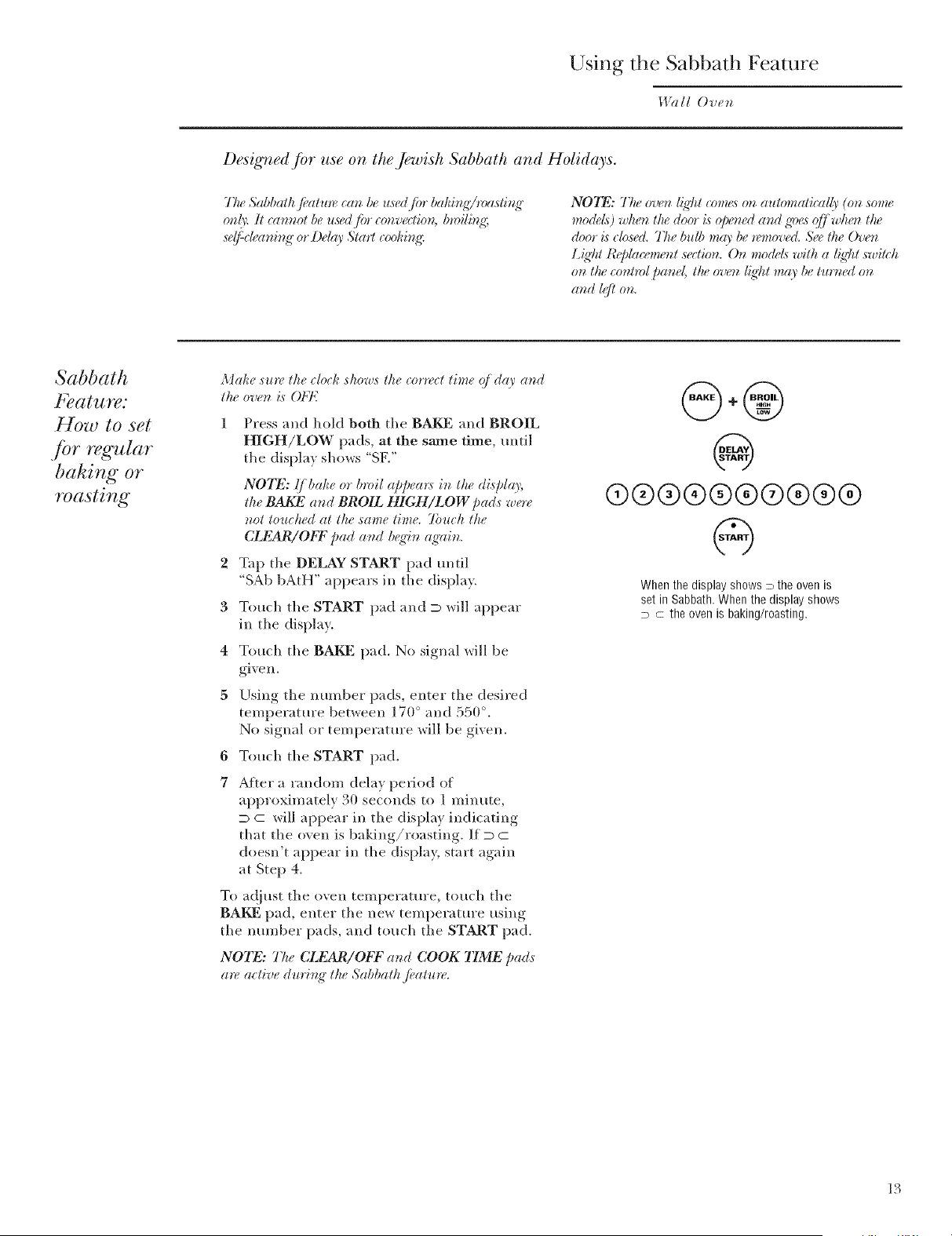
Make sure the clock shows the corwct time (j day and
the over_ is OFI'7
2
3
4
5
6
7
Press and hold both the BAKE and BROIL
HIGH/LOW pads, at the same time, until
the displa) shows "SF."
NOTE: .(]bake or broil appea_:s in the displ_o;
the BAKE a,d BROIL HIGH/LOW pa& were
not touched at the same time. 7btuh the
CLEAR/ObT pad at_d beg'it_ ag'ain.
Tap the DELAY START pad until
"SAb bAtH" appears in the displa}.
Touch the START pad and D will appear
in the displa}.
Touch the BAKE pad. No signal will be
glVell.
Using the number pads, enter the desired
temperature betx_een 170 ° and 550 °.
No signal or temperature will be given.
Touch the START pad.
After a random delay period of
approximately 30 seconds to 1 minute,
D c will appear in the display indicating
that the oven is baking/roasting. If D C
doesn't appear in the display, start again
at Step 4.
To ac!}ust the oxen temperature, touch the
BAKE pad, enter the new temperature using
the number pads, and touch the START pad.
NOTE: 77u_ CLEAR/Ob\F and COOK TIME pads
a*v active dto'i_g" the Sabbath ficatur<
@+@
@
@@@(9@@@@@@
@
When the display shows D the oven is
set in Sabbath, When the display shows
D C the oven is baking/roasting.
13
Using the Sabbath Feature
14?HIOven
Sabbath
f_ature:
HOw to set fbr
timed baking
or roasting -
immediate start
and automatic
stop
Make ,surt_the clod_ sho'ws the correct time of day and
the oven i,s OFI'7
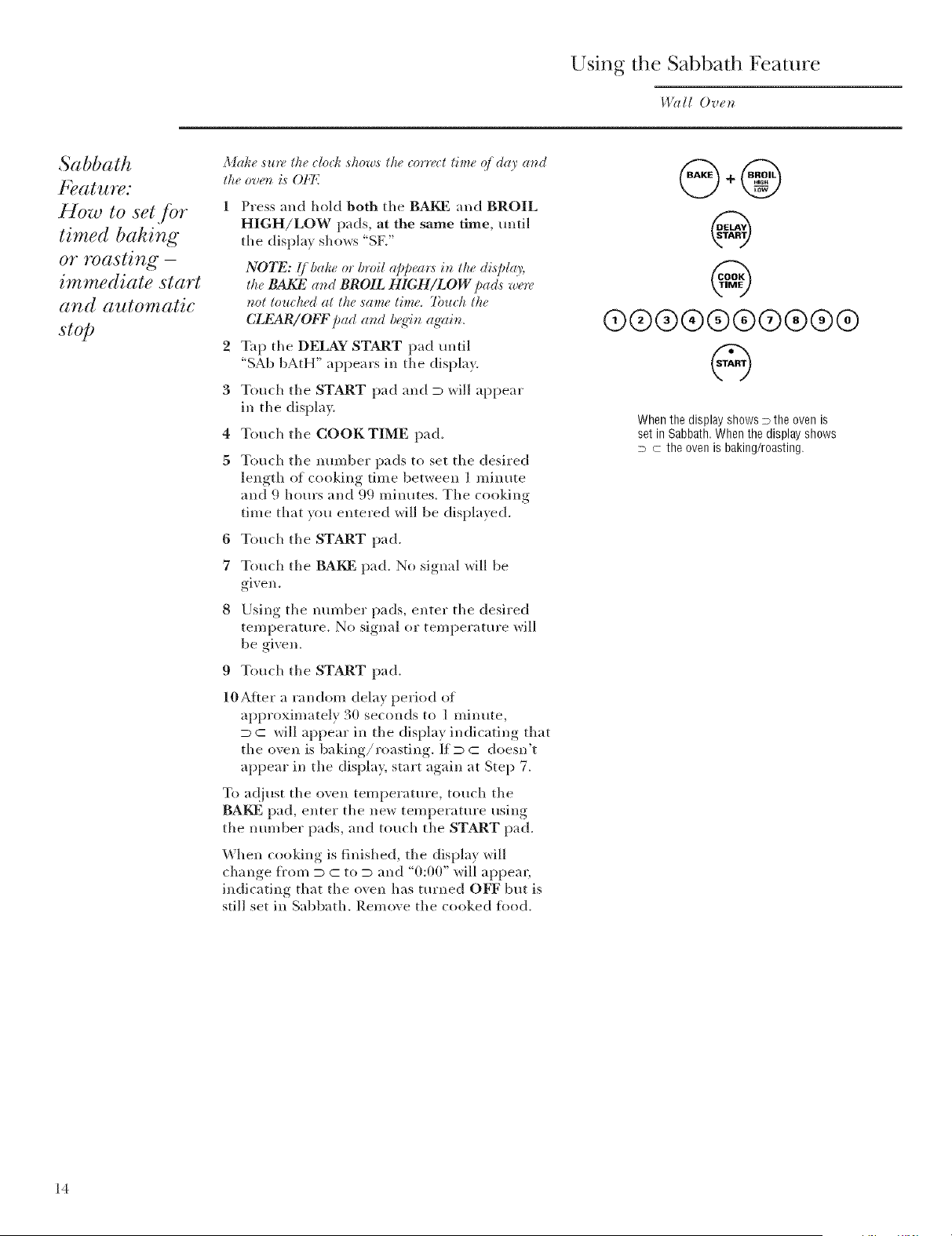
1 Press and hold both the BAKE and BROIL
HIGH/LOW pads, at the same time, until
the displa} shows "SF2'
2
3
4
5
6
7
NOTE: .!]bake or broil appea_s in the display,
the BAI_2 and BROIL HIGH/LOW pads were
not touched at the same time. 7buH_ the
CLEAR/OFF_ /)ad and beffin, a_'ain,
Tap the DELAY START pad until
"SAb bAtH" appears in the displa}.
Touch the START pad and D will appear
in the display.
Touch the COOK TIME pad.
Touch the number pads to set tile desired
length of cooking time between ] minute
and 9 horn's and 99 minutes_ The cooking
time that you entered will be displayed.
Touch the START pad.
Touch the BAKE pad. No signal xdll be
glVell.
Using the mm_ber pads, enter the desired
temperature. No signal or temperature xdll
be given_
9 Touch the START pad.
10After a random delay period of
approximately 30 seconds to ] minute,
D C will appear in the display indicating that
the oven is baking/roasting. If D C doesn't
appear in the display, start again at Step 7.
To ac{iust the oxen temperature, touch the
BAKE pad, enter the new teml)erature using
the number pads, and touch the START pad.
When cooking is finished, tile display will
change fl'om D C to D and "0:00" will appear,
indicating that the oven has turned OFF but is
still set in Sabbath. Remove the cooked tLod.
%
®®@®@®®®®@
@
When the display shows > the oven is
set in Sabbath, When the display shows
D C the oven is baking/roasting.
14
How to exit
the Sabbath
Jeature
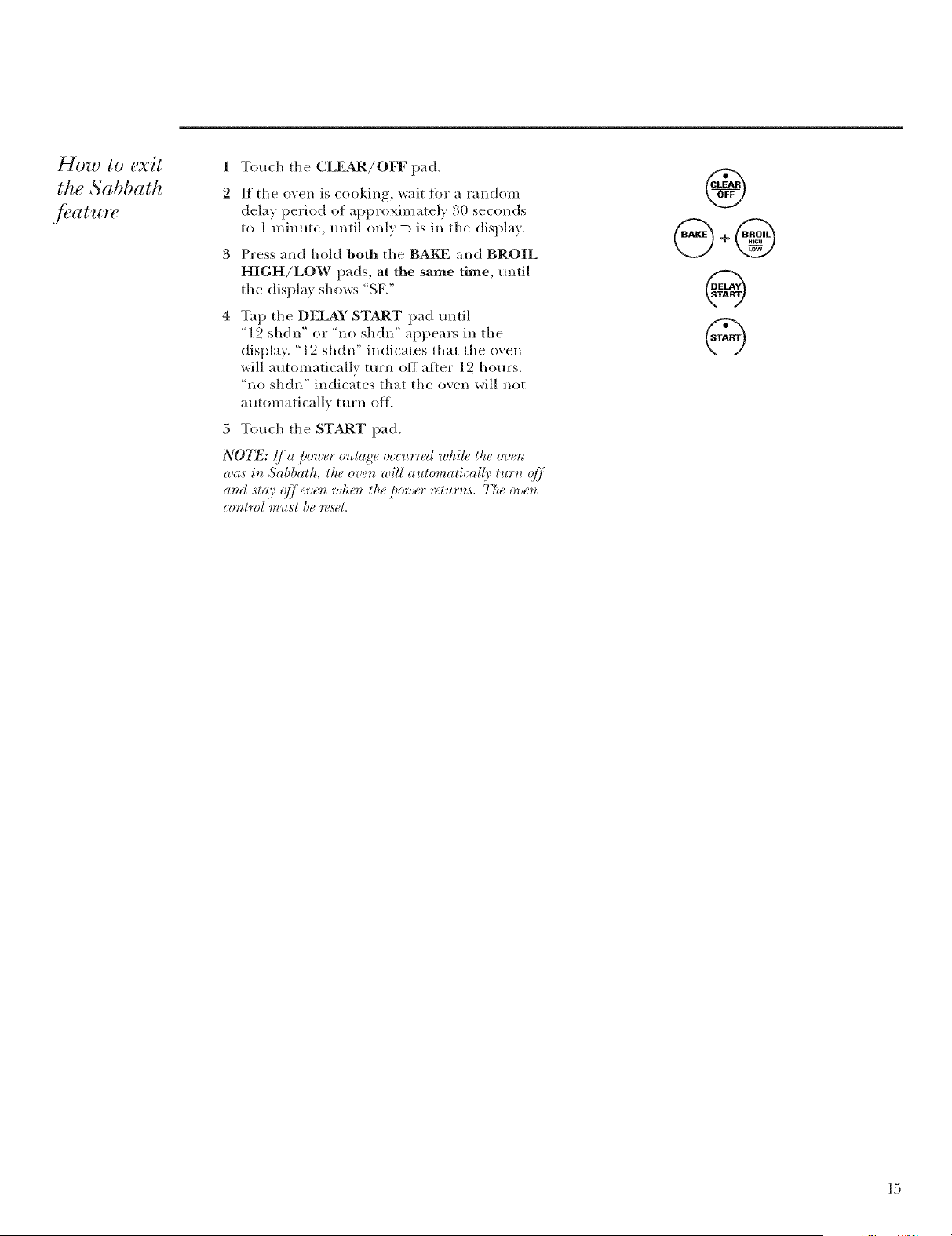
1 Touch the CLEAR/OFF pad.
2 If the oven is cookino wait for a random
dela} period of approximatel} 30 seconds
to 1 minute, until onl} D is in the displa}.
3 Press and hold both the BAKE and BROIL
HIGH/LOW pads, at the same time, until
the displa} sho,_s "SF2'
Tap the DELAY START pad until
"12 shdn" or "no shdn" appea*3 in the
display. "12 shdn" indicates that the o\ en
will automatically turn oft after 12 hours.
"no shdn" indicates that the oven will not
automatically turn off.
5 Touch the START pad.
NOTE: [ a _ower outaq'e the o'ue_j _ _ o_curred while
wa,s i_ Sabbath, the o'ue_ will automatically turt_ qff
az_(I ,stay q/]]evez_ whez_ the power returns,s, The ovet_
co_tm[ mu,st be re,set.
®
+6_3
%
@
15
Baking or Roasting
Be/oreyou
begin...
To avoid possible bur*_s, place ltze racks in
lhe de,sbvd posilion b{,fiav you llo'n lke oven on.
The racks haxe stop-locks, so that when
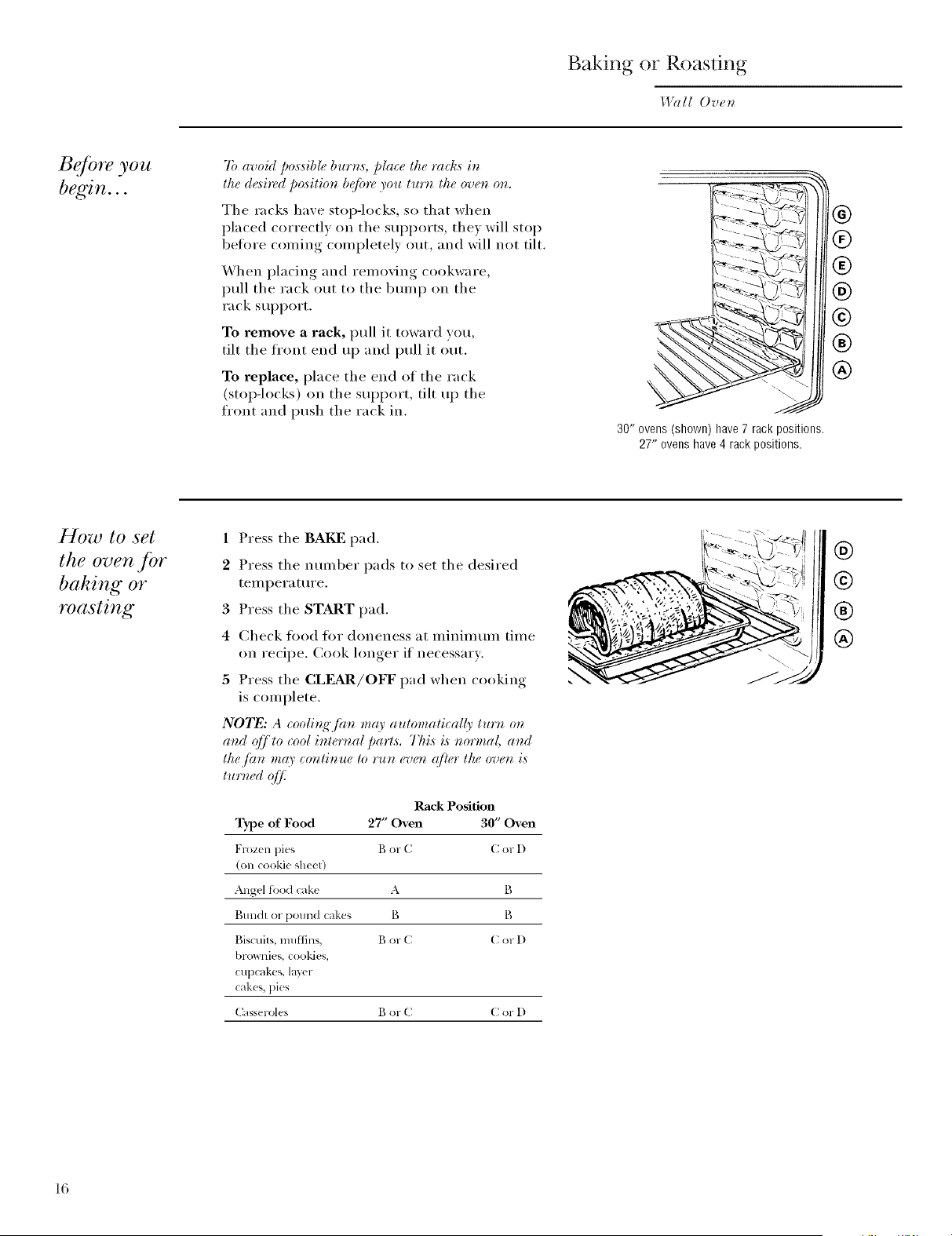
placed correctlx on the sui)ports, the) will stop
befi)re coming completely out, and will not tilt.
X4hen placing and removing cookware,
pull the rack out to the bran I) on the
rack sui)port.
To remove a rack, pull it toward you
tilt the front end up and pull it out.
To replace, place the end of the rack
(stop-locks) on the sui)i)ort, tilt up the
front and push the rack in.
30" ovens (shown) have7 rack positions.
27" ovens have 4 rack positions.
®
®
®
@
®
®
How to set
the oven jbr
baking or
roasting
1 Press the BAKI _]pad.
2 Press the nmnber pads to set the desired
tern pera ture.
3 Press the START pad.
4 Check tk)o(1 for doneness at minimmn time
on recipe. Cook hmger if necessary:
5 Press the CLEAR/OFF pad when cooking
is complete.
NOTE: A cooli_g" fitn may aulomalicall), turn on
and (ffj to cool internal parts. Tkis is normal and
the tim mr9' continue to run ev_m ({tier the oven is
turboed q]]_
Rack Position
Type of Food 27" Oven 30" Oven
Frozen pies B or C C or D
(on (ookie sheet)
Angel food cake A B
Bundt or pound cakes B B
Biscuits, muffins, Bor C C or D
brownies, cookies,
cupcakes, layer
cakes, pies
Casser_les B or C C or D
®
@
®
®
16
P heating
and pan
placement
Preheat the oven if the recipe calls flw it. To
preheat, set the o\ en at the correct temperature.
Preheating is necessary for good results when
baking cakes, cookies, pastry and breads.
For oven,s without a pwheat b_dicator lig'ht or to_e,
pn_heat l O mb_ute,s.
Baking results will be better if baking pans are
centered in the oven as much as possible. Pans
should not touch each other or the walls of the
oven. If you need to use two racks, stagger the
pans so one is not directly abo\ e the other, and
leave approximately 1½" between pans, fl'om
the front, back and sides of the wall
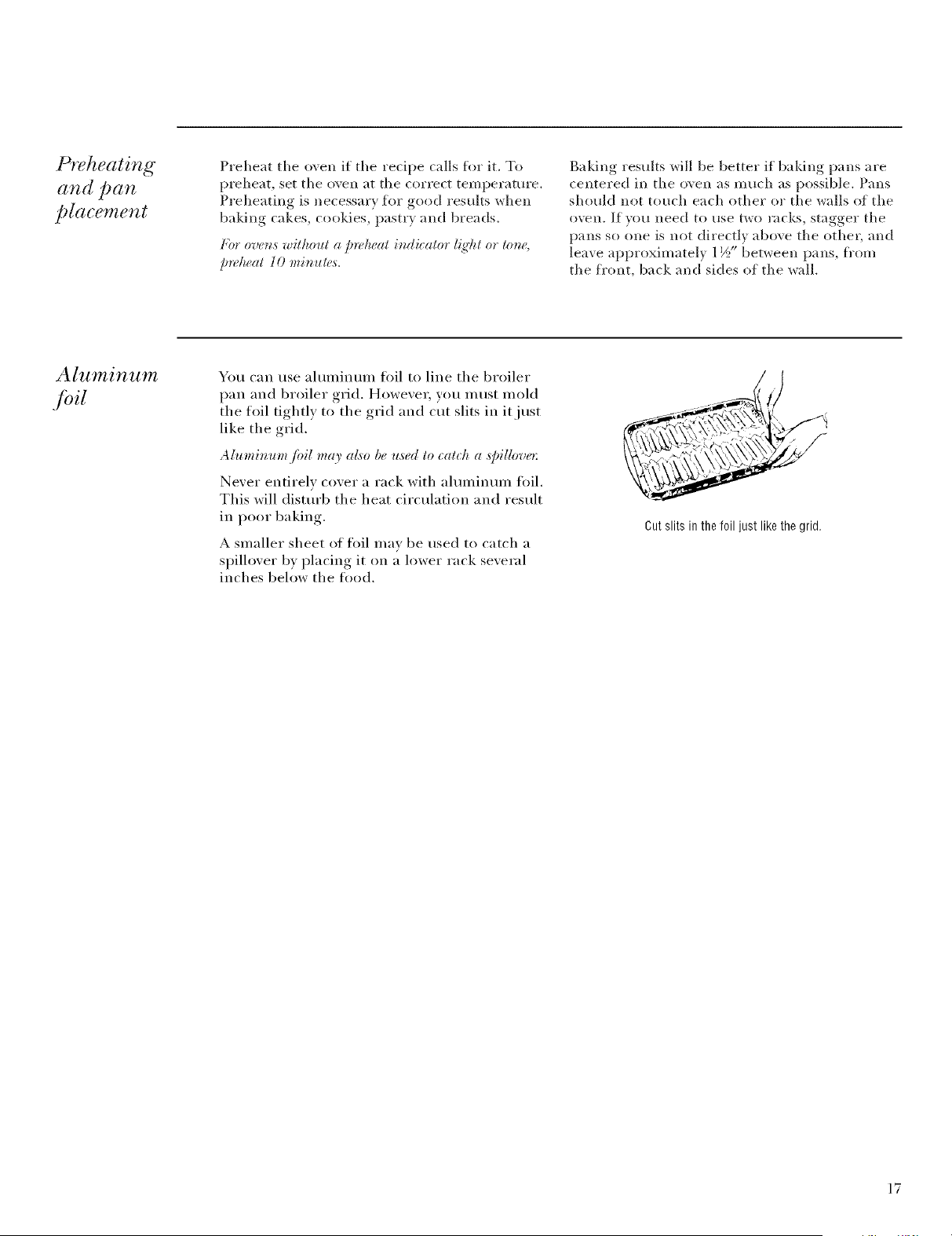
Aluminum
bil
You can use ahmfilmln foil to line the broilei"
pan aim broiler grid. Howevei; you inust inold
the toil tightly to the grid aim cut slits in it just
like the grid.
A htmimon fi>il may al,_o be used to _at_ l_ a s/:illove*:
Never entirely cover a rack with ahmfilmln fifil.
This will disturb the heat circulation aim result
in poor baking.
A slnaller sheet of foil inav be used to catch a
spillover by placing it on a lower rack several
inches below the tood.
Cut slits in the foil just like the grid.
17
Broiling
I,I_lll Oven
How to set
the oven jbr
broiling
1 Place the meat or fish on the broiler grid in
the broiler pan.
2 Follow suggested rack positions in the
Broiling Guide.
(/your oven is connected to 208 volts, raw steaks may
be broiled by prehealing lhe broi&r and posilioning" lhe
oven rack one po,sition h_ffhe_:
3 Press the BROIL HIGH/LOW pad once for
HI Broil,
To change to LO Broil, press the BROIL
HIGH/LOW pad again.
4 Press the START pad.
5 When broiling is finished, press the
CLI_R/OFF pa d.
N07_: Broil will not work !/the lemperatu_ probe is
phlg_q_,din.
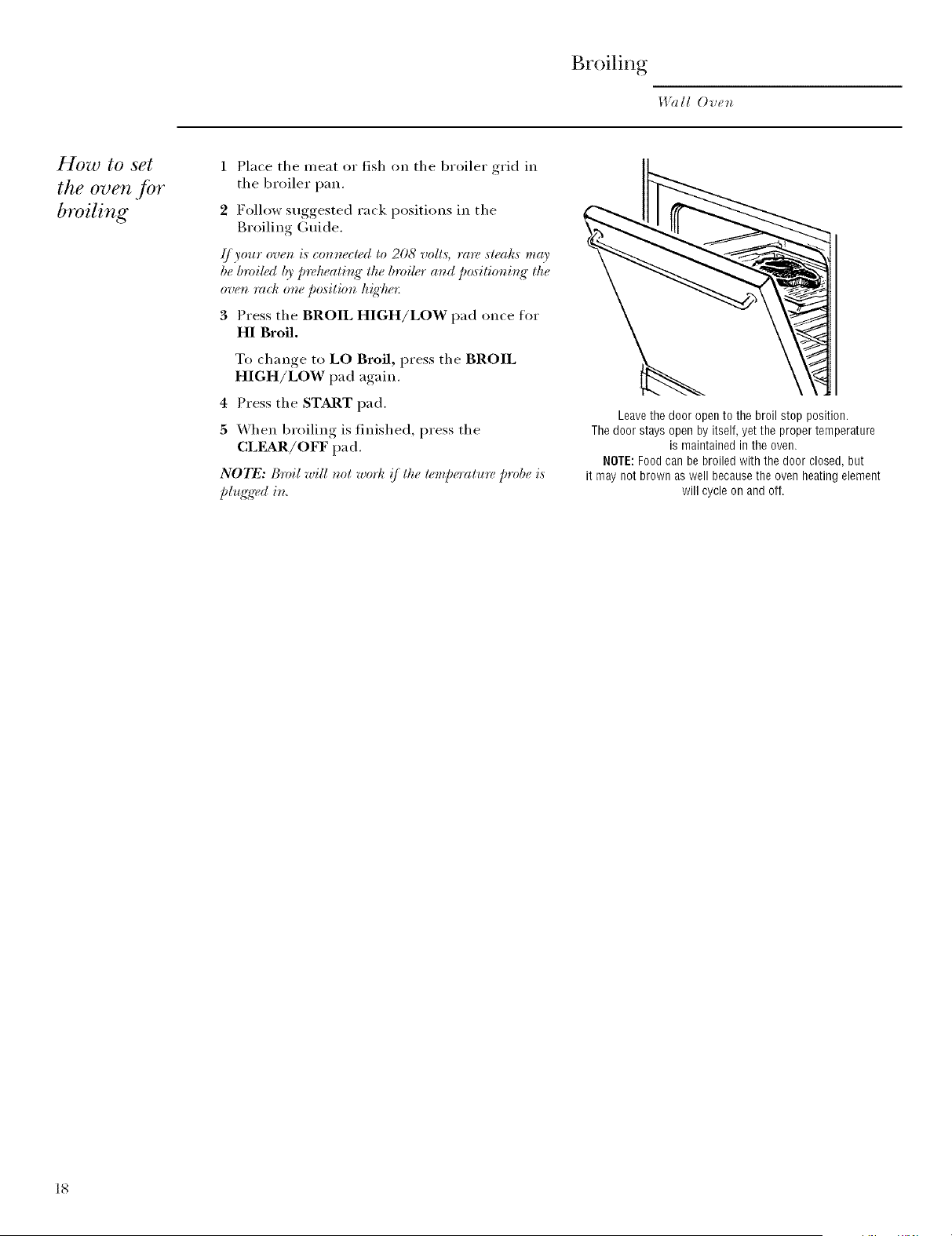
Leavethe door open to the broil stop position.
The door stays open by itself, yet the proper temperature
is maintained in the oven.
NOTE:Foodcan be broiled with the door closed, but
it may not brown as well becausethe oven heating element
will cycle on and off.
18
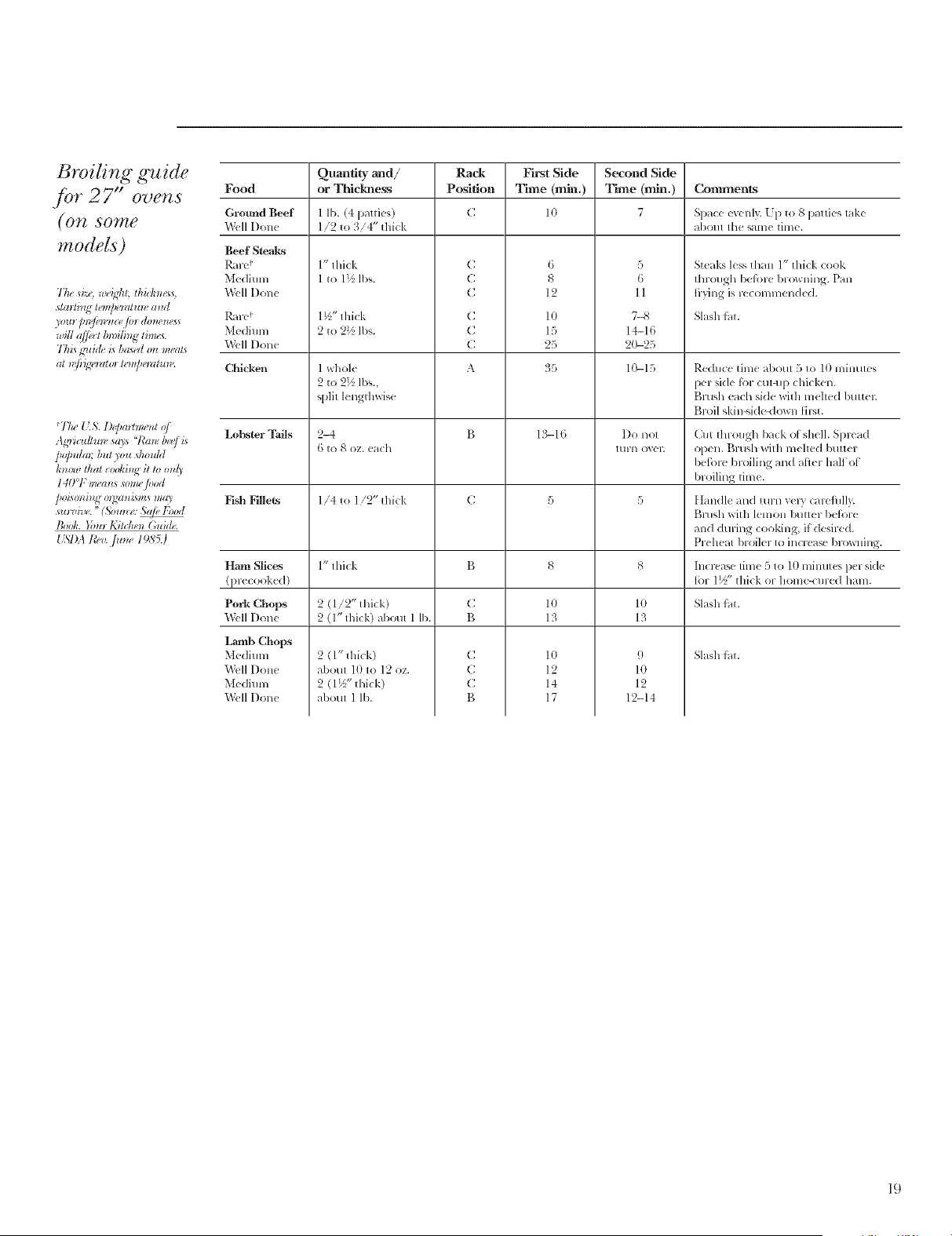
Broiling guide
./br 27" ovens
(OTg SOllte
modds)
The { LS. lhparhmnzt o/
Agricuflm_, _q> "!_m_,bee/i_
p@uk,, but you dmuM
kmm_ lhal cooki_lg il lo onl)'
14(1°1``m_(nt,_ wm_,/ood
poAo_zi_ oW.zisms ma_
_to_,i_m."(5;om_,,: S@ l'bod
Book. _bm Kitdte_ (;ui(h,.
157)A tb_v.,]Um_ 1985.)
Quantity and/ Rack
Food or Thickness Position
Ground Beef
X\kqlI)one
Beef Steaks
Rarc *€
Medium
Well I)one
Rar(*!
Medium
Well I)olle
1 lb. (4 patties)
1/2 to 3/4" thick
1" thick
1 to 1½ lbs.
1½" thick
2 to 2½ lbs.
C
C
C
C
C
C
First Side
Time (rain.)
]0
6
8
12
l 0
15
25
Second Side
Time (rain.)
7
5
6
11
7-_
14-16
20-25
Contllnents
Space evenly. L 1) to 8 patties take
about the same time.
Steaks less than 1" thick cook
through bel_)re l)rowning. Pan
tkying is vccomnmnde(l.
Slash tht.
Chicken 1 whole A !35 10-15 Re(luce time about 5 to 1(} lnintaes
2 to 2½ lbs., per side t))l cut-up chicken.
split lelagtllwise BrtBh each side with inched I)uttel.
t)_l-oil skin-q(le-down first.
Lobster Tails 2-4 B 13-16 Do llOt Gilt through back ol shell. Splcad
6 to 8 oz. each tt/lll ovel; open. t:ilt/sh with nmlted butter
I)eli_l-C broiling and after half ot
I)roiling time.
Fish Fillets 1/4 to 1/2" thick C 5 5 tlandle alld t//l-ll "_eP, calcfhllv.
Blalsh with lemon butter 1)etbl-e
and dul-ing cooking, if desired.
Preheat broiler to incl-case 1)l-(_aning.
Ham Slices 1" thick B 8 8 Illcl-(,a,_e tillle 5 to 10 minutes per side
(precooked) tol- 1½" thick Ol-holne-<ured ham.
Pork Chops 2 (1/2" thick) C lO lO Slash tht.
Well Done 2 (1" thick) about 1 lb. g 13 13
Slash tht.2 (1" thick)
about 10 to 12 oz.
2 (1½" thick)
about 1 lb.
C
C
C
B
9
1(}
12
12-14
1o
12
14
17
Lamb Chops
Medium
Well I)one
Medium
Well I)olle
19
Broiling
l,V(dl Ovt,_
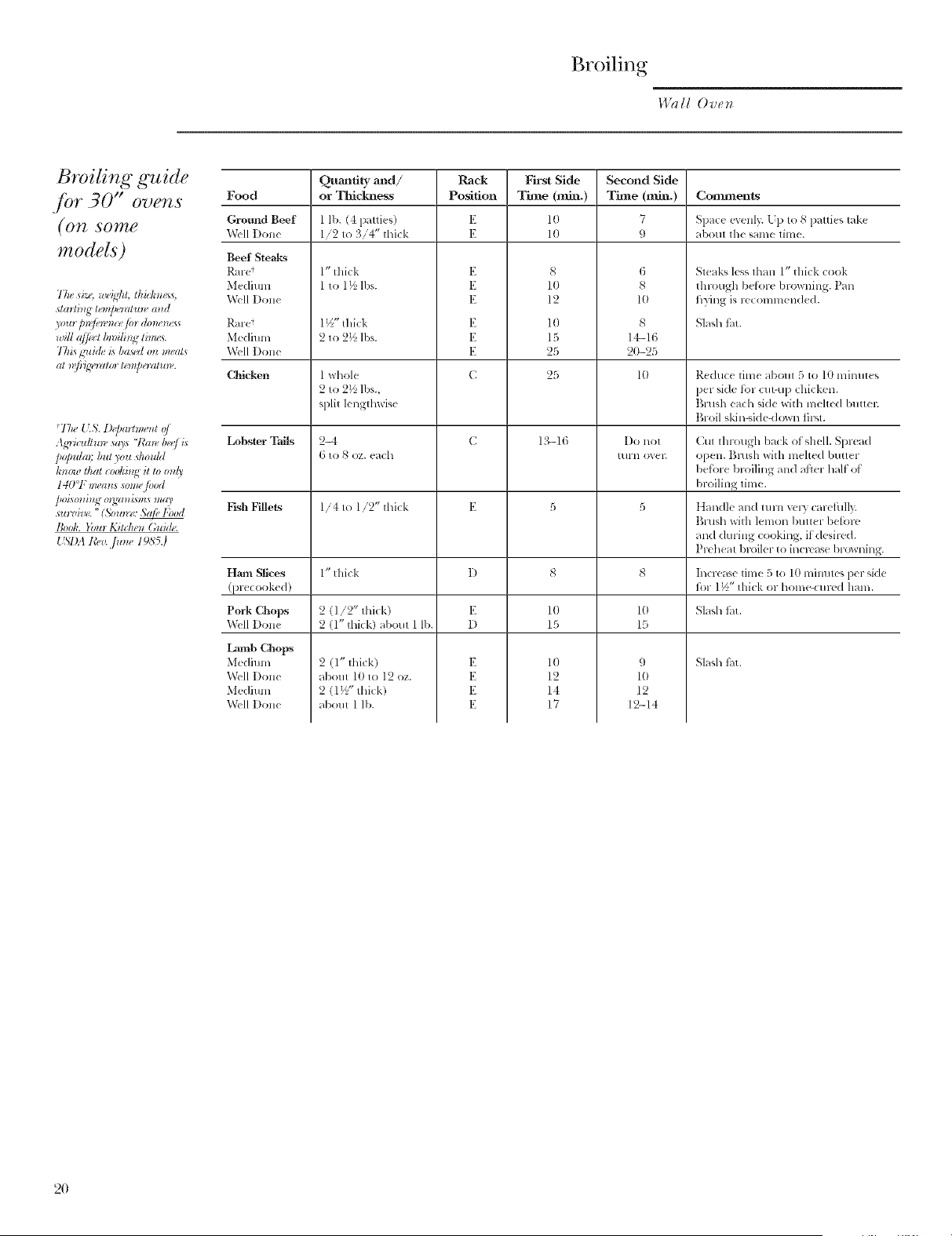
Broiling guide
.[br 30" over s
(07t SO_Zg
models)
77msi:< w_,ig]d;thhkm<_s,
stmlMg lonpo_llm_ and
will a//uctIm)ilh_gthm,s.
Tkis guid_,Al;asMo_zm_,als
al _@'@,raor lumperalm_'.
*Tke { ]S. l)_jmrlmunt v/
Agricuflm_, sq> '7"m_, bee/is
po[mlm, but you q_ouht
km)w lhal cookitlg il lo onl)'
140°F murals _mm,/ood
poAmzit_goWnzi,_msm*9'
_to_,i_v. "(3;om_,,: ,';@ l'bod
]'ook. Yom K;Mmn (;ui4_.
15l)A tCev..]Um_ 1985.)
Quantity axld/ Rack
Food or 33fickness Position
Gromld Beef
Well I)one
Beef Steaks
Ral-e_
Medium
Well I)one
Rare
Me(limn
Well I)one
1 lb. (4 patties)
1/2 to 3/4" thick
1" thick
1 to 1_ lhs.
1½" thick
2 to 2% lbs.
E
E
E
E
E
E
First Side
Time (rain.)
10
10
8
10
12
10
15
25
Second Side
Time (mlu.)
7
9
6
8
10
8
14_ 16
2O-25
Conmmnts
Space m enly. Lp to 8 patties take
about the same time.
Steal<.,, less than 1" thick cook
thlough befk)le blowning. Pan
hyiHg is lecomlnen(led.
Sl_sl_ tilt.
C|ficken 1 whole C 25 1(} Reduce tilne about 5 to l0 minutes
2 to 2½ lbs., per side f_)r cut-u 19chicken.
split lengthwise Brush each side with mehe(1 butteL
Broil skin-side-down _]I'M.
Lobster Tails 2=t C 1,'I-16 I)o not Cut through bark of shell. Spwad
6 to 8 oz. each mrn oxel: open. Brash with melted butter
before bit filing and ailer half ol
broiling time.
Fish Fillets 1/4 to l/2" thick E 5 5 t]andle all(/turH very calefifll>
Brush with lemon hutter belbre
and during cooking, if desiwd.
Pleheat hroiler to increase bl_wning.
Ham Slices l" thick I) 8 8 Iilclease tilne 5 to 10 lninutes per side
(plecooked) t()1"1½" thick or home-cured ham.
Pork Chops 2 (1/2" tlfick) E 10 ltl Slash ti_t.
Well I)one 2 (1" tlfick) about 1 lb. D 15 15
Slash tM.
2 (1" thick)
about 10 to 12 oz.
2 (1½" tlfick)
about 1 lb.
E
E
E
E
9
1o
12
12-14
10
12
14
17
Lamb Chops
Medium
Well I)one
Medium
Well I)one
2O
Timed Baking
Wall Ovet_
Using the
timed baking
and roasting
./eatures
N07_: l_)o(I.s thai spoil easily, sueh as mill:, <g:g:s,
.fish, stq]jh_s, poldt* 3' at_d pork, shouh[ t_ot be
alb'wed to sit fbr more tha_ l hour b(f)re o*' ((tier
eookb_g: Room lemperatui'e p*vmoles the ,¢rowtho/
har*@d baete*'ia. Be sure thai the oven I{g'htis off
beeause heat fi*)m the bulb will sped ha*'_/)ll baeteria
g_)wth.
On double oven models, you can use timed
baking in one o\ en while using sell:clean in the
other; you can also use timed baking in both
()veils at tile same time.
How to set
an immediate
start and
automatic
stop
The oven will tum_ on immediately and eooh fi*r a
seh, lted ler_Klh o/time. A t the end o/the iookb_ K lime
the oven will turn (:/,/automatically.
Make sure the oven clock shows the correct
time of day.
1 Press the BAKE pad.
2 Using the number pads, enter the desired
temperature.
3 Press the COOK TIME pad.
NOTE" I your *;,gi )e *e_ui*w )rekealir_g;_"J. l l I .... , to. me)
m,ed to add additior:al lime to lit:, ler_gtk (:flit::
(ookb_K lime.
4 Using the number pads, enter the desired
baking time, The oven temperature and
the cooking time that you entered will be
displayed.
5 Press the START pad.
The display shows the oven temperature
that you set and the cooking time countdown.
(The display starts changing once the
temperature reaches 100°El
N07_: On double oven model,s, wken asir_g"both
oveas at the same tim6 the limes showir_g" ia the
disph O' will be /br the last ovea set. 7b disJda)' the
time set./or the fi*:d oven set; press the COOK 77ME
pad /br that oven.
The oven will continue to cook fi)r the
programmed alllO/lllt of time, then shut oft
automatically, unless the _%_tRM feature was set.
See the How to set tke ovea fin' rvarmi_:{" section.
6 Press the CLEAR/OFF pad to clear the
display.
@
@@@(9@@@@@@
@
@@@(9@@@@@@
@
21
Timed Baking
Wall Ove*_
How to set
a delayed
start and
automatic
stop
}bu ca_ sel lhe ovet_ conlrol lo delay-slarl lhe oven,
cook .fin' a sJ)edfi_cle_g'lh, o/lime at_d lher_ lm't_ (_/,,
aulomalically.
Make sure tile oxen clock shows tile correct
time of day.
1 Press tile BAI_ pad.
2 Using the number pads, enter tile desired
temperature.
3 Press tile COOK TIME pad.
NOTE: lf.your r_,_i_)er_,_7uires /)rehealb_g;, you mar.
r_eed to add addiliot_al lime lo the ler_g'lh(_tlhe
cookb_g" lime.
4 Using tile number pads, enter tile desired
bakino time
5
6
Press tile DELAY START pad.
Using tile number pads, enter tile time of
(la} }o/I 1V_IIIt tile o_en to ttlI'n on and st_lI't
cooking
7 Press tile START pad.
NOTE: Ar_ altet_lior_ torte will ,soured !/you are usir_g
limed bahi_g" at_d do t_ol pr_,,ssltte START Dad ((tier"
et_lerb_g"lhe bakb_g" lemperalutv
If wm would like to check tile times vou have
set, press the DELAY START pad to check the
start time w)u have set or press tile COOK
TIME pad to check the length of cooking time
vou have set.
When tile oven turns on at tile time of (lay wm
have set, the display will show the changing
temperatm'e (starting at IO0°F) and the
cooking time countdown.
N07_: On double oven model,s, when usir_g"both
ove_zs at the same tinu, lhe linu,,s showir_g" i_z the
disph O' will beJbr the last oven set. 7b disph O' the
time set Jbr the fir, st oven set; press the DELAY
START pad to (h(uk the start time you have set or
Dress the COOK TIME pad to che(k the #r_g'lh o/
_ookir_g"lime you have set.
Tile oven will continue to cook fin" tile
programmed amo/mt of time, then shut ott
automaticall 5 unless tile X4%kRMfeature was set.
See tile How to set the oven /br warmi_g" section.
8 Press tile CL]?_atR/OFF pad to clear tile
displa),
@
®®@®@@®®®@
@
®®@®®@®®®@
@
®®®®®®®®®@
@
22
Using the Probe
I.l?dl Oven
7Emperature
probe
For many fi)ods, especially roasts and poultry,
internal food temperature is the best test fi)r
aloneness. The temperature probe takes the
guesswork out of roasting by cooking fi)ods to
the exact aloneness vou want,
Use of probes other than the one provided with
this product max result in damage to the probe.
Use the handles of the probe and plug when
inserting and remoxing them from the meat
and outlet.
• To axoid damaging your probe, do not use
ton(*s_,to pull on the cable when remoxing, it.
• To axoid breaking the probe, make sure fl)od
is completely defrosted befi)re inserting.
• To pre',ent possible burns, do not unI)lu,*
the probe from the outlet until the oxen
has cooled.
• Nexer leaxe your probe inside the oxen
during a self cleaning c) cle.
• Do not store the probe in the oxen.
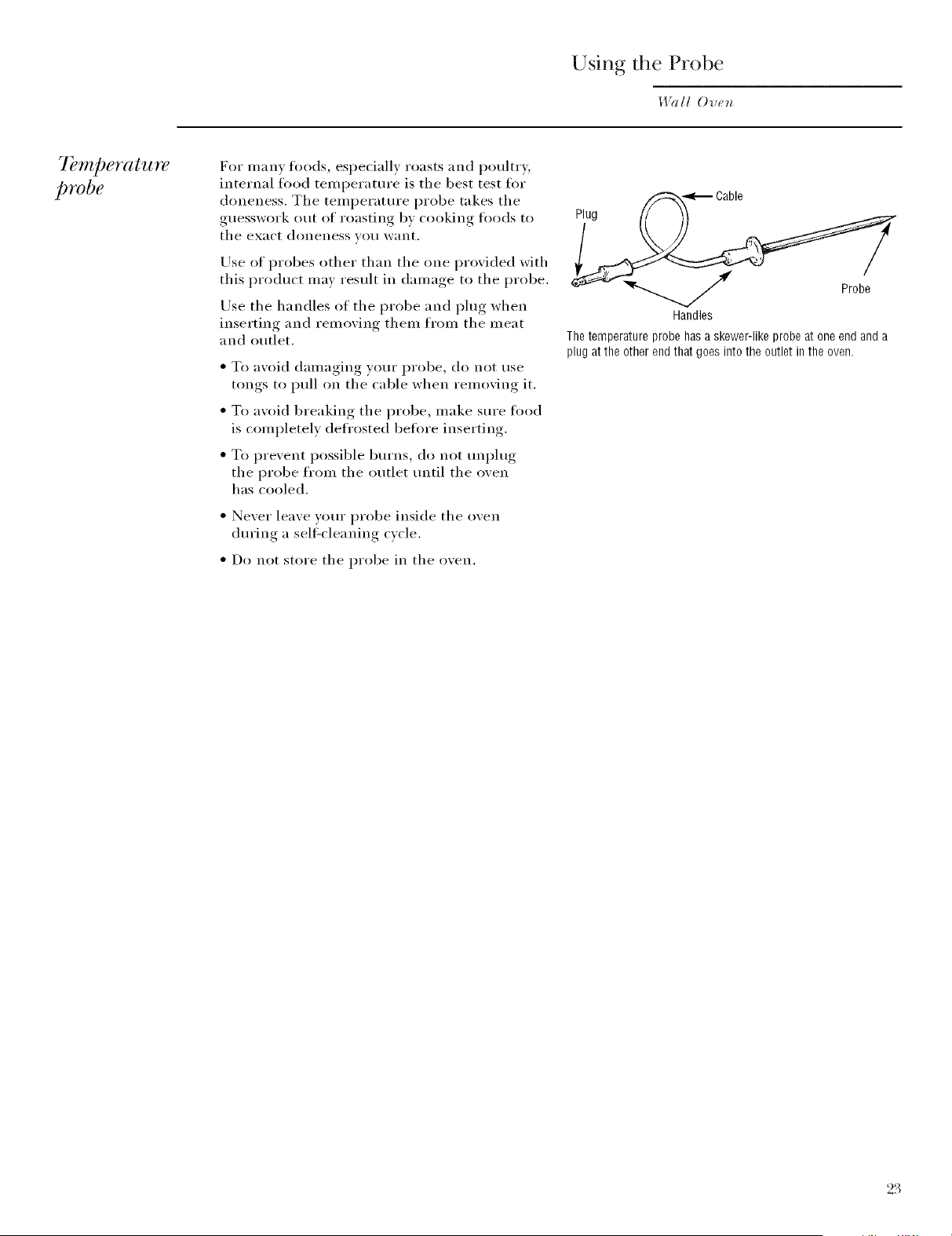
_-,_ Cable
Plug 1[ 11
Handles
The temperature probe hasa skewer-like probe at one end and a
plug at the other end that goes into the outlet inthe oven.
23
Using the Probe
Wall Oven
I)l'OpgT
placement
of the probe
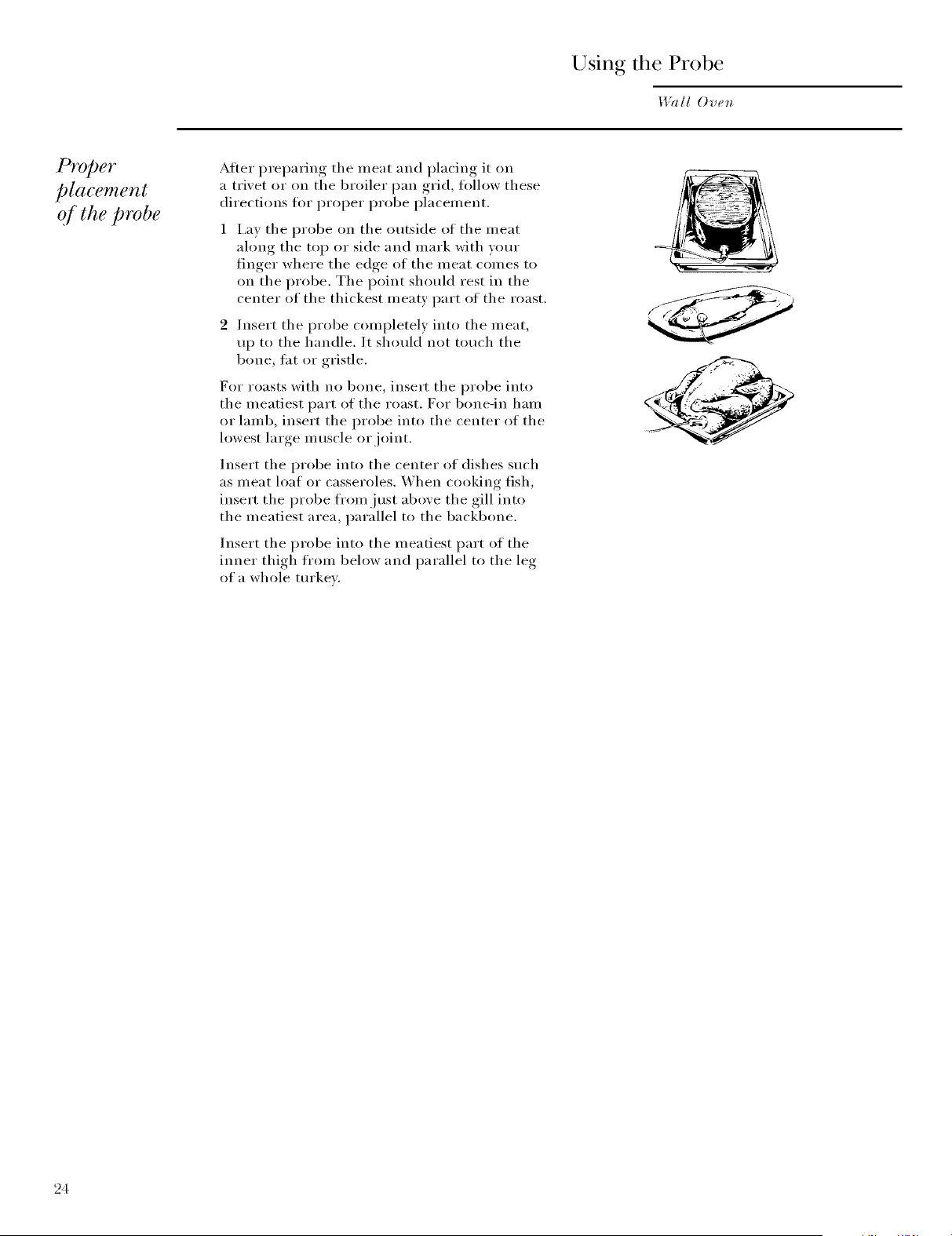
After preparing the meat and placing it on
a trixet or on the broiler pan grid, tollow these
directions for proper probe placement.
1 I,ay the probe on the outside of the meat
along the top or side and mark with yore"
finger where the edge of the meat comes to
on the probe. The point should rest in the
center of the thickest meaty part of the roast.
2 Insert the probe completel) into the meat,
up to the handle. It should not touch the
bone, tat or gristle.
For roasts with no bone, insert the probe into
the meatiest part of the roast. For bone-in ham
or lamb, insert the probe into the center of the
lowest large m uscle or joint.
Insert the probe into the center of dishes such
as meat loaf or casseroles. When cooking fish,
insert the probe fl'om just above the gill into
the meatiest area, parallel to the backbone.
Insert the probe into the meatiest part of the
inner thioh,_ from below and parallel to the leo
of a whole tm'kex.
24
How to set
the oven Jot
roasting
when using
the probe
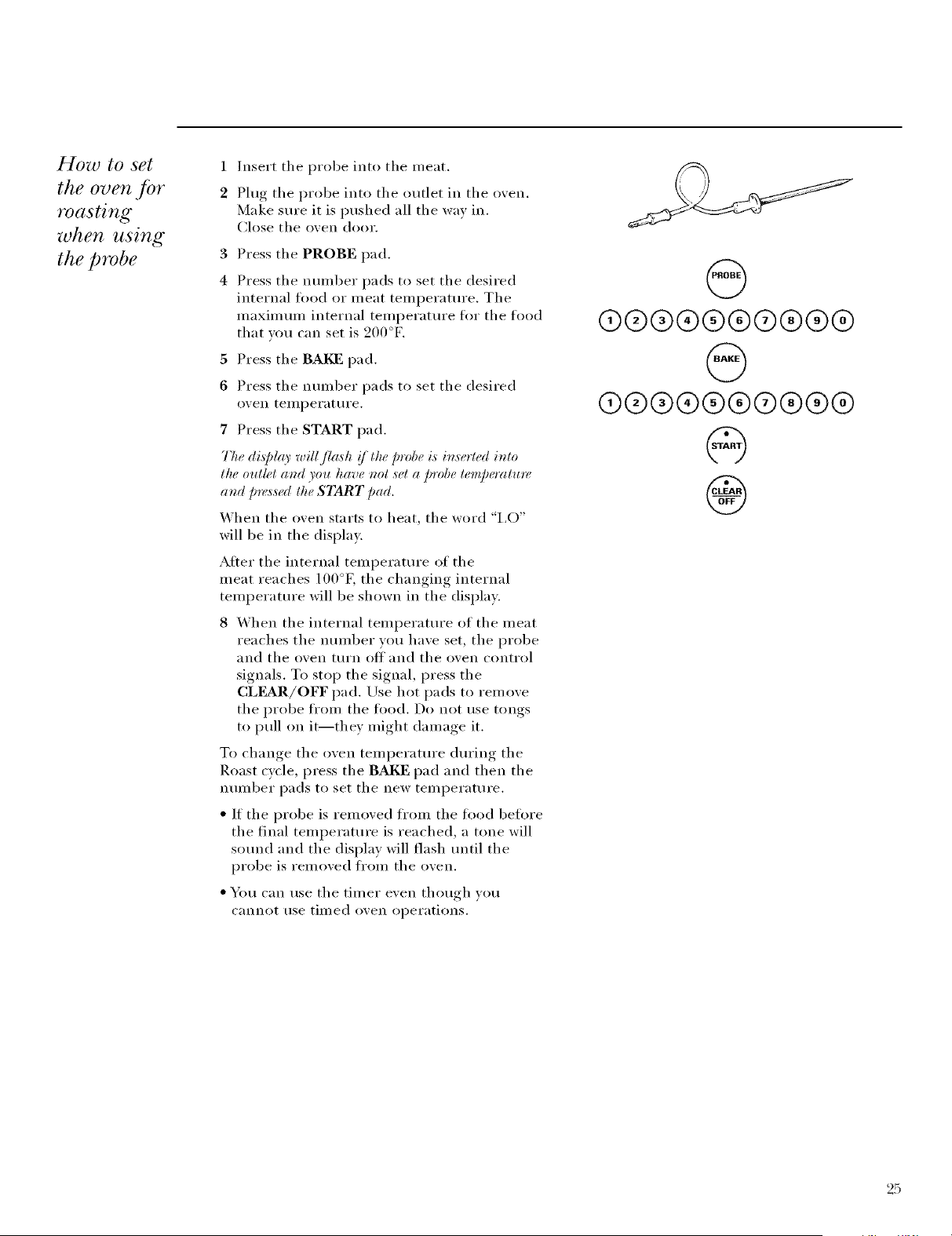
1
2
Insert the probe into the n/eat.
Pluo_ the probe into the outlet in the o_ei1.
Make sure it is pushed all the way in.
Close the oxen door.
3
4
Press tile PROBE pad.
Press the nunlber pads to set the desired
internal fi)od or nleat teinl)erature. The
nlaxinlunl internal teini)erature fl)r tile food
that you can set is 200°F.
5 Press the BAKE pad.
6 Press the nunlber pads to set the desired
o_,en teillperat life.
7 Press tile START pad.
77_,¢displr 9' will flash !/tt_,¢ probe is inserted into
the 0uiM and you have not ,set a probe temperature
and Dressed the START Dad.
When the o_en starts to heat, the word "I,O"
will be in the displa).
AIter the internal teinl)erature of the
n/eat reaches 100°K the changino internal
tenlperature will be shown in tile display.
8 When tile internal teinl)erature of tile nleat
reaches tile nun/her you have set, tile probe
and tile ()veil turn off and tile ()veil control
signals. To stop tile signal, press tile
CLEAR/OFF pad. Use hot pads to ren/ove
tile probe fl'oin tile ti)od. Do not use tongs
to pull on it--they n/ight dan/age it.
To chanoe_ tile oven teinl)erature durino_ tile
Roast c_cle press the BAKE pad and then the
nunlber pads to set tile new ten/l)erature.
• If tile probe is renloved fl'oin tile fi)od 1)etk)I'e
the final teini)erature is reached, a tone will
sound and tile display will flash until tile
l)I'obe is I'elllOVed ti'Oill tile ()veil.
• You can use tile tinier even thou,*h xou
cannot rise tin/ed oxen ol)erations.
@
®®@®@®®®®@
@
@@@@@(9@@@@
@
®
25
Using the Convection Oven
I,l?ll[ Ov_n
Convection
.fitn
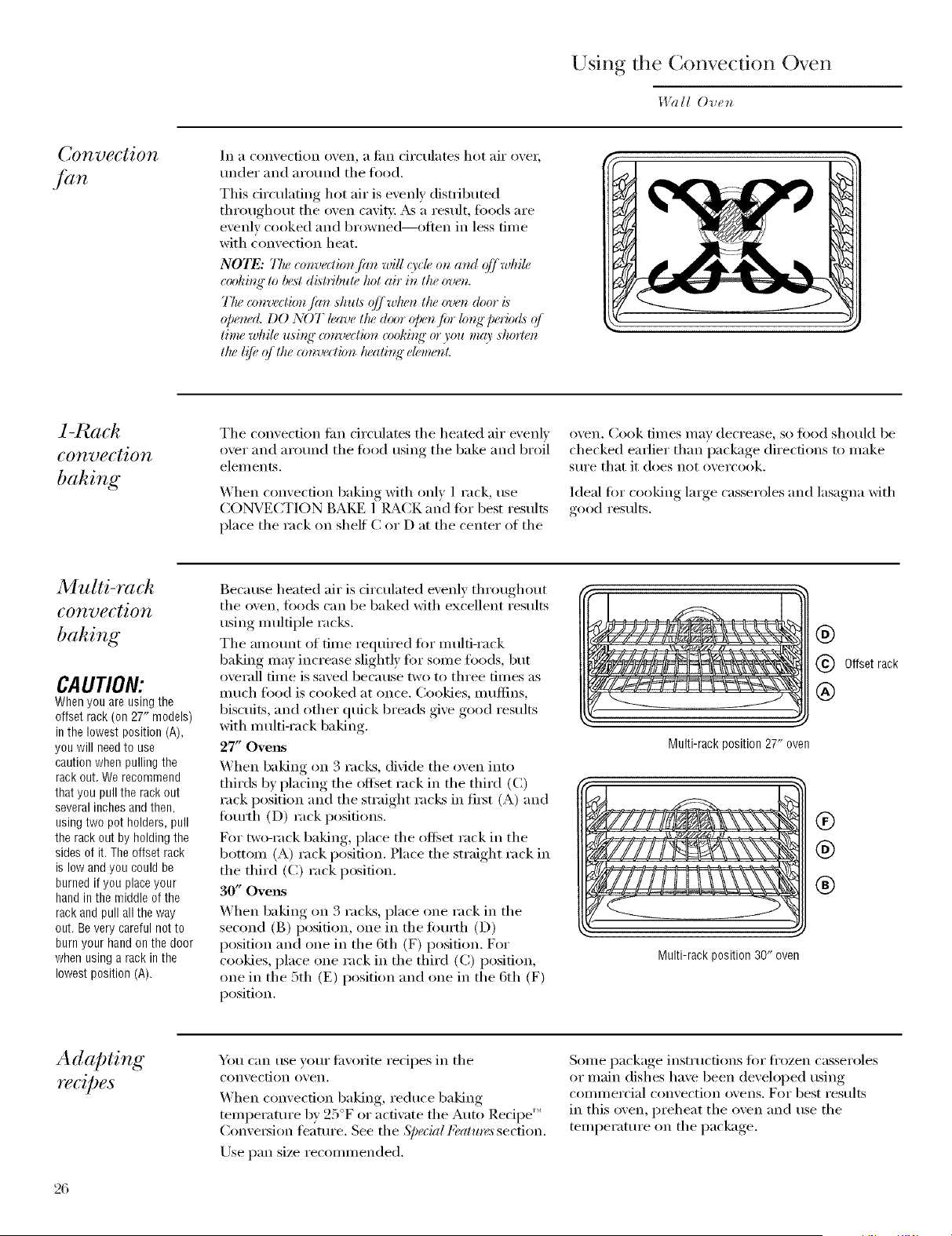
In a con_,ection o_,en, a tilil circulates hot air ()_,ei;
under and around the food.
This circulating hot air is evenly distributed
throughout the oven cavity. As a result, toods are
evenly cooked and browned--_)flen in less time
with convection heat.
NOTE: TIw conva:tion fim will O'c[_on arm (?I/while,
cookint_"to lu<,_tdi,_lribule hot air in the oven,
T/w amvection /im shuts (?ffwlu<ntlw oven door i,s
opem<d.DO NOT leave tlw door openf>r lo_N"lm_7o& (>/
tinw while u,_ing"a>nvection _ooki_N"or you m(9' shorten
flu:l!fi"::lilt(:<onve<:tionlu:aling"dotu:nL
1-Rach
convection
bahing
Tile comection tim circulates tile heated air exenlx
oxer and arotmd tile fi)od usino tile bake and broil
' O
elements.
_4hen comecfion baking with only 1 rack, use
CONVECTION BAKE 1 IL_CK m{d tot best results
place tile rack on shelt C or D at tile center of tile
o',en. Cook dines nlav decrease, so fi)od shouM be
checked earlier than i)ackage directions to make
S/lI'e that it does not oxercook.
Ideal fi)r cooking large casseroles and lasagna with
good results.
Multi-rack
convection
bahing
CAUTION:
Whenyouareusingthe
offsetrack(on27" models)
inthe lowestposition(A),
youwill needto use
cautionwhenpullingthe
rackout.Werecommend
thatyoupullthe rackout
severalinchesandthen,
usingtwopot holders,pull
therackoutby holdingthe
sidesofit.Theoffsetrack
is lowandyoucouldbe
burnedif you placeyour
handinthe middleofthe
rackandpull alltheway
out.Beverycarefulnotto
burnyourhandonthedoor
whenusingarackinthe
lowestposition(A).
Because heated air is drculated evenly throughout
tile oven, fi)ods can be baked with excellent results
using multiple racks.
Tile al/IO/Int of tillle required for multi-rack
baking may increase slightly for soine foods, but
overall time is saved because two to three times as
much fi)od is cooked at once. (',()()!des, muffins,
biscuits, and other quick breads give good results
with multi-rack baking.
27" Ovens
When baking on 3 racks, divide tile oven into
thirds by placing the offset rack in the third (C)
rack position and the straight racks in fi_t (A) and
fimrth (O) rack positions.
For two-rack baking, place the offset rack in the
bottom (A) rack position. Place the straight rack in
the third (C) rack position.
30" Ovens
When baking on 3 racks, place one rack in tile
second (B) position, one in the fimrth (D)
position and one in the 6th (F) position. For
cookies, place one rack in the third (C) position,
one in the 5th (E) position and one in the 6th (F)
position.
®
Offsetrack
®
Multi-rackposition27" oven
®
Multi-rack position 30" oven
Adapting
H?€ipeS
You can use your fi_vorite redpes in tile
convection oven.
When convection baking, reduce baking
temperature by 25°F or activate the Auto Redpe ''_
(_onve_ion fl_atm'e. See tile S/:e(ial Feallo'es section.
Use pan size recommended.
Some package instructions fi)r fl'ozen casseroles
or main dishes have been develol)ed using
coi//illercial convection ovens. For best results
in this oven, preheat tile oven and use tile
temperature on tile package.
26
Co&warejar
convection
cooking
Befi)re using your convection oven, check to see
if your cookware leaves morn fiw air circulation in
the ()veil. If you are baking with several pans, leave
space between them. Mso, be sure tile pans do not
touch each other or tile walls of tile oven.
Paper mad Plastic
Heat-resistant paper and plastic contnine_ that
are recommended fi)r use in _egular ovens can be
used in convection ovens. Plastic cookware that is
heat-resistant to temperatm'es ot 400°F can also
be used.
Metal mad Glass
Any t)pe of cookware will work in your convection
oxen. Howexe_; metal pans heat the ti_stest and are
recommended fi)r convection baking.
Darkened or matte-finished pans will bake tipster
than shiny pans.
Glass or ceI'alllic pans cook II/OI'e sh)wlv,
When baking cookies, you will get the best
results if vou use a fiat coo!<de sheet instead of
a pan with low sides.
For recipes like oven-baked chicken, use a pan
with low sides. Hot air cmmot drculate well
around fi)od in a pan with high sides.
Convection
roasting
• Good fiw lmge tender cuts of meat, uncovered.
Tile convection tim circulates tile heated air e\'enlv
over and around tile fi)od. Meat and poult_ T are
browned on all sides as if they were cooked on a
rotisserie. Using the roasting rack provided, heated
air will be circulated ove_; under and around tile
t0od being roasted. The heated air seals in juices
quickly fi)r a moist and tender product while, at
tile same time, creating a rich golden brown
exterior:
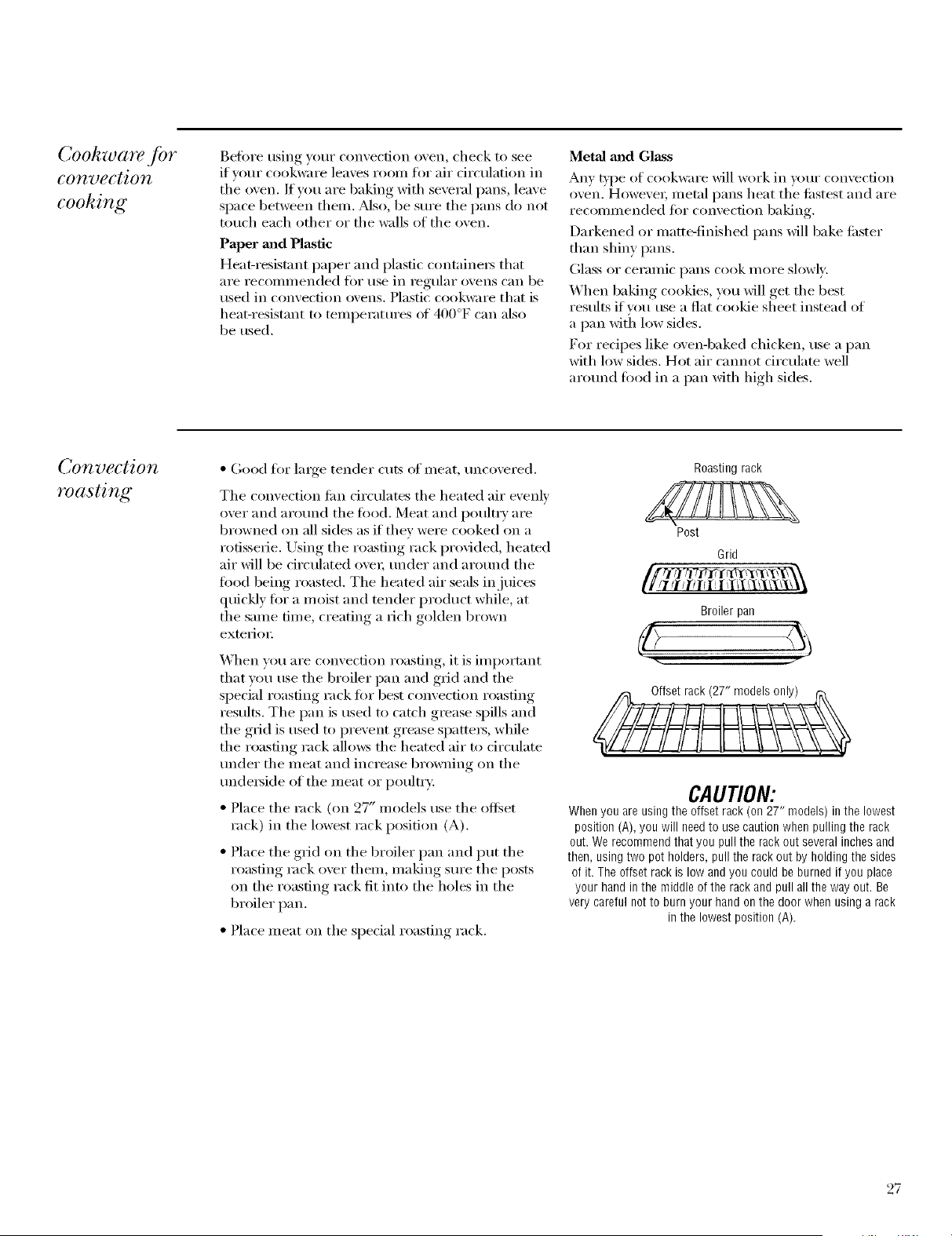
When you are convection roasting, it is important
that you use tile broiler pan and grid and tile
special roasting rack tot best convection roasting
results. Tile pan is used to catch grease spills and
the grid is used to prevent grease spatters, while
the roasting rack allows the heated air to circulate
trader tile meat and increase browning on tile
tmde_ide of tile meat or poult_T:
• Place tile rack (on 27" models use tile offset
rack) in the lowest rack p()sifi(m (A).
• Place tile grid on tile broiler pan and put tile
roasting rack over them, making sm'e the posts
on the roasting rack fit into the holes in the
broiler pan.
• Place meat on tile special roasting rack.
Roasting rack
Post
Grid
_i /1 q/l'iil/i 1 li/i't\'l\_X\\_
Broilerpan
CAUTION:
Whenyouareusingthe offsetrack(on27" models)inthe lowest
position(A),youwill needto usecautionwhenpullingtherack
out.Werecommendthatyoupullthe rackout severalinchesand
then,usingtwopotholders,pullthe rackoutbyholdingthesides
ofit.Theoffsetrackislow andyoucouldbeburnedifyou place
yourhandinthe middleoftherackandpullallthewayout.Be
verycarefulnotto burnyourhandonthedoorwhenusinga rack
in thelowestposition(A).
27
Using the Convection Oven
I,l?lll Oven
How to set
the oven./br
convection
baking or
roasting
7b avoid possibh, bl_rns, plaee the raehs @ the
eor?_,etpositiot_ bqfim,you turn on the ovem
Press the CONY BAKE/1 RACK pad
(Convection Bake 1-P,ack mode) for 1-rack
convection baking. This mode is used for
cooking fl)od items tm truly 1 rack in
ctmvection bake.
Press the CONV BAKE/MULTI pad
(Convection Bake Muhi mode) fl)r muhi-rack
convection baking. This mode is ttsed _k)i"
cooking tood items on more than one rack
(i.e. 2, 3 or more racks) at the same time
in C,tmvectitm Bake. See the Multi-rael_
eonveetio_ baki_L," section fin" m ore
inlbrm a tit) n.
Press the CONV ROAST pad tot convection
rt)asting.
2 Press tl_e nmnber pads to set the desired
t)veil tel//perattlre.
3 Press the START pad.
To change the ovell temperature, press the
CONY BAKE/MULTI, CONV BAKE/1 RACK
t)r CONV ROAST pad and then the nmnber
pads to set the new temperature.
@o°@o°@
(9@@@@@@@@@
@
®
When the oven starts to heat, the changing
temperature, starting at 100°K will be displayed.
When the oven reaches the temperature you
set, 3 beeps will sotmd.
4 Press the CLEAR/OFF pad when finished.
N07_:
* }},uwill hear a,filn whih, (ookb_p" with (ot_ve(tiom
Thej_ln will stop when the door is opened but the
heat will not turn o/]_
, You m( O' hear the oven clicking" durit_L," bahit<g:
Tkis is normal
* Tke eotH)eetion./)ln will (Te/e ot_ and o.ff_vhi#
eookb<q" to best distribute the hot air i_ the oven.
Convection
roasting
guide
28
Meats Minutes/Lb. Oven Temp. Internal Temp.
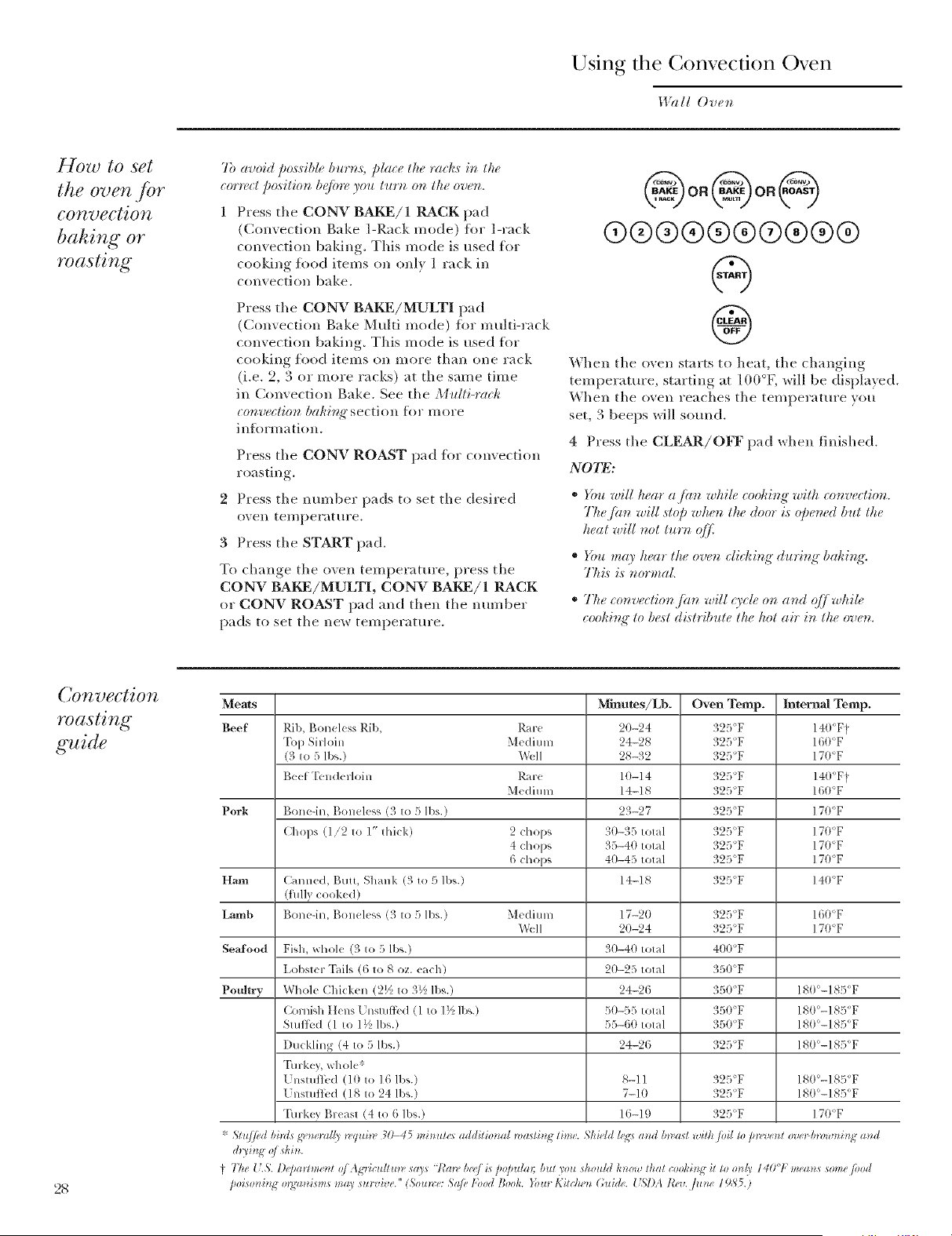
Beef Rib, Boneless Rib, Rare 20-94 325<F 14@F t
Top Sirloin Medium 24-28 325°F 160'F
(3 to 5 lbs.) Well 28-32 325°F 17@F
Beef Tunderloin Rare 10-14 325°F 140°Ft
Medium 14-18 325°F 160'F
Pork Bone-il< Boneless (3 to 5 lbs.) 23-27 325/F 170°F
Chops (1/2 to 1" thick) 2 chops 30-35 total 325<>F 170°F
4 chops 35-40 total 325°F 17(YT
6 chops 40-45 total 325'F 170°F
H,-ml Calnled, Butt, Shank (3 to 5 lbs.) 14-18 325_F 140°F
(Ihll} cooke(l)
Lamb Bonedn, Boneless (3 to F)lbs.) Meditun 17-20 325"F 16@F
X\k,II 20-24 325'F 170°F
Seafood Fish, whole (3 to 5 lbs.) 30-40 total 40tI°F
Lobster Tails (6 to 8 oz. each) 20-25 total 350(F
Poultry Whole Chitkel_ (2½ to 3V2ll)s.) 24-26 350"F 180'-ISF/F
Cornish Hens k l_StUfii'(1(1 to 1½lb_.) 50-55 total 35t1_F 180°-185°F
Stuft;,*d (1 to 1½ lbs.) 55-60 total '350°F 18@-185(F
I)ucklil_g (4 to 5 lbs.) 24-26 325°F 18@-185_F
Turkey, whole*
[ nstutlbd (1t} to 16 ll)s.) 8-11 325<F 180°-1&5°F
[ nstuflbd (18 to 24 lbs.) 7-10 325°F 180<-185<F
Turkey Breast (4 to 6 lbs.) 16-111 325<F 170°F
* Sm//ud bkztx gvnc_a//y wquiw 31_45 minumr addition*at _*a_tMg time. Shh.ld hgs a_tlt bwa_t with/oii to p_,,-,,_.tztovc>h_,twnMg and
do,i_,g o/_kin.
} 77_e{'.5'. D@a_¢)ne_*toj A gricuh*t_v _a3s l_a#*,be,e/i,s]w[ndat: h_tt you sho*thl know that coohMg it to o_*/y140"1,"tneatzv some/ood
/)oiso_*i_*go_ga)listtlv tna)' su_vh_e." (5;ounce:5aJ_,]'bolt Book. Yo_trKkchen (;uigh'. {"S]).l IM_../um' 1985.)
How to set
the oven jor
convection
roasting
when using
the probe
CAUTION:To prevent possible burns, do
not unplug the probe from the oven outlet
until the oven has cooled. Do not store the
probe in the oven.
For be,sl re,sull,s wh, en roasling large h_rkey,s and
masl,s, we recommend using lh,e probe included in
lh, t" _ o_H_t_(lio_l o_tqL
2 / n/odels use tile offset
Place the rack (on .....
rack) in the h)west rack position (A). hlsert the
probe into the nieat.
Phig the probe into the outlet in the (i_,en.
Make sure it is pushed all the wm in.
Ch)se the o',en door.
3 Press the CONV ROAST pad.
4 Press the nunlber pads to set the desired
o_en tei/lpeYat life.
To change the oven tenlperature during tile
Convection Roast cycle, press the CONY ROAST
pad and then press the nunlber pads to set the
new desired tenlperature.
5 Press the PROBE pad.
6 Press the nuniber pads to set the desired
internal nleat teniperature.
7 Press the START pad.
The di,qd( 9' will flash "PROBE" and the oven conlml
will sig'nal !/the probe is inserted into the out#t, and
you have not set a probe tempcmtmY¢ and p,vssed lhe
START pad.
When the o_en starts to heat, the word "i,0"
will be in the displa}.
_ftei" the internal tenlperature of the nleat
reaches l ()()°F, the chanoing internal
tenlperature will be shown in the displa).
8 When the internal tenlperature of the nleat
reaches the nunlber you have set, the probe
and tile ()veil ttlYn ()l_ and tile ()veil control
signals. To stop the signal, press the
CLI_R/OFF pad. Use hot pads to renlove
the probe fl'oni the ti)od. Do not use tongs
to pull oil it--they niight daniage it.
(/lh,_p,.ol,_i.s,_,,,,,o_,,,4/}o,,,lh,,Ji,o_Z&/i,r,,#_,_Ji,,,,l
lvmperalur,_ is *,_ach,ed, a lone will sound and lh,e
displ( O' will/lash until lhe probe is removed /?om
lhe oven.
@
@@@@@@@@@@
@
@@@@@@@@@@
@
@
NOTES:
• }rbu will hear a/an while cooking wilh lh,ese
f, aho'es. The /hn will ,slOp when lhe door is Opened
bul the heal will not turn (3[/2
• }bu can use lh,e limer even lhoug'h you cannol use
limed oven operations.
• On double oven models; you will not be able to
u,s_, the probe in the upper oven during" timed oven
operations. Thi,s is because wilh the probe you an_
cookb_g" @ temperature rather than lime.
2(.)
Timed (;onvection Baking
1.19111O'uet_
Using the
timed
./batures jbr
convection
coohing
N07_: lq)o& that spoil easily, sueh as milh, <glg:s,
.fish, stq]jh_s, poldt* 3' arid pork, should r_ot be
allowed to sit jbr more than l hour b_fm_ or qfier
eoohb_g: Room temperature promotes the ,¢rowth _/
har*@d baeteria. Be sure that the o'oe_ I{g'ht is _1]]_
beeause heat jmm the bulb will speed ha*'_/hl
bacteria g'rowth.
On double oven models, you can use timed
baking or roasting in one oven while using
selfZclean in the other; you can also use
timed baking or roasting in both ovens
at the same time.
How to set
an immediate
start and
automatic
st@
77_e ovet_ will tm't_ o_ immediately arid eooh /br a
sdeued let_'th, o,/time. At the et_d (?/ the. _oohb_q, time,
the ove_ will turt_ (_ff automatieall3'.
Make sure the oxen clock shows the correct
time of da}.
Press the CONV BAKE/1 RACK pad
(Convection Bake 1-Rack mode) for 1-rack
convection baking. Tiffs mode is used for
cooking food items on only 1 rack in
convection bake.
Press the CONV BAKE/MULTI pad
(Convection Bake Multi mode) flw multi-rack
convection baking. Tiffs mode is used fl_
cooking food items on I/lore than ()lie rack
{i.e. 9, 3 or more racks) at the same time in
Convection Bake. See the Multi-raeh
eon'oeetio_ habit,g" section fl)r m()re
inioHnation.
Press the CONV ROAST pad for convection
roasting.
2 Press the number pads to set the desired
ovell teI//perat tire,
3 Press the COOK TIME pad.
N07N: l/your _ee!per_.qldms prd_eatit_g; you may m_ed
to add additiot_al time to tl_e&r_g,lh, o.,/the _ool:ir_q',time.
4 Press the number pads to set the desired
length of cookinom time. The minimum
cooking time xou can set is 1 minute.
The oven temperature that }ou set and the
cooking time that }ou entered will be in the
displa}.
5 Press the START pad.
The display shows the oven temperature that
you set and the cooking time countdown.
(The display starts changing once the
temperature reaches 100°F.)
N07N: On double ove_z models, "whe_zusb_g,"both
ove_s at the same time, the times sho'wi_g" i_ the
di@la 3' will be/br the last o'oe_zset. 7b displa)' the
time set jbr thejMst oven set, press the COOK TIME
pad /br that ove_.
@o°@o°@
(9@@(9@@@@@@
@
(9@@@@@@@@@
@
@
The oven will continue to cook fl_r the
programmed amount of time, then shut off
automatically; mfless the WARM featm'e was set.
See the How to set the 0ve_zjbr warming" section.
6 Press the CLEAR/OFF pad to clear the
display if necessary. Rein ove the fl)od fl'om
the oven. Remember; even though the oven
shuts off automatically, food leit in the oven
will continue cooking atter the oven turns
off.
N()7N: _bu will hear afire while eoohi_g" with this
.ficatm_,. The/?tn will _7(# on a_zd o[/'whi# _oohb_g" to
best distribute the hot ab; and will stop wh(m the door
is opened but the heat will not turn ojf
3O
How to set
a delayed
start and
automatic
stop
}_)u( a_ set the (rvt_?z_o_h'ol to &da.>sta*t the ovt_??,
.,ohf,,..s#.@ /,',,,abq ti,,_,_.,,,ltb,_,,t,lr,,4/
a utomati(_dl3,.
Make sure tile o\vn clock shows tile correct
time (4 dm.
Press tile CONV BAKE/1 RACK pad
(Convection Bake 1-Rack mode) fl)r 1-rack
convection baking. This mode is used for
cooking food items on only 1 rack in
convection bake.
Press tile CONV BAKE/MULTI pad
(Convection Bake Multi mode) for multi-rack
convection baking. This mode is used fin"
cooking food items on more than one rack
(i.e. 2, 3 or more racks) at tile same time in
Convection Bake. See the Midti-mch
convection bahb_g" section fi)r more
information.
Press the CONV ROAST pad for convection
ro'_still(r
2 Press tile number pads to set tile desired
();ell tel//pera[tlre.
3 Press tile COOKTIME pad.
N07_: ljyour _eciper(,clui_:s,Im@:atiz_q;,you may m:ed
to add additiomd time to tile #_q_h, o.,/tile (oohi_q, time.
4 Press the number pads to set tile desired
cooking time.
5 Press tile DELAY START pad.
6 Press tile number pads to set tile time of da}
_OH _#allt tile ();ell to tHrll Oll slid stal'_ cooldng
If you would like to check the times you have set,
p*ess tile DELAY START pad to check the start
time you haw set or p*ess tile COOK TIME pad
to check tile length (ff cooldng time you have set.
7 Press tile START pad,
NO_I_: Ar_atte_tio_ to_e will solmd !/you me usi_q
timed bakk_g"or roastk_g"a*_ddo _wt pres;stile START
pad a.fiterer_teriz_q,tile bahir_q,or mastb_q, temperatme.
When tile oven turns on at tile time of clay you
have set, tile displa_ will show the changing
temperature (starting at 100°F) and tile cooldng
time cotllltdowll. (Tile display starts changing
once tile temperature reaches 100°E)
N07_: (hz doubb o'vt_z models; rvhe_zusb_g"both o'vt_s
at the same tim_, the times sh(ra_@g"i_ flu"disp[O' will be
fi)r the last ove_ set. 7b di@/_O' tlw time sdjbr tbe /h:st
ov_z set,/)n,s:s the DEIAY START pad to (Tbt_gTlgtb_(¢start
time you have set or pres:stim COOK 77ME pad to check
tim/englh (?/_ookb_ff time you have set,
(9@@@@@@@@@
@
®®@®®®®®®@
@
®®®®®®®®®®
@
@
Tile oven will continue to cook for tile
programmed amount of time, then shut off
automatically, unless tile \\;_RM tbature was set.
See tile How to set the 0verc/br warmir_g" section.
8 Press tile CLEAR/OFF pad to clear tile displa)
if necessary. Remove tile fi)od fl'om the oven.
Remember; even though tile oven shuts off
automatically, fi)od left in the oven will continue
cooking after tile o\en turns ofl_
NOLO: }_m wig h(_ara /an whib (ool;iK_"with this
.fi,atme. The tim "willO'c&or_am! oj[]whi[_ (oohir_g"to
best disOibl&_ the hot (fit; a_(I wig st()/) wlwn the door is
o/)(,n_dbut the Iwat wig trot tu*vz q/f
31
Warming
Wall Ovet_
How to set
the oven
jbr warming
D,arm keeps cooked foods warm tor up to
3 horn's atter tile cooking flmction is finished,
or it can be activated independently to kee I)
ah'eady cooked tbods warm.
This feature is not designed to reheat cold
tood.
To use this teature independently, press
tile WARM/PROOF pad once and then tile
START pad.
To activate this teature for use atter Timed
Baking or Roasting, press the WARM/PROOF
pad once while programming tile oven and
before pressing START.
To Crisp Stale Items
* Place tood in low-sided dishes or pans.
• For best results, place tile fi)od items in a
single layer; do not stack.
* Leave them tlllCovered,
• Check crispness after 20-30 minutes. Add
time as needed.
IMPORTANT NOTES:
• Food should be h(J)t hot in its eoohb_g" container or
tran,!fi_rred to a heat-s@_ servb_g" dish,
• For moist./bo(5, _ov('r them with an ore>s@ lid or
aluminum jbig
• Fried or erispjbods do not need to be eove*_,d but
_an become too d*y !/ warmed jbr too hmg-
• Repeated openit_g" of the door alhrws the hot air to
escape and the/hod to _ool.
" AIIow extra timejbr the temperatlm, b_side the oven
to stabilize qfier addling" items.
• With Imi_e loads it may be neees_sa*3' to cover some
o/the eoohed,/bod items.
• Remove servb_g" spoo_s, et<, b@m, pl(.i_g"
_ontaine_:s in the ovt,_.
• Do not use plasti( eontaine*:s, li& or plastie wrap,
CAUTION: Plasti_ eontainez:s; li& or plastic wrap
will melt !/ pla_ ed in the oven. Melted plasti_ may
not be removab# and is not _overed under your
_{I)(Irr(l ?_l y,
32
Proofing
_,l?lll Oven
How to set
the oven
Jot proofing
The pi oohng feature maintains a *_arm
environment useful for rising }east-leavened
products.
1 Place the coxered dough in a dish in the
oven on rack B or C.
NOTE: For best _,sldts, ( o'uer tke doug'b "witk a clotk
or witk ,_'reased,/)lastk,"wra/) (tke /)lastk, may. _eed to
be az_cko_,d uz_derneatk tke coz_tah_er,so tke oven
.fi_n will zmt blow it qff).
2 Press the WARM/PROOF pad twice and then
the START pad.
The displa? will read "PrF" (proof).
The oven interior light tm'ns on and remains
on dm'ing proofing.
Tile proofing teature automatically provides
the desired temperature tiw proofing and
thereti_re does not have a temperature
a(!j ustm en t.
3 Set the TIMER ON/OFF fl:,r a maximmn
of 1 horn _.Depending upon the recipe, bread
may complete proofing in less than 1 horn'.
Check bread as needed tin" progress.
4 After 1 horn" of proofing, press the
CLEAR/OFF pad. If proofing is not
complete, leave the bread in the closed
oven tmtil it reaches the desired height.
* To axoid lowering the oxen temperature and
len-thening_ , ln'°°fing, time, do not open the
ovell door Hllllecess_trily.
* Check bread products earl? to axoid
O_ el_proo_illg.
NOTES:
* Do not use the/)mqfing" mo(h_fn' warmi_g'fbod or
ke@i_g,'f)od hot. The p_vqfing" ove_z #mpe_mm, is
not hot e_zouglz to hold foods at s(¢;_ #mperature,s.
('se the l,lf41_Mf_atm_, to kee])fbod warm.
* Proo,flb_q',,fieature o_ .pper oven only.
* Pmqfing will not operate wken oven is above
12 5 o7,.•"HO _1""wall" show zn" tke dislplay.
®
@
@
®
NOTE:
Set the oven to PROOF for a maximum
of 1 hour, then leave the bread in the
closed oven until it reaches the desired
height. Using PROOF in excess of 1 hour
may kill the yeast.
33
Adjust the Oven Thermostat
1.19111Ov¢_
_O/l l/lay till(1 that VOilE new ();'ell cooks
differently than the one it replaced, lJse your
IleW o\ en _k)r a f_w weeks to becoI/le Illore
fhmiliar with it. If you still think your new
oven is too hot or too cold, you can a@ust
tile thermostat yourself.
Do llOt rise therI/lOllleters, stlch as those fOtllld
in grocer} stores, to check the temperature
setting of _our o'_ell. These thermometers ma}
var\ 90-41i degrees.
NOTE: ThLs agljltstment will only c{/./bctbahb_g"
temDefatlt**,.V it does not ({[/i_ctbmilb@ co_v¢ction or
se(/icleanit_g •tempemtu*_,s. The ag_iustment will be
fetaind in memo* 3' ((/io' a /)o'o_er/_dlu**,.
7b adjust
the oven
thermostat
Press tile BAI_7, and BROIL HIGH/LOW
pads at tile salne tilne for 3 seconds tmtil tile
displa} shows "SF."
Press tile BAI_] pad of tile oxen on which
you want to a(!just tile oxen therlnostat.
A two-digit number shows in tile displa}.
Press BAKE once to decrease (-) tile oxen
telnperature, or twice to increase (+).
Tile oven telnperature can be at!lusted up
to (+) 35°F hotter or (-) 35°F cooler. Press
tile imlnber pads tile salne way you read
theln. For exalnple, to change tile oven
telnperature 15°F, press 1 and 5.
X_hen xou haxe inade tile a(!justn/ent, press
the START pad to go back to the tilne of dax
display. Use your oxen as you would normallx.
@@@(9@@@@@@
@
Th,etSl)eof
margarine
will ({[/bct
baking
pe /brma nce. t
Most recipes %r baking have been developed
using high-iht products such as butter or
margarine (80% tht). If you decrease tile tht,
tile recipe may not give the same results as
with a highePtht product.
Recipe thilure can result if cakes, pies,
pastries, cookies or candies are made with
low-tht spreads. Tile lower tile Iht content
of a spread product, the more noticeable
these ditterences become.
Federal standards require products labeled
"margarine" to contain at least 80% tht bv
weight. Low-fat spreads, on tile othe_ hand,
contain less K_t and more water. Tile high
moisture content of these spreads aflbct tile
texture and flavor of baked goods. For best
results with wmr old thw)rite recipes, use
margarine, l'_utter or stick spreads containing
at least 70% vegetable oil.
.4
Using the Self Cleaning Oven
I,l?/// Oven
Be/'OT(? (I
dean cycle
77w oven door must be closed and all conm, Ls
mu,sl be ,set _or*_cllyfin" the _ycle to wod; properly.
X,_erecmmnend venting your kitchen with an
open window or using a xentilation tim or hood
dm'ing the first sell:clean cxcle.
Remoxe tile broiler pan, broiler grid, probe,
all cookware and am almninmn foil from
the ox, en,
Gray porcelain-coated oven racks (including tile
offset rack) may remain in tile oven during tile
selt:cleaning cycle without being damaged. The
convection roasting rack and nickel-plated oven
racks (including the offset rack) may remain in
the oven dm'ing the seltXcleaning cycle, but they
will darken and become hard to slide.
Do not rise abrasixes or oxen cleaners. (]lean
the top, sides and outside of the oxen door
with soap and water.
Make sure tile oxen light bulb coxer (on some
models) is in place and the oxen light is off.
IMPORTANT: Tile health of SOlne birds is
extremely sensitive to the tirades given off
during tile sell'cleaning c)'cle of any ()veil.
Move birds to another well-ventilated room.
®
Wipeupheavysoilontheovenbottom.
(Appearancemayvary.)
On double oven models, you can sel a clean eycle in
bolh oven,s al lhe ,same lime. The la,sl oven ,sel ruill
aulomali_ally delay ils slarl unlil lhe end c_/ lhe fi*:sl
oven is clean cycle,
On double oven models, )ou can use timed baking in
one oven and ,self:dean lhe olher al lhe ,same lime,
How to set
the oven jot
cleaning
1 Press tile SELF CLEAN STD/LOW pad once
for a 4-horn" clean time or twice fin" a 3-horn
clean time.
A 3-hour sell:clean time is recommended fl_r
use when cleaning small, contained spills. A
self:clean time of 4 hours or longer is
recommended for a dirtier oven.
2 If a time other than 4 horns or 3 horn's is
needed, use the nmnber pads and enter the
desired clean time.
You can cham*e tile clean time to am time
between 3 hours and 5 hours, dei)ending, on
how dirt_ _(mr oxen is.
3 Press tile START pad.
The door locks automatically. Tile display
will show the clean time remaining. It will
not be possible to open tile oven door tmtil tile
temperatm'e drops below tile lock temperatm'e
and the I,OCIZED light goes off.
®
@@@(9@@@@@@
@
_'_ hen tile I,OCKED li,*ht goes off you will be
able to open the door.
• The word "I,OCK" will flash and tile oven
control will signal if xou set the clean cycle
_lll(1 forget to close tile oxen door.
• To stop a clean cycle, press tile CLEAR/OFF
pad. When the I,OCKED light goes off
indicating the oven has cooled below the
locking temperatm'e, you will be able to
open tile door.
• D
Using the SeliXCleaning Oven
I,l?ll[ Ov_n
How to
delay the
start of
c#aning
1 Press the SELF CLILkN STD/LOW pad once
fin" a 4-hour clean time or twice for a 3-hour
clean time.
A 3-hour sell=clean time is recommended for
use when cleaning small, contained spills. A
self=clean time of 4 hom_ or hmger is
recommended for a dirtier oven.
2 If a time other than 4 horn's or 3 horns is
needed, use tile number pads and enter tile
desired clean time.
YO/I C[lI1 €ll[lIl(re tile cleaIl tiIlle to [lIIV tiIlle
between 3 hours and 5 hours, dei)ending, on
how dirty _ O//I" ox, eIl is.
3 Press tile DELAY START pad.
4 Using tile number pads, enter tile time of
day you want tile clean cxcle to start.
5 Press tile START pad.
Tile door locks automatically. Tile display will
show tile start time. It will not be possible to
open tile oven door until tile temperature
drops below tile lock temperature and tile
I,OCKED light goes off.
X_ lien tile I,O(:KED light goes off you will be
able to open tile door.
NOTE: On double oven modeh, you can ,set a delay
_lean in both oven,s al lhe same lime. 77re second oven
sel will aulomalically delay lke slarl o/cleaning unlil
lke end o/ lhe fi_:sl oven's clean cycle.
7b recall lke slarl lime q/ lke second oven sel, pre,s,s
lke DEIAY START pad on lke _onlroh fin" lke
se( ond oven.
®
(9@@@@@@@@@
(9@@@@@@@@@
@
per a
(lean (ycle
You max notice some white ash in tile oxen.
_ipe it up with a damp cloth atter tile
0_, eil cools.
If white spots remain, remoxe them with
a soal>filled steel wool pad and rinse
thoroughlx, with a xineoar and water mixture.
These deposits are usually a salt residue that
cannot be remoxed bx tile clean cxcle.
If tile oxen is not clean after one clean c_cle
repeat the c_cle.
• You cannot set tile oxen fi)r cooking tmtil tile
o_,eil is cool eIlo//gh tor tile door to unlock.
• While tile oven is selt:cleaning, you can press
the CLOCK pad to display the time of day.
To return to tile clean countdown, press tile
SELF CLEA_N STD/LOW pad.
• If tile racks become hard to slide, wipe tile
rack suI_ports with cooking oil.
• (l
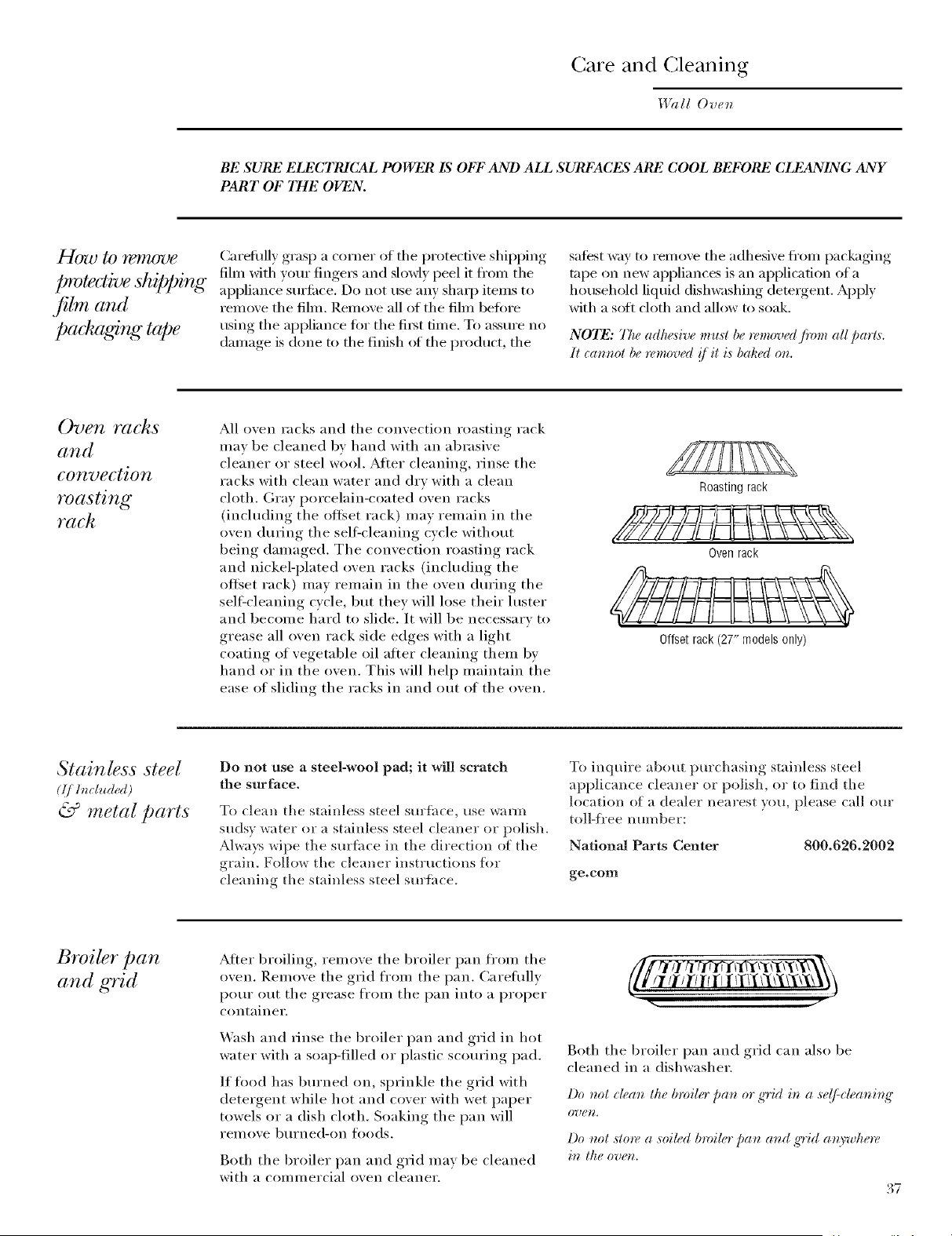
re and (;leaning
IUal! Oven
BE SURE ELECTRJCAL POWER IS OFF AND ALl. SURFACES ARE COO1. BEFORE CLEANING ANY
PART OF TIlE OVEN.
t-logo to r(qlzoue Caiefllll) grasp a corner of the protecfixe shipping
protective shi[q_ing lure with your tinge,_ and slowl)peel it ti'om the
appliance surti_ce. Do not use any shaq) items to
.fibl_ and remo',e the fihn. Remo',e all of the fihn befiwe
pack tging tape using the appliance fl,r the tii_t time. To assm'e no
dama_*e_ is done to the finish of the product, the
satest way to remove the adhesive fl'om packaging
tape on new appliances is an application of a
household liquid dishwashing demlgent. Apply
with a soft cloth and allow to soak.
NOTE: 77w adhe.sive mu.d be removed fi'om all parts.
]i (:annol be removed {fil is baked on.
Oven Yac]_s
and
convection
roasting
rach
All oven racks and the convection roasting rack
mav be cleaned by hand with an abrasive
cleaner or steel wool. Atter cleaning, rinse the
racks with clean water and dry with a clean
cloth. Gray porcelain-coated oven racks
(inchMiI_g the ottset rack) Inay remaii_ in the
oven during the sell=cleaning cycle without
being dalnaged. The convection roasting rack
aim nickel-plated oven racks (ii_chMing the
offset rack) inav renmin in the oven during the
sell=cleaning cycle, but they will lose their luster
and become hard to slide. It will be necessary to
grease all oven rack side edges with a light
coating of vegetable oil atier cleaning theln bv
hand or in the oven. This will help mailmfin the
ease of sliding the racks in aim out of the oven.
Roastingrack
Oven rack
Stainless steel
(Ij ]ncl*_ded)
& metal parts
Do not use a steel-wool pad; it will scratch
the surface.
To clean the stainless steel surlhce, use warm
sudsy water or a stainless steel cleaner or polish.
Always wipe the sm'fi_ce in the direction of the
grain. Follow the cleaner instructions fl_r
cleaning the stainless steel smtace.
Offset rack (27" models only)
To inquire about purchasing stainless steel
applicance cleaner or polish, or to find the
location of a dealer nearest you, please call our
toll-Kee number:
National Parts Center 800.626.2002
ge.com
Broiler pan
and grid
Afier broiling, remove the broiler pan flx>m the
oxen. Remoxe the grid froln the pail Careflfllv
pour out the grease from the pan into a proper
coiltaiiler.
X._ash and rinse the broiler pan and grid in hot
water with a soap-filled or I)lastic scom'ing, pad.
If fl>od has bm'ned on, sprinkle the grid with
detergent while hot and cover with wet paper
towels or a dish cloth. Soaking the pan will
relnove b/lrlled-oil toods.
Both the broiler pan and grid may be cleaned
with a commercial oxen cleaner,
/I/1"111111il/l/X//\'{\'i\ \_)
Both the broiler pan and grid can also be
cleaned in a dishwasher,
Do not dean the broiler pan 0r g'rid in a se(/:deaning"
O?_(¢H,
Do not store a soiled broiler pan and g'rid anywhere
in the oven.
./
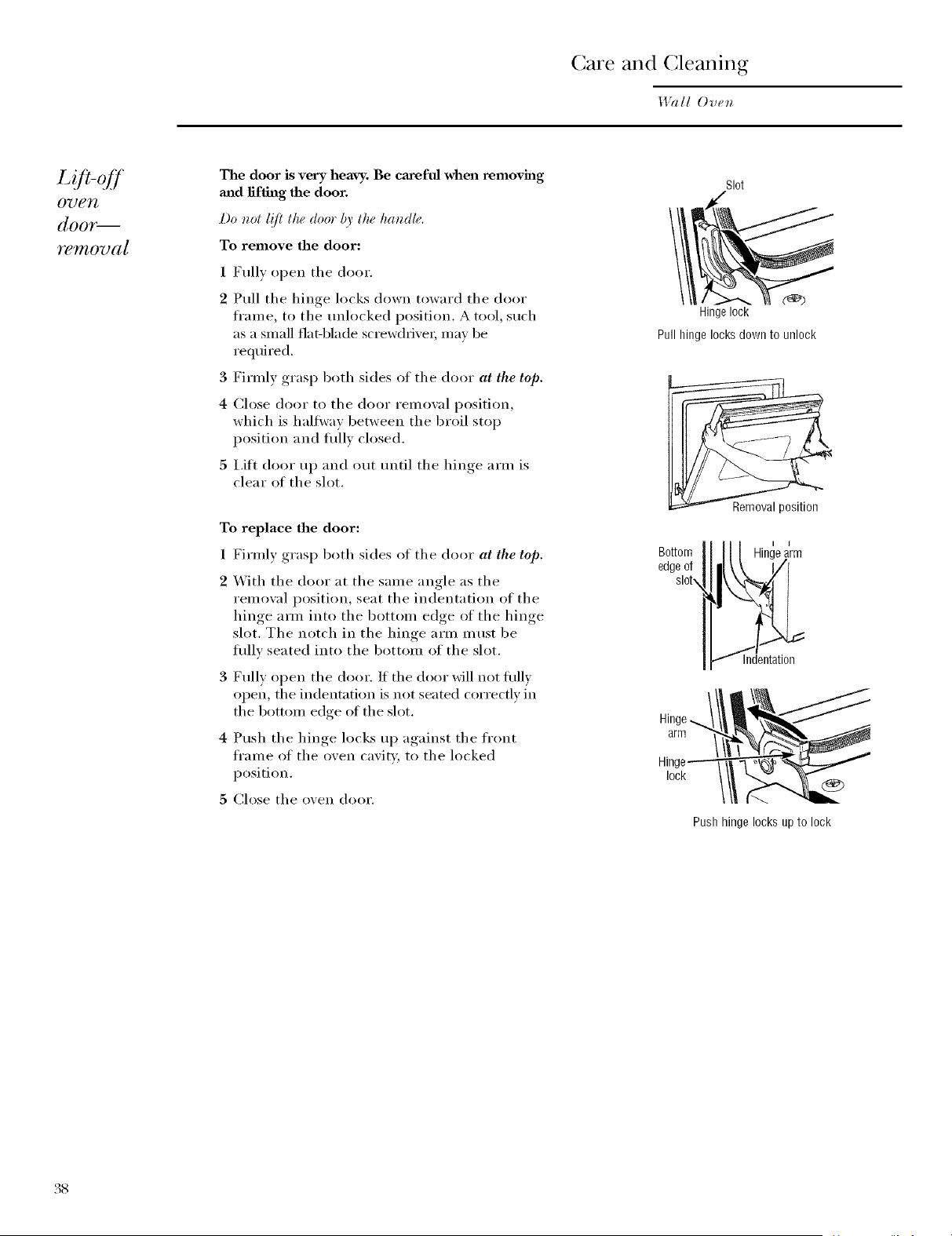
re and (;leaning
1471ll Oven
Lo'i-o ff
07)e7l
([OOY_
re ffl OTJ(l [
The door is very heavy. Be cmeful when removh_g
mid lifting the door.
Do not l!fi th_ door by th_ handh,.
To remove the door:
1 Fully open the door.
2 Pull the hinge locks down toward the door
fram e, to the tmlocked position. A tool, such
as a small fiat-blade screwdriver; may be
required.
3 Firmly grasp both sides of the door at the top.
4 Close door to the door remowd position,
which is haltwav between the broil stop
position and flfllv closed.
5 I.iti door up and out tmtil the hinge arm is
clear of the slot.
To replace the door:
1 Firmly grasp both sides of the door at the to[9.
X_ith the door at the same angle as the
remowd position, seat the indentation of the
hinge am_ into the bottom edge of the hinge
slot. The notch in the hinge arm must be
flfllv seated into the bottom of the slot.
Fully open the door. If the door will not fldlv
open, the indentation is not seated correctly in
the bottom edge of the slot.
Push the hinge locks up against the fl'ont
frame of the oven cavity, to the locked
position.
5 Close the oven door.
Slot
Hingelock
Pull hinge locks down to unlock
Removal position
Bottom 'e a_rm
edgeof
Indentation
1
Pushhingelocksupto lock
38
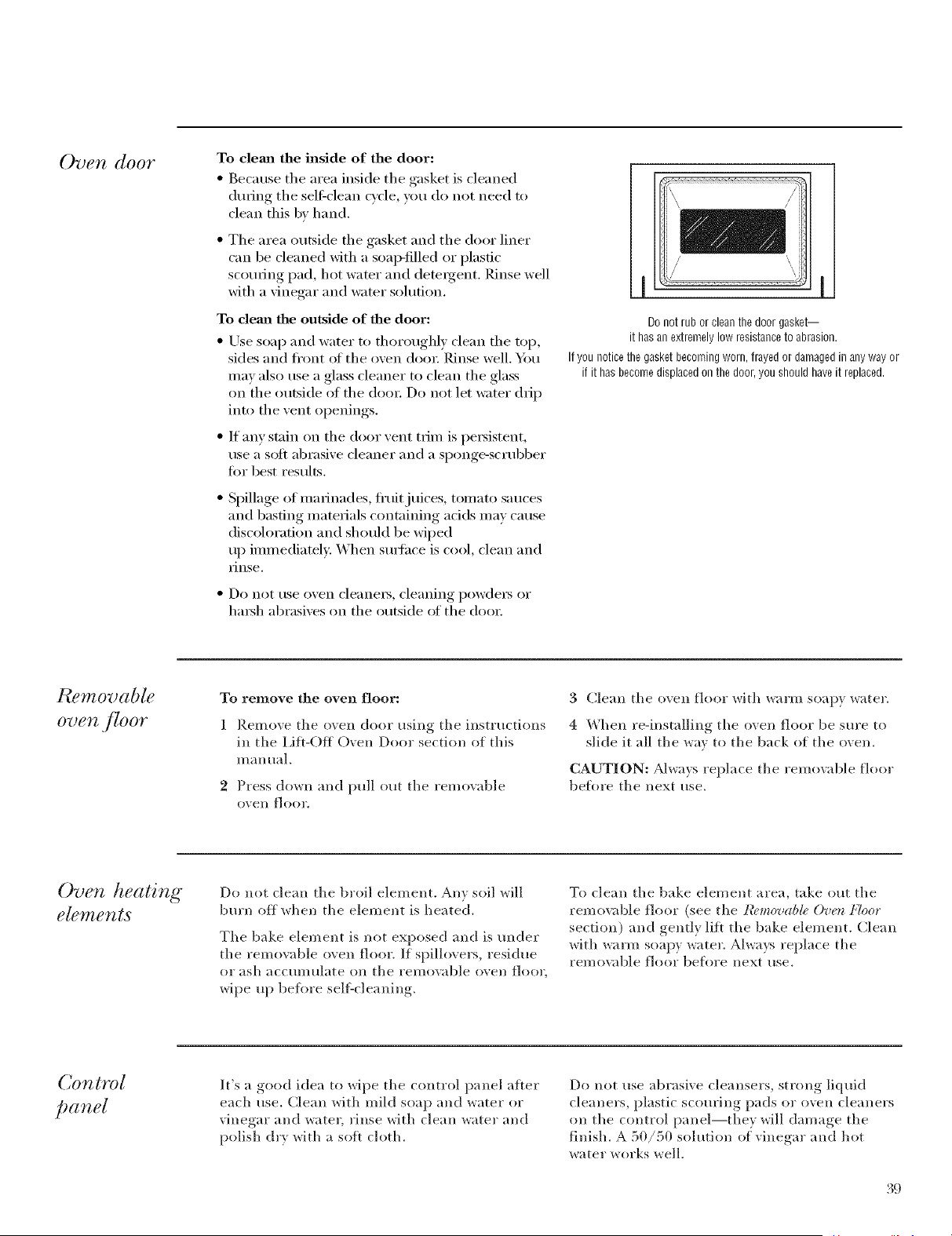
Oven door
To clema the inside of the door:
• Because tile area inside tile gasket is cleaned
during tile sel6clean cycle, you (1(7not need to
clean this by hand.
• Tile area outside tile gasket and tile door liner
can be cleaned with a soap-tilled or plastic
scorning pad, hot water and detergent. Rinse well
with a vinegar and water solution.
To dem_ the outside of the door:
• Use soap and water t(7 thoroughly clean the top,
sides and fi'ont oI the oven dora: Rinse well. Ybu
may also use a glass cleaner to clean the glass
on the outside of the dora: Do not let water drip
into tile vent openings.
• If anv stain on tile door vent trim is persistent,
use a soft abrasive cleaner and a si)onge-scrubber
tiTr best results.
• Spillage of marinades, fl'uitjuices, tomato sauces
and basting materials containing adds may cause
discoloration and should be wiped
up immediatel> When s/wlhce is cool, clean and
IJIISe.
• Do not use oven cleanei_, cleaning powde_ or
hm_h abrasives on tile outside of tile (lo(7_:
Donot rubor cleanthedoor gasket--
it hasanextremelylowresistanceto abrasion.
Ifyou noticethegasketbecomingworn,frayedor damagedin anyway or
if it hasbecomedisplacedonthe door,youshould haveitreplaced.
Pu?movable
oven .flOOr
To remove the oven floor:
1 Remove the oven door using the instructions
in the I,ifl-Off Oven Door section of this
I//illl tlill,
2 Press down and pull out the removable
oVell f] oo1\
3 Clean the oven floor with warm soapy water.
4 When re-installing the oven floor be sm'e to
slide it all the way to the back (Tf the oven.
CAUTION: _Mways replace the remo;_d)le floor
betiTre the next use.
Oven heating
elements
Do not clean the broil element. Any soil will
burn off when the element is heated.
Tile bake element is not exposed and is raider
the removable 17;en floor. If spillovers, residue
(71" ;Ish ;iCC/lllltllate Oll tile ieI//o;;ible ovell f](7(71",
wipe up be%re self-cleaning.
To clean the bake element area, take out the
removable floor (see the l?_,movab& Oven FhTor
section) and gently lift the bake element. (:lean
with warm soapy water. Always replace the
remo;_lble floor beiiTre next use.
It's a good idea to wipe the control panel alter
each use. Clean with mild soap and water or
vinegar and water, rinse with clean water and
polish (hy with a sott cloth.
Do not use abrasive cleansers, strong liquid
cleaners, plastic scouring pads or oven cleaners
(711the control panel--they will damage the
finish. A 50/50 sohltion of vinegar and hot
water works well.
39
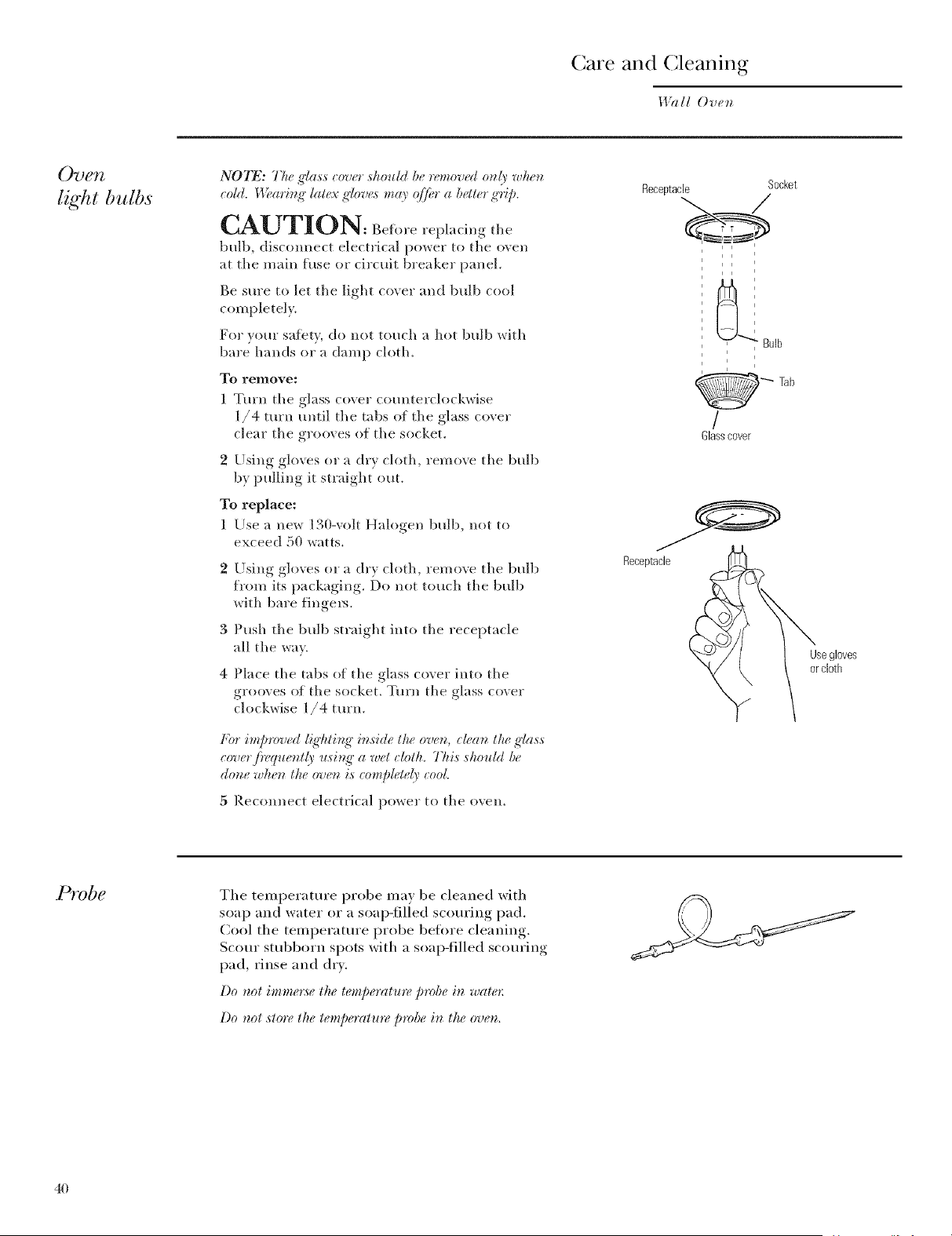
re and (;leaning
I,l?lll Oven
07) g;vZ
light bulbs
N07_: The glass eover sholdd be removed mdy when
eold. _4_,ari_g"latex gloves may. _f/i_r a better ,g'ri_.)
CAUTION: Beforerepla..g
bulb, disconnect electrical pox_er to the oven
at the main fuse or circuit breaker panel.
Be sure to let the light coxer and bulb cool
completely.
For }our safety do not touch a hot bulb with
bare hands or a damp cloth.
To remove:
1 Turn the glass cover counterch)ckwise
1/4 turn until the tabs of the glass cover
dear the grooves of the socket.
2 Using gloves or a (Ir'_ cloth remove the bulb
b) I)ullin°_ it straight out.
To replace:
1 Use a new 130-volt Halogen, bulb, not to
exceed 50 watts.
3
4
Using gloves or a dr', cloth remove the bulb
from its Ix_(kaging',, Do not touch the bulb
*dth bare fingel_.
Push the bulb straight into the receptacle
all the wa).
Place the tabs of the glass coxer into the
grooves of the socket. Turn the o-lass coxer
clock_dse 1/4 turn.
For improved ligT_ting"inside the oven, dean the ,glass
eoverj}_quently using" a wet cloth. This should be
done when the oven is _omp#tely cool
5 Reconnect electrical power to the oven.
Receptacle Socket
_'_" Bulb
Tab
/
Glasscover
Receptacle
Usegloves
orcloth
PTvbe
The temperature probe may be cleaned with
soap and water or a soap-filled scom'ing pad.
Cool the temperatm'e probe befi)re cleaning,
Scorn" stubborn spots with a soap-tilled scom'ing
pad, rinse and dry.
l)o not imme*:selt_elemperahm, probe in wale*:
l)o nol slore lhe lemperalure probe in lhe ovem
40
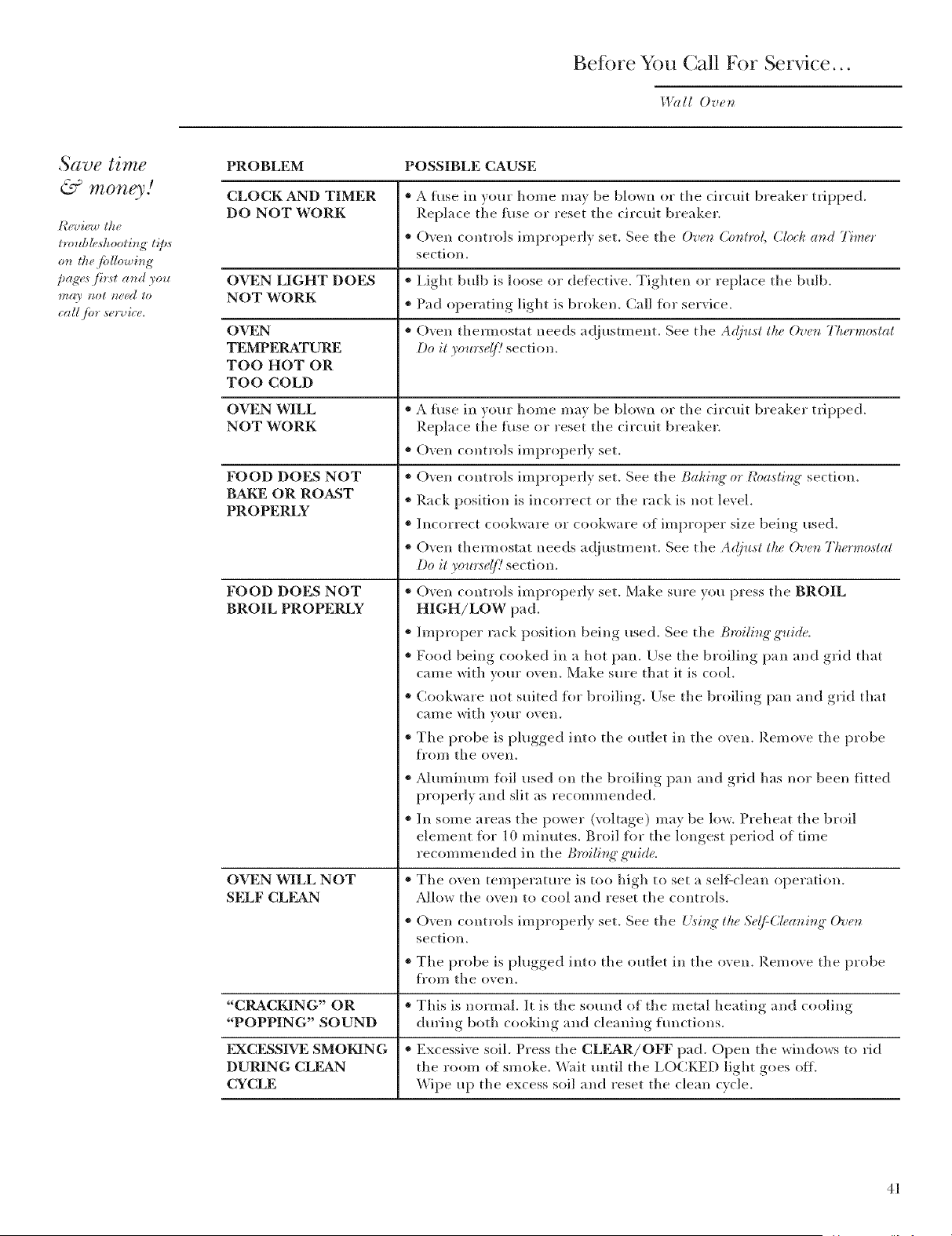
getbre You (;all For Service...
I,l?d/ Oven
Save time
& money/
lvoubh, shooliTtg lips
oTt d_@d/owhtg
pa_>_ first aTtd you
may tzot 1wed to
call fbv sevvic<
PROBLEM POSSIBLE CAUSE
CLOCK AND TIMER * A fuse ill w)ur home may be bh)wn or the circuit breaker tripped.
DO NOT WORK Replace the fuse or reset the circuit breaker.
• (-)yen controls improperly set. See the Oven Control, Clock a_d Timer
section.
OVEN LIGHT DOES . Light bulb is loose or defective. Tighten or replace the bulb.
NOT WORK * Pad operating light is broken. Call fl)r service.
OVEN * (-)yen themlostat needs ac!jusm/ent. See the A_(just the Oven Tlwrmostat
TEMPERATURE, Do it you*:se(/! section.
TOO HOT OR
TOO COLD
OVEN WILL * A fuse in your home may be bh)wn or the circuit breaker Hipped.
NOT WORK Replace the fuse or reset the circuit breaker.
•(-)ven controls improperly set.
FOOD DOES NOT
BAKE OR ROAST
PROPERLY
FOOD DOES NOT
BROIL PROPERLY
OVEN WILL NOT
SELF CLEAN
* Oven controls improperly set. See the Baking" or Roasting" section.
* Rack position is incorrect or the rack is not level.
* Incorrect cookware or cookware of improper size being used.
* Oven them_ostat needs a(!justment. See the A@_st the Ove_z The*'mostat
Do it yol_*:se(/] section.
'_ Oven controls improperly set. Make sure you press the BROIL
HIGH/LOW pad.
* Improper rack position being used. See tile Bmilb_g'guide.
* Food being cooked in a hot pan. Llse the broiling pan and grid that
came with your oven. Make sure that it is cool.
* Cookware not suited fl)r broiling. Use the broiling pan and grid that
cal/le with yotlr oven.
*Tlle probe is plugged into the outlet in the oven, Remove the probe
f]'om tlle ()veil.
* Aluminum fl/il used on tile broiling pan and grid has nor been fitted
properly and slit as recommended.
* Ill some areas the power (voltage) may be low. Preheat the broil
element fl)r 10 minutes. Broil fl)r the longest period of time
recommended ill the Bmili_g" t_uid<
* The oven temperature is too high to set a sellZc]ean operation.
A]h)w the oven to cool and reset the controls.
* O'_en controls improperl) set. See the Uising" the Se(FCleaning" Oven
section.
* Tlle probe is l)lugged,, into the outlet in the oxen. Remove the probe
fron/ tlle ();ell.
"CRACKING" OR * This is normal. It is the sotmd of the metal heating and cooling
"POPPING" SOUND dm'ing both cooking and cleaning hmctions.
FXCESSIVE SMOKING * Excessive soil. Press the CLEAR/OFF pad. Open the windows to rid
DURING CLEAN tile roon_ of smoke. _%fit until the I,OCKED light goes off.
CYCLE Wipe up the excess soil and reset the clean cycle.
4/
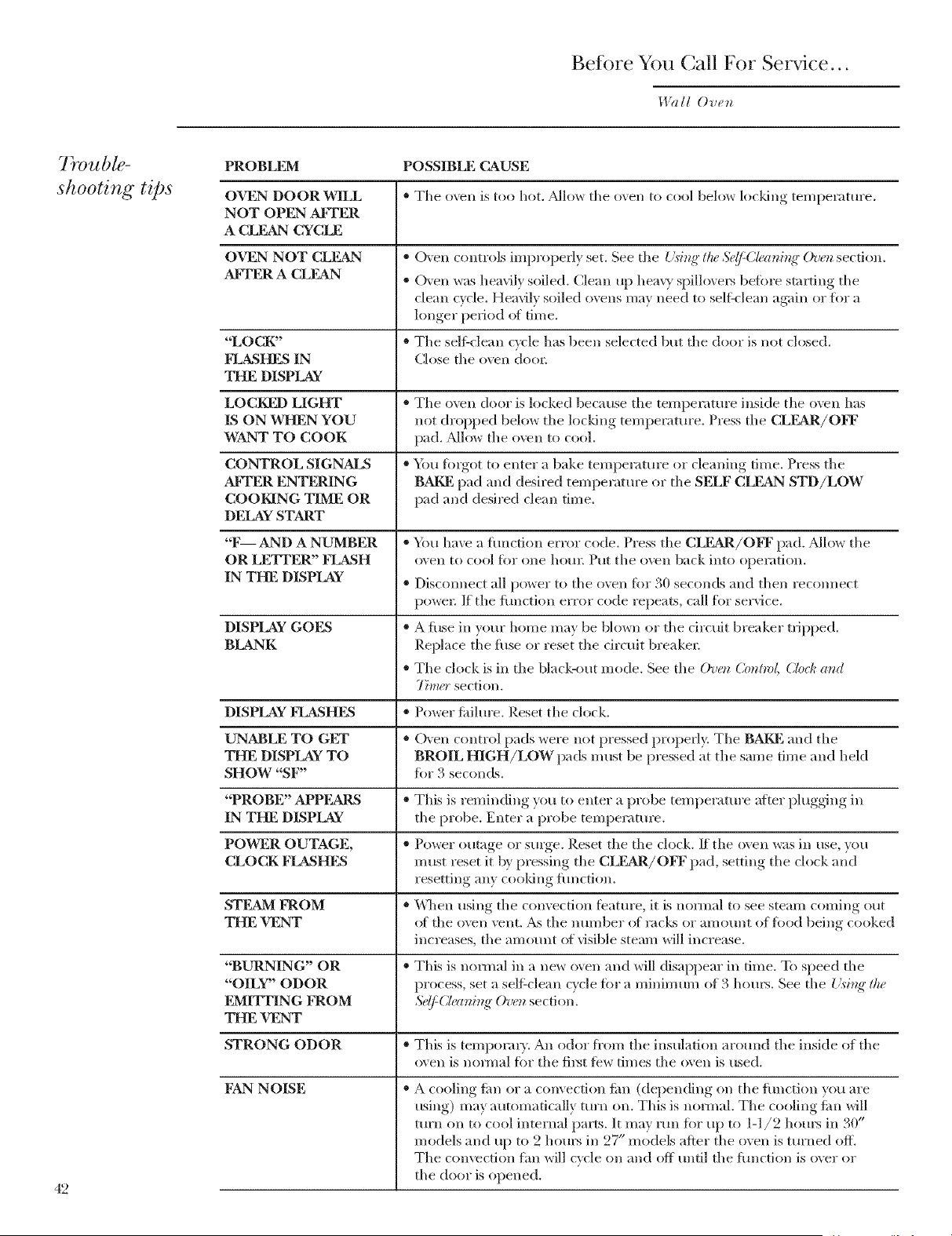
Before You Call For Service...
I,l?lll Oven
Trouble-
shooting tips
42
PROBLEM POSSIBLE CAUSE
OVEN DOORWILL * The oven is too hot. _Mlow the oven to cool below loddng temperature.
NOT OPFAN AI_TER
A CLFAN CYCLE
OVEaN NOT CLEAN * (-_ en controls improperly set. See the {._int{"t/w S_(/=Ch_a_int{"()v_ section.
AI)TER A CLEAN * (-Xen was heavily soiled. Clean up heax T spillo\ ex5 befi)re starting the
clean cycle. Heaslv soiled ovens may need to self-clean again or fl)r a
longer period ot time.
"LOCK" * The self-clean cycle has been selected but the door is not closed.
FLASHES IN Close the oven doox:
THE DISPLAY
LOCKED LIGHT * The oven dora is locked because the temperilture inside the oven has
IS ON WHEN YOU not dropped below tile locldng temperature. Press the CLEAR/OH?
WANT TO COOK pad, _Mlow the o\vn to cool
CONTROL SIGNALS * You fi)rgot to enter a bake temperature or cleaning time. Press the
AkTER ENTERING BAKE, pad and desired temperatm'e or the SELF CLEAN STD/LOW
COOKING TIME OR pad and desired clean time.
DELAY START
"F AND A NUMBER * You ha\v a flmction error code. Press the CLF=kR/OFF pad. _Mlow the
OR LF,TFER" FLASH o\en to cool for one horn: Put the oxvn back into operation.
IN THE DISPLAY * Disconnect all power to the oven fbr 30 seconds and then recom_ect
powel: If the flmction error code repeats, call flw service.
DISPLAY GOES * A fllse in your home may be blown or the drcuit breaker tripped.
BLANK Replace tJ_e fuse or reset tile drcuit breake*;
• The clock is in the black-out mode. See the O'ue;_Control, C[oc/¢and
7_mer section.
DISPLAY I)IASHF£ * Power fidlure. Reset the clock.
UNABLE TO GET * ()yen control pads were not pressed properly. The BAKE and the
THE DISPLAY TO BROIL HIGH/LOW pads must be pressed at the same time and heM
SHOW "SF" fiw 3 seconds.
"PROBF2' APPFARS * This is reminding you to enter a })robe tempelature atier plugging in
IN THE DISPLAY the probe. Enter a probe teFapesature.
POWER OUTAGE, * Power outage 05"sm'ge. Reset the the clock. If the oven was in use, you
CLOCK FLASHES must reset it by pressing the CLEAR/OFF pad, setting the clock and
resetting any cooldng iimction.
STEAM kNOM * \\]_en using the convection teature, it is n(mnal to see steam coming out
THE VENT (ff tile o\vn vent. _&stile n[ll/lber (ff rilcks or alllOtlllt of tk)od being cooked
increases, the amount ot visible steam will increase.
"BURNING" OR * This is normal in a new oven and will disappear in time. To speed the
"OILY" ODOR p*ocess, set a seli:clean cycle fiwa minimum of 3 hom_. See the { isint_"the
F2MITTING FROM S¢(/_C&ming" O'u(_zsection.
THE VENT
STRONG ODOR * This is teml)orm)'. An odor fl'om the insulation around the inside of the
_wen is nomml for the fil_t tbw times the _wen is tlsed.
I)SkNNOISE
* A cooling tim or a con\ ection iim (depending on the flmction you are
using) may automatically turn on. This is nomml. The cooling tim will
turn on to cool internal parts. It may run fiw up to 1-1/2 hom_ in 30"
models and up to 2 hom_ in 27" models a/ter the oven is turned ofl_
The convection Km will cycle on and off 5mtil the flmcti(m is o\er or
the door is opened.

Notes
43

Notes
GE Service Protection Plus 'M
GE, a name recognized _xorldwide for quality and dependability, offers you
Service Protection Plus '"--comprehensive protection on all your appliances--
No Matter What Brand!
Benefits Include:
• Backed by GE
• All brands covered
• Unlimited service calls
• All parts and labor costs included
• No out-of-pocket expenses
• No hidden deductibles
• One 800 nmnber to call
We TI Cover Any Appliance.
Anywhere. Anytime.*
You _ill be completel_ satisfied _dth our service protection or you ma_ request )our monex back
on the remaining value of your contract. No questions asked. It's that simple.
Protect your refl'igerator, dishwasher, washer and chTer, range, TV, VCR and much more--any brand!
Plus there's no extra charge _()r emergency service and low monthly financing is available. Even icemaker coverage
and _bod spoilage protection is o_tbred. You call rest easy, knowing that all your valuable household prodtlcts are
protected against expensive repairs.
e_._e>o.rron*idenreinGEa.d r:,n._i. thet!.S.t,,H-*reeat800.626.2224
for I/lore infolmation.
:_-M1 br;mds o_<led, up Io 20 y<;u'_ _dd, in Ihe continental [.S.
(]111 llel'{t
Please place in envelope and mail to:
General Electric Company
Warranty Registration Department
P.O. Box 32150
Louisville, KY 40232-2150
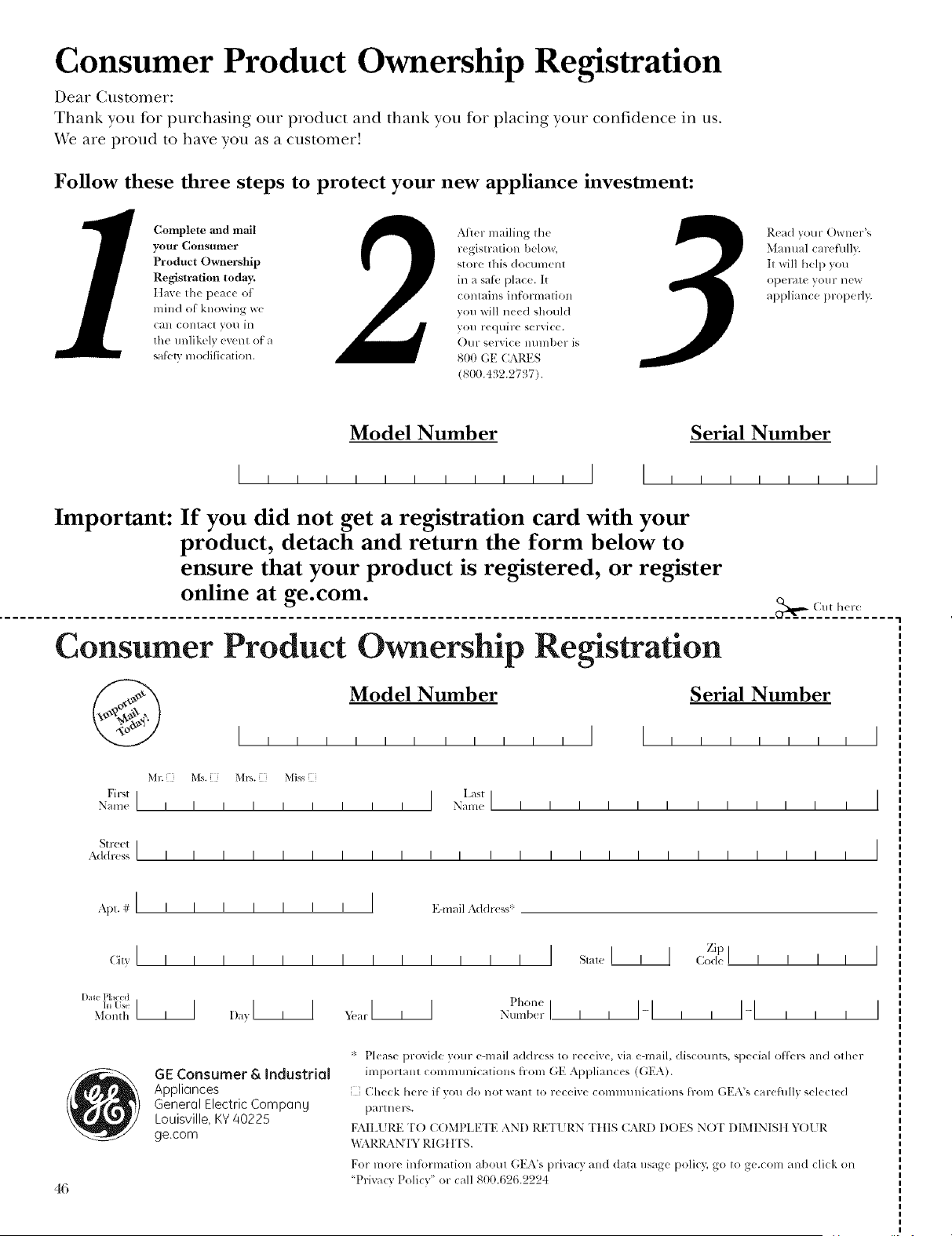
Consumer Product Ownership Registration
Deal Customer:
Thank you tbr purchasing our product and thank you for placing your confidence in us.
V_'eare proud to haxe you as a customer'.
Follow these three steps to protect your new appliance investment:
Complete alld mail
your Consumer
Product Ownership
Registration today:
IIa_,'_' tll_' l_'ac_ ' ot
milld ot' knowing we
Call contact yol/ in
the llnlik(_l_ event of a
sat}.*tv lnoditication.
After mailing the
registratioll bellow,
store this dOClllnellt
in a sat;_'place. It
contaills il_torlnatiOll
voll will need should
VOI] re(ltliYe service.
Our serxice mllnber is
800 (;E CAI_.ES
(800.432.97!17).
Read VOllr Q)Wller"4
Manual careftllly.
It will help yotl
operate VOllr lleW
appliallce properl);
Model Number Serial Number
I I I
Important: If you did not get a registration card with your
product, detach and return the form below to
ensure that your product is registered, or register
online at ge.com.
_ (_llt ll(_re
Consumer Product Ownership Registration
Model Number Serial Number
M*: Ms. Mls. Miss
FirstI I L'stl
Nam( I I I I I I I I I N_ml( I I I I I I I I I I I I
St l-C(:t I
Address I I I I I I I I I I I I I I I I I I I I I I I I
, I
I
I
Ap,.#I I I
(iitT,' [ I I
[)ll_ Pl I<:(d
hi tis_ I I I
.X]onth
I I I I I I E-lnail Addr(ss'
I I I I I I I I
Dayl , I xv,_ltl , I
, i I
Pholle
Nt/lllb(_r I
Zip
S,a,,,I I A <:od<I I I I I I
GE Consumer & Industrial
Appli(]nces
Generol Electric Compong
Louisville, KY 40225
ge.com
'_' Please pr_vide your e-mail address to receive, via e-mail, discoums, special ottk.rs alld <)tiler
importam communicatiolls from GE Appliances (GEA).
Check here if vou do not warn to receive commllllications t_-oln (;EA's careftllly selected
partners.
FAILI RE TO (?()MPI EWE AND RETI RN "FillS CARD DOES NOT DIMINIStt YOI R
"_,:\RI_ \N'I"," RIGttTS.
For more inti)rmatioll agora (',EA's pri_acy a_l(l data /isage polio); go to ge_.com a_l(l cli(k on
'Privacy Policy" or call 800.6'26.'22'24
Consumer Services
With the purchase of your new Monogram appliance, receive the
assurance that if you ever need information or assistance from GE,
we'll be there. All you have to do is call----toll-free!
G E Answer
Center _
800.626. 2000
Whatever your question about any Monogram major appliance, GE Answer Center e:
infl_rmation service is a_filable to hell). Yore" call--and your question--will be answered
promptly and courteously. And you can call any time. GE Answer Center <_se_Mce is open
24 hours a day, 7 clays a week.
OR
Visit our \'\Tebsite at: ge.com
In-Home Repair
Service
In the U.S.A.:
800.444.1845
In Canada:
888. 880.3030
A GE consumer service protessional will provide expert repair service, scheduled at a time
that's convenient flxr you. Many GE (_onsumer Service company-operated locations otter
you service todav or tomorrox< or at your convenience (7:00 a.m. to 7:00 pan. weekdays,
9:00 a.m. to 2:00 pan. Saturdays). Our fhctorDtrained technicians know your appliance
inside and out--so most repairs can be handled in just one visit.
For Customers
With Special
Needs...
800.626. 2000
S_gXION
GE oflbrs, fl'ee of charge, a brochure to assist in planning
a barrie>ti'ee kitchen tbr persons with limited mobility.
Consumers with impaired hearing or speech who have access to
a TDD or a conventional teletypewriter may call 800.TDD.GEAC
(800.833.4322) to request inflwmation or se_Mce.
Service Contracts
800.626. 2224
YOu can have the secure teeling that GE (_(msumer Service will still be there after your
warranty expires. Purchase a GE contract while your warranty is still in ettect and you'll
receive a substantial discount. With a multiple-year contract, you're assured of future
service at today's prices.
Parts and
Accessories
800.626. 2002
Individuals qualified to service their o*_n appliances can have parts or accessories sent directlx
to their home. The (;E p;u'ts s}stem provides access to oxer 47,000 parts...and all GE (;enuine
Renewal Parts are fully warranted. VISA MasterCard and Discoxer cards are accepted.
User maintenance instructions contained in this manual cover procedures intended to be
performed by any user. Other servicing generally should be referred to qualified service
personnel. Caution must be exercised, since improper servicing may cause unsafe operation.
47
Warranty
(onveclion I,l_all Oven
YOUR MONOGRAM WALL OVEN WARRANTY
Staple sales slip or cancelled chech here. Proof of original purchase
date is needed to obtain service under warranty.
WHAT IS
COVERED
P)vm the Date
of the O'_ginal
Puwhase
LIMITED ONE-YEAR WARRANTY
For one xear from date of original purchase, we will provide, free of charge,, I)arts and
service labor in xour home to repair or replace any part of the oven that tails because
of a mantdhcttu'ing defect.
This warranty is extended to the original purchaser and any succeeding owner ff)r products
purchased for ordinar\ home use in the 48 mainland states, Hawaii, %_lshington, D.C. or Canada.
If the product is located in an area where service by a GE Authorized Servicer is not available, you
ma\ be responsible fin" a trip charge or \_)u ma) be required to bring the product to an Authorized GE
Setwice location lbr service. In Alaska the warranty is the same e×cept that it is I,[MITED because \_)u must
pa) to ship the product to the service shop or fi)r the set\ice technician's travel costs to \_)ur home.
All warranty service will be provided bv our Factor\ Service Centers or bv our atnhorized Customer
Care ,_servicers during normal working hours.
Should your appliance need service, during warranty period or beyond, in the USA call
800.444.1845. In Canada: 888.880.3030. Please hm e wmr serial num ber and model num ber
available when calling fl)r service.
WHAT IS NOT
COVERED
Service trips to your home to teach you how
to use the product.
Replacement of house fuses or resetting of
circuit breakers.
Damage to the product caused by accident,
fire, floods or acts of God.
Failure of the product if it is used for other than
its intended purpose or used commercially.
• Improper installation, delivery or maintenance.
• Incidental or consequential damage caused
by possible defects with this appliance.
• Damage caused after delivery.
• Product not accessible to provide required
service.
I XCLUSION OFIMPLIED WARRANTIES--Your sole and exclusive remedy isproduct
repair as provided in this Limited Warranty. Any impfied warranties, including the implied
warranties of merchantability or fitness for a particular purpose, are limited to one year or
the shortest period allowed bylaw.
164D4290P093-2
49-80336
11-o5JR
Printed in the United States
Some states/provinces do not allow the exclusion or limitation of incidental or consequential
damages, so the above limitation or exclusion ma} not apply to you. This warranty gives you specific
legal rights, and you ma_ also hme other rights which vary fi'on_ state to state/province to province.
To know what your legal rights are in your state/province, consult your local or state/provincial
consmner ailairs office or your state's Attorney General.
Warrantor in USA: General Electric Company,
Louisville, KY 40225
Warrantor in Canada: Camco Inc.
GE Consumer & Industrial
Applionces
General Electric Compon U
Louisville, KY/40225
ge.com

