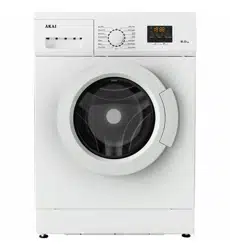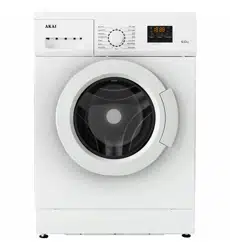
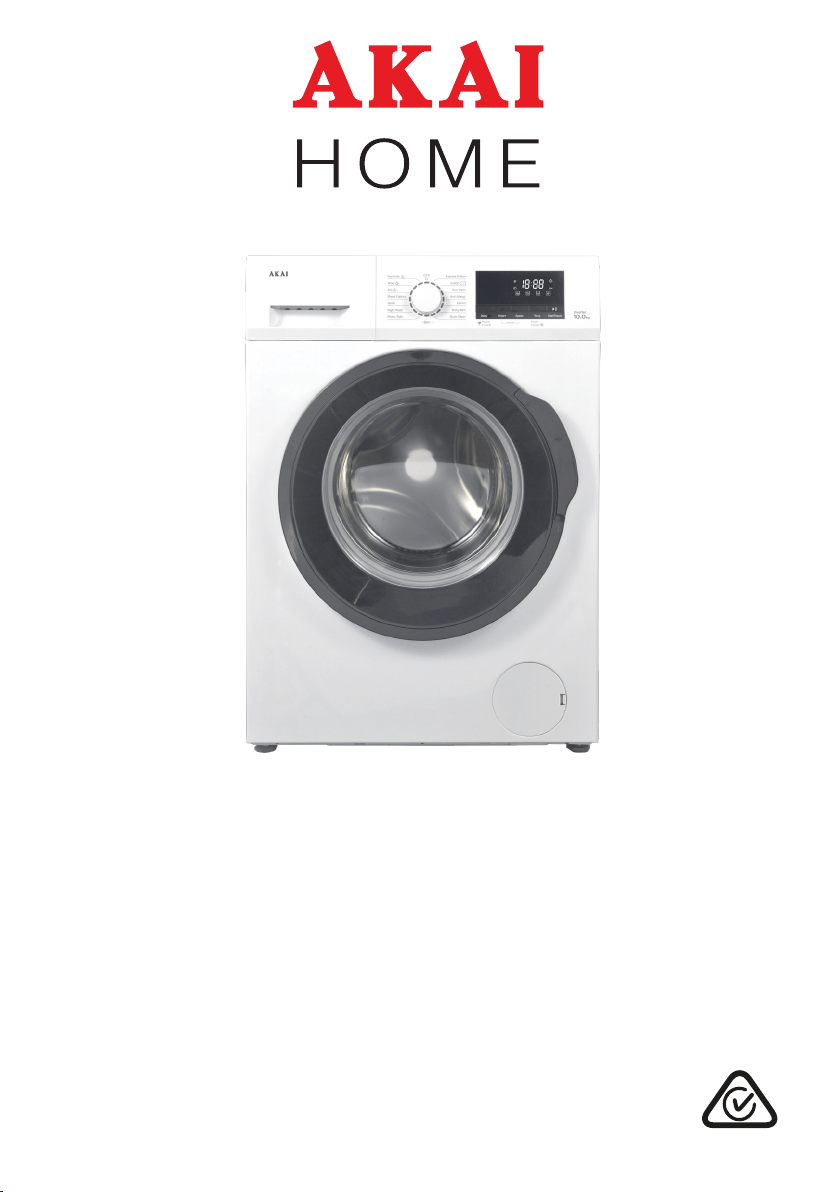
10 kg Front Load Washing Machine
With Wi-Fi Function
INSTRUCTION MANUAL
MODEL: AK-FL10
After Sales Support
(AU) 1300 886 649 (NZ) 0800 836 761 | tempo.org/support
2
Contents
03 General Safety Instructions
07 Unpacking
08 Product Overview
10 Installation
16 Instructions
24 Wi-Fi Connection
27 FAQs and Troubleshooting Guide
29 Other Useful Information
After Sales Support
(AU) 1300 886 649 (NZ) 0800 836 761 | tempo.org/support
3
General Safety Instructions
Electrical safety and cord handling
• Voltage: Before connecting and turning on the appliance, ensure the electrical
voltage and circuit frequency correspond to those indicated on the appliance rating
label.
• Power supply system: Make sure the power supply system (current, power voltage
and cabling) at your home can meet the normal loading requirements of electrical
appliances.
• WARNING! Only connect the washing machine to a grounded (earthed) electrical
outlet. Do not overload the wall outlet, as overloading can result in fire or electric
shock. Insert the power plug securely.
• Protect from moisture: To avoid electric shock, fire and malfunction, do not install
this machine in a damp place. Do not pull out or insert the plug with wet hands or
bare feet. Do not expose the appliance, cord or plug to rain, moisture or other liquid.
• Power cord: Do not kink or damage the power cord, and position it out of the way so
no one steps on or places anything on the cord or against it.
WARNING! Do not use the machine if the cord or plug is damaged to avoid an
electric shock, short circuit or fire. If the cord is damaged, it must be replaced by the
manufacturer’s service agent or a properly qualified person in order to avoid a hazard.
IMPORTANT SAFETY INSTRUCTIONS
READ CAREFULLY AND KEEP FOR FUTURE REFERENCE
Read this manual thoroughly before first use, even if you are familiar with this type
of product. The safety precautions enclosed herein reduce the risk of fire, electric
shock and injury when correctly adhered to. Keep the manual in a safe place for
future reference, along with any warranty information and your purchase receipt. If
applicable, pass these instructions on to the next owner of the appliance. Always
follow basic safety precautions and accident prevention measures when using
an electrical appliance, including the following:
Pay particular attention to safety advice following the words:
DANGER, WARNING and CAUTION.
These words are used to alert you to a potential hazard that can seriously injure
you and others. The instructions will tell you how to reduce the chance of injury
and let you know what can happen if the instructions are not followed.
DANGER means that failure to read this safety statement may result in severe
personal injury or death.
WARNING means that failure to read this safety statement may result in
extensive product damage or serious personal injury.
CAUTION means that failure to read this safety statement may result in
minor or moderate personal injury, property or equipment damage.
After Sales Support
(AU) 1300 886 649 (NZ) 0800 836 761 | tempo.org/support
4
General Safety Instructions (Cont.)
• CAUTION! Do not connect the appliance to the power supply using a power adaptor
or extension cord. Use of an extension cord does not guarantee the required safety.
• After use: Always unplug the appliance and turn off the water after use.
• Disconnect: Unplug the washing machine from the power supply before cleaning,
servicing, maintenance or moving the appliance. Pull by the plug, not by the cord.
• Keep openings clear: Do not insert any objects into ventilation or similar openings.
• No timer: The appliance is not intended to be operated by means of an external
timer or separate remote control system.
• RCD: Unless your home is already fitted with a residual current device (safety
switch), we recommend installing an RCD with a rated residual operating current
not exceeding 30 mA to provide additional safety protection when using electrical
appliances. See your electrician for professional advice.
Installation
• WARNING! This appliance is extremely heavy. Transport with care! A team lift
or mechanical aid is required when moving the machine. Do not hold the washing
machine by the door or any other protruding part while lifting or transporting it.
• Freestanding use only: This appliance is not to be built in.
• Do NOT install the appliance:
– outdoors or in a damp or wet environment (such as a bathroom)
– in areas where caustic or explosive gases are present
– near open flames or heat sources
– behind a lockable door, a sliding door or a door with a hinge on the opposite side to
that of the washer in such a way that a full opening of the washer door is restricted.
• Installation surface: This washing machine must be installed on a flat, even and
stable ground to avoid overturning during use or maintenance. Do not place it on
carpet. If the machine must be positioned on carpet, place a plastic mat underneath
the machine and make sure any ventilation openings in the base are not obstructed.
• Clearances: Ensure that there is a distance of at least 200 mm between the washer
and any external heat sources, such as appliances containing heating elements.
• Installation: Make sure that all water and electrical connections are made by
qualified persons only, observing local safety regulations and following the installation
instructions in this manual (refer to “Installation”, pages 10–15). Do not use the
appliance until it is fully installed.
• Water connection: This machine has only one inlet for water (cold). Do not connect
it to the hot water supply. Connect the machine to the water mains using new hose
sets. Do not reuse old hose sets. The required water pressure is 0.02 MPa (min.) to
0.8 MPa (max.).
• Drainage: Do not allow the water drained out of the appliance to accumulate.
• Ventilation openings: Do not cover any air inlet or exhaust openings.
After Sales Support
(AU) 1300 886 649 (NZ) 0800 836 761 | tempo.org/support
5
General Safety Instructions (Cont.)
• Electrical connection: During installation, the power cord must not be excessively or
dangerously bent or flattened. The plug must be accessible after installation.
• Misuse: Improper installation or faulty use may result in the risk of fire, electric shock
and/or injury. We accept no liability for any eventual damages or injury caused by
improper installation, misuse or noncompliance with these instructions.
Usage conditions and restrictions
• Domestic use only: This appliance is intended for indoor household use only. It is
NOT suitable for commercial, industrial or trade use.
• Intended purpose: This washing machine is designed for washing domestic
quantities of textiles suitable for machine-washing. Do not use the machine for
anything other than its intended purpose, and only use it as described in this manual.
• No outdoor use: Do not operate the appliance outdoors.
• Usage restriction: This appliance is not intended for use by persons (including
children) with reduced physical, sensory or mental capabilities, or lack of experience
and knowledge, unless they have been given supervision or instruction concerning
use of the appliance by a person responsible for their safety.
• Children: Supervise children to ensure they do not play with the appliance. Close
supervision is necessary when any appliance is used by or near children. Do not
allow children (or anyone else) to climb up and sit on top of the washing machine.
• Handling: Handle the washing machine with care. Do not place or store flammable
items or heavy objects on top of the machine. Do not sit on the top cover.
• Door handling: Handle the door with care. Do not lean against the machine door.
Do not let children swing from the door. Do not close the door with excessive force.
If you find it difficult to close the door, please check and ensure that the clothes are
properly loaded and well distributed.
• Before loading the washing machine, make sure that:
– no young child or pet has climbed into the drum
– the water inlet hose is properly connected and the tap is turned on
– all pockets of clothing to be washed are empty. Hard, sharp objects such as coins,
safety pins, paper clips, bra wires, nails, screws or stones can cause extensive
damage to the appliance and block the pump. Any damage or malfunction
resulting from foreign objects is not covered by your warranty and may lead to
expensive repairs.
• Do NOT wash the following items in the washing machine:
– rain jackets, raincoats, fishing coats and similar waterproof clothes or covers
– carpets or floor rugs
– underwire bras (damage to the appliance can result if metal reinforcements come
loose during the washing cycle)
After Sales Support
(AU) 1300 886 649 (NZ) 0800 836 761 | tempo.org/support
6
General Safety Instructions (Cont.)
– clothes that have any residues of flammable materials, as this may result in fire
or explosion. For example, articles that have been cleaned in, washed in, soaked
in, or dabbed with industrial chemicals, or combustible or explosive substances
(such as wax, oil, paint, petrol, alcohol, degreasers, dry-cleaning solvents,
kerosene, etc.). Items containing such substances must be washed by hand or
rinsed thoroughly before they may be machine-washed.
• Flammable, explosive or toxic substances must not be used as washing
detergents or for cleaning the machine.
• Capacity: Do not overload the washing machine; its maximum capacity is 10 kg (dry
wash load).
• Water intake: Never refill the water by hand during washing.
• After use: After the program is finished, wait until the drum has stopped spinning
and the door lock icon is no longer lit before opening the door. If water is still visible,
do not attempt to open the door. Do not add or remove clothes while the drum is
spinning.
• Disconnect the water and power supplies after use.
CAUTION: Hot!
• During a hot wash, the door window may become hot. Do not touch it, and ensure
to keep children and pets away from the machine during operation.
• Be careful of burning when the machine drains hot washing water.
Cleaning and maintenance
• Disconnect: Before cleaning or carrying out maintenance, always unplug the
appliance from the power supply.
• CAUTION! After each wash, clean the door and the door seals and remove any
threads, lint or foreign objects. Also check the detergent drawer and clean out
detergent residues. Regularly clean the power plug to remove dust and dirt and avoid
contact failure. Cleaning and user maintenance shall not be carried out by children
without supervision. Do not spray the machine with water.
• CAUTION! Cleaning the inside of your washing machine regularly is particularly
important if you frequently use a cold wash cycle, especially if you also use a
fabric softener. Liquid detergents can cause detergent scum to build up around
the outside of the drum, which cold water will not remove and which can cause
bacteria, unpleasant odours, and eventually soiling of your wash load.
• Do not open the housing: The washing machine has no user-serviceable parts
contained within. Do not attempt to repair, dismantle or modify it.
• Service: Only have the appliance serviced by authorised service personnel. Service
or repairs carried out by inexperienced or unqualified persons may cause injury
and/or make more serious repairs to the appliance necessary.
After Sales Support
(AU) 1300 886 649 (NZ) 0800 836 761 | tempo.org/support
7
Unpacking
Unpacking the washing machine
CAUTION: EXTREMELY HEAVY!
A team lift or mechanical aid is required when moving this appliance.
Keep the washing machine as upright as possible during transportation.
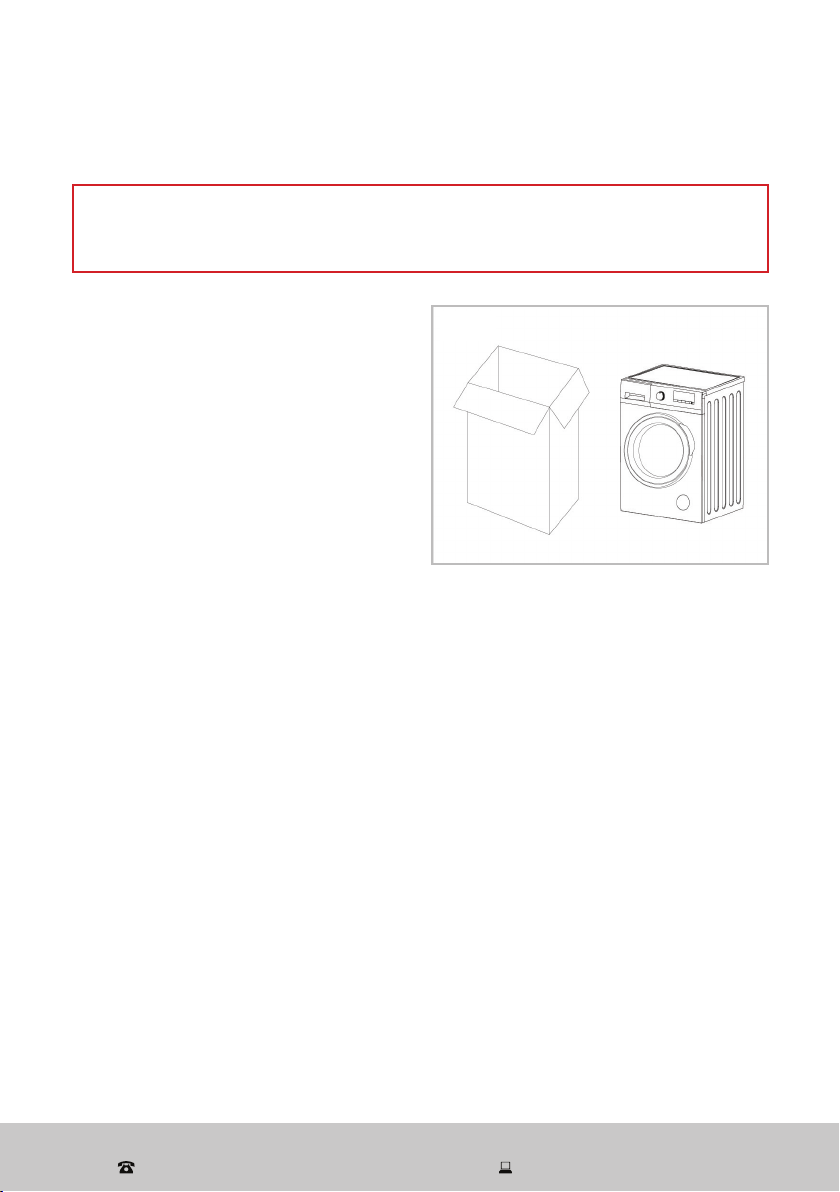
• This product has been packaged to
protect it against transportation damage.
Remove all packaging materials from
around the appliance and inside the
drum, including the foam base (Fig. 1).
• Keep the original packaging carton
and materials in a safe place. It will
help prevent any damage if the product
needs to be transported in the future,
and you can use it to store the appliance
when it is not in use. In the event that
the packaging materials are to be
disposed of, please recycle them where possible.
• Plastic wrapping can be a suffocation hazard for babies and young children, so
ensure all packaging materials are out of their reach and disposed of safely.
• Remove any tapes securing the power supply cord and drain hose and all accessory
parts from the drum.
• If you notice any water drops on the packaging bags or the door glass, do not be
alarmed. This is normal as the appliance is fully checked in the factory before it is
being packaged for transport.
Checking the package contents
• Check all parts of the package against the scope of delivery list on the following
pages and ensure you have received all items.
• Check the washing machine for any damage from transportation. Unwind the power
cord to its full length and inspect it for damage. Do not use the appliance if the
appliance or its cord has been damaged or is not working properly. In case of
damage, of if anything is missing, please contact our after sales support centre for
advice on examination, repair or return of the damaged product.
• Read this manual to familiarise yourself with all the parts and operating principles
of the washing machine. Pay particular attention to the safety instructions on the
previous pages.
Fig. 1
After Sales Support
(AU) 1300 886 649 (NZ) 0800 836 761 | tempo.org/support
8
Product Overview
Scope of delivery
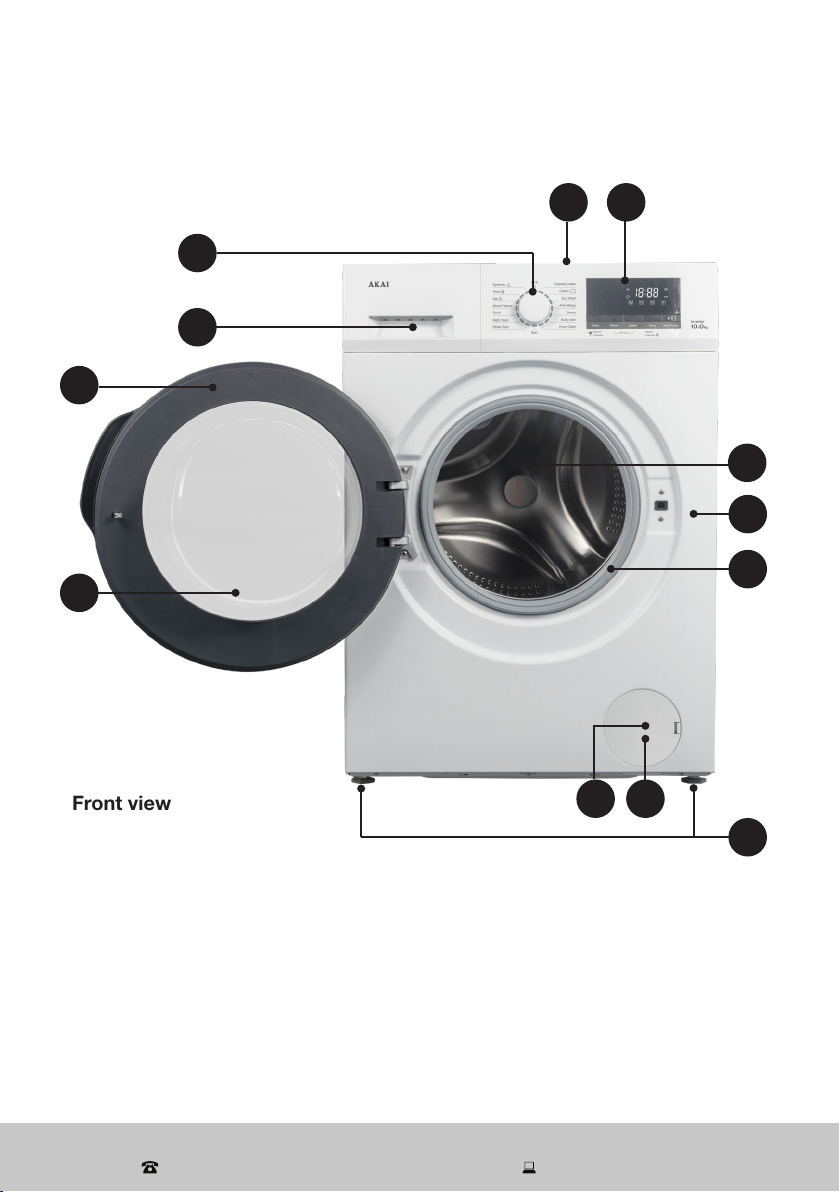
Front view
1 Program dial (knob)
2 Detergent drawer
3 Door
4 Door glass window
5 Service cover
6 Drain pump filter (behind the service cover)
7 Top cover
8 Control panel with LED display
9 Wash/spin drum
10 Housing
11 Door seal
12 Adjustable feet (4)
5 6
2
3
1
4
8
9
7
10
12
11
After Sales Support
(AU) 1300 886 649 (NZ) 0800 836 761 | tempo.org/support
9
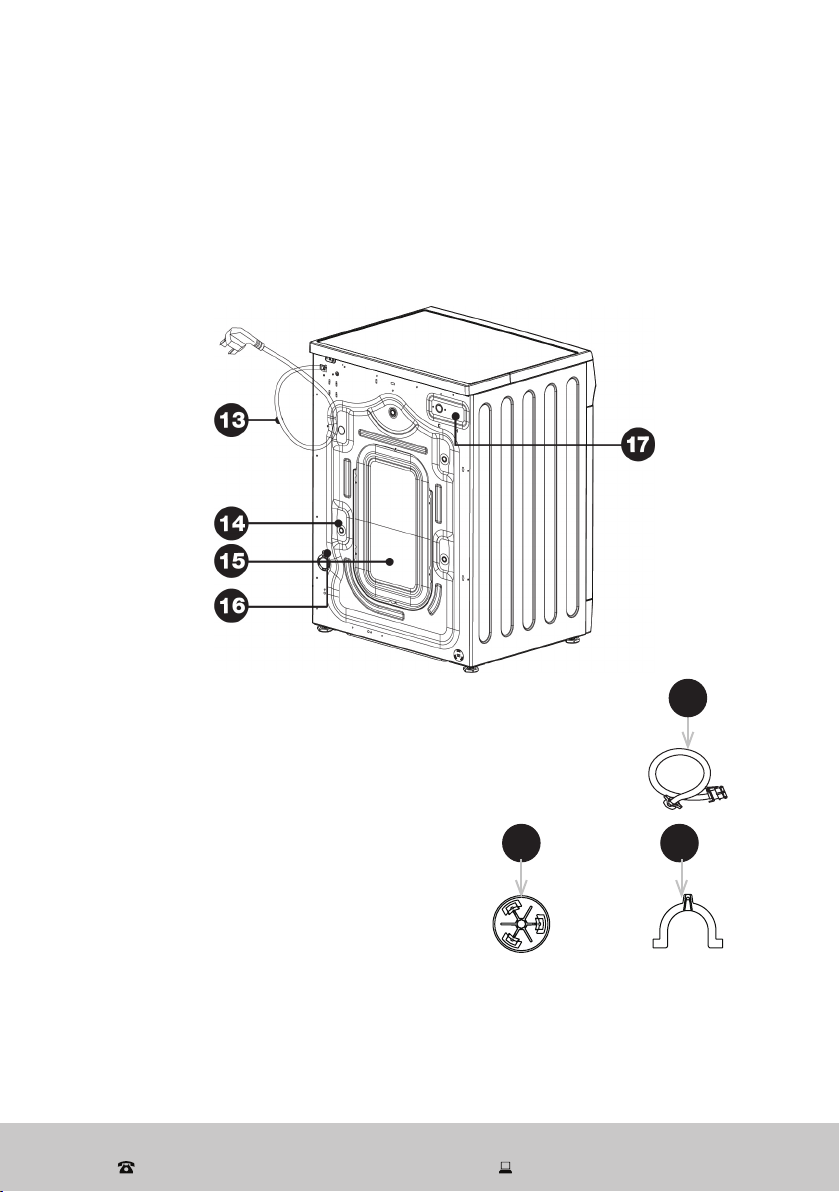
Rear view
13 Power cord and plug
14 Transit bolts (4)
15 Back cover
16 Drain hose connection (drain hose included, but not shown here)
17 Cold water inlet valve
Product Overview (Cont.)
Accessories
18 Cold water supply (inlet) hose
19 Transit hole caps (4)
20 Drain hose support (elbow)
Documentation (not shown)
Instruction manual
Warranty certificate
2019
18
NOTE: Due to continued product improvement, images and illustrations in this manual
may vary slightly from the product purchased. All images in this manual are for
reference purposes only. Parts are not necessarily pictured to scale.
After Sales Support
(AU) 1300 886 649 (NZ) 0800 836 761 | tempo.org/support
10
Installation
Removing the transit bolts
WARNING!
Before installing the washing machine, you must remove the transit bolts from the
back of the housing and cover the holes with the transit hole caps provided.
The bolts hold the drum in place during transport but they must be removed
before use so the drum can move during the wash and spin cycles. Leaving the
bolts installed will result in strong shock and noise during use, malfunction and
serious damage to the machine.
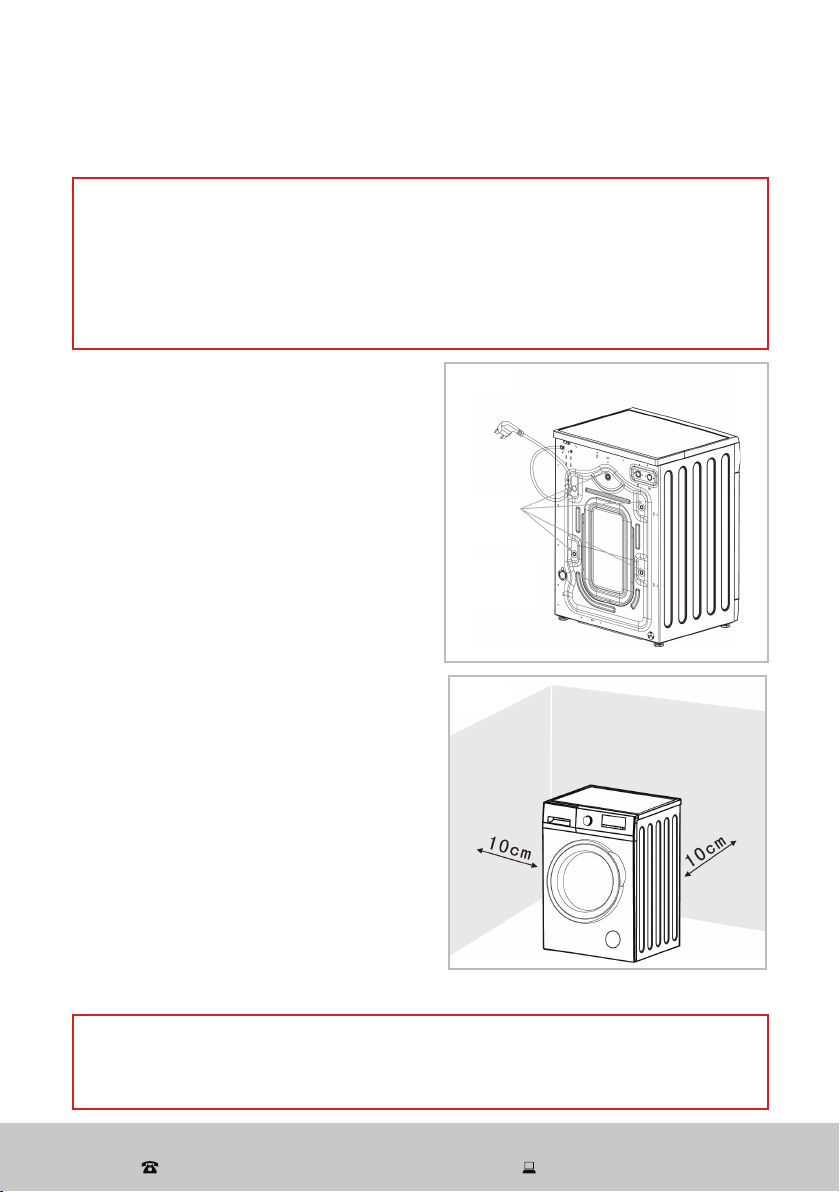
• Dismantle the four transit bolts from the
back of the washing machine using an
appropriate tool (Fig. 2).
• Keep the bolts in a safe place; you will
need them again when moving the
machine, if you move house, for example.
• Cover the holes with the supplied caps.
Selecting the location
Before installing the appliance, make sure the
location meets the following requirements:
• A concrete floor is the most suitable
installation surface for a washing machine,
being far less prone to vibration during the
spin cycle than wooden floorboards or a
carpeted surface.
• The machine must be level and securely
positioned. It must be protected from
direct sunlight, water and weather.
• The distance between the machine and
wall must be more than 10 cm (Fig. 3).
• To avoid vibrations during spinning, the
machine should not be installed on soft
floor coverings. If the appliance must be
placed on a carpeted surface, place a
plastic mat underneath and ensure any
ventilation openings in the base are not
obstructed.
WARNING!
Stability is important to prevent the washing machine from moving during operation.
Make sure that the machine does not stand on the power cord.
Fig. 2
Transit
bolts
Fig. 3
After Sales Support
(AU) 1300 886 649 (NZ) 0800 836 761 | tempo.org/support
11
Installation (Cont.)
Levelling the machine
Place the machine on solid, dry and level ground. The machine must stand perfectly
level on all four feet to ensure safe and proper operation. Incorrect installation may
cause vibrations and noise and may cause the machine to move about.
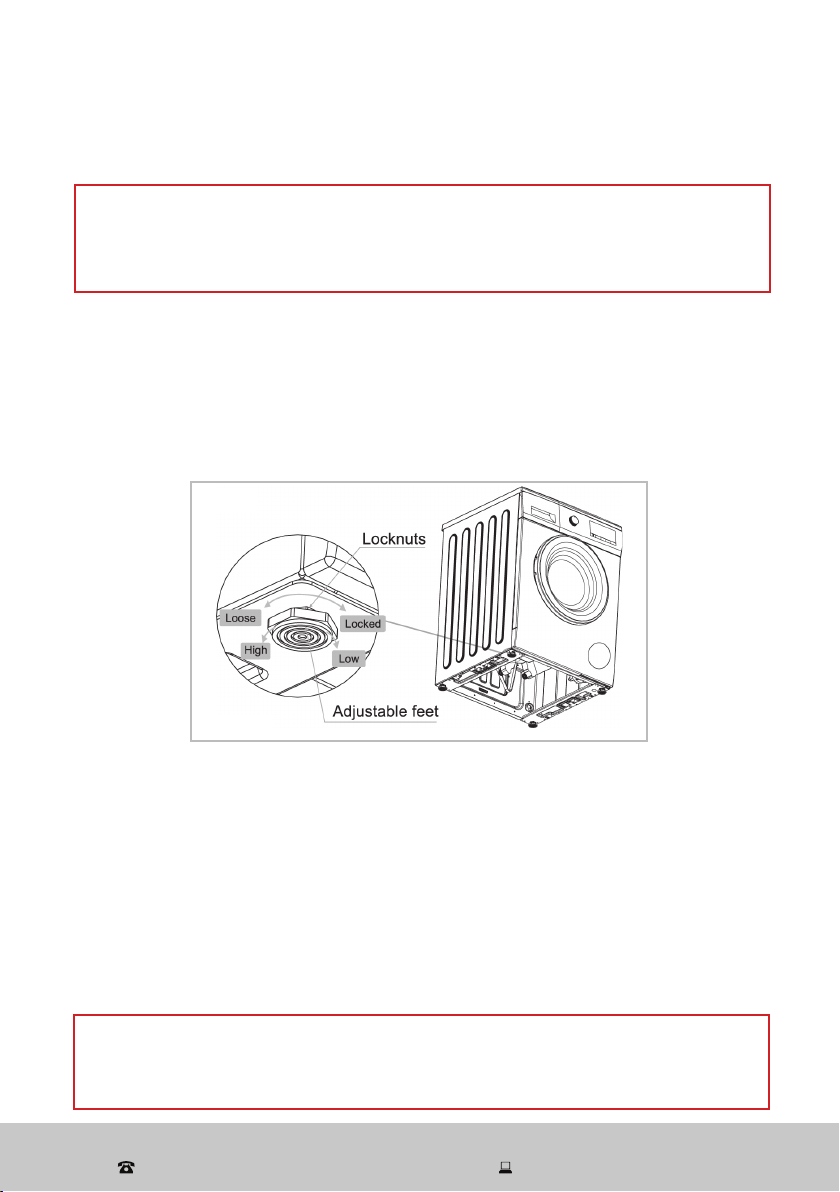
To determine whether levelling is necessary, place a spirit level on top of the washer
and hold it upright against the housing to identify any inclinations. If the machine
needs levelling, proceed as follows (Fig. 4):
WARNING!
It is very important to level the washing machine carefully, especially if your floor is
uneven. Failure to do so may result in the machine shaking and moving during the
spin cycle, or out-of-balance problems.
WARNING!
The lock nuts on all four feet must be screwed tightly against the housing, otherwise
the machine may vibrate noisily during operation.
• Loosen the lock nut with a spanner, turning it anticlockwise to loosen.
• Adjust the foot by hand until it makes close contact with the floor. Turn it
clockwise to lower the foot or anticlockwise to raise it.
• When the machine is level, use a spanner to turn the lock nut in a clockwise
direction to tighten.
Fig. 4
After Sales Support
(AU) 1300 886 649 (NZ) 0800 836 761 | tempo.org/support
12
Installing the drain hose
WARNING!
Do not kink or protract the drain hose.
Position the drain hose properly in order to prevent water spillage onto the floor
and potential damage.
Never immerse the end of the drain hose in water.
The drain hose is installed at the back of the machine. For drainage of the washing
water, you can install the other end of the hose two different ways: either directly into a
laundry sink or into a standpipe.
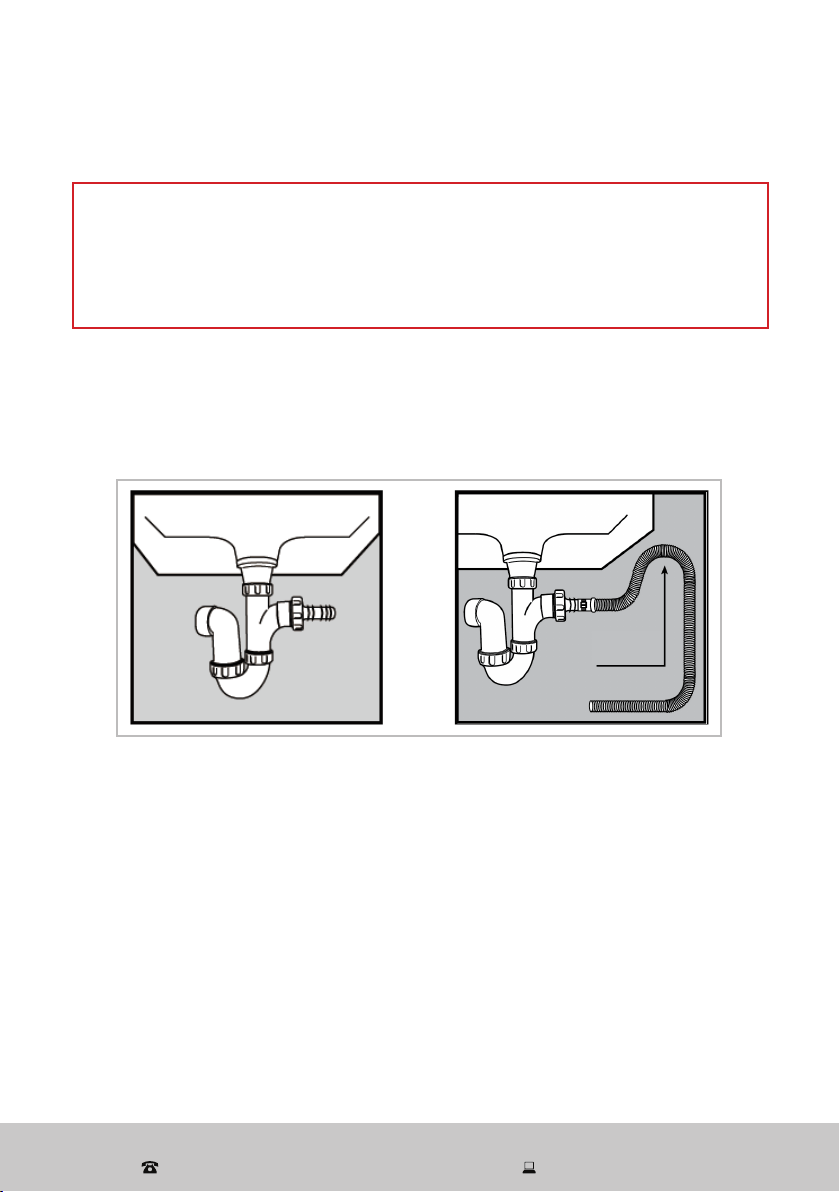
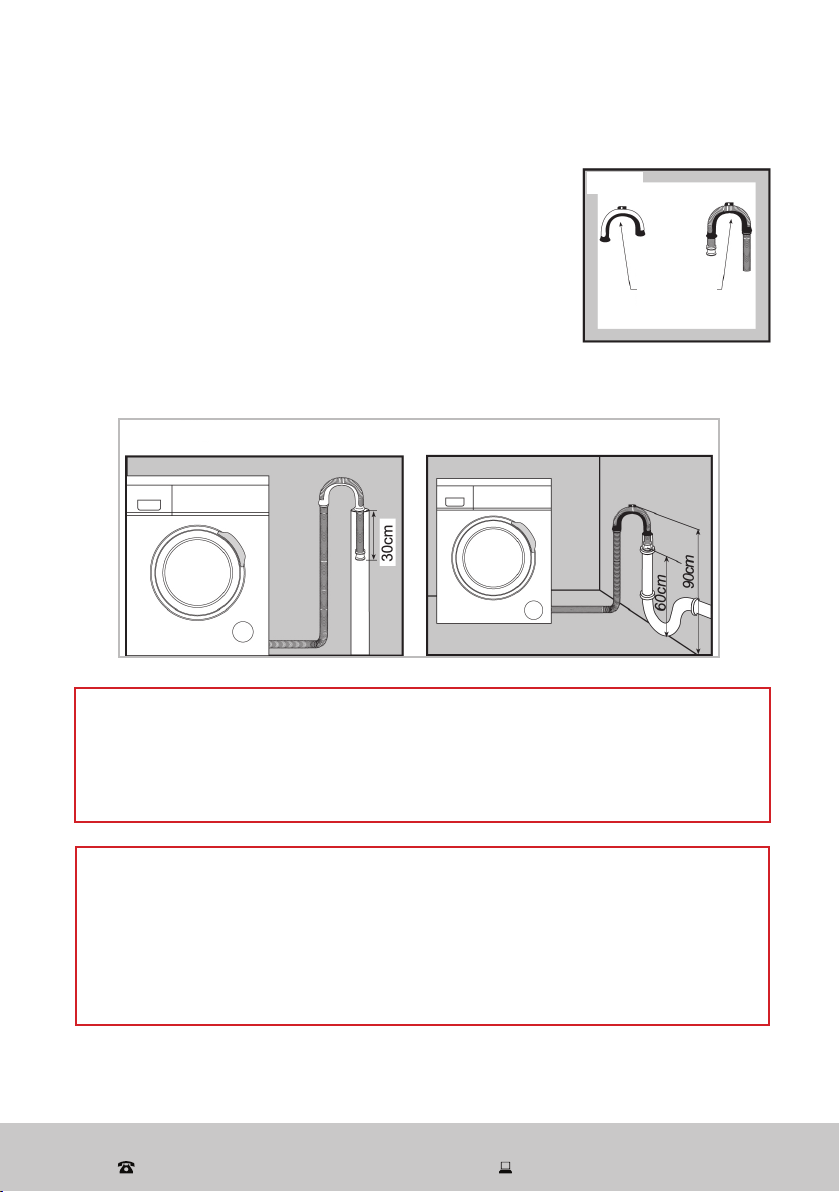
Drain hose connection into a sink (Fig. 5)
Installation (Cont.)
• If the spigot outlet has not been used before, remove any blanking plug that may
be in place.
• Push the drain hose onto the spigot and secure with a clip, if required.
• Ensure a loop is formed in the drain hose to prevent waste from the sink entering
the washing machine.
• If required, the drain hose may be extended to a length of 4 m.
Fig. 5
Loop
After Sales Support
(AU) 1300 886 649 (NZ) 0800 836 761 | tempo.org/support
13
Installation (Cont.)
WARNING!
Never lay down the drain hose as water will be discharged.
Be sure the drain hose is properly routed so it will not kink or lift off the sink.
Leave the drain hose affixed to the back of the machine.
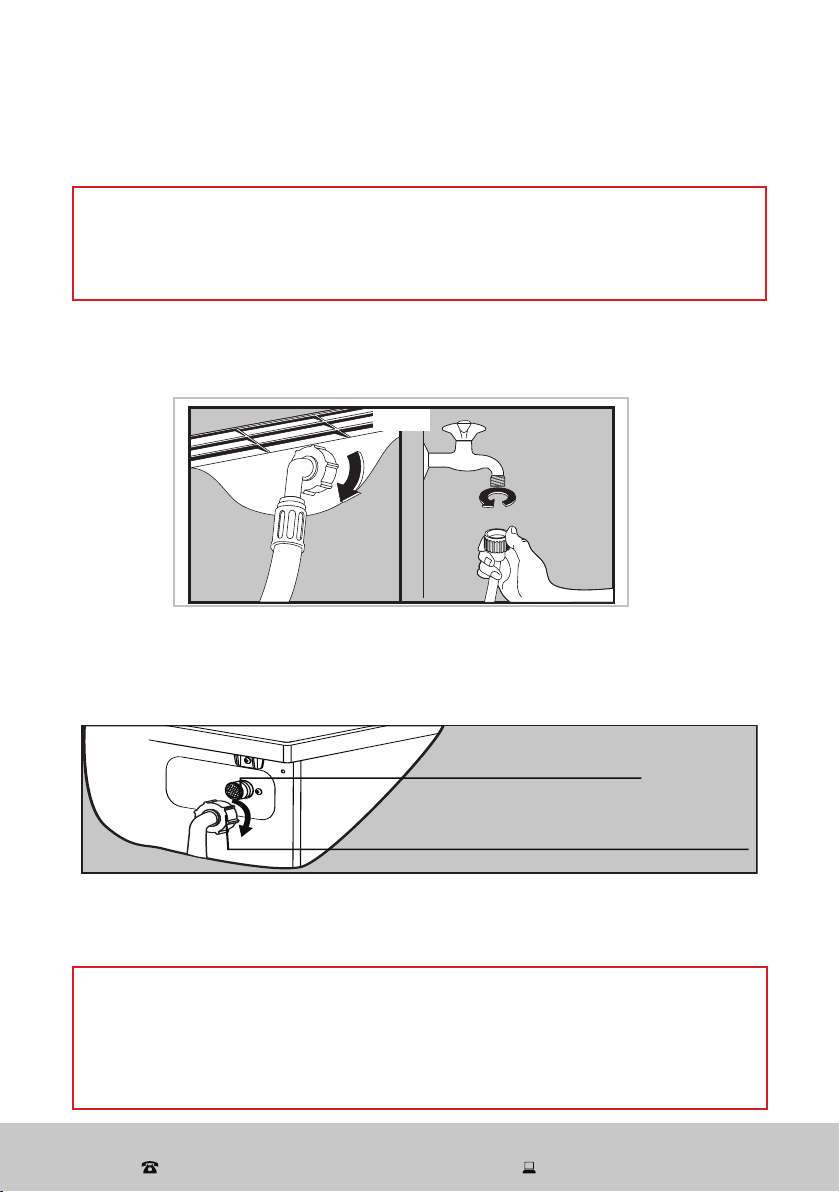
Drain hose connection into a standpipe (Fig. 7)
• Firstly, form a hook in the end of the drain hose using the
supplied drain hose elbow (Fig. 6).
• Place the drain hose into your standpipe, which should
have an internal diameter of approximately 30 mm, thus
ensuring there is an air break between the drain hose and
standpipe.
• When discharging into a standpipe, ensure that the drain
hose reaches at least 30 cm into the standpipe, and the top
of the standpipe is no more than 90 cm and no less than 60 cm above floor level
(Fig. 7).
FROST PROTECTION
Do not install the washing machine in places where temperatures drop to below 0 °C.
The reliability of the electronic control unit may be impaired at temperatures below
freezing point, and the machine’s inlet valve and draining systems may get damaged
as frozen hoses may burst or split.
If temperatures drops to below 0 °C, transfer it to an area with a warmer ambient
temperature before use and ensure no residual water is frozen in hoses and pipes.
Fig. 6
“Elbow”
supplied
Fig. 7
After Sales Support
(AU) 1300 886 649 (NZ) 0800 836 761 | tempo.org/support
14
Connecting the water supply hose
WARNING!
To prevent leakage or water damage, make sure to follow the instructions in this
section when connecting the washing machine to your water supply.
Do not kink, crush, modify or sever the water inlet hose.
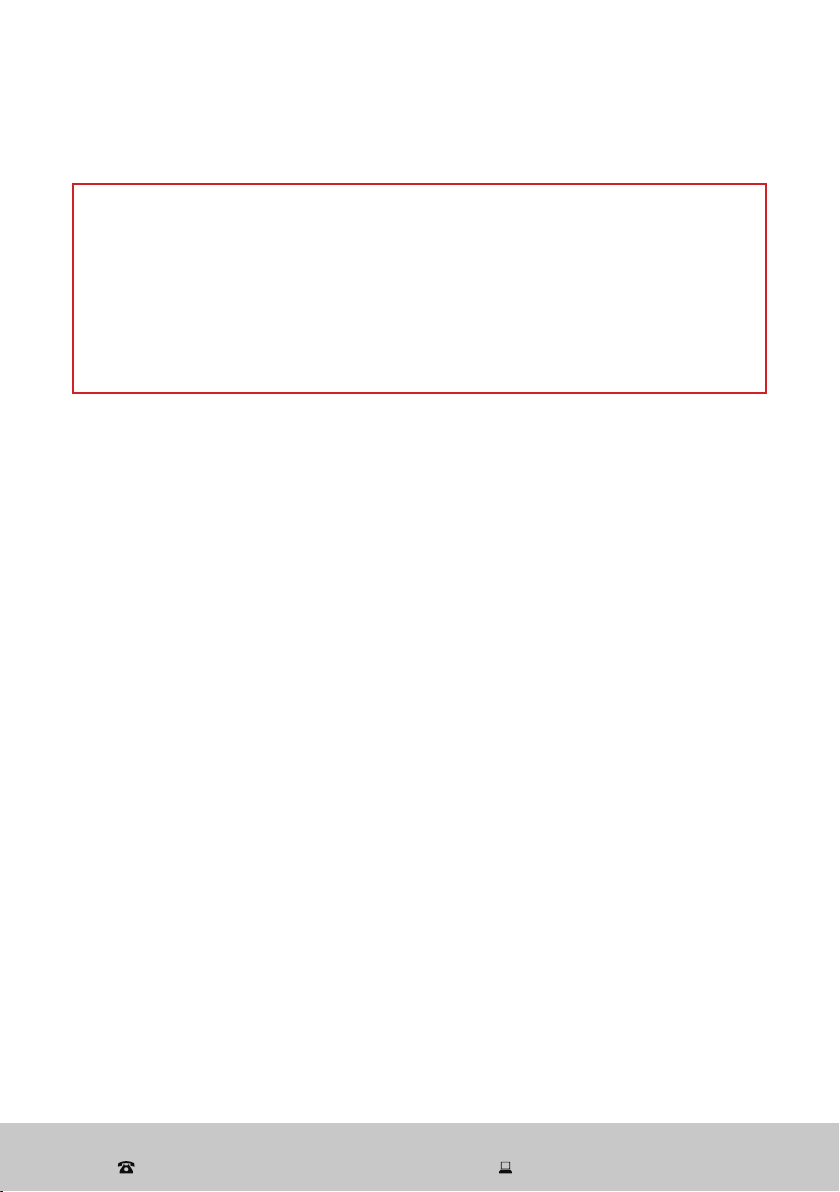
• Connect the supplied cold water supply hose to an ordinary laundry tap with a 3/4”
thread (Fig. 8). Installation should comply with all requirements and regulations of
your local water and building authorities.
• Turn on the tap and check for leaks. In case of leakage, repeat the connection
steps above, or tighten the nut more firmly. If your water pressure is strong, close
the water tap completely, then open it slightly.
CAUTION!
When tightening the coupling nut, take care not to damage the water inlet valve
joint. Apply force evenly and do not twist the water inlet valve.
Use only the new (supplied) hose with your new appliance. Do not use a hose from
an existing machine, or one that has been used previously.
Installation (Cont.)
• When there is an inlet valve at the back of the machine, it must be connected to a
cold water supply. (If there are two inlet valves, one must be connected to a cold
water supply and the other to a hot water supply.) Follow the pictorial instructions
below (Fig. 9) to complete the connection.
inlet valve for cold water
inlet hose for cold water with a white nut
Fig. 9
Inlet valve for cold water
Inlet hose for cold water (with a white nut)
Fig. 8
After Sales Support
(AU) 1300 886 649 (NZ) 0800 836 761 | tempo.org/support
15
WARNING! This appliance must be earthed.
In the event of a malfunction or breakdown, earthing will reduce the risk of an
electric shock by providing a path of least resistance for the electric current.
This appliance is equipped with a cord having an equipment-earthing conductor
and an earthing plug. The plug must be plugged into an appropriate outlet that is
installed and earthed in accordance with all local standards and requirements.
Do not modify the plug under any circumstances. If the plug does not fit your
outlet, consult a licensed electrician and have the outlet changed.
Electrical connection
Installation (Cont.)
Power supply system
• Make sure the power supply system (current, power voltage and wire) at your home
can meet the normal loading requirements of electrical appliances. The electrical
voltage and circuit frequency are listed on the appliance rating label.
• WARNING! Only connect the washing machine to a single, grounded (earthed)
electrical outlet. Do not overload the outlet, as overloading can result in fire or electric
shock. Insert the power plug securely. Do not use a power adaptor or extension cord.
Electrical installation advice
• To avoid electric shock, fire and malfunction, do not install this machine in a damp
place. Do not pull out or insert the plug with wet hands or bare feet. Do not expose
the appliance, cord or plug to rain, moisture or other liquid.
• Do not kink or damage the power cord, and position it out of the way so no one steps
on or places anything on the cord or against it.
• Ensure the washer is unplugged from the power supply before installation. The plug
must be accessible after installation.
• CAUTION! Do not use a power adaptor or extension cord.
• Unless your home is already fitted with a residual current device (safety switch), we
recommend installing an RCD with a rated residual operating current not exceeding
30 mA to provide additional safety protection when using electrical appliances. See
your electrician for professional advice.
• All electrical connections must be made by qualified personnel, and all instructions in
this manual as well as local safety regulations must be observed.
After Sales Support
(AU) 1300 886 649 (NZ) 0800 836 761 | tempo.org/support
16
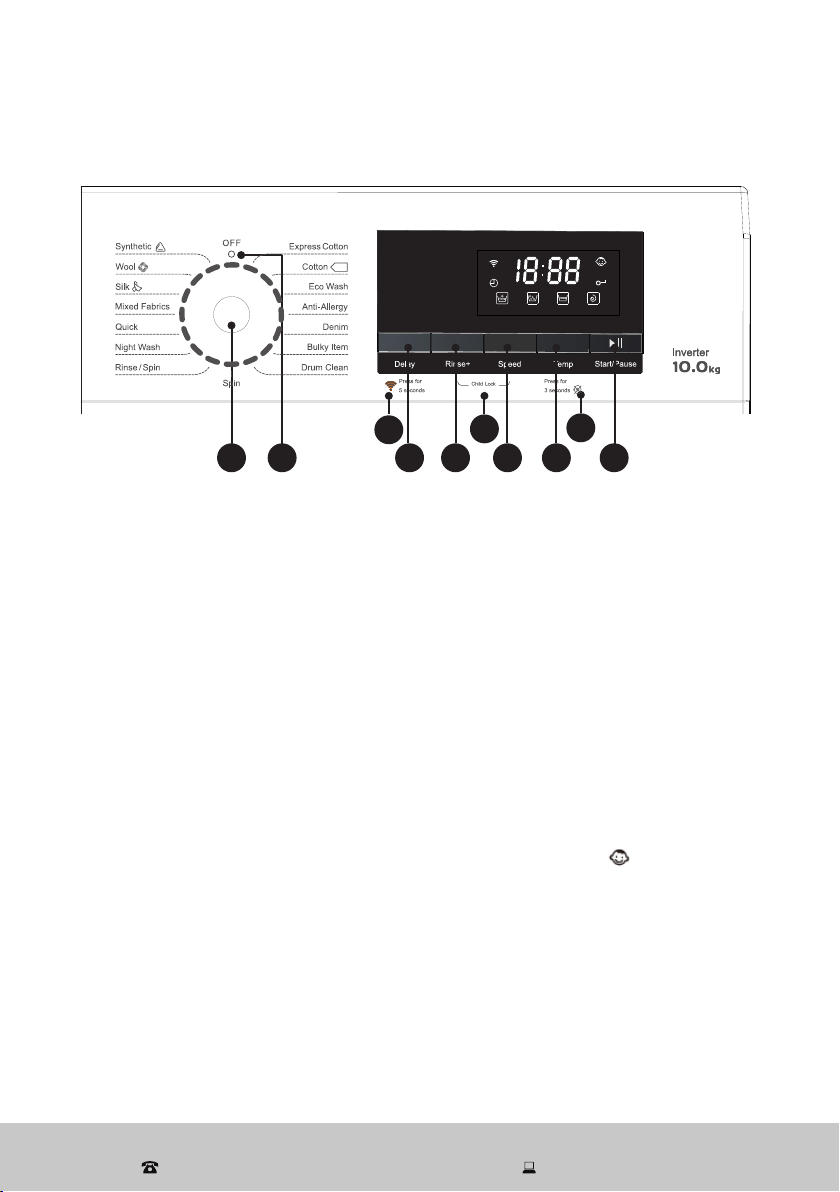
Control panel (Fig. 10)
1 Program dial: Turn the program dial (knob) clockwise or anticlockwise to switch on the
machine and select the required wash program (see page 18 for details). Once you press
the Start/Pause button and the machine is running, the program cannot be changed.
2 Start/Pause: Press this button to start a wash program or to pause it. The door cannot
be opened when the machine is paused.
3 Temp: Press this button to change a wash temperature (see page 18 for details).
4 Speed: Use this button to change a program’s default spin speed (see page 18 for
details).
5 Rinse+: Use this button to change the rinse times (see page 18 for the number of rinses).
6 Delay: Use this button to set the delay start time (from 1 to 24 hours) of a wash program.
7 Wi-Fi function: Turn on the machine and press and hold the Delay button for 5 seconds
to activate the Wi-Fi function, then follow the app prompts to connect the Wi-Fi.
8 Child lock
– To activate the child lock after the washing cycle has started, press and hold the Rise+
and Speed buttons simultaneously for 3 seconds. The child lock icon will light up
on the display, indicating that the control panel is locked to prevent misuse by children.
In an emergency you can power the machine off by turning the dial to the [ O ] position.
– To cancel the child lock, press and hold the Rinse+ and Speed buttons for 3 seconds.
– You can only activate the child lock after the washing cycle has started. It will release
automatically after the washing program has finished.
9 Mute: Press and hold the Temp. button for 3 seconds to mute the prompt tone and
alert sound. Press and hold the Temp. button again to restore the sound.
10 OFF [ O ] position
At the end of a program, turn the knob to the [ O ] position to switch the machine off.
Instructions
61 245
8
10 3
7
9
SY-XT5QG100-006
材料:油墨
中山格兰仕日用电器有限公司
设 计
校 对
审 核
工 艺
标准化
批 准
日 期
李东波
宾艺强
洪柳
傅玲
尹怀斌
2021.07.10
控制面板丝印
XQG100-T514VE/W
标记 更改文件号处数 签名 日期 阶 段 标 记
B
重量 比例
视 角
共1页 第1页
叶强
技术要求:
1.文字字体格式、大小尺寸必须与图纸相符合;
2.文字、图案排版必须与图纸一致;
3.未注公差按照IT14执行。
SY-XT5QG100-006 00
版本
大于
—
6
3
10
18
30
基本尺寸
公差值 ±
IT12
IT13 IT14 IT15 IT16 IT17 IT18
到
80
50
120
180
250
315
400
500
3
10
6
18
30
50
120
80
180
250
315
400
500
—
mm
0.1
0.14
0.25
0.4
0.6
1.0 1.4
0.12
0.18
0.3
0.48
0.75
1.2 1.8
0.15
0.22
0.36
0.58
0.9
1.5 2.2
0.18
0.27
0.43
0.7
1.1
1.8 2.7
0.21
0.33
0.52
0.84
1.3
2.1 3.3
0.25
0.39
0.62
1.0
1.6
2.5 3.9
0.3
0.46
0.74
1.2
1.9
3.0 4.6
0.35
0.54
0.87
1.4
2.2
3.5 5.4
0.4
0.63
1.0
1.6
2.5
4.0 6.3
0.46
0.72
1.15
1.85
2.9
4.6 7.2
0.52
0.81
1.3
2.1
3.2
5.2 8.1
0.57
0.89
1.4
2.3
3.6
5.7 8.9
0.63
0.97
1.55
2.5
4.0
6.3 9.7
0.7
1.1
1.75
2.8
4.4
7.0 11.0
公差值 ±
角度
IT12/13/14 IT15/16/17/18
大于 到
0°
90°
5′
90′
90°
180°
15′
1°
180°
270°
30′
2°
270°
360°
1°
6°
技术要求:
1.文字字体格式、大小尺寸必须与图纸相符合;
2.文字、图案排版必须与图纸一致;
3.未注公差按照IT14执行;
4.丝印图文清晰、正确光洁、颜色均匀;
5.丝印线条宽度一致,不允许有缺印、漏印;
6.丝印附着力:采用正己烷、1kg砝码,水拉动
15秒,测试完成后丝印油墨无脱落。
After Sales Support
(AU) 1300 886 649 (NZ) 0800 836 761 | tempo.org/support
17
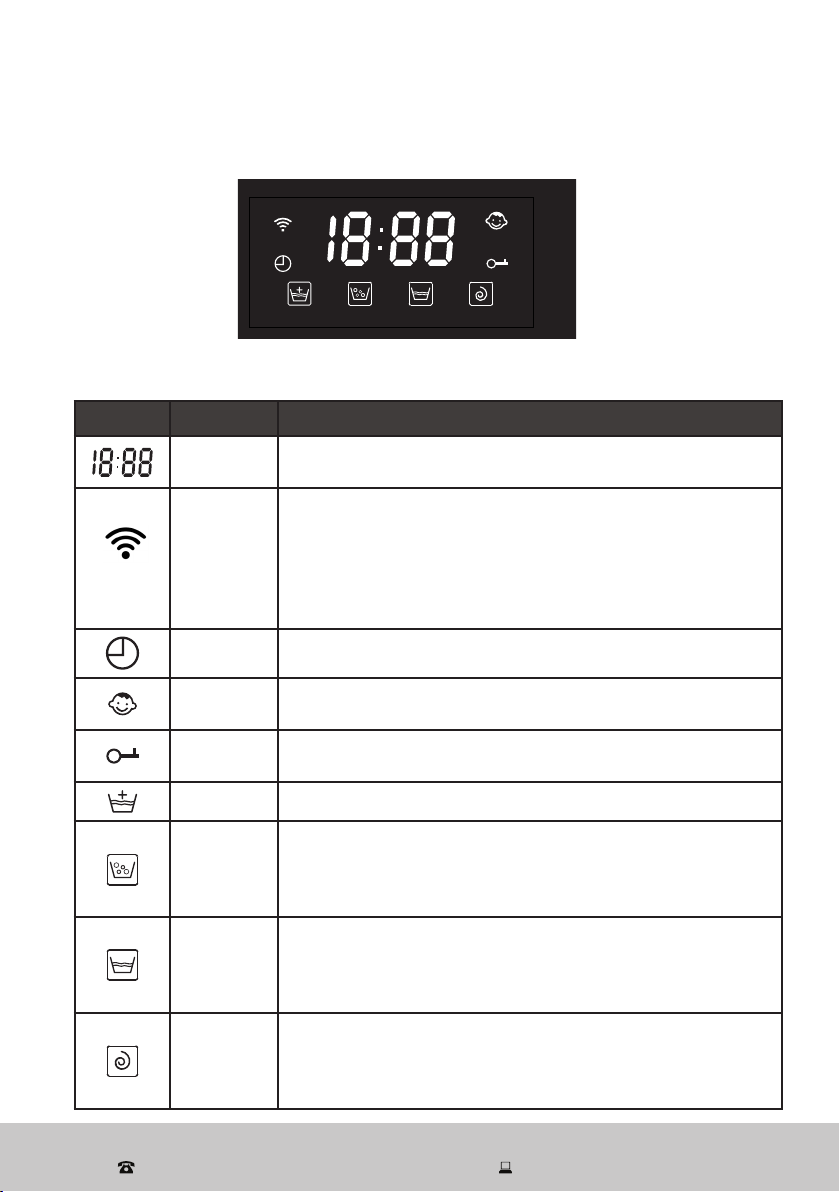
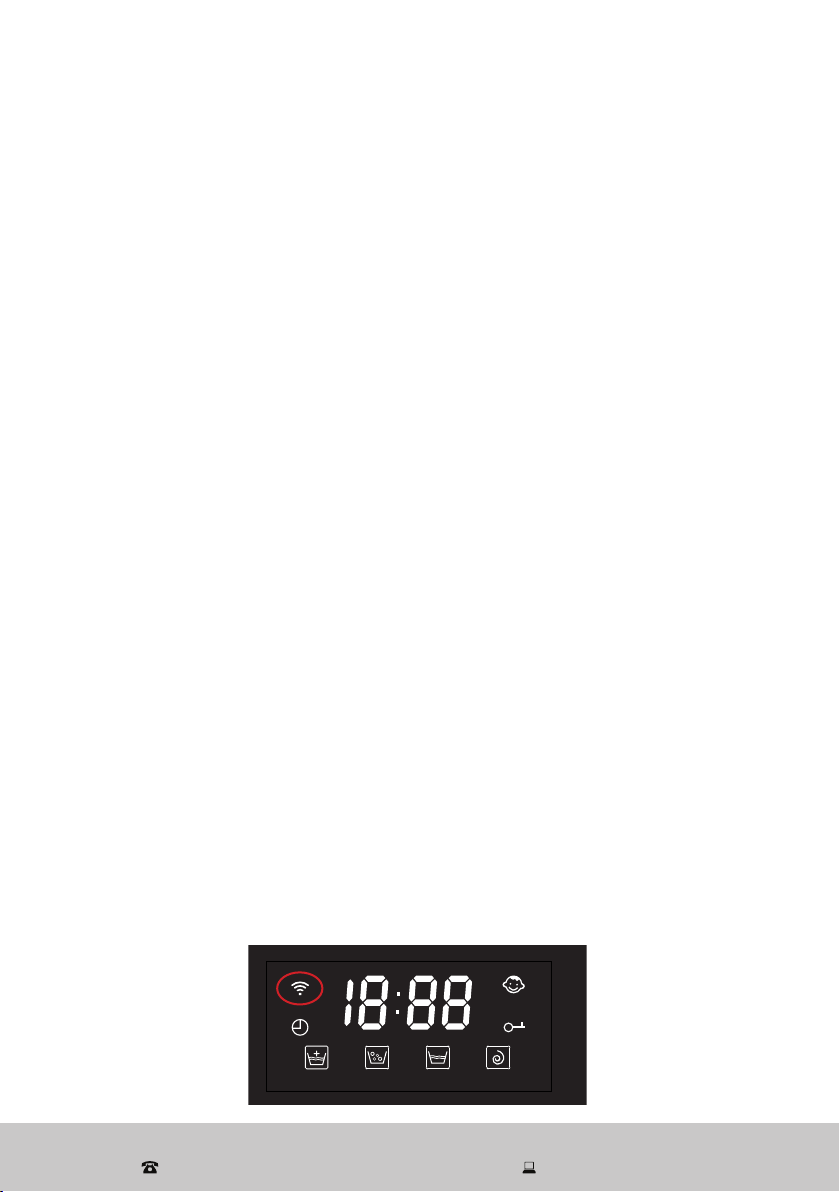
Display icons (Fig. 11)
Table 1: Display icons
Icon Meaning Description
Digital
display
Shows the time, speed, rinse times, error codes.
Wi-Fi
– Does not flash or illuminate when the Wi-Fi function is not
selected (“not connected”).
– Flashes rapidly (several times per second) when the unit
is ready for configuration with your mobile device (“ready”).
– Illuminates steadily when the Wi-Fi function is working
(“connected”).
Delay time Illuminates when the display shows the delay time.
Child lock Illuminates when the child lock has been set.
Door
lock
Illuminates when the door is locked.
Rinse+ Illuminates when the Rinse+ option is selected.
Main wash
– When applicable: illuminates in standby mode.
– Flickers when the machine is in operation.
– Stays brightly lit when the program is paused.
– Turns off when the program is finished.
Rinse
– When applicable: illuminates in standby mode.
– Flickers when the machine is in operation.
– Stays brightly lit when the program is paused.
– Turns off when the program is finished.
Final spin
– When applicable: illuminates in standby mode.
– Flickers when the machine is in operation.
– Stays brightly lit when the program is paused.
– Turns off when the program is finished.
Instructions (Cont.)
SY-XT5QG100-006
材料:油墨
中山格兰仕日用电器有限公司
设 计
校 对
审 核
工 艺
标准化
批 准
日 期
李东波
宾艺强
洪柳
傅玲
尹怀斌
2021.07.10
控制面板丝印
XQG100-T514VE/W
标记 更改文件号处数 签名 日期 阶 段 标 记
B
重量 比例
视 角
共1页 第1页
叶强
技术要求:
1.文字字体格式、大小尺寸必须与图纸相符合;
2.文字、图案排版必须与图纸一致;
3.未注公差按照IT14执行。
SY-XT5QG100-006 00
版本
大于
—
6
3
10
18
30
基本尺寸
公差 值 ±
IT12
IT13 IT14 IT15 IT16 IT17 IT18
到
80
50
12 0
18 0
25 0
31 5
40 0
50 0
3
10
6
18
30
50
12 0
80
18 0
25 0
31 5
40 0
50 0
—
mm
0.1
0.14
0.25
0.4
0.6
1.0 1.4
0.12
0.18
0.3
0.48
0.75
1.2 1.8
0.15
0.22
0.36
0.58
0.9
1.5 2.2
0.18
0.27
0.43
0.7
1.1
1.8 2.7
0.21
0.33
0.52
0.84
1.3
2.1 3.3
0.25
0.39
0.62
1.0
1.6
2.5 3.9
0.3
0.46
0.74
1.2
1.9
3.0 4.6
0.35
0.54
0.87
1.4
2.2
3.5 5.4
0.4
0.63
1.0
1.6
2.5
4.0 6.3
0.46
0.72
1.15
1.85
2.9
4.6 7.2
0.52
0.81
1.3
2.1
3.2
5.2 8.1
0.57
0.89
1.4
2.3
3.6
5.7 8.9
0.63
0.97
1.55
2.5
4.0
6.3 9.7
0.7
1.1
1.75
2.8
4.4
7.0 11.0
公差 值 ±
角度
IT12/13/14 IT15/16/17/18
大于 到
0°
90°
5′
90′
90°
18 0°
15′
1°
18 0°
27 0°
30′
2°
27 0°
36 0°
1°
6°
技术要求:
1.文字字体格式、大小尺寸必须与图纸相符合;
2.文字、图案排版必须与图纸一致;
3.未注公差按照IT14执行;
4.丝印图文清晰、正确光洁、颜色均匀;
5.丝印线条宽度一致,不允许有缺印、漏印;
6.丝印附着力:采用正己烷、1kg砝码,水拉动
15秒,测试完成后丝印油墨无脱落。
After Sales Support
(AU) 1300 886 649 (NZ) 0800 836 761 | tempo.org/support
18
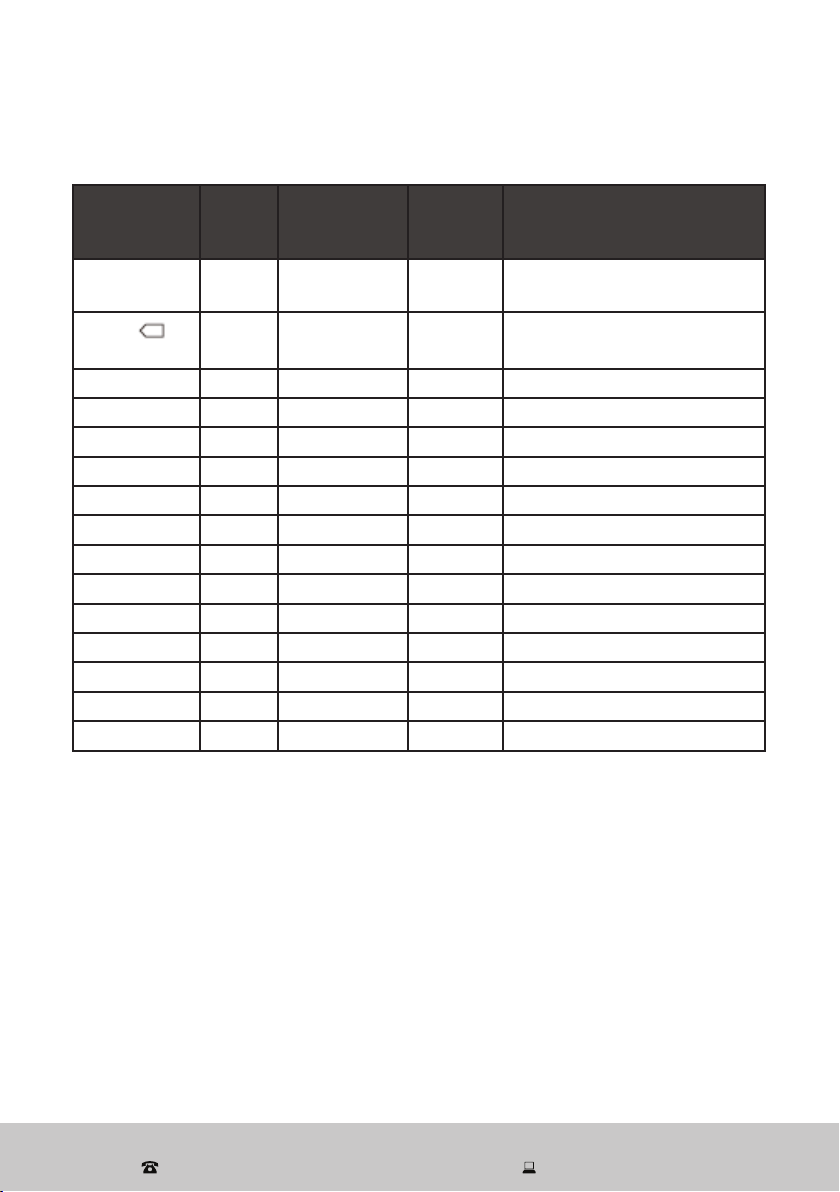
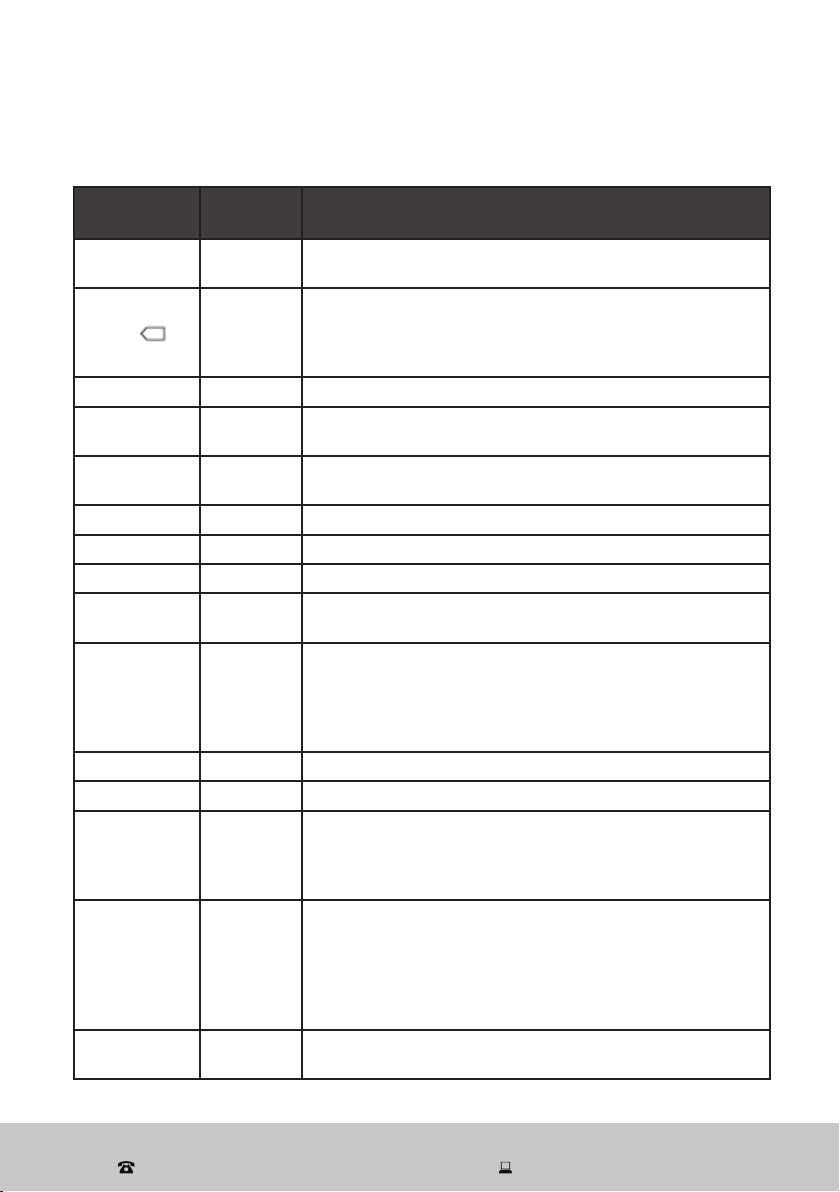
Table 2: Wash program parameters *
Program Time
(hr:min)
(A)
Temperature
(°C)
Number
of Rinses
Spin Speed
(rpm)
Express
Cotton
1:16
--/20/40/60/90 2/3/4/5 0/400/600/800/1000/1200/1400
Cotton
(B)
3:17
--/20/40/60/90 2/3/4/5 0/400/600/800/1000/1200/1400
Eco Wash
0:49 20
2/3/4/5 0/400/600/800/1000/1200
Anti-Allergy
2:11 90
2/3/4/5 0/400/600/800/1000
Denim
1:40
--/20/40 4/5 0/400/600/800
Bulky Items
1:39
--/20/40/60 3/4/5 0/400/600/800
Drum Clean
1:14
60/90
2 800
Spin
0:11
— — 0/400/600/800/1000/1200/1400
Rinse/Spin
0:16
— 1/2/3/4 0/400/600/800/1000/1200/1400
Night Wash
1:21
--/20/40/60
5
0/400/600/800
Quick
0:18
— 2/3/4 0/400/600/800/1000/1200
Mixed Fabrics
1:03
--/20/40/60 3/4/5 0/400/600/800/1000/1200/1400
Silk
0:48
--/20/40 2/3/4/5 0/400/600
Wool
0:50
--/20/40 2/3/4 0/400/600
Synthetics
0:51
--/20/40/60 2/3/4 0/400/600/800
NOTES
* The default values are bold.
(A) The running times are for the default programs and are for reference purposes only.
The actual running times may be different depending on the type and weight of your
wash load and the washing temperature.
(B) The cotton wash program was used for energy efficiency testing to the standard (with
a water temperature of 60 °C and 1400 rpm spin speed). It is the most energy and
water efficient program with the highest washing intensity for normally soiled cotton
laundry.
Instructions (Cont.)
After Sales Support
(AU) 1300 886 649 (NZ) 0800 836 761 | tempo.org/support
19
Instructions (Cont.)
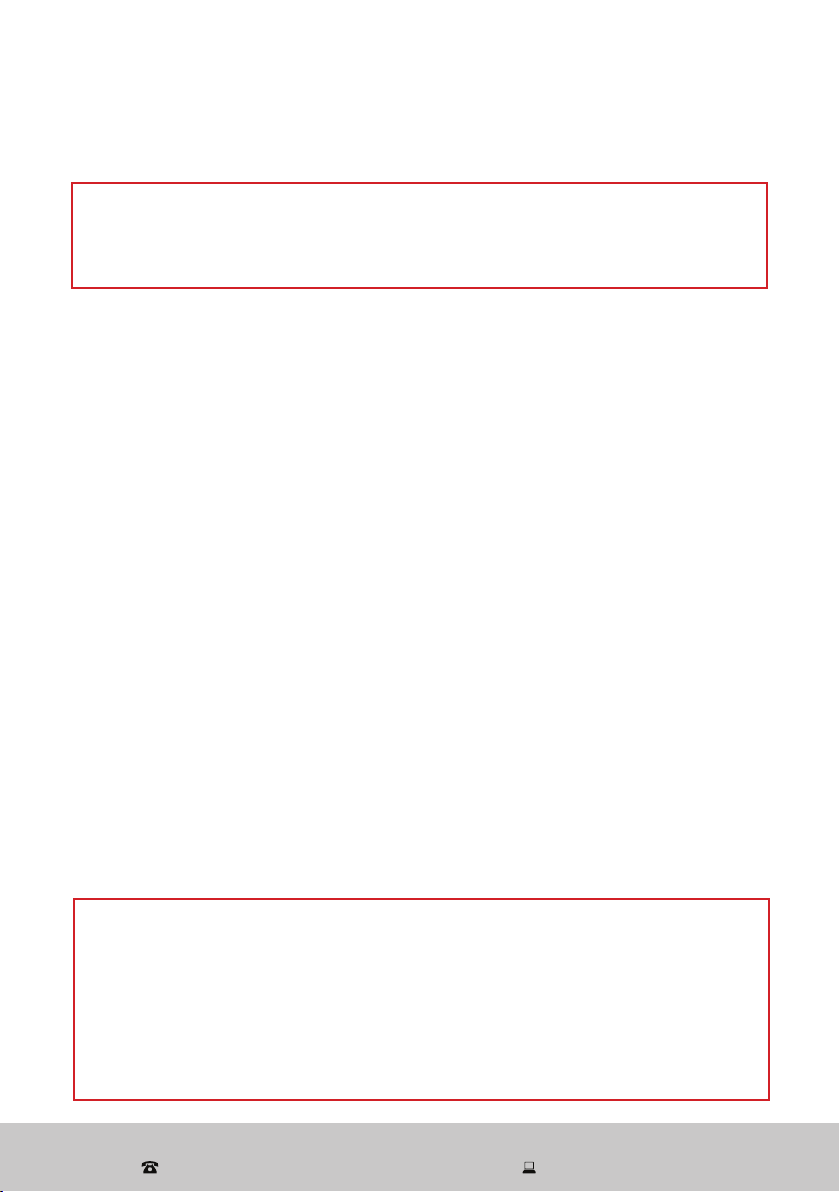
Program
Max.
Load (kg)
Suitable for ...
Express
Cotton
10
Cottons, linens or cotton mix fabrics, e.g. table linen,
towelling, underwear, T-shirts etc.
Cotton
10
Cottons, linens or cotton mix fabrics, e.g. table linen,
towelling, underwear, T-shirts etc.
This is the most energy and water efficient program with the
highest washing intensity for normally soiled cotton laundry.
Eco Wash 7 A cool water wash (20 °C)
Anti-Allergy 6
A hygiene wash for items that may be washed in very hot
(90 °C) water
Denim 6
Denim items that should be washed in cooler water (default
20 °C)
Bulky Items 10 Bulky or heavier items
Drum Clean 0 A hot water program for cleaning the inside of the wash drum
Spin 10 A spin only program for cotton and linen items
Rinse/Spin 10
A separate rinse and spin program for items that may be
washed in a cotton program
Night Wash 7.5
This program is designed to reduce noise when washing
at night-time. The machine will not execute the last drain to
prevent creasing. The screen shows “Iron”. The machine will
drain and spin when you press the Start/Pause button, or
after 12 hours if no buttons are pressed.
Quick 3.5 Small loads of items which require freshening up
Mixed Fabrics 6 Easy care laundry items
Silk 4
A gentle wash program for machine-washable or hand-
washable silk or silk blend fabrics. Sort garments by colour
and use a silk wash detergent. After the wash, hang items
on a coat hanger for air-drying.
Wool 4
A gentle program with a soft wash strength and low
turnaround ratio for machine-washable or hand-washable
wool or wool blend fabrics. Sort garments by colour and
use a wool wash detergent. Take garments out of the
machine straight after the wash and place them flat on a
suitable surface for air-drying.
Synthetics 5
Synthetic or mixed fabrics, underwear, coloured garments or
non-shrink shirts
Table 3: Wash program suitability
After Sales Support
(AU) 1300 886 649 (NZ) 0800 836 761 | tempo.org/support
20
Before first use
Instructions (Cont.)
Door lock
• The door of the front load washing machine locks automatically when the machine
is working. It cannot be opened without first pausing the wash program. To unlock
the door, press the Start/Pause button. Then turn the program dial (knob) to the [ O ]
position: the door will unlock after approximately two minutes.
• The door will not unlock when the temperature inside the drum is above 53 °C, and/
or when the water is above a certain level.
• At the end of a wash program, the door will unlock after two minutes.
• Suds may flow out of the open door if it is opened during the wash cycle. Beware of
suds escaping from the machine and have a cloth/towel ready for catching spills.
CAUTION!
Make sure the washing machine is properly and securely installed before using it.
Before using the washing machine for washing clothes, run a complete washing
cycle without clothes, using the drum clean program.
CAUTION!
For your safety, do not turn the program dial to the position [ O ] position, open the
machine and access the washing while the machine is running, or when the power
supply is cut off. The water temperature may be high and it may scald you. The door
will automatically unlock at the end of a wash program when the temperature of the
drum has cooled down.
Do not attempt to open the door forcibly. Doing so is unsafe and will cause damage
to the locking mechanism.
Before using the washing machine for the first time, please review the following
important points and make sure you have completed all preparatory steps.
• All transit bolts are removed.
• The washing machine is stable and level. If necessary, adjust the levelling feet to
stabilise the machine (see page 11).
• The water supply hose is properly installed (see page 14) and the water tap is open.
• The power plug is firmly inserted into a nearby power point and power is switched
on to the outlet.
• The drain hose is properly installed and secured into the laundry sink or a
standpipe (see pages 12–13).
• IMPORTANT! Before using the washing machine for the first time, run a complete
drum clean program without laundry items and without any detergent. This will
ensure any residual water from factory quality checks is removed from the tub.
After Sales Support
(AU) 1300 886 649 (NZ) 0800 836 761 | tempo.org/support
21
Detergent recommendations
WARNING!
Do not use flammable and explosive or toxic solvents, petrol, alcohol or other
chemicals in the machine.
Keep detergents and clothing care preparations out of reach of children.
Instructions (Cont.)
Main wash compartment
Fabric softener compartment
Pre-wash compartment
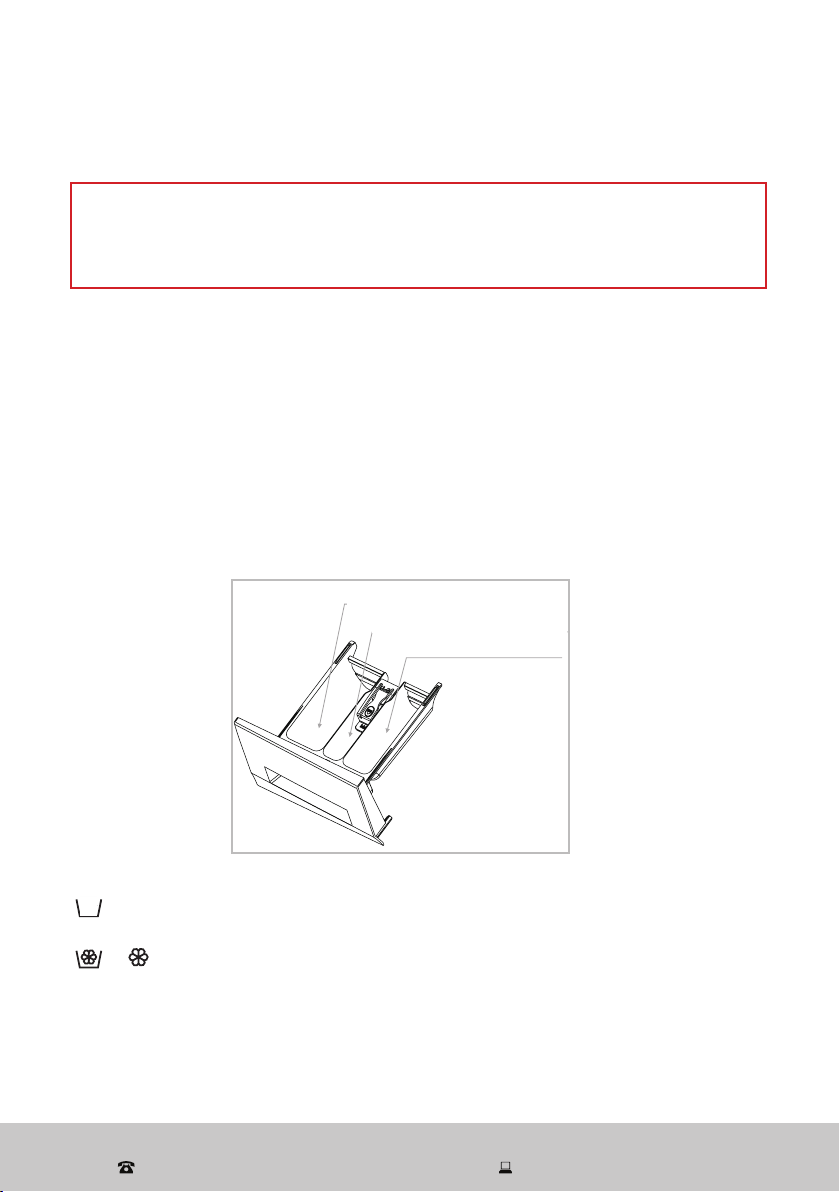
Fig. 12
Main wash compartment
Fabric softener compartment
Prewash compartment
• Only use low-sudsing detergent and clothing care preparations that are
suitable for use in a front load washing machine, or in a top and front load
machine. Detergents for top load machines are unsuitable because they tend to
produce too much suds, which may cause overflowing from the detergent drawer.
• Use detergent in the amounts recommended on the detergent packaging. Dosage
depends on your amount of washing, the degree of soiling, water hardness and
the washing performance of your detergent. Using too little detergent will give poor
washing results, but too much will affect rinse performance and may cause overflow
of suds, which could interfere with machine operation. Do not overfill detergent!
• Pull open the detergent dispenser drawer and add detergent, as illustrated (Fig. 12)
and described below.
or II The detergent compartments on the left and right side of the drawer are for
low-sudsing detergent for the main wash (left) and prewash (right).
or The middle compartment is for fabric softener. It will be dispersed through
the washing during the last rinse cycle. Concentrated fabric softeners
should be diluted as required. Do not exceed the maximum level mark.
II
After Sales Support
(AU) 1300 886 649 (NZ) 0800 836 761 | tempo.org/support
22
Instructions (Cont.)
Before each wash
• Before loading the washing machine
- Ensure that the washer is stable, level and properly connected to the power supply.
- Check that no young child or pet has climbed into the drum.
- Ensure that the water inlet hose and the drain hose are properly connected.
- Ensure that the drain hose is securely connected into the drain spout or sink.
• When loading the machine
- Empty all pockets of clothing to be washed. Hard, sharp objects such as coins,
safety pins, paper clips, bra wires, nails, screws or stones can cause extensive
damage to the appliance and block the pump. Any damage or malfunction
resulting from foreign objects is not covered by your warranty and may lead to
expensive repairs.
- Turn items with zippers inside out, close zippers, hooks and eyelets, fasten
buckles and tie fabric belts. This will also help reduce impact noise when the
items hit against the turning drum.
- Brush dirt, sand or pet hair off clothes and turn pockets inside out. Pretreat stains.
- Turn items that pill easily inside out.
- Sort your washing into appropriate loads: whites, darks, cottons, synthetics,
woollens, etc. Place small or delicate items into a wash bag for protection.
- Put your washing in the machine, loading items uniformly in the drum. For best
results, include both larger and smaller items in a wash.
- Do not overload the washer; the maximum dry washing capacity is 10 kg.
- When closing the appliance door prior to starting the unit, ensure that items are
not jammed in the door.
• CAUTION: Do NOT wash the following items in the washing machine:
- jackets, raincoats, sleeping bags, fishing coats and similar clothes
- carpets or floor rugs
- underwire bras—instead, ensure these are placed in a closed garment bag before
washing in the machine
- clothes that have any residues of flammable materials, as this may result in fire
or explosion (for example, articles that have been cleaned in, washed in, soaked
in, or dabbed with industrial chemicals, or combustible or explosive substances
(such as wax, oil, paint, petrol, alcohol, degreasers, dry-cleaning solvents,
kerosene, etc.); items containing such substances must be washed by hand or
rinsed thoroughly before machine-washing them
- single items, as this can cause unbalance problems during the wash or spin cycles;
we suggest you always add a few more items to the wash to avoid such problems
- items such as ties, suits, evening attire; silk or fur attire; or anything else labelled
unsuitable for machine-washing—always check the garment label (see page 29).
Instructions (Cont.)
After Sales Support
(AU) 1300 886 649 (NZ) 0800 836 761 | tempo.org/support
23
Instructions (Cont.)
Step-by-step washing instructions
1. Connect: Plug the machine in, switch on the power to the outlet and open the
water tap.
2. Load: Open the door of the washer and load the machine following the guidelines
on the previous page.
Mixing both large and small items gives better wash results and also helps
distribute the load evenly during spinning. You will
achieve the most efficient energy and water use when
washing a full load. However, do not overload the
machine as this causes creases and reduces cleaning
efficiency.
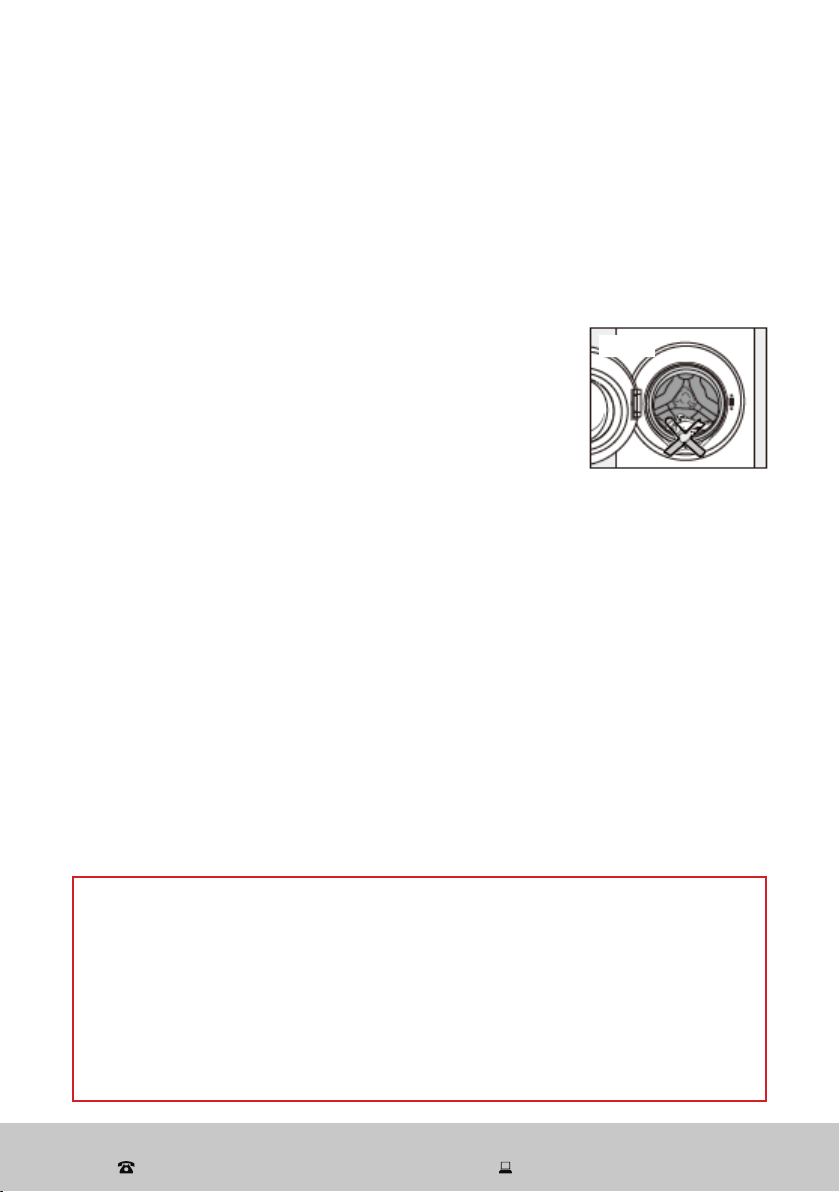
When your washing is properly loaded in the machine,
close the door and ensure that no items are caught in
the door (Fig. 13).
3. Add detergent: Pull out the detergent dispenser and add detergent as required,
then close the dispenser (see page 21 for instructions).
4. Select a program: Rotate the Program dial to switch on the washing machine
and select the required program. Always check your clothing labels for
recommended wash and care instructions (see page 29).
5. Select a temperature: Press the Temp. button and select a wash temperature.
6. Start: Press the Start/Pause button.
7. Finish: At the end of the wash program, the buzzer will sound to alert you that
the program has finished. The machine will change into standby mode after
10 minutes of inactivity. Turn the dial back to the [ O ] position. Unplug the washing
machine from the power supply and close the water tap.
8. Unload: Open the door and unload the washing machine. We recommend you
leave the door slightly ajar so the drum can dry properly and to prevent mould
and odour development.
Instructions (Cont.)
Fig. 13
AUTOMATIC BALANCE CONTROL
The machine is fitted with a balance control device, which ensures the machine is
stable during the spin cycle. To protect the machine, it will cut in if the laundry is not
evenly distributed in the drum. The laundry is redistributed by reverse rotation of the
drum. This may happen several times before the unbalance disappears and normal
spinning can resume.
If after 15 minutes the laundry is still not evenly distributed in the drum, the machine
will not spin. In this case, please redistributed the load manually and reselect the spin
program.
After Sales Support
(AU) 1300 886 649 (NZ) 0800 836 761 | tempo.org/support
24
Wi-Fi Connection
This AKAI Home 10 kg Front Load Washing Machine features Wi-Fi technology, which
enables you to keep track of every washing stage remotely from wherever you are—
elsewhere in your home or on the go—using your mobile device.
How it works
The washing machine works in conjunction with your mobile device, using your home
Wi-Fi network router to communicate with the machine.
Monitoring the washing machine remotely is very easy. You will need:
• an Android smartphone or Apple iPhone
• an internet connection at your home
• a Wi-Fi network router set up at home.
You must also have our AKAI Home app installed on your smartphone or mobile device.
This app is available from Google Play Store or Apple App Store. If you already have the
app on your device, make sure to update it so you have the latest version.
Initial set-up
Upon installation of your new washing machine, or when you have changed your mobile
device or wireless router, you will have to set up the communication channel between
the devices. In order to do this, make sure you have the AKAI Home app installed or
updated on your mobile device, your Wi-Fi router is switched on and your mobile device
connected to your home Wi-Fi network.
On your mobile device, tap on the AKAI Home app. It will open and take you to the
log in page. Before you log in, please follow the prompts to register your account (using
your email account) and set a password.
IMPORTANT!
Before you can monitor your washing machine remotely, you must activate (reset) the
Wi-Fi module:
• Turn the program dial to turn on the machine.
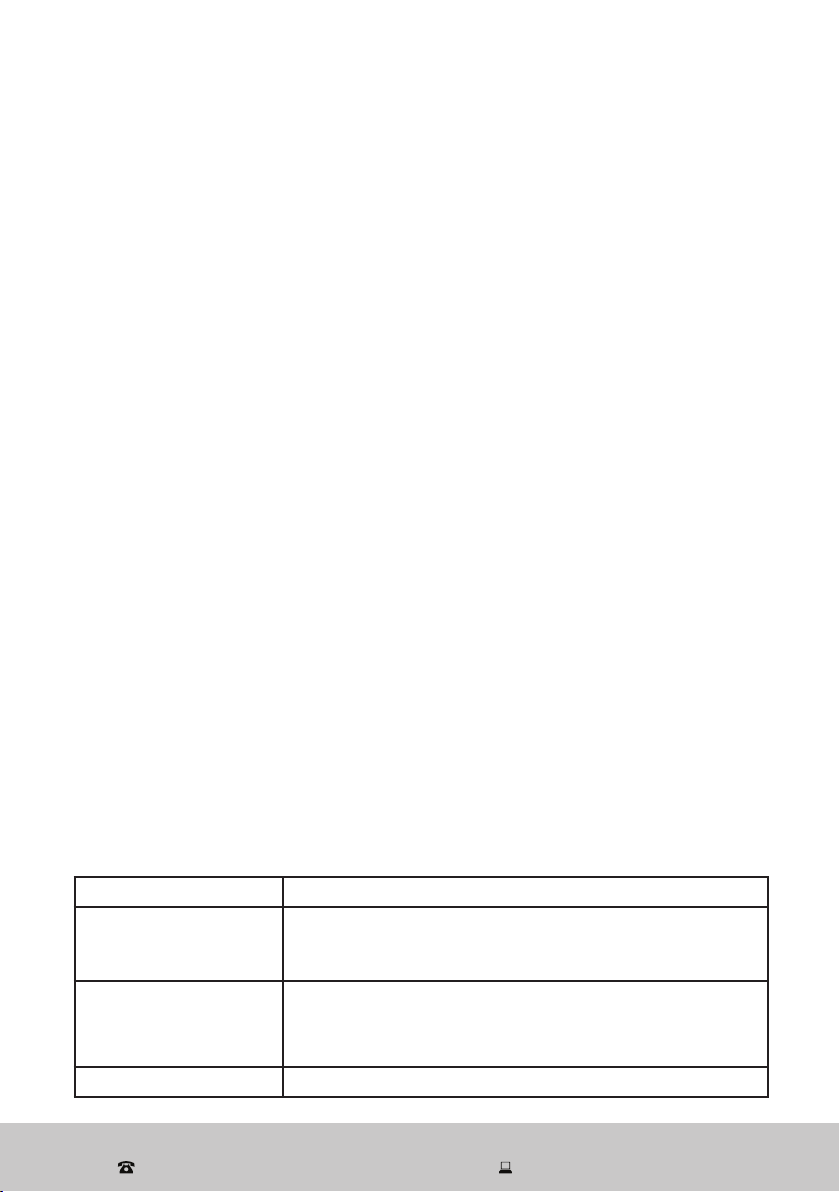
• To activate the Wi-Fi function, press and hold the Delay button for 5 seconds until
the unit emits a beeping sound. On the LED display, the Wi-Fi icon will start flashing
rapidly.
• Follow the app prompts until the Wi-Fi icon illuminates steadily.
SY-XT5QG100-006
材料:油墨
中山格兰仕日用电器有限公司
设 计
校 对
审 核
工 艺
标准化
批 准
日 期
李东波
宾艺强
洪柳
傅玲
尹怀斌
2021.07.10
控制面板丝印
XQG100-T514VE/W
标记 更改文件号处数 签名 日期 阶 段 标 记
B
重量 比例
视 角
共1页 第1页
叶强
技术要求:
1.文字字体格式、大小尺寸必须与图纸相符合;
2.文字、图案排版必须与图纸一致;
3.未注公差按照IT14执行。
SY-XT5QG100-006 00
版本
大于
—
6
3
10
18
30
基本尺寸
公差 值 ±
IT12
IT13 IT14 IT15 IT16 IT17 IT18
到
80
50
12 0
18 0
25 0
31 5
40 0
50 0
3
10
6
18
30
50
12 0
80
18 0
25 0
31 5
40 0
50 0
—
mm
0.1
0.14
0.25
0.4
0.6
1.0 1.4
0.12
0.18
0.3
0.48
0.75
1.2 1.8
0.15
0.22
0.36
0.58
0.9
1.5 2.2
0.18
0.27
0.43
0.7
1.1
1.8 2.7
0.21
0.33
0.52
0.84
1.3
2.1 3.3
0.25
0.39
0.62
1.0
1.6
2.5 3.9
0.3
0.46
0.74
1.2
1.9
3.0 4.6
0.35
0.54
0.87
1.4
2.2
3.5 5.4
0.4
0.63
1.0
1.6
2.5
4.0 6.3
0.46
0.72
1.15
1.85
2.9
4.6 7.2
0.52
0.81
1.3
2.1
3.2
5.2 8.1
0.57
0.89
1.4
2.3
3.6
5.7 8.9
0.63
0.97
1.55
2.5
4.0
6.3 9.7
0.7
1.1
1.75
2.8
4.4
7.0 11.0
公差 值 ±
角度
IT12/13/14 IT15/16/17/18
大于 到
0°
90°
5′
90′
90°
18 0°
15′
1°
18 0°
27 0°
30′
2°
27 0°
36 0°
1°
6°
技术要求:
1.文字字体格式、大小尺寸必须与图纸相符合;
2.文字、图案排版必须与图纸一致;
3.未注公差按照IT14执行;
4.丝印图文清晰、正确光洁、颜色均匀;
5.丝印线条宽度一致,不允许有缺印、漏印;
6.丝印附着力:采用正己烷、1kg砝码,水拉动
15秒,测试完成后丝印油墨无脱落。
After Sales Support
(AU) 1300 886 649 (NZ) 0800 836 761 | tempo.org/support
25
Wi-Fi Connection (Cont.)
On the main device list page you can add the washing machine from the product list.
You may have to confirm your Wi-Fi name and password, then follow the prompts
to add the machine. While the washing machine is being added, the progress will be
displayed. On completion, when your device has been successfully added, follow the
prompts to name the device. You can then enter the device’s main control page.
Alternative pairing mode
If the device is not responding you will get a message with a few prompts to check the
Wi-Fi details.
If you want to switch the pairing mode, follow the prompts.
After you have confirmed your Wi-Fi network and password, connect your mobile phone
to the device’s hotspot, then go back to the app and continue to add the device.
Device sharing
The device only recognises ONE registered user. But you can share access to the
device with other members of your household if they have the latest version of the AKAI
Home app updated on their phone. To share the device, proceed as follows:
On the device’s main control page, click the edit symbol in the corner, then select to
share the device and follow the prompts.
Using the AKAI Smart Home app
Monitoring the washing machine with the AKAI Home app is self-explanatory. The
app will sound an alarm when the program has finished. In case of a malfunction, it will
display the relevant error message (see page 27 for details).
Smartphone and Wi-Fi specification requirements
Minimum smartphone specifications
Android 5.0 version or later, IOS 10.0 version or later
Wireless network requirements of the Wi-Fi module
Frequency band FCC/IC: 2.412 to 2.462 GHz, CE: 2.412 to 2.472 GHz
Wi-Fi standard IEEE 802.11 b/g/n
2412 to 2472: correspond to channels 1 to 13
2412 to 2462: correspond to channels 1 to 11
Data transmission rate 802.11b: 1, 2, 5.5 or 11 (Mbps)
802.11g: 6, 9, 12, 18, 24, 36, 48 or 54 (Mbps)
802.11n: HT20 MCS0 to MCS7
Antenna type PCB antenna
After Sales Support
(AU) 1300 886 649 (NZ) 0800 836 761 | tempo.org/support
26
Wi-Fi Connection (Cont.)
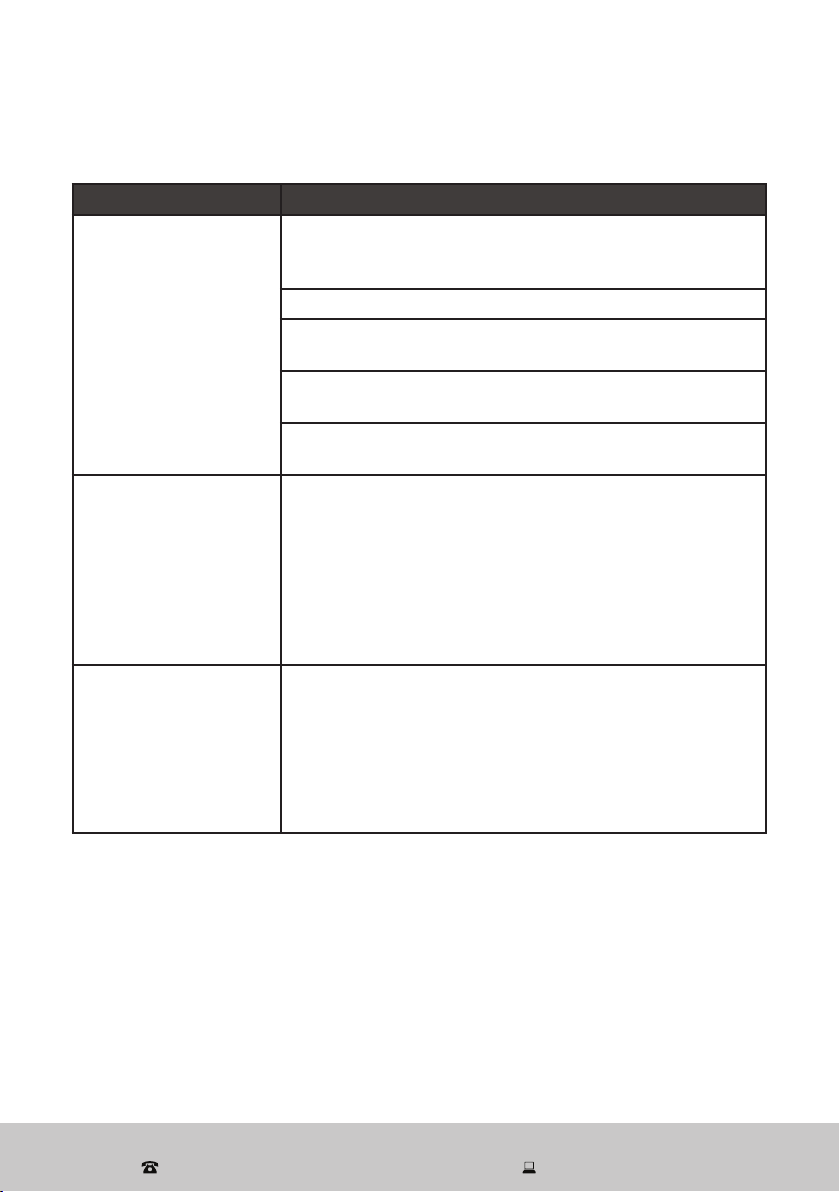
Table 4: Wi-Fi troubleshooting
Problem Possible cause and solution
During the set-up,
the washing machine
cannot be configured
successfully.
Check and ensure you have internet reception and your
mobile phone and the washing machine are connected to
the same Wi-Fi network.
Check and ensure your Wi-Fi password is correct.
Check and ensure that no firewalls or other restrictions
are set.
Check and ensure that the router works normally—check
the network requirements.
Ensure that the washing machine, router and mobile are
all on the same Wi-Fi network and within the signal range.
I cannot control the
washing machine with
my mobile.
If a message is displayed to alert you to an identification
failure, the washing machine has been reset and the
mobile phone lost control permission. You need to
reconnect the phone to the washing machine, following
the set-up instructions in this manual.
If after these steps you still cannot control the washing
machine with your mobile, please delete the machine from
your device list and reconnect again.
My mobile phone
cannot find the washing
machine.
If a message is displayed to alert you that the device
is offline, please check and ensure that your washing
machine is connected to your mains supply and power is
switched on at the outlet.
Also ensure that your router is connected to the mains
supply and that the router and your mobile phone are
properly connected to your Wi-Fi network.
After Sales Support
(AU) 1300 886 649 (NZ) 0800 836 761 | tempo.org/support
27
FAQs and Troubleshooting Guide
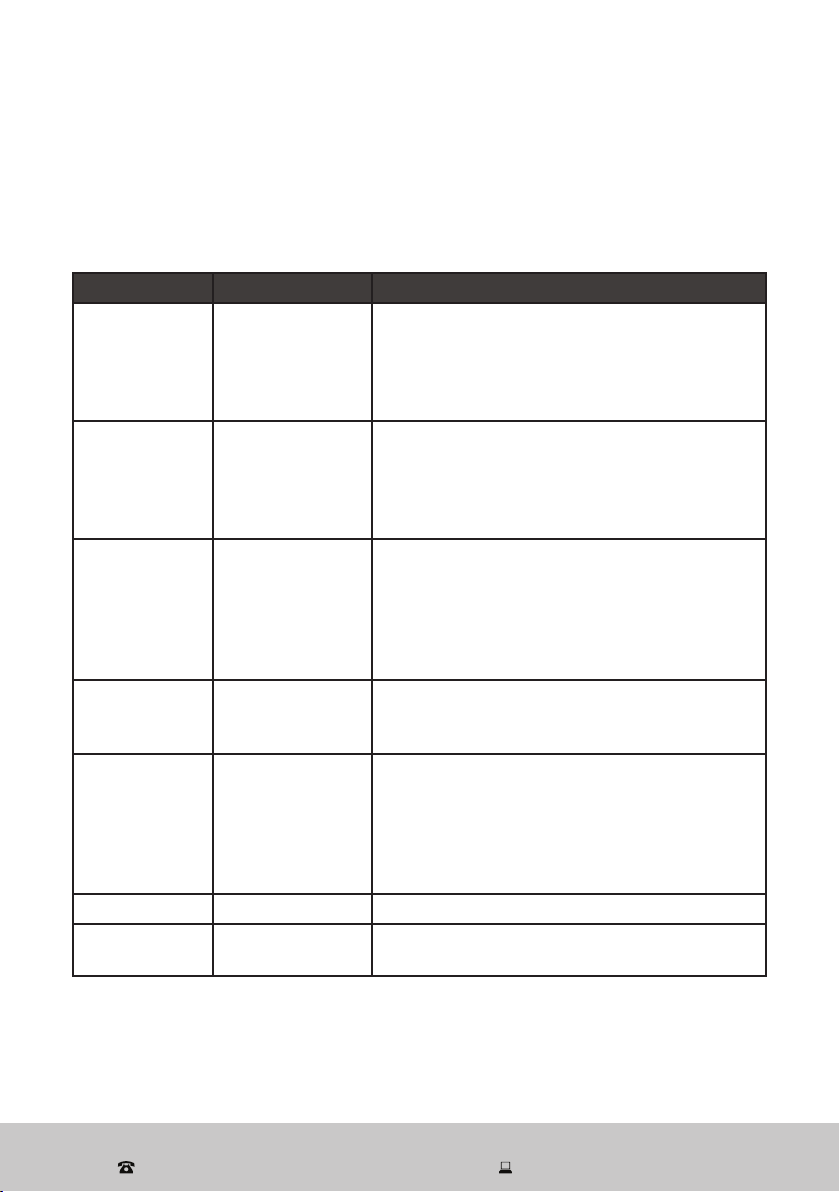
When the following problems occur, the microcomputer inside the washer will detect
the abnormal condition, display an error message and the washer will stop operating.
If after your remedial action the problem persists, please contact our after sales
support centre for advice or to book a service.
Table 5: Error messages
Error message Possible cause Solution
[ E01 ]
No water
• Ensure the tap is open.
• Check the water inlet valve filter and ensure it
is clean, unblocked and undamaged.
• Ensure the drain hose is properly fitted.
• Check for a water stoppage in your area.
[ E02 ]
Door lock alarm
• Ensure the door is properly locked.
• If a garment is caught in the door, place it
inside the drum and lock the door properly.
• If the door lock is damaged, call for a
service.
[ E03 ]
Continuous
drainage
• Check and ensure the drain hose is not
squashed or kinked.
• Check and ensure the drain hose filter is
unblocked.
• Check and ensure that nothing is caught in
and blocking the drain hose.
[ E04 ]
Water
overflowing
• Ensure the water inlet is undamaged.
• If the water sensor malfunctions, call for a
service.
[ E05 ]
The motor does
not work.
• If the machine is overloaded, an overheat
protection has been triggered. Switch off
the machine, let it cool, reduce the load and
restart.
• If the motor is malfunctioning, call for a
service.
[ E06 ]
Heater problem Call for a service.
[ E07 ]
Temperature
sensor problems
Call for a service.
After Sales Support
(AU) 1300 886 649 (NZ) 0800 836 761 | tempo.org/support
28
FAQs and Troubleshooting Guide (Cont.)
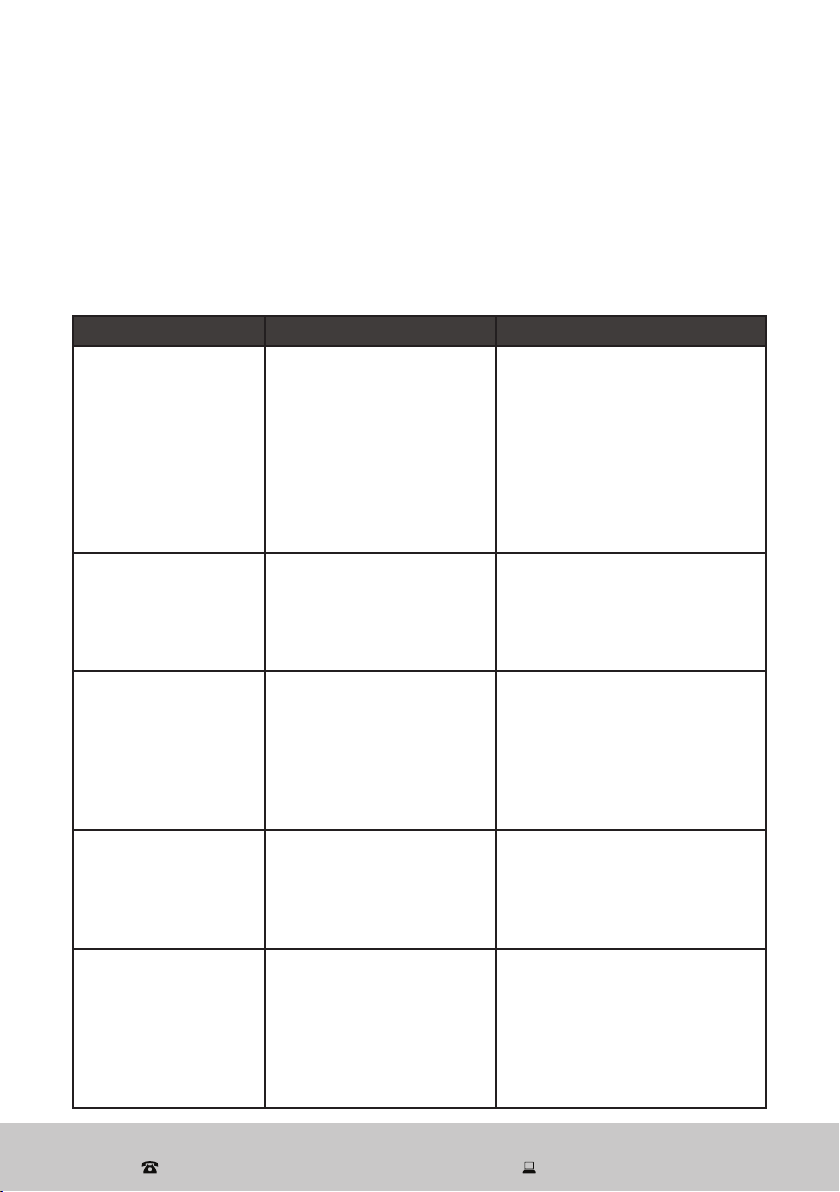
Not all unusual incidents you may encounter with your washing machine are faults, or
cause for concern. Check in the list below what issues may arise and why. Also check
in the table on the previous page for solutions to problems that may be resolved without
the need for a service call.
If none of the solutions offered below and on the previous page help you solve the
problem, please contact our after sales support centre.
Table 6: Troubleshooting
Problem Possible cause Solution
The washing machine
does not start up.
• The door is not closed
properly, or items are
caught up in the door.
• The plug is not firmly
plugged in.
• Have you selected a
program and pressed
the Start/Pause button?
• The water tap is closed.
• Check and ensure no items
are caught in the door, then
close the door properly and
restart.
• Ensure you have properly
inserted the plug, selected
a program and pressed the
Start/Pause button.
• Ensure the water tap is open.
The door cannot be
opened.
• The machine’s safety
protection design is
working.
• The water temperature
is still too high.
• Wait a few moments after
the end of a program before
opening the door.
• Wait until the water has
cooled.
No water
• The water tap is closed.
• Water is frozen in the
supply hose.
• The water inlet valve
filter is blocked.
• There is a water
stoppage in your area.
• Ensure the tap is open.
• See page 32 for solving water
freezing issues.
• Ensure the water inlet valve
filter is clean and unblocked.
• Restart when the water is back.
Water leakage
• The water supply hose
or drain hose are not
tightly connected.
• The drain hose is
blocked.
• Check and ensure both
hoses are securely
connected.
• Check and ensure the drain
hose is not blocked.
Abnormal noise
• The transport bolts have
not been removed.
• The machine is installed
on an uneven or unstable
floor.
• A loose object is knocking
against the drum walls.
• Make sure the transport bolts
have been removed.
• Make sure the machine is
installed on a solid, level floor.
• Ensure to check pockets
before the wash and remove
any coins, hairpins, etc.
After Sales Support
(AU) 1300 886 649 (NZ) 0800 836 761 | tempo.org/support
29
Fig. 14
Other Useful Information
Normal wash
Gentle wash
40
Warm wash
(max 40 )
C
ash
ash
Hand w
Do not w
Bleach
Do not bleach
Dr
Dr
Drip dry
Line/hang to dry
Dry flat
Tumble dry
normal
A
F
y clean normal cycle
with any
solvent
y clean normal cycle
petroleum
solvent only
Iron
Do not iron
Warm iron.medium
(max 150 )
C
Cool iron(max 110 )
C
Dry clean
Do not dry clean
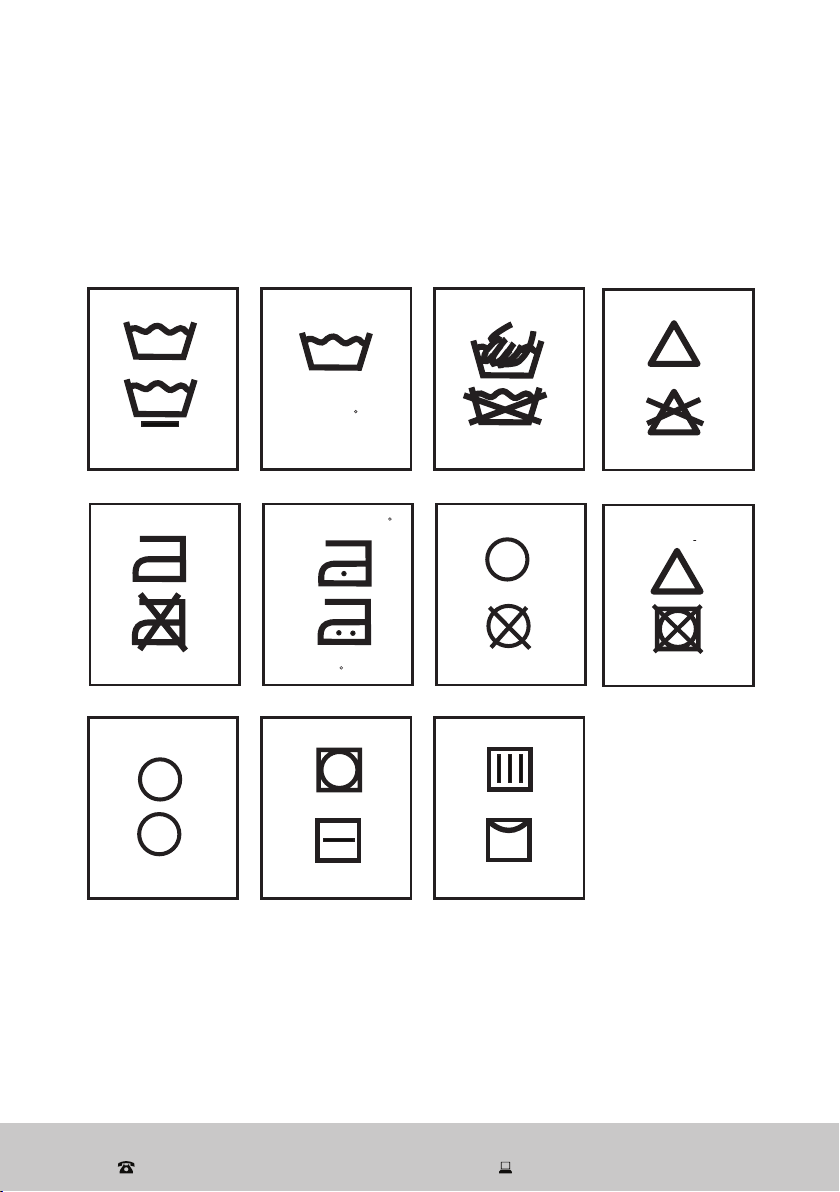
Garment care symbols
When choosing a wash program, check for any labels in your clothes and follow the
instructions. Below are some commonly used symbols and explanations what they mean.
CC
Do not tumble dry
Chlorine bleach
may be
used
Handwash
After Sales Support
(AU) 1300 886 649 (NZ) 0800 836 761 | tempo.org/support
30
Other Useful Information (Cont.)
Cleaning and care
To prolong the service life of the washing machine, keep it in good condition and
perform regular maintenance.
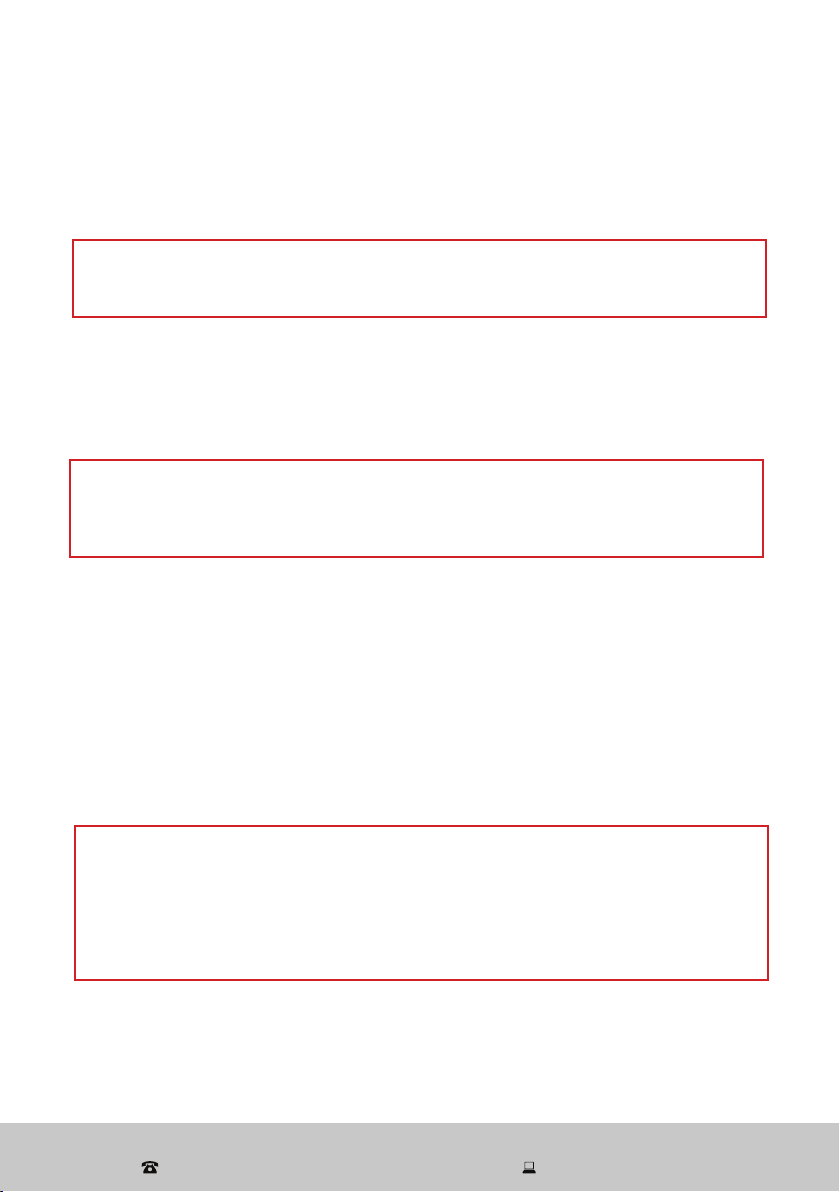
WARNING!
For any type of cleaning and maintenance, make sure the washing machine is
disconnected from the mains power supply and the water tap is closed.
Cleaning the cabinet (when required)
• Use a soft cloth to wipe any water or dirt off the washer housing.
• To remove dirt and stains, use a mild detergent solution and a damp cloth. Squeeze
it almost dry to avoid leaving water residues.
Cleaning the drum (every three months)
• Make sure all laundry items are removed from the drum, then wipe it clean with a
soft dry or damp cloth.
• If you notice any rust residues left inside the drum from washing items with metal
parts (such as buttons or zippers), wipe the residues off immediately with chlorine-
free detergent. Never use steel wool.
• To remove dirt and/or detergent residues and scum build-up from the inside and
outside of the washing machine’s drum, run the Drum Clean program every three
months without any clothes or detergent.
WARNING!
Do not use any solvents, alcohol, harsh chemicals, alkaline or abrasive cleaning
agents, or sharp objects, to avoid damaging the surface. Do not hose down the
washing machine or spray water directly onto the housing.
CAUTION!
Cleaning the inside of your washing machine regularly is particularly
important if you frequently use a cold wash cycle, especially if you also use a
fabric softener. Liquid detergents can cause detergent scum to build up around
the outside of the drum, which cold water will not remove and which can cause
bacteria, unpleasant odours, and eventually soiling of your wash load.
After Sales Support
(AU) 1300 886 649 (NZ) 0800 836 761 | tempo.org/support
31
Other Useful Information (Cont.)
Cleaning the door seal and glass (after each wash)
After each wash:
• Wipe the glass and seal to remove lint and stains. A build-up of lint can cause leaks.
• Check for coins, buttons and other small objects in the seal creases (Fig. 18) and
remove them.
• Leave the door slightly ajar so the inside can dry properly. This will also help prevent
the development of mould or odours.
Cleaning the detergent drawer (when required)
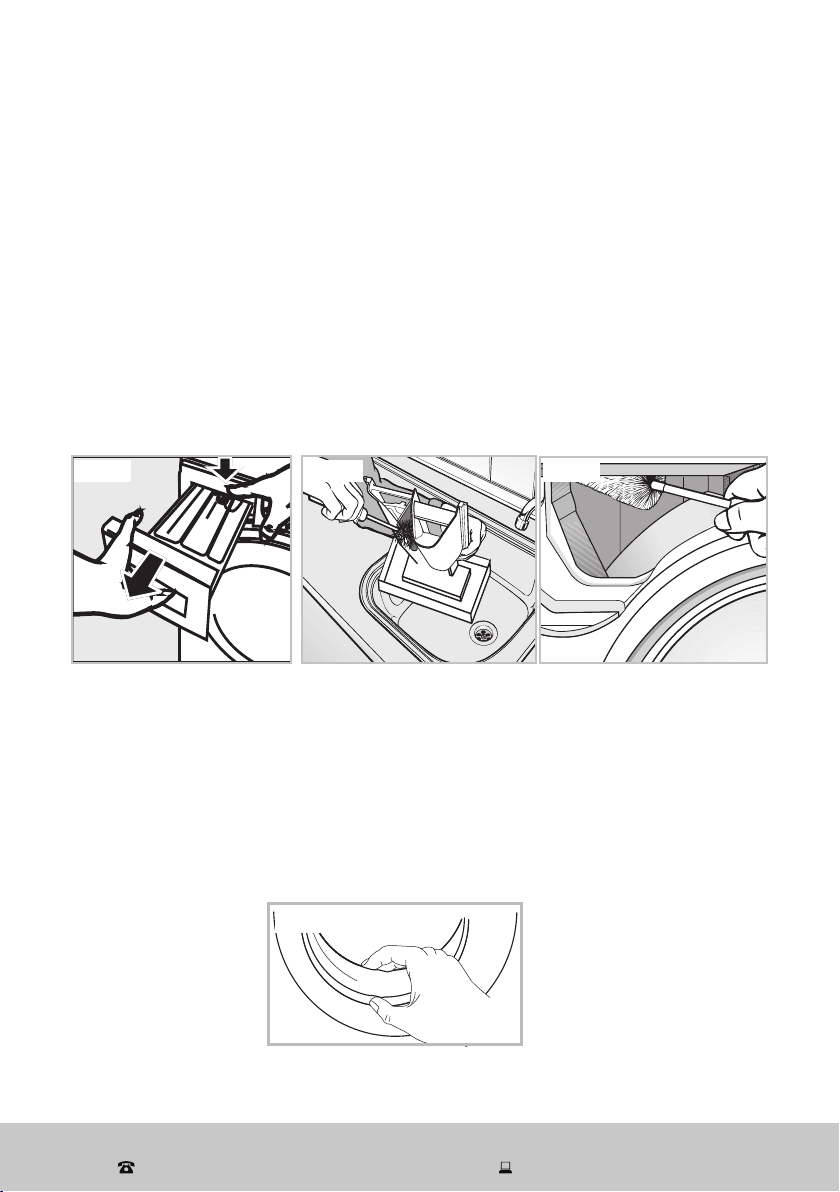
Remove detergent residues regularly. The detergent dispenser may be removed for
cleaning.
• Pull open the dispenser drawer until you feel a resistance. Press down the release
catch and at the same time pull the drawer right out of the machine (Fig. 15).
• Remove the siphon from the compartment and clean it.
• Clean the drawer using a brush and warm water (Fig. 16).
• Use a bottle brush to remove detergent residues from inside the drawer housing
(Fig. 17).
• Wipe all parts dry with a clean cloth, then reinstall the drawer back into its space.
NOTE: Do not use any solvents, alcohol, harsh chemicals, alkaline or abrasive
cleaning agents, or sharp objects, to avoid damaging the surface.
Fig. 15 Fig. 16 Fig. 17
Fig. 18
After Sales Support
(AU) 1300 886 649 (NZ) 0800 836 761 | tempo.org/support
32
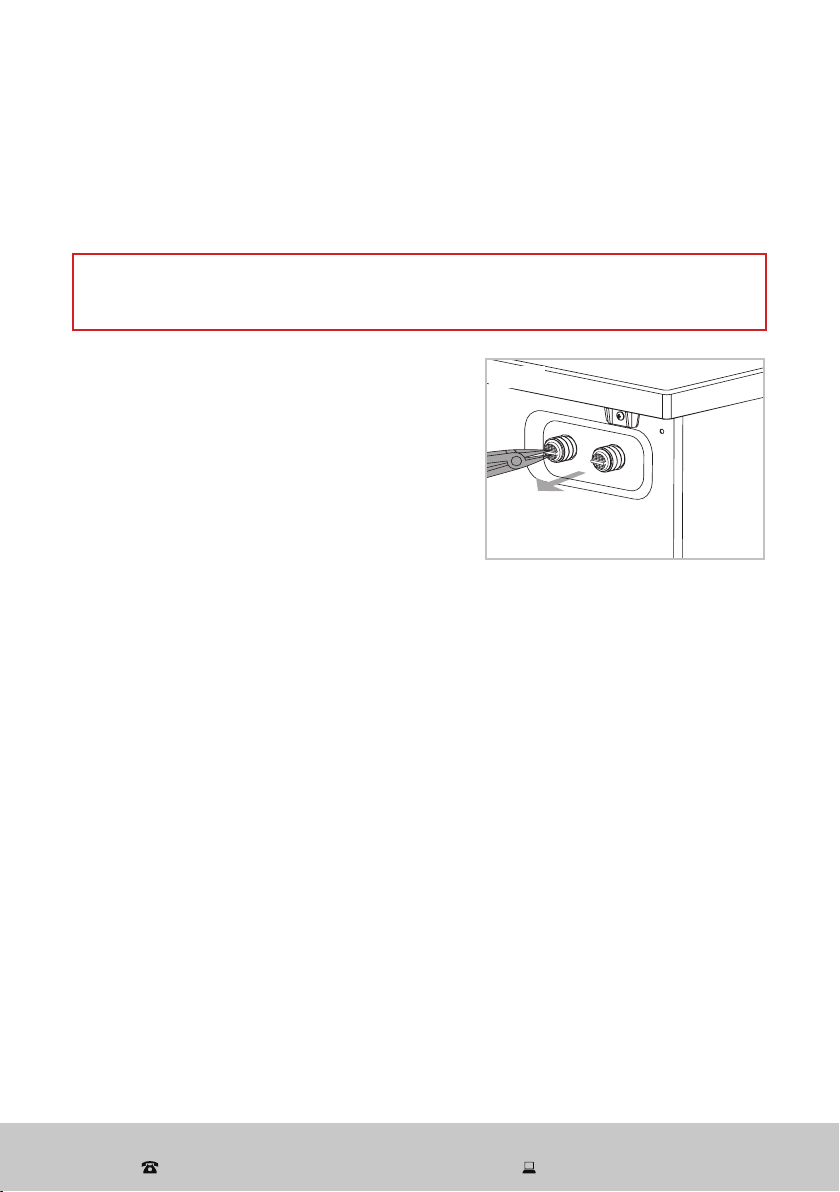
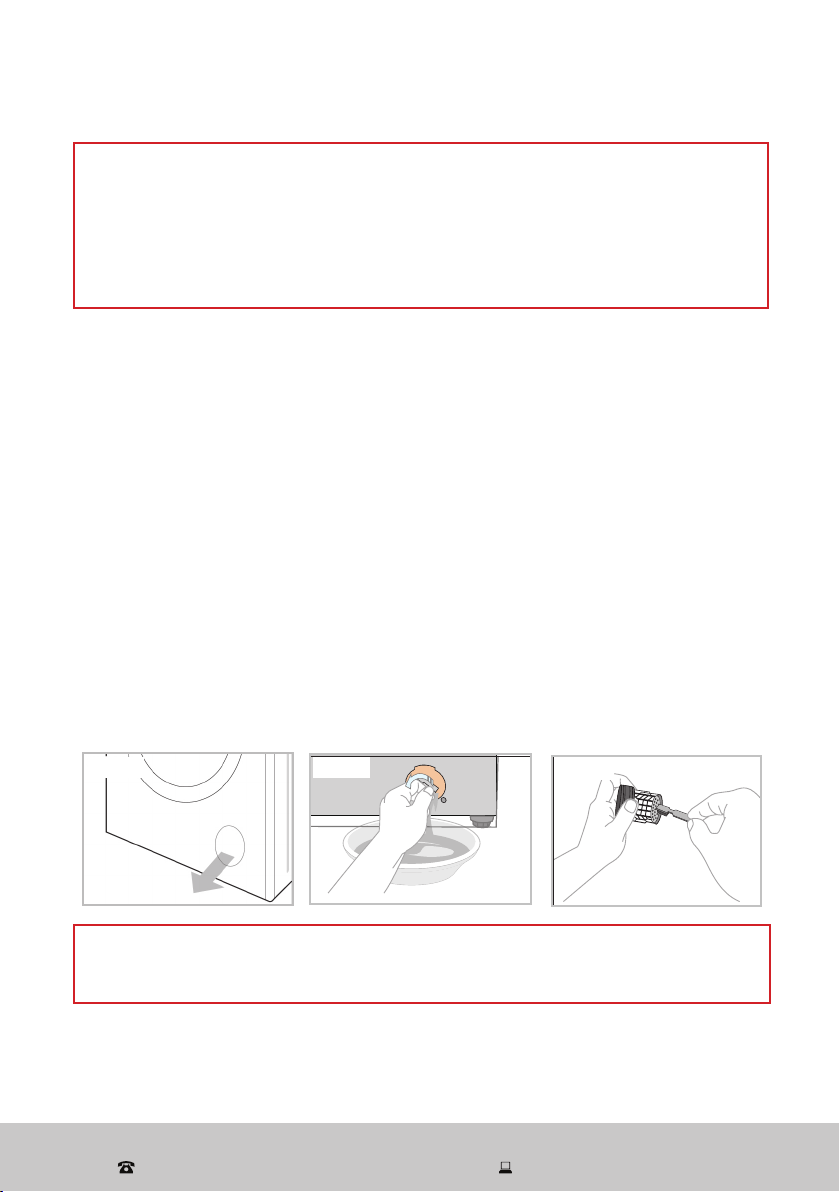
Cleaning the water inlet filter
To avoid blockage of the mesh filters at the water tap or hose after long time use, we
recommend you clean these filters every 6 months, or more often if there are frequent
interruptions to the water supply.
Other Useful Information (Cont.)
CAUTION!
Before cleaning the water inlet filter, make sure you have turned off the water supply
at the tap.
• Use pointed nose pliers to withdraw the plastic
filter from the water inlet valve at the back of
the washing machine (Fig. 19).
• Clean the filter with a soft brush, then assemble
the cleaned filter back into the valve.
• Reconnect the water supply hose to the water
tap on your wall and to the water inlet valve at
the back of the washing machine. For more
detailed connection instructions, please refer to
page 14.
Freezing conditions
If the washing machine is exposed to temperatures below 0 °C, you should take
certain precautions to prevent water freezing in the pipes.
1. Turn off the water tap.
2. Unscrew the water inlet hose.
3. Unhook the drain hose from the rear support and position the end of this hose and
that of the inlet hose in a bowl. Run the spin program.
4. Disconnect the appliance.
5. Reconnect the inlet hose and reposition the drain hose.
6. When you intend to start the machine up again, make sure that the room
temperature is above 0 °C.
If the temperature drop was unexpected and water has frozen in the water supply
hose, proceed as follows:
1. Wrap a hot towel around the water tap and the water supply hose joint.
2. Disconnect the water supply hose and soak it in a tub of hot water of approximately
50 °C.
3. Pour about 2–3 litres of hot water (approximately 50 °C) into the drum of the
washing machine.
4. When all frozen water has thawed, reconnect the water supply hose, open the tap
and start the machine to check whether all blockages have been removed.
Fig. 19
After Sales Support
(AU) 1300 886 649 (NZ) 0800 836 761 | tempo.org/support
33
Other Useful Information (Cont.)
WARNING!
For any type of cleaning and maintenance, make sure the washing machine is
disconnected from the mains power supply and the water tap is closed.
Do not open the pump filter cover during the course of a wash program.
If you are checking the drain pump after a hot water wash, take particular care as
any residual water in the machine may be hot. Wait until the water has cooled
down to avoid burns.
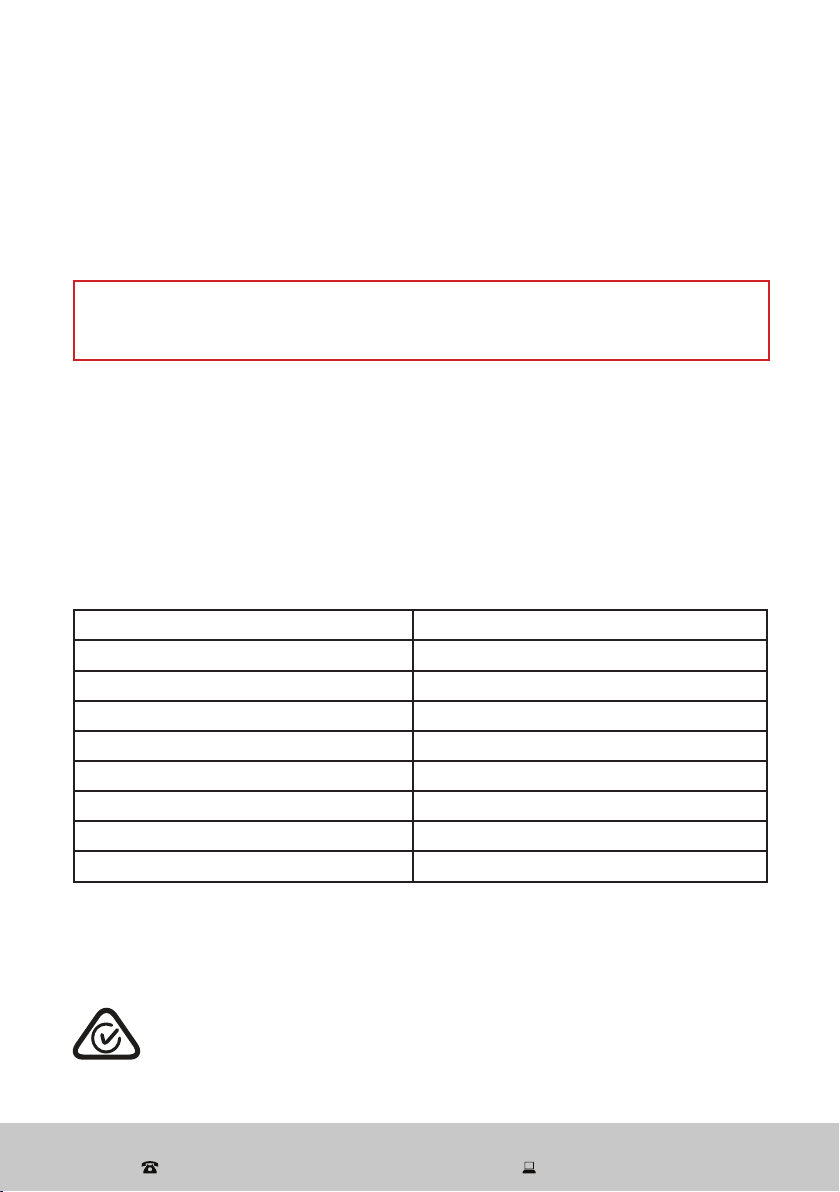
Drain pump maintenance (every two months)
In order to avoid blockages created by excess lint, threads or items such as bobby
pins, coins, etc., check the drain pump filter regularly, especially if the machine fails to
drain the water or spin properly, or if you notice any unusual noises during the drain or
spin cycles. We recommend you clean the filter every two months, or when there is a
fault and the error code [ E03 ] is displayed on the screen.
CAUTION: If you are checking the drain pump after a hot water wash, wait until any
residual water has cooled to a safe level.
1. Open the service cover using a screwdriver (Fig. 20).
2. Place a container underneath the drain pump filter when removing it, and always
keep a rag nearby to dry up any water spillage.
3. Remove the filter plug. Any residual water will drain out (Fig. 21).
4. Remove any foreign objects. Clean the filter plug carefully with water and a soft
brush (Fig. 22).
5. Screw the filter plug back into position.
6. Close the service cover and secure it with the screw.
WARNING!
Make sure to reinstall the drain pump filter and close the cover panel securely,
otherwise water may leak.
Fig. 21
Fig. 22
Fig. 20
After Sales Support
(AU) 1300 886 649 (NZ) 0800 836 761 | tempo.org/support
34
Storage
If the appliance is not going to be used for an extended period of time, please unplug
the machine from the power supply and disconnect all hoses. Clean the machine and
filters as described on the previous pages. Let the machine air-dry thoroughly, then
store it in the original packaging in a dry location, out of reach of children.
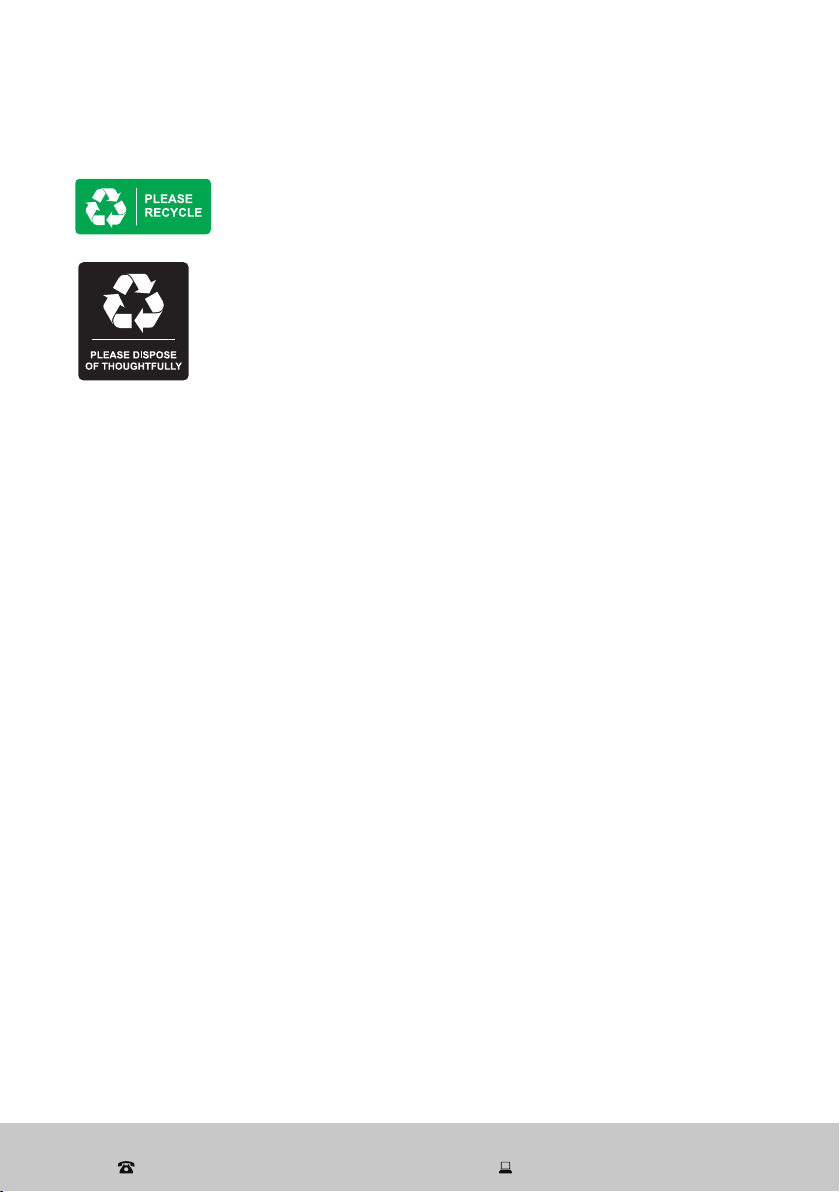
Technical specifications
Model number AK-FL10
Rated capacity (washing/spinning) 10 kg
Rated power 2000 W
Rated voltage 220–240 V~
Rated frequency 50 Hz
Water pressure 0.02 MPa – 0.8 MPa
Liquid ingress protection IPX4
Weight (approx.) 69 kg
Dimensions (approx.) 595 (W) x 640 (D) x 845 (H) mm
Other Useful Information (Cont.)
Compliance
This appliance has been fully tested and meets all requirements as set out by
standards AS/NZS 60335.1 and AS/NZS 60335.2.7
The RCM Mark (Regulatory Compliance Mark) indicates that the product
complies with the relevant guidelines of the ACMA as well as corresponding
government requirements for the safety of electrical devices.
E209
IMPORTANT!
Unscrew the drain pump filter to let water run out when you are not going to use the
washing machine for a long time.
Service, repair and spare parts
If the appliance is damaged, do not attempt to repair it yourself. If it requires repair or
service, please contact our after sales support centre to arrange for examination and
repair.
Our after sales support centre stocks spare water inlet hoses, drain hoses and
adjustable feet for the appliance. To purchase a spare part, contact the centre using
the details at the bottom of the page.
After Sales Support
(AU) 1300 886 649 (NZ) 0800 836 761 | tempo.org/support
35
Responsible disposal
Other Useful Information (Cont.)
Packaging materials are recyclable. Please dispose of them
responsibly for recycling.
At the end of its working life, do not throw this appliance out
with your household waste. Electrical and electronic products
contain substances that can have a detrimental effect on the
environment and human health if disposed of inappropriately.
Observe any local regulations regarding the disposal of
electrical consumer goods and dispose of it appropriately for
recycling.
Contact your local authorities for advice on recycling facilities
in your area. Or find recycling scheme services listed on Planet
Ark’s website at www.recyclingnearyou.com.au, or call Planet
Ark on 1300 733 712.
After Sales Support
(AU) 1300 886 649 (NZ) 0800 836 761 | tempo.org/support
Distributed by Tempo (Aust) Pty Ltd ABN 70 106 100 252
PO BOX 132, Frenchs Forest NSW 1640, Australia
Customer Helpline:
(AU) 1300 886 649 (NZ) 0800 836 761
Web Support: tempo.org/support
IM-V1.0 Issue: November 2021
Warranty returns
Should you for any reason need to return this product for
a warranty claim, make sure to include all accessories with
the product.
Product does not work?
If you encounter problems with this product, or if it fails to
perform to your expectations, make sure to contact our
After Sales Support Centre on 1300 886 649 for advice.
For an electronic copy of this manual, please contact our after sales support centre.