
OWNER'S
MANUAL
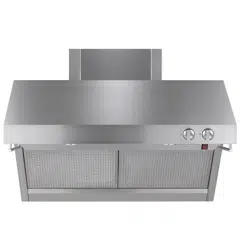
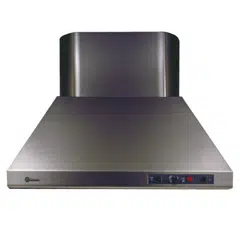
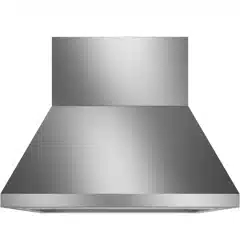
Stainless Steel Professional Vent Hoods
With QuietBoost™ Blower
MONOGRAM.COM
Para consultar una version en español de este manual de instrucciones,
visite nuestro sitio de internet monogram.com.

2 49-2000705 Rev. 4
MODEL INFORMATION
WRITE DOWN THE MODEL AND SERIAL NUMBERS
You can find them on a label located on the front panel of
the unit.
These numbers are also on the Consumer Product
Ownership Registration Card packed separately with your
vent hood
Please write these numbers here:
Model Number
Serial Number
Use these numbers in any correspondence or service calls
concerning your vent hood.
MODEL NUMBERS
ZVW1360
ZVW1480
TABLE OF CONTENTS
MODEL INFORMATION .....................................................................................2
CONSUMER SUPPORT .....................................................................................3
SAFETY INFORMATION ....................................................................................4
CONTROLS ..............................................................................................5
For Your Safety ........................................................................................5
CHEF CONNECT ..........................................................................................6
WI-FI CONNECT ...........................................................................................6
CARE AND CLEANING
Baffle Grease Filters and Drip Trays (on some models) .........................................................7
Stainless Steel Surfaces (on some models) ..................................................................8
Light Bulbs ............................................................................................8
TROUBLESHOOTING ......................................................................................9
ACCESSORIES ..........................................................................................10
LIMITED WARRANTY .....................................................................................11

49-2000705 Rev. 4 3
CONSUMER SUPPORT
MONOGRAM WEBSITE
Have a question or need assistance with your appliance? Try the Monogram website 24 hours a day, any day of the year! You can
also shop for more great Monogram products and take advantage of all our on-line support services designed for your convenience. In
the US: monogram.com
REGISTER YOUR APPLIANCE
Register your new appliance on-line at your convenience! Timely product registration will allow for enhanced communication and
prompt service under the terms of your warranty, should the need arise. You may also mail in the pre-printed registration card included
in the packing material. In the US: monogram.com/register
SCHEDULE SERVICE
Expert Monogram repair service is only one step away from your door. To request service, call (800) 444-1845 or visit our website at
monogram.com/contact
EXTENDED WARRANTIES
Purchase a Monogram extended warranty and learn about special discounts that are available while your warranty is still in effect. You
can purchase it on-line anytime. Monogram Service will still be there after your warranty expires.
In the US: monogram.com/extended-warranty
REMOTE CONNECTIVITY
For assistance with wireless network connectivity (for models with remote enable),
visit our website at monogram.com/connect
PARTS AND ACCESSORIES
Individuals qualified to service their own appliances can have parts or accessories sent directly to their homes
(VISA, MasterCard and Discover cards are accepted). Order on-line today 24 hours every day.
In the US: monogram.com/parts
Instructions contained in this manual cover procedures to be performed by any user. Other servicing generally should be
referred to qualified service personnel. Caution must be exercised, since improper servicing may cause unsafe operation.
CONTACT US
If you are not satisfied with the service you receive from Monogram, contact us on our website with all the details including your phone
number, or write to:
In the US: General Manager, Customer Relations | Monogram Appliances, Appliance Park | Louisville, KY 40225
monogram.com/contact
4 49-2000705 Rev. 4
READ AND SAVE THESE INSTRUCTIONS
IMPORTANT SAFETY INFORMATION
READ ALL INSTRUCTIONS BEFORE USING THE APPLIANCE
WARNING
Read all safety instructions before using the product. Failure to follow these instructions
may result in fire, electrical shock, serious injury or death.
WARNING
GENERAL SAFETY INSTRUCTIONS
WARNING
TO REDUCE THE RISK OF FIRE,
ELECTRIC SHOCK OR INJURY TO PERSONS,
OBSERVE THE FOLLOWING:
Ŷ
Use this unit only in the manner intended by the
manufacturer. If you have questions, contact the
manufacturer
.
Ŷ
Before servicing or cleaning unit, switch power off
at service panel and lock the service disconnecting
means to prevent power from being switched on
accidentally. When the service disconnecting means
cannot be locked, securely fasten a prominent
warning device, such as a tag, to the service panel
.
Ŷ
Do not use this unit with any solid-state speed control
device
.
CAUTION
FOR GENERAL VENTILATING USE
ONLY. DO NOT USE TO EXHAUST HAZARDOUS OR
EXPLOSIVE MATERIALS AND VAPORS.
WARNING
TO REDUCE THE RISK OF INJURY
TO PERSONS IN THE EVENT OF A RANGE TOP
GREASE FIRE, OBSERVE THE FOLLOWING*:
Ŷ
SMOTHER FLAMES with a close-fitting lid, cookie
sheet or metal tray, then turn off the burner. BE
CAREFUL TO PREVENT BURNS. If the flames do
not go out immediately, EVACUATE AND CALL THE
FIRE DEPARTMENT
.
Ŷ NEVER PICK UP A FLAMING PAN—
You may be burned.
Ŷ
DO NOT USE WATER, including wet dishcloths or
towels—a violent steam explosion will result
.
Ŷ
Use an extinguisher ONLY if:
1. You know you have a Class ABC extinguisher, and
you already know how to operate it.
2. The fire is small and contained in the area where it
started.
3. The fire department is being called.
4. You can fight the fire with your back to an exit.
* Based on “Kitchen Fire Safety” published by NFPA.
WARNING
TO REDUCE THE RISK OF A RANGE
TOP GREASE FIRE:
Ŷ
Never leave surface units unattended at high settings.
Boilovers cause smoking and greasy spillovers
that may ignite. Heat oils slowly on low or medium
settings
.
Ŷ
Always turn hood ON when cooking at high heat or
when flambéing food (i.e., Crepes Suzette, Cherries
Jubilee, Peppercorn Beef Flambé)
.
Ŷ
Clean ventilating fans frequently. Grease should not
be allowed to accumulate on fan or filter
Ŷ
Use proper pan size. Always use cookware
appropriate for the size of the surface element.
Ŷ 'RQRWRSHUDWHWKHPLFURZDYHIHDWXUHZLWKRXWIRRGLQ
WARNING
SERVICING
If You Need Service...
Do not attempt to repair or replace any part of the
vent hood unless it is specifically recommended in
this manual. All other servicing should be referred to a
qualified technician.
Be sure electrical power is off before servicing the unit.
It may be necessary to remove the vent hood blower in
order to service components such as the blower motor
or air vent mechanism.
Disconnect power to the cooktop and remove it first.
Reverse the steps in the Install the Vent Hood section in
the Installation Instructions to remove the blower.
Service parts are available from a Monogram Service
and Parts Center.
PROPER DISPOSAL OF YOUR APPLIANCE
Dispose of or recycle your appliance in accordance with Federal and Local Regulations. Contact your local
authorities for the environmentally safe disposal or recycling of your appliance.
49-2000705 Rev. 4 5
CONTROLS
Throughout this manual, features and appearance may vary from your model.
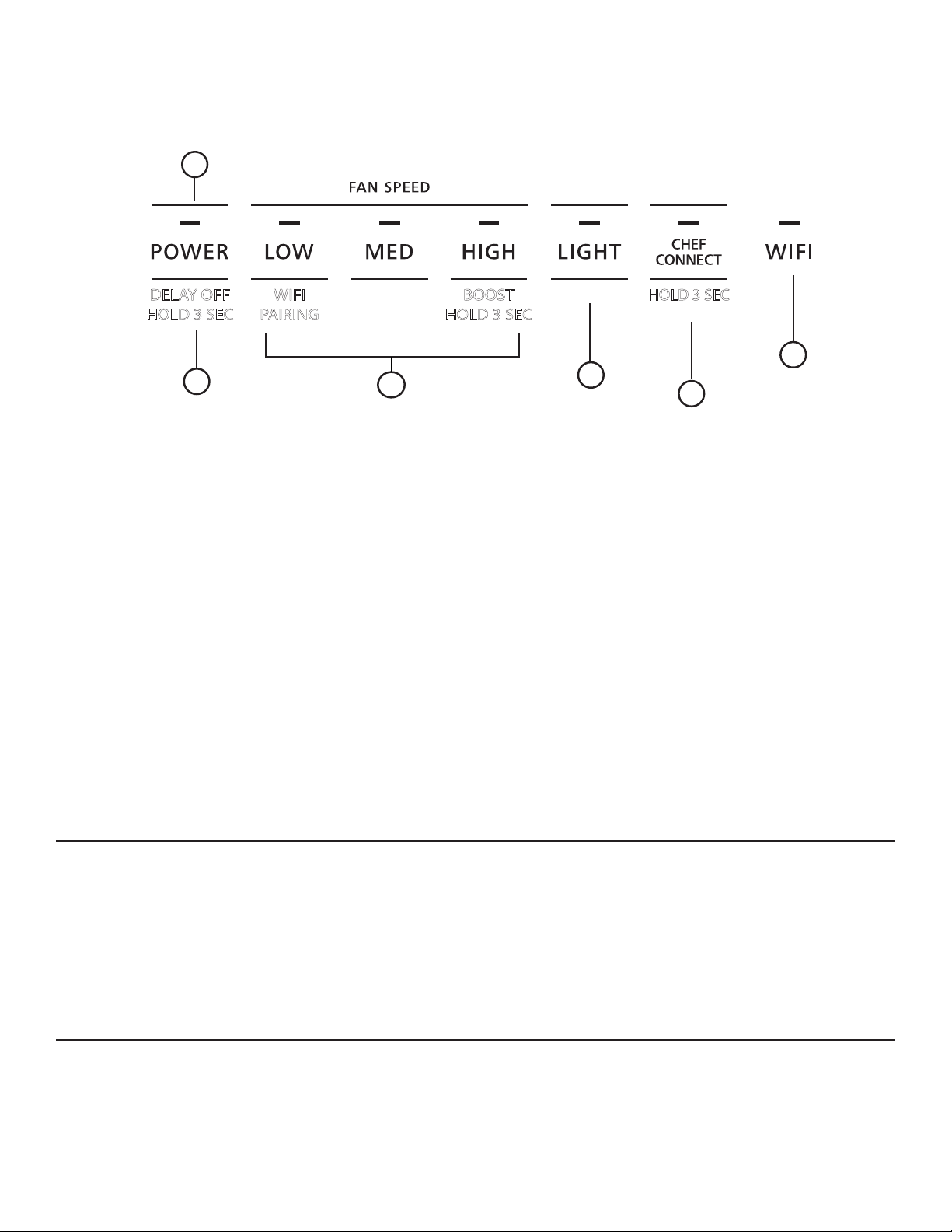
1. Rangehood Control Panel: The control
panel is located on the bottom of the canopy. The
function of each control pad is noted below.
2. Power: On/Off switch for the fan. The fan can be
operated by pressing any of the fan setting pads.
Hold POWER pad for 3 seconds to activate Delay Off
feature, which automatically turns the fan off after 15
minutes. The indicator light above POWER will blink
on/off to indicate Delay Off feature is activated.
3. Fan Setting: Speed control for fan. Fan speed is
powered by QuietBoost™ Technology. This unique
technology is designed to minimize ventilation noise
and enhance motor efficiency for a peacefully-quiet,
odor-free kitchen. Press LOW for LOW speed. MED
for MEDIUM speed and HIGH for HIGH speed. Press
and hold the HIGH pad for 3 seconds to activate
the BOOST speed that will run for 15 minutes. High
button LED will blink on/off to indicate Boost feature
is activated.
4. Light: Controls the lights. Press the LIGHT pad to
turn the lights to the highest setting. Press the LIGHT
pad again to switch to medium brightness. Press the
LIGHT pad again to turn the lights to dim. Press the
LIGHT pad a fourth time to turn off the lights.
5.
Chef Connect
:
Hold the CHEF CONNECT pad
down for 3 seconds to activate the Bluetooth
®
. This is a
Bluetooth
®
pairing feature for use with other compatible
Chef Connect enabled products on a cooktop or range.
When the device is paired, the default sync settings will
be activated upon receiving a command from the range
or cooktop. To change the default sync setting, refer
to the Chef Connect section. See the Chef Connect
section for more details
6. Wi-Fi: Hold down the LOW pad for 3 seconds to
initiate the Wi-Fi connection. The Wi-Fi indicator light
turns on when connected, see the Wi-Fi Connect
section for details.
HEAT SENSOR
Your hood is equipped with a HEAT SENSOR thermostat.
This thermostat is a device that will turn on or speed up
the blower if it senses excessive heat above the cooking
surface.
ŶIf blower is Off - it turns blower On to BOOST speed.
Ŷ If blower is On at a lower speed setting - it turns blower
up to BOOST speed.
When the temperature level drops to normal, the blower
will return to its original setting.
4
3
2
5
6
1
DELAY OFF
HOLD 3 SEC
WIFI
PAIRING
BOOST
HOLD 3 SEC
HOLD 3 SEC
FOR YOUR SAFETY
Before servicing or cleaning unit, switch power off at
service panel and lock the service disconnecting means
to prevent power from being switched on accidentally.
When the service disconnecting means cannot be locked,
securely fasten a prominent warning device, such as a tag,
to the service panel.

6 49-2000705 Rev. 4
WI-FI CONNECT
CONNECTING YOUR WI-FI CONNECT ENABLED HOOD (ON SOME MODELS)
Your Monogram hood is designed to provide you with
two-way communication between your appliance and smart
device. By using the Monogram Wi-Fi Connect features,
you will be able to control essential hood operations such
as fan speed, light functions, delay off and filter notification
using your smartphone or tablet.
This device complies with part 15 of the FCC Rules.
Operation is subject to the following two conditions: (1)
This device may not cause harmful interference, and
(2) this device must accept any interference received,
including interference that may cause undesired operation.
What you will need
Your Monogram hood uses your existing home Wi-Fi
network to communicate between the appliance and your
smart device. In order to setup your Monogram hood, you
will need to gather some information:
1. Each Monogram hood has a connected appliance
information label that includes an Appliance Network
Name and Password. These are the two important
details that you will need to connect to the appliance.
The label is located on the side of the unit behind the
filters.
2. Have your smart phone or tablet ready with the ability
to access the internet and download apps.
3. You will need to know the password of your home Wi-Fi
router. Have this password ready while you are setting
up your Monogram hood.
Connect your Monogram hood
1. On your smart phone or tablet visit
monogram.com/connect to learn more about
connected appliance features and to download the
appropriate app.
2. Follow the app onscreen instructions to connect your
Monogram hood.
3. Once the process is complete, the indicator light
located on your Monogram hood display will stay on
solid and the app will confirm you are connected.
4. If the indicator light does not turn on or is blinking,
follow the instructions on the app to reconnect. If issues
continue, please visit monogram.com/connect for
assistance regarding hood wireless connectivity.
To connect additional smart devices, repeat steps 1 and 2.
Note that any changes or modifications to the remote
enable device installed on this hood that are not expressly
approved by the manufacturer could void the user’s
authority to operate the equipment.
Enhanced Wi-Fi Features
Once your product is connected to Wi-Fi, you have access
to enhanced features via phone app.
Delay Off Timer: This feature allows the user to adjust
delay off time from 1 minute to 15 minutes. The default
delay off time is 15 minutes.
Boost Timer: This feature allows the user to adjust the
boost time from 1 minute to 15 minutes. The default boost
time is 15 minutes
Night Light Timer: This feature allows the user to set time
for the night light to turn on and off automatically.
Grease/Charcoal Filter Notifications: This feature sends
a regular reminder to the user to clean their grease filters,
and or to replace their charcoal filter, if the hood is setup in
recirculation mode.
CHEF CONNECT OPERATION BLUETOOTH
®
CONNECTION
To pair with another device:
To start the pairing process on the hood, press and hold
the CHEF CONNECT pad for 3 seconds. The backlight
for all the icons will light up until the hood is paired with
the range or other device. If the pairing is successful, the
indicator light above CHEF CONNECT will turn on and
become solid. The hood lights and fan default sync setting
will be activated.
It will time out after 2 minutes if the pairing is not
completed, after which the pairing sequence will need to
be restarted.
To cancel pairing:
To cancel the pairing, hold the CHEF CONNECT button
down for 3 seconds and then turn off the hood.
Default Sync Settings:
The factory default setting for the light will be the brightest.
The factory default setting for the fan sync will be OFF.
The user can change the Default Sync Settings by
pressing and holding the MED button for 3 seconds. This
will enter the Default Settings Mode. Once in this mode,
the backlights for all buttons will blink on/off indefinitely
and the fan and light will switch to the current Default Sync
Setting, so the user knows what the current default value
is. At this time, set the light and fan to the desired default
levels. Once the user is satisfied with the selection, press
and hold the POWER button for 3 seconds. This will exit
this mode. At that time the backlights will stop blinking and
the state of the fan and light will change back to their prior
state before entering the Default Settings Mode.
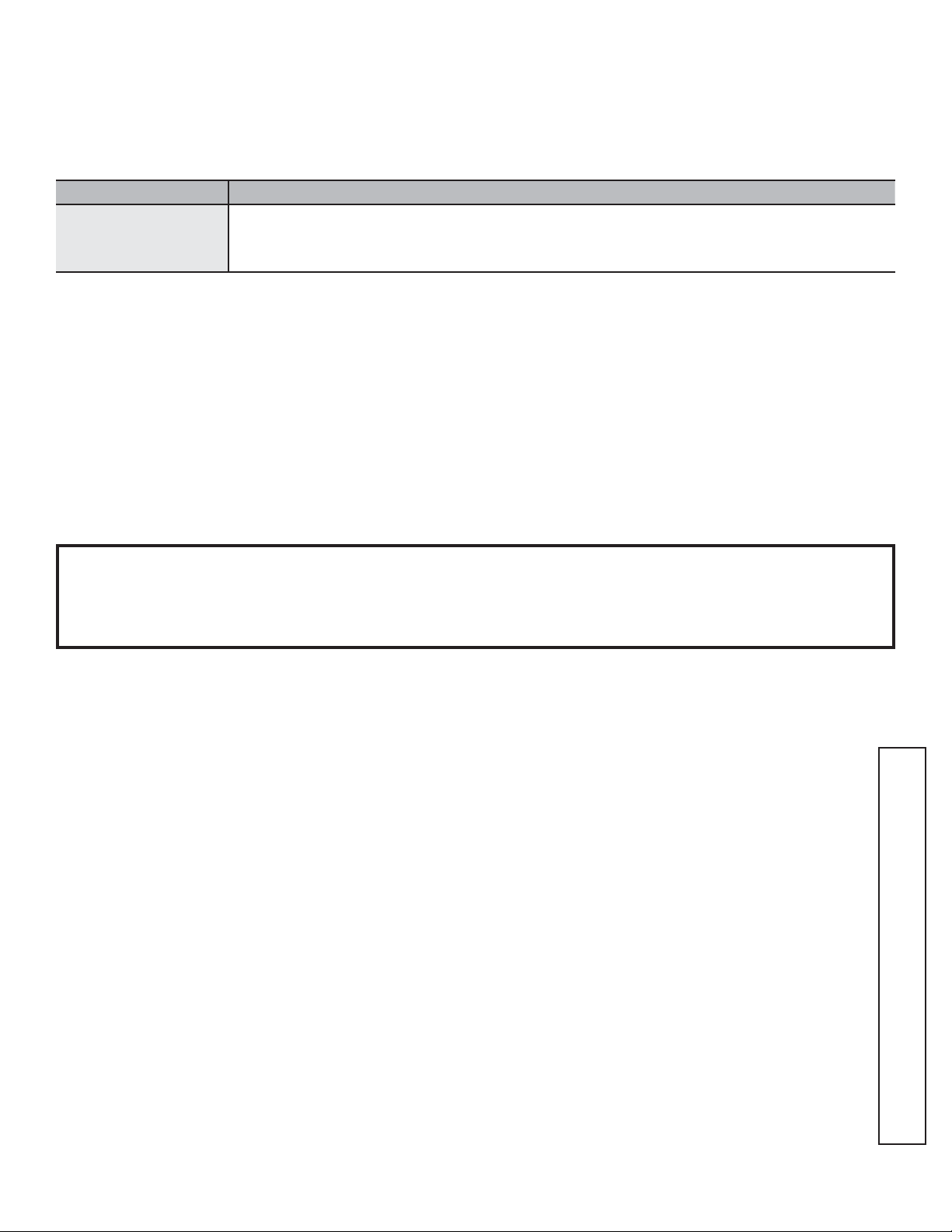
Sample Label
Connected Appliance Information
FCC ID: ZKJ-WCATA005
IC: 10229A-WCATA001
MAC ID: ************
Network: ************
Password: **********
CHEF CONNECT
49-2000705 Rev. 4 7
BAFFLE GREASE FILTERS AND DRIP TRAYS
The metal baffles channel grease released by foods on the
cooktop into the drip trays. The baffles also help prevent
flaming foods on the cooktop from damaging the inside of
the hood.
For this reason, the baffles must ALWAYS be in place
when the hood is used. The grease baffles and drip trays
should be cleaned once a month, or as needed.
To clean the grease baffles and drip trays,
drain and wipe all excess grease with a dry paper towel.
Soak them and then swish them around in hot water
and detergent. Don’t use ammonia or ammonia products
because they will darken the metal. Do not use abrasives
or oven cleaners. To clean hard to reach areas of the filter,
use a soft brush. Rinse, shake and let them dry before
replacing. They may also be cleaned in an automatic
dishwasher.
NOTE: Some discoloration of the filters and grease drip
trays may occur in the dishwasher.
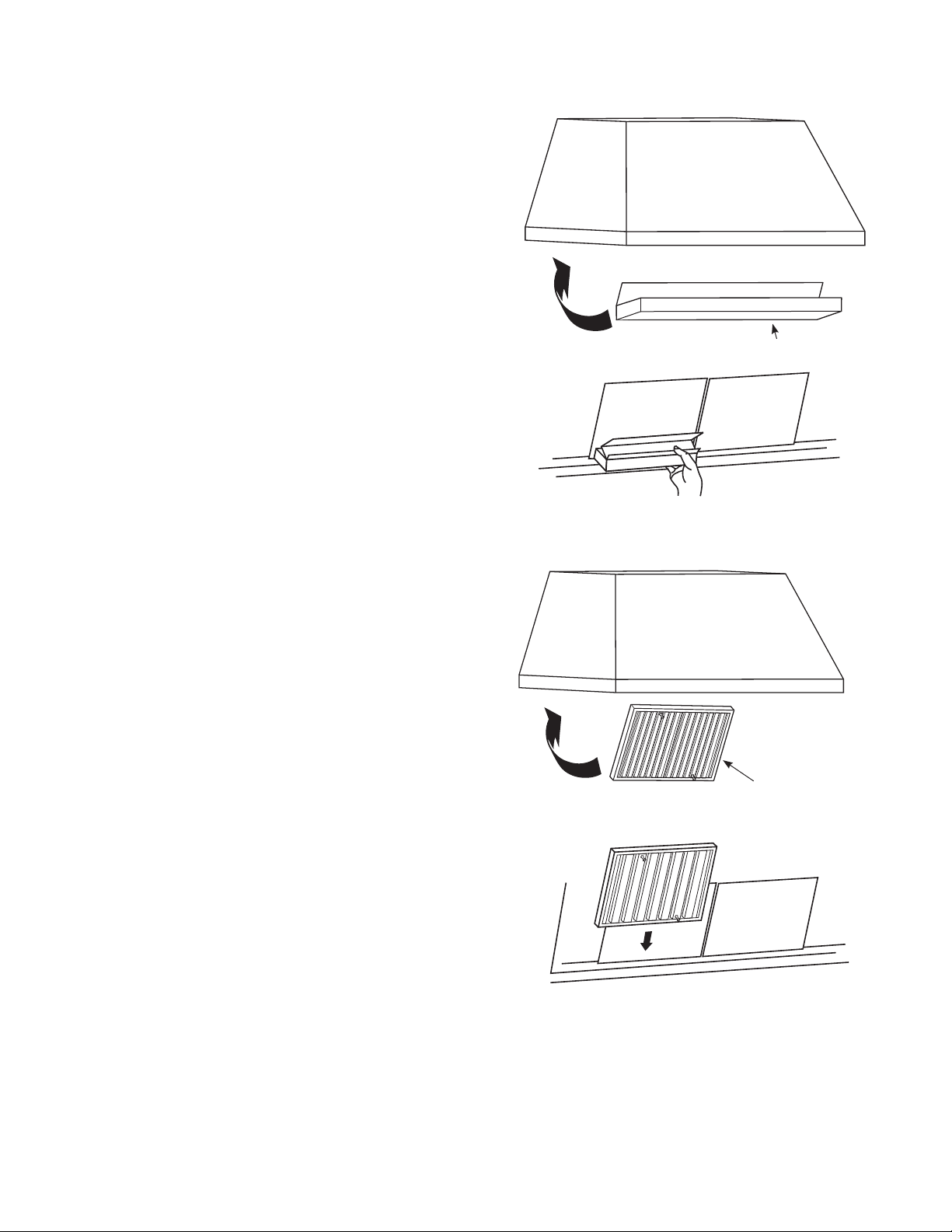
To remove:
Grasp the baffle knobs then pull the baffle down and
towards you.
To replace the drip trays:
1. Place and seat the drip tray into the hood track.
2. Slide them left or right until all trays are side-by-side in
place in the track.
To replace the baffles:
1. Hold the baffle by the knob and place the other end of
the baffle up in the front lip of the hood.
2. Push the back side up in the rear of the hood until it
locks into place.
Baffle
Drip Tray Replacement
Baffle Replacement
Drip Tray
CARE AND CLEANING

8 49-2000705 Rev. 4
CARE AND CLEANING
STAINLESS STEEL SURFACES
Do not use a steel wool pad; it will scratch the surface.
To clean the stainless steel surface, use warm sudsy
water or a stainless steel cleaner or polish. Always wipe
the surface in the direction of the grain. Follow the cleaner
instructions for cleaning the stainless steel surface.
Cleaners with oxalic acid such as Bar Keepers Friend Soft
Cleanser™ will remove surface rust, tarnish and small
blemishes. Use only a liquid cleanser free of grit and rub in
the direction of the brush lines with a damp, soft sponge.
To inquire about purchasing stainless steel appliance
cleaner or polish, or to find the location of a dealer nearest
you, please visit monogram.com
LIGHT BAR
To change the lighting bar, schedule a service
appointment. See Consumer Support page in the front of
this manual for a list of websites and contact information.
49-2000705 Rev. 4 9
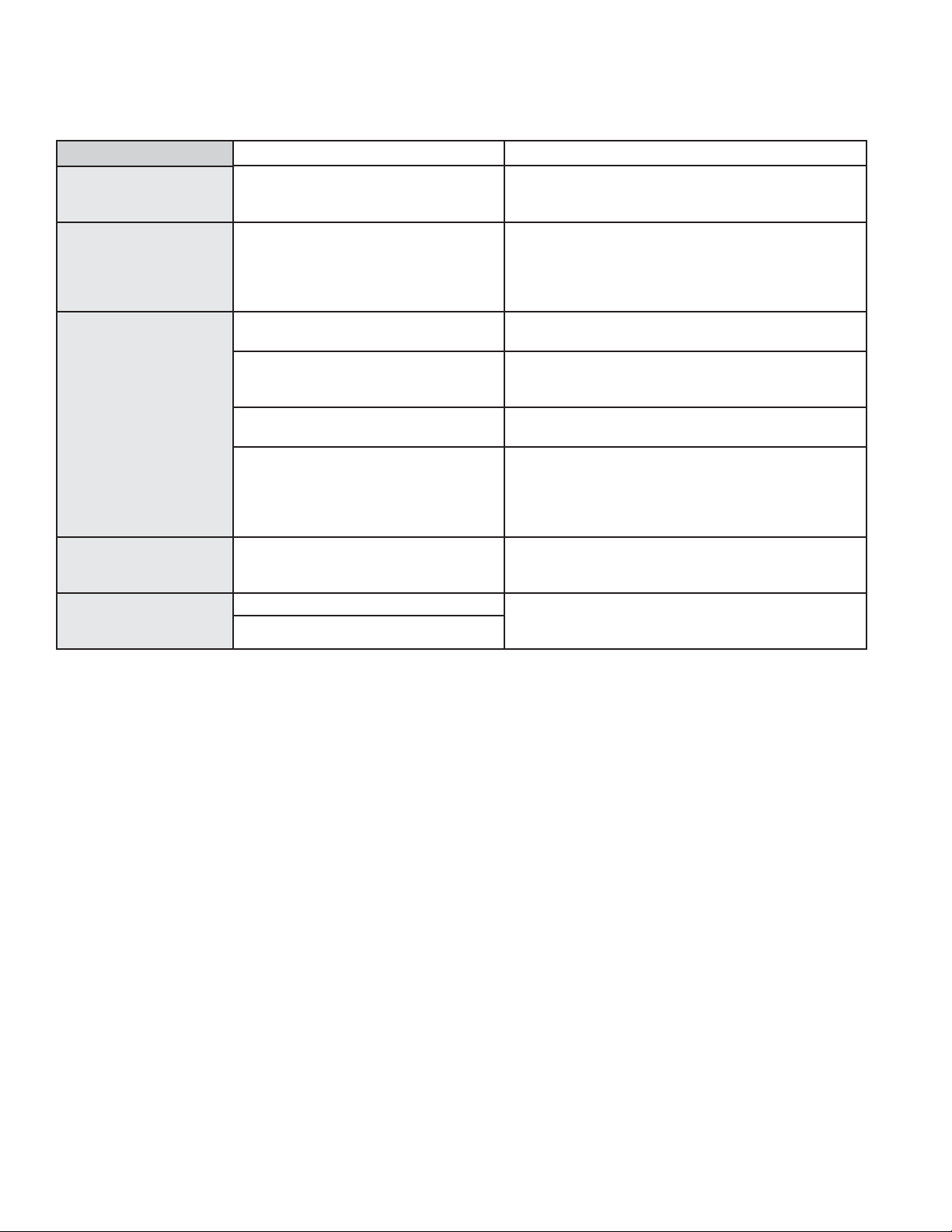
Save time and money! Review the charts on the following pages first and you may not need to call for service.
TROUBLESHOOTING TIPS
Problem Possible Cause What To Do
Fan/Light does not
operate when button is
turned ON
A house fuse may be blown or a circuit
breaker tripped.
Replace fuse or reset circuit breaker.
Loud or abnormal
airflow noise
Wrong duct size used in installation. This hood requires 10” ducting to perform optimally.
Using smaller duct pipe will cause reduced venting.
Minimize the duct run length and number of transitions
and elbows. Monogram service technicians cannot
correct this issue if installed improperly.
Fan fails to circulate
air or moves air slower
than normal and/or
fan is making loud or
abnormal airflow noise
Obstructions in duct work. Make sure nothing is blocking the vent. Make sure
your wall or roof cap has a blade or door.
Damper blade on wall or roof cap may
not be open.
Make sure damper swings freely. Damper blades may
flip over and will not fully open when this happens.
Adjust to original position.
Metal baffle filter and charcoal filter (if
present) may be dirty.
Clean the metal baffle filter. See Care and Cleaning
section of this manual.
Insufficient makeup (replacement) air Sufficient makeup (replacement) air is required for
exhausting appliances to operate to rating. Check with
local building codes, which may require or strongly
advise the use of makeup air. Visit monogram.com for
available makeup air solutions.
Fan keeps going off
and on
The motor is probably overheating and
turning itself off. This can be harmful to
the motor.
Check to be sure the filters are clean. If off and on
cycling continues, call for service.
Hood will not work
remotely
Router issues, no wireless signal, etc. For assistance with hood wireless network connectivity,
please call (800) 444-1845 or visit our website at
monogram.com/contact
Hood is not connected.

10 49-2000705 Rev. 4
Parts
Baffle
Drip Tray
Duct Covers
Remote Control
Back Venting Damper
Backsplash Kit
Power Cord Kit
Cleaning Supplies
CitruShine™ Stainless Steel Wipes
Stainless Steel Appliance Cleaner
Bar Keepers Friend Soft Cleanser™
Looking For Something More?
Monogram offers a variety of accessories to improve
your cooking and maintenance experiences!
Refer to the Consumer Support page for website
information.
The following products and more are available:
ACCESSORIES
49-2000705 Rev. 4 11
Staple your receipt here. Proof of the original purchase
date is needed to obtain service under the warranty.
MONOGRAM LIMITED WARRANTY
Monogram.com
All warranty service is provided by our Factory Service Centers, or an authorized Customer Care
®
technician. To schedule
service online, visit us at monogram.com/contact.
What Monogram will not cover:
Ŷ Service trips to your home to teach you how to use the
product.
Ŷ Replacement of house fuses or resetting of circuit
breakers.
Ŷ Failure of the product if it is used for other than its
intended purpose or used commercially.
Ŷ Improper installation, delivery or maintenance.
Ŷ Replacement of the replaceable filters.
Ŷ Damage to the product caused by accident, fire, floods
or acts of God.
Ŷ,QFLGHQWDORUFRQVHTXHQWLDOGDPDJHFDXVHGE\SRVVLEOH
defects with this appliance.
Ŷ'DPDJHFDXVHGDIWHUGHOLYHU\
Ŷ3URGXFWQRWDFFHVVLEOHWRSURYLGHUHTXLUHGVHUYLFH
Ŷ,QVWDOODWLRQRUVHUYLFHIRUDPDNHXSUHSODFHPHQWDLU
system.
EXCLUSION OF IMPLIED WARRANTIES
Your sole and exclusive remedy is product repair as provided in this Limited Warranty. Any implied warranties,
including the implied warranties of merchantability or fitness for a particular purpose, are limited to one year or the
shortest period allowed by law.
This limited warranty is extended to the original purchaser and any succeeding owner for products purchased for home
use within the USA. If the product is located in an area where service by a Monogram Appliances Authorized Servicer
is not available, you may be responsible for a trip charge or you may be required to bring the product to an Authorized
Monogram Appliances Service location for service. In Alaska, the limited warranty excludes the cost of shipping or service
calls to your home.
Some states do not allow the exclusion or limitation of incidental or consequential damages. This limited warranty
gives you specific legal rights, and you may also have other rights which vary from state to state. To know what your
legal rights are, consult your local or state consumer affairs office or your state’s Attorney General.
Warrantor: GE Appliances, a Haier company, Louisville KY,40225
Warrantor in Canada: MC Commercial Inc., Burlington, ON L7R 5B6
For the period of Monogram Appliances will replace
Two years
From the date of the
original purchase
Will provide, free of charge, parts and service labor in your home to repair or replace any part of the
vent hood that fails because of a manufacturing defect

49-2000705 Rev. 4
07-21 GEA
Printed in Italy

MANUAL DEL
PROPIETARIO
Campana de Ventilación
Profesional de Acero Inoxidable
Con Extractor QuietBoost™
ESPAÑOL.
MONOGRAM.COM

2 49-2000705 Rev. 4
TABLE DES MATIÈRES
INFORMACIÓN DEL MODELO
ANOTE LOS NÚMEROS DE MODELO Y SERIE
Estos números figuran en la Tarjeta de Registro de Pertenencia
del Producto del Consumidor embalada aparte, junto con la
campana de ventilación profesional y en una etiqueta sobre el
panel frontal de la unidad.
Antes de enviar esta tarjeta, escriba estos números
aquí:
Número de Modelo
Número de Serie
Use estos números en cualquier correspondencia o llamadas
al servicio técnico relacionadas con su campana de ventilación
profesional.
NÚMEROS DE MODELO
ZVW1360
ZVW1480
INFORMACIÓN DEL MODELO ...............................................................................2
SOPORTE AL CLIENTE .....................................................................................3
INFORMACIÓN IMPORTANTE DE SEGURIDAD .................................................................4
CONTROLES .............................................................................................5
Para Su Seguridad ......................................................................................5
CHEF CONNECT ..........................................................................................6
CONEXIÓN WI-FI ..........................................................................................6
CUIDADO Y LIMPIEZA
Filtros Deflectores De Grasa Y Bandejas De Goteo (En Algunos Modelos) ..........................................7
Superficies De Acero Inoxidable (En Algunos Modelos) ........................................................8
Lámparas De Luz .......................................................................................8
CONSEJOS PARA LA SOLUCIÓN DE PROBLEMAS .............................................................9
ACCESORIOS ...........................................................................................10
GARANTÍA LIMITADA .....................................................................................11

49-2000705 Rev. 4 3
SOPORTE AL CLIENTE
SITIO WEB DE MONOGRAM
¿Desea realizar una consulta o necesita ayuda con su electrodoméstico? ¡Intente a través del sitio Web de Mongram las 24 horas
del día, cualquier día del año! También puede comprar más grandiosos productos de Monogram y sacar ventaja de todos nuestros
servicios de soporte a través de Internet, diseñados para su conveniencia. En EE.UU.: monogram.com
REGISTRE SU ELECTRODOMÉSTICO
¡Registre su electrodoméstico nuevo a través de Internet, según su conveniencia! Un registro puntual de su producto permitirá una
mejor comunicación y un servicio más puntual de acuerdo con los términos de su garantía, en caso de surgir la necesidad. También
puede enviar una carta en la tarjeta de inscripción pre impresa que se incluye con el material embalado.
En EE.UU.: monogram.com.
SERVICIO PROGRAMADO
El servicio de reparación de expertos de Monogram está a sólo un paso de su puerta. Conéctese a través de Internet y programe el
servicio a su conveniencia cualquier día del año.
En EE.UU.: Monogram.com
CONECTIVIDAD REMOTA
Para recibir asistencia en relación a la conectividad de su red inalámbrica (para modelos con activación remota), visite nuestro sitio
web en monogram.com/connect
PIEZAS Y ACCESORIOS
Individuos calificados para realizar el servicio técnico de sus propios electrodomésticos podrán solicitar el envío de piezas o
accesorios directamente a sus hogares (se aceptan las tarjetas VISA, MasterCard y Discover). Ordene a través de Internet durante
las 24 horas del día.
En EE.UU.: monogram.com/use-and-care/parts
Las instrucciones que figuran en este manual cubren los procedimientos que serán realizados por cualquier usuario. Otros
servicios técnicos generalmente deberán ser derivados a personal calificado del servicio técnico. Se deberá tener cuidado,
ya que una reparación indebida podrá hacer que el funcionamiento no sea seguro.
CONTÁCTENOS
Si no se encuentra satisfecho con el servicio que recibió de Monogram, comuníquese con nosotros a través de nuestro sitio Web con
todos los detalles, incluyendo su número telefónico, o escriba a:
En EE.UU.: General Manager, Customer Relations | Monogram Appliances, Appliance Park | Louisville, KY 40225
monogram.com/contact
4 49-2000705 Rev. 4
ADVERTENCIA
Lea todas las instrucciones de seguridad antes de utilizar este producto. No seguir estas instrucciones
puede generar un incendio, una descarga eléctrica, lesiones corporales o la muerte.
ADVERTENCIA
INSTRUCCIONES GENERALES DE SEGURIDAD
ADVERTENCIA
A FIN DE REDUCIR EL RIESGO
DE INCENDIOS, DESCARGAS ELÉCTRICAS O LESIONES
PERSONALES, CUMPLA CON LO SIGUIENTE:
A. Use esta unidad sólo del modo indicado por el fabricante.
Ante cualquier duda, comuníquese con el fabricante.
B. Antes de realizar el servicio técnico o de limpiar la unidad,
apague el interruptor del panel del servicio y bloquee
el suministro del servicio a fin de evitar que la corriente
se active en forma accidental. Cuando el suministro del
servicio no pueda ser bloqueado, ajuste de forma segura un
dispositivo de advertencia visible, tal como una etiqueta, al
panel del servicio.
C. No use esta unidad con ningún dispositivo de control de
velocidad en estado sólido.
PRECAUCIÓN
SÓLO PARA USO DE VENTILACIÓN
GENERAL. NO LO UTILICE PARA HACER SALIR
MATERIALES Y VAPORES RIESGOSOS O EXPLOSIVOS.
ADVERTENCIA
A FIN DE REDUCIR EL RIESGO DE
LESIONES SOBRE PERSONAS EN CASO DE INCENDIO DE
GRASA SOBRE LA SUPERFICIE DE LA COCINA, CUMPLA
CON LO SIGUIENTE*:
A. APAGUE LAS LLAMAS con una tapa adherente, bandeja de
galletas o bandeja metálica, y luego apague el quemador.
TENGA CUIDADO A FIN DE EVITAR QUEMADURAS. Si las
llamas no se apagan de inmediato, EVACÚE EL LUGAR Y
LLAME AL DEPARTAMENTO DE BOMBEROS.
B. NUNCA TOME UNA OLLA QUE SE ESTÉ INCENDIANDO
— Puede sufrir quemaduras.
C. NO USE AGUA, , in incluyendo paños o toallas húmedas -
se producirá una explosión violenta de vapor.
D. Use un extinguidor SÓLO si:
1. Sabe que cuenta con un extinguidor Clase ABC, y sabe
cómo usarlo.
2. El incendio es pequeño y está contenido en el área
donde comenzó.
3 Se llamó al departamento de bomberos.
4. Puede luchar contra el fuego con su espalda hacia una
salida.
* Basado en “Seguridad contra Incendios en una Cocina”,
publicado por NFPA.
ADVERTENCIA
A FIN DE REDUCIR EL RIESGO
DE INCENDIO DE GRASA SOBRE LA SUPERFICIE DE UNA
COCINA:
A. Nunca descuide las unidades cuando se encuentren a altas
temperaturas. Los hervores excesivos causan vapores y
derrames de grasa que se pueden encender. Caliente los
aceites de forma lenta en las posiciones baja o media.
B. Siempre ENCIENDA la campana al cocinar con fuego alto
o al flambear comidas (tales como: crepes suzette, cerezas
jubileo, filetes flambeados con pimienta verde).
C. Limpie las ventilaciones de forma frecuente. No se debe
permitir la acumulación de grasa en el ventilador o el filtro.
D. Use cacerolas de tamaño apropiado. Siempre utilice utensilios
adecuados al tamaño del elemento sobre la superficie.
ADVERTENCIA
TÉCNICO
Si necesita solicitar el servicio técnico.
No intente reparar o reemplazar ninguna pieza de la
campana de ventilación, a menos que esto se recomiende
específicamente en este manual. Cualquier otra reparación
deberá ser realizada por un técnico calificado.
Asegúrese de que la corriente esté desconectada antes de
realizar el servicio técnico de la unidad.
Es posible que sea necesario retirar el extractor de la campana
de ventilación a fin de realizar el servicio técnico de los
componentes tales como el motor del extractor o el mecanismo
de ventilación de aire.
Desconecte la corriente de la superficie de cocción y retire la
misma primero. Invierta los pasos en la sección de Instalación
de la Campana de Ventilación en las Instrucciones de
Instalación para retirar el extractor.
Las piezas del servicio técnico están disponibles a través de un
Centro de Servicio Técnico y Piezas de Monogram.
INFORMACIÓN IMPORTANTE DE SEGURIDAD
LEA TODAS LAS INSTRUCCIONES ANTES DE USAR ESTE ELECTRODOMÉSTICO
LEA Y GUARDE ESTAS INSTRUCCIONES
FORMA ADECUADA DE DESCARTAR SU ELECTRODOMÉSTICO
Descarte o recicle su electrodoméstico de acuerdo con las Regulaciones Federales y Locales. Comuníquese con las autoridades
locales para descartar o reciclar su electrodoméstico de forma ambientalmente segura.
49-2000705 Rev. 4 5
CONTROLES
Es posible que las funciones y apariencias varíen con relación a su modelo a lo largo del manual.
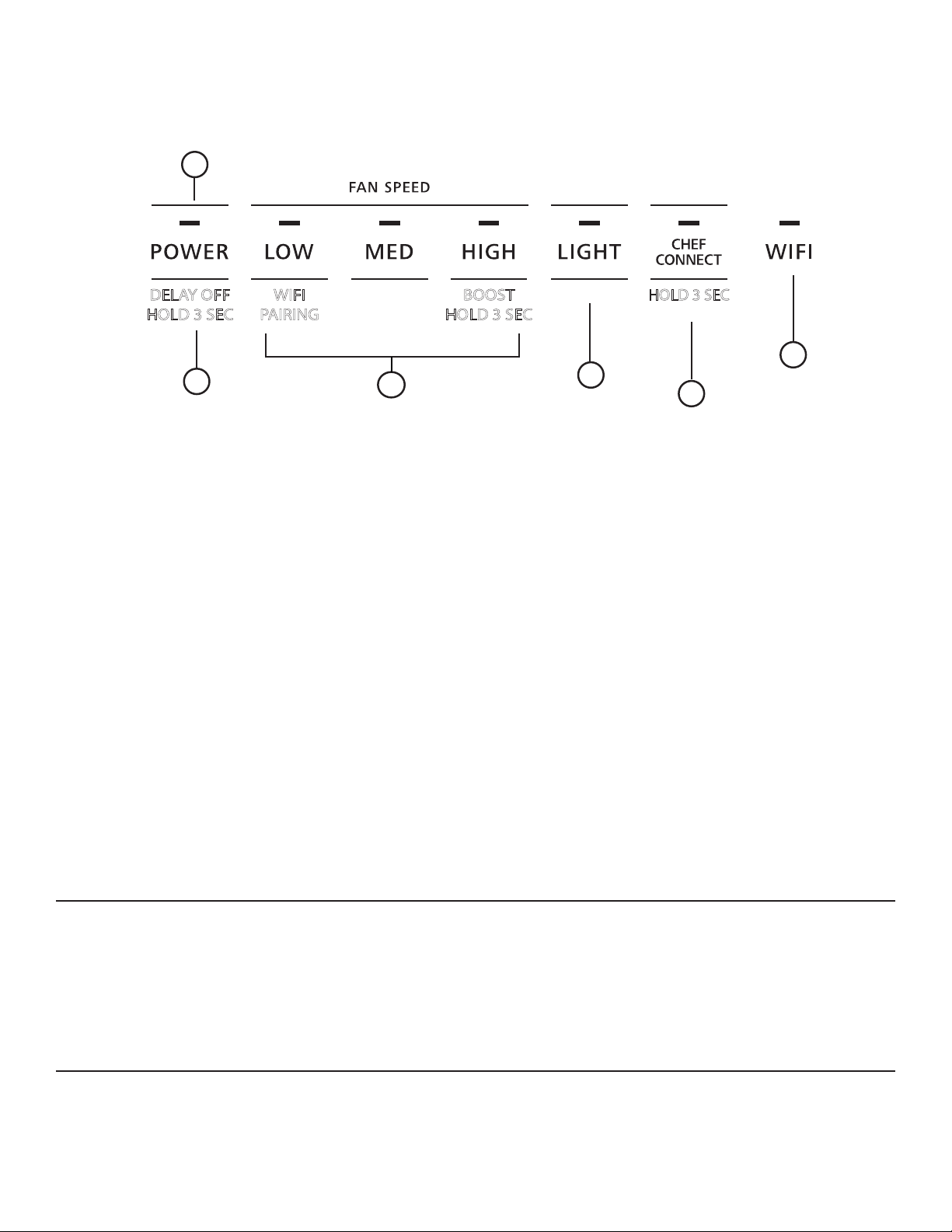
1. Panel de Control de la Campana
Extractora: El panel de control está ubicado en la parte
inferior de la base de la campana del extractor. La función de
cada tecla de control figura más abajo
.
2. Corriente: Interruptor de Encendido/ Apagado del
ventilador. El ventilador puede ser operado presionando
cualquiera de las teclas de configuración del ventilador.
Mantenga presionada la tecla POWER (Encendido) durante
3 segundos para activar la función Delay Off (Retraso
Apagado), la cual apaga de forma automática el ventilador
durante 15 minutos. La luz indicadora que se encuentra
sobre POWER (Encendido) parpadeará entre encendido y
apagado, a fin de indicar que la función Delay Off (Retraso
Apagado) se encuentra activada.
3. Configuración del Ventilador: Control de
velocidad del ventilador. Velocidad del ventilador es provista
por la Tecnología QuietBoost™. Esta tecnología única fue
diseñada para minimizar el ruido de la ventilación y mejorar
la eficiencia del motor para una cocina tranquila y libre de
olores. Presione el botón Low (Baja) para acceder a una
velocidad BAJA, Med (Media) para una velocidad MEDIA, y
High (Alta) para una velocidad ALTA. Mantenga presionado
el botón High (Alta) durante 3 segundos para activar la
velocidad con la función BOOST (Aumentada), la cual
funcionará durante 15 minutos. El botón LED High (Alta)
parpadeará entre encendido/ apagado para indicar que la
función Boost (Aumentada) fue activado. la eficiencia del
motor para una cocina tranquila y libre de olores.
4. Light (Luz):
Controla las luces. Presione la tecla
LIGHT (Luz) para ajustar las luces en la configuración
más alta. Presione la tecla LIGHT (Luz) nuevamente
para cambiar el brillo intermedio. Presione la tecla LIGHT
(Luz) nuevamente para un ajuste atenuado de las luces.
Presione la tecla LIGHT (Luz) una cuarta vez para apagar
las luces.
5. Chef Connect: Mantenga presionada la tecla Chef
Connect durante 3 segundos para activar el Bluetooth
®
.
Ésta es una función de emparejamiento de Bluetooth
®
para utilizar con otros productos de uso compatible con
Chef Connect en una superficie de cocción o cocina. Una
vez emparejado el dispositivo, las configuraciones de
sincronización por omisión serán desactivadas al recibir un
comando desde la cocina o la superficie de cocción. Para
cambiar la configuración de sincronización por omisión,
consulte la sección de Chef Connect. Para más detalles,
consulte la sección de Chef Connect.
6. Wi-Fi: Mantenga presionado el botón Low (Bajo)
durante 3 segundos para iniciar la conexión Wi-Fi. La luz
del indicador de Wi-Fi se enciende cuando se encuentra
conectada; para más detalles, consulte la sección Wi-Fi
Connect.
PARA SU SEGURIDAD
Antes de realizar el servicio técnico o de limpiar la unidad,
apague el interruptor del panel del servicio y bloquee el suministro
del servicio a fin de evitar que la corriente se active en forma
accidental.
Cuando el suministro del servicio no pueda ser bloqueado, ajuste
de forma segura un dispositivo de advertencia visible, tal como
una etiqueta, al panel del servicio.
4
3
2
5
6
1
DELAY OFF
HOLD 3 SEC
WIFI
PAIRING
BOOST
HOLD 3 SEC
HOLD 3 SEC
SENSOR DE CALOR
Su campana está equipada con un termostato con SENSOR DE
CALOR. Este termostato es un dispositivo que se encenderá
o acelerará el calefactor si siente un calor excesivo sobre la
superficie de cocción.
ŶSi el calefactor está en Off (Apagado) – enciende el soplador
para aumentar la velocidad a través de la función BOOST
(Aumentar).
Ŷ Si el calefactor está en On (Encendido) en una configuración
de velocidad más baja – intensifica la velocidad a través de la
función BOOST (Aumentar).
Cuando el nivel de temperatura caiga por debajo de lo normal, el
calefactor regresará a su configuración original.

6 49-2000705 Rev. 4
Conecte su campana con Conexión Habilitada de Wi-Fi (en algunos modelos)
Su campana de Monogram está diseñado para brindarle una
comunicación recíproca entre su electrodoméstico y el dispositivo
inteligente. Al usar las funciones de Wi-Fi Connect de Monogram,
usted podrá controlar funciones esenciales de la campana
tales como la velocidad del ventilador, retraso del apagado y
notificaciones del filtro utilizando su teléfono inteligente o tablet.
Este dispositivo cumple con la Parte 15 de la Normativa de
la FCC. Su funcionamiento está sujeto a las dos condiciones
siguientes: (1) Este dispositivo no deberá causar interferencias
nocivas, y (2) este dispositivo deberá aceptar cualquier
interferencia recibida, incluyendo interferencias que puedan
generar un funcionamiento no deseado.
Qué necesitará
Su campana de Monogram utiliza su red de Wi-Fi hogareña
existente para realizar la comunicación entre el electrodoméstico
y su dispositivo inteligente. A fin de configurar su campana de
Monogram, usted necesitará reunir cierta información:
1. Cada campana de Monogram cuenta con una etiqueta
informativa del electrodoméstico conectado, que incluye un
Nombre y Contraseña de Red del Electrodoméstico. Estos
son los dos detalles importantes que necesitará para conectar
el electrodoméstico. La etiqueta está ubicada al costado de la
unidad, detrás de los filtros.
2. Su teléfono inteligente o tableta deben estar preparados con
la capacidad de acceder a Internet y descargar aplicaciones.
3. Usted deberá conocer la contraseña del enrutador Wi-Fi de
su hogar. Tenga esta contraseña a mano al configurar el
campana de Monogram.
Conexión de su campana de Monogram
1. A través de su teléfono inteligente o tableta, visite
monogram.com/connect para aprender más sobre las
funciones del electrodoméstico conectado y para descargar la
aplicación correspondiente.
2. Siga las instrucciones en pantalla de la aplicación para
conectar su campana de Monogram.
3. Una vez completado el proceso, la luz indicadora ubicada en
la pantalla de la campana de Monogram permanecerá fija y la
aplicación confirmará que usted está conectado.
4. Si la luz indicadora no se enciende o está titilando, siga
las instrucciones en la aplicación para volver a realizar
la conexión. Si los problemas continúan, por favor visite
monogram.com/connect para recibir asistencia relacionada
con la conectividad inalámbrica de la campana.
Para conectar dispositivos inteligentes adicionales, repita los
pasos 1 y 2.
Observe que todos los cambios o modificaciones al dispositivo
de acceso remoto instalado en este campana que no están
expresamente aprobados por el fabricante podrían anular la
autoridad del usuario para operar el equipamiento.
Funciones Wi-Fi Mejoradas
Una vez que su producto se encuentre conectado al Wi-Fi,
usted tendrá acceso a las funciones mejoradas a través de la
aplicación de su teléfono.
Delay OFF Timer (Temporizador de Apagado con Retraso):
Esta función le permite al usuario ajustar el tiempo de apagado
con retraso desde 1 minuto hasta 15 minutos. El tiempo de
apagado con retraso por omisión es de 15 minutos
Boost Timer (Temporizador Aumentado): Esta función le
permite al usuario ajustar el aumento de tiempo desde 1 minuto
hasta 15 minutos. El tiempo de aumento por omisión es de 15
minutos.
Night Light Timer (Temporizador de la Luz Nocturna): Esta
función le permite al usuario configurar el tiempo de la luz
nocturna para que se encienda o apague de forma automática.
Notificaciones del Filtro de Grasa/ Carbón: Esta función le
envía al usuario un recordatorio de forma regular para que limpie
sus filtros de grasa y / o que reemplace el filtro de carbón, si la
campana se encuentra configurada en el modo de recirculación.
Conexión de Bluetooth
®
al Funcionamiento de Chef Connect
Para emparejar con otro dispositivo:
A fin de iniciar el proceso de emparejamiento en la campana,
mantenga presionada la tecla Chef Connect durante 3 segundos.
La luz de fondo de todos los íconos se iluminará hasta que la
campana esté emparejada con la cocina u otro dispositivo. Si
el emparejamiento es realizado con éxito, la luz indicadora que
se encuentra sobre Chef Connect se encenderá y quedará fija.
Se desactivará luego de 2 minutos si el emparejamiento no es
completado. Luego de esto, la secuencia de emparejamiento
deberá ser reiniciada. La campana se iluminará y se activará la
configuración de sincronización por omisión del ventilador.
Para cancelar el emparejamiento:
Para cancelar el emparejamiento, mantenga presionado el botón
Chef Connect durante 3 segundos y luego apague la campana.
Configuraciones de Sincronización por Omisión:
La configuración por omisión de fábrica de la luz será la más
brillante.
La configuración de fábrica por omisión para la sincronización del
ventilador estará en OFF (Apagada).
El usuario podrá modificar las Configuraciones de Sincronización
por Omisión manteniendo presionado el botón Med durante 3
segundos. Esto permitirá ingresar a Default Settings Mode (Modo
de Configuraciones por Omisión). Una vez en este modo, las
luces de fondo de todos los botones parpadearán encendiéndose
y apagándose de forma indefinida, y el ventilador y la luz
pasarán a la Configuración de Sincronización por Omisión
actual, de modo que el usuario sepa cuál es el valor por omisión
actual. En este momento, configure la luz y el ventilador en
los niveles por omisión deseados. Una vez que el usuario se
encuentre satisfecho con la selección, mantenga presionado el
botón Power durante 3 segundos. Esto hará que se abandone
este modo. En este momento, las luces de fondo dejarán de
parpadear y el estado del ventilador y de la luz volverán a
cambiar a su estado anterior, antes de entrar en Default Settings
Mode (Modo de Configuraciones por Omisión).
CHEF CONNECT
CONEXIÓN WI-FI
Ejemplo de Etiqueta
Connected Appliance Information
FCC ID: ZKJ-WCATA005
IC: 10229A-WCATA001
MAC ID: ************
Network: ************
Password: **********
49-2000705 Rev. 4 7
FILTROS DEFLECTORES DE GRASA Y BANDEJAS DE GOTEO
Los deflectores metálicos desvían la grasa liberada por las
comidas en la superficie de cocción sobre las bandejas de goteo.
Los deflectores también evitan que las llamas de las comidas en
la superficie de cocción dañen el interior de la campana.
Por esta razón, los deflectores SIEMPRE deben estar en el lugar
correcto cuando se use la campana. Los deflectores de grasa y
las bandejas de goteo deben ser limpiados una vez por mes, o
cuando sea necesario.
Para limpiar los deflectores de grasa y las bandejas de
goteo, drene y limpie el exceso de grasa con una toalla de papel
seca. Enjuague los mismos y luego friegue a su alrededor con
agua caliente y detergente. No use amoníaco ni productos de
amoníaco, ya que oscurecerán el metal. No use limpiadores
abrasivos ni limpiadores para horno.
Para limpiar áreas de difícil
acceso en el filtro, use un cepillo suave. Enjuague, sacuda y
deje secar antes de realizar el reemplazo. También pueden ser
limpiados en un lavavajillas automático.
NOTA: Cierta descoloración de los filtros y de las bandejas de
goteo de grasa se podrán producir en el lavavajillas.
Para su retiro:
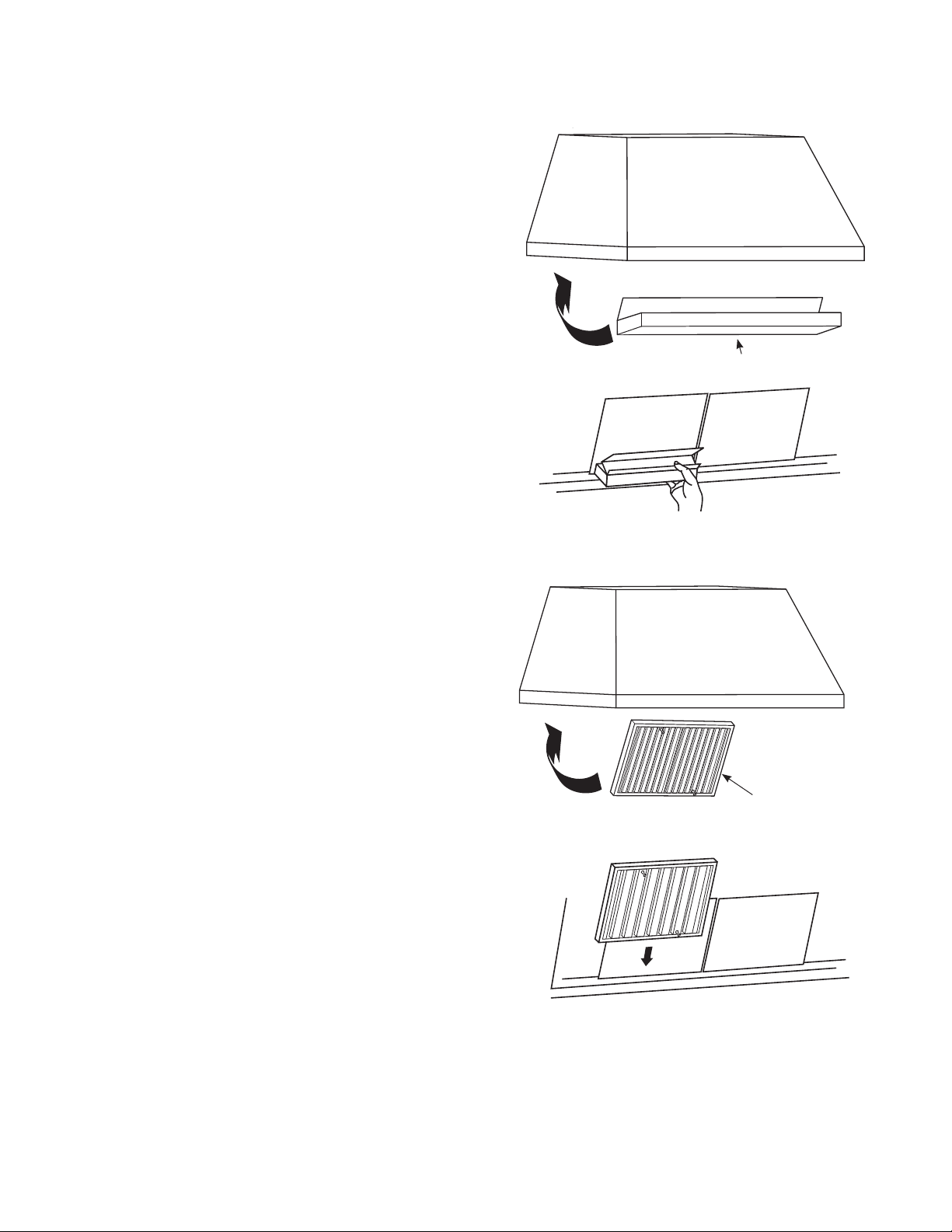
Tome las perillas del deflector y luego empuje el deflector hacia
abajo y hacia usted.
Para reemplazar las bandejas de goteo:
1. Coloque y apoye la bandeja de goteo en el recorrido de la
campana.
2. Deslice las mismas de izquierda a derecha hasta que todas
las bandejas estén colocadas una al lado de la otra sobre el
recorrido.
Para reemplazar los deflectores:
1. Sostenga el deflector desde la perilla y coloque el otro
extremo del deflector sobre el borde frontal de la campana.
2. Presione el lado trasero hacia arriba en la parte superior de
la campana, hasta que se ajuste en su posición.
Bandeja de Goteo
Deflector
Reemplazo de la Bandeja de Goteo
Reemplazo del Deflector
CUIDADO Y LIMPIEZA

8 49-2000705 Rev. 4
CUIDADO Y LIMPIEZA
SUPERFICIES DE ACERO INOXIDABLE
No use virutas de acero; éstas dañarán la superficie.
Para limpiar la superficie de acero inoxidable, use agua tibia
con jabón o un limpiador o pulidor para acero inoxidable.
Siempre limpie la superficie en la dirección del veteado. Siga las
instrucciones del limpiador para limpiar la superficie de acero
inoxidable. Los limpiadores con ácido oxálico tales como Bar
Keepers Friend Soft Cleanser™ eliminarán el óxido, deslustres
y pequeñas manchas. Use sólo un limpiador líquido libre de
material abrasivo y frote en la dirección de las líneas del cepillo
con una esponja suave y húmeda.
Para realizar consultas sobre la compra de limpiadores o
pulidores para el artefacto de acero inoxidable, o para buscar la
ubicación del vendedor minorista más cercano a su hogar, por
favor visite monogram.com
BARRA DE LUZ
Para modificar la barra de la iluminación, programe una cita
con el servicio técnico. Para acceder a un listado de sitios Web
e información de contacto, consulte la página de Soporte al
Consumidor en el frente de este manual.
49-2000705 Rev. 4 9
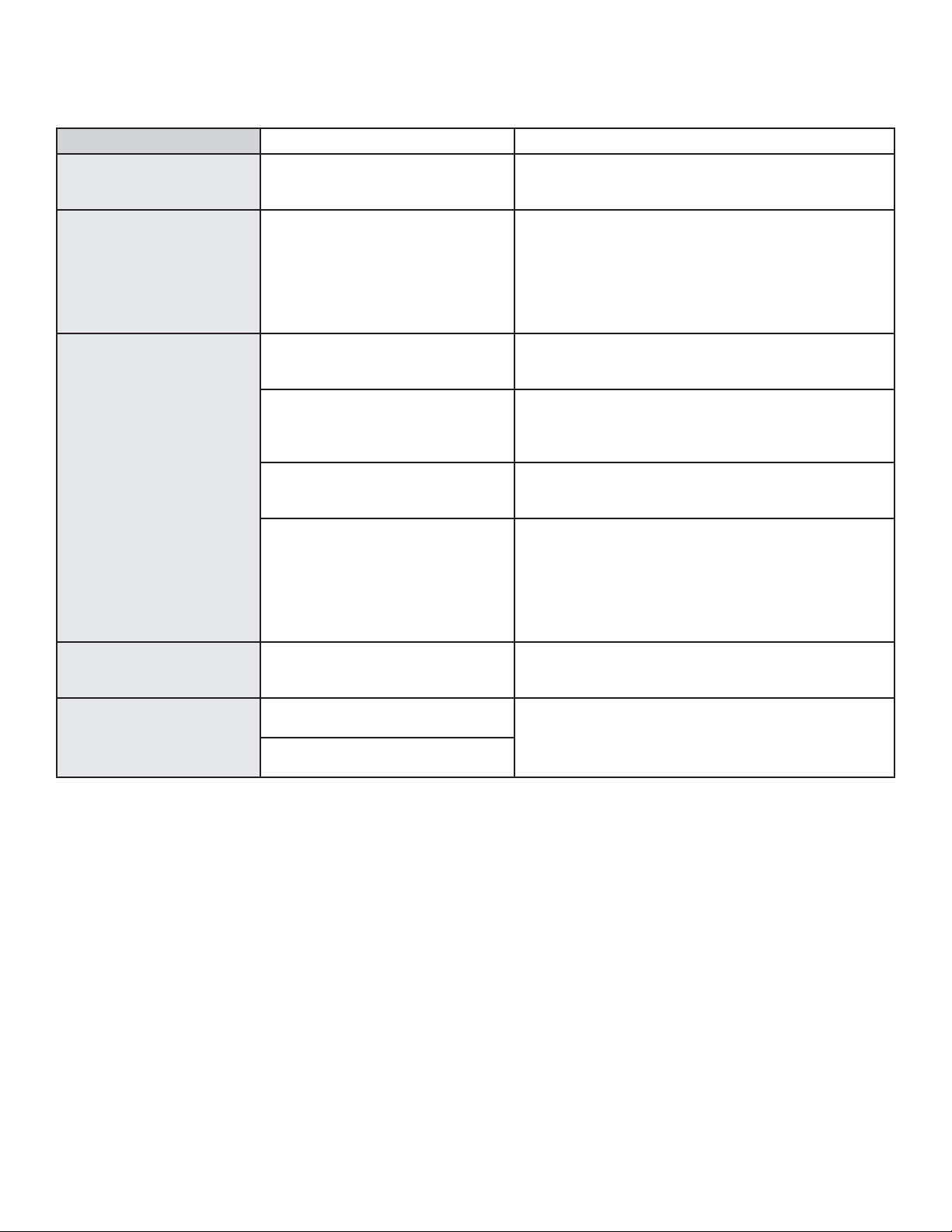
¡Ahorre tiempo y dinero! Primero revise los cuadros que aparecen en las siguientes páginas y es posible que no necesite solicitar reparaciones.
CONSEJOS PARA LA SOLUCIÓN DE PROBLEMAS
Problema Causas posibles Qué hacer
El Ventilador/ la Luz no
funciona cuando el botón
está en ON (Encendido)
El fusible puede haberse quemado o
el interruptor decircuitos puede haber
saltado.
Cambie los fusibles o reconfigure el interruptor de
circuitos.
Ruido de flujo de aire muy
elevado o anormal
Tamaño de conducto incorrecto
utilizado en la instalación.
Esta campana requiere un conducto de 8” para funcionar
de manera óptima. El uso de un conducto más pequeño
hará que la ventilación se reduzca. Minimice la longitud
del conducto y el número de transiciones y codos. Los
técnicos de Monogram no pueden corregir este problema
si hay una instalación inadecuada.
El ventilador no hace
circular aire o desplaza
desplaza el aire más
despacio que lo normal y/o
hace ruido de flujo de aire
elevado o anormal
Obstrucciones en el conducto. Verifique que no haya obstrucciones en la ventilación.
Controle que la cubierta de pared o casquete de techo
tengan una hoja o puerta.
La hoja del regulador de tiro de la
cubierta de pared o casquete de
techo puede estar cerrada.
Asegúrese de que el regulador de tiro se mueva
libremente. Las hojas del regulador de tiro pueden darse
vuelta y no se abrirán por completo cuando esto suceda.
Ajústela con la posición original.
El filtro metálico deflector
y el filtro de
carbón (si lo hubiera) pueden estar
sucios.
Limpie el filtro metálico deflector. Consulte la sección de
Cuidado y Limpieza de este manual.
Insuficiente reposición (reemplazo)
de aire
Se requiere suficiente reposición (reemplazo) de aire
para que los artefactos con salida de aire funcionen de
acuerdo con sus calificaciones energéticas. Controle los
códigos locales de construcción, que podrán requerir o
aconsejar enfáticamente el uso de reposición de aire.
Para acceder soluciones de aire disponibles, visite
monogram.com.
El ventilador continúa
encendiéndose y
apagándose.
Es posible que el motor se esté
sobrecalentando y apagando solo.
Esto puede ser nocivo para el motor.
Asegúrese de que los filtros estén limpios. Si el ciclo de
encendido y apagado continúa, comuníquese al servicio
técnico.
La campana no funciona de
forma remota
Problemas en el enrutador, no hay
señal inalámbrica, etc.
Para solicitar asistencia para la conectividad de la red
inalámbrica de la campana,
por favor comuníquese al
(800) 444.1845 o visite nuestro sitio web en monogram.
com/contact.
La campana no se encuentra
conectada.

10 49-2000705 Rev. 4
¿Busca Algo Más?
¡Monogram ofrece una variedad de accesorios para mejorar
sus experiencias de cocción y mantenimiento!
Para acceder a números telefónicos e información de sitios Web,
consulte la página de Soporte para el Consumidor.
Estos y otros productos están disponibles:
Piezas
Deflector
Bandeja de Goteo
Tapas de Conductos
Control Remoto
Regulador de la Ventilación Trasera
Kit del Tablero Posterior
Kit del Cable de Corriente
Suministros de Limpieza
Limpiadores de Acero Inoxidable CitriShine™
Limpiador de Electrodomésticos de Acero Inoxidable
Limpiador Suave Bar Keepers Friend™
ACCESSORIOS
49-2000705 Rev. 4 11
Monogram.com
Todo el servicio de la garantía es provisto por nuestros Centros de Servicio de Fábrica, o por un técnico autorizado de
Customer Care® (Servicio al Cliente). Para programar el servicio a través de Internet, visítenos en monogram.com/contact.
Qué no cubrirá Monogram:
Ŷ Viajes del técnico del servicio a su hogar para enseñarle sobre
cómo usar el producto.
Ŷ Reemplazo de fusibles de la casa o reinicio de disyuntores.
Ŷ Fallas del producto si su uso es para propósitos diferentes al
original o uso comercial.
Ŷ Instalación, entrega o mantenimiento inadecuados.
Ŷ Reemplazo de filtros reemplazables.
Ŷ Daños ocasionados sobre el producto por accidente, incendio,
inundaciones o catástrofes naturales.
Ŷ Daños consecuentes o incidentales causados por posibles
defectos sobre este producto.
Ŷ Daño causado después de la entrega.
Ŷ Producto no accesible para que se brinde el servicio requerido.
Ŷ Instalación o servicio técnico para sistemas de reposición
(reemplazo) de aire.
Abroche su recibo aquí. Para acceder al servicio técnico correspondiente a
la garantía, se deberá contar con la prueba de la fecha original de compra
GARANTÍA LIMITADA DE MONOGRAM
EXCLUSIÓN DE GARANTÍAS IMPLÍCITAS
Su única y exclusiva alternativa es la reparación del producto, como se indica en la Garantía Limitada. Las garantías
implícitas, incluyendo garantías implícitas de comerciabilidad o conveniencia sobre un propósito particular, se limitan
a un año o al período más corto permitido por la ley.
Esta garantía limitada se extiende al comprador original y a cualquier dueño subsiguiente de productos comprados
para uso hogareño dentro de EE.UU. Si el producto está en un área donde no se encuentra disponible un Proveedor
Autorizado del Servicio Técnico de Monogram Appliances, usted será responsable por el costo de un viaje o se podrá
requerir que traiga el producto a una ubicación del Servicio Técnico de Monogram Appliances Autorizado para recibir el
servicio. En Alaska, la garantía limitada excluye el costo de envío o llamadas del servicio técnico a su hogar.
Algunos estados no permiten la exclusión o limitación de daños fortuitos o consecuentes. Esta garantía limitada le da
derechos legales específicos y es posible que tenga otros derechos legales que varían entre un estado y otro. Para
conocer cuáles son sus derechos legales, consulte a la oficina de asuntos del consumidor local o estatal o al Fiscal
de su estado.
Garante: GE Appliances, a Haier company, Louisville KY,40225
Garante en Canadá: MC Commercial Inc., Burlington, ON L7R 5B6
Por el Período de Monogram Appliances reemplazará
Dos años
Desde la fecha de la
compra original
Brindará, sin costo, piezas o trabajos del servicio técnico en su hogar para reparar o reemplazar
cualquier pieza de la campana de ventilación que falle debido a un defecto de fabricación

49-2000705 Rev. 4
07-21 GEA
Impreso en Italia