High-quality premeasured tablets and packs are recommended for improved performance.
Quality tablets and packs have been proven better than powder, liquid, or gel detergents at reducing filming on dishes. Using tablets and packs over time will start to reduce or eliminate white film. They are suitable for all water hardness and soil levels. Also, by using a rinse aid, you can minimize repeat buildup of white film (not all packs and tablets contain rinse aid). Always place premeasured detergents in main compartment and close lid.
The Pre-Wash indicator on the dispenser lid is for customers who use powder or gel detergent and wish to add an amount of detergent to the Pre-Wash cycle. The volume of detergent added here is approximately 8 cubic centimeters, if filled full and level. Any detergent added here would be immediately added to the wash when the cycle starts versus detergent inside the dispenser which is added during the main wash cycle.
NOTE: Follow instructions on the package when using other dishwasher detergent types.
■ Use automatic dishwasher detergent only. Add detergent just before starting a cycle.
■ Fresh automatic dishwasher detergent results in better cleaning. Store tightly closed detergent container in a cool, dry place.
■ Extremely hard water mineral deposits (15 grains per U.S. gallon or more) can cause damage to your dishwasher and make it difficult to achieve good results. A water softener is recommended to avoid damage and achieve good results.
■ For more details about powders, liquids, and gels and hard water conditions consult the brand website.
Rinse aid
Using rinse aid will optimize your drying and wash performance. This dishwasher is specifically designed to be used with rinse aid for improved drying performance and controlling buildup of hard water deposits. Rinse aid needs to be added to the product every 1 to 3 months depending on usage.
Refer to the Quick Start Guide or brand website for information about filling the rinse aid dispenser.
Cycle Selection and Energy
Efficient dishwashers run longer to save water and energy, just as driving a car slower saves on gas. Typical cycle time is approximately 2 1/2 hours, but can take less or significantly more time depending on your selections and incoming water temperature and amount of food soils on the dishes. For optimum performance the dishwasher should be connected to a 120 F (49° C) hot water supply.
If you first press the Start button, the main sensor cycle with heated drying will be automatically selected. This cycle senses the soil amount, and toughness of soil, to adjust the cycle for improved cleaning.
Sanitize or Sani
Sanitizes dishes and glassware in accordance with NSF International NSF/ANSI Standard 184 for Residential Dishwashers. Certified residential dishwashers are not intended for licensed food establishments. Only sanitizing cycles have been designed to meet the requirements of the NSF/ANSI 184 performance standard for soil removal and for sanitization efficacy. There is no intention, either directly or indirectly, that all cycles on a NSF/ANSI 184 certified dishwasher meet the NSF/ANSI 184 performance standard for soil removal and for sanitization efficacy. The Sani Rinse indicator glows at the end of the cycle if the Sani Rinse option was successfully completed. If the indicator does not activate, it is probably due to the cycle being interrupted.
DISHWASHER LOADING TIPS
NOTE: Features are model specific. Your dishwasher may not have all features described. See Quick Start Guides for possible dishwasher loading patterns for all dish racks.
Silverware Baskets
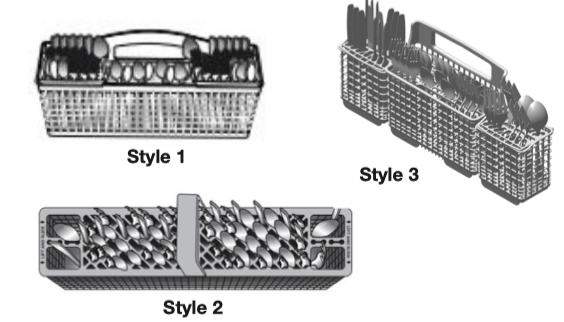
Use silverware basket lids to provide optimal spacing and best cleaning performance.
NOTE: If your silverware does not fit into the designated slots, open the lids (Style 1/3) or lift on the ends of the lids and pull to remove (Style 2). Mix silverware types to keep them separated. Load knives down, forks up, and alternate spoons for best cleaning results.
Removing Upper Racks
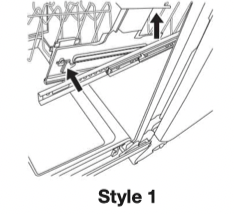
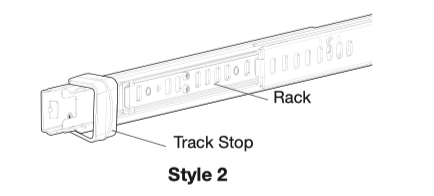
In order to make space for tall items, your upper racks are removable. The manner in which to remove will depend on whether the rack is mounted with Style 1 or Style 2. Remove dishes prior to removing any racks.
To remove the rack, pull the rack forward about halfway out of the tub. On one side, press the tab on the track in and pull up the front end of the rack, out of the track. Then repeat this step on the other side to completely remove the front end of the rack. Then remove the rack by pulling the back end out using a forward and upward motion.
To replace the rack, Push back of rack into rail first and then push front down.
To remove the rack, pull the rack out until it stops. On the left and right side of the rack, push the plastic track stops on the front of the rail sideways to open them. Pull out the rack.
To replace the rack, push the rack back onto the rails. Push the track stops closed.
Sliding Bowl Tines
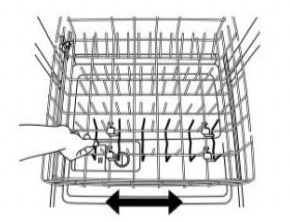
The sliding bowl tines allow you to easily load bowls of multiple sizes. Grab the moveable tine row in the lower rack and slide into the desired position.
Fold Down Tines
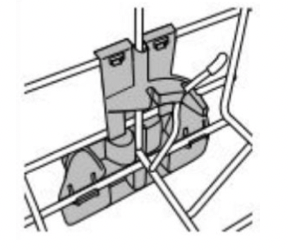
Fold down tines allow you to optimize the spacing in the rack. Fold down tines might be in the lower rack , the second level rack and/or third level rack depending on your model. To fold or unfold the tine, hold the tine nearest the clip at the end of the tine row and gently push it past the stop on the clip and in the direction you want to fold it.
Stemware Holder
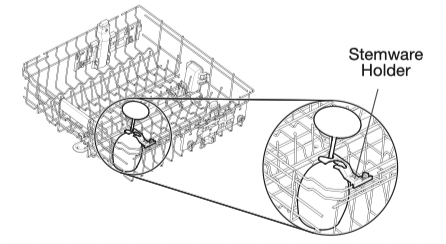
Use the stemware holders to support wine glasses and other stemware. Push them up to rotate them out of the way when not needed.
Cup Shelf
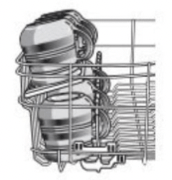
Use the cup shelf to hold additional cups or small items. Push up to fold out of the way when not needed.
DISHWASHER CARE
Interior Cleaning
Many detergents may leave white spots or a white residue on dishware and on the interior of the dishwasher. Over time this residue can become unsightly and could affect dishwasher performance. Use of a dishwasher cleaning product such as affresh ® Dishwasher Cleaner can help to remove the residue. Monthly use of affresh ® Dishwasher Cleaner is recommended to help maintain the dishwasher. Follow package directions.
NOTE: We recommend the use of high-quality, premeasured detergent tablets or packs and the use of rinse aid for dishwasher cleaning and daily care.
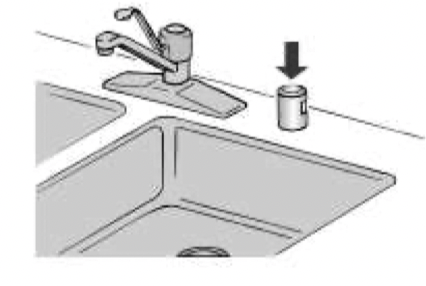
Countertop Air Gap
If you have a drain air gap, check and clean it if the dishwasher isn't draining well.
Extended Time Without Use
To Reduce Risk of Property Damage During Vacation or Extended Time Without Use
■ When you will not be using the dishwasher during the summer months, turn off the water and power supply to the dishwasher.
■ Make sure the water supply lines are protected against freezing conditions. Ice formations in the supply lines can increase water pressure and cause damage to your dishwasher or home.
■ Damage from freezing is not covered by the warranty.
■ When storing your dishwasher in the winter, avoid water damage by having your dishwasher winterized by authorized service personnel.
Exterior Cleaning
Clean the exterior of dishwasher with a soft, damp cloth and mild detergent. Avoid using abrasive cleaning products on the exterior of the dishwasher. Abrasive cleaning products can damage the finish.
Troubleshooting
The brand website listed on the Quick Start Guide has detailed information to troubleshoot most problems customers encounter. This information may save you the cost of a service call.
Foreign Object Cup
If the Foreign Object Cup is full the Quick Start Guide or the brand website listed on the Quick Start Guide has detailed information about how to empty it.
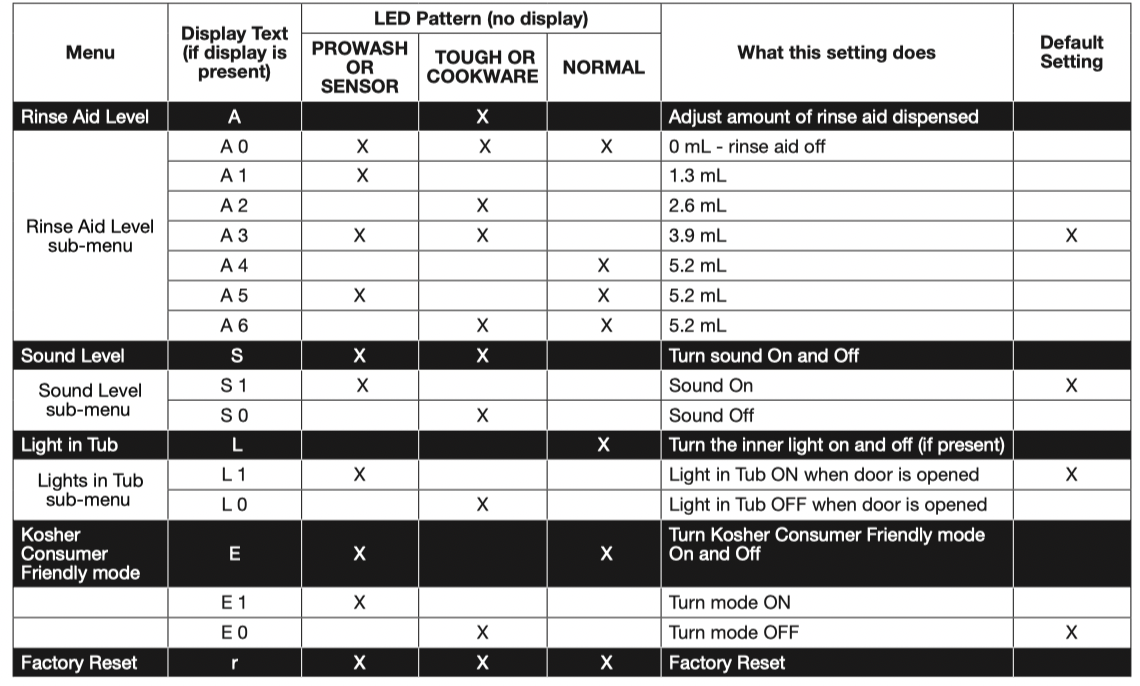
DISHWASHER SETTING MENU:
Follow the below instructions to enter into the menu to change your current settings.
1. Press and hold the “Hi Temp” button for 5 seconds until “Hi Temp” and “Dry” lights turn on.
2. Press the “Start/Resume” button within 2 seconds. If you do not press Start within 2 seconds, then the display will turn off and you will need to start over and go back to step 1.
a. For Models with a Display, an “A” will show in the display to indicate Rinse Aid Level.
b. For Non-display models,“Tough or Cookware” light will turn on to indicate Rinse Aid Level.
3. To go to a feature other than Rinse Aid Level, press the “Cycle” button or “Normal” button (depending on model) to move to the feature you would like to change (Sound Level, Light in Tub, Kosher Friendly, Factory Reset, Rinse Aid Level). See the table for what is shown on the display to indicate these features.
4. Press the “Start/Resume” button to select the feature and enter the sub-menu. The display will change to show the current setting of the feature. (For example, if you selected Sound Level and you haven’t changed it before, then S1 will show for display models and sensor will light for non-display models.)
5. Press “Cycle” button or “Normal” button (depending on model) to change the value of the feature setting. (For example, if you want to turn the sound off, then press the “Cycle” or “Normal” button and S0 shows on display models or “pots and pans” lights for nondisplay models.)
6. Press the “Start/Resume” button to confirm the new selection. The feature setting will not be changed until the “Start/Resume” button is pressed.
The dishwasher will return to the Off state when the Start button is pressed.
To exit the customer settings menu at any time, press the “Cancel” button, or wait 30 seconds without pressing any buttons.
NOTE: To see the current setting of a feature, follow steps 1-4. When the “Start/Resume” button is pressed in step 4, the dishwasher will show the current setting. Press the “Cancel” button to exit without making any changes.
NOTE: If you enter into a Feature Setting Page and need to go back to the Main Menu Press “Cancel” and proceed to step 1.
NOTE: To exit “Kosher Consumer Friendly Mode” at any time, press the “Cancel” button or you can wait 75 hours.
Kosher Consumer Friendly Mode: When turned on, will disable all of the buttons on the dishwasher except for the cancel key, and disable the light inside the tub (if equipped) for a time period of 75 hours. If this mode is turned on during a cycle, then the status lights at the end of cycle will not turn off when the door is opened and then re-closed. To exit this mode, press the “Cancel” button, or wait 75 hours.
ERROR CODES
ERROR CODES / BLINKING LIGHTS
Issue
Code Shown (7 Seg Display)
(if present)
Code Shown on Front Panel LED *
(# blinks, Pause, # blinks)
What will happen?
What to do?
Dishwasher fails to operate fill valve correctly
F1E1
1 Pause 1 Pause - pause, repeat
Drain sequence will begin, machine operation will be prevented
Turn off water to unit (if possible).Turn off power to unit. If the water cannot be turned off, DO NOT turn off power and keep door closed. Press Cancel key one time to silence alarm tone. Call service.
Motor controller failure
F1E2
1 Pause 2 Pause, repeat
Cycle ends
Call service
No water present at dishwasher
H2O
8 Pause 1 Pause - pause, repeat
Cycle is paused
Ensure fill hose is connected to product. Ensure water supply is turned ON. Press Start to resume cycle. If alarm still present, call service.
Wash motor failure
F7E1/F7E2
7 Pause 1 Pause, repeat/7 Pause 2 Pause, repeat
Cycle ends
Call service
Dishwasher overfills
F8E4
8 Pause 4 Pause - pause, repeat
Drain sequence will begin, machine operation will be prevented
For Professional Installers Turn off water to unit (if possible). Turn off power to unit. If the water cannot be turned off, DO NOT turn off power and keep door closed. Press Cancel key one time to silence alarm tone. Call service.
For Self Installers
■ Press CANCEL button twice or cycle power. This may clear the issue.
■ Check to see if the wire connector is connected to the float switch on the drip tray. See step 46. If the wire is off, reconnect and then hit the cancel button twice.
■ Check to see if there is any water in the drip tray. If water is in the drip tray, remove the water and reinstall the drip tray. Make sure to connect the wiring to the float. Step 46. Check to see where water may have leaked into the drip tray. (Check the water inlet fittings in steps 15 and 16 to see if they are leaking)
■ If water was in the tray and no leaks were found, run the product on the shortest installation cycle while checking for leaks. The access panel should be off to observe any leaks.
■ If problem still exists, call for service.
Fill valve stuck on
F8E5
8 Pause 5 Pause - pause, repeat
Drain sequence will begin, machine operation will be prevented
Turn off water to unit (if possible).Turn off power to unit. If the water cannot be turned off, DO NOT turn off power and keep door closed. Press Cancel key one time to silence alarm tone. Call service.
Dishwasher will not drain
F9E1
9 Pause 1 Pause - pause, repeat
Cycle ends
If drain hose is connected to a garbage disposal, confirm that drain hose is not clogged and disposal plug has been knocked out. If unit still will not drain, call service.
Water present under dishwasher
FAE5
10 Pause 5 Pause - pause, repeat
Cycle ends
Call service.
User interface service communication fault
F6E1
6 Pause 1 Pause - pause, repeat
Product will not able to start or resume cycles
Call service.
Cycle Guide
IMPORTANT: The sensor in your dishwasher monitors the soil level. Cycle time can take less or over an hour longer than the nominal times listed as the sensor adjusts the cycle for the best wash performance. If the incoming water is less than the recommended temperature of 120° or food soils are heavy, the cycle will automatically compensate by adding time, heat, and water as needed.
This information covers several different models. Your dishwasher may not have all of the cycles and options described.
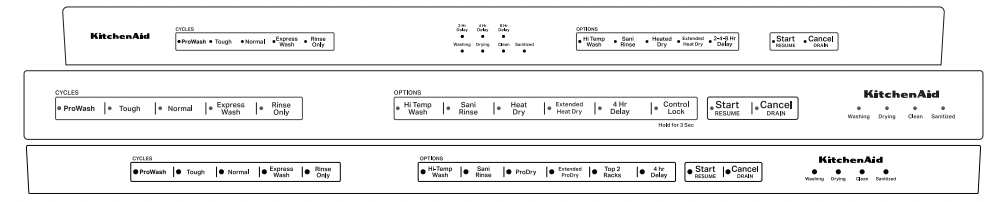
CYCLES
AVERAGE WASH TIME* (HOURS)
WATER USAGE GALLONS (LITERS)
ProWash
Senses soil to automatically optimize cycle. ProWash cycle is selected if START is pressed first.*
2³/4
3¹/4 to 6³/4 (12.3 L TO 25.5 L)
Tough
Use for hard to clean items.
3³/4
7³/4 (29.3 L)
Normal
This cycle is recommended for daily, regular or typical use to completely wash and dry a full load of normally soiled dishes. This dishwasher’s government energy certifications were based on the Normal cycle with only the Heated Dry option selected.**
2³/4
2¹/2 to 6³/4 (9.5 L TO 25.5 L)
Express Wash
Use when you need faster results.
1
5³/4 (21.8 L)
Rinse Only
Use for rinsing dishes, glasses, and silverware that will not be washed right away. Do not use detergent.
1/2
2.0 (7.4 L)
*The government energy certifications are not based on this cycle. See the Normal cycle description for the government energy certification cycle. Using the Sensor cycle may increase your energy usage.
**No other washing and drying temperature options were selected, and it was not subject to truncated testing. Rinse aid was not used, and there was no detergent used in the prewash.
OPTIONS
CAN BE SELECTED WITH
WHAT IT DOES
TIME ADDED TO CYCLE (HOURS)
ADDED WATER GALLONS (LITERS)
High Temp Wash
Helps remove tough, baked on food.
Tough, ProWash, Normal
Increases main wash temp up to 135°F (54°C) to 140°F (60°C). Increases final rinse temp to 140°F (60°C).
UP TO to 3/4
UP TO 4¹/4 (16 L)
Sani Rinse
Sanitizes dishes and glassware in accordance with NSF International NSF/ ANSI Standard 184 for Residential Dishwashers. See this section in the Owner’s Manual.
Tough, ProWash, Normal
Increases main wash temp up to 140°F (60°C) to 140°F (60°C). Increases final rinse temp to 156°F (69°C).
UP TO 1¹/2
UP TO 5¹/4 (20 L)
Heat Dry
(Some Models)
ProDry
Dries dishes with heat. Load plastic item in upper racks.
Dries dishes with heat and a fan. Load plastic item in upper racks.
Tough, ProWash, Normal, Express Wash
Dries dishes with heat or with heat and fan on some models(default on with some cycles).
UP TO 3/4
NA
ExtendedHeat Dry
(Some Models)
ProDry Extended
Increases the Energy used for drying the dishes. This may lengthen the cycle time.
Tough, ProWash, Normal
Dries dishes with heat or with heat and fan on some models.
UP TO 3/4
NA
DISHWASHER FEEDBACK
CONTROL
PURPOSE
COMMENTS
START
Press to start or resume a wash cycle.
If the door is opened during a cycle or power is interrupted, Start/Resume indicator light flashes. Cycle will not resume until door is closed and Start/Resume is pressed.
NOTE: Push door firmly closed within 4 seconds of pressing Start/Resume. If door is not closed within 4 seconds, the Start/ Resume button light will flash, an audible tone will be heard, and cycle will not start.
CANCEL
Push to reset any cycle or options during selection. Push to end a cycle once started.
Close door firmly. The dishwasher starts a 2 minutes drain (if needed). Let dishwasher drain completely.
DELAY
Runs the dishwasher at a later time
To delay the start:
1. Select a wash cycle and options.
2. Press DELAY. Each time you press Delay, it will display the next available delay time.
3. Press START to begin the delay countdown.
NOTE: If the door is opened, such as to add a dish, the Start button must be pressed to resume the delay countdown.
Cancelling a Cycle
1. Open the door slightly to stop the cycle. Wait for the spraying action to stop before completely opening the door.
2. Press and hold CANCEL/DRAIN for 4 seconds. The CANCEL/ DRAIN light will turn on.
3. Close the door, and the dishwasher starts a drain cycle (if water remains in bottom of dishwasher). Let the dishwasher drain completely. The Cancel/Drain light turns off after 3 minutes.
Changing a Cycle After Dishwasher Is Started
You can interrupt a cycle and restart the dishwasher from the beginning using the following procedure.
1. Open the door slightly to stop the cycle. Wait for the spraying action to stop, then open the door completely.
2. Check that detergent dispenser cover is still closed. If cover is open, you will need to refill the detergent dispenser before restarting the new cycle.
3. Press CANCEL/DRAIN to reset the control.
4. Select new cycles and options.
5. Press START/RESUME.
Adding a Dish After Dishwasher is Started
1. Open the door slightly to stop the cycle. Wait for the spraying action to stop, then open the door completely.
2. Check whether the detergent dispenser cover is still closed. If it is open, the wash cycle has already started and adding a dish is not recommended.
3. If detergent has not yet been used (detergent dispenser cover is closed), you may add a dish.
4. Push door firmly closed and press START/RESUME within 4 seconds. If you take too long, the Start keypad light flashes, and you will hear an audible tone. Press START/RESUME again and close the door within 4 seconds.