®
TOP FREEZER REFRIGERATOR
i
CONGELADOR SUPERIOR REFRIGERADOR
CONGI_LATEUR SUPI_RIEUR REFRIGI_RATEUR
Models / Modelos / ModUles
795.7531
W= coJor number
IT!
Z
0
t"
m
t_
Z
m
t_
Z_
0
r"
Z
m
t_
MFL61920605 Sears, Roebuck and Co., Hoffman Estates, IL 60179 U.S.A. www.sears.com
Printed in Mexico
Warranty and Product Record
Safety instructions
Grounding Requirements
Parts and Features
Refrigerator Installation
Unpacking Your Refrigerator
Installation
Base Grille
Removing and Replacing Doors
Reversing Doors
Leveling and Door Closing/
Door Alignment
Using Your Refrigerator
Ensuring Proper Air Circulation
Setting the Controls
Water Dispenser
Food Storage Guide
Storing Frozen Food
Refrigerator Shelves
Snack Drawer
Crisper and Crisper Cover
3-4
5-6
6
7
8-17
8
8
8
9-11
12-16
17
18-23
18
18
19
19
20
21
21
22
Crisper Humidity Control
Door Racks
Door Bins
Dairy Bin/Can Rack
Ice Tray
Filter
Care and Cleaning
General Cleaning Tips
Outside
Inside Walls
Door Liner and Gaskets
Plastic Parts
Back Cover
Light Bulb Replacement
Power Interruptions
When you go on vacations
When you move
About the Automatic Ice Maker
Connecting the Water Line
Troubleshooting Guide
22
22
22
23
23
23
24-25
24
24
24
24
24
24
24-25
25
25
25
26
27=29
30-33
TOP FREEZER REFRIGERATOR
®
Kenrnore Appliance Warranty
forte Year Limited Warranty
When installed, operated and maintained according to all instructions supplied with the product, if this appliance fails due
to a defect in material or workmanship within one year from the date of purchase, call 1-800-4-MY-HOME '°_to arrange for
free repair.
If this appliance is used for other than private family purposes, this warranty applies for only 90 days from the date of
purchase.
This Warranty covers only defects in material and workmanship. Sears will NOT pay for:
1. Expendable items that can wear out from normal use, including but not limited to filters, belts, light bulbs, and bags.
2. A service technician to instruct the user in correct product installation, operation or maintenance.
3. A service technician to clean or maintain this product.
4. Damage to or failure of this product if it is not installed, operated or maintained according to all instructions supplied
with the product.
5. Damage to or failure
purpose.
6. Damage to or failure
those recommended
7. Damage to or failure
of this product resulting from accident, abuse, misuse or use for other than its intended
of this product caused by the use of detergents, cleaners, chemicals or utensils other than
in all instructions supplied with the product.
of parts or systems resulting from unauthorized modifications made to this product.
Disclaimer of imptied warranties; limitation of remedies
Customer's sole and exclusive remedy under this limited warranty shall be product repair as provided herein. Implied
warranties, includingwarranties of merchantability or fitness for a particular purpose, are limited to one year or the
shortest period allowed by law. Sears shall not be liable for incidental or consequential damages. Some states and
provinces do not allow the exclusion or limitation of incidental or consequential damages, or limitations on the duration
of implied warranties of merchantability or fitness, so these exclusions or limitations may not apply to you.
This warranty applies only while this appliance is used in the United States and Canada.
This warranty gives you specific legal rights, and you may also have other rights which vary from state to state.
Sears, Roebuck and Co., Hoffman Estates, IL 60179
Sears Canada, Inc., Toronto, Ontario, Canada MSB 2B8
Master Protection Agreements
Congratulations on making a smart purchase. Your new
Kenmor# _ product is designed and manufactured for years
of dependable operation. But like all products, it may
require preventive maintenance or repair from time to time.
That's when having a Master Protection Agreement can
save you money and aggravation.
The Master Protection Agreement also helps extend the life
of your new product. Here's what the Agreement* includes:
[] Parts and labor needed to help keep products operating
properly under normal use, not just defects. Our
coverage goes well beyond the product warranty. No
deductibles, no functional failure excluded from
coverage = real protection.
[] Expert service by a force of more than 10,000
authorized Sears service technicians, which means
someone you can trust will be working on your product.
[] Unlimited service calls and nationwide service, as
often as you want us, whenever you want us.
[] "No-lemon" guarantee- replacement of your covered
product if four or more product failures occur within
twelve months.
[] Product replacement if your covered product can't be
Fixed.
[] Annual Preventive Maintenance Check at your
Request = no extra charge.
[] Fast help by phone = we cal! it Rapid Resolution =
phone support from a Sears representative on all
products. Think of us as a "talking owner's manual."
[] Power surge protection against electrical damage due
to power fluctuations.
[] $250 Food Loss Protection annually for any food
spoilage that is the result of mechanical failure of any
covered refrigerator or freezer.
[] Rental reimbursement if repair of your covered product
takes longer than promised.
[]18% discount off the regular price of any non-covered
repair service and related installed parts.
Once you purchase the Agreement, a simple phone call is
all that it takes for you to schedule service. You can call
anytime day or night, or schedule a service appointment
online.
The Master Protection Agreement is a risk free purchase.
If you cancel for any reason during the product warranty
period, we will provide a full refund. Or a prorated refund
anytime after the product warranty period expires.
Purchase your Master Protection Agreement today!
Some limitations and exclusions apply. For prices and
additional information in the U.S.A. call 1-800-827-6655.
*Coverage in Canada varies on some items. For full
details call Sears Canada at 1-880-361-6655.
Sears Installation Service
For Sears professional installation of home appliances,
garage door openers, water heaters, and other major
home items, in the U.S.A. or Canada call
1=800=4=MY=HOME_'.
In the space below, record the date of purchase, model and serial number of your product. You will find the model and
serial number printed on an identification label located on the right-hand side of the refrigerator compartment. Have
these items of information available whenever you contact Sears concerning your product.
Model No. Date of Purchase
Serial No. Dealer
Save these instructions and attach your sales receipt for future reference.
Thisguidecontainsmanyimportantsafetymessages.Alwaysreadandobeyallsafetymessages.
Thisisthesafetyalertsymbol.It alerts you to safety messages that inform you
of hazards that can kill or hurt you or others, or cause damage to the product.
All safety messages will be preceded by the safety alert symbol and the hazard
signal word DANGER, WARNING or CAUTION. These words mean:
You will be killed or seriously injured if you don't follow instructions.
You can be killed or seriously injured if you don't follow instructions.
Indicates an imminently hazardous situation which, if not avoided,may result in minor or moderate injury, or product damage only.
All safety messages will identify the hazard, tell you how to reduce the chance of injury and tell you what can happen if
the instructions are not followed.
To reduce the risk of fire, electric shock or injury
to persons when using your product, basic safety
precautions should be followed, including the following:
= NEVER unplug your refrigerator by pulling on the power cord.
Always grip the plug firmly and pull it straight out from the
outlet.
• Repair or replace immediately all electric service cords that
have become frayed or otherwise damaged. Do not use a cord
that shows cracks or abrasion damage along its length or at
either the plug or connector end.
° When moving your refrigerator away from the wall,
be careful not to roll over or damage the power cord.
• DO NOT store or use gasoline or other flammable vapors and
liquids in the vicinity of this or any other appliance.
- DO NOTallow children to climb, stand or hang on the
refrigerator doors or shelves in the refrigerator.They could
damage the refrigerator and seriously injure themselves.
- Keep fingers out of "pinch point" areas; clearances between
the doors and between the doors and cabinet are necessarily
small. Be careful closing doors when children are in the area.
- Unplug your refrigerator before cleaning or making any repairs.
NOTE: We strongly recommend that any servicing be
performed by a qualified individual.
- Before replacing a burned-out light bulb, unplug the
refrigerator or turn off power at the circuit breaker or fuse box
in order to avoid contact with a live wire filament. (A burned-
out light bulb may break when being replaced.) NOTE: Setting
either or both controls to the OFF position does not remove
power to the light circuit.
• Do not store bottles in the freezer compartment - they may
break when frozen, causing damage.
, For personal safety,this appliance must be properly grounded.
Have the wall outlet and the circuit checked by a qualified
electrician to make sure the outlet is properly grounded.
° Read all instructions before using this appliance.
• Use this appliance only for its intended purpose as described
in this use and care guide.
° This refrigerator must be properly installed in accordance with
the Attention Installer Instructions that were taped to the front
of the refrigerator.
° After your refrigerator is in operation, do not touch the cold
surfaces in the freezer compartment when hands are damp or
wet. Skin may adhere to the extremely cold surfaces.
° In refrigerators with automatic icemakers, avoid contact with
the moving parts of the ejector mechanism, or with the heating
element that releases the cubes. DO NOT place fingers or
hands on the automatic icemaking mechanism while the
refrigerator is plugged in.
• DO NOT refreeze frozen foods which have thawed completely.
The United States Department of Agriculture in Home and
Garden Bulletin No. 69 says:
"...Youmay safely refreeze frozen foods that have thawed if
they still contain ice crystals or if they are still cold below
40°F (4°C).,,
"...Thawed ground meats, poultry or fish that have any off-odor
or off-color should not be refrozen and should not be eaten.
Thawed ice cream should be discarded. If the odor or color of
any food is poor or questionable, get rid of it. The food may be
dangerous to eat."
"Even partial thawing and refreezing reduces the eating quality
of foods, particularly fruits, vegetables and prepared foods.
The eating quality of red meats is affected less than that of
many other foods. Use refrozen foods as soon as possible to
save as much of their eating quality as you can."
SAVE THESE INSTRUCTIONS
Child entrapment and suffocation are not problems of
the past. Junked or abandoned refrigerators are still
dangerous...even if they will sit for "just a few days." If
you are getting rid of your old refrigerator, please follow
the instructions at right to help prevent accidents.
BEFORE YOU THROW AWAY
YOUR OLD REFRIGERATOR
OR FREEZER
• Take off the doors.
• Leave the shelves in place so that
children may not easily climb inside.
Your old refrigerator has a cooling system that used CFC's
(chlorofluorocarbons). CFC's are believed to harm
stratospheric ozone.
If you are throwing away your old refrigerator, make sure
the CFC refrigerant is removed for proper disposal by a
qualified servicer. If you intentionally release this CFC
refrigerant, you can be subject to fines and imprisonment
under provisions of environmental legislation.
IMPORTANT: Please read carefully.
TO CONNECT ELECTRICITY
Electrical Shock Hazard
FOR PERSONAL SAFETY, this appliance must be
properly grounded. Have the wall outlet and the
circuit checked by a qualified electrician to make sure
the outlet is properly grounded.
3-prong
grounding type
walt receptacle -....
3-prong
grounding
plug _-
nsure proper
_ gbr(_Urnduexists
RECOMMENDED GROUNDING METHOD
The refrigerator should always be plugged into its own
individual properly grounded electrical outlet rated for
115 Volts, 60 Hz, AC only and fused at 15 or 20 amperes.
This provides the best performance and also prevents
overloading house wiring circuits which could cause a fire
hazard from overheated wires. It is recommended that a
separate circuit serving only this appliance be provided.
Use a receptacle which cannot be turned off with a switch
or pull chain. Do not use an extension cord.
Where a standard two-prong wall outlet is encountered,
it is your personal responsibility and obligation to have it
replaced with a properly grounded three=prong wall outlet.
Do not, under any circumstances, cut or remove the
third (ground) prong from the power cord.
NOTE: Before performing any type of installation,
cleaning, or removing a light bulb, turn the control
(Thermostat, Refrigerator or Freezer Control depending
on the model) to OFF and then disconnect the refrigerator
from the electrical source. When you are finished,
reconnect the refrigerator to the electrical source and
reset the control (Thermostat, Refrigerator or Freezer
Control, depending on the model) to the desired setting.
USE OF EXTENSION CORDS
Because of potential safety hazards under certain
conditions, we strongly recommend against the use of
an extension cord. However, if you still elect to use
an extension cord, it is absolutely necessary that it be
a UL-listed (in the United States) or a CSA-listed
(in Canada), 3-wire grounding type appliance extension
cord having a grounding type plug and outlet and that
the electrical rating of the cord be 15 amperes (minimum)
and 120 volts.
Use of an extension cord will increase the clearance
needed for the back of the refrigerator.
iiiii!l!! i!!llitll :i_i,i!,i!ii_iiii!!iiiiii/iiii!ilii/iiiiiiiii!ii!iiii;
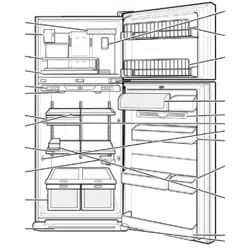
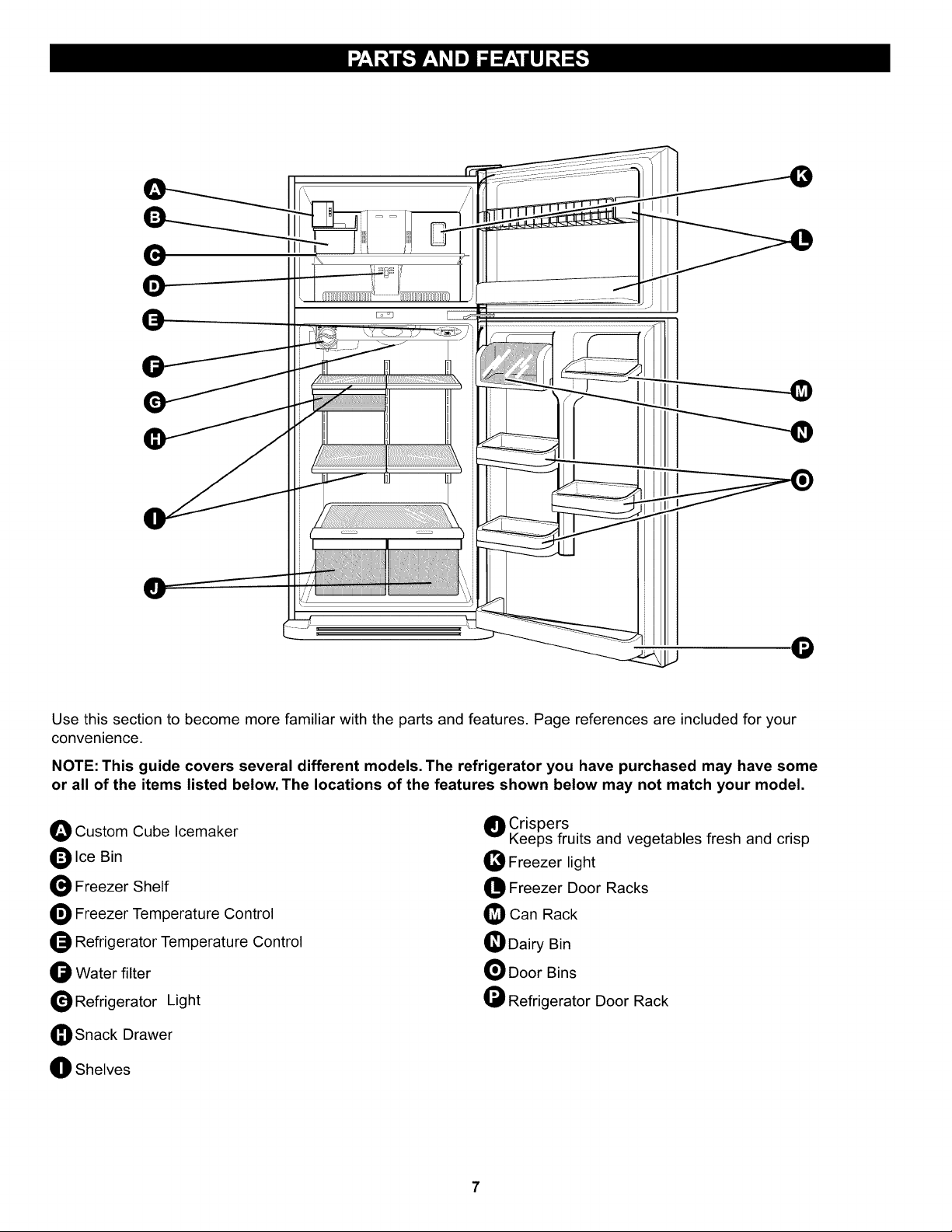
Use this section to become more familiar with the parts and features. Page references are included for your
convenience.
NOTE: This guide covers several different models. The refrigerator you have purchased may have some
or all of the items listed below. The locations of the features shown below may not match your model.
O Custom Cube Icemaker
O Ice Bin
Freezer Shelf
O Freezer Temperature Control
_ Refrigerator Temperature Control
O Water filter
Refrigerator Light
_Snack Drawer
O Shelves
O Crispers
Keeps fruits and vegetables fresh and crisp
40 Freezer light
Freezer Door Racks
Can Rack
O Dairy Bin
Door Bins
Refrigerator Door Rack
ExcessiveWeightHazard
Usetwoor morepeopleto moveandinstall
refrigerator.
Failureto dosocanresultin backorotherinjury.
UNPACKING YOUR REFRIGERATOR
Remove tape and any temporary labels from your
refrigerator before using. Do not remove any warning-type
labels or the model and serial number label.
To remove any remaining tape or glue, rub the area
briskly with your thumb. Tape or glue residue can also be
easily removed by rubbing a small amount of liquid dish
soap over the adhesive with your fingers. Wipe with warm
water and dry.
Do not use sharp instruments, rubbing alcohol, flammable
fluids, or abrasive cleaners to remove tape or glue. These
products can damage the surface of your refrigerator. For
more information, see the important Safety instructions
section.
Refrigerator shelves are installed in the shipping position.
Please reinstall shelves according to your individual
storage needs.
When Moving Your Refrigerator:
Your refrigerator is heavy. When moving the
refrigerator for cleaning or service, be sure to protect
the floor. Always pull the refrigerator straight out when
moving it. Do not wiggle or walk the refrigerator when
trying to move it, as floor damage could occur.
Explosion Hazard
Keep flammable materials and vapors, such as
gasoline, away from refrigerator.
Failure to do so can result in death, explosion or fire.
INSTALLATION
1. Avoid placing unit near heat sources, direct sunlight
or moisture.
2. To minimize noise and vibration, the refrigerator MUST
be installed on a solidly constructed floor.
3. Carpeting and soft tile surfaces are not recommended.
4. NEVER install the refrigerator on a platform or a weakly
supported structure.
5. Install this appliance in an area where the temperature
is between 55°F (13°C) and 110°F (43°C.) If the
temperature around the appliance is too low or high,
cooling ability may be adversely affected.
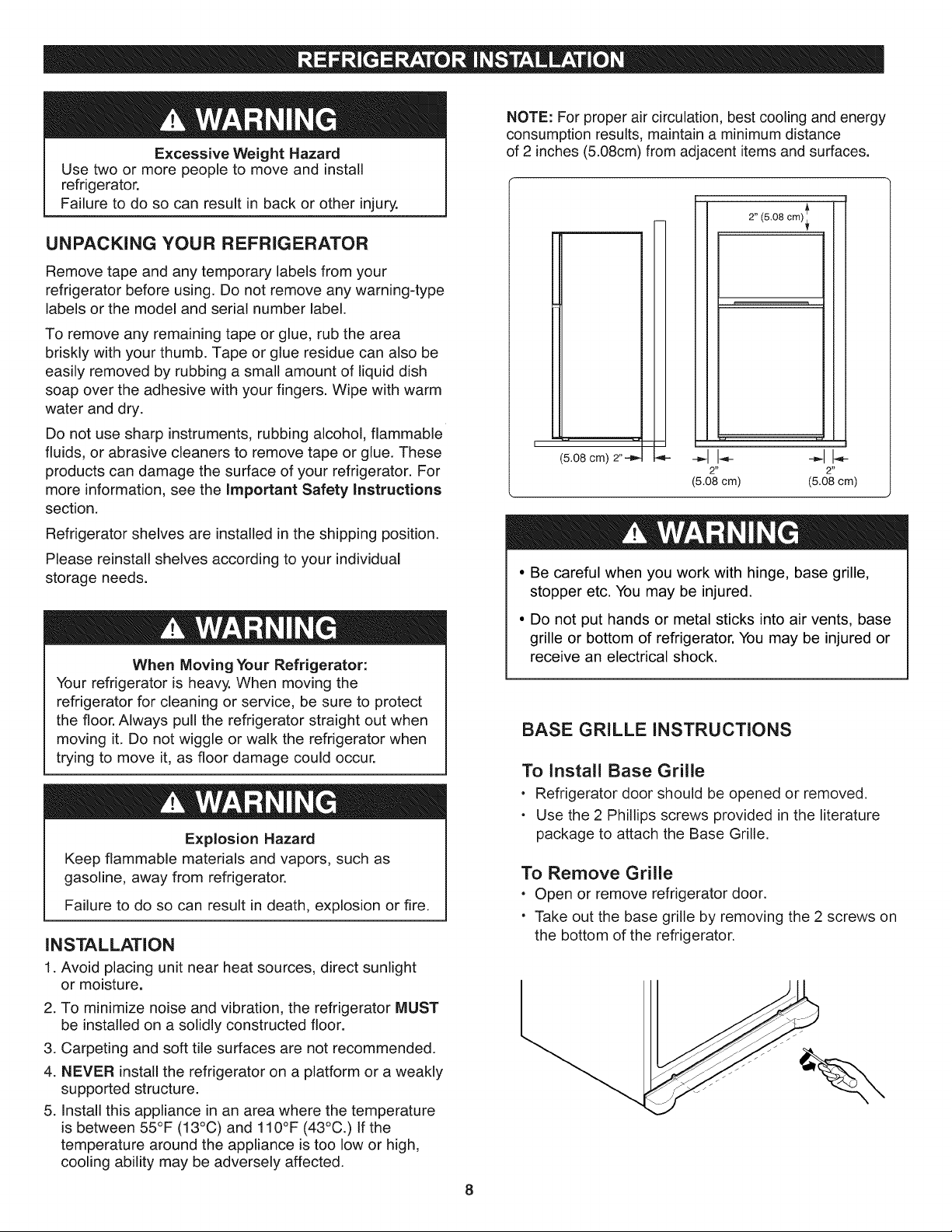
NOTE: For proper air circulation, best cooling and energy
consumption results, maintain a minimum distance
of 2 inches (5.08cm) from adjacent items and surfaces.
(5.08 cm) 2"--_,
2"
(5.08 cm)
2" (5.08 cm)_'_
(5.08 cm)
• Be careful when you work with hinge, base grille,
stopper etc. You may be injured.
• Do not put hands or metal sticks into air vents, base
grille or bottom of refrigerator. You may be injured or
receive an electrical shock.
BASE GRILLE INSTRUCTIONS
To install Base Grille
• Refrigerator door should be opened or removed.
• Use the 2 Phillips screws provided in the literature
package to attach the Base Grille.
To Remove Grille
. Open or remove refrigerator door.
" Take out the base grille by removing the 2 screws on
the bottom of the refrigerator.
8
ELECTRICALSHOCK HAZARD
Before you begin, either unplug the refrigerator or turn off power at the circuit breaker or fuse box. Remove food
and any Adjustable Door or Utility Bins from doors. Failure to do so could result in death or serious injury.
If entrance is less than 35-inches wide, the refrigerator's
doors will need to be removed.
TOOLS NEEDED:
• 10mm or 13/32-inch socket wrench
(with 2-inch extension for bottom door hinge)
- No. 2 Phillips head screwdriver
• Flat-head screwdriver for prying
• Adjustable wrench
REMOVE FREEZER DOOR
Before removing the doors, remove the Base Grille.
See BASE GRILLE INSTALLATION for reference.
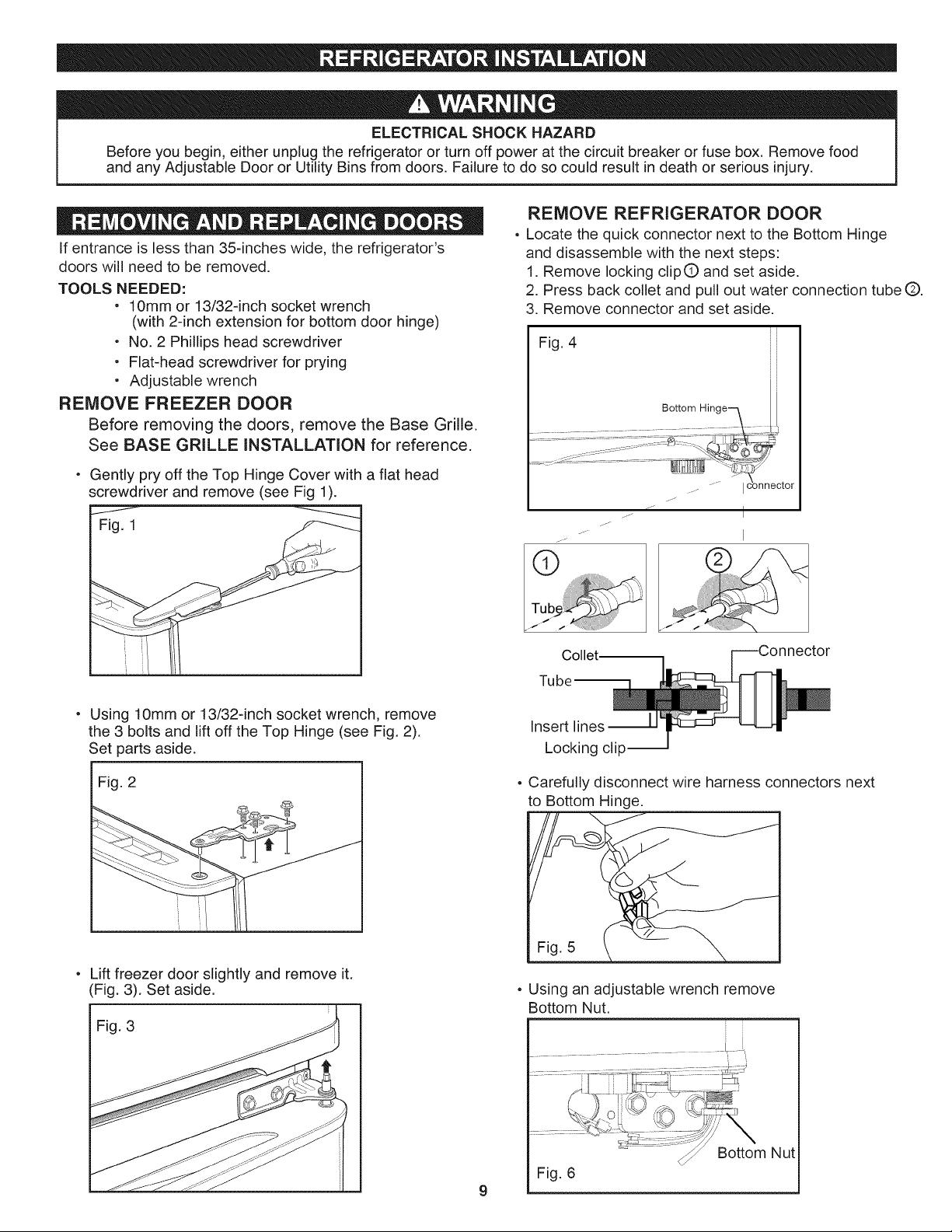
Gently pry off the Top Hinge Cover with a flat head
screwdriver and remove (see Fig 1).
Fig. 1
REMOVE REFRIGERATOR DOOR
• Locate the quick connector next to the Bottom Hinge
and disassemble with the next steps:
1. Remove locking clipQ and set aside.
2. Press back coflet and pull out water connection tube (Z).
3. Remove connector and set aside.
Fig. 4
i
i
i
i
i
i
i
j_
I
I
Collet.
Using lOmm or 13/32-inch socket wrench, remove
the 3 bolts and lift off the Top Hinge (see Fig. 2).
Set parts aside.
I Fig. 2
Lift freezer door slightly and remove it.
(Fig. 3). Set aside.
Fig. 3
Insert lines
Locking clip--
o Carefully disconnect wire harness connectors next
to Bottom Hinge.
Fig. 5
° Using an adjustable wrench remove
Bottom Nut.
'_ ._ BottomNut
Fig. 6
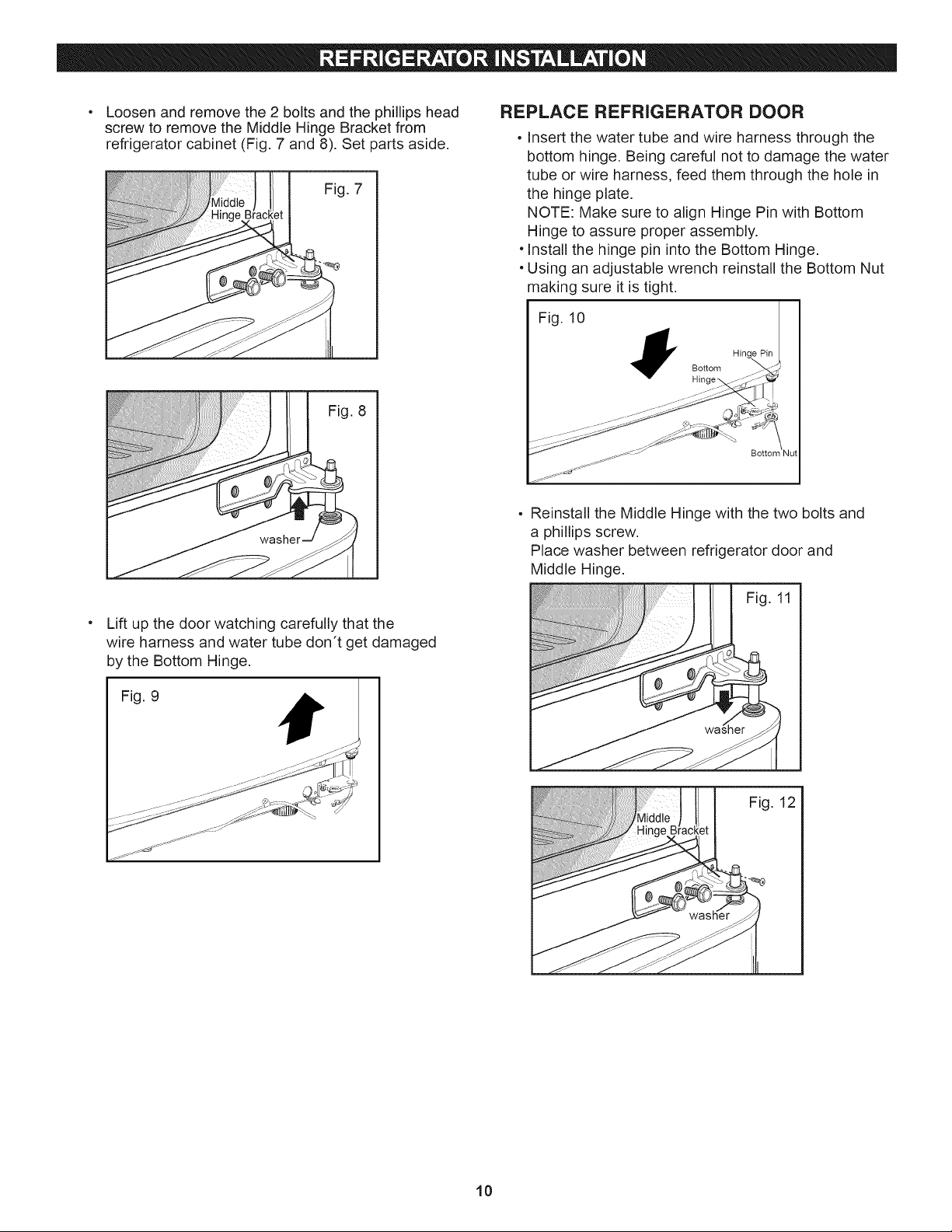
Loosenandremovethe2 boltsandthephillipshead
screwto removetheMiddleHingeBracketfrom
refrigeratorcabinet(Fig.7 and8).Setpartsaside.
Fig.7
Fig.8
Liftupthedoorwatchingcarefullythatthe
wireharnessandwatertubedon'tgetdamaged
bytheBottomHinge.
Fig.9
REPLACE REFRIGERATOR DOOR
• Insert the water tube and wire harness through the
bottom hinge. Being careful not to damage the water
tube or wire harness, feed them through the hole in
the hinge plate.
NOTE: Make sure to align Hinge Pin with Bottom
Hinge to assure proper assembly.
, Install the hinge pin into the Bottom Hinge.
• Using an adjustable wrench reinstall the Bottom Nut
making sure it is tight.
Fig. 10
Bottom
Bottom
• Reinstall the Middle Hinge with the two bolts and
a phillips screw.
Place washer between refrigerator door and
Middle Hinge.
Fig. 11
Fig. 12
10
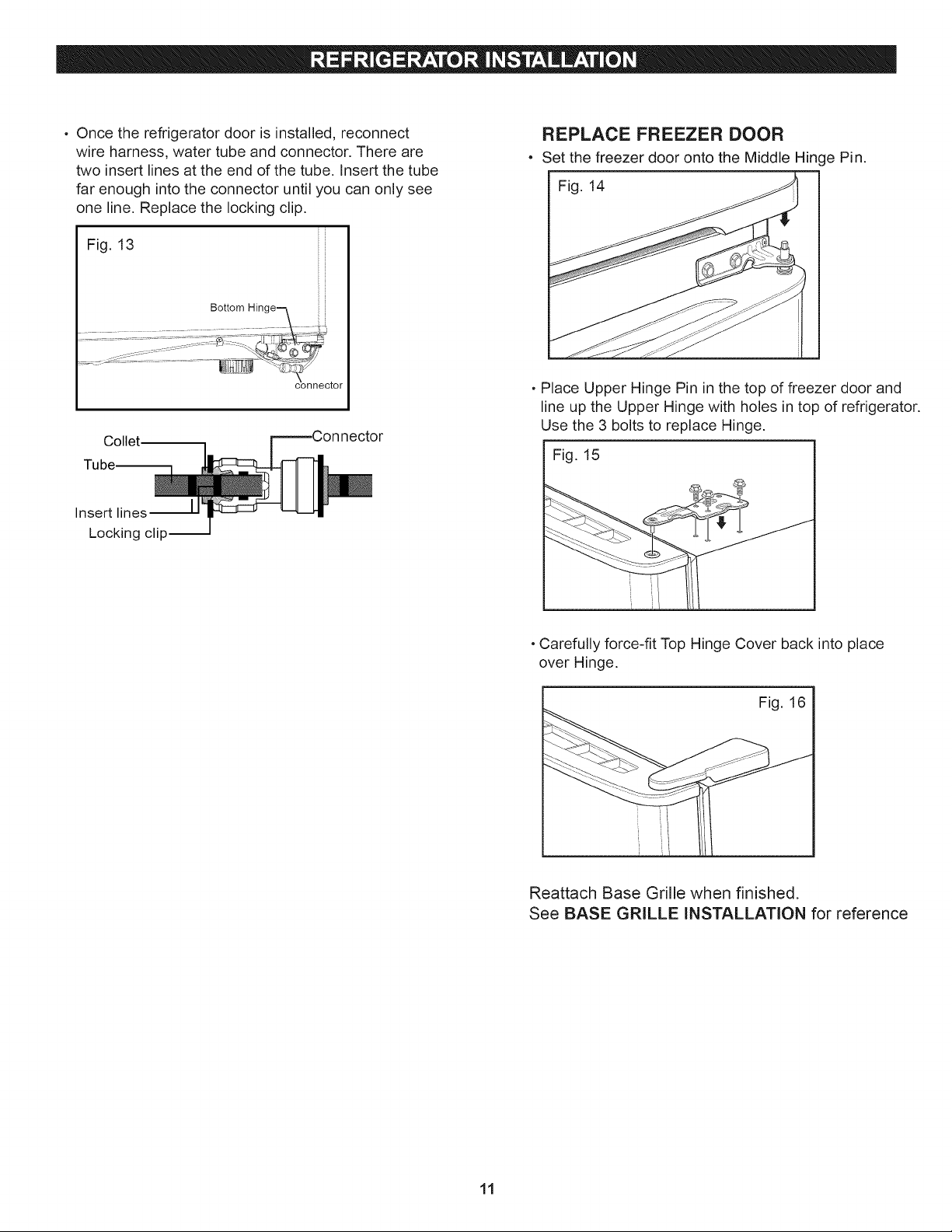
• Oncethe refrigeratordoorisinstalled,reconnect
wireharness,watertubeandconnector.Thereare
twoinsertlinesattheendofthetube.Insertthetube
farenoughintotheconnectoruntilyoucanonlysee
oneline.Replacethelockingclip.
Fig.13
Collet
Insert lines
Locking clip--
REPLACE FREEZER DOOR
• Set the freezer door onto the Middle Hinge Pin.
Fig. 14
- Place Upper Hinge Pin in the top of freezer door and
line up the Upper Hinge with holes in top of refrigerator.
Use the 3 bolts to replace Hinge.
Fig. 15
, Carefully force-fit Top Hinge Cover back into place
over Hinge,
Fig. 16
Reattach Base Grille when finished.
See BASE GRILLE INSTALLATION for reference
11
ELECTRICALSHOCKHAZARD
Beforeyoubegin,eitherunplugtherefrigeratororturn
offpoweratthecircuitbreakerorfusebox.Remove
foodandanyAdjustableDoororUtilityBinsfromdoors
Failuretodosocouldresultindeathorseriousinjury.
Youmayfinditmoreconvenienttohavethedoors
convertedfromtheleft-openingtype(factoryinstalled)
totheright-openingtype.Directionsrefertotheright
sideasthesideonyourrightasyoufacetheunit.
TOOLSNEEDED
• 10mmor13/32-inchsocketwrench
(with2-inchextension for bottom door hinge)
• No. 2 Phillips head screwdriver
• 1,4inch socket wrench
- Flat-head screwdriver for prying
o Adjustable wrench
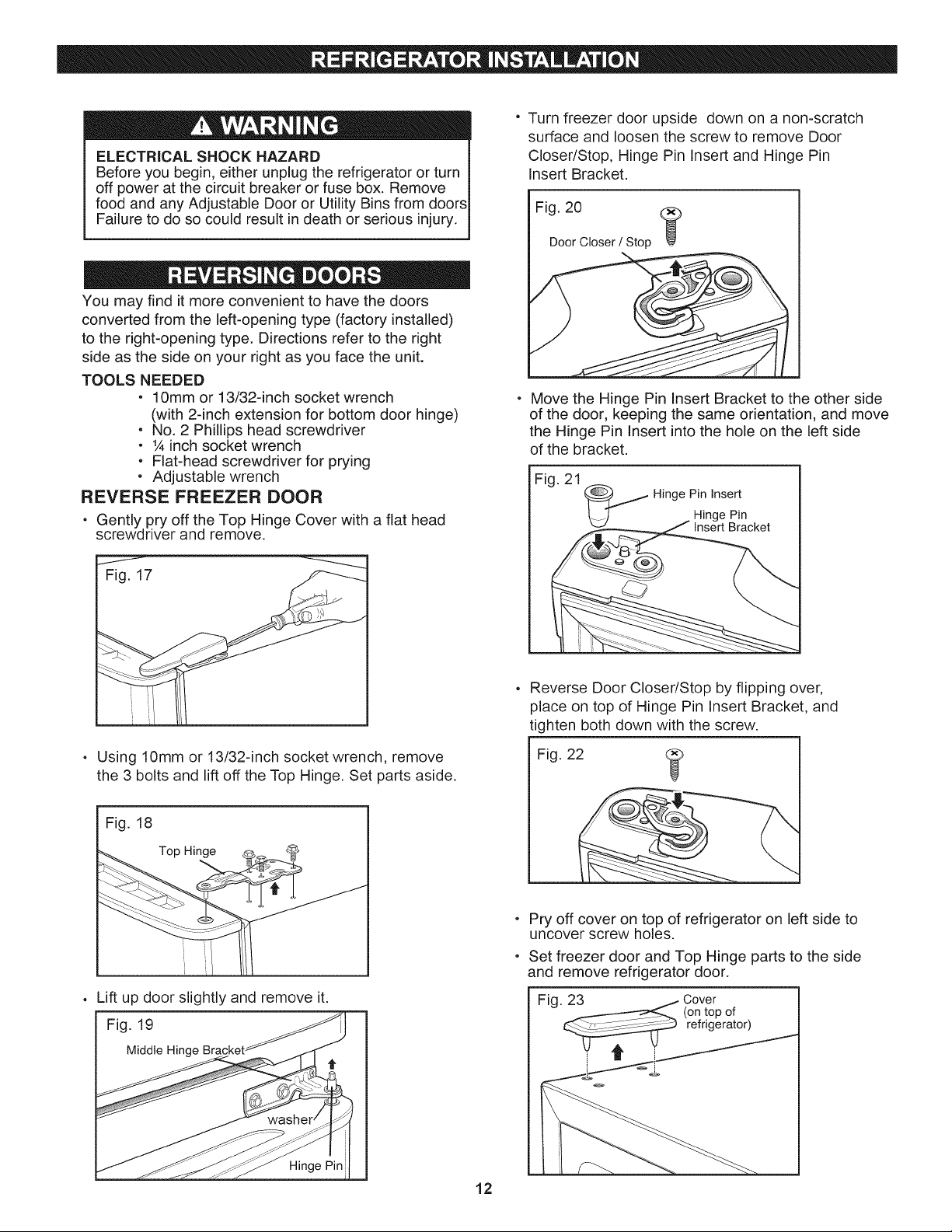
REVERSE FREEZER DOOR
• Gently pry off the Top Hinge Cover with a flat head
screwdriver and remove.
J
Fig. 17
• Using 10mm or 13/32-inch socket wrench, remove
the 3 bolts and lift off the Top Hinge. Set parts aside.
I Fig. 18
Top Hinge
Lift up door slightly and remove it.
Fig. 19
Middle Hinge Bracket
Hinge Pin
° Turn freezer door upside down on a non-scratch
surface and loosen the screw to remove Door
Closer/Stop, Hinge Pin Insert and Hinge Pin
Insert Bracket.
Fig. 20
@
Door Closer / Stop
Move the Hinge Pin Insert Bracket to the other side
of the door, keeping the same orientation, and move
the Hinge Pin Insert into the hole on the left side
of the bracket.
Fig. 21
_ Hinge Pin Insert
Hinge Pin
Insert Bracket
Reverse Door Closer/Stop by flipping over,
place on top of Hinge Pin Insert Bracket, and
tighten both down with the screw.
Fig. 22
Pry off cover on top of refrigerator on left side to
uncover screw holes.
Set freezer door and Top Hinge parts to the side
and remove refrigerator door.
Fig. 23 _i Cover
(on top of
refrigerator)
J_
12
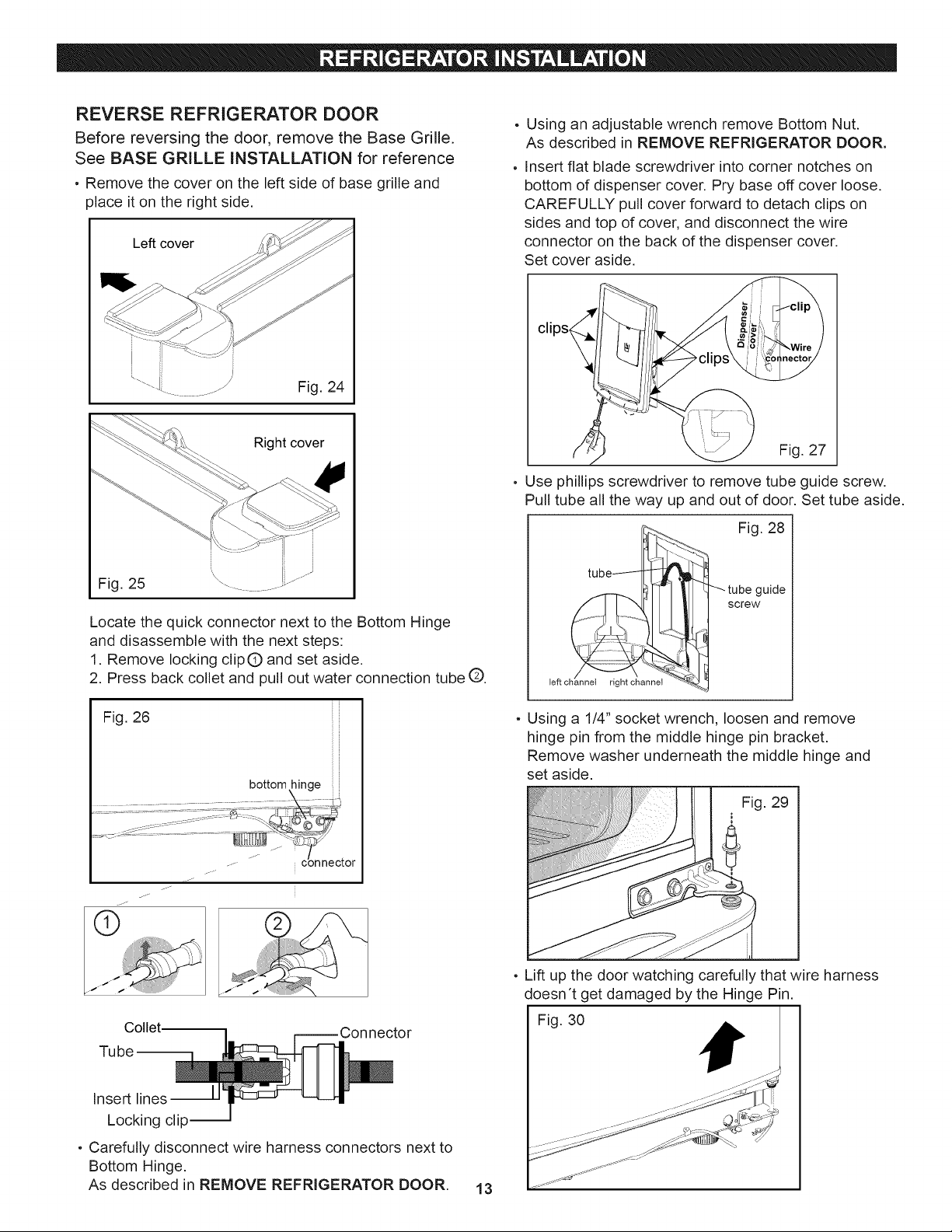
REVERSE REFRIGERATOR DOOR
Before reversing the door, remove the Base Grille.
See BASE GRILLE INSTALLATION for reference
• Remove the cover on the left side of base grille and
)lace it on the right side.
Le_ cover
Right cover
H
' li
Fig. 25 "_..........
Locate the quick connector next to the Bottom Hinge
and disassemble with the next steps:
1. Remove locking clipQ and set aside.
2. Press back collet and pull out water connection tube (::Z).
Fig. 26
bottom hinge
_._-
Collet
Tube
Insert lines
Locking clip I
• Carefully disconnect wire harness connectors next to
Bottom Hinge.
As described in REMOVE REFRIGERATOR DOOR.
13
Using an adjustable wrench remove Bottom Nut.
As described in REMOVE REFRIGERATOR DOOR.
Insert flat blade screwdriver into corner notches on
bottom of dispenser cover. Pry base off cover loose.
CAREFULLY pull cover forward to detach clips on
sides and top of cover, and disconnect the wire
connector on the back of the dispenser cover.
Set cover aside.
Fig. 27
Use phillips screwdriver to remove tube guide screw.
Pull tube all the way up and out of door. Set tube aside.
left channel rtgn_ channel -_
Fig. 28
18
_tube guide
screw
b-4
, Using a 1/4" socket wrench, loosen and remove
hinge pin from the middle hinge pin bracket.
Remove washer underneath the middle hinge and
set aside.
Fig. 29
• Lift up the door watching carefully that wire harness
doesn't get damaged by the Hinge Pin.
Fig. 30
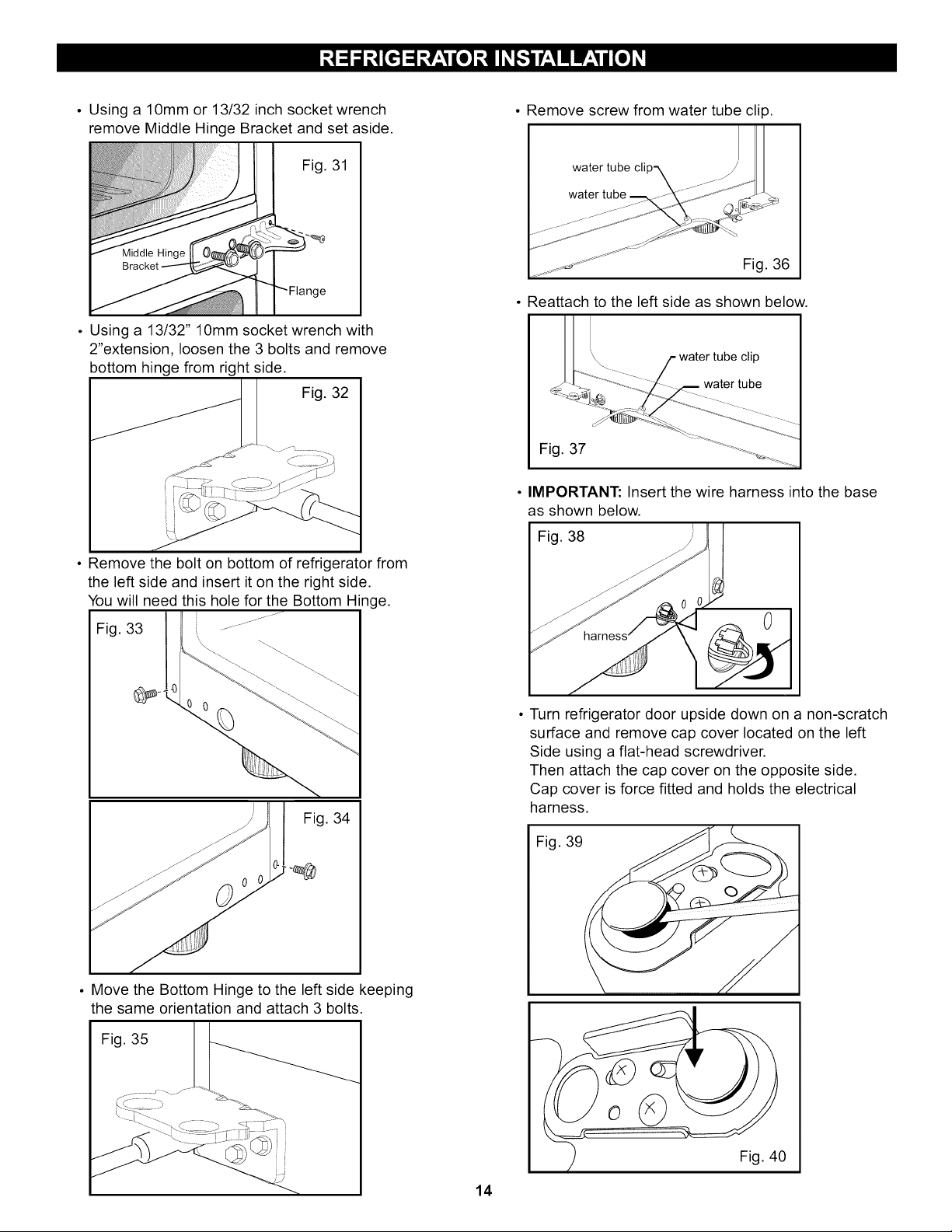
• Using a 10mm or 13/32 inch socket wrench
remove Middle Hinge Bracket and set aside.
Fig. 31
• Using a 13/32" 10mm socket wrench with
2"extension, loosen the 3 bolts and remove
bottom hinge from right side.
Fig. 32
• Remove the bolt on bottom of refrigerator from
the left side and insert it on the right side.
You will need this hole for the Bottom Hinge.
Fig. 33 ............
¼
Fig. 34
• Move the Bottom Hinge to the left side keeping
the same orientation and attach 3 bolts.
Fig. 35
14
• Remove screw from water tube clip.
water tube cli
• Reattach to the left side as shown below.
water tube ctlp
c "-'-'_-_ _--_ water [uiee
Fig. 37 ........ _ .........ii_i
• IMPORTANT: Insert the wire harness into the base
as shown below.
Fig. 38
• Turn refrigerator door upside down on a non-scratch
surface and remove cap cover located on the left
Side using a flat-head screwdriver.
Then attach the cap cover on the opposite side.
Cap cover is force fitted and holds the electrical
harness.
Fig. 39
Fig. 40
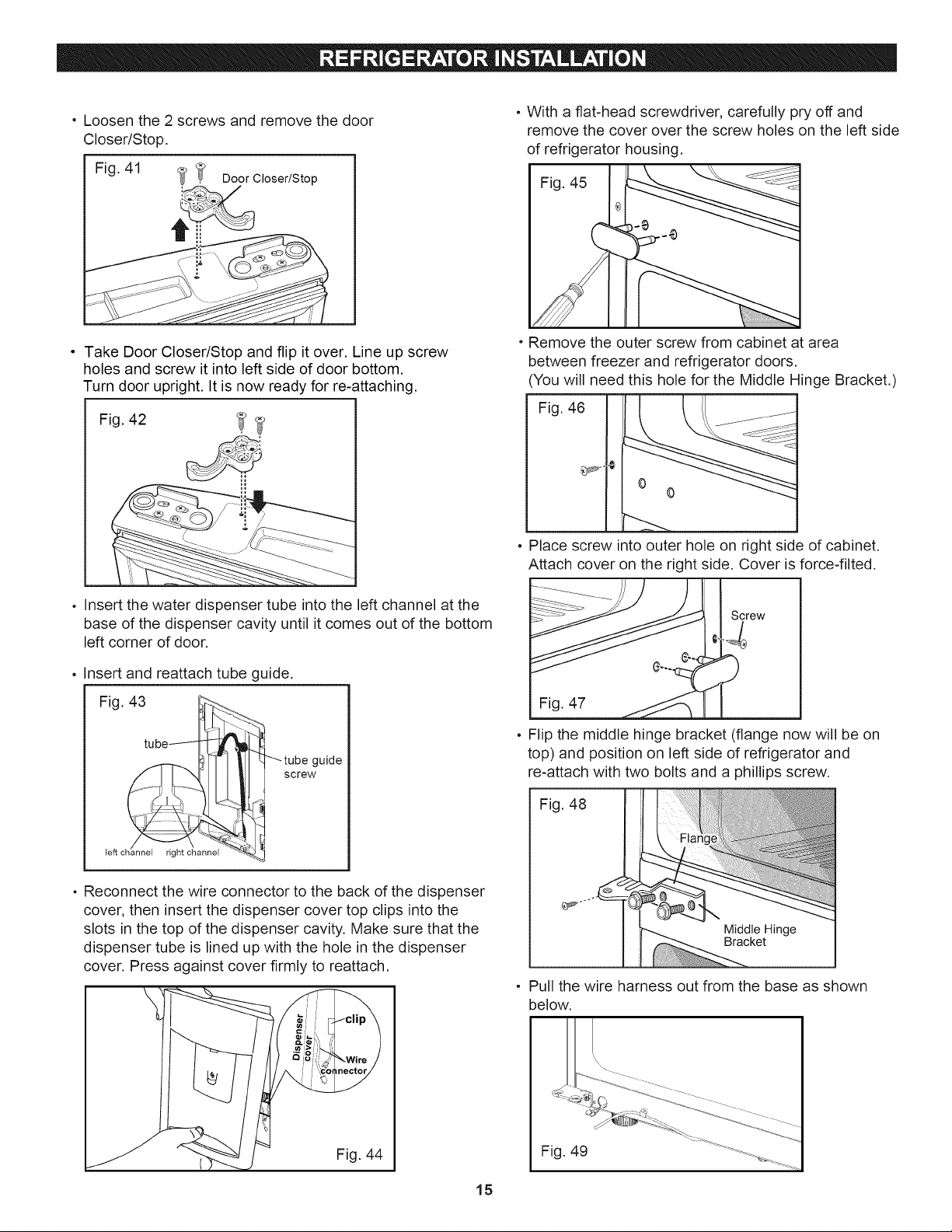
• Loosenthe2 screwsandremovethedoor
Closer/Stop.
Fig.41
_ Door Closer/Stop
, With a flat-head screwdriver, carefully pry off and
remove the cover over the screw holes on the left side
of refrigerator housing.
Fig. 45
Take Door Closer/Stop and flip it over. Line up screw
holes and screw it into left side of door bottom.
Turn door upright. It is now ready for re-attaching.
Fig. 42
, Insert the water dispenser tube into the left channel at the
base of the dispenser cavity until it comes out of the bottom
left corner of door.
° Insert and reattach tube guide.
Fig. 43
eudescrew
left channel right channel "_ _J
o Reconnect the wire connector to the back of the dispenser
cover, then insert the dispenser cover top clips into the
slots in the top of the dispenser cavity. Make sure that the
dispenser tube is lined up with the hole in the dispenser
cover. Press against cover firmly to reattach.
Fig. 44
15
• Remove the outer screw from cabinet at area
between freezer and refrigerator doors.
(You will need this hole for the Middle Hinge Bracket.)
Fig. 46
0
- Place screw into outer hole on right side of cabinet.
Attach cover on the right side. Cover is force-tilted.
S._ew
• Flip the middle hinge bracket (flange now will be on
top) and position on left side of refrigerator and
re-attach with two bolts and a phillips screw.
Fig. 48
Middle ge
Bracket
Pull the wire harness out from the base as shown
below.
Fig. 49
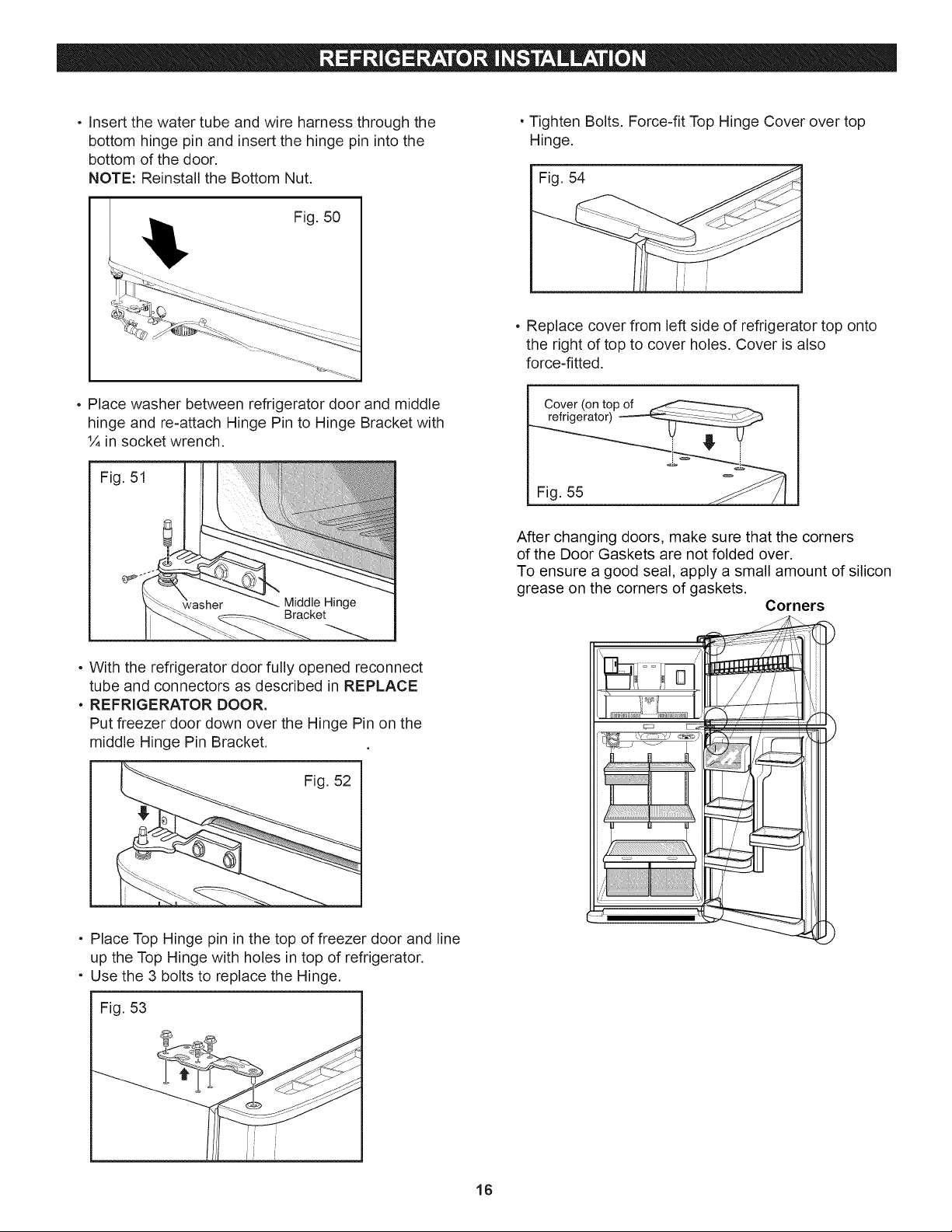
, Insertthewatertubeandwireharnessthroughthe
bottomhingepinandinsertthehingepinintothe
bottomofthedoor.
NOTE:Reinstallthe BottomNut.
Fig.50
• TightenBolts.Force-fitTopHingeCoverovertop
Hinge.
Fig.54
, Replace cover from left side of refrigerator top onto
the right of top to cover holes. Cover is also
force-fitted.
, Place washer between refrigerator door and middle
hinge and re-attach Hinge Pin to Hinge Bracket with
1/4in socket wrench.
Fig. 51
Bracket
• With the refrigerator door fully opened reconnect
tube and connectors as described in REPLACE
- REFRIGERATOR DOOR.
Put freezer door down over the Hinge Pin on the
middle Hinge Pin Bracket.
Fig. 52
Cover (on top of
refrigerator) .....
After changing doors, make sure that the corners
of the Door Gaskets are not folded over.
To ensure a good seal, apply a small amount of silicon
grease on the corners of gaskets.
Corners
• Place Top Hinge pin in the top of freezer door and line
up the Top Hinge with holes in top of refrigerator.
, Use the 3 bolts to replace the Hinge.
Fig. 53
16
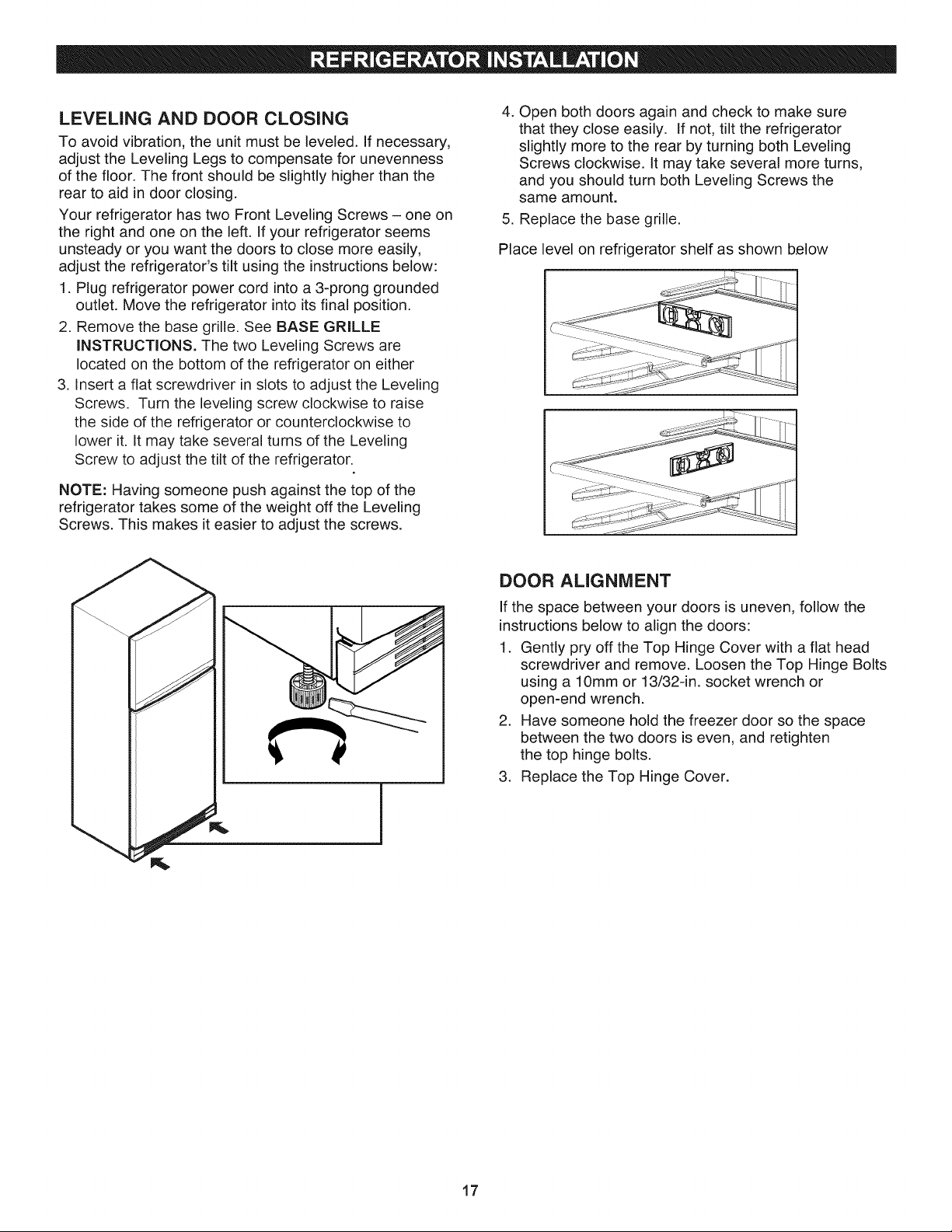
LEVELING AND DOOR CLOSING
To avoid vibration, the unit must be leveled. If necessary,
adjust the Leveling Legs to compensate for unevenness
of the floor. The front should be slightly higher than the
rear to aid in door dosing.
Your refrigerator has two Front Leveling Screws - one on
the right and one on the left. If your refrigerator seems
unsteady or you want the doors to close more easily,
adjust the refrigerator's tilt using the instructions below:
1. Plug refrigerator power cord into a 3-prong grounded
outlet. Move the refrigerator into its final position.
2. Remove the base grille. See BASE GRILLE
iNSTRUCTiONS. The two Leveling Screws are
located on the bottom of the refrigerator on either
3. insert a fiat screwdriver in slots to adjust the Leveling
Screws. Turn the leveling screw clockwise to raise
the side of the refrigerator or counterclockwise to
lower it. it may take several turns of the Leveling
Screw to adjust the tilt of the refrigerator.
NOTE: Having someone push against the top of the
refrigerator takes some of the weight off the Leveling
Screws. This makes it easier to adjust the screws.
4. Open both doors again and check to make sure
that they close easily. If not, tilt the refrigerator
slightly more to the rear by turning both Leveling
Screws clockwise, it may take several more turns,
and you should turn both Leveling Screws the
same amount.
5. Replace the base grille.
Place level on refrigerator shelf as shown below
DOOR ALIGNMENT
If the space between your doors is uneven, follow the
instructions below to align the doors:
1. Gently pry off the Top Hinge Cover with a flat head
screwdriver and remove. Loosen the Top Hinge Bolts
using a 10mm or 13/32-in. socket wrench or
open-end wrench.
2. Have someone hold the freezer door so the space
between the two doors is even, and retighten
the top hinge bolts.
3. Replace the Top Hinge Cover.
17
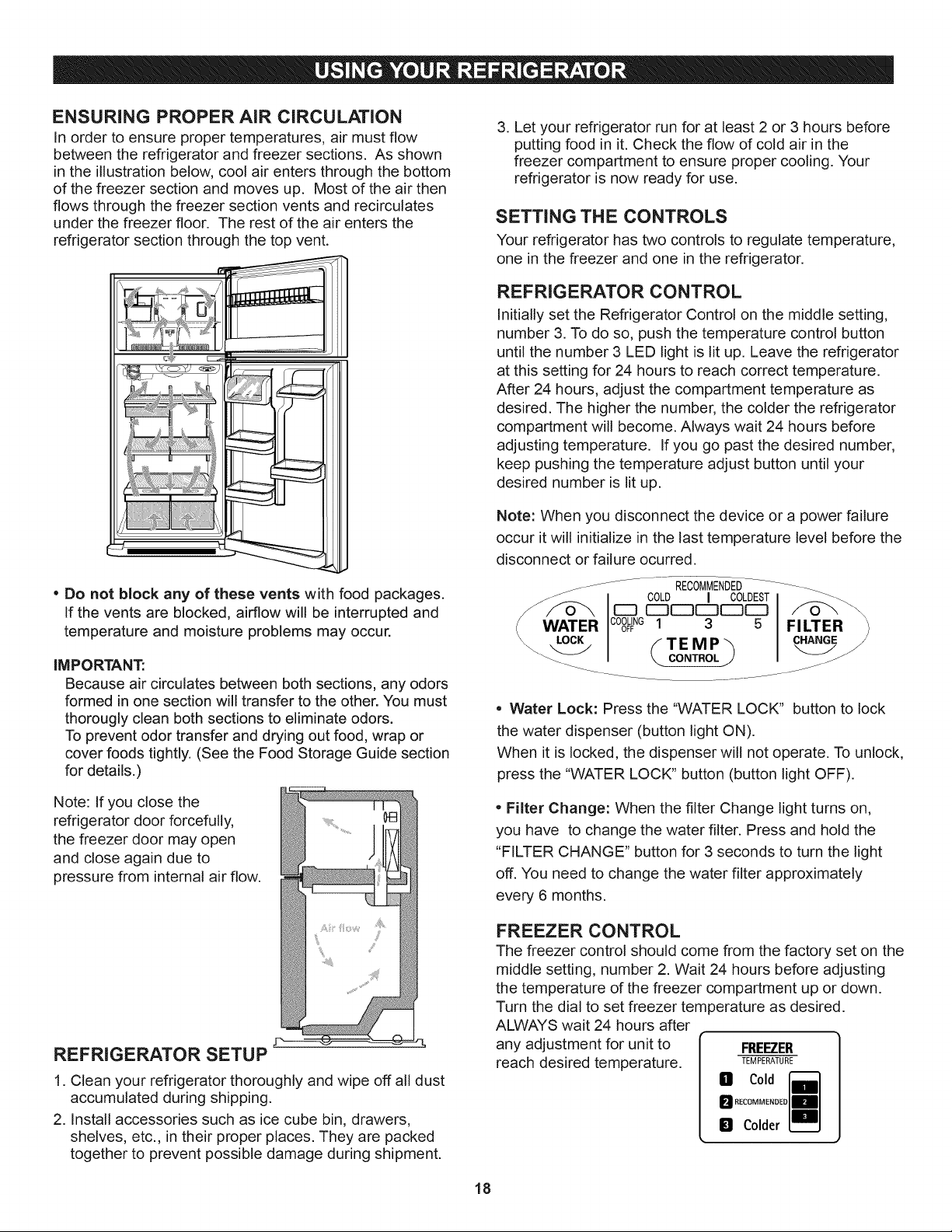
ENSURING PROPER AiR CiRCULATiON
In order to ensure proper temperatures, air must flow
between the refrigerator and freezer sections. As shown
in the illustration below, cool air enters through the bottom
of the freezer section and moves up. Most of the air then
flows through the freezer section vents and recirculates
under the freezer floor. The rest of the air enters the
refrigerator section through the top vent.
* Do not block any of these vents with food packages.
If the vents are blocked, airflow will be interrupted and
temperature and moisture problems may occur.
IMPORTANT:
Because air circulates between both sections, any odors
formed in one section will transfer to the other. You must
thorougly clean both sections to eliminate odors.
To prevent odor transfer and drying out food, wrap or
cover foods tightly. (See the Food Storage Guide section
for details.)
Note: If you close the
refrigerator door forcefully,
the freezer door may open
and close again due to
pressure from internal air flow.
REFRIGERATOR SETUP
1. Clean your refrigerator thoroughly and wipe off all dust
accumulated during shipping.
2. Install accessories such as ice cube bin, drawers,
shelves, eta, in their proper places. They are packed
together to prevent possible damage during shipment.
3. Let your refrigerator run for at least 2 or 3 hours before
putting food in it. Check the flow of cold air in the
freezer compartment to ensure proper cooling. Your
refrigerator is now ready for use.
SETTING THE CONTROLS
Your refrigerator has two controls to regulate temperature,
one in the freezer and one in the refrigerator.
REFRIGERATOR CONTROL
Initially set the Refrigerator Control on the middle setting,
number 3. To do so, push the temperature control button
until the number 3 LED light is lit up. Leave the refrigerator
at this setting for 24 hours to reach correct temperature.
After 24 hours, adjust the compartment temperature as
desired. The higher the number, the colder the refrigerator
compartment will become. Always wait 24 hours before
adjusting temperature. If you go past the desired number,
keep pushing the temperature adjust button until your
desired number is lit up.
Note: When you disconnect the device or a power failure
occur it will initialize in the last temperature level before the
disconnect or failure ocurred.
_ .... RECOMMENDED....
/WWAT COLD I COLDESTCOOLING 1 _ _
ER OFF _ _ FILTER
_.-.._/ fTEMP_ CHANGE
• Water Lock: Press the "WATER LOCK" button to lock
the water dispenser (button light ON).
When it is locked, the dispenser will not operate. To unlock,
press the "WATER LOCK" button (button light OFF).
• Filter Change: When the filter Change light turns on,
you have to change the water filter. Press and hold the
"FILTER CHANGE" button for 3 seconds to turn the light
off. You need to change the water filter approximately
every 6 months.
FREEZER CONTROL
The freezer control should come from the factory set on the
middle setting, number 2. Wait 24 hours before adjusting
the temperature of the freezer compartment up or down.
Turn the dial to set freezer temperature as desired.
ALWAYS wait 24 hours after
any adjustment for unit to
reach desired temperature.
FREEZER
TEMPERATURE
B Cold
M RECOMMENDE0
D Colder
18
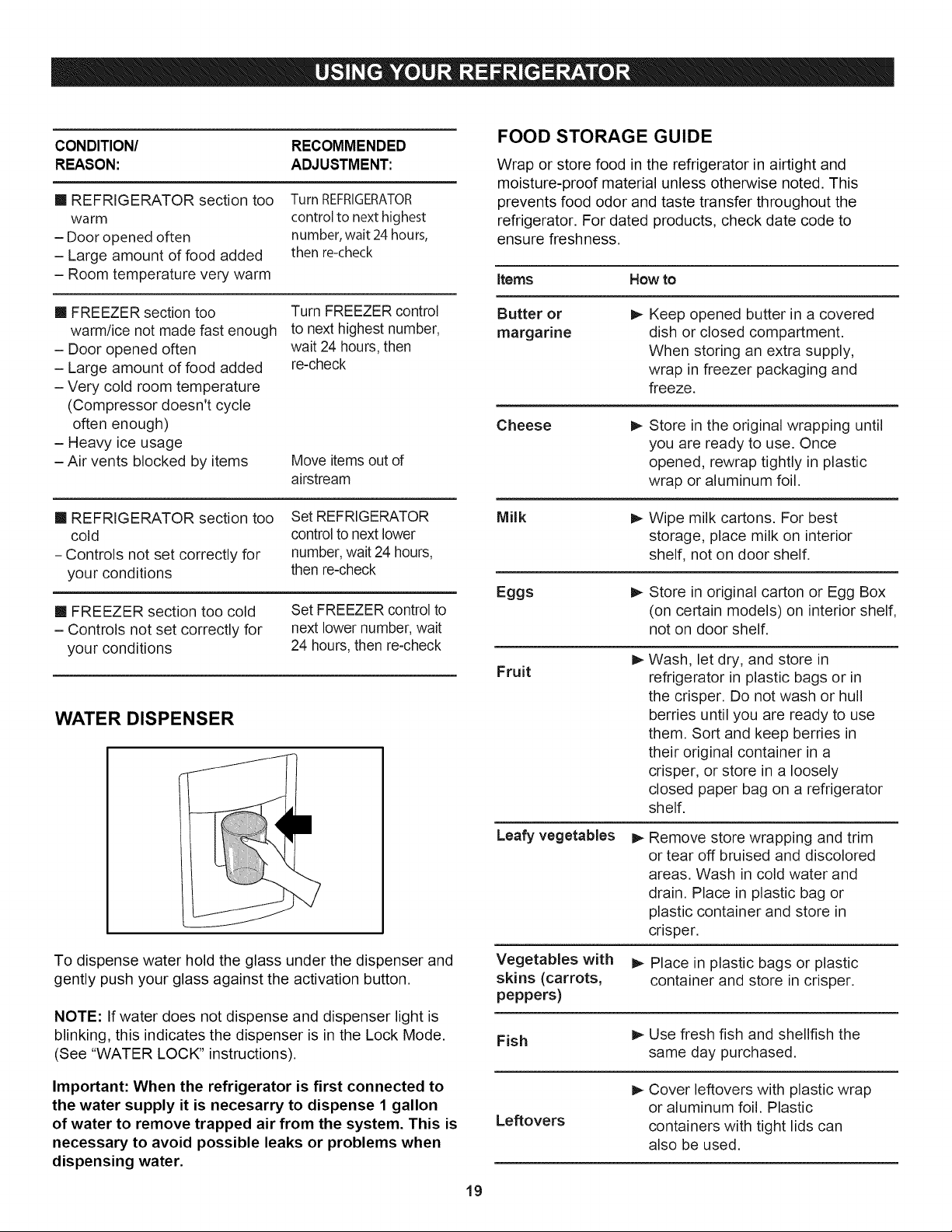
CONDITION/ RECOMMENDED
REASON: ADJUSTMENT:
[] REFRIGERATOR section too
warm
- Door opened often
- Large amount of food added
- Room temperature very, warm
Turn REFRIGERATOR
control to next highest
number, wait 24 hours,
then re-check
[] FREEZER section too
warm/ice not made fast enough
- Door opened often
- Large amount of food added
- Very cold room temperature
(Compressor doesn't cycle
often enough)
- Heavy ice usage
- Air vents blocked by items
Turn FREEZER control
to next highest number,
wait 24 hours, then
re-check
Move items out of
airstream
[] REFRIGERATOR section too
cold
- Controls not set correctly for
your conditions
Set REFRIGERATOR
control to next lower
number, wait 24 hours,
then re-check
[] FREEZER section too cold
- Controls not set correctly for
your conditions
Set FREEZER control to
next lower number, wait
24 hours, then re-check
WATER DISPENSER
To dispense water hold the glass under the dispenser and
gently push your glass against the activation button.
NOTE: If water does not dispense and dispenser light is
blinking, this indicates the dispenser is in the Lock Mode.
(See "WATER LOCK" instructions).
Important: When the refrigerator is first connected to
the water supply it is necesarry to dispense 1 gallon
of water to remove trapped air from the system. This is
necessary to avoid possible leaks or problems when
dispensing water.
19
FOOD STORAGE GUIDE
Wrap or store food in the refrigerator in airtight and
moisture-proof material unless otherwise noted. This
prevents food odor and taste transfer throughout the
refrigerator. For dated products, check date code to
ensure freshness.
Items
Butter or
margarine
How to
Keep opened butter in a covered
dish or closed compartment.
When storing an extra supply,
wrap in freezer packaging and
freeze.
Cheese
Milk
Store in the original wrapping until
you are ready to use. Once
opened, rewrap tightly in plastic
wrap or aluminum foil.
I_ Wipe milk cartons. For best
storage, place milk on interior
shelf, not on door shelf.
Eggs
Fruit
I_ Store in original carton or Egg Box
(on certain models) on interior shelf,
not on door shelf.
Leafy vegetables I_
Vegetables with
skins (carrots,
peppers)
Wash, let dry, and store in
refrigerator in plastic bags or in
the crisper. Do not wash or hull
berries until you are ready to use
them. Sort and keep berries in
their original container in a
crisper, or store in a loosely
closed paper bag on a refrigerator
shelf.
Remove store wrapping and trim
or tear off bruised and discolored
areas. Wash in cold water and
drain. Place in plastic bag or
plastic container and store in
crisper.
1_ Place in plastic bags or plastic
container and store in crisper.
Fish
Leftovers
I_ Use fresh fish and shellfish the
same day purchased.
I_ Cover leftovers with plastic wrap
or aluminum foil. Plastic
containers with tight lids can
also be used.
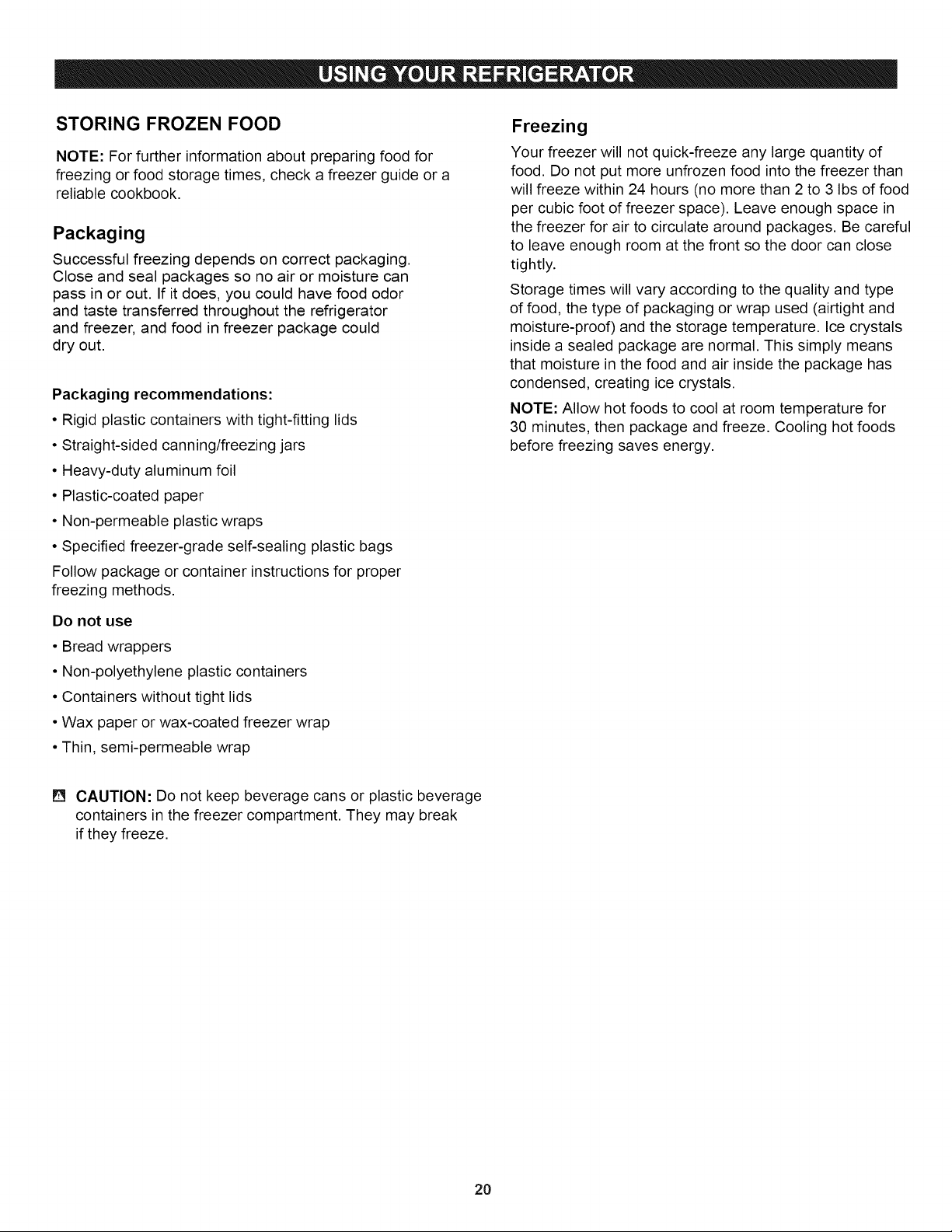
STORING FROZEN FOOD
NOTE: For further information about preparing food for
freezing or food storage times, check a freezer guide or a
reliable cookbook,
Packaging
Successful freezing depends on correct packaging.
Close and seal packages so no air or moisture can
pass in or out. If it does, you could have food odor
and taste transferred throughout the refrigerator
and freezer, and food in freezer package could
dry out.
Packaging recommendations:
• Rigid plastic containers with tight-fitting lids
• Straight-sided canning/freezing jars
• Heavy-duty aluminum foil
• Plastic-coated paper
• Non-permeable plastic wraps
• Specified freezer-grade self-sealing plastic bags
Follow package or container instructions for proper
freezing methods.
Do not use
• Bread wrappers
• Non-polyethylene plastic containers
• Containers without tight lids
• Wax paper or wax-coated freezer wrap
• Thin, semi-permeable wrap
Freezing
Your freezer will not quick-freeze any large quantity of
food. Do not put more unfrozen food into the freezer than
will freeze within 24 hours (no more than 2 to 3 Ibs of food
per cubic foot of freezer space). Leave enough space in
the freezer for air to circulate around packages. Be careful
to leave enough room at the front so the door can close
tightly.
Storage times will vary according to the quality and type
of food, the type of packaging or wrap used (airtight and
moisture-proof) and the storage temperature. Ice crystals
inside a sealed package are normal. This simply means
that moisture in the food and air inside the package has
condensed, creating ice crystals.
NOTE: Allow hot foods to cool at room temperature for
30 minutes, then package and freeze. Cooling hot foods
before freezing saves energy.
[] CAUTION: Do not keep beverage cans or plastic beverage
containers in the freezer compartment. They may break
if they freeze.
20
REFRIGERATOR SHELVES
The shelves in your refrigerator are adjustable to meet
your individual storage needs. All the shelves in this unit
are glass.
Storing similar food items together in your refrigerator and
adjusting the shelves to fit different heights of items will
make finding the exact item you want easier; it will also
reduce the amount of time the refrigerator door is open,
saving energy.
IMPORTANT: Do not clean glass shelves with warm
water when they are cold. Shelves may break if exposed
to sudden temperature changes or impact, such as
bumping. For your protection, glass shelves are made
with tempered glass, which will shatter into small pebble-
sized pieces.
NOTE: Glass shelves are heavy. Use special care when
removing them to avoid dropping them.
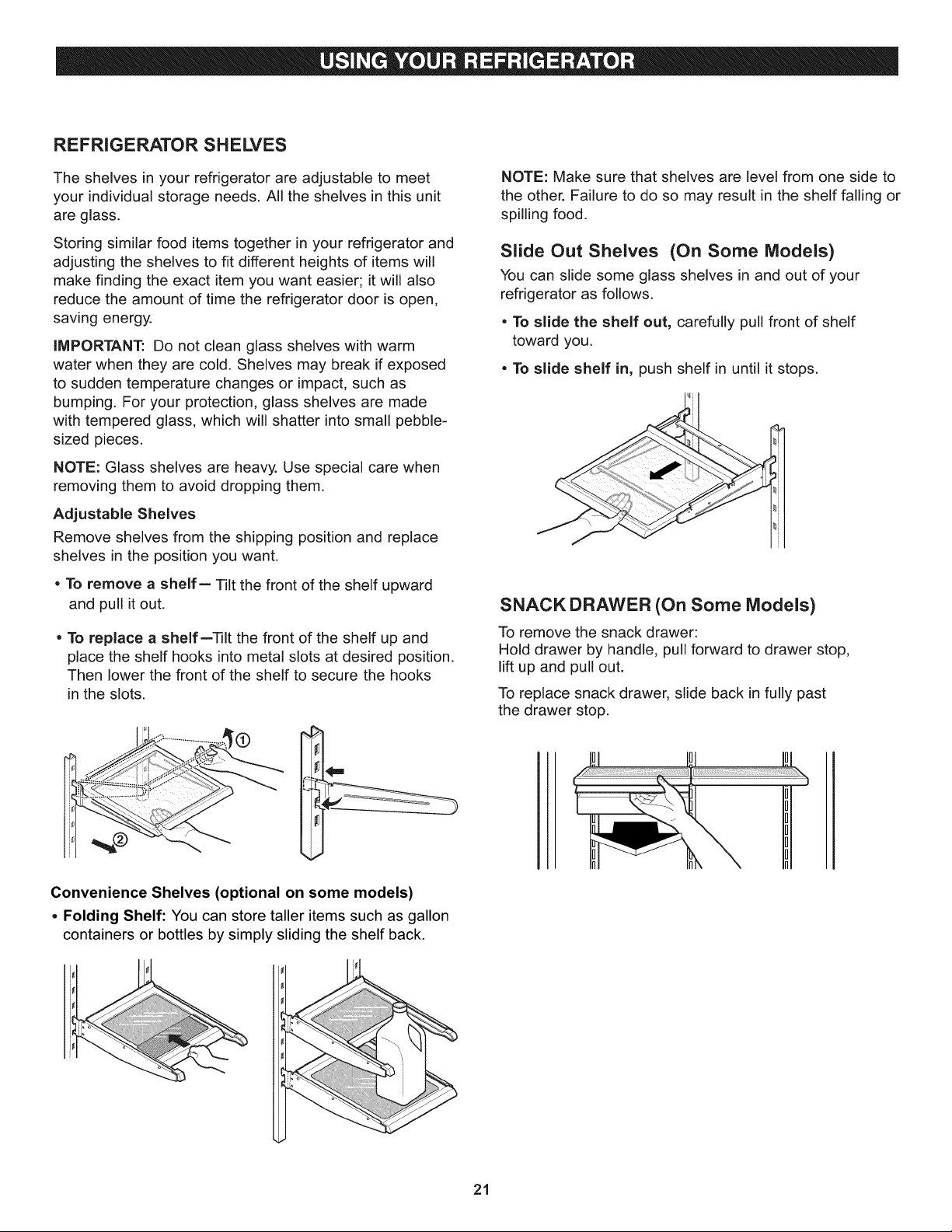
Adjustable Shelves
Remove shelves from the shipping position and replace
shelves in the position you want.
• To remove a shelf-- Tilt the front of the shelf upward
and pull it out.
o To replace a shelf--_lt the front of the shelf up and
place the shelf hooks into metal slots at desired position.
Then lower the front of the shelf to secure the hooks
in the slots.
Convenience Shelves (optional on some models)
Folding Shelf: You can store taller items such as gallon
containers or bottles by simply sliding the shelf back.
NOTE: Make sure that shelves are level from one side to
the other. Failure to do so may result in the shelf falling or
spilling food.
Slide Out Shelves (On Some Models)
You can slide some glass shelves in and out of your
refrigerator as follows.
• To slide the shelf out, carefully pull front of shelf
toward you.
• To slide shelf in, push shelf in until it stops.
SNACK DRAWER (On Some Models)
To remove the snack drawer:
Hold drawer by handle, pull forward to drawer stop,
lift up and pull out.
To replace snack drawer, slide back in fully past
the drawer stop.
21
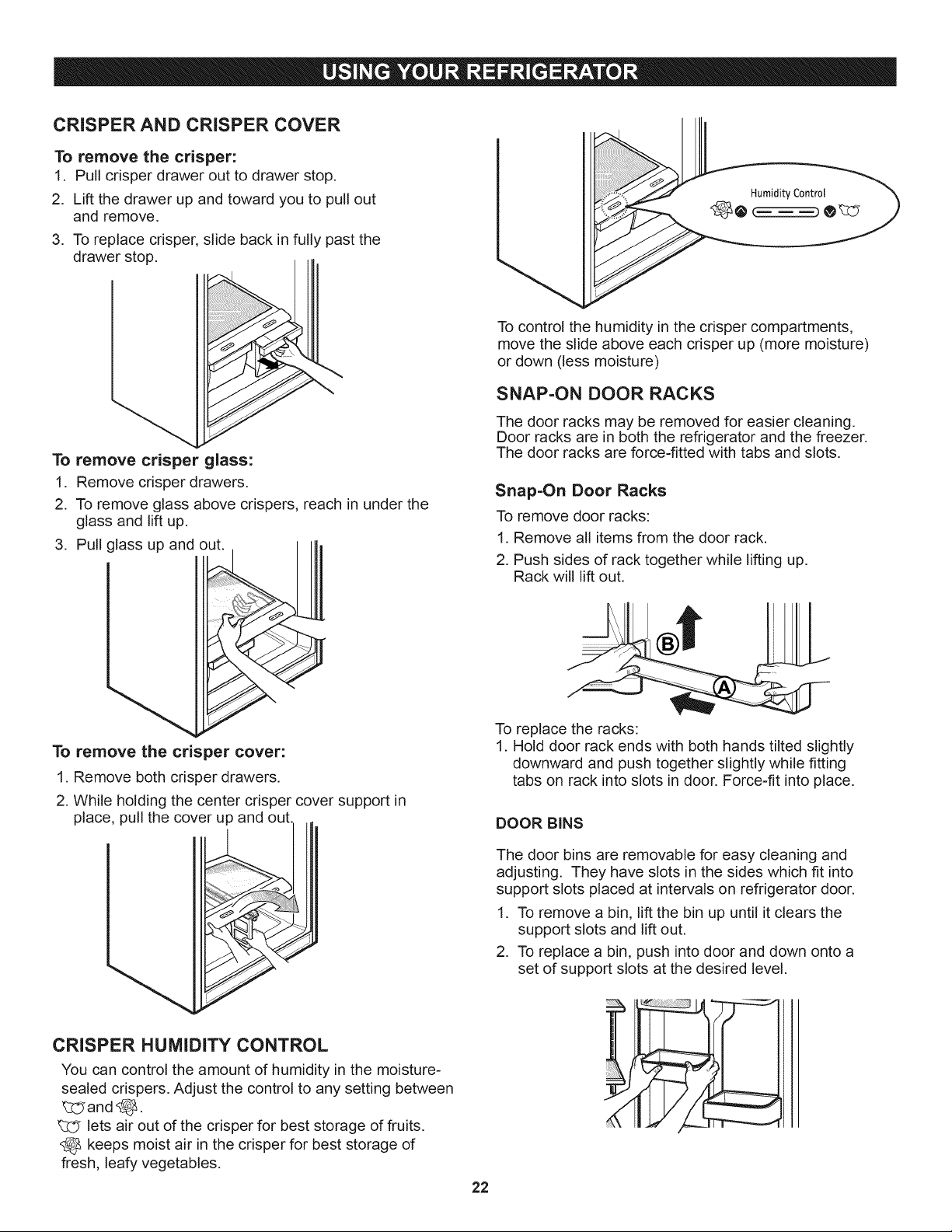
CRISPER AND CRISPER COVER
To remove the crisper:
1. Pull crisper drawer out to drawer stop.
2. Lift the drawer up and toward you to pull out
and remove.
3. To replace crisper, slide back in fully past the
drawer stop.
To remove crisper glass:
1. Remove crisper drawers.
2. To remove glass above crispers, reach in under the
glass and lift up.
3. Pull glass up and out.
To control the humidity in the crisper compartments,
move the slide above each crisper up (more moisture)
or down (less moisture)
SNAP=ON DOOR RACKS
The door racks may be removed for easier cleaning.
Door racks are in both the refrigerator and the freezer.
The door racks are force-fitted with tabs and slots.
Snap=On Door Racks
To remove door racks:
1. Remove all items from the door rack.
2. Push sides of rack together while lifting up.
Rack will lift out.
To remove the crisper cover:
1. Remove both crisper drawers.
2. While holding the center crisper cover support in
place, pull the cover up and out.
CRISPER HUMIDITY CONTROL
You can control the amount of humidity in the moisture-
sealed crispers. Adjust the control to any setting between
_:_and _.
lets air out of the crisper for best storage of fruits.
keeps moist air in the crisper for best storage of
fresh, leafy vegetables.
22
To replace the racks:
1. Hold door rack ends with both hands tilted slightly
downward and push together slightly while fitting
tabs on rack into slots in door. Force-fit into place.
DOOR BINS
The door bins are removable for easy cleaning and
adjusting. They have slots in the sides which fit into
support slots placed at intervals on refrigerator door.
1. To remove a bin, lift the bin up until it clears the
support slots and lift out.
2. To replace a bin, push into door and down onto a
set of support slots at the desired level.
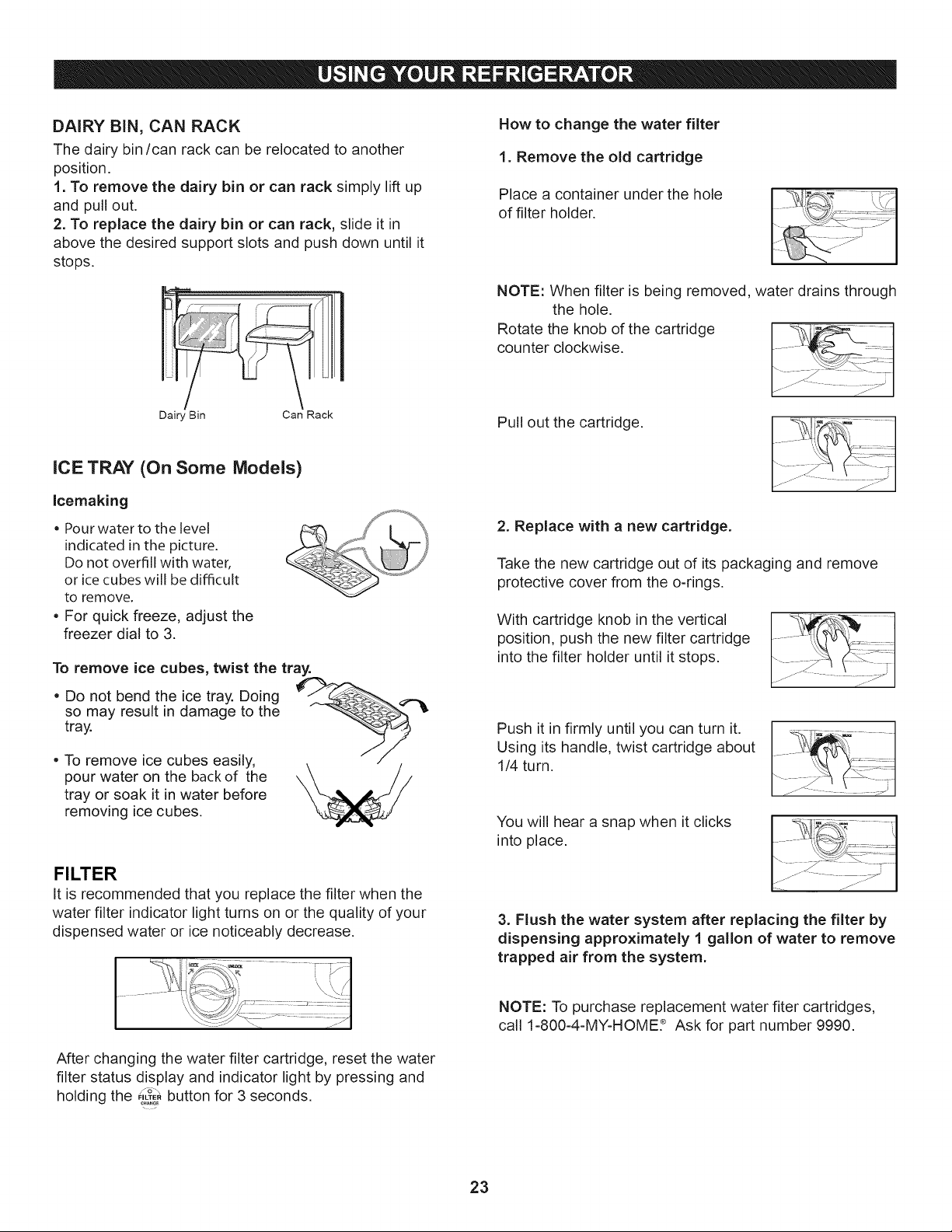
DAIRYBiN, CAN RACK
Thedairybin/canrackcanberelocatedtoanother
position.
1.Toremovethe dairybinor canracksimplyliftup
andpullout.
2.Toreplacethedairybin orcanrack,slideit in
abovethedesiredsupportslotsandpushdownuntilit
stops.
Dair_ Bin
Can Rack
ICE TRAY (On Some Models)
Icemaking
= Pour water to the level
indicated in the picture.
Do not overfill with water,
or ice cubes will be difficult
to remove.
• For quick freeze, adjust the
freezer dial to 3.
To remove ice cubes, twist the tray.
• Do not bend the ice tray. Doing __,.._
so may result in damage to the
tray.
• To remove ice cubes easily,
pour water on the back of the
tray or soak it in water before
removing ice cubes.
FILTER
It is recommended that you replace the filter when the
water filter indicator light turns on or the quality of your
dispensed water or ice noticeably decrease.
How to change the water filter
1. Remove the old cartridge
Place a container under the hole
of filter holder.
NOTE: When filter is being removed, water drains through
the hole.
Rotate the knob of the cartridge _|
counter clockwise. ....
Pull out the cartridge.
71 74-:q
2. Replace with a new cartridge.
Take the new cartridge out of its packaging and remove
protective cover from the o-rings.
With cartridge knob in the vertical
position, push the new filter cartridge
into the filter holder until it stops.
Push it in firmly until you can turn it.
Using its handle, twist cartridge about
1/4 turn.
You will hear a snap when it clicks
into place.
3. Flush the water system after replacing the filter by
dispensing approximately 1 gallon of water to remove
trapped air from the system.
After changing the water filter cartridge, reset the water
filter status display and indicator light by pressing and
fS\
holding the "._Z_button for 3 seconds.
NOTE: To purchase replacement water fiter cartridges,
call 1-800-4-MY-HOME? Ask for part number 9990.
23
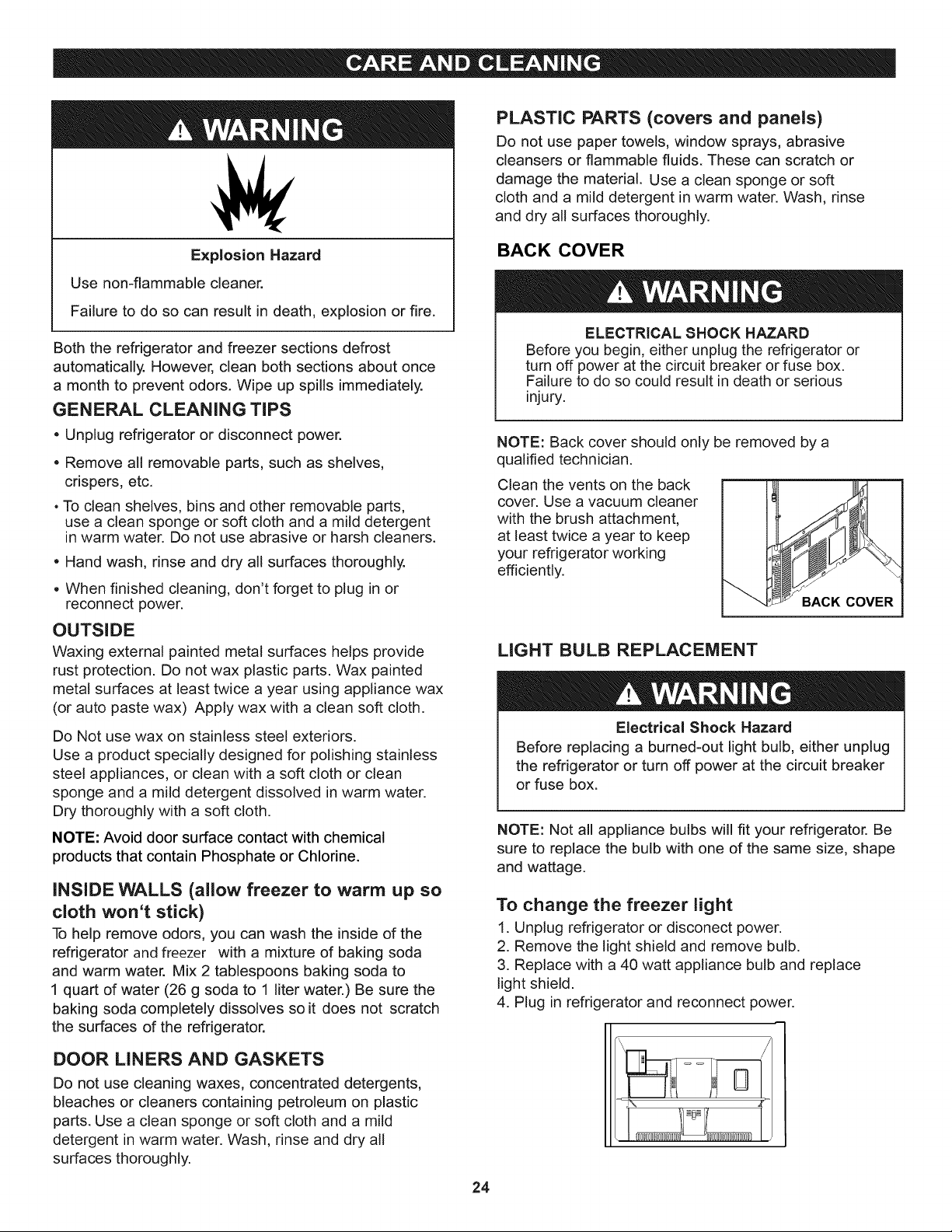
Explosion Hazard
Use non-flammable cleaner.
Failure to do so can result in death, explosion or fire.
Both the refrigerator and freezer sections defrost
automatically, However, clean both sections about once
a month to prevent odors. Wipe up spills immediately.
GENERAL CLEANING TiPS
• Unplug refrigerator or disconnect power.
• Remove all removable parts, such as shelves,
crispers, etc.
• To clean shelves, bins and other removable parts,
use a clean sponge or soft cloth and a mild detergent
in warm water. Do not use abrasive or harsh cleaners.
• Hand wash, rinse and dry all surfaces thoroughly.
• When finished cleaning, don't forget to plug in or
reconnect power.
OUTSIDE
Waxing external painted metal surfaces helps provide
rust protection. Do not wax plastic parts. Wax painted
metal surfaces at least twice a year using appliance wax
(or auto paste wax) Apply wax with a clean soft cloth.
Do Not use wax on stainless steel exteriors.
Use a product specially designed for polishing stainless
steel appliances, or clean with a soft cloth or clean
sponge and a mild detergent dissolved in warm water.
Dry thoroughly with a soft cloth.
NOTE: Avoid door surface contact with chemical
products that contain Phosphate or Chlorine.
INSIDE WALLS (allow freezer to warm up so
cloth won't stick)
To help remove odors, you can wash the inside of the
refrigerator and freezer with a mixture of baking soda
and warm water. Mix 2 tablespoons baking soda to
1 quart of water (26 g soda to 1 liter water.) Be sure the
baking soda completely dissolves so it does not scratch
the surfaces of the refrigerator.
DOOR LINERS AND GASKETS
Do not use cleaning waxes, concentrated detergents,
bleaches or cleaners containing petroleum on plastic
parts. Use a clean sponge or soft cloth and a mild
detergent in warm water. Wash, rinse and dry all
surfaces thoroughly.
PLASTIC PARTS (covers and panels)
Do not use paper towels, window sprays, abrasive
cleansers or flammable fluids. These can scratch or
damage the material. Use a clean sponge or soft
cloth and a mild detergent in warm water. Wash, rinse
and dry all surfaces thoroughly.
BACK COVER
ELECTRICAL SHOCK HAZARD
Before you begin, either unplug the refrigerator or
turn off power at the circuit breaker or fuse box.
Failure to do so could result in death or serious
injury.
NOTE: Back cover should only be removed by a
qualified technician.
Clean the vents on the back
cover. Use a vacuum cleaner
with the brush attachment,
at least twice a year to keep
your refrigerator working
efficiently.
LIGHT BULB REPLACEMENT
Electrical Shock Hazard
Before replacing a burned-out light bulb, either unplug
the refrigerator or turn off power at the circuit breaker
or fuse box.
NOTE: Not all appliance bulbs will fit your refrigerator. Be
sure to replace the bulb with one of the same size, shape
and wattage.
To change the freezer light
1. Unplug refrigerator or disconect power.
2. Remove the light shield and remove bulb.
3. Replace with a 40 watt appliance bulb and replace
light shield.
4. Plug in refrigerator and reconnect power.
24
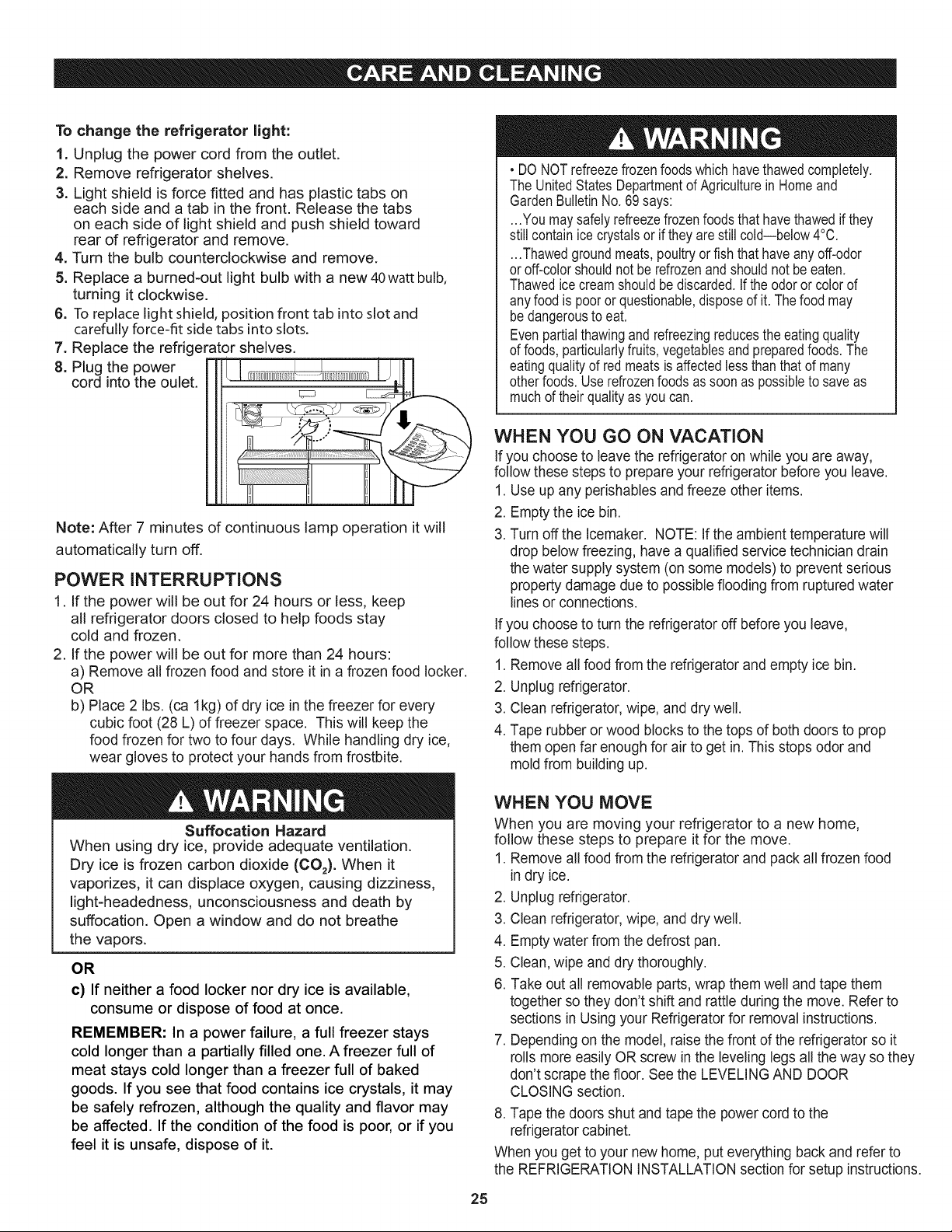
Tochangethe refrigerator might:
1. Unplug the power cord from the outlet.
2. Remove refrigerator shelves.
3. Light shield is force fitted and has plastic tabs on
each side and a tab in the front. Release the tabs
on each side of light shield and push shield toward
rear of refrigerator and remove.
4, Turn the bulb counterclockwise and remove.
5. Replace a burned-out light bulb with a new 40watt bulb,
turning it clockwise.
6. To replace light shield, position front tab into slot and
carefully force-fit side tabs into slots.
7. Replace the refrigerator shelves,
8. Plug the power
cord into the oulet.
Note: After 7 minutes of continuous lamp operation it will
automatically turn off.
POWER INTERRUPTIONS
1. If the power will be out for 24 hours or less, keep
all refrigerator doors closed to help foods stay
cold and frozen.
2. If the power will be out for more than 24 hours:
a) Remove all frozen food and store it in a frozen food locker.
OR
b) Place 2 Ibs. (ca lkg) of dry ice in the freezer for every
cubic foot (28 L) of freezer space. This will keep the
food frozen for two to four days. While handling dry ice,
wear gloves to protect your hands from frostbite.
Suffocation Hazard
When using dry ice, provide adequate ventilation.
Dry ice is frozen carbon dioxide (CO2). When it
vaporizes, it can displace oxygen, causing dizziness,
light-headedness, unconsciousness and death by
suffocation. Open a window and do not breathe
the vapors.
OR
c) If neither a food locker nor dry ice is available,
consume or dispose of food at once.
REMEMBER: In a power failure, a full freezer stays
cold longer than a partially filled one. A freezer full of
meat stays cold longer than a freezer full of baked
goods. If you see that food contains ice crystals, it may
be safely refrozen, although the quality and flavor may
be affected. If the condition of the food is poor, or if you
feel it is unsafe, dispose of it.
• DO NOTrefreezefrozenfoods whichhavethawedcompletely.
The UnitedStatesDepartmentof Agriculturein Homeand
GardenBulletinNo. 69says:
...You maysafelyrefreezefrozenfoodsthathavethawedif they
still containicecrystalsor if they are still cold--below4°0.
•..Thawedgroundmeats,poultryor fish thathaveanyoff-odor
or off-colorshouldnotbe refrozenandshouldnot beeaten.
Thawedice creamshouldbediscarded.If the odoror colorof
any foodis pooror questionable,disposeof it. Thefoodmay
bedangerousto eat.
Evenpartialthawingandrefreezingreducesthe eatingquality
of foods,particularlyfruits, vegetablesand preparedfoods•The
eatingqualityof red meatsis affectedlessthanthat of many
otherfoods•Userefrozenfoodsas soonas possibleto saveas
muchof theirqualityas you can.
WHEN YOU GO ON VACATION
If you choose to leave the refrigerator on while you are away,
follow these steps to prepare your refrigerator before you leave.
1. Use up any perishables and freeze other items.
2. Empty the ice bin.
3. Turn off the Icemaker. NOTE: If the ambient temperature will
drop below freezing, have a qualified service technician drain
the water supply system (on some models) to prevent serious
property damage due to possible flooding from ruptured water
lines or connections.
If you choose to turn the refrigerator off before you leave,
follow these steps.
1. Remove all food from the refrigerator and empty ice bin.
2. Unplug refrigerator.
3. Clean refrigerator, wipe, and dry well.
4. Tape rubber or wood blocks to the tops of both doors to prop
them open far enough for air to get in. This stops odor and
mold from building up.
WHEN YOU MOVE
When you are moving your refrigerator to a new home,
follow these steps to prepare it for the move.
1. Remove all food from the refrigerator and pack all frozen food
in dry ice.
2. Unplug refrigerator.
3. Clean refrigerator, wipe, and dry well.
4. Empty water from the defrost pan.
5. Clean, wipe and dry thoroughly.
6. Take out all removable parts, wrap them well and tape them
together so they don't shift and rattle during the move. Refer to
sections in Using your Refrigerator for removal instructions.
7. Depending on the model, raise the front of the refrigerator so it
rolls more easily OR screw in the leveling legs all the way so they
don't scrape the floor. See the LEVELING AND DOOR
CLOSING section.
8. Tape the doors shut and tape the power cord to the
refrigerator cabinet.
When you get to your new home, put everything back and refer to
the REFRIGERATION INSTALLATION section for setup instructions.
25
Personal injury Hazard
Avoid contact with the moving parts of the ejector
mechanism, or with the heating element that releases
the cubes. DO NOT place fingers or hands on the
automatic icemaking mechanism while the refrigerator
is plugged in.
The icemaker will begin to operate when it lowers to
freezing temperature.
NOTE: Automatic Icemaker feature is included only in
certain models. Other models are Ice Maker ready,
Please check your product specifications,
OPERATION INSTRUCTIONS
A newly-installed refrigerator may take
12 to 24 hours to begin making ice.
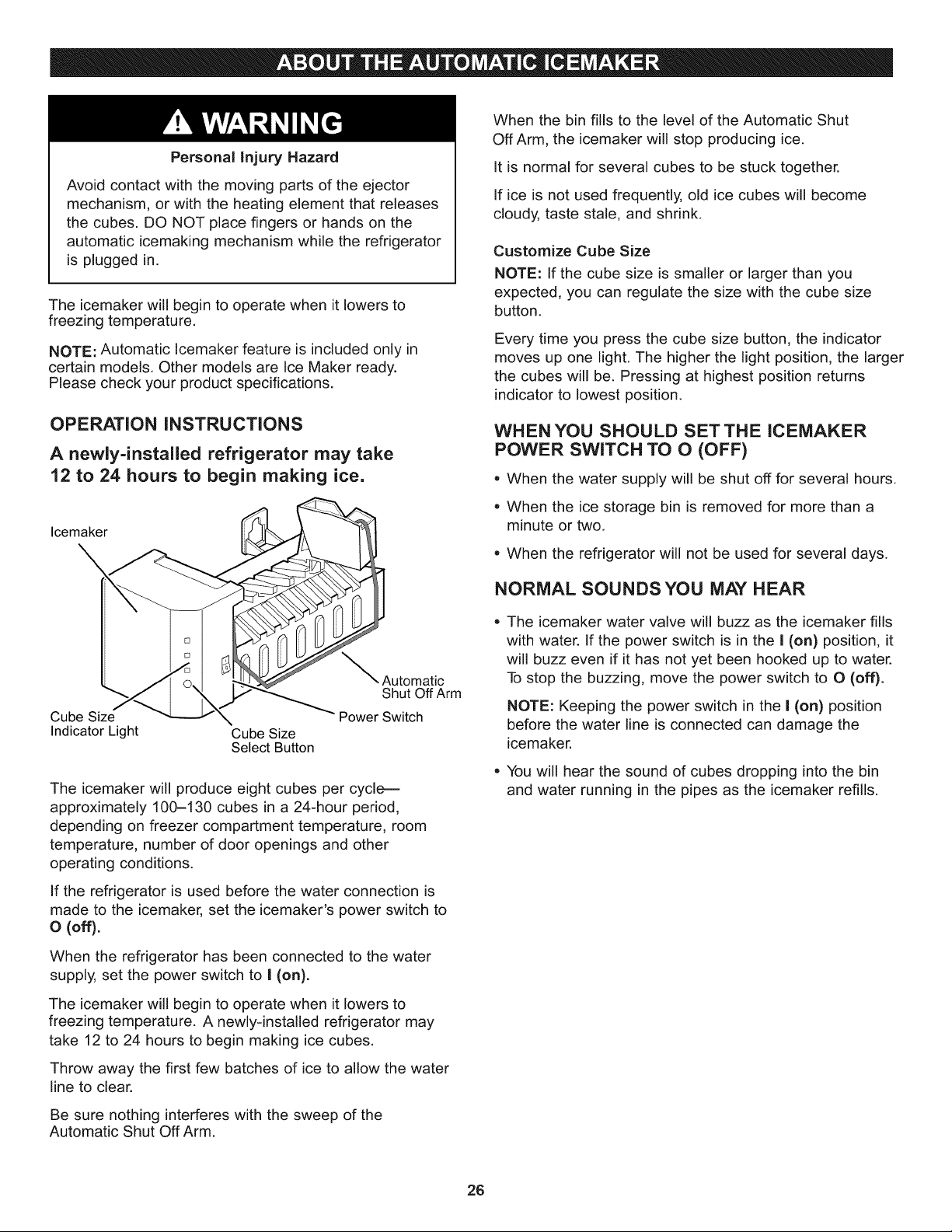
Icemaker
_Automatic
Shut Off Arm
Cube Size Power Switch
Indicator Light Cube Size
Select Button
The icemaker will produce eight cubes per cycle---
approximately 100-130 cubes in a 24-hour period,
depending on freezer compartment temperature, room
temperature, number of door openings and other
operating conditions.
If the refrigerator is used before the water connection is
made to the icemaker, set the icemaker's power switch to
o (off).
When the refrigerator has been connected to the water
supply, set the power switch to I (on).
The icemaker will begin to operate when it lowers to
freezing temperature. A newly-installed refrigerator may
take 12 to 24 hours to begin making ice cubes.
Throw away the first few batches of ice to allow the water
line to clear,
Be sure nothing interferes with the sweep of the
Automatic Shut Off Arm.
When the bin fills to the level of the Automatic Shut
Off Arm, the icemaker will stop producing ice.
It is normal for several cubes to be stuck together.
If ice is not used frequently, old ice cubes will become
cloudy, taste stale, and shrink.
Customize Cube Size
NOTE: If the cube size is smaller or larger than you
expected, you can regulate the size with the cube size
button.
Every time you press the cube size button, the indicator
moves up one light. The higher the light position, the larger
the cubes will be. Pressing at highest position returns
indicator to lowest position.
WHEN YOU SHOULD SET THE ICEMAKER
POWER SWITCH TO O (OFF)
• When the water supply will be shut off for several hours.
• When the ice storage bin is removed for more than a
minute or two.
When the refrigerator will not be used for several days.
NORMAL SOUNDS YOU MAY HEAR
The icemaker water valve will buzz as the icemaker fills
with water. If the power switch is in the I (on) position, it
will buzz even if it has not yet been hooked up to water.
To stop the buzzing, move the power switch to O (off).
NOTE: Keeping the power switch in the I (on) position
before the water line is connected can damage the
icemaker.
You will hear the sound of cubes dropping into the bin
and water running in the pipes as the icemaker refills.
26
BEFORE YOU BEGIN
This water line installation is not warranted by the
refrigerator or icemaker manufacturer. Follow these
instructions carefully to minimize the risk of expensive
water damage.
Water hammer (water banging in the pipes) in house
plumbing can cause damage to refrigerator parts and lead
to water leakage or flooding. Call a qualified plumber to
correct water hammer before installing the water supply
line to the refrigerator.
To prevent burns and product damage, do not hook up
the water line to the hot water supply.
If you use your refrigerator before connecting the water
line, make sure the icemaker power switch is in the O (off)
position.
Do not install the icemaker tubing in areas where
temperatures fall below freezing.
When using any electrical device (such as a power drill)
during installation, be sure the device is double-insulated
or grounded in a manner to prevent the hazard of electric
shock, or is battery-powered.
All installations must be in accordance with local plumbing
code requirements.
NOTE: Wear eye protection.
WHAT YOU WILL NEED
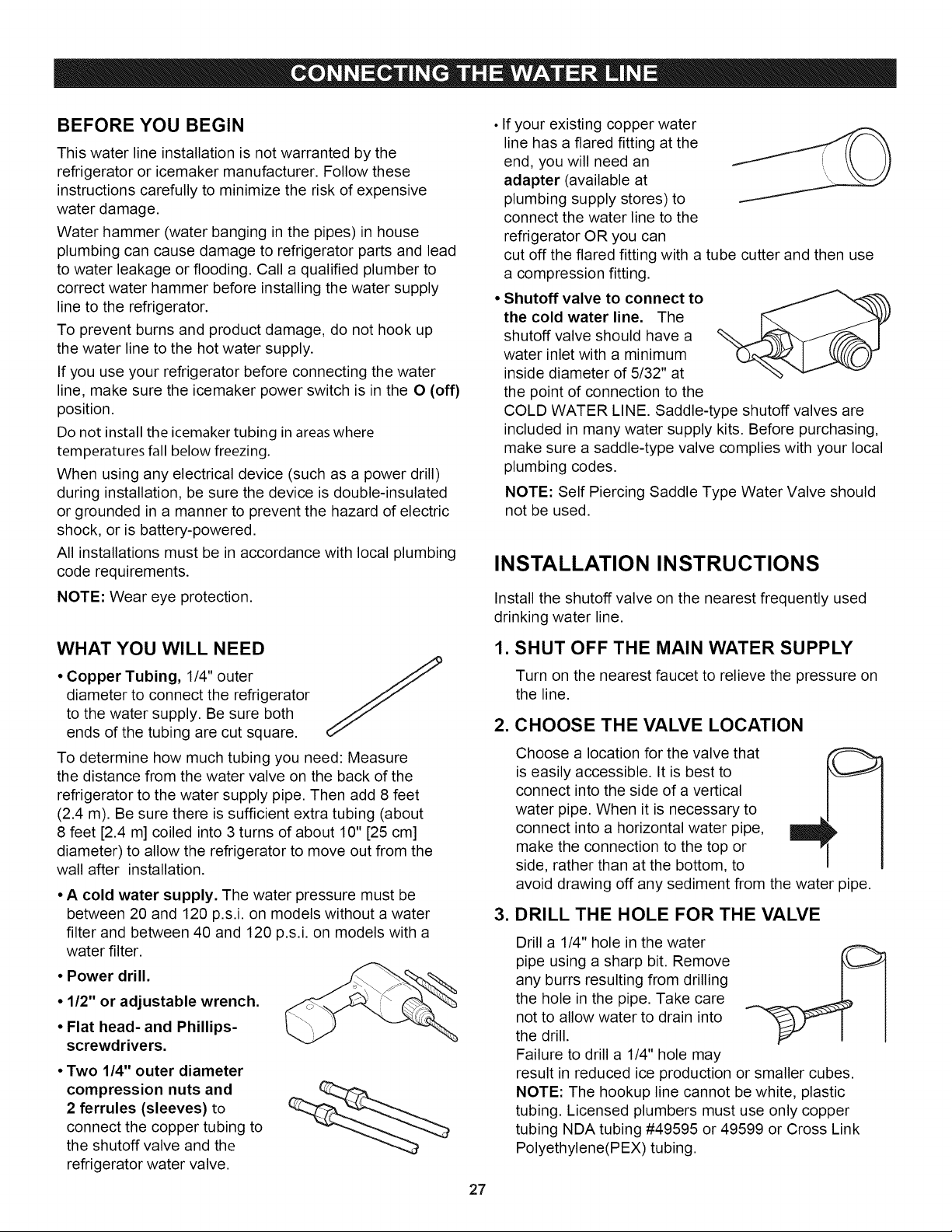
• Copper Tubing, 1/4" outer
diameter to connect the refrigerator
to the water supply. Be sure both
ends of the tubing are cut square.
To determine how much tubing you need: Measure
the distance from the water valve on the back of the
refrigerator to the water supply pipe. Then add 8 feet
(2.4 m). Be sure there is sufficient extra tubing (about
8 feet [2.4 m] coiled into 3 turns of about 10" [25 cm]
diameter) to allow the refrigerator to move out from the
wall after installation.
• A cold water supply. The water pressure must be
between 20 and 120 p.s.i, on models without a water
filter and between 40 and 120 p.s.i, on models with a
water filter.
• Power drill.
• 1/2" or adjustable wrench.
• Flat head- and Phillips-
screwdrivers.
• Two 1/4" outer diameter
compression nuts and
2 ferrules (sleeves) to
connect the copper tubing to
the shutoff valve and the
refrigerator water valve.
27
If your existing copper water
line has a flared fitting at the
end, you will need an
adapter (available at
plumbing supply stores) to
connect the water line to the
refrigerator OR you can
cut off the flared fitting with a tube cutter and then use
a compression fitting.
• Shutoff valve to connect to
the cold water line. The
shutoff valve should have a
water inlet with a minimum
inside diameter of 5/32" at
the point of connection to the
COLD WATER LINE. Saddle-type shutoff valves are
included in many water supply kits. Before purchasing,
make sure a saddle-type valve complies with your local
plumbing codes.
NOTE: Self Piercing Saddle Type Water Valve should
not be used.
INSTALLATION INSTRUCTIONS
Install the shutoff valve on the nearest frequently used
drinking water line.
1. SHUT OFF THE MAIN WATER SUPPLY
Turn on the nearest faucet to relieve the pressure on
the line.
2. CHOOSE THE VALVE LOCATION
Choose a location for the valve that
is easily accessible. It is best to
connect into the side of a vertical
water pipe. When it is necessary to
connect into a horizontal water pipe,
make the connection to the top or
side, rather than at the bottom, to
avoid drawing off any sediment from the water pipe.
3. DRILL THE HOLE FOR THE VALVE
Drill a 1/4" hole in the water
pipe using a sharp bit. Remove
any burrs resulting from drilling
the hole in the pipe. Take care
not to allow water to drain into
the drill.
Failure to drill a 1/4" hole may
result in reduced ice production or smaller cubes.
NOTE: The hookup line cannot be white, plastic
tubing. Licensed plumbers must use only copper
tubing NDA tubing #49595 or 49599 or Cross Link
Polyethylene(PEX) tubing.
INSTALLATION INSTRUCTIONS
(CONTINUED)
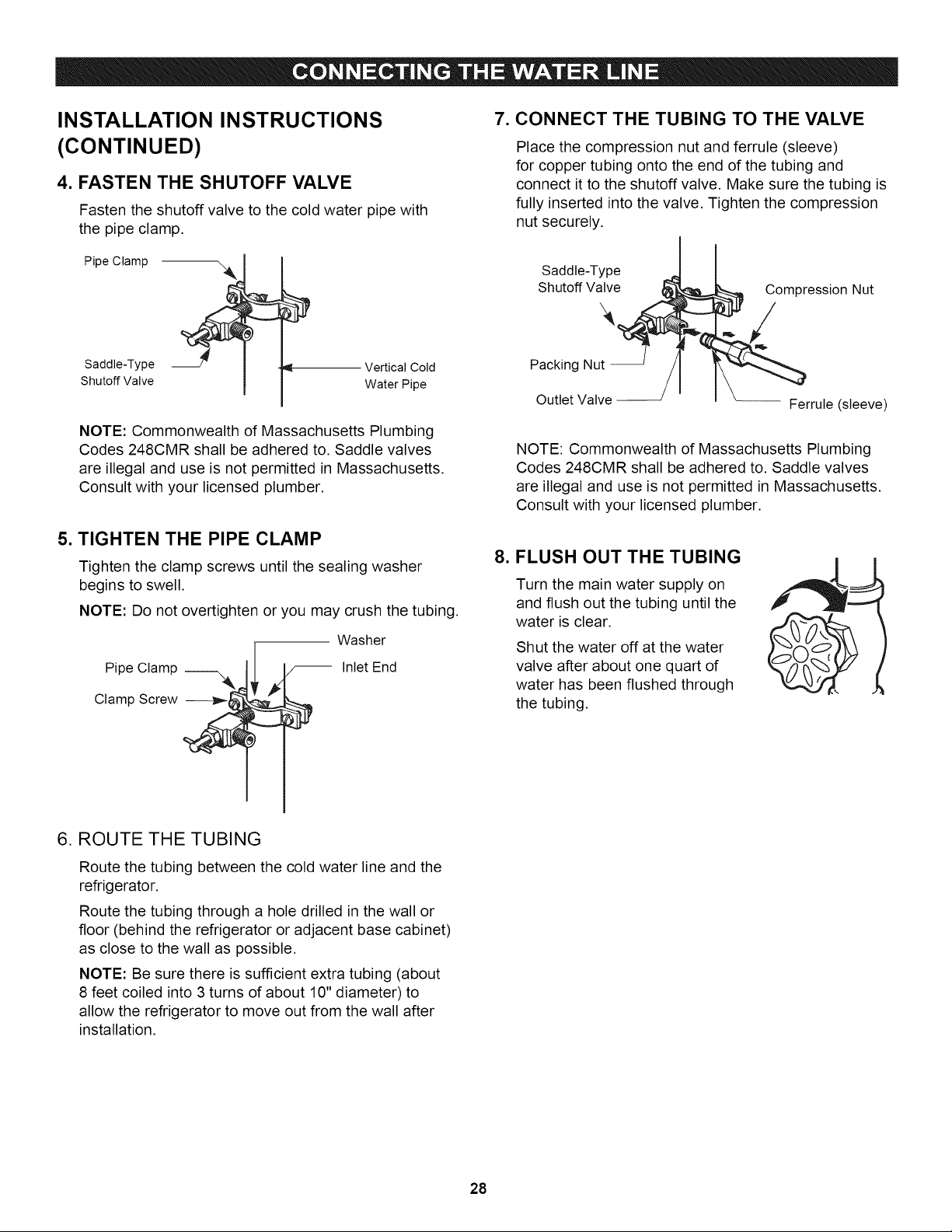
4. FASTEN THE SHUTOFF VALVE
Fasten the shutoff valve to the cold water pipe with
the pipe clamp,
Pipe Clamp
Saddle-Type
Shutoff Valve
Vertical Cold
Water Pipe
NOTE: Commonwealth of Massachusetts Plumbing
Codes 248CMR shall be adhered to. Saddle valves
are illegal and use is not permitted in Massachusetts.
Consult with your licensed plumber.
5. TIGHTEN THE PIPE CLAMP
Tighten the clamp screws until the sealing washer
begins to swell.
NOTE: Do not overtighten or you may crush the tubing.
Washer
Pipe Clamp --"_k I Inlet End
B
Clamp Screw --_,_
7. CONNECT THE TUBING TO THE VALVE
Place the compression nut and ferrule (sleeve)
for copper tubing onto the end of the tubing and
connect it to the shutoff valve. Make sure the tubing is
fully inserted into the valve. Tighten the compression
nut securely.
Saddle-Type
Shutoff Valve _
Packing Nut _
Outlet Valve
Compression Nut
_rrule (sleeve)
NOTE: Commonwealth of Massachusetts Plumbing
Codes 248CMR shall be adhered to. Saddle valves
are illegal and use is not permitted in Massachusetts.
Consult with your licensed plumber.
8. FLUSH OUT THE TUBING
Turn the main water supply on
and flush out the tubing until the
water is clear.
Shut the water off at the water
valve after about one quart of
water has been flushed through
the tubing.
6. ROUTE THE TUBING
Route the tubing between the cold water line and the
refrigerator.
Route the tubing through a hole drilled in the wall or
floor (behind the refrigerator or adjacent base cabinet)
as close to the wall as possible.
NOTE: Be sure there is sufficient extra tubing (about
8 feet coiled into 3 turns of about 10" diameter) to
allow the refrigerator to move out from the wall after
installation.
28
9. CONNECT THE TUBING TO THE
REFRIGERATOR
NOTE:
• Before making the connection to the refrigerator, be
sure the refrigerator power cord is not plugged into
the wall outlet.
• If your refrigerator does not have a water filter,
we recommend installing one if your water supply
has sand or particles that could clog the screen of
the refrigerator's water valve. Install the filter in the
water line near the refrigerator.
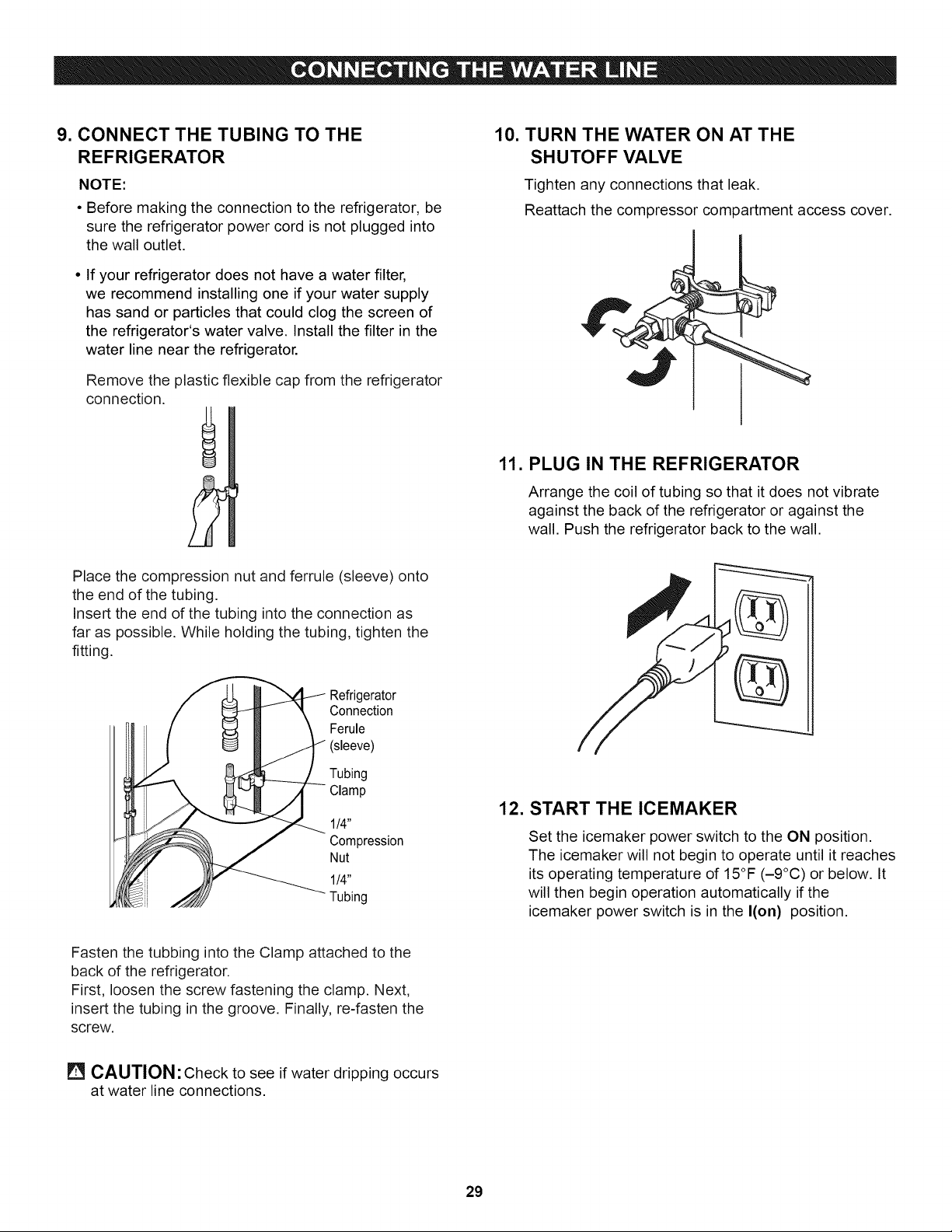
Remove the plastic flexible cap from the refrigerator
connection.
2
Place the compression nut and ferrule (sleeve) onto
the end of the tubing.
Insert the end of the tubing into the connection as
far as possible. While holding the tubing, tighten the
fitting.
Refrigerator
Connection
Ferule
(sleeve)
Tubing
Clamp
114"
Compression
Nut
1/4"
Tubing
10. TURN THE WATER ON AT THE
SHUTOFF VALVE
Tighten any connections that leak.
Reattach the compressor compartment access cover.
11. PLUG IN THE REFRIGERATOR
Arrange the coil of tubing so that it does not vibrate
against the back of the refrigerator or against the
wall. Push the refrigerator back to the wall.
%
12. START THE ICEMAKER
Set the icemaker power switch to the ON position.
The icemaker will not begin to operate until it reaches
its operating temperature of 15°F (-9°C) or below. It
will then begin operation automatically if the
icemaker power switch is in the I(on) position.
Fasten the tubbing into the Clamp attached to the
back of the refrigerator.
First, loosen the screw fastening the clamp. Next,
insert the tubing in the groove. Finally, re-fasten the
screw,
[] CAUTION: Check to see if water dripping occurs
at water line connections.
29
UNDERSTANDING SOUNDS YOU MAY HEAR
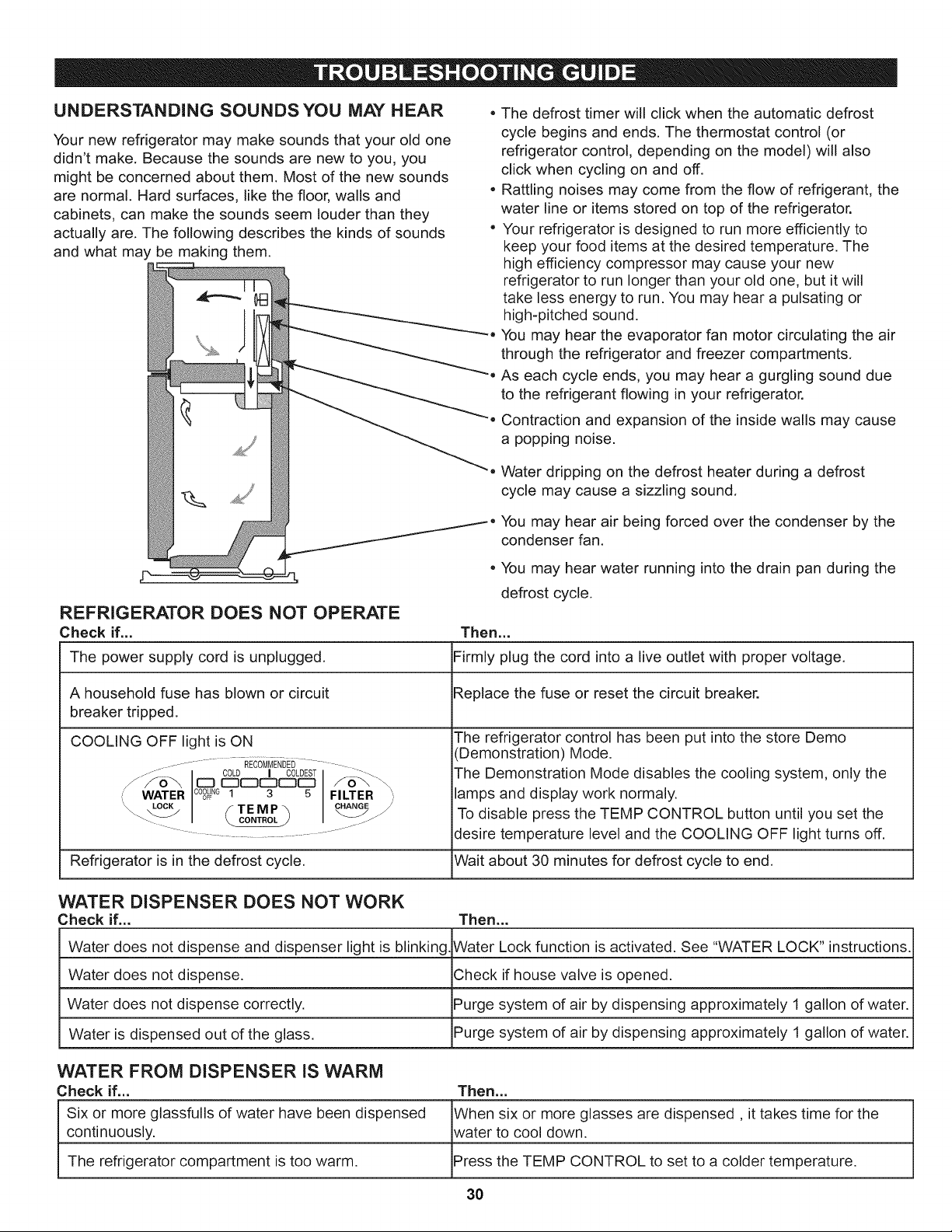
Your new refrigerator may make sounds that your old one
didn't make. Because the sounds are new to you, you
might be concerned about them. Most of the new sounds
are normal. Hard surfaces, like the floor, walls and
cabinets, can make the sounds seem louder than they
actually are. The following describes the kinds of sounds
and what may be making them.
The defrost timer will click when the automatic defrost
cycle begins and ends. The thermostat control (or
refrigerator control, depending on the model) will also
click when cycling on and off.
Rattling noises may come from the flow of refrigerant, the
water line or items stored on top of the refrigerator.
Your refrigerator is designed to run more efficiently to
keep your food items at the desired temperature. The
high efficiency compressor may cause your new
refrigerator to run longer than your old one, but it will
take less energy to run. You may hear a pulsating or
high-pitched sound.
You may hear the evaporator fan motor circulating the air
through the refrigerator and freezer compartments.
As each cycle ends, you may hear a gurgling sound due
to the refrigerant flowing in your refrigerator.
Contraction and expansion of the inside walls may cause
a popping noise.
Water dripping on the defrost heater during a defrost
cycle may cause a sizzling sound.
You may hear air being forced over the condenser by the
condenser fan.
You may hear water running into the drain pan during the
defrost cycle.
REFRIGERATOR DOES NOT OPERATE
Check if... Then...
The power supply cord is unplugged. Firmly plug the cord into a live outlet with proper voltage.
A household fuse has blown or circuit Replace the fuse or reset the circuit breaker.
breaker tripped.
COOLING OFF light is ON
..................... REcoMMENDE_........
/J¢o , c0LOEST
COOLING
WATER OFF 1 3 5 FILTER '
_-J\ LOCK f T E M P "_ CHANGEr.//
- _ J"
.................................. " J"
The refrigerator control has been put into the store Demo
(Demonstration) Mode.
The Demonstration Mode disables the cooling system, only the
lamps and display work normaly.
To disable press the TEMP CONTROL button until you set the
desire temperature level and the COOLING OFF light turns off.
Wait about 30 minutes for defrost cycle to end.Refrigerator is in the defrost cycle.
WATER DISPENSER DOES NOT WORK
Check if.,, Then...
Water does not dispense and dispenser light is blinking, Water Lock function is activated, See "WATER LOCK" instructions,
Water does not dispense, Check if house valve is opened,
Water does not dispense correctly, Purge system of air by dispensing approximately 1 gallon of water,
Water is dispensed out of the glass, Purge system of air by dispensing approximately 1 gallon of water,
WATER FROM DISPENSER iS WARM
Check if,.. Then...
Six or more glassfulls of water have been dispensed When six or more glasses are dispensed, it takes time for the
continuously, water to cool down,
The refrigerator compartment is too warm, Press the TEMP CONTROL to set to a colder temperature,
3O
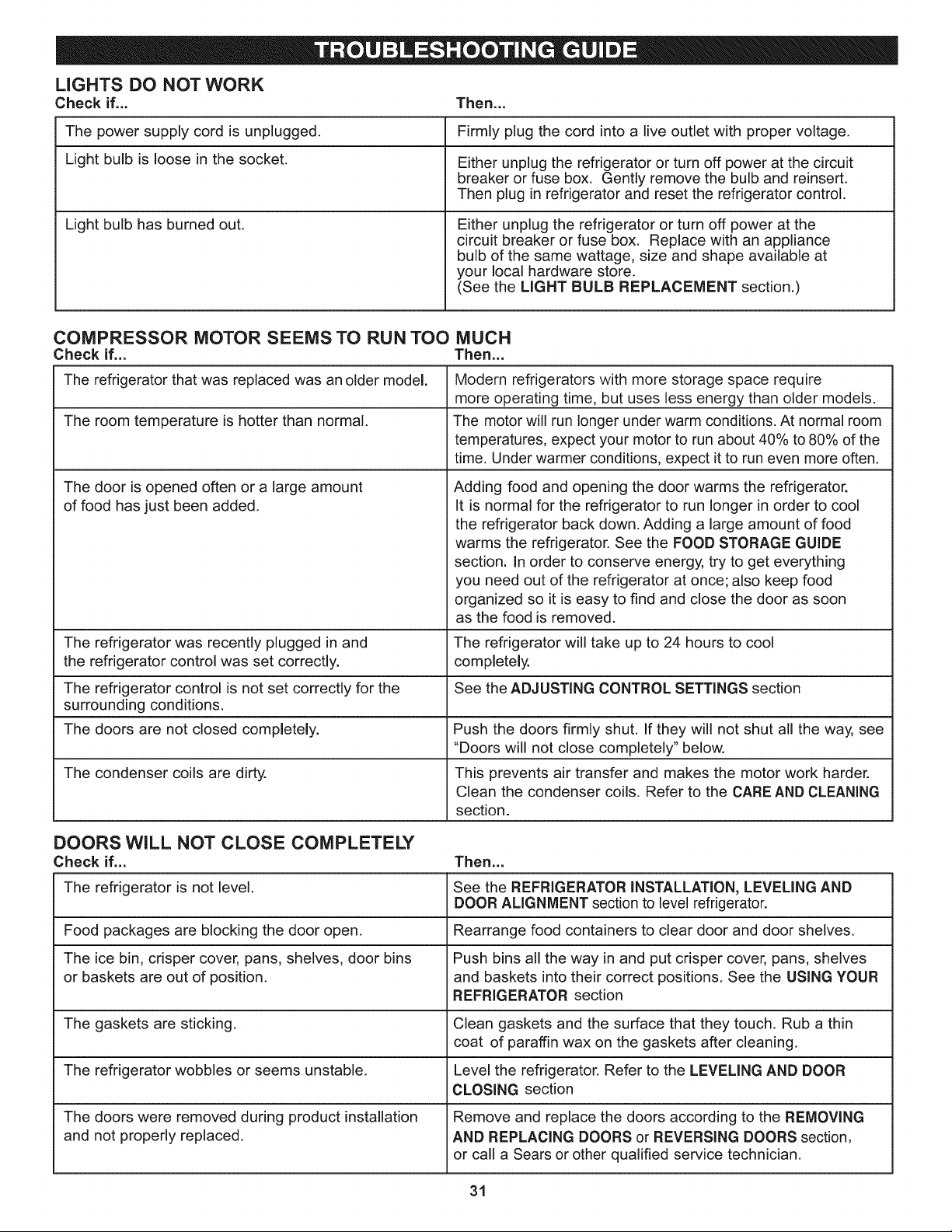
LIGHTS DO NOT WORK
Check if... Then...
The power supply cord is unplugged. Firmly plug the cord into a live outlet with proper voltage.
Light bulb is loose in the socket. Either unplug the refrigerator or turn off power at the circuit
breaker or fuse box. Gently remove the bulb and reinsert.
Then plug in refrigerator and reset the refrigerator control.
Light bulb has burned out. Either unplug the refrigerator or turn off power at the
circuit breaker or fuse box. Replace with an appliance
bulb of the same wattage, size and shape available at
your local hardware store.
(See the MGHT BULB REPLACEMENT section.)
COMPRESSOR MOTOR SEEMS TO RUN TOO MUCH
Check if... Then...
The refrigerator that was replaced was an older model.
The room temperature is hotter than normal.
The door is opened often or a large amount
of food has just been added.
Modern refrigerators with more storage space require
more operating time, but uses less energy than older models.
The motor will run longer under warm conditions. At normal room
temperatures, expect your motor to run about 40% to 80% of the
time. Under warmer conditions, expect it to run even more often.
Adding food and opening the door warms the refrigerator.
It is normal for the refrigerator to run longer in order to cool
the refrigerator back down. Adding a large amount of food
warms the refrigerator. See the FOOD STORAGE GUIDE
section. In order to conserve energy, try to get everything
you need out of the refrigerator at once; also keep food
organized so it is easy to find and close the door as soon
as the food is removed.
The refrigerator was recently plugged in and The refrigerator wil! take up to 24 hours to cool
the refrigerator control was set correctly, completely.
The refrigerator control is not set correctly for the See the ADJUSTING CONTROL SETTINGS section
surrounding conditions.
The doors are not closed completely. Push the doors firmly shut. If they will not shut all the way, see
"Doors will not close completely" below.
The condenser coils are dirty. This prevents air transfer and makes the motor work harder.
Clean the condenser coils. Refer to the CARE AND CLEANING
section.
DOORS WiLL NOT CLOSE COMPLETELY
Check if... Then...
The refrigerator is not level. See the REFRIGERATOR INSTALLATION, LEVELING AND
DOOR ALIGNMENT section to level refrigerator.
Food packages are blocking the door open. Rearrange food containers to clear door and door shelves.
The ice bin, crisper cover, pans, shelves, door bins Push bins all the way in and put crisper cover, pans, shelves
or baskets are out of 3osition. and baskets into their correct positions. See the USING YOUR
REFRIGERATOR section
The gaskets are sticking. Clean gaskets and the surface that they touch. Rub a thin
coat of paraffin wax on the gaskets after cleaning.
The refrigerator wobbles or seems unstable. Level the refrigerator. Refer to the LEVELING AND DOOR
CLOSING section
The doors were removed during product installation Remove and replace the doors according to the REMOVING
and not properly replaced. AND REPLACING DOORS or REVERSING DOORS section,
or call a Sears or other qualified service technician.
31
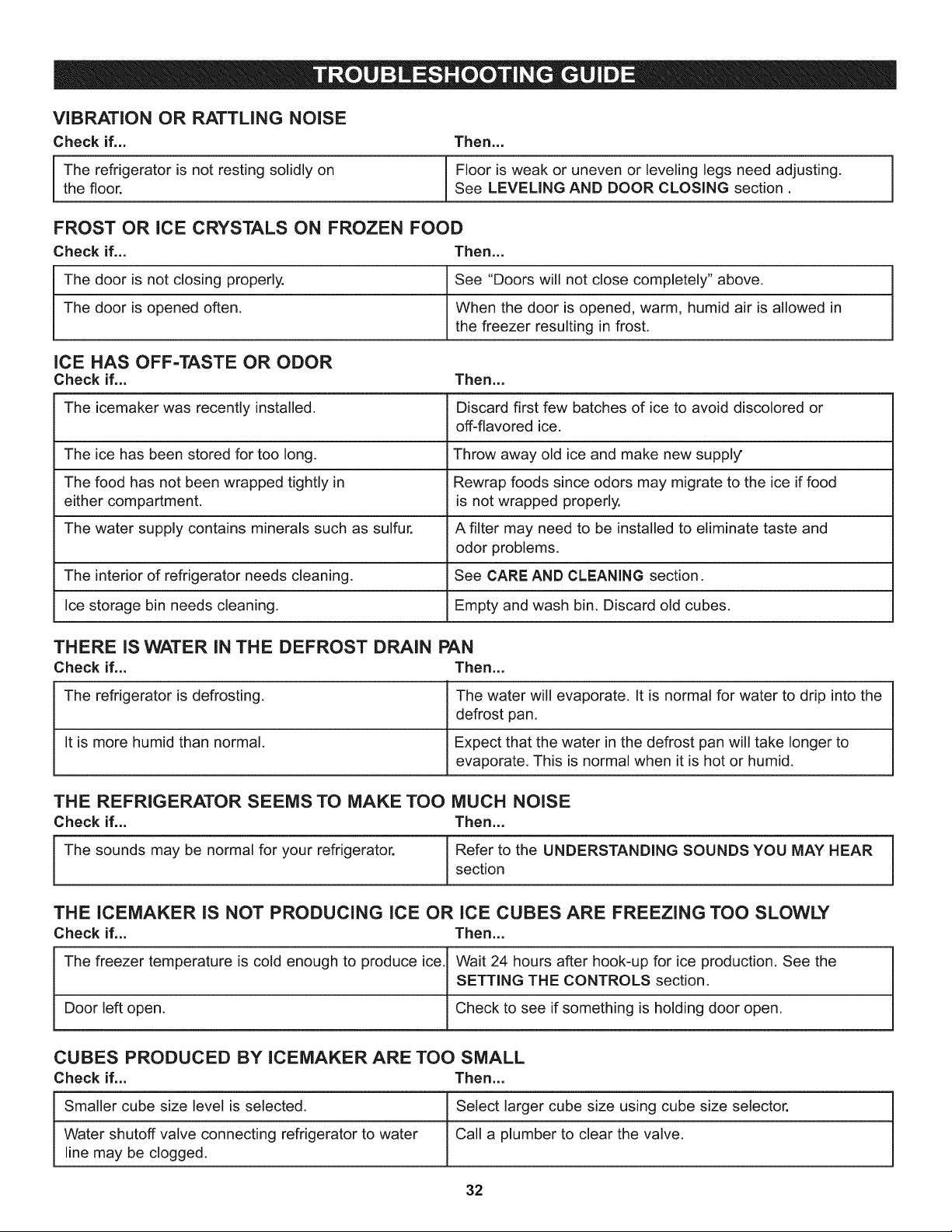
ViBRATiON OR RATTLING NOISE
Check if... Then...
J The refrigerator is not resting solidly on Floor is weak or uneven or leveling legs need adjusting.the floor. See LEVELING AND DOOR CLOSING section.
FROST OR iCE CRYSTALS ON FROZEN FOOD
Check if... Then...
The door is not closing properly. See "Doors will not close completely" above.
The door is opened often. When the door is opened, warm, humid air is allowed in
the freezer resulting in frost.
iCE HAS OFF=TASTE OR ODOR
Check if... Then...
The icemaker was recently installed. Discard first few batches of ice to avoid discolored or
off-flavored ice.
The ice has been stored for too long. Throw away old ice and make new supply
The food has not been wrapped tightly in Rewrap foods since odors may migrate to the ice if food
either compartment, is not wrapped properly.
The water supply contains minerals such as sulfur. A filter may need to be installed to eliminate taste and
odor problems.
The interior of refrigerator needs cleaning. See CARE AND CLEANING section.
Ice storage bin needs cleaning. Empty and wash bin. Discard old cubes.
THERE iS WATER IN THE DEFROST DRAIN PAN
Check if... Then...
The refrigerator is defrosting. The water will evaporate. It is normal for water to drip into the
defrost pan.
It is more humid than normal. Expect that the water in the defrost pan will take longer to
evaporate. This is normal when it is hot or humid.
THE REFRIGERATOR SEEMS TO MAKE TOO MUCH NOISE
Check if... Then...
I The sounds may be normal for your refrigerator. Refer to the UNDERSTANDING SOUNDS YOU MAY HEAR 1section
/
THE lCEMAKER iS NOT PRODUCING ICE OR ICE CUBES ARE FREEZING TOO SLOWLY
Check if... Then...
The freezer temperature is cold enough to produce ice.1 Wait 24 hours after hook-up for ice production. See the
I
SETTING THE CONTROLS section.
Door left open. I Check to see if something is holding door open.
CUBES PRODUCED BY lCEMAKER ARE TOO SMALL
Check if... Then...
Smaller cube size level is selected. Select larger cube size using cube size selector.
Water shutoff valve connecting refrigerator to water Call a plumber to clear the valve.
line may be clogged.
32
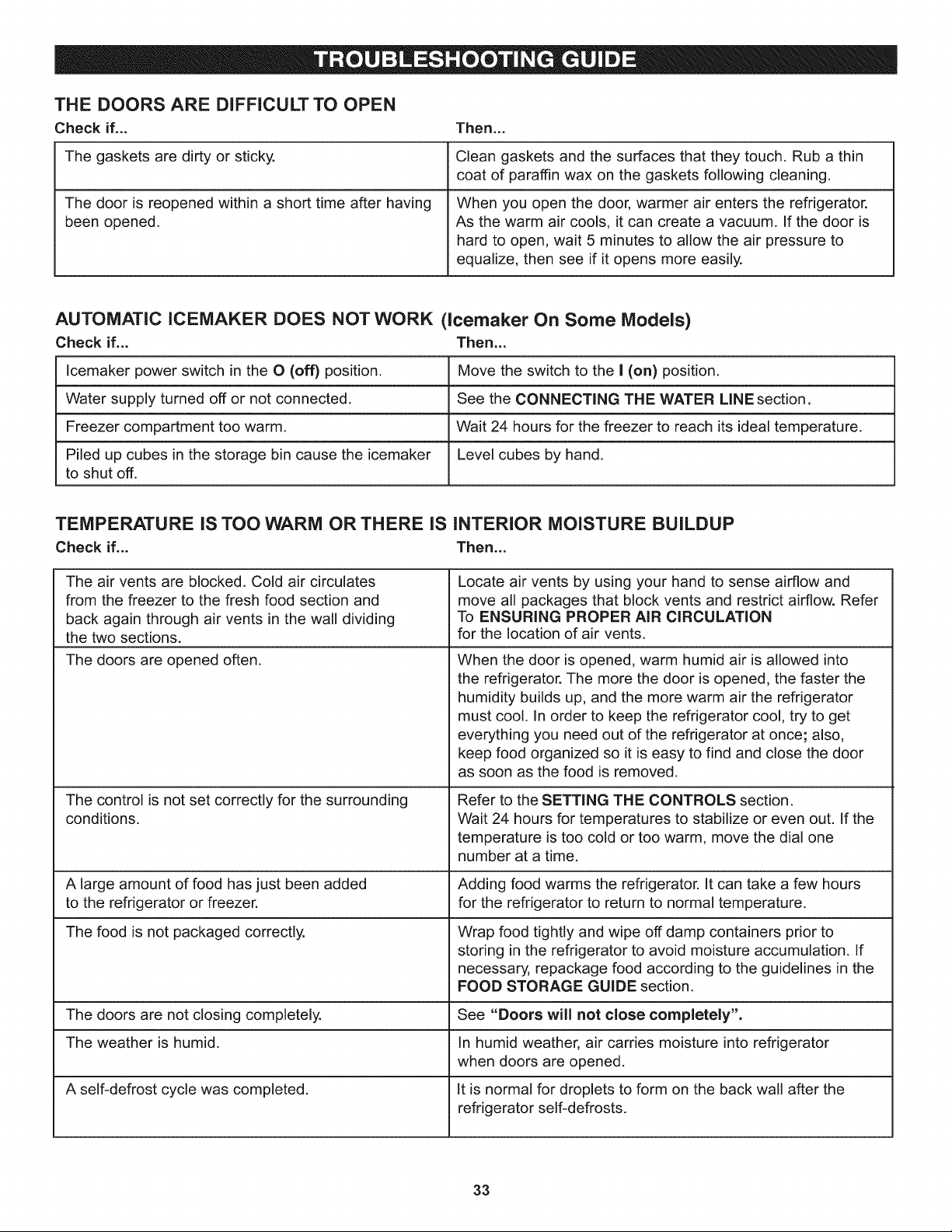
THE DOORS ARE DiFFiCULT TO OPEN
Check if... Then...
Clean gaskets and the surfaces that they touch. Rub a thin
coat of paraffin wax on the gaskets following cleaning.
The gaskets are dirty or sticky.
The door is reopened within a short time after having
been opened.
When you open the door, warmer air enters the refrigerator.
As the warm air cools, it can create a vacuum. If the door is
hard to open, wait 5 minutes to allow the air pressure to
equalize, then see if it opens more easily.
AUTOMATIC ICEMAKER DOES NOT WORK (icemaker On Some Models)
Check if... Then...
lcemaker power switch in the O (off) position, Move the switch to the I (on) position,
Water supply turned off or not connected, See the CONNECTING THE WATER LINE section .
Freezer compartment too warm. Wait 24 hours for the freezer to reach its ideal temperature,
Piled up cubes in the storage bin cause the icemaker Level cubes by hand.
to shut off.
TEMPERATURE iS TOO WARM OR THERE IS iNTERiOR MOISTURE BUILDUP
Check if... Then.,.
The air vents are blocked. Cold air circulates Locate air vents by using your hand to sense airflow and
from the freezer to the fresh food section and move all packages that block vents and restrict airflow. Refer
back again through air vents in the wall dividing To ENSURING PROPER AiR CiRCULATiON
the two sections, for the location of air vents,
The doors are opened often.
The control is not set correctly for the surrounding
conditions.
When the door is opened, warm humid air is allowed into
the refrigerator. The more the door is opened, the faster the
humidity builds up, and the more warm air the refrigerator
must cool. In order to keep the refrigerator cool, try to get
everything you need out of the refrigerator at once; also,
keep food organized so it is easy to find and close the door
as soon as the food is removed.
Refer to the SETTING THE CONTROLS section.
Wait 24 hours for temperatures to stabilize or even out. If the
temperature is too cold or too warm, move the dial one
number at a time.
A large amount of food has just been added Adding food warms the refrigerator. It can take a few hours
to the refrigerator or freezer, for the refrigerator to return to normal temperature.
The food is not packaged correctly. Wrap food tightly and wipe off damp containers prior to
storing in the refrigerator to avoid moisture accumulation. If
necessary, repackage food according to the guidelines in the
FOOD STORAGE GUIDE section.
The doors are not closing completely. See "Doors will not close completely".
The weather is humid. In humid weather, air carries moisture into refrigerator
when doors are opened.
A self-defrost cycle was completed. It is normal for droplets to form on the back wall after the
refrigerator self-defrosts.
33
Your Home
For expert troubleshooting and home solutions advice:
anag,e
www.managemyhome.com
For repair - in your home - of all major brand appliances,
lawn and garden equipment, or heating and cooling systems,
no matter who made it, no matter who sold it !
For the replacement parts, accessories and
owner's manuals that you need to do-it-yourself.
For Sears professional installation of home appliances
and items like garage door openers and water heaters.
1-800-4-MY-HOME ® Call anytime, day or night
(1-800-469-4663) (U.S.A. and Canada)
www.sears.com www.sears.ca
Our Home
For repair of carry-in items like vacuums, lawn equipment,
and electronics, call anytime for the location of the nearest
Sears Parts & Repair Service Center
1-800-488-1222 (U.S.A.) 1-800-469-4663 (Canada)
www.sears.com www.sears.ca
To purchase a protection agreement on a product serviced by Sears:
1-800-827-6655 (u.sA.) 1-800-361-6665 (Canada)
Para pedir servicio de reparaci6n
a domicilio, y para ordenar piezas:
1-888-SU.HOGAR®
(1-888-784-6427)
Au Canada pour service en frangais:
1-800-LE-FOYER Mc
(1-800-533-6937)
www.sears.ca
© Sears Brands, LLC
® Registered Trademark / TMTrademark / SMService Mark of Sears Brands, LLC
® Marca Registrada / TMMarca de Fabrica / SMMarca de Servicio de Sears Brands, LLC
MD
MCMarque de commerce / Marque d6posee de Sears Brands, LLC