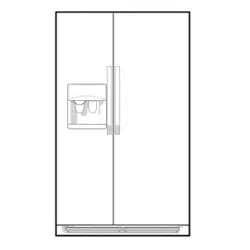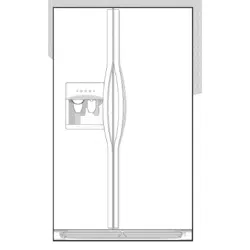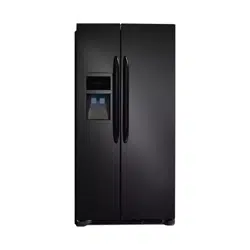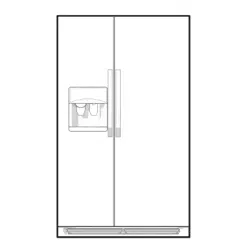
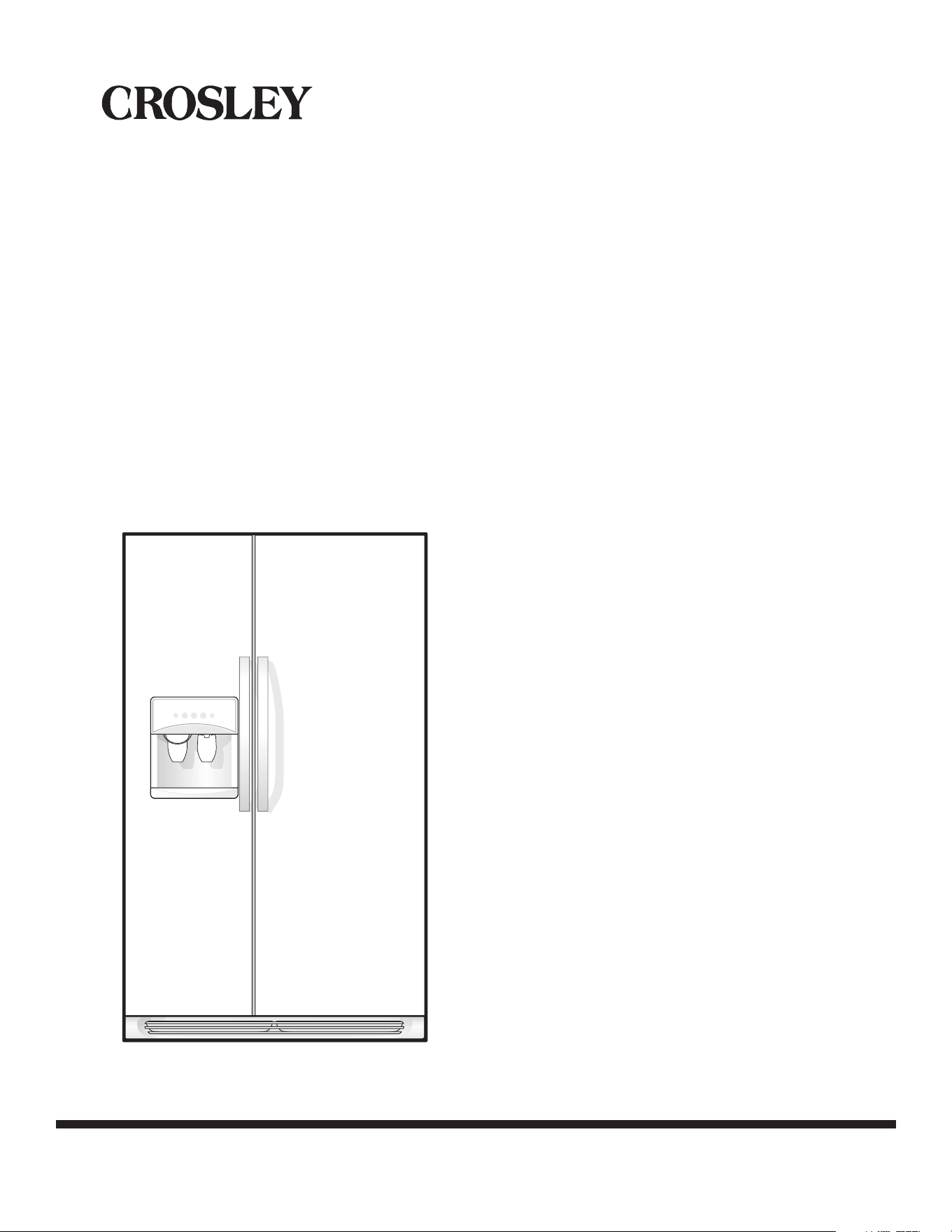
Side by Side
Refrigerator
Use & Care Manual
PN: 242111500 (April 2010)
READ AND SAVE THESE INSTRUCTIONS
WELCOME & CONGRATULATIONS .................... 2
IMPORTANT SAFETY INSTRUCTIONS ................ 3
INSTALLATION ......................................... 4-5
CONNECTING HOUSEHOLD WATER SUPPLY TO
REFRIGERATOR ......................................... 6
DOOR REMOVAL INSTRUCTIONS ..................... 7
DOOR HANDLE MOUNTING INSTRUCTIONS ........ 8
TEMPERATURE CONTROLS ........................ 9-11
LOOKING INSIDE ...................................12-13
AUTOMATIC ICE & WATER DISPENSER ......... 14-18
FOOD STORAGE & ENERGY SAVING IDEAS ........ 19
NORMAL OPERATING SOUNDS & SIGHTS ......... 20
CARE & CLEANING ................................. 21-22
WARRANTY ............................................. 23
BEFORE YOU CALL ................................24-27
2
ENGLISH
WELcomE & coNGrAtuLAtIoNS
Congratulations on your purchase of a new refrigerator! We
here at crosley corporation are very proud of our product and
we are completely committed to providing you with the best
service possible. Your satisfaction is our #1 priority.
Please read this Use & Care Manual very carefully. It contains
valuable information on how to properly maintain your new
refrigerator.
We know you’ll enjoy your new refrigerator and thank You
for choosing our product. We hope you consider us for future
purchases.
PLEASE rEAd ANd SAvE tHESE
INStructIoNS
This Use & Care Manual provides specific operating instructions
for your model. Use your refrigerator only as instructed in
this manual. These instructions are not meant to cover every
possible condition and situation that may occur. Common sense
and caution must be practiced when installing, operating and
maintaining any appliance.
Please record your model and serial numbers below for future
reference. This information is found on the serial plate located
inside the refrigerator compartment.
Please attach sales receipt
here for future reference.
For Product INFormAtIoN coNtAct:
336-761-1212
Crosley Corporation
111 Cloverleaf Dr.
Suite 200
Winston-Salem, NC 27103
www.crosley.com
NotE
Use only soap and water to clean serial plate.
PleaSe CoMPleTe aND MaIl IN The Product
rEGIStrAtIoN cArd INClUDeD WITh YoUr
refrIgeraTor.
Model Number:
Serial Number:
Purchase Date:
WArNING
WArNING indicates a potentially hazardous situation
which, if not avoided, could result in death or serious
injury.
ImPortANt
Indicates installation, operation, or maintenance information
which is important but not hazard-related.
dANGEr
dANGEr indicates an imminently hazardous situation
which, if not avoided, will result in death or serious injury.
SAFEtY PrEcAutIoNS
Do not attempt to install or operate your unit until you have read
the safety precautions in this manual. Safety items throughout
this manual are labeled with a Danger, Warning, or Caution
based on the risk type.
dEFINItIoNS
This is the safety alert symbol. It is used to alert you to
potential personal injury hazards. obey all safety messages that
follow this symbol to avoid possible injury or death.
cAutIoN
cAutIoN indicates a potentially hazardous
situation which, if not avoided, may result in minor
or moderate injury.
3
ENGLISH
ImPortANt SAFEtY INStructIoNS
For Your SAFEtY
• Donotstoreorusegasoline,orotherammableliquids
in the vicinity of this or any other appliance. read product
labelsforwarningsregardingammabilityandother
hazards.
• Donotoperatetherefrigeratorinthepresenceof
explosive fumes.
• Avoidcontactwithanymovingpartsofautomaticice
maker.
• Removeallstaplesfromthecarton.Staplescancause
severe cuts, and also destroy finishes if they come in
contact with other appliances or furniture.
cHILd SAFEtY
Destroy or recycle the carton, plastic bags, and any exterior
wrapping material immediately after the refrigerator is
unpacked. Children should NEvEr use these items to play.
Cartons covered with rugs, bedspreads, plastic sheets or
stretchwrapmaybecomeairtightchambers,andcanquickly
cause suffocation.
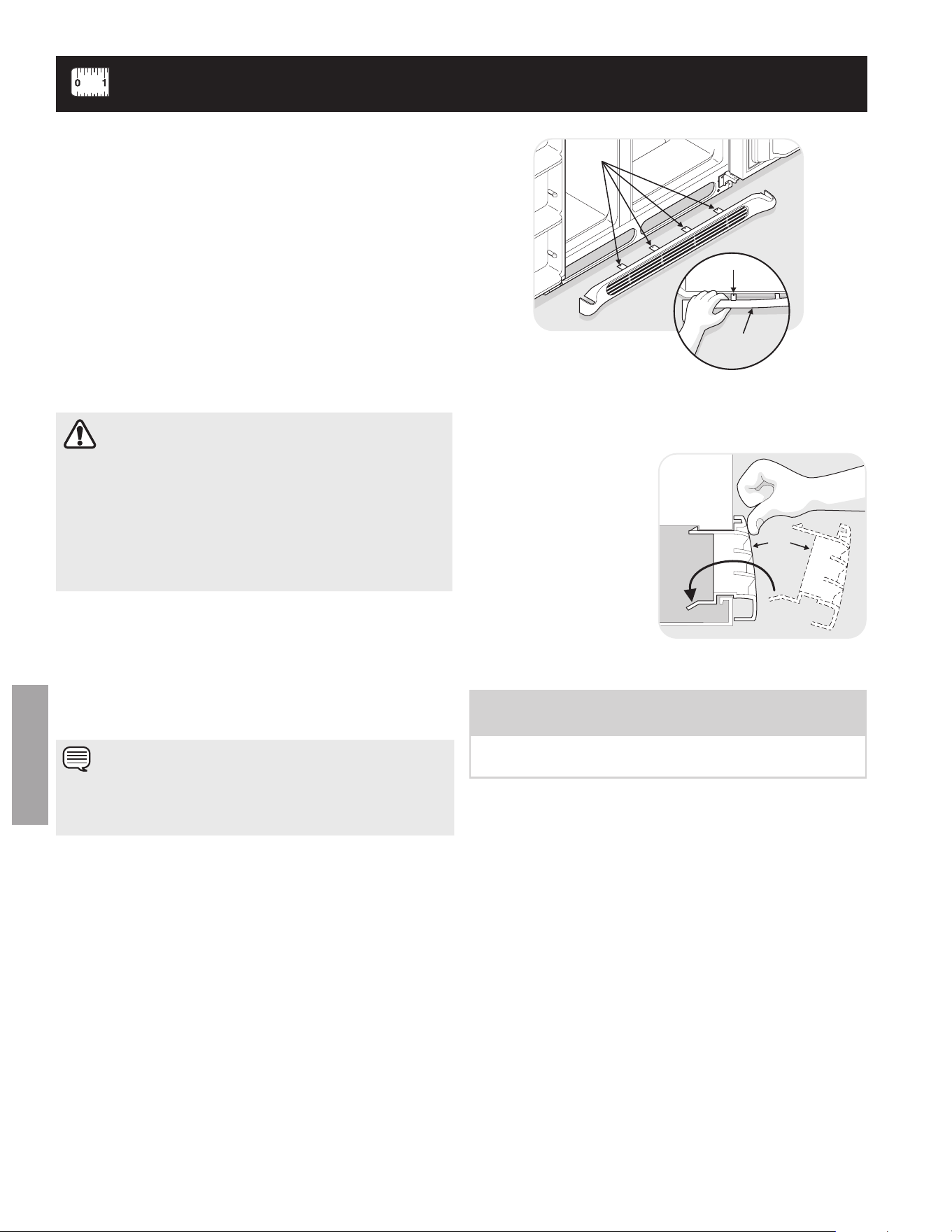
ProPEr dISPoSAL oF Your
rEFrIGErAtor or
FrEEzEr
Risk of child entrapment
Child entrapment and suffocation are
not problems of the past. Junked or
abandoned refrigerators or freezers
are still dangerous – even if they will
sit for “just a few days.” If you are
getting rid of your old refrigerator or
freezer, please follow the instructions
below to help prevent accidents.
Before you throw away your old refrigerator/ freezer:
• Removedoors.
• Leaveshelvesinplacesochildrenmaynoteasilyclimb
inside.
• Haverefrigerantremovedbyaqualiedservice
technician.
ELEctrIcAL INFormAtIoN
• the refrigerator must be plugged into its own
dedicated 115 volt, 60 Hz., 15 Amp, Ac only electrical
outlet.Thepowercordoftheapplianceisequippedwith
a three-prong grounding plug for your protection against
electrical shock hazards. It must be plugged directly
into a properly grounded three prong receptacle. The
receptacle must be installed in accordance with local
codesandordinances.Consultaqualiedelectrician.
avoid connecting refrigerator to a ground fault
Interruptor (gfI) circuit. do not use an extension cord
or adapter plug.
• Ifthepowercordisdamaged,itshouldbereplacedby
an authorized service technician to prevent any risk.
• Neverunplugtherefrigeratorbypullingonthepower
cord. always grip the plug firmly, and pull straight out
from the receptacle to prevent damaging the power cord.
• Unplugtherefrigeratorbeforecleaningandbefore
replacing a light bulb to avoid electrical shock.
• Performancemaybeaffectedifthevoltagevariesby
10% or more. operating the refrigerator with insufficient
power can damage the compressor. Such damage is
not covered under your warranty.
• Donotplugtheunitintoanelectricaloutletcontrolledby
a wall switch or pull cord to prevent the refrigerator from
being turned off accidentally.
WArNING
Please read All Instructions Before using this
refrigerator.
WArNING
these Guidelines must Be Followed to Ensure that
Safety mechanisms In this refrigerator Will operate
Properly.
ImPortANt
Pressing and holding the on/off button for 3 seconds, located
on the left side of the temperature control panel (electronic
controls), or turning the freezer and fresh food controls
to “0” (Mechanical controls) will disable your refrigerator’s
cooling system, but does not disconnect the power to the
light bulb and other electrical components. To turn off power
to your refrigerator you must unplug the power cord from the
electrical outlet.
4
ENGLISH
This Use & Care Manual provides general operating instructions
for your model. Use the refrigerator only as instructed in this
Use & Care Manual. Before starting the refrigerator, follow
these important first steps.
LocAtIoN
• Chooseaplacethatisnearagroundedelectricaloutlet.
do Not use an extension cord or an adapter plug.
• Ifpossible,placetherefrigeratoroutofdirectsunlight
and away from the range, dishwasher or other heat
sources.
• Therefrigeratormustbeinstalledonaoorthatislevel
and strong enough to support a fully loaded refrigerator.
• Considerwatersupplyavailabilityformodelsequipped
with an automatic ice maker.
INStALLAtIoN
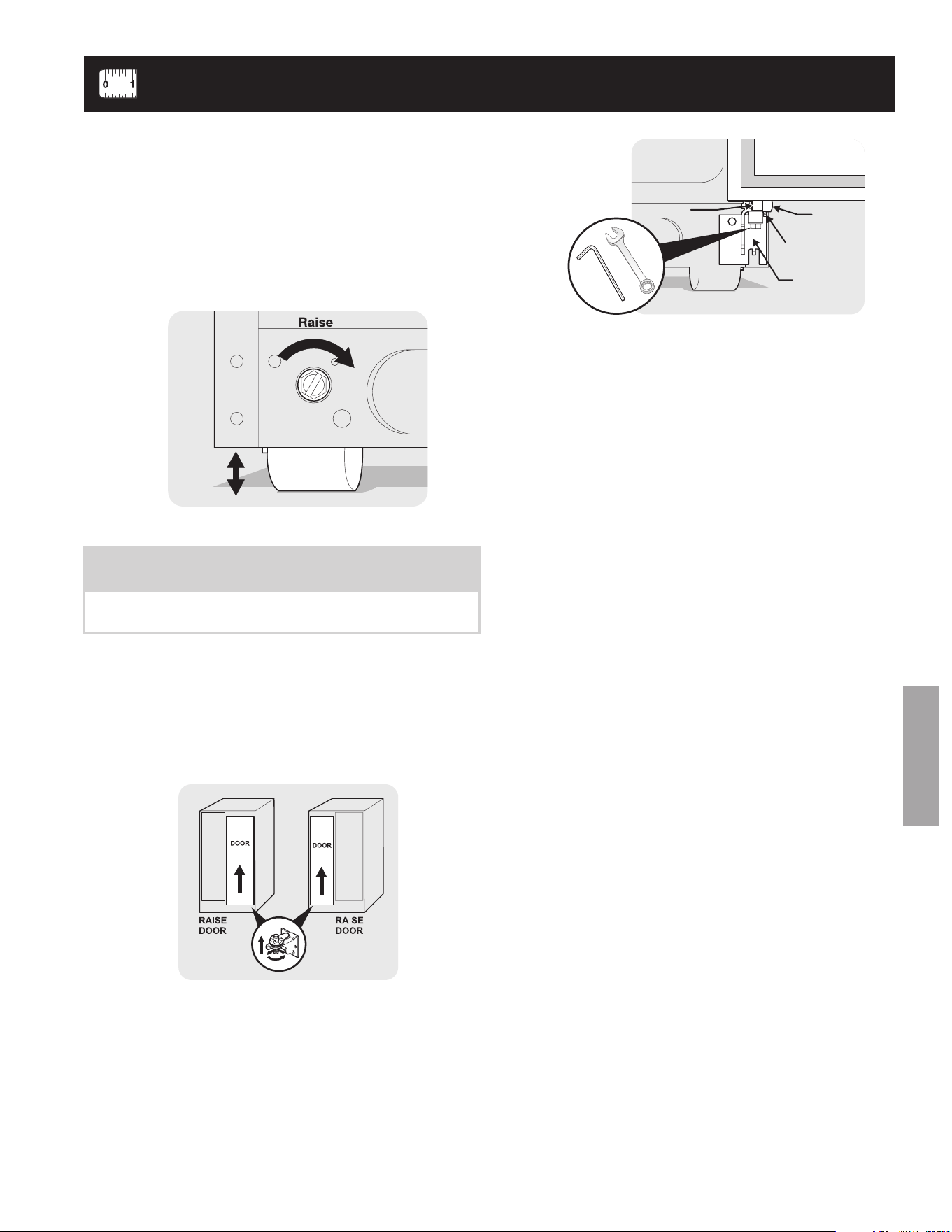
toE GrILLE INStALLAtIoN/rEmovAL
To Install Toe Grille:
1 open freezer and fresh food compartment doors.
2 line up toe grille at base of refrigerator, making sure the
four bottom tabs are resting through holes at base of
cabinet.
3 Starting from left side of toe grille, press in on first top
tab using your thumb and push toe grille forward until it
snaps in place. Continue this process until all tabs are
snapped in place and toe grille is secured to refrigerator.
To Remove Toe Grille:
1 open freezer and fresh food compartment doors.
2 Working from left side of toe grille, slip your fingers between
top of toe grille and cabinet. gently pull forward until first
set of tabs are free.
Slide your hand down
past the free tabs and
pull forward again until
the second set of tabs
are free. Continue this
process until all tabs
are free and the toe
grille can be removed.
(See graphic at top of
page in right column.)
Cabinet
To e
Grille
Tabs
Ta b
To e
Grille
INStALLAtIoN
Installation Clearances
• Allowthefollowingclearancesforeaseofinstallation,
proper air circulation, and plumbing and electrical
connections:
Sides & Top --------------------3/8”
Back -----------------------------1”
door oPENING
Your refrigerator should be positioned to allow easy access to
a counter when removing food. for best use of drawers and
freezer baskets, the refrigerator should be in a position where
both the refrigerator and freezer doors can be fully opened.
cAutIoN
do Not install the refrigerator where the temperature
will drop below 55°F (13°c) or rise above 110°F (43°c).
the compressor will not be able to maintain proper
temperatures inside the refrigerator.
do Not block the toe grille on the lower front of your
refrigerator. Sufficient air circulation is essential for the
proper operation of your refrigerator.
NotE
If your refrigerator is placed with the door hinge side against a
wall, you may have to allow additional space so the door can
be opened wider.
NOTE
The refrigerator doors are designed to shut by themselves
within a 20 degree opening.
Your refrigerator should be positioned to allow easy access to
a counter or table when removing food. for best use of drawers
and freezer baskets, the refrigerator should be in a position
where both the refrigerator and freezer doors can be fully
opened.
GuIdELINES For FINAL PoSItIoNING oF
Your rEFrIGErAtor:
• Allfourcornersofthecabinetmustrestrmlyonthe
oor.
• Thecabinetshouldbelevelatthefrontandrear.
• Thesidesshouldtilt¼inch(6mm)fromfronttoback(to
ensure that doors close and seal properly).
• Doorsshouldalignwitheachotherandbelevel.
ALL oF tHESE coNdItIoNS cAN BE
mEt BY rAISING or LoWErING tHE
AdjuStABLE FroNt roLLErS.
LEvELING
5
ENGLISH
INStALLAtIoN
Hinge
Flange
Set Screw
(some models)
Door Stop
Flange
Hinge
Open Door
7/16”Wrench
and 3/32” Hex Key
(some models)
to level the doors using the adjustable lower hinge:
3 If the freezer door is lower than the refrigerator door,
raise the freezer door by turning the adjustment screw
clockwise using a
7
/
16
inch wrench. (See illustration.)
4 after leveling, verify door stop contacts lower hinge and
top of door does not contact upper hinge through full
movement of door (from fully closed to fully open).
5 reinstall set screw, locking the door height.
NOTE
Some models will not have a set screw. for those models
follow steps 2 through 4.
1 Before leveling either door, remove set screw that locks
door height into position. (The door cannot be adjusted
without set screw removed).
2 If the refrigerator door is lower than the freezer door,
raise the refrigerator door by turning the adjustment
screw clockwise using a
7
/
16
inch wrench. (See
illustration.)
to level the cabinet using the front rollers:
1 open both doors and remove the toe grille (see “toe
Grille Installation and removal” in the “Installation”
section).
2 Closethedoorsanduseaat-bladescrewdriveror
3
/
8
inch socket wrench to raise or lower the front rollers.
3 ensure both doors are bind-free with their seals touching
the cabinet on all four sides.
6 replace the toe grille by fitting it into place (see “Toe
grille Installation and removal” in the “Installation”
section).
6
ENGLISH
coNNEctING HouSEHoLd WAtEr SuPPLY to rEFrIGErAtor
Before Installing The Water Supply Line, You Will Need:
• Basic tools: adjustablewrench,at-bladescrewdriver,
and Phillips
TM
screwdriver.
• Accesstoahouseholdcoldwaterlinewithwater
pressure between 30 and 100 psi.
• Awatersupplylinemadeof¼inch(6.4mm)OD,copper
or stainless steel tubing. To determine the length of tubing
needed, measure the distance from the ice maker inlet
valve at the back of the refrigerator to your cold water
pipe. Then add approximately 7 feet (2.1 meters), so the
refrigerator can be moved out for cleaning (as shown).
• Ashutoffvalvetoconnectthewatersupplylinetoyour
household water system. do Not use a self-piercing
type shutoff valve.
• Acompressionnutandferrule(sleeve)forconnectinga
copper water supply line to the ice maker inlet valve.
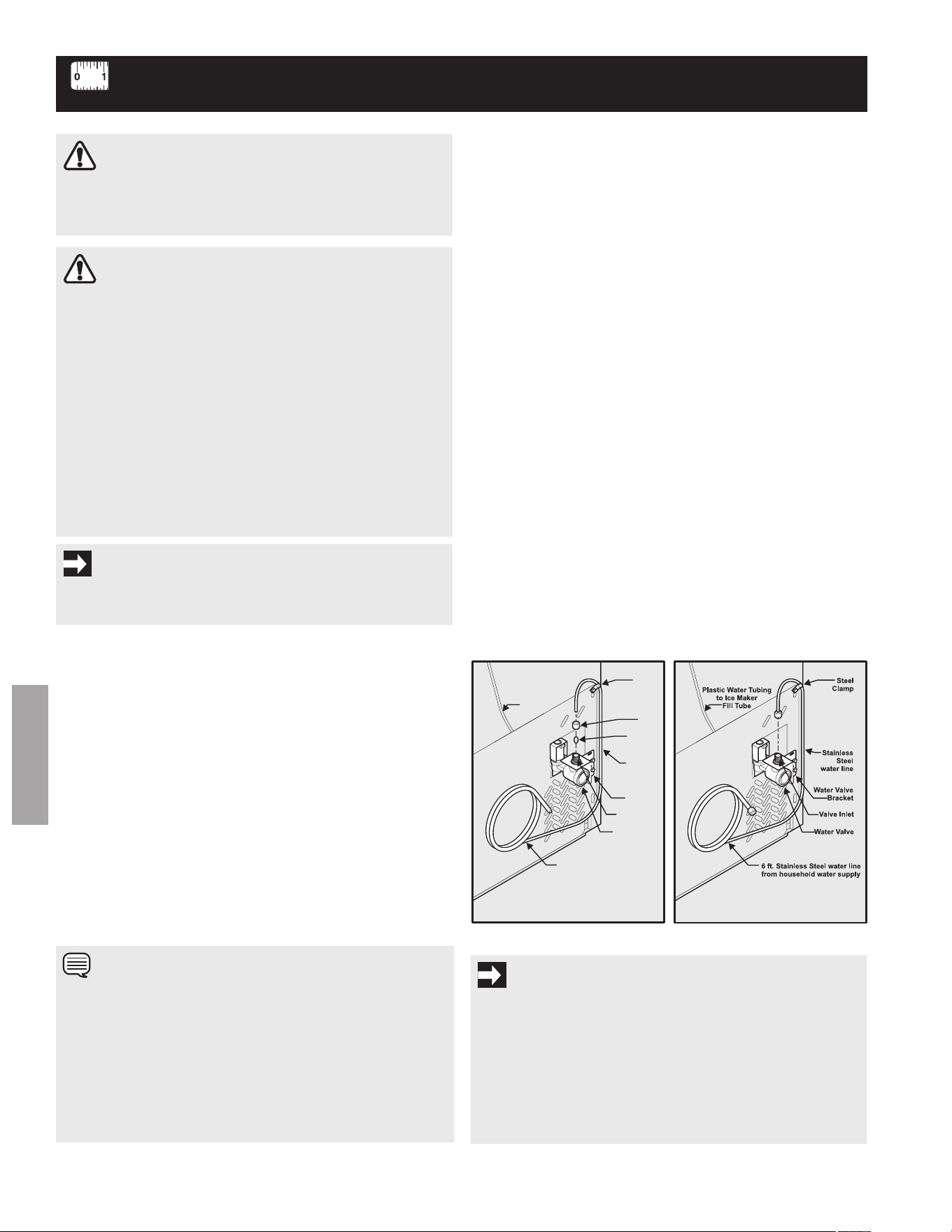
To Connect Water Supply Line To Ice Maker Inlet Valve
1 Disconnect refrigerator from electric power source.
2 Place end of water supply line into sink or bucket. Turn
ONwatersupplyandushsupplylineuntilwaterisclear.
Turn off water supply at shutoff valve.
3 remove plastic cap from water valve inlet and discard cap.
4 If you use copper tubing - Slide brass compression nut,
then ferrule (sleeve) onto water supply line. Push water
supplylineintowatervalveinletasfarasitwillgo(¼
inch/6.4mm).Slideferrule(sleeve)intovalveinletand
finger tighten compression nut onto valve. Tighten another
half turn with a wrench; do Not over tighten. See figure 1.
If you use stainless steel tubing - The nut and ferrule
are already assembled on the tubing. Slide compression
nut onto valve inlet and finger tighten compression nut
onto valve. Tighten another half turn with a wrench; Do
NoT over tighten. See figure 2.
5 With steel clamp and screw, secure water supply line
(copper tubing only) to rear panel of refrigerator as shown.
6 Coil excess water supply line (copper tubing only) about
2½ turns behind refrigerator as shown and arrange coils
so they do not vibrate or wear against any other surface.
7 Turn oN water supply at shutoff valve and tighten any
connections that leak.
8 reconnect refrigerator to electrical power source.
9 To turn ice maker on, lower wire signal arm (side
mounted) or set the ice maker’s oN/oFF power switch
to the “I” position (rear mounted).
WArNING
to avoid electric shock, which can cause death or severe
personal injury, disconnect the refrigerator from electrical
power before connecting a water supply line to the refrigerator.
cAutIoN
to Avoid Property damage:
• Copperorstainlesssteelbraidedtubingisrecommended
for the water supply line. Water supply tubing made of ¼”
plastic is not recommended to be used. Plastic tubing
greatly increases the potential for water leaks, and the
manufacturer will not be responsible for any damage if
plastic tubing is used for supply line.
• DONOTinstallwatersupplytubinginareaswhere
temperatures fall below freezing.
• Chemicalsfromamalfunctioningsoftenercan
damage the ice maker. If the ice maker is connected
to soft water, ensure that the softener is maintained
and working properly.
ImPortANt
ensure that your water supply line connections comply with all
local plumbing codes.
NotE
Check with your local building authority for recommendations
on water lines and associated materials prior to installing your
new refrigerator. Depending on your local/state building codes,
electrolux recommends for homes with existing valves its Smart
Choicewaterlinekit5305513409(witha6ft.stainlesssteel
water line) and for homes without an existing valve, electrolux
recommendsitsSmartChoicewaterlinekit5304410264(with
a 20 ft. copper water line with self-tapping saddle valve). Please
refer to www.CroSleY.com/store for more information.
ImPortANt
after connecting the water supply, refer to “how to Prime the
Water Supply System” for important information about priming
an empty water supply system.
Your refrigerator’s water supply system includes several
tubing lines, a water filter, a water valve, and a water tank. to
ensure that your water dispenser works properly, this system
must be completely filled with water when your refrigerator is
first connected to the household water supply line.
Copper water line
from household water supply
(Includeenough tubing in loop to allow
moving refrigerator out for cleaning.)
Ferrule
(Sleeve)
Copper
water line
WaterValve
Valve Inlet
Water Valve
Bracket
Steel
Clamp
Plastic Water Tubing
to Ice Maker
Fill Tube
Brass
Compression
Nut
Figure 1 Figure 2
7
ENGLISH
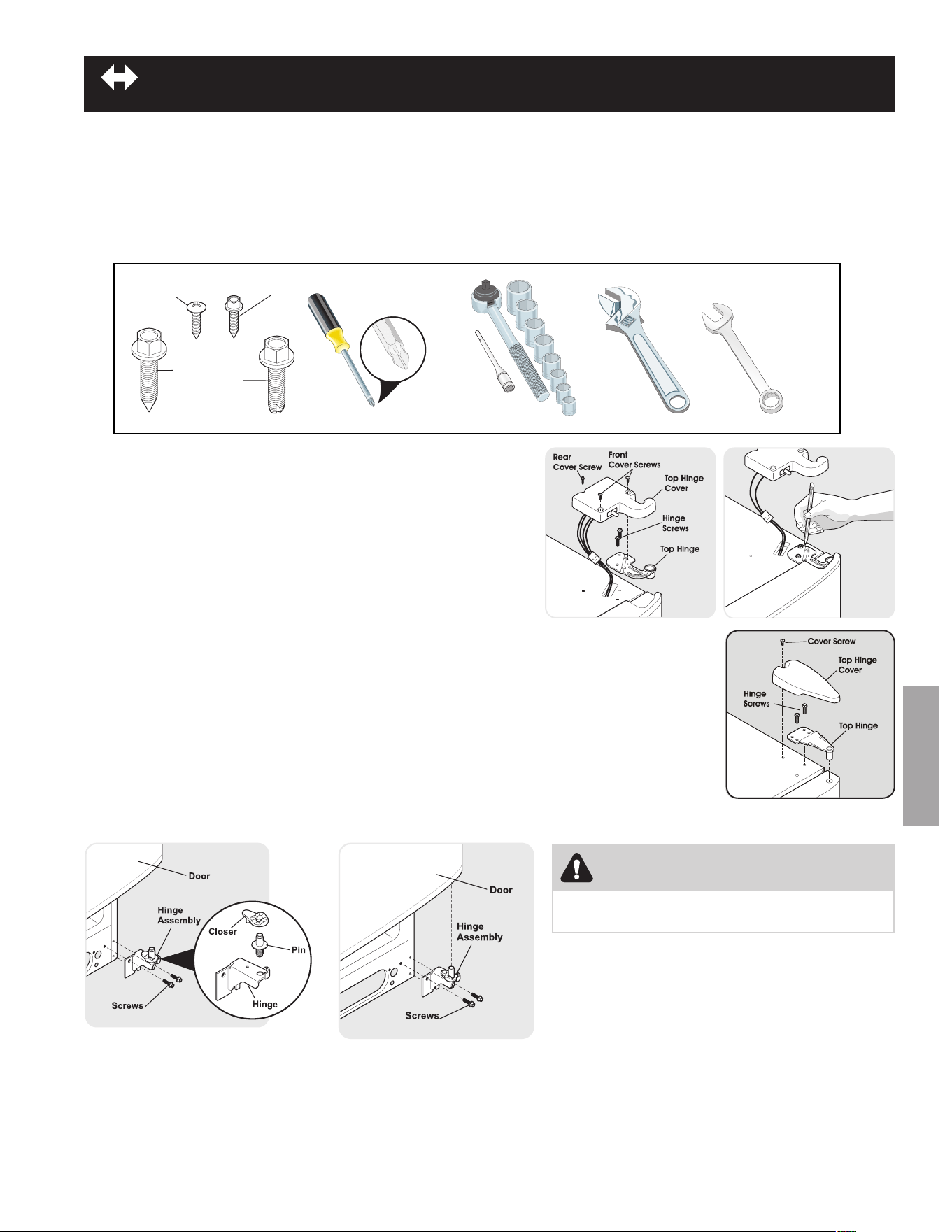
to rEmovE tHE rEFrIGErAtor door:
1 Trace lightly around the door’s top hinge with a pencil. This makes reinstallation easier.
2 remove the two screws from the top hinge. lift the door off of the bottom hinge and set it aside.
3 remove the two bottom hinge screws and hinge if necessary.
To reinstall the refrigerator door, reverse the above steps.
door rEmovAL INStructIoNS
Getting through narrow spaces
If your refrigerator will not fit through an entrance area, you can reduce its size by removing the doors. Check first by measuring the
entrance.
rEquIrEd tooLS
You will need the following tools:
to PrEPArE For rEmovING tHE doorS:
1 Make sure the electrical power cord is unplugged from the wall
outlet.
2 open both doors and remove the toe grille (as explained in the
Installation Instructions that came with your appliance).
3 remove any food from the door shelves.
4 Close the doors.
to rEmovE tHE rEFrIGErAtor toP HINGE
covEr:
1 remove the three screws from each cover over the top door hinges.
2 lift hinge cover straight up and off.
Adjustable
Wrench
Socket
Wrench Set
OR
Phillips Head
™
Tools Necessary:
3/8” Fixed
Wrench
AND
OR
To p Hinge
Cover Rear
Screw
To p Hinge
Cover Front
Screw
Bottom
Hinge
Screw
To p
Hinge
Screw
Adjustable Hinge
(some models)
Non-Adjusting Hinge
(some models)
CAUTION
Be sure doors are set aside in a secure position
where they cannot fall and cause personal injury.
8
ENGLISH
door HANdLE mouNtING INStructIoNS
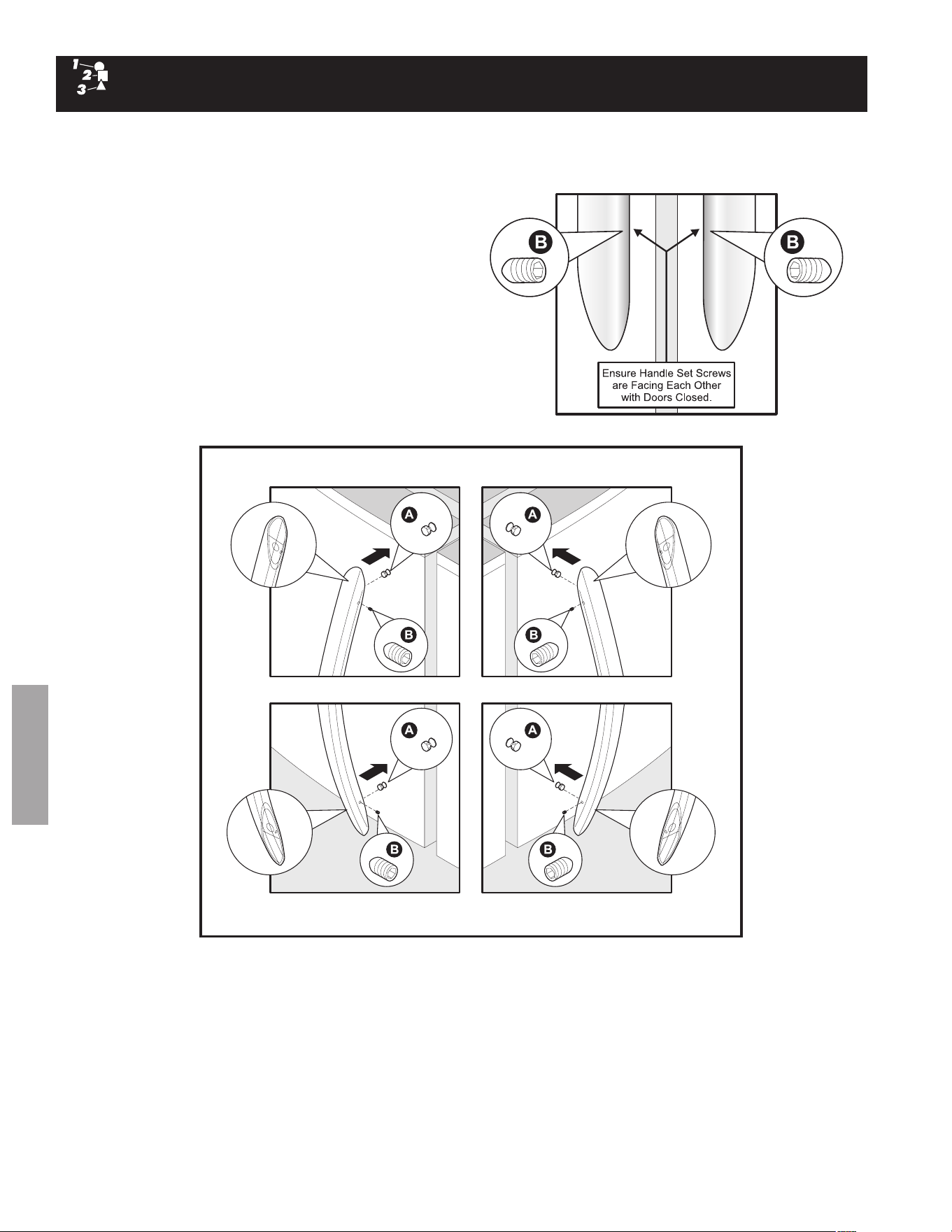
Door handle Mounting Instructions
remove handles from cartoning and any other protective 1.
packaging.
Position freezer handle end caps over upper and lower 2.
preinstalled shoulder bolts (a) that are fastened into door,
ensuring the holes for the set screws are facing towards the
refrigerator door.
While holding handle firmly against door, fasten upper and 3.
lower allen set screws (B) with supplied allen wrench.
repeat steps 2 and 3 to install refrigerator handle. ensure the 4.
holes for the set screws are facing towards the freezer door.
NOTE:Allsetscrewsshouldbetightenedandsubush(allen5.
set screw should be seated just below the surface of the end
cap) of handle end cap. The end caps should be drawn tight to
freezer and refrigerator doors with no gaps.
Freezer Upper End Cap
Refrigerator Lower End Cap
Refrigerator Upper End Cap
Freezer Lower End Cap
9
ENGLISH
ELEctroNIc tEmPErAturE coNtroLS
ALLoWING cooLING tImE BEForE uSE
To ensure safe food storage, allow your refrigerator to operate with the doors closed for at least 8 to 12 hours before placing food
inside. During this cooling period, you do not need to adjust the controls, which are preset at the factory.
SEttING cooLING tEmPErAturES
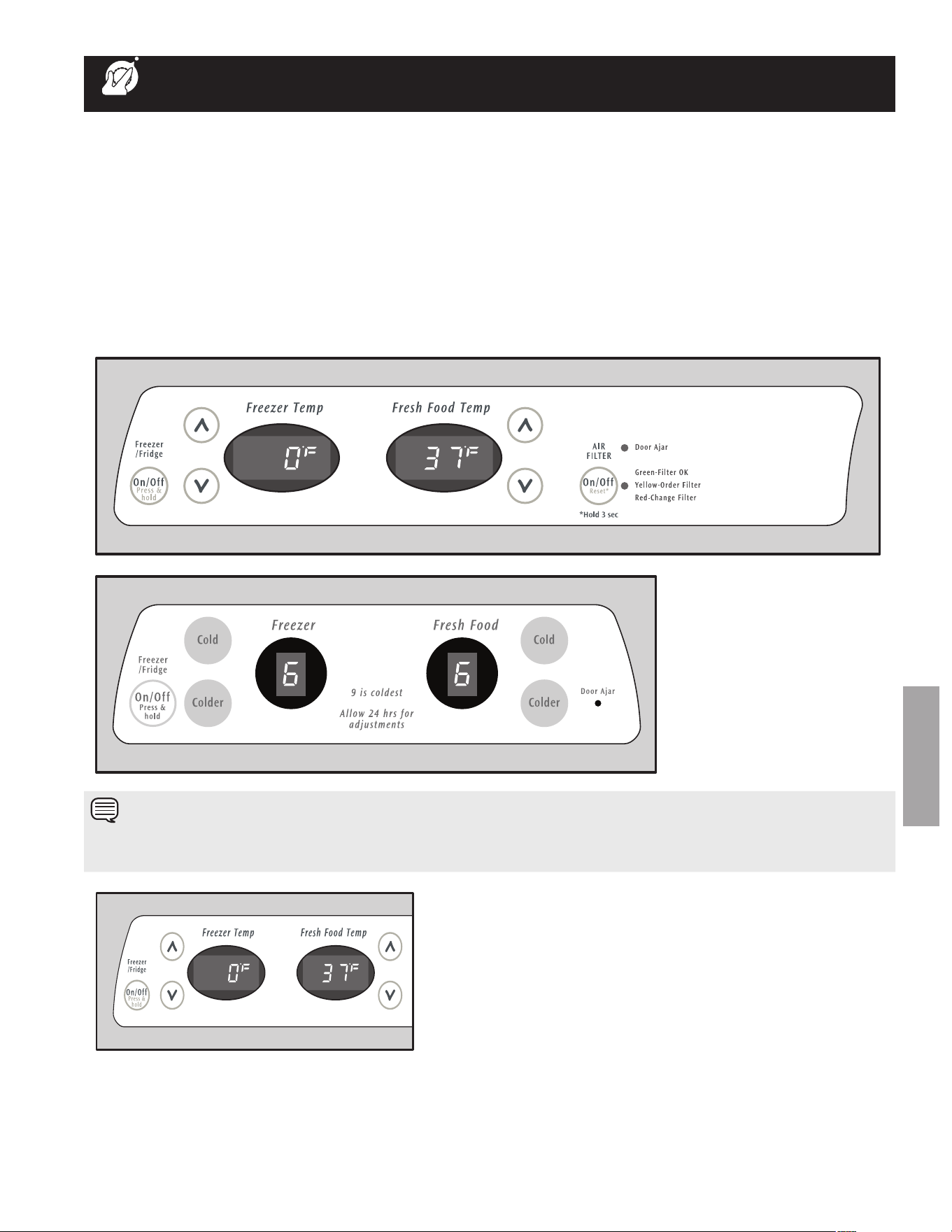
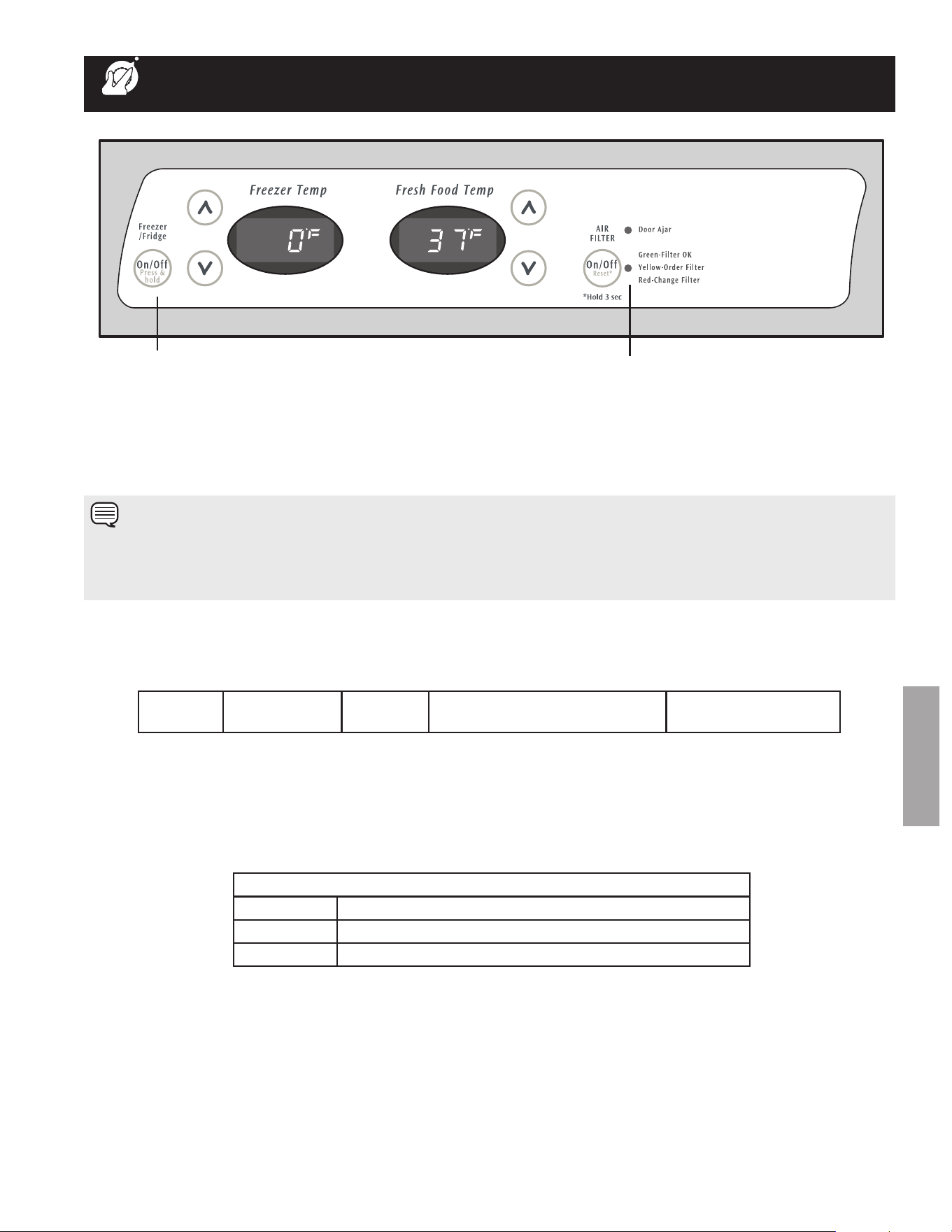
Your refrigerator comes with a state-of-the-art electronic digital control system. The system’s control panel is located at the top of
the fresh food compartment.
The two digital displays on the left half of the control panel indicate the current settings or temperatures of your freezer and fresh
food compartments. The models with a 2-digit temperature display are for reference only, and do not display the current accurate
compartment temperature. Should you desire to see what the current accurate temperature is, place a separate thermometer
inside the freezer or fresh food compartment in the desired location.
(Single digit display - Features may vary.)
To adjust the temperature to a higher or lower setting, press the
up (cold) or down (colder) button closest to the display. The
first time you press the button, the display shows current setting
you entered. each press of the button after that changes the
setting by one.
The display shows your new setting momentarily, then changes
back to the current temperature.
NotE
The advanced electronic control system in your refrigerator includes additional display modes that service professionals can
use to rapidly diagnose performance issues.
10
ENGLISH
tEmPErAturE coNtroLS
tEmPErAturE AdjuStmENt
after 24 hours, adjust the controls as needed. Make your adjustments small and gradual; allowing time for temperatures to change
and stabilize. refer to the adjacent guidelines for temperature settings.
To adjust the temperature to a higher or lower setting, press the up or down button closest to the display. The first time you press
the button, the display shows the last setting you entered. each press of the button after that increments the setting by one degree.
The display shows your new setting momentarily, then changes back to the current temperature.
IF tEmPErAturE dISPLAYS FLASH...
Ifeveryouseebothtemperaturedisplayscontinuouslyashing,itmayindicatethatthecontrolsystemhasdetectedaperformance
problem.Callyourservicerepresentative,whocaninterprettheashingmessage.
To maintain temperatures, a fan circulates air in the refrigerator and freezer compartments. for good circulation, do not block cold
air vents with food items.
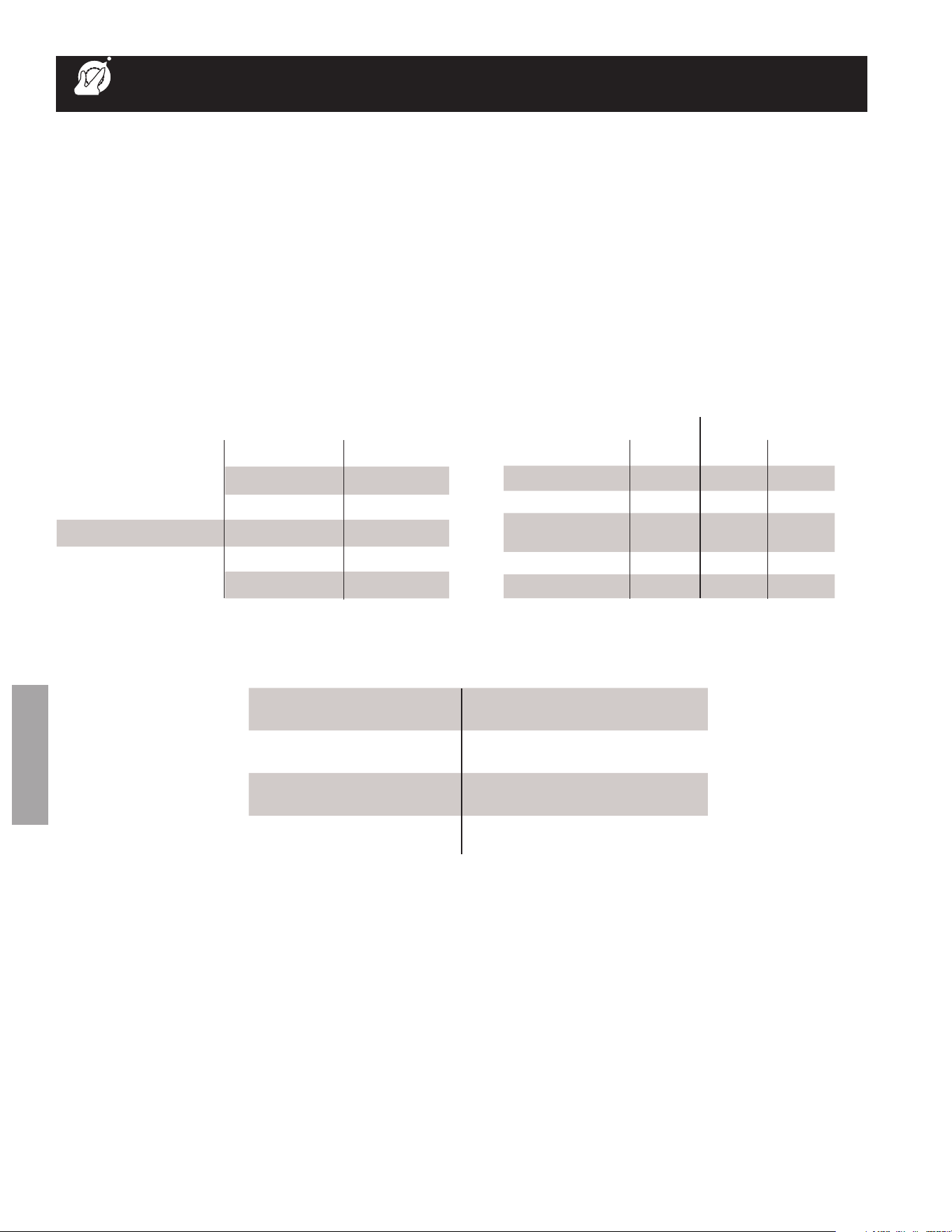
Numeric Display
Freezer Fresh Food
Warmest 1 1
Factory Setting 6 6
Coldest 9 9
Freezer Fresh Food
Fahrenheit Centigrade Fahrenheit Centigrade
Warmest 6º -14º 47º 8º
Factory
Setting
0º -18º 37º
3º
Coldest -6º -21º 33º 1º
Temperature Adjustment Guide
If Fresh Food compartment is too warm
Adjust Fresh Food control one degree
colder by pressing Down (Colder) button.
If Fresh Food compartment is too cold
Adjust Fresh Food control one degree
warmer by pressing the Up (Cold) button.
If Freezer compartment is too warm
Adjust Freezer control one degree colder
by pressing Down (Colder) button.
If Freezer compartment is too cold
Adjust Freezer control one degree warmer
by pressing the Up (Cold) button.
11
ENGLISH
turNING tHE cooLING SYStEm oN ANd oFF
You can disable the cooling system in your refrigerator by pressing the on/off button located on the left side of the temperature
control panel. To ensure that you do not accidentally turn off the cooling system, the button does not work unless you press and
hold it for three seconds. once you disable the cooling system, all refrigeration to the freezer and fresh food compartments stops.
To turn the cooling system back on, you must again press and hold the on/off button for three more seconds.
tEmPErAturE coNtroLS
AIr FILtEr INdIcAtor & StAtuS LIGHtS
Your refrigerator’s air filter needs to be replaced from time to time. You can monitor the need for replacement by referring to the
status light while the air filter is “oN”. To turn on the air filter, press the “air filter” button. To turn off the air filter, press the “air filter”
button. To reSeT the air filter, press the “air filter” button and hold for 3 seconds.
cooling System on/off Button
Indicator Lights
rESPoNdING to ALArmS (Audible tones & Indicator Lights)
Your refrigerator’s control system can convey the following information through audible tones and the alarm indicator lights.
NotE
Pressing the on/off button on the control panel disables your refrigerator’s cooling system but does not disconnect power to
lights and other electrical components. To turn off power to your refrigerator you must unplug the power cord from the wall outlet.
each time you make settings on the control panel, a single audible tone acknowledges your input.
door
Ajar
Flashing
Green
Freezer or refrigerator door has
been open for over five minutes.
close door to disable
and reset alarm.
Air Filter Status Light (not available on all models)
Green Filter oK.
Yellow Air filter is about 80 percent used. Please order new one.
red Air filter is 100 percent used. Please change now.
12
ENGLISH
LooKING INSIdE
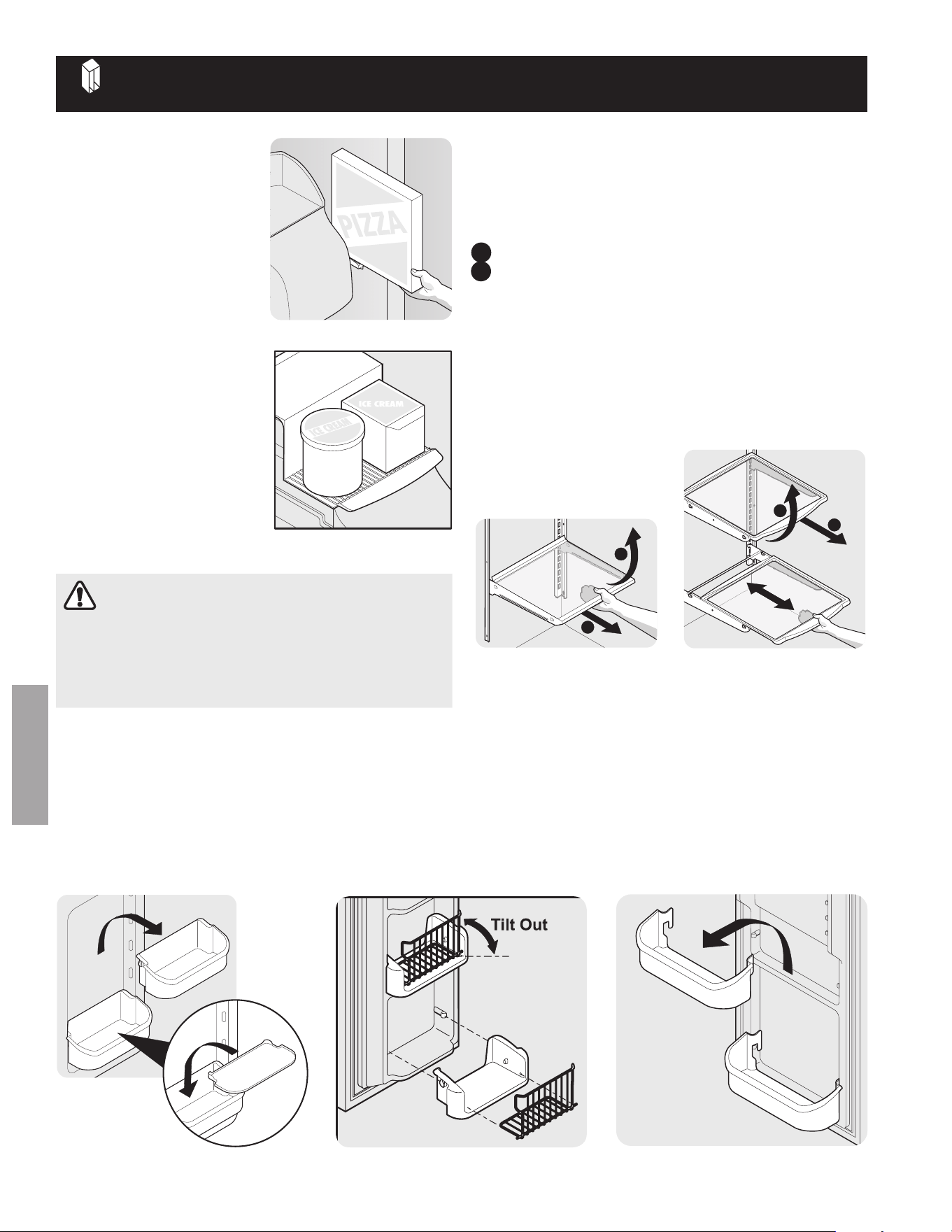
PIzzA SHELF (SomE
modELS)
This shelf is attached to the
freezer wall beside the ice
dispenser container. This
convenient area allows for
storage of pizza and other tall
items placed vertically between
the ice dispenser container and
the freezer wall.
IcE crEAm SHELF
(SomE modELS)
This shelf attaches to the top
of the ice dispenser container.
It allows storage of both round
and rectangular cartons of your
favorite ice cream.
tIP-uP SHELF (SomE
modELS)
a Tip-Up shelf in the freezer
section allows tall items to be
easily stored.
Pizza Shelf
cantilever Sliding Glass Shelf
1
2
cantilever Glass Shelf
1
2
cANtILEvEr SHELF AdjuStmENt
refrigerator shelves are easily adjusted to suit individual
needs. Before adjusting the shelves, remove all food. Cantilever
shelves are supported at the back of the refrigerator.
To adjust cantilever shelves:
1 lift front edge up.
2 Pull shelf out.
replace the shelf by inserting the hooks at rear of the shelf into
the wall bracket. lower the shelf into the desired slots and lock
into position.
SpillSafe
TM
glass shelves (some models) catch and hold
accidental spills. In some models, the SpillSafe
TM
shelves slide
out for easy access to food and for fast cleaning. The shelves
slide out independently of their mounting brackets. Just pull the
front of the shelf forward. Shelves can be extended as far as the
stopper will allow but are not removable from their mounting
brackets.
AdjuStABLE door BINS
Some models have adjustable door bins that can be moved to
suit individual needs.
To move door bins
1 lift bin straight up.
2 remove bin.
3 Place bin in desired position.
4 lower bin onto supports until locked in place.
adjustable
Door Bin
door StorAGE
Door bins and shelves are provided for convenient storage of
jars,bottles,andcans.Frequentlyuseditemscanbequickly
selected.
Some models have door bins that can accommodate gallon-
sized plastic drink containers and economy-sized jars and
containers. Some bins are adjustable for maximum storage
capacity.
The dairy compartment, which is warmer than the general food
storage section, is intended for short term storage of cheese,
spreads, or butter.
fixed Door Bin
Ice cream Shelf
Bin liner
(Some models)
cAutIoN
to avoid personal injury or property damage, handle
tempered glass shelves carefully. Shelves may break
suddenly if nicked, scratched, or exposed to sudden
temperature change. See “Glass Shelves” in care &
cleaning chart.
13
ENGLISH
LooKING INSIdE (coNtINuEd)
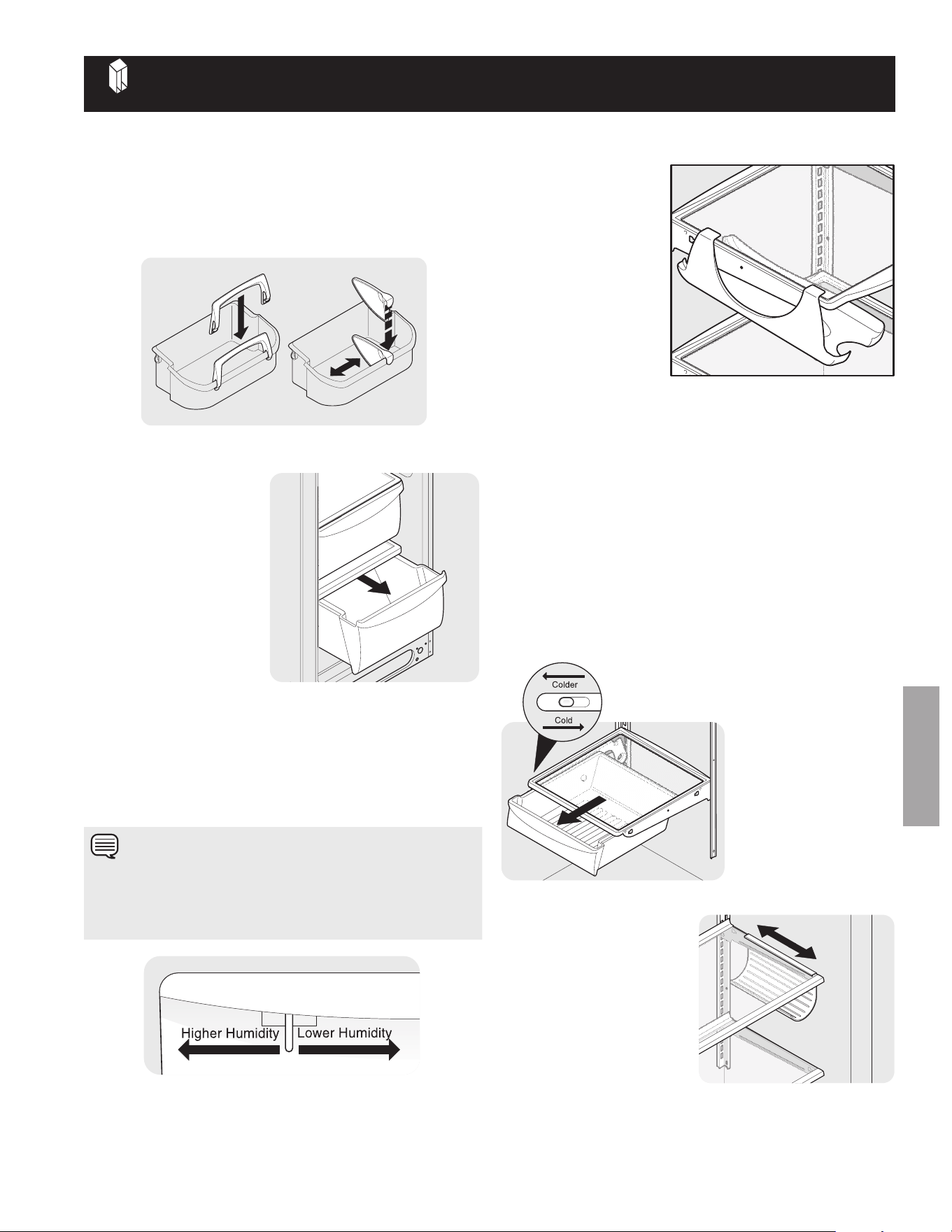
tALL BottLE rEtAINEr (SomE modELS)
The Tall Bottle retainer keeps tall containers in the bin from
falling forward when opening or closing the refrigerator door. To
install, hold the retainer at the top, and slide it over the outside
wall of the bin, as shown in the diagram. The Tall Bottle retainer
works best with a Bin Snugger.
tall Bottle retainer (left) and Bin Snugger (right)
SPEcIAL ItEm rAcK (SomE modELS)
The innovative design of
the Special Item rack
allows you to store a six-
pack of 12 ounce drink
cans, a bottle of wine, a
two-liter soft drink bottle,
or a carton of eggs. The
Special Item rack mounts
on the left side of your
refrigerator. To install, just
slide the Special Item
rack onto any shelf as
shown in the drawing.
dELI drAWEr
(SomE modELS)
SomemodelsareequippedwithaDeliDrawerforstorageof
luncheon meats, spreads, cheeses, and other deli items.
mEAt KEEPEr (SomE modELS)
SomemodelsareequippedwithaMeatKeeper.MeatKeeper
temperaturescanbeadjustedbyslidingtheMeatKeeper
Temperature Control in either direction. Use this pan for short
term storage of bulk meat items. If meats are to be kept longer
thanoneortwodays,theyshouldbefrozen.TheMeatKeeper
is fixed and cannot be moved up or down. If fruits or vegetables
aretobestoredintheMeatKeeper,settheMeatKeeper
Temperature Control to a warmer setting to prevent freezing.
Special Item rack
crISPErS
The crispers, located under
the bottom refrigerator shelf,
are designed for storing
fruits, vegetables, and other
fresh produce. Wash items
in clear water and remove
excess water before placing
them in the crispers. Items
with strong odors or high
moisture content should be
wrapped before storing.
crisper drawer
HumIdItY coNtroL (SomE modELS)
The humidity Control, present on some models with crisper
drawers, allows you to adjust the humidity within the crisper.
This can extend the life of fresh vegetables that keep best in
high humidity.
crisper Humidity control
meat Keeper with
temperature control
WINE rAcK (SomE
modELS)
The wine rack stores bottles
of wine, or single two-liter
plastic bottles of juice or soda
pop. To install, slide the Wine
rack onto the shelf with the
curve facing in. To remove,
slide the Wine rack out.
Install on either side of shelf.
Wine rack
NotE
leafy vegetables keep best when stored with the humidity
Control set on Higher Humidity, or in a drawer without a
humidity Control. This keeps incoming air to a minimum and
maintains maximum moisture content.
14
ENGLISH
AutomAtIc IcE & WAtEr dISPENSEr
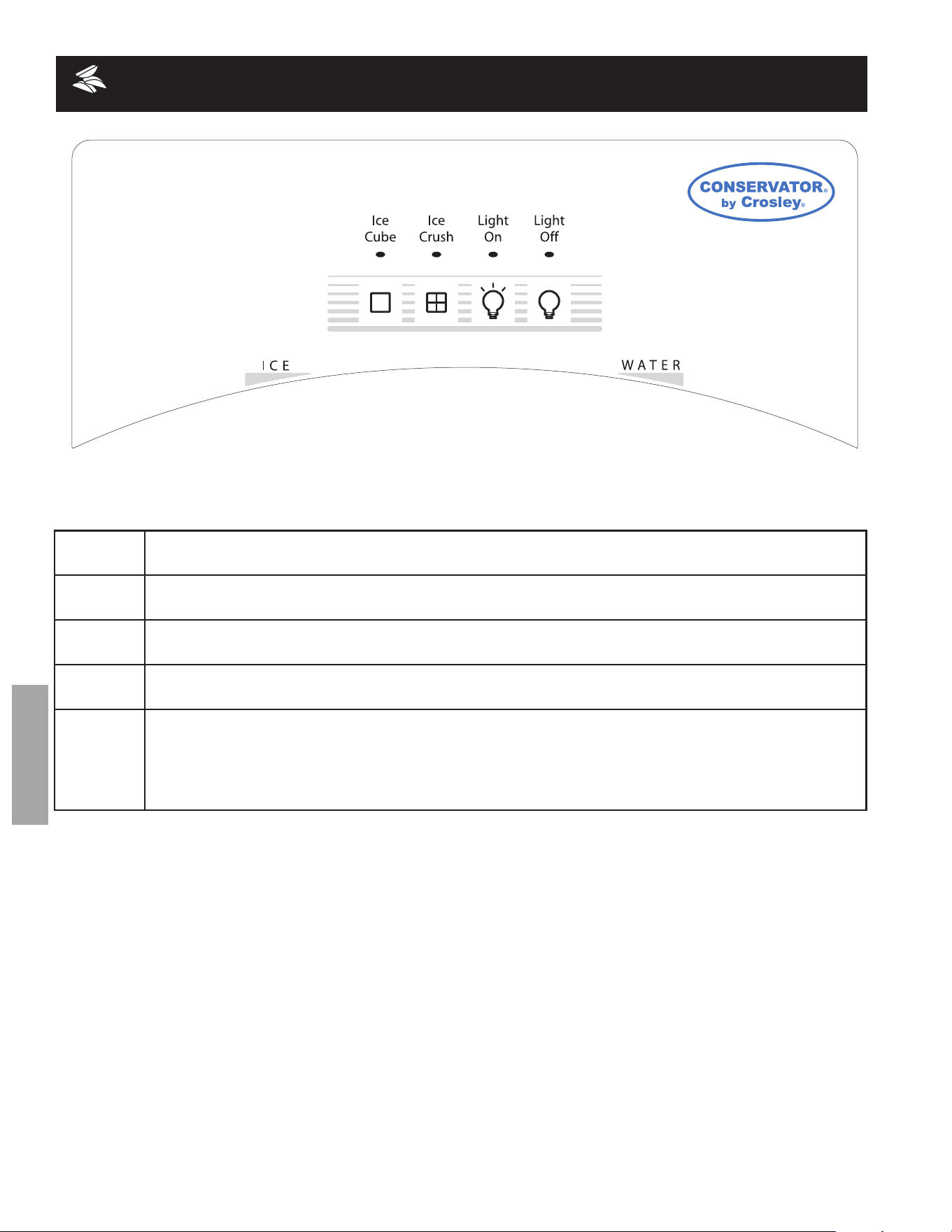
Ice cube
Press the Ice cube Touch Pad to get crushed ice. a red indicator will appear above the Touch Pad.
Press glass against IcE dispensing paddle as far up as possible to catch all ice.
Ice crush
Press the Ice crush Touch Pad to get cubed ice. a red indicator will appear above the Touch Pad.
Press glass against IcE dispensing paddle as far up as possible to catch all ice.
Light on
Press the Light on Touch Pad to turn on dispenser light. a red indicator will appear above the Touch
Pad.
Light off
Press the Light off Touch Pad to turn off dispenser light. a red indicator will appear above the Touch
Pad.
WAtEr
To operate the water dispenser, press a glass against the WAtEr dispensing paddle. To stop
dispensing water, pull the glass away from the dispensing paddle. Dispensed water is not cold. for
colder water, add crushed ice or cubes before dispensing water. a drip tray located at the base of
the dispenser catches small spills and allows them to evaporate. This drip tray is removable and
dishwasher safe. Do not pour water and excess ice in this area because there is no drain.
15
ENGLISH
AutomAtIc IcE & WAtEr dISPENSEr
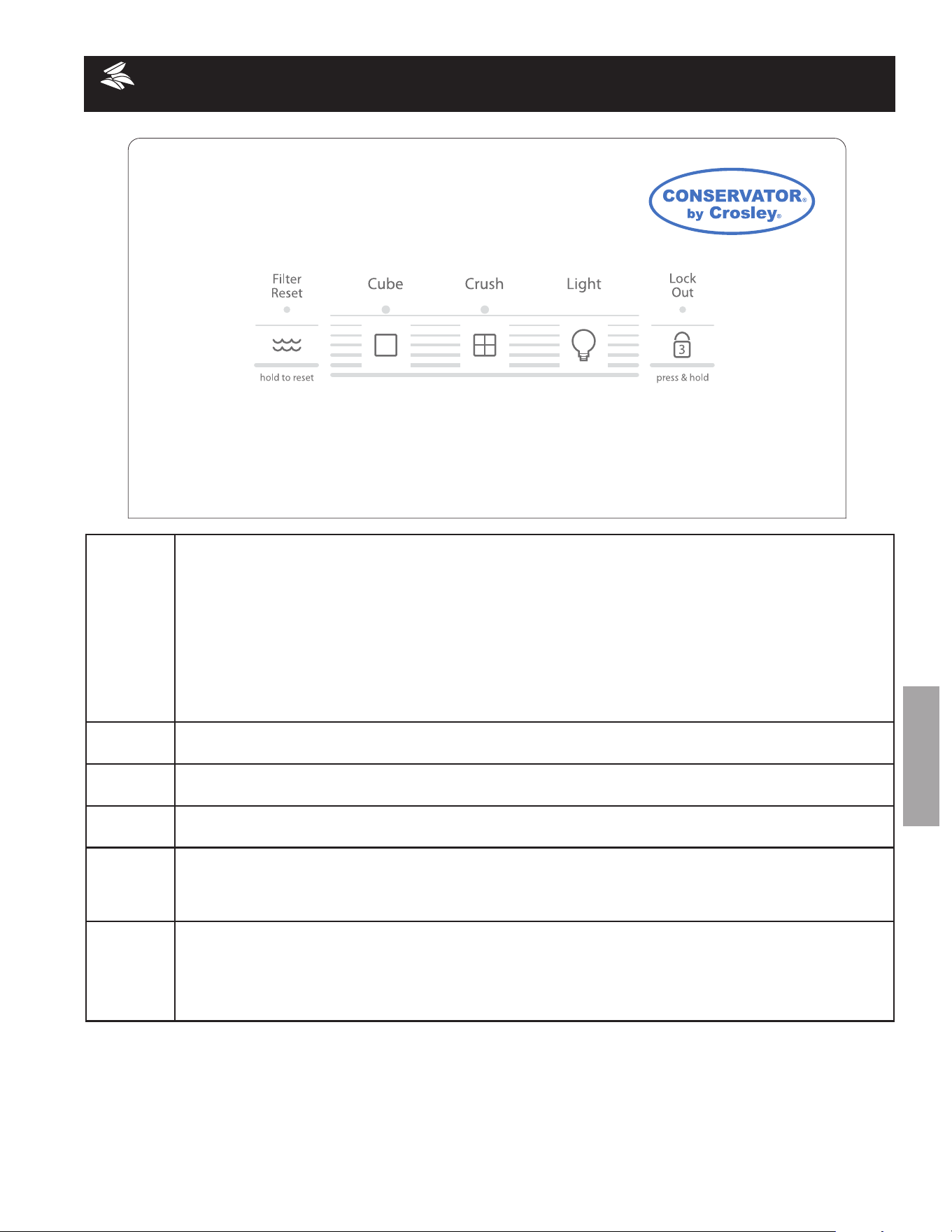
Filter reset
The Filter reset indicator light above the Touch Pad will light up each time the dispenser is used. The following
filter light indications are:
Green The filter is still operating within its specified life cycle.
Amber The filter has reached approximately 80 percent of its useful life. This is the recommended time
to purchase a replacement filter.
red The filter is 100 percent used up. Change the filter as soon as possible.
after the filter cartridge has been changed, press and hold the Filter reset Touch Pad for 10-15 seconds.
NotE:TheGreen,AmberandRedlightswillashwhenresetiscompleted.
cube
Press the cube Touch Pad to get cubed ice. a green light will appear above the Touch Pad. Press glass against
Ice dispensing paddle as far up as possible to catch all ice.
crush
Press the crush Touch Pad to get crushed ice. a green light will appear above the Touch Pad. Press glass
against Ice dispensing paddle as far up as possible to catch all ice.
Light
Press the Light Touch Pad to turn on dispenser light. Press again to turn the light off. The light also turns on
automatically when ice and/or water is dispensed. replace light bulb with an appliance bulb of the same wattage.
Lock out
The Ice & Water Dispenser can be locked out to prevent unwanted use.
To lock out Press the Lock out Touch Pad for 3-5 seconds. a red light will appear above the Touch Pad.
To Unlock Press the Lock out Touch Pad for 3-5 seconds until the red light above the Touch Pad goes out.
Water
To operate the water dispenser, press a glass against the Water dispensing paddle. To stop dispensing
water, pull the glass away from the dispensing paddle. Dispensed water is not cold. for colder water,
add crushed ice or cubes before dispensing water. a drip tray located at the base of the dispenser
catches small spills and allows them to evaporate. This drip tray is removable and dishwasher safe. Do
not pour water and excess ice in this area because there is no drain.
16
ENGLISH
AutomAtIc IcE & WAtEr dISPENSEr
HoW to PrImE tHE WAtEr SuPPLY
SYStEm
Your refrigerator’s water supply system includes several tubing
lines, a water filter, a water valve and a water tank. to ensure
that your water dispenser works properly, this system must
be completely filled with water when your refrigerator is
first connected to the household water supply line and
whenever you replace the water filter.
to PrImE tHE WAtEr SuPPLY SYStEm:
• Beginllingthetankbypressingandholdingadrinking
glass against the water dispenser paddle.
• Keeptheglassinthispositionuntilwatercomesoutof
the dispenser. There will be noticeable spurts and
sputters as the system pushes air out through the
system and dispenser nozzle. This is normal. this may
take about 1½ minutes.
• Continuedispensingwaterforabout3minutestoush
the system of any air and impurities. empty glass as
needed.
HoW tHE IcE mAKEr WorKS
The ice maker and container are located in the top of the
freezer compartment. after the refrigerator is installed properly
and has cooled for several hours, the ice maker can begin
making ice within 24 hours. air in new plumbing lines may
cause the ice maker to cycle two or three times before making a
full tray of ice. With no usage, it will take approximately two days
to fill the ice container.
Because of new plumbing connections, the first production of
icecubesmaybediscoloredorhaveanoddavor.Discardice
made during the first 24 hours.
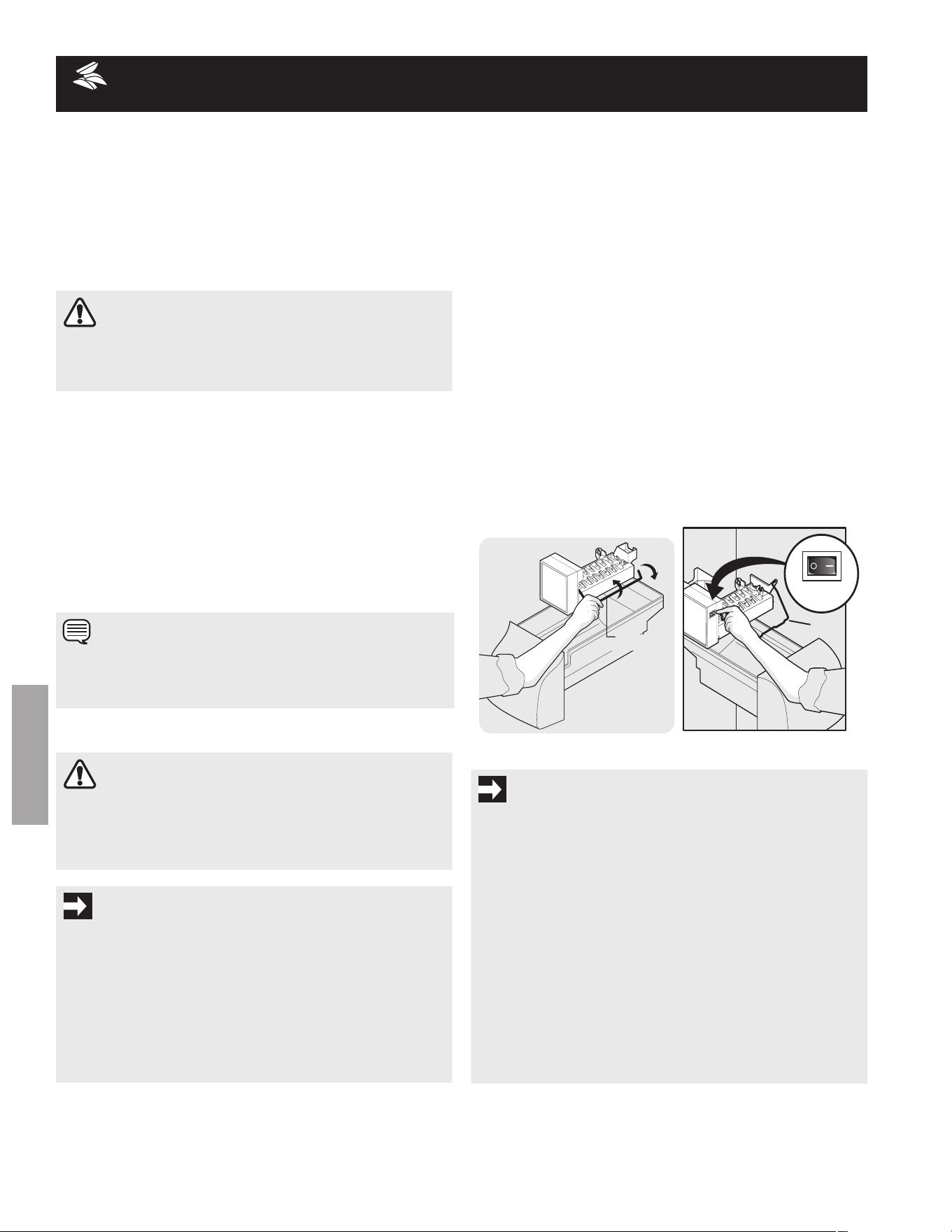
turNING Your SIDE MOUNTED IcE mAKEr oN/oFF
To begin ice production, lower the wire signal arm to the DoWN
or oN position. The ice maker turns off automatically when the
ice container becomes full. To stop the ice maker, raise the wire
signal arm until it clicks and locks in the UP or off position
(see figure 1).
turNING Your REAR MOUNTED IcE mAKEr oN/oFF
Ice production is controlled by the ice maker’s oN/off power
switch. To gain access to the ice maker, pull the ice cream shelf
out. Press the switch to the “o” position to turn it off and press
it to the “I” position to turn it on (see figure 2). The ice maker
also has a built-in wire signal arm, which automatically stops ice
production when the ice bin is full. Do NoT use this signal arm
to manually stop the ice maker.
OFF
ON
Wire
Signal Arm
ON
OFF
Wire
Signal Arm
Figure 1
Figure 2
cAutIoN
For proper dispenser operation, recommended water
supply pressure should fall between 30 psi and 100 psi.
Excessive pressure may cause water filter to malfunction.
NotE
The water dispenser has a built-in device that shuts off the
waterowafter3minutesofcontinuoususe.Toresetthis
shutoff device, simply release the dispenser paddle.
cAutIoN
chemicals from a malfunctioning softener can damage
the ice maker. If the ice maker is connected to soft water,
ensure that the softener is maintained and working
properly.
ImPortANt
Your ice maker is shipped from the factory with the wire
signal arm in the oN position (side mounted) or with the
switch turned oN (rear mounted). To ensure proper function
of your ice maker, hook up water supply immediately or turn
ice maker off by lifting the wire signal arm until it clicks and
locks in the UP position (side mounted) or turn the on/off
switch to the off (o) position. If the ice maker is not turned
off and the water supply is not connected, the water valve
will make a loud chattering noise.
ImPortANt
Small Ice cubes or ice chips jamming in the ice maker may be
a sign that your water filter needs changing. If you have a side
mounted ice maker you may also experience hollow cubes —
partially frozen cubes with water inside. When these cubes
are harvested they break open and spill water over the other
ice cubes in the ice container, forming a solid mass of ice. as
the water filter nears the end of its useful life and becomes
clogged with particles, less water is delivered to the ice maker
during each cycle. The ice maker can’t fill every cube in the
ice maker mold, leading to small cubes or chips that can
get caught between the ice ejector blades and the stripper.
remember, if your ice maker is jamming with small ice
cubes or it’s been six months or longer since you last
changed your water filter – replace the water filter with a
new one. Poor quality household water may require the
filter to be changed more frequently.
17
ENGLISH
AutomAtIc IcE & WAtEr dISPENSEr
IcE ProductIoN: WHAt to EXPEct
How much Ice Will a Side mounted Ice maker Produce in 24
Hours?
a side mounted ice maker will produce 4 to 4.5 pounds of ice
every 24 hours, depending on usage conditions. Ice is produced
at a rate of 8 cubes every 75 to 90 minutes.
How much Ice Will a rear mounted Ice maker Produce in 24
Hours?
a rear mounted ice maker will produce 3 to 4 pounds of ice
every 24 hours, depending on usage conditions. Ice is produced
at a rate of 8 cubes every 75 to 90 minutes.
IcE ANd WAtEr dISPENSEr FEAturES
The ice and water dispenser conveniently dispenses chilled
water, and ice cubes or crushed ice, depending on the model.
To operate the ice dispenser, select the ice option desired using
the touchpad. Press a glass against the dispensing paddle as
far up as possible to catch all ice. To stop dispensing ice, pull
glass away from dispensing paddle. Do not remove the glass
until the ice has completely dispensed. Complete instructions
for the dispenser operation are attached to the inside of the
freezer door (some models).
IcE dISPENSEr tIPS
• Icecubesstoredtoolongmaydevelopanoddavor.
empty the ice container and ensure that the ice maker is
on (see previous page). The ice maker will then produce
more ice.
• occasionally shake the ice container to keep ice
separated.
• Ifalargequantityoficeisneededatonetime,itisbest
to remove cubes directly from the ice container.
• Stop the ice maker when cleaning the freezer and during
vacations.
• If the ice maker will be turned off for a long period of
time, turn the water supply valve to a closed position.
cLEANING tHE IcE dISPENSEr
Clean the ice dispenser and ice container at regular intervals,
particularly before you take a vacation or move, or if the ice
dispenser sticks.
• Stopiceproductiononside-mountedicemakerby
raising wire signal arm to the UP position. Stop ice
production on rear-mounted ice makers by pressing the
ice maker’s on/off power switch to the off (o) position.
• Anextendedpowerfailure(onehourorlonger)causes
ice cubes in the ice storage bin to melt and freeze
together and jam the dispenser mechanism.
• Theicedispenserisnotusedfrequently.Icecubeswill
freeze together in the bin and jam the dispenser
mechanism. remove the ice storage bin and shake to
loosen the cubes.
WArNING
do not use the ice chute as a handle when removing
or replacing the ice storage bin. Surfaces there may be
sharp. do not put fingers up ice chute. Surfaces there
may be sharp.
cAutIoN
If the dispensing paddle is pushed for more than four
minutes, the dispenser motor may overload and stop. the
overload protector will reset automatically after three or
four minutes.
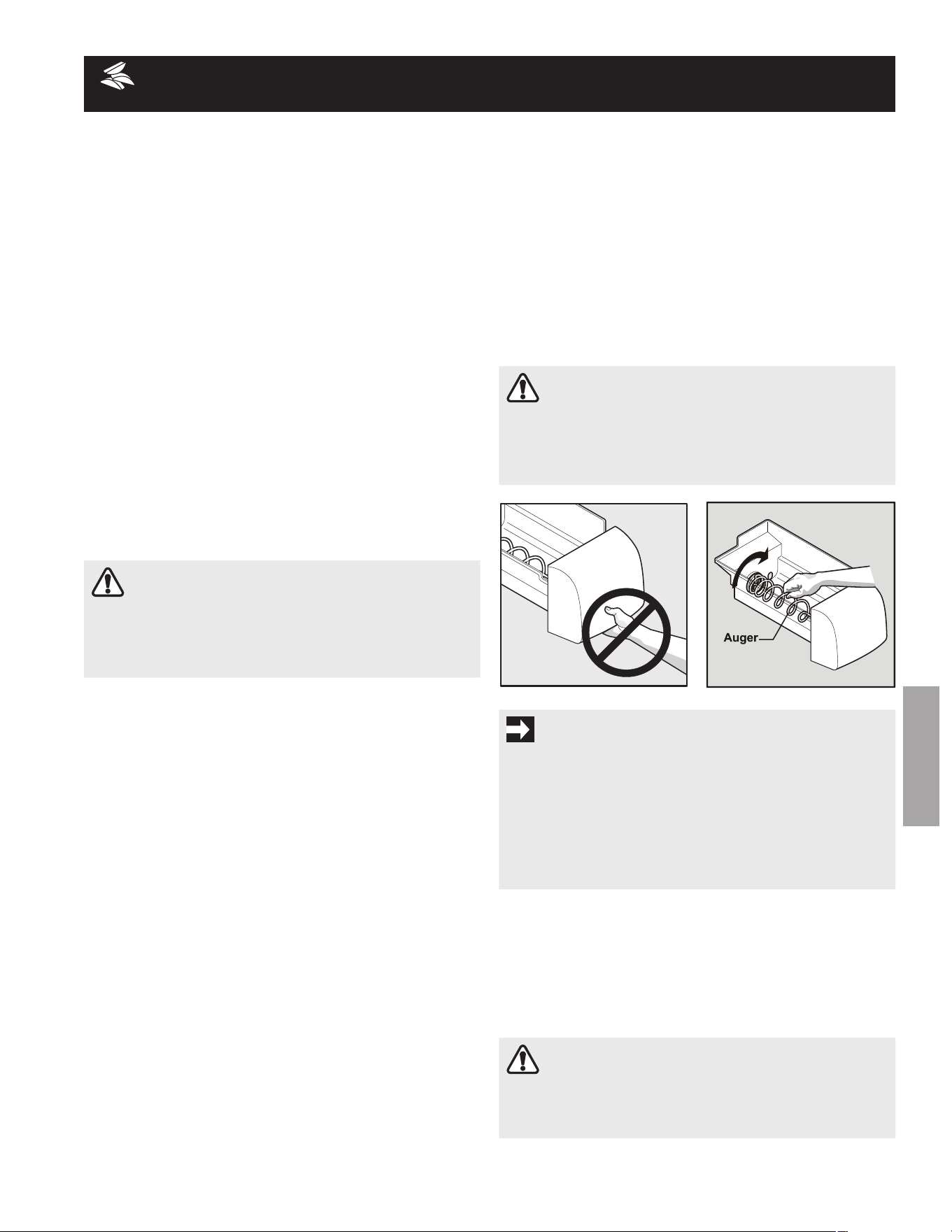
ImPortANt
When removing or replacing the ice bin, Do NoT rotate
the auger in the ice bin. If the auger is accidentally rotated,
you must realign the auger by turning it in 90º turns until
the ice bin fits into place with the drive mechanism. If the
auger is not properly aligned when replacing the ice bin, the
refrigerator will only dispense Crushed Ice. The freezer door
may also not close properly causing warm air to leak into the
freezer.
cAutIoN
NEvEr use an ice pick or similar sharp instrument to
break up the ice. this could damage the ice storage bin
and dispenser mechanism.
• Removeicecontainerbyliftingupandout.Emptyand
carefully clean the container with mild detergent. rinse
with clear water. Do not use harsh or abrasive cleaners.
allow ice container to dry completely before replacing in
the freezer.
• Removeicechipsandcleantheshelfandchutethat
supports the ice container.
• Replacetheicecontainer.Resumeiceproductionon
side-mounted ice makers by lowering the wire signal
arm to the DoWN position. resume ice production on
rear-mounted ice makers by pressing the ice maker’s
on/off power switch to the on (I) position.
18
ENGLISH
AutomAtIc IcE & WAtEr dISPENSEr
PurESourcE 3
tm
IcE ANd WAtEr FroNt
FILtEr (SomE modELS)
LocAtING tHE FILtEr
Yourrefrigeratorisequippedwithawaterlteringsystem.The
water filter system filters all dispensed drinking water, as well as
the water used to produce ice.
WAtEr FILtEr
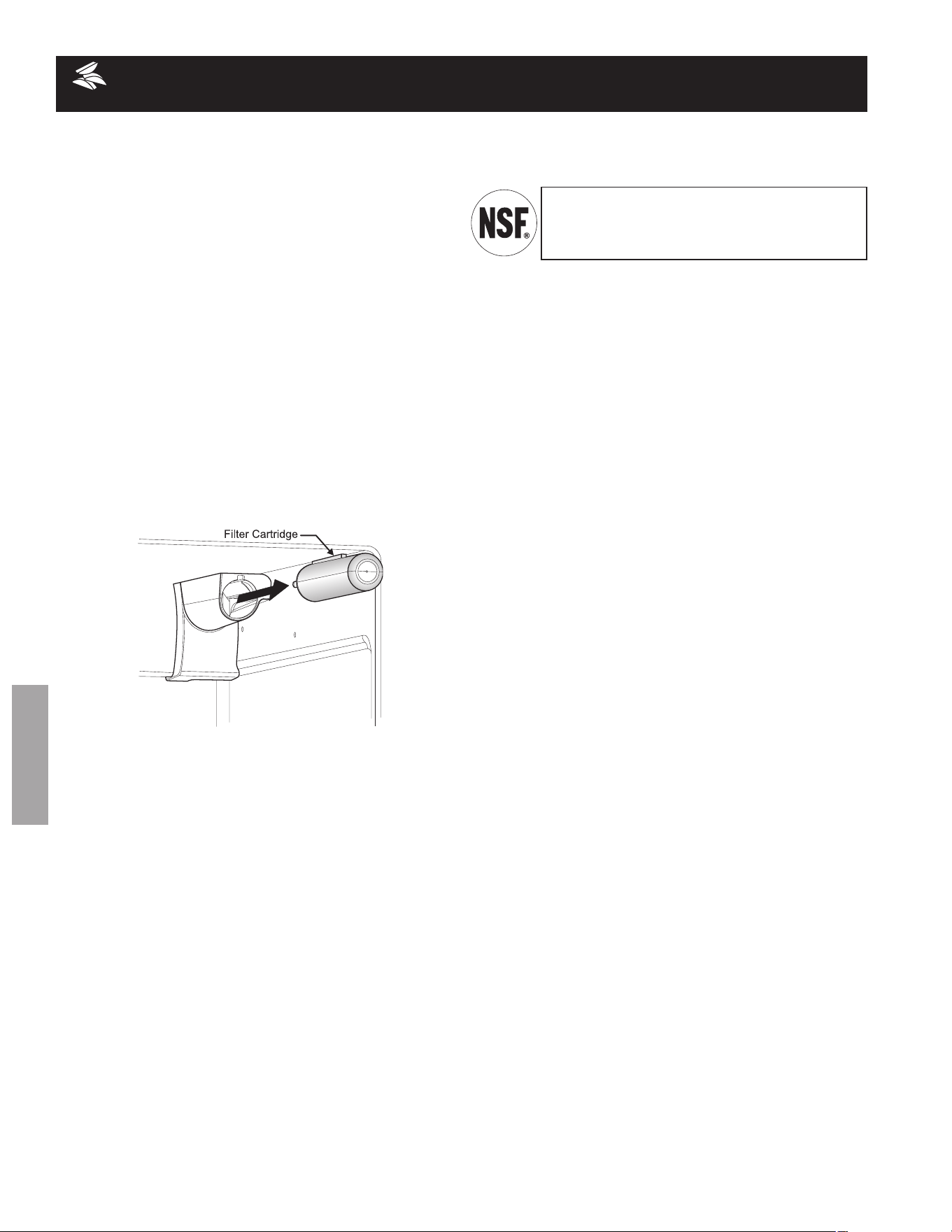
The water filter is located at the top right side of the fresh food
compartment.
Do not use with water that is microbiologically unsafe or of
unknownqualitywithoutadequatedisinfectionbeforeorafter
the system. Systems certified for cyst reduction may be used on
disinfected waters that may contain filterable cysts.
tESt & cErtIFIcAtIoN rESuLtS:
• RatedCapacity-200gallons/757litersforPureSource
3
TM
ice and water filter
• Ratedserviceow-.50gallonsperminute
• OperatingTemp.:Min.33°F,Max.100°F
• MaximumRatedPressure-100poundspersquareinch
• RecommendedMinimumOperatingPressure:30pounds
persquareinch
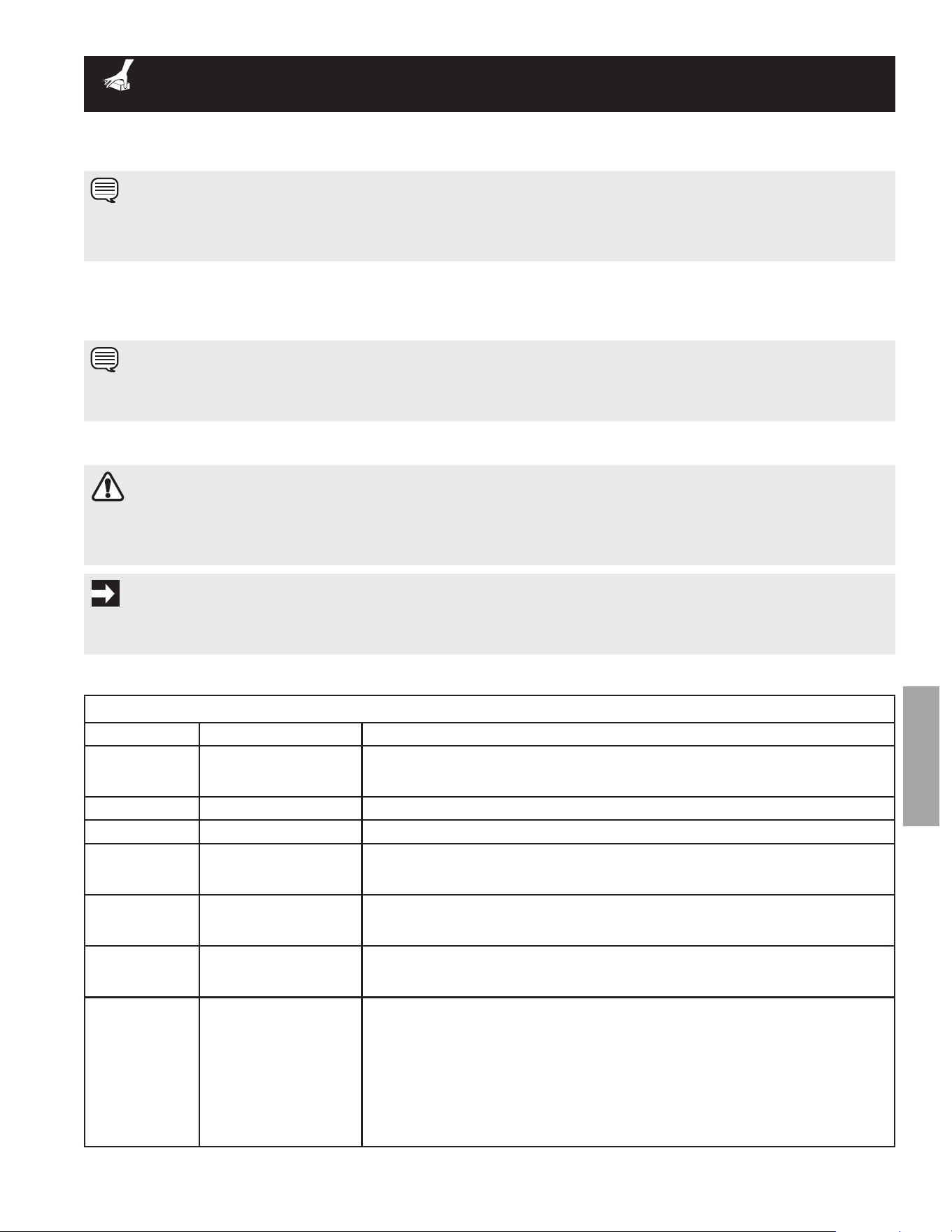
to rEPLAcE Your PurESourcE 3
TM
WAtEr
FILtEr:
It is not necessary to turn the water supply off to change the filter.
Be ready to wipe up any small amounts of water released during
the filter replacement.
1 Turn off the ice maker power switch.
2 remove the filter by pushing on the end/face of the filter.
3 Slide the old water filter cartridge straight out of the
housing and discard it.
4 Unpackage the new filter cartridge. Using the alignment
guide, slide it gently into the filter housing until it stops
against the snap-in connector at the back of the housing.
5 Push firmly until the cartridge snaps into place (you
should hear a click as the cartridge engages the snap-
in connector).
6 Press a drinking glass against the water dispenser while
checking for any leaks at the filter housing. any spurts and
sputters that occur as the system purges air out of the
dispenser system are normal.
7 Afterllingoneglassofwater,continueushingthe
system for about four (4) minutes.
8 Turn on the ice maker.
9 Press and hold the Water Filter button on the Ice & Water
Dispenser control panel for three seconds. When the
display changes from “red” to “Green,” the status has
been reset.
ordErING rEPLAcEmENt FILtErS
To order your replacement filters, please visit our online store at
www.frigidaire.com/store, by calling toll-free at 877-808-4195,
or by visiting the dealer where you purchased your refrigerator.
electrolux recommends that you order extra filters when you
first install your refrigerator, and that you replace your filters at
least once every six months.
Herearetheproductnumberstorequestwhenordering:
PureSource 3
TM
Water filter
Part #WF3cB
rEPLAcING tHE WAtEr FILtEr
In general, you should change the water filter every six months
toensurethehighestpossiblewaterquality.Water Filter
Status on the user interface prompts you to replace the filter
after a standard amount of water (200 gallons/757 liters for
PureSource 3
TM
)
hasowedthroughthesystem.
If your refrigerator has not been used for a period of time
(during moving for example), change the filter before reinstalling
the refrigerator.
The PureSource 3
TM
ice and water filter system
is tested and certified to NSf/aNSI Standards 42
and 53 for the reduction of claims specified on the
performance data sheet.
morE ABout Your AdvANcEd WAtEr
FILtEr
19
ENGLISH
Food StorAGE & ENErGY SAvING IdEAS
Food StorAGE IdEAS
Fresh Food Storage
• Thefreshfoodcompartmentshouldbekeptbetween
34°Fand40°Fwithanoptimumtemperatureof37°F.
• Avoidovercrowdingtherefrigeratorshelves.Thisreduces
the circulation of air around the food and results in
uneven cooling.
Fruits and Vegetables
• Storageinthecrisperdrawerstrapsmoisturetohelp
preservethefruitandvegetablequalityforlongertime
periods.
Meat
• Rawmeatandpoultryshouldbewrappedsecurelyso
leakage and contamination of other foods or surfaces
does not occur.
Frozen Food Storage
• Thefreezercompartmentshouldbekeptat0°Forlower.
• Afreezeroperatesmostefcientlywhenitisatleast2/3
full.
Packaging Foods for Freezing
• Tominimizedehydrationandqualitydeterioration,use
aluminum foil, freezer wrap, freezer bags or airtight
containers. force as much air out of the packages as
possible and seal them tightly. Trapped air can cause
foodtodryout,changecolor,anddevelopanoff-avor
(freezer burn).
• Wrapfreshmeatsandpoultrywithsuitablefreezerwrap
prior to freezing.
• Donotrefreezemeatthathascompletelythawed.
Loading the Freezer
• Avoidaddingtoomuchwarmfoodtothefreezerat
one time. This overloads the freezer, slows the rate of
freezing, and can raise the temperature of frozen foods.
• Leaveaspacebetweenthepackages,socoldaircan
circulatefreely,allowingfoodtofreezeasquicklyas
possible.
• Avoidstoringhard-to-freezefoodssuchasicecream
and orange juice on the freezer door shelves. These
foods are best stored in the freezer interior where the
temperature varies less.
ENErGY SAvING IdEAS
• Locatetherefrigeratorinthecoolest
part of the room, out of direct
sunlight, and away from heating
ducts or registers. Do not place the
refrigerator next to heat-producing
appliances such as a range, oven,
or dishwasher. If this is not possible,
a section of cabinetry or an added layer of insulation
between the two appliances will help the refrigerator
operate more efficiently.
• Leveltherefrigeratorsothatthedoorsclosetightly.
• RefertothisUse&CareManualforthesuggested
temperature control settings.
• Donotovercrowdtherefrigeratororblockcoldairvents.
Doing so causes the refrigerator to run longer and use
more energy.
• Coverfoodsandwipecontainersdrybeforeplacingthem
in the refrigerator. This cuts down on moisture build-up
inside the unit.
• Organizetherefrigeratortoreducedooropenings.
remove as many items as needed at one time and close
the door as soon as possible.
20
ENGLISH
NormAL oPErAtING SouNdS & SIGHtS
uNdErStANdING tHE SouNdS You mAY
HEAr
Your new high-efficiency refrigerator may make unfamiliar
sounds. These are all normal sounds and soon will become
familiar to you. They also indicate your refrigerator is operating
asdesigned.Hardsurfaces,suchasvinylorwoodoors,walls,
and kitchen cabinets may make sounds more noticeable. listed
below are descriptions of some of the most common sounds
you may hear, and what is causing them.
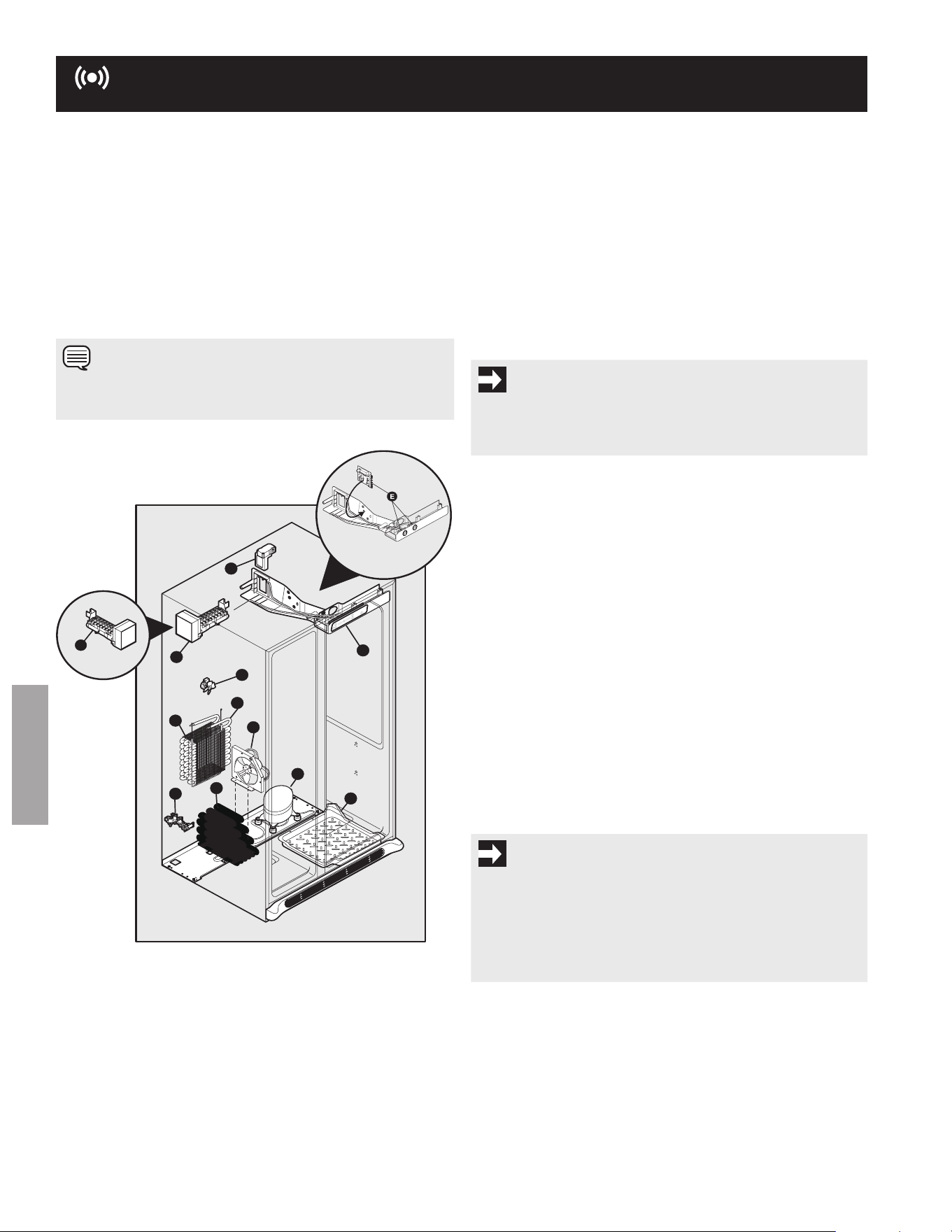
A. Evaporator
Theowofrefrigerantthroughtheevaporatormay
create a boiling or gurgling sound.
B. Evaporator Fan
You may hear air being forced through the refrigerator
by the evaporator fan.
C. Defrost Heater
During defrost cycles, water dripping onto the defrost
heater may cause a hissing or sizzling sound. after
defrosting, a popping sound may occur.
D. Automatic Ice Maker
Ifyourrefrigeratorisequippedwithanautomaticice
maker, you will hear ice cubes falling into the ice bin.
E. Cold Control & Automatic Defrost Control
These parts can produce a snapping or clicking sound
when turning the refrigerator on and off.
F. Condenser Fan
You may hear air being forced through the condenser
by the condenser fan.
G. Compressor
Modern, high-efficiency compressors operate much
faster than older models. The compressor may have a
high-pitched hum or pulsating sound.
H. Water Valve
Ifyourrefrigeratorisequippedwithanautomaticice
maker, you will hear a buzzing sound as the water
valve opens to fill the ice maker during each cycle.
I. Drain Pan (not removable)
You may hear water running into the drain pan during
the defrost cycle.
J. Condenser
May create minimal sounds from forced air.
K. Motorized Damper
May produce a light humming during operation.
F
A
C
H
J
G
I
D
K
E
B
D
OR
OR
NotE
rigid foam insulation is very energy efficient, but is not a
sound insulator.
ImPortANt
During the automatic defrost cycle, you may notice a red glow
in the vents on the back wall of your freezer compartment.
This is normal during the defrost cycle.
ImPortANt
Your ice maker is turned on at the factory so it can work as
soon as you install your refrigerator. To ensure proper function
of your ice maker, connect a water supply immediately or turn
the Ice maker off by lifting the wire signal arm to the “up” or
off position (side mounted) or the ice maker’s on/off power
switch turned off-set to the “o” position (rear mounted) .
21
ENGLISH
cArE & cLEANING
Keepingyourrefrigeratorcleanmaintainsappearanceandpreventsodorbuild-up.Wipeupanyspillsimmediatelyandcleanthe
freezer and fresh food compartments at least twice a year. When cleaning, take the following precautions:
cAutIoN
• Pulltherefrigeratorstraightouttomoveit.Shiftingitfromsidetosidemaydamageooring.Becarefulnottomove
the refrigerator beyond the plumbing connections.
• Dampobjectssticktocoldmetalsurfaces.Donottouchrefrigeratedsurfaceswithwetordamphands.
NotE
Donotuseabrasivecleanerssuchaswindowsprays,scouringcleansers,ammableuids,cleaningwaxes,concentrated
detergents, bleaches or cleansers containing petroleum products on plastic parts, interior doors, gaskets or cabinet liners. Do not
use paper towels, scouring pads, or other abrasive cleaning materials.
care & cleaning chart
Part What to use tips and Precautions
Interior/door
Liner
Soap and water•
Baking soda and •
water
Use2tablespoonsofbakingsodain1quartofwarmwater.Be sure to wring ex-
cess water out of sponge or cloth before cleaning around controls, light bulb
or any electrical part.
door Gaskets
Soap and water• Wipe gaskets with a clean soft cloth.
drawers/Bins
Soap and water• Do not wash any removable items (bins, drawers, etc.) in dishwasher.
Glass Shelves
Soap and water•
glass cleaner•
Mildliquidsprays•
allow glass to warm to room temperature before immersing in warm water.
toe Grille
Soap and water•
Mildliquidsprays•
Vacuum attachment•
Vacuum dust from front of toe grille. Vacuum backside and wipe with sudsy cloth or
sponge. rinse and dry.
Exterior and
Handles
Soap and water•
Non abrasive •
glass Cleaner
Do not use commercial household cleaners containing ammonia, bleach or alcohol
to clean handles. Use a soft cloth to clean smooth handles. do Not use a dry
cloth to clean smooth doors.
Exterior and
Handles
(Stainless
Steel models
only)
Soap and water•
Stainless Steel •
Cleaners
cAutIoN: Never use cHLorIdE or cleaners with bleach to clean stainless steel.
Clean stainless steel front and handles with non-abrasive soapy water and a dishcloth. rinse
with clean water and a soft cloth. Use a non-abrasive stainless steel cleaner. These cleaners
can be purchased at most home improvement or major department stores. always follow
manufacturer’s instructions. Do not use household cleaners containing ammonia or bleach.
NotE: Always clean, wipe and dry with the grain to prevent cross-grain
scratching.Washtherestofthecabinetwithwarmwaterandmildliquiddetergent.
rinse well, and wipe dry with a clean soft cloth.
ImPortANt
If you store or move your refrigerator in freezing temperatures, be sure to completely drain the water supply system. failure to do so
could result in water leaks when the refrigerator is put back into service. Contact a service representative to perform this operation.
NotE
If you set your temperature controls to turn off cooling, power to lights and other electrical components will continue until you
unplug the power cord from the wall outlet.
• Neverusemetallicscouringpads,brushes,abrasivecleanersorstrongalkalinesolutionsonanysurface.
• NeveruseCHLORIDEorcleanerswithbleachtocleanstainlesssteel.
• Donotwashanyremovablepartsinadishwasher.
• Alwaysunplugtheelectricalpowercordfromthewalloutletbeforecleaning.
• Removeadhesivelabelsbyhand.Donotuserazorbladesorothersharpinstrumentswhichcanscratchtheappliancesurface.
• Donotremovetheserialplate.
refer to the guide on the next page for details on caring and cleaning specific areas of your refrigerator.
22
ENGLISH
cArE & cLEANING (coNtINuEd)
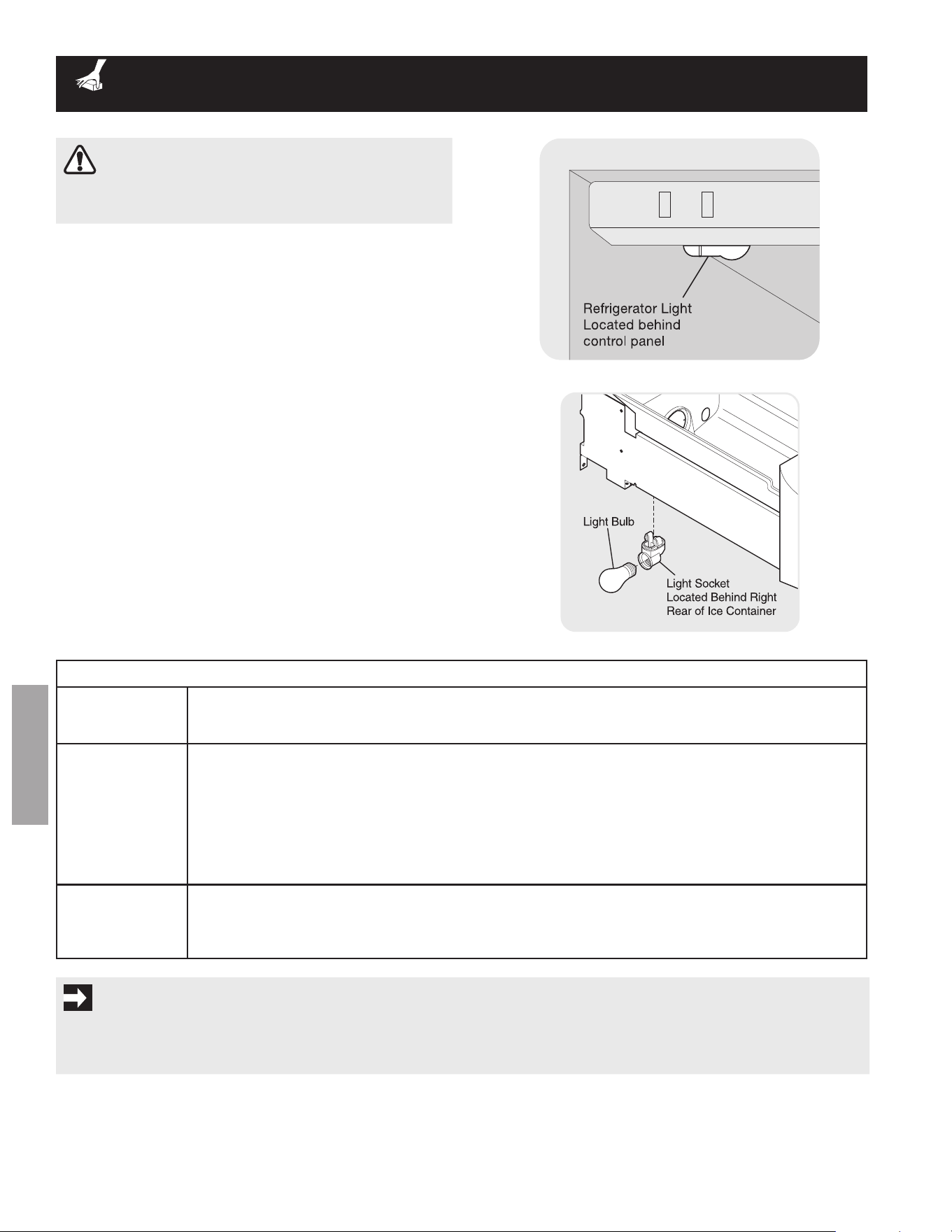
Freezer Light replacement
rEPLAcING LIGHt BuLBS
1 Unplug refrigerator.
2 Wear gloves as protection against possible broken glass.
3 remove light cover, if necessary.
4 Unscrew and replace old bulb with an appliance bulb of
the same wattage.
5 replace light cover, if necessary.
6 remember to plug the refrigerator back in.
refrigerator Light replacement
cAutIoN
Wear gloves when replacing light bulbs to avoid getting
cut.
vacation and moving tips
Short vacations
leave refrigerator operating during vacations of 3 weeks or less.•
Use all perishable items from refrigerator compartment.•
Turn automatic ice maker off and empty ice bucket, even if you will only be gone for a few days.•
Long vacations
remove all food and ice if you will be gone one month or more.•
Turn off automatic ice maker and turn water supply valve to closed position.•
Turning refrigerator controls to “• oFF” by pressing and holding the on/off button for 3 seconds (elec-
tronic) or turn control knobs to “0” (manual) on the mechanical controls only controls your refrigerator’s
cooling system. To turn off power to your refrigerator you must unplug the power cord from the wall
outlet.
Clean interior thoroughly.•
leave both doors open to prevent odors and mold build-up. Block doors open if necessary.•
moving
remove all food and ice.•
If using handcart, load from side.•
adjust rollers all the way up to protect them during sliding or moving.•
Pad cabinet to avoid scratching surface.•
ImPortANt
If the refrigerator is going to be stored or moved in freezing temperatures, the water in the ice and water system must be
drained completely. failure to do so could result in water leaks when the refrigerator is put back into service. Contact a service
representative to perform this operation.
23
ENGLISH
REFRIGERATOR WARRANTY
Your refrigerator is protected by this warranty
In the U.S.a., your appliance is warranted by Crosley Corporation. We authorize no person to change or add to any of our obligations under
this warranty. our obligations for service and parts under this warranty must be performed by an authorized Crosley Corporation servicer. In
Canada, your appliance is warranted by Crosley Canada Corp.
this warranty applies only to products in ordinary household use, and the consumer is responsible for the
items listed below:
1. Proper use of the appliance in accordance with instructions provided with the product.
2. Proper installation by an authorized servicer in accordance with instructions provided with the appliance and in
accordance with all local plumbing, electrical and/or gas codes.
3. Proper connection to a grounded power supply of sufficient voltage, replacement of blown fuses, repair of loose
connections or defects in house wiring.
4. expenses for making the appliance accessible for servicing, such as removal of trim, cupboards, shelves, etc.,
which are not a part of the appliance when it was shipped from the factory.
5. Damages to finish after installation.
6. Replacementoflightbulbsand/oruorescenttubes(onmodelswiththesefeatures).
this warranty does not cover the following:
1. CoNSeQUeNTIal or INCIDeNTal DaMageS SUCh aS ProPerTY DaMage aND INCIDeNTal
eXPeNSeS reSUlTINg froM aNY BreaCh of ThIS WrITTeN or aNY IMPlIeD WarraNTY.
NotE: Somestatesdonotallowtheexclusionorlimitationofincidentalorconsequentialdamages,sothis
limitation or exclusion may not apply to you.
2. Service calls which do not involve malfunction or defects in workmanship or material, or for appliances not in
ordinary household use. The consumer shall pay for such service calls.
3. Damages caused by services performed by servicers other than Crosley Corporation, Crosley Canada Corp. or
its authorized servicers; use of parts other than genuine Crosley Corporation parts; obtained from persons other
thansuchservicers;orexternalcausessuchasabuse,misuse,inadequatepowersupplyoractsofGod.
4. Products with original serial numbers that have been removed or altered and cannot be readily determined.
Keepyourbillofsale,deliveryslip,orsomeotherappropriatepaymentrecord.Thedateonthebillestablishesthe
warrantyperiodshouldserviceberequired.Ifserviceisperformed,itisinyourbestinteresttoobtainandkeepall
receipts. This written warranty gives you specific legal rights. You may also have other rights that vary from state to
state. Service under this warranty must be obtained by contacting Crosley Corporation or Crosley Canada Corp.
*NormAL
rESPoNSIBILItIES
oF tHE coNSumEr
EXcLuSIoNS
IF You NEEd
SErvIcE
For WArrANtY INFormAtIoN coNtAct:
uSA 800-944-9044
canada 800-265-8352
For Product INFormAtIoN coNtAct:
336-761-1212
Crosley Corporation
111 Cloverleaf Dr.
Suite 200
Winston-Salem, NC 27103
www.crosley.com
This warranty only applies in the 50 States of the U.S.a., in Puerto rico, and in Canada. Product features or specifications as described or
illustrated are subject to change without notice. all warranties are made by Crosley Corporation. In Canada, your appliance is warranted by
Crosley Canada Corp.
Rev.01/2006
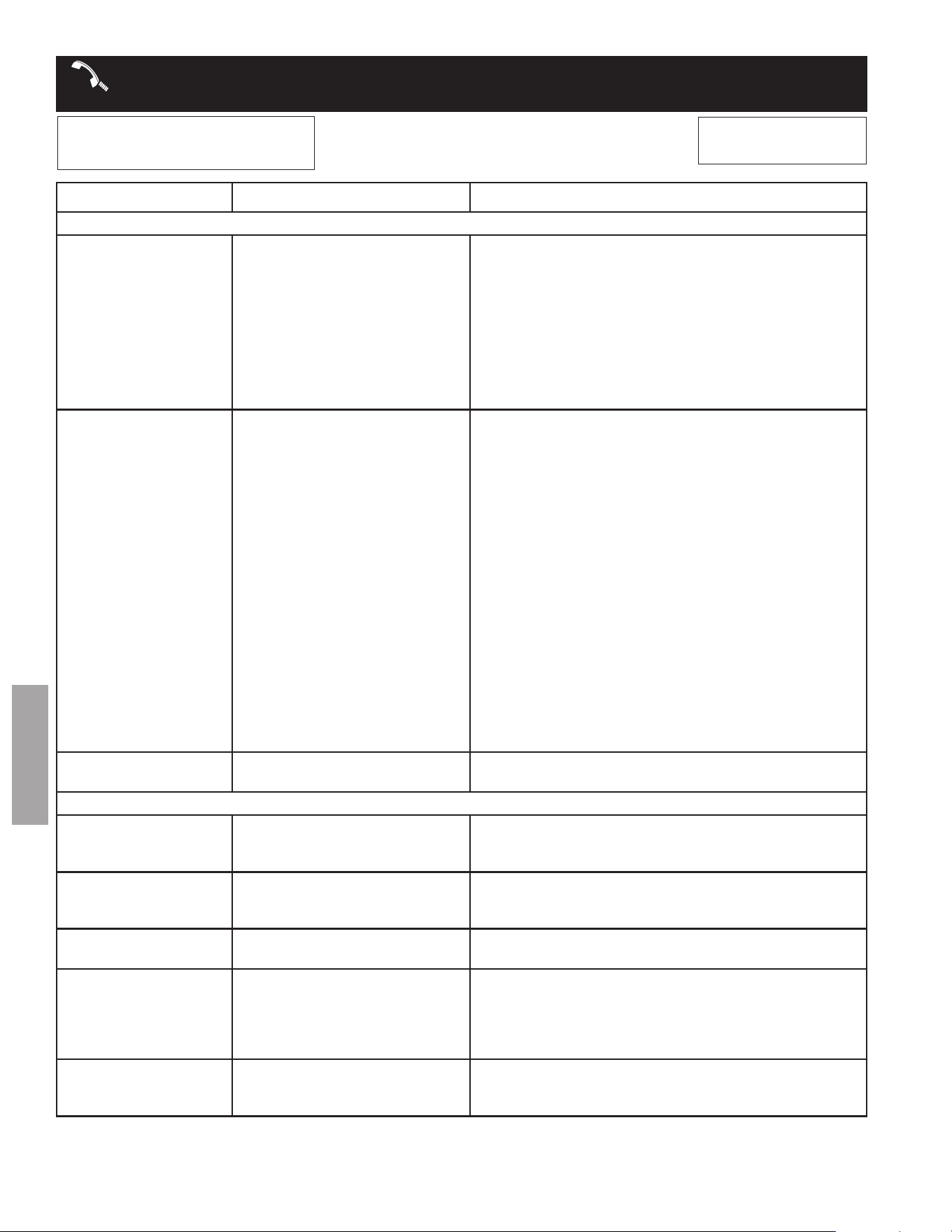
WArrANtY
WArrANtY PErIod tHrouGH our AutHorIzEd SErvIcErS,
WE WILL:
tHE coNSumEr WILL BE rE-
SPoNSIBLE For:
FuLL oNE-YEAr
WArrANtY
one year from original
purchase date
Pay all costs for repairing or replacing any parts of
this appliance which prove to be defective in materials
or workmanship. excludes original and replacement
Ice&Waterltercartridges(ifequipped).Original
and replacement cartridges are warranted for 30 days
(parts only).
Costs of service calls that are listed
under NormAL rESPoNSIBILI-
tIES oF tHE coNSumEr.*
*In addition to warranty shown above, ask your dealer about crosley Extended Limited Warranty that comes to you at no extra
charge for the 2nd through 10th years.
24
ENGLISH
BEForE You cALL
Visit our web site at
www.crosley.com.
1-800-944-9044 (United States)
1-800-265-8352 (Canada)
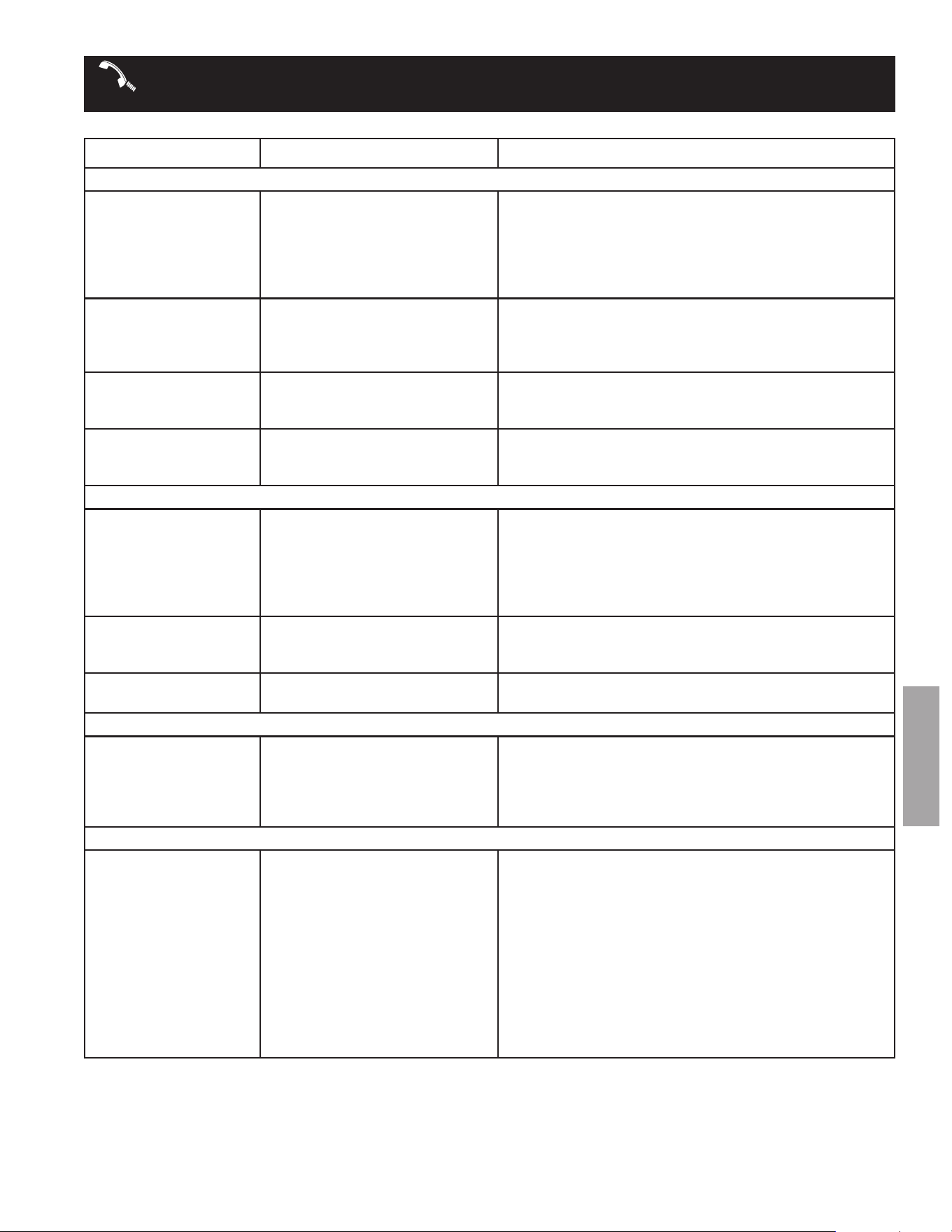
ProBLEm cAuSE corrEctIoN
RUNNING OF REFRIGERATOR
compressor does not
run.
freezer control is set to “of” •
or “0”.
refrigerator is in defrost cycle.•
Plug at electrical outlet is dis-•
connected.
house fuse blown or tripped •
circuit breaker.
Power outage.•
Set freezer control. See • tEmPErAturE coNtroLS
section.
This is normal for a fully automatic defrost refrigerator. •
The defrost cycle occurs periodically, lasting about 30
minutes.
ensure plug is tightly pushed into outlet.•
Check/replace fuse with a 15 amp time-delay fuse. reset •
circuit breaker.
Check house lights. Call local electric company.•
refrigerator runs too
much or too long.
room or outside weather is hot.•
refrigerator has recently been •
disconnected for a period of
time.
automatic ice maker is operat-•
ing.
Doorsareopenedtoofrequent-•
ly or too long.
fresh food/freezer door may •
be slightly open.
freezer control is set too cold •
(control found in fresh food
section).
fresh food/freezer gasket is •
dirty, worn, cracked, or poorly
fitted.
Condenser is dirty.•
It’s normal for the refrigerator to work longer under these •
conditions.
It takes 8-12 hours for the refrigerator to cool down com-•
pletely.
Ice maker operation causes refrigerator to run slightly •
more.
Warm air entering the refrigerator causes it to run more. •
open doors less often.
Ensurerefrigeratorislevel.Keepfoodandcontainsfrom•
blocking door. See ProBLEm column OPENING/CLOS-
ING OF DOORS/DRAWERS.
Set fresh food control to warmer setting until refrigerator •
temperature is satisfactory. allow 24 hours for tempera-
ture to stabilize.
Clean or change gasket. leaks in door seal will cause •
refrigerator to run longer in order to maintain desired tem-
peratures.
Clean condenser. See • care & cleaning chart in the
cArE & cLEANING section.
compressor goes off
and on frequently.
Thermostat keeps the refrigera-•
tor at a constant temperature.
This is normal. refrigerator goes on and off to keep •
temperature constant.
TEMPERATURES ARE TOO COLD
Freezer temperature too
cold. Fresh Food tem-
perature is satisfactory.
freezer control is set too cold.• Set freezer control to a warmer setting. allow 24 hours •
for temperature to stabilize.
Fresh Food temperature
too cold. Freezer tem-
perature is satisfactory.
fresh food control is set too •
cold.
Set fresh food control to a warmer setting. allow 24 •
hours for temperature to stabilize.
Food stored in drawers
freezes.
fresh food control is set too •
cold.
See solution above.•
Food stored in meat
Keeper freezes (some
models).
MeatKeeperTemperatureCon-•
trol set too cold.
AdjustMeatKeeperTemperatureControltoalower•
setting. (Meat should be stored at a temperature just
below the freezing point for maximum fresh storage time.
It is normal for ice crystals to form due to the moisture
content of meat.
digital temperature dis-
playsareashing.
electronic control system •
has detected a performance
problem.
Call your electrolux service representative, who can •
interpretanymessagesornumbercodesashingonthe
digital displays.
25
ENGLISH
BEForE You cALL (coNtINuEd)
ProBLEm cAuSE corrEctIoN
TEMPERATURES ARE TOO WARM
Freezer/Fresh Food tem-
perature is too warm.
Doorsareopenedtoofrequent-•
ly or too long.
Door is slightly open.•
Condenser is dirty.•
Warm air enters the refrigerator whenever the door is •
opened. open the door less often.
See • ProBLEm column OPENING/CLOSING OF
DOORS/DRAWERS.
Clean condenser. See • care & cleaning chart in cArE
& cLEANING section.
Freezer temperature is
too warm. Fresh Food
temperature is satisfac-
tory.
freezer control is set too warm.• Set freezer control to a colder setting. allow 24 hours for •
temperature to stabilize.
Fresh Food temperature
is too warm. Freezer tem-
perature is satisfactory.
fresh food control is set too •
warm.
Set fresh food control to a colder setting. allow 24 •
hours for temperature to stabilize.
temperature in the meat
Keeper is too warm
(some models).
MeatKeepertemperaturecon-•
trol is set too warm.
AdjustMeatKeeperTemperatureControltoacolderset-•
ting.
WATER/MOISTURE/FROST INSIDE REFRIGERATOR
moisture collects on
inside of refrigerator
walls.
Weather is hot and humid.•
Door is slightly open.•
Door is opened too often or too •
long.
open containers.•
The rate of frost buildup and internal sweating increases.•
See • ProBLEm column OPENING/CLOSING OF
DOORS/DRAWERS.
open door less often.•
Keepcontainerscovered.•
Water collects on bot-
tom side of drawer
cover.
Vegetables contain and give off •
moisture.
It is not unusual to have moisture on the bottom side of •
the cover.
Move humidity control (some models) to lower setting.•
Water collects in bottom
of drawer.
Washed vegetables and fruit •
drain while in the drawer.
Dry items before putting them in the drawer. Water col-•
lecting in bottom of drawer is normal.
WATER/MOISTURE/FROST OUTSIDE REFRIGERATOR
moisture collects on
outside of refrigerator
or between doors.
Weather is humid.•
Door is slightly open, causing •
cold air from inside refrigerator
to meet warm air from outside.
This is normal in humid weather. When humidity is lower, •
the moisture should disappear.
See • ProBLEm column OPENING/CLOSING OF
DOORS/DRAWERS.
AUTOMATIC ICE MAKER
Ice maker is not making
any ice.
Ice maker wire signal arm is in •
the “up” or oFF position.
Ice maker power switch is off.•
household water line valve is •
not open.
Ice maker has small cube •
caught in mechanism.
freezer is not cold enough.•
Saddle valve on cold water •
pipe is clogged or restricted by
foreign material.
Move wire signal arm to the “down” or • oN position. (side
mounted)
Turn power switch to on (“• I”) position. (rear mounted)
Turn on household water line valve.•
remove small cube from ice maker. The ice and water •
filter cartridge may be clogged. replace filter cartridge.
See • ProBLEm column TEMPERATURES ARE TOO
WARM.
Turn off household water line valve. remove valve. en-•
sure that valve is not a self-piercing saddle valve. Clean
valve. replace valve if necessary.
26
ENGLISH
BEForE You cALL (coNtINuEd)
ProBLEm cAuSE corrEctIoN
AUTOMATIC ICE MAKER (CONTINUED)
Ice maker is not making
enough ice.
Ice maker is producing less ice •
than you expect.
freezer is not cold enough.•
household water line valve is •
not completely open.
Check to see if water dispenser •
is dispensing slower than normal.
Side mounted ice maker should produce 4 to 4.5 pounds •
(approximately4quarts)oficeevery24hours.Arear
mounted ice maker should produce 3 to 4 pounds (ap-
proximately 3½quarts)oficeevery24hours.Extra Ice
option should produce 25% to 50% more ice every 24
hours.
See • ProBLEm column TEMPERATURES ARE TOO
WARM.
Turn on household water line valve.•
If it is, replace the ice and water filter cartridge.•
Ice maker will not stop
making ice.
Ice maker wire signal arm is •
being held down by some item
in the freezer.
Move item and release wire signal arm. remove any ice •
cubes that are frozen together over the wire signal arm.
Ice cubes are freezing
together.
Ice cubes are not being used •
frequentlyenough.
Ice cubes are hollow (partially •
frozen cubes with water inside).
freezer control is set too warm.•
Very little food in freezer.•
remove ice container and discard ice from container. Ice •
maker will produce fresh supply.
The ice and water filter cartridge may be clogged. re-•
place filter cartridge.
Set freezer control to colder setting. allow 24 hours for •
temperature to stabilize.
add more food to freezer.•
Ice has bad odor and
taste.
Icehaspickedupodororavor•
from strong food stored in
refrigerator or freezer.
Water running to ice maker has •
poor taste or odor.
Icenotusedfrequentlyenough.•
Cover foods tightly. Discard stale ice. Ice maker will •
produce fresh supply.
add filter to water supply line. Consult a water purifying •
company.
Discard stale ice.•
ICE DISPENSER
dispenser will not dis-
pense ice.
Ice storage container is empty.•
freezer temperature is set too •
warm.
household water line valve is •
not open.
freezer door is not closed.•
Ice dispensing arm has been held •
in for more than 4-5 minutes.
When the first supply of ice is dropped into the container, •
the dispenser should operate.
Turn freezer control to a higher setting so that ice cubes •
will be made. When first supply of ice is made, dispenser
should operate.
open household water line valve. allow sufficient time •
for the ice to be made. When ice is made, the dispenser
should operate.
ensure freezer door is closed.•
Motor is overloaded. Motor over load protector will reset •
in approximately 3 minutes. Ice can then be dispensed.
Ice dispenser is
jammed.
Ice has melted and frozen •
aroundaugerduetoinfrequent
use,temperatureuctuations,
and/or power outages.
Ice cubes are jammed between •
ice maker and back of ice
container.
Ice cubes are frozen together.•
Ice cubes are hollow (partially •
frozencubeswithliquidwater
inside).
remove ice container, thaw, and empty the contents. •
Clean container, wipe dry, and replace in proper position.
When new ice is made, dispenser should operate.
remove ice cubes that are jamming the dispenser.•
Use the dispenser often so that cubes do not freeze •
together.
The ice and water filter cartridge could be clogged. •
replace the filter cartridge. Dispensing system operates
best at 30 - 100 psi water pressure. Well water pressures
should fall within this range.
27
ENGLISH
BEForE You cALL
ProBLEm cAuSE corrEctIoN
WATER DISPENSER
dispenser will not dis-
pense water.
household water line valve is •
not open.
freezer door is not closed.•
Ice and water filter cartridge is •
clogged.
front filter not fully installed, if •
equipped.
open household water line valve. See • ProBLEm col-
umn ICE MAKER IS NOT MAKING ANY ICE.
ensure that freezer door is closed.•
replace filter cartridge.•
Pushlterinuntilyouheara“click”.Filtershouldbeush•
with cabinet.
Water has an odd taste
and/or odor.
Water has been in the tank for •
a period of time.
Unit not properly connected to •
cold water line.
Tubing used in the household •
water supply and installation
may affect water taste and odor.
Water has a high mineral content.•
Draw and discard 10-12 glasses of water to freshen the •
supply and completely rinse out the tank.
Connect unit to cold water line that supplies water to the •
kitchen faucet.
for best results, use copper tubing for water connections.•
Contact water treatment plant for help.•
Water pressure is ex-
tremely low.
Cut-off and cut-on pressures •
are too low (well systems only).
reverse osmosis system is in •
regenerative phase.
have someone turn up the cut-off and cut-on pressure on •
the water pump system (well systems only).
It is normal for a reverse osmosis system to be below 20 •
psi during the regenerative phase.
ODORS IN REFRIGERATOR
Interior is dirty.
Interior needs to be cleaned.•
food with strong odors is in •
refrigerator.
See • care & cleaning chart in care & cleaning section.
Cover food tightly.•
OPENING/CLOSING OF DOORS/DRAWERS
door(s) will not close.
Door was closed too hard, caus-•
ing other door to open slightly.
refrigerator is not level. It •
rocksontheoorwhenmoved
slightly.
refrigerator is touching a wall •
or cabinet.
Close both doors gently.•
Ensureoorislevelandsolid,andcanadequatelysup-•
port the refrigerator. Contact a carpenter to correct a
saggingorslopingoor.
Ensureoorislevelandsolid,andcanadequatelysup-•
port the refrigerator. Contact a carpenter to correct a
saggingorslopingoor.
drawers are difficult to
move.
food is touching shelf on top of •
drawer.
Track that drawers slide on is •
dirty.
Keeplessfoodindrawer.•
Clean drawer, rollers, and track. See • care & cleaning
chart in care & cleaning section.
LIGHT BULB IS NOT ON
Light bulb is not on.
light bulb is burned out.•
No electric current is reaching •
refrigerator.
See • rEPLAcING LIGHt BuLBS in care & cleaning
section.
See • ProBLEm column RUNNING OF REFRIGERATOR.
IF YOU HEAR (electronic models only)
5 beeps
a door has been left open for 5 •
minutes or more.
These beeps will repeat once every minute until the door •
has been closed. This is normal for the “Door ajar” alarm.
3 beeps
The refrigerator has experi-•
enced a loss of power or a low
voltage condition.
This is normal when “Power-on-reset” is activated.•