Operating Instructions
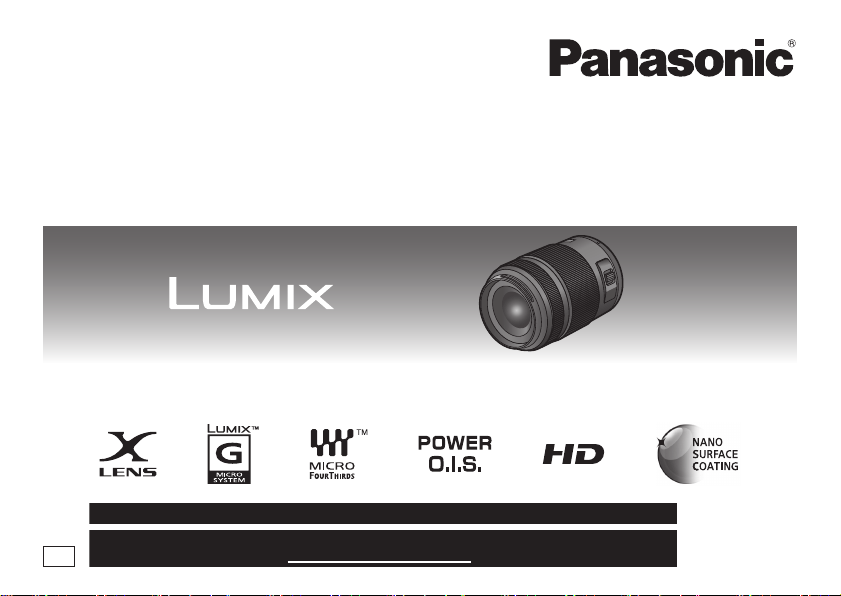
INTERCHANGEABLE LENS FOR DIGITAL CAMERA
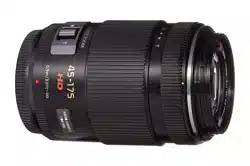
Model No. H-PS45175
Before connecting, operating or adjusting this product, please read the instructions completely.
For USA and Puerto Rico assistance, please call: 1-800-211-PANA(7262) or, contact us via the web at: http://www.panasonic.com/contactinfo
For Canadian assistance, please call: 1-800-99-LUMIX (1-800-995-8649) or
send e-mail to: [email protected]
PP
VQT3R89
until
2011/10/3
VQT3R89_ENG_SPA.book 1 ページ 2011年8月2日 火曜日 午前10時48分

2
VQT3R89
Contents
Information for Your Safety..................................... 2
Precautions........................................................... 4
Supplied Accessories ............................................. 5
Attaching/Detaching the Lens................................. 5
Names and Functions of Components ................... 7
Cautions for Use..................................................... 9
Troubleshooting .................................................. 10
Specifications........................................................ 11
Limited Warranty................................................... 12
-If you see this symbol-
THE FOLLOWING APPLIES ONLY IN CANADA.
Information for Your Safety
Keep the unit as far away as possible from
electromagnetic equipment (such as microwave
ovens, TVs, video games, radio transmitters,
high-voltage lines etc.).
≥ Do not use the camera near cell phones because
doing so may result in noise adversely affecting
the pictures and sound.
≥ If the camera is adversely affected by
electromagnetic equipment and stops functioning
properly, turn the camera off and remove the
battery and/or the connected AC adaptor. Then
reinsert the battery and/or reconnect the AC
adaptor and turn the camera on.
Information on Disposal in other Countries
outside the European Union
This symbol is only valid in the
European Union.
If you wish to discard this
product, please contact your
local authorities or dealer and
ask for the correct method of
disposal.
This Class B digital apparatus complies with
Canadian ICES-003.
VQT3R89_ENG_SPA.book 2 ページ 2011年8月2日 火曜日 午前10時48分

3
VQT3R89
The lens can be used with a digital camera
compatible with the lens mount standard for the
“Micro Four Thirds
TM
System”.
≥ It cannot be mounted on the Four Thirds
TM
mount
specification camera.
≥ The digital camera illustrations in these operating
instructions show DMC-G3 as an example.
≥ The appearance and specifications of products
described in this manual may differ from the actual
products you have purchased due to later
enhancements.
≥
Micro Four Thirds
TM
and Micro Four Thirds Logo
marks are trademarks or registered trademarks of
Olympus Imaging Corporation, in Japan, the United
States, the European Union and other countries.
≥ Four Thirds
TM
and Four Thirds Logo marks are
trademarks or registered trademarks of Olympus
Imaging Corporation, in Japan, the United States,
the European Union and other countries.
≥ G MICRO SYSTEM is a lens exchange type
digital camera system of LUMIX based on a Micro
Four Thirds System standard.
≥ Other names of systems and products mentioned
in these instructions are usually the registered
trademarks or trademarks of the manufacturers
who developed the system or product concerned.
THE FOLLOWING APPLIES ONLY IN THE U.S.A.
FCC Note:
This equipment has been tested and found to comply with the limits
for a Class B digital device, pursuant to Part 15 of the FCC Rules.
These limits are designed to provide reasonable protection
against harmful interference in a residential installation. This
equipment generates, uses and can radiate radio frequency
energy and, if not installed and used in accordance with the
instructions, may cause harmful interference to radio
communications. However, there is no guarantee that
interference will not occur in a particular installation. If this
equipment does cause harmful interference to radio or television
reception, which can be determined by turning the equipment off
and on, the user is encouraged to try to correct the interference
by one or more of the following measures:
● Reorient or relocate the receiving antenna.
●
Increase the separation between the equipment and receiver.
● Connect the equipment into an outlet on a circuit different
from that to which the receiver is connected.
● Consult the dealer or an experienced radio/TV technician
for help.
Any unauthorized changes or modifications to this equipment
would void the user’s authority to operate this device.
This device complies with Part 15 of the FCC Rules. Operation is
subject to the following two conditions: (1) This device may not cause
harmful interference, and (2) this device must accept any interference
received, including interference that may cause undesired operation.
Responsible Party:
Panasonic Corporation of North America
One Panasonic Way
Secaucus, NJ 07094
Support Contact:
Panasonic Consumer Electronics Company
Telephone No.: 1-800-211-PANA (7262)
ENGLISH
VQT3R89_ENG_SPA.book 3 ページ 2011年8月2日 火曜日 午前10時48分

4
VQT3R89
∫ Lens Care
≥ Sand and dust can damage the lens. Make
sure that no sand or dust gets inside the lens
or the terminals when using the lens on a
beach, etc.
≥ This lens is not waterproof. If drops of water
get onto the lens, wipe the lens with a dry
cloth.
≥ Do not press the lens with excessive force.
≥ When there is dirt (water, oil, and fingerprints, etc.)
on the surface of the lens, the picture may be
affected. Lightly wipe the surface of the lens with a
soft, dry cloth before and after taking pictures.
≥ Do not place the lens mount facing downwards.
Do not allow the lens contact points 1 to become
dirty.
∫ About Condensation (Fogging of the
Lens)
≥ Condensation occurs when there are differences
in temperature and humidity as described below.
Condensation can cause the lens to become dirty
and lead to mold and malfunctioning, so exercise
caution in the following situations:
– When the camera is brought indoors from outside
during cold weather
– When the camera is brought into an air-
conditioned car
– When cold air from an air conditioner is directly
blown onto the lens
– In humid places
≥ Put the camera into a plastic bag to allow it to
acclimatize to the surrounding temperature in
order to prevent condensation. If condensation
occurs, turn the power off and leave it for about
two hours. Once the camera acclimatizes to the
surrounding temperature the condensation will go
away naturally.
Precautions
VQT3R89_ENG_SPA.book 4 ページ 2011年8月2日 火曜日 午前10時48分

5
VQT3R89
Supplied Accessories
[Inspection to be performed when you unpack
the unit]
When removing the unit from its packing box, check
that the main unit and the supplied accessories are
there and also check their external appearance and
functions to verify that they have not sustained any
damage during distribution and transportation.
If you discover any trouble, contact your vendor
before using the product.
Product numbers correct as of August 2011. These
may be subject to change.
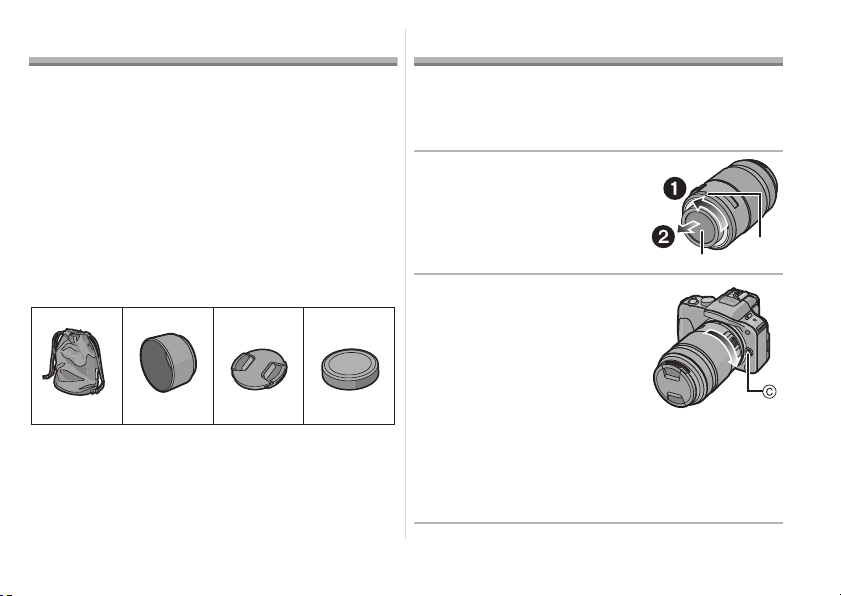
1 Lens Storage Bag
2 Lens Hood
3 Lens Cap
4 Lens Rear Cap
(The lens rear cap and lens cap are attached to
the interchangeable lens at the time of purchase.)
Attaching/Detaching the Lens
≥ Refer also to the camera’s operating instructions
for attaching and detaching the lens.
∫ Attaching the Lens
≥ Check that the camera is turned off.
1 Turn the lens rear cap
to detach it.
A: Lens Rear Cap
2
Align the lens fitting
marks
B
(red marks)
on
the camera body and the
lens and then rotate the
lens in the direction of
the arrow until it clicks.
• Do not press the lens
release button C when you
attach a lens.
• Do not try to attach the lens when holding it at an
angle to the camera body as the lens mount may
get scratched.
• Check that the lens is attached correctly.
VFC4430 VFC4697 VYF3463
123
VFC4605
4
VQT3R89_ENG_SPA.book 5 ページ 2011年8月2日 火曜日 午前10時48分

6
VQT3R89
∫ Detaching the Lens
≥ Check that the camera is turned off.
While pressing on the
lens release button D,
rotate the lens toward
the arrow until it stops
and then remove.
• Attach the lens rear cap so
that the lens contact point
does not get scratched.
• Attach the body cap to the camera so no dirt or
dust will get inside the main unit.
∫ Attaching and Detaching
the Lens Cap
Pinch the lens cap as
shown in the figure to
attach or detach.
• Be careful not to lose the lens cap.
∫ Attaching the Lens Hood
(Supplied Accessory)
Insert the lens hood into
the lens, and turn in the
direction of the arrow
until it stops.
E: Fit to the mark
∫ Temporarily Storing the Lens Hood
1 Turn the lens hood in the direction of the
arrow to detach it.
2 Reverse the lens hood and then attach it
in the same way as shown previously.
VQT3R89_ENG_Body.fm 6 ページ 2011年8月3日 水曜日 午後12時13分

7
VQT3R89
• When taking pictures with the flash with the lens
hood attached, the lower portion of the screen
may turn dark (vignetting effect) and the control
of the flash may be disabled because the photo
flash may be obscured by the lens hood. We
recommend detaching the lens hood.
• When using the AF assist lamp in the dark,
detach the lens hood.
∫ Attaching Filters
≥ Vignetting may occur if using 2 or more
MC protectors (optional: DMW-LMC46),
PL filters (optional: DMW-LPL46) or ND filters
(optional: DMW-LND46), or if using thick
protectors and/or filters.
≥ The filter may become impossible to remove if
excessively tightened, so please refrain from
tightening it too strongly.
≥ It is possible to attach the lens cap with the filter
already attached.
≥ You cannot attach a conversion lens or adaptor to
this lens. A filter may be used, but attaching any
other element may cause damage to the lens.
Names and Functions of
Components
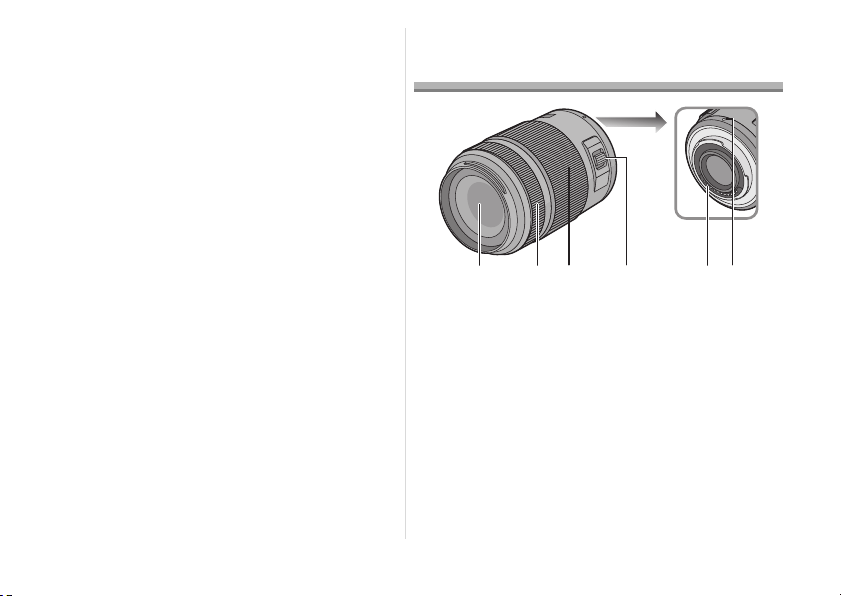
1 Lens surface
2 Focus ring
Rotate to focus when taking pictures with
manual focus.
5 6
21 34
VQT3R89_ENG_SPA.book 7 ページ 2011年8月2日 火曜日 午前10時48分

8
VQT3R89
3 Zoom ring
Rotate the zoom ring to the [T]
(Tele side) or [W] (Wide side).
[T]: To make subjects appear
closer use (Tele)
[W]: To make subjects appear
further away use (Wide)
• The zoom speed varies depending on the
speed to rotate the ring.
4 Zoom lever
Move the zoom lever to the [T]
(Tele side) or [W] (Wide side).
[T]: To make subjects appear
closer use (Tele)
[W]: To make subjects appear
further away use (Wide)
• The zoom speed varies depending on the
range over which the zoom lever is moved.
• If you take your finger off the zoom lever during
zoom operation while recording a motion
picture, the operation sound may be recorded.
When returning the zoom lever to the original
position, move it quietly.
5 Contact points
6 Lens fitting mark
Note
≥ Zoom speed will be slower than normal when
recording a motion picture.
≥ When flash recording with a close subject, the
light of the flash will be blocked by the lens and
part of the picture may be dark. Check the
distance from the subject when recording.
≥ There is no indication of focal length on the lens.
The focal length is displayed on the screen of the
digital camera when attached to the compatible
digital camera. Focal length is not displayed on
the digital camera that is not compatible. For
details on the digital camera used, refer to the
website.
http://panasonic.jp/support/global/cs/dsc/
(This Site is English only.)
T
W
T
W
VQT3R89_ENG_SPA.book 8 ページ 2011年8月2日 火曜日 午前10時48分

9
VQT3R89
Cautions for Use
Take care not to drop or knock the lens. Also
take care not to put a lot of pressure on the lens.
≥ Take care not to drop the bag that you inserted the
lens in as it may damage the lens. The camera
may stop operating normally and pictures may no
longer be recorded.
When using pesticides and other volatile
substances around the camera make sure that
they do not get onto the lens.
≥
If such substances get onto the lens they can
damage the exterior case or cause the paint to peel.
Do not carry the unit when it is still attached to
the camera body.
≥ Under no circumstances should the unit be stored
in any of the following locations since doing so
may cause problems in operation or
malfunctioning.
– In direct sunlight or on a beach in summer
– In locations with high temperatures and humidity
levels or where the changes in temperature and
humidity are acute
– In locations with high concentrations of sand,
dust or dirt
– Where there is fire
– Near heaters, air conditioners or humidifiers
– Where water may make the unit wet
– Where there is vibration
– Inside a vehicle
≥ Refer also to the operating instructions of the
digital camera.
≥ When the unit is not going to be used for a
prolonged period, we recommend storing with a
desiccant (silica gel). Failure to do so may result in
performance failure caused by mold, etc. It is
recommended that you check the unit’s operation
prior to use.
≥ Do not leave the lens in contact with rubber or
plastic products for extended periods of time.
≥ Do not touch the lens contact point. Doing so can
cause failure of the unit.
≥ Do not disassemble or alter the unit.
VQT3R89_ENG_SPA.book 9 ページ 2011年8月2日 火曜日 午前10時48分

10
VQT3R89
Do not use benzine, thinner, alcohol or other
similar cleaning agents to clean the lens glass or
exterior cabinet.
≥ Using solvents can damage the lens or cause the
paint to peel.
≥ Wipe off any dust or fingerprints with a soft, dry
cloth.
≥ Use a dry, dust cloth to remove dirt and dust on
the zoom ring and focus ring.
≥ Do not use a household detergent or a chemically
treated cloth.
A sound is heard when the camera is turned on
or off.
≥ This is the sound of lens or aperture movement
and is not a malfunction.
When this lens is attached to digital camera,
stabilizer function cannot be turned off or
stabilizer function does not work.
≥ The Optical Image Stabilizer function of this lens
only works correctly with supported cameras.
> When older Panasonic digital cameras (DMC-
GF1, DMC-GH1, DMC-G1) are used,
[STABILIZER] in the [REC] mode menu cannot be
set to [OFF]. It is recommended to update the
firmware of the digital camera at the following
website.
http://panasonic.jp/support/global/cs/dsc/
download/
> When using this lens with another make of digital
cameras, the Optical Image Stabilizer function will
not work. (As of August 2011)
For details, contact the respective company.
Troubleshooting
VQT3R89_ENG_SPA.book 10 ページ 2011年8月2日 火曜日 午前10時48分

11
VQT3R89
Specifications
INTERCHANGEABLE LENS FOR DIGITAL CAMERA
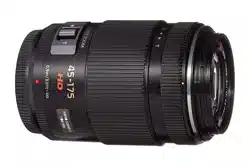
“LUMIX G X VARIO PZ 45–175 mm/F4.0–5.6 ASPH./POWER O.I.S.”
Focal length f=45 mm to 175 mm
(35 mm film camera equivalent: 90 mm to 350 mm)
Aperture type 7 diaphragm blades/circular aperture diaphragm
Aperture range F4.0 (Wide) to F5.6 (Tele)
Minimum aperture value F22
Lens construction 14 elements in 10 groups (2 aspherical lenses, 2 ED Lens)
Nano surface coating Yes
In focus distance 0.9 m (2.95 feet) to ¶ (from the focus distance reference line)
Maximum image magnification 0.2k (35 mm film camera equivalent: 0.4k)
Optical image stabilizer Available
[O.I.S.] switch None (Setting of the [STABILIZER] is done in [REC] mode menu
by LUMIX digital cameras.)
Mount “Micro Four Thirds Mount”
Angle of view 27
x (Wide) to 7.1x (Tele)
Filter diameter 46 mm (1.81 inch)
Max. diameter Approx. 61.6 mm (2.43 inch)
Overall length Approx. 90.0 mm (3.54 inch)
(from the tip of the lens to the base side of the lens mount)
Mass (Weight) Approx. 210 g (0.463 lb)
VQT3R89_ENG_SPA.book 11 ページ 2011年8月2日 火曜日 午前10時48分
12
VQT3R89
Limited Warranty
Limited Warranty Coverage
If your product does not work properly because of a defect in materials or workmanship, Panasonic
Consumer Electronics Company (referred to as “the warrantor”) will, for the length of the period indicated
on the chart below, which starts with the date of original purchase (“warranty period”), at its option either (a)
repair your product with new or refurbished parts, or (b) replace it with a new or a refurbished product. The
decision to repair or replace will be made by the warrantor.
You must Mail-In your product during the warranty period. This warranty only applies to products purchased
and serviced in the United States or Puerto Rico. This warranty is extended only to the original purchaser of
a new product which was not sold “as is”.
Mail-In Service
For assistance in obtaining service in the United States and Puerto Rico please contact:
Panasonic Camera and Digital Service Center
1590 Touhy Ave.
Elk Grove Village, IL 60007
FOR U.S.A. and Puerto Rico
PANASONIC CONSUMER ELECTRONICS COMPANY,
DIVISION OF PANASONIC CORPORATION OF NORTH AMERICA
One Panasonic Way,
Secaucus, New Jersey 07094
Digital Still Camera ACCESSORIES LIMITED WARRANTY
PRODUCT OR PART NAME PARTS LABOR
Interchangeable Lens for Digital Camera 1 (ONE) YEAR 1 (ONE) YEAR
VQT3R89_ENG_SPA.book 12 ページ 2011年8月2日 火曜日 午前10時48分

13
VQT3R89
If repair is needed during the warranty period the purchaser will be required to furnish a sales receipt/proof
of purchase indicating date of purchase.
Also, purchaser will be responsible for shipping the unit to the above address.
Limited Warranty Limits And Exclusions
This warranty ONLY COVERS failures due to defects in materials or workmanship, and DOES NOT
COVER normal wear and tear or cosmetic damage. The warranty ALSO DOES NOT COVER damages
which occurred in shipment, or failures which are caused by products not supplied by the warrantor, or
failures which result from accidents, misuse, abuse, neglect, mishandling, misapplication, alteration, faulty
installation, set-up adjustments, misadjustment of consumer controls, improper maintenance, power line
surge, lightning damage, modification, or commercial use (such as in a hotel, office, restaurant, or other
business), rental use of the product, service by anyone other than a Factory Service Center or other
Authorized Servicer, or damage that is attributable to acts of God.
THERE ARE NO EXPRESS WARRANTIES EXCEPT AS LISTED UNDER “LIMITED WARRANTY
COVERAGE”. THE WARRANTOR IS NOT LIABLE FOR INCIDENTAL OR CONSEQUENTIAL
DAMAGES RESULTING FROM THE USE OF THIS PRODUCT, OR ARISING OUT OF ANY BREACH OF
THIS WARRANTY.
(As examples, this excludes damages for lost time, travel to and from the servicer, or loss of, or fail-
ure to obtain, images, data or other camera memory content. The items listed are not exclusive, but
are for illustration only.) ALL EXPRESS AND IMPLIED WARRANTIES, INCLUDING THE WARRANTY
OF MERCHANTABILITY, ARE LIMITED TO THE PERIOD OF THE LIMITED WARRANTY.
Some states do not allow the exclusion or limitation of incidental or consequential damages, or limitations
on how long an implied warranty lasts, so the exclusions may not apply to you.
This warranty gives you specific legal rights and you may also have others rights which vary from state to
state. If a problem with this product develops during or after the warranty period, you may contact your
dealer or Service Center. If the problem is not handled to your satisfaction, then write to the warrantor’s
Consumer Affairs Department at the addresses listed for the warrantor.
PARTS AND SERVICE WHICH ARE NOT COVERED BY THIS LIMITED WARRANTY ARE YOUR
RESPONSIBILITY.
VQT3R89_ENG_SPA.book 13 ページ 2011年8月2日 火曜日 午前10時48分

14
VQT3R89
Panasonic Canada Inc.
5770 Ambler Drive, Mississauga, Ontario L4W 2T3
PANASONIC PRODUCT – LIMITED WARRANTY
Panasonic Canada Inc. warrants this product to be free from defects in material and workmanship under normal use and
for a period as stated below from the date of original purchase agrees to, at its option either (a) repair your product with
new or refurbished parts, (b) replace it with a new or a refurbished equivalent value product, or (c) refund your purchase
price. The decision to repair, replace or refund will be made by Panasonic Canada Inc.
This warranty is given only to the original purchaser, or the person for whom it was purchased as a gift, of a Panasonic
brand product mentioned above sold by an authorized Panasonic dealer in Canada and purchased and used in Canada,
which product was not sold “as is”, and which product was delivered to you in new condition in the original packaging.
IN ORDER TO BE ELIGIBLE TO RECEIVE WARRANTY SERVICE HEREUNDER, A PURCHASE RECEIPT OR OTHER
PROOF OF DATE OF ORIGINAL PURCHASE, SHOWING AMOUNT PAID AND PLACE OF PURCHASE
IS REQUIRED
FOR CANADA
Digital Camera One (1) year, parts and labour
Digital Photo Peripherals One (1) year, parts and labour
Digital Camera Accessories Ninety (90) days, parts and labour
VQT3R89_ENG_SPA.book 14 ページ 2011年8月2日 火曜日 午前10時48分

15
VQT3R89
LIMITATIONS AND EXCLUSIONS
This warranty ONLY COVERS failures due to defects in materials or workmanship, and DOES NOT COVER normal wear
and tear or cosmetic damage. The warranty ALSO DOES NOT COVER damages which occurred in shipment, or failures
which are caused by products not supplied by Panasonic Canada Inc., or failures which result from accidents, misuse,
abuse, neglect, mishandling, misapplication, alteration, faulty installation, set-up adjustments, misadjustment of consumer
controls, improper maintenance, improper batteries, power line surge, lightning damage, modification, introduction of sand,
humidity or liquids, commercial use such as hotel, office, restaurant, or other business or rental use of the product, or
service by anyone other than a Authorized Servicer, or damage that is attributable to acts of God.
Dry cell batteries, printer ink cartridge and paper are also excluded from coverage under this warranty.
Rechargeable batteries are warranted for ninety (90) days from date of original purchase.
THIS EXPRESS, LIMITED WARRANTY IS IN LIEU OF ALL OTHER WARRANTIES, EXPRESS OR IMPLIED,
INCLUDING ANY IMPLIED WARRANTIES OF MERCHANTABILITY AND FITNESS FOR A PARTICULAR PURPOSE. IN
NO EVENT WILL PANASONIC CANADA INC. BE LIABLE FOR ANY SPECIAL, INDIRECT OR CONSEQUENTIAL
DAMAGES RESULTING FROM THE USE OF THIS PRODUCT OR ARISING OUT OF ANY BREACH OF ANY EXPRESS
OR IMPLIED WARRANTY. (As examples, this warranty excludes damages for lost time, travel to and from the Authorized
Servicer, loss of or damage to media or images, data or other memory or recorded content. This list of items is not
exhaustive, but for illustration only.)
In certain instances, some jurisdictions do not allow the exclusion or limitation of incidental or consequential damages, or
the exclusion of implied warranties, so the above limitations and exclusions may not be applicable. This warranty gives you
specific legal rights and you may have other rights which vary depending on your province or territory.
WARRANTY SERVICE
For product operation and information assistance, please contact:
Our Customer Care Centre: Telephone: 1-800-99-LUMIX (1-800-995-8649)
Fax # : (905) 238-2360
Email link: lumixconcierge@ca.panasonic.com
For defective product exchange within the warranty period, please contact the original Dealer or our Customer Care
Centre.
VQT3R89_ENG_SPA.book 15 ページ 2011年8月2日 火曜日 午前10時48分

16
VQT3R89
Indice
Información para su seguridad ............................. 16
Prevención contra las averías ............................ 18
Accesorios suministrados ..................................... 19
Unir y quitar el objetivo ......................................... 19
Nombres y funciones de los componentes........... 21
Precauciones para el uso ..................................... 23
Búsqueda de averías.......................................... 24
Especificaciones................................................... 25
-Si ve este símbolo-
LO SIGUIENTE SÓLO INTERESA A CANADÁ.
Información para su
seguridad
Mantenga la unidad lo más lejos que sea posible
de equipos electromagnéticos (como hornos de
microondas, televisores, vídeo juegos,
trasmisores radio, líneas de alto voltaje, etc.).
≥ No utilice la cámara cerca de teléfonos móviles,
ya que lo de hacerlo puede producir ruido que
afectará negativamente a las imágenes y el
sonido.
≥ Si la cámara queda afectada negativamente por
un equipo electromagnético y deja de funcionar
correctamente, apague la cámara y quite la
batería y/o el adaptador de CA conectado. Luego
vuelva a insertar la batería y/o vuelva a conectar
el adaptador de CA y encienda la cámara.
Información sobre la eliminación en otros
países no pertenecientes a la Unión Europea
Este símbolo sólo es válido en
la Unión Europea.
Si desea desechar este
producto, póngase en
contacto con las autoridades
locales o con su distribuidor
para que le informen sobre el
método correcto de
eliminación.
Este aparato digital de la clase B cumple con
ICES-003 canadiense.
VQT3R89_ENG_SPA.book 16 ページ 2011年8月2日 火曜日 午前10時48分

17
VQT3R89
El objetivo puede usarse con una cámara digital
compatible con el estándar de montaje de objetivos
del “Micro Four Thirds
TM
System”.
≥ No se puede montar en una cámara con estándar
de soporte Four Thirds
TM
.
≥ Las figuras de la cámara digital en estas
instrucciones de funcionamiento muestran la
DMC-G3 en concepto de ejemplo.
≥ E aspecto y las especificaciones de los productos
descritos en este manual pueden diferir de los
productos reales que usted ha comprado debido a
aumentos sucesivos.
≥ El logotipo Micro Four Thirds™ y Micro Four
Thirds son marcas comerciales o marcas
comerciales registradas de Olympus Imaging
Corporation, en Japón, Estados Unidos, la Unión
Europea y otros países.
≥
El logotipo Four Thirds™ y Four Thirds son marcas
comerciales o marcas comerciales registradas de
Olympus Imaging Corporation, en Japón, Estados
Unidos, la Unión Europea y otros países.
≥ G MICRO SYSTEM es un sistema de cámara
digital con objetivo intercambiable de LUMIX
basado en el estándar Micro Four Thirds System.
≥ Los nombres de los sistemas y productos que se
mencionan en estas instrucciones generalmente
son marcas comerciales registradas o marcas
comerciales de los fabricantes que desarrollaron
el sistema o producto en cuestión.
LO SIGUIENTE SÓLO SE APLICA EN LOS EE. UU.
Notas FCC:
Se ensayó este equipo y se comprobó que está de
conformidad con los límites de un dispositivo digital de la
clase B, de acuerdo con la Parte 15 de las Reglas FCC.
Estos límites se han ideado para proporcionar una razonable
protección contra las interferencias dañinas en una instalación
residencial. Este equipo genera, utiliza y puede radiar energía
de frecuencia radio y, por si no se instala y se utiliza de
acuerdo con las instrucciones, puede ocasionar interferencia
dañina a las comunicaciones radio. Aunque no hay garantía de
que no pueda tener lugar interferencia en especiales
instalaciones. Si este equipo causa interferencia a la recepción
de radio o televisión que pueden determinarse apagando y
encendiendo el equipo, se anima al usuario intentar corregir la
interferencia tomando una de las medidas a continuación:
● Vuelva a orientar o a colocar la antena receptora.
● Aumente la separación entre el equipo y el receptor.
● Conecte el equipo a una toma de un circuito diferente del
que está conectado el receptor.
● Llame al concesionario o un técnico experto de radio y
televisión para ayuda.
Todo cambio o modificación a este equipo sin autorizar invalidará el
título del usuario para hacer funcionar este dispositivo.
Este dispositivo cumple con la Parte 15 de las Reglas FCC. El
funcionamiento está sujeto a las dos condiciones a continuación:
(1) Este dispositivo podría no causar interferencia dañina y (2) este
dispositivo tiene que aceptar toda la interferencia recibida,
incluyendo la que puede causar un funcionamiento no deseado.
Parte responsable:
Panasonic Corporation of North America
One Panasonic Way
Secaucus, NJ 07094
Contacto de asistencia:
Panasonic Consumer Electronics Company
Teléfono: 1-800-211-PANA (7262)
ESPAÑOL
VQT3R89_ENG_SPA.book 17 ページ 2011年8月2日 火曜日 午前10時48分

18
VQT3R89
∫ Atención del objetivo
≥ La arena y el polvo pueden dañar el objetivo.
Cuando usa el objetivo en una playa, tenga
cuidado de que ni arena ni polvo entren en el
interior del objetivo o los terminales, etc.
≥ Este objetivo no es impermeable. Si caen
gotas de agua en el objetivo, límpielo con un
paño seco.
≥ No ejerce demasiada presión en el objetivo.
≥ Cuando hay suciedad (agua, aceite, huellas
dactilares, etc.) en la superficie del objetivo, la
imagen puede salir afectada. Limpie ligeramente
con un paño blando y seco antes y después de
tomar las imágenes.
≥ No meta el soporte del objetivo mirando hacia
abajo. No deje que se ensucien los punto de
contacto 1.
∫ Acerca de la condensación
(Empañamiento del objetivo)
≥ La condensación ocurre cuando se encuentra una
diferencia en la temperatura y humedad como se
describe abajo. La condensación puede hacer
ensuciar el objetivo y producir hongos y un
funcionamiento defectuoso, por lo tanto ponga
cuidado en las situaciones a continuación:
– Cuando lleva la cámara en casa desde el aire
libre durante un tiempo frío
– Cuando lleva la cámara dentro de un coche con
aire acondicionado
– Cuando sopla en el objetivo aire frío desde un
acondicionador de aire
– En lugares húmedos
≥ Para impedir la condensación, meta la cámara en
una bolsa de plástico para que se aclimate a la
temperatura ambiente. Si ocurre condensación,
apague la alimentación y la deje así durante dos
horas. Una vez de que la cámara se haya
aclimatado a la temperatura ambiente en
empañamiento desaparece naturalmente.
Prevención contra las averías
VQT3R89_ENG_SPA.book 18 ページ 2011年8月2日 火曜日 午前10時48分
19
VQT3R89
Accesorios suministrados
[Controles a realizar cuando va a desembalar la
unidad]
Al quitar la unidad de su embalaje, compruebe que se
encuentren la unidad principal y los accesorios
suministrados. Además compruebe el aspecto externo
y las funciones para verificar que no hayan padecidos
daños durante la distribución y el transporte.
Por si encuentra un cualquier problema, antes de
usar el producto llame a su comerciante.
Números de productos correctos a partir de agosto
de 2011. Pueden estar sujetos a cambio.
1 Bolsa de almacenamiento del objetivo
2 Visera del objetivo
3 Tapa del objetivo
4 Tapa trasera del objetivo
(La tapa trasera del objetivo y la tapa del objetivo
intercambiable al momento de la compra.)
Unir y quitar el objetivo
≥
Se refiera también a las instrucciones de funcionamiento
de la cámara para unir y separar el objetivo.
∫ Unión del objetivo
≥ Compruebe que la cámara esté apagada.
1
Gire la tapa trasera del
objetivo para separarla
.
A: Tapa trasera del objetivo
2
Alinee las marcas para
ajustar el objetivo
B
(marcas rojas)
ubicadas
en el cuerpo de la
cámara y el mismo
objetivo, luego gire éste
en la dirección de la
flecha hasta que dispare.
• No presione el botón de
liberación de la lente
C
cuando coloca una lente.
• Como el soporte del objetivo podría salir rayado,
no trate de unir el objetivo a la cámara
manteniéndolo de ángulo.
• Compruebe que el objetivo esté unido correctamente.
VFC4430 VFC4697 VYF3463
123
VFC4605
4
VQT3R89_ENG_SPA.book 19 ページ 2011年8月2日 火曜日 午前10時48分

20
VQT3R89
∫ Separación del objetivo
≥ Compruebe que la cámara esté apagada.
Mientras presiona el
botón de liberación de
la lente D, gire la lente
hacia la flecha hasta
que se detenga y luego
retírela.
• Una la tapa trasera de
manera que el punto de
contacto del objetivo no salga rayado.
• Una la tapa del cuerpo a la cámara para que ni
suciedad ni polvo entren dentro de la unidad principal.
∫ Unir y separar la tapa del
objetivo
Apriete la tapa de la lente
como se muestra en la
figura para colocarla o
sacarla.
• Ponga cuidado en no perder la tapa del objetivo.
∫ Unión de la visera del objetivo
(Accesorio suministrado)
Inserte la visera del
objetivo con las partes
cortas arriba y abajo,
luego gírela en la
dirección de la flecha
hasta que dispare.
E: Ajustando hacia la marca
∫ Almacenamiento temporal de la visera
del objetivo
1 Gire la visera del objetivo en la dirección
de la flecha para quitarla.
2 Vuelque la visera del objetivo y, luego,
únala de la misma manera que la mostrada
anteriormente.
VQT3R89_SPA_Body.fm 20 ページ 2011年8月3日 水曜日 午後12時13分
21
VQT3R89
• Cuando toma las imágenes con el flash y tiene
unida la visera del objetivo, la porción inferior de
la pantalla podría ponerse oscura (efecto de
viñeteado) y el control del flash podría
inhabilitarse debido a que éste podría ser
oscurecido por la misma visera. Le
recomendamos que quite dicha visera.
• Cuando usa la lámpara de ayuda AF en la
oscuridad, quite la visera del objetivo.
∫ Unión de los filtros
≥ Puede tener lugar viñeteado si usa 2 o más
protectores MC (opcionales: DMW-LMC46),
filtros PL (opcionales: DMW-LPL46) o
filtros ND (opcionales: DMW-LND46), o bien si
usa protectores y/o filtros espesos.
≥ Tal vez sea imposible de retirar el filtro si está
demasiado apretado, por lo que no debe apretarlo
demasiado fuerte.
≥ Se puede colocar la tapa del objetivo con el filtro
ya colocado.
≥ No consigue acoplar un objetivo de conversión o
adaptador a este objetivo. Puede usarse un filtro,
pero acoplar cualquier otro elemento puede dañar
el objetivo.
Nombres y funciones de
los componentes
1 Superficie del objetivo
2 Anillo del enfoque
Ruotare per mettere a fuoco quando si scattano
fotografie utilizzando la messa a fuoco manuale.
5 6
21 34
VQT3R89_ENG_SPA.book 21 ページ 2011年8月2日 火曜日 午前10時48分

22
VQT3R89
3 Anillo de zoom
Gire el anillo de zoom hacia [T]
(lado de teleobjetivo) o [W] (lado
del gran angular).
[T]: Para acercar a los sujetos
utilice (Teleobjetivo)
[W]: Para hacer aparecer los sujetos más
distantes utilice (Gran angular)
• La velocidad del zoom varía según la velocidad
para girar el anillo.
4 Palanca del zoom
Mueva la palanca del zoom
hacia [T] (lado de teleobjetivo) o
[W] (lado del gran angular).
[T]: Para acercar a los sujetos
utilice (Teleobjetivo)
[W]: Para hacer aparecer los sujetos más
distantes utilice (Gran angular)
• La velocidad del zoom varía según el rango
sobre el que se mueve la palanca.
• Si saca su dedo de la palanca de zoom durante
la operación de zoom mientras graba una
imagen en movimiento, se puede grabar el
sonido de la operación. Al volver a colocar la
palanca en la posición original, muévala
suavemente.
5 Punto de contacto
6 Marca para ajustar el objetivo
Nota
≥ La velocidad del zoom puede ser más lenta en la
grabación de imágenes en movimiento.
≥ Cuando graba usando el flash estando cerca del
sujeto, la luz del flash será bloqueada por el
objetivo y parte de la imagen puede quedar
oscura. Compruebe la distancia desde el sujeto
cuando graba.
≥ No hay una indicación de la longitud focal de la
lente. La longitud focal de la lente se visualiza en
la pantalla de la cámara digital cuando se coloca
en una cámara digital compatible. La longitud
focal no se visualiza en la cámara digital que no
es compatible. Para obtener detalles sobre la
cámara digital usada, consulte el sitio web.
http://panasonic.jp/support/global/cs/dsc/
(Este sitio está en inglés solamente.)
T
W
T
W
VQT3R89_ENG_SPA.book 22 ページ 2011年8月2日 火曜日 午前10時48分

23
VQT3R89
Precauciones para el uso
Tenga cuidado de no hacer caer el objetivo ni le
choque contra. Asimismo tenga cuidado de no
presionarlo demasiado.
≥ Tenga cuidado de no hacer caer la bolsa en la que
cabe el objetivo. Éste podría dañarse, la cámara
podría dejar de funcionar normalmente y las
imágenes ya podrían no grabarse.
Cuando usa pesticidas y otras substancias
volátiles alrededor de la cámara tenga cuidado
de que no entre en el objetivo.
≥ Si dichas substancias caen en el objetivo, éstas
pueden dañarlo o hacer desconchar su barniz.
No transporte la unidad si ésta está todavía
unida al cuerpo de la cámara.
≥ De ninguna manera la unidad debe ser usada o
almacenada en uno de los siguientes lugares ya
que lo de hacerlo podría perjudicarla o producir un
funcionamiento defectuoso.
– Bajo la luz directa del sol o bien a lo largo de la
costa durante el verano
– En lugares donde haya altas temperaturas o
altos niveles de humedad o bien donde sean
repentinos los cambios de temperatura y
humedad
– En lugares donde haya altas concentraciones de
arena, polvo o suciedad
– Donde haya llamas
– Cerca de calefactores, acondicionadores de aire
o humedecedores
– Donde el agua puede hacer mojar la unidad
– Donde haya vibraciones
– Dentro de un vehículo
≥ Se refiera también a las instrucciones de
funcionamiento de la cámara digital.
≥ Cuando no ha de ser usada la unidad por un
período prolongado, le recomendamos guardar
con un desecante (silicagel). El hecho de no
hacerlo podría ocasionar una avería causada por
el moho etc.
Se recomienda que compruebe el
funcionamiento de la unidad antes de usarla
.
≥ No deje el objetivo en contacto con productos de
plástico durante largos períodos de tiempo.
≥ No toque los contactos eléctricos de la unidad. Lo
de hacerlo puede causar avería en la unidad.
≥ No desmonte ni modifique la unidad.
VQT3R89_ENG_SPA.book 23 ページ 2011年8月2日 火曜日 午前10時48分

24
VQT3R89
No utilice gasolina, diluyente, alcohol u otros
agentes de limpieza parecidos para limpiar la
unidad.
≥ El hecho de usar disolventes puede dañar el
objetivo y hacer desconchar su barniz.
≥ Quite cualquier indicio de polvo o huellas
dactilares con un paño blando y seco.
≥ Utilice un paño seco para polvo a fin de quitar del
anillo del zoom y el del enfoque la suciedad y el
polvo.
≥ No use detergentes para cocina o un paño tratado
químicamente.
Se oye un sonido cuando se enciende o se
apaga la cámara.
≥ Éste es el sonido del objetivo o el movimiento de
abertura y no es un funcionamiento defectuoso.
Cuando la lente se coloca en la cámara digital, la
función del estabilizador no se puede apagar o
la función del estabilizador no funciona.
≥ La función del estabilizador de imagen óptica de
esta lente sólo funciona correctamente con las
cámaras admitidas.
>
Cuando se usan cámaras Panasonic más antiguas
(DMC-GF1, DMC-GH1, DMC-G1), [ESTAB.OR] en
el menú del modo [REC] no se puede ajustar en
[OFF]. Se recomienda actualizar el firmware de la
cámara digital en el siguiente sitio web.
http://panasonic.jp/support/global/cs/dsc/download/
> Al usar este lente con otra marca de cámaras
digitales, la función del estabilizador de imagen
óptica no funcionará. (A partir de agosto de 2011)
Para obtener detalles comuníquese con la
empresa correspondiente.
Búsqueda de averías
VQT3R89_ENG_SPA.book 24 ページ 2011年8月2日 火曜日 午前10時48分

25
VQT3R89
Especificaciones
ÓPTICA INTERCAMBIABLE PARA CÁMARA DIGITAL
“LUMIX G X VARIO PZ 45–175 mm/F4.0–5.6 ASPH./POWER O.I.S.”
Longitud focal
f=45 mm a 175 mm
(Igual a una cámara de película de 35 mm: de 90 mm a 350 mm)
Tipo de abertura 7 aspas de diafragma/Diafragma de apertura circular
Gama de abertura
F4.0 (Granangular) a F5.6 (Teleobjetivo)
Valor de abertura mínimo F22
Estructura del objetivo 14 elementos en 10 grupos (2 lentes asféricas, 2 lentes ED)
Revestimiento de superficie Nano
Sí
En la distancia del enfoque 0,9 m (2,95 pies) a 
(desde la línea de referencia de la distancia del enfoque)
Máxima ampliación de la imagen 0,2k (Igual a una cámara de película de 35 mm: 0,4k)
Estabilizador óptico de la imagen
Disponible
Interruptor [O.I.S.] Ninguna
(El ajuste de [ESTAB.OR] está hecho en el menú de modo [REC]
por las cámaras digitales LUMIX.)
Soporte “Micro Four Thirds Mount”
Ángulo visual
27x (Granangular) a 7,1x (Teleobjetivo)
Diámetro del filtro 46 mm (1,81 pulgadas)
Diámetro máx. Aprox. 61,6 mm (2,43 pulgadas)
Longitud total Aprox. 90,0 mm (3,54 pulgadas)
(desde la punta del objetivo hasta la base lateral de la montura del objetivo)
Peso Aprox. 210 g (0,463 lb)
VQT3R89_ENG_SPA.book 25 ページ 2011年8月2日 火曜日 午前10時48分

Panasonic Consumer Electronics Company,
Division of Panasonic Corporation of North America
One Panasonic Way, Secaucus, NJ 07094
Panasonic Corporation 2011
Panasonic Canada Inc.
5770 Ambler Drive, Mississauga, Ontario, L4W 2T3
P
Printed in Japan
VQT3R89_ENG_SPA.book 26 ページ 2011年8月2日 火曜日 午前10時48分