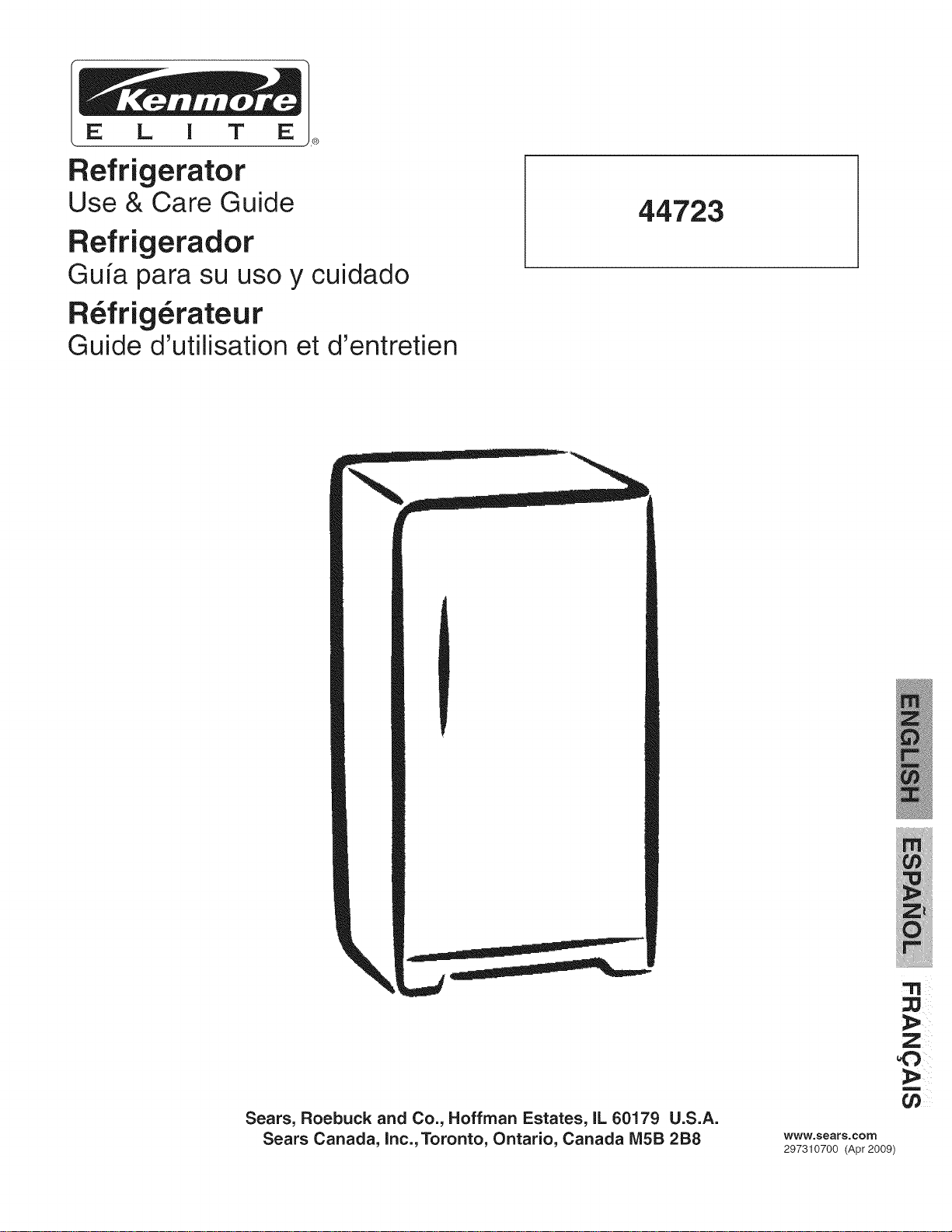
Refrigerator
Use & Care Guide
Refrigerador
Gu[a para su uso y cuidado
R_frig_rateur
Guide d'utilisation et d'entretien
44723
Sears, Roebuck and Co., Hoffman Estates, IL 60179 U.S.A.
Sears Canada, inc., Toronto, Ontario, Canada IVi5B 2B8
!_ i_
m
www.sears.com
297310700 (Apr 2009)
Serial/Model Numbers ............................... 2
Important Safety Instructions ..................... 2-3
Refrigerator Warranty ................................. 4
Protection Agreements .............................. 5
Features at a Glance ................................. 5
First Steps .................................................. 6-7
Setting the Temperature Control ................ 7
Refrigerator Features ................................. 7-8
Food Storage & Energy Saving Tips .......... 8
Care and Cleaning ..................................... 9
Before You Call ........................................... 10-11
SAFETY PRECAUTIONS
Do not attempt to install or operate your unit until you
have read the safety precautions in this manual. Safety
items throughout this manual are labeled with a Danger,
Warning, or Caution based on the risk type.
DEFINITIONS
_This is the safety alert symbol. It is used to alert
you to potential personal injury hazards. Obey all safety
messages that follow this symbol to avoid possible injury
or death.
READ AND SAVE THESE INSTRUCTIONS
This Owner's Guide provides specific operating instructions
for your model. Use your refrigerator only as instructed in this
guide. These instructions are not meant to cover every possible
condition and situation that may occur. Common sense and
caution must be practiced when installing, operating, and
maintaining any appliance.
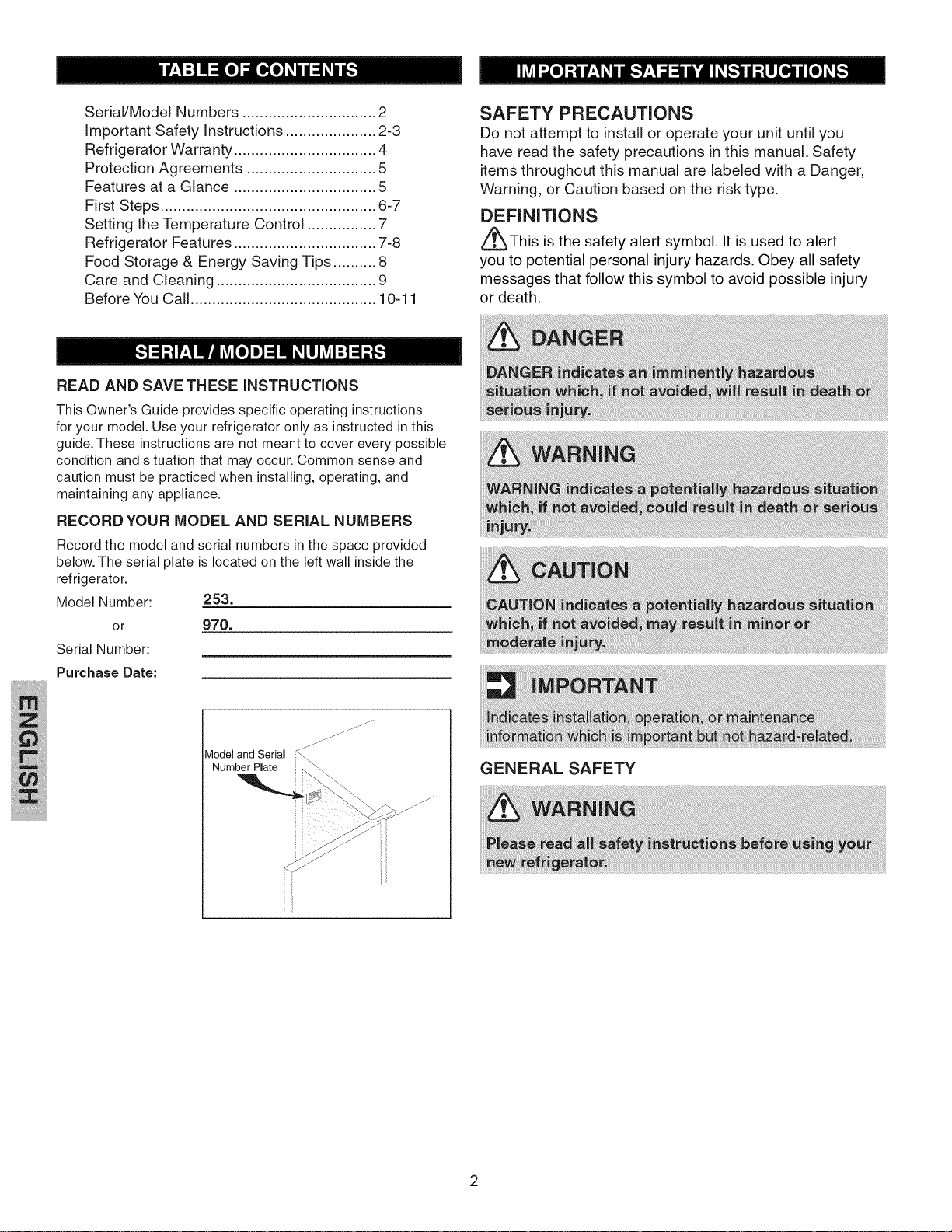
RECORDYOUR MODEL AND SERIAL NUMBERS
Record the model and serial numbers in the space )rovided
below. The serial plate is located on the left wall inside the
refrigerator.
Model Number: 253.
or 970.
Serial Number:
Purchase Date:
Model and Serial
Number Plate
.J
j ......
_}
GENERAL SAFETY
READ ALL INSTRUCTIONS BEFORE USING THIS
REFRIGERATOR.
PROPER DISPOSAL OFYOUR REFRIGERATOR/
FREEZER
BEFORE YOU THROW AWAY YOUR OLD
REFRIGERATOR!FREEZER:
• Remove doors.
• Leave shelves in place so children
may not easily climb inside.
• Have refrigerant removed by a
qualified service technician.
OTHER PRECAUTIONS
• To defrost refrigerator, always unplug unit first.
• Never unplug the refrigerator by pulling on the cord. Always
grip the plug firmly, and pull straight out from the receptacle.
!!!!!_ ii!ii!ii!_i!_!!_!
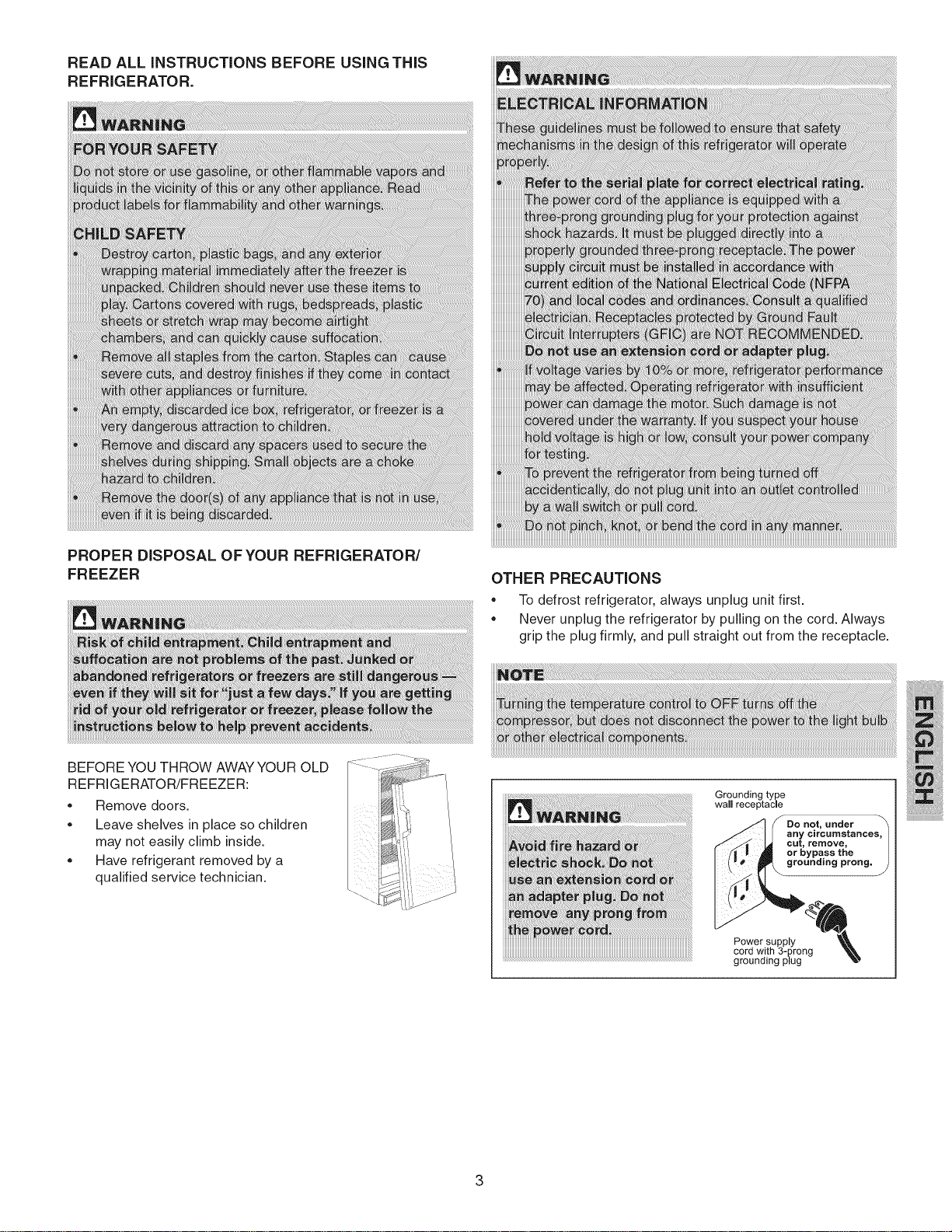
Groundingtype i iii ii:ii i!i
wall receptacle
Do not, under
any circumstances_
grounding prong. )
Power supply
cord with 3-prong
grounding plug
Kenmore Elite Limited Warranty
When installed, operated and maintained according to all instructions supplied with the product, if any non-consumable
part of this appliance other than the sealed refrigerant system fails due to a defect in material and workmanship within one
year from the date of purchase, call 1-800-4-MY-HOME® to arrange for free repair. This coverage applies for only 90 days
from the date of purchase if this appliance is ever used for other than private family purposes.
If the sealed refrigerant system is defective within five years from the purchase date, call 1-800-4-MY-HOME® to arrange
for free repair. This coverage applies for only one year from the date of purchase if this appliance is ever used for other
than private family purposes.
This warranty covers only defects in material and workmanship. Sears will NOT pay for:
1. Expendable items that can wear out from normal use, including but not limited to filters, belts, light bulbs, and bags.
2. A service technician to instruct the user in correct product installation, operation or maintenance.
3. A service technician to clean or maintain this product.
4. Damage to or failure of this product if it is not installed, operated or maintained according to the all instructions
supplied with the product.
5. Damage to or failure of this product resulting from accident, abuse, misuse or use for other than its intended
purpose.
6. Damage to or failure of this product caused by the use of detergents, cleaners, chemicals or utensils other than
those recommended in all instructions supplied with the product.
7. Damage to or failure of parts or systems resulting from unauthorized modifications made to this product.
Disclaimer of implied warranties; limitation of remedies
Customer's sole and exclusive remedy under this limited warranty shall be product repair as provided herein. Implied
warranties, includingwarranties of merchantability or fitness for a particular purpose, are limited to one year or the
shortest period allowed by law. Sears shall not be liable for incidental or consequential damages. Some states and
provinces do not allow the exclusion or limitation of incidental or consequential damages, or limitation on the duration of
implied warranties of merchantability or fitness, so these exclusions or limitations may not apply to you.
This warranty applies only while this appliance is used in the United States or Canada.
This warranty gives you specific legal rights, and you may also have other rights which vary from state to state.
Sears, Roebuck and Co., Hoffman Estates, IL 60179
Sears Canada Inc., Toronto, Ontario, Canada IVI5B2B8
Master Protection Agreements
Congratulations on making a smart purchase. Your new Kenmore ®product is designed and manufactured for years of
dependable operation. But like all products, it may require preventive maintenance or repair from time to time. That's when
having a Master Protection Agreement can save you money and aggravation.
The Master Protection Agreement also helps extend the life of your new product. Here's what the Agreement* includes:
[] Parts and labor needed to help keep products operating properly under normal use, not just defects. Our coverage
goes well beyond the product warranty. No deductibles, no functional failure excluded from coverage - real
protection.
[] Expert service by a force of more than 10,000 authorized Sears service technicians, which means someone you can
trust will be working on your product.
[] Unlimited service calls and nationwide service, as often as you want us, whenever you want us.
[] "No-lemon" guarantee - replacement of your covered product if four or more product failures occur within twelve
months.
[] Product replacement if your covered product can't be fixed.
[] Annual Preventive Maintenance Check at your request- no extra charge.
[] Fast help by phone - we call it Rapid Resolution - phone support from a Sears representative on all products. Think
of us as a "talking owner's manual".
[] Power surge protection against electrical damage due to power fluctuations.
[] $250 Food Loss Protection annually for any food spoilage that is the result of mechanical failure of any covered
refrigerator or freezer.
[] Rental reimbursement if repair of your covered product takes longer than promised.
[] 10% discount off the regular price of any non-covered repair service and related installed parts.
Once you purchase the Agreement, a simple phone call is all that it takes for you to schedule service. You can call anytime
day or night, or schedule a service appointment online.
The Master Protection Agreement is a risk free purchase. If you cancel for any reason during the product warranty period,
we will provide a full refund. Or, a prorated refund anytime after the product warranty period expires. Purchase your Master
Protection Agreement today!
Some limitations and exclusions apply. For prices and additional information in the U.S.A. call 1-800-827-6655.
* Coverage in Canada varies on some items. For full details call Sears Canada at 1-800-361-6665.
Sears Installation Service
For Sears professional installation of home appliances, garage door openers, water heaters, and other major home items, in
the U.S.A. or Canada call 1-800-4-MY-HOME ®.
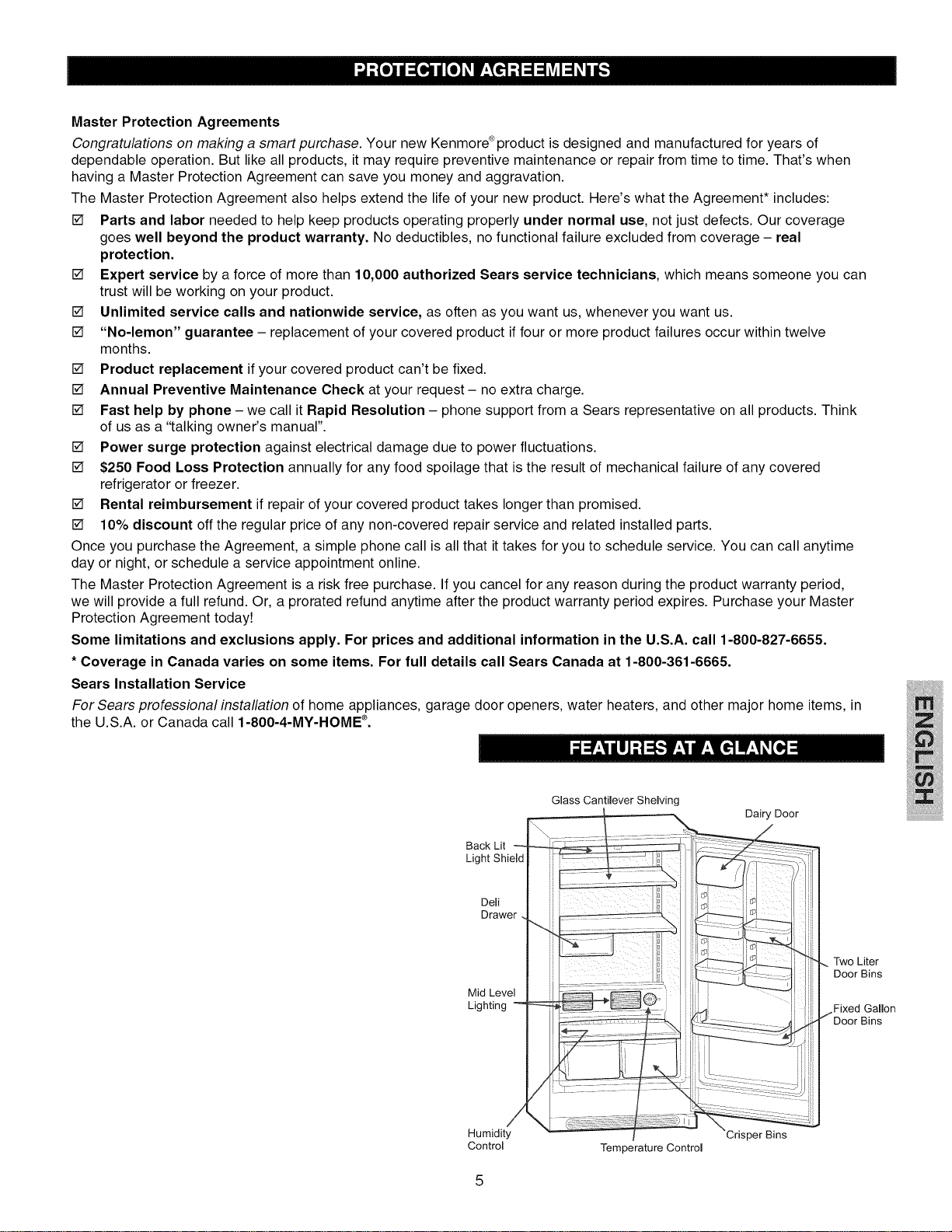
Back Lit
Light Shield
Dell
Drawer
Mid Level
Lighting -
/
Humidity
Control
Glass Cantilever Shelving
\
Temperature Control
Dairy Door
/
3dsper Bins
Two Liter
Door Bins
Fixed Gallon
Bins
This Owner's Guide provides specific operating instructions for
your model. Use the refrigerator only as instructed in this Owner's
Guide. Before starting the refrigerator, follow these important
first steps.
iNSTALLATiON
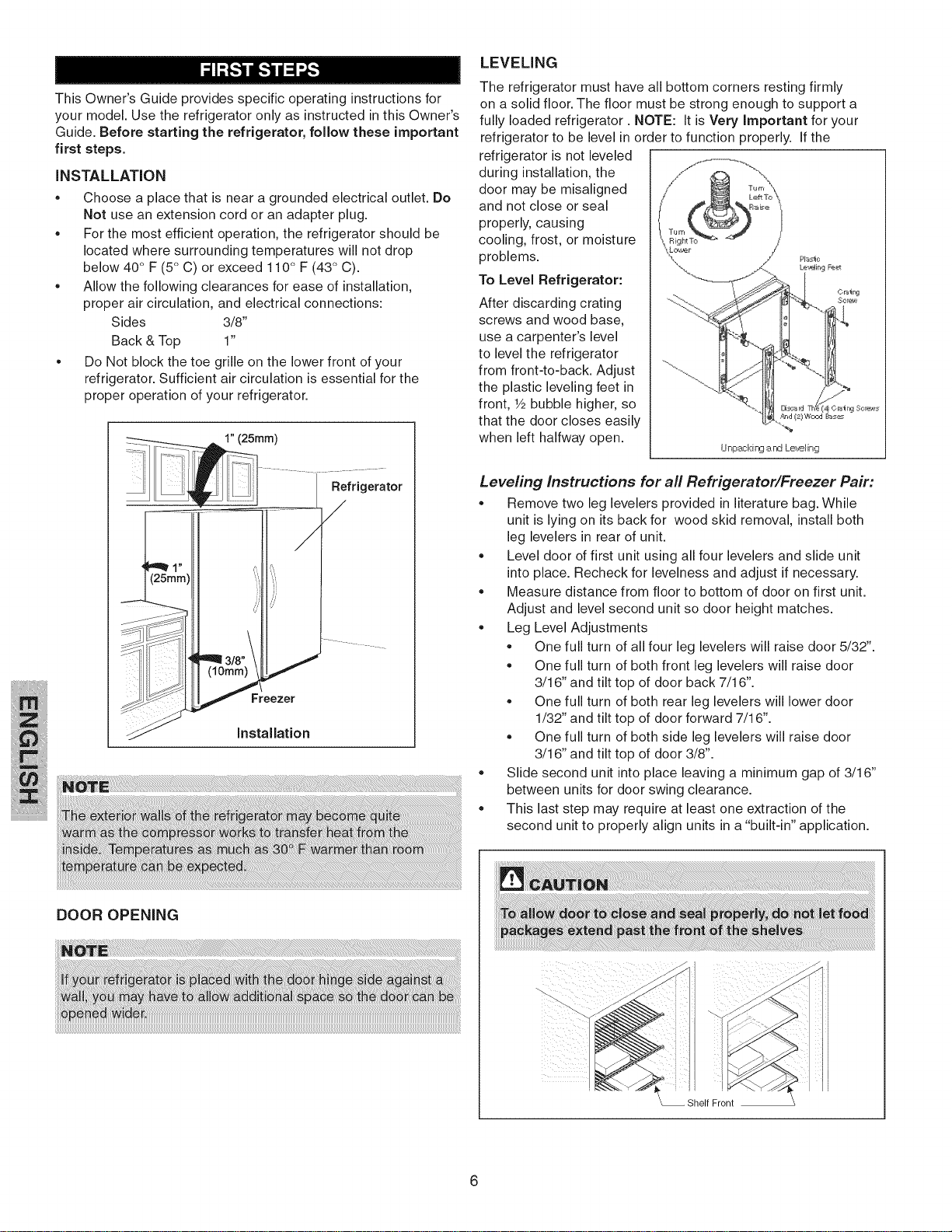
• Choose a place that is near a grounded electrical outlet. Do
Not use an extension cord or an adapter plug.
• For the most efficient operation, the refrigerator should be
located where surrounding temperatures will not drop
below 40° F (5° C) or exceed 110° F (43° C).
• Allow the following clearances for ease of installation,
proper air circulation, and electrical connections:
Sides 3/8"
Back & Top 1"
• Do Not block the toe grille on the lower front of your
refrigerator. Sufficient air circulation is essential for the
proper operation of your refrigerator.
A 1"(25ram)
Refrigerator
Freezer
JnstaJJation
LEVELING
The refrigerator must have all bottom corners resting firmly
on a solid floor. The floor must be strong enough to support a
fully loaded refrigerator. NOTE: It is Very Important for your
refrigerator to be level in order to function properly. If the
refrigerator is not leveled
during installation, the
door may be misaligned
and not close or seal
properly, causing
cooling, frost, or moisture
problems. _,_,:_
Le'_JirFg _
To Level Refrigerator:
Oralr_
After discarding crating
screws and wood base,
use a carpenter's level
to level the refrigerator
from front-to-back. Adjust ...............
the plastic leveling feet in " ....
front, Y2bubble higher, so
that the door closes easily
when left halfway open.
Unp_cMrr# a rd Le_ling
Leveling Instructions for all Refrigerator/Freezer Pair:
• Remove two leg levelers provided in literature bag. While
unit is lying on its back for wood skid removal, install both
leg levelers in rear of unit.
• Level door of first unit using all four levelers and slide unit
into place. Recheck for levelness and adjust if necessary.
• Measure distance from floor to bottom of door on first unit.
Adjust and level second unit so door height matches.
• Leg Level Adjustments
• One full turn of all four leg levelers will raise door 5/32".
• One full turn of both front leg levelers will raise door
3/16" and tilt top of door back 7/16".
• One full turn of both rear leg levelers will lower door
1/32" and tilt top of door forward 7/16".
• One full turn of both side leg levelers will raise door
3/16" and tilt top of door 3/8".
• Slide second unit into place leaving a minimum gap of 3/16"
between units for door swing clearance.
, This last step may require at least one extraction of the
second unit to properly align units in a "built-in" application.
DOOR OPENING
L_ Shelf Front
DOOR REMOVAL TO ADJUST CANTILEVER SHELVES
If door must be removed :
1. Gently lay refrigerator on its back, on a rug or blanket.
2. Remove two base screws and base panel.
3. Remove bottom hinge screws.
4. Remove plastic top hinge cover.
5. Remove screws from top hinge.
6. Remove top hinge from cabinet.
7. Remove door and bottom hinge from cabinet.
8. To replace door, reverse the above order and securely
tighten all screws to prevent hinge slippage.
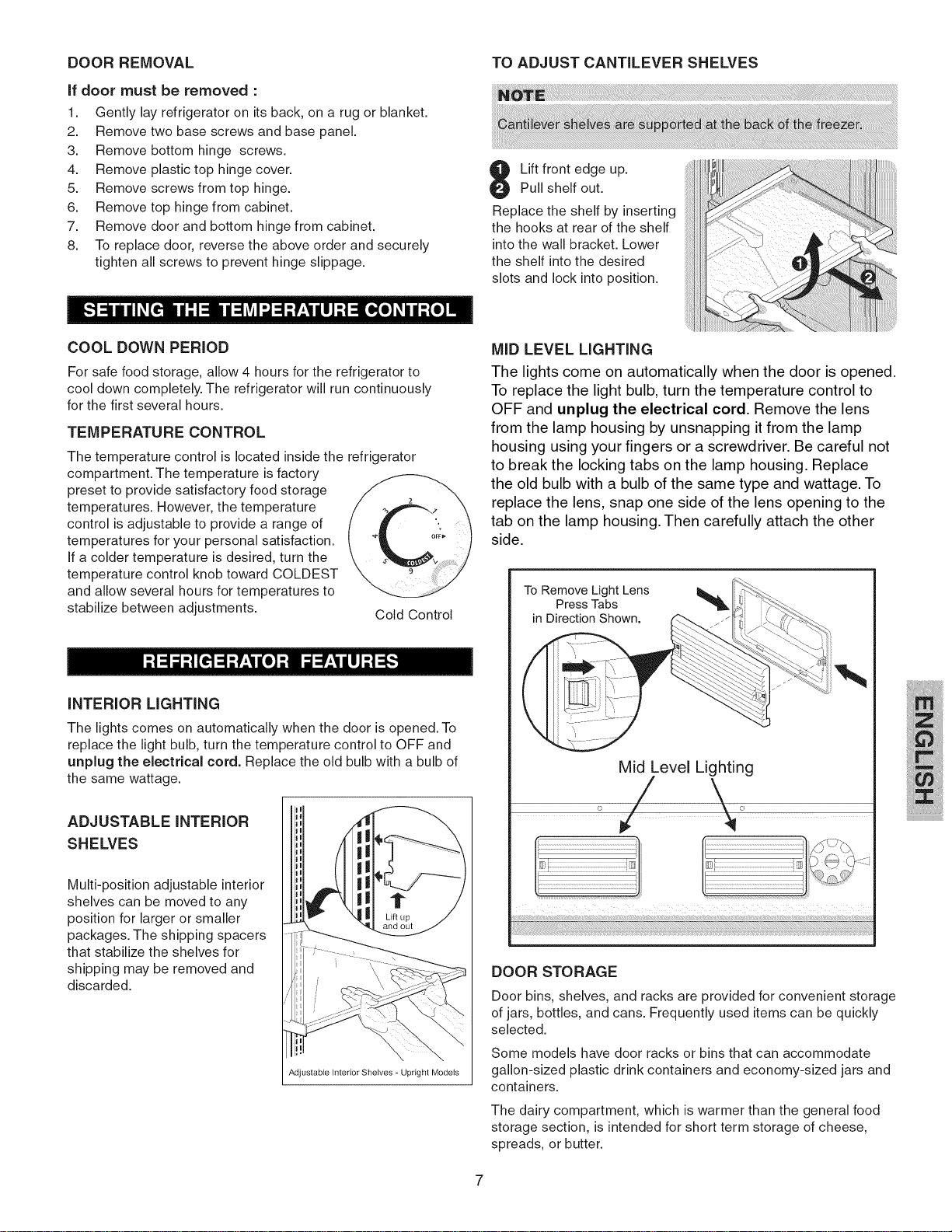
Lift front edge up.
Pull shelf out.
Replace the shelf by inserting
the hooks at rear of the shelf
into the wall bracket. Lower
the shelf into the desired
slots and lock into position.
COOL DOWN PERIOD
For safe food storage, allow 4 hours for the refrigerator to
cool down completely. The refrigerator will run continuously
for the first several hours.
TEMPERATURE CONTROL
The temperature control is located inside the refrigerator
compartment. The temperature is factory
preset to provide satisfactory food storage
temperatures. However, the temperature
control is adjustable to provide a range of
temperatures for your personal satisfaction.
If a colder temperature is desired, turn the
temperature control knob toward COLDEST
and allow several hours for temperatures to
stabilize between adjustments.
Cold Control
INTERIOR LIGHTING
The lights comes on automatically when the door is opened. To
replace the light bulb, turn the temperature control to OFF and
unplug the electrical cord. Replace the old bulb with a bulb of
the same wattage.
ADJUSTABLE INTERIOR
SHELVES
Multi-position adjustable interior
shelves can be moved to any
position for larger or smaller
packages. The shipping spacers
that stabilize the shelves for
shipping may be removed and
discarded.
Lift up
Adjustable Interior Shelves - Upright Models
MID LEVEL LIGHTING
The lights come on automatically when the door is opened.
To replace the light bulb, turn the temperature control to
OFF and unplug the electrical cord. Remove the lens
from the lamp housing by unsnapping it from the lamp
housing using your fingers or a screwdriver. Be careful not
to break the locking tabs on the lamp housing. Replace
the old bulb with a bulb of the same type and wattage. To
replace the lens, snap one side of the lens opening to the
tab on the lamp housing. Then carefully attach the other
side.
To Remove Light Lens _,
Press Tabs
in Direction Shown.
,%
Mid Level Lighting
o/ \o
DOOR STORAGE
Door bins, shelves, and racks are provided for convenient storage
of jars, bottles, and cans. Frequently used items can be quickly
selected.
Some models have door racks or bins that can accommodate
gallon-sized plastic drink containers and economy-sized jars and
containers.
The dairy compartment, which is warmer than the general food
storage section, is intended for short term storage of cheese,
spreads, or butter.
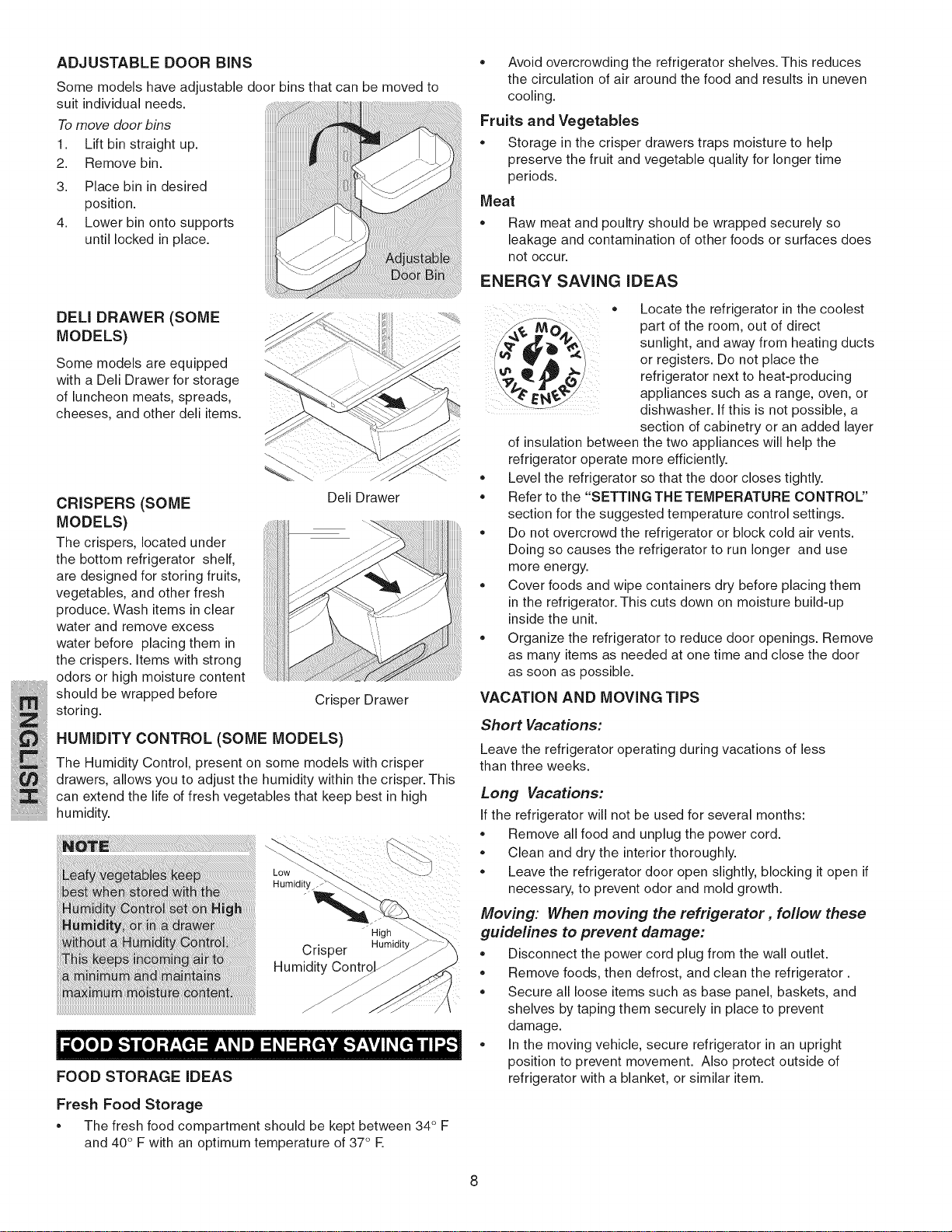
ADJUSTABLE DOOR BiNS
Some models have adjustable door bins that can be moved to
suit individual needs.
Tomove door bins
1. Lift bin straight up.
2. Remove bin.
3. Place bin in desired
position.
4. Lower bin onto supports
until locked in place.
DELl DRAWER (SOME
MODELS)
Some models are equipped
with a Deli Drawer for storage
of luncheon meats, spreads,
cheeses, and other deli items.
CRISPERS (SOME
MODELS)
The crispers, located under
the bottom refrigerator shelf,
are designed for storing fruits,
vegetables, and other fresh
produce. Wash items in clear
water and remove excess
water before placing them in
the crispers. Items with strong
odors or high moisture content
should be wrapped before
storing.
Deli Drawer
Crisper Drawer
HUMiDiTY CONTROL (SOME MODELS)
The Humidity Control, present on some models with crisper
drawers, allows you to adjust the humidity within the crisper. This
can extend the life of fresh vegetables that keep best in high
humidity.
FOOD STORAGE iDEAS
Humidity_
High
Crisper Humidity
Contr_
Fresh Food Storage
• The fresh food compartment should be kept between 34° F
and 40 ° F with an optimum temperature of 37° F.
. Avoid overcrowding the refrigerator shelves. This reduces
the circulation of air around the food and results in uneven
cooling.
Fruits and Vegetables
. Storage in the crisper drawers traps moisture to help
preserve the fruit and vegetable quality for longer time
periods.
Meat
* Raw meat and poultry should be wrapped securely so
leakage and contamination of other foods or surfaces does
not occur.
ENERGY SAVING iDEAS
o
e
* Locate the refrigerator in the coolest
part of the room, out of direct
sunlight, and away from heating ducts
or registers. Do not place the
refrigerator next to heat-producing
appliances such as a range, oven, or
dishwasher. If this is not possible, a
section of cabinetry or an added layer
of insulation between the two appliances will help the
refrigerator operate more efficiently.
Level the refrigerator so that the door closes tightly.
Refer to the "SETTING THE TEMPERATURE CONTROL"
section for the suggested temperature control settings.
Do not overcrowd the refrigerator or block cold air vents.
Doing so causes the refrigerator to run longer and use
more energy.
Cover foods and wipe containers dry before placing them
in the refrigerator. This cuts down on moisture build-up
inside the unit.
Organize the refrigerator to reduce door openings. Remove
as many items as needed at one time and close the door
as soon as possible.
VACATION AND MOVING TiPS
Short Vacations:
Leave the refrigerator operating during vacations of less
than three weeks.
Long Vacations:
Ifthe refrigerator will not be used for several months:
* Remove all food and unplug the power cord.
* Clean and dry the interior thoroughly.
* Leave the refrigerator door open slightly, blocking it open if
necessary, to prevent odor and mold growth.
Moving: When moving the refrigerator, follow these
guidelines to prevent damage:
. Disconnect the power cord plug from the wall outlet.
. Remove foods, then defrost, and clean the refrigerator.
. Secure all loose items such as base panel, baskets, and
shelves by taping them securely in place to prevent
damage.
. In the moving vehicle, secure refrigerator in an upright
position to prevent movement. Also protect outside of
refrigerator with a blanket, or similar item.
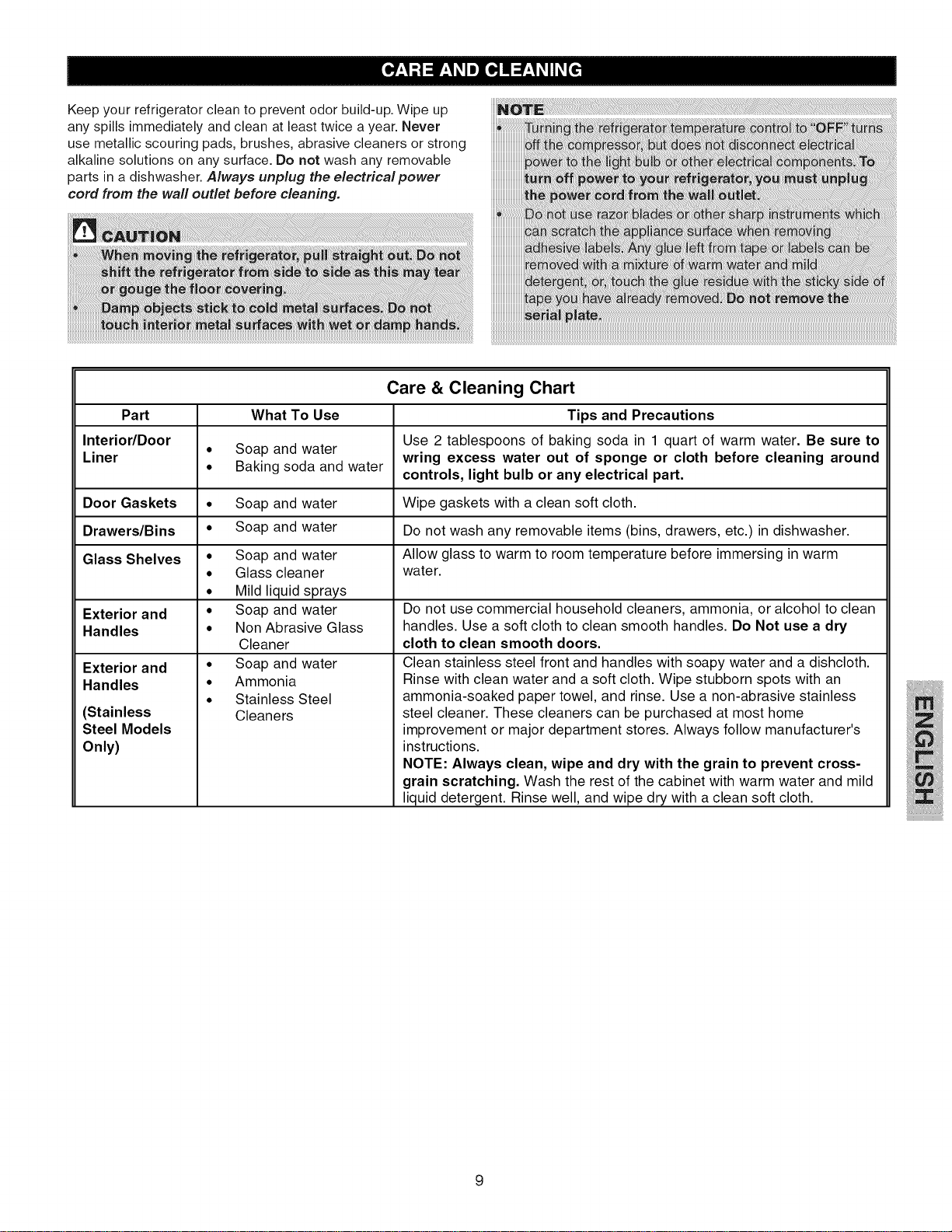
Keepyourrefrigeratorcleantopreventodorbuild-up.Wipeup
anyspillsimmediatelyandcleanatleasttwiceayear.Never
usemetallicscouringpads,brushes,abrasivecleanersorstrong
alkalinesolutionsonanysurface.Donotwashanyremovable
partsinadishwasher.Always unplug the electrical power
cord from the wall outlet before cleaning.
Care & Cleaning Chart
Part What To Use Tips and Precautions
Use 2 tablespoons of baking soda in 1 quart of warm water. Be sure to
Interior/Door • Soap and water wring excess water out of sponge or cloth before cleaning around
Liner • Baking soda and water controls, light bulb or any electrical part.
Door Gaskets • Soap and water Wipe gaskets with a clean soft cloth.
Drawers/Bins • Soap and water Do not wash any removable items (bins, drawers, etc.) in dishwasher.
Glass Shelves • Allow glass to warm to room temperature before immersing in warm
• wate r.
Exterior and •
Handles •
Exterior and
Handles
(Stainless
Steel Models
Only)
Soap and water
Glass cleaner
Mild liquid sprays
Soap and water
Non Abrasive Glass
Cleaner
Soap and water
Ammonia
Stainless Steel
Cleaners
Do not use commercial household cleaners, ammonia, or alcohol to clean
handles. Use a soft cloth to clean smooth handles. Do Not use a dry
cloth to clean smooth doors.
Clean stainless steel front and handles with soapy water and a dishcloth.
Rinse with clean water and a soft cloth. Wipe stubborn spots with an
ammonia-soaked paper towel, and rinse. Use a non-abrasive stainless
steel cleaner. These cleaners can be purchased at most home
improvement or major department stores. Always follow manufacturer's
instructions.
NOTE: Always clean, wipe and dry with the grain to prevent cross-
grain scratching. Wash the rest of the cabinet with warm water and mild
liquid detergent. Rinse well, and wipe dry with a clean soft cloth.
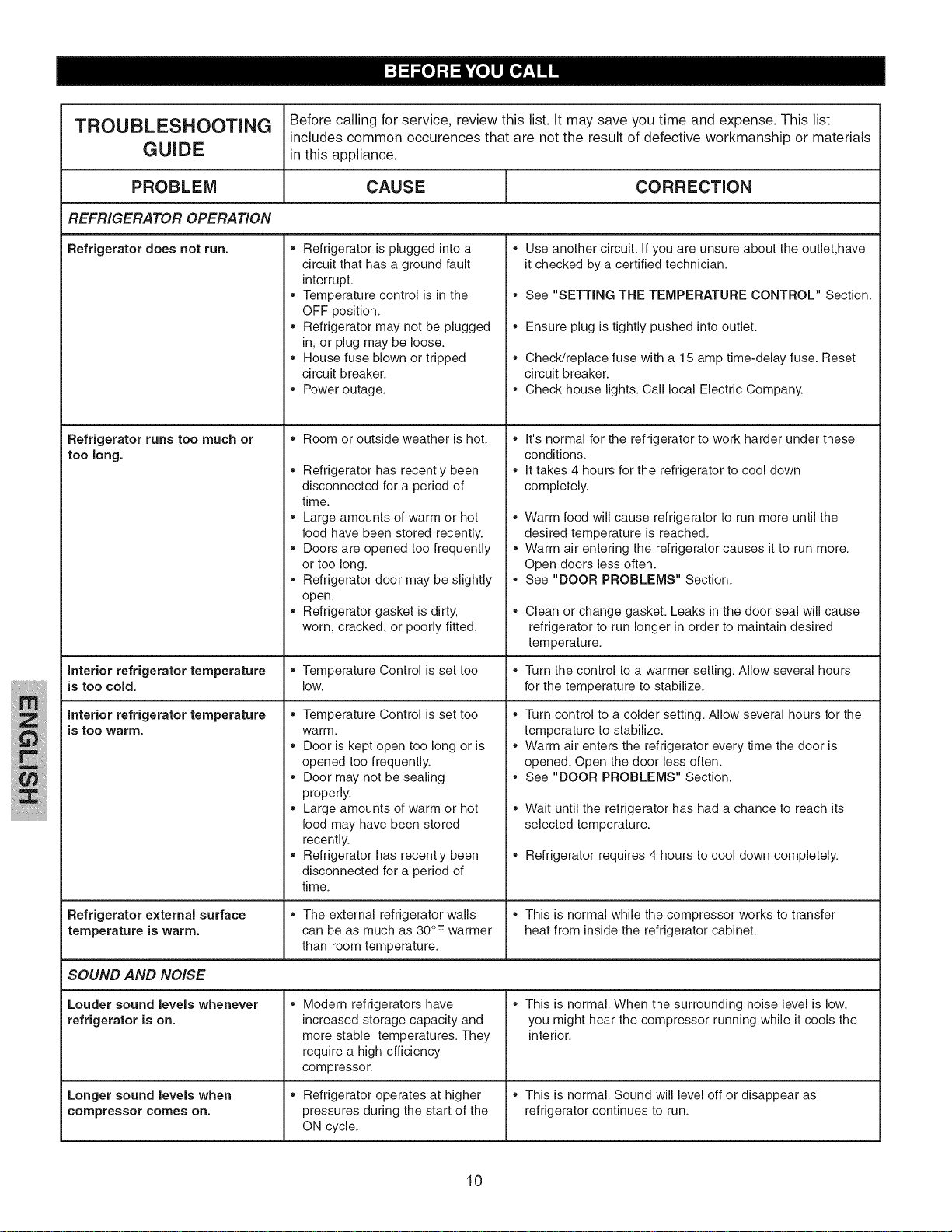
TROUBLESHOOTING Before calling for service, review this list. It may save you time and expense. This list
includes common occurences that are not the result of defective workmanship or materials
GUIDE in this appliance.
PROBLEM CAUSE CORRECTION
REFRIGERATOR OPERATION
Refrigerator does not run.
Refrigerator runs too much or
too long.
Refrigerator is plugged intoa
circuit that has a ground fault
interrupt.
. Temperature control isin the
OFF position.
. Refrigerator may not be plugged
in, or plug may be loose.
House fuse blown or tripped
circuit breaker.
Power outage.
Room or outside weather is hot.
Refrigerator has recently been
disconnected for a period of
time.
Large amounts of warm or hot
food have been stored recently.
Doors are opened too frequently
or too long.
Refrigerator door may be slightly
open.
Refrigerator gasket is dirty,
worn, cracked, or poorly fitted.
Use another circuit. If you are unsure about the outlet,have
it checked by a certified technician.
See "SETTING THE TEMPERATURE CONTROL" Section.
Ensure plug is tightly pushed into outlet.
Check/replace fuse with a 15 amp time-delay fuse. Reset
circuit breaker.
Check house lights. Call local Electric Company.
It's normal for the refrigerator to work harder under these
conditions.
It takes 4 hours for the refrigerator to cool down
completely.
Warm food will cause refrigerator to run more until the
desired temperature is reached.
Warm air entering the refrigerator causes it to run more.
Open doors less often.
See "DOOR PROBLEMS" Section.
Clean or change gasket. Leaks in the door seal will cause
refrigerator to run longer in order to maintain desired
temperature.
interior refrigerator temperature * Temperature Control is set too * Turn the control to a warmer setting. Allow several hours
is too cold. low. for the temperature to stabilize.
interior refrigerator temperature
is too warm.
Temperature Control is set too
warm.
Door is kept open too long or is
opened too frequently.
Door may not be sealing
properly.
Large amounts of warm or hot
food may have been stored
recently.
Refrigerator has recently been
disconnected for a period of
time.
Turn control to a colder setting. Allow several hours for the
temperature to stabilize.
Warm air enters the refrigerator every time the door is
opened. Open the door less often.
See "DOOR PROBLEMS" Section.
Wait until the refrigerator has had a chance to reach its
selected temperature.
Refrigerator requires 4 hours to cool down completely.
Refrigerator external surface _ The external refrigerator walls _ This is normal while the compressor works to transfer
temperature is warm. can be as much as 30°F warmer heat from inside the refrigerator cabinet.
than room temperature.
SOUND AND NOISE
Louder sound levels whenever
refrigerator is on.
Longer sound levels when
compressor comes on.
Modern refrigerators have
increased storage capacity and
more stable temperatures. They
require a high efficiency
compressor.
Refrigerator operates at higher
pressures during the start of the
ON cycle.
This is normal. When the surrounding noise level is low,
you might hear the compressor running while it cools the
interior.
This is normal. Sound will level off or disappear as
refrigerator continues to run.
10
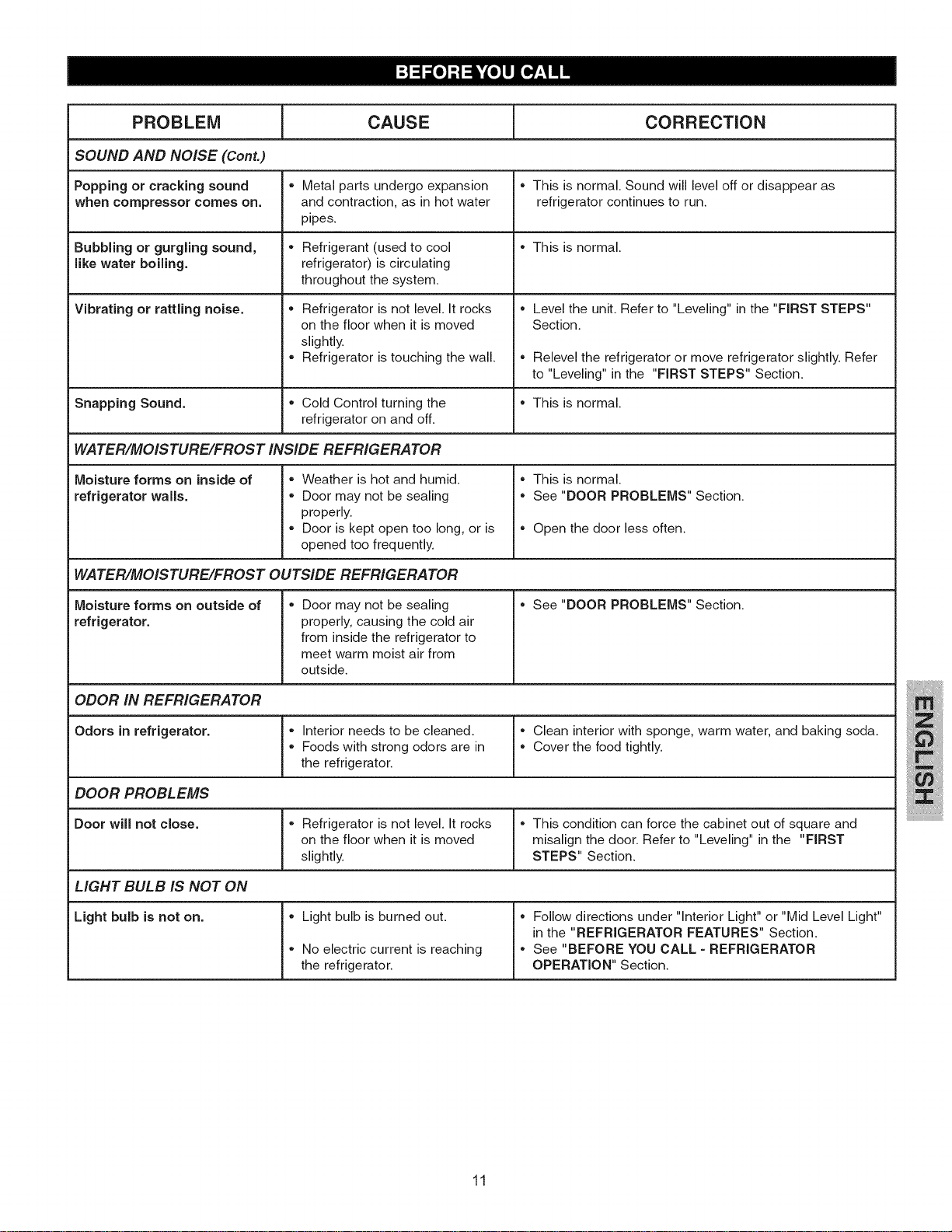
T
PROBLEM CAUSE _ CORRECTION
SOUND AND NOISE (Cont.)
Popping or cracking sound , Metal parts undergo expansion , This is normal. Sound will level off or disappear as
when compressor comes on. and contraction, as in hot water refrigerator continues to run.
pipes.
Bubbling or gurgling sound, , Refrigerant (used to cool , This is normal.
like water boiling, refrigerator) iscirculating
throughout the system.
Vibrating or rattling noise. Refrigerator is not level. It rocks
on the floor when it is moved
slightly.
Refrigerator is touching the wall.
, Level the unit. Refer to "Leveling" in the "FIRST STEPS"
Section.
, Relevel the refrigerator or move refrigerator slightly. Refer
to "Leveling" in the "FIRST STEPS" Section.
Snapping Sound. , Cold Control turning the , This is normal.
refrigerator on and off.
WATER/MOISTURE/FROST INSIDE REFRIGERATOR
Moisture forms on inside of
refrigerator walls.
, Weather is hot and humid.
, Door may not be sealing
properly.
, Door is kept open too long, or is
opened too frequently.
, This is normal.
, See "DOOR PROBLEMS" Section.
, Open the door less often.
WATER/MOISTURE/FROST OUTSIDE REFRIGERATOR
, See "DOORPROBLEMS"Section.Moisture forms on outside of
refrigerator.
, Door may not be sealing
properly, causing the cold air
from inside the refrigerator to
meet warm moist air from
outside.
ODOR IN REFRIGERATOR
Odors in refrigerator. , Interior needs to be cleaned, l" Clean interior with sponge, warm water, and baking soda.
, Foods with strong odors are in [, Cover the food tightly.
the refrigerator.
DOOR PROBLEMS
Door will not close. , Refrigerator is not level. It rocks l" This condition can force the cabinet out of square and
on the floor when it is moved [ misalign the door. Refer to "Leveling" in the "FIRST
slightly. STEPS" Section.
LIGHT BULB IS NOT ON
Light bulb is not on. , Light bulb is burned out. , Follow directions under "Interior Light" or "Mid Level Light"
in the "REFRIGERATOR FEATURES" Section.
, No electric current is reaching , See "BEFORE YOU CALL =REFRIGERATOR
the refrigerator. OPERATION" Section.
11