1
ENGLISH
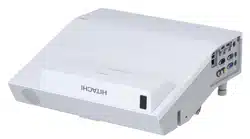
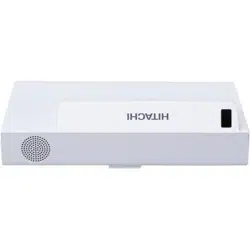
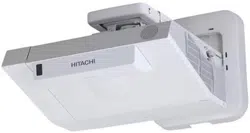
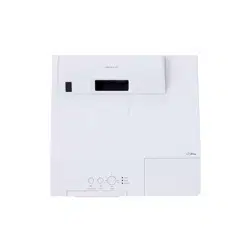
LCD Projector
MP-TW4001/MP-TW3001
User's Manual (concise)
Thank you for purchasing this product.
This is the basic manual on the product.
Visit our website to get the detailed manuals and the latest information on the
product. Check them before using the product, for safe use and utilization of the
product.
Our website: See the attached sheet.
WARNING Ź%HIRUHXVLQJWKLVSURGXFWEHVXUHWRUHDGDOOPDQXDOVIRUWKLV
product. After reading them, store them in a safe place for future reference.
Ź+HHGDOOWKHZDUQLQJVDQGFDXWLRQVLQWKHPDQXDOVRURQWKHSURGXFW
Ź)ROORZDOOWKHLQVWUXFWLRQVLQWKHPDQXDOVRURQWKHSURGXFW
)LUVWRIDOO ............................................ 2
Entries and graphical symbols explanation ......2
Important safety instruction ..............................2
Regulatory notices .............................. 3
About Electro-Magnetic Interference ................
3
'LVSRVDORI2OG(TXLSPHQWDQG%DWWHULHV
Only for European Union and countries with
recycling systems
.............................................5
Contents of package........................... 5
Arrangement ....................................... 6
Connecting with your devices ............. 7
Connecting to a power supply ............ 9
Preparing for the remote control ....... 10
Preparing for the interactive pen ...... 11
Turning on the power ........................ 12
Adjusting the projector's elevator ..... 13
Operation .......................................... 13
Turning off the power ........................ 15
&OHDQLQJDQGUHSODFLQJWKHDLU¿OWHU .. 16
Installing or replacing
the internal clock battery ............... 17
Caring for the projection window and
camera lens
................................... 18
6SHFL¿FDWLRQV ................................... 19
Troubleshooting
- Warranty and after-service ........... 20
Contents
NOTE • In this manual, unless any comments are accompanied, “the
manuals” means all the documents provided with this product, and “the product”
means this projector and all the accessories came with the projector.

2
First of all
Entries and graphical symbols explanation
The following entries and graphical symbols are used for the manuals and the
product as follows, for safety purpose. Please know their meanings beforehand,
and heed them.
Important safety instruction
7KHIROORZLQJDUHLPSRUWDQWLQVWUXFWLRQVIRUVDIHO\XVLQJWKHSURGXFW%HVXUHWR
follow them always when handling the product. The manufacturer assumes no
responsibility for any damage caused by mishandling that is beyond normal usage
GH¿QHGLQWKHVHPDQXDOVRIWKLVSURMHFWRU
WARNING
This entry warns of a risk of serious personal injury or even death.
CAUTION This entry warns of a risk of personal injury or physical damage.
NOTICE This entry notices of fear of causing trouble.
WARNING ŹNever use the product in or after an abnormality (ex. giving
off smoke, smelling strange, took a liquid or an object inside, broken, etc.) If an
abnormality should occur, unplug the projector urgently.
ŹSituate the product away from children and pets.
ŹDo not use the product when there is fear of a thunderbolt.
ŹUnplug the projector from the power outlet if the projector is not used for the
time being.
ŹDo not open or remove any portion of the product, unless the manuals direct
LW)RULQWHUQDOPDLQWHQDQFHOHDYHLWWR\RXUGHDOHURUWKHLUVHUYLFHSHUVRQQHO
Ź8VHRQO\WKHDFFHVVRULHVVSHFL¿HGRUUHFRPPHQGHGE\WKHPDQXIDFWXUHU
ŹDo not modify the projector or accessories.
ŹDo not let any things or any liquids enter to the inside of the product.
ŹDo not wet the product.
Ź
Do not place the projector where any oils, such as cooking or machine oil, are used.
Oil may harm the product, resulting in malfunction, or falling from the mounted
position. Do not use adhesive such as threadlocker, lubricant and so on.
ŹDo not apply a shock or pressure to this product.
- Do not place the product on an unstable place such as the uneven surface or
the leaned table.
- Do not place the product unstably. Place the projector so that it does not
protrude from the surface where the projector is placed on.
- Remove all the attachments including the power cord and cables, from the
projector when carrying the projector.
Ź
Never look into the projection window while the projection light source is on,
since the projection ray may cause a trouble on your eyes.
Ź'RQRWDSSURDFKWKHH[KDXVWYHQWVZKLOHWKHOLJKWVRXUFHLVRQ$OVRDIWHUWKH
light source goes out, do not approach them for a while, since it is too hot.

3
ENGLISH
Regulatory notices
About Electro-Magnetic Interference
In CANADA
&$1,&(6%10%%
In the US, and other places where the FCC regulations are applicable
Declaration of Conformity: See the attached sheet.
7KLVGHYLFHFRPSOLHVZLWKSDUWRIWKH)&&5XOHV2SHUDWLRQLVVXEMHFW
to the following two conditions: (1) This device may not cause harmful
interference, and (2) this device must accept any interference received,
including interference that may cause undesired operation. This equipment
KDVEHHQWHVWHGDQGIRXQGWRFRPSO\ZLWKWKHOLPLWVIRUD&ODVV%GLJLWDO
GHYLFHSXUVXDQWWR3DUWRIWKH)&&5XOHV
These limits are designed to provide reasonable protection against harmful
interference in a residential installation. This equipment generates, uses, and can
radiate radio frequency energy and, if not installed and used in accordance with the
LQVWUXFWLRQVPD\FDXVHKDUPIXOLQWHUIHUHQFHWRUDGLRFRPPXQLFDWLRQV+RZHYHU
there is no guarantee that interference will not occur in a particular installation. If this
equipment does cause harmful interference to radio or television reception, which
can be determined by turning the equipment off and on, the user is encouraged to
try to correct the interference by one or more of the following measures:
- Reorient or relocate the receiving antenna.
- Increase the separation between the equipment and receiver.
- Connect the equipment into an outlet on a circuit different from that to which the
receiver is connected.
&RQVXOWWKHGHDOHURUDQH[SHULHQFHGUDGLR79WHFKQLFLDQIRUKHOS
INSTRUCTIONS TO USERS: This equipment complies with the requirements of
)&&)HGHUDO&RPPXQLFDWLRQ&RPPLVVLRQHTXLSPHQWSURYLGHGWKDWWKHIROORZLQJ
conditions are met. Some cables have to be used with the core set. Use the
DFFHVVRU\FDEOHRUDGHVLJQDWHGW\SHFDEOHIRUWKHFRQQHFWLRQ)RUFDEOHVWKDW
have a core only at one end, connect the core to the projector.
CAUTION: &KDQJHVRUPRGL¿FDWLRQVQRWH[SUHVVO\DSSURYHGE\WKHSDUW\
responsible for compliance could void the user’s authority to operate the
equipment.
4
Regulatory notices (continued)
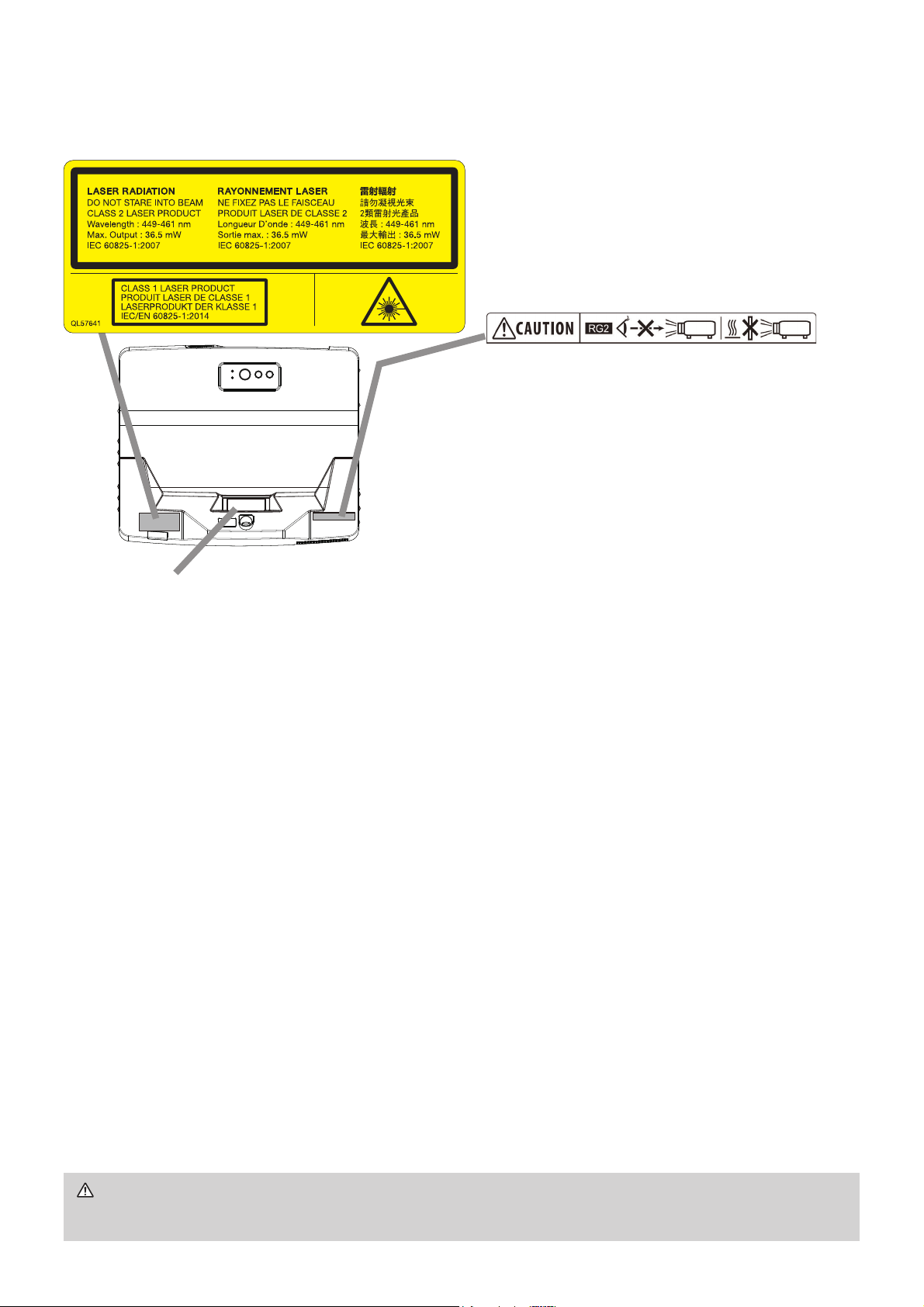
Product label
The position of the label is shown in the drawing below.
7KLVSURMHFWRULVFODVVL¿HGDVDFODVVODVHUSURGXFWWKDWFRPSOLHVZLWK
IEC60825-1:2014 and JIS C 6802:2014, and as a class 2 laser product that
FRPSOLHVZLWK,(&,PSURSHUKDQGOLQJPD\FDXVHLQMXU\%HFDUHIXO
of the following.
• If an abnormality occurs in the projector, turn it off immediately, unplug the power
cord from the outlet, and consult your dealer or service company. If you continue
WRXVHLWLWPD\FDXVHQRWRQO\HOHFWULFVKRFNRU¿UHEXWDOVRYLVLRQGLVRUGHU
• Do not disassemble or modify the projector. The projector has a high-power
laser device inside. It may cause serious injury.
• Do not look into the beam while projecting an image. Do not look into the lens
WKURXJKRSWLFDOGHYLFHVVXFKDVPDJQL¿HUVRUWHOHVFRSHV,WPD\FDXVHYLVLRQ
disorder.
• Make sure that nobody is looking into the lens when you turn on the projector by
remote control away from the projector.
• Do not let children operate the projector. If children could possibly operate the
projector, they must be accompanied by an adult.
'RQRWH[SRVHRSWLFDOGHYLFHVVXFKDVPDJQL¿HUVRUUHÀHFWLRQPLUURUVWRD
projected image. It may cause bad effects on the human body if you continue to
XVHLW,WPD\DOVRFDXVH¿UHRUDFFLGHQWV
• Do not disassemble the projector when you dispose of it. Dispose of it according
to laws and regulations of each country or region.
CAUTION
Ź8VHRIFRQWUROVRUDGMXVWPHQWVRUSHUIRUPDQFHRISURFHGXUHV
RWKHUWKDQWKRVHVSHFL¿HGKHUHLQPD\UHVXOWLQKD]DUGRXVUDGLDWLRQH[SRVXUH
Laser evaluation standard:
IEC60825-1: 2007, IEC60825-1: 2014,
EN60825-1: 2014
MP-TW4001:
,QWHUQDO/DVHU6SHFL¿FDWLRQV
Max. Output: 95W
Wave Length: 449 - 461nm
MP-TW3001:
,QWHUQDO/DVHU6SHFL¿FDWLRQV
Max. Output: 71W
Wave Length: 449 - 461nm
As with any bright source, do not
stare into the direct beam,
RG2 IEC 62471-5:2015.
Laser Aperture
5
ENGLISH
Regulatory notices (continued)
WARNING Ź'RQRWDWWHPSWWRLQVWDOOWKHSURMHFWRU\RXUVHOI+DYH\RXU
dealer or service center handle all installation work. Note that manufacturer will
accept no liability whatsoever for accidents or injuries resulting from an incorrect
installation or improper use.
CAUTION Ź,IWKHGLVFFRPHVZLWKWKLVSURGXFWXVHLWLQDFRPSXWHUGLVF
drive. Never insert the disc into a non-computer disc drive. Inserting the disc
into an incompatible disc drive may produce a loud noise and result in ear and
speaker damage.
Contents of package
Your projector should come with the items shown below. Check that all the items
are included. Contact your dealer immediately if any items are missing.
5HIHUWR¿JXUHF-8 at the back of this manual.
(1) Remote control with two AA batteries
(2) Power cord
(3) Computer cable
(4)
User’s manual *
(5) Security label
(6) Adapter cover
+RRNPHWDO
(8) Screw
+'0,FDEOHKROGHU[
* The accessory book "User's Manual (concise)" is a basic manual. Read the
detailed manuals (“Operating Guide” etc.) from our website. (
1
).
* Interactive Pen is henceforth denoted as “pen”.
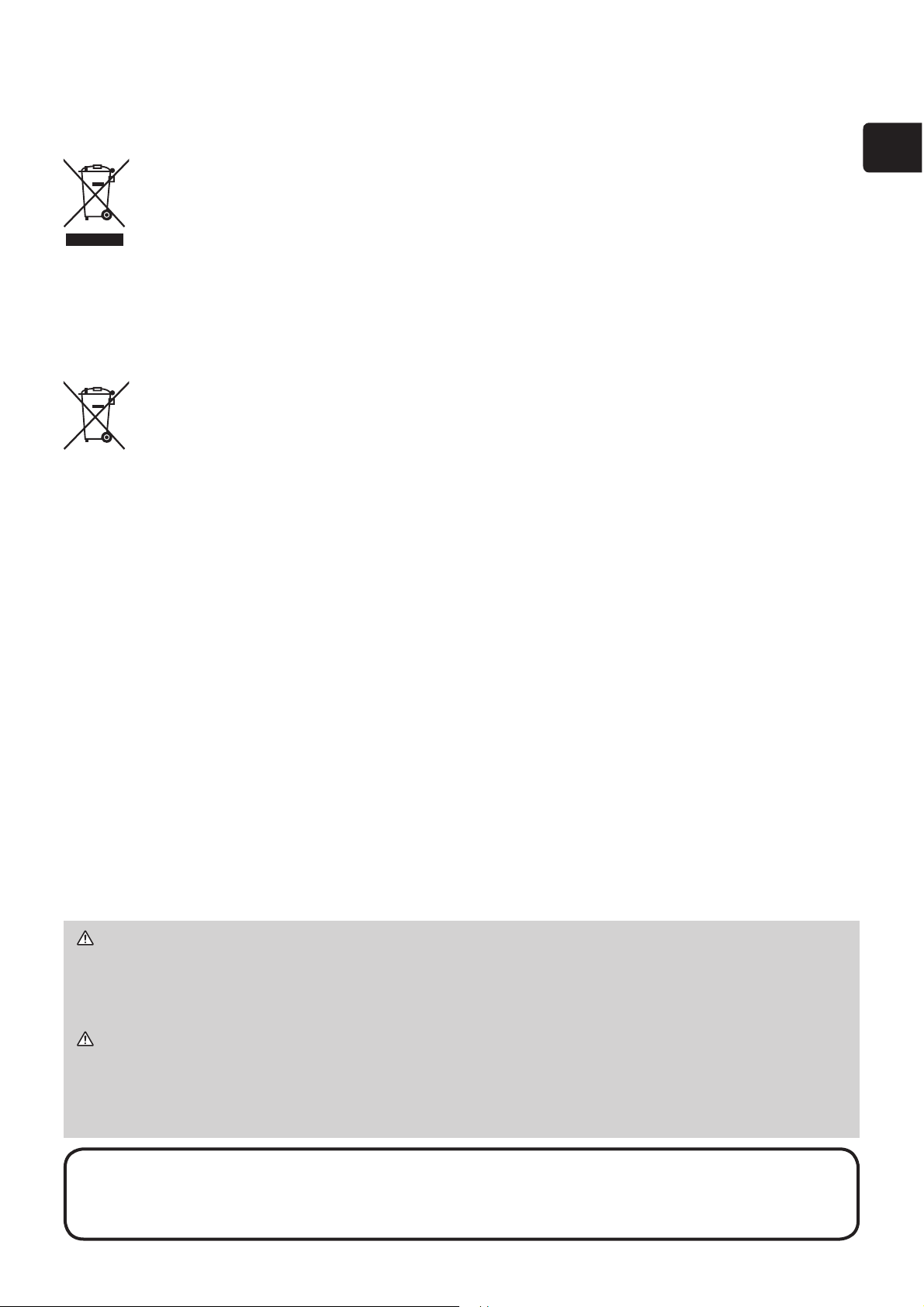
Disposal of Old Equipment and Batteries Only for European
Union and countries with recycling systems
The above mark is in compliance with the Waste Electrical and Electronic
(TXLSPHQW'LUHFWLYH(8:(((7KHPDUNLQGLFDWHVWKH
requirement NOT to dispose the equipment including any spent or
discarded batteries as unsorted municipal waste, but use the return and
collection systems available. If the batteries or accumulators included
ZLWKWKLVHTXLSPHQWGLVSOD\WKHFKHPLFDOV\PERO+J&GRU3EWKHQLW
means that the battery has a heavy metal content of more than 0.0005%
Mercury, or more than 0.002% Cadmium or more than 0.004% Lead.
Note for the battery symbol (bottom symbol):
This symbol
might be used in combination with a chemical symbol. In this case it
complies with the requirement set by the Directive for the chemical involved.
NOTE.HHSWKHRULJLQDOSDFNLQJPDWHULDOVIRUIXWXUHUHVKLSPHQW%HVXUH
to use the original packing materials when moving the projector. Use special
caution for the lens.
(10) Cable tie - medium (x2)
(11) Cable tie - small (x1)
)HUULWHFRUH
(13) Application DVD
(14) 86%FDEOH
(15)
Interactive Pen(x2), AAA batteries(x4)
and the tip of the pen(x4)
6
WARNING Ź,QVWDOOWKHSURMHFWRULQDVWDEOHKRUL]RQWDOSRVLWLRQ
Ź3ODFHWKHSURMHFWRULQDFRROSODFHDQGHQVXUHWKDWWKHUHLVVXI¿FLHQWYHQWLODWLRQ
Keep a space
of 50 cm or more between the sides of the projector and other objects
such as walls. Do not place or attach anything that would block the projection
window, camera lens or vent holes. Do not place the projector where the air from an
air conditioner or similar unit will blow on it directly.
Ź'RQRWSODFHWKHSURMHFWRUDQ\SODFHZKHUHLWPD\JHWZHW
Ź
8VHRQO\WKHPRXQWLQJDFFHVVRULHVWKHPDQXIDFWXUHUVSHFL¿HGDQGOHDYHLQVWDOOLQJ
and removing the projector with the mounting accessories to the service personnel.
Ź5HDGDQGNHHSWKHXVHUVPDQXDORIWKHPRXQWLQJDFFHVVRULHVXVHG
CAUTION Ź$YRLGSODFLQJWKHSURMHFWRULQVPRN\KXPLGRUGXVW\SODFH
Ź
Position the projector to prevent light from directly hitting the projector’s remote sensor.
Ź'RQRWWRXFKWKHFDPHUDOHQVZLWK\RXU¿QJHUV
Arrangement
Refer to tables T-1 anG¿JXUHVF-1 and F-2 at the end of this manual to determine the
screen size and projection distance.
The values shown in the table are calculated for a full size screen.
a
Screen size (diagonal)
b1 , b2
Projection distance (±8%)
c1
,
c2
Screen height (±8%)
)RUWKHFDVHRILQVWDOODWLRQLQVSHFLDOFRQGLWLRQVVXFKDVRQWKHZDOORUFHLOLQJWKH
VSHFL¿HGPRXQWLQJDFFHVVRULHV
18DQGVHUYLFHPD\EHUHTXLUHG%HIRUHLQVWDOOLQJWKH
projector, consult your dealer about your installation.
•
The screen position may shift after installation if the projector is mounted on locations
VXFKDVWKHZDOORUFHLOLQJGXHWRWKHÀH[LELOLW\RIWKHSODVWLFSURMHFWRUERG\,IUHDGMXVWPHQW
is necessary, consult with your dealer or service personnel.
•
7KHSURMHFWHGLPDJHSRVLWLRQDQGRUIRFXVPD\FKDQJHGXULQJZDUPXSDSSUR[
minutes after the light source is turned on) or when the ambient conditions change.
5HDGMXVWWKHLPDJHSRVLWLRQDQGRUIRFXVDVQHFHVVDU\
•
Since the projector features an ultra short throw, be aware that it is required to select a
screen carefully to have better performance.
- A soft screen such as a pull-down screen may cause serious distortion of a projected
image. A hard screen such as a board screen is recommended for use with this projector.
- A high-gain screen such as a bead screen that has narrow viewing angle is not suitable
for this projector. A low-gain screen (around 1.0) such as a matte screen that has wide
viewing angle is recommended for use with this projector.
-
A screen with a weave pattern may cause moire on the projected image, which is not a failure
of the projector. A screen that has less moire effects is recommended for use with this projector.
NOTE •
Installation position, picture mode, altitude, and operating environment
may affect the brightness of the display.
NOTE • $ERXWWKH6WDU%RDUG6RIWZDUHUHDGWKHPDQXDOVWKDWDUHSURYLGHG
in the disc of the software.
6WDU%RDUG6RIWZDUHFRPSOLHVZLWKWKHFRQGLWLRQVSURYLGHGE\6WDU%RDUG
Solution Ltd. Contact your local dealer or service company for inquiry.
Contents of package (continued)

7
ENGLISH
Connecting with your devices
%HVXUHWRUHDGWKHPDQXDOVIRUGHYLFHVEHIRUHFRQQHFWLQJWKHPWRWKHSURMHFWRU
Make sure that all the devices are suitable to be connected with this product, and
SUHSDUHWKHFDEOHVUHTXLUHGWRFRQQHFW5HIHUWR¿JXUHVF-3 to F-6 at the back of
this manual.
)RUGHWDLOVSOHDVHVHHWKH2SHUDWLQJ*XLGHDQG1HWZRUN*XLGHIURPRXU
website. (
1
)
• When AUTO is selected for the COMPUTER IN1 or COMPUTER IN2 port in
COMPUTER IN of the INPUT menu, that port will accept component video signals.
• To use network functions of the projector, connect the LAN port with the
computer's LAN port, or with an access point that is connected to the computer
with wireless LAN, using a LAN cable.
•
,I\RXLQVHUWD86%VWRUDJHGHYLFHVXFKDVD86%PHPRU\LQWRWKHUSB TYPE A
port and select the port as the input source, you can view images stored in the device.
• When the USB TYPE BSRUWDQGWKHFRPSXWHUV86%W\SH$SRUWDUHFRQQHFWHG
you can use the USB TYPE B port as a picture input port from the computer, use
the remote control as a simple mouse and keyboard of the computer, or use the
,QWHUDFWLYH)XQFWLRQ
(continued on next page)
WARNING Ź8VHRQO\WKHDSSURSULDWHDFFHVVRULHV2WKHUZLVHLWFRXOG
FDXVHD¿UHRUGDPDJHWRWKHGHYLFHDQGWKHSURMHFWRU
8VHRQO\WKHDFFHVVRULHVVSHFL¿HGRUUHFRPPHQGHGE\WKHSURMHFWRU¶V
manufacturer. Consult your dealer when the required accessory did not come
with the product or the accessory is damaged. It may be regulated under some
standard.
)RUDFDEOHZLWKDFRUHDWRQO\RQHHQGFRQQHFWWKHHQGZLWKWKHFRUHWRWKH
projector. That may be required by EMI regulations.
- Neither disassemble nor modify the projector and the accessories.
'RQRWXVHWKHGDPDJHGDFFHVVRU\%HFDUHIXOQRWWRGDPDJHWKH
accessories. Route a cable so that it is neither stepped on nor pinched out.
CAUTION Ź'RQRWWXUQRQRURIIWKHSURMHFWRUZKLOHFRQQHFWHGWRDGHYLFH
in operation, unless that is directed in the manual of the device.
Ź%HFDUHIXOQRWWRPLVWDNHQO\FRQQHFWDFRQQHFWRUWRDZURQJSRUW
Ź%HIRUHFRQQHFWLQJWKHSURMHFWRUWRDQHWZRUNEHVXUHWRREWDLQWKHFRQVHQWRI
the administrator of the network.
Ź'RQRWFRQQHFWWKHLAN port to any network that might have the excessive
voltage.
Ź7KHGHVLJQDWHG86%ZLUHOHVVDGDSWHUWKDWLVVROGDVDQRSWLRQLVUHTXLUHGWR
use the wireless network function of this projector.
Ź
%HIRUHUHPRYLQJWKH86%VWRUDJHGHYLFHIURPWKHSRUWRIWKHSURMHFWRUEHVXUH
WRXVHWKH5(029(86%IXQFWLRQRQWKHWKXPEQDLOVFUHHQWRVHFXUH\RXUGDWD
8
Connecting with your devices (continued)
Fastening the adapter cover
Use the supplied adapter cover to prevent the
86%ZLUHOHVVDGDSWHURSWLRQDOIURPFRPLQJ
off easily and prevention from burn injury.
1.
Loosen the screw (marked with triangle)
on the bottom left of the USB TYPE A port.
2.
Insert the tab of the cover into the hole
at the upper right of the USB TYPE A
port in the direction of the arrow.
3.
Align the screw holes on the projector
and the cover. Then insert the screw
removed from the projector into the hole
and tighten the screw.
WARNING Ź
Keep small parts away from children and pets. Take care not to
SXWLQWKHPRXWK+HDWPD\EXLOGXSLQWKH86%ZLUHOHVVDGDSWHUVRGLVFRQQHFW
the projector power cord for more than 10 minutes before touching it to avoid
possible burns.
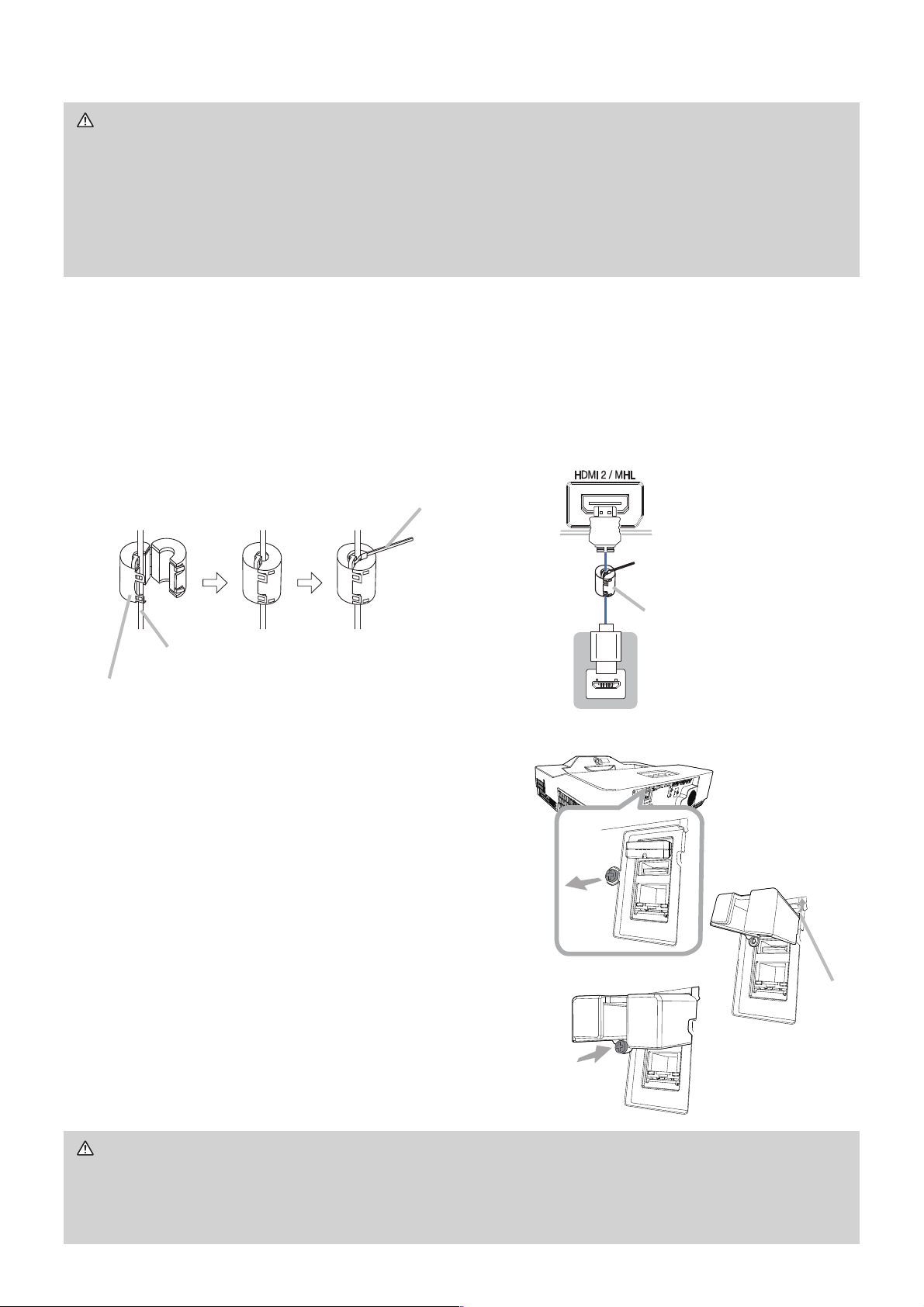
Ferrite core for MHL cable
:KHQFRQQHFWLQJD0+/FDEOHWRWKLVSURMHFWRUDWWDFKWKHIHUULWHFRUHWKDWLV
VXSSOLHGZLWKWKHSURMHFWRUWRWKH0+/FDEOH
5HIHUWRWKHIROORZLQJ¿JXUHWRDWWDFKWKHFRUHWRWKHFDEOHQHDUE\RQHHQGRIWKH
FDEOH¿UPO\DQGVHFXUHLWXVLQJWKHcable tie.
%HVXUHWRFRQQHFWWKHHQGRIWKHFDEOHWRWKHSURMHFWRU
)HUULWHFRUH
0+/FDEOH
Cable tie - small
Projector
)HUULWHFRUH
0+/
CAUTION Ź%HIRUH\RXLQVHUWRUSXOORXWWKH86%ZLUHOHVVDGDSWHUIURP
the projector, turn off the power of the projector and pull out the power cord’s
SOXJIURPWKHRXWOHW'RQRWWRXFKWKH86%ZLUHOHVVDGDSWHUZKLOHWKHSURMHFWRU
is receiving AC power.
NOTICE Ź8VHWKHFDEOHVZLWKVWUDLJKWSOXJVQRW/VKDSHGRQHVDVWKHLQSXW
ports of the projector are recessed.
Tab
2
1
3
9
ENGLISH
Connecting to a power supply
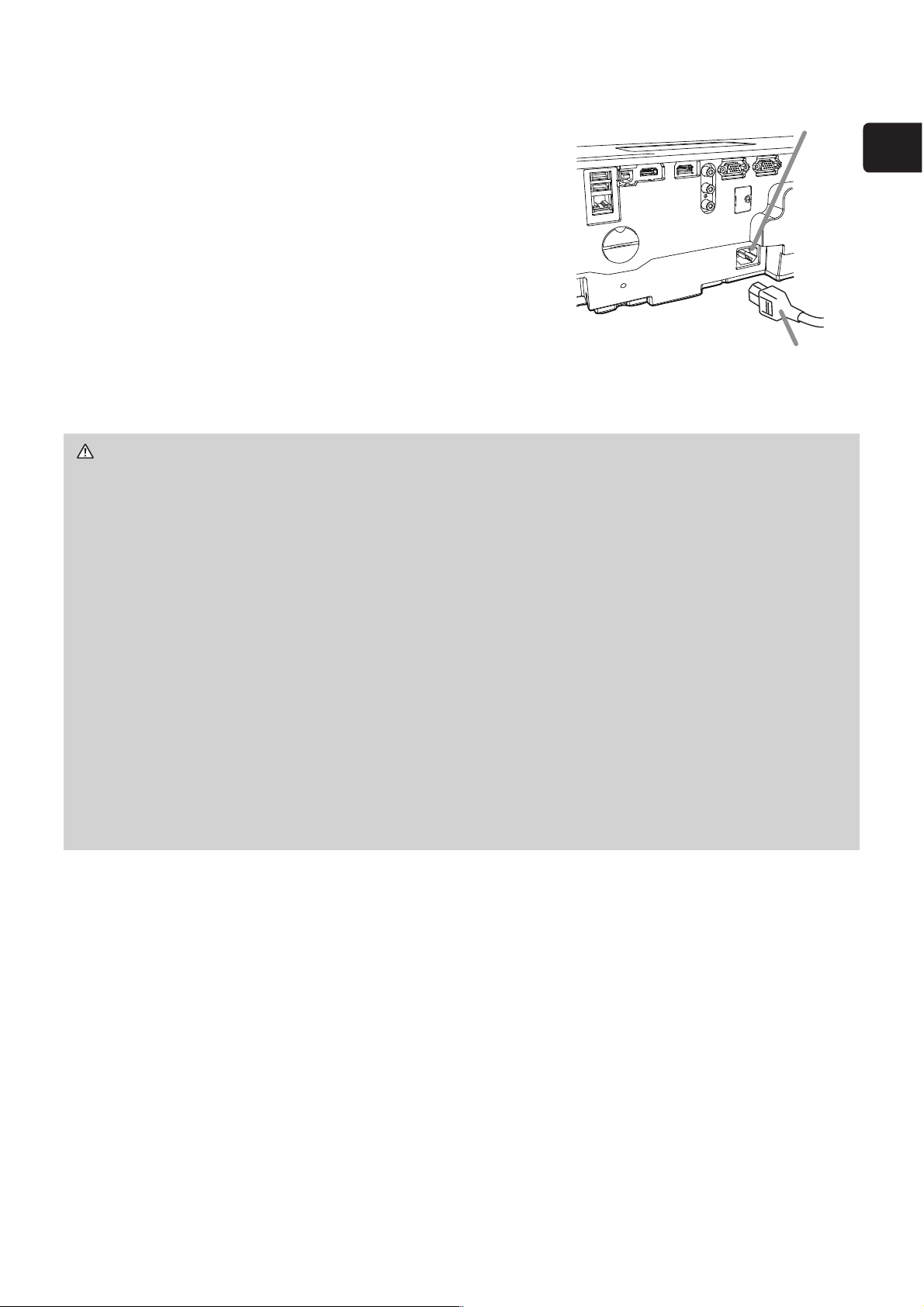
1.
Put the connector of the power cord into the
AC (AC inlet) of the projector.
2.
)LUPO\SOXJWKHSRZHUFRUG¶VSOXJLQWRWKH
outlet. In a couple of seconds after the power
supply connection, the POWER/STATUS1
indicator will light up in steady orange.
Please remember that when the DIRECT POWER ON
function is activated, the connection of the power
supply
makes the projector turn on. When the
AUTO POWER ON function is activated and the
projector is receiving an input signal, it is turned on by
connecting to the power supply.
WARNING ŹPlease use extra caution when connecting the power cord, as
LQFRUUHFWRUIDXOW\FRQQHFWLRQVPD\UHVXOWLQ¿UHDQGRUHOHFWULFDOVKRFN
• Do not touch the power cord with a wet hand.
• Only use the power cord that came with the projector. If it is damaged, consult
your dealer to get a new one. Never modify the power cord.
• Only plug the power cord into an outlet whose voltage is matched to the power
cord. The power outlet should be close to the projector and easily accessible.
Unplug the power cord for complete disconnection.
• Do not distribute the power supply to multiple devices. Doing so may overload
WKHRXWOHWDQGFRQQHFWRUVORRVHQWKHFRQQHFWLRQRUUHVXOWLQ¿UHHOHFWULFVKRFN
or other accidents.
• Do not press the main body of projector on the power cord.
• Connect the ground terminal for the AC inlet of this unit to the ground terminal
of the building using an appropriate power cord (bundled).
NOTICE
ŹThis product is also designed for IT power systems with a phase-
to-phase voltage of 220 to 240 V.
Power cord
AC
10
Preparing for the remote control
Please insert the batteries into the remote control before using it. If the remote
control starts to malfunction, try to replace the batteries. If you will not use the
remote control for long period, remove the batteries from the remote control and
store them in a safe place.
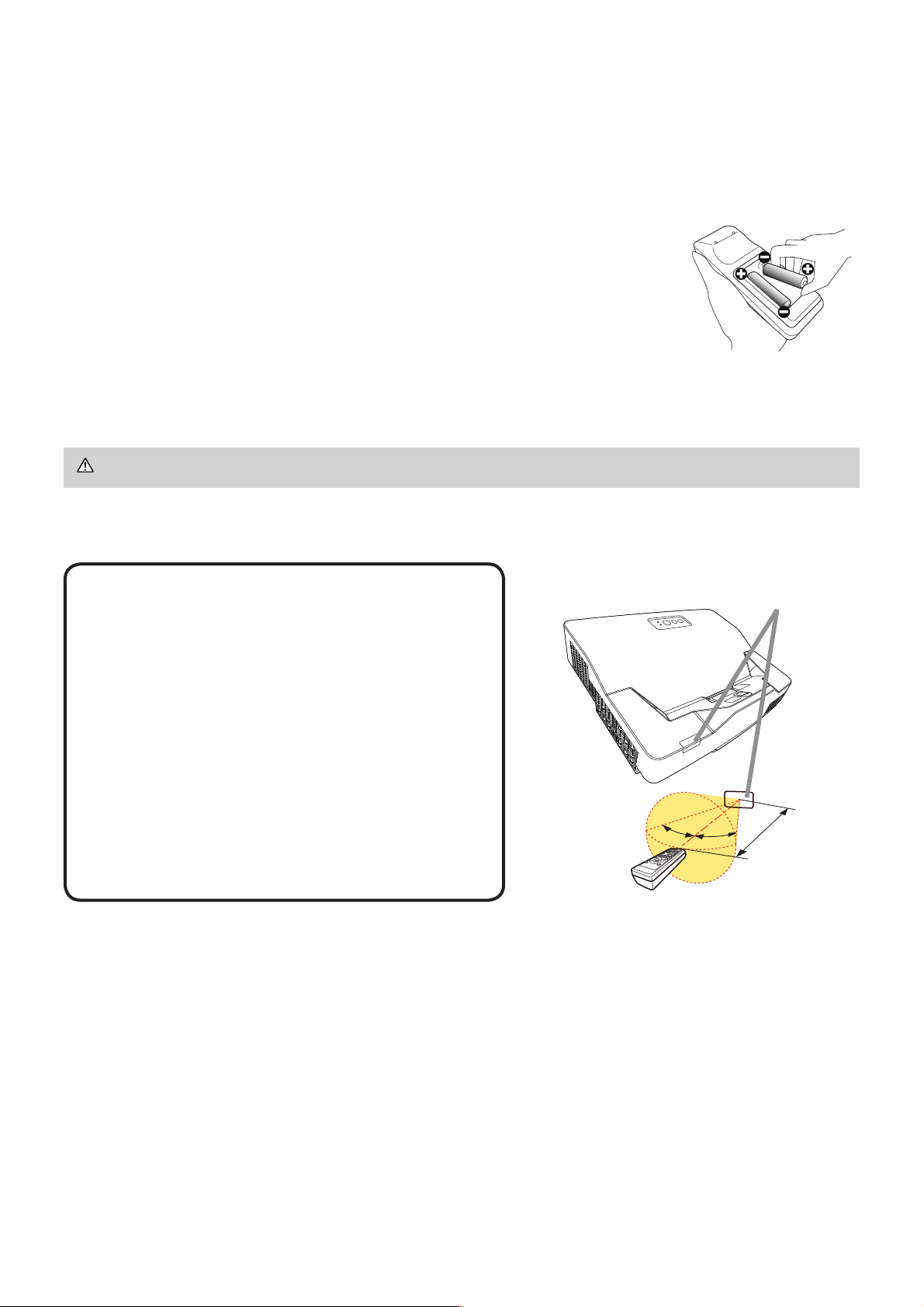
1.
Remove the battery cover.
2.
Align and insert the two AA batteries (Use the appropriate
AA carbon-zinc or alkaline batteries (non-rechargeable) in
accordance with laws and regulations.) according to their
plus and minus terminals as indicated in the remote control.
3.
Put the battery cover back to the former state.
• Try changing the batteries when the remote
control malfunctions.
• This remote control works with the remote
sensors on the projector using infrared light
(Class 1 LED). The active sensor senses
the remote control signal assigned within 60
degrees to right and left, and within 3 meters.
)RUGHWDLOVVHHWKH"Operating Guide".
(
1)
• Prevent the remote sensors from being hit by
a strong ray. It may cause malfunction of the
projector and remote control.
NOTE
WARNING Ź)RUSUHFDXWLRQVRQEDWWHU\KDQGOLQJUHIHUWRWKHQH[WSDJH
Remote sensor
3m
(approx.)
30°
30°
11
(1*/,6+
WARNING ŹAlways handle the batteries with care and use them only as
directed. Improper use may result in battery explosion, cracking or leakage,
ZKLFKFRXOGUHVXOWLQ¿UHLQMXU\DQGRUSROOXWLRQRIWKHVXUURXQGLQJHQYLURQPHQW
%HVXUHWRXVHRQO\WKHEDWWHULHVVSHFL¿HG'RQRWXVHEDWWHULHVRIGLIIHUHQW
types at the same time. Do not mix a new battery with used one.
•
Make sure the plus and minus terminals are correctly aligned when loading a battery.
• Keep a battery away from children and pets.
• Do not recharge, short circuit, solder or disassemble a battery.
•
'RQRWSODFHDEDWWHU\LQD¿UHRUZDWHU.HHSEDWWHULHVLQDGDUNFRRODQGGU\SODFH
•
If you observe battery leakage, wipe out the leakage and then replace a battery.
If the leakage adheres to your body or clothes, rinse well with water immediately.
•
Obey the local laws on disposing the battery.
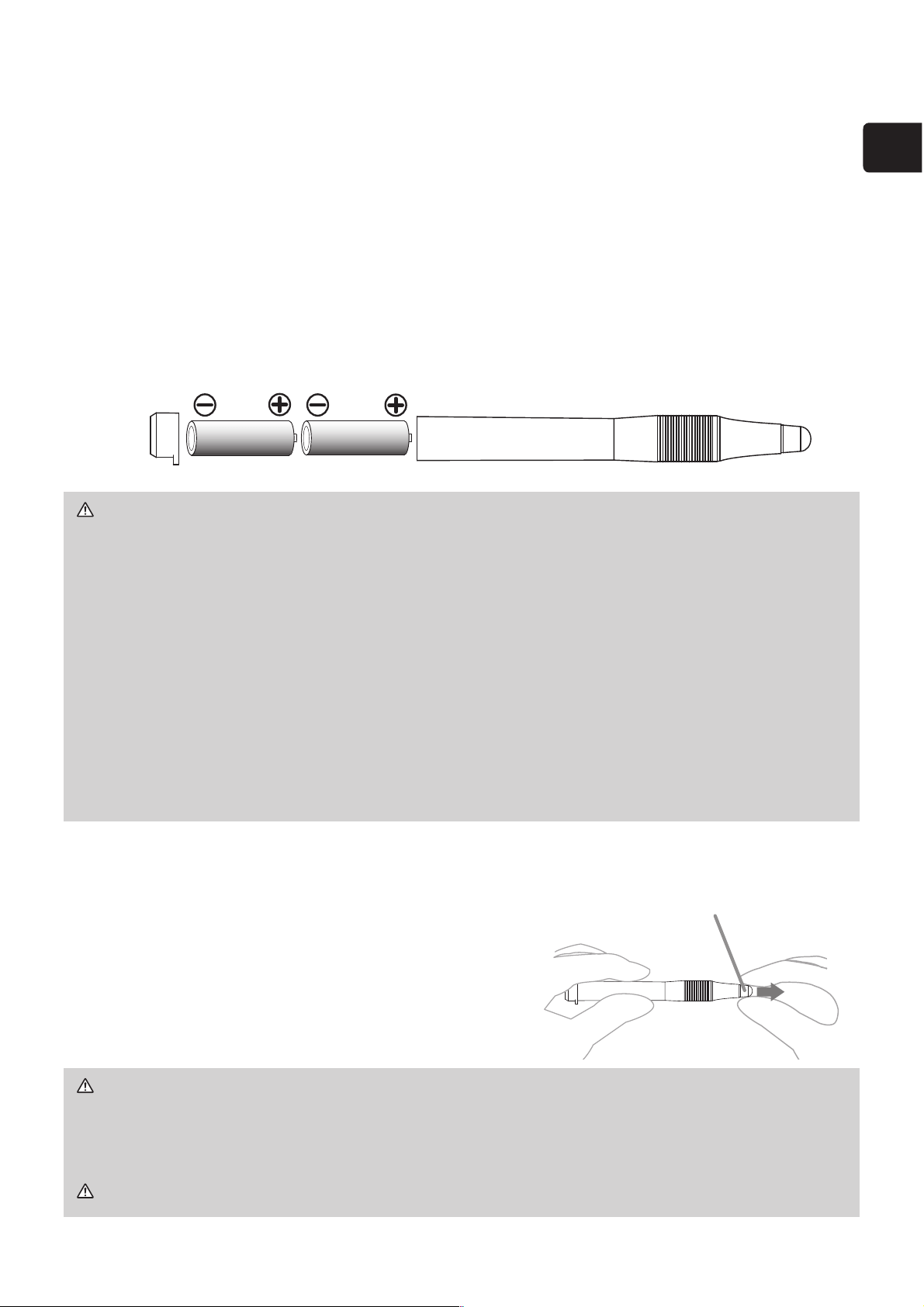
Preparing for the Interactive pen
Installing the battery
1.
Turn the battery cover of the pen to the left to open it.
2.
As illustrated in the diagram, insert the AAA battery into the battery cover with
the - end facing the front.
(Use the appropriate AAA alkaline batteries (non-rechargeable) in accordance
with laws and regulations.)
3.
Attach the battery cover by turning it to the right until it is completely closed.
• Do not hold a battery with tweezers or the like.
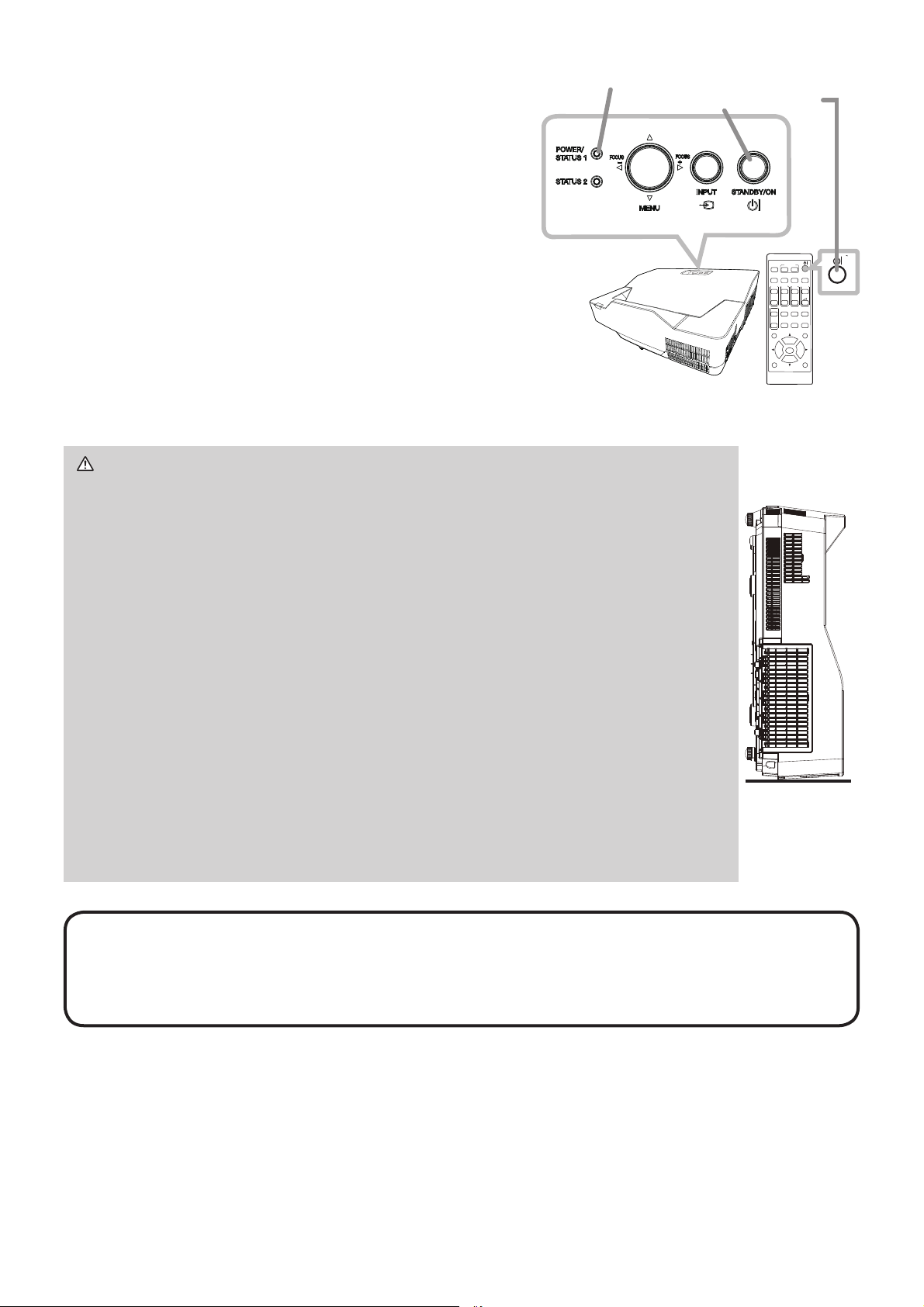
Exchanging the tip of the pen
When the tip of the pen is shortened due to wearing,
exchange it according to the following procedure.
1.
Remove the tip of the pen referring to
the illustration.
2.
)LWDQHZWLSLQWRWKHSODFHDQGSXVKLW
so that it clicks.
WARNING Ź.HHSWKHWLSRIWKHSHQDZD\IURPFKLOGUHQDQGSHWV([HUFLVH
care to prevent them from swallowing the tip of the pen or the pack of spare
accidentally. If swallowed consult a physician immediately for emergency
treatment.
CAUTION Ź'RQRWGURSWKHSHQRUPLVKDQGOHLW
The tip of
the pen
12
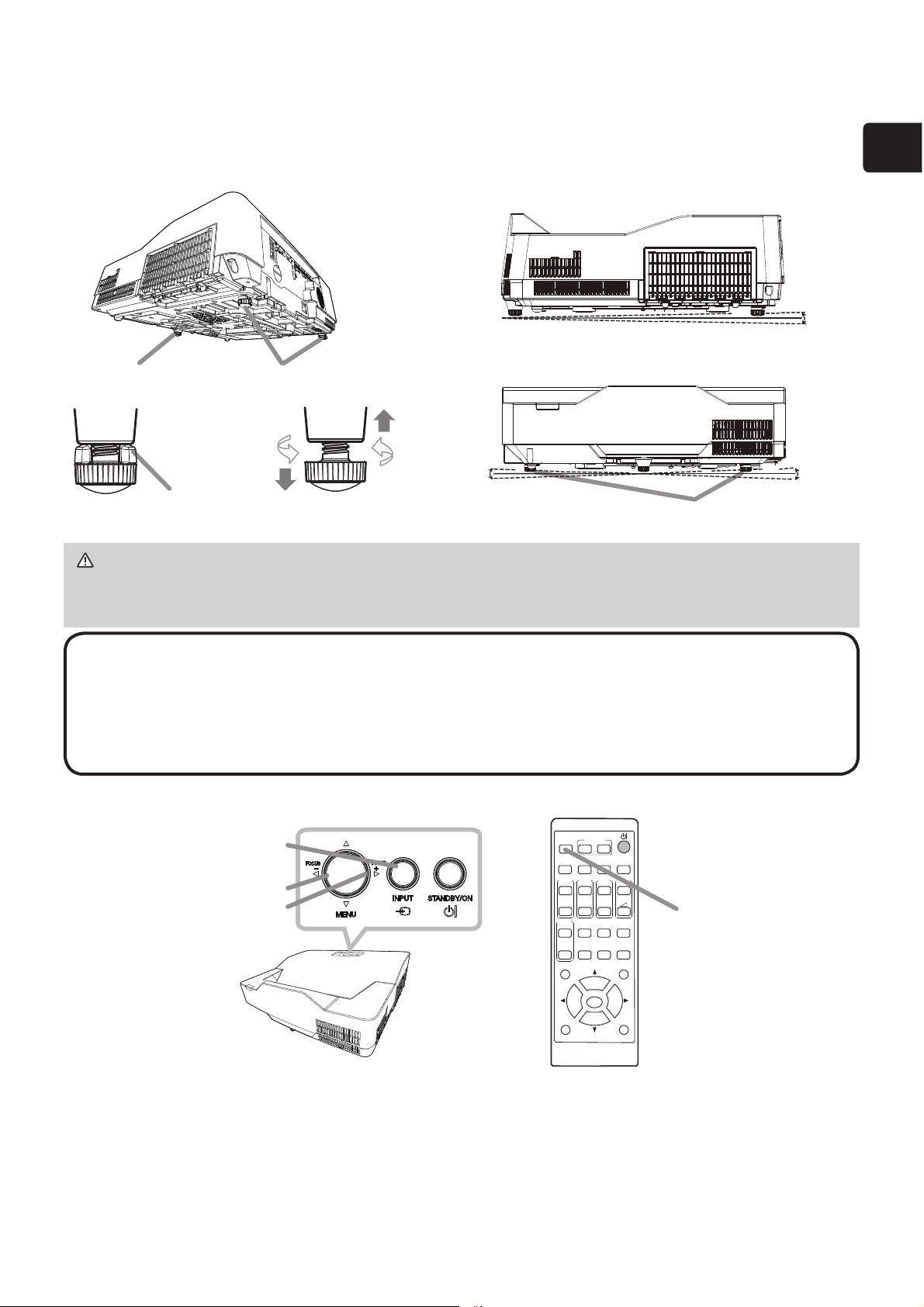
Turning on the power
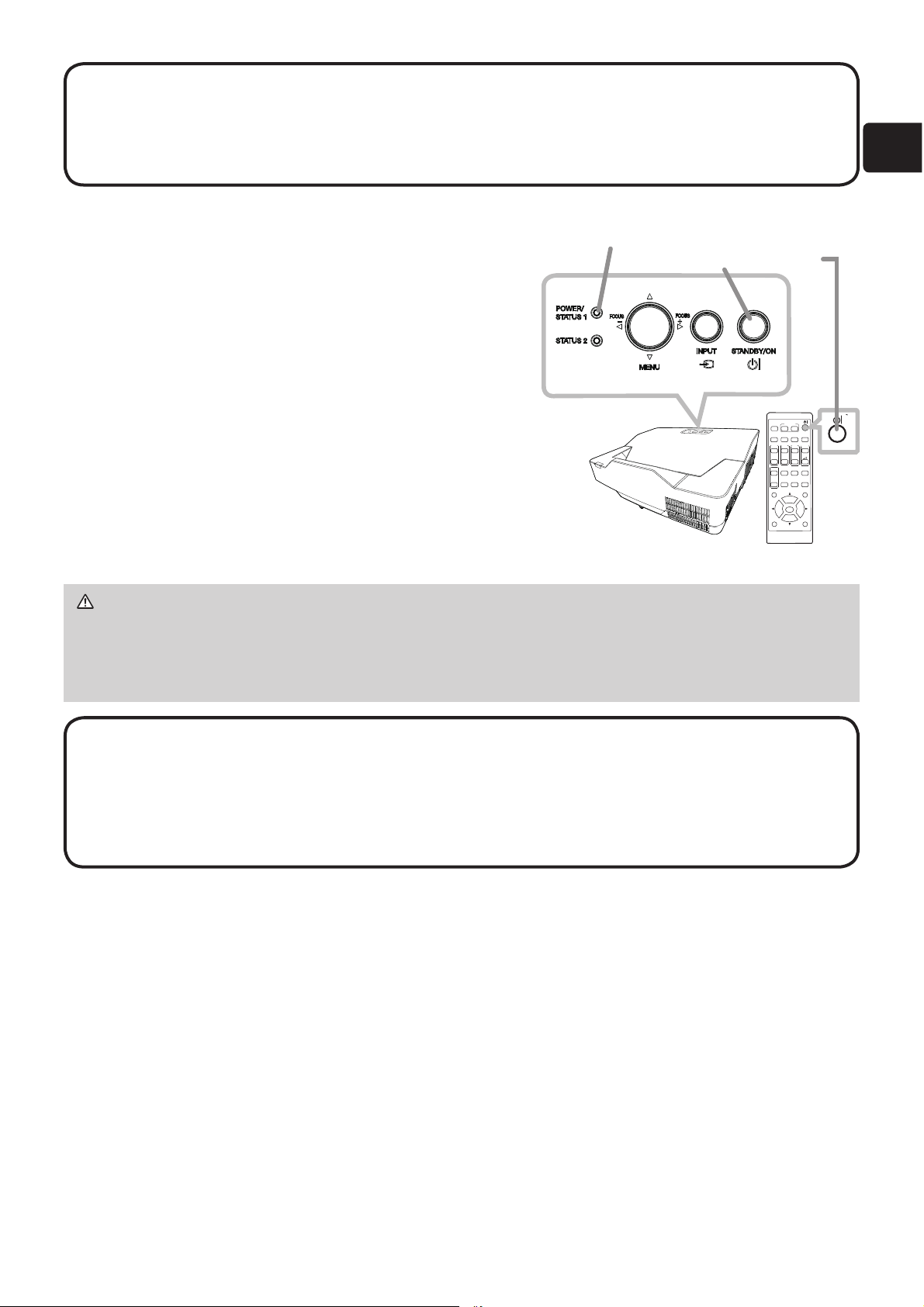
1.
0DNHVXUHWKDWWKHSRZHUFRUGLV¿UPO\
and correctly connected to the projector
and the outlet.
2.
Make sure that the POWER/STATUS1
indicator is steady orange.
3.
Press the STANDBY/ON button on the
projector or the remote control.
The projection light source will light up,
and the
POWER/STATUS1
indicator will begin
blinking in green.
When the power is completely on, the
indicator will stop blinking and light in steady green.
WARNING ŹNever look into the projection window while the
projection light source is on, since the projection ray may cause a
trouble on your eyes.
Ź'RQRWSODFHWKHSURMHFWRUYHUWLFDOO\DVVKRZQLQWKH¿JXUHRQWKH
right. It could cause malfunction or injury. If you install the projector
vertically on a table or desk, be sure to use the designated optional
accessories.
Ź7KHSURMHFWLRQZLQGRZRIWKLVPDFKLQHLVPDGHRIJODVV,WFDQ
be damaged by excessive force or an impact. Read the following
important warnings carefully, and follow them for your own safety.
• Do not apply excessive force on or allow impact to the projection
window.
• Keep the projector out of the reach of children.
• If the projection window is broken, the projected image will be
distorted. Never touch a broken projection window, and contact your
dealer.
NOTE • Please power on the projector prior to the connected devices.
• The projector has the DIRECT POWER ON
function, which can make the
SURMHFWRUDXWRPDWLFDOO\WXUQRQ)RUPRUHLQIRUPDWLRQVHHWKH³2SHUDWLQJ
Guide”.
(
1)
ASPECT
BLANK
ESC MENU
RESET
AUTO
PAGE
DOWN
ON
OFF
FREEZE
UP
ENTER
FOCUS
ZOOM
INPUT
INTERACTIVE
MYBUTTON
PbyP
MAGNIFY
VOLUME
GEOMETRY PICTURE MUTE
NETWORK
OSD MSG
POWER/STATUS1 indicator
STANDBY/ON button
13
ENGLISH
Operation
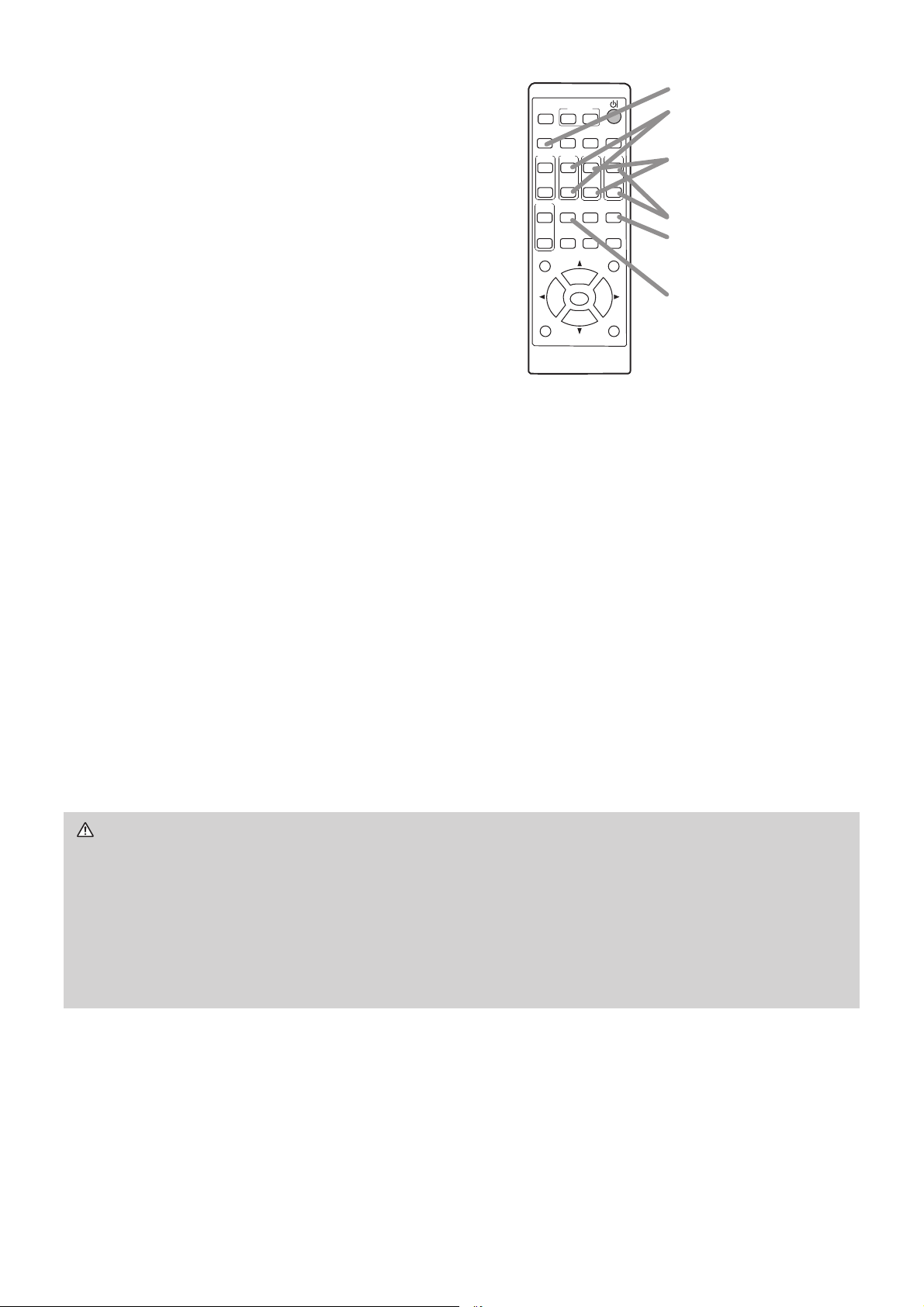
Adjusting the projector's elevator
The projector has 2 Rear feet for adjusting the horizontal position and inclination.
You can use the projector as it is with attached Spacers of Rear feet. You can make
more precise adjustments by detaching the spacers and turning the Rear feet.
Displaying and switching the image
Press the INPUT button on the projector or the remote control. Select a desirable
input referring to the displayed input list.
NOTE • The adjustment angle can be adjusted up to plus or minus 1° each
of foot.
• You can attach the spacers to set the projector back to the factory default after
adjusting the foot. If you install the projector in a different place in the future, it is
recommended to keep the spacers and reuse them.
WARNING Ź.HHSWKHVSDFHUVDZD\IURPFKLOGUHQDQGSHWV%HFDUHIXOQRW
to let them swallow the spacers. If swallowed, consult a physician immediately
for emergency treatment.
ASPECT
BLANK
ESC MENU
RESET
AUTO
PAGE
DOWN
ON
OFF
FREEZE
UP
ENTER
FOCUS
ZOOM
INPUT
INTERACTIVE
MYBUTTON
PbyP
MAGNIFY
VOLUME
GEOMETRY PICTURE MUTE
NETWORK
OSD MSG
INPUT button
INPUT button
FOCUS - button
FOCUS + button
Rear foot
-1~1°
-1~1°
Rear foot
Spacer
)URQWIRRW
(continued on next page)
14
WARNING Ź,I\RXZLVKWRKDYHDEODQNVFUHHQZKLOHWKHOLJKWVRXUFHLVRQ
XVHWKH%/$1.IXQFWLRQ
(see the Operating Guide). (
1)
Any other method of blocking the projection light, such as attaching something
to the projection window or placing something in front of the projection window,
may cause the damage to the projector.
%ORFNLQJWKHEHDPE\VRPHWKLQJFDXVHVKLJKWHPSHUDWXUHDQGFRXOGUHVXOWLQ
¿UHRUVPRNH
Focusing
Use the FOCUS + and FOCUS - buttons on
the projector or remote control to adjust the
screen focus.
Selecting an aspect ratio
Each time you press the ASPECT button on
the remote control, it switches the aspect
ratio of the image in turn.
Zooming
Use the ZOOM + and ZOOM - buttons
on the remote control to adjust the screen size.
Correcting distortion
Press the
GEOMETRY
button on the remote control. A dialog will appear on the
screen to aid you in correcting the distortion.
8VHWKHŸźFXUVRUEXWWRQVWRVHOHFW KEYSTONE or
PE5)(&7),7
operation,
DQGSUHVVWKHŹEXWWRQWRSHUIRUPWKHIROORZLQJ
KEYSTONE displays a dialog for keystone correction.
3(5)(&7),7
displays a dialog for adjusting the shape of the projected image in
each of the corners and sides.
Use the cursor buttons according to the dialog, checking the image.
Press the GEOMETRY button again to finish this operation.
Adjusting the volume
Use the VOLUME +- buttons to adjust the volume. To turn off the sound, press
the MUTE button on the remote control.
ASPECT
BLANK
ESC MENU
RESET
AUTO
PAGE
DOWN
ON
OFF
FREEZE
UP
ENTER
FOCUS
ZOOM
INPUT
INTERACTIVE
MYBUTTON
PbyP
MAGNIFY
VOLUME
GEOMETRY PICTURE MUTE
NETWORK
OSD MSG
ASPECT button
FOCUS +/- button
ZOOM +/- button
VOLUME +/- button
MUTE button
GEOMETRY button
(continued on next page)
15
ENGLISH
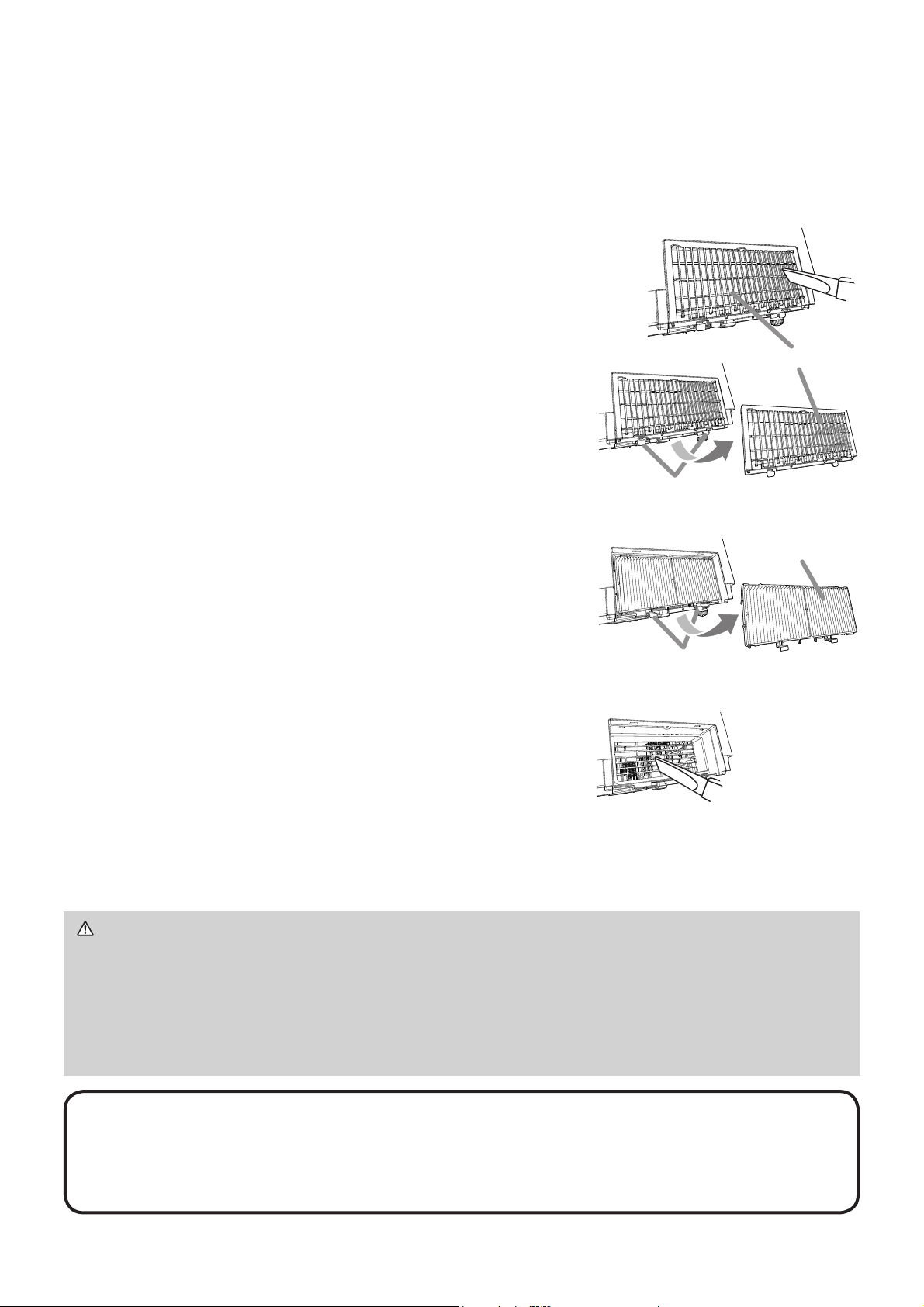
Turning off the power
1.
Press the STANDBY/ON button on the
projector or the remote control.
The message “Power off?” will appear on
the screen for about 5 seconds.
2.
Press the STANDBY/ON button again while
the message appears.
The light source will go off, and the POWER/
STATUS1 indicator will begin blinking in
orange. Then the POWER/STATUS1 indicator
will stop blinking and light in steady orange
when the light source cooling is completed.
WARNING Ź'RQRWWRXFKDURXQGWKHH[KDXVWYHQWVGXULQJXVHRUMXVWDIWHU
use, since it is too hot.
Ź8QSOXJWKHSRZHUFRUGIRUFRPSOHWHGLVFRQQHFWLRQ7KHSRZHURXWOHWVKRXOG
be close to the projector and easily accessible.
NOTE • Please power off the projector after any connected devices are
powered off.
7KLVSURMHFWRUKDVWKH$87232:(52))IXQFWLRQWKDWFDQPDNHWKH
SURMHFWRUWXUQRIIDXWRPDWLFDOO\)RUPRUHLQIRUPDWLRQVHHWKH³2SHUDWLQJ*XLGH´
(
1)
NOTE • The ASPECT button does not work when no proper signal is input.
)RUGHWDLOVVHHWKH2SHUDWLQJ*XLGH
(
1)
7KHUHPD\EHVRPHQRLVHDQGRUWKHVFUHHQPD\ÀLFNHUIRUDPRPHQWZKHQ
an operation is made. This is not a malfunction.
ASPECT
BLANK
ESC MENU
RESET
AUTO
PAGE
DOWN
ON
OFF
FREEZE
UP
ENTER
FOCUS
ZOOM
INPUT
INTERACTIVE
MYBUTTON
PbyP
MAGNIFY
VOLUME
GEOMETRY PICTURE MUTE
NETWORK
OSD MSG
POWER/STATUS1 indicator
STANDBY/ON button
16
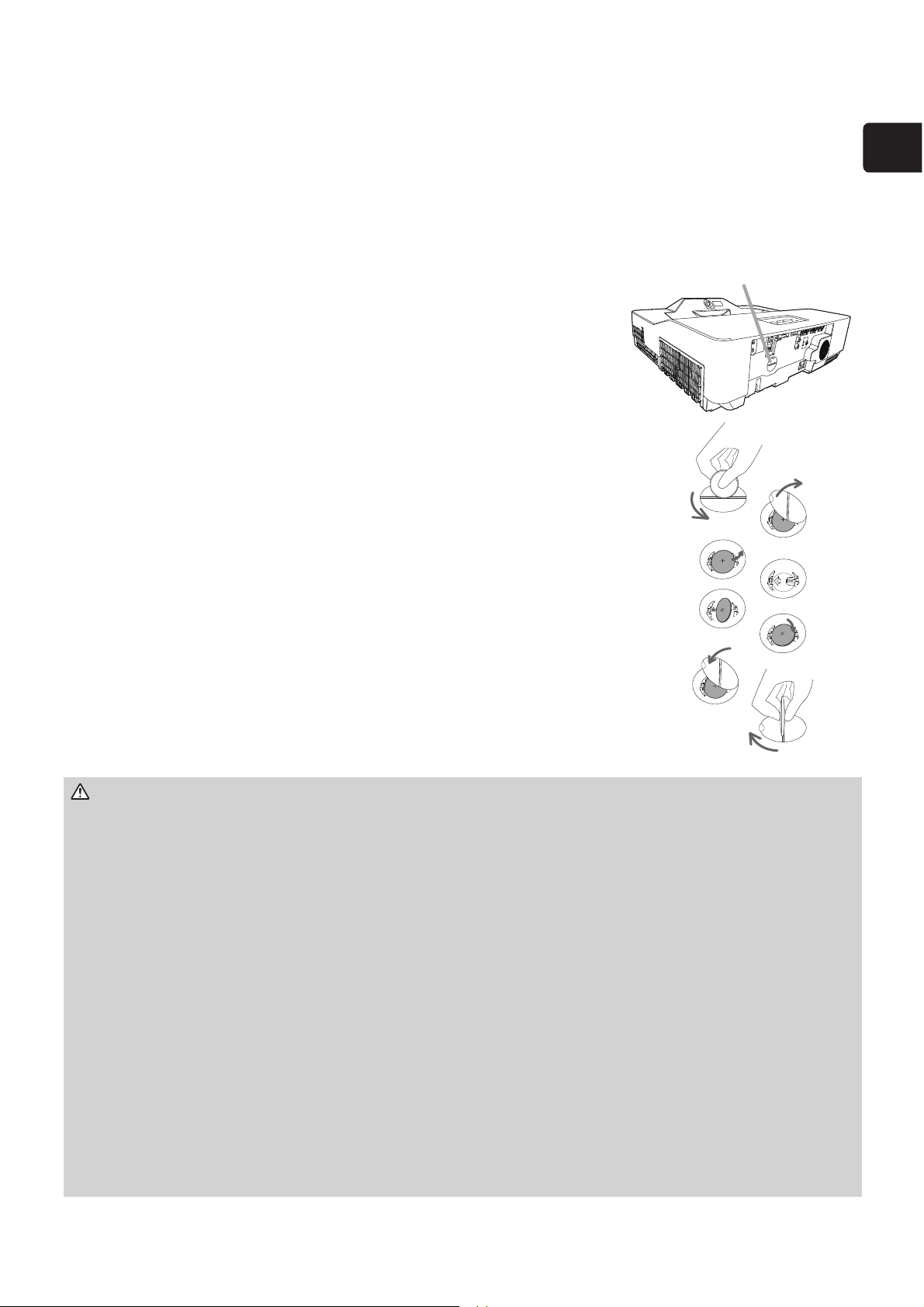
3OHDVHFKHFNDQGFOHDQWKHDLU¿OWHUSHULRGLFDOO\:KHQWKHLQGLFDWRUVRUDPHVVDJH
SURPSWV\RXWRFOHDQWKHDLU¿OWHUFRPSO\ZLWKLWDVVRRQDVSRVVLEOH,QDGGLWLRQWKHH[WUD
DLU¿OWHULVDWWDFKHGWRLQQHUVLGHRIWKH¿OWHUFRYHU,IRQHRIWKH¿OWHUVLVGDPDJHGRUKHDYLO\
VRLOHGUHSODFHZKROH¿OWHUVHWZLWKDQHZRQH5HTXHVWIRUD¿OWHUVHWZLWKWKHIROORZLQJ
type number from your dealer when purchasing a new one.
Type number : UX43251)ilter set)
1.
Turn the projector off, and unplug the power cord. Allow
WKHSURMHFWRUWRVXI¿FLHQWO\FRROGRZQ
2.
8VHDYDFXXPFOHDQHURQDQGDURXQGWKH¿OWHUFRYHU
3.
3LFNDQGSXOOXSWKH¿OWHUFRYHUNQREVWRWDNHLWRII
4.
Press up slightly the bottom side knobs to unlock the
ERWWRPVLGHRIWKH¿OWHUXQLW7DNHWKH¿OWHUXQLWRII
5.
8VHDYDFXXPFOHDQHUIRUWKH¿OWHUYHQWRIWKH
SURMHFWRUDQGWKHRXWHUVLGHRIWKH¿OWHUXQLW
6.
Use a vacuum cleaner for the inner side of each
SDUWRIWKH¿OWHUXQLWWRFOHDQWKHPXS,IWKH¿OWHUV
are damaged or heavily soiled, replace them with the
new ones.
7.
3XWWKH¿OWHUXQLWEDFNLQDQXSULJKWVWDWHLQWRWKH
projector.
8.
3XWWKH¿OWHUFRYHUEDFNLQWRWKHSODFH
9.
7XUQWKHSURMHFWRURQDQGUHVHWWKH¿OWHUWLPHXVLQJWKH
),/7(57,0(LWHPLQWKH($6<0(18.
(1) Press the MENU button to display a menu.
(2) 3RLQWDWWKH),/7(57,0(XVLQJWKHźŸEXWWRQWKHQ
SUHVVWKHŹEXWWRQ$GLDORJZLOODSSHDU
(3) 3UHVVWKHŹEXWWRQWRVHOHFW³2.´RQWKHGLDORJ,WSHUIRUPVUHVHWWLQJWKH¿OWHUWLPH
&OHDQLQJDQGUHSODFLQJWKHDLUÀOWHU
WARNING Ź%HIRUHWDNLQJFDUHRIWKHDLU¿OWHUPDNHVXUHWKHSRZHUFRUG
LVQRWSOXJJHGLQWKHQDOORZWKHSURMHFWRUWRFRROVXI¿FLHQWO\
Ź
8VHRQO\WKHDLU¿OWHURIWKHVSHFL¿HGW\SH'RQRWXVHWKHSURMHFWRUZLWKRXWWKH
DLU¿OWHURUWKH¿OWHUFRYHU,WFRXOGUHVXOWLQD¿UHRUPDOIXQFWLRQWRWKHSURMHFWRU
.
Ź
&OHDQWKHDLU¿OWHUSHULRGLFDOO\,IWKHDLU¿OWHUEHFRPHVFORJJHGE\GXVWRUWKHOLNH
LQWHUQDOWHPSHUDWXUHVULVHDQGFRXOGFDXVHD¿UHDEXUQRUPDOIXQFWLRQWRWKHSURMHFWRU
NOTE3OHDVHUHVHWWKH¿OWHUWLPHRQO\ZKHQ\RXKDYHFOHDQHGRUUHSODFHG
WKHDLU¿OWHUIRUDVXLWDEOHLQGLFDWLRQDERXWWKHDLU¿OWHU
7KHSURMHFWRUPD\GLVSOD\WKHPHVVDJHVXFKDVWKH³&+(&.7+($,5)/2:´
or turn off the projector, to prevent the internal heat level rising.
6
3
4,5
)LOWHUXQLW
)LOWHUFRYHUNQREV
)LOWHUFRYHU
)LOWHUXQLWNQREV
17
(1*/,6+
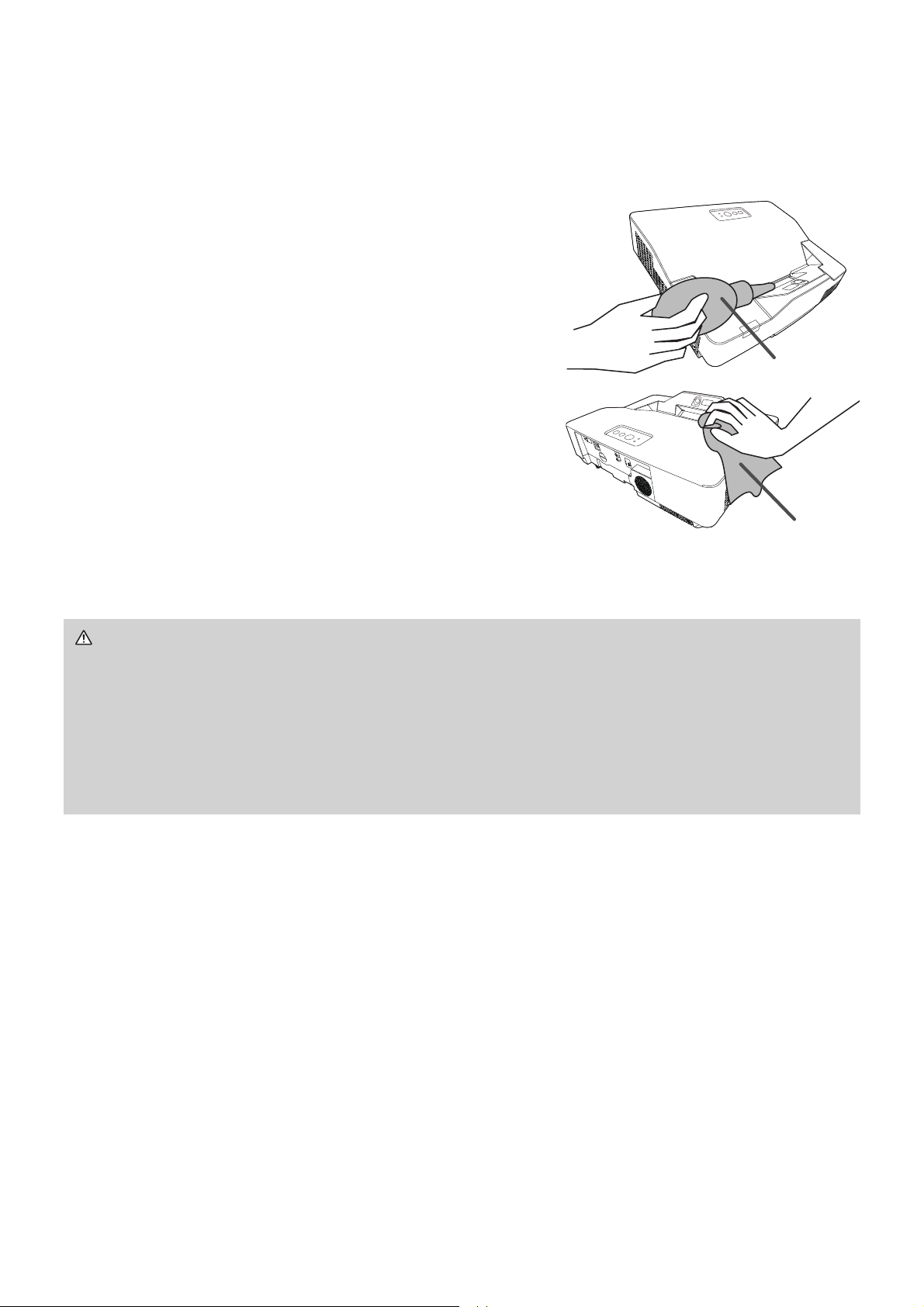
Installing or replacing the internal clock battery
This product has an internal clock. When you use the function that requires the
internal clock (
"Event Scheduling" in the Network Guide), install a new battery.
If the internal clock starts to malfunction, try to replace the battery.
Use the following type of battery, and follow the steps below.
MAXELL, Part No. CR2032 or CR2032H
1.
Turn the projector off, and unplug the power cord.
$OORZWKHSURMHFWRUWRFRROVXI¿FLHQWO\
2.
Turn the battery cover fully counterclockwise using a
coin or the like, and pick the cover up to remove it.
Ź$OZD\VKDQGOHWKHEDWWHULHVZLWKFDUHDQGXVHWKHPRQO\DV
GLUHFWHG%DWWHU\PD\H[SORGHLIPLVWUHDWHG'RQRWUHFKDUJHGLVDVVHPEOHRU
GLVSRVHRILQ¿UH
And also improper use may result in cracking or leakage, which could result in
¿UHLQMXU\DQGRUSROOXWLRQRIWKHVXUURXQGLQJHQYLURQPHQW
%HVXUHWRXVHRQO\WKHVSHFL¿HGEDWWHULHV
• Make sure the plus and minus terminals are correctly aligned when loading a
battery.
• Keep a battery away from children and pets. If swallowed, consult a physician
immediately for emergency treatment.
• Do not short circuit or solder a battery.
'RQRWDOORZDEDWWHU\LQD¿UHRUZDWHU.HHSEDWWHULHVLQDGDUNFRRODQGGU\
place.
• If you observe battery leakage, wipe out the leakage and then replace a battery.
If theleakage adheres to your body or clothes, rinse well with water immediately.
• Obey the local laws on disposing a battery.
WARNING
3.
4.
3U\XSWKHROGEDWWHU\XVLQJDÀDWKHDGVFUHZGULYHU
or the like to take it out. Do not use any metal tools.
:KLOHSU\LQJLWXSSXWD¿QJHUOLJKWO\RQWKHEDWWHU\
since it may pop out of the holder.
5.
Install a new battery in place.
Slide the battery in under the plastic claw, and push
it into the holder until it clicks.
Replace the battery cover in place, then turn it
clockwise WR¿[E\XVLQJDFRLQRUWKHOLNH
90°
90°
%DWWHU\&RYHU
18
Caring for the projection window and camera lens
,IWKHSURMHFWLRQZLQGRZLVÀDZHGVRLOHGRUIRJJHGLWFRXOGFDXVHGHWHULRUDWLRQ
of display quality. Please take care of the projection window, being cautious of
handling.
Turn the projector off and unplug the power
cord from the power outlet. And cool the
projector down by leaving it for a while.
Use an air blower to blow away dust on the
projection window and camera lens before
wiping. Wipe softly the projection window and
camera lens with a commercially available
damped soft cleaning cloth for lens, being
careful not to give any damage on the
projection window and camera lens.
Ź%HIRUHFDULQJIRUWKH
projection window and camera lens
, turn
WKHSURMHFWRURIIDQGXQSOXJWKHSRZHUFRUGWKHQFRROWKHSURMHFWRUVXI¿FLHQWO\
Ź'RQRWXVHDYDFXXPFOHDQHUWRFOHDQWKH
projection window and camera lens
,
since it might give some damage.
Ź'RQRWXVHFOHDQHUVRUFKHPLFDOVRWKHUWKDQWKRVHVSHFL¿HGLQWKLVPDQXDO
Pay special attention to the
projection window and camera lens
as these
materials could cause serious damage.
WARNING
1.
2.
%ORZHU
Cleaning cloth
19
ENGLISH
6SHFLÀFDWLRQV
Item 6SHFL¿FDWLRQ
Product name Liquid crystal projector
Liquid Crystal Panel
1,024,000 pixels (1280 horizontal x 800 vertical)
Light Source Laser Diode
Speaker 16W
Power supply
M P-TW3001:
$&9$$&9$
M P-TW4001:
$&9$$&9$
Power consumption
M P-TW3001:
AC 100-120V:300 W, AC 220-240V:300W
M P-TW4001:
AC 100-120V:380 W, AC 220-240V:380W
Temperature range
0 ~ 40°C (Operating)
35 ~ 40°C (The brightness of the light source is reduced automatically.)
Size
:[+['PP
:[+['PP1RWLQFOXGLQJSURWUXGLQJSDUWV
5HIHUWR¿JXUHF-7 at the back of this manual.
Weight (mass)
MP-TW3001: approx. 7.6 kg
MP-TW4001: approx. 7.8 kg
Ports
Computer input port
COMPUTER IN1
....................... D-sub 15 pin mini x1
Computer input/output port
&20387(5,1021,725287
....................... D-sub 15 pin mini x1
Video input port
VIDEO ................................. RCA x1
HDMI input port
+'0,+'0,FRQQHFWRUî
+'0,0+/
+'0,0+/FRQQHFWRUî
Audio input/output port
AUDIO IN1 ................ Stereo mini x1
AUDIO IN2 ................ Stereo mini x1
AUDIO IN3 (R, L) ................. RCA x2
AUDIO OUT .............. Stereo mini x1
Others
86%7<3($......................86%$[
86%7<3(% .....................86%%[
CONTROL ................. D-sub 9 pin x1
LAN ..................................... RJ45 x1
Optional parts
Filter set: UX43251
Mounting accessary:
+$6%UDFNHWIRUFHLOLQJPRXQW
+$6+)L[LQJadapter for high ceilings)
+$6:0:$//02817
USB wireless adapter86%:/*
Interactive pen: I-PEN4
Finger Touch Unit:FT-01B
)RUPRUHLQIRUPDWLRQSOHDVHFRQVXOW\RXUGHDOHU

20
Troubleshooting - Warranty and after-service
If an abnormal operation (such as smoke, strange odor or excessive sound)
should occur, stop using the projector immediately.
2WKHUZLVHLIDSUREOHPRFFXUVZLWKWKHSURMHFWRU¿UVWUHIHUWR³7URXEOHVKRRWLQJ´RI
“Operating Guide” and “Network Guide”, and run through the suggested checks.
If this does not resolve the problem, please consult your dealer or service
company. They will tell you what warranty condition is applied.
&KHFNRXUZHEVLWHZKHUH\RXPD\¿QGWKHODWHVWLQIRUPDWLRQIRUWKLVSURGXFW
NOTE • The information in this manual is subject to change without notice.
• The illustrations in this manual are for illustrative purposes. They may differ
slightly from your projector.
• The manufacturer assumes no responsibility for any errors that may appear in
this manual.
• The reproduction, transfer or copy of all or any part of this document is not
permitted without express written consent.
Manufacturing year and month
The manufacturing year and month of this projector is indicated as follows in the
serial number of the rating label on the projector.
Example:
F 8 C x 0 0 0 0 1
0DQXIDFWXULQJPRQWK$ -DQXDU\% )HEUXDU\/ 'HFHPEHU
Manufacturing year: 8 = 2018, 9 = 2019, 0 = 2020, ...
21
ENGLISH
End User License Agreement for the Product Software
Software in the product consists of the plural number of independent software
PRGXOHVDQGWKHUHH[LVWRXUFRS\ULJKWDQGRUWKLUGSDUW\FRS\ULJKWVIRUHDFK
of such software modules. The product also uses software modules that we
KDYHGHYHORSHGDQGRUSURGXFHG$QGWKHUHH[LVWRXUFRS\ULJKWDQGLQWHOOHFWXDO
property for each of such software and related items including but not limited to
the software related documents.
These rights above are protected by copyright law and other applicable laws.
$QGWKHSURGXFWXVHVVRIWZDUHPRGXOHVOLFHQVHGDV)UHHZDUHXSRQ*18
*(1(5$/38%/,&/,&(16(9HUVLRQDQG*18/(66(5*(1(5$/38%/,&
/,&(16(9HUVLRQHVWDEOLVKHGE\)UHH6RIWZDUH)RXQGDWLRQ,QF86RU
license agreements for each software.
Check our website for license agreements for such software modules and other
software.
(
1)
Contact dealer in your region for inquiry regarding licensed software. Refer to
license agreements of each software on the web page for detail of the license
conditions and so on. (The original in Engl
ish is carried since the license
agreement is established by third party other than us.)
%HFDXVHWKHSURJUDPWKHVRIWZDUHPRGXOHLVOLFHQVHGIUHHRIFKDUJHWKH
program is provided "as is" without warranty of any kind, either expressed
or implied, to the extent permitted by applicable law. And we do not take any
responsibility or compensate for loss of any kind (including but not limited to loss
of data, loss of accuracy or loss of compatibility with interface between other
SURJUDPVE\WKHVRIWZDUHFRQFHUQHGDQGRUXVHRIWKHVRIWZDUHFRQFHUQHGWR
the extent permitted by applicable law.
Trademark acknowledgment
• +'0,WKH+'0,ORJRDQG+LJK'H¿QLWLRQ0XOWLPHGLD,QWHUIDFHDUHWUDGHPDUNVRU
UHJLVWHUHGWUDGHPDUNVRI+'0,/LFHQVLQJ//& in the United States and other countries.
• 0+/
®
WKH0+/ORJRDQG0RELOH+LJK'HILQLWLRQ/LQNDUHWUDGHPDUNVRUUHJLVWHUHG
WUDGHPDUNVRI0+///&LQWKH8QLWHG6WDWHVDQGRWKHUFRXQWULHV
6WDU%RDUG
®
LVDUHJLVWHUHGWUDGHPDUNRI6WDU%RDUG6ROXWLRQ/WGLQ-DSDQDQGRWKHU
countries.
• %OXUD\'LVF
TM
DQG%OXUD\
TM
DUHWUDGHPDUNVRI%OXUD\'LVF$VVRFLDWLRQ
All other trademarks are the properties of their respective owners.